4. SQL expressions
4.1. Introduction
In most SQL commands, it is possible to use an expression. Take, for example, the SELECT command:
SELECT expr1, expr2, ... from table WHERE expression |
SELECT selects the rows for which expression is true and displays the values of expr1, expr2, ... for each of them.
Examples
In this section, we will explain the concept of an expression. A basic expression is of the form:
operand1 operator operand2
or
function(parameters)
Example
In the expression GENRE = 'ROMAN'
- GENRE is operand1
- 'ROMAN' is operand2
- = is the operator
In the expression upper(genre)
- upper is a function
- 'genre' is a parameter of this function.
We will first cover expressions with operators, then we will present the functions available in Firebird.
4.2. Expressions with operators
We will classify expressions with operators according to the type of their operands:
- numeric
- string
- date
- Boolean or logical
4.2.1. Expressions with numeric operands
4.2.1.1. List of operators
Let number1, number2, and number3 be numbers. The following operators can be used:
Relational operators
: number1 is greater than number2 | |
: number1 is greater than or equal to number2 | |
: number1 is less than number2 | |
: number1 is less than or equal to number2 | |
: number1 is equal to number2 | |
: number1 is not equal to number2 | |
: same as | |
: number1 is in the range [number2, number3] | |
: number1 belongs to list of numbers | |
: number1 has no value | |
: number1 has a value |
Arithmetic operators
: addition | |
: subtraction | |
: multiplication | |
: division |
4.2.1.2. Relational operators
A relational expression expresses a relationship that is either true or false. The result of such an expression is therefore a Boolean or logical value.
Examples:
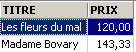
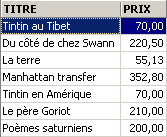
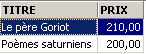
4.2.1.3. Arithmetic operators
We are familiar with arithmetic expressions. They express a calculation to be performed on numerical data. We have already encountered such expressions: suppose that the price stored in the records of the BIBLIO file is a pre-tax price. We want to display each title with its price including tax for a VAT rate of 18.6%:
If prices are to increase by 3%, the command will be
An expression may contain multiple arithmetic operators, as well as functions and parentheses. These elements are processed according to different priorities:
1 | <---- highest priority | |
2 | ||
3 | ||
4 | <---- lower priority |
When two operators of the same priority are present in an expression, the one on the far left is evaluated first.
Examples
The expression PRICE*RATE+TAXES will be evaluated as (PRICE*RATE)+TAXES. This is because the multiplication operator is used first. The expression PRICE*RATE/100 will be evaluated as (PRICE*RATE)/100.
4.2.2. Expressions with character operands
4.2.2.1. List of operators
The following operators can be used:
Let string1, string2, string3, and string pattern be
: string1 is greater than string2 | |
: string1 is greater than or equal to string2 | |
: string1 is less than string2 | |
: string1 is less than or equal to string2 | |
: string1 equals string2 | |
: string1 is not equal to string2 | |
: same | |
: string1 is in the range [string2, string3] | |
: string1 belongs to list of strings | |
: string1 has no value | |
: channel1 has a value | |
: string1 matches pattern |
Concatenation operator
string1 || string2 : string2 concatenated to string1
4.2.2.2. Relational operators
What does it mean to compare strings using operators such as <, <=, etc.?
Every character is encoded as an integer. When comparing two characters, their integer codes are compared. The encoding used follows the natural order of the dictionary:
Numbers come before letters, and uppercase letters before lowercase letters.
4.2.2.3. Comparing Two Strings
Consider the relation 'CAT' < 'DOG'. Is it true or false? To perform this comparison, the DBMS compares the two strings character by character based on their integer codes. As soon as two characters are found to be different, the string containing the smaller of the two is said to be smaller than the other string. In our example, 'CAT' is compared to 'DOG'. We get the following successive results:
After this last comparison, the string 'CAT' is declared to be shorter than the string 'DOG'. The relation 'CAT' < 'DOG' is therefore true.
Now let's compare 'CHAT' and 'chat'.
After this comparison, the relation 'CHAT' < 'chat' is declared true.
Examples
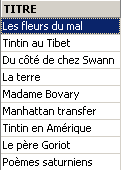
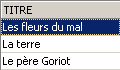
4.2.2.4. The LIKE operator
The LIKE operator is used as follows: string LIKE pattern
The condition is true if string matches pattern. The pattern is a string that may contain two wildcard characters:
which denotes any sequence of characters | |
which stands for any single character |
Examples
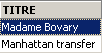

4.2.2.5. The concatenation operator
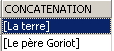
4.2.3. Expressions with date-type operands
Let date1, date2, and date3 be dates. The following operators can be used:
Relational operators
is true if date1 is earlier than date2 | |
is true if date1 is earlier than or equal to date2 | |
is true if date1 is later than date2 | |
is true if date1 is on or after date2 | |
is true if date1 and date2 are identical | |
is true if date1 and date2 are different. | |
same as | |
is true if date1 is between date2 and date3 | |
is true if date1 is in the list of dates | |
is true if date1 has no value | |
is true if date1 has a value | |
is true if date1 matches the pattern | |
Arithmetic operators
: number of days between date1 and date2 | |
: date2 such that date1 - date2 = number | |
: date2 such that date2 - date1 = number |
Examples
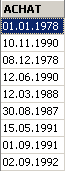

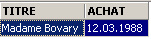
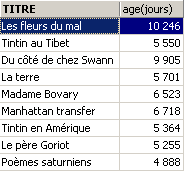
How old are the books in the library?
4.2.4. Expressions with Boolean operands
Recall that a Boolean or logical value has two possible values: true or false. The logical operand is often the result of a relational expression.
Let boolean1 and boolean2 be two booleans. There are three possible operators, which are, in order of precedence:
| is true if both boolean1 and boolean2 are true. |
| is true if either boolean1 or boolean2 is true. |
| has a value that is the inverse of the value of boolean1. |
Examples
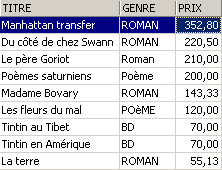
We are looking for books within a price range:

Reverse search:
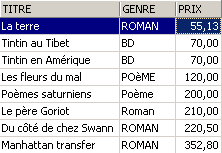
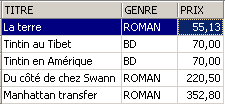
Be careful with operator precedence!
SQL> select titre,genre,prix from biblio
  where genre='ROMAN' and prix>200 or prix<100
  order by prix asc
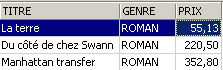
Use parentheses to control operator precedence:
SQL> select titre,genre,prix from biblio
  where genre='ROMAN' and (prix>200 or prix<100)
  order by prix asc
4.3. Firebird's predefined functions
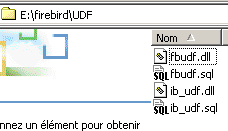
Firebird has predefined functions. They cannot be used immediately in SQL statements. You must first run the SQL script <firebird>\UDF\ib_udf.sql, where <firebird> refers to the installation directory of the Firebird DBMS:
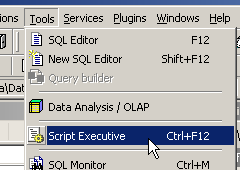
With IBExpert, we proceed as follows:
- we use the [Script Executive] tool accessed via the [Tools/Script Executive] option:
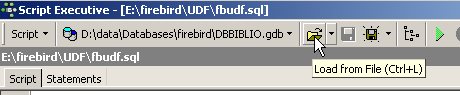
- Once the tool is open, we load the script <firebird>\UDF\ib_udf.sql:
- then we execute the script:
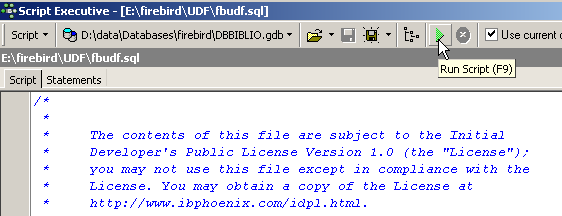
Once this is done, Firebird's predefined functions are available for the database you were connected to when the script was run. To see this, simply go to the database explorer and click on the [UDF] node for the database into which the functions were imported:
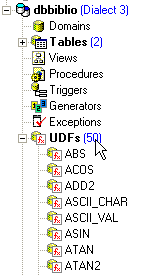
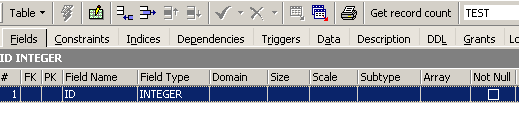
Above are the functions available to the database. To test them, it’s handy to have a one-row table. Let’s call it TEST:
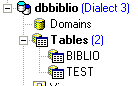
and define it as follows (right-click on Tables / New Table):
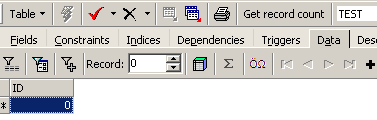
Let’s add a single row to this table:
Now let’s go to the SQL Editor (F12) and execute the following SQL statement:
which uses the predefined cos (cosine) function. The command above evaluates cos(0) for each row in the TEST table, so in fact for a single row. It therefore simply displays the value of cos(0):

UDFs (User-Defined Functions) are functions that users can create, and libraries of UDFs can be found on the web. Here, we describe only some of those available with the downloadable version of Firebird (2005). We classify them according to the predominant type of their parameters or according to their role:
- functions with numeric parameters
- functions with string-type parameters
4.3.1. Functions with numeric parameters
| absolute value of number abs(-15) = 15 |
| the smallest integer greater than or equal to number ceil(15.7) = 16 |
| the largest integer less than or equal to number floor(14.3) = 14 |
| quotient of the integer division (the quotient is an integer) of number1 by number2 div(7,3)=2 |
| remainder of the integer division (the quotient is an integer) of number1 by number2 mod(7,3)=1 |
| -1 if number < 0 0 if number=0 +1 if number > 0 sign(-6) = -1 |
| square root of number if number >= 0 -1 if number < 0 sqrt(16) = 4 |
4.3.2. Functions with string parameters
ascii_char(number) | ASCII code character number ascii_char(65) = 'A' |
lower(string) | converts string to lowercase lower('INFO')='info' |
ltrim(string) | Left Trim - Spaces preceding the text in string are removed: ltrim(' kitten')='kitten' |
replace(string1, string2, string3) | Replaces string2 with string3 in string1. replace('cat and dog','cat','**')='**at and **og' |
rtrim(string1, string2) | Right Trim - same as ltrim but on the right rtrim('cat ')='cat' |
substr(string, p, q) | substring of string starting at position p and ending at position q. substr('kitten',3,5)='to' |
ascii_val(character) | ASCII code of character ascii_val('A')=65 |
strlen(string) | number of characters in string strlen('kitten')=6 |