7. The RxJava library
The RxJava library is based on the following concept: a stream of elements of type T Observable<T> is observed by one or more subscribers (subscribers, observers, consumers) Subscriber<T>. The RxJava library allows the Observable<T> stream to run in a thread T1 and its Subscriber<T> observer in a thread T2 without the developer having to worry about managing the lifecycle of these threads and naturally difficult issues, such as data sharing between threads and thread synchronization to execute a global task. It therefore facilitates asynchronous programming.
An Observable<T> stream produces elements of type T, which are observable as they are produced. If the observer and the observable (a term used loosely to refer to the Observable<T> type) are in the same thread, then the observable can only produce element (i+1) once the observer has consumed element i. There are few cases where this architecture is useful. If the observer and the observable are not in the same thread, then the observable and its observer behave autonomously: the observable emits at its own pace and the observer consumes at its own pace. This is where the library’s value lies. So far, we have only discussed a single observer. In reality, an observable can have any number of observers.
The RxJava library is particularly well suited to the architecture described in Section 2 of the introduction, which is summarized here:
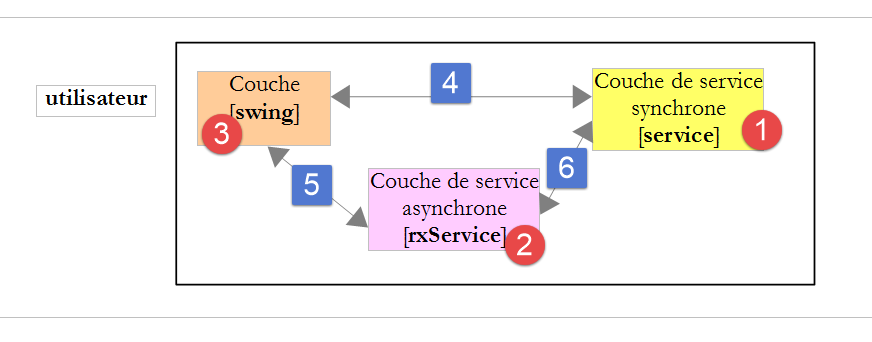
- In [1], a service layer provides services, some of which are long to obtain (network requests, for example);
- this service layer is invoked by a graphical user interface [1] (Swing, Android, JavaFx). If the service layer runs in the same thread as the method [swing] that uses it, the graphical interface freezes (becomes unresponsive) while waiting for the service result;
- In [2], a thin adaptation layer implemented with RxJava allows an asynchronous implementation of the same service to be presented to the GUI layer: this service can be executed in a thread different from that of the GUI layer method that invokes it. In this case, the [3] graphical interface remains responsive: the user can continue to interact with it, for example by triggering a new network request in parallel with the first one, and, most importantly, the user can be given the option to cancel processes that take too long—something that would be impossible if the graphical interface were frozen;
- the [4] call is synchronous, whereas the [5-6] call is asynchronous;
In this architecture, the [2] layer provides services that return Observable<T> types, to which the methods of the [3] graphical layer can subscribe. A service in the [2] layer then delivers its results one by one, and the [3] layer can react to each one, for example by updating one or more components of the graphical interface.
The Observable<T> class has dozens of methods. This is one of the challenges of the library: it is very rich, and it is difficult to grasp all its possibilities. We will present some of them. Mastering the other methods will come with time.
7.1. Creating observables and subscribing to them
7.1.1. Example-01: the [Observable.from] method
 |
Consider the following code:
package dvp.rxjava.observables;

import rx.Observable;
import rx.functions.Action0;
import rx.functions.Action1;

import java.util.Arrays;

public class Exemple01 {
  public static void main(String[] args) {
    // observable integers
    Observable<Integer> obs1 = Observable.from(Arrays.asList(1, 2, 3));
    obs1.subscribe(new Action1<Integer>() {
      @Override
      public void call(Integer integer) {
        System.out.printf("next : %s%n", integer);
      }
    }, new Action1<Throwable>() {
      @Override
      public void call(Throwable throwable) {
        System.out.println(throwable);
      }
    }, new Action0() {
      @Override
      public void call() {
        System.out.println("completed");
      }
    });
  }
}
- line 12: we create an Observable<Integer> type from a list of integers.
The Observable<T> class is a stream of elements of type T that can be observed—preferably asynchronously, but not necessarily—as they are produced. Its definition is as follows:
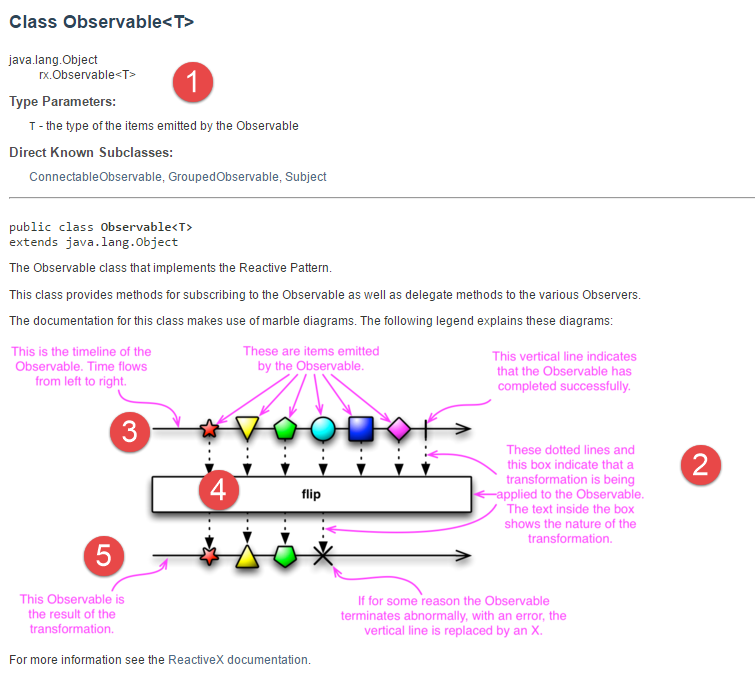 |
As previously mentioned, the Observable<T> class has dozens of methods. Some are similar to those of the Stream<T> class discussed in Section 5. The RxJava documentation includes 'marble diagrams' [2] that illustrate how these methods work:
- Line 3 illustrates the observable’s emissions over time;
- the method [4] is applied to the elements emitted by the observable. It generally produces a new observable;
- line 5 shows the new observable obtained;
The method [Observable.from] has the following signature:
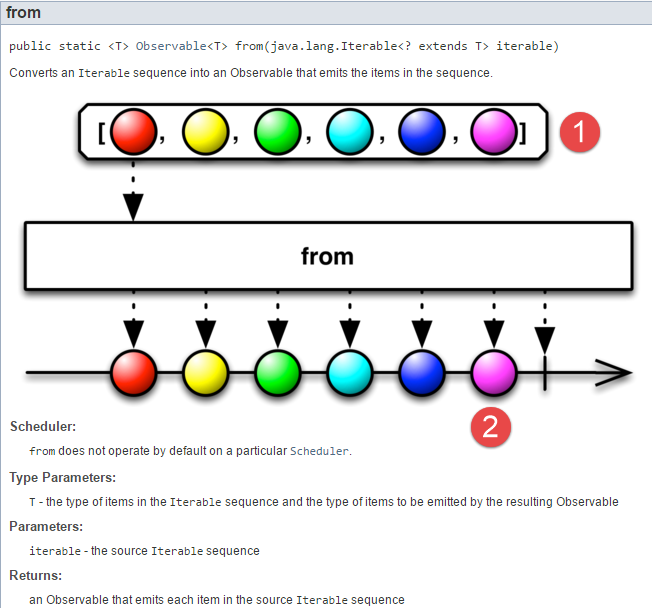 |
The static method [Observable.from] allows you to create an Observable<T> from a collection of elements of type T. This is a very simple way to get started with observables. The line:
Observable<Integer> obs1 = Observable.from(Arrays.asList(1, 2, 3));
will therefore emit three elements. It does not emit them immediately. It will emit them in full each time a subscriber registers. This is called a cold observable. The observable re-emits its elements for each new subscriber.
We can think of the previous statement as a configuration action for the observable. It is configured once and executed n times if n subscribers appear.
How do you subscribe?
One way to do this is to use the method [Observable.subscribe], whose definition used here is as follows:
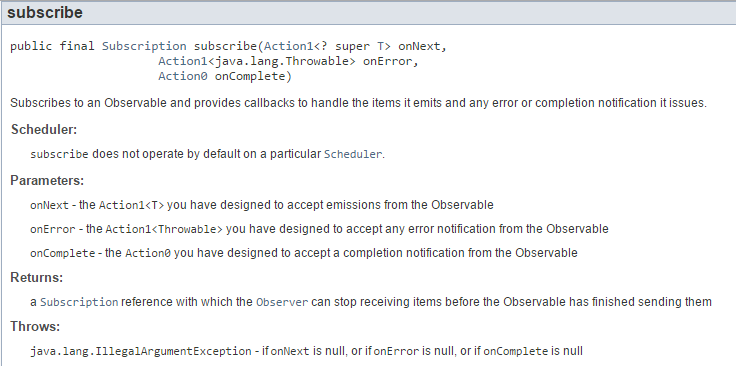 |
- the first parameter [Action1<T> onNext] (see Section 6.2) of the method is the method to be executed when the observable emits a new element T;
- the second parameter [Action1<Throwable> onError] of the method is the method to be executed when the observable throws an exception;
- the third parameter [Action0 onComplete] (see section 6.1) of the method is the method to be executed when the observable throws an exception;
- the method returns a type [Subscription];
The type [Subscription] represents a subscription to the observable. Its definition is as follows:
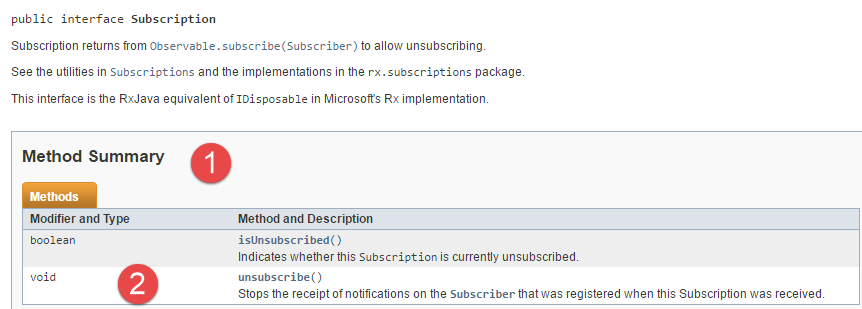 |
The value of this [1] interface lies in its [2] method, which allows a subscription to be canceled.
In our example, the code for subscribing to the observable is as follows:
    obs1.subscribe(new Action1<Integer>() {
      @Override
      public void call(Integer integer) {
        System.out.printf("next : %s%n", integer);
      }
    }, new Action1<Throwable>() {
      @Override
      public void call(Throwable throwable) {
        System.out.println(throwable);
      }
    }, new Action0() {
      @Override
      public void call() {
        System.out.println("completed");
      }
});
- line 1: the result of type [Subscription] is ignored;
- lines 1–15: the three parameters are instances of anonymous classes. We will also use lambdas. The advantage of anonymous classes is that the data types expected by the single method of these classes are clearly visible;
- lines 2–5: implementation of the first parameter of type [Action1<Integer>];
- lines 6–10: implementation of the second parameter of type [Action1<Throwable>];
- lines 11–15: implementation of the third parameter of type [Action0];
The entire code is as follows:
package dvp.rxjava.observables;

import rx.Observable;
import rx.functions.Action0;
import rx.functions.Action1;

import java.util.Arrays;

public class Exemple01 {
  public static void main(String[] args) {
    // observable integers
    Observable<Integer> obs1 = Observable.from(Arrays.asList(1, 2, 3));
    // subscription
    obs1.subscribe(new Action1<Integer>() {
      @Override
      public void call(Integer integer) {
        System.out.printf("next : %s%n", integer);
      }
    }, new Action1<Throwable>() {
      @Override
      public void call(Throwable throwable) {
        System.out.println(throwable);
      }
    }, new Action0() {
      @Override
      public void call() {
        System.out.println("completed");
      }
    });
  }
}
The observable on line 12 begins emitting its 3 elements as soon as the [subscribe] method is called on line 14. From that point on:
- for each emitted element, lines 15–18 are executed.
- when all 3 elements have been emitted, lines 24–29 are executed;
- lines 19–24 will never be executed because the observable does not emit an exception here;
By default, the observable and the observer run in the same thread. There are a few predefined observables that run in a thread other than the main thread (here, the thread of the main method), but for most of them, this is not the case. So here, everything happens in the thread of the [main] method:
- the observable emits the element 1;
- lines 15–18 execute and display this element;
- the observable emits element 2;
- lines 15–18 execute and display this element;
- the observable emits element 3;
- lines 15–18 execute and display this element;
- the observable emits the notification [completed];
- lines 24–29 execute;
This is what the results show:
The class [Exemple02] reimplements [Exemple01], this time using lambda functions as parameters for the method [Observable.subscribe]:
package dvp.rxjava.observables;

import java.util.Arrays;

import rx.Observable;

public class Exemple02 {
  public static void main(String[] args) {
    // observable integers
    Observable<Integer> obs1 = Observable.from(Arrays.asList(1, 2, 3));
    // subscription
    obs1.subscribe(
      (integer) -> System.out.printf("next : %s%n", integer),
      (th) -> System.out.println(th),
      () -> System.out.println("completed"));
  }
}
7.1.2. Example-03: The Observer Class
 |
The [Observable.subscribe] method, which allows you to subscribe to an observable, has several versions, including the following:
package dvp.rxjava.observables;

import java.util.Arrays;

import rx.Observable;
import rx.Observer;

public class Exemple03 {
    public static void main(String[] args) {
        // observable integers
        Observable<Integer> obs1 = Observable.from(Arrays.asList(1, 2, 3));
        // subscription
        obs1.subscribe(new Observer<Integer>() {
            @Override
            public void onCompleted() {
                System.out.println("completed");
            }

            @Override
            public void onError(Throwable th) {
                System.out.printf("throwable %s", th);
            }

            @Override
            public void onNext(Integer integer) {
                System.out.printf("next : %s%n", integer);
            }
        });
    };
}
Line 13: Instead of passing three parameters to the [subscribe] method, we pass it a [Observer] type as follows:
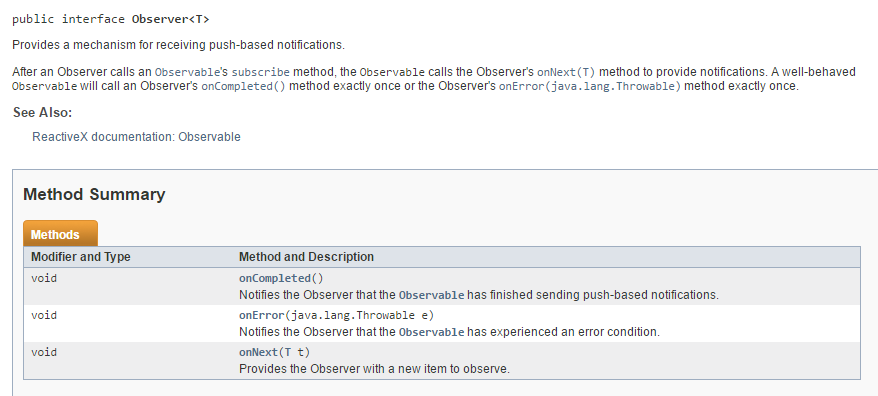 |
The type [Observer] is an interface with three methods:
- [onNext(T t)], which is called every time the observable emits a t element;
- [onError(Throwable th)], which is called when the observable throws an exception th;
- [onCompleted], which is called when the observable indicates that it has finished emitting;
The code works in a similar way to what was explained earlier. The following results are obtained:
7.1.3. Example-04: The [Observable.create] method
 |
The static method Observable.create is defined as follows:
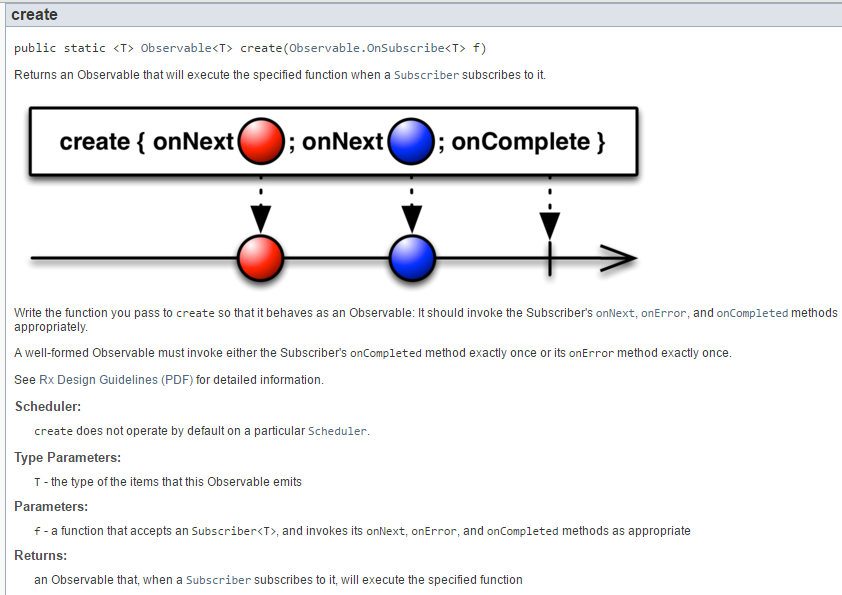 |
- The method [create] returns a type Observable<T>;
- The parameter of the [create] method is a function of type [Observable.OnSubscribe<T>] defined as follows:
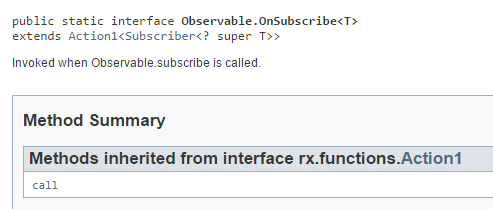 |
The type [Observable.OnSubscribe<T>] is a functional interface that itself extends the functional interface [Action1<Subscriber<? super T>>]. The [call] method of this interface expects a [Subscriber] type (subscriber, observer) defined as follows:
 |
We see in [1] that the class [Subscriber<T>] implements the interface [Observer<T>] presented in Section 7.1.2.
Ultimately, the method [<T> Observable.create]:
- expects as a parameter an instance of type [Observable.OnSubscribe<T>] with the single method signature: void call(Subscriber<T> s). The type [Subscriber<T>] extends the type [Observer<T>] and therefore has the methods onNext, onError, onCompleted;
- returns an Observable<T> type;
The [<T> Observable.create] method returns a configured observable. No elements have been emitted yet. When a [Subscriber<T> s] subscriber subscribes to this observable, the [void call(s)] method of the function passed as a parameter to the [<T> Observable.create] method is then called. Its role is to emit elements t of type T and to call the observer’s [s.onNext(t)] method on each emission. When this is complete, the observer’s [s.onCompleted(t)] method must be called, and the [call] method must terminate. If the method [call] encounters an exception th, the observer’s method [s.onError(th)] must be called and the method [call] must terminate;
To illustrate this complex behavior, we will use the following code [Exemple04]:
package dvp.rxjava.observables;

import rx.Observable;
import rx.Subscriber;

import java.util.Random;

public class Exemple04 {
    public static void main(String[] args) {
        // observable configuration of reals
        Observable<Double> obs1 = Observable.create(new Observable.OnSubscribe<Double>() {
            @Override
            public void call(Subscriber<? super Double> subscriber) {
                for (int i = 0; i < 3; i++) {
                    // emission element i
                    subscriber.onNext(new Random((i + 1)).nextDouble());
                }
                // end of issue
                subscriber.onCompleted();
            }
        });
        // subscription and therefore emission
        obs1.subscribe((d) -> System.out.printf("onNext %s%n", d), (th) -> System.out.printf("onError %s%n", th),
                () -> System.out.println("onCompleted"));
    }
}
- line 11: an observable emitting Double types is created;
- lines 11–21: the parameter of the [create] method is instantiated with an anonymous class containing the single method [call] from lines 12–20. The observable created in line 11 is ready to emit, but it will only emit when an observer arrives;
- lines 13–21: the method [call] receives a reference to an observer;
- lines 14–17: emission of 3 elements to the observer;
- line 19: notification of end of transmission to the observer;
- lines 23–24: subscription to the observable from line 11. We implement the three parameters [onNext, onError, onCompleted] of the method [subscribe] using three lambdas. This subscription will create the subscriber [Subscriber<Double>], which will be passed to the [call] method on line 13. The emission of elements will then begin;
- everything happens in the same thread: observable and observer;
We obtain the following results:
The [Observable.create] method allows you to create an observable from any event. This is the method we used in Section 2 of the introduction to transform a synchronous interface into an asynchronous interface.
7.1.4. Example-05: Refactoring of [Exemple-04]
 |
The following example presents a new version from the static method [Observable.subscribe]:
package dvp.rxjava.observables;

import rx.Observable;
import rx.Subscriber;

import java.text.SimpleDateFormat;
import java.util.Date;
import java.util.Random;

public class Exemple05 {
    public static void main(String[] args) {
        // configuration of a real observable
        Observable<Double> obs1 = Observable.create(new Observable.OnSubscribe<Double>() {
            @Override
            public void call(Subscriber<? super Double> subscriber) {
                showInfos("Observable.call start");
                for (int i = 0; i < 3; i++) {
                    // waiting
                    try {
                        Thread.sleep(500 - i * 100);
                    } catch (InterruptedException e) {
                        // error
                        subscriber.onError(e);
                    }
                    // action
                    double value = new Random().nextInt(100) * 1.2;
                    showInfos(String.format("Observable.call onNext(%s)", value));
                    subscriber.onNext(value);
                }
                // finish
                showInfos(String.format("Observable.call onCompleted"));
                subscriber.onCompleted();
            }
        });

        // a subscriber
        Subscriber<Double> subscriber = new Subscriber<Double>() {
            @Override
            public void onCompleted() {
                showInfos("Subscriber.onCompleted");
            }

            @Override
            public void onError(Throwable e) {
                showInfos(String.format("Subscriber.onError (%s)", e));
            }

            @Override
            public void onNext(Double aDouble) {
                showInfos(String.format("Subscriber.onNext (%s)", aDouble));
            }
        };

        // subscription
        showInfos("avant souscription");
        obs1.subscribe(subscriber);
        showInfos("après souscription");

    }

    private static void showInfos(String message) {
        System.out.printf("%s ------Thread[%s] ---- Time[%s]%n", message, Thread.currentThread().getName(),
                new SimpleDateFormat("ss:SSS").format(new Date()));
    }
}
- line 56: the new version of the static method [Observable.subscribe] accepts as a parameter the type [Subscriber] that we introduced in the previous paragraph;
- lines 37–52: the subscriber (observer). It implements the Observer interface with its three methods onNext, onError, and onCompleted;
- lines 61–64: from here on, we will focus on the threads in which the observable and its observer run;
- line 62: the thread name;
- line 63: the current time expressed in seconds and milliseconds. This will allow us to track over time the emission of elements by the observable and their processing by the observer;
- This code has the same functionality as the previous code. We have simply refactored the latter;
The results obtained are as follows:
- Line 1 of the results: before line 56 of the code, nothing has happened yet. The observable has simply been configured;
- Line 2 of the results: Line 56 of the code triggers a call to the [call] method on line 15. Line 3: the real number 80.39 is emitted to the observer;
- line 4: the observer receives the sent number;
- lines 5–8: the previous process repeats twice;
- line 9: the observable sends the end-of-transmission notification;
- line 10: the observer receives it;
- line 11: displayed by line 57 of the code;
We can see, therefore, that the single subscription line 56 caused lines 2–10 of the results to be displayed. When starting out with the RxJava library, one wonders how things are linked together, particularly the connections between the observer and the observable. Here we see that line 56, the subscription to the observable,
- triggered the emission of all elements of the observable;
- that the observable and the observer run in the same thread;
- that because of this, we observe the sequence: emit element i, observe element i, emit element (i+1), observe element (i+1), ...
Recall that the emitter was waiting before emitting its elements:
                    // waiting
                    try {
                        Thread.sleep(500 - i * 100);
                    } catch (InterruptedException e) {
                        // error
                        subscriber.onError(e);
}
where i in line 3 represents the emission number (0 <= i < 3). If we look at the emission times of the observable’s elements:
- lines 2, 3: element 0 was emitted approximately 500 ms after the subscription began;
- lines 3, 5: element 1 was emitted approximately 400 ms after element 0;
- lines 5, 7: element 2 was emitted approximately 300 ms after element 1;
7.2. Execution thread, observation thread
7.2.1. Example-06: Observable and observer in a thread other than [main]
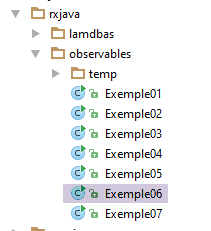 |
We refactor the previous example as follows [Exemple06]:
package dvp.rxjava.observables;

import rx.Observable;
import rx.Subscriber;
import rx.schedulers.Schedulers;

import java.text.SimpleDateFormat;
import java.util.Date;
import java.util.Random;
import java.util.concurrent.CountDownLatch;

public class Exemple06 {
    public static void main(String[] args) {

        // gatekeeper
        CountDownLatch latch = new CountDownLatch(1);

        // configuration of a real observable
        Observable<Double> obs1 = Observable.create(new Observable.OnSubscribe<Double>() {
            @Override
            public void call(Subscriber<? super Double> subscriber) {
                showInfos("Observable.call start");
                for (int i = 0; i < 3; i++) {
                    // waiting
                    try {
                        Thread.sleep(500 - i * 100);
                    } catch (InterruptedException e) {
                        // error
                        subscriber.onError(e);
                    }
                    // action
                    double value = new Random().nextInt(100) * 1.2;
                    showInfos(String.format("Observable.call onNext(%s)", value));
                    subscriber.onNext(value);
                }
                // finish
                showInfos(String.format("Observable.call onCompleted"));
                subscriber.onCompleted();
            }
        });

        // a subscriber
        Subscriber<Double> subscriber = new Subscriber<Double>() {
            @Override
            public void onCompleted() {
                showInfos("Subscriber.onCompleted");
                // we lower the barrier
                latch.countDown();
            }

            @Override
            public void onError(Throwable e) {
                showInfos(String.format("Subscriber.onError (%s)", e));
            }

            @Override
            public void onNext(Double aDouble) {
                showInfos(String.format("Subscriber.onNext (%s)", aDouble));
            }
        };

        // suite observable configuration
        obs1 = obs1.subscribeOn(Schedulers.computation());
        // subscription
        showInfos("avant souscription");
        obs1.subscribe(subscriber);
        // waiting at the gate
        try {
            showInfos("début attente barrière");
            latch.await();
            showInfos("fin attente barrière");
        } catch (InterruptedException e1) {
            System.out.println(e1);
        }
        showInfos("après souscription");

    }

    private static void showInfos(String message) {
        System.out.printf("%s ------Thread[%s] ---- Time[%s]%n", message, Thread.currentThread().getName(),
                new SimpleDateFormat("ss:SSS").format(new Date()));
    }
}
- Line 16: We create a barrier (semaphore) with an object of type [CountDownLatch]. This object is used to synchronize threads with each other. Here, it is initialized with the value 1, which we will refer to as the barrier value (or semaphore value). A thread waits for the barrier using the following operation:
latch.await();
The thread is blocked if the latch value is >0. A thread can increment or decrement the latch’s internal value. Line 48: the latch value is decremented by 1.
- Line 63: the observable is configured to run on a thread provided by the [Schedulers.computation()] scheduler. This scheduler can provide as many threads as there are cores on the execution machine. The section on the example application demonstrated the use of other schedulers (see Section 2.8);
The principle of the code is as follows:
- the [main] method runs in the main thread;
- line 66: triggers the emission of observable elements. These will be emitted on a thread different from the main thread;
- line 70: the main thread is blocked because the barrier has the value 1 (see line 16). It can only continue when this value changes to 0. This happens on line 48. It is the observer that lowers the barrier when it receives the notification that the observable has finished emitting;
The execution yields the following results:
- line 1: the subscription is about to take place;
- line 2: this triggers the execution of the [call] method on the [RxComputationThreadPool-1] thread. We now have parallel execution with two threads;
- line 3: for an unknown reason, the [RxComputationThreadPool-1] thread has yielded. The thread [main] then takes control and is blocked by the guardrail (line 70 of the code). From this point on, only the thread [RxComputationThreadPool-1] can operate;
- lines 4–11: We see the same behavior observed earlier between the observable and its observer, but now everything is happening in the [RxComputationThreadPool-1] thread;
- lines 12–13: the observer has lowered the barrier (line 48 of the code) and the [RxComputationThreadPool-1] thread has terminated. The [main] thread takes over and displays two messages;
7.2.2. Example-07: Observable and observer in two different threads
|
We modify the previous example as follows:
package dvp.rxjava.observables;

import rx.Observable;
import rx.Subscriber;
import rx.schedulers.Schedulers;

import java.text.SimpleDateFormat;
import java.util.Date;
import java.util.Random;
import java.util.concurrent.CountDownLatch;

public class Exemple07 {
    public static void main(String[] args) {

        // gatekeeper
        CountDownLatch latch = new CountDownLatch(1);

        // configuration of a real observable
        Observable<Double> obs1 = Observable.create(new Observable.OnSubscribe<Double>() {
            @Override
            public void call(Subscriber<? super Double> subscriber) {
                showInfos("Observable.call start");
                for (int i = 0; i < 3; i++) {
                    // waiting
                    try {
                        Thread.sleep(500 - i * 100);
                    } catch (InterruptedException e) {
                        // error
                        subscriber.onError(e);
                    }
                    // action
                    double value = new Random().nextInt(100) * 1.2;
                    showInfos(String.format("Observable.call onNext(%s)", value));
                    subscriber.onNext(value);
                }
                // finish
                showInfos(String.format("Observable.call onCompleted"));
                subscriber.onCompleted();
            }
        });

        // a subscriber
        Subscriber<Double> subscriber = new Subscriber<Double>() {
            @Override
            public void onCompleted() {
                showInfos("Subscriber.onCompleted");
                // we lower the barrier
                latch.countDown();
            }

            @Override
            public void onError(Throwable e) {
                showInfos(String.format("Subscriber.onError (%s)", e));
            }

            @Override
            public void onNext(Double aDouble) {
                showInfos(String.format("Subscriber.onNext (%s)", aDouble));
            }
        };

        // suite observable configuration
        obs1 = obs1.subscribeOn(Schedulers.computation()).observeOn(Schedulers.computation());
        // subscription
        showInfos("avant souscription");
        obs1.subscribe(subscriber);
        // waiting in front of the barrier
        try {
            showInfos("début attente barrière");
            latch.await();
            showInfos("fin attente barrière");
        } catch (InterruptedException e1) {
            System.out.println(e1);
        }
        showInfos("après souscription");

    }

    private static void showInfos(String message) {
        System.out.printf("%s ------Thread[%s] ---- Time[%s]%n", message, Thread.currentThread().getName(),
                new SimpleDateFormat("ss:SSS").format(new Date()));
    }
}
The code is identical to that of the previous example except for line 63:
obs1 = obs1.subscribeOn(Schedulers.computation()).observeOn(Schedulers.computation());
which configures the observable (subscribeOn) and the observer (observeOn) to run on one of the threads provided by the scheduler [Schedulers.computation()].
The results obtained are as follows:
The following points can be noted:
- the observable runs in thread [RxComputationThreadPool-4] (lines 3–4, 6, 8–9);
- the observer runs in thread [RxComputationThreadPool-3] (lines 5, 7, 10–11);
- they run independently. Thus, in lines 8–9, the observable emits two notifications (onNext, onCompleted) before the observer retrieves the notification [onNext] (line 10);
The RxJava library handles the data transfer (emissions) from the observable’s thread to the observer’s thread. The developer does not need to worry about this.
We have seen how to create observables (Observable.from, Observable.create). Now let’s look at the predefined observables in the RxJava library.
7.3. Predefined Observables
7.3.1. Example-08: The [Observable.range] method
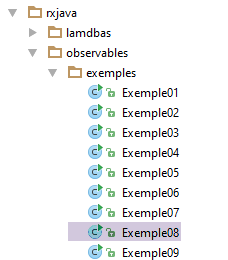 |  |
From now on, we will use dedicated classes for the observed processes and their observers. The idea is to be able to log their names, their execution threads, and their execution times so that we can track them over time.
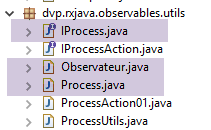
The [Process] class will simply be an Observable that can be named. It will implement the following [IProcess] interface:
package dvp.rxjava.observables.utils;

import rx.Observable;

public interface IProcess<T> {

    // name of observable
    public String getName();

    // observable
    public Observable<T> getObservable();

}
This interface can be implemented by the following class [Process<T>]:
package dvp.rxjava.observables.utils;

import rx.Observable;
import rx.Scheduler;

public class Process<T> implements IProcess<T>{

    // observable name
    protected String name;
    // observed process
    protected Observable<T> observable;

    // manufacturers
    public Process(String name, Observable<T> observable) {
        // local initializations
        this.name = name;
        this.observable = observable;
    }

    // getters and setters
    public String getName() {
        return name;
    }

    public Observable<T> getObservable() {
        return observable;
    }

}
- line 9: the process name;
- line 11: the observed observable;
- lines 14–18: the constructor;
The observer will be described by the following class [Observateur]:
package dvp.rxjava.observables.utils;

import java.util.concurrent.CountDownLatch;
import java.util.function.Consumer;

import com.fasterxml.jackson.core.JsonProcessingException;
import com.fasterxml.jackson.databind.ObjectMapper;

import rx.Subscriber;

public class Observateur<T> extends Subscriber<T> {

...
}
- Line 11: The Observateur<T> class extends the Subscriber<T> class, which we briefly introduced in Section 7.1.3. We will use it as an argument for the [Observable.subscribe] method:
// observable performance (observation)
obs1.subscribe(observateur);
The [Observable.subscribe] method used in line 2 above has the following definition:
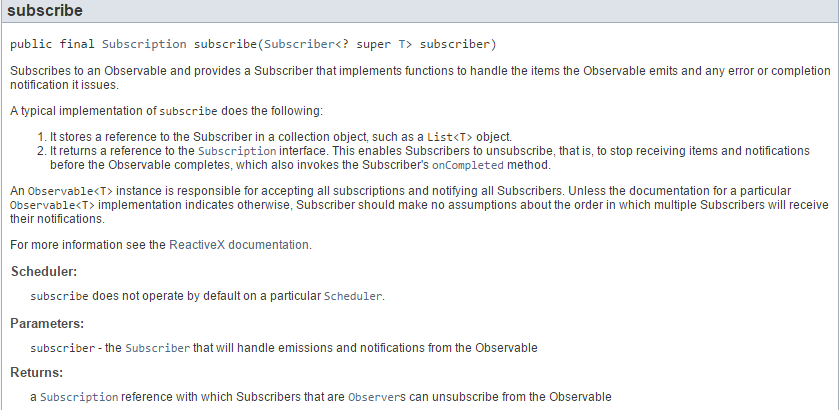 |
The role of [Subscriber] is primarily to manage the elements emitted by the observable to which it has subscribed using the methods of the [Observer] interface: onNext, onError, onCompleted. The [Subscriber] class has the following methods:
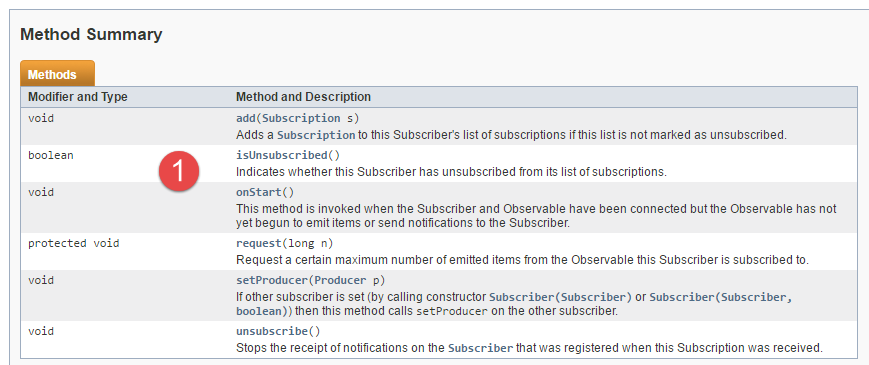 |
In the code for the [Observateur] class, we will use the [1] and isUnsubscribed methods to determine whether the subscriber’s subscription has been canceled or not. The complete [Observateur<T>] class is as follows:
package dvp.rxjava.observables.utils;

import java.util.concurrent.CountDownLatch;
import java.util.function.Consumer;

import com.fasterxml.jackson.core.JsonProcessingException;
import com.fasterxml.jackson.databind.ObjectMapper;

import rx.Subscriber;

public class Observateur<T> extends Subscriber<T> {

    // a gatekeeper (semaphore)
    private CountDownLatch latch;
    // a display method
    private Consumer<String> showInfos;
    // observer's name
    private String observerName;
    // the name of the observed process
    private String processName;

    // manufacturers
    public Observateur() {

    }

    public Observateur(String name, CountDownLatch latch, Consumer<String> showInfos, String observedName) {
        this.observerName = name;
        this.latch = latch;
        this.showInfos = showInfos;
        this.processName = observedName;
    }

    // --------------------------- implementation interface Observer<T>
    @Override
    public void onCompleted() {
        // end of issues
        if (!isUnsubscribed()) {
            showInfos.accept(String.format("Subscriber [%s,%s].onCompleted", observerName, processName));
        }
        // end of main thread lock
        latch.countDown();
    }

    @Override
    public void onError(Throwable e) {
        // emission error
        if (!isUnsubscribed()) {
            showInfos.accept(String.format("Subscriber [%s, %s].onError (%s)", observerName, processName, e));
        }
    }

    @Override
    public void onNext(T value) {
        // an additional show
        if (!isUnsubscribed()) {
            try {
                showInfos.accept(String.format("Subscriber [%s,%s] : onNext (%s)", observerName, processName,
                        new ObjectMapper().writeValueAsString(value)));
            } catch (JsonProcessingException e) {
                showInfos.accept(String.format("Subscriber [%s,%s].onNext (%s)", observerName, processName, e));
            }
        }
    }
}
- In addition to the characteristics of a Subscriber, the Observer will carry the following information:
- line 14: a lock or semaphore that will be used to block the main thread until the observer has received all the elements emitted by the observable. This will occur on line 36 of the code when the observer receives the end-of-emission notification from the observable;
- line 16: a Consumer<String> instance that will be used to display a message on the console;
- line 18: the observer’s name, used to distinguish between observers when there are multiple;
- line 20: the name of the observed process;
- lines 36, 46, 54: the [onCompleted, onError, onNext] methods of the [Observer<T>] interface implemented by the abstract class [Subscriber<T>]. This class does not implement them. This must therefore be done in its child classes. Before doing anything in these methods, we check whether the observer has been unsubscribed from the observable it is observing;
- line 59: the observer’s [onNext] method writes the jSON string of the received element. This will allow us to display various types of elements;
That said, let’s examine a new method of the Observable class, the [range] method:
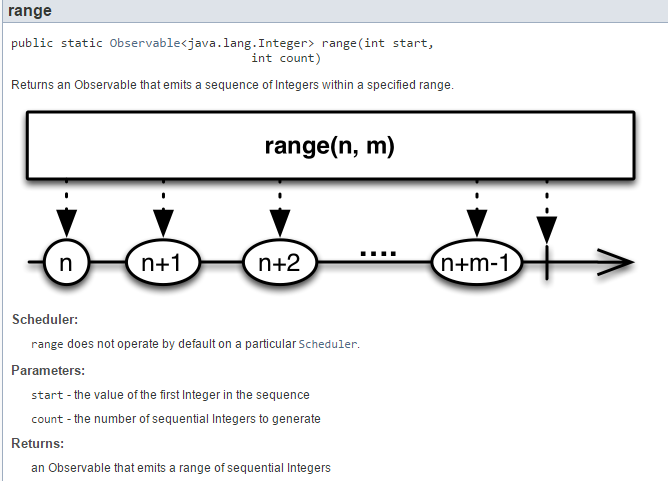 |
The observable Observable.range(n,m) emits (m) integers ranging from n to n+m-1. We’ll examine it using the following code:
package dvp.rxjava.observables.exemples;

import java.text.SimpleDateFormat;
import java.util.Date;
import java.util.concurrent.CountDownLatch;
import java.util.function.Consumer;

import dvp.rxjava.observables.utils.Observateur;
import rx.Observable;
import rx.schedulers.Schedulers;

public class Exemple08 {
    public static void main(String[] args) throws InterruptedException {

        // number of observers
        final int nbObservateurs = 2;

        // semaphore
        CountDownLatch latch = new CountDownLatch(nbObservateurs);

        // observable configuration
        Observable<Integer> obs1 = Observable.range(15, 3).subscribeOn(Schedulers.computation());
        // observable performance (observation)
        showInfos.accept("main : début observation");
        for (int i = 0; i < nbObservateurs; i++) {
            obs1.subscribe(new Observateur<>(String.format("observateur[%d]", i), latch, showInfos,"obs1"));
        }
        // waiting
        showInfos.accept("main : attente fin observation");
        latch.await();
        // end
        showInfos.accept("main : fin observation");
    }

    // displays
    static Consumer<String> showInfos = message -> System.out.printf("%s ------Thread[%s] ---- Time[%s]%n", message,
            Thread.currentThread().getName(), new SimpleDateFormat("ss:SSS").format(new Date()));
}
- Line 16: We will use two observers;
- line 19: the barrier (semaphore) is initialized to two because we will place each observer on a different thread. The main thread will therefore have to wait for both observer threads to finish;
- line 22: we configure the observable so that it runs on a thread of the [Schedulers.computation()] scheduler. The observer will be on the same thread as the observable;
- lines 25–27: we subscribe two observers to the observable. This will trigger the observable’s full execution for each observer: the integers 15, 16, and 17 will be emitted;
- line 30: the main thread waits for the observers to finish;
The results obtained are as follows:
- line 2: the main thread is blocked, waiting for the two observers to finish;
- lines 3-4: we see that observer 0 is on thread [RxComputationThreadPool-1] and observer 1 on thread [RxComputationThreadPool-2];
- lines 3–10: we see that both observers receive exactly the same elements;
We will use the Observer class defined here to illustrate the behavior of other types of observables.
7.3.2. Example-09: the Observable.[interval, take, doNext] methods
 |
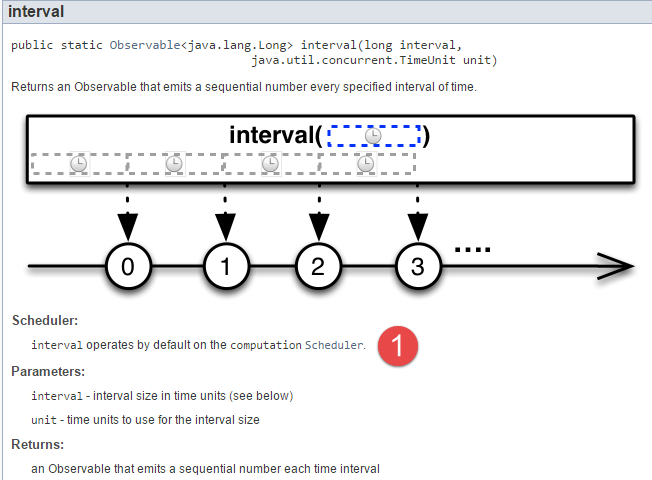 |
This example illustrates the use of the observable Observable.interval(long interval, TimeUnit unit), which emits long integers at regular time intervals. Note the point [1]: by default, the observable [Observable.interval] runs on one of the threads of the scheduler [Schedulers.computation].
The code will be as follows:
package dvp.rxjava.observables.exemples;

import java.text.SimpleDateFormat;
import java.util.Date;
import java.util.concurrent.CountDownLatch;
import java.util.concurrent.TimeUnit;
import java.util.function.Consumer;

import dvp.rxjava.observables.utils.Observateur;
import rx.Observable;

public class Exemple09 {
    public static void main(String[] args) throws InterruptedException {

        // number of observers
        final int nbObservateurs = 2;

        // semaphore
        CountDownLatch latch = new CountDownLatch(nbObservateurs);

        // observable configuration
        Observable<Long> obs1 = Observable.interval(500L, TimeUnit.MILLISECONDS).take(3)
                .doOnNext(l -> showInfos.accept(l.toString()));
        // observable performance (observation)
        showInfos.accept("main : début observation");
        for (int i = 0; i < nbObservateurs; i++) {
            obs1.subscribe(new Observateur<>(String.format("observateur [%d]", i), latch, showInfos,
                    "obs1"));
        }
        // waiting
        showInfos.accept("main : attente fin observation");
        latch.await();
        // end
        showInfos.accept("main : fin observation");
    }

    // displays
    static Consumer<String> showInfos = message -> System.out.printf("%s ------Thread[%s] ---- Time[%s]%n", message,
            Thread.currentThread().getName(), new SimpleDateFormat("ss:SSS").format(new Date()));
}
- line 22: the observable emits long integers every 500 milliseconds. The series starts with the number 0;
- line 22: this observable emits an infinite number of values. The [Observable.take(n)] method creates a new observable that retains only the first n emitted elements;
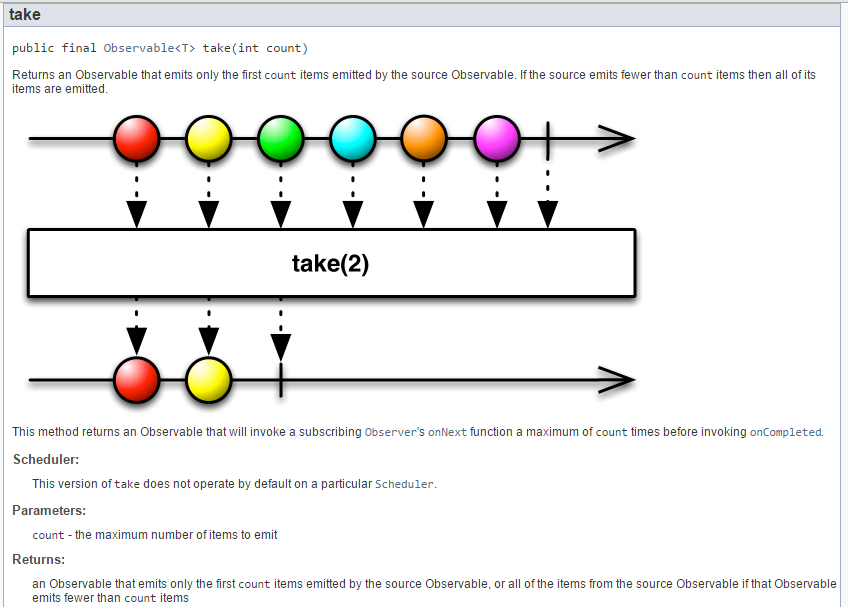 |
Let’s revisit the observable’s code:
Observable<Long> obs1 = Observable.interval(500L, TimeUnit.MILLISECONDS).take(3)
.doOnNext(l -> showInfos.accept(l.toString()));
Line 2: The [Observable.doOnNext] method runs every time the observable emits a new element. This is often used to log information. Here, we want to log the emission date of the elements to verify that the 500-millisecond interval is being maintained. The [Observable.doOnNext] method does not modify the observable to which it is applied. Its definition is as follows:
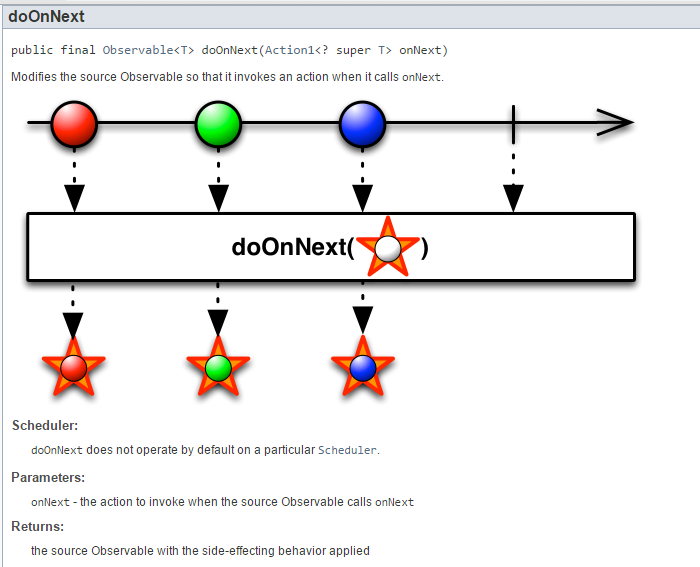 |
Execution yields the following results:
- lines 3, 7, and 11: we see that the emission interval is approximately 500 ms;
- the two observers are indeed on two different threads, even though the observable had not been configured to run with a specific scheduler. This is the default behavior of the [Observable.interval] observable shown here;
7.3.3. Examples-10/12: the Observable.[error, empty, never] methods
 |  |
From now on, we will be more concise in our illustrations of the methods of the [Observable] class. The previous code was as follows:
package dvp.rxjava.observables;

import java.text.SimpleDateFormat;
import java.util.Date;
import java.util.concurrent.CountDownLatch;
import java.util.concurrent.TimeUnit;
import java.util.function.Consumer;

import rx.Observable;

public class Exemple09 {
    public static void main(String[] args) throws InterruptedException {

        // number of observers
        final int nbObservateurs = 2;

        // semaphore
        CountDownLatch latch = new CountDownLatch(nbObservateurs);

        // observable configuration
        Observable<Long> obs1 = Observable.interval(500L, TimeUnit.MILLISECONDS).take(3)
                .doOnNext(l -> showInfos.accept(l.toString()));
        // observable performance (observation)
        showInfos.accept("main : début observation");
        for (int i = 0; i < nbObservateurs; i++) {
            obs1.subscribe(new Observateur<>(String.format("observateur [%d]", i), latch, showInfos,
                    "obs1"));
        }
        // waiting
        showInfos.accept("main : attente fin observation");
        latch.await();
        // end
        showInfos.accept("main : fin observation");
    }

    // displays
    static Consumer<String> showInfos = message -> System.out.printf("%s ------Thread[%s] ---- Time[%s]%n", message,
            Thread.currentThread().getName(), new SimpleDateFormat("ss:SSS").format(new Date()));
}
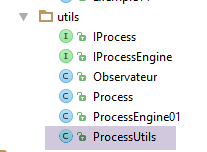
This code was already used in the previous example. Only lines 21–22 changed. We will therefore factor most of this code into the following [ProcessUtils] class:
package dvp.rxjava.observables.utils;

import java.text.SimpleDateFormat;
import java.util.Date;
import java.util.concurrent.CountDownLatch;
import java.util.function.Consumer;

import rx.Observable;

public class ProcessUtils {

    @SafeVarargs
    public static void subscribe(int nbObservateurs, IProcess<?>... processes) throws InterruptedException {

        // semaphore
        CountDownLatch latch = new CountDownLatch(nbObservateurs * processes.length);

        // observable performance (observation)
        showInfos.accept("main : début observation");
        for (int i = 0; i < nbObservateurs; i++) {
            for (IProcess<?> process : processes) {
                Observable<?> obs = process.getObservable();
                obs.subscribe(new Observateur<>(String.format("observateur[%d]", i), latch, showInfos, process.getName()));
            }
        }
        // waiting
        showInfos.accept("main : attente fin observation");
        latch.await();
        // end
        showInfos.accept("main : fin observation");
    }

    // displays
    static Consumer<String> showInfos = message -> System.out.printf("%s ------Thread[%s] ---- Time[%s]%n", message,
            Thread.currentThread().getName(), new SimpleDateFormat("ss:SSS").format(new Date()));
}
- line 13: the method takes two parameters:
- nbObservateurs: the number of observers for the processes passed as the second parameter;
- processes: the processes (named observables) to be observed. Thanks to the notation [IProcess<?>], the processes can emit elements of different types;
- line 16: the semaphore must turn green when all observers have completed all their observations. The initial value of the semaphore is therefore the number of observers multiplied by the number of observations;
- lines 20–25: each observer is subscribed to all the processes that need to be observed;
- line 23: the observable is retrieved from the process (see Section 7.3.1);
- line 23: an observer is subscribed to it. Four pieces of information are passed to the observer:
- its name;
- the semaphore it must decrement when it receives the notification that the observable it is observing has finished emitting;
- the method to use when it wants to log information to the console;
- the name of the process it will observe;
With these classes defined, Example 10 will be as follows:
package dvp.rxjava.observables.exemples;

import dvp.rxjava.observables.utils.Process;
import dvp.rxjava.observables.utils.ProcessUtils;
import rx.Observable;
import rx.schedulers.Schedulers;

public class Exemple10 {
    public static void main(String[] args) throws InterruptedException {
        // observable configuration
        Observable<?> obs = Observable.error(new RuntimeException("Erreur !!!")).subscribeOn(Schedulers.computation());
        // performance (observation) observable
        ProcessUtils.subscribe(2,new Process<>("process1", obs));
    }
}
Line 11, the static method [Observable.error] is defined as follows:
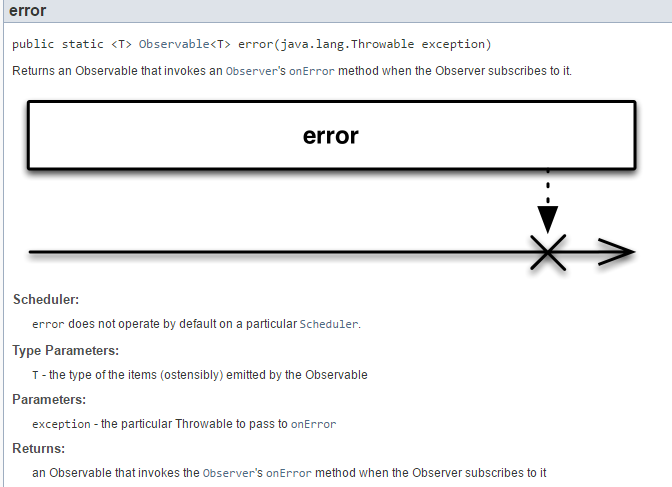 |
Line 8 therefore configures an observable that simply throws an exception to the [onError] method of its subscribers. The execution yields the following results:
Lines 3 and 4: the [onError] method of both subscribers received the exception thrown by the observable.
This execution has a peculiarity: the [onCompleted] methods of the two observers were not called. As a result, the barrier was not lowered, and the main thread remains blocked in the static method [ProcessUtils.subscribe] at the following line 3:
// waiting
showInfos.accept("main : attente fin observation");
latch.await();
// end
showInfos.accept("main : fin observation");
Here we see that if an error occurs in the observable, the subscribers' [onCompleted] method is not called. We therefore modify the [Observateur.onError] method as follows:
    @Override
    public void onError(Throwable e) {
        // emission error
        if (!isUnsubscribed()) {
            showInfos.accept(String.format("Subscriber[%s, %s].onError (%s)", observerName, processName, e));
        }
        // end of main thread lock
        latch.countDown();
}
We add lines 7–8 to release the lock in case of an observable error. With this new code, the execution yields the following results:
We get line 5, which we didn't have before.
Example 11 will be as follows:
package dvp.rxjava.observables.exemples;

import dvp.rxjava.observables.utils.Process;
import dvp.rxjava.observables.utils.ProcessUtils;
import rx.Observable;

public class Exemple11 {
    public static void main(String[] args) throws InterruptedException {
        // observable configuration
        Observable<?> obs1 = Observable.empty();
        // performance (observation) observable
        ProcessUtils.subscribe(2,new Process<>("process1",obs1));
    }
}
Line 10: The static method [Observable.empty] creates an observable that does not emit any elements. It emits only the end-of-emission notification;
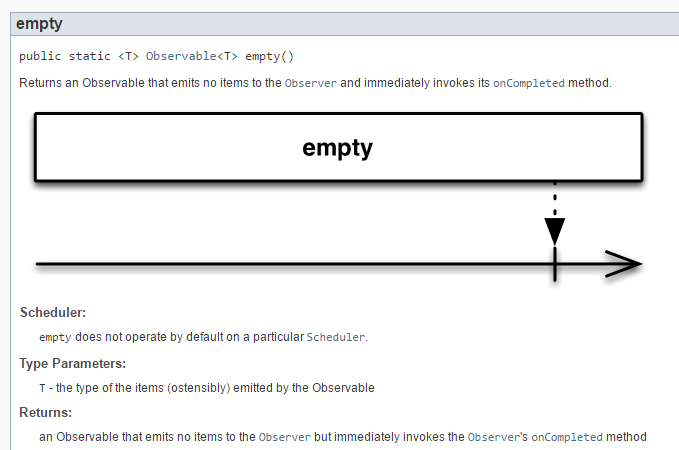 |
Executing the code in the example above yields the following results:
- Lines 2 and 3: we see that both observers receive the end-of-broadcast notification without having received any elements beforehand.
One might wonder what this method is actually used for. It can be used in a manner analogous to a collection, initially empty, into which elements are then added:
In line 3, we merge the initial observable obs (line 1) with other observables.
Example 12 illustrates the static method [Observable.never]:
package dvp.rxjava.observables.exemples;

import dvp.rxjava.observables.utils.Process;
import dvp.rxjava.observables.utils.ProcessUtils;
import rx.Observable;

public class Exemple12 {
    public static void main(String[] args) throws InterruptedException {
        // observable configuration
        Observable<?> obs1 = Observable.never();
        // performance (observation) observable
        ProcessUtils.subscribe(2,new Process<>("process1",obs1));
    }
}
The static method [Observable.never] creates an observable that never emits:
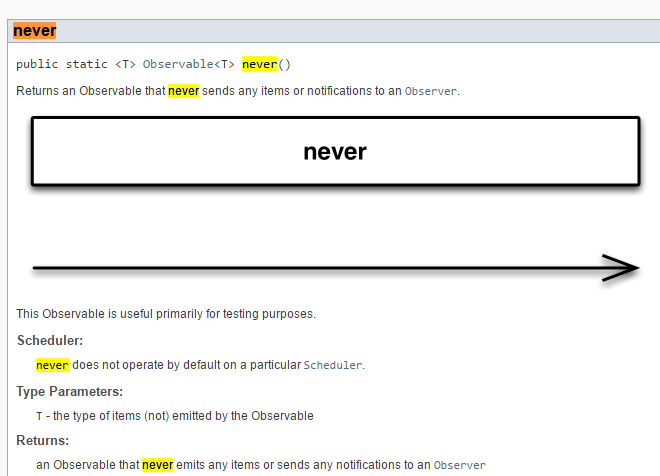 |
Running the example produces the following results:
Line 2: the main thread waits indefinitely. This is because no observable emits the [onCompleted] notification that allows the semaphore (barrier) to turn green (lower the barrier).
7.4. Multithreading
7.4.1. Example-13: action thread, observation thread
In Section 7.1.3, we created an observable using the static method [Observable.create]:
|
- the method [create] returns a type Observable<T>;
- the parameter of the [create] method is a function of type [Observable.OnSubscribe<T>] defined as follows:
|
The type [Observable.OnSubscribe<T>] is a functional interface that itself extends the functional interface [Action1<Subscriber<? super T>>]. The [call] method of this interface expects a [Subscriber] type (subscriber, observer). In the remainder of this document, we will sometimes refer to the [Observable.OnSubscribe<T>] type as an action. We will create custom actions that will have a name. These will be instances of the following [IProcessAction] interface:
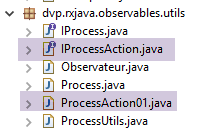 |
package dvp.rxjava.observables.utils;

import rx.Observable;

public interface IProcessAction<T> extends Observable.OnSubscribe<T> {

    // action has a name
    public String getName();
}
- line 5: the [IProcessAction<T>] interface has all the characteristics of the [Observable.OnSubscribe<T>] interface;
- line 8: it also has a method [getName] that returns the name of the instance implementing the interface;
We will use the following action named [ProcessAction01]:
package dvp.rxjava.observables.utils;

import java.util.Random;

import rx.Subscriber;
import rx.functions.Func1;

public class ProcessAction01<T> implements IProcessAction<T> {

    // data
    private String name;
    private int nbValues;
    private Func1<Integer, T> func1;

    // manufacturers
    public ProcessAction01(String name, int nbValues, Func1<Integer, T> func1) {
        this.name = name;
        this.nbValues = nbValues;
        this.func1 = func1;
    }

    @Override
    public void call(Subscriber<? super T> subscriber) {
        ProcessUtils.showInfos.accept(String.format("Observable (%s) call start", getName()));
        for (int i = 0; i < nbValues; i++) {
            // waiting
            try {
                Thread.sleep(new Random().nextInt(500));
            } catch (InterruptedException e) {
                // error
                ProcessUtils.showInfos.accept(String.format("Observable (%s) onError", getName()));
                subscriber.onError(e);
            }
            // element emission
            T value = func1.call(i);
            ProcessUtils.showInfos.accept(String.format("Observable (%s,%s) onNext (%s)", getName(), i, value));
            subscriber.onNext(value);
        }
        // finish
        ProcessUtils.showInfos.accept(String.format("Observable (%s) onCompleted", getName()));
        subscriber.onCompleted();
    }

    @Override
    public String getName() {
        return name;
    }

}
- line 8: the class [ProcessAction01<T>] implements the interface [IProcessAction<T>] and therefore the interface [Observable.OnSubscribe<T>];
- line 11: the name of the action;
- line 12: the number of values to emit;
- line 13: an instance of type [Func1<Integer, T>] that, given an integer, creates a type T that will be emitted by the observable (lines 35 and 37);
- lines 16–20: the constructor is passed the action name, the number of values to be emitted, and the emission function;
- lines 23–42: the process code;
- line 23: the method [call] takes as a parameter the subscriber to the observable associated with the process;
- line 28: the process emits its elements after a wait of random duration;
- line 32: the emission of an error;
- line 37: a normal emission;
- line 41: emission of the end-of-emission notification;
- lines 25–38: the action emits real nbValues values after a random wait time (line 30);
- line 35: the value to be emitted is provided by the [func1] function passed as a parameter to the constructor (line 16);
We refactor the [Process] class (see Section 7.3.1) so that it can also be constructed with a named action. We add the following constructor:
public Process(IProcessAction<T> na, Scheduler schedulerObserved, Scheduler schedulerObserver) {
        // process name=action name
        name = na.getName();
        // action --> observable
        observable = Observable.create(na);
        // thread of execution of observed process
        if (schedulerObserved != null) {
            observable = observable.subscribeOn(schedulerObserved);
        }
        // observer's observation thread
        if (schedulerObserver != null) {
            observable = observable.observeOn(schedulerObserver);
        }
    }
- Line 1: The constructor takes 3 parameters:
- the named action that will be used to construct the observable (line 5);
- the scheduler of the observed process (may be null);
- the observer's scheduler (may be null);
- line 5: the observable is created from the action passed as a parameter;
The following code [Exemple13] observes various observables:
package dvp.rxjava.observables.exemples;

import java.util.Random;

import dvp.rxjava.observables.utils.Process;
import dvp.rxjava.observables.utils.ProcessAction01;
import dvp.rxjava.observables.utils.ProcessUtils;
import rx.schedulers.Schedulers;

public class Exemple13 {
    public static void main(String[] args) throws InterruptedException {
        // process 1
        Process<Double> process1 = new Process<>(
                new ProcessAction01<Double>("process1", 1, i -> new Random().nextInt(100) * 1.2), Schedulers.computation(),
                Schedulers.computation());
        // process 2
        Process<String> process2 = new Process<>(
                new ProcessAction01<String>("process2", 2, i -> String.format("valeur-%s", i)), Schedulers.computation(), null);
        // process 3
        Process<Integer> process3 = new Process<>(new ProcessAction01<Integer>("process3", 3, i -> i * 2), null,
                Schedulers.computation());
        // process 4
        Process<Boolean> process4 = new Process<>(new ProcessAction01<Boolean>("process4", 4, i -> i % 2 == 0), null, null);
        // subscriptions
        ProcessUtils.subscribe(1, process1);
        ProcessUtils.subscribe(1, process2);
        ProcessUtils.subscribe(1, process3);
        ProcessUtils.subscribe(1, process4);
    }
}
- lines 13–15: process1 produces 1 real number on a computation thread that will be observed on another computation thread;
- lines 17–18: process2 produces 2 strings on a computation thread, and no indication is given regarding the observer’s thread. The results show that observation occurs by default on the same thread as the process execution;
- lines 20–21: process3 produces 3 integers on an unspecified thread, which will be observed on a computation thread. The results show that the process runs by default on the main thread;
- line 23: the process4 process produces 4 booleans on an unspecified thread, which will be observed on an unspecified thread. The results show that the process execution and its observation occur by default on the main thread;
The result of executing this code is as follows:
- The process1 process produces 1 real number (line 4) on the [RxComputationThreadPool-4] computation thread, which is observed on the [RxComputationThreadPool-3] computation thread (line 6);
- The process2 process generates 2 strings (lines 12, 14) on the [RxComputationThreadPool-5] computation thread, which are observed on that same thread (lines 13, 15);
- process3 produces 3 integers (lines 21, 23, 25) on the main thread, which are observed on the [RxComputationThreadPool-6] computation thread (lines 22, 24, 28);
- the process4 process produces 4 Booleans (lines 34, 36, 38, 40) on the main thread, which are observed on that same main thread (lines 33, 35, 37, 39);
The reader is invited to follow the above:
- the lifecycle of the observed process and its thread;
- the lifecycle of its observer and its thread;
Much of the appeal of Rx libraries lies in this multithreading, which the developer does not have to manage themselves.
7.5. Combinations of multiple observables
7.5.1. Example-14: merging two observables with [Observable.merge]
We now present static methods of the [Observable] class that allow combining multiple observables into a single result observable.
The first example of this type is as follows:
package dvp.rxjava.observables.exemples;

import dvp.rxjava.observables.utils.ProcessAction01;

import java.util.Random;

import dvp.rxjava.observables.utils.Process;
import dvp.rxjava.observables.utils.ProcessUtils;
import rx.Observable;
import rx.schedulers.Schedulers;

public class Exemple14 {
    public static void main(String[] args) throws InterruptedException {
        // process 1
        Process<Double> process1 = new Process<>(
                new ProcessAction01<Double>("process1", 3, i -> new Random().nextInt(100) * 1.2), Schedulers.computation(),
                Schedulers.computation());
        // process2
        Process<String> process2 = new Process<>(
                new ProcessAction01<String>("process2", 2, i -> String.format("valeur-%s", i)), Schedulers.computation(), null);
        // merge
        Process<?> process12 = new Process<>("process12",
                Observable.merge(process1.getObservable(), process2.getObservable()));
        // subscriptions
        ProcessUtils.subscribe(1, process12);
    }
}
- lines 15–17: a process named [process1] will emit 3 real numbers on a computation thread. It will also be observed on a computation thread;
- lines 19–20: a process named [process2] will emit 2 strings on a computation thread. The observation thread is not specified. We saw earlier that in this case, the observation thread is the computation thread;
- line 23: the two processes are merged, i.e., an observable is created whose elements come simultaneously from both processes. The static method [Observable.merge] is used for this:
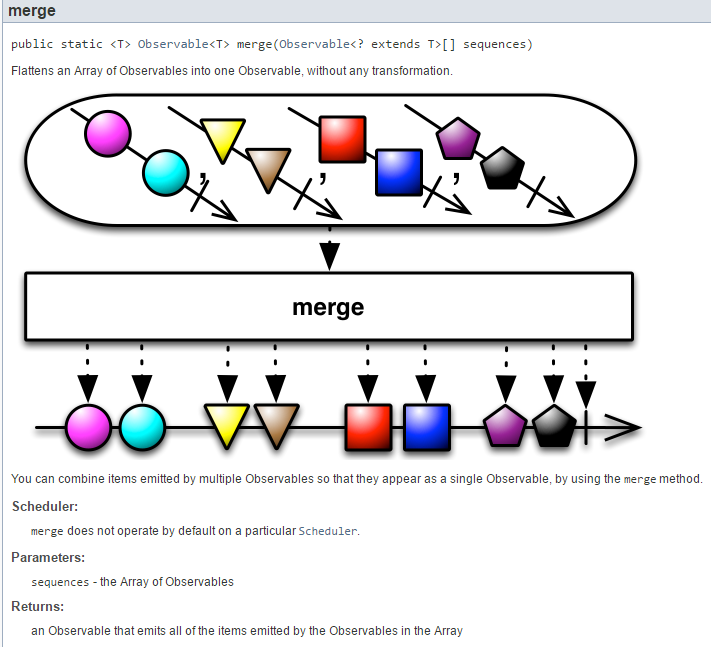 |
Contrary to what the diagram above might suggest, during the merge, elements from stream 1 can be interleaved among the elements of stream 2. This is shown by the execution results:
- line 3: process [process1] is running on computation thread [RxComputationThreadPool-4];
- line 4: process [process2] is running on computation thread [RxComputationThreadPool-5];
- line 9: process [process12] is observed on the computation thread [RxComputationThreadPool-3]. I do not know the rule that led to this choice;
- lines 9–11: we see that the observer observes elements of both processes [process1] (line 5) and [process2] (lines 6, 7) even though neither has finished (there is mixing);
- The process [process12] terminates (line 17) when both processes process1 and process2 have finished;
7.5.2. Example-15: Concatenating two observables with [Observable.concat]
We will now examine the following code:
package dvp.rxjava.observables.exemples;

import dvp.rxjava.observables.utils.ProcessAction01;

import java.util.Random;

import dvp.rxjava.observables.utils.Process;
import dvp.rxjava.observables.utils.ProcessUtils;
import rx.Observable;
import rx.schedulers.Schedulers;

public class Exemple15 {
    public static void main(String[] args) throws InterruptedException {
        // process 1
        Process<Double> process1 = new Process<>(
                new ProcessAction01<Double>("process1", 3, i -> new Random().nextInt(100) * 1.2), Schedulers.computation(),
                Schedulers.computation());
        // process2
        Process<String> process2 = new Process<>(
                new ProcessAction01<String>("process2", 2, i -> String.format("valeur-%s", i)), null, Schedulers.computation());
        // concat
        Process<?> process12 = new Process<>("process12",
                Observable.concat(process1.getObservable(), process2.getObservable()));
        // subscriptions
        ProcessUtils.subscribe(1, process12);
    }
}
- lines 15–17: a process named [process1] will emit 3 real numbers on a computation thread. It will also be observed on a computation thread;
- lines 19-20: a process named [process2] will emit 2 strings on an unspecified thread, here the default main thread. It will be observed on a computation thread;
- line 23: the two processes are concatenated, i.e., an observable is created whose elements come from both processes. The emitted values are not mixed. The process [process12] will first emit all the values from the process [process1], then those from the process [process2]. The static method [Observable.concat] is used for this:
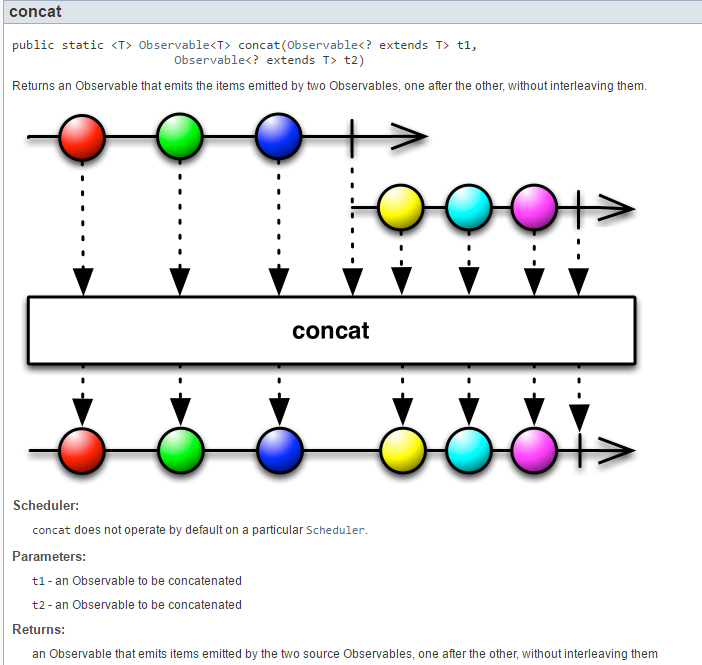 |
The results of the execution are as follows:
- lines 3-10: the [process1] process is running and the [process12] process emits the values emitted by [process1];
- line 9: the [process1] process has finished;
- lines 11-17: the [process2] process is running, and the [process12] process outputs the values output by [process2];
There is something odd about the process2 process: we hadn't specified an execution thread. One might therefore expect the main thread to be used by default. However, that is not the case. The execution thread was the [RxComputationThreadPool-3] computation thread (line 11). Therefore, when no execution or observation thread is specified, we cannot make any assumptions about which thread will be chosen.
7.5.3. Example-16: Combining two observables with [Observable.zip]
We will now examine the following code:
package dvp.rxjava.observables.exemples;

import java.util.Arrays;
import java.util.Random;

import dvp.rxjava.observables.utils.Process;
import dvp.rxjava.observables.utils.ProcessAction01;
import dvp.rxjava.observables.utils.ProcessUtils;
import rx.Observable;
import rx.functions.FuncN;
import rx.schedulers.Schedulers;

public class Exemple16 {
    public static void main(String[] args) throws InterruptedException {
        // process 1
        Process<Double> process1 = new Process<>(
                new ProcessAction01<Double>("process1", 3, i -> new Random().nextInt(100) * 1.2), Schedulers.computation(),
                Schedulers.computation());
        // process 2
        Process<String> process2 = new Process<>(
                new ProcessAction01<String>("process2", 2, i -> String.format("valeur-%s", i)), null, null);
        // 2-process combination function
        FuncN<String> funcn = new FuncN<String>() {
            @Override
            public String call(Object... args) {
                if (args.length == 2) {
                    return String.format("double=%s, string=%s", args[0], args[1]);
                } else {
                    throw new RuntimeException("la fonction attend 2 paramètres exactement");
                }
            }
        };
        // zip of the 2 processes
        Process<String> process12 = new Process<>("process12",
                Observable.zip(Arrays.asList(process1.getObservable(), process2.getObservable()), funcn));
        // subscriptions
        ProcessUtils.subscribe(1, process12);
    }
}
- lines 16–18: a process named [process1] will emit 3 real numbers on a computation thread. It will also be observed on a computation thread;
- lines 20-21: a process named [process2] will emit 2 strings on an unbound thread. The observation thread is also unbound;
- lines 23–32: instantiation of a type [FuncN<String>] with an anonymous class. FuncN is a functional interface:
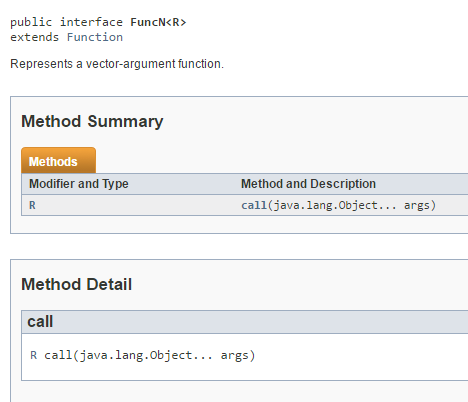 |
The [FuncN.call] method expects an array of objects and returns a type R. The [funcn] function will be used to combine the processes process1 and process2 in that order. In the [FuncN.call] method:
- args[0] will be a Double;
- args[1] will be a String;
Here, the result of [funcn.call] will be the character string from line 27. Constructing this result does not require knowledge of the types of the call method’s arguments.
The two processes are combined as follows:
// zip of the 2 processes
Process<String> process12 = new Process<>("process12",
Observable.zip(Arrays.asList(process1.getObservable(), process2.getObservable()), funcn));
The [Observable.zip] method works as follows:
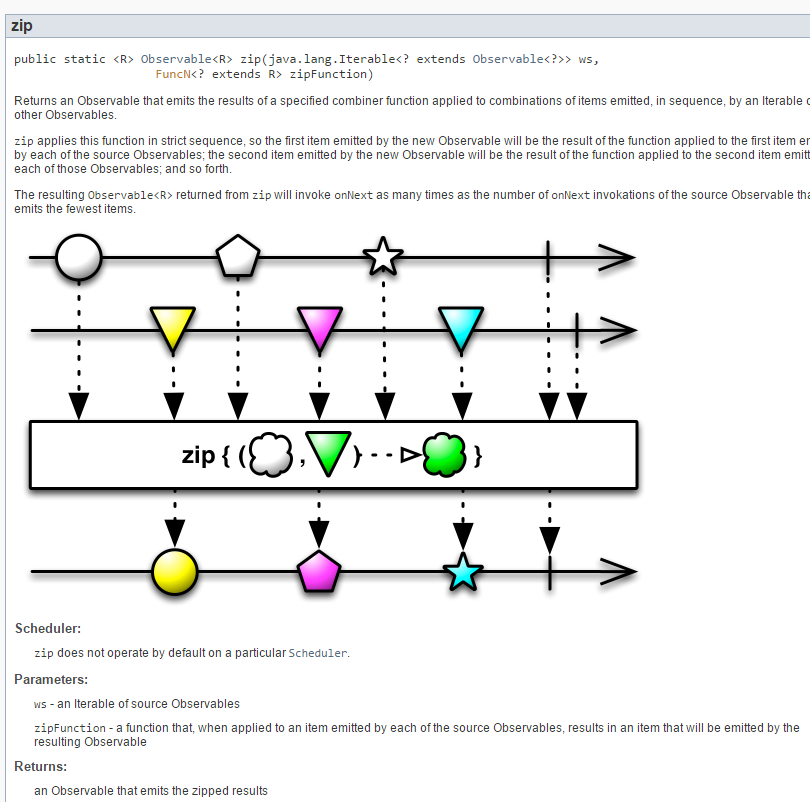 |
We can see that:
- the first argument of `zip` is an `Iterable<Observable>`. In our example, we have an actual parameter of type `List<Observable>` consisting of our two observables;
- the second argument of zip is a type FuncN. In our example, the actual parameter is [funcn];
The execution produces the following results:
- lines 7, 11: process12 emits two elements;
- line 8: the additional element emitted by process1, which has no partner in process2, is not emitted by the result process process12;
We see that process2, to which neither an execution thread nor an observation thread had been assigned, used the main thread for both.
7.5.4. Example-17: Combining two observables with [Observable.combineLatest]
We will now examine the following code:
package dvp.rxjava.observables.exemples;

import java.util.Random;

import dvp.rxjava.observables.utils.Process;
import dvp.rxjava.observables.utils.ProcessAction01;
import dvp.rxjava.observables.utils.ProcessUtils;
import rx.Observable;
import rx.schedulers.Schedulers;

public class Exemple17 {
    public static void main(String[] args) throws InterruptedException {
        // process 1
        Process<Double> process1 = new Process<>(
                new ProcessAction01<Double>("process1", 3, i -> new Random().nextInt(100) * 1.2), Schedulers.computation(),
                Schedulers.computation());
        // process 2
        Process<Double> process2 = new Process<>(
                new ProcessAction01<Double>("process2", 2, i -> new Random().nextInt(200) * 1.4), null,
                Schedulers.computation());
        // combining the 2 processes
        Process<Double> process12 = new Process<>("process12",
                Observable.combineLatest(process1.getObservable(), process2.getObservable(), (d1, d2) -> d1 + d2));
        // subscriptions
        ProcessUtils.subscribe(1, process12);
    }
}
- lines 14–16: a process named [process1] will emit 3 real numbers on a computation thread. It will also be observed on a computation thread;
- lines 18–20: a process named [process2] will emit 2 real numbers on an unbound thread. They will be observed on a computation thread;
- line 23: the two observables are combined using the following static method [Observable.combineLatest]:
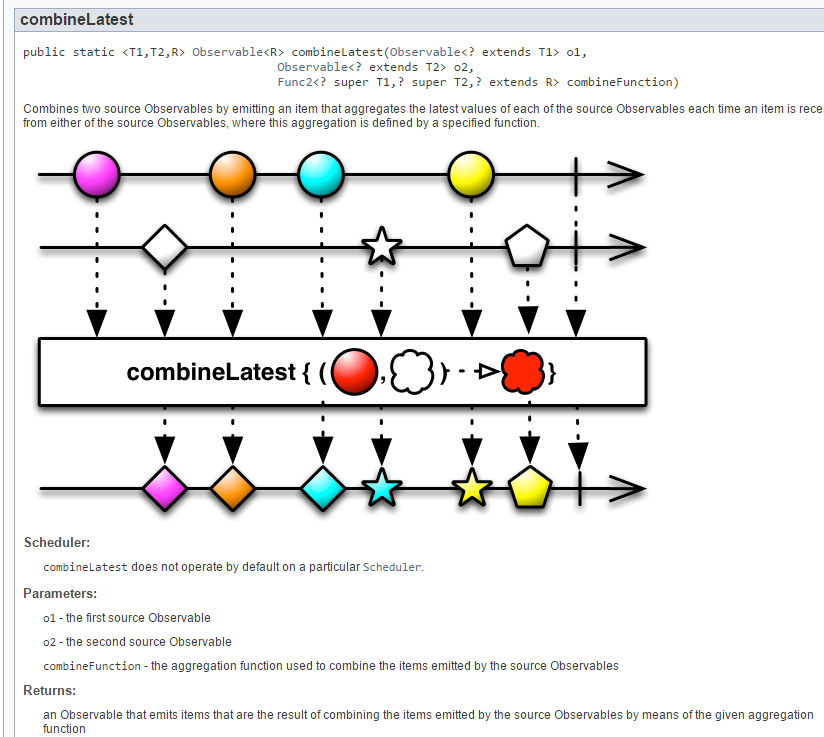 |
The observable [combineLatest] works as follows: when one of the two observables emits an element E1, this element is combined by [combineFunction] with the last element emitted by the other observable.
Executing this code yields the following result:
- line 5: the emission from process2 (56) is combined with the last element emitted by process1 (54, line 4) and produces the result of line 7;
- line 6: the emission from process1 (51.6) is combined with the last element emitted by process2 (56, line 5) and produces the result of line 8;
- line 9: the output from process2 (261.8) is combined with the last element output by process1 (51.6, line 6) and produces the result in line 12;
- line 13: the output from process1 (80.39) is combined with the last element emitted by process2 (261.8, line 9) and produces the result of line 15;
This is a variant of the observable [zip], where this time the combined elements are not necessarily the elements at the same position in the streams. Note here that process2, for which no execution thread had been specified, was executed on the main thread (line 2).
7.5.5. Example-18: Combining two observables with [Observable.amb]
We will now examine the following code:
package dvp.rxjava.observables.exemples;

import java.util.Random;

import dvp.rxjava.observables.utils.Process;
import dvp.rxjava.observables.utils.ProcessAction01;
import dvp.rxjava.observables.utils.ProcessUtils;
import rx.Observable;
import rx.schedulers.Schedulers;

public class Exemple18 {
    public static void main(String[] args) throws InterruptedException {
        // process 1
        Process<Double> process1 = new Process<>(
                new ProcessAction01<Double>("process1", 3, i -> new Random().nextInt(100) * 1.2), Schedulers.computation(),
                Schedulers.computation());
        // process 2
        Process<Double> process2 = new Process<>(
                new ProcessAction01<Double>("process2", 2, i -> new Random().nextInt(200) * 1.4), null, null);
        // combining the 2 processes
        Process<Double> process12 = new Process<>("process12",
                Observable.amb(process1.getObservable(), process2.getObservable()));
        // subscriptions
        ProcessUtils.subscribe(1, process12);
    }
}
- lines 14–16: a process named [process1] will emit 3 real numbers on a computation thread. It will also be observed on a computation thread;
- lines 18–20: a process named [process2] will emit 2 real numbers on an unbound thread. They will be observed on an unbound thread;
- line 22: the two observables are combined using the following static method [Observable.amb]:
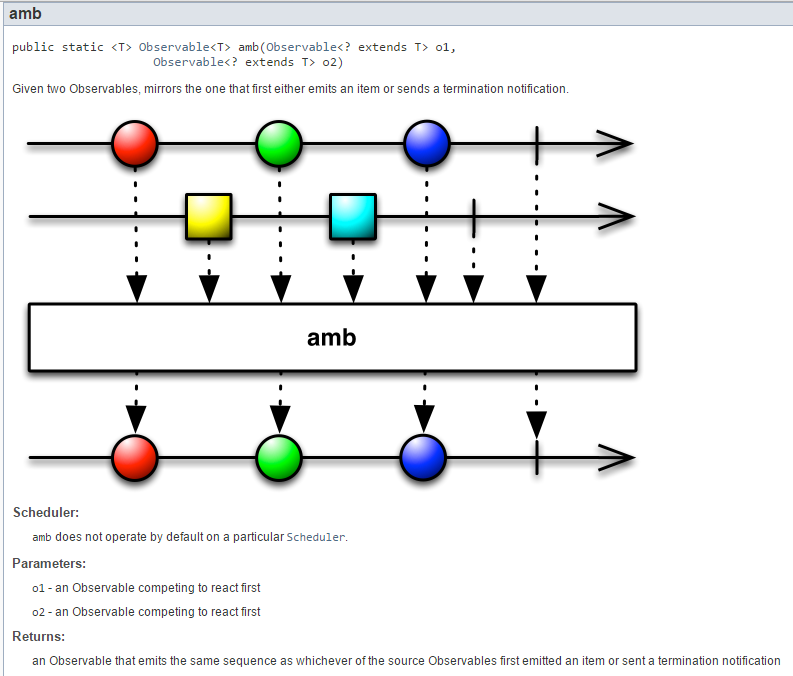 |
As shown in the diagram above, the observable [Observable.amb(Observable o1, Observable o2)] emits the elements of the observable that emits first. This is confirmed by the results of the example presented:
- line 4: process2 is the first to emit;
- lines 8, 12: process12 emits all elements emitted by process2 (lines 4, 11);
7.6. Processing chain for an observable
7.6.1. Example-19: transforming an observable with [Observable.map]
In the previous examples, we examined various combinations of two observables into a third observable. We now present static methods of the [Observable] class that allow transformation, filtering, and aggregation operations on an observable. Here we will find methods analogous to those of the [Stream] class studied in Section 5.
Our first example will be the following:
package dvp.rxjava.observables.exemples;

import java.util.Random;

import dvp.rxjava.observables.utils.Process;
import dvp.rxjava.observables.utils.ProcessAction01;
import dvp.rxjava.observables.utils.ProcessUtils;
import rx.schedulers.Schedulers;

public class Exemple19 {
    public static void main(String[] args) throws InterruptedException {
        // process 1
        Process<Double> process1 = new Process<>(
                new ProcessAction01<Double>("process1", 3, i -> new Random().nextInt(100) * 1.2), Schedulers.computation(),
                Schedulers.computation());
        // process 2
        Process<String> process2 = new Process<>("process2",
                process1.getObservable().map(d -> String.format("valeur-%s", d)));
        // subscriptions
        ProcessUtils.subscribe(1, process2);
    }
}
- lines 14–16: a process named process1 will emit 3 real numbers on a computation thread. It will also be observed on a computation thread;
- lines 17–18: the numbers emitted by process1 will be converted into strings in a process named process2;
- Line 20: process2 is observed;
The method [Observable.map] in line 18 is analogous to the method [Stream.map] discussed in Section 5.5:
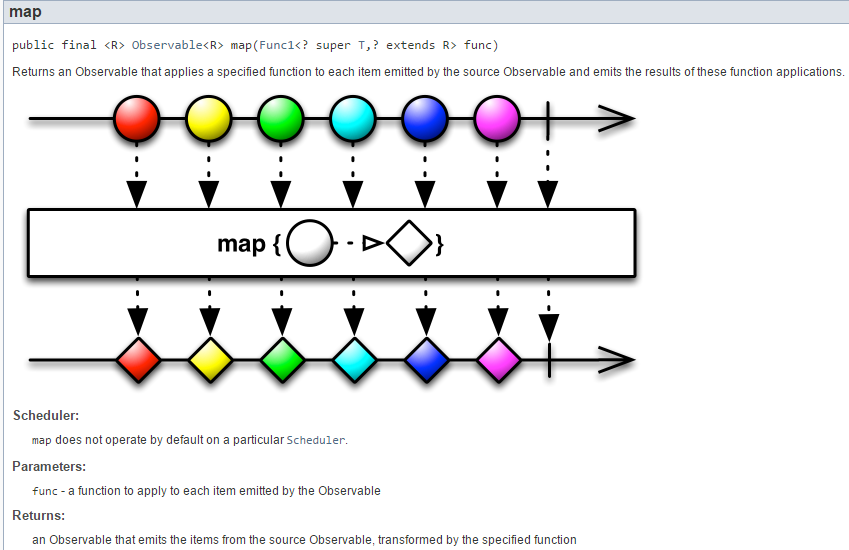 |
The results of the example are as follows:
- lines 4, 5, and 8: the emissions from process1. These are real numbers;
- lines 6, 7, 10: the observed emissions from process2. These are strings;
7.6.2. Example-20: filtering an observable with [Observable.filter]
The example will be as follows:
package dvp.rxjava.observables.exemples;

import dvp.rxjava.observables.utils.Process;
import dvp.rxjava.observables.utils.ProcessAction01;
import dvp.rxjava.observables.utils.ProcessUtils;
import rx.schedulers.Schedulers;

public class Exemple20 {
    public static void main(String[] args) throws InterruptedException {
        // process 1
        Process<Integer> process1 = new Process<>(new ProcessAction01<>("process1", 3, i -> i), Schedulers.computation(),
                Schedulers.computation());
        // process 2
        Process<Integer> process2 = new Process<>("process2", process1.getObservable().filter(i -> i % 2 == 0));
        // subscriptions
        ProcessUtils.subscribe(1, process2);
    }
}
- lines 11-12: a process named process1 will emit integers from 0 to 2 on a computation thread. It will also be observed on a computation thread;
- line 14: the numbers emitted by process1 will be filtered so that only even numbers are retained in process2;
- Line 20: process2 is observed;
The method [Observable.filter] in line 18 is analogous to the method [Stream.filter] discussed in Section 5.4:
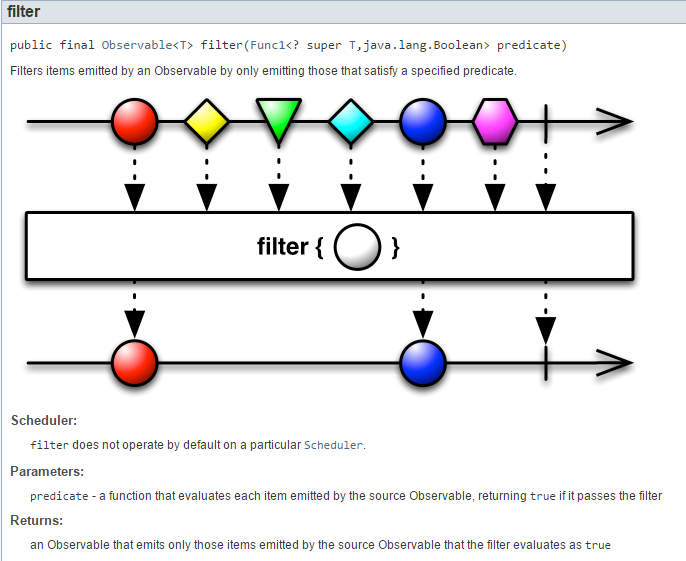 |
The results of the example are as follows:
- lines 4, 5, and 7: emissions from process1;
- lines 6, 9: observed emissions from process2. These are the even elements of process1;
7.6.3. Example-21: transforming an observable with [Observable.flatMap]
The example will be as follows:
package dvp.rxjava.observables.exemples;

import dvp.rxjava.observables.utils.Process;
import dvp.rxjava.observables.utils.ProcessAction01;
import dvp.rxjava.observables.utils.ProcessUtils;
import rx.Observable;
import rx.schedulers.Schedulers;

public class Exemple21 {
    public static void main(String[] args) throws InterruptedException {
        // process 1
        Process<Integer> process1 = new Process<>(new ProcessAction01<>("process1", 3, i -> i), Schedulers.computation(),
                Schedulers.computation());
        // process 2
        Process<Integer> process2 = new Process<>("process2", process1.getObservable().flatMap(i -> {
            int value = i * 10;
            return Observable.just(value, value + 1, value + 2);
        }));
        // subscriptions
        ProcessUtils.subscribe(1, process2);
    }
}
- lines 12–13: a process named process1 will emit integers from 0 to 2 on a computation thread. It will also be observed on a computation thread;
- lines 15–18: each number n emitted by process1 is transformed into an observable emitting the 3 numbers (10*n, 10*n+1, 10*n+2). If, in line 15, we used the method [map], process2 would emit a type Observable<Integer> rather than a type Integer. The [flatMap] method used allows us to flatten this sequence of Observable<Integer> elements into a sequence of Integer elements consisting of each element from each Observable<Integer>;
- line 20: we observe process2;
The method [Observable.flatMap] on line 15 is analogous to the method [Stream.flatMap] discussed in Section 5.6.12:
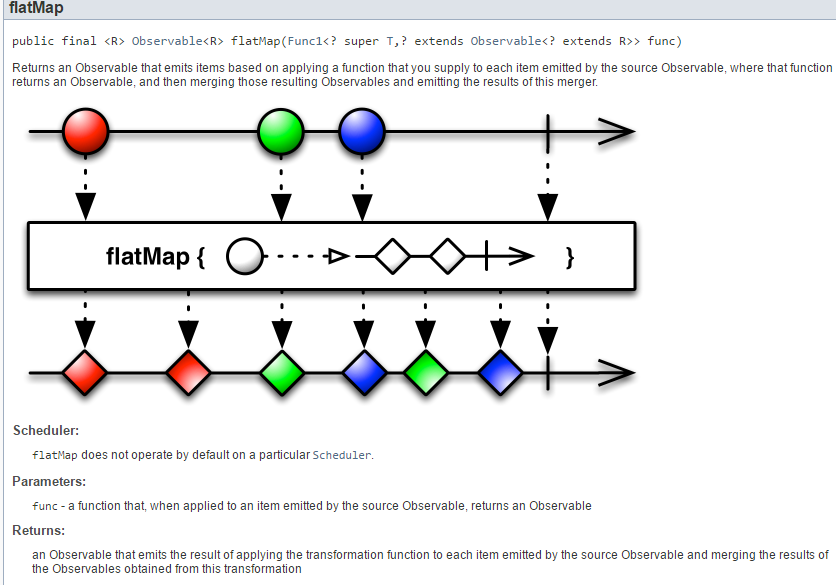 |
The results of the example are as follows:
- lines 5-7: the three emissions from process2 following the emission on line 4 of process1;
- lines 9-11: the three emissions from process2 following the emission on line 8 of process1;
- lines 14-16: the three emissions from process2 following the emission on line 12 of process1;
The following code shows how to create an Observable<Integer[]> type from process1 [Exemple21b]:
package dvp.rxjava.observables.exemples;

import dvp.rxjava.observables.utils.Process;
import dvp.rxjava.observables.utils.ProcessAction01;
import dvp.rxjava.observables.utils.ProcessUtils;
import rx.schedulers.Schedulers;

public class Exemple21b {
    public static void main(String[] args) throws InterruptedException {
        // process 1
        Process<Integer> process1 = new Process<>(new ProcessAction01<>("process1", 3, i -> i), Schedulers.computation(),
                Schedulers.computation());
        // process 2
        Process<Integer[]> process2 = new Process<>("process2", process1.getObservable().map(i -> {
            int value = i * 10;
            return new Integer[] { value, value + 1, value + 2 };
        }));
        // subscriptions
        ProcessUtils.subscribe(1, process2);
    }
}
- line 14: the [Observable.map] method is used;
- line 16: which returns an Integer[] type;
The results are as follows:
- lines 6, 7, 10: we see the results of the map;
All these observable transformations can be chained since each transformation produces a new observable. This is demonstrated in the following example [Exemple21c]:
package dvp.rxjava.observables.exemples;

import dvp.rxjava.observables.utils.Process;
import dvp.rxjava.observables.utils.ProcessAction01;
import dvp.rxjava.observables.utils.ProcessUtils;
import rx.Observable;
import rx.schedulers.Schedulers;

public class Exemple21c {
    public static void main(String[] args) throws InterruptedException {
        // process 1
        Process<Integer> process1 = new Process<>(new ProcessAction01<>("process1", 3, i -> i), Schedulers.computation(),
                Schedulers.computation());
        // process 2
        Process<Integer> process2 = new Process<>("process2", process1.getObservable().flatMap(i -> {
            int value = i * 10;
            return Observable.just(value, value + 1, value + 2);
        }).filter(i -> i % 2 == 0));
        // subscriptions
        ProcessUtils.subscribe(1, process2);
    }
}
- lines 15-18: flatMap is followed by a filter;
The execution results are as follows:
- lines 8–13: process2 output only the even elements from flatMap;
A method similar to [flatMap] is the [flatMapIterable] method, illustrated by the following example [Exemple21d]:
package dvp.rxjava.observables.exemples;

import java.util.Arrays;

import dvp.rxjava.observables.utils.Process;
import dvp.rxjava.observables.utils.ProcessAction01;
import dvp.rxjava.observables.utils.ProcessUtils;
import rx.schedulers.Schedulers;

public class Exemple21d {
    public static void main(String[] args) throws InterruptedException {
        // process 1
        Process<Integer> process1 = new Process<>(new ProcessAction01<>("process1", 3, i -> i), Schedulers.computation(),
                Schedulers.computation());
        // process 2
        Process<Integer> process2 = new Process<>("process2", process1.getObservable().flatMapIterable(i -> {
            int value = i * 10;
            return Arrays.asList(value, value + 1, value + 2);
        }).filter(i -> i % 2 == 0));
        // subscriptions
        ProcessUtils.subscribe(1, process2);
    }
}
Line 16: Instead of using the [flatMap] method, we use the [flatMapIterable] method. In this case, the transformation function must produce an Iterable<T> type (line 18) instead of an Observable<T> type.
We get the same results as before.
Let’s return to the definition of the [flatMap] method:
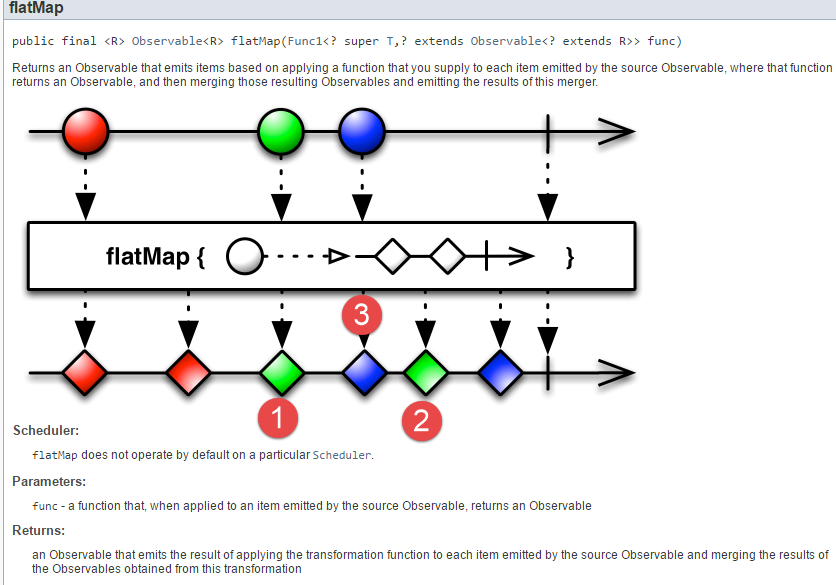 |
As shown above, a blue element [3] has been inserted between the two green elements [1-2]. This means that in its flattening operation of the Observable<T>s, the [flatMap] method respects the emission order of these various internal observables. This is demonstrated by the following example [Exemple21e]:
package dvp.rxjava.observables.exemples;

import dvp.rxjava.observables.utils.Process;
import dvp.rxjava.observables.utils.ProcessAction01;
import dvp.rxjava.observables.utils.ProcessUtils;
import rx.schedulers.Schedulers;

public class Exemple21e {
    public static void main(String[] args) throws InterruptedException {
        // process 1
        Process<Integer> process1 = new Process<>(new ProcessAction01<>("process1", 2, i -> i), Schedulers.computation(),
                Schedulers.computation());
        // process 2
        Process<Integer> process2 = new Process<>(new ProcessAction01<>("process2", 3, i -> i + 10),
                Schedulers.computation(), Schedulers.computation());
        // process 3
        Process<Integer> process3 = new Process<>("process3",
                process1.getObservable().flatMap(i -> process2.getObservable()));
        // subscriptions
        ProcessUtils.subscribe(1, process3);
    }
}
- lines 11-12: process1 emits the integers [0,1];
- lines 14-15: process2 emits the integers [10,11,12];
- lines 17-18: each element emitted by process1 is associated with the observable of process2. This means that:
- the element [0] from process1 will be associated with an observable emitting [10,11,12];
- the same applies to element 1;
Ultimately, the 6 numbers [10, 11, 12, 10, 11, 12] will be emitted. We want to see in what order.
The execution results are as follows:
We can see that the emission order of process3 was: [10, 10, 11, 12, 11, 12] (lines 11, 12, 14, 17, 19, 22). There was indeed a mixing of the elements emitted by process2. This can be avoided by using the [concatMap] method instead of the [flatMap] method. This is demonstrated by the following code [Exemple21ef]:
package dvp.rxjava.observables.exemples;

import dvp.rxjava.observables.utils.Process;
import dvp.rxjava.observables.utils.ProcessAction01;
import dvp.rxjava.observables.utils.ProcessUtils;
import rx.schedulers.Schedulers;

public class Exemple21ef {
    public static void main(String[] args) throws InterruptedException {
        // process 1
        Process<Integer> process1 = new Process<>(new ProcessAction01<>("process1", 2, i -> i), Schedulers.computation(),
                Schedulers.computation());
        // process 2
        Process<Integer> process2 = new Process<>(new ProcessAction01<>("process2", 3, i -> i + 10),
                Schedulers.computation(), Schedulers.computation());
        // process 3
        Process<Integer> process3 = new Process<>("process3",
                process1.getObservable().concatMap(i -> process2.getObservable()));
        // subscriptions
        ProcessUtils.subscribe(1, process3);
    }
}
On line 18, we replaced [flatMap] with [concatMap]. The execution results are as follows:
We can see that the emission order of process3 was: [10, 11, 12, 10, 11, 12] (lines 12–14, 17, 19, 22). The elements emitted by process2 were not shuffled.
Another variant of the [map] method is the [switchMap] method:
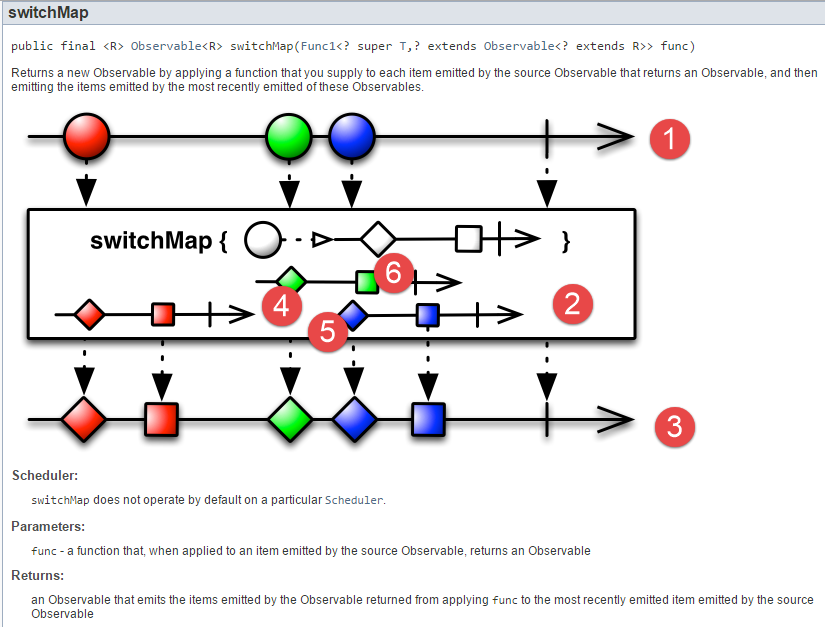 |
Above, from the observable [1], 3 other 2-element observables [2] are generated, which are then flattened as in [flatMap] [3]. Note that the result has 5 elements, not 6. This is because before the second observable emits its second element, [6], the third observable emits its first element, [5], causing the second observable to be discarded. Therefore, the element [6] is not found in the resulting observable [3].
To illustrate [switchMap], we will use the following example:
package dvp.rxjava.observables.exemples;

import dvp.rxjava.observables.utils.Process;
import dvp.rxjava.observables.utils.ProcessAction01;
import dvp.rxjava.observables.utils.ProcessUtils;
import rx.schedulers.Schedulers;

public class Exemple21eg {
    public static void main(String[] args) throws InterruptedException {
        // process 1
        Process<Integer> process1 = new Process<>(new ProcessAction01<>("process1", 2, i -> i), Schedulers.computation(),
                Schedulers.computation());
        // process 2
        Process<Integer> process2 = new Process<>(new ProcessAction01<>("process2", 3, i -> i + 10),
                Schedulers.computation(), Schedulers.computation());
        // process 3
        Process<Integer> process3 = new Process<>("process3",
                process1.getObservable().switchMap(i -> process2.getObservable()));
        // subscriptions
        ProcessUtils.subscribe(1, process3);
    }
}
Running the example produces the following results:
- process1 emits 2 elements that give rise to 2 process2 observables of 3 elements;
- line 14: the observer receives element #0 emitted by the first process2 observable on line 6;
- Line 15: The observer receives element #0 emitted by the second observable, process2, on line 13. It is unclear why the observer did not previously receive elements 1 and 2 emitted by the first observable, process2, on lines 7 and 8. In any case, the first observable, process2, is abandoned;
- In the end, the observer sees only 4 elements (lines 14, 15, 17, 20) instead of the 6 that were emitted;
7.6.4. Examples-22: Other methods of the [Observable] class
The class [Observable] incorporates many methods from the class [Stream] with similar functionality. Here are a few of them. We will simply provide the code and its results.
[Exemple22a - take=limit]
package dvp.rxjava.observables.exemples;

import dvp.rxjava.observables.utils.Process;
import dvp.rxjava.observables.utils.ProcessUtils;
import rx.Observable;

public class Exemple22a {
    public static void main(String[] args) throws InterruptedException {
        // process
        Process<Integer> process = new Process<>("process", Observable.range(1, 10).take(3));
        // subscriptions
        ProcessUtils.subscribe(1, process);
    }
}
results
[Exemple22b - takeLast]
package dvp.rxjava.observables.exemples;

import dvp.rxjava.observables.utils.Process;
import dvp.rxjava.observables.utils.ProcessUtils;
import rx.Observable;

public class Exemple22b {
    public static void main(String[] args) throws InterruptedException {
        // process
        Process<Integer> process = new Process<>("process", Observable.range(1, 10).takeLast(2));
        // subscriptions
        ProcessUtils.subscribe(1, process);
    }
}
results
[Exemple22c - skip]
package dvp.rxjava.observables.exemples;

import dvp.rxjava.observables.utils.Process;
import dvp.rxjava.observables.utils.ProcessUtils;
import rx.Observable;

public class Exemple22c {
    public static void main(String[] args) throws InterruptedException {
        // process
        Process<Integer> process = new Process<>("process", Observable.range(1, 10).skip(5).take(2));
        // subscriptions
        ProcessUtils.subscribe(1, process);
    }
}
results
[Exemple22d - reduce]
package dvp.rxjava.observables.exemples;

import dvp.rxjava.observables.utils.Process;
import dvp.rxjava.observables.utils.ProcessUtils;
import rx.Observable;

public class Exemple22d {
    public static void main(String[] args) throws InterruptedException {
        // process
        Process<Integer> process = new Process<>("process", Observable.range(1, 10).reduce(0, (i, a) -> i + a));
        // subscriptions
        ProcessUtils.subscribe(1, process);
    }
}
- line 10: calculates the sum of the observable's elements. The result is an observable that emits this sum;
results
[Exemple22e - all]
package dvp.rxjava.observables.exemples;

import dvp.rxjava.observables.utils.Process;
import dvp.rxjava.observables.utils.ProcessUtils;
import rx.Observable;

public class Exemple22e {
    public static void main(String[] args) throws InterruptedException {
        // process
        Process<Boolean> process = new Process<>("process", Observable.range(1, 10).all(i -> i > 10));
        // subscriptions
        ProcessUtils.subscribe(1, process);
    }
}
- line 10: returns an Observable<Boolean> that emits the element true if the predicate of the [all] method is true for all elements, false otherwise;
results
[Exemple22f - count]
package dvp.rxjava.observables.exemples;

import dvp.rxjava.observables.utils.Process;
import dvp.rxjava.observables.utils.ProcessUtils;
import rx.Observable;

public class Exemple22f {
    public static void main(String[] args) throws InterruptedException {
        // process
        Process<Integer> process = new Process<>("process", Observable.range(1, 10).count());
        // subscriptions
        ProcessUtils.subscribe(1, process);
    }
}
- line 10: [Observable.count] creates a 1-element observable that is the sum of the observed elements;
results
[Exemple22g - distinct]
package dvp.rxjava.observables.exemples;

import dvp.rxjava.observables.utils.Process;
import dvp.rxjava.observables.utils.ProcessUtils;
import rx.Observable;

public class Exemple22g {
    public static void main(String[] args) throws InterruptedException {
        // process
        Process<Integer> process = new Process<>("process", Observable.just(1, 2, 1, 3).distinct());
        // subscriptions
        ProcessUtils.subscribe(1, process);
    }
}
results
[Exemple22h - groupBy, asObservable]
package dvp.rxjava.observables.exemples;

import dvp.rxjava.observables.utils.Process;
import dvp.rxjava.observables.utils.ProcessUtils;
import rx.Observable;
import rx.observables.GroupedObservable;

public class Exemple22h {
    public static void main(String[] args) throws InterruptedException {
        // process
        Observable<GroupedObservable<Boolean, Integer>> obs = Observable.range(1, 10).groupBy(i -> i % 2 == 0);
        Process<Integer> process = new Process<>("process", obs.concatMap(g -> g.asObservable()));
        // subscriptions
        ProcessUtils.subscribe(1, process);
    }
}
- line 11: the [groupBy] method groups the 10 emitted elements into 2 groups, even numbers and odd numbers. The result is an Observable<GroupedObservable<Boolean, Integer>>, i.e., an observable whose elements are of type GroupedObservable<Boolean, Integer>, where Boolean is the type of the group key (false, true here) and is also the type of the result of the lambda passed as a parameter to the [groupBy] method, and Integer is the type of the group’s elements;
- line 12: the type GroupedObservable has a method [asObservable] that allows creating an observable from this type. We will therefore have two Observable<Integer> types, one for even numbers and the other for odd numbers. From these two observables, the [concatMap] method will create a single one;
results
[Exemple22i - timestamp]
package dvp.rxjava.observables.exemples;

import dvp.rxjava.observables.utils.Process;
import dvp.rxjava.observables.utils.ProcessAction01;
import dvp.rxjava.observables.utils.ProcessUtils;
import rx.schedulers.Schedulers;
import rx.schedulers.Timestamped;

public class Exemple22i {
    public static void main(String[] args) throws InterruptedException {
        // process 1
        Process<Integer> process1 = new Process<>(new ProcessAction01<>("process1", 3, i -> i), Schedulers.computation(),
                Schedulers.computation());
        // process 2
        Process<Timestamped<Integer>> process2 = new Process<>("process2", process1.getObservable().timestamp());
        // subscriptions
        ProcessUtils.subscribe(1, process2);
    }
}
- line 15, the [timestamp] method associates a timestamp with each element of the processed observable;
results
In this example, it is difficult to say what the timestamp information represents:
- lines 4-5: we see that element 1 of process1 was emitted 139 ms after element 0;
- lines 6 and 7: we see that element 1 of process2 was observed 234 ms after element 0;
- lines 5, 8: we see that element 2 of process1 was emitted 33 ms after element 1;
- lines 7 and 10: we see that element 2 of process2 was observed 37 ms after element 1;
These delays are due to the fact that the threads for observing and executing the observables are not the same. If we replace lines 12–13 with the following lines (Example22j):
// process 1
Process<Integer> process1 = new Process<>(new ProcessAction01<>("process1", 3, i -> i), Schedulers.computation(),
null);
- lines 2–3: we do not specify the observation thread. We know that in this case, the observable is observed where it is executed;
This yields the following results:
- lines 4 and 6: process1 emits its element #1 587 ms after its element #0;
- lines 5 and 7: the observer observes these two elements with a 586 ms gap;
- lines 6 and 8: process1 emits its element #2 396 ms after its element #1;
- lines 7 and 9: the observer observes these two elements with a time difference of 396 ms;
Here, the timestamp values are consistent: they accurately represent the element’s emission time.
7.7. Schedulers
7.7.1. Example-23: the [Schedulers.computation] scheduler
We will now examine the execution schedulers. The observation will be made on the execution thread.
The topic of schedulers is somewhat obscure. The various schedulers are presented in this question on the StackOverflow [http://stackoverflow.com/questions/31276164/rxjava-schedulers-use-cases] website:
 |
We will attempt to illustrate the use of these different schedulers with examples. The first illustrates the [Schedulers.computation] scheduler:
package dvp.rxjava.observables.exemples;

import java.util.Random;

import dvp.rxjava.observables.utils.Process;
import dvp.rxjava.observables.utils.ProcessAction01;
import dvp.rxjava.observables.utils.ProcessUtils;
import rx.schedulers.Schedulers;

public class Exemple23 {
    public static void main(String[] args) throws InterruptedException {
        // processes
        @SuppressWarnings("unchecked")
        Process<Double> processes[] = new Process[10];
        for (int i = 0; i < processes.length; i++) {
            processes[i] = new Process<>(
                    new ProcessAction01<Double>(String.format("process%s", i), 1, value -> new Random().nextInt(100) * 1.2),
                    Schedulers.computation(), null);
        }
        // subscriptions
        ProcessUtils.subscribe(1, processes);
    }
}
- lines 14–19: we create an array of 10 processes running on a computation thread;
- line 17: each process generates a random real number;
- line 21: we subscribe to all these processes;
The results are as follows:
- lines 2-10: the first 8 processes start on 8 different threads (the machine used has 8 cores). Note that they all start at approximately the same time;
- lines 17-19: 3 processes terminate, thereby freeing up 3 threads;
- lines 23-24: the last two processes can then start by taking 2 of the threads thus freed;
We can therefore conclude that the [Schedulers.computation] scheduler provides a pool of n threads, where n is the number of cores on the machine. The threads are executed in parallel on these cores.
7.7.2. Example-24: the [Schedulers.io] scheduler
We run the previous code with the [Schedulers.io] scheduler:
package dvp.rxjava.observables.exemples;

import java.util.Random;

import dvp.rxjava.observables.utils.Process;
import dvp.rxjava.observables.utils.ProcessAction01;
import dvp.rxjava.observables.utils.ProcessUtils;
import rx.schedulers.Schedulers;

public class Exemple24 {
    public static void main(String[] args) throws InterruptedException {
        // processes
        @SuppressWarnings("unchecked")
        Process<Double> processes[] = new Process[10];
        for (int i = 0; i < processes.length; i++) {
            processes[i] = new Process<>(
                    new ProcessAction01<Double>(String.format("process%s", i), 1, value -> new Random().nextInt(100) * 1.2),
                    Schedulers.io(), null);
        }
        // subscriptions
        ProcessUtils.subscribe(1, processes);
    }
}
- line 18: processes run using the threads of the [Schedulers.io] scheduler;
This yields the following results:
- lines 2-10: the 10 processes each start on a different thread. Unlike the previous case, all processes were able to launch. Note that these launches take 6 ms, whereas previously it was 1 ms;
- lines 13-18: the observables emit one after the other and not nearly in parallel as was the case previously;
What is the difference between the schedulers [Schedulers.io] and [Schedulers.computation]? An answer can be found in URL and [http://stackoverflow.com/questions/31276164/rxjava-schedulers-use-cases]:
 |
7.7.3. Example-25: the [Schedulers.newThread] scheduler
We run the previous code using the [Schedulers.newThread] scheduler:
package dvp.rxjava.observables.exemples;

import java.util.Random;

import dvp.rxjava.observables.utils.Process;
import dvp.rxjava.observables.utils.ProcessAction01;
import dvp.rxjava.observables.utils.ProcessUtils;
import rx.schedulers.Schedulers;

public class Exemple25 {
    public static void main(String[] args) throws InterruptedException {
        // processes
        @SuppressWarnings("unchecked")
        Process<Double> processes[] = new Process[10];
        for (int i = 0; i < processes.length; i++) {
            processes[i] = new Process<>(
                    new ProcessAction01<Double>(String.format("process%s", i), 1, value -> new Random().nextInt(100) * 1.2),
                    Schedulers.newThread(), null);
        }
        // subscriptions
        ProcessUtils.subscribe(1, processes);
    }
}
The results obtained are the same as with the [Schedulers.io] scheduler:
In URL [http://stackoverflow.com/questions/33415881/retrofit-with-rxjava-schedulers-newthread-vs-schedulers-io], it is explained that the [Schedulers.io] scheduler provides a thread pool, which the [Schedulers.newThread] scheduler does not. A thread pool automatically creates a set number of threads. It allocates them to processes that need them. When these processes finish, their threads are not deleted but return to the pool and can then be reused by another process. This is more efficient than constantly creating and deleting threads. Therefore, it is preferable to use the [Schedulers.io] scheduler.
7.7.4. Example-26: The [Schedulers.immediate, Schedulers.trampoline] schedulers
Let’s return to the explanation given for these two schedulers:
|
The explanation is fairly simple to understand, but when you try to illustrate it, you realize you haven’t really grasped it. It was the book [Learning Reactive Programming With Java 8] that allowed me to create an example based on one found in that book but simplified. Here it is:
package dvp.rxjava.observables.exemples;

import java.text.SimpleDateFormat;
import java.util.Date;
import java.util.function.Consumer;

import dvp.rxjava.observables.utils.ProcessUtils;
import rx.Scheduler;
import rx.Scheduler.Worker;
import rx.functions.Action0;
import rx.schedulers.Schedulers;

public class Exemple26 {
    public static void main(String[] args) throws InterruptedException {

        // a scheduler
        Scheduler scheduler = Schedulers.immediate();
        // a worker of this scheme
        Worker worker = scheduler.createWorker();
        // an Action0 type to be executed on the worker
        Action0 action02 = new Action0() {
            @Override
            public void call() {
                // log action02
                ProcessUtils.showInfos.accept("action02");
            }
        };

        // an Action0 type to be executed on the worker
        Action0 action01 = new Action0() {
            @Override
            public void call() {
                // program a new action on the same worker
                worker.schedule(action02);
                // log action01
                ProcessUtils.showInfos.accept("action01");
            }
        };
        // action01 is programmed on the worker
        worker.schedule(action01);
    }

    // displays
    static Consumer<String> showInfos = message -> System.out.printf("%s ------Thread[%s] ---- Time[%s]%n", message,
            Thread.currentThread().getName(), new SimpleDateFormat("ss:SSS").format(new Date()));

}
- line 17: a scheduler. This will be either [Schedulers.immediate] as shown here or [Schedulers.trampoline] later;
- line 19: actions of type Action0 (lines 21, 20) can be executed on the scheduler’s workers. The [Scheduler.createWorker] method creates a worker. The [Worker.schedule(Action0)] method executes an Action0 type via a worker;
- lines 21–27: a first action named [action02], which will be executed (line 40) by the worker from line 19;
- lines 30–38: a second action named [action01]. It has the particular feature of executing the action action02 on the same worker as itself (line 34). This is where the difference lies between [Schedulers.immediate] and [Schedulers.trampoline]:
- if the scheduler is [Schedulers.immediate], then on line 34, action action02 will be executed immediately (hence the scheduler’s name) and the currently running action action01 will be interrupted. The message on line 25 will then appear. Once action02 is complete, action01 will resume and the message on line 36 will appear;
- if the scheduler is [Schedulers.trampoline], then on line 34, action action02 is put on hold. It will not be executed until the current task, action01, is finished. We will then see the message on line 36 appear. Once action01 is complete, action02 will execute, and we will see the message on line 25;
Executing the code above yields the following results:
If, on line 17, we use the scheduler [Schedulers.trampoline], we obtain the opposite results:
That said, it’s hard to see the connection with observables. I haven’t found a convincing example that would demonstrate the benefit of running an observable on one of these two threads. Here’s one, though, but I don’t find it natural at all:
package dvp.rxjava.observables.exemples;

import dvp.rxjava.observables.utils.ProcessUtils;
import rx.Observable;
import rx.Scheduler.Worker;
import rx.functions.Action1;
import rx.schedulers.Schedulers;

public class Exemple27 {
    public static void main(String[] args) throws InterruptedException {

        // Worker
        Worker worker = Schedulers.immediate().createWorker();
        // Worker worker = Schedulers.trampoline().createWorker();
        // observable 1 sur worker
        worker.schedule(() -> Observable.range(1, 2).subscribe(new Action1<Integer>() {

            @Override
            public void call(Integer i) {
                ProcessUtils.showInfos.accept(String.valueOf(i));
                // observable 2 on same worker
                worker.schedule(() -> Observable.range(100, 2).subscribe(new Action1<Integer>() {
                    @Override
                    public void call(Integer i) {
                        ProcessUtils.showInfos.accept(String.valueOf(i));
                    }
                }));
            }
        }));
    }
}
- Lines 13–14: A worker is created using one of the two schedulers, [Schedulers.immediate] or [Schedulers.trampoline];
- line 16: a first observable, obs1, is scheduled on this worker to emit the numbers [1,2]
- line 22: each time an element of this observable obs1 is observed, the observation of a second observable obs2 is triggered on the same worker to emit the numbers [100,101];
With the scheduler [Schedulers.immediate], we obtain the following results:
Whereas with the [Schedulers.trampoline] scheduler, we get the following results:
7.8. Conclusion
There is still much to be done. To explore the RxJava library in greater depth, the reader is encouraged to continue their training using the references provided at the beginning of this document. Nevertheless, we now have the basics to use RxJava in Swing and Android environments. This is what we will demonstrate next.