2. An introductory example
My first encounters with RxJava were through courses and tutorials found on the internet. Aside from the fact that the theory used concepts I wasn’t used to and had trouble understanding, I especially couldn’t see how it could be useful in real life. So we’ll start by presenting an example (a simple one, I hope) where using RxJava significantly simplifies code writing, and from there, we’ll try to identify the key elements of this library.
The RxJava library is based on the following concept: a stream of elements of type T Observable<T> is observed by one or more subscribers (subscribers, observers, consumers) Subscriber<T>. The RxJava library allows the Observable<T> stream to run in a thread T1 and its Subscriber<T> observer in a thread T2 without the developer having to worry about managing the lifecycle of these threads or naturally difficult issues, such as data sharing between threads and thread synchronization to execute a global task. It therefore facilitates asynchronous programming.
An Observable<T> stream produces elements of type T, which are observable as they are produced. If the observer and the observable (a term used loosely to refer to the Observable<T> type) are in the same thread, then the observable can only produce element (i+1) once the observer has consumed element i. There are few cases where this architecture is useful. If the observer and the observable are not in the same thread, then the observable and its observer behave autonomously: the observable emits at its own pace and the observer consumes at its own pace. This is where the library’s value lies. So far, we have only discussed a single observer. In reality, an observable can have any number of observers.
2.1. The architecture of the example application
The example application has the following architecture:
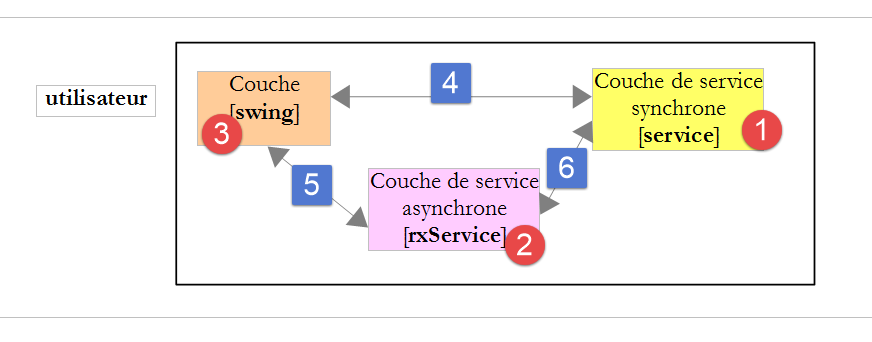
- in [1], a service layer generates lists of random numbers. This layer runs in the same thread as the [swing] method that uses it. It then generates its numbers synchronously;
- In [2], a thin adaptation layer implemented with RxJava allows an asynchronous implementation of the same service to be presented to the [swing] layer: this can be executed in a different thread from that of the [swing] method that uses it;
- the [4] call is synchronous, whereas the [5-6] call is asynchronous;
What we want to demonstrate here is that the Rx library makes it easy to transform a synchronous interface into an asynchronous one. Why is this useful? Events in a Swing interface are processed in a thread commonly referred to as event loop. Events are queued and processed one after another. Event Ei+1 can only be processed once the previous event Ei has been fully processed. It is therefore important that event handling be as brief as possible so that the GUI remains responsive. Sometimes, handling an event can take a long time. This is the case if the handling involves network access. If we do not want to freeze the graphical interface in a way that is unacceptable to the user, then this network access must occur in threads separate from the loop event to free it up. We then enter the realm of concurrent programming (multiple threads running in parallel), which is rightly considered difficult. The Rx library provides a simple and elegant solution to this problem.
To simulate long-running processes, the service in the example returns its random numbers after a certain delay so that we can observe the behavior of the graphical user interface.
2.2. The executable
The executable for the example application is located in the [dvp/executables] folder of the examples:
 | 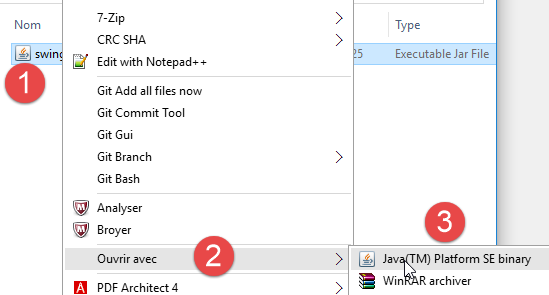 |
There are various ways to run the [swing-01] archive, depending on the configuration of the workstation used to run it. For example, you can follow the [1-3] process. This brings up the following graphical interface:
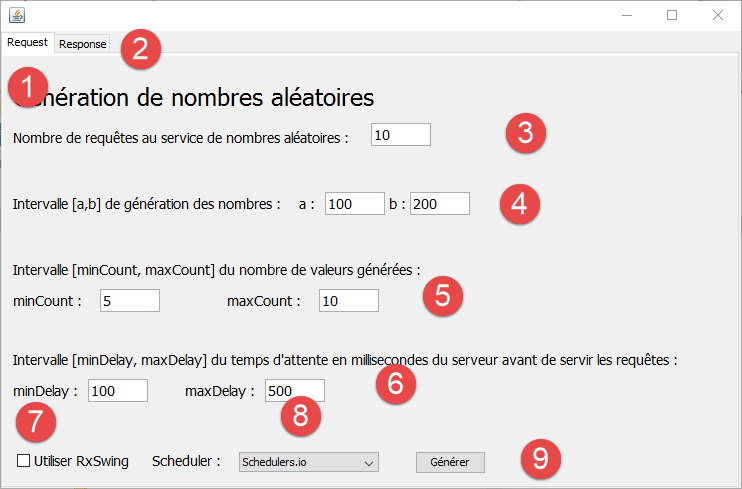 |
- The interface has two tabs: [1-2], one for the request to the random number generation service ([Request]), and the other for displaying the received numbers ([Response]);
- in [3], you specify how many requests you want to make to the service;
- in [4], the desired number generation range [a,b] is specified;
- in [5], the number of values returned by the service will be a random number within the [minCount, maxCount] interval set by the user;
- in [6], before returning its response, the service will wait delay milliseconds, where delay is a random number within the user-defined range [minDelay, maxDelay];
- By default, the [swing] layer will address the service’s synchronous interface. To address the asynchronous layer, the user will check [7]. In this case, the generation service will run in threads separate from the loop event of the graphical interface. The Rx library offers various strategies for generating these threads. The user can select their strategy in [8];
- number generation is performed using the [9] button;
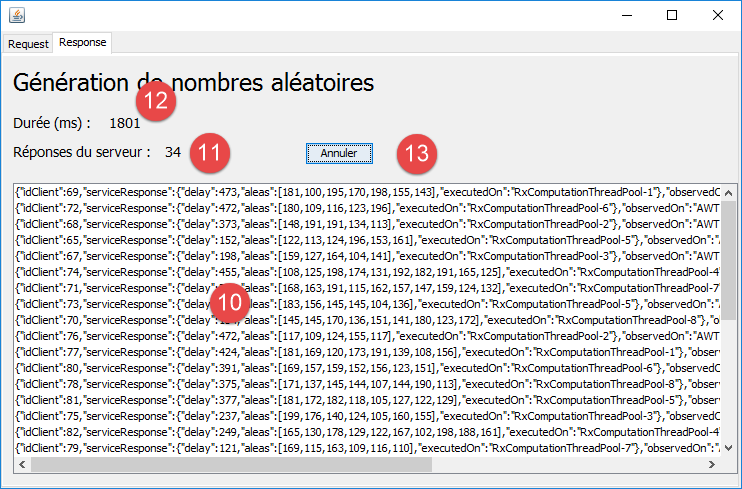 |
- in [10], display of results. We will explain the structure of these;
- in [11], the number of results obtained;
- in [12], the execution time in milliseconds;
- in [13], the user has the option to cancel the execution;
Each result has the following format:
{"idClient":0,"serviceResponse":{"delay":412,"aleas":[146,115,128,174,159,112,162,127],"executedOn":"RxComputationThreadPool-6"},"observedOn":"AWT-EventQueue-0","requestAt":"02:42:47:708","responseAt":"02:42:52:931"}
- [idClient]: the request number. Note that multiple requests are made to the generation service;
- [delay]: the wait time in milliseconds that the service observed before sending its result;
- [aleas]: the random numbers returned by the service;
- [executedOn]: the name of the thread in which the service ran;
- [observedOn]: the name of the thread that displayed the result. With a Swing interface, this can only be the thread of the event loop, here [AWT-EventQueue-0];
- [requestAt]: the time of the request in the form [heures:minutes:secondes:millisecondes];
- [responseAt]: the time the results were received in the same format;
We will now present the code snippets necessary for understanding the example.
2.3. The synchronous interface
The [1] service layer has the following interface:
public interface IService {
  // random numbers in [a,b]
  // n numbers are generated with random n in the interval [minCount, maxCount]
  // numbers are generated after a delay of milliseconds,
  // where [delay] is a random number in the interval [minDelay, maxDelay]
  public ServiceResponse getAleas(int a, int b, int minCount, int maxCount, int minDelay, int maxDelay);
}
The response [ServiceResponse] is as follows:
public class ServiceResponse {

  // service waiting time
  private int delay;
  // random numbers
  private List<Integer> aleas;
  // execution thread
  private String executedOn;

  // manufacturers

  public ServiceResponse(int delay, List<Integer> aleas) {
    executedOn = Thread.currentThread().getName();
    this.delay = delay;
    this.aleas = aleas;
  }

  // getters and setters
...
}
The answer has three parts:
- line 6: the generated random numbers;
- line 4: the wait time observed by the service before returning its result;
- line 8: the service's execution thread;
2.4. The synchronous call
We will now detail the synchronous call [4] made by the [swing] layer to the [1] service:
  private void doGenerateWithService() {
    // start waiting
    beginWaiting();
    try {
      for (int i = 0; i < nbRequests; i++) {
        UiResponse uiResponse = new UiResponse();
        uiResponse.setIdClient(i);
        uiResponse.setServiceResponse(service.getAleas(a, b, minCount, maxCount, minDelay, maxDelay));
        uiResponse.setResponseAt();
        model.add(0, jsonMapper.writeValueAsString(uiResponse));
        jLabelNbReponses.setText(String.valueOf(Integer.parseInt(jLabelNbReponses.getText()) + 1));
      }
    } catch (JsonProcessingException | RuntimeException e) {
      System.out.println(e);
    }
    // end waiting
    endWaiting();
}
- lines 5–12: the execution loop for the [nbRequests] queries requested by the user;
- line 8: [service] is the implementation of the synchronous interface [IService] presented in section 2.3;
- line 10: [model] is the template displayed by the JList component of the [Response] tab. The elements of this template are the jSON strings of the following [UiResponse] elements:
public class UiResponse {

  // id of the customer
  private int idClient;
  // service response
  private ServiceResponse serviceResponse;
  // observation thread name
  private String observedOn;
  // query time
  private String requestAt;
  // response time
  private String responseAt;

  // manufacturers

  public UiResponse() {
    observedOn = Thread.currentThread().getName();
    requestAt = getTimeStamp();
  }
  // private methods

  private String getTimeStamp() {
    return new SimpleDateFormat("hh:mm:ss:SSS").format(Calendar.getInstance().getTime());
  }

  // getters and setters
...
}
- line 6: the response from the number generation service;
- line 4: the request number being responded to;
- line 8: the thread displaying this response. As mentioned, this will always be the thread for event loop;
- lines 10 and 12: the time of the request and the time of the response;
2.5. Testing synchronous calls
We run the following configuration:
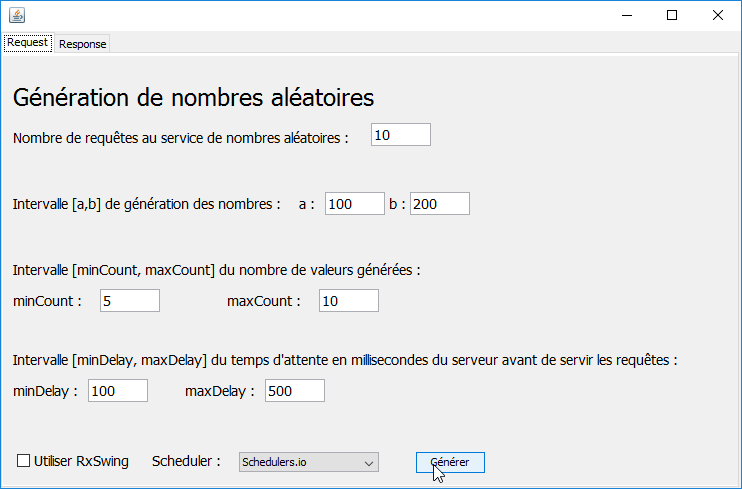 |
We obtain the following results in the [Response] tab:
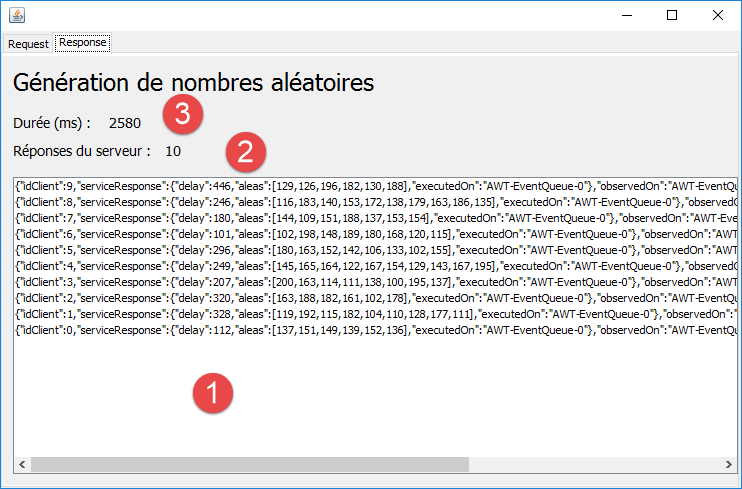 |
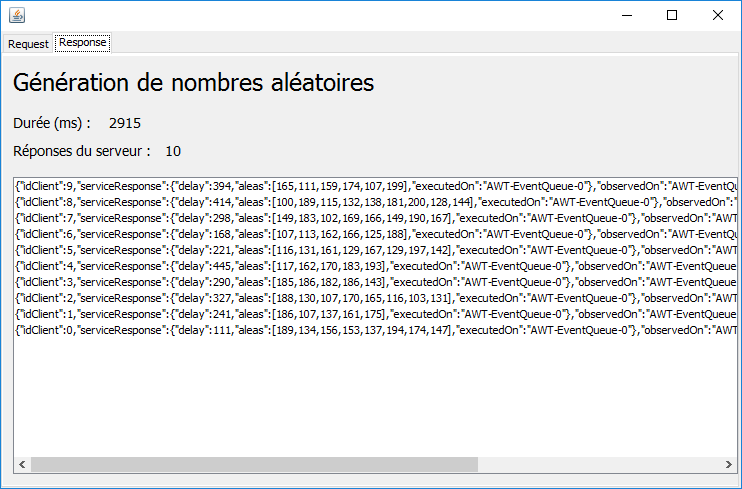
- In [1-2], we indeed received 10 responses as requested. They were inserted in the first position in the order they arrived. We can see that they were received in the order of the requests;
- they were all executed and displayed in the loop [AWT-EventQueue-0] event thread. The requests were therefore executed one after the other in this thread. There were no simultaneous requests;
- what is not visible here is that during execution, the graphical interface is frozen. For example, there is no way to access the [Response] tab to view the incoming responses or to interrupt execution using the [Annuler] button. Even if this button had been present on the [Request] tab, it would have been unusable. In fact, there would then be two events:
- clicking the [Générer] button;
- the click on the [Annuler] button;
The click on the [Annuler] button is only handled after the operation triggered by the click on the [Générer] button has finished. We have just seen that this operation occupied the loop event thread for the entire duration of its execution, thereby preventing the handling of the click on the [Annuler] button. This is typically the kind of situation where Rx can provide a significant improvement;
2.6. The asynchronous interface and its implementation
We will now look at the interface of the [2] layer and its implementation with Rx. This will not be immediately clear. We simply want to highlight the simplicity of the code in this implementation.
The asynchronous interface is as follows:
public interface IRxService {
  // random numbers in [a,b]
  // n numbers are generated with random n in the interval [minCount, maxCount]
  // numbers are generated after a delay of milliseconds,
  // where [delay] is a random number in the interval [minDelay, maxDelay]
  public Observable<UiResponse> getAleas(int a, int b, int minCount, int maxCount, int minDelay, int maxDelay, UiResponse uiResponse);
}
The differences from the synchronous interface presented in Section 2.3 are as follows:
- the class [UiResponse] presented in Section 2.3 is now part of the parameters of the method [getAleas] (line 6). The reason for this is that, because requests now run in parallel and the service waits a random amount of time before returning its result, the responses will not come back to us in the order of the requests. We therefore pass the [UiResponse] object, which contains, among other information, the request ID:
  // customer's id (request)
  private int idClient;
  // service response
  private ServiceResponse serviceResponse;
  // observation thread name
  private String observedOn;
  // query time
  private String requestAt;
  // response time
  private String responseAt;
- The response type of the asynchronous service is [Observable<UiResponse>]. The [Observable<>] type is provided by the Rx library. The result of type [Observable<UiResponse>] indicates that the method [getAleas] provides a stream of values of type [UiResponse], which are pushed one by one to their observer;
Let’s now look at the implementation of this interface:
public class RxService implements IRxService {

  // service
  private IService service;

  // manufacturer
  public RxService(IService service) {
    this.service = service;
  }

  @Override
  public Observable<UiResponse> getAleas(int a, int b, int minCount, int maxCount, int minDelay, int maxDelay, UiResponse uiResponse) {
    return Observable.create(subscriber -> {
      try {
        uiResponse.setServiceResponse(service.getAleas(a, b, minCount, maxCount, minDelay, maxDelay));
        subscriber.onNext(uiResponse);
      } catch (Exception e) {
        subscriber.onError(e);
      } finally {
        subscriber.onCompleted();
      }
    });
  }
}
- lines 7–9: the constructor is provided with a reference to the synchronous interface [IService]. This interface is responsible for generating random numbers;
- the observable returned by the [getAleas] method is constructed by the static method [Observable.create]. This method allows an asynchronous implementation to be built from a synchronous implementation;
- line 13: the parameter of the static method [Observable.create] is here a lambda function that takes a [Subscriber] type as a parameter, which is again an Rx type. A [Subscriber] is an object that subscribes to a stream of observables, i.e., a stream of data delivered asynchronously. Here, we use three methods of this subscriber:
- [Subscriber.onNext] to send it data (line 16);
- [Subscriber.onError] to send it an exception (line 18);
- [Subscriber.onCompleted] to indicate to the subscriber that the data stream has ended (line 20);
There can be multiple subscribers to the same observable. Here, we will have only one subscriber subscribing to a stream of a single piece of data, the one produced on lines 15–16. The data is produced by the service’s synchronous implementation (line 15) and delivered to the subscriber (line 16).
Even if all of this probably remains obscure, one cannot help but be struck by the extreme conciseness of this asynchronous implementation of the service.
2.7. The Asynchronous Call
We will now examine the synchronous call [5] made by the [swing] layer to the [2] service:
private void doGenerateWithRxService() {
        // start waiting
        beginWaiting();
        // we ask for the random numbers
        Observable<UiResponse> observables = Observable.empty();
        for (int i = 0; i < nbRequests; i++) {
            UiResponse uiResponse = new UiResponse();
            uiResponse.setIdClient(i);
            // scheduler
            int schedulerIndex = jComboBoxSchedulers.getSelectedIndex();
            switch (schedulerIndex) {
            case 0:
                observables = observables.mergeWith(rxService.getAleas(a, b, minCount, maxCount, minDelay, maxDelay, uiResponse).subscribeOn(Schedulers.io()));
                break;
...
            }
        }
...
    }
- lines 6–10: execution of the [nbRequests] requests requested by the user;
- lines 7-8: preparation of the [UiResponse] object required by the [getAleas] method of the asynchronous service (line 13). This mainly involves saving the [idClient] request ID;
- line 13: the [getAleas] method of the asynchronous service is called. It returns a [Observable<UiResponse>] object. This call does not yet invoke the synchronous service. Let’s return to the code for the asynchronous [getAleas]:
  @Override
  public Observable<UiResponse> getAleas(int a, int b, int minCount, int maxCount, int minDelay, int maxDelay, UiResponse uiResponse) {
    return Observable.create(subscriber -> {
      try {
        uiResponse.setServiceResponse(service.getAleas(a, b, minCount, maxCount, minDelay, maxDelay));
        subscriber.onNext(uiResponse);
      } catch (Exception e) {
        subscriber.onError(e);
      } finally {
        subscriber.onCompleted();
      }
    });
}
The code in lines 4–11 that calls the synchronous service is executed only when a subscriber registers. As long as there are no subscribers, this code is not executed.
Let’s return to the code for the [doGenerateWithRxService] method:
- line 5: we create an empty observable (nothing is observed);
- line 13: we create an observable whose stream will be the merge of the [nbRequests] asynchronous streams associated with the [nbRequests] requests. This is achieved using the [Observable.mergeWith] method, which allows merging two asynchronous streams. In Rx terminology, [mergeWith] is called a stream operator. These operators have the characteristic that the result of the operation is, in most cases, another [Observable]. Ultimately, after line 17, the variable [observables] refers to a single stream consisting of the [nbRequests] asynchronous responses generated by the asynchronous service;
- line 13: the merge operation could have been written as:
observables = observables.mergeWith(rxService.getAleas(a, b, minCount, maxCount, minDelay, maxDelay, uiResponse));
but we wrote:
observables = observables.mergeWith(rxService.getAleas(a, b, minCount, maxCount, minDelay, maxDelay, uiResponse).subscribeOn(Schedulers.io()));
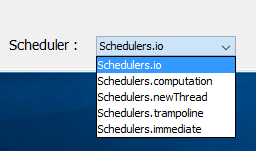
Here, we used the [subscribeOn] operator on the observable [rxService.getAleas]. As is often the case, the result is again an observable. The [subscribeOn] operator specifies that the observable must be executed in a thread provided by a [Scheduler]. There are several possible [Scheduler] operators suited to different situations. In the graphical interface, we have provided several of them to see how they differ:
 |
This results in the following code:
    private void doGenerateWithRxService() {
        // start waiting
        beginWaiting();
        // we ask for the random numbers
        Observable<UiResponse> observables = Observable.empty();
        for (int i = 0; i < nbRequests; i++) {
            UiResponse uiResponse = new UiResponse();
            uiResponse.setIdClient(i);
            // scheduler
            int schedulerIndex = jComboBoxSchedulers.getSelectedIndex();
            switch (schedulerIndex) {
            case 0:
                observables = observables.mergeWith(rxService.getAleas(a, b, minCount, maxCount, minDelay, maxDelay, uiResponse).subscribeOn(Schedulers.io()));
                break;
            case 1:
                observables = observables.mergeWith(rxService.getAleas(a, b, minCount, maxCount, minDelay, maxDelay, uiResponse).subscribeOn(Schedulers.computation()));
                break;
            case 2:
                observables = observables.mergeWith(rxService.getAleas(a, b, minCount, maxCount, minDelay, maxDelay, uiResponse).subscribeOn(Schedulers.newThread()));
                break;
            case 3:
                observables = observables.mergeWith(rxService.getAleas(a, b, minCount, maxCount, minDelay, maxDelay, uiResponse).subscribeOn(Schedulers.trampoline()));
                break;
            case 4:
                observables = observables.mergeWith(rxService.getAleas(a, b, minCount, maxCount, minDelay, maxDelay, uiResponse).subscribeOn(Schedulers.immediate()));
                break;
            }
        }
...
}
Let’s revisit the code in lines 12–14. The scheduler [Schedulers.io()] assigns a new thread to each observable. If we follow the code:
- line 5: we have an empty observable;
- line 13, iteration 1: observables is the list [observable0/thread0] (Observable observable0 running on thread thread0);
- line 13, iteration 2: observables is the list [observable0/thread0, observable1/thread1];
- etc...
Ultimately, after line 28, we have an observable resulting from the merger of [nbRequests] observables running on [nbRequests] different threads. Not all schedulers work this way, as we will see during testing.
Let’s continue examining the code for calling the asynchronous service:
private void doGenerateWithRxService() {
        // start waiting
        beginWaiting();
        // we ask for the random numbers
        Observable<UiResponse> observables = Observable.empty();
        for (int i = 0; i < nbRequests; i++) {
        ...
        }
        // observer
        observables = observables.observeOn(SwingScheduler.getInstance());
        // these observables are executed
        subscriptions.add(observables.subscribe(uiResponse -> {
            updateUi(uiResponse);
        } , th -> {
            System.out.println(th);
            doCancel();
        } , this::doCancel));
    }
- We have seen that when we reach line 10, we have a single observable, a fusion of [nbRequests] observables that may or may not run on different [nbRequests] threads, depending on the scheduler chosen by the user;
- Line 10: The [observeOn] operator allows us to specify on which thread we want to retrieve the data from the observable, in this case the [nbRequests] objects of type [UiResponse]. In a Swing interface, there is no choice. Any update to the interface must be performed on the loop event thread. Here, the observable’s data will be displayed in a Swing component JList. The thread [SwingScheduler.getInstance()] represents the event thread loop. The [SwingScheduler] class does not come from the RxJava library but from the derived RxSwing library;
- when we reach line 12, the synchronous service has still not been called because the observable on line 10 does not yet have a subscriber. Lines 12–17 provide one, using the [subscribe] operator. The parameters of this operator are three lambda functions:
- the first, [uiResponse -> {updateUi(uiResponse);}], takes as a parameter one of the [UiResponse] objects produced by the observable. Recall that here, we will have [nbRequests] objects of this type. The associated method, updateUi in this case, must process this result;
- the second, [th -> {System.out.println(th);doCancel();}], accepts a [Throwable] type as a parameter—in this case, an exception that occurred during the observable’s execution. The associated method must process this information. Here, we display it on the console (line 15) and cancel the execution, which will update certain elements of the graphical user interface;
- the third [this::doCancel] is called when the observable signals that it has no more data to transmit. Here, the observable is the union of [nbRequests] observables. The resulting observable will indicate that it has finished when all the observables that compose it have themselves signaled that they have finished their work. So when this third lambda function is executed, all the data has been received. The local method [doCancel] updates the GUI to reflect that the execution is complete;
The variable [subscriptions] is defined as follows:
    // subscriptions to observables
protected List<Subscription> subscriptions = new ArrayList<Subscription>();
The type [Subscription] represents a subscription, i.e., the link between a subscriber [Subscriber] and what it observes [Observable]. We have used a list of subscriptions here, although in this example there is only one. The local method [doCancel], which is executed when the observable signals that it has no more data to transmit, is as follows:
    @Override
    protected void doCancel() {
        // end waiting
        endWaiting();
        // in the case of subscriptions
        if (jCheckBoxRxSwing.isSelected() && subscriptions != null) {
            subscriptions.forEach(Subscription::unsubscribe);
        }
}
- Line 7 unsubscribes all subscribers from the observable;
From this brief explanation, we can take away the following key points:
- the type [Observable] denotes a stream of values, which are pushed one by one to subscribers or observers;
- the type [Subscriber] denotes a subscriber of type [Observable];
- the type [Subscription] denotes a subscription, i.e., the link between a [Subscriber] and a [Observable];
- the type [Observable] accepts operators of type [mergeWith, empty, subscribeOn, observeOn, ...], most of which produce observables. These operators are used to configure the observable before its execution:
- what we want to observe;
- the thread on which the observable runs;
- the thread on which the subscriber receives data from the observable;
- There are two types of observables: [froid / cold] and [chaud / hot]. A cold observable is fully executed for each new subscriber. If each execution produces the same data, each new subscriber receives the same data as the previous one. A hot observable generally produces data continuously. When a subscriber subscribes, they receive the data emitted starting from the time of their subscription. They do not receive data that may have been emitted previously. In our example, the observable is cold: it is fully re-executed for each new subscriber. What is actually executed in our example? To find out, we need to go back to the definition of the observed observable:
  @Override
  public Observable<UiResponse> getAleas(int a, int b, int minCount, int maxCount, int minDelay, int maxDelay, UiResponse uiResponse) {
    return Observable.create(subscriber -> {
      try {
        uiResponse.setServiceResponse(service.getAleas(a, b, minCount, maxCount, minDelay, maxDelay));
        subscriber.onNext(uiResponse);
      } catch (Exception e) {
        subscriber.onError(e);
      } finally {
        subscriber.onCompleted();
      }
    });
}
For each new subscriber, the lambda function, a parameter of the [Observable.create] method (line 3), is re-executed. Therefore, lines 4–11 are executed for each new [subscriber] subscriber;
2.8. Testing asynchronous calls
We begin by demonstrating the effect of the various schedulers available. To do this, we use the following parameters:
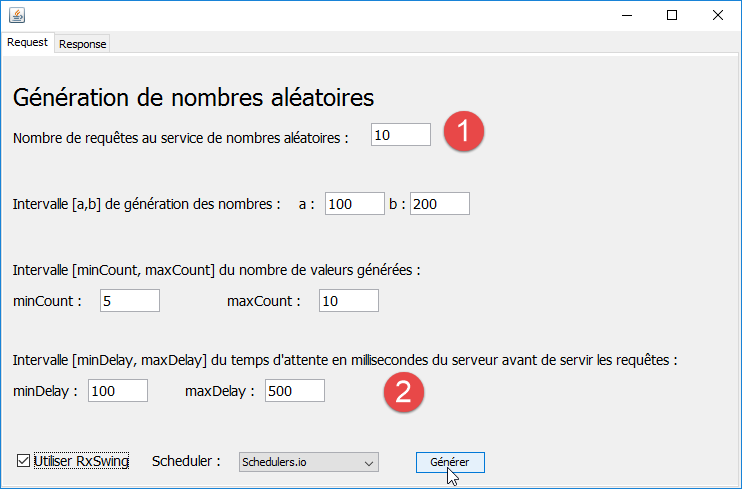 |
We set small values in [1-2] so that if the requests are executed on the same thread, we still don’t have to wait too long.
2.8.1. with the [Schedulers.io] scheduler
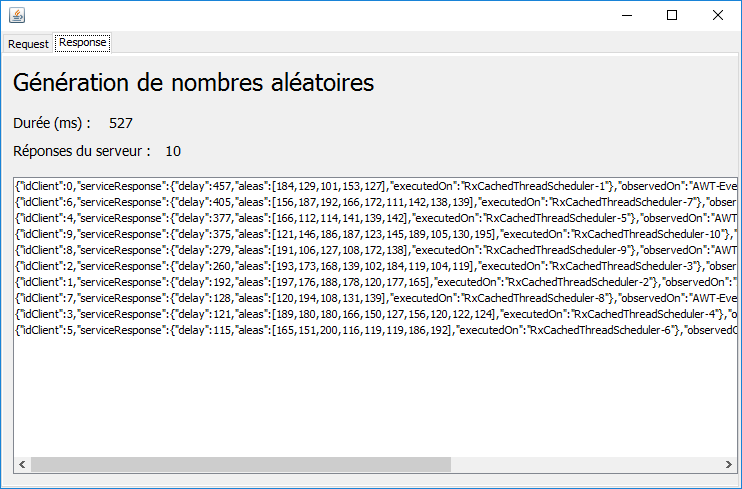 |
The following points can be observed:
- the responses are received in an order that does not match the order of the requests (see idClient);
- Each request ran in a different thread;
- the GUI is no longer frozen this time:
- you can switch between tabs;
- you can see the data coming in;
- we don’t have time to see the [Annuler] button because execution is too fast. We’ll highlight it in another test;
2.8.2. with the [Schedulers.computation] scheduler
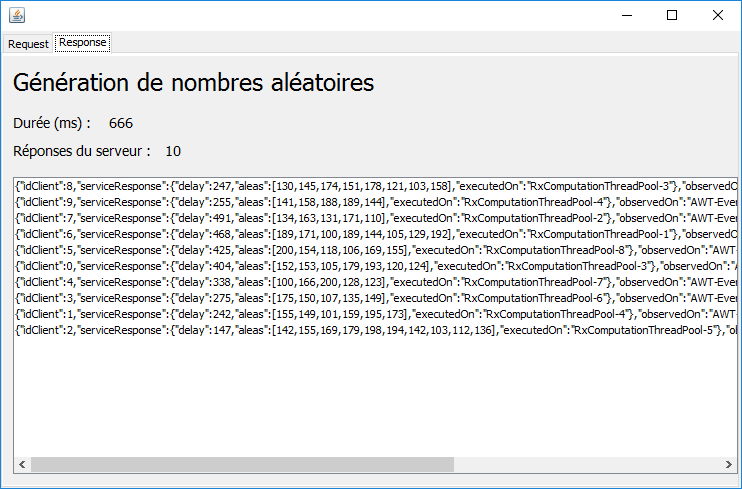 |
The following points can be noted:
- the responses are received in an order that does not match the order of the requests (see idClient);
- the requests were executed in 8 threads;
- thread #3 was used for requests 8 and 0;
- thread #4 was used for requests 9 and 1;
- the other queries each had a different thread;
The scheduler [Schedulers.computation] uses as many threads as there are cores on the machine being used. This information is obtained by the expression [Runtime.getRuntime().availableProcessors()].
2.8.3. with the [Schedulers.newThread] scheduler
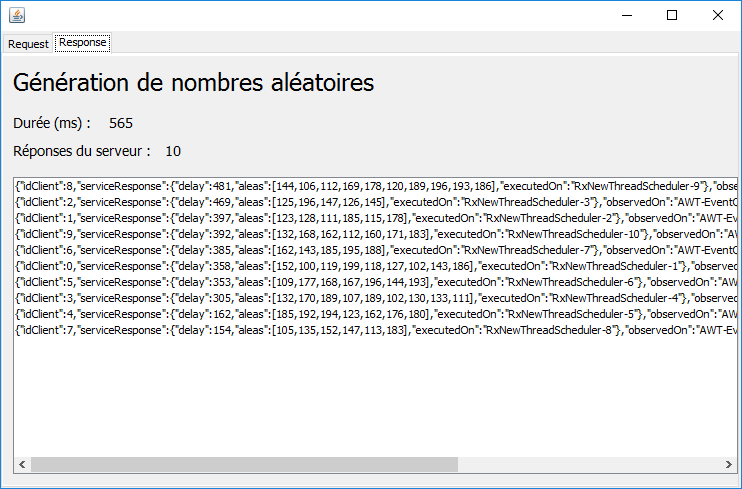 |
The behavior is similar to that of the [Schedulers.io] scheduler.
2.8.4. with the schedulers [Schedulers.trampoline, Schedulers.immediate]
 |
The operation is synchronous. All requests are executed on the loop event thread. This result should not be generalized; rather, it simply means that in this specific example, the two schedulers operated synchronously.
2.9. Boundary Cases
In this example, we will work with schedulers that support asynchronous operation. First, we increase the number of requests to 100 using the [Schedulers.computation] scheduler, which operates with 8 threads here. We obtain the following result:
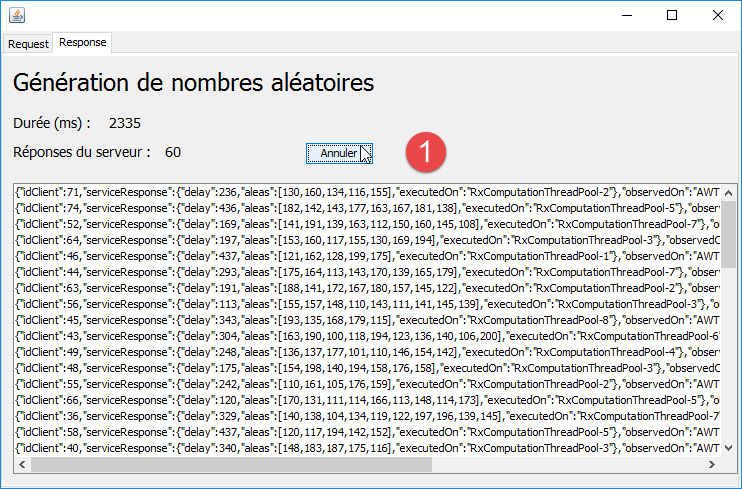 |
- In [1], the [Annuler] button is present and usable (asynchronous operation);
Now, let’s let the execution run to completion:
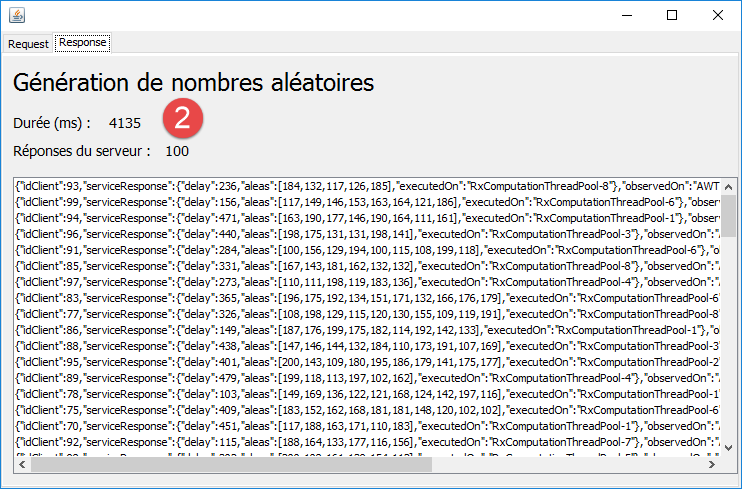 |
We see in [2] that executing the 100 requests took about 4 seconds (across 8 threads).
Now, let’s run these same 100 requests using the [Schedulers.newThread] scheduler, which executes each request on a separate thread:
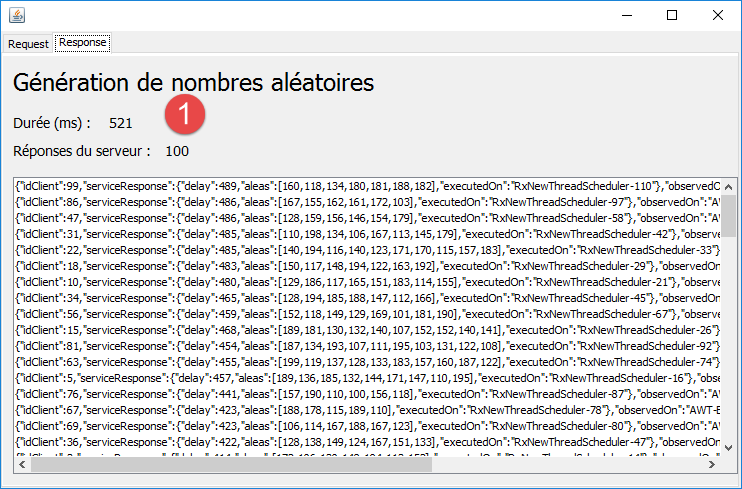 |
In [1], we see that executing the 100 requests (across 100 threads) took half a second. This is therefore significantly faster than with the [Schedulers.computation] scheduler.
Now, let’s run 800 requests under the same conditions, still using the [Schedulers.newThread] scheduler. We get the following results:
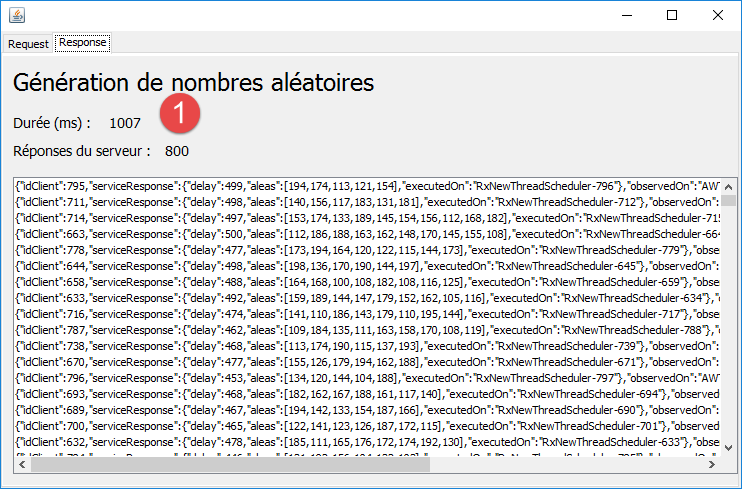 |
The 800 requests are executed in about 1 second.
When we increase this number (beyond 2,500 requests on my machine—executed in 1.5 seconds—this number is, of course, highly dependent on the runtime environment), we eventually get the following exception:
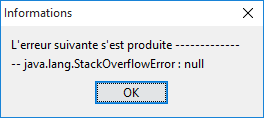 |
We therefore have a stack overflow. Tests show that the behavior of the [Schedulers.newThread] scheduler is not deterministic. You may encounter the previous exception, run new tests, then return to the configuration that caused the exception and no longer encounter it.
2.10. Conclusion
We have demonstrated an example of using the Rx library. Let’s summarize what we’ve learned:
We started with the following architecture:
- in [4], the [swing] layer made synchronous calls to the [service] layer;
- in [5], the [swing] layer made asynchronous calls to the [rxService] layer, which in turn called the [6] layer synchronously;
The first thing we observed was that the Rx library made it easy to create the asynchronous interface [rxService] from the synchronous interface [service] (see Section 2.4). This is an important lesson because it means that we can easily evolve a synchronous application into an asynchronous one.
In the [swing] layer, two separate methods were written:
- one to make synchronous calls to the service (see section 2.4);
- the other to make asynchronous calls to it (see section 2.7);
Writing asynchronous calls has proven to be significantly more complex than writing synchronous calls. Nevertheless, those who have worked with concurrent programming involving multiple threads that need to be synchronized will find that the Rx solution is simpler to write and avoids all the difficult problems of synchronization and inter-thread communication. In this article, we have highlighted the following key points:
- the type [Observable] denotes a stream of events (values) that may (but need not) be asynchronous and that can be observed;
- the type [Subscriber] denotes a subscriber to a type [Observable];
- the type [Subscription] denotes a subscription, i.e., the link between a [Subscriber] and a [Observable];
- the type [Observable] accepts [mergeWith, empty, subscribeOn, observeOn, ...] operators, most of which produce observables. These operators are used to configure the observable before its execution:
- what we want to observe;
- the thread on which the observable runs;
- the thread on which the subscriber receives data from the observable;
- There are two types of observables: [froid / cold] and [chaud / hot]. A cold observable is fully executed for each new subscriber. If each execution produces the same data, each new subscriber receives the same data as the previous one. A hot observable generally produces data continuously. When a subscriber subscribes, they receive the data emitted from the time of their subscription. They do not receive any data that may have been emitted previously. In our example, the observable is cold: it is fully re-executed for each new subscriber.
Now that we’ve seen an example demonstrating the value of the Rx library, we’ll explore it in more detail.
The Rx library has many methods with generic parameters in their signatures. We’ll briefly review these signatures (section 3). The parameters of these methods are mostly functional interfaces (Java 8), i.e., interfaces with only a single method. The actual parameters must therefore be instances of these interfaces. Before Java 8, it was common practice to implement an interface using an anonymous class. With Java 8, if the interface is a functional interface, it is more concise to implement it using a lambda function. We will therefore discuss these (section 4). Once this has been done, we will introduce the [Stream] class (section 5), which allows Java collections to be processed using lambda functions. This class is interesting because the [Observable] class of RxJava borrows:
- certain methods;
- the same way of chaining methods together to process the same observable;
We will then present the functional interfaces specific to the RxJava library (section 6). We will continue with the main elements of the Rx [Observable, Subscriber, Subscription, opérateurs] library (section 7). The [Observable] class has several dozen operators that are themselves overloaded multiple times. This initially creates significant complexity because these operators and their overloads sometimes differ by only a single detail, and it is difficult, without experience, to know which operator to use. We will present only a limited number of operators, and for the most part we will ignore their overloads.
The entire previous section will be covered using the RxJava library in simple console applications. Once the RxJava library has been covered, we will use it in two types of graphical applications:
- in Section 8, we will revisit the example Swing application to examine it in greater detail. We will then use the RxSwing library;
- in Section 9, we will create an Android application using the RxAndroid library;
Once all this is done, the reader will have the tools to stand on their own two feet. It will likely take some time before they can use the Rx library intuitively. I found this library particularly interesting. However, I found it complex to understand, and the learning curve was steep. I hope this document will shorten that time for the reader. It seems to me that it’s worth the effort.