9. RxJava in the Android environment
9.1. Introduction
Here we will revisit an application already discussed in several documents:
- [Android pour les développeurs JEE : un modèle asynchrone pour clients Android] (Chapter 4);
- [Introduction à la programmation de tablettes Android par l'exemple] (Chapter 9);
- [Introduction à la programmation de tablettes Android par l'exemple - version 2] (Section 1.11);
It deals with a client/server application where the server asynchronously delivers random numbers that the Android client displays:
- In Document 1, the Android client uses non-standard technology;
- in document 2, the Android client uses Android’s standard technology for asynchronous operations;
- In Document 3, the Android client uses the same technology as in Document 2 but simplified through the use of annotations from the Android Annotations library;
The Android client is as follows:
 |
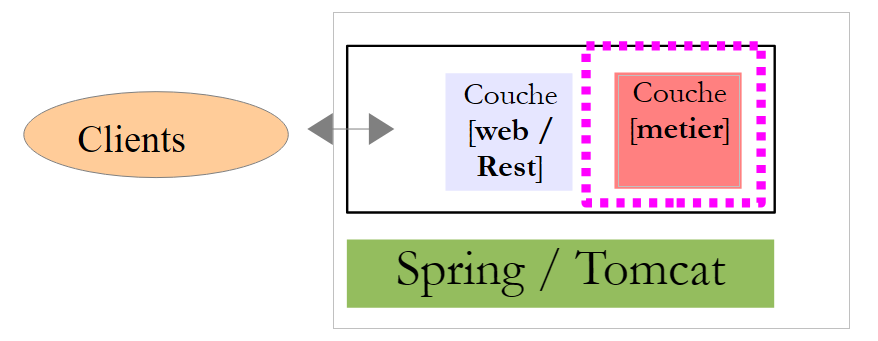
The [DAO] layer communicates with the server that generates the random numbers displayed by the Android tablet. This server has the following two-layer architecture:
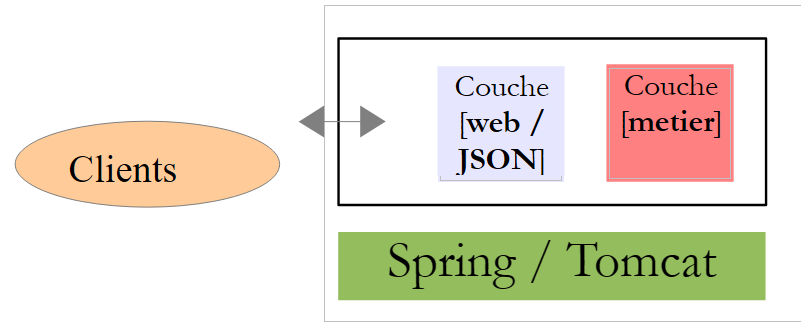 |
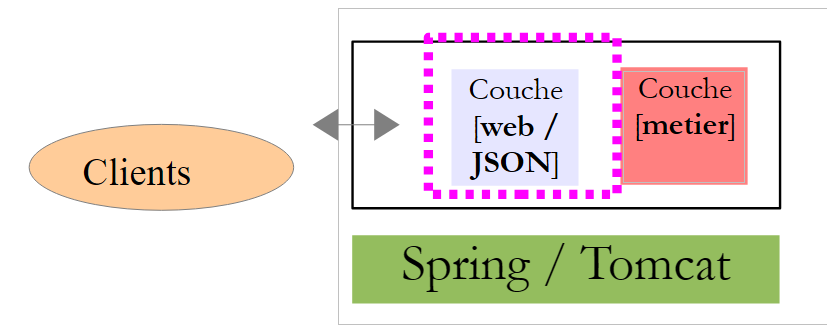
The clients query certain URL in the [web / JSON] layer and receive a text response in JSON (JavaScript Object Notation).
We will break down the analysis of the application into two steps:
The web server / jSON
- its [métier] layer;
- its [web / JSON] service implemented with Spring MVC;
The Android client
- its [DAO] layer;
- its activity;
- its views;
9.2. The web service / jSON
Note: The web service / jSON is implemented using Spring technology MVC. Readers unfamiliar with this technology may either:
- simply read section 9.2.1, which explains how to start the server and how to query it;
- consult the [Spring MVC et Thymeleaf par l'exemple] document, particularly Chapter 4, which presents the main annotations used in the code;
9.2.1. The Intellij Idea project
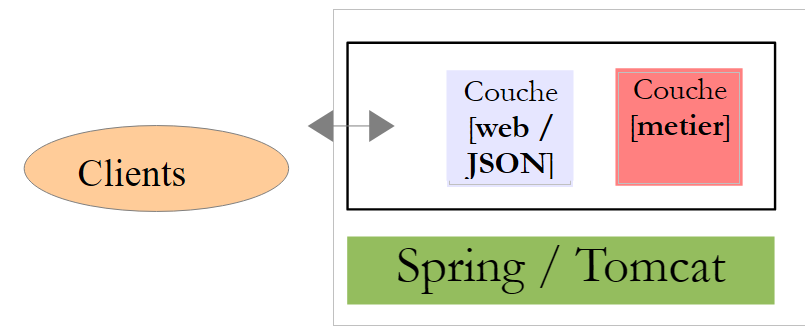
The web service / jSON has the following architecture:
 |
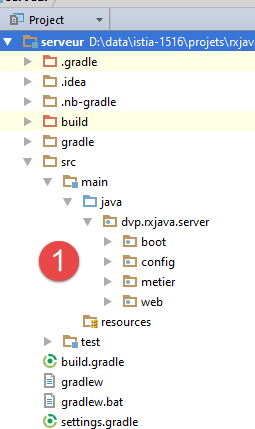
This architecture is implemented by the Intellij Idea project following [1]:
 | 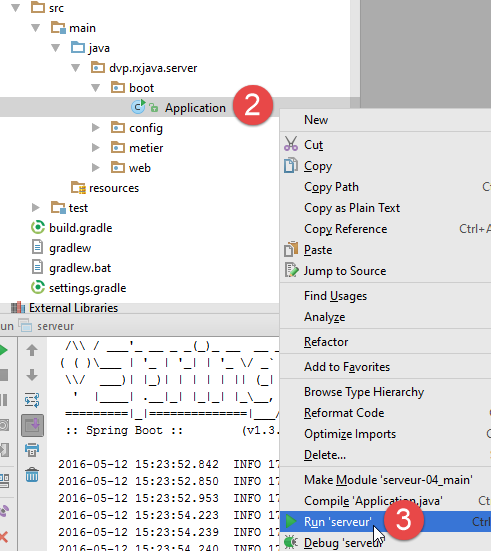 |
The server is launched by [2-3]. Logs are then displayed on the console:
- line 12: indicates that the service is available on port 8080;
- Line 10: The unique URL for the web service / jSON, available via a HTTP or GET operation. Its parameters are as follows:
- [a,b]: random number generation interval;
- [minCount, maxCount]: count random numbers are generated, where count is a random number in the interval [minCount, maxCount];
- [minDelay, maxDelay]: the service waits delay milliseconds before returning the requested numbers, where delay is a random number in [minDelay, maxDelay];
In a browser, let’s request this URL:
 |
We requested:
- random numbers in the interval [100, 200];
- n random numbers where n is in the range [10, 20];
- a wait time of x milliseconds, where x is in the interval [300, 400];
In the answer:
- aleas: list of generated random numbers;
- delay: the wait time in milliseconds that the server used;
- error: an error code—0 if no error;
- message: an error message - null if no error;
9.2.2. The project's Gradle dependencies
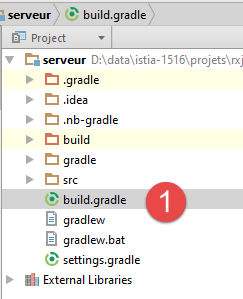 |
The [serveur] project is a Gradle project configured by the following [build.gradle] [1] file:
// generated by http://start.spring.io/ (May 2016)
buildscript {
  ext {
    springBootVersion = '1.3.5.RELEASE'
  }
  repositories {
    mavenCentral()
  }
  dependencies {
    classpath("org.springframework.boot:spring-boot-gradle-plugin:${springBootVersion}")
  }
}

apply plugin: 'java'
apply plugin: 'spring-boot'

jar {
  baseName = 'serveur'
  version = '0.0.1-SNAPSHOT'
}

sourceCompatibility = 1.8
targetCompatibility = 1.8

repositories {
  mavenCentral()
}

dependencies {
  compile('org.springframework.boot:spring-boot-starter-web')
}
- line 1: a comment explaining how this configuration file was generated;
- lines 4 and 10: a dependency on the [Spring Boot] framework, a branch of the Spring ecosystem. This [http://projects.spring.io/spring-boot/] framework allows for a minimal Spring configuration. Based on the libraries present in the project’s Classpath, [Spring Boot] infers a plausible or probable configuration for the project. Thus, if Hibernate is in the project’s Classpath, then [Spring Boot] will infer that the JPA implementation being used is Hibernate and will configure Spring accordingly. The developer no longer has to do this. All that remains for them to do is to configure the settings that [Spring Boot] did not set by default, or those that [Spring Boot] set by default but which need to be specified. In any case, the configuration made by the developer takes precedence;
- lines 14–15: two Gradle plugins required to utilize the contents of this Gradle file;
- lines 17–20: define the characteristics of the archive generated for this project;
- lines 22–23: for compatibility with Java 8;
- lines 25–27: dependencies will be searched for in the global Maven repository or in the local repository on the machine;
- Line 30: defines a dependency on the [spring-boot-starter-web] artifact. This artifact includes all the archives required for a Spring project (MVC). Among these is a Tomcat server archive. This is the one that will be used to deploy the web application. Note that the version artifact from the dependency has not been mentioned. The one mentioned in the imported project [spring-boot] will be used;
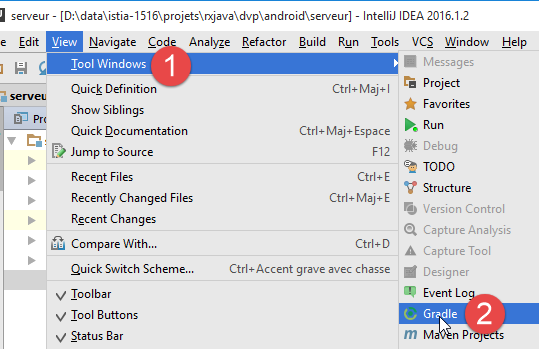
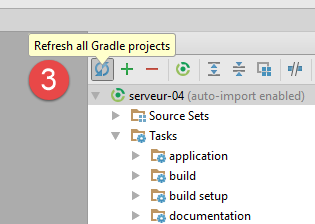
To update the project, you must force the download of the [1-3] dependencies:
 |   |
Let’s look at the dependencies brought in by the file [build.gradle]:
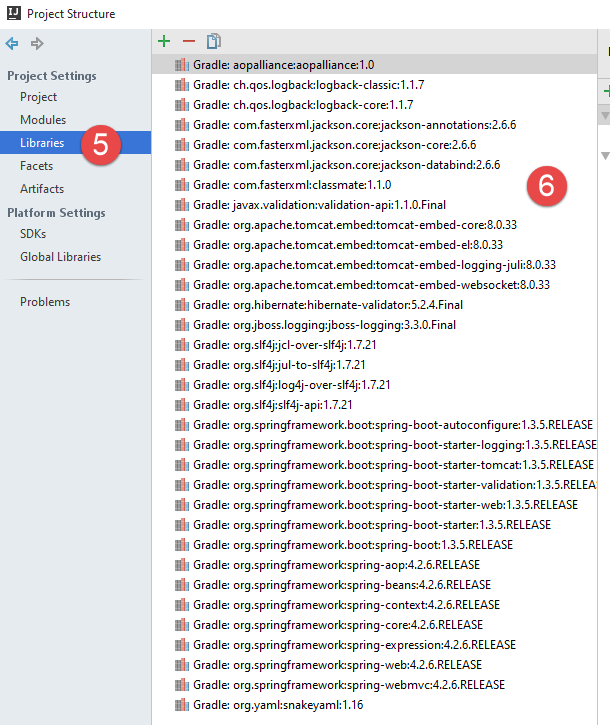 |
There are a great many of them. Spring Boot for the web has included the dependencies that a Spring web application MVC will likely need. This means that some may be unnecessary. Spring Boot is ideal for a tutorial:
- it provides the dependencies we will likely need;
- we will see that it greatly simplifies the configuration of the Spring MVC project;
- it includes an embedded Tomcat server, which saves us from having to deploy the application on an external web server;
- it allows us to generate an executable jar that includes all the dependencies listed above. This jar can be moved from one platform to another without reconfiguration.
You can find many examples using Spring Boot on the Spring ecosystem website [http://spring.io/guides]. Now that we know the project’s dependencies, we can move on to the code.
9.2.3. The [métier] layer
 |
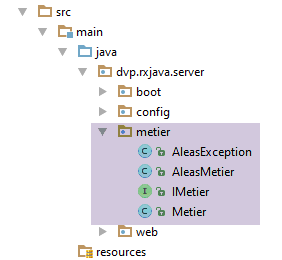 |
The [métier] layer will have the following interface:
package dvp.rxjava.server.metier;

public interface IMetier {
  // random numbers in the [a,b] interval
  // n numbers are generated with n itself a random number in the interval [minCount, maxCount]
  // numbers are generated after a delay of milliseconds,
  // where [delay] is itself a random number in the interval [minDelay, maxDelay]
  public AleasMetier getAleas(int a, int b, int minCount, int maxCount, int minDelay, int maxDelay);
}
This interface is nearly identical to the one discussed in the Swing environment in Section 8.4. Line 8, the [getAleas] method returns the following [AleasMetier] type:
package dvp.rxjava.server.metier;

import java.util.List;

public class AleasMetier {
  // fields
  private int delay;
  private List<Integer> aleas;

  // manufacturers
  public AleasMetier(){

  }

  public AleasMetier(int delay, List<Integer> aleas){
    this.delay=delay;
    this.aleas=aleas;
  }

  public AleasMetier(AleasMetier aleasMetier){
    this.delay=aleasMetier.delay;
    this.aleas=aleasMetier.aleas;
  }

  // getters and setters
...
}
The code for the [Metier] class implementing the [IMetier] interface is as follows:
package dvp.rxjava.server.metier;

import com.fasterxml.jackson.core.JsonProcessingException;
import com.fasterxml.jackson.databind.ObjectMapper;
import org.springframework.beans.factory.annotation.Autowired;
import org.springframework.stereotype.Service;

import java.util.*;

@Service
public class Metier implements IMetier {

  @Autowired
  private ObjectMapper mapper;

  @Override
  public AleasMetier getAleas(int a, int b, int minCount, int maxCount, int minDelay, int maxDelay) {
    // random numbers in the [a,b] interval
    // n numbers are generated with n itself a random number in the interval [minCount, maxCount]
    // numbers are generated after a delay of milliseconds,
    // where [delay] is itself a random number in the interval [minDelay, maxDelay]

    // some checks
    List<String> messages = new ArrayList<>();
    int erreur = 0;
    if (a < 0) {
      messages.add("Le nombre a de l'intervalle [a,b] de génération doit être supérieur à 0");
      erreur |= 2;
    }
    if (a >= b) {
      messages.add("Dans l'intervalle [a,b] de génération, on doit avoir a< b");
      erreur |= 4;
    }
    if (minCount < 0) {
      messages.add("Le nombre min de l'intervalle [min,count] du nombre de valeurs générées doit être supérieur à 0");
      erreur |= 16;
    }
    if (minCount > maxCount) {
      messages.add("Dans l'intervalle [min,count] du nombre de valeurs générées, on doit avoir min<= max");
      erreur |= 32;
    }
    if (minDelay < 0) {
      messages.add("Le nombre min de l'intervalle [min,count] du délai d'attente doit être supérieur à 0");
      erreur |= 64;
    }
    if (minCount > maxCount) {
      messages.add("Dans l'intervalle [min,count] du délai d'attente, on doit avoir min<= max");
      erreur |= 128;
    }
    if (maxDelay > 5000) {
      messages.add("L'attente en millisecondes avant la génération des nombres doit être dans l'intervalle [0,5000]");
      erreur |= 256;
    }
    // mistakes?
    if (!messages.isEmpty()) {
      throw new AleasException(String.join(" [---] ", messages), erreur);
    }
    // random number generator
    Random random = new Random();
    // waiting?
    int delay = minDelay + random.nextInt(maxDelay - minDelay + 1);
    if (delay > 0) {
      try {
        Thread.sleep(delay);
      } catch (InterruptedException e) {
        String message = null;
        try {
          message = mapper.writeValueAsString(Arrays.asList(String.format("[%s : %s]", e.getClass().getName(), e.getMessage())));
        } catch (JsonProcessingException e1) {
          throw new AleasException(e1,512);
        }
        throw new AleasException(message, 1024);
      }
    }
    // result generation
    int count = minCount + random.nextInt(maxCount - minCount + 1);
    List<Integer> nombres = new ArrayList<Integer>();
    for (int i = 0; i < count; i++) {
      nombres.add(a + random.nextInt(b - a + 1));
    }
    // return result
    return new AleasMetier(delay,nombres);
  }

}
We will not comment on the class: it is analogous to the one encountered in the Swing environment in Section 8.4. We will simply note the following points:
- line 10: the Spring annotation [@Service], which causes Spring to instantiate the class as a single instance (singleton) and make its reference available to other Spring components. Other Spring annotations could have been used here to achieve the same effect;
- Lines 13–14: A jSON mapper is injected. Spring is an object container. This container is instantiated when the web application starts, and objects defined in a configuration file are then instantiated—by default, as a single instance (singleton). A Spring singleton can contain references to other Spring objects. This is the case here: the singleton [metier] (lines 10–11) will have a reference to the singleton [mapper] (lines 13–14). This is called dependency injection. There are two ways to inject a singleton into another singleton:
- by type: this is possible if the singleton to be injected is the only Spring object of that type. This is the case here for the injection in lines 13–14 (type ObjectMapper);
- by its name if multiple Spring objects have the same type. In this case, you must add the @Qualifier("nomDuSingleton") annotation to specify the singleton’s name;
The [Metier] class throws exceptions of type [AleaException]:
package android.exemples.server.metier;

public class AleaException extends RuntimeException {

  // error code
  private int code;

  // manufacturers
  public AleaException() {
  }

  public AleaException(String detailMessage, int code) {
    super(detailMessage);
    this.code = code;
  }

  public AleaException(Throwable throwable, int code) {
    super(throwable);
    this.code = code;
  }

  public AleaException(String detailMessage, Throwable throwable, int code) {
    super(detailMessage, throwable);
    this.code = code;
  }

  // getters and setters

  public int getCode() {
    return code;
  }

  public void setCode(int code) {
    this.code = code;
  }
}
- line 3: [AleasException] extends the [RuntimeException] class. It is therefore an unchecked exception (no requirement to handle it with a try/catch);
- line 6: an error code is added to the [RuntimeException] class;
9.2.4. The web service / JSON
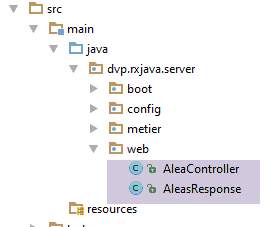
 |
 |
The web service / JSON is implemented by Spring MVC. Spring MVC implements the so-called MVC architecture model (Model–View–Controller) as follows:
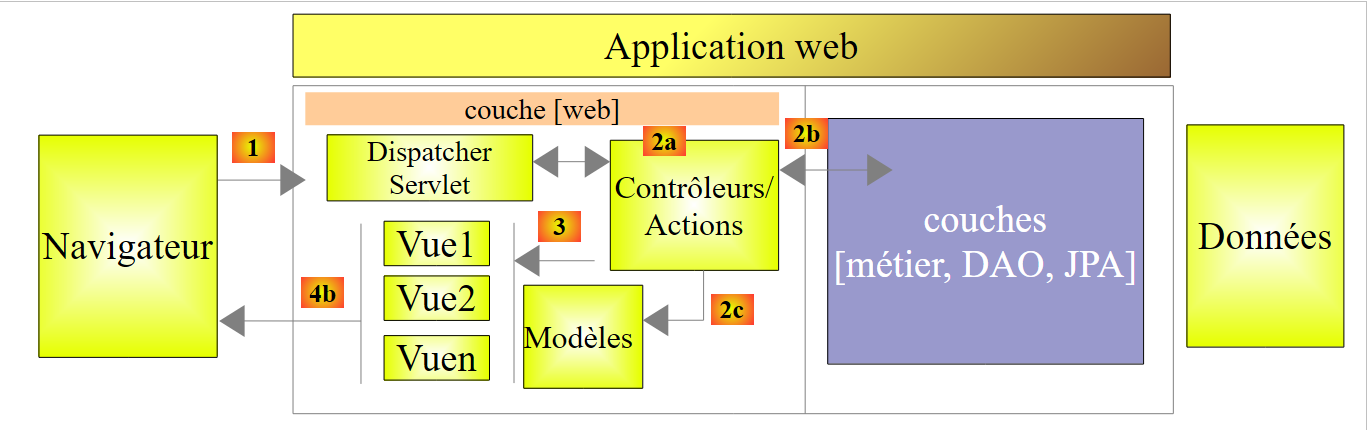 |
The processing of a client request proceeds as follows:
- request - the requested URLs are of the form http://machine:port/context/Action/param1/param2/....?p1=v1&p2=v2&... [Dispatcher Servlet] is the Spring class that processes incoming URL requests. It "routes" the URL to the action that must process it. These actions are methods of specific classes called [Contrôleurs]. The C in MVC is here the string [Dispatcher Servlet, Contrôleur, Action]. If no action has been configured to handle the incoming URL, the [Dispatcher Servlet] servlet will respond that the requested URL was not found (404 error NOT FOUND);
- processing
- The selected action can use the parameters that the [Dispatcher Servlet] servlet passed to it. These may come from several sources:
- from the path [/param1/param2/...] of URL,
- the parameters [p1=v1&p2=v2] from URL,
- parameters posted by the browser with its request;
- when processing the user's request, the action may require the [metier] and [2b] layers. Once the client's request has been processed, it may trigger various responses. A classic example is:
- an error page if the request could not be processed correctly
- a confirmation page otherwise
- the action instructs a specific view to be displayed [3]. This view will display data known as the view model. This is the M in MVC. The action will create this M template [2c] and request that a view V be displayed [3];
- response—the selected view V uses the model M constructed by the action to initialize the dynamic parts of the response HTML that it must send to the client, then sends this response.
For a web service / JSON, the previous architecture is slightly modified:
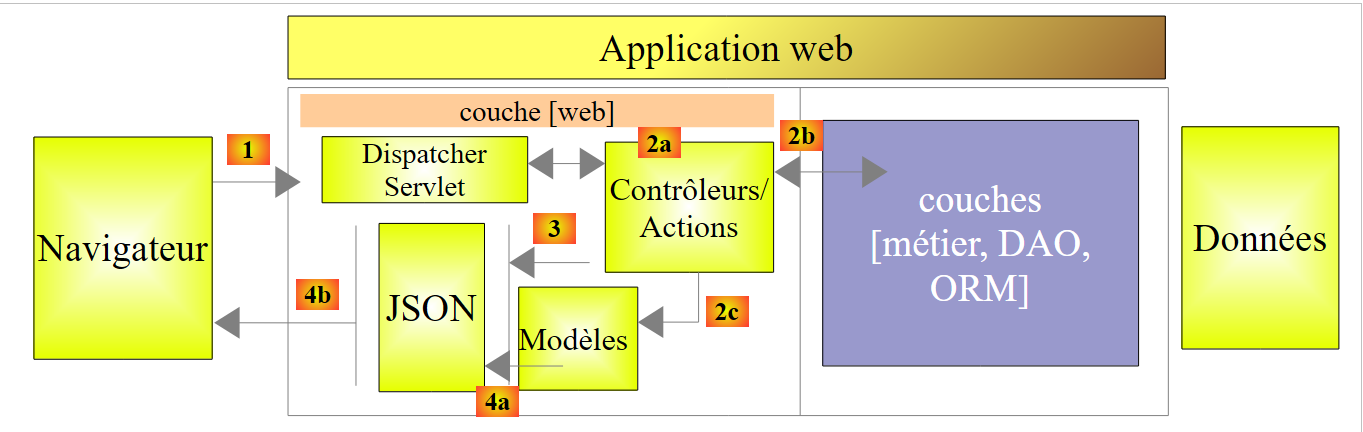 |
- in [4a], the model, which is a Java class, is converted into a string JSON by a library JSON;
- in [4b], this string JSON is sent to the browser;
Let’s return to the [web] layer of our application:
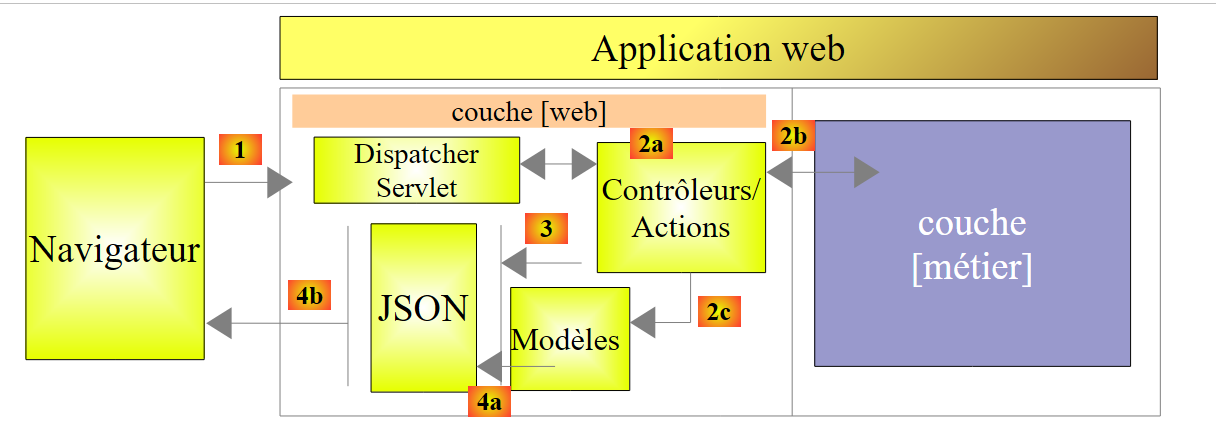 |
In our application, there is only one controller:
|
The web service / JSON will send its clients a response of type [AleasResponse] as follows:
package dvp.rxjava.server.web;

import dvp.rxjava.server.metier.AleasMetier;

public class AleasResponse extends AleasMetier {

  // error code
  private int erreur;
  // error message
  private String message;

  // manufacturers
  public AleasResponse() {

  }

  public AleasResponse(int erreur, String message, AleasMetier aleasMetier) {
    super(aleasMetier);
    this.erreur = erreur;
    this.message = message;
  }
  // getters and setters

  public void setAleasMetier(AleasMetier aleasMetier) {
    this.setDelay(aleasMetier.getDelay());
    this.setAleas(aleasMetier.getAleas());
  }
...
}
- line 5: the class [AleasResponse] extends the class [AleasMetier] and therefore inherits all of its attributes (alias, delay);
- line 8: an error code (0 if no error);
- line 10: if error!=0, an error message; null if no error;
The [AleasController] controller is as follows:
package dvp.rxjava.server.web;

import org.springframework.beans.factory.annotation.Autowired;
import org.springframework.stereotype.Controller;
import org.springframework.web.bind.annotation.PathVariable;
import org.springframework.web.bind.annotation.RequestMapping;
import org.springframework.web.bind.annotation.RequestMethod;
import org.springframework.web.bind.annotation.ResponseBody;

import com.fasterxml.jackson.core.JsonProcessingException;
import com.fasterxml.jackson.databind.ObjectMapper;

import dvp.rxjava.server.metier.AleasException;
import dvp.rxjava.server.metier.IMetier;

@Controller
public class AleasController {

    // business layer
    @Autowired
    private IMetier metier;
    @Autowired
    private ObjectMapper mapper;

    // random numbers in [a,b]
    // n numbers are generated with n in the interval [minCount, maxCount]
    // numbers are generated after a delay of milliseconds,
    // where [delay] is a random number in the interval [minDelay, maxDelay]
    @RequestMapping(value = "/{a}/{b}/{minCount}/{maxCount}/{minDelay}/{maxDelay}", method = RequestMethod.GET, produces = "application/json")
    @ResponseBody
    public String getAleas(@PathVariable("a") int a, @PathVariable("b") int b, @PathVariable("minCount") int minCount,
            @PathVariable("maxCount") int maxCount, @PathVariable("minDelay") int minDelay,
            @PathVariable("maxDelay") int maxDelay) throws JsonProcessingException {

        // we prepare the answer
        AleasResponse response = new AleasResponse();
        // the business layer is used to generate random numbers
        try {
            response.setAleasMetier(metier.getAleas(a, b, minCount, maxCount, minDelay, maxDelay));
        } catch (AleasException e) {
            // case of error (code and message)
            response.setErreur(e.getCode());
            response.setMessage(e.getMessage());
        }
        // we return the answer jSON
        return mapper.writeValueAsString(response);
    }
}
- line 16: the [@Controller] annotation makes the [AleasController] class a Spring singleton. It also indicates that the class contains methods that will handle requests for certain URL in the web application. Here, there is only one on line 29;
- lines 20–21: the [@Autowired] annotation instructs Spring to inject a component of type [IMetier] into the field. This will be the previous [Metier] class. This is because we applied the [@Service] annotation to it, so it is treated as a Spring component;
- lines 22–23: the [@Autowired] annotation instructs Spring to inject a component of type [ObjectMapper] into the field. We will define this shortly;
- line 31: the [getAleas] method generates random numbers. Its name is irrelevant. When it runs, the parameters on lines 31–33 have been initialized by Spring MVC. We’ll see how. Furthermore, if it runs, it’s because the web server received a request for HTTP GET for the URL in line 29 (method attribute);
- line 30: the annotation [@ResponseBody] indicates that the result of the method must be sent as-is to the client. Here, we will send it a string that will be the string jSON of type [AleasResponse];
- line 29: the processed URL is of the form /{a}/{b}/{minCount}/{maxCount}/{minDelay}/{maxDelay}, where {x} represents a variable. These various variables are assigned to the method’s parameters on lines 32–33. This is done via the @PathVariable("x") annotation. Note that the {x} values are components of a URL and are therefore of type String. The conversion from String to the method parameter type may fail. Spring MVC then throws an exception. To summarize: if I request URL /100/200/10/20/300/400 using a browser, the getAleas method on line 31 will execute with the parameters a=100 (line 31), b=200 (line 31), minCount=10 (line 31), maxCount=20 (line 32), minDelay=300 (line 32), maxDelay=400 (line 33);
- line 39: the [métier] layer is asked to provide a list of random numbers. Recall that the [metier].getAleas method can throw an exception;
- lines 42–43: error handling;
- line 46: the response of type [AleasResponse] is returned as a string jSON;
9.2.5. Spring Project Configuration
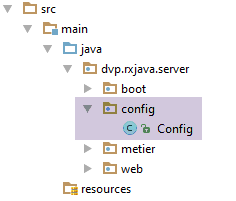 |
There are various ways to configure Spring:
- using XML files;
- using Java code;
- using a combination of both;
We choose to configure our web application using Java code. The [Config] class above handles this configuration:
package dvp.rxjava.server.config;

import com.fasterxml.jackson.databind.ObjectMapper;
import org.springframework.beans.factory.annotation.Autowired;
import org.springframework.boot.context.embedded.EmbeddedServletContainerFactory;
import org.springframework.boot.context.embedded.ServletRegistrationBean;
import org.springframework.boot.context.embedded.tomcat.TomcatEmbeddedServletContainerFactory;
import org.springframework.context.ApplicationContext;
import org.springframework.context.annotation.Bean;
import org.springframework.context.annotation.ComponentScan;
import org.springframework.web.context.WebApplicationContext;
import org.springframework.web.servlet.DispatcherServlet;
import org.springframework.web.servlet.config.annotation.EnableWebMvc;

@ComponentScan(basePackages = { "dvp.rxjava.server.metier", "dvp.rxjava.server.web" })
@EnableWebMvc
public class Config {
  // -------------------------------- layer configuration [web]
  @Autowired
  private ApplicationContext context;

  @Bean
  public DispatcherServlet dispatcherServlet() {
    DispatcherServlet servlet = new DispatcherServlet((WebApplicationContext) context);
    return servlet;
  }

  @Bean
  public ServletRegistrationBean servletRegistrationBean(DispatcherServlet dispatcherServlet) {
    return new ServletRegistrationBean(dispatcherServlet, "/*");
  }

  @Bean
  public EmbeddedServletContainerFactory embeddedServletContainerFactory() {
    return new TomcatEmbeddedServletContainerFactory("", 8080);
  }

  // mapper jSON
  @Bean
  public ObjectMapper jsonMapper() {
    return new ObjectMapper();
  }
}
- line 15: we tell Spring in which packages it will find objects to instantiate. It will find two:
- the [Metier] class annotated by [@Service];
- the [AleasController] class annotated by [@Controller];
- line 16: the [@EnableWebMvc] annotation triggers automatic configurations for the Spring framework MVC;
- lines 19–20: injection of the Spring context (container for Spring objects). This injection is necessary because the object in lines 22–26 requires it;
- the Spring configuration file can define new Spring objects using annotated methods [@Bean]. The result of the method then becomes a Spring object;
- lines 22–26: definition of the Spring framework servlet MVC, which routes requests HTTP to the correct controller and method. [DispatcherServlet] is a Spring class;
- lines 28–31: this servlet is configured to handle all URL requests;
- lines 33–36: the presence of this bean will activate the Tomcat server included in the project archives. It will listen for requests on port 8080;
- lines 39–42: a jSON mapper. This is the one that was injected into the Spring objects [Metier] and [AleasController];
9.2.6. Running the web server
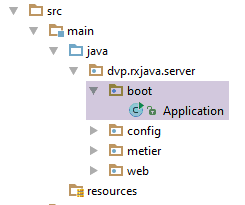 |
The project runs from the following executable class [Application]:
package android.exemples.server.boot;

import android.exemples.server.config.Config;
import org.springframework.boot.SpringApplication;

public class Application {
  public static void main(String[] args) {
    // application execution
    SpringApplication.run(Config.class, args);
  }

}
- line 6: the class [Application] is an executable class (lines 7–10);
- line 9: the static method [SpringApplication.run] is a method of [spring Boot] (line 4) that will launch the application. Its first parameter is the Java class that configures the project. Here, that is the [Config] class we just described. The second parameter is the array of arguments passed to the [main] method (line 7). Here, there will be no arguments;
For the actual execution, the reader is invited to refer back to section 9.2.1.
9.3. The Android client
Note: The following Android project is quite complex. It requires a solid understanding of Android, which can be found, for example, in [Introduction à la programmation de tablettes Android avec Android Studio ].
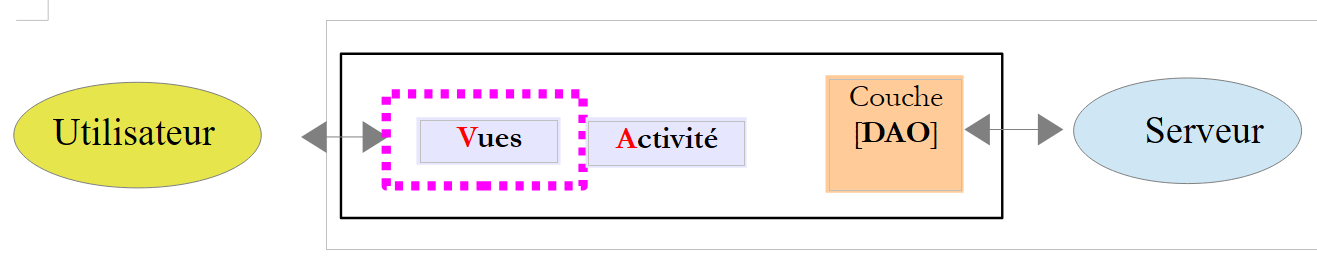
ActivityViewsLayer[DAO]UserServer
The client will have two components:
- a [Présentation] layer (views + activity);
- a [DAO] layer that communicates with the [web / JSON] service we discussed earlier.
9.3.1. RxAndroid
To communicate asynchronously with the random number server, the Android client will use the RxAndroid library. This library extends RxJava to the Android environment. As was done for the Swing application, we will use only a single extension provided by RxAndroid, namely the [AndroidSchedulers.mainThread()] scheduler. An Android GUI follows the same rules as a Swing interface:
- events are processed in a single thread called the event loop thread or the Ui thread;
- when an event triggers asynchronous actions, the results of these actions must be retrieved in the Ui thread if they are to be used to update the Ui;
The Android client:
- will send multiple asynchronous requests to the random number server. These requests will be executed on the client side using the threads of the [Schedulers.io()] scheduler;
- These asynchronous requests will return observables that will be merged into a single one;
- this observable will be observed on the client side in the [AndroidSchedulers.mainThread()] scheduler driven by RxAndroid;
9.3.2. The Intellij and Idea projects
The Android project is named [client]:
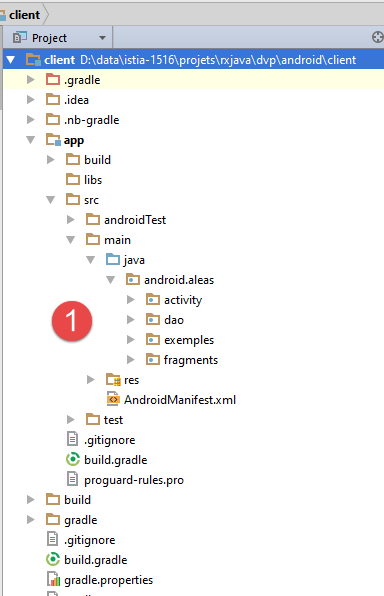 | 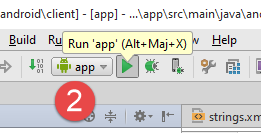  |
It will be executed by [2].
Note: Execution is highly dependent on the configuration of the IDE, Intellij, and Idea used. It is likely that the [2] process described above will not work on the first try on a machine other than mine. Properly configuring IDE Intellij Idea to run this project can be a daunting task for beginners. Here are a few things to look out for:
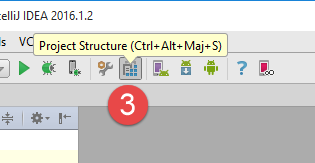
- In [3], access the project structure;
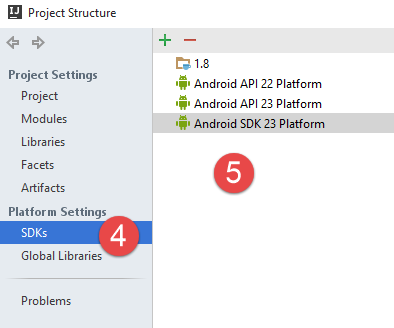 |  |
- in [4-5], JDK, and the SDK Android projects present on my machine. Note that JDK 1.8 is not required. Android does not support certain Java 8 features, including lambdas. Therefore, to instantiate functional interfaces, we will use anonymous classes. A JDK 1.6 is therefore sufficient. However, the project as distributed has been configured with a JDK 1.8;
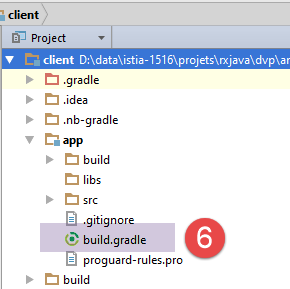
The [build.gradle] [6] file that configures the Android project is as follows:
buildscript {
  repositories {
    mavenCentral()
    mavenLocal()
  }
  dependencies {
    // replace with the current version of the Android plugin
    classpath 'com.android.tools.build:gradle:1.5.0'
  }
}
apply plugin: 'com.android.application'
dependencies {
  compile 'com.android.support:appcompat-v7:23.1.1'
  compile 'com.android.support:design:23.1.1'
  compile fileTree(dir: 'libs', include: ['*.jar'])
  compile 'org.springframework.android:spring-android-rest-template:1.0.1.RELEASE'
  compile 'org.codehaus.jackson:jackson-mapper-asl:1.9.9'
  compile 'io.reactivex:rxandroid:1.1.0'
}
repositories {
  jcenter()
}
android {
  compileSdkVersion 23
  buildToolsVersion "23.0.3"
  defaultConfig {
    applicationId "android.aleas"
    minSdkVersion 15
    targetSdkVersion 23
    versionCode 1
    versionName "1.0"
  }
  buildTypes {
    release {
      minifyEnabled false
      proguardFiles getDefaultProguardFile('proguard-android.txt'), 'proguard-rules.pro'
    }
  }
  compileOptions {
    sourceCompatibility JavaVersion.VERSION_1_6
    targetCompatibility JavaVersion.VERSION_1_6
  }
  packagingOptions {
    exclude 'META-INF/ASL2.0'
    exclude 'META-INF/NOTICE'
    exclude 'META-INF/LICENSE'
    exclude 'META-INF/NOTICE.txt'
    exclude 'META-INF/LICENSE.txt'
    exclude 'META-INF/notice.txt'
    exclude 'META-INF/license.txt'
  }
}
Depending on the existing SDK Android files, the versions in lines 8, 24–25, and 29 may need to be modified.
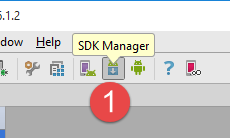
To install new SDK Android packages, use the SDK Manager as follows:
  | 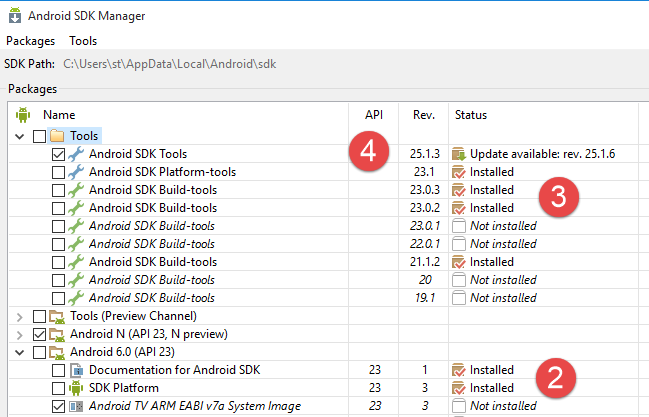 |
The project has been configured for:
- SDK, API, 23, [2];
- SDK Build-tools 23.0.3 [3];
- SDK Tool 25.1.3 [4]
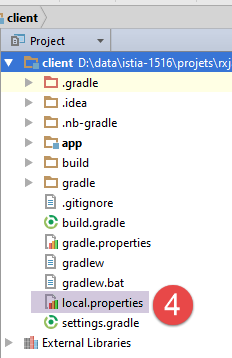
Finally, check the path for SDK Android in the file [local.properties] [4], line 11 below:
## This file is automatically generated by Android Studio.
# Do not modify this file -- YOUR CHANGES WILL BE ERASED!
#
# This file must *NOT* be checked into Version Control Systems,
# as it contains information specific to your local configuration.
#
# Location of the SDK. This is only used by Gradle.
# For customization when using a Version Control System, please read the
# header note.
#Thu Apr 07 14:51:14 CEST 2016
sdk.dir=C\:\\Users\\st\\AppData\\Local\\Android\\sdk
9.3.3. Running the Intellij Idea project
Once a suitable environment for the project has been created, it can be run as follows:
 |  | 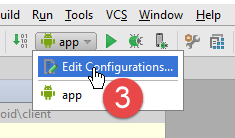 |
- In [1], launch the Android emulator Genymotion;
- In [2], run the execution configuration [app];
- in [3], to create a run configuration;
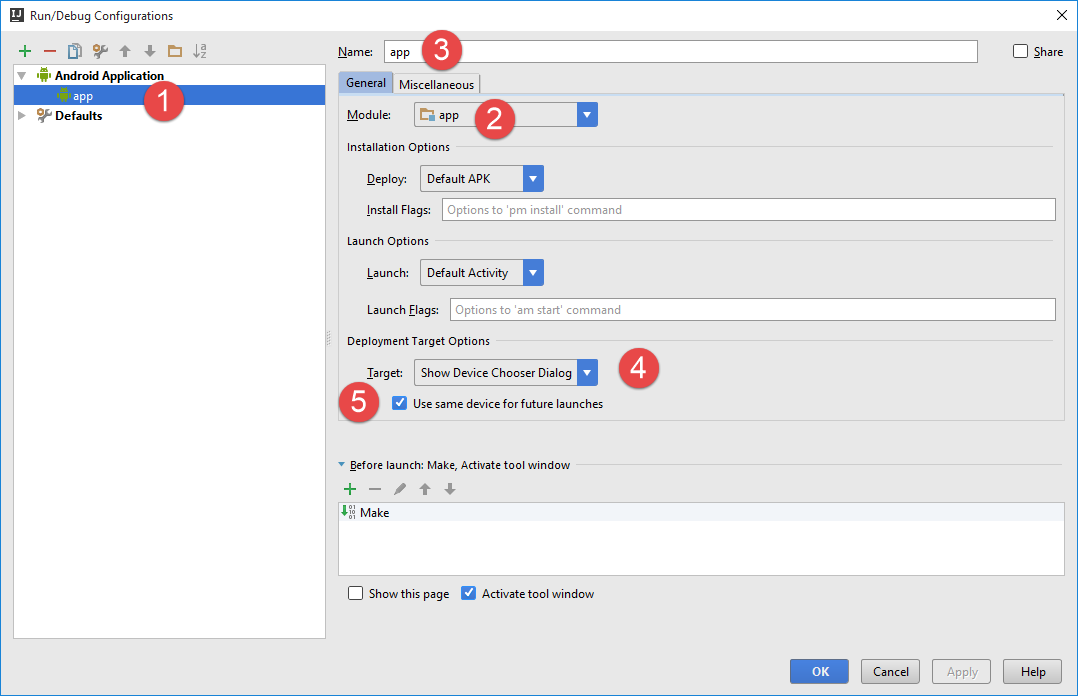 |
- in [1, 3], the configuration was named [app];
- in [2], it corresponds to the execution of the module named [app];
- In [4], we specify that during execution, IDE should provide an execution device. Here, this will always be the emulator Genymotion;
- In [5], we specify that this device should be used for all executions of the configuration;
Running the project on the Genymotion emulator begins with the following initial prompt:
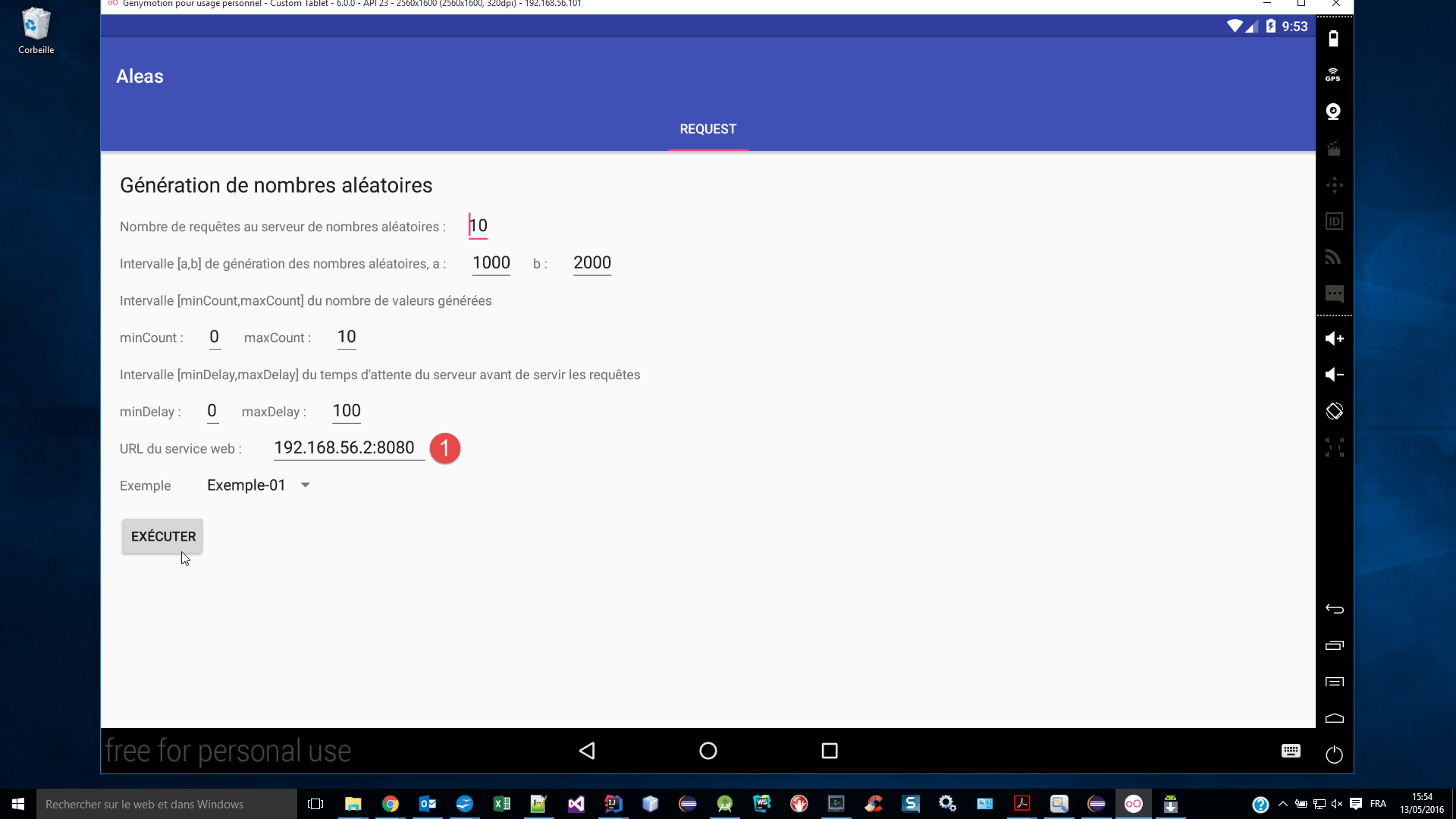
To find out what to enter in [1], open a DOS command window and type the following [ipconfig] command:
C:\Program Files\Console2>ipconfig

Configuration IP de Windows


Carte Ethernet Ethernet :

   Statut du média. . . . . . . . . . . . : Média déconnecté
   Suffixe DNS propre à la connexion. . . : ad.univ-angers.fr

Carte réseau sans fil Connexion au réseau local* 3 :

   Statut du média. . . . . . . . . . . . : Média déconnecté
   Suffixe DNS propre à la connexion. . . :

Carte Ethernet VirtualBox Host-Only Network :

   Suffixe DNS propre à la connexion. . . :
   Adresse IPv6 de liaison locale. . . . .: fe80::8076:36e6:3b38:5e98%16
   Adresse IPv4. . . . . . . . . . . . . .: 192.168.56.2
   Masque de sous-réseau. . . . . . . . . : 255.255.255.0
   Passerelle par défaut. . . . . . . . . :

Carte Ethernet Ethernet 2 :

   Suffixe DNS propre à la connexion. . . :
   Adresse IPv6 de liaison locale. . . . .: fe80::d0d9:e01f:ddde:1f4b%14
   Adresse IPv4. . . . . . . . . . . . . .: 192.168.95.1
   Masque de sous-réseau. . . . . . . . . : 255.255.255.0
   Passerelle par défaut. . . . . . . . . :

Carte réseau sans fil Wi-Fi :

   Suffixe DNS propre à la connexion. . . :
   Adresse IPv6 de liaison locale. . . . .: fe80::54b3:afe5:e199:2206%10
   Adresse IPv4. . . . . . . . . . . . . .: 192.168.0.13
   Masque de sous-réseau. . . . . . . . . : 255.255.255.0
   Passerelle par défaut. . . . . . . . . : fe80::523d:e5ff:fe0c:4ad9 192.168.0.1
Enter [1], one of the IP addresses for your machine (lines 20, 28, 32). If you have a Windows firewall, you will likely need to disable it so that the Android emulator can reach the random number server.
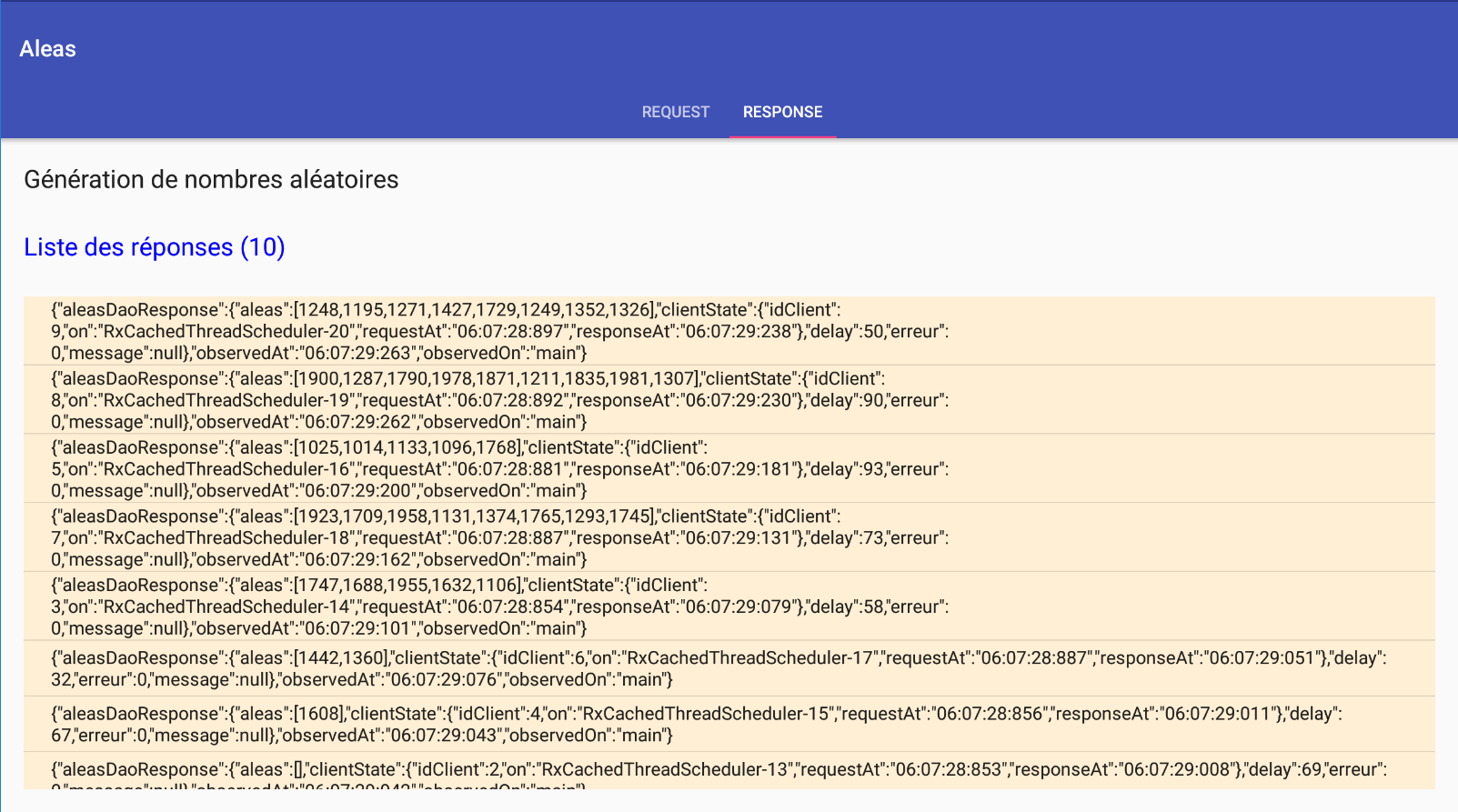
Executing asynchronous requests with the information above yields the following results:
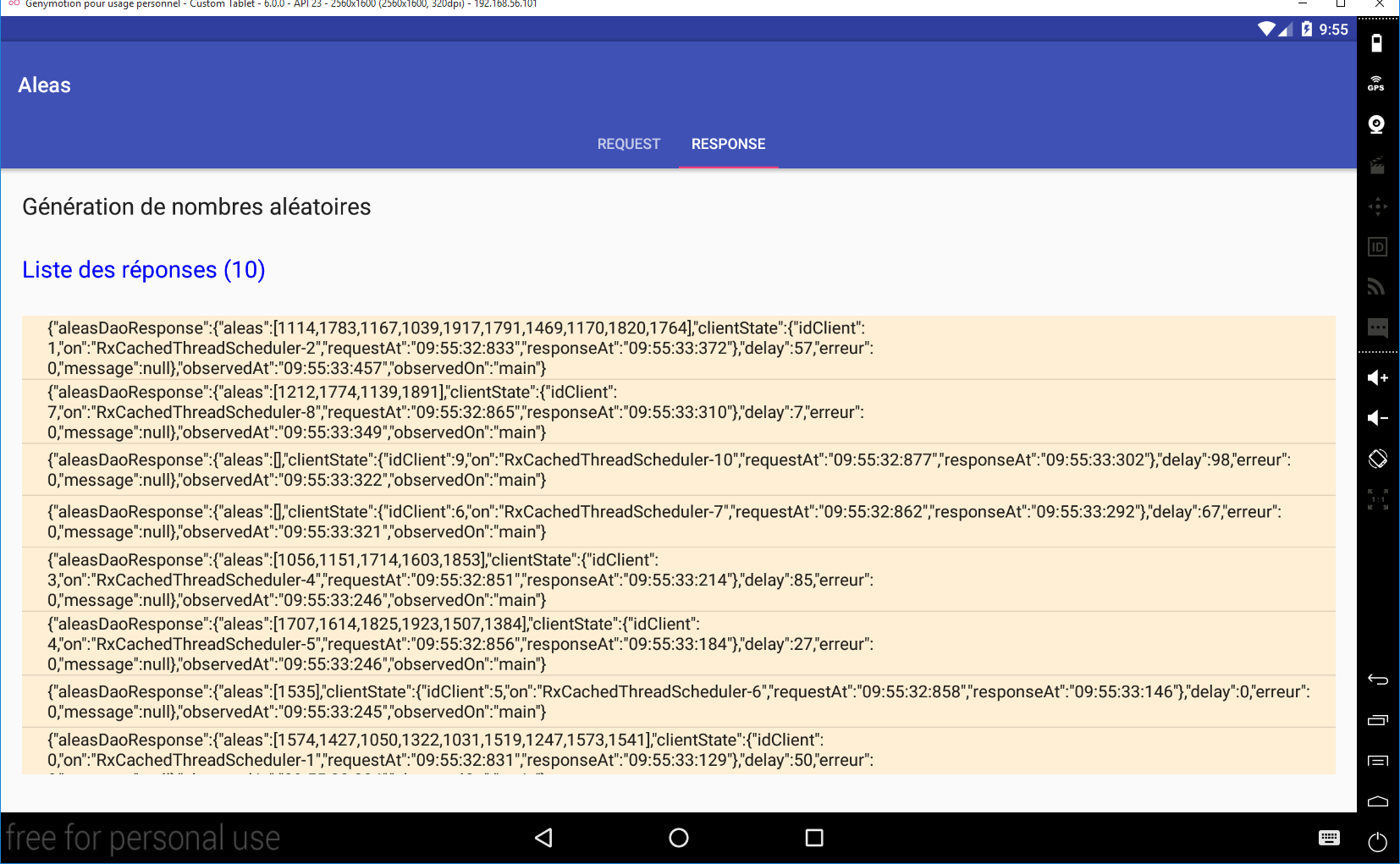
Each request returns a response jSON with the following fields:
- aleas: the random numbers generated by the server;
- idClient: the request number;
- on: the client-side thread executing the request;
- requestAt: time of the request;
- responseAt: time the response was received;
- delay: the timeout period the server observed before returning its response;
- error: an error code—0 if no error;
- message: an error message - null if no error;
- observedAt: time the response was observed;
- observedOn: thread observing the response. Here, this will always be [main], which refers to the thread of Ui;
Since requests are asynchronous and the wait times imposed on the server are random, responses return in a scattered order.
9.3.4. The project's Gradle dependencies
The project requires dependencies, which we list in the [app / build.gradle] file:
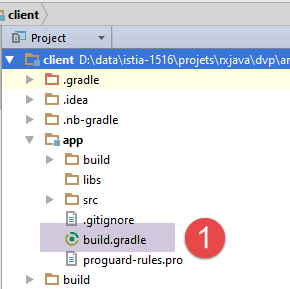 |
dependencies {
  compile 'com.android.support:appcompat-v7:23.1.1'
  compile 'com.android.support:design:23.1.1'
  compile fileTree(dir: 'libs', include: ['*.jar'])
  compile 'org.springframework.android:spring-android-rest-template:1.0.1.RELEASE'
  compile 'org.codehaus.jackson:jackson-mapper-asl:1.9.9'
  compile 'io.reactivex:rxandroid:1.1.0'
}
- The dependencies on lines 2–3 are standard dependencies for an Android project with SDK 23;
- the dependency on line 5 brings in the Spring object [RestTemplate], which manages the communication between the [DAO] layer and the server;
- the dependency on line 6 brings in the JSON and [Jackson] libraries used by the application;
- The dependency on line 7 brings in the RxAndroid library (and with it the RxJava library) that the Ui layer uses to communicate with the [DAO] layer;
9.3.5. The Android application manifest
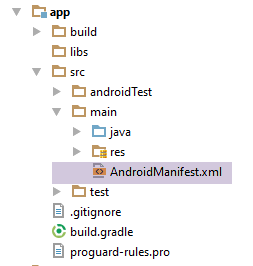 |
<?xml version="1.0" encoding="utf-8"?>
<manifest xmlns:android="http://schemas.android.com/apk/res/android"
          package="android.aleas">

  <uses-permission android:name="android.permission.INTERNET"/>

  <application
    android:allowBackup="true"
    android:icon="@mipmap/ic_launcher"
    android:label="@string/app_name"
    android:supportsRtl="true"
    android:theme="@style/AppTheme">
    <activity
      android:name="android.aleas.activity.MainActivity"
      android:label="@string/app_name"
      android:theme="@style/AppTheme.NoActionBar">
      <intent-filter>
        <action android:name="android.intent.action.MAIN"/>

        <category android:name="android.intent.category.LAUNCHER"/>
      </intent-filter>
    </activity>
  </application>

</manifest>
- line 5: Internet access must be allowed;
9.3.6. The [DAO] layer
 |
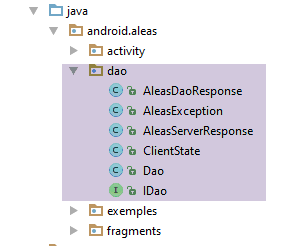 | 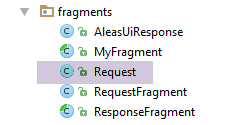 |
9.3.6.1. The [IDao] interface of the [DAO] layer
The interface of the [DAO] layer will be as follows:
package android.aleas.dao;

import android.aleas.fragments.Request;
import rx.Observable;

public interface IDao {

  // random numbers in the [a,b] interval
  // n numbers are generated with n itself a random number in the interval [minCount, maxCount]
  // numbers are generated after a delay of milliseconds,
  // where [delay] is itself a random number in the interval [minDelay, maxDelay]
  public Observable<AleasDaoResponse> getAleas(final Request request);

  // URL of the web service
  public void setUrlServiceWebJson(String url);

  // max wait time (ms) for server response to connection request
  // max wait time (ms) for server response to a request
  public void setClientTimeouts(int connectTimeout, int readTimeOut);

}
- line 12: the method in the [DAO] layer that generates random numbers asynchronously;
- line 15: to inform the [DAO] implementation of the URL random number generation service;
- line 19: to set maximum timeout values for the [DAO] implementation, in order to avoid excessive long wait times when the server does not respond;
The [getAleas] method receives all its parameters in the following [Request] object:
package android.aleas.fragments;

public class Request {

  // request no
  int id;
  // user input
  private int nbRequests;
  private int a;
  private int b;
  private int minCount;
  private int maxCount;
  private int minDelay;
  private int maxDelay;

  // manufacturers
  public Request() {

  }

  public Request(int id, int nbRequests, int a, int b, int minCount, int maxCount, int minDelay, int maxDelay) {
    this.id = id;
    this.nbRequests = nbRequests;
    this.a = a;
    this.b = b;
    this.minCount = minCount;
    this.maxCount = maxCount;
    this.minDelay = minDelay;
    this.maxDelay = maxDelay;
  }

  // getters and setters
...
}
Here, we can see most of the parameters of the server's URL that need to be queried.
The [getAleas] method returns a type Observable<AleasDaoResponse>, where the [AleasDaoResponse] class is as follows:
package android.aleas.dao;

import java.util.List;

public class AleasDaoResponse {

  // error code
  private int erreur;
  // error message
  private String message;
  // server waiting time
  private int delay;
  // random numbers delivered by the server
  private List<Integer> aleas;
  // customer status
  private ClientState clientState;

  // manufacturers

  public AleasDaoResponse() {
  }

  public AleasDaoResponse(int erreur, String message, int delay, List<Integer> aleas, ClientState clientState) {
    this.erreur = erreur;
    this.message = message;
    this.delay = delay;
    this.aleas = aleas;
    this.clientState = clientState;
  }

  // getters and setters
...
}
The type [ClientState] is as follows:
package android.aleas.dao;

import org.codehaus.jackson.map.annotate.JsonFilter;

import java.text.SimpleDateFormat;
import java.util.Calendar;

public class ClientState {

  // name of execution thread
  private String on;
  // query time
  private String requestAt;
  // response time
  private String responseAt;
  // id of the customer
  private int idClient;

  // manufacturer
  public ClientState() {
    on = Thread.currentThread().getName();
    requestAt = getTimeStamp();
  }

  public ClientState(int idClient) {
    this();
    this.idClient = idClient;
  }

  // private methods

  private String getTimeStamp() {
    return new SimpleDateFormat("hh:mm:ss:SSS").format(Calendar.getInstance().getTime());
  }

  // getters and setters
...
}
- line 11: execution thread of the [DAO] layer;
- line 13: request time;
- line 15: response time;
- line 17: request number;
The [on, requestAt, idClient] fields are initialized by the client at the start of the request. The [responseAt] field is initialized when the client receives the response from the server.
9.3.6.2. Implementation of the [DAO] layer
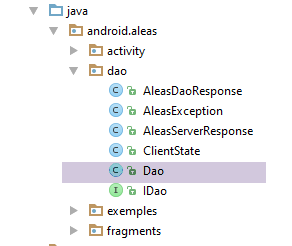 |
The [IDao] interface is implemented with the following [Dao] class:
package android.aleas.dao;

import android.aleas.fragments.Request;
import android.util.Log;
import org.codehaus.jackson.map.ObjectMapper;
import org.codehaus.jackson.map.ser.impl.SimpleBeanPropertyFilter;
import org.codehaus.jackson.map.ser.impl.SimpleFilterProvider;
import org.codehaus.jackson.type.TypeReference;
import org.springframework.http.client.HttpComponentsClientHttpRequestFactory;
import org.springframework.http.converter.StringHttpMessageConverter;
import org.springframework.web.client.RestTemplate;
import rx.Observable;
import rx.Subscriber;

import java.util.HashMap;
import java.util.Locale;
import java.util.Map;

public class Dao implements IDao {

  // customer REST
  private RestTemplate restTemplate;
  // URL service
  private String urlServiceWebJson;

  // mapper jSON
  private ObjectMapper mapper;

  // manufacturers
  public Dao() {
    // mapper jSON
    mapper = new ObjectMapper();
  }

  @Override
  public Observable<AleasDaoResponse> getAleas(final Request request) {
    ...
  }

  @Override
  public void setUrlServiceWebJson(String urlServiceWebJson) {
    // set the URL of the REST service
    this.urlServiceWebJson = urlServiceWebJson;
  }

  @Override
  public void setClientTimeouts(int connectTimeout, int readTimeOut) {
...
  }
}
- line 22: the [RestTemplate] object that will handle communication with the random number server;
- line 24: the URL for the generation service—is set by the [setUrlServiceWebJson] method on line 41;
- line 27: the jSON mapper, which will be used to deserialize the jSON string sent by the random number server;
- lines 30–33: the class constructor;
- line 32: the mapper jSON from line 27 is created;
The [setClientTimeouts] method is as follows:
  // customer REST
  private RestTemplate restTemplate;
...

  @Override
  public void setClientTimeouts(int connectTimeout, int readTimeOut) {
    // set the client request timeout REST
    HttpComponentsClientHttpRequestFactory factory = new HttpComponentsClientHttpRequestFactory();
    factory.setReadTimeout(readTimeOut);
    factory.setConnectTimeout(connectTimeout);
    restTemplate = new RestTemplate(factory);
    restTemplate.getMessageConverters().add(new StringHttpMessageConverter());
}
- The client's communication with the web server / JSON is handled by the [RestTemplate] object on line 2. We haven't initialized it yet. The [setClientTimeouts] method does that;
- line 8: the [HttpComponentsClientHttpRequestFactory] class is provided by the [spring-android-rest-template] dependency. It will allow us to set the maximum wait times for the server’s response (lines 9–10);
- line 11: we construct the [RestTemplate] object, which will serve as the communication interface with the web service. We pass the [factory] object that was just constructed as a parameter to it;
- line 12: the client/server dialogue can take various forms. Exchanges occur via text lines, and we must tell the [RestTemplate] object what to do with this text line. To do this, we provide it with converters—classes capable of processing text lines. The converter is generally selected via the HTTP headers that accompany the text line. Based on these headers, the [RestTemplate] object will choose, from among its converters, the one best suited to the situation. Here, we will have only a single converter, a String --> String converter, which means that the String type received from the server will not undergo any transformation.
The [getAleas] method is the most complex:
@Override
  public Observable<AleasDaoResponse> getAleas(final Request request) {
    Log.d("rxjava", String.format("service [DAO] pour client n° %s%n", request.getId()));
    // service execution
    return Observable.create(new Observable.OnSubscribe<AleasDaoResponse>() {
      @Override
      public void call(Subscriber<? super AleasDaoResponse> subscriber) {
        try {
          // URL of the service: /{a}/{b}/{minCount}/{maxCount}/{minDelay}/{maxDelay}
          String urlService = String.format("%s/%s/%s/%s/%s/%s/%s",
            urlServiceWebJson, request.getA(), request.getB(), request.getMinCount(),
            request.getMaxCount(), request.getMinDelay(), request.getMaxDelay());
          // customer information
          ClientState clientState = new ClientState(request.getId());
          // synchronous http request
          String response = executeRestService("get", urlService, null);
          // deserialization of jSON server response
          AleasServerResponse aleasServerResponse = mapper.readValue(
            response,
            new TypeReference<AleasServerResponse>() {
            });
          // mistake?
          int erreur = aleasServerResponse.getErreur();
          if (erreur != 0) {
            // we forward the exception
            subscriber.onError(new AleasException(aleasServerResponse.getMessage(), erreur));
          } else {
            // the time of reception is entered
            clientState.setResponseAt();
            // we forward the result to the subscriber
            subscriber.onNext(
              new AleasDaoResponse(aleasServerResponse.getErreur(), aleasServerResponse.getMessage(),
                aleasServerResponse.getDelay(), aleasServerResponse.getAleas(), clientState));
          }
        } catch (Exception ex) {
          // we forward the exception to the subscriber
          subscriber.onError(ex);
        } finally {
          // we signal the end of the observable
          // at runtime, we note that this method has no effect if the [onError] method has been called previously - in line with the theory - so we could place this instruction only in try
          subscriber.onCompleted();
        }
      }
    });
  }
- line 2: remember that you must generate a [Observable<AleasResponse>] type;
- line 3: a log line on the Android console;
- line 5: the [RestTemplate] object ensures synchronous communication with the server. This means that the execution thread making the request is blocked until the response is received. In the Swing example, we saw how to convert a synchronous action into an asynchronous one using the [Observable.create] method. We are following the same approach here;
- line 7: the [call] method of the [Observable.OnSubscribe<AleasDaoResponse>] interface from line 5. This is the method that is called when an observer subscribes to the observable;
- lines 10–12: construction of the URL for the random number service;
- line 14: initialization of the [ClientState] object. Here, the time of the request is recorded;
- line 16: synchronous HTTP request. A jSON response is obtained. The [executeRestService] method expects three parameters:
- the HTTP method to be used to query the service;
- the service’s URL;
- the object to be posted of type Object, null if the HTTP method is not POST;
- 18-21: Deserialization of the received jSON string into a [AleasServerResponse] type. This type is as follows:
package android.aleas.dao;

import java.util.List;

public class AleasServerResponse {

  // error code
  private int erreur;
  // error message
  private String message;
  // server waiting time
  private int delay;
  // random numbers
  private List<Integer> aleas;

  // getters and setters
...
}
- line 23: retrieve the error code sent by the server;
- lines 24–26: if an error occurs, an exception is forwarded to the subscriber;
- line 29: we update [clientState], which will be part of the response sent to the subscriber;
- lines 31–33: send the response to the subscriber. It is of type [AleasDaoResponse];
- lines 35–37: handle all error cases in the same way. The most likely error is a network error;
- line 41: notification of end of transmission;
9.3.7. Application Views
 |
 |
The application has the following two views:
The request view
The response view
9.3.7.1. The [MyFragment] class
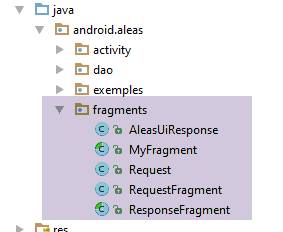
There are two fragments:
- [RequestFragment] for the request;
- [ResponseFragment] for the response;
Both fragments extend the following class:
package android.aleas.fragments;

import android.aleas.activity.MainActivity;
import android.aleas.activity.Session;
import android.support.v4.app.Fragment;

public abstract class MyFragment extends Fragment {

  // ------------- data common to all fragments
  protected MainActivity activity;
  protected Session session;

  public abstract void onRefresh();

}
- line 7: the [MyFragment] class extends the Android [Fragment] class;
- lines 10–11: data common to all fragments;
- line 10: each fragment knows the application’s single activity;
- line 11: to communicate with each other, the fragments use a session;
- line 13: before displaying a fragment, it will be asked to refresh itself with the session’s content. This method is declared abstract because it is implemented by the child classes. For this reason, the class itself is declared abstract (line 7);
The [Session] class contains the data shared by the application’s various fragments. Its code is as follows:
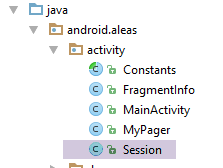 |
package android.aleas.activity;

import android.aleas.fragments.Request;
import android.widget.ArrayAdapter;

public class Session {

  // application activity
  private MainActivity activity;
  // number of requests
  private int nbRequests;
  // request characteristics
  private int a;
  private int b;
  private int minCount;
  private int maxCount;
  private int minDelay;
  private int maxDelay;
  // URL web service / jSON
  private String urlWebJson;
  // operation began
  private boolean onAir;
  // idem but a little later in time
  private boolean operationStarted;
  // the name of the example chosen by the user from the list of examples
  private String exampleName;
  // its number in the list of fragments
  private int examplePosition;
  // the example spinner adapter in the query view
  private ArrayAdapter<CharSequence> spinnerExemplesAdapter;

  // methods
  public void setInfos(int nbRequests, int a, int b, int minCount, int maxCount, int minDelay, int maxDelay, String urlWebJson, String exampleName, int examplePosition) {
    this.nbRequests = nbRequests;
    this.a = a;
    this.b = b;
    this.minCount = minCount;
    this.maxCount = maxCount;
    this.minDelay = minDelay;
    this.maxDelay = maxDelay;
    this.urlWebJson = urlWebJson;
    this.exampleName = exampleName;
    this.examplePosition = examplePosition;
  }

  public Request getRequest() {
    return new Request(0, nbRequests, a, b, minCount, maxCount, minDelay, maxDelay);
  }

  // getters and setters
...
}
The method on line 46 creates the [Request] object, which encapsulates all the information provided by the user in the request view:
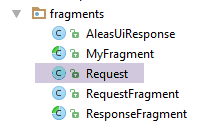 |
package android.aleas.fragments;

public class Request {

  // request no
  int id;
  // user input
  private int nbRequests;
  private int a;
  private int b;
  private int minCount;
  private int maxCount;
  private int minDelay;
  private int maxDelay;

  // manufacturers
  public Request() {

  }

  public Request(int id, int nbRequests, int a, int b, int minCount, int maxCount, int minDelay, int maxDelay) {
    this.id = id;
    this.nbRequests = nbRequests;
    this.a = a;
    this.b = b;
    this.minCount = minCount;
    this.maxCount = maxCount;
    this.minDelay = minDelay;
    this.maxDelay = maxDelay;
  }

  // getters and setters
....
}
9.3.7.2. The [RequestFragment] fragment of the request
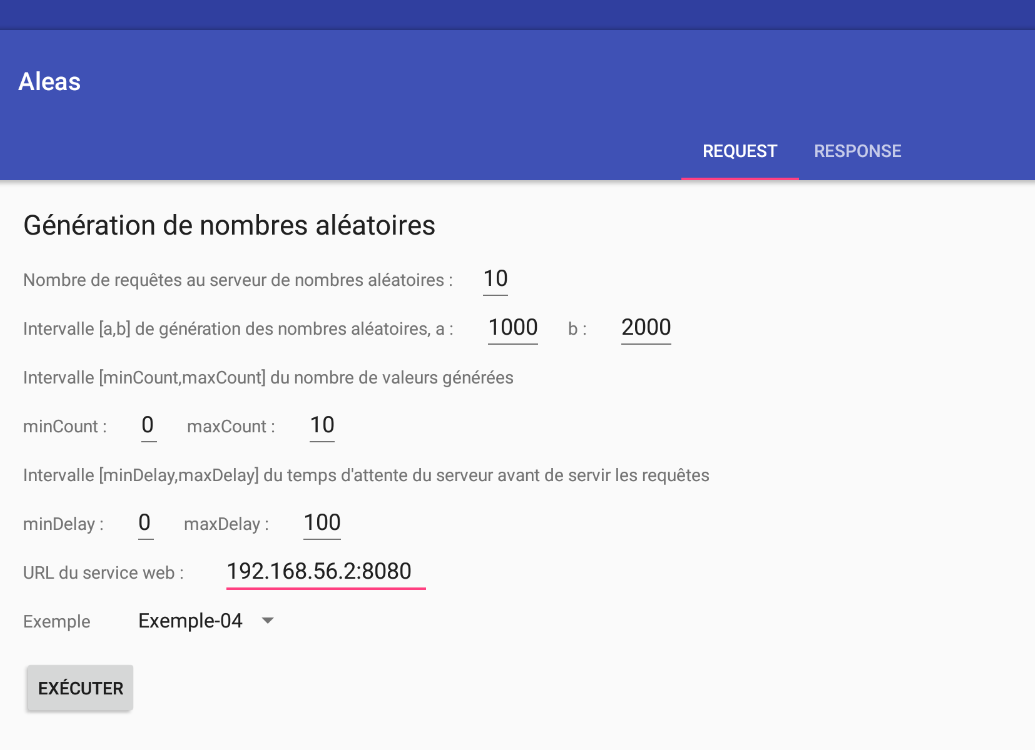
The query fragment has the following components:
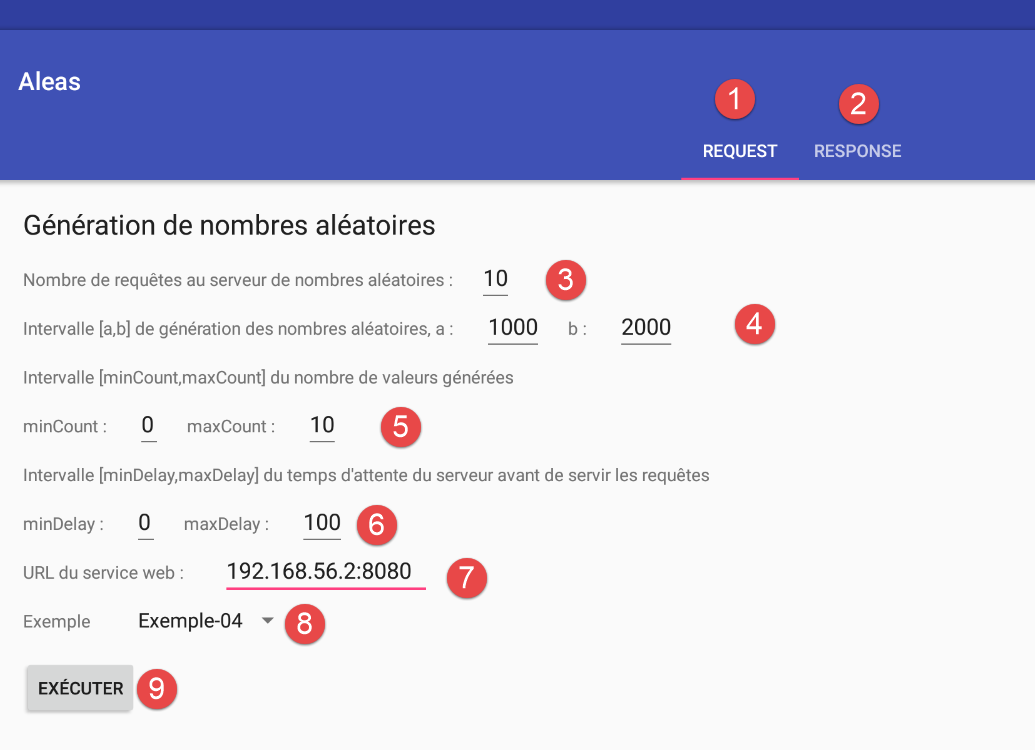
The application has a single view, which is a view with two tabs:
- [1]: the request tab;
- [2]: the response tab;
The components of fragment [RequestFragment] are as follows:
No. | Type | Name | Role |
3 | EditText | edtNbRequests | number of requests to make to the random number generator service |
4 | EditText | edtA, edtB | the [a,b] terminals of the number generation range; |
5 | EditText | edtMinCount, edtMaxCount | the service generates count numbers where count is a random number in the range [minCount, maxCount] |
6 | EditText | edtMinDelay, edtMaxDelay | the service waits delay milliseconds before generating the numbers, where delay is a random number in the range [minDelay, maxDelay] |
7 | EditText | edtUrlServiceRest | the URL of the random number generation service; |
8 | Spinner | spinnerExemples | the drop-down list of examples. Each example illustrates a specific method of the [Observable] class; |
8 | Button | btnExecuter | the button that triggers calls to the number generation service; |
Input errors are reported:
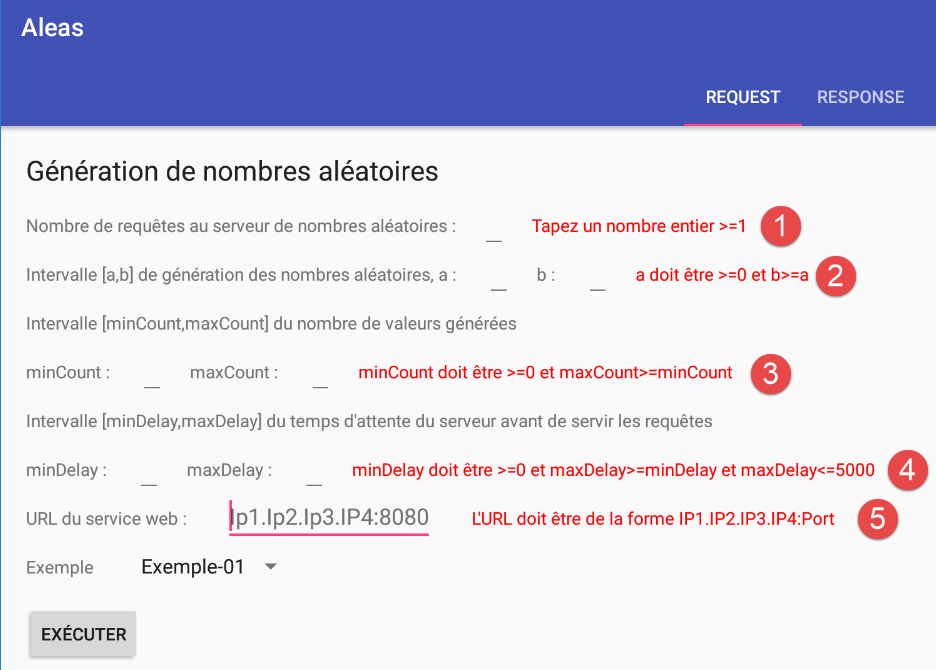
Components 1 through 6 are [TextView] components with the following names (in order): txtErrorRequests, txtErrorIntervalle, txtErrorCount, txtErrorDelay, txtMsgErreurUrlServiceWeb.
9.3.7.3. The [ResponseFragment] fragment of the response
The response fragment has the following components:
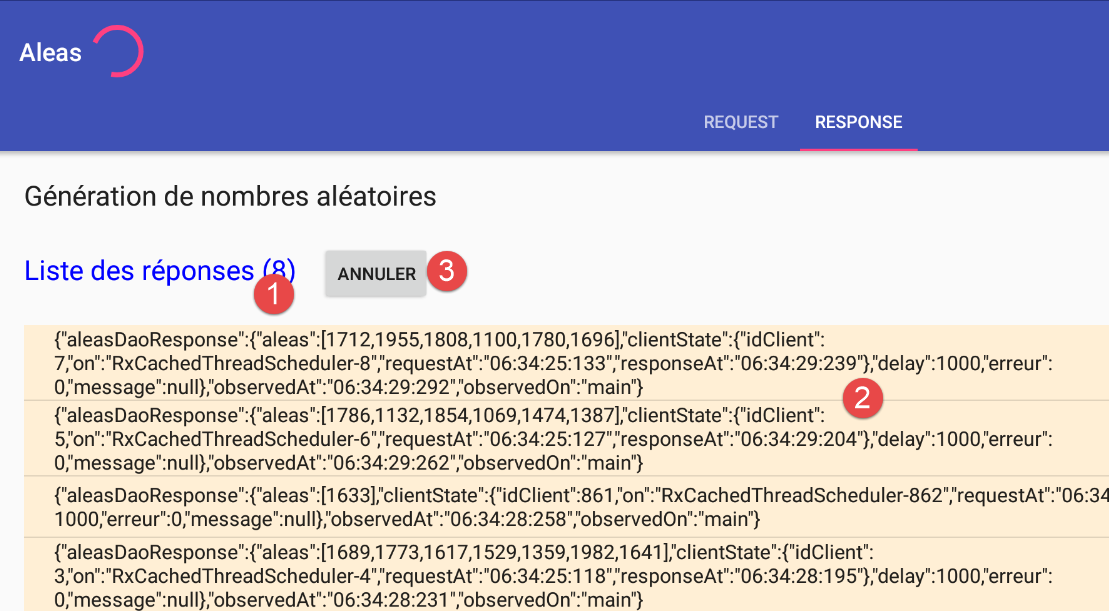
No. | Type | Name | Role |
1 | TextView | infoReponses | Number of responses received |
2 | ListView | listReponses | List of jSON channels received from the server |
3 | Button | btnAnnuler | to cancel requests to the server |
9.3.7.4. The Android activity [MainActivity]
 |
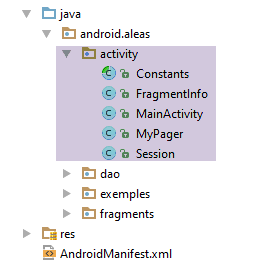 |
The [MainActivity] class displays the following view:
<?xml version="1.0" encoding="utf-8"?>
<android.support.design.widget.CoordinatorLayout xmlns:android="http://schemas.android.com/apk/res/android"
                                                 xmlns:tools="http://schemas.android.com/tools"
                                                 xmlns:app="http://schemas.android.com/apk/res-auto"
                                                 android:id="@+id/main_content"
                                                 android:layout_width="match_parent"
                                                 android:layout_height="match_parent"
                                                 android:fitsSystemWindows="true"
                                                 tools:context="android.arduinos.ui.activity.MainActivity">

  <!-- application bar -->
  <android.support.design.widget.AppBarLayout
    android:id="@+id/appbar"
    android:layout_width="match_parent"
    android:layout_height="wrap_content"
    android:paddingTop="@dimen/appbar_padding_top"
    android:theme="@style/AppTheme.AppBarOverlay">

    <!-- toolbar -->
    <android.support.v7.widget.Toolbar
      android:id="@+id/toolbar"
      android:layout_width="match_parent"
      android:layout_height="?attr/actionBarSize"
      android:background="?attr/colorPrimary"
      app:popupTheme="@style/AppTheme.PopupOverlay"
      app:layout_scrollFlags="scroll|enterAlways">

      <!-- waiting image -->
      <ProgressBar
        android:id="@+id/loadingPanel"
        android:layout_width="wrap_content"
        android:layout_height="wrap_content"
        android:indeterminate="true"/>
    </android.support.v7.widget.Toolbar>

    <!-- tab container -->
    <android.support.design.widget.TabLayout
      android:id="@+id/tabs"
      android:layout_width="match_parent"
      android:layout_height="wrap_content"/>
  </android.support.design.widget.AppBarLayout>

  <!-- view container -->
  <android.aleas.activity.MyPager
    android:id="@+id/container"
    android:layout_width="match_parent"
    android:layout_height="match_parent"
    android:paddingLeft="20dp"
    android:paddingRight="20dp"
    android:layout_marginBottom="100dp"
    app:layout_behavior="@string/appbar_scrolling_view_behavior"/>
</android.support.design.widget.CoordinatorLayout>
The components of this view are as follows:
lines | Type | Name | Role |
20-34 | Toolbar | toolbar | application toolbar |
29-34 | ProgressBar | loadingPanel | placeholder image displayed while the user's request is being processed |
37-40 | TabLayout | tabs | the application's tab bar |
44-51 | MyPager | container | the container in which the various fragments of the application are displayed |
The [MyPager] class is as follows:
package android.aleas.activity;

import android.content.Context;
import android.support.v4.view.ViewPager;
import android.util.AttributeSet;
import android.view.MotionEvent;

public class MyPager extends ViewPager {

  // swipe control
  private boolean isSwipeEnabled;

  // manufacturers
  public MyPager(Context context) {
    super(context);
  }

  public MyPager(Context context, AttributeSet attrs) {
    super(context, attrs);
  }

  // method redefinition
  @Override
  public boolean onInterceptTouchEvent(MotionEvent event) {
    // swipe allowed?
    if (isSwipeEnabled) {
      return super.onInterceptTouchEvent(event);
    } else {
      return false;
    }
  }

  @Override
  public boolean onTouchEvent(MotionEvent event) {
    // swipe allowed?
    if (isSwipeEnabled) {
      return super.onTouchEvent(event);
    } else {
      return false;
    }
  }

  // setter
  public void setSwipeEnabled(boolean isSwipeEnabled) {
    this.isSwipeEnabled = isSwipeEnabled;
  }

}
- The [MyPager] class extends the standard Android class [ViewPager]. We use the [MyPager] class instead of the [ViewPager] class solely because we want to disable swiping: by default, with the [ViewPager] class, you can switch between tabs by swiping (swiping left or right). Here, we do not want this behavior;
- line 11: the boolean that controls the swipe (lines 26 and 36);
- lines 44–46: the method that initializes the field on line 11;
The skeleton of the Android activity [MainActivity] is as follows:
package android.aleas.activity;

import android.aleas.R;
import android.aleas.dao.AleasDaoResponse;
import android.aleas.dao.Dao;
import android.aleas.dao.IDao;
import android.aleas.fragments.MyFragment;
import android.aleas.fragments.Request;
import android.aleas.fragments.RequestFragment;
import android.os.Bundle;
import android.support.design.widget.TabLayout;
import android.support.v4.app.FragmentManager;
import android.support.v4.app.FragmentPagerAdapter;
import android.support.v7.app.AppCompatActivity;
import android.support.v7.widget.Toolbar;
import android.view.View;
import android.widget.ArrayAdapter;
import android.widget.ProgressBar;
import rx.Observable;

public class MainActivity extends AppCompatActivity implements IDao {

  // layer [DAO]
  private IDao dao;
  // the session
  private Session session;

  // manufacturer
  public MainActivity() {
    // parent
    super();
    // session
    session = new Session();
    // DAO
    dao = new Dao();
  }


  // getters

  public Session getSession() {
    return session;
  }

  // implémentation IDao ----------------------------------------
  @Override
  public Observable<AleasDaoResponse> getAleas(Request request) {
    return dao.getAleas(request);
  }

  @Override
  public void setUrlServiceWebJson(String url) {
    dao.setUrlServiceWebJson(url);
  }

  @Override
  public void setClientTimeouts(int connectTimeout, int readTimeOut) {
    dao.setClientTimeouts(connectTimeout, readTimeOut);
  }

}
- line 21: the class [MainActivity] extends the standard Android class [AppCompatActivity]. It is therefore a standard Android activity;
- line 21: the [MainActivity] class implements the [IDao] interface;
Returning to the application architecture:
 |
the fact that the activity implements the [DAO] layer interface allows the views to remain unaware of the [DAO] layer: their event handlers will address the [activité] layer when they want to communicate with the server.
- line 24: a reference to the [DAO] layer initialized by the constructor on line 35;
- line 26: a reference to the session shared by the fragments, initialized by the constructor on line 33;
- lines 46–59: implementation of the [IDao] interface;
The [MainActivity] class initializes the components of its associated view as follows:
  // toolbar
  private Toolbar toolbar;
  // fragment manager
  private MyPager mViewPager;
  // tab container
  private TabLayout tabLayout;
  // waiting image
  private ProgressBar loadingPanel;
...
  @Override
  public void onCreate(Bundle savedInstanceState) {
    // classic
    super.onCreate(savedInstanceState);
    setContentView(R.layout.activity_main);

    // session
    session.setActivity(this);
    // configuration of [DAO] layer timeouts
    setClientTimeouts(Constants.CONNECT_TIMEOUT, Constants.READ_TIMEOUT);

    // components
    mViewPager = (MyPager) findViewById(R.id.container);
    toolbar = (Toolbar) findViewById(R.id.toolbar);
    loadingPanel = (ProgressBar) findViewById(R.id.loadingPanel);
    tabLayout = (TabLayout) findViewById(R.id.tabs);

    // toolbar
    setSupportActionBar(toolbar);

    // at the start there is only one tab
    TabLayout.Tab tab = tabLayout.newTab();
    tab.setText("Request");
    tabLayout.addTab(tab);

    // event manager
    tabLayout.setOnTabSelectedListener(new TabLayout.OnTabSelectedListener() {
      @Override
      public void onTabSelected(TabLayout.Tab tab) {
        // a tab has been selected - change the fragment displayed by the fragment container
        int position = tab.getPosition();
        if (position == 0) {
          // query tab
          showView(0);
        } else {
          // answer tab - depends on the example chosen
          showView(session.getExamplePosition());
        }
      }

      @Override
      public void onTabUnselected(TabLayout.Tab tab) {

      }

      @Override
      public void onTabReselected(TabLayout.Tab tab) {

      }
    });

    // creating response fragments
    createResponseFragments();

    // hold image management
    loadingPanel.setVisibility(View.INVISIBLE);
}
This code is fairly standard in an activity. Let’s clarify a few points:
- Line 19 references the following [Constants] class:
package android.aleas.activity;

abstract public class Constants {

  final static public int VUE_REQUEST = 0;
  final static public int VUE_RESPONSE = 1;
  final static public int CONNECT_TIMEOUT = 1000;
  final static public int READ_TIMEOUT = 6000;
  final static public int DELAY_MAX = 5000;
  final static public String EXAMPLES_PACKAGE = "android.aleas.exemples";
}
- Lines 31-33: We create the first tab with the title [Request]. At some point, we will have in memory:
- the fragment [Request];
- n fragments of type [ExampleXXFragment];
The first tab will always display the fragment [Request]. The second tab will display the fragment [ExampleXXFragment] corresponding to the example chosen by the user. The fragment displayed by the second tab therefore changes over time;
- lines 37–48: the code executed when the user clicks on one of the tabs;
- line 43: fragment #0 is displayed;
- line 46: the fragment currently in use (viewed) is displayed. Its number is retrieved from the session;
- line 62: fragments are created for all examples present in the example spinner in view [RequestFragment] (1st tab);
- line 65: the placeholder image is currently hidden;
To understand the [showView] method (lines 43, 46) and the [createResponseFragments] method, we must first introduce the in-memory fragment manager (class included in the MainActivity Java file):
  // fragment manager - must define getItem, getCount methods
  public class SectionsPagerAdapter extends FragmentPagerAdapter {

    // managed fragments
    private MyFragment[] fragments;

    // manufacturer
    public SectionsPagerAdapter(FragmentManager fm, MyFragment[] fragments) {
      super(fm);
      this.fragments = fragments;
    }

    // must render fragment no. position
    @Override
    public MyFragment getItem(int position) {
      // the fragment
      return fragments[position];
    }

    // makes the number of fragments to manage
    @Override
    public int getCount() {
      // no. of fragments
      return fragments.length;
    }
  }
}
- The [SectionsPagerAdapter] class extends the Android [FragmentPagerAdapter] class. It overrides two methods of its parent class:
- the [getItem] method, line 15;
- the [getCount] method, line 22;
- the class [SectionsPagerAdapter] contains all the application fragments. These are stored on line 5. Note that they are of type [MyFragment], as described in section 9.3.7.1;
- line 8: to construct itself, the class [SectionsPagerAdapter] receives the fragments it must manage;
- lines 14–18: the method [getItem] returns the fragment at position [position];
- lines 21–25: the method [getCount] returns the total number of fragments;
The [createResponseFragments] method creates all the fragments the application needs:
private void createResponseFragments() {
    // spinner examples
    ArrayAdapter<CharSequence> adapter = ArrayAdapter.createFromResource(this, R.array.exemples, android.R.layout.simple_spinner_item);
    // Specify the layout to use when the list of choices appears
    adapter.setDropDownViewResource(android.R.layout.simple_spinner_dropdown_item);
    // we put the adapter in the session so that the [Request] view can retrieve it
    session.setSpinnerExemplesAdapter(adapter);
    ...
  }
- Line 3: We create an adapter for the examples spinner, in this case a list from String containing the names of the examples. These names are present in the file [layout/exemples.xml]:
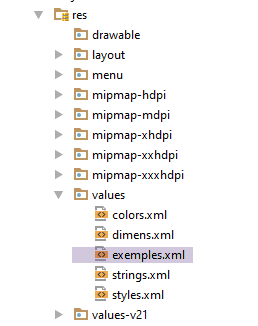 |
The file [exemples.xml] contains the following code:
<!-- examples -->
<resources>
  <string-array name="exemples">
    <item>Exemple-01</item>
    <item>Exemple-02</item>
    <item>Exemple-03</item>
    <item>Exemple-04</item>
  </string-array>
</resources>
Line 1: This file is the second parameter of the [createFromResource] method. In [R.array.exemples], [exemples] is the name of the array (see line 3 above), not the file name.
- Line 5: We associate a layout (display manager) with the adapter. Now the adapter has both the data and its display mode;
- Line 7: We put the adapter into a session. This is where the fragment [RequestFragment], which needs it, will retrieve it;
Let’s continue with the code for the [createResponseFragments] method:
private void createResponseFragments() {
    // spinner examples
    ArrayAdapter<CharSequence> adapter = ArrayAdapter.createFromResource(this, R.array.exemples, android.R.layout.simple_spinner_item);
    // Specify the layout to use when the list of choices appears
    adapter.setDropDownViewResource(android.R.layout.simple_spinner_dropdown_item);
    // we put the adapter in the session so that the [Request] view can retrieve it
    session.setSpinnerExemplesAdapter(adapter);
    // create fragment table (1 query, n responses)
    MyFragment[] tFragments = new MyFragment[adapter.getCount() + 1];
    // query fragment
    tFragments[0] = new RequestFragment();
    // answer fragments
    for (int i = 1; i < tFragments.length; i++) {
      // we construct the name of the fragment to be instantiated, corresponding to the example chosen by the user
      // this name must be the full name with its package - here it is directly associated with the example number in the spinner
      String exampleClassName = String.format("%s.Example%02dFragment", Constants.EXAMPLES_PACKAGE, i);
      // instantiate the fragment associated with the example
      MyFragment fragment;
      try {
        // class instantiation
        fragment = (MyFragment) Class.forName(exampleClassName).getConstructors()[0].newInstance(new Object[]{});
      } catch (Exception e) {
        e.printStackTrace();
        return;
      }
      // the fragment has been created - we put it in the table
      tFragments[i] = fragment;
    }
    // instantiation of the fragment manager with these new fragments
    mSectionsPagerAdapter = new SectionsPagerAdapter(getSupportFragmentManager(), tFragments);
    // Set up the ViewPager with the sections adapter.
    mViewPager.setAdapter(mSectionsPagerAdapter);
    // navigation between pages - this instruction is important
    // here we say that on both sides of the displayed view, we must keep [tFragments.length] views initialized
    // this means that all fragments used by the application are in memory and initialized
    // if you don't do this, the default [OffscreenPageLimit] is 1
    // so if the fragment displayed is no. 3, only fragments 2 and 4 will be initialized
    // this is done by calling the [onCreateView] method of these 2 fragments - this means that in this method, you must plan to
    // regenerate the visual appearance of the fragment the last time it was used
    // there's code that can't stand being run twice - it creates a huge mess and is complex to manage
    // here we've chosen to avoid these difficulties - in the logs, we can see that when the application starts, all fragments are created
    // and their [onCreateView] method executed - it's never executed again -
    mViewPager.setOffscreenPageLimit(tFragments.length);
    // inhibit swiping between fragments
    mViewPager.setSwipeEnabled(false);
  }
- line 9: creation of the array that will contain all the app’s fragments;
- line 11: the first fragment is the query fragment;
- lines 13–28: we will create as many fragments as there are examples. These fragments all extend the response fragment [ResponseFragment] and implement only what is specific to the example: the creation of the observed values. These values differ from one example to another;
- line 16: an example fragment has a standard name: ExampleXXFragment, where XX is its position in the example spinner plus 1. XX is also the fragment number of the example in the fragment manager;
- Line 21: Instantiation of example fragment No. i from the spinner:
- Class.forName(exampleName): loads the fragment into memory;
- Class.forName(exampleName).getConstructors()[0]: obtains the reference to the class’s first constructor. The class ExampleXXFragment has only one constructor. Therefore, a reference to it will be obtained;
- Class.forName(exampleName).getConstructors()[0].newInstance(new Object[]{}) instantiates an object of type ExampleXXFragment using the constructor from the previous step. new Object[]{} represents the parameters passed to this constructor. Since the constructor of the ExampleXXFragment class does not expect any parameters, an empty array of objects is passed;
- line 27: this fragment is added to the fragment array;
- line 30: We saw that the constructor of the fragment handler [SectionsPagerAdapter] expected the array of fragments it was to manage as a parameter. We now pass it to the constructor;
- line 22: the fragment container [mViewPager] from the view associated with activity [MainActivity] is linked here to the fragment manager: the fragment container [mViewPager] displays the fragments from the fragment manager;
- line 43: read the comments—the instruction essentially states that all fragments must remain in the state the code places them in, regardless of which fragment is currently displayed. Thus, when we return to it, we find it in the state we left it in;
- line 45: the fragment container [mViewPager] is of type [MyPager], which disables swiping;
The [MainActivity.showView] method is as follows:
  // display view n° [position]
  private void showView(int position) {
    // refresh the fragment before displaying it
    mSectionsPagerAdapter.getItem(position).onRefresh();
    // displays the requested view - goes directly to the view (second parameter set to false)
    // without this parameter, the user defaults to the desired view, quickly displaying intermediate views - undesirable behaviour
    mViewPager.setCurrentItem(position, false);
}
- line 3: we want to display fragment #position;
- line 4: this fragment is requested from the fragment manager and then refreshed. This is because the session may have changed since the last time it was displayed. The fragment must then inspect the session to see if it needs to update;
- line 7: the fragment is displayed by [ViewPager]. Since this has been associated with the fragment manager, it is fragment #[position] that will be displayed—the one we just refreshed on line 4;
Let’s finish with the two methods for managing the wait:
  public void beginWaiting() {
    // hold image management
    loadingPanel.setVisibility(View.VISIBLE);
  }

  public void cancelWaiting() {
    // hold image management
    loadingPanel.setVisibility(View.INVISIBLE);
    // end of execution
    session.setOnAir(false);
    session.setOperationStarted(false);
}
9.3.7.5. The fragment [RequestFragment]
The [RequestFragment] class is as follows:
package android.aleas.fragments;

import android.aleas.R;
import android.aleas.activity.Constants;
import android.aleas.activity.MainActivity;
import android.os.Bundle;
import android.util.Log;
import android.view.LayoutInflater;
import android.view.View;
import android.view.ViewGroup;
import android.widget.*;

import java.net.URI;
import java.net.URISyntaxException;

public class RequestFragment extends MyFragment {

  // URL of the web service
  private EditText edtUrlServiceRest;
  private TextView txtMsgErreurUrlServiceWeb;
  // number of requests
  private EditText edtNbRequests;
  private TextView txtErrorRequests;
  // generation interval
  private EditText edtA;
  private EditText edtB;
  private TextView txtErrorIntervalle;
  // delay
  private EditText edtMinDelay;
  private EditText edtMaxDelay;
  private TextView txtErrorDelay;
  // number of values generated
  private EditText edtMinCount;
  private EditText edtMaxCount;
  private TextView txtErrorCount;
  // button
  private Button btnExecuter;
  // list of answers
  private ListView listReponses;
  private TextView infoReponses;
  // spinner examples
  private Spinner spinnerExemples;

  // seizures
  private int nbRequests;
  private int a;
  private int b;
  private String urlServiceWebJson;
  private int minDelay;
  private int maxDelay;
  private int minCount;
  private int maxCount;

  // manufacturer
  public RequestFragment() {
    super();
    Log.d("rxjava", "RequestFragment constructor");
  }

  @Override
  public View onCreateView(LayoutInflater inflater, ViewGroup container, Bundle savedInstanceState) {
    Log.d("rxjava", "RequestFragment onCreateView");
    // recover activity and session
    activity = (MainActivity) getActivity();
    session = activity.getSession();
    // create the fragment view from its definition XML
    View view = inflater.inflate(R.layout.request, container, false);
    // components
    edtUrlServiceRest = (EditText) view.findViewById(R.id.editTextUrlServiceWeb);
    txtMsgErreurUrlServiceWeb = (TextView) view.findViewById(R.id.textViewErreurUrl);
    edtNbRequests = (EditText) view.findViewById(R.id.edt_nbrequests);
    txtErrorRequests = (TextView) view.findViewById(R.id.txt_error_nbrequests);
    edtA = (EditText) view.findViewById(R.id.edt_a);
    edtB = (EditText) view.findViewById(R.id.edt_b);
    txtErrorIntervalle = (TextView) view.findViewById(R.id.txt_errorIntervalle);
    edtMinDelay = (EditText) view.findViewById(R.id.edt_minDelay);
    edtMaxDelay = (EditText) view.findViewById(R.id.edt_maxDelay);
    txtErrorDelay = (TextView) view.findViewById(R.id.txt_error_delay);
    edtMinCount = (EditText) view.findViewById(R.id.edt_minCount);
    edtMaxCount = (EditText) view.findViewById(R.id.edt_maxCount);
    txtErrorCount = (TextView) view.findViewById(R.id.txt_error_count);
    btnExecuter = (Button) view.findViewById(R.id.btn_Executer);
    listReponses = (ListView) view.findViewById(R.id.lst_reponses);
    infoReponses = (TextView) view.findViewById(R.id.txt_Reponses);
    spinnerExemples = (Spinner) view.findViewById(R.id.spinnerExemples);

    // button [Exécuter]
    btnExecuter.setVisibility(View.VISIBLE);
    btnExecuter.setOnClickListener(new View.OnClickListener() {
      public void onClick(View arg0) {
        doExecuter();
      }
    });

    // initially no error messages
    txtErrorRequests.setVisibility(View.INVISIBLE);
    txtErrorIntervalle.setVisibility(View.INVISIBLE);
    txtMsgErreurUrlServiceWeb.setVisibility(View.INVISIBLE);
    txtErrorCount.setVisibility(View.INVISIBLE);
    txtErrorDelay.setVisibility(View.INVISIBLE);
    // spinner examples
    spinnerExemples.setAdapter(session.getSpinnerExemplesAdapter());
    // result
    return view;
  }
...
}
- line 16: the class [RequestFragment] extends the class [MyFragment] (see section 9.3.7.1);
- lines 18–42: the visual components of the fragment (see section 9.3.7.2);
- lines 45–52: user input in the form;
- the constructor (lines 55–58) and the [onCreateView] method are executed when the [MainActivity] activity creates all the application’s fragments. This is the only time;
- line 61: the code for the [onCreateView] method is standard. Note line 102, where the spinner adapter from the examples is included in the session. Also note line 91, where the click on the [Exécuter] button is handled by the [doExecuter] method;
- Lines 64–65: The fields [activity] and [session] belong to the parent class [MyFragment];
The method [doExecuter] is as follows:
  // seizures
  private int nbRequests;
  private int a;
  private int b;
  private String urlServiceWebJson;
  private int minDelay;
  private int maxDelay;
  private int minCount;
  private int maxCount;

...

  private void doExecuter() {
    // valid entries?
    if (isPageValid()) {
      // we put info in session
      session.setInfos(nbRequests, a, b, minCount, maxCount, minDelay, maxDelay, urlServiceWebJson, spinnerExemples.getSelectedItem().toString(), spinnerExemples.getSelectedItemPosition() + 1);
      // store the URL of the web service
      activity.setUrlServiceWebJson(session.getUrlWebJson());
      Log.d("rxjava", String.format("RequestFragment doExecuter, session=%s, session.position=%s%n", session, session.getExamplePosition()));
      // action in progress
      session.setOnAir(true);
      // but not started
      session.setOperationStarted(false);
      // the response fragment is displayed
      activity.selectTab(Constants.VUE_RESPONSE);
      // we start waiting
      beginWaiting();
    }
}
- line 15: We will not comment on the [ispageValid] method. It checks the validity of the entries and returns true only if they are all valid. In this case, they are used to initialize the fields in lines 2–9;
- line 17: the various entries are saved to the session:
- [spinnerExemples.getSelectedItem().toString()] is the name of the example selected by the user and is stored in [session.exampleName];
- [spinnerExemples.getSelectedItemPosition() + 1] is the fragment ID associated with the example, which was stored (the fragment) by the fragment manager. This ID is stored in [session.examplePosition];
- line 19: the URL from the web service / jSON is transmitted to the activity, which in turn transmits it to the [DAO] layer;
- lines 21–24: note that an operation is about to start;
- line 26: the response tab will be displayed. To understand what is about to happen, we need to recall the code [MainActivity.selectTab]:
  // tab selection
  public void selectTab(int position) {
    // there are at most 2 tabs
    // at the start there is only one, that of the request
    // if the requested tab is no. 1 and does not yet exist, then create it
    if (position == 1 && tabLayout.getTabCount() == 1) {
      // 1 + tab
      TabLayout.Tab tab = tabLayout.newTab();
      tab.setText("Response");
      tabLayout.addTab(tab);
    }
    // the tab is programmatically selected, triggering the [onTabSelected] event
    // which will associate the right view with this tab
    tabLayout.getTabAt(position).select();
}
- Initially, the activity had only created the request tab (tab #0);
- lines 6–11: create the response tab (tab #1) if it hasn’t been created yet;
- line 14: we select tab no. position (0 or 1). This places the [onTabSelected] event in the queue of the loop event of the Android application;
The handler for event [onTabSelected] in [MainActivity] is as follows:
      @Override
      public void onTabSelected(TabLayout.Tab tab) {
        // a tab has been selected - change the fragment displayed by the fragment container
        int position = tab.getPosition();
        if (position == 0) {
          // query tab
          showView(0);
        } else {
          // answer tab - depends on the example chosen
          showView(session.getExamplePosition());
        }
}
In the case of tab [Response], line 9 is executed. Fragment No. [session.getExamplePosition()] will be displayed. For example, for example [exemple-03], the number that was saved in [session.examplePosition] is 3. Line 10 then displays fragment No. 3. The table of fragments initially constructed by the activity is [RequestFragment, Exemple01Fragment, Exemple02Fragment, Exemple03Fragment,..]. Therefore, it is indeed fragment [Exemple03Fragment] that will be displayed. It is displayed by the following code:
  // display view n° [position]
  private void showView(int position) {
    // refresh the fragment before displaying it
    mSectionsPagerAdapter.getItem(position).onRefresh();
    // displays the requested view - goes directly to the view (second parameter set to false)
    // without this parameter, the user defaults to the desired view, quickly displaying intermediate views - undesirable behavior
    mViewPager.setCurrentItem(position, false);
}
We can see that the fragment will be refreshed (line 4) before being displayed (line 7).
9.3.7.6. The [ResponseFragment] fragment
The [ResponseFragment] class displays the server's responses. Its code is as follows:
package android.aleas.fragments;

import android.aleas.R;
import android.aleas.activity.MainActivity;
import android.os.Bundle;
import android.util.Log;
import android.view.LayoutInflater;
import android.view.View;
import android.view.ViewGroup;
import android.widget.ArrayAdapter;
import android.widget.Button;
import android.widget.ListView;
import android.widget.TextView;
import org.codehaus.jackson.map.ObjectMapper;
import rx.Subscription;

import java.io.IOException;
import java.util.ArrayList;
import java.util.List;

public abstract class ResponseFragment extends MyFragment {

  // list of answers
  private ListView listReponses;
  private TextView infoReponses;
  // button
  private Button btnAnnuler;

  // mapper jSON
  private ObjectMapper mapper;

  protected ResponseFragment() {
    super();
    Log.d("rxjava", String.format("ResponseFragment (%s) constructor", this));
    mapper = new ObjectMapper();
  }

  @Override
  public View onCreateView(LayoutInflater inflater, ViewGroup container, Bundle savedInstanceState) {
    // recover activity and session
    activity = (MainActivity) getActivity();
    session = activity.getSession();
    Log.d("rxjava", String.format("ResponseFragment (%s) onCreateView%n", this));
    // create the fragment view from its definition XML
    View view = inflater.inflate(R.layout.response, container, false);
    // components
    listReponses = (ListView) view.findViewById(R.id.lst_reponses);
    infoReponses = (TextView) view.findViewById(R.id.txt_Reponses);
    btnAnnuler = (Button) view.findViewById(R.id.btn_Annuler);
    // button [Annuler]
    btnAnnuler.setVisibility(View.INVISIBLE);
    btnAnnuler.setOnClickListener(new View.OnClickListener() {
      public void onClick(View arg0) {
        doAnnuler();
      }
    });
    // result
    return view;
  }
...
  // method to be executed (by explicit code) before each fragment display
  public void onRefresh() {
...
  }
}
- line 21: the class [ResponseFragment] extends the class [MyFragment];
- lines 23–27: the fragment’s components;
- lines 32–36: the constructor is executed only once, during the initial creation of the example fragments by the activity. This is because all the example fragments extend the fragment [ResponseFragment]. When they are instantiated, the constructor of their parent class [ResponseFragment] is called;
- line 35: initializes the jSON mapper from line 30 used to display the jSON string from an exception stack;
- lines 38–59: the [onCreateView] method is executed only once, during the initial creation of the example fragments by the activity. It contains standard code found in an Android application;
- lines 52–56: the method executed when the [Annuler] button is clicked is the [doAnnuler] method;
- lines 62–64: the [onRefresh] method is executed every time the [Response] tab is displayed;
Thanks to the various logs placed in key methods, we can see what happens when the application starts:
- line 1: construction of the [RequestFragment] fragment;
- lines 2–9: construction of the fragments for the 4 examples in the application;
- line 10: initialization of the [RequestFragment] fragment;
- lines 11–14: initialization of the fragments for the 4 examples in the application;
After that, we never see calls to these methods again.
The [ResponseFragment.onRefresh] method is as follows:
  // method to be executed (by explicit code) before each fragment display
  public void onRefresh() {
    Log.d("rxjava", String.format("ResponseFragment (%s) onRefresh for %s, sessionIsOnAir=%s session.isOperationStarted=%s%n", this, activity == null ? null : activity.getSession().getExampleName(), session.isOnAir(), session.isOperationStarted()));
    // execution in progress?
    if (session.isOnAir() && !session.isOperationStarted()) {
      // request execution
      session.setOperationStarted(true);
      doExecuter();
    }
}
- Line 5: We check if the fragment [RequestFragment] has made a request (session.isOnAir) and if that request has started (isOperationStarted). If the fragment [RequestFragment] has made a request and that request is not already in progress, the operation is launched (lines 7–8);
- once the operation is launched, since it is asynchronous, the user can switch between the two tabs. If the user navigates back to the [Response] tab and an operation is in progress, then lines 7–8 are not executed;
The [doExecuter] method on line 8 executes the operation requested by the user:
  private void doExecuter() {
    Log.d("rxjava", String.format("ResponseFragment (%s) doExecuter for %s%n", this, session.getExampleName()));
    // start waiting
    beginWaiting();
    // preparation execution
    subscriptions.clear();
    reponses.clear();
    nbInfos = 0;
    // create and execute observables for the chosen example
    createAndExecuteObservables();
}

// method implemented by child classes
protected abstract void createAndExecuteObservables();
- line 10: creates, executes, and observes observables. These are different for each example. This is why the [createAndExecuteObservables] method is abstract (line 14). It will be implemented by the [ExampleXXFragment] fragments that extend the [ResponseFragment] class;
- line 6: the list of subscriptions is cleared;
- line 7: the list displaying the responses is cleared;
- line 8: counts the number of responses received;
The child classes [ExampleXXFragment] delegate the task of displaying the elements they observe to the following method [showAlea]:
  protected void showAlea(String data) {
    // one more piece of information
    nbInfos++;
    infoReponses.setText(String.format("Liste des réponses (%s)", nbInfos));
    // 1 more answer
    reponses.add(0, data);
    Log.d("rxjava", data);
    // maj of UI
    listReponses.setAdapter(new ArrayAdapter<String>(getActivity(), android.R.layout.simple_list_item_1, android.R.id.text1, reponses));
}
- line 1: we see that the observed element arrives as a string. This will actually be the string jSON from the observed element. This allows us to have a single method for displaying the observed element regardless of its exact Java type;
- line 6: the observed element [data] is added to the first position of the list of responses. The user therefore sees the most recent responses at the top of the list;
Waiting is handled by the following methods [beginWaiting] and [cancelWaiting]:
  private void beginWaiting() {
    // we set the hourglass
    activity.beginWaiting();
    // the [Annuler] button is displayed
    btnAnnuler.setVisibility(View.VISIBLE);
  }

  protected void cancelWaiting() {
    // end of wait
    activity.cancelWaiting();
    // the [Annuler] button is hidden
    btnAnnuler.setVisibility(View.INVISIBLE);
}
They call the methods of the same names in the activity and simply show or hide the [Annuler] button.
Clicking the [Annuler] button is handled by the following code:
  protected void doAnnuler() {
    // we cancel all subscriptions
    for (Subscription s : subscriptions) {
      if (!s.isUnsubscribed()) {
        s.unsubscribe();
      }
    }
    // end of wait
    cancelWaiting();
}
- lines 3–7: cancel all subscriptions one by one;
9.3.8. Examples of observables
9.3.8.1. Example-01
The [ExampleXXFragment] classes are designed to create, execute, and observe observables. The observed values are displayed by the parent class [ResponseFragment].
The [Example01Fragment] class is as follows:
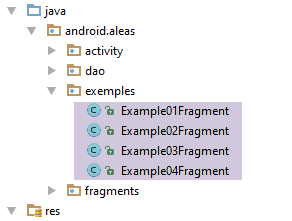 |
package android.aleas.exemples;

import android.aleas.dao.AleasDaoResponse;
import android.aleas.fragments.AleasUiResponse;
import android.aleas.fragments.Request;
import android.aleas.fragments.ResponseFragment;
import android.util.Log;
import org.codehaus.jackson.map.ObjectMapper;
import org.codehaus.jackson.map.ser.impl.SimpleBeanPropertyFilter;
import org.codehaus.jackson.map.ser.impl.SimpleFilterProvider;
import rx.Observable;
import rx.android.schedulers.AndroidSchedulers;
import rx.functions.Action0;
import rx.functions.Action1;
import rx.schedulers.Schedulers;

import java.io.IOException;

public class Example01Fragment extends ResponseFragment {

    // mappers jSON
    private ObjectMapper mapperAleasUiResponse;

    // manufacturer
    public Example01Fragment() {
        super();
        Log.d("rxjava", "Example01Fragment constructor");
        // filters jSON
        mapperAleasUiResponse = new ObjectMapper();
    }

    @Override
    public void createAndExecuteObservables() {
        Log.d("rxjava", "Example01Fragment createAndExecuteObservables");
        // we ask for the random numbers
        Observable<AleasDaoResponse> observable = Observable.empty();
        for (int i = 0; i < session.getNbRequests(); i++) {
            // observable configuration n° i
            // request to server
            Request request = session.getRequest();
            request.setId(i);
            // observable executed on computation thread
            observable = observable.mergeWith(session.getActivity().getAleas(request).subscribeOn(Schedulers.io()));
        }
        // observation sur thread de l'event loop;
        observable = observable.observeOn(AndroidSchedulers.mainThread());
        // we execute all these observables
        subscriptions.add(observable.subscribe(new Action1<AleasDaoResponse>() {
            @Override
            public void call(AleasDaoResponse aleasDaoResponse) {
                showAlea(getDataFrom(aleasDaoResponse));
            }
        }, new Action1<Throwable>() {
...
        }, new Action0() {
...
    }

    private String getDataFrom(AleasDaoResponse aleasDaoResponse) {
        // extract the information to be displayed
        String data;
        try {
            data = mapperAleasUiResponse.writeValueAsString(new AleasUiResponse(aleasDaoResponse));
        } catch (IOException e) {
            data = String.format("[%s,%s]", e.getClass().getName(), e.getMessage());
        }
        return data;
    }
}
- line 36: the single observable that will be generated;
- lines 37–44: generation and configuration of the various observables that are merged (line 43) into the observable on line 36;
- line 43: the observable is executed in a thread of the [Schedulers.io()] scheduler. The HTTP call to the server will be executed in this thread;
- line 46: the final observable is observed on the loop event thread;
- lines 48–57: execution of the observables, i.e., requests to the random number server. Android does not yet support Java 8 and its lambdas. Therefore, anonymous classes are used here to instantiate the functional interfaces of RxJava;
- lines 49–52: action executed when the observer receives a new element of type [AleasDaoResponse] from the observable (see section 9.3.6.1);
- line 51: call to the [showAlea] method of the parent class. Recall that it expects a string. This is provided by the [getDataFrom] method in lines 59–68;
- line 63: the string jSON is returned as a [AleasUiResponse] of the following type:
package android.aleas.fragments;

import android.aleas.dao.AleasDaoResponse;

import java.text.SimpleDateFormat;
import java.util.Calendar;

public class AleasUiResponse {

  // answer [DAO]
  private AleasDaoResponse aleasDaoResponse;
  // observation thread
  private String observedOn;
  // observation time
  private String observedAt;

  // manufacturers
  public AleasUiResponse() {
    observedOn = Thread.currentThread().getName();
    observedAt = new SimpleDateFormat("hh:mm:ss:SSS").format(Calendar.getInstance().getTime());
  }

  public AleasUiResponse(AleasDaoResponse aleasDaoResponse, String on, String at) {
    this.aleasDaoResponse = aleasDaoResponse;
    this.observedOn = on;
    this.observedAt = at;
  }

  public AleasUiResponse(AleasDaoResponse aleasDaoResponse) {
    this();
    this.aleasDaoResponse = aleasDaoResponse;
  }
// getters and setters
...
}
- To the response from the [DAO] layer (line 11), we add two pieces of information:
- line 13: the observation thread;
- line 15: the observation time;
Let's return to the subscription code:
    @Override
    public void createAndExecuteObservables() {
...
        // we execute all these observables
        subscriptions.add(observable.subscribe(new Action1<AleasDaoResponse>() {
            @Override
            public void call(AleasDaoResponse aleasDaoResponse) {
                showAlea(getDataFrom(aleasDaoResponse));
            }
        }, new Action1<Throwable>() {
            @Override
            public void call(Throwable th) {
                // exception is displayed
                showAlea(getMessagesFromThrowable(th));
                // after receiving an exception, the observable receives neither onNext nor onCompleted
                // forced to cancel the subscription by hand
                doAnnuler();
            }
        }, new Action0() {
            @Override
            public void call() {
                // end waiting
                cancelWaiting();
            }
        }));
}
- lines 11–18: case where the observer receives an exception;
- line 14: the [showAlea] method from the parent class is used again to display the exception. The [getMessagesFromThrowable] method is a method of the parent class [ResponseFragment] that generates a string from an exception:
  // exception messages
  protected String getMessagesFromThrowable(Throwable ex) {
    // create a list of error msgs from the exception stack
    List<String> messages = new ArrayList<String>();
    Throwable th = ex;
    while (th != null) {
      messages.add(String.format("[%s, %s]", th.getClass().getName(), th.getMessage()));
      th = th.getCause();
    }
    try {
      return mapper.writeValueAsString(messages);
    } catch (IOException e) {
      return e.getMessage();
    }
}
- line 11: we return the string jSON from a list of error messages (line 4);
Let’s return to the observable subscription code:
- lines 19–25: the code executed when the observer receives the end-of-broadcast notification. We then cancel the wait (line 23), which updates the GUI;
Running Example 01 produces an output similar to the following:
Each element of the list is the string jSON representing an observed value. The fields of the string jSON are as follows:
- aleas: the list of random numbers provided by the server;
- idClient: the request number (you can see that the responses came back in a random order);
- on: the execution thread of the observable that emitted this value;
- requestAt: time of the client request;
- responseAt: time of the server response;
- delay: delay observed by the server;
- error: error code returned by the server (0=no error);
- message: error message returned by the server (null=no error);
- observedAt: time the observed value was recorded;
- observedOn: thread in which the observed value was recorded;
9.3.8.2. Example-02
The [Example02Fragment] class is as follows:
package android.aleas.exemples;

import android.aleas.dao.AleasDaoResponse;
import android.aleas.fragments.AleasUiResponse;
import android.aleas.fragments.Request;
import android.aleas.fragments.ResponseFragment;
import android.util.Log;
import org.codehaus.jackson.map.ObjectMapper;
import rx.Observable;
import rx.android.schedulers.AndroidSchedulers;
import rx.functions.Action0;
import rx.functions.Action1;
import rx.functions.Func1;
import rx.schedulers.Schedulers;

import java.io.IOException;

public class Example02Fragment extends ResponseFragment {

    // mappers jSON
    private ObjectMapper mapperAleasUiResponse;

    // manufacturer
    public Example02Fragment() {
        super();
        Log.d("rxjava", "Example02Fragment constructor");
        // filter jSON
        mapperAleasUiResponse = new ObjectMapper();
    }

    public void createAndExecuteObservables() {
        Log.d("rxjava", "Example02Fragment createAndExecuteObservables");
        // we ask for the random numbers
        Observable<AleasDaoResponse> observable = Observable.empty();
        for (int i = 0; i < session.getNbRequests(); i++) {
            // request preparation
            Request request = session.getRequest();
            request.setId(i);
            // only observables with an even customer number are kept
            observable = observable
                    .mergeWith(session.getActivity().getAleas(request).filter(new Func1<AleasDaoResponse, Boolean>() {
                        @Override
                        public Boolean call(AleasDaoResponse aleasDaoResponse) {
                            return aleasDaoResponse.getClientState().getIdClient() % 2 == 0;
                        }
                    })
                            // execution on I/O thread
                            .subscribeOn(Schedulers.io()));
        }
        // observation sur thread de l'event loop
        observable = observable.observeOn(AndroidSchedulers.mainThread());
        // these observables are executed
        subscriptions.add(observable.subscribe(new Action1<AleasDaoResponse>() {
            @Override
            public void call(AleasDaoResponse aleasDaoResponse) {
                showAlea(getDataFrom(aleasDaoResponse));
            }
        }, new Action1<Throwable>() {
            @Override
            public void call(Throwable th) {
                showAlea(getMessagesFromThrowable(th));
                doAnnuler();
            }
        }, new Action0() {
            @Override
            public void call() {
                // end waiting
                cancelWaiting();
            }
        }));

    }

    private String getDataFrom(AleasDaoResponse aleasDaoResponse) {
        // extract the information to be displayed
        String data;
        try {
            data = mapperAleasUiResponse.writeValueAsString(new AleasUiResponse(aleasDaoResponse));
        } catch (IOException e) {
            data = String.format("[%s,%s]", e.getClass().getName(), e.getMessage());
        }
        return data;
    }

}
This example is similar to the previous one (line 38). However, from the observables obtained in the previous example, we retain only those with an even customer number (lines 42–46), using the [filter] method (line 41).
The results obtained are as follows (for 10 requests):
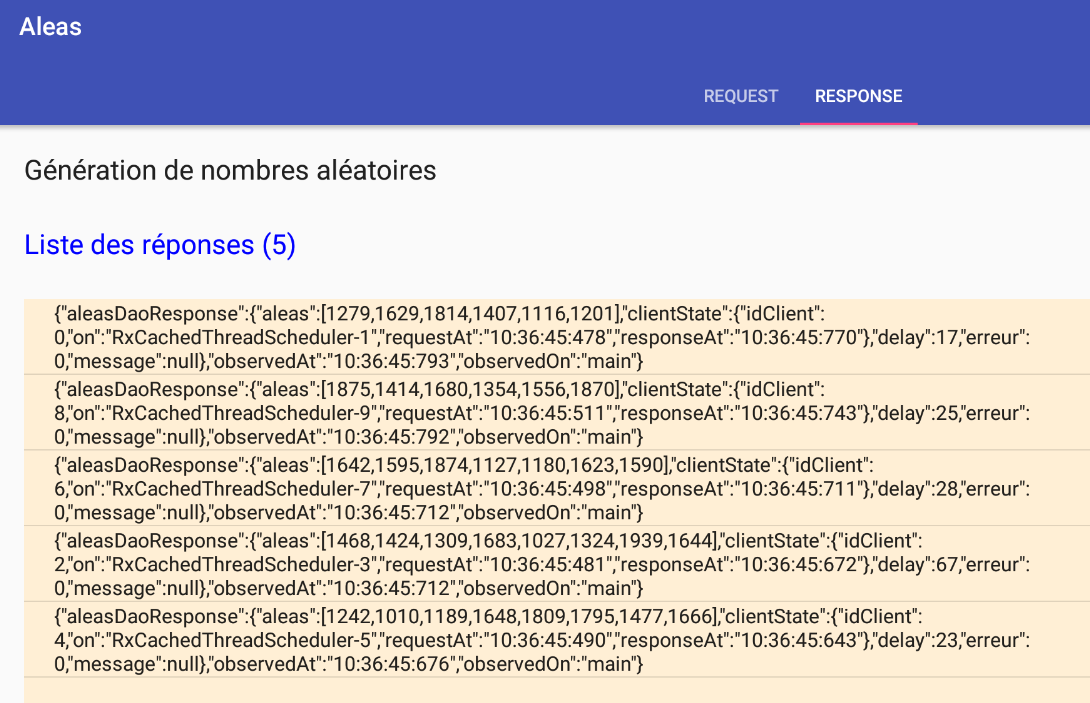
9.3.8.3. Example-03
The [Example03Fragment] class is as follows:
package android.aleas.exemples;

import android.aleas.dao.AleasDaoResponse;
import android.aleas.fragments.Request;
import android.aleas.fragments.ResponseFragment;
import android.util.Log;
import org.codehaus.jackson.map.ObjectMapper;
import rx.Observable;
import rx.android.schedulers.AndroidSchedulers;
import rx.functions.Action0;
import rx.functions.Action1;
import rx.functions.Func1;
import rx.schedulers.Schedulers;

import java.io.IOException;
import java.util.List;

public class Example03Fragment extends ResponseFragment {

  // mappers jSON
  private ObjectMapper mapper;

  // manufacturer
  public Example03Fragment() {
    super();
    Log.d("rxjava", "Example03Fragment constructor");
    // filter jSON
    mapper = new ObjectMapper();
  }

  public void createAndExecuteObservables() {
    Log.d("rxjava", "Example03Fragment createAndExecuteObservables");
    // we ask for the random numbers
    Observable<List<Integer>> observable = Observable.empty();
    for (int i = 0; i < session.getNbRequests(); i++) {
      // request preparation
      Request request = session.getRequest();
      request.setId(i);
      // observable configuration
      observable = observable.mergeWith(session.getActivity().getAleas(request).filter(new Func1<AleasDaoResponse, Boolean>() {
        @Override
        public Boolean call(AleasDaoResponse aleasDaoResponse) {
          return aleasDaoResponse.getClientState().getIdClient() % 2 == 0;
        }
      }).map(new Func1<AleasDaoResponse, List<Integer>>() {
        @Override
        public List<Integer> call(AleasDaoResponse aleasDaoResponse) {
          return aleasDaoResponse.getAleas();
        }
      })
        // execution on I/O thread
        .subscribeOn(Schedulers.io()));
    }
    // observation sur thread de l'event loop
    observable = observable.observeOn(AndroidSchedulers.mainThread());
    // these observables are executed
    subscriptions.add(observable
      .subscribe(new Action1<List<Integer>>() {
                   @Override
                   public void call(List<Integer> aleas) {
                     showAlea(getDataFrom(aleas));
                   }
                 },
        new Action1<Throwable>() {
          @Override
          public void call(Throwable th) {
            showAlea(getMessagesFromThrowable(th));
            doAnnuler();
          }
        },
        new Action0() {
          @Override
          public void call() {
            // end waiting
            cancelWaiting();
          }
        }
      ));

  }

  private String getDataFrom(List<Integer> aleas) {
    // extract the information to be displayed
    String data;
    try {
      data = mapper.writeValueAsString(aleas);
    } catch (IOException e) {
      data = String.format("[%s,%s]", e.getClass().getName(), e.getMessage());
    }
    return data;
  }

}
This example is similar to Example-02:
- Line 40: We define the same observables as in Example-02;
- line 45: each value emitted by the previous observables is converted, using the [map] method, into a List<Integer> type, which is the list of random numbers generated by the server;
- line 58: the observed value is now of type List<Integer>;
The result obtained for 10 requests is as follows:
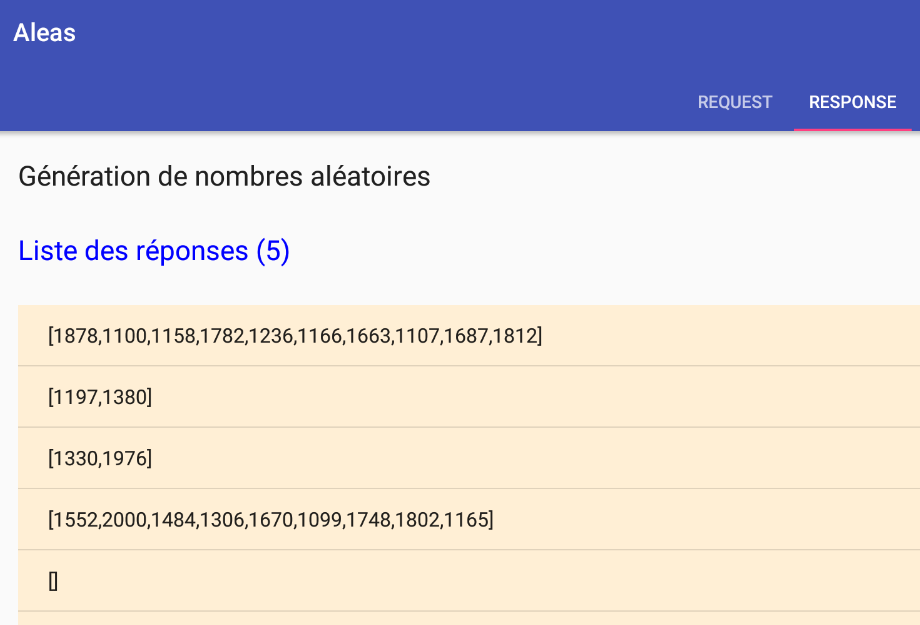
9.3.8.4. Example-04
The [Example04Fragment] class is as follows:
package android.aleas.exemples;

import android.aleas.dao.AleasDaoResponse;
import android.aleas.fragments.Request;
import android.aleas.fragments.ResponseFragment;
import android.util.Log;
import org.codehaus.jackson.map.ObjectMapper;
import rx.Observable;
import rx.android.schedulers.AndroidSchedulers;
import rx.functions.Action0;
import rx.functions.Action1;
import rx.functions.Func1;
import rx.schedulers.Schedulers;

public class Example04Fragment extends ResponseFragment {

  // mappers jSON
  private ObjectMapper mapper;

  // manufacturer
  public Example04Fragment() {
    super();
    Log.d("rxjava", "Example04Fragment constructor");
    // filter jSON
    mapper = new ObjectMapper();
  }

  public void createAndExecuteObservables() {
    Log.d("rxjava", "Example03Fragment createAndExecuteObservables");
    // we ask for the random numbers
    Observable<Integer> observable = Observable.empty();
    for (int i = 0; i < session.getNbRequests(); i++) {
      // request preparation
      Request request = session.getRequest();
      request.setId(i);
      // observable configuration
      observable = observable.mergeWith(session.getActivity().getAleas(request).filter(new Func1<AleasDaoResponse, Boolean>() {
        @Override
        public Boolean call(AleasDaoResponse aleasDaoResponse) {
          return aleasDaoResponse.getClientState().getIdClient() % 2 == 0;
        }
      }).flatMap(new Func1<AleasDaoResponse, Observable<Integer>>() {
        @Override
        public Observable<Integer> call(AleasDaoResponse aleasDaoResponse) {
          return Observable.from(aleasDaoResponse.getAleas());
        }
      })
        // execution on an I/O thread
        .subscribeOn(Schedulers.io()));
    }
    // observation sur thread de l'event loop
    observable = observable.observeOn(AndroidSchedulers.mainThread());
    // these observables are executed
    subscriptions.add(observable
      .subscribe(new Action1<Integer>() {
                   @Override
                   public void call(Integer alea) {
                     showAlea(String.valueOf(alea));
                   }
                 },
        new Action1<Throwable>() {
          @Override
          public void call(Throwable th) {
            showAlea(getMessagesFromThrowable(th));
            doAnnuler();
          }
        },
        new Action0() {
          @Override
          public void call() {
            // end waiting
            cancelWaiting();
          }
        }
      ));

  }
}
This example is similar to Example-03, except that instead of using the [map] method on line 42, we use the [flatMap] method.
- line 55: note that the type of the observed value is now Integer;
For 10 queries, we obtain the following results:
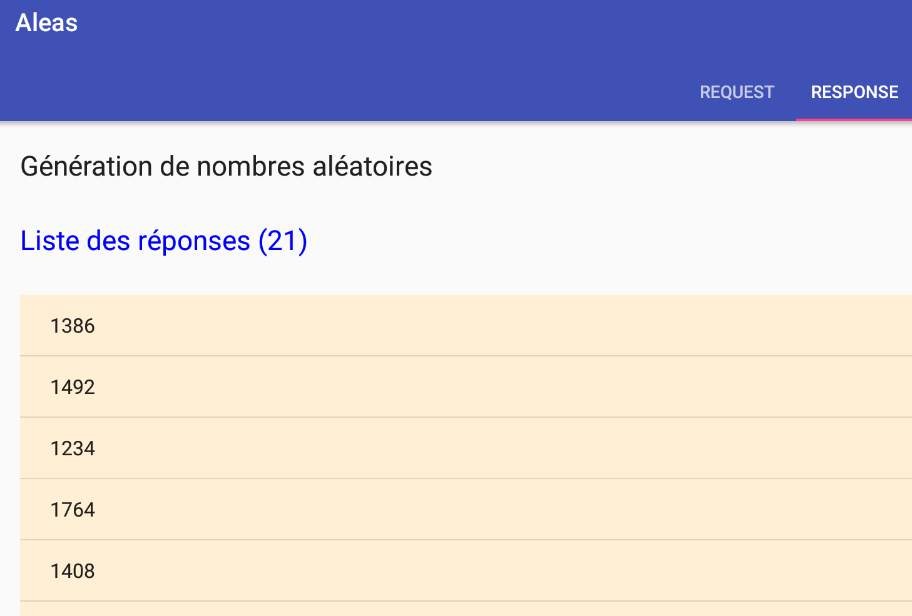
This time, there are more observed values than queries.
9.3.8.5. Example-05
We will now explain the procedure for adding a new example of observables to the application.
Suppose we want to reproduce the example [Exemple22h] from Section 7.6.4:
package dvp.rxjava.observables.exemples;

import dvp.rxjava.observables.utils.Process;
import dvp.rxjava.observables.utils.ProcessUtils;
import rx.Observable;
import rx.observables.GroupedObservable;

public class Exemple22h {
    public static void main(String[] args) throws InterruptedException {
        // process
        Observable<GroupedObservable<Boolean, Integer>> obs = Observable.range(1, 10).groupBy(i -> i % 2 == 0);
        Process<Integer> process = new Process<>("process", obs.concatMap(g -> g.asObservable()));
        // subscriptions
        ProcessUtils.subscribe(1, process);
    }
}
- The values of the observable [Observable.range(1, 10)] are first grouped into even and odd values by the method [groupBy] (line 11) and then combined into a single observable by the method [concatMap] (line 12);
Step 1
We create a new example in the file [exemples.xml]:
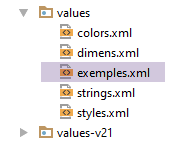 |
<!-- examples -->
<resources>
  <string-array name="exemples">
    <item>Exemple-01</item>
    <item>Exemple-02</item>
    <item>Exemple-03</item>
    <item>Exemple-04</item>
    <item>Exemple-05</item>
  </string-array>
</resources>
Above, line 8 has been added. The name given to the example can be anything.
Step 2
Duplicate the class [Example04Fragment] into [Example05Fragment]. Here, the name is predefined.
Step 3
Modify the code in [Example05Fragment] as follows:
package android.aleas.exemples;

import android.aleas.dao.AleasDaoResponse;
import android.aleas.fragments.Request;
import android.aleas.fragments.ResponseFragment;
import android.util.Log;
import org.codehaus.jackson.map.ObjectMapper;
import rx.Observable;
import rx.android.schedulers.AndroidSchedulers;
import rx.functions.Action0;
import rx.functions.Action1;
import rx.functions.Func1;
import rx.observables.GroupedObservable;
import rx.schedulers.Schedulers;

public class Example05Fragment extends ResponseFragment {

  // mappers jSON
  private ObjectMapper mapper;

  // manufacturer
  public Example05Fragment() {
    super();
    Log.d("rxjava", "Example05Fragment constructor");
    // filter jSON
    mapper = new ObjectMapper();
  }

  public void createAndExecuteObservables() {
    Log.d("rxjava", "Example05Fragment createAndExecuteObservables");
    // instantiations of functional interfaces
    // filter
    Func1<AleasDaoResponse, Boolean> filter = new Func1<AleasDaoResponse, Boolean>() {
      @Override
      public Boolean call(AleasDaoResponse aleasDaoResponse) {
        return aleasDaoResponse.getClientState().getIdClient() % 2 == 0;
      }
    };
    // flatMap
    Func1<AleasDaoResponse, Observable<Integer>> flatMap = new Func1<AleasDaoResponse, Observable<Integer>>() {
      @Override
      public Observable<Integer> call(AleasDaoResponse aleasDaoResponse) {
        return Observable.from(aleasDaoResponse.getAleas());
      }
    };
    // groupBy
    Func1<Integer, Boolean> groupBy = new Func1<Integer, Boolean>() {
      @Override
      public Boolean call(Integer integer) {
        return integer % 2 == 0;
      }
    };
    // concatMap
    Func1<GroupedObservable<Boolean, Integer>, Observable<Integer>> concatMap = new Func1<GroupedObservable<Boolean, Integer>, Observable<Integer>>() {
      @Override
      public Observable<Integer> call(GroupedObservable<Boolean, Integer> integerIntegerGroupedObservable) {
        return integerIntegerGroupedObservable.asObservable();
      }
    };
    // we ask for the random numbers
    Observable<Integer> observable = Observable.empty();
    for (int i = 0; i < session.getNbRequests(); i++) {
      // request preparation
      Request request = session.getRequest();
      request.setId(i);
      // observable configuration
      observable = observable.mergeWith(session.getActivity().getAleas(request).filter(filter).flatMap(flatMap))
        .groupBy(groupBy).concatMap(concatMap)
        // execution on an I/O thread
        .subscribeOn(Schedulers.io());
    }
    // observation sur thread de l'event loop
    observable = observable.observeOn(AndroidSchedulers.mainThread());
    // these observables are executed
    subscriptions.add(observable
      .subscribe(new Action1<Integer>() {
                   @Override
                   public void call(Integer alea) {
                     showAlea(String.valueOf(alea));
                   }
                 },
        new Action1<Throwable>() {
          @Override
          public void call(Throwable th) {
            showAlea(getMessagesFromThrowable(th));
            doAnnuler();
          }
        },
        new Action0() {
          @Override
          public void call() {
            // end waiting
            cancelWaiting();
          }
        }
      ));

  }
}
- line 67: represents the observable from Example 04: a stream of integers;
- line 68: we group this stream of integers according to a Boolean criterion that we will define. We will obtain an observable of type Observable<GroupedObservable<Boolean, Integer>>, which therefore emits elements of type GroupedObservable<Boolean, Integer>;
- line 68: the method [concatMap] will produce elements of type Integer from elements of type GroupedObservable<Boolean, Integer>;
- lines 32–59: to make the creation of the observable in lines 67–69 more readable, we have isolated the instances of functional interfaces required by the various [filter, flatMap, groupBy, concatMap] operators;
- lines 47–52: the method [groupBy] expects a parameter of type Func1<T,K>, where T is the type of the grouped elements and K is the type of the grouping criterion. Based on the element T, the Func1<T,K> instance is responsible for generating the grouping key K for the element;
- lines 48–51: elements of type Integer will be grouped by parity. The Func1<Integer,Boolean> instance produces the key true or false depending on whether the element should be placed in one group or the other. The result is two groups: the group of even elements with key true and the group of odd elements with key false;
- lines 53–59: the method [concatMap] expects a parameter of type Func1<T,Observable<R>> and produces an observable of elements of type R. The type T here will be the type emitted by the [groupBy] operator, in this case a type GroupedObservable<Boolean, Integer>;
- line 57: from the element of type [GroupedObservable<Boolean, Integer>], an Observable<Integer> is produced. Since the operator [groupBy] produced two groups, the operator [concatMap] will produce two observables of type [Observable<Integer>]. Like [flatMap], it will flatten them into a single observable. But unlike [flatMap], it does not mix the elements of the flattened observables. We should therefore observe two separate groups: the even random numbers and the odd ones.
Step 4
We run the application:
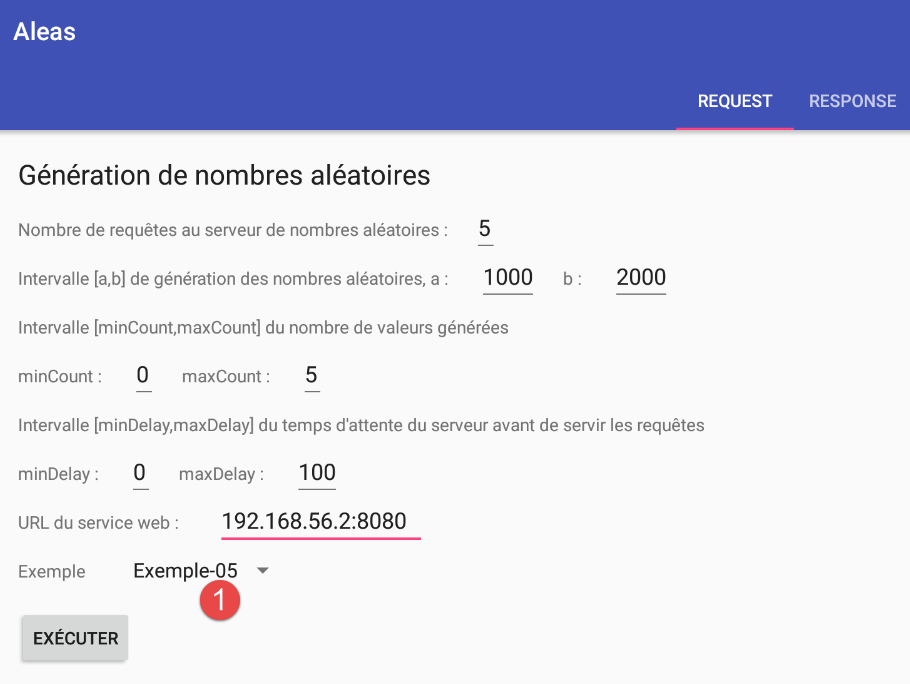
and we get the following results:
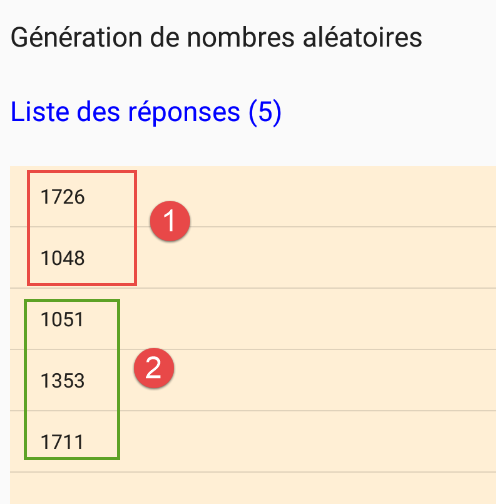
- in [1], the even random numbers; in [2], the odd ones;
9.3.8.6. To continue
Readers are now invited to create their own examples and to experiment with different values for the form fields that configure the requests sent to the random number server.
9.3.9. Conclusion
We have created the following architecture in the Android environment:
The Android client:
 |
The [DAO] layer communicates with the server that generates the random numbers displayed by the Android tablet. This server has the following two-layer architecture:
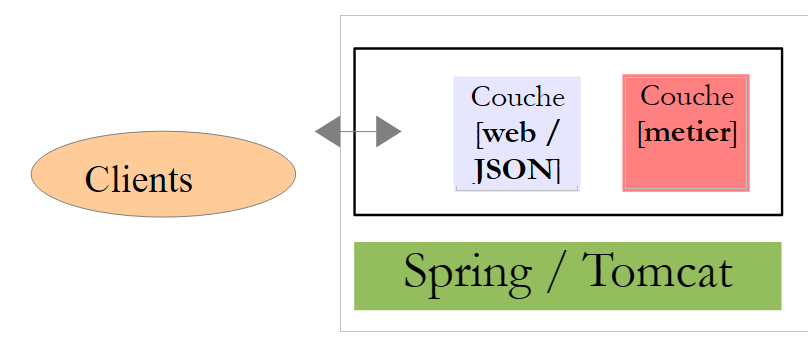 |
The [DAO] layer made n HTTP requests to the random number server, and the [swing] layer asynchronously waited for the results of these requests to display them. These n HTTP requests were made to the same server, which returned the same types of responses. This allowed us to merge (mergeWith) the responses into a single observable.
In reality, Android applications communicate with different servers, and we will likely not merge their responses. The HTTP requests to these servers will be handled independently of one another, and their results will be observed using separate methods.