8. RxJava in the Swing Environment
8.1. Introduction
Here, we will revisit the Swing application presented in Section 2.
 |
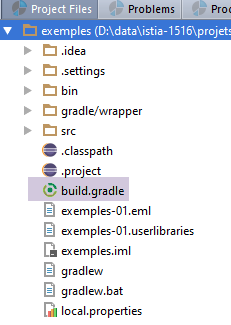
To work with RxJava in a Swing environment, we will use the RxSwing library, which adds classes and interfaces useful in a Swing environment to RxJava. To do this, the Gradle file for the Swing example is as follows:
 |
buildscript {
    repositories {
        mavenCentral()
    }
}
apply plugin: 'java'
jar {
    baseName = 'exemples-01'
    version = '0.0.1-SNAPSHOT'
}
repositories {
    mavenCentral()
}
dependencies {
    compile('io.reactivex:rxswing:0.25.0')
    compile('io.reactivex:rxjava:1.1.3')
    compile('com.fasterxml.jackson.core:jackson-databind:2.7.3')
}
task wrapper(type: Wrapper) {
    gradleVersion = '2.9'
}
- line 15: the dependency on RxSwing;
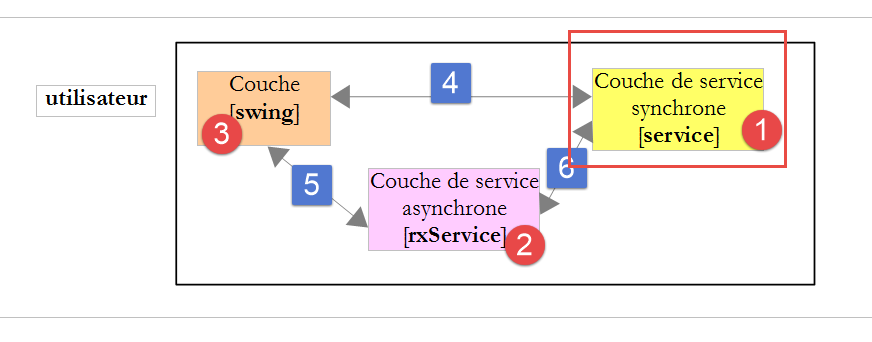
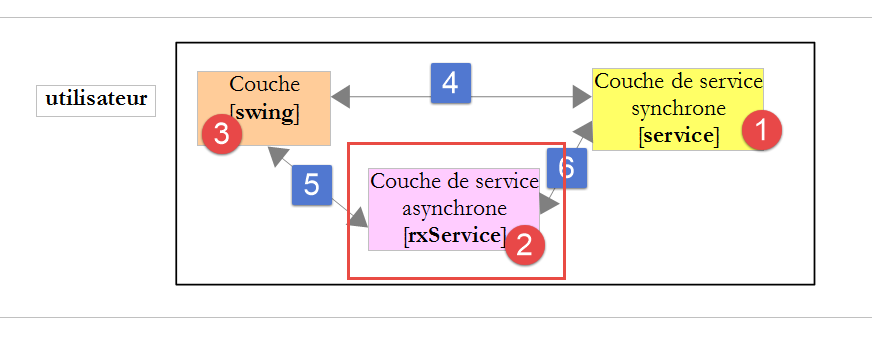
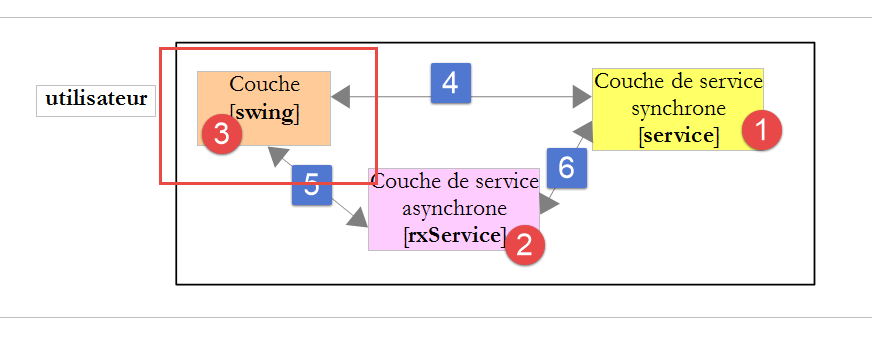
We will use only a single object specific to RxSwing: the [SwingScheduler.getInstance()] scheduler, which executes/observes observables on the Swing event thread loop. We will use it exclusively to observe observables running on threads other than the loop event thread. Let’s review the architecture of the example application:
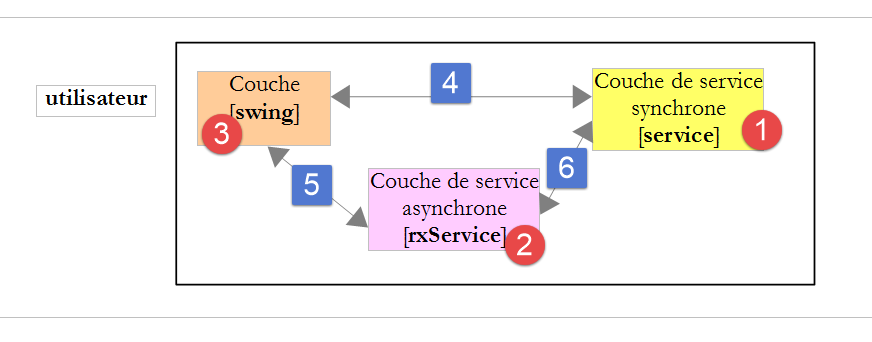
- the asynchronous service layer provides methods that return observables. We execute these observables in threads different from that of the loop event. Thus, the graphical user interface is not frozen. It can respond to user input. The most obvious example is allowing the user to click a button [Annuler] to interrupt an asynchronous operation that is taking too long. For the user to do this, the GUI must be frozen;
- The Swing layer needs to process the results returned by asynchronous operations and use them to update the graphical user interface. However, this can only be done in the loop event thread. To achieve this, these results are monitored in the [SwingScheduler.getInstance()] scheduler;
Thus, in the GUI event handling code, interaction with the asynchronous layer [rxService] takes the following form:
Observable obs=rxService.doSomething(...).subscribeOn(Schedulers.computation()).observeOn(SwingScheduler.getInstance()) ;
where the scheduler [Schedulers.computation()] can be replaced by another scheduler depending on the use case.
The reader is invited to reread paragraph 2. They now have the knowledge to fully understand it.
8.2. The code structure
The code implements the following architecture:
The Intellij Idea project implementing this architecture is as follows:
|
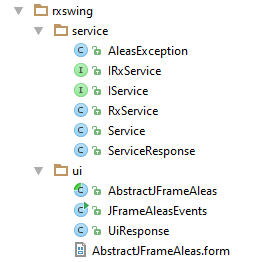
- the [rxswing.service] package implements the synchronous (IService, Service) and asynchronous (IRxService, RxService) service layers;
- the package [rxswing.ui] implements the Swing interface;
8.3. Running the project
To run the project under Intellij Idea, proceed as follows:
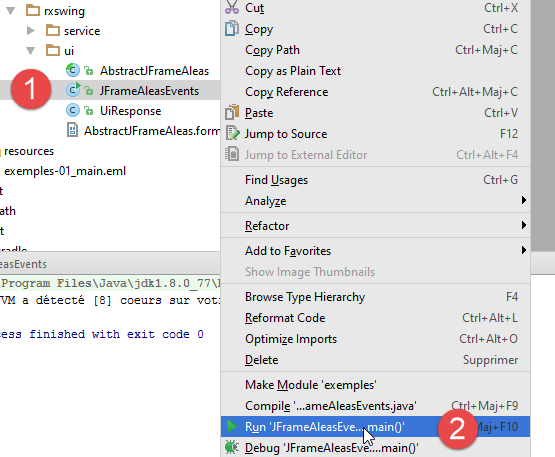 |
8.4. The synchronous service
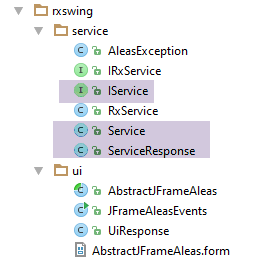 |
The synchronous service layer provides the following [IService] interface:
package dvp.rxswing.service;

public interface IService {
  // random numbers in the [a,b] interval
  // n numbers are generated with n itself a random number in the interval [minCount, maxCount]
  // numbers are generated after a delay of milliseconds,
  // where [delay] is itself a random number in the interval [minDelay, maxDelay]
  public ServiceResponse getAleas(int a, int b, int minCount, int maxCount, int minDelay, int maxDelay);
}
The [ServiceResponse] type of the service response is as follows:
package dvp.rxswing.service;

import java.util.List;

public class ServiceResponse {

  // service waiting time
  private int delay;
  // random numbers
  private List<Integer> aleas;
  // execution thread
  private String executedOn;

  // manufacturers

  public ServiceResponse() {
      // execution thread
    executedOn = Thread.currentThread().getName();
  }

  public ServiceResponse(int delay, List<Integer> aleas) {
      // local builder
    this();
    // other initializations
    this.delay = delay;
    this.aleas = aleas;
  }

  // getters and setters
...
}
The [IService] interface is implemented by the following [Service] class:
package dvp.rxswing.service;

import java.util.*;

public class Service implements IService {

  @Override
  public ServiceResponse getAleas(int a, int b, int minCount, int maxCount, int minDelay, int maxDelay) {
    // random numbers in the [a,b] interval
    // n numbers are generated with n itself a random number in the interval [minCount, maxCount]
    // numbers are generated after a delay of milliseconds,
    // where [delay] is itself a random number in the interval [minDelay, maxDelay]

    // some checks
    List<String> messages = new ArrayList<>();
    int erreur = 0;
    if (a < 0) {
      messages.add("Le nombre a de l'intervalle [a,b] de génération doit être supérieur à 0");
      erreur |= 2;
    }
    if (a >= b) {
      messages.add("Dans l'intervalle [a,b] de génération, on doit avoir a< b");
      erreur |= 4;
    }
    if (minCount < 0) {
      messages.add("Le nombre min de l'intervalle [min,count] du nombre de valeurs générées doit être supérieur à 0");
      erreur |= 16;
    }
    if (minCount > maxCount) {
      messages.add("Dans l'intervalle [min,count] du nombre de valeurs générées, on doit avoir min<= max");
      erreur |= 32;
    }
    if (minDelay < 0) {
      messages.add("Le nombre min de l'intervalle [min,count] du délai d'attente doit être supérieur à 0");
      erreur |= 64;
    }
    if (minCount > maxCount) {
      messages.add("Dans l'intervalle [min,count] du délai d'attente, on doit avoir min<= max");
      erreur |= 128;
    }
    if (maxDelay > 5000) {
      messages.add("L'attente en millisecondes avant la génération des nombres doit être dans l'intervalle [0,5000]");
      erreur |= 256;
    }
    // mistakes?
    if (!messages.isEmpty()) {
      throw new AleasException(String.join(" [---] ", messages), erreur);
    }
    // random number generator
    Random random = new Random();
    // waiting?
    int delay = minDelay + random.nextInt(maxDelay - minDelay + 1);
    if (delay > 0) {
      try {
        Thread.sleep(delay);
      } catch (InterruptedException e) {
        throw new AleasException(String.format("[%s : %s]", e.getClass().getName(), e.getMessage()), 1024);
      }
    }
    // result generation
    int count = minCount + random.nextInt(maxCount - minCount + 1);
    List<Integer> nombres = new ArrayList<>();
    for (int i = 0; i < count; i++) {
      nombres.add(a + random.nextInt(b - a + 1));
    }
    // return result
    return new ServiceResponse(delay,nombres);
  }

}
The [AleasException] exception class used by the service is as follows:
package dvp.rxswing.service;

public class AleasException extends RuntimeException {

    private static final long serialVersionUID = 1L;
    // error code
  private int code;

  // manufacturers
  public AleasException() {
  }

  public AleasException(String detailMessage, int code) {
    super(detailMessage);
    this.code = code;
  }

  public AleasException(Throwable throwable, int code) {
    super(throwable);
    this.code = code;
  }

  public AleasException(String detailMessage, Throwable throwable, int code) {
    super(detailMessage, throwable);
    this.code = code;
  }

  // getters and setters
...
}
- line 3: it extends the [RuntimeException] class. It is therefore an unchecked exception;
- line 7: it adds an error code to its parent class (0=no error);
8.5. The asynchronous service
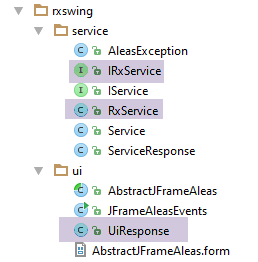 |
The asynchronous service layer provides the following [IRxService] interface:
package dvp.rxswing.service;

import dvp.rxswing.ui.UiResponse;
import rx.Observable;

public interface IRxService {
  // random numbers in the [a,b] interval
  // n numbers are generated with n itself a random number in the interval [minCount, maxCount]
  // numbers are generated after a delay of milliseconds,
  // where [delay] is itself a random number in the interval [minDelay, maxDelay]
  public Observable<UiResponse> getAleas(int a, int b, int minCount, int maxCount, int minDelay, int maxDelay, UiResponse uiResponse);
}
- line 11: the [getAleas] method of the service now returns an observable;
The [getAleas] method returns a response of type [UiResponse] intended for the [Ui] layer. This type is as follows:
package dvp.rxswing.ui;

import dvp.rxswing.service.ServiceResponse;

import java.text.SimpleDateFormat;
import java.util.Calendar;

public class UiResponse {

  // id of the customer
  private int idClient;
  // service response
  private ServiceResponse serviceResponse;
  // observation thread name
  private String observedOn;
  // query time
  private String requestAt;
  // time of reply
  private String responseAt;

  // manufacturers

  public UiResponse() {
      // observation thread
    observedOn = Thread.currentThread().getName();
    // query time
    requestAt = getTimeStamp();
  }

  // private methods

  private String getTimeStamp() {
    return new SimpleDateFormat("hh:mm:ss:SSS").format(Calendar.getInstance().getTime());
  }

  // getters and setters
...
}
- The random numbers are in the field on line 13;
- the other fields are there to specify the execution and observation threads of the asynchronous service's observable, as well as the times of the request made to the service and the response received;
The asynchronous interface is implemented by the following [RxService] class:
package dvp.rxswing.service;

import dvp.rxswing.ui.UiResponse;
import rx.Observable;

public class RxService implements IRxService {

  // synchronous service
  private IService service;

  // manufacturer
  public RxService(IService service) {
    this.service = service;
  }

  @Override
  public Observable<UiResponse> getAleas(int a, int b, int minCount, int maxCount, int minDelay, int maxDelay, UiResponse uiResponse) {
      // we create an observable emitting the value rendered by the synchronous service
    return Observable.create(subscriber -> {
      try {
          // synchronous call
        uiResponse.setServiceResponse(service.getAleas(a, b, minCount, maxCount, minDelay, maxDelay));
        // the result is passed on to the observer
        subscriber.onNext(uiResponse);
      } catch (Exception e) {
          // we pass the error to the observer
        subscriber.onError(e);
      } finally {
          // the observer is informed that the emissions are finished
        subscriber.onCompleted();
      }
    });
  }
}
- lines 12–14: the [RxService] class of the asynchronous service is constructed from an instance of the synchronous interface [IService];
- lines 20–33: construction of the observable, result of the [getAleas] method;
- line 22: the synchronous method [service.getAleas] is called. Its result, of type [ServiceResponse], is included in the object of type [UiResponse] to be provided to the [swing] layer. This object was initially passed in the method’s call parameters (last parameter, line 17);
- line 24: the response [UiResponse] is sent to the observer (the [swing] layer). The object [UiResponse] does not contain only the information constructed by the synchronous service on line 22. It also contains other information constructed by the calling method of the [getAleas] method on line 17. This is why this calling method passed the object [UiResponse] as a parameter to the method [getAleas] (last parameter, line 17);
- line 30: we must not forget to signal the end of the transmissions. Here we have an observable that emits only one value: the one returned by the synchronous service;
- line 27: we notify the observer of any errors;
8.6. The graphical interface
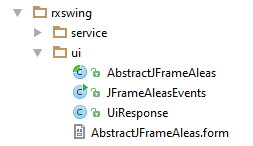 |
- The graphical interface was built using IDE and [Netbeans], which has a good graphical editor. This editor generated the file [AbstractJFrameAleas.form], which can only be used by IDE;
- The [AbstractJFrameAleas] class was also generated by the graphical editor of Netbeans. It was then refactored as follows: the GUI events we wanted to handle are processed in the [AbstractJFrameAleas] class via abstract methods implemented in the child class [JFrameAleasEvents]. Ultimately,
- the abstract class [AbstractJFrameAleas] is responsible for building and displaying the GUI;
- the child class [JFrameAleasEvents] handles its events;
The GUI components of the [Request] tab are as follows:
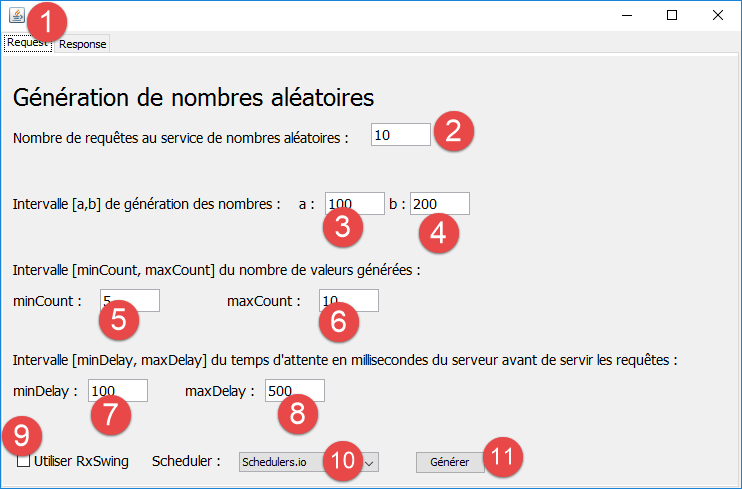 |
No. | type | name | role |
1 | JTabbedPane | jTabbedPane1 | a tabbed container. Contains two tabs (JPanel) [jPanelRequest] for the request, [jPanelresponse] for the response; |
2 | JTextField | jTextFieldNbValeurs | the number of requests to be made to the random number service. In the case of the asynchronous service running on the scheduler [Schedulers.io], these requests will share a processor; |
3 | JTextField | jTextFieldA | endpoint a of the interval [a,b] |
4 | JTextField | jTextFieldB | Terminal B of the interval [a,b] |
5 | JTextField | jTextFieldMinCount | Terminal minCount of the range [minCount, maxCount] |
6 | JTextField | jTextFieldMaxCount | Terminal maxCount from the range [minCount, maxCount] |
7 | JTextField | jTextFieldMinDelay | Terminal minDelay in the range [minDelay, maxDelay] |
8 | JTextField | jTextFieldMaxDelay | Terminal maxDelay from the range [minDelay, maxDelay] |
9 | JCheckBox | jCheckBoxRxSwing | If the checkbox is selected, requests are made to the asynchronous interface. Otherwise, they are made to the synchronous interface |
10 | JComboBox | jComboBoxSchedulers | In the case of asynchronous requests, these will be executed using the scheduler selected here |
11 | JButton | jButtonGenerate | Launches the execution of requests to the synchronous or asynchronous service |
The components of the graphical interface for the [Response] tab are as follows:
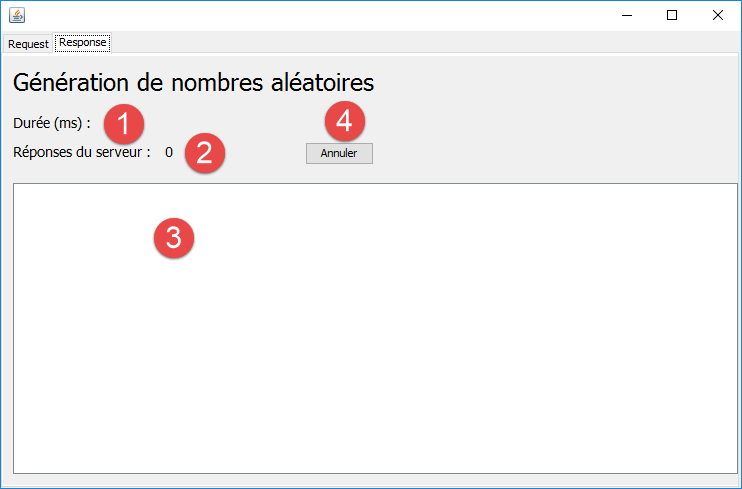 |
No. | Type | name | role |
1 | JLabel | jLabelDuree | the total execution time in milliseconds of the requests |
2 | JLabel | jLabelNbReponses | the total number of observed responses (may differ from the number of requests, as each request may return multiple values to be observed) |
3 | JList | jListNumbers | display of observed (received) values |
4 | JButton | jButtonAnnuler | cancels requests currently being executed |
8.7. Instantiation of the graphical user interface
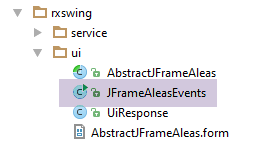 |
The [JFrameAleasEvents] class handles GUI events, including clicks on the [Générer] button. It is an executable class that starts in the following context:
public class JFrameAleasEvents extends AbstractJFrameAleas {

    private static final long serialVersionUID = 1L;
    // synchronous generation service
    private IService service;
    // asynchronous generation service
    private IRxService rxService;

    // seizures
    private int nbRequests;
    private int a;
    private int b;
    private int minDelay;
    private int maxDelay;
    private int minCount;
    private int maxCount;

    // error messages
    private final String jLabelNbValuesErrorText = "Tapez un nombre entier >=1";
    private final String jLabelCountErrorText = "minCount doit être >=0 et maxCount>=minCount ";
    private final String jLabelDelayErrorText = "minDelay doit être >=0 et maxDelay>=minDelay et  maxDelay<=5000";
    private final String jLabelIntervalErrorText = "a doit être >=0 et b>=a ";

    // subscriptions to observables
    protected List<Subscription> subscriptions = new ArrayList<Subscription>();
    // start-end of execution
    private long debut;
    // mapper jSON
    private ObjectMapper jsonMapper;
    // answer model
    private DefaultListModel<String> model;

    // manufacturer
    public JFrameAleasEvents() {
        // parent
        super();
        // local
        initJFrame();
        // services
        service = new Service();
        rxService = new RxService(service);
        // mapper jSON
        jsonMapper = new ObjectMapper();
    }

    private void initJFrame() {
        // hide error messages
        jLabelCountError.setText("");
        jLabelDelayError.setText("");
        jLabelIntervalError.setText("");
        jLabelNbValuesError.setText("");
        // hide texts by default
        jTextFieldA.setText("100");
        jTextFieldB.setText("200");
        jTextFieldMinCount.setText("5");
        jTextFieldMaxCount.setText("10");
        jTextFieldMinDelay.setText("100");
        jTextFieldMaxDelay.setText("500");
        jTextFieldNbValeurs.setText("10");
        jLabelDuree.setText("");
        // answer model
        model = new DefaultListModel<>();
        jListNumbers.setModel(model);
        // number of hearts
        System.out.printf("La JVM a détecté [%s] coeurs sur votre machine%n", Runtime.getRuntime().availableProcessors());
    }

    public static void main(String args[]) {
        try {
            UIManager.setLookAndFeel(UIManager.getSystemLookAndFeelClassName());
        } catch (UnsupportedLookAndFeelException | ClassNotFoundException | InstantiationException
                | IllegalAccessException e) {
            System.out.println(e);
            System.exit(0);
        }

        /* Create and display the form */
        java.awt.EventQueue.invokeLater(() -> {
            new JFrameAleasEvents().setVisible(true);
        });
    }
- line 1: the class [JFrameAleasEvents] extends the class [AbstractJFrameAleas], which itself extends the Swing class [JFrame]. The class [JFrameAleasEvents] is therefore a Swing window;
- lines 68–75: the [main] method that will be executed;
- line 70: sets the look and feel of the graphical user interface;
- line 79: the constructor of the [JFrameAleasEvents] class is called: the GUI will be constructed and initialized. Once this is done, it is made visible;
- lines 34–44: the constructor;
- line 36: the call to the parent constructor will initialize the GUI. At this point, it is as the developer designed it. It is not yet visible;
- line 38: certain components of the GUI are initialized;
- line 40: instantiation of the synchronous service;
- line 41: instantiation of the asynchronous service;
8.8. Execution of synchronous requests
Clicking the [Générer] button triggers the execution of the following [doGenerate] method:
    @Override
    protected void doGenerate() {
        // valid entries?
        if (!isPageValid()) {
            return;
        }
        // rx or not?
        if (jCheckBoxRxSwing.isSelected()) {
            // asynchronous requests
            doGenerateWithRxService();
        } else {
            // synchronous requests
            doGenerateWithService();
        }
}
- lines 4–6: we verify that the user’s input is valid. We will not comment on the [isPageValid] method. It is basic;
- line 8: we check the state of the RxSwing checkbox;
- line 13: we execute the queries synchronously;
The [doGenerateWithService] method is as follows:
    // synchronous generation
    private void doGenerateWithService() {
        // start waiting
        beginWaiting();
        try {
            for (int i = 0; i < nbRequests; i++) {
                // response preparation
                UiResponse uiResponse = new UiResponse();
                // customer no
                uiResponse.setIdClient(i);
                // synchronous call
                uiResponse.setServiceResponse(service.getAleas(a, b, minCount, maxCount, minDelay, maxDelay));
                // response time
                uiResponse.setResponseAt();
                // update the JList model with the responses received
                model.add(0, jsonMapper.writeValueAsString(uiResponse));
                // update number of responses
                jLabelNbReponses.setText(String.valueOf(Integer.parseInt(jLabelNbReponses.getText()) + 1));
            }
        } catch (JsonProcessingException | RuntimeException e) {
            JOptionPane.showMessageDialog(this, getInfoForThrowable("L'erreur suivante s'est produite", e), "Informations",
                    JOptionPane.PLAIN_MESSAGE);
        }
        // end waiting
        endWaiting();
}
- line 12: synchronous call to the random number generation service;
- the execution of the [doGenerateWithService] method takes place entirely in the Swing event thread loop. Until the method is finished, the GUI does not process any new events. It is frozen. Thus, for example, the GUI updates in lines 16 and 18 will never be seen. They will only be visible with their final values once all requests have finished executing;
The [beginWaiting] method (line 4) is as follows:
    private void beginWaiting() {
        // buttons
        jButtonGenerate.setVisible(false);
        jButtonCancel.setVisible(true);
        // waiting cursor
        jTabbedPane1.setCursor(Cursor.getPredefinedCursor(Cursor.WAIT_CURSOR));
        jButtonCancel.setCursor(Cursor.getDefaultCursor());
        // raz answers
        model.clear();
        // rx subscriptions
        subscriptions.clear();
        // the response view is displayed
        jTabbedPane1.setSelectedIndex(1);
        jLabelNbReponses.setText("0");
        jLabelDuree.setText("");
        // start of execution
        debut = new Date().getTime();
}
- Line 3: The [Générer] button is hidden. This creates an event that can also only be executed after all requests have finished running. Therefore, it is never actually hidden because the [endWaiting] method on line 25 of the [doGenerateWithService] method displays it again;
- Line 13: Select the [Response] tab to view the responses as they arrive. Again, this event will only be executed after all requests have completed, at which point all responses will be displayed at once, whereas we wanted to see them arrive one after another;
The synchronous interface clearly has shortcomings. These are overcome by the asynchronous interface.
8.9. Executing Asynchronous Requests
The code for executing asynchronous requests is as follows:
private void doGenerateWithRxService() {
        // start waiting
        beginWaiting();
        // we'll obtain the random numbers in the form of an observable
        Observable<UiResponse> observable = Observable.empty();
        // Flowchart of different observables
        Scheduler[] schedulers = { Schedulers.io(), Schedulers.computation(), Schedulers.newThread(),
                Schedulers.trampoline(), Schedulers.immediate() };
        Scheduler scheduler = schedulers[jComboBoxSchedulers.getSelectedIndex()];
        // configuration of observables
        for (int i = 0; i < nbRequests; i++) {
            // response preparation
            UiResponse uiResponse = new UiResponse();
            uiResponse.setIdClient(i);
            // the observable is configured to run on the schedule chosen by the user
            // then aggregation of the observable obtained with the whole observable
            observable = observable.mergeWith(
                    rxService.getAleas(a, b, minCount, maxCount, minDelay, maxDelay, uiResponse).subscribeOn(scheduler));
        }
        // observer
        observable = observable.observeOn(SwingScheduler.getInstance());
        // for the moment, we've just done some configuration
        // no request has yet been made to the synchronous random number generation service
        // subscribe to the observable - this will trigger the call to the synchronous random number generation service
        try {
            // there is only one subscription here - the result is a subscription
            subscriptions.add(observable.subscribe(
                    // issue notification
                    uiResponse -> {
                        // we update the Ui with the response
                        // this is possible because the observation takes place in the Ui thread
                        updateUi(uiResponse);
                    } ,
                    // error notification
                    th -> {
                        // in case of error - it is displayed
                        String message = getInfoForThrowable("L'erreur suivante s'est produite", th);
                        JOptionPane.showMessageDialog(this, message, "Informations", JOptionPane.PLAIN_MESSAGE);
                        // cancel requests
                        doCancel();
                    } ,
                    // notification [onCompleted]
                    // end of wait
                    this::endWaiting));
        } catch (Throwable th) {
            // exception + general - it is displayed
            String message = getInfoForThrowable("L'erreur suivante s'est produite", th);
            JOptionPane.showMessageDialog(this, message, "Informations", JOptionPane.PLAIN_MESSAGE);
            // queries are cancelled
            doCancel();
        }
    }
- line 3: the user interface is updated to indicate that a potentially long operation is in progress;
- line 5: an empty observable is created. This observable will be observed by the [swing] layer;
- line 7: the array of possible schedulers;
- line 9: we have given the user the ability to choose the scheduler on which to execute the queries. We retrieve the scheduler of their choice;
- lines 11–19: each query returns an observable whose elements are aggregated (mergeWith) (line 17) into the observable from line 5;
- lines 13–14: the object [UiResponse] is constructed. Recall that this object is both the input parameter of the method [RxService.getAleas] and its result (lines 17–18);
- line 14: each request is identified by its number, referred to here as [idClient]. This is necessary because in an asynchronous environment, the order in which responses are received may differ from the order in which requests are sent. [idClient] indicates which request the response belongs to;
- lines 17–18: the asynchronous request is made: [rxService.getAleas]. It is executed on the scheduler chosen by the user. Its result, of type Observable<UiResponse>, is merged with the observable from line 5. It is important to note that the method [rxService.getAleas] is executed here and returns an observable. However, this does not mean that random numbers have been generated. In fact, an observable is only executed when subscribed to. This is not yet the case;
- line 21: this is the key instruction: we request that the observation of the elements emitted by the observable in line 5 be performed on the Ui thread. Here, we use a scheduler specific to the RxSwing library;
- Lines 25–51: We subscribe to the observable from line 5. Only now will random numbers be requested from the synchronous random number generation service. The key part is in the instructions on lines 29–33. The rest primarily handles error cases and the [onCompleted] notification from the observable;
- lines 28–44: remember that we requested to observe the process in line 5 on the Ui thread. Therefore, the code in lines 28–44 runs on the Ui thread;
- lines 29–33: We process the [onNext] notification from the observable. We receive a [UiResponse] type emitted by the observed process. This is the result of one of the asynchronous requests. We update the GUI with this response;
- lines 34–41: We process the observable’s [onError] notification. We display a dialog box showing the error (lines 37–38) and then cancel the requests (line 40);
- lines 42–44: we handle the observable’s [onCompleted] notification. We update the GUI to show that the requested service has completed. Line 44 could also have been written as follows
Here, we preferred to use a method reference;
- lines 45–51: certain exceptions do not go through lines 34–41. This is the case when too many requests are made. Once a certain limit—which depends on the runtime environment—is exceeded, a [StackOverflowError] is generated and intercepted by lines 45–51;
- Line 27: The subscription generates a [Subscription] type, which is added to a list of subscriptions. This list will contain only one element here;
Line 32: We update the user interface using the following [updateUi] method:
    private void updateUi(UiResponse uiResponse) {
        // response time
        uiResponse.setResponseAt();
        // observation thread
        uiResponse.setObservedOn();
        // number of responses
        jLabelNbReponses.setText(String.valueOf(Integer.parseInt(jLabelNbReponses.getText()) + 1));
        // running time
        jLabelDuree.setText(String.valueOf(new Date().getTime() - debut));
        // add the jSON response string to the JList response template
        try {
            model.add(0, jsonMapper.writeValueAsString(uiResponse));
        } catch (JsonProcessingException e) {
            e.printStackTrace();
        }
}
Here we see that components of the graphical interface are updated (lines 7, 9, 12). For this to be possible, you must be in the Ui thread (event loop).
The [endWaiting] method is as follows:
    private void endWaiting() {
        // button [Générer] visible
        jButtonGenerate.setVisible(true);
        // button [Annuler] hidden
        jButtonCancel.setVisible(false);
        // hidden waiting cursor
        jTabbedPane1.setCursor(Cursor.getDefaultCursor());
        // selected answers tab
        jTabbedPane1.setSelectedIndex(1);
        // duration updated one last time
        jLabelDuree.setText(String.valueOf(new Date().getTime() - debut));
}
The [doCancel] method is called when an error occurs during the execution of asynchronous requests or when the user clicks the [Annuler] button. Its code is as follows:
// subscriptions to observables
    private List<Subscription> subscriptions = new ArrayList<Subscription>();
....

    @Override
    protected void doCancel() {
        // end waiting
        endWaiting();
        // in the case of subscriptions
        if (jCheckBoxRxSwing.isSelected() && subscriptions != null) {
            subscriptions.forEach(Subscription::unsubscribe);
            //subscriptions.forEach(s -> s.unsubscribe());
        }
    }
- Line 2: [subscriptions] is a subscription list;
- line 11: all subscriptions are canceled;
- line 12: another version of line 11. The [forEach] method expects an instance of type Consumer<Subscription> here (see section 4.4);
Let’s return to the code for the [doGenerateWithService] method: it can be broken down into two steps:
- the observable configuration step. This is done in the thread of the caller of the [doGenerateWithService] method, i.e., the thread of Ui;
- the subscription that will trigger the execution of the observables;
If the observables use one of the [Schedulers.computation(), Scheduler.io(), Schedulers.newThread()] schedulers, then they will execute outside the Ui thread. These different threads will compete for the machine’s core(s). Since the requests are long-running operations (several hundred milliseconds), the [doGenerateWithService] method executed in the Ui thread will finish before the requests have returned their responses. However, this method had been executed on the click event of the [Générer] button. With this event processed, the Ui thread will be able to move on to processing the following events. There are several of them. For example, the [beginWaiting] method had set up several:
    private void beginWaiting() {
        // buttons
        jButtonGenerate.setVisible(false);
        jButtonCancel.setVisible(true);
        // waiting cursor
        jTabbedPane1.setCursor(Cursor.getPredefinedCursor(Cursor.WAIT_CURSOR));
        jButtonCancel.setCursor(Cursor.getDefaultCursor());
        // raz answers
        model.clear();
        // rx subscriptions
        subscriptions.clear();
        // the response view is displayed
        jTabbedPane1.setSelectedIndex(1);
        jLabelNbReponses.setText("0");
        jLabelDuree.setText("");
        // start of execution
        debut = new Date().getTime();
}
Virtually every line of this code affects the graphical user interface. This update does not occur immediately: events are placed in the queue of the loop event. Once the click event on the [Générer] button has been processed, these events are executed in turn and the user can see the GUI change:
- the [Response] tab is displayed (line 13) and a wait cursor is associated with it (line 6)
- its [Annuler] button is displayed (line 4) and the user can click on it;
- the JList for responses is cleared (line 9);
- the JLabel for the number of responses displays 0;
- the JLabel for execution time displays an empty string;
Throughout the execution of the queries, the UI thread has regular access to the processor. It can then process pending events. Among these are those set by the [updateUi] method:
    private void updateUi(UiResponse uiResponse) {
        // response time
        uiResponse.setResponseAt();
        // observation thread
        uiResponse.setObservedOn();
        // number of responses
        jLabelNbReponses.setText(String.valueOf(Integer.parseInt(jLabelNbReponses.getText()) + 1));
        // running time
        jLabelDuree.setText(String.valueOf(new Date().getTime() - debut));
        // add the jSON response string to the JList response template
        try {
            model.add(0, jsonMapper.writeValueAsString(uiResponse));
        } catch (JsonProcessingException e) {
            e.printStackTrace();
        }
}
When the Ui thread is active:
- the JLabel for the number of responses is updated (line 7);
- the JLabel for execution time is updated (line 9);
- the JList for responses is updated via its template (line 12);
This allows the user to see the progress of the query execution. Furthermore, they can cancel them using the [Annuler] button. This is the key benefit of having asynchronous services in front of the [swing] layer, and RxJava is the technology of choice for implementing them.
Finally, note that if the user chooses one of the [Schedulers.immediate(), Schedulers.trampoline()] schedulers, the observables are then executed on the same thread as the caller, i.e., the Ui thread. This results in synchronous operation.
The results obtained with the different schedulers were shown in Sections 2.8.1, 2.8.2, 2.8.3, and 2.8.4.