13. The [SimuPaie] – version 9 – Spring integration / NHibernate
Here, we propose to revisit the three-tier ASP.NET application from version 7 [pam-v7-3tier-nhibernate-multivues-multipages]. The application’s layered architecture was as follows:
 |
Above, the [dao] layer had been implemented using the NHibernate framework. The Spring framework was used only for integrating the layers with one another. The Spring framework provides utility classes for working with the Nhibernate framework. Using these classes makes the code for the [dao] layer easier to write. The previous architecture evolves as follows:
 |
Due to the layered structure used, the implementation of Spring/NHibernate integration results in the modification of only the [dao] layer. The [presentation] (web / ASP.NET) and [metier] layers will not need to be modified. This is the main advantage of layered architectures integrated by Spring.
Next, we will build the [dao] layer with [Spring / NHibernate] by commenting on the code of a working solution. We will not attempt to cover all possible configurations or uses of the [Spring / Nhibernate] framework. Readers can adapt the proposed solution to their own problems using the Spring.NET [http://www.springframework.net/documentation.html] documentation (June 2010).
The approach followed to build the [dao] and [metier] layers is that of version 3 described in paragraph 7. The procedure followed for the [présentation] layer is that of version 7 described in paragraph 11.
13.1. The [dao] data access layer
 |
13.1.1. The Visual Studio C# project for the [dao] layer
The Visual Studio project for the [dao] layer is as follows:
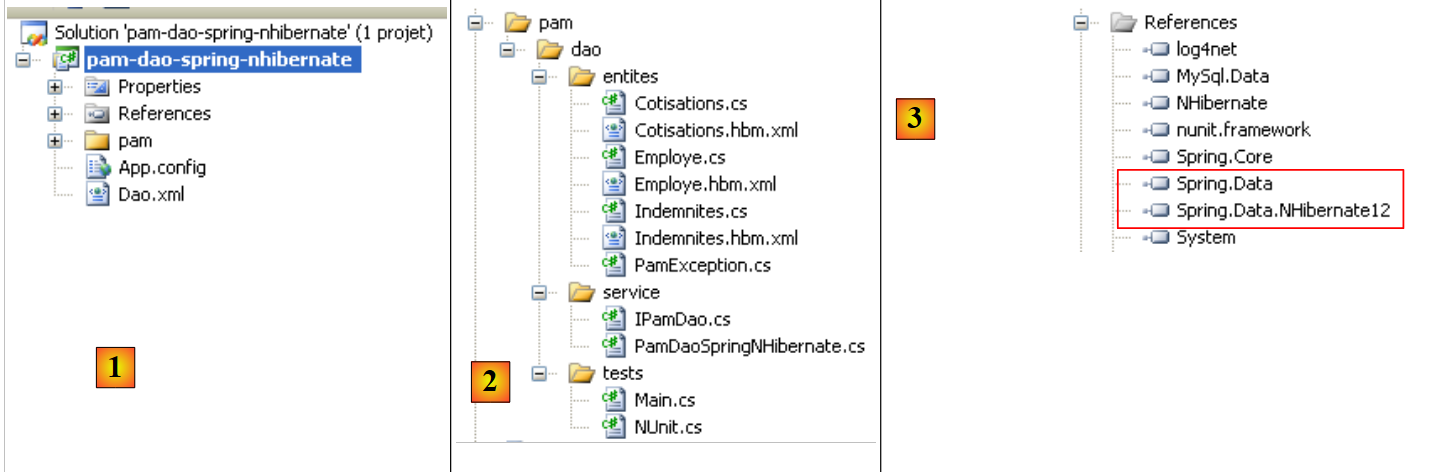 |
- In [1], the entire project
- The [pam] folder contains the project classes as well as the configuration of the NHibernate entities
- The files [App.config] and [Dao.xml] configure the Spring framework / NHibernate. We will need to describe the contents of these two files.
- In [2], the various classes of the project
- in the [entites] folder, we find the NHibernate entities studied in the [pam-dao-nhibernate] project
- in the [service] folder, we find the [IPamDao] interface and its implementation with the Spring framework / NHibernate [PamDaoSpringNHibernate]. We will need to write this new implementation of the [IPamDao] interface
- The [tests] folder contains the same tests as the [pam-dao-nhibernate] project. They test the same [IPamdao] interface.
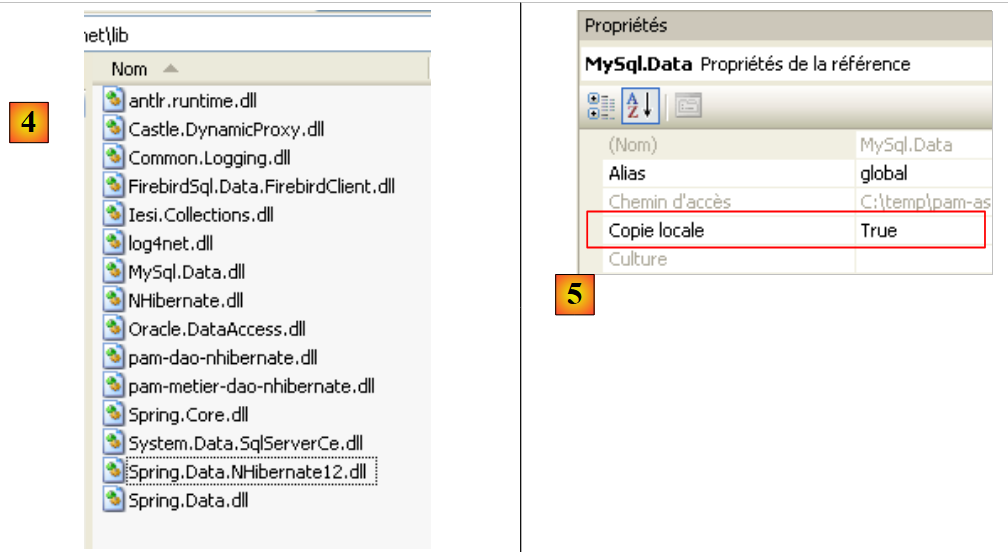
- In [3], the project references. The Spring integration / NHibernate requires two new DLL, [Spring.Data], and [Spring.Data.NHibernate12]. These DLL are available in the Spring.Net framework. They were added to the [lib] folder of the DLL and [4]:
 |
In the [3] references of the project, the following DLL entries are found:
- NHibernate: for ORM and NHibernate
- MySql.Data: the ADO driver.NET for SGBD MySQL
- Spring.Core: for the Spring framework, which handles layer integration
- log4net: a logging library
- nunit.framework: a unit testing library
- Spring.Data and Spring.Data.NHibernate12: provide Spring support / NHibernate.
These references were added to the [lib] and [4] folders. Ensure that the "Local Copy" property for all these references is set to "True" [5]:
13.1.2. The C# project configuration
The project is configured as follows:
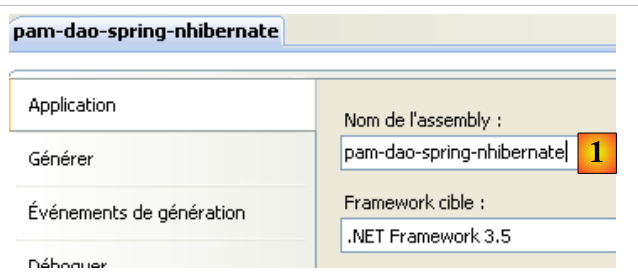 |
- In [1], the project assembly name is [pam-dao-spring-nhibernate]. This name appears in various project configuration files.
13.1.3. Entities of the [dao] layer
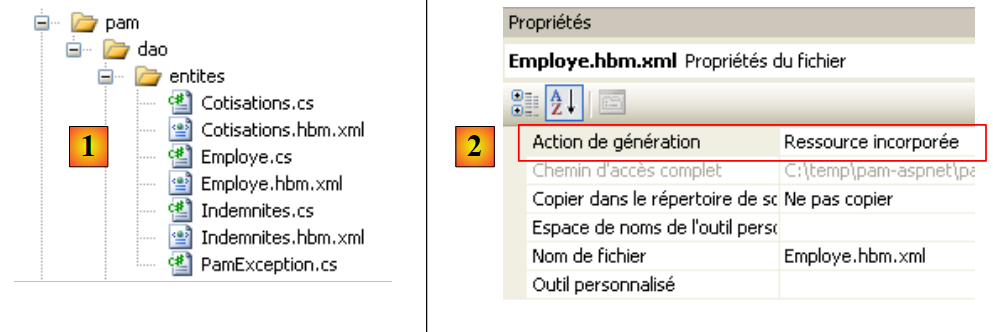 |
The entities (objects) required for the [dao] layer have been gathered in the [entites] [1] folder of the project. These entities are the same as those in the [pam-dao-nhibernate] project, with one exception in the NHibernate configuration files. Take, for example, the [Employe.hbm.xml] file:
- In [2], the file is configured to be included in the project assembly
Its content is as follows:
<?xml version="1.0" encoding="utf-8" ?>
<hibernate-mapping xmlns="urn:nhibernate-mapping-2.2"
namespace="Pam.Dao.Entites" assembly="pam-dao-spring-nhibernate">
    <class name="Employe" table="EMPLOYES">
        <id name="Id" column="ID">
            <generator class="native" />
        </id>
        <version name="Version" column="VERSION"/>
        <property name="SS" column="SS" length="15" not-null="true" unique="true"/>
        <property name="Nom" column="NOM" length="30" not-null="true"/>
        <property name="Prenom" column="PRENOM" length="20" not-null="true"/>
        <property name="Adresse" column="ADRESSE" length="50" not-null="true" />
        <property name="Ville" column="VILLE" length="30" not-null="true"/>
        <property name="CodePostal" column="CP" length="5" not-null="true"/>
        <many-to-one name="Indemnites" column="INDEMNITE_ID" cascade="all" lazy="false"/>
    </class>
</hibernate-mapping>
- Line 2: The assembly attribute indicates that the file [Employe.hbm.xml] will be found in the assembly [pam-dao-spring-nhibernate]
13.1.4. Spring Configuration / NHibernate
Let’s return to the Visual C# project:
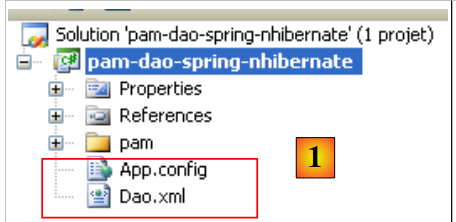 |
- In [1], the files [App.config] and [Dao.xml] configure the Spring / NHibernate integration
13.1.4.1. The file [App.config]
The file [App.config] is as follows:
<?xml version="1.0" encoding="utf-8" ?>
<configuration>
    <!-- configuration sections -->
    <configSections>
        <sectionGroup name="spring">
            <section name="parsers" type="Spring.Context.Support.NamespaceParsersSectionHandler, Spring.Core" />
            <section name="objects" type="Spring.Context.Support.DefaultSectionHandler, Spring.Core" />
            <section name="context" type="Spring.Context.Support.ContextHandler, Spring.Core" />
        </sectionGroup>
        <section name="log4net" type="log4net.Config.Log4NetConfigurationSectionHandler,log4net" />
    </configSections>


    <!-- spring configuration -->
    <spring>
        <parsers>
            <parser type="Spring.Data.Config.DatabaseNamespaceParser, Spring.Data" />
        </parsers>
        <context>
            <resource uri="Dao.xml" />
        </context>
    </spring>

    <!-- This section contains the log4net configuration settings -->
    <!-- NOTE IMPORTANTE: logs are not active by default. They must be activated by program
    avec l'instruction log4net.Config.XmlConfigurator.Configure();
    ! -->
    <log4net>
        <appender name="ConsoleAppender" type="log4net.Appender.ConsoleAppender">
            <layout type="log4net.Layout.PatternLayout">
                <conversionPattern value="%-5level %logger - %message%newline" />
            </layout>
        </appender>

        <!-- Set default logging level to DEBUG -->
        <root>
            <level value="DEBUG" />
            <appender-ref ref="ConsoleAppender" />
        </root>

        <!-- Set logging for Spring.  Logger names in Spring correspond to the namespace -->
        <logger name="Spring">
            <level value="INFO" />
        </logger>

        <logger name="Spring.Data">
            <level value="DEBUG" />
        </logger>

        <logger name="NHibernate">
            <level value="DEBUG" />
        </logger>
    </log4net>

</configuration>
The [App.config] file above configures Spring (lines 5–9, 15–22) and log4net (line 10, lines 28–53), but not NHibernate. Spring objects are not configured in [App.config] but in the file [Dao.xml] (line 20). The Spring configuration / NHibernate, which consists of declaring specific Spring objects, will therefore be found in this file.
13.1.4.2. The file [Dao.xml]
The file [Dao.xml], which contains the objects managed by Spring, is as follows:
<?xml version="1.0" encoding="utf-8" ?>
<objects xmlns="http://www.springframework.net"
         xmlns:db="http://www.springframework.net/database">

    <!-- Referenced by main application context configuration file -->
    <description>
        Application Spring / NHibernate
    </description>

    <!-- Database and NHibernate Configuration -->
    <db:provider id="DbProvider"
                   provider="MySql.Data.MySqlClient"
                   connectionString="Server=localhost;Database=dbpam_nhibernate;Uid=root;Pwd=;"/>

    <object id="NHibernateSessionFactory" type="Spring.Data.NHibernate.LocalSessionFactoryObject, Spring.Data.NHibernate12">
        <property name="DbProvider" ref="DbProvider"/>
        <property name="MappingAssemblies">
            <list>
                <value>pam-dao-spring-nhibernate</value>
            </list>
        </property>
        <property name="HibernateProperties">
            <dictionary>
                <entry key="hibernate.dialect" value="NHibernate.Dialect.MySQLDialect"/>
                <entry key="hibernate.show_sql" value="false"/>
            </dictionary>
        </property>
        <property name="ExposeTransactionAwareSessionFactory" value="true" />
    </object>

    <!-- transaction manager -->
    <object id="transactionManager"
        type="Spring.Data.NHibernate.HibernateTransactionManager, Spring.Data.NHibernate12">
        <property name="DbProvider" ref="DbProvider"/>
        <property name="SessionFactory" ref="NHibernateSessionFactory"/>
    </object>

    <!-- Hibernate Template -->
    <object id="HibernateTemplate" type="Spring.Data.NHibernate.Generic.HibernateTemplate">
        <property name="SessionFactory" ref="NHibernateSessionFactory" />
        <property name="TemplateFlushMode" value="Auto" />
        <property name="CacheQueries" value="true" />
    </object>

    <!-- Data Access Objects -->
    <object id="pamdao" type="Pam.Dao.Service.PamDaoSpringNHibernate, pam-dao-spring-nhibernate" init-method="init" destroy-method="destroy">
        <property name="HibernateTemplate" ref="HibernateTemplate"/>
    </object>
</objects>
- Lines 11–13 configure the connection to the [dbpam_nhibernate] database. They include:
- the ADO.NET provider required for the connection, in this case the provider for SGBD and MySQL. This requires having DLL and [Mysql.Data] in the project references.
- the database connection string (server, database name, connection owner, password)
- Lines 15–29 configure the SessionFactory of NHibernate, the object used to obtain NHibernate sessions. Note that all database operations are performed within a NHibernate session. In line 15, we can see that SessionFactory is implemented by the Spring class Spring.Data.NHibernate.LocalSessionFactoryObject found in DLL Spring.Data.NHibernate12.
- Line 16: The DbProvider property sets the database connection parameters (ADO provider NET and connection string). Here, this property references the DbProvider object defined earlier on lines 11–13.
- Lines 17–20: define the list of assemblies containing [*.hbm.xml] files that configure entities managed by NHibernate. Line 19 specifies that these files will be found in the project assembly. Note that this name is found in the C# project properties. Also note that all [*.hbm.xml] files have been configured to be included in the project assembly.
- Lines 22–27: Specific properties of NHibernate.
- Line 24: The SQL dialect used will be that of MySQL
- Line 25: The SQL output by NHibernate will not appear in the console logs. Setting this property to true allows you to see the SQL commands issued by NHibernate. This can help you understand, for example, why an application is slow when accessing the database.
- Line 28: Setting the ExposeTransactionAwareSessionFactory property to true will cause Spring to manage the transaction management annotations found in the C# code. We will return to this when we write the class implementing the [dao] layer.
- Lines 32–36 define the transaction manager. Again, this manager is a Spring class from the DLL Spring.Data.NHibernate12 package. This manager needs to know the database connection parameters (line 34) as well as the SessionFactory from NHibernate (line 35).
- Lines 39–43 define the properties of the HibernateTemplate class, which is also a Spring class. This class will be used as a utility class within the class implementing the [dao] layer. It facilitates interactions with NHibernate objects. This class has certain properties that must be initialized:
- line 40: the SessionFactory of NHibernate
- line 41: the TemplateFlushMode property sets the synchronization mode of the NHibernate persistence context with the database. The Auto mode ensures that synchronization occurs:
- at the end of a transaction
- before a SELECT operation
- Line 42: HQL queries (Hibernate Query Language) will be cached. This can lead to a performance gain.
- Lines 46–48 define the implementation class for the [dao] layer
- line 46: the [dao] layer will be implemented by the [PamdaoSpringNHibernate] class of the DLL [pam-dao-spring-nhibernate]. After the class is instantiated, the class’s init method will be executed immediately. When the Spring container is closed, the class’s destroy method will be executed.
- Line 47: The [PamDaoSpringNHibernate] class will have a HibernateTemplate property that will be initialized with the HibernateTemplate property from line 39.
13.1.5. Implementation of the [dao] layer
13.1.5.1. The skeleton of the implementation class
The [IPamDao] interface is the same as in the [pam-dao-nhibernate] project:
using Pam.Dao.Entites;

namespace Pam.Dao.Service {
    public interface IPamDao {
        // list of all employee identities
        Employe[] GetAllIdentitesEmployes();
        // an individual employee with benefits
        Employe GetEmploye(string ss);
        // list of all cotisations
        Cotisations GetCotisations();
    }
}
- line 1: we import the namespace of the entities from the [dao] layer.
- line 3: the layer [dao] is in the namespace [Pam.Dao.Service]. Elements in the [Pam.Dao.Entites] namespace can be created in multiple instances. Elements in the [Pam.Dao.Service] namespace are created as a single instance (singleton). This is what justified the choice of namespace names.
- Line 4: The interface is named [IPamDao]. It defines three methods:
- Line 6: [GetAllIdentitesEmployes] returns an array of objects of type [Employe], which represents the list of child care providers in a simplified form (last name, first name, SS).
- line 8, [GetEmploye] returns a [Employe] object: the employee with the social security number passed as a parameter to the method, along with the allowances associated with their index.
- Line 10, [GetCotisations] returns the object [Cotisations], which encapsulates the rates of the various social security contributions to be deducted from the gross salary.
The skeleton of the implementation class for this interface with Spring support (NHibernate) could look like this:
using System;
using System.Collections;
using System.Collections.Generic;
using Pam.Dao.Entites;
using Spring.Data.NHibernate.Generic.Support;
using Spring.Transaction.Interceptor;

namespace Pam.Dao.Service {
    public class PamDaoSpringNHibernate : HibernateDaoSupport, IPamDao {
        // private fields
        private Cotisations cotisations;
        private Employe[] employes;

        // init
        [Transaction(ReadOnly = true)]
        public void init() {
...
        }

        // delete object
        public void destroy() {
            if (HibernateTemplate.SessionFactory != null) {
                HibernateTemplate.SessionFactory.Close();
            }
        }

        // list of all employee identities
        public Employe[] GetAllIdentitesEmployes() {
            return employes;
        }


        // an individual employee with benefits
        [Transaction(ReadOnly = true)]
        public Employe GetEmploye(string ss) {
....
        }

        // cotisations list
        public Cotisations GetCotisations() {
            return cotisations;
        }
    }
}
- Line 9: The [PamDaoSpringNHibernate] class correctly implements the [dao] and [IPamDao] layer interfaces. It also derives from the Spring class [HibernateDaoSupport]. This class has a [HibernateTemplate] property that is initialized by the Spring configuration (line 2 below):
    <object id="pamdao" type="Pam.Dao.Service.PamDaoSpringNHibernate, pam-dao-spring-nhibernate" init-method="init" destroy-method="destroy">
        <property name="HibernateTemplate" ref="HibernateTemplate"/>
</object>
- line 1 above, we see that the definition of the [pamdao] object specifies that the init and destroy methods of the [PamDaoSpringNHibernate] class must be executed at specific times. These two methods are indeed present in the class on lines 16 and 21.
- Lines 15, 34: annotations that ensure the annotated method will be executed within a transaction. The attribute ReadOnly=true indicates that the transaction is read-only. The method executed within the transaction may throw an exception. In this case, Spring automatically rolls back the transaction. This annotation eliminates the need to manage a transaction within the method.
- Line 16: The init method is executed by Spring immediately after the class is instantiated. We will see that its purpose is to initialize the private fields on lines 11 and 12. It will run within a transaction (line 15).
- The methods of the [IPamDao] interface are implemented on lines 28, 35, and 40.
- Lines 28–30: The [GetAllIdentitesEmployes] method simply sets the attribute in line 12, which was initialized by the init method.
- Lines 40–42: The [GetCotisations] method simply returns the attribute from line 11, which was initialized by the init method.
13.1.5.2. Useful methods of the HibernateTemplate class
We will use the following methods of the HibernateTemplate class:
IList<T> Find<T>(string requete_hql) | executes the query HQL and returns a list of objects of type T |
IList<T> Find<T>(string requete_hql, object[]) | executes a query HQL parameterized by ?. The values of these parameters are provided by the object array. |
IList<T> LoadAll<T>() | returns all entities of type T |
There are other useful methods that we won’t have the opportunity to use, which allow you to retrieve, save, update, and delete entities:
T Load<T>(object id) | adds the entity of type T with primary key id to the session NHibernate. |
void SaveOrUpdate(object entity) | inserts (INSERT) or updates (UPDATE) the entity object depending on whether it has a primary key (UPDATE) or not (INSERT). The absence of a primary key can be configured via the unsaved-values attribute in the entity's configuration file. After the SaveOrUpdate operation, the entity object is in the NHibernate session. |
void Delete(object entity) | deletes the entity object from session NHibernate. |
13.1.5.3. Implementation of the init method
The *init* method of the [PamDaoSpringNHibernate] class is, by default, the method executed after Spring instantiates the class. Its purpose is to cache the employees' simplified identities (last name, first name, SS) and the rates of cotisations in local memory. Its code could be as follows.
[Transaction(ReadOnly = true)]
        public void init() {
            try {
                // retrieve the simplified list of employees
                IList<object[]> lignes = HibernateTemplate.Find<object[]>("select e.SS,e.Nom,e.Prenom from Employe e");
                // we put it in a table
                employes = new Employe[lignes.Count];
                int i = 0;
                foreach (object[] ligne in lignes) {
                    employes[i] = new Employe() { SS = ligne[0].ToString(), Nom = ligne[1].ToString(), Prenom = ligne[2].ToString() };
                    i++;
                }
                // we put the cotisations rates in a
                cotisations = (HibernateTemplate.LoadAll<Cotisations>())[0];
            } catch (Exception ex) {
                // we transform the exception
                throw new PamException(string.Format("Erreur d'accès à la BD : [{0}]", ex.ToString()), 43);
            }
        }
- Line 5: A query HQL is executed. It retrieves the fields SS, LastName, and FirstName for all Employee entities. It returns a list of objects. If we had requested the entire Employee record in the form "select e from Employee e", we would have retrieved a list of objects of type Employee.
- Lines 7–12: This list of objects is copied into an array of objects of type Employee.
- Line 14: We request the list of all entities of type Cotisations. We know that this list has only one element. We therefore retrieve the first element of the list to obtain the rates for cotisations.
- Lines 7 and 14 initialize the class’s two private fields.
13.1.5.4. Implementation of the GetEmploye method
The GetEmploye method must return the Employee entity with a given SS number. Its code could be as follows:
[Transaction(ReadOnly = true)]
        public Employe GetEmploye(string ss) {
            IList<Employe> employés = null;
            try {
                // request
                employés = HibernateTemplate.Find<Employe>("select e from Employe e where e.SS=?", new object[]{ss});
            } catch (Exception ex) {
                // we transform the exception
                throw new PamException(string.Format("Erreur d'accès à la BD lors de la demande de l'employé de n° ss [{0}] : [{1}]", ss, ex.ToString()), 41);
            }
            // has an employee been recovered?
            if (employés.Count == 0) {
                // we report the fact
                throw new PamException(string.Format("L'employé de n° ss [{0}] n'existe pas", ss), 42);
            } else {
                return employés[0];
            }
        }
- line 6: retrieves the list of employees with a given SS number
- line 12: normally, if the employee exists, we should get a list with one element
- line 14: if this is not the case, an exception is thrown
- line 16: if that is the case, returns the first employee in the list
13.1.5.5. Conclusion
If we compare the code of the [dao] layer when using
- the NHibernate framework
- the Spring / NHibernate framework
We realize that the second solution resulted in simpler code.
13.2. Testing the [dao] layer
13.2.1. The Visual Studio project
The Visual Studio project has already been presented. To recap:
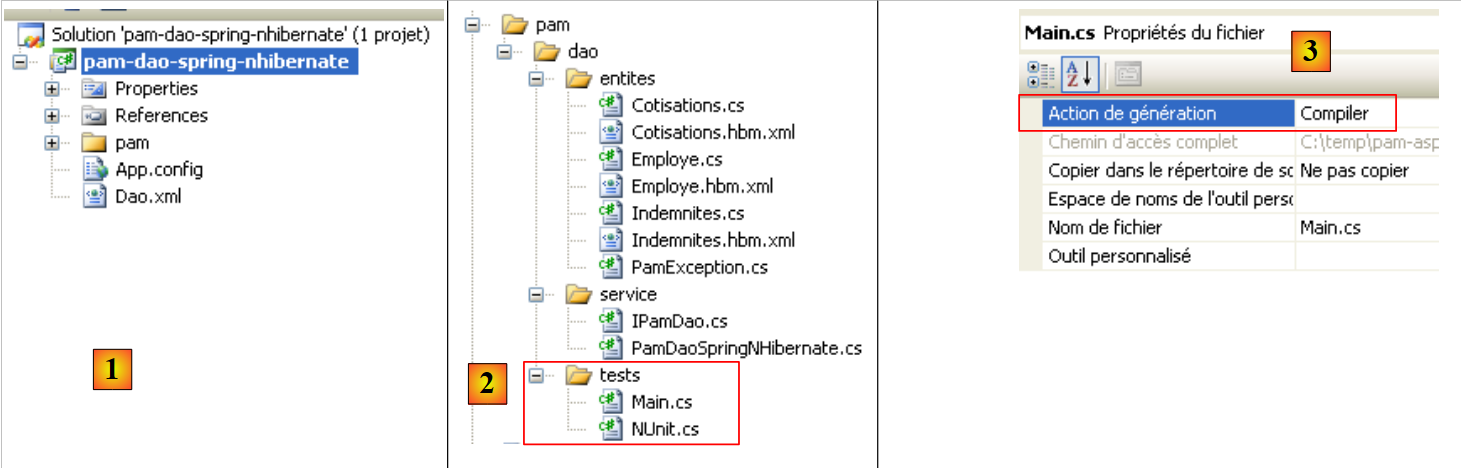 |
- in [1], the project as a whole
- in [2], the various classes of the project. The [tests] folder contains a console test [Main.cs] and a unit test [NUnit.cs].
- In [3], the program [Main.cs] is compiled.
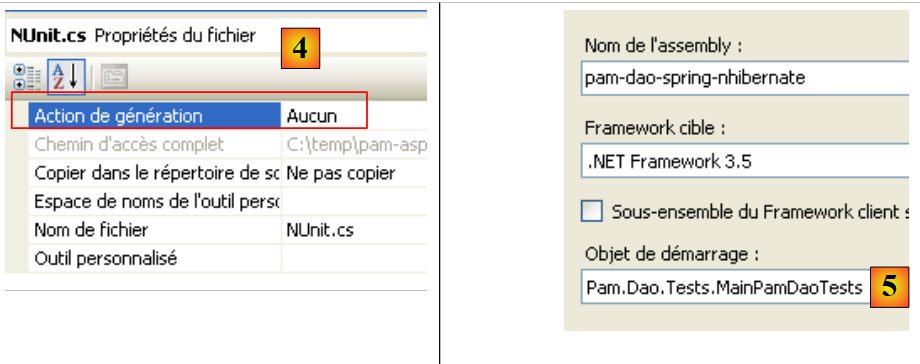 |
- In [4], the file [NUnit.cs] is not generated.
- The project is a console application. The executed class is the one specified in [5], the class of the file [Main.cs].
13.2.2. The console test program [Main.cs]
The test program [Main.cs] is executed in the following architecture:
 |
It is responsible for testing the methods of the [IPamDao] interface. A basic example might be the following:
using System;
using Pam.Dao.Entites;
using Pam.Dao.Service;
using Spring.Context.Support;

namespace Pam.Dao.Tests {
    public class MainPamDaoTests {
        public static void Main() {
            try {
                // instantiation layer [dao]
                IPamDao pamDao = (IPamDao)ContextRegistry.GetContext().GetObject("pamdao");
                // list of employee identities
                foreach (Employe Employe in pamDao.GetAllIdentitesEmployes()) {
                    Console.WriteLine(Employe.ToString());
                }
                // an employee with benefits
                Console.WriteLine("------------------------------------");
                Console.WriteLine(pamDao.GetEmploye("254104940426058"));
                Console.WriteLine("------------------------------------");
                // cotisations list
                Cotisations cotisations = pamDao.GetCotisations();
                Console.WriteLine(cotisations.ToString());
            } catch (Exception ex) {
                // exception display
                Console.WriteLine(ex.ToString());
            }
            //break
            Console.ReadLine();
        }
    }
}
- line 11: Spring is asked for a reference to the [dao] layer.
- lines 13–15: testing the [GetAllIdentitesEmployes] method of the [IPamDao] interface
- line 18: testing the [GetEmploye] method of the [IPamDao] interface
- line 21: test of the [GetCotisations] method of the [IPamDao] interface
Spring, NHibernate, and log4net are configured by the file [App.config] , discussed in Section 13.1.4.1.
Running the program with the database described in Section 6.2 produces the following console output:
- lines 1-2: the 2 employees of type [Employe] with only the information [SS, Nom, Prenom]
- line 4: the employee of type [Employe] with social security number [254104940426058]
- line 5: the rates for cotisations
13.2.3. Unit tests with NUnit
We will now move on to a unit test for NUnit. The Visual Studio project for the [dao] layer will change as follows:
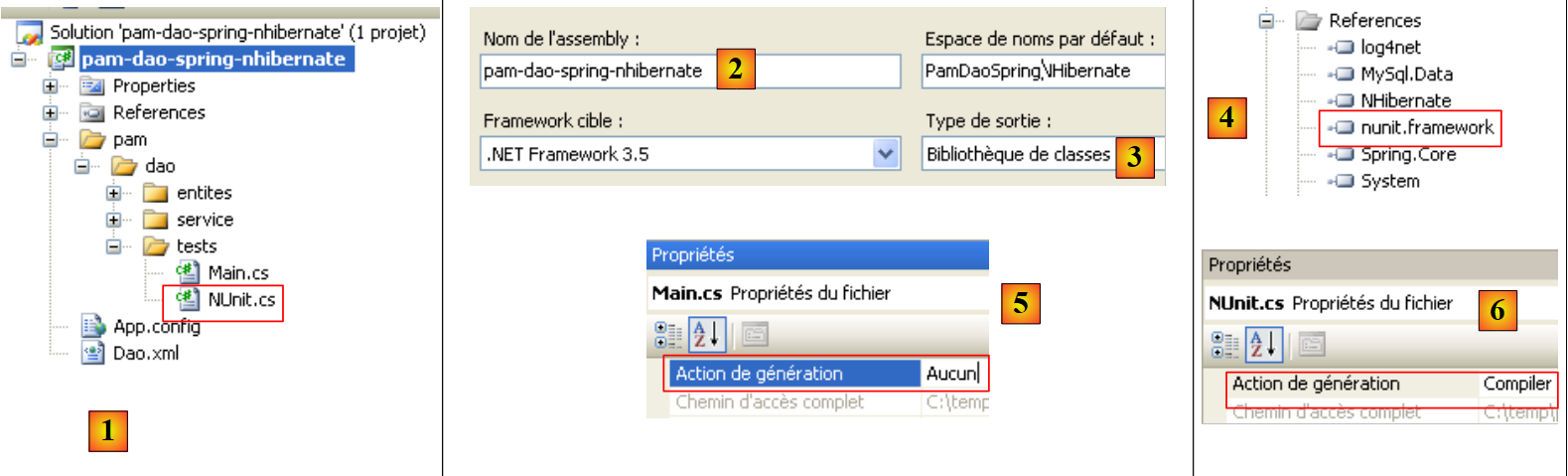 |
- to [1], the test program [NUnit.cs]
- to [2,3], the project will generate a DLL named [pam-dao-spring-nhibernate.dll]
- in [4], the reference to DLL from the NUnit framework: [nunit.framework.dll]
- to [5], the class [Main.cs] will not be included in DLL [pam-dao-spring-nhibernate]
- in [6], class [NUnit.cs] will be included in DLL [pam-dao-spring-nhibernate]
The test class NUnit is as follows:
using System.Collections;
using NUnit.Framework;
using Pam.Dao.Service;
using Pam.Dao.Entites;
using Spring.Objects.Factory.Xml;
using Spring.Core.IO;
using Spring.Context.Support;

namespace Pam.Dao.Tests {

    [TestFixture]
    public class NunitPamDao : AssertionHelper {
        // the [dao] layer to be tested
        private IPamDao pamDao = null;

        // manufacturer
        public NunitPamDao() {
            // instantiation layer [dao]
            pamDao = (IPamDao)ContextRegistry.GetContext().GetObject("pamdao");
        }

        // init
        [SetUp]
        public void Init() {

        }

        [Test]
        public void GetAllIdentitesEmployes() {
            // audit no. of employees
            Expect(2, EqualTo(pamDao.GetAllIdentitesEmployes().Length));
        }

        [Test]
        public void GetCotisations() {
            // check cotisations rate
            Cotisations cotisations = pamDao.GetCotisations();
            Expect(3.49, EqualTo(cotisations.CsgRds).Within(1E-06));
            Expect(6.15, EqualTo(cotisations.Csgd).Within(1E-06));
            Expect(9.39, EqualTo(cotisations.Secu).Within(1E-06));
            Expect(7.88, EqualTo(cotisations.Retraite).Within(1E-06));
        }

        [Test]
        public void GetEmployeIdemnites() {
            // individual verification
            Employe employe1 = pamDao.GetEmploye("254104940426058");
            Employe employe2 = pamDao.GetEmploye("260124402111742");
            Expect("Jouveinal", EqualTo(employe1.Nom));
            Expect(2.1, EqualTo(employe1.Indemnites.BaseHeure).Within(1E-06));
            Expect("Laverti", EqualTo(employe2.Nom));
            Expect(1.93, EqualTo(employe2.Indemnites.BaseHeure).Within(1E-06));
        }

        [Test]
        public void GetEmployeIdemnites2() {
            // non-existent individual verification
            bool erreur = false;
            try {
                Employe employe1 = pamDao.GetEmploye("xx");
            } catch {
                erreur = true;
            }
            Expect(erreur, True);
        }
    }
}
This class was already discussed in Section 7.3.4.
Project generation creates DLL and [pam-dao-spring-nhibernate.dll] in the [bin/Release] folder.
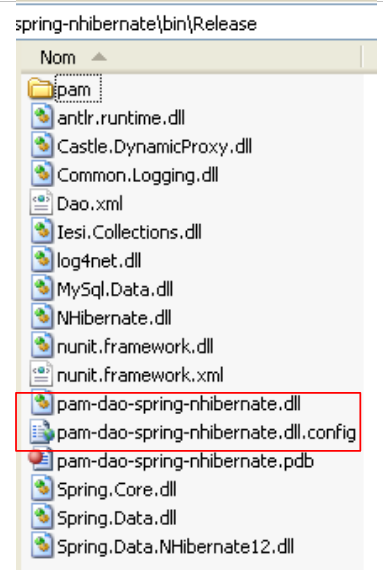 |
We load DLL and [pam-dao-spring-nhibernate.dll] using the [NUnit-Gui] and version 2.4.6 tools and run the tests:
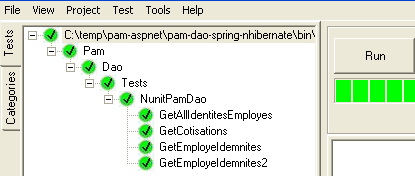
The tests above were successful.
Practical exercise:
Implement the tests for the [PamDaoSpringNHibernate] class on the machine.- Use different [Dao.xml] configuration files to use other SGBD (Firebird, MySQL, Postgres, SQL Server)
13.2.4. Generation of DLL fr , which is part of the [dao] layer
Once the [PamDaoNHibernate] class has been written and tested, we will generate DLL from the [dao] layer as follows:
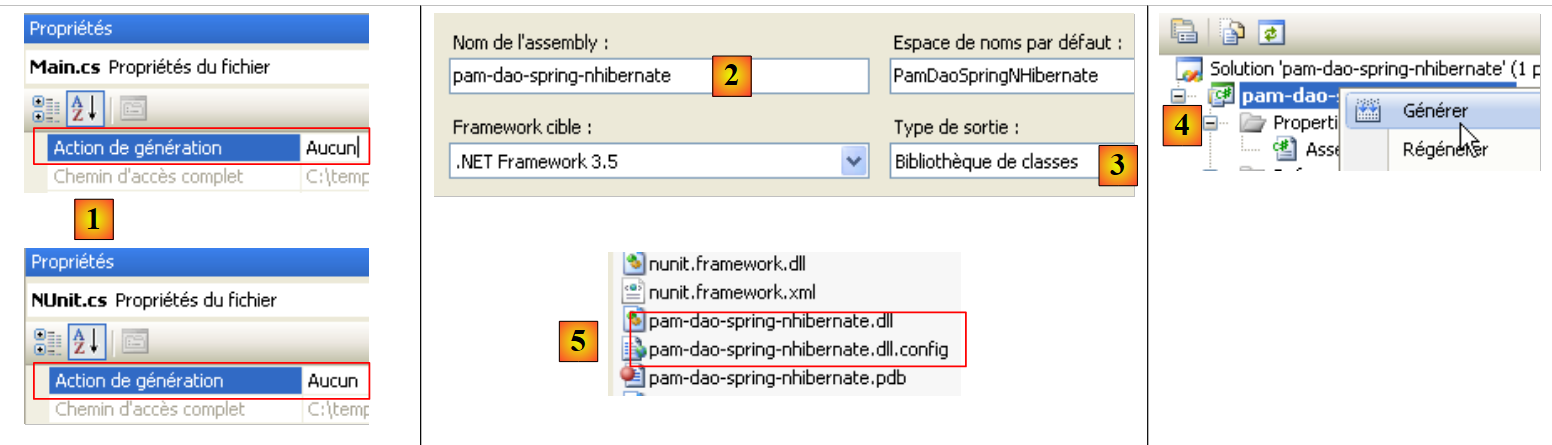 |
- [1], test programs are excluded from the project build
- [2,3], project configuration
- [4], project generation
- DLL is generated in the [bin/Release] [5] folder. We add it to the DLL files already present in the [lib] [6] folder:
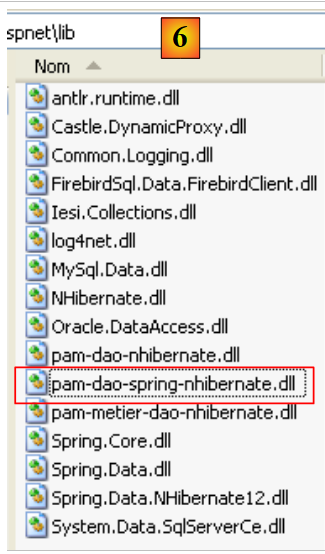 |
13.3. The business layer
Let’s revisit the general architecture of the [SimuPaie] application:
 |
We now assume that the [dao] layer is complete and has been encapsulated within DLL and [pam-dao-spring-nhibernate.dll]. We are now focusing on the [metier] layer. This is the layer that implements the business rules, in this case the rules for calculating a salary.
The Visual Studio project for the business layer might look like the following:
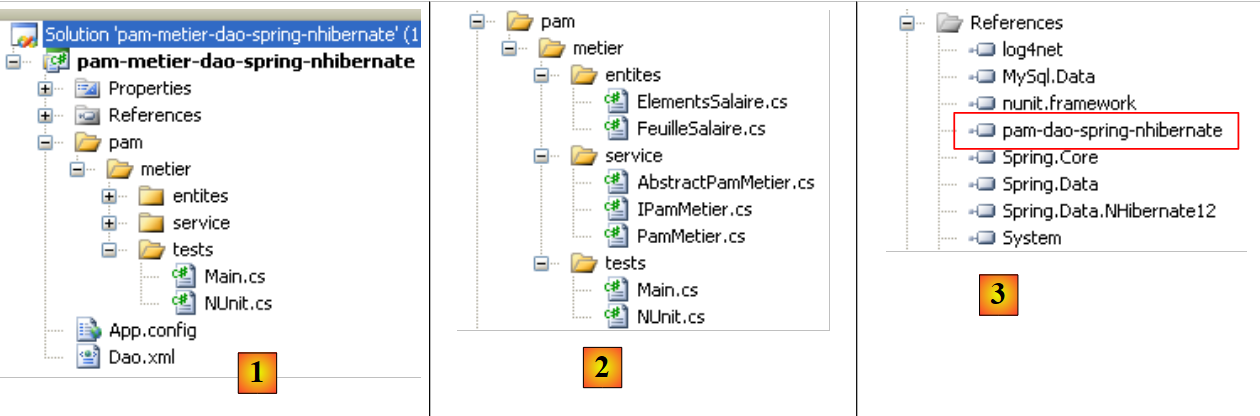 |
- In [1], the entire project is configured by the files [App.config] and [Dao.xml]. The file [App.config] is identical to what it was in the [dao] and [pam-dao-spring-nhibernate] layer project. The same applies to the [Dao.xml] file, except that it declares an additional Spring object from id. The declaration of the latter is identical to what it was in the [App.config] file of the [pam-metier-dao-nhibernate] project.
- In [2], the [pam] folder is identical to what it was in the [metier] layer of the [pam-metier-dao-nhibernate] project
- in [3], the references used by the project. Note the DLL and [pam-dao-spring-nhibernate] from the [dao] layer examined previously.
Question: Build the [pam-metier-dao-spring-nhibernate] project above. It will be tested separately:
-
in console mode by the console program [Main.cs]
-
by the unit test [NUnit.cs] executed by the framework NUnit
The new project [pam-metier-dao-spring-nhibernate] can be built by simply copying the project [pam-metier-dao-nhibernate] and then modifying the elements that need to be changed.
After testing, we will generate DLL from the [metier] layer, which we will name [pam-metier-dao-spring-nhibernate]:
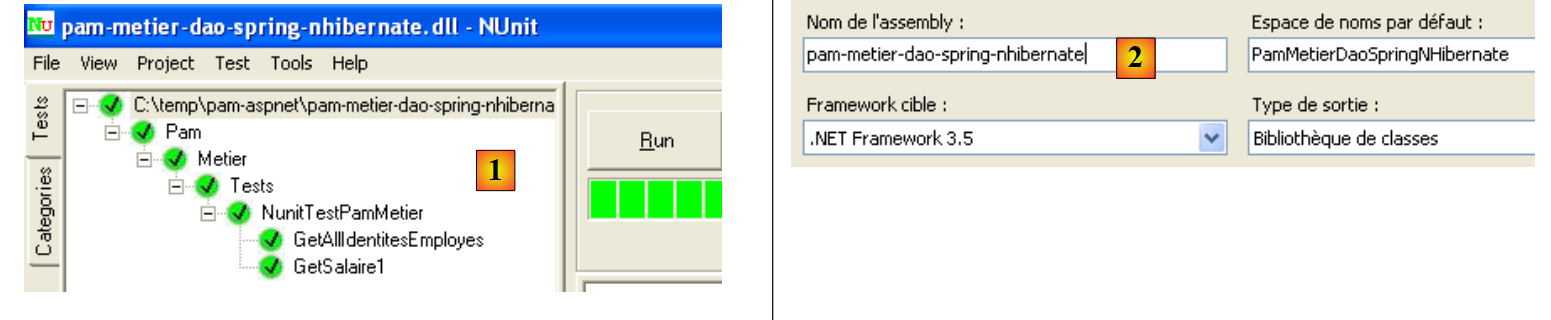 |
- in [1], the successful NUnit test
- in [2], the DLL generated by the project
We will add the DLL from the [metier] layer to the DLL files already present in the [lib] folder [3]:
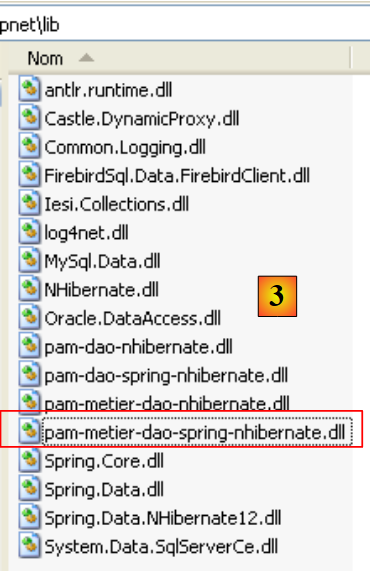 |
13.4. The [web] layer
Let’s review the general architecture of the [SimuPaie] application:
 |
We assume that the [dao] and [métier] layers are complete and encapsulated within the DLL and [pam-dao-spring-nhibernate, pam-metier-dao-spring-nhibernate] layers. We will now describe the web layer.
The Visual Web Developer project for layer [web] is first obtained by simply copying the folder from the [pam-v7-3tier-nhibernate-multivues-multipages] web project. The project is then renamed [pam-v9-3tier-spring-nhibernate-multivues-multipages]:
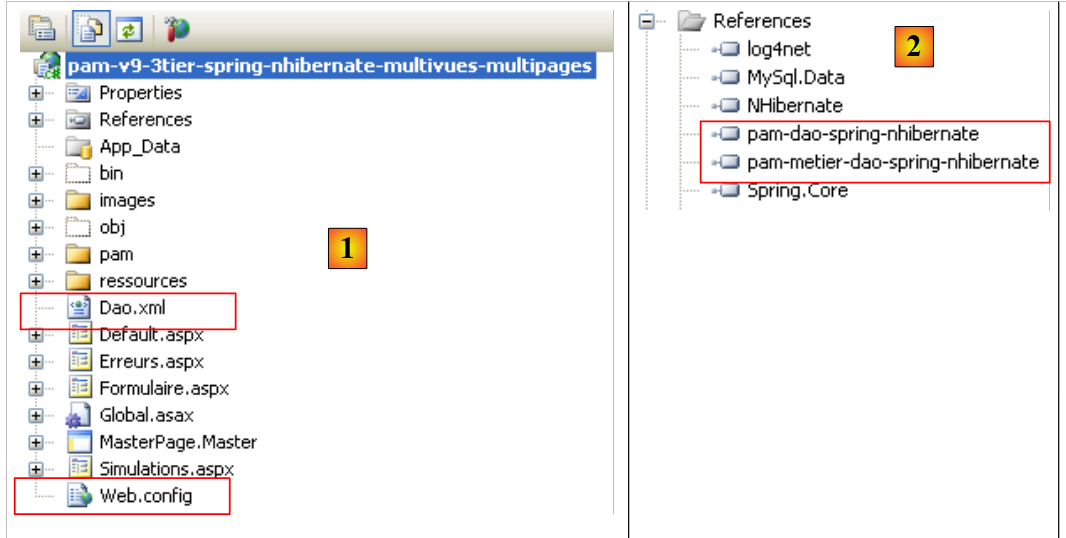 |
The new web project [pam-v9-3tier-spring-nhibernate-multivues-multipages] differs from the [pam-v7-3tier-nhibernate-multivues-multipages] project in the following ways:
- In [1], it is configured by the files [Dao.xml] and [Web.config]. [Dao.xml] did not exist in [pam-v7], and the file [Web.config] must include the Spring configuration / NHibernate, whereas in [pam-v7], it only configured NHibernate.
- In [2], the DLL layers from [dao] and [metier] are the ones we just created.
The file [Dao.xml] is the one used to build the layer [metier]. The file [Web.config] is the one from [pam-v7] to which we add the Spring configuration / NHibernate configuration found in the [App.config] files of the [dao] and [metier] layers. The [Web.config] file from [pam-v9] is as follows:
<configuration>

  <configSections>
    <sectionGroup name="system.web.extensions" type="System.Web.Configuration.SystemWebExtensionsSectionGroup, System.Web.Extensions, Version=3.5.0.0, Culture=neutral, PublicKeyToken=31BF3856AD364E35">
........
    </sectionGroup>
    <sectionGroup name="spring">
      <section name="parsers" type="Spring.Context.Support.NamespaceParsersSectionHandler, Spring.Core" />
      <section name="objects" type="Spring.Context.Support.DefaultSectionHandler, Spring.Core" />
      <section name="context" type="Spring.Context.Support.ContextHandler, Spring.Core" />
    </sectionGroup>
    <section name="log4net" type="log4net.Config.Log4NetConfigurationSectionHandler,log4net" />
  </configSections>

  <!-- spring configuration -->
  <spring>
    <parsers>
      <parser type="Spring.Data.Config.DatabaseNamespaceParser, Spring.Data" />
    </parsers>
    <context>
      <resource uri="~/Dao.xml" />
    </context>
  </spring>
............. le reste est identique au fichier [Web.config] de [pam-v7]
Lines 7–11 and 16–23 contain the Spring configuration found in the [App.config] files of the [dao] and [metier] layers built previously, with one difference: in the [App.config] files, line 17 was written as follows:
<resource uri="Dao.xml" />
With the following configuration:
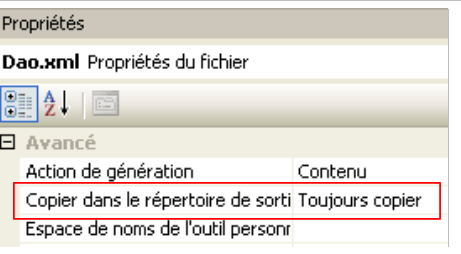 |
the [Dao.xml] file is copied into the [bin] folder within the web project folder. With the syntax
<resource uri="Dao.xml" />
the file [Dao.xml] will be searched for in the current directory of the process running the web application. It turns out that this directory is not the [bin] directory within the web project directory being executed. You must write:
<resource uri="~/Dao.xml" />
so that the file [Dao.xml] is searched for in the [bin] folder of the executed web project.
Question: Deploy this web application on a machine.
13.5. Conclusion
We have moved from the architecture:
 |
to the architecture:
 |
The goal was to implement the [dao] layer by leveraging the capabilities provided by Spring’s integration of NHibernate.
We observed that this:
- affected the [dao] layer. This layer was simpler to write but required a more complex Spring configuration.
- marginally affected the [metier] and [web] layers
This was another example of the benefits of layered architectures.