4. The [SimuPaie] application – version 1 – ASP.NET
4.1. Introduction
We want to write a .NET application that allows a user to simulate payroll calculations for child care providers at the "Maison de la petite enfance" association in a municipality.
The ASP.NET salary calculation form will look like this:
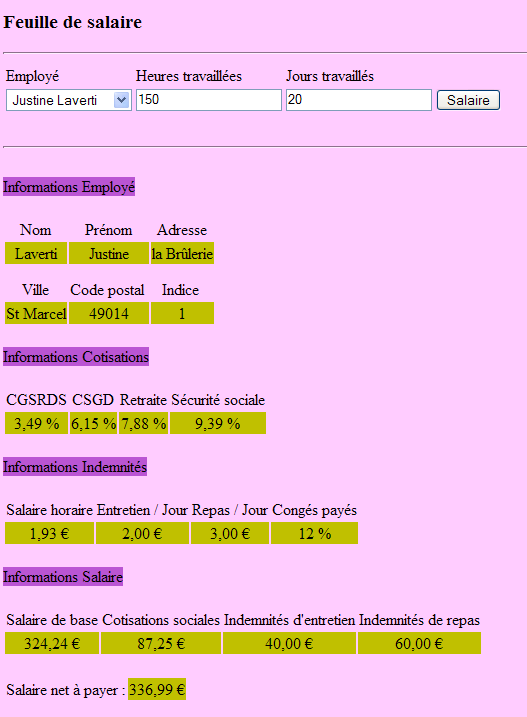
The ASP.NET application will have the following architecture:
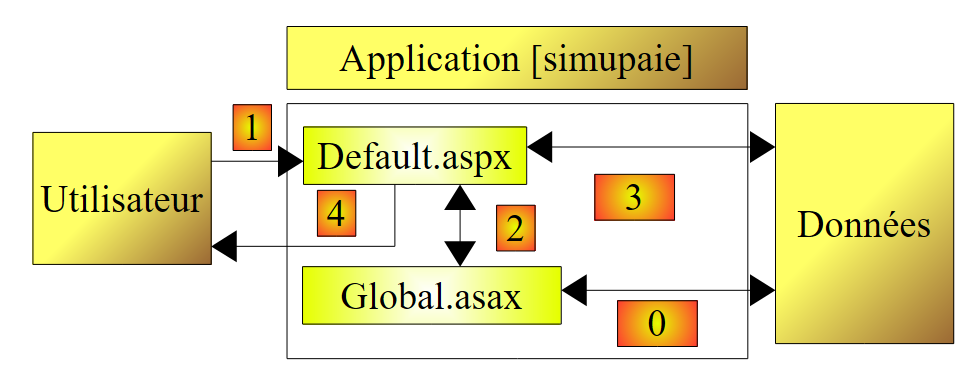 |
- When the first request is made to the application, an object of type [Global] derived from type [System.Web.HttpApplication] is instantiated. This object will process the web application’s configuration file [web.config] and cache certain data from the database (operation 0 above).
- During the first request (operation 1) made to the [Default.aspx] page, which is the application’s only page, the [Load] event is processed. This event handles populating the employee combo box. The data required for the combo box is requested from the [Global] object, which has cached it. This is operation 2 above. Operation 4 sends the initialized page to the user.
- When the salary calculation request (operation 1) is made to the [Default.aspx] page, the [Load] event is processed again. Nothing is done because this is a request of type POST, and the handler [Pam_Load] was written to do nothing in this case (using the Boolean IsPostBack). Once the [Load] event is processed, the [Click] event on the [Salaire] button is processed next. This event requires data that has not been cached in [Global]. Therefore, the event handler retrieves it from the database. This is operation 3 above. The salary is then calculated, and operation 4 sends the results to the user.
4.2. The Visual Web Developer 2008
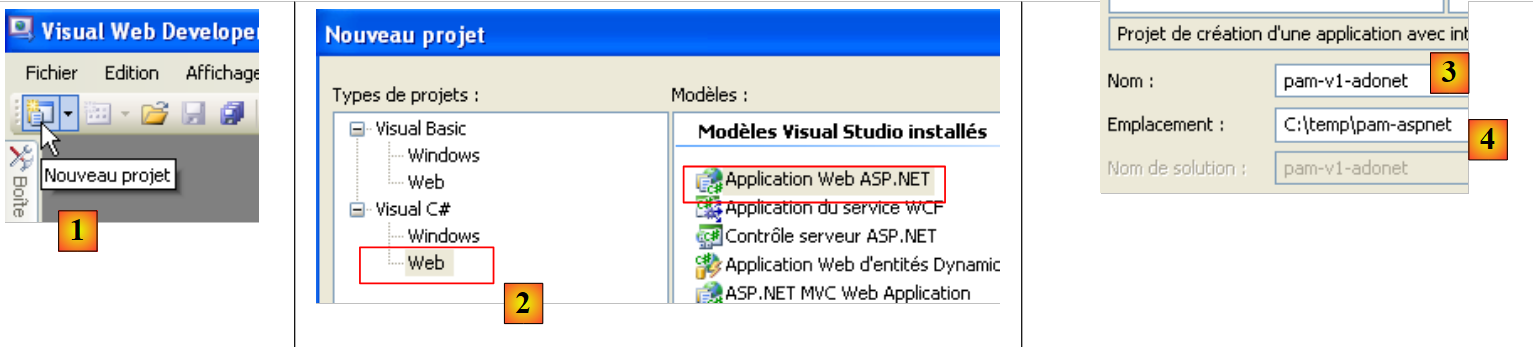 |
- in [1], we create a new project
- in [2], of type [Web / Application Web ASP.NET]
- in [3], name the project
- in [4], specify its name and in [5] its location. A folder [c:\temp\pam-aspnet\pam-v1-adonet] will be created for the project.
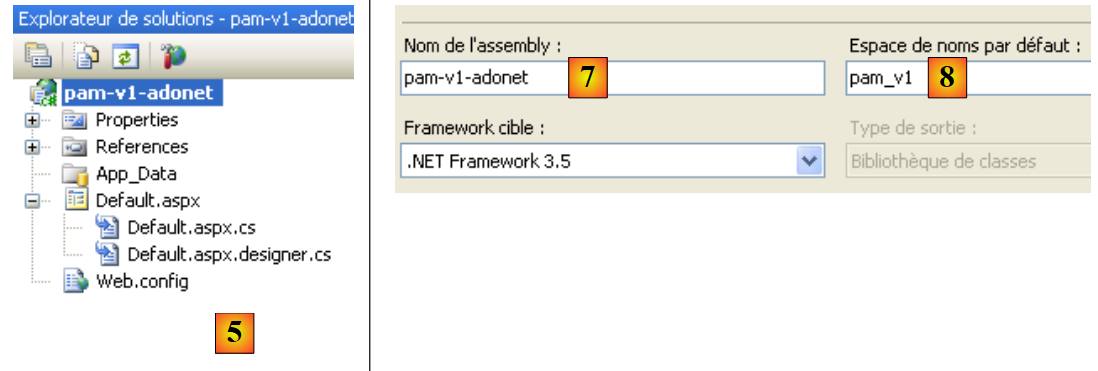 |
- In [5], the Visual Web Developer project
- in [6], the project properties (right-click on the project / Properties / Application).
- in [7], the name of the assembly that will be produced by the project build
- in [8], the default namespace we want for the project's classes. The class [_Default] defined in the files [Default.aspx.cs] and [Default.aspx.designer.cs] was created in the namespace [pam_v1_adonet], derived from the project name. We can change this namespace directly in the code of these two files:
[Default.aspx.cs]
using System;
....

namespace pam_v1
{
  public partial class _Default : System.Web.UI.Page
  {
[Default.aspx.designer.cs]
//------------------------------------------------------------------------------
// <auto-generated>
//      This code was generated by a tool.
//      Version runtime :2.0.50727.3603
//
//      Changes made to this file may cause incorrect behavior and will be lost if
//      the code is regenerated.
// </auto-generated>
//------------------------------------------------------------------------------

namespace pam_v1 {


    public partial class _Default {

.........
The markup in the [Default.aspx] file must also be modified:
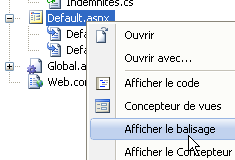 |
<%@ Page Language="C#" AutoEventWireup="true" CodeBehind="Default.aspx.cs" Inherits="pam_v1._Default" %>
...
The Inherits attribute above refers to the class defined in the [Default.aspx.cs] and [Default.aspx.designer.cs] files. The pam_v1 namespace is used there.
4.2.1. The [Default.aspx] form
The visual appearance of the [Default.aspx] form is as follows:
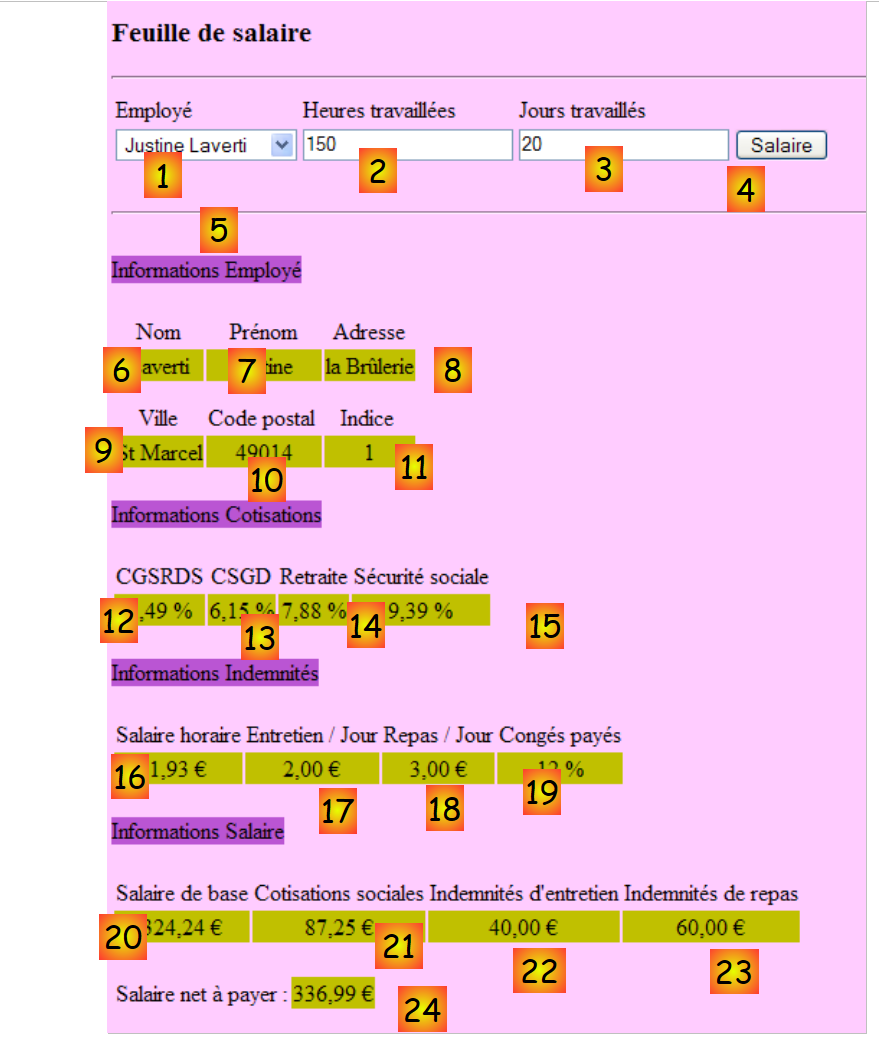 |
The components are as follows:
No. | Type | Name | Role |
DropDownList | ComboBoxEmployes | Contains the list of employee names | |
TextBox | TextBoxHeures | Number of hours worked – actual | |
TextBox | TextBoxJours | Number of days worked – integer | |
Button | ButtonSalaire | Request salary calculation | |
TextBox | TextBoxErreur | Information message for the user ReadOnly=true, TextMode=MultiLine | |
Label | LabelNom | Name of the employee selected in (1) | |
Label | LabelPrénom | First name of the employee selected in (1) | |
Label | LabelAdresse | Address | |
Label | LabelVille | City | |
Label | LabelCP | Zip code | |
Label | LabelIndice | Index | |
Label | LabelCSGRDS | Contribution rate CSGRDS | |
Label | LabelCSGD | Contribution rate CSGD | |
Label | LabelRetraite | Pension contribution rate | |
Label | LabelSS | Social Security Contribution Rate | |
Label | LabelSH | Base hourly wage for the index indicated in (11) | |
Label | LabelEJ | Daily subsistence allowance for the index indicated in (11) | |
Label | LabelRJ | Daily meal allowance for the index indicated in (11) | |
Label | LabelCongés | Paid leave allowance rate to be applied to base pay | |
Label | LabelSB | Base salary amount | |
Label | LabelCS | Amount of social security contributions to be paid | |
Label | LabelIE | Amount of child care allowance | |
Label | LabelIR | Amount of meal allowances for the child in care | |
Label | LabelSN | Salary net to be paid to the employee |
The form also contains two containers of type [Panel]:
contains the component (5) TextBoxErreur | |
contains components (6) through (24) |
A component of type [Panel] can be made visible or hidden programmatically using its Boolean property [Panel].Visible.
4.2.2. Input validation
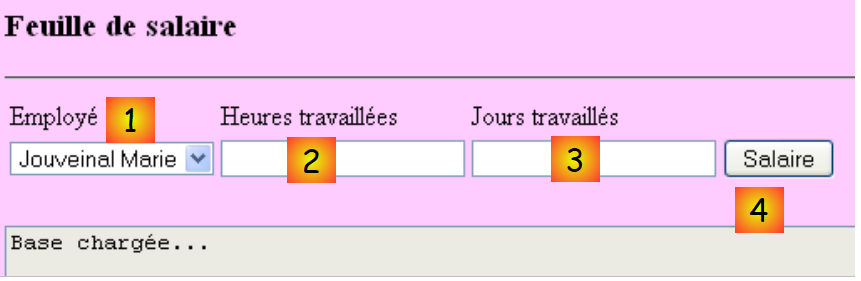
To calculate a salary, the user:
- selects an employee in [1]
- enters the number of hours worked in [2]. This number can be a decimal, such as 2.5 for 2 hours and 30 minutes.
- enters the number of days worked in [3]. This number is an integer.
- requests the salary using the [4] button
 |
When the user enters incorrect data in [2] and [3], the data is validated as soon as the user switches to a different input field. Thus, the screenshot below was taken even before the user clicked the [Salaire] button:
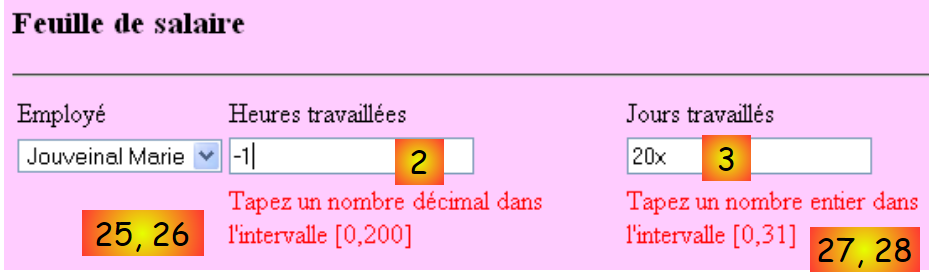 |
Two conditions must be met for the behavior described above to occur:
- the validation components must have their EnableClientScript property set to true:
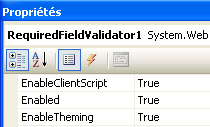 |
- the browser displaying the page must be capable of executing the Javascript code embedded in a HTML page.
If the client browser does not verify the validity of the data itself, the data will only be verified when the browser posts the form entries to the server. It is then the code located on the server that processes the browser’s request that will verify the validity of the data. Note that this validation must always be performed, even if the page displayed in the client browser contains javascript code that performs the same validation. This is because the server cannot be certain that the POST request it receives actually originates from that page and that the data has therefore been validated.
The list of validators is as follows:
No. | Type | Name | Role |
RequiredFieldValidator | RequiredFieldValidatorHeures | checks that the field [2] [TextBoxHeures] is not empty | |
RangeValidator | RangeValidatorHeures | checks that the field [2] [TextBoxHeures] is a real number in the interval [0, 200] | |
RequiredFieldValidator | RequiredFieldValidatorJours | checks that the field [3] [TextBoxJours] is not empty | |
RangeValidator | RangeValidatorJours | checks that the field [3] [TextBoxJours] is an integer in the range [0,31] |
Task: Build the page [Default.aspx]. First, place the two containers [PanelErreurs] and [PanelSalaire] so that you can then place the components they are supposed to contain inside them.
4.2.3. Application entities
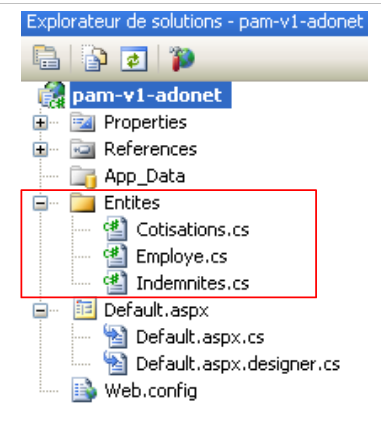 |
Once read, the rows from tables [cotisations], [employes], and [indemnites] will be placed into objects of type [Cotisations], [Employe], and [Indemnites] defined as follows:
namespace Pam.Entites
{
  public class Cotisations
  {
    // automatic properties
    public double CsgRds { get; set; }
    public double Csgd { get; set; }
    public double Secu { get; set; }
    public double Retraite { get; set; }

    // manufacturers
    public Cotisations()
    {
    }

    public Cotisations(double csgRds, double csgd, double secu, double retraite)
    {
      CsgRds = csgRds;
      Csgd = csgd;
      Secu = secu;
      Retraite = retraite;
    }

    // ToString
    public override string ToString()
    {
      return string.Format("[{0},{1},{2},{3}]", CsgRds, Csgd, Secu, Retraite);
    }
  }
}
namespace Pam.Entites
{
  public class Employe
  {
    // automatic properties
    public string SS { get; set; }
    public string Nom { get; set; }
    public string Prenom { get; set; }
    public string Adresse { get; set; }
    private string Ville { get; set; }
    private string CodePostal { get; set; }
    private int Indice { get; set; }

    // manufacturers
    public Employe()
    {

    }

    public Employe(string ss, string nom, string prenom, string adresse, string codePostal, string ville, int indice)
    {
      SS = ss;
      Nom = nom;
      Prenom = prenom;
      Adresse = adresse;
      CodePostal = codePostal;
      Ville = ville;
      Indice = indice;
    }

    // ToString
    public override string ToString()
    {
      return string.Format("[{0},{1},{2},{3},{4},{5},{6}]", SS, Nom, Prenom, Adresse, Ville, CodePostal, Indice);
    }
  }
}
namespace Pam.Entites
{
  public class Indemnites
  {

    // automatic properties
    public int Indice { get; set; }
    public double BaseHeure { get; set; }
    public double EntretienJour { get; set; }
    public double RepasJour { get; set; }
    public double IndemnitesCP { get; set; }

    // manufacturers
    public Indemnites()
    {

    }

    public Indemnites(int indice, double baseHeure, double entretienJour, double repasJour, double indemnitesCP)
    {
      Indice = indice;
      BaseHeure = baseHeure;
      EntretienJour = entretienJour;
      RepasJour = repasJour;
      IndemnitesCP = indemnitesCP;
    }

    // identity
    public override string ToString()
    {
      return string.Format("[{0}, {1}, {2}, {3}, {4}]", Indice, BaseHeure, EntretienJour, RepasJour, IndemnitesCP);
    }

  }
}
4.2.4. Application Configuration
The [Web.config] file that configures the application will be as follows:
<?xml version="1.0" encoding="utf-8"?>

<configuration>
    <configSections>
...
    </configSections>

  <connectionStrings>
    <add name="dbpamSqlServer2005" connectionString="Data Source=.\SQLEXPRESS;AttachDbFilename=C:\data\...\dbpam.mdf;User Id=sa;Password=msde;Connect Timeout=30;" providerName="System.Data.SqlClient"/>
  </connectionStrings>

  <appSettings>
    <add key="selectEmploye" value="select NOM,PRENOM,ADRESSE,VILLE,CODEPOSTAL,INDICE from EMPLOYES where SS=@SS"/>
    <add key="selectEmployes" value="select PRENOM, NOM, SS from EMPLOYES"/>
    <add key="selectCotisations" value="select CSGRDS,CSGD,SECU,RETRAITE from COTISATIONS"/>
    <add key="SelectIndemnites" value="select INDICE,BASEHEURE,ENTRETIENJOUR,REPASJOUR,INDEMNITESCP from INDEMNITES"/>
  </appSettings>

  <system.web>
        <!--
            Définissez compilation debug="true" pour insérer des symboles
            de débogage dans la page compilée. Comme ceci
            affecte les performances, définissez cette valeur à true uniquement
            lors du développement.
        -->
        <compilation debug="false">
...
</configuration>
- line 9: defines the connection string to the SQL Server mentioned above
- lines 13-16: define SQL queries used by the application to avoid hard-coding them in the code.
- line 13: the SQL query is configured. The parameter notation is specific to the SQL Server.
Task: Enter these parameters into the [Web.config] file. Line 9 will be adjusted to the actual path of the [dbpam.mdf] database.
4.2.5. Application Initialization
The initialization of a ASP.NET application is performed by the [Global.asax.cs] file. This file is structured as follows:
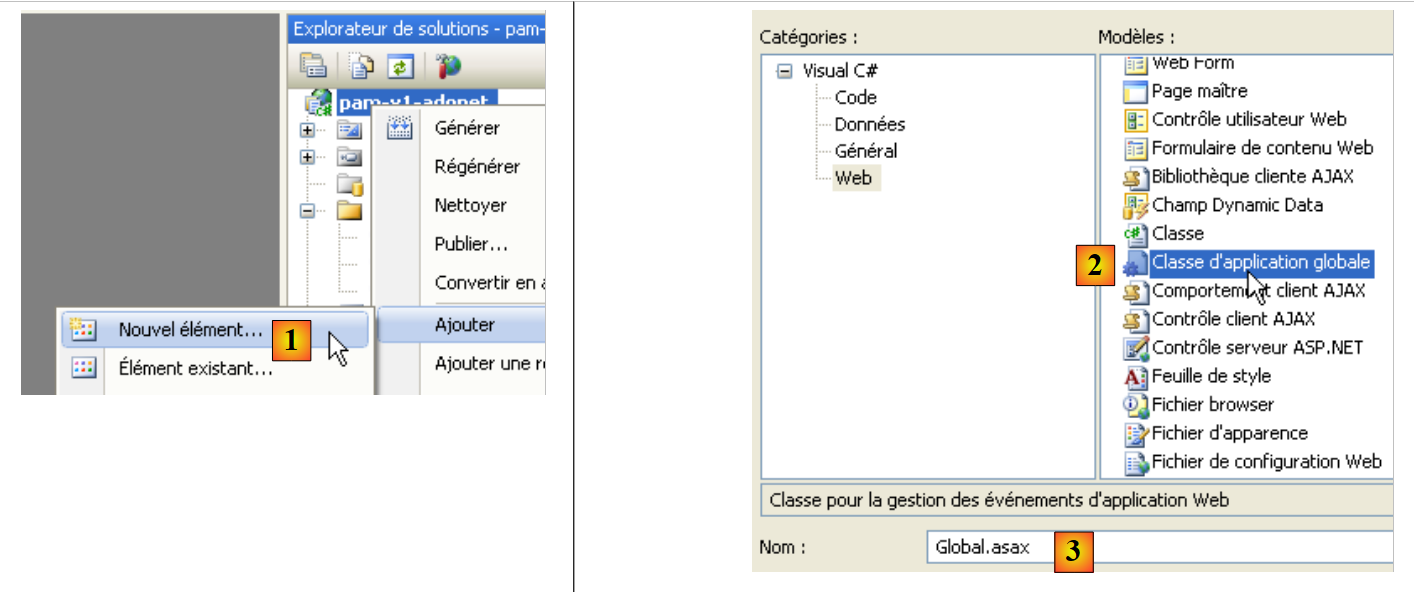 |
- In [1], a new element is added to the project
- In [2], the global application class is added, which is named by default [Global.asax] [3]
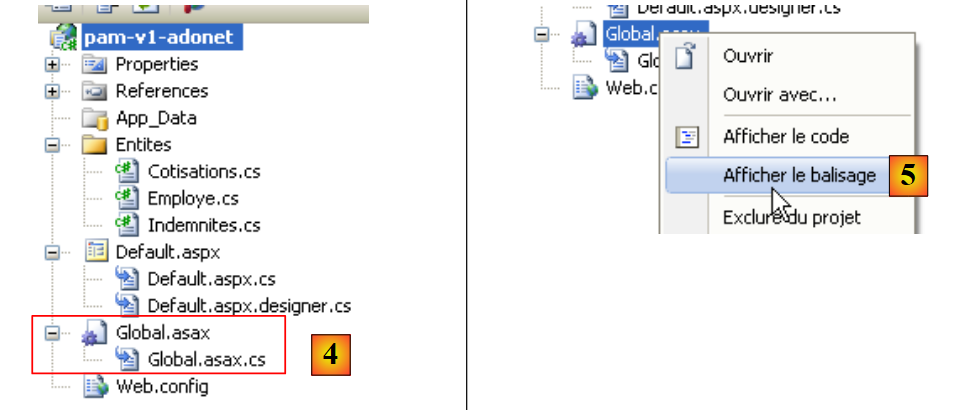 |
- in [4], the file [Global.asax] and the associated class [Global.asax.cs]
- to [5], and the markup for [Global.asax] is displayed
<%@ Application Codebehind="Global.asax.cs" Inherits="pam_v1.Global" Language="C#" %>
The [pam_v1.Global] class is defined in the [Global.asax.cs] file. For our purposes, it will be defined as follows:
using System;
using System.Collections.Generic;
using System.Configuration;
using System.Data.SqlClient;
using Pam.Entites;

namespace pam_v1
{
  public class Global : System.Web.HttpApplication
  {
    // --- static application data ---
    public static Employe[] Employes;
    public static Cotisations Cotisations;
    public static Dictionary<int, Indemnites> Indemnites = new Dictionary<int, Indemnites>();
    public static string Msg = string.Empty;
    public static bool Erreur = false;
    public static string ConnectionString = null;

    // application startup
    public void Application_Start(object sender, EventArgs e)
    {
...
      try
      {
        // connection
        ConnectionString = ...
        using (SqlConnection connexion = new SqlConnection(ConnectionString))
        {
          connexion.Open();
          // retrieve the list of employees and place it in the static array [Employees]
...
          // contribution rates are retrieved from the static variable [Cotisations]
...
          // we retrieve allowances from the static dictionary [Indemnites]
...
          // we succeeded
          Msg = "Base chargée...";
        }
      }
      catch (Exception ex)
      {
        // we note the error
        Msg = string.Format("L'erreur suivante s'est produite lors de l'accès à la base de données : {0}", ex);
        Erreur = true;
      }
    }
  }
}
- Line 20: The [Application_Start] method is executed when the web application starts. It is executed only once.
- Lines 12–17: public and static fields of the class. A static field is shared by all instances of the class. Thus, if multiple instances of the [Global] class are created, they all share the same static field [Employes], accessible via the reference [Global.Employes], c.a.d. [NomDeClasse].ChampStatique. [Global] is the name of a class. It is therefore a data type. This name is arbitrary. The class always derives from [System.Web.HttpApplication].
Let’s return to our class [Global]. One might wonder whether it is necessary to declare its fields as static. In fact, it appears that in some cases, there may be multiple instances of the class [Global], which justifies making the fields that need to be shared by all these instances static.
There is another way to share "application-scope" data between the different pages of a web application. Thus, the Employees array could be stored in the Application_Start procedure as follows:
Application.Add("employes",Employes);
By default, in any ASP.NET application, [Application] is a reference to an instance of the class defined by [Global.asax.cs]. Application is a container capable of storing objects of any type. The Employees array could then be retrieved in the code of any page in the web application as follows:
Employe[] employes=Application.Get["employes"] as Employe[];
Because the Application container stores objects of any type, we retrieve an Object type that must then be cast. This method is still usable, but sharing data via typed static fields of the [Global] object avoids casting and allows the compiler to perform type checks that assist the developer. This is the method that will be used here.
The data shared by all users is as follows:
- line 12: the array of objects of type [Employe] that will store the simplified list (SS, NOM, PRENOM) of all employees
- line 13: the object of type [Cotisations], which will store the rates from cotisations
- Line 14: the dictionary that will store the allowances linked to the various employee indices. It will be indexed by the employee’s index, and its values will be of type [Indemnites]
- line 15: a message indicating whether the initialization completed successfully or with an error
- line 16: a Boolean indicating whether the initialization ended with an error or not.
- line 17: the database connection string.
Question: Complete the code for the [Application_Start] class.
4.3. Events of form [Default.aspx]
4.3.1. The procedure [Page_Load]
When the [Default.aspx] form is loaded, it retrieves the employee names from the [Global.Employes] table (line 12) and places them in the [1] drop-down list:
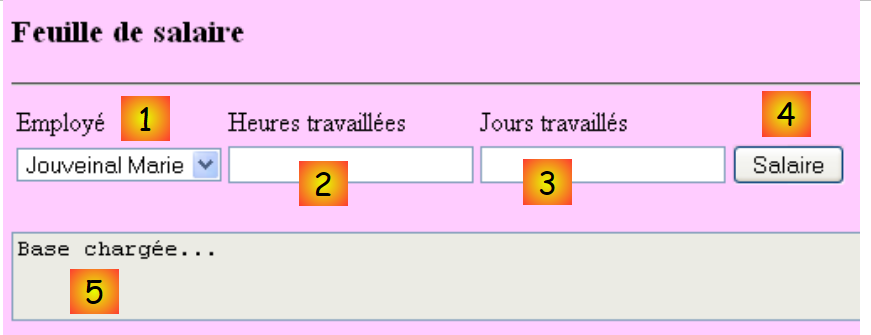 |
- The [1] drop-down list has been populated
- TextBox [5] indicates that the database has been read correctly
If initialization errors occurred when the application started, TextBox and [5] indicate this:
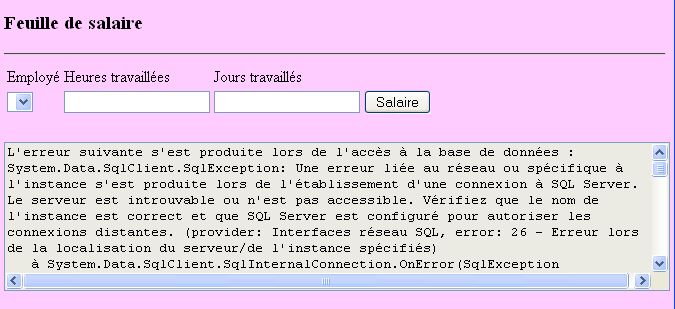
Question: Write the procedure [Page_Load] for the web page [Default.aspx], which, when executed at application startup, ensures that the previous functionality works.
4.3.2. Salary calculation
Clicking the [4] button triggers the execution of the handler:
protected void ButtonSalaire_Click(object sender, System.EventArgs e)
This handler begins by verifying the validity of the entries made in [2] and [3]. If either is incorrect, the error is reported as shown previously. Once the entries in [2] and [3] have been verified and found to be valid, the application must display additional data about the user selected in [1] as well as their salary (see screenshot in section 4.1).
Question: Write the code for procedure [ButtonSalaire_Click].