10. The [SimuPaie] application – version 6 – an ASP.NET client of a web service
10.1. The application architecture
We are evolving the client/server architecture of the NUnit test as follows:
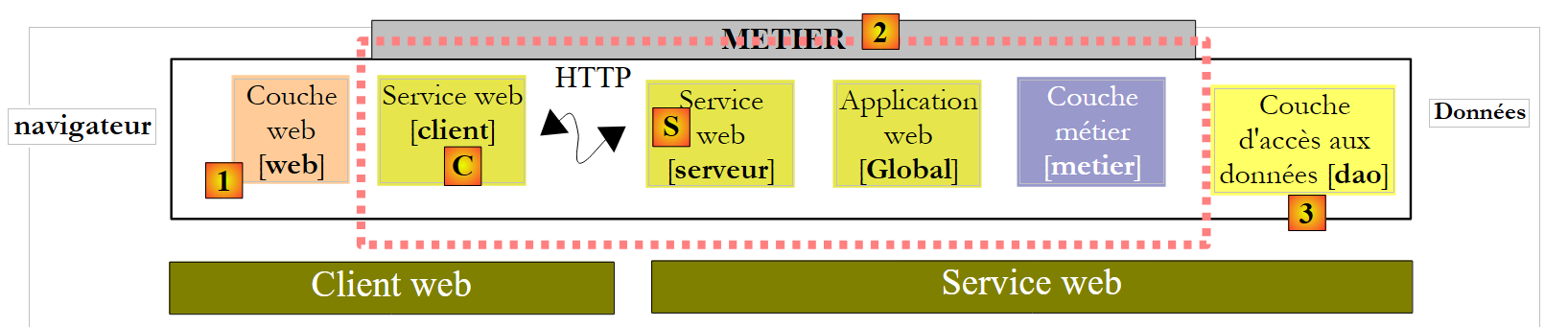 |
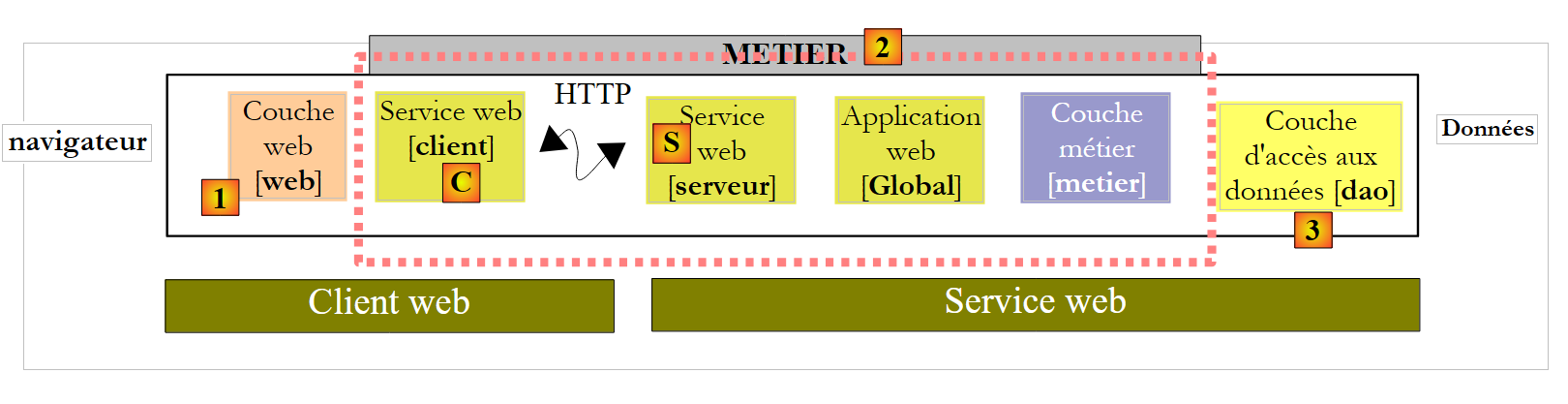
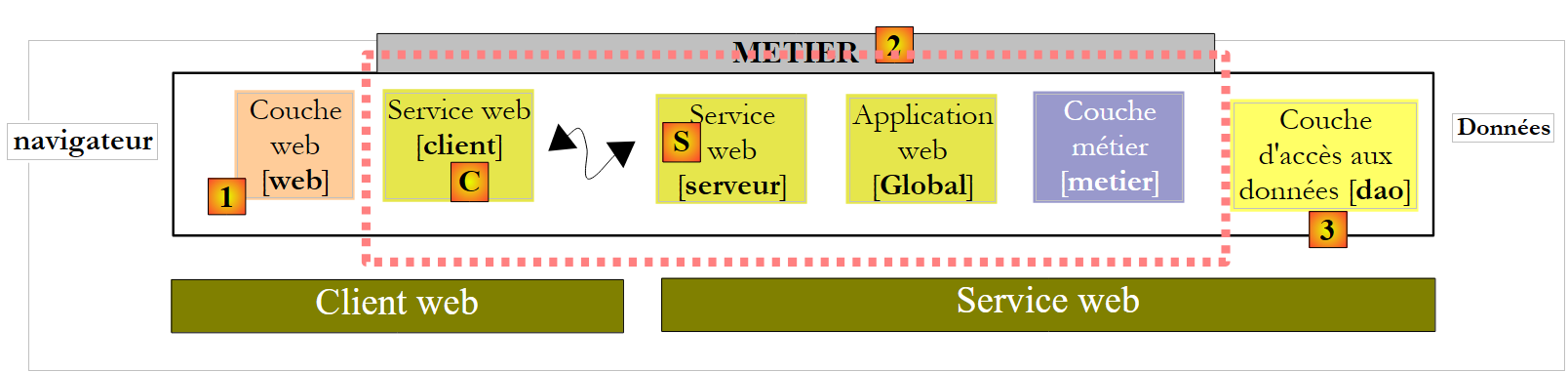
In [1], the NUnit test is replaced by the version 8 web application. It is important to note here that this architecture includes two web servers not shown:
- a web server that runs the [S] web service. It will run in a first instance of Visual Web Developer.
- a web server that runs the web client [1]. It will run in a second instance of Visual Web Developer.
10.2. The Visual Web Developer project for the [web] client
We create a new ASP.NET Web project:
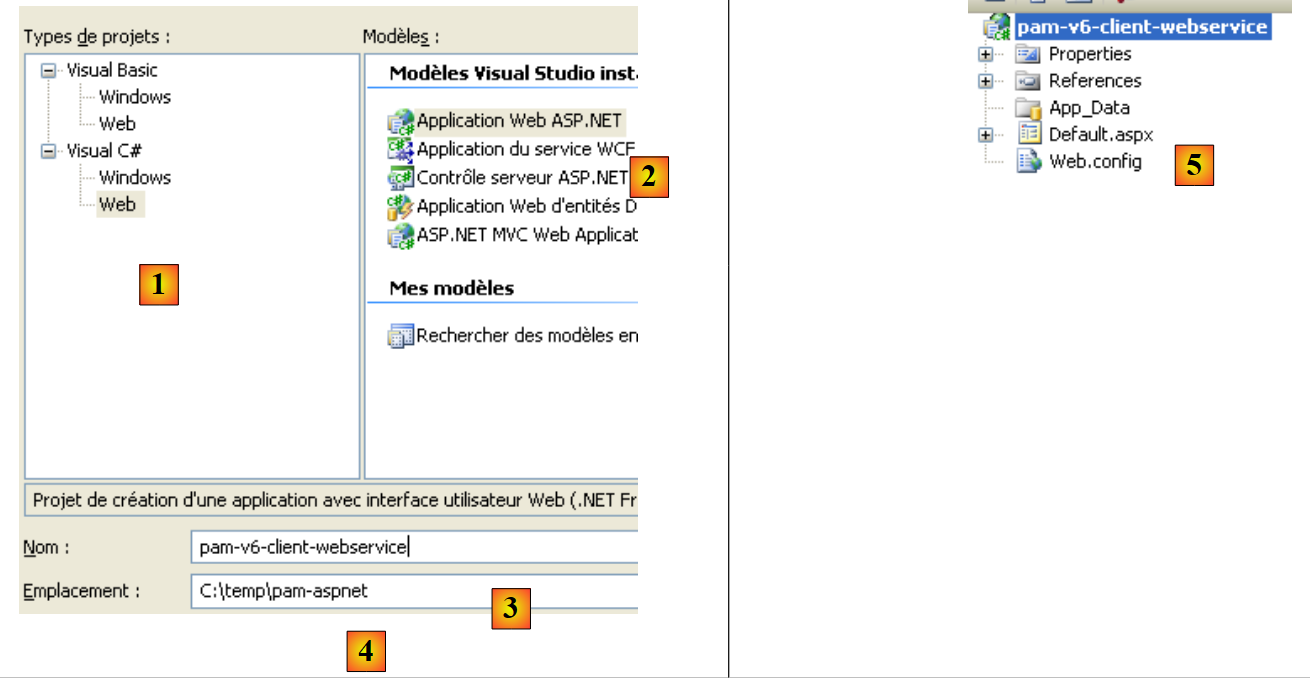 |
- in [1], we select a C# web project
- In [2], we select "ASP.NET Web Application"
- in [3], we name the web project
- in [4], we specify a location for this project
- in [5], the project is created
We modify a few project properties:
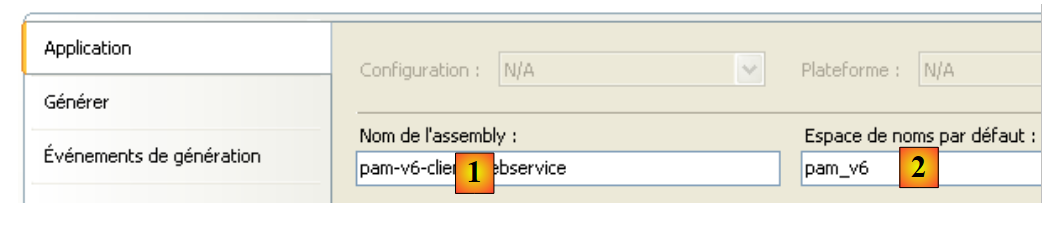 |
- in [1], the name of the assembly that will be generated
- In [2], the default namespace for the classes and interfaces that will be created
To build the [pam-v6-client-webservice] project, we can retrieve the [Global.asax] and [Default.aspx] files from the [pam-v4-3tier-nhibernate-multivues-monopage] web project and copy them into the [pam-v6-client-webservice] project. We do this using Windows Explorer first:
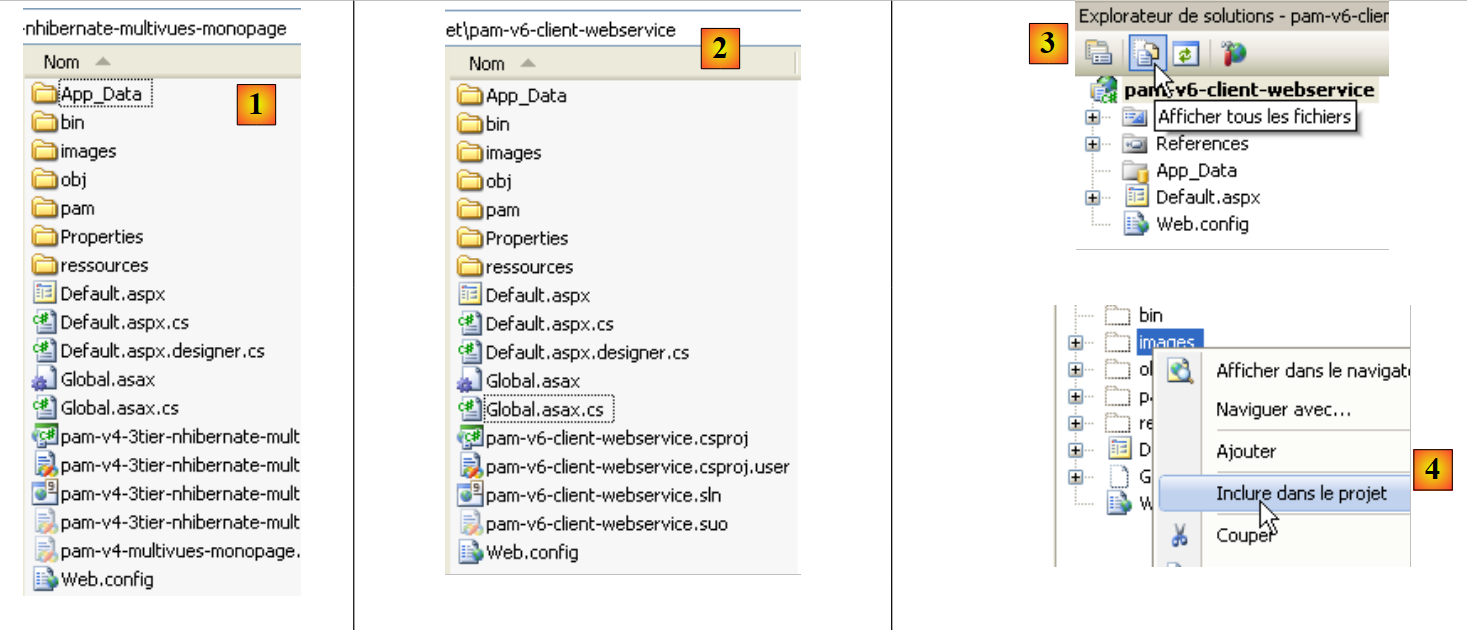 |
- in [1], the [pam-v4-3tier-nhibernate-multivues-monopage] project folder
- in [2], the [pam-v6-client-webservice] project folder after copying
- the [images, pam, resources] folders
- the files [Global.asax, Global.asax.cs]
- the files [Default.aspx, Default.aspx.cs, Default.aspx.designer.cs]
- in [3], in Visual Studio Express, display all project files to show the newly added files
- In [4], include the added folders and files in the project
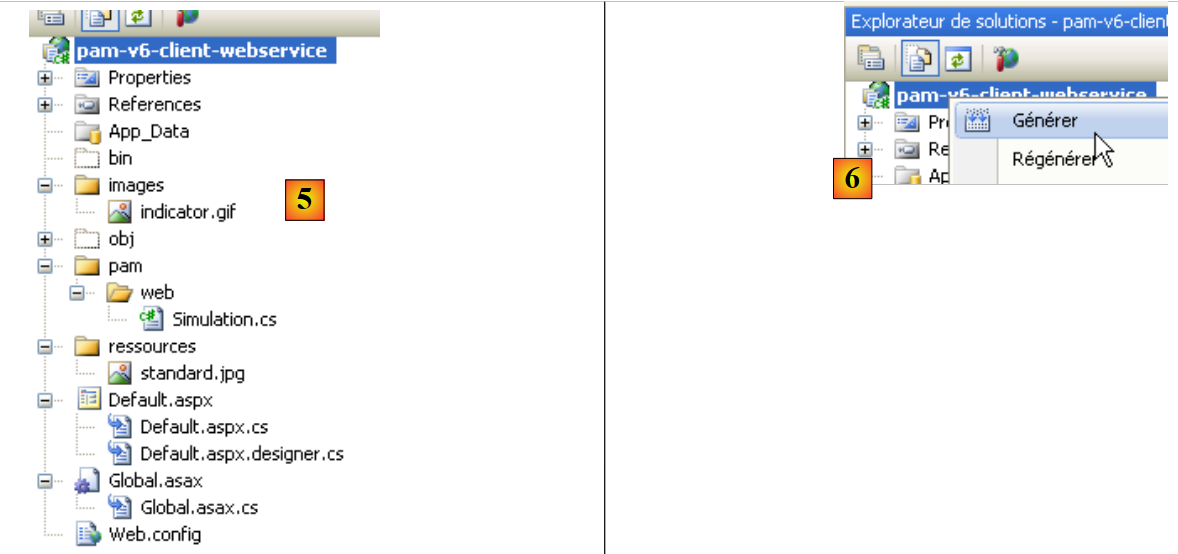 |
- in [5], the new project [pam-v6-client-webservice]
At this point, you can build the project for the first time [6]. You will get the following errors:
To understand and fix these errors, we need to look at the architecture of the web project under development:
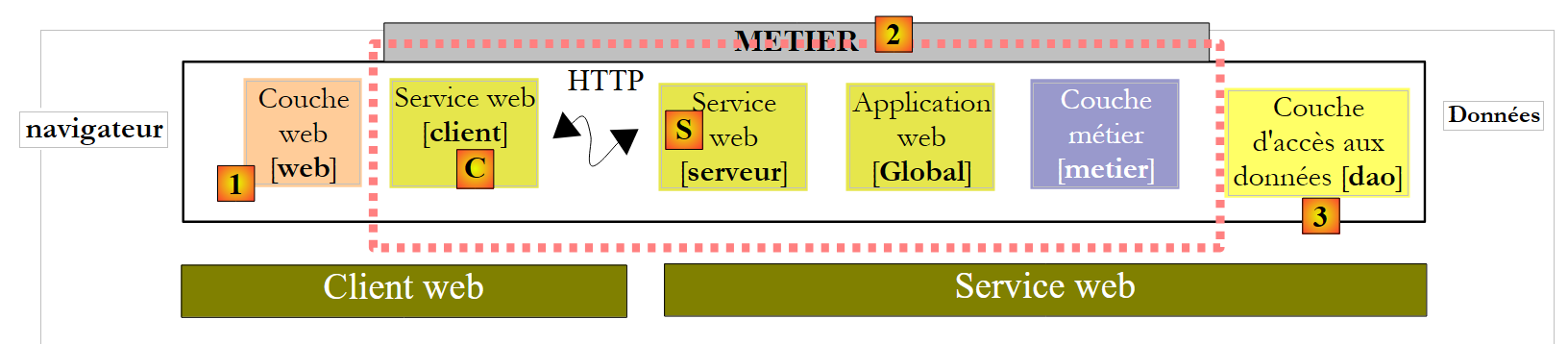 |
The [pam-v6-client-webservice] project is the [web] layer [1] in the diagram above. We can see that this layer communicates with the web service client [C], a client that we will generate shortly.
- Errors 2, 5, and 7 stem from the fact that the code in [pam-v4] referenced the DLL of the [business] layer, a DLL that is now on the server side rather than the client side.
- Errors 1 and 3 have the same cause, but this time regarding the [DAO] layer DLL.
- Error 4 is caused by the fact that the code in [Global.asax] uses Spring, and our project does not reference the Spring DLL. We will add this reference.
- Error 6 is caused by the fact that the [Employee] class is defined in the [DAO] layer, which does not exist on the client side.
The namespace errors 1, 2, 4, 5, 6, and 7 will be resolved by generating the C client for the web service. Error 3 is resolved by adding a reference to the Spring DLL in the project. We can proceed as follows:
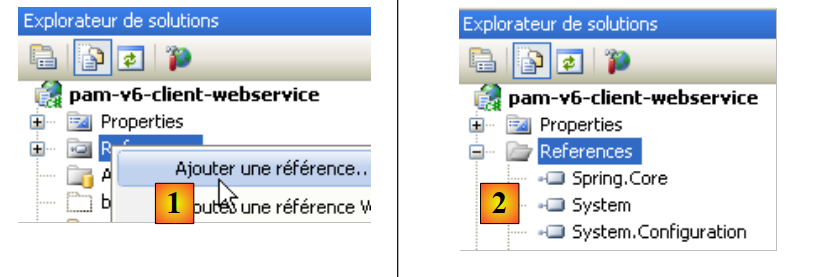 |
- In [1], add a reference to the [pam-v6-client-webservice] project
- In [4], we added a reference to the [Spring.Core] DLL in the [lib] folder.
After adding this reference to Spring, the project generation shows one fewer error. All other errors are due to lines of code that reference objects from the [business] and [DAO] layers, which are now on the server. We will see that these missing objects will be generated in the web service client [C].
 |
Before generating the web service client [C], we will change the namespace of the various classes present. They are currently in the [pam-v4] namespace. We change this namespace to [pam-v6]. The files involved are as follows: Default.aspx.cs, Default.aspx.designer.cs, Global.asax.cs. For example:
....
namespace pam_v6
{
  public class Global : System.Web.HttpApplication
  {
    // --- static application data ---
    public static Employe[] Employes;
    public static IPamMetier PamMetier = null;
....
Line 2: The pam_v4 namespace has been replaced by the pam_v6 namespace.
In addition, you must modify the markup in the following files: Default.aspx and Global.asax:
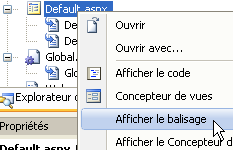 |
The markup for [Default.aspx] becomes:
<%@ Page Language="C#" AutoEventWireup="true" CodeFile="Default.aspx.cs" Inherits="pam_v6.PagePam" %>


<!DOCTYPE html PUBLIC "-//W3C//DTD XHTML 1.0 Transitional//EN" "http://www.w3.org/TR/xhtml1/DTD/xhtml1-transitional.dtd">
.....
Line 1: The Inherits attribute specifies the class name of the [Default.aspx.cs] file. We change the namespace.
The markup for [Global.asax] becomes:
<%@ Application Codebehind="Global.asax.cs" Inherits="pam_v6.Global" Language="C#" %>
Above, we change the namespace of the Inherits attribute.
We now generate the web service client [C].
 |
To perform the following steps, the web service [S] [pam-v5-webservice] must be running in another instance of Visual Web Developer.
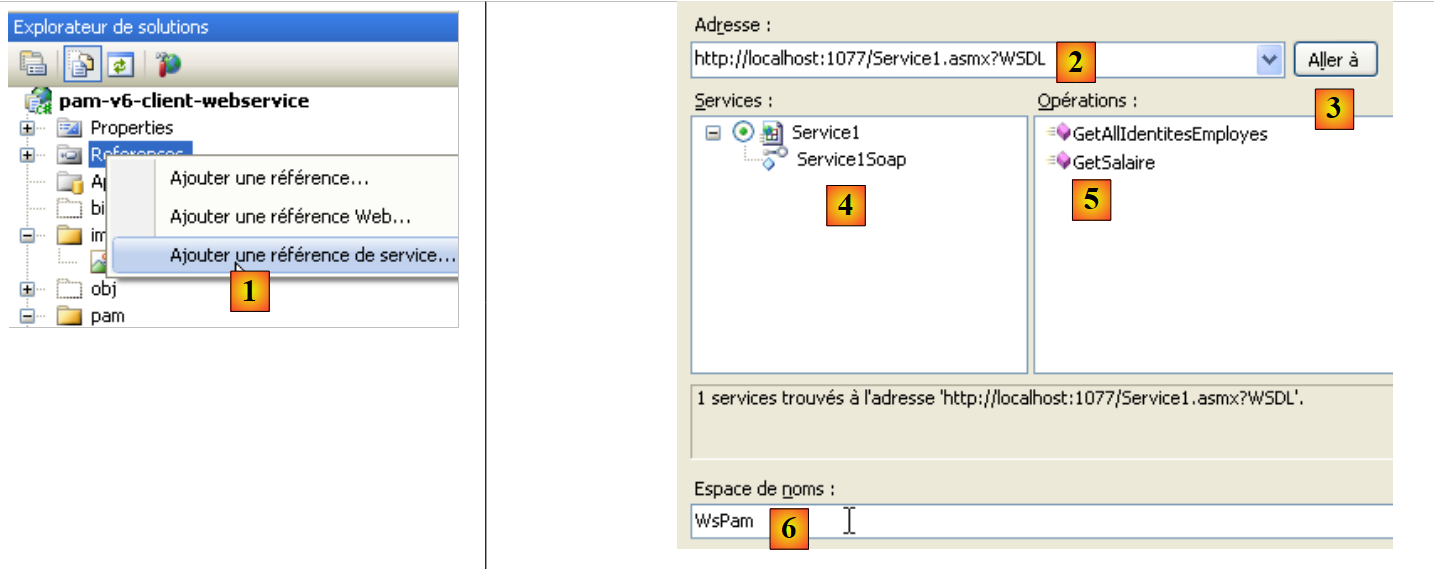 |
- In [1], we add a reference to the web service [pam-v5-webservice] to the project [pam-v6-client-webservice]
- In [2], enter the URI of the web service [pam-v5-webservice]. This is the URL of the WSDL file for this web service. When building the web service [pam-v5-webservice], we indicated how to find this URL.
- In [3], ask the wizard to use the WSDL file specified in [2]
- in [4], the discovered web service [Service1Soap] and in [5] the remote methods it exposes.
- In [6], we set the namespace in which the classes and interfaces of the client [C] will be generated
- We start generating the client [C]
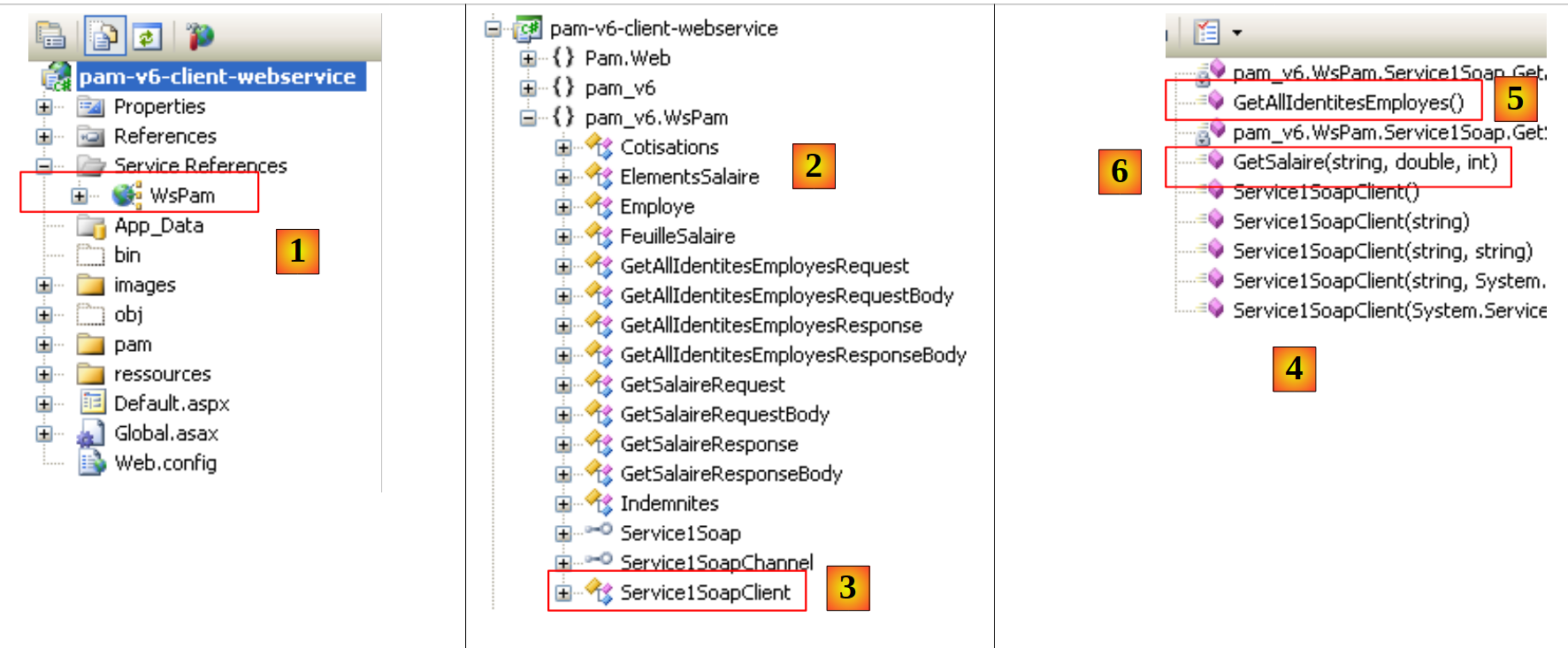 |
- In [1], the generated client. Double-click on it to access its contents.
- In [2], in the Object Explorer, the classes and interfaces of the pam_v6.WsPam namespace are displayed. This is the namespace of the generated client.
- [3] shows the class that implements the web service client.
- In [4], the methods implemented by the client [Service1SoapClient]. Here we find the two methods of the remote web service [5] and [6].
- In [2], the entity diagrams for the layers are shown:
- [business] : Payroll, PayrollItems
- [DAO]: Employee, Contributions, Allowances
Moving forward, keep in mind that these representations of the remote entities are located on the client side and in the pam_v6.WsPam namespace.
Let’s examine the methods and properties exposed by one of them:
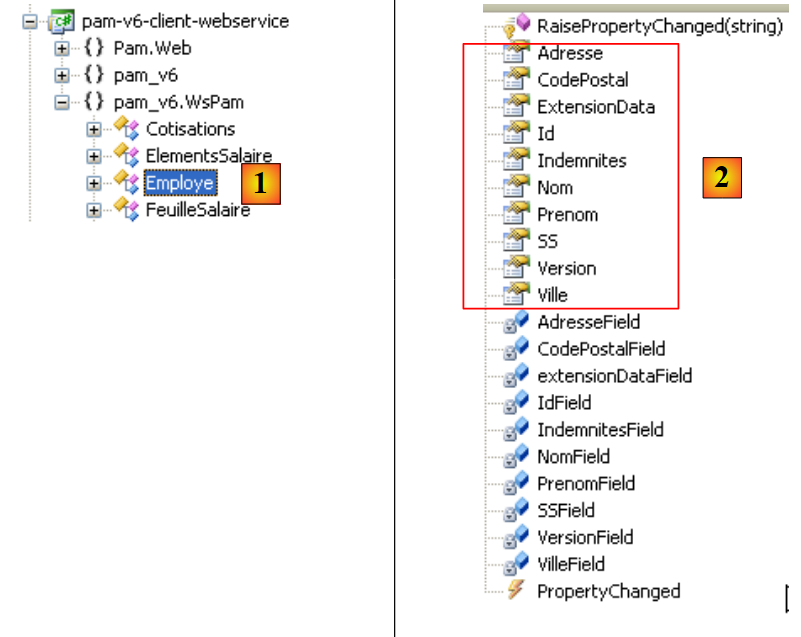 |
- In [1], we select the local [Employee] class
- In [2], we see the properties of the remote [Employee] entity as well as private fields used for the local entity’s specific needs.
Let’s examine the code in [Global.asax.cs] that contains errors:
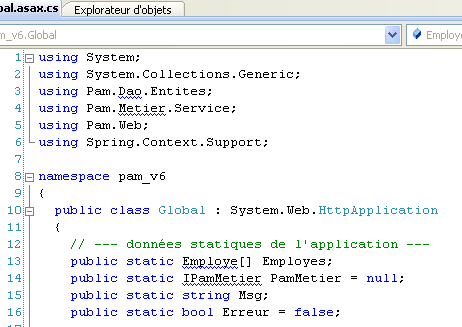 |
- Lines 3 and 4 use namespaces that exist on the server but not on the client.
- Line 13 uses a [Employee] class for which the correct namespace has not been declared
- Line 14 uses an IPamMetier interface that is unknown to the client.
We have already encountered similar issues in the C# client discussed earlier.
In the architecture:
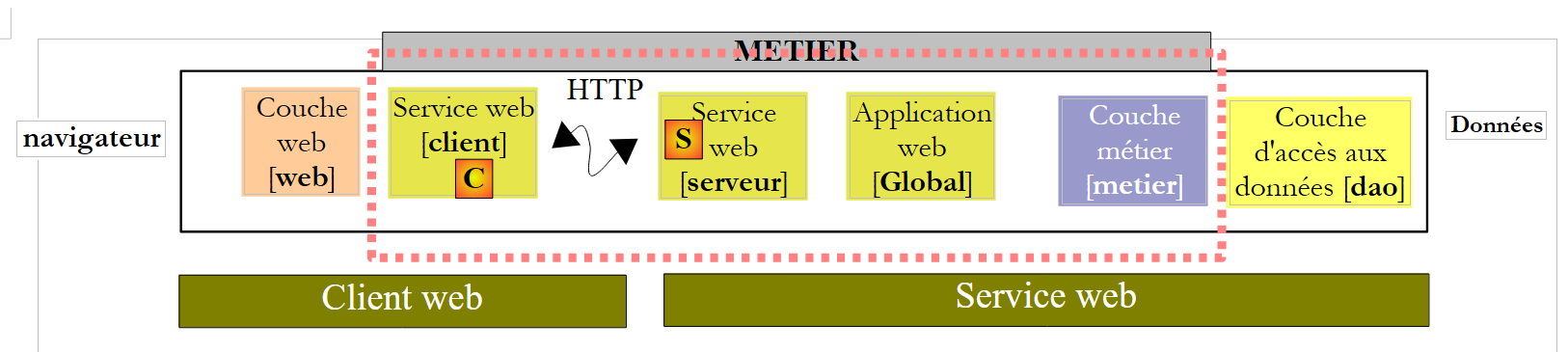 |
- the local [business] layer is implemented by the client [C] of type pam_v6.WsPam.Service1SoapClient, which does not implement the IPamMetier interface even though it has methods with the same names.
- The entities handled (Employee, Benefits, Contributions) by the generated [C] client are in the pam_v6.WsPam namespace
The code in [Global.asax.cs] changes as follows:
using System;
using System.Collections.Generic;
using Pam.Web;
using Spring.Context.Support;
using pam_v6.WsPam;

namespace pam_v6
{
  public class Global : System.Web.HttpApplication
  {
    // --- static application data ---
    public static Employe[] Employes;
    public static Service1SoapClient PamMetier = null;
    public static string Msg;
    public static bool Erreur = false;

    // application startup
    public void Application_Start(object sender, EventArgs e)
    {
      // using the configuration file
      try
      {
        // instantiation layer [metier]
        PamMetier = ContextRegistry.GetContext().GetObject("pammetier") as Service1SoapClient;
        // simplified list of employees
        Employes = PamMetier.GetAllIdentitesEmployes();
        // we succeeded
        Msg = "Base chargée...";
      }
      catch (Exception ex)
      {
        // we note the error
        Msg = string.Format("L'erreur suivante s'est produite lors de l'accès à la base de données : {0}", ex);
        Erreur = true;
      }
    }

    public void Session_Start(object sender, EventArgs e)
    {
      // put an empty simulation list in the session
      List<Simulation> simulations = new List<Simulation>();
      Session["simulations"] = simulations;
    }
  }
}
Line 24 instantiates layer [C] using Spring. The configuration required for this instantiation is defined in [web.config]:
<configSections>
      <sectionGroup name="system.web.extensions" type="System.Web.Configuration.SystemWebExtensionsSectionGroup, System.Web.Extensions, Version=3.5.0.0, Culture=neutral, PublicKeyToken=31BF3856AD364E35">
 ...
      </sectionGroup>
      <sectionGroup name="spring">
        <section name="context" type="Spring.Context.Support.ContextHandler, Spring.Core" />
        <section name="objects" type="Spring.Context.Support.DefaultSectionHandler, Spring.Core" />
      </sectionGroup>
    </configSections>

  <spring>
    <context>
      <resource uri="config://spring/objects" />
    </context>
      <objects xmlns="http://www.springframework.net">
        <object id="pammetier" type="pam_v6.WsPam.Service1SoapClient,pam-v6-client-webservice"/>
      </objects>
</spring>
Line 16: The [business] layer is an instance of the [pam_v6.WsPam.Service1SoapClient] class, which can be found in the [pam-v6-client-webservice] DLL. Recall that we configured the [pam-v6-client-webservice] project to generate this DLL.
There are still a few errors in [Default.aspx.cs]:
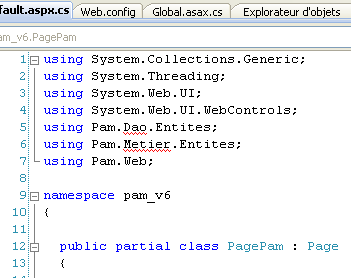 | 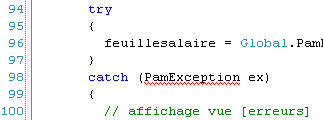 |
- lines 5, 6: these namespaces no longer exist. The entities are now in the pam_v6 or pam_v6.WsPam namespace.
- line 98: the generated client [C] did not inherit the [PamException] class from the [dao] layer. It could not do so since the web service does not expose this exception. We choose to replace PamException with its parent class Exception.
The code becomes:
...
using System.Web.UI.WebControls;
using pam_v6.WsPam;

namespace pam_v6
{

  public partial class PagePam : Page
  {
...
...
      try
      {
        feuillesalaire = Global.PamMetier.GetSalaire(DropDownListEmployes.SelectedValue, HeuresTravaillées, JoursTravaillés);
      }
      catch (Exception ex)
      {
...
Once these errors have been corrected, we can run the web application:
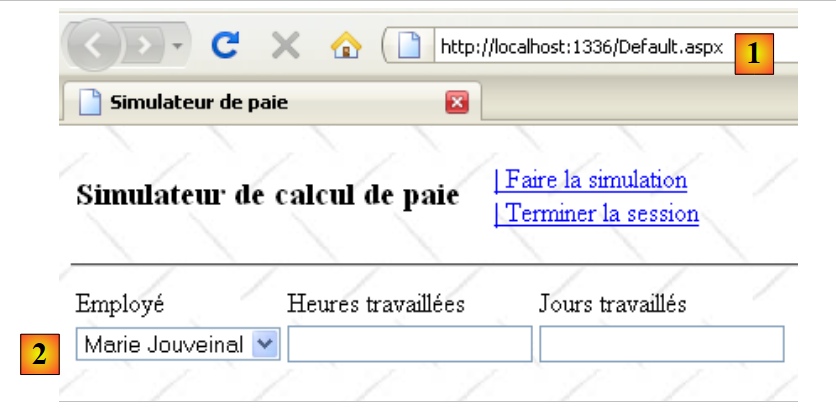 |
- in [1], the URL of the web client for the remote web service
- in [2], the employee dropdown has been populated. The data it contains comes from the web service.
We invite the reader to test this version 6, a copy of version 4.