11. The [SimuPaie] application – version 7 – ASP.NET / multi-view / multi-page
Recommended reading: reference [1], Development of WEB with ASP.NET 1.1 section: Examples
We will now examine a version that is functionally identical to the three-tier ASP.NET application discussed previously, but we will modify the architecture of the latter as follows: whereas in the previous version, the views were implemented by a single page ASPX, here they will be implemented by three pages ASPX.
The architecture of the previous application was as follows:
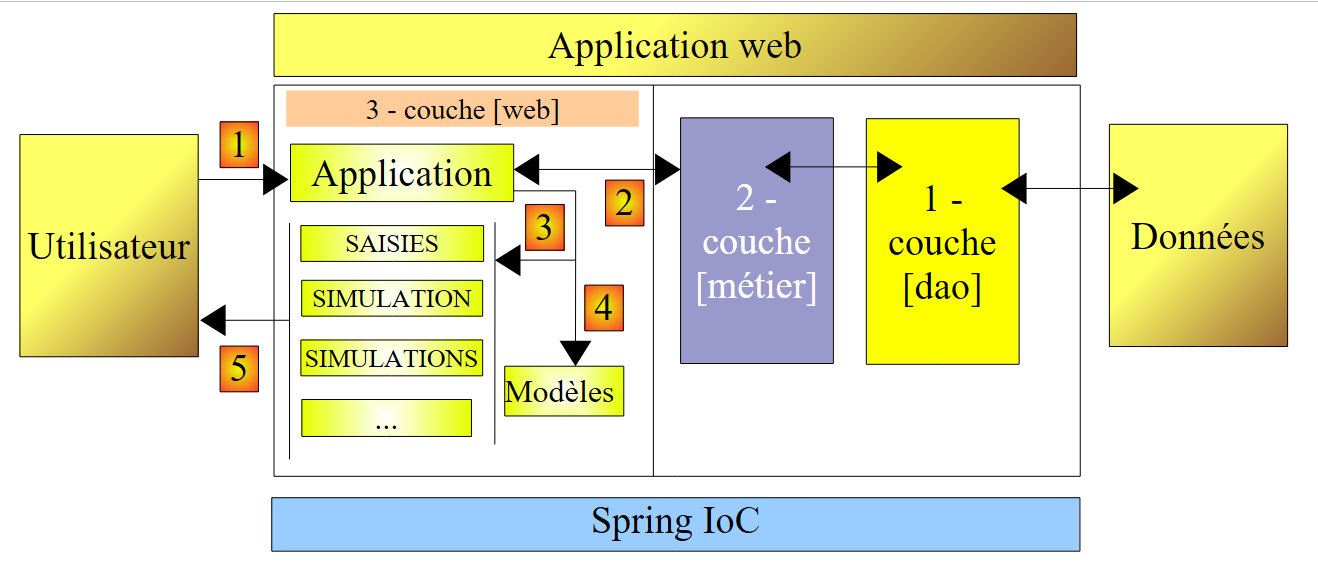 |
Here we have a MVC architecture (Model–View–Controller):
- [Default.aspx.cs] contains the controller code. The [Default.aspx] page is the client’s sole point of contact. It handles all client requests.
- [Saisies, Simulation, Simulations, ...] are the views. These views are implemented here by [View] components of the [Default.aspx] page.
The architecture of the new version will be as follows:
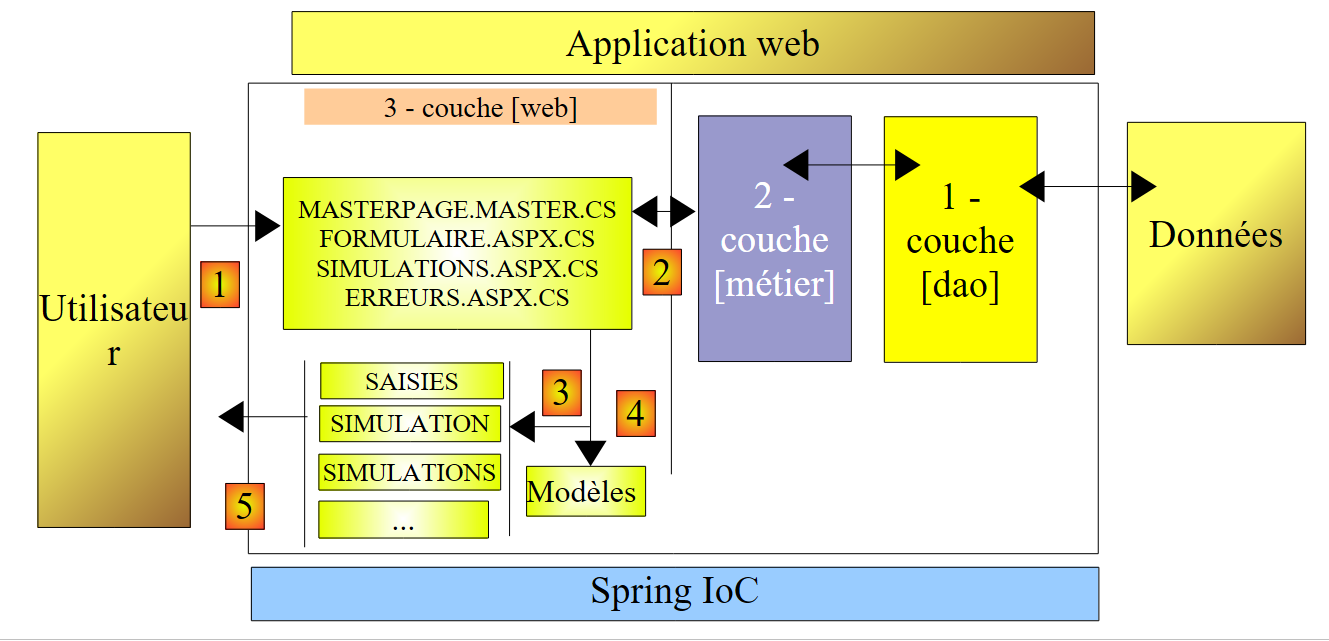 |
- only the [web] layer changes
- the views (what is presented to the user) remain unchanged.
- The controller code, which was in the previous version and entirely in [Default.aspx.cs], is now distributed across several pages:
- [MasterPage.master]: a page that consolidates elements common to the different views: the top banner with its menu options
- [Formulaire.aspx]: the page that displays the simulation form and manages the actions that take place on this form
- [Simulations.aspx]: the page that displays the list of simulations and handles the actions that occur on this page
- [Erreurs.aspx]: the page displayed when an application initialization error occurs. No actions are possible on this page.
This can be considered a multi-controller MVC architecture, whereas the architecture of the previous version was a single-controller MVC architecture.
The processing of a client request proceeds as follows:
- The client makes a request to the application. It makes this request to one of the two [Formulaire.aspx, Simulations.aspx] pages.
- The requested page processes this request. To do this, it may need assistance from the [métier] layer, which itself may need the [dao] layer if data needs to be exchanged with the database. The application receives a response from the [métier] layer.
- Based on this, it selects (3) the view (= the response) to send to the client, providing it (4) with the information (the template) it needs.
- The response is sent to the client (5)
11.1. The application's views
The different views presented to the user are as follows:
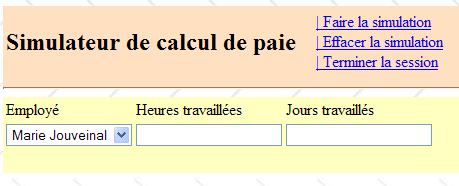
- - the [VueSaisies] view, which displays the simulation form
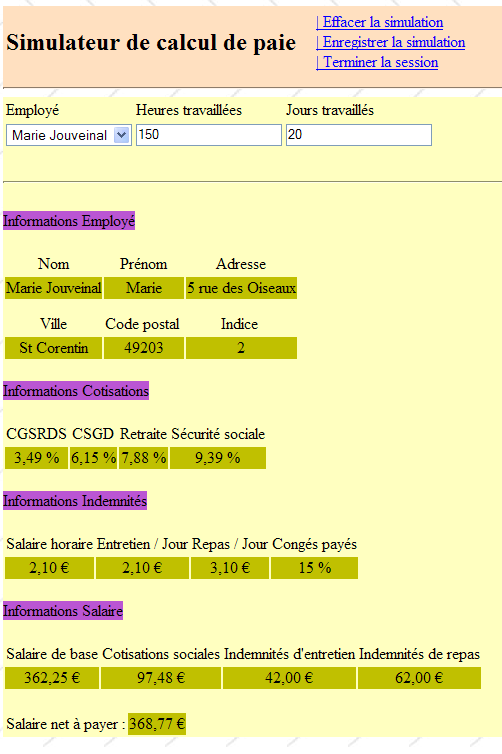
- - the [VueSimulation] view used to display the detailed simulation results:
- - the [VueSimulations] view, which lists the simulations performed by the client
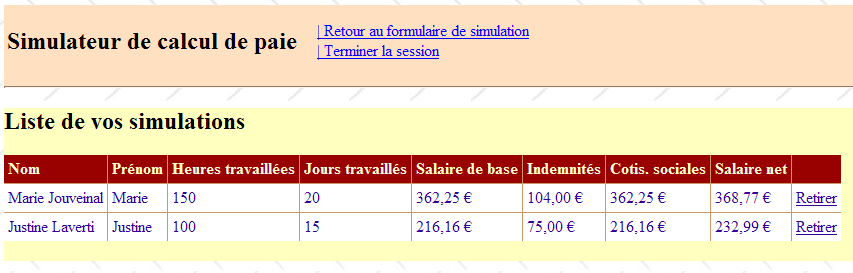
- - the [VueSimulationsVides] view, which indicates that the customer has no simulations or no more simulations:
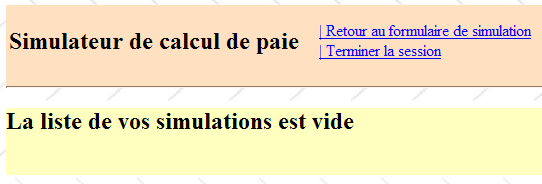
- the [VueErreurs] view, which indicates an application initialization error:
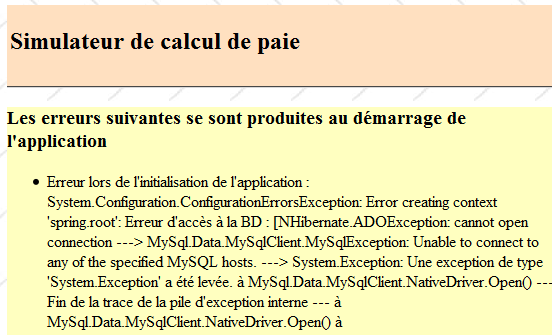
11.2. Generating views in a multi-controller context
In the previous version, all views were generated from the single page [Default.aspx]. This page contained two [MultiView] components, and the views consisted of a combination of one or two [View] components belonging to these two [MultiView] components.
While effective when there are few views, this architecture reaches its limits as soon as the number of components making up the various views becomes large: in fact, with every request made to the single page [Default.aspx], all of its components are instantiated, even though only some of them will be used to generate the response to the user. Unnecessary work is thus performed with each new request, which becomes a bottleneck when the total number of components on the page is large.
One solution is to distribute the views across different pages. That is what we are doing here. Let’s examine two different cases of view generation:
- the request is made to a page P1, and it generates the response
- the request is made to a page P1, and this page asks a page P2 to generate the response
11.2.1. Case 1: a controller/view page
In Case 1, we return to the single-controller architecture of the previous version, where the page [Default.aspx] is page P1:
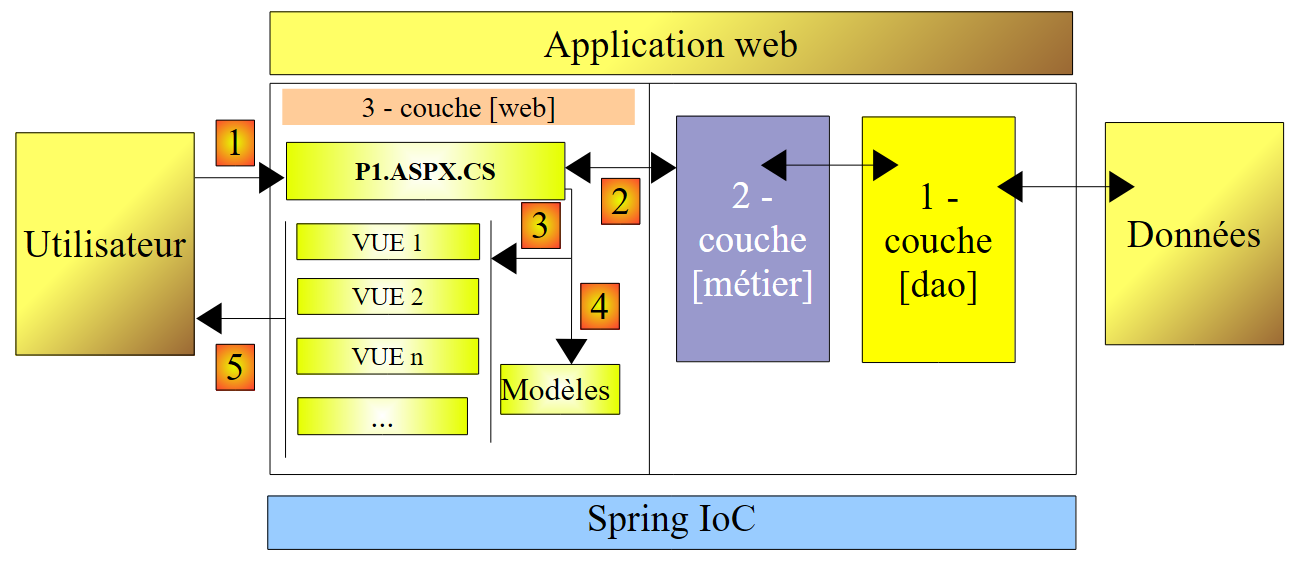 |
- The client makes a request to page P1 (1)
- Page P1 processes this request. To do so, it may need assistance from the [métier] layer (2), which itself may need the [dao] layer if data needs to be exchanged with the database. The application receives a response from the [métier] layer.
- Based on this, it selects (3) the view (= the response) to send to the client, providing it (4) with the information (the template) it needs. This involves selecting the [Panel] or [View] components to display on page P1 and initializing the components they contain.
- The response is sent to the client (5)
Here are two examples from the application under consideration:
[page Formulaire.aspx]
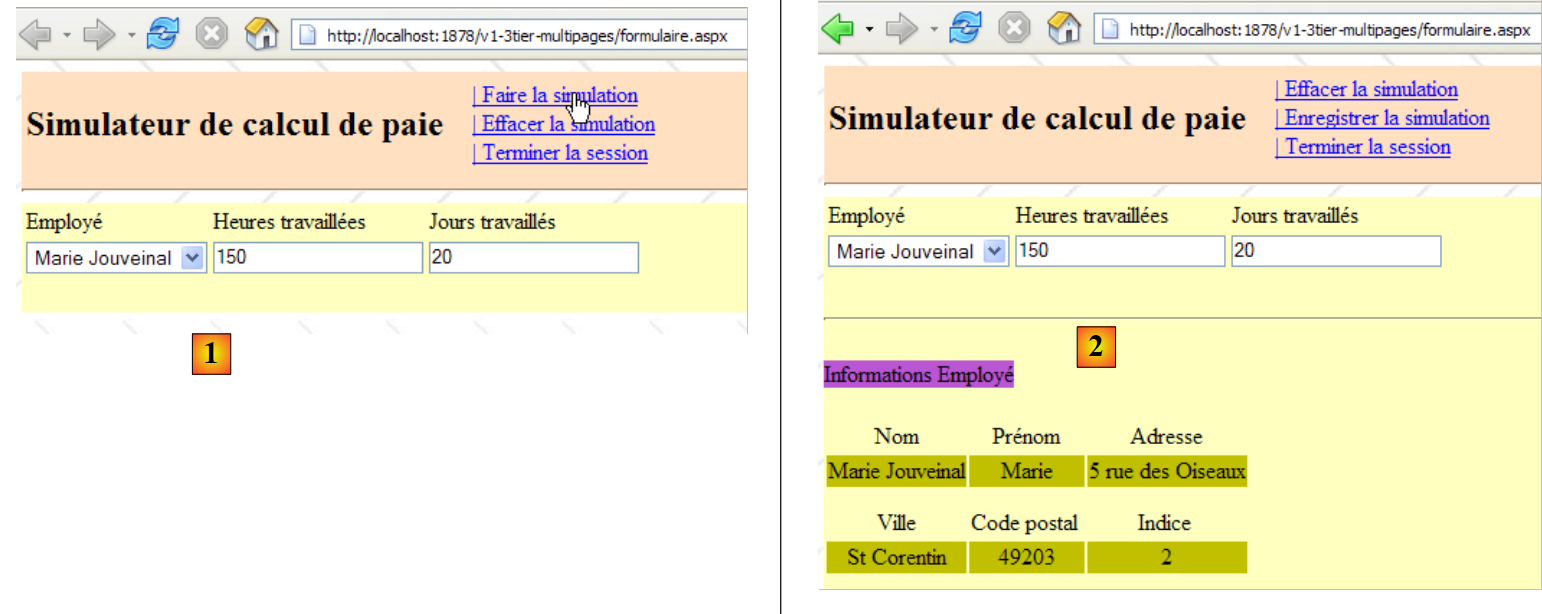 |
- in [1]: after requesting page [Formulaire.aspx], the user requests a simulation
- in [2]: the page [Formulaire.aspx] processed this request and generated the response itself by displaying a component [View] that had not been displayed in [1]
[page Simulations.aspx]
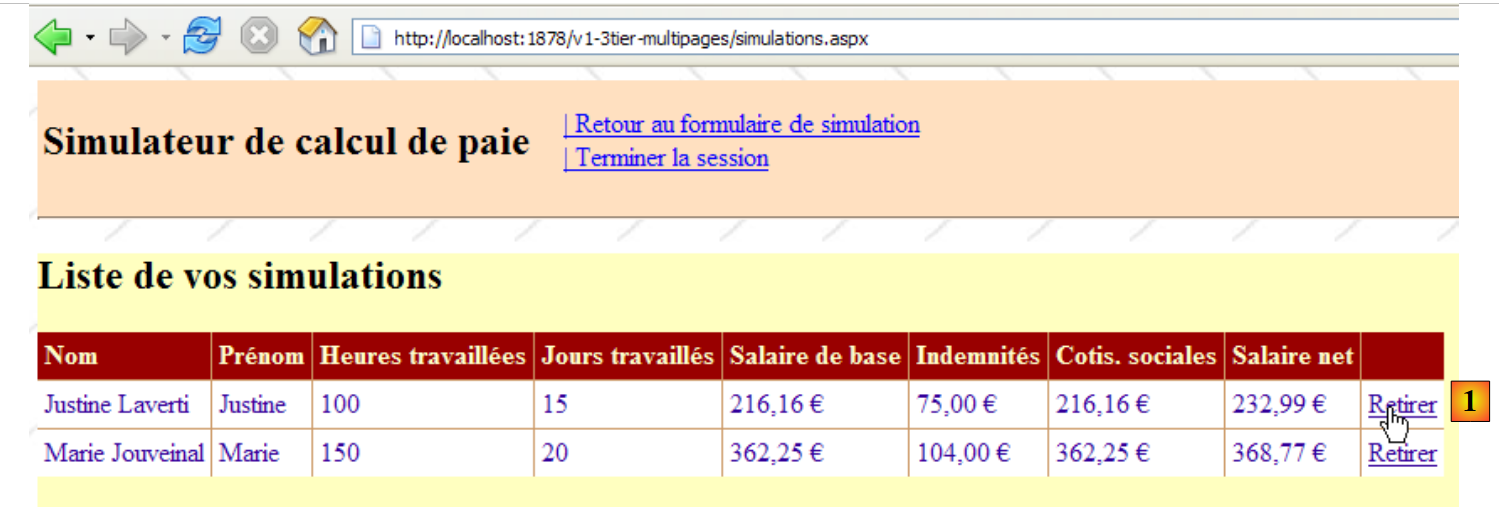 |
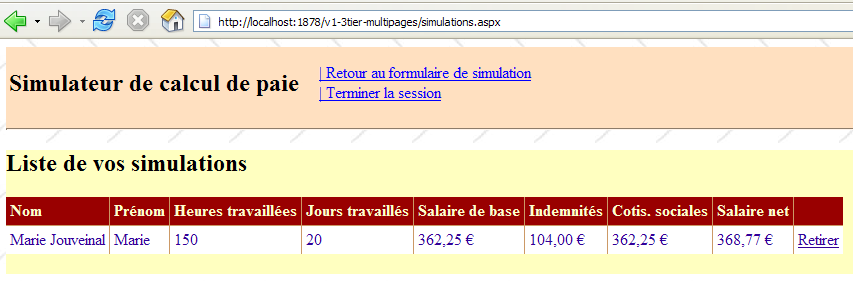
- in [1]: after requesting the page [Simulations.aspx], the user wants to remove a simulation
- in [2]: the page [Simulations.aspx] processed this request and generated the response itself by re-displaying the new list of simulations.
 |
11.2.2. Case 2: one controller page, one controller/view page
Case 2 can cover various architectures. We will choose the following:
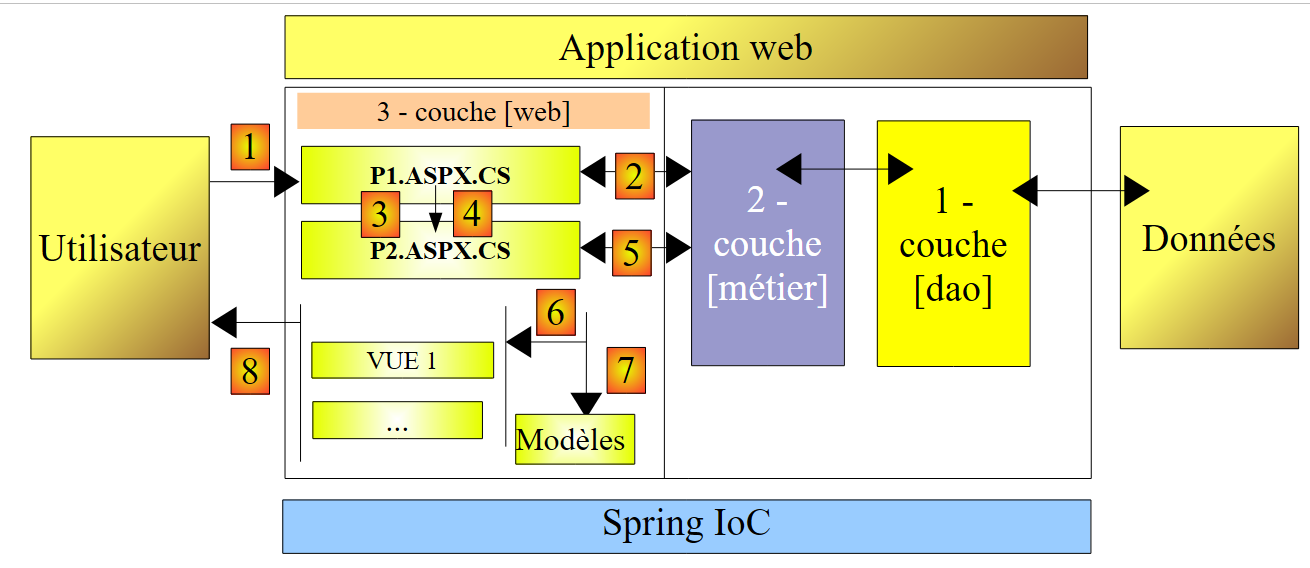 |
- the client makes a request to page P1 (1)
- Page P1 processes this request. To do so, it may need assistance from the [métier] layer (2), which itself may need the [dao] layer if data needs to be exchanged with the database. The application receives a response from the [métier] layer.
- Based on this, it selects (3) the view (= the response) to send to the client, providing it (4) with the information (the template) it needs. It turns out that here, the view to be generated must be generated by a page other than P1, namely page P2. To perform operations (3) and (4), page P1 has two options:
- transfer execution to page P2 using operation [Server.Transfer(" P2.aspx ")]. In this case, it can place the template intended for page P2 in the request context [Context.Items[" clé "]=valeur] or in the user’s session [Session.[" clé "]=valeur]. Page P2 will then be instantiated, and when processing its Load event, for example, it can retrieve the information transmitted by page P1 using the operations [valeur=(Type)Context.Items[" clé "]] or [valeur=(Type)Session[" clé "]], depending on the situation, where Type is the type of the value associated with the key. Transmitting values via the Context is most appropriate if there is no need for the model values to be retained for a future client request.
- Ask the client to redirect to page P2 using operation [Response.Redirect(" P2.aspx ")]. In this case, page P1 will place the model intended for page P2 into the session, since the request context is cleared at the end of each request. However, in this case, the redirection will cause the end of the client’s first request to P1 and the issuance of a second request from the same client, this time to P2. There are two successive requests. We know that the session is one way to preserve “memory” between requests. There are other solutions besides the session.
- Regardless of how P2 takes over, we then return to case 1: P2 has received a request that it will process (5) and will generate the response itself (6, 7). We can also imagine that after processing the request, page P2 will hand off to page P3, and so on.
Here is an example from the application under study:
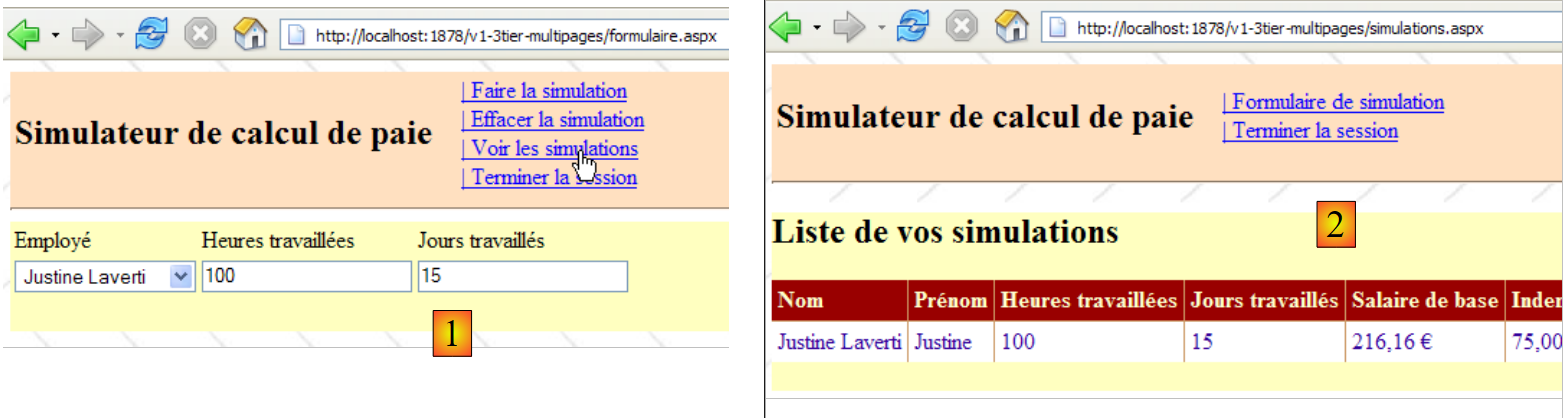 |
- In [1]: the user who requested page [Formulaire.aspx] asks to see the list of simulations
- in [2]: page [Formulaire.aspx] processes this request and redirects the client to page [Simulations.aspx]. It is the latter that provides the response to the user. Instead of asking the client to redirect, the page [Formulaire.aspx] could have forwarded the client’s request to the page [Simulations.aspx]. In this case, in [2], we would have seen the same Url as in [1]. In fact, a browser always displays the last requested Url:
- the action requested in [1] is intended for the page [Formulaire.aspx]. The browser makes a POST request to that page.
- If the page [Formulaire.aspx] processes the request and then forwards it via [Server.Transfer(" Simulations.aspx ")] to the page [Simulations.aspx], we remain within the same request. The browser will then display, in [2], the URL from [Formulaire.aspx] to which the POST occurred.
- If the page [Formulaire.aspx] processes the request and then redirects it via [Response.Redirect(" Simulations.aspx ")] to the page [Simulations.aspx], the browser then makes a second request, a GET to [Simulations.aspx]. The browser will then display [2], the URL from [Simulations.aspx] to which the GET was sent. This is what the screenshot [2] above shows us.
11.3. The Visual Web Developer project for the [web] layer
The Visual Web Developer project for the [web] layer is as follows:
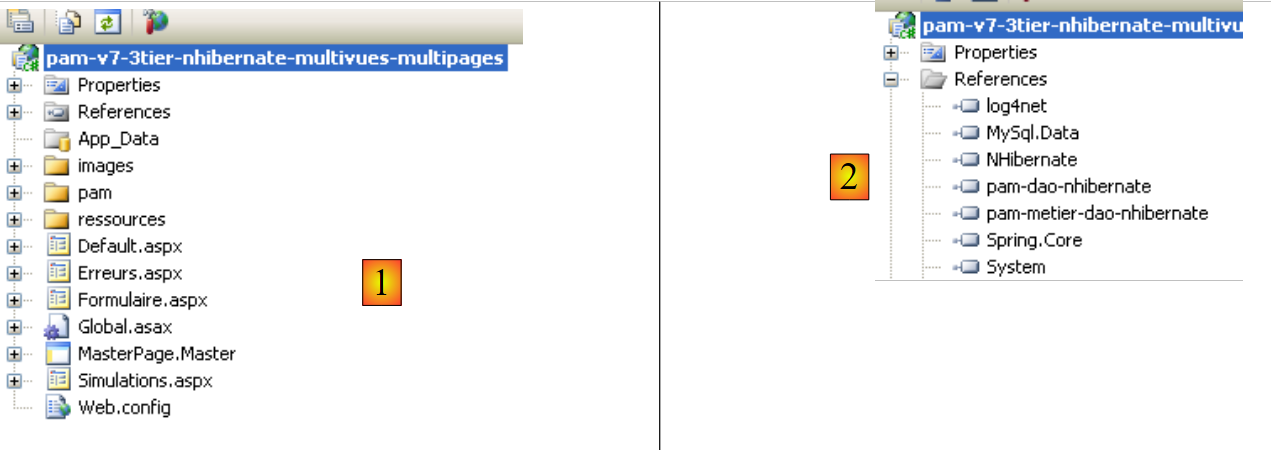 |
- in [1] we find:
- the application’s configuration file [Web.config] – is identical to that of the [pam-v4-3tier-nhibernate-multivues-monopage] application.
- The page [Default.aspx] simply redirects the client to the page [Formulaire.aspx]
- the [Formulaire.aspx] page, which displays the simulation form to the user and handles actions related to this form
- The [Simulations.aspx] page, which displays the user’s list of simulations and handles actions related to this page
- The page [Erreurs.aspx] displays an error message to the user when the web application fails to start.
- In [2], we see the project references.
Let’s return to the architecture of the new project:
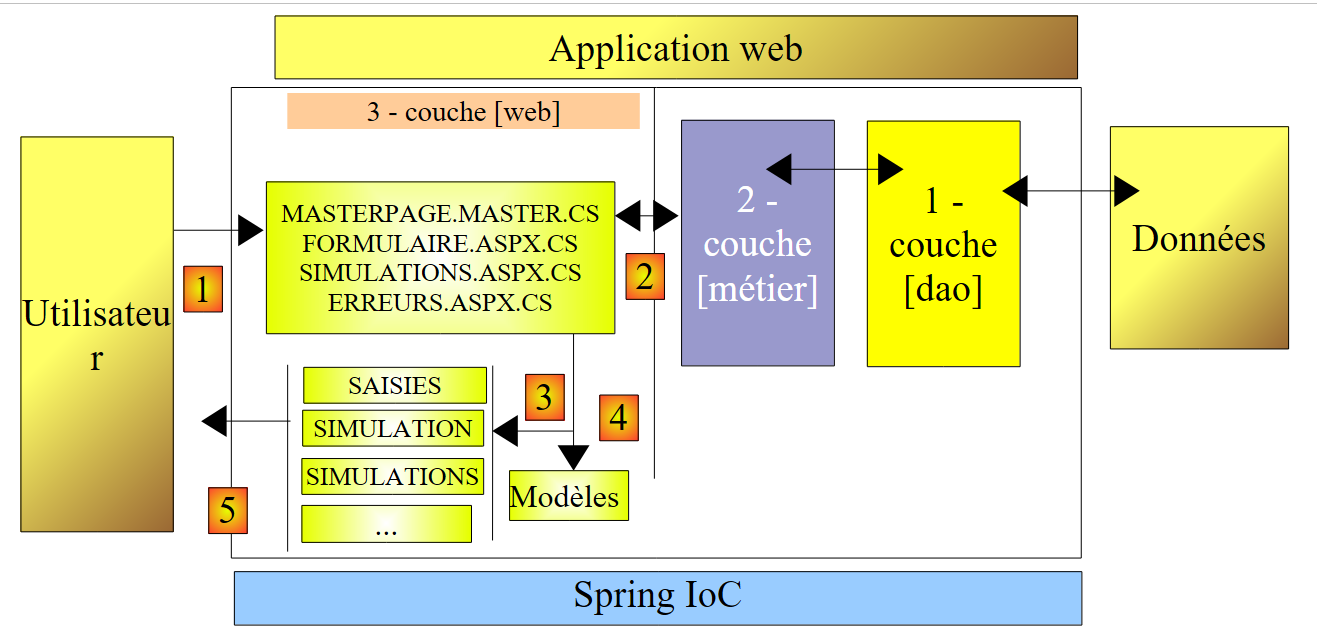 |
Compared to the [pam-v4-3tier-nhibernate-multivues-monopage] project, only the views have changed. This is why the new project reuses some of the files from that project:
- the configuration file [Web.config]
- the DLL files referenced by [pam-dao-nhibernate, pam-metier-dao-nhibernate, Spring.Core, NHibernate]
- the global application class [Global.asax]
- the [images, ressources, pam] folders
To ensure consistency with the project currently under development, we will ensure that the namespace for the views and the global application class is [pam-v7]:
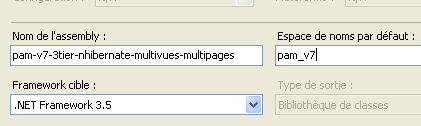 |
11.4. The page presentation code
11.4.1. The master page [MasterPage.master]
The application views presented in Section 11.1 have common parts that can be factored into a Master Page, known as the Master Page in Visual Studio. Take, for example, the views [VueSaisies] and [VueSimulationsVides] below, generated respectively by the pages [Formulaire.aspx] and [Simulations.aspx]:
 |
These two views share the top banner (Title and Menu Options). This is true for all views that will be presented to the user: they will all have the same top banner. To enable different pages to share the same presentation fragment, there are various solutions, including the following:
- Place this common fragment in a user component. This was the primary technique used with ASP.NET 1.1
- Place this common fragment in a Master page. This technique was introduced with ASP.NET 2.0. This is the one we are using here.
To create a Master Page in a web application, follow these steps:
- Right-click on the project / Add New Item / Master Page:
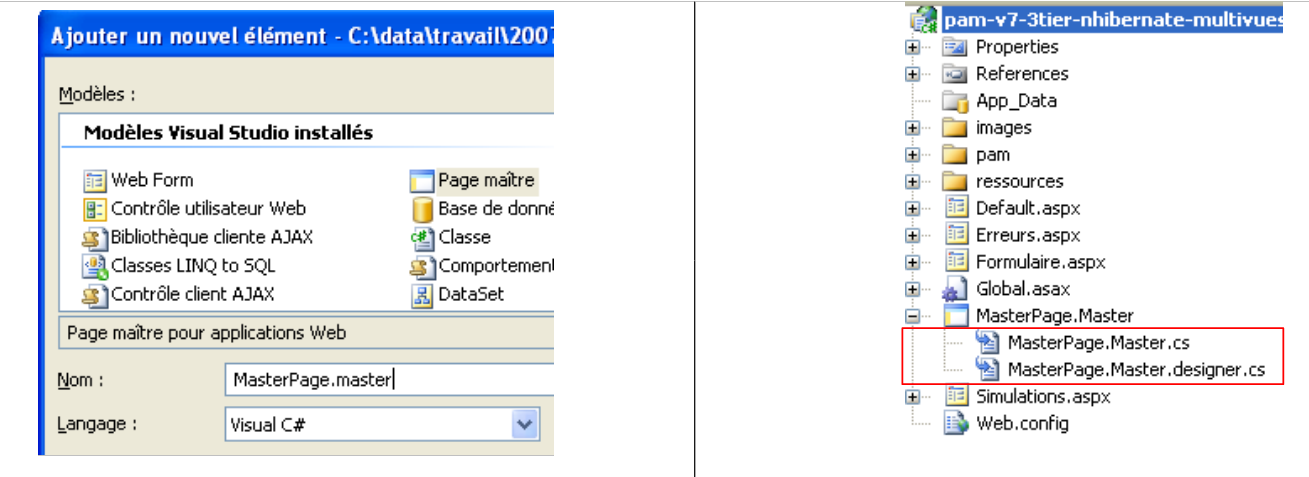 |
Adding a master page adds three files to the web application by default:
- [MasterPage.master]: the Master page layout code
- [MasterPage.master.cs]: the Master page control code
- [Masterpage.Master.designer.cs]: the master page component declaration
The code generated by Visual Studio in [MasterPage.master] is as follows:
<%@ Master Language="C#" AutoEventWireup="true" CodeBehind="MasterPage.master.cs" Inherits="pam_v7.MasterPage" %>

<!DOCTYPE html PUBLIC "-//W3C//DTD XHTML 1.0 Transitional//EN" "http://www.w3.org/TR/xhtml1/DTD/xhtml1-transitional.dtd">

<html xmlns="http://www.w3.org/1999/xhtml">
<head runat="server">
    <title>Untitled Page</title>
    <asp:ContentPlaceHolder id="head" runat="server">
    </asp:ContentPlaceHolder>
</head>
<body>
    <form id="form1" runat="server">
    <div>
        <asp:ContentPlaceHolder id="ContentPlaceHolder1" runat="server">

        </asp:ContentPlaceHolder>
    </div>
    </form>
</body>
</html>
- Line 1: The <%@ Master ... %> tag is used to define the page as a Master page. The page's control code will be in the file specified by the CodeBehind attribute, and the page will inherit from the class specified by the Inherits attribute.
- Lines 12–18: The Master page form
- lines 14–16: an empty container that will hold, in our application, one of the pages [Formulaire.aspx, Simulations.aspx, Erreurs.aspx]. The client always receives the same page in response—the Master page—in which the [ContentPlaceHolder1] container will receive a HTML feed provided by one of the [Formulaire.aspx, Simulations.aspx, Erreurs.aspx] pages. Thus, to change the appearance of the pages sent to clients, simply change the appearance of the Master page.
- Lines 8-9: an empty container that allows "child" pages to customize the header <head>...</head>.
The visual representation (Design tab) of this source code is shown in (1) below. Additionally, you can add as many containers as desired using the [ContentPlaceHolder] component (2) from the [Standard] toolbar.
 |
The control code generated by Visual Studio in [MasterPage.master.cs] is as follows:
using System;

public partial class MasterPage : System.Web.UI.MasterPage
{
    protected void Page_Load(object sender, EventArgs e)
    {

    }
}
- Line 3: The class referenced by the [Inherits] attribute of the <%@ Master ... %> directive on the [MasterPage.master] page derives from the [System.Web.UI.MasterPage] class
Above, we see the presence of the Page_Load method, which handles the Load event of the master page. The master page will contain another page within it. In what order do the Load events of the two pages occur? This is a general rule: the Load event of a component occurs before that of its container. Here, the Load event of the page inserted into the master page will therefore occur before that of the master page itself.
To generate a page in that uses the previous page [MasterPage.master] as its master page, proceed as follows:
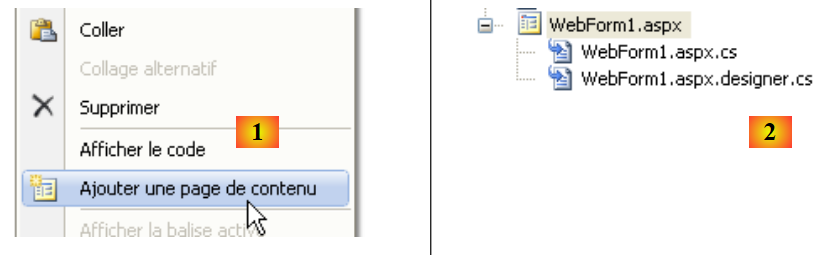 |
- in [1]: right-click on the master page, then select option [Ajouter une page de contenu]
- In [2]: a default page, in this case [WebForm1.aspx], is generated.
The layout code [WebForm1.aspx] is as follows:
<%@ Page Title="" Language="C#" MasterPageFile="~/MasterPage.Master" AutoEventWireup="true" CodeBehind="WebForm1.aspx.cs" Inherits="pam_v7.WebForm1" %>
<asp:Content ID="Content1" ContentPlaceHolderID="ContentPlaceHolder1" runat="server">
</asp:Content>
- Line 1: The Page directive and its attributes
- MasterPageFile: specifies the master page file for the page described by the directive. The ~ symbol denotes the project folder.
- The other parameters are the standard ones for a web page ASP
- Lines 2-3: The <asp:Content> tags are linked one by one to the <asp:ContentPlaceHolder> directives in the master page via the ContentPlaceHolderID attribute. The components placed between lines 2–3 above will, at runtime, be placed in the ID ContentPlaceHolder1 container of the master page.
By renaming the [WebForm1.aspx] page generated in this way, we can build the various pages using [MasterPage.master] as the master page.
For our application [SimuPaie], the master page will look as follows:
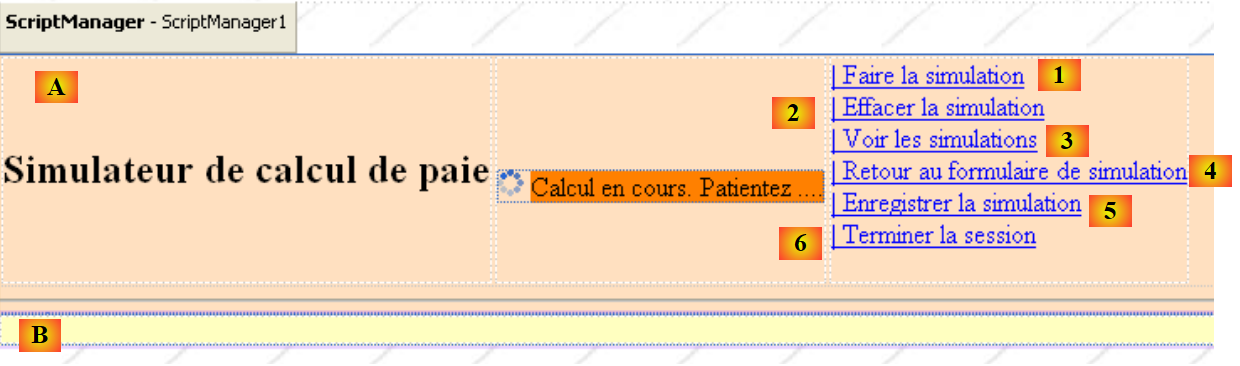 |
No. | Type | Name | Role |
Panel (pink above) | header | page header | |
Panel (yellow above) | content | page content | |
LinkButton | LinkButtonFaireSimulation | Request simulation calculation | |
LinkButton | LinkButtonEffacerSimulation | clears the input form | |
LinkButton | LinkButtonVoirSimulations | displays the list of simulations already performed | |
LinkButton | LinkButtonFormulaireSimulation | returns to the input form | |
LinkButton | LinkButtonEnregistrerSimulation | saves the current simulation to the simulation list | |
LinkButton | LinkButtonTerminerSession | ends the current session |
The corresponding source code is as follows:
<%@ Master Language="C#" AutoEventWireup="true" CodeBehind="MasterPage.master.cs" Inherits="pam_v7.MasterPage" %>
<!DOCTYPE html PUBLIC "-//W3C//DTD XHTML 1.0 Transitional//EN" "http://www.w3.org/TR/xhtml1/DTD/xhtml1-transitional.dtd">
<html xmlns="http://www.w3.org/1999/xhtml">
<head id="Head1" runat="server">
<title>Application PAM</title>
</head>
<body background="ressources/standard.jpg">
<form id="form1" runat="server">
<asp:ScriptManager ID="ScriptManager1" runat="server" EnablePartialRendering="true" />
<asp:UpdatePanel runat="server" ID="UpdatePanelPam" UpdateMode="Conditional">
<ContentTemplate>
<asp:Panel ID="entete" runat="server" BackColor="#FFE0C0">
<table>
<tr>
<td>
<h2>
Simulateur de calcul de paie</h2>
</td>
<td>
<label>
 </label>
<asp:UpdateProgress ID="UpdateProgress1" runat="server">
<ProgressTemplate>
<img alt="" src="images/indicator.gif" />
<asp:Label ID="Label5" runat="server" BackColor="#FF8000"
EnableViewState="False" Text="Calcul en cours. Patientez ....">
</asp:Label>
</ProgressTemplate>
</asp:UpdateProgress>
</td>
<td>
<asp:LinkButton ID="LinkButtonFaireSimulation" runat="server"
CausesValidation="False">| Faire la simulation<br />
</asp:LinkButton>
<asp:LinkButton ID="LinkButtonEffacerSimulation" runat="server"
CausesValidation="False">| Effacer la simulation<br />
</asp:LinkButton>
<asp:LinkButton ID="LinkButtonVoirSimulations" runat="server"
CausesValidation="False">| Voir les simulations<br />
</asp:LinkButton>
<asp:LinkButton ID="LinkButtonFormulaireSimulation" runat="server"
CausesValidation="False">| Retour au formulaire de simulation<br />
</asp:LinkButton>
<asp:LinkButton ID="LinkButtonEnregistrerSimulation" runat="server"
CausesValidation="False">| Enregistrer la simulation<br />
</asp:LinkButton>
<asp:LinkButton ID="LinkButtonTerminerSession" runat="server"
CausesValidation="False">| Terminer la session<br />
</asp:LinkButton>
</td>
</tr>
</table>
<hr />
</asp:Panel>
<div>
<asp:Panel ID="contenu" runat="server" BackColor="#FFFFC0">
<asp:ContentPlaceHolder ID="ContentPlaceHolder1" runat="server">
</asp:ContentPlaceHolder>
</asp:Panel>
</div>
</ContentTemplate>
</asp:UpdatePanel>
</form>
</body>
</html>
- Line 1: Note the name of the master page class: MasterPage
- line 8: a background image is defined for the page.
- Lines 9–64: the form
- line 10: the ScriptManager component required for Ajax effects
- lines 11–63: the AJax container
- lines 12–62: the Ajax-enabled content
- lines 13–55: the [entete] Panel component
- lines 57–60: the [contenu] Panel component
- lines 58-59: the ID [ContentPlaceHolder1] component, which will contain the encapsulated page [Formulaire.aspx, Simulations.aspx, Erreurs.aspx]
To build this page, we can insert into the [entete] panel, the code ASPX from the view [VueEntete] of the page [Default.aspx] of the version [pam-v4-3tier-nhibernate-multivues-monopage], described in section 8.5.2.
11.4.2. The page [Formulaire.aspx]
To generate this page, follow the method described in section 11.4.1 and rename the resulting page [WebForm1.aspx] to [Formulaire.aspx]. The visual appearance of the [Formulaire.aspx] page under construction will be as follows:
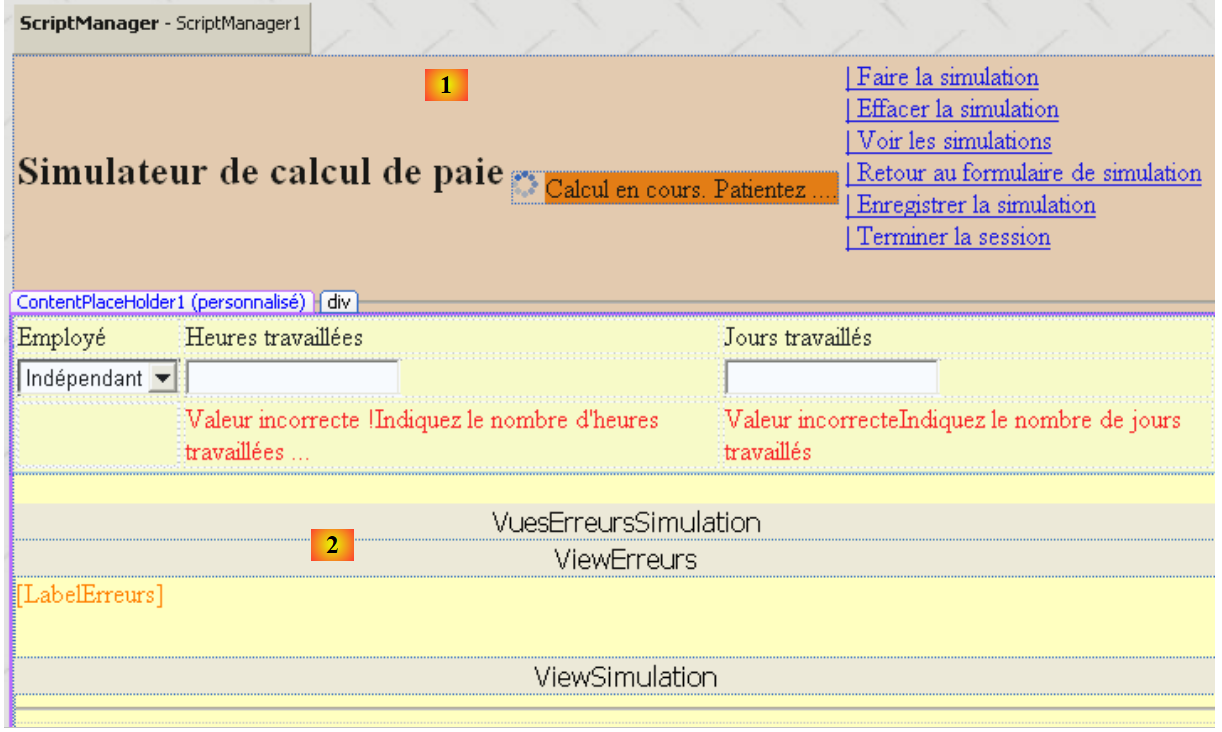 |
The visual layout of page [Formulaire.aspx] consists of two elements:
- in [1], the master page with its container [ContentPlaceHolder1] (2)
- in [2], the components placed in the [ContentPlaceHolder1] container. These are identical to those in the previous application.
The source code for this page is as follows:
<%@ Page Language="C#" MasterPageFile="~/MasterPage.master" AutoEventWireup="true"
  CodeBehind="Formulaire.aspx.cs" Inherits="pam_v7.PageFormulaire" Title="Simulation de calcul de paie : formulaire" %>

<%@ MasterType VirtualPath="~/MasterPage.master" %>
<asp:Content ID="Content1" ContentPlaceHolderID="ContentPlaceHolder1" runat="Server">
  <div>
    <table>
      <tr>
        <td>
          Employé
        </td>
        <td>
          Heures travaillées
        </td>
        <td>
          Jours travaillés
        </td>
        <td>
        </td>
      </tr>
...
</asp:Content>
- Line 1: The Page directive with its MasterPageFile attribute
- Line 4: The master page control class can expose public fields and properties. These are accessible to encapsulated pages using the syntax Master.[champ] or Master.[propriété]. The Master property of the page refers to the master page as an instance of type [System.Web.UI.MasterPage]. Therefore, in our example, we should actually write (MasterPage)(Master).[champ] or (MasterPage)(Master).[propriété]. This type conversion can be avoided by inserting the MasterType directive from line 4 into the page. The VirtualPath attribute of this directive specifies the master page file. The compiler can then identify the public fields, properties, and methods exposed by the master page class, in this case of type [MasterPage].
- Lines 5–22: the content to be inserted into the master page’s [ContentPlaceHolder1] container.
This page can be constructed by setting its content (lines 6–21) to that of the [VueSaisies] view described in Section 8.5.3 and that of the [VueSimulation] view described in Section 8.5.4.
11.4.3. The [Simulations.aspx] page
To generate this page, follow the method described in section 11.4.1 and rename the resulting page [WebForm1.aspx] to [Simulations.aspx]. The visual appearance of the [Simulations.aspx] page currently under construction is as follows:
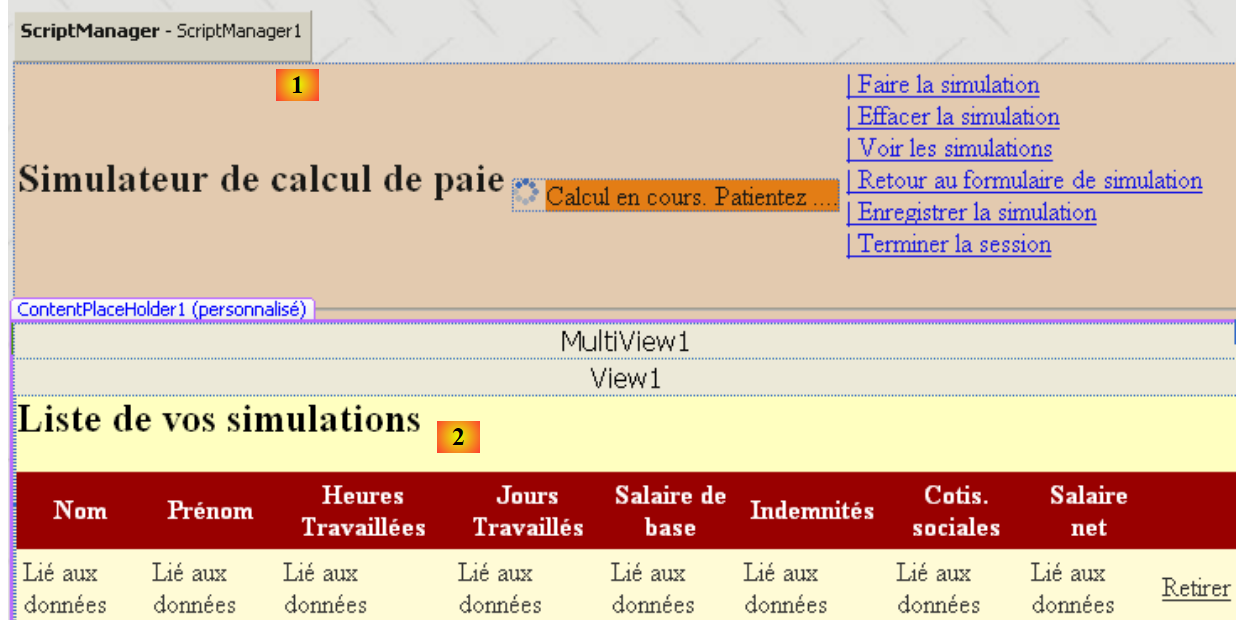 |
The visual appearance of the page [Simulations.aspx] consists of two elements:
- in [1], the master page with its container [ContentPlaceHolder1]
- in [2], the components placed in the [ContentPlaceHolder1] container. These are identical to those in the previous application.
The source code for this page is as follows:
<%@ Page Language="C#" MasterPageFile="~/MasterPage.master" AutoEventWireup="true"
  CodeBehind="Simulations.aspx.cs" Inherits="pam_v7.PageSimulations" Title="Pam : liste des simulations" %>

<%@ MasterType VirtualPath="~/MasterPage.master" %>
<asp:Content ID="Content1" ContentPlaceHolderID="ContentPlaceHolder1" runat="Server">
  <asp:MultiView ID="MultiView1" runat="server">
    <asp:View ID="View1" runat="server">
      <h2>
        Liste de vos simulations</h2>
      <p>
        <asp:GridView ID="GridViewSimulations" runat="server" ...>
...
        </asp:GridView>
      </p>
    </asp:View>
    <asp:View ID="View2" runat="server">
      <h2>
        La liste de vos simulations est vide</h2>
    </asp:View>
  </asp:MultiView><br />
</asp:Content>
This page can be built by setting the content (lines 5–21) to that of the [VueSimulations] view described in section 8.5.5 and that of the [VueSimulationsVides] view described in section 8.5.6.
11.4.4. The [Erreurs.aspx] page
To generate this page, follow the method described in section 11.4.1 and rename the resulting page [WebForm1.aspx] to [Erreurs.aspx]. The visual appearance of the [Erreurs.aspx] page currently under construction is as follows:
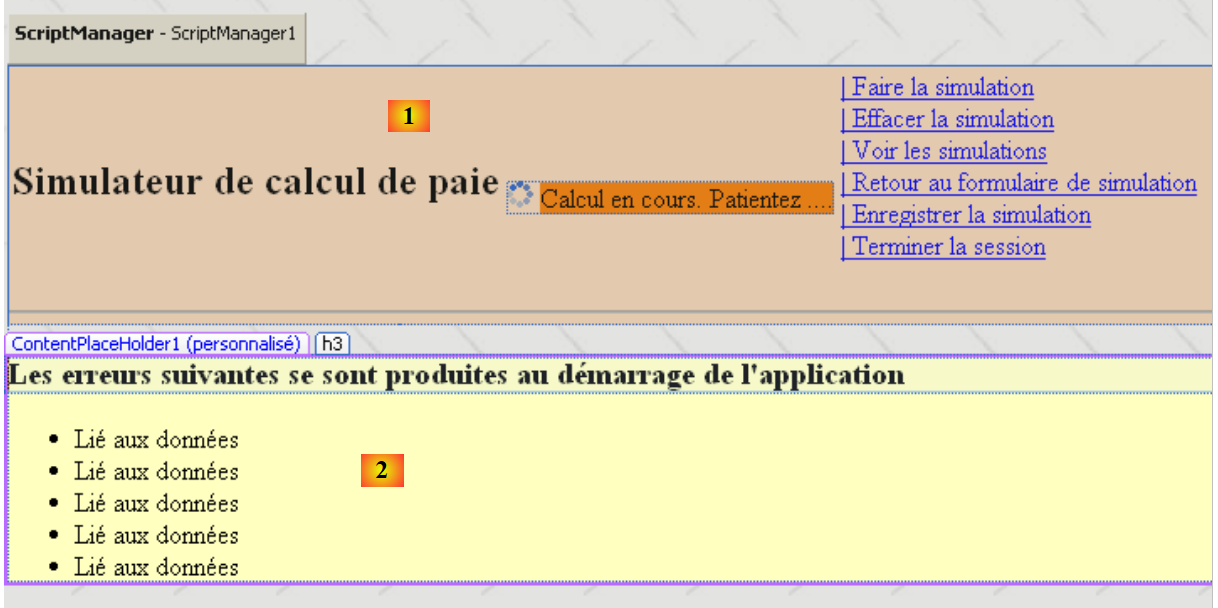 |
The visual appearance of the page [Erreurs.aspx] has two elements:
- in [1], the master page with its container [ContentPlaceHolder1]
- in [2], the components placed in the [ContentPlaceHolder1] container. These are identical to those in the previous application.
The source code for this page is as follows:
<%@ Page Language="C#" MasterPageFile="~/MasterPage.master" AutoEventWireup="true"
  CodeBehind="Erreurs.aspx.cs" Inherits="pam_v7.PageErreurs" Title="Pam : erreurs" %>

<%@ MasterType VirtualPath="~/MasterPage.master" %>
<asp:Content ID="Content1" ContentPlaceHolderID="ContentPlaceHolder1" Runat="Server">
        <h3>Les erreurs suivantes se sont produites au démarrage de l'application</h3>
        <ul>
            <asp:Repeater id="rptErreurs" runat="server">
                <ItemTemplate>
                    <li>
                        <%# Container.DataItem %>
                    </li>
                </ItemTemplate>
            </asp:Repeater>
        </ul>
</asp:Content>
11.5. Page control code
11.5.1. Overview
Let’s return to the application architecture:
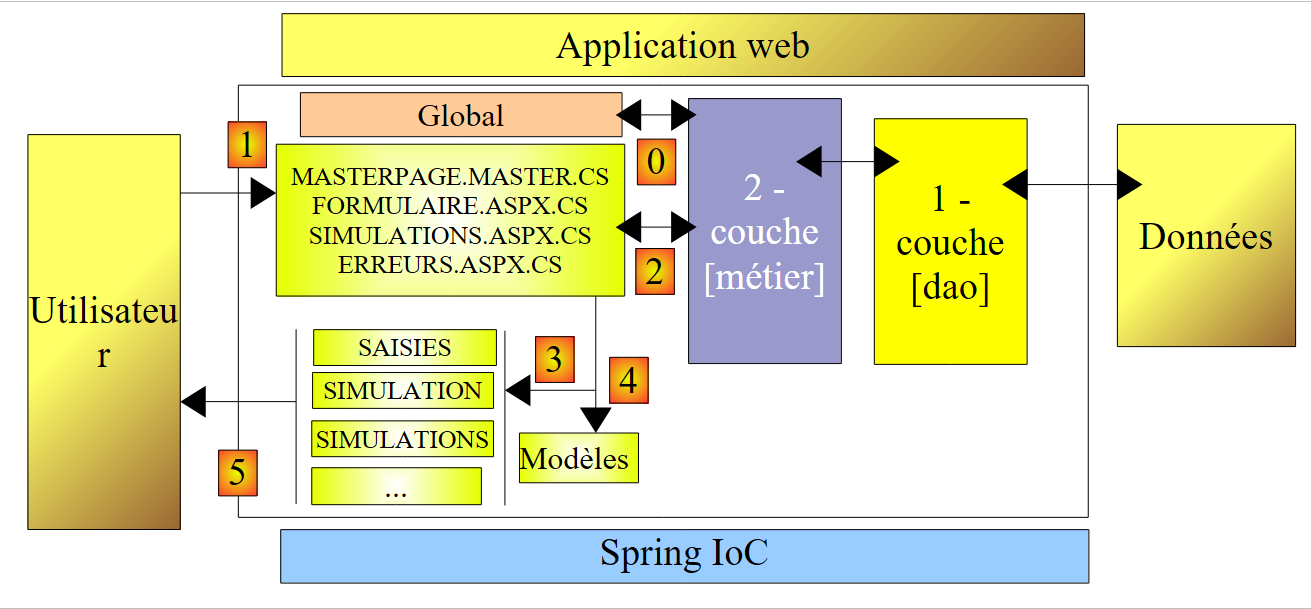 |
- [Global] is the object of type [HttpApplication] that initializes (step 0) the application. This class is identical to that of the previous version.
- The controller code, which was entirely in the previous version and in [Default.aspx.cs], is now spread across several pages:
- [MasterPage.master]: the master page for the [Formulaire.aspx, Simulations.aspx, Erreurs.aspx] pages. It contains the menu.
- [Formulaire.aspx]: the page that displays the simulation form and manages the actions that take place on this form
- [Simulations.aspx]: the page that displays the list of simulations and manages the actions performed on this page
- [Erreurs.aspx]: the page displayed when an application initialization error occurs. No actions are possible on this page.
Processing a customer request follows these steps:
- The customer makes a request to the application. They typically do so on one of the two pages [Formulaire.aspx, Simulations.aspx], but nothing prevents them from requesting the page [Erreurs.aspx]. This scenario must be accounted for.
- The requested page processes this request (step 1). To do so, it may need assistance from the [métier] layer (step 2), which itself may need the [dao] layer if data needs to be exchanged with the database. The application receives a response from the [métier] layer.
- Based on this, it selects (step 3) the view (= the response) to send to the client and provides it (step 4) with the information (the template) it needs. We have seen three possibilities for generating this response:
- the requested page (D) is also the page (R) sent in response. Building the response template (R) then consists of assigning certain components of page (D) the values they must have in the response.
- The requested page (D) is not the page (R) sent in response. The page (D) can then:
- transfer the execution flow to page (R) using the instruction Server.Transfer(" R "). The template can then be placed in the context via Context.Items("key")=value or, more rarely, in the session via Session.Items("key")=value
- redirect the client to page (R) using the instruction Response.redirect(" R "). The template can then be placed in the session but not in the context.
- The response is sent to the client (step 5)
Each of the [MasterPage.master, Formulaire.aspx, Simulations.aspx, Erreurs.aspx] pages will respond to one or more of the following events:
- Init: first event in the page lifecycle
- Load: occurs when the page loads
- Click: a click on one of the links in the master page menu
We process the pages one after another, starting with the master page.
11.5.2. Control code for page [MasterPage.master]
11.5.2.1. Class skeleton
The master page control code has the following skeleton:
using System.Web.UI.WebControls;

namespace pam_v7
{
  public partial class MasterPage : System.Web.UI.MasterPage
  {

    // the menu
    public LinkButton OptionFaireSimulation
    {
      get { return LinkButtonFaireSimulation; }
    }
...

    // set menu
    public void SetMenu(bool boolFaireSimulation, bool boolEnregistrerSimulation, bool boolEffacerSimulation, bool boolFormulaireSimulation, bool boolVoirSimulations, bool boolTerminerSession)
    {
....
    }

    // management of option [End session]
    protected void LinkButtonTerminerSession_Click(object sender, System.EventArgs e)
    {
....
    }

    // init master page
    protected void Page_Init(object sender, System.EventArgs e)
    {
....
      }
    }
  }
}
- Line 5: The class is named [MasterPage] and derives from the system class [System.Web.UI.MasterPage].
- lines 9–14: the 6 menu options are defined as public properties of the class
- lines 16–19: the public method SetMenu will allow the [Formulaire.aspx, Simulations.aspx, Erreurs.aspx] pages to set the master page menu
- lines 22–25: the procedure that will handle the click on the [LinkButtonTerminerSession] link
- lines 28-31: the procedure for handling the master page's Init event
11.5.2.2. Public properties of the class
using System.Web.UI.WebControls;

namespace pam_v7
{
  public partial class MasterPage : System.Web.UI.MasterPage
  {

    // the menu
    public LinkButton OptionFaireSimulation
    {
      get { return LinkButtonFaireSimulation; }
    }

    public LinkButton OptionEffacerSimulation
    {
      get { return LinkButtonEffacerSimulation; }
    }

    public LinkButton OptionEnregistrerSimulation
    {
      get { return LinkButtonEnregistrerSimulation; }
    }

    public LinkButton OptionVoirSimulations
    {
      get { return LinkButtonVoirSimulations; }
    }

    public LinkButton OptionTerminerSession
    {
      get { return LinkButtonTerminerSession; }
    }

    public LinkButton OptionFormulaireSimulation
    {
      get { return LinkButtonFormulaireSimulation; }
    }

...
  }
}
To understand this code, you need to recall the components that make up the master page:
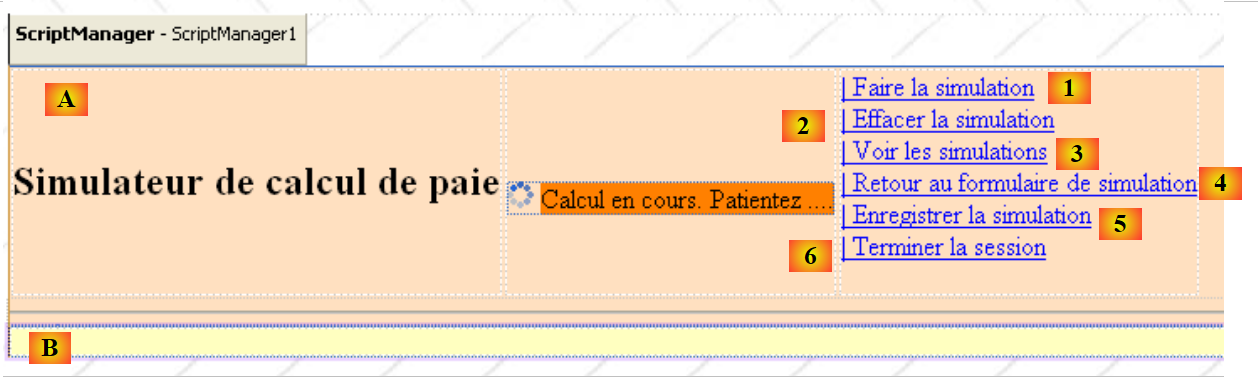 |
No. | Type | Name | Role |
Panel (pink above) | header | page header | |
Panel (yellow above) | content | page content | |
LinkButton | LinkButtonFaireSimulation | Request simulation calculation | |
LinkButton | LinkButtonEffacerSimulation | clears the input form | |
LinkButton | LinkButtonVoirSimulations | displays the list of simulations already performed | |
LinkButton | LinkButtonFormulaireSimulation | Return to the entry form | |
LinkButton | LinkButtonEnregistrerSimulation | saves the current simulation to the simulation list | |
LinkButton | LinkButtonTerminerSession | ends the current session |
Components 1 through 6 are not accessible outside the page that contains them. The properties in lines 9 through 37 are intended to make them accessible to external classes, in this case the classes of the application’s other pages.
11.5.2.3. The SetMenu method
The public method SetMenu allows the [Formulaire.aspx, Simulations.aspx, Erreurs.aspx] pages to set the master page menu. Its code is basic:
        // set menu
        public void SetMenu(bool boolFaireSimulation, bool boolEnregistrerSimulation, bool boolEffacerSimulation, bool boolFormulaireSimulation, bool boolVoirSimulations, bool boolTerminerSession)
        {
            // set menu options
            LinkButtonFaireSimulation.Visible = boolFaireSimulation;
            LinkButtonEnregistrerSimulation.Visible = boolEnregistrerSimulation;
            LinkButtonEffacerSimulation.Visible = boolEffacerSimulation;
            LinkButtonVoirSimulations.Visible = boolVoirSimulations;
            LinkButtonFormulaireSimulation.Visible = boolFormulaireSimulation;
            LinkButtonTerminerSession.Visible = boolTerminerSession;
}
11.5.2.4. Event handling on the master page
The master page will handle two events:
- the Init event, which is the first event in the page's lifecycle
- the Click event on the [LinkButtonTerminerSession] link
The master page has five other links: [LinkButtonFaireSimulation, LinkButtonEnregistrerSimulation, LinkButtonEffacerSimulation, LinkButtonVoirSimulations, LinkButtonFormulaireSimulation]. As an example, let’s examine what needs to be done when the [LinkButtonFaireSimulation] link is clicked:
- Check the data entered (hours, days) on the [Formulaire.aspx] page
- calculate the salary
- display the results on the [Formulaire.aspx] page
Steps 1 and 3 require access to the components of the [Formulaire.aspx] page. This is not the case. In fact, the master page has no knowledge of the components of the pages that may be inserted into its [ContentPlaceHolder1] container. In our example, it is up to page [Formulaire.aspx] to handle the click on link [LinkButtonFaireSimulation] because it is the one displayed when this event occurs. How can it be notified of this event?
- Since the link [LinkButtonFaireSimulation] is not part of the page [Formulaire.aspx], we cannot write the usual procedure in [Formulaire.aspx]:
    private void LinkButtonFaireSimulation_Click(object sender, System.EventArgs e)
    {
...
}
We can work around the problem with the following code in [Formulaire.aspx]:
using System.Collections.Generic;
...

namespace pam_v7
{
    public partial class Formulaire : System.Web.UI.Page
    {
// page loading
    protected void Page_Load(object sender, System.EventArgs e)
    {
        // event manager
        Master.OptionFaireSimulation.Click += OptFaireSimulation_Click;
        Master.OptionEffacerSimulation.Click += OptEffacerSimulation_Click;
        Master.OptionVoirSimulations.Click += OptVoirSimulations_Click;
        Master.OptionEnregistrerSimulation.Click += OptEnregistrerSimulation_Click;
...
    }

    // payroll calculation
    private void OptFaireSimulation_Click(object sender, System.EventArgs e)
    {
....
    }

    // delete simulation
    private void OptEffacerSimulation_Click(object sender, System.EventArgs e)
    {
...
    }

    protected void OptVoirSimulations_Click(object sender, System.EventArgs e)
    {
...
    }

    protected void OptEnregistrerSimulation_Click(object sender, System.EventArgs e)
    {
...
    }
 }
}
- Lines 12–15: When the Load event of page [Formulaire.aspx] occurs, the [MasterPage] class of the master page has been instantiated. Its public Optionxx properties are accessible and are of type LinkButton, a component that supports the Click event. We associate the following methods with these Click events:
- OptFaireSimulation_Click for the Click event on the link LinkButtonFaireSimulation
- OptEffacerSimulation_Click for the Click event on the link LinkButtonEffacerSimulation
- OptVoirSimulations_Click for the Click event on the link LinkButtonVoirSimulations
- OptEnregistrerSimulation_Click for the Click event on the link LinkButtonEnregistrerSimulation
Event handling for clicking on the six links in the menu will be distributed as follows:
- the page [Formulaire.aspx] will handle the links [LinkButtonFaireSimulation, LinkButtonEnregistrerSimulation, LinkButtonEffacerSimulation, LinkButtonVoirSimulations]
- the page [Simulations.aspx] will handle the link [LinkButtonFormulaireSimulation]
- the master page [MasterPage.master] will handle the link [LinkButtonTerminerSession]. For this event, it does not need to know the page it encapsulates.
11.5.2.5. The Init event of the master page
The three [Formulaire.aspx, Simulations.aspx, Erreurs.aspx] pages in the application have [MasterPage.master] as their master page. Let’s call the master page M and the encapsulated page E. When page E is requested by the client, the following events occur in order:
- E.Init
- M.Init
- E.Load
- M.Load
- ...
We will use the Init event of page M to execute code that should be run as early as possible, regardless of the target page E. To understand this code, let’s review the application overview:
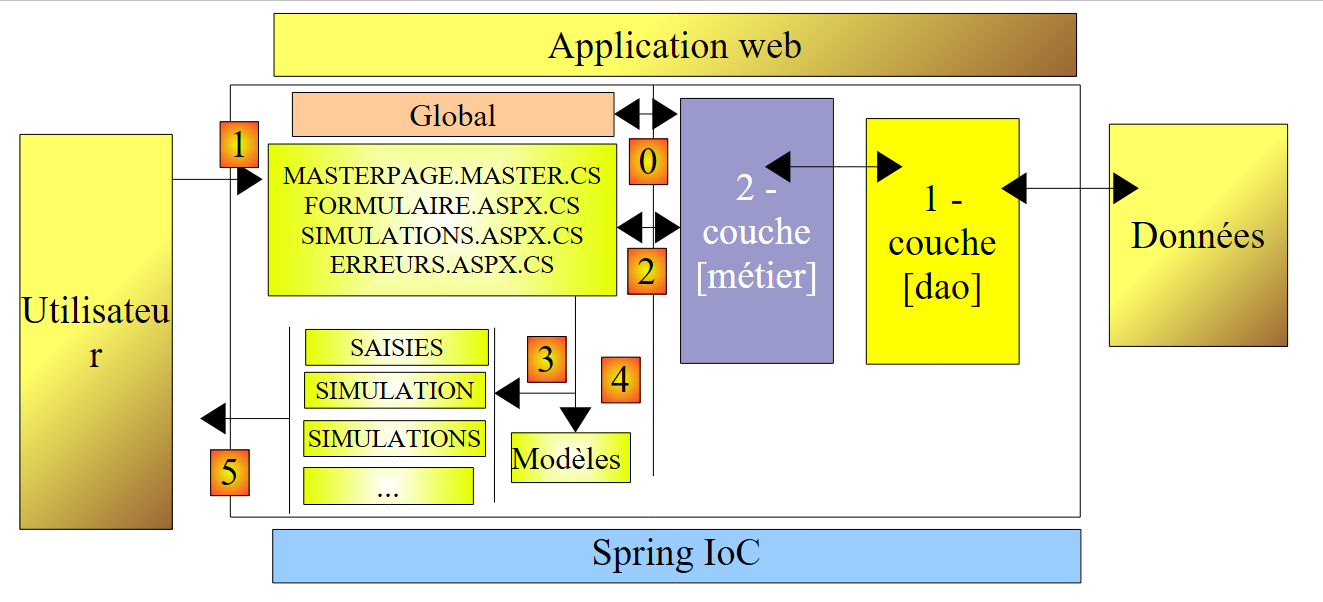 |
Above, [Global] is the object of type [HttpApplication] that initializes the application. This class is the same as in version [pam-v4-3tier-nhibernate-multivues-monopage]:
using System;
...

namespace pam_v7
{
  public class Global : System.Web.HttpApplication
  {
    // --- static application data ---
    public static Employe[] Employes;
    public static IPamMetier PamMetier = null;
    public static string Msg;
    public static bool Erreur = false;

    // application startup
    public void Application_Start(object sender, EventArgs e)
    {
...
    }

    public void Session_Start(object sender, EventArgs e)
    {
...
    }
  }
}
If the [Global] class fails to initialize the application correctly, it sets two static public variables:
- the boolean Error on line 12 is set to true
- the `Msg` variable on line 11 contains a message providing details about the error encountered
When the user requests one of the [Formulaire.aspx, Simulations.aspx] pages while the application has not initialized correctly, this request must be forwarded or redirected to the [Erreurs.aspx] page, which will display the error message from the [Global] class. There are several ways to handle this scenario:
- Perform the initialization error check in the Init or Load event handler of each of the [Formulaire.aspx, Simulations.aspx] pages
- Perform the initialization error check in the Init or Load event handler of the master page for these two pages. This method has the advantage of placing the initialization error check in a single location.
We choose to perform the initialization error check in the Init event handler of the master page:
        protected void Page_Init(object sender, System.EventArgs e)
        {
            // event manager
            LinkButtonTerminerSession.Click += LinkButtonTerminerSession_Click;
            // initialization errors?
            if (Global.Erreur)
            {
                // is the encapsulated page the error page?
                bool isPageErreurs =...;
                // if the error page is displayed, leave it alone, otherwise redirect the client to the error page
                if (!isPageErreurs)
                    Response.Redirect("Erreurs.aspx");
                return;
            }
}
The code above will execute as soon as any of the [Formulaire.aspx, Simulations.aspx, Erreurs.aspx] pages is requested. If the requested page is [Formulaire.aspx, Simulations.aspx], we simply (line 12) redirect the client to the page [Erreurs.aspx], which displays the error message from the class [Global]. If the requested page is [Erreurs.aspx], this redirection must not occur: the page [Erreurs.aspx] must be displayed. We therefore need to know, within the [Page_Init] method of the master page, which page it encapsulates.
Let’s return to the master page’s component tree:
...
<body background="ressources/standard.jpg">
    <form id="form1" runat="server">
        <asp:Panel ID="entete" runat="server" BackColor="#FFE0C0" Width="1239px" >
...
        </asp:Panel>
        <div>
            <asp:Panel ID="contenu" runat="server" BackColor="#FFFFC0">
                <asp:ContentPlaceHolder ID="ContentPlaceHolder1" runat="server">
                </asp:ContentPlaceHolder>
            </asp:Panel>
        </div>
    </form>
</body>
</html>
- lines 1-13: the "form1" container of id
- lines 4-6: the container of id "header", included in the container of id "form1"
- lines 8-11: the id container "content", included in the id container "form1"
- lines 9-10: the id "ContentPlaceHolder1" container, included in the id "content" container
A page E embedded in master page M is contained within the id container "ContentPlaceHolder1". To reference a id component C on this page E, write:
this.FindControl("form1").FindControl("contenu").FindControl("ContentPlaceHolder1").FindControl("C");
The component tree for page [Erreurs.aspx] is as follows:
<%@ Page Language="C#" MasterPageFile="~/MasterPage.master" AutoEventWireup="true"
  CodeBehind="Erreurs.aspx.cs" Inherits="pam_v7.PageErreurs" Title="Pam : erreurs" %>

<%@ MasterType VirtualPath="~/MasterPage.master" %>
<asp:Content ID="Content1" ContentPlaceHolderID="ContentPlaceHolder1" Runat="Server">
        <h3>Les erreurs suivantes se sont produites au démarrage de l'application</h3>
        <ul>
            <asp:Repeater id="rptErreurs" runat="server">
                <ItemTemplate>
                    <li>
                        <%# Container.DataItem %>
                    </li>
                </ItemTemplate>
            </asp:Repeater>
        </ul>
</asp:Content>
When the [Erreurs.aspx] page is merged with the M master page, the content of the <asp:Content> tag above (lines 5–16) is integrated into the <asp:ContentPlaceHolder> tag of id "ContentPlaceholder1" on page M, the component tree of which then becomes:
- Line 12: The [rptErreurs] component can be used to determine whether or not master page M contains page [Erreurs.aspx]. This component exists only on this page.
These explanations are sufficient to understand the code for the [Page_Init] procedure in the master page:
protected void Page_Init(object sender, System.EventArgs e)
        {
            // event manager
            LinkButtonTerminerSession.Click += LinkButtonTerminerSession_Click;
            // initialization errors?
            if (Global.Erreur)
            {
                // is the encapsulated page the error page?
                bool isPageErreurs = this.FindControl("form1").FindControl("contenu").FindControl("ContentPlaceHolder1").FindControl("rptErreurs") != null;
                // if the error page is displayed, leave it alone, otherwise redirect the client to the error page
                if (!isPageErreurs)
                    Response.Redirect("Erreurs.aspx");
                return;
            }
        }
- Line 4: An event handler is associated with the Click event on the LinkButtonTerminerSession link. This handler is in the MasterPage class.
- line 6: we check whether the [Global] class has set its Error boolean
- line 9: if so, the IsPageErreurs boolean indicates whether the page embedded in the master page is the [Erreurs.aspx] page
- line 12: if the page embedded in the master page is not page [Erreurs.aspx], then the client is redirected to that page; otherwise, no action is taken.
11.5.2.6. The Click event on the link [LinkButtonTerminerSession]
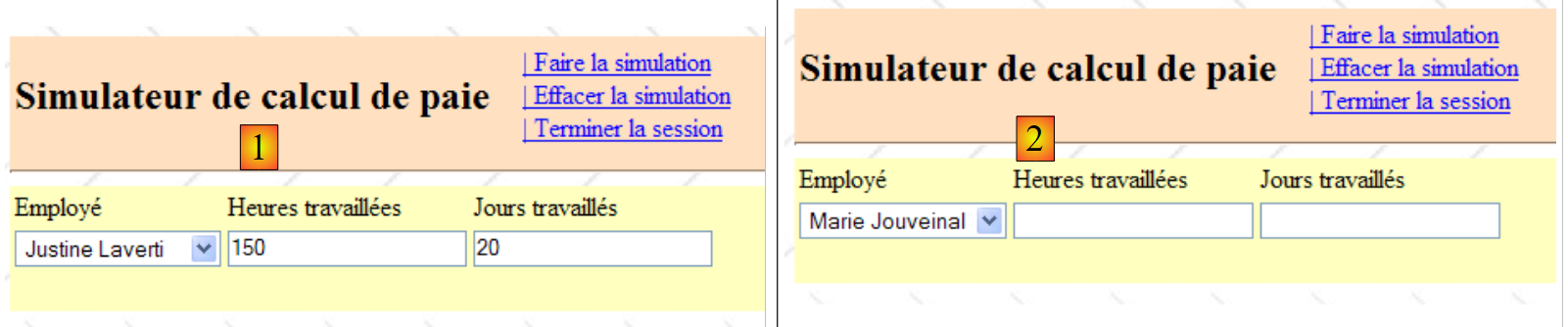 |
When the user clicks the [Terminer la session] link in view (1) above, the session must be cleared of its contents and an empty form (2) must be displayed.
The code for the handler of this event could be as follows:
        protected void LinkButtonTerminerSession_Click(object sender, System.EventArgs e)
        {
            // quit session
            Session.Abandon();
            // the [form] view is displayed
            Response.Redirect("Formulaire.aspx");
}
- line 4: the current session is abandoned
- line 6: the client is redirected to the [Formulaire.aspx] page
We can see that this code does not involve any of the components of the [Formulaire.aspx, Simulations.aspx, Erreurs.aspx] pages. The event can therefore be handled by the master page itself.
11.5.3. Control code for the [Erreurs.aspx] page
The control code for page [Erreurs.aspx] could be as follows:
using System.Collections.Generic;

namespace pam_v7
{
  public partial class Erreurs : System.Web.UI.Page
  {
    protected void Page_Load(object sender, System.EventArgs e)
    {
      // initialization errors?
      if (Global.Erreur)
      {
        // prepare the template for the [errors] page
        List<string> erreursInitialisation = new List<string>();
        erreursInitialisation.Add(Global.Msg);
        // associate the error list with its component
        rptErreurs.DataSource = erreursInitialisation;
        rptErreurs.DataBind();
      }
      // set the menu
      Master.SetMenu(false, false, false, false, false, false);
    }
  }
}
Note that the sole purpose of page [Erreurs.aspx] is to display an application initialization error when one occurs:
- line 10: we check if initialization ended with an error
- lines 13–14: if so, the error message (Global.Msg) is placed in a list [ErreursInitialisation]
- lines 16–17: the [rptErreurs] component is instructed to display this list
- line 20: in all cases (error or not), the master page menu options are not displayed, so the user cannot initiate any new actions from this page.
What happens if the user directly requests the page [Erreurs.aspx] (which they are not supposed to do during normal use of the application)? By examining the code for [MasterPage.master.cs] and [Erreurs.aspx.cs], we can see that:
- if there was an initialization error, it is displayed
- if there was no initialization error, the user receives a page containing only the header of [MasterPage.master] with no option menu displayed.
11.5.4. Control code for the [Formulaire.aspx] page
11.5.4.1. Class skeleton
The skeleton of the control code for page [Formulaire.aspx] could be as follows:
using Pam.Metier.Entites;
...

partial class PageFormulaire : System.Web.UI.Page
{

    // page loading
    protected void Page_Load(object sender, System.EventArgs e)
    {
        // event manager
        Master.OptionFaireSimulation.Click += OptFaireSimulation_Click;
        Master.OptionEffacerSimulation.Click += OptEffacerSimulation_Click;
        Master.OptionVoirSimulations.Click += OptVoirSimulations_Click;
        Master.OptionEnregistrerSimulation.Click += OptEnregistrerSimulation_Click;
....
    }

    // payroll calculation
    private void OptFaireSimulation_Click(object sender, System.EventArgs e)
    {
....
    }

    // delete simulation
    private void OptEffacerSimulation_Click(object sender, System.EventArgs e)
    {
...
    }

    protected void OptVoirSimulations_Click(object sender, System.EventArgs e)
    {
....
    }

    protected void OptEnregistrerSimulation_Click(object sender, System.EventArgs e)
    {
...
    }

}
The control code for page [Formulaire.aspx] handles five events:
- the page's Load event
- the Click event on the [LinkButtonFaireSimulation] link on the master page
- the Click event on the [LinkButtonEffacerSimulation] link on the master page
- the Click event on the [LinkButtonEnregistrerSimulation] link on the master page
- the Click event on the [LinkButtonVoirSimulations] link on the master page
11.5.4.2. Page Load event
The skeleton of the page Load event handler could be as follows:
    protected void Page_Load(object sender, System.EventArgs e)
    {
        // event manager
        Master.OptionFaireSimulation.Click += OptFaireSimulation_Click;
        Master.OptionEffacerSimulation.Click += OptEffacerSimulation_Click;
        Master.OptionVoirSimulations.Click += OptVoirSimulations_Click;
        Master.OptionEnregistrerSimulation.Click += OptEnregistrerSimulation_Click;
        // view [entries] display
        ...
        // menu positioning master page
        ...
        // query processing GET
        if (!IsPostBack)
        {
            // loading employee names into the combo
...
            // init view [entries] with entries stored in the session if they exist
....
        }
}
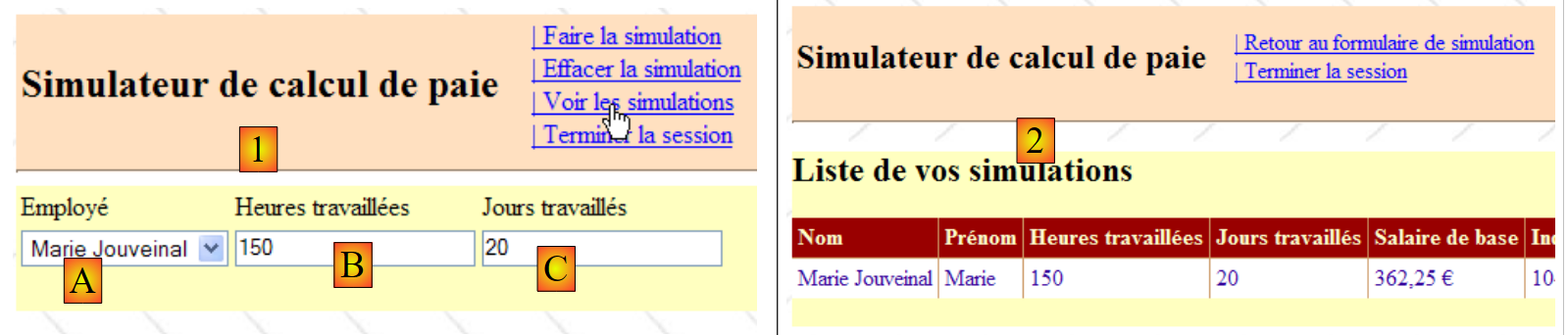
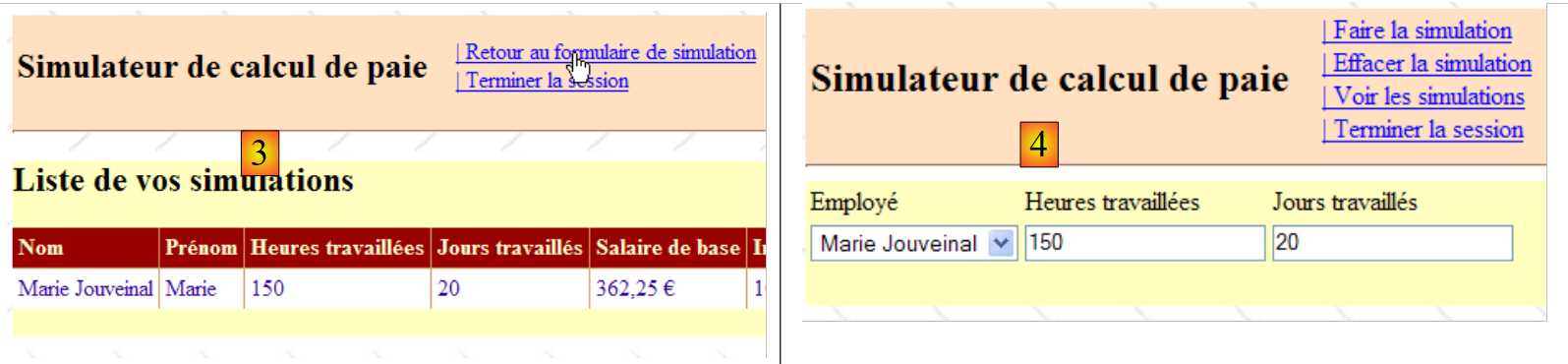
An example to clarify the comment on line 17 could be this:
 |
 |
- In [1], we request to view the list of simulations. Entries were made in [A, B, C].
- In [2], the list is displayed
- In [3], we request to return to the form
- In [4], the form is displayed exactly as it was left. Since there were two requests, (1,2) and (3,4), this means that:
- when switching from [1] to [2], the entries from [1] were saved
- when switching from [3] to [4], they were restored. It is procedure [Page_Load] from [Formulaire.aspx] that performs this restoration.
Question: Complete the Page_Load procedure using the comments and code from version and [pam-v4-3tier-nhibernate-multivues-monopage]
11.5.4.3. Handling Click Events on Menu Links
The framework for the event handlers for clicks on links in the master page is as follows:
// payroll calculation
    private void OptFaireSimulation_Click(object sender, System.EventArgs e)
    {
        // ajax effect
        Thread.Sleep(3000);
        // valid page?
        Page.Validate();
        if (!Page.IsValid)
        {
            // view display [input]
...
        }
        // the page is validated - inputs are retrieved
...
        // we calculate the employee's salary
        FeuilleSalaire feuillesalaire;
        try
        {
            feuillesalaire = ...;
        }
        catch (PamException ex)
        {
            // we encountered a problem
...
            return;
        }
        // put the result in the session
        Session["simulation"] = ...;
        // put the entries in the session
...
        // display
...
        // views display
...
        // display menu MasterPage
...
    }

    // delete simulation
    private void OptEffacerSimulation_Click(object sender, System.EventArgs e)
    {
        // display panel [input]
...
        // selection 1st employee
...
    }

    protected void OptVoirSimulations_Click(object sender, System.EventArgs e)
    {
        // put the entries in the session
...
        // the [simulations] view is displayed
        Response.Redirect("simulations.aspx");
    }

    protected void OptEnregistrerSimulation_Click(object sender, System.EventArgs e)
    {
        // save the current simulation in the user's session
...
        // the [simulations] view is displayed
        Response.Redirect("simulations.aspx");
}
Question: Complete the code for the procedures above using the comments and code from version and [pam-v4-3tier-nhibernate-multivues-monopage]
11.5.5. Control code for page [Simulations.aspx]
The skeleton of the page control code for [Simulations.aspx] could be as follows:
using System.Collections.Generic;
using Pam.Web;
using System.Web.UI.WebControls;

partial class PageSimulations : System.Web.UI.Page
{

    // simulations
    private List<Simulation> simulations;

    // page loading
    protected void Page_Load(object sender, System.EventArgs e)
    {
        // event manager
        Master.OptionFormulaireSimulation.Click += OptFormulaireSimulation_Click;
        GridViewSimulations.RowDeleting += GridViewSimulations_RowDeleting;
        // simulations are retrieved from the
        simulations = ...;
        // are there any simulations?
        if (simulations.Count != 0)
        {
            // first view visible
            ...
            // fill the gridview
            ...
        }
        else
        {
            // second view
            ...
        }
        // set the menu
        ...
    }

    protected void GridViewSimulations_RowDeleting(object sender, System.Web.UI.WebControls.GridViewDeleteEventArgs e)
    {
        // simulations are retrieved from the
        List<Simulation> simulations = ...;
        // delete the designated simulation (e.RowIndex represents the number of the deleted line in the gridview)
        ..
        // are there any simulations left?
        if (simulations.Count != 0)
        {
            // fill the gridview
            ...
        }
        else
        {
            // view [SimulationsVides]
            ...
        }
    }

    protected void OptFormulaireSimulation_Click(object sender, System.EventArgs e)
    {
        // the [form] view is displayed
        Response.Redirect("formulaire.aspx");
    }

}
Question: Complete the code for the procedures above using the comments and code from version and [pam-v4-3tier-nhibernate-multivues-monopage]
11.5.6. Control code for the [Default.aspx] page
You can include a page named [Default.aspx] in the application to allow the user to request the URL from the application without specifying a page, as shown below:
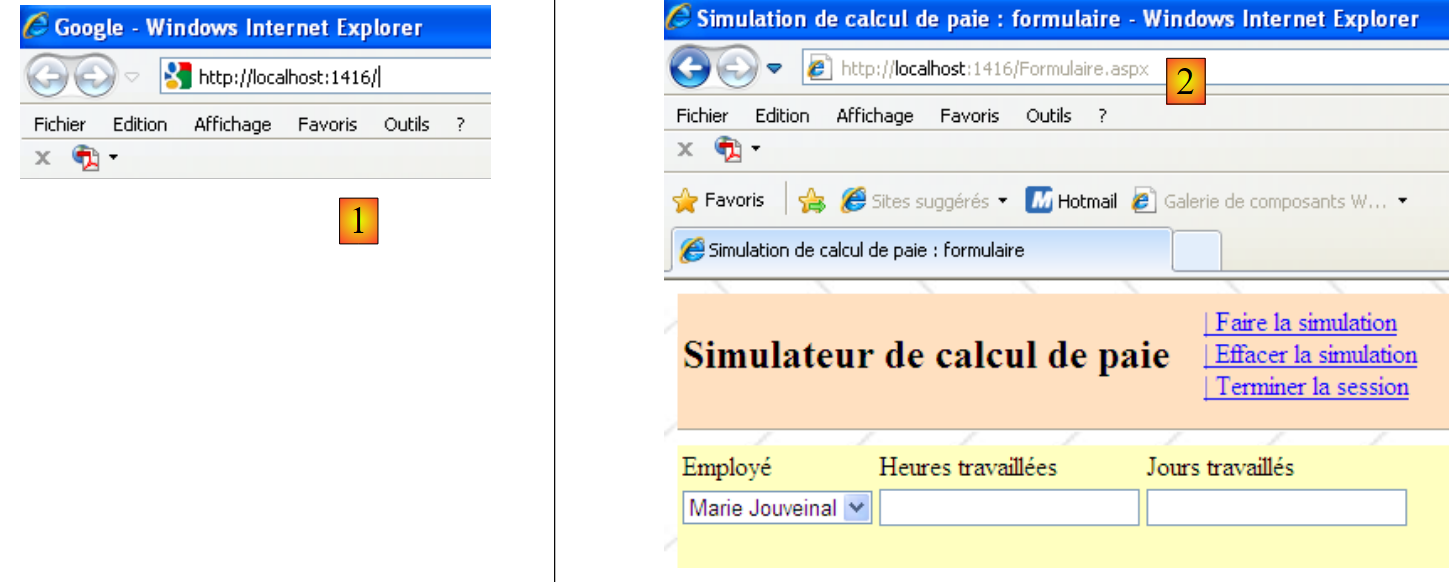 |
The request [1] received the page [Formulaire.aspx] (2) in response. We know that request (1) is handled by default by the application’s page [Default.aspx]. To obtain (2), [Default.aspx] simply needs to redirect the client to the [Formulaire.aspx] page. This can be achieved with the following code:
partial class _Default : System.Web.UI.Page
{

    protected void Page_Init(object sender, System.EventArgs e)
    {
        // redirects to the input form
        Response.Redirect("Formulaire.aspx");
    }
}
Does the presentation page [Default.aspx] contain only the directive that links it to [Default.aspx.cs]:
<%@ Page Language="C#" AutoEventWireup="true"
  CodeBehind="Default.aspx.cs" Inherits="pam_v7._Default" Title="Untitled Page" %>