3. The Case Study
We want to write a .NET application that allows a user to simulate payroll calculations for child care providers at the "Maison de la petite enfance" association in a municipality. We will focus as much on the organization of the application’s DotNet code as on the code itself.
3.1. The database " "
The static data needed to generate the pay stub is stored in a SQL Server Express database named dbpam (pam = Paie Assistante Maternelle). This database has an administrator named sa with the password msde.
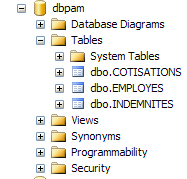 |
The database has three tables, EMPLOYES, COTISATIONS, and INDEMNITES, with the following structure:
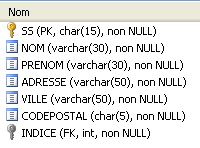
Table EMPLOYES : rassemble des informations sur les différentes assistantes maternelles
Structure:
 |
|
Its content could be as follows:

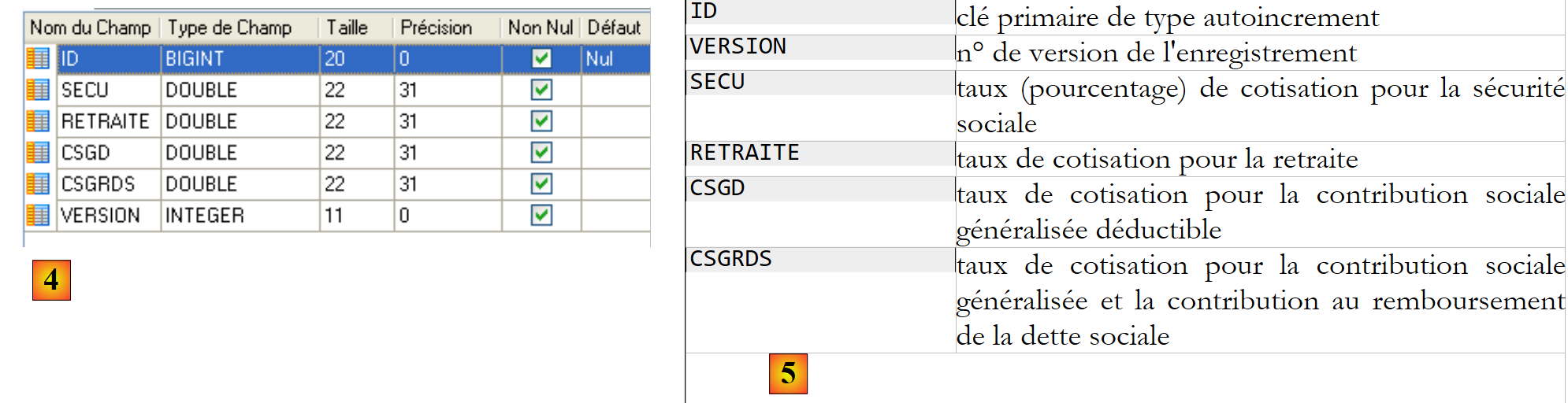
Table COTISATIONS : rassemble les taux des cotisations sociales prélevées sur le salaire
Structure:
 |
Its contents could be as follows:
 |
Social contribution rates are independent of the employee. The previous table has only one row.
 |
|
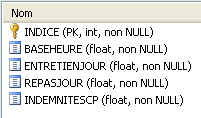
Its content could be as follows:

Note that allowances may vary from one child care provider to another. They are linked to a specific child care provider via their pay grade. Thus, Ms. Marie Jouveinal, who has a pay grade of 2 (table EMPLOYES), has an hourly wage of 2.1 euros (table INDEMNITES).
The relationships between the three tables are as follows:
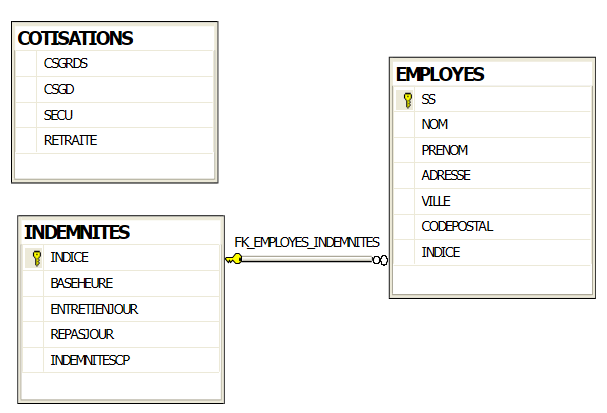 |
There is a foreign key relationship between the column EMPLOYES (INDICE) and the column INDEMNITES (INDICE).
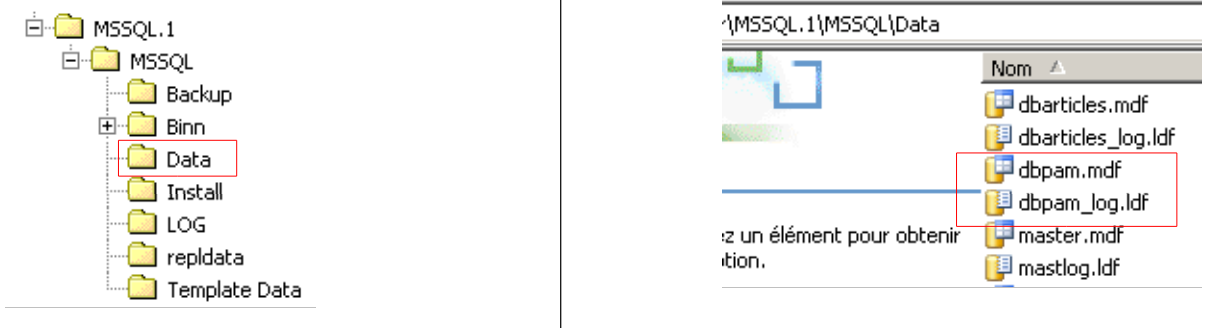
The [dbpam] database created in this way generates two files in the SQL Server Express folder:
 |
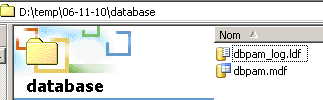
The [dbpam.mdf, dbpam_log.ldf] files can be transferred to another machine and reattached to the SGBD SQL Server Express on that machine. Here is how to do it:
- The files from BD and [dbpam] are duplicated in a folder
 |
- Launch SQL Server Express
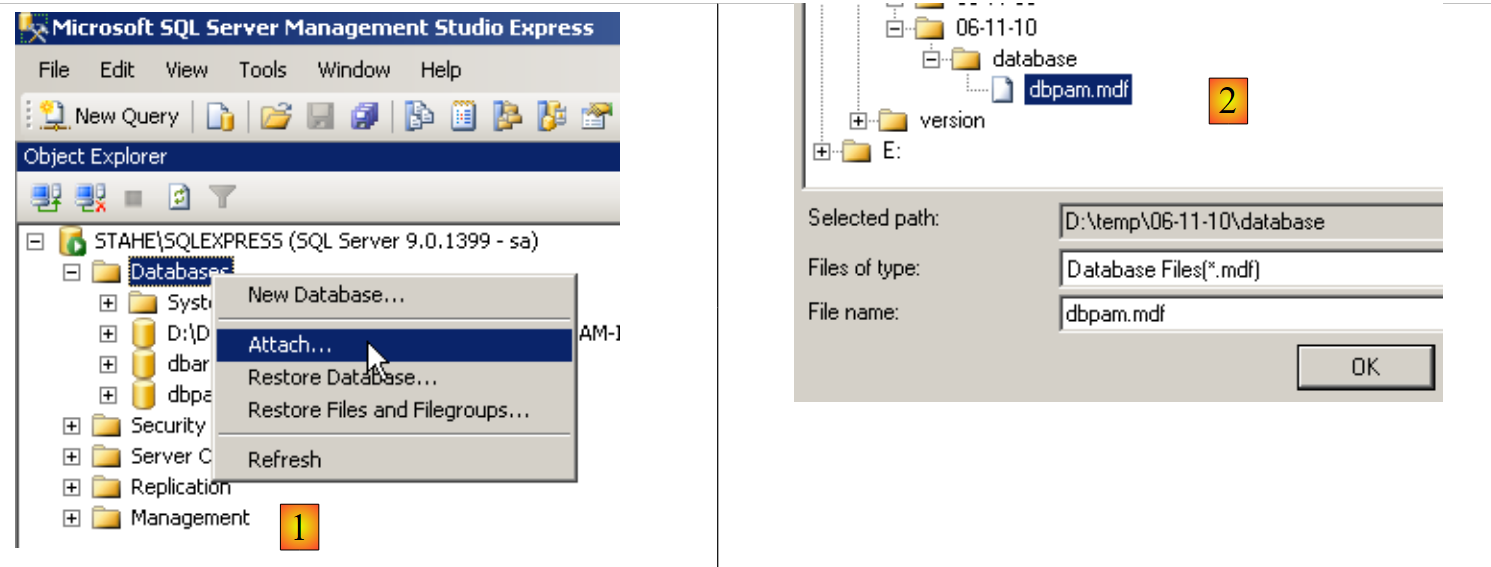
- Using the SQL Server Management Studio Express client, attach the [dbpam.mdf] file to the SGBD:
 |
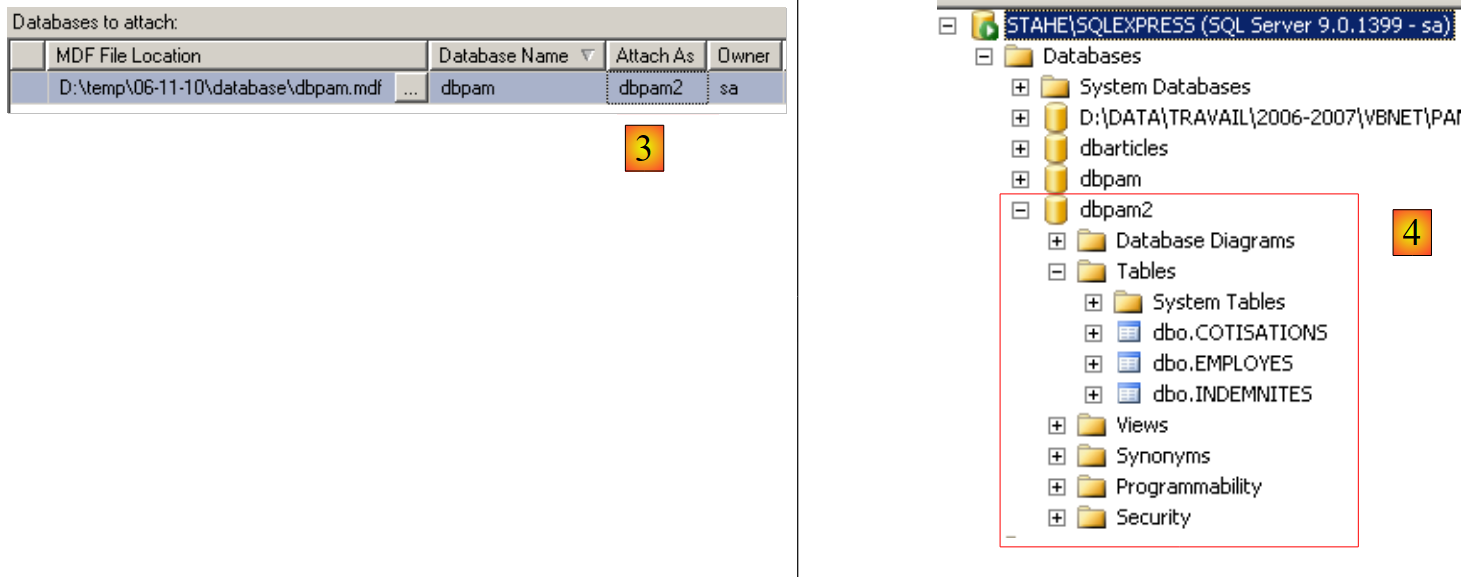 |
- right-click on [Databases] / Attach
- Select the [dbpam.mdf] file using a button ([Add] not shown)
- The attached file will create a BD file that must not already exist. Here, in the [Attach As] field, we have named the new BD file [dbpam2].
- We can see the new BD and its tables
This technique of attaching a BD is useful for moving a BD from one position to another, and we will use it occasionally here.
3.2. calculation method for a child care provider’s salary
We will now explain how to calculate a child care provider’s monthly salary. As an example, we will use the salary of Ms. Marie Jouveinal, who worked 150 hours over 20 days during the pay period.
The following factors are taken into account: | | |
The child care provider's base salary is calculated using the following formula: | ||
A number of social security contributions must be deducted from this base salary: | | |
Total Social Security Contributions: | ||
In addition, the child care provider is entitled to a daily living allowance and a meal allowance for each day worked. As such, she receives the following allowances: | | |
In the end, the salary net to be paid to the childminder is as follows: |
3.3. Reminders ADO.NET
The payroll calculation application requires information from the [dbpam] database. Its structure will be as follows:
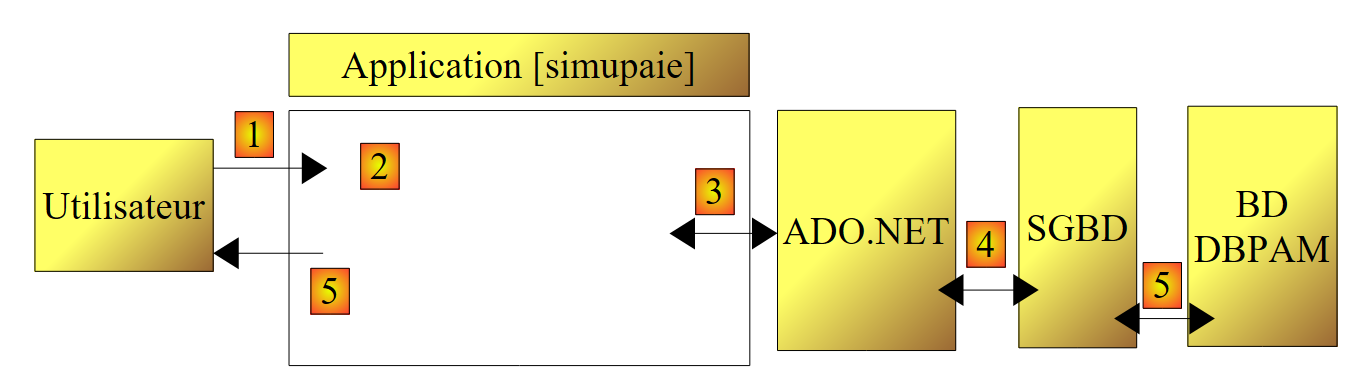 |
- In [1], the user makes a request
- in [2], the payroll application processes it.
- It may then need data from the database. It then sends a query to the ADO.NET provider of the SGBD used by [4].
- The latter queries the [5] database and returns its results to the ADO.NET provider, which in turn passes them back to the application
- which processes these results and generates a response [5] for the user
We will now review the main interfaces provided by an ADO.NET provider to its clients and [3].
In connected mode, the application:
- opens a connection to the data source
- works with the data source in read/write mode
- closes the connection
Three ADO.NET interfaces are primarily involved in these operations:
- IDbConnection, which encapsulates the connection’s properties and methods.
- IDbCommand, which encapsulates the properties and methods of the executed SQL command.
- IDataReader, which encapsulates the properties and methods of the result of a SQL Select command.
The IDbConnection interface
is used to manage the connection to the database. Among the methods M and properties P of this interface are the following:
Name | Type | Role |
P | Database connection string. It specifies all the parameters required to establish a connection to a specific database. | |
M | Opens the connection to the database defined by ConnectionString | |
M | closes the connection | |
M | starts a transaction. | |
P | Connection status: ConnectionState.Closed, ConnectionState.Open, ConnectionState.Connecting, ConnectionState.Executing, ConnectionState.Fetching, ConnectionState.Broken |
If Connection is a class that implements the IDbConnection interface, the connection can be opened as follows:
The IDbCommand interface
is used to execute a SQL command or a stored procedure. Among the methods M and properties P of this interface are the following:
Name | Type | Role |
P | specifies what to execute - takes its values from an enumeration: - CommandType.Text: executes the command SQL defined in the property CommandText. This is the default value. - CommandType.StoredProcedure: executes a stored procedure in the database | |
P | - the text of the SQL command to execute if CommandType= CommandType.Text - the name of the stored procedure to execute if CommandType = CommandType.StoredProcedure | |
P | The IDbConnection connection to use to execute the SQL command | |
P | The transaction IDbTransaction in which to execute the request SQL | |
P | The list of parameters for a configured SQL command. The command `update articles set price=price*1.1 where id=@id` has the parameter @id. | |
M | to execute a SQL Select statement. This returns a IDataReader object representing the result of the Select statement. | |
M | to execute a SQL Update, Insert, or Delete statement. The number of rows affected by the operation (updated, inserted, or deleted) is returned. | |
M | to execute a SQL Select statement that returns a single result, such as: select count(*) from articles. | |
M | to create the parameters IDbParameter for a parameterized SQL command. | |
M | allows you to optimize the execution of a parameterized query when it is executed multiple times with different parameters. |
If Command is a class that implements the IDbCommand interface, executing a SQL command without a transaction will take the following form:
The IDataReader interface
Used to encapsulate the results of a SQL Select command. A IDataReader object represents a table with rows and columns, which are processed sequentially: first the first row, then the second, and so on. Among the methods M and properties P of this interface are the following:
Name | Type | Role |
P | The number of columns in the table IDataReader | |
M | GetName(i) returns the name of column number i in table IDataReader. | |
P | Item[i] represents column no. i of the current row in table IDataReader. | |
M | moves to the next row of table IDataReader. Returns True if the read was successful, False otherwise. | |
M | Closes the table IDataReader. | |
M | GetBoolean(i): returns the Boolean value of column i in the current row of table IDataReader. The other similar methods are as follows: GetDateTime, GetDecimal, GetDouble, GetFloat, GetInt16, GetInt32, GetInt64, GetString. | |
M | Getvalue(i): returns the value of column i in the current row of table IDataReader as an object type. | |
M | IsDBNull(i) returns True if column i of the current row in table IDataReader has no value, which is represented by the value SQL NULL. |
The evaluation of an object IDataReader often looks like the following: