6. Introduction to ORM NHibernate
This chapter is a brief introduction to NHibernate, the .NET equivalent of the Java Hibernate framework. For a comprehensive introduction, see:
Title: NHibernate in Action, Author: Pierre-Henri Kuaté, Publisher: Manning, ISBN-13: 978-1932394924
A ORM (Object Relational Mapper) is a set of libraries that allows a program using a database to interact with it without issuing explicit SQL commands and without knowing the specifics of the SGBD being used.
Prerequisites
In the [débutant-intermédiaire-avancé] series, this document is part of the [intermédiaire] section. Understanding it requires several prerequisites, which can be found in some of the documents I have written:
- C# 2008: [Apprentissage du langage C# Version 3.0 avec le Framework .NET 3.5 ]
- [Spring IoC], available at URL [Spring IoC pour .NET ]. Presents the basics of Inversion of Control (IoC) or Dependency Injection (DI) in the Spring.Net [Spring.NET | Homepage ] framework.
Reading recommendations are sometimes provided at the beginning of paragraphs in this document. They refer to the preceding documents.
Tools
The tools used in this case study are freely available online. They are as follows (December 2011):
- Nhibernate 3.2 available at Url [http://nhforge.org/Default.aspx]
- Spring.net 1.3.2 available at Url [http://www.springframework.net]. The Spring.net framework is very feature-rich. Here, we will only use the library it provides to facilitate the use of the Nhibernate framework.
- Log4net 1.2.10 is available at Url and [http://logging.apache.org/log4net]. This logging framework is used by Nhibernate.
- Nunit 2.5 is available at Url [http://www.nunit.org/]. This unit testing framework is the .NET equivalent of the JUnit framework for the Java platform.
- The ADO.NET 6.4.4 driver for SGBD MySQL 5 is available at Url [http://dev.mysql.com/downloads/connector/net]
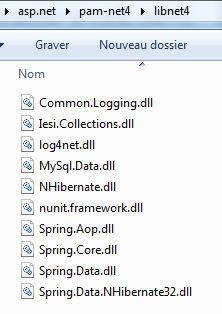
All the DLL files required for Visual Studio 2010 projects have been compiled into a [libnet4] folder:
 |
6.1. The role of NHIBERNATE in a layered .NET architecture
A .NET application using a database can be structured in layers as follows:
 |
The [dao] layer communicates with SGBD via the API ADO.NET (see section 3.3).In the previous architecture, the [ADO.NET] connector is linked to SGBD. Thus, the class implementing the [IDbConnection] interface is:
- the [MySQLConnection] class for SGBD and MySQL
- the [SQLConnection] class for SGBD and SQLServer
The [dao] layer is thus dependent on the SGBD used. Certain frameworks (Linq, Ibatis.net, NHibernate) remove this constraint by adding an additional layer between the [dao] layer and the [ADO.NET] connector of the SGBD being used. Here, we will use the [NHibernate] framework.
 |
In the diagram above, the [dao] layer no longer communicates with the [ADO.NET] connector but with the NHibernate framework, which will provide it with an interface independent of the [ADO.NET] connector being used. This architecture allows you to change the SGBD connector without changing the [dao] layer. Only the [ADO.NET] connector needs to be changed.
6.2. The sample database
To demonstrate how to work with NHibernate, we will use the following MySQL [dbpam_nhibernate] database described in Section 3.1. Exporting the database structure to a SQL file yields the following result:
Note, on lines 6, 20, and 36, that the primary keys ID have the auto-increment attribute *<span id="autoincrement" name="autoincrement" class="odt-bookmark-anchor"></span> *. This means that MySQL will automatically generate the primary key values each time a record is added. The developer does not need to worry about this.
6.3. The C# Demo Project
To introduce the configuration and use of NHibernate, we will use the following architecture:
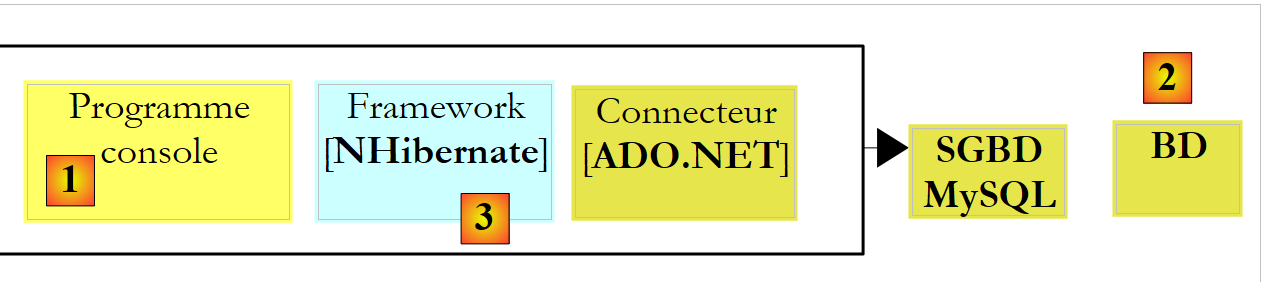 |
A [1] console program will manipulate data from the preceding database [2] via the [NHibernate] [3] framework. This will lead us to present:
- the configuration files for NHibernate
- API from NHibernate
The C# project will be as follows:
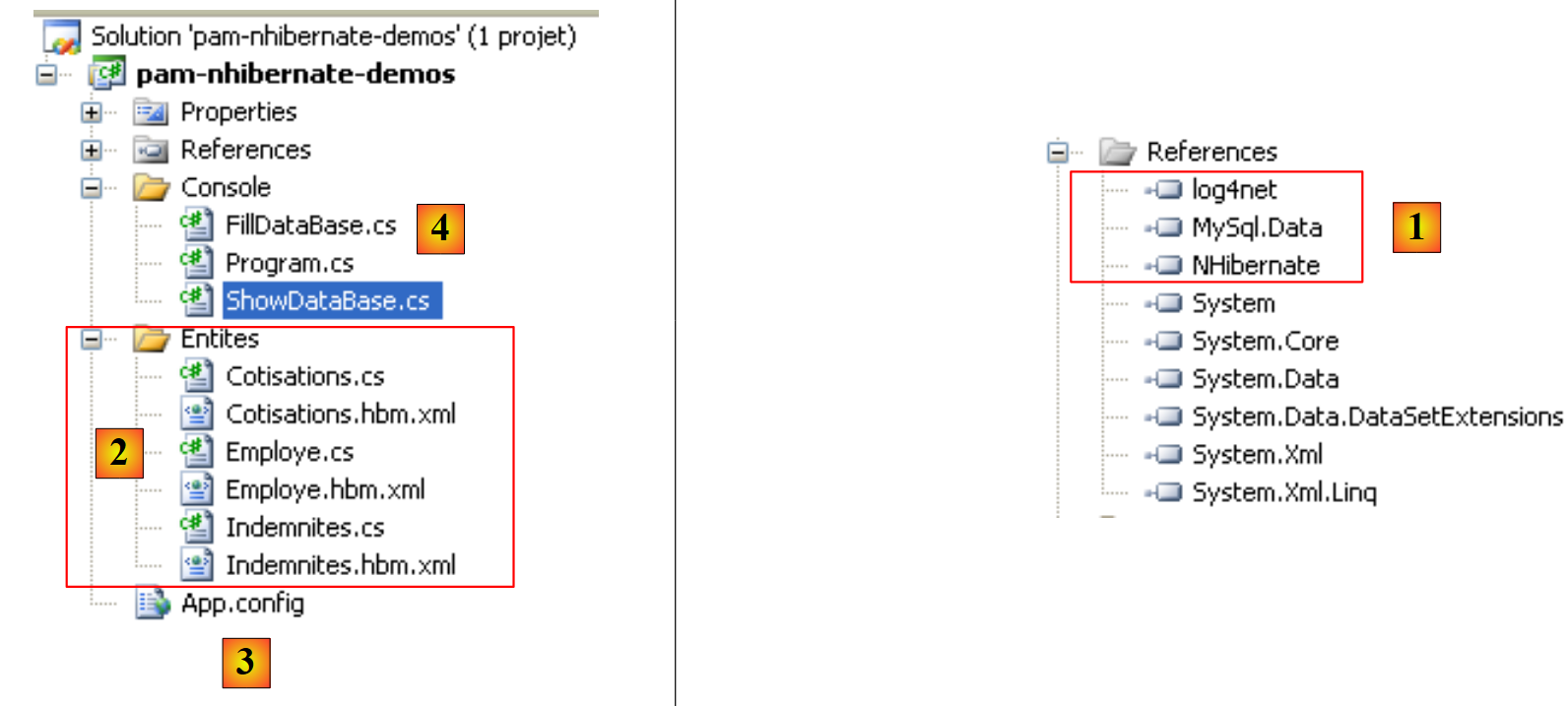 |
The elements required for the project are as follows:
- in [1], the DLL files required by the project:
- [NHibernate]: the DLL from the NHibernate framework
- [MySql.Data]: the DLL from the ADO connector.NET from the SGBD MySQL
- [log4net]: the DLL from the Log4net framework used to generate logs
- in [2], the image classes of the database tables
- in [3], the [App.config] file that configures the entire application, including the [NHibernate] framework
- in [4], test console applications
6.3.1. Configuring the database connection
Let’s return to the test architecture:
 |
Above, [NHibernate] must be able to access the database. To do so, it needs certain information:
- the SGBD that manages the database (MySQL, SQLServer, Postgres, Oracle, ...). Most SGBDs have added their own extensions to the SQL language. By understanding SGBD, NHibernate can adapt the SQL commands it issues to this SGBD. NHibernate uses the concept of the SQL dialect.
- database connection parameters (database name, username of the connection owner, password)
This information can be placed in the configuration file [App.config]. Here is the one that will be used with a MySQL 5 database:
<?xml version="1.0" encoding="utf-8" ?>
<configuration>
<!-- configuration sections -->
<configSections>
<section name="log4net" type="log4net.Config.Log4NetConfigurationSectionHandler,log4net" />
<section name="hibernate-configuration" type="NHibernate.Cfg.ConfigurationSectionHandler, NHibernate" />
</configSections>
    <!-- configuration NHibernate -->
    <hibernate-configuration xmlns="urn:nhibernate-configuration-2.2">
        <session-factory>
            <property name="connection.provider">NHibernate.Connection.DriverConnectionProvider</property>
            <!--
            <property name="connection.driver_class">NHibernate.Driver.MySqlDataDriver</property>
            -->
            <property name="dialect">NHibernate.Dialect.MySQL5Dialect</property>
            <property name="connection.connection_string">
                Server=localhost;Database=dbpam_nhibernate;Uid=root;Pwd=;
            </property>
            <property name="show_sql">false</property>
            <mapping assembly="pam-nhibernate-demos"/>
        </session-factory>
</hibernate-configuration>
<!-- This section contains the log4net configuration settings -->
<!-- NOTE IMPORTANTE: logs are not active by default. They must be activated programmatically with the log4net.Config.XmlConfigurator.Configure() instruction;
! -->
<log4net>
<!-- Define an output appender (where the logs can go) -->
<appender name="LogFileAppender" type="log4net.Appender.FileAppender, log4net">
<param name="File" value="log.txt" />
<param name="AppendToFile" value="false" />
<layout type="log4net.Layout.PatternLayout, log4net">
<param name="ConversionPattern" value="%d [%t] %-5p %c [%x] <%X{auth}> - %m%n" />
</layout>
</appender>
<appender name="LogDebugAppender" type="log4net.Appender.DebugAppender, log4net">
<layout type="log4net.Layout.PatternLayout, log4net">
<param name="ConversionPattern" value="%d [%t] %-5p %c [%x] <%X{auth}> - %m%n"/>
</layout>
</appender>
<appender name="ConsoleAppender" type="log4net.Appender.ConsoleAppender, log4net">
<layout type="log4net.Layout.PatternLayout, log4net">
<param name="ConversionPattern" value="%d [%t] %-5p %c [%x] <%X{auth}> - %m%n"/>
</layout>
</appender>
<!-- Setup the root category, set the default priority level and add the appender(s) (where the logs will go) -->
<root>
<priority value="INFO" />
<!--
<appender-ref ref="LogFileAppender" />
<appender-ref ref="LogDebugAppender"/>
-->
<appender-ref ref="ConsoleAppender"/>
</root>
<!-- Specify the level for some specific namespaces -->
<!-- Level can be : ALL, DEBUG, INFO, WARN, ERROR, FATAL, OFF -->
<logger name="NHibernate">
<level value="INFO" />
</logger>
</log4net>
</configuration>
- Lines 4–7: define configuration sections in the [App.config] file. Consider line 6:
<section name="hibernate-configuration" type="NHibernate.Cfg.ConfigurationSectionHandler, NHibernate" />
This line defines the NHibernate configuration section in the [App.config] file. It has two attributes: name and type.
- The [name] attribute names the configuration section. This section must be delimited here by the tags <name>...</name>, here <hibernate-configuration>...</hibernate-configuration> on lines 11–24.
- The [type=classe,DLL] attribute specifies the name of the class responsible for processing the section defined by the [name] attribute, as well as the DLL containing this class. Here, the class is named [NHibernate.Cfg.ConfigurationSectionHandler] and is located in the DLL [NHibernate.dll]. Recall that this DLL is part of the references for the project under study.
Now let’s look at the configuration section of NHibernate:
<!-- configuration NHibernate -->
<hibernate-configuration xmlns="urn:nhibernate-configuration-2.2">
<session-factory>
<property name="connection.provider">NHibernate.Connection.DriverConnectionProvider</property>
<!--
<property name="connection.driver_class">NHibernate.Driver.MySqlDataDriver</property>
-->
<property name="dialect">NHibernate.Dialect.MySQL5Dialect</property>
<property name="connection.connection_string">
Server=localhost;Database=dbpam_nhibernate;Uid=root;Pwd=;
</property>
<property name="show_sql">false</property>
<mapping assembly="pam-nhibernate-demos"/>
</session-factory>
</hibernate-configuration>
- Line 2: The configuration for NHibernate is inside a <hibernate-configuration> tag. The xmlns attribute (Xml NameSpace) specifies the version used to configure NHibernate. In fact, over time, the way NHibernate is configured has evolved. Here, version 2.2 is used.
- Line 3: The configuration of NHibernate is entirely contained within the <session-factory> tag (lines 3 and 14). A NHibernate session is the tool used to work with a database according to the schema:
- opening a session
- working with the database using the methods of API NHibernate
- close session
The session is created by a factory, a generic term referring to a class capable of creating objects. Lines 3–14 configure this factory.
- Lines 4, 6, 8, 9: configure the connection to the target database. The main information includes the name of the SGBD used, the database name, the user ID, and the password.
- Line 4: defines the connection provider, the entity from which a connection to the database is requested. The value of the [connection.provider] property is the name of a NHibernate class. This property does not depend on the SGBD used.
- Line 6: the ADO driver NET to be used. This is the name of a NHibernate class specialized for a given SGBD, in this case MySQL. Line 6 has been commented out, as it is not essential.
- Line 8: The [dialect] property sets the SQL dialect to be used with SGBD. Here, it is the dialect of SGBD MySQL.
If we change to SGBD, how do we find its dialect, NHibernate? Let’s go back to the previous C# project and double-click on DLL [NHibernate] in the [References] tab:
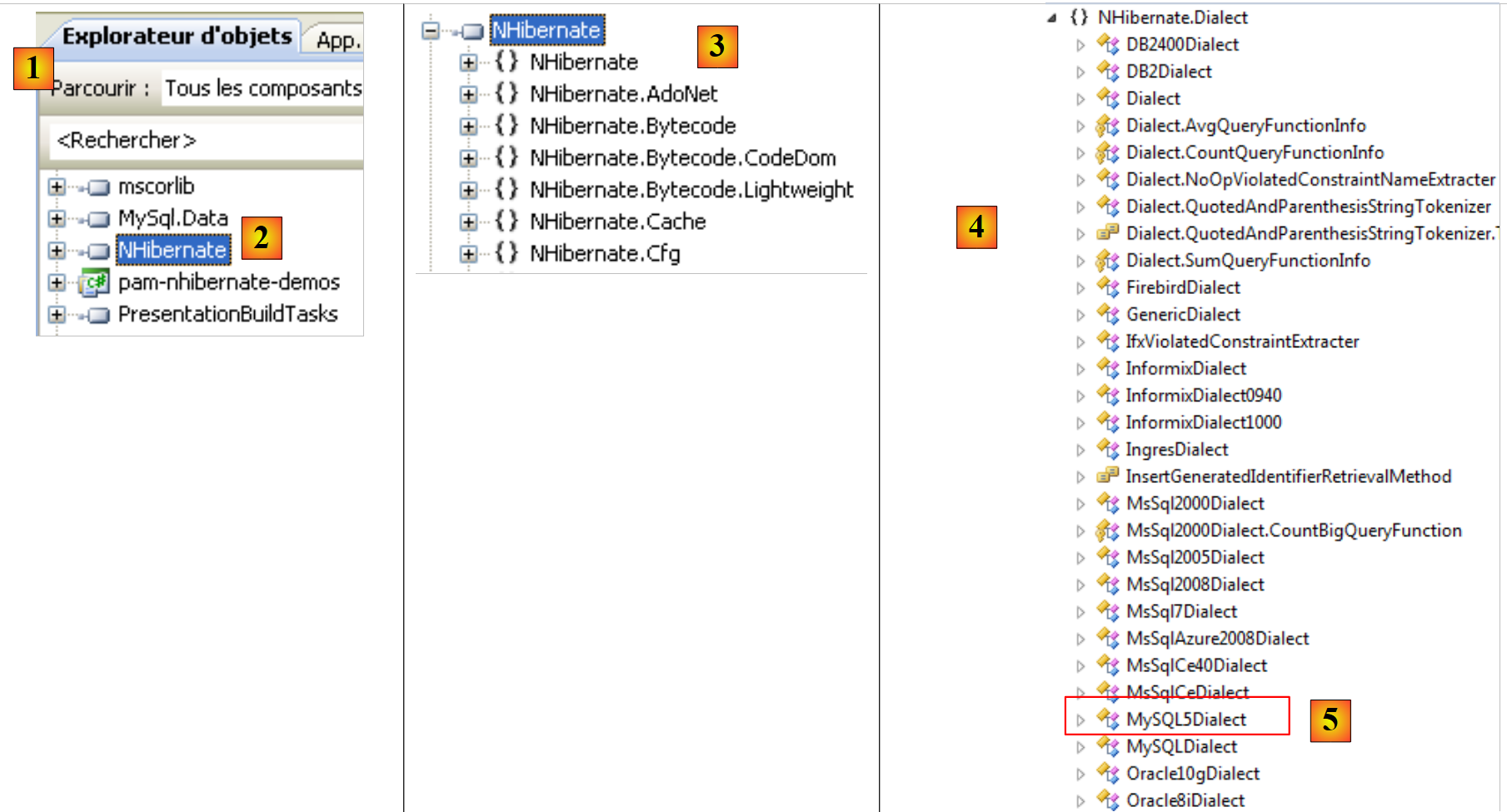 |
- In [1], the [Explorateur d'objets] tab displays a number of DLL entries, including those referenced by the project.
- In [2], the DLL and [NHibernate]
- in [3], the DLL and [NHibernate] developed. Here you will find the various namespaces defined there.
- In [4], the [NHibernate.Dialect] namespace contains the classes defining the various usable SQL dialects.
- In [5], the dialect class of SGBD MySQL 5.
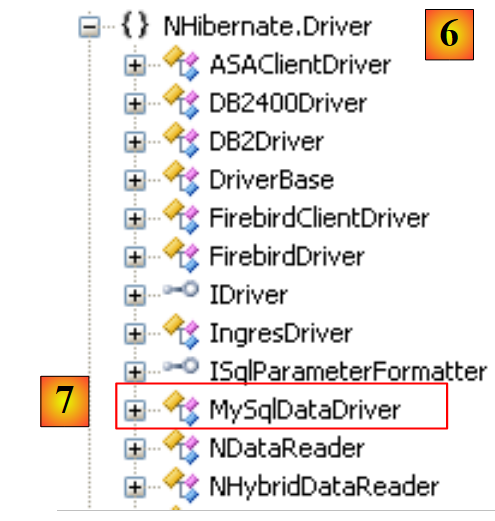 |
- in [6], the namespace of the [MySqlDataDriver] class used on line 6 below:
    <!-- configuration NHibernate -->
    <hibernate-configuration xmlns="urn:nhibernate-configuration-2.2">
        <session-factory>
            <property name="connection.provider">NHibernate.Connection.DriverConnectionProvider</property>
            <!--
            <property name="connection.driver_class">NHibernate.Driver.MySqlDataDriver</property>
            -->
            <property name="dialect">NHibernate.Dialect.MySQLDialect</property>
            <property name="connection.connection_string">
                Server=localhost;Database=dbpam_nhibernate;Uid=root;Pwd=;
            </property>
            <property name="show_sql">false</property>
            <mapping assembly="pam-nhibernate-demos"/>
        </session-factory>
</hibernate-configuration>
- Lines 9–11: the database connection string. This string is in the format "param1=val1;param2=val2; ...". The set of parameters defined in this way allows the SGBD driver to establish a connection. The format of this connection string depends on the SGBD being used. Connection strings for the main SGBDs can be found on the [http://www.connectionstrings.com/] website. Here, the string "Server=localhost;Database=dbpam_nhibernate;Uid=root;Pwd=;" is a connection string for the SGBD MySQL. It indicates that:
- Server=localhost; : the SGBD is on the same machine as the client attempting to open the connection
- Database=dbpam_nhibernate; : the target MySQL database
- Uid=root; : the user opening the connection is the root user
- Pwd=; : this user has no password (a special case in this example)
- Line 12: The [show_sql] property specifies whether NHibernate should log the SQL commands it issues to the database. During development, it is useful to set this property to [true] to know exactly what NHibernate is doing.
- Line 13: To understand the <mapping> tag, let’s revisit the application architecture:
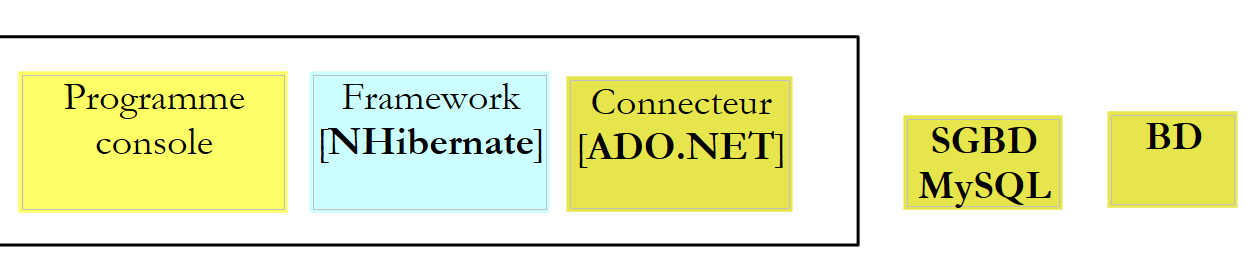 |
If the console program were a direct client of the ADO.NET and wanted the list of employees, it would have the connector execute a SQL Select command, and it would receive in return an object of type IDataReader that it would have to process to obtain the list of employees initially desired.
In the example above, the console program is the client for NHibernate, and NHibernate is the client for the ADO connector NET. We will see later that API from NHibernate will allow the console program to request the list of employees. NHibernate will translate this request into a SQL Select command, which it will have the ADO connector NET execute. The connector will return an object of type IDataReader. Using this object, Nhibernate must be able to build the list of employees that was requested. This is made possible through configuration. Each table in the database is associated with a C# class. Thus, based on the rows of the [employes] table returned by IDataReader, NHibernate will be able to construct a list of objects representing employees and return it to the console program. These table-to-class mappings are defined in configuration files. NHibernate uses the term "mapping" to describe these relationships.
Let’s return to line 13 below:
    <!-- configuration NHibernate -->
    <hibernate-configuration xmlns="urn:nhibernate-configuration-2.2">
        <session-factory>
            <property name="connection.provider">NHibernate.Connection.DriverConnectionProvider</property>
            <!--
            <property name="connection.driver_class">NHibernate.Driver.MySqlDataDriver</property>
            -->
            <property name="dialect">NHibernate.Dialect.MySQL5Dialect</property>
            <property name="connection.connection_string">
                Server=localhost;Database=dbpam_nhibernate;Uid=root;Pwd=;
            </property>
            <property name="show_sql">false</property>
            <mapping assembly="pam-nhibernate-demos"/>
        </session-factory>
</hibernate-configuration>
Line 13 indicates that the tables <--> classes configuration files will be found in the [pam-nhibernate-demos] assembly. An assembly is the executable or DLL file produced by compiling a project. Here, the mapping files will be placed in the assembly of the example project. To find the name of this assembly, check the project properties:
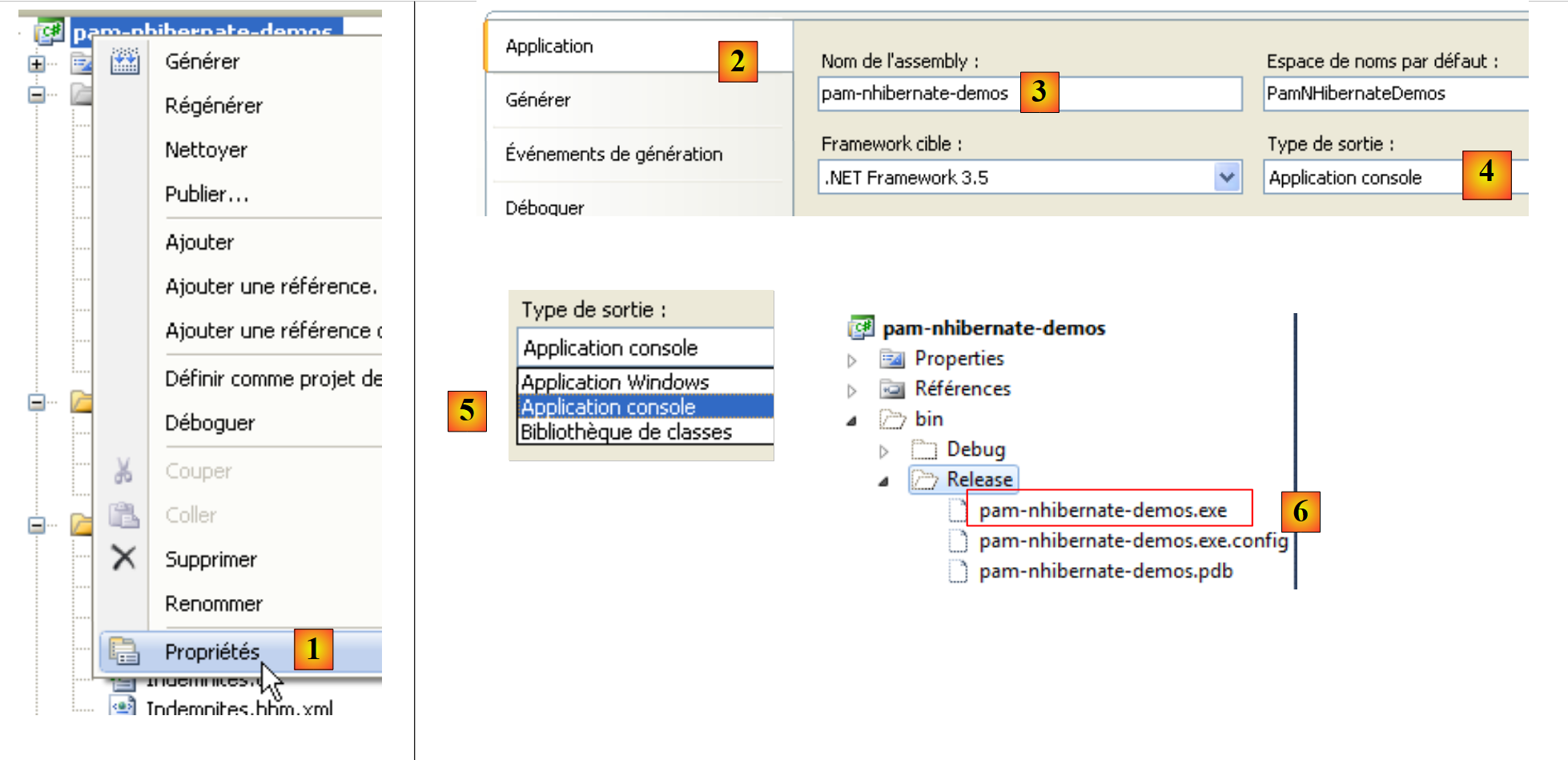 |
- in [1], the project properties
- in the [Application] tab, [2], the name of the [3] assembly that will be generated.
- Because the output type is [Application console] [4], the file generated when the project is compiled will be named [pam-nhibernate-demos.exe]. If the output type were [Bibliothèque de classes] [5], the file generated when the project is compiled would be named [pam-nhibernate-demos.dll]
- The assembly is generated in the [bin/Release] folder of the [6] project.
From the previous explanation, we can see that the mapping table <--> class files must be in the [pam-nhibernate-demos.exe] [6] file.
6.3.2. Configuring the <-->class mapping table
Let’s return to the architecture of the project under consideration:
 |
- in [1], the console program uses the methods of API from the NHibernate framework. These two blocks exchange objects.
- In [2], NHibernate uses the API of a .NET connector. It sends commands from SQL to the target SGBD.
The console program will manipulate objects representing the database tables. In this project, these objects and the links connecting them to the database tables have been placed in the [Entites] folder below:
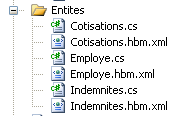 |
- Each database table corresponds to a class and a mapping file between the two
Table | Class | Mapping |
cotisations | Cotisations.cs | Cotisations.hbm.xml |
employees | Employe.cs | Employee.hbm.xml |
indemnites | Indemnites.cs | Indemnites.hbm.xml |
6.3.2.1. Mapping of table [cotisations]
Consider the table [cotisations]:
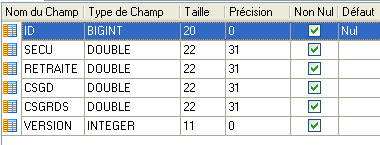 |
|
A row from this table can be encapsulated in an object of type [Cotisations.cs] s follows:
namespace PamNHibernateDemos {
    public class Cotisations {
        // automatic properties
        public virtual int Id { get; set; }
        public virtual int Version { get; set; }
        public virtual double CsgRds { get; set; }
        public virtual double Csgd { get; set; }
        public virtual double Secu { get; set; }
        public virtual double Retraite { get; set; }

        // manufacturers
        public Cotisations() {
        }
        // ToString
        public override string ToString() {
            return string.Format("[{0}|{1}|{2}|{3}]", CsgRds, Csgd, Secu, Retraite);
        }
    }

}
An automatic property has been created for each column in the [cotisations] table. Each of these properties must be declared as virtual because NHibernate will inherit from this class and override its properties. Therefore, these properties must be virtual.
Note, on line 1, that the class belongs to the [PamNHibernateDemos] namespace.
The mapping file [Cotisations.hbm.xml] between the table [cotisations] and the class [Cotisations] is as follows:
<?xml version="1.0" encoding="utf-8" ?>
<hibernate-mapping xmlns="urn:nhibernate-mapping-2.2"
namespace="PamNHibernateDemos" assembly="pam-nhibernate-demos">
    <class name="Cotisations" table="COTISATIONS">
        <id name="Id" column="ID" unsaved-value="0">
            <generator class="native" />
        </id>
        <version name="Version" column="VERSION"/>
        <property name="CsgRds" column="CSGRDS"/>
        <property name="Csgd" column="CSGD"/>
        <property name="Retraite" column="RETRAITE"/>
        <property name="Secu" column="SECU"/>
    </class>
</hibernate-mapping>
- The mapping file is a Xml file defined within the <hibernate-mapping> tag (lines 2 and 14)
- Line 4: The <class> tag links a database table to a class. Here, the table is [COTISATIONS] (table attribute) and the class is [Cotisations] (name attribute). In .NET, a class must be defined by its full name (including the namespace) and by the assembly that contains it. These two pieces of information are provided by line 3. The first (namespace) can be found in the class definition. The second (assembly) is the name of the project’s assembly. We have already explained how to find this name.
- Lines 5–7: The <id> tag is used to define the mapping of the primary key for the [cotisations] table.
- Line 5: The name attribute designates the field in the [Cotisations] class that will receive the primary key from the [cotisations] table. The column attribute designates the column in table [cotisations] that serves as the primary key. The unsaved-value attribute is used to define a primary key that has not yet been generated. This value allows NHibernate to know how to save a [Cotisations] object in the [cotisations] table. If this object has a field Id=0, it will perform an operation SQL INSERT; otherwise, it will perform an operation SQL UPDATE. The value of unsaved-value depends on the type of the Id field in the [Cotisations] class. Here, it is of type int, and the default value for a int type is 0. A [Cotisations] object that has not yet been saved (and therefore has no primary key) will thus have its Id field set to 0. If the Id field had been of type Object or a derived type, we would have written unsaved-value=null.
- Line 6: When NHibernate needs to save an object [Cotisations] with a field Id=0, it must perform a INSERT operation on the database during which it must obtain a value for the record’s primary key. Most SGBDs have a proprietary method to automatically generate this value. The <generator> tag is used to define the mechanism to be used for generating the primary key. The <generator class="native"> tag indicates that the default mechanism of the SGBD being used should be employed. We saw in Section 6.2 that the primary keys of our three MySQL tables had the autoincrement attribute. During its operations, INSERT will not provide a value for the ID column of the added record, leaving MySQL to generate this value.
- Line 8: The <version> tag is used to define the table column (as well as the corresponding class field) that allows records to be "versioned." Initially, version is set to 1. It is incremented with each UPDATE operation. Furthermore, any UPDATE or DELETE operation is performed with a filter WHERE ID= id AND VERSION=v1. A user can therefore only modify or delete an object if they have the correct version for it. If this is not the case, an exception is thrown by NHibernate.
- Line 9: The <property> tag is used to define a normal column mapping (neither a primary key nor a version column). Thus, line 9 indicates that the CSGRDS column of the [COTISATIONS] table is associated with the CsgRds property of the [Cotisations] class.
6.3.2.2. Mapping of table [indemnites]
Consider the table [indemnites]:
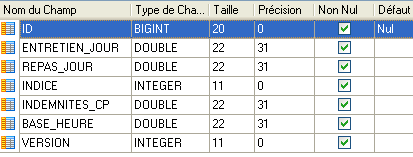 |
|
A row in this table can be encapsulated in an object of type [Indemnites] s follows:
namespace PamNHibernateDemos {
    public class Indemnites {

        // automatic properties
        public virtual int Id { get; set; }
        public virtual int Version { get; set; }
        public virtual int Indice { get; set; }
        public virtual double BaseHeure { get; set; }
        public virtual double EntretienJour { get; set; }
        public virtual double RepasJour { get; set; }
        public virtual double IndemnitesCp { get; set; }

        // manufacturers
        public Indemnites() {
        }

        // identity
        public override string ToString() {
            return string.Format("[{0}|{1}|{2}|{3}|{4}]", Indice, BaseHeure, EntretienJour, RepasJour, IndemnitesCp);
        }

    }
}
The mapping file for table [indemnites] <--> class [Indemnites] could be as follows (Indemnites.hbm.xml):
<?xml version="1.0" encoding="utf-8" ?>
<hibernate-mapping xmlns="urn:nhibernate-mapping-2.2"
namespace="PamNHibernateDemos" assembly="pam-nhibernate-demos">
    <class name="Indemnites" table="INDEMNITES">
        <id name="Id" column="ID" unsaved-value="0">
            <generator class="native" />
        </id>
        <version name="Version" column="VERSION"/>
        <property name="Indice" column="INDICE" unique="true"/>
        <property name="BaseHeure" column="BASE_HEURE" />
        <property name="EntretienJour" column="ENTRETIEN_JOUR" />
        <property name="RepasJour" column="REPAS_JOUR" />
        <property name="IndemnitesCp" column="INDEMNITES_CP" />
    </class>
</hibernate-mapping>
There is nothing new here compared to the mapping file explained earlier. The only difference is on line 9. The unique="true" attribute indicates that there is a uniqueness constraint on the [INDICE] column in the [indemnites] table: there cannot be two rows with the same value for the [INDICE] column.
6.3.2.3. Mapping of table [employes]
Consider the table [employes]:
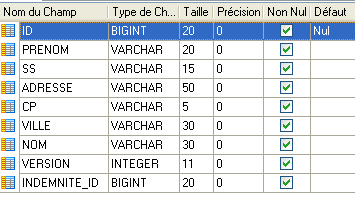 |
|
The new feature compared to the previous tables is the presence of a foreign key: the [INDEMNITE_ID] column is a foreign key on the [ID] column of the [INDEMNITES] table. This field references the row in the [INDEMNITES] table to be used to calculate the employee's indemnites values.
The [Employe] class, which is a representation of the [employes] table, could be as follows:
namespace PamNHibernateDemos {
    public class Employe {
        // automatic properties
        public virtual int Id { get; set; }
        public virtual int Version { get; set; }
        public virtual string SS { get; set; }
        public virtual string Nom { get; set; }
        public virtual string Prenom { get; set; }
        public virtual string Adresse { get; set; }
        public virtual string Ville { get; set; }
        public virtual string CodePostal { get; set; }
        public virtual Indemnites Indemnites { get; set; }

        // manufacturers
        public Employe() {
        }

        // ToString
        public override string ToString() {
            return string.Format("[{0}|{1}|{2}|{3}|{4}|{5}|{6}]", SS, Nom, Prenom, Adresse, Ville, CodePostal, Indemnites);
        }
    }
}
The mapping file [Employe.hbm.xml] could look like this:
<?xml version="1.0" encoding="utf-8" ?>
<hibernate-mapping xmlns="urn:nhibernate-mapping-2.2"
namespace="PamNHibernateDemos" assembly="pam-nhibernate-demos">
    <class name="Employe" table="EMPLOYES">
        <id name="Id" column="ID" unsaved-value="0">
            <generator class="native" />
        </id>
        <version name="Version" column="VERSION"/>
        <property name="SS" column="SS"/>
        <property name="Nom" column="NOM"/>
        <property name="Prenom" column="PRENOM"/>
        <property name="Adresse" column="ADRESSE"/>
        <property name="Ville" column="VILLE"/>
        <property name="CodePostal" column="CP"/>
        <many-to-one name="Indemnites" column="INDEMNITE_ID" cascade="save-update" lazy="false"/>
    </class>
</hibernate-mapping>
The new feature is on line 15 with the introduction of a new tag: <many-to-one>. This tag is used to map a foreign key column [INDEMNITE_ID] from the table [EMPLOYES] to the property [Indemnites] of the class [Employe]:
namespace PamNHibernateDemos {
    public class Employe {
        // automatic properties
..
        public virtual Indemnites Indemnites { get; set; }

...
    }
}
Table [EMPLOYES] has a foreign key [INDEMNITE_ID] that references column [ID] in table [INDEMNITES]. Multiple (many) rows in the [EMPLOYES] table can reference a single (one) row in the [INDEMNITES] table. Hence the name of the <many-to-one> tag. This tag has the following attributes here:
- column: specifies the name of the column in table [EMPLOYES] that serves as a foreign key in table [INDEMNITES]
- name: specifies the property of the [Employe] class associated with this column. The type of this property must be the class associated with the target table of the foreign key, in this case the [INDEMNITES] table. We know that this class is the class [Indemnites] already described. This is reflected in line 5 above. This means that when NHibernate retrieves a [Employe] object from the database, it will also retrieve the associated [Indemnites] object.
- cascade: this attribute can have various values:
- save-update: an insert (save) or update operation on the object [Employe] must be propagated to the object [Indemnites] that it contains.
- delete: The deletion of an object [Employe] must be propagated to the object [Indemnites] that it contains.
- all: propagates insert (save), update, and delete operations.
- none: propagates nothing
Finally, let’s review the configuration of NHibernate in the [App.config] file:
    <!-- configuration NHibernate -->
    <hibernate-configuration xmlns="urn:nhibernate-configuration-2.2">
        <session-factory>
            <property name="connection.provider">NHibernate.Connection.DriverConnectionProvider</property>
            <!--
            <property name="connection.driver_class">NHibernate.Driver.MySqlDataDriver</property>
            -->
            <property name="dialect">NHibernate.Dialect.MySQL5Dialect</property>
            <property name="connection.connection_string">
                Server=localhost;Database=dbpam_nhibernate;Uid=root;Pwd=;
            </property>
            <property name="show_sql">false</property>
            <mapping assembly="pam-nhibernate-demos"/>
        </session-factory>
</hibernate-configuration>
Line 13 indicates that the *.hbm mapping files will be found in the xml assembly. This is not the default behavior. It must be configured in the C# project:
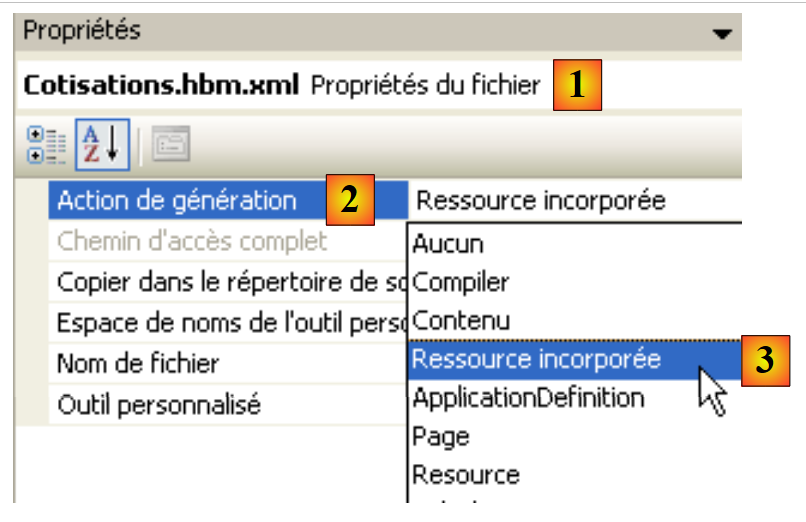 |
- In [1], select the properties of a mapping file
- in [2], the build action must be [Ressource incorporée] [3]. This means that when the project is built, the mapping file must be included in the generated assembly.
6.4. API from NHibernate
Let’s return to the architecture of our example project:
 |
In the previous sections, we configured NHibernate in two ways:
- in [App.config], we configured the database connection
- we wrote, for each table in the database, the table’s image class and the mapping file that allows us to convert between the class and the table.
We still need to explore the methods offered by NHibernate for manipulating database data: insert, update, delete, and list.
6.4.1. The SessionFactory object
Every NHibernate operation is performed within a session. A typical sequence of NHibernate operations is as follows:
- open a NHibernate session
- start a transaction within the session
- Perform persistence operations with the session (Load, Get, Find, CreateQuery, Save, SaveOrUpdate, Delete)
- commit or roll back the transaction
- close the session NHibernate
A session is obtained from a factory of type [SessionFactory]. This factory is the one configured by the <session-factory> tag in the configuration file [App.config]:
    <!-- configuration NHibernate -->
    <hibernate-configuration xmlns="urn:nhibernate-configuration-2.2">
        <session-factory>
            <property name="connection.provider">NHibernate.Connection.DriverConnectionProvider</property>
            <!--
            <property name="connection.driver_class">NHibernate.Driver.MySqlDataDriver</property>
            -->
            <property name="dialect">NHibernate.Dialect.MySQL5Dialect</property>
            <property name="connection.connection_string">
                Server=localhost;Database=dbpam_nhibernate;Uid=root;Pwd=;
            </property>
            <property name="show_sql">false</property>
            <mapping assembly="pam-nhibernate-demos"/>
        </session-factory>
</hibernate-configuration>
In C# code, SessionFactory can be obtained as follows:
ISessionFactory sessionFactory = new Configuration().Configure().BuildSessionFactory();
The Configuration class is a class of the NHibernate framework. The previous statement uses the NHibernate configuration section in [App.config]. The resulting [ISessionFactory] object then has the:
- information to create a connection to the target database
- mapping files between database tables and persistent classes handled by NHibernate.
6.4.2. The NHibernate session
Once SessionFactory has been created (this is done only once), you can obtain the sessions that allow you to perform persistence operations NHibernate. A common code snippet is as follows:
try{
      // session opening
      using (ISession session = sessionFactory.OpenSession())
      {
        // start of transaction
        using (ITransaction transaction = session.BeginTransaction())
        {
........................ opérations de persistance
          // transaction validation
          transaction.Commit();
        }
      }
}catch (Exception ex){
....
}
- Line 3: A session is created using SessionFactory within a using clause. Upon exiting the using clause, the session will be automatically closed. Without the using clause, the session would need to be closed explicitly (session.Close()).
- Line 6: Persistence operations will be performed within a transaction. Either they all succeed, or none of them succeed. Within the using clause, the transaction is committed (line 10). If a persistence operation within the transaction throws an exception, the transaction will be automatically rolled back upon exiting the using clause.
- The try/catch blocks on lines 1 and 13 allow for the interception of any exception thrown by the code within the try block (session, transaction, persistence).
6.4.3. The ISession interface
We now present some of the methods of the ISession interface implemented by a NHibernate session:
starts a transaction in the session ITransaction tx=session.BeginTransaction(); | |
clears the session. The objects it contained become detached. session.Clear(); | |
closes the session. The objects it contained are synchronized with the database. This synchronization operation is also performed at the end of a transaction. The latter case is the most common. session.Close(); | |
creates a HQL (Hibernate Query Language) query for later execution. IQuery query = session.createQuery("select e from Employee e"); | |
deletes an object. This object may be part of the session (attached) or not (detached). When the session is synchronized with the database, a SQL or DELETE operation will be performed on this object. // Load an employee from BD Employee e = session.Get<Employee>(143); // Delete the employee session.Delete(e); | |
forces the session to synchronize with the database. The session's contents do not change. session.Flush(); | |
retrieves the object T with primary key id from the database. If this object does not exist, returns a null pointer. // Load an employee from BD Employee e = session.Get<Employee>(143); | |
adds the object obj to the session. This object has no primary key before the Save. After the Save, it has one. During session synchronization, a SQL INSERT operation will be performed on the database. // create an employee Employee e = new Employee(){...}; // save it e = session.Save(e); | |
performs a Save operation if obj does not have a primary key, or an Update operation if it already has one. | |
updates the object obj in the database. A SQL UPDATE operation is then performed on the database. // load an employee from BD Employee e = session.Get<Employee>(143); // we change their name e.Nom = ...; // Update it in the database session.Update(e); |
6.4.4. The IQuery interface
The IQuery interface allows you to query the database to extract data. We have seen how to create an instance of it:
The parameter of the createQuery method is a HQL query (Hibernate Query Language), a language similar to SQL but querying classes rather than tables. The query above retrieves the list of all employees. Here are some examples of HQL queries:
select e from Employe e where e.Nom like 'A%'
select e from Employe order by e.Nom asc
select e from Employe e where e.Indemnites.Indice=2
We now present some of the methods of the IQuery interface:
returns the result of the query as a list of T objects IList<Employee> employees = session.createQuery("select e from Employee e order by e.Nom asc").List<Employee>(); | |
returns the result of the query as a list where each element of the list represents a row from the SELECT statement in the form of an array of objects. IList rows = session.createQuery("select e.Nom, e.Prenom, e.SS from Employee e").List(); lines[i][j] represents column j of row i in an object type. Thus, lines[10][1] is an object type representing a person's first name. Type conversions are generally necessary to retrieve the data in its exact type. | |
returns the first object from the query result Employee e = session.createQuery("select e from Employee e where e.Nom='MARTIN'").UniqueResult<Employee>(); |
A HQL query can be configured:
In the HQL query on line 3, :num is a parameter that must be assigned a value before the query is executed. Above, the SetString method is used for this purpose. The IQuery interface provides various Set methods to assign a value to a parameter:
- - SetBoolean(string name, bool value)
- - SetSingle(string name, single value)
- - SetDouble(string name, double value)
- - SetInt32(string name, int32 value)
- ..
6.5. Some code examples
The following examples are based on the architecture discussed previously and summarized below. The database is the MySQL [dbpam_nhibernate] database also presented. The examples are [1] console programs using the NHibernate [3] framework to manipulate the [2] database.
 |
The C# project containing the following examples is the one already presented:
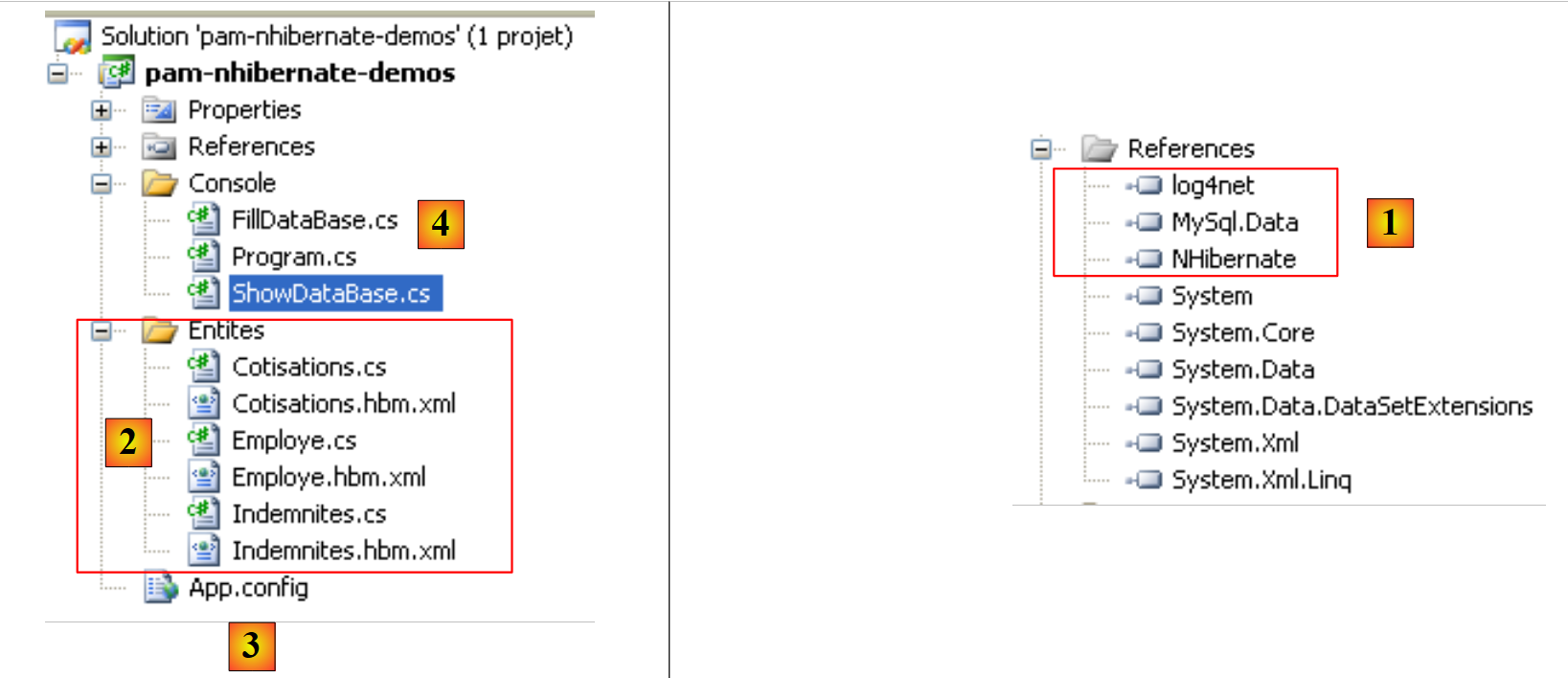 |
- in [1], the DLL files required by the project:
- [NHibernate]: the DLL from the NHibernate framework
- [MySql.Data]: the DLL of the ADO connector.NET of the SGBD MySQL 5
- [log4net]: the DLL of a tool for generating logs
- in [2], the image classes of the database tables
- in [3], the [App.config] file that configures the entire application, including the [NHibernate] framework
- in [4], and test console applications. It is these that we will present in part.
6.5.1. Retrieving the database contents
The [ShowDataBase.cs] program displays the database contents:
using System;
using System.Collections;
using System.Collections.Generic;
using NHibernate;
using NHibernate.Cfg;


namespace PamNHibernateDemos
{
  public class ShowDataBase
  {

    private static ISessionFactory sessionFactory = null;

    // main program
    static void Main(string[] args)
    {
      // factory initialization NHibernate
      sessionFactory = new Configuration().Configure().BuildSessionFactory();
      try
      {
        // database content display
        Console.WriteLine("Affichage base -------------------------------------");
        ShowDataBase1();
      }
      catch (Exception ex)
      {
        // exception is displayed
        Console.WriteLine(string.Format("L'erreur suivante s'est produite : [{0}]", ex.ToString()));
      }
      finally
      {
        if (sessionFactory != null)
        {
          sessionFactory.Close();
        }
      }
      // keyboard wait
      Console.ReadLine();
    }

    // test1
    static void ShowDataBase1()
    {
      // session opening
      using (ISession session = sessionFactory.OpenSession())
      {
        // start of transaction
        using (ITransaction transaction = session.BeginTransaction())
        {
          // retrieve the list of employees
          IList<Employe> employes = session.CreateQuery(@"select e from Employe e order by e.Nom asc").List<Employe>();
          // we display it
          Console.WriteLine("--------------- liste des employés");
          foreach (Employe e in employes)
          {
            Console.WriteLine(e);
          }
          // retrieve the list of indemnites
          IList<Indemnites> indemnites = session.CreateQuery(@"select i from Indemnites i order by i.Indice asc").List<Indemnites>();
          // we display it
          Console.WriteLine("--------------- liste des indemnités");
          foreach (Indemnites i in indemnites)
          {
            Console.WriteLine(i);
          }
          // retrieve the list of cotisations
          Cotisations cotisations = session.CreateQuery(@"select c from Cotisations c").UniqueResult<Cotisations>();
          Console.WriteLine("--------------- tableau des taux de cotisations");
          Console.WriteLine(cotisations);
          // commit transaction
          transaction.Commit();
        }
      }
    }
  }
}
Explanations:
- line 19: the object SessionFactory is created. This is what will allow us to obtain Session objects.
- line 24: the database contents are displayed
- lines 31–37: SessionFactory is closed in the finally clause of the try block.
- line 43: the method that displays the database contents
- Line 46: We obtain a Session from SessionFactory.
- line 49: a transaction is started
- line 52: query HQL to retrieve the list of employees. Because of the foreign key linking the Employee entity to the Compensation entity, for each employee, we will have their compensation.
- Line 60: Query HQL to retrieve the list of allowances.
- Line 68: Query HQL to retrieve the single row from the cotisations table.
- Line 72: End of transaction
- Line 73: End of the ITransaction from line 49 – the transaction is automatically closed
- Line 74: End of the using Isession from line 46 – the session is automatically closed.
Screen display obtained:
Note in rows 3 and 4 that when querying an employee, their compensation was also returned.
6.5.2. Inserting data into the database
The program [FillDataBase.cs] allows you to insert data into the database:
using System;
using System.Collections;
using System.Collections.Generic;
using NHibernate;
using NHibernate.Cfg;


namespace PamNHibernateDemos
{
  public class FillDataBase
  {

    private static ISessionFactory sessionFactory = null;

    // main program
    static void Main(string[] args)
    {
      // factory initialization NHibernate
      sessionFactory = new Configuration().Configure().BuildSessionFactory();
      try
      {
        // delete database contents
        Console.WriteLine("Effacement base -------------------------------------");
        ClearDataBase1();
        Console.WriteLine("Affichage base -------------------------------------");
        ShowDataBase();
        Console.WriteLine("Remplissage base -------------------------------------");
        FillDataBase1();
        Console.WriteLine("Affichage base -------------------------------------");
        ShowDataBase();
      }
      catch (Exception ex)
      {
        // exception is displayed
        Console.WriteLine(string.Format("L'erreur suivante s'est produite : [{0}]", ex.ToString()));
      }
      finally
      {
        if (sessionFactory != null)
        {
          sessionFactory.Close();
        }
      }
      // keyboard wait
      Console.ReadLine();
    }

    // test1
    static void ShowDataBase()
    {
             // see previous example
    }

    // ClearDataBase1
    static void ClearDataBase1()
    {
      // session opening
      using (ISession session = sessionFactory.OpenSession())
      {
        // start of transaction
        using (ITransaction transaction = session.BeginTransaction())
        {
          // retrieve the list of employees
          IList<Employe> employes = session.CreateQuery(@"select e from Employe e").List<Employe>();
          // we cut all employees
          Console.WriteLine("--------------- suppression des employés associés");
          foreach (Employe e in employes)
          {
            session.Delete(e);
          }
          // retrieve the list of allowances
          IList<Indemnites> indemnites = session.CreateQuery(@"select i from Indemnites i").List<Indemnites>();
          // we do away with allowances
          Console.WriteLine("--------------- suppression des indemnités");
          foreach (Indemnites i in indemnites)
          {
            session.Delete(i);
          }
          // retrieve the list of cotisations
          Cotisations cotisations = session.CreateQuery(@"select c from Cotisations c").UniqueResult<Cotisations>();
          Console.WriteLine("--------------- suppression des taux de cotisations");
          if (cotisations != null)
          {
            session.Delete(cotisations);
          }
          // commit transaction
          transaction.Commit();
        }
      }
    }

    // FillDataBase
    static void FillDataBase1()
    {
      // session opening
      using (ISession session = sessionFactory.OpenSession())
      {
        // start of transaction
        using (ITransaction transaction = session.BeginTransaction())
        {
          // two allowances are created
          Indemnites i1 = new Indemnites() { Id = 0, Indice = 1, BaseHeure = 1.93, EntretienJour = 2, RepasJour = 3, IndemnitesCp = 12 };
          Indemnites i2 = new Indemnites() { Id = 0, Indice = 2, BaseHeure = 2.1, EntretienJour = 2.1, RepasJour = 3.1, IndemnitesCp = 15 };
          // we create two employees
          Employe e1 = new Employe() { Id = 0, SS = "254104940426058", Nom = "Jouveinal", Prenom = "Marie", Adresse = "5 rue des oiseaux", Ville = "St Corentin", CodePostal = "49203", Indemnites = i1 };
          Employe e2 = new Employe() { Id = 0, SS = "260124402111742", Nom = "Laverti", Prenom = "Justine", Adresse = "La Brûlerie", Ville = "St Marcel", CodePostal = "49014", Indemnites = i2 };
          // we create the cotisations rates
          Cotisations cotisations = new Cotisations() { Id = 0, CsgRds = 3.49, Csgd = 6.15, Secu = 9.39, Retraite = 7.88 };
          // save it all
          session.Save(e1);
          session.Save(e2);
          session.Save(cotisations);
          // commit transaction
          transaction.Commit();
        }
      }
    }

  }
}
Explanations
- line 19: SessionFactory is created
- lines 37–43: it is closed in the finally clause of the try block
- line 55: the ClearDataBase1 method, which empties the database. The process is as follows:
- all employees are retrieved (line 64) into a list
- we delete them one by one (lines 67–70)
- line 93: the FillDataBase1 method inserts some data into the database
- we create two entities Indemnites (lines 102, 103)
- we create two employees with these allowances (lines 105, 106)
- an object Cotisations is created on line 108.
- Lines 110, 111: The two Employee entities are persisted in the database
- line 112: the Cotisations entity is persisted in turn
- It may seem surprising that the Indemnités entities in lines 102 and 103 were not persisted. In fact, they were persisted at the same time as the Employe entities. To understand this, we need to look at the mapping of the Employe entity:
<?xml version="1.0" encoding="utf-8" ?>
<hibernate-mapping xmlns="urn:nhibernate-mapping-2.2"
namespace="PamNHibernateDemos" assembly="pam-nhibernate-demos">
    <class name="Employe" table="EMPLOYES">
        <id name="Id" column="ID" unsaved-value="0">
            <generator class="native" />
        </id>
        <version name="Version" column="VERSION"/>
        <property name="SS" column="SS"/>
        <property name="Nom" column="NOM"/>
        <property name="Prenom" column="PRENOM"/>
        <property name="Adresse" column="ADRESSE"/>
        <property name="Ville" column="VILLE"/>
        <property name="CodePostal" column="CP"/>
        <many-to-one name="Indemnites" column="INDEMNITE_ID" cascade="save-update" lazy="false"/>
    </class>
</hibernate-mapping>
Line 15, which maps the foreign key relationship from the Employee entity to the Indemnites entity, has the attribute cascade= "save-update", which means that "save" and "update" operations on the Employee entity are propagated to the internal Indemnites entity.
Screen display obtained:
Effacement base -------------------------------------
--------------- elimination of employees and related benefits
--------------- elimination of remaining allowances
--------------- removal of cotisations rates
Affichage base -------------------------------------
--------------- list of employees
--------------- list of benefits
--------------- table of cotisations rates

Remplissage base -------------------------------------
Affichage base -------------------------------------
--------------- list of employees
[254104940426058|Jouveinal|Marie|5 rue des oiseaux|St Corentin|49203|[2|2,1|2,1|3,1|15]]
[260124402111742|Laverti|Justine|La Brûlerie|St Marcel|49014|[1|1,93|2|3|12]]
--------------- list of benefits
[1|1,93|2|3|12]
[2|2,1|2,1|3,1|15]
--------------- table of cotisations rates
[3,49|6,15|9,39|7,88]
6.5.3. Search for an employee
The program [Program.cs] includes various methods that demonstrate how to access and manipulate data in the database. We present a few of them here.
The [FindEmployee] method allows you to find an employee by their social security number:
// FindEmployee
    static void FindEmployee() {
      try {
        // session opening
        using (ISession session = sessionFactory.OpenSession()) {
          // start of transaction
          using (ITransaction transaction = session.BeginTransaction()) {
            // search for an employee using his SS number
            String numSecu = "254104940426058";
            IQuery query = session.CreateQuery(@"select e from Employe e where e.SS=:numSecu");
            Employe employe = query.SetString("numSecu", numSecu).UniqueResult<Employe>();
            if (employe != null) {
              Console.WriteLine("Employe[" + numSecu + "]=" + employe);
            } else {
              Console.WriteLine("Employe[" + numSecu + "] non trouvé...");
            }

            numSecu = "xx";
            employe = query.SetString("numSecu", numSecu).UniqueResult<Employe>();
            if (employe != null) {
              Console.WriteLine("Employe[" + numSecu + "]=" + employe);
            } else {
              Console.WriteLine("Employe[" + numSecu + "] non trouvé...");
            }

            // commit transaction
            transaction.Commit();
          }
        }
      } catch (Exception e) {
        Console.WriteLine("L'exception suivante s'est produite : " + e.Message);
      }
    }
Explanations
- line 10: the Select query configured by numSecu to be executed
- line 11: assigning a value to the numSecu parameter and executing the UniqueResult method to obtain a single result.
Screen display obtained:
Recherche d'an employee -------------------------------------
Employe[254104940426058]=[254104940426058|Jouveinal|Marie|5 rue des oiseaux|St Corentin|49203|[2|2,1|2,1|3,1|15]]
Employe[xx] non trouvé...
6.5.4. Insertion of invalid entities
The following method attempts to save an uninitialized entity [Employe].
// SaveEmptyEmployee
    static void SaveEmptyEmployee() {
      try {
        // session opening
        using (ISession session = sessionFactory.OpenSession()) {
          // start of transaction
          using (ITransaction transaction = session.BeginTransaction()) {
            // create an empty employee
            Employe e = new Employe();
            // a non-existent allowance is created
            Indemnites i = new Indemnites() { Id = 0, Indice = 3, BaseHeure = 1.93, EntretienJour = 2, RepasJour = 3, IndemnitesCp = 12 };
            // associated with the employee
            e.Indemnites = i;
            // save the employee, leaving the other fields empty
            session.Save(e);
            // commit transaction
            transaction.Commit();
          }
        }
      } catch (Exception e) {
        Console.WriteLine("L'exception suivante s'est produite : " + e.Message);
      }
    }
Explanations
Let's review the code for the [Employe] class:
namespace PamNHibernateDemos {
    public class Employe {
        // automatic properties
        public virtual int Id { get; set; }
        public virtual int Version { get; set; }
        public virtual string SS { get; set; }
        public virtual string Nom { get; set; }
        public virtual string Prenom { get; set; }
        public virtual string Adresse { get; set; }
        public virtual string Ville { get; set; }
        public virtual string CodePostal { get; set; }
        public virtual Indemnites Indemnites { get; set; }

        // manufacturers
        public Employe() {
        }

        // ToString
        public override string ToString() {
            return string.Format("[{0}|{1}|{2}|{3}|{4}|{5}|{6}]", SS, Nom, Prenom, Adresse, Ville, CodePostal, Indemnites);
        }
    }
}
An uninitialized [Employe] object will have a null value for all its fields of type string. When inserting the record into the [employes] table, NHibernate will leave the columns corresponding to these fields empty. However, in the [employes] table, all columns have the not null attribute, which prohibits columns without values. The ADO.NET driver will then throw an exception:
6.5.5. Creating two allowances with the same index within a transaction
In table [indemnites], column [indice] has been declared with the unique attribute, which prevents two rows from having the same index. The following method creates two allowances with the same index within a transaction:
// CreateIndemnites1
    static void CreateIndemnites1() {
      try {
        // session opening
        using (ISession session = sessionFactory.OpenSession()) {
          // start of transaction
          using (ITransaction transaction = session.BeginTransaction()) {
            // we create two allowances with the same index
            Indemnites i1 = new Indemnites() { Id = 0, Indice = 1, BaseHeure = 1.93, EntretienJour = 2, RepasJour = 3, IndemnitesCp = 12 };
            Indemnites i2 = new Indemnites() { Id = 0, Indice = 1, BaseHeure = 1.93, EntretienJour = 2, RepasJour = 3, IndemnitesCp = 12 };
            // we save them
            session.Save(i1);
            session.Save(i2);
            // commit transaction
            transaction.Commit();
          }
        }
      } catch (Exception e) {
        Console.WriteLine("L'exception suivante s'est produite : " + e.Message);
      }
    }
Explanations
- In lines 9 and 10, two Indemnites entities with the same index are created. However, in the database, the INDICE column has the attribute UNIQUE.
- Lines 12 and 13 place the two Indemnites entities into the persistence context. This context is synchronized with the database when the transaction is committed on line 15. This synchronization will result in two INSERT entities. The second will trigger an exception due to the uniqueness of the INDICE column. Because we are inside a transaction, the first INSERT will be rolled back.
The result is as follows:
Line 9: We can see that the table [indemnites] is empty. No insertions have been made.
6.5.6. Creating two allowances with the same index without using a transaction
The following method creates two allowances with the same index without using a transaction:
// CreateIndemnites2
    static void CreateIndemnites2() {
      try {
        // session opening
        using (ISession session = sessionFactory.OpenSession()) {

          // we create two allowances with the same index
          Indemnites i1 = new Indemnites() { Id = 0, Indice = 1, BaseHeure = 1.93, EntretienJour = 2, RepasJour = 3, IndemnitesCp = 12 };
          Indemnites i2 = new Indemnites() { Id = 0, Indice = 1, BaseHeure = 1.94, EntretienJour = 2, RepasJour = 3, IndemnitesCp = 12 };
          // we save them
          session.Save(i1);
          session.Save(i2);
        }
      } catch (Exception e) {
        Console.WriteLine("L'exception suivante s'est produite : " + e.Message);
      }
    }
Explanations
- We have the same code as before, but without a transaction.
- Synchronization of the persistence context with the database will occur when this context is closed, on line 13 (closing the session). The synchronization will trigger two INSERT operations. The second one will fail due to the uniqueness of the INDICE column. But since we are not in a transaction, the first INSERT will not be rolled back.
The result is as follows:
The database was empty before the method was executed. In line 6, we can see that table [indemnites] has one row.