4. The View and Its Model
Up to this point, actions have generated their own responses. In a MVC application, this is the role of a view: a file that describes the page HTML, with placeholders for the data passed to it by the action—the view’s model. We will use the [Handlebars] view engine via the [hbs] package, which adapts it to [Express].
4.1. Example 13: A First View
| 13-first-view/
├── src/
│ ├── app.module.ts
│ ├── main.ts
│ └── views.controller.ts
├── views/
│ ├── index.hbs
│ └── unknown.hbs
├── nest-cli.json
└── tsconfig.json
|
The [src/main.ts] file:
| import { NestFactory } from '@nestjs/core';
import { NestExpressApplication } from '@nestjs/platform-express';
import { join } from 'path';
import { AppModule } from './app.module';
async function bootstrap() {
// NestExpressApplication: gives access to the Express-specific methods
const app = await NestFactory.create<NestExpressApplication>(AppModule);
// the views are in the [views] folder, at the root of the project;
// once compiled, this file is in dist/: the root is therefore '..'
app.setBaseViewsDir(join(__dirname, '..', 'views'));
// the view engine: Handlebars, provided by the [hbs] package
app.setViewEngine('hbs');
await app.listen(3000);
console.log('Server started on http://localhost:3000');
}
bootstrap();
|
Let’s break down this code:
- Line 2: [NestExpressApplication] is the type of an application [NestJS] that relies on [Express] ([NestJS] can also use the [Fastify] server). Specifying this provides access to the methods specific to [Express]: [setBaseViewsDir], [setViewEngine], [useStaticAssets];
- line 8: the type is passed to [NestFactory.create];
- Line 11: the views folder. [__dirname] is the folder for the currently running file: [dist], since [dist/main.js] is currently running. The [views] folder is therefore in [dist/../views];
- line 13: the view engine: [hbs]. The views are the [.hbs] files in the views folder.
The file [src/views.controller.ts]:
| import { Controller, Get, Param, Render, Res } from '@nestjs/common';
import { Response } from 'express';
@Controller()
export class ViewsController {
// @Render('index'): the object returned by the action is the MODEL of the view
// views/index.hbs; NestJS calls the view engine itself
@Get()
@Render('index')
home(): object {
return {
title: 'My first view',
message: 'This page was built by Handlebars, on the server.',
time: new Date().toLocaleTimeString('en-US'),
};
}
// res.render(view, model): the view is chosen DURING the execution of the action
@Get('hello/:name')
hello(@Param('name') name: string, @Res() res: Response): void {
if (name === 'unknown') {
res.status(404).render('unknown', { name });
return;
}
res.render('index', {
title: `Hello ${name}`,
message: 'This time, the view was chosen by res.render.',
time: new Date().toLocaleTimeString('en-US'),
});
}
}
|
- lines 8–9: [@Render('index')] refers to the view [views/index.hbs]. The object returned by the action is no longer the response; it is the view template;
- lines 11–15: the template: three values, [title], [message], and [time];
- lines 19–30: When the view depends on the request, the action uses [res.render(view, model)] from the response [Express] (injected by [@Res()]; see Example 05). Here, the name [unknown] displays another view, with status code 404.
The file [views/index.hbs]:
| <!doctype html>
<html lang="en">
<head>
<meta charset="utf-8">
<title>{{title}}</title>
</head>
<body>
<h1>{{title}}</h1>
<p>{{message}}</p>
<p>Page built at {{time}}.</p>
</body>
</html>
|
A [Handlebars] view is an HTML file. Each instance of [{{title}}] (lines 5, 8) is replaced by the value of the corresponding field in the template. The result:
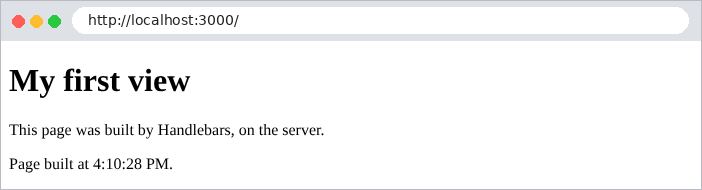
The source code of the page received by the browser no longer contains any trace of [Handlebars]:
| <!doctype html>
<html lang="en">
<head>
<meta charset="utf-8">
<title>My first view</title>
</head>
<body>
<h1>My first view</h1>
<p>This page was built by Handlebars, on the server.</p>
<p>Page built at 4:10:29 PM.</p>
</body>
</html>
|
URL and [/hello/martin] display the same view using a different template:
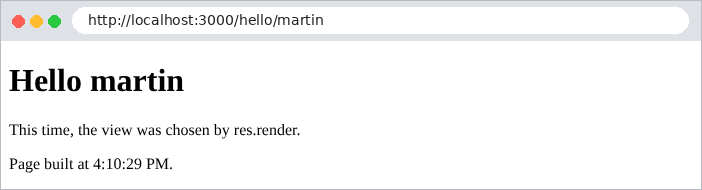
and [/hello/unknown] displays yet another view:
| curl -i http://localhost:3000/hello/unknown
|
| HTTP/1.1 404 Not Found
Content-Type: text/html; charset=utf-8
Content-Length: 164
<!doctype html>
<html lang="en">
<head>
<meta charset="utf-8">
<title>Unknown</title>
</head>
<body>
<h1>Nobody is called [unknown] here</h1>
</body>
</html>
|
4.2. Example 14: The Handlebars language
[Handlebars] is a template language without logic: a view contains no [JavaScript] code, only [{{...}}] expressions and a few blocks ([{{#if}}], [{{#each}}]...). All calculations are performed beforehand by the action. Example 14 demonstrates this. The template:
The [src/basics.controller.ts] file:
| import { Controller, Get, Render } from '@nestjs/common';
@Controller()
export class BasicsController {
@Get()
@Render('basics')
basics(): object {
return {
title: 'Handlebars basics',
name: 'Martin',
html: '<b>this is HTML</b>',
loggedIn: true,
currency: '€',
products: [
{ name: 'Keyboard', price: 25, inStock: true },
{ name: 'Mouse', price: 12.5, inStock: false },
{ name: 'Screen', price: 149, inStock: true },
],
cart: [],
address: { street: '12 rue des Lilas', city: 'Angers' },
};
}
}
|
The view:
The file [views/basics.hbs]:
| <!doctype html>
<html lang="en">
<head>
<meta charset="utf-8">
<title>{{title}}</title>
</head>
<body>
<h1>{{title}}</h1>
{{!-- 1. display a value of the model --}}
<p>1. Name: {{name}} - missing variable: [{{nonexistent}}]</p>
{{!-- 2. {{ }} escapes HTML, {{{ }}} inserts it as is --}}
<p>2a. {{html}}</p>
<p>2b. {{{html}}}</p>
{{!-- 3. a condition --}}
{{#if loggedIn}}
<p>3. You are logged in.</p>
{{else}}
<p>3. You are not logged in.</p>
{{/if}}
{{#unless loggedIn}}
<p>This paragraph is not displayed.</p>
{{/unless}}
{{!-- 4. a loop; inside the loop, the context is the current item --}}
<p>4. Our products:</p>
<ul>
{{#each products}}
<li>no. {{@index}}: {{name}}, {{price}} {{../currency}}
{{#if inStock}}(in stock){{else}}(sold out){{/if}}
{{#if @first}}- the first one{{/if}}
{{#if @last}}- the last one, seen by {{@root.name}}{{/if}}
</li>
{{/each}}
</ul>
{{!-- 5. {{else}} in a loop: the empty list case --}}
<p>5. Your cart:
{{#each cart}}{{name}}{{else}}it is empty.{{/each}}
</p>
{{!-- 6. change the context, or use a dotted path --}}
{{#with address}}
<p>6a. Address: {{street}}, {{city}}</p>
{{/with}}
<p>6b. City: {{address.city}}</p>
</body>
</html>
|
Let's comment on this code:
- Line 9: [{{!-- ... --}}] is a comment ([Handlebars]): it does not appear on the generated page (unlike a comment such as HTML or [<!-- -->]);
- line 10: a variable missing from the template ([nonexistent]) produces an empty string, without an error;
- lines 12–13: [{{html}}] escapes the special characters in HTML ([<] becomes [<]...): the text is displayed as-is. [{{{html}}}] (three curly braces) is inserted without escaping: it is interpreted as HTML. Triple curly braces are used only for HTML generated by the application, never for user-entered data: a user could inject HTML, or even [JavaScript], into the page (a so-called [XSS] attack);
- lines 15–19: [{{#if}}] / [{{else}}] / [{{/if}}]: a conditional block. The condition is a value from the template, not an expression: [false], [undefined], [null], [''], [0], and the empty array are false;
- lines 20–22: [{{#unless}}] is the inverse of [{{#if}}];
- Lines 26–32: [{{#each}}] repeats its content for each element in an array. Within the block, the context is the current element: [{{name}}] is the name of the current product. Special variables are available: [@index] (position starting at 0), [@first], [@last]. [../currency] points to the parent context, [@root.name] to the root model;
- line 36: a [{{else}}] within a [{{#each}}] handles the case of an empty array;
- Lines 39–41: [{{#with}}] changes context; a relative path can also be used (line 42).
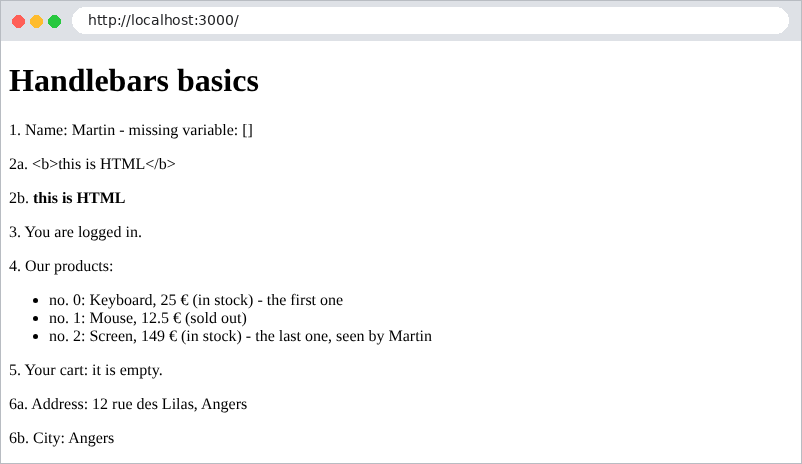
The code HTML produces:
| <!doctype html>
<html lang="en">
<head>
<meta charset="utf-8">
<title>Handlebars basics</title>
</head>
<body>
<h1>Handlebars basics</h1>
<p>1. Name: Martin - missing variable: []</p>
<p>2a. <b>this is HTML</b></p>
<p>2b. <b>this is HTML</b></p>
<p>3. You are logged in.</p>
<p>4. Our products:</p>
<ul>
<li>no. 0: Keyboard, 25 €
(in stock)
- the first one
</li>
<li>no. 1: Mouse, 12.5 €
(sold out)
</li>
<li>no. 2: Screen, 149 €
(in stock)
- the last one, seen by Martin
</li>
</ul>
<p>5. Your cart:
it is empty.
</p>
<p>6a. Address: 12 rue des Lilas, Angers</p>
<p>6b. City: Angers</p>
</body>
</html>
|
Note the blank lines left by the blocks: they have no effect on the display.
4.3. Example 15: Template, Partials, Static Files
The pages of a site share a common template (header, navigation bar, footer). [hbs] handles this as follows: if the views folder contains a file named [layout.hbs], every view is inserted into this template. Reusable page fragments are called partial views.
| 15-layout-partials/
├── public/
│ └── css/
│ └── styles.css
├── src/
│ ├── app.module.ts
│ ├── main.ts
│ └── pages.controller.ts
├── views/
│ ├── partials/
│ │ ├── card.hbs
│ │ └── navbar.hbs
│ ├── home.hbs
│ ├── layout.hbs
│ ├── raw.hbs
│ └── team.hbs
├── nest-cli.json
└── tsconfig.json
|
The file [src/main.ts]:
| import { NestFactory } from '@nestjs/core';
import { NestExpressApplication } from '@nestjs/platform-express';
import { NextFunction, Request, Response } from 'express';
import * as hbs from 'hbs';
import { dirname, join } from 'path';
import { AppModule } from './app.module';
const ROOT = join(__dirname, '..');
async function bootstrap() {
const app = await NestFactory.create<NestExpressApplication>(AppModule);
// 1. static files: public/css/styles.css is served as /css/styles.css
app.useStaticAssets(join(ROOT, 'public'));
// Bootstrap is served directly from node_modules, under /bootstrap/
app.useStaticAssets(join(dirname(require.resolve('bootstrap/package.json')), 'dist'), { prefix: '/bootstrap/' });
// 2. the views; views/layout.hbs will be the layout of ALL the pages
app.setBaseViewsDir(join(ROOT, 'views'));
app.setViewEngine('hbs');
// 3. the partials: views/partials/xxx.hbs is inserted by {{> xxx}}
await new Promise<void>((done) => hbs.registerPartials(join(ROOT, 'views', 'partials'), () => done()));
// 4. an Express middleware: what it puts in res.locals is
// added to the model of EVERY view
app.use((req: Request, res: Response, next: NextFunction) => {
res.locals.path = req.path;
res.locals.year = new Date().getFullYear();
next();
});
await app.listen(3000);
console.log('Server started on http://localhost:3000');
}
bootstrap();
|
Let’s break down this code:
- line 14: [useStaticAssets] serves static files from a folder: the file [public/css/styles.css] is served to URL and [/css/styles.css] as-is, without going through a controller;
- line 16: the CSS [Bootstrap] framework is served directly from the [node_modules] folder, under the prefix [/bootstrap/]. [require.resolve] locates the [bootstrap] package folder, wherever it is installed (here in [examples/node_modules]);
- line 22: the files in the [views/partials] folder become partial files: [partials/navbar.hbs] is inserted into a view by [{{> navbar}}]. [registerPartials] reads the folder asynchronously: we wait for it to finish (the function passed as the second argument is called at the end) before starting the server;
- Lines 26–30: a [Express] middleware, executed before each request. What it stores in [res.locals] is added to the template of each view. This is how we provide common information (in this case, the requested path and the year) to all pages without repeating it in every action.
The [views/layout.hbs] file:
| <!doctype html>
<html lang="en">
<head>
<meta charset="utf-8">
<meta name="viewport" content="width=device-width, initial-scale=1">
<title>{{title}} - My site</title>
<link rel="stylesheet" href="/bootstrap/css/bootstrap.min.css">
<link rel="stylesheet" href="/css/styles.css">
</head>
<body>
<div class="container py-3">
{{> navbar}}
{{!-- the view requested by the action is inserted here --}}
{{{body}}}
<footer class="footer">Page [{{path}}] - © {{year}}</footer>
</div>
</body>
</html>
|
- lines 7–8: the style sheets, served by [useStaticAssets];
- line 12: insertion of the partial [navbar];
- line 14: [{{{body}}}] is the location where [hbs] inserts the view requested by the action. Triple curly braces: the view comes from the pre-generated HTML and must not be escaped;
- line 15: [path] and [year] come from [res.locals] (the middleware for [main.ts]).
The file [views/partials/navbar.hbs]:
| <nav class="navbar navbar-expand bg-light rounded mb-3 px-3">
<span class="navbar-brand">My site</span>
<div class="navbar-nav">
<a class="nav-link" href="/">Home</a>
<a class="nav-link" href="/team">Team</a>
<a class="nav-link" href="/raw">Page without layout</a>
</div>
</nav>
|
The file [views/partials/card.hbs]:
| {{!-- a Bootstrap "card"; parameters: name, role --}}
<div class="card">
<div class="card-body">
<h5 class="card-title">{{name}}</h5>
<p class="card-text">{{role}}</p>
</div>
</div>
|
The [card] partial displays a name and a job title. It is used in two ways:
The [views/home.hbs] file:
| <h1>Welcome</h1>
<p>This page only contains its own content: the header, the navigation
bar and the footer come from the <code>layout.hbs</code> layout.</p>
{{> card name="A partial" role="inserted with named parameters"}}
|
line 4: with named parameters: the partial receives them as context;
The [views/team.hbs] file:
| <h1>{{title}}</h1>
<div class="row g-3">
{{#each members}}
<div class="col-md-4">
{{!-- without parameters, the partial receives the current context: the member --}}
{{> card}}
</div>
{{/each}}
</div>
|
line 6: no parameters: the partial receives the current context, in this case the current team member in the loop [{{#each}}].
The file [src/pages.controller.ts]:
| import { Controller, Get, Render } from '@nestjs/common';
@Controller()
export class PagesController {
@Get()
@Render('home')
home(): object {
return { title: 'Home' };
}
@Get('team')
@Render('team')
team(): object {
return {
title: 'Our team',
members: [
{ name: 'Marie Pélissier', role: 'Director' },
{ name: 'Jacques Bromard', role: 'Developer' },
{ name: 'Philippe Jandot', role: 'Graphic designer' },
],
};
}
// layout: false: the view is rendered ALONE, without the common layout
@Get('raw')
@Render('raw')
raw(): object {
return { layout: false };
}
}
|
Lines 25–29: The [layout: false] field in the model instructs [hbs] not to use the template: the [raw.hbs] view is a complete HTML page. We could also specify a different template ([layout: 'other']). The resulting pages:
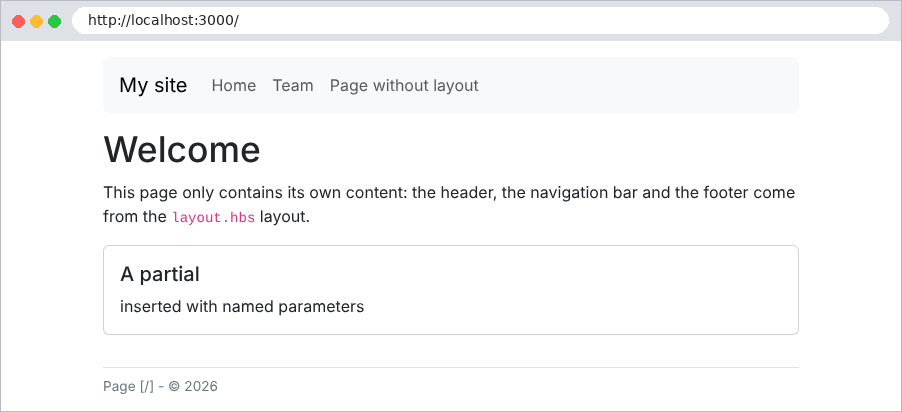
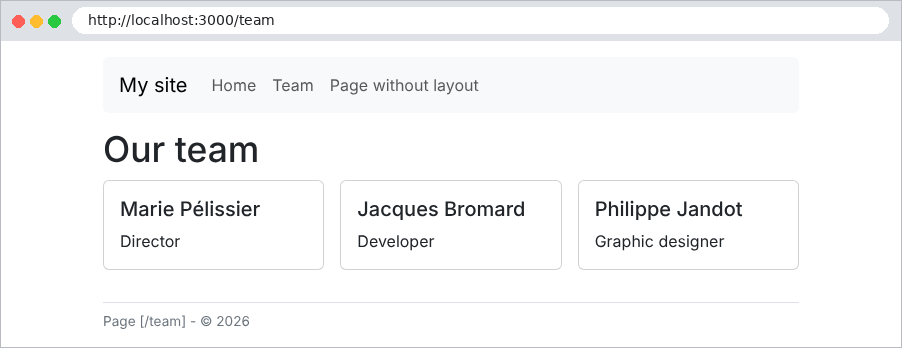

The template, the partial views, and [res.locals] are exactly what the case study uses: a view ([layout.hbs]), partial views for the navigation bar, messages, and confirmation windows, and middleware that prepares the language and the message to be displayed.
4.4. Example 16: Helpers
A helper is a [TypeScript] function that can be called from a view. It compensates for the lack of logic in [Handlebars]: comparing two values, formatting a date or a price, translating text... The blocks [{{#if}}] and [{{#each}}] are themselves predefined helpers.
The [src/helpers.ts] file:
| import { HelperOptions } from 'handlebars';
// the 'hbs' module has no type declarations: we describe what we use of it
interface Hbs {
registerHelper(name: string, fn: (...args: any[]) => unknown): void;
handlebars: { SafeString: new (html: string) => unknown; escapeExpression(text: string): string };
}
export function registerHelpers(hbs: Hbs): void {
// {{uppercase name}}: a simple helper, one argument
hbs.registerHelper('uppercase', (text: unknown) => String(text ?? '').toUpperCase());
// {{#if (eq a b)}}: used as a subexpression, between parentheses
hbs.registerHelper('eq', (a: unknown, b: unknown) => a === b);
// {{active path '/products'}}: "active" if the current page is under this path
hbs.registerHelper('active', (path: unknown, prefix: unknown) =>
typeof path === 'string' && typeof prefix === 'string' && path.startsWith(prefix) ? 'active' : '',
);
// {{money amount currency='USD'}}: the LAST argument of a helper is always
// the Handlebars [options] object; options.hash contains the named
// parameters, options.data.root the full model of the page (res.locals included)
hbs.registerHelper('money', (amount: unknown, options: HelperOptions) => {
const currency = options.hash.currency ?? 'EUR';
const language = options.data?.root?.lang ?? 'en-US';
return new Intl.NumberFormat(language, { style: 'currency', currency: currency }).format(Number(amount));
});
// {{date when}}: a date in the format of the page's language
hbs.registerHelper('date', (when: unknown, options: HelperOptions) => {
const language = options.data?.root?.lang ?? 'en-US';
return new Intl.DateTimeFormat(language, { dateStyle: 'full' }).format(new Date(String(when)));
});
// {{badge stock}}: a helper that builds HTML. SafeString tells
// Handlebars NOT to escape it; it is then up to the helper to escape
// itself the data it inserts into it (escapeExpression)
hbs.registerHelper('badge', (stock: unknown) => {
const n = Number(stock);
const cssClass = n > 0 ? 'text-bg-success' : 'text-bg-danger';
const text = hbs.handlebars.escapeExpression(n > 0 ? `${n} in stock` : 'sold out');
return new hbs.handlebars.SafeString(`<span class="badge ${cssClass}">${text}</span>`);
});
}
|
Let’s comment on this code:
- lines 4–7: the [hbs] package has no type declarations [TypeScript]: we describe which ones we use;
- line 11: [hbs.registerHelper(name, fn)] defines a helper. In a view, [{{uppercase name}}] calls the function with the value of [name];
- line 14: [eq] returns a Boolean. It is used as a sub-expression, enclosed in parentheses, within another helper: [{{#if (eq path '/')}}];
- lines 17–19: [active] returns the class CSS [active] if the page path begins with a given prefix;
- lines 24–28: The last argument of a helper is always the [options] object provided by [Handlebars]. [options.hash] contains the named parameters ([{{money amount currency='USD'}}]), and [options.data.root] contains the root template of the page, to which [res.locals] has been added. The helper retrieves the page's language from there, even if it is called from within a [{{#each}}]. Formatting is handled by the standard object [Intl.NumberFormat];
- lines 31–34: same principle applies to a date, using [Intl.DateTimeFormat];
- Lines 39–44: A helper that generates HTML. By default, the output of a helper is escaped, just like any [{{...}}] expression. To avoid this, it is returned in the form of [SafeString]. The helper must then escape the data it inserts into its HTML ([escapeExpression]) itself.
The [src/main.ts] file:
| import { NestFactory } from '@nestjs/core';
import { NestExpressApplication } from '@nestjs/platform-express';
import { NextFunction, Request, Response } from 'express';
import * as hbs from 'hbs';
import { dirname, join } from 'path';
import { AppModule } from './app.module';
import { registerHelpers } from './helpers';
const ROOT = join(__dirname, '..');
async function bootstrap() {
const app = await NestFactory.create<NestExpressApplication>(AppModule);
app.useStaticAssets(join(ROOT, 'public'));
app.useStaticAssets(join(dirname(require.resolve('bootstrap/package.json')), 'dist'), { prefix: '/bootstrap/' });
app.setBaseViewsDir(join(ROOT, 'views'));
app.setViewEngine('hbs');
// the helpers: TypeScript functions callable from the views
registerHelpers(hbs);
await new Promise<void>((done) => hbs.registerPartials(join(ROOT, 'views', 'partials'), () => done()));
app.use((req: Request, res: Response, next: NextFunction) => {
res.locals.path = req.path;
res.locals.lang = req.query.lang === 'fr' ? 'fr-FR' : 'en-US';
next();
});
await app.listen(3000);
console.log('Server started on http://localhost:3000');
}
bootstrap();
|
- line 18: helpers are registered at startup;
- line 22: the middleware selects the formatting language based on the [lang] parameter in URL (a simple way to test; the next chapter will explain it better).
The [views/partials/navbar.hbs] file:
| <nav class="navbar navbar-expand bg-light rounded mb-3 px-3">
<span class="navbar-brand">Helpers</span>
<div class="navbar-nav">
{{!-- the link of the current page gets the "active" class --}}
<a class="nav-link {{#if (eq path '/')}}active{{/if}}" href="/">Home</a>
<a class="nav-link {{active path '/products'}}" href="/products">Products</a>
</div>
</nav>
|
Lines 5–6: The two ways to highlight the link on the current page: [eq] as a sub-expression within a [{{#if}}], or the [active] helper, which is more concise. The case study uses [active].
The [views/products.hbs] file:
| <h1>{{title}}</h1>
<table class="table table-sm w-auto">
<thead><tr><th>Product</th><th>Price</th><th>Price in dollars</th><th>Stock</th></tr></thead>
<tbody>
{{#each products}}
<tr>
<td>{{uppercase name}}</td>
<td>{{money price}}</td>
<td>{{money price currency='USD'}}</td>
<td>{{badge stock}}</td>
</tr>
{{/each}}
</tbody>
</table>
|
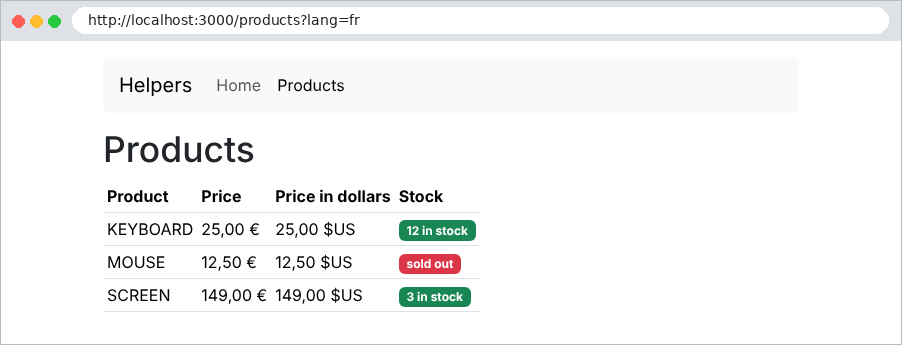
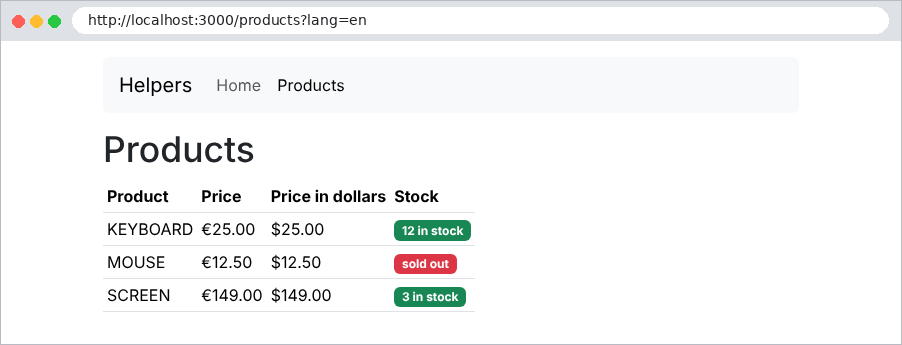
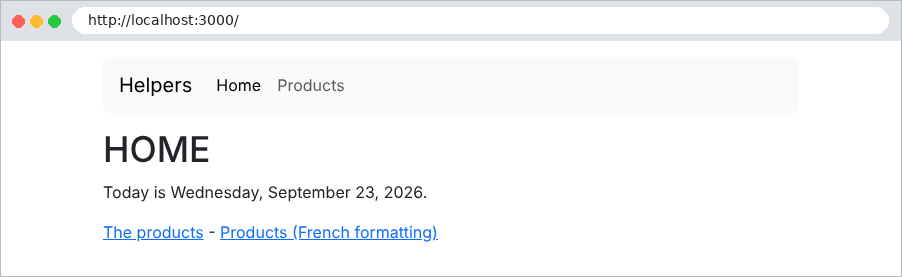
The resulting pages, first in French ([?lang=fr]) and then in English ([?lang=en]):
A HTML form sent using the GET method places its fields in the URL. This is the appropriate method for a search: it does not modify anything, and the resulting URL can be bookmarked or shared. The case study uses it to select a doctor and a date.
The [src/books.controller.ts] file:
| import { Controller, Get, Query, Render } from '@nestjs/common';
interface Book {
title: string;
author: string;
genre: string;
}
const BOOKS: Book[] = [
{ title: 'Le Rouge et le Noir', author: 'Stendhal', genre: 'novel' },
{ title: 'Les Fleurs du mal', author: 'Baudelaire', genre: 'poetry' },
{ title: 'Madame Bovary', author: 'Flaubert', genre: 'novel' },
{ title: 'Alcools', author: 'Apollinaire', genre: 'poetry' },
{ title: 'Le Cid', author: 'Corneille', genre: 'drama' },
];
const GENRES = ['novel', 'poetry', 'drama'];
@Controller()
export class BooksController {
// GET /search?keyword=...&genre=...: the form AND its results
@Get(['/', 'search'])
@Render('search')
search(@Query('keyword') keyword = '', @Query('genre') genre = ''): object {
const word = keyword.trim().toLowerCase();
const results = BOOKS.filter(
(b) =>
(word === '' || b.title.toLowerCase().includes(word) || b.author.toLowerCase().includes(word)) &&
(genre === '' || b.genre === genre),
);
return { keyword, genre, genres: GENRES, results, count: results.length };
}
}
|
- lines 9–15: the books, in memory;
- line 21: an array of paths: the action processes [GET /] and [GET /search];
- line 23: a default value, [TypeScript], replaces a missing parameter (on the first visit, the form has not yet been submitted);
- lines 24–29: filtering;
- line 30: the template contains the entered values ([keyword], [genre]); so that the form can display them again, along with the list of genres and the results.
The file [views/search.hbs]:
| <h1 class="h3">Book search</h1>
{{!-- method="get": the fields are sent in the URL (?keyword=...&genre=...) --}}
<form method="get" action="/search" class="row g-2 align-items-end mb-3">
<div class="col-auto">
<label class="form-label" for="keyword">Title or author</label>
{{!-- value="{{keyword}}": the field displays again what was typed --}}
<input class="form-control" id="keyword" name="keyword" value="{{keyword}}">
</div>
<div class="col-auto">
<label class="form-label" for="genre">Genre</label>
<select class="form-select" id="genre" name="genre">
<option value="">(all)</option>
{{#each genres}}
<option value="{{this}}" {{#if (eq this ../genre)}}selected{{/if}}>{{this}}</option>
{{/each}}
</select>
</div>
<div class="col-auto">
<button class="btn btn-primary" type="submit">Search</button>
</div>
</form>
<p>{{count}} book(s) found.</p>
<ul>
{{#each results}}
<li><i>{{title}}</i>, {{author}} ({{genre}})</li>
{{/each}}
</ul>
|
- Line 3: [method="get"] and [action="/search"]: Submitting the form is a [GET /search?keyword=...&genre=...] request. The parameter names are the [name] attribute of each field;
- Line 7: The [value] attribute redisplays the entry;
- lines 13–15: In the drop-down list, the option matching the selected category is assigned the attribute [selected]. In the loop, [this] is the current element (a string) and [../genre] is the genre of the parent model.
Upon initial display, and then after a search:
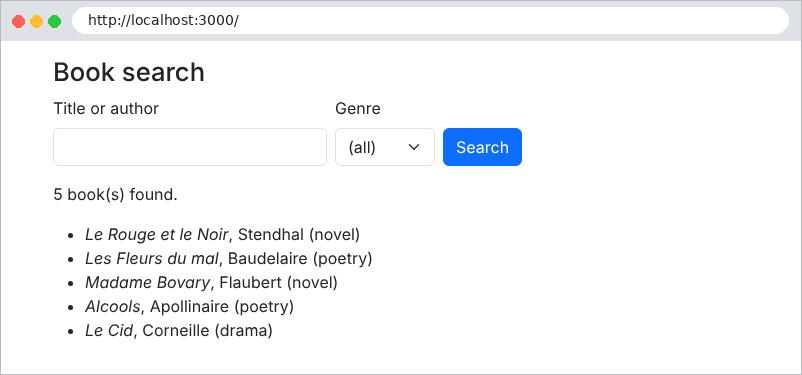
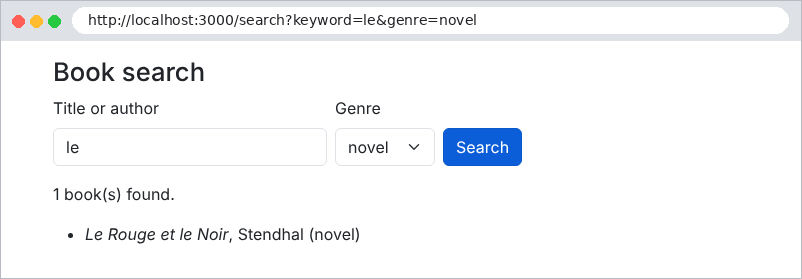
The address bar shows the parameters that were sent. Accented characters and spaces are encoded there ([%C3%A9]...): this is the encoding URL, which [NestJS] decodes before populating [@Query].
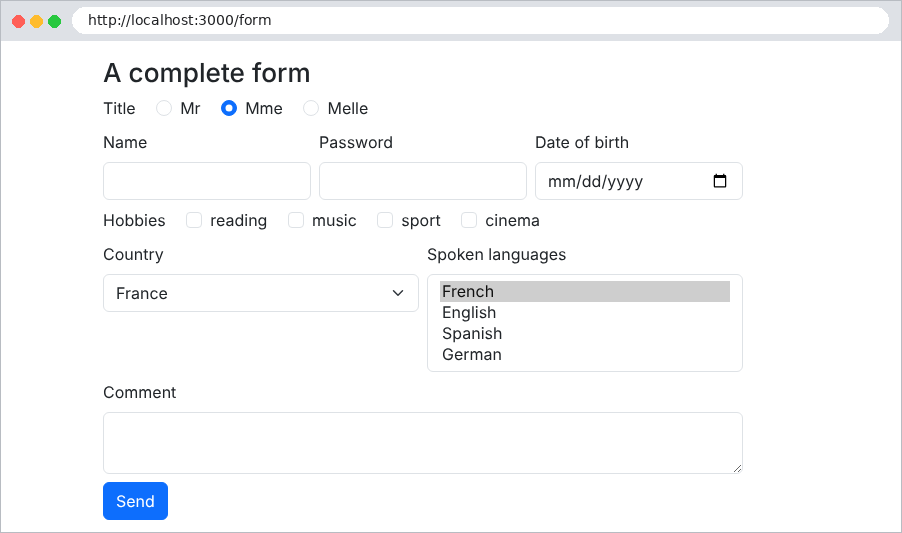
Example 18 includes all types of HTML fields: text, password, date, radio buttons, checkboxes, drop-down list, multi-select list, text box, and hidden field. It shows how the server receives them and how the view displays them.
The [src/lists.service.ts] file:
| import { Injectable } from '@nestjs/common';
// the lists offered by the form. In a real application, they would
// come from a database: we would read them ONCE, at startup,
// since they are the same for all users
@Injectable()
export class ListsService {
readonly titles = ['Mr', 'Mme', 'Melle'];
readonly countries = [
{ code: 'fr', name: 'France' },
{ code: 'be', name: 'Belgium' },
{ code: 'ch', name: 'Switzerland' },
{ code: 'ca', name: 'Canada' },
];
readonly hobbies = ['reading', 'music', 'sport', 'cinema'];
readonly languages = ['French', 'English', 'Spanish', 'German'];
}
|
The lists offered by the form are provided by a service. They are the same for all users: a service, instantiated only once (application scope; see Chapter 6), is the natural place to store them.
The file [src/form.controller.ts]:
| import { Body, Controller, Get, HttpCode, Post, Render } from '@nestjs/common';
import { ListsService } from './lists.service';
// what the user typed, once put back into shape
interface Input {
name: string;
password: string;
comment: string;
title: string;
hobbies: string[];
country: string;
languages: string[];
birthDate: string;
token: string;
}
@Controller('form')
export class FormController {
constructor(private readonly lists: ListsService) {}
// GET: the form, with initial values
@Get()
@Render('form')
display(): object {
const initial: Input = {
name: '', password: '', comment: '', title: 'Mme', hobbies: [],
country: 'fr', languages: ['French'], birthDate: '', token: 'A7X2',
};
return this.model(initial, null);
}
// POST: we receive the typed values and display the form again
@Post()
@HttpCode(200) // a POST answers 201 by default; here we return a page
@Render('form')
process(@Body() body: Record<string, string | string[]>): object {
const input: Input = {
name: text(body.name),
password: text(body.password),
comment: text(body.comment),
title: text(body.title),
hobbies: array(body.hobbies),
country: text(body.country),
languages: array(body.languages),
birthDate: text(body.birthDate),
token: text(body.token),
};
return this.model(input, body);
}
// the model of the view: the lists, each option being marked
// checked / selected according to the input
private model(input: Input, received: object | null): object {
return {
input,
titles: this.lists.titles.map((t) => ({ value: t, checked: t === input.title })),
hobbies: this.lists.hobbies.map((h) => ({ value: h, checked: input.hobbies.includes(h) })),
countries: this.lists.countries.map((c) => ({ ...c, selected: c.code === input.country })),
languages: this.lists.languages.map((l) => ({ value: l, selected: input.languages.includes(l) })),
received: received ? JSON.stringify(received, null, 2) : null,
};
}
}
// a missing field (unchecked box...) is not sent at all
function text(value: unknown): string {
return typeof value === 'string' ? value : '';
}
// one checked value: "sport"; two: ["sport", "music"]; none: undefined
function array(value: unknown): string[] {
if (value === undefined) return [];
return Array.isArray(value) ? value : [String(value)];
}
|
Let’s comment on this code:
- lines 5–15: data entry and formatting: the checkboxes and the drop-down list are arrays;
- line 19: the list service is injected;
- lines 22–30: [GET /form] displays the form with initial values;
- line 34: [POST /form] returns a page, not a created resource: we replace the 201 code with 200;
- lines 37–47: the received fields are reformatted. Two cases require attention: a missing field (an unchecked box is not sent at all, see function [text], lines 66–68), and a multi-value field, which arrives as a string if it has only one value (function [array], lines 71–74, see Example 10);
- lines 53–62: the view template. For each list, the action calculates which options should be checked or selected: the view then only needs to evaluate a Boolean. The field [received] contains what the server received, for display purposes.
The file [views/form.hbs]:
| <h1 class="h3">A complete form</h1>
<form method="post" action="/form" style="max-width: 40rem">
{{!-- hidden field: sent with the form, but invisible --}}
<input type="hidden" name="token" value="{{input.token}}">
<div class="mb-2">
<span class="form-label me-3">Title</span>
{{#each titles}}
{{!-- radio buttons: same [name], a single value sent --}}
<div class="form-check form-check-inline">
<input class="form-check-input" type="radio" name="title" id="title-{{value}}"
value="{{value}}" {{#if checked}}checked{{/if}}>
<label class="form-check-label" for="title-{{value}}">{{value}}</label>
</div>
{{/each}}
</div>
<div class="row g-2 mb-2">
<div class="col">
<label class="form-label" for="name">Name</label>
<input class="form-control" type="text" id="name" name="name" value="{{input.name}}">
</div>
<div class="col">
<label class="form-label" for="password">Password</label>
{{!-- a password is NEVER sent back in the page --}}
<input class="form-control" type="password" id="password" name="password">
</div>
<div class="col">
<label class="form-label" for="birthDate">Date of birth</label>
<input class="form-control" type="date" id="birthDate" name="birthDate" value="{{input.birthDate}}">
</div>
</div>
<div class="mb-2">
<span class="form-label me-3">Hobbies</span>
{{#each hobbies}}
{{!-- checkboxes: same [name], several possible values --}}
<div class="form-check form-check-inline">
<input class="form-check-input" type="checkbox" name="hobbies" id="hobby-{{@index}}"
value="{{value}}" {{#if checked}}checked{{/if}}>
<label class="form-check-label" for="hobby-{{@index}}">{{value}}</label>
</div>
{{/each}}
</div>
<div class="row g-2 mb-2">
<div class="col">
<label class="form-label" for="country">Country</label>
<select class="form-select" id="country" name="country">
{{#each countries}}
<option value="{{code}}" {{#if selected}}selected{{/if}}>{{name}}</option>
{{/each}}
</select>
</div>
<div class="col">
<label class="form-label" for="languages">Spoken languages</label>
{{!-- multiple-selection list: several possible values --}}
<select class="form-select" id="languages" name="languages" multiple size="4">
{{#each languages}}
<option value="{{value}}" {{#if selected}}selected{{/if}}>{{value}}</option>
{{/each}}
</select>
</div>
</div>
<div class="mb-2">
<label class="form-label" for="comment">Comment</label>
{{!-- a text area: the value is BETWEEN the tags --}}
<textarea class="form-control" id="comment" name="comment" rows="2">{{input.comment}}</textarea>
</div>
<button class="btn btn-primary" type="submit">Send</button>
</form>
{{#if received}}
<h2 class="h5 mt-3">What the server received</h2>
<pre class="bg-light p-2 border">{{received}}</pre>
{{/if}}
|
Let’s comment on this code:
- line 2: the form is submitted via POST; its fields are included in the request body;
- line 4: a hidden field is sent with the form but is not displayed. It is used to pass information from one page to the next (the case study uses it, for example, to store the version of a record). Note: the user can modify it;
- lines 8–15: radio buttons share the same [name] attribute: only one can be selected, and only one value is sent. The [checked] attribute selects the button;
- line 26: a password is never sent back in a page: the field has no [value] attribute;
- line 30: a date field. The browser displays the date in the user’s format, but always sends [yyyy-mm-dd];
- lines 36–43: checkboxes with the same [name] attribute: each checked box sends its value; the parameter is therefore repeated;
- lines 49–53: a drop-down list. The selected option has the attribute [selected];
- lines 58–62: the [multiple] attribute allows you to select multiple options;
- line 69: the value of a text field is enclosed within its tags, not in a [value] attribute;
- Lines 75–78: What the server received, displayed within a [<pre>] tag.
The initial form, then after submission:
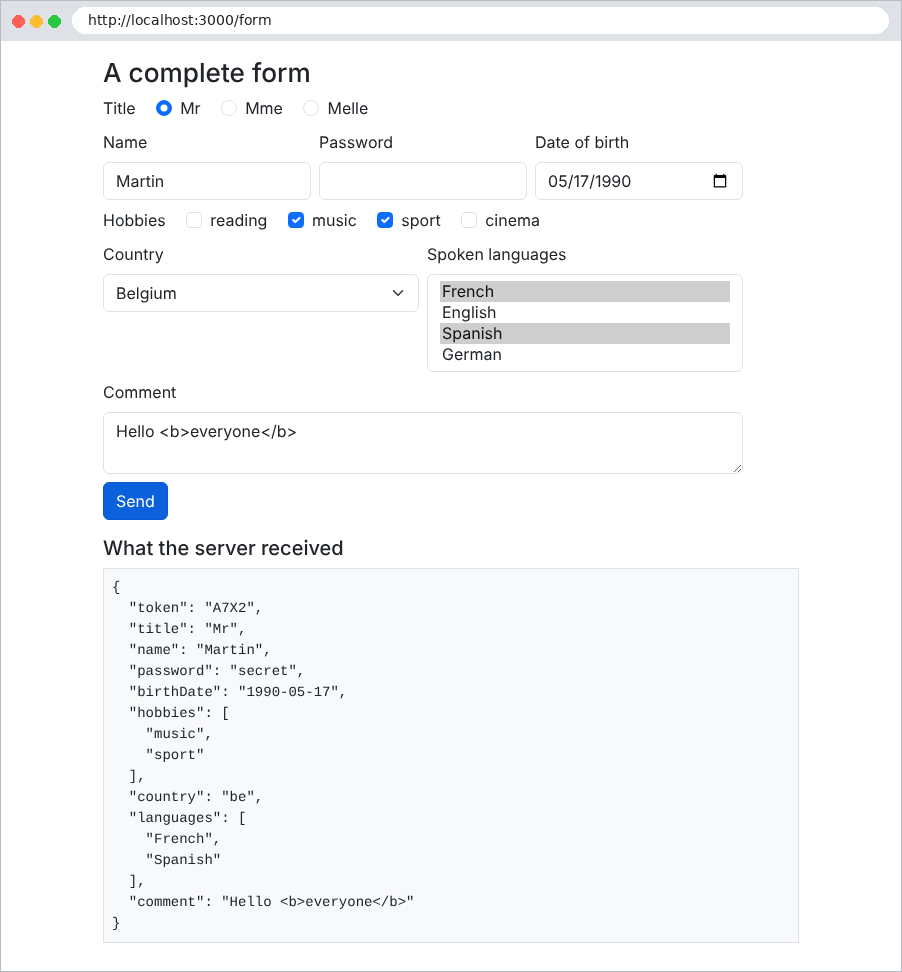
Note that the text box redisplayed [Hello <b>everyone</b>] exactly as entered: thanks to the escaping of [{{...}}], the entered tags are not interpreted. The password was received but is not displayed. With [curl], we can see the difference when a checkbox is selected:
| curl -d "token=A7X2&title=Mr&name=Martin&hobbies=sport" http://localhost:3000/form
|
| {
"token": "A7X2",
"title": "Mr",
"name": "Martin",
"hobbies": "sport"
}
|
and two checked boxes:
| curl -d "token=A7X2&title=Mr&name=Martin&hobbies=sport&hobbies=music" http://localhost:3000/form
|
| {
"token": "A7X2",
"title": "Mr",
"name": "Martin",
"hobbies": [
"sport",
"music"
]
}
|
(only the [What the server received] section of the page is shown)
An invalid form must be redisplayed, showing the entered values and a message below each field with an error. Example 19 applies the technique from Example 09 (validation performed by the action) to a registration form.
The file [src/registration.dto.ts]:
| import { Transform, Type } from 'class-transformer';
import { IsEmail, IsInt, IsNotEmpty, Max, MaxLength, Min, MinLength } from 'class-validator';
// removes the superfluous spaces of an input BEFORE its validation
const clean = ({ value }: { value: unknown }) => (typeof value === 'string' ? value.trim() : value);
export class RegistrationDto {
@Transform(clean)
@IsNotEmpty({ message: 'The name is required.' })
@MaxLength(20, { message: 'The name must not exceed 20 characters.' })
name: string;
@Transform(clean)
@IsEmail({}, { message: 'Invalid email address.' })
email: string;
// everything that comes from a form is a string: "42" -> 42
@Type(() => Number)
@IsInt({ message: 'The age must be an integer.' })
@Min(18, { message: 'You must be at least 18 years old.' })
@Max(120, { message: 'The age cannot exceed 120 years.' })
age: number;
@MinLength(6, { message: 'The password must have at least 6 characters.' })
password: string;
// "confirmation = password" involves TWO fields: it is the
// controller that checks it
confirmation: string;
}
|
- Line 5: A cleanup function, applied by [@Transform] before validation: a name consisting of spaces is converted to an empty string, and [@IsNotEmpty] rejects it;
- Lines 18–22: The age is converted to a number and then validated;
- Lines 27–29: The rule “the confirmation matches the password” applies to two fields: the decorators do not see it, but the controller will verify it.
The file [src/validation.ts]:
| import { ClassConstructor, plainToInstance } from 'class-transformer';
import { validate } from 'class-validator';
// errors by field: { name: 'The name is required.', ... }
export type Errors = Record<string, string>;
export async function validateForm<T extends object>(
cls: ClassConstructor<T>,
body: Record<string, unknown>,
): Promise<{ dto: T; errors: Errors }> {
// 1. received object -> instance of the class (@Transform / @Type are applied)
const dto = plainToInstance(cls, body);
// 2. checking all the constraints
const violations = await validate(dto);
// 3. we keep the first message of each invalid field
const errors: Errors = {};
for (const v of violations) {
errors[v.property] = Object.values(v.constraints ?? {})[0];
}
return { dto, errors };
}
|
- line 5: Errors are organized by field: [{ name: 'The name is required.' }], which allows each message to be displayed under its corresponding field;
- lines 7–10: the function is generic: it validates any form class. It returns the converted instance ([dto]) and the errors;
- Lines 17–19: A field can violate multiple constraints; only the first error message is retained.
The case study has the same function ([web/helpers/form.helper.ts]).
The file [src/registration.controller.ts]:
| import { Body, Controller, Get, Post, Query, Render, Res } from '@nestjs/common';
import { Response } from 'express';
import { RegistrationDto } from './registration.dto';
import { validateForm } from './validation';
@Controller('register')
export class RegistrationController {
// ?html5=1: we let the browser validate the form before sending it
@Get()
@Render('registration')
display(@Query('html5') html5?: string): object {
return { values: {}, errors: {}, html5: html5 === '1' };
}
@Post()
async register(
@Body() body: Record<string, string>,
@Query('html5') html5: string | undefined,
@Res() res: Response,
): Promise<void> {
const { dto, errors } = await validateForm(RegistrationDto, body);
// a rule that involves two fields
if (!errors.password && body.confirmation !== body.password) {
errors.confirmation = 'The confirmation does not match the password.';
}
if (Object.keys(errors).length > 0) {
// we DISPLAY the form AGAIN: typed values (except the passwords)
// and a message under each invalid field
res.render('registration', {
values: { name: body.name, email: body.email, age: body.age },
errors,
globalError: 'The form contains errors.',
html5: html5 === '1',
});
return;
}
res.render('welcome', { name: dto.name, email: dto.email, age: dto.age });
}
}
|
- lines 9–13: the empty form. The parameter [html5] will be explained later;
- line 21: validation of each field;
- lines 23–25: followed by the rule that applies to two fields;
- lines 26–36: if there are errors, the form is redisplayed: the entered values (except passwords), errors by field, and a general message;
- line 37: otherwise, the welcome page, with the values converted by [dto] (age is a number, the name has been cleaned up).
The fields are all built using the same template: a partial file handles them.
The [views/partials/field.hbs] file:
| {{!-- an input field; parameters: name, label, type, value, error, and
attributes = the HTML5 validation attributes (required, maxlength...) --}}
<div class="mb-2">
<label class="form-label" for="{{name}}">{{label}}</label>
<input class="form-control {{#if error}}is-invalid{{/if}}" id="{{name}}" name="{{name}}"
type="{{type}}" value="{{value}}" {{{attributes}}}>
{{#if error}}<div class="invalid-feedback">{{error}}</div>{{/if}}
</div>
|
- line 5: the [Bootstrap] [is-invalid] class highlights an invalid field in red;
- line 6: the validation attributes HTML5 are passed as parameters and inserted without escaping (triple curly braces): they are written by the developer, not entered by the user;
- line 7: the error message, below the field (class [invalid-feedback]).
The file [views/registration.hbs]:
| <h1 class="h3">Registration</h1>
{{#if html5}}
<p>Browser validation <b>enabled</b> - <a href="/register">disable it</a></p>
{{else}}
<p>Browser validation <b>disabled</b> - <a href="/register?html5=1">enable it</a></p>
{{/if}}
{{!-- novalidate: the browser ignores the required, min... attributes and
sends the form as is; only the server validates --}}
<form method="post" action="/register{{#if html5}}?html5=1{{/if}}" {{#unless html5}}novalidate{{/unless}}>
{{> field name="name" label="Name" type="text" value=values.name error=errors.name
attributes='required maxlength="20"'}}
{{> field name="email" label="Email address" type="email" value=values.email
error=errors.email attributes="required"}}
{{> field name="age" label="Age" type="number" value=values.age error=errors.age
attributes='required min="18" max="120"'}}
{{> field name="password" label="Password" type="password" error=errors.password
attributes='required minlength="6"'}}
{{> field name="confirmation" label="Confirmation" type="password" error=errors.confirmation
attributes="required"}}
<button class="btn btn-primary" type="submit">Register</button>
</form>
|
- line 9: the [novalidate] attribute is present when [html5] is false;
- lines 10–19: each field is a call to the partial, with named parameters. A parameter can be a value from the template ([value=values.name]).
The file [views/layout.hbs]:
| <!doctype html>
<html lang="en">
<head>
<meta charset="utf-8">
<title>Registration</title>
<link rel="stylesheet" href="/bootstrap/css/bootstrap.min.css">
<link rel="stylesheet" href="/css/styles.css">
</head>
<body>
<div class="container py-3" style="max-width: 36rem">
{{{body}}}
{{!-- the global error, at the bottom of the page, on a light pink background --}}
{{#if globalError}}
<div class="error-area" role="alert">{{globalError}}</div>
{{/if}}
</div>
</body>
</html>
|
lines 13–15: the global message is displayed at the bottom of the page on a light pink background (class [error-area] of [public/css/styles.css]), as in the case study.
Let’s submit the form with several errors:
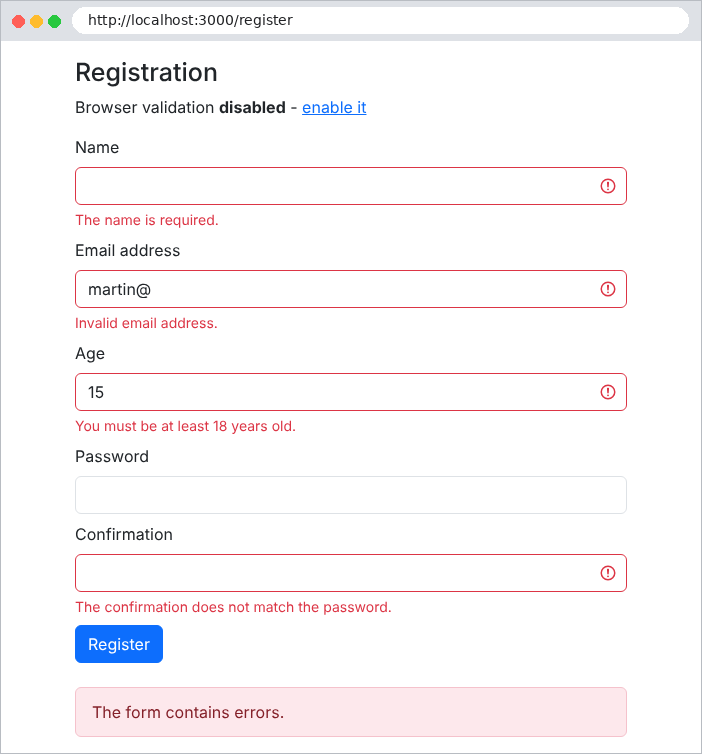
then correctly filled out:
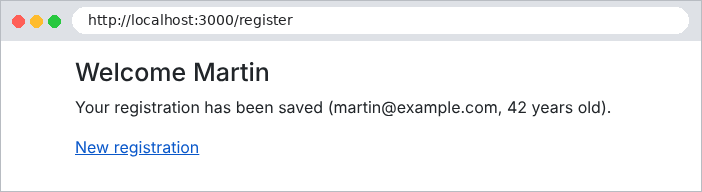
4.7.1. Validation by the browser
The attributes [required], [maxlength], [min], [max], [type="email"]... instruct the browser to validate the form before submitting it: the user is immediately notified via a tooltip, without any round-trip communication with the server. This is the behavior triggered by the “enable it” link ([/register?html5=1]), which removes the [novalidate] attribute from the form.
This validation is a convenience, not a security measure: you can bypass it simply by removing the [required] attribute using the browser’s developer tools, or by sending the request with [curl]. Server-side validation remains essential. That’s why the example disables browser validation by default: to demonstrate how the server works. The case study, however, retains both: the HTML5 attributes for convenience, and server-side validation for security.
4.8. Example 20: The Post/Redirect/Get Pattern
When a POST form submits successfully, the action can display a page directly. The problem arises if the user then refreshes that page (F5 key): the browser resubmits the form, and the operation is performed a second time (an order placed twice, an appointment made twice...). The Post / Redirect / Get pattern (PRG) prevents this problem: a successful POST action does not generate a page; instead, it redirects to a GET page. Reloading this page only sends the GET request, which has no effect.
One detail remains: the GET page must display a message (“the task has been added”), even though this message was generated by the POST action in a different request. It is transmitted in a short-lived cookie, which is read and deleted by the next request: this is a flash message.
The [src/flash.ts] file:
| import { NextFunction, Request, Response } from 'express';
const FLASH_COOKIE = 'flash';
// stores a message that will be displayed by the NEXT page, and only once
export function flash(res: Response, message: string): void {
res.cookie(FLASH_COOKIE, message, { httpOnly: true, sameSite: 'lax', maxAge: 60_000 });
}
// on each request: the pending message moves from the cookie to res.locals (so
// to the model of the view), and the cookie is cleared
export function flashMiddleware(req: Request, res: Response, next: NextFunction): void {
res.locals.flash = req.cookies?.[FLASH_COOKIE] ?? null;
if (res.locals.flash) {
res.clearCookie(FLASH_COOKIE);
}
next();
}
|
- lines 6–8: [res.cookie(name, value, options)] sets a cookie: the browser will send it back with every subsequent request. Options: [httpOnly] (the [JavaScript] from the page cannot read it), [sameSite: 'lax'] (it is not sent by POST requests coming from other sites), [maxAge] (lifetime: one minute, more than enough to track the redirect);
- Lines 12–18: Middleware executed before each request: any message is passed from the cookie to [res.locals], and thus to the view template, and the cookie is cleared ([res.clearCookie]): the message will be displayed only once.
The file [src/main.ts]:
| import { NestFactory } from '@nestjs/core';
import { NestExpressApplication } from '@nestjs/platform-express';
import * as cookieParser from 'cookie-parser';
import { dirname, join } from 'path';
import { AppModule } from './app.module';
import { flashMiddleware } from './flash';
const ROOT = join(__dirname, '..');
async function bootstrap() {
const app = await NestFactory.create<NestExpressApplication>(AppModule);
app.useStaticAssets(join(ROOT, 'public'));
app.useStaticAssets(join(dirname(require.resolve('bootstrap/package.json')), 'dist'), { prefix: '/bootstrap/' });
app.setBaseViewsDir(join(ROOT, 'views'));
app.setViewEngine('hbs');
// cookie-parser fills req.cookies with the cookies sent by the browser
app.use(cookieParser());
// then our middleware reads (and clears) the pending flash message
app.use(flashMiddleware);
await app.listen(3000);
console.log('Server started on http://localhost:3000');
}
bootstrap();
|
- line 17: the [cookie-parser] middleware decodes the [Cookie] header from the request and populates the [req.cookies] object;
- line 19: our middleware, which requires [req.cookies], is registered after it: middleware runs in the order in which it is registered.
The file [src/tasks.controller.ts]:
| import { Body, Controller, Get, Post, Res } from '@nestjs/common';
import { Response } from 'express';
import { flash } from './flash';
import { TasksService } from './tasks.service';
@Controller('tasks')
export class TasksController {
constructor(private readonly tasks: TasksService) {}
// GET /tasks: the list and the add form
@Get()
display(@Res() res: Response): void {
res.render('tasks', { tasks: this.tasks.list() });
}
// POST /tasks: the Post / Redirect / Get pattern
@Post()
add(@Body('label') label: string | undefined, @Res() res: Response): void {
const text = (label ?? '').trim();
if (text === '' || text.length > 40) {
// invalid input: we display the page again, without a redirect
res.render('tasks', {
tasks: this.tasks.list(),
label,
error: 'The label must have 1 to 40 characters.',
});
return;
}
this.tasks.add(text);
flash(res, `The task [${text}] has been added.`);
// no page: a redirect to the GET page
res.redirect('/tasks');
}
// POST /tasks/without-prg: the counter-example (a page in response to the POST)
@Post('without-prg')
addWithoutPrg(@Body('label') label: string | undefined, @Res() res: Response): void {
this.tasks.add((label ?? '').trim() || '(untitled)');
res.render('tasks', { tasks: this.tasks.list(), withoutPrg: true });
}
}
|
- lines 11–14: the list page;
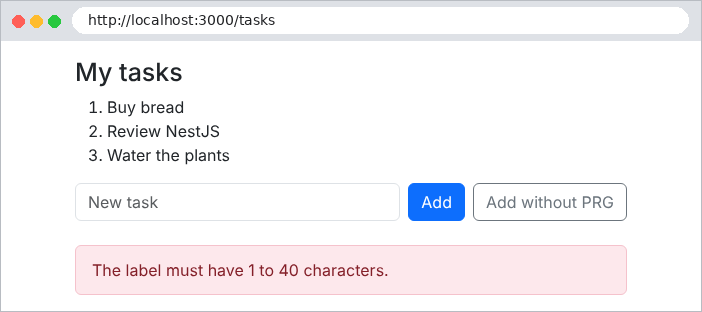
- lines 20–27: an invalid entry: the page is re-displayed (no redirection: the entry and the error message must be retained);
- lines 29–32: a valid entry: the operation, the pop-up message, then a 302 redirect to the GET page;
- lines 36–40: the counterexample, for comparison.
The file [views/tasks.hbs]:
| <h1 class="h3">My tasks</h1>
<ol>
{{#each tasks}}<li>{{this}}</li>{{/each}}
</ol>
<form method="post" action="/tasks" class="d-flex gap-2">
<input class="form-control" name="label" value="{{label}}" placeholder="New task">
<button class="btn btn-primary text-nowrap" type="submit">Add</button>
{{!-- formaction: this button sends the SAME form to another address --}}
<button class="btn btn-outline-secondary text-nowrap" type="submit" formaction="/tasks/without-prg">Add without PRG</button>
</form>
{{#if withoutPrg}}
<p class="text-danger mt-2">Page displayed in response to a POST: press F5 and the task will be added a second time.</p>
{{/if}}
|
line 9: the [formaction] attribute of a button submits the form to an address different from that of the form’s [action] attribute. The form thus has two buttons, which trigger two different actions. The case study uses this method on its login page.
The file [views/layout.hbs]:
| <!doctype html>
<html lang="en">
<head>
<meta charset="utf-8">
<title>Tasks</title>
<link rel="stylesheet" href="/bootstrap/css/bootstrap.min.css">
<link rel="stylesheet" href="/css/styles.css">
</head>
<body>
<div class="container py-3" style="max-width: 36rem">
{{!-- the flash message, at the top of the page --}}
{{#if flash}}
<div class="alert alert-success" role="status">{{flash}}</div>
{{/if}}
{{{body}}}
{{#if error}}
<div class="error-area" role="alert">{{error}}</div>
{{/if}}
</div>
</body>
</html>
|
The flash message is displayed at the top of the page (lines 12–14), and the error message at the bottom (lines 16–18).
Here is what [curl] sees when the form is submitted successfully. The [-c file] option saves the received cookies, while [-b file] sends them back:
| curl -i -c cookies.txt -b cookies.txt -d "label=Review NestJS" http://localhost:3000/tasks
|
| HTTP/1.1 302 Found
Set-Cookie: flash=The%20task%20%5BReview%20NestJS%5D%20has%20been%20added.; Max-Age=60; Path=/; Expires=Wed, 23 Sep 2026 14:24:23 GMT; HttpOnly; SameSite=Lax
Location: /tasks
Content-Type: text/plain; charset=utf-8
Content-Length: 28
Found. Redirecting to /tasks
|
The response is a redirect, with the cookie [flash] (its content is encoded). The following request sends the cookie; the response deletes it (expiration date in the past):
| curl -i -c cookies.txt -b cookies.txt http://localhost:3000/tasks
|
| HTTP/1.1 200 OK
Set-Cookie: flash=; Path=/; Expires=Thu, 01 Jan 1970 00:00:00 GMT
Content-Type: text/html; charset=utf-8
<!doctype html>
<html lang="en">
<head>
<meta charset="utf-8">
<title>Tasks</title>
<link rel="stylesheet" href="/bootstrap/css/bootstrap.min.css">
<link rel="stylesheet" href="/css/styles.css">
</head>
<body>
...
|
In the browser, after adding a task:
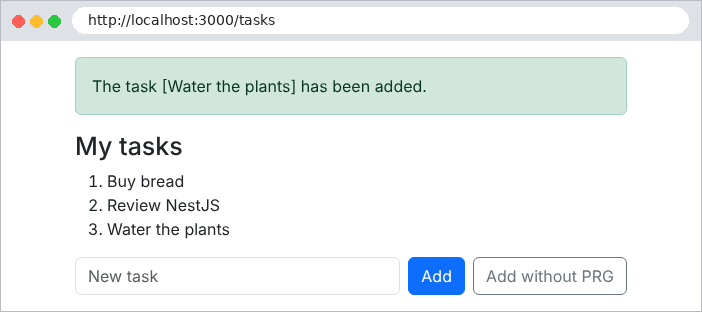
The address bar displays [/tasks]: this is the page GET. You can safely reload it; the message will disappear. An empty entry:
And the counterexample:
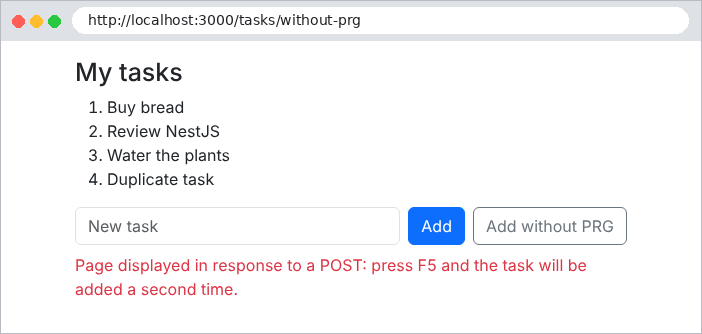
Here, reloading the page triggers a browser warning (“Confirm form submission”), then adds the task a second time. All POST forms in the case study follow the PRG pattern.
A simple rule guides the choice between a link and a button:
- a link ([<a href>]) generates a GET request. A GET request must not modify anything: browsers, search engines, and antivirus programs may follow links on their own to prepare or analyze a page;
- an operation that modifies data (add, edit, delete, log out) is a button in a form POST.
Example 21 manages a contact list: you view a contact via a link and delete it using a button, which opens a confirmation window.
The file [src/contacts.controller.ts]:
| import { Body, Controller, Get, Param, ParseIntPipe, Post, Render, Res } from '@nestjs/common';
import { Response } from 'express';
import { flash } from './flash';
import { ContactsService } from './contacts.service';
@Controller('contacts')
export class ContactsController {
constructor(private readonly contacts: ContactsService) {}
// a LINK (<a href>): a GET request, which modifies nothing
@Get()
@Render('list')
list(): object {
return { contacts: this.contacts.list() };
}
@Get(':id')
@Render('details')
details(@Param('id', ParseIntPipe) id: number): object {
return { contact: this.contacts.read(id) };
}
// a BUTTON in a POST form: a request that modifies data
@Post(':id')
save(
@Param('id', ParseIntPipe) id: number,
@Body() body: { name: string; phone: string },
@Res() res: Response,
): void {
const contact = this.contacts.edit(id, body.name, body.phone);
flash(res, `The contact [${contact.name}] has been modified.`);
res.redirect('/contacts');
}
// same form, another button (formaction attribute): another action
@Post(':id/duplicate')
duplicate(
@Param('id', ParseIntPipe) id: number,
@Body() body: { name: string; phone: string },
@Res() res: Response,
): void {
const copy = this.contacts.add(`${body.name} (copy)`, body.phone);
flash(res, `The contact [${copy.name}] has been created.`);
res.redirect('/contacts');
}
@Post(':id/delete')
delete(@Param('id', ParseIntPipe) id: number, @Res() res: Response): void {
const contact = this.contacts.delete(id);
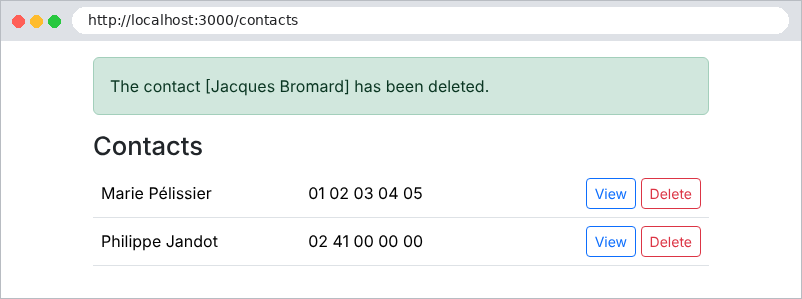
flash(res, `The contact [${contact.name}] has been deleted.`);
res.redirect('/contacts');
}
}
|
- lines 11–15 and 17–21: the two pages—the list and the contact detail page. [ParseIntPipe] converts the ID; a nonexistent contact results in a 404 error (see the service);
- lines 24–29: saving a record, using PRG;
- lines 36–41: duplication, triggered by a second button on the same form (attribute [formaction]);
- lines 47–52: deletion, via POST.
The file [views/list.hbs]:
| <h1 class="h3">Contacts</h1>
<table class="table align-middle">
<tbody>
{{#each contacts}}
<tr>
<td>{{name}}</td>
<td>{{phone}}</td>
<td class="text-end">
{{!-- view: a simple link --}}
<a class="btn btn-sm btn-outline-primary" href="/contacts/{{id}}">View</a>
{{!-- delete: a POST form, whose submission will be confirmed --}}
<form method="post" action="/contacts/{{id}}/delete" class="d-inline"
data-confirmation="Delete the contact {{name}}?">
<button class="btn btn-sm btn-outline-danger" type="submit">Delete</button>
</form>
</td>
</tr>
{{/each}}
</tbody>
</table>
|
- line 10: view: a link, displayed as a button by [Bootstrap];
- lines 12–15: delete: a small form (POST), reduced to its button. The [data-confirmation] attribute contains the question to be asked before submission. The [data-*] attributes are optional: HTML ignores them, while [JavaScript] on the page can read them.
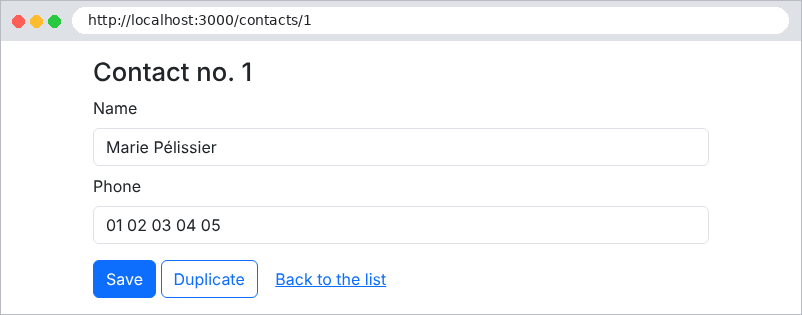
The [views/details.hbs] file:
| <h1 class="h3">Contact no. {{contact.id}}</h1>
<form method="post" action="/contacts/{{contact.id}}">
<div class="mb-2">
<label class="form-label" for="name">Name</label>
<input class="form-control" id="name" name="name" value="{{contact.name}}">
</div>
<div class="mb-3">
<label class="form-label" for="phone">Phone</label>
<input class="form-control" id="phone" name="phone" value="{{contact.phone}}">
</div>
{{!-- two submit buttons for the same form --}}
<button class="btn btn-primary" type="submit">Save</button>
<button class="btn btn-outline-primary" type="submit" formaction="/contacts/{{contact.id}}/duplicate">Duplicate</button>
<a class="btn btn-link" href="/contacts">Back to the list</a>
</form>
|
Line 13: two submit buttons for the same form.
4.9.1. The confirmation window
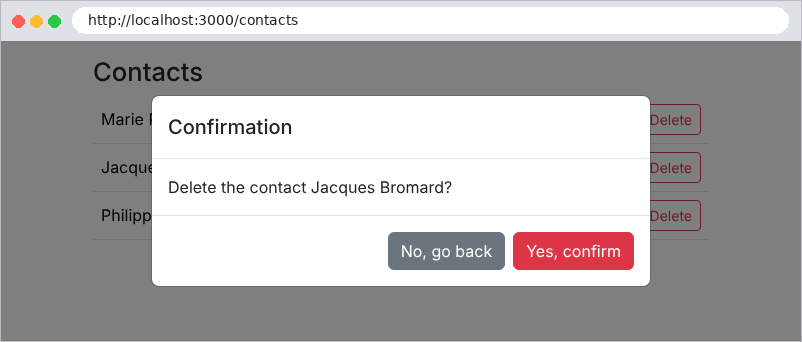
The browser dialog box ([window.confirm]) cannot be formatted or translated: its buttons remain in the browser’s language. It is replaced by a [Bootstrap] window, written into the page and hidden until needed:
The [views/partials/confirmation.hbs] file:
| {{!-- a single window for the whole page, hidden (d-none) at first --}}
<div id="confirmation-modal" class="d-none">
<div class="modal-backdrop fade show"></div>
<div class="modal fade show d-block" tabindex="-1" role="alertdialog" aria-modal="true">
<div class="modal-dialog modal-dialog-centered">
<div class="modal-content">
<div class="modal-header">
<h5 class="modal-title">Confirmation</h5>
</div>
<div class="modal-body">
<p class="mb-0" id="confirmation-modal-message"></p>
</div>
<div class="modal-footer">
<button type="button" class="btn btn-secondary" data-action="no">No, go back</button>
<button type="button" class="btn btn-danger" data-action="yes">Yes, confirm</button>
</div>
</div>
</div>
</div>
</div>
|
- line 2: the [d-none] class hides the window;
- line 3: the gray background;
- line 11: the question’s position;
- lines 14–15: the two buttons, identified by the [data-action] attribute.
A bit of [JavaScript] links the forms to the window:
The [public/js/app.js] file:
| // confirmation of the forms that carry the data-confirmation="..." attribute
// Without JavaScript, these forms are simply sent without confirmation.
(() => {
const modal = document.getElementById('confirmation-modal');
const message = document.getElementById('confirmation-modal-message');
let pending = null; // the form to send if the user confirms
// 1. we intercept the submission of the forms to confirm
document.querySelectorAll('form[data-confirmation]').forEach((form) => {
form.addEventListener('submit', (event) => {
event.preventDefault(); // the submission is suspended
pending = form;
message.textContent = form.dataset.confirmation;
modal.classList.remove('d-none'); // the window appears
});
});
// 2. the two buttons of the window
modal.addEventListener('click', (event) => {
const action = event.target.dataset.action;
if (action === 'yes') {
pending.submit(); // submission, WITHOUT firing the 'submit' event again
} else if (action === 'no') {
modal.classList.add('d-none');
pending = null;
}
});
})();
|
- Line 3: The code is wrapped in a function that executes immediately, to avoid creating global variables;
- lines 9–16: the submission of each form bearing the attribute [data-confirmation] is intercepted. [preventDefault()] suspends the submission; the form is stored, the question is placed in the window ([textContent], not [innerHTML]: the question is displayed as text, never interpreted as HTML), and the window is displayed;
- Lines 19–27: “Yes” submits the cached form. The [submit()] method of a form submits it without triggering the [submit] event: there is no new confirmation prompt. “No” hides the window.
If [JavaScript] is disabled, the forms simply submit without confirmation: the application still works. This is the principle of incremental improvement: [JavaScript] adds convenience, but it is not essential. The case study follows this principle (its [public/js/app.js] script adds keyboard handling: Esc key, focus). The resulting pages:
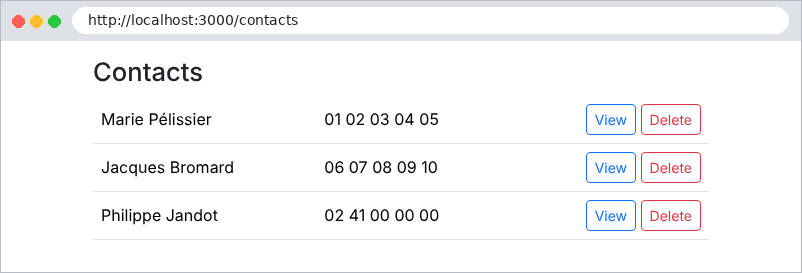
Finally, we verify that deletion cannot be triggered by a request for GET:
| curl -i http://localhost:3000/contacts/3/delete
|
| HTTP/1.1 404 Not Found
Content-Type: application/json; charset=utf-8
Content-Length: 80
{"message":"Cannot GET /contacts/3/delete","error":"Not Found","statusCode":404}
|
| curl -i -X POST http://localhost:3000/contacts/3/delete
|
| HTTP/1.1 302 Found
Set-Cookie: flash=The%20contact%20%5BPhilippe%20Jandot%5D%20has%20been%20deleted.; Max-Age=60; Path=/; Expires=Wed, 23 Sep 2026 14:24:35 GMT; HttpOnly; SameSite=Lax
Location: /contacts
Content-Type: text/plain; charset=utf-8
Content-Length: 31
Found. Redirecting to /contacts
|