5. Internationalization
An internationalized application displays its text in the user’s language. The case study is in French and English. The principle is simple: the views no longer contain text, but keys ([MENU.HOME]), and a dictionary for each language associates a text with each key. The selected language is stored in a cookie.
5.1. Example 22: A Bilingual Application
| 22-i18n/
├── i18n/
│ ├── en.json
│ └── fr.json
├── src/
│ ├── app.module.ts
│ ├── helpers.ts
│ ├── i18n.ts
│ ├── language.controller.ts
│ ├── main.ts
│ └── pages.controller.ts
├── views/
│ ├── partials/
│ │ └── navbar.hbs
│ ├── home.hbs
│ ├── layout.hbs
│ └── products.hbs
├── nest-cli.json
└── tsconfig.json
|
5.1.1. The Dictionaries
The file [i18n/fr.json]:
| {
"MENU": {
"HOME": "Accueil",
"PRODUCTS": "Produits"
},
"HOME": {
"TITLE": "Bienvenue",
"HELLO": "Bonjour {name} !",
"DATE": "Nous sommes le {date}."
},
"PRODUCTS": {
"TITLE": "Nos produits",
"NAME": "Produit",
"PRICE": "Prix",
"COUNT": "{n} produit(s) au catalogue."
}
}
|
The file [i18n/en.json]:
| {
"MENU": {
"HOME": "Home",
"PRODUCTS": "Products"
},
"HOME": {
"TITLE": "Welcome",
"HELLO": "Hello {name}!",
"DATE": "Today is {date}."
},
"PRODUCTS": {
"TITLE": "Our products",
"NAME": "Product",
"PRICE": "Price",
"COUNT": "{n} product(s) in the catalogue."
}
}
|
- A dictionary is a JSON file, organized by page or by topic: The key [HOME.HELLO] refers to the text [HELLO] in section [HOME];
- Line 8: A text may contain parameters, enclosed in curly braces, which are replaced during translation. Word order varies from one language to another: this is why a text is not created by simply concatenating translated segments.
5.1.2. The translation module
The file [src/i18n.ts]:
| import { readFileSync } from 'fs';
import { join } from 'path';
export type Language = 'fr' | 'en';
export const LANGUAGES: Language[] = ['fr', 'en'];
export const DEFAULT_LANGUAGE: Language = 'en';
// the "locale" used by Intl for dates and numbers
export const LOCALES: Record<Language, string> = { fr: 'fr-FR', en: 'en-US' };
// a dictionary is a nested JSON object: { "MENU": { "HOME": "Home" } }
type Dictionary = { [key: string]: string | Dictionary };
// the dictionaries are read ONCE, at startup
const FOLDER = join(__dirname, '..', 'i18n');
const dictionaries: Record<Language, Dictionary> = {
fr: JSON.parse(readFileSync(join(FOLDER, 'fr.json'), 'utf-8')),
en: JSON.parse(readFileSync(join(FOLDER, 'en.json'), 'utf-8')),
};
export function isLanguage(value: unknown): value is Language {
return typeof value === 'string' && (LANGUAGES as string[]).includes(value);
}
// translate('en', 'HOME.HELLO', { name: 'Marie' }) -> "Hello Marie!"
export function translate(language: Language, key: string, params: Record<string, unknown> = {}): string {
const text = lookup(dictionaries[language], key) ?? key;
return text.replace(/\{(\w+)\}/g, (whole, name: string) => (name in params ? String(params[name]) : whole));
}
// 'HOME.HELLO': we go down into HOME, then into HELLO
function lookup(dictionary: Dictionary, key: string): string | null {
let node: string | Dictionary | undefined = dictionary;
for (const part of key.split('.')) {
if (typeof node !== 'object') {
return null;
}
node = node[part];
}
return typeof node === 'string' ? node : null;
}
|
Let’s comment on this code:
- lines 4–6: the supported languages;
- line 8: the “locale” for each language, used by [Intl] to format dates and numbers ([fr-FR]: 23/09/2026, 12,50 €; [en-US]: 9/23/2026, €12.50);
- lines 14–18: the dictionaries are read once, when the module loads, and then kept in memory;
- lines 20–22: a check for a type such as [TypeScript] ([value is Language]): after a positive test, the compiler knows that the value is a [Language];
- lines 25–28: the translation. The key is looked up in the dictionary; if it is not found, the key itself is displayed: any omission is immediately visible on the screen. The regular expression [/\{(\w+)\}/g] finds each parameter [{name}] and replaces it with its value;
- lines 31–40: The key [HOME.HELLO] is split into [HOME] and then [HELLO], and the process continues down into the object JSON.
5.1.3. The helpers
The file [src/helpers.ts]:
| import { HelperOptions } from 'handlebars';
import { Language, DEFAULT_LANGUAGE, LOCALES, isLanguage, translate } from './i18n';
interface Hbs {
registerHelper(name: string, fn: (...args: any[]) => unknown): void;
}
// the language of the page: res.locals.lang, merged into the root model
function languageOf(options: HelperOptions): Language {
const lang = options.data?.root?.lang;
return isLanguage(lang) ? lang : DEFAULT_LANGUAGE;
}
export function registerHelpers(hbs: Hbs): void {
// {{t 'KEY'}} or {{t 'KEY' name=...}}: translation, with named parameters
hbs.registerHelper('t', (key: string, options: HelperOptions) => translate(languageOf(options), key, options.hash));
// {{longDate when}}: "mercredi 23 septembre 2026" / "Wednesday, September 23, 2026"
hbs.registerHelper('longDate', (when: string, options: HelperOptions) =>
new Intl.DateTimeFormat(LOCALES[languageOf(options)], { dateStyle: 'full' }).format(new Date(when)),
);
// {{money price}}: "12,50 €" / "€12.50"
hbs.registerHelper('money', (amount: number, options: HelperOptions) =>
new Intl.NumberFormat(LOCALES[languageOf(options)], { style: 'currency', currency: 'EUR' }).format(amount),
);
hbs.registerHelper('eq', (a: unknown, b: unknown) => a === b);
}
|
- lines 9–12: The page’s language is in the root template ([options.data.root.lang]), where the [main.ts] middleware placed it via [res.locals];
- line 16: the helper [t] translates a key. The named parameters of the helper ([options.hash]) are the text parameters: [{{t 'HOME.HELLO' name=name}}];
- lines 19–21 and 24–26: dates and amounts are formatted according to the language.
5.1.4. Language Selection
The file [src/main.ts]:
| import { NestFactory } from '@nestjs/core';
import { NestExpressApplication } from '@nestjs/platform-express';
import * as cookieParser from 'cookie-parser';
import { NextFunction, Request, Response } from 'express';
import * as hbs from 'hbs';
import { dirname, join } from 'path';
import { AppModule } from './app.module';
import { registerHelpers } from './helpers';
import { isLanguage, DEFAULT_LANGUAGE } from './i18n';
const ROOT = join(__dirname, '..');
async function bootstrap() {
const app = await NestFactory.create<NestExpressApplication>(AppModule);
app.useStaticAssets(join(dirname(require.resolve('bootstrap/package.json')), 'dist'), { prefix: '/bootstrap/' });
app.setBaseViewsDir(join(ROOT, 'views'));
app.setViewEngine('hbs');
registerHelpers(hbs);
await new Promise<void>((done) => hbs.registerPartials(join(ROOT, 'views', 'partials'), () => done()));
app.use(cookieParser());
// the language of each page: that of the [language] cookie, English otherwise
app.use((req: Request, res: Response, next: NextFunction) => {
const cookie = req.cookies?.language;
res.locals.lang = isLanguage(cookie) ? cookie : DEFAULT_LANGUAGE;
next();
});
await app.listen(3000);
console.log('Server started on http://localhost:3000');
}
bootstrap();
|
Lines 22–26: For each request, the language is read from the [language] cookie (English by default) and stored in [res.locals.lang], and thus in the template for each view.
The file [src/language.controller.ts]:
| import { Controller, Get, NotFoundException, Param, Req, Res } from '@nestjs/common';
import { Request, Response } from 'express';
import { isLanguage } from './i18n';
@Controller('language')
export class LanguageController {
// GET /language/fr: stores the choice in a cookie, then goes back to the previous page
@Get(':language')
change(@Param('language') language: string, @Req() req: Request, @Res() res: Response): void {
if (!isLanguage(language)) {
throw new NotFoundException();
}
res.cookie('language', language, { maxAge: 365 * 24 * 3600 * 1000, sameSite: 'lax', httpOnly: true });
res.redirect(originPage(req));
}
}
// the page we come from (Referer header), of which we keep only the path:
// redirecting to a full address taken from the request would allow
// sending the user to another site ("open redirect" vulnerability)
function originPage(req: Request): string {
const referer = req.get('referer');
if (!referer) {
return '/';
}
try {
const url = new URL(referer);
return url.pathname + url.search;
} catch {
return '/';
}
}
|
- lines 8–15: [GET /language/en] stores the selection in a cookie valid for one year, then redirects to the page the user came from. An unknown language results in a 404 error;
- lines 21–32: The original page is specified by the [Referer] header, which the browser adds when a link is clicked. We retain only the path: redirecting to a full URL from the request would allow a malicious site to create a link that, after passing through our site, sends the user to the malicious site (a vulnerability known as [open redirect]).
5.1.5. The Views
The [views/layout.hbs] file:
| <!doctype html>
<html lang="{{lang}}">
<head>
<meta charset="utf-8">
<title>{{t pageTitle}}</title>
<link rel="stylesheet" href="/bootstrap/css/bootstrap.min.css">
</head>
<body>
<div class="container py-3">
{{> navbar}}
{{{body}}}
</div>
</body>
</html>
|
- line 2: the page’s [lang] attribute reflects the selected language (useful for screen readers and spell-checkers);
- line 5: the page title is a key, provided by the action ([pageTitle]), and translated by the view: [{{t pageTitle}}]. Without apostrophes, the helper’s argument is a template variable, not a literal string.
The file [views/partials/navbar.hbs]:
| <nav class="navbar navbar-expand bg-light rounded mb-3 px-3">
<div class="navbar-nav me-auto">
<a class="nav-link" href="/">{{t 'MENU.HOME'}}</a>
<a class="nav-link" href="/products">{{t 'MENU.PRODUCTS'}}</a>
</div>
{{!-- the current language is highlighted --}}
<div class="btn-group btn-group-sm">
<a class="btn {{#if (eq lang 'fr')}}btn-primary{{else}}btn-outline-primary{{/if}}" href="/language/fr">FR</a>
<a class="btn {{#if (eq lang 'en')}}btn-primary{{else}}btn-outline-primary{{/if}}" href="/language/en">EN</a>
</div>
</nav>
|
Lines 8–9: two links (changing the language does not modify any application data: a GET is appropriate), with the current language highlighted.
The file [views/home.hbs]:
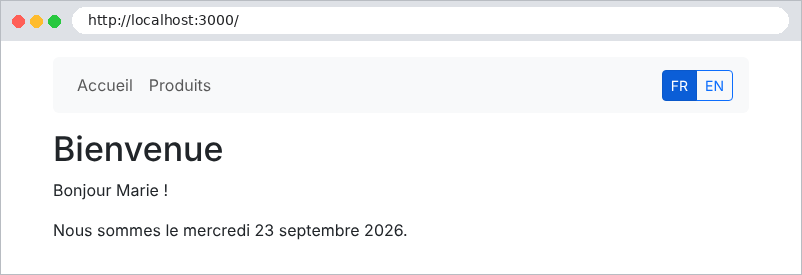
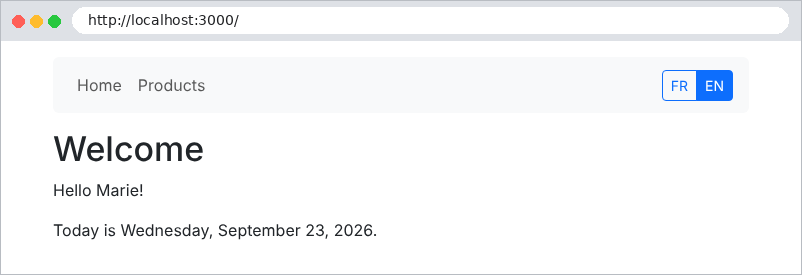
| <h1>{{t 'HOME.TITLE'}}</h1>
<p>{{t 'HOME.HELLO' name=name}}</p>
<p>{{t 'HOME.DATE' date=(longDate today)}}</p>
|
Line 3: a sub-expression: the date is first formatted by [longDate], then passed as a [date] parameter to the helper [t].
The file [views/products.hbs]:
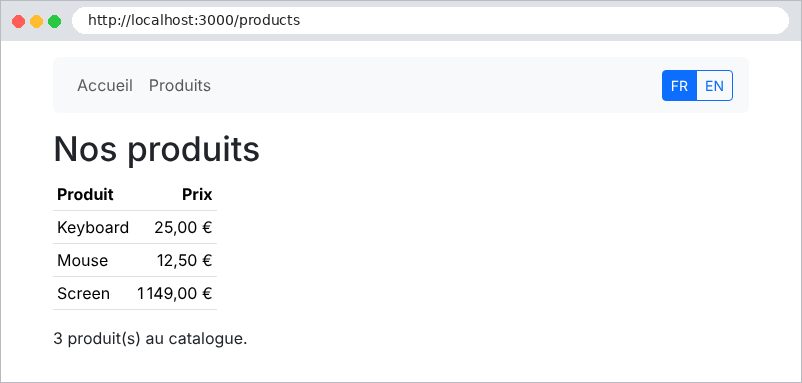
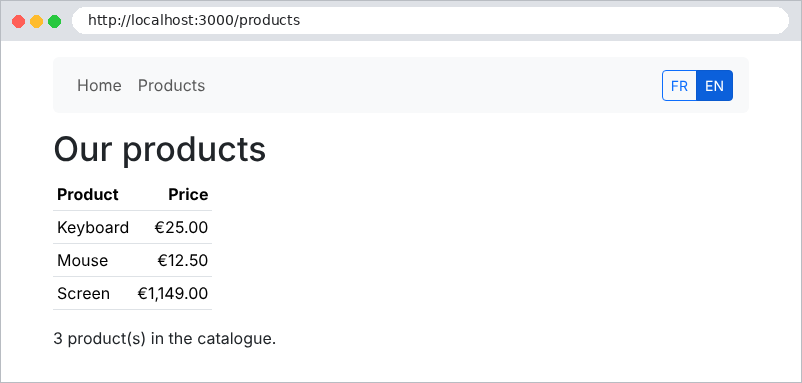
| <h1>{{t 'PRODUCTS.TITLE'}}</h1>
<table class="table table-sm w-auto">
<thead><tr><th>{{t 'PRODUCTS.NAME'}}</th><th class="text-end">{{t 'PRODUCTS.PRICE'}}</th></tr></thead>
<tbody>
{{#each products}}
{{!-- inside the loop, the helper finds the language in the ROOT model --}}
<tr><td>{{name}}</td><td class="text-end">{{money price}}</td></tr>
{{/each}}
</tbody>
</table>
<p>{{t 'PRODUCTS.COUNT' n=count}}</p>
|
The [src/pages.controller.ts] file:
| import { Controller, Get, Render } from '@nestjs/common';
@Controller()
export class PagesController {
@Get()
@Render('home')
home(): object {
// pageTitle is a KEY: the view translates it
return { pageTitle: 'HOME.TITLE', name: 'Marie', today: '2026-09-23' };
}
@Get('products')
@Render('products')
products(): object {
const products = [
{ name: 'Keyboard', price: 25 },
{ name: 'Mouse', price: 12.5 },
{ name: 'Screen', price: 1149 },
];
return { pageTitle: 'PRODUCTS.TITLE', products, count: products.length };
}
}
|
5.1.6. Execution
In French (after clicking FR; without a cookie, the page is in English, the default language):
Click on EN:
| curl -i -H "Referer: http://localhost:3000/products" http://localhost:3000/language/en
|
| HTTP/1.1 302 Found
Set-Cookie: language=en; Max-Age=31536000; Path=/; Expires=Thu, 23 Sep 2027 14:16:03 GMT; HttpOnly; SameSite=Lax
Location: /products
Content-Type: text/plain; charset=utf-8
Content-Length: 31
Found. Redirecting to /products
|
The server sets the cookie and redirects to the original page, which is now in English:
The case study proceeds exactly this way, using more comprehensive dictionaries ([i18n/fr.json] and [i18n/en.json]): same helper [t], same controller [/language/:language], same cookie. There is only one difference: the error messages generated by the business and web layers are also keys, translated at the last moment by the view.