8. Authentication and Authorization
Two distinct questions arise for each request:
- Who is the user? This is authentication: the user has identified themselves with a username and password, and every subsequent request must prove that it comes from them;
- Do they have permission to access this page? This is authorization: in the case study, only a user with the role ADMIN manages doctors and clients.
Since the server is stateless (Chapter 6), proof of identity must be included with every request. A token JWT ([JSON Web Token]) is used: after login, the server generates a token containing the user’s identity and signs it with a secret key. The token is stored in a cookie; the browser sends it back with every request; the server verifies the signature. The user can read their token but cannot modify it: any modification invalidates the signature.
[NestJS] relies on two libraries for this: [passport] (and its strategy [passport-jwt]), which verifies tokens, and [@nestjs/jwt], which generates them.
8.1. Example 25: Login, Token, Protected Page
| 25-auth-jwt/
├── src/
│ ├── auth/
│ │ ├── auth.controller.ts
│ │ ├── auth.service.ts
│ │ ├── constants.ts
│ │ ├── jwt-auth.guard.ts
│ │ ├── jwt.strategy.ts
│ │ └── users.service.ts
│ ├── app.module.ts
│ ├── errors.filter.ts
│ ├── main.ts
│ └── profile.controller.ts
├── views/
│ ├── error.hbs
│ ├── home.hbs
│ ├── layout.hbs
│ ├── login.hbs
│ └── profile.hbs
├── nest-cli.json
└── tsconfig.json
|
The file [src/auth/constants.ts]:
| // the name of the cookie that carries the token
export const JWT_COOKIE = 'token';
// the secret key that signs the tokens (in production: an environment variable)
export const JWT_SECRET = process.env.JWT_SECRET ?? 'development-secret';
// lifetime of a token, in seconds
export const JWT_DURATION = 3600;
|
Line 4: the key that signs the tokens. Anyone who knows this key can generate valid tokens: in production, it comes from an environment variable, never from the source code.
The file [src/auth/users.service.ts]:
| import { Injectable } from '@nestjs/common';
import * as bcrypt from 'bcryptjs';
export interface User {
id: number;
login: string;
name: string;
role: 'ADMIN' | 'USER';
passwordHash: string; // NEVER the password itself
}
// the users, in memory (the next chapter will put them in a database).
// Each one's password is their login; only its bcrypt hash is kept
@Injectable()
export class UsersService {
private readonly users: User[] = [
{ id: 1, login: 'admin', name: 'Administrator', role: 'ADMIN', passwordHash: bcrypt.hashSync('admin', 10) },
{ id: 2, login: 'marie', name: 'Marie Pélissier', role: 'USER', passwordHash: bcrypt.hashSync('marie', 10) },
];
byLogin(login: string): User | undefined {
return this.users.find((u) => u.login === login);
}
}
|
- Line 9: We never store a password; we only store its hash—a fingerprint calculated by a one-way function. We can verify that a password matches a fingerprint, but we cannot recover the password from the fingerprint;
- Lines 16–19: [bcrypt.hashSync(password, 10)] calculates the hash using the [bcrypt] algorithm. The number 10 represents the “cost”: bcrypt is intentionally slow (2¹⁰ iterations) to discourage anyone from trying millions of passwords. Two hashes of the same password are different (a random “salt” is added): [bcrypt.compare] is responsible for verifying them.
The file [src/auth/auth.service.ts]:
| import { Injectable } from '@nestjs/common';
import { JwtService } from '@nestjs/jwt';
import * as bcrypt from 'bcryptjs';
import { User, UsersService } from './users.service';
// what the token contains: enough to identify the user without reading the database
export interface TokenContent {
sub: number; // "subject": the user's identifier (JWT convention)
login: string;
name: string;
role: string;
}
@Injectable()
export class AuthService {
constructor(
private readonly users: UsersService,
private readonly jwt: JwtService,
) {}
// the user if the login / password pair is correct, null otherwise
async check(login: string, password: string): Promise<User | null> {
const u = this.users.byLogin(login);
// bcrypt.compare hashes the typed password and compares the hashes
return u && (await bcrypt.compare(password, u.passwordHash)) ? u : null;
}
// a SIGNED token: the browser can read it, but not modify it
createToken(u: User): string {
const content: TokenContent = { sub: u.id, login: u.login, name: u.name, role: u.role };
return this.jwt.sign(content);
}
}
|
- lines 7–12: the token’s content. [sub] ([subject]) is the conventional name for the user ID. We include whatever the pages need (name, role) so we don’t have to query the database with every request;
- lines 22–26: verification of the username and password;
- lines 29–32: [JwtService.sign] generates the signed token. [JwtService] is configured (key, lifetime) in the application module.
The [src/auth/jwt.strategy.ts] file:
| import { Injectable } from '@nestjs/common';
import { PassportStrategy } from '@nestjs/passport';
import { Request } from 'express';
import { ExtractJwt, Strategy } from 'passport-jwt';
import { TokenContent } from './auth.service';
import { JWT_COOKIE, JWT_SECRET } from './constants';
// the logged-in user, as the controllers see it (req.user)
export interface LoggedInUser {
id: number;
login: string;
name: string;
role: string;
}
// the Passport "jwt" strategy: where to find the token, how to check it
@Injectable()
export class JwtStrategy extends PassportStrategy(Strategy, 'jwt') {
constructor() {
super({
// the token is read from the cookie (and not from the Authorization header)
jwtFromRequest: ExtractJwt.fromExtractors([(req: Request) => req?.cookies?.[JWT_COOKIE] ?? null]),
ignoreExpiration: false, // an expired token is rejected
secretOrKey: JWT_SECRET, // to check the signature
});
}
// called if the token is valid; what it returns becomes req.user
validate(content: TokenContent): LoggedInUser {
return { id: content.sub, login: content.login, name: content.name, role: content.role };
}
}
|
- line 18: a [Passport] strategy, named [jwt], describes how to authenticate a request;
- line 22: where to find the token: in the cookie. (A [JavaScript] client would instead send it in the [Authorization: Bearer ...] header; see [ExtractJwt.fromAuthHeaderAsBearerToken()]);
- lines 23–24: an expired or incorrectly signed token is rejected;
- lines 29–31: called when the token is valid. The result is [req.user]: the logged-in user, with access to actions.
The file [src/auth/jwt-auth.guard.ts]:
| import { Injectable } from '@nestjs/common';
import { AuthGuard } from '@nestjs/passport';
// the guard that runs the 'jwt' strategy: no valid token -> 401
@Injectable()
export class JwtAuthGuard extends AuthGuard('jwt') {}
|
[AuthGuard('jwt')] creates a guard that executes the [jwt] strategy. Without a valid token, it raises a [UnauthorizedException] (401).
The file [src/auth/auth.controller.ts]:
| import { Body, Controller, Get, Post, Render, Res } from '@nestjs/common';
import { Response } from 'express';
import { AuthService } from './auth.service';
import { JWT_COOKIE, JWT_DURATION } from './constants';
@Controller()
export class AuthController {
constructor(private readonly auth: AuthService) {}
@Get('login')
@Render('login')
form(): object {
return {};
}
@Post('login')
async logIn(@Body() body: { login?: string; password?: string }, @Res() res: Response): Promise<void> {
const user = await this.auth.check(body.login ?? '', body.password ?? '');
if (!user) {
// deliberately vague message: we do not say which of the two is wrong
res.render('login', { login: body.login, error: 'Incorrect login or password.' });
return;
}
// the token is put in an httpOnly cookie: the page's JavaScript
// cannot read it, the browser sends it back with each request
res.cookie(JWT_COOKIE, this.auth.createToken(user), {
httpOnly: true,
sameSite: 'lax',
maxAge: JWT_DURATION * 1000,
});
res.redirect('/profile');
}
// logging out MODIFIES the state: it is a POST, not a link
@Post('logout')
logOut(@Res() res: Response): void {
res.clearCookie(JWT_COOKIE);
res.redirect('/login');
}
}
|
- lines 17–32: the login. If the login fails, the form is redisplayed with a deliberately vague message: stating “this login does not exist” would help an attacker find valid logins;
- lines 26–30: if successful, the token is stored in an [httpOnly] cookie; the page’s [JavaScript] cannot read it, which protects the token if a malicious script were to execute on the page. [sameSite: 'lax']: The cookie is not included in POST requests sent from another site, which protects against request forgery ([CSRF]);
- Lines 35–39: Logging out deletes the cookie. This is a POST: it changes the user’s status (see Example 21).
The [src/profile.controller.ts] file:
| import { Controller, Get, Render, Req, UseGuards } from '@nestjs/common';
import { Request } from 'express';
import { JwtAuthGuard } from './auth/jwt-auth.guard';
import { LoggedInUser } from './auth/jwt.strategy';
@Controller()
export class ProfileController {
// public page
@Get()
@Render('home')
home(): object {
return {};
}
// protected page: the guard requires a valid token
@Get('profile')
@UseGuards(JwtAuthGuard)
@Render('profile')
profile(@Req() req: Request): object {
return { user: req.user as LoggedInUser };
}
}
|
Line 17: The page [/profile] is protected by the guard. The action reads the user from [req.user].
The file [src/errors.filter.ts]:
| import { ArgumentsHost, Catch, ExceptionFilter, HttpException, HttpStatus } from '@nestjs/common';
import { Response } from 'express';
@Catch(HttpException)
export class ErrorsFilter implements ExceptionFilter {
catch(exception: HttpException, host: ArgumentsHost): void {
const res = host.switchToHttp().getResponse<Response>();
const status = exception.getStatus();
// 401 (no token, or invalid token): off to the login page
if (status === HttpStatus.UNAUTHORIZED) {
res.redirect('/login');
return;
}
res.status(status).render('error', { status, message: exception.message });
}
}
|
Lines 10–13: A 401 error does not display an error page; the user is redirected to the login page.
The file [src/app.module.ts]:
| import { Module } from '@nestjs/common';
import { JwtModule } from '@nestjs/jwt';
import { PassportModule } from '@nestjs/passport';
import { AuthController } from './auth/auth.controller';
import { AuthService } from './auth/auth.service';
import { JWT_DURATION, JWT_SECRET } from './auth/constants';
import { JwtStrategy } from './auth/jwt.strategy';
import { UsersService } from './auth/users.service';
import { ProfileController } from './profile.controller';
@Module({
imports: [
PassportModule,
// JwtService, configured once and for all: key and lifetime
JwtModule.register({ secret: JWT_SECRET, signOptions: { expiresIn: JWT_DURATION } }),
],
controllers: [AuthController, ProfileController],
providers: [UsersService, AuthService, JwtStrategy],
})
export class AppModule {}
|
Line 15: the configuration of [JwtService]: token key and lifetime (one hour).
The file [views/login.hbs]:
| <h1 class="h3">Login</h1>
<form method="post" action="/login">
<div class="mb-2">
<label class="form-label" for="login">Login</label>
<input class="form-control" id="login" name="login" value="{{login}}" autocomplete="username">
</div>
<div class="mb-3">
<label class="form-label" for="password">Password</label>
<input class="form-control" id="password" name="password" type="password" autocomplete="current-password">
</div>
<button class="btn btn-primary" type="submit">Log in</button>
</form>
{{#if error}}<div class="alert alert-danger mt-3">{{error}}</div>{{/if}}
<p class="text-muted mt-3">Accounts: admin / admin, marie / marie</p>
|
8.1.1. Execution
Without a cookie, the protected page redirects to the login page:
| curl -i http://localhost:3000/profile
|
| HTTP/1.1 302 Found
Location: /login
Content-Type: text/plain; charset=utf-8
Content-Length: 28
Found. Redirecting to /login
|
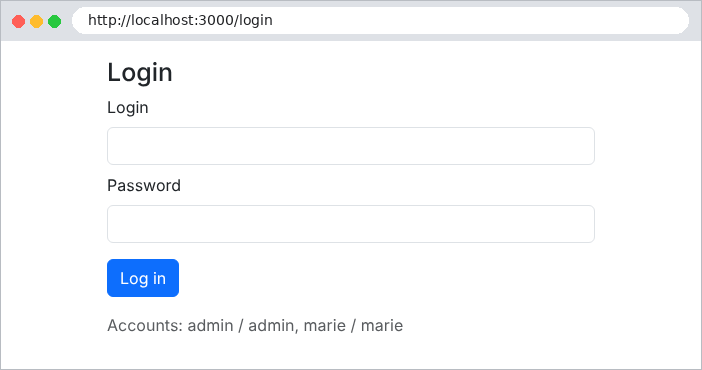
An incorrect password:
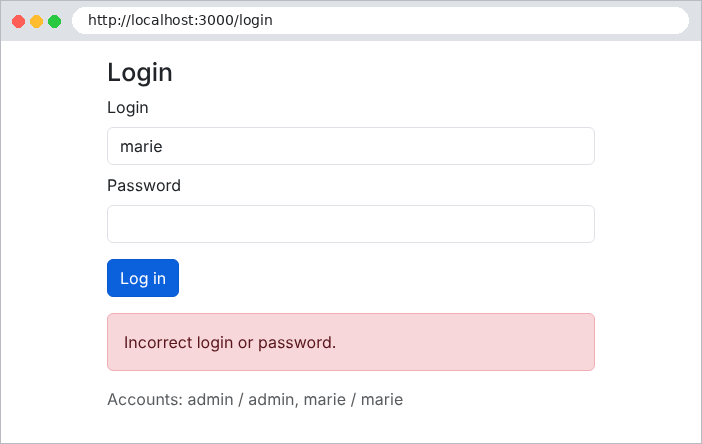
Successful login, as seen by [curl]:
| curl -i -c cookies.txt -d "login=marie&password=marie" http://localhost:3000/login
|
| HTTP/1.1 302 Found
Set-Cookie: token=eyJhbGciOiJIUzI1NiIsInR5cCI6IkpXVCJ9.eyJzdWIiOjIsImxvZ2luIjoibWFyaWUiLCJuYW1lIjoiTWFyaWUgUMOpbGlzc2llciIsInJvbGUiOiJVU0VSIiwiaWF0IjoxNzkwMTczMDg3LCJleHAiOjE3OTAxNzY2ODd9.LoujmLAq__cPbevACUDUMvdPHkH7r_ekv48IwHqc3Dk; Max-Age=3600; Path=/; Expires=Wed, 23 Sep 2026 15:18:07 GMT; HttpOnly; SameSite=Lax
Location: /profile
Content-Type: text/plain; charset=utf-8
Content-Length: 30
Found. Redirecting to /profile
|
The token consists of three parts separated by periods: a header, the content, and the signature. The first two are simply encoded as [base64url]; let’s decode the content:
| eyJhbGciOiJIUzI1NiIsInR5cCI6IkpXVCJ9.eyJzdWIiOjIsImxvZ2luIjoibWFyaWUiLCJuYW1lIjoiTWFyaWUgUMOpbGlzc2llciIsInJvbGUiOiJVU0VSIiwiaWF0IjoxNzkwMTczMDg3LCJleHAiOjE3OTAxNzY2ODd9.LoujmLAq__cPbevACUDUMvdPHkH7r_ekv48IwHqc3Dk
{"sub": 2, "login": "marie", "name": "Marie Pélissier", "role": "USER", "iat": 1790173087, "exp": 1790176687}
|
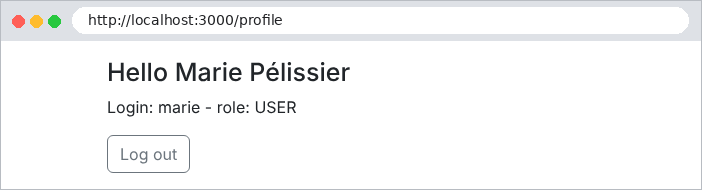
The content generated by [createToken] is included, along with two fields added by [JwtService]: [iat] ([issued at], the creation date) and [exp] (the expiration date), in seconds since January 1, 1970. The token is not encrypted: it does not contain any confidential information. In the browser:
Now let’s try to modify the token to assign ourselves the role ADMIN: we decode the content, replace [USER] with [ADMIN], and re-encode it… but we can’t recalculate the signature without the secret key:
| curl -i -b "token=eyJhbGciOi...(modified content)...LoujmLAq..." http://localhost:3000/profile
|
| HTTP/1.1 302 Found
Location: /login
Content-Type: text/plain; charset=utf-8
Content-Length: 28
Found. Redirecting to /login
|
The signature no longer matches the content: the token is rejected (error 401), and the exception handler redirects to the login page. Logging out:
| curl -i -b cookies.txt -X POST http://localhost:3000/logout
|
| HTTP/1.1 302 Found
Set-Cookie: token=; Path=/; Expires=Thu, 01 Jan 1970 00:00:00 GMT
Location: /login
Content-Type: text/plain; charset=utf-8
Content-Length: 28
Found. Redirecting to /login
|
8.2. Example 26: Roles
Example 26 builds on Example 25 and adds a page reserved for the role ADMIN. Three new files have been added.
The file [src/auth/roles.decorator.ts]:
| import { SetMetadata } from '@nestjs/common';
export const ROLES_KEY = 'roles';
// @Roles('ADMIN'): puts a METADATA on the action (or the controller);
// the decorator checks nothing itself, RolesGuard is the one that will read it
export const Roles = (...roles: string[]) => SetMetadata(ROLES_KEY, roles);
|
Line 7: [SetMetadata] attaches metadata (any information) to the decorated class or method. [@Roles('ADMIN')] does not check anything: it declares the required role.
The file [src/auth/roles.guard.ts]:
| import { CanActivate, ExecutionContext, ForbiddenException, Injectable } from '@nestjs/common';
import { Reflector } from '@nestjs/core';
import { Request } from 'express';
import { LoggedInUser } from './jwt.strategy';
import { ROLES_KEY } from './roles.decorator';
@Injectable()
export class RolesGuard implements CanActivate {
// Reflector: the NestJS tool to read the metadata back
constructor(private readonly reflector: Reflector) {}
canActivate(context: ExecutionContext): boolean {
// @Roles of the action, failing that the one of the controller
const required = this.reflector.getAllAndOverride<string[]>(ROLES_KEY, [context.getHandler(), context.getClass()]);
if (!required || required.length === 0) {
return true; // no @Roles: no role restriction
}
// req.user was set by JwtAuthGuard, which runs BEFORE this guard
const user = context.switchToHttp().getRequest<Request>().user as LoggedInUser;
if (!required.includes(user.role)) {
throw new ForbiddenException(`the ${user.role} role does not give access to this page`);
}
return true;
}
}
|
- line 10: [Reflector] is the service for [NestJS] that reads the metadata;
- line 14: the roles required by the action, or failing that, by its controller. This is where the guard’s execution context comes into play (see Chapter 7);
- lines 15–17: without [@Roles], there are no restrictions;
- line 19: [req.user] was registered by the guard [JwtAuthGuard], which executes before it;
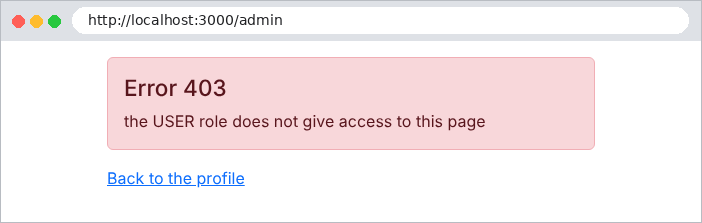
- lines 20–22: an insufficient role causes a 403 (Forbidden) error.
The file [src/admin.controller.ts]:
| import { Controller, Get, Render, UseGuards } from '@nestjs/common';
import { JwtAuthGuard } from './auth/jwt-auth.guard';
import { Roles } from './auth/roles.decorator';
import { RolesGuard } from './auth/roles.guard';
// the order matters: first WHO is it (JwtAuthGuard), then IS IT ALLOWED (RolesGuard)
@Controller('admin')
@UseGuards(JwtAuthGuard, RolesGuard)
@Roles('ADMIN')
export class AdminController {
@Get()
@Render('admin')
admin(): object {
return {};
}
}
|
lines 8–9: guards are executed in the order in which they are listed: first the identification, then the role check. The entire controller is reserved for the role ADMIN. The user [marie] (role USER) attempts to open the administration page:
Same attempt by [admin]:
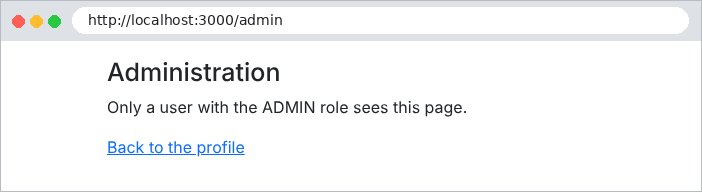
The case study has three roles (ADMIN, DOCTOR, USER) and uses exactly these two guards. The exception filter converts the 403 into a translated error page.
8.3. Example 27: CAPTCHA and attempt limits
A login page attracts bots: programs that try thousands of login/password combinations. Two complementary safeguards:
- a CAPTCHA: an image of distorted characters that a human can read easily but that a simple bot cannot decipher;
- an attempt limit: after a few failed attempts, the address IP is blocked for a while.
Example 27 adds these two safeguards to Example 25.
The file [src/auth/captcha.service.ts]:
| import { Injectable } from '@nestjs/common';
import { randomUUID } from 'crypto';
import * as svgCaptcha from 'svg-captcha';
export interface Captcha {
id: string; // placed in a hidden field of the form
svg: string; // the image, inserted as is into the page
}
@Injectable()
export class CaptchaService {
// id -> expected answer. The answer NEVER leaves the server
private readonly answers = new Map<string, string>();
generate(): Captcha {
// svg-captcha: a random text, drawn with distorted characters
const { text, data } = svgCaptcha.create({ size: 5, noise: 3, color: true, ignoreChars: '0oO1iIlL' });
const id = randomUUID();
this.answers.set(id, text.toLowerCase());
return { id, svg: data };
}
// is the answer the right one? In all cases, the captcha is
// consumed: an image is used only once
check(id: unknown, input: unknown): boolean {
if (typeof id !== 'string' || typeof input !== 'string') {
return false;
}
const expected = this.answers.get(id);
this.answers.delete(id);
return expected !== undefined && expected === input.trim().toLowerCase();
}
}
|
- Line 13: The expected responses are stored by the server under a random identifier. The page contains only the image and the identifier: the response never leaves the server;
- lines 15–21: The [svg-captcha] library generates a random text string and renders it as an image (SVG), obscured by lines. Characters that are easily confused (0 and O, 1 and l, etc.) are excluded;
- lines 25–32: The verification process consumes the CAPTCHA: an image is used only once; a bot cannot reuse a response it has already found.
The file [src/auth/limiter.service.ts]:
| import { Injectable } from '@nestjs/common';
const MAX_FAILURES = 3; // tolerated failures...
const BLOCK_MS = 60 * 1000; // ... before a one-minute block
// limits the number of login attempts per IP address
@Injectable()
export class LimiterService {
private readonly counters = new Map<string, { failures: number; blockedUntil: number }>();
// 0 if the IP may try its luck, otherwise the number of seconds to wait
blockedSeconds(ip: string): number {
const c = this.counters.get(ip);
const remaining = c ? c.blockedUntil - Date.now() : 0;
return remaining > 0 ? Math.ceil(remaining / 1000) : 0;
}
failure(ip: string): void {
const c = this.counters.get(ip) ?? { failures: 0, blockedUntil: 0 };
c.failures++;
if (c.failures >= MAX_FAILURES) {
c.blockedUntil = Date.now() + BLOCK_MS;
c.failures = 0;
}
this.counters.set(ip, c);
}
success(ip: string): void {
this.counters.delete(ip);
}
}
|
- lines 3–4: Three failures block the address IP for one minute;
- lines 12–16: the remaining block time;
- lines 18–26 and 28–30: a failure is counted; a success resets the counter to zero.
The file [src/auth/auth.controller.ts]:
| import { Body, Controller, Get, Ip, Post, Res } from '@nestjs/common';
import { Response } from 'express';
import { AuthService } from './auth.service';
import { CaptchaService } from './captcha.service';
import { JWT_COOKIE, JWT_DURATION } from './constants';
import { LimiterService } from './limiter.service';
interface LoginBody {
login?: string;
password?: string;
captchaId?: string;
captcha?: string;
}
@Controller()
export class AuthController {
constructor(
private readonly auth: AuthService,
private readonly captchas: CaptchaService,
private readonly limiter: LimiterService,
) {}
@Get('login')
form(@Res() res: Response): void {
this.display(res, {});
}
@Post('login')
async logIn(@Body() body: LoginBody, @Ip() ip: string, @Res() res: Response): Promise<void> {
// 1. a blocked IP is not even listened to
const seconds = this.limiter.blockedSeconds(ip);
if (seconds > 0) {
this.display(res, { login: body.login, error: `Too many attempts: try again in ${seconds} s.` });
return;
}
// 2. the captcha, then 3. the login and the password
const captchaOk = this.captchas.check(body.captchaId, body.captcha);
const user = captchaOk ? await this.auth.check(body.login ?? '', body.password ?? '') : null;
if (!user) {
this.limiter.failure(ip);
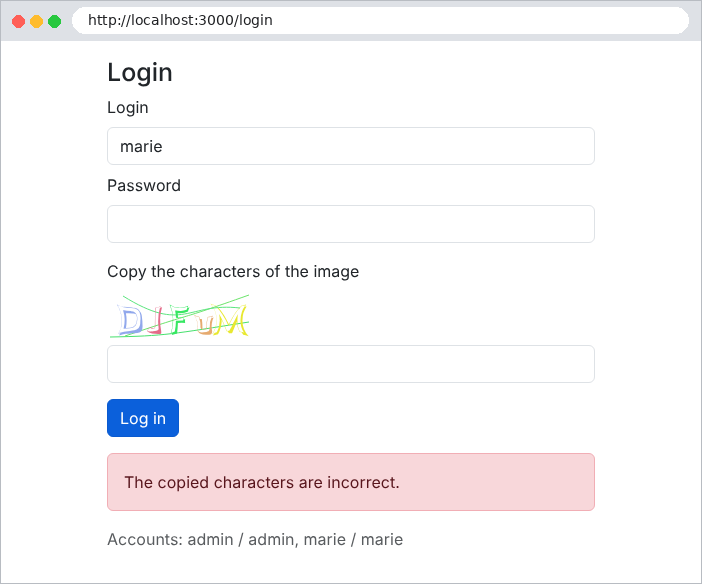
const error = captchaOk ? 'Incorrect login or password.' : 'The copied characters are incorrect.';
this.display(res, { login: body.login, error });
return;
}
this.limiter.success(ip);
res.cookie(JWT_COOKIE, this.auth.createToken(user), {
httpOnly: true,
sameSite: 'lax',
maxAge: JWT_DURATION * 1000,
});
res.redirect('/profile');
}
@Post('logout')
logOut(@Res() res: Response): void {
res.clearCookie(JWT_COOKIE);
res.redirect('/login');
}
// each display of the form has a NEW captcha
private display(res: Response, model: object): void {
res.render('login', { ...model, captcha: this.captchas.generate() });
}
}
|
- line 29: [@Ip()] injects the client’s address IP;
- lines 32–35: a blocked IP is not even processed;
- lines 37–38: the CAPTCHA is verified first; the password (which requires a computationally expensive bcrypt calculation) is only checked if the CAPTCHA is correct;
- lines 39–44: an incorrect CAPTCHA counts as a failure;
- lines 61–63: each time the form is displayed, a new CAPTCHA is generated.
The file [views/login.hbs]:
| <h1 class="h3">Login</h1>
<form method="post" action="/login">
<div class="mb-2">
<label class="form-label" for="login">Login</label>
<input class="form-control" id="login" name="login" value="{{login}}" autocomplete="username">
</div>
<div class="mb-3">
<label class="form-label" for="password">Password</label>
<input class="form-control" id="password" name="password" type="password" autocomplete="current-password">
</div>
<div class="mb-3">
<label class="form-label" for="captcha">Copy the characters of the image</label>
{{!-- the SVG image is inserted as is: triple braces --}}
<div class="mb-1">{{{captcha.svg}}}</div>
{{!-- the captcha identifier travels with the form; not the answer --}}
<input type="hidden" name="captchaId" value="{{captcha.id}}">
<input class="form-control" id="captcha" name="captcha" autocomplete="off">
</div>
<button class="btn btn-primary" type="submit">Log in</button>
</form>
{{#if error}}<div class="alert alert-danger mt-3">{{error}}</div>{{/if}}
<p class="text-muted mt-3">Accounts: admin / admin, marie / marie</p>
|
lines 14–17: the image SVG is inserted into the page as-is (triple curly braces: this is HTML generated by the server); the captcha ID is passed in a hidden field.
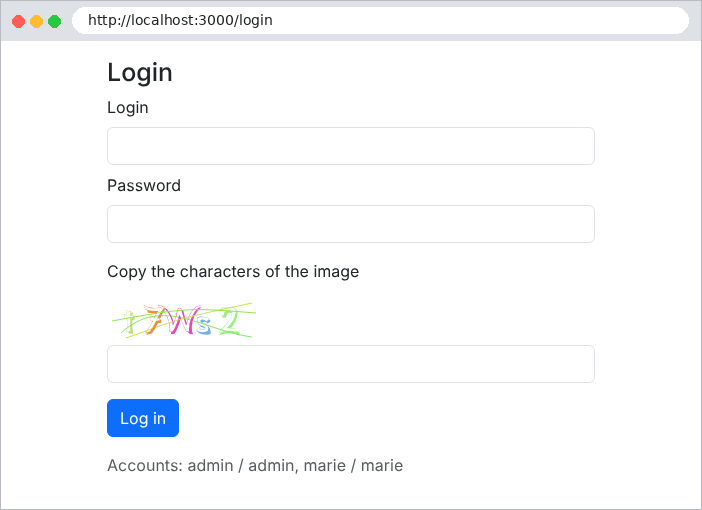
An incorrectly transcribed CAPTCHA:
On the third failed attempt:
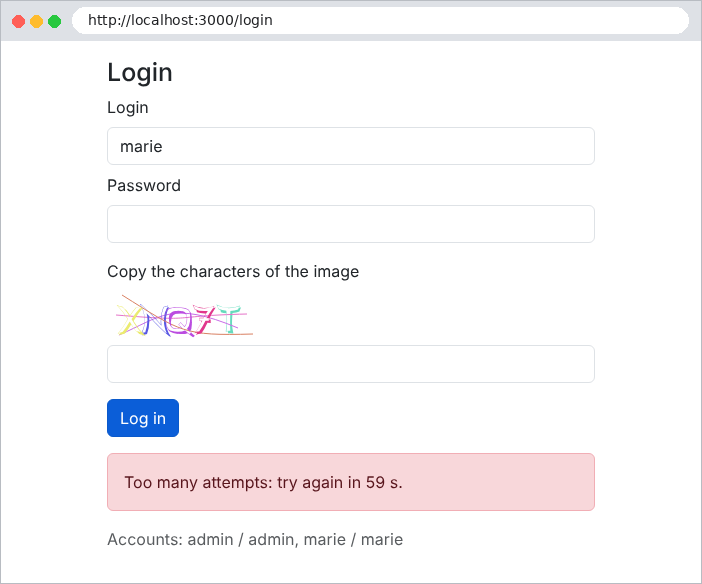
The case study applies these two security measures to its login page and account creation process, with adjustable thresholds in the file [.env].