3. The Action Model
An action requires information sent by the browser: the URL parameters ([?name=martin&age=42]), form fields, and route parameters. The original course refers to all of this information as the action’s model. This chapter shows how [NestJS] provides it to the action, converts it to the correct type, and validates it.
3.1. Example 07: URL Parameters
The [src/parameters.controller.ts] file:
| import { Controller, DefaultValuePipe, Get, ParseIntPipe, Query } from '@nestjs/common';
@Controller('parameters')
export class ParametersController {
// /parameters/action01?name=martin
@Get('action01')
action01(@Query('name') name: string): string {
return `name = [${name}], of type ${typeof name}`;
}
// /parameters/action02?age=42: a parameter is ALWAYS a string
@Get('action02')
action02(@Query('age') age: number): string {
return `age = [${age}], of type ${typeof age}`;
}
// /parameters/action03?age=42: ParseIntPipe converts (or rejects)
@Get('action03')
action03(@Query('age', ParseIntPipe) age: number): string {
return `age = [${age}], of type ${typeof age}`;
}
// /parameters/action04?page=2: a default value if the parameter is missing
@Get('action04')
action04(@Query('page', new DefaultValuePipe(1), ParseIntPipe) page: number): string {
return `page = [${page}], of type ${typeof page}`;
}
// /parameters/action05?name=martin&age=42: all the parameters at once
@Get('action05')
action05(@Query() parameters: Record<string, string>): object {
return parameters;
}
}
|
Let’s break down this code:
- Lines 6–9: [@Query('name')] inserts the value of the [name] parameter from URL (the part following [?], called the query string or [query string]);
- lines 12–15: the parameter [age] is declared as type [number]... but this type is merely a declaration [TypeScript], which is removed at compile time. What we receive is always a string, as shown by the execution;
- lines 18–21: [ParseIntPipe] is a pipe: an object that transforms (and validates) a parameter’s value before it reaches the action. Here, the string ['42'] becomes the number 42; a non-numeric string causes a 400 (Bad Request) error, without the action being executed;
- lines 24–27: the pipes are chained together: [DefaultValuePipe(1)] replaces a missing parameter with 1, then [ParseIntPipe] converts it;
- lines 30–33: [@Query()], without any arguments, injects an object containing all the parameters from URL.
The results:
| curl -i "http://localhost:3000/parameters/action01?name=martin"
|
| HTTP/1.1 200 OK
Content-Type: text/html; charset=utf-8
Content-Length: 31
name = [martin], of type string
|
| curl -i "http://localhost:3000/parameters/action01"
|
| HTTP/1.1 200 OK
Content-Type: text/html; charset=utf-8
Content-Length: 37
name = [undefined], of type undefined
|
| curl -i "http://localhost:3000/parameters/action02?age=42"
|
| HTTP/1.1 200 OK
Content-Type: text/html; charset=utf-8
Content-Length: 26
age = [42], of type string
|
| curl -i "http://localhost:3000/parameters/action03?age=42"
|
| HTTP/1.1 200 OK
Content-Type: text/html; charset=utf-8
Content-Length: 26
age = [42], of type number
|
| curl -i "http://localhost:3000/parameters/action03?age=abc"
|
| HTTP/1.1 400 Bad Request
Content-Type: application/json; charset=utf-8
Content-Length: 99
{"message":"Validation failed (numeric string is expected)","error":"Bad Request","statusCode":400}
|
| curl -i "http://localhost:3000/parameters/action04"
|
| HTTP/1.1 200 OK
Content-Type: text/html; charset=utf-8
Content-Length: 26
page = [1], of type number
|
| curl -i "http://localhost:3000/parameters/action04?page=2"
|
| HTTP/1.1 200 OK
Content-Type: text/html; charset=utf-8
Content-Length: 26
page = [2], of type number
|
| curl -i "http://localhost:3000/parameters/action05?name=martin&age=42"
|
| HTTP/1.1 200 OK
Content-Type: application/json; charset=utf-8
Content-Length: 28
{"name":"martin","age":"42"}
|
The quotation marks around URL are necessary when it contains the character [&], which has a specific meaning for the console. Note that:
- a missing parameter is treated as [undefined];
- a present parameter is a string, regardless of the declared type;
- a pipe is used to convert and validate a parameter, and returns a 400 status code if the value is invalid.

3.2. Example 08: An action template described by a class
When an action has multiple parameters, they are described by a class, often called [DTO] ([Data Transfer Object]). Each field of the class has validation decorators provided by the [class-validator] library. These are equivalent to the attributes [[Required]], [[Range]]..., etc., of [ASP.NET MVC].
The [src/person.dto.ts] file:
| import { Type } from 'class-transformer';
import { IsEmail, IsIn, IsInt, IsNotEmpty, IsOptional, Length, Max, Min } from 'class-validator';
export class PersonDto {
@IsNotEmpty({ message: 'the name is required' })
@Length(2, 20, { message: 'the name must have 2 to 20 characters' })
name: string;
@Type(() => Number)
@IsInt({ message: 'the age must be an integer' })
@Min(0, { message: 'the age must be positive' })
@Max(150, { message: 'the age cannot exceed 150' })
age: number;
@IsIn(['Mr', 'Mme', 'Melle'], { message: 'unknown title' })
title: string;
@IsOptional()
@IsEmail({}, { message: 'invalid email address' })
email?: string;
}
|
Let’s break down this code:
- line 1: [@Type] comes from the [class-transformer] library, which converts the received data;
- line 2: the validation decorators from [class-validator];
- lines 5–7: the name is required ([@IsNotEmpty]) and must be between 2 and 20 characters long ([@Length]). Each decorator accepts a custom error message;
- lines 9–13: [@Type(() => Number)] requires the received string to be converted to a number before validation: an integer ([@IsInt]) between 0 and 150 ([@Min], [@Max]);
- lines 15–16: the title must be one of the values in a list;
- lines 18–20: the email address is optional ([@IsOptional]); if present, it must be valid ([@IsEmail]).
The file [src/persons.controller.ts]:
| import { Controller, Get, Query } from '@nestjs/common';
import { PersonDto } from './person.dto';
@Controller('persons')
export class PersonsController {
// /persons/action01?name=martin&age=42&title=Mr
@Get('action01')
action01(@Query() person: PersonDto): object {
return {
person,
ageType: typeof person.age,
isAPersonDto: person instanceof PersonDto,
};
}
}
|
line 8: the action receives a [PersonDto]. The action returns the received person, their age type, and verifies that it is indeed an instance of the [PersonDto] class.
To ensure that the class’s decorators are applied, validation must be enabled once and for all in [main.ts]:
The file [src/main.ts]:
| import { NestFactory } from '@nestjs/core';
import { ValidationPipe } from '@nestjs/common';
import { AppModule } from './app.module';
async function bootstrap() {
const app = await NestFactory.create(AppModule);
// automatic validation of ALL action models described by a class
app.useGlobalPipes(
new ValidationPipe({
transform: true, // converts the received strings to the declared types
whitelist: true, // removes the fields not declared in the class
}),
);
await app.listen(3000);
console.log('Server started on http://localhost:3000');
}
bootstrap();
|
- lines 8–13: A global pipe, [ValidationPipe], is applied to all parameters of all actions. For a parameter whose type is a class, it checks the constraints of its decorators;
- line 10: [transform: true]: the action receives a true instance of [PersonDto], whose fields have been converted ([@Type]);
- line 11: [whitelist: true]: Parameters that do not correspond to any field in the class are removed.
A valid request with a parameter ([pirate]) that is not declared in the class:
| curl -i "http://localhost:3000/persons/action01?name=martin&age=42&title=Mr&pirate=1"
|
| HTTP/1.1 200 OK
Content-Type: application/json; charset=utf-8
Content-Length: 89
{"person":{"name":"martin","age":42,"title":"Mr"},"ageType":"number","isAPersonDto":true}
|
The age has indeed become a number, and the parameter [pirate] has disappeared. An invalid query:
| curl -i "http://localhost:3000/persons/action01?name=m&age=abc&title=Dr&email=xx"
|
| HTTP/1.1 400 Bad Request
Content-Type: application/json; charset=utf-8
Content-Length: 216
{"message":["the name must have 2 to 20 characters","the age cannot exceed 150","the age must be positive","the age must be an integer","unknown title","invalid email address"],"error":"Bad Request","statusCode":400}
|
[ValidationPipe] rejected the request with a 400 error, the body of which (JSON) lists the error messages. The action was not executed. The same result occurs without any parameters:
| curl -i http://localhost:3000/persons/action01
|
| HTTP/1.1 400 Bad Request
Content-Type: application/json; charset=utf-8
Content-Length: 215
{"message":["the name must have 2 to 20 characters","the name is required","the age cannot exceed 150","the age must be positive","the age must be an integer","unknown title"],"error":"Bad Request","statusCode":400}
|
This behavior is expected for a JSON server, queried by a [JavaScript] client that displays errors in its own way. For a HTML application, an error JSON makes no sense: we want to redisplay the form with its errors. The following example shows how to take control.
Example 09 does not have a global [ValidationPipe]. The action itself converts and validates the model, using the same decorators (the [person.dto.ts] file is identical):
The [src/persons.controller.ts] file:
| import { Controller, Get, Query } from '@nestjs/common';
import { plainToInstance } from 'class-transformer';
import { validate } from 'class-validator';
import { PersonDto } from './person.dto';
@Controller('persons')
export class PersonsController {
// no ValidationPipe here: the action receives the RAW parameters and
// decides itself what to do with the errors
@Get('action01')
async action01(@Query() raw: Record<string, string>): Promise<string> {
// 1. raw object -> PersonDto instance (@Type conversions included)
const person = plainToInstance(PersonDto, raw);
// 2. checking the constraints (@IsNotEmpty, @Min...)
const errors = await validate(person);
// 3. an HTML page in both cases: no 400 error
if (errors.length === 0) {
return `<p>Welcome ${person.title} ${person.name} (${person.age} years old)</p>`;
}
const items = errors
.map((e) => `<li>${e.property}: ${Object.values(e.constraints ?? {}).join(', ')}</li>`)
.join('');
return `<p>The form contains errors:</p><ul>${items}</ul>`;
}
}
|
Let’s comment on this code:
- line 11: the action receives the raw parameters: an object whose fields are all strings;
- line 13: [plainToInstance] ([class-transformer]) creates an instance of [PersonDto] from the raw object, applying the conversions ([@Type]);
- line 15: [validate] ([class-validator]) checks all constraints. It returns an error array, which is empty if everything is OK. Each error indicates the problematic field ([property]) and the messages for the violated constraints ([constraints]);
- lines 17–18: no errors—a welcome page;
- lines 20–23: otherwise, a page listing the errors. In both cases, the response is a HTML page, with status code 200.

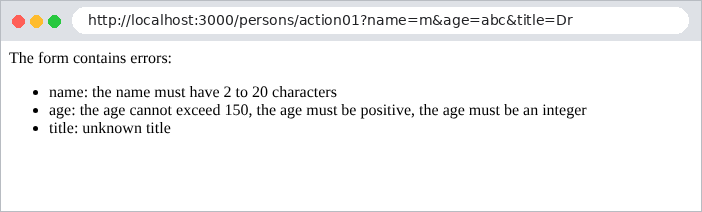
This is the technique that all forms in the case study will use (see Example 19).
3.4. Example 10: Multiple Parameters
A single parameter can appear multiple times in a request: this is the case with checkboxes on a form or a multiple-selection list ([?color=red&color=green]).
The file [src/arrays.controller.ts]:
| import { Controller, Get, Query } from '@nestjs/common';
import { ChoiceDto } from './choice.dto';
@Controller('arrays')
export class ArraysController {
// /arrays/action01?color=red&color=green: what Express receives
@Get('action01')
action01(@Query('color') color: string | string[]): object {
return { color, isAnArray: Array.isArray(color) };
}
// /arrays/action02?color=red: always an array thanks to ChoiceDto
@Get('action02')
action02(@Query() choice: ChoiceDto): object {
return { colors: choice.color, count: choice.color.length };
}
}
|
The [action01] action (lines 7–10) shows what an action receives:
| curl -i "http://localhost:3000/arrays/action01?color=red"
|
| HTTP/1.1 200 OK
Content-Type: application/json; charset=utf-8
Content-Length: 33
{"color":"red","isAnArray":false}
|
| curl -i "http://localhost:3000/arrays/action01?color=red&color=green"
|
| HTTP/1.1 200 OK
Content-Type: application/json; charset=utf-8
Content-Length: 42
{"color":["red","green"],"isAnArray":true}
|
The type depends on the number of values: a string for a single value, an array for multiple values. This is a common pitfall. The [ChoiceDto] class handles both cases as an array:
The file [src/choice.dto.ts]:
| import { Transform } from 'class-transformer';
import { ArrayMinSize, IsArray, IsIn } from 'class-validator';
export class ChoiceDto {
// ?color=red -> "red"; ?color=red&color=green -> ["red","green"]
// @Transform turns both cases into an array
@Transform(({ value }) => (Array.isArray(value) ? value : [value]))
@IsArray()
@ArrayMinSize(1, { message: 'choose at least one color' })
@IsIn(['red', 'green', 'blue'], { each: true, message: 'unknown color' })
color: string[];
}
|
- line 7: [@Transform] ([class-transformer]) applies a conversion function to the field: a single value is placed in an array;
- line 8: the field must be an array...
- line 9: ...with at least one element...
- line 10: ... and each element ([each: true]) must be in the list.
| curl -i "http://localhost:3000/arrays/action02?color=red"
|
| HTTP/1.1 200 OK
Content-Type: application/json; charset=utf-8
Content-Length: 28
{"colors":["red"],"count":1}
|
| curl -i "http://localhost:3000/arrays/action02?color=red&color=green"
|
| HTTP/1.1 200 OK
Content-Type: application/json; charset=utf-8
Content-Length: 36
{"colors":["red","green"],"count":2}
|
| curl -i "http://localhost:3000/arrays/action02?color=red&color=black"
|
| HTTP/1.1 400 Bad Request
Content-Type: application/json; charset=utf-8
Content-Length: 68
{"message":["unknown color"],"error":"Bad Request","statusCode":400}
|
3.5. Example 11: Parameters of a POST request
A HTML form sent using the POST method places its fields in the request body, not in the URL. The [@Body] decorator then replaces [@Query]:
The file [src/post.controller.ts]:
| import { Body, Controller, Headers, Post } from '@nestjs/common';
import { PersonDto } from './person.dto';
@Controller('post')
export class PostController {
// the request body, as is
@Post('action01')
action01(@Body() body: Record<string, unknown>, @Headers('content-type') type: string): object {
return { receivedType: type, body };
}
// a single field of the body
@Post('action02')
action02(@Body('name') name: string): string {
return `name = [${name}]`;
}
// the body, converted and validated by the PersonDto class
@Post('action03')
action03(@Body() person: PersonDto): object {
return { person, ageType: typeof person.age };
}
}
|
- lines 7–10: [@Body()] inserts the request body, which has already been decoded by [NestJS]. [@Headers('content-type')] inserts a request header: the body type;
- lines 13–16: [@Body('name')] inserts a single field from the body;
- lines 19–22: as with [@Query], the body can be described by a class, validated by the global [ValidationPipe].
The [-d] option of [curl] sends a POST request with a body in the format of a HTML form ([application/x-www-form-urlencoded]):
| curl -i -d "name=martin&age=42" http://localhost:3000/post/action01
|
| HTTP/1.1 201 Created
Content-Type: application/json; charset=utf-8
Content-Length: 88
{"receivedType":"application/x-www-form-urlencoded","body":{"name":"martin","age":"42"}}
|
The same body in JSON format (this is what a client sends in [JavaScript] format):
| curl -i -H "Content-Type: application/json" -d '{"name":"martin","age":42}' http://localhost:3000/post/action01
|
| HTTP/1.1 201 Created
Content-Type: application/json; charset=utf-8
Content-Length: 69
{"receivedType":"application/json","body":{"name":"martin","age":42}}
|
[NestJS] decodes both formats. Note that “age” is a string in the first case (a HTML form carries only text) and a number in the second. The other two actions:
| curl -i -d "name=martin&age=42" http://localhost:3000/post/action02
|
| HTTP/1.1 201 Created
Content-Type: text/html; charset=utf-8
Content-Length: 15
name = [martin]
|
| curl -i -d "name=martin&age=42&title=Mme" http://localhost:3000/post/action03
|
| HTTP/1.1 201 Created
Content-Type: application/json; charset=utf-8
Content-Length: 70
{"person":{"name":"martin","age":42,"title":"Mme"},"ageType":"number"}
|
| curl -i -d "name=martin&age=200" http://localhost:3000/post/action03
|
| HTTP/1.1 400 Bad Request
Content-Type: application/json; charset=utf-8
Content-Length: 96
{"message":["the age cannot exceed 150","unknown title"],"error":"Bad Request","statusCode":400}
|
Code 201 (Created) is the default code for a POST for [NestJS]. For a HTML application, a POST action responds either with a page (in which case [@HttpCode(200)] is added) or with a redirect (see Example 20).
3.6. Example 12: Custom pipes and decorators
You can write your own pipes and parameter decorators. The case study makes moderate use of them, but understanding them helps in understanding those of [NestJS].
3.6.1. A pipe: DateFrPipe
The file [src/date-fr.pipe.ts]:
| import { BadRequestException, Injectable, PipeTransform } from '@nestjs/common';
// turns a French date "23/09/2026" into an ISO date "2026-09-23"
@Injectable()
export class DateFrPipe implements PipeTransform<string, string> {
transform(value: string): string {
const m = /^(\d{2})\/(\d{2})\/(\d{4})$/.exec(value ?? '');
if (!m) {
throw new BadRequestException(`[${value}] is not a date in the dd/mm/yyyy format`);
}
const [, day, month, year] = m;
const iso = `${year}-${month}-${day}`;
// "31/02/2026" has the right shape, but does not exist
if (new Date(`${iso}T00:00:00Z`).toISOString().slice(0, 10) !== iso) {
throw new BadRequestException(`the date [${value}] does not exist`);
}
return iso;
}
}
|
- lines 4–5: a pipe is a class [@Injectable()] that implements the interface [PipeTransform<input, output>];
- line 6: its method [transform] receives the parameter value and returns the transformed value, which will be received by the action;
- lines 7–9: a value that does not have the form [dd/mm/yyyy] triggers a [BadRequestException] (400);
- lines 13–15: a date that is in the correct format but does not exist (31/02/2026) is also rejected: [new Date] “corrects” it to 03/03/2026, which is detected.
3.6.2. A parameter decorator: @Language()
The file [src/language.decorator.ts]:
| import { createParamDecorator, ExecutionContext } from '@nestjs/common';
import { Request } from 'express';
// @Language(): the browser's preferred language, read from the header
// "Accept-Language: fr-FR,fr;q=0.9,en;q=0.8" -> "fr"
export const Language = createParamDecorator((fallback: string | undefined, ctx: ExecutionContext): string => {
const req = ctx.switchToHttp().getRequest<Request>();
const header = req.get('accept-language') ?? '';
const first = header.split(',')[0].trim().slice(0, 2).toLowerCase();
return first || fallback || 'fr';
});
|
- Line 6: [createParamDecorator] creates a parameter decorator, similar to [@Query] or [@Body]. The function receives the decorator’s argument ([@Language('fr')]) and the query’s execution context;
- line 7: the context provides access to the request [Express];
- lines 8–10: the first two letters of the header [Accept-Language] are returned, which indicate the user’s preferred languages.
3.6.3. The controller
The file [src/examples.controller.ts]:
| import { Controller, Get, Query } from '@nestjs/common';
import { DateFrPipe } from './date-fr.pipe';
import { Language } from './language.decorator';
import { SearchDto } from './search.dto';
@Controller('examples')
export class ExamplesController {
// /examples/schedule?day=23/09/2026: a custom pipe
@Get('schedule')
schedule(@Query('day', DateFrPipe) day: string): string {
return `schedule for the day [${day}]`;
}
// /examples/hello: a custom parameter decorator
@Get('hello')
hello(@Language('fr') language: string): string {
return language === 'en' ? 'Hello!' : 'Bonjour !';
}
// /examples/search?keyword=nest&admin=true: [admin] is not declared
@Get('search')
search(@Query() search: SearchDto): object {
return search;
}
}
|
- line 10: the pipe is used as [ParseIntPipe];
- line 16: the decorator is used as [@Query];
- Line 22: a template described by a class, this time using the [forbidNonWhitelisted] option from [ValidationPipe] (file [main.ts] below).
The [src/main.ts] file:
| import { NestFactory } from '@nestjs/core';
import { ValidationPipe } from '@nestjs/common';
import { AppModule } from './app.module';
async function bootstrap() {
const app = await NestFactory.create(AppModule);
app.useGlobalPipes(
new ValidationPipe({
transform: true,
whitelist: true, // the undeclared fields are removed...
forbidNonWhitelisted: true, // ... or, with this option, rejected (400)
}),
);
await app.listen(3000);
console.log('Server started on http://localhost:3000');
}
bootstrap();
|
Line 11: With [forbidNonWhitelisted: true], an undeclared parameter in the class is no longer silently suppressed; it causes a 400 error.
The results:
| curl -i "http://localhost:3000/examples/schedule?day=23/09/2026"
|
| HTTP/1.1 200 OK
Content-Type: text/html; charset=utf-8
Content-Length: 33
schedule for the day [2026-09-23]
|
| curl -i "http://localhost:3000/examples/schedule?day=2026-09-23"
|
| HTTP/1.1 400 Bad Request
Content-Type: application/json; charset=utf-8
Content-Length: 104
{"message":"[2026-09-23] is not a date in the dd/mm/yyyy format","error":"Bad Request","statusCode":400}
|
| curl -i "http://localhost:3000/examples/schedule?day=31/02/2026"
|
| HTTP/1.1 400 Bad Request
Content-Type: application/json; charset=utf-8
Content-Length: 89
{"message":"the date [31/02/2026] does not exist","error":"Bad Request","statusCode":400}
|
| curl -i -H "Accept-Language: fr-FR,fr;q=0.9" http://localhost:3000/examples/hello
|
| HTTP/1.1 200 OK
Content-Type: text/html; charset=utf-8
Content-Length: 9
Bonjour !
|
| curl -i -H "Accept-Language: en-US,en;q=0.9" http://localhost:3000/examples/hello
|
| HTTP/1.1 200 OK
Content-Type: text/html; charset=utf-8
Content-Length: 6
Hello!
|
| curl -i "http://localhost:3000/examples/search?keyword=nest"
|
| HTTP/1.1 200 OK
Content-Type: application/json; charset=utf-8
Content-Length: 18
{"keyword":"nest"}
|
| curl -i "http://localhost:3000/examples/search?keyword=nest&admin=true"
|
| HTTP/1.1 400 Bad Request
Content-Type: application/json; charset=utf-8
Content-Length: 86
{"message":["property admin should not exist"],"error":"Bad Request","statusCode":400}
|
(The [-H] option of [curl] adds a header to the request)
3.6.4. Conclusion
The action template is generated by [NestJS] based on the request: route parameters ([@Param]), URL ([@Query]), the body ([@Body]), and headers ([@Headers]). The pipes convert and validate these values. For a HTML application, it is usually preferable to validate the model yourself (example 09) so that you can redisplay the form. This is the subject of the next chapter.