6. Data Scopes
A web application serves many users at once, and each user makes numerous requests. Data can therefore be shared at three levels, known as its scope:
- application scope: the data is shared by all users throughout the server’s lifetime (the list of doctors, for example);
- request scope: the data exists only for the duration of a request (a view’s model);
- client scope: the data is specific to a user and must persist from one request to the next (the selected language, the logged-in user).
The original course used the [ASP.NET] session for this last scope: a server-side storage space unique to each browser. This document, like the case study, does without it: client-side scope data is stored by the browser in cookies. The server does not store anything between two requests from the same user: it is said to be stateless ([stateless]). This is what makes it possible, for example, to run multiple identical servers behind a load balancer. The trade-off: a cookie is under the user’s control, and the user can read and modify it. Chapter 8 will show how a signed token makes it possible to trust the cookie despite this.
6.1. Example 23: Three Scopes
The file [src/counter.service.ts]:
| import { Injectable } from '@nestjs/common';
// APPLICATION scope (the default): a single instance, created at startup and
// shared by ALL the requests of ALL the users
@Injectable()
export class CounterService {
private total = 0;
increment(): number {
return ++this.total;
}
}
|
Lines 5–6: By default, a [NestJS] service is a singleton: a single instance, created at startup, shared by all requests. Its [total] field therefore has application scope.
The [src/request.service.ts] file:
| import { Injectable, Scope } from '@nestjs/common';
let createdInstances = 0;
// REQUEST scope: a NEW instance for each HTTP request
@Injectable({ scope: Scope.REQUEST })
export class RequestService {
readonly number = ++createdInstances;
}
|
Line 6: The [scope: Scope.REQUEST] option requests a new instance for each request. The instance number indicates this. This option is rarely used: it incurs a cost (creating objects for each request), and it propagates—a controller that depends on a request-scope service becomes request-scope itself. [res.locals] is usually sufficient.
The file [src/scopes.controller.ts]:
| import { Controller, Get, Req, Res } from '@nestjs/common';
import { Request, Response } from 'express';
import { CounterService } from './counter.service';
import { RequestService } from './request.service';
@Controller()
export class ScopesController {
constructor(
private readonly counter: CounterService,
private readonly request: RequestService,
) {}
@Get()
scopes(@Req() req: Request, @Res() res: Response): void {
// CLIENT scope: a piece of data kept by the BROWSER (cookie),
// sent back to the server with each request
const myVisits = Number(req.cookies?.myVisits ?? 0) + 1;
res.cookie('myVisits', String(myVisits), { httpOnly: true, sameSite: 'lax' });
res.render('scopes', {
total: this.counter.increment(),
instance: this.request.number,
myVisits,
});
}
}
|
- lines 8–11: both services are injected;
- lines 17–18: the client scope: a counter stored in a cookie. The browser sends it back with every request; the action increments it and stores it back;
- lines 19–23: the three values are passed to the view.
The file [src/main.ts]:
| import { NestFactory } from '@nestjs/core';
import { NestExpressApplication } from '@nestjs/platform-express';
import * as cookieParser from 'cookie-parser';
import { NextFunction, Request, Response } from 'express';
import { dirname, join } from 'path';
import { AppModule } from './app.module';
async function bootstrap() {
const app = await NestFactory.create<NestExpressApplication>(AppModule);
app.useStaticAssets(join(dirname(require.resolve('bootstrap/package.json')), 'dist'), { prefix: '/bootstrap/' });
app.setBaseViewsDir(join(__dirname, '..', 'views'));
app.setViewEngine('hbs');
app.use(cookieParser());
// REQUEST scope: res.locals is born and dies with the request
app.use((req: Request, res: Response, next: NextFunction) => {
res.locals.start = new Date().toISOString().slice(11, 23);
next();
});
await app.listen(3000);
console.log('Server started on http://localhost:3000');
}
bootstrap();
|
lines 15–18: the request scope with [res.locals]: the time the request was received.
The file [views/scopes.hbs]:
| <h1 class="h3">The scopes of data</h1>
<ul>
<li>application: {{total}} visit(s) of the site, all browsers combined</li>
<li>request: instance no. {{instance}} of RequestService, request received at {{start}}</li>
<li>client: {{myVisits}} visit(s) from this browser</li>
</ul>
|
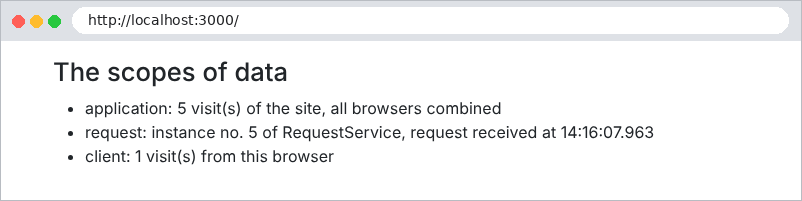
Let’s simulate two browsers with [curl] and two cookie files, [a.txt] and [b.txt]. Browser A makes two requests, then browser B makes one, and finally A makes one more:
| curl -c a.txt -b a.txt http://localhost:3000/
curl -c a.txt -b a.txt http://localhost:3000/
curl -c b.txt -b b.txt http://localhost:3000/
curl -c a.txt -b a.txt http://localhost:3000/
|
| browser A:
application: 1 visit(s) of the site, all browsers combined
request: instance no. 1 of RequestService, request received at 14:16:07.195
client: 1 visit(s) from this browser
browser A:
application: 2 visit(s) of the site, all browsers combined
request: instance no. 2 of RequestService, request received at 14:16:07.237
client: 2 visit(s) from this browser
browser B:
application: 3 visit(s) of the site, all browsers combined
request: instance no. 3 of RequestService, request received at 14:16:07.251
client: 1 visit(s) from this browser
browser A:
application: 4 visit(s) of the site, all browsers combined
request: instance no. 4 of RequestService, request received at 14:16:07.263
client: 3 visit(s) from this browser
|
- The application counter counts all visits: 1, 2, 3, 4;
- each request has its own instance of [RequestService]: 1, 2, 3, 4;
- The client counter is specific to each browser: A has 3 visits, B has 1.
In the case study:
Scope | Data | Where? |
Application | Lists of doctors and clients, dictionaries, pending CAPTCHAs | Singleton services ([ApplicationModelService], [CaptchaService]...) |
Request | language, path, flash message, logged-in user | [res.locals] |
client | authentication token, language, flash message | cookies |