11. [Cours]: Managing Relational Databases with Spring Data
Keywords: multi-tier architecture, Spring, dependency injection, API JPA (Java Persistence API), Spring Data.
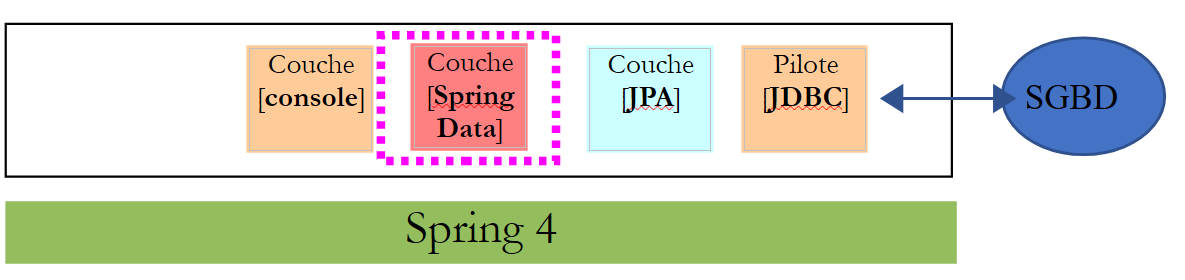
We will implement the [DAO] layer of TD using [Spring Data], a branch of the Spring ecosystem. [Spring Data] relies on a JPA layer (Java Persistence API) that allows the [DAO] layer to manipulate objects rather than SQL commands. Ultimately, the [DAO] layer is unaware that it is communicating with a database. It only knows the interface of the [Spring Data] layer.
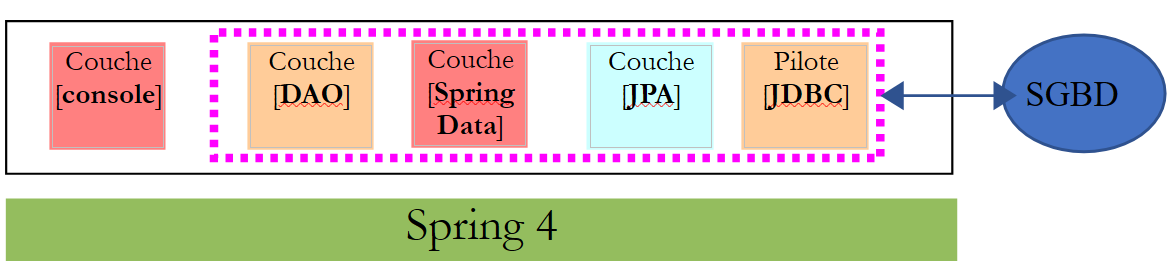 |
We will first explore [Spring Data] using two examples.
11.1. Support
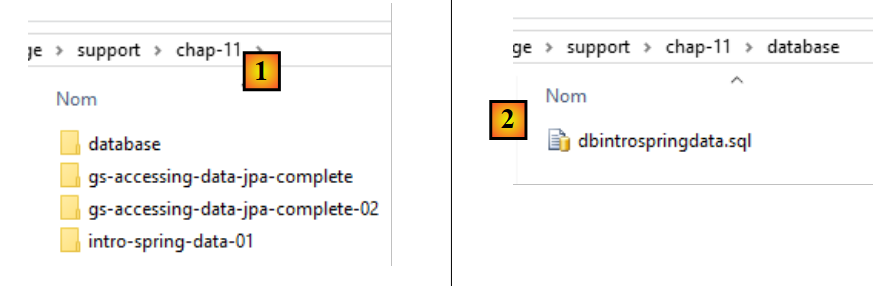 |
- In [1], the [support / chap-11] folder contains three Eclipse projects;
- in [2], the SQL script used to create the sample database for this chapter;
11.2. Example 1
The Spring website offers numerous tutorials to get started with Spring [http://spring.io/guides]. We will use one of them to introduce Spring Data. For this, we use the Spring Tool Suite (STS).
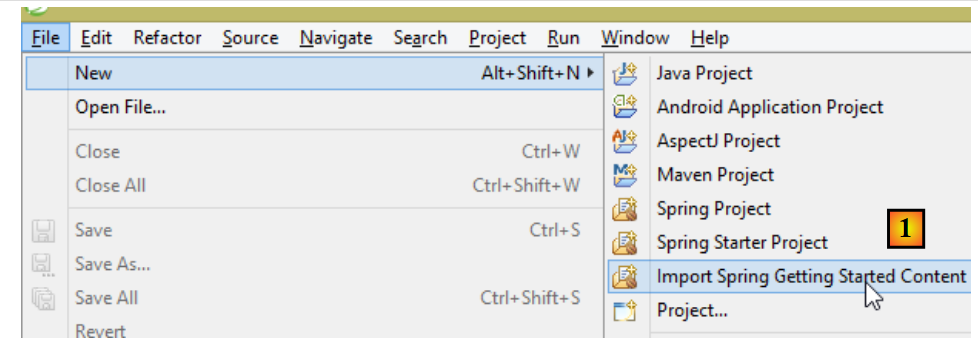 |
- In [1], we import one of the tutorials from [spring.io/guides];
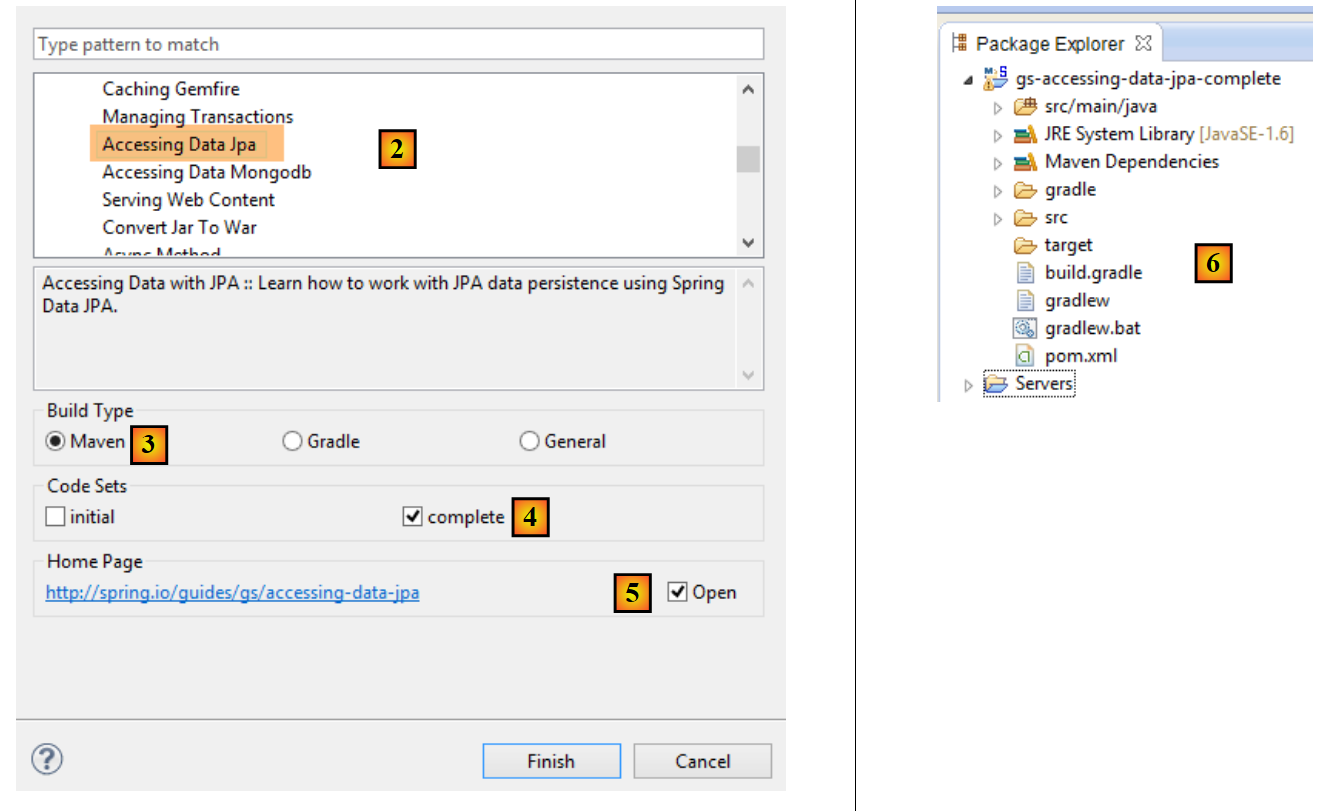 |
- In [2], we select the tutorial [Accessing Data Jpa], which demonstrates how to access a database using Spring Data;
- In [3], we select a project configured by Maven;
- In [4], the tutorial is available in two forms: [initial], which is an empty version that you fill in by following the tutorial, or [complete], which is the final version of the tutorial. We choose the latter;
- In [5], you can choose to view the tutorial in a browser;
- in [6], the final project.
11.2.1. The project’s Maven configuration
The project’s Maven dependencies are configured in the [pom.xml] file:
    <groupId>org.springframework</groupId>
    <artifactId>gs-accessing-data-jpa</artifactId>
    <version>0.1.0</version>

    <parent>
        <groupId>org.springframework.boot</groupId>
        <artifactId>spring-boot-starter-parent</artifactId>
        <version>1.1.10.RELEASE</version>
    </parent>

    <dependencies>
        <dependency>
            <groupId>org.springframework.boot</groupId>
            <artifactId>spring-boot-starter-data-jpa</artifactId>
        </dependency>
        <dependency>
            <groupId>com.h2database</groupId>
            <artifactId>h2</artifactId>
        </dependency>
    </dependencies>

    <properties>
        <!-- use UTF-8 for everything -->
        <project.build.sourceEncoding>UTF-8</project.build.sourceEncoding>
        <project.reporting.outputEncoding>UTF-8</project.reporting.outputEncoding>
        <start-class>hello.Application</start-class>
</properties>
- lines 5–9: define a parent Maven project. This project defines most of the project’s dependencies. They may be sufficient, in which case no additional dependencies are added, or they may not be, in which case the missing dependencies are added;
- lines 12–15: define a dependency on [spring-boot-starter-data-jpa]. This artifact contains the Spring Data classes;
- Lines 16–19: define a dependency on SGBD H2, which allows for the creation and management of in-memory databases.
Let’s look at the classes introduced by these dependencies:
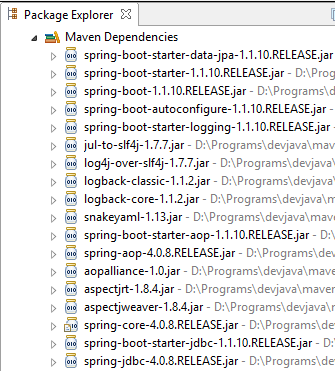 | 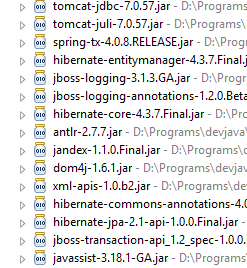 | 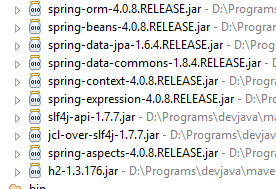 |
There are many of them:
- some belong to the Spring ecosystem (those starting with spring);
- others belong to the Hibernate ecosystem (hibernate, jboss), of which we use the JPA implementation here;
- others are testing libraries (junit, hamcrest);
- others are logging libraries (log4j, logback, slf4j);
We will keep them all. For a production application, only those that are necessary should be kept.
On line 26 of the [pom.xml] file, we find the line:
<start-class>hello.Application</start-class>
This line is linked to the following lines:
<build>
        <plugins>
            <plugin>
                <artifactId>maven-compiler-plugin</artifactId>
            </plugin>
            <plugin>
                <groupId>org.springframework.boot</groupId>
                <artifactId>spring-boot-maven-plugin</artifactId>
            </plugin>
        </plugins>
    </build>
Lines 6–9: The [spring-boot-maven-plugin] plugin is used to generate the jar executable for the application. Line 26 of the [pom.xml] file then specifies the executable class for this jar.
11.2.2. The [JPA] layer
Database access is handled through a [JPA] layer, Java Persistence API:
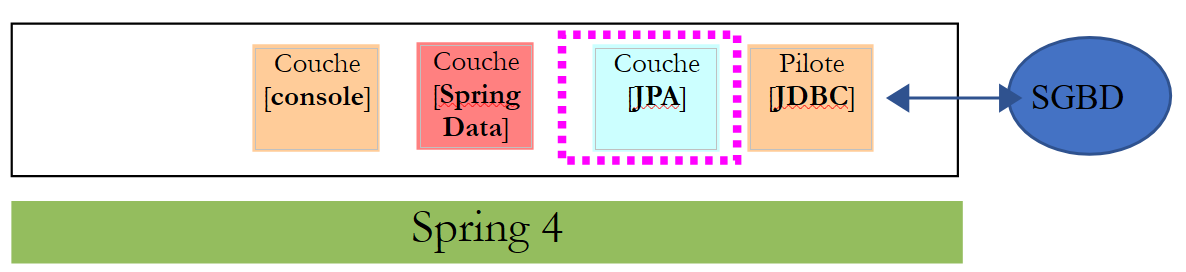 |
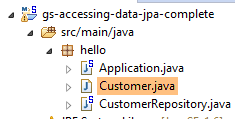 |
The application is basic and handles clients and [Customer]. The [Customer] class is part of the [JPA] layer and is as follows:
package hello;

import javax.persistence.Entity;
import javax.persistence.GeneratedValue;
import javax.persistence.GenerationType;
import javax.persistence.Id;

@Entity
public class Customer {

    @Id
    @GeneratedValue(strategy = GenerationType.AUTO)
    private long id;
    private String firstName;
    private String lastName;

    protected Customer() {
    }

    public Customer(String firstName, String lastName) {
        this.firstName = firstName;
        this.lastName = lastName;
    }

    @Override
    public String toString() {
        return String.format("Customer[id=%d, firstName='%s', lastName='%s']", id, firstName, lastName);
    }

}
A customer has an ID [id], a first name [firstName], and a last name [lastName]. Each instance [Customer] represents a row in a database table.
- Line 8: annotation JPA, which ensures that the persistence of instances [Customer] (Create, Read, Update, Delete) will be managed by an implementation JPA. Based on the Maven dependencies, we can see that the JPA / Hibernate implementation is being used;
- Lines 11–12: JPA annotations that associate the [id] field with the primary key of the [Customer] table. Line 12 indicates that the JPA implementation will use the primary key generation method specific to the SGBD being used, in this case H2;
There are no other annotations for JPA. Default values will therefore be used:
- the [Customer] table will bear the name of the class, i.e., [Customer];
- the columns of this table will bear the names of the class fields: [id, firstName, lastName], noting that case is not taken into account in the name of a table column;
Note that the JPA implementation used is never named.
11.2.3. The [Spring Data] layer
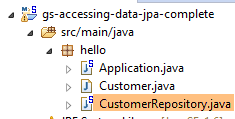
The class [CustomerRepository] implements the table access layer [Customer]. Its code is as follows:
 |
 |
package hello;

import java.util.List;

import org.springframework.data.repository.CrudRepository;

public interface CustomerRepository extends CrudRepository<Customer, Long> {

    List<Customer> findByLastName(String lastName);
}
This is therefore an interface and not a class (line 7). It extends the [CrudRepository] interface, a Spring interface (line 5). This interface is parameterized by two types: the first is the type of the managed elements, here the type [Customer], and the second is the type of the primary key of the managed elements, here a type [Long]. The [CrudRepository] interface is as follows:
package org.springframework.data.repository;

import java.io.Serializable;

@NoRepositoryBean
public interface CrudRepository<T, ID extends Serializable> extends Repository<T, ID> {

    <S extends T> S save(S entity);

    <S extends T> Iterable<S> save(Iterable<S> entities);

    T findOne(ID id);

    boolean exists(ID id);

    Iterable<T> findAll();

    Iterable<T> findAll(Iterable<ID> ids);

    long count();

    void delete(ID id);

    void delete(T entity);

    void delete(Iterable<? extends T> entities);

    void deleteAll();
}
This interface defines the CRUD operations (Create – Read – Update – Delete) that can be performed on a JPA type T:
- line 8: the save method allows an entity T to be persisted in the database. It persists the entity using the primary key assigned to it by SGBD. It also allows an entity T identified by its primary key id to be updated. The choice between these two actions depends on the value of the primary key id: if it is null, the persistence operation occurs; otherwise, the update operation occurs;
- line 10: same as above, but for a list of entities;
- line 12: the method findOne retrieves an entity T identified by its primary key id;
- line 22: the delete method allows you to delete an entity T identified by its primary key id;
- lines 24–28: variants of the [delete] method;
- line 16: the [findAll] method retrieves all persisted T entities;
- line 18: same as above, but limited to entities for which a list of identifiers has been provided;
Let’s return to the [CustomerRepository] interface:
package hello;

import java.util.List;

import org.springframework.data.repository.CrudRepository;

public interface CustomerRepository extends CrudRepository<Customer, Long> {

    List<Customer> findByLastName(String lastName);
}
- Line 9 allows you to retrieve a [Customer] by its name [lastName];
And that’s all for the [DAO] layer. There is no implementation class for the previous interface. It is generated at runtime by [Spring Data]. The methods of the [CrudRepository] interface are automatically implemented. For the methods added to the [CustomerRepository] interface, it depends. Let’s go back to the definition of [Customer]:
private long id;
private String firstName;
private String lastName;
The method on line 9 is automatically implemented by [Spring Data] because it references the [lastName] field (line 3) of [Customer]. When it encounters a [findBySomething] method in the interface to be implemented, Spring Data implements it using the following JPQL (Java Persistence Query Language) query:
Therefore, the type T must have a field named [something]. Thus, the method
will be implemented by code similar to the following:
return [em].createQuery("select c from Customer c where c.lastName=:value").setParameter("value",lastName).getResultList()
where [em] refers to the persistence context JPA. This is only possible if the class [Customer] has a field named [lastName], which is the case.
In conclusion, in simple cases, Spring Data allows us to implement the [DAO] layer with a simple interface.
11.2.4. The [console] layer
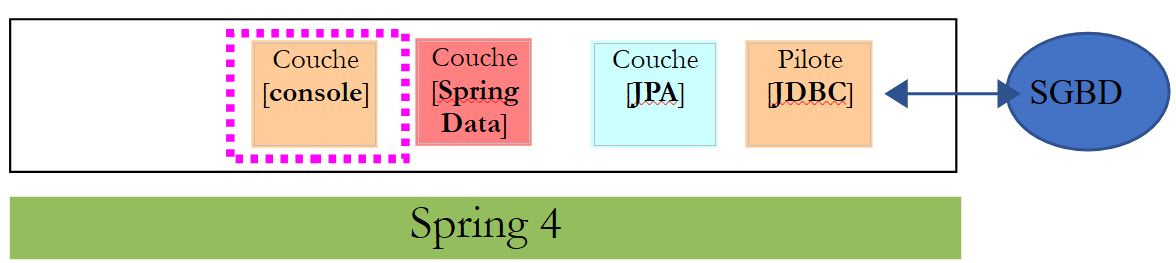 |
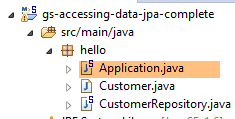 |
The [Application] class is as follows:
package hello;

import org.springframework.beans.factory.annotation.Autowired;
import org.springframework.boot.CommandLineRunner;
import org.springframework.boot.SpringApplication;
import org.springframework.boot.autoconfigure.SpringBootApplication;

@SpringBootApplication
public class Application implements CommandLineRunner {

    @Autowired
    CustomerRepository repository;

    public static void main(String[] args) {
        SpringApplication.run(Application.class);
    }

    @Override
    public void run(String... strings) throws Exception {
        // save a couple of customers
        repository.save(new Customer("Jack", "Bauer"));
        repository.save(new Customer("Chloe", "O'Brian"));
        repository.save(new Customer("Kim", "Bauer"));
        repository.save(new Customer("David", "Palmer"));
        repository.save(new Customer("Michelle", "Dessler"));

        // fetch all customers
        System.out.println("Customers found with findAll():");
        System.out.println("-------------------------------");
        for (Customer customer : repository.findAll()) {
            System.out.println(customer);
        }
        System.out.println();

        // fetch an individual customer by ID
        Customer customer = repository.findOne(1L);
        System.out.println("Customer found with findOne(1L):");
        System.out.println("--------------------------------");
        System.out.println(customer);
        System.out.println();

        // fetch customers by last name
        System.out.println("Customer found with findByLastName('Bauer'):");
        System.out.println("--------------------------------------------");
        for (Customer bauer : repository.findByLastName("Bauer")) {
            System.out.println(bauer);
        }
    }

}
- line 9: the class implements the [CommandLineRunner] interface, which is a [Spring Boot] interface (line 4). This interface has only one method, the one on line 19;
- line 8: @SpringBootApplication is an annotation that groups several [Spring Boot] annotations:
- @Configuration: indicates that the class is a configuration class;
- @EnableAutoConfiguration: instructs [Spring Boot] to create a certain number of beans itself based on various properties, particularly the contents of the project’s Classpath. Because the Hibernate libraries are in the Classpath, the [entityManagerFactory] bean will be implemented with Hibernate. Because the H2 library is in the Classpath, the [dataSource] bean will be implemented with H2. In the [dataSource] bean, you must also define the user and password. Here, Spring Boot will use the default H2 administrator, which has no password. Because the [spring-tx] library is in the classpath, Spring’s transaction manager will be used;
- @EnableWebMvc: if the [spring-mvc] library is in the classpath. In this case, auto-configuration is performed for the web application;
- @ComponentScan: tells Spring where to look for other beans, configurations, and services. Here, they are looked for by default in the package containing the tagged class, i.e., the [hello] package. Thus, the classes [Customer] and [CustomerRepository] will be found. Because the first has the [@Entity] annotation, it will be cataloged as an entity to be managed by Hibernate. Because the second extends the [CrudRepository] interface, it will be registered as a Spring bean;
- lines 11–12: the [CustomerRepository] bean is injected into the main class code;
- line 15: the static method [run] of the [SpringApplication] class in the Spring Boot project is executed. Its parameter is the class that has a [Configuration] or [EnableAutoConfiguration] annotation. Everything explained previously will then take place. The result is a Spring application context, i.e., a set of beans managed by Spring;
The following operations simply use the methods of the bean implementing the [CustomerRepository] interface. The console output is as follows:
- lines 1-8: the Spring Boot project logo;
- line 9: the [hello.Application] class is executed;
- line 10: [AnnotationConfigApplicationContext] is a class implementing Spring’s [ApplicationContext] interface. It is a bean container;
- line 11: the bean [entityManagerFactory] is implemented with the class [LocalContainerEntityManagerFactory], a Spring class;
- line 12: [Hibernate] appears. It is this JPA implementation that was chosen;
- line 19: a Hibernate dialect is the variant SQL to be used with SGBD. Here, the [H2Dialect] dialect indicates that Hibernate will work with the SGBD H2;
- Lines 21–22: The database is created. The table [CUSTOMER] is created. This means that Hibernate has been configured to generate tables from the JPA definitions; here, the JPA definition of the [Customer] class;
- lines 26–30: result of the [findAll] method of the interface;
- line 34: result of the [findOne] method of the interface;
- lines 38-39: results of the [findByLastName] method;
- lines 41 and following: logs of the Spring context closure.
11.2.5. Manual configuration of the Spring project Data
We duplicate the previous project into the [gs-accessing-data-jpa-02] project:
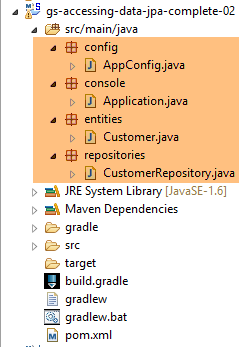 |
In this new project, we will not rely on the automatic configuration provided by Spring Boot. We will configure it manually. This can be useful if the default configurations do not suit our needs.
First, we will specify the necessary dependencies in the [pom.xml] file:
<?xml version="1.0" encoding="UTF-8"?>
<project xmlns="http://maven.apache.org/POM/4.0.0" xsi:schemaLocation="http://maven.apache.org/POM/4.0.0 http://maven.apache.org/maven-v4_0_0.xsd"
    xmlns:xsi="http://www.w3.org/2001/XMLSchema-instance">
    <modelVersion>4.0.0</modelVersion>

    <groupId>org.springframework</groupId>
    <artifactId>gs-accessing-data-jpa-02</artifactId>
    <version>0.1.0</version>

    <parent>
        <groupId>org.springframework.boot</groupId>
        <artifactId>spring-boot-starter-parent</artifactId>
        <version>1.2.7.RELEASE</version>
    </parent>

    <dependencies>
        <!-- Spring Data -->
        <dependency>
            <groupId>org.springframework.data</groupId>
            <artifactId>spring-data-jpa</artifactId>
        </dependency>
        <!-- Hibernate -->
        <dependency>
            <groupId>org.hibernate</groupId>
            <artifactId>hibernate-entitymanager</artifactId>
        </dependency>
        <!-- H2 Database -->
        <dependency>
            <groupId>com.h2database</groupId>
            <artifactId>h2</artifactId>
        </dependency>
        <!-- Tomcat JDBC -->
        <dependency>
            <groupId>org.apache.tomcat</groupId>
            <artifactId>tomcat-jdbc</artifactId>
        </dependency>
    </dependencies>

    <properties>
        <!-- use UTF-8 for everything -->
        <project.build.sourceEncoding>UTF-8</project.build.sourceEncoding>
        <project.reporting.outputEncoding>UTF-8</project.reporting.outputEncoding>
    </properties>

    <build>
        <plugins>
            <plugin>
                <groupId>org.springframework.boot</groupId>
                <artifactId>spring-boot-maven-plugin</artifactId>
            </plugin>
        </plugins>
    </build>

    <repositories>
        <repository>
            <id>spring-releases</id>
            <name>Spring Releases</name>
            <url>https://repo.spring.io/libs-release</url>
        </repository>
        <repository>
            <id>org.jboss.repository.releases</id>
            <name>JBoss Maven Release Repository</name>
            <url>https://repository.jboss.org/nexus/content/repositories/releases</url>
        </repository>
    </repositories>

    <pluginRepositories>
        <pluginRepository>
            <id>spring-releases</id>
            <name>Spring Releases</name>
            <url>https://repo.spring.io/libs-release</url>
        </pluginRepository>
    </pluginRepositories>

</project>
- lines 10–14: the parent Maven project whose libraries we will use;
- lines 18-21: Spring Data used to access the database;
- lines 23–26: the Hibernate implementation of the JPA specification;
- lines 28-31: the SGBD H2;
- lines 33–36: Databases are often used with open connection pools, which avoid repeated connection openings and closings. Here, the implementation used is [tomcat-jdbc];
In the new project, the entity [Customer] and the interface [CustomerRepository] remain unchanged. We will modify the class [Application], which will be split into two classes:
- [Config], which will be the configuration class:
- [Main], which will be the executable class;
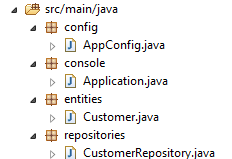 |
The executable class [Application] is now as follows:
package console;

import org.springframework.context.annotation.AnnotationConfigApplicationContext;

import repositories.CustomerRepository;
import config.AppConfig;
import entities.Customer;

public class Application {
    public static void main(String[] args) {
        // instantiation Spring context
        AnnotationConfigApplicationContext context = new AnnotationConfigApplicationContext(AppConfig.class);
        CustomerRepository repository = context.getBean(CustomerRepository.class);

        // save a couple of customers
        repository.save(new Customer("Jack", "Bauer"));
        repository.save(new Customer("Chloe", "O'Brian"));
        repository.save(new Customer("Kim", "Bauer"));
        repository.save(new Customer("David", "Palmer"));
        repository.save(new Customer("Michelle", "Dessler"));

        ...

        // closing context
        context.close();
    }
}
- line 9: the [Application] class no longer has any configuration annotations;
- lines 3–7: note that there are no longer any imports of the [Spring Boot] package;
- line 12: Spring beans are instantiated. We obtain the Spring context containing the references to the beans thus created;
- line 13: we request a reference to the bean of type [CustomerRepository];
The [Config] class that configures the project is as follows:
package config;

import javax.persistence.EntityManagerFactory;

import org.apache.tomcat.jdbc.pool.DataSource;
import org.springframework.context.annotation.Bean;
import org.springframework.context.annotation.Configuration;
import org.springframework.data.jpa.repository.config.EnableJpaRepositories;
import org.springframework.orm.jpa.JpaTransactionManager;
import org.springframework.orm.jpa.JpaVendorAdapter;
import org.springframework.orm.jpa.LocalContainerEntityManagerFactoryBean;
import org.springframework.orm.jpa.vendor.Database;
import org.springframework.orm.jpa.vendor.HibernateJpaVendorAdapter;
import org.springframework.transaction.PlatformTransactionManager;
import org.springframework.transaction.annotation.EnableTransactionManagement;

//@EnableTransactionManagement
@EnableJpaRepositories(basePackages = { "repositories" })
@Configuration
// @ComponentScan(basePackages={"package1","package2"})
public class AppConfig {

    // h2 database
    @Bean
    public DataSource dataSource() {
        // data source TomcatJdbc
        DataSource dataSource = new DataSource();
        // configuration access JDBC
        dataSource.setDriverClassName("org.h2.Driver");
        dataSource.setUrl("jdbc:h2:./demo");
        dataSource.setUsername("sa");
        dataSource.setPassword("");
        // an initially open connection
        dataSource.setInitialSize(1);
        // result
        return dataSource;
    }

    // the provider JPA
    @Bean
    public JpaVendorAdapter jpaVendorAdapter() {
        HibernateJpaVendorAdapter hibernateJpaVendorAdapter = new HibernateJpaVendorAdapter();
        hibernateJpaVendorAdapter.setShowSql(false);
        hibernateJpaVendorAdapter.setGenerateDdl(true);
        hibernateJpaVendorAdapter.setDatabase(Database.H2);
        return hibernateJpaVendorAdapter;
    }

    // EntityManagerFactory
    @Bean
    public EntityManagerFactory entityManagerFactory(JpaVendorAdapter jpaVendorAdapter, DataSource dataSource) {
        LocalContainerEntityManagerFactoryBean factory = new LocalContainerEntityManagerFactoryBean();
        factory.setJpaVendorAdapter(jpaVendorAdapter);
        factory.setPackagesToScan("entities");
        factory.setDataSource(dataSource);
        factory.afterPropertiesSet();
        return factory.getObject();
    }

    // Transaction manager
    @Bean
    public PlatformTransactionManager transactionManager(EntityManagerFactory entityManagerFactory) {
        JpaTransactionManager txManager = new JpaTransactionManager();
        txManager.setEntityManagerFactory(entityManagerFactory);
        return txManager;
    }

}
- line 17: the [@EnableTransactionManagement] annotation indicates that the methods of the [CrudRepository] interfaces must be executed within a transaction. It has been commented out because this is the default behavior;
- line 18: the [@EnableJpaRepositories] annotation specifies the directories where the Spring interfaces Data and [CrudRepository] are located. These interfaces will become Spring components and be available in the Spring context;
- line 19: the [@Configuration] annotation makes the [Config] class a Spring configuration class;
- line 20: the [@ComponentScan] annotation specifies the directories where Spring components should be searched for. Spring components are classes tagged with Spring annotations such as @Service, @Component, @Controller, etc. Here, there are no others besides those defined within the [AppConfig] class, so the annotation has been commented out;
- Lines 24–37: define the data source, the H2 database. It is the @Bean annotation on line 25 that makes the object created by this method a Spring-managed component. The method name here can be anything. However, it must be named [dataSource] if EntityManagerFactory on line 51 is absent and defined via autoconfiguration;
- line 30: the database will be named [demo] and will be generated in the project folder;
- lines 40–47: define the JPA implementation used, in this case a Hibernate implementation. The method name can be anything here;
- line 43: no logs for SQL;
- line 44: the database will be created if it does not exist;
- lines 50–58: define the EntityManagerFactory that will handle the persistence of JPA. The method must be named [entityManagerFactory];
- line 51: the method receives two parameters of the types of the two beans defined previously. These will then be constructed and injected by Spring as method parameters;
- line 53: sets the JPA implementation to be used;
- line 54: specifies the directories where the JPA entities can be found;
- line 55: specifies the data source to be managed;
- lines 61–66: the transaction manager. The method must be named [transactionManager]. It receives the bean from lines 51–58 as a parameter;
- line 64: the transaction manager is associated with EntityManagerFactory;
The preceding methods can be defined in any order.
Running the project yields the same results. A new file appears in the project folder, the H2 database file:
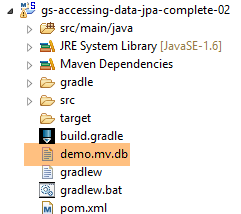 |
11.2.6. Creating an executable archive
To create an executable archive of the project, follow these steps:
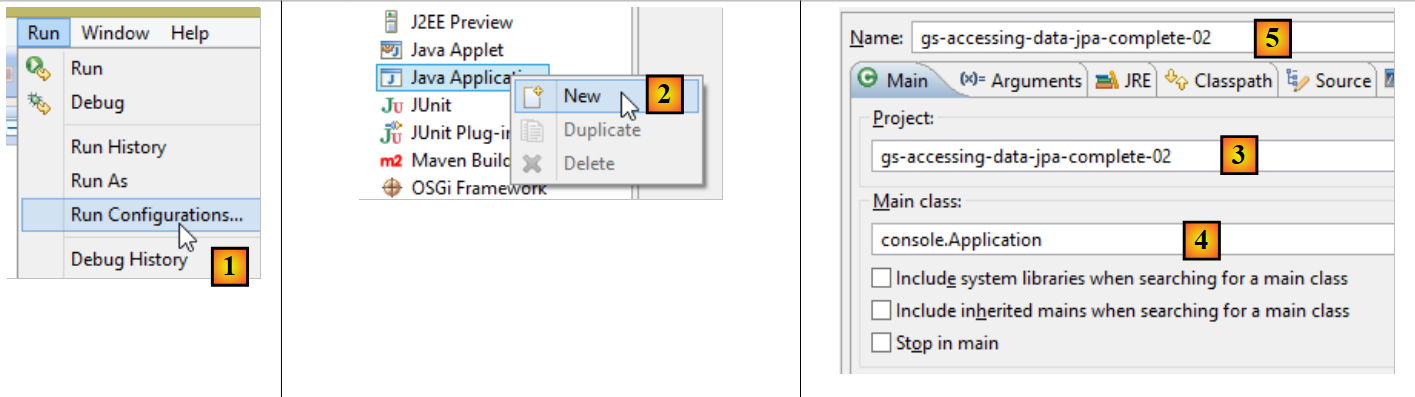 |
- In [1]: create a run configuration;
- In [2]: of type [Java Application]
- in [3]: specify the project to run (use the Browse button);
- in [4]: specify the class to execute;
- in [5]: the name of the run configuration – can be anything;
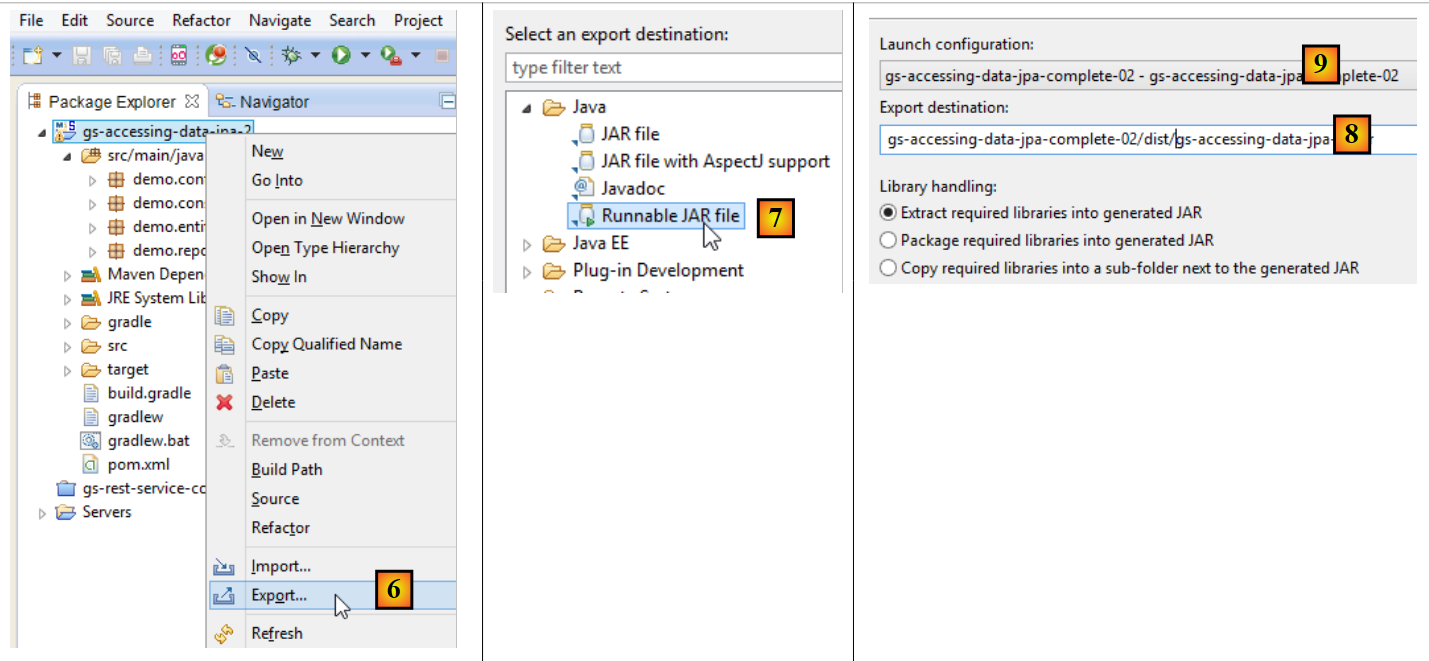 |
- in [6]: the project is exported;
- in [7]: as an executable JAR archive;
- in [8]: specifies the path and name of the executable file to be created;
- in [9]: the name of the execution configuration created in [5];
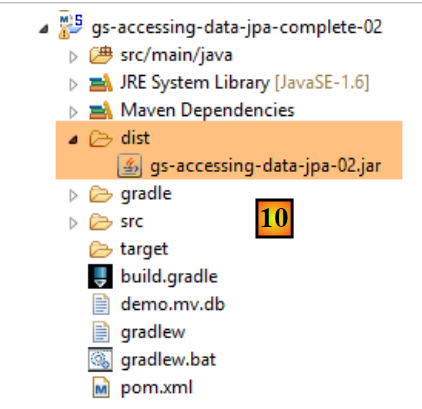 |
- in [10], the archive created;
Once this is done, open a console in the folder containing the executable archive:
The archive is executed as follows:
.....\dist>java -jar gs-accessing-data-jpa-02.jar
The results displayed in the console are as follows:
11.3. Example 2
11.3.1. Introduction
We will use the product table example we used to introduce API and JDBC to create the following architecture:
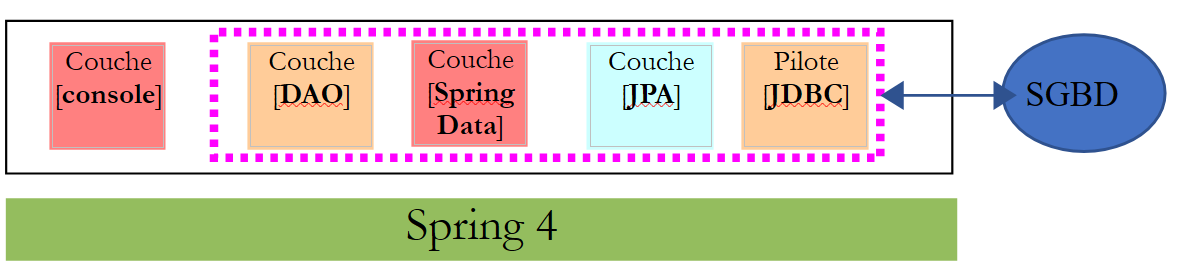 |
The [dbintrospringjpa] database has two tables: [PRODUITS] and [CATEGORIES]. The [CATEGORIES] table is as follows:
 |
- [ID]: primary key in AUTO_INCREMENT mode;
- [VERSION]: record ID of version;
- [NOM]: category name - unique;
The table [PRODUITS] is as follows:
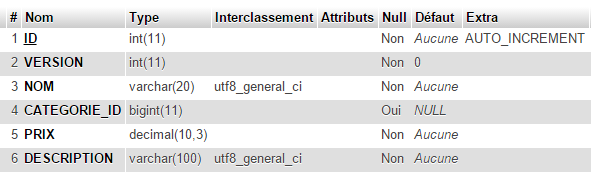 |
- [ID]: primary key in AUTO_INCREMENT mode;
- [VERSION]: record ID of version;
- [NOM]: product name—unique;
- [ID_CATEGORIE]: category number - foreign key on the [CATEGORIES.ID] field;
- [PRIX]: its price;
- [DESCRIPTION]: a description of the product;
Task: Create the database [dbintrospringdata] using the script SQL [dbintrospringdata.sql] from the support section:
11.3.2. Creating the Maven project
To create a Spring project template Data, proceed as follows:
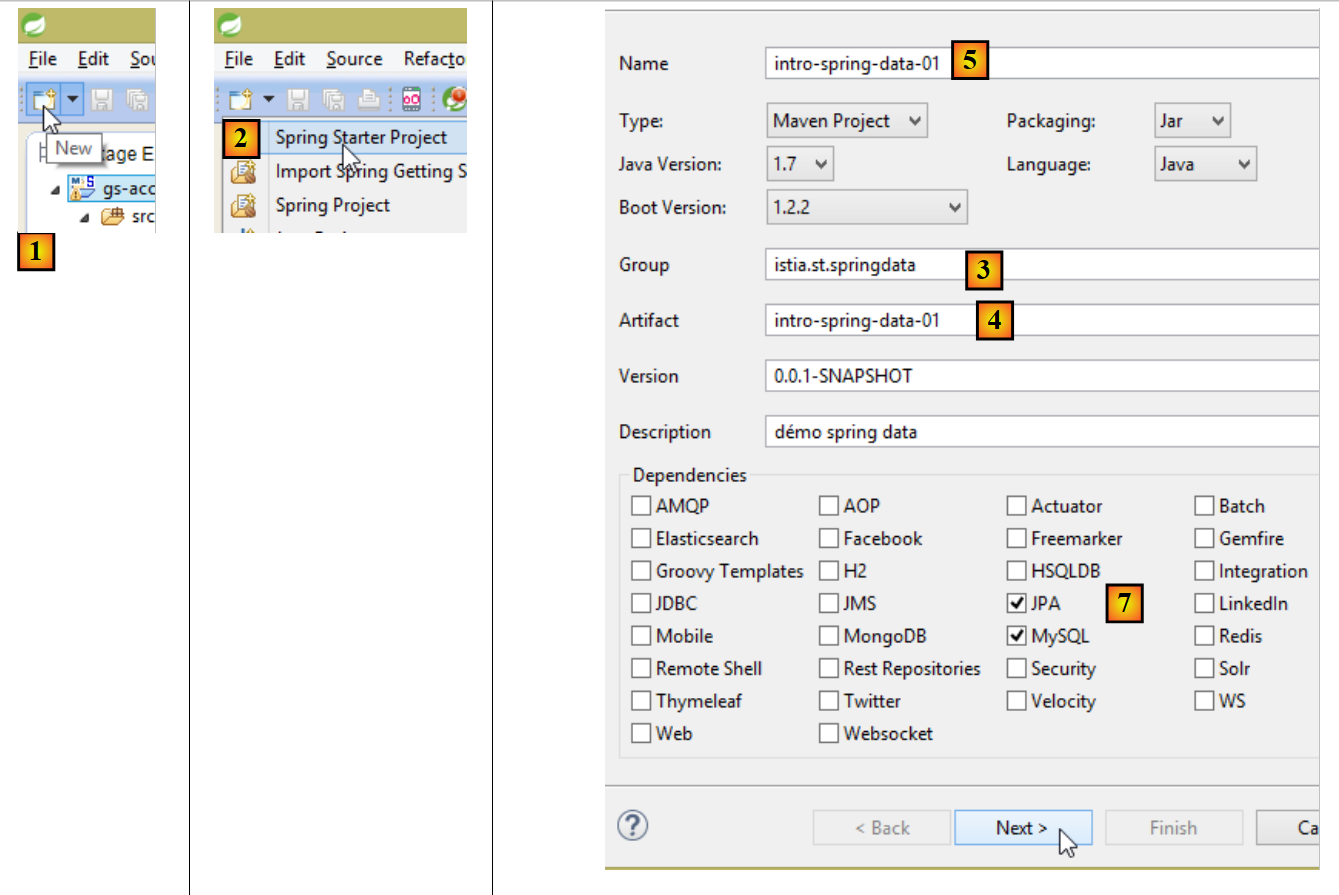 |
- In [1], create a new project;
- In [2]: select the [Spring Starter Project] type;
- The generated project will be a Maven project. In [3], specify the project group name;
- in [4]: specify the name of the artifact (a jar here) that will be created when the project is built;
- in [5]: the Eclipse name of the project – can be anything (does not have to be identical to [4]);
- in [7]: specify that a project will be created with a layer named [JPA], containing SGBD and MySQL. The dependencies required for such a project will then be included in the [pom.xml] file;
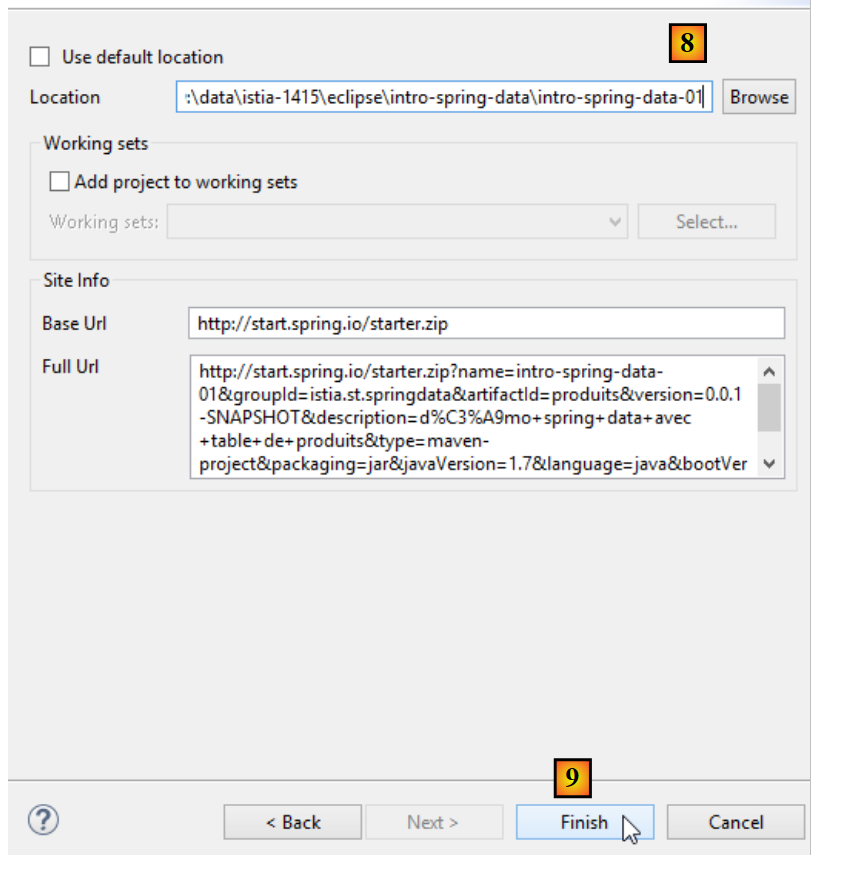 |
- in [8], enter the name of the project folder;
- in [9], finish the wizard;
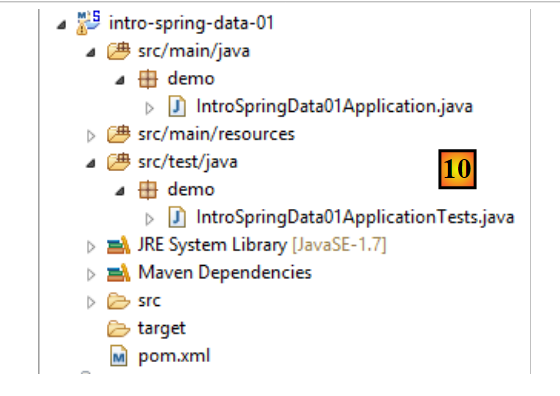 |
- in [10]: the created project;
The [pom.xml] file includes the dependencies required for a JPA project:
<?xml version="1.0" encoding="UTF-8"?>
<project xmlns="http://maven.apache.org/POM/4.0.0" xmlns:xsi="http://www.w3.org/2001/XMLSchema-instance"
    xsi:schemaLocation="http://maven.apache.org/POM/4.0.0 http://maven.apache.org/xsd/maven-4.0.0.xsd">
    <modelVersion>4.0.0</modelVersion>

    <groupId>istia.st.springdata</groupId>
    <artifactId>intro-spring-data-01</artifactId>
    <version>0.0.1-SNAPSHOT</version>
    <packaging>jar</packaging>

    <name>intro-spring-data-01</name>
    <description>démo spring data avec table de produits</description>

    <parent>
        <groupId>org.springframework.boot</groupId>
        <artifactId>spring-boot-starter-parent</artifactId>
        <version>1.2.2.RELEASE</version>
        <relativePath/> <!-- lookup parent from repository -->
    </parent>

    <properties>
        <project.build.sourceEncoding>UTF-8</project.build.sourceEncoding>
        <start-class>demo.IntroSpringData01Application</start-class>
        <java.version>1.7</java.version>
    </properties>

    <dependencies>
        <dependency>
            <groupId>org.springframework.boot</groupId>
            <artifactId>spring-boot-starter-data-jpa</artifactId>
        </dependency>
        <dependency>
            <groupId>mysql</groupId>
            <artifactId>mysql-connector-java</artifactId>
            <scope>runtime</scope>
        </dependency>
        <dependency>
            <groupId>org.springframework.boot</groupId>
            <artifactId>spring-boot-starter-test</artifactId>
            <scope>test</scope>
        </dependency>
    </dependencies>

    <build>
        <plugins>
            <plugin>
                <groupId>org.springframework.boot</groupId>
                <artifactId>spring-boot-maven-plugin</artifactId>
            </plugin>
        </plugins>
    </build>

</project>
- lines 14–19: the parent Maven project—defines a large number of libraries with their versions—these libraries are used as Maven dependencies without specifying their version;
- lines 28–31: the dependency required for JPA – will include [Spring Data];
- lines 32–36: the dependency on the JDBC driver from MySQL;
- lines 37-41: the dependencies required for the JUnit tests integrated with Spring;
The executable class [Application] does nothing but is preconfigured:
package demo;

import org.springframework.boot.SpringApplication;
import org.springframework.boot.autoconfigure.SpringBootApplication;

@SpringBootApplication
public class IntroSpringData01Application {

    public static void main(String[] args) {
        SpringApplication.run(IntroSpringData01Application.class, args);
    }
}
- The annotation [@SpringBootApplication] makes the class a project auto-configuration class;
The test class [ApplicationTests] does nothing but is preconfigured:
package demo;

import org.junit.Test;
import org.junit.runner.RunWith;
import org.springframework.boot.test.SpringApplicationConfiguration;
import org.springframework.test.context.junit4.SpringJUnit4ClassRunner;

@RunWith(SpringJUnit4ClassRunner.class)
@SpringApplicationConfiguration(classes = IntroSpringData01Application.class)
public class IntroSpringData01ApplicationTests {

    @Test
    public void contextLoads() {
    }

}
- line 9: the [@SpringApplicationConfiguration] annotation allows the [Application] configuration file to be used. The test class will thus benefit from all the beans defined by this file;
- line 8: the [@RunWith] annotation enables the integration of Spring with JUnit: the class will be able to run as a JUnit test. [@RunWith] is a JUnit annotation (line 4), whereas the [SpringJUnit4ClassRunner] class is a Spring class (line 6);
Now that we have a JPA application skeleton, we can complete it to write the persistence layer project associated with the product database.
11.3.3. The Eclipse Project
We are evolving the previous project as follows:
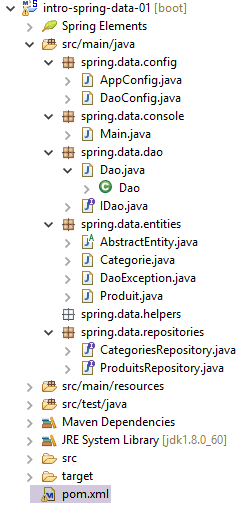 |
- [AppConfig.java]: the Spring project configuration class;
- [Main.java]: the project’s executable class;
- [IDao.java]: the interface for the [DAO] layer;
- [Dao.java]: the implementation class of the [DAO] layer;
- [AbstractEntity.java]: the parent class of classes [Produit] and [Categorie];
- [Produit.java]: class associated with a row in the [PRODUITS] table in the database;
- [Categorie.java]: class associated with a row in the [CATEGORIES] table in the database;
- [ProduitsRepository]: the Spring interface Data for accessing the table [PRODUITS];
- [CategoriesRepository]: the Spring interface Data for accessing the table [CATEGORIES];
- [pom.xml]: the Maven project configuration file;
This project implements the following architecture:
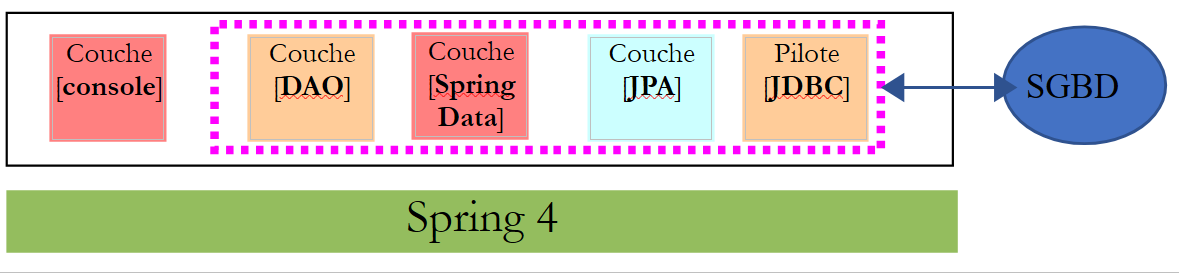 |
The [DAO] layer only sees the layer implemented by [Spring Data].
11.3.4. Maven Configuration
The [pom.xml] file for the Maven project is as follows:
<?xml version="1.0" encoding="UTF-8"?>
<project xmlns="http://maven.apache.org/POM/4.0.0" xmlns:xsi="http://www.w3.org/2001/XMLSchema-instance"
    xsi:schemaLocation="http://maven.apache.org/POM/4.0.0 http://maven.apache.org/xsd/maven-4.0.0.xsd">
    <modelVersion>4.0.0</modelVersion>

    <groupId>istia.st.springdata</groupId>
    <artifactId>intro-spring-data-01</artifactId>
    <version>0.0.1-SNAPSHOT</version>
    <packaging>jar</packaging>

    <name>intro-spring-data-01</name>
    <description>démo spring data avec table de produits</description>

    <parent>
        <groupId>org.springframework.boot</groupId>
        <artifactId>spring-boot-starter-parent</artifactId>
        <version>1.2.7.RELEASE</version>
    </parent>

    <dependencies>
        <!-- Spring Data -->
        <dependency>
            <groupId>org.springframework.data</groupId>
            <artifactId>spring-data-jpa</artifactId>
        </dependency>
        <!-- Hibernate -->
        <dependency>
            <groupId>org.hibernate</groupId>
            <artifactId>hibernate-entitymanager</artifactId>
        </dependency>
        <!-- MySQL Database -->
        <dependency>
            <groupId>mysql</groupId>
            <artifactId>mysql-connector-java</artifactId>
        </dependency>
        <!-- Tomcat JDBC -->
        <dependency>
            <groupId>org.apache.tomcat</groupId>
            <artifactId>tomcat-jdbc</artifactId>
        </dependency>
        <!-- library jSON -->
        <dependency>
            <groupId>com.fasterxml.jackson.core</groupId>
            <artifactId>jackson-core</artifactId>
        </dependency>
        <dependency>
            <groupId>com.fasterxml.jackson.core</groupId>
            <artifactId>jackson-databind</artifactId>
        </dependency>
        <!-- Google Guava -->
        <dependency>
            <groupId>com.google.guava</groupId>
            <artifactId>guava</artifactId>
            <version>16.0.1</version>
        </dependency>
        <!-- Spring Boot Test -->
        <dependency>
            <groupId>org.springframework.boot</groupId>
            <artifactId>spring-boot-starter-test</artifactId>
            <scope>test</scope>
        </dependency>
        <!-- Spring Boot -->
        <dependency>
            <groupId>org.springframework.boot</groupId>
            <artifactId>spring-boot</artifactId>
            <scope>test</scope>
        </dependency>
        <!-- log library -->
        <dependency>
            <groupId>org.springframework.boot</groupId>
            <artifactId>spring-boot-starter-logging</artifactId>
        </dependency>
    </dependencies>

    <properties>
        <project.build.sourceEncoding>UTF-8</project.build.sourceEncoding>
        <java.version>1.8</java.version>
    </properties>

    <build>
        <plugins>
            <plugin>
                <groupId>org.apache.maven.plugins</groupId>
                <artifactId>maven-surefire-plugin</artifactId>
                <version>2.18.1</version>
            </plugin>
        </plugins>
    </build>

</project>
This configuration is the one used and explained in section 11.2.5. We add the following libraries:
- lines 42–49: a jSON library used by the [toString] method of the [Produit] class;
- lines 51–55: the [Google Guava] library, which provides utility methods for managing collections of elements. It will be used by the [Dao] class, which implements the [DAO] layer;
- lines 56-67: the libraries required for testing, JUnit;
- lines 69–72: a logging library;
- lines 81–86: the Maven plugins required for the project;
11.3.5. Entities of the [JPA] layer
[DAO] Layer[console] Layer[JPA] Driver[JDBC] Layer[Spring Data] Spring 4SGBD
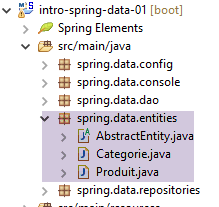 |
11.3.5.1. The [AbstractEntity] class
The [AbstractEntity] class is as follows:
package spring.data.entities;

import javax.persistence.Column;
import javax.persistence.GeneratedValue;
import javax.persistence.GenerationType;
import javax.persistence.Id;
import javax.persistence.MappedSuperclass;
import javax.persistence.Version;

import com.fasterxml.jackson.core.JsonProcessingException;
import com.fasterxml.jackson.databind.ObjectMapper;

@MappedSuperclass
public abstract class AbstractEntity {
    // properties
    @Id
    @GeneratedValue(strategy = GenerationType.IDENTITY)
    @Column(name = "ID")
    protected Long id;
    @Version
    @Column(name = "VERSION")
    protected Long version;

    // manufacturers
    public AbstractEntity() {

    }

    public AbstractEntity(Long id, Long version) {
        this.id = id;
        this.version = version;
    }

    // redefine [equals] and [hashcode]
    @Override
    public int hashCode() {
        return (id != null ? id.hashCode() : 0);
    }

    @Override
    public boolean equals(Object entity) {
        if (!(entity instanceof AbstractEntity)) {
            return false;
        }
        String class1 = this.getClass().getName();
        String class2 = entity.getClass().getName();
        if (!class2.equals(class1)) {
            return false;
        }
        AbstractEntity other = (AbstractEntity) entity;
        return id != null && this.id.longValue() == other.id.longValue();
    }

    // signature jSON
    public String toString() {
        ObjectMapper mapper = new ObjectMapper();
        try {
            return mapper.writeValueAsString(this);
        } catch (JsonProcessingException e) {
            e.printStackTrace();
            return null;
        }
    }

    // getters and setters
....
}
The purpose of this class is to provide a parent class for the JPA entities by encapsulating the [id, version] properties (lines 19, 22) common to both [Produit] and [Categorie] entities linked to the database. These properties are linked to the [ID, VERSION] columns of the tables (lines 18, 21).
- line 13: the annotation [@MappedSuperclass] indicates that the class is a parent class of entities JPA;
- line 16: the annotation [@Id] indicates that the field [id] (it could have a different name) is associated with the primary key of a table;
- line 17: the annotation [@GeneratedValue(strategy=GenerationType.IDENTITY)] sets the mode for generating primary keys. The mode [GenerationType.IDENTITY] will use the mode [AUTO_INCREMENT] in conjunction with MySQL. With a different SGBD, this mode would use a different method. The advantage is that the developer does not have to worry about this, and their code remains valid regardless of the SGBD used;
- line 18: the annotation [@Column] specifies the column associated with the field. When this annotation is not present, JPA assumes that the column has the same name as the field. This is the case here. Therefore, this annotation could have been omitted;
- line 20: the annotation [@Version] indicates that the field [version] is associated with a versioning column. The implementation JPA will increment this number from version each time the entity is modified. This number is used to prevent simultaneous updates of the entity by two different users: two users, U1 and U2, read entity E with a version number equal to V1. U1 modifies E and commits this change to the database: the version number then changes to V1+1. U2 modifies E in turn and saves this change to the database: they will receive an exception because their version (V1) differs from the one in the database (V1+1);
- lines 35–52: redefinition of the methods [hashCode] and [equals]. By default, [obj1.equals(obj2)] is true if [obj1==obj2] is true, i.e., if obj1 and obj2 are two equal pointers. If you want to compare the objects pointed to rather than the pointers themselves, you must redefine the [equals] method and the [hashCode] method. The latter must return the same value for two objects that the [equals] method deems equal;
- lines 42–51: two objects of type [AbstractEntity] or derived types will be considered equal if their primary keys [id] are equal;
- lines 35–38: the method [hashCode] does indeed return the same value for two identical [AbstractEntity] objects, which therefore have the same primary key [id];
- lines 55–63: the method [toString] returns the string jSon of the object [this]. If this object refers to a child class, this method will then return the string jSON of the child class. This eliminates the need to create a method [toString] in the child classes;
11.3.5.2. The entity JPA [Produit]
The [Produit] class is a JPA entity associated with a row in the [PRODUITS] table:
|
package spring.data.entities;

import javax.persistence.Column;
import javax.persistence.Entity;
import javax.persistence.FetchType;
import javax.persistence.JoinColumn;
import javax.persistence.ManyToOne;
import javax.persistence.Table;

import com.fasterxml.jackson.annotation.JsonFilter;

@Entity
@Table(name = "PRODUITS")
@JsonFilter("jsonFilterProduit")
public class Produit extends AbstractEntity {

    // properties
    @Column(name = "NOM")
    private String nom;

    @Column(name = "CATEGORIE_ID", insertable = false, updatable = false)
    private Long idCategorie;

    @Column(name = "PRIX")
    private double prix;

    @Column(name = "DESCRIPTION")
    private String description;

    // the category
    @ManyToOne(fetch = FetchType.LAZY)
    @JoinColumn(name = "CATEGORIE_ID")
    private Categorie categorie;

    // manufacturers
    public Produit() {

    }

    public Produit(String nom, double prix, String description) {
        this.nom = nom;
        this.prix = prix;
        this.description = description;
    }

    // getters and setters
...
}
- line 12: annotation [@Entity] makes class [Produit] an entity managed by layer [JPA];
- line 13: the annotation [@Table(name = "PRODUITS")] indicates that the class [Produit] is the object image of a row in the table [PRODUITS] in the database;
- line 14: the name of the filter jSON to be applied to the entity. We will see that the property [categorie] from line 13 is not always available. It must therefore be excluded from the jSON representation of the object. To do this, we need a filter. We will therefore specify in a filter named [jsonFilterCategorie] whether or not we want the [categorie] property;
- Line 18: The annotation [@Column] associates the field [nom] with the column [NOM] in the table [PRODUITS]. When the field has the same name as the associated column, the annotation [@Column] can be omitted. This would be the case here;
- lines 31–33: the product category;
- line 31: the annotation [@ManyToOne] indicates that the column of the annotation on line 32, [@JoinColumn(name = "CATEGORIE_ID")], is a foreign key in the table [PRODUITS] of theentity [Produit] on the table [CATEGORIES] associated with the entity in line 33. This annotation must annotate an entity JPA. Thus, the class of line 33 must be an entity JPA;
- line 31: the annotation [fetch = FetchType.LAZY] specifies that when a product is retrieved from the table [PRODUITS], its category (line 33) is not retrieved immediately (lazy loading). It is then retrieved during the first call to the [getCategorie] method. This attribute is not mandatory. The JPA implementation used is permitted to ignore it. It is because the [categorie] property may or may not be present that we introduced the jSON filter on line 14. Existing JPA implementations (Hibernate, Eclipselink, OpenJPA) do not handle this annotation in the same way. Hibernate enhances the initial [getCategorie] method (which simply returns the category field) by calling SGBD to fetch the category. For this to work, the connection to SGBD initially used to retrieve the product must still be open; otherwise, an exception occurs.
11.3.5.3. The JPA and [Categorie] entities
The [Categorie] class is a JPA entity associated with a row in the [CATEGORIES] table:
|
Its code is as follows:
package spring.data.entities;

import java.util.HashSet;
import java.util.Set;

import javax.persistence.CascadeType;
import javax.persistence.Column;
import javax.persistence.Entity;
import javax.persistence.FetchType;
import javax.persistence.OneToMany;
import javax.persistence.Table;

import com.fasterxml.jackson.annotation.JsonFilter;

@Entity
@Table(name = "CATEGORIES")
@JsonFilter("jsonFilterCategorie")
public class Categorie extends AbstractEntity {

    // properties
    @Column(name = "NOM")
    private String nom;

    // related products
    @OneToMany(fetch = FetchType.LAZY, mappedBy = "categorie", cascade = { CascadeType.ALL })
    public Set<Produit> produits = new HashSet<Produit>();

    // manufacturers
    public Categorie() {

    }

    public Categorie(String nom) {
        this.nom = nom;
    }

    // methods
    public void addProduit(Produit produit) {
        // we add the product
        produits.add(produit);
        // set your category
        produit.setCategorie(this);
    }

    // getters and setters
...
}
- lines 21-22: the category name;
- lines 25-26: the products in this category;
- line 25: the annotation [@OneToMany] is the inverse relationship of the relationship [@ManyToOne] that we encountered in the entity [Produit]. The attribute [mappedBy = "categorie"] indicates the field of the entity [Produit] annotated by the inverse relationship [@ManyToOne]. The [cascade = { CascadeType.ALL }] attribute specifies that operations (persist, merge, remove) performed on an @Entity [Categorie] should cascade to the [produits] entities in line 26. Partial cascades can be specified using the constants [CascadeType.PERSIST, CascadeType.MERGE, CascadeType.REMOVE];
- line 25: the [fetch = FetchType.LAZY] attribute specifies that when a category is retrieved from the [CATEGORIES] table, its products are not immediately retrieved. They will be retrieved during the first call to the [getProduits] method. Existing JPA implementations (Hibernate, Eclipselink, OpenJPA) do not handle this annotation in the same way. Hibernate extends the initial [getProduits] method (which simply returns the products field) by calling SGBD to retrieve the products in the category. For this to work, the connection to SGBD—which was initially used to retrieve the category—must still be open. This attribute is mandatory. The JPA implementation cannot ignore it. Because the [produits] property may or may not be initialized, we have introduced the jSON filter on line 17, which allows us to specify whether or not we want this property;
- Line 26: The type [Set] is an interface. The type [HashSet] is a class that implements this interface. It implements a collection of elements called a set. A set cannot contain two identical objects. Here, the objects are of type [Produit]. Thus, within the set, we cannot have two identical objects. Since the [equals] method of the parent class [AbstractEntity] has been redefined to state that two products are identical if they have the same primary key, the [produits] field cannot contain two products with the same primary key;
- lines 38–43: the [addProduit] method allows a product to be added to the category;
11.3.6. The layer [Spring Data]
Layer[DAO]Layer[console]Layer[JPA]Driver[JDBC]Layer[Spring Data]Spring 4SGBD
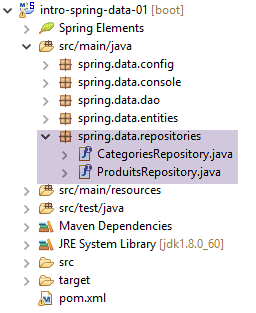 |
The [CategoriesRepository] interface manages access to the [CATEGORIES] table:
package spring.data.repositories;

import org.springframework.data.jpa.repository.Query;
import org.springframework.data.repository.CrudRepository;

import spring.data.entities.Categorie;

public interface CategoriesRepository extends CrudRepository<Categorie, Long> {

    // category with products
    @Query("select c from Categorie c left join fetch c.produits p where c.id=?1")
    public Categorie getCategorieByIdWithProduits(Long id);

    @Query("select c from Categorie c left join fetch c.produits p where c.nom=?1")
    public Categorie getCategorieByNameWithProduits(String nom);

    // a category without its products designated by its name
    public Categorie findByNom(String nom);
}
- Line 8: The [CrudRepository] interface was used and explained in Section 11.2.3. Recall that:
- the first type of the interface is the entity JPA managed for accesses CRUD (findOne, findAll, save, delete, deleteAll),
- the second type is that of the primary key of the entity JPA, here an integer [Long];
- line 12: the method on line 12 is implemented by the query JPQL (Java Persistence Query Language) on line 11. This query retrieves entities JPA. In such a query:
- tables are replaced by their associated JPA entities;
- columns are replaced by fields of the JPA entities used in the query;
- line 11: the query JPQL returns a category with its products. Recall that in the entity [Categorie], the field [produits] had the attribute [fetch = FetchType.LAZY] (lazy loading). In the query JPQL, we force the loading of products using the keyword [fetch]. The ?1 parameter in the query will be replaced at runtime by the value of the first parameter of the method on line 12, i.e., the parameter [Long id];
- lines 14–15: a similar method for a category identified by its name;
- line 18: the method [findByNom] will be automatically implemented by [Spring Data] because the type [Category] has a field [nom];
The [ProduitsRepository] interface manages access to the [PRODUITS] table:
package spring.data.repositories;

import org.springframework.data.jpa.repository.Query;
import org.springframework.data.repository.CrudRepository;

import spring.data.entities.Produit;

public interface ProduitsRepository extends CrudRepository<Produit, Long> {

    // a product with its category
    @Query("select p from Produit p left join fetch p.categorie c where p.id=?1")
    public Produit getProduitByIdWithCategorie(Long id);

    @Query("select p from Produit p left join fetch p.categorie c where p.nom=?1")
    public Produit getProduitByNameWithCategorie(String nom);

    // a product without its category designated by its name
    public Produit findByNom(String nom);
}
The explanations are the same as for the [CategoriesRepository] interface.
These interfaces will be implemented by classes generated by [Spring Data] when the project is executed. Such classes are called [proxy]. By default, the methods of the implementation class run within a transaction. The fact that these interfaces extend the [CrudRepository] class makes them Spring components.
11.3.7. The [DAO] layer
[DAO] Layer[console] Layer[JPA] Driver[JDBC] Layer[Spring Data] Spring 4SGBD
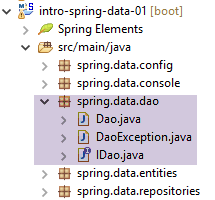 |
The interface [IDao] of the layer [DAO] is as follows:
package spring.data.dao;

import java.util.List;

import spring.data.entities.Categorie;
import spring.data.entities.Produit;

public interface IDao {

    // insert product list
    public List<Produit> addProduits(List<Produit> produits);

    // removal of all products
    public void deleteAllProduits();

    // product list update
    public List<Produit> updateProduits(List<Produit> produits);

    // all products obtained
    public List<Produit> getAllProduits();

    // inserting a list of categories
    public List<Categorie> addCategories(List<Categorie> categories);

    // delete all categories
    public void deleteAllCategories();

    // updating a list of categories
    public List<Categorie> updateCategories(List<Categorie> categories);

    // obtaining all categories
    public List<Categorie> getAllCategories();

    // a specific product with or without its category
    public Produit getProduitByIdWithoutCategorie(Long idProduit);

    public Produit getProduitByIdWithCategorie(Long idProduit);

    public Produit getProduitByNameWithCategorie(String nom);

    public Produit getProduitByNameWithoutCategorie(String nom);

    // a particular category with or without its products
    public Categorie getCategorieByIdWithoutProduits(Long idCategorie);

    public Categorie getCategorieByIdWithProduits(Long idCategorie);

    public Categorie getCategorieByNameWithProduits(String nom);

    public Categorie getCategorieByNameWithoutProduits(String nom);
}
Here, we have adopted the rule that any method that modifies the objects passed as input parameters must return them in its result. The reason for this rule was explained in Section 4.2: it allows a layer and its client to reside in two separate JVM files and thus operate in a client/server configuration.
The implementation of this interface is as follows:
package spring.data.dao;

import java.util.ArrayList;
import java.util.List;

import org.springframework.beans.factory.annotation.Autowired;
import org.springframework.stereotype.Component;

import com.google.common.collect.Lists;

import spring.data.entities.Categorie;
import spring.data.entities.Produit;
import spring.data.repositories.CategoriesRepository;
import spring.data.repositories.ProduitsRepository;

@Component
public class Dao implements IDao {

    @Autowired
    private ProduitsRepository produitsRepository;

    @Autowired
    private CategoriesRepository categoriesRepository;

    @Override
    public List<Produit> addProduits(List<Produit> produits) {
        try {
            return Lists.newArrayList(produitsRepository.save(produits));
        } catch (Exception e) {
            throw new DaoException(101, getMessagesForException(e));
        }
    }

    @Override
    public void deleteAllProduits() {
        try {
            produitsRepository.deleteAll();
        } catch (Exception e) {
            throw new DaoException(102, getMessagesForException(e));
        }
    }

    @Override
    public List<Produit> updateProduits(List<Produit> produits) {
        try {
            return Lists.newArrayList(produitsRepository.save(produits));
        } catch (Exception e) {
            throw new DaoException(103, getMessagesForException(e));
        }
    }

    @Override
    public List<Categorie> addCategories(List<Categorie> categories) {
        try {
            return Lists.newArrayList(categoriesRepository.save(categories));
        } catch (Exception e) {
            throw new DaoException(104, getMessagesForException(e));
        }
    }

    @Override
    public void deleteAllCategories() {
        try {
            categoriesRepository.deleteAll();
        } catch (Exception e) {
            throw new DaoException(105, getMessagesForException(e));
        }
    }

    @Override
    public List<Categorie> updateCategories(List<Categorie> categories) {
        try {
            return Lists.newArrayList(categoriesRepository.save(categories));
        } catch (Exception e) {
            throw new DaoException(106, getMessagesForException(e));
        }
    }

    @Override
    public List<Categorie> getAllCategories() {
        try {
            return Lists.newArrayList(categoriesRepository.findAll());
        } catch (Exception e) {
            throw new DaoException(107, getMessagesForException(e));
        }
    }

    @Override
    public List<Produit> getAllProduits() {
        try {
            return Lists.newArrayList(produitsRepository.findAll());
        } catch (Exception e) {
            throw new DaoException(108, getMessagesForException(e));
        }
    }

    @Override
    public Produit getProduitByIdWithCategorie(Long idProduit) {
        try {
            return produitsRepository.getProduitByIdWithCategorie(idProduit);
        } catch (Exception e) {
            throw new DaoException(109, getMessagesForException(e));
        }
    }

    @Override
    public Categorie getCategorieByIdWithProduits(Long idCategorie) {
        try {
            return categoriesRepository.getCategorieByIdWithProduits(idCategorie);
        } catch (Exception e) {
            throw new DaoException(110, getMessagesForException(e));
        }
    }

    @Override
    public Categorie getCategorieByNameWithProduits(String nom) {
        try {
            return categoriesRepository.getCategorieByNameWithProduits(nom);
        } catch (Exception e) {
            throw new DaoException(111, getMessagesForException(e));
        }
    }

    @Override
    public Produit getProduitByNameWithCategorie(String nom) {
        try {
            return produitsRepository.getProduitByNameWithCategorie(nom);
        } catch (Exception e) {
            throw new DaoException(112, getMessagesForException(e));
        }
    }

    @Override
    public Produit getProduitByIdWithoutCategorie(Long idProduit) {
        try {
            return produitsRepository.findOne(idProduit);
        } catch (Exception e) {
            throw new DaoException(113, getMessagesForException(e));
        }
    }

    @Override
    public Categorie getCategorieByIdWithoutProduits(Long idCategorie) {
        try {
            return categoriesRepository.findOne(idCategorie);
        } catch (Exception e) {
            throw new DaoException(114, getMessagesForException(e));
        }
    }

    @Override
    public Produit getProduitByNameWithoutCategorie(String nom) {
        try {
            return produitsRepository.findByNom(nom);
        } catch (Exception e) {
            throw new DaoException(115, getMessagesForException(e));
        }
    }

    @Override
    public Categorie getCategorieByNameWithoutProduits(String nom) {
        try {
            return categoriesRepository.findByNom(nom);
        } catch (Exception e) {
            throw new DaoException(116, getMessagesForException(e));
        }
    }

}
- line 16: the [@Component] annotation makes the [Dao] class a Spring component;
- lines 19–23: injection of references onto the two interfaces [CrudRepository] and [Spring Data]. This injection occurs during the instantiation of Spring objects, typically at the start of the Spring project’s execution;
- Note in lines 28 and 46 that the [save] method of the [produitsRepository] interface is used for both inserting and updating products. [Spring Data] uses the product’s primary key to determine whether to perform an insertion or an update. If the primary key is [null], it will be an insertion; otherwise, it will be an update;
- line 82: the [Lists.newArrayList] method from the Guava library is used to retrieve a list of products. The [produitsRepository.findAll()] method returns a [Iterable<Produit>] type;
- line 28: the [produitsRepository.save(produits)] method returns a [Iterable<Produit>] type. The same applies to the other [save] operations in the class;
In the [Dao] class above, the exceptions that may occur are encapsulated in the following [DaoException] type:
package spring.data.dao;

import java.io.Serializable;
import java.util.ArrayList;
import java.util.List;

// exception class for the Elections application
// the exception is uncontrolled

public class DaoException extends RuntimeException implements Serializable {

    // serial ID
    private static final long serialVersionUID = 1L;

    // local fields
    private int code;
    private List<String> erreurs;

    // manufacturers
    public DaoException() {
        super();
    }

    public DaoException(int code, Throwable e) {
        // parent
        super(e);
        // local
        this.code = code;
        this.erreurs = getErreursForException(e);
    }

    public DaoException(int code, String message, Throwable e) {
        // parent
        super(message, e);
        // local
        this.code = code;
        this.erreurs = getErreursForException(e);
    }

    public DaoException(int code, String message) {
        // parent
        super(message);
        // local
        this.code = code;
        List<String> erreurs = new ArrayList<>();
        erreurs.add(message);
        this.erreurs = erreurs;
    }

    public DaoException(int code, List<String> erreurs) {
        // parent
        super();
        // local
        this.code = code;
        this.erreurs = erreurs;
    }

    // list of exception error messages
    private List<String> getErreursForException(Throwable th) {
        // retrieve the list of exception error messages
        Throwable cause = th;
        List<String> erreurs = new ArrayList<>();
        while (cause != null) {
            // the message is retrieved only if it is !=null and not blank
            String message = cause.getMessage();
            if (message != null) {
                message = message.trim();
                if (message.length() != 0) {
                    erreurs.add(message);
                }
            }
            // next cause
            cause = cause.getCause();
        }
        return erreurs;
    }

    // getters and setters
...
}
- line 10: the class derives from the [RuntimeException] class and is therefore an unhandled exception;
- line 16: an error code;
- line 17: a list of error messages associated with the exception stack that caused the [DaoException];
- lines 59–76: the private method [getMessagesForException] retrieves the list of error messages associated with the exceptions in the exception stack. It is indeed possible to stack exceptions using the following constructors of the Exception class:
- Exception(String message, Throwable cause): creates an exception with a message and the exception to be encapsulated;
- Exception(Throwable cause): creates an exception with the exception to be encapsulated;
The type [Throwable] is the parent class of the class [Exception]. If the previous constructors are executed repeatedly, the final exception will contain multiple exceptions. This is referred to as an exception stack.
- The last cause of an exception e1 is obtained by the expression [e1.getCause()];
- the second-to-last cause of an exception e1 is obtained by the expression [e1.getCause().getCause()];
- we continue in this manner until we obtain [getCause()==null];
11.3.8. Spring Project Configuration
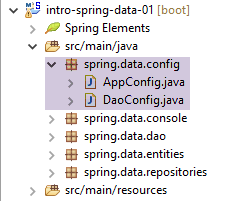 |
The class [DaoConfig] configures the layer [DAO]:
package spring.data.config;

import javax.persistence.EntityManagerFactory;

import org.apache.tomcat.jdbc.pool.DataSource;
import org.springframework.context.annotation.Bean;
import org.springframework.context.annotation.ComponentScan;
import org.springframework.context.annotation.Configuration;
import org.springframework.data.jpa.repository.config.EnableJpaRepositories;
import org.springframework.orm.jpa.JpaTransactionManager;
import org.springframework.orm.jpa.JpaVendorAdapter;
import org.springframework.orm.jpa.LocalContainerEntityManagerFactoryBean;
import org.springframework.orm.jpa.vendor.Database;
import org.springframework.orm.jpa.vendor.HibernateJpaVendorAdapter;
import org.springframework.transaction.PlatformTransactionManager;

@EnableJpaRepositories(basePackages = { "spring.data.repositories" })
@Configuration
@ComponentScan(basePackages = { "spring.data.dao" })
public class DaoConfig {

    // constants
    final static String URL = "jdbc:mysql://localhost:3306/dbIntroSpringData";
    final static String USER = "root";
    final static String PASSWD = "";
    final static String DRIVER_CLASSNAME = "com.mysql.jdbc.Driver";
    final static String[] ENTITIES_PACKAGES = { "spring.data.entities" };

    // the [tomcat-jdbc] data source
    @Bean
    public DataSource dataSource() {
        // data source TomcatJdbc
        DataSource dataSource = new DataSource();
        // configuration access JDBC
        dataSource.setDriverClassName(DRIVER_CLASSNAME);
        dataSource.setUsername(USER);
        dataSource.setPassword(PASSWD);
        dataSource.setUrl(URL);
        // an initially open connection
        dataSource.setInitialSize(1);
        // result
        return dataSource;
    }

    // the provider JPA
    @Bean
    public JpaVendorAdapter jpaVendorAdapter() {
        HibernateJpaVendorAdapter hibernateJpaVendorAdapter = new HibernateJpaVendorAdapter();
        hibernateJpaVendorAdapter.setShowSql(false);
        hibernateJpaVendorAdapter.setDatabase(Database.MYSQL);
        return hibernateJpaVendorAdapter;
    }

    // EntityManagerFactory
    @Bean
    public EntityManagerFactory entityManagerFactory(JpaVendorAdapter jpaVendorAdapter, DataSource dataSource) {
        LocalContainerEntityManagerFactoryBean factory = new LocalContainerEntityManagerFactoryBean();
        factory.setJpaVendorAdapter(jpaVendorAdapter);
        factory.setPackagesToScan(packagesToScan());
        factory.setDataSource(dataSource);
        factory.afterPropertiesSet();
        return factory.getObject();
    }

    // Transaction manager
    @Bean
    public PlatformTransactionManager transactionManager(EntityManagerFactory entityManagerFactory) {
        JpaTransactionManager txManager = new JpaTransactionManager();
        txManager.setEntityManagerFactory(entityManagerFactory);
        return txManager;
    }

    @Bean
    public String[] packagesToScan() {
        return ENTITIES_PACKAGES;
    }

}
A similar configuration was discussed and explained in Section 11.2.5. We have added the following Spring annotations:
- line 17: the [@EnableJpaRepositories] annotation is used to indicate the packages where the [CrudRepository] and [Spring Data] interfaces are located;
- line 18: the class is a Spring configuration class. This information is important. If it is removed, the project still works. However, later in the document, when building projects that depend on this one, some of them will no longer work if the annotation on line 18 is removed;
- line 19: the annotation [@ComponentScan] indicates the packages where the Spring objects are located. These are the classes annotated with [@Component, @Service, @Controller, ...]. Here, the Spring component [Dao] will be found and instantiated;
- lines 73–76: we have defined a bean that represents the array of packages to scan for JPA entities. This will allow a project that imports the [DaoConfig] class to redefine this bean and thus change the scanned packages (line 59). Later in the document, we will address this issue;
The [AppConfig] class configures the entire project:
package spring.data.config;

import org.springframework.context.annotation.Bean;
import org.springframework.context.annotation.Configuration;
import org.springframework.context.annotation.Import;

import com.fasterxml.jackson.databind.ObjectMapper;
import com.fasterxml.jackson.databind.ser.impl.SimpleBeanPropertyFilter;
import com.fasterxml.jackson.databind.ser.impl.SimpleFilterProvider;

@Configuration
@Import({DaoConfig.class})
public class AppConfig {
    // filters jSON
    @Bean(name = "jsonMapper")
    public ObjectMapper jsonMapper() {
        return new ObjectMapper();
    }

    @Bean(name = "jsonMapperCategorieWithProduits")
    public ObjectMapper jsonMapperCategorieWithProduits() {
        // mapper jSON
        ObjectMapper mapper = new ObjectMapper();
        // filters
        mapper.setFilters(
                new SimpleFilterProvider().addFilter("jsonFilterCategorie", SimpleBeanPropertyFilter.serializeAllExcept())
                        .addFilter("jsonFilterProduit", SimpleBeanPropertyFilter.serializeAllExcept("categorie")));
        // result
        return mapper;
    }

    @Bean(name = "jsonMapperProduitWithCategorie")
    public ObjectMapper jsonMapperProduitWithCategorie() {
        // mapper jSON
        ObjectMapper mapper = new ObjectMapper();
        // filters
        mapper.setFilters(
                new SimpleFilterProvider().addFilter("jsonFilterProduit", SimpleBeanPropertyFilter.serializeAllExcept())
                        .addFilter("jsonFilterCategorie", SimpleBeanPropertyFilter.serializeAllExcept("produits")));
        // result
        return mapper;
    }

    @Bean(name = "jsonMapperCategorieWithoutProduits")
    public ObjectMapper jsonMapperCategorieWithoutProduits() {
        // mapper jSON
        ObjectMapper mapper = new ObjectMapper();
        // filters
        mapper.setFilters(new SimpleFilterProvider().addFilter("jsonFilterCategorie",
                SimpleBeanPropertyFilter.serializeAllExcept("produits")));
        // result
        return mapper;
    }

    @Bean(name = "jsonMapperProduitWithoutCategorie")
    public ObjectMapper jsonMapperProduitWithoutCategorie() {
        // mapper jSON
        ObjectMapper mapper = new ObjectMapper();
        // filters
        mapper.setFilters(new SimpleFilterProvider().addFilter("jsonFilterProduit",
                SimpleBeanPropertyFilter.serializeAllExcept("categorie")));
        // result
        return mapper;
    }
}
- line 11: the class is a Spring configuration class;
- line 12: which imports the beans defined by the [DaoConfig] class we just saw;
- the [console] layer uses jSON mappers defined here;
- lines 14–64: define five jSON mappers;
- lines 15–18: the jSON [jsonMapper] filter has no filters;
- lines 20–30: the jSON [jsonMapperCategorieWithProduits] filter allows serializing/deserializing a [Categorie] object along with its products;
- lines 32-42: the jSON [jsonMapperProduitWithCategorie] filter allows serializing/deserializing a [Produit] object along with its category;
- lines 43–53: the jSON [jsonMapperCategorieWithoutProduits] filter allows you to serialize/deserialize a [Categorie] object without its products;
- lines 55–64: the jSON [jsonMapperProduitWithoutCategorie] filter allows serializing/deserializing a [Produit] object without its category;
Note that when building a jSON filter for an entity T, you must configure not only the filter for entity T but also those for the entities Ti that it may contain.
11.3.9. The [console] layer
Layer[DAO]Layer[console]Layer[JPA]Driver[JDBC]Layer[Spring Data]Spring 4SGBD
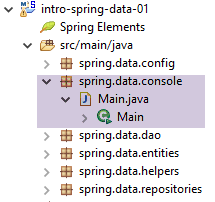 |
The [Main] class is as follows:
package spring.data.console;

import java.util.ArrayList;
import java.util.List;
import java.util.Set;

import org.springframework.context.annotation.AnnotationConfigApplicationContext;

import com.fasterxml.jackson.core.JsonProcessingException;
import com.fasterxml.jackson.databind.ObjectMapper;
import com.google.common.collect.Lists;

import spring.data.config.AppConfig;
import spring.data.dao.DaoException;
import spring.data.dao.IDao;
import spring.data.entities.Categorie;
import spring.data.entities.Produit;

public class Main {

    public static void main(String[] args) throws JsonProcessingException {
        AnnotationConfigApplicationContext context = null;
        try {
            // instantiation Spring context
            context = new AnnotationConfigApplicationContext(AppConfig.class);
            ObjectMapper jsonMapperCategorieWithProduits = context.getBean("jsonMapperCategorieWithProduits",
                    ObjectMapper.class);
            ObjectMapper jsonMapperProduitWithCategorie = context.getBean("jsonMapperProduitWithCategorie",
                    ObjectMapper.class);
            ObjectMapper jsonMapperCategorieWithoutProduits = context.getBean("jsonMapperCategorieWithoutProduits",
                    ObjectMapper.class);
            ObjectMapper jsonMapperProduitWithoutCategorie = context.getBean("jsonMapperProduitWithoutCategorie",
                    ObjectMapper.class);
            IDao dao = context.getBean(IDao.class);
            // --------------------------------------------------------------------------------------
            // empty the database
            log("Vidage de la base de données", 1);
            // table [CATEGORIES] is emptied - by cascade, table [PRODUITS] will be emptied
            dao.deleteAllCategories();
            // --------------------------------------------------------------------------------------
            log("Remplissage de la base", 1);
            // fill the tables
            List<Categorie> categories = new ArrayList<Categorie>();
            for (int i = 0; i < 2; i++) {
                Categorie categorie = new Categorie(String.format("categorie%d", i));
                for (int j = 0; j < 5; j++) {
                    categorie.addProduit(new Produit(String.format("produit%d%d", i, j), 100 * (1 + (double) (i * 10 + j) / 100),
                            String.format("desc%d%d", i, j)));
                }
                categories.add(categorie);
            }
            // add the category - the products will be cascaded in as well
            dao.addCategories(categories);
            // --------------------------------------------------------------------------------------
            log("Affichage de la base", 1);
            // list of categories
            log("Liste des catégories", 2);
            affiche(dao.getAllCategories(), jsonMapperCategorieWithoutProduits);
            // product list
            log("Liste des produits", 2);
            affiche(dao.getAllProduits(), jsonMapperProduitWithoutCategorie);
            // category 1 with its products
            Categorie categorie = dao.getCategorieByNameWithProduits("categorie1");
            log("Catégorie 1 avec ses produits", 2);
            affiche(categorie, jsonMapperCategorieWithProduits);
            // the product [product14] with its category
            Produit p = dao.getProduitByNameWithCategorie("produit14");
            log("Produit [produit14] avec sa catégorie", 2);
            affiche(p, jsonMapperProduitWithCategorie);
            // --------------------------------------------------------------------------------------
            log("Mise à jour du prix des produits de [categorie1]", 1);
            log("Produits de la catégorie [categorie1] avant la mise à jour", 2);
            Categorie categorie1 = dao.getCategorieByNameWithProduits("categorie1");
            Set<Produit> produits = categorie1.getProduits();
            affiche(categorie1, jsonMapperCategorieWithProduits);
            for (Produit produit : produits) {
                produit.setPrix(1.1 * produit.getPrix());
            }
            dao.updateProduits(Lists.newArrayList(produits));
            log("Produits de la catégorie [categorie1] après la mise à jour", 2);
            affiche(dao.getCategorieByNameWithProduits("categorie1"), jsonMapperCategorieWithProduits);
            // --------------------------------------------------------------------------------------
            log("Vidage de la base de données", 1);
            // table [CATEGORIES] is emptied - by cascade, table [PRODUITS] will be emptied
            dao.deleteAllCategories();
            // base display
            log("Liste des categories avant l'ajout", 2);
            affiche(dao.getAllCategories(), jsonMapperCategorieWithoutProduits);
            log("Liste des produits avant l'ajout", 2);
            affiche(dao.getAllProduits(), jsonMapperProduitWithoutCategorie);
            log("Ajout d'une catégorie [cat1] avec deux produits de même nom", 1);
            // we insert
            categorie = new Categorie("cat1");
            categorie.addProduit(new Produit("x", 1.0, ""));
            categorie.addProduit(new Produit("x", 1.0, ""));
            // add the category - the products will be cascaded in as well
            try {
                dao.addCategories(Lists.newArrayList(categorie));
            } catch (DaoException e) {
                System.out.println(e);
            }
            // check
            log("Liste des categories après l'ajout", 2);
            affiche(dao.getAllCategories(), jsonMapperCategorieWithoutProduits);
            log("Liste des produits après l'ajout", 2);
            affiche(dao.getAllProduits(), jsonMapperProduitWithoutCategorie);
        } catch (DaoException e) {
            System.out.println(e);
        } finally {
            if (context != null) {
                // finish
                context.close();
            }
        }
        System.out.println("Travail terminé");
    }

    // display of a T-type element
    static private <T> void affiche(T element, ObjectMapper jsonMapper) throws JsonProcessingException {
        System.out.println(jsonMapper.writeValueAsString(element));
    }

    // display a list of elements of type T
    static private <T> void affiche(List<T> elements, ObjectMapper jsonMapper) throws JsonProcessingException {
        for (T element : elements) {
            affiche(element, jsonMapper);
        }
    }

    private static void log(String message, int mode) {
        // poster message
        String toPrint = null;
        switch (mode) {
        case 1:
            toPrint = String.format("%s --------------------------------", message);
            break;
        case 2:
            toPrint = String.format("-- %s", message);
            break;
        }
        System.out.println(toPrint);
    }
}
- line 25: instantiation of Spring beans from the configuration class [AppConfig];
- lines 26–33: retrieving references to the jSON mappers. The following signature of the [ApplicationContext].getBean method is used:
- [ApplicationContext].getBean(String id, Class class): used when there are multiple beans of type [classe]. In this case, the identifier of the requested bean is specified. If it was defined with the [@Bean] annotation, its identifier is the name of the annotated method. If it was defined with the [@Bean(« identifiant »] annotation, its identifier is the one specified in the annotation;
- line 34: retrieving a reference to the [DAO] layer;
- lines 37–39: emptying the database. The categories table is emptied (line 39). Because we wrote:
    @OneToMany(fetch = FetchType.LAZY, mappedBy = "categorie", cascade = { CascadeType.ALL })
    public Set<Produit> produits = new HashSet<Produit>();
when a category is deleted, all products linked to it are also deleted;
- lines 43–53: populating the table with 2 categories, each containing 5 products. On line 50, inserting the two categories will simultaneously insert their products, again because we wrote [cascade = { CascadeType.ALL }];
- line 58: we display the categories. We use the mapper jSON [jsonMapperCategorieWithoutProduits] to display the categories without their products. In fact, the method [dao.getAllCategories()] renders the categories without their products (lazy loading);
- line 61: displays the products without their category. This is because the [dao.getAllProduits()] method renders the products without their category (lazy loading);
- lines 63–65: display the category named [categorie1] along with its products (eager loading);
- lines 67–69: display a product with its category;
- lines 71–81: increase all product prices in the [categorie1] category by 10%;
- lines 91-101: add a category with two products of the same name. However, in the [PRODUITS] table, there is a uniqueness constraint on the [NOM] column. The insertion of the second product will therefore be rejected and an exception thrown. However, the method [dao.addProduits] runs within a transaction. The fact that the second insertion fails must therefore also roll back the insertion of the first product as well as that of their category [cat1]. This is what we want to verify;
- lines 119–121: a generic method capable of displaying the string jSON for any element of type T. The serialization jSON is controlled by the mapper passed as a parameter;
- lines 124–128: a similar method, this time for a list of elements of type T;
Executing the [Main] class yields the following results (excluding Spring logs):
Vidage de la base de données --------------------------------
Remplissage de la base --------------------------------
Affichage de la base --------------------------------
-- List of categories
{"id":4,"version":0,"nom":"categorie0"}
{"id":5,"version":0,"nom":"categorie1"}
-- List of products
{"id":13,"version":0,"nom":"produit00","idCategorie":4,"prix":100.0,"description":"desc00"}
{"id":14,"version":0,"nom":"produit01","idCategorie":4,"prix":101.0,"description":"desc01"}
{"id":15,"version":0,"nom":"produit02","idCategorie":4,"prix":102.0,"description":"desc02"}
{"id":16,"version":0,"nom":"produit03","idCategorie":4,"prix":103.0,"description":"desc03"}
{"id":17,"version":0,"nom":"produit04","idCategorie":4,"prix":104.0,"description":"desc04"}
{"id":18,"version":0,"nom":"produit10","idCategorie":5,"prix":110.0,"description":"desc10"}
{"id":19,"version":0,"nom":"produit11","idCategorie":5,"prix":111.0,"description":"desc11"}
{"id":20,"version":0,"nom":"produit12","idCategorie":5,"prix":112.0,"description":"desc12"}
{"id":21,"version":0,"nom":"produit13","idCategorie":5,"prix":113.0,"description":"desc13"}
{"id":22,"version":0,"nom":"produit14","idCategorie":5,"prix":114.0,"description":"desc14"}
-- Category 1 with its products
{"id":5,"version":0,"nom":"categorie1","produits":[{"id":18,"version":0,"nom":"produit10","idCategorie":5,"prix":110.0,"description":"desc10"},{"id":19,"version":0,"nom":"produit11","idCategorie":5,"prix":111.0,"description":"desc11"},{"id":20,"version":0,"nom":"produit12","idCategorie":5,"prix":112.0,"description":"desc12"},{"id":21,"version":0,"nom":"produit13","idCategorie":5,"prix":113.0,"description":"desc13"},{"id":22,"version":0,"nom":"produit14","idCategorie":5,"prix":114.0,"description":"desc14"}]}
-- Product [product14] with category
{"id":22,"version":0,"nom":"produit14","idCategorie":5,"prix":114.0,"description":"desc14","categorie":{"id":5,"version":0,"nom":"categorie1"}}
Mise à jour du prix des produits de [categorie1] --------------------------------
-- Products in category [categorie1] before the update
{"id":5,"version":0,"nom":"categorie1","produits":[{"id":18,"version":0,"nom":"produit10","idCategorie":5,"prix":110.0,"description":"desc10"},{"id":19,"version":0,"nom":"produit11","idCategorie":5,"prix":111.0,"description":"desc11"},{"id":20,"version":0,"nom":"produit12","idCategorie":5,"prix":112.0,"description":"desc12"},{"id":21,"version":0,"nom":"produit13","idCategorie":5,"prix":113.0,"description":"desc13"},{"id":22,"version":0,"nom":"produit14","idCategorie":5,"prix":114.0,"description":"desc14"}]}
-- Products in category [categorie1] after update
{"id":5,"version":0,"nom":"categorie1","produits":[{"id":18,"version":1,"nom":"produit10","idCategorie":5,"prix":121.0,"description":"desc10"},{"id":19,"version":1,"nom":"produit11","idCategorie":5,"prix":122.1,"description":"desc11"},{"id":20,"version":1,"nom":"produit12","idCategorie":5,"prix":123.2,"description":"desc12"},{"id":21,"version":1,"nom":"produit13","idCategorie":5,"prix":124.3,"description":"desc13"},{"id":22,"version":1,"nom":"produit14","idCategorie":5,"prix":125.4,"description":"desc14"}]}
Vidage de la base de données --------------------------------
-- List of categories before adding
-- List of products before adding
Ajout d'a category [cat1] with two products of the same name --------------------------------
Les erreurs suivantes se sont produites :
- org.hibernate.exception.ConstraintViolationException: could not execute statement
- could not execute statement
- Duplicate entry 'x' for key 'NOM'
-- List of categories after addition
-- List of products after addition
Travail terminé
- lines 4-17: categories and products inserted into the table;
- lines 18-19: a category with its products;
- lines 20-21: a product with its category;
- lines 22-26: price update for certain products. In line 24, we can see that the prices have indeed increased by 10%;
- lines 27–36: addition of category [cat1] with two products of the same name. We can see that the table is the same before (lines 28–29) and after the addition (lines 35–36), thereby showing that all insertions in the transaction have indeed been rolled back;
- lines 31–34: the exception that occurred during the insertion of the second product and caused the entire transaction to fail;
11.3.10. The unit test JUnit
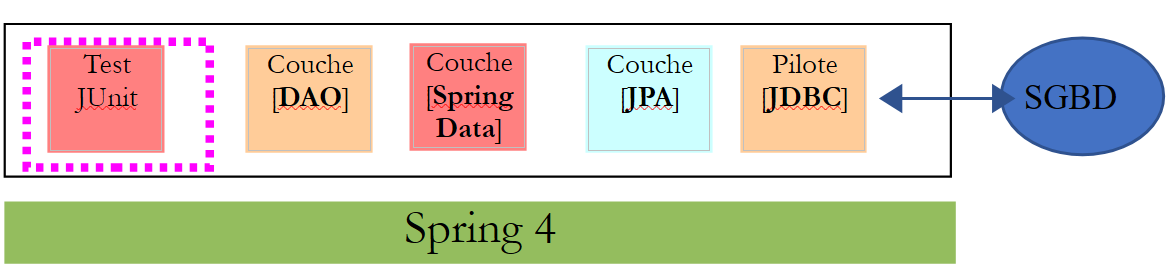 |
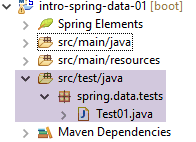 |
The [Test01] class is as follows:
package spring.data.tests;

import java.util.ArrayList;
import java.util.List;
import java.util.Set;

import org.junit.Assert;
import org.junit.Before;
import org.junit.Test;
import org.junit.runner.RunWith;
import org.springframework.beans.BeansException;
import org.springframework.beans.factory.annotation.Autowired;
import org.springframework.beans.factory.annotation.Qualifier;
import org.springframework.boot.test.SpringApplicationConfiguration;
import org.springframework.test.context.junit4.SpringJUnit4ClassRunner;

import com.fasterxml.jackson.core.JsonProcessingException;
import com.fasterxml.jackson.databind.ObjectMapper;
import com.google.common.collect.Lists;

import spring.data.config.AppConfig;
import spring.data.dao.DaoException;
import spring.data.dao.IDao;
import spring.data.entities.Categorie;
import spring.data.entities.Produit;

@SpringApplicationConfiguration(classes = AppConfig.class)
@RunWith(SpringJUnit4ClassRunner.class)
public class Test01 {

    // layer [DAO]
    @Autowired
    private IDao dao;

    // filters jSON
    @Autowired
    @Qualifier("jsonMapper")
    private ObjectMapper jsonMapper;
    @Autowired
    @Qualifier("jsonMapperCategorieWithProduits")
    private ObjectMapper jsonMapperCategorieWithProduits;
    @Autowired
    @Qualifier("jsonMapperProduitWithCategorie")
    private ObjectMapper jsonMapperProduitWithCategorie;
    @Autowired
    @Qualifier("jsonMapperCategorieWithoutProduits")
    private ObjectMapper jsonMapperCategorieWithoutProduits;
    @Autowired
    @Qualifier("jsonMapperProduitWithoutCategorie")
    private ObjectMapper jsonMapperProduitWithoutCategorie;

    @Before
    public void cleanAndFill() {
        // the base is cleaned before each test
        log("Vidage de la base de données", 1);
        // table [CATEGORIES] is emptied - by cascade, table [PRODUITS] will be emptied
        dao.deleteAllCategories();
        // --------------------------------------------------------------------------------------
        log("Remplissage de la base", 1);
        // fill the tables
        List<Categorie> categories = new ArrayList<Categorie>();
        for (int i = 0; i < 2; i++) {
            Categorie categorie = new Categorie(String.format("categorie%d", i));
            for (int j = 0; j < 5; j++) {
                categorie.addProduit(new Produit(String.format("produit%d%d", i, j), 100 * (1 + (double) (i * 10 + j) / 100),
                        String.format("desc%d%d", i, j)));
            }
            categories.add(categorie);
        }
        // add the category - the products will be cascaded in as well
        categories = dao.addCategories(categories);
    }

    @Test
    public void showDataBase() throws BeansException, JsonProcessingException {
        // list of categories
        log("Liste des catégories", 2);
        List<Categorie> categories = dao.getAllCategories();
        affiche(categories, jsonMapperCategorieWithoutProduits);
        // product list
        log("Liste des produits", 2);
        List<Produit> produits = dao.getAllProduits();
        affiche(produits, jsonMapperProduitWithoutCategorie);
        // a few checks
        Assert.assertEquals(2, categories.size());
        Assert.assertEquals(10, produits.size());
        Categorie categorie = findCategorieByName("categorie0", categories);
        Assert.assertNotNull(categorie);
        Produit produit = findProduitByName("produit03", produits);
        Assert.assertNotNull(produit);
        Long idCategorie = produit.getIdCategorie();
        Assert.assertEquals(categorie.getId(), idCategorie);
    }

    @Test
    public void getCategorieByNameWithProduits() {
        log("getCategorieByNameWithProduits", 1);
        Categorie categorie1 = dao.getCategorieByNameWithProduits("categorie1");
        Assert.assertNotNull(categorie1);
        Assert.assertEquals(5, categorie1.getProduits().size());
    }

    @Test
    public void getCategorieByNameWithoutProduits() {
        log("getCategorieByNameWithoutProduits", 1);
        Categorie categorie1 = dao.getCategorieByNameWithoutProduits("categorie1");
        Assert.assertNotNull(categorie1);
        Assert.assertEquals("categorie1", categorie1.getNom());
    }

    @Test
    public void getProduitByIdWithCategorie() {
        log("getProduitByNameWithCategorie", 1);
        Produit produit = dao.getProduitByNameWithCategorie("produit03");
        Produit produit2 = dao.getProduitByIdWithCategorie(produit.getId());
        Assert.assertNotNull(produit2);
        Assert.assertEquals(produit2.getNom(), produit.getNom());
        Assert.assertEquals(produit2.getId(), produit.getId());
        Assert.assertEquals(produit.getCategorie().getId(), produit2.getCategorie().getId());
    }

    @Test
    public void getProduitByIdWithoutCategorie() {
        log("getProduitByIdWithoutCategorie", 1);
        Produit produit = dao.getProduitByNameWithCategorie("produit03");
        Produit produit2 = dao.getProduitByIdWithoutCategorie(produit.getId());
        Assert.assertNotNull(produit2);
        Assert.assertEquals(produit2.getNom(), produit.getNom());
        Assert.assertEquals(produit2.getId(), produit.getId());
    }
...
    // -------------- private methods
    private Produit findProduitByName(String nom, List<Produit> produits) {
        for (Produit produit : produits) {
            if (produit.getNom().equals(nom)) {
                return produit;
            }
        }
        return null;
    }

    private Categorie findCategorieByName(String nom, List<Categorie> categories) {
        for (Categorie categorie : categories) {
            if (categorie.getNom().equals(nom)) {
                return categorie;
            }
        }
        return null;
    }

    // display of a T-type element
    static private <T> void affiche(T element, ObjectMapper jsonMapper) throws JsonProcessingException {
        System.out.println(jsonMapper.writeValueAsString(element));
    }

    // display a list of elements of type T
    static private <T> void affiche(List<T> elements, ObjectMapper jsonMapper) throws JsonProcessingException {
        for (T element : elements) {
            affiche(element, jsonMapper);
        }
    }

    private static void log(String message, int mode) {
        // poster message
        String toPrint = null;
        switch (mode) {
        case 1:
            toPrint = String.format("%s --------------------------------", message);
            break;
        case 2:
            toPrint = String.format("-- %s", message);
            break;
        }
        System.out.println(toPrint);
    }

    private static void show(String title, List<String> messages) {
        // title
        System.out.println(String.format("%s : ", title));
        // messages
        for (String message : messages) {
            System.out.println(String.format("- %s", message));
        }
    }

}
- line 27: the unit test is configured by the [AppConfig] class already presented in section 11.3.8;
- lines 32–33: injection of a reference to the [DAO] layer;
- lines 36–50: injection of the five jSON mappers;
- lines 60–71: after emptying the database (line 57), the database is populated with 2 categories, each containing 5 products. This method is executed before each test due to the annotation [@Before] on line 52;
- lines 75–93: displays the contents of the database;
- lines 95–101: retrieves a category along with its products, identified by its name;
- lines 103–109: retrieves a category without its products, identified by its name;
- lines 111-120: retrieves a product with its category, identified by its number;
- lines 122–130: retrieves a product without its category, identified by its number;
- lines 133–184: private methods shared by the various tests;
Work to be done: run the test. It should pass.
11.3.11. Log Management
The logs for the console application or the JUnit test are configured by the following [logback.xml] file:
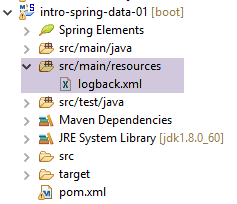 |
The file must be named [logback.xml] and be in the project’s classpath. To ensure this, it has been placed here in the [src/main/resources] folder, which is part of the classpath. Its contents are as follows:
<configuration>

  <appender name="STDOUT" class="ch.qos.logback.core.ConsoleAppender">
    <!-- encoders are by default assigned the type
         ch.qos.logback.classic.encoder.PatternLayoutEncoder -->
    <encoder>
      <pattern>%d{HH:mm:ss.SSS} [%thread] %-5level %logger{36} - %msg%n</pattern>
    </encoder>
  </appender>

  <!-- log level control -->
  <root level="info"> <!-- info, debug, warn -->
    <appender-ref ref="STDOUT" />
  </root>
</configuration>
- line 12: the [<root level="info">] tag displays logs at the [info] level. Instead of [info], you can use:
- [debug]: this is the most detailed log level. It is recommended to use it during the project debugging phase because it contains very useful logs on client/server exchanges. This is a way to understand what is happening "under the hood";
- [off]: no logs at all;
- [warn]: an intermediate logging level where Spring displays anomalies that are not necessarily errors. You should review them if you do not get the expected result;
Task: Change the level on line 12 to [debug], then run the unit test. Observe the difference in the logs.
11.3.12. Generating the project's Maven archive
To install the project archive in the local Maven repository, proceed as follows [1-3]:
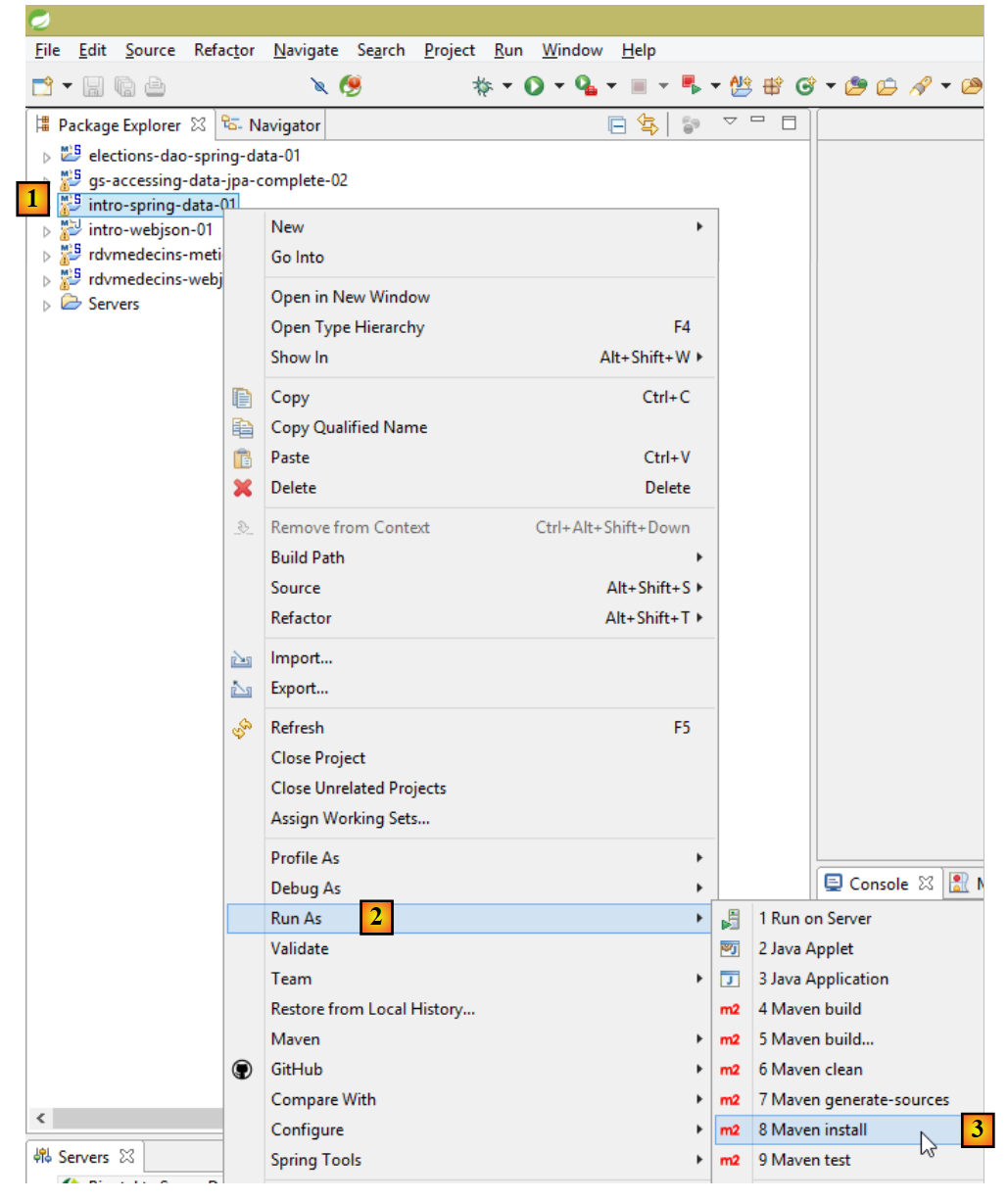 |
The archive will be generated using the identifiers found in the file [pom.xml]:
    <groupId>istia.st.springdata</groupId>
    <artifactId>intro-spring-data-01</artifactId>
    <version>0.0.1-SNAPSHOT</version>
<packaging>jar</packaging>
The location of the local Maven repository can be found in the Eclipse configuration:
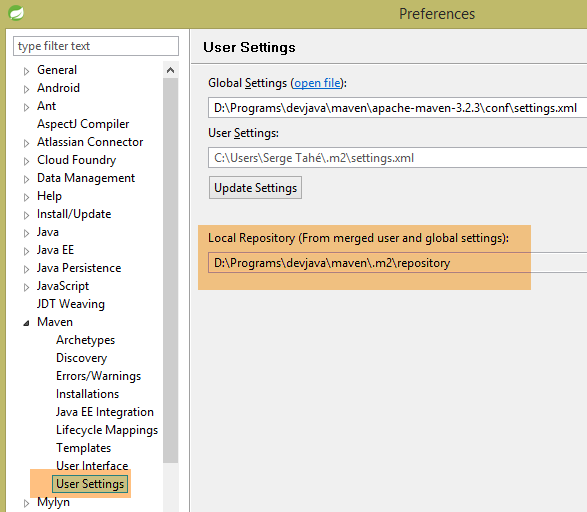 |
You can then verify that the Maven artifact has been installed correctly:
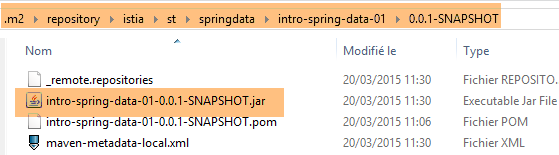 |
Now, another local Maven project can use this archive.