5. [Cours]: Introduction to the Spring Framework
Keywords: multi-tier architecture, Spring, dependency injection.
Spring first appeared in 2004 as an object container. Since then, it has evolved into multiple branches: Spring MVC, Spring Data, Spring Batch, ... [http://spring.io]. In this chapter, we will focus solely on the object container. Here are a few key points:
- an application has multiple classes, and some of them share objects that must be unique (singletons). Spring creates and manages these singletons;
- Spring places these singletons in a structure called a context;
- classes access the application’s singletons by requesting them from Spring via their name, type, or both;
- Spring creates the singletons and manages any dependencies they may have: a singleton may indeed have references to one or more other singletons. When Spring creates a singleton, it also creates its dependencies;
- When a Spring-based application starts, it can ask Spring to create all the application’s singletons. These will then be available in the Spring context;
- Spring facilitates the use of layered architectures and interface-based programming. In simple cases, each layer is implemented by a singleton and implements an interface. If the application works with the layer interfaces rather than their implementation classes, this results in a scalable architecture that allows changing the implementation of one layer without affecting the others, thanks to the following two features:
- The application obtains a reference to the layer via its name. Spring provides it with a reference to the class that implements the layer;
- the application uses this reference as a reference to the layer's interface, not as a reference to a class;
Singletons can be declared in three ways, which can be combined:
- within a XML file,
- in a special configuration class;
- with any class using annotations;
We present three configuration examples below:
- [exemple-01]: centralized configuration in a single XML file;
- [exemple-02]: configuration centralized in a single Java class;
- [exemple-03]: configuration distributed across multiple Java classes;
The last example, [exemple-04], focuses on the Spring configuration of a layered architecture. This is the most important example. It will be used consistently to configure the architectures described in this document.
These four examples lay the groundwork for what follows:
- Spring configuration and dependency injection;
- using Maven to manage a project’s dependencies;
- using JUnit to test projects;
5.1. Support
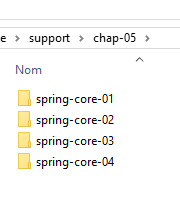 | 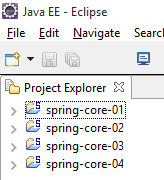 |
The [support / chap-05] folder contains the Eclipse projects for this chapter.
5.2. Example-01
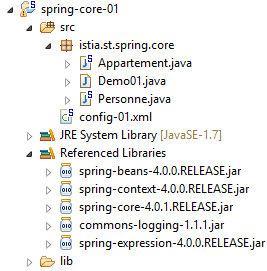
5.2.1. The Eclipse Project
 |
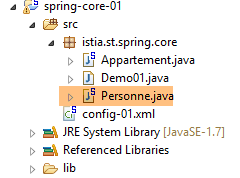
5.2.2. The [Personne] class
 |
package istia.st.spring.core;

public class Personne {

    // fields
    private String nom;
    private String prenom;
    private int age;

    // manufacturers
    public Personne() {

    }

    public Personne(String nom, String prénom, int âge) {
        this.nom = nom;
        this.prenom = prénom;
        this.age = âge;
    }

    // toString
    public String toString() {
        return String.format("Personne[%s, %s,%d]", prenom, nom, age);
    }

    // getters and setters

    public String getNom() {
        return nom;
    }

    public void setNom(String nom) {
        this.nom = nom;
    }

    public String getPrenom() {
        return prenom;
    }

    public void setPrenom(String prenom) {
        this.prenom = prenom;
    }

    public int getAge() {
        return age;
    }

    public void setAge(int age) {
        this.age = age;
    }

}
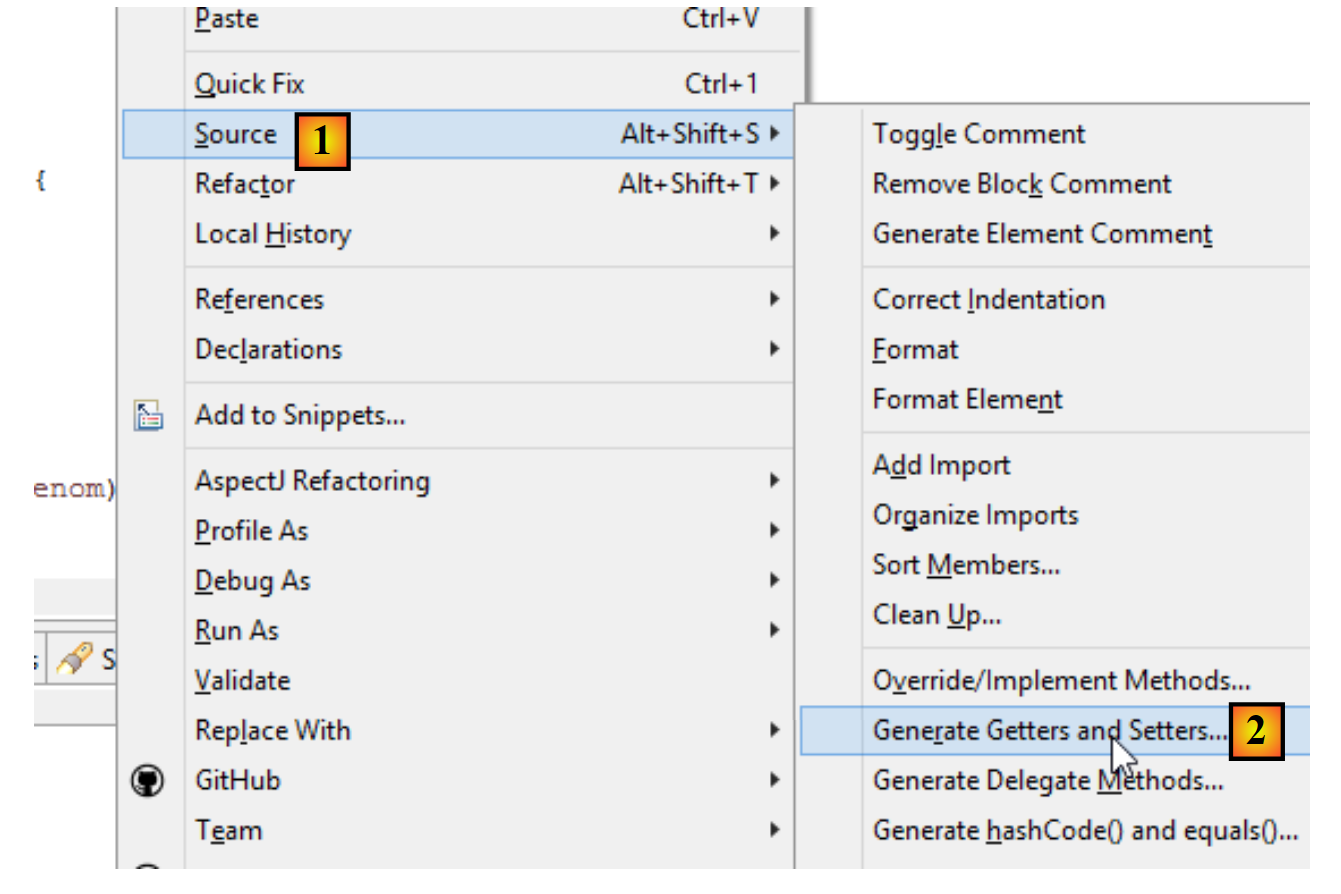
Note: getters and setters can be automatically generated as follows [1-2]:
 |
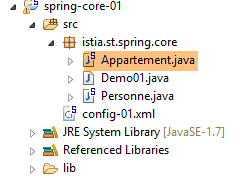
5.2.3. The class [Appartement]
 |
package istia.st.spring.core;

public class Appartement {

    // fields
    private Personne proprietaire;
    private int surface;

    // getters and setters

    public Personne getProprietaire() {
        return proprietaire;
    }

    public void setProprietaire(Personne proprietaire) {
        this.proprietaire = proprietaire;
    }

    public int getSurface() {
        return surface;
    }

    public void setSurface(int surface) {
        this.surface = surface;
    }

    // toString
    public String toString() {
        return String.format("Appartement[%s, %s]", proprietaire, surface);
    }

}
Note: This class does not have an explicit constructor. In this case, the default constructor with no parameters—which does nothing—always exists. When you create constructors, this default constructor no longer exists implicitly. You must then define it explicitly:
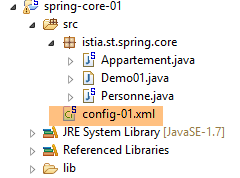
5.2.4. The Spring configuration file
 |
<?xml version="1.0" encoding="UTF-8"?>
<beans xmlns="http://www.springframework.org/schema/beans" xmlns:xsi="http://www.w3.org/2001/XMLSchema-instance" xmlns:util="http://www.springframework.org/schema/util"
    xsi:schemaLocation="http://www.springframework.org/schema/beans http://www.springframework.org/schema/beans/spring-beans-4.0.xsd
        http://www.springframework.org/schema/util http://www.springframework.org/schema/util/spring-util-4.0.xsd">
    <!-- Person 01 -->
    <bean id="personne_01" class="istia.st.spring.core.Personne">
        <constructor-arg index="0" value="dubois" />
        <constructor-arg index="1" value="paul" />
        <constructor-arg index="2" value="34" />
    </bean>
    <!-- Person 02 -->
    <bean id="personne_02" class="istia.st.spring.core.Personne">
        <property name="nom" value="martin" />
        <property name="prenom" value="micheline" />
        <property name="age" value="18" />
    </bean>
    <!-- a list of people -->
    <util:list id="club">
        <ref bean="personne_01" />
        <ref bean="personne_02" />
    </util:list>
    <!-- an apartment -->
    <bean id="appartement" class="istia.st.spring.core.Appartement">
        <property name="surface" value="100" />
        <property name="proprietaire" ref="personne_01" />
    </bean>
</beans>
- lines 2, 27: singletons are defined within a <beans> tag;
- lines 6–10: each singleton is defined by a <bean> tag;
- line 6: [id] is the singleton’s identifier. [class] is the full name of the class to be instantiated;
- lines 7–9: the three values to be passed to the constructor of the [Personne] class;
- lines 12–16: the [Personne] class is first created using its default constructor [new Personne()]. Then, for each [property] tag, a setter of the class is used. For example, for line 13, the [setNom("martin")] method will be executed. Therefore, the [setNom] method must exist. This is an important point to remember;
- lines 18–21: the <util:list> tag allows you to define a singleton that is a list;
- line 19: refers to the singleton [personne_01] defined on line 6. This is what is known as dependency injection. Two attributes can be used to initialize a singleton’s field:
- [value]: to assign a primitive value (string, number, date, etc.) to the field,
- [ref]: to assign a Spring object reference to the field;
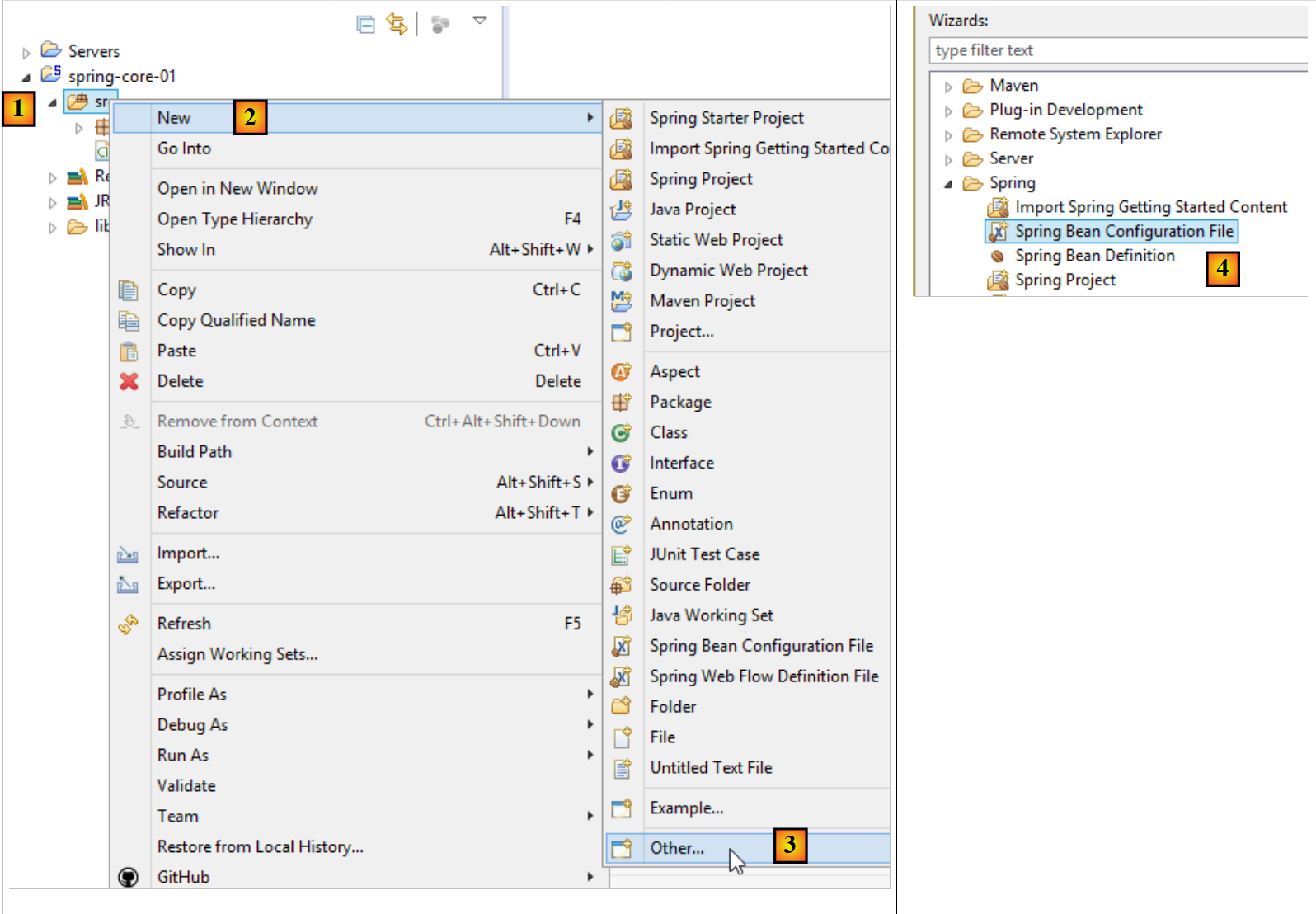
Note: The Spring configuration file can be generated as follows [1-4]:
 |
5.2.5. The executable class
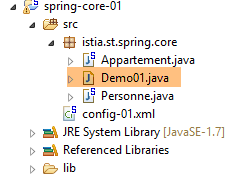 |
package istia.st.spring.core;

import java.util.ArrayList;
import java.util.List;

import org.springframework.context.ApplicationContext;
import org.springframework.context.support.ClassPathXmlApplicationContext;

public class Demo01 {

    @SuppressWarnings({ "unchecked", "resource" })
    public static void main(String[] args) {
        // spring context retrieval
        ApplicationContext ctx = new ClassPathXmlApplicationContext("config-01.xml");
        // beans are recovered
        Personne p01 = ctx.getBean("personne_01", Personne.class);
        Personne p02 = ctx.getBean("personne_02", Personne.class);
        List<Personne> club = ctx.getBean("club", new ArrayList<Personne>().getClass());
        Appartement appart01 = ctx.getBean(Appartement.class);
        // we display them
        System.out.println("personnes--------");
        System.out.println(p01);
        System.out.println(p02);
        System.out.println("club--------");
        for (Personne p : club) {
            System.out.println(p);
        }
        System.out.println("appartement--------");
        System.out.println(appart01);
        // recovered beans are singletons
        // they can be requested several times, but the same bean is always retrieved
        Personne p01b = ctx.getBean("personne_01", Personne.class);
        System.out.println(String.format("beans [p01,p01b] identiques ? %s", p01b == p01));
    }
}
- line 14: creates the Spring context. All singletons defined in the [config-01.xml] file are then instantiated;
- line 16: requests a reference to the singleton identified by [personne_01] of type [Personne]. This second parameter is optional, but if omitted, a reference to a type [Object] is returned, which must then be cast to the type [Personne];
- line 19: we do not use the bean’s name but only its type, since there is only one singleton of type [Appartement];
- line 18: both the identifier and the type of the desired singleton were used. The identifier is superfluous since there is only one singleton of type [new ArrayList<Personne>().getClass()];
- Lines 32–33: show that if we request the same singleton multiple times, we always obtain the same reference, thereby demonstrating that we are indeed dealing with a singleton. This point is important to understand;
Note: An executable class can be generated as follows: [1-6]:
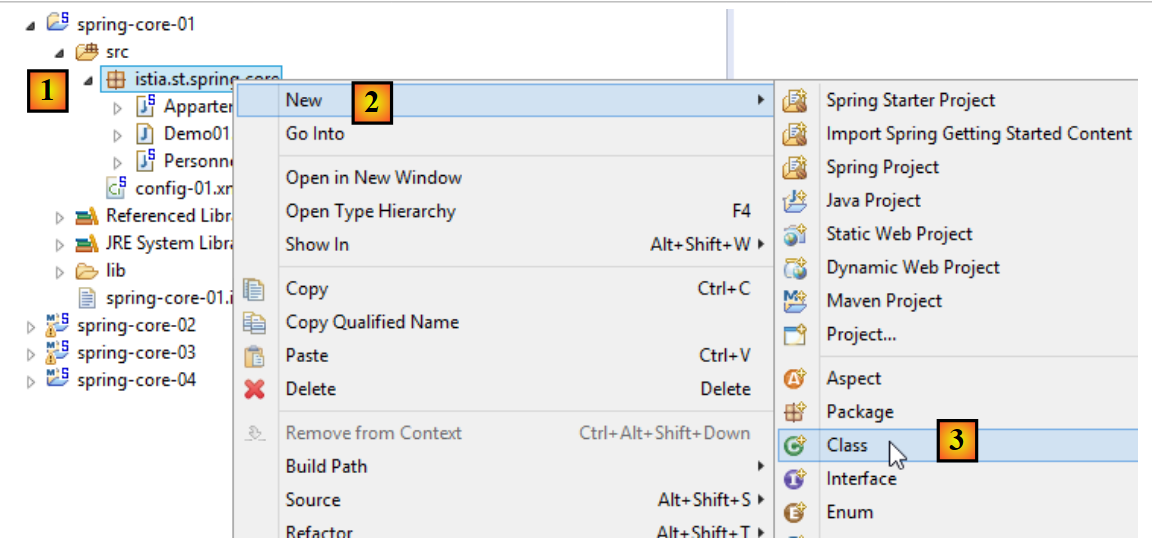 |
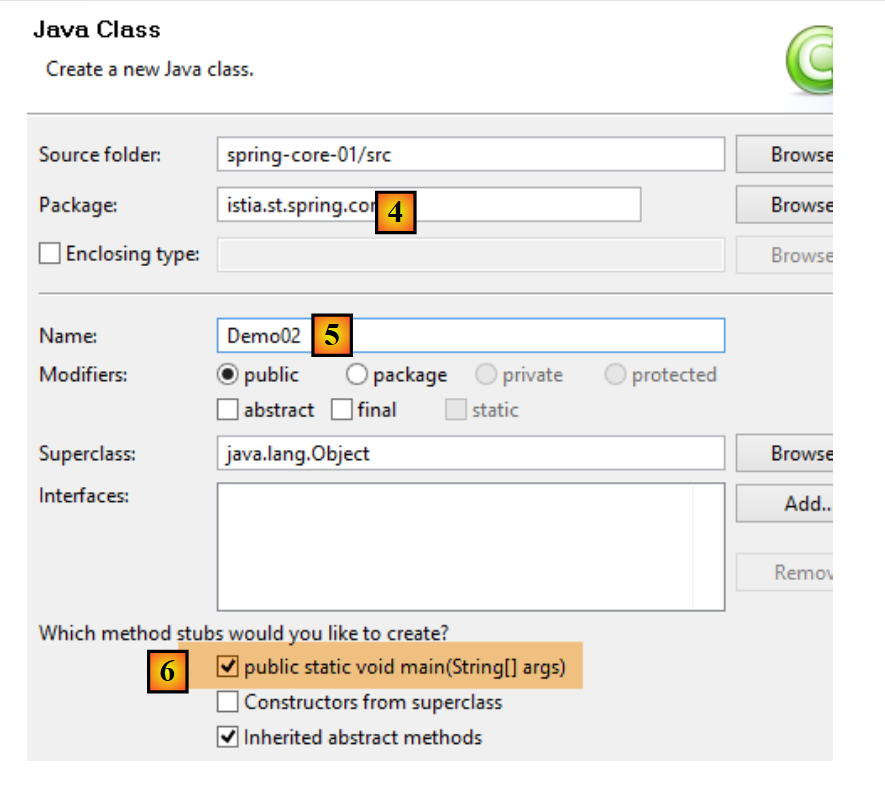 |
- checking the box for [6] will cause the generated class to contain a static method [main] that makes it executable;
5.2.6. Project dependencies
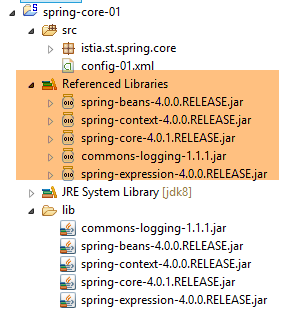 |
- Spring dependencies: [spring-core, spring-beans, spring-context, spring-expression, commons-logging];
Dependencies are added to the project as follows:
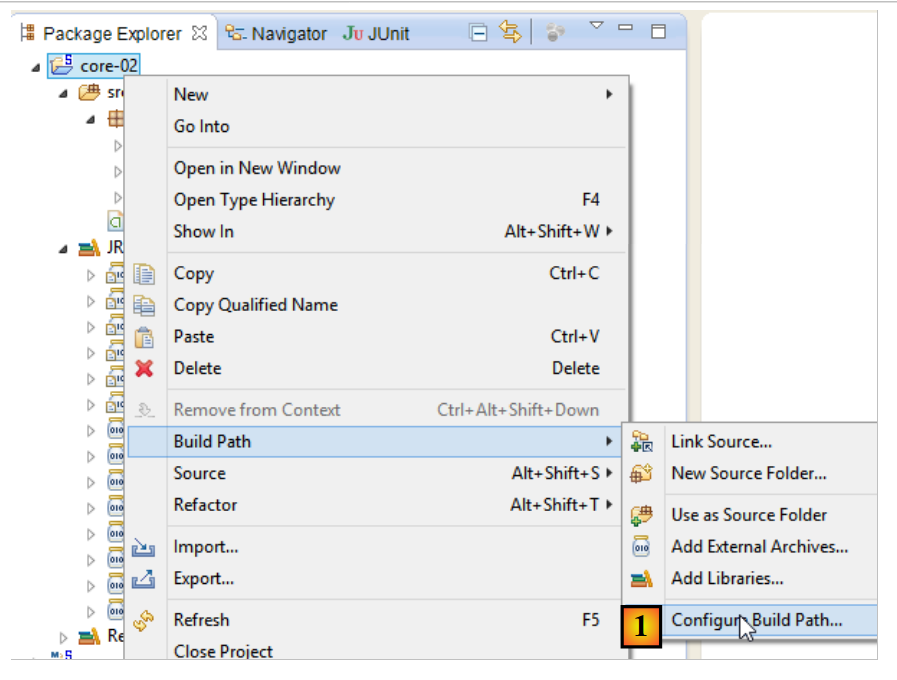 |
- in [1]: right-click on the project / [Build Path] / [Configure Build Path];
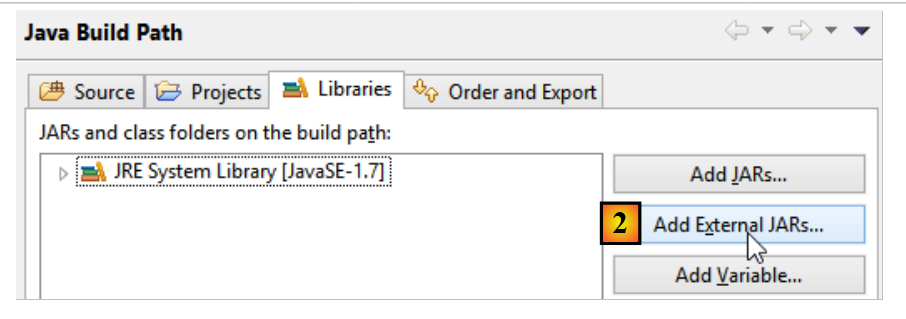 |
- In [2]: [Add JARs] if the JARs files to be added are in a project folder. Otherwise, [Add External JARs];
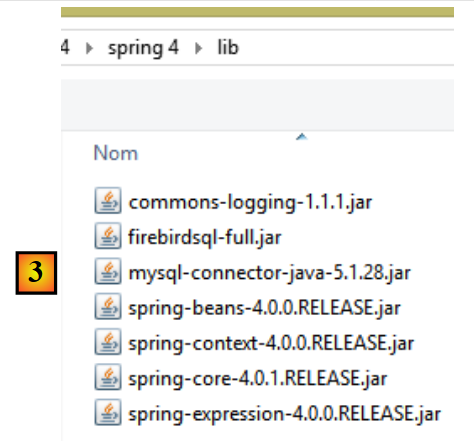 |
- in [3], select the JARs files to be added to the project's ClassPath (they are located here in the [lib] folder within the project);
Definition: The [ClassPath] of a project is the set of folders explored by the JVM (Java Virtual Machine) that executes the project, to find a class referenced by it. For an Eclipse project, the [ClassPath] consists of the following elements:
- the project's [bin] directory;
- the elements of the project’s [Build Path];
The [bin] folder is the folder produced by compiling the [src] folder. Therefore, everything placed in the [src] folder is automatically included in [ClassPath] (even if it is not a .java file). So in the previous project, the Spring configuration file [config-01.xml], which is in the [src] folder, will be part of the [Classpath] folder of the project at runtime.
5.2.7. Results
5.3. Example-02
5.3.1. The Eclipse Project
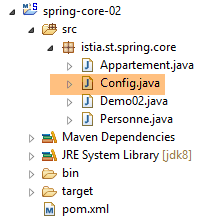 |
5.3.2. The Spring configuration class
package istia.st.spring.core;

import java.util.ArrayList;
import java.util.List;

import org.springframework.context.annotation.Bean;
import org.springframework.context.annotation.Configuration;

@Configuration
public class Config {

    @Bean
    public Personne personne_01() {
        return new Personne("Paul", "Dubois", 34);
    }

    @Bean
    public Personne personne_02() {
        return new Personne("Martin", "Micheline", 18);
    }

    @Bean
    public List<Personne> club(Personne personne_01, Personne personne_02) {
        List<Personne> personnes = new ArrayList<Personne>();
        personnes.add(personne_01);
        personnes.add(personne_02);
        return personnes;
    }

    @Bean
    public Appartement appartement(Personne personne_01) {
        Appartement appartement = new Appartement();
        appartement.setSurface(200);
        appartement.setPropriétaire(personne_01);
        return appartement;
    }
}
- Line 9: The [@Configuration] annotation is a Spring annotation. It indicates that the annotated class defines singletons. These are defined using the [@Bean] annotation. Spring will execute all methods annotated with [@Bean]. These create the application’s singletons;
- lines 12–15: define a singleton identified by [personne_01], i.e., the method name.
- line 23: the [personne_01, personne_02] parameters bear the names of singletons. Spring will automatically initialize them with the references of these singletons. This is called parameter injection;
This way of configuring singletons is more explicit than the one using the XML file. In fact, we are replicating what Spring did implicitly using the XML file.
5.3.3. The executable class
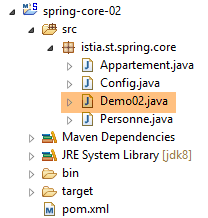 |
package istia.st.spring.core;

import java.util.ArrayList;
import java.util.List;

import org.springframework.context.annotation.AnnotationConfigApplicationContext;

public class Demo02 {

    @SuppressWarnings({ "unchecked", "resource" })
    public static void main(String[] args) {
        // spring context retrieval
        AnnotationConfigApplicationContext ctx = new AnnotationConfigApplicationContext(Config.class);
        // beans are recovered
        Personne p01 = ctx.getBean("personne_01", Personne.class);
        Personne p02 = ctx.getBean("personne_02", Personne.class);
        List<Personne> club = ctx.getBean("club", new ArrayList<Personne>().getClass());
        Appartement appart01 = ctx.getBean(Appartement.class);
        // we display them
        System.out.println("personnes--------");
        System.out.println(p01);
        System.out.println(p02);
        System.out.println("club--------");
        for (Personne p : club) {
            System.out.println(p);
        }
        System.out.println("appartement--------");
        System.out.println(appart01);
        // recovered beans are singletons
        // they can be requested several times, but the same bean is always retrieved
        Personne p01b = ctx.getBean("personne_01", Personne.class);
        System.out.println(String.format("beans [p01,p01b] identiques ? %s", p01b == p01));
    }
}
- Line 13 instantiates all beans defined in the [Config] class;
- the rest of the code remains unchanged;
5.3.4. Project dependencies
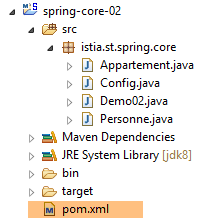 | 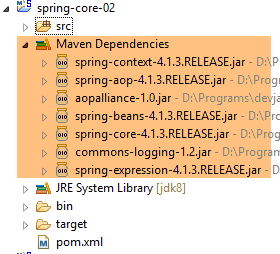 |
The dependencies are defined by the following [pom.xml] file:
<project xmlns="http://maven.apache.org/POM/4.0.0" xmlns:xsi="http://www.w3.org/2001/XMLSchema-instance"
    xsi:schemaLocation="http://maven.apache.org/POM/4.0.0 http://maven.apache.org/xsd/maven-4.0.0.xsd">
    <modelVersion>4.0.0</modelVersion>
    <groupId>istia.st.spring.core</groupId>
    <artifactId>spring-core-02</artifactId>
    <version>0.0.1-SNAPSHOT</version>
    <name>spring-core-02</name>
    <description>Introduction à Spring</description>

    <properties>
        <project.build.sourceEncoding>UTF-8</project.build.sourceEncoding>
        <java.version>1.7</java.version>
    </properties>

    <dependencies>
        <!-- Spring -->
        <dependency>
            <groupId>org.springframework</groupId>
            <artifactId>spring-context</artifactId>
            <version>4.1.3.RELEASE</version>
        </dependency>
    </dependencies>
    <!-- plugins -->
    <build>
        <plugins>
            <plugin>
                <artifactId>maven-assembly-plugin</artifactId>
                <configuration>
                    <descriptorRefs>
                        <descriptorRef>jar-with-dependencies</descriptorRef>
                    </descriptorRefs>
                </configuration>
            </plugin>
            <plugin>
                <groupId>org.apache.maven.plugins</groupId>
                <artifactId>maven-surefire-plugin</artifactId>
                <version>2.18.1</version>
            </plugin>
        </plugins>
    </build>

</project>
Manually managing a project’s dependencies becomes a headache when using Java libraries whose dependencies are unknown. For example, the [Hibernate] framework, which manages database access, has dozens of dependencies. The [Maven] project solves this problem. You specify the dependency you need. It is automatically searched for in Maven repositories distributed across the net. If the requested dependency itself has dependencies, those are automatically downloaded as well. These downloaded dependencies are stored in a local repository on the machine. If another application later needs the same dependency, it will not be downloaded but will be searched for in the local repository. A dependency is characterized by the following elements:
- line 17: a <dependency> tag;
- line 18: a [groupId] attribute that generally identifies the company that created the dependency;
- line 19: a [artifactId] attribute that identifies the dependency;
- line 20: a [version] attribute that identifies the desired version;
The project build will itself generate a Maven component defined by lines 4–8:
- lines 4–6: the [ groupId, artifactId,version] attributes we just described;
- lines 7–8: are optional attributes;
We will return to the role of lines 24–40 a little later. To convert a standard Eclipse project into a Maven project, you need to do two things:
- create the previous [pom.xml] file;
- declare that the project is now a Maven project [1-4]:
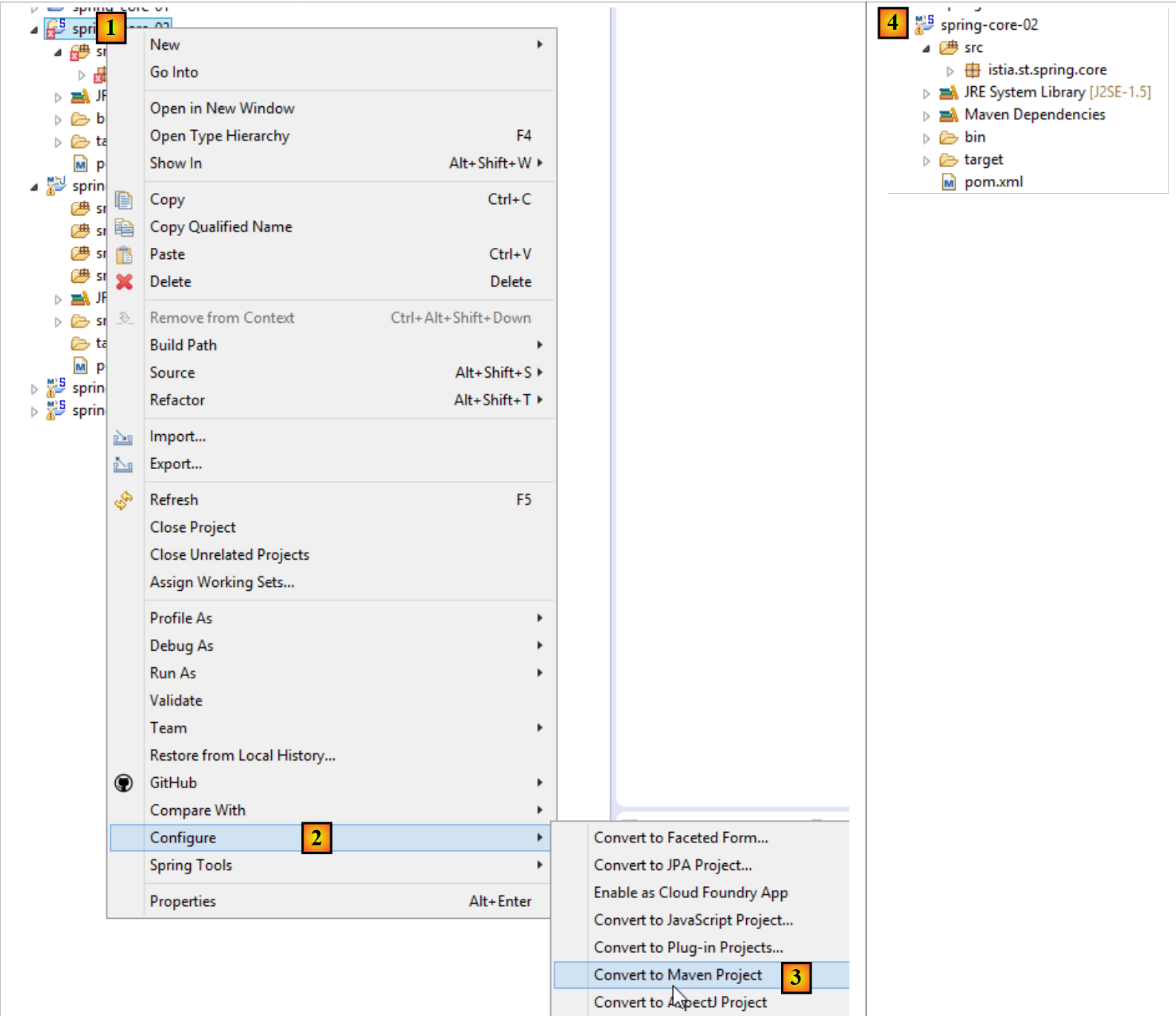 |
The icon for a Maven project is an M [4]. The S indicates that the project contains Spring components. It is not recommended to convert (as we just did) an Eclipse project into a Maven project, because the project will then lack the expected structure for a Maven project, which can sometimes lead to unexpected problems.
5.3.5. Generating the project’s Maven artifact
We refer to the element defined by lines 4–6 of the file [pom.xml] as the project’s Maven artifact:
    <groupId>istia.st.spring.core</groupId>
    <artifactId>spring-core-02</artifactId>
<version>0.0.1-SNAPSHOT</version>
To generate this artifact, the following lines 3–7 must be present in the [pom.xml] file:
    <build>
        <plugins>
            <plugin>
                <groupId>org.apache.maven.plugins</groupId>
                <artifactId>maven-surefire-plugin</artifactId>
                <version>2.18.1</version>
            </plugin>
        </plugins>
</build>
These define the Maven plugin capable of generating the project artifact. We then proceed as follows:
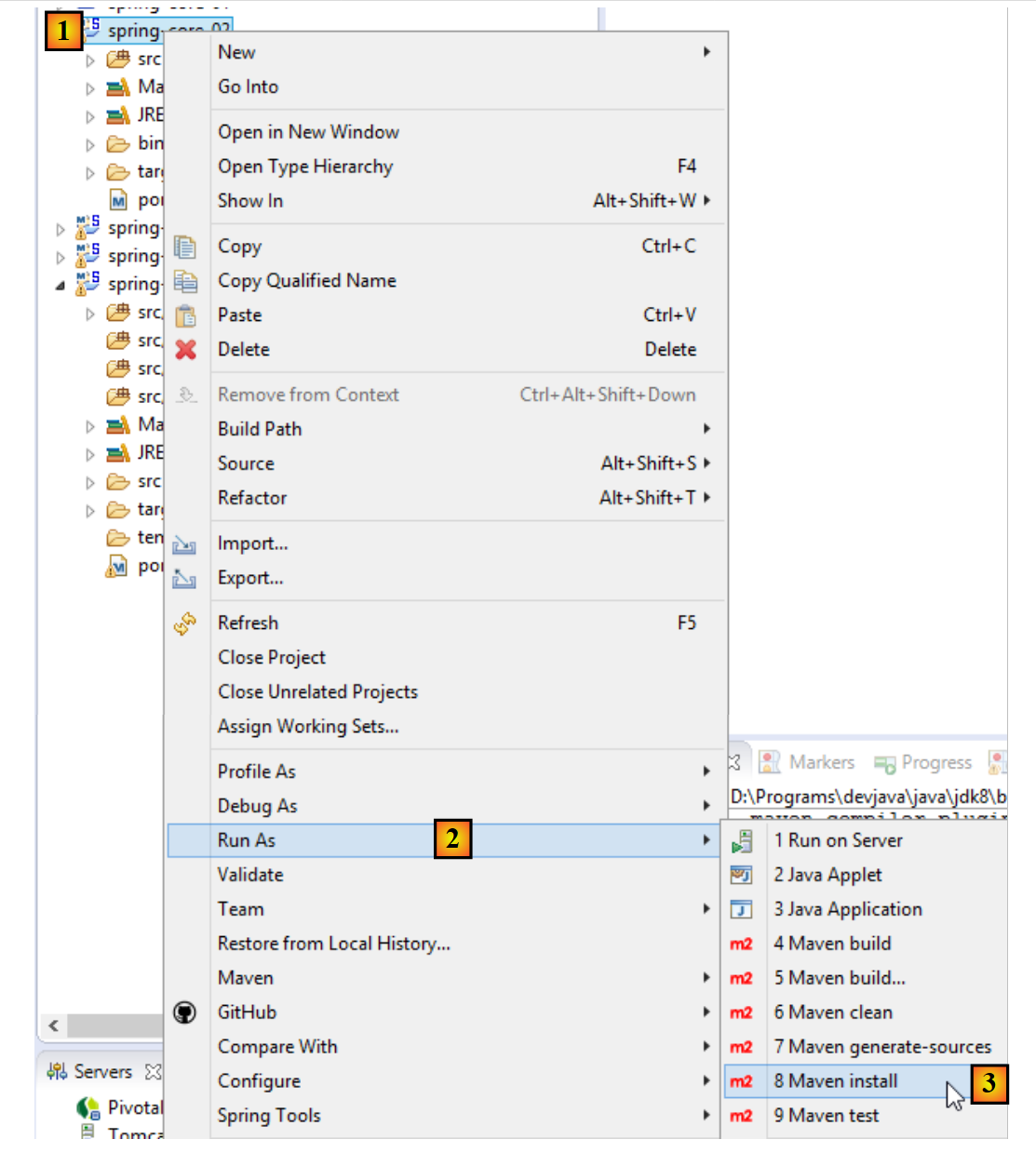 |
The artifact generated in this way goes into the local Maven repository. Its location can be found in the Eclipse configuration:
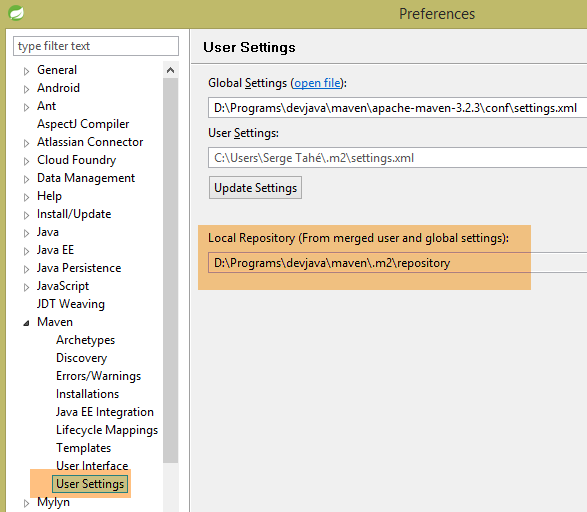 |
You can then verify that the Maven artifact has been installed correctly:
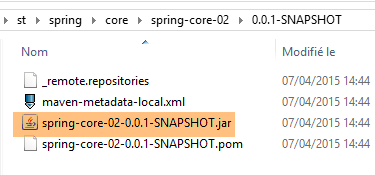 |
From now on, another local Maven project can use this archive.
5.4. Example-03
5.4.1. The Eclipse Project
This time, we are creating a Maven project named [1-8]:
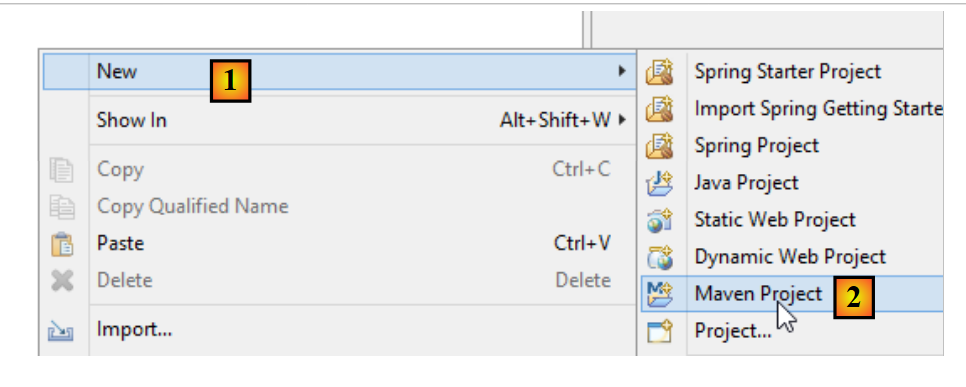 |
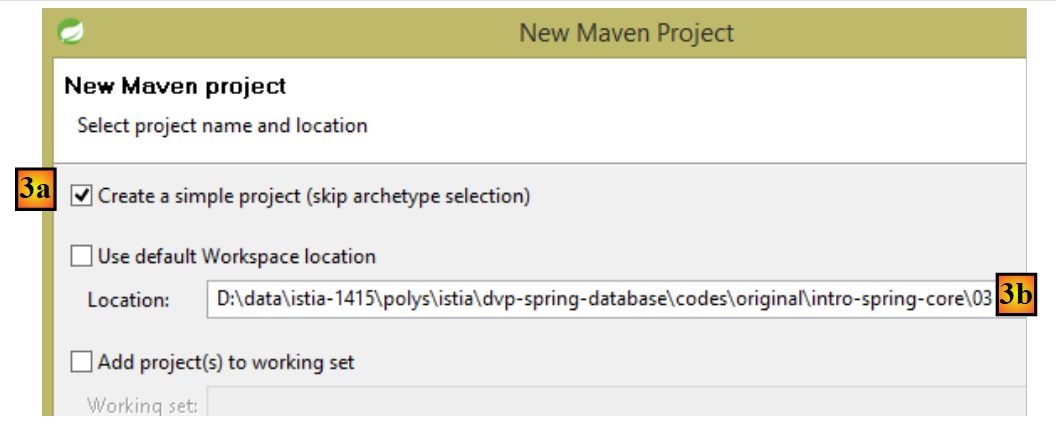 |
- in [3b]: specify an empty folder where the project will be generated;
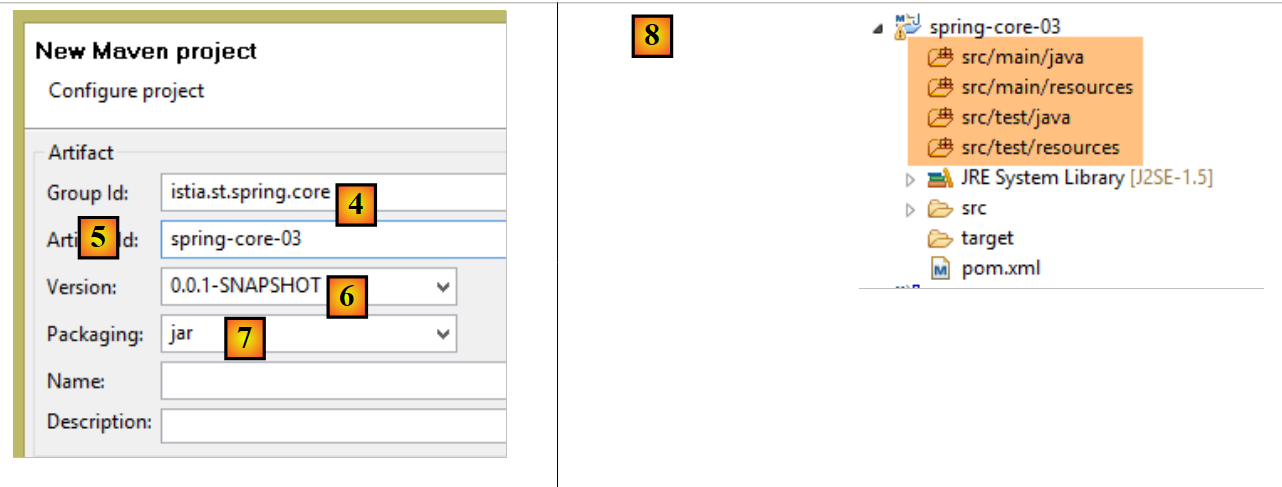 |
- in [4]: the Maven group ID to which the project will belong;
- in [5]: the name of the Maven artifact produced:
- in [6]: its version;
- in [7]: its packaging mode (there are also war, ear, apk, ...);
- in [8]: the project thus created;
By default, a Maven project has a specific directory structure:
- [src / main / java]: the project’s source code. The compiled artifacts from these sources will go into the project’s [target/classes] folder;
- [src / main / resources]: resources that must be included in the project's classpath but are not Java source files. They will be copied as-is to the project's [target/classes] folder;
- [src / test / java]: the source code for the project’s tests. The compiled output from these sources will go into the project’s [target/test-classes] folder. These elements are not included in the project’s Maven archive;
- [src / test / resources]: resources that must be in the project’s classpath for testing but are not Java source files. They will be copied as-is into the project’s [target/test-classes] folder;
We complete the project as follows:
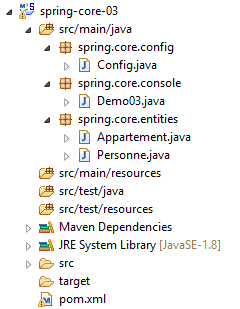 |
5.4.2. The Maven configuration
A [pom.xml] file is generated by default. We modify it as follows:
<project xmlns="http://maven.apache.org/POM/4.0.0" xmlns:xsi="http://www.w3.org/2001/XMLSchema-instance"
    xsi:schemaLocation="http://maven.apache.org/POM/4.0.0 http://maven.apache.org/xsd/maven-4.0.0.xsd">
    <modelVersion>4.0.0</modelVersion>
    <groupId>istia.st.spring.core</groupId>
    <artifactId>spring-core-03</artifactId>
    <version>0.0.1-SNAPSHOT</version>
    <name>spring-core-03</name>
    <description>Introduction à Spring</description>

    <properties>
        <project.build.sourceEncoding>UTF-8</project.build.sourceEncoding>
        <java.version>1.8</java.version>
    </properties>

    <!-- maven parent project -->
    <parent>
        <groupId>org.springframework.boot</groupId>
        <artifactId>spring-boot-starter-parent</artifactId>
        <version>1.2.3.RELEASE</version>
    </parent>

    <dependencies>
        <!-- Spring Context -->
        <dependency>
            <groupId>org.springframework</groupId>
            <artifactId>spring-context</artifactId>
        </dependency>
        <!-- logs -->
        <dependency>
            <groupId>org.springframework.boot</groupId>
            <artifactId>spring-boot-starter-logging</artifactId>
        </dependency>

    </dependencies>

    <!-- plugins -->
    <build>
        <plugins>
            <!-- to generate the project archive with its dependencies -->
            <plugin>
                <artifactId>maven-assembly-plugin</artifactId>
                <configuration>
                    <descriptorRefs>
                        <descriptorRef>jar-with-dependencies</descriptorRef>
                    </descriptorRefs>
                </configuration>
            </plugin>
            <!-- to install the project artifact in the local Maven repository -->
            <plugin>
                <groupId>org.apache.maven.plugins</groupId>
                <artifactId>maven-surefire-plugin</artifactId>
                <version>2.18.1</version>
            </plugin>
        </plugins>
    </build>

</project>
- line 11: the project is encoded in UTF-8;
- line 12: JDK 1.8 is used to compile the project;
- lines 16–20: for projects using Spring libraries, it is convenient to use a parent Maven project named [spring-boot-starter-parent]. This project defines the versions of various Spring libraries as well as their dependencies. This eliminates the need to define them in the dependencies section. Thus, in lines 24–27, we do not specify the desired version or [spring-context]. It will be the one defined by the parent project [spring-boot-starter-parent]. This technique eliminates the need to worry about potential version incompatibilities between dependencies. Those defined by the parent project are compatible with one another;
- lines 29–32: Spring writes a significant amount of information to the console via a logging library. This library is imported here;
- lines 40–47: a Maven plugin, which we will discuss later;
- lines 50–52: the plugin for generating the project’s Maven artifact;
5.4.3. The Spring configuration class
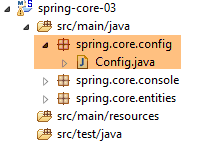 |
The [Config] class is as follows:
package istia.st.spring.core.config;

import istia.st.spring.core.entities.Personne;

import java.util.ArrayList;
import java.util.List;

import org.springframework.context.annotation.Bean;
import org.springframework.context.annotation.ComponentScan;
import org.springframework.context.annotation.Configuration;

@Configuration
@ComponentScan({ "spring.core.entities" })
public class Config {

    @Bean
    public Personne personne_01() {
        return new Personne("Paul", "Dubois", 34);
    }

    @Bean
    public Personne personne_02() {
        return new Personne("Martin", "Micheline", 18);
    }

    @Bean
    public List<Personne> club(Personne personne_01, Personne personne_02) {
        List<Personne> personnes = new ArrayList<Personne>();
        personnes.add(personne_01);
        personnes.add(personne_02);
        return personnes;
    }

    @Bean
    public int mySurface() {
        return 200;
    }
}
- Here we see code that has already been commented on, with two new additions:
- line 13: indicates that there are other beans to instantiate in the [spring.core.entities] package,
- lines 34–37: a [mySurface] bean;
5.4.4. The [Appartement] class
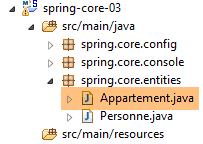 |
package spring.core.entities;

import org.springframework.beans.factory.annotation.Autowired;
import org.springframework.beans.factory.annotation.Qualifier;
import org.springframework.stereotype.Component;

@Component
public class Appartement {

    // fields injected by Spring
    @Autowired
    @Qualifier("personne_01")
    private Personne propriétaire;

    @Autowired
    @Qualifier("mySurface")
    private int surface;

    // getters and setters
    public Personne getPropriétaire() {
        return propriétaire;
    }

    public void setPropriétaire(Personne propriétaire) {
        this.propriétaire = propriétaire;
    }

    public int getSurface() {
        return surface;
    }

    public void setSurface(int surface) {
        this.surface = surface;
    }

    // toString
    public String toString() {
        return String.format("Appartement[%s, %s]", propriétaire, surface);
    }

}
- line 7: the annotation [@Component] tells Spring that the class is a singleton that the framework must instantiate and manage. It is because we wrote [@ComponentScan({ "istia.st.spring.core.entities" })] in the [Config] class that this singleton will be found;
- line 11: asks Spring to inject the reference of one of the singletons into the field. This can be defined in two ways:
- by its identifier (lines 12, 16),
- by its type if there is only one singleton of that type;
5.4.5. Running the project
Running the project produces the following output in the console:
- Lines 1-3: Spring generates a very large number of logs, several dozen lines. These logs can be very useful for debugging a project that isn't working. When it is working, you can reduce the logs as follows:
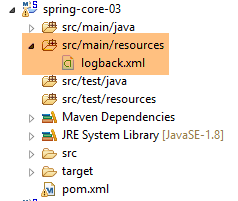 |
In the [src / main / resources] folder, create the following [logback.xml] file:
<configuration>

  <appender name="STDOUT" class="ch.qos.logback.core.ConsoleAppender">
    <!-- encoders are by default assigned the type
         ch.qos.logback.classic.encoder.PatternLayoutEncoder -->
    <encoder>
      <pattern>%d{HH:mm:ss.SSS} [%thread] %-5level %logger{36} - %msg%n</pattern>
    </encoder>
  </appender>

  <!-- log level control -->
  <root level="info"> <!-- info, debug, warn -->
    <appender-ref ref="STDOUT" />
  </root>
</configuration>
- Line 12 sets the log level. [debug] is a very detailed level, while [info] is much less so;
Here are the results with [level=info]:
There is now only one line of logs.
5.4.6. Generating the project archive with its dependencies
The archive created in the previous project can also be used by a non-Maven Eclipse project. Some projects use many libraries, and it can be tricky not to forget any. This is where Maven works wonders, as you only need to name the top-level dependency for the lower-level ones to be automatically added to the project’s Classpath. When a non-Maven Eclipse project needs to use the archives of a Maven project, it is possible to generate the latter’s artifact with all its dependencies (which was not the case in the previous project). For this generation, the following lines 3–10 must be present in the [pom.xml] file:
    <build>
        <plugins>
            <plugin>
                <artifactId>maven-assembly-plugin</artifactId>
                <configuration>
                    <descriptorRefs>
                        <descriptorRef>jar-with-dependencies</descriptorRef>
                    </descriptorRefs>
                </configuration>
            </plugin>
            <plugin>
                <groupId>org.apache.maven.plugins</groupId>
                <artifactId>maven-surefire-plugin</artifactId>
                <version>2.18.1</version>
            </plugin>
        </plugins>
</build>
These define the Maven plugin capable of generating the project artifact along with its dependencies. Next, proceed as follows:
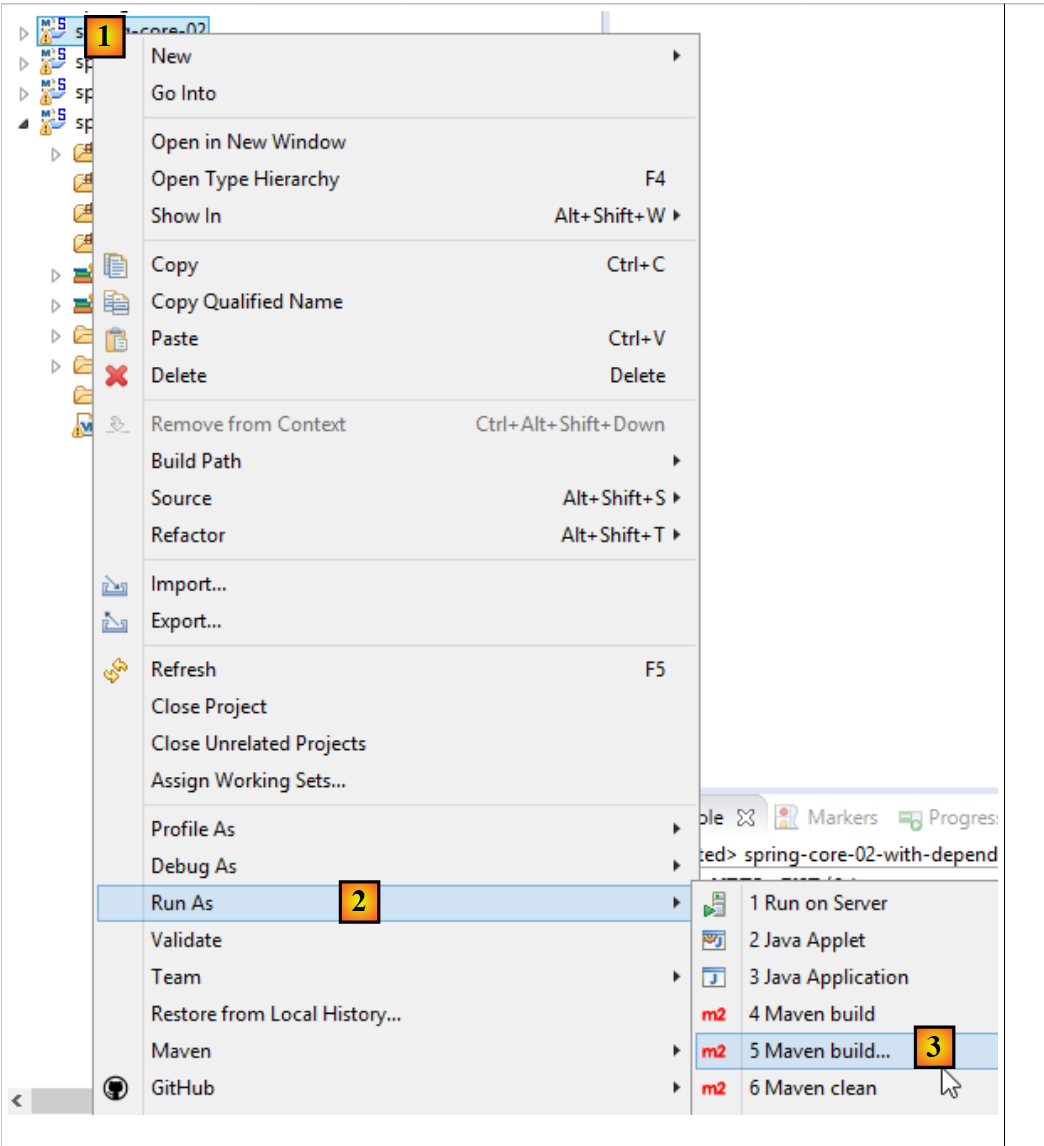 |
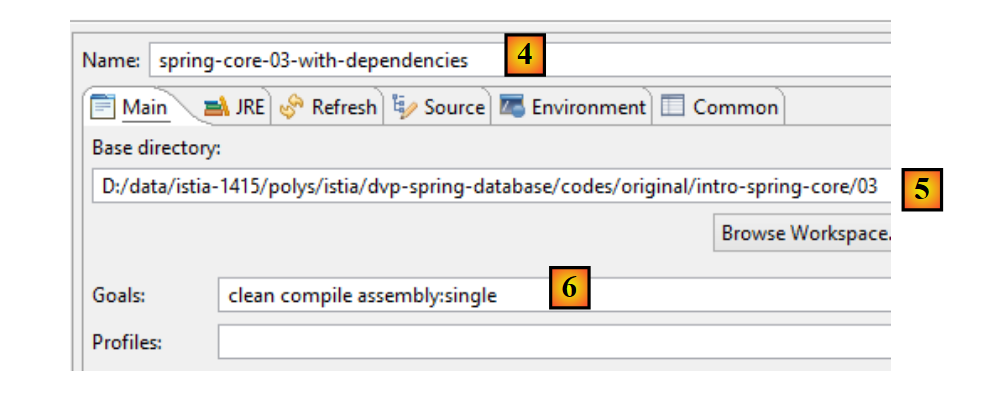 |
- [4-6] represents a Maven build configuration;
- in [4], enter any name;
- in [5], specify the project directory;
- in [6], enter the Maven goals:
- [clean]: the project folder [target] is deleted;
- [compile]: the project is compiled. The compilation outputs are placed in a regenerated [target] folder;
- [assembly:single]: the classes of the project and its dependencies are placed in a single archive jar within the [target] folder;
After execution, the following result is obtained:
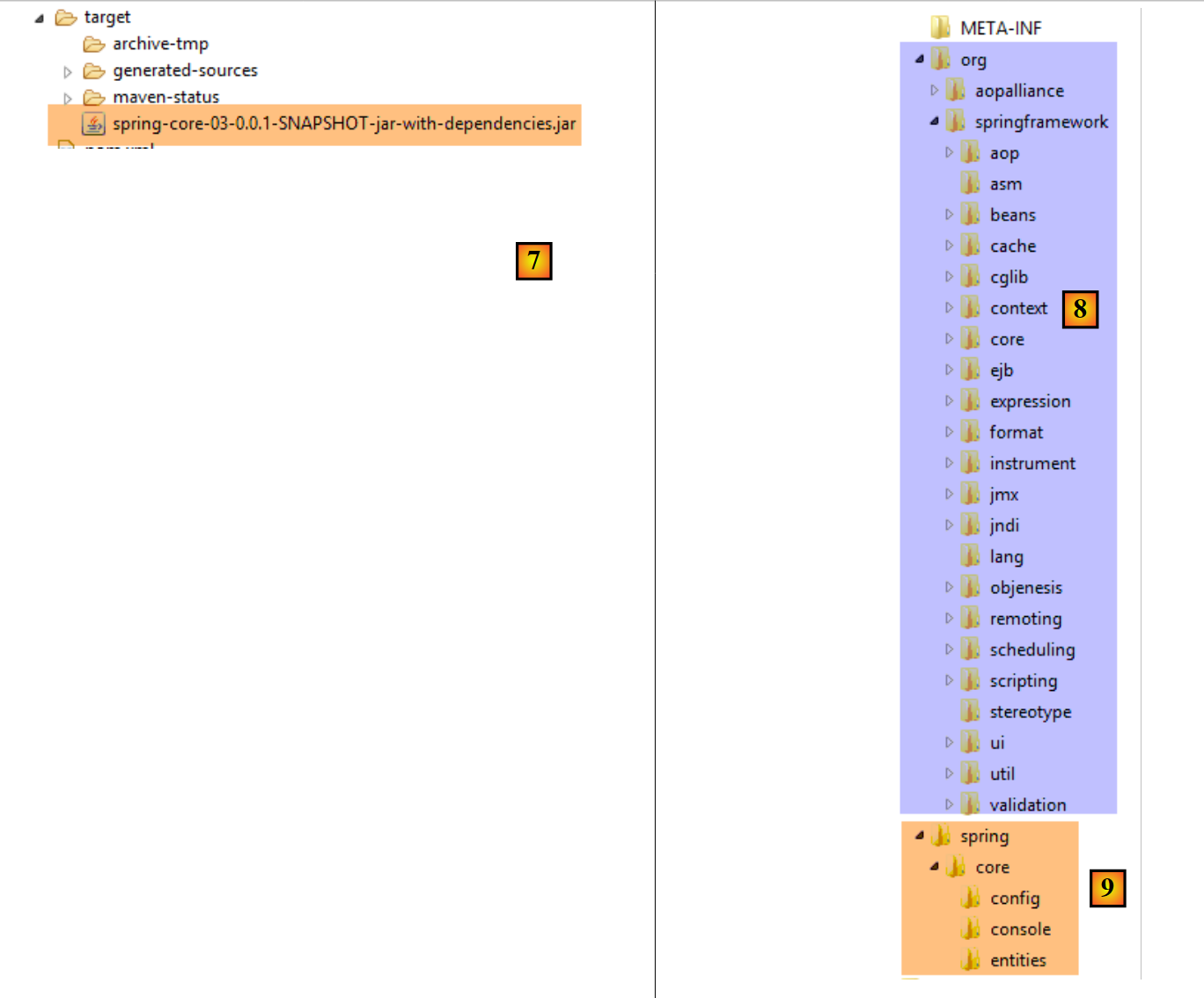 |
A jar archive is a zipped file that can be opened with a decompression tool. Once the previous archive is unzipped, the following directory structure is obtained:
- in [8], the classes of the project’s dependencies;
- in [9], the classes of the project itself;
5.5. Example-04
5.5.1. Objective
This example is based on one presented in the document [Introduction à Spring IoC], which demonstrates Spring’s contribution to configuring multi-layer architectures. In the original document, the example uses a Spring configuration created with a XML file. Here, we handle the example using a configuration based on Java classes and annotations.
Here, we want to configure a Spring project for the following architecture:
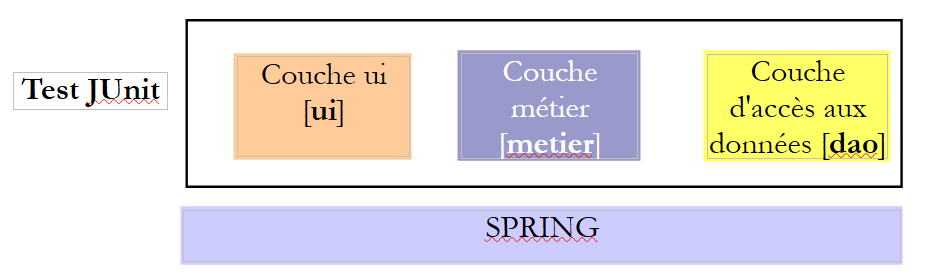 |
Each layer has an interface implemented by two classes. We want to demonstrate that, thanks to Spring, we can change the implementation of a layer with zero impact on the code of the other layers.
5.5.2. The Eclipse Project
5.5.2.1. Generation
We create a new project type:
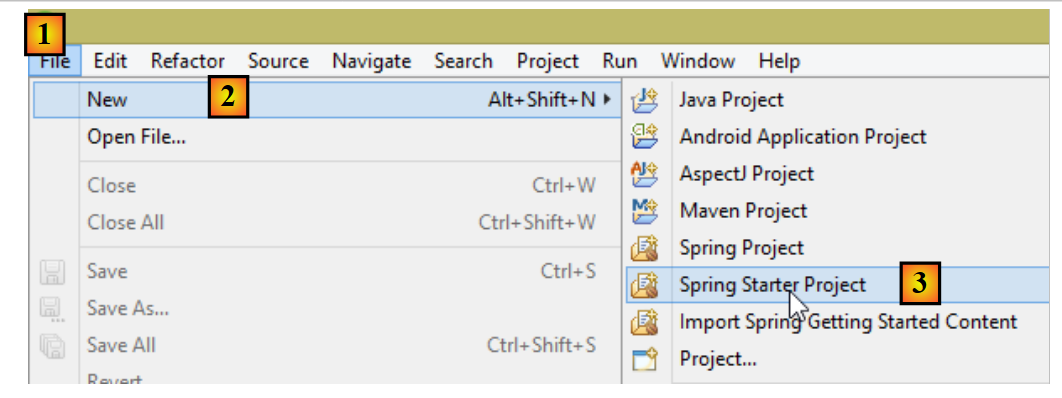 |
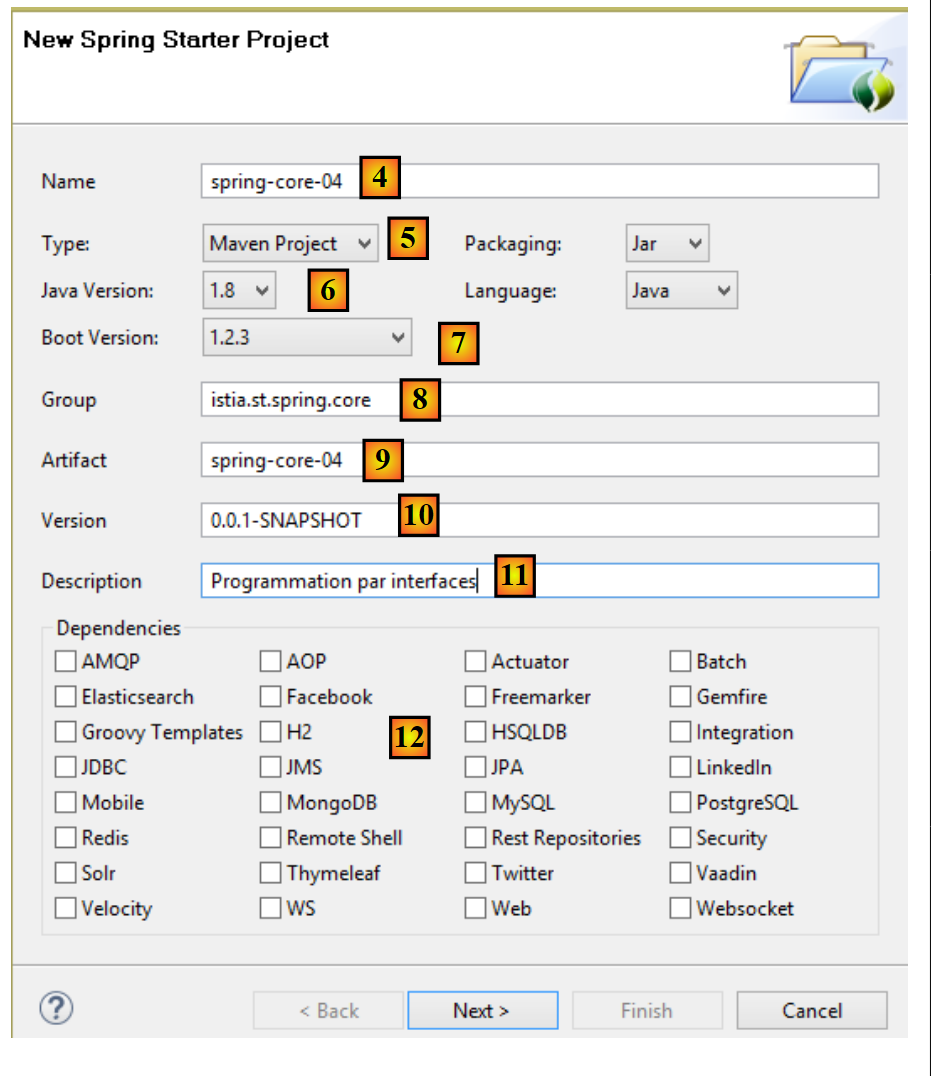 |
- in [4], enter the Eclipse project name;
- in [5], select a Maven project;
- in [6], select a version for Java >=1.7;
- in [7], select the suggested Spring Boot version;
- The [8-11] information is Maven information;
- In [12], you can select one or more of the suggested dependencies. This will result in a number of dependencies being added to the Maven file [pom.xml];
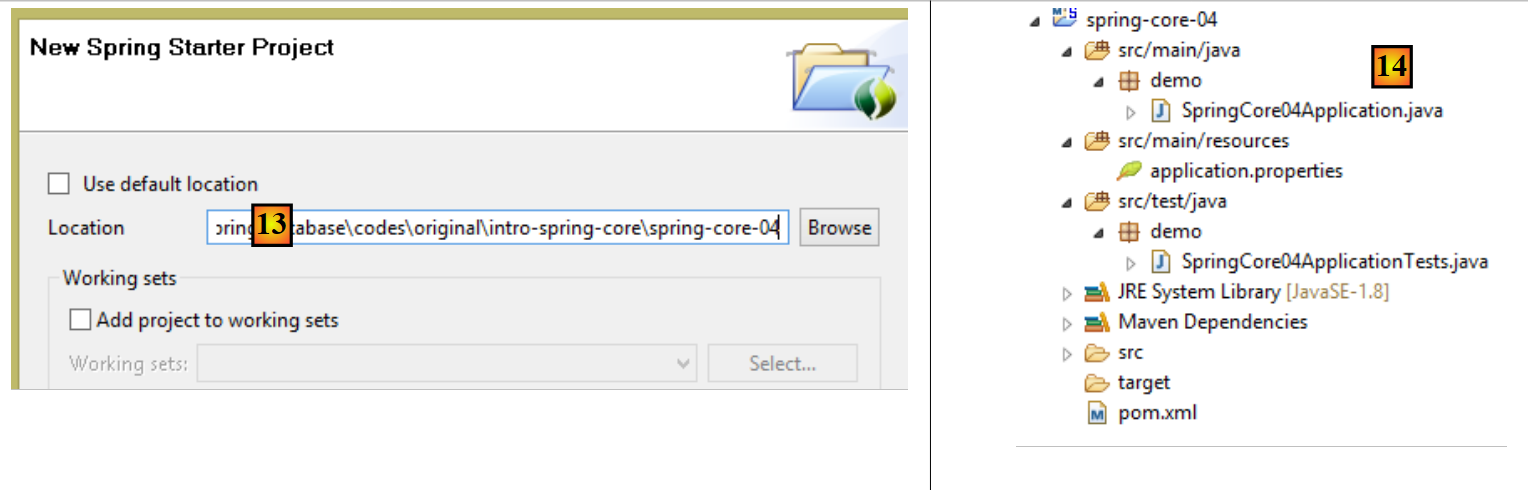 |
- In [13], specify an existing, empty folder to house the project;
- In [14], the generated project. We will break down its components;
The project is a Maven project configured by the following [pom.xml] file:
<?xml version="1.0" encoding="UTF-8"?>
<project xmlns="http://maven.apache.org/POM/4.0.0" xmlns:xsi="http://www.w3.org/2001/XMLSchema-instance"
    xsi:schemaLocation="http://maven.apache.org/POM/4.0.0 http://maven.apache.org/xsd/maven-4.0.0.xsd">
    <modelVersion>4.0.0</modelVersion>

    <groupId>istia.st.spring.core</groupId>
    <artifactId>spring-core-04</artifactId>
    <version>0.0.1-SNAPSHOT</version>
    <packaging>jar</packaging>

    <name>spring-core-04</name>
    <description>Programmation par interfaces</description>

    <parent>
        <groupId>org.springframework.boot</groupId>
        <artifactId>spring-boot-starter-parent</artifactId>
        <version>1.2.3.RELEASE</version>
        <relativePath/> <!-- lookup parent from repository -->
    </parent>

    <properties>
        <project.build.sourceEncoding>UTF-8</project.build.sourceEncoding>
        <start-class>demo.SpringCore04Application</start-class>
        <java.version>1.8</java.version>
    </properties>

    <dependencies>
        <dependency>
            <groupId>org.springframework.boot</groupId>
            <artifactId>spring-boot-starter</artifactId>
        </dependency>

        <dependency>
            <groupId>org.springframework.boot</groupId>
            <artifactId>spring-boot-starter-test</artifactId>
            <scope>test</scope>
        </dependency>
    </dependencies>

    <build>
        <plugins>
            <plugin>
                <groupId>org.springframework.boot</groupId>
                <artifactId>spring-boot-maven-plugin</artifactId>
            </plugin>
        </plugins>
    </build>

</project>
- lines 6–12: contain the information entered in the project creation wizard;
- lines 14–19: the parent Maven project, which defines a number of libraries along with their versions. If any of them are project dependencies, they are listed in the [pom.xml] file without their version;
- line 23: this line is only used if you intend to generate an executable archive of the project. Otherwise, it is unused;
- lines 28–31: the minimum dependencies for a Spring Boot project. Note that we did not select any dependencies from the checkbox list;
- lines 33–37: the dependency required to manage unit tests JUnit [http://junit.org/] integrated with Spring. Line 36 indicates that the dependency is required only for testing. Consequently, it will not be included in the project archive;
- lines 42–45: the plugin used to generate the project’s Maven artifact;
The list of dependencies provided by this file is as follows: [1]:
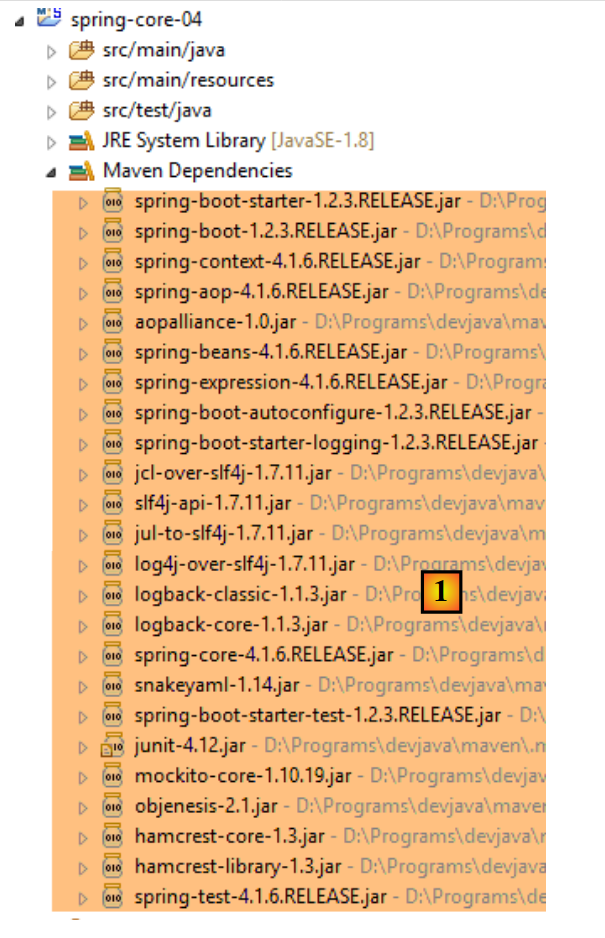 |
We will see that these are sufficient for what we want to do here.
5.5.2.2. The executable class
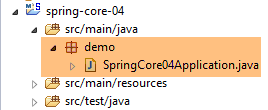 |
The executable class [SpringCore04Application] [[2] is as follows:
package demo;

import org.springframework.boot.SpringApplication;
import org.springframework.boot.autoconfigure.SpringBootApplication;

@SpringBootApplication
public class SpringCore04Application {

    public static void main(String[] args) {
        SpringApplication.run(SpringCore04Application.class, args);
    }
}
- Line 6: The annotation [@SpringBootApplication] is a shorthand for the three annotations [@Configuration, @EnableAutoConfiguration, @ComponentScan], which means:
- that the [SpringCore04Application] class is a Spring configuration class;
- that Spring Boot is instructed to perform configurations based on the classes it finds in the project’s classpath, in this case within the Maven dependencies;
- to examine the current directory (that of the [SpringCore04Application] class) to find any other Spring components;
- Line 10: The static method [SpringApplication.run] is executed. Its first parameter is a Spring configuration class, in this case the class [SpringCore04Application]. Its second parameter is the list of arguments passed to the method [main] (line 9). The static method [SpringApplication.run] is responsible for creating the Spring context, i.e., creating the various beans found either in the configuration classes or in the folders scanned by the [@ComponentScan] annotation. The [main] method here does nothing else. To give it a little more substance, we will transform it as follows:
package demo;

import org.springframework.boot.SpringApplication;
import org.springframework.boot.autoconfigure.SpringBootApplication;
import org.springframework.context.ConfigurableApplicationContext;

@SpringBootApplication
public class SpringCore04Application {

    public static void main(String[] args) {
        // spring context instantiation
        ConfigurableApplicationContext context = SpringApplication.run(SpringCore04Application.class, args);
        // context display
        System.out.println("---------------- Liste des beans Spring");
        for (String beanName : context.getBeanDefinitionNames()) {
            System.out.println(beanName);
        }
        // closing context
        context.close();
    }
}
- line 12: the static method [SpringApplication.run] returns the Spring context it has constructed;
- lines 15–17: the names of all beans in this context are displayed;
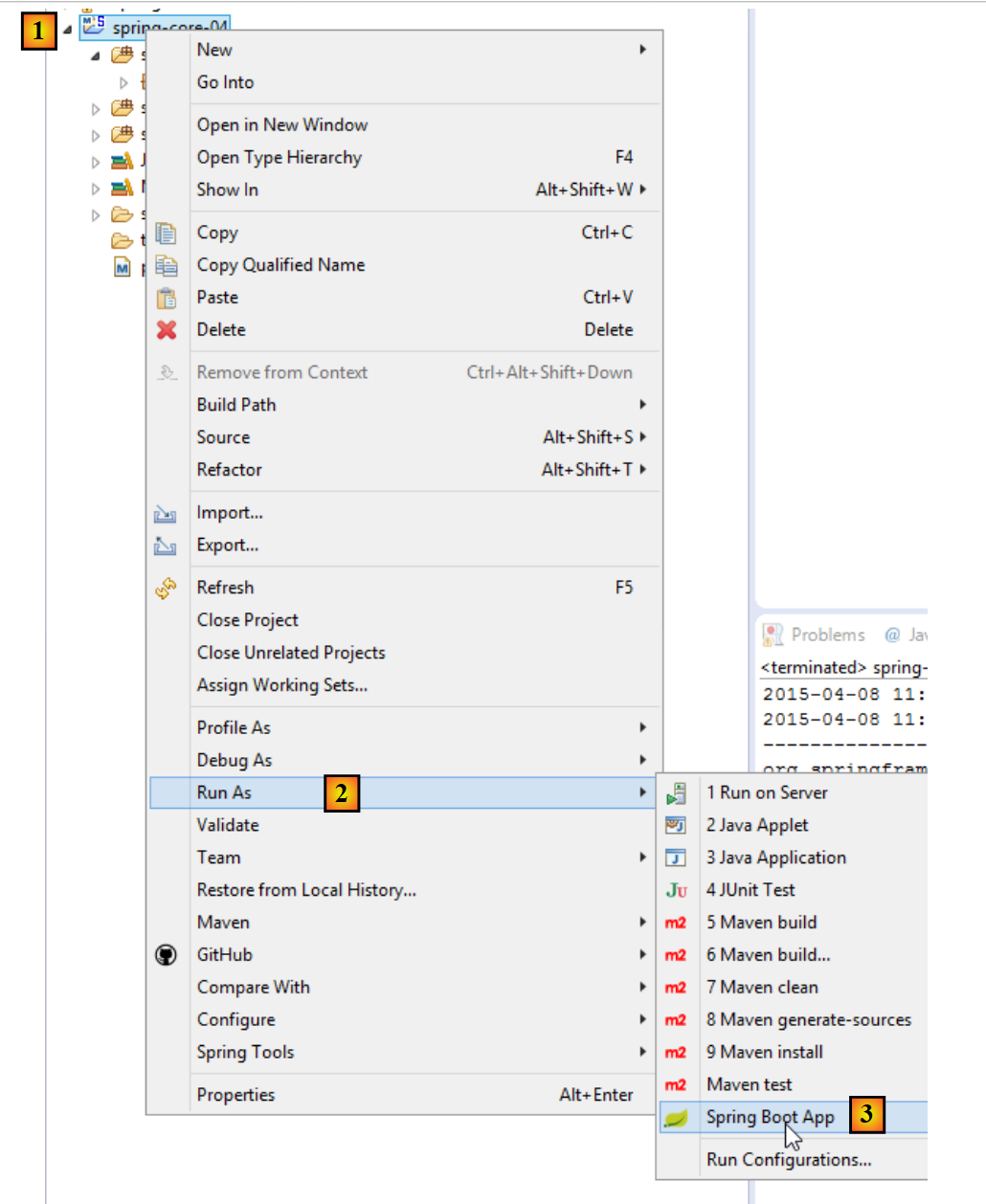
The application can be run as follows: [1-3]. The standard method [Run As Java Application] is also valid.
 |
The following result is obtained:
- lines 14-28: Spring context beans. We do not know their role. We find the bean [springCore04Application] on line 18, which, due to its annotation [@SpringBootApplication], automatically becomes a Spring bean;
- the other lines are Spring logs at the [INFO] level. As we have already seen, these logs can be controlled by the [logback.xml] file placed in the project’s classpath:
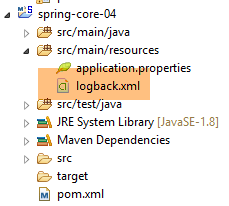 |
<configuration>

  <appender name="STDOUT" class="ch.qos.logback.core.ConsoleAppender">
    <!-- encoders are by default assigned the type
         ch.qos.logback.classic.encoder.PatternLayoutEncoder -->
    <encoder>
      <pattern>%d{HH:mm:ss.SSS} [%thread] %-5level %logger{36} - %msg%n</pattern>
    </encoder>
  </appender>

  <!-- log level control -->
  <root level="warn"> <!-- info, debug, warn -->
    <appender-ref ref="STDOUT" />
  </root>
</configuration>
If, on line 12 above, we replace [info] with [warn], we get the following result:
The logs have disappeared. Only messages of level [warn] appear, and there were none here.
5.5.3. Implementation of the different layers of the architecture
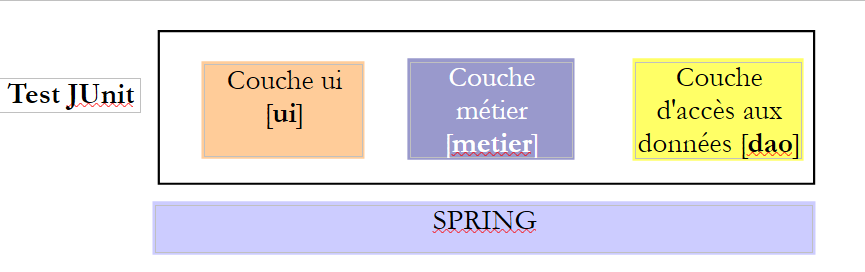 |
We will now implement the three layers of the architecture above:
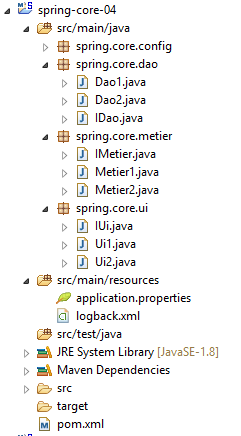 |
The [DAO] layer is implemented by the [spring.core.dao] package. It provides the following [IDao] interface:
package spring.core.dao;

public interface IDao {

    public int doSomethingInDaoLayer(int a, int b);
}
This interface has two implementations: [Dao1] and [Dao2]:
package spring.core.dao;

public class Dao1 implements IDao {

    public int doSomethingInDaoLayer(int a, int b) {
        return a+b;
    }

}
package spring.core.dao;

public class Dao2 implements IDao {

    public int doSomethingInDaoLayer(int a, int b) {
        return a-b;
    }

}
The [métier] layer is implemented by the [spring.core.metier] package. It provides the following [IMetier] interface:
package spring.core.metier;

public interface IMetier {

    public int doSomethingInMetierLayer(int a, int b);
}
This interface has two implementations: [Metier1] and [Metier2]:
package spring.core.metier;

import spring.core.dao.IDao;

public class Metier1 implements IMetier {

    private IDao dao;

    public int doSomethingInMetierLayer(int a, int b) {
        a++;
        b++;
        return dao.doSomethingInDaoLayer(a, b);
    }

    public void setDao(IDao dao) {
        this.dao = dao;
    }
}
package spring.core.metier;

import spring.core.dao.IDao;

public class Metier2 implements IMetier {

    private IDao dao;

    public int doSomethingInMetierLayer(int a, int b) {
        a--;
        b++;
        return dao.doSomethingInDaoLayer(a, b);
    }

    public void setDao(IDao dao) {
        this.dao = dao;
    }


}
The [UI] layer is implemented by the [spring.core.ui] package. It provides the following [IUi] interface:
package spring.core.ui;

public interface IUi {

    public int doSomethingInUiLayer(int a, int b);
}
This interface has two implementations: [Ui1] and [Ui2]:
package spring.core.ui;

import spring.core.metier.IMetier;

public class Ui1 implements IUi {

    private IMetier metier;

    public int doSomethingInUiLayer(int a, int b) {
        a++;
        b++;
        return metier.doSomethingInMetierLayer(a, b);
    }

    public void setMetier(IMetier metier) {
        this.metier = metier;
    }

}
package spring.core.ui;

import spring.core.metier.IMetier;

public class Ui2 implements IUi {

    private IMetier metier;

    public int doSomethingInUiLayer(int a, int b) {
        a--;
        b++;
        return metier.doSomethingInMetierLayer(a, b);
    }

    public void setMetier(IMetier metier) {
        this.metier = metier;
    }

}
5.5.4. Spring Project Configuration
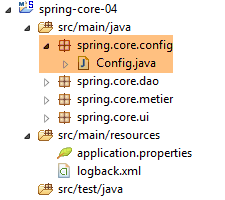 |
The configuration class [Config] is as follows:
package spring.core.config;

import org.springframework.context.annotation.Bean;
import org.springframework.context.annotation.Configuration;

import spring.core.dao.Dao1;
import spring.core.dao.Dao2;
import spring.core.dao.IDao;
import spring.core.metier.IMetier;
import spring.core.metier.Metier1;
import spring.core.metier.Metier2;
import spring.core.ui.IUi;
import spring.core.ui.Ui1;
import spring.core.ui.Ui2;

@Configuration
public class Config {

    // -------------- implementation [Ui1, Metier1, Dao1]
    @Bean
    public IDao dao1() {
        return new Dao1();
    }

    @Bean
    public IMetier metier1(IDao dao1) {
        Metier1 metier = new Metier1();
        metier.setDao(dao1);
        return metier;
    }

    @Bean
    public IUi ui1(IMetier metier1) {
        Ui1 ui = new Ui1();
        ui.setMetier(metier1);
        return ui;
    }

    // -------------- implementation [Ui2, Metier2, Dao2]
    @Bean
    public IDao dao2() {
        return new Dao2();
    }

    @Bean
    public IMetier metier2(IDao dao2) {
        Metier2 metier = new Metier2();
        metier.setDao(dao2);
        return metier;
    }

    @Bean
    public IUi ui2(IMetier metier2) {
        Ui2 ui = new Ui2();
        ui.setMetier(metier2);
        return ui;
    }
}
- lines 20–23: the bean named [dao1] (method name) is an instance of the class [Dao1] (line 22), which is considered an implementation of the interface [IDao] (line 21). The bean [dao1] is therefore viewed as an instance of an interface (the terminology is incorrect but understandable) and not an instance of a class. This is an important point to understand. All other beans will also be instances of interfaces;
- lines 25–30: an instance of the [IMetier] interface implemented by the [Metier1] class;
- lines 32–37: an instance of the [IUi] interface implemented by the [Ui1] class;
- lines 20–37: implement the [UI, Metier, DAO] layers with [Ui1, Metier1, Dao1] instances;
- lines 40–57: implement the [UI, Metier, DAO] layers with [Ui2, Metier2, Dao2] instances;
5.5.5. [JUnitTest] unit test
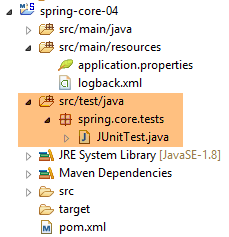 |
The [JUnitTest] class is placed in the [src / test / java] branch of the Maven project. The elements of this branch are not included in the final project archive. Its code is as follows:
package spring.core.tests;

import org.junit.Assert;
import org.junit.Test;
import org.junit.runner.RunWith;
import org.springframework.beans.factory.annotation.Autowired;
import org.springframework.beans.factory.annotation.Qualifier;
import org.springframework.boot.test.SpringApplicationConfiguration;
import org.springframework.test.context.junit4.SpringJUnit4ClassRunner;

import spring.core.config.Config;
import spring.core.dao.IDao;
import spring.core.metier.IMetier;
import spring.core.ui.IUi;

@SpringApplicationConfiguration(classes = { Config.class })
@RunWith(SpringJUnit4ClassRunner.class)
public class JUnitTest {
...
}
- line 16: the annotation [@SpringApplicationConfiguration] is an annotation from the Spring Boot Test project (line 8). It is introduced by the following dependency on the file [pom.xml]:
        <dependency>
            <groupId>org.springframework.boot</groupId>
            <artifactId>spring-boot-starter</artifactId>
</dependency>
This annotation takes as its parameter the list of configuration classes to be used to build the Spring context required for the test. Here we use the configuration class [Config], which has already been presented;
- Line 17: The annotation [@RunWith] is an annotation JUnit (line 5). Its parameter is the class responsible for running the tests instead of the default class of the JUnit framework. This class is a Spring class (line 9). It will use the Spring annotations present in the test class;
The complete class is as follows
...

@SpringApplicationConfiguration(classes = { Config.class })
@RunWith(SpringJUnit4ClassRunner.class)
public class JUnitTest {

    // layer [UI]
    @Autowired
    @Qualifier("ui1")
    private IUi ui1;

    @Autowired
    @Qualifier("ui2")
    private IUi ui2;

    // layer [profession]
    @Autowired
    @Qualifier("metier1")
    private IMetier metier1;

    @Autowired
    @Qualifier("metier2")
    private IMetier metier2;

    // layer [dao]
    @Autowired
    @Qualifier("dao1")
    private IDao dao1;

    @Autowired
    @Qualifier("dao2")
    private IDao dao2;

    @Test
    public void testDao() {
        Assert.assertEquals(30, dao1.doSomethingInDaoLayer(10, 20));
        Assert.assertEquals(-10, dao2.doSomethingInDaoLayer(10, 20));
    }

    @Test
    public void testMetier() {
        Assert.assertEquals(32, metier1.doSomethingInMetierLayer(10, 20));
        Assert.assertEquals(-12, metier2.doSomethingInMetierLayer(10, 20));
    }

    @Test
    public void testUI() {
        Assert.assertEquals(34, ui1.doSomethingInUiLayer(10, 20));
        Assert.assertEquals(-14, ui2.doSomethingInUiLayer(10, 20));
    }

}
- lines 8–10: we inject (line 8) the bean named (line 9) [ui1]. Note on line 10 that we are injecting an interface instance, not a class instance;
- lines 21-32: the other beans defined in the [Config] class are injected in the same way;
- line 34: the annotation [@Test] designates a method to be executed during testing. The other possible annotations are as follows:
- [@BeforeClass]: method to be executed before starting the tests;
- [@AfterClass]: method to be executed once all tests are complete;
- [@Before]: method to be executed before each test;
- [@After]: method to be executed after each test;
- line 36: we verify that the call to [dao1.doSomethingInDaoLayer(10, 20)] returns 30. By convention, the first parameter is the expected value and the second is the actual value;
- line 36: tests the instance [dao1] of the interface [IDao];
- line 37: tests the instance [dao2] of the interface [IDao];
- line 42: tests the instance [metier1] of the interface [IMetier];
- line 43: tests the instance [metier2] of the interface [IMetier];
- line 48: tests the instance [ui1] of the interface [IUi];
- line 36: tests the instance [ui2] of the interface [IUi];
The assertions that can be used in a test method are as follows:
- assertEquals(expression1, expression2): verifies that the values of the two expressions are equal. Many expression types are accepted (int, String, float, double, boolean, char, short). If the two expressions are not equal, then a [AssertionFailedError ] exception is thrown,
- assertEquals(real1, real2, delta): checks that two real numbers are equal to within delta, c.a.d abs(real1-real2)<=delta. For example, one could write assertEquals(real1, real2, 1E-6) to verify that two values are equal to within 10⁻⁶,
- assertEquals(message, expression1, expression2) and assertEquals(message, real1, real2, delta) are variants that allow you to specify the error message to be associated with the [AssertionFailedError] exception thrown when the [assertEquals] method fails,
- assertNotNull(Object) and assertNotNull(message, Object): checks that the Object reference is not null,
- assertNull(Object) and assertNull(message, Object): checks that the Object reference is null,
- assertSame(Object1, Object2) and assertSame(message, Object1, Object2): checks that the Object1 and Object2 references point to the same object,
- assertNotSame(Object1, Object2) and assertNotSame(message, Object1, Object2): checks that the Object1 and Object2 references do not point to the same object;
To run the test, proceed as follows:
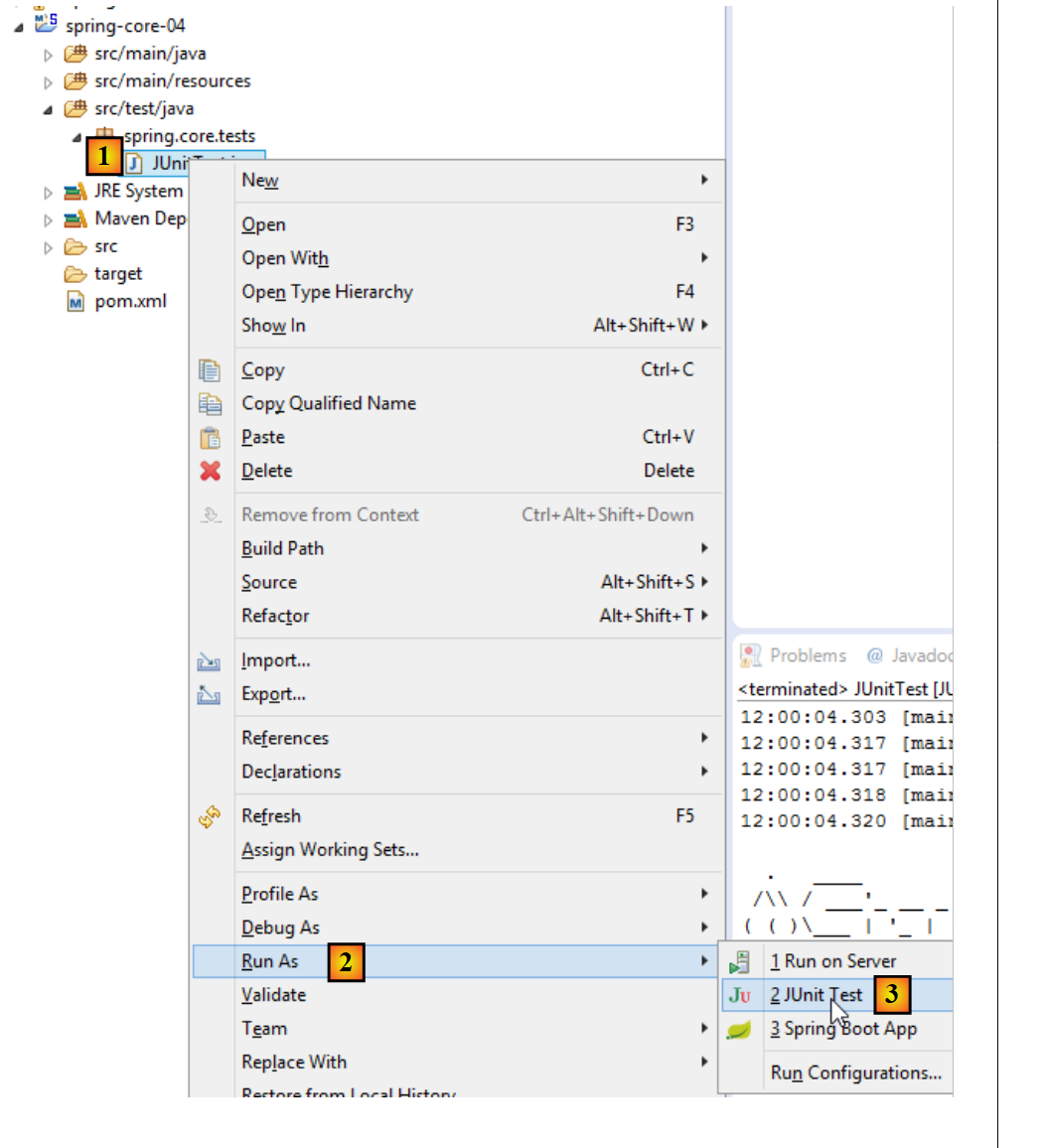 |
The following result is obtained:
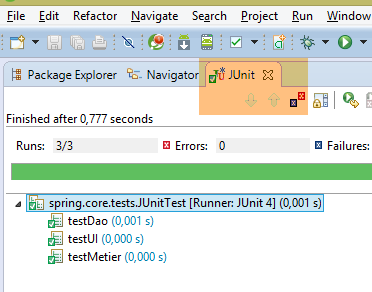 |
Here, all the tests passed. What does this example demonstrate? It demonstrates the flexibility provided by the Spring framework when configuring a layered architecture. You can choose to use either the [Ui1, Metier1, Dao1] or [Ui2, Metier2, Dao2] implementation simply by configuring it. Thus, in the previous JUnit test, if we keep only the injection of the [ui1, metier1, dao1] beans, we are working with the first architecture. To change the architecture, simply change the injected beans. This is done without changing the code of the layers implementing the interfaces. This type of programming is called interface-based programming because we do not use the instances of the classes implementing the layers, but rather the instances of their interfaces.
5.6. Conclusion
- Spring manages objects that are singletons (a single instance). Spring also manages objects that are instantiated each time an instance is requested from Spring. This case will also be presented in this document;
- these objects can be declared in various ways that can be combined:
- in a XML file,
- in a Java class annotated with [@Configuration],
- with any Java class annotated with [@Component, @Service, ...];
- a Spring object can be injected into another Spring object using the [@Autowired] annotation. This is referred to as dependency injection (DI: Dependency Injection);
- Spring is very useful for configuring layered architectures when used in conjunction with the interface-based programming paradigm;