6. View Internationalization
Here we will address the issue of view internationalization. This is a complex issue, and a good description of it can be found in the following article by Scott Hanselman:
First, let’s review his definitions of the various terms related to view internationalization:
Internationalization (i18n) | making the application support different languages and locales |
Localization (l10n) | making the application support a specific language/locale pair |
Globalization | the combination of Internationalization and Localization |
Language | spoken language – designated by an ISO code (fr: French, es: Spanish, en: English, ...) |
Locale | a variant of the language – also designated by an ISO code (en_GB: British English, en_US: American English, ...) |
Let’s tackle the problem with a first example.
6.1. Localization of real numbers
You may notice an anomaly in the previous input form:

For the real number, we typed [0,3] and it was not accepted. You must type [0.3]:
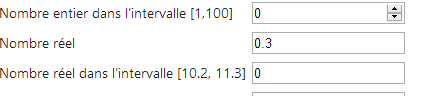
The expected format is therefore the Anglo-Saxon format, not the French format. A quick search online reveals some solutions. Here is one.
The [GET] and [POST] actions become the following:
    // Action13-GET
    [HttpGet]
    public ViewResult Action13Get()
    {
      return View("Action13Get", new ViewModel11());
}
    // Action13-POST
    [HttpPost]
    public ViewResult Action13Post(ViewModel11 modèle)
    {
      return View("Action13Get", modèle);
}
The [Action13Get.cshtml] view is identical to the [Action12Get.cshtml] view except for the JavaScript scripts:
<head>
  <meta name="viewport" content="width=device-width" />
  <title>Action13Get</title>
  <link rel="stylesheet" href="~/Content/Site.css" />
  <script type="text/javascript" src="~/Scripts/jquery-1.8.2.min.js"></script>
  <script type="text/javascript" src="~/Scripts/jquery.validate.min.js"></script>
  <script type="text/javascript" src="~/Scripts/jquery.validate.unobtrusive.min.js"></script>
...
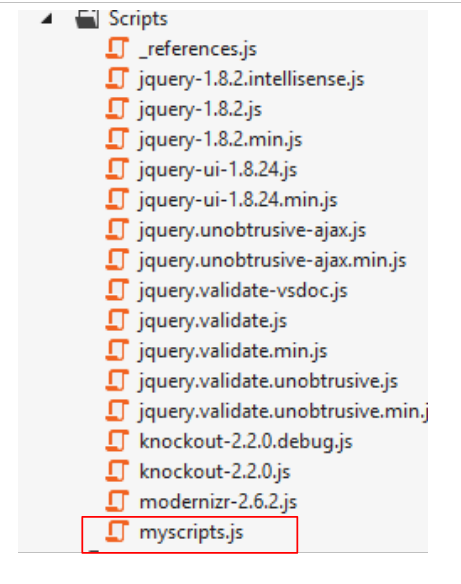
  <script type="text/javascript" src="~/Scripts/myscripts.js"></script>

</head>
Note: Line 5, adjust the jQuery version to match your version of Visual Studio.
 |
// http://blog.instance-factory.com/?p=268
$.validator.methods.number = function (value, element) {
  return this.optional(element) ||
      !isNaN(Globalize.parseFloat(value));
}

$.validator.methods.date = function (value, element) {
  return this.optional(element) ||
      !isNaN(Globalize.parseDate(value));
}

jQuery.extend(jQuery.validator.methods, {
  range: function (value, element, param) {
    //Use the Globalization plugin to parse the value
    var val = Globalize.parseFloat(value);
    return this.optional(element) || (
        val >= param[0] && val <= param[1]);
  }
});

// au chargement du document
$(document).ready(function () {
  var culture = 'fr-FR';
  Globalize.culture(culture);
});
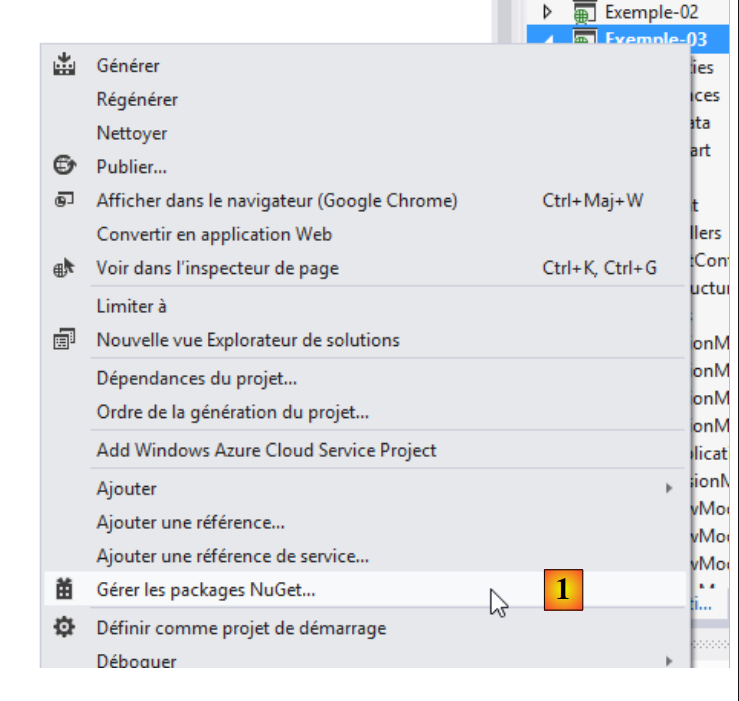
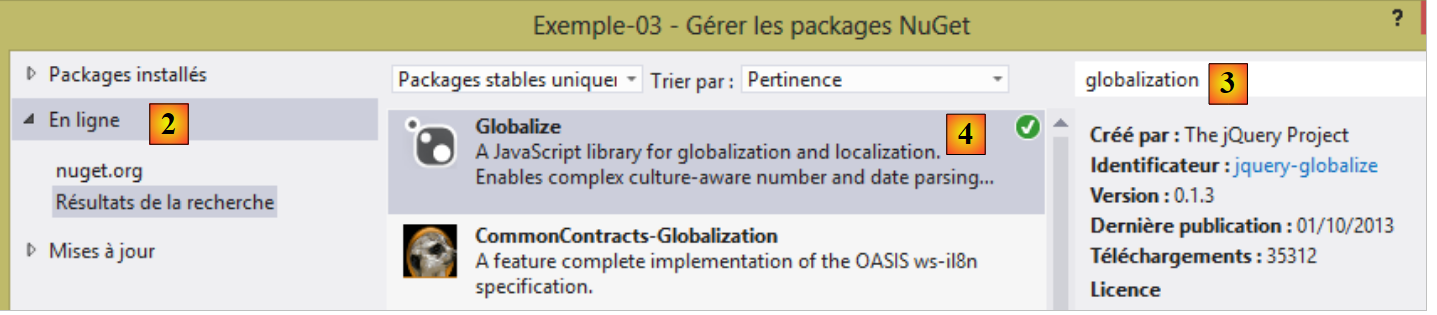
I indicated on line 1 where this script was found. I won’t try to explain it because I don’t understand it. JavaScript can sometimes be a bit cryptic. On lines 4, 9, and 15, a [Globalize] object is used. This is provided by the jQuery Globalization library , which can be obtained via [NuGet]:
 |
 |
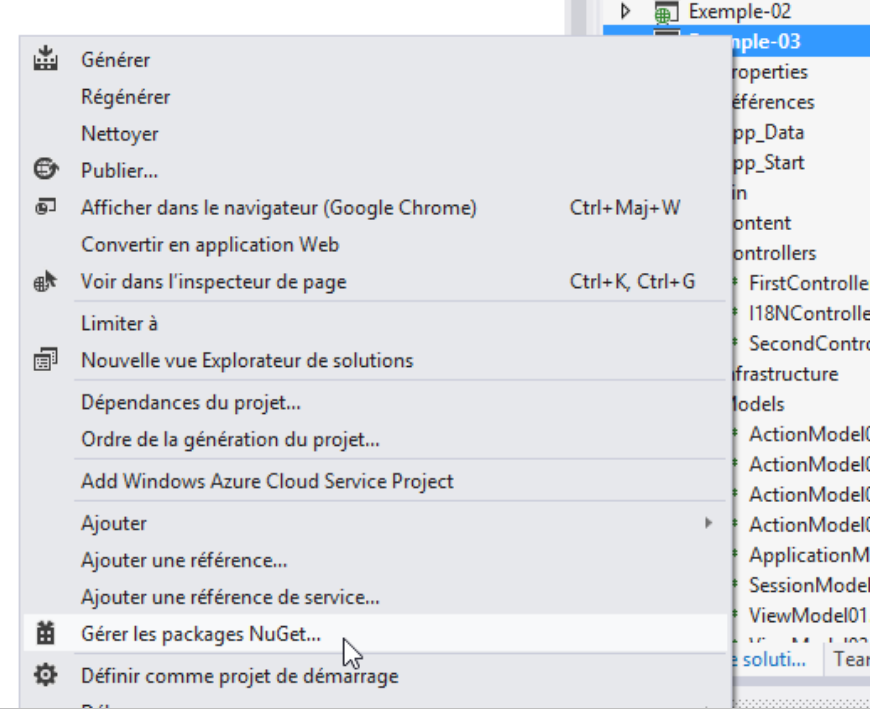
- in [1], manage the [NuGet] packages for the [Example-03] project;
- in [2], browse the packages online;
- in [3], type the term [globalization];
- in [4], install the [Globalize] package for the JQuery project.
Once the [Globalize] package is installed, a new folder appears in the [Scripts] folder:
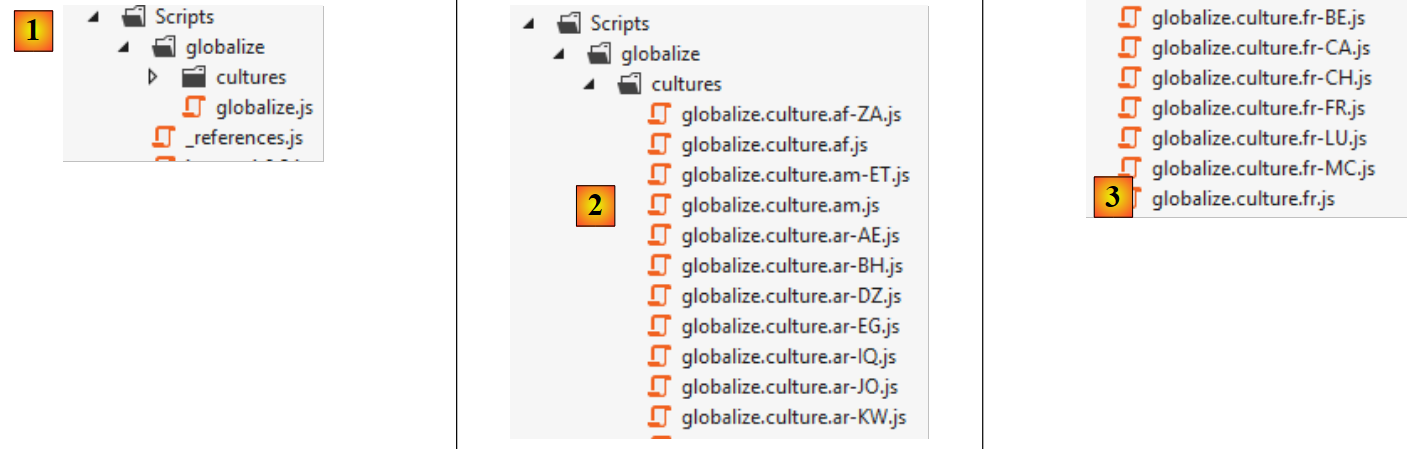 |
- in [1], a [globalize] folder has been created with the main script [globalize.js];
- in [2], the main script [globalize.js] is supplemented by scripts specific to a language and locale;
- in [3], the scripts specific to the French language with the Belgian (BE), Canadian (CA), French (FR), Swiss (CH), Luxembourgish (LU), and Monegasque (MC) locales.
The [globalize.js] script and our culture script [globalize.culture.fr-FR.js] must be included in the list of scripts on our [Action13Get.cshtml] page:
<head>
  <meta name="viewport" content="width=device-width" />
  <title>Action13Get</title>
...
  <script type="text/javascript" src="~/Scripts/globalize/globalize.js"></script>
  <script type="text/javascript" src="~/Scripts/globalize/cultures/globalize.culture.fr-FR.js"></script>
  <script type="text/javascript" src="~/Scripts/myscripts.js"></script>
</head>
- line 5: the [globalize] script;
- line 6: the [globalize.culture.fr-FR.js] script;
- line 7: the [myscripts.js] script;
Let’s take a closer look at this last script:
// http://blog.instance-factory.com/?p=268
$.validator.methods.number = function (value, element) {
  return this.optional(element) ||
      !isNaN(Globalize.parseFloat(value));
}

...

// au chargement du document
$(document).ready(function () {
  var culture = 'fr-FR';
  Globalize.culture(culture);
});
Lines 10–13 set the client-side culture to [fr-FR]:
- line 10: the jQuery [ready] function is executed when the document containing the script has been fully loaded by the browser;
- lines 11–12: the client-side culture is set to [fr-FR]. For this to work, the file [globalize.culture.fr-FR.js] must be included in the list of JavaScript scripts associated with the document.
Now we can test the new application:
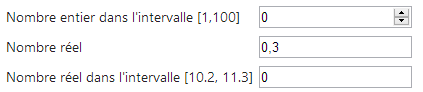
We can now enter [0.3] for the real number, which we couldn’t do before. However, we encounter another issue:

Above, the client-side validation allows us to enter [11.2] using the Anglo-Saxon notation. This value is not accepted on the server side when we submit the form:

We must type [11,2], and then it works on both the client and server sides. On the client side, the Anglo-Saxon notation should not be accepted. That must be possible...
Let’s now address the internationalization of views. We’ll continue with the example of the previous form by offering it in two languages: French and English.
6.2. Managing a culture
The language of the views is controlled by the [Thread.CurrentThread.CurrentUICulture] object. To display pages in the [fr-FR] culture, we write:
Localization (dates, numbers, currencies, times, etc.) is controlled by the [Thread.CurrentThread.CurrentCulture] object. Similar to what was written previously, we write:
These two statements could be placed in the constructor of each controller in the application. However, we might also want to factor out this code that is common to all controllers. We will take this approach.
We create two new controllers:
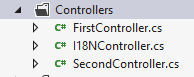
- [I18NController] will be the base class for all controllers using internationalization;
- [SecondController] is an example controller derived from [I18NController].
The code for the [I18NController] controller is as follows:
using System.Threading;
using System.Web;
using System.Web.Mvc;

namespace Exemples.Controllers
{
  public abstract class I18NController : Controller
  {
    public I18NController()
    {
      // retrieve the context of the current query
      HttpContext httpContext = HttpContext.Current;
      // examine the query for the [lang] parameter
      // look for it in the URL parameters
      string langue = httpContext.Request.QueryString["lang"];
      if (langue == null)
      {
        // look for it in the posted parameters
        langue = httpContext.Request.Form["lang"];
      }
      if (langue == null)
      {
        // search for it in the user's session
        langue = httpContext.Session["lang"] as string;
      }
      if (langue == null)
      {
        // 1st header parameter HTTP AcceptLanguages
        langue = httpContext.Request.UserLanguages[0];
      }
      if (langue == null)
      {
        // culture fr-FR
        langue = "fr-FR";
      }
      // put your tongue in session
      httpContext.Session["lang"] = langue;
      // changing thread cultures
      Thread.CurrentThread.CurrentCulture = new System.Globalization.CultureInfo(langue);
      Thread.CurrentThread.CurrentUICulture = Thread.CurrentThread.CurrentCulture;
    }
  }
}
- line 7: [I18NController] derives from the [Controller] class;
- line 7: the class is declared [abstract] to prevent direct instantiation: it can only be derived to be used;
- line 9: the class constructor will be executed each time a controller derived from [I18NController] is instantiated;
- line 12: we retrieve the context of the HTTP request currently being processed by the controller;
- line 15: we assume that the language is set by a [lang] parameter that can be found in various locations. We search in the following order:
- line 15: in the URL parameters [?lang=en-US],
- line 19: in the posted parameters [lang=de],
- line 24: in the user's session,
- line 29: in the language preferences sent by the HTTP client,
- line 26: if nothing is found, the locale is set to [fr-FR];
- line 37: we store the locale in the session. This is where it will be retrieved for subsequent requests. The user can change it by including it in the parameters of a GET or POST request;
- lines 39–40: we set the locale for the view that will be displayed after the current request is processed.
The [SecondController] controller will be as follows:
using Exemple_03.Models;
using Exemples.Controllers;
using System.Web.Mvc;

namespace Exemple_03.Controllers
{
    public class SecondController : I18NController
    {
      // Action14-GET
      [HttpGet]
      public ViewResult Action14Get()
      {
        return View("Action14Get", new ViewModel14());
      }

      // Action14-POST
      [HttpPost]
      public ViewResult Action14Post(ViewModel14 modèle)
      {
        return View("Action14Get", modèle);
      }
    }
}
- Line 7: [SecondController] extends [I18NController]. This ensures that the locale for the view to be displayed has been initialized;
- Line 13: We use the view model [ViewModel14], which we will introduce shortly;
- Lines 13 and 20: The view [Action14Get.cshtml] displays the form.
6.3. Internationalizing the view model [ViewModel14]
The view model [ViewModel14] is as follows:
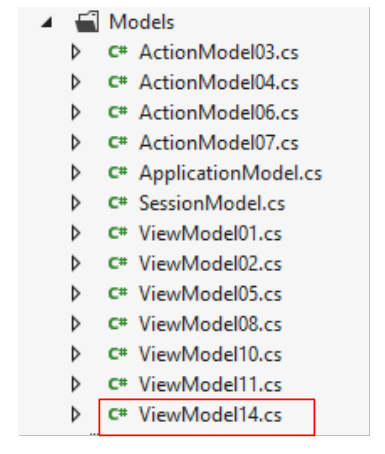 |
using Exemple_03.Resources;
using System;
using System.Collections.Generic;
using System.ComponentModel.DataAnnotations;
using System.Globalization;
using System.Net.Mail;

namespace Exemple_03.Models
{
  public class ViewModel14 : IValidatableObject
  {

    [Required(ErrorMessageResourceType = typeof(MyResources), ErrorMessageResourceName = "infoRequise")]
    [Display(ResourceType = typeof(MyResources), Name = "chaineaumoins4")]
    [RegularExpression(@"^.{4,}$", ErrorMessageResourceType = typeof(MyResources), ErrorMessageResourceName = "infoIncorrecte")]
    public string Chaine1 { get; set; }

    [Display(ResourceType = typeof(MyResources), Name = "chaineauplus4")]
    [Required(ErrorMessageResourceType = typeof(MyResources), ErrorMessageResourceName = "infoRequise")]
    [RegularExpression(@"^.{1,4}$", ErrorMessageResourceType = typeof(MyResources), ErrorMessageResourceName = "infoIncorrecte")]
    public string Chaine2 { get; set; }

    [Required(ErrorMessageResourceType = typeof(MyResources), ErrorMessageResourceName = "infoRequise")]
    [Display(ResourceType = typeof(MyResources), Name = "chaine4exactement")]
    [RegularExpression(@"^.{4,4}$", ErrorMessageResourceType = typeof(MyResources), ErrorMessageResourceName = "infoIncorrecte")]
    public string Chaine3 { get; set; }

    [Required(ErrorMessageResourceType = typeof(MyResources), ErrorMessageResourceName = "infoRequise")]
    [Display(ResourceType = typeof(MyResources), Name = "entier")]
    public int Entier1 { get; set; }

    [Display(ResourceType = typeof(MyResources), Name = "entierentrebornes")]
    [Required(ErrorMessageResourceType = typeof(MyResources), ErrorMessageResourceName = "infoRequise")]
    [Range(1, 100, ErrorMessageResourceType = typeof(MyResources), ErrorMessageResourceName = "infoIncorrecte")]
    public int Entier2 { get; set; }

    [Display(ResourceType = typeof(MyResources), Name = "reel")]
    [Required(ErrorMessageResourceType = typeof(MyResources), ErrorMessageResourceName = "infoRequise")]
    public double Reel1 { get; set; }

    [Display(ResourceType = typeof(MyResources), Name = "reelentrebornes")]
    [Required(ErrorMessageResourceType = typeof(MyResources), ErrorMessageResourceName = "infoRequise")]
    [Range(10.2, 11.3, ErrorMessageResourceType = typeof(MyResources), ErrorMessageResourceName = "infoIncorrecte")]
    public double Reel2 { get; set; }

    [Display(ResourceType = typeof(MyResources), Name = "email")]
    [Required(ErrorMessageResourceType = typeof(MyResources), ErrorMessageResourceName = "infoRequise")]
    [EmailAddress(ErrorMessageResourceType = typeof(MyResources), ErrorMessageResourceName = "infoIncorrecte", ErrorMessage="")]
    public string Email1 { get; set; }

    [Display(ResourceType = typeof(MyResources), Name = "date1")]
    [RegularExpression(@"\s*\d{2}/\d{2}/\d{4}\s*", ErrorMessageResourceType = typeof(MyResources), ErrorMessageResourceName = "infoIncorrecte")]
    [Required(ErrorMessageResourceType = typeof(MyResources), ErrorMessageResourceName = "infoRequise")]
    public string Regexp1 { get; set; }

    [Display(ResourceType = typeof(MyResources), Name = "date2")]
    [Required(ErrorMessageResourceType = typeof(MyResources), ErrorMessageResourceName = "infoRequise")]
    [DataType(DataType.Date)]
    public DateTime Date1 { get; set; }

    // validation
    public IEnumerable<ValidationResult> Validate(ValidationContext validationContext)
    {
      // error list
      List<ValidationResult> résultats = new List<ValidationResult>();
      // the same error msg for all
      string errorMessage=MyResources.ResourceManager.GetObject("infoIncorrecte", new CultureInfo(System.Web.HttpContext.Current.Session["lang"] as string)).ToString();

      // Date 1
      if (Date1.Date <= DateTime.Now.Date)
      {
        résultats.Add(new ValidationResult(errorMessage, new string[] { "Date1" }));
      }
      // Email1
      try
      {
        new MailAddress(Email1);
      }
      catch
      {
        résultats.Add(new ValidationResult(errorMessage, new string[] { "Email1" }));
      }
      // Regexp1
      try
      {
        DateTime.ParseExact(Regexp1, "dd/MM/yyyy", CultureInfo.CreateSpecificCulture("fr-FR"));
      }
      catch
      {
        résultats.Add(new ValidationResult(errorMessage, new string[] { "Regexp1" }));
      }

      // return the list of errors
      return résultats;
    }
  }
}
This model is the internationalized version of the previous model [ViewModel11]. We will describe the internationalization mechanism for the first attribute of the first property. The other attributes follow the same mechanism.
    [Required(ErrorMessageResourceType = typeof(MyResources), ErrorMessageResourceName = "infoRequise")]
public string Chaine1 { get; set; }
In the previous model [ViewModel11], these lines were as follows:
[Required(ErrorMessage = "Information requise")]
public string Chaine1 { get; set; }
In the internationalized version, line 1, the text to be displayed is placed in a resource file. Here, this file is named [MyResources.resx] (typeof) and has been placed in the project root. It is called a resource file.
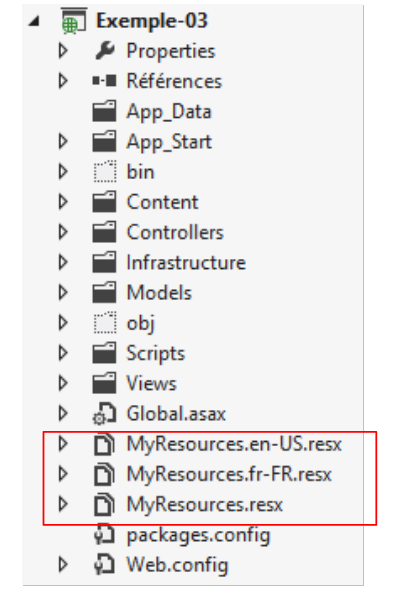 |
We have created three resource files here:
- [MyResources]: default resource when there is no resource for the current locale;
- [MyResources.fr-FR]: resource for the [fr-FR] locale;
- [MyResources.en-US]: resource for the [en-US] locale;
To create a resource file, follow these steps [1, 2, 3]:
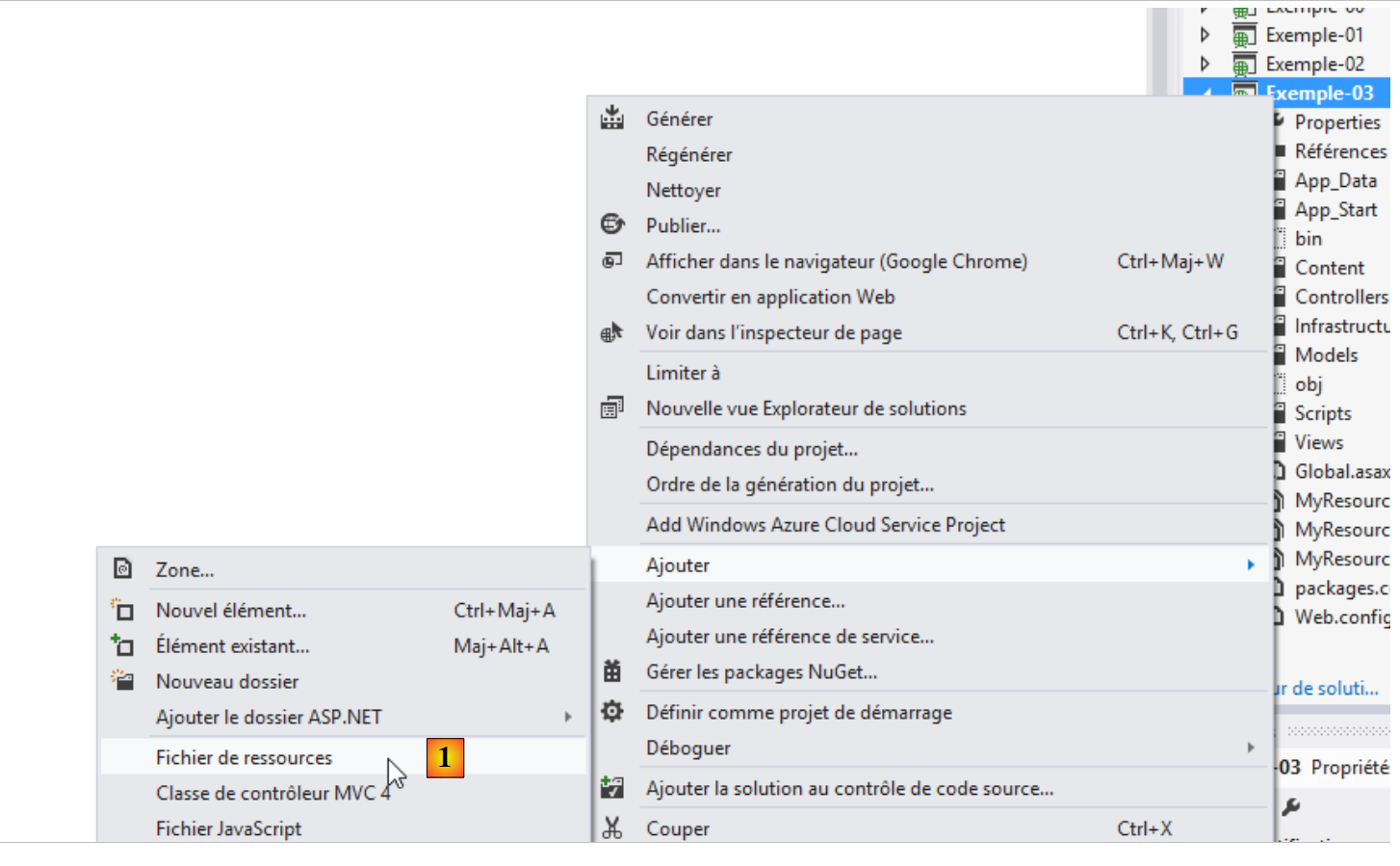 |
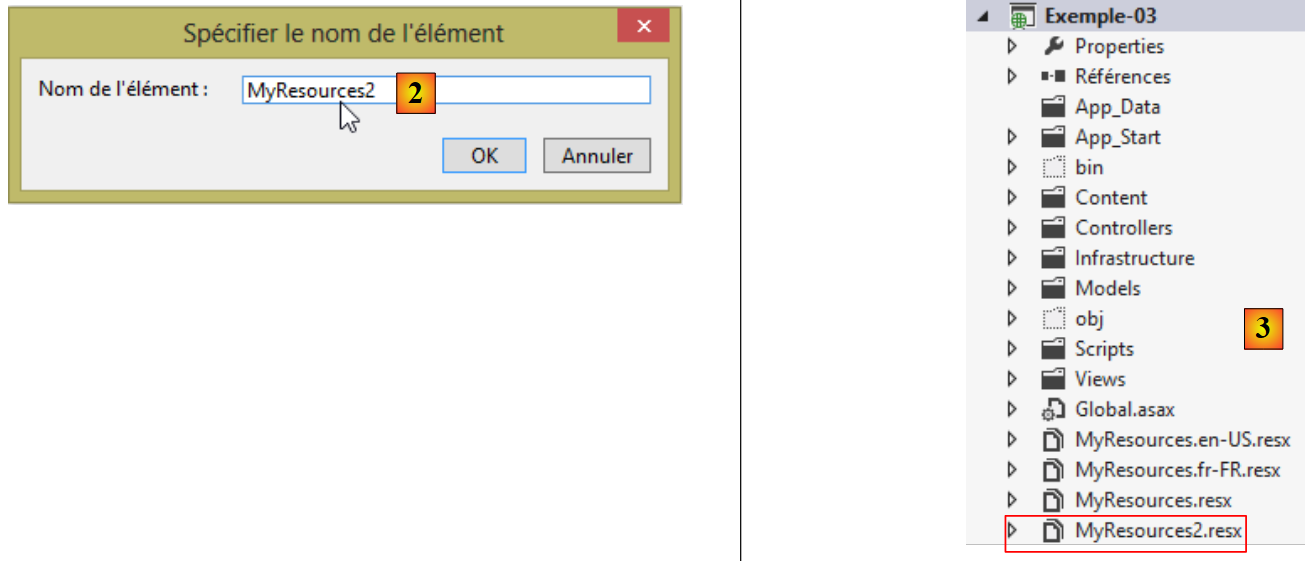 |
This creates the resource file [MyResources2.resx]. When you double-click it, you see the following page:
 |
A resource file is a dictionary containing keys and values associated with those keys. Enter the key in [1], the value in [2], and the resource scope in [3]. For these resources to be readable, they must have the [Public] scope. Let’s return to the line:
[Required(ErrorMessageResourceType = typeof(MyResources), ErrorMessageResourceName = "infoRequise")]
- [ErrorMessageResourceType]: refers to the resource file. The [typeof] parameter is the file name. This is converted into a class during the compilation process, and its binary is included in the project assembly. So ultimately, [MyResources] is the name of the resource class;
- [ErrorMessageResourceName = "infoRequise"]: refers to a key in the resource file. Ultimately, the line means that the error message to be displayed is the value in the [MyResources] file associated with the [infoRequise] key.
To create the [infoRequise] key and its associated value in the [MyResources] file, proceed as follows:
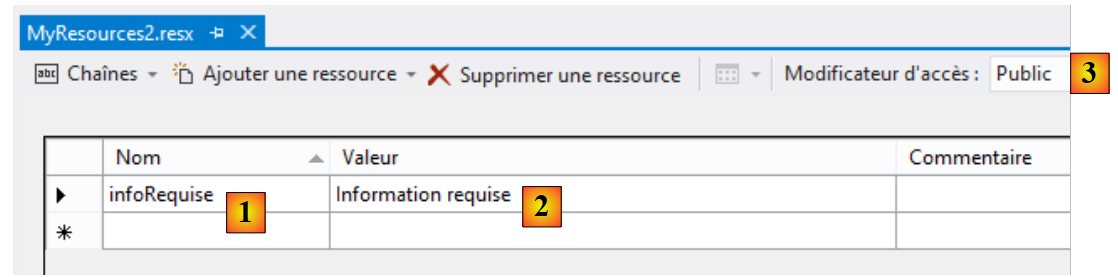 |
Enter the key in [1], the value in [2], and the resource scope in [3].
There is one last point to clarify: the namespace of the [MyResources] class. This is defined in the properties of the [MyResources.resx] file:
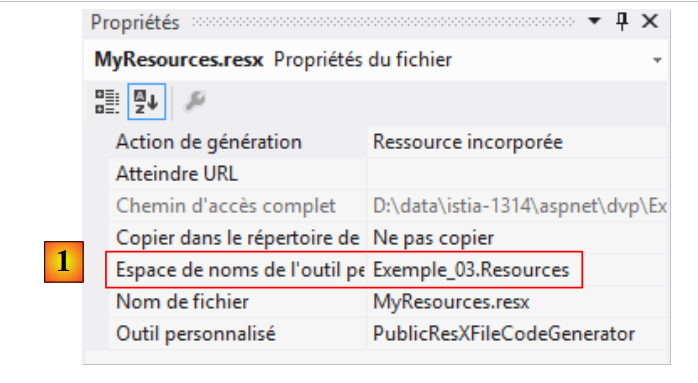 |
In [1], we define the namespace of the [MyResources] class that will be created from the [MyResources.resx] resource file. Let’s return to the internationalized line we examined:
[Required(ErrorMessageResourceType = typeof(MyResources), ErrorMessageResourceName = "infoRequise")]
The typeof operator expects a class, in this case the [MyResources] class. For this class to be found, its namespace must be imported into the [ViewModel14] class:
using Exemple_03.Resources;
For the [MyResources] class to be visible, the project must have been built at least once since the [MyResources] resource file was created. The code for this class is visible in the [MyResources.Designer.cs] file:
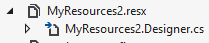
When you double-click this file, you access the code for the [MyResources] class:
namespace Exemple_03.Resources {
    using System;


[global::System.CodeDom.Compiler.GeneratedCodeAttribute("System.Resources.Tools.StronglyTypedResourceBuilder", "4.0.0.0")]
    [global::System.Diagnostics.DebuggerNonUserCodeAttribute()]
    [global::System.Runtime.CompilerServices.CompilerGeneratedAttribute()]
    public class MyResources2 {

  ...
         public static string infoRequise {
            get {
                return ResourceManager.GetString("infoRequise", resourceCulture);
            }
        }
    }
}
- line 1: the class namespace;
- line 11: the [infoRequise] key has become a static property of the [MyResources] class. It is accessible via the notation [MyResources.infoRequise]. Additionally, note that this property has a [public] scope. Without this, it would not be accessible. It’s important to remember this because, unfortunately, the default scope is [internal], and this can cause errors that are difficult to understand if you forget to change the scope.
Why are there now three resource files?
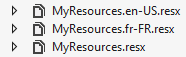
We created [MyResources.resx]. This is the root resource. Next, we create as many [MyResources.locale.resx] resource files as there are locales (languages) to manage. Here we are handling French [fr-FR] and American English [en-US]. When the current locale is neither [fr-FR] nor [en-US], the root resource [MyResources.resx] is used.
The final content of [MyResources.resx] is as follows:
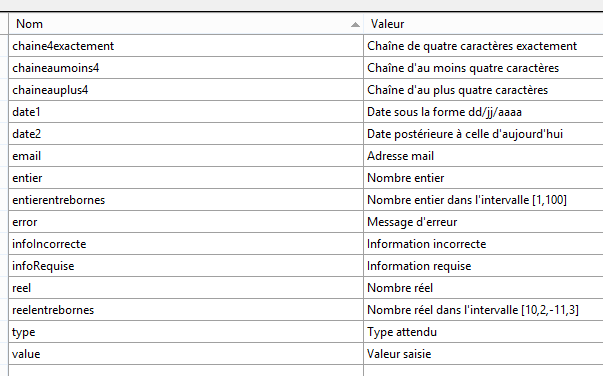
Messages will be in French when the locale is not recognized. The final content of [MyResources.fr-FR.resx] is identical and obtained by simply copying the file.
The final content of [MyResources.en-US.resx] is also obtained by copying the file and then modified as follows:
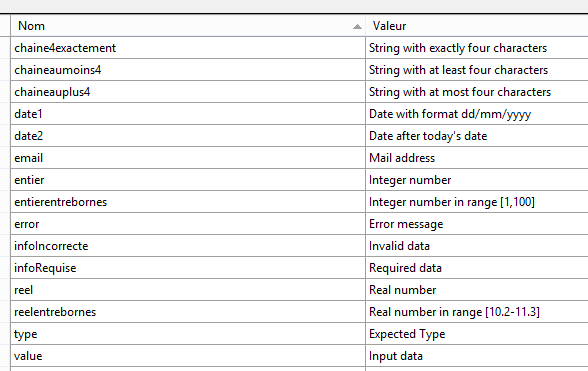
Let’s return to the [ViewModel14] view and its [Validate] method:
    // validation
    public IEnumerable<ValidationResult> Validate(ValidationContext validationContext)
    {
      // liste des erreurs
      List<ValidationResult> résultats = new List<ValidationResult>();
      // le même msg d'erreur pour tous
      string errorMessage=MyResources.ResourceManager.GetObject("infoIncorrecte", new CultureInfo(System.Web.HttpContext.Current.Session["lang"] as string)).ToString();

      // Date 1
      if (Date1.Date <= DateTime.Now.Date)
      {
        résultats.Add(new ValidationResult(errorMessage, new string[] { "Date1" }));
      }
...
      // on rend la liste des erreurs
      return résultats;
}
Line 7 shows how to retrieve a message from the [MyResources] resource file. Here, we want to retrieve the message associated with the key [infoIncorrecte] in the current culture:
- MyResources.ResourceManager.GetObject("infoIncorrecte", new CultureInfo("en-US")) : retrieves the object associated with the key [infoIncorrecte] from the resource file [MyResources.en-US.resx];
- we saw that the [I18NController] controller sets the current culture in the session associated with the [lang] key. The current culture can therefore be retrieved using System.Web.HttpContext.Current.Session["lang"] as string;
- The resource is retrieved as an [object]. To get the error message, we apply the [ToString] method to it.
6.4. Internationalizing the view [Action14Get.cshtml]
We update the form display view as follows:
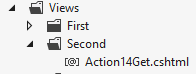
@model Exemple_03.Models.ViewModel14
@using Exemple_03.Resources
@{
  Layout = null;
}

<!DOCTYPE html>

<html>
<head>
  <meta name="viewport" content="width=device-width" />
  <title>Action14Get</title>
  <link rel="stylesheet" href="~/Content/Site.css" />
  <script type="text/javascript" src="~/Scripts/jquery-1.8.2.min.js"></script>
  <script type="text/javascript" src="~/Scripts/jquery.validate.min.js"></script>
  <script type="text/javascript" src="~/Scripts/jquery.validate.unobtrusive.min.js"></script>
  <script type="text/javascript" src="~/Scripts/globalize/globalize.js"></script>
  <script type="text/javascript" src="~/Scripts/globalize/cultures/globalize.culture.fr-FR.js"></script>
  <script type="text/javascript" src="~/Scripts/globalize/cultures/globalize.culture.en-US.js"></script>
  <script type="text/javascript" src="~/Scripts/myscripts2.js"></script>
  <script>
    $(document).ready(function () {
      var culture = '@System.Threading.Thread.CurrentThread.CurrentCulture';
        Globalize.culture(culture);
      });
  </script>

</head>
<body>
  <h3>Formulaire ASP.NET MVC - Internationalisation</h3>
  @using (Html.BeginForm("Action14Post", "Second"))
  {
    <table>
      <thead>
        <tr>
          <th>@MyResources.type</th>
          <th>@MyResources.value</th>
          <th>@MyResources.error</th>
        </tr>
      </thead>
      <tbody>
        <tr>
          <td>@Html.LabelFor(m => m.Chaine1)</td>
          <td>@Html.EditorFor(m => m.Chaine1)</td>
          <td>@Html.ValidationMessageFor(m => m.Chaine1)</td>
        </tr>
...
      </tbody>
    </table>
    <p>
      <input type="submit" value="Valider" />
    </p>
  }
</body>
</html>
<!-- choice of language -->
@using (Html.BeginForm("Lang", "Second"))
{
  <table>
    <tr>
      <td><a href="javascript:postForm('fr-FR','/Second/Action14Get')">Français</a></td>
      <td><a href="javascript:postForm('en-US','/Second/Action14Get')">English</a></td>
    </tr>
  </table>
}
Note: Line 14—make sure to match the jQuery version with your version of Visual Studio.
Let’s start with the simplest part, lines 36–38. They use the static properties of the [MyResources] class we just described. To access the [MyResources] class, you must import its namespace (line 2).
In internationalized messages, you must also include those displayed by the client-side validation framework. To do this, use the jQuery libraries in lines 17–19. We use the jQuery files for the two locales we support: [fr-FR] and [en-US]. Additionally, you may recall that the [Action13Get] view used the following JavaScript script [myscripts.js]:
// document loading
$(document).ready(function () {
  var culture = 'fr-FR';
  Globalize.culture(culture);
});
Now, the culture is no longer just [fr-FR]; it varies. Therefore, these lines are now generated by the [Action14Get] view itself on lines 21–26. These six lines will be included in the HTML page sent to the client.
- Line 23: The JavaScript variable [culture] is initialized with the current culture of the thread handling the request. You may recall that this was initialized by the constructor of the [I18NController] class:
      // on met la langue en session
      httpContext.Session["lang"] = langue;
      // on modifie les cultures du thread
      Thread.CurrentThread.CurrentCulture = new System.Globalization.CultureInfo(langue);
Thread.CurrentThread.CurrentUICulture = Thread.CurrentThread.CurrentCulture;
If the current culture is [en-US], the JavaScript script embedded in the HTML page becomes:
  <script>
    $(document).ready(function () {
      var culture = 'en-US';
        Globalize.culture(culture);
      });
</script>
We have already mentioned that the [$(document).ready] function is executed once the browser has finished loading the page. Its execution will set the culture of the client-side validation framework. With the [en-US] culture, the framework’s error messages will be in English and will come from the [MyResources.en-US.resx] resource file. We’ll see how.
Now let’s examine lines 57–65:
<!-- language selection -->
@using (Html.BeginForm("Lang", "Second"))
{
  <table>
    <tr>
      <td><a href="javascript:postForm('fr-FR','/Second/Action14Get')">Français</a></td>
      <td><a href="javascript:postForm('en-US','/Second/Action14Get')">English</a></td>
    </tr>
  </table>
}
Here is a second form; the first one is on lines 31–53. This form displays the following links at the bottom of the page:
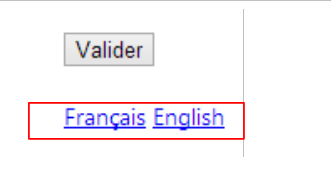 |
- line 2: the form is posted to the [Lang] action of the [Second] controller. For now, we don’t see any values that could be posted;
- lines 6 and 7: clicking on the links triggers the execution of the JavaScript function [postForm]. Where is this function located? In the script [myscripts2.js] referenced on line 20 of the view:
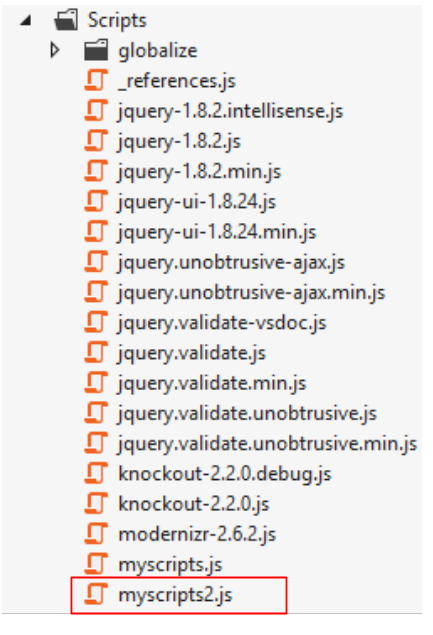 |
Its content is as follows:
function postForm(lang, url) {
  // on récupère le deuxième formulaire du document
  var form = document.forms[1];
  // on lui ajoute l'hidden attribute lang
  var hiddenField = document.createElement("input");
  hiddenField.setAttribute("type", "hidden");
  hiddenField.setAttribute("name", "lang");
  hiddenField.setAttribute("value", lang);
  // ajout du champ caché dans le formulaire
  form.appendChild(hiddenField);
  // on lui ajoute l'hidden attribute url
  var hiddenField = document.createElement("input");
  hiddenField.setAttribute("type", "hidden");
  hiddenField.setAttribute("name", "url");
  hiddenField.setAttribute("value", url);
  // ajout du champ caché dans le formulaire
  form.appendChild(hiddenField);
  // soumission
  form.submit();
}

// http://blog.instance-factory.com/?p=268
$.validator.methods.number = function (value, element) {
  return this.optional(element) ||
      !isNaN(Globalize.parseFloat(value));
}

$.validator.methods.date = function (value, element) {
  return this.optional(element) ||
      !isNaN(Globalize.parseDate(value));
}

jQuery.extend(jQuery.validator.methods, {
  range: function (value, element, param) {
    //Use the Globalization plugin to parse the value
    var val = Globalize.parseFloat(value);
    return this.optional(element) || (
        val >= param[0] && val <= param[1]);
  }
});
Lines 22–40 are the same as those already present in the [myscripts.js] script used in the previous example. We won’t revisit them here. The [postForm] function, which is executed when the language links are clicked, is on lines 1–20:
- line 1: the function takes two parameters, [lang], which is the culture selected by the user, and [url], which is the URL to which the client browser should be redirected once the culture change has been made. These two parameters are specified in the call:
<td><a href="javascript:postForm('fr-FR','/Second/Action14Get')">Français</a></td>
<td><a href="javascript:postForm('en-US','/Second/Action14Get')">English</a></td>
- line 3: we retrieve a reference to the second form in the document;
- lines 5-8: we programmatically create the tag
where [xx-XX] is the value of the [lang] parameter of the function;
- Line 10: Again, using code, we add this field to the second form. Ultimately, it behaves as if this field had been present in the second form from the start. Its value will therefore be submitted. That’s exactly what we wanted;
- Lines 11–17: We repeat the same process for a tag
where [url] is the value of the [url] parameter of the function;
- line 19: the second form is now posted. To which URL?
We need to go back to the code for the second form in the [Action14Get.cshtml] page:
@using (Html.BeginForm("Lang", "Second"))
{
...
}
The form is therefore posted to the URL [/Second/Lang]. We then need to define a [Lang] action in the [SecondController] controller. It will be as follows:
public class SecondController : I18NController
    {
      // Action14-GET
      [HttpGet]
      public ViewResult Action14Get()
      {
        return View("Action14Get", new ViewModel14());
      }

      // Action14-POST
      [HttpPost]
      public ViewResult Action14Post(ViewModel14 modèle)
      {
        return View("Action14Get", modèle);
      }

      // language
      [HttpPost]
      public RedirectResult Lang(string url)
      {
        // we redirect the client to url
        return new RedirectResult(url);
      }

    }
- line 18: the action only responds to a [POST];
- line 19: it retrieves only the parameter named [url];
- line 22: it instructs the client to redirect to this URL.
But what happened to the parameter named [lang]? We must now remember that the [SecondController] controller derives from the [I18NController] class (line 1 below). It is this controller that handles the [lang] parameter:
  public abstract class I18NController : Controller
  {
    public I18NController()
    {
      // on récupère le contexte de la requête courante
      HttpContext httpContext = System.Web.HttpContext.Current;
      // on examine la requête à la recherche du paramètre [lang]
      // on le cherche dans les paramètres de l'URL
      string langue = httpContext.Request.QueryString["lang"];
      if (langue == null)
      {
        // on le cherche dans les paramètres postés
        langue = httpContext.Request.Form["lang"];
      }
      if (langue == null)
      {
        // on le cherche dans la session de l'utilisateur
        langue = httpContext.Session["lang"] as string;
      }
      if (langue == null)
      {
        // 1er paramètre de l'entête HTTP AcceptLanguages
        langue = httpContext.Request.UserLanguages[0];
      }
      if (langue == null)
      {
        // culture fr-FR
        langue = "fr-FR";
      }
      // on met la langue en session
      httpContext.Session["lang"] = langue;
      // on modifie les cultures du thread
      Thread.CurrentThread.CurrentCulture = new CultureInfo(langue);
      Thread.CurrentThread.CurrentUICulture = Thread.CurrentThread.CurrentCulture;
}
In our example, the [lang] parameter is passed by reference. It will therefore be found on line 13, stored in the session on line 31, and used to update the current thread’s culture on lines 33–34.
What happens next? Let’s revisit the links:
<td><a href="javascript:postForm('fr-FR','/Second/Action14Get')">Français</a></td>
<td><a href="javascript:postForm('en-US','/Second/Action14Get')">English</a></td>
The redirect URL is [/Second/Action14Get]. The [Action14Get] action is therefore executed:
public class SecondController : I18NController
    {
      // Action14-GET
      [HttpGet]
      public ViewResult Action14Get()
      {
        return View("Action14Get", new ViewModel14());
      }
...
}
Previously, the constructor of the [I18NController] class is executed:
  public abstract class I18NController : Controller
  {
    public I18NController()
    {
      // on récupère le contexte de la requête courante
      HttpContext httpContext = System.Web.HttpContext.Current;
      // on examine la requête à la recherche du paramètre [lang]
      // on le cherche dans les paramètres de l'URL
      string langue = httpContext.Request.QueryString["lang"];
      if (langue == null)
      {
        // on le cherche dans les paramètres postés
        langue = httpContext.Request.Form["lang"];
      }
      if (langue == null)
      {
        // on le cherche dans la session de l'utilisateur
        langue = httpContext.Session["lang"] as string;
      }
      if (langue == null)
      {
        // 1er paramètre de l'entête HTTP AcceptLanguages
        langue = httpContext.Request.UserLanguages[0];
      }
      if (langue == null)
      {
        // culture fr-FR
        langue = "fr-FR";
      }
      // on met la langue en session
      httpContext.Session["lang"] = langue;
      // on modifie les cultures du thread
      Thread.CurrentThread.CurrentCulture = new CultureInfo(langue);
      Thread.CurrentThread.CurrentUICulture = Thread.CurrentThread.CurrentCulture;
}
This time, the [lang] parameter will be found in the session by line 18. Let’s assume its value is [en-US]. This culture therefore becomes the culture of the thread executing the request (lines 33–34). Let’s return to the [Action14Get] action:
      // Action14-GET
      [HttpGet]
      public ViewResult Action14Get()
      {
        return View("Action14Get", new ViewModel14());
}
Line 5, an instance of the view model [ViewModel14] will be created:
  public class ViewModel14 : IValidatableObject
  {

    [Required(ErrorMessageResourceType = typeof(MyResources), ErrorMessageResourceName = "infoRequise")]
    [Display(ResourceType = typeof(MyResources), Name = "chaineaumoins4")]
    [RegularExpression(@"^.{4,}$", ErrorMessageResourceType = typeof(MyResources), ErrorMessageResourceName = "infoIncorrecte")]
    public string Chaine1 { get; set; }
....
Because the current thread's culture is [en-US], the [MyResources.en-US.resx] file will be used. Error messages will therefore be in English.
Once the [ViewModel14] model is instantiated, the [Action14Get.cshtml] view is displayed:
@model Exemple_03.Models.ViewModel14
@using Exemple_03.Resources
@using System.Threading
@{
  Layout = null;
}

<!DOCTYPE html>

<html>
<head>
  <meta name="viewport" content="width=device-width" />
  <title>Action14Get</title>
  ...
  <script>
    $(document).ready(function () {
      var culture = '@Thread.CurrentThread.CurrentCulture';
        Globalize.culture(culture);
      });
  </script>

</head>
<body>
  <h3>Formulaire ASP.NET MVC - Internationalisation</h3>
  @using (Html.BeginForm("Action14Post", "Second"))
  {
    <table>
      <thead>
        <tr>
          <th>@MyResources.type</th>
          <th>@MyResources.value</th>
          <th>@MyResources.error</th>
        </tr>
      </thead>
      <tbody>
        <tr>
...
        </tr>
<tr>
Because the current thread locale is [en-US], the script embedded in the page on lines 15–20 is:
  <script>
    $(document).ready(function () {
      var culture = 'en-US';
        Globalize.culture(culture);
      });
  </script>
This ensures that the validation framework will use US formats (date, currency, numbers, etc.). For the same reason, the messages in lines 30–32 will be retrieved from the resource file [MyResources.en-US.resx] and will therefore be in English.
6.5. Examples of execution
Here are some examples of execution:
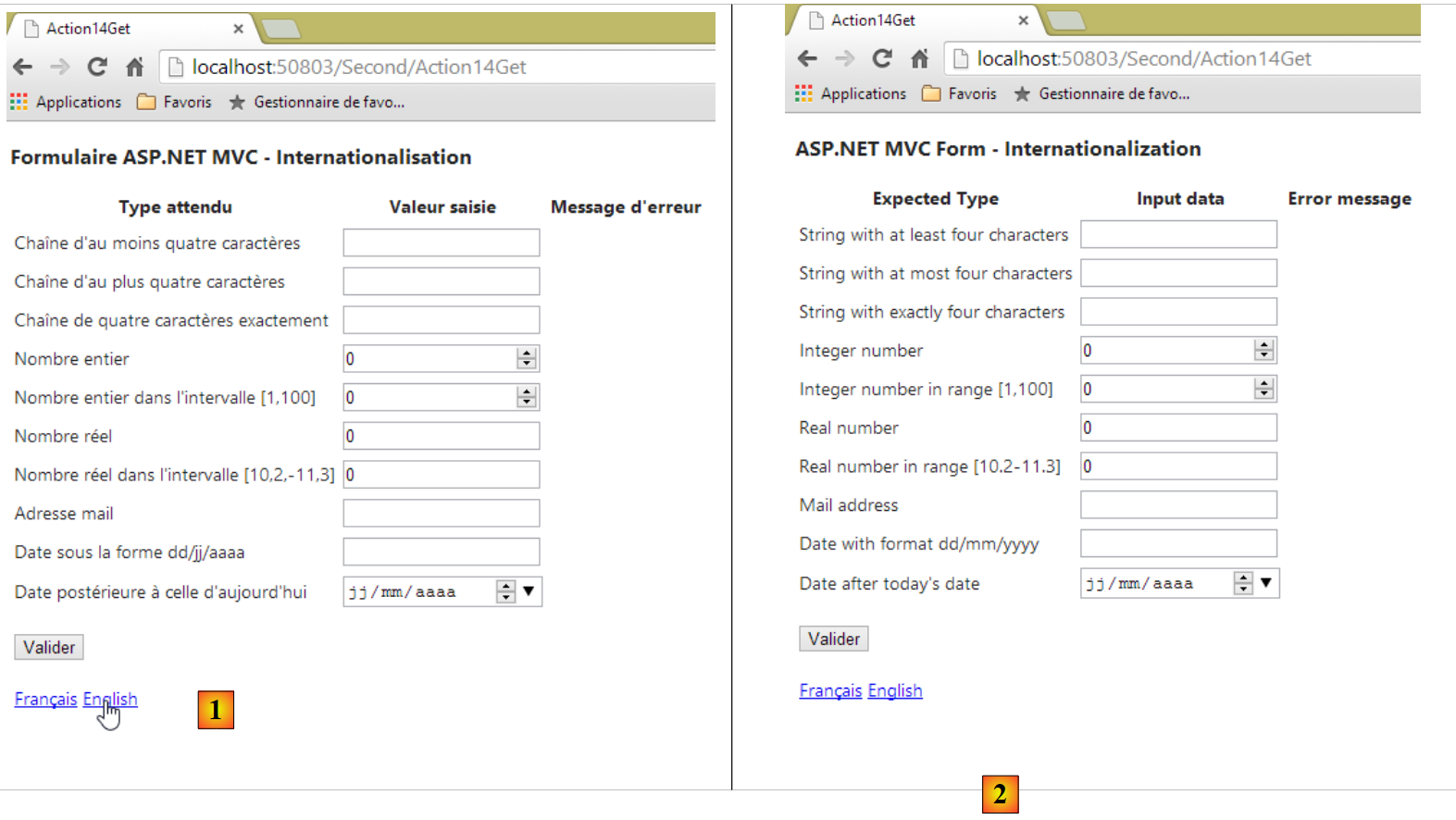 |
- in [1], the form in French; in [2], the form in English.
 |
- In [3], on the client side, the error messages are now in English.
If we look at the page’s source code, we can see that these error messages have been embedded in the page, meaning they are generated by the ASP.NET view [Action14Get] and its view model [ViewModel14]:
        <tr>
          <td><label for="Reel1">Real number</label></td>
          <td><input class="text-box single-line" data-val="true" data-val-number="The field Real number must be a number." data-val-required="Required data" id="Reel1" name="Reel1" type="text" value="0" /></td>
          <td><span class="field-validation-valid" data-valmsg-for="Reel1" data-valmsg-replace="true"></span></td>
        </tr>
        <tr>
          <td><label for="Reel2">Real number in range [10.2-11.3]</label></td>
          <td><input class="text-box single-line" data-val="true" data-val-number="The field Real number in range [10.2-11.3] must be a number." data-val-range="Invalid data" data-val-range-max="11.3" data-val-range-min="10.2" data-val-required="Required data" id="Reel2" name="Reel2" type="text" value="0" /></td>
          <td><span class="field-validation-valid" data-valmsg-for="Reel2" data-valmsg-replace="true"></span></td>
</tr>
6.6. Date Internationalization
Internationalization is a complex issue. Let’s look at the [Date1] property and its calendar:
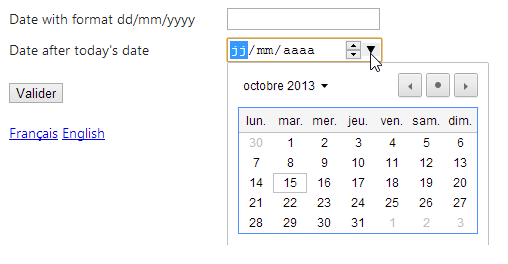
We can see that the calendar is a French calendar, even though the page's culture is [en-US]. In HTML5, there is a [lang] attribute that allows you to set the language of the page or a page component. We can then write the following code in the [Action14Get.cshtml] view:
@model Exemple_03.Models.ViewModel14
@using Exemple_03.Resources
@using System.Threading
@{
  Layout = null;
  var lang = Session["lang"] as string;
}

<!DOCTYPE html>

<html lang="@lang">
<head>
...
- line 6: retrieve the locale from the session;
- line 11: we set the page's [lang] attribute to this value.
Tests show that the calendar remains in French even when the page is otherwise displayed in English. There is also an issue with the other date field in the form:
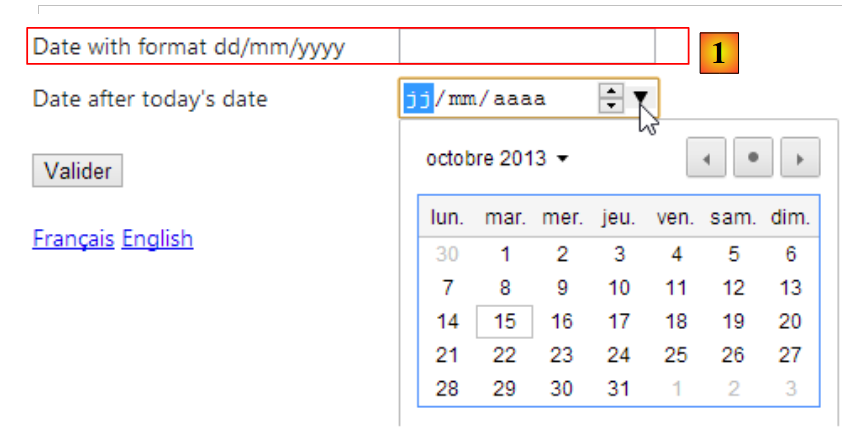 |
In [1], the date is still requested in the French format dd/mm/yyyy (20/11/2013), whereas the American format is mm/dd/yyyy (10/21/2013). We will try to resolve these two issues with a new view and a new view model.
jQuery UI is a project derived from the jQuery project and offers form components, including a calendar. This calendar can be localized. That is what we will demonstrate.
To begin, let’s add [jQuery UI] to our project.
 |
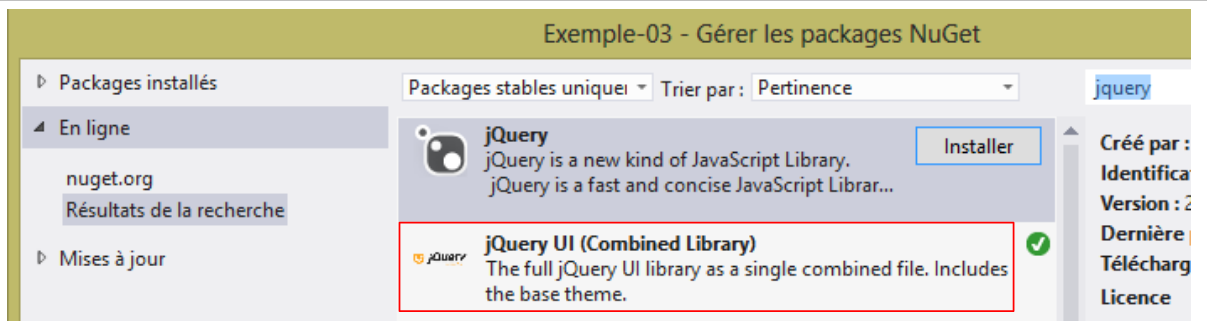 |
Once jQuery UI is installed, new elements appear in the project:
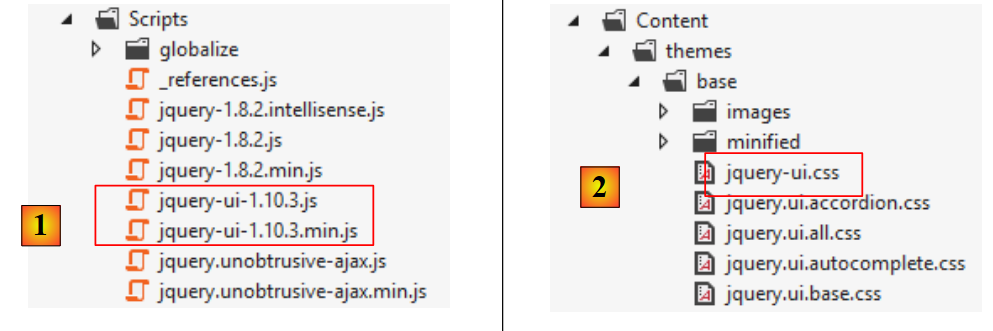 |
- in [1], the [JQuery UI] library in both normal and minified versions;
- in [2], the [JQuery UI] stylesheet;
The jQuery UI calendar is in English by default. To internationalize it, you need to add scripts found at the URL [https://github.com/jquery/jquery-ui/tree/master/ui/i18n]:
 |
To have the jQuery UI calendar in French, copy the contents of the [jquery.ui.datepicker-fr.js] file above into the project’s [Scripts] folder.
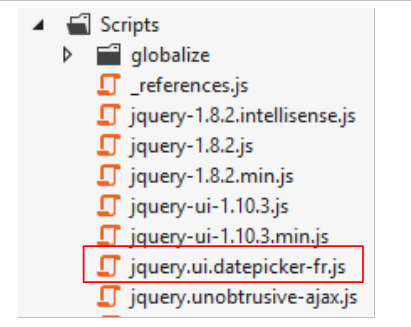 |
The code for the new view [Action15.cshtml] is obtained by copying the previous view [Action14.cshtml] and then modifying it. We will only show the changes:
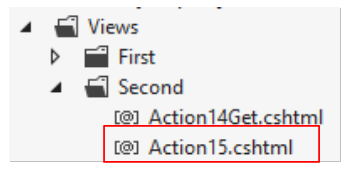 |
@model Exemple_03.Models.ViewModel15
@using Exemple_03.Resources
@using System.Threading
@{
  Layout = null;
}

<!DOCTYPE html>

<html lang="@Model.Culture">
<head>
  <meta name="viewport" content="width=device-width" />
  <title>Action15</title>
...
  <link rel="stylesheet" href="~/Content/themes/base/jquery-ui.css" />
  <script type="text/javascript" src="~/Scripts/jquery-ui-1.10.3.js"></script>
  <script type="text/javascript" src="~/Scripts/jquery.ui.datepicker-fr.js"></script>
  <script>
    $(document).ready(function () {
      var culture = '@Thread.CurrentThread.CurrentCulture';
      Globalize.culture(culture);
      $("#Date1").datepicker($.datepicker.regional['@Model.Regionale']);
    });
  </script>
</head>
<body>
  <h3>@MyResources.titre</h3>
  @using (Html.BeginForm("Action15", "Second"))
  {
    <table>
...
        <tr>
          <td>@Html.LabelFor(m => m.Date1)</td>
          <td>@Html.TextBox("Date1", Model.StrDate1)</td>
          <td>@Html.ValidationMessageFor(m => m.Date1)</td>
        </tr>
      </tbody>
    </table>
    <p>
      <input type="submit" value="Valider" />
    </p>
  }
  <!-- language selection -->
  @using (Html.BeginForm("Lang", "Second"))
  {
    <table>
      <tr>
        <td><a href="javascript:postForm('fr-FR','/Second/Action15')">Français</a></td>
        <td><a href="javascript:postForm('en-US','/Second/Action15')">English</a></td>
      </tr>
    </table>
  }
</body>
</html>
Note: Line 16, adjust the jQuery UI version to match the one you downloaded.
- Line 15: Reference the jQuery UI stylesheet;
- line 16: reference the downloaded version of jQuery UI;
- line 17: reference the French calendar script we just downloaded;
- line 34: the [Html.TextBox] method will generate an [input] tag here, of type [text], with id [Date1] and name [Date1];
- line 19: when the page has finished loading, the jQuery UI [datepicker] function will be applied to the element with id [Date1], i.e., the element on line 34. This function ensures that when the user focuses on the [Date1] input field, a calendar will appear allowing them to select a date. The [datepicker] function accepts a parameter that specifies the calendar’s language. The variable [@Model.Regionale] must be set to:
- 'fr' for a French calendar,
- '' for an English calendar;
The model for the previous view [Action15.cshtml] will be the following [ViewModel15] model:
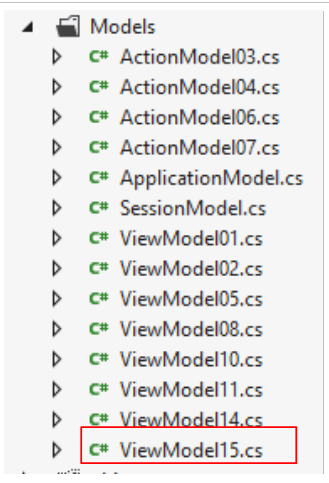 |
Its code is that of the [ViewModel14] model, slightly modified. We are only showing the changes:
using Exemple_03.Resources;
...
using System.Web;

namespace Exemple_03.Models
{
  [Bind(Exclude = "Culture,Regionale,StrDate1,FormatDate")]
  public class ViewModel15 : IValidatableObject
  {

...
    [Display(ResourceType = typeof(MyResources), Name = "date1")]
    [RegularExpression(@"\s*\d{2}/\d{2}/\d{4}\s*", ErrorMessageResourceType = typeof(MyResources), ErrorMessageResourceName = "infoIncorrecte")]
    [Required(ErrorMessageResourceType = typeof(MyResources), ErrorMessageResourceName = "infoRequise")]
    public string Regexp1 { get; set; }

    [Display(ResourceType = typeof(MyResources), Name = "date2")]
    [Required(ErrorMessageResourceType = typeof(MyResources), ErrorMessageResourceName = "infoRequise")]
    [DataType(DataType.Date)]
    public DateTime Date1 { get; set; }

    // manufacturer
    public ViewModel15()
    {
      // Culture of the moment
      Culture = HttpContext.Current.Session["lang"] as string;
      cultureInfo=new CultureInfo(Culture);
      // Regional calendar JQuery
      Regionale = MyResources.ResourceManager.GetObject("regionale", cultureInfo).ToString();
      // date format
      FormatDate = MyResources.ResourceManager.GetObject("formatDate", cultureInfo).ToString();
    }


    // validation
    public IEnumerable<ValidationResult> Validate(ValidationContext validationContext)
    {
      // error list
      List<ValidationResult> résultats = new List<ValidationResult>();
      // the same error msg for all
      string errorMessage = MyResources.ResourceManager.GetObject("infoIncorrecte", cultureInfo).ToString();
...
      // Regexp1
      try
      {
        DateTime.ParseExact(Regexp1, FormatDate, cultureInfo);
      }
      catch
      {
        résultats.Add(new ValidationResult(errorMessage, new string[] { "Regexp1" }));
      }

      // return the list of errors
      return résultats;

    }

    // fields outside the action model
    public string Culture { get; set; }
    public string Regionale { get; set; }
    public string StrDate1 { get; set; }
    public string FormatDate { get; set; }

    // local data
    private CultureInfo cultureInfo;
  }
}
Compared to the previous model [ViewModel14], we have four additional properties:
- line 60: the view's locale, 'fr-FR' or 'en-US'. This locale is initialized in the constructor on line 26;
- line 61: the regional culture of the jQuery calendar, 'fr' for a French calendar, '' for an English calendar. This field is initialized by line 29 of the constructor;
- line 63: the date format from line 15: 'dd/MM/yyyy' for a French date, 'MM/dd/yyyy' for an English date. This field is initialized on line 31 of the constructor;
- line 62: the string to display in the [Date1] input field. This field will be initialized by the action;
- line 47: the date [Regexp1] is now validated according to the current locale's format.
The values of the [Regionale] and [FormatDate] properties are found in the [MyResources] resource files. The French resource files [MyResources] [MyResources.fr-FR] [1] and the English resource file [2] change as follows:
 |
We are almost ready. We add an action [Action15] to the controller [SecondController]:
      // Action15
      public ViewResult Action15(FormCollection formData)
      {
        // method HTTP
        string method = Request.HttpMethod.ToLower();
        // model
        ViewModel15 modèle = new ViewModel15();
        if (method == "get")
        {
          modèle.StrDate1 = "";
        }
        else
        {
          TryUpdateModel(modèle, formData);
          modèle.StrDate1 = modèle.Date1.ToString(modèle.FormatDate);
        }
        // view display
        return View("Action15", modèle);
}
- Line 2: The [Action15] method handles both [GET] and [POST] requests. In the latter case, the posted values are retrieved in the [formData] parameter;
- line 5: the HTTP method of the request is retrieved;
- line 7: the view template to be displayed (the form) is created;
- lines 8–11: in the case of a [GET] request, the [Date1] input field is initialized with an empty string;
- lines 12–16: in the case of a [POST] request:
- line 14: the model is initialized with the posted values,
- line 15: the [Date1] input field is initialized with a string that is the value of [Date1] formatted according to the current locale [dd/MM/yyyy] for a French date, [MM/dd/yyyy] for an English date;
- line 18: the [Action15.cshtml] view is displayed with its template.
Let's run some tests:
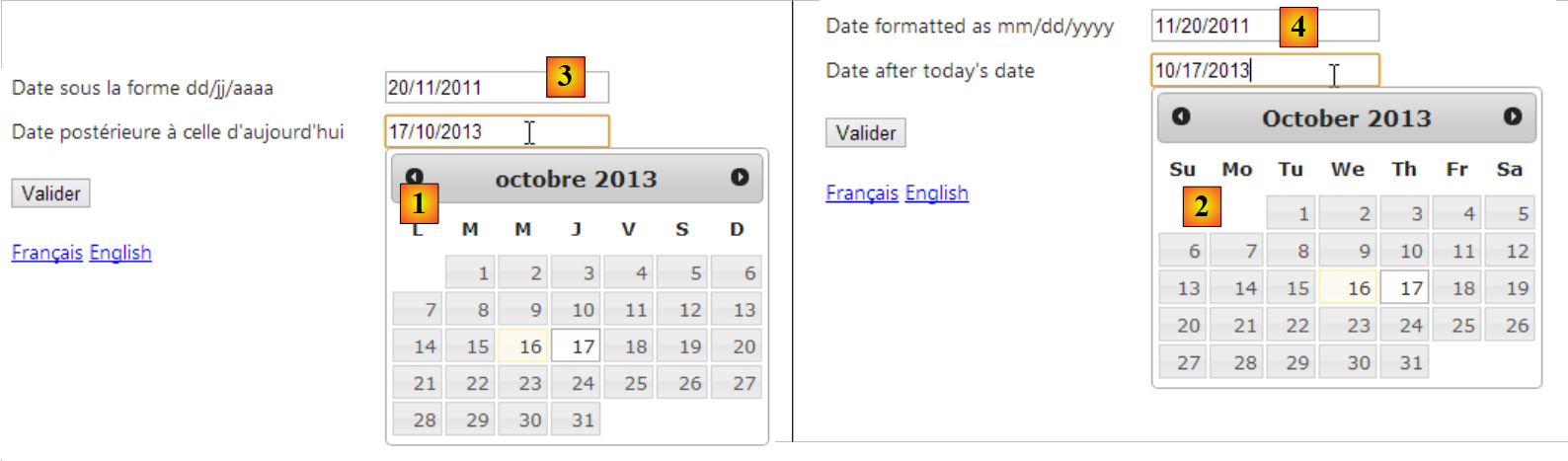 |
- in [1], a French calendar when the page is in French;
- in [2], an English calendar when the page is in English;
- in [3], a date in French format when the page is in French;
- in [4], the same date in English format when the page is in English;
6.7. Conclusion
As we can see, the topic of application internationalization is a complex one...