4. The model of an action
Let’s return to the architecture of a ASP.NET MVC application:
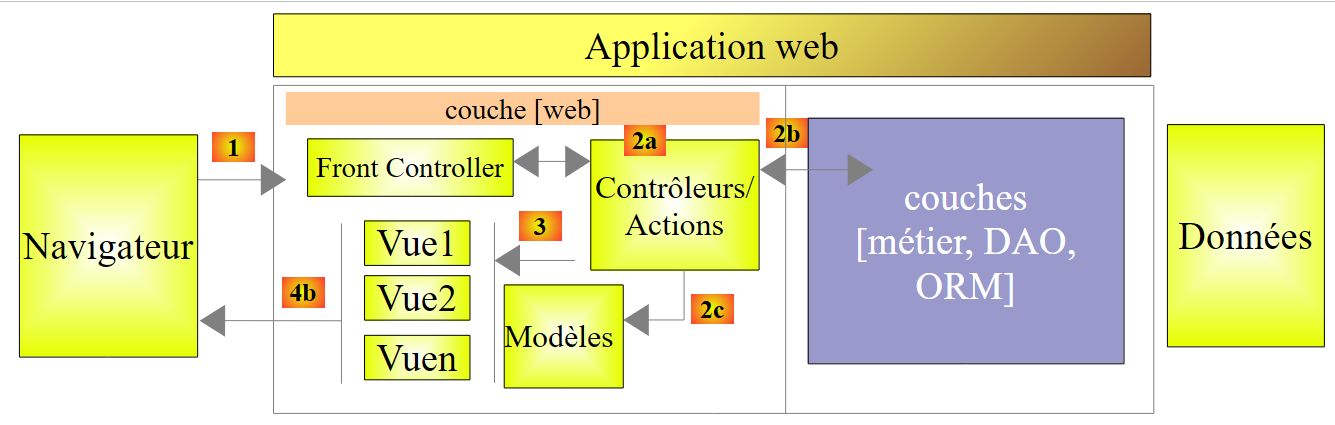 |
In the previous chapter, we looked at the process that routes the request to the controller and action that will handle it, a mechanism known as routing. We also presented the various responses an action can send to the browser. So far, we have presented actions that did not process the request sent to them. A request [1] carries with it various pieces of information that ASP.NET and MVC present to the action in the form of a template. This term should not be confused with the M template of a V view [2c] that is produced by the action:
 |
- the client's request HTTP arrives as [1];
- in [2], the information contained in the request is transformed into an action model [3]—often, but not necessarily, a class—which serves as input to the action [4];
- in [4], the action, based on this model, will generate a response. This response will have two components: a view V [6] and the model M of this view [5];
- The view V [6] will use its model M [5] to generate the response HTTP intended for the client.
In the MVC model, the action [4] is part of the C (controller), the [5] view model is the M, and the [6] view is the V.
This chapter examines the mechanisms for linking the information carried by the request—which is inherently in the form of character strings—to the action model, which may be a class with properties of various types.
4.1. Initializing Action Parameters
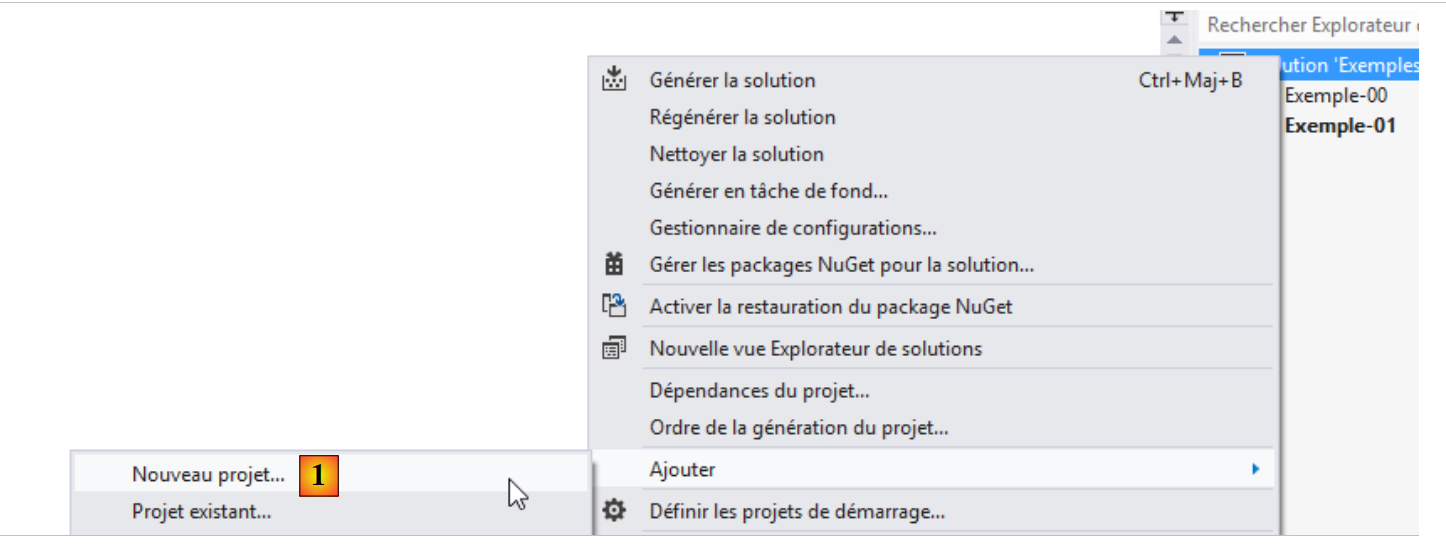
We add a new project ASP.NET to the existing solution MVC:
 |
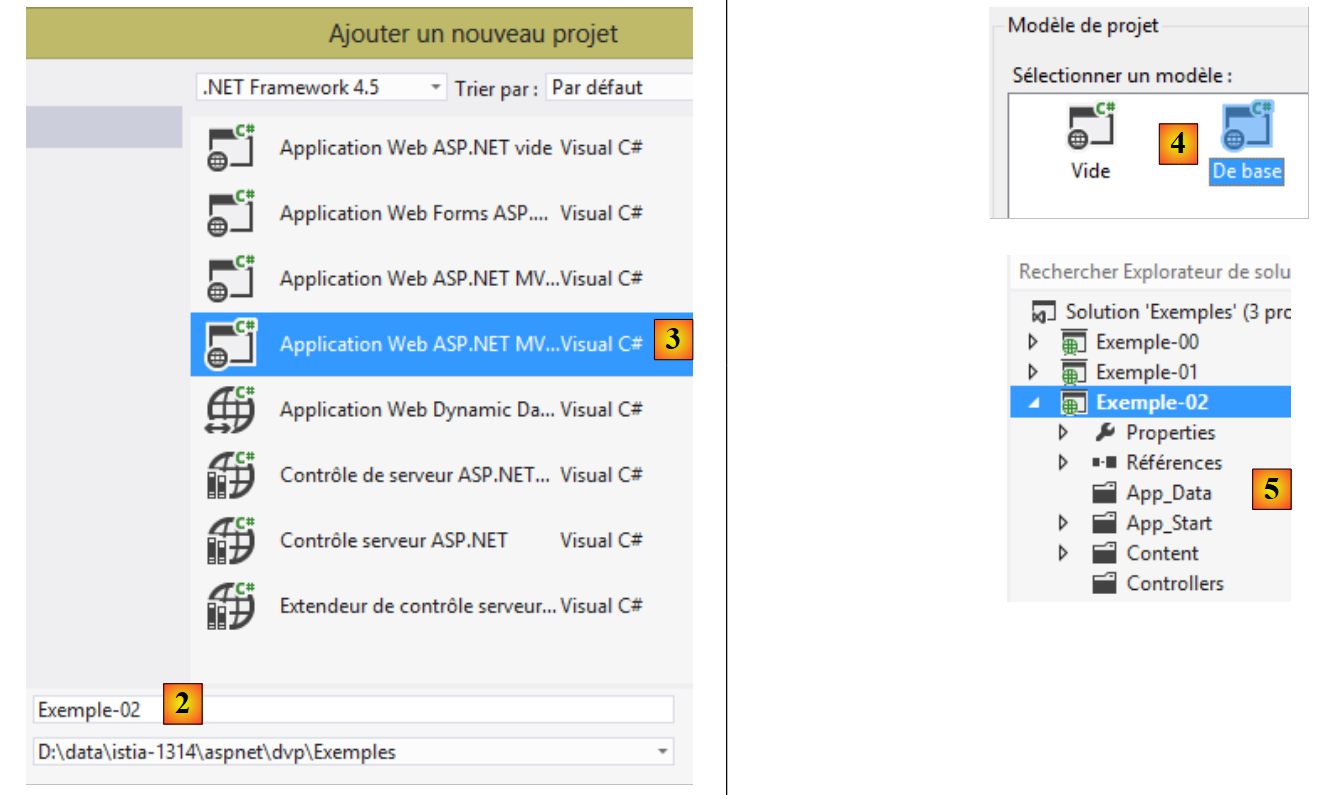 |
- in [2], the name of the new project;
- in [3, 4], we select a base project ASP.NET MVC;
- in [5], the new project.
We will make the new project the solution's startup project.
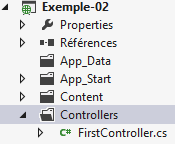
As done in section 3.1, we create a controller named [First] [1]:
 |
In this controller, we create the following action:
using System.Web.Mvc;

namespace Exemple_02.Controllers
{
  public class FirstController : Controller
  {
    // Action01
    public ContentResult Action01(string nom)
    {
      return Content(string.Format("Contrôleur=First, Action=Action01, nom={0}", nom));
    }

  }
}
The new feature is on line 8: the [Action01] method has a parameter. In this chapter, we will explore the different ways to initialize an action’s parameters. The [nom] parameter above is initialized in order with the following values:
Request.Form["nom"] | a parameter named [nom] sent by a command POST |
RouteData.Values["nom"] | an element of URL named [nom] |
Request.QueryString["nom"] | a parameter named [nom] sent by a command GET |
Request.Files["nom"] | an uploaded file named [nom] |
Let’s examine these different cases. Let’s request URL and [/First/Action01?nom=someone] directly in the browser. We get the following response:
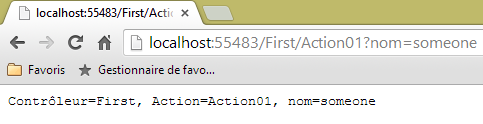 |
The browser’s request for HTTP was as follows:
- Line 1: The request is a GET. The requested URL includes the parameter [nom]. On the server side, the request reaches the [Action01] action, which has the following signature:
public ContentResult Action01(string nom)
To assign a value to the name parameter, ASP.NET MVC successively tries the values Request.Form["nom"], RouteData.Values["nom"], Request.QueryString["nom"], and Request.Files["nom"]. It stops as soon as it finds a value. The parameter [nom] embedded in URL of GET was placed by the framework in Request.QueryString["nom"]. It is with this value [someone] that the parameter [nom] of [Action01] will be initialized. Then the code in [Action01] executes:
return Content(string.Format("Contrôleur=First, Action=Action01, nom={0}", nom), "text/plain", Encoding.UTF8);
This code provides the response sent to the client:
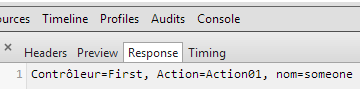 |
Note: The parameter binding mechanism is case-insensitive. So if our action is defined as:
public ContentResult Action01(string NOM)
and the parameter passed is [?NoM=zébulon], the binding will still take place. The parameter [NOM] from [Action01] will receive the value [zébulon].
Now, let’s request the same URL using a POST. To do this, we use the [Advanced Rest Client] application:
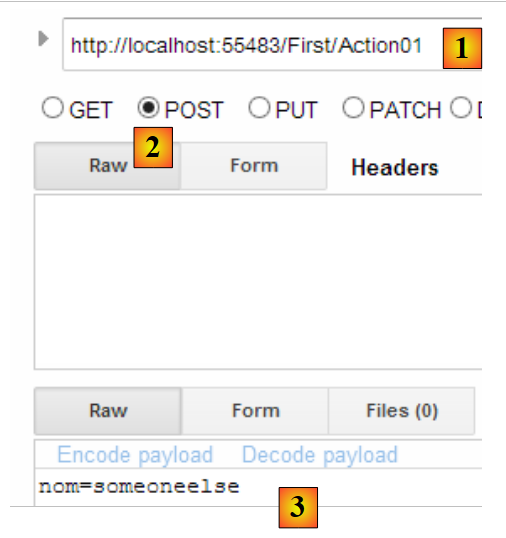 |
- in [1], the requested URL;
- in [2], the POST command will be used;
- in [3], the parameters from POST.
Let’s send this request and look at the HTTP logs. The HTTP request is as follows:
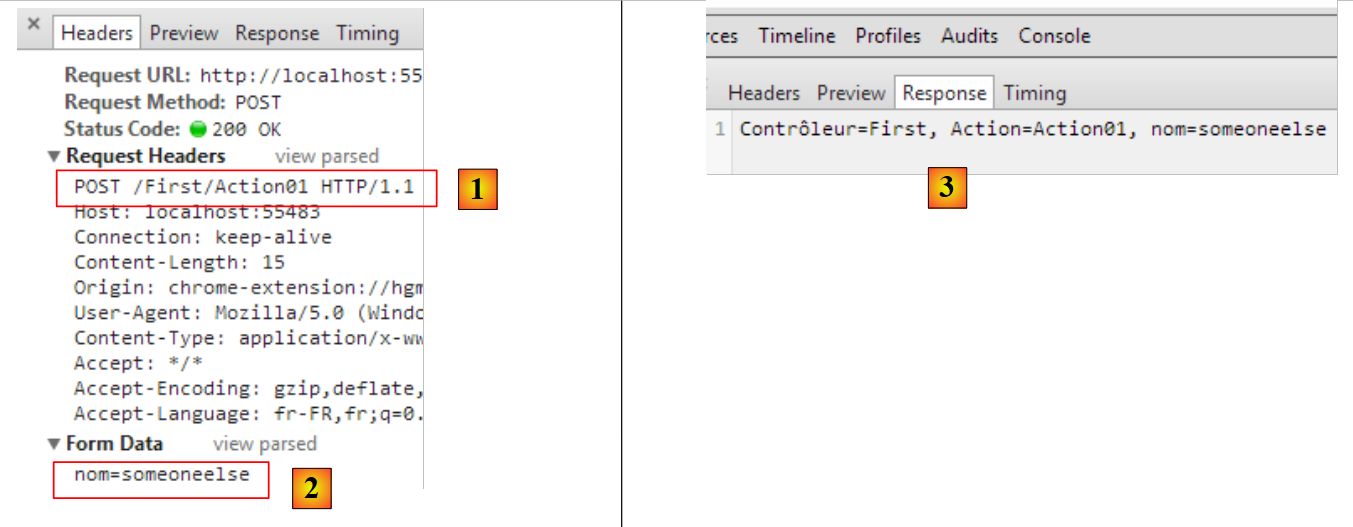 |
- in [1], the parameters from POST;
- in [2], the parameters of POST. Technically, they were sent after the HTTP headers, following the blank line indicating the end of those headers;
- in [3], the response received. The parameter [nom] from POST is correctly retrieved. Among the values tested for the parameter name Request.Form["nom"], RouteData.Values["nom"], Request.QueryString["nom"], Request.Files["nom"], the first one worked.
Now, let's modify the default route in [App_Start/RouteConfig]. Currently, this route is as follows:
      routes.MapRoute(
          name: "Default",
          url: "{controller}/{action}/{id}",
          defaults: new { controller = "Home", action = "Index", id = UrlParameter.Optional }
);
Let's change it to:
      routes.MapRoute(
          name: "Default",
          url: "{controller}/{action}/{nom}",
          defaults: new { controller = "Home", action = "Index", nom = UrlParameter.Optional }
);
- In line 3, we named the third element of a route [nom];
- line 4, this element is declared optional.
Now, let’s recompile the application and request URL [/First/Action01/zébulon] directly in the browser. We get the following response:
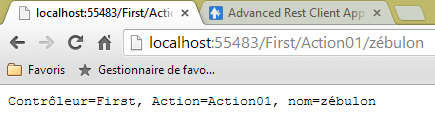 |
Among the values tested for the name parameter—Request.Form["nom"], RouteData.Values["nom"], Request.QueryString["nom"], Request.Files["nom"], the second one worked.
Let’s make the same query with POST and [Advanced Rest Client]:
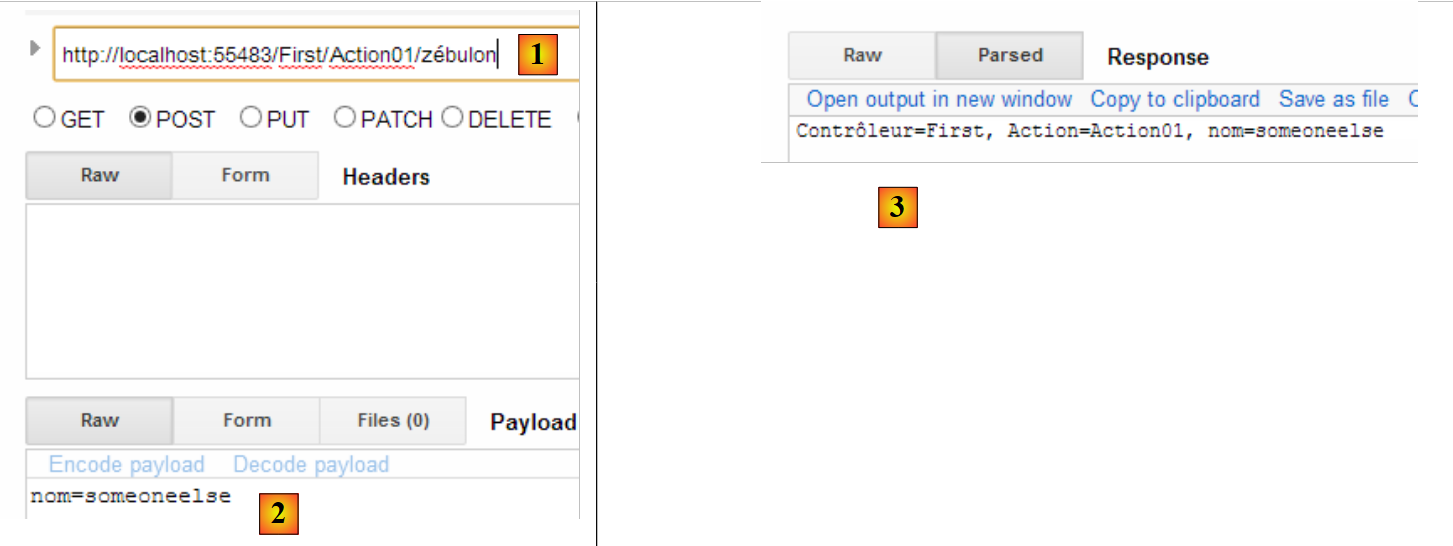 |
- in [1], we assigned a value to the {name} element of the route;
- in [2], we add a parameter [nom] to the posted request;
- the response obtained is in [3].
Among the values tested for the parameter [nom], Request.Form["nom"], RouteData.Values["nom"], Request.QueryString["nom"], Request.Files["nom"], two were suitable—the first two. The first one was used.
4.2. Verify the validity of the action's parameters
If an action has a parameter named [p], ASP.NET MVC will attempt to assign one of the values Request.Form["p"], RouteData.Values["p"], Request.QueryString["p"], or Request.Files["p"]. The first three values are character strings. If the parameter [p] is not of type [string], problems may occur.
Let’s create the following new action:
    // Action02
    public ContentResult Action02(int age)
    {
      string texte = string.Format("Contrôleur={0}, Action={1}, âge={2}", RouteData.Values["controller"], RouteData.Values["action"],age);
      return Content(texte, "text/plain", Encoding.UTF8);
}
- Line 2: The action [Action02] accepts a parameter named [age] of type int. The retrieved string must be convertible to int.
Let’s request URL [http://localhost:55483/First/Action02?age=21]. We get the following page:
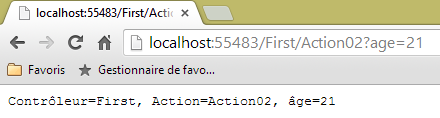 |
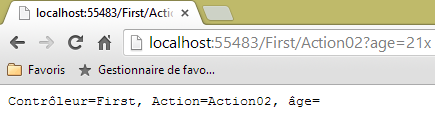
Let’s request URL and [http://localhost:55483/First/Action02?age=21x]. We get the following page:
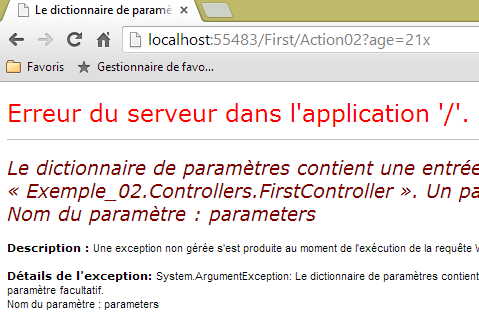 |
This time, we received an error page. It is interesting to look at the headers sent by the server in this case:
- Line 1: The server responded with a [500 Internal Server Error] code and sent a HTML page (line 3) of 12,438 bytes (line 5) to explain the possible reasons for this error.
Now let’s create the following [Action03] action:
    // Action03
    public ContentResult Action03(int? age)
    {
      ...
}
[Action03] is identical to [Action02] except that we changed the type of the parameter from [age] to int?, which means integer or null.
Let's request URL [http://localhost:55483/First/Action03?age=21x]. We get the following page:
 |
ASP.NET MVC failed to convert [21x] to type int. It then assigned the value null to the parameter [age], as permitted by its type int?. However, it is possible to determine whether the parameter was able to receive a value from the query or not.
We create the following new action [Action04]:
    // Action04
    public ContentResult Action04(int? age)
    {
      bool valide = ModelState.IsValid;
      string texte = string.Format("Contrôleur={0}, Action={1}, âge={2}, valide={3}", RouteData.Values["controller"], RouteData.Values["action"], age, valide);
      return Content(texte, "text/plain", Encoding.UTF8);
}
- line 2: we have kept the type [int?]. This specifically allows the request to omit the parameter [age], which is then assigned the value null;
- line 4: we check if the action model is valid. The action model consists of all its parameters, in this case [age]. The model is valid if all parameters were able to obtain a value from the request or the null value if the parameter type allows it;
- line 5: the value of the variable [valide] is added to the text sent to the client.
Let’s request URL [http://localhost:55483/First/Action04?age=21x]. We get the following page:
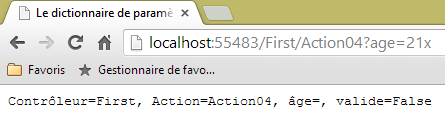 |
ASP.NET MVC failed to convert [21x] to type int. It then assigned the value null to the parameter [age], as permitted by its type int?. However, there were conversion errors, as shown by the value of [valide].
It is possible to get an error message associated with a failed conversion. Let’s examine the following new action:
    // Action05
    public ContentResult Action05(int? age)
    {
      string erreurs = getErrorMessagesFor(ModelState);
      string texte = string.Format("Contrôleur={0}, Action={1}, âge={2}, valide={3}, erreurs={4}", RouteData.Values["controller"], RouteData.Values["action"], age, ModelState.IsValid, erreurs);
      return Content(texte, "text/plain", Encoding.UTF8);
}
The new feature is on line 4. Here, we call a private method named [getErrorMessagesFor], passing it the action model state. It returns a string containing all the error messages that occurred. This method is as follows:
private string getErrorMessagesFor(ModelStateDictionary état)
    {
      List<String> erreurs = new List<String>();
      string messages = string.Empty;
      if (!état.IsValid)
      {
        foreach (ModelState modelState in état.Values)
        {
          foreach (ModelError error in modelState.Errors)
          {
            erreurs.Add(getErrorMessageFor(error));
          }
        }
        foreach (string message in erreurs)
        {
          messages += string.Format("[{0}]", message);
        }
      }
      return messages;
    }
- line 1: the actual parameter [ModelState] passed to the method is of type [ModelStateDictionary];
- line 3: a list of error messages, initially empty;
- line 5: we check whether the report passed as a parameter is valid or not. If not, then we will aggregate all error messages into a single string;
- line 7: the type [ModelStateDictionary] has a property [Values], which is a collection of types [ModelState]. There is one [ModelState] per element of the model. For example:
- ModelState["age"]: the action model status for the [age] parameter,
- ModelState["age"].Errors: the collection of errors for this parameter. Errors are of type [ModelError],
- ModelState["age"].Errors[i].ErrorMessage: the potential error message #i for parameter [age] of the template
- ModelState["age"].Errors[i].Exception: the exception for error #i in the error collection for parameter [age],
- ModelState["age"].Errors[i].Exception.InnerException: the cause of this exception,
- ModelState["age"].Errors[i].Exception.InnerException.Message: the message describing the cause of the exception;
- line 9: we iterate through the [Errors] collection for a specific [ModelState];
- line 11: retrieves the error message from a specific [ModelError] and adds it to the list of error messages on line 3;
- lines 14–17: the elements of the error message list are concatenated into a single string.
The [getErrorMessageFor] method in line 11 is as follows:
    private string getErrorMessageFor(ModelError error)
    {
      if (error.ErrorMessage != null && error.ErrorMessage.Trim() != string.Empty)
      {
        return error.ErrorMessage;
      }
      if (error.Exception != null && error.Exception.InnerException == null && error.Exception.Message != string.Empty)
      {
        return error.Exception.Message;
      }
      if (error.Exception != null && error.Exception.InnerException != null && error.Exception.InnerException.Message != string.Empty)
      {
        return error.Exception.InnerException.Message;
      }
      return string.Empty;
}
- Line 1: We receive a [ModelError] type that encapsulates an error on one of the elements of the action model. We look for the error message in three different places:
- in [ModelError].ErrorMessage, lines 3–6;
- in [ModelError].Exception.Message, lines 7–10;
- in [ModelError].Exception.InnerException.Message, lines 11–14;
During testing, we notice that the error message is found in these three locations depending on the nature of the model element. There must be a rule that allows us to reliably obtain the error message associated with a model element, but I don’t know it. So I search for it in the various locations where I can find it, in a specific order. As soon as a non-empty message is found, it is returned.
Let’s request URL [http://localhost:55483/First/Action05?age=21x]. We get the following page:
 |
4.3. An action with multiple parameters
Consider the following new action:
    // Action06
    public ContentResult Action06(double? poids, int? age)
    {
      string erreurs = getErrorMessagesFor(ModelState);
      string texte = string.Format("Contrôleur={0}, Action={1}, poids={2}, âge={3}, valide={4}, erreurs={5}", RouteData.Values["controller"], RouteData.Values["action"], poids, age, ModelState.IsValid, erreurs);
      return Content(texte, "text/plain", Encoding.UTF8);
}
- Line 2: We have two parameters, [poids] and [age].
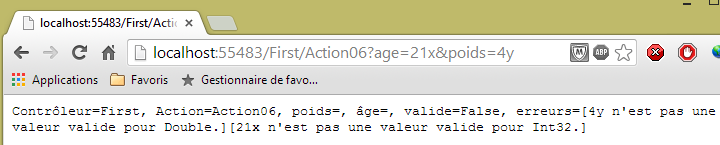
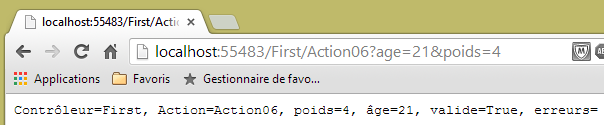
The rules described above now apply to both parameters. Here are some examples of execution:
 |
 |
4.4. Using a class as a model for an action
Let’s define a class that will serve as the template for an action. We’ll place it in the [Models] [1] folder.
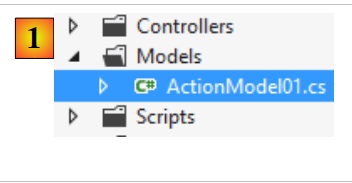 |
Its code will be as follows:
namespace Exemple_02.Models
{
  public class ActionModel01
  {
    public double? Poids { get; set; }
    public int? Age { get; set; }
  }
}
Our class has as automatic properties the two parameters [Poids] and [Age] discussed earlier. This class will be the input parameter for the action [Action07]:
    // Action07
    public ContentResult Action07(ActionModel01 modèle)
    {
      string erreurs = getErrorMessagesFor(ModelState);
      string texte = string.Format("Contrôleur={0}, Action={1}, poids={2}, âge={3}, valide={4}, erreurs={5}", RouteData.Values["controller"], RouteData.Values["action"], modèle.Poids, modèle.Age, ModelState.IsValid, erreurs);
      return Content(texte, "text/plain", Encoding.UTF8);
}
- Line 2: The action model is an instance of type [ActionModel01].
Let’s revisit the same two examples as before:
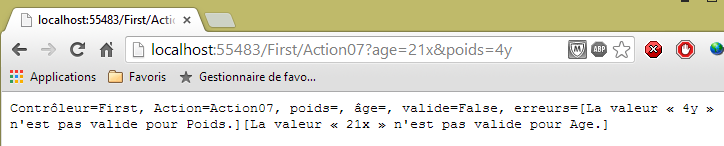 |
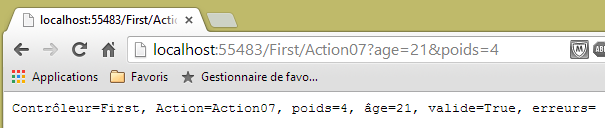 |
Note that parameter binding is case-insensitive. The request parameters were [age] and [poids]. They populated the properties [Age] and [Poids] of the class [ModelAction01].
Furthermore, we have so far used queries HTTP and [GET]. Let’s show that the queries [POST] behave the same way. To do this, let’s use the application [Advanced Rest Client] again:
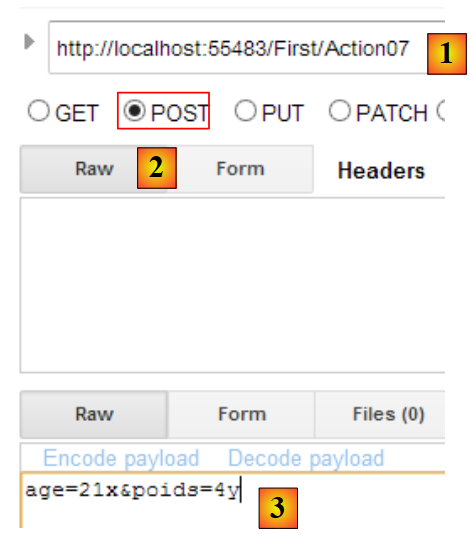 |
- in [1], the requested URL;
- in [2], it will be requested by a POST command;
- in [3], the parameters of POST.
The same response is obtained as with GET:

4.5. Action template with validity constraints - 1
With the previous model:
namespace Exemple_02.Models
{
  public class ActionModel01
  {
    public double? Poids { get; set; }
    public int? Age { get; set; }
  }
}
The parameters [poids] and [age] may be omitted from the query. In this case, the properties [Poids] and [Age] are assigned the value [null], and no error is reported. You might want to transform the model as follows:
namespace Exemple_02.Models
{
  public class ActionModel01
  {
    public double Poids { get; set; }
    public int Age { get; set; }
  }
}
Lines 5 and 6: The properties [Poids] and [Age] can no longer have the value [null]. Let’s see what happens with this new model when the parameters [poids] and [age] are missing from the query.
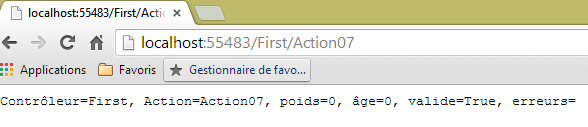 |
There were no errors, and the properties [Poids] and [Age] retained their initialization value: 0. ASP.NET MVC:
- created an instance of the model using a new ActionModel01. This is where the properties [Poids] and [Age] received their value of 0;
- did not assign any values to these two properties because there were no parameters with those names.
The first model allows us to check for the absence of a parameter: the corresponding property then has the value [null]. The second does not allow this. It is possible to add validation constraints other than the simple type of the parameters. We will now present them.
Consider the following new action model:
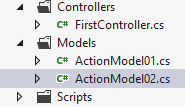 |
using System.ComponentModel.DataAnnotations;
namespace Exemple_02.Models
{
  public class ActionModel02
  {
    [Required]
    [Range(1, 200)]
    public double? Poids { get; set; }
    [Required]
    [Range(1, 150)]
    public int? Age { get; set; }
  }
}
- line 6: indicates that the field [Poids] is required;
- line 7: indicates that the field [Poids] must be within the range [1,200];
- line 9: indicates that the field [Age] is required;
- line 7: indicates that the field [Age] must be within the range [1,150];
The action using this template will be the following action [Action08]:
    // Action08
    public ContentResult Action08(ActionModel02 modèle)
    {
      string erreurs = getErrorMessagesFor(ModelState);
      string texte = string.Format("Contrôleur={0}, Action={1}, poids={2}, âge={3}, valide={4}, erreurs={5}", RouteData.Values["controller"], RouteData.Values["action"], modèle.Poids, modèle.Age, ModelState.IsValid, erreurs);
      return Content(texte, "text/plain", Encoding.UTF8);
}
- line 2: the action receives an instance of the [ActionModel02] model;
Let's run some tests:
 |
 |
 |
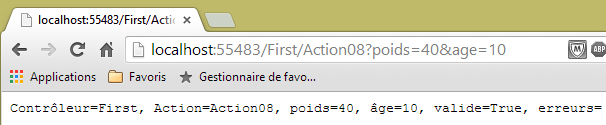 |
The errors are detected correctly. Now, let’s update the model as follows:
using System.ComponentModel.DataAnnotations;
namespace Exemple_02.Models
{
  public class ActionModel02
  {
    [Required]
    [Range(1, 200)]
    public double Poids { get; set; }
    [Required]
    [Range(1, 150)]
    public int Age { get; set; }
  }
}
Lines 8 and 11: the properties can no longer have the value [null]. Let’s compile and rerun the test without parameters:
 |
The absence of parameters caused the properties [Poids] and [Age] to retain the value they acquired during model instantiation: 0. Validation then occurs. The attribute [Required] is then satisfied. We can see that the error message above corresponds to the [Range] attribute. Therefore, to check for the presence of a parameter, the associated property must be nullable, i.e., it must be able to accept the value null.
Let’s return to the initial [ActionModel02] model and consider an action whose model consists of a [ActionModel02] instance and a nullable [DateTime] type:
    // Action09
    public ContentResult Action09(ActionModel02 modèle, DateTime? date)
    {
      string erreurs = getErrorMessagesFor(ModelState);
      string texte = string.Format("Contrôleur={0}, Action={1}, poids={2}, âge={3}, date={4}, valide={5}, erreurs={6}", RouteData.Values["controller"], RouteData.Values["action"], modèle.Poids, modèle.Age, date, ModelState.IsValid, erreurs);
      return Content(texte, "text/plain", Encoding.UTF8);
}
Let's run some tests:
 |
We did not pass any parameters to the action. The [Required] attributes of the [Poids] and [Age] properties did their job. The date received the value null, and no errors were reported.
Now let’s pass invalid parameters:
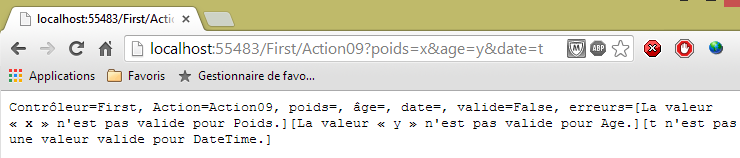 |
We are now passing valid values:
 |
Let’s examine other validation constraints. The new action model is as follows:
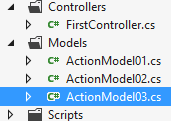 |
using System.ComponentModel.DataAnnotations;
namespace Exemple_02.Models
{
  public class ActionModel03
  {
    [Required(ErrorMessage = "Le paramètre email est requis")]
    [EmailAddress(ErrorMessage = "Le paramètre email n'a pas un format valide")]
    public string Email { get; set; }

    [Required(ErrorMessage = "Le paramètre jour est requis")]
    [RegularExpression(@"^\d{1,2}$", ErrorMessage = "Le paramètre jour doit avoir 1 ou 2 chiffres")]
    public string Jour { get; set; }

    [Required(ErrorMessage = "Le paramètre info1 est requis")]
    [MaxLength(4, ErrorMessage = "Le paramètre info1 ne peut avoir plus de 4 caractères")]
    public string Info1 { get; set; }

    [Required(ErrorMessage = "Le paramètre info2 est requis")]
    [MinLength(2, ErrorMessage = "Le paramètre info2 ne peut avoir moins de 2 caractères")]
    public string Info2 { get; set; }

    [Required(ErrorMessage = "Le paramètre info3 est requis")]
    [MinLength(4, ErrorMessage = "Le paramètre info3 doit avoir 4 caractères exactement")]
    [MaxLength(4, ErrorMessage = "Le paramètre info3 doit avoir 4 caractères exactement")]
    public string Info3 { get; set; }
  }
}
- line 6: the [Required] attribute, this time with an error message that we define ourselves;
- line 7: the [EMailAddress] attribute requires that the [Email] field contain a valid email address;
- line 11: the [RegularExpression] attribute requires that the [Jour] field contain a string of one or two digits. The first parameter is the regular expression that the field must validate;
- line 15: the attribute [MaxLength] requires that the field [Info1] contain no more than 4 characters;
- line 19: the attribute [MinLength] specifies that the field [Info2] must have at least 2 characters;
- lines 23–24: the combined attributes [MaxLength] and [MinLength] require that the field [Info3] have exactly 4 characters;
The action [Action10] will use this template:
// Action10
    public ContentResult Action10(ActionModel03 modèle)
    {
      string erreurs = getErrorMessagesFor(ModelState);
      string texte = string.Format("email={0}, jour={1}, info1={2}, info2={3}, info3={4}, erreurs={5}",
        modèle.Email, modèle.Jour, modèle.Info1, modèle.Info2, modèle.Info3, erreurs);
      return Content(texte, "text/plain", Encoding.UTF8);
    }
Let's run some tests with this action.
First, without parameters:
 |
Then with invalid parameters:
 |
Then with valid parameters:
 |
4.6. Action model with validity constraints - 2
We introduce additional integrity constraints. The new action model will be the following [ActionModel04] class:
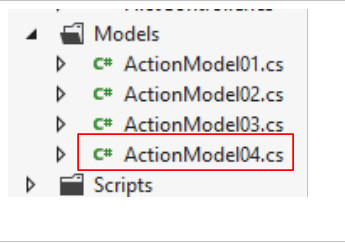 |
using System.ComponentModel.DataAnnotations;

namespace Exemple_02.Models
{
  public class ActionModel04
  {
    [Required(ErrorMessage="Le paramètre url est requis")]
    [Url(ErrorMessage="URL invalide")]
    public string Url { get; set; }
    [Required(ErrorMessage = "Le paramètre info1 est requis")]
    public string Info1 { get; set; }
    [Required(ErrorMessage = "Le paramètre info2 est requis")]
    [Compare("Info1",ErrorMessage="Les paramètres info1 et info2 doivent être identiques")]
    public string Info2 { get; set; }
    [Required(ErrorMessage = "Le paramètre cc est requis")]
    [CreditCard(ErrorMessage = "Le paramètre cc n'est pas un n° de carte de crédit valide")]
    public string Cc { get; set; }
  }
}
- line 8: requires that the annotated field be a valid URL;
- line 13: requires that the properties [Info1] and [Info2] have the same value;
- line 16: requires that the annotated field be a valid credit card number.
The action using this template will be as follows:
    // Action11
    public ContentResult Action11(ActionModel04 modèle)
    {
      string erreurs = getErrorMessagesFor(ModelState);
      string texte = string.Format("URL={0}, Info1={1}, Info2={2}, CC={3},erreurs={4}",
        modèle.Url, modèle.Info1, modèle.Info2, modèle.Cc, erreurs);
      return Content(texte, "text/plain", Encoding.UTF8);
}
To test the [Action11] action, we use the [Advanced Rest Client] application:
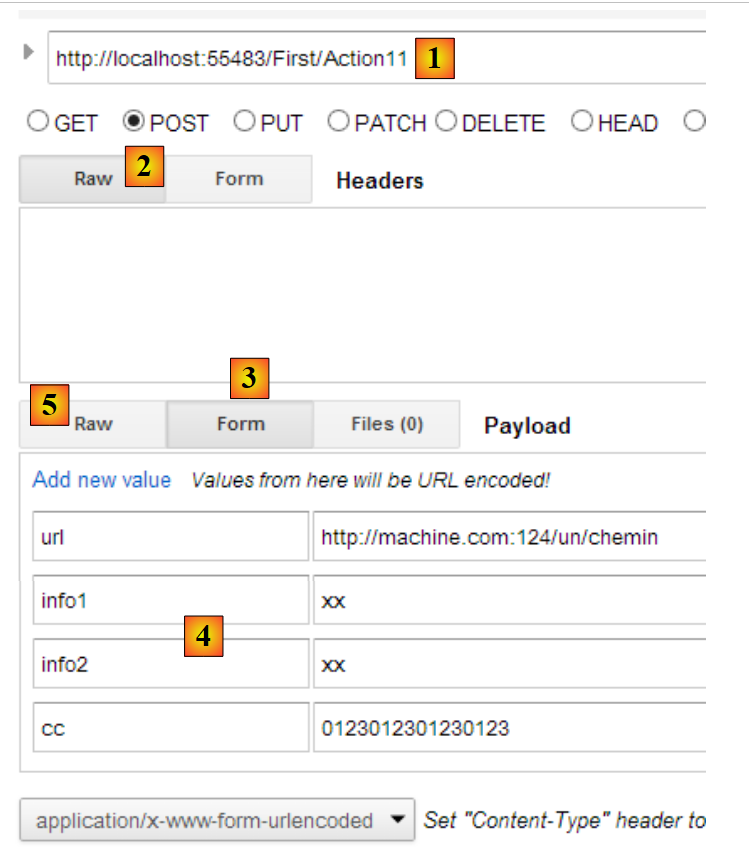 |
- in [1], the URL from the [Action11] action;
- In [2], this URL will be requested along with a POST;
- in [3], the [Form] tab is selected;
- in [4], the values of the four expected parameters. This initialization is a feature provided by [ARC]. The parameters actually sent can be viewed in the [Raw] and [5] tabs;
 |
- in [6], the parameters of POST.
For this query, we receive the following response:
 |
Let’s pass invalid parameters:
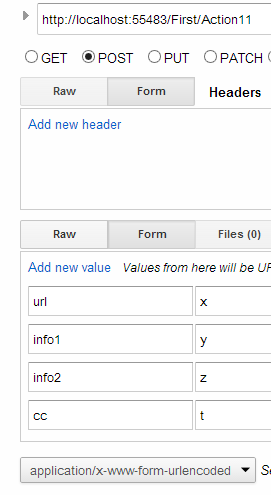 |
We then get the following response:
 |
4.7. Action model with validity constraints - 3
Sometimes the available integrity constraints are not sufficient. In that case, we can create our own. In particular, we can use a model that implements the [IValidatableObject] interface. In this case, we add our own model checks to the [Validate] method of this interface. Let’s look at an example. The new action model will be the following [ActionModel05] class:
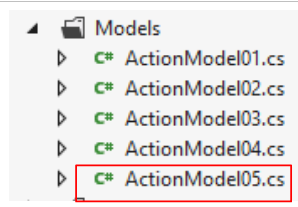 |
using System.Collections.Generic;
using System.ComponentModel.DataAnnotations;

namespace Exemple_02.Models
{
  public class ActionModel05 : IValidatableObject
  {
    [Required(ErrorMessage = "Le paramètre taux est requis")]
    public double? Taux { get; set; }
    public IEnumerable<ValidationResult> Validate(ValidationContext validationContext)
    {
      List<ValidationResult> résultats = new List<ValidationResult>();
      bool ok = Taux < 4.2 || Taux > 6.7;
      if (!ok)
      {
        résultats.Add(new ValidationResult("Le paramètre taux doit être < 4.2 ou > 6.7", new string[] { "Taux" }));
      }
      return résultats;
    }
  }
}
- line 6: the model implements the [IValidatableObject] interface;
- line 10: the [Validate] method of this interface. It returns a collection of elements of type [ValidationResult]. This type encapsulates the errors to be reported;
- line 9: a valid rate is a rate <4.2 or > 6.7;
- line 12: we create an empty list of elements of type [ValidationResult];
- line 13: we check the validity of the [Taux] property;
- lines 14–17: if the [Taux] property is invalid, then an element of type [ValidationResult] is added to the list of results. The first parameter is an error message. The second parameter, which is optional, is a collection of the properties affected by this error.
The action using this template will be as follows:
    // Action12
    public ContentResult Action12(ActionModel05 modèle)
    {
      string erreurs = getErrorMessagesFor(ModelState);
      string texte = string.Format("taux={0}, erreurs={1}", modèle.Taux, erreurs);
      return Content(texte, "text/plain", Encoding.UTF8);
}
Here is an example of execution:
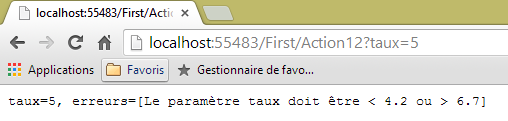 |
4.8. Table or List action model
Consider the following action [Action13]:
// Action13
    public ContentResult Action13(string[] data)
    {
      string strData = "";
      if (data != null && data.Length != 0)
      {
        strData = string.Join(",", data);
      }
      string texte = string.Format("data=[{0}]", strData);
      return Content(texte, "text/plain", Encoding.UTF8);
    }
- Line 2: The action model consists of an array of [string]. It allows us to retrieve a parameter named [data], which may appear multiple times in the request parameters, such as in [?data=data1&data=data2&data=data3]. The various [data] parameters in the request will populate the [data] array in the action model. This scenario occurs with dropdown lists. The browser then sends the various values selected by the user, all with the same parameter name.
Here is an example:
 |
The template can also be a list:
    // Action14
    public ContentResult Action14(List<int> data)
    {
      string erreurs = getErrorMessagesFor(ModelState);
      string strData = "";
      if (data != null && data.Count != 0)
      {
        strData = string.Join(",", data);
      }
      string texte = string.Format("data=[{0}], erreurs=[{1}]", strData, erreurs);
      return Content(texte, "text/plain", Encoding.UTF8);
}
The model here is a list of integers (line 2). Here is the first execution:
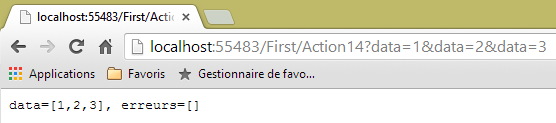 |
and a second one:
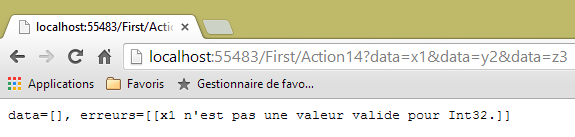 |
4.9. Filtering an action template
Sometimes we have a model but want only certain elements of the model to be initialized by the HTTP request. Consider the following action model [ActionModel06]:
using System.ComponentModel.DataAnnotations;
using System.Web.Mvc;

namespace Exemple_02.Models
{
  [Bind(Exclude = "Info2")]
  public class ActionModel06
  {
    [Required(ErrorMessage = "Le paramètre [info1] est requis")]
    public string Info1 { get; set; }

    public string Info2 { get; set; }
  }
}
- lines 9-10: the parameter [info1] is required;
- line 6: the parameter [info2] on line 12 is excluded from the binding of the query HTTP to its template.
The action will be as follows [Action15]:
    // Action15
    public ContentResult Action15(ActionModel06 modèle)
    {
      string erreurs = getErrorMessagesFor(ModelState);
      string texte = string.Format("valide={0}, info1={1}, info2={2}, erreurs={3}", ModelState.IsValid, modèle.Info1, modèle.Info2, erreurs);
      return Content(texte, "text/plain", Encoding.UTF8);
}
Here is an example of execution:
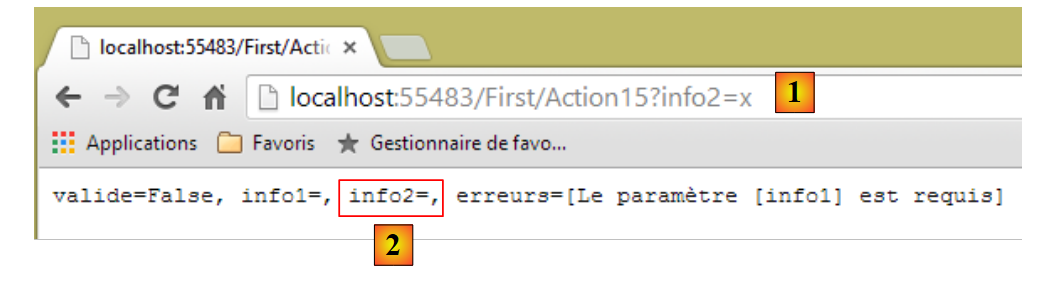 |
- in [1]: the parameter [info2] is passed to URL;
- in [2]: the [Info2] property of the action model remained empty.
4.10. Extending the data binding model
Let’s revisit the execution architecture of an action:
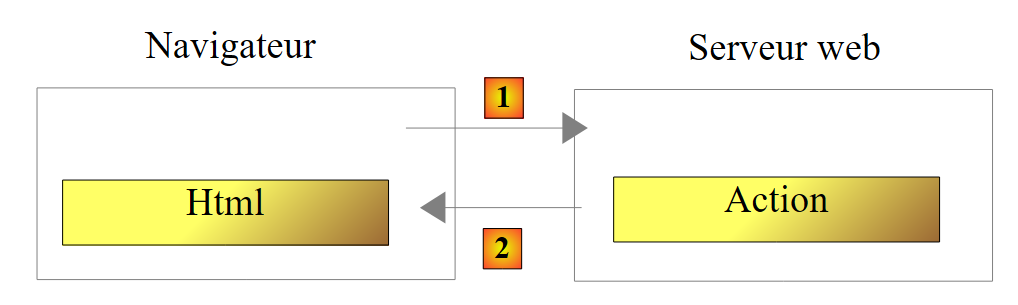 |
The action class is instantiated at the start of the client request and destroyed at the end of it. Therefore, it cannot be used to store data between requests, even if it is called repeatedly. You may want to store two types of data:
- data shared by all users of the web application. This is generally read-only data. Three files are used to implement this data sharing:
- [Web.Config]: the application configuration file
- [Global.asax, Global.asax.cs]: used to define a class, called the global application class, whose lifetime matches that of the application, as well as handlers for certain events within that application.
The global application class allows you to define data that will be available to all requests from all users.
- data shared by requests from the same client. This data is stored in an object called a Session. We refer to this as a client session to denote the client’s memory. All requests from a client have access to this session. They can store and read information there.
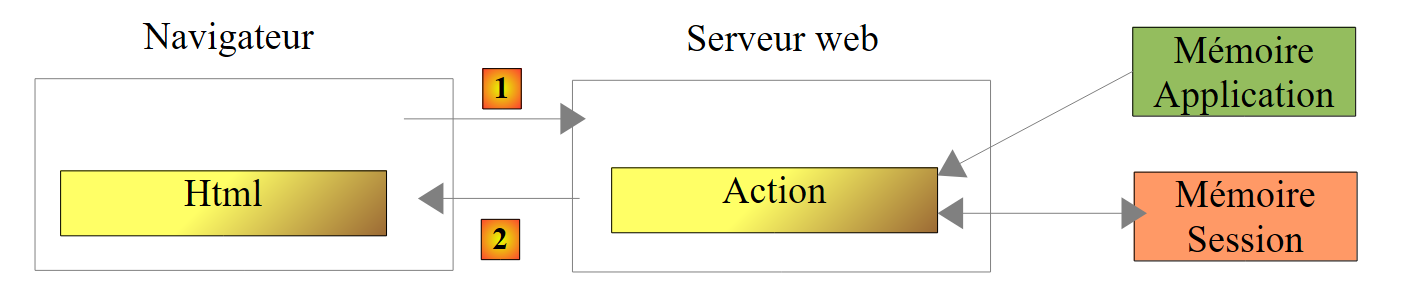 |
Above, we show the types of memory an action has access to:
- the application’s memory, which mostly contains read-only data and is accessible to all users;
- a specific user’s memory, or session, which contains read/write data and is accessible to successive requests from the same user;
- not shown above, there is a request memory, or request context. A user’s request may be processed by several successive actions. The request context allows Action 1 to pass information to Action 2.
Let’s look at a first example illustrating these different types of memory:
First, we modify the [Web.config] file in the [Exemple-02] project as follows:
  <appSettings>
    <add key="webpages:Version" value="2.0.0.0" />
    ...
    <add key="infoAppli1" value="infoAppli1"/>
</appSettings>
We add line 4, which associates the value [infoAppli1] with the key [infoAppli1]. This will be our scope data [Application]: it will be accessible to all requests from all users.
Next, we modify the [Application_Start] method in the [Global.asax] file. This method runs once when the application starts. This is where we need to use the [Web.config] file:
    protected void Application_Start()
    {
      AreaRegistration.RegisterAllAreas();

      WebApiConfig.Register(GlobalConfiguration.Configuration);
      FilterConfig.RegisterGlobalFilters(GlobalFilters.Filters);
      RouteConfig.RegisterRoutes(RouteTable.Routes);
      BundleConfig.RegisterBundles(BundleTable.Bundles);
      // intialization application
      Application["infoAppli1"] = ConfigurationManager.AppSettings["infoAppli1"];
}
We add line 10. It does two things:
- it retrieves the value of the key [infoAppli1] from the file [Web.config] using the class [System.Configuration.ConfigurationManager];
- it stores it in the [HttpApplication.Application] dictionary, associated with the [infoAppli1] key. All actions have access to this dictionary.
In the same file [Gloabal.asax], the following method [Session_Start] is added:
    protected void Session_Start()
    {
      // counter initialization
      Session["compteur"] = 0;
}
The [Session_Start] method is executed for every new user. What is a new user? A user is "tracked" by a session token. This token is:
- created by the web server and sent to the new user in the HTTP headers of the first response sent to them;
- sent back by the user’s browser with every new request they make. This allows the server to recognize the user and manage a memory space for them known as the user’s session.
The web server recognizes that it is dealing with a new user when the user does not send a session token. The server then creates one for them.
In line 4 above, we place a counter in the user’s session that will be incremented with each request from that user. This illustrates the memory associated with a user. The [Session] class is used as a dictionary (line 4).
With that done, we write the following [Action16] action:
// Action16
    public ContentResult Action16()
    {
      // retrieve the HTTP query context
      HttpContextBase contexte = ControllerContext.HttpContext;
      // retrieve range info Application
      string infoAppli1 = contexte.Application["infoAppli1"] as string;
      // and Session range
      int? compteur = contexte.Session["compteur"] as int?;
      compteur++;
      contexte.Session["compteur"] = compteur;
      // customer response
      string texte = string.Format("infoAppli1={0}, compteur={1}", infoAppli1, compteur);
      return Content(texte, "text/plain", Encoding.UTF8);
}
- line 5: we retrieve the context of the HTTP request currently being processed. This context will give us access to the data in the [Application] and [Session] scopes;
- line 7: we retrieve the scope information for [Application];
- line 9: retrieves the counter from the session;
- lines 10–11: it is incremented and then returned to the session;
- lines 13-14: both pieces of information are sent to the client.
Here are some examples of execution:
[Action16] is requested once, [1], then the page is refreshed: [F5] twice, [2]:
 |
In [2], the client made a total of three requests. Each time, it was able to retrieve the counter updated by the previous request.
To simulate a second user, we use a second browser to request the same URL:
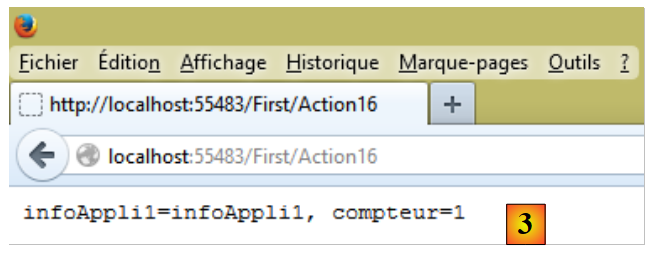 |
In [3], the second user successfully retrieves the same scope information as [Application] but has its own scope counter, [Session].
Let’s return to the code for action [Action16]:
// Action16
    public ContentResult Action16()
    {
      // retrieve the HTTP query context
      HttpContextBase contexte = ControllerContext.HttpContext;
      // retrieve range info Application
      string infoAppli1 = contexte.Application["infoAppli1"] as string;
      // and Session range
      int? compteur = contexte.Session["compteur"] as int?;
      compteur++;
      contexte.Session["compteur"] = compteur;
      // customer response
      string texte = string.Format("infoAppli1={0}, compteur={1}", infoAppli1, compteur);
      return Content(texte, "text/plain", Encoding.UTF8);
}
One of the goals of the ASP.NET MVC framework is to make controllers and actions testable in isolation without a web server. However, as seen in line 5, the context of the HTTP request is required to retrieve the scope information from [Application] and [Session]. We propose creating a new action, [Action17], which would receive the scope data from [Application] and [Session] as parameters:
    // Action17
    public ContentResult Action17(ApplicationModel applicationData, SessionModel sessionData)
    {
      // retrieve range info Application
      string infoAppli1 = applicationData.InfoAppli1;
      // and Session range
      int compteur = sessionData.Compteur++;
      // customer response
      string texte = string.Format("infoAppli1={0}, compteur={1}", infoAppli1, compteur);
      return Content(texte, "text/plain", Encoding.UTF8);
}
The code no longer has any dependencies on the HTTP request. It can therefore be tested independently of a web server.
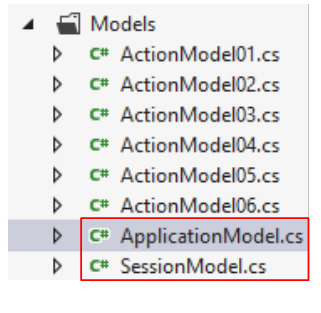
Let’s see how to do this. First, we need to create the classes [ApplicationModel] and [SessionModel], which will encapsulate the data from scopes [Application] and [Session], respectively. They are as follows:
 |
namespace Exemple_02.Models
{
  public class ApplicationModel
  {
    public string InfoAppli1 { get; set; }
  }
}
namespace Exemple_02.Models
{
  public class SessionModel
  {
    public int Compteur { get; set; }
    public SessionModel()
    {
      Compteur = 0;
    }
  }
}
Next, we need to modify the [Application_Start] and [Session_Start] methods in the [Global.asax] file:
public class MvcApplication : System.Web.HttpApplication
  {
    protected void Application_Start()
    {
      AreaRegistration.RegisterAllAreas();

      WebApiConfig.Register(GlobalConfiguration.Configuration);
      FilterConfig.RegisterGlobalFilters(GlobalFilters.Filters);
      RouteConfig.RegisterRoutes(RouteTable.Routes);
      BundleConfig.RegisterBundles(BundleTable.Bundles);
      // intialisation application - case 1
      Application["infoAppli1"] = ConfigurationManager.AppSettings["infoAppli1"];
      // intialisation application - case 2
      ApplicationModel data=new ApplicationModel();
      data.InfoAppli1=ConfigurationManager.AppSettings["infoAppli1"];
      Application["data"] = data;
    }

    protected void Session_Start()
    {
      // counter initialization - case 1
      Session["compteur"] = 0;
      // counter initialization - case 2
      Session["data"] = new SessionModel();
    }
  }
- line 14: an instance of [ApplicationModel] is created;
- line 15: it is initialized;
- line 16: and placed in the dictionary of [Application], associated with the key [data]. [Application] is a property of the [HttpApplication] class from line 1;
- Line 24: An instance of [SessionModel] is created and placed in the dictionary of [Session], associated with the key [data]. [Session] is a property of the [HttpApplication] class in line 1;
Based on what we have seen so far, the signature
public ContentResult Action17(ApplicationModel applicationData, SessionModel sessionData)
means that the request HTTP processed by the action must include parameters named [applicationData] and [sessionData]. This will not be the case. We need to create a new data binding model so that when an action receives a type as a parameter:
- [ApplicationModel], it is provided with the scope data [Application] and the key data [data];
- [SessionModel], the data with scope [Session] and key [data] is provided to it.
To do this, you must create classes that implement the [IModelBinder] interface.
We start by creating a folder named [Infrastructure] within the [Exemple-02] project:
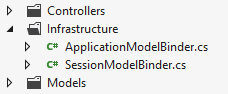 |
In it, we create the following [ApplicationModelBinder] class:
using System.Web.Mvc;

namespace Exemple_02.Infrastructure
{
  public class ApplicationModelBinder : IModelBinder
  {
    public object BindModel(ControllerContext controllerContext, ModelBindingContext bindingContext)
    {
      // render scope data [Application]
      return controllerContext.RequestContext.HttpContext.Application["data"];
    }
  }
}
- Line 5: The class implements the [IModelBinder] interface. To understand its code, you need to know that it will be called every time an action has a parameter of type [ApplicationModel]. This [ApplicationModel] --> [ApplicationModelBinder] binding will be established at application startup, in the [Application_Start] method of [Global.asax];
- line 7: the single method of the [IModelBinder] interface;
- line 7: the parameter of type [ControllerContext] gives us access to the HTTP query currently being processed;
- line 7: the parameter of type [ModelBindingContext] gives us access to information about the model to be built, in this case the type [ApplicationModel];
- line 7: the result of [BindModel] is the object that will be assigned to the linked parameter, in this case a parameter of type [ApplicationModel];
- line 10: we simply return the object with scope [Application] and key [data].
The class [SessionModelBinder] follows the same pattern:
using System.Web.Mvc;

namespace Exemple_02.Infrastructure
{
  public class SessionModelBinder : IModelBinder
  {
    public object BindModel(ControllerContext controllerContext, ModelBindingContext bindingContext)
    {
      // render scope data [Session]
      return controllerContext.HttpContext.Session["data"];
    }
  }
}
All that remains is to associate each of the [XModel] models with its [XModelBinder] binder. This is done in the [Application_Start] method of [Global.asax]:
    protected void Application_Start()
    {
....
      // intialisation application - case 2
      ApplicationModel data=new ApplicationModel();
      data.InfoAppli1=ConfigurationManager.AppSettings["infoAppli1"];
      Application["data"] = data;
      // model binders
      ModelBinders.Binders.Add(typeof(ApplicationModel), new ApplicationModelBinder());
      ModelBinders.Binders.Add(typeof(SessionModel), new SessionModelBinder());
}
- Line 9: When an action has a parameter of type [ApplicationModel], the method [ApplicationModelBinder.Bind] will be called. We know that it returns the data of scope [Application] associated with the key [data];
- Line 10: The same applies to the type [SessionModel].
Let’s return to our action [Action17]:
    // Action17
    public ContentResult Action17(ApplicationModel applicationData, SessionModel sessionData)
    {
      // retrieve range info Application
      string infoAppli1 = applicationData.InfoAppli1;
      // and Session range
      sessionData.Compteur++;
      int compteur = sessionData.Compteur;
      // customer response
      string texte = string.Format("infoAppli1={0}, compteur={1}", infoAppli1, compteur);
      return Content(texte, "text/plain", Encoding.UTF8);
}
- line 2: when [Action17] is called, it will receive
- first parameter: the scope data [Application] associated with the key [data],
- second parameter: the scope data [Session] associated with the key [data];
These two data sets can be as complex as desired and can include, for one, all data from scope [Application] and, for the other, all data from scope [Session].
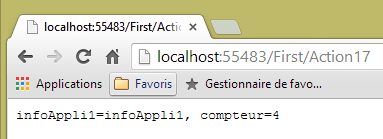
Here is an example of the execution of action [Action17]:
 |
4.11. Late binding of the action template
We wrote the following [Action12] action:
// Action12
    public ContentResult Action12(ActionModel05 modèle)
    {
      string erreurs = getErrorMessagesFor(ModelState);
      string texte = string.Format("taux={0}, erreurs={1}", modèle.Taux, erreurs);
      return Content(texte, "text/plain", Encoding.UTF8);
}
Behind the scenes, ASP.NET MVC:
- creates an instance of type [ActionModel05] using its parameterless constructor;
- initializes it with request information that has the same name (case-insensitive) as one of the properties of [ActionModel05].
Sometimes this behavior is not what we want. This is particularly the case when we want to use a specific constructor of the action model. We can then proceed as follows:
    // Action18
    public ContentResult Action18()
    {
      ActionModel05 modèle = new ActionModel05();
      TryUpdateModel(modèle);
      string erreurs = getErrorMessagesFor(ModelState);
      string texte = string.Format("taux={0}, erreurs={1}", modèle.Taux, erreurs);
      return Content(texte, "text/plain", Encoding.UTF8);
}
- line 2: the action no longer receives parameters. Therefore, there is no longer any automatic data binding;
- line 4: we create an instance of the action model ourselves. This is where we could use a different constructor;
- line 5: we initialize the model with the request information. ASP.NET MVC does this work. It does so in the same way it would have if the model had been a parameter;
- line 6: we are now in the same situation as in the [Action12] action.
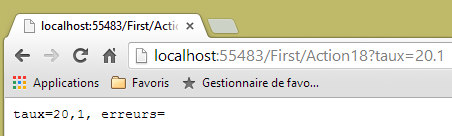
Here is an example of execution:
 |
4.12. Conclusion
Let’s return to the architecture of a ASP.NET MVC application:
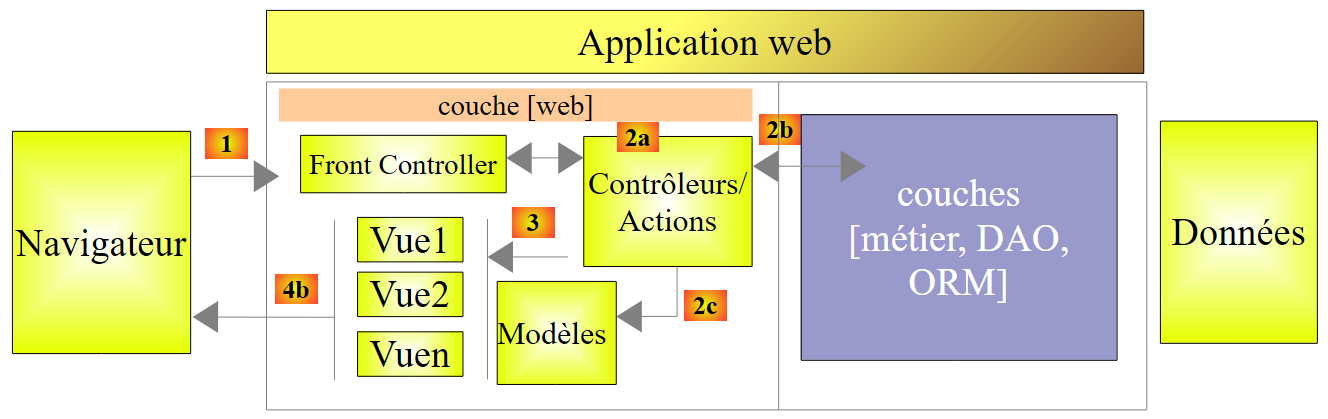 |
A [1] request carries various pieces of information that ASP.NET MVC presents to the action in the form of a model that we have called an action model.
 |
- The client's request HTTP arrives as [1];
- in [2], the information contained in the request is transformed into the action model [3];
- In [4], the action, based on this model, will generate a response. This response will have two components: a view V [6] and the model M of this view [5];
- The view V [6] will use its model M [5] to generate the response HTTP intended for the client.
In the MVC model, the action [4] is part of the C (controller), the [5] view model is the M, and the [6] view is the V.
This chapter has examined the mechanisms for linking the information carried by the request—which is inherently strings—with the action model, which can be a class with properties of various types. We have also seen that it is possible to verify the validity of the model presented to the action. Finally, we saw how to extend this model to the scope data [Session] and [Application].
We will now focus on the final stage of the [1] request processing chain: the creation of the [6] view and its [5] model. These two elements are produced by action [4].