6. Examples
In this chapter, we aim to illustrate what we have seen previously through a series of examples.
6.1. Example 1
6.1.1. The Problem
This application must allow a user to calculate their taxes. We consider the simplified case of a taxpayer who has only their salary to report (2004 figures for 2003 income):
- we calculate the number of tax brackets for the employee nbParts=nbEnfants/2 +1 if they are unmarried, nbEnfants/2+2 if they are married, where nbEnfants is the number of their children.
- if he has at least three children, he receives an additional half share
- We calculate their taxable income R = 0.72 * S, where S is their annual salary
- We calculate the family coefficient QF = R/nbParts
- We calculate the tax I. Consider the following table:
4262 | 0 | 0 |
8382 | 0.0683 | 291.09 |
14,753 | 0.1914 | 1,322.92 |
23,888 | 0.2826 | 2,668.39 |
38,868 | 0.3738 | 4,846.98 |
47,932 | 0.4262 | 6,883.66 |
0 | 0.4809 | 9505.54 |
Each row has 3 fields. To calculate tax I, we look for the first row where QF <= field1. For example, if QF = 5000, we will find the row
Tax I is then equal to 0.0683*R - 291.09*nbParts. If QF is such that the relationship QF<=field1 is never satisfied, then the coefficients of the last row are used. Here:
which gives the tax I=0.4809*R - 9505.54*nbParts.
6.1.2. The MVC structure of the application
The structure MVC of the application will be as follows:
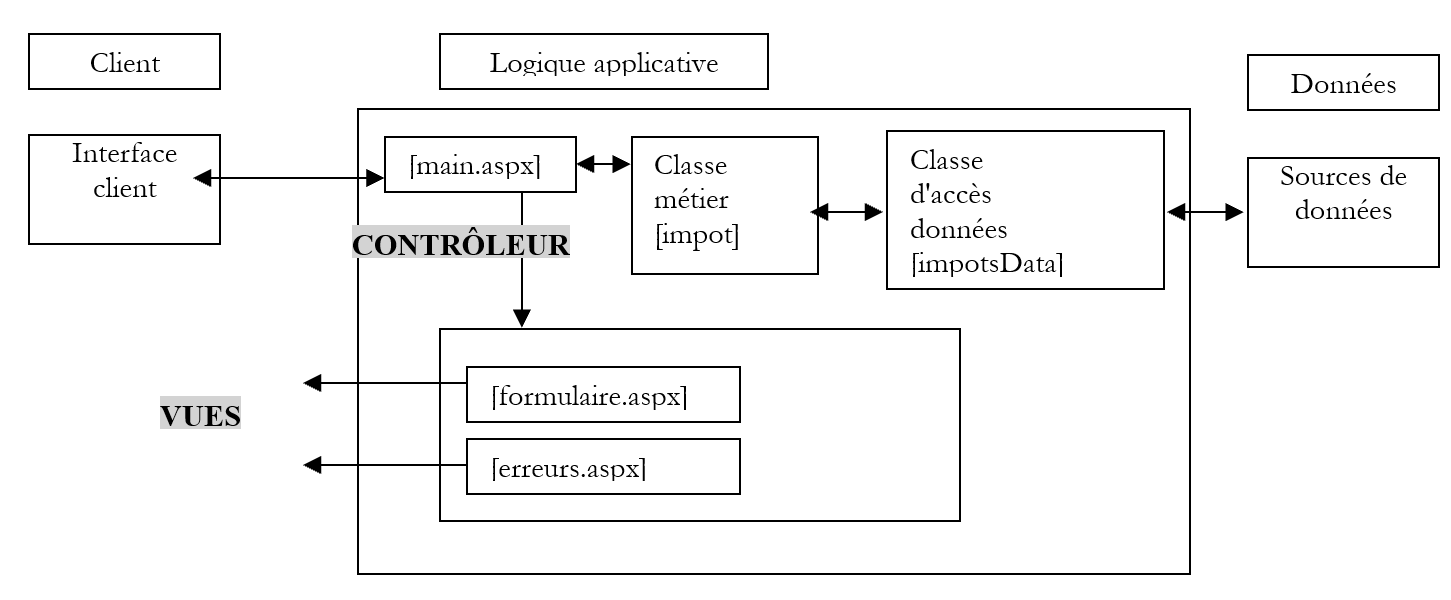
The controller role will be played by the page [main.aspx]. There will be three possible actions:
- init: corresponds to the client’s first request. The controller will display the view [formulaire.aspx]
- calcul: corresponds to the tax calculation request. If the data in the input form is correct, the tax is calculated using the business class [impots]. The controller returns the view [formulaire.aspx] to the client as it was validated, along with the calculated tax. If the data in the input form is incorrect, the controller will return the view [erreurs.aspx] with a list of errors and a link to return to the form.
- return: corresponds to returning to the form after an error. The controller displays the [formulaire.aspx] view as it was validated before the error.
The [main.aspx] controller does not handle tax calculations. It is simply responsible for managing the client-server dialogue and executing the actions requested by the client. For the action [calcul], it will rely on the business class [impot].
6.1.3. The business class
The tax class will be defined as follows:
' imported namespaces
Imports System

' class
Namespace st.istia.univangers.fr
    Public Class impot
        Private limites(), coeffR(), coeffN() As Decimal

        ' manufacturer
        Public Sub New(ByRef source As impotsData)
            ' data required for tax calculation
             ' come from an external source [source]
             ' we retrieve them - there may be an exception
            Dim data() As Object = source.getData
            limites = CType(data(0), Decimal())
            coeffR = CType(data(1), Decimal())
            coeffN = CType(data(2), Decimal())
        End Sub

         ' tAX CALCULATION
        Public Function calculer(ByVal marié As Boolean, ByVal nbEnfants As Integer, ByVal salaire As Long) As Long
             ' calculating the number of shares
            Dim nbParts As Decimal
            If marié Then
                nbParts = CDec(nbEnfants) / 2 + 2
            Else
                nbParts = CDec(nbEnfants) / 2 + 1
            End If
            If nbEnfants >= 3 Then
                nbParts += 0.5D
            End If
             ' calculation of taxable income & family quota
            Dim revenu As Decimal = 0.72D * salaire
            Dim QF As Decimal = revenu / nbParts
             ' tAX CALCULATION
            limites((limites.Length - 1)) = QF + 1
            Dim i As Integer = 0
            While QF > limites(i)
                i += 1
            End While
            Return CLng(revenu * coeffR(i) - nbParts * coeffN(i))
        End Function
    End Class
End Namespace
A tax object by providing its constructor with a data source of type [impotsData]. This class has a public method [getData] that retrieves the three data arrays required to calculate the tax, as described earlier. This method can handle an exception if the data could not be retrieved or if it turns out to be incorrect. Once the [impot] object is created, its **calculate** method can be called repeatedly to calculate the taxpayer’s tax based on their marital status (married or not), number of children, and annual salary.
6.1.4. The data access class
The [impotsData] class is the class that provides access to the data. It is an abstract class. A derived class must be created for each new possible data source (tables, flat files, databases, console, etc.). Its definition is as follows:
Imports System.Collections

Namespace st.istia.univangers.fr
    Public MustInherit Class impotsData
        Protected limites() As Decimal
        Protected coeffr() As Decimal
        Protected coeffn() As Decimal
        Protected checked As Boolean
        Protected valide As Boolean

        ' data access method
        Public MustOverride Function getData() As Object()

        ' data verification method
        Protected Function checkData() As Integer
            ' verifies acquired data
            ' we need data
            valide = Not limites Is Nothing AndAlso Not coeffr Is Nothing AndAlso Not coeffn Is Nothing
            If Not valide Then Return 1
            ' we must have 3 arrays of the same size
            If valide Then valide = limites.Length = coeffr.Length AndAlso limites.Length = coeffn.Length
            If Not valide Then Return 2
            ' tables must be non-empty
            valide = limites.Length <> 0
            If Not valide Then Return 3
            ' each array must contain elements >=0 in ascending order
            valide = check(limites, limites.Length - 1) AndAlso check(coeffr, coeffr.Length) AndAlso check(coeffn, coeffn.Length)
            If Not valide Then Return 4
            ' all is good
            Return 0
        End Function

        ' checks the validity of an array's contents
        Protected Function check(ByRef tableau() As Decimal, ByVal n As Integer) As Boolean
            ' array must have its first n elements >=0 and in strictly ascending order
            If tableau(0) < 0 Then Return False
            For i As Integer = 1 To n - 1
                If tableau(i) <= tableau(i - 1) Then Return False
            Next
            ' it's good
            Return True
        End Function
    End Class
End Namespace
The class has the following protected attributes:
array of tax bracket limits | |
array of coefficients applied to taxable income | |
table of coefficients applied to the number of shares | |
Boolean indicating whether the data (limits, coeffr, coeffn) has been verified | |
Boolean indicating whether the data (limits, coeffr, coeffn) is valid |
The class has no constructor. It has an abstract method [getData] that derived classes must implement. The purpose of this method is to:
- assign values to the three arrays limits, coeffr, coeffn
- throw an exception if the data could not be acquired or if it turned out to be invalid.
The class provides the protected methods [checkData] and [check], which verify the validity of the attributes (limites, coeffr, coeffn). This relieves derived classes of the need to implement them. They will simply need to use them.
The first derived class we will use is as follows:
Imports System.Collections
Imports System

Namespace st.istia.univangers.fr
    Public Class impotsArray
        Inherits impotsData

        ' constructor with no arguments
        Public Sub New()
            ' initializing tables with constants
            limites = New Decimal() {4262D, 8382D, 14753D, 23888D, 38868D, 47932D, 0D}
            coeffr = New Decimal() {0D, 0.0683D, 0.1914D, 0.2826D, 0.3738D, 0.4262D, 0.4809D}
            coeffn = New Decimal() {0D, 291.09D, 1322.92D, 2668.39D, 4846.98D, 6883.66D, 9505.54D}
            checked = True
            valide = True
        End Sub

        ' builder with three input tables
        Public Sub New(ByRef limites() As Decimal, ByRef coeffr() As Decimal, ByRef coeffn() As Decimal)
            ' data storage
            Me.limites = limites
            Me.coeffr = coeffr
            Me.coeffn = coeffn
            checked = False
        End Sub

        Public Overrides Function getData() As Object()
            ' check data if necessary
            Dim erreur As Integer
            If Not checked Then erreur = checkData() : checked = True
            ' if invalid, then throw an exception
            If Not valide Then Throw New Exception("Les données des tranches d'impôts sont invalides (" + erreur.ToString + ")")
            ' otherwise we return the three tables
            Return New Object() {limites, coeffr, coeffn}
        End Function
    End Class
End Namespace
This class, named [impotsArray], has two constructors:
- a constructor with no arguments that initializes the attributes (limits, coeffr, coeffn) of the base class with hard-coded arrays
- a constructor that initializes the attributes (limits, coeffr, coeffn) of the base class with arrays passed to it as parameters
The method [getData], which allows external classes to retrieve the arrays (limits, coeffr, coeffn), simply verifies the validity of the three arrays using the method [checkData] of the base class. It throws an exception if the data is invalid.
6.1.5. Testing business classes and data access classes
It is important to include only business and data access classes that have been verified as correct in a web application. This way, the web application debugging phase can focus on the controller and view components. A test program might look like the following:
' options
Option Strict On
Option Explicit On

' namespaces
Imports System
Imports Microsoft.VisualBasic

Namespace st.istia.univangers.fr
    Module test
        Sub Main()
            ' interactive tax calculator
            ' the user enters three data points on the keyboard: married nbEnfants salary
            ' the program then displays the tax payable
            Const syntaxe As String = "syntaxe : marié nbEnfants salaire" + ControlChars.Lf + "marié : o pour marié, n pour non marié" + ControlChars.Lf + "nbEnfants : nombre d'enfants" + ControlChars.Lf + "salaire : salaire annuel en F"

            ' tax object creation
            Dim objImpôt As impot = Nothing
            Try
                objImpôt = New impot(New impotsArray)
            Catch ex As Exception
                Console.Error.WriteLine(("L'erreur suivante s'est produite : " + ex.Message))
                Environment.Exit(1)
            End Try
            ' infinite loop
            Dim marié As String
            Dim nbEnfants As Integer
            Dim salaire As Long
            While True
                ' tax calculation parameters are requested
                Console.Out.Write("Paramètres du calcul de l'impôt au format marié nbEnfants salaire ou rien pour arrêter :")
                Dim paramètres As String = Console.In.ReadLine().Trim()
                ' anything to do?
                If paramètres Is Nothing OrElse paramètres = "" Then
                    Exit While
                End If
                ' check the number of arguments in the input line
                Dim erreur As Boolean = False
                Dim args As String() = paramètres.Split(Nothing)
                Dim nbParamètres As Integer = args.Length
                If nbParamètres <> 3 Then
                    Console.Error.WriteLine(syntaxe)
                    erreur = True
                End If
                ' checking the validity of parameters
                If Not erreur Then
                    ' married
                    marié = args(0).ToLower()
                    If marié <> "o" And marié <> "n" Then
                        erreur = True
                    End If
                    ' nbEnfants
                    Try
                        nbEnfants = Integer.Parse(args(1))
                        If nbEnfants < 0 Then
                            Throw New Exception
                        End If
                    Catch
                        erreur = True
                    End Try
                    ' salary
                    Try
                        salaire = Integer.Parse(args(2))
                        If salaire < 0 Then
                            Throw New Exception
                        End If
                    Catch
                        erreur = True
                    End Try
                End If
                ' if the parameters are correct - the tax is calculated
                If Not erreur Then
                    Console.Out.WriteLine(("impôt=" & objImpôt.calculer(marié = "o", nbEnfants, salaire) & " euro(s)"))
                Else
                    Console.Error.WriteLine(syntaxe)
                End If
            End While
        End Sub
    End Module
End Namespace
The application prompts the user to enter the three pieces of information needed to calculate their tax:
- marital status: o for married, n for unmarried
- number of children
- their annual salary
The tax calculation is performed using an object of type [impot] created when the application launches:
            ' tax object creation
            Dim objImpôt As impot = Nothing
            Try
                objImpôt = New impot(New impotsArray)
            Catch ex As Exception
                Console.Error.WriteLine(("L'erreur suivante s'est produite : " + ex.Message))
                Environment.Exit(1)
            End Try
As the data source, we use an object of type [impotsArray]. The constructor without arguments for this class is used, which provides the three arrays (limits, coeffr, coeffn) with hard-coded values. Creating a [impot] object can theoretically throw an exception because, to create itself, the object will request the data (limits, coeffr, coeffn) from its data source, which was passed to it as a parameter, and this data retrieval may trigger an exception. In this case, however, the method used to obtain the data (hard-coded values) cannot cause an exception. We have nevertheless left the exception handling in place to draw the reader’s attention to the possibility that the [impot] object might be constructed incorrectly.
Here is an example of the previous program in action:
dos>dir
05/04/2004  13:28                1 337 impots.vb
21/04/2004  08:23                1 311 impotsArray.vb
21/04/2004  08:26                1 634 impotsData.vb
21/04/2004  08:42                2 490 testimpots1.vb
We compile all the classes in [impot, impotsData, impotsArray] into an assembly named [impot.dll]:
dos>vbc /t:library /out:impot.dll impotsData.vb impotsArray.vb impots.vb
Compilateur Microsoft (R) Visual Basic .NET version 7.10.3052.4
dos>dir
05/04/2004  13:28                1 337 impots.vb
21/04/2004  08:23                1 311 impotsArray.vb
21/04/2004  08:26                1 634 impotsData.vb
21/04/2004  08:42                2 490 testimpots1.vb
21/04/2004  09:21                5 632 impot.dll
We compile the test program:
dos>dir
05/04/2004  13:28                1 337 impots.vb
21/04/2004  08:23                1 311 impotsArray.vb
21/04/2004  08:26                1 634 impotsData.vb
21/04/2004  08:42                2 490 testimpots1.vb
21/04/2004  09:21                5 632 impot.dll
21/04/2004  09:23                4 608 testimpots1.exe
We can run the tests:
dos>testimpots1
Paramètres du calcul de l'married tax nbEnfants salary or nothing to stop :o 2 60000
impôt=4300 euro(s)
Paramètres du calcul de l'tax in married format nbEnfants salary or nothing to stop :n 2 60000
impôt=6872 euro(s)
Paramètres du calcul de l'tax in married format nbEnfants salary or nothing to stop :
6.1.6. Web application views
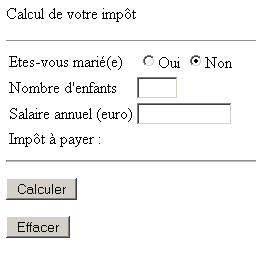
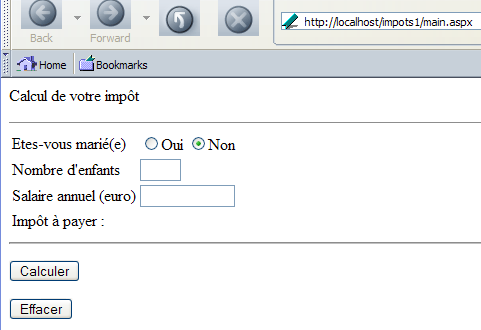
The application will have two views: [formulaire.aspx] and [erreurs.aspx]. Let’s illustrate how the application works using screenshots. The [formulaire.aspx] view is displayed when url [main.aspx] is requested for the first time:
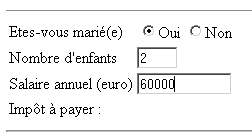
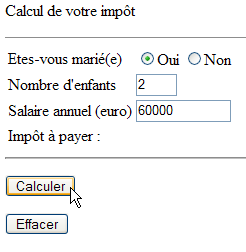
The user fills out the form:
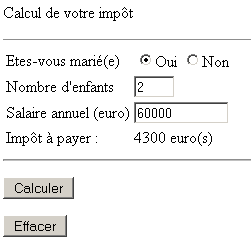
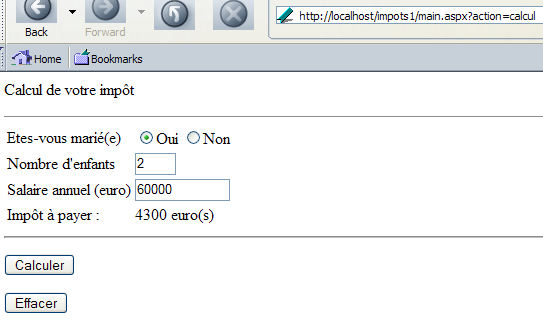
and uses the [Calculer] button to obtain the following response:
The user may enter incorrect data:
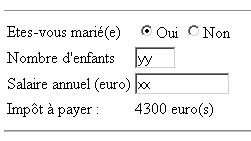
Clicking the [Calculer] button then yields a different response, [erreurs.aspx]:
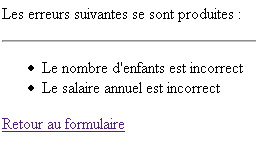
They can use the [Retour au formulaire] link above to retrieve the [formulaire.aspx] view as it was validated before the error:
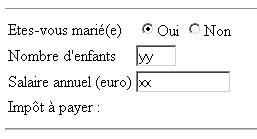
6.1.7. The view [formulaire.aspx]
The page [formulaire.aspx] will be as follows:
<%@ page src="formulaire.aspx.vb" inherits="formulaire" AutoEventWireup="false"%>
<html>
    <head>
        <title>Impôt</title>
    </head>
    <body>
        <P>Calcul de votre impôt</P>
        <HR>
        <form method="post" action="main.aspx?action=calcul">
            <TABLE border="0">
                <TR>
                    <TD>Etes-vous marié(e)</TD>
                    <TD>
                        <INPUT type="radio" value="oui" name="rdMarie" <%=rdouichecked%>>Oui
                      <INPUT type="radio"  value="non" name="rdMarie" <%=rdnonchecked%>>Non
                     </TD>
                </TR>
                <TR>
                    <TD>Nombre d'children</TD>
                    <TD><INPUT type="text" size="3" maxLength="3" name="txtEnfants" value="<%=txtEnfants%>"></TD>
                </TR>
                <TR>
                    <TD>Salaire annuel (euro)</TD>
                    <TD><INPUT type="text" maxLength="12" size="12" name="txtSalaire" value="<%=txtSalaire%>"></TD>
                </TR>
                <TR>
                    <TD>Impôt à payer :
                    </TD>
                    <TD><%=txtImpot%></TD>
                </TR>
            </TABLE>
            <hr>
            <P>
                <INPUT type="submit" value="Calculer">
            </P>
        </form>
        <form method="post" action="main.aspx?action=effacer">
                <INPUT type="submit" value="Effacer">
        </form>
    </body>
</html>
The dynamic fields on this page are as follows:
"checked" if the [oui] checkbox must be checked, "" otherwise | |
same as for the [non] checkbox | |
value to be placed in the [txtEnfants] input field | |
value to be entered in the input field [txtSalaire] | |
value to be placed in the input field [txtImpot] |
The page has two forms, each with a [submit] button. The [Calculer] button is the [submit] button on the following form:
        <form method="post" action="main.aspx?action=calcul">
...
            <P>
                <INPUT type="submit" value="Calculer">
            </P>
        </form>
We can see that the form parameters will be posted to the controller using [action=calcul]. The [Effacer] button is the [submit] button from the following form:
        <form method="post" action="main.aspx?action=effacer">
                <INPUT type="submit" value="Effacer">
        </form>
We can see that the form parameters will be posted to the controller with [action=effacer]. Here, the form has no parameters. Only the action matters.
The fields of [formulaire.aspx] are calculated by [formulaire.aspx.vb]:
Imports System.Collections.Specialized

Public Class formulaire
    Inherits System.Web.UI.Page

    ' page fields
    Protected rdouichecked As String
    Protected rdnonchecked As String
    Protected txtEnfants As String
    Protected txtSalaire As String
    Protected txtImpot As String

    Private Sub Page_Load(ByVal sender As System.Object, ByVal e As System.EventArgs) Handles MyBase.Load
        ' we retrieve the previous request in the
        Dim form As NameValueCollection = Context.Items("formulaire")
        ' prepare the page to be displayed
        ' radio buttons
        rdouichecked = ""
        rdnonchecked = "checked"
        If form("rdMarie").ToString = "oui" Then
            rdouichecked = "checked"
            rdnonchecked = ""
        End If
        ' the rest
        txtEnfants = CType(form("txtEnfants"), String)
        txtSalaire = CType(form("txtSalaire"), String)
        txtImpot = CType(Context.Items("txtImpot"), String)
    End Sub
End Class
The calculation of the fields in [main.aspx] is based on two pieces of information placed by the controller in the page context:
- Context.Items("form"): a NameValueCollection-type dictionary containing the values of the fields HTML [rdmarie,txtEnfants,txtSalaire]
- Context.Items("txtImpot"): tax value
6.1.8. The [erreurs.aspx] view
The [erreurs.aspx] view displays any errors that may occur during the application's runtime. Its presentation code is as follows:
<%@ page src="erreurs.aspx.vb" inherits="erreurs" AutoEventWireup="false"%>
<HTML>
    <HEAD>
        <title>Impôt</title>
    </HEAD>
    <body>
        <P>Les erreurs suivantes se sont produites :</P>
        <HR>
        <ul>
            <%=erreursHTML%>
        </ul>
        <a href="<%=href%>">
            <%=lien%>
        </a>
    </body>
</HTML>
The page has three dynamic fields:
HTML code from an error list | |
url from a link | |
link text |
These fields are calculated by the controller part of the page in [erreurs.aspx.vb]:
Imports System.Collections
Imports Microsoft.VisualBasic

Public Class erreurs
    Inherits System.Web.UI.Page

    ' page parameter
    Protected erreursHTML As String = ""
    Protected href As String
    Protected lien As String

    Private Sub Page_Load(ByVal sender As System.Object, ByVal e As System.EventArgs) Handles MyBase.Load
        ' retrieve context elements
        Dim erreurs As ArrayList = CType(context.Items("erreurs"), ArrayList)
        href = context.Items("href").ToString
        lien = context.Items("lien").ToString
        ' we generate the HTML code from the list
        Dim i As Integer
        For i = 0 To erreurs.Count - 1
            erreursHTML += "<li> " + erreurs(i).ToString + "</li>" + ControlChars.CrLf
        Next
    End Sub

End Class
The page controller retrieves information placed by the application controller in the page context:
ArrayList object containing the list of error messages to display | |
url of a link | |
link text |
Now that we know what the application user sees, we can move on to writing the application's controller.
6.1.9. The controllers [global.asax, main.aspx]
Let’s review the diagram of our application:
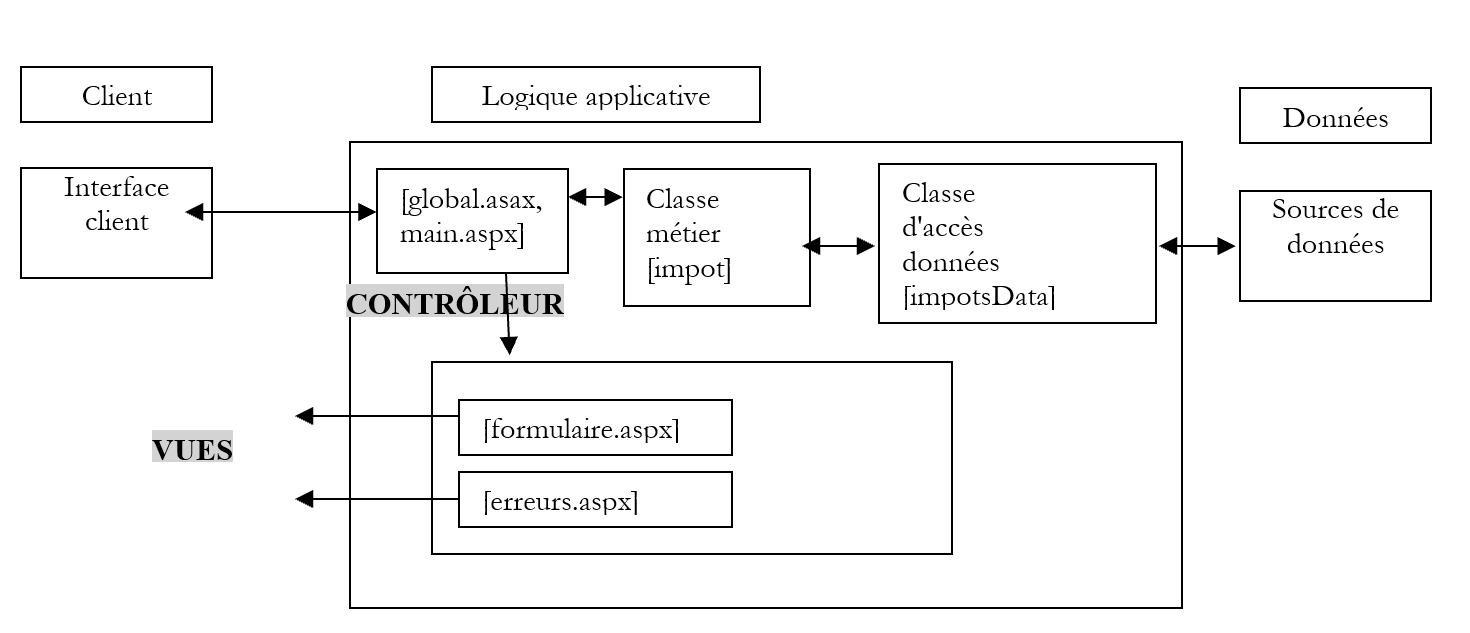
applicationClientLogique
The controller [main.aspx] must handle three actions:
- init: corresponds to the client's first request. The controller displays the view [formulaire.aspx]
- calcul: corresponds to the tax calculation request. If the data in the input form is correct, the tax is calculated using the business class [impots]. The controller returns the view [formulaire.aspx] to the client as it was validated, along with the calculated tax. If the data in the input form is incorrect, the controller returns the view [erreurs.aspx] with a list of errors and a link to return to the form.
- return: corresponds to returning to the form after an error. The controller displays the view [formulaire.aspx] as it was validated before the error.
We also know that any request to the application passes through the [global.asax] controller, if it exists. We therefore have a chain of two controllers at the application entry point:
- [global.asax], which, due to the architecture of ASP.NET, receives all requests to the application
- [main.aspx], which, by the developer’s decision, also receives all requests to the application
The need for [main.aspx] stems from the fact that we will have a session to manage. We have seen that [global.asax] is not suitable as a controller in this case. We could do without [global.asax] entirely here. However, we will use it to execute code when the application starts. The MVC diagram above shows that we will need to create a [impot] object to calculate the tax. There is no need to create this object multiple times; once is sufficient. We will therefore create it at application startup during the [Application_Start] event handled by the [global.asax] controller. The code for this is as follows:
[global.asax]
[global.asax.vb]
Imports System
Imports System.Web
Imports System.Web.SessionState
Imports st.istia.univangers.fr

Public Class Global
    Inherits System.Web.HttpApplication

    Sub Application_Start(ByVal sender As Object, ByVal e As EventArgs)
        ' create an impot object
        Dim objImpot As impot
        Try
            objImpot = New impot(New impotsArray)
            ' put the object in the application
            Application("objImpot") = objImpot
            ' no error
            Application("erreur") = False
        Catch ex As Exception
            'there has been an error, we note it in the application
            Application("erreur") = True
        End Try
    End Sub
End Class
Once created, the [impot] object is added to the application. This is where the various requests from the different clients objects will retrieve it. Since the creation of the [impot] object may fail, we handle any exceptions and place a [erreur] key in the application to indicate whether or not an error occurred during the creation of the [impot] object.
The code for the [main.aspx, main.aspx.vb] controller will be as follows:
[main.aspx]
[main.aspx.vb]
Imports System
Imports System.Collections.Specialized
Imports System.Collections
Imports st.istia.univangers.fr

Public Class main
    Inherits System.Web.UI.Page

    Private Sub Page_Load(ByVal sender As System.Object, ByVal e As System.EventArgs) Handles MyBase.Load
        ' first of all, we check whether the application has initialized correctly
        If CType(Application("erreur"), Boolean) Then
            ' redirects to error page
            Dim erreurs As New ArrayList
            erreurs.Add("Application momentanément indisponible...")
            context.Items("erreurs") = erreurs
            context.Items("lien") = ""
            context.Items("href") = ""
            Server.Transfer("erreurs.aspx")
        End If
        ' retrieve the action to be performed
        Dim action As String
        If Request.QueryString("action") Is Nothing Then
            action = "init"
        Else
            action = Request.QueryString("action").ToString.ToLower
        End If
        ' execute the action
        Select Case action
            Case "init"
                ' init application
                initAppli()
            Case "calcul"
                ' tax calculation
                calculImpot()
            Case "retour"
                ' back to form
                retourFormulaire()
            Case "effacer"
                ' init application
                initAppli()
            Case Else
                ' unknown action = init
                initAppli()
        End Select
    End Sub

    Private Sub initAppli()
        ' the pre-filled form is displayed
        Context.Items("formulaire") = initForm()
        Context.Items("txtImpot") = ""
        Server.Transfer("formulaire.aspx", True)
    End Sub

    Private Function initForm() As NameValueCollection
        ' on initialise le formulaire
        Dim form As New NameValueCollection
        form.Set("rdMarie", "non")
        form.Set("txtEnfants", "")
        form.Set("txtSalaire", "")
        Return form
    End Function

    Private Sub calculImpot()
        ' check the validity of the data entered
        Dim erreurs As ArrayList = checkData()
        ' if there are errors, we report them
        If erreurs.Count <> 0 Then
            ' save entries
            Session.Item("formulaire") = Request.Form
            ' prepare the error page
            context.Items("href") = "main.aspx?action=retour"
            context.Items("lien") = "Retour au formulaire"
            context.Items("erreurs") = erreurs
            Server.Transfer("erreurs.aspx")
        End If
        ' no errors here - the tax is calculated
        Dim impot As Long = CType(Application("objImpot"), impot).calculer( _
        Request.Form("rdMarie") = "oui", _
        CType(Request.Form("txtEnfants"), Integer), _
        CType(Request.Form("txtSalaire"), Long))
        ' the result page is displayed
        context.Items("txtImpot") = impot.ToString + " euro(s)"
        context.Items("formulaire") = Request.Form
        Server.Transfer("formulaire.aspx", True)
    End Sub

    Private Sub retourFormulaire()
        ' displays the form with values taken from the session
        Context.Items("formulaire") = Session.Item("formulaire")
        Context.Items("txtImpot") = ""
        Server.Transfer("formulaire.aspx", True)
    End Sub

    Private Function checkData() As ArrayList
        ' initially no errors
        Dim erreurs As New ArrayList
        Dim erreur As Boolean = False
        ' married radio button
        Try
            Dim rdMarie As String = Request.Form("rdMarie").ToString
            If rdMarie <> "oui" And rdMarie <> "non" Then
                Throw New Exception
            End If
        Catch
            erreurs.Add("Vous n'avez pas indiqué votre statut marital")
        End Try
        ' no. of children
        Try
            Dim txtEnfants As String = Request.Form("txtEnfants").ToString
            Dim nbEnfants As Integer = CType(txtEnfants, Integer)
            If nbEnfants < 0 Then Throw New Exception
        Catch
            erreurs.Add("Le nombre d'enfants est incorrect")
        End Try
        ' salary
        Try
            Dim txtSalaire As String = Request.Form("txtSalaire").ToString
            Dim salaire As Integer = CType(txtSalaire, Long)
            If salaire < 0 Then Throw New Exception
        Catch
            erreurs.Add("Le salaire annuel est incorrect")
        End Try
        ' return the list of errors
        Return erreurs
    End Function
End Class
The controller begins by verifying that the application has initialized correctly:
         ' first of all, we check whether the application has initialized correctly
        If CType(Application("erreur"), Boolean) Then
            ' redirects to error page
            Dim erreurs As New ArrayList
            erreurs.Add("Application momentanément indisponible...")
            context.Items("erreurs") = erreurs
            context.Items("lien") = ""
            context.Items("href") = ""
            Server.Transfer("erreurs.aspx")
        End If
If the controller detects that the application failed to initialize correctly (the [impot] object required for the calculation could not be created), it displays the error page with the appropriate parameters. Here, there is no need to place the return link on the form since the entire application is unavailable. A general error message is placed in [Context.Items("erreurs")] of type [ArrayList].
If the controller determines that the application is operational, it then analyzes the action it is asked to perform via the [action] parameter. We have encountered this mode of operation many times by now. The processing of each type of action is delegated to a function.
6.1.9.1. The init and clear actions
These two actions must display the empty input form. Recall that this form (see views) has two parameters:
- Context.Items("form"): a dictionary of type [NameValueCollection] containing the values of the fields HTML [rdmarie,txtEnfants,txtSalaire]
- Context.Items("txtImpot"): tax value
The function [initAppli] initializes these two parameters so that an empty form is displayed.
6.1.9.2. The calculation action
This action must calculate the tax due based on the data entered in the form and return the form pre-filled with the entered values and the calculated tax amount. The function [calculImpot], which handles this task, first verifies that the form data is correct:
- the field [rdMarie] must be present and have the value [oui] or [non]
- the field [txtEnfants] must be present and be an integer >=0
- the field [txtSalaire] must be present and be an integer >=0
If the entered data is invalid, the controller displays the view [erreurs.aspx] after first setting the expected values for that view in the context:
- error messages are placed in a [ArrayList] object, which is then placed in the [Context.Items("erreurs")] context
- The url for the return link and the text of that link are also placed in the context.
Before handing control over to the [erreurs.aspx] page, which will send the response to the client, the values entered in the form (Request.Form) are placed in the session, associated with the "form" key. This will allow a subsequent request to retrieve them.
One might wonder here whether it is useful to check whether the [rdMarie, txtEnfants, txtSalaire] fields are present in the request sent by the client. This is unnecessary if we are certain that our client is a browser that has received the [formulaire.aspx] view, which contains these fields. We can never be certain of this. We will show an example a little later where the client is the [curl] application we have already encountered. We will query the application without sending the fields it expects and see how it reacts. This is a rule that has been stated several times before and which we reiterate here: an application must never make assumptions about the type of client querying it. For security reasons, it must assume that it may be queried by a programmed application that can send it unexpected parameter strings. It must behave correctly in all cases.
In our case, we verified that the fields [rdMarie, txtEnfants, txtSalaire] were present in the request but did not check whether it could contain others. In this application, they would be ignored. Nevertheless, again for security reasons, it would be beneficial to log this type of request in a log file and trigger an alert to the application administrator so that they are aware the application is receiving "unusual" requests. By analyzing these in the log file, they could detect a potential attack on the application and then take the necessary measures to protect it.
If the expected data is correct, the controller initiates the tax calculation using the [impot] object stored in the application. It then stores in the context the two pieces of information expected by the [formulaire.aspx] view:
- Context.Items("form"): a dictionary of type [NameValueCollection] containing the values of the fields HTML, [rdmarie,txtEnfants,txtSalaire], here [Request.Form)], c.a.d. the values previously entered in the form
- Context.Items("txtImpot"): the tax value that has just been obtained
The attentive reader may have wondered while reading the above: since the [impot] object created when the application starts is shared among all queries, could there be access conflicts leading to data corruption in the [impot] object? To answer this question, we need to return to the code of the [impot] class. The requests call the [impot].calculerImpot method to obtain the tax due. It is therefore this code that we need to examine:
        Public Function calculer(ByVal marié As Boolean, ByVal nbEnfants As Integer, ByVal salaire As Long) As Long
            ' calculating the number of shares
            Dim nbParts As Decimal
            If marié Then
                nbParts = CDec(nbEnfants) / 2 + 2
            Else
                nbParts = CDec(nbEnfants) / 2 + 1
            End If
            If nbEnfants >= 3 Then
                nbParts += 0.5D
            End If
            ' calculation of taxable income & family quota
            Dim revenu As Decimal = 0.72D * salaire
            Dim QF As Decimal = revenu / nbParts
            ' tAX CALCULATION
            limites((limites.Length - 1)) = QF + 1
            Dim i As Integer = 0
            While QF > limites(i)
                i += 1
            End While
            Dim impot As Long = CLng(revenu * coeffR(i) - nbParts * coeffN(i))
            Return impot
        End Function
Suppose a thread is executing the previous method and is interrupted. Another thread then executes the method. What are the risks? To find out, we added the following code:
            Dim impot As Long = CLng(revenu * coeffR(i) - nbParts * coeffN(i))
            ' wait 10 seconds
            Thread.Sleep(10000)
            Return impot
Thread 1 is interrupted after calculating the value [impot1] of the local variable [impot]. Thread 2 then runs and calculates a new value, [impot2], for the same variable, [impot], before being interrupted. Thread 1 regains control. What does it find in the local variable [impot]? Since this variable is local to a method, it is stored in a memory structure called the stack. This stack is part of the thread’s context, which is saved when the thread is interrupted. When thread 2 starts up, its context is set up with a new stack and therefore a new local variable [impot]. When thread 2 is interrupted in turn, its context will also be saved. When thread 1 is restarted, its context is restored, including its stack. It then retrieves its local variable [impot] and not that of thread 2. We are therefore in a situation where there are no access conflicts between requests. Tests conducted with the 10-second pause described above confirmed that the concurrent requests did indeed produce the expected result.
6.1.9.3. The return action
This action corresponds to clicking the [Retour vers le formulaire] link in the [erreurs.aspx] view to return to the [formulaire.aspx] view, which is pre-filled with the values previously entered and saved in the session. The function [retourFormulaire] retrieves this information. The two parameters expected by the view [formulaire.aspx] are initialized:
- Context.Items("form") with the values previously entered and saved in the session
- Context.Items("txtImpot") with the empty string
6.1.10. Testing the web application
All of the above files are placed in a folder named <application-path>.
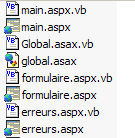
In this folder, a subfolder named [bin] is created, containing the assembly [impot.dll] generated from the compilation of the business class files: [impots.vb, impotsData.vb, impotsArray.vb]. The required compilation command is shown below:
dos>vbc /t:library /out:impot.dll impotsData.vb impotsArray.vb impots.vb
Compilateur Microsoft (R) Visual Basic .NET version 7.10.3052.4
dos>dir
05/04/2004  13:28                1 337 impots.vb
21/04/2004  08:23                1 311 impotsArray.vb
21/04/2004  08:26                1 634 impotsData.vb
21/04/2004  09:21                5 632 impot.dll
The [impot.dll] file above must be placed in <application-path>\bin so that the web application can access it. The Cassini server is launched with the parameters (<application-path>,/impots1). Using a browser, we request the url [http://localhost/impots1/main.aspx]:
We fill out the form:
Then we start the tax calculation using the [Calculer] button. We get the following response:
Then we enter incorrect data:
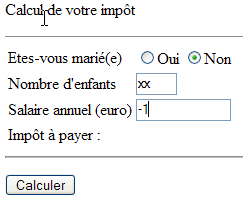
Clicking the [Calculer] button yields the following response:
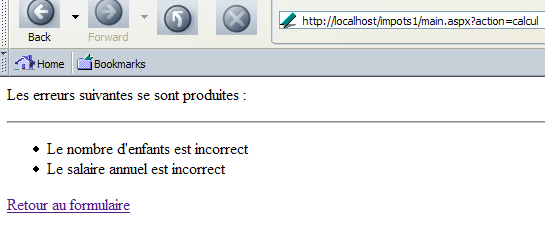
Clicking the [Retour au formulaire] link returns us to the form as it was when it was submitted:
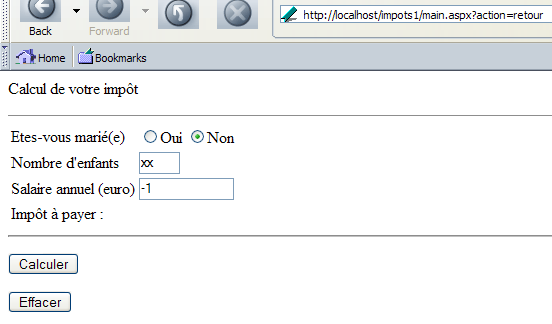
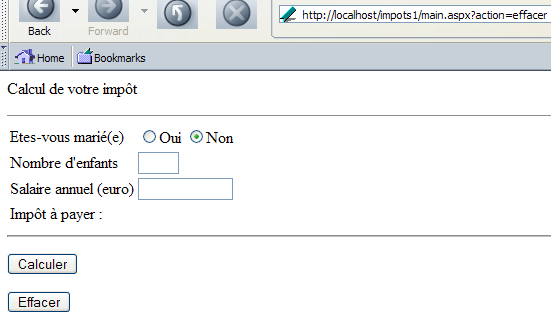
Finally, clicking the [Effacer] button resets the page:
6.1.11. Using the [curl] client
It is important to test web applications with clients other than browsers. If a form is sent to a browser with parameters to be posted upon validation, the browser will send the values of these parameters back to the server. Another client might not do this, and the server would then receive a request with missing parameters. It must know how to handle this situation. Another example is client-side data validation. If the form contains data to be validated, this validation can be performed on the client side using scripts included in the document containing the form. The browser will only submit the form if all client-side validated data is valid. One might then be tempted, on the server side, to assume that we will receive validated data and not want to perform this validation a second time. That would be a mistake. Indeed, a client other than a browser could send invalid data to the server, and the web application might then behave unexpectedly. We will illustrate these points using the client [curl].
First, we request url from [http://localhost/impots1/main.aspx]:
dos>curl --include --url http://localhost/impots1/main.aspx

HTTP/1.1 200 OK
Server: Microsoft ASP.NET Web Matrix Server/0.6.0.0
Date: Thu, 01 Apr 2004 15:18:10 GMT
Set-Cookie: ASP.NET_SessionId=ivthkl45tjdjrzznevqsf255; path=/
Cache-Control: private
Content-Type: text/html; charset=utf-8
Content-Length: 982
Connection: Close


<html>
    <head>
        <title>Impôt</title>
    </head>
    <body>
        <P>Calcul de votre impôt</P>
        <HR width="100%" SIZE="1">
        <form method="post" action="main.aspx?action=calcul">
            <TABLE border="0">
                <TR>
                    <TD>Etes-vous marié(e)</TD>
                    <TD>
                        <INPUT type="radio" value="oui" name="rdMarie" >Oui <INPUT type="radio"  value="non" name="rdMarie" checked>Non</TD>
                </TR>
                <TR>
                    <TD>Nombre d'children</TD>
                    <TD><INPUT type="text" size="3" maxLength="3" name="txtEnfants" value=""></TD>
                </TR>
                <TR>
                    <TD>Salaire annuel (euro)</TD>
                    <TD><INPUT type="text" maxLength="12" size="12" name="txtSalaire" value=""></TD>
                </TR>
                <TR>
                    <TD>Impôt à payer :
                    </TD>
                    <TD></TD>
                </TR>
            </TABLE>
            <hr>
            <P>
                <INPUT type="submit" value="Calculer">
            </P>
        </form>
        <form method="post" action="main.aspx?action=effacer">
                <INPUT type="submit" value="Effacer">
        </form>
    </body>
</html>
The server sent us the form code HTML. In the headers HTTP, we have the session cookie. We will use it in subsequent requests to maintain the session. Let’s request the action [calcul] without providing any parameters:
dos>curl --cookie ASP.NET_SessionId=ivthkl45tjdjrzznevqsf255 --include --url http://localhost/impots1/main.aspx?action=calcul

HTTP/1.1 200 OK
Server: Microsoft ASP.NET Web Matrix Server/0.6.0.0
Date: Thu, 01 Apr 2004 15:22:42 GMT
Cache-Control: private
Content-Type: text/html; charset=utf-8
Content-Length: 380
Connection: Close


<HTML>
    <HEAD>
        <title>Impôt</title>
    </HEAD>
    <body>
        <P>Les erreurs suivantes se sont produites :</P>
        <HR>
        <ul>
            <li> Vous n'did not indicate your marital status</li>
<li> Le nombre d'children is incorrect</li>
<li> Le salaire annuel est incorrect</li>
        </ul>
        <a href="main.aspx?action=retour">
            Retour au formulaire
        </a>
    </body>
</HTML>
We can see that the web application returned the view [erreurs] with three error messages for the three missing parameters. Now let’s send incorrect parameters:
dos>curl --cookie ASP.NET_SessionId=ivthkl45tjdjrzznevqsf255 --include --data rdMarie=xx --data txtEnfants=xx --data txtSalaire=xx --url http://localhost/impots1/main.aspx?action=calculation

HTTP/1.1 200 OK
Server: Microsoft ASP.NET Web Matrix Server/0.6.0.0
Date: Thu, 01 Apr 2004 15:25:50 GMT
Cache-Control: private
Content-Type: text/html; charset=utf-8
Content-Length: 380
Connection: Close


<HTML>
    <HEAD>
        <title>Impôt</title>
    </HEAD>
    <body>
        <P>Les erreurs suivantes se sont produites :</P>
        <HR>
        <ul>
            <li> Vous n'did not indicate your marital status</li>
<li> Le nombre d'children is incorrect</li>
<li> Le salaire annuel est incorrect</li>
        </ul>
        <a href="main.aspx?action=retour">
            Retour au formulaire
        </a>
    </body>
</HTML>
The three errors were correctly detected. Now let's send valid parameters:
dos>curl --cookie ASP.NET_SessionId=ivthkl45tjdjrzznevqsf255 --include --data rdMarie=yes --data txtEnfants=2 --data txtSalaire=60000 --url http://localhost/impots1/main.aspx?action=calculation

HTTP/1.1 200 OK
Server: Microsoft ASP.NET Web Matrix Server/0.6.0.0
Date: Thu, 01 Apr 2004 15:28:24 GMT
Cache-Control: private
Content-Type: text/html; charset=utf-8
Content-Length: 1000
Connection: Close


<html>
    <head>
        <title>Impôt</title>
    </head>
    <body>
        <P>Calcul de votre impôt</P>
        <HR width="100%" SIZE="1">
        <form method="post" action="main.aspx?action=calcul">
            <TABLE border="0">
                <TR>
                    <TD>Etes-vous marié(e)</TD>
                    <TD>
                        <INPUT type="radio" value="oui" name="rdMarie" checked>Oui <INPUT type="radio"  value="non" name="rdMarie" >Non</TD>
                </TR>
                <TR>
                    <TD>Nombre d'children</TD>
                    <TD><INPUT type="text" size="3" maxLength="3" name="txtEnfants" value="2"></TD>
                </TR>
                <TR>
                    <TD>Salaire annuel (euro)</TD>
                    <TD><INPUT type="text" maxLength="12" size="12" name="txtSalaire" value="60000"></TD>
                </TR>
                <TR>
                    <TD>Impôt à payer :
                    </TD>
                    <TD>4300 euro(s)</TD>
                </TR>
            </TABLE>
            <hr>
            <P>
                <INPUT type="submit" value="Calculer">
            </P>
        </form>
        <form method="post" action="main.aspx?action=effacer">
                <INPUT type="submit" value="Effacer">
        </form>
    </body>
</html>
We have successfully retrieved the tax due: 4,300 euros. The key takeaway from this example is that we must not be misled by the fact that we are writing a web application intended for clients, which are browsers. A web application is a service, and this network protocol does not allow us to determine the nature of a service’s client application. Therefore, we cannot know whether a web application’s client is a browser or not. We therefore follow two rules:
- upon receiving a request from a client, we make no assumptions about the client and verify that the expected parameters in the request are present and valid
- we construct a response intended for browsers, which generally consists of HTML documents
A web application can be built to simultaneously serve different clients clients, such as browsers and mobile phones. A new parameter indicating the client type can then be included in each request. Thus, a browser will request tax calculation via a request to the url http://machine/impots/main.aspx?client=browser&action=calcul, while a mobile phone will send a request to url http://machine/impots/main.aspx?client=mobile&action=calcul. The MVC structure makes it easier to write such an application. It becomes as follows:
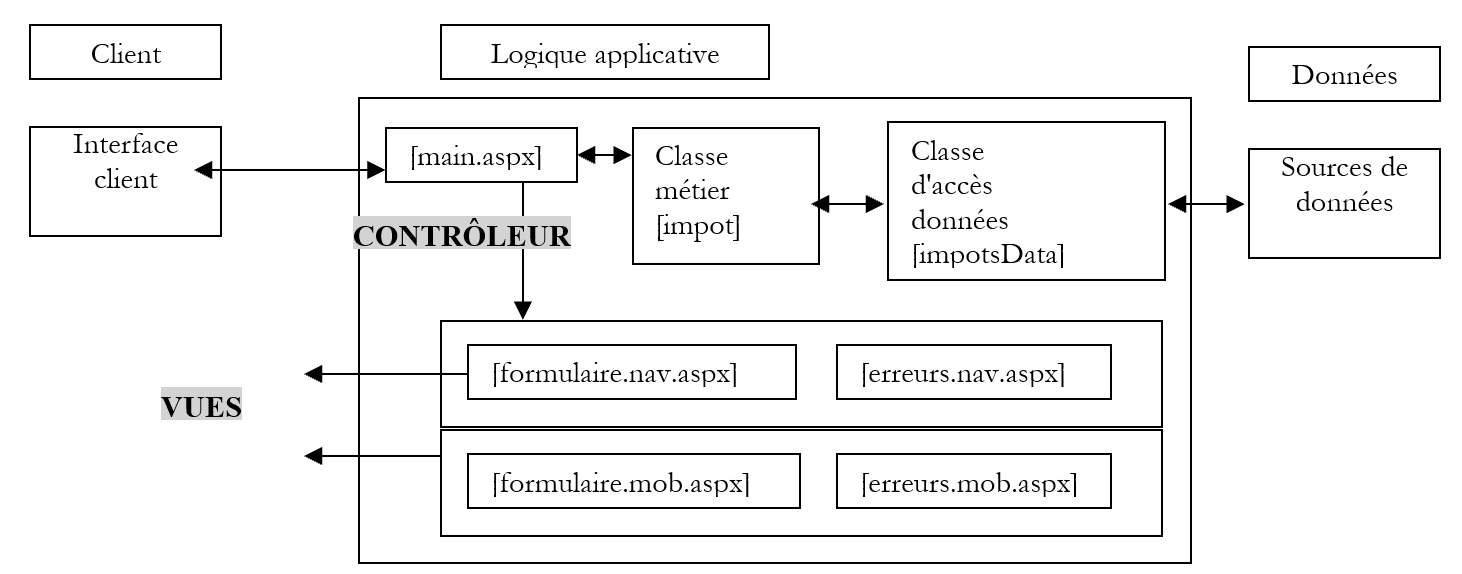
The [Classes métier, Classes d'accès aux données] block remains unchanged. This is because it is a client-agnostic component. The [Contrôleur] block changes slightly but must account for a new parameter in the request: the [client] parameter, which indicates the type of client it is dealing with. The [vues] block must generate views for each client type. It might be worthwhile to account for the presence of the [client] parameter in the request from the very beginning of the application’s design, even if the short- or medium-term goal is limited to browsers alone. If the application needs to support a new client type in the future, only views tailored to that type need to be written.
6.2. Example 2
6.2.1. The Problem
Here, we aim to address the same issue as before, but by modifying the data source for the [impot] object created by the web application. In the previous version, the data source provided array values hard-coded in the code. This time, the new data source will retrieve them from a ODBC data source associated with a MySQL database.
6.2.2. The ODBC data source
The data will be located in a table named [IMPOTS] within a database named MySQL. The contents of this table will be as follows:
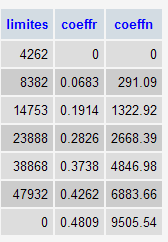
The database owner is the user [admimpots] with password [mdpimpots]. We associate a data source named ODBC with this database. Before doing so, let’s first review the various ways to access a database using the .NET platform.
There are many databases available for Windows platforms. To access them, applications use programs called drivers.
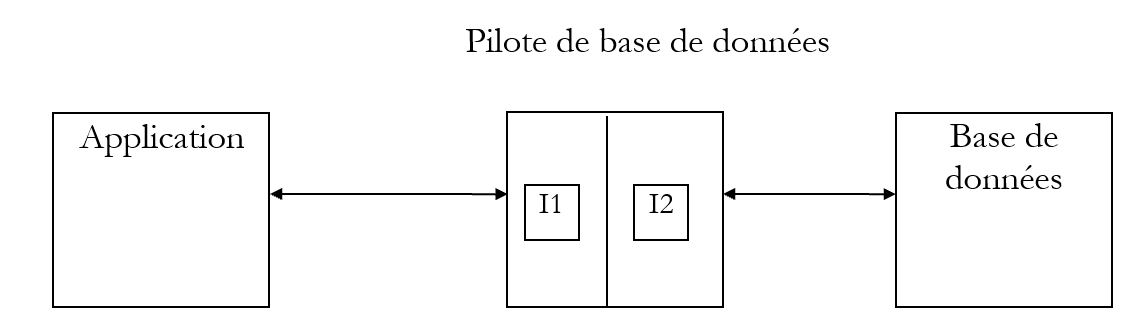
In the diagram above, the driver has two interfaces:
- the I1 interface presented to the application
- the I2 interface to the database
To prevent an application written for database B1 from having to be rewritten if migrating to a different database B2, standardization efforts have been made on interface I1. If databases using "standardized" drivers are employed, database B1 will be provided with driver P1, database B2 with driver P2, and the I1 interface of these two drivers will be identical. Thus, the application will not need to be rewritten. For example, you can migrate a ACCESS database to a MySQL database without changing the application.
There are two types of standardized drivers:
- the ODBC drivers (Open DataBase Connectivity)
- OLE and DB drivers (Object Linking and Embedding)
The ODBC drivers provide access to databases. The data sources for the OLE and DB drivers are more varied: databases, email systems, directories, etc. There are no limits. Any data source can be the subject of an Ole driver DB if a publisher decides to do so. The benefit is obviously significant: you have uniform access to a wide variety of data.
The .NET 1.1 platform comes with three types of data access classes:
- the SQL Server.NET classes, for accessing Microsoft SQL Server databases
- the Ole Db.NET classes, for accessing SGBD databases that provide a OLE driver
- the odbc.net classes, for accessing SGBD databases using a ODBC driver
SGBD MySQL has long had a driver ODBC. This is the one we are now using. On Windows, we use the option [Menu Démarrer/Panneau de configuration/Outils d'administration/Sources ODBC 32 bits]. Depending on the Windows version, this path may vary slightly. This gives us the following application, which will allow us to create our ODBC data source:
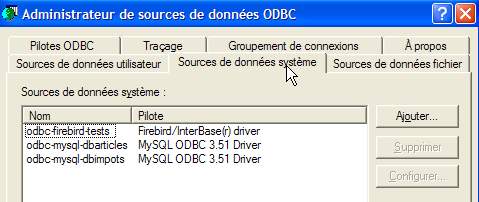
We will create a System data source, c.a.d—a data source that any user of the machine can access. Above, select the utiliser.Aussi tab. The page displayed has a button that we use to create a new data source:
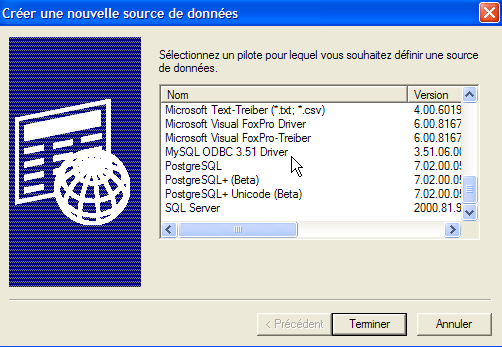
The wizard prompts you to select the driver to use. Windows comes with a number of pre-installed drivers. The ODBC driver for MySQL is not included in this set. You must therefore install it first. You can find it online by entering the search terms "MySQL ODBC" or "MyODBC" into a search engine. Here, we have installed the driver [MySQL ODBC 3.51]. We select it and proceed to [Terminer]:
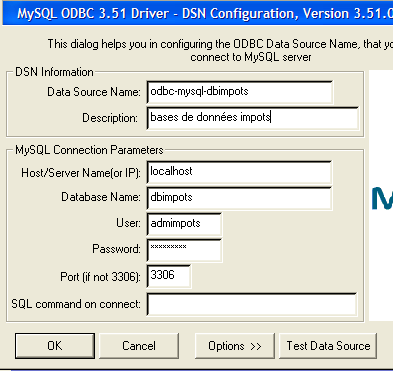
A number of details must be provided:
the name that will identify the ODBC data source. Any Windows application will be able to access the source using this name | |
Any text describing the data source | |
The name of the machine hosting the SGBD and MySQL. Here, it is the local machine. It could be a remote machine. This would allow a Windows application to access a remote database without any special coding. This is a major benefit of the ODBC data source. | |
A SGBD or MySQL can manage multiple databases. Here, we specify which one we want to manage: dbimpots | |
Name of a user defined within the SGBD MySQL. Access to the data source will be performed under this user’s name. Here: admimpots | |
This user’s password. Here: mdpimpots | |
The working port for SGBD MySQL. By default, this is port 3306. We have not changed it |
Once this is done, we test the validity of our connection settings using the [Test Data Source] button:
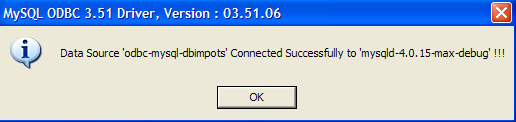
Once this is done, we are confident in our data source ODBC. We can now use it. We click [OK] as many times as necessary to exit the wizard ODBC.
If the reader does not have SGBD mySQL, they can obtain it for free at url [http://www.mysql.com]. Below we outline the steps to create a ODBC source using Access. The first steps are identical to those described previously. Add a new system data source:
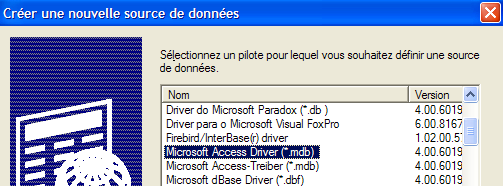
The selected driver will be [Microsoft Access Driver]. Click [Terminer] to proceed to the ODBC source definition:
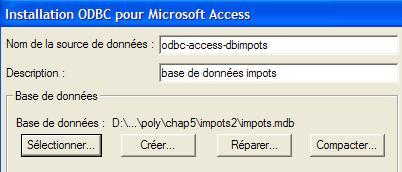
The information to be provided is as follows:
the name that will identify the ODBC data source. Any Windows application will be able to access the source using this name | |
Any text describing the data source | |
The full name of the ACCESS file to be used |
6.2.3. A new data access class
Let’s return to the MVC structure in our application:
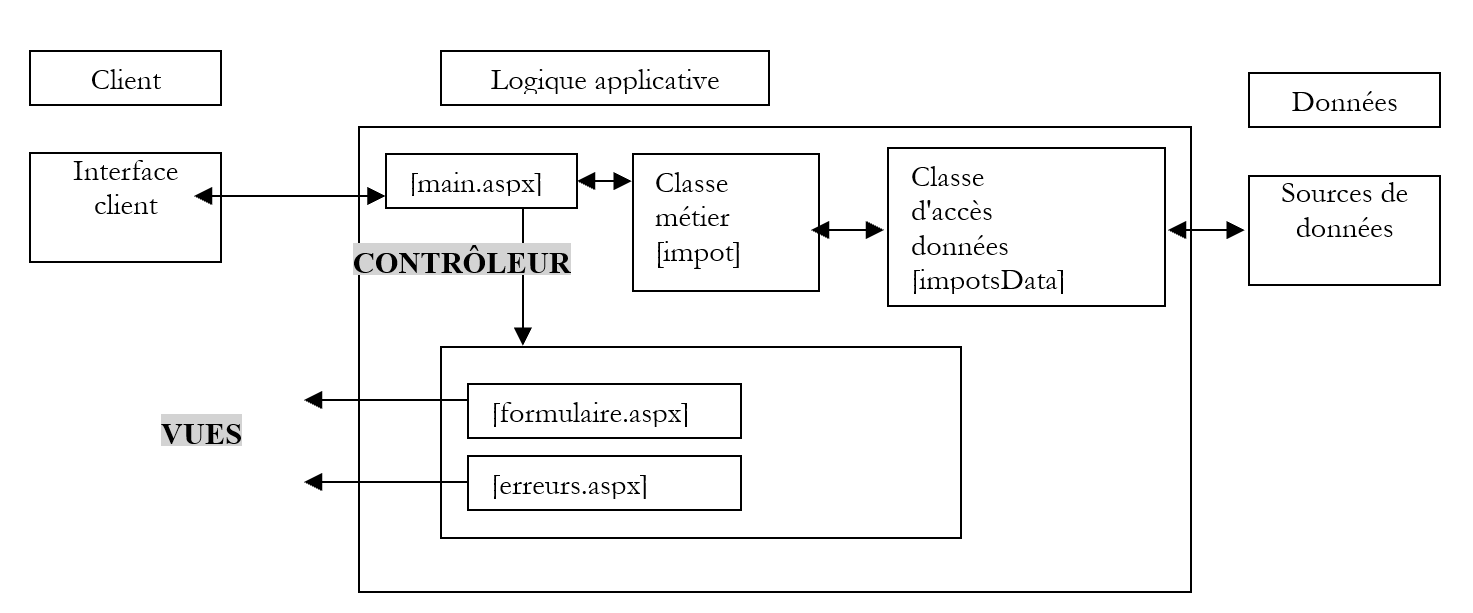
In the diagram above, the [impotsData] class is responsible for retrieving the data. It must do so here from the MySQL and [dbimpots] databases. We know from the previous version in this application that [impotsData] is an abstract class that must be derived each time we want to adapt it to a new data source. Let’s review the structure of this abstract class:
Imports System.Collections

Namespace st.istia.univangers.fr
    Public MustInherit Class impotsData
        Protected limites() As Decimal
        Protected coeffr() As Decimal
        Protected coeffn() As Decimal
        Protected checked As Boolean
        Protected valide As Boolean

        ' data access method
        Public MustOverride Function getData() As Object()

        ' data verification method
        Protected Function checkData() As Integer
            ' verifies acquired data
...
        End Function

        ' checks the validity of an array's contents
        Protected Function check(ByRef tableau() As Decimal, ByVal n As Integer) As Boolean
        ...
        End Function
    End Class
End Namespace
The class that derives from [impotsData] must implement two methods:
- a constructor if the no-argument constructor of [impotsData] is not suitable
- the [getData] method, which returns the three arrays (limits, coeffr, coeffn)
We create the class [impotsODBC], which will retrieve the data (limits,coeffr,coeffn) from a source named ODBC:
Imports System.Data.Odbc
Imports System.Data
Imports System.Collections
Imports System

Namespace st.istia.univangers.fr
    Public Class impotsODBC
        Inherits impotsData

        ' instance variables
        Protected DSNimpots As String

        ' manufacturer
        Public Sub New(ByVal DSNimpots As String)
            ' we note the three pieces of information
            Me.DSNimpots = DSNimpots
        End Sub

        Public Overrides Function getdata() As Object()
            ' initialise les trois tableaux limites, coeffr, coeffn à partir
            ' the contents of the [impots] table in the ODBC DSNimpots database
            ' limits, coeffr, coeffn are the three columns of this table
            ' can launch various exceptions

            Dim connectString As String = "DSN=" + DSNimpots + ";"         ' base connection chain
            Dim impotsConn As OdbcConnection = Nothing         ' the connection
            Dim sqlCommand As OdbcCommand = Nothing         ' the SQL command
            ' the SELECT query
            Dim selectCommand As String = "select limites,coeffr,coeffn from impots"
            ' tables to retrieve data
            Dim aLimites As New ArrayList
            Dim aCoeffR As New ArrayList
            Dim aCoeffN As New ArrayList
            Try
                ' attempt to access the database
                impotsConn = New OdbcConnection(connectString)
                impotsConn.Open()
                ' create a command object
                sqlCommand = New OdbcCommand(selectCommand, impotsConn)
                ' execute the query
                Dim myReader As OdbcDataReader = sqlCommand.ExecuteReader()
                ' Using the recovered table
                While myReader.Read()
                    ' the data of the current line are put in the tables
                    aLimites.Add(myReader("limites"))
                    aCoeffR.Add(myReader("coeffr"))
                    aCoeffN.Add(myReader("coeffn"))
                End While
                ' freeing up resources
                myReader.Close()
                impotsConn.Close()
            Catch e As Exception
                Throw New Exception("Erreur d'accès à la base de données (" + e.Message + ")")
            End Try
            ' dynamic tables are placed in static tables
            Me.limites = New Decimal(aLimites.Count - 1) {}
            Me.coeffr = New Decimal(aLimites.Count - 1) {}
            Me.coeffn = New Decimal(aLimites.Count - 1) {}
            Dim i As Integer
            For i = 0 To aLimites.Count - 1
                limites(i) = Decimal.Parse(aLimites(i).ToString())
                coeffR(i) = Decimal.Parse(aCoeffR(i).ToString())
                coeffN(i) = Decimal.Parse(aCoeffN(i).ToString())
            Next i
            ' verify acquired data
            Dim erreur As Integer = checkData()
            ' if invalid data, throws an exception
            If Not valide Then Throw New Exception("Les données des tranches d'impôts sont invalides (" + erreur.ToString + ")")
            ' otherwise we return the three tables
            Return New Object() {limites, coeffr, coeffn}
        End Function
    End Class
End Namespace
Let's take a look at the constructor:
        ' manufacturer
        Public Sub New(ByVal DSNimpots As String)
            ' we note the three pieces of information
            Me.DSNimpots = DSNimpots
        End Sub
It receives as a parameter the name of the source ODBC containing the data to be retrieved. The constructor simply stores this name. The [getData] method is responsible for reading the data from the [impots] table and placing it into three arrays (limits, coeffr, coeffn). Let’s comment on its code:
- the connection parameters for the ODBC data source are defined, but the source is not open
            ' base connection chain
            Dim connectString As String = "DSN=" + DSNimpots + ";"
            ' a database connection object is created - this connection is not open
            Dim impotsConn As OdbcConnection = New OdbcConnection(connectString)
- We define three [ArrayList] objects to retrieve data from the [impots] table:
            ' tables to retrieve data
            Dim aLimites As New ArrayList
            Dim aCoeffR As New ArrayList
            Dim aCoeffN As New ArrayList
- All database access code is enclosed in a try/catch block to handle any access errors. We open the connection to the database:
                 ' attempt to access the database
                impotsConn = New OdbcConnection(connectString)
                impotsConn.Open()
- We execute the [select] command on the open connection. We obtain a [OdbcDataReader] object that will allow us to iterate through the rows of the result table from the SELECT query:
                 ' create a command object
                Dim sqlCommand As OdbcCommand = New OdbcCommand(selectCommand, impotsConn)
                ' execute the query
                Dim myReader As OdbcDataReader = sqlCommand.ExecuteReader()
- We iterate through the result table, row by row. To do this, we use the [Read] method of the [OdbcDataReader] object obtained previously. This method does two things:
- it advances one row in the table. Initially, we are positioned before the first row
- it returns the boolean [true] if it was able to advance, [false] otherwise, the latter case indicating that all rows have been processed.
The columns of the current row of the [OdbcDataReader] object are obtained via OdbcDataReader. We obtain an object representing the value of the column. We traverse the entire table to place its contents into the three [ArrayList] objects:
                 ' Using the recovered table
                While myReader.Read()
                    ' the data of the current line are put in the tables
                    aLimites.Add(myReader("limites"))
                    aCoeffR.Add(myReader("coeffr"))
                    aCoeffN.Add(myReader("coeffn"))
- Once this is done, we release the resources associated with the connection:
- The contents of the three [ArrayList] objects are transferred to three standard arrays:
            ' dynamic tables are placed in static tables
            limites = New Decimal(aLimites.Count - 1) {}
            coeffr = New Decimal(aLimites.Count - 1) {}
            coeffn = New Decimal(aLimites.Count - 1) {}
            Dim i As Integer
            For i = 0 To aLimites.Count - 1
                limites(i) = CType(aLimites(i), Decimal)
                coeffR(i) = CType(aCoeffR(i), Decimal)
                coeffN(i) = CType(aCoeffN(i), Decimal)
            Next i
- Once the data from table [impots] has been loaded into the three arrays, all that remains is to verify their contents using the [checkData] method of the base class [impotsData]:
            ' verify acquired data
            Dim erreur As Integer = checkData()
            ' if invalid data, throws an exception
            If Not valide Then Throw New Exception("Les données des tranches d'impôts sont invalides (" + erreur.ToString + ")")
            ' otherwise we return the three tables
            Return New Object() {limites, coeffr, coeffn}
6.2.4. Tests for the data access class
A test program could look like this:
Option Explicit On
Option Strict On

' namespaces
Imports System
Imports Microsoft.VisualBasic

Namespace st.istia.univangers.fr

    ' test pg
    Module testimpots
        Sub Main(ByVal arguments() As String)
            ' interactive tax calculator
            ' the user enters three data points on the keyboard: married nbEnfants salary
            ' the program then displays the tax payable
            Const syntaxe1 As String = "pg DSNimpots"
            Const syntaxe2 As String = "syntaxe : marié nbEnfants salaire" + ControlChars.Lf + "marié : o pour marié, n pour non marié" + ControlChars.Lf + "nbEnfants : nombre d'enfants" + ControlChars.Lf + "salaire : salaire annuel en F"

            ' checking program parameters
            If arguments.Length <> 1 Then
                ' error msg
                Console.Error.WriteLine(syntaxe1)
                ' end
                Environment.Exit(1)
            End If
            ' retrieve the arguments
            Dim DSNimpots As String = arguments(0)

            ' tax object creation
            Dim objImpot As impot = Nothing
            Try
                objImpot = New impot(New impotsODBC(DSNimpots))
            Catch ex As Exception
                Console.Error.WriteLine(("L'erreur suivante s'est produite : " + ex.Message))
                Environment.Exit(2)
            End Try

            ' infinite loop
            While True
                ' initially no errors
                Dim erreur As Boolean = False

                ' tax calculation parameters are requested
                Console.Out.Write("Paramètres du calcul de l'impôt au format marié nbEnfants salaire ou rien pour arrêter :")
                Dim paramètres As String = Console.In.ReadLine().Trim()

                ' anything to do?
                If paramètres Is Nothing Or paramètres = "" Then
                    Exit While
                End If

                ' check the number of arguments in the input line
                Dim args As String() = paramètres.Split(Nothing)
                Dim nbParamètres As Integer = args.Length
                If nbParamètres <> 3 Then
                    Console.Error.WriteLine(syntaxe2)
                    erreur = True
                End If
                Dim marié As String
                Dim nbEnfants As Integer
                Dim salaire As Integer
                If Not erreur Then
                    ' checking the validity of parameters
                    ' married
                    marié = args(0).ToLower()
                    If marié <> "o" And marié <> "n" Then
                        Console.Error.WriteLine((syntaxe2 + ControlChars.Lf + "Argument marié incorrect : tapez o ou n"))
                        erreur = True
                    End If
                    ' nbEnfants
                    nbEnfants = 0
                    Try
                        nbEnfants = Integer.Parse(args(1))
                        If nbEnfants < 0 Then
                            Throw New Exception
                        End If
                    Catch
                        Console.Error.WriteLine(syntaxe2 + "\nArgument nbEnfants incorrect : tapez un entier positif ou nul")
                        erreur = True
                    End Try
                    ' salary
                    salaire = 0
                    Try
                        salaire = Integer.Parse(args(2))
                        If salaire < 0 Then
                            Throw New Exception
                        End If
                    Catch
                        Console.Error.WriteLine(syntaxe2 + "\nArgument salaire incorrect : tapez un entier positif ou nul")
                        erreur = True
                    End Try
                End If
                If Not erreur Then
                    ' parameters are correct - tax is calculated
                    Console.Out.WriteLine(("impôt=" & objImpot.calculer(marié = "o", nbEnfants, salaire).ToString + " euro(s)"))
                End If
            End While
        End Sub
    End Module
End Namespace
The application is launched with a parameter:
- DSNimpots: name of the ODBC data source to be used
The tax calculation is performed using an object of type [impot] created when the application is launched:
            ' tax object creation
            Dim objImpôt As impot = Nothing
            Try
                objImpot = New impot(New impotsODBC(DSNimpots))
            Catch ex As Exception
                Console.Error.WriteLine(("L'erreur suivante s'est produite : " + ex.Message))
                Environment.Exit(1)
            End Try
Once initialized, the application repeatedly prompts the user to enter the three pieces of information needed to calculate their tax:
- their marital status: o for married, n for unmarried
- number of children
- their annual salary
All classes are compiled:
dos>vbc /r:system.dll /r:system.data.dll /t:library /out:impot.dll impots.vb impotsArray.vb impotsData.vb impotsODBC.vb
dos>dir
01/04/2004  19:34             7 168 impot.dll
01/04/2004  19:31             1 360 impots.vb
21/04/2004  08:23             1 311 impotsArray.vb
21/04/2004  08:26             1 634 impotsData.vb
01/04/2004  19:34             2 735 impotsODBC.vb
01/04/2004  19:32             3 210 testimpots.vb
The test program is then compiled:
dir>dir
01/04/2004  19:34             7 168 impot.dll
01/04/2004  19:31             1 360 impots.vb
21/04/2004  08:23             1 311 impotsArray.vb
21/04/2004  08:26             1 634 impotsData.vb
01/04/2004  19:34             2 735 impotsODBC.vb
01/04/2004  19:34             6 144 testimpots.exe
01/04/2004  19:32             3 210 testimpots.vb
The test program is first run with the data source ODBC MySQL:
dos>testimpots odbc-mysql-dbimpots
Paramètres du calcul de l'married tax nbEnfants salary or nothing to stop :o 2 60000
impôt=4300 euro(s)
We switch to the ODBC source to use an Access database:
dos>testimpots odbc-access-dbimpots
Paramètres du calcul de l'married tax nbEnfants salary or nothing to stop :o 2 60000
impôt=4300 F
6.2.5. Web application views
These are the same as in the previous application: formulaire.aspx and erreurs.aspx
6.2.6. The [global.asax, main.aspx] application controllers
Only the [global.asax] controller needs to be modified. It is responsible for creating the [impot] object when the application starts. The constructor for this object has a single parameter: the [impotsData] object responsible for retrieving data. This parameter therefore changes for each new type of data source. The [global.asax.vb] controller becomes the following:
Imports System
Imports System.Web
Imports System.Web.SessionState
Imports st.istia.univangers.fr
Imports System.Configuration

Public Class Global
    Inherits System.Web.HttpApplication

    Sub Application_Start(ByVal sender As Object, ByVal e As EventArgs)
        ' create an impot object
        Dim objImpot As impot
        Try
            objImpot = New impot(New impotsODBC(ConfigurationSettings.AppSettings("DSNimpots")))
            ' put the object in the application
            Application("objImpot") = objImpot
            ' no error
            Application("erreur") = False
        Catch ex As Exception
            'there has been an error, we note it in the application
            Application("erreur") = True
            Application("message") = ex.Message
        End Try
    End Sub
End Class
The data source for the [impot] object is now a [impotODBC] object. The latter has as a parameter the name DSN of the ODBC data source to be used. Rather than hard-coding this name in the code, we place it in the application's [web.config] configuration file:
<?xml version="1.0" encoding="utf-8" ?>
<configuration>
    <appSettings>
        <add key="DSNimpots" value="odbc-mysql-dbimpots" />
    </appSettings>
</configuration>
We know that the value of a key C in the <appSettings> section of the [web.config] file is obtained in the application code by [ConfigurationSettings.AppSettings(C)].
To determine the cause of the exception, we log the exception message in the application so that it remains available for queries. The [main.aspx.vb] control will include this message in its error list:
    Private Sub Page_Load(ByVal sender As System.Object, ByVal e As System.EventArgs) Handles MyBase.Load
        ' first of all, we check whether the application has initialized correctly
        If CType(Application("erreur"), Boolean) Then
            ' redirects to error page
            Dim erreurs As New ArrayList
            erreurs.Add("Application momentanément indisponible...(" + Application("message").ToString + ")")
            context.Items("erreurs") = erreurs
            context.Items("lien") = ""
            context.Items("href") = ""
            Server.Transfer("erreurs.aspx")
        End If
        ' retrieve the action to be performed
...
6.2.7. Summary of changes
The application is ready to be tested. Let's list the changes made to the previous version:
- a new data access class has been created
- the [global.asax.vb] controller has been modified in two places: construction of the [impot] object and logging of the message related to a potential exception in the application
- the [main.aspx.vb] controller has been modified in one place to display the previous exception message
- A file named [web.config] has been added
The modification work was carried out primarily in c.a.d, outside the web application. This was made possible by the application’s architecture, which separates the controller from the business classes. That is the key benefit of this architecture. It could be shown that with an appropriate configuration file, any modification to the application controller could have been avoided. It is possible to specify in the configuration file the name of the data access class to be dynamically instantiated, as well as the various parameters required for this instantiation. With this information, [global.asax] can instantiate the data access object. Changing the data source then amounts to:
- creating the access class for that source if it does not yet exist
- modifying the [web.config] file to allow the dynamic creation of an instance of this class in [global.asax]
6.2.8. Testing the web application
All of the above files are placed in a folder named <application-path>.
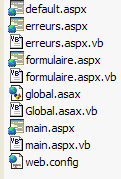
In this folder, a subfolder named [bin] is created, in which the assembly [impot.dll]—generated from the compilation of the business class files ([impots.vb, impotsData.vb, impotsArray.vb, impotsODBC.vb])—is placed. The required compilation command is shown below:
dos>vbc /r:system.dll /r:system.data.dll /t:library /out:impot.dll impots.vb impotsArray.vb impotsData.vb impotsODBC.vb
dos>dir
01/04/2004  19:34             7 168 impot.dll
01/04/2004  19:31             1 360 impots.vb
21/04/2004  08:23             1 311 impotsArray.vb
21/04/2004  08:26             1 634 impotsData.vb
01/04/2004  19:34             2 735 impotsODBC.vb
01/04/2004  19:32             3 210 testimpots.vb
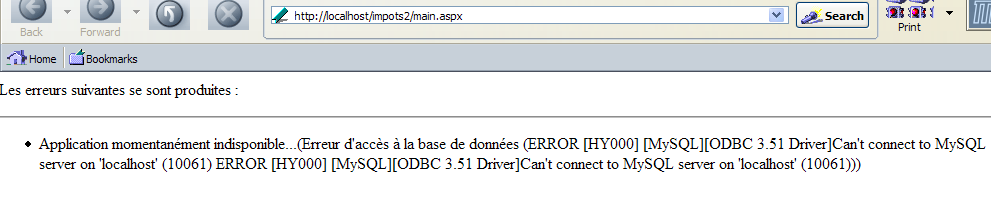
The [impot.dll] file above must be placed in <application-path>\bin so that the web application can access it. The Cassini server is launched with the parameters (<application-path>,/impots2). The tests yield the same results as in the previous version, as the presence of the database is transparent to the user. To illustrate this presence, however, we ensure that the ODBC source is unavailable by stopping SGBD and MySQL, and we requesturl and [http://localhost/impots2/main.aspx]. We receive the following response:
6.3. Example 3
6.3.1. The Problem
Here, we propose to address the same issue by again modifying the data source of the [impot] object created by the web application. This time, the new data source will be a ACCESS database accessed via a OLEDB driver. Our goal is to demonstrate another way to access a database.
6.3.2. The OLEDB data source
The data will be located in a table named [IMPOTS] within a database named ACCESS. The contents of this table will be as follows:
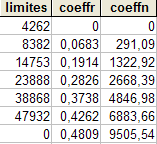
6.3.3. The data access class
Let’s return to the MVC structure of our application:
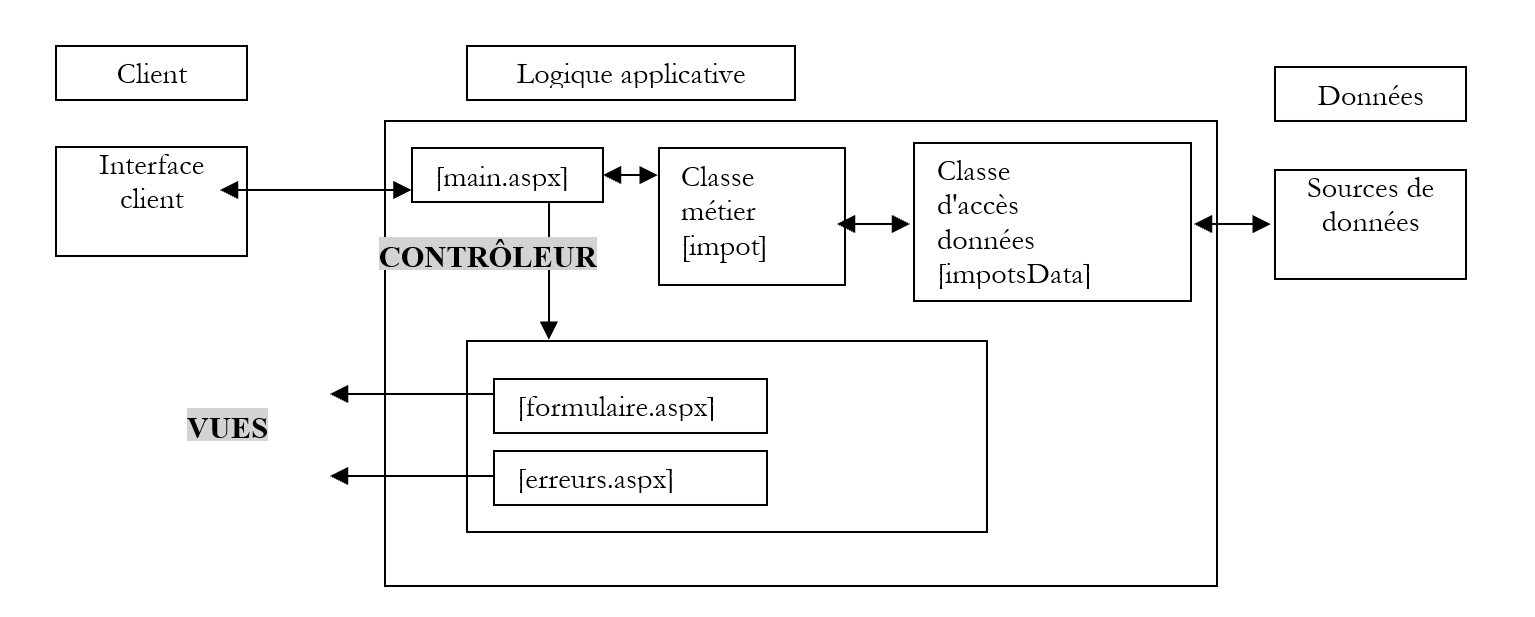
- In the diagram above, the [impotsData] class is responsible for retrieving the data. This time, it will need to retrieve it from a OLEDB source.
We create the [impotsOLEDB] class, which will retrieve the data (limits, coeffr, coeffn) from a ODBC source, which we will name:
Imports System.Data
Imports System.Collections
Imports System
Imports System.Xml
Imports System.Data.OleDb

Namespace st.istia.univangers.fr
    Public Class impotsOLEDB
        Inherits impotsData

        ' instance variables
        Protected chaineConnexion As String

        ' manufacturer
        Public Sub New(ByVal chaineConnexion As String)
            ' we note the three pieces of information
            Me.chaineConnexion = chaineConnexion
        End Sub

        Public Overrides Function getData() As Object()
            ' initialise les trois tableaux limites, coeffr, coeffn à partir
            ' the contents of the [impots] table in the OLEDB [chaineConnexion] database
            ' limites, coeffr, coeffn are the three columns of this table
            ' can launch various exceptions

            ' create a DataAdapter object to read data from source OLEDB
            Dim adaptateur As New OleDbDataAdapter("select limites,coeffr,coeffn from impots", chaineConnexion)
            ' create a memory image of the select result
            Dim contenu As New DataTable("impots")
            Try
                adaptateur.Fill(contenu)
            Catch e As Exception
                Throw New Exception("Erreur d'accès à la base de données (" + e.Message + ")")
            End Try
            ' retrieve the contents of the impots table
            Dim lignesImpots As DataRowCollection = contenu.Rows
            ' dimensioning of reception panels
            Me.limites = New Decimal(lignesImpots.Count - 1) {}
            Me.coeffr = New Decimal(lignesImpots.Count - 1) {}
            Me.coeffn = New Decimal(lignesImpots.Count - 1) {}
            ' we transfer the contents of the impots table to the tables
            Dim i As Integer
            Dim ligne As DataRow
            Try
                For i = 0 To lignesImpots.Count - 1
                    ' table line i
                    ligne = lignesImpots.Item(i)
                    ' retrieve the contents of the line
                    limites(i) = CType(ligne.Item(0), Decimal)
                    coeffr(i) = CType(ligne.Item(1), Decimal)
                    coeffn(i) = CType(ligne.Item(2), Decimal)
                Next
            Catch
                Throw New Exception("Les données des tranches d'impôts n'ont pas le bon type")
            End Try
            ' verify acquired data
            Dim erreur As Integer = checkData()
            ' if invalid data, throws an exception
            If Not valide Then Throw New Exception("Les données des tranches d'impôts sont invalides (" + erreur.ToString + ")")
            ' otherwise we return the three tables
            Return New Object() {limites, coeffr, coeffn}
        End Function
    End Class
End Namespace
Let's take a look at the constructor:
         ' manufacturer
        Public Sub New(ByVal chaineConnexion As String)
             ' we note the three pieces of information
            Me.chaineConnexion = chaineConnexion
        End Sub
It receives as a parameter the connection string for the OLEDB source, which contains the data to be retrieved. The constructor simply stores it. A connection string contains all the parameters required by the OLEDB driver to connect to the OLEDB source. It is generally quite complex. To determine the connection string for the ACCESS databases, you can use the [WebMatrix] tool. Launch this tool. It displays a window that allows you to connect to a data source:
  |  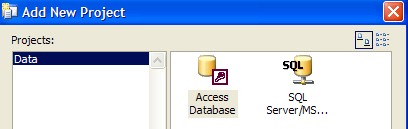 |
Using the icon indicated by the arrow above, you can create a connection to two types of Microsoft databases: SQL Server and ACCESS. Let’s choose ACCESS:
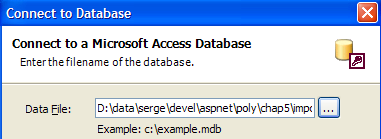
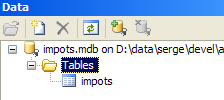
We used the [...] button to select the ACCESS database. We confirm the wizard. In the [Data] tab, icons represent the connection:
Now, let’s create a new .aspx file using [Files/New File]:
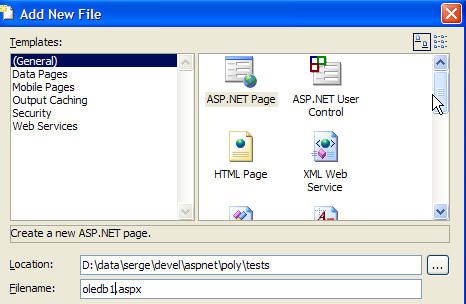
We get a blank sheet on which we can design our web interface:

Drag the [impots] table from the [Data] tab onto the sheet above. We get the following result:
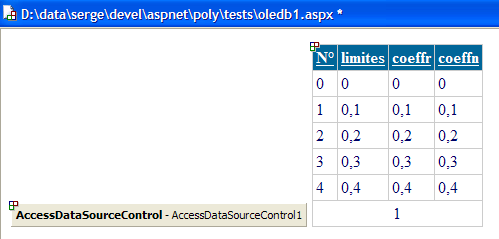
Right-click on the [AccessDataSourceControl] object below to access its properties:
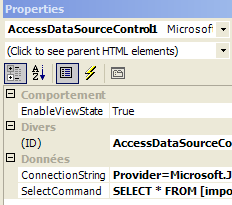
The connection string OLEDB to the database ACCESS is provided by the [ConnectionString] property above:
Provider=Microsoft.Jet.OLEDB.4.0; Ole DB Services=-4; Data Source=D:\data\serge\devel\aspnet\poly\chap5\impots\3\impots.mdb
We can see that this string consists of a fixed part and a variable part, which is simply the name of the file ACCESS. We will use this fact to generate the connection string to our data source OLEDB.
Let’s now return to our [impotsOLEDB] class. The [getData] method is responsible for reading data from the [impots] table and placing it into three arrays (limits, coeffr, coeffn). Let’s comment on its code:
- We define the object [DataAdapter], which will allow us to transfer the result of a SQL SELECT query into memory. To do this, we define the [select] query to be executed and associate it with the [DataAdapter] object. The constructor of the latter also requires the connection string it will use to connect to the OLEDB source
             ' create a DataAdapter object to read data from source OLEDB
            Dim adaptateur As New OleDbDataAdapter("select limites,coeffr,coeffn from impots", chaineConnexion)
- We execute the [select] command using the [Fill] method of the [DataAdapter] object. The result of [select] is injected into a [DataTable] object created for this purpose. A [DataTable] object is the in-memory representation of a database table, c.a.d—a set of rows and columns. We handle an exception that may occur if, for example, the connection string is incorrect.
             ' create a memory image of the select result
            Dim contenu As New DataTable("impots")
            Try
                adaptateur.Fill(contenu)
            Catch e As Exception
                Throw New Exception("Erreur d'accès à la base de données (" + e.Message + ")")
            End Try
- In [contenu], we have the table [impots] retrieved by [select]. A [DataTable] object is a table, and therefore a set of rows. These are accessible via the [rows] property of [datatable]:
            ' retrieve the contents of the impots table
            Dim lignesImpots As DataRowCollection = contenu.Rows
- Each element of the [lignesImpots] collection is an object of type [DataRow] representing a row in the table. This row has columns accessible via the [DataRow] object through its [Item] property. [DataRow].[Item(i)] is column number i of row [DataRow]. By iterating through the collection of rows (the collection DataRows of lignesImpots) and the collection of columns for each row, we can obtain the entire table:
            ' dimensioning of reception panels
            Me.limites = New Decimal(lignesImpots.Count - 1) {}
            Me.coeffr = New Decimal(lignesImpots.Count - 1) {}
            Me.coeffn = New Decimal(lignesImpots.Count - 1) {}
            ' we transfer the contents of the impots table to the tables
            Dim i As Integer
            Dim ligne As DataRow
            Try
                For i = 0 To lignesImpots.Count - 1
                    ' table line i
                    ligne = lignesImpots.Item(i)
                    ' retrieve the contents of the line
                    limites(i) = CType(ligne.Item(0), Decimal)
                    coeffr(i) = CType(ligne.Item(1), Decimal)
                    coeffn(i) = CType(ligne.Item(2), Decimal)
                Next
            Catch
                Throw New Exception("Les données des tranches d'impôts n'ont pas le bon type")
            End Try
- Once the data from table [impots] has been loaded into the three arrays, all that remains is to verify their contents using the [checkData] method of the base class [impotsData]:
            ' verify acquired data
            Dim erreur As Integer = checkData()
            ' if invalid data, throws an exception
            If Not valide Then Throw New Exception("Les données des tranches d'impôts sont invalides (" + erreur.ToString + ")")
            ' otherwise we return the three tables
            Return New Object() {limites, coeffr, coeffn}
6.3.4. Tests for the data access class
A test program could look like this:
Option Explicit On
Option Strict On

' namespaces
Imports System
Imports Microsoft.VisualBasic

Namespace st.istia.univangers.fr

    ' test pg
    Module testimpots
        Sub Main(ByVal arguments() As String)
            ' interactive tax calculator
            ' the user enters three data points on the keyboard: married nbEnfants salary
            ' the program then displays the tax payable
            Const syntaxe1 As String = "pg bdACCESS"
            Const syntaxe2 As String = "syntaxe : marié nbEnfants salaire" + ControlChars.Lf + "marié : o pour marié, n pour non marié" + ControlChars.Lf + "nbEnfants : nombre d'enfants" + ControlChars.Lf + "salaire : salaire annuel en F"

            ' checking program parameters
            If arguments.Length <> 1 Then
                ' error msg
                Console.Error.WriteLine(syntaxe1)
                ' end
                Environment.Exit(1)
            End If
            ' retrieve the arguments
            Dim chemin As String = arguments(0)
            ' prepare the connection chain
            Dim chaineConnexion As String = "Provider=Microsoft.Jet.OLEDB.4.0; Ole DB Services=-4; Data Source=" + chemin

            ' tax object creation
            Dim objImpot As impot = Nothing
            Try
                objImpot = New impot(New impotsOLEDB(chaineConnexion))
            Catch ex As Exception
                Console.Error.WriteLine(("L'erreur suivante s'est produite : " + ex.Message))
                Environment.Exit(2)
            End Try

            ' infinite loop
            While True
                ' initially no errors
                Dim erreur As Boolean = False

                ' tax calculation parameters are requested
                Console.Out.Write("Paramètres du calcul de l'impôt au format marié nbEnfants salaire ou rien pour arrêter :")
                Dim paramètres As String = Console.In.ReadLine().Trim()

                ' anything to do?
                If paramètres Is Nothing Or paramètres = "" Then
                    Exit While
                End If

                ' check the number of arguments in the input line
                Dim args As String() = paramètres.Split(Nothing)
                Dim nbParamètres As Integer = args.Length
                If nbParamètres <> 3 Then
                    Console.Error.WriteLine(syntaxe2)
                    erreur = True
                End If
                Dim marié As String
                Dim nbEnfants As Integer
                Dim salaire As Integer
                If Not erreur Then
                    ' checking the validity of parameters
                    ' married
                    marié = args(0).ToLower()
                    If marié <> "o" And marié <> "n" Then
                        Console.Error.WriteLine((syntaxe2 + ControlChars.Lf + "Argument marié incorrect : tapez o ou n"))
                        erreur = True
                    End If
                    ' nbEnfants
                    nbEnfants = 0
                    Try
                        nbEnfants = Integer.Parse(args(1))
                        If nbEnfants < 0 Then
                            Throw New Exception
                        End If
                    Catch
                        Console.Error.WriteLine(syntaxe2 + "\nArgument nbEnfants incorrect : tapez un entier positif ou nul")
                        erreur = True
                    End Try
                    ' salary
                    salaire = 0
                    Try
                        salaire = Integer.Parse(args(2))
                        If salaire < 0 Then
                            Throw New Exception
                        End If
                    Catch
                        Console.Error.WriteLine(syntaxe2 + "\nArgument salaire incorrect : tapez un entier positif ou nul")
                        erreur = True
                    End Try
                End If
                If Not erreur Then
                    ' parameters are correct - tax is calculated
                    Console.Out.WriteLine(("impôt=" & objImpot.calculer(marié = "o", nbEnfants, salaire).ToString + " euro(s)"))
                End If
            End While
        End Sub
    End Module
End Namespace
The application is launched with a parameter:
- bdACCESS: name of the ACCESS file to be processed
The tax calculation is performed using an object of type [impot] created when the application is launched:
            ' retrieve the arguments
            Dim chemin As String = arguments(0)
            ' prepare the connection chain
            Dim chaineConnexion As String = "Provider=Microsoft.Jet.OLEDB.4.0; Ole DB Services=-4; Data Source=" + chemin

            ' tax object creation
            Dim objImpot As impot = Nothing
            Try
                objImpot = New impot(New impotsOLEDB(chaineConnexion))
            Catch ex As Exception
                Console.Error.WriteLine(("L'erreur suivante s'est produite : " + ex.Message))
                Environment.Exit(2)
            End Try
The connection string to the OLEDB source was constructed using the information obtained from [WebMatrix].
Once initialized, the application repeatedly prompts the user to enter the three pieces of information needed to calculate their tax:
- marital status: o for married, n for unmarried
- number of children
- their annual salary
All classes are compiled:
dos>vbc /r:system.dll /r:system.data.dll /t:library /out:impot.dll impots.vb impotsArray.vb impotsData.vb impotsOLEDB.vb
The file [impots.mdb] is placed in the test application folder, and the application is launched as follows:
dos>testimpots impots.mdb
Paramètres du calcul de l'married tax nbEnfants salary or nothing to stop :o 2 60000
impôt=4300 euro(s)
You can run the application with an incorrect ACCESS file:
dos>testimpots xx
L'the following error has occurred: Database access error (File 'D:\data\serge\devel\aspnet\poly\chap5\impots\3\xx' not found)
6.3.5. The web application views
These are the same as in the previous application: formulaire.aspx and erreurs.aspx
6.3.6. The [global.asax, main.aspx] application controllers
Only the [global.asax] controller needs to be modified. It is responsible for creating the [impot] object when the application starts. The constructor for this object has a single parameter: the [impotsData] object responsible for retrieving the data. This parameter therefore changes since we are switching data sources. The [global.asax.vb] controller becomes the following:
Imports System
Imports System.Web
Imports System.Web.SessionState
Imports st.istia.univangers.fr
Imports System.Configuration

Public Class Global
    Inherits System.Web.HttpApplication

    Sub Application_Start(ByVal sender As Object, ByVal e As EventArgs)
        ' create an impot object
        Dim objImpot As impot
        Try
            objImpot = New impot(New impotsOLEDB(ConfigurationSettings.AppSettings("chaineConnexion")))
            ' put the object in the application
            Application("objImpot") = objImpot
            ' no error
            Application("erreur") = False
        Catch ex As Exception
            'there has been an error, we note it in the application
            Application("erreur") = True
            Application("message") = ex.Message
        End Try
    End Sub
End Class
The data source of the [impot] object is now a [impotOLEDB] object. The latter has as its parameter the connection string of the OLEDB data source to be used. This is placed in the application's [web.config] configuration file:
<?xml version="1.0" encoding="utf-8" ?>
<configuration>
    <appSettings>
        <add key="chaineConnexion"
        value="Provider=Microsoft.Jet.OLEDB.4.0; Ole DB Services=-4; Data Source=D:\data\serge\devel\aspnet\poly\chap5\impots2\impots.mdb" />
    </appSettings>
</configuration>
The [main.aspx] controller remains unchanged.
6.3.7. Summary of changes
The application is ready for testing. Let’s list the changes made to the previous version:
- a new data access class has been created
- the [global.asax.vb] controller was modified in one place: construction of the [impot] object
- A [web.config] file has been added
6.3.8. Testing the web application
All of the above files are placed in a folder named <application-path>.
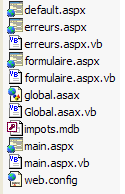
In this folder, a subfolder named [bin] is created, containing the assembly [impot.dll] generated from the compilation of the business class files: [impots.vb, impotsData.vb, impotsArray.vb, impotsOLEDB.vb]. The required compilation command is shown below:
dos>vbc /r:system.dll /r:system.data.dll /t:library /out:impot.dll impots.vb impotsArray.vb impotsData.vb impotsOLEDB.vb
The file [impot.dll] produced by this command must be placed in <application-path>\bin so that the web application can access it. The Cassini server is launched with the parameters (<application-path>,/impots3). The tests yield the same results as in the previous version.
6.4. Example 4
6.4.1. The Problem
We now propose to transform our application into a tax calculation simulation application. A user will be able to perform successive tax calculations, and these will be presented to them on a new view that looks like this:
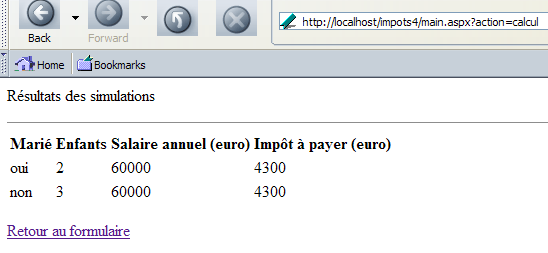
6.4.2. The MVC structure of the application
The application’s MVC structure becomes as follows:
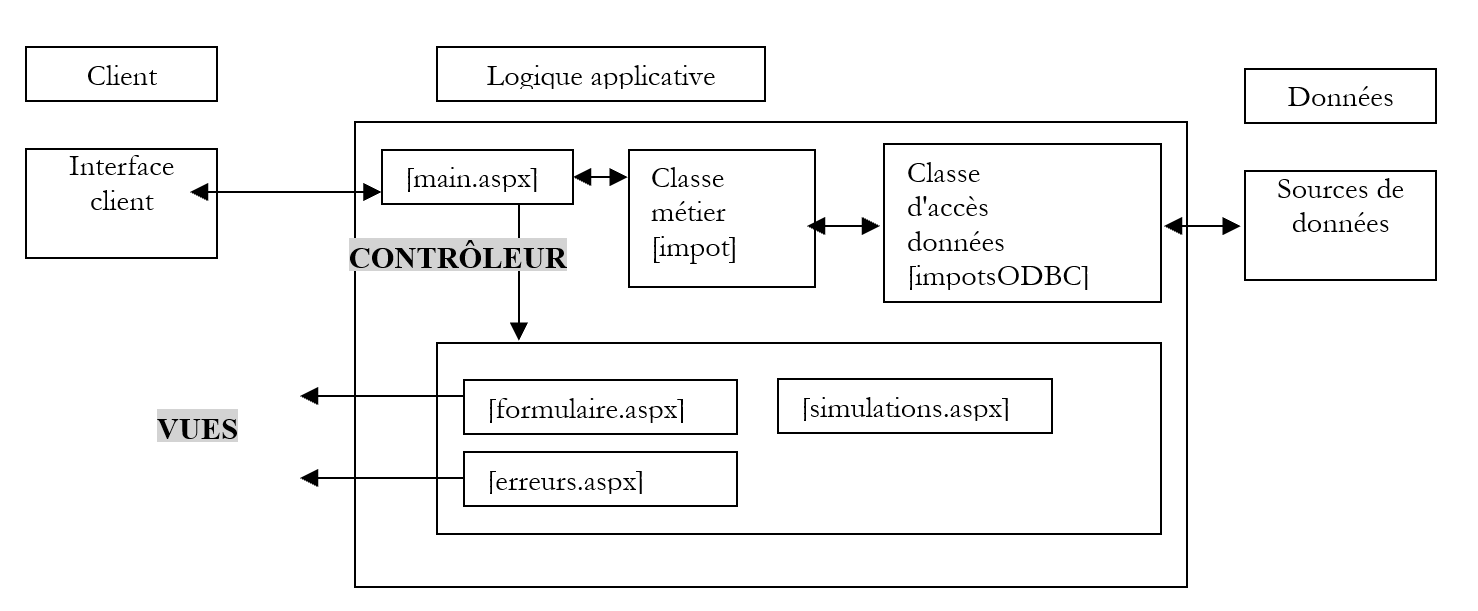
A new view, [simulations.aspx], appears, of which we have just provided a screenshot. The data access class will be the [impotsODBC] class from Example 2.
6.4.3. Web application views
The view [erreurs.aspx] remains unchanged. The view [formulaire.aspx] changes slightly. In fact, the tax amount no longer appears on this view. It is now on the view [simulations.aspx]. Thus, upon startup, the page presented to the user is as follows:
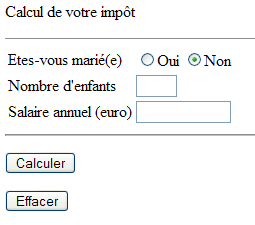
Additionally, the [formulaire] view includes a script, javascript, which validates the entered data before sending it to the server, as shown in the following example:
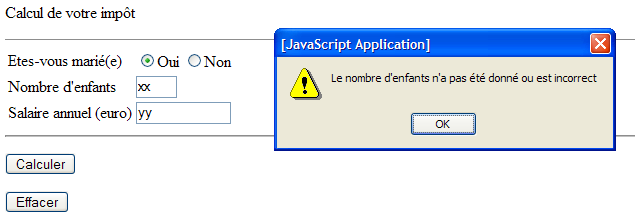
The presentation code is as follows:
<%@ page src="formulaire.aspx.vb" inherits="formulaire" AutoEventWireup="false"%>
<html>
    <head>
        <title>Impôt</title>
        <script language="javascript">
        function calculer(){
          // check parameters before sending them to the server
        with(document.frmImpots){
          //no. of children
          champs=/^\s*(\d+)\s*$/.exec(txtEnfants.value);
          if(champs==null){
            // the model is not verified
            alert("Le nombre d'enfants n'a pas été donné ou est incorrect");
            txtEnfants.focus();
            return;
          }//if
          //salary
          champs=/^\s*(\d+)\s*$/.exec(txtSalaire.value);
          if(champs==null){
            // the model is not verified
            alert("Le salaire n'a pas été donné ou est incorrect");
            txtSalaire.focus();
            return;
          }//if
          // that's it - we send the form to the server
          submit();
        }//with
      }//calculate
        </script>
    </head>
    <body>
        <P>Calcul de votre impôt</P>
        <HR width="100%" SIZE="1">
        <form name="frmImpots" method="post" action="main.aspx?action=calcul">
            <TABLE border="0">
                <TR>
                    <TD>Etes-vous marié(e)</TD>
                    <TD>
                        <INPUT type="radio" value="oui" name="rdMarie" <%=rdouichecked%>>Oui
                      <INPUT type="radio"  value="non" name="rdMarie" <%=rdnonchecked%>>Non</TD>
                </TR>
                <TR>
                    <TD>Nombre d'children</TD>
                    <TD><INPUT type="text" size="3" maxLength="3" name="txtEnfants" value="<%=txtEnfants%>"></TD>
                </TR>
                <TR>
                    <TD>Salaire annuel (euro)</TD>
                    <TD><INPUT type="text" maxLength="12" size="12" name="txtSalaire" value="<%=txtSalaire%>"></TD>
                </TR>
            </TABLE>
            <hr>
            <P>
                <INPUT type="button" value="Calculer" onclick="calculer()">
            </P>
        </form>
        <form method="post" action="main.aspx?action=effacer">
            <INPUT type="submit" value="Effacer">
        </form>
    </body>
</html>
The dynamic fields on the page are the same as in previous versions. The dynamic field for the tax amount has been removed. The [Calculer] button is no longer a [submit] button. It is of type [button], and when clicked, the function javascript [calculer()] is executed:
<INPUT type="button" value="Calculer" onclick="calculer()">
We have given the form the name [frmImpots] so that we can reference it in the script [calculer]:
<form name="frmImpots" method="post" action="main.aspx?action=calcul">
The javascript and [calculer] functions use regular expressions to validate the fields in the [document.frmImpots.txtEnfants] and [document.frmImpots.txtSalaire] forms. If the entered values are correct, they are sent to the server by [document.frmImpots.submit()].
The view page obtains its dynamic fields from its [formulaire.aspx.vb] controller as follows:
Imports System.Collections.Specialized

Public Class formulaire
    Inherits System.Web.UI.Page

    ' page fields
    Protected rdouichecked As String
    Protected rdnonchecked As String
    Protected txtEnfants As String
    Protected txtSalaire As String
    Protected txtImpot As String

    Private Sub Page_Load(ByVal sender As System.Object, ByVal e As System.EventArgs) Handles MyBase.Load
        ' we retrieve the previous request in the
        Dim form As NameValueCollection = Context.Items("formulaire")
        ' prepare the page to be displayed
        ' radio buttons
        rdouichecked = ""
        rdnonchecked = "checked"
        If form("rdMarie").ToString = "oui" Then
            rdouichecked = "checked"
            rdnonchecked = ""
        End If
        ' the rest
        txtEnfants = CType(form("txtEnfants"), String)
        txtSalaire = CType(form("txtSalaire"), String)
    End Sub
End Class
The [formulaire.aspx.vb] controller is identical to previous versions except that it no longer needs to retrieve the [txtImpot] field from the context, as this field has been removed from the page.
The [simulations.aspx] view appears as follows:
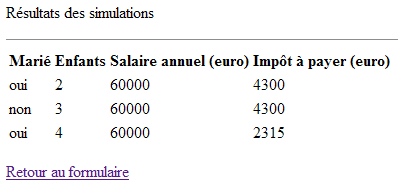
and corresponds to the following presentation code:
<%@ page src="simulations.aspx.vb" inherits="simulations" autoeventwireup="false" %>
<HTML>
    <HEAD>
        <title>simulations</title>
    </HEAD>
    <body>
        <P>Résultats des simulations</P>
        <HR width="100%" SIZE="1">
        <table>
            <tr>
                <th>
                    Marié</th>
                <th>
                    Enfants</th>
                <th>
                    Salaire annuel (euro)</th>
                <th>
                    Impôt à payer (euro)</th>
            </tr>
            <%=simulationsHTML%>
        </table>
        <p></p>
        <a href="<%=href%>">
            <%=lien%>
        </a>
    </body>
</HTML>
This code features three dynamic fields:
HTML code for a list of simulations in the form of table rows HTML | |
url of a link | |
link text |
They are generated by the controller component [simulations.aspx.vb]:
Imports System.Collections
Imports Microsoft.VisualBasic

Public Class simulations
    Inherits System.Web.UI.Page

    Protected simulationsHTML As String = ""
    Protected href As String
    Protected lien As String

    Private Sub Page_Load(ByVal sender As System.Object, ByVal e As System.EventArgs) Handles MyBase.Load
        'simulations are retrieved from the context
        Dim simulations As ArrayList = CType(context.Items("simulations"), ArrayList)
        ' each simulation is an array of 4 elements string
        Dim simulation() As String
        Dim i, j As Integer
        For i = 0 To simulations.Count - 1
            simulation = CType(simulations(i), String())
            simulationsHTML += "<tr>"
            For j = 0 To simulation.Length - 1
                simulationsHTML += "<td>" + simulation(j) + "</td>"
            Next
            simulationsHTML += "</tr>" + ControlChars.CrLf
        Next
        ' recover the other elements of the context
        href = context.Items("href").ToString
        lien = context.Items("lien").ToString
    End Sub
End Class
The page controller retrieves information placed by the application controller in the page context:
ArrayList object containing the list of simulations to display. Each item is an array of 4 strings representing the simulation's information (married, children, salary, tax). | |
url of a link | |
link text |
6.4.4. The [global.asax, main.aspx] controllers
Let’s review the diagram of our application:
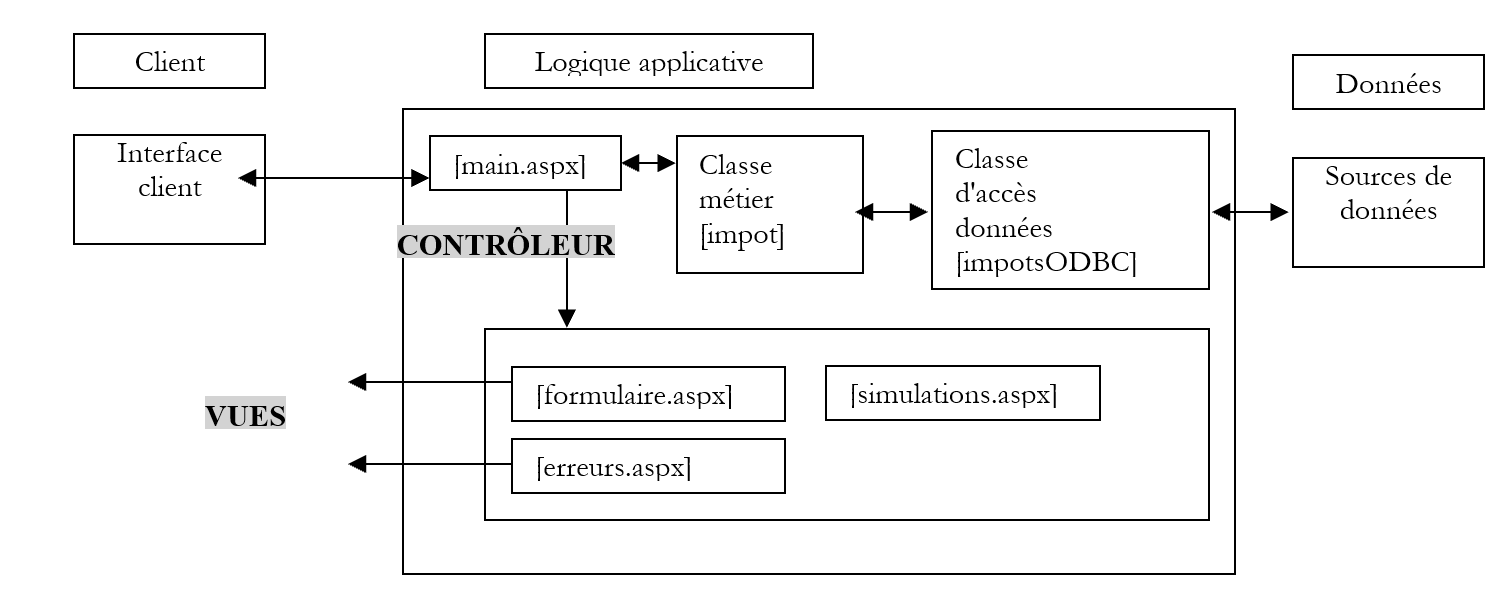
The [main.aspx] controller must handle three actions:
- init: corresponds to the client’s first request. The controller displays the [formulaire.aspx] view
- calcul: corresponds to the tax calculation request. If the data in the input form is correct, the tax is calculated using the business class [impotsODBC]. The controller returns the view [simulations.aspx] to the client with the result of the current simulation plus all previous ones. If the data in the input form is incorrect, the controller returns the view [erreurs.aspx] with the list of errors and a link to return to the form.
- return: corresponds to returning to the form after an error. The controller displays the view [formulaire.aspx] as it was validated before the error.
In this new version, only the action [calcul] has changed. In fact, if the data is valid, it must result in the [simulations.aspx] view, whereas previously it resulted in the [formulaire.aspx] view. The [main.aspx.vb] controller becomes the following:
Imports System
...

Public Class main
    Inherits System.Web.UI.Page

    Private Sub Page_Load(ByVal sender As System.Object, ByVal e As System.EventArgs) Handles MyBase.Load
        ' first of all, we check whether the application has initialized correctly
...
        ' execute the action
        Select Case action
            Case "init"
                ' init application
                initAppli()
            Case "calcul"
                ' tax calculation
                calculImpot()
            Case "retour"
                ' back to form
                retourFormulaire()
            Case "effacer"
                ' init application
                initAppli()
            Case Else
                ' unknown action = init
                initAppli()
        End Select
    End Sub

...
    Private Sub calculImpot()
        ' save entries
        Session.Item("formulaire") = Request.Form
        ' check the validity of the data entered
        Dim erreurs As ArrayList = checkData()
        ' if there are errors, we report them
        If erreurs.Count <> 0 Then
            ' prepare the error page
            context.Items("href") = "main.aspx?action=retour"
            context.Items("lien") = "Retour au formulaire"
            context.Items("erreurs") = erreurs
            Server.Transfer("erreurs.aspx")
        End If
        ' no errors here - the tax is calculated
        Dim impot As Long = CType(Application("objImpot"), impot).calculer( _
        Request.Form("rdMarie") = "oui", _
        CType(Request.Form("txtEnfants"), Integer), _
        CType(Request.Form("txtSalaire"), Long))
        ' the result is added to existing simulations
        Dim simulations As ArrayList
        If Not Session.Item("simulations") Is Nothing Then
            simulations = CType(Session.Item("simulations"), ArrayList)
        Else
            simulations = New ArrayList
        End If
        ' add current simulation
        Dim simulation() As String = New String() {Request.Form("rdMarie").ToString, _
        Request.Form("txtEnfants").ToString, Request.Form("txtSalaire").ToString, _
        impot.ToString}
        simulations.Add(simulation)
        ' put simulations in session and context
        context.Items("simulations") = simulations
        Session.Item("simulations") = simulations
        ' the result page is displayed
        context.Items("href") = "main.aspx?action=retour"
        context.Items("lien") = "Retour au formulaire"
        Server.Transfer("simulations.aspx", True)
    End Sub
...
End Class
We have included only what is necessary to understand the changes found exclusively in the [calculImpots] function:
- First, the function saves the [Request.Form] form in the session so that it can be regenerated in the state in which it was validated. This must be done in all cases, since whether the operation results in response [erreurs.aspx] or response [simulations.aspx], we return to the form via link [Retour au formulaire]. To restore the form correctly, you must have previously saved its values in the session.
- If the entered data is correct, the function adds the current simulation (married, children, salary, tax) to the list of simulations. This list is found in the session associated with the "simulations" key.
- The list of simulations is stored back in the session for future use. It is also placed in the current context because that is where the view [simulations.aspx] expects it
- The view [simulations.aspx] is displayed once the other information it expects has been placed in the context
6.4.5. Summary of Changes
The application is ready for testing. Let’s list the changes made to previous versions:
- A new view has been created
- The [main.aspx.vb] controller has been modified in one place: handling of the [calcul] action
6.4.6. Testing the web application
The reader is invited to perform the tests. Here is a reminder of the procedure. All application files are placed in a folder named <application-path>. Within this folder, a subfolder named [bin] is created, containing the assembly [impot.dll] generated from the compilation of the business class files: [impots.vb, impotsData.vb, impotsArray.vb, impotsODBC.vb. The [impot.dll] file generated by this command must be placed in <application-path>\bin so that the web application can access it. The Cassini server is launched with the parameters (<application-path>,/impots4).
6.5. Conclusion
The previous examples have demonstrated, using a concrete case, mechanisms commonly used in web development. We have consistently used the MVC architecture for its educational value. We could have handled these same examples differently and perhaps more simply without this architecture. However, it offers significant advantages as soon as the application becomes somewhat complex with multiple pages.
We could continue our examples in various ways. Here are a few:
- The user might want to save their simulations over time. They could run simulations on day D and retrieve them on day D+3, for example. One possible solution to this problem is the use of cookies. We know that the session token between the server and a client is transmitted via this mechanism. We could also use this mechanism to transmit the simulations between the client and the server.
- At the same time the server sends the simulation results page, it sends a cookie in its headers (HTTP) containing a string representing the simulations. Since these are contained in a [ArrayList] object, the object must be converted to [String]. The server would assign a lifetime to the cookie, for example 30 days.
- The client browser stores the received cookies in a file and sends them back each time it makes a request to a server that sent them, provided they are still valid (lifetime not exceeded). For the simulations, the server will receive a string of characters [String], which it must transform into the object [ArrayList].
Cookies are managed by [Response.Cookies] when sent to the client and by [Request.Cookies] when received on the server.
- The previous mechanism can become quite resource-intensive if there are a large number of simulations. Furthermore, it is common for a user to periodically clear their cookies by deleting them all, even if they otherwise allow their browser to use them. So sooner or later, the simulation cookie will be lost. We may therefore want to store them on the server rather than on the client, in a database for example. To link simulations to a specific user, the application could start with an authentication phase requiring a username and password, which are themselves stored in a database or any other type of data repository.
- We might also want to secure the operation of our application. It currently makes two assumptions:
- the user always goes through the [main.aspx] controller
- and in this case, they always use the actions offered on the page sent to them
What happens, for example, if the user directly requests url or [http://localhost/impots4/formulaire.aspx]? This scenario is unlikely since the user is unaware of the existence of url. However, it must be accounted for. It can be handled by the [global.asax] application controller, which sees all requests made to the application. It can thus verify that the requested resource is indeed [main.aspx].
A more likely scenario is that a user does not use the actions available on the page that the server sent them. For example, what happens if the user requests url [http://localhost/impots4/main.aspx?action=retour] directly without first filling out the form? Let's try it. We get the following response:
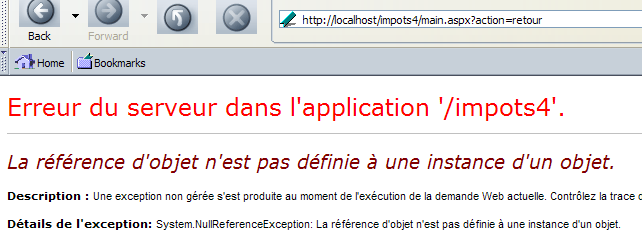
The server crashes. This is normal. For the [retour] action, the controller expects to find a [NameValueCollection] object in the session representing the form values it needs to display. It does not find them. The controller mechanism provides an elegant solution to this problem. For each request, the [main.aspx] controller can verify that the requested action is indeed one of the actions from the page previously sent to the user. We can use the following mechanism:
- Before sending its response to the client, the controller stores information identifying this page in the client’s session
- when it receives a new request from the client, it verifies that the requested action indeed belongs to the last page sent to that client
- The information linking pages and the actions permitted on those pages can be entered into the application’s [web.config] configuration file.
- Experience shows that application controllers share a broad common foundation and that it is possible to build a generic controller, with its specialization for a given application being configured via a configuration file. This is the approach taken, for example, by the [Struts] tool in the field of Java web programming.