4. Routing
4.1. Example 17: The Router
A [Angular] application is a single-page application: the browser loads only one page, HTML. However, the [RdvMedecins] application has multiple pages (/login, /schedule, /doctors...), each with its own URL, which can be bookmarked or reloaded. This is the role of the [Angular] router: it associates each URL with a component—the “page”—and displays that component when the URL changes, without making any requests to the server.
| 17-router/src/
├── app/
│ ├── pages/
│ │ ├── home.ts
│ │ ├── doctor-list.ts
│ │ ├── doctor-detail.ts
│ │ ├── search.ts
│ │ ├── about.ts
│ │ └── not-found-page.ts
│ ├── data.ts three "hard-coded" doctors
│ ├── app.routes.ts the routes
│ ├── app.config.ts the configuration of the application
│ ├── app.ts
│ └── app.html
├── index.html
└── main.ts
|
4.1.1. The routes
| // =========================================================================
// 17-router/src/app/app.routes.ts - the ROUTES of the application
// -------------------------------------------------------------------------
// An Angular application is a single-page application (SPA: Single
// Page Application): the browser loads only ONE HTML page. When an
// internal link is clicked, no request is sent to the server: the
// router changes the address displayed by the browser, and replaces the
// component displayed in <router-outlet>.
//
// A route associates a PATH with a COMPONENT (a "page"):
// 'doctors/:id' :id is a parameter (/doctors/2 -> id = "2");
// '**' any path: the "not found" page. The
// routes are tried in order: it comes LAST.
// title: the title of the browser tab when the page is displayed.
// =========================================================================
import { Routes } from '@angular/router';
import { Home } from './pages/home';
import { DoctorList } from './pages/doctor-list';
import { DoctorDetail } from './pages/doctor-detail';
import { Search } from './pages/search';
import { NotFoundPage } from './pages/not-found-page';
export const routes: Routes = [
{ path: '', component: Home, title: 'Home' },
{ path: 'doctors', component: DoctorList, title: 'Doctors' },
{ path: 'doctors/:id', component: DoctorDetail, title: 'A doctor' },
{ path: 'search', component: Search, title: 'Search' },
// DEFERRED loading: the code of this page is only downloaded on the
// first visit (the compiler makes it a separate file)
{ path: 'about', loadComponent: () => import('./pages/about'), title: 'About' },
// a redirection: the old address leads to the new one
{ path: 'physicians', redirectTo: 'doctors' },
{ path: '**', component: NotFoundPage, title: 'Page not found' },
];
|
- line 24: the routes form an array of objects of type [Routes];
- line 25: the empty path: the home page, at the address /. A / is never placed at the beginning of a path;
- line 27: [:id] is a parameter: /doctors/1, /doctors/2... all display the [DoctorDetail] component, which receives the value of [id];
- line 31: [loadComponent] replaces [component]: the component is loaded only on the first visit to the page. The compiler stores its code in a separate file, which is downloaded at that moment; this speeds up the application’s loading time. We’ll do this for all pages in the case study;
- line 33: a redirect: /physicians leads to /doctors;
- line 34: [**]: any path. Since paths are tried in order, this one is only used if none of the others work: this is the “page not found” page;
- [title]: the browser tab title when the page is displayed.
4.1.2. Application Configuration
| // =========================================================================
// 17-router/src/app/app.config.ts
// -------------------------------------------------------------------------
// provideRouter(routes): we add the router to the application, with its
// routes (app.routes.ts). withComponentInputBinding(): the parameters of
// the address (/doctors/:id, ?q=...) are passed to the components of the pages
// as INPUTS (input()) - see pages/doctor-detail.ts.
// =========================================================================
import { ApplicationConfig } from '@angular/core';
import { provideRouter, withComponentInputBinding } from '@angular/router';
import { routes } from './app.routes';

export const appConfig: ApplicationConfig = {
  providers: [provideRouter(routes, withComponentInputBinding())],
};
|
Until now, the application configuration was contained in the file [main.ts]. It is now stored separately in [app.config.ts], as in projects created by the command [ng new]:
- Line 15: [provideRouter] adds the router to the application, along with its routes. [withComponentInputBinding()] passes the address parameters to the page components as inputs ([input()], Example 10): this is the simplest way to read them.
| // =========================================================================
// 17-router/src/main.ts
// -------------------------------------------------------------------------
// The configuration of the application (its "providers") is stored separately,
// in app.config.ts: it is the usual layout of an Angular project.
// =========================================================================
import { bootstrapApplication } from '@angular/platform-browser';
import { appConfig } from './app/app.config';
import { App } from './app/app';
bootstrapApplication(App, appConfig).catch((error) => console.error(error));
|
- Line 12: [bootstrapApplication] receives the configuration.
| <!doctype html>
<html lang="en">
<head>
<meta charset="utf-8">
<title>Example 17 - the router</title>
<base href="/">
<meta name="viewport" content="width=device-width, initial-scale=1">
</head>
<body>
<app-root></app-root>
</body>
</html>
|
- line 6: [<base href="/">]: the address from which the router calculates the paths. Without it, multi-level addresses (/doctors/2) would not work.
4.1.3. The application shell
The root component becomes a shell: it contains elements common to all pages (in this case, the title and links) and a space where the current page is displayed.
| // =========================================================================
// 17-router/src/app/app.ts - the "shell" of the application
// -------------------------------------------------------------------------
// - routerLink="...": an internal link. On an <a> tag, it produces a
// real href, but a click does not reload the page: the router
// acts. routerLinkActive="active" sets the "active" class (that of
// Bootstrap) on the link of the displayed page;
// - <router-outlet />: the place where the component of the
// current route is displayed.
// =========================================================================
import { Component, inject } from '@angular/core';
import { toSignal } from '@angular/core/rxjs-interop';
import { NavigationEnd, Router, RouterLink, RouterLinkActive, RouterOutlet } from '@angular/router';
import { filter, map } from 'rxjs';
@Component({
selector: 'app-root',
imports: [RouterLink, RouterLinkActive, RouterOutlet],
templateUrl: './app.html',
})
export class App {
private readonly router = inject(Router);
// the current address, as a signal: router.events is a stream
// (Observable, see example 19) of navigation events; we keep the
// end of each navigation, and toSignal makes it a signal
protected readonly address = toSignal(
this.router.events.pipe(
filter((e) => e instanceof NavigationEnd),
// decodeURIComponent: %20 becomes a space again
map((e) => decodeURIComponent(e.urlAfterRedirects)),
),
{ initialValue: '' },
);
}
|
- line 19: the router directives used by the template;
- lines 28–35: the current URL, displayed below the links. [router.events] is an observable (a stream of events, as shown in Example 19) that signals each step of the navigation. We retain only the endpoints of navigation (line 30), extract the address from them—including any redirects (line 32)—and [toSignal] transforms the stream into a signal that can be used in the template.
| <div class="container py-4">
<h1 class="h3 mb-3">Example 17 - the router</h1>
<nav class="nav nav-pills mb-3">
<!-- routerLinkActiveOptions exact: "/" must not be active on /doctors -->
<a class="nav-link" routerLink="/" routerLinkActive="active" [routerLinkActiveOptions]="{ exact: true }">Home</a>
<a class="nav-link" routerLink="/doctors" routerLinkActive="active">Doctors</a>
<!-- [queryParams]: the parameters after the ? (/search?q=general practitioner);
queryParams: 'ignored': the link stays active whatever the search -->
<a class="nav-link" routerLink="/search" [queryParams]="{ q: 'general practitioner' }" routerLinkActive="active"
[routerLinkActiveOptions]="{ paths: 'exact', queryParams: 'ignored', fragment: 'ignored', matrixParams: 'ignored' }">Search</a>
<a class="nav-link" routerLink="/about" routerLinkActive="active">About</a>
<a class="nav-link" routerLink="/physicians">/physicians (redirection)</a>
<a class="nav-link" routerLink="/unknown-page">Broken link</a>
</nav>
<p class="small text-muted">current address: <code>{{ address() }}</code></p>
<div class="card p-3">
<router-outlet />
</div>
</div>
|
- Line 5: [routerLink]: an internal link. For a [<a>] tag, it generates a valid [href] attribute (the link can be opened in a new tab), but clicking it does not reload the page: the router is what changes the address and the display. [routerLinkActive="active"] applies the [active] class (derived from [Bootstrap]) to the link on the displayed page. Without the [exact] option, the / link would be active on all pages, since all addresses begin with /;
- lines 9–10: [[queryParams]]: the parameters placed after the [?] in the URL (/search?q=general practitioner). The [queryParams: 'ignored'] option keeps the link active regardless of the search;
- lines 12–13: a link to the redirect, and a link to an address that does not exist;
- line 17: [<router-outlet />]: the location where the current route component is displayed.
4.1.4. The pages
| // "hard-coded" data, so as not to depend on a server in this example
export interface Doctor {
id: number;
title: string;
firstName: string;
lastName: string;
specialty: string;
}
export const DOCTORS: Doctor[] = [
{ id: 1, title: 'Mme', firstName: 'Marie', lastName: 'PELISSIER', specialty: 'general practitioner' },
{ id: 2, title: 'Mr', firstName: 'Paul', lastName: 'TATOU', specialty: 'pediatrician' },
{ id: 3, title: 'Melle', firstName: 'Sophie', lastName: 'DUPONT', specialty: 'general practitioner' },
];
|
| import { Component } from '@angular/core';
@Component({
selector: 'app-home',
template: `
<p class="mb-0">Welcome. Click on the links: the address of the browser changes, the page is never
reloaded (open the Network tab of the developer tools to check it). The Back and
Forward buttons of the browser work, as well as reloading (F5) any page.</p>
`,
})
export class Home {}
|
A page is a regular component. There is nothing special about it.
| // 17-router/src/app/pages/doctor-list.ts - links with a parameter
import { Component } from '@angular/core';
import { RouterLink } from '@angular/router';
import { DOCTORS } from '../data';
@Component({
selector: 'app-doctor-list',
imports: [RouterLink],
template: `
<ul class="mb-0">
@for (m of doctors; track m.id) {
<!-- [routerLink] with an array: the router assembles the address /doctors/2 -->
<li><a [routerLink]="['/doctors', m.id]">{{ m.title }} {{ m.firstName }} {{ m.lastName }}</a></li>
}
</ul>
`,
})
export class DoctorList {
protected readonly doctors = DOCTORS;
}
|
- Line 13: [[routerLink]] receives an array here: the router assembles the address from its elements (/doctors/2).
| // =========================================================================
// 17-router/src/app/pages/doctor-detail.ts - a page with a parameter
// -------------------------------------------------------------------------
// The :id parameter arrives as an INPUT (thanks to withComponentInputBinding,
// see app.config.ts), as a string: it is enough to declare an
// input that has the same name. The component then no longer depends on the
// router: it could also be used as <app-doctor-detail id="2">.
// Router.navigate(...): navigating BY CODE; Location.back(): going back
// to the previous page, like the Back button of the browser.
// =========================================================================
import { Component, computed, inject, input } from '@angular/core';
import { Location } from '@angular/common';
import { Router } from '@angular/router';
import { DOCTORS } from '../data';
@Component({
selector: 'app-doctor-detail',
template: `
@if (doctor(); as m) {
<h2 class="h5">{{ m.title }} {{ m.firstName }} {{ m.lastName }}</h2>
<p>Specialty: {{ m.specialty }}</p>
<div class="d-flex gap-2">
<button class="btn btn-sm btn-outline-secondary" (click)="back()">Back</button>
<button class="btn btn-sm btn-outline-primary" (click)="next()">Next doctor</button>
</div>
} @else {
<p class="text-danger mb-0">Doctor no. {{ id() }} does not exist.</p>
}
`,
})
export class DoctorDetail {
readonly id = input.required<string>();
private readonly router = inject(Router);
private readonly location = inject(Location);
// computed: going from /doctors/1 to /doctors/2, Angular REUSES
// the same component and only changes the id input - the computed follows
protected readonly doctor = computed(() => DOCTORS.find((m) => m.id === Number(this.id())) ?? null);
protected back(): void {
this.location.back();
}
protected next(): void {
const id = (Number(this.id()) % DOCTORS.length) + 1;
this.router.navigate(['/doctors', id]);
}
}
|
- line 33: the route parameter [:id] is passed to the input with the same name. Like everything that comes from an address, it is a string;
- line 39: The displayed doctor is calculated from the input. When switching from /doctors/1 to /doctors/2, [Angular] does not recreate the component: it only changes the value of the input, and [computed] follows;
- lines 27–29: an unknown identifier (/doctors/9) is reported;
- line 42: [Location.back()]: return to the previous page, as with the browser’s Back button;
- line 47: [Router.navigate]: navigation triggered by the code, with the same array as [[routerLink]].
| // =========================================================================
// 17-router/src/app/pages/search.ts - a page driven by the URL
// -------------------------------------------------------------------------
// /search?q=pediatrician: as with the GET form of the NestJS course, the
// page is entirely described by its address: it can be bookmarked,
// reloaded, navigated back to. The q parameter also arrives
// as an input of the component.
// =========================================================================
import { Component, computed, inject, input, linkedSignal } from '@angular/core';
import { FormsModule } from '@angular/forms';
import { Router } from '@angular/router';
import { DOCTORS } from '../data';
@Component({
selector: 'app-search',
imports: [FormsModule],
template: `
<form class="d-flex gap-2 mb-3" (ngSubmit)="search()">
<input name="input" class="form-control" placeholder="name or specialty" [(ngModel)]="input">
<button class="btn btn-primary">Search</button>
</form>
<ul class="mb-0">
@for (m of results(); track m.id) {
<li>{{ m.firstName }} {{ m.lastName }} ({{ m.specialty }})</li>
} @empty {
<li class="text-muted">No result.</li>
}
</ul>
`,
})
export class Search {
readonly q = input<string>(); // ?q=... (undefined if absent)
private readonly router = inject(Router);
// the field starts with the value of the URL, and follows it if it changes
// (Back button), while remaining editable: a linkedSignal
protected readonly input = linkedSignal(() => this.q() ?? '');
protected readonly results = computed(() => {
const q = (this.q() ?? '').toLowerCase();
return DOCTORS.filter((m) => `${m.firstName} ${m.lastName} ${m.specialty}`.toLowerCase().includes(q));
});
protected search(): void {
// we change the URL; the display follows the URL (q input)
this.router.navigate(['/search'], { queryParams: { q: this.input() } });
}
}
|
This page is fully described by its address, just like that of a form GET: you can bookmark it, reload it, or return to it using the Back button.
- Line 33: The parameter [q] from the address is also passed as an input; if it is missing, its value is [undefined];
- line 38: the input field is a [linkedSignal]: it takes the value of the address, updates accordingly when the address changes (using the Back button), but remains editable by the user;
- Lines 40–43: The results depend on the address, not on the input: they only change when the form is submitted;
- line 47: submitting the form changes the address, which changes the [q] input, which changes the results.
| // 17-router/src/app/pages/about.ts - a page loaded on demand
// "export default": loadComponent: () => import('./pages/about') finds
// the component without having to name it
import { Component } from '@angular/core';
@Component({
selector: 'app-about',
template: `<p class="mb-0">This page was downloaded on the first visit (Network tab: a file
chunk-XXXX.js). Its tab title comes from the route.</p>`,
})
export default class About {}
|
- line 11: [export default]: the [loadComponent] function in the route ([import('./pages/about')]) finds the component without having to specify its name.
| import { Component, inject } from '@angular/core';
import { Router } from '@angular/router';
@Component({
selector: 'app-not-found-page',
template: `<p class="text-danger mb-0">No page at the address <code>{{ address }}</code>.</p>`,
})
export class NotFoundPage {
protected readonly address = inject(Router).url;
}
|
- Line 9: [Router.url]: the requested address.
4.1.5. Execution
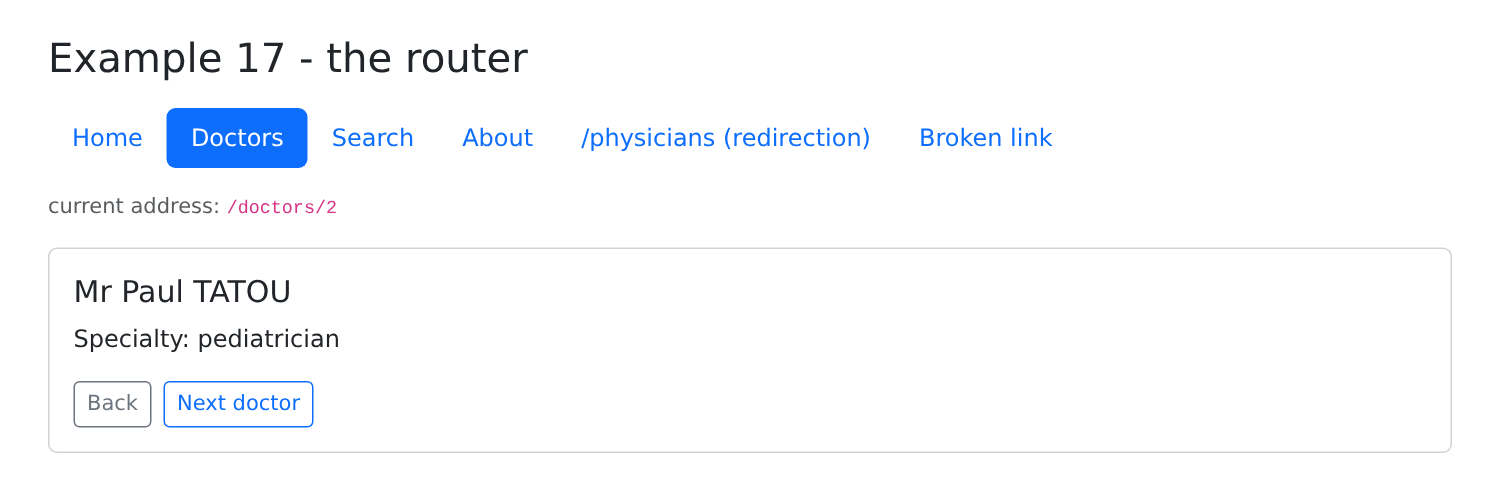
[npm start 17-router]; click on “Doctors,” then on “Paul” TATOU:
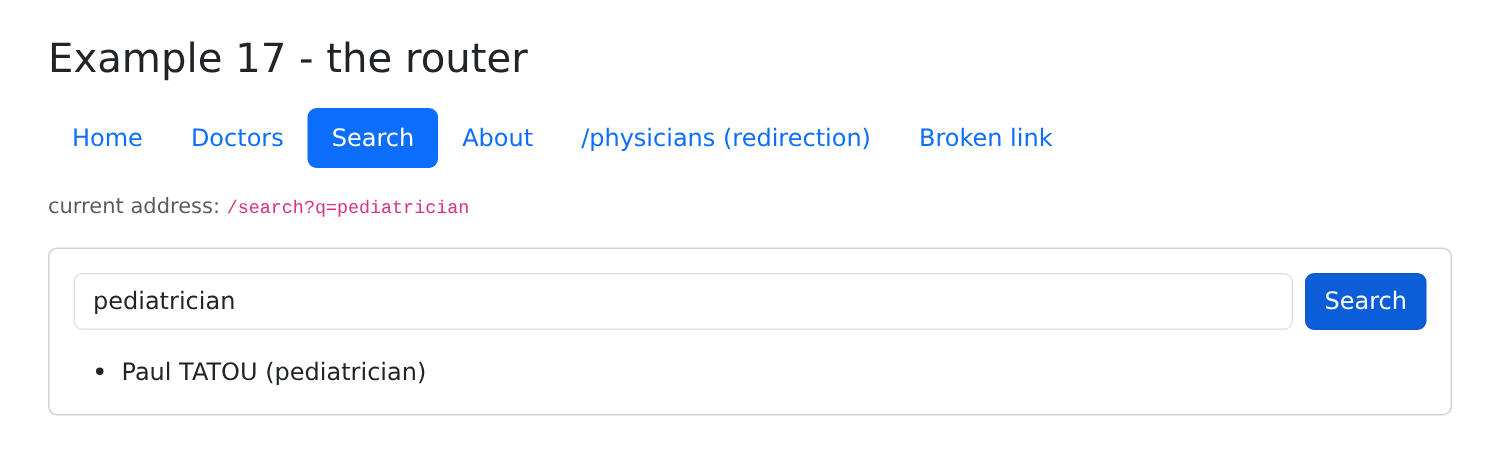
Click on “Search,” type “pediatrician,” and press Enter: the address changes.
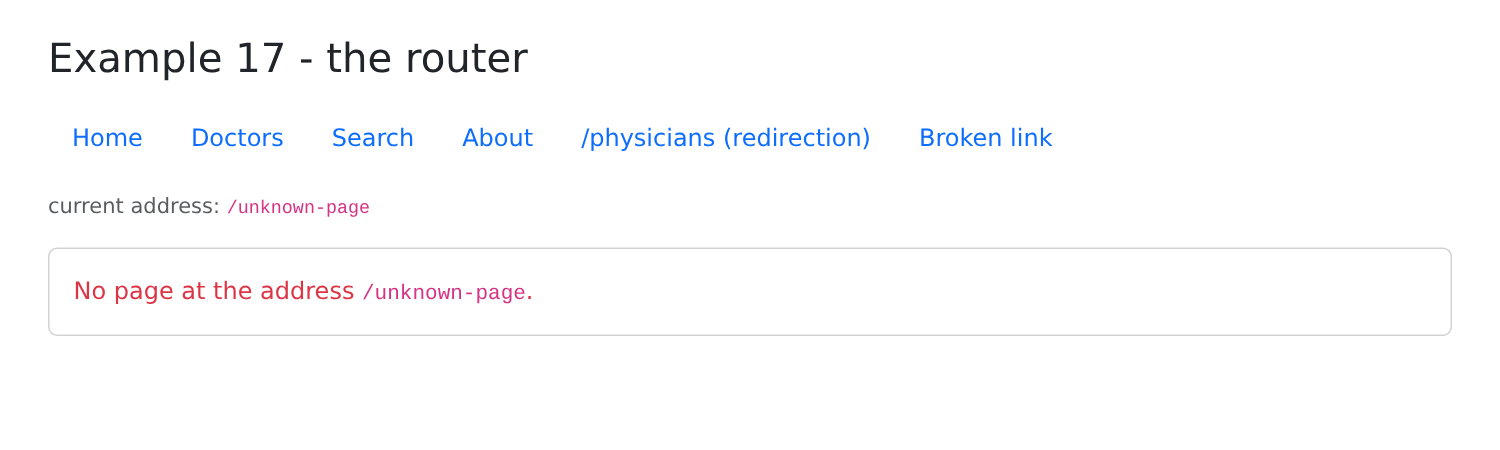
The broken link leads to a "page not found" error:
You can verify in the Network tab of the browser’s developer tools that no page is requested from the server when you click, except on the first visit to the “About” page (a file named [chunk-XXXX.js]). You can also reload any page (F5): the development server always returns [index.html], and the router displays the page corresponding to the address. A production server must do the same: this is what the server JSON will do during deployment.
4.2. Example 18: Navigation Guard Pages
Certain pages in the [RdvMedecins] application are restricted: the schedule requires a login, and doctor management requires the ADMIN role. On the server side, the [NestJS] course used access controls ([JwtAuthGuard], [RolesGuard]). The [Angular] router has its own: functions called before displaying a route, which can either allow navigation or redirect it to another address.
This example simulates the connection without a server: three accounts are hard-coded.
| 18-guards/src/app/
├── pages/
│ ├── home.ts public page
│ ├── login.ts public page
│ ├── schedule.ts requires being logged in
│ └── administration.ts requires the ADMIN role
├── session.service.ts the logged-in user
├── guards.ts the guards
├── app.routes.ts
├── app.config.ts
├── app.ts
└── app.html
|
4.2.1. The session
| // =========================================================================
// 18-guards/src/app/session.service.ts - a SIMULATED session (no server)
// -------------------------------------------------------------------------
// The logged-in user, in a root service: all the components and
// all the guards that inject it share the same one. (Example 23 will do the
// same thing with a real server.)
// =========================================================================
import { Injectable, signal } from '@angular/core';
export type Role = 'ADMIN' | 'DOCTOR' | 'USER';
export interface User {
login: string;
role: Role;
}
// three "hard-coded" accounts (password = login)
const ACCOUNTS: Record<string, Role> = { admin: 'ADMIN', pelissier: 'DOCTOR', martin: 'USER' };
@Injectable({ providedIn: 'root' })
export class SessionService {
private readonly _user = signal<User | null>(null);
readonly user = this._user.asReadonly();
logIn(login: string, password: string): boolean {
const role = Object.hasOwn(ACCOUNTS, login) ? ACCOUNTS[login] : undefined;
if (role === undefined || password !== login) {
return false;
}
this._user.set({ login, role });
return true;
}
logOut(): void {
this._user.set(null);
}
}
|
- Line 11: the three roles of the [RdvMedecins] application;
- line 19: three accounts, each with a password equal to the username;
- lines 23–24: the logged-in user ([null] if there is none), in a signal that only the service can modify. Since there is only one service, the components and guards that inject it all see the same user;
- line 27: [Object.hasOwn]: only the keys specific to the [ACCOUNTS] object are retained. Without this precaution, the “constructor” login would find a property inherited from all [JavaScript] objects;
- Lines 26–33: The login succeeds if the account exists and the password is correct.
4.2.2. The guards
| // =========================================================================
// 18-guards/src/app/guards.ts - navigation GUARDS
// -------------------------------------------------------------------------
// A guard (CanActivateFn) is a function that the router calls BEFORE
// displaying a route that declares it (canActivate: [...]). It returns:
// - true : the navigation continues;
// - a UrlTree (an address, built by router.createUrlTree): the
// navigation is replaced by a redirection to this address.
// A guard can inject services (inject): it runs in the
// injection context of the application.
//
// It is the client-side equivalent of the NestJS guards (JwtAuthGuard,
// RolesGuard) - with a FUNDAMENTAL difference: a client guard is
// only a convenience. The code of the client is in the hands of the user, who
// can modify it at will. The real protection of the data remains that
// of the SERVER (see the chapter on the black box).
// =========================================================================
import { inject } from '@angular/core';
import { CanActivateFn, Router } from '@angular/router';
import { Role, SessionService } from './session.service';
// the page requires being logged in
export const loginRequired: CanActivateFn = (_route, state) => {
if (inject(SessionService).user() !== null) {
return true;
}
// not logged in: to the login page, remembering where we wanted to go
return inject(Router).createUrlTree(['/login'], { queryParams: { redirect: state.url } });
};
// the page requires one of the roles listed in the data of the route (data.roles)
export const roleRequired: CanActivateFn = (route, state) => {
const roles = route.data['roles'] as Role[];
const user = inject(SessionService).user();
if (user !== null && roles.includes(user.role)) {
return true;
}
// logged in, but not with the right role: back to the home page, with a reason
return inject(Router).createUrlTree(['/'], { queryParams: { denied: state.url } });
};
|
- line 24: A guard is a function of type [CanActivateFn]. The router passes it the route to activate and the navigation state (which contains the requested address, [state.url]);
- line 25: A guard can inject services, using [inject], as a component;
- line 26: [true]: navigation continues;
- line 29: otherwise, the guard returns another address, generated by [createUrlTree]: navigation is replaced by a redirect to the login page. The parameter [redirect] retains the requested page, to return to it after login;
- line 34: [route.data]: the free data declared by the route (here, the authorized roles). The same guard is thus used for all restricted pages, regardless of their roles;
- line 40: A logged-in user whose role is not appropriate is redirected to the home page, along with the reason for denial.
The comments in lines 12–16 are essential: a client-side guard is merely a convenience for the user, saving them from opening a page that might not work. The client-side code runs in the browser; the user can read and modify it. Data protection remains the responsibility of the server, which verifies permissions with each request.
4.2.3. Protected Routes
| // =========================================================================
// 18-guards/src/app/app.routes.ts - PROTECTED routes
// -------------------------------------------------------------------------
// - canActivate: the guards to pass, in order;
// - data : free information attached to the route (here, the
// authorized roles), which the guard reads.
// =========================================================================
import { Routes } from '@angular/router';
import { loginRequired, roleRequired } from './guards';
import { Home } from './pages/home';
import { Login } from './pages/login';
import { Schedule } from './pages/schedule';
export const routes: Routes = [
{ path: '', component: Home },
{ path: 'login', component: Login },
{ path: 'schedule', component: Schedule, canActivate: [loginRequired] },
{
path: 'administration',
// deferred loading: the code is only downloaded once the guards are passed
loadComponent: () => import('./pages/administration'),
canActivate: [loginRequired, roleRequired],
data: { roles: ['ADMIN'] },
},
{ path: '**', redirectTo: '' },
];
|
- line 18: [canActivate]: the list of route guards;
- line 22: the administration page is loaded on demand: its code is downloaded only if the guards authorize it;
- line 23: two guards, called in order: first, be logged in; second, have the correct role;
- line 24: the authorized roles, read by guard [roleRequired];
- line 26: any unknown address redirects to the home page.
| import { ApplicationConfig } from '@angular/core';
import { provideRouter, withComponentInputBinding } from '@angular/router';
import { routes } from './app.routes';
export const appConfig: ApplicationConfig = {
providers: [provideRouter(routes, withComponentInputBinding())],
};
|
The configuration is the same as in the previous example.
4.2.4. The pages
| // =========================================================================
// 18-guards/src/app/pages/login.ts
// -------------------------------------------------------------------------
// After logging in, the user is sent back to the page they wanted to
// open (?redirect=... parameter set by the guard), or to the home page.
// router.navigateByUrl: navigating to a complete address (/schedule?x=1).
// =========================================================================
import { Component, inject, input, signal } from '@angular/core';
import { FormsModule } from '@angular/forms';
import { Router } from '@angular/router';
import { SessionService } from '../session.service';
@Component({
selector: 'app-login',
imports: [FormsModule],
template: `
@if (redirect()) {
<p class="alert alert-warning">Log in to open {{ redirect() }}.</p>
}
<form class="d-flex flex-wrap gap-2" (ngSubmit)="submit()">
<input name="login" class="form-control w-auto" placeholder="login" autocomplete="username" [(ngModel)]="login">
<input name="password" type="password" class="form-control w-auto" placeholder="password"
autocomplete="current-password" [(ngModel)]="password">
<button class="btn btn-primary">Log in</button>
</form>
@if (error()) {
<p class="text-danger mt-2 mb-0">Incorrect login or password.</p>
}
`,
})
export class Login {
readonly redirect = input<string>();
private readonly session = inject(SessionService);
private readonly router = inject(Router);
protected readonly login = signal('');
protected readonly password = signal('');
protected readonly error = signal(false);
protected submit(): void {
this.error.set(!this.session.logIn(this.login().trim(), this.password()));
if (!this.error()) {
const redirect = this.redirect();
// we only accept an INTERNAL path: it starts with /, but not with //
// (//site.com/... designates ANOTHER site) - no redirection to another site
const internal = redirect !== undefined && redirect.startsWith('/') && !redirect.startsWith('//');
this.router.navigateByUrl(internal ? redirect : '/');
}
}
}
|
- Line 33: The parameter [redirect], placed in the address by the guard, is received;
- lines 18–20: it is displayed to the user;
- line 41: the connection;
- lines 43–47: if successful, the user is redirected to the requested page ([navigateByUrl] accepts a full URL, including parameters) or to the home page. The parameter [redirect] comes from the URL: anyone can create a link to /login?redirect=//malicious-site.com. Line 46 therefore only accepts a path internal to the application.
| import { Component, input } from '@angular/core';
@Component({
selector: 'app-home',
template: `
<!-- ?denied=...: set by the roleRequired guard when the role does not fit -->
@if (denied()) {
<p class="alert alert-danger">Your role does not allow you to open {{ denied() }}.</p>
}
<p class="mb-0">Public page. Try the two other links, logged in or not (admin, pelissier, martin -
password = login).</p>
`,
})
export class Home {
readonly denied = input<string>();
}
|
- Line 15: the reason for a denial, submitted by the guard [roleRequired].
| import { Component, inject } from '@angular/core';
import { SessionService } from '../session.service';
@Component({
selector: 'app-schedule',
template: `<p class="mb-0">The schedule of <strong>{{ session.user()?.login }}</strong>: this page requires being logged in.</p>`,
})
export class Schedule {
protected readonly session = inject(SessionService);
}
|
| import { Component } from '@angular/core';
@Component({
selector: 'app-administration',
template: `<p class="mb-0">Administration: page reserved for the ADMIN role, loaded on demand (Network tab:
its chunk-XXXX.js file is only downloaded on the first visit).</p>`,
})
export default class Administration {}
|
4.2.5. The shell
| import { Component, inject } from '@angular/core';
import { Router, RouterLink, RouterLinkActive, RouterOutlet } from '@angular/router';
import { SessionService } from './session.service';
@Component({
selector: 'app-root',
imports: [RouterLink, RouterLinkActive, RouterOutlet],
templateUrl: './app.html',
})
export class App {
protected readonly session = inject(SessionService);
private readonly router = inject(Router);
protected onLogOut(): void {
this.session.logOut();
this.router.navigate(['/']);
}
}
|
| <div class="container py-4" style="max-width: 720px">
<h1 class="h3 mb-3">Example 18 - navigation guards</h1>
<nav class="d-flex gap-3 align-items-center mb-3">
<a routerLink="/" routerLinkActive="fw-bold" [routerLinkActiveOptions]="{ exact: true }">Home</a>
<a routerLink="/schedule" routerLinkActive="fw-bold">Schedule (logged in)</a>
<a routerLink="/administration" routerLinkActive="fw-bold">Administration (ADMIN)</a>
<span class="ms-auto">
@if (session.user(); as u) {
{{ u.login }} <span class="badge text-bg-primary">{{ u.role }}</span>
<button class="btn btn-sm btn-link" (click)="onLogOut()">log out</button>
} @else {
<a routerLink="/login">log in</a>
}
</span>
</nav>
<div class="card p-3"><router-outlet /></div>
</div>
|
- Lines 8–13: the logged-in user and their role, or a link to the login page;
- line 10: logging out returns the user to the home page (app.ts, lines 14–17).
4.2.6. Execution
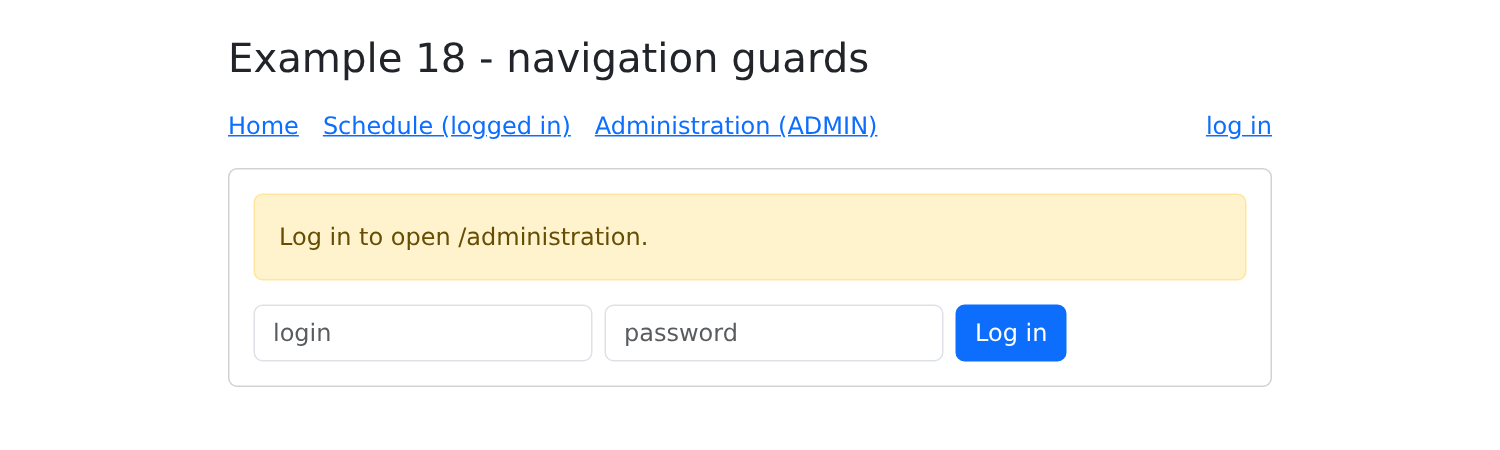
[npm start 18-guards]; without being logged in, click on Administration: the guard [loginRequired] redirects to the login page, while retaining the requested page.
Log in as martin, who has the role USER: after logging in, you are redirected to /administration; this time, the guard [roleRequired] denies navigation.
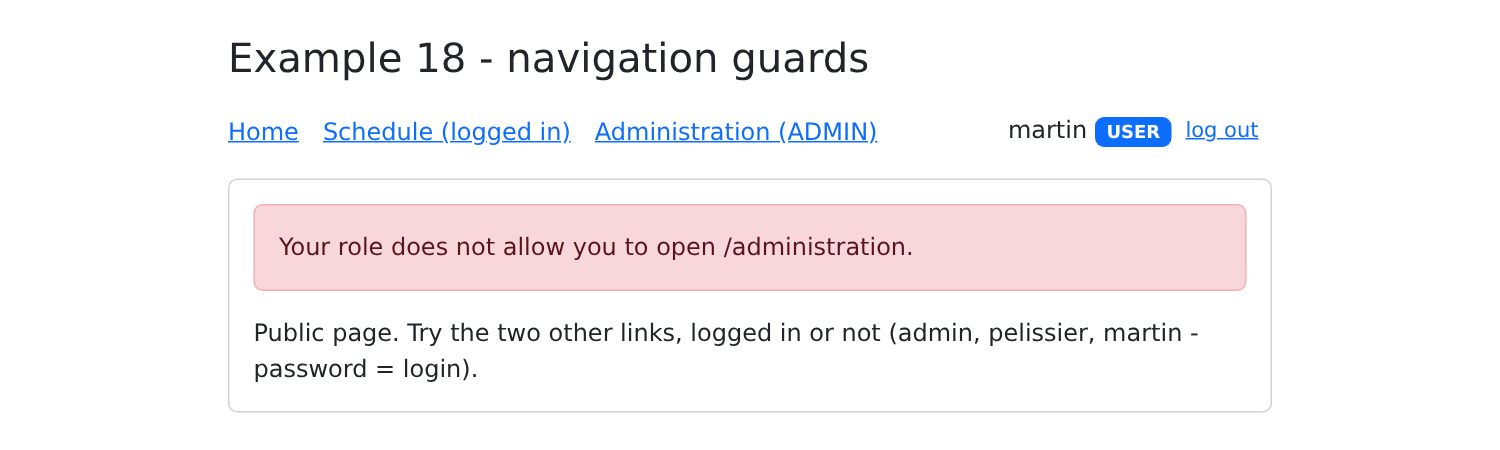
When logged in as admin, the same link opens the administration page.