10. Case Study: The Angular client for the RdvMedecins application
10.1. The Problem
The [RdvMedecins] application allows users to schedule appointments at a doctor’s office. The [NestJS] course wrote it as a HTML application, in which the server generated the pages. Here we are writing the client [Angular]: the SAME pages, generated in the browser from the JSON data on the server described in the chapter “The RdvMedecins Server: A Black Box.”
The client must provide everything that the HTML application provided:
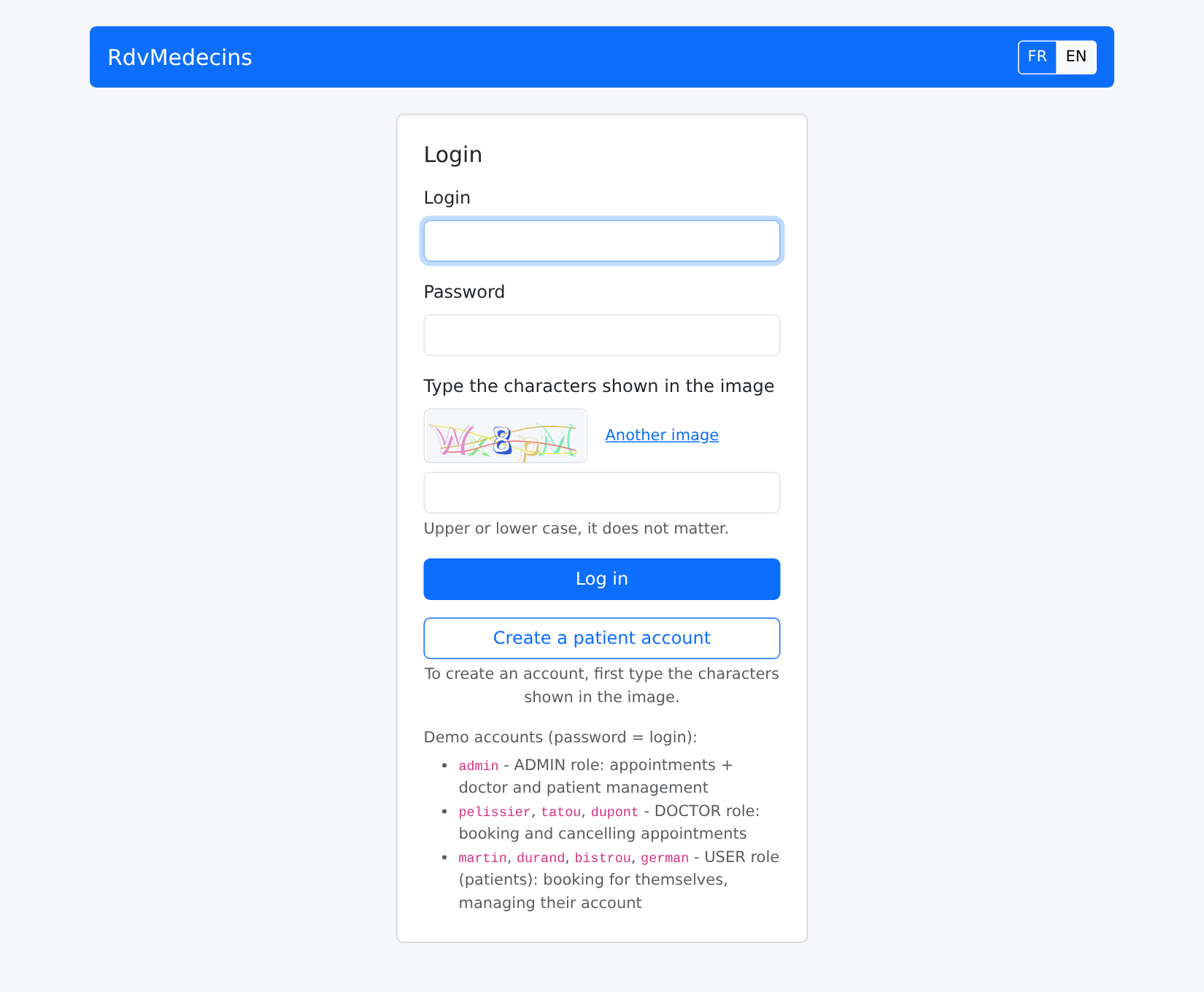
- a login page, protected by a CAPTCHA, with the option to create a patient account;
- a doctor’s schedule for a given day, with appointment booking (patient selection window) and cancellation;
- for the administrator, management of doctors and clients (list, add, edit, delete);
- for the patient, a personal dashboard (showing upcoming appointments, which they can cancel) and account management;
- two languages: French and English;
- unique URLs ([/schedule?doctorId=1&day=...]), which can be reloaded, bookmarked, and navigated using the browser’s Back/Forward buttons.
10.2. Installation and Execution
The JSON server must be installed and running (see the chapter “The RdvMedecins Server: A Black Box”). To use the client in a browser, you do not need the CAPTCHA test mode: you can leave the [CAPTCHA_TEST] field blank in the [.env] file on the server.
In a console window open to the [rdvmedecins-angular] folder:
then open http://localhost:4200 in a browser. The demo accounts are listed on the login page (password = login).
The examples also use port 4200: first, stop the currently running example ([Ctrl-C]). You can also start the client on a different port: [npm start -- --port 4300].
10.3. Using the Application
10.3.1. The login page
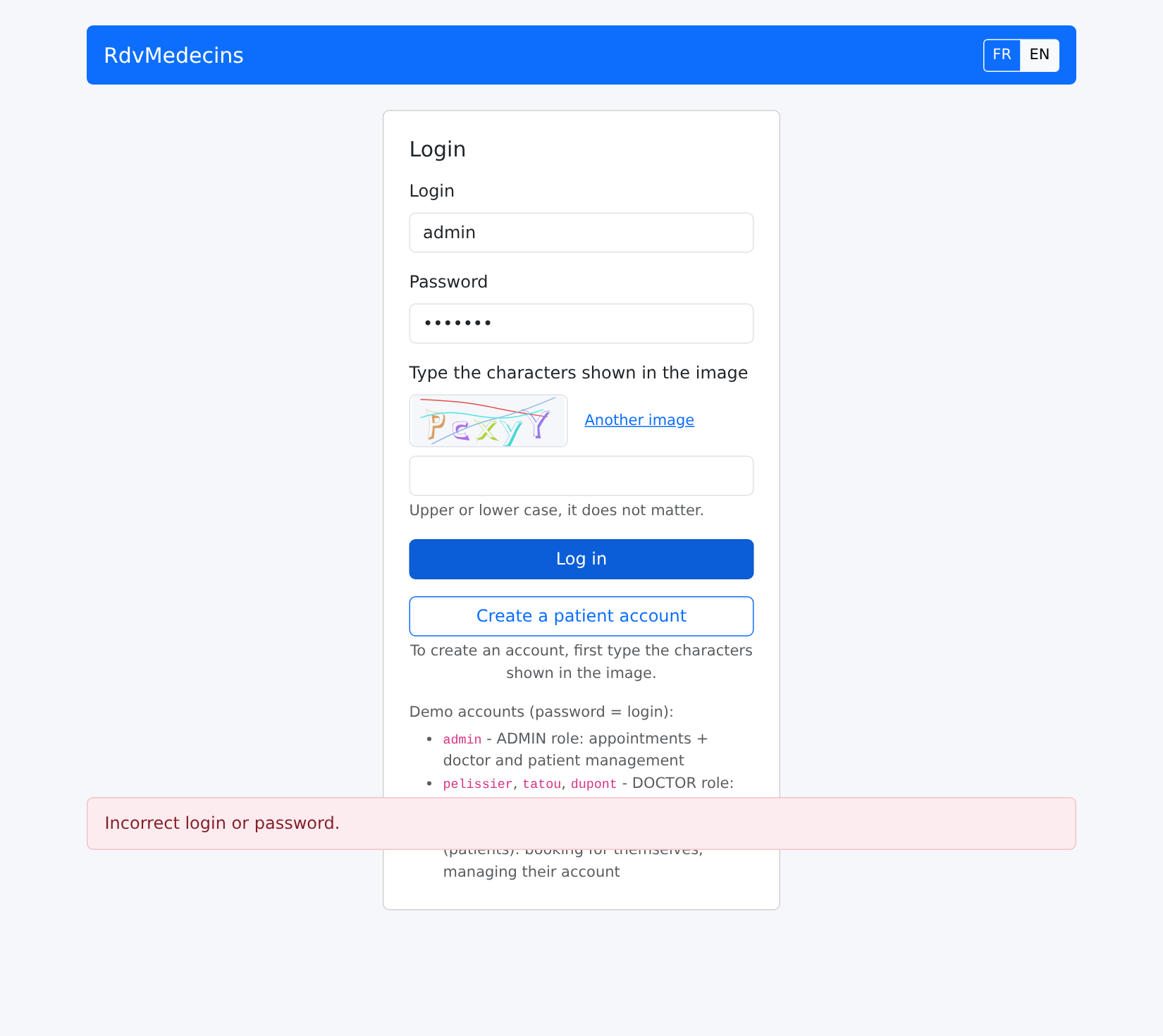
Incorrect password: A message appears at the bottom of the page, and a new image is displayed (each image can only be used once):
10.3.2. The calendar, as seen by the administrator and doctors
When logged in as [admin], you are taken to the calendar:
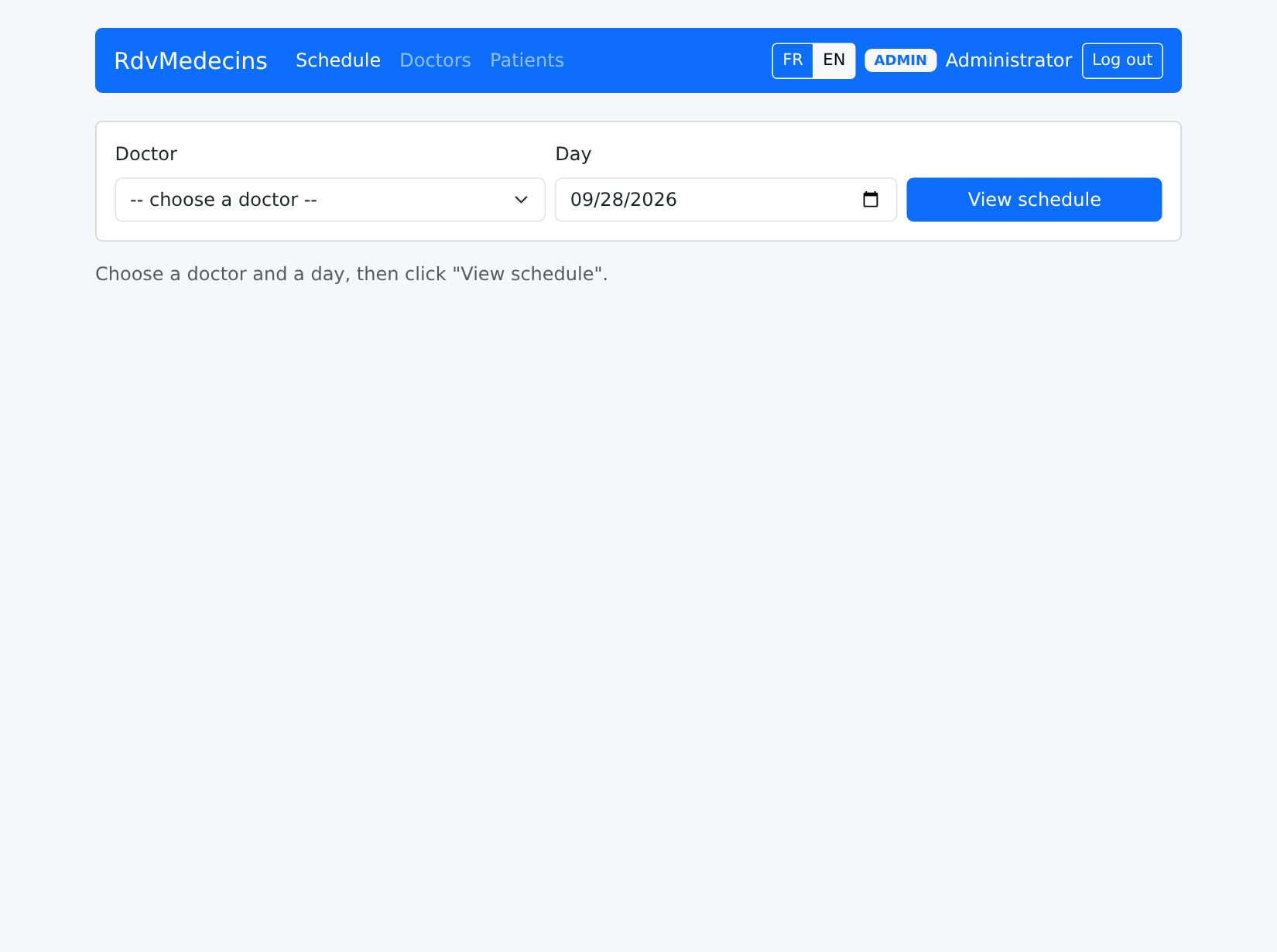
Select a doctor and a day, then click “View schedule.” The URL becomes [/schedule?doctorId=1&day=2026-10-05]:
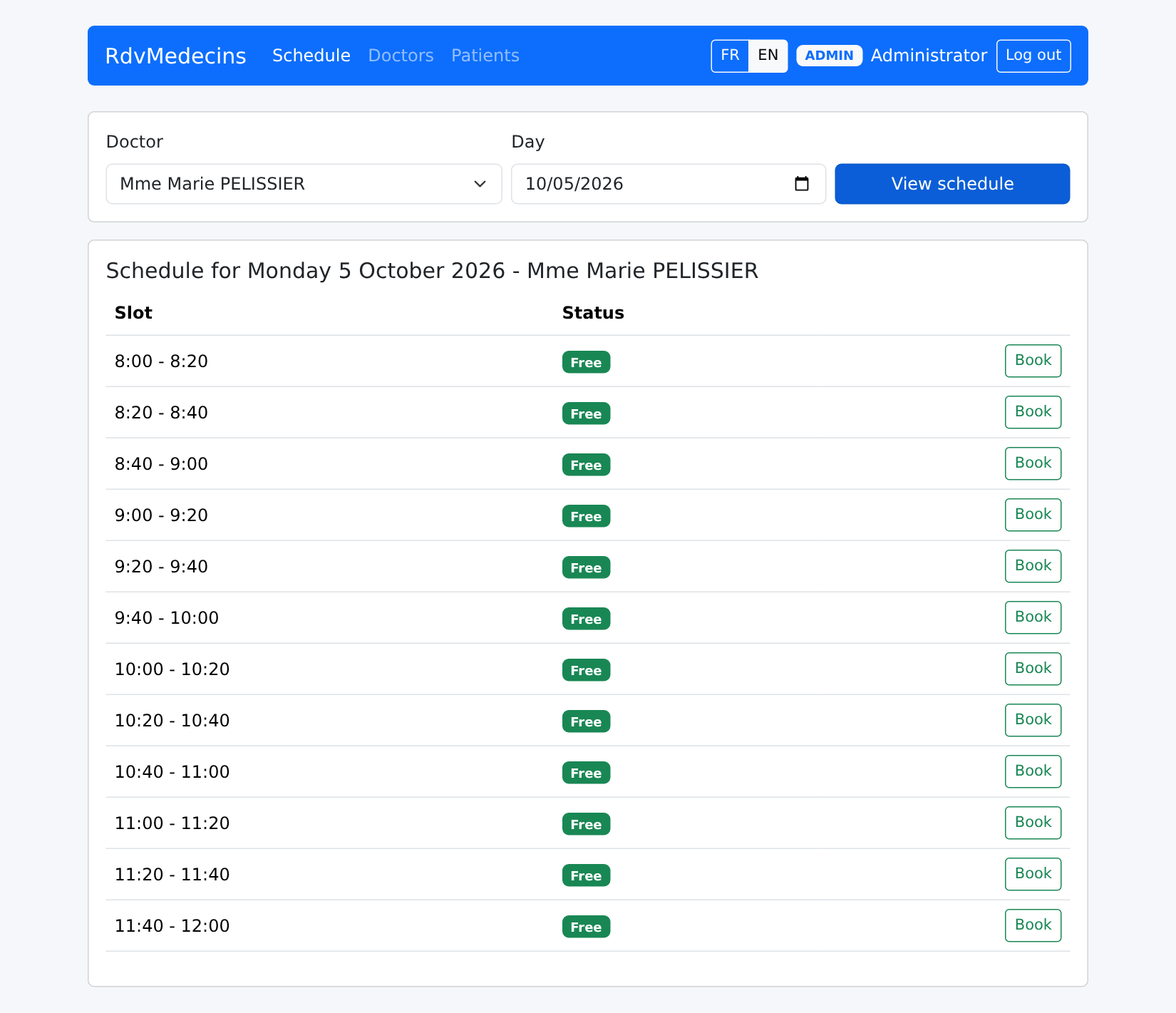
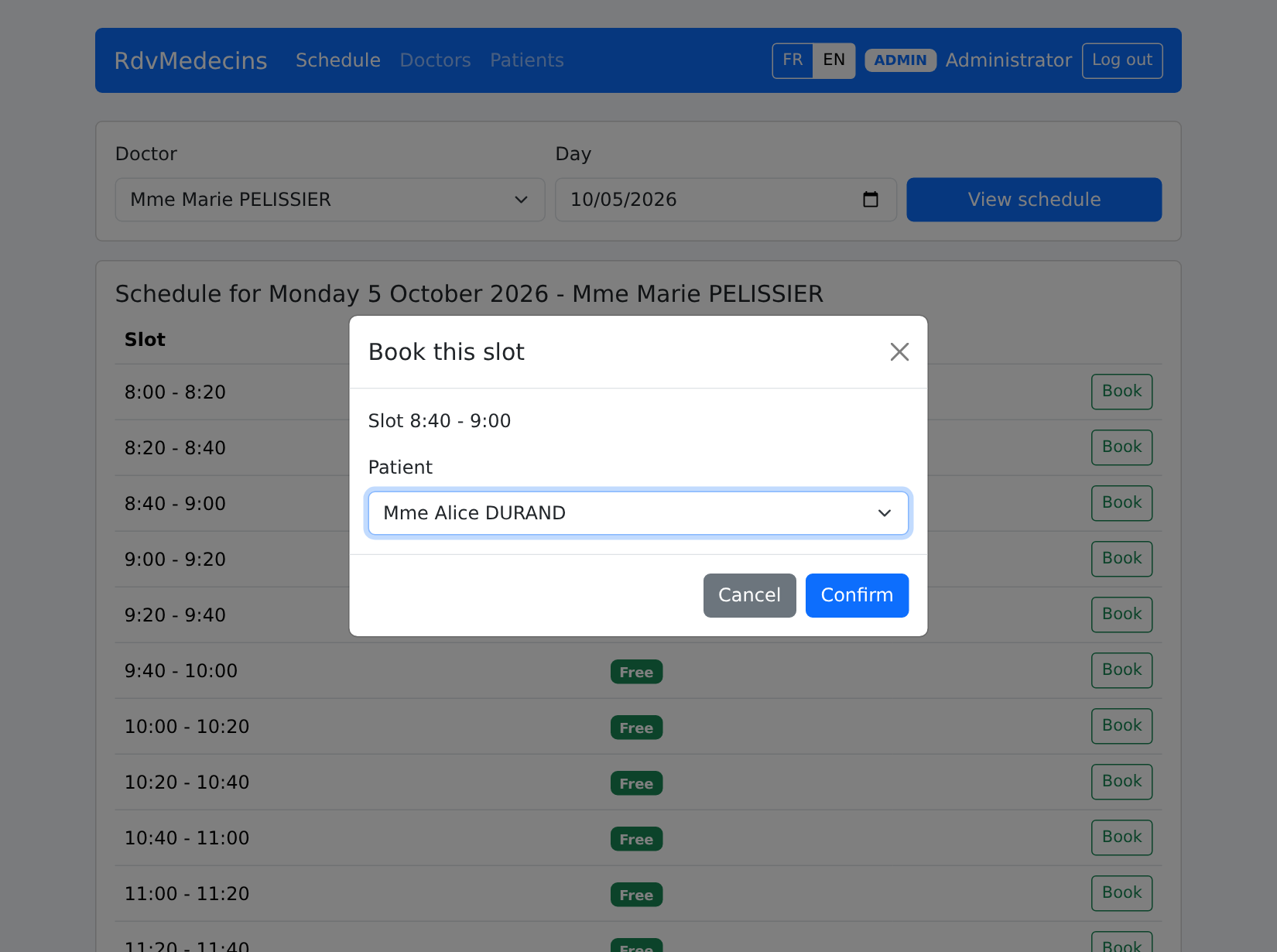
“Book” opens the booking window. The URL becomes [/schedule?doctorId=1&day=2026-10-05&book=3]: reloading the page (F5) reopens the same window.
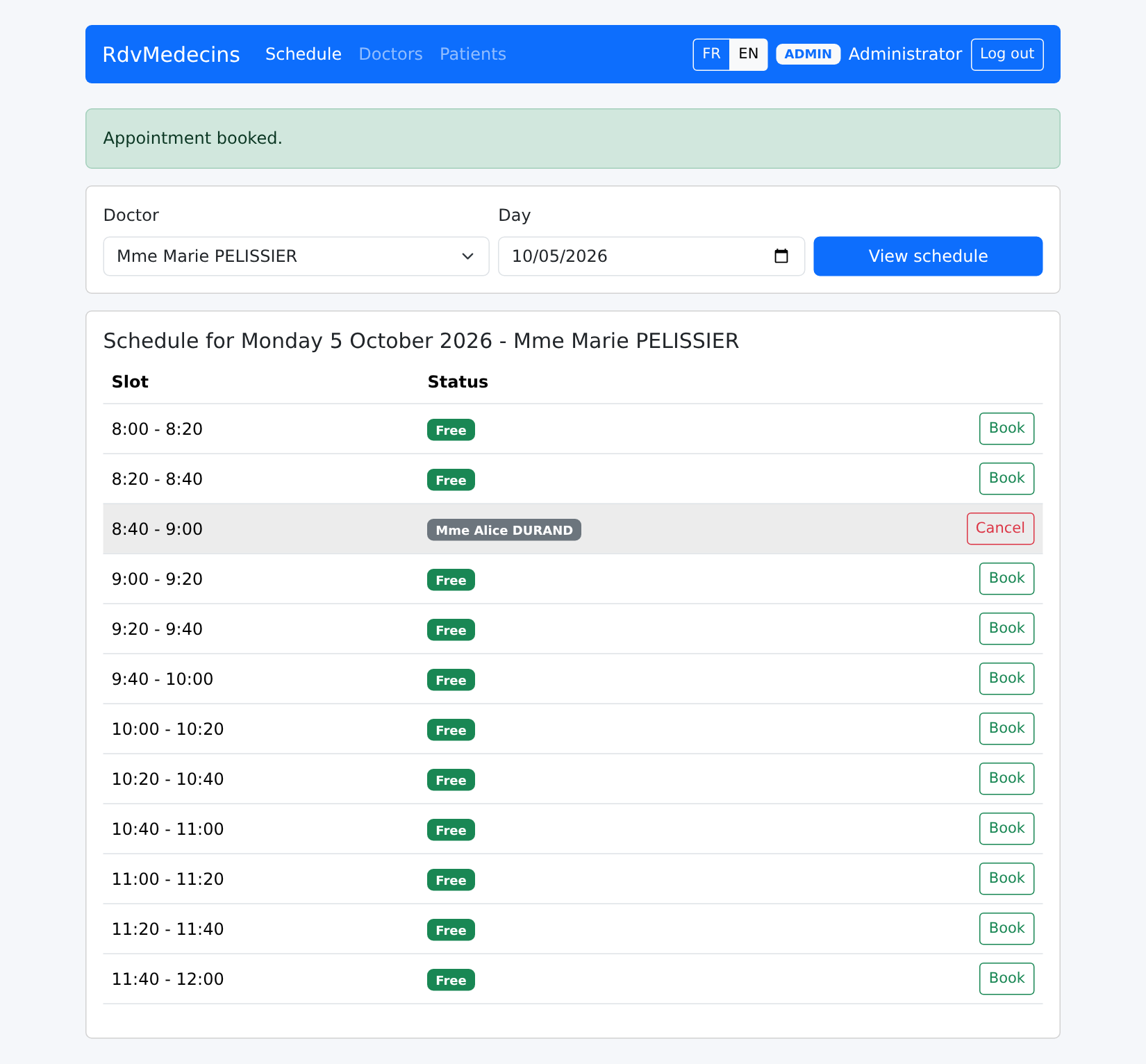
The appointment is saved:
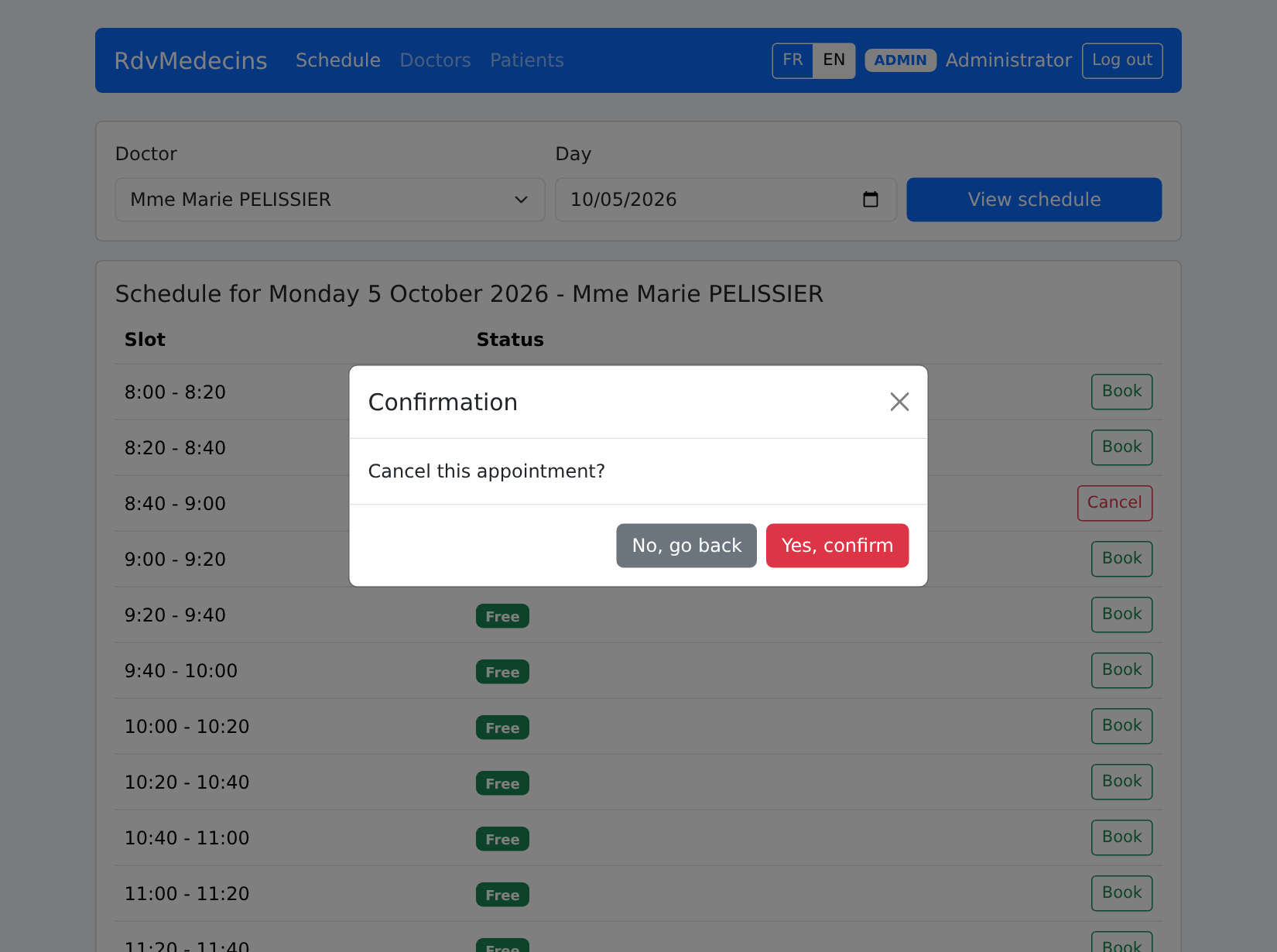
"Cancel" prompts for confirmation:
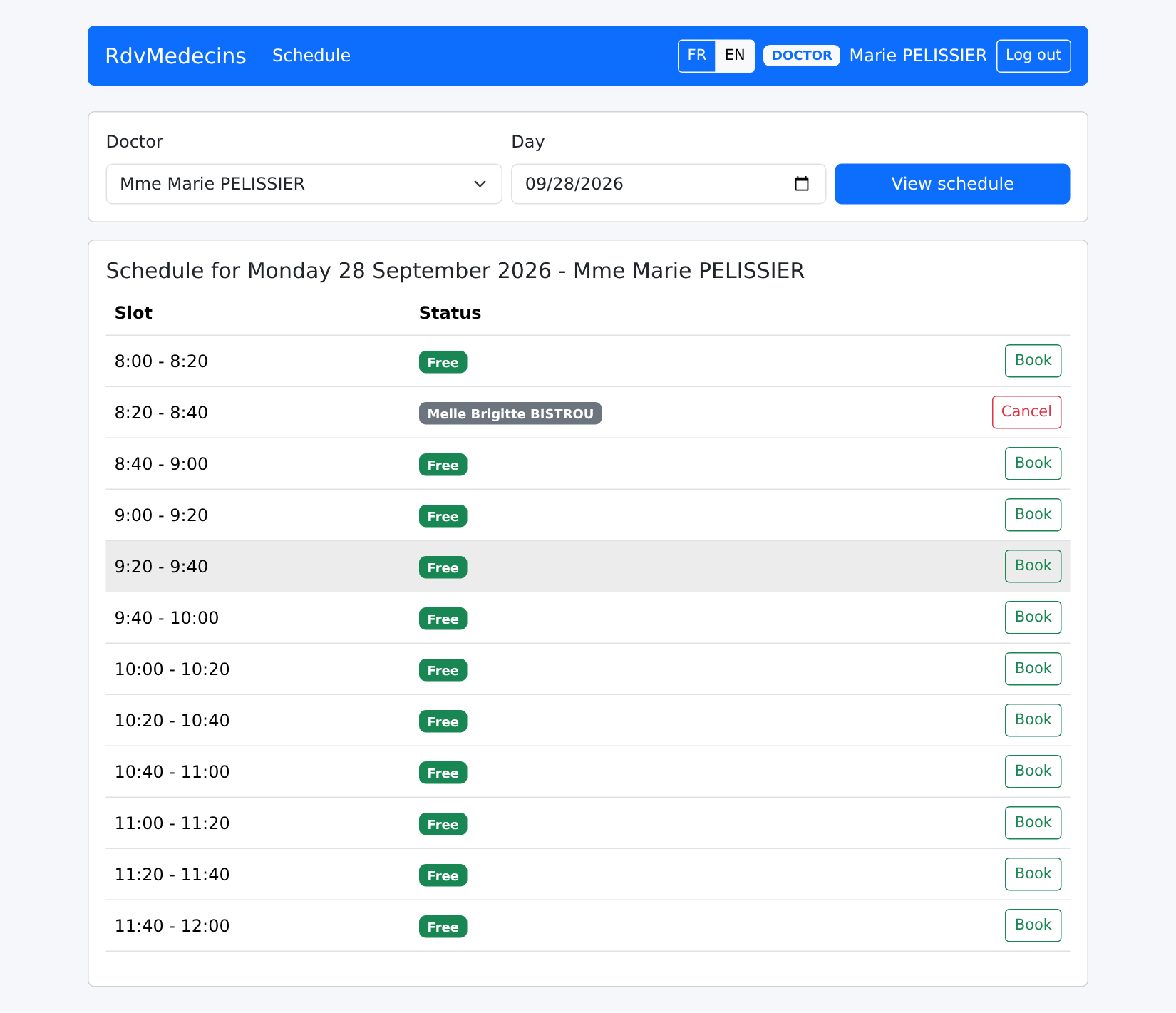
A doctor arrives directly at HIS OWN daily schedule:
10.3.3. The Patient Portal
A patient ([martin]) arrives at “My area”:
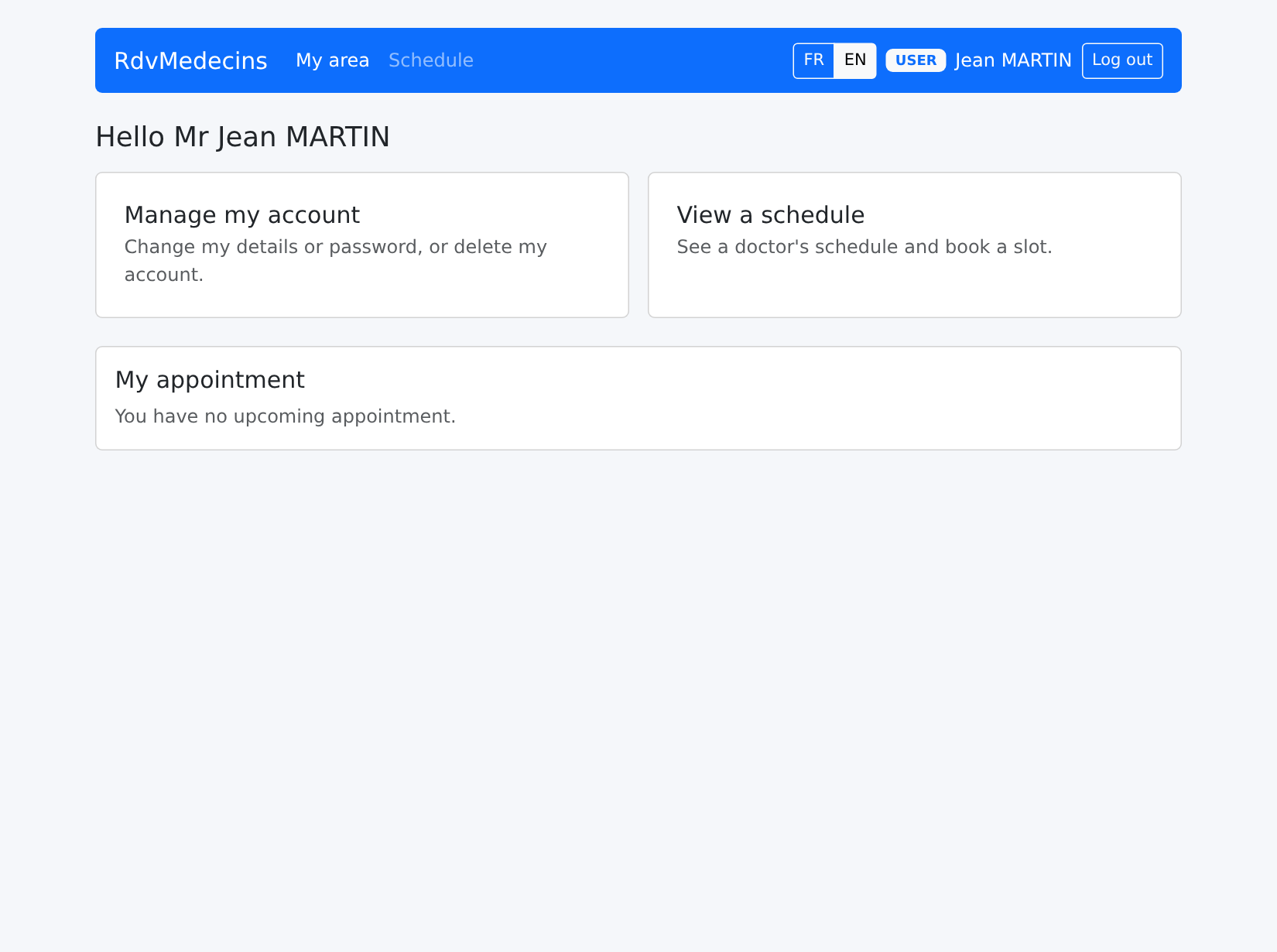
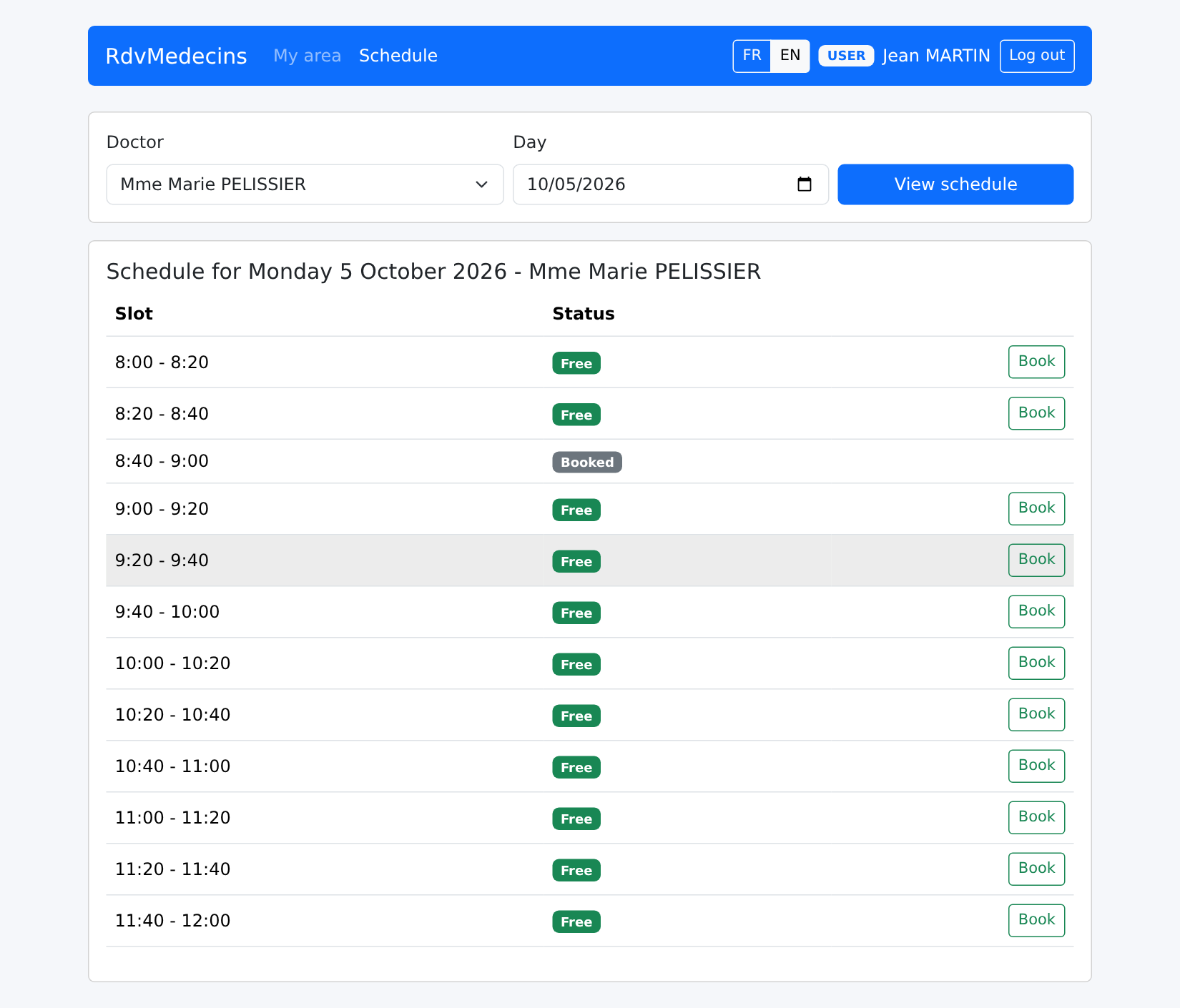
In a calendar, they see “Booked” next to other patients’ appointment slots:
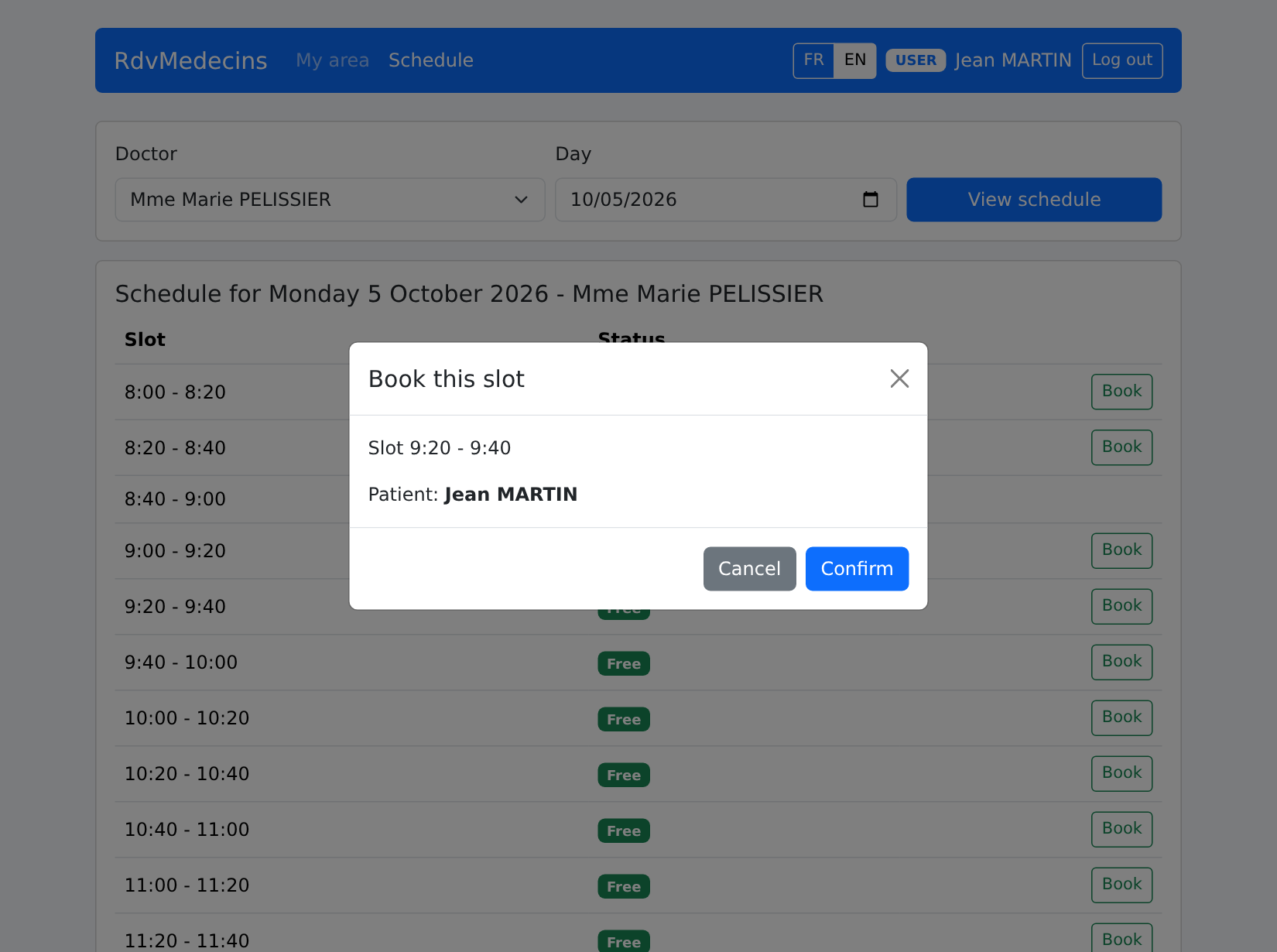
They book an appointment for themselves without selecting a patient:
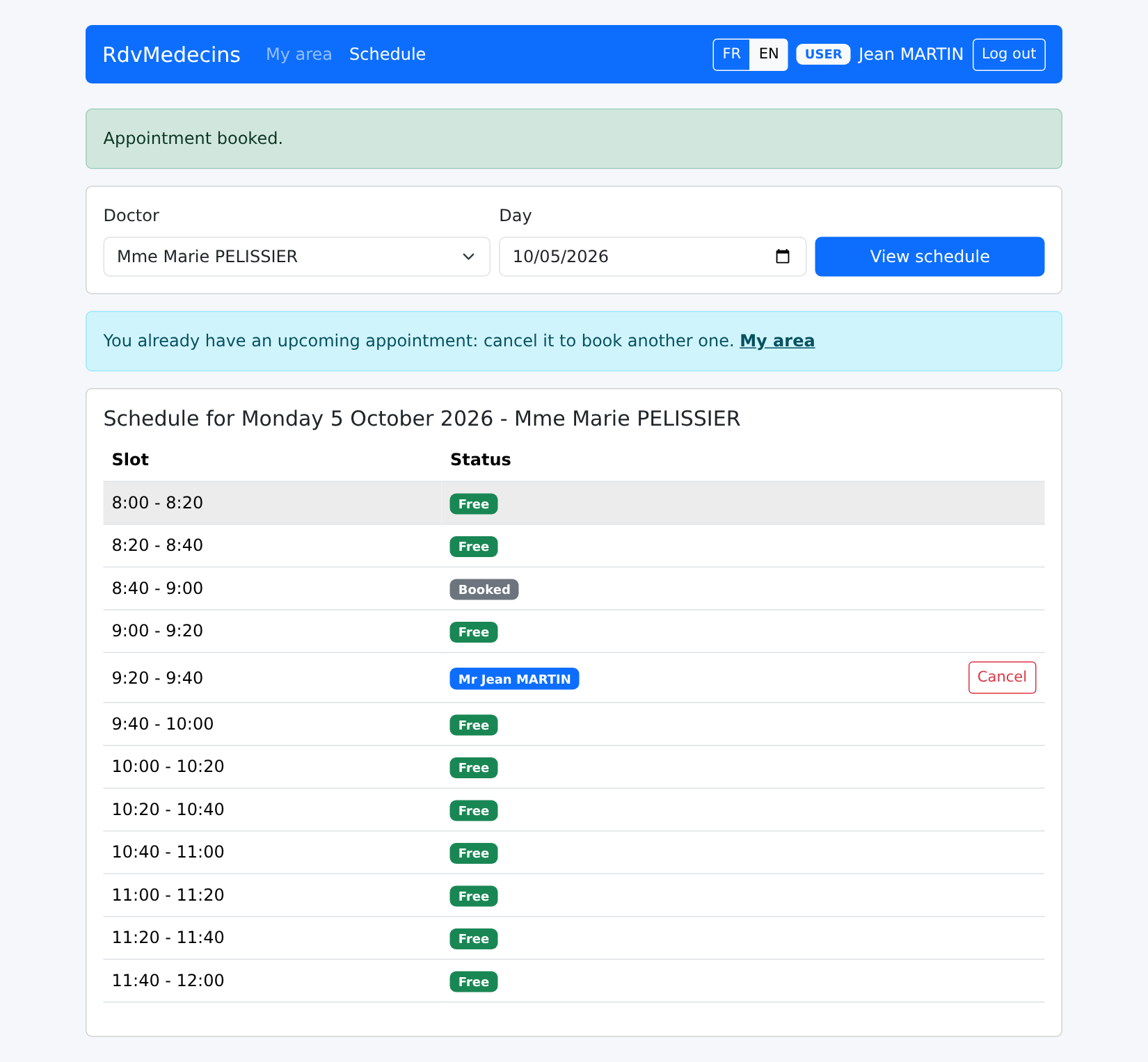
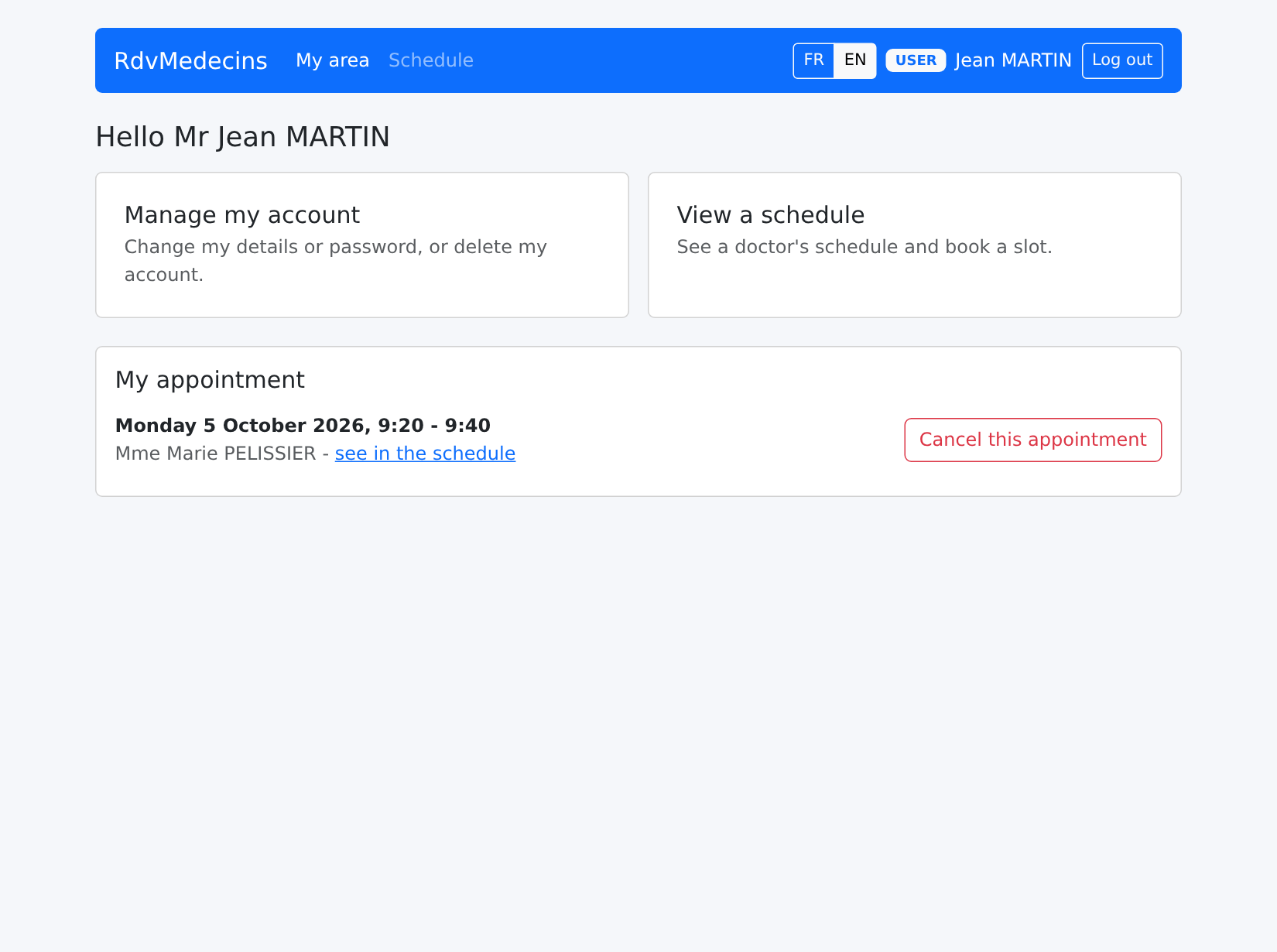
His appointment appears under his name; the “Book” button is no longer available (only one upcoming appointment), and a message explains why:
His dashboard shows this:
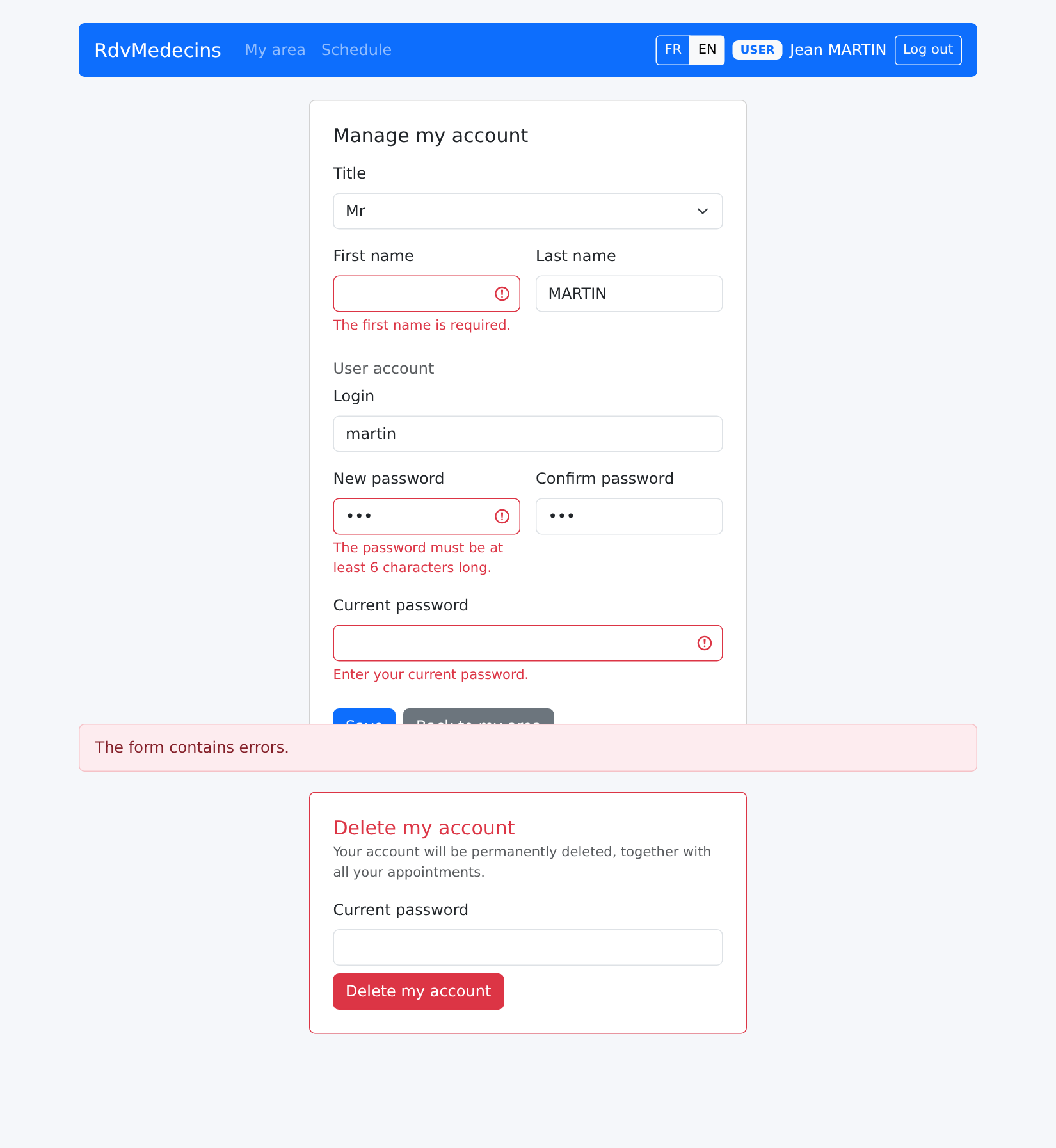
"Manage my account": any changes require the current password; the errors are server-side:
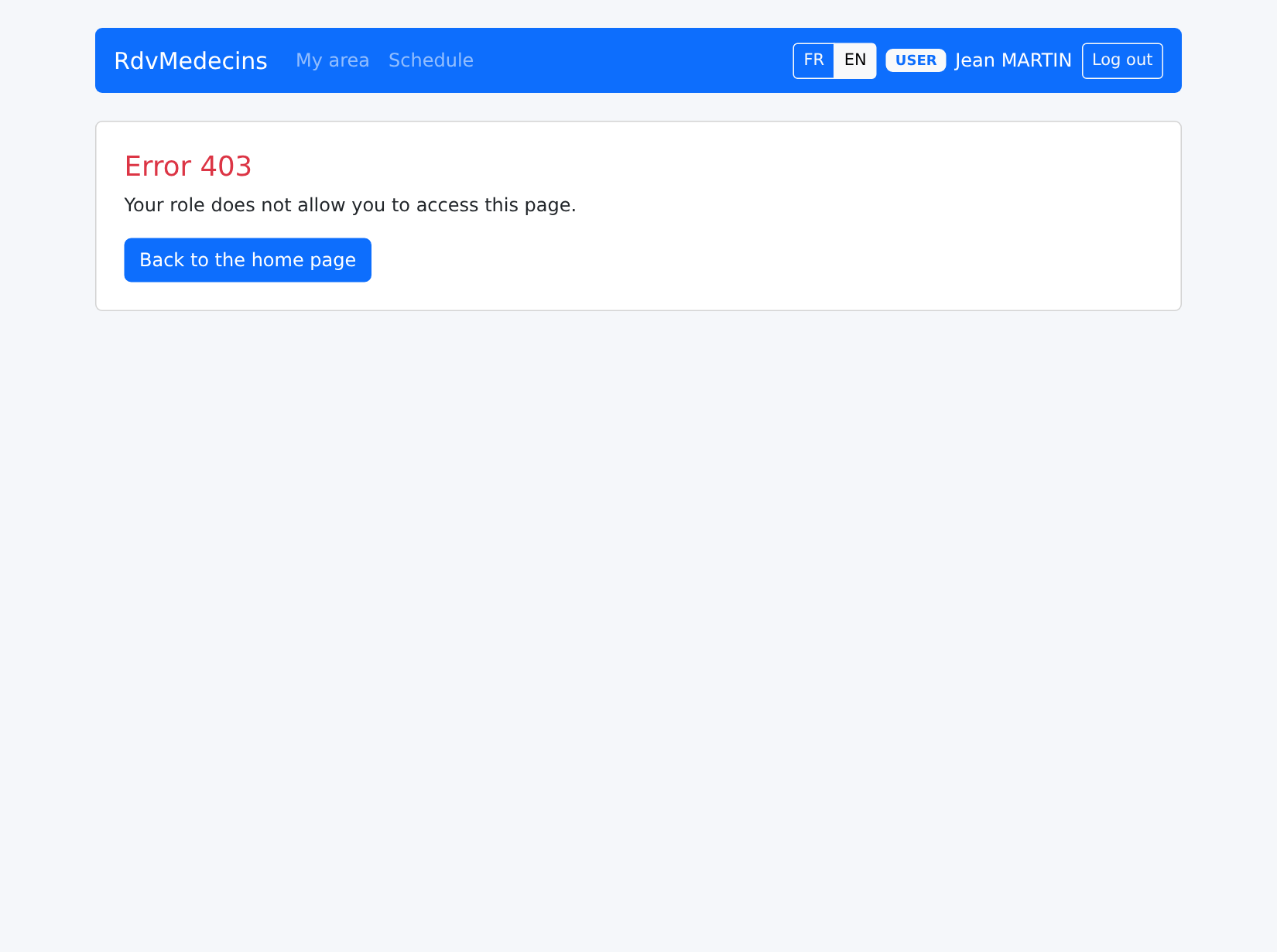
If he enters the address /doctors, which is reserved for the administrator:
10.3.4. Managing doctors and clients
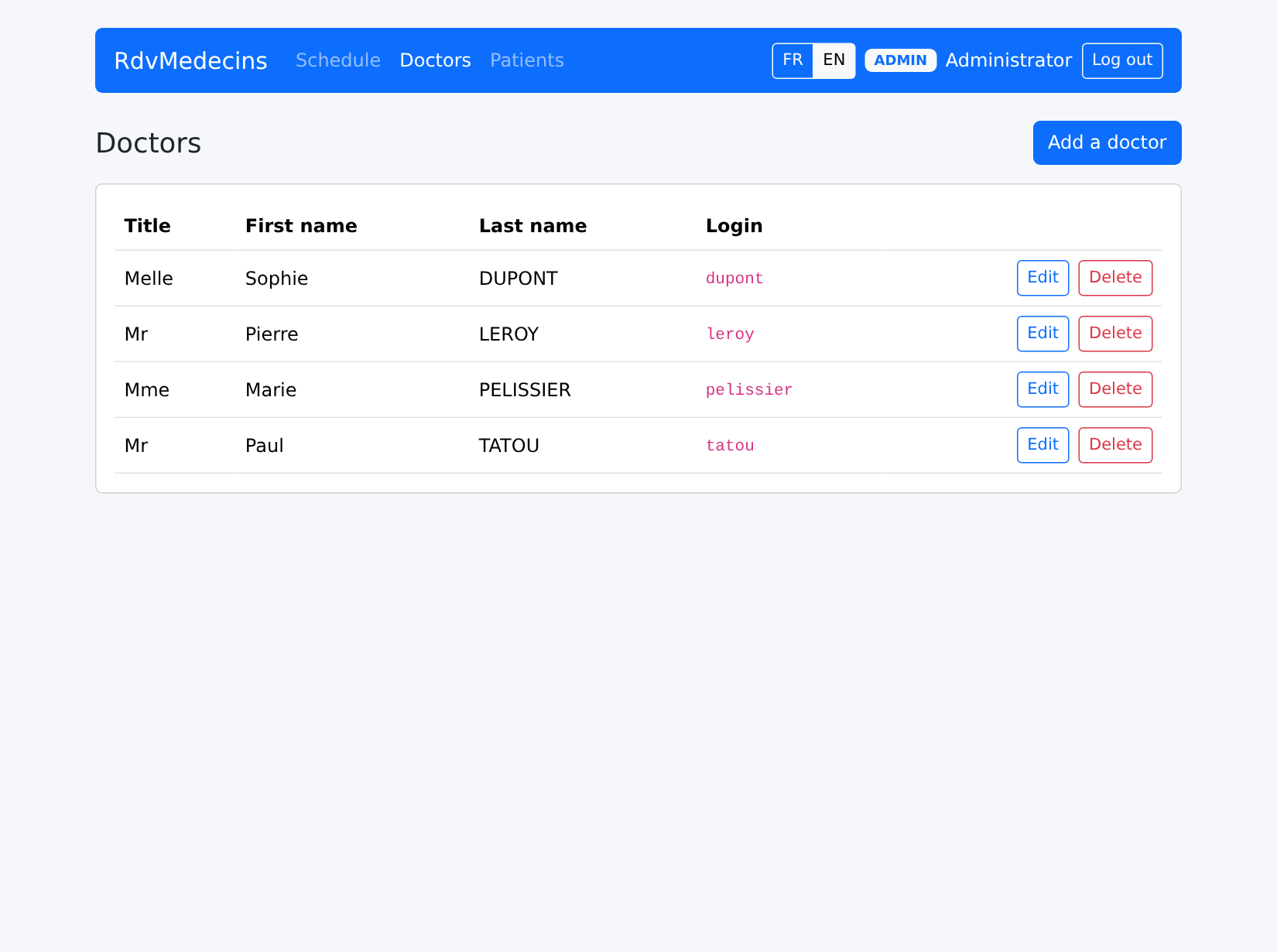
An incorrectly filled-out entry:
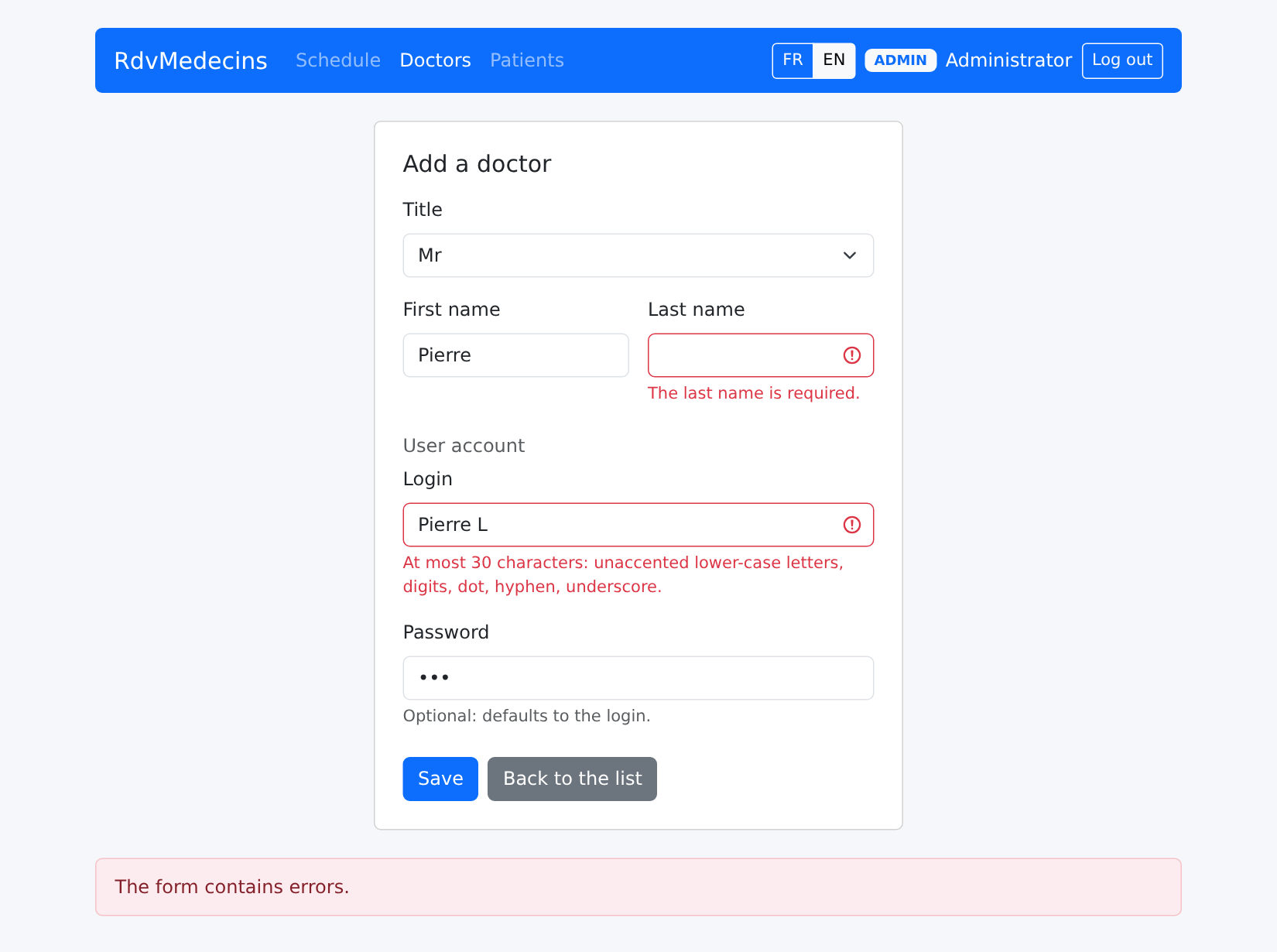
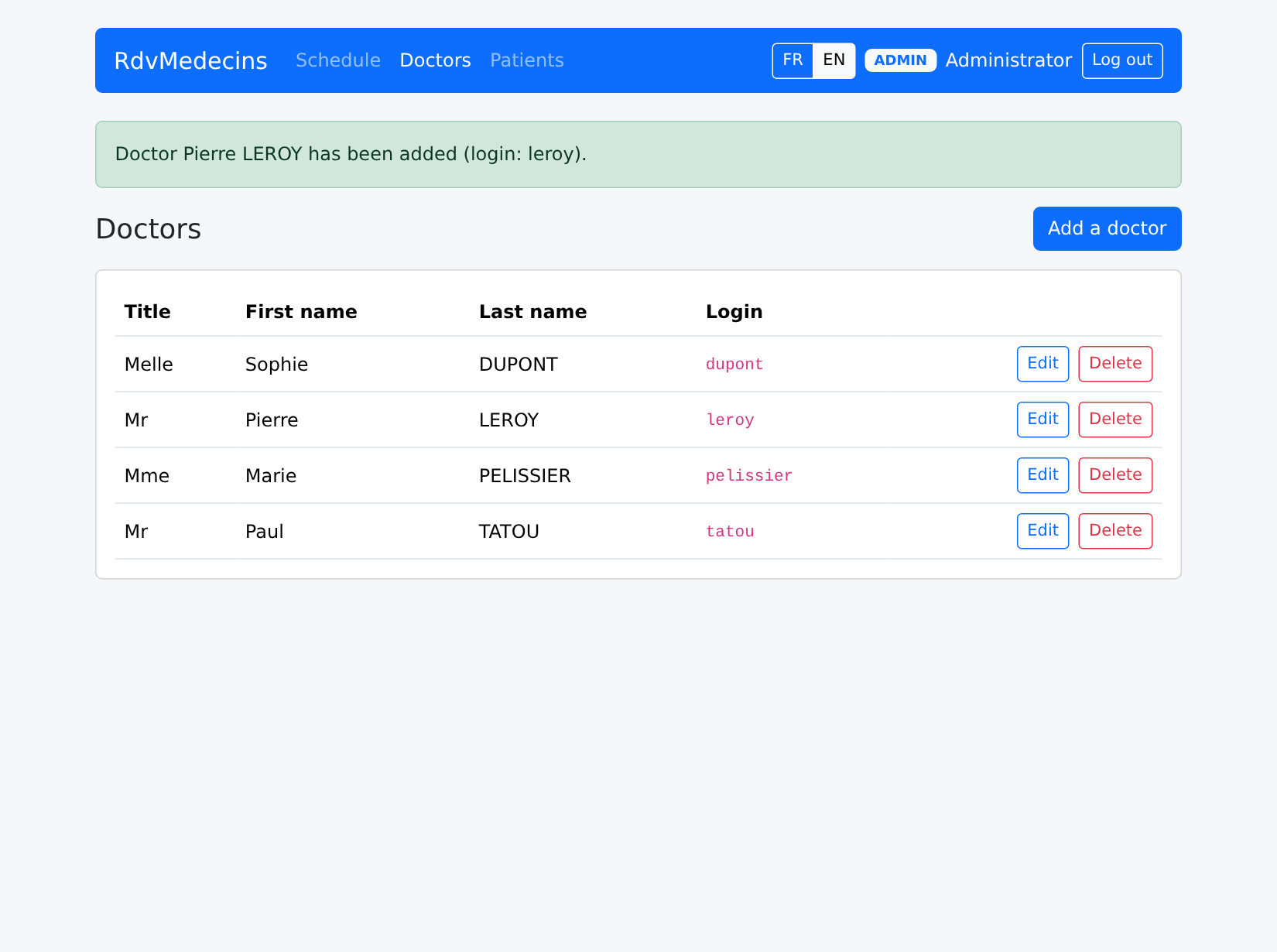
A successful addition:
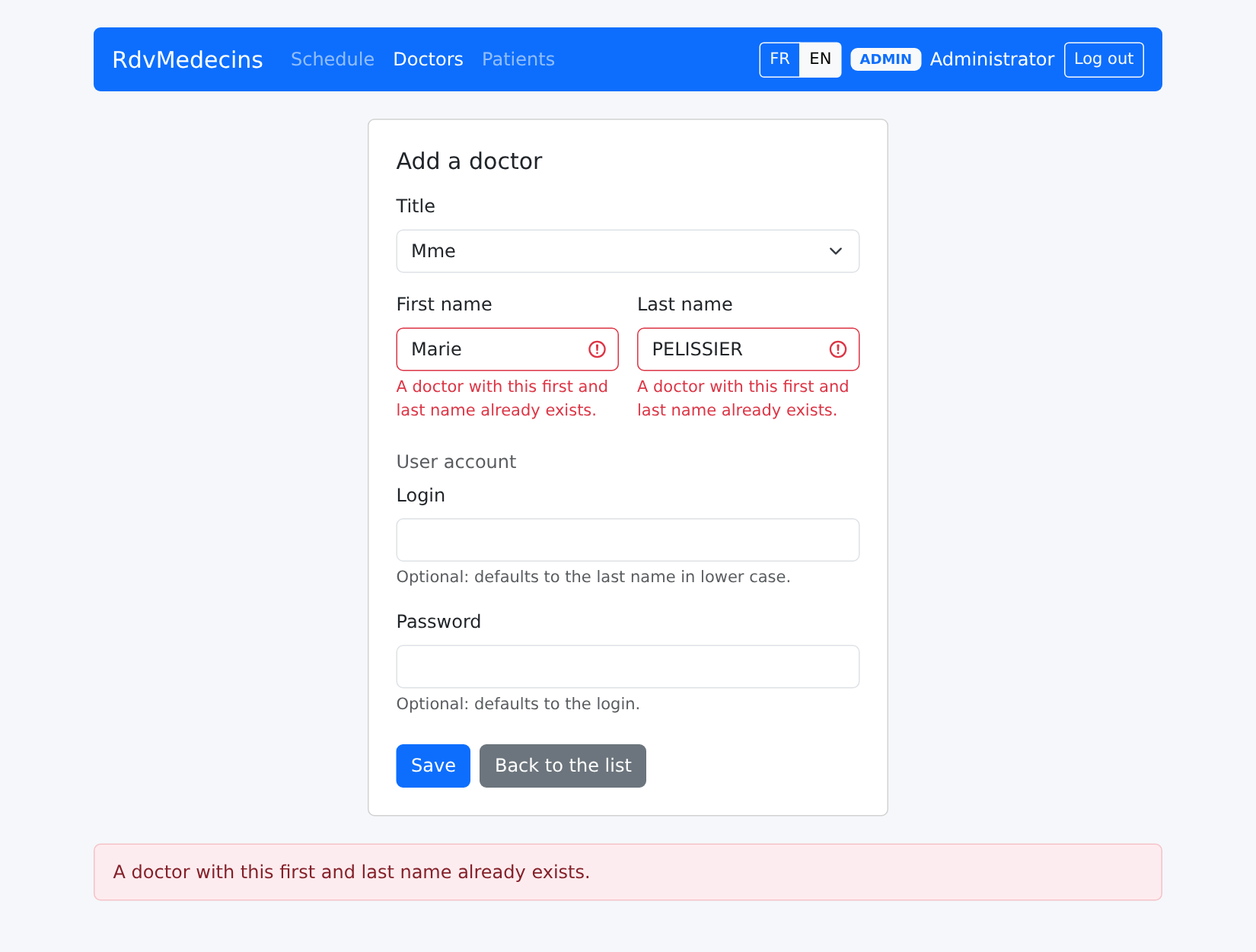
A homonym:
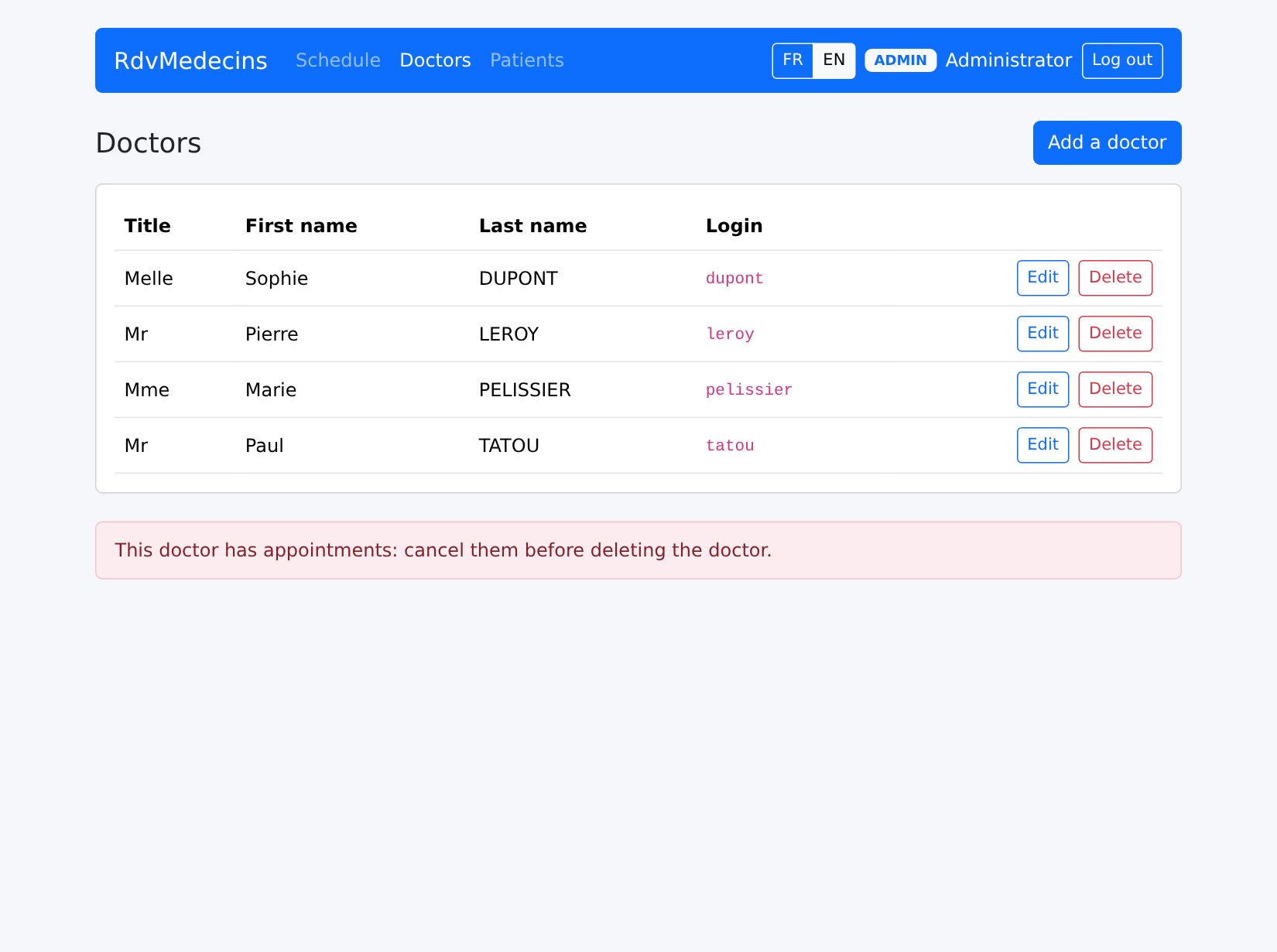
The request to remove a doctor with scheduled appointments is denied:
10.3.5. Creating an account
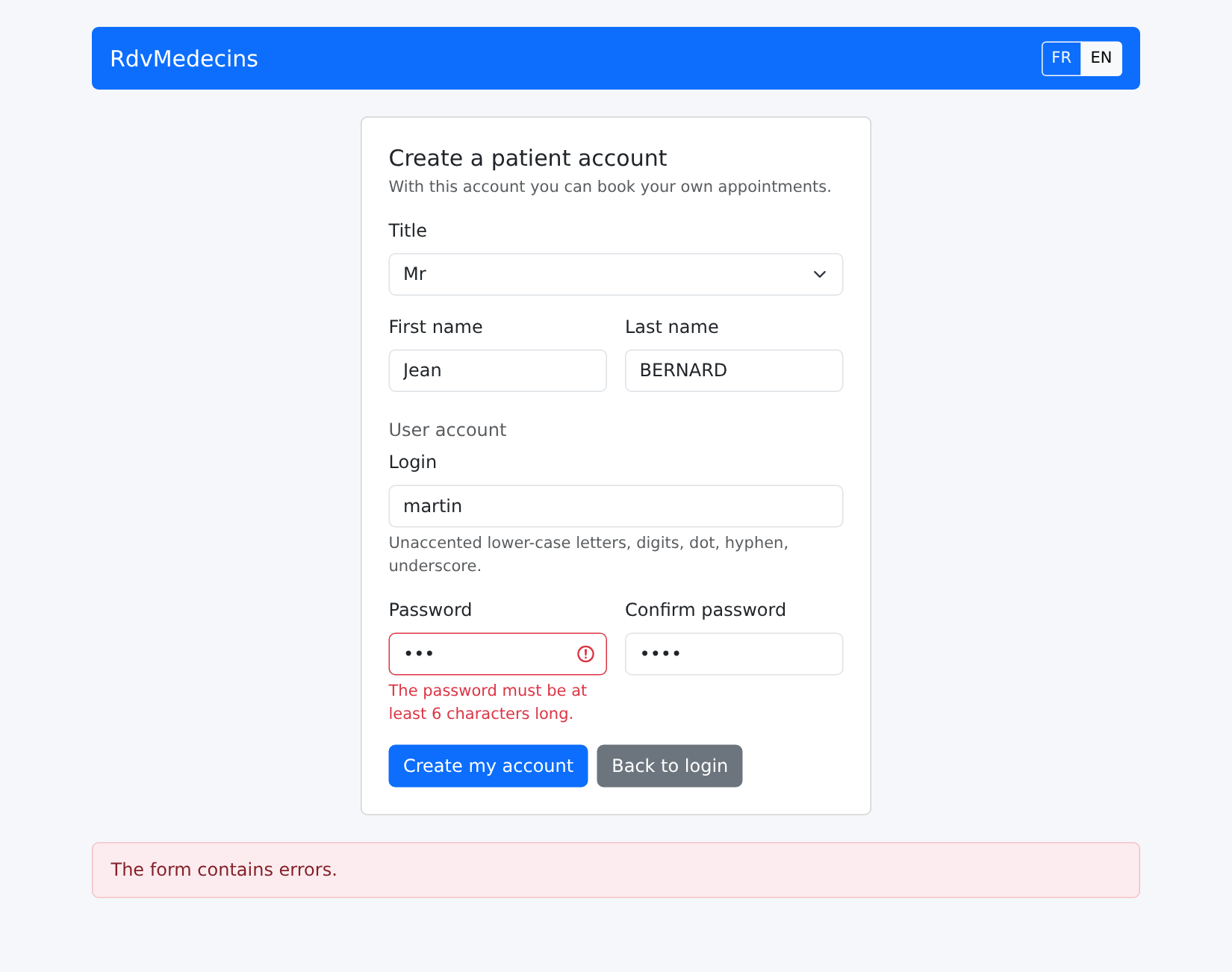
On the login page, enter the CAPTCHA and then click “Create a patient account.” The form, filled out incorrectly, is then rejected by the server:
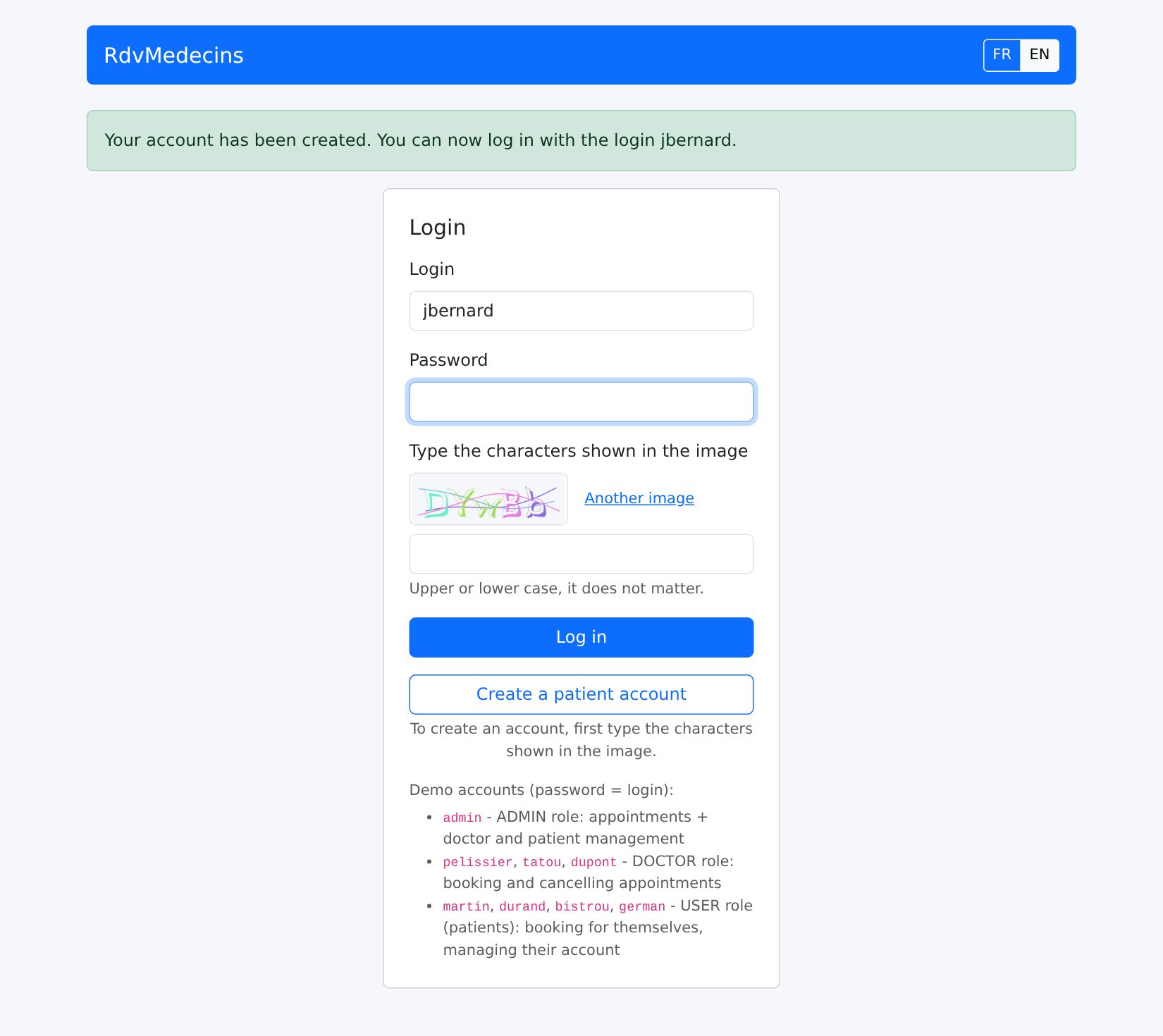
Once the account is created, return to the login page; the login fields are pre-filled:
10.3.6. In French
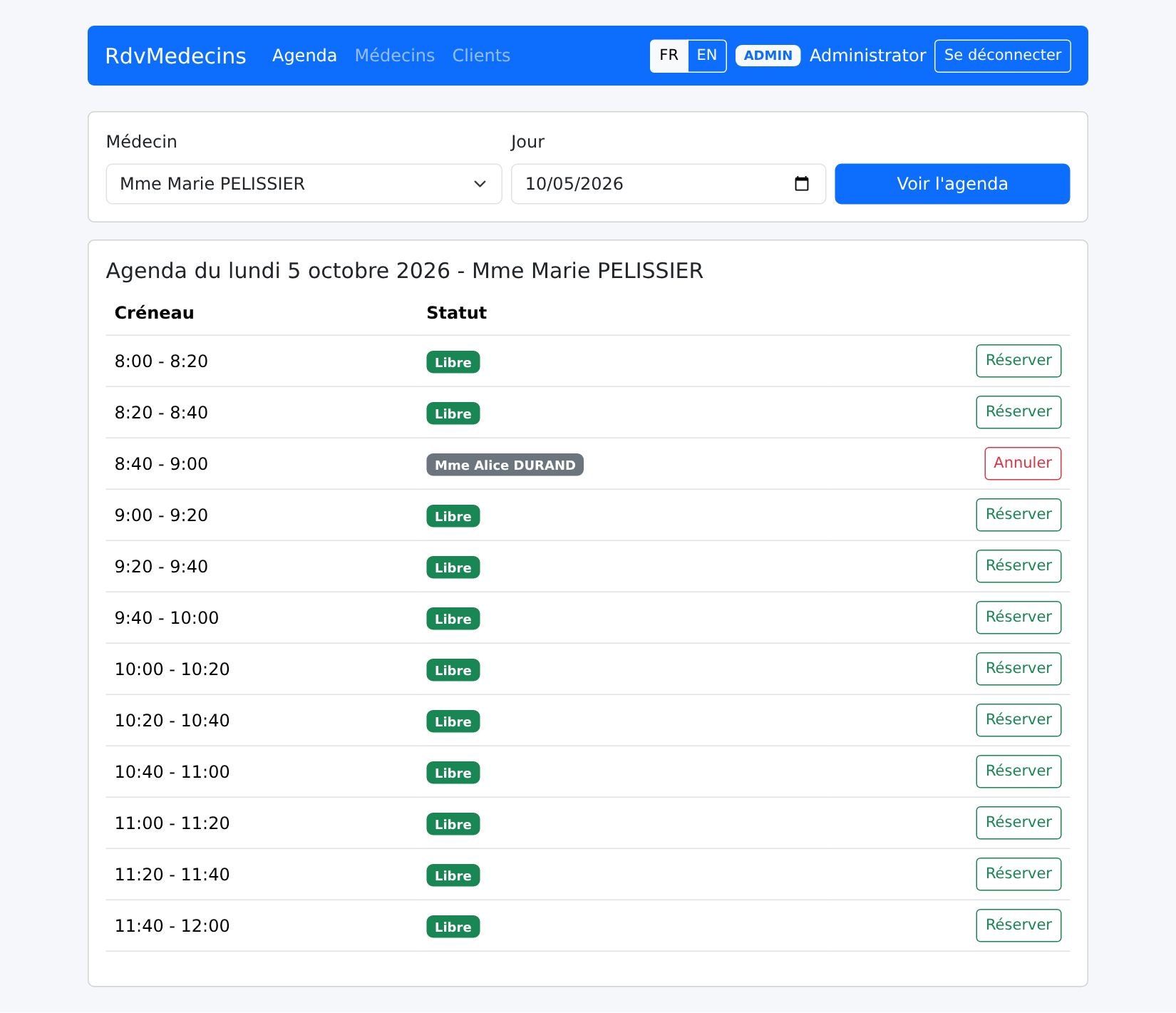
The buttons FR / EN translate the page on the spot, without making any requests to the server; the browser tab title is also translated:
10.3.7. Session expired, unknown address
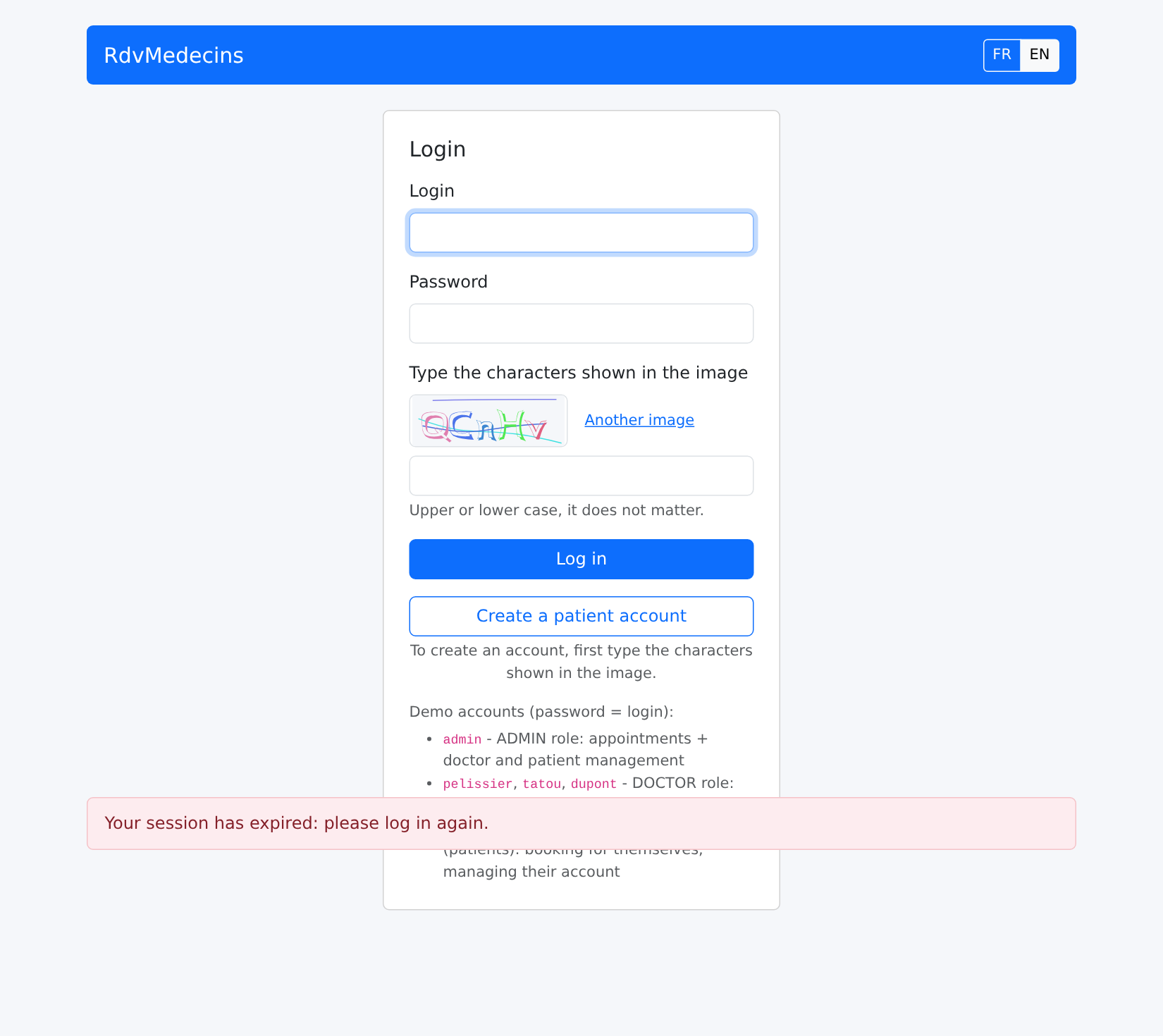
If the token expires (or if the cookie is deleted), the next request receives a 401 response; the client is redirected to the login page:
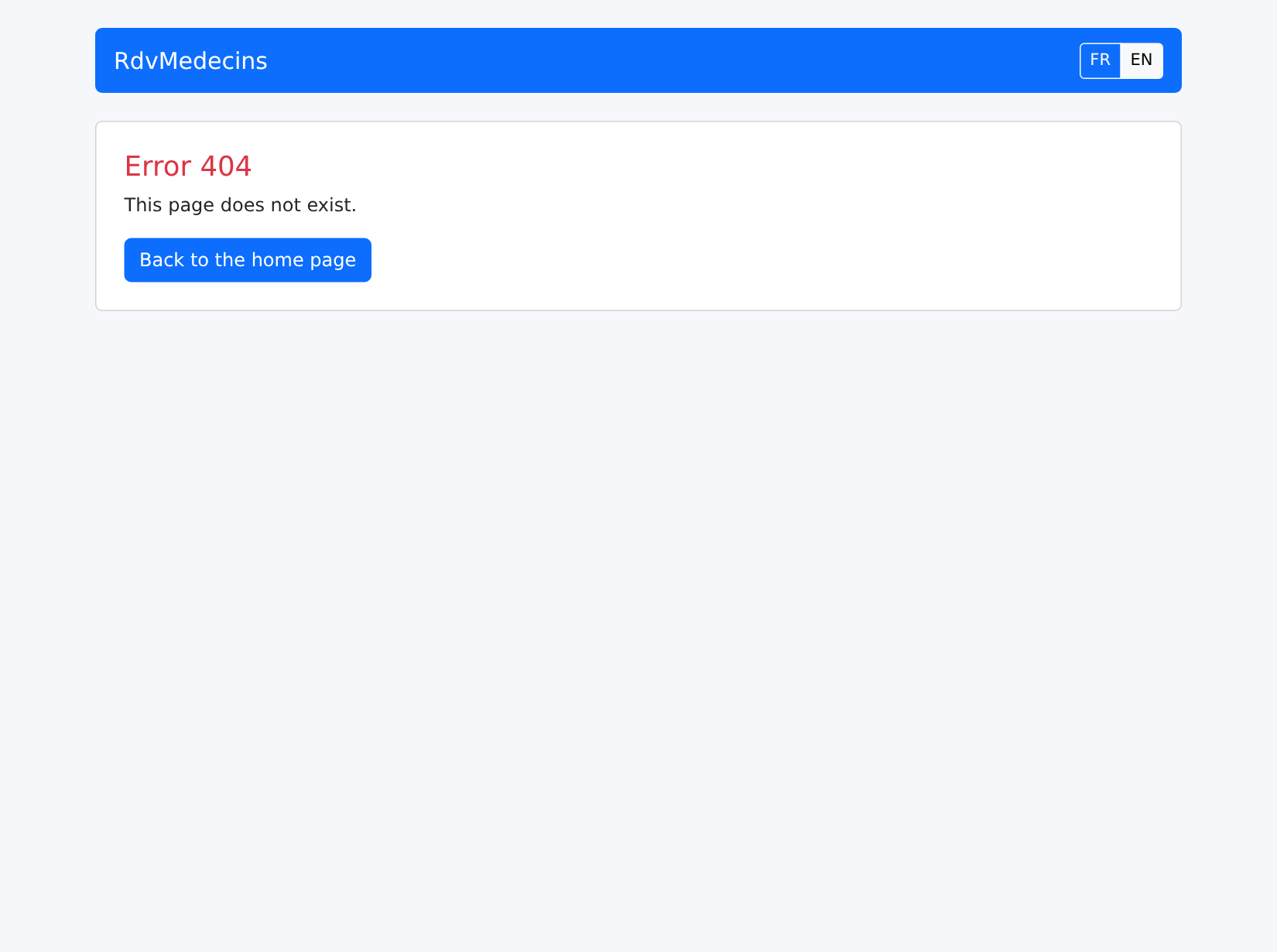
An unknown address:
10.4. Client architecture
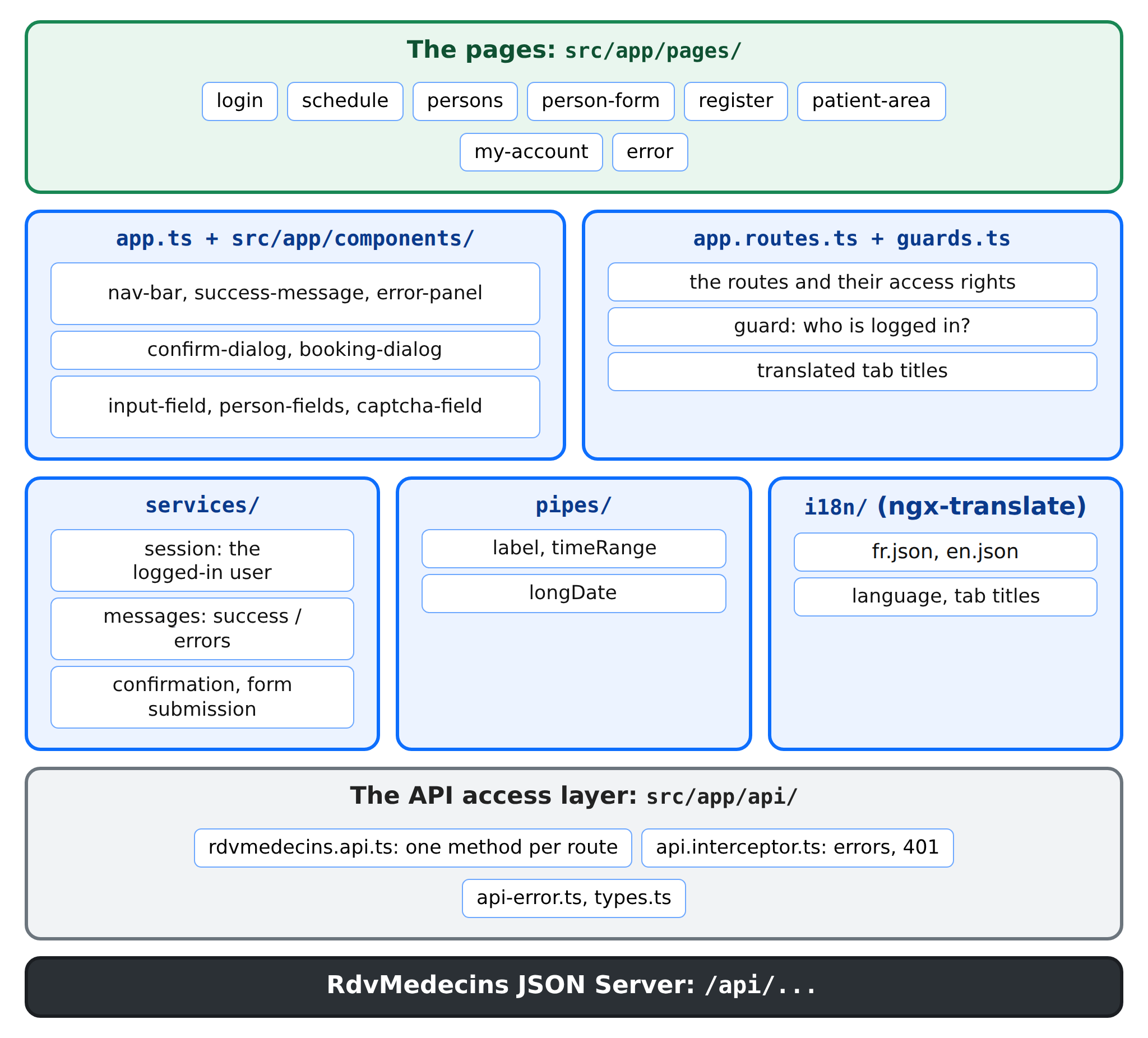
| rdvmedecins-angular/
├── angular.json, package.json, tsconfig.json, proxy.conf.json
├── public/favicon.svg the tab icon
└── src/
├── index.html THE page of the application
├── main.ts the startup
├── styles.css
└── app/
├── app.config.ts the configuration of the application
├── app.ts the layout shared by all the pages
├── app.routes.ts the pages and their access rights
├── guards.ts the router guards
├── api/ the API access layer
├── i18n/ the languages
├── services/ session, messages, confirmation, forms
├── pipes/ the formatting
├── components/ the reusable components
└── pages/ the pages
|
The following table compares the HTML application from the [NestJS] course with this client:
Application HTML (NestJS) | Angular client |
The server generates each page ([res.render]) | The server returns JSON; the components of [src/app/pages/] generate the pages |
[views/layout.hbs] and its partial views | [app.ts] and the components of [src/app/components/] |
the controller routes ([@Get('my-area')]) | client routes ([app.routes.ts]); the server only has /api/... routes |
[JwtAuthGuard] and [RolesGuard] redirect to /login or a 403 page | router guards; the server maintains its own guards, which return 401 or 403 |
flash message in a cookie | flash message in a service, [MessagesService] |
dictionaries read by the server, helper [{{t}}] | dictionaries in the client, [ngx-translate]; the server returns only keys |
language stored in a cookie | language stored in the [localStorage] |
form rejected: the server reloads the page | form rejected: 400/409 response; the client displays the errors below the fields |
Confirmation window: a small script, [public/js/app.js] | a service and a component, [ConfirmDialog] |
The application works without JavaScript | The application IS JavaScript |
The client [Vue.js] from the previous lesson has exactly the same structure: the “stores” ([Pinia]) have become services, the “composables” have become services or functions, and the views have become pages.
All of the client’s files are shown below. They are extensively commented; these comments are part of the course.
10.4.1. Project configuration
10.4.1.1. package.json
| {
"name": "rdvmedecins-angular",
"version": "1.0.0",
"description": "Angular client of the medical appointment booking application [RdvMedecins] - client of the JSON server [rdvmedecins-nestjs-json]",
"private": true,
"scripts": {
"ng": "ng",
"start": "ng serve",
"build": "ng build"
},
"dependencies": {
"@angular/common": "^22.2.0",
"@angular/compiler": "^22.2.0",
"@angular/core": "^22.2.0",
"@angular/forms": "^22.2.0",
"@angular/platform-browser": "^22.2.0",
"@angular/router": "^22.2.0",
"@ngx-translate/core": "^18.0.0",
"bootstrap": "^5.3.8",
"rxjs": "~7.8.0",
"tslib": "^2.8.0"
},
"devDependencies": {
"@angular/build": "^22.2.0",
"@angular/cli": "^22.2.0",
"@angular/compiler-cli": "^22.2.0",
"typescript": "~6.0.2"
}
}
|
- lines 8–9: [npm start] starts the development server; [npm run build] builds the production version;
- lines 11–22: the libraries used by the application: those of [Angular], [ngx-translate], [Bootstrap], and [RxJS];
- lines 23–28: the development tools: the [Angular] compiler, the [ng] command, and [TypeScript].
10.4.1.2. angular.json
| {
"$schema": "./node_modules/@angular/cli/lib/config/schema.json",
"version": 1,
"cli": {
"packageManager": "npm",
"analytics": false
},
"projects": {
"rdvmedecins-angular": {
"projectType": "application",
"root": "",
"sourceRoot": "src",
"prefix": "app",
"architect": {
"build": {
"builder": "@angular/build:application",
"options": {
"browser": "src/main.ts",
"tsConfig": "tsconfig.app.json",
"assets": [{ "glob": "**/*", "input": "public" }],
"styles": ["node_modules/bootstrap/dist/css/bootstrap.min.css", "src/styles.css"]
},
"configurations": {
"production": {
"budgets": [
{ "type": "initial", "maximumWarning": "800kB", "maximumError": "1MB" },
{ "type": "anyComponentStyle", "maximumWarning": "4kB", "maximumError": "8kB" }
],
"outputHashing": "all"
},
"development": {
"optimization": false,
"extractLicenses": false,
"sourceMap": true
}
},
"defaultConfiguration": "production"
},
"serve": {
"builder": "@angular/build:dev-server",
"options": {
"proxyConfig": "proxy.conf.json"
},
"configurations": {
"production": { "buildTarget": "rdvmedecins-angular:build:production" },
"development": { "buildTarget": "rdvmedecins-angular:build:development" }
},
"defaultConfiguration": "development"
}
}
}
}
}
|
Just one project this time, at the root of the folder (line 11):
- line 18: the application’s entry point;
- line 20: the contents of the [public] folder are copied as-is into the built application (the icon);
- line 21: the global style sheets: the one from [Bootstrap], followed by ours;
- lines 24–30: the production configuration. The budgets trigger a warning (or an error) if the application exceeds the specified size; [outputHashing] adds a content fingerprint to the name of each file (see the “Deployment” chapter);
- line 37: [ng build] builds the production version by default;
- line 42: the development server proxy;
- line 48: [ng serve] uses the development configuration (unoptimized code, “source maps” for the debugger).
10.4.1.3. tsconfig.json, tsconfig.app.json, proxy.conf.json
| {
"compilerOptions": {
"strict": true,
"noImplicitOverride": true,
"noPropertyAccessFromIndexSignature": true,
"noImplicitReturns": true,
"noFallthroughCasesInSwitch": true,
"noUnusedLocals": true,
"noUnusedParameters": true,
"skipLibCheck": true,
"isolatedModules": true,
"experimentalDecorators": true,
"importHelpers": true,
"resolveJsonModule": true,
"target": "ES2022",
"module": "preserve"
},
"angularCompilerOptions": {
"strictInjectionParameters": true,
"strictInputAccessModifiers": true,
"strictTemplates": true
},
"files": [],
"references": [
{
"path": "./tsconfig.app.json"
}
]
}
|
- Line 3: the strict mode for [TypeScript];
- line 14: the import of the JSON files (the dictionaries);
- line 21: the [Angular] compiler also checks the types in the templates.
| {
"extends": "./tsconfig.json",
"include": ["src/**/*.ts"]
}
|
| {
"/api": {
"target": "http://localhost:8080",
"secure": false
}
}
|
The proxy from Example 22: /api/... requests are forwarded to the JSON server.
10.4.2. Starting the application
10.4.2.1. index.html
| <!doctype html>
<!--
index.html - THE page of the application (Single Page Application).
The server never sends any other: everything else is built in
the browser by Angular, in <app-root>. lang and title are
updated by the application according to the language and the page displayed.
-->
<html lang="en">
<head>
<meta charset="utf-8">
<title>RdvMedecins</title>
<base href="/">
<meta name="viewport" content="width=device-width, initial-scale=1">
<link rel="icon" href="favicon.svg" type="image/svg+xml">
</head>
<body>
<app-root></app-root>
<!-- without JavaScript, an Angular application cannot display anything: we say so -->
<noscript>RdvMedecins requires JavaScript. / RdvMedecins a besoin de JavaScript.</noscript>
</body>
</html>
|
- Line 17: the element where [Angular] displays the root component;
- line 19: without [JavaScript], a [Angular] application cannot display anything: we say so.
10.4.2.2. src/main.ts
| // =========================================================================
// main.ts - the startup of the application
// -------------------------------------------------------------------------
// The root component (App) and the configuration of the application
// (app.config.ts). The style sheets (Bootstrap, styles.css) are
// declared in angular.json.
// =========================================================================
import { bootstrapApplication } from '@angular/platform-browser';
import { App } from './app/app';
import { appConfig } from './app/app.config';
bootstrapApplication(App, appConfig).catch((error) => console.error(error));
|
10.4.2.3. src/app/app.config.ts
| // =========================================================================
// app.config.ts - the configuration of the application
// -------------------------------------------------------------------------
// - the router, its routes (app.routes.ts), the route parameters
// passed to the inputs of the pages, and the translated tab title;
// - HttpClient, with the interceptor of the errors and of the 401;
// - ngx-translate (French and English).
// =========================================================================
import { ApplicationConfig, provideBrowserGlobalErrorListeners } from '@angular/core';
import { provideHttpClient, withInterceptors } from '@angular/common/http';
import { provideRouter, TitleStrategy, withComponentInputBinding } from '@angular/router';
import { routes } from './app.routes';
import { apiInterceptor } from './api/api.interceptor';
import { provideI18n } from './i18n/i18n';
import { TranslatedTitle } from './i18n/title.strategy';
export const appConfig: ApplicationConfig = {
providers: [
// the unhandled errors are reported in the browser console
provideBrowserGlobalErrorListeners(),
provideRouter(routes, withComponentInputBinding()),
{ provide: TitleStrategy, useClass: TranslatedTitle },
provideHttpClient(withInterceptors([apiInterceptor])),
provideI18n(),
],
};
|
- line 21: unhandled errors (such as a rejected promise that no one is waiting for) are reported in the browser console;
- line 22: the router, with the route parameters passed to the page inputs (example 17);
- Line 23: [TitleStrategy] is the router service that sets the tab title after each navigation. We replace the one from [Angular] with our own ([i18n/title.strategy.ts]), which translates the title. This is the whole point of dependency injection: you can substitute your own class for the framework’s class without changing anything else;
- line 24: the HTTP client, with our interceptor;
- line 25: [ngx-translate].
10.4.2.4. src/app/app.ts
| // =========================================================================
// app.ts - the root component: the LAYOUT common to all the pages
// -------------------------------------------------------------------------
// The equivalent of views/layout.hbs of the HTML application:
// - the navigation bar;
// - a success message at the TOP;
// - the current page (<router-outlet>);
// - the error panel at the BOTTOM;
// - the confirmation dialog, once for the whole application.
// =========================================================================
import { Component } from '@angular/core';
import { RouterOutlet } from '@angular/router';
import { NavBar } from './components/nav-bar/nav-bar';
import { SuccessMessage } from './components/success-message';
import { ErrorPanel } from './components/error-panel';
import { ConfirmDialog } from './components/confirm-dialog/confirm-dialog';
@Component({
selector: 'app-root',
imports: [RouterOutlet, NavBar, SuccessMessage, ErrorPanel, ConfirmDialog],
template: `
<div class="container py-4">
<app-nav-bar />
<app-success-message />
<router-outlet />
<app-error-panel />
</div>
<app-confirm-dialog />
`,
})
export class App {}
|
- Lines 22–30: the template common to all pages: the navigation bar, the success message, the current page, the error area, and the confirmation window (Example 16).
10.4.2.5. src/styles.css
| /* =========================================================================
styles.css - a few settings on top of Bootstrap
(taken from public/css/styles.css of the HTML application)
========================================================================= */
body {
background-color: #f5f7fa;
}
.free-slot:hover {
background-color: #e9f7ef;
}
/* -------------------------------------------------------------------------
.error-panel: the error messages, at the bottom of the page, on a light pink
background (see components/error-panel.ts).
position: sticky + bottom: if the page is taller than the window, the
panel stays stuck to the bottom of the window instead of disappearing below
the fold - without ever covering the content when the page is
short. z-index: above the greyed-out background of the modal dialogs.
pointer-events: none: the panel contains nothing clickable; if it
overlaps a button, the click goes through it.
------------------------------------------------------------------------- */
.error-panel {
position: sticky;
bottom: 1rem;
z-index: 1060;
pointer-events: none;
margin-top: 1.5rem;
padding: 0.75rem 1rem;
background-color: #fdecef; /* light pink */
border: 1px solid #f5c2c7;
border-radius: 0.375rem;
color: #842029;
}
/* the two big options of the patient's "My area" page */
.option-card {
transition: border-color 0.15s, box-shadow 0.15s;
}
.option-card:hover {
border-color: #0d6efd;
box-shadow: 0 0.25rem 0.75rem rgba(13, 110, 253, 0.15);
}
/* the captcha image (SVG of 150 x 50 pixels), inserted by [innerHTML]:
only a GLOBAL style, like this one, can reach it */
.captcha-image svg {
display: block;
border: 1px solid #dee2e6;
border-radius: 0.375rem;
}
|
- Lines 24–35: the error area at the bottom of the page;
- lines 49–53: the CAPTCHA image. As in Example 24, a [<svg>] inserted by [[innerHTML]] is styled only by a global style.
10.4.3. The access layer for API
10.4.3.1. src/app/api/types.ts
| // =========================================================================
// api/types.ts - the JSON objects exchanged with the server
// -------------------------------------------------------------------------
// The translation, into TypeScript interfaces, of the API described in the
// chapter "The server, a black box". The compiler thus checks that the client
// only uses fields that really exist.
// =========================================================================
export type Role = 'ADMIN' | 'DOCTOR' | 'USER';
// POST /api/auth/login, GET /api/auth/me, PUT /api/my-account
export interface User {
login: string;
name: string; // displayed name: "Marie PELISSIER"
role: Role;
}
// GET /api/captcha
export interface Captcha {
id: string;
svg: string;
}
// a title, a first name, a last name
export interface Identity {
title: string;
firstName: string;
lastName: string;
}
// a doctor or a client: GET /api/doctors, GET /api/clients/:id...
export interface Person extends Identity {
id: number;
version: number; // optimistic lock: to be sent back with an update
login?: string; // only for the ADMIN
}
// what is sent to create / update a person (ADMIN)
export interface PersonData extends Identity {
login: string; // '' = default value (creation) or unchanged (update)
password: string; // same
version?: number;
}
export interface Slot {
id: number;
startHour: number;
startMinute: number;
endHour: number;
endMinute: number;
}
// a row of the schedule, with the RIGHTS of the logged-in user
export interface ScheduleSlot extends Slot {
free: boolean;
patient: Identity | null; // null: free, or taken by another patient
mine: boolean; // the appointment of the logged-in patient
bookable: boolean;
appointmentId: number | null; // set if the user can cancel
}
// GET /api/schedule?doctorId=...&day=...
export interface Schedule {
doctor: Person;
day: string; // "yyyy-MM-dd"
slots: ScheduleSlot[];
info: string | null; // translation key (patient who already has an appointment)
}
// GET /api/my-area
export interface MyArea {
patient: Identity;
appointments: { id: number; day: string; slot: Slot; doctor: Person }[];
}
// GET /api/my-account
export interface MyAccount extends Identity {
login: string;
version: number;
}
// PUT /api/my-account
export interface MyAccountUpdate extends Identity {
login: string;
password: string; // '' = unchanged
confirmation: string;
currentPassword: string;
version: number;
}
// POST /api/register
export interface Registration extends Identity {
login: string;
password: string;
confirmation: string;
}
|
The translation into [TypeScript] interfaces of the API described in the chapter “The RdvMedecins server, a black box.” The keyword [extends] avoids repeating common fields: a [Person] is an [Identity] (title, first name, last name) with an identifier and a version.
10.4.3.2. src/app/api/api-error.ts
| // =========================================================================
// api/api-error.ts - ONE class for all the errors of the API
// -------------------------------------------------------------------------
// Taken from common/api-error.ts of the examples. Any error of a request
// (4xx / 5xx response of the server, unreachable server, response of a proxy)
// becomes an ApiError, which carries the translation KEY of the message, its
// parameters, and the error of each field of a rejected form.
// =========================================================================
import { HttpErrorResponse } from '@angular/common/http';
export class ApiError extends Error {
constructor(
public readonly statusCode: number, // 0: the server did not respond
public readonly key: string, // translation key: 'ERRORS.LOGIN_TAKEN'
public readonly params: Record<string, string> = {},
public readonly fields: Record<string, string> = {}, // error of each field
) {
super(key);
this.name = 'ApiError';
}
}
export function toApiError(e: unknown): ApiError {
if (e instanceof ApiError) {
return e;
}
if (!(e instanceof HttpErrorResponse)) {
return new ApiError(0, 'ERRORS.SERVER_ERROR');
}
const body = (typeof e.error === 'object' && e.error !== null ? e.error : {}) as {
key?: string;
params?: Record<string, string>;
fields?: Record<string, string>;
};
return new ApiError(
e.status,
// no key: it is not our server that responded, but the network
// or a proxy (ng serve: 500 without body; nginx: 502, 504...)
body.key ?? (e.status === 0 || e.status >= 500 ? 'ERRORS.SERVER_UNREACHABLE' : 'ERRORS.SERVER_ERROR'),
body.params,
body.fields,
);
}
|
The [common/api-error.ts] file from Example 24.
10.4.3.3. src/app/api/api.interceptor.ts
| // =========================================================================
// api/api.interceptor.ts - the interceptor of ALL the requests to the API
// -------------------------------------------------------------------------
// Taken from common/errors.interceptor.ts of the examples, with something new:
// the centralized handling of the 401 response.
//
// A 401 can arrive at any time: the token has expired (2 hours), the
// account has been deleted, the server has restarted with another secret
// key... Rather than handling this case in each component, we handle it
// HERE, once: we forget the user, prepare the message
// "session expired" and go back to the login page.
//
// Some requests handle their 401 themselves (the login, GET
// /api/auth/me...): they say so with a CONTEXT TOKEN
// (HttpContextToken), a piece of information attached to the request, that
// the interceptor reads (see api/rdvmedecins.api.ts).
// =========================================================================
import { inject } from '@angular/core';
import { HttpContextToken, HttpInterceptorFn } from '@angular/common/http';
import { Router } from '@angular/router';
import { catchError, throwError } from 'rxjs';
import { toApiError } from './api-error';
import { SessionService } from '../services/session.service';
import { MessagesService } from '../services/messages.service';
// true: the request handles a possible 401 itself (false by default)
export const IGNORE_401 = new HttpContextToken<boolean>(() => false);
export const apiInterceptor: HttpInterceptorFn = (req, next) => {
// inject: the services that will be needed (in the injection context
// of the interceptor, BEFORE the request is sent)
const session = inject(SessionService);
const messages = inject(MessagesService);
const router = inject(Router);
return next(req).pipe(
catchError((e: unknown) => {
const error = toApiError(e);
if (error.statusCode === 401 && !req.context.get(IGNORE_401)) {
session.forget();
messages.flash('error', 'ERRORS.SESSION_EXPIRED');
router.navigate(['/login']);
}
return throwError(() => error);
}),
);
};
|
The interceptor from Example 24, with a new feature: centralized handling of the 401 response. A 401 can occur at any time: the token has expired, the account has been deleted... Rather than handling this case on every page, we handle it here, once.
- Line 28: a context token ([HttpContextToken])—information attached to a request that the interceptor can read. By default, this is set to [false];
- Lines 33–35: The interceptor injects the services it will need. [inject] must be called at the beginning of the function: later, in [catchError], the injection context no longer exists;
- line 39: any error becomes a [ApiError];
- lines 40–44: a 401 response for a request that does not handle it itself: the user is forgotten, the “session expired” message is prepared (it will be displayed on the next page), and the user is redirected to the login page;
- line 45: the error is passed, in all cases, to the code that made the request.
10.4.3.4. src/app/api/rdvmedecins.api.ts
| // =========================================================================
// api/rdvmedecins.api.ts - one method per route of the API
// -------------------------------------------------------------------------
// The "data access layer" of the client: the components call these
// typed methods, without knowing anything about the URLs, HttpClient or JSON. If
// the API changes, only this file changes.
// Each method returns a PROMISE (firstValueFrom): the components
// chain the requests with async / await. On failure, the promise
// is rejected with an ApiError (see api.interceptor.ts).
// =========================================================================
import { inject, Injectable } from '@angular/core';
import { HttpClient, HttpContext, HttpParams } from '@angular/common/http';
import { firstValueFrom } from 'rxjs';
import { IGNORE_401 } from './api.interceptor';
import {
Schedule,
Captcha,
PersonData,
Registration,
MyAccountUpdate,
MyAccount,
MyArea,
Person,
User,
} from './types';
// /api/doctors or /api/clients: both are handled the same way
export type PersonType = 'doctors' | 'clients';
type Empty = Record<string, never>;
type Method = 'GET' | 'POST' | 'PUT' | 'DELETE';
@Injectable({ providedIn: 'root' })
export class RdvMedecinsApi {
private readonly http = inject(HttpClient);
// the request itself; isPublic: true for the routes that handle
// the 401 themselves (public routes, GET /api/auth/me)
private request<T>(method: Method, url: string, body?: unknown, isPublic = false, params?: HttpParams): Promise<T> {
return firstValueFrom(
this.http.request<T>(method, `/api${url}`, {
body,
params,
context: new HttpContext().set(IGNORE_401, isPublic),
}),
);
}
// ------------------------------------------------ login (public routes)
captcha(): Promise<Captcha> {
return this.request<Captcha>('GET', '/captcha', undefined, true);
}
me(): Promise<User> {
return this.request<User>('GET', '/auth/me', undefined, true);
}
logIn(login: string, password: string, captchaId: string, captcha: string): Promise<User> {
return this.request<User>('POST', '/auth/login', { login, password, captchaId, captcha }, true);
}
logOut(): Promise<Empty> {
return this.request<Empty>('POST', '/auth/logout', {}, true);
}
// ------------------------------------------------ account creation (public)
registrationAccess(captchaId: string, captcha: string): Promise<Empty> {
return this.request<Empty>('POST', '/register/access', { captchaId, captcha }, true);
}
registrationAccessStatus(): Promise<{ valid: boolean }> {
return this.request<{ valid: boolean }>('GET', '/register/access', undefined, true);
}
register(data: Registration): Promise<{ login: string }> {
return this.request<{ login: string }>('POST', '/register', data, true);
}
// ------------------------------------------------ schedule and appointments
// doctorId null: for a logged-in doctor, HIS OR HER schedule
schedule(doctorId: number | null, day: string): Promise<Schedule> {
let params = new HttpParams().set('day', day);
if (doctorId !== null) {
params = params.set('doctorId', doctorId);
}
return this.request<Schedule>('GET', '/schedule', undefined, false, params);
}
book(day: string, slotId: number, clientId: number | null): Promise<{ id: number }> {
return this.request<{ id: number }>('POST', '/appointments', { day, slotId, clientId: clientId ?? undefined });
}
cancelAppointment(appointmentId: number): Promise<Empty> {
return this.request<Empty>('DELETE', `/appointments/${appointmentId}`);
}
// ------------------------------------------------ doctors and clients
list(type: PersonType): Promise<Person[]> {
return this.request<Person[]>('GET', `/${type}`);
}
read(type: PersonType, id: number): Promise<Person> {
return this.request<Person>('GET', `/${type}/${id}`);
}
add(type: PersonType, data: PersonData): Promise<Person> {
return this.request<Person>('POST', `/${type}`, data);
}
edit(type: PersonType, id: number, data: PersonData): Promise<Person> {
return this.request<Person>('PUT', `/${type}/${id}`, data);
}
remove(type: PersonType, id: number): Promise<Empty> {
return this.request<Empty>('DELETE', `/${type}/${id}`);
}
// ------------------------------------------------ the patient's area
myArea(): Promise<MyArea> {
return this.request<MyArea>('GET', '/my-area');
}
myAccount(): Promise<MyAccount> {
return this.request<MyAccount>('GET', '/my-account');
}
editMyAccount(data: MyAccountUpdate): Promise<User> {
return this.request<User>('PUT', '/my-account', data);
}
deleteMyAccount(currentPassword: string): Promise<Empty> {
return this.request<Empty>('DELETE', '/my-account', { currentPassword });
}
}
|
The API access layer: one method per route.
- Lines 40–48: A single method handles all requests. [http.request] accepts the method HTTP as a parameter; [firstValueFrom] turns it into a promise;
- line 45: the request carries the context token [IGNORE_401]: true for routes that handle the 401 themselves. An incorrect password returns a 401: this is not an expired session! Similarly, [GET /api/auth/me] returns a 401 when no one is logged in, which is normal;
- lines 77–83: [HttpParams] generates the URL parameters (?day=...&doctorId=...). An object [HttpParams] does not change: [set] returns a new object;
- line 85: [clientId ?? undefined]: if a [clientId] is missing, it is not sent at all;
- Lines 92–106: Doctors and clients are handled the same way: the type (['doctors'] or ['clients']) is part of the address;
- line 119: a DELETE with a body containing the current password, required to delete the account.
10.4.4. Languages
10.4.4.1. src/app/i18n/i18n.ts
| // =========================================================================
// i18n/i18n.ts - French and English (ngx-translate, see example 21)
// -------------------------------------------------------------------------
// The fr.json and en.json dictionaries are those of the NestJS course
// (i18n/*.json), completed with a few keys specific to the client
// (ERRORS.SERVER_UNREACHABLE...). The JSON server only returns KEYS
// ('ERRORS.LOGIN_TAKEN'): they are the same as those of the dictionaries.
//
// The chosen language is stored in localStorage (a preference, not
// sensitive data); failing that, the browser's language is used.
// =========================================================================
import { Provider } from '@angular/core';
import { provideTranslateLoader, provideTranslateService, TranslateLoader, TranslationObject } from '@ngx-translate/core';
import { Observable, of } from 'rxjs';
import fr from './fr.json';
import en from './en.json';
export type Language = 'fr' | 'en';
export const LANGUAGES: Language[] = ['fr', 'en'];
export const STORAGE_KEY = 'rdvmedecins.language';
// the dictionaries are part of the code of the application: no request
class DictionariesLoader implements TranslateLoader {
getTranslation(language: string): Observable<TranslationObject> {
return of(language === 'en' ? en : fr);
}
}
export function initialLanguage(): Language {
try {
const stored = localStorage.getItem(STORAGE_KEY);
if (stored === 'fr' || stored === 'en') {
return stored;
}
} catch {
// localStorage unavailable (strict private browsing...): never mind
}
return navigator.language.toLowerCase().startsWith('fr') ? 'fr' : 'en';
}
export function provideI18n(): Provider[] {
return provideTranslateService({
loader: provideTranslateLoader(DictionariesLoader),
fallbackLang: 'en',
lang: initialLanguage(),
});
}
|
The configuration of [ngx-translate] from Example 21:
- Lines 30–40: The source language is the one the user last selected; otherwise, French if the browser's language is French, and English in any other case. Access to [localStorage] may fail (in certain private browsing modes), so we skip it in that case.
10.4.4.2. src/app/i18n/language.service.ts
| // =========================================================================
// i18n/language.service.ts - the current language, and the way to change it
// =========================================================================
import { inject, Injectable } from '@angular/core';
import { TranslateService } from '@ngx-translate/core';
import { STORAGE_KEY, Language } from './i18n';
@Injectable({ providedIn: 'root' })
export class LanguageService {
private readonly translate = inject(TranslateService);
// a signal: 'fr' or 'en'
readonly language = this.translate.currentLang;
constructor() {
document.documentElement.lang = this.translate.getCurrentLang() ?? 'en';
}
// change the language: the whole application is translated again at once
change(language: Language): void {
this.translate.use(language);
document.documentElement.lang = language;
try {
localStorage.setItem(STORAGE_KEY, language);
} catch {
// of no importance
}
}
}
|
- line 13: the current language, a signal;
- lines 20–28: change language: the page is re-translated (line 21), the page’s [lang] attribute is updated (line 22), and the selection is saved (line 24).
10.4.4.3. src/app/i18n/title.strategy.ts
| // =========================================================================
// i18n/title.strategy.ts - the tab title, translated
// -------------------------------------------------------------------------
// Each route declares a title (title: 'SCHEDULE.PAGE_TITLE', see
// app.routes.ts). By default, Angular writes it AS IS in the tab. A
// TitleStrategy replaces this behaviour: updateTitle() is called after
// each navigation; buildTitle() gives the title of the displayed route
// (here, a key), which we translate. And when the language changes, the
// last title is translated again.
// The class is declared in app.config.ts:
// { provide: TitleStrategy, useClass: TranslatedTitle }
// =========================================================================
import { inject, Injectable } from '@angular/core';
import { Title } from '@angular/platform-browser';
import { RouterStateSnapshot, TitleStrategy } from '@angular/router';
import { TranslateService } from '@ngx-translate/core';
@Injectable({ providedIn: 'root' })
export class TranslatedTitle extends TitleStrategy {
private readonly title = inject(Title);
private readonly translate = inject(TranslateService);
private key: string | undefined;
constructor() {
super();
this.translate.onLangChange.subscribe(() => this.apply());
}
override updateTitle(snapshot: RouterStateSnapshot): void {
this.key = this.buildTitle(snapshot);
this.apply();
}
private apply(): void {
const application = this.translate.instant('APP.TITLE');
this.title.setTitle(this.key ? `${this.translate.instant(this.key)} - ${application}` : application);
}
}
|
Each route declares a title, which in this case is a translation key ('SCHEDULE.PAGE_TITLE'). By default, [Angular] would write it as-is in the tab. This class replaces the router’s [TitleStrategy] service (app.config.ts, line 23):
- line 20: it inherits the [TitleStrategy] class from [Angular];
- lines 30–33: [updateTitle] is called by the router after each navigation; [buildTitle], which is inherited, provides the title declared by the displayed route;
- lines 35–38: the translated title, followed by the application name: “Schedule - RdvMedecins”;
- line 27: when the language changes, the last title is retranslated.
10.4.4.4. The dictionaries
The dictionaries [fr.json] and [en.json] are those from the HTML application in the [NestJS] course, supplemented with a few client-specific keys ([ERRORS.SERVER_UNREACHABLE]...). Only their parameter syntax changes: [{{min}}] for [ngx-translate]. The JSON server returns the same keys.
| {
"APP": {
"TITLE": "RdvMedecins",
"LOGOUT": "Se déconnecter",
"MENU_SCHEDULE": "Agenda",
"MENU_DOCTORS": "Médecins",
"MENU_PATIENTS": "Clients",
"MENU_MY_AREA": "Mon espace",
"LOADING": "Chargement...",
"LANGUAGE": "Langue"
},
"LOGIN": {
"TITLE": "Connexion",
"LOGIN_LABEL": "Login",
"PASSWORD_LABEL": "Mot de passe",
"SUBMIT": "Se connecter",
"ERROR": "Login ou mot de passe incorrect.",
"DEMO_ACCOUNTS": "Comptes de démonstration (mot de passe = login) :",
"DEMO_ADMIN": "rôle ADMIN : rendez-vous + gestion des médecins et des clients",
"DEMO_DOCTOR": "rôle DOCTOR : prise et annulation de rendez-vous",
"DEMO_USER": "rôle USER (patients) : réservation pour eux-mêmes, gestion de leur compte",
"CREATE_ACCOUNT": "Créer un compte client",
"CREATE_ACCOUNT_HELP": "Pour créer un compte, recopiez d'abord les caractères de l'image."
},
"DOCTOR_DAY_PICKER": {
"DOCTOR_LABEL": "Médecin",
"CHOOSE_DOCTOR": "-- choisir un médecin --",
"DAY_LABEL": "Jour",
"VIEW_SCHEDULE": "Voir l'agenda"
},
"SCHEDULE": {
"PAGE_TITLE": "Agenda",
"TITLE_PREFIX": "Agenda du",
"COLUMN_SLOT": "Créneau",
"COLUMN_STATUS": "Statut",
"FREE": "Libre",
"BOOK": "Réserver",
"CANCEL_APPOINTMENT": "Annuler",
"CANCEL_CONFIRM": "Annuler ce rendez-vous ?",
"EMPTY_STATE": "Choisissez un médecin et un jour, puis cliquez sur « Voir l'agenda ».",
"NO_SLOTS": "Ce médecin n'a aucun créneau horaire.",
"BOOKED": "Rendez-vous enregistré.",
"CANCELLED": "Rendez-vous annulé.",
"BOOKED_BY_OTHER": "Réservé",
"ALREADY_BOOKED_INFO": "Vous avez déjà un rendez-vous à venir : annulez-le pour en prendre un autre."
},
"BOOKING_DIALOG": {
"TITLE": "Réserver ce créneau",
"CLOSE_ARIA": "Fermer",
"SLOT": "Créneau de {{time}}",
"PATIENT_LABEL": "Patient",
"CHOOSE_PATIENT": "-- choisir un patient --",
"CANCEL": "Annuler",
"CONFIRM": "Confirmer"
},
"PERSONS": {
"COLUMN_TITLE": "Titre",
"COLUMN_FIRSTNAME": "Prénom",
"COLUMN_LASTNAME": "Nom",
"COLUMN_LOGIN": "Login",
"EDIT": "Modifier",
"DELETE": "Supprimer",
"SAVE": "Enregistrer",
"BACK": "Retour à la liste",
"TITLE_LABEL": "Titre",
"FIRSTNAME_LABEL": "Prénom",
"LASTNAME_LABEL": "Nom",
"LOGIN_LABEL": "Login",
"PASSWORD_LABEL": "Mot de passe",
"LOGIN_HELP_CREATE": "Facultatif : par défaut, le nom en minuscules.",
"LOGIN_HELP_EDIT": "Laisser vide pour ne pas le changer.",
"PASSWORD_HELP_CREATE": "Facultatif : par défaut, identique au login.",
"PASSWORD_HELP_EDIT": "Laisser vide pour ne pas le changer.",
"ACCOUNT_SECTION": "Compte utilisateur"
},
"DOCTORS": {
"TITLE": "Médecins",
"ADD": "Ajouter un médecin",
"EDIT": "Modifier un médecin",
"EMPTY": "Aucun médecin.",
"DELETE_CONFIRM": "Supprimer ce médecin, ses créneaux horaires et son compte utilisateur ?",
"ADDED": "Le médecin {{name}} a été ajouté (login : {{login}}).",
"UPDATED": "Le médecin {{name}} a été modifié.",
"DELETED": "Le médecin {{name}} a été supprimé."
},
"CLIENTS": {
"TITLE": "Clients",
"ADD": "Ajouter un client",
"EDIT": "Modifier un client",
"EMPTY": "Aucun client.",
"DELETE_CONFIRM": "Supprimer ce client, son compte utilisateur et tous ses rendez-vous ?",
"ADDED": "Le client {{name}} a été ajouté (login : {{login}}).",
"UPDATED": "Le client {{name}} a été modifié.",
"DELETED": "Le client {{name}} a été supprimé."
},
"ERROR_PAGE": {
"TITLE": "Erreur",
"BACK": "Retour à l'accueil"
},
"ERRORS": {
"LOGIN_TAKEN": "Ce login est déjà utilisé par un autre compte.",
"DOCTOR_ALREADY_EXISTS": "Un médecin portant ce prénom et ce nom existe déjà.",
"PATIENT_ALREADY_EXISTS": "Un client portant ce prénom et ce nom existe déjà.",
"DOCTOR_HAS_APPOINTMENTS": "Ce médecin a des rendez-vous : annulez-les avant de le supprimer.",
"SLOT_ALREADY_BOOKED": "Ce créneau vient d'être réservé par quelqu'un d'autre.",
"CONCURRENT_UPDATE": "Cette fiche a été modifiée entre-temps par un autre utilisateur. Revenez à la liste et rouvrez-la avant de recommencer.",
"DOCTOR_NOT_FOUND": "Ce médecin n'existe pas (ou plus).",
"PATIENT_NOT_FOUND": "Ce client n'existe pas (ou plus).",
"SLOT_NOT_FOUND": "Ce créneau n'existe pas (ou plus).",
"APPOINTMENT_NOT_FOUND": "Ce rendez-vous n'existe pas (ou plus).",
"INVALID_DATE": "La date demandée n'est pas valide.",
"CHOOSE_PATIENT": "Choisissez un patient.",
"INVALID_FORM": "Le formulaire contient des erreurs.",
"INVALID_TITLE": "Choisissez un titre dans la liste.",
"FIRSTNAME_REQUIRED": "Le prénom est obligatoire.",
"FIRSTNAME_TOO_LONG": "Le prénom ne doit pas dépasser 20 caractères.",
"LASTNAME_REQUIRED": "Le nom est obligatoire.",
"LASTNAME_TOO_LONG": "Le nom ne doit pas dépasser 20 caractères.",
"INVALID_LOGIN": "30 caractères au plus : lettres minuscules non accentuées, chiffres, point, tiret, souligné.",
"PASSWORD_TOO_LONG": "Le mot de passe ne doit pas dépasser 72 caractères.",
"SESSION_EXPIRED": "Votre session a expiré : reconnectez-vous.",
"BAD_REQUEST": "La requête est invalide.",
"FORBIDDEN": "Votre rôle ne vous permet pas d'accéder à cette page.",
"NOT_FOUND": "Cette page n'existe pas.",
"SERVER_ERROR": "Une erreur inattendue s'est produite. Réessayez plus tard.",
"TOO_MANY_ATTEMPTS": "Trop de tentatives infructueuses. Réessayez dans {{minutes}} minute(s).",
"WRONG_CAPTCHA": "Les caractères recopiés ne correspondent pas à l'image. Une nouvelle image vous est proposée.",
"TOO_MANY_ACCOUNTS": "Trop de comptes ont été créés depuis votre connexion. Réessayez dans {{minutes}} minute(s).",
"LOGIN_REQUIRED": "Le login est obligatoire.",
"PASSWORD_REQUIRED": "Le mot de passe est obligatoire.",
"PASSWORD_TOO_SHORT": "Le mot de passe doit comporter au moins {{min}} caractères.",
"CONFIRMATION_REQUIRED": "Confirmez le mot de passe.",
"PASSWORDS_DIFFER": "La confirmation ne correspond pas au mot de passe.",
"CURRENT_PASSWORD_REQUIRED": "Saisissez votre mot de passe actuel.",
"WRONG_CURRENT_PASSWORD": "Mot de passe actuel incorrect.",
"PAST_DATE": "On ne peut pas prendre de rendez-vous à une date passée.",
"PATIENT_HAS_UPCOMING_APPOINTMENT": "Ce patient a déjà un rendez-vous à venir : il faut l'annuler avant d'en prendre un autre.",
"CAPTCHA_BEFORE_ACCOUNT": "Pour créer un compte, recopiez d'abord correctement les caractères de l'image, puis cliquez sur « Créer un compte client ».",
"AUTH_REQUIRED": "Connectez-vous pour accéder à cette page.",
"JSON_REQUIRED": "Requête refusée : le serveur attend du JSON.",
"SERVER_UNREACHABLE": "Le serveur ne répond pas. Réessayez plus tard."
},
"CAPTCHA": {
"LABEL": "Recopiez les caractères de l'image",
"IMAGE_ALT": "Image de vérification anti-robots",
"NEW_IMAGE": "Autre image",
"HELP": "Majuscules ou minuscules, peu importe."
},
"REGISTRATION": {
"TITLE": "Créer un compte client",
"INTRO": "Ce compte vous permettra de prendre vous-même vos rendez-vous.",
"LOGIN_HELP": "Lettres minuscules non accentuées, chiffres, point, tiret, souligné.",
"PASSWORD_HELP": "Au moins {{min}} caractères.",
"SUBMIT": "Créer mon compte",
"BACK_TO_LOGIN": "Retour à la connexion",
"DONE": "Votre compte a été créé. Vous pouvez vous connecter avec le login {{login}}."
},
"ACCOUNT": {
"CONFIRMATION_LABEL": "Confirmation du mot de passe"
},
"AREA": {
"TITLE": "Mon espace",
"HELLO": "Bonjour {{name}}",
"MANAGE_ACCOUNT": "Gérer mon compte",
"MANAGE_ACCOUNT_HELP": "Modifier mes informations, mon mot de passe, ou supprimer mon compte.",
"VIEW_SCHEDULE": "Voir un agenda",
"VIEW_SCHEDULE_HELP": "Consulter l'agenda d'un médecin et réserver un créneau.",
"MY_APPOINTMENT": "Mon rendez-vous",
"SEE_IN_SCHEDULE": "voir dans l'agenda",
"CANCEL_APPOINTMENT": "Annuler ce rendez-vous",
"NO_APPOINTMENT": "Vous n'avez aucun rendez-vous à venir."
},
"MY_ACCOUNT": {
"TITLE": "Gérer mon compte",
"NEW_PASSWORD_LABEL": "Nouveau mot de passe",
"CURRENT_PASSWORD_LABEL": "Mot de passe actuel",
"CURRENT_PASSWORD_HELP": "Obligatoire pour enregistrer une modification.",
"BACK": "Retour à mon espace",
"DELETE_TITLE": "Supprimer mon compte",
"DELETE_HELP": "Votre compte sera définitivement supprimé, ainsi que tous vos rendez-vous.",
"DELETE_CONFIRM": "Supprimer définitivement votre compte ? Votre rendez-vous éventuel sera annulé.",
"DELETE_SUBMIT": "Supprimer mon compte",
"UPDATED": "Votre compte a été modifié.",
"DELETED": "Votre compte a été supprimé."
},
"CONFIRMATION": {
"TITLE": "Confirmation",
"NO": "Non, revenir",
"YES": "Oui, confirmer"
}
}
|
| {
"APP": {
"TITLE": "RdvMedecins",
"LOGOUT": "Log out",
"MENU_SCHEDULE": "Schedule",
"MENU_DOCTORS": "Doctors",
"MENU_PATIENTS": "Patients",
"MENU_MY_AREA": "My area",
"LOADING": "Loading...",
"LANGUAGE": "Language"
},
"LOGIN": {
"TITLE": "Login",
"LOGIN_LABEL": "Login",
"PASSWORD_LABEL": "Password",
"SUBMIT": "Log in",
"ERROR": "Incorrect login or password.",
"DEMO_ACCOUNTS": "Demo accounts (password = login):",
"DEMO_ADMIN": "ADMIN role: appointments + doctor and patient management",
"DEMO_DOCTOR": "DOCTOR role: booking and cancelling appointments",
"DEMO_USER": "USER role (patients): booking for themselves, managing their account",
"CREATE_ACCOUNT": "Create a patient account",
"CREATE_ACCOUNT_HELP": "To create an account, first type the characters shown in the image."
},
"DOCTOR_DAY_PICKER": {
"DOCTOR_LABEL": "Doctor",
"CHOOSE_DOCTOR": "-- choose a doctor --",
"DAY_LABEL": "Day",
"VIEW_SCHEDULE": "View schedule"
},
"SCHEDULE": {
"PAGE_TITLE": "Schedule",
"TITLE_PREFIX": "Schedule for",
"COLUMN_SLOT": "Slot",
"COLUMN_STATUS": "Status",
"FREE": "Free",
"BOOK": "Book",
"CANCEL_APPOINTMENT": "Cancel",
"CANCEL_CONFIRM": "Cancel this appointment?",
"EMPTY_STATE": "Choose a doctor and a day, then click \"View schedule\".",
"NO_SLOTS": "This doctor has no time slots.",
"BOOKED": "Appointment booked.",
"CANCELLED": "Appointment cancelled.",
"BOOKED_BY_OTHER": "Booked",
"ALREADY_BOOKED_INFO": "You already have an upcoming appointment: cancel it to book another one."
},
"BOOKING_DIALOG": {
"TITLE": "Book this slot",
"CLOSE_ARIA": "Close",
"SLOT": "Slot {{time}}",
"PATIENT_LABEL": "Patient",
"CHOOSE_PATIENT": "-- choose a patient --",
"CANCEL": "Cancel",
"CONFIRM": "Confirm"
},
"PERSONS": {
"COLUMN_TITLE": "Title",
"COLUMN_FIRSTNAME": "First name",
"COLUMN_LASTNAME": "Last name",
"COLUMN_LOGIN": "Login",
"EDIT": "Edit",
"DELETE": "Delete",
"SAVE": "Save",
"BACK": "Back to the list",
"TITLE_LABEL": "Title",
"FIRSTNAME_LABEL": "First name",
"LASTNAME_LABEL": "Last name",
"LOGIN_LABEL": "Login",
"PASSWORD_LABEL": "Password",
"LOGIN_HELP_CREATE": "Optional: defaults to the last name in lower case.",
"LOGIN_HELP_EDIT": "Leave empty to keep it unchanged.",
"PASSWORD_HELP_CREATE": "Optional: defaults to the login.",
"PASSWORD_HELP_EDIT": "Leave empty to keep it unchanged.",
"ACCOUNT_SECTION": "User account"
},
"DOCTORS": {
"TITLE": "Doctors",
"ADD": "Add a doctor",
"EDIT": "Edit a doctor",
"EMPTY": "No doctors.",
"DELETE_CONFIRM": "Delete this doctor, their time slots and their user account?",
"ADDED": "Doctor {{name}} has been added (login: {{login}}).",
"UPDATED": "Doctor {{name}} has been updated.",
"DELETED": "Doctor {{name}} has been deleted."
},
"CLIENTS": {
"TITLE": "Patients",
"ADD": "Add a patient",
"EDIT": "Edit a patient",
"EMPTY": "No patients.",
"DELETE_CONFIRM": "Delete this patient, their user account and all their appointments?",
"ADDED": "Patient {{name}} has been added (login: {{login}}).",
"UPDATED": "Patient {{name}} has been updated.",
"DELETED": "Patient {{name}} has been deleted."
},
"ERROR_PAGE": {
"TITLE": "Error",
"BACK": "Back to the home page"
},
"ERRORS": {
"LOGIN_TAKEN": "This login is already used by another account.",
"DOCTOR_ALREADY_EXISTS": "A doctor with this first and last name already exists.",
"PATIENT_ALREADY_EXISTS": "A patient with this first and last name already exists.",
"DOCTOR_HAS_APPOINTMENTS": "This doctor has appointments: cancel them before deleting the doctor.",
"SLOT_ALREADY_BOOKED": "This slot has just been booked by someone else.",
"CONCURRENT_UPDATE": "This record was changed by another user in the meantime. Go back to the list and reopen it before trying again.",
"DOCTOR_NOT_FOUND": "This doctor does not exist (any more).",
"PATIENT_NOT_FOUND": "This patient does not exist (any more).",
"SLOT_NOT_FOUND": "This slot does not exist (any more).",
"APPOINTMENT_NOT_FOUND": "This appointment does not exist (any more).",
"INVALID_DATE": "The requested date is not valid.",
"CHOOSE_PATIENT": "Choose a patient.",
"INVALID_FORM": "The form contains errors.",
"INVALID_TITLE": "Choose a title from the list.",
"FIRSTNAME_REQUIRED": "The first name is required.",
"FIRSTNAME_TOO_LONG": "The first name must not exceed 20 characters.",
"LASTNAME_REQUIRED": "The last name is required.",
"LASTNAME_TOO_LONG": "The last name must not exceed 20 characters.",
"INVALID_LOGIN": "At most 30 characters: unaccented lower-case letters, digits, dot, hyphen, underscore.",
"PASSWORD_TOO_LONG": "The password must not exceed 72 characters.",
"SESSION_EXPIRED": "Your session has expired: please log in again.",
"BAD_REQUEST": "The request is invalid.",
"FORBIDDEN": "Your role does not allow you to access this page.",
"NOT_FOUND": "This page does not exist.",
"SERVER_ERROR": "An unexpected error occurred. Please try again later.",
"TOO_MANY_ATTEMPTS": "Too many failed attempts. Try again in {{minutes}} minute(s).",
"WRONG_CAPTCHA": "The characters you typed do not match the image. A new image is shown.",
"TOO_MANY_ACCOUNTS": "Too many accounts have been created from your connection. Try again in {{minutes}} minute(s).",
"LOGIN_REQUIRED": "The login is required.",
"PASSWORD_REQUIRED": "The password is required.",
"PASSWORD_TOO_SHORT": "The password must be at least {{min}} characters long.",
"CONFIRMATION_REQUIRED": "Please confirm the password.",
"PASSWORDS_DIFFER": "The confirmation does not match the password.",
"CURRENT_PASSWORD_REQUIRED": "Enter your current password.",
"WRONG_CURRENT_PASSWORD": "Incorrect current password.",
"PAST_DATE": "Appointments cannot be booked for a past date.",
"PATIENT_HAS_UPCOMING_APPOINTMENT": "This patient already has an upcoming appointment: it must be cancelled before booking another one.",
"CAPTCHA_BEFORE_ACCOUNT": "To create an account, first type the characters shown in the image correctly, then click \"Create a patient account\".",
"AUTH_REQUIRED": "Please log in to access this page.",
"JSON_REQUIRED": "Request refused: the server expects JSON.",
"SERVER_UNREACHABLE": "The server does not respond. Please try again later."
},
"CAPTCHA": {
"LABEL": "Type the characters shown in the image",
"IMAGE_ALT": "Anti-robot verification image",
"NEW_IMAGE": "Another image",
"HELP": "Upper or lower case, it does not matter."
},
"REGISTRATION": {
"TITLE": "Create a patient account",
"INTRO": "With this account you can book your own appointments.",
"LOGIN_HELP": "Unaccented lower-case letters, digits, dot, hyphen, underscore.",
"PASSWORD_HELP": "At least {{min}} characters.",
"SUBMIT": "Create my account",
"BACK_TO_LOGIN": "Back to login",
"DONE": "Your account has been created. You can now log in with the login {{login}}."
},
"ACCOUNT": {
"CONFIRMATION_LABEL": "Confirm password"
},
"AREA": {
"TITLE": "My area",
"HELLO": "Hello {{name}}",
"MANAGE_ACCOUNT": "Manage my account",
"MANAGE_ACCOUNT_HELP": "Change my details or password, or delete my account.",
"VIEW_SCHEDULE": "View a schedule",
"VIEW_SCHEDULE_HELP": "See a doctor's schedule and book a slot.",
"MY_APPOINTMENT": "My appointment",
"SEE_IN_SCHEDULE": "see in the schedule",
"CANCEL_APPOINTMENT": "Cancel this appointment",
"NO_APPOINTMENT": "You have no upcoming appointment."
},
"MY_ACCOUNT": {
"TITLE": "Manage my account",
"NEW_PASSWORD_LABEL": "New password",
"CURRENT_PASSWORD_LABEL": "Current password",
"CURRENT_PASSWORD_HELP": "Required to save any change.",
"BACK": "Back to my area",
"DELETE_TITLE": "Delete my account",
"DELETE_HELP": "Your account will be permanently deleted, together with all your appointments.",
"DELETE_CONFIRM": "Permanently delete your account? Any appointment you have will be cancelled.",
"DELETE_SUBMIT": "Delete my account",
"UPDATED": "Your account has been updated.",
"DELETED": "Your account has been deleted."
},
"CONFIRMATION": {
"TITLE": "Confirmation",
"NO": "No, go back",
"YES": "Yes, confirm"
}
}
|
10.4.5. The services
10.4.5.1. src/app/services/session.service.ts
| // =========================================================================
// services/session.service.ts - WHO is logged in?
// -------------------------------------------------------------------------
// The logged-in user (or null), and what is deduced from it (is it the ADMIN?
// a patient?), in a signal-based root service (see example 20).
//
// The JWT token itself is NOT here: it is in an httpOnly cookie that
// only the browser handles. The service only keeps the DESCRIPTION of
// the user, returned by the server ({ login, name, role }).
//
// At startup (and after an F5), the service is empty: check() asks
// the server, only once, who is logged in (GET /api/auth/me).
// =========================================================================
import { computed, inject, Injectable, signal } from '@angular/core';
import { RdvMedecinsApi } from '../api/rdvmedecins.api';
import { Role, User } from '../api/types';
@Injectable({ providedIn: 'root' })
export class SessionService {
private readonly api = inject(RdvMedecinsApi);
private readonly _user = signal<User | null>(null);
// has the question "who is logged in?" already been asked to the server?
private checking: Promise<void> | null = null;
readonly user = this._user.asReadonly();
readonly loggedIn = computed(() => this._user() !== null);
readonly role = computed<Role | null>(() => this._user()?.role ?? null);
readonly isAdmin = computed(() => this.role() === 'ADMIN');
readonly isPatient = computed(() => this.role() === 'USER');
// ADMIN and DOCTOR: book and cancel the appointments of any patient
readonly isManager = computed(() => this.role() === 'ADMIN' || this.role() === 'DOCTOR');
// the home page of each role, right after login
readonly homePage = computed(() => (this.isPatient() ? '/my-area' : '/schedule'));
// called by the router guard before EACH navigation; only queries
// the server the first time (the promise is kept and reused)
check(): Promise<void> {
this.checking ??= this.api
.me()
.then((u) => this._user.set(u))
.catch(() => this._user.set(null)); // 401: nobody; or server unreachable
return this.checking;
}
async logIn(login: string, password: string, captchaId: string, captcha: string): Promise<void> {
this._user.set(await this.api.logIn(login, password, captchaId, captcha));
}
// the user has changed name or login (PUT /api/my-account)
update(u: User): void {
this._user.set(u);
}
async logOut(): Promise<void> {
try {
await this.api.logOut();
} finally {
this.forget();
}
}
// without asking the server anything: session expired, account deleted
forget(): void {
this._user.set(null);
}
}
|
The logged-in user, in a signal service (example 20):
- line 22: the state: the user, or [null]. The token itself is not here: it is in a cookie that only the browser handles;
- lines 26–32: what the components read: the user, and what is inferred from that (is the user logged in? ADMIN? a patient?);
- line 35: the home page for each role;
- lines 39–45: upon startup (and after a F5), the service does not know who is logged in: it asks the server. [check] is called by the router guard before EACH navigation, but only queries the server the first time: the promise is kept (line 40, [??=]: “if it does not yet exist”) and is returned with each subsequent call. If two navigations follow each other closely, they expect the same response;
- line 43: 401 (no one) or server unreachable: no user;
- lines 56–62: logout; [finally]: the user is forgotten even if the server does not respond;
- lines 65–67: forget the user without sending a request to the server: this is what the interceptor does on a 401.
10.4.5.2. src/app/services/messages.service.ts
| // =========================================================================
// services/messages.service.ts - the messages displayed to the user
// -------------------------------------------------------------------------
// Same presentation as the HTML application:
// - a SUCCESS is displayed at the TOP of the page (green banner);
// - an ERROR at the BOTTOM, on a light pink background ("sticky" panel).
// A message is a translation KEY (+ its parameters): it is therefore translated
// again by itself if the user changes the language.
//
// The "flash" messages: an action that ends with a change of
// page (booking, adding a doctor...) leaves its message with flash();
// it will be displayed on the NEXT page, then will disappear at the
// following navigation. The service knows it because it listens to the router events
// (end of each navigation). It was, on the server side, the role of the
// short-lived cookie "rdvmedecins_flash".
// =========================================================================
import { Injectable, inject, signal } from '@angular/core';
import { NavigationEnd, Router } from '@angular/router';
import { ApiError } from '../api/api-error';
export interface Message {
key: string;
params?: Record<string, string>;
}
@Injectable({ providedIn: 'root' })
export class MessagesService {
readonly success = signal<Message | null>(null);
readonly error = signal<Message | null>(null);
// the messages to display on the next page
private pending: { success: Message | null; error: Message | null } | null = null;
constructor() {
// a new page (including when only the query changes, /schedule?...):
// the messages of the previous page disappear, the flash messages
// appear. A root service lives as long as the application:
// no need to unsubscribe.
inject(Router).events.subscribe((e) => {
if (e instanceof NavigationEnd) {
this.newPage();
}
});
}
showSuccess(key: string, params?: Record<string, string>): void {
this.success.set({ key, params });
this.error.set(null);
}
showError(key: string, params?: Record<string, string>): void {
this.error.set({ key, params });
this.success.set(null);
}
// an ApiError -> the message of the page; any other error is an
// anomaly of the client, which is let through (browser console)
showApiError(e: unknown): void {
if (!(e instanceof ApiError)) {
throw e;
}
this.showError(e.key, e.params);
}
clear(): void {
this.success.set(null);
this.error.set(null);
}
// for the NEXT page
flash(type: 'success' | 'error', key: string, params?: Record<string, string>): void {
this.pending ??= { success: null, error: null };
this.pending[type] = { key, params };
}
private newPage(): void {
this.success.set(this.pending?.success ?? null);
this.error.set(this.pending?.error ?? null);
this.pending = null;
}
}
|
Messages displayed to the user, as in the HTML application: a success message at the top of the page, an error message at the bottom. A message is a translation key: it translates itself automatically if the user changes languages.
- Lines 29–30: the two messages on the current page;
- lines 58–63: a [ApiError] becomes the page’s error message; any other error is a client-side issue, which is allowed to be reported;
- lines 71–74: a flash message for the next page. An action that ends with a page change (a doctor added, return to the list) thus displays its message;
- lines 39–43: the service listens for router events (example 17). At the end of each navigation (lines 76–80), the messages from the previous page disappear and the flash messages appear. On the server side, this was the role of a short-lived cookie.
10.4.5.3. src/app/services/confirmation.service.ts
| // =========================================================================
// services/confirmation.service.ts - "Are you sure?"
// -------------------------------------------------------------------------
// Taken from example 16: confirm(key) opens the confirmation dialog
// (components/confirm-dialog.ts, placed once in App) and returns
// a promise resolved to true (Yes) or false (No). The message is a translation
// KEY: the dialog translates it into the current language.
//
// if (await this.confirmation.confirm('SCHEDULE.CANCEL_CONFIRM')) { ... }
// =========================================================================
import { inject, Injectable, signal } from '@angular/core';
import { MessagesService } from './messages.service';
@Injectable({ providedIn: 'root' })
export class ConfirmationService {
private readonly messages = inject(MessagesService);
private readonly _messageKey = signal<string | null>(null); // null: dialog closed
readonly messageKey = this._messageKey.asReadonly();
private answer: ((yes: boolean) => void) | null = null;
confirm(key: string): Promise<boolean> {
this.answer?.(false); // a question still open? it counts as "no"
// a new question: the messages of the previous action are outdated
this.messages.clear();
this._messageKey.set(key);
return new Promise<boolean>((resolve) => {
this.answer = resolve;
});
}
respond(yes: boolean): void {
this._messageKey.set(null);
const r = this.answer;
this.answer = null;
r?.(yes);
}
}
|
The service from Example 16. The message is now a translation key (line 18), and a new question clears the messages from the previous action (line 25).
| // =========================================================================
// services/form-submission.ts - submitting a form to the server
// -------------------------------------------------------------------------
// All the forms of the application follow the same pattern as
// example 25: no rule is checked in the browser (they
// live in ONE single place, the server), and in case of rejection:
// - the error of each field (ApiError.fields) is attached to the field of the
// signal form, which displays it outlined in red;
// - the general message (ApiError.key) is displayed at the bottom of the page.
// This class groups these steps. A page creates one per form:
//
// protected readonly submission = new FormSubmission(this.f);
// if (await this.submission.submit(() => this.api.register(this.model()))) { ... }
//
// It is used in an injection context (initialization of a field
// of the component class): it gets the messages service there.
// =========================================================================
import { inject, signal } from '@angular/core';
import { FieldTree, isFieldTree, submit, ValidationError } from '@angular/forms/signals';
import { ApiError } from '../api/api-error';
import { MessagesService } from './messages.service';
export class FormSubmission<T> {
private readonly messages = inject(MessagesService);
// the parameters of the error messages ({min}...), returned by the server
readonly params = signal<Record<string, string>>({});
constructor(private readonly form: FieldTree<T>) {}
// runs the submission; returns true if it succeeded. On an ApiError, the
// errors are displayed and false is returned.
// ignoreValidators: submit even if the rules of the form schema
// (if it has any) are not met
async submit(action: () => Promise<unknown>, ignoreValidators = false): Promise<boolean> {
this.params.set({});
let succeeded = false;
await submit(this.form, {
ignoreValidators: ignoreValidators ? 'all' : 'pending',
action: async () => {
try {
await action();
succeeded = true;
return null; // no error
} catch (e) {
this.messages.showApiError(e); // (rethrows any error that is not an ApiError)
const error = e as ApiError;
this.params.set(error.params);
return this.fieldErrors(error);
}
},
});
return succeeded;
}
// { lastName: 'ERRORS.LASTNAME_REQUIRED' } -> an error attached to the field f.lastName
private fieldErrors(e: ApiError): ValidationError.WithOptionalFieldTree[] {
const fields = this.form as unknown as Record<string, unknown>;
return Object.entries(e.fields)
.filter(([name]) => isFieldTree(fields[name]))
.map(([name, key]) => ({ kind: 'server', message: key, fieldTree: fields[name] as FieldTree<unknown> }));
}
}
|
All forms in the application follow the pattern shown in Example 25: the rules are validated by the server, and if a form is rejected, the error for each field is displayed below that field, with a general error message at the bottom of the page. This class groups these actions together so they don’t have to be repeated on every page:
- line 24: a generic class: [T] is the form model type;
- line 25: [inject] in a field initialization: the class must be created in an injection context, that is, during the initialization of a component field (line 12);
- line 27: the parameters for error messages ([{{min}}]...), returned by the server;
- lines 35–54: the submission. [submit] (example 25) executes the action; the method returns [true] if the action was successful;
- line 39: [ignoreValidators]: by default (['pending']), [submit] does not execute the action if the form has validation errors (the login page has a schema with two required fields). ['all']: still sends the request (see the login page);
- line 46: the general message;
- lines 57–62: field errors. [isFieldTree] verifies that the form does indeed have a field with that name: the server may report an error for a field that the form does not display.
| // =========================================================================
// pipes/formatting.ts - the display of persons, times and days
// -------------------------------------------------------------------------
// The server sends RAW data (startHour: 8, startMinute: 0; day:
// "2026-10-05"); the formatting, which depends on the language, is the business
// of the client. Functions, used by the code, and pipes (file
// formatting.pipes.ts), used by the templates.
// =========================================================================
import { Slot, Identity } from '../api/types';
// "Mme Alice DURAND"
export function label(p: Identity): string {
return `${p.title} ${p.firstName} ${p.lastName}`;
}
// "8:05" rather than "8:5"
export function time(h: number, m: number): string {
return `${h}:${String(m).padStart(2, '0')}`;
}
// "8:00 - 8:20"
export function timeRange(s: Slot): string {
return `${time(s.startHour, s.startMinute)} - ${time(s.endHour, s.endMinute)}`;
}
// today's date, in the "yyyy-MM-dd" format (that of <input type="date"> and of the API)
export function today(): string {
const d = new Date();
return `${d.getFullYear()}-${String(d.getMonth() + 1).padStart(2, '0')}-${String(d.getDate()).padStart(2, '0')}`;
}
// true if [day] is a date that exists, in the yyyy-MM-dd format
export function isValidDate(day: unknown): day is string {
if (typeof day !== 'string' || !/^\d{4}-\d{2}-\d{2}$/.test(day)) {
return false;
}
const date = new Date(`${day}T00:00:00Z`);
return !isNaN(date.getTime()) && date.toISOString().slice(0, 10) === day;
}
// "lundi 5 octobre 2026" / "Monday 5 October 2026"
export function longDate(day: string, language: string | null): string {
return new Intl.DateTimeFormat(language === 'en' ? 'en-GB' : 'fr-FR', {
dateStyle: 'full',
timeZone: 'UTC', // "2026-10-05T00:00:00Z" must remain the 5th, whatever the time zone
}).format(new Date(`${day}T00:00:00Z`));
}
|
The server sends raw data ([startHour: 8, startMinute: 0]; [day: "2026-10-05"]); formatting, which depends on the language, is the client’s responsibility:
- lines 34–40: Is this a valid date? [2026-02-30] has the correct format, but does not exist: [new Date] would convert it to March 2. We therefore verify that it reads identically. [day is string]: if the function returns true, [TypeScript] knows that [day] is a string;
- lines 43–48: [Intl.DateTimeFormat], provided by the browser, writes the date in the requested language. The time zone UTC prevents a browser located west of Greenwich from displaying the previous day.
| // =========================================================================
// pipes/formatting.pipes.ts - the functions of formatting.ts, as pipes
// -------------------------------------------------------------------------
// {{ doctor | label }} "Mme Marie PELISSIER"
// {{ slot | timeRange }} "8:00 - 8:20"
// {{ day | longDate: language() }} "Monday 5 October 2026"
// longDate receives the language as a parameter: a pure pipe is recomputed only
// if one of its arguments changes - changing the language therefore recomputes it.
// =========================================================================
import { Pipe, PipeTransform } from '@angular/core';
import { Slot, Identity } from '../api/types';
import { timeRange, longDate, label } from './formatting';
@Pipe({ name: 'label' })
export class LabelPipe implements PipeTransform {
transform(p: Identity): string {
return label(p);
}
}
@Pipe({ name: 'timeRange' })
export class TimeRangePipe implements PipeTransform {
transform(s: Slot): string {
return timeRange(s);
}
}
@Pipe({ name: 'longDate' })
export class LongDatePipe implements PipeTransform {
transform(day: string, language: string | null): string {
return longDate(day, language);
}
}
|
The same functions, as pipes, for templates. [longDate] receives the language as a parameter: a pure pipe (example 09) is recalculated only if one of its arguments changes; changing the language therefore triggers a recalculation.
10.4.7. The router
10.4.7.1. src/app/app.routes.ts
| // =========================================================================
// app.routes.ts - the pages of the application and their access rights
// -------------------------------------------------------------------------
// The SAME addresses as the HTML application (/login, /schedule, /doctors,
// /my-area...), but they are now routes of the CLIENT. The
// browser sends a request to the server only for the very first
// page; then, the router changes the address and the displayed component.
//
// The flip side: if the user reloads /schedule (F5), the
// browser does request /schedule from the server, which must then
// return index.html (ng serve does it in development; in production,
// see web/client-spa.ts of the JSON server).
//
// All the pages are the CHILDREN of a route without a component,
// which carries the sessionGuard guard (canActivateChild): it thus applies
// to each of them. Each route declares:
// - title: translation key of the tab title (see i18n/title.strategy.ts);
// - data : public (accessible without being logged in), roles (the
// allowed roles), type ('doctors' or 'clients'), code (403, 404).
// Thanks to withComponentInputBinding (app.config.ts), the parameters of
// the address (:id, ?day=...) AND the data (type, code) arrive in the
// INPUTS of the components of the pages.
// =========================================================================
import { Routes } from '@angular/router';
import { PersonType } from './api/rdvmedecins.api';
import { Role } from './api/types';
import { registrationGuard, sessionGuard, numericId } from './guards';
import { LoginPage } from './pages/login/login';
import { SchedulePage } from './pages/schedule/schedule';
// the routes managing the doctors AND the clients (ADMIN), on the same
// model; the pages are loaded on demand (loadComponent)
function personRoutes(type: PersonType, title: string, addTitle: string, editTitle: string): Routes {
const data = { roles: ['ADMIN'] as Role[], type };
return [
{ path: type, loadComponent: () => import('./pages/persons/persons'), title: title, data },
{ path: `${type}/add`, loadComponent: () => import('./pages/person-form/person-form'), title: addTitle, data },
{
path: `${type}/:id/edit`,
canMatch: [numericId],
loadComponent: () => import('./pages/person-form/person-form'),
title: editTitle,
data,
},
];
}
export const routes: Routes = [
{
path: '',
canActivateChild: [sessionGuard],
children: [
// "/": to /login, which itself goes to the home page of the role if logged in
{ path: '', pathMatch: 'full', redirectTo: 'login' },
{ path: 'login', component: LoginPage, title: 'LOGIN.TITLE', data: { public: true } },
{ path: 'schedule', component: SchedulePage, title: 'SCHEDULE.PAGE_TITLE' },
...personRoutes('doctors', 'DOCTORS.TITLE', 'DOCTORS.ADD', 'DOCTORS.EDIT'),
...personRoutes('clients', 'CLIENTS.TITLE', 'CLIENTS.ADD', 'CLIENTS.EDIT'),
{
path: 'register',
loadComponent: () => import('./pages/register/register'),
title: 'REGISTRATION.TITLE',
data: { public: true },
canActivate: [registrationGuard],
},
{
path: 'my-area',
loadComponent: () => import('./pages/patient-area/patient-area'),
title: 'AREA.TITLE',
data: { roles: ['USER'] },
},
{
path: 'my-account',
loadComponent: () => import('./pages/my-account/my-account'),
title: 'MY_ACCOUNT.TITLE',
data: { roles: ['USER'] },
},
{ path: 'forbidden', loadComponent: () => import('./pages/error/error'), title: 'ERROR_PAGE.TITLE', data: { code: 403 } },
{
path: '**',
loadComponent: () => import('./pages/error/error'),
title: 'ERROR_PAGE.TITLE',
data: { code: 404, public: true },
},
],
},
];
|
The same URLs as the HTML application (/login, /schedule, /doctors, /my-area...), but these are now client routes:
- lines 50–53: all pages are children ([children]) of a route without a component, which carries the guard [sessionGuard]: [canActivateChild] applies it to each of them without having to repeat it;
- line 55: the address / leads to the login page, which in turn redirects to the role’s home page if the user is logged in;
- lines 56–57: the two most-visited pages are part of the main file; the others are loaded on demand ([loadComponent]);
- [title]: the translation key for the tab title;
- [data]: [public] (accessible without being logged in), [roles] (authorized roles; absent: all logged-in roles), [type] (['doctors'] or ['clients']), [code] (403, 404). Thanks to [withComponentInputBinding], the route data is also passed into the page component’s inputs, such as the address parameters;
- lines 34–47: The three routes for the doctor management system and those for the client management system are generated by the same function: both systems use the same pages, with a different [type];
- line 41: [canMatch]: a guard that determines whether the route matches the address. If it fails, the router tries the following routes: /doctors/abc/edit thus leads to a 404 page;
- line 65: a guard specific to the account creation page;
- line 79: the 403 page, to which the guard redirects;
- lines 80–85: any other address: the 404 page.
10.4.7.2. src/app/guards.ts
| // =========================================================================
// guards.ts - the guards of the router
// -------------------------------------------------------------------------
// sessionGuard: the guard of ALL the pages (see app.routes.ts). Before
// each navigation:
// 1. the first time (startup, F5), it asks the server who is
// logged in (SessionService.check);
// 2. it checks the rights described in the data of the route:
// - public: accessible without being logged in;
// - roles : the allowed roles (absent = all logged-in roles).
//
// REMINDER: these checks are only a CONVENIENCE (not displaying a useless
// page). The protection of the data is ensured by the server, which
// checks the token and the role again on EACH request.
//
// WARNING: inject() is only allowed at the START of a guard, before any
// await (after it, the "injection context" is lost).
// =========================================================================
import { inject } from '@angular/core';
import { CanActivateChildFn, CanActivateFn, CanMatchFn, Router } from '@angular/router';
import { Role } from './api/types';
import { RdvMedecinsApi } from './api/rdvmedecins.api';
import { SessionService } from './services/session.service';
import { MessagesService } from './services/messages.service';
export const sessionGuard: CanActivateChildFn = async (route, state) => {
const session = inject(SessionService);
const router = inject(Router);
await session.check();
if (route.data['public']) {
// already logged in: the login page no longer makes sense
if (route.routeConfig?.path === 'login' && session.loggedIn()) {
return router.parseUrl(session.homePage());
}
return true;
}
if (!session.loggedIn()) {
// the requested page is remembered, to come back to it after login
return router.createUrlTree(['/login'], { queryParams: { redirect: state.url } });
}
const roles = route.data['roles'] as Role[] | undefined;
if (roles && !roles.includes(session.role()!)) {
return router.createUrlTree(['/forbidden']);
}
return true;
};
// a guard SPECIFIC to the /register route: without a pass (captcha
// solved on the login page), back to the login page
export const registrationGuard: CanActivateFn = async () => {
const api = inject(RdvMedecinsApi);
const messages = inject(MessagesService);
const router = inject(Router);
const { valid } = await api.registrationAccessStatus().catch(() => ({ valid: false }));
if (!valid) {
messages.flash('error', 'ERRORS.CAPTCHA_BEFORE_ACCOUNT');
return router.createUrlTree(['/login']);
}
return true;
};
// /doctors/3/edit: the route MATCHES only if the 2nd segment of
// the address is a number (/doctors/abc/edit leads to the 404 page)
export const numericId: CanMatchFn = (_route, segments) => /^\d+$/.test(segments[1]?.path ?? '');
|
- Line 27: A guard can be [async]: The router is waiting for its response;
- Lines 28–30: ATTENTION: [inject] is only allowed at the beginning of the guard, before any [await]; after that, the injection context is lost;
- line 30: the first time, the server is asked who is logged in;
- lines 32–38: a public page; but the login page no longer makes sense for a logged-in user (line 34). [parseUrl] converts an address to [UrlTree], the value that triggers a redirect;
- lines 39–42: not logged in: to the login page, while retaining the requested page;
- lines 43–46: an invalid role: redirects to the 403 page;
- lines 52–62: creating an account requires a “pass,” obtained by solving the CAPTCHA on the login page. Without it, the user is returned to the login page with a message;
- line 66: the guard [canMatch] receives the address segments: [['doctors', '3', 'edit']].
These guards are merely a convenience: data protection is ensured by the server, which re-verifies the token and role with every request.
10.4.8. The components
10.4.8.1. src/app/components/nav-bar
| // =========================================================================
// components/nav-bar/nav-bar.ts - the navigation bar
// -------------------------------------------------------------------------
// Same content as that of the HTML application (views/partials/navbar.hbs):
// title, menus according to the role, FR / EN, role, name, logout.
// "Doctors" and "Patients" appear only for the ADMIN: a mere display
// convenience, the real protection being that of the server.
// =========================================================================
import { Component, inject } from '@angular/core';
import { Router, RouterLink, RouterLinkActive } from '@angular/router';
import { TranslatePipe } from '@ngx-translate/core';
import { SessionService } from '../../services/session.service';
import { LanguageService } from '../../i18n/language.service';
import { LANGUAGES } from '../../i18n/i18n';
@Component({
selector: 'app-nav-bar',
imports: [RouterLink, RouterLinkActive, TranslatePipe],
templateUrl: './nav-bar.html',
})
export class NavBar {
protected readonly session = inject(SessionService);
protected readonly languages = inject(LanguageService);
protected readonly LANGUAGES = LANGUAGES;
private readonly router = inject(Router);
protected async logOut(): Promise<void> {
await this.session.logOut().catch(() => {}); // even if the server does not respond
this.router.navigate(['/login']);
}
}
|
- Line 29: Logs out, even if the server does not respond; then returns to the login page.
| <nav class="navbar navbar-expand-sm navbar-dark bg-primary rounded mb-4 px-3">
<span class="navbar-brand mb-0">{{ 'APP.TITLE' | translate }}</span>
@if (session.loggedIn()) {
<ul class="navbar-nav me-auto">
@if (session.isPatient()) {
<li class="nav-item">
<!-- routerLinkActive: the Bootstrap class of the menu of the displayed page -->
<a class="nav-link" routerLink="/my-area" routerLinkActive="active">{{ 'APP.MENU_MY_AREA' | translate }}</a>
</li>
}
<li class="nav-item">
<a class="nav-link" routerLink="/schedule" routerLinkActive="active">{{ 'APP.MENU_SCHEDULE' | translate }}</a>
</li>
@if (session.isAdmin()) {
<li class="nav-item">
<a class="nav-link" routerLink="/doctors" routerLinkActive="active">{{ 'APP.MENU_DOCTORS' | translate }}</a>
</li>
<li class="nav-item">
<a class="nav-link" routerLink="/clients" routerLinkActive="active">{{ 'APP.MENU_PATIENTS' | translate }}</a>
</li>
}
</ul>
} @else {
<div class="me-auto"></div>
}
<div class="d-flex align-items-center gap-2">
<!-- FR / EN: no request to the server, the page is translated again in place -->
<div class="btn-group btn-group-sm" role="group" [attr.aria-label]="'APP.LANGUAGE' | translate">
@for (l of LANGUAGES; track l) {
<button type="button" class="btn" [class]="languages.language() === l ? 'btn-light' : 'btn-outline-light'"
[attr.aria-pressed]="languages.language() === l" (click)="languages.change(l)">
{{ l.toUpperCase() }}
</button>
}
</div>
@if (session.user(); as u) {
<span class="badge text-bg-light text-primary">{{ u.role }}</span>
<span class="text-white">{{ u.name }}</span>
<button type="button" class="btn btn-sm btn-outline-light" (click)="logOut()">{{ 'APP.LOGOUT' | translate }}</button>
}
</div>
</nav>
|
- Lines 4–23: the menus, depending on the role;
- lines 31–36: the FR / EN buttons; [aria-pressed] indicates to screen readers which button is pressed;
- lines 39–43: role, name, logout.
10.4.8.2. src/app/components/success-message.ts and error-panel.ts
| // =========================================================================
// components/success-message.ts - the SUCCESS message, at the top of the page
// (appointment booked, doctor added...) - see services/messages.service.ts.
// role="status": a screen reader announces it without interrupting the user.
// =========================================================================
import { Component, inject } from '@angular/core';
import { TranslatePipe } from '@ngx-translate/core';
import { MessagesService } from '../services/messages.service';
@Component({
selector: 'app-success-message',
imports: [TranslatePipe],
template: `
@if (messages.success(); as m) {
<div class="alert alert-success" role="status">{{ m.key | translate: m.params }}</div>
}
`,
})
export class SuccessMessage {
protected readonly messages = inject(MessagesService);
}
|
| // =========================================================================
// components/error-panel.ts - the error panel, at the BOTTOM of each page, on
// a light pink background (class .error-panel, see styles.css) - like
// views/partials/errors.hbs of the HTML application.
// role="alert": a screen reader announces the message as soon as it appears.
// =========================================================================
import { Component, inject } from '@angular/core';
import { TranslatePipe } from '@ngx-translate/core';
import { MessagesService } from '../services/messages.service';
@Component({
selector: 'app-error-panel',
imports: [TranslatePipe],
template: `
@if (messages.error(); as m) {
<div class="error-panel" role="alert">{{ m.key | translate: m.params }}</div>
}
`,
})
export class ErrorPanel {
protected readonly messages = inject(MessagesService);
}
|
Two small components that display messages from the [MessagesService] service, translated along with their parameters. The [status] and [alert] roles cause screen readers to announce the messages.
10.4.8.3. src/app/components/confirm-dialog
| // =========================================================================
// components/confirm-dialog/confirm-dialog.ts
// -------------------------------------------------------------------------
// The "Are you sure?" dialog of example 16, completed for the keyboard
// like public/js/app.js of the HTML application:
// - on opening, the focus goes to "No, go back": an absent-minded press on
// Enter deletes nothing;
// - Escape closes the dialog (= No);
// - Tab and Shift+Tab stay INSIDE the dialog (otherwise the focus would go to
// the greyed-out page, behind);
// - on closing, the focus goes back to the element that had it (the
// "Delete" button clicked, for example).
// "No, go back" rather than "Cancel": the question is sometimes "Cancel this
// appointment?", and a "Cancel" button would be ambiguous there.
// =========================================================================
import { Component, effect, ElementRef, inject, untracked, viewChild } from '@angular/core';
import { TranslatePipe } from '@ngx-translate/core';
import { ConfirmationService } from '../../services/confirmation.service';
@Component({
selector: 'app-confirm-dialog',
imports: [TranslatePipe],
templateUrl: './confirm-dialog.html',
})
export class ConfirmDialog {
protected readonly confirmation = inject(ConfirmationService);
private readonly dialog = viewChild<ElementRef<HTMLElement>>('dialog');
private readonly noButton = viewChild<ElementRef<HTMLButtonElement>>('noButton');
private previousFocus: HTMLElement | null = null;
constructor() {
// the dialog opens (the "No" button appears) or closes
effect(() => {
const button = this.noButton();
untracked(() => {
if (button) {
this.previousFocus = document.activeElement as HTMLElement | null;
button.nativeElement.focus();
} else {
this.previousFocus?.focus();
this.previousFocus = null;
}
});
});
}
protected onKeydown(e: KeyboardEvent): void {
const dialog = this.dialog()?.nativeElement;
if (e.key === 'Escape') {
this.confirmation.respond(false);
} else if (e.key === 'Tab' && dialog) {
const buttons = [...dialog.querySelectorAll<HTMLButtonElement>('button')];
const first = buttons[0];
const last = buttons[buttons.length - 1];
if (e.shiftKey && document.activeElement === first) {
e.preventDefault();
last?.focus();
} else if (!e.shiftKey && document.activeElement === last) {
e.preventDefault();
first?.focus();
}
}
}
// a click on the greyed-out background (and not in the dialog itself) = No
protected onBackdropClick(e: MouseEvent): void {
if (e.target === e.currentTarget) {
this.confirmation.respond(false);
}
}
}
|
The window from Example 16, with keyboard support added:
- lines 34–45: an effect that follows the appearance and disappearance of the “No” button. Upon opening, the element that had focus is retained, and focus is given to the “No” button; upon closing, focus returns to the retained element (the “Delete” button that was clicked, for example). [untracked]: the signals read in this function do not become dependencies of the effect;
- lines 48–64: the keyboard. Esc responds with “no”; Tab and Shift+Tab remain within the window: from the last button, you return to the first, and vice versa. Otherwise, focus would move to the grayed-out page behind it;
- lines 67–71: a click on the grayed-out background responds with “no.”
| @if (confirmation.messageKey(); as key) {
<div (keydown)="onKeydown($event)">
<div class="modal-backdrop fade show"></div>
<div #dialog class="modal fade show d-block" tabindex="-1" role="alertdialog" aria-modal="true"
aria-labelledby="confirmation-title" aria-describedby="confirmation-message" (click)="onBackdropClick($event)">
<div class="modal-dialog modal-dialog-centered">
<div class="modal-content">
<div class="modal-header">
<h5 id="confirmation-title" class="modal-title">{{ 'CONFIRMATION.TITLE' | translate }}</h5>
<button type="button" class="btn-close" [attr.aria-label]="'BOOKING_DIALOG.CLOSE_ARIA' | translate"
(click)="confirmation.respond(false)"></button>
</div>
<div class="modal-body">
<p id="confirmation-message" class="mb-0">{{ key | translate }}</p>
</div>
<div class="modal-footer">
<button #noButton type="button" class="btn btn-secondary" (click)="confirmation.respond(false)">
{{ 'CONFIRMATION.NO' | translate }}
</button>
<button type="button" class="btn btn-danger" (click)="confirmation.respond(true)">{{ 'CONFIRMATION.YES' | translate }}</button>
</div>
</div>
</div>
</div>
</div>
}
|
- line 2: key presses are listened for on the element containing the window;
- line 14: the message, a translated key.
| // =========================================================================
// components/input-field.ts - a complete form field
// -------------------------------------------------------------------------
// Label + field + help message OR error message. All the
// forms of the application use it, with a signal form:
//
// <app-input-field [formField]="f.lastName" fieldId="lastName" label="PERSONS.LASTNAME_LABEL" [maxChars]="20" />
//
// It is a "HOME-MADE" FORM CONTROL: by implementing the interface
// FormValueControl, it accepts [formField] like an ordinary <input>.
// The contract is simple:
// - value (a model()): the value of the field, read AND written by the
// form;
// - errors (an optional input of the contract): if the component
// declares it, the [formField] directive puts the errors of the field in it -
// here, those returned by the SERVER (see pages/person-form.ts).
// label, help and the message of the errors are translation KEYS.
// =========================================================================
import { booleanAttribute, Component, computed, input, model } from '@angular/core';
import { FormValueControl, ValidationError } from '@angular/forms/signals';
import { TranslatePipe } from '@ngx-translate/core';
@Component({
selector: 'app-input-field',
imports: [TranslatePipe],
// a component is displayed "inline" by default: we make it a block,
// so that the classes set by the parent (mb-3, col-sm-6) apply
styles: `
:host {
display: block;
}
`,
template: `
<label class="form-label" [for]="fieldId()">{{ label() | translate }}</label>
<input class="form-control" [id]="fieldId()" [type]="type()" [value]="value()" (input)="onInput($event)"
[class.is-invalid]="error()" [attr.maxlength]="maxChars() ?? null" [autocomplete]="autocomplete()"
[required]="mandatory()" [attr.aria-invalid]="error() ? 'true' : null" [attr.aria-describedby]="fieldId() + '-message'">
@if (error(); as e) {
<div class="invalid-feedback" [id]="fieldId() + '-message'">{{ e | translate: params() }}</div>
} @else if (help(); as h) {
<div class="form-text" [id]="fieldId() + '-message'">{{ h | translate: params() }}</div>
}
`,
})
export class InputField implements FormValueControl<string> {
// the FormValueControl contract
readonly value = model('');
readonly errors = input<readonly ValidationError.WithOptionalFieldTree[]>([]);
// our own inputs
// the id of the <input> (not "id": an id attribute would ALSO remain on
// <app-input-field>, and the page would have two elements with the same id)
readonly fieldId = input.required<string>();
readonly label = input.required<string>(); // translation key
readonly type = input<'text' | 'password'>('text');
readonly help = input<string>(); // key of the help message
readonly params = input<Record<string, string>>({}); // parameters of the messages ({min}...)
readonly maxChars = input<number>();
readonly autocomplete = input('off');
readonly mandatory = input(false, { transform: booleanAttribute });
// the first error of the field (its translation key), if there is one
protected readonly error = computed(() => this.errors()[0]?.message);
protected onInput(event: Event): void {
this.value.set((event.target as HTMLInputElement).value);
}
}
|
A complete form field: label, field, tooltip, or error message. All forms in the application use it. It is a custom form control: by adhering to the [FormValueControl] contract, it accepts the [[formField]] directive as a regular [<input>]:
- line 46: the class implements the [FormValueControl<string>] interface: the compiler verifies that it complies with the contract;
- line 48: [value], a [model()] (Example 11): the value of the field that the [[formField]] directive reads AND writes;
- line 49: [errors], an optional input of the contract: if the component declares it, the directive stores the field’s errors there;
- lines 54–61: component-specific inputs. The identifier for the element [<input>] is named [fieldId], not [id]: an attribute [id] set on [<app-input-field>] would also remain set on this element, and the page would have two elements with the same identifier;
- line 61: [booleanAttribute] changes the presence of the attribute ([mandatory], with no value) to [true];
- line 64: the first error in the field: its translation key;
- Lines 36–38: The [<input>] element displays the value and returns it with each keystroke (lines 66–68). [aria-invalid] and [aria-describedby] link the field to its message for screen readers;
- lines 39–43: the error message, or otherwise the help message, translated along with their parameters;
- lines 29–33: [:host] refers to the component element itself ([<app-input-field>]). An element unknown to the browser is displayed “in-line”: it is converted into a block so that the classes applied by the parent ([col-sm-6]) take effect.
10.4.8.5. src/app/components/person-fields.ts
| // =========================================================================
// components/person-fields.ts - title, first name, last name
// -------------------------------------------------------------------------
// The identity fields, common to three forms: doctor / client of the
// ADMIN, "Create a patient account" and "Manage my account" (the equivalent of the
// partial views/partials/personFields.hbs). The parent passes it the three
// FIELDS of its signal form:
// <app-person-fields [title]="f.title" [firstName]="f.firstName" [lastName]="f.lastName" />
// A field (FieldTree) is a value like any other: it can be passed
// as an input of a component, which binds it to its own HTML elements.
// =========================================================================
import { Component, input } from '@angular/core';
import { FieldTree, FormField } from '@angular/forms/signals';
import { TranslatePipe } from '@ngx-translate/core';
import { InputField } from './input-field';
@Component({
selector: 'app-person-fields',
imports: [FormField, TranslatePipe, InputField],
template: `
<div class="mb-3">
<label class="form-label" for="title">{{ 'PERSONS.TITLE_LABEL' | translate }}</label>
<!-- title(): the field received as input; title()(): its state -->
@let titleError = title()().errors()[0]?.message;
<select id="title" class="form-select" [formField]="title()" [class.is-invalid]="titleError">
@for (t of TITLES; track t) {
<option [value]="t">{{ t }}</option>
}
</select>
@if (titleError) {
<div class="invalid-feedback">{{ titleError | translate }}</div>
}
</div>
<div class="row g-3 mb-3">
<app-input-field class="col-sm-6" fieldId="firstName" label="PERSONS.FIRSTNAME_LABEL" [formField]="firstName()" [maxChars]="20" mandatory />
<app-input-field class="col-sm-6" fieldId="lastName" label="PERSONS.LASTNAME_LABEL" [formField]="lastName()" [maxChars]="20" mandatory />
</div>
`,
})
export class PersonFields {
readonly title = input.required<FieldTree<string>>();
readonly firstName = input.required<FieldTree<string>>();
readonly lastName = input.required<FieldTree<string>>();
protected readonly TITLES = ['Mr', 'Mme', 'Melle'];
}
|
The title, first name, and last name fields, which are common to three forms. The parent passes the three fields from its signal-based form to this component:
- lines 42–44: a field ([FieldTree]) is a value like any other: it can be received as input;
- line 25: [title()] is the field received as input; [title()()] is its status;
- line 26: the list of titles is linked to the field via [[formField]];
- lines 36–37: the other two fields are passed to the [InputField] components.
10.4.8.6. src/app/components/captcha-field.ts
| // =========================================================================
// components/captcha-field.ts - the captcha image and the input field
// -------------------------------------------------------------------------
// A "home-made" form control (FormValueControl, see input-field.ts)
// that loads a captcha (GET /api/captcha) as soon as it is created. The parent:
// - binds the input to its form: [formField]="f.captcha";
// - gets the component itself with viewChild(CaptchaField), to
// call its PUBLIC methods: captchaId(), and reload() after
// each attempt, because an image can be used only ONCE (the server
// forgets it as soon as it has checked it).
//
// [innerHTML] + bypassSecurityTrustHtml: the SVG image is inserted as
// is. Harmless HERE because it is generated by our server
// (svg-captcha library) and contains nothing that comes from a
// user - see example 22.
// =========================================================================
import { Component, computed, inject, input, model, signal } from '@angular/core';
import { DomSanitizer } from '@angular/platform-browser';
import { FormValueControl, ValidationError } from '@angular/forms/signals';
import { TranslatePipe } from '@ngx-translate/core';
import { RdvMedecinsApi } from '../api/rdvmedecins.api';
import { Captcha } from '../api/types';
@Component({
selector: 'app-captcha-field',
imports: [TranslatePipe],
styles: `
:host {
display: block;
}
`,
template: `
<div class="mb-3">
<label class="form-label" for="captcha">{{ 'CAPTCHA.LABEL' | translate }}</label>
<div class="d-flex align-items-center gap-3 mb-2">
<div class="captcha-image" role="img" [attr.aria-label]="'CAPTCHA.IMAGE_ALT' | translate" [innerHTML]="svg()"></div>
<a href="#" class="small" (click)="$event.preventDefault(); reload()">{{ 'CAPTCHA.NEW_IMAGE' | translate }}</a>
</div>
<input id="captcha" type="text" maxlength="10" autocomplete="off" autocapitalize="off" spellcheck="false"
class="form-control" [class.is-invalid]="error()" [value]="value()" (input)="onInput($event)">
@if (error(); as e) {
<div class="invalid-feedback">{{ e | translate }}</div>
} @else {
<div class="form-text">{{ 'CAPTCHA.HELP' | translate }}</div>
}
</div>
`,
})
export class CaptchaField implements FormValueControl<string> {
readonly value = model('');
readonly errors = input<readonly ValidationError.WithOptionalFieldTree[]>([]);
private readonly api = inject(RdvMedecinsApi);
private readonly sanitizer = inject(DomSanitizer);
private readonly captcha = signal<Captcha | null>(null);
protected readonly svg = computed(() => this.sanitizer.bypassSecurityTrustHtml(this.captcha()?.svg ?? ''));
protected readonly error = computed(() => this.errors()[0]?.message);
constructor() {
this.reload();
}
// a new image, and an empty field
async reload(): Promise<void> {
this.value.set('');
try {
this.captcha.set(await this.api.captcha());
} catch {
this.captcha.set(null); // unreachable server: the login will fail with a clear message
}
}
// the identifier of the displayed image, to be sent with the answer
captchaId(): string {
return this.captcha()?.id ?? '';
}
protected onInput(event: Event): void {
this.value.set((event.target as HTMLInputElement).value);
}
}
|
The CAPTCHA image and its input field: another custom form control.
- line 61: an image is loaded as soon as the component is created;
- lines 65–72: [reload] is public: the login page calls it after each attempt, since an image is used only once;
- lines 75–77: the ID of the displayed image, to be sent with the response;
- line 37: the image SVG (example 22), with alternative text for screen readers;
- line 40: [autocapitalize] and [spellcheck]: no automatic capitalization or spell-checking on a phone.
The parent page obtains this component via [viewChild(CaptchaField)] (example 13) to call its public methods.
10.4.8.7. src/app/components/booking-dialog
| // =========================================================================
// components/booking-dialog/booking-dialog.ts
// -------------------------------------------------------------------------
// The dialog to book a slot. Same dialog as
// views/partials/booking.hbs of the HTML application: the Bootstrap
// classes of a modal dialog, displayed "hard-coded" (show d-block).
//
// The component does not talk to the server: it emits
// - confirm, with the chosen patient (null for a patient who books
// for themselves);
// - close.
// It is the schedule page that decides what to do with it (pages/schedule.ts).
// =========================================================================
import { afterNextRender, Component, ElementRef, input, output, signal, viewChild } from '@angular/core';
import { FormsModule } from '@angular/forms';
import { TranslatePipe } from '@ngx-translate/core';
import { Person } from '../../api/types';
import { LabelPipe } from '../../pipes/formatting.pipes';
@Component({
selector: 'app-booking-dialog',
imports: [FormsModule, TranslatePipe, LabelPipe],
// Escape, anywhere in the page: we close
host: { '(document:keydown.escape)': 'close.emit()' },
templateUrl: './booking-dialog.html',
})
export class BookingDialog {
readonly time = input.required<string>(); // "8:00 - 8:20"
readonly clients = input<readonly Person[]>([]); // ADMIN / DOCTOR: the patients to choose from
readonly patient = input<string | null>(null); // USER: the patient is themselves
readonly submitting = input(false);
readonly confirm = output<number | null>();
readonly close = output<void>();
protected readonly clientId = signal<number | null>(null);
private readonly list = viewChild<ElementRef<HTMLSelectElement>>('list');
private readonly confirmButton = viewChild.required<ElementRef<HTMLButtonElement>>('confirmButton');
constructor() {
// when displayed, the focus on the first useful element of the dialog
afterNextRender(() => (this.list() ?? this.confirmButton()).nativeElement.focus());
}
// a click on the greyed-out background (and not in the dialog itself) closes the dialog
protected onBackdropClick(e: MouseEvent): void {
if (e.target === e.currentTarget) {
this.close.emit();
}
}
}
|
The slot reservation window. It does not communicate with the server: it receives what it displays and sends the user’s decision; it is the calendar page that performs the action.
- Lines 29–32: Inputs: the time slot, the patients to choose from (ADMIN, DOCTOR), or the patient itself (USER), and a "sending" indicator;
- Lines 34–35: Outputs: confirm, with the selected patient; close;
- line 25: Esc closes the window;
- line 43: [afterNextRender] (example 13): once the window is displayed, the focus moves to the patient list, or otherwise to the confirmation button.
| <div class="modal-backdrop fade show"></div>
<div class="modal fade show d-block" tabindex="-1" role="dialog" aria-modal="true" aria-labelledby="booking-title"
(click)="onBackdropClick($event)">
<div class="modal-dialog modal-dialog-centered">
<form class="modal-content" (ngSubmit)="confirm.emit(clientId())">
<div class="modal-header">
<h5 id="booking-title" class="modal-title">{{ 'BOOKING_DIALOG.TITLE' | translate }}</h5>
<button type="button" class="btn-close" [attr.aria-label]="'BOOKING_DIALOG.CLOSE_ARIA' | translate"
(click)="close.emit()"></button>
</div>
<div class="modal-body">
<p>{{ 'BOOKING_DIALOG.SLOT' | translate: { time: time() } }}</p>
<!-- a patient books for themselves: no list (and the server
would ignore a possible clientId anyway) -->
@if (patient() !== null) {
<p class="mb-0">{{ 'BOOKING_DIALOG.PATIENT_LABEL' | translate }}: <strong>{{ patient() }}</strong></p>
} @else {
<label class="form-label" for="clientId">{{ 'BOOKING_DIALOG.PATIENT_LABEL' | translate }}</label>
<select #list id="clientId" name="clientId" class="form-select" [(ngModel)]="clientId">
<option [ngValue]="null">{{ 'BOOKING_DIALOG.CHOOSE_PATIENT' | translate }}</option>
@for (c of clients(); track c.id) {
<option [ngValue]="c.id">{{ c | label }}</option>
}
</select>
}
</div>
<div class="modal-footer">
<button type="button" class="btn btn-secondary" (click)="close.emit()">{{ 'BOOKING_DIALOG.CANCEL' | translate }}</button>
<button #confirmButton type="submit" class="btn btn-primary" [disabled]="submitting()">
{{ 'BOOKING_DIALOG.CONFIRM' | translate }}
</button>
</div>
</form>
</div>
</div>
|
- line 5: a form: the Enter key confirms;
- lines 16–26: a patient makes a reservation for themselves: no list;
- lines 21–24: [[ngValue]] (example 05): the value of each option is a number, or [null];
- line 31: the button is disabled during submission: no double booking via double-click.
10.4.9. The pages
10.4.9.1. src/app/pages/login
| // =========================================================================
// pages/login/login.ts - the login page (/login)
// -------------------------------------------------------------------------
// Same page as views/login.hbs of the HTML application: login, password,
// captcha, and a second button "Create a patient account" which checks
// the SAME captcha before opening the account creation.
//
// /login?login=jbernard: the login field is pre-filled (right after the
// creation of an account).
// /login?redirect=/doctors: after the login, this page is opened
// (put there by the router guard) rather than the home page of the role.
// These two parameters arrive as INPUTS of the component.
// =========================================================================
import { afterNextRender, Component, inject, input, signal, viewChild } from '@angular/core';
import { Router } from '@angular/router';
import { form, FormField, required } from '@angular/forms/signals';
import { TranslatePipe } from '@ngx-translate/core';
import { RdvMedecinsApi } from '../../api/rdvmedecins.api';
import { SessionService } from '../../services/session.service';
import { MessagesService } from '../../services/messages.service';
import { FormSubmission } from '../../services/form-submission';
import { CaptchaField } from '../../components/captcha-field';
@Component({
selector: 'app-login',
imports: [FormField, TranslatePipe, CaptchaField],
templateUrl: './login.html',
})
export class LoginPage {
readonly login = input<string>(); // ?login=...
readonly redirect = input<string>(); // ?redirect=...
private readonly api = inject(RdvMedecinsApi);
private readonly session = inject(SessionService);
private readonly messages = inject(MessagesService);
private readonly router = inject(Router);
protected readonly model = signal({ login: '', password: '', captcha: '' });
// two rules: login and password required. [formField] then sets
// the HTML required attribute on both fields, and the browser refuses
// to submit the form as long as they are empty
protected readonly f = form(this.model, (p) => {
required(p.login);
required(p.password);
});
private readonly submission = new FormSubmission(this.f);
// the captcha component, to call its captchaId() and reload() methods
private readonly captchaField = viewChild.required(CaptchaField);
constructor() {
afterNextRender(() => {
// the inputs are now known: the login of the URL, if there is one
const login = (this.login() ?? '').slice(0, 30);
this.model.update((m) => ({ ...m, login }));
// the focus: on the password if the login is already filled in
(login ? this.f.password : this.f.login)().focusBoundControl();
});
}
// both buttons share this flow: submission, then, on failure,
// error message and NEW image (each one can be used only once)
private async attempt(action: () => Promise<unknown>, ignoreValidators = false): Promise<void> {
this.messages.clear();
await this.submission.submit(async () => {
try {
await action();
} catch (e) {
// the new image BEFORE the error is attached to the field:
// reload() empties the field, which would clear the error
await this.captchaField().reload();
throw e;
}
}, ignoreValidators);
}
protected async logIn(event: Event): Promise<void> {
event.preventDefault();
const { login, password, captcha } = this.model();
await this.attempt(async () => {
await this.session.logIn(login.trim(), password, this.captchaField().captchaId(), captcha);
const redirect = this.redirect();
// only an INTERNAL path: never a redirection to another site
const internal = redirect !== undefined && redirect.startsWith('/') && !redirect.startsWith('//');
await this.router.navigateByUrl(internal ? redirect : this.session.homePage());
});
}
protected async createAccount(): Promise<void> {
await this.attempt(async () => {
await this.api.registrationAccess(this.captchaField().captchaId(), this.model().captcha);
await this.router.navigate(['/register']);
}, true); // login and password are not used here: their rules are ignored
}
}
|
The login page: username, password, CAPTCHA, and a second “Create a patient account” button that verifies the SAME CAPTCHA before allowing account creation.
- Lines 31–32: two URL parameters: /login?login=jbernard pre-fills the username (immediately after account creation); /login?redirect=/doctors, set by the guard, specifies the page to open after login;
- Lines 43–46: The application’s only form with a schema: username and password are required. The [[formField]] directive then sets the HTML attribute [required] on both fields, and the browser refuses to submit the form as long as they are empty;
- line 47: submitting the form (services/form-submission.ts);
- line 49: the captcha component, to call its methods;
- lines 52–58: [afterNextRender]: once the page is displayed, the inputs are known. The login from the URL is copied into the form (limited to 30 characters), and focus is set on the first empty field. [focusBoundControl()] sets the focus on the element linked to the field by [[formField]];
- Lines 63–75: Both buttons follow this sequence: submit, then, if that fails, a new image (each is used only once). The order matters: [reload] clears the CAPTCHA field, which would remove the error associated with that field; we therefore reload the image BEFORE to trigger the error again, which [FormSubmission] will then associate with the field;
- lines 77–87: login, followed by navigation to the requested page or to the role’s home page. As in Example 18, only an internal path is accepted (line 84);
- lines 89–94: the second button. The server verifies the CAPTCHA and sets a “pass” (a cookie); the account creation page then opens. The username and password are not used here: the schema rules are ignored (line 93).
| <div class="row justify-content-center">
<div class="col-sm-8 col-md-6 col-lg-5">
<div class="card p-4">
<h5 class="card-title mb-3">{{ 'LOGIN.TITLE' | translate }}</h5>
<form (submit)="logIn($event)">
<div class="mb-3">
<label class="form-label" for="login">{{ 'LOGIN.LOGIN_LABEL' | translate }}</label>
<input id="login" type="text" class="form-control" autocomplete="username" [formField]="f.login">
</div>
<div class="mb-3">
<label class="form-label" for="password">{{ 'LOGIN.PASSWORD_LABEL' | translate }}</label>
<input id="password" type="password" class="form-control" autocomplete="current-password"
[formField]="f.password">
</div>
<!-- a "home-made" control, bound to the captcha field of the form -->
<app-captcha-field [formField]="f.captcha" />
<!-- type="submit": Enter in a field triggers "Log in" -->
<button type="submit" class="btn btn-primary w-100" [disabled]="f().submitting()">{{ 'LOGIN.SUBMIT' | translate }}</button>
<!-- type="button": this button does not submit the form (no
required check on login and password, useless here) -->
<button type="button" class="btn btn-outline-primary w-100 mt-3" [disabled]="f().submitting()" (click)="createAccount()">
{{ 'LOGIN.CREATE_ACCOUNT' | translate }}
</button>
<div class="form-text text-center">{{ 'LOGIN.CREATE_ACCOUNT_HELP' | translate }}</div>
</form>
<div class="text-muted small mt-3">
{{ 'LOGIN.DEMO_ACCOUNTS' | translate }}
<ul class="mb-0 mt-1">
<li><code>admin</code> - {{ 'LOGIN.DEMO_ADMIN' | translate }}</li>
<li><code>pelissier</code>, <code>tatou</code>, <code>dupont</code> - {{ 'LOGIN.DEMO_DOCTOR' | translate }}</li>
<li><code>martin</code>, <code>durand</code>, <code>bistrou</code>, <code>german</code> - {{ 'LOGIN.DEMO_USER' | translate }}</li>
</ul>
</div>
</div>
</div>
</div>
|
- line 6: no [novalidate] here: the browser reports an empty username or password;
- line 18: the custom CAPTCHA control, linked to the [captcha] field in the form;
- line 21: the button is disabled during submission ([submitting()]);
- line 25: [type="button"]: this button does not submit the form, so the browser does not require a username and password.
10.4.9.2. src/app/pages/schedule
| // =========================================================================
// pages/schedule/schedule.ts - the schedule page (/schedule)
// -------------------------------------------------------------------------
// Three blocks, like views/schedule.hbs of the HTML application:
// 1. the choice of the doctor and of the day;
// 2. the schedule of this doctor on that day;
// 3. the dialog to book a slot.
//
// As in the HTML application, ALL the state of the page is in its URL:
// /schedule?doctorId=1&day=2026-10-05 the schedule
// /schedule?doctorId=1&day=2026-10-05&book=7 + the booking dialog
// The page can therefore be reloaded, bookmarked, and the Back / Forward
// buttons of the browser work. The page FOLLOWS its URL: the three
// parameters arrive as INPUTS (signals), and an effect reloads
// the schedule when the doctor or the day changes; the actions of
// the user, for their part, change the URL (router.navigate).
//
// What each one sees and can do is decided by the SERVER (fields
// patient, mine, bookable, appointmentId of each slot): the page merely
// displays it. A patient does not even receive the name of the other patients.
// =========================================================================
import { Component, computed, effect, inject, input, signal, untracked } from '@angular/core';
import { Router, RouterLink } from '@angular/router';
import { FormsModule } from '@angular/forms';
import { TranslatePipe } from '@ngx-translate/core';
import { ApiError } from '../../api/api-error';
import { RdvMedecinsApi } from '../../api/rdvmedecins.api';
import { Schedule, ScheduleSlot, Person } from '../../api/types';
import { today, isValidDate, timeRange } from '../../pipes/formatting';
import { TimeRangePipe, LongDatePipe, LabelPipe } from '../../pipes/formatting.pipes';
import { LanguageService } from '../../i18n/language.service';
import { SessionService } from '../../services/session.service';
import { MessagesService } from '../../services/messages.service';
import { ConfirmationService } from '../../services/confirmation.service';
import { BookingDialog } from '../../components/booking-dialog/booking-dialog';
// "3" -> 3; "", "abc", "-2", absent -> null
function positiveInteger(value: string | undefined): number | null {
const n = Number(value);
return value !== undefined && value !== '' && Number.isInteger(n) && n > 0 ? n : null;
}
@Component({
selector: 'app-schedule',
imports: [FormsModule, RouterLink, TranslatePipe, TimeRangePipe, LongDatePipe, LabelPipe, BookingDialog],
templateUrl: './schedule.html',
})
export class SchedulePage {
// the parameters of the URL (undefined if they are absent)
readonly doctorId = input<string>();
readonly day = input<string>();
readonly book = input<string>();
private readonly api = inject(RdvMedecinsApi);
private readonly router = inject(Router);
protected readonly session = inject(SessionService);
private readonly messages = inject(MessagesService);
private readonly confirmation = inject(ConfirmationService);
protected readonly language = inject(LanguageService).language;
protected readonly doctors = signal<Person[]>([]);
protected readonly clients = signal<Person[]>([]); // ADMIN / DOCTOR: for the booking dialog
protected readonly schedule = signal<Schedule | null>(null);
protected readonly loading = signal(false);
protected readonly submitting = signal(false);
// the values of the "doctor + day" form, copied from the URL
protected readonly doctorChoice = signal<number | null>(null);
protected readonly dayChoice = signal(today());
// the displayed schedule, without booking dialog: the "back" query
protected readonly scheduleQuery = computed(() => ({ doctorId: String(this.doctorChoice() ?? ''), day: this.dayChoice() }));
// the slot whose booking dialog is open (?book=7),
// only if it is bookable by this user
protected readonly slotToBook = computed<ScheduleSlot | null>(() => {
const id = positiveInteger(this.book());
return this.schedule()?.slots.find((c) => c.id === id && c.bookable) ?? null;
});
// the name of the logged-in patient (USER), or null for ADMIN and DOCTOR
protected readonly patient = computed(() => (this.session.isPatient() ? (this.session.user()?.name ?? '') : null));
constructor() {
this.loadLists();
// the schedule follows the URL (doctor and day): the effect READS both inputs,
// and the loading is done untracked
effect(() => {
const doctorId = this.doctorId();
const day = this.day();
untracked(() => this.loadSchedule(doctorId, day));
});
}
// -------------------------------------------------------------------------
// loading
// -------------------------------------------------------------------------
private async loadLists(): Promise<void> {
try {
this.doctors.set(await this.api.list('doctors'));
// the list of the patients: only for those who are allowed to read it
if (this.session.isManager()) {
this.clients.set(await this.api.list('clients'));
}
} catch (e) {
this.messages.showApiError(e);
}
}
private async loadSchedule(urlDoctorId: string | undefined, urlDay: string | undefined): Promise<void> {
// the day: that of the URL if it is valid, otherwise today
this.dayChoice.set(today());
if (urlDay !== undefined) {
if (!isValidDate(urlDay)) {
this.schedule.set(null);
this.messages.showError('ERRORS.INVALID_DATE');
return;
}
this.dayChoice.set(urlDay);
}
// the doctor: that of the URL; without a doctor, a DOCTOR sees HIS OR HER schedule
// (the server finds it from the token)
const doctorId = positiveInteger(urlDoctorId);
this.doctorChoice.set(doctorId);
if (doctorId === null && this.session.role() !== 'DOCTOR') {
this.schedule.set(null);
return;
}
this.loading.set(true);
try {
const schedule = await this.api.schedule(doctorId, this.dayChoice());
this.schedule.set(schedule);
this.doctorChoice.set(schedule.doctor.id);
} catch (e) {
this.schedule.set(null);
this.messages.showApiError(e);
} finally {
this.loading.set(false);
}
}
// the schedule of the current URL, read again (after a booking, a cancellation)
private reload(): Promise<void> {
return this.loadSchedule(this.doctorId(), this.day());
}
// -------------------------------------------------------------------------
// actions
// -------------------------------------------------------------------------
// "View schedule": the URL is changed, the schedule follows (effect above)
protected viewSchedule(): void {
this.router.navigate(['/schedule'], { queryParams: this.scheduleQuery() });
}
protected closeBooking(): void {
this.router.navigate(['/schedule'], { queryParams: this.scheduleQuery() });
}
protected async confirmBooking(clientId: number | null): Promise<void> {
const slot = this.slotToBook();
if (slot === null) {
return;
}
this.submitting.set(true);
try {
await this.api.book(this.dayChoice(), slot.id, this.session.isManager() ? clientId : null);
this.messages.flash('success', 'SCHEDULE.BOOKED');
} catch (e) {
if (e instanceof ApiError && e.key === 'ERRORS.CHOOSE_PATIENT') {
// no patient chosen: the dialog stays open
this.messages.showError(e.key);
return; // (finally runs anyway)
}
if (!(e instanceof ApiError)) {
throw e;
}
// slot taken in the meantime, patient who already has an appointment...:
// the message will be displayed on the schedule, dialog closed
this.messages.flash('error', e.key, e.params);
} finally {
this.submitting.set(false);
}
await this.router.navigate(['/schedule'], { queryParams: this.scheduleQuery() });
await this.reload(); // the server is the reference: the schedule is read again
}
protected async cancel(c: ScheduleSlot): Promise<void> {
if (c.appointmentId === null || !(await this.confirmation.confirm('SCHEDULE.CANCEL_CONFIRM'))) {
return;
}
try {
await this.api.cancelAppointment(c.appointmentId);
this.messages.showSuccess('SCHEDULE.CANCELLED');
} catch (e) {
this.messages.showApiError(e);
}
await this.reload();
}
protected timeRange(c: ScheduleSlot): string {
return timeRange(c);
}
}
|
The most feature-rich page in the application. As in the HTML application, ALL of the page’s state is included in its URL: /schedule?doctorId=1&day=2026-10-05 displays a calendar, &book=7 adds the reservation window. You can therefore reload the page, bookmark it, and use the Back/Forward buttons. The principle: the page follows its URL, and the user’s actions change the URL.
- lines 51–53: the three URL parameters, as input;
- lines 39–42: an address parameter can contain anything; it is validated;
- lines 69–70: the values from the “doctor + day” form, copied from the URL;
- line 73: the parameters for the displayed calendar, without a booking window;
- lines 77–80: the time slot for which the booking window is open, calculated from the address ([?book=7]) and the calendar: only if it is bookable by this user. A [computed]: when the address changes, the window opens or closes automatically;
- lines 89–93: an effect that depends on the two inputs [doctorId] and [day]: the calendar is reloaded when either of them changes. The reload is performed in [untracked]: the signals it reads and modifies do not become dependencies of the effect. The input [book] is not read: opening or closing the window does not reload the calendar;
- lines 99–109: doctors, and patients for those who have permission to view them;
- lines 111–141: loading the calendar. An invalid date is reported (lines 115–118); without a doctor, a DOCTOR sees HIS OWN calendar: the server retrieves it from the token (lines 126–129);
- lines 153–159: “View schedule” and closing the window change the address; the calendar follows;
- lines 161–187: the appointment booking. If successful, a flash message (line 169) is prepared; it will be displayed after line 185, which closes the window. If no patient has been selected, the window remains open (lines 171–175). Any other error (slot taken in the meantime, etc.) will be displayed on the calendar, with the window closed. In all cases, the calendar is re-read: the server’s record is final (line 186);
- lines 189–200: cancellation, after confirmation.
| <!-- 1. the choice of the doctor and of the day -->
<form class="card p-3 mb-3" (ngSubmit)="viewSchedule()">
<div class="row g-2 align-items-end">
<div class="col-sm-5">
<label class="form-label" for="doctorId">{{ 'DOCTOR_DAY_PICKER.DOCTOR_LABEL' | translate }}</label>
<select id="doctorId" name="doctorId" class="form-select" required [(ngModel)]="doctorChoice">
<option [ngValue]="null">{{ 'DOCTOR_DAY_PICKER.CHOOSE_DOCTOR' | translate }}</option>
@for (d of doctors(); track d.id) {
<option [ngValue]="d.id">{{ d | label }}</option>
}
</select>
</div>
<div class="col-sm-4">
<label class="form-label" for="day">{{ 'DOCTOR_DAY_PICKER.DAY_LABEL' | translate }}</label>
<input id="day" name="day" type="date" class="form-control" required [(ngModel)]="dayChoice">
</div>
<div class="col-sm-3">
<button type="submit" class="btn btn-primary w-100">{{ 'DOCTOR_DAY_PICKER.VIEW_SCHEDULE' | translate }}</button>
</div>
</div>
</form>
@let s = schedule();
<!-- patient who already has an upcoming appointment: why there is no "Book" button -->
@if (s?.info; as info) {
<div class="alert alert-info">
{{ info | translate }} <a routerLink="/my-area" class="alert-link">{{ 'APP.MENU_MY_AREA' | translate }}</a>
</div>
}
<!-- 2. the schedule -->
@if (loading() && !s) {
<p class="text-muted">{{ 'APP.LOADING' | translate }}</p>
} @else if (s) {
<div class="card p-3">
<h5>{{ 'SCHEDULE.TITLE_PREFIX' | translate }} {{ s.day | longDate: language() }} - {{ s.doctor | label }}</h5>
@if (s.slots.length > 0) {
<table class="table table-hover align-middle">
<thead>
<tr>
<th>{{ 'SCHEDULE.COLUMN_SLOT' | translate }}</th>
<th>{{ 'SCHEDULE.COLUMN_STATUS' | translate }}</th>
<th></th>
</tr>
</thead>
<tbody>
@for (c of s.slots; track c.id) {
<tr [class.free-slot]="c.bookable">
<td>{{ c | timeRange }}</td>
<td>
@if (c.free) {
<span class="badge text-bg-success">{{ 'SCHEDULE.FREE' | translate }}</span>
} @else if (c.patient; as p) {
<span class="badge" [class]="c.mine ? 'text-bg-primary' : 'text-bg-secondary'">{{ p | label }}</span>
} @else {
<span class="badge text-bg-secondary">{{ 'SCHEDULE.BOOKED_BY_OTHER' | translate }}</span>
}
</td>
<td class="text-end">
<!-- "Book" is a LINK: it adds &book=... to the URL, which
opens the booking dialog -->
@if (c.bookable) {
<a class="btn btn-sm btn-outline-success" routerLink="/schedule" [queryParams]="{ doctorId: scheduleQuery().doctorId, day: scheduleQuery().day, book: c.id }">
{{ 'SCHEDULE.BOOK' | translate }}
</a>
}
@if (c.appointmentId !== null) {
<button type="button" class="btn btn-sm btn-outline-danger" (click)="cancel(c)">
{{ 'SCHEDULE.CANCEL_APPOINTMENT' | translate }}
</button>
}
</td>
</tr>
}
</tbody>
</table>
} @else {
<p class="text-muted mb-0">{{ 'SCHEDULE.NO_SLOTS' | translate }}</p>
}
</div>
} @else {
<p class="text-muted">{{ 'SCHEDULE.EMPTY_STATE' | translate }}</p>
}
<!-- 3. the booking dialog, only if the URL contains &book=... -->
@if (slotToBook(); as c) {
<app-booking-dialog [time]="timeRange(c)" [clients]="clients()" [patient]="patient()"
[submitting]="submitting()" (confirm)="confirmBooking($event)"
(close)="closeBooking()" />
}
|
- lines 2–21: selection of the doctor and the day, with [ngModel] (example 05);
- line 23: [@let]: the calendar, read once;
- lines 26–30: a patient who already has an upcoming appointment: the server sends a message explaining why there is no “Book” button;
- line 37: the date spelled out in full, in the local language;
- lines 52–58: the slot’s status: available, the patient (shown in blue), or “Booked” when the server did not send the patient’s name;
- lines 63–67: “Book” is a link: it adds &book=... to the URL, which opens the booking window;
- lines 87–91: the booking window, only if the URL contains &book=... and the time slot is bookable.
10.4.9.3. src/app/pages/persons/persons.config.ts
| // =========================================================================
// pages/persons/persons.config.ts - doctors or clients?
// -------------------------------------------------------------------------
// The pages managing the doctors and the clients are IDENTICAL: same
// list, same form. As in the HTML application (abstract class
// PersonsController), they are written ONCE (persons.ts,
// person-form.ts); only the address of the API and the keys of the labels
// change, described here. The router gives the type in the
// data of each route (see app.routes.ts).
// =========================================================================
import { PersonType } from '../../api/rdvmedecins.api';
export interface PersonKeys {
title: string; // "Doctors"
add: string; // "Add a doctor"
edit: string; // "Edit a doctor"
empty: string; // "No doctor."
confirmDelete: string;
added: string; // "Doctor {{name}} has been added (login: {{login}})."
edited: string;
deleted: string;
}
export const PERSON_KEYS: Record<PersonType, PersonKeys> = {
doctors: {
title: 'DOCTORS.TITLE',
add: 'DOCTORS.ADD',
edit: 'DOCTORS.EDIT',
empty: 'DOCTORS.EMPTY',
confirmDelete: 'DOCTORS.DELETE_CONFIRM',
added: 'DOCTORS.ADDED',
edited: 'DOCTORS.UPDATED',
deleted: 'DOCTORS.DELETED',
},
clients: {
title: 'CLIENTS.TITLE',
add: 'CLIENTS.ADD',
edit: 'CLIENTS.EDIT',
empty: 'CLIENTS.EMPTY',
confirmDelete: 'CLIENTS.DELETE_CONFIRM',
added: 'CLIENTS.ADDED',
edited: 'CLIENTS.UPDATED',
deleted: 'CLIENTS.DELETED',
},
};
// {{name}} and {{login}} of the "added / updated / deleted" messages
export function messageParams(p: { firstName: string; lastName: string; login?: string }): Record<string, string> {
return { name: `${p.firstName} ${p.lastName}`, login: p.login ?? '' };
}
|
The pages for managing doctors and clients are identical: same list, same form. As in the HTML application (abstract class [PersonsController]), they are written only once; the only things that change are the API address and the label keys, described here:
- line 25: [Record<PersonType, PersonKeys>]: the compiler requires exactly one entry for each type, no more and no less;
- lines 49–51: the parameters for the “added / modified / deleted” messages.
10.4.9.4. src/app/pages/persons
| // =========================================================================
// pages/persons/persons.ts - the list of the doctors OR of the clients (ADMIN)
// -------------------------------------------------------------------------
// A single page for both: the type ('doctors' or 'clients') is in
// the data of the route (data.type, see app.routes.ts) and arrives as an
// INPUT of the component; the labels specific to each one are in
// persons.config.ts. Equivalent of views/persons/list.hbs of
// the HTML application.
// "export default": the route loads the page on demand (loadComponent).
// =========================================================================
import { Component, computed, inject, input, OnInit, signal } from '@angular/core';
import { RouterLink } from '@angular/router';
import { TranslatePipe } from '@ngx-translate/core';
import { RdvMedecinsApi, PersonType } from '../../api/rdvmedecins.api';
import { Person } from '../../api/types';
import { MessagesService } from '../../services/messages.service';
import { ConfirmationService } from '../../services/confirmation.service';
import { PERSON_KEYS, messageParams } from './persons.config';
@Component({
selector: 'app-persons',
imports: [RouterLink, TranslatePipe],
templateUrl: './persons.html',
})
export default class PersonsPage implements OnInit {
readonly type = input.required<PersonType>(); // data.type of the route
private readonly api = inject(RdvMedecinsApi);
private readonly messages = inject(MessagesService);
private readonly confirmation = inject(ConfirmationService);
protected readonly keys = computed(() => PERSON_KEYS[this.type()]);
protected readonly persons = signal<Person[] | null>(null); // null: not loaded yet
// ngOnInit rather than the constructor: the inputs (type) are then known
ngOnInit(): void {
this.load();
}
private async load(): Promise<void> {
try {
this.persons.set(await this.api.list(this.type()));
} catch (e) {
this.messages.showApiError(e);
}
}
protected async remove(p: Person): Promise<void> {
if (!(await this.confirmation.confirm(this.keys().confirmDelete))) {
return;
}
try {
await this.api.remove(this.type(), p.id);
this.messages.showSuccess(this.keys().deleted, messageParams(p));
} catch (e) {
// a doctor who still has appointments: 409 ERRORS.DOCTOR_HAS_APPOINTMENTS
this.messages.showApiError(e);
}
await this.load();
}
}
|
- line 26: [export default]: the route loads the page on demand (example 17);
- line 27: the type (['doctors'] or ['clients']) comes from the route’s input data;
- line 33: the keys for the labels of this type;
- line 34: [null]: the list has not yet been loaded;
- Lines 37–39: [ngOnInit] (Example 13) rather than the constructor: the inputs are then known;
- lines 49–61: deletion, after confirmation. A doctor who still has appointments cannot be deleted: the server returns a 409 response, and its message is displayed.
| <div class="d-flex justify-content-between align-items-center mb-3">
<h4 class="mb-0">{{ keys().title | translate }}</h4>
<a class="btn btn-primary" [routerLink]="['/', type(), 'add']">{{ keys().add | translate }}</a>
</div>
<div class="card p-3">
@let list = persons();
@if (list === null) {
<p class="text-muted mb-0">{{ 'APP.LOADING' | translate }}</p>
} @else if (list.length === 0) {
<p class="text-muted mb-0">{{ keys().empty | translate }}</p>
} @else {
<table class="table table-hover align-middle mb-0">
<thead>
<tr>
<th>{{ 'PERSONS.COLUMN_TITLE' | translate }}</th>
<th>{{ 'PERSONS.COLUMN_FIRSTNAME' | translate }}</th>
<th>{{ 'PERSONS.COLUMN_LASTNAME' | translate }}</th>
<th>{{ 'PERSONS.COLUMN_LOGIN' | translate }}</th>
<th></th>
</tr>
</thead>
<tbody>
@for (p of list; track p.id) {
<tr>
<td>{{ p.title }}</td>
<td>{{ p.firstName }}</td>
<td>{{ p.lastName }}</td>
<td><code>{{ p.login }}</code></td>
<td class="text-end">
<div class="d-inline-flex gap-2">
<a class="btn btn-sm btn-outline-primary" [routerLink]="['/', type(), p.id, 'edit']">{{ 'PERSONS.EDIT' | translate }}</a>
<button type="button" class="btn btn-sm btn-outline-danger" (click)="remove(p)">{{ 'PERSONS.DELETE' | translate }}</button>
</div>
</td>
</tr>
}
</tbody>
</table>
}
</div>
|
- line 3: [['/', type(), 'add']]: /doctors/add or /clients/add;
- lines 8–12: during loading, an empty list, a list;
- line 32: /doctors/3/edit.
10.4.9.5. src/app/pages/person-form
| // =========================================================================
// pages/person-form/person-form.ts - creation OR update
// of a doctor or of a client (ADMIN)
// -------------------------------------------------------------------------
// /doctors/add -> creation (no id input)
// /doctors/3/edit -> update (input id = 3)
// (and the same addresses under /clients). Equivalent of
// views/persons/form.hbs of the HTML application.
//
// No rule is checked here: the server validates everything, and its errors
// are displayed under the fields (see services/form-submission.ts).
// The VERSION read with the record goes back with the update: if another
// ADMIN has updated it in the meantime, the server responds 409 CONCURRENT_UPDATE.
// =========================================================================
import { Component, computed, inject, input, numberAttribute, OnInit, signal } from '@angular/core';
import { Router, RouterLink } from '@angular/router';
import { form, FormField } from '@angular/forms/signals';
import { TranslatePipe } from '@ngx-translate/core';
import { ApiError } from '../../api/api-error';
import { RdvMedecinsApi, PersonType } from '../../api/rdvmedecins.api';
import { PersonData } from '../../api/types';
import { MessagesService } from '../../services/messages.service';
import { FormSubmission } from '../../services/form-submission';
import { PersonFields } from '../../components/person-fields';
import { InputField } from '../../components/input-field';
import { PERSON_KEYS, messageParams } from '../persons/persons.config';
@Component({
selector: 'app-person-form',
imports: [RouterLink, FormField, TranslatePipe, PersonFields, InputField],
templateUrl: './person-form.html',
})
export default class PersonFormPage implements OnInit {
readonly type = input.required<PersonType>(); // data.type of the route
// the :id parameter of the address, converted to a number; absent for a creation
readonly id = input(undefined, { transform: (v: string | undefined) => (v === undefined ? undefined : numberAttribute(v)) });
private readonly api = inject(RdvMedecinsApi);
private readonly messages = inject(MessagesService);
private readonly router = inject(Router);
protected readonly keys = computed(() => PERSON_KEYS[this.type()]);
protected readonly creating = computed(() => this.id() === undefined);
protected readonly model = signal<PersonData>({ title: 'Mr', firstName: '', lastName: '', login: '', password: '', version: undefined });
protected readonly f = form(this.model); // no validator: the server validates
protected readonly submission = new FormSubmission(this.f);
// update: the record is read (including its version)
async ngOnInit(): Promise<void> {
const id = this.id();
if (id === undefined) {
return;
}
try {
const p = await this.api.read(this.type(), id);
this.model.set({ title: p.title, firstName: p.firstName, lastName: p.lastName, login: p.login ?? '', password: '', version: p.version });
} catch (e) {
// record that does not exist (deleted in the meantime...): back to the list
if (!(e instanceof ApiError)) {
throw e;
}
this.messages.flash('error', e.key, e.params);
this.router.navigate(['/', this.type()]);
}
}
protected async save(event: Event): Promise<void> {
event.preventDefault();
const id = this.id();
const succeeded = await this.submission.submit(async () => {
const data = this.model();
const p = id === undefined ? await this.api.add(this.type(), data) : await this.api.edit(this.type(), id, data);
this.messages.flash('success', this.creating() ? this.keys().added : this.keys().edited, messageParams(p));
});
const key = this.messages.error()?.key;
if (succeeded) {
this.router.navigate(['/', this.type()]);
} else if (key === 'ERRORS.DOCTOR_NOT_FOUND' || key === 'ERRORS.PATIENT_NOT_FOUND') {
// deleted in the meantime by another ADMIN: back to the list
this.messages.flash('error', key);
this.router.navigate(['/', this.type()]);
}
}
}
|
Creation (/doctors/add) OR modification (/doctors/3/edit) of a doctor or a client:
- line 37: the address parameter [:id], which is absent for a creation. The option [transform] converts it to a number ([numberAttribute]);
- line 44: creation or modification?
- lines 46–48: the form, without a validator (the server validates everything), and its submission;
- lines 51–67: for an update, the record is read, including its version; it will be updated with the changes (optimistic locking). A nonexistent record (/doctors/999/edit) redirects to the list with a message;
- lines 69–85: saving. If successful, a message flashes and the user is redirected to the list (lines 75 and 78–79). If a record has been deleted in the meantime by another administrator, the user is also redirected to the list (lines 80–84); any other error leaves the form displayed, along with its errors.
| <div class="row justify-content-center">
<div class="col-md-8 col-lg-6">
<div class="card p-4">
<h5 class="card-title mb-3">{{ (creating() ? keys().add : keys().edit) | translate }}</h5>
<!-- novalidate: it is the SERVER that validates (it is the reference) -->
<form novalidate (submit)="save($event)">
<app-person-fields [title]="f.title" [firstName]="f.firstName" [lastName]="f.lastName" />
<h6 class="mt-4 text-muted">{{ 'PERSONS.ACCOUNT_SECTION' | translate }}</h6>
<app-input-field class="mb-3" fieldId="login" label="PERSONS.LOGIN_LABEL" [maxChars]="30" [formField]="f.login"
[help]="creating() ? 'PERSONS.LOGIN_HELP_CREATE' : 'PERSONS.LOGIN_HELP_EDIT'" />
<!-- never pre-filled: the password never comes back from the server -->
<app-input-field class="mb-4" fieldId="password" type="password" label="PERSONS.PASSWORD_LABEL" [maxChars]="72"
autocomplete="new-password" [formField]="f.password" [params]="submission.params()"
[help]="creating() ? 'PERSONS.PASSWORD_HELP_CREATE' : 'PERSONS.PASSWORD_HELP_EDIT'" />
<div class="d-flex gap-2">
<button type="submit" class="btn btn-primary" [disabled]="f().submitting()">{{ 'PERSONS.SAVE' | translate }}</button>
<a class="btn btn-secondary" [routerLink]="['/', type()]">{{ 'PERSONS.BACK' | translate }}</a>
</div>
</form>
</div>
</div>
</div>
|
- line 6: [novalidate]: the server validates the form;
- line 7: title, first name, and last name, in a single component;
- lines 10–15: the username and password, with a different help message for creation and modification. The password is never pre-filled: it is never returned from the server;
- line 14: parameters for error messages returned by the server (minimum password length, for example).
10.4.9.6. src/app/pages/register
| // =========================================================================
// pages/register/register.ts - "Create a patient account" (/register)
// -------------------------------------------------------------------------
// One only gets here after copying the captcha of the login page
// ("Create a patient account" button): the server then issued a
// pass, which the guard of the route has checked (see guards.ts).
// Same fields as the ADMIN form, but the login and the password
// are required, with confirmation. Equivalent of
// views/account/registration.hbs of the HTML application.
// =========================================================================
import { Component, computed, inject, signal } from '@angular/core';
import { Router, RouterLink } from '@angular/router';
import { form, FormField } from '@angular/forms/signals';
import { TranslatePipe } from '@ngx-translate/core';
import { RdvMedecinsApi } from '../../api/rdvmedecins.api';
import { Registration } from '../../api/types';
import { MessagesService } from '../../services/messages.service';
import { FormSubmission } from '../../services/form-submission';
import { PersonFields } from '../../components/person-fields';
import { InputField } from '../../components/input-field';
// minimum length of a password chosen by a patient: same value
// as the server (which also returns {min} with the PASSWORD_TOO_SHORT error)
const PASSWORD_MIN = '6';
@Component({
selector: 'app-register',
imports: [RouterLink, FormField, TranslatePipe, PersonFields, InputField],
templateUrl: './register.html',
})
export default class RegisterPage {
private readonly api = inject(RdvMedecinsApi);
private readonly messages = inject(MessagesService);
private readonly router = inject(Router);
protected readonly model = signal<Registration>({ title: 'Mr', firstName: '', lastName: '', login: '', password: '', confirmation: '' });
protected readonly f = form(this.model);
protected readonly submission = new FormSubmission(this.f);
// the parameters of the help message AND of the errors of the password
protected readonly passwordParams = computed(() => ({ min: PASSWORD_MIN, ...this.submission.params() }));
protected async create(event: Event): Promise<void> {
event.preventDefault();
let login = '';
const succeeded = await this.submission.submit(async () => {
login = (await this.api.register(this.model())).login;
});
if (succeeded) {
// back to the login page, login pre-filled
this.messages.flash('success', 'REGISTRATION.DONE', { login });
this.router.navigate(['/login'], { queryParams: { login } });
} else if (this.messages.error()?.key === 'ERRORS.CAPTCHA_BEFORE_ACCOUNT') {
// expired pass (15 minutes): back to the captcha
this.messages.flash('error', 'ERRORS.CAPTCHA_BEFORE_ACCOUNT');
this.router.navigate(['/login']);
}
}
}
|
Creating a patient account. You can only proceed here with the token issued by the server after solving the CAPTCHA (guards.ts):
- line 25: the minimum password length; for the help message: the same value as the server’s;
- line 41: the parameters for the help message and password error messages. The server’s parameters, if any are returned, take precedence (they are placed last);
- lines 46–48: submission; the server returns the username for the created account;
- lines 49–52: return to the login page, with the username pre-filled;
- lines 53–57: the token has expired (15 minutes): return to the CAPTCHA.
| <div class="row justify-content-center">
<div class="col-md-8 col-lg-6">
<div class="card p-4">
<h5 class="card-title mb-1">{{ 'REGISTRATION.TITLE' | translate }}</h5>
<p class="text-muted small mb-3">{{ 'REGISTRATION.INTRO' | translate }}</p>
<form novalidate (submit)="create($event)">
<app-person-fields [title]="f.title" [firstName]="f.firstName" [lastName]="f.lastName" />
<h6 class="mt-4 text-muted">{{ 'PERSONS.ACCOUNT_SECTION' | translate }}</h6>
<app-input-field class="mb-3" fieldId="login" label="PERSONS.LOGIN_LABEL" [maxChars]="30" autocomplete="username"
mandatory [formField]="f.login" help="REGISTRATION.LOGIN_HELP" />
<div class="row g-3 mb-3">
<app-input-field class="col-sm-6" fieldId="password" type="password" label="PERSONS.PASSWORD_LABEL" [maxChars]="72"
autocomplete="new-password" mandatory [formField]="f.password" [params]="passwordParams()"
help="REGISTRATION.PASSWORD_HELP" />
<app-input-field class="col-sm-6" fieldId="confirmation" type="password" label="ACCOUNT.CONFIRMATION_LABEL"
[maxChars]="72" autocomplete="new-password" mandatory [formField]="f.confirmation" />
</div>
<div class="d-flex gap-2">
<button type="submit" class="btn btn-primary" [disabled]="f().submitting()">{{ 'REGISTRATION.SUBMIT' | translate }}</button>
<a class="btn btn-secondary" routerLink="/login">{{ 'REGISTRATION.BACK_TO_LOGIN' | translate }}</a>
</div>
</form>
</div>
</div>
</div>
|
- line 7: title, first name, last name;
- lines 10–17: username, password, and password confirmation—required this time (the [mandatory] attribute only provides a hint: the server decides).
10.4.9.7. src/app/pages/patient-area
| // =========================================================================
// pages/patient-area/patient-area.ts - "My area" (/my-area, role USER)
// -------------------------------------------------------------------------
// The home page of the patient, right after login:
// - two options: [Manage my account] and [View a schedule];
// - his or her upcoming appointment, if any, with the means to cancel it.
// Equivalent of views/patient/area.hbs of the HTML application.
// =========================================================================
import { Component, inject, signal } from '@angular/core';
import { RouterLink } from '@angular/router';
import { TranslatePipe } from '@ngx-translate/core';
import { RdvMedecinsApi } from '../../api/rdvmedecins.api';
import { MyArea } from '../../api/types';
import { TimeRangePipe, LongDatePipe, LabelPipe } from '../../pipes/formatting.pipes';
import { LanguageService } from '../../i18n/language.service';
import { MessagesService } from '../../services/messages.service';
import { ConfirmationService } from '../../services/confirmation.service';
@Component({
selector: 'app-patient-area',
imports: [RouterLink, TranslatePipe, TimeRangePipe, LongDatePipe, LabelPipe],
templateUrl: './patient-area.html',
})
export default class PatientAreaPage {
private readonly api = inject(RdvMedecinsApi);
private readonly messages = inject(MessagesService);
private readonly confirmation = inject(ConfirmationService);
protected readonly language = inject(LanguageService).language;
protected readonly area = signal<MyArea | null>(null);
constructor() {
this.load();
}
private async load(): Promise<void> {
try {
this.area.set(await this.api.myArea());
} catch (e) {
this.messages.showApiError(e);
}
}
protected async cancel(appointmentId: number): Promise<void> {
if (!(await this.confirmation.confirm('SCHEDULE.CANCEL_CONFIRM'))) {
return;
}
try {
await this.api.cancelAppointment(appointmentId);
this.messages.showSuccess('SCHEDULE.CANCELLED');
} catch (e) {
this.messages.showApiError(e);
}
await this.load();
}
}
|
The patient’s home page: two options (“Manage my account,” “View a schedule”) and their upcoming appointment, which they can cancel (lines 45–56).
| @if (area(); as a) {
<h4 class="mb-3">{{ 'AREA.HELLO' | translate: { name: (a.patient | label) } }}</h4>
<div class="row g-3 mb-4">
<div class="col-sm-6">
<a class="card p-4 h-100 text-decoration-none option-card" routerLink="/my-account">
<h5 class="mb-1">{{ 'AREA.MANAGE_ACCOUNT' | translate }}</h5>
<span class="text-muted">{{ 'AREA.MANAGE_ACCOUNT_HELP' | translate }}</span>
</a>
</div>
<div class="col-sm-6">
<a class="card p-4 h-100 text-decoration-none option-card" routerLink="/schedule">
<h5 class="mb-1">{{ 'AREA.VIEW_SCHEDULE' | translate }}</h5>
<span class="text-muted">{{ 'AREA.VIEW_SCHEDULE_HELP' | translate }}</span>
</a>
</div>
</div>
<div class="card p-3">
<h5>{{ 'AREA.MY_APPOINTMENT' | translate }}</h5>
<!-- normally only one (rule "one upcoming appointment at a time"),
but the page can display several -->
@for (appointment of a.appointments; track appointment.id; let last = $last) {
<div class="d-flex flex-wrap justify-content-between align-items-center gap-2 py-2" [class.border-bottom]="!last">
<div>
<div class="fw-semibold">{{ appointment.day | longDate: language() }}, {{ appointment.slot | timeRange }}</div>
<div class="text-muted">
{{ appointment.doctor | label }} -
<!-- the schedule of the doctor on that day: the patient sees his or her name there -->
<a routerLink="/schedule" [queryParams]="{ doctorId: appointment.doctor.id, day: appointment.day }">{{ 'AREA.SEE_IN_SCHEDULE' | translate }}</a>
</div>
</div>
<button type="button" class="btn btn-outline-danger" (click)="cancel(appointment.id)">{{ 'AREA.CANCEL_APPOINTMENT' | translate }}</button>
</div>
} @empty {
<p class="text-muted mb-0">{{ 'AREA.NO_APPOINTMENT' | translate }}</p>
}
</div>
} @else {
<p class="text-muted">{{ 'APP.LOADING' | translate }}</p>
}
|
- line 2: a translation parameter calculated by a pipe;
- line 22: [$last]: the last line has no border;
- line 29: a link to the doctor’s calendar for that day.
10.4.9.8. src/app/pages/my-account
| // =========================================================================
// pages/my-account/my-account.ts - "Manage my account" (/my-account, role USER)
// -------------------------------------------------------------------------
// Two independent forms, like views/patient/account.hbs:
// 1. the update (identity, login, optional new password);
// 2. the deletion of the account - which also cancels its appointments.
// Both require the CURRENT password (checked by the server).
// Two forms, hence two models, two field trees and two
// FormSubmission objects (two sets of errors).
// =========================================================================
import { Component, inject, signal } from '@angular/core';
import { Router, RouterLink } from '@angular/router';
import { form, FormField } from '@angular/forms/signals';
import { TranslatePipe } from '@ngx-translate/core';
import { RdvMedecinsApi } from '../../api/rdvmedecins.api';
import { MyAccountUpdate } from '../../api/types';
import { SessionService } from '../../services/session.service';
import { MessagesService } from '../../services/messages.service';
import { ConfirmationService } from '../../services/confirmation.service';
import { FormSubmission } from '../../services/form-submission';
import { PersonFields } from '../../components/person-fields';
import { InputField } from '../../components/input-field';
@Component({
selector: 'app-my-account',
imports: [RouterLink, FormField, TranslatePipe, PersonFields, InputField],
templateUrl: './my-account.html',
})
export default class MyAccountPage {
private readonly api = inject(RdvMedecinsApi);
private readonly session = inject(SessionService);
private readonly messages = inject(MessagesService);
private readonly confirmation = inject(ConfirmationService);
private readonly router = inject(Router);
// 1. the update
protected readonly model = signal<MyAccountUpdate>({
title: 'Mr',
firstName: '',
lastName: '',
login: '',
password: '',
confirmation: '',
currentPassword: '',
version: 0,
});
protected readonly f = form(this.model);
protected readonly update = new FormSubmission(this.f);
// 2. the deletion: a form with a single field
protected readonly deletionModel = signal({ currentPassword: '' });
protected readonly fs = form(this.deletionModel);
protected readonly deletion = new FormSubmission(this.fs);
constructor() {
this.load();
}
private async load(): Promise<void> {
try {
const account = await this.api.myAccount();
this.model.update((m) => ({ ...m, ...account }));
} catch (e) {
this.messages.showApiError(e);
}
}
protected async save(event: Event): Promise<void> {
event.preventDefault();
const succeeded = await this.update.submit(async () => {
// the server has issued a NEW token (name, login): the navigation
// bar must follow
this.session.update(await this.api.editMyAccount(this.model()));
this.messages.flash('success', 'MY_ACCOUNT.UPDATED');
});
if (succeeded) {
this.router.navigate(['/my-area']);
} else {
// never a password left in the field after a rejected submission;
// the field itself (and not the model) is changed so as not to clear
// the errors that the server has just attached to it... except its own
this.f.currentPassword().value.set('');
}
}
protected async deleteAccount(event: Event): Promise<void> {
event.preventDefault();
if (!(await this.confirmation.confirm('MY_ACCOUNT.DELETE_CONFIRM'))) {
return;
}
const succeeded = await this.deletion.submit(() => this.api.deleteMyAccount(this.deletionModel().currentPassword));
if (succeeded) {
this.session.forget(); // the server has cleared the cookie of the token
this.messages.flash('success', 'MY_ACCOUNT.DELETED');
this.router.navigate(['/login']);
}
}
}
|
Two independent forms: account modification and account deletion. Both require the current password, which is verified by the server. Two forms, therefore two models, two field trees, and two [FormSubmission]: errors in one do not appear in the other.
- Lines 60–67: The account is read, and its values are copied into the model (including the version);
- line 74: After a change, the server returns the updated user (and has issued a new token): the navigation bar must update accordingly;
- Line 83: After a rejected submission, the current password is cleared. We update the field (not the entire form): only the error for that field disappears; the others remain displayed;
- lines 87–98: account deletion, after confirmation. The server has deleted the token cookie: the user is forgotten, and the page returns to the login page.
| <div class="row justify-content-center">
<div class="col-md-8 col-lg-6">
<!-- 1. update -->
<div class="card p-4 mb-4">
<h5 class="card-title mb-3">{{ 'MY_ACCOUNT.TITLE' | translate }}</h5>
<form novalidate (submit)="save($event)">
<app-person-fields [title]="f.title" [firstName]="f.firstName" [lastName]="f.lastName" />
<h6 class="mt-4 text-muted">{{ 'PERSONS.ACCOUNT_SECTION' | translate }}</h6>
<app-input-field class="mb-3" fieldId="login" label="PERSONS.LOGIN_LABEL" [maxChars]="30" autocomplete="username"
mandatory [formField]="f.login" />
<div class="row g-3 mb-3">
<app-input-field class="col-sm-6" fieldId="password" type="password" label="MY_ACCOUNT.NEW_PASSWORD_LABEL"
[maxChars]="72" autocomplete="new-password" [formField]="f.password"
[params]="update.params()" help="PERSONS.PASSWORD_HELP_EDIT" />
<app-input-field class="col-sm-6" fieldId="confirmation" type="password" label="ACCOUNT.CONFIRMATION_LABEL"
[maxChars]="72" autocomplete="new-password" [formField]="f.confirmation" />
</div>
<app-input-field class="mb-4" fieldId="currentPassword" type="password" label="MY_ACCOUNT.CURRENT_PASSWORD_LABEL"
[maxChars]="72" autocomplete="current-password" mandatory [formField]="f.currentPassword"
help="MY_ACCOUNT.CURRENT_PASSWORD_HELP" />
<div class="d-flex gap-2">
<button type="submit" class="btn btn-primary" [disabled]="f().submitting()">{{ 'PERSONS.SAVE' | translate }}</button>
<a class="btn btn-secondary" routerLink="/my-area">{{ 'MY_ACCOUNT.BACK' | translate }}</a>
</div>
</form>
</div>
<!-- 2. deletion -->
<div class="card p-4 border-danger">
<h5 class="card-title text-danger mb-1">{{ 'MY_ACCOUNT.DELETE_TITLE' | translate }}</h5>
<p class="text-muted small">{{ 'MY_ACCOUNT.DELETE_HELP' | translate }}</p>
<form class="d-flex flex-wrap gap-2 align-items-end" novalidate (submit)="deleteAccount($event)">
<app-input-field class="flex-grow-1" fieldId="deletePassword" type="password" label="MY_ACCOUNT.CURRENT_PASSWORD_LABEL"
[maxChars]="72" autocomplete="current-password" mandatory [formField]="fs.currentPassword" />
<button type="submit" class="btn btn-danger" [disabled]="fs().submitting()">{{ 'MY_ACCOUNT.DELETE_SUBMIT' | translate }}</button>
</form>
</div>
</div>
</div>
|
10.4.9.9. src/app/pages/error/error.ts
| // =========================================================================
// pages/error/error.ts - the error page: 404 (unknown address) or 403
// (insufficient role, see guards.ts). Equivalent of views/error.hbs.
// The code arrives as an input, from the data of the route (data.code).
// =========================================================================
import { Component, computed, input } from '@angular/core';
import { RouterLink } from '@angular/router';
import { TranslatePipe } from '@ngx-translate/core';
@Component({
selector: 'app-error',
imports: [RouterLink, TranslatePipe],
template: `
<div class="card p-4">
<h4 class="text-danger">{{ 'ERROR_PAGE.TITLE' | translate }} {{ code() }}</h4>
<p>{{ message() | translate }}</p>
<a routerLink="/" class="btn btn-primary align-self-start">{{ 'ERROR_PAGE.BACK' | translate }}</a>
</div>
`,
})
export default class ErrorPage {
readonly code = input.required<403 | 404>();
protected readonly message = computed(() => (this.code() === 403 ? 'ERRORS.FORBIDDEN' : 'ERRORS.NOT_FOUND'));
}
|
The error page, 403 or 404: the code is passed as input from the route data ([data.code]).