5. Observables and Shared State
5.1. Example 19: Observables RxJS
We’ve already encountered two types of values that change over time: signals, which always have a current value, and promises, which deliver a single value at a later time. [Angular] uses a third type: observables, provided by the [RxJS] library. An observable is a stream of values that arrive over time: keystrokes, timer ticks, router events (Example 17), a server’s response (Example 22).
Their power lies in their operators: functions that transform one stream into another (filtering, waiting, discarding an expired request, etc.). This example presents the main ones in three scenarios.
| // =========================================================================
// 19-rxjs/src/app/app.ts - the observables of the RxJS library
// -------------------------------------------------------------------------
// An OBSERVABLE is a STREAM of values, which arrive over time (the
// keystrokes, the ticks of a timer, the response of a server...).
// Angular uses them a lot: the HTTP client (example 22) and the router
// (example 17) return observables.
// - observable.subscribe(function): we SUBSCRIBE; the function receives
// each value. Nothing happens as long as nobody is subscribed;
// - observable.pipe(op1, op2...): a NEW stream, transformed by
// OPERATORS (map, filter, debounceTime, switchMap...);
// - toSignal(observable): a signal whose value is the last value received
// (automatic subscription and unsubscription).
// =========================================================================
import { Component, DestroyRef, inject, signal } from '@angular/core';
import { takeUntilDestroyed, toSignal } from '@angular/core/rxjs-interop';
import { debounceTime, delay, distinctUntilChanged, filter, interval, map, Observable, of, Subject, switchMap, take, tap } from 'rxjs';
const DOCTORS = ['Marie PELISSIER', 'Paul TATOU', 'Sophie DUPONT', 'Jacques DURAND', 'Martine PELLETIER'];
@Component({
selector: 'app-root',
templateUrl: './app.html',
})
export class App {
protected readonly log = signal<string[]>([]);
// 2. a timer: 0, 1, 2... every second; take(20): 20 values
// then the stream completes; map: each value is transformed
private readonly seconds$ = interval(1000).pipe(
take(20),
map((n) => 20 - n - 1),
);
// toSignal: the countdown, as a signal
protected readonly countdown = toSignal(this.seconds$, { initialValue: 20 });
// 3. a search "as you type": a Subject is an observable
// into which we PUSH values ourselves (next)
private readonly inputs = new Subject<string>();
protected readonly results = toSignal(
this.inputs.pipe(
map((text) => text.trim().toLowerCase()),
debounceTime(400), // we wait for 400 ms without a keystroke
distinctUntilChanged(), // we ignore a text identical to the previous one
filter((text) => text.length >= 2),
tap((text) => this.trace(`search sent: "${text}"`)),
// switchMap: one search per text; if a new text arrives
// before the response, the old search is ABANDONED
switchMap((text) => this.search(text)),
),
{ initialValue: [] as string[] },
);
constructor() {
// 1. an observable built by hand: it emits three values, then completes
const threeValues = new Observable<string>((subscriber) => {
subscriber.next('one');
subscriber.next('two');
setTimeout(() => {
subscriber.next('three (one second later)');
subscriber.complete();
}, 1000);
});
// takeUntilDestroyed: the subscription stops if the component disappears
threeValues.pipe(takeUntilDestroyed(inject(DestroyRef))).subscribe({
next: (value) => this.trace(`received: ${value}`),
complete: () => this.trace('stream completed'),
});
}
protected onInput(text: string): void {
this.inputs.next(text);
}
// a simulated "server": the response arrives after a random delay
private search(text: string): Observable<string[]> {
const found = DOCTORS.filter((m) => m.toLowerCase().includes(text));
return of(found).pipe(delay(200 + Math.random() * 600));
}
private trace(message: string): void {
this.log.update((j) => [...j, `${new Date().toLocaleTimeString()} ${message}`]);
}
}
|
- line 18: the functions and operators used are all imported from [rxjs];
A hand-built observable:
- lines 57–64: An observable is constructed from a function, which is called for each subscriber. It emits values using [next] (lines 58, 59, 61), then signals the end of the stream using [complete] (line 62);
- line 66: [subscribe]: the code subscribes to the stream. Nothing happens until someone subscribes: the function in lines 57–64 is executed only at that point. The object passed to [subscribe] specifies what to do with each value (line 67) and with the end of the stream (line 68);
- line 66: [pipe] chains together operators. [takeUntilDestroyed] stops the subscription if the component disappears: a forgotten subscription would continue to run for a component that no longer exists.
A countdown:
- Line 31: [interval(1000)] transmits 0, 1, 2... every second, indefinitely;
- Line 32: [take(20)] keeps only the first twenty values, then terminates the stream;
- line 33: [map] transforms each value: 0, 1, 2... become 19, 18, 17...;
- line 36: [toSignal] converts the stream into a signal, which is set to the last received value, and which the template reads like any other signal. [toSignal] subscribes to the stream and unsubscribes when the component disappears. [initialValue]: the value of the signal before the first value in the stream.
By convention, the name of a variable that contains an observable ends with [$] (line 31).
A search as you type:
This is a classic example of observables: we want to search for doctors whose names contain the text being typed, without sending a request to the server with every keystroke, and without risking a slow response overwriting a more recent one.
- Line 40: a
***[Subject] is an observable into which we *push values ourselves, using ***[next]***: line 73, with each keystroke (the template calls [onInput] for every [input] event);
- line 43: the text is cleaned up (trimmed, lower-cased);
- line 44: [debounceTime(400)] only outputs a value if no other value arrives for 400 ms: as long as the user is typing, nothing is sent;
- line 45: [distinctUntilChanged] ignores a value identical to the previous one (“pel,” then “pelx” immediately deleted: “pel” again);
- line 46: [filter] retains only text strings of at least two letters;
- line 47: [tap] performs an action without modifying the stream: in this case, a line in the log;
- line 50: [switchMap] replaces each text with the result of its search (lines 77–80: a simulated server that responds after a random delay). If a new text arrives before the response, the previous search is abandoned: its response will never be displayed. With the real client HTTP, the request would even be canceled;
- line 52: the [results] signal is an empty list as long as no search has been successful.
| <div class="container py-4" style="max-width: 720px">
<h1 class="h3 mb-3">Example 19 - RxJS observables</h1>
<div class="card p-3 mb-3">
<h2 class="h6">A countdown (interval, take, map, toSignal)</h2>
<p class="display-6 mb-0">{{ countdown() }}</p>
</div>
<div class="card p-3 mb-3">
<h2 class="h6">A search as you type (debounceTime, switchMap)</h2>
<input class="form-control mb-2" placeholder="at least two letters: pel, dur..." (input)="onInput(field.value)" #field>
<ul class="mb-0">
@for (r of results(); track r) {
<li>{{ r }}</li>
} @empty {
<li class="text-muted">no result</li>
}
</ul>
</div>
<h2 class="h6">Log</h2>
<ol class="small">
@for (line of log(); track $index) {
<li>{{ line }}</li>
}
</ol>
</div>
|
- line 6: the countdown, a signal;
- line 11: [#field] is a template variable: it refers to the element [<input>], whose value is passed with each keystroke;
- lines 13–17: the search results.
[npm start 19-rxjs]; type “pe,” then, a little later, “l”:
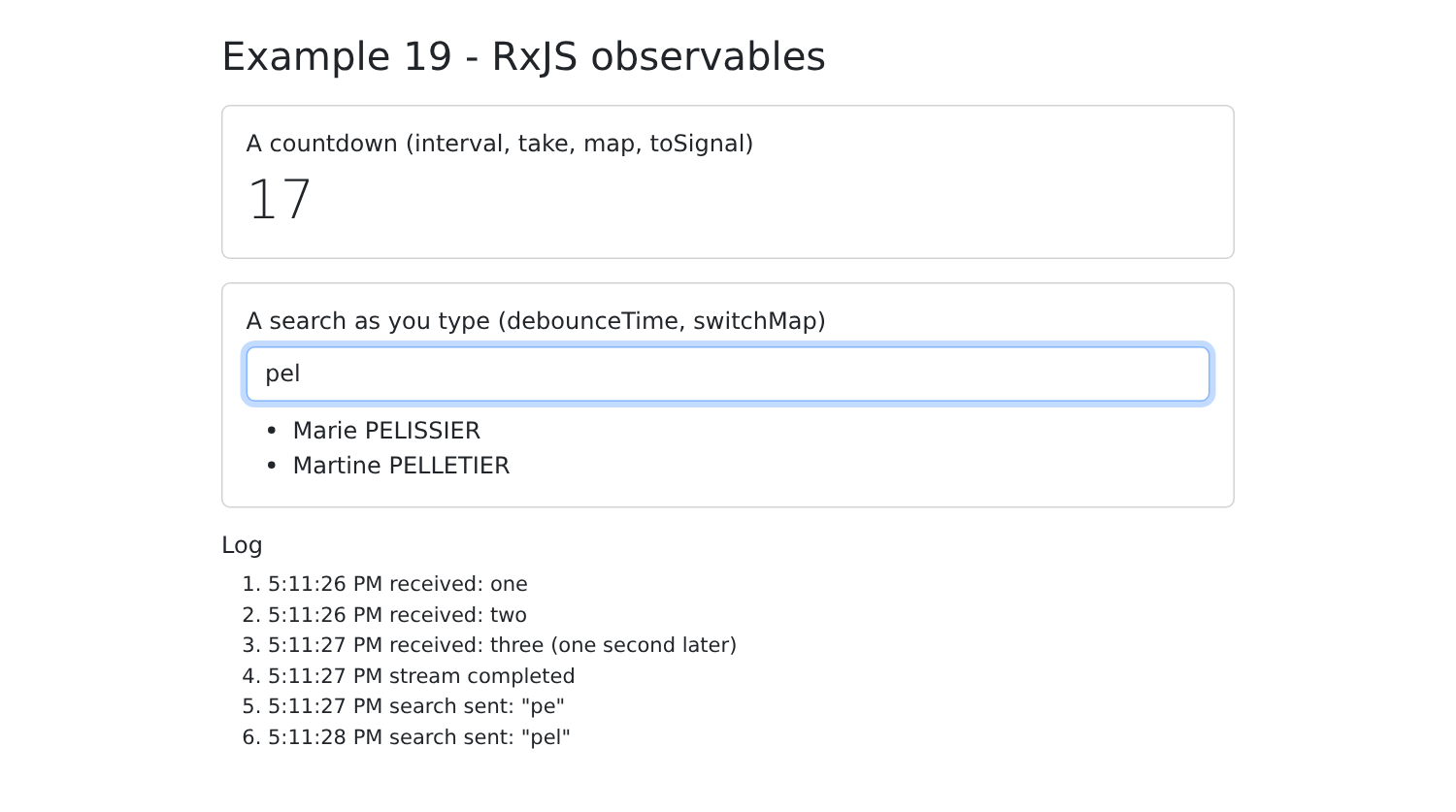
The log shows both searches: “pe” (sent after 400 ms of silence), then “pel.”
Signals or observables? Both coexist in [Angular], with different roles:
| | Signal | Observable |
Value | always has a current value, which can be read at any time | emits values over time; no “current” value |
Usage | the application's state (what is displayed) | events and asynchronous operations (requests, timers, keystrokes) |
Subscription | automatic (templates, [computed], [effect]) | explicit ([subscribe]), or via [toSignal] |
Key features | Simplicity | Operators: wait, combine, abandon |
The trend in [Angular] is to store the state in signals and to reserve observables for cases where their operators are useful. [toSignal] and [toObservable] alternate between the two. In the case study, the HTTP requests will be converted to promises ([firstValueFrom], Example 22), and the state will be encapsulated in signals; only router events will be listened to as observables.
5.2. Example 20: A Shared State
Several components often need the same data: the logged-in user (the navigation bar, guards, pages), messages to display, and the selected language. Where should this data be stored? The [NestJS] course addressed the same question on the server side (application, request, and session scopes). This example adapts it to the browser, with three “scopes”:
- the local state of a component, stored in its own variables: it disappears when the component is destroyed;
- the state of a root service: shared by all components, it survives their removal but not a page reload (F5), which restarts the application;
- the state stored in the browser’s localStorage: it survives a page reload and even the closure of the browser.
| 20-shared-state/src/app/
├── state/
│ ├── cart.service.ts a shared state
│ └── preferences.service.ts a state that survives F5
├── components/
│ ├── shop.ts adds to the cart
│ ├── cart-summary.ts displays the cart
│ └── local-counter.ts a local state
├── app.ts
└── app.html
|
5.2.1. A service that contains the state
| // =========================================================================
// 20-shared-state/src/app/state/cart.service.ts - a SHARED STATE
// -------------------------------------------------------------------------
// A root service (providedIn: 'root') that contains signals is a
// "store": ONE single instance for the whole application, which
// all the components share. Usual organization:
// - the STATE: PRIVATE signals, modifiable only by the service;
// - READ-ONLY signals (asReadonly) and computeds, read by
// the components;
// - methods (the "actions"), the only ones that modify the state.
// The service lives as long as the application lives: it survives the removal of a
// component... but not the reload of the page (F5), which restarts
// the application. (No need for an additional library, like Pinia
// for Vue.js: services and signals are enough.)
// =========================================================================
import { computed, Injectable, signal } from '@angular/core';
export interface Item {
label: string;
price: number;
}
@Injectable({ providedIn: 'root' })
export class CartService {
private readonly _items = signal<Item[]>([]);
readonly items = this._items.asReadonly();
readonly count = computed(() => this._items().length);
readonly total = computed(() => this._items().reduce((s, a) => s + a.price, 0));
add(item: Item): void {
this._items.update((a) => [...a, item]);
}
clear(): void {
this._items.set([]);
}
}
|
A root service containing signals acts as a store ([store]): a single instance, shared by the entire application. It is organized into three parts:
- line 26: the state, in a private signal: no component can modify it directly;
- lines 28–30: what the components read: the read-only state ([asReadonly]) and calculated values ([computed]);
- lines 32–38: the actions, the only methods that can modify the state.
This approach has a key benefit: when a shopping cart is invalid, the only possible modifications occur within the service methods. With [Vue.js], a library ([Pinia]) is typically used for this purpose; with [Angular], services and signals alone suffice.
5.2.2. Components that share it
| // 20-shared-state/src/app/components/shop.ts - ADDS to the shared cart
import { Component, inject } from '@angular/core';
import { Item, CartService } from '../state/cart.service';
@Component({
selector: 'app-shop',
template: `
<div class="card p-3 h-100">
<h2 class="h6">Shop</h2>
@for (p of products; track p.label) {
<button class="btn btn-sm btn-outline-primary mb-2" (click)="cart.add(p)">+ {{ p.label }} (€{{ p.price }})</button>
}
</div>
`,
})
export class Shop {
protected readonly cart = inject(CartService);
protected readonly products: Item[] = [
{ label: 'Consultation', price: 30 },
{ label: 'Vaccine', price: 12.5 },
];
}
|
- line 17: the component injects the service;
- line 11: it calls an action.
| // 20-shared-state/src/app/components/cart-summary.ts - READS the same cart
import { Component, inject } from '@angular/core';
import { CartService } from '../state/cart.service';
@Component({
selector: 'app-cart-summary',
template: `
<div class="card p-3 h-100">
<h2 class="h6">Cart</h2>
<p class="mb-2">{{ cart.count() }} item(s), €{{ cart.total() }}</p>
<button class="btn btn-sm btn-outline-danger align-self-start" [disabled]="cart.count() === 0"
(click)="cart.clear()">Clear</button>
</div>
`,
})
export class CartSummary {
protected readonly cart = inject(CartService);
}
|
- line 10: it reads the calculated values from the same service;
- line 12: it calls another action.
The two components are not aware of each other: there are no inputs or outputs between them. They communicate through the service.
| // 20-shared-state/src/app/components/local-counter.ts - a LOCAL state, which disappears with the component
import { Component, signal } from '@angular/core';
@Component({
selector: 'app-local-counter',
template: `
<div class="card p-3 h-100">
<h2 class="h6">Local state</h2>
<button class="btn btn-sm btn-outline-secondary align-self-start" (click)="clicks.set(clicks() + 1)">{{ clicks() }} click(s)</button>
</div>
`,
})
export class LocalCounter {
protected readonly clicks = signal(0);
}
|
- line 14: a local state: each instance of the component has its own counter, which disappears when the instance is destroyed.
5.2.3. A state that survives a page reload
| // =========================================================================
// 20-shared-state/src/app/state/preferences.service.ts - a state that survives F5
// -------------------------------------------------------------------------
// For a piece of data to survive the reload of the page, or the closing
// of the browser, it must be stored IN the browser: localStorage (a
// small key -> string dictionary, specific to each site).
// - at startup, the service reads localStorage again;
// - an effect rewrites localStorage on each change.
// We NEVER store sensitive data there (password, token): any script
// of the page can read localStorage.
// =========================================================================
import { effect, Injectable, signal } from '@angular/core';
const KEY = 'example20.preferences';
export interface Preferences {
dark: boolean;
size: number; // text size, in px
}
function read(): Preferences {
try {
return { dark: false, size: 16, ...JSON.parse(localStorage.getItem(KEY) ?? '{}') };
} catch {
return { dark: false, size: 16 }; // unreadable content: default values
}
}
@Injectable({ providedIn: 'root' })
export class PreferencesService {
readonly preferences = signal<Preferences>(read());
constructor() {
effect(() => localStorage.setItem(KEY, JSON.stringify(this.preferences())));
}
// a preference changes: we replace the object (the signal notices it)
update(change: Partial<Preferences>): void {
this.preferences.update((p) => ({ ...p, ...change }));
}
}
|
- line 15: the key under which preferences are stored in [localStorage], a small key-to-string dictionary specific to each site;
- lines 22–28: Upon startup, the saved preferences are read. The default values are supplemented by those that have been saved (using the [...] operator); unreadable content is ignored (line 26);
- line 32: the preferences, in a signal;
- line 35: an effect (example 13) rewrites the [localStorage] whenever the signal changes: you don’t have to think about it in every action;
- lines 39–41: the action that modifies one or more preferences ([Partial<Preferences>]: an object where every property is optional). We replace the object rather than modifying it: a signal only detects changes in value.
Sensitive data (passwords, login tokens) is never stored in the [localStorage]: any script executed by the page can read it. This is why the login token for the [RdvMedecins] application will be stored in a cookie, which is inaccessible to the [JavaScript] code.
5.2.4. The page
| // =========================================================================
// 20-shared-state/src/app/app.ts - three "scopes" of data on the client side
// -------------------------------------------------------------------------
// Same question as example 23 of the NestJS course (application,
// request, client scope), transposed to the browser:
// - the LOCAL state of a component (LocalCounter) disappears with it;
// - the state of a root SERVICE (the cart) is shared by all the
// components and survives their removal - but not F5;
// - the state stored in localStorage (the preferences) survives F5 and the
// closing of the browser.
// Uncheck then recheck "show the area", then reload the page: compare.
// =========================================================================
import { Component, inject, signal } from '@angular/core';
import { PreferencesService } from './state/preferences.service';
import { Shop } from './components/shop';
import { CartSummary } from './components/cart-summary';
import { LocalCounter } from './components/local-counter';
@Component({
selector: 'app-root',
imports: [Shop, CartSummary, LocalCounter],
templateUrl: './app.html',
})
export class App {
protected readonly prefs = inject(PreferencesService);
protected readonly areaVisible = signal(true);
}
|
- line 27: a local state of the root component: is the area displayed?
| @let p = prefs.preferences();
<div class="min-vh-100" [class.bg-dark]="p.dark" [class.text-light]="p.dark" [style.font-size.px]="p.size">
<div class="container py-4">
<h1 class="h3 mb-3">Example 20 - shared state</h1>
<div class="d-flex flex-wrap gap-4 mb-3">
<label class="form-check-label">
<input #dark type="checkbox" class="form-check-input" [checked]="p.dark"
(change)="prefs.update({ dark: dark.checked })"> dark theme
</label>
<label>
text size
<input #size type="range" min="12" max="22" [value]="p.size"
(input)="prefs.update({ size: +size.value })"> {{ p.size }} px
</label>
<label class="form-check-label">
<input #area type="checkbox" class="form-check-input" [checked]="areaVisible()"
(change)="areaVisible.set(area.checked)"> show the area
</label>
</div>
@if (areaVisible()) {
<div class="row g-3 text-body">
<div class="col-md-4"><app-shop /></div>
<div class="col-md-4"><app-cart-summary /></div>
<div class="col-md-4"><app-local-counter /></div>
</div>
}
<p class="mt-3 mb-2">Outside the area, a second summary of the SAME cart (it stays there when the area disappears):</p>
<div class="text-body"><app-cart-summary /></div>
</div>
</div>
|
- line 1: [@let] declares a template variable: [p] avoids repeating [prefs.preferences()];
- Line 2: The preferences apply to the entire page: [[class.bg-dark]] sets the class if the value is true; [[style.font-size.px]] sets a size in pixels;
- Lines 7–8 and 12–13: Each change triggers the action [update];
- Lines 20–26: The area containing the three components, whether displayed or not;
- line 28: a second summary of the same shopping cart, outside the area.
[npm start 20-shared-state]; two items are added to the shopping cart, and the local counter is clicked twice:
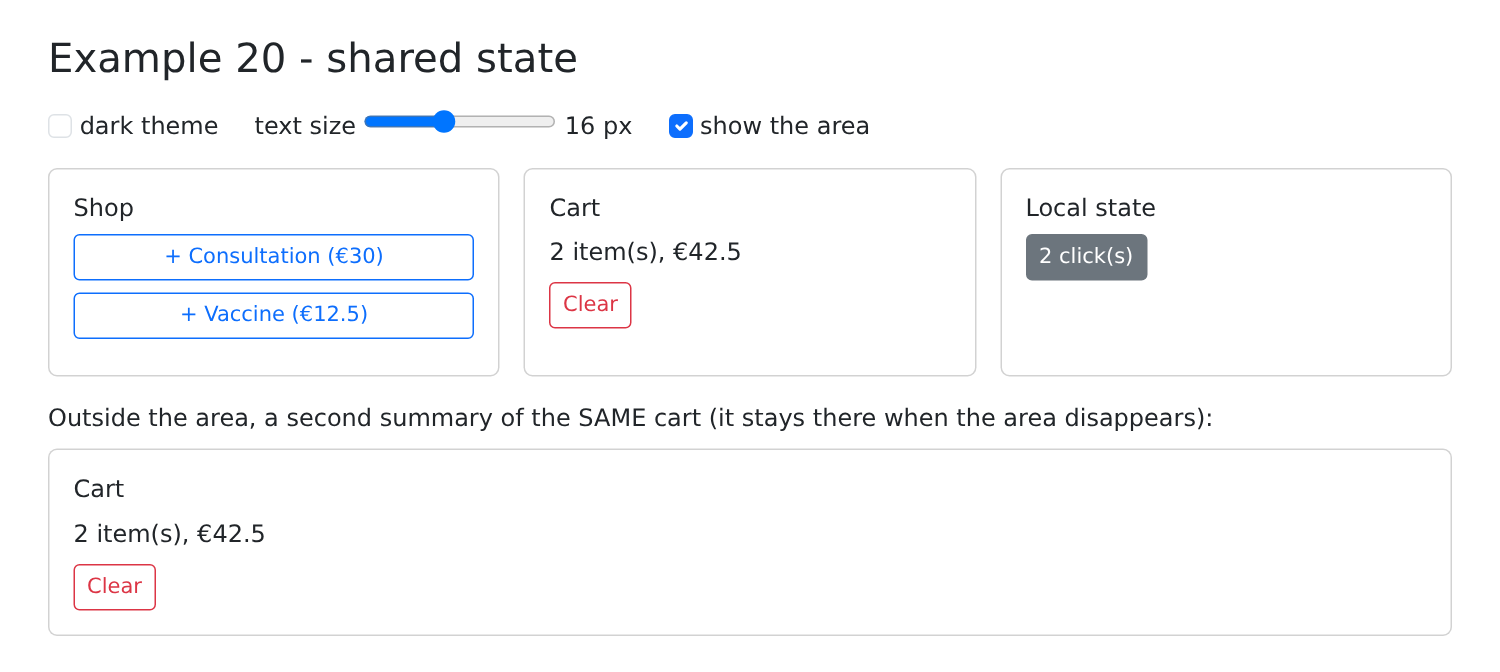
You can then verify the three scopes:
- uncheck and then recheck “show the area”: the local counter has reset to 0 (the component was recreated), the shopping cart is intact (the service survived);
- select the dark theme, then reload the page (F5): the shopping cart is empty (the application has been restarted), the dark theme is retained ([localStorage] has survived).