8. Communicating with the server
The examples in this chapter query the server JSON [RdvMedecins]: It must be running ([npm run start:dev] in the [rdvmedecins-nestjs-json] folder) on port 8080, at the same time as the [Angular] development server on port 4200.
8.1. Example 22: An initial request for HTTP
8.1.1. The development server’s proxy
The example page comes from http://localhost:4200 (the [Angular] development server, launched by [ng serve]); API is at http://localhost:8080. For a browser, these are two different origins (the port is part of the origin). However, for security reasons, a browser does not allow a page to read responses from another origin unless the server explicitly permits it (the mechanism known as CORS). And a request to another origin does not carry cookies (and therefore not the token), unless the code requests it ([withCredentials: true]) AND the server accepts it, again via CORS.
Rather than opening the server to other origins, we route API requests through the [Angular] development server. This is the proxy declared in the workspace file [proxy.conf.json]:
| {
"/api": {
"target": "http://localhost:8080",
"secure": false
}
}
|
- Line 2: Requests whose path begins with /api...
- line 3: ... are forwarded to the JSON server.
For each example, the file is specified in the options of the [ng serve] command in the [angular.json] file:
| "serve": {
"builder": "@angular/build:dev-server",
"options": {
"proxyConfig": "proxy.conf.json"
},
|
The browser sends [GET http://localhost:4200/api/captcha]; the development server forwards the request to [http://localhost:8080/api/captcha], then returns the response to the browser. For the browser, the page and API have the same origin:
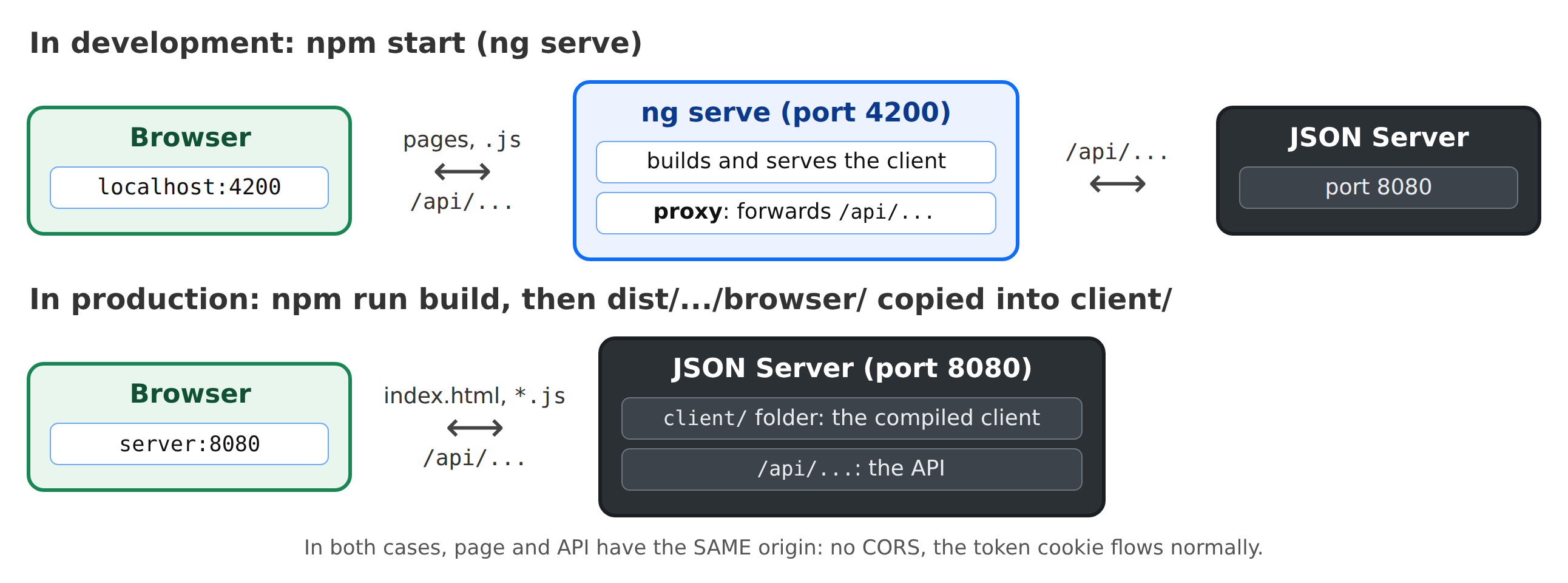
In production, there will no longer be a development server: the JSON server itself will serve the compiled client files (see the “Deployment” chapter). The page and API will still share the same origin.
8.1.2. The request
[Angular] provides its own HTTP client, the service [HttpClient]. It is automatically available in any application: simply inject it.
| // =========================================================================
// 22-httpclient/src/app/app.ts - a first HTTP request to the server
// -------------------------------------------------------------------------
// The RdvMedecins JSON server must be running (port 8080). We ask it for
// a captcha: GET /api/captcha -> { "id": "...", "svg": "<svg ...>" }.
//
// - HttpClient: the HTTP client of Angular (provided by default to the whole
// application). http.get<T>(url) returns an OBSERVABLE (see example
// 19): the request is only sent when we SUBSCRIBE to it (subscribe);
// the JSON response arrives already converted into an object, of the announced type T;
// - the address is RELATIVE (/api/captcha): the request goes to the
// server of the page, that of Angular (port 4200), which forwards it to the
// JSON server (port 8080) thanks to its proxy (see proxy.conf.json);
// - three states to display: loading, success, error.
// =========================================================================
import { Component, computed, inject, signal } from '@angular/core';
import { HttpClient, HttpErrorResponse } from '@angular/common/http';
import { DomSanitizer, SafeHtml } from '@angular/platform-browser';
// what GET /api/captcha returns
interface Captcha {
id: string;
svg: string;
}
@Component({
selector: 'app-root',
templateUrl: './app.html',
styles: `
.captcha {
display: inline-block;
border: 1px solid #dee2e6;
border-radius: 0.375rem;
}
`,
})
export class App {
private readonly http = inject(HttpClient);
private readonly sanitizer = inject(DomSanitizer);
protected readonly captcha = signal<Captcha | null>(null);
protected readonly loading = signal(false);
protected readonly error = signal<string | null>(null);
protected readonly requestCount = signal(0);
// [innerHTML] inserts a string as HTML. For security, Angular
// CLEANS this HTML ("sanitization"): it removes the scripts... and the
// <svg> tags. bypassSecurityTrustHtml tells Angular: "this HTML is
// safe, do not clean it". To be used ONLY for safe content: this SVG
// is built by OUR server. With user input, it would be
// opening the door to script injection ({{ }}, on the other hand, escapes everything).
protected readonly svg = computed<SafeHtml | null>(() => {
const c = this.captcha();
return c ? this.sanitizer.bypassSecurityTrustHtml(c.svg) : null;
});
constructor() {
this.load(); // at startup, we load a captcha
}
protected load(): void {
this.loading.set(true);
this.error.set(null);
this.http.get<Captcha>('/api/captcha').subscribe({
// next: the response (2xx code), already converted from JSON
next: (captcha) => {
this.captcha.set(captcha);
this.requestCount.update((n) => n + 1);
this.loading.set(false);
},
// error: a 4xx / 5xx response, or no response at all (status 0)
error: (e: HttpErrorResponse) => {
this.error.set(`the server answered ${e.status} ${e.statusText}`);
this.captcha.set(null);
this.loading.set(false);
},
});
}
}
|
- line 22: the format of the response from [GET /api/captcha];
- line 39: inject the client HTTP;
- lines 42–45: the three states of a request: in progress, successful (the CAPTCHA), and error;
- line 65: [http.get<Captcha>(url)] prepares a request GET. It returns an observable (example 19): the request is sent only when subscribed to ([subscribe]). The address is relative: the request is sent to the page’s server, which forwards it to the JSON server;
- lines 67–71: [next] receives the response, which has already been converted from JSON. [<Captcha>] informs [TypeScript] of the object’s format: the compiler cannot verify what the server will send;
- Lines 73–77: [error] receives a [HttpErrorResponse] for any 4xx or 5xx response, as well as when no response is received (server down, network disconnected: [status] is then 0). If the JSON server is down, the proxy responds with a 5xx error;
- line 59: upon startup, a CAPTCHA is loaded;
- lines 53–56: the SVG image from the CAPTCHA is a string of characters, which must be inserted as HTML ([[innerHTML]] in the template). For security reasons, [Angular] cleans up any HTML inserted in this way: it removes the scripts... and the [<svg>] tags. [bypassSecurityTrustHtml] indicates that this HTML is safe. We use it ONLY for safe content: this SVG is generated by OUR server. With user-entered data, this would allow scripts to be injected into the page; the double curly braces [{{ }}], on the other hand, escape everything.
| <div class="container py-4" style="max-width: 640px">
<h1 class="h3 mb-3">Example 22 - a first HTTP request</h1>
<div class="card p-3">
@if (loading()) {
<p class="text-muted">Loading...</p>
} @else if (error()) {
<div class="alert alert-danger mb-3">
Unable to get a captcha: {{ error() }}.<br>
Is the RdvMedecins JSON server running (port 8080)?
</div>
} @else if (captcha(); as c) {
<div class="mb-2"><div class="captcha" [innerHTML]="svg()"></div></div>
<p class="small text-muted">id: <code>{{ c.id }}</code></p>
}
<button class="btn btn-primary align-self-start" [disabled]="loading()" (click)="load()">Another image</button>
<p class="small text-muted mt-2 mb-0">{{ requestCount() }} successful request(s) - open the Network tab of the developer tools (F12).</p>
</div>
</div>
|
- lines 4–14: a status display;
- line 12: the CAPTCHA image.
[npm start 22-httpclient]; click on [Another image]:
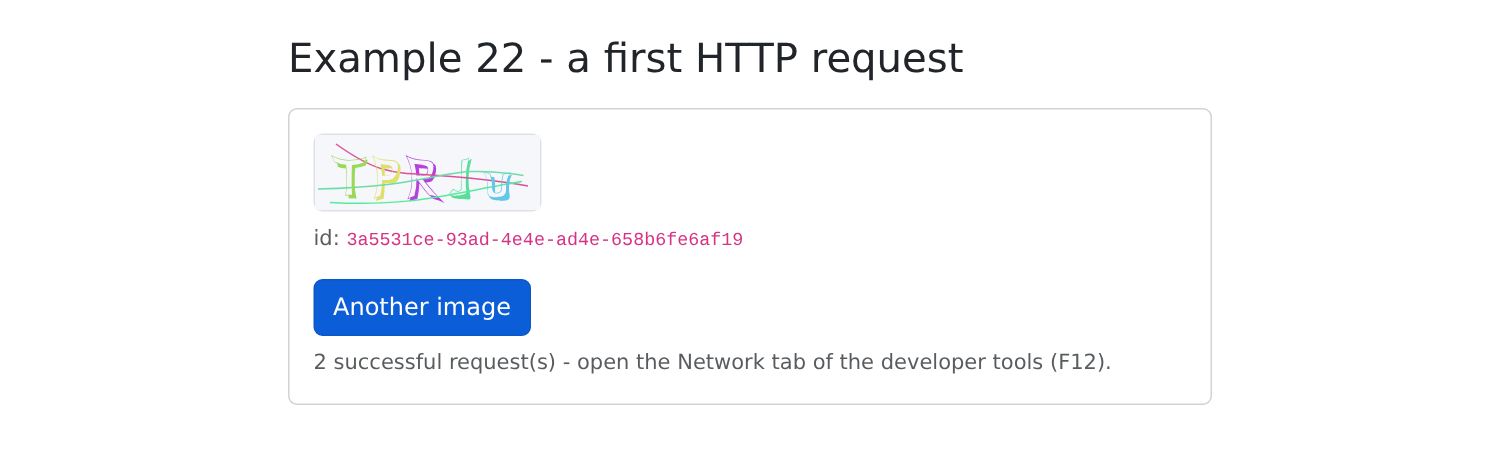
In the browser's developer tools (F12), the Network tab shows the request [captcha], sent to [localhost:4200], and its response JSON.
8.2. Example 23: Login, Cookie, and Session
| // =========================================================================
// 23-login/src/app/app.ts - logging in to the RdvMedecins server
// -------------------------------------------------------------------------
// 1. at startup: GET /api/auth/me - are we already logged in?
// (after an F5, the client has forgotten everything; the server reads the cookie);
// 2. login: POST /api/auth/login, JSON body { login, password,
// captchaId, captcha }. On success, the server sets the
// httpOnly cookie of the JWT token: our code NEVER sees it (try
// document.cookie in the console: it is not there);
// 3. protected request: GET /api/doctors. The browser attaches the cookie
// to it by itself (same origin);
// 4. logout: POST /api/auth/logout - the server deletes the cookie.
//
// firstValueFrom(observable): a PROMISE of the first value of the stream.
// Chains of requests can then be written with async / await,
// more readable than a cascade of subscribe. An error response rejects
// the promise with an HttpErrorResponse: a simple try / catch.
//
// A cookie belongs to a machine (localhost) and to a path (/api): it
// is therefore common to ALL the examples. Once logged in here, examples
// 24 and 25 are logged in too.
// =========================================================================
import { Component, computed, inject, signal } from '@angular/core';
import { HttpClient, HttpErrorResponse } from '@angular/common/http';
import { DomSanitizer } from '@angular/platform-browser';
import { FormsModule } from '@angular/forms';
import { firstValueFrom } from 'rxjs';
interface User {
login: string;
name: string;
role: 'ADMIN' | 'DOCTOR' | 'USER';
}
interface Doctor {
id: number;
title: string;
firstName: string;
lastName: string;
}
interface Captcha {
id: string;
svg: string;
}
// the shape of ALL the errors of the API
interface ApiError {
statusCode: number;
key: string;
params?: Record<string, string>;
}
// the few messages this example needs (example 25 will use ngx-translate)
const MESSAGES: Record<string, string> = {
'LOGIN.ERROR': 'Incorrect login or password.',
'ERRORS.WRONG_CAPTCHA': 'The characters you typed do not match the image.',
'ERRORS.TOO_MANY_ATTEMPTS': 'Too many failed attempts. Try again later.',
};
@Component({
selector: 'app-root',
imports: [FormsModule],
templateUrl: './app.html',
})
export class App {
private readonly http = inject(HttpClient);
private readonly sanitizer = inject(DomSanitizer);
protected readonly user = signal<User | null>(null);
protected readonly doctors = signal<Doctor[]>([]);
protected readonly captcha = signal<Captcha | null>(null);
protected readonly svg = computed(() => this.sanitizer.bypassSecurityTrustHtml(this.captcha()?.svg ?? ''));
protected readonly login = signal('admin');
protected readonly password = signal('');
protected readonly captchaAnswer = signal('');
protected readonly error = signal<string | null>(null);
protected readonly ready = signal(false); // is the initial check finished?
constructor() {
this.checkSession().catch(() => {
this.error.set('Is the RdvMedecins JSON server running (port 8080)?');
this.ready.set(true);
});
}
protected async loadCaptcha(): Promise<void> {
this.captcha.set(await firstValueFrom(this.http.get<Captcha>('/api/captcha')));
this.captchaAnswer.set('');
}
// 1. who is logged in? 200 -> the user; 401 -> nobody
private async checkSession(): Promise<void> {
try {
this.user.set(await firstValueFrom(this.http.get<User>('/api/auth/me')));
await this.loadDoctors();
} catch (e) {
if (!(e instanceof HttpErrorResponse) || e.status !== 401) {
throw e; // not a 401: the server does not respond
}
await this.loadCaptcha();
}
this.ready.set(true);
}
// 2. the login; post(url, body): the body is sent as JSON
protected async logIn(): Promise<void> {
this.error.set(null);
try {
const u = await firstValueFrom(
this.http.post<User>('/api/auth/login', {
login: this.login(),
password: this.password(),
captchaId: this.captcha()?.id,
captcha: this.captchaAnswer(),
}),
);
this.user.set(u);
this.password.set('');
await this.loadDoctors();
} catch (e) {
// e.error: the JSON body of the error response
const apiError = (e as HttpErrorResponse).error as ApiError | null;
const key = apiError?.key ?? 'ERRORS.SERVER_UNREACHABLE';
this.error.set(`${(e as HttpErrorResponse).status} - ${MESSAGES[key] ?? key}`);
await this.loadCaptcha(); // each image is only used once
}
}
// 3. a protected request
private async loadDoctors(): Promise<void> {
this.doctors.set(await firstValueFrom(this.http.get<Doctor[]>('/api/doctors')));
}
// 4. the logout
protected async logOut(): Promise<void> {
await firstValueFrom(this.http.post('/api/auth/logout', {}));
this.user.set(null);
this.doctors.set([]);
await this.loadCaptcha();
}
}
|
- lines 30–50: the formats of the data exchanged with the server, including those for all errors in API (lines 46–50);
- lines 53–57: the few messages required by this example, in English; Example 25 will use [ngx-translate];
- line 28: [firstValueFrom(observable)] returns a promise for the first value in the stream. A HTTP request produces only one value—the response: we can then write request chains using [async] / [await], which are more readable than a cascade of [subscribe]. An error response rejects the promise: a simple [try / catch] catches it;
- lines 91–102: on startup, [GET /api/auth/me]: are we already logged in? After reloading the page (F5), the application [Angular] has forgotten everything; the server, however, reads the cookie. 200: the user; 401: no one—in which case, the login form and its CAPTCHA are displayed (line 99);
- line 96: any other error means the server isn’t responding; it’s reported to the developer (lines 79–82);
- lines 105–126: the login:
- line 109: [http.post(url, body)]: the object [body] is sent as JSON, with the header [Content-Type: application/json];
- line 116: if successful, the server has set the token cookie. Our code NEVER sees it: type [document.cookie] into the browser console; it is not there ([HttpOnly]);
- line 121: if the request fails, [error] contains the response body JSON, which explains why. We display the message (line 123) and request a new image (line 124): each is used only once;
- lines 129–131: a protected request. No action is required to authenticate: the browser automatically includes the cookie because the request is going to the same origin as the page;
- lines 134–139: logout—the server deletes the cookie. The body [{}] is included so that the request is a POST JSON.
A cookie belongs to a machine (localhost) and a path (/api); it is therefore shared by ALL the examples. Once logged in here, examples 24 and 25 are also logged in.
The login form:
| <div class="container py-4" style="max-width: 640px">
<h1 class="h3 mb-3">Example 23 - logging in to the server</h1>
@if (!ready()) {
<p class="text-muted">Checking the session...</p>
} @else if (user(); as u) {
<!-- logged in -->
<div class="card p-3">
<p>Logged in: <strong>{{ u.name }}</strong> ({{ u.login }}), role <span class="badge text-bg-primary">{{ u.role }}</span></p>
<h2 class="h6">GET /api/doctors</h2>
<ul>
@for (m of doctors(); track m.id) {
<li>{{ m.title }} {{ m.firstName }} {{ m.lastName }}</li>
}
</ul>
<p class="small text-muted">Reload the page (F5): you stay logged in.</p>
<button class="btn btn-outline-secondary align-self-start" (click)="logOut()">Log out</button>
</div>
} @else {
<!-- not logged in: the form -->
<form class="card p-3" (ngSubmit)="logIn()">
<div class="mb-2">
<label class="form-label" for="login">Login</label>
<input id="login" name="login" class="form-control" autocomplete="username" [(ngModel)]="login">
</div>
<div class="mb-2">
<label class="form-label" for="password">Password</label>
<input id="password" name="password" type="password" class="form-control" autocomplete="current-password"
[(ngModel)]="password">
</div>
<div class="mb-3">
<label class="form-label" for="captcha">Copy the characters of the image</label>
<div class="d-flex align-items-center gap-3 mb-2">
<div [innerHTML]="svg()"></div>
<a href="#" class="small" (click)="$event.preventDefault(); loadCaptcha()">Another image</a>
</div>
<input id="captcha" name="captcha" class="form-control" autocomplete="off" [(ngModel)]="captchaAnswer">
</div>
<button class="btn btn-primary">Log in</button>
<p class="small text-muted mt-2 mb-0">Accounts: admin, pelissier, martin... (password = login).</p>
</form>
}
@if (error()) {
<div class="alert alert-danger mt-3">{{ error() }}</div>
}
</div>
|
- Line 3: Until the initial verification is complete, we don’t know what to display;
- lines 5–17: logged in: the user and the list of doctors;
- lines 20–40: not logged in: the form, with [ngModel] (example 05);
- line 34: [$event.preventDefault()] prevents the link from following its address (#).
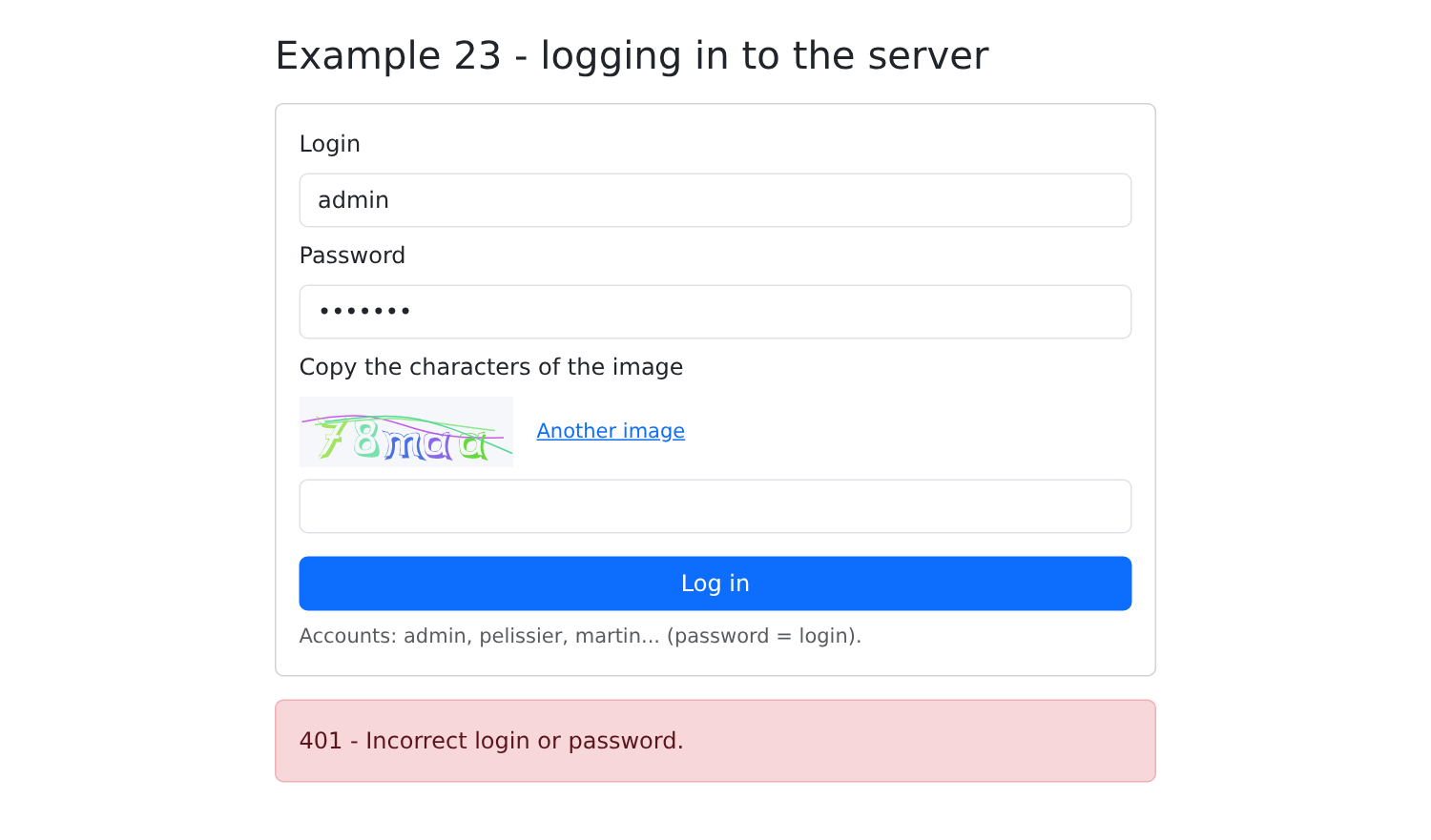
[npm start 23-login]. With an incorrect password (the server is in test mode: any CAPTCHA accepts the response [test]):
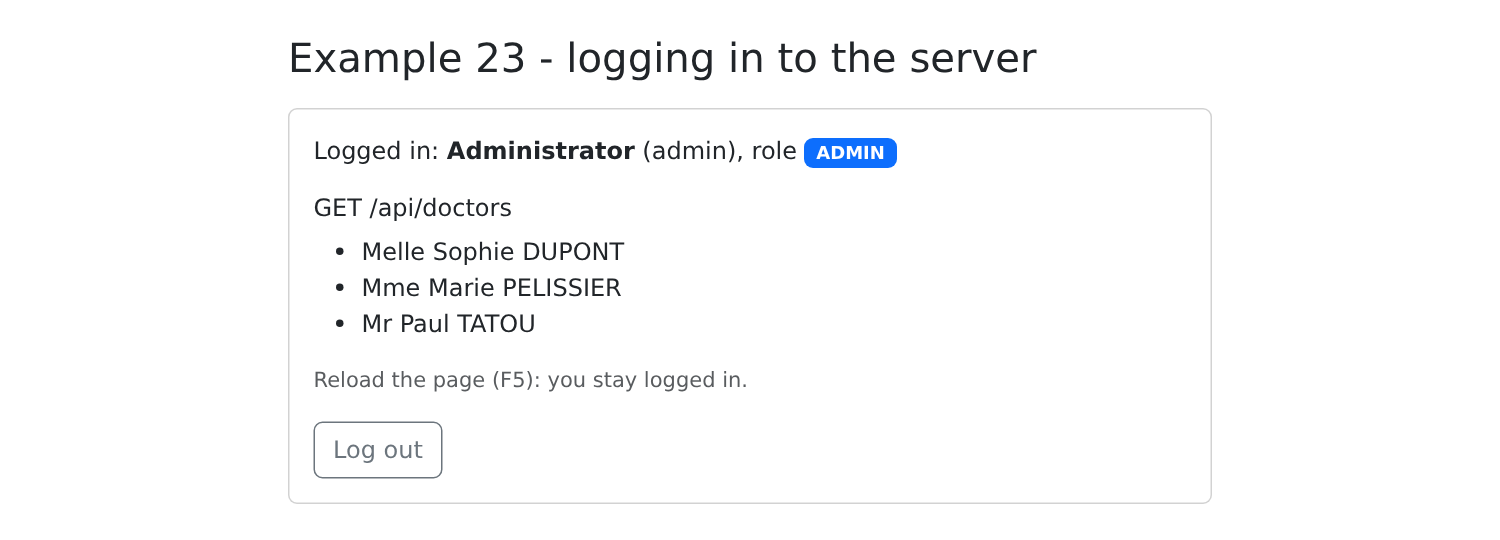
With the correct password, followed by a page refresh (F5): you remain logged in.
8.3. Example 24: An access layer for API
In Example 23, each request repeated the same steps: the /api prefix, [firstValueFrom], reading the error body, and selecting a message. This example groups them into a few files, located in the [common] folder of the workspace, because Example 25 also uses them:
| examples-angular/common/
├── types.ts the JSON objects of the API
├── api-error.ts a class for all the API errors
├── errors.interceptor.ts an HTTP interceptor
├── api.service.ts one-line requests
└── login-bar.ts the login, in a bar
|
The [tsconfig.app.json] file in the example adds this folder to the files to be compiled:
| {
"extends": "../tsconfig.json",
"include": ["src/**/*.ts", "../common/**/*.ts"]
}
|
8.3.1. The Types
The types of the JSON objects in API, described in the previous chapter:
| // =========================================================================
// common/types.ts - the JSON objects exchanged with the RdvMedecins API
// (see the chapter on the black box, which describes each route)
// =========================================================================
export type Role = 'ADMIN' | 'DOCTOR' | 'USER';
// POST /api/auth/login, GET /api/auth/me
export interface User {
login: string;
name: string;
role: Role;
}
// GET /api/captcha
export interface Captcha {
id: string;
svg: string;
}
// a doctor or a client (GET /api/doctors, GET /api/clients...)
export interface Person {
id: number;
version: number;
title: string;
firstName: string;
lastName: string;
login?: string; // only for the ADMIN
}
export interface Identity {
title: string;
firstName: string;
lastName: string;
}
// a row of GET /api/schedule
export interface ScheduleSlot {
id: number;
startHour: number;
startMinute: number;
endHour: number;
endMinute: number;
free: boolean;
patient: Identity | null;
mine: boolean;
bookable: boolean;
appointmentId: number | null;
}
// GET /api/schedule?doctorId=...&day=...
export interface Schedule {
doctor: Person;
day: string;
slots: ScheduleSlot[];
info: string | null;
}
|
8.3.2. Errors
| // =========================================================================
// common/api-error.ts - ONE class for all the errors of the API
// -------------------------------------------------------------------------
// All the error responses of the RdvMedecins server have the same shape:
// { "statusCode": 409, "key": "ERRORS.LOGIN_TAKEN", "params": {...}, "fields": {...} }
// HttpClient reports them with an HttpErrorResponse, whose error property
// contains this JSON body... or something else: null (no response), text
// (an error page of the proxy when the JSON server is stopped). We
// convert all of this into ONE class, ApiError, which carries the translation
// key sent by the server (and, if any, its parameters and
// the error of each field).
// =========================================================================
import { HttpErrorResponse } from '@angular/common/http';
export class ApiError extends Error {
constructor(
public readonly statusCode: number, // 0: the server did not respond
public readonly key: string, // e.g.: 'ERRORS.LOGIN_TAKEN'
public readonly params: Record<string, string> = {},
public readonly fields: Record<string, string> = {},
) {
super(key);
this.name = 'ApiError';
}
}
// any error -> an ApiError
export function toApiError(e: unknown): ApiError {
if (e instanceof ApiError) {
return e;
}
if (!(e instanceof HttpErrorResponse)) {
return new ApiError(0, 'ERRORS.SERVER_ERROR');
}
// the JSON body of the error, if it exists and has the right shape
const body = (typeof e.error === 'object' && e.error !== null ? e.error : {}) as {
key?: string;
params?: Record<string, string>;
fields?: Record<string, string>;
};
// no key: it is not our server that responded (proxy, network)
const key = body.key ?? (e.status === 0 || e.status >= 500 ? 'ERRORS.SERVER_UNREACHABLE' : 'ERRORS.SERVER_ERROR');
return new ApiError(e.status, key, body.params, body.fields);
}
|
- Lines 16–26: an error class containing the server’s response: the code HTTP, the message key, its parameters, and the error for each field. The code 0 means “no response”;
- lines 29–45: the conversion of any error to [ApiError]:
- line 37: the body of the response is used only if it is an object. When the JSON server is down, the proxy responds with text;
- line 43: without a key, it was not our server that responded.
8.3.3. An Interceptor
An interceptor is a function through which requests from [HttpClient] and their responses pass. It can modify the request before it is sent (add a header, for example) or the response upon its return.
| // =========================================================================
// common/errors.interceptor.ts - an HTTP INTERCEPTOR
// -------------------------------------------------------------------------
// An interceptor is a function through which ALL the requests
// of HttpClient (and their responses) go. It receives the request (req) and the rest
// of the chain (next):
// - next(req) sends the request and returns the observable of the response;
// - the request can be modified before (req.clone({...})), or the response
// after (RxJS operators on the observable).
// This one converts any error into an ApiError (catchError): the rest of
// the application never deals with HttpErrorResponse again.
// It is declared in the configuration of the application:
// provideHttpClient(withInterceptors([errorsInterceptor]))
// =========================================================================
import { HttpInterceptorFn } from '@angular/common/http';
import { catchError, throwError } from 'rxjs';
import { toApiError } from './api-error';
export const errorsInterceptor: HttpInterceptorFn = (req, next) =>
next(req).pipe(catchError((e: unknown) => throwError(() => toApiError(e))));
|
- Line 20: An interceptor receives the request ([req]) and the rest of the chain ([next]). [next(req)] sends the request and returns the observable for the response;
- Line 21: The [catchError] operator replaces any errors in the stream with a [ApiError]. The rest of the application never has to deal with [HttpErrorResponse] again.
8.3.4. The ApiService service
| // =========================================================================
// common/api.service.ts - requests to the API, in one line
// -------------------------------------------------------------------------
// In example 23, each request repeated the same steps: /api
// prefix, firstValueFrom, reading of the error body... We group them here:
//
// const doctors = await this.api.get<Person[]>('/doctors');
// await this.api.post('/appointments', { day, slotId, clientId });
//
// - on success, the promise returns the JSON body, TYPED;
// - on failure, it is REJECTED with an ApiError (thanks to the
// errors.interceptor.ts interceptor).
// Used by examples 24 and 25; the case study takes up its principle.
// =========================================================================
import { inject, Injectable } from '@angular/core';
import { HttpClient } from '@angular/common/http';
import { firstValueFrom } from 'rxjs';
@Injectable({ providedIn: 'root' })
export class ApiService {
private readonly http = inject(HttpClient);
get<T>(url: string): Promise<T> {
return firstValueFrom(this.http.get<T>(`/api${url}`));
}
// a POST always has a JSON body (the server rejects a POST that does not)
post<T>(url: string, body: unknown = {}): Promise<T> {
return firstValueFrom(this.http.post<T>(`/api${url}`, body));
}
put<T>(url: string, body: unknown): Promise<T> {
return firstValueFrom(this.http.put<T>(`/api${url}`, body));
}
delete<T>(url: string, body?: unknown): Promise<T> {
return firstValueFrom(this.http.delete<T>(`/api${url}`, { body: body }));
}
}
|
- lines 24–39: a method for each HTTP verb. Each adds the prefix /api and returns a promise for the response body, typed as: [api.get<Person[]>('/doctors')] returns a [Promise<Person[]>]. In case of failure, the promise is rejected with a [ApiError];
- Line 29: [post] sends the body [{}] by default: the server rejects a POST that is not in JSON.
8.3.5. The API access layer
| // =========================================================================
// 24-api-service/src/app/rdvmedecins.service.ts - the API access layer
// -------------------------------------------------------------------------
// One typed method per route of the API. The components know neither
// the URLs, nor HttpClient, nor the JSON format: they call methods.
// It is the client-side equivalent of the DAO layer on the server side: if the API
// changes (a URL, a field name), only this file is modified.
// =========================================================================
import { inject, Injectable } from '@angular/core';
import { HttpResourceRequest } from '@angular/common/http';
import { ApiService } from '../../../common/api.service';
import { Person } from '../../../common/types';
@Injectable({ providedIn: 'root' })
export class RdvMedecinsService {
private readonly api = inject(ApiService);
getDoctors(): Promise<Person[]> {
return this.api.get<Person[]>('/doctors');
}
getClients(): Promise<Person[]> {
return this.api.get<Person[]>('/clients');
}
// the DESCRIPTION of the request of the schedule, for httpResource (see app.ts);
// params builds "?doctorId=1&day=2030-01-15", encoding what needs to be
scheduleRequest(doctorId: number, day: string): HttpResourceRequest {
return { url: '/api/schedule', params: { doctorId, day } };
}
book(day: string, slotId: number, clientId?: number): Promise<{ id: number }> {
return this.api.post<{ id: number }>('/appointments', { day, slotId, clientId });
}
cancelAppointment(appointmentId: number): Promise<Record<string, never>> {
return this.api.delete<Record<string, never>>(`/appointments/${appointmentId}`);
}
}
|
A method per route of the API. The components no longer know the addresses, the [HttpClient], or the JSON format: they call methods. This is the client-side equivalent of the server-side data access layer: if API changes, only this file needs to be modified.
- Lines 29–31: the description of the calendar request, not the request itself: it will be used by [httpResource] (see below). [params] generates the string [?doctorId=1&day=2030-01-15] by encoding the characters that need to be encoded.
8.3.6. The login bar
The form from Example 23, reduced to a bar and rewritten using [ApiService]:
| // =========================================================================
// common/login-bar.ts - login / logout, in one bar
// -------------------------------------------------------------------------
// The form of example 23, reduced to a bar and rewritten with
// ApiService. The component emits userChange with the logged-in
// user (or null) each time it changes - including at
// startup, after having queried GET /api/auth/me.
//
// ViewEncapsulation.None: the styles of the component apply to the WHOLE
// page. Necessary here: the <svg> of the captcha, inserted by [innerHTML], does not
// carry the attributes that the "encapsulated" style of Angular requires.
// =========================================================================
import { Component, computed, inject, output, signal, ViewEncapsulation } from '@angular/core';
import { FormsModule } from '@angular/forms';
import { DomSanitizer } from '@angular/platform-browser';
import { ApiService } from './api.service';
import { ApiError } from './api-error';
import { Captcha, User } from './types';
@Component({
selector: 'app-login-bar',
imports: [FormsModule],
encapsulation: ViewEncapsulation.None,
styles: `
.login-bar-captcha svg {
display: block;
height: 32px;
width: auto;
}
`,
template: `
<div class="alert alert-secondary d-flex flex-wrap align-items-center gap-2 py-2">
@if (user(); as u) {
<span>Logged in: <strong>{{ u.name }}</strong> <span class="badge text-bg-primary ms-1">{{ u.role }}</span></span>
<button class="btn btn-sm btn-outline-secondary ms-auto" (click)="logOut()">Log out</button>
} @else {
<form class="d-flex flex-wrap align-items-center gap-2 w-100" (ngSubmit)="logIn()">
<input name="login" class="form-control form-control-sm w-auto" placeholder="login" autocomplete="username"
[(ngModel)]="login">
<input name="password" type="password" class="form-control form-control-sm w-auto" placeholder="password"
autocomplete="current-password" [(ngModel)]="password">
<div class="login-bar-captcha" [innerHTML]="svg()"></div>
<input name="captcha" class="form-control form-control-sm w-auto" placeholder="captcha" autocomplete="off" size="8"
[(ngModel)]="captchaAnswer">
<button class="btn btn-sm btn-primary">Log in</button>
@if (error()) {
<span class="text-danger small">{{ error() }}</span>
}
</form>
}
</div>
`,
})
export class LoginBar {
readonly userChange = output<User | null>();
private readonly api = inject(ApiService);
private readonly sanitizer = inject(DomSanitizer);
protected readonly user = signal<User | null>(null);
private readonly captcha = signal<Captcha | null>(null);
protected readonly svg = computed(() => this.sanitizer.bypassSecurityTrustHtml(this.captcha()?.svg ?? ''));
protected readonly login = signal('admin');
protected readonly password = signal('');
protected readonly captchaAnswer = signal('');
protected readonly error = signal<string | null>(null);
constructor() {
this.start();
}
private async start(): Promise<void> {
try {
this.change(await this.api.get<User>('/auth/me'));
} catch {
this.change(null); // 401: nobody is logged in
await this.newCaptcha().catch(() => this.error.set('Is the JSON server running (port 8080)?'));
}
}
private async newCaptcha(): Promise<void> {
this.captcha.set(await this.api.get<Captcha>('/captcha'));
this.captchaAnswer.set('');
}
private change(u: User | null): void {
this.user.set(u);
this.userChange.emit(u);
}
protected async logIn(): Promise<void> {
this.error.set(null);
try {
const u = await this.api.post<User>('/auth/login', {
login: this.login(),
password: this.password(),
captchaId: this.captcha()?.id,
captcha: this.captchaAnswer(),
});
this.password.set('');
this.change(u);
} catch (e) {
this.error.set(e instanceof ApiError ? `${e.statusCode} ${e.key}` : String(e));
await this.newCaptcha();
}
}
protected async logOut(): Promise<void> {
await this.api.post('/auth/logout');
this.change(null);
await this.newCaptcha();
}
}
|
- line 56: the component sends [userChange] with the logged-in user (or [null]) every time it changes, including at startup;
- line 74: with [ApiService], a request fits on a single line; in case of failure (401), it transitions to [catch];
- line 103: [instanceof] distinguishes an error in API from another anomaly;
- line 24: [ViewEncapsulation.None]: the component’s styles apply to the entire page. By default, [Angular] limits a component’s styles to its template by adding specific attributes to its elements. The [<svg>] inserted by [[innerHTML]] does not have these attributes: without this option, the rule in lines 26–30 would not apply to it.
8.3.7. The configuration
| // =========================================================================
// 24-api-service/src/app/app.config.ts
// -------------------------------------------------------------------------
// provideHttpClient(withInterceptors([...])): HttpClient is provided by default
// to any application; it is only declared to CONFIGURE it, here by
// adding the interceptor that converts the errors into ApiError.
// =========================================================================
import { ApplicationConfig } from '@angular/core';
import { provideHttpClient, withInterceptors } from '@angular/common/http';
import { errorsInterceptor } from '../../../common/errors.interceptor';
export const appConfig: ApplicationConfig = {
providers: [provideHttpClient(withInterceptors([errorsInterceptor]))],
};
|
- line 14: [HttpClient] is provided by default; it is declared only to configure it, in this case by adding the interceptor.
8.3.8. The page
| // =========================================================================
// 24-api-service/src/app/app.ts - a schedule, with the API access layer
// -------------------------------------------------------------------------
// Log in (top bar), choose a doctor and a day: the schedule
// is displayed. ADMIN and DOCTOR can book for a patient and cancel;
// a patient (martin...) books for themselves. Each action ends with
// a reload of the schedule: it is the SERVER that is authoritative.
//
// httpResource: a GET request described by a function that reads
// signals (here doctorId and day). Angular sends it at startup, then
// SENDS IT AGAIN each time one of these signals changes. The result is an
// object of signals: value() (the response), isLoading(), error()... and
// reload() to send it again on demand.
// =========================================================================
import { Component, computed, effect, inject, signal } from '@angular/core';
import { httpResource } from '@angular/common/http';
import { FormsModule } from '@angular/forms';
import { LoginBar } from '../../../common/login-bar';
import { ApiError } from '../../../common/api-error';
import { Schedule, ScheduleSlot, Person, User } from '../../../common/types';
import { RdvMedecinsService } from './rdvmedecins.service';
function tomorrow(): string {
const d = new Date(Date.now() + 24 * 3600 * 1000);
return `${d.getFullYear()}-${String(d.getMonth() + 1).padStart(2, '0')}-${String(d.getDate()).padStart(2, '0')}`;
}
@Component({
selector: 'app-root',
imports: [FormsModule, LoginBar],
templateUrl: './app.html',
})
export class App {
private readonly rdv = inject(RdvMedecinsService);
protected readonly user = signal<User | null>(null);
protected readonly doctors = signal<Person[]>([]);
protected readonly clients = signal<Person[]>([]);
protected readonly doctorId = signal<number | null>(null);
protected readonly day = signal(tomorrow());
protected readonly clientId = signal<number | null>(null);
protected readonly message = signal<{ type: 'success' | 'danger'; text: string } | null>(null);
protected readonly isManager = computed(() => this.user() !== null && this.user()?.role !== 'USER');
// undefined: no request (no doctor chosen, or nobody logged in)
protected readonly schedule = httpResource<Schedule>(() => {
const id = this.doctorId();
return id === null || this.user() === null ? undefined : this.rdv.scheduleRequest(id, this.day());
});
// the error of the last request of the schedule, as an ApiError
protected readonly scheduleError = computed(() => {
const e = this.schedule.error();
return e instanceof ApiError ? `${e.statusCode} ${e.key}` : null;
});
constructor() {
// a new choice of doctor or day clears the previous message
effect(() => {
this.doctorId();
this.day();
this.message.set(null);
});
}
protected timeRange(c: ScheduleSlot): string {
const hm = (h: number, m: number) => `${h}:${String(m).padStart(2, '0')}`;
return `${hm(c.startHour, c.startMinute)} - ${hm(c.endHour, c.endMinute)}`;
}
// an API error becomes a message (its key, for lack of a dictionary here)
private report(e: unknown): void {
this.message.set({ type: 'danger', text: e instanceof ApiError ? `${e.statusCode} ${e.key}` : String(e) });
}
// login / logout: we (re)load what this role is allowed to see
protected async onUserChange(u: User | null): Promise<void> {
this.user.set(u);
this.doctors.set([]);
this.clients.set([]);
if (u === null) {
return;
}
try {
this.doctors.set(await this.rdv.getDoctors());
// the list of patients: only for ADMIN and DOCTOR (a USER would receive 403)
this.clients.set(this.isManager() ? await this.rdv.getClients() : []);
} catch (e) {
this.report(e);
}
}
protected async book(c: ScheduleSlot): Promise<void> {
try {
await this.rdv.book(this.day(), c.id, this.isManager() ? (this.clientId() ?? undefined) : undefined);
this.message.set({ type: 'success', text: `Slot ${this.timeRange(c)} booked.` });
} catch (e) {
this.report(e);
}
this.schedule.reload();
}
protected async cancel(c: ScheduleSlot): Promise<void> {
try {
await this.rdv.cancelAppointment(c.appointmentId as number);
this.message.set({ type: 'success', text: `Appointment of ${this.timeRange(c)} cancelled.` });
} catch (e) {
this.report(e);
}
this.schedule.reload();
}
}
|
- line 45: ADMIN or DOCTOR;
- lines 48–51: [httpResource] describes a GET request via a function that reads signals (here, [doctorId], [day], and [user]). [Angular] initially sends the request, then resends it whenever one of these signals changes. The function returns [undefined] when there is no request to send. The result is a collection of signals: [value()] (the response), [isLoading()], [error()], [hasValue()]... and a method, [reload()], to resend the request on demand. If a request is still in progress when the signals change, it is abandoned, as with [switchMap] (Example 19);
- lines 54–57: the error in the last calendar request. Requests from [httpResource] also pass through the interceptor: the error is a [ApiError];
- lines 61–65: a function that clears the previous message when the doctor or the day changes;
- lines 79–93: Each time a user logs in or out, the system (re)loads what that role is authorized to view. A patient would receive a 403 error for the client list: we don’t even request it;
- lines 95–103: a reservation, followed, WHATEVER HAPPENS, by a reload of the calendar (line 102). The server’s record is final: if the time slot has been taken by someone else in the meantime, the refreshed calendar will show it;
- line 97: an administrator makes a reservation for the selected patient; a patient makes a reservation for themselves.
| <div class="container py-4">
<h1 class="h3 mb-3">Example 24 - an API access layer</h1>
<app-login-bar (userChange)="onUserChange($event)" />
@if (user()) {
<div class="row g-2 mb-3">
<div class="col-sm-5">
<select class="form-select" [(ngModel)]="doctorId">
<option [ngValue]="null" disabled>-- choose a doctor --</option>
@for (m of doctors(); track m.id) {
<option [ngValue]="m.id">{{ m.title }} {{ m.firstName }} {{ m.lastName }}</option>
}
</select>
</div>
<div class="col-sm-3"><input type="date" class="form-control" [(ngModel)]="day"></div>
@if (isManager()) {
<div class="col-sm-4">
<select class="form-select" [(ngModel)]="clientId">
<option [ngValue]="null">-- patient to book for --</option>
@for (c of clients(); track c.id) {
<option [ngValue]="c.id">{{ c.title }} {{ c.firstName }} {{ c.lastName }}</option>
}
</select>
</div>
}
</div>
@if (message(); as m) {
<div class="alert" [class]="'alert-' + m.type">{{ m.text }}</div>
}
@if (scheduleError()) {
<div class="alert alert-danger">{{ scheduleError() }}</div>
}
@if (schedule.isLoading()) {
<p class="small text-muted">loading the schedule...</p>
}
<!-- hasValue(): a response is available (value() is not undefined) -->
@if (schedule.hasValue()) {
@let a = schedule.value();
<!-- info: the key sent by the server when a patient already has an upcoming appointment -->
@if (a.info) {
<div class="alert alert-info">{{ a.info }}</div>
}
<table class="table table-sm align-middle">
<caption class="caption-top">Schedule of {{ a.day }} - {{ a.doctor.title }} {{ a.doctor.firstName }} {{ a.doctor.lastName }}</caption>
<tbody>
@for (c of a.slots; track c.id) {
<tr>
<td>{{ timeRange(c) }}</td>
<td>
@if (c.free) {
<span class="badge text-bg-success">Free</span>
} @else if (c.patient; as p) {
<span class="badge" [class]="c.mine ? 'text-bg-primary' : 'text-bg-secondary'">{{ p.title }} {{ p.firstName }} {{ p.lastName }}</span>
} @else {
<span class="badge text-bg-secondary">Booked</span>
}
</td>
<td class="text-end">
<!-- the buttons follow the rights computed by the server -->
@if (c.bookable) {
<button class="btn btn-sm btn-outline-success" (click)="book(c)">Book</button>
}
@if (c.appointmentId !== null) {
<button class="btn btn-sm btn-outline-danger" (click)="cancel(c)">Cancel</button>
}
</td>
</tr>
}
</tbody>
</table>
}
}
</div>
|
- line 3: the login bar;
- line 34: [isLoading()]: a request is in progress;
- line 39: [hasValue()]: a response is available;
- line 40: [@let] prevents [schedule.value()] from being repeated;
- line 57: a busy slot for which the server did not send the patient (as seen by a patient);
- lines 62–67: the buttons follow the permissions calculated by the server.
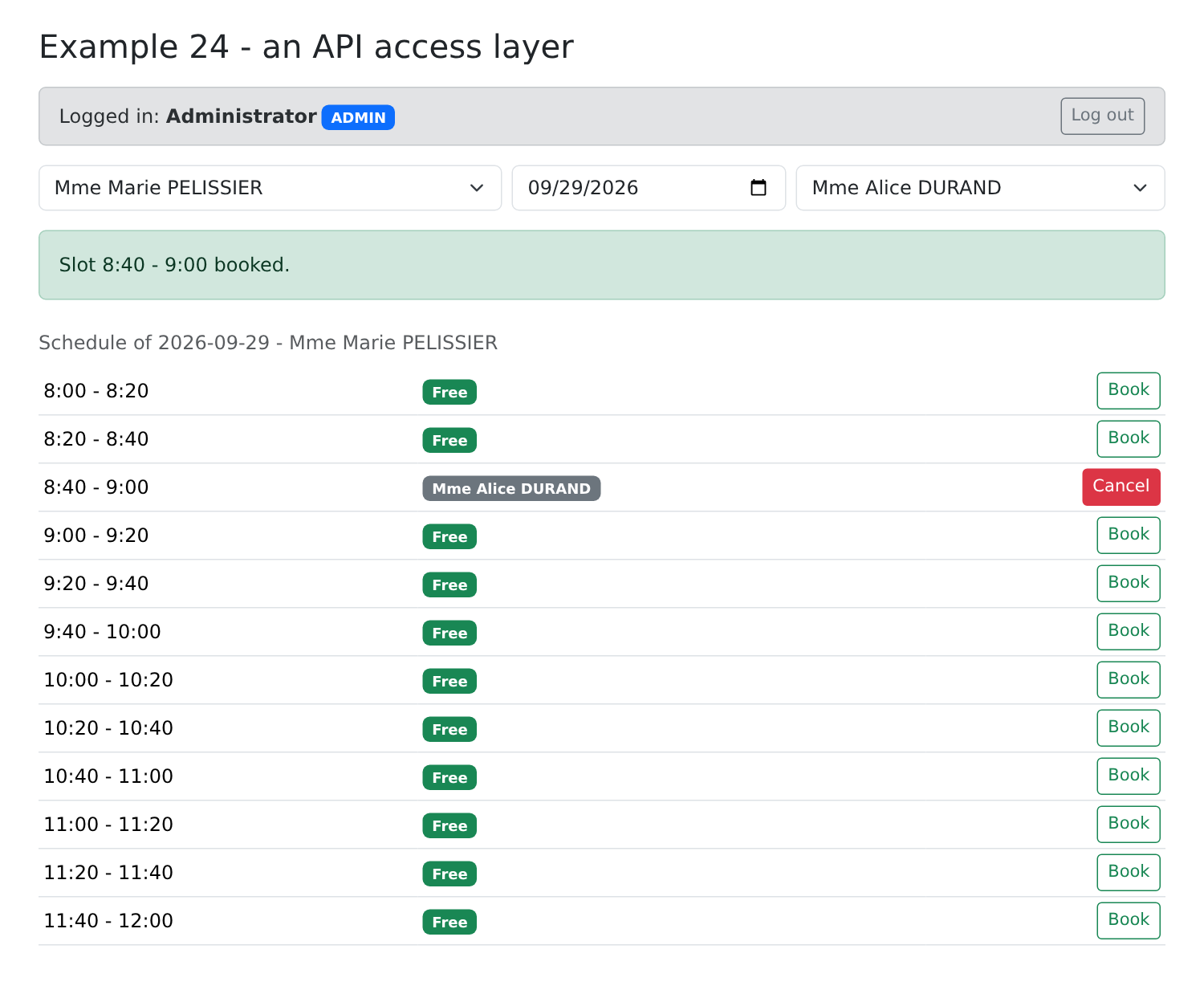
[npm start 24-api-service]. The administrator reserves the 8:40 time slot for Alice DURAND:
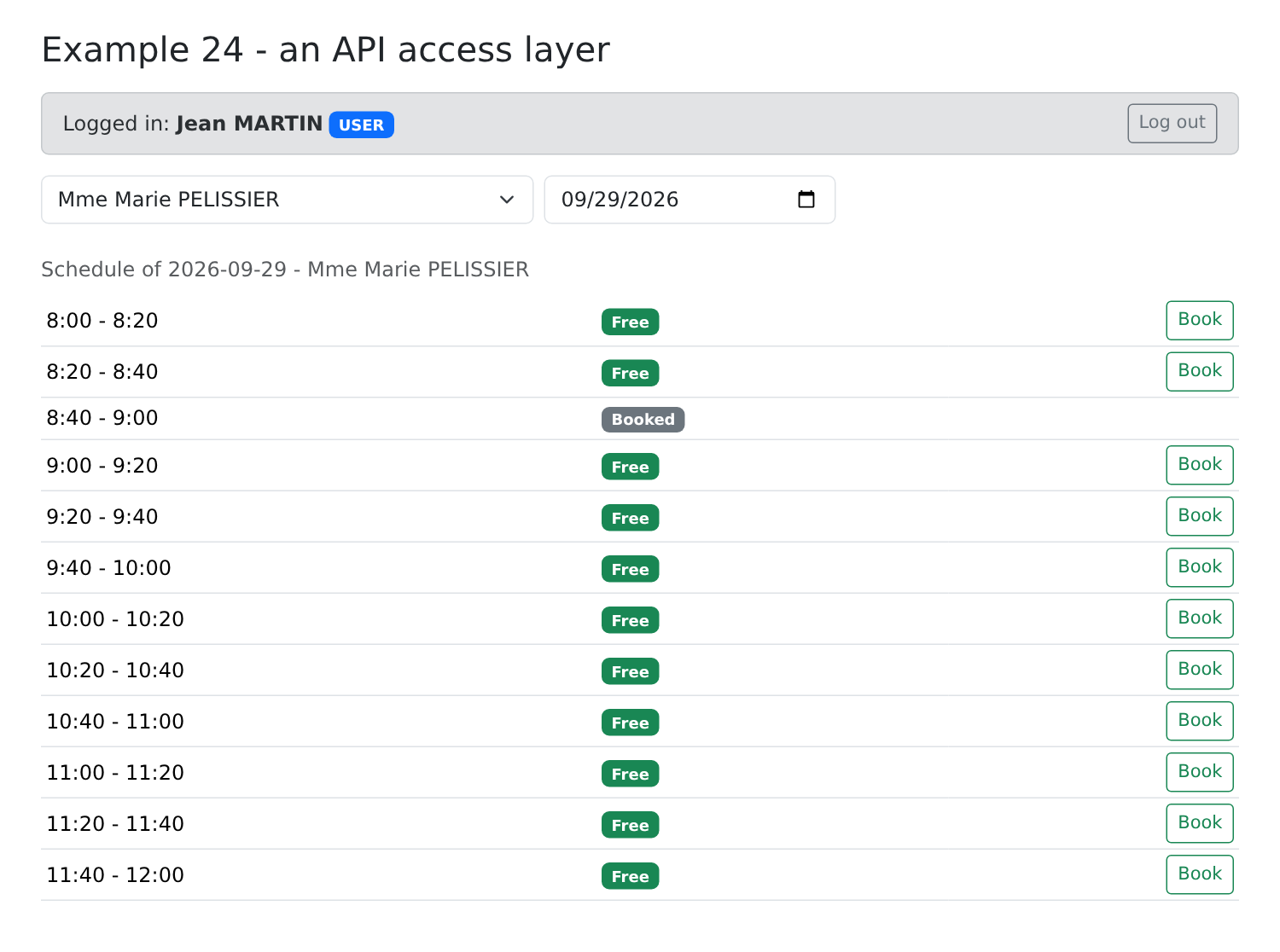
The same calendar, as seen by the patient Martin: the time slot is reserved, with no patient name listed.
8.4. Example 25: Errors Returned by the Server
This example demonstrates client management by the administrator. The form performs no validation in the browser: everything is sent to the server, which responds—in the event of a rejection—with an error:
| 400 { "key": "ERRORS.INVALID_FORM", "fields": { "lastName": "ERRORS.LASTNAME_REQUIRED" } }
409 { "key": "ERRORS.PATIENT_ALREADY_EXISTS", "fields": { "firstName": "...", "lastName": "..." } }
409 { "key": "ERRORS.CONCURRENT_UPDATE" }
|
You must then display the general message and place the error for each field below that field, in the user’s language.
The dictionaries contain the server’s error codes:
| {
"FORM": {
"TITLE_ADD": "Ajouter un client",
"TITLE_EDIT": "Modifier un client",
"TITLE": "Titre",
"FIRSTNAME": "Prénom",
"LASTNAME": "Nom",
"LOGIN": "Login",
"PASSWORD": "Mot de passe",
"SAVE": "Enregistrer",
"CANCEL": "Annuler",
"EDIT": "Modifier",
"DELETE": "Supprimer",
"DELETE_CONFIRM": "Supprimer le client {{name}}, son compte et ses rendez-vous ?",
"ADDED": "Le client {{name}} a été ajouté (login : {{login}}).",
"UPDATED": "Le client {{name}} a été modifié.",
"DELETED": "Le client {{name}} a été supprimé.",
"ADMIN_ONLY": "Connectez-vous avec le compte admin : seul le rôle ADMIN gère les clients."
},
"ERRORS": {
"INVALID_FORM": "Le formulaire contient des erreurs.",
"INVALID_TITLE": "Choisissez un titre dans la liste.",
"FIRSTNAME_REQUIRED": "Le prénom est obligatoire.",
"FIRSTNAME_TOO_LONG": "Le prénom ne doit pas dépasser 20 caractères.",
"LASTNAME_REQUIRED": "Le nom est obligatoire.",
"LASTNAME_TOO_LONG": "Le nom ne doit pas dépasser 20 caractères.",
"INVALID_LOGIN": "30 caractères au plus : lettres minuscules non accentuées, chiffres, point, tiret, souligné.",
"PASSWORD_TOO_LONG": "Le mot de passe ne doit pas dépasser 72 caractères.",
"LOGIN_TAKEN": "Ce login est déjà utilisé par un autre compte.",
"PATIENT_ALREADY_EXISTS": "Un client portant ce prénom et ce nom existe déjà.",
"PATIENT_NOT_FOUND": "Ce client n'existe pas (ou plus).",
"CONCURRENT_UPDATE": "Cette fiche a été modifiée entre-temps par un autre utilisateur. Rechargez-la avant de recommencer.",
"FORBIDDEN": "Votre rôle ne vous permet pas cette action.",
"AUTH_REQUIRED": "Connectez-vous d'abord.",
"SESSION_EXPIRED": "Votre session a expiré : reconnectez-vous.",
"SERVER_UNREACHABLE": "Le serveur ne répond pas.",
"SERVER_ERROR": "Une erreur inattendue s'est produite."
}
}
|
| {
"FORM": {
"TITLE_ADD": "Add a patient",
"TITLE_EDIT": "Edit a patient",
"TITLE": "Title",
"FIRSTNAME": "First name",
"LASTNAME": "Last name",
"LOGIN": "Login",
"PASSWORD": "Password",
"SAVE": "Save",
"CANCEL": "Cancel",
"EDIT": "Edit",
"DELETE": "Delete",
"DELETE_CONFIRM": "Delete patient {{name}}, their account and their appointments?",
"ADDED": "Patient {{name}} has been added (login: {{login}}).",
"UPDATED": "Patient {{name}} has been updated.",
"DELETED": "Patient {{name}} has been deleted.",
"ADMIN_ONLY": "Log in with the admin account: only the ADMIN role manages patients."
},
"ERRORS": {
"INVALID_FORM": "The form contains errors.",
"INVALID_TITLE": "Choose a title from the list.",
"FIRSTNAME_REQUIRED": "First name is required.",
"FIRSTNAME_TOO_LONG": "First name must not exceed 20 characters.",
"LASTNAME_REQUIRED": "Last name is required.",
"LASTNAME_TOO_LONG": "Last name must not exceed 20 characters.",
"INVALID_LOGIN": "30 characters max: unaccented lowercase letters, digits, dot, hyphen, underscore.",
"PASSWORD_TOO_LONG": "Password must not exceed 72 characters.",
"LOGIN_TAKEN": "This login is already used by another account.",
"PATIENT_ALREADY_EXISTS": "A patient with this first and last name already exists.",
"PATIENT_NOT_FOUND": "This patient does not exist (anymore).",
"CONCURRENT_UPDATE": "This record was changed meanwhile by another user. Reload it before trying again.",
"FORBIDDEN": "Your role does not allow this action.",
"AUTH_REQUIRED": "Please log in first.",
"SESSION_EXPIRED": "Your session has expired: please log in again.",
"SERVER_UNREACHABLE": "The server does not respond.",
"SERVER_ERROR": "An unexpected error occurred."
}
}
|
| // =========================================================================
// 25-server-errors/src/app/i18n/i18n.ts - ngx-translate, as in example 21
// =========================================================================
import { Provider } from '@angular/core';
import { provideTranslateLoader, provideTranslateService, TranslateLoader, TranslationObject } from '@ngx-translate/core';
import { Observable, of } from 'rxjs';
import fr from './fr.json';
import en from './en.json';
class DictionariesLoader implements TranslateLoader {
getTranslation(language: string): Observable<TranslationObject> {
return of(language === 'en' ? en : fr);
}
}
export function provideI18n(): Provider[] {
return provideTranslateService({ loader: provideTranslateLoader(DictionariesLoader), fallbackLang: 'en', lang: 'en' });
}
|
The application configuration combines the elements presented in the previous examples:
| // =========================================================================
// 25-server-errors/src/app/app.config.ts
// -------------------------------------------------------------------------
// - HttpClient and the errors interceptor (see example 24);
// - ngx-translate (see example 21);
// - the Bootstrap classes of the fields (see example 07). Here, no
// "touched": a field gets a red border as soon as it carries an error,
// that is to say as soon as the SERVER has reported one.
// =========================================================================
import { ApplicationConfig } from '@angular/core';
import { provideHttpClient, withInterceptors } from '@angular/common/http';
import { provideSignalFormsConfig } from '@angular/forms/signals';
import { errorsInterceptor } from '../../../common/errors.interceptor';
import { provideI18n } from './i18n/i18n';
export const appConfig: ApplicationConfig = {
providers: [
provideHttpClient(withInterceptors([errorsInterceptor])),
provideI18n(),
provideSignalFormsConfig({ classes: { 'is-invalid': (field) => field.state().invalid() } }),
],
};
|
- line 19: the HTTP client and its interceptor (example 24);
- line 20: [ngx-translate] (example 21);
- line 21: the [Bootstrap] field classes (Example 07). Here, a field is highlighted in red as soon as it contains an error—that is, as soon as the server has reported one.
The page:
| // =========================================================================
// 25-server-errors/src/app/app.ts - displaying the errors of the SERVER
// -------------------------------------------------------------------------
// The management of the clients (admin account). This form
// DELIBERATELY does no validation in the browser: its schema is empty.
// Everything is sent to the server, which answers, in case of refusal, with a JSON
// error (converted into an ApiError by the interceptor):
//
// 400 { key: 'ERRORS.INVALID_FORM', fields: { lastName: 'ERRORS.LASTNAME_REQUIRED' } }
// 409 { key: 'ERRORS.PATIENT_ALREADY_EXISTS', fields: { firstName: ..., lastName: ... } }
// 409 { key: 'ERRORS.CONCURRENT_UPDATE' } (optimistic lock)
//
// submit(form, action): the action sends the model to the server. If it
// returns ERRORS (an array), the signal forms attach them
// to the designated fields (fieldTree): they appear in f.lastName().errors(),
// like the errors of a validator. Their message is here the KEY sent by
// the server, which the template translates (ngx-translate). Try: an empty
// last name, a "Dr" title, a namesake (Alice DURAND), a login already taken
// (martin), the same record modified in two tabs...
// =========================================================================
import { Component, computed, inject, signal } from '@angular/core';
import { FormField, form, submit, ValidationError } from '@angular/forms/signals';
import { TranslatePipe, TranslateService } from '@ngx-translate/core';
import { ApiService } from '../../../common/api.service';
import { LoginBar } from '../../../common/login-bar';
import { ApiError } from '../../../common/api-error';
import { Person, User } from '../../../common/types';
// the confirmation dialog of example 16, reused as is
import { ConfirmationService } from '../../../16-confirmation/src/app/confirmation/confirmation.service';
import { ConfirmDialog } from '../../../16-confirmation/src/app/confirmation/confirm-dialog';
interface ClientInput {
title: string;
firstName: string;
lastName: string;
login: string;
password: string;
version: number;
}
const EMPTY: ClientInput = { title: 'Mr', firstName: '', lastName: '', login: '', password: '', version: 0 };
@Component({
selector: 'app-root',
imports: [FormField, TranslatePipe, LoginBar, ConfirmDialog],
templateUrl: './app.html',
})
export class App {
private readonly api = inject(ApiService);
private readonly confirmation = inject(ConfirmationService);
protected readonly translate = inject(TranslateService);
protected readonly user = signal<User | null>(null);
protected readonly clients = signal<Person[]>([]);
protected readonly isAdmin = computed(() => this.user()?.role === 'ADMIN');
// the form: editedId === null -> creation, otherwise update
protected readonly editedId = signal<number | null>(null);
protected readonly model = signal<ClientInput>({ ...EMPTY });
protected readonly f = form(this.model); // no validator: the server validates
// the general message of the last error, and that of a success
protected readonly pageError = signal<ApiError | null>(null);
protected readonly success = signal<{ key: string; params: Record<string, string> } | null>(null);
protected async onUserChange(u: User | null): Promise<void> {
this.user.set(u);
this.clients.set([]);
if (u?.role === 'ADMIN') {
await this.reload();
}
}
private async reload(): Promise<void> {
this.clients.set(await this.api.get<Person[]>('/clients'));
}
protected newForm(): void {
this.editedId.set(null);
this.model.set({ ...EMPTY });
this.f().reset(); // the state of the fields (and their errors) starts from zero
this.clearMessages();
}
protected edit(c: Person): void {
this.editedId.set(c.id);
// the VERSION read with the record goes back with the update: if someone
// has modified the record in the meantime, the server will answer 409 CONCURRENT_UPDATE
this.model.set({ title: c.title, firstName: c.firstName, lastName: c.lastName, login: c.login ?? '', password: '', version: c.version });
this.f().reset();
this.clearMessages();
}
private clearMessages(): void {
this.pageError.set(null);
this.success.set(null);
}
// the error of EACH field, returned by the server -> an error of the form
private fieldErrors(e: ApiError): ValidationError.WithOptionalFieldTree[] {
const fields = Object.keys(this.model()) as (keyof ClientInput)[];
return Object.entries(e.fields)
.filter(([field]) => fields.includes(field as keyof ClientInput))
.map(([field, key]) => ({ kind: 'server', message: key, fieldTree: this.f[field as keyof ClientInput] }));
}
protected async save(event: SubmitEvent): Promise<void> {
event.preventDefault();
this.clearMessages();
const id = this.editedId();
await submit(this.f, async () => {
try {
const body = this.model();
const client =
id === null
? await this.api.post<Person>('/clients', body)
: await this.api.put<Person>(`/clients/${id}`, body);
this.newForm(); // form cleared, messages cleared...
// ... except this one
this.success.set({
key: id === null ? 'FORM.ADDED' : 'FORM.UPDATED',
params: { name: `${client.firstName} ${client.lastName}`, login: client.login ?? '' },
});
await this.reload();
return null;
} catch (e) {
if (!(e instanceof ApiError)) {
throw e;
}
this.pageError.set(e); // the general message
return this.fieldErrors(e); // the error of each field
}
});
}
protected async remove(c: Person): Promise<void> {
const name = `${c.firstName} ${c.lastName}`;
if (!(await this.confirmation.confirm(this.translate.instant('FORM.DELETE_CONFIRM', { name })))) {
return;
}
this.clearMessages();
try {
await this.api.delete(`/clients/${c.id}`);
this.success.set({ key: 'FORM.DELETED', params: { name } });
} catch (e) {
this.pageError.set(e instanceof ApiError ? e : null);
}
await this.reload();
}
}
|
- lines 30–31: the confirmation window from Example 16, reused as-is: a well-designed component is reusable;
- line 61: a signal form (example 06), without a schema: no validator;
- lines 63–64: the general message for the last error, and the success message;
- lines 85–92: To edit a record, copy its values into the form, including the version number: the record will be updated with the change (optimistic locking). [reset()] resets the state of the fields and their errors;
- lines 107–134: saving the record. [submit(form, action)] executes the action, which sends the form to the server: POST for a creation (line 116), PUT for a modification (line 117). During its execution, [f().submitting()] is true;
- line 125: [null]: no error;
- lines 130–131: in case of rejection, the general message is retained, and field errors are returned. The form validation system then attaches them to the designated fields: they appear in [f.lastName().errors()], exactly like validator errors; they disappear as soon as the user modifies the field;
- lines 100–105: the conversion. Each error identifies its field ([fieldTree], line 104); its message is the key sent by the server. Line 103 ignores an unknown field in the form;
- line 138: [translate.instant(key, params)]: the translation of a key in the code;
- line 146: the deletion of a customer may also be rejected.
| <div class="container py-4">
<div class="d-flex justify-content-between align-items-center mb-3">
<h1 class="h3 mb-0">Example 25 - the errors returned by the server</h1>
<select #language class="form-select form-select-sm w-auto" (change)="translate.use(language.value)">
<option value="fr">FR</option>
<option value="en" selected>EN</option>
</select>
</div>
<app-login-bar (userChange)="onUserChange($event)" />
@if (user() && !isAdmin()) {
<p class="alert alert-warning">{{ 'FORM.ADMIN_ONLY' | translate }}</p>
}
@if (isAdmin()) {
<div class="row g-4">
<div class="col-lg-6">
<table class="table table-sm align-middle">
<tbody>
@for (c of clients(); track c.id) {
<tr>
<td>{{ c.title }} {{ c.firstName }} {{ c.lastName }}</td>
<td><code>{{ c.login }}</code></td>
<td class="text-end text-nowrap">
<button class="btn btn-sm btn-outline-primary me-1" (click)="edit(c)">{{ 'FORM.EDIT' | translate }}</button>
<button class="btn btn-sm btn-outline-danger" (click)="remove(c)">{{ 'FORM.DELETE' | translate }}</button>
</td>
</tr>
}
</tbody>
</table>
</div>
<div class="col-lg-6">
<form class="card p-3" novalidate (submit)="save($event)">
<h2 class="h5">{{ (editedId() === null ? 'FORM.TITLE_ADD' : 'FORM.TITLE_EDIT') | translate }}</h2>
<div class="mb-2">
<label class="form-label" for="title">{{ 'FORM.TITLE' | translate }}</label>
<!-- a "Dr" option that the server will reject: to see ERRORS.INVALID_TITLE -->
<select id="title" class="form-select" [formField]="f.title">
<option>Mr</option><option>Mme</option><option>Melle</option><option>Dr</option>
</select>
<!-- the message of a server error is a KEY: we translate it -->
<div class="invalid-feedback">{{ f.title().errors()[0]?.message ?? '' | translate }}</div>
</div>
<div class="row g-2 mb-2">
<div class="col-sm-6">
<label class="form-label" for="firstName">{{ 'FORM.FIRSTNAME' | translate }}</label>
<input id="firstName" class="form-control" [formField]="f.firstName">
<div class="invalid-feedback">{{ f.firstName().errors()[0]?.message ?? '' | translate }}</div>
</div>
<div class="col-sm-6">
<label class="form-label" for="lastName">{{ 'FORM.LASTNAME' | translate }}</label>
<input id="lastName" class="form-control" [formField]="f.lastName">
<div class="invalid-feedback">{{ f.lastName().errors()[0]?.message ?? '' | translate }}</div>
</div>
</div>
<div class="row g-2 mb-3">
<div class="col-sm-6">
<label class="form-label" for="login">{{ 'FORM.LOGIN' | translate }}</label>
<input id="login" class="form-control" [formField]="f.login">
<div class="invalid-feedback">{{ f.login().errors()[0]?.message ?? '' | translate }}</div>
</div>
<div class="col-sm-6">
<label class="form-label" for="password">{{ 'FORM.PASSWORD' | translate }}</label>
<input id="password" type="password" class="form-control" autocomplete="new-password" [formField]="f.password">
<div class="invalid-feedback">{{ f.password().errors()[0]?.message ?? '' | translate }}</div>
</div>
</div>
<div class="d-flex gap-2">
<!-- submitting(): true while the action of submit() runs -->
<button class="btn btn-primary" [disabled]="f().submitting()">{{ 'FORM.SAVE' | translate }}</button>
<button type="button" class="btn btn-secondary" (click)="newForm()">{{ 'FORM.CANCEL' | translate }}</button>
</div>
@if (success(); as s) {
<div class="alert alert-success mt-3 mb-0">{{ s.key | translate: s.params }}</div>
}
<!-- the general message, and the HTTP status, to understand -->
@if (pageError(); as e) {
<div class="alert alert-danger mt-3 mb-0">
{{ e.key | translate: e.params }} <span class="small text-muted">({{ e.statusCode }} {{ e.key }})</span>
</div>
}
</form>
</div>
</div>
}
</div>
<app-confirm-dialog />
|
- line 4: language selection;
- line 40: a “Dr.” title that the server will reject; see [ERRORS.INVALID_TITLE];
- line 43 and following: under each field, the first error; its message is a key, which the pipe [translate] translates. [?? '']: no error, no text;
- line 71: the button is disabled during submission;
- line 80: the general message, in the current language, with its parameters, followed by the status HTTP and the key, for clarification;
- Line 88: the confirmation window.
Changing the language also re-translates error messages that have already been displayed: we’ve only kept the keys.
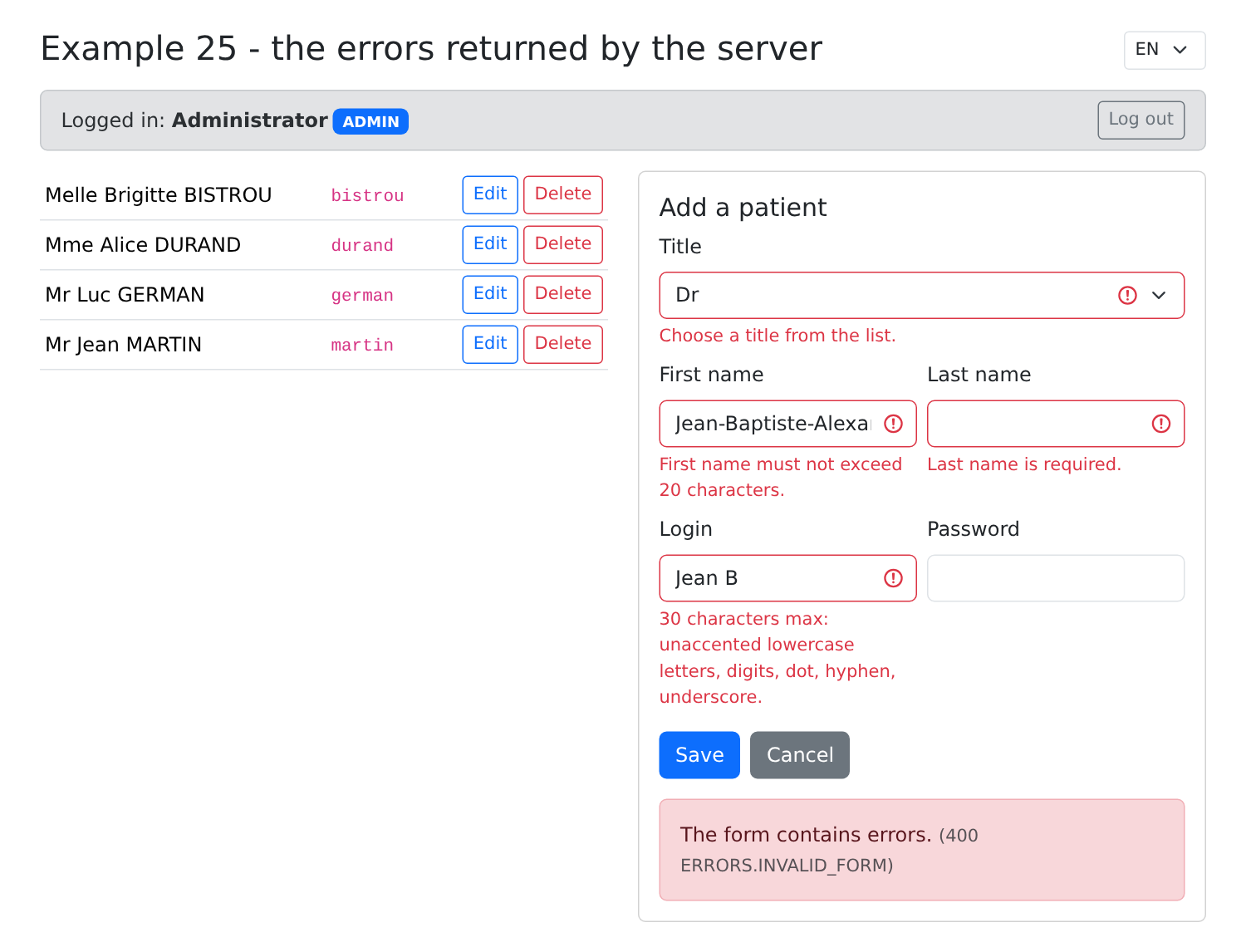
[npm start 25-server-errors]; logged in as admin, we submit the title “Dr,” a first name that’s too long, an empty last name, and an invalid username:
We start with a blank form: the title “Dr,” the first name “Jean,” and a blank last name. The server rejects the title and the last name; we then correct the title and enter a last name: the errors in these two fields disappear immediately, without having to resubmit. The general message remains displayed until the next submission:
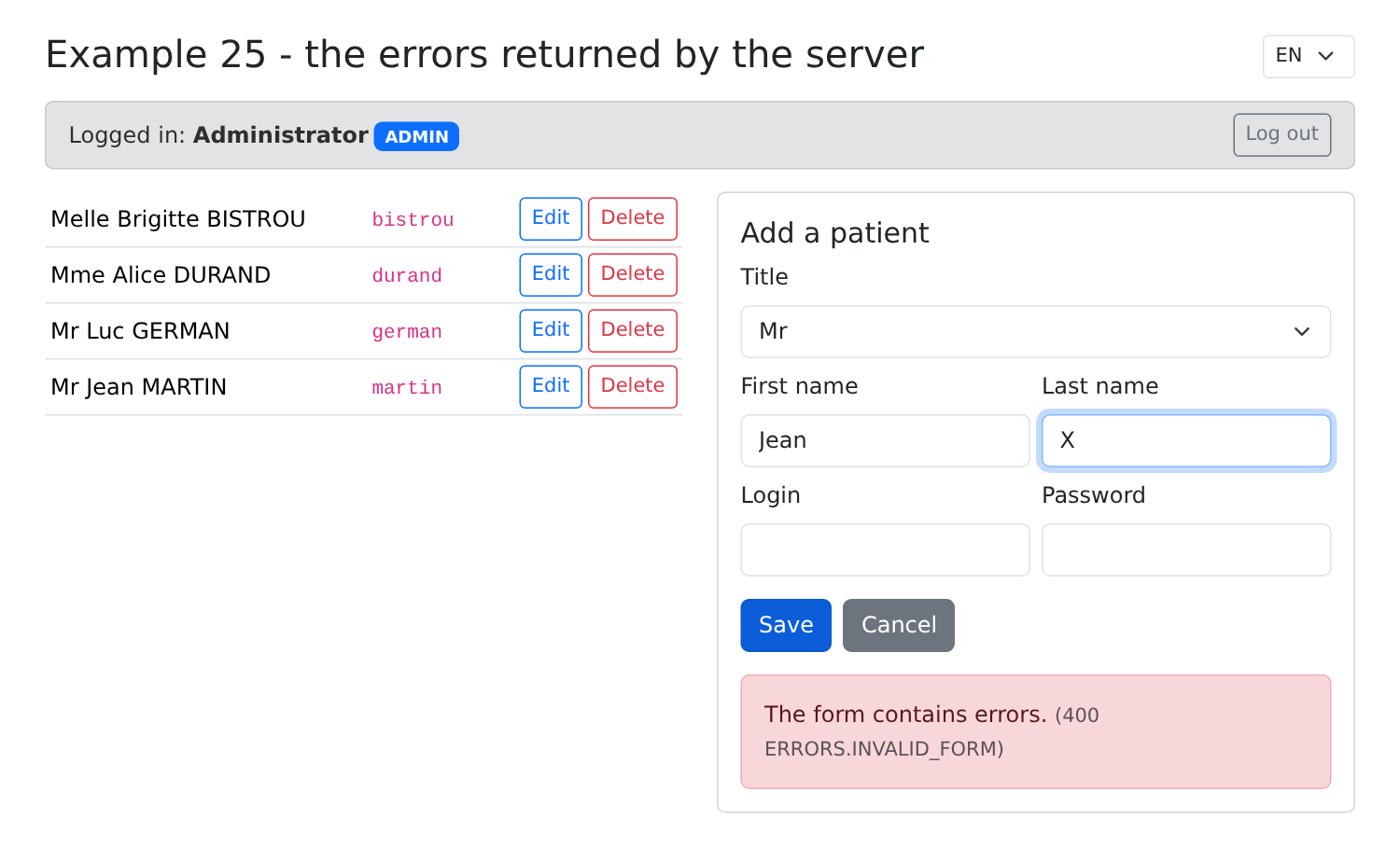
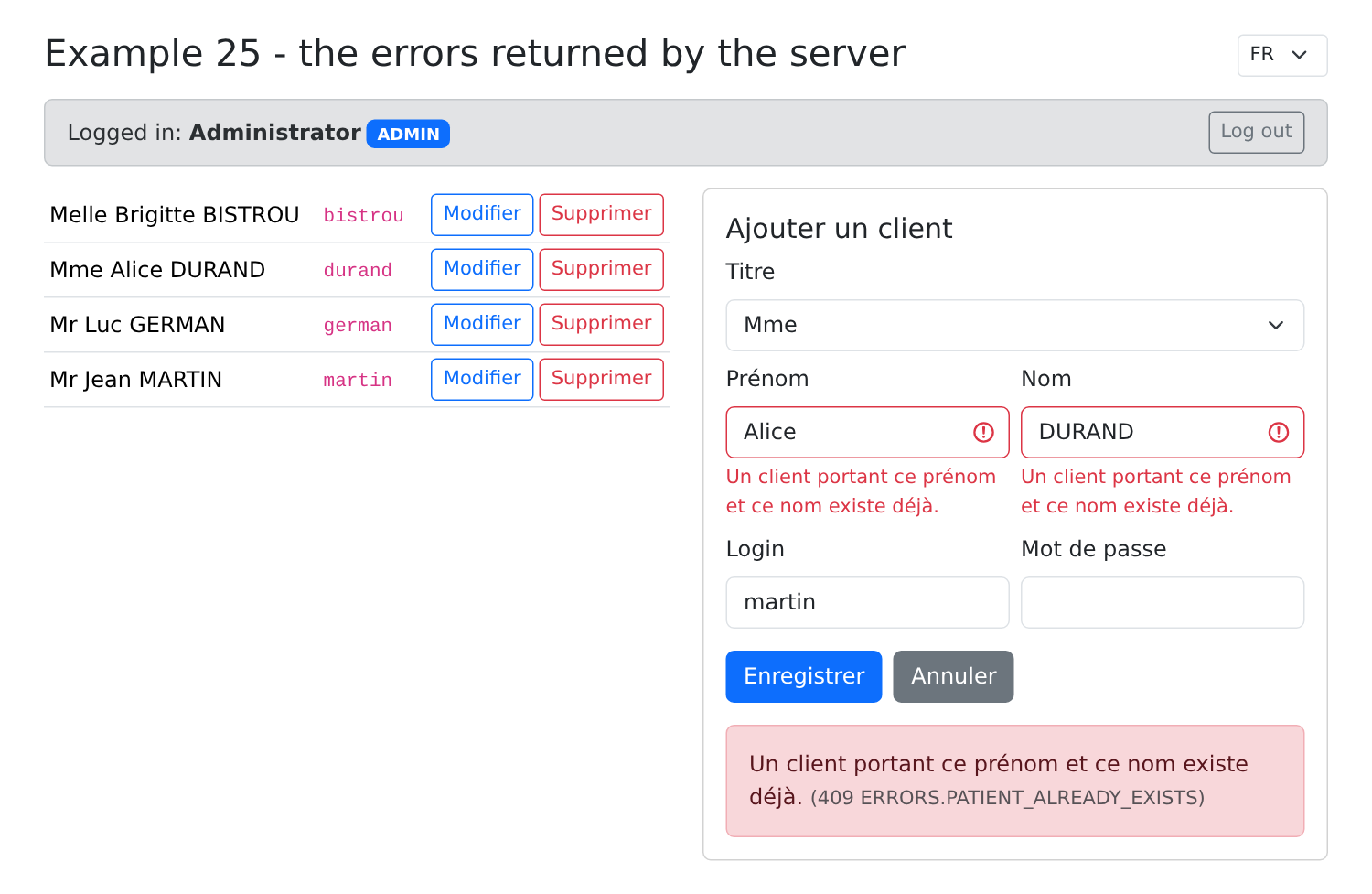
A namesake (Alice DURAND already exists): the server returns a 409 response and flags the first name and last name fields. The username “martin,” which is already taken, is not flagged: the server stops at the first violated validation rule. We then switch to French: the messages already displayed are re-translated (the page title and the login bar, written in English, are not):
Also try editing the same record in two tabs: the second save receives [ERRORS.CONCURRENT_UPDATE].