2. Getting Started with Angular
2.1. Example 01: The Structure of an Angular Application
2.1.1. The package.json file
The file [package.json] in the examples folder declares the libraries used and the project commands:
| {
"name": "examples-angular",
"version": "1.0.0",
"description": "The small examples of the course [Step-by-step introduction to the Angular framework] - a single installation for all",
"private": true,
"scripts": {
"ng": "ng",
"start": "ng serve",
"build": "ng build"
},
"dependencies": {
"@angular/common": "^22.2.0",
"@angular/compiler": "^22.2.0",
"@angular/core": "^22.2.0",
"@angular/forms": "^22.2.0",
"@angular/platform-browser": "^22.2.0",
"@angular/router": "^22.2.0",
"@ngx-translate/core": "^18.0.0",
"bootstrap": "^5.3.8",
"rxjs": "~7.8.0",
"tslib": "^2.8.0"
},
"devDependencies": {
"@angular/build": "^22.2.0",
"@angular/cli": "^22.2.0",
"@angular/compiler-cli": "^22.2.0",
"typescript": "~6.0.2"
}
}
|
Let’s break down this file:
- Lines 6–10: the project commands, launched by [npm run <name>] (or [npm start] for the command [start]):
- [npm start 05-ngmodel] launches [ng serve 05-ngmodel]: the development server for Example 05;
- [npm run build 05-ngmodel] launches [ng build 05-ngmodel]: the production version of example 05, located in the [dist/05-ngmodel/] folder;
- [npm run ng -- <arguments>] provides access to all commands in the [ng] tool;
- Lines 11–22: the libraries required by the application in the browser: the [Angular] packages ([@angular/core], the core; [@angular/common], common tools, including the client HTTP; [@angular/forms], forms; [@angular/router], the router; [@angular/platform-browser], browser initialization; [@angular/compiler], the template compiler; [ngx-translate] for languages; [Bootstrap] for formatting, [RxJS] for observables, and [tslib], a small helper library used by the code generated by [TypeScript];
- lines 23–28: the development tools: the command-line tool [ng] ([@angular/cli]), the [Angular] compiler ([@angular/compiler-cli]), the build tool ([@angular/build], which relies on [esbuild] and [Vite]), and the [TypeScript] compiler. These are not part of the application delivered to users.
The prefix [^] for a version ([^22.2.0]) allows [npm] to install a newer version of the same major version (22.x.y); the prefix [~] ([~6.0.2]) allows only fixes (6.0.x). All [@angular/...] packages must have the same version.
In a standard project, this file is created by the [ng new project-name] command, which generates a complete, ready-to-run [Angular] application. The examples in this course were written by hand so that twenty-five of them could be included in a single folder.
2.1.2. The file angular.json
[angular.json] describes the workspace: the applications it contains, and how to build and serve them. Its beginning, which describes Example 01:
| {
"$schema": "./node_modules/@angular/cli/lib/config/schema.json",
"version": 1,
"cli": {
"packageManager": "npm",
"analytics": false
},
"projects": {
"01-first-application": {
"projectType": "application",
"root": "01-first-application",
"sourceRoot": "01-first-application/src",
"prefix": "app",
"architect": {
"build": {
"builder": "@angular/build:application",
"options": {
"outputPath": "dist/01-first-application",
"index": "01-first-application/src/index.html",
"browser": "01-first-application/src/main.ts",
"tsConfig": "01-first-application/tsconfig.app.json",
"styles": [
"node_modules/bootstrap/dist/css/bootstrap.min.css"
]
},
"configurations": {
"production": {
"outputHashing": "all"
},
"development": {
"optimization": false,
"extractLicenses": false,
"sourceMap": true
}
},
"defaultConfiguration": "production"
},
"serve": {
"builder": "@angular/build:dev-server",
"options": {
"proxyConfig": "proxy.conf.json"
},
"configurations": {
"production": {
"buildTarget": "01-first-application:build:production"
},
"development": {
"buildTarget": "01-first-application:build:development"
}
},
"defaultConfiguration": "development"
}
}
},
|
- lines 4–7: the settings for the [ng] tool (the package manager, with no usage statistics collection);
- line 9: the project name, the one given to [ng serve] or [npm start];
- lines 11–12: the project directory and the source directory;
- Line 13: the prefix for component selectors ([app-root], [app-doctor-card]...);
- Lines 15–37: the application build ([ng build]):
- line 16: the build tool;
- line 18: the output folder;
- lines 19–20: the application’s page HTML and its entry point [TypeScript];
- line 21: the project configuration [TypeScript];
- lines 22–24: the application’s global style sheets: here, the one for [Bootstrap];
- lines 26–36: two configurations: [production] (optimized code; [outputHashing] includes a content hash in each file name) and [development] (readable code, with “source maps” that allow debugging of [TypeScript] in the browser). [ng build] uses the first one by default (line 36);
- lines 38–52: the development server ([ng serve]):
- line 41: the proxy file, which will only be used starting with Example 22: any request from the browser to an address beginning with [/api] is forwarded to the server JSON [RdvMedecins]. We’ll come back to this;
- line 51: [ng serve] builds the application using the [development] configuration.
The other twenty-four examples are described in the same way later in the file (more than a thousand lines in total). A standard project, created by [ng new], contains only one.
2.1.3. The files tsconfig.json and tsconfig.app.json
The [TypeScript] configuration common to all examples:
| {
"compilerOptions": {
"strict": true,
"noImplicitOverride": true,
"noPropertyAccessFromIndexSignature": true,
"noImplicitReturns": true,
"noFallthroughCasesInSwitch": true,
"noUnusedLocals": true,
"noUnusedParameters": true,
"skipLibCheck": true,
"isolatedModules": true,
"experimentalDecorators": true,
"importHelpers": true,
"resolveJsonModule": true,
"target": "ES2022",
"module": "preserve"
},
"angularCompilerOptions": {
"strictInjectionParameters": true,
"strictInputAccessModifiers": true,
"strictTemplates": true
},
"include": ["*/src/**/*.ts", "common/**/*.ts"]
}
|
- line 3: the strict mode of [TypeScript] (types rigorously checked, including [null] and [undefined]);
- lines 4–9: additional checks; in particular, an unused variable or parameter is reported as an error;
- line 12: [Angular] uses the decorators from [TypeScript] ([@Component], [@Injectable]...);
- line 14: A JSON file can be imported as a module (Example 21);
- lines 15–16: modern [JavaScript] code (ES2022) and modules processed by the build tool;
- lines 18–22: checks specific to the [Angular] compiler. The most important one, on line 21: templates are checked as [TypeScript]. A typo in a template ([{{ titl }}] instead of [{{ title }}]) results in a compilation error, reported by [ng serve] and by the editor;
- Line 23: the files displayed by the editor ([VS Code]): those from all the examples.
Each example also has its own file, [tsconfig.app.json], which uses this configuration and compiles only ITS files:
| {
"extends": "../tsconfig.json",
"include": ["src/**/*.ts"]
}
|
Thus, an error in one example does not prevent the others from working.
2.1.4. The index.html page
Each example has its own HTML page. The one for Example 01:
| <!doctype html>
<html lang="en">
<head>
<meta charset="utf-8">
<title>Example 01 - a first application</title>
<!-- base href: the starting address of relative paths (see the router) -->
<base href="/">
<meta name="viewport" content="width=device-width, initial-scale=1">
</head>
<body>
<!-- the Angular application is displayed in this element (see src/main.ts) -->
<app-root></app-root>
</body>
</html>
|
This is the only page the browser will load. It is almost empty:
- line 7: the base address for the page’s relative paths; the router (example 17) uses this;
- line 12: the element in which [Angular] will display the application. This is not a known HTML tag: it is the selector for the application’s root component.
There are no [<script>] or [<link>] tags: the build tool adds them automatically (the compiled program, the [Bootstrap] stylesheet).
2.1.5. The entry point: main.ts
| // =========================================================================
// 01-first-application/src/main.ts - the entry point of the application
// -------------------------------------------------------------------------
// angular.json designates this file as the entry point ("browser"). It
// starts the Angular application from its ROOT component (App):
// Angular looks in index.html for the <app-root> element (the "selector" of
// App) and displays the HTML of the component in it.
// =========================================================================
import { bootstrapApplication } from '@angular/platform-browser';
import { App } from './app/app';
// bootstrapApplication(App) returns a promise: we display a possible
// startup error in the browser console
bootstrapApplication(App).catch((error) => console.error(error));
|
- Line 10: the function in [Angular] that launches an application in a browser;
- line 11: the root component of the application, the [App] class from the [app/app.ts] file;
- line 15: the application is launched from this component: [Angular] searches the page for the element [<app-root>] and displays the HTML from [App] there.
2.1.6. The root component: app.ts, app.html, app.css
A component [Angular] is a class [TypeScript] decorated by [@Component]:
| // =========================================================================
// 01-first-application/src/app/app.ts - a first component
// -------------------------------------------------------------------------
// An Angular component is a TypeScript CLASS, decorated by @Component:
// - selector : the HTML tag that represents it (<app-root>);
// - templateUrl : the file of its HTML (app.html);
// - styleUrl : the file of its CSS (app.css), which only applies
// to this component.
// The properties and methods of the class can be used in the template.
// =========================================================================
import { Component, signal } from '@angular/core';
@Component({
selector: 'app-root',
templateUrl: './app.html',
styleUrl: './app.css',
})
export class App {
// "ordinary" data: the template can display it
protected readonly title = 'Welcome to Angular';
protected readonly languages = ['TypeScript', 'HTML', 'CSS'];
// signal(...): a REACTIVE piece of data. Its value is read by CALLING it
// (counter()), and changed with set() or update(). Angular then
// AUTOMATICALLY updates the places of the page that display it.
protected readonly counter = signal(0);
protected readonly time = signal(new Date().toLocaleTimeString());
// a method called by the button of the template
protected increment(): void {
this.counter.update((n) => n + 1);
this.time.set(new Date().toLocaleTimeString());
}
}
|
- Lines 14–18: The [@Component] decorator turns the class into a component:
- line 15: its selector, the tag that represents it in a template or in [index.html];
- line 16: its template file, HTML;
- line 17: its style file, CSS;
- lines 21–22: two ordinary data items. [protected]: they are used only by the component and its template; [readonly]: they will not be replaced;
- line 27: [signal(0)] creates a reactive data point with an initial value of 0. A signal is a function: you read its value by calling it ([this.counter()]), and you change it using [set(value)] or [update(function)]. When it changes, [Angular] updates all locations on the page that display it;
- lines 31–34: a method that modifies two signals. It does not alter the page: [Angular] will update it. [update((n) => n + 1)] calculates the new value based on the old one.
The component’s template:
| <!-- 01-first-application/src/app/app.html - the template of the App component -->
<div class="container py-4">
<!-- {{ expression }}: the value of the expression, inserted into the page -->
<h1 class="h3">{{ title }}</h1>
<p>This page is built in the browser, by Angular, from index.html, main.ts and the App component.</p>
<p>It is written in {{ languages.join(', ') }} ({{ languages.length }} languages).</p>
<!-- (click): the method to call on a click (see example 04) -->
<button class="btn btn-primary" (click)="increment()">Click me</button>
<!-- a signal is read by calling it: counter(), not counter -->
<p class="mt-3 counter">You clicked {{ counter() }} times (last click: {{ time() }}).</p>
</div>
|
- Line 4: The syntax [{{ expression }}] (interpolation) inserts into the page the value of an expression [TypeScript], evaluated on the component ([title] refers to [this.title]). It is escaped: if [title] contained [<b>], [<b>] would be displayed, without the tag being interpreted;
- line 6: the expression can be anything: a method call, a calculation;
- line 9: Clicking the button calls the method [increment] (see Example 04);
- line 11: a signal is displayed when the method is called: [{{ counter() }}]. [Angular] notes that the template reads this signal: when it changes, this part of the page will be updated.
And its style:
| /* this rule only applies to the elements of the App component */
.counter {
font-weight: bold;
color: #dd0031;
}
|
This rule applies only to elements of THIS component: [Angular] adds a unique attribute to its elements ([_ngcontent-xxx]) and passes it on to the CSS selectors. This is style encapsulation: two components can use the same CSS class without interfering with each other.
A component can also write its template and style directly in the decorator, using the properties [template] and [styles] instead of [templateUrl] and [styleUrl]. The following examples will demonstrate this for small components.
2.1.7. Execution
In the console open to the [examples-angular] folder:
npm start 01-first-application
The console displays (excerpt):
| Initial chunk files | Names | Raw size
styles.css | styles | 276.99 kB |
main.js | main | 4.91 kB |
Application bundle generation complete. [2.520 seconds]
Watch mode enabled. Watching for file changes...
➜ Local: http://localhost:4200/
|
Open the URL http://localhost:4200/ and click the button three times:
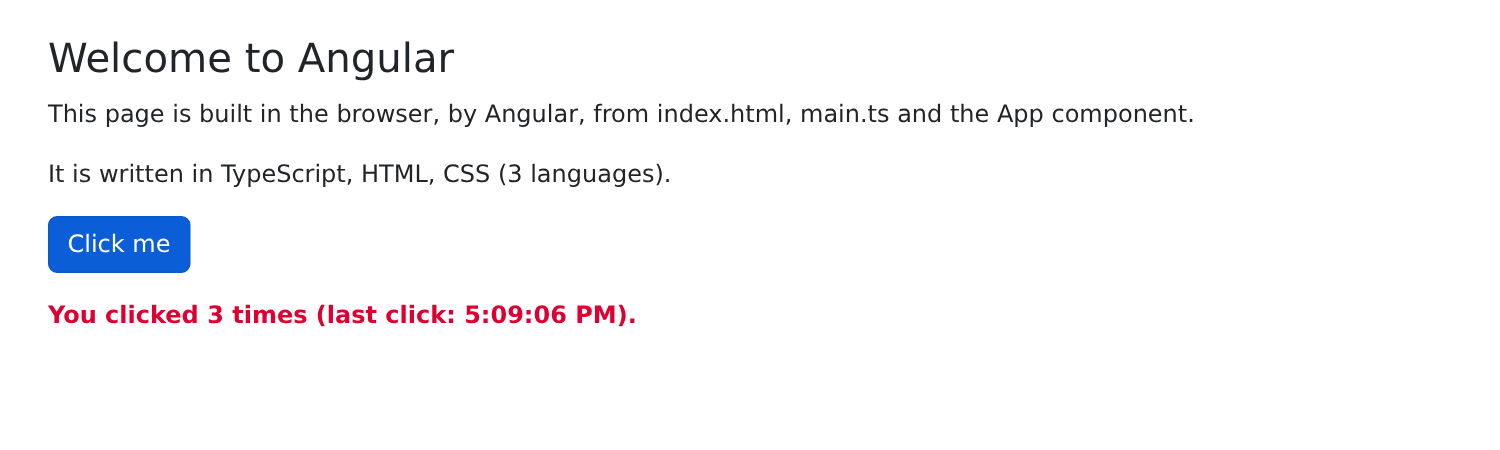
Two experiments to try:
- Change the title text in [app.ts] and save the file: the page updates immediately, without having to reload it. The development server monitors the files, recompiles the changes, and notifies the browser;
- view the page’s source code (Ctrl-U): you’ll only see the [index.html] page, which is almost empty. The HTML page displayed was generated by [Angular] within the browser. To view it, use the developer tools inspector (F12, Elements tab) or the [Angular DevTools] extension, which also displays the components and their data.
2.2. Example 02: Signals
Signals are at the heart of [Angular]’s responsiveness. This example calculates the price including VAT of an item:
| // =========================================================================
// 02-signals/src/app/app.ts - signal, computed, effect, linkedSignal
// -------------------------------------------------------------------------
// A small calculator of prices including VAT:
// - signal : a reactive value, read by calling it and
// modified with set() / update();
// - computed : a value COMPUTED from other signals,
// recomputed automatically when they change;
// - effect : code executed on each change of the signals it
// reads (a "side effect");
// - linkedSignal : a writable signal, but RESET to a computed value
// when another signal changes.
// =========================================================================
import { Component, computed, effect, linkedSignal, signal, untracked } from '@angular/core';
// FormsModule provides [(ngModel)], which links a field to a signal (see example 05)
import { FormsModule } from '@angular/forms';
@Component({
selector: 'app-root',
imports: [FormsModule],
templateUrl: './app.html',
})
export class App {
protected readonly label = signal('Pen');
protected readonly priceExclVat = signal(2.5);
protected readonly vatRate = signal(20); // in %
// linkedSignal: the quantity goes back to 1 each time the item changes,
// but the user can modify it in the meantime
protected readonly quantity = linkedSignal({ source: this.label, computation: () => 1 });
// computed: never assigned directly, always recomputed. Angular knows
// which signals it depends on (those it READS): it recomputes it when one
// of them changes, and only in that case
protected readonly totalExclVat = computed(() => this.quantity() * this.priceExclVat());
protected readonly vatAmount = computed(() => (this.totalExclVat() * this.vatRate()) / 100);
protected readonly totalInclVat = computed(() => this.totalExclVat() + this.vatAmount());
// a formatter of amounts in euros, English style (€1,234.50)
private readonly euros = new Intl.NumberFormat('en-US', { style: 'currency', currency: 'EUR' });
// the history of the totals incl. VAT, filled by the effect below
protected readonly history = signal<string[]>([]);
private oldTotal: number | null = null;
constructor() {
// effect: executed a first time, then on each change of
// totalInclVat (the only signal it reads)
effect(() => {
const total = this.totalInclVat();
document.title = `Incl. VAT: ${this.format(total)}`;
if (this.oldTotal !== null) {
const line = `${this.format(this.oldTotal)} -> ${this.format(total)}`;
// untracked: modify history WITHOUT making it a dependency of the effect
untracked(() => this.history.update((h) => [line, ...h].slice(0, 5)));
}
this.oldTotal = total;
});
}
protected format(amount: number): string {
return this.euros.format(amount);
}
protected reset(): void {
this.label.set('Pen');
this.priceExclVat.set(2.5);
this.vatRate.set(20);
this.quantity.set(1);
}
}
|
- line 15: the responsiveness functions, all provided by [@angular/core];
- Lines 21 and 17: The template uses [[(ngModel)]], which comes from the [FormsModule] module. A component must import (array [imports]) everything its template uses: other components, directives, and pipes. The compiler reports an error if this is omitted;
- lines 25–27: three signals, [signal(initial value)]. Their type is inferred from the initial value: [signal('Pen')] is a string signal, [signal(2.5)] is a numeric signal;
- line 31: a [linkedSignal] is a modifiable signal (it can be written to, just like an ordinary signal), but it is linked to another signal, its source: whenever the source changes (in this case, the item description), its value is reset to the value calculated by [computation] (in this case, 1). When the item changes, the quantity resets to 1;
- lines 36–38: a [computed] is a value calculated from other signals. It is never written; it is read as a signal ([this.totalExclVat()]). [Angular] knows which signals it depends on, because it records the ones the function reads during the calculation. It is recalculated when one of them changes, and only in that case: reading [totalInclVat()] ten times without anything changing results in only a single calculation. A [computed] may depend on other [computed] values (line 38);
- line 41: an English-style amount formatter (€1,234.50). Example 09 will show how to do this with [Angular], the pipes;
- lines 50–59: a [effect] is a function executed once, then each time the signals it reads change (here, the single [totalInclVat]). This is used for side effects: performing actions on something other than the page (the tab title, line 52; the browser’s local storage; a log);
- line 56: the effect adds an entry to the history. [untracked(...)] performs this update without making [history] a dependency of the effect; otherwise, the effect would read [history] (in [update]) and would be re-triggered every time the history changes... which it itself causes;
- A [effect] is created in the component’s constructor (or when a property is initialized): this is what [Angular] calls the injection context, which we’ll discuss further when covering services (Example 14). It stops on its own when the component is destroyed;
- Lines 66–71: [set()] replaces the value of a signal. The quantity is a [linkedSignal]: it can be written just like the others.
Avoid writing into a signal using a [effect] when a [computed] is sufficient: a [computed] describes a value, while a [effect] describes an action. Here, the history depends on the successive values of the total, which a [computed] cannot express.
The template:
| <div class="container py-4">
<h1 class="h3 mb-3">Example 02 - signals</h1>
<div class="row g-4">
<div class="col-md-6">
<div class="card p-3">
<!-- [(ngModel)]="signal": the field reads the signal and modifies it (see example 05) -->
<label class="form-label" for="label">Item</label>
<input id="label" class="form-control mb-2" [(ngModel)]="label">
<label class="form-label" for="price">Unit price excl. VAT</label>
<input id="price" type="number" step="0.1" min="0" class="form-control mb-2" [(ngModel)]="priceExclVat">
<label class="form-label" for="quantity">Quantity (back to 1 if the item changes)</label>
<input id="quantity" type="number" min="0" class="form-control mb-2" [(ngModel)]="quantity">
<label class="form-label" for="vat">VAT rate</label>
<select id="vat" class="form-select mb-3" [(ngModel)]="vatRate">
<!-- [ngValue]: the value passed is the NUMBER 5.5, not the string "5.5" -->
<option [ngValue]="5.5">5.5 %</option>
<option [ngValue]="10">10 %</option>
<option [ngValue]="20">20 %</option>
</select>
<button class="btn btn-outline-secondary" (click)="reset()">Reset</button>
</div>
</div>
<div class="col-md-6">
<div class="card p-3">
<h2 class="h5">{{ quantity() }} x {{ label() }}</h2>
<table class="table mb-0">
<tbody>
<tr><td>Total excl. VAT</td><td class="text-end">{{ format(totalExclVat()) }}</td></tr>
<tr><td>VAT ({{ vatRate() }} %)</td><td class="text-end">{{ format(vatAmount()) }}</td></tr>
<tr class="fw-bold"><td>Total incl. VAT</td><td class="text-end">{{ format(totalInclVat()) }}</td></tr>
</tbody>
</table>
</div>
<div class="card p-3 mt-3">
<h2 class="h6">History of the total incl. VAT (effect)</h2>
<ul class="mb-0">
@for (line of history(); track $index) {
<li>{{ line }}</li>
}
</ul>
</div>
</div>
</div>
</div>
|
- lines 8–18: [[(ngModel)]="label"] links the field to the signal [label] in both directions: typing in the field changes the signal, and changing the signal (using the “Reset” button) changes the field. We specify the signal itself, without parentheses: [ngModel] requires the signal in order to write it. Example 05 will cover [ngModel] in detail;
- lines 10 and 12: with [type="number"], the signal receives a number, not a string;
- lines 16–18: [[ngValue]] provides the value of an option: in this case, the number 5.5, not the string ["5.5"];
- lines 25–30: the display of signals and [computed]. [format(...)] is a method of the component;
- lines 37–39: [@for] repeats the block for each item in a list (see Example 03).
With the development server running ([npm start 02-signals]), we modify the item, price, quantity, and rate:
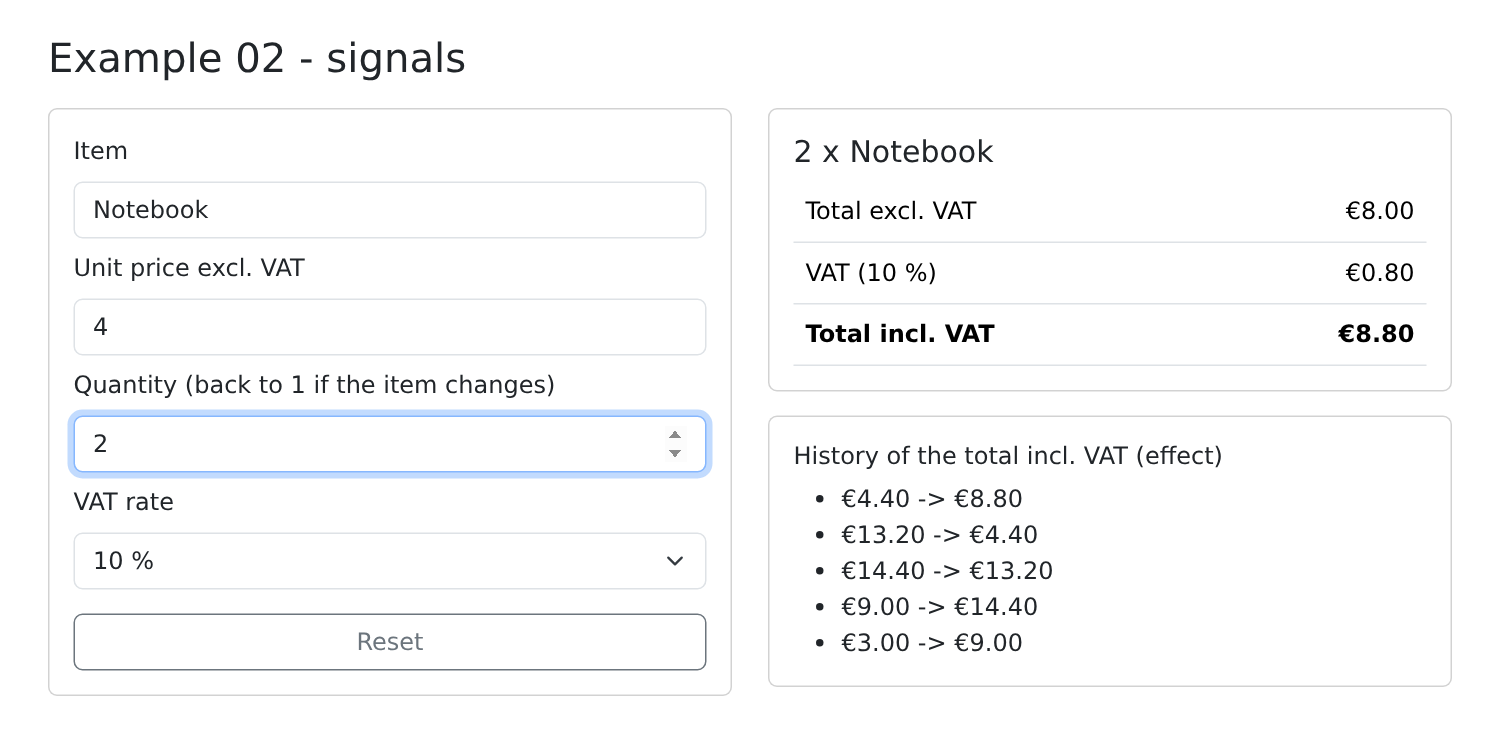
Each time the total including VAT changes, the effect adds a line to the history and changes the tab title. Changing the item resets the quantity to 1.
These signals are not specific to [Angular]: they are also found in [SolidJS], [Preact], [Vue.js] (where [ref] serves the same purpose), and a draft standard proposes adding them to [JavaScript] itself. Before signals (introduced in [Angular] 16, in 2023), [Angular] regularly checked the entire component tree, using the [zone.js] library, to determine what had changed. With signals, it knows exactly what to update: this is the “zoneless” mode, which is the default in [Angular] 22 and is used in all the examples in this course.
2.3. Example 03: Template Syntax
A [Angular] template is HTML enhanced with a few syntax elements. This example displays a list of doctors that can be filtered:
| // =========================================================================
// 03-templates/src/app/app.ts - the template syntax
// -------------------------------------------------------------------------
// In an Angular template:
// - [property]="expr" : a property of the element, computed by an
// expression ([src], [disabled], [hidden]...);
// - [class.name]="expr" : the CSS class "name" if the expression is true;
// [style.prop]="expr" : a CSS property;
// - @if / @else if / @else: a block that only exists if the condition
// is true;
// - @for (x of list; track x.id): a block repeated for each element;
// track gives the IDENTITY of each element; @empty, the block displayed
// when the list is empty;
// - @switch / @case : one block among several, depending on a value;
// - @let name = expr; : a variable local to the template.
// =========================================================================
import { Component, computed, signal } from '@angular/core';
import { FormsModule } from '@angular/forms';
// a TypeScript interface describes the shape of the objects of the list
interface Doctor {
id: number;
title: string;
firstName: string;
lastName: string;
specialty: 'general practitioner' | 'pediatrician' | 'cardiologist';
available: boolean;
}
@Component({
selector: 'app-root',
imports: [FormsModule],
templateUrl: './app.html',
})
export class App {
// the image is in the public/ folder of the example: served as is
protected readonly logoUrl = 'doctor.svg';
protected readonly doctors = signal<Doctor[]>([
{ id: 1, title: 'Mme', firstName: 'Marie', lastName: 'PELISSIER', specialty: 'general practitioner', available: true },
{ id: 2, title: 'Mr', firstName: 'Paul', lastName: 'TATOU', specialty: 'pediatrician', available: false },
{ id: 3, title: 'Melle', firstName: 'Sophie', lastName: 'DUPONT', specialty: 'cardiologist', available: true },
]);
protected readonly filter = signal(''); // searched text
protected readonly onlyAvailable = signal(false);
protected readonly showHelp = signal(true);
// the displayed list: a computed, recomputed when the filter changes
protected readonly displayedDoctors = computed(() => {
const text = this.filter().trim().toLowerCase();
return this.doctors().filter(
(m) =>
(!this.onlyAvailable() || m.available) &&
`${m.firstName} ${m.lastName} ${m.specialty}`.toLowerCase().includes(text),
);
});
protected toggleHelp(): void {
this.showHelp.update((a) => !a);
}
}
|
- lines 22–29: a [TypeScript] interface describes the format of the objects in the list. The specialty can only take three values (line 27);
- line 38: the address of an image. The files in the example’s [public/] folder are served as-is, at the root of the site: [doctor.svg] refers to the file [03-templates/public/doctor.svg]. To do this, you must declare it in [angular.json]:
| "assets": [
{
"glob": "**/*",
"input": "03-templates/public"
}
]
|
- lines 40–44: [signal<Doctor[]>(...)]: a signal whose type is specified, a list of doctors;
- lines 46–48: three signals linked to the page’s fields;
- lines 51–58: the displayed list, a [computed] that depends on three signals ([filter], [doctors], [onlyAvailable]);
- line 61: [update] inverts a Boolean.
The template:
| <div class="container py-4">
<h1 class="h3 mb-3">
<!-- [src]: the value of the src property is that of logoUrl -->
<img [src]="logoUrl" alt="logo" width="32" height="32">
Example 03 - the template syntax
</h1>
<div class="d-flex flex-wrap gap-3 align-items-center mb-3">
<input class="form-control w-auto" placeholder="search..." [(ngModel)]="filter">
<label class="form-check-label">
<input type="checkbox" class="form-check-input" [(ngModel)]="onlyAvailable"> available only
</label>
<button class="btn btn-sm btn-outline-secondary" (click)="toggleHelp()">
{{ showHelp() ? "Hide the help" : "Show the help" }}
</button>
</div>
<!-- [hidden]: the paragraph stays in the page, simply hidden -->
<p class="alert alert-info" [hidden]="!showHelp()">
Type a name or a specialty. Unavailable doctors are greyed out.
</p>
<!-- @let: a template variable, so as not to repeat the call -->
@let displayed = displayedDoctors();
<!-- @if / @else if / @else: only one of the three blocks exists at a time -->
@if (doctors().length === 0) {
<p class="text-muted">No doctor.</p>
} @else if (displayed.length === 0) {
<p class="text-warning">No doctor matches "{{ filter() }}".</p>
} @else {
<table class="table">
<thead>
<tr><th>#</th><th>Doctor</th><th>Specialty</th><th>Status</th></tr>
</thead>
<tbody>
<!-- @for: one row per doctor; $index gives the rank.
track m.id: the identity of each row, so that Angular knows
which row to add, move or remove when the list changes -->
@for (m of displayed; track m.id; let i = $index) {
<tr [class.opacity-50]="!m.available">
<td>{{ i + 1 }}</td>
<td>{{ m.title }} {{ m.firstName }} {{ m.lastName }}</td>
<td>
<!-- @switch: one block depending on the value of the specialty -->
@switch (m.specialty) {
@case ('pediatrician') { <span title="children">🧸</span> }
@case ('cardiologist') { <span title="heart">❤️</span> }
@default { <span title="all patients">🩺</span> }
}
{{ m.specialty }}
</td>
<td>
<!-- [class] with a string: the computed classes are added to "badge" -->
<span class="badge" [class]="m.available ? 'text-bg-success' : 'text-bg-secondary'">
{{ m.available ? 'available' : 'unavailable' }}
</span>
</td>
</tr>
}
</tbody>
</table>
}
<!-- [style.font-size.px]: a CSS property, with its unit -->
<p [style.font-size.px]="12 + displayed.length * 2">
{{ displayed.length }} doctor(s) displayed - the size of this text depends on it.
</p>
</div>
|
- Line 4: [[src]="logoUrl"] is a property binding: the property [src] of the element is assigned the value of the expression [logoUrl]. Without the square brackets, [src="logoUrl"] would result in the string ["logoUrl"]. Any property of an element can be bound in this way: [[disabled]], [[value]], [[hidden]], [[title]]...;
- lines 9 and 11: two fields linked to signals via [[(ngModel)]] (see Example 05);
- line 14: interpolation supports the ternary operator [? :];
- line 19: [[hidden]]: the paragraph remains on the page, but is simply hidden (property HTML [hidden]);
- line 24: [@let] declares a template variable, which is visible throughout the rest of the template. This avoids having to repeat [displayedDoctors()];
- lines 27–63: [@if (condition) { ... } @else if (...) { ... } @else { ... }]: only one of the three blocks exists on the page at a time. Unlike [[hidden]], the elements of a block that is not selected are not created (or are removed);
- line 40: [@for (m of displayed; track m.id)] repeats the block for each doctor:
- [track m.id] is required: it identifies each row. When the list changes, [Angular] compares the identifiers to determine which row to add, move, or delete, rather than recreating everything. For a list of simple values without an identifier, write [track $index] (example 02);
- [let i = $index]: the element’s rank. [@for] also provides [$first], [$last], [$even], [$odd], and [$count];
- a block labeled [@empty { ... }], following the block labeled [@for], appears when the list is empty (example 16);
- line 41: [[class.opacity-50]="condition"]: the class [opacity-50] (from [Bootstrap]) is applied to the element if the condition is true;
- lines 46–50: [@switch] selects a block based on a value: one [@case] per value, and [@default] for the others;
- line 55: [[class]="expression"]: the expression returns one or more classes, which are added to the hard-coded classes ([badge]);
- line 66: [[style.font-size.px]="expression"]: a property CSS, with its unit.
A template expression resembles [TypeScript], but it is restricted: no assignments (except in event handlers, example 04), no [new], no access to global variables ([window], [document]). It can only access the component’s properties and methods.
[npm start 03-templates]:
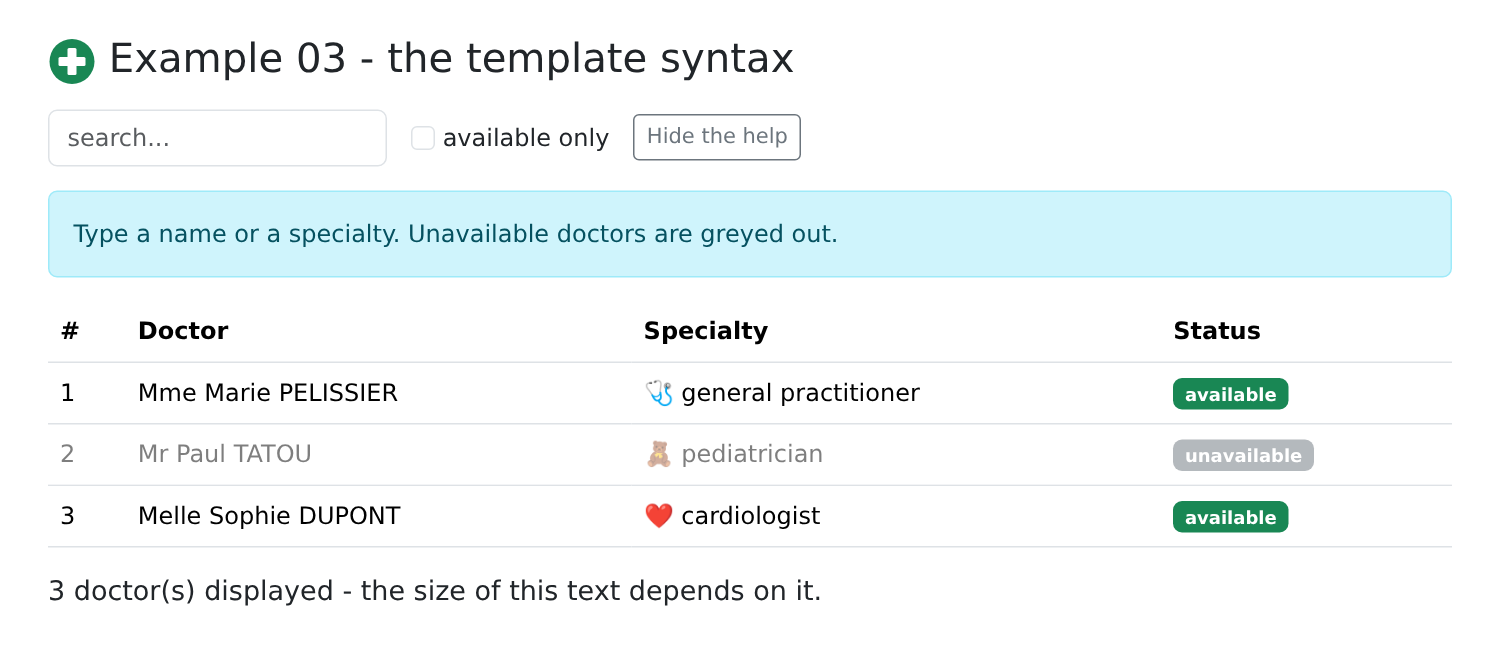
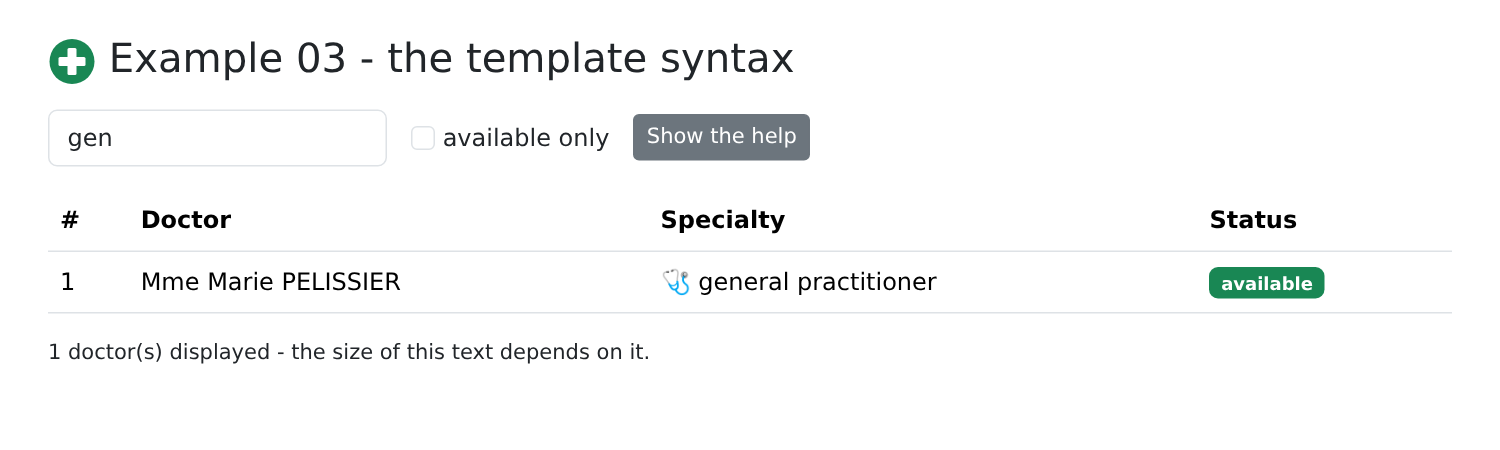
Type “gen” and hide the help:
Earlier versions of [Angular] wrote these blocks using structural directives: [*ngIf], [*ngFor], [[ngSwitch]]. They are still found in many projects; the syntax [@if] / [@for] / [@switch], which was introduced with [Angular] 17, is now recommended.
2.4. Example 04: Events
A list of tasks to respond to user actions. The component:
| // =========================================================================
// 04-events/src/app/app.ts - reacting to the actions of the user
// -------------------------------------------------------------------------
// (event)="statement": the statement is executed when the element
// emits this event:
// - (click)="f()" calls f;
// - (click)="f(3, $event)" calls f with arguments; $event is
// the native event of the browser;
// - (keyup.enter), (keydown.escape): only for this key;
// - #name on an element: a template "reference variable", which
// designates the HTML element itself (name.value, name.focus()...).
// Here, no FormsModule nor ngModel: we read the fields ourselves.
// =========================================================================
import { Component, signal } from '@angular/core';
interface Task {
id: number;
label: string;
done: boolean;
}
@Component({
selector: 'app-root',
templateUrl: './app.html',
styles: `
.area {
background: #e9f2ff;
height: 80px;
cursor: crosshair;
}
`,
})
export class App {
protected readonly tasks = signal<Task[]>([
{ id: 1, label: 'Install Node.js', done: true },
{ id: 2, label: 'Read the chapter on events', done: false },
]);
protected readonly log = signal<string[]>([]);
private nextId = 3;
private trace(message: string): void {
this.log.update((j) => [`${new Date().toLocaleTimeString()} ${message}`, ...j]);
}
// called by (submit): $event.preventDefault() prevents the browser
// from sending the form to the server (and from reloading the page)
protected add(event: SubmitEvent, field: HTMLInputElement): void {
event.preventDefault();
const label = field.value.trim();
if (label === '') {
return;
}
// a signal containing an array: we REPLACE it with a new array
this.tasks.update((t) => [...t, { id: this.nextId++, label, done: false }]);
this.trace(`added "${label}"`);
field.value = '';
field.focus();
}
protected toggle(task: Task, done: boolean): void {
this.tasks.update((t) => t.map((x) => (x.id === task.id ? { ...x, done } : x)));
this.trace(`"${task.label}": ${done ? 'done' : 'to do'}`);
}
protected remove(task: Task): void {
this.tasks.update((t) => t.filter((x) => x.id !== task.id));
this.trace(`deleted "${task.label}"`);
}
// $event: the native event (here a MouseEvent), with its coordinates
protected position(event: MouseEvent): void {
this.trace(`click at (${event.offsetX}, ${event.offsetY})`);
}
}
|
- lines 26–32: the component’s style, written directly in the decorator ([styles]), rather than in a [.css] file;
- lines 35–38: a signal containing a list of objects;
- line 40: a regular property, which is not displayed: it does not need to be a signal;
- lines 48–59: adding a task. The method receives the event from the browser and the [<input>] element itself (see the template):
- line 49: [preventDefault()] prevents the browser from submitting the form to the server, which would reload the page;
- line 55: the array contained in the signal ([push]) is not modified; instead, it is replaced with a new array. A signal only indicates a change if its value changes—that is, if a DIFFERENT object is assigned to it. Modifying the contents of the array without replacing it would leave the page unchanged;
- lines 57–58: the field is cleared and retains focus;
- line 62: same principle for modifying a task: [map] creates a new array, where the task in question is replaced by a modified copy ([{ ...x, done }]);
- line 67: and to delete one, [filter];
- Lines 72–74: [MouseEvent]: the click event, with the pointer position.
The template:
| <div class="container py-4">
<h1 class="h3 mb-3">Example 04 - events</h1>
<!-- (submit): Enter in the field OR click on the button.
#newTask: a reference to the <input> element, usable anywhere
in the template -->
<form class="d-flex gap-2 mb-3" (submit)="add($event, newTask)">
<input #newTask class="form-control" placeholder="new task (Escape to clear)"
(keydown.escape)="newTask.value = ''">
<button type="submit" class="btn btn-primary">Add</button>
</form>
<ul class="list-group mb-3">
@for (t of tasks(); track t.id) {
<li class="list-group-item d-flex align-items-center gap-2">
<!-- #box: the checkbox of THIS row; box.checked: its state -->
<input #box type="checkbox" class="form-check-input" [checked]="t.done"
(change)="toggle(t, box.checked)">
<span class="flex-grow-1" [class.text-decoration-line-through]="t.done" [class.text-muted]="t.done">
{{ t.label }}
</span>
<!-- a handler with an argument: the task of THIS row -->
<button class="btn btn-sm btn-outline-danger" (click)="remove(t)">Delete</button>
</li>
}
</ul>
<div class="area p-3 mb-3 rounded" (click)="position($event)">Click in this area</div>
<h2 class="h6">Log</h2>
<ul class="small">
@for (line of log(); track $index) {
<li>{{ line }}</li>
}
</ul>
</div>
|
- line 7: [(submit)="instruction"] is an event binding: the instruction is executed when the element triggers the event [submit] (field input or button click). [$event] refers to the browser event;
- Line 8: [#newTask] is a template reference variable: it refers to the [<input>] element itself, throughout the entire template. On line 7, it is passed to the [add] method;
- Line 9: [(keydown.escape)]: the [keydown] event, but only for the Esc key. Similarly, we write [(keyup.enter)], [(keydown.control.s)]... In an event binding, assignment is allowed: [newTask.value = ''] clears the field;
- lines 17–18: [#box] refers to the checkbox of THIS row of the [@for]; [[checked]] checks the box based on the task; [(change)] notifies the component when the user changes it;
- Line 23: a handler with an argument: the task for this line;
- line 28: a click in the field: [$event] is a [MouseEvent].
Here, we read the fields ourselves ([field.value], [box.checked]). The following examples will delegate this task to [ngModel] and then to signal-based forms.
[npm start 04-events]; add a task (Enter), check the second one, and click in the field:
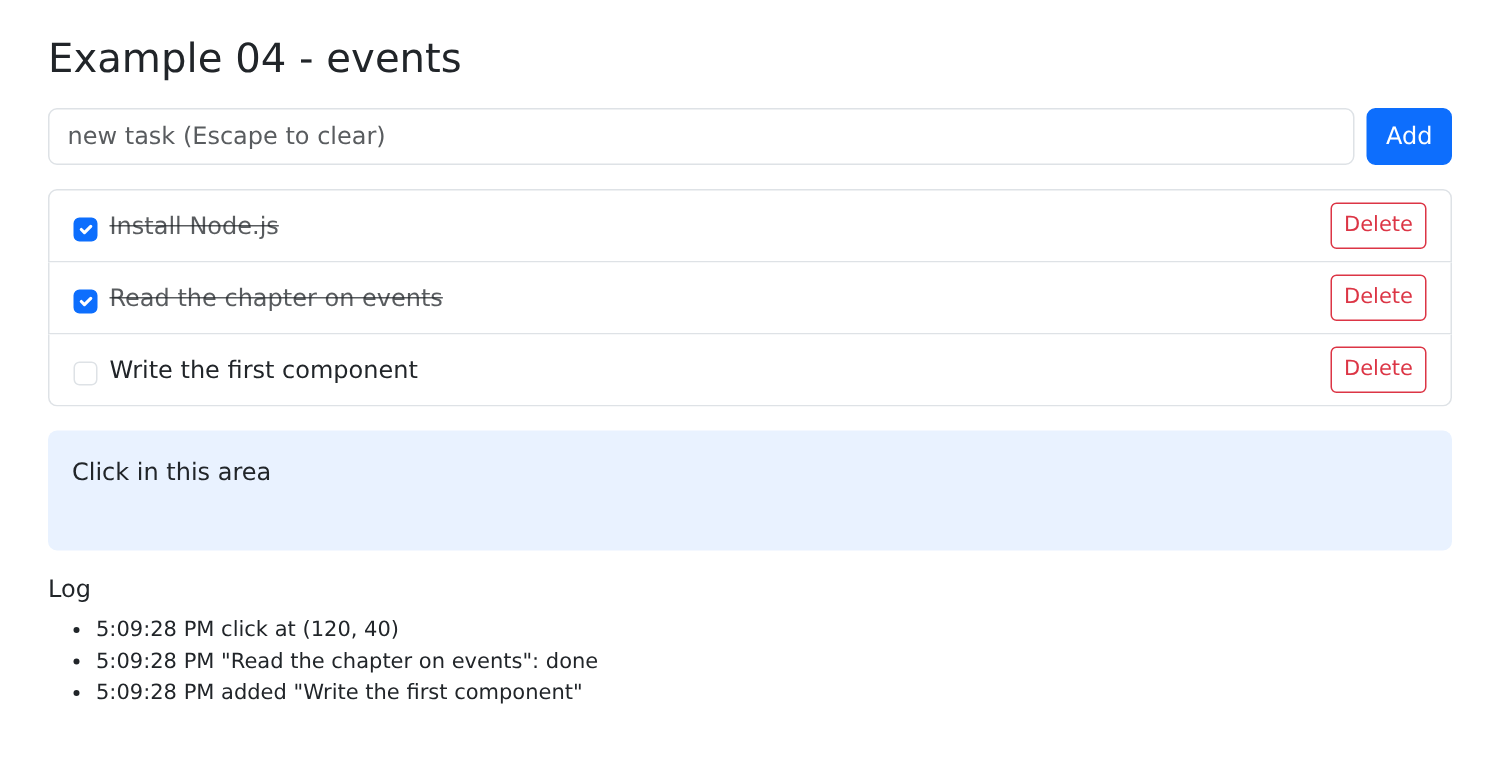
[Angular] updates the page only in response to an event or a signal change. An event handled by the template ((click), (submit), etc.) is sufficient to trigger a check of the component; however, data modified later—outside of an event (such as in response to a server or when a timer ticks)—will only be displayed if it is a signal. Hence the rule followed throughout this course: any data displayed by a template is a signal.
The same form as Example 18 from the [NestJS] course (all field types), but without a server: everything happens in the browser. The fields are linked to signals via the [ngModel] directive:
| // =========================================================================
// 05-ngmodel/src/app/app.ts - all the field types, linked by ngModel
// -------------------------------------------------------------------------
// [(ngModel)]="signal" (FormsModule module) links a form field to a
// signal, BOTH ways: typing in the field modifies the signal, and
// modifying the signal (by code) modifies the field. The [( )] syntax, called
// "banana in a box", combines [ngModel] (signal to field) and
// (ngModelChange) (field to signal). The value received depends on the field:
// - text input, textarea -> string
// - input type="number" -> number (null if the field is empty)
// - single checkbox -> boolean
// - radio buttons -> the value of the chosen button
// - select / multiple select -> the value / an array of values
// - input type="date" -> string "yyyy-MM-dd"
// In a <form>, each field linked by ngModel must have a name attribute.
// Same form as example 18 of the NestJS course; but here, no
// server: everything happens in the browser.
// =========================================================================
import { Component, computed, signal } from '@angular/core';
import { JsonPipe } from '@angular/common';
import { FormsModule } from '@angular/forms';
@Component({
selector: 'app-root',
// JsonPipe: the json "pipe", which displays an object in JSON format (see example 09)
imports: [FormsModule, JsonPipe],
templateUrl: './app.html',
})
export class App {
protected readonly titles = ['Mr', 'Mme', 'Melle'];
protected readonly possibleHobbies = ['sport', 'music', 'reading', 'cinema'];
protected readonly countries = [
{ code: 'fr', name: 'France' },
{ code: 'be', name: 'Belgium' },
{ code: 'ch', name: 'Switzerland' },
];
// one signal per field of the form
protected readonly title = signal('Mme');
protected readonly name = signal('');
protected readonly age = signal<number | null>(30);
protected readonly presentation = signal('');
protected readonly newsletter = signal(false);
protected readonly hobbies = signal<string[]>(['reading']);
protected readonly country = signal('fr');
protected readonly languages = signal<string[]>([]);
protected readonly birthDate = signal('');
// all the values, gathered into an object (what would be sent to a server)
protected readonly model = computed(() => ({
title: this.title(),
name: this.name().trim(), // ngModel does not remove the spaces: we do it here
age: this.age(),
presentation: this.presentation(),
newsletter: this.newsletter(),
hobbies: this.hobbies(),
country: this.country(),
languages: this.languages(),
birthDate: this.birthDate(),
}));
protected readonly sent = signal<string | null>(null);
// several checkboxes for ONE array: ngModel cannot do it, we handle it
protected toggleHobby(hobby: string, checked: boolean): void {
this.hobbies.update((l) => (checked ? [...l, hobby] : l.filter((x) => x !== hobby)));
}
// (ngSubmit): the submission of the form, without reloading the page
protected send(): void {
this.sent.set(JSON.stringify(this.model()));
}
}
|
- Line 22: [FormsModule] includes the [ngModel] directive (as well as [ngSubmit], [ngModelOptions]...): these are the so-called “template-driven” forms ([template-driven forms]);
- line 27: the component also imports the [json] pipe, which displays an object in the JSON format (see example 09);
- lines 40–48: one signal per field, with the type of value the field will provide: a string, a number (or [null] if the field is empty), a Boolean, or a list of strings;
- lines 51–61: all values, grouped into a single object using [computed]: this is what would be sent to a server. [ngModel] does not remove spaces around an entry: we do that here (line 53);
- lines 66–68: multiple checkboxes for the same list: [ngModel] cannot handle this, so we take care of it;
- lines 71–73: the submission.
The template:
| <div class="container py-4">
<h1 class="h3 mb-3">Example 05 - the fields of a form and ngModel</h1>
<div class="row g-4">
<!-- (ngSubmit): with FormsModule, the form is never sent to the
server by the browser; our method is called instead -->
<form class="col-md-7" (ngSubmit)="send()">
<div class="mb-3">
<span class="form-label d-block">Title</span>
<!-- radio buttons: same ngModel, one value per button -->
@for (t of titles; track t) {
<div class="form-check form-check-inline">
<input type="radio" class="form-check-input" name="title" [id]="'title-' + t" [value]="t"
[(ngModel)]="title">
<label class="form-check-label" [for]="'title-' + t">{{ t }}</label>
</div>
}
</div>
<div class="row g-3 mb-3">
<div class="col-8">
<label class="form-label" for="name">Name</label>
<input id="name" name="name" class="form-control" [(ngModel)]="name">
</div>
<div class="col-4">
<label class="form-label" for="age">Age</label>
<!-- type="number": the signal receives a number, not the string "30" -->
<input id="age" name="age" type="number" class="form-control" [(ngModel)]="age">
</div>
</div>
<div class="mb-3">
<label class="form-label" for="presentation">Presentation (updated when leaving the field)</label>
<!-- updateOn: 'blur': the signal is only updated when leaving the field -->
<textarea id="presentation" name="presentation" rows="2" class="form-control"
[(ngModel)]="presentation" [ngModelOptions]="{ updateOn: 'blur' }"></textarea>
</div>
<div class="mb-3 form-check">
<!-- a single checkbox: true / false -->
<input id="newsletter" name="newsletter" type="checkbox" class="form-check-input" [(ngModel)]="newsletter">
<label for="newsletter" class="form-check-label">Receive the newsletter</label>
</div>
<div class="mb-3">
<span class="form-label d-block">Hobbies</span>
<!-- several checkboxes for one array: [checked] + (change) -->
@for (h of possibleHobbies; track h) {
<div class="form-check form-check-inline">
<input #hobbyBox type="checkbox" class="form-check-input" [id]="'hobby-' + h"
[checked]="hobbies().includes(h)" (change)="toggleHobby(h, hobbyBox.checked)">
<label class="form-check-label" [for]="'hobby-' + h">{{ h }}</label>
</div>
}
</div>
<div class="row g-3 mb-3">
<div class="col-6">
<label class="form-label" for="country">Country</label>
<select id="country" name="country" class="form-select" [(ngModel)]="country">
<!-- [value]: the value passed (the code), the displayed text being the name -->
@for (c of countries; track c.code) {
<option [value]="c.code">{{ c.name }}</option>
}
</select>
</div>
<div class="col-6">
<label class="form-label" for="languages">Spoken languages</label>
<select id="languages" name="languages" multiple size="3" class="form-select" [(ngModel)]="languages">
<option value="fr">French</option>
<option value="en">English</option>
<option value="es">Spanish</option>
</select>
</div>
</div>
<div class="mb-3">
<label class="form-label" for="birthDate">Date of birth</label>
<input id="birthDate" name="birthDate" type="date" class="form-control w-auto" [(ngModel)]="birthDate">
</div>
<button type="submit" class="btn btn-primary">Send</button>
</form>
<div class="col-md-5">
<h2 class="h6">The model, live</h2>
<pre class="bg-light p-2 rounded small">{{ model() | json }}</pre>
@if (sent(); as text) {
<h2 class="h6">Last submission</h2>
<pre class="bg-success-subtle p-2 rounded small">{{ text }}</pre>
}
</div>
</div>
</div>
|
- line 6: [(ngSubmit)]: with [FormsModule], the form is never submitted by the browser (no page reload); the [send] method is called instead. [preventDefault()] is no longer needed (see Example 04);
- lines 12–13: radio buttons: the same [ngModel] on each button, and one value per button ([[value]]). The signal receives the value of the selected button;
- line 21: [[(ngModel)]="name"] binds the field to the signal [name], in both directions. The syntax [[( )]], known as a “banana in a box,” combines a property binding [[ngModel]] (from the signal to the field) and an event binding [(ngModelChange)] (from the field to the signal). In a [<form>], each field linked by [ngModel] must have a [name] attribute;
- line 26: with [type="number"], the signal receives a number;
- line 33: [[ngModelOptions]="{ updateOn: 'blur' }"]: the signal is updated only when the field is exited, not with each keystroke;
- line 37: a single field: [true] / [false];
- lines 45–46: the leisure fields, managed manually: [[checked]] and [(change)], as in example 04;
- lines 54–59: a drop-down list: the signal receives the value ([[value]], the country code) of the selected option;
- line 63: a multiple-choice list ([multiple]): the signal receives the list of selected values;
- line 72: a date: the signal receives a string ["yyyy-MM-dd"];
- line 79: [{{ model() | json }}]: the model, in JSON format, in real time;
- line 80: [@if (sent(); as text)]: if the value is “true” (in this case, a non-empty string), the block is displayed, and [as text] makes it a variable of the block.
[npm start 05-ngmodel]; fill out the form, then submit it:
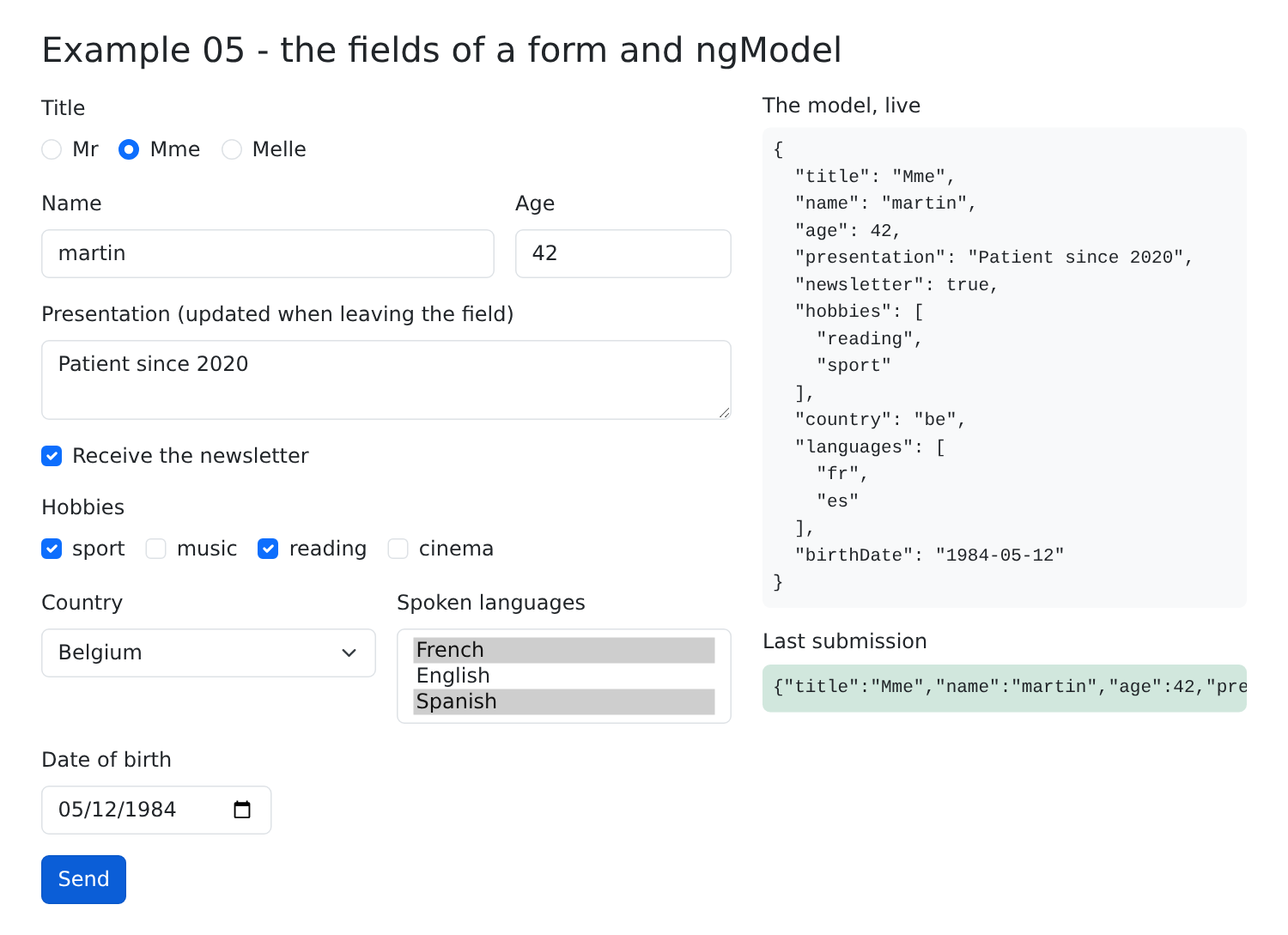
[ngModel] has existed since the first version of [Angular] and accepts signals from [Angular] 17. It is found in countless applications. However, it leaves it up to the component to handle anything beyond the simple back-and-forth of a value: merging fields, determining which ones have been modified, validating them... The following example shows the most recent way to write a form.
[Angular] 22 introduces a new way to write forms, entirely based on signals: signal-based forms ([Signal Forms], package [@angular/forms/signals]). The principle:
- the form model is a signal, which contains an object with one property per field;
- the function [form(model)] constructs a field tree ([FieldTree]) that has the same structure as the model: [f.lastName], [f.age], [f.newsletter]...;
- In the template, [[formField]="f.lastName"] links a field (HTML) to a field in the tree.
The form reads from and writes to the model; and each field knows its status: has it been accessed, modified, is it disabled, or is it valid?
| // =========================================================================
// 06-signal-forms/src/app/app.ts - signal forms
// -------------------------------------------------------------------------
// The modern way (Angular 22) of writing a form:
// 1. the MODEL: a signal that contains an object, with one property per
// field (the form reads and writes in this signal);
// 2. form(model, schema): builds a FIELD TREE (FieldTree), which
// has the same shape as the model: f.lastName, f.age, f.newsletter... The
// schema (optional) describes the rules of the fields (see example 07);
// 3. [formField]="f.lastName" links an HTML field to a field of the tree.
// Each field has a STATE, obtained by calling it: f.lastName() gives its value
// (value()), whether it has been touched (touched()), modified (dirty()), whether it is
// disabled (disabled())...
// =========================================================================
import { Component, signal } from '@angular/core';
import { JsonPipe } from '@angular/common';
import { disabled, form, FormField } from '@angular/forms/signals';
// the shape of the data of the form
interface Profile {
title: string;
firstName: string;
lastName: string;
age: number;
newsletter: boolean;
email: string;
country: string;
birthDate: string;
presentation: string;
}
const INITIAL: Profile = {
title: 'Mme',
firstName: 'Marie',
lastName: 'PELISSIER',
age: 30,
newsletter: false,
email: '',
country: 'fr',
birthDate: '',
presentation: '',
};
@Component({
selector: 'app-root',
imports: [FormField, JsonPipe],
templateUrl: './app.html',
})
export class App {
protected readonly titles = ['Mr', 'Mme', 'Melle'];
// 1. the model
protected readonly model = signal<Profile>({ ...INITIAL });
// 2. the field tree; one rule: the e-mail can only be modified if the
// "newsletter" box is checked (valueOf reads the value of ANOTHER field)
protected readonly f = form(this.model, (p) => {
disabled(p.email, ({ valueOf }) => !valueOf(p.newsletter));
});
// the fields whose state is displayed, in the table on the right
protected readonly fields = ['firstName', 'lastName', 'age', 'email'] as const;
protected reset(): void {
// the model goes back to its initial value, and the state of the fields to zero
this.model.set({ ...INITIAL });
this.f().reset();
}
protected upperCase(): void {
// modifying the MODEL by code: the fields follow
this.model.update((m) => ({ ...m, lastName: m.lastName.toUpperCase(), firstName: m.firstName.toUpperCase() }));
}
}
|
- line 18: the functions and directive for signal-based forms;
- lines 21–31: the format of the form data;
- line 47: the component imports the [FormField] directive, which is that of [[formField]];
- line 54: the model—a signal containing a [Profile] object;
- lines 58–60: the field tree. The second argument of [form] is the form schema: a function that receives the field paths ([p.email], [p.newsletter]...) and attaches rules to them. Here, there is only one: [disabled(p.email, logic)] disables the field [email] when the function [logic] returns [true]. [valueOf(p.newsletter)] reads the value of another field: the email address can only be edited if the “newsletter” checkbox is selected. The rule is reactive: it is re-evaluated as soon as the checkbox changes. Example 07 will add validation rules;
- line 63: the names of the fields whose status is displayed by the template; [as const] creates a list of exact names (['firstName' | 'lastName' | ...]), not arbitrary strings;
- lines 65–69: the reset. The model is reset to its initial value (the fields follow), then the field states are reset to zero ([touched], [dirty]): [f()] (the tree, called) returns the state of the entire form, including the [reset()] method;
- Lines 71–74: Modify the model with code; the page fields follow.
The template:
| <div class="container py-4">
<h1 class="h3 mb-3">Example 06 - signal forms</h1>
<div class="row g-4">
<form class="col-md-7" (submit)="$event.preventDefault()">
<div class="mb-3">
<span class="form-label d-block">Title</span>
<!-- radio buttons: the same field, one value per button -->
@for (t of titles; track t) {
<div class="form-check form-check-inline">
<input type="radio" class="form-check-input" [id]="'title-' + t" [value]="t" [formField]="f.title">
<label class="form-check-label" [for]="'title-' + t">{{ t }}</label>
</div>
}
</div>
<div class="row g-3 mb-3">
<div class="col-5">
<label class="form-label" for="firstName">First name</label>
<!-- [formField]: this HTML field edits the f.firstName field of the form -->
<input id="firstName" class="form-control" [formField]="f.firstName">
</div>
<div class="col-5">
<label class="form-label" for="lastName">Last name</label>
<input id="lastName" class="form-control" [formField]="f.lastName">
</div>
<div class="col-2">
<label class="form-label" for="age">Age</label>
<!-- type="number" and a model of type number: a numeric value -->
<input id="age" type="number" class="form-control" [formField]="f.age">
</div>
</div>
<div class="row g-3 mb-3 align-items-end">
<div class="col-5">
<div class="form-check">
<input id="newsletter" type="checkbox" class="form-check-input" [formField]="f.newsletter">
<label for="newsletter" class="form-check-label">Receive the newsletter</label>
</div>
</div>
<div class="col-7">
<label class="form-label" for="email">E-mail (if newsletter)</label>
<!-- disabled is managed by the form: no attribute to write here -->
<input id="email" type="email" class="form-control" [formField]="f.email">
</div>
</div>
<div class="row g-3 mb-3">
<div class="col-6">
<label class="form-label" for="country">Country</label>
<select id="country" class="form-select" [formField]="f.country">
<option value="fr">France</option>
<option value="be">Belgium</option>
<option value="ch">Switzerland</option>
</select>
</div>
<div class="col-6">
<label class="form-label" for="birthDate">Date of birth</label>
<input id="birthDate" type="date" class="form-control" [formField]="f.birthDate">
</div>
</div>
<div class="mb-3">
<label class="form-label" for="presentation">Presentation</label>
<textarea id="presentation" rows="2" class="form-control" [formField]="f.presentation"></textarea>
</div>
<div class="d-flex gap-2">
<button type="button" class="btn btn-outline-primary" (click)="upperCase()">Name in upper case</button>
<button type="button" class="btn btn-outline-secondary" (click)="reset()">Reset</button>
</div>
</form>
<div class="col-md-5">
<h2 class="h6">The model, live</h2>
<!-- f().value(): the value of the whole form, that is to say the model -->
<pre class="bg-light p-2 rounded small">{{ f().value() | json }}</pre>
<h2 class="h6">The state of the fields</h2>
<table class="table table-sm small">
<thead><tr><th>field</th><th>touched</th><th>dirty</th><th>disabled</th></tr></thead>
<tbody>
@for (c of fields; track c) {
<tr>
<td>{{ c }}</td>
<td>{{ f[c]().touched() }}</td>
<td>{{ f[c]().dirty() }}</td>
<td>{{ f[c]().disabled() }}</td>
</tr>
}
</tbody>
</table>
<p class="small mb-0">form modified (dirty): <strong>{{ f().dirty() }}</strong></p>
</div>
</div>
</div>
|
- line 4: the form is not submitted (no submit button in this example); we only prevent submission via the Enter key;
- line 10: radio buttons: the same field [f.title] on each button, one value per button;
- line 19: [[formField]="f.firstName"] links the field HTML to the field [firstName] in the form, in both directions, as with [ngModel] in example 05;
- line 28: a numeric field, for a numeric property of the model: the model receives a number;
- line 34: a checkbox, for a Boolean value;
- line 41: the field [email]. Do not specify the attribute [disabled]: the directive [[formField]] sets and removes it automatically, according to the schema rule;
- lines 47, 55, 60: a drop-down list, a date, a text box;
- Line 71: [f().value()]: the value of the entire form, i.e., the model;
- Lines 76–83: the status of four fields. [f[c]] is the field with the name [c]; [fc] is its status; [touched()] (the user entered the field and then exited it), [dirty()] (the user changed its value), [disabled()]: all signals;
- Line 86: the status of the entire form—it is updated if any of its fields are modified.
[npm start 06-signal-forms]; select the title, enter a first name, last name, and age, check the box (the email field becomes editable), enter the email address, then click “Name in upper case”:
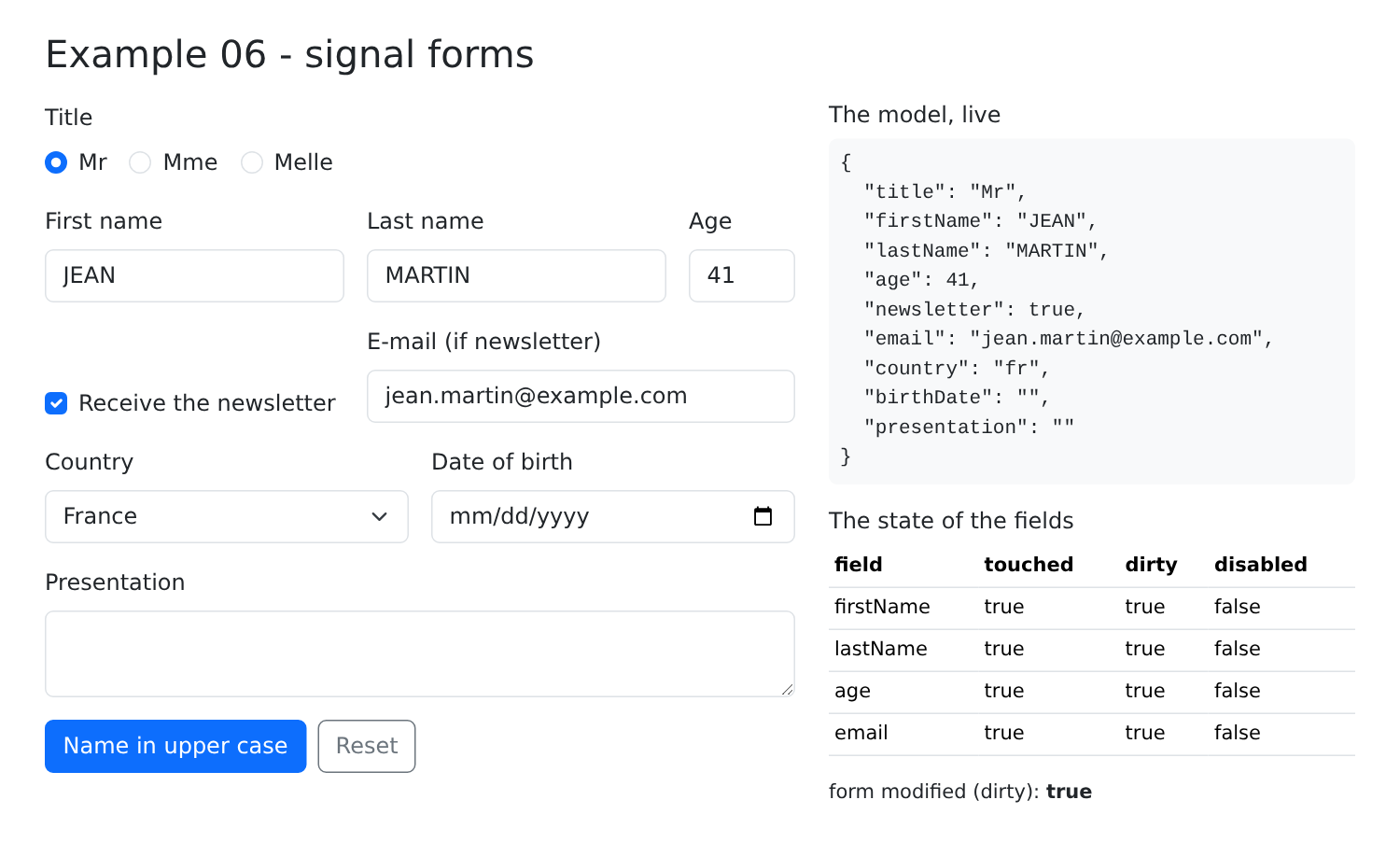
Compared to [ngModel]: a single signal for the entire form, and the status of each field, without having to write anything. Signal-based forms cannot link multiple checkboxes to the same list, nor can they link to a multiple-choice list: for these fields, use the technique from Example 05.
The “Create an Account” form from the [RdvMedecins] application, validated in the browser using the same rules as the server: title in the list, first and last name required (20 characters maximum), username in lowercase, password at least 6 characters long, confirmation.
Note: This validation is merely for the user’s convenience (an immediate response, without back-and-forth communication with the server). It provides no security: anyone can send a manually crafted request to the server ([curl]...). The server will therefore ALWAYS validate as well (see Example 25).
2.7.1. Application configuration
| import { bootstrapApplication } from '@angular/platform-browser';
import { provideSignalFormsConfig } from '@angular/forms/signals';
import { App } from './app/app';
bootstrapApplication(App, {
providers: [
provideSignalFormsConfig({
classes: {
// a field in error is only flagged once "touched" (left)
'is-invalid': (field) => field.state().touched() && field.state().invalid(),
'is-valid': (field) => field.state().touched() && field.state().valid(),
},
}),
],
}).catch((error) => console.error(error));
|
- line 15: the second argument of [bootstrapApplication] is the application configuration: a list of providers ([providers]), which make services and settings available to the entire application (see Example 14);
- Lines 17–23: [provideSignalFormsConfig] configures the signal-based forms. [classes] associates a class CSS with a condition based on the state of a field: the directive [[formField]] applies the class to the field HTML when the condition is true. The following classes from [Bootstrap] are used:
- line 20: [is-invalid] (red border), if the field has been entered but is invalid (both conditions). Errors are not displayed immediately: an empty form covered in red is unappealing;
- line 21: [is-valid] (green box), if the field has been entered and is valid.
2.7.2. The component
| // =========================================================================
// 07-validation/src/app/app.ts - validating a form in the browser
// -------------------------------------------------------------------------
// The rules of the fields are written in the SCHEMA of the form (second
// argument of form()): required, maxLength, minLength, pattern... and
// validate() for a "home-made" rule. Each field then knows its
// errors (f.lastName().errors()), recomputed on each keystroke.
// They are not displayed right away (an empty form covered in red is
// unpleasant): only for a field already left ("touched"). submit()
// marks all the fields as touched, then only executes the action if the
// form is valid.
//
// Same rules as the RdvMedecins server ("Create an account" form).
// WARNING: this validation is only a CONVENIENCE for the user (an
// immediate answer, without a round trip to the server). It protects
// nothing: anyone can send the server a request built by
// hand (curl...). The server therefore ALWAYS revalidates everything (see example 25).
// =========================================================================
import { Component, signal } from '@angular/core';
import { form, FormField, maxLength, minLength, pattern, required, submit, validate } from '@angular/forms/signals';
interface Account {
title: string;
firstName: string;
lastName: string;
login: string;
password: string;
confirmation: string;
}
const TITLES = ['Mr', 'Mme', 'Melle'];
const LOGIN_FORMAT = /^[a-z0-9._-]{1,30}$/;
const PASSWORD_MIN = 6;
@Component({
selector: 'app-root',
imports: [FormField],
templateUrl: './app.html',
})
export class App {
protected readonly titles = TITLES;
protected readonly model = signal<Account>({
title: 'Mr',
firstName: '',
lastName: '',
login: '',
password: '',
confirmation: '',
});
// the schema: p designates the PATHS of the fields (p.lastName, p.login...)
protected readonly f = form(this.model, (p) => {
validate(p.title, ({ value }) =>
TITLES.includes(value()) ? null : { kind: 'title', message: 'Choose a title from the list.' },
);
required(p.firstName, { message: 'The first name is required.' });
maxLength(p.firstName, 20, { message: 'The first name must not exceed 20 characters.' });
required(p.lastName, { message: 'The last name is required.' });
maxLength(p.lastName, 20, { message: 'The last name must not exceed 20 characters.' });
required(p.login, { message: 'The login is required.' });
pattern(p.login, LOGIN_FORMAT, { message: 'Unaccented lower-case letters, digits, dot, hyphen, underscore.' });
required(p.password, { message: 'The password is required.' });
minLength(p.password, PASSWORD_MIN, { message: `At least ${PASSWORD_MIN} characters.` });
// a "home-made" rule, which compares TWO fields (valueOf reads the other one)
validate(p.confirmation, ({ value, valueOf }) =>
value() === valueOf(p.password)
? null
: { kind: 'confirmation', message: 'The confirmation does not match the password.' },
);
});
protected readonly submitAttempted = signal(false);
protected readonly success = signal(false);
// (submit) of the form
protected async send(event: SubmitEvent): Promise<void> {
event.preventDefault();
this.submitAttempted.set(true);
// submit() marks all the fields as touched (their errors
// appear), then only executes the action if everything is valid
const valid = await submit(this.f, async () => {
// here, we would send the model to the server (see example 25)
return null; // null: no error
});
this.success.set(valid);
}
}
|
- line 21: validation functions for signal forms;
- lines 53–71: the form schema: each function associates a rule with a field, identified by its path ([p.firstName]), along with the message to display in case of failure:
- [required]: the field must be filled in;
- [maxLength], [minLength]: a maximum or minimum length;
- [pattern]: the value must match a regular expression;
- [validate(path, function)]: a “custom” rule. The function receives the field’s context (its value [value()], the value of another field [valueOf(...)]) and returns [null] (no error) or an error: an object [{ kind, message }], where [kind] indicates the error type (lines 54–56 and 66–70). The confirmation rule compares two fields: it is re-evaluated when one OR the other changes;
- [Angular] also provides [email], [min], [max], and asynchronous rules ([validateHttp]), which query a server;
- lines 77–87: sending. [submit(form, action)]:
- marks all fields as affected: their errors appear, even for those the user has never visited;
- Executes the action only if the form is valid;
- returns [true] if the submission was successful. The action returns [null] when everything goes well, or error codes, which Example 25 will retrieve from the server.
2.7.3. The template
| <div class="container py-4" style="max-width: 640px">
<h1 class="h3 mb-3">Example 07 - validating a form</h1>
<!-- novalidate: we disable the browser's own validation, to
display OUR messages, in OUR style -->
<form class="card p-4" novalidate (submit)="send($event)">
<div class="mb-3">
<label class="form-label" for="title">Title</label>
<select id="title" class="form-select" [formField]="f.title">
@for (t of titles; track t) {
<option [value]="t">{{ t }}</option>
}
</select>
<div class="invalid-feedback">{{ f.title().errors()[0]?.message }}</div>
</div>
<div class="row g-3 mb-3">
<div class="col-sm-6">
<label class="form-label" for="firstName">First name</label>
<!-- the is-invalid class (set by the configuration, see main.ts)
gives the field a red border AND reveals the .invalid-feedback
that follows it: we write the first error of the field in it -->
<input id="firstName" class="form-control" [formField]="f.firstName">
<div class="invalid-feedback">{{ f.firstName().errors()[0]?.message }}</div>
</div>
<div class="col-sm-6">
<label class="form-label" for="lastName">Last name</label>
<input id="lastName" class="form-control" [formField]="f.lastName">
<div class="invalid-feedback">{{ f.lastName().errors()[0]?.message }}</div>
</div>
</div>
<div class="mb-3">
<label class="form-label" for="login">Login</label>
<input id="login" class="form-control" autocomplete="username" [formField]="f.login">
<div class="invalid-feedback">{{ f.login().errors()[0]?.message }}</div>
</div>
<div class="row g-3 mb-4">
<div class="col-sm-6">
<label class="form-label" for="password">Password</label>
<input id="password" type="password" class="form-control" autocomplete="new-password" [formField]="f.password">
<div class="invalid-feedback">{{ f.password().errors()[0]?.message }}</div>
</div>
<div class="col-sm-6">
<label class="form-label" for="confirmation">Confirmation</label>
<input id="confirmation" type="password" class="form-control" autocomplete="new-password"
[formField]="f.confirmation">
<div class="invalid-feedback">{{ f.confirmation().errors()[0]?.message }}</div>
</div>
</div>
<button type="submit" class="btn btn-primary">Create the account</button>
@if (submitAttempted() && f().invalid()) {
<div class="alert alert-danger mt-3 mb-0">The form contains {{ f().errorSummary().length }} error(s).</div>
}
@if (success()) {
<div class="alert alert-success mt-3 mb-0">Valid form: it could be sent to the server.</div>
}
</form>
</div>
|
- line 5: [novalidate] disables browser-specific validation (the “Please fill in this field” tooltips): OUR messages are displayed in OUR style;
- Line 13: [f.title().errors()]: the list of errors for the field, recalculated with each change. The message from the first one is displayed. [?.]: if there are no errors, [[0]] equals [undefined], and so does the expression;
- Lines 21–22: the field and its message area. The class [invalid-feedback] of [Bootstrap] is hidden, unless it follows a field that has the class [is-invalid]: therefore, no code is needed to make it appear at the right time;
- line 49: [f().invalid()]: the form is invalid if any of its fields are invalid; [f().errorSummary()] (line 50): errors for all its fields.
[npm start 07-validation]; enter a first name, move on to the last name, leave it blank, enter an incorrect username:
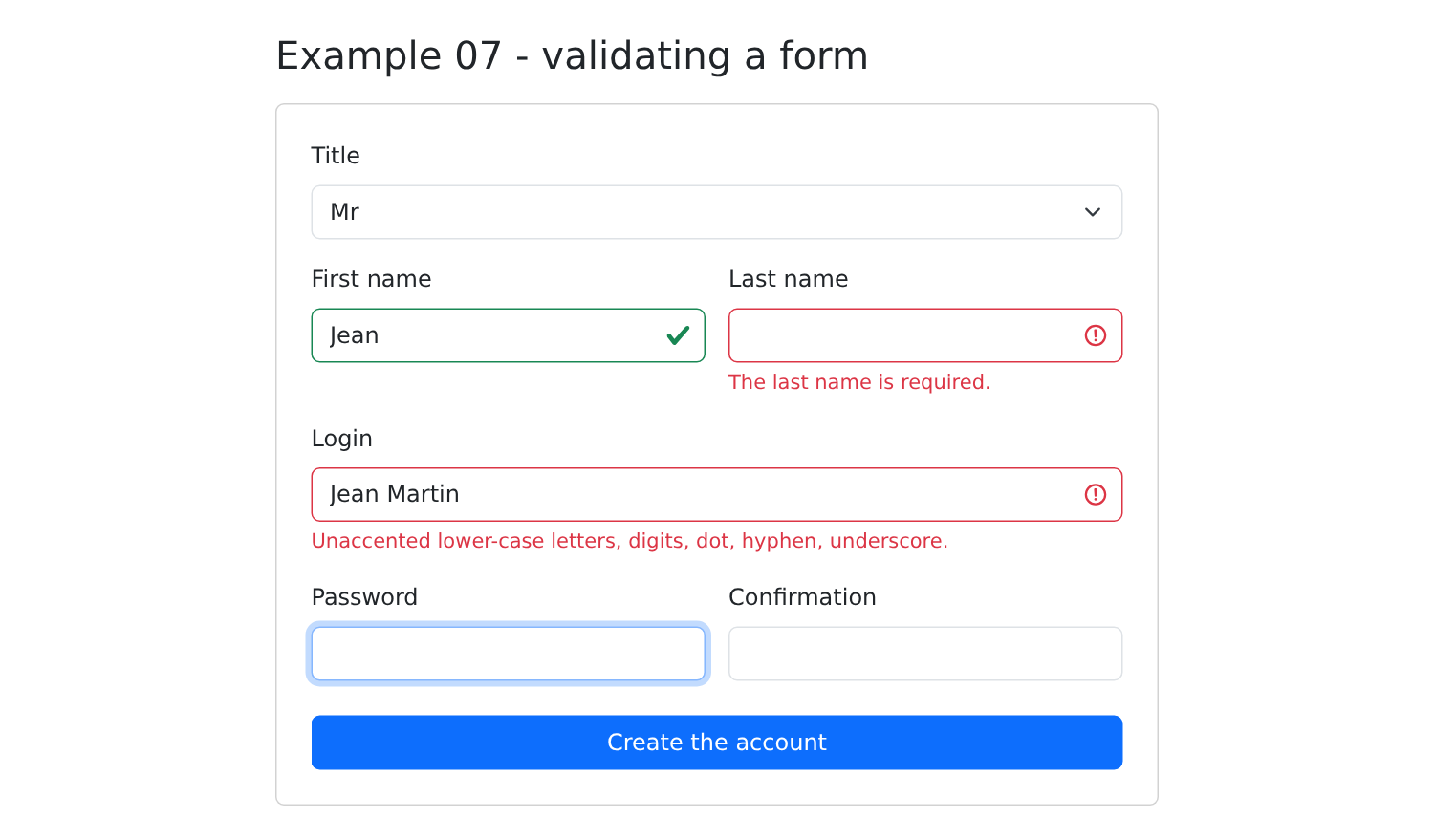
Only the fields that have been filled in are highlighted, in green or red. Click “Create the account” with the form empty: all fields become highlighted:
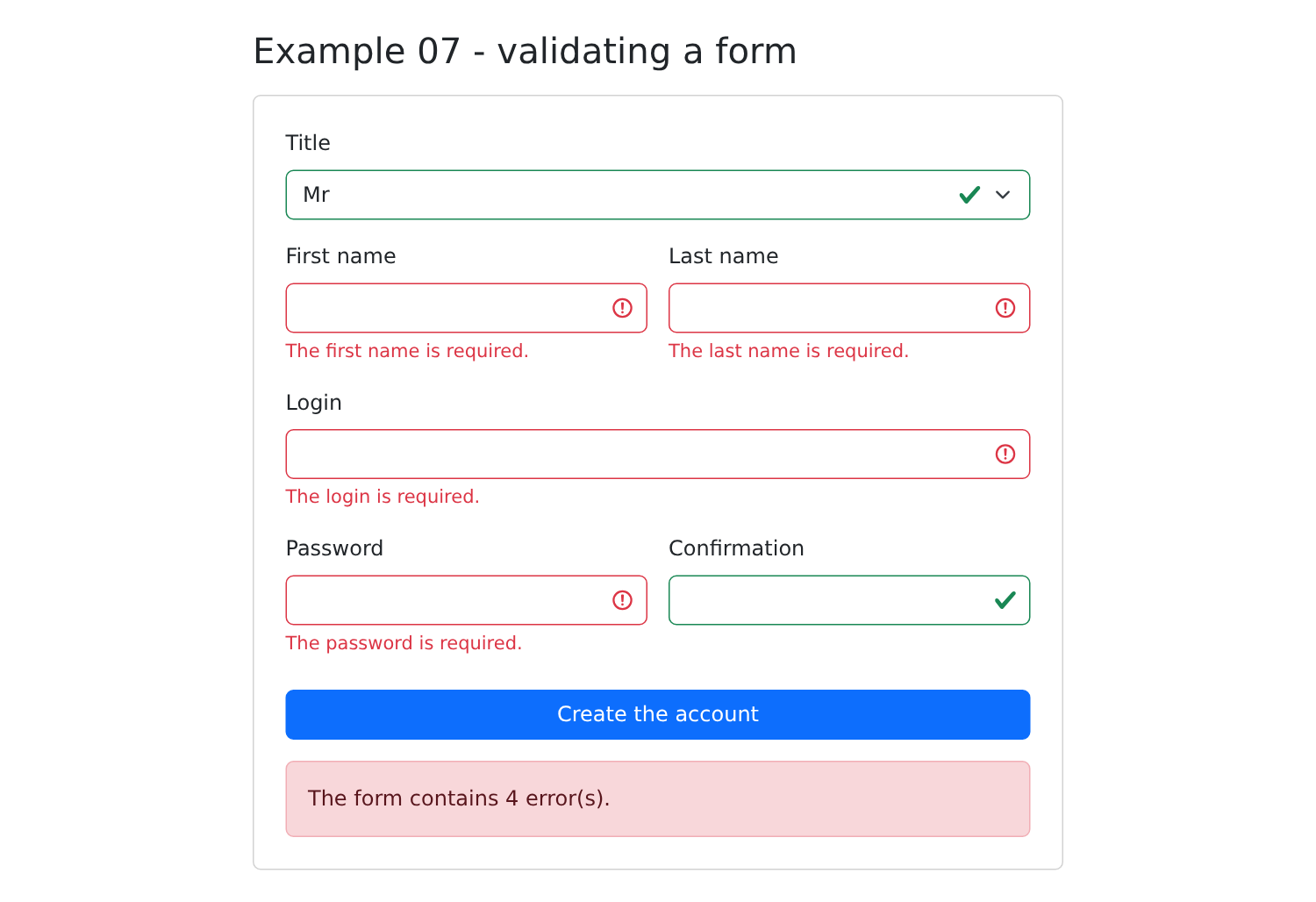
The empty confirmation field is “valid”: it matches the password, which is also empty. A valid form:
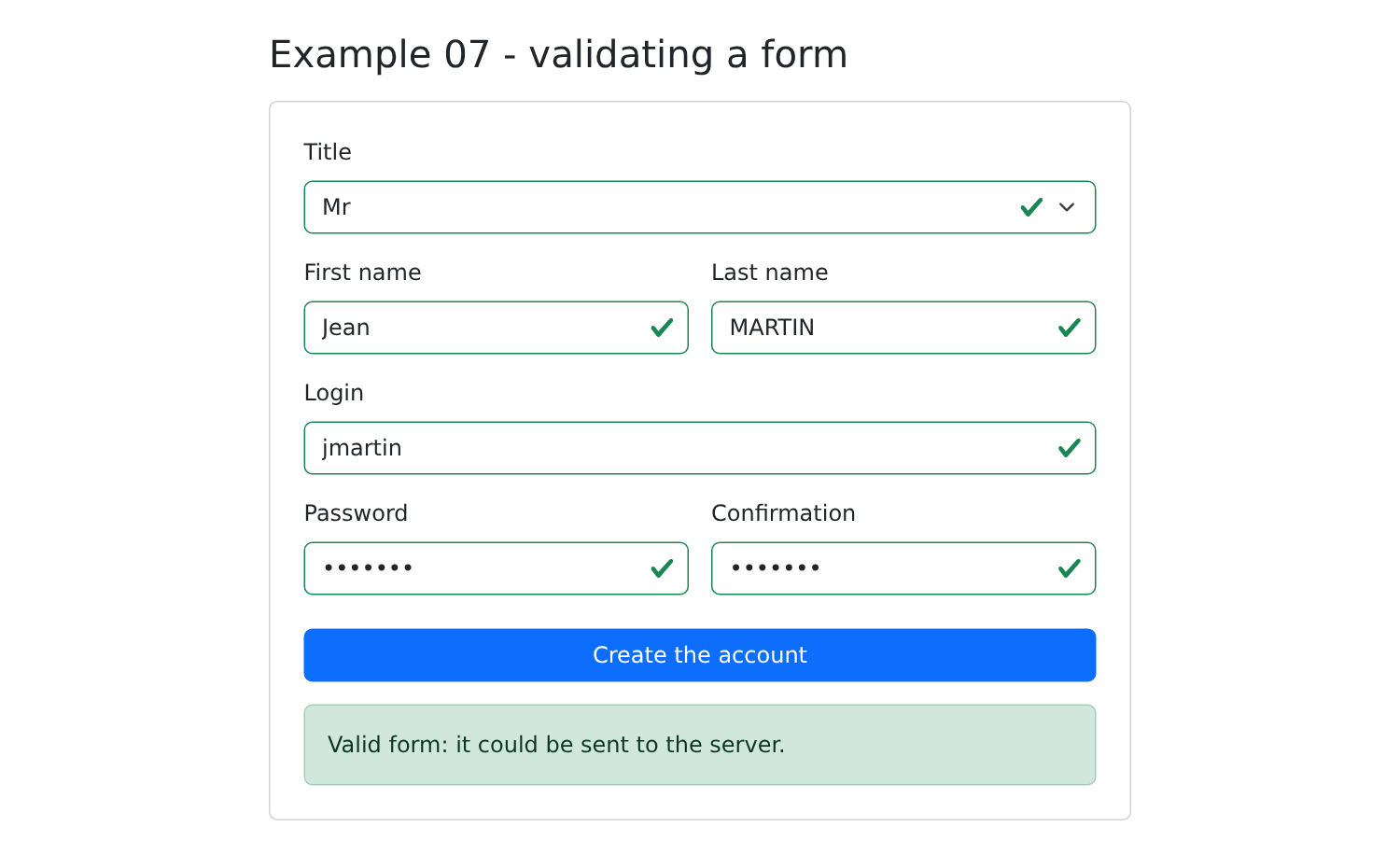
Before signal-based forms, [Angular] forms were written using [ngModel] (Example 05) or reactive forms ([ReactiveFormsModule]), the API being the most commonly used in existing applications. You’re bound to come across it: here is the form from Example 07, rewritten using it.
| // =========================================================================
// 08-reactive-forms/src/app/app.ts - the "historical" forms API
// -------------------------------------------------------------------------
// Before signal forms (Angular 22), forms were written
// with REACTIVE FORMS (ReactiveFormsModule). They are found in
// most existing applications: here is the form of example
// 07, rewritten with them.
// - a FormGroup gathers FormControls, one per field;
// - each FormControl has an initial value and VALIDATORS
// (Validators.required, Validators.maxLength(20)...);
// - in the template, [formGroup] links the <form> to the group, and
// formControlName="lastName" links an HTML field to a control;
// - the state of a control (value, errors, touched, invalid...) is an
// ordinary property, not a signal.
// =========================================================================
import { Component, inject, signal } from '@angular/core';
import { AbstractControl, FormBuilder, ReactiveFormsModule, ValidationErrors, Validators } from '@angular/forms';
const TITLES = ['Mr', 'Mme', 'Melle'];
// a "home-made" validator applies to the GROUP: it compares two of its fields.
// It returns null (no error) or an object describing the error.
function sameConfirmation(group: AbstractControl): ValidationErrors | null {
const password = group.get('password')?.value;
const confirmation = group.get('confirmation')?.value;
return password === confirmation ? null : { confirmation: true };
}
@Component({
selector: 'app-root',
imports: [ReactiveFormsModule],
templateUrl: './app.html',
})
export class App {
protected readonly titles = TITLES;
private readonly fb = inject(FormBuilder).nonNullable;
// the group: { name: [initial value, validators] }
protected readonly form = this.fb.group(
{
title: ['Mr', [Validators.required]],
firstName: ['', [Validators.required, Validators.maxLength(20)]],
lastName: ['', [Validators.required, Validators.maxLength(20)]],
login: ['', [Validators.required, Validators.pattern(/^[a-z0-9._-]{1,30}$/)]],
password: ['', [Validators.required, Validators.minLength(6)]],
confirmation: [''],
},
{ validators: sameConfirmation },
);
protected readonly success = signal(false);
protected readonly value = signal('');
// a field is flagged in error if it has been touched and it is invalid
protected inError(name: string): boolean {
const control = this.form.get(name);
return !!control && control.touched && control.invalid;
}
// (ngSubmit): all the fields become "touched", their errors appear
protected send(): void {
this.form.markAllAsTouched();
this.success.set(this.form.valid);
// getRawValue(): the value of the whole group, typed
this.value.set(JSON.stringify(this.form.getRawValue()));
}
}
|
- line 18: the classes for reactive forms, in [@angular/forms];
- lines 24–28: a “custom” validator. This is a function that takes a control (in this case, the entire group, to compare two of its fields) and returns [null] (no error) or an object describing the error;
- line 32: the component imports [ReactiveFormsModule], which provides the directives [[formGroup]] and [formControlName];
- line 37: [inject(FormBuilder)]: the component requests a service from [Angular] (dependency injection; see Example 14). [FormBuilder] helps generate forms; [nonNullable]: a reset field reverts to its initial value, not [null];
- Lines 40–50: The form is a group ([FormGroup]) of controls ([FormControl]), one per field. Each is described by its initial value and the list of its validators: [Validators.required], [Validators.maxLength(20)], [Validators.pattern(...)]... Line 49: the group’s validator;
- Lines 56–59: A field is flagged as an error if it has been modified and is invalid. The status of a control ([touched], [invalid], [errors], [value]) is a regular property, not a signal;
- Lines 62–67: The command. [markAllAsTouched()] displays all errors; [valid] indicates whether the entire group is valid; [getRawValue()] returns its value, typed according to the group’s description.
The template:
| <div class="container py-4" style="max-width: 640px">
<h1 class="h3 mb-3">Example 08 - reactive forms</h1>
<!-- [formGroup]: this <form> is driven by the "form" group -->
<form class="card p-4" novalidate [formGroup]="form" (ngSubmit)="send()">
<div class="mb-3">
<label class="form-label" for="title">Title</label>
<!-- formControlName: this field is the "title" control of the group -->
<select id="title" class="form-select" formControlName="title">
@for (t of titles; track t) {
<option [value]="t">{{ t }}</option>
}
</select>
</div>
<div class="row g-3 mb-3">
<div class="col-sm-6">
<label class="form-label" for="firstName">First name</label>
<input id="firstName" class="form-control" formControlName="firstName" [class.is-invalid]="inError('firstName')">
<!-- errors: an object whose each key is the name of a failing validator -->
<div class="invalid-feedback">
@if (form.controls.firstName.errors?.['required']) { The first name is required. }
@if (form.controls.firstName.errors?.['maxlength']) { 20 characters at most. }
</div>
</div>
<div class="col-sm-6">
<label class="form-label" for="lastName">Last name</label>
<input id="lastName" class="form-control" formControlName="lastName" [class.is-invalid]="inError('lastName')">
<div class="invalid-feedback">
@if (form.controls.lastName.errors?.['required']) { The last name is required. }
@if (form.controls.lastName.errors?.['maxlength']) { 20 characters at most. }
</div>
</div>
</div>
<div class="mb-3">
<label class="form-label" for="login">Login</label>
<input id="login" class="form-control" formControlName="login" [class.is-invalid]="inError('login')">
<div class="invalid-feedback">
@if (form.controls.login.errors?.['required']) { The login is required. }
@if (form.controls.login.errors?.['pattern']) { Unaccented lower-case letters, digits, dot, hyphen, underscore. }
</div>
</div>
<div class="row g-3 mb-4">
<div class="col-sm-6">
<label class="form-label" for="password">Password</label>
<input id="password" type="password" class="form-control" formControlName="password"
[class.is-invalid]="inError('password')">
<div class="invalid-feedback">
@if (form.controls.password.errors?.['required']) { The password is required. }
<!-- the errors also carry information: the required length -->
@if (form.controls.password.errors?.['minlength']; as e) { At least {{ e.requiredLength }} characters. }
</div>
</div>
<div class="col-sm-6">
<label class="form-label" for="confirmation">Confirmation</label>
<!-- the "confirmation" error is that of the GROUP (home-made validator) -->
<input id="confirmation" type="password" class="form-control" formControlName="confirmation"
[class.is-invalid]="form.controls.confirmation.touched && form.hasError('confirmation')">
<div class="invalid-feedback">The confirmation does not match the password.</div>
</div>
</div>
<button type="submit" class="btn btn-primary">Create the account</button>
@if (value()) {
<div class="alert mt-3 mb-0" [class]="success() ? 'alert-success' : 'alert-danger'">
{{ success() ? 'Valid form' : 'Invalid form' }}: <code>{{ value() }}</code>
</div>
}
</form>
</div>
|
- line 4: [[formGroup]] links the form HTML to the group; [(ngSubmit)] calls the submission method;
- line 8: [formControlName="title"] links the field to the group’s [title] control;
- line 17: the class [is-invalid] is set by the template using the method [inError];
- lines 20–21: [errors] is an object whose properties are named after failed validators ([required], [maxlength]...). A message is written for each possible error;
- line 49: an error also contains information: in this case, the required length;
- line 56: the confirmation error is that of the group: [form.hasError('confirmation')].
[npm start 08-reactive-forms]; a few errors, then a click on “Create the account”:
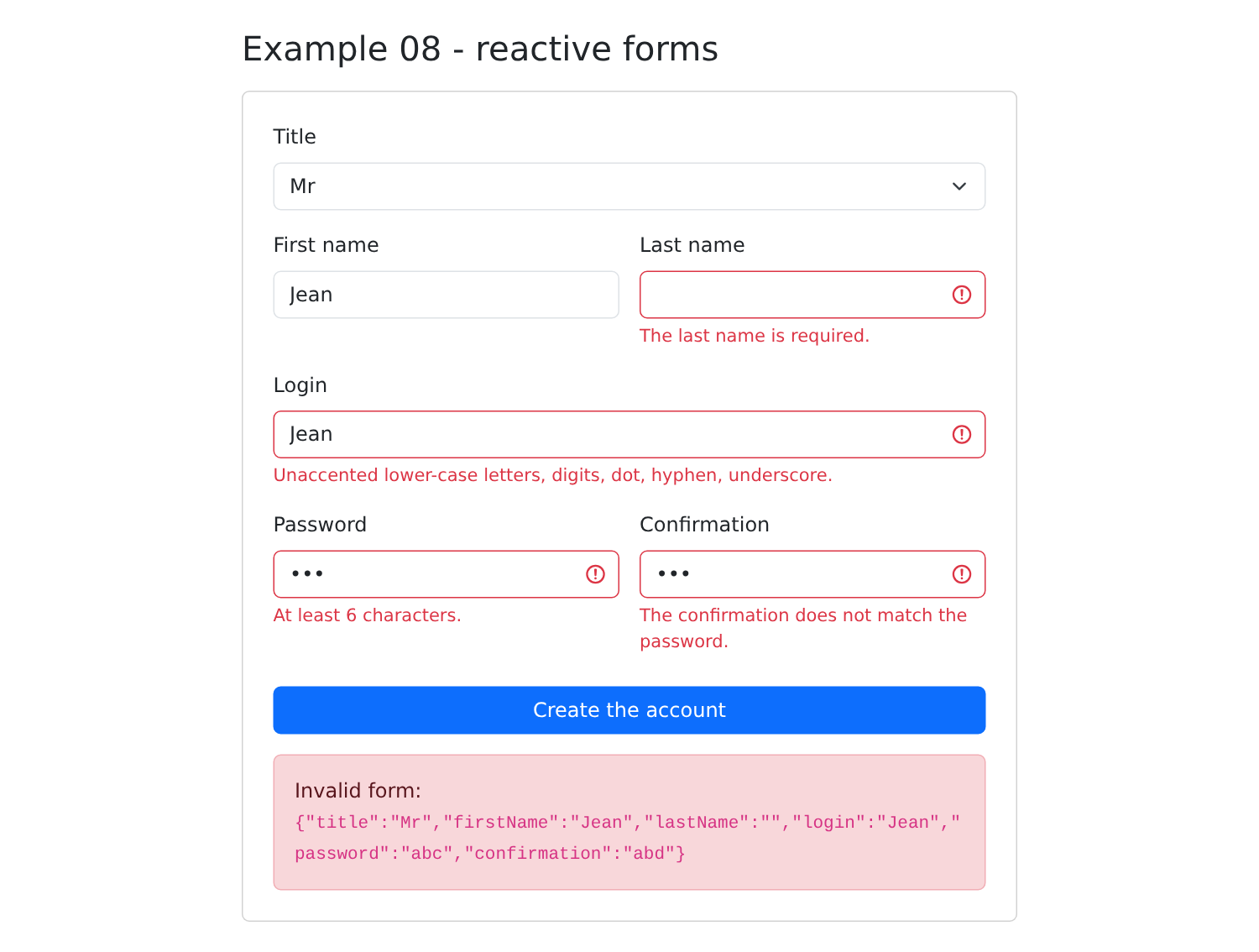
Both API perform the same function. Reactive forms describe the form in the code (controls that hold the value AND the state), while signal-driven forms start with the data (a model to which rules are attached) and integrate naturally with the signals from the rest of the application. These are the ones we’ll use in the rest of the course and in the case study.
2.9. Example 09: Pipes
A pipe formats a value for display without modifying it: [{{ value | pipe }}], or, with parameters, [{{ value | pipe: parameter1 : parameter2 }}]. [Angular] provides a dozen of them; you can write your own.
2.9.1. The Language of Pipes
Date and number pipes format values according to a language ([locale]). By default, [Angular] only supports U.S. English. For British English:
| import { LOCALE_ID } from '@angular/core';
import { registerLocaleData } from '@angular/common';
import localeEnGb from '@angular/common/locales/en-GB';
import { bootstrapApplication } from '@angular/platform-browser';
import { App } from './app/app';
registerLocaleData(localeEnGb);
bootstrapApplication(App, {
providers: [{ provide: LOCALE_ID, useValue: 'en-GB' }],
}).catch((error) => console.error(error));
|
- line 18: [registerLocaleData(localeEnGb)] loads the British rules: names of days and months, order of day and month, date formats, etc.;
- line 21: a provider that assigns a value to the token [LOCALE_ID]: the default language used by the pipes. [{ provide: token, useValue: value }] is the simplest form of a provider; Example 14 will revisit this.
2.9.2. Two Custom Pipes
A pipe is a class decorated by [@Pipe], whose method [transform] receives the value placed before the slash, along with any parameters:
| // =========================================================================
// 09-pipes/src/app/pipes/time-range.pipe.ts - a "home-made" pipe
// -------------------------------------------------------------------------
// A pipe is a class decorated by @Pipe, whose transform() method
// receives the value placed BEFORE the bar (and, possibly,
// parameters) and returns what must be displayed:
// {{ slot | timeRange }} -> "8:00 - 8:20"
// {{ slot | timeRange: 'start' }} -> "8:00"
// A pipe is "pure" by default: Angular only calls transform() again if the
// value or the parameters have CHANGED (same object = same result).
// =========================================================================
import { Pipe, PipeTransform } from '@angular/core';
export interface Slot {
startHour: number;
startMinute: number;
endHour: number;
endMinute: number;
}
// "8:05" rather than "8:5"
function time(h: number, m: number): string {
return `${h}:${String(m).padStart(2, '0')}`;
}
@Pipe({ name: 'timeRange' })
export class TimeRangePipe implements PipeTransform {
transform(c: Slot, part: 'all' | 'start' | 'end' = 'all'): string {
switch (part) {
case 'start':
return time(c.startHour, c.startMinute);
case 'end':
return time(c.endHour, c.endMinute);
default:
return `${time(c.startHour, c.startMinute)} - ${time(c.endHour, c.endMinute)}`;
}
}
}
|
- line 27: the pipe’s name, the one written in the templates;
- line 29: [transform(value, part)] returns what should be displayed. The parameter is optional (default value ['all']): [{{ slot | timeRange }}] displays [8:00 - 8:20], [{{ slot | timeRange: 'start' }}] displays [8:00].
A pipe is pure by default: [Angular] only calls [transform] if the value or one of the parameters has changed (a different object, a different string). This is what makes it more efficient than a component method called within the template (such as [format(...)] in Example 02), which is executed every time the component is checked.
A second pipe, which calculates initials:
| // 09-pipes/src/app/pipes/initials.pipe.ts - "Marie PELISSIER" -> "MP"
import { Pipe, PipeTransform } from '@angular/core';
@Pipe({ name: 'initials' })
export class InitialsPipe implements PipeTransform {
transform(fullName: string): string {
return fullName
.split(/\s+/)
.filter((word) => word !== '')
.map((word) => word[0].toUpperCase())
.join('');
}
}
|
2.9.3. The component and its template
| // =========================================================================
// 09-pipes/src/app/app.ts - formatting values in a template
// -------------------------------------------------------------------------
// {{ value | pipe }} or {{ value | pipe: parameter1 : parameter2 }}:
// a PIPE transforms a value for display, without modifying it. Angular
// provides a dozen of them (@angular/common module); you can write
// your own (see pipes/). A component imports the pipes it uses.
// =========================================================================
import { Component, signal } from '@angular/core';
import {
CurrencyPipe,
DatePipe,
DecimalPipe,
JsonPipe,
KeyValuePipe,
LowerCasePipe,
PercentPipe,
SlicePipe,
TitleCasePipe,
UpperCasePipe,
} from '@angular/common';
import { Slot, TimeRangePipe } from './pipes/time-range.pipe';
import { InitialsPipe } from './pipes/initials.pipe';
@Component({
selector: 'app-root',
imports: [
CurrencyPipe,
DatePipe,
DecimalPipe,
JsonPipe,
KeyValuePipe,
LowerCasePipe,
PercentPipe,
SlicePipe,
TitleCasePipe,
UpperCasePipe,
TimeRangePipe,
InitialsPipe,
],
templateUrl: './app.html',
})
export class App {
protected readonly now = signal(new Date());
protected readonly day = '2026-10-05'; // a date in the format of the RdvMedecins API
protected readonly price = 1234.5;
protected readonly rate = 0.055;
protected readonly name = 'marie pelissier';
protected readonly doctor = { title: 'Mme', firstName: 'Marie', lastName: 'PELISSIER' };
protected readonly slots: Slot[] = [
{ startHour: 8, startMinute: 0, endHour: 8, endMinute: 20 },
{ startHour: 8, startMinute: 20, endHour: 8, endMinute: 40 },
{ startHour: 14, startMinute: 5, endHour: 14, endMinute: 25 },
];
protected readonly languages = ['TypeScript', 'HTML', 'CSS', 'JavaScript', 'SQL'];
protected refresh(): void {
this.now.set(new Date());
}
}
|
- Lines 11–22 and 28–41: A component imports the pipes it uses—those from [Angular] ([@angular/common])—as its own;
- line 46: a date in the format of API [RdvMedecins]: the [date] pipe accepts a [Date] object, a number (milliseconds), or a ISO string.
| <div class="container py-4" style="max-width: 820px">
<h1 class="h3 mb-3">Example 09 - pipes</h1>
<table class="table table-sm align-middle">
<thead><tr><th>In the template</th><th>Displayed</th></tr></thead>
<tbody>
<tr><td><code>{{ '{{' }} now() | date {{ '}}' }}</code></td><td>{{ now() | date }}</td></tr>
<tr><td><code>{{ '{{' }} now() | date: 'fullDate' {{ '}}' }}</code></td><td>{{ now() | date: 'fullDate' }}</td></tr>
<tr><td><code>{{ '{{' }} now() | date: 'HH:mm:ss' {{ '}}' }}</code></td><td>{{ now() | date: 'HH:mm:ss' }}</td></tr>
<tr><td><code>{{ '{{' }} day | date: 'EEEE d MMMM y' {{ '}}' }}</code></td><td>{{ day | date: 'EEEE d MMMM y' }}</td></tr>
<tr><td><code>{{ '{{' }} day | date: 'longDate' : '' : 'en-US' {{ '}}' }}</code></td><td>{{ day | date: 'longDate' : '' : 'en-US' }}</td></tr>
<tr><td><code>{{ '{{' }} price | currency: 'EUR' {{ '}}' }}</code></td><td>{{ price | currency: 'EUR' }}</td></tr>
<tr><td><code>{{ '{{' }} price | number: '1.0-0' {{ '}}' }}</code></td><td>{{ price | number: '1.0-0' }}</td></tr>
<tr><td><code>{{ '{{' }} rate | percent: '1.1-1' {{ '}}' }}</code></td><td>{{ rate | percent: '1.1-1' }}</td></tr>
<tr><td><code>{{ '{{' }} name | uppercase {{ '}}' }}</code></td><td>{{ name | uppercase }}</td></tr>
<tr><td><code>{{ '{{' }} name | titlecase {{ '}}' }}</code></td><td>{{ name | titlecase }}</td></tr>
<tr><td><code>{{ '{{' }} 'APPOINTMENT' | lowercase {{ '}}' }}</code></td><td>{{ 'APPOINTMENT' | lowercase }}</td></tr>
<tr><td><code>{{ '{{' }} languages | slice: 0 : 3 {{ '}}' }}</code></td><td>{{ languages | slice: 0 : 3 }}</td></tr>
<tr><td><code>{{ '{{' }} doctor | json {{ '}}' }}</code></td><td><code>{{ doctor | json }}</code></td></tr>
<!-- two pipes in a row: the result of the first one goes to the second -->
<tr><td><code>{{ '{{' }} name | titlecase | initials {{ '}}' }}</code></td><td>{{ name | titlecase | initials }}</td></tr>
</tbody>
</table>
<h2 class="h6">keyvalue: iterating over the properties of an object</h2>
<ul>
@for (p of doctor | keyvalue; track p.key) {
<li>{{ p.key }} = {{ p.value }}</li>
}
</ul>
<h2 class="h6">A home-made pipe: timeRange</h2>
<ul>
@for (c of slots; track $index) {
<li>{{ c | timeRange }} (start: {{ c | timeRange: 'start' }})</li>
}
</ul>
<button class="btn btn-sm btn-outline-primary" (click)="refresh()">Refresh the time</button>
</div>
|
- lines 6–20: one line per pipe: the expression, followed by its result. [{{ '{{' }}] displays the characters [{{], which cannot be written as-is in a template;
- Lines 6–10: the pipe [date], with a predefined format ([fullDate], [longDate]...) or a composite format ([EEEE d MMMM y], [HH:mm:ss]). Line 10: its second and third parameters are the time zone and the language: in this case, U.S. English ([en-US]), for this date only;
- line 11: [currency], an amount in a currency;
- line 12: [number: '1.0-0']: at least 1 digit before the decimal point, between 0 and 0 digits after: rounded to the nearest whole number;
- line 13: [percent], a percentage;
- lines 14–16: uppercase letters, uppercase initials, lowercase letters;
- line 17: [slice], part of a list or string;
- line 18: [json], an object in the format JSON (very useful for debugging);
- line 20: two pipes in a row: the result of the first is passed to the second;
- line 26: [keyvalue] converts an object into a list of [{ key, value }] pairs, which [@for] can iterate over;
- line 34: our pipe [timeRange], first without and then with a parameter.
[npm start 09-pipes]:
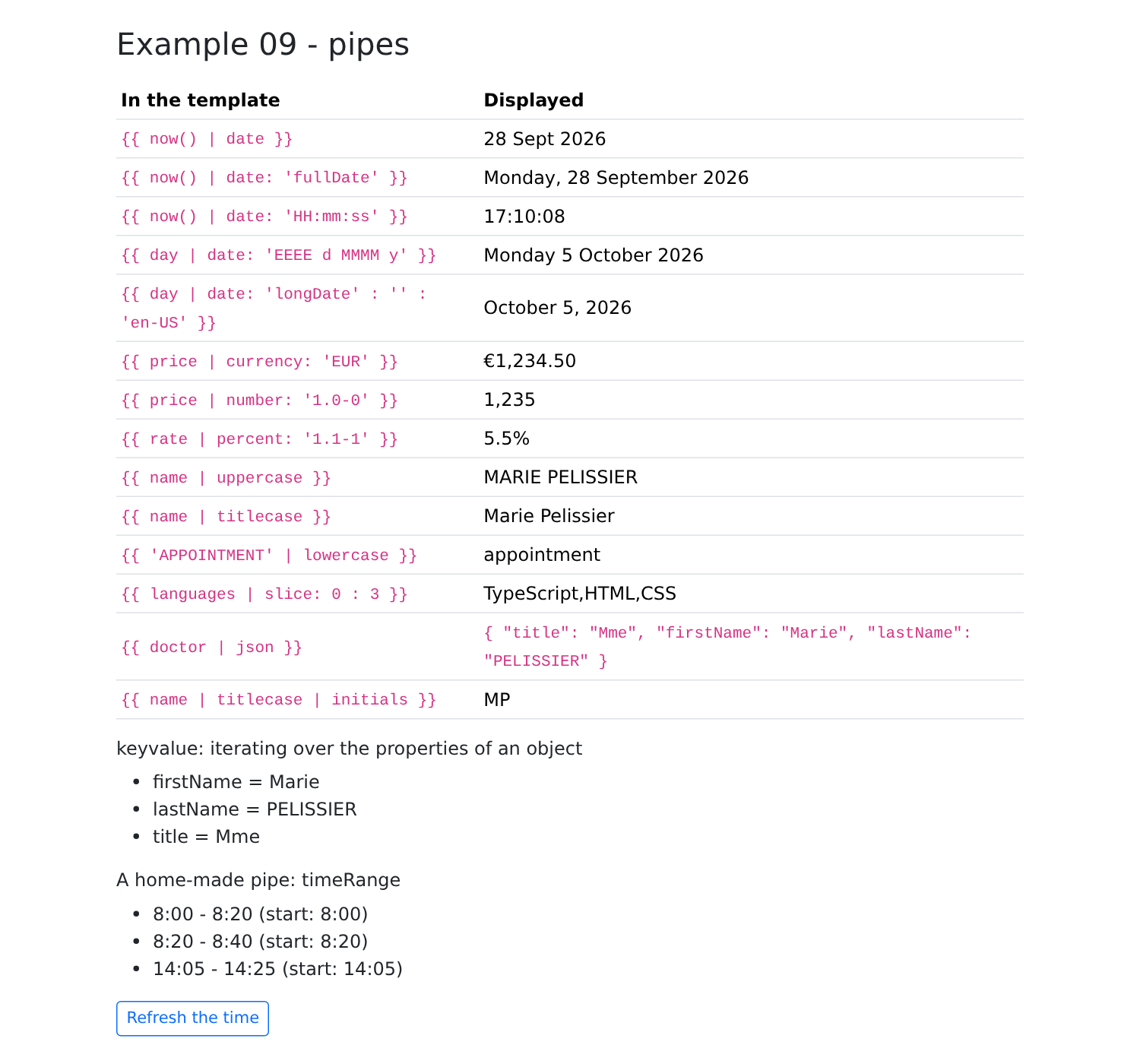
[Angular] also provides the pipe [async], which displays the latest value of an observable (see Example 19), and [i18nPlural] for plurals. [ngx-translate] provides the pipe [translate], which translates text (Example 21).