11. Deployment
In development, two servers work together: the [Angular] development server (the client) and the JSON server (the API). In production, there is only one:
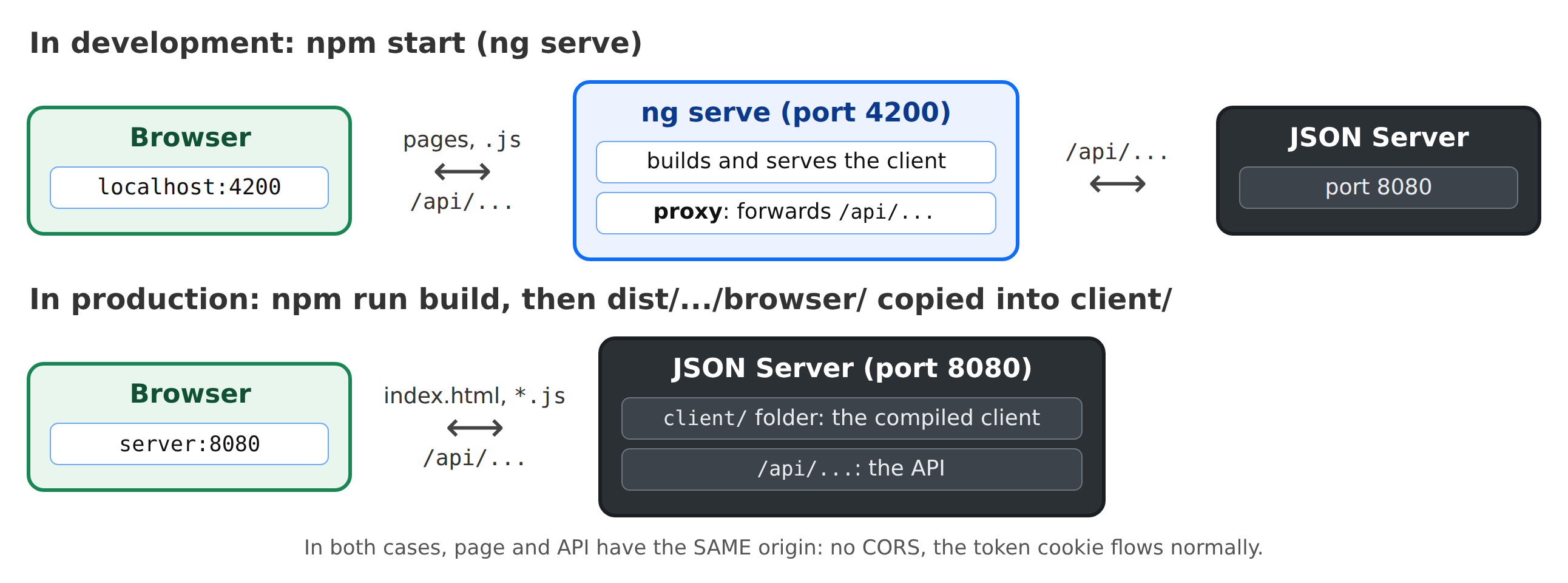
1. Build the client. In the [rdvmedecins-angular] folder:
The console displays:
The [dist/rdvmedecins-angular/browser/] folder contains the entire application: a [index.html] page, a stylesheet, and optimized [JavaScript] files (the code from [Angular], the router, [ngx-translate]... and ours):
- The initial files are downloaded at startup: approximately 135 KB once compressed by the server;
- each page loaded on demand ([loadComponent]) has its own file, downloaded on the first visit;
- the name of each file contains a hash of its contents ([main-3NXKYGU5.js]): a new version will have a different name, and a browser will never be able to cache an outdated version;
- the compiler has verified the budgets set in [angular.json]: a warning would indicate that an application has become too large.
2. Upload it to the server. Copy the CONTENTS of the [dist/rdvmedecins-angular/browser/] folder to a [client/] folder at the root of the JSON server ([rdvmedecins-nestjs-json/client/index.html], [rdvmedecins-nestjs-json/client/main-3NXKYGU5.js]...), then restart the server. It displays:
The complete application is now available at http://localhost:8080. The server serves the client’s files and returns [index.html] for any other URL outside of /api: reloading the /schedule page works (it is the client’s browser that displays it). For the curious reader, it is the [src/web/client-spa.ts] file on the server that performs this task.
3. In a real production environment, don’t forget the file [.env] on the server:
- a long, random [JWT_SECRET];
- an empty [CAPTCHA_TEST];
- [COOKIE_SECURE=true] if the site is served via HTTPS (it must be: passwords are being transmitted);
- [TRUST_PROXY=true] if the server is behind a proxy ([nginx]...), so that the attempt limit sees the clients’ actual IP address.
We then launch the compiled server: [npm run build], followed by [npm run start:prod].