19. Vue.js 客户端改进
19.1. 简介
我们将使用开发服务器测试 [vuejs-21] 项目。因此,我们需要服务器再次发送 CORS 头部。税费计算服务器 14 版的 [config.json] 文件必须允许这些头部:
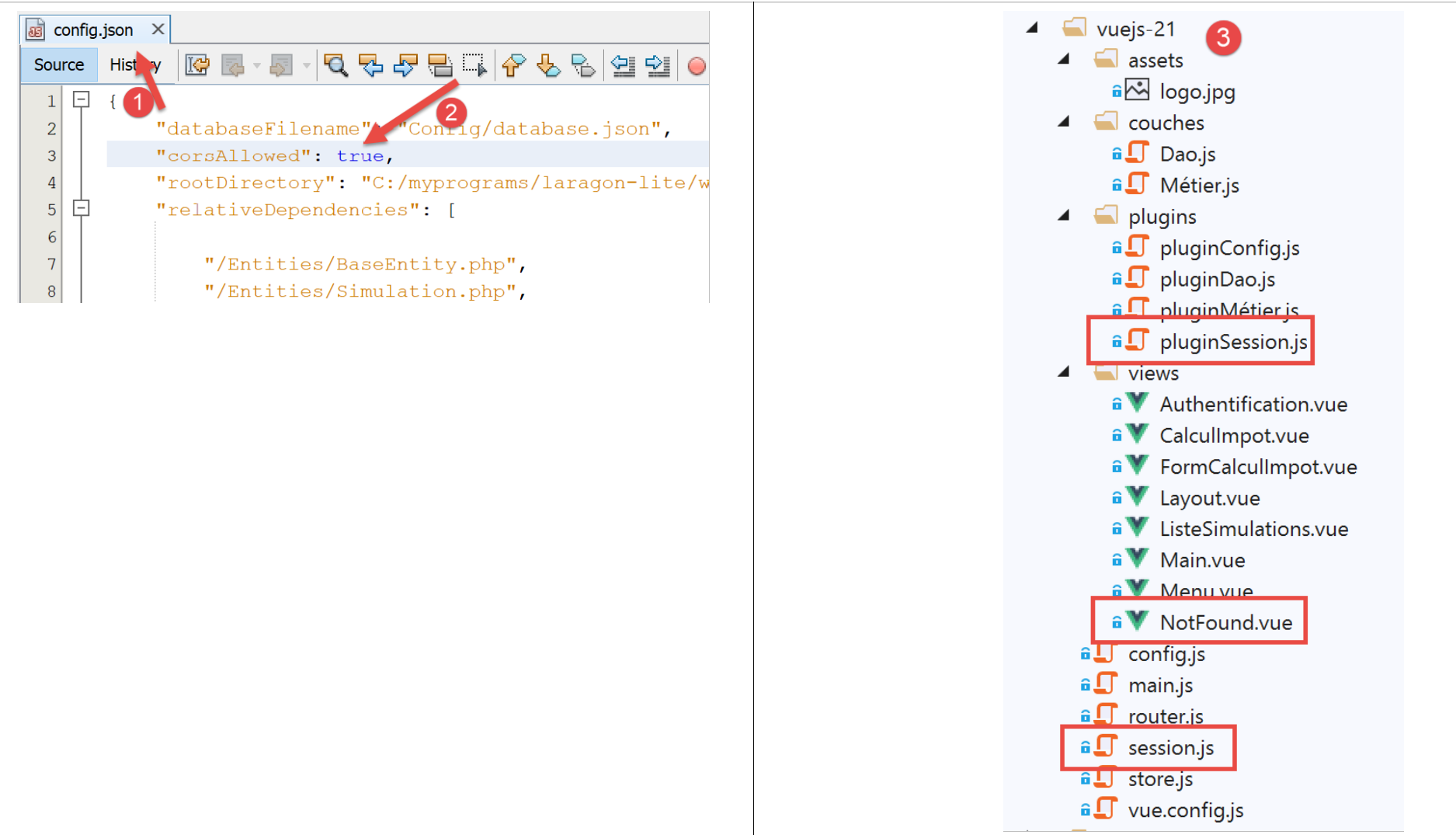
[vuejs-21] 项目最初是通过复制 [vuejs-20] 项目创建的。随后对其进行了修改 [3]。
出现了新文件:
- [session.js]:导出一个 [session] 对象,用于封装当前会话的相关信息;
- [pluginSession]:使上述 [session] 对象可在视图的 [$session] 属性中使用;
- [NotFound.vue]:当用户手动请求不存在的 URL 时显示的新视图;
以下文件将被修改:
- [main.js]:将初始化当前会话,并在用户手动输入 URL 时恢复该会话;
- [router.js]:添加了用于处理用户输入的 URL 的控制逻辑;
- [store.js]:新增了一个 mutation;
- [config.js]:新增了一项配置;
- 各种视图,主要用于在应用程序生命周期的关键点保存当前会话。随后,每当用户手动输入 URL 时,会话即被恢复;
19.2. [Vuex] 存储
[./store] 脚本的演变如下:
// plugin Vuex
import Vue from 'vue'
import Vuex from 'vuex'
Vue.use(Vuex);

// store Vuex
const store = new Vuex.Store({
  state: {
    // le tableau des simulations
    simulations: [],
    // le n° de la dernière simulation
    idSimulation: 0
  },
  mutations: {
    // suppression ligne n° index
    deleteSimulation(state, index) {
      ...
    },
    // ajout d'une simulation
    addSimulation(state, simulation) {
      ...
    },
    // nettoyage state
    clear(state) {
      // plus de simulations
      state.simulations = [];
      // la numérotation des simulations repart de 0
      state.idSimulation = 0;
    }
  }
});
// export de l'objet [store]
export default store;
- 第 24-29 行:[clear] 赋值语句会删除已保存的模拟列表,并将最后一次模拟的编号重置为 0。
19.3. 会话
需要会话的原因在于,当用户在浏览器的地址栏中输入 URL 时,[main.js] 脚本会被再次执行。然而,该脚本包含以下指令:
// store Vuex
import store from './store'
此语句导入以下 [./store] 文件:
// plugin Vuex
import Vue from 'vue'
import Vuex from 'vuex'
Vue.use(Vuex);

// store Vuex
const store = new Vuex.Store({
  state: {
    // le tableau des simulations
    simulations: [],
    // le n° de la dernière simulation
    idSimulation: 0
  },
  mutations: {
    ...
  }
});
// export de l'objet [store]
export default store;
如第 7–13 行所示,我们导入了一个空的模拟数组。因此,如果在用户在浏览器地址栏中输入 URL 之前存在模拟数据,输入之后这些数据便不复存在。其设计思路是:
- 使用一个会话来存储用户手动输入 URL 时需要保留的信息;
- 在应用程序的关键节点保存这些信息;
- 在 [main.js] 中恢复这些信息,该文件会在用户手动输入 URL 时始终被执行;
[./session] 脚本如下:
// on importe le store Vuex
import store from './store'
// on importe la configuration
import config from './config';

// l'objet [session]
const session = {
  // session démarrée
  started: false,
  // authentification
  authenticated: false,
  // heure de sauvegarde
  saveTime: "",
  // couche [métier]
  métier: null,
  // état Vuex
  state: null,

  // sauvegarde de la session dans une chaîne jSON
  save() {
    // on ajoute à la session quelques proprités
    this.saveTime = Date.now();
    this.state = store.state;
    // on la transforme en jSON
    const json = JSON.stringify(this);
    // on la stocke sur le navigateur
    localStorage.setItem("session", json);
    // eslint-disable-next-line no-console
    console.log("session save", json);
  },

  // restauration de la session
  restore() {
    // on récupère la session jSON à partir du navigateur
    const json = localStorage.getItem("session")
    // si on a récupéré qq chose
    if (json) {
      // on restaure toutes les clés de la session
      const restore = JSON.parse(json);
      for (var key in restore) {
        if (restore.hasOwnProperty(key)) {
          this[key] = restore[key];
        }
      }
      // si on a dépassé une certaine durée d'inactivité depuis le début de la session, on repart de zéro
      let durée = Date.now() - this.saveTime;
      if (durée > config.duréeSession) {
        // on vide la session - elle sera également sauvegardée
        session.clear();
      } else {
        // on régénère le store Vuex
        store.replaceState(JSON.parse(JSON.stringify(this.state)));
      }
    }
    // eslint-disable-next-line no-console
    console.log("session restore", this);
  },

    // on nettoie la session
  clear() {
    // eslint-disable-next-line no-console
    console.log("session clear");
    // raz de certains champs de la session
    this.authenticated = false;
    this.saveTime = "";
    this.started = false;
    if (this.métier) {
      // on réinitialise le champ [taxAdminData]
      this.métier.taxAdminData = null;
    }
    // le store Vuex est nettoyé également
    store.commit("clear");
    // on sauvegarde la nouvelle session
    this.save();
  },
}

// export de l'objet [session]
export default session;
注释
- 第 2 行:session 还将封装 [Vuex] 存储(模拟列表、上次执行的模拟的 ID);
- 第 7-17 行:会话存储的信息:
- [started]:是否已与服务器建立 JSON 会话;
- [authenticated]:用户是否已通过身份验证;
- [saveTime]:上次保存的日期(以毫秒为单位);
- [business]:指向 [business] 层的引用。其中包含用于计算税款的 [taxAdminData] 数据;
- [state]:[Vuex] 存储的状态(模拟列表、上次执行的模拟编号);
- 第 20–30 行:[save] 方法将会话保存到运行应用程序的浏览器本地;
- 第 22 行:记录保存时间;
- 第 23 行:获取 [Vuex] 存储的 [state];
- 第 25 行:生成会话的 JSON 字符串;
- 第 27 行:将其以 [session] 键为标识存储在浏览器的本地;
- 第 33–57 行:[restore] 方法从浏览器中的本地存储中恢复会话;
- 第 35 行:检索本地 JSON 备份;
- 第 37 行:如果检索到了数据;
- 第 39–44 行:重建 [session] 对象;
- 第 46 行:计算自上次备份以来的经过时间;
- 第 47–50 行:如果该时长超过配置中设定的 [config.sessionDuration] 值,则重置会话(第 49 行)并保存当前状态;
- 第 52 行:否则,重新生成 [Vuex] 存储的 [state] 属性;
- 第 60–75 行:[clear] 方法重置会话;
- 第 64–70 行:将会话属性重置为初始值;
- 第 72 行:[Vuex] 存储器亦被重置;
- 第 74 行:保存新的会话;
19.4. [config] 配置文件
[./config] 文件的演变如下:
// utilisation de la bibliothèque [axios]
const axios = require('axios');
// timeout des requêtes HTTP
axios.defaults.timeout = 2000;
...

// export de la configuration
export default {
  // objet [axios]
  axios: axios,
  // délai maximal d'inactivité de la session : 5 mn = 300 s = 300000 ms
  duréeSession: 300000
}
- 第 12 行:我们将像管理 Web 会话一样管理应用程序会话。在此,我们将最大闲置时长设置为 5 分钟;
19.5. [pluginSession] 插件
与以往多次实现的情况一样,[pluginSession] 插件将允许视图通过 [this.$session] 属性访问会话:
export default {
  install(Vue, session) {
    // ajoute une propriété [$session] à la classe vue
    Object.defineProperty(Vue.prototype, '$session', {
      // lorsque Vue.$session est référencé, on rend le 2ième paramètre [session]
      get: () => session,
    })
  }
}
19.6. 主脚本 [main]
主脚本 [./main.js] 的演变过程如下:
// log de démarrage
// eslint-disable-next-line no-console
console.log("main started");

// imports
import Vue from 'vue'

...

// instanciation couche [métier]
import Métier from './couches/Métier';
const métier = new Métier();

// plugin [métier]
import pluginMétier from './plugins/pluginMétier'
Vue.use(pluginMétier, métier)

// store Vuex
import store from './store'

// session
import session from './session';
import pluginSession from './plugins/pluginSession'
Vue.use(pluginSession, session)

// on restore la session avant de redémarrer
session.restore();

// on restaure la couche [métier]
if (session.métier && session.métier.taxAdminData) {
  métier.setTaxAdminData(session.métier.taxAdminData);
}

// démarrage de l'UI
new Vue({
  el: '#app',
  // le routeur
  router: router,
  // le store Vuex
  store: store,
  // la vue principale
  render: h => h(Main),
})

// log de fin
// eslint-disable-next-line no-console
console.log("main terminated, session=", session);
- 第 19 行:导入会话;
- 第 20 行:导入插件;
- 第 21 行:将 [pluginSession] 插件集成到 [Vue] 中。执行此指令后,所有视图的 [$session] 属性中都将包含会话数据;
- 第 27 行:恢复会话。第 11 行导入的会话将使用其上次保存的内容进行初始化;
- 第 16 行之后,视图拥有一个在第 12 行初始化的 [$métier] 属性。该属性不包含用于计算税款的 [taxAdminData] 信息;
- 第 30–32 行:如果刚刚执行的恢复操作已恢复 [session.métier.taxAdminData] 属性,则视图的 [$métier] 属性将使用该值进行初始化;
19.7. 路由文件 [router]
路由文件 [./router] 的演变如下:
// imports
import Vue from 'vue'
import VueRouter from 'vue-router'
// les vues
import Authentification from './views/Authentification'
import CalculImpot from './views/CalculImpot'
import ListeSimulations from './views/ListeSimulations'
import NotFound from './views/NotFound'
// la session
import session from './session'

// plugin de routage
Vue.use(VueRouter)

// les routes de l'application
const routes = [
  // authentification
  { path: '/', name: 'authentification', component: Authentification },
  { path: '/authentification', name: 'authentification', component: Authentification },
  // calcul de l'impôt
  {
    path: '/calcul-impot', name: 'calculImpot', component: CalculImpot,
    meta: { authenticated: true }
  },
  // liste des simulations
  {
    path: '/liste-des-simulations', name: 'listeSimulations', component: ListeSimulations,
    meta: { authenticated: true }
  },
  // fin de session
  {
    path: '/fin-session', name: 'finSession'
  },
  // page inconnue
  {
    path: '*', name: 'notFound', component: NotFound,
  },
]

// le routeur
const router = new VueRouter({
  // les routes
  routes,
  // le mode d'affichage des URL
  mode: 'history',
  // l'URL de base de l'application
  base: '/client-vuejs-impot/'
})

// vérification des routes
router.beforeEach((to, from, next) => {
  // eslint-disable-next-line no-console
  console.log("router to=", to, "from=", from);
  // route réservée aux utilisateurs authentifiés ?
  if (to.meta.authenticated && !session.authenticated) {
    next({
      // on passe à l'authentification
      name: 'authentification',
    })
    // retour à la boucle événementielle
    return;
  }
  // cas particulier de la fin de session
  if (to.name === "finSession") {
    // on nettoie la session
    session.clear();
    // on va sur la vue [authentification]
    next({
      name: 'authentification',
    })
    // retour à la boucle événementielle
    return;
  }
  // autres cas - vue suivante normale du routage
  next();
})

// export du router
export default router
注释
- 第 16–38 行:部分路由已通过添加额外信息进行了增强;
- 第 19 行:创建了一条新路由,用于跳转至 [Authentication] 视图;
- 第 21–24 行:通往 [TaxCalculation] 视图的路由现在具有一个 [meta] 属性(此名称为必填项)。该对象的内容可以是任意值,由开发者设定;
- 第 23 行:我们在 [meta] 上添加 [authenticated] 属性(该名称可以是任意名称)。这意味着要访问 [TaxCalculation] 视图,用户必须经过身份验证;
- 第 26–29 行:我们对通往 [ListeSimulations] 视图的路由也进行同样的设置。在此处,用户同样必须经过身份验证;
- [meta.authenticated] 属性将确保:若用户未通过身份验证,即使手动输入 [CalculImpot] 和 [ListeSimulations] 视图的 URL,也无法访问这些视图;
- 第 51–76 行:[beforeEach] 方法在视图路由之前执行。此时正是进行验证的合适时机;
- [to]:若未执行任何操作,则转至下一条路由;
- [from]:上一个显示的路由;
- [next]:用于更改下个显示路由的函数;
- 第 55 行:我们检查下一条路由是否要求用户经过身份验证;
- 第 56–59 行:如果需要,且用户未经过身份验证,则将下一个路由更改为 [Authentication] 视图;
- 第 64–73 行:处理第 30–32 行中 [endSession] 路由的特殊情况。该路由没有关联的视图;
- 第 66 行:将会话重置为初始值;
- 第 68–70 行:将 [Authentication] 视图设为下一个视图;
- 第 75 行:如果前两种情况均不适用,则直接转至路由文件指定的路由;
- 第 35–37 行:若用户输入的路由与任何已知路由均不匹配,则提供 [NotFound] 视图。该视图在第 8 行被导入。路由按路由文件中的顺序进行检查。因此,若执行到第 36 行,则意味着请求的路由不在第 18–33 行中的任何路由之列;
19.8. [NotFound]视图
如果用户输入的路由与任何已知路由都不匹配,则显示 [NotFound] 视图:
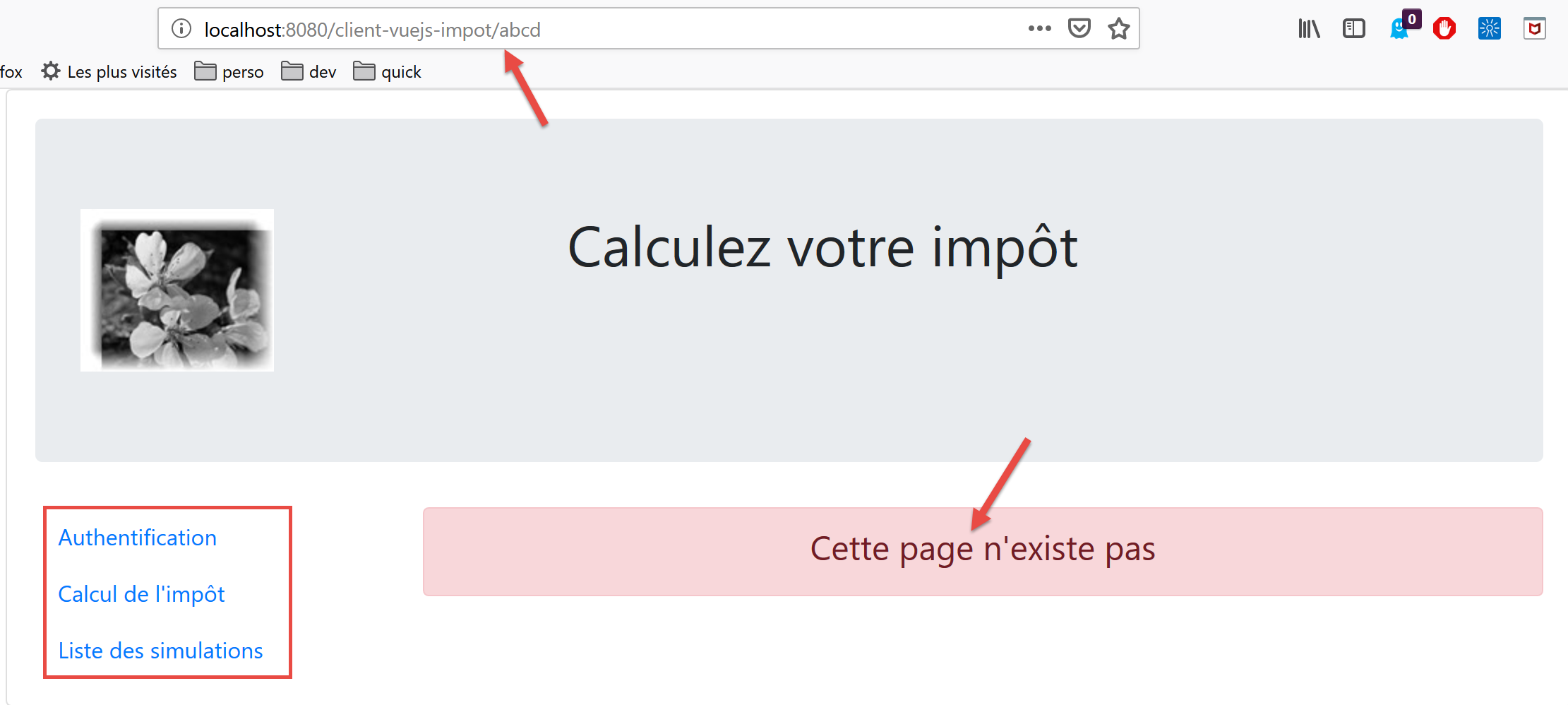
视图代码如下:
<!-- définition HTML de la vue -->
<template>
  <!-- mise en page -->
  <Layout :left="true" :right="true">
    <!-- alerte dans la colonne de droite -->
    <template slot="right">
      <!-- message sur fond jaune -->
      <b-alert show variant="danger" align="center">
        <h4>Cette page n'existe pas</h4>
      </b-alert>
    </template>
    <!-- menu de navigation dans la colonne de gauche -->
    <Menu slot="left" :options="options" />
  </Layout>
</template>

<script>
// imports
import Layout from "./Layout";
import Menu from "./Menu";
export default {
  // composants
  components: {
    Layout,
    Menu
  },
  // état interne du composant
  data() {
    return {
      // options du menu de navigation
      options: [
        {
          text: "Authentification",
          path: "/"
        }
      ]
    };
  },
  // cycle de vie
  created() {
    // eslint-disable-next-line
    console.log("NotFound created");
    // on regarde quelles options de menu offrir
    if (this.$session.authenticated && this.$métier.taxAdminData) {
      // l'utilisateur peut faire des simulations
      Array.prototype.push.apply(this.options, [
        {
          text: "Calcul de l'impôt",
          path: "/calcul-impot"
        },
        {
          text: "Liste des simulations",
          path: "/liste-des-simulations"
        }
      ]);
    }
  }
};
</script>
评论
- 第 4 行:它同时使用了路由视图的两列;
- 第 6–11 行:一条错误信息;
- 第 13 行:导航菜单占据左侧栏;
- 第 31–36 行:菜单的默认选项;
- 第 40–57 行:视图创建时执行的代码;
- 第 44 行:检查用户是否可以运行模拟;
- 第 45–55 行:如果可以,则在导航菜单中添加两个选项——这些选项需要身份验证和一个可运行的 [业务] 层(第 46–55 行);
19.9. [身份验证] 视图
[身份验证] 视图的演变如下:
<!-- définition HTML de la vue -->
<template>
  <Layout :left="false" :right="true">
    ...
  </Layout>
</template>

<!-- dynamique de la vue -->
<script>
import Layout from "./Layout";
export default {
  // component status
  data() {
    return {
      // user
      user: "",
      // password
      password: "",
      // controls the display of an error msg
      showError: false,
      // the error message
      message: ""
    };
  },

  // components used
  components: {
    Layout
  },

  // calculated properties
  computed: {
    // valid entries
    valid() {
      return this.user && this.password && this.$session.started;
    }
  },

  // event managers
  methods: {
    // ----------- authentication
    async login() {
      try {
        // start waiting
        this.$emit("loading", true);
        // you are not yet authenticated
        this.$session.authenticated = false;
        // blocking server authentication
        const response = await this.$dao.authentifierUtilisateur(
          this.user,
          this.password
        );
        // end of loading
        this.$emit("loading", false);
        // server response analysis
        if (response.état != 200) {
          // error is displayed
          this.message = response.réponse;
          this.showError = true;
          // return to event loop
          return;
        }
        // no error
        this.showError = false;
        // you are authenticated
        this.$session.authenticated = true;
        // --------- we now request data from the tax authorities
        // initially, no data
        this.$métier.setTaxAdminData(null);
        // start waiting
        this.$emit("loading", true);
        // blocking request to the server
        const response2 = await this.$dao.getAdminData();
        // end of loading
        this.$emit("loading", false);
        // response analysis
        if (response2.état != 1000) {
          // error is displayed
          this.message = response2.réponse;
          this.showError = true;
          // return to event loop
          return;
        }
        // no error
        this.showError = false;
        // the received data is stored in the [business] layer
        this.$métier.setTaxAdminData(response2.réponse);
        // we can move on to tax calculation
        this.$router.push({ name: "calculImpot" });
      } catch (error) {
        // the error is traced back to the main component
        this.$emit("error", error);
      } finally {
        // maj session
        this.$session.métier = this.$métier;
        // save the session
        this.$session.save();
      }
    }
  },
  // life cycle: the component has just been created
  created() {
    // eslint-disable-next-line
    console.log("Authentification created");
    // can the user run simulations?
    if (
      this.$session.started &&
      this.$session.authenticated &&
      this.$métier.taxAdminData
    ) {
      // then the user can run simulations
      this.$router.push({ name: "calculImpot" });
      // return to event loop
      return;
    }
    // if the jSON session has already been started, it will not be restarted
    if (!this.$session.started) {
      // start waiting
      this.$emit("loading", true);
      // initialize the session with the server - asynchronous request
      // we use the promise rendered by the [dao] layer methods
      this.$dao
        // initialize a jSON session
        .initSession()
        // we got the answer
        .then(response => {
          // end waiting
          this.$emit("loading", false);
          // response analysis
          if (response.état != 700) {
            // error is displayed
            this.message = response.réponse;
            this.showError = true;
            // return to event loop
            return;
          }
          // the session has started
          this.$session.started = true;
        })
        // in case of error
        .catch(error => {
          // the error is traced back to the [Main] view
          this.$emit("error", error);
        })
        // in all cases
        .finally(() => {
          // save the session
          this.$session.save();
        });
    }
  }
};
</script>
评论
- 在本版本的 [Vue.js] 客户端中引入的、使用会话的语句以黄色高亮显示;
- 第 97 行和第 148 行:在 [login] 和 [created] 方法的末尾,无论这些方法内部发生的 HTTP 请求结果如何,都会保存会话(这两种情况中都使用了 [finally] 子句);
- 第 102–150 行的 [created] 方法会在每次创建 [Authentication] 视图时执行。如果用户手动输入了该视图的 URL,会话将告知我们该如何处理;
- 第 106–115 行:如果已启动 JSON 会话、用户已通过身份验证,且数据 [this.$métier.taxAdminData] 已初始化,则用户可直接跳转至税费计算表单(第 112 行);
- 第 117 行:在旧版本中,曾使用 [created] 方法与服务器初始化 JSON 会话。若该步骤已完成,则无需重复执行;
- 第 42–66 行:身份验证方法;
- 第 66 行:若身份验证成功,则将其记录在会话中;
- 第 67–92 行:向服务器请求税务管理数据 [taxAdminData];
- 第 95 行:本阶段结束时,无论操作是否成功,都会更新会话的 [business] 属性;
19.10. [CalculImpot] 视图
[CalculImpot]视图的代码演变如下:
<!-- définition HTML de la vue -->
<template>
  ...
</template>

<script>
// imports
import FormCalculImpot from "./FormCalculImpot";
import Menu from "./Menu";
import Layout from "./Layout";

export default {
  // état interne
  data() {
    return {
      // options du menu
      options: [
        {
          text: "Liste des simulations",
          path: "/liste-des-simulations"
        },
        {
          text: "Fin de session",
          path: "/fin-session"
        }
      ],
      // résultat du calcul de l'impôt
      résultat: "",
      résultatObtenu: false
    };
  },
  // composants utilisés
  components: {
    Layout,
    FormCalculImpot,
    Menu
  },
  // méthodes de gestion des évts
  methods: {
    // résultat du calcul de l'impôt
    handleResultatObtenu(résultat) {
      // on construit le résultat en chaîne HTML
      ...
      // une simulation de +
      this.$store.commit("addSimulation", résultat);
      // on sauvegarde la session
      this.$session.save();
    }
  },
  // cycle de vie
  created() {
    // eslint-disable-next-line
    console.log("CalculImpot created");
  }
};
</script>
评论
- 第 45 行:计算出的模拟结果被添加到 [Vuex] 存储中。这会影响会话,而会话包含存储的 [state] 属性。因此,我们保存会话(第 47 行);
- 第 51 行:我们创建了一个 [created] 方法,用于在日志中记录视图的创建;
19.11. [SimulationList] 视图
[ListeSimulations] 视图的变化过程如下:
<!-- définition HTML de la vue -->
<template>
  ...
  </div>
</template>

<script>
// imports
import Layout from "./Layout";
import Menu from "./Menu";
export default {
  // composants
  components: {
    Layout,
    Menu
  },
  // état interne
  data() {
    ...
  },
  // état interne calculé
  computed: {
    // liste des simulations prise dans le store Vuex
    simulations() {
      return this.$store.state.simulations;
    }
  },
  // méthodes
  methods: {
    supprimerSimulation(index) {
      // eslint-disable-next-line
      console.log("supprimerSimulation", index);
      // suppression de la simulation n° [index]
      this.$store.commit("deleteSimulation", index);
      // on sauvegarde la session
      this.$session.save();
    }
  },
  // cycle de vie
  created() {
    // eslint-disable-next-line
    console.log("ListeSimulations created");
  }
};
</script>
评论
- 第 36 行:在第 34 行删除模拟后,我们保存会话以反映此状态变化;
- 第40–43行:我们继续跟踪视图的创建;
19.12. 项目执行
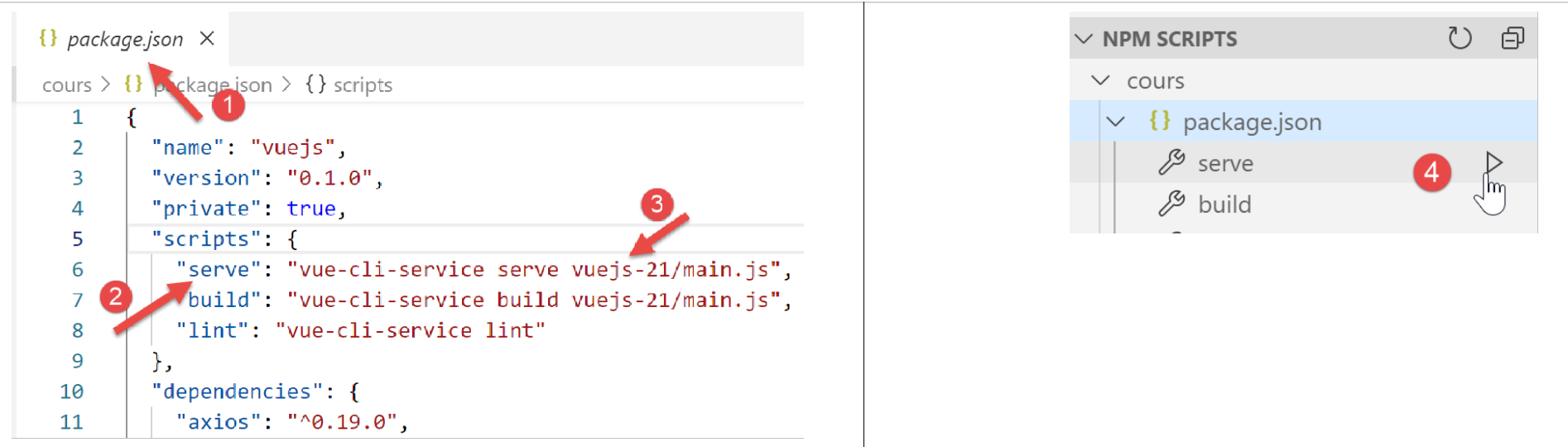
在测试过程中,请验证以下几点:
- 如果用户通过导航菜单链接和操作按钮/链接“使用”该应用程序,则应用程序可正常运行;
- 如果用户手动输入 URL,应用程序仍能正常运行。具体而言,请执行以下测试:
- 运行模拟;
- 进入 [SimulationList] 视图后,重新加载(F5)该视图。在之前的应用程序 [vuejs-20] 中,此时模拟数据会丢失。但本应用并非如此:已执行的模拟数据仍然存在;
- 检查日志以了解:
- [main]脚本何时被执行。您会发现,每当用户手动输入URL时,该脚本都会运行;
- 视图何时被创建。您应能观察到,每次视图即将显示时,它都会被创建;
- 路由机制的工作原理。每次路由之前,都会生成一条日志,告知你:
- 你来自哪条路由;
- 即将跳转的目标路由;
19.13. 在本地服务器上部署应用程序
作为练习,请按照 |在本地服务器上部署| 章节的指引,将 [vuejs-21] 项目部署到本地 Laragon 服务器上。然后进行测试。
19.14. 开发移动版本
理论上,使用 Bootstrap 应该能让我们构建出在不同设备上都能运行的应用程序:智能手机、平板电脑、笔记本电脑和台式机。这些设备之间的区别在于屏幕尺寸。
若在移动设备上测试 [vuejs-21] 版本,会发现界面显示混乱。而 [vuejs-22] 版本已修复此问题。所有修改均在视图模板中完成,主要针对智能手机屏幕进行了显示优化。完成优化后,得益于 Bootstrap,在更大屏幕上的显示也能流畅运行。
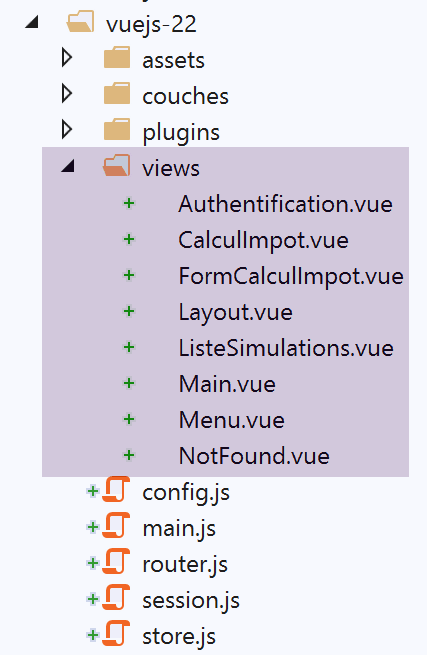
19.14.1. [Main]视图
[Main]视图的演变过程如下:
<!-- definition HTML of the view -->
<template>
  <div class="container">
    <b-card>
      <!-- jumbotron -->
      <b-jumbotron>
        <b-row>
          <b-col sm="4">
            <img src="../assets/logo.jpg" alt="Cerisier en fleurs" />
          </b-col>
          <b-col sm="8">
            <h1>Calculez votre impôt</h1>
          </b-col>
        </b-row>
      </b-jumbotron>
      ....
    </b-card>
  </div>
</template>
评论
- 第8行:原先写的是 [cols=’4’],现在改为 [sm=’4’]。[sm] 代表 [small]。智能手机屏幕属于这一类别。其他类别包括 [xs=extra small, md=medium, lg=large, xl=extra large];
- 第 11 行:同上;
19.14.2. [Layout] 视图
[Layout]视图的演变如下:
<!-- definition HTML of the routed view layout -->
<template>
  <!-- line -->
  <div>
    <b-row>
      <!-- three-column zone on the left -->
      <b-col sm="3" v-if="left">
        <slot name="left" />
      </b-col>
      <!-- nine-column zone on the right -->
      <b-col sm="9" v-if="right">
        <slot name="right" />
      </b-col>
    </b-row>
  </div>
</template>
19.14.3. [身份验证]视图
[身份验证]视图的演变如下:
<!-- definition HTML of the view -->
<template>
  <Layout :left="false" :right="true">
    <template slot="right">
      <!-- form HTML - post its values with the [authenticate-user] action -->
      <b-form @submit.prevent="login">
        <!-- title -->
        <b-alert show variant="primary">
          <h4>Bienvenue. Veuillez vous authentifier pour vous connecter</h4>
        </b-alert>
        <!-- 1st line -->
        <b-form-group label="Nom d'utilisateur" label-for="user" description="Tapez admin">
          <!-- user input field -->
          <b-col sm="6">
            <b-form-input type="text" id="user" placeholder="Nom d'utilisateur" v-model="user" />
          </b-col>
        </b-form-group>
        <!-- 2nd line -->
        <b-form-group label="Mot de passe" label-for="password" description="Tapez admin">
          <!-- password input field -->
          <b-col sm="6">
            <b-input type="password" id="password" placeholder="Mot de passe" v-model="password" />
          </b-col>
        </b-form-group>
        <!-- 3rd line -->
        <b-alert
          show
          variant="danger"
          v-if="showError"
          class="mt-3"
        >L'erreur suivante s'est produite : {{message}}</b-alert>
        <!-- submit] button on a 3rd line -->
        <b-row>
          <b-col sm="2">
            <b-button variant="primary" type="submit" :disabled="!valid">Valider</b-button>
          </b-col>
        </b-row>
      </b-form>
    </template>
  </Layout>
</template>
评论
- 第 11 行和第 19 行:我们移除了 [label-cols] 属性,该属性用于设置输入框标签的列数。没有此属性时,标签会显示在输入框上方。这种布局更适合智能手机屏幕;
19.14.4. [CalculImpot] 视图
[CalculImpot]视图已更新如下:
<!-- definition HTML of the view -->
<template>
  <div>
    <Layout :left="true" :right="true">
      <!-- tax calculation form on the right -->
      <FormCalculImpot slot="right" @resultatObtenu="handleResultatObtenu" />
      <!-- left-hand navigation menu -->
      <Menu slot="left" :options="options" />
    </Layout>
    <!-- display area for tax calculation results under the form -->
    <b-row v-if="résultatObtenu" class="mt-3">
      <!-- empty three-column zone -->
      <b-col sm="3" />
      <!-- nine-column zone -->
      <b-col sm="9">
        <b-alert show variant="success">
          <span v-html="résultat"></span>
        </b-alert>
      </b-col>
    </b-row>
  </div>
</template>
19.14.5. [FormCalculImpot] 视图
[FormCalculImpot]视图的演变如下:
<!-- definition HTML of the view -->
  <template>
  <!-- form HTML -->
  <b-form @submit.prevent="calculerImpot" class="mb-3">
    <!-- 12-column message on blue background -->
    <b-row>
      <b-col sm="12">
        <b-alert show variant="primary">
          <h4>Remplissez le formulaire ci-dessous puis validez-le</h4>
        </b-alert>
      </b-col>
    </b-row>
    <!-- form elements -->
    <!-- first line -->
    <b-form-group label="Etes-vous marié(e) ou pacsé(e) ?">
      <!-- 5-column radio buttons-->
      <b-col sm="5">
        <b-form-radio v-model="marié" value="oui">Oui</b-form-radio>
        <b-form-radio v-model="marié" value="non">Non</b-form-radio>
      </b-col>
    </b-form-group>
    <!-- second line -->
    <b-form-group label="Nombre d'enfants à charge" label-for="enfants">
      <b-form-input
        type="text"
        id="enfants"
        placeholder="Indiquez votre nombre d'enfants"
        v-model="enfants"
        :state="enfantsValide"
      ></b-form-input>
      <!-- possible error message -->
      <b-form-invalid-feedback :state="enfantsValide">Vous devez saisir un nombre positif ou nul</b-form-invalid-feedback>
    </b-form-group>
    <!-- third line -->
    <b-form-group
      label="Salaire annuel net imposable"
      label-for="salaire"
      description="Arrondissez à l'euro inférieur"
    >
      <b-form-input
        type="text"
        id="salaire"
        placeholder="Salaire annuel"
        v-model="salaire"
        :state="salaireValide"
      ></b-form-input>
      <!-- possible error message -->
      <b-form-invalid-feedback :state="salaireValide">Vous devez saisir un nombre positif ou nul</b-form-invalid-feedback>
    </b-form-group>
    <!-- fourth line, [submit] button -->
    <b-col sm="3">
      <b-button type="submit" variant="primary" :disabled="formInvalide">Valider</b-button>
    </b-col>
  </b-form>
</template>
评论
- 第 15、23、35 行:已移除 [label-cols] 属性;
此外,我们正在更新验证测试:
...
// état interne calculé
  computed: {
    // validation du formulaire
    formInvalide() {
      return (
        // salaire invalide
        !this.salaire.match(/^\s*\d+\s*$/) ||
        // ou enfants invalide
        !this.enfants.match(/^\s*\d+\s*$/) ||
        // ou données fiscales pas obtenues
        !this.$métier.taxAdminData
      );
    },
    // validation du salaire
    salaireValide() {
      // doit être numérique >=0
      return Boolean(
        this.salaire.match(/^\s*\d+\s*$/) || this.salaire.match(/^\s*$/)
      );
    },
    // validation des enfants
    enfantsValide() {
      // doit être numérique >=0
      return Boolean(
        this.enfants.match(/^\s*\d+\s*$/) || this.enfants.match(/^\s*$/)
      );
    }
},
...
评论
- 第 19 行:当未输入任何内容时,该输入被视为有效。这确保了在视图初次显示时输入是有效的。在之前的版本中,该输入最初显示为无效;
- 第 26 行:同上;
- 第 5–14 行:只有当两个字段均包含数据且有效时,提交按钮才处于活动状态;
19.14.6. [菜单]视图
[菜单]视图的演变如下:
<!-- definition HTML of the view -->
<template>
  <b-card class="mb-3">
    <!-- bootstrap vertical menu -->
    <b-nav vertical>
      <!-- menu options -->
      <b-nav-item
        v-for="(option,index) of options"
        :key="index"
        :to="option.path"
        exact
        exact-active-class="active"
      >{{option.text}}</b-nav-item>
    </b-nav>
  </b-card>
</template>
评论
- 第 3 行:我们添加 <b-card> 标签,用细边框包围菜单。这有助于在智能手机上更轻松地找到菜单;
19.14.7. [SimulationList] 视图
[ListeSimulations] 视图保持不变:
<!-- definition HTML of the view -->
<template>
  <div>
    <!-- layout -->
    <Layout :left="true" :right="true">
      <!-- simulations in right-hand column -->
      <template slot="right">
        <template v-if="simulations.length==0">
          <!-- no simulations -->
          <b-alert show variant="primary">
            <h4>Votre liste de simulations est vide</h4>
          </b-alert>
        </template>
        <template v-if="simulations.length!=0">
          <!-- there are simulations -->
          <b-alert show variant="primary">
            <h4>Liste de vos simulations</h4>
          </b-alert>
          <!-- simulation table -->
          <b-table striped hover responsive :items="simulations" :fields="fields">
            <template v-slot:cell(action)="data">
              <b-button variant="link" @click="supprimerSimulation(data.index)">Supprimer</b-button>
            </template>
          </b-table>
        </template>
      </template>
      <!-- navigation menu in left-hand column -->
      <Menu slot="left" :options="options" />
    </Layout>
  </div>
</template>
注释
- 第 20 行:请注意 [responsive] 属性,它确保表格的显示能适应屏幕大小:
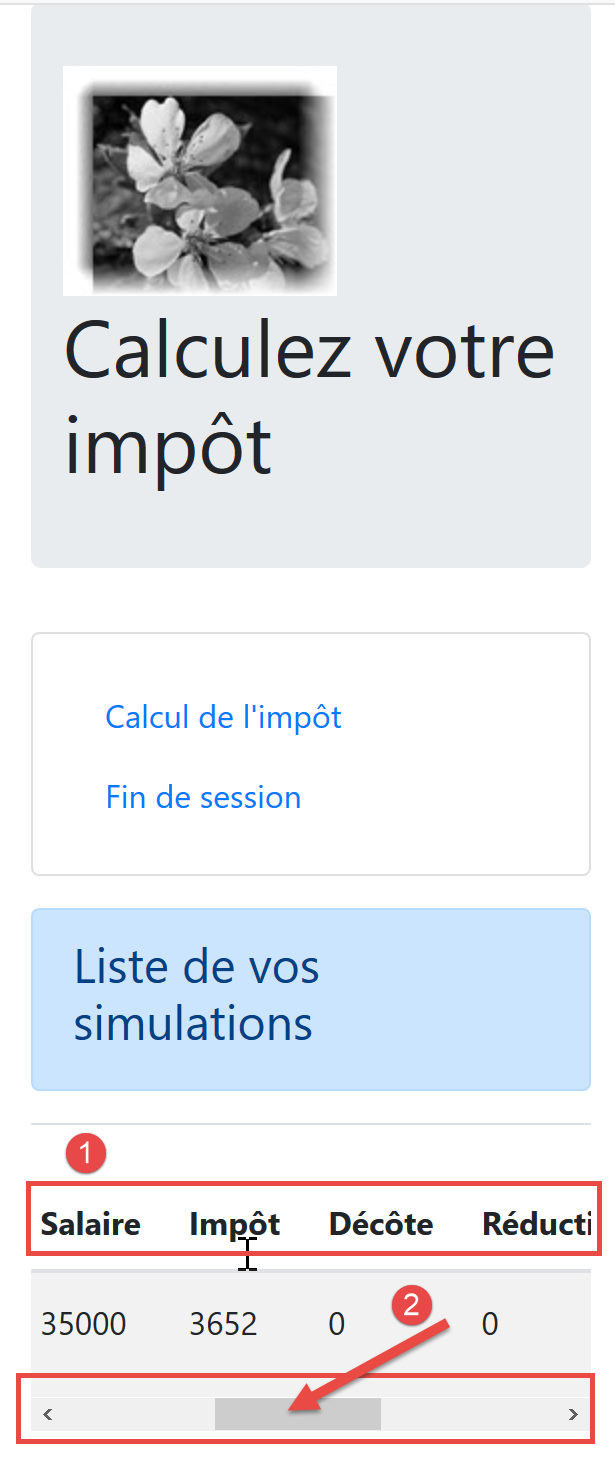
- 在[2]中,在小屏幕上,水平滚动条可确保表格完整显示;
19.14.8. [NotFound] 视图
保持不变。
19.14.9. 移动端视图
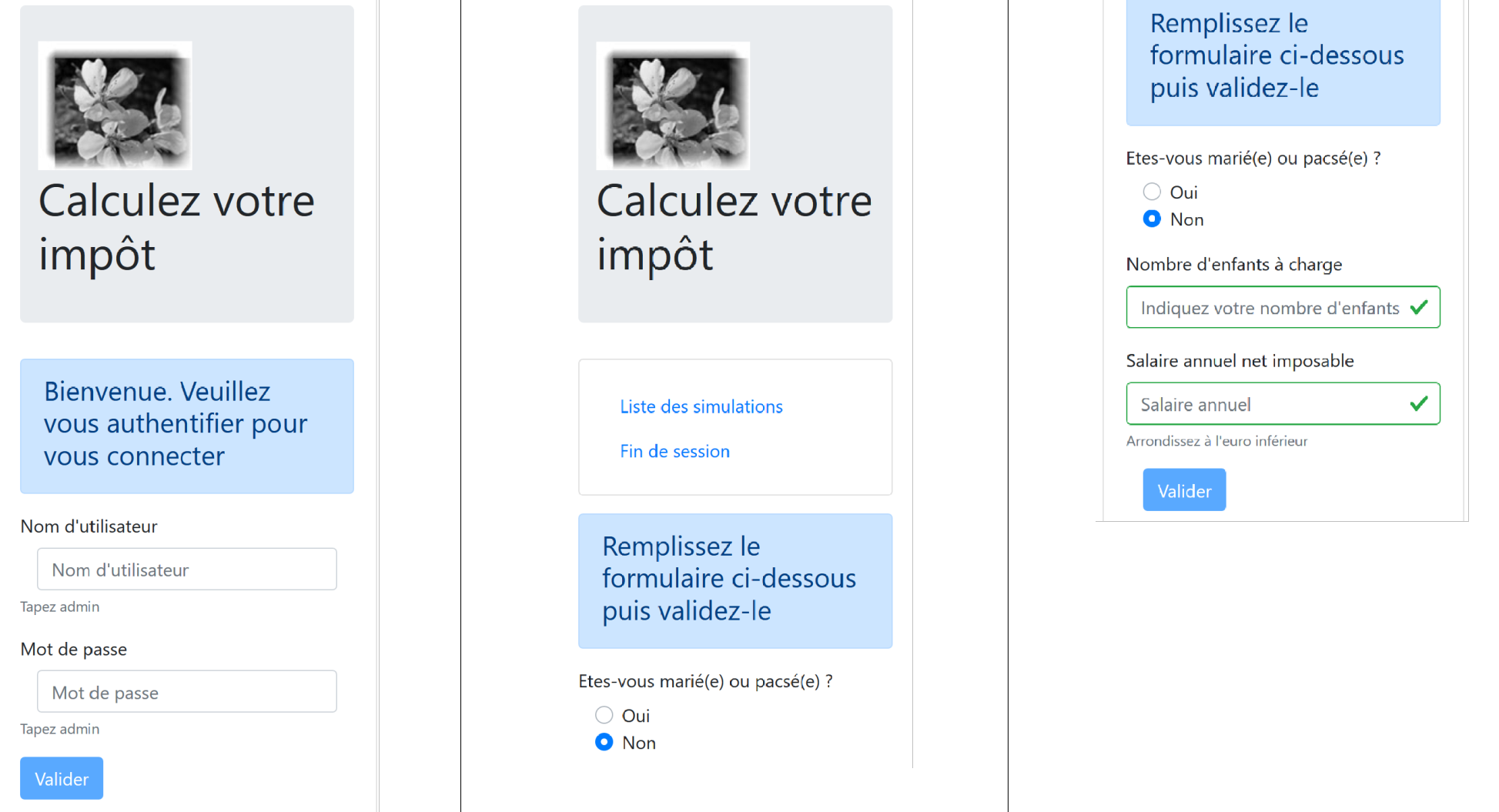
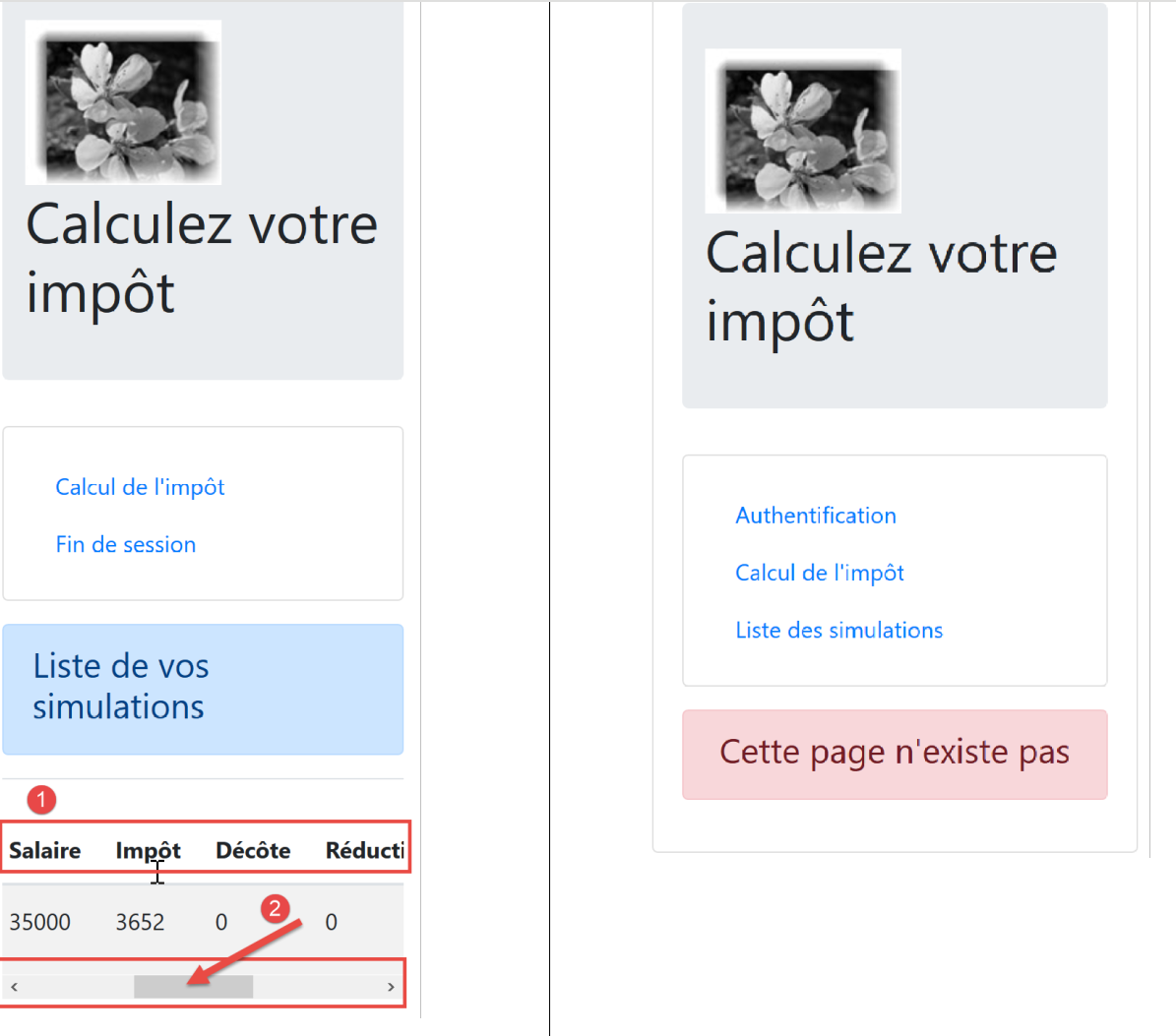
注:当然可以创建更适合移动端的视图。我特别想到的是导航菜单,它还有改进的空间,但其他方面也是如此。本文的主要目的并非开发移动应用。如果是那样的话,我们可能会采用 Ionic |https://ionicframework.com/| 这样的框架。