8. 项目 [vuejs-06]:使用插槽布局视图
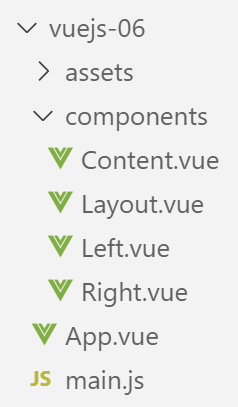
8.1. 主脚本 [main.js]
主脚本 [main.js] 保持不变。
8.2. 主组件 [App]
组件代码 [App] 如下:
<template>
  <div class="container">
    <b-card>
      <b-alert show variant="success" align="center">
        <h4>[vuejs-06] : mise en page avec des slots</h4>
      </b-alert>
      <Content />
    </b-card>
  </div>
</template>


<script>
  import Content from './components/Content'
  export default {
    name: "app",
    // 使用的组件
    components: {
      Content
    }
  };
</script>
组件 [App] 引入了一个名为 [Content] 的新组件(第 7、14、19 行)。
8.3. 组件 [Layout]
组件 [Layout] 用于定义应用程序视图的版面布局:
<template>
  <!-- 行 -->
  <b-row>
    <!-- 三列字段 -->
    <b-col cols="3" v-if="left">
      <slot name="slot-left" />
    </b-col>
    <!-- 九列区域 -->
    <b-col cols="9" v-if="right">
      <slot name="slot-right" />
    </b-col>
  </b-row>
</template>

<script>
  export default {
    name: "patron",
    // 参数
    props: {
      left: {
        type: Boolean
      },
      right: {
        type: Boolean
      }
    }
  };
</script>
注释
- 组件 [Layout] 定义了一行(第 3-12 行)。该行分为两列:
- 一列由 3 个 Bootstrap 列组成(第 5-7 行);
- 另一列由 9 个 Bootstrap 列组成(第 9-11 行);
- 第5行:左侧列(第5-7行)的显示取决于参数[left]的值,该参数在组件的[props]属性中定义(第20-22行);
- 第 9 行:右侧列(第 9-11 行)的显示取决于参数 [right] 的值,该值在组件的 [props] 属性中定义(第 23-25 行);
- 参数 [left, right] 的值必须由组件 [Layout] 的父组件设定;
- 第 6 行:不设定左侧列的内容。仅通过 <slot> 标签为该列命名。此处该列将命名为 [slot-left]。 使用组件 [Content] 的组件必须指定其希望放入名为 [slot-left] 的区域中的内容;
- 第 10 行:右侧列将命名为 [slot-right];
8.4. 组件 [Right]
[Right]组件如下:
<template>
  <!-- 警告类型警报中的消息 -->
  <b-alert show variant="warning" align="center">
    <h4>{{msg}}</h4>
  </b-alert>
</template>

<!-- 脚本 -->
<script>
  export default {
    name: "droite",
    // 参数
    props: {
      msg: String
    }
  };
</script>
- 第3-5行:组件[Right]在类型为[warning]的警报中显示一条消息。 该消息 [msg] 在第 14 行被定义为组件的参数。因此,父组件必须为其赋值;
8.5. 组件 [Left]
[Left] 组件如下:
<template>
  <!-- 主要警报中的消息 -->
  <b-alert show variant="primary" align="center">
    <h4>{{msg}}</h4>
  </b-alert>
</template>

<!-- 脚本 -->
<script>
  export default {
    name: "gauche",
    // 参数
    props: {
      msg: String
    }
  };
</script>
- 第 3-5 行:组件 [Left] 在类型为 [primary] 的警报中显示一条消息。 该消息 [msg] 在第 14 行被定义为组件的参数。因此,父组件必须为其赋值;
8.6. 组件 [Content]
需要提醒的是,组件 [Content] 是主视图 [App.vue] 所显示的组件:
<template>
  <div>
    <!-- 左侧和右侧列已填充 -->
    <Layout :left="true" :right="true">
      <Right slot="slot-right" msg="slot [slot-right] présent et rempli" />
      <Left slot="slot-left" msg="slot [slot-left] présent et rempli" />
    </Layout>
    <!-- 左侧列为空,右侧列已填充 -->
    <Layout :left="false" :right="true">
      <Right slot="slot-right" msg="slot [slot-right] présent et rempli, slot [slot-left] absent" />
    </Layout>
    <!-- 左侧列已填充,右侧列缺失 -->
    <Layout :left="true" :right="false">
      <Left slot="slot-left" msg="slot [slot-left] présent et rempli, slot [slot-right] absent" />
    </Layout>
    <!-- 左侧列存在但未填充,右侧列已填充 -->
    <Layout :left="true" :right="true">
      <Right slot="slot-right" msg="slot [slot-right] présent et rempli, slot [slot-left] présent mais vide" />
    </Layout>
  </div>
</template>

<!-- 脚本 -->
<script>
  import Layout from "./Layout";
  import Left from "./Left";
  import Right from "./Right";
  export default {
    name: "contenu",
    // 组件
    components: {
      Layout,
      Left,
      Right
    }
  };
</script>
视觉呈现
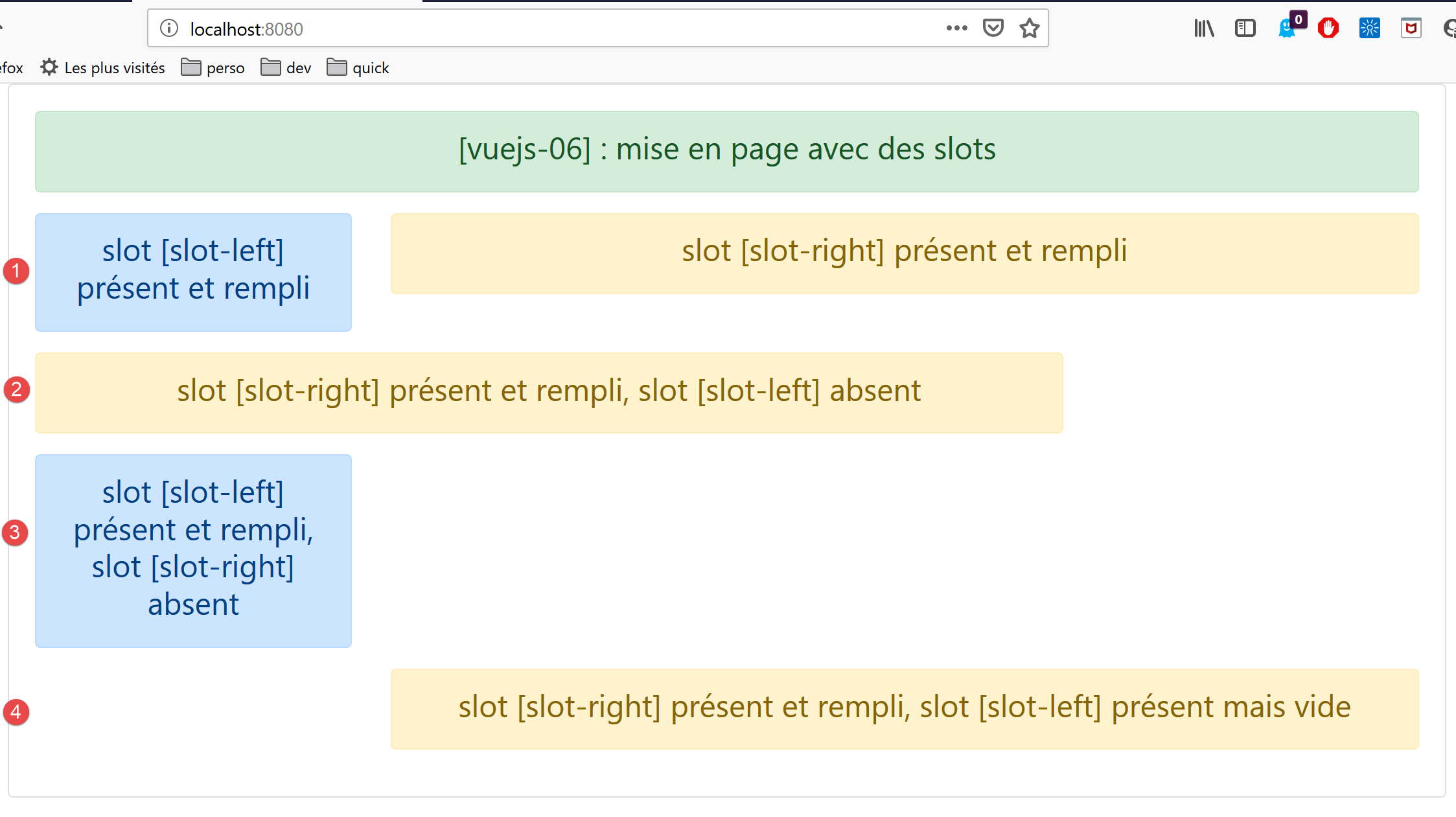
注释
- 组件 [Layout] 被使用了 4 次(第 4-7 行、第 9-11 行、第 13-15 行、第 17-19 行)。 回顾一下,[Layout] 组件定义了 1 行,而上面的 [template] 则定义了 4 行。同样,[Layout] 定义的这一行包含两列:
- 一个名为 [slot-left] 的列,占据左侧的 3 个 Bootstrap 列;
- 一个名为 [slot-Right] 的列,占据了右侧的 9 个 Bootstrap 列;
- 第4-7行: 定义了一行 [1],其中组件 [Left] 占据 [slot-left] 列,组件 [Right] 占据 [slot-right] 列;
- 第 9-11 行:定义了一行 [2],其中列 [slot-left] 未显示,组件 [Right] 占据列 [slot-right];
- 第 13-15 行:定义了一行 [3],其中列 [slot-right] 不显示,组件 [Left] 占据列 [slot-left];
- 第 17-19 行: 定义了一行 [4],其中列 [slot-left] 显示为 [:left=’true’] 但未填充,而组件 [Right] 占据列 [slot-right];
最终,组件 [Layout] 被用作组件 [Content] 的布局。