12. 项目 [vuejs-10]:[dao] 插件,异步 HTTP 请求
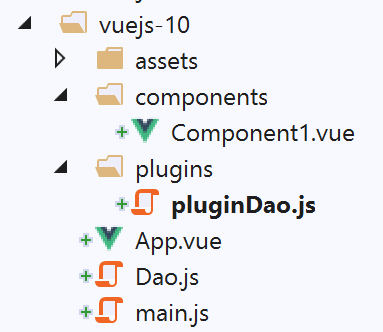
[vuejs-10] 项目的目录结构如下:
[vuejs-10] 项目演示了一个组件向远程服务器发起 HTTP 请求。其采用的架构如下:
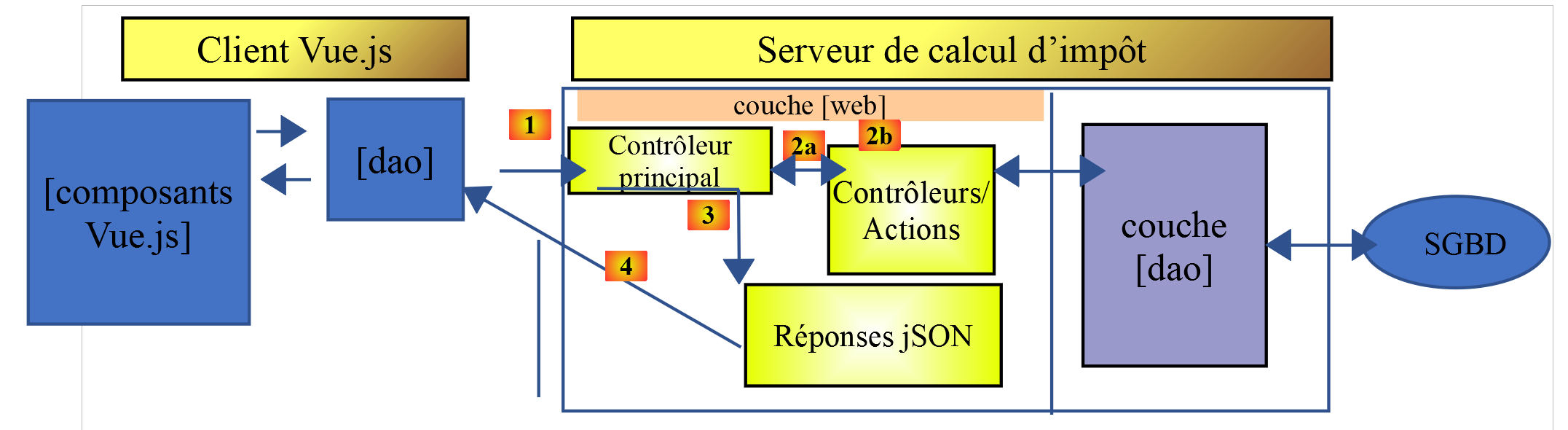
一个 [Vue.js] 组件通过 [dao] 层与税费计算服务器进行通信。
12.1. 安装依赖项
[vuejs-10] 应用程序使用 [axios] 库向税费计算服务器发起异步请求。我们需要安装此依赖项:
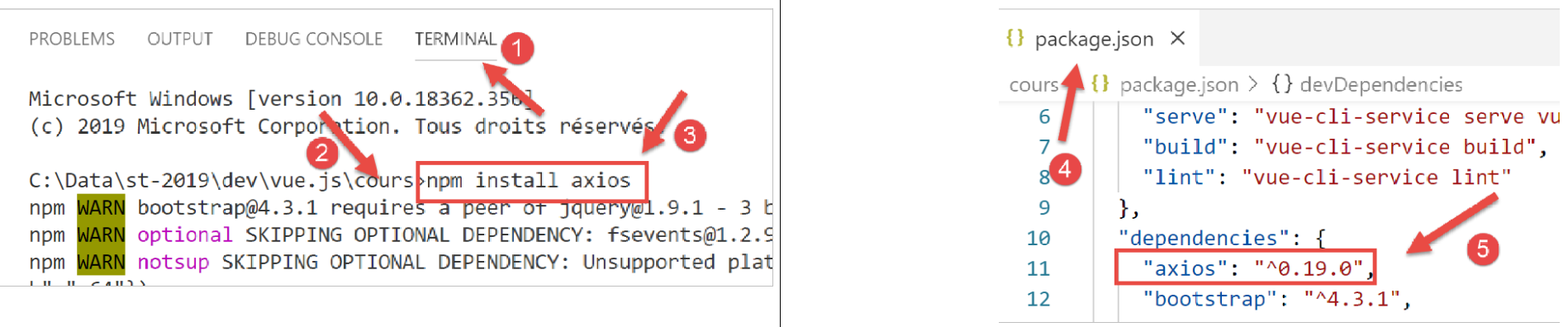
- 在 [4-5] 中,安装 [axios] 库 [1-3] 后,向 [package.json] 文件中添加的行;
12.2. [Dao] 类
[Dao] 类是在 [Dao 类] 一节中开发的。我们在此将其包含进来以供参考:
'use strict';

// imports
import qs from 'qs'

// dao] class
class Dao {

  // manufacturer
  constructor(axios) {
    this.axios = axios;
    // session cookie
    this.sessionCookieName = "PHPSESSID";
    this.sessionCookie = '';
  }

  // init session
  async  initSession() {
    // query options HHTP [get /main.php?action=init-session&type=json]
    const options = {
      method: "GET",
      // URL parameters
      params: {
        action: 'init-session',
        type: 'json'
      }
    };
    // execute query HTTP
    return await this.getRemoteData(options);
  }

  async  authentifierUtilisateur(user, password) {
    // query options HHTP [post /main.php?action=authenticate-user]
    const options = {
      method: "POST",
      headers: {
        'Content-type': 'application/x-www-form-urlencoded',
      },
      // body of POST
      data: qs.stringify({
        user: user,
        password: password
      }),
      // URL parameters
      params: {
        action: 'authentifier-utilisateur'
      }
    };
    // execute query HTTP
    return await this.getRemoteData(options);
  }

  async getAdminData() {
    // query options HHTP [get /main.php?action=get-admindata]
    const options = {
      method: "GET",
      // URL parameters
      params: {
        action: 'get-admindata'
      }
    };
    // execute query HTTP
    const data = await this.getRemoteData(options);
    // result
    return data;
  }

  async  getRemoteData(options) {
    // for the session cookie
    if (!options.headers) {
      options.headers = {};
    }
    options.headers.Cookie = this.sessionCookie;
    // execute query HTTP
    let response;
    try {
      // asynchronous request
      response = await this.axios.request('main.php', options);
    } catch (error) {
      // the [error] parameter is an exception instance - it can take various forms
      if (error.response) {
        // the server response is in [error.response]
        response = error.response;
      } else {
        // error restart
        throw error;
      }
    }
    // response is the entire HTTP response from the server (HTTP headers + response itself)
    // retrieve the session cookie if it exists
    const setCookie = response.headers['set-cookie'];
    if (setCookie) {
      // setCookie is an array
      // look for the session cookie in this table
      let trouvé = false;
      let i = 0;
      while (!trouvé && i < setCookie.length) {
        // look for the session cookie
        const results = RegExp('^(' + this.sessionCookieName + '.+?);').exec(setCookie[i]);
        if (results) {
          // the session cookie is stored
          // eslint-disable-next-line require-atomic-updates
          this.sessionCookie = results[1];
          // we found
          trouvé = true;
        } else {
          // next item
          i++;
        }
      }
    }
    // the server response is in [response.data]
    return response.data;
  }
}

// class export
export default Dao;
[vuejs-10] 项目仅在第 18–30 行使用了异步的 [initSession] 方法。请注意,第 10 行通过 [axios] 参数实例化了 [Dao] 类,该参数由调用代码初始化。在此情况下,调用代码是 [./main.js] 脚本。
12.3. [pluginDao] 插件
[pluginDao] 插件如下所示:
export default {
  install(Vue, dao) {
    // ajoute une propriété [$dao] à la classe Vue
    Object.defineProperty(Vue.prototype, '$dao', {
      // lorsque Vue.$dao est référencé, on rend le 2ième paramètre [dao]
      get: () => dao,
    })
  }
}
如果回顾 [event-bus] 插件的说明,我们会发现 [pluginDao] 插件会在 [Vue] 类/函数中创建一个名为 [$dao] 的新属性。该属性的值(如我们将展示的)将是 [./Dao] 脚本导出的对象,即前面的 [Dao] 类。
12.4. 主脚本 [main.js]
主脚本 [main.js] 的代码如下:
// imports
import Vue from 'vue'
import App from './App.vue'
import axios from 'axios';

// plugins
import BootstrapVue from 'bootstrap-vue'
Vue.use(BootstrapVue);

// bootstrap
import 'bootstrap/dist/css/bootstrap.css'
import 'bootstrap-vue/dist/bootstrap-vue.css'

// couche [dao]
import Dao from './Dao';
// configuration axios
axios.defaults.timeout = 2000;
axios.defaults.baseURL = 'http://localhost/php7/scripts-web/impots/version-14';
axios.defaults.withCredentials = true;
// instanciation couche [dao]
const dao = new Dao(axios);

// plugin [dao]
import pluginDao from './plugins/dao'
Vue.use(pluginDao, dao)

// configuration
Vue.config.productionTip = false

// instanciation projet [App]
new Vue({
  render: h => h(App),
}).$mount('#app')
[main.js] 脚本:
- 在第 14–21 行实例化 [dao] 层;
- 在第 24–25 行引入 [pluginDao] 插件;
- 第 15 行:导入 [Dao] 类;
- 第 17–18 行:配置了用于处理 HTTP 请求的 [axios] 对象。该对象在第 4 行被导入;
- 第 17 行:定义了 2 秒的 [timeout];
- 第 18 行:税费计算服务器的 URL;
- 第 19 行:启用与服务器的 Cookie 交换;
- 第 24–25 行:使用 [pluginDao] 插件
- 第 24 行:导入插件;
- 第 25 行:集成该插件。我们可以看到,[Vue.use] 方法的第二个参数是第 21 行定义的 [dao] 层的引用。这就是为什么 [Vue.$dao] 属性在 [Vue] 类/函数的所有实例中(即所有 [Vue.js] 组件中)都会指向 [dao] 层;
12.5. 主视图 [App.vue]
主视图 [App] 的代码如下:
<template>
  <div class="container">
    <b-card>
      <!-- message -->
      <b-alert show variant="success" align="center">
        <h4>[vuejs-10] : plugin [dao], requêtes HTTP asynchrones</h4>
      </b-alert>
      <!-- composant faisant une requête asynchrone au serveur de calcul d'impôt-->
      <Component1 @error="doSomethingWithError" @endWaiting="endWaiting" @beginWaiting="beginWaiting" />
      <!-- affichage d'une éventuelle erreur -->
      <b-alert show
               variant="danger"
               v-if="showError">Evénement [error] intercepté par [App]. Valeur reçue = {{error}}</b-alert>
      <!-- message d'attente avec un spinner -->
      <b-alert show v-if="showWaiting" variant="light">
        <strong>Requête au serveur de calcul d'impôt en cours...</strong>
        <b-spinner variant="primary" label="Spinning"></b-spinner>
      </b-alert>
    </b-card>
  </div>
</template>

<script>
  import Component1 from "./components/Component1";
  export default {
    name: "app",
    // état du composant
    data() {
      return {
        // contrôle le spinner d'attente
        showWaiting: false,
        // contrôle l'affichage de l'erreur
        showError: false,
        // l'erreur interceptée
        error: {}
      };
    },
    // composants utilisés
    components: {
      Component1
    },
    // méthodes de gestion des évts
    methods: {
      // début attente
      beginWaiting() {
        // on affiche l'attente
        this.showWaiting = true;
        // on cache le msg d'erreur
        this.showError = false;
      },
      // fin attente
      endWaiting() {
        // on cache l'attente
        this.showWaiting = false;
      },
      // gestion d'erreur
      doSomethingWithError(error) {
        // on note qu'il y a eu erreur
        this.error = error;
        // on affiche le msg d'erreur
        this.showError = true;
      }
    }
  };
</script>
评论
- 第 9 行:[Component1] 是发起异步 HTTP 请求的组件。它可以触发三个事件:
- [beginWaiting]:请求即将发出。必须向用户显示一条等待提示;
- [endWaiting]:请求已完成。必须停止等待;
- [error]:请求失败。必须显示错误消息;
- 第 10–13 行:用于显示错误消息的提示框。它由第 33 行的布尔变量 [showError] 控制。该提示框在第 35 行显示错误信息;
- 第 14–18 行:显示带旋转图标的等待提示的 Alert 控件。由第 47 行的布尔变量 [showWaiting] 控制;
- 第 45–50 行:[beginWaiting] 是接收到 [beginWaiting] 事件时执行的方法。它会显示等待提示(第 47 行),并隐藏错误提示(第 49 行),以防该提示在前一次操作后仍可见;
- 第 52–55 行:[endWaiting] 是接收到 [endWaiting] 事件时执行的方法。它隐藏等待消息(第 54 行);
- 第 57–62 行:[doSomethingWithError] 是接收到 [error] 事件时执行的方法。它记录接收到的错误(第 59 行)并显示错误消息(第 61 行);
12.6. [Component1] 组件
[Component1] 组件的代码如下:
<template>
  <b-row>
    <b-col>
      <b-alert show
               variant="warning"
               v-if="showMsg">Valeur reçue du serveur = {{data}}</b-alert>
    </b-col>
  </b-row>
</template>

<script>
  export default {
    name: "component1",
    // component status
    data() {
      return {
        showMsg: false
      };
    },
    // event management methods
    methods: {
      // processing data received from the server
      doSomethingWithData(data) {
        // record the data received
        this.data = data;
        // we display it
        this.showMsg = true;
      }
    },
    // the component has just been created
    created() {
      // initialize the session with the server - asynchronous request
      // we use the promise rendered by the [dao] layer methods
      // we signal the start of the operation
      this.$emit("beginWaiting");
      // asynchronous operation is launched
      this.$dao
        // initialize a jSON session with the tax calculation server
        .initSession()
        // method that processes the data received in the event of success
        .then(data => {
          // we process the data received
          this.doSomethingWithData(data);
        })
        // error handling method in case of error
        .catch(error => {
          // the error is traced back to the parent component
          this.$emit("error", error.message);
        }).finally(() => {
          // end of wait
          this.$emit("endWaiting");
        })
    }
  };
</script>
评论
- 第 4–6 行:该组件包含一个警报,用于显示税费计算服务器返回的值,但仅在 HTTP 请求成功时显示。该警报由第 17 行的布尔变量 [showMsg] 控制;
- 第 31–53 行:组件创建后立即发出 HTTP 请求。因此,相关代码被放置在第 31 行的 [created] 方法中;
- 第 35 行:通知父组件异步请求即将开始;
- 第 37–39 行:执行 [this.$dao.initSession] 方法。该方法用于与税费计算服务器初始化一个 JSON 会话。此方法的直接返回结果是一个 [Promise];
- 第 41–44 行:当服务器返回结果且未发生错误时,此代码将执行。服务器的结果存储在 [data] 中。在第 43 行,我们调用 [doSomethingWithData] 方法来处理该结果;
- 第 46–49 行:若请求执行过程中发生错误,则执行此代码。第 48 行通知父组件已发生错误,并将错误消息 [error.message] 传递给它;
- 第 49–52 行:此代码在所有情况下都会执行。我们通知父组件 HTTP 请求已完成;
- 第 23–28 行:[doSomethingWithData] 方法负责处理服务器发送的数据 [data]。第 25 行将该数据存储起来,第 27 行将其显示出来;
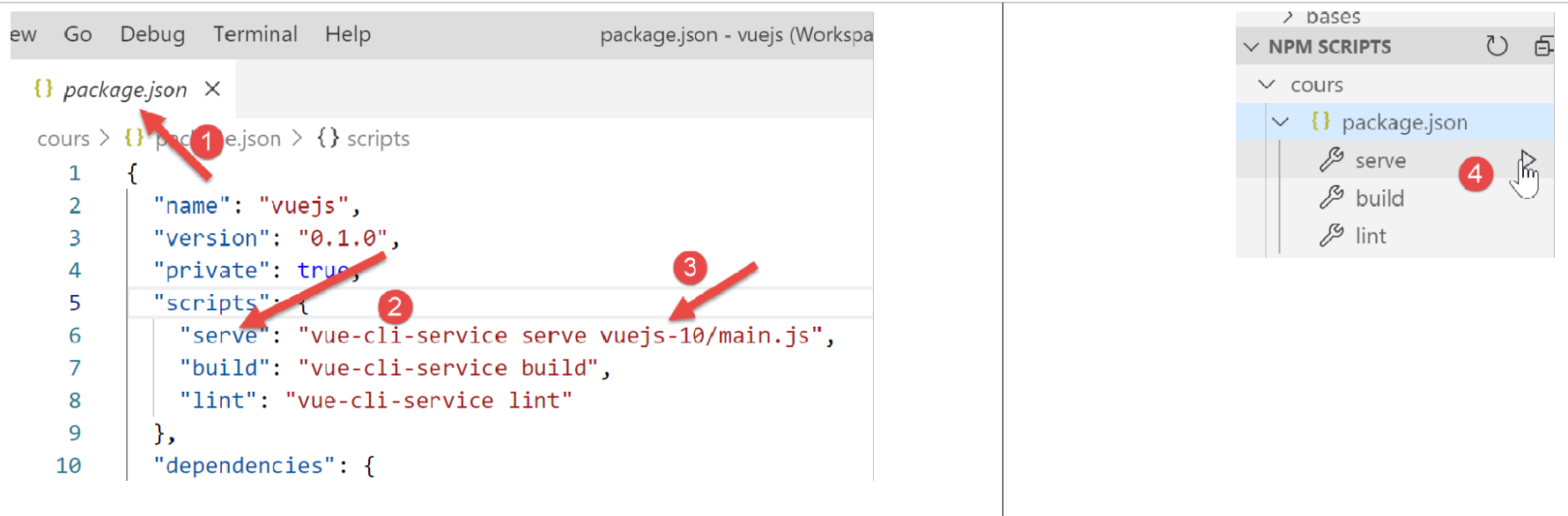
12.7. 运行项目
如果项目启动时税费计算服务器未运行,将得到以下结果:
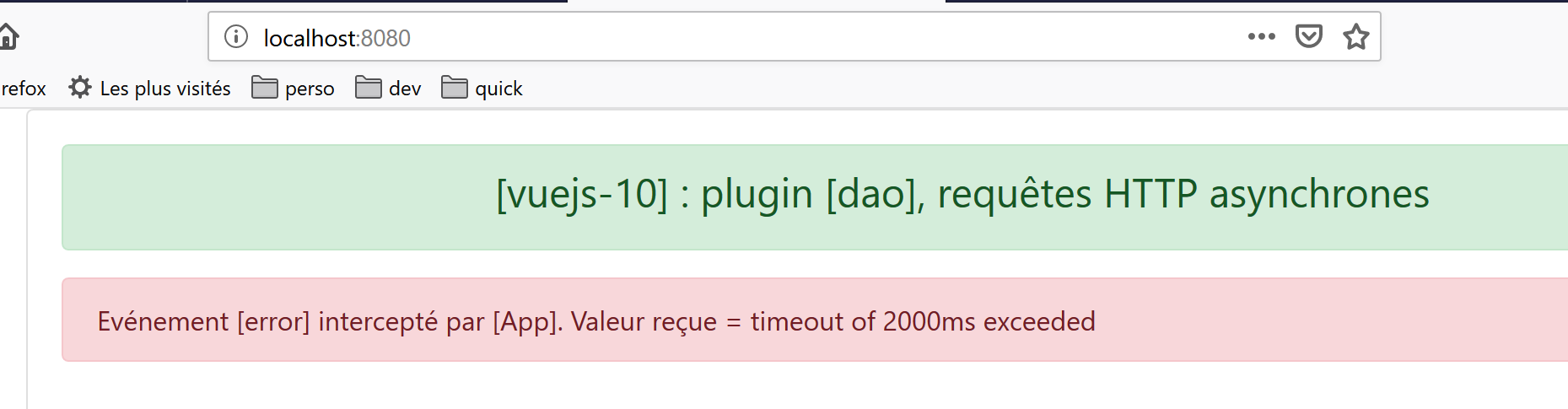
让我们启动 [Laragon] 服务器(参见 https://tahe.developpez.com/tutoriels-cours/php7),并重新加载上述页面。此时结果如下:
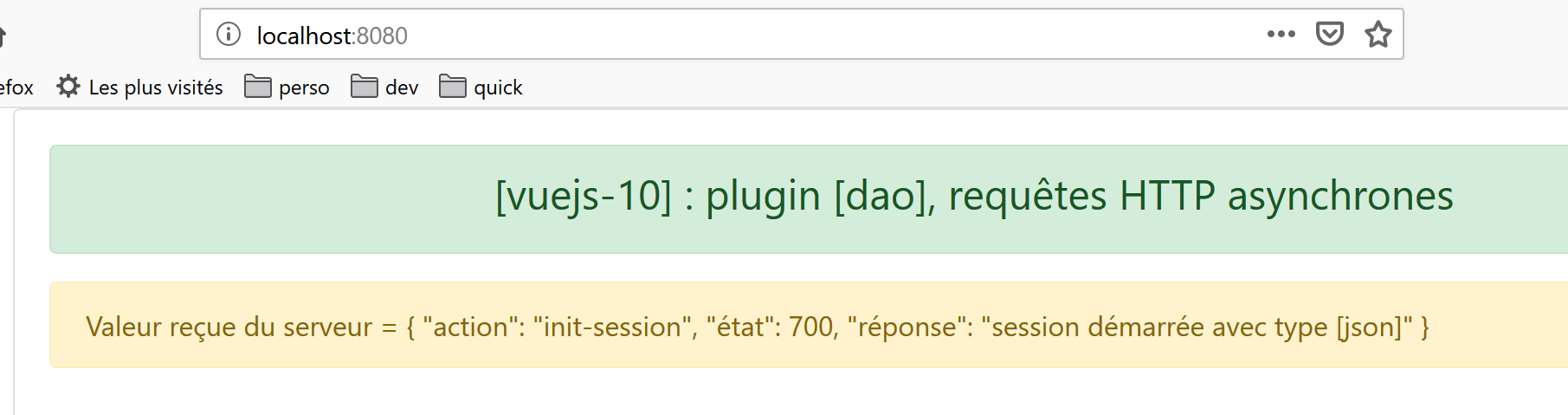
注意:我们使用的是 https://tahe.developpez.com/tutoriels-cours/php7 中定义的第 14 版税费计算服务器。