20. 在托管服务上部署客户端/服务器应用程序
本文概述了我们将开发的客户端/服务器应用程序部署到服务器 OVH [https://www.ovh.com/fr/] 上的主要步骤。在其他托管服务商上的部署过程应该大同小异。我们只是想说明,我们的应用程序非常适合这种部署方式。
20.1. 服务器部署
目标主机 OVH 属于基础型主机:
- PHP 7.3 环境;
- 一个 SGBD MySQL;
- 无[Redis]服务器;
第三点要求我们修改税务计算服务器的第14版。
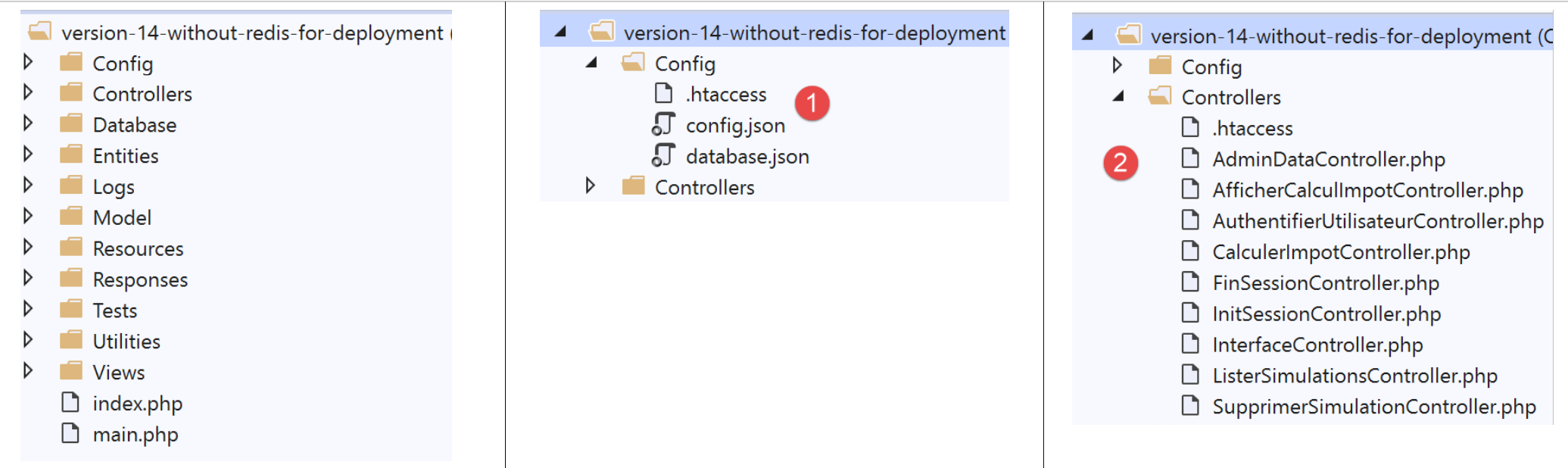
我们需要修改:
- 配置文件 [1];
- 控制器 [AdminDataController] 和 [CalculerImpotController],以适应没有服务器 [Redis] 的情况;
[config.json] 文件的修改如下:
{
    "databaseFilename": "Config/database.json",
    "corsAllowed": false,
    "redisAvailable":false,
    "rootDirectory": "/.../www/apps/impot/serveur-php7",
    "relativeDependencies": [

        "/Entities/BaseEntity.php",
        ...
        "/Controllers/AdminDataController.php"
    ],
    "absoluteDependencies": [
        "/.../vendor/autoload.php",
        "/.../vendor/predis/predis/autoload.php"
    ],
    "users": [
        {
            "login": "admin",
            "passwd": "admin"
        }
    ],
    ...
}
注释
- 第 4 行:引入布尔变量 [redisAvailable],用于指示是否能访问服务器 [Redis];
- 第 5、13、14 行:绝对路径将发生变化;
文件 [database.json] 的变更如下:
{
    "dsn": "mysql:host=...;dbname=...",
    "id": "...",
    "pwd": "...",
    "tableTranches": "dbimpots_tbtranches",
    "colLimites": "limites",
    "colCoeffR": "coeffr",
    "colCoeffN": "coeffn",
    "tableConstantes": "dbimpots_tbconstantes",
    "colPlafondQfDemiPart": "plafondQfDemiPart",
    ...
}
注释
- 第2-4行:数据库的标识及其所有者的标识符将发生变化;
[AdminDataController] 控制器将按以下方式更新:
<?php

namespace Application;

// Symfony 依赖项
use \Symfony\Component\HttpFoundation\Response;
use \Symfony\Component\HttpFoundation\Request;
use \Symfony\Component\HttpFoundation\Session\Session;
// [dao] 层的别名
use \Application\ServerDaoWithSession as ServerDaoWithRedis;

class AdminDataController implements InterfaceController {

  // $config 是应用程序的配置
  // 处理一个 Request 请求
  // 使用会话 Session 并可对其进行修改
  // $infos 是每个控制器特有的附加信息
  // 返回一个数组 [$statusCode, $état, $content, $headers]
  public function execute(
    array $config,
    Request $request,
    Session $session,
    array $infos = NULL): array {

    //必须有一个唯一的参数 GET
    $method = strtolower($request->getMethod());
    ...

    // 可以运行
    // Redis
    if ($config["redisAvailable"]) {
      \Predis\Autoloader::register();
      ...
    } else {
      try {
        // 将从数据库中检索税务数据
        $dao = new ServerDaoWithRedis($config["databaseFilename"], NULL);
        // taxAdminData
        $taxAdminData = $dao->getTaxAdminData();
      } catch (\Throwable $ex) {
        // 出错了
        // 向主控制器返回带错误的结果
        $état = 1051;
        return [Response::HTTP_INTERNAL_SERVER_ERROR, $état,
          ["réponse" => utf8_encode($ex->getMessage())], []];
      }
    }

    // 将结果返回给主控制器
    $état = 1000;
    return [Response::HTTP_OK, $état, ["réponse" => $taxAdminData], []];
  }

}
注释
- 第 31 行:现在会检测是否存在 [Redis] 服务器;
- 第 32-34 行:如果存在,则完整采用之前的代码;
- 第35-46行:否则,税务部门的数据将从数据库中获取;
同样需要税务局数据的控制器 [CalculerImpotController] 也以相同方式进行更新。
此项已完成。在服务器OVH上的部署操作,即为将FTP进行更新。我们已将以下内容下载至OVH:
- [vuejs-14-without-redis]版本;
- 包含服务器[vuejs-14-without-redis]所有依赖项的文件夹[vendor];
完成 FTP 的传输后,我们使用以下脚本 SQL 生成了服务器所需的表:
-- phpMyAdmin SQL 转储
-- 版本 4.8.5
-- https://www.phpmyadmin.net/
--
-- 主机:localhost:3306
-- 生成时间:2019年10月12日 07:45AM
-- 服务器版本:5.7.24
-- PHP 版本:7.2.11

SET SQL_MODE = "NO_AUTO_VALUE_ON_ZERO";
SET AUTOCOMMIT = 0;
START TRANSACTION;
SET time_zone = "+00:00";


/*!40101 SET @OLD_CHARACTER_SET_CLIENT=@@CHARACTER_SET_CLIENT */;
/*!40101 SET @OLD_CHARACTER_SET_RESULTS=@@CHARACTER_SET_RESULTS */;
/*!40101 SET @OLD_COLLATION_CONNECTION=@@COLLATION_CONNECTION */;
/*!40101 SET NAMES utf8mb4 */;

--
-- 表 `dbimpots_tbconstantes` 的表结构
--

CREATE TABLE `dbimpots_tbconstantes` (
  `id` int(11) NOT NULL,
  `plafondQfDemiPart` decimal(10,2) NOT NULL,
  `plafondRevenusCelibatairePourReduction` decimal(10,2) NOT NULL,
  `plafondRevenusCouplePourReduction` decimal(10,2) NOT NULL,
  `valeurReducDemiPart` decimal(10,2) NOT NULL,
  `plafondDecoteCelibataire` decimal(10,2) NOT NULL,
  `plafondDecoteCouple` decimal(10,2) NOT NULL,
  `plafondImpotCelibatairePourDecote` decimal(10,2) NOT NULL,
  `plafondImpotCouplePourDecote` decimal(10,2) NOT NULL,
  `abattementDixPourcentMax` decimal(10,2) NOT NULL,
  `abattementDixPourcentMin` decimal(10,2) NOT NULL
) ENGINE=InnoDB DEFAULT CHARSET=utf8;

--
-- 表 `dbimpots_tbconstantes` 的数据转储
--

INSERT INTO `dbimpots_tbconstantes` (`id`, `plafondQfDemiPart`, `plafondRevenusCelibatairePourReduction`, `plafondRevenusCouplePourReduction`, `valeurReducDemiPart`, `plafondDecoteCelibataire`, `plafondDecoteCouple`, `plafondImpotCelibatairePourDecote`, `plafondImpotCouplePourDecote`, `abattementDixPourcentMax`, `abattementDixPourcentMin`) VALUES
(8, '1551.00', '21037.00', '42074.00', '3797.00', '1196.00', '1970.00', '1595.00', '2627.00', '12502.00', '437.00');

-- --------------------------------------------------------

--
-- 表 `dbimpots_tbtranches` 的表结构
--

CREATE TABLE `dbimpots_tbtranches` (
  `id` int(11) NOT NULL,
  `limites` decimal(10,2) NOT NULL,
  `coeffR` decimal(10,2) NOT NULL,
  `coeffN` decimal(10,2) NOT NULL
) ENGINE=InnoDB DEFAULT CHARSET=utf8;

--
-- 正在导出表 `dbimpots_tbtranches` 的数据
--

INSERT INTO `dbimpots_tbtranches` (`id`, `limites`, `coeffR`, `coeffN`) VALUES
(36, '9964.00', '0.00', '0.00'),
(37, '27519.00', '0.14', '1394.96'),
(38, '73779.00', '0.30', '5798.00'),
(39, '156244.00', '0.41', '13913.69'),
(40, '0.00', '0.45', '20163.45');

--
-- 已导出表的索引
--

--
-- 表 `dbimpots_tbconstantes` 的索引
--
ALTER TABLE `dbimpots_tbconstantes`
  ADD PRIMARY KEY (`id`);

--
-- 表 `dbimpots_tbtranches` 的索引
--
ALTER TABLE `dbimpots_tbtranches`
  ADD PRIMARY KEY (`id`);

--
-- 已导出表的 AUTO_INCREMENT
--

--
-- 表 `dbimpots_tbconstantes` 的 AUTO_INCREMENT
--
ALTER TABLE `dbimpots_tbconstantes`
  MODIFY `id` int(11) NOT NULL AUTO_INCREMENT, AUTO_INCREMENT=9;

--
-- AUTO_INCREMENT 用于表 `dbimpots_tbtranches`
--
ALTER TABLE `dbimpots_tbtranches`
  MODIFY `id` int(11) NOT NULL AUTO_INCREMENT, AUTO_INCREMENT=41;
COMMIT;

/*!40101 SET CHARACTER_SET_CLIENT=@OLD_CHARACTER_SET_CLIENT */;
/*!40101 SET CHARACTER_SET_RESULTS=@OLD_CHARACTER_SET_RESULTS */;
/*!40101 SET COLLATION_CONNECTION=@OLD_COLLATION_CONNECTION */;
完成上述操作后,已将文件 [config.json, database.json] 适配至新环境。
20.2. 部署客户端 [Vue.js]
决定将客户端 [Vue.js] 部署到 URL 和 [http://machine/apps/impot/client-vuejs/] 上。这导致了以下更改:
在 [VSCode] 的根目录下,创建了以下 [vue.config.js] 文件:
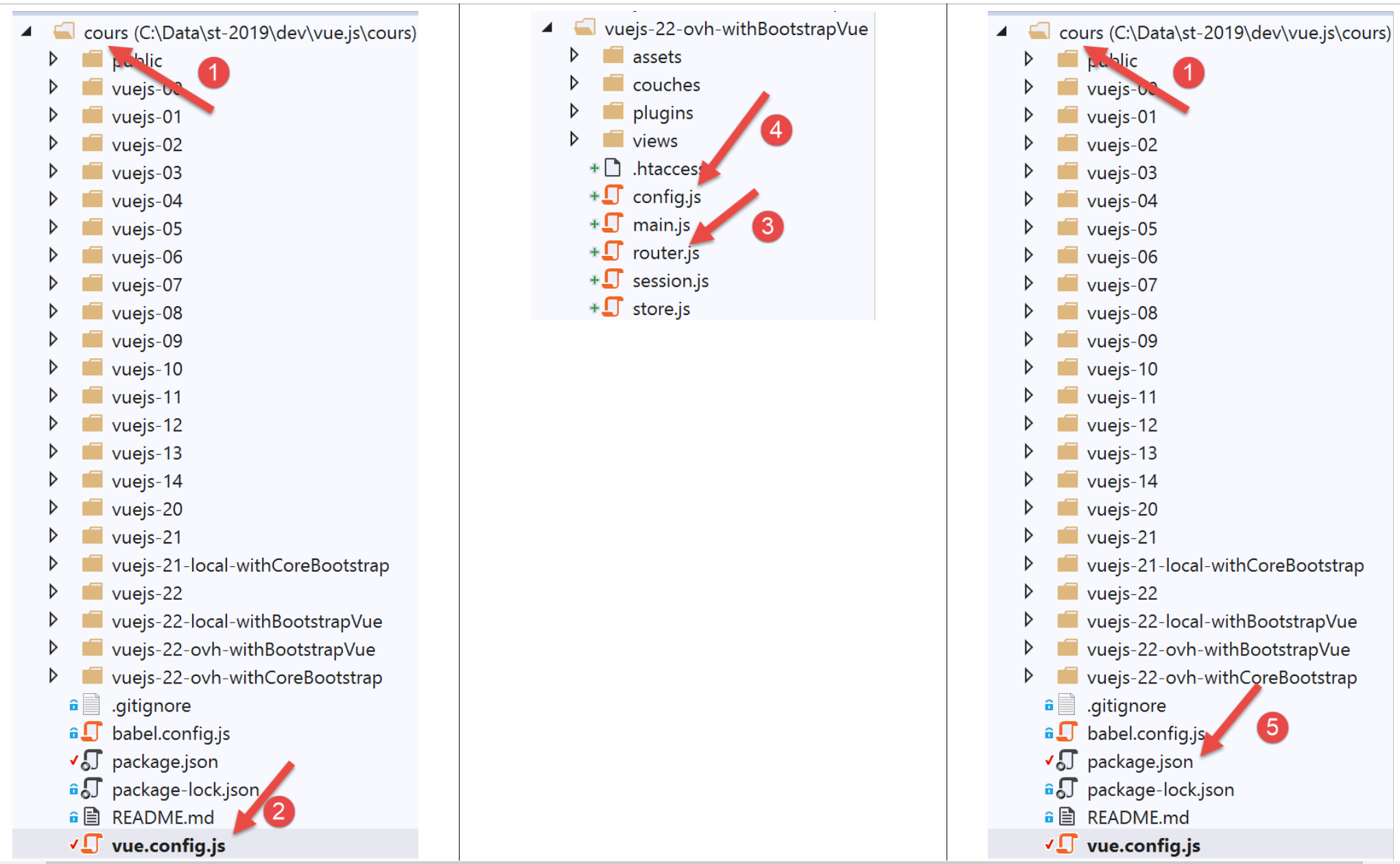
文件 [vue.config.js] 内容如下:
// vue.config.js
module.exports = {
  // 客户服务 URL 税费计算服务器 [vuejs]
  publicPath: '/apps/impot/client-vuejs/'
}
文件 [router.js] [3] 也已修改:
// 导入
import Vue from 'vue'
import VueRouter from 'vue-router'
...

// 路由插件
Vue.use(VueRouter)

// 应用程序路由
const routes = [
  ...
]

// 路由器
const router = new VueRouter({
  // 路由
  routes,
  // URL的显示模式
  mode: 'history',
  // 应用程序的基础URL
  base: '/apps/impot/client-vuejs/'
})

// 路由验证
router.beforeEach((to, from, next) => {
  ...
})

// 路由器导出
export default router
注释
- 第 21 行:URL 的基数已修改;
文件 [config.js] 修改如下:
// QZXW2HTML库的使用BW2F4aW9zXQZQX
const axios = require('axios');
// 请求超时 HTTP
axios.defaults.timeout = 5000;
// 税费计算服务器的 URL 数据库
// [https] 架构在 Firefox 中存在问题,因为税款计算服务器
// 发送了自签名证书。Chrome和Edge正常。Safari未测试。
// 在 Firefox 中,可以通过直接请求下方的 URL 并告知 Firefox
// 您接受未签名证书的风险。随后 [vuejs] 客户端即可正常运行。
axios.defaults.baseURL = 'http://.../apps/impot/serveur-php7';
// 我们将使用Cookie
axios.defaults.withCredentials = true;

// 导出配置
export default {
  // 对象 [axios]
  axios: axios,
  // 会话最大空闲时间:5 分钟 = 300 秒 = 300000 毫秒
  duréeSession: 300000
}
注释
- 第 10 行:将税款计算服务器的 URL 文件放入;
该项目的生产版本已通过以下 [package.json] 和 [5] 文件的 [build] 命令生成:
{
  "name": "vuejs",
  "version": "0.1.0",
  "private": true,
  "scripts": {
    "serve": "vue-cli-service serve vuejs-22/main.js",
    "build": "vue-cli-service build vuejs-22-ovh-withBootstrapVue/main.js",
    "lint": "vue-cli-service lint"
  },
  ...
}
完成上述操作后,包含生成的生产版本的文件夹 [dist] 被“上传” 至服务器上的 OVH 文件夹,该文件夹位于 [/.../apps/impot] 文件夹内,随后将其重命名为 [client-vuejs],以便客户代码能如计划般存放在 [/.../apps/impot/client-vuejs/] 文件夹中。 随后,我们在该文件夹中下载了以下文件 [.htaccess]:
<IfModule mod_rewrite.c>
  RewriteEngine On
  RewriteBase /apps/impot/client-vuejs/
  RewriteRule ^index\.html$ - [L]
  RewriteCond %{REQUEST_FILENAME} !-f
  RewriteCond %{REQUEST_FILENAME} !-d
  RewriteRule . /apps/impot/client-vuejs/index.html [L]
</IfModule>
这是因为此处使用的 OVH 网页服务器是 Apache 服务器。对于其他类型的服务器,请参阅文档 |https://cli.vuejs.org/guide/deployment.html|。
PHP 7 服务器应用程序可在此处进行测试。
客户端 [Vue.js] 可在此处进行测试。
20.3. Conclusion
[vuejs-21] 版本并非必需。我们已确认 [vuejs-20] 版本能正确处理用户输入的 URL。尽管如此,新版本仍为用户带来了额外的便利。 用户可通过输入 URL 进行导航。应用程序将根据当前状态(即会话)自动提供最合适的视图。此外,[vuejs-22] 版本还针对移动端应用的显示效果进行了优化。