10. Web 服务
10.1. 简介
在上一章中,我们介绍了几个 TCP/IP 客户端-服务器应用程序。由于客户端和服务器之间交换的是文本行,因此这些应用程序可以用任何语言编写。客户端只需了解服务器所期望的通信协议即可。Web 服务是具有以下特征的 TCP/IP 服务器应用程序:
- 它们由 Web 服务器托管,因此客户端与服务器的通信协议是 HTTP(超文本传输协议),这是一种基于 TCP/IP 运行的协议。
- 无论提供何种服务,Web 服务都采用标准的通信协议。Web 服务提供多种服务 S1、S2、...、Sn。每项服务都期望客户端提供参数,并向客户端返回结果。对于每项服务,客户端需要知道:
- 服务 Si 的确切名称
- 需提供的参数列表及其类型
- 服务返回的结果类型
一旦掌握了这些要素,无论查询的是哪项 Web 服务,客户端与服务器的交互都遵循相同的格式。因此,客户端代码得以标准化。
- 出于防范互联网攻击的安全考虑,许多组织维护着私有网络,并仅在服务器上向互联网开放特定端口:主要是用于 Web 服务的 80 端口。所有其他端口均被锁定。因此,如前一章所述的客户端-服务器应用程序构建在私有网络(内网)中,通常无法从外部访问。将服务托管在 Web 服务器上,则使其对整个互联网社区开放。
- Web 服务可以建模为一个远程对象。所提供的服务便成为该对象的方法。客户端可以像访问本地对象一样访问这个远程对象。这隐藏了整个网络通信层,并允许开发与该层无关的客户端。如果通信层发生变化,客户端无需修改。这是一个巨大的优势,也是 Web 服务的主要益处。
- 与上一章介绍的 TCP/IP 客户端-服务器应用程序类似,客户端和服务器可以使用任何语言编写。它们交换文本行,这些文本行由两部分组成:
- HTTP 协议要求的头部
- 消息正文。对于服务器对客户端的响应,正文采用 XML(可扩展标记语言)格式。对于客户端向服务器的请求,消息正文可以采用多种形式,包括 XML。客户端的 XML 请求可能使用一种名为 SOAP(简单对象访问协议)的特定格式。在这种情况下,服务器的响应也遵循 SOAP 格式。
10.2. 浏览器与 XML
Web 服务会向客户端发送 XML。浏览器在接收此 XML 流时可能会有不同的反应。Internet Explorer 有一个预定义的样式表,使其能够显示 XML。然而,Netscape Communicator 没有这个样式表,因此不会显示接收到的 XML 代码。您必须查看接收到的页面的源代码才能访问 XML。以下是一个示例。对于以下 XML 代码:
<?xml version="1.0" encoding="utf-8"?>
<string xmlns="st.istia.univ-angers.fr">bonjour de nouveau !</string>
Internet Explorer 将显示以下页面:

而 Netscape Navigator 将显示:

如果查看 Netscape 接收到的页面源代码,我们会得到:

Netscape 确实接收到了与 Internet Explorer 相同的内容,但显示效果却有所不同。从现在开始,我们将使用 Internet Explorer 进行截图演示。
10.3. 首个 Web 服务
我们将通过一个非常简单的示例来探索 Web 服务,该示例提供三个版本。
10.3.1. 版本 1
在第一个版本中,我们将使用 VS.NET,其优势在于能够生成一个可立即运行的 Web 服务框架。一旦理解了这种架构,我们就能开始独立开发。这也将是后续版本的重点。
使用 VS.NET,让我们通过 [文件/新建/项目] 选项创建一个新项目:
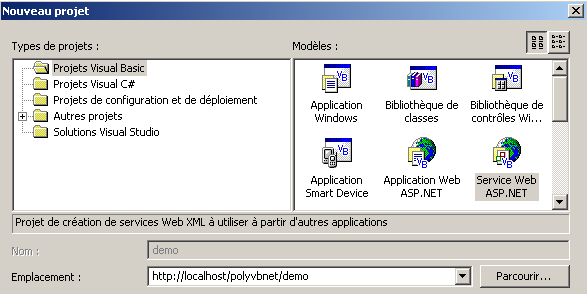
请注意以下几点:
- 项目类型为 Visual Basic(左侧窗格)
- 项目模板为 ASP.NET Web 服务(右侧窗格)
- 位置可灵活选择。在此,Web 服务将由本地 IIS Web 服务器托管。因此其 URL 将为 http://localhost/[path],其中 [path] 需自行定义。此处我们选择路径 http://localhost/polyvbnet/demo。随后 VS.NET 将为此项目创建一个文件夹。位置在哪里?IIS 服务器为其所服务的 Web 文档树提供了一个根目录。 我们将此根目录称为 <IISroot>。它对应于 URL http://localhost。由此可推断,URL http://localhost/polyvbnet/demo 将与文件夹 <IISroot>/polyvbnet/demo 相关联。<IISroot> 通常位于安装 IIS 的驱动器上的 \inetpub\wwwroot 文件夹中。 在本例中,该驱动器为 E 盘。因此,VS.NET 创建的文件夹即为 e:\inetpub\wwwroot\polyvbnet\demo 文件夹:
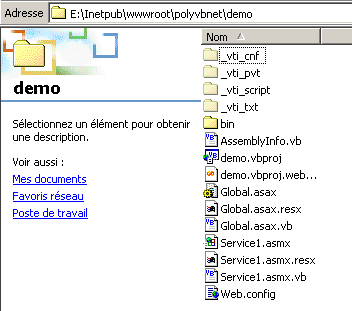
一如既往,生成的文件夹数量众多。它们并非总是都很有用。我们将仅针对特定时刻所需的文件夹进行说明。VS.NET 已创建了一个项目:
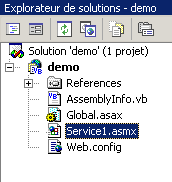
我们在项目的物理文件夹中找到了一些文件。对我们来说最有趣的是扩展名为 .asmx 的文件。这是 Web 服务的扩展名。Web 服务由 VS.NET 作为 Windows 应用程序进行管理,即一个具有图形用户界面及其管理代码的应用程序。这就是为什么我们有一个设计窗口:
Web 服务通常不具备图形用户界面。它代表一个可被远程调用的对象。它拥有方法,而应用程序会调用这些方法。因此,我们将它视为一个经典对象,其独特之处在于可以通过网络进行远程实例化。因此,我们不会使用 VS.NET 提供的设计窗口。相反,让我们通过“视图/代码”选项来关注服务代码:

有几点值得注意:
- 该文件名为 Service1.asmx.vb,而非 Service1.asmx。稍后我们将再回到 Service1.asmx 文件的内容。
- 我们看到一个与使用 VS.NET 开发 Windows 应用程序时类似的代码窗口
VS.NET 生成的代码如下:
Imports System.Web.Services

<System.Web.Services.WebService(Namespace := "http://tempuri.org/demo/Service1")> _
Public Class Service1
    Inherits System.Web.Services.WebService

#Region " Code généré par le Concepteur des services Web "

    Public Sub New()
        MyBase.New()

        'This call is required by the Web Services Designer.
        InitializeComponent()

        'Add your initialization code after the InitializeComponent() call

    End Sub

    'Required by the Web Services Designer
    Private components As System.ComponentModel.IContainer

    'REMARQUE: the following procedure is required by the Web Services Designer
    'It can be modified using the Web Services Designer.
    'Do not modify it using the code editor.
    <System.Diagnostics.DebuggerStepThrough()> Private Sub InitializeComponent()
        components = New System.ComponentModel.Container()
    End Sub

    Protected Overloads Overrides Sub Dispose(ByVal disposing As Boolean)
        'CODEGEN: this procedure is required by the Web Services Designer
        'Do not modify it using the code editor.
        If disposing Then
            If Not (components Is Nothing) Then
                components.Dispose()
            End If
        End If
        MyBase.Dispose(disposing)
    End Sub

#End Region

    ' EXEMPLE DE SERVICE WEB
    ' The HelloWorld() service example returns the string Hello World.
    ' To generate, leave the following lines uncommented, then save and generate the project.
    ' To test this Web service, make sure that the .asmx file is the start page
    ' and press F5.
    '
    '<WebMethod()> Public Function HelloWorld() As String
    '    HelloWorld = "Hello World
    ' End Function

End Class
首先,请注意这里有一个类,即 Service1 类,它继承自 WebService 类:
这要求我们导入 System.Web.Services 命名空间:
Imports System.Web.Services
类声明前需添加一个编译属性:
<System.Web.Services.WebService(Namespace := "http://tempuri.org/demo/Service1")> _
Public Class Service1
    Inherits System.Web.Services.WebService
System.Web.Services.WebService() 属性表明后续类是一个 Web 服务。该属性接受多种参数,其中包括名为 NameSpace 的参数。它用于将 Web 服务置于某个命名空间中。事实上,可以想象世界上存在多个名为“weather”的 Web 服务。 我们需要一种方法来区分它们。命名空间使这成为可能。一个可以命名为 [namespace1].weather,另一个可以命名为 [namespace2].weather。这与类命名空间的概念类似。VS.NET 自动生成了代码,并将其放置在源代码的某个区域中:
#Region " Code généré par le Concepteur des services Web "
如果我们查看这段代码,它与我们构建 Windows 应用程序时设计器生成的代码完全相同。如果我们没有图形用户界面(Web 服务通常就是这种情况),我们可以直接删除这段代码。
本节最后通过一个示例展示了 Web 服务可能呈现的样貌:
#End Region

    ' EXEMPLE DE SERVICE WEB
    ' L'exemple de service HelloWorld() retourne la chaîne Hello World.
    ' Pour générer, ne commentez pas les lignes suivantes, puis enregistrez et générez le projet.
    ' Pour tester ce service Web, assurez-vous que le fichier .asmx est la page de démarrage
    ' et appuyez sur F5.
    '
    '<WebMethod()> Public Function HelloWorld() As String
    '    HelloWorld = "Hello World"
    ' End Function
根据刚才的说明,我们将代码整理如下:
Imports System.Web.Services

<System.Web.Services.WebService(Namespace:="st.istia.univ-angers.fr")> _
Public Class Bonjour
    Inherits System.Web.Services.WebService

    <WebMethod()> Public Function Bonjour() As String
        Return "bonjour !"
    End Function
End Class
现在我们对情况有了更清晰的了解。
- Web 服务是一个从 WebService 类派生的类
- 该类通过 <System.Web.Services.WebService(Namespace:="st.istia.univ-angers.fr")> 属性进行限定。因此,我们将服务置于 st.istia.univ-angers.fr 命名空间中。
- 该类的方法通过 <WebMethod()> 属性进行限定,这表明我们正在处理一个可以通过网络远程调用的方法
因此,提供 Web 服务的类名为 Bonjour,并包含一个同名方法 Bonjour,该方法返回一个字符串。现在我们可以进行初步测试了。
- 若尚未启动,请启动 IIS Web 服务器
- 使用“调试/不调试运行”选项。VS.NET
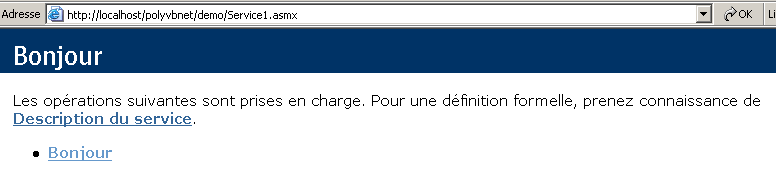
随后,VS.NET 将编译整个应用程序,启动浏览器(如果可用,通常是 Internet Explorer),并显示 URL http://localhost/polyvbnet/demo/Service1.asmx:
为什么是 URL http://localhost/polyvbnet/demo/Service1.asmx?因为这是项目中唯一的 .asmx 文件:
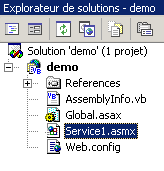
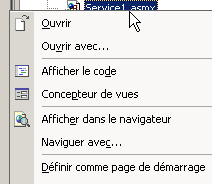
如果存在多个 .asmx 文件,我们就必须指定哪个文件应首先执行。操作方法是右键单击相应的 .asmx 文件,然后选择 [设为起始页] 选项。
您可能想知道 service1.asmx 文件包含什么内容。实际上,在 VS.NET 中,我们操作的是 service1.asmx.vb 文件,而不是 service1.asmx 文件。该文件位于项目文件夹中:
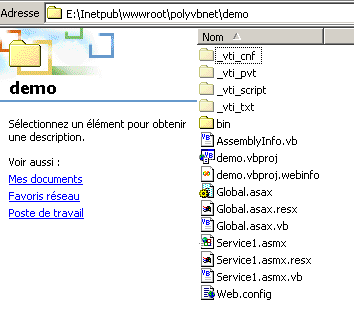
让我们用文本编辑器(记事本或其他)打开它。我们会看到以下内容:
该文件包含一条针对 IIS 服务器的简单指令,表明:
- 这是一个 Web 服务(WebService 关键字)
- 该服务类的编程语言是 Visual Basic(Language="vb")
- 该类的源代码位于文件 Service1.asmx.vb 中(Codebehind="Service1.asmx.vb")
- 实现该服务的类名为 demo.Bonjour(Class="demo.Bonjour")。请注意,VS.NET 已将 Bonjour 类放置在 demo 命名空间中,该命名空间也是项目的名称。
让我们回到访问 URL http://localhost/polyvbnet/demo/Service1.asmx 的页面:
上述页面的 HTML 代码是谁编写的?不是我们——这一点我们很清楚。是 IIS,它以标准方式呈现 Web 服务。该页面提供了两个链接。让我们点击第一个链接 [服务描述]:
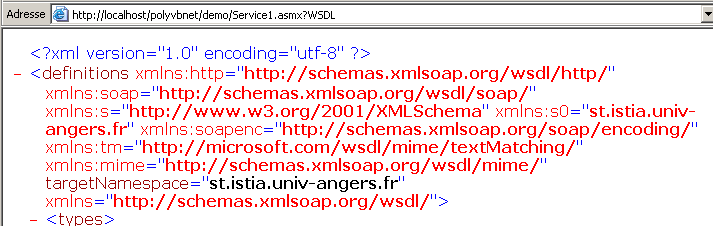
哎呀……这 XML 代码看起来相当晦涩难懂。不过请注意这个 URL
http://localhost/polyvbnet/demo/Service1.asmx?WSDL。打开浏览器,直接输入此 URL。你会得到与之前相同的结果。因此,请记住,URL http://serviceweb?WSDL 提供了对该 Web 服务 XML 描述的访问。 让我们回到主页,点击 [Hello] 链接。请记住,Hello 是该 Web 服务的一个方法。如果存在多个方法,它们都会在此处列出。我们将看到以下新页面:
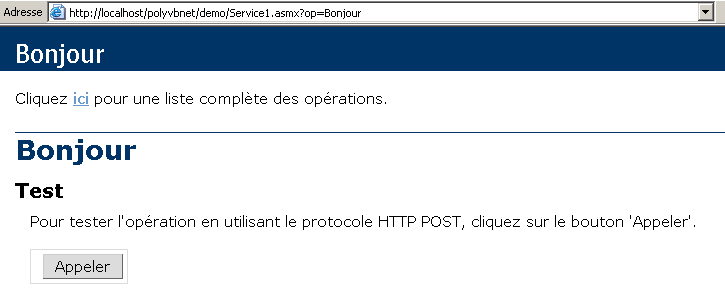
为了使演示简洁,我们特意截取了生成的页面。请再次注意该 URL:
如果我们将此 URL 直接输入到浏览器中,将得到与上文相同的结果。系统会提示我们使用 [Call] 按钮。让我们试一试。随后会出现一个新页面:

这又是 XML 格式。其中包含我们 Web 服务中曾出现的两项信息:
- 我们服务的命名空间 st.istia.univ-angers.fr
<System.Web.Services.WebService(Namespace:="st.istia.univ-angers.fr")>
- Bonjour 方法返回的值:
Return "bonjour !"
我们学到了什么?
- 如何编写一个 S Web 服务
- 如何调用它
接下来我们将探讨如何在不使用 VS.NET 的情况下编写 Web 服务。
10.3.2. 版本 2
在之前的示例中,VS.NET 自动处理了许多工作。是否可以在不使用该工具的情况下构建 Web 服务?答案是肯定的,接下来我们将向您展示具体方法。我们将使用文本编辑器构建以下 Web 服务:
Imports System.Web.Services

<System.Web.Services.WebService(Namespace:="st.istia.univ-angers.fr")> _
Public Class Bonjour2
    Inherits System.Web.Services.WebService

    <WebMethod()> Public Function getBonjour() As String
        Return "bonjour de nouveau !"
    End Function
End Class
该类名为 Bonjour2,并包含一个名为 getBonjour 的方法。它位于 demo2.vb 文件中,该文件本身位于 IIS 服务器目录结构中的 E:\Inetpub\wwwroot\polyvbnet\demo2 文件夹内。这是一个标准的 VB.NET 类,因此可以进行编译:
dos>vbc /out:demo2 /t:library /r:system.dll /r:system.web.services.dll demo2.vb

dos>dir
02/03/2004  18:04                  286 demo2.vb
02/03/2004  18:10                   77 demo2.asmx
02/03/2004  18:12                3 072 demo2.dll
我们将 demo2.dll 程序集放置在 bin 文件夹中(此名称是必需的):
现在我们创建 demo2.asmx 文件。这是将被 Web 客户端调用的文件。其内容如下:
我们之前已经遇到过这个指令。它表示:
- Web 服务类名为 Bonjour2,位于 demo2.dll 程序集内。IIS 会在多个位置搜索该程序集,包括 Web 服务的 bin 文件夹。这就是我们将其放置在该位置的原因。
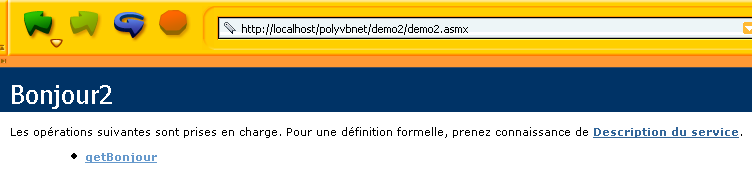
现在我们可以进行各种测试。请确保 IIS 正在运行,并在浏览器中访问 URL http://localhost/polyvbnet/demo2/demo2.asmx:
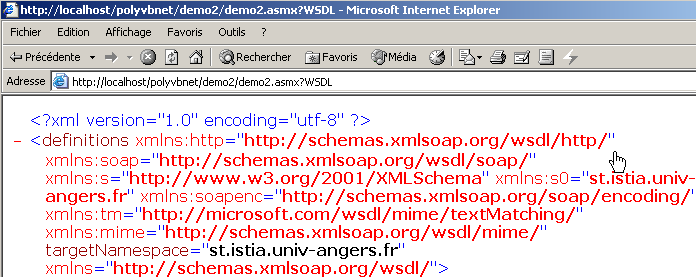
随后访问 URL http://localhost/polyvbnet/demo2/demo2.asmx?WSDL
接着访问 URL http://localhost/polyvbnet/demo2/demo2.asmx?op=getBonjour,其中 getBonjour 是我们 Web 服务中唯一的方法名称:
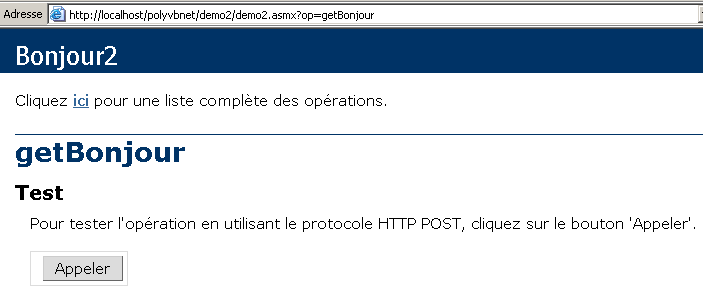
我们使用上方的 [Call] 按钮:

我们成功获取了调用 Web 服务 getBonjour 方法的结果。现在我们已经知道如何在不使用 Visual Studio .NET 的情况下构建 Web 服务。从现在开始,我们将忽略 Web 服务的具体构建方式,仅关注基础文件。
10.3.3. 第 3 版
前两个版本的 [Hello] Web 服务使用了两个文件:
- 一个 .asmx 文件,即 Web 服务的入口点
- 一个 .vb 文件,即 Web 服务的源代码
在此,我们将展示仅需一个 .asmx 文件即可。demo3.asmx 服务的代码如下:
我们可以看到,该服务的源代码现在直接位于源文件 demo3.asmx 中。该指令
不再引用外部程序集中的类,而是引用位于同一源文件中的类。我们将此文件放置在 <IISroot>\polyvbnet\demo3 文件夹中:
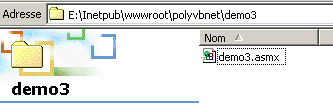
现在启动 IIS 并访问 URL http://localhost/polyvbnet/demo3/demo3.asmx:
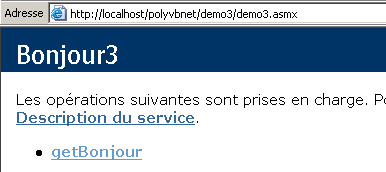
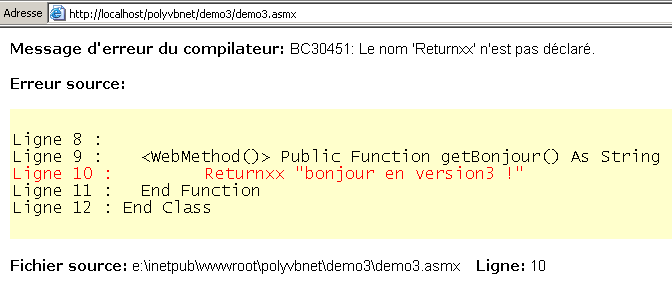
我们注意到与上一版本相比有一个显著的区别:我们无需编译该服务的 VB 代码。IIS 会利用安装在同一台机器上的 VB.NET 编译器自行完成编译,然后返回页面。如果出现编译错误,IIS 会报告该错误:
10.3.4. 第 4 版
这里我们将重点放在 IIS 服务器配置上。此前,我们一直将 Web 服务放置在 IIS 服务器的 <IISroot> 根目录下,即 [e:\inetpub\wwwroot]。在此我们将演示,Web 服务可以放置在任意位置。这通过 IIS 虚拟目录来实现。让我们将服务放置在以下目录中:
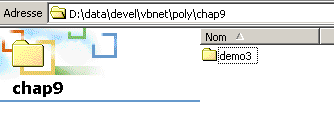
文件夹 [D:\data\devel\vbnet\poly\chap9\demo3] 不在 IIS 服务器目录树中。我们必须通过创建一个 IIS 虚拟文件夹来向 IIS 指定该路径。现在启动 IIS,并选择下方的 [高级] 选项:
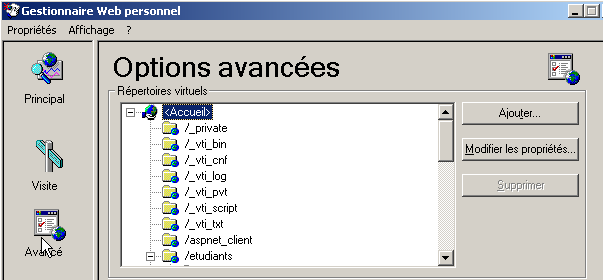
此时将显示虚拟目录列表。我们不在此处赘述该列表。通过上方 [添加] 按钮创建一个新的虚拟目录:
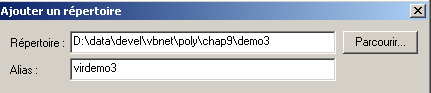
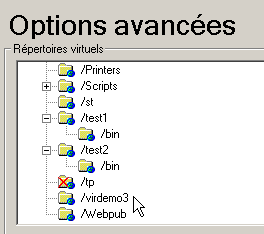
通过 [浏览] 按钮,我们选择包含 Web 服务的物理文件夹,本例中即文件夹 [D:\data\devel\vbnet\poly\chap9\demo3]。我们将此文件夹命名为逻辑(虚拟)名称:[virdemo3]。 这意味着物理文件夹 [D:\data\devel\vbnet\poly\chap9\demo3] 内的文档将可通过 URL [http://<machine>/virdemo3] 在网络上访问。上方的对话框中还包含其他设置,我们保持默认值不变。点击“确定”。新的虚拟文件夹将出现在 IIS 的虚拟文件夹列表中:
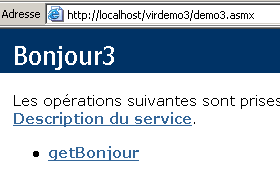
现在,我们打开浏览器并访问 URL [http://localhost/virdemo3/demo3.asmx]。结果与之前相同:
10.3.5. 结论
我们已经演示了多种创建 Web 服务的方法。接下来,我们将采用第 3 种方法来创建服务,并使用第 4 种方法进行部署。这样,我们就无需使用 VS.NET。不过,值得注意的是,使用 VS.NET 能够提供调试辅助功能,这确实是一大优势。 目前有免费的 Web 应用程序开发工具可用,其中最值得一提的是由微软赞助的 WebMatrix 产品,其网址为 [http://www.asp.net/webmatrix]。对于希望零成本入门 Web 编程的开发者而言,这是一款极佳的工具。
10.4. 用于操作的 Web 服务
设想一个提供五项功能的 Web 服务:
- add(a,b),返回 a+b
- subtract(a,b),返回 a-b
- multiply(a,b),返回 a*b
- divide(a,b),返回 a/b
- doAll(a,b),返回数组 [a+b, a-b, a*b, a/b]
此服务的 VB.NET 代码如下:
<%@ WebService language="VB" class=operations %>

imports system.web.services

<WebService(Namespace:="st.istia.univ-angers.fr")> _
   Public Class operations
      Inherits WebService

      <WebMethod>  _
      Function ajouter(a As Double, b As Double) As Double
         Return a + b
      End Function

      <WebMethod>  _
      Function soustraire(a As Double, b As Double) As Double
         Return a - b
      End Function

      <WebMethod>  _
      Function multiplier(a As Double, b As Double) As Double
         Return a * b
      End Function

      <WebMethod>  _
      Function diviser(a As Double, b As Double) As Double
         Return a / b
      End Function

      <WebMethod>  _
      Function toutfaire(a As Double, b As Double) As Double()
         Return New Double() {a + b, a - b, a * b, a / b}
      End Function
   End Class
我们在此重复一些已有的说明,但这些内容值得重新回顾或进一步展开。运算类与 VB.NET 类相似,但有几点需要注意:
- 方法前需添加 <WebMethod()> 属性,该属性告知编译器哪些方法应被“发布”,即向客户端提供。未添加此属性的方法对远程客户端不可见。这可能是供其他方法使用的内部方法,但不打算对外发布。
- 该类继承自 System.Web.Services 命名空间中定义的 WebService 类。这种继承并非总是必需的。特别是在本示例中,我们完全可以省略它。
- 该类本身前缀有一个 <WebService(Namespace="st.istia.univ-angers.fr")> 属性,旨在为 Web 服务提供命名空间。类供应商会为其类分配命名空间,以赋予它们唯一的名称,从而避免与其他供应商可能具有相同名称的类发生冲突。 Web 服务也是如此。每个 Web 服务都必须通过一个唯一名称来标识,在本例中即为 st.istia.univ-angers.fr。
- 我们未定义构造函数。因此,将隐式使用父类的构造函数。
上述源代码并非直接供 VB.NET 编译器使用,而是供 IIS Web 服务器使用。它必须具有 .asmx 扩展名,并保存在 Web 服务器的目录结构中。在此,我们将它保存为 operations.asmx,位于 <IISroot>\polyvbnet\operations 文件夹中:
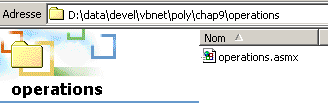
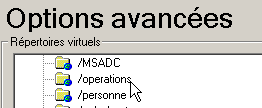
我们将 IIS 虚拟目录 [operations] 与该物理目录关联:
 |  |
现在让我们使用浏览器访问该服务。请求的 URL 为 [http://localhost/operations/operations.asmx]:
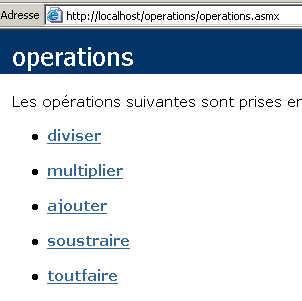
我们获得了一个网页文档,其中包含 operations Web 服务中定义的每个方法的链接。让我们点击“添加”链接:
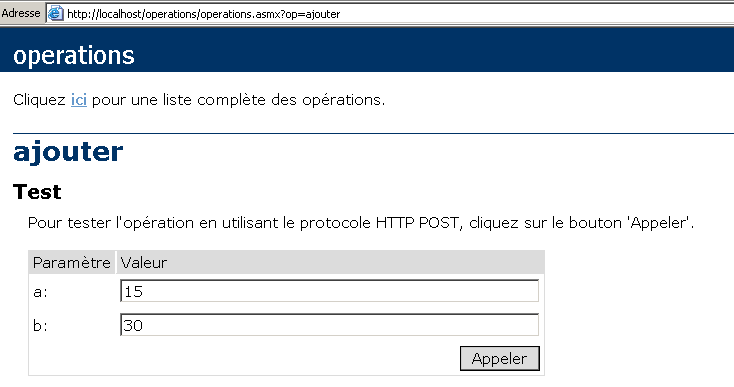
弹出的页面提示我们通过提供该方法所需的两个参数 a 和 b 来测试 add 方法。回顾一下 *add* 方法的定义:
请注意,该页面使用了方法定义中的参数名称 a 和 b。单击“调用”按钮,另一个浏览器窗口中将显示以下响应:

如果您选择上方的 [查看/源代码],将看到以下代码:

让我们对 [toutfaire] 方法重复这一过程:
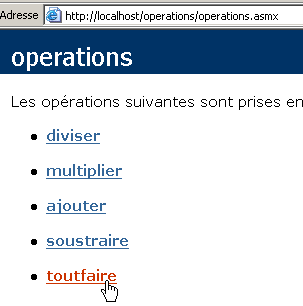
我们会得到以下页面:
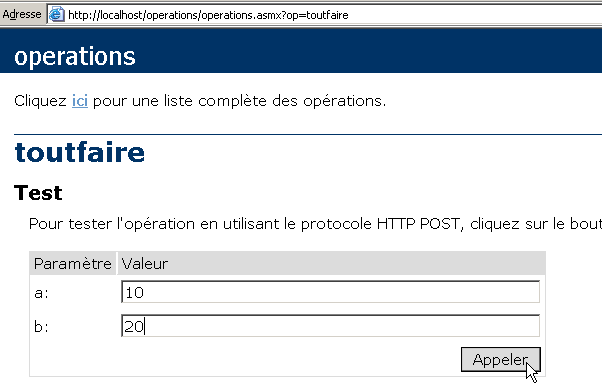
让我们点击上方的[呼叫]按钮:
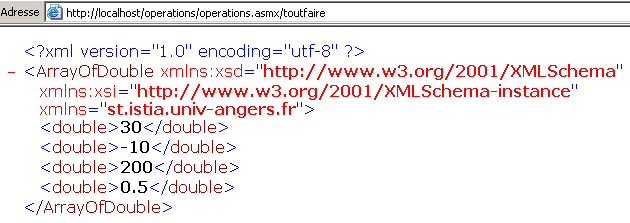
在所有情况下,服务器的响应都采用以下格式:
- 响应采用 XML 格式
- 第 1 行是标准行,在响应中始终存在
- 后续行取决于结果类型(double、ArrayOfDouble)、结果数量以及 Web 服务命名空间(本例中为 st.istia.univ-angers.fr)。
查询 Web 服务并获取其响应有多种方法。让我们回到该服务的 URL:
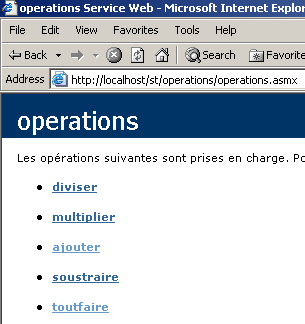
并点击 [Add] 链接。在弹出的页面上,展示了两种查询该 Web 服务 [Add] 功能的方法:
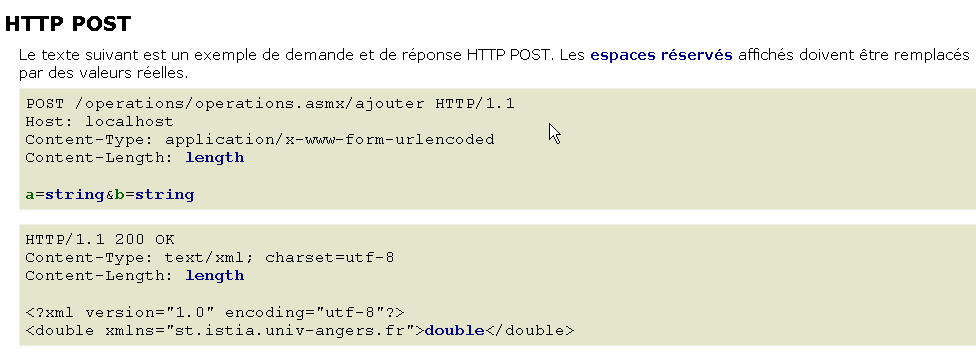
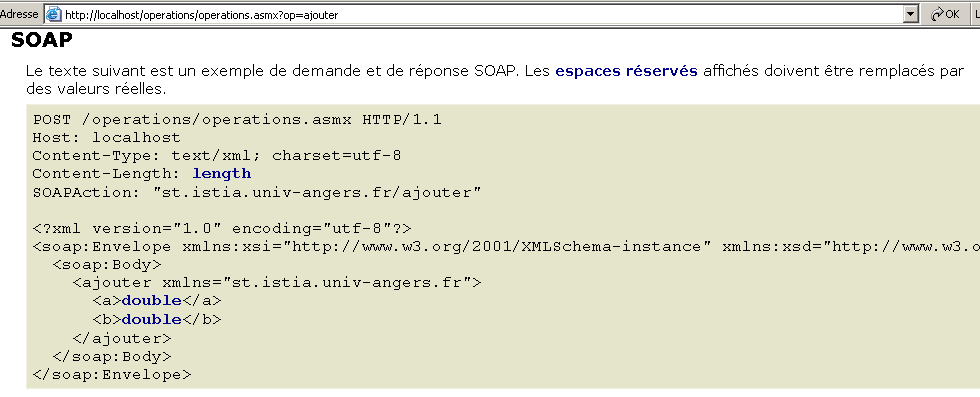
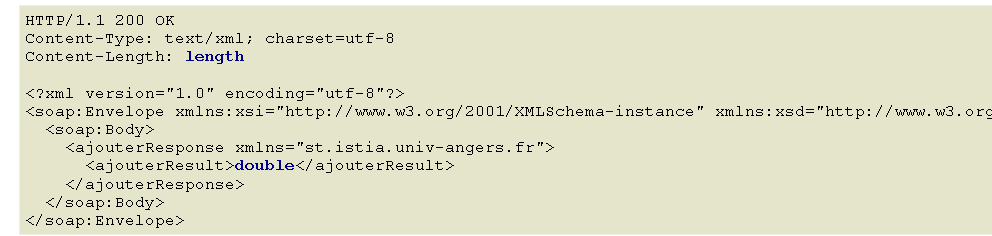
这两种访问 Web 服务的方法分别称为:HTTP-POST 和 SOAP。接下来我们将逐一探讨它们。
注意:在 VS.NET 的早期版本中,还有一种名为 HTTP-GET 的方法。截至本文档编写之时(2004 年 3 月),该方法似乎已不再可用。这意味着由 VS.NET 生成的 Web 服务不接受 GET 请求。但这并不意味着您无法编写接受 GET 请求的 Web 服务,特别是使用 VS.NET 以外的工具或直接手动编写时。
10.5. HTTP-POST 客户端
我们将遵循 Web 服务提出的方法:
让我们来分析一下上述内容。首先,Web 客户端必须发送以下 HTTP 头:
Web 客户端根据 HTTP 1.1 协议向 URL /operations/operations.asmx/add 发送 POST 请求 | |
我们指定请求的目标机器。此处为 localhost。该标头在 HTTP 协议 1.1 版本中被设为必填项 | |
这表示在HTTP头部之后,将以URL编码格式发送额外参数。该格式会将某些字符替换为相应的十六进制代码。 | |
这是将在 HTTP 头部之后发送的参数字符串的字符数。 |
HTTP 头部之后是一行空行,接着是长度为 [Content-Length] 字符的 POST 参数字符串,格式为 a=XX&b=YY,其中 XX 和 YY 分别是参数 a 和 b 的值的“URL 编码”字符串。我们已经掌握了足够的知识,可以使用本章 TCP/IP 编程部分中已使用的通用 TCP 客户端重现上述内容:
- 我们启动 IIS
- 该服务可通过 URL [http://localhost/operations/operations.asmx] 访问
- 我们在 DOS 窗口中使用通用 TCP 客户端
dos>clttcpgenerique localhost 80
Commandes :
POST /operations/operations.asmx/ajouter HTTP/1.1
HOST: localhost
Connection: close
Content-Type: application/x-www-form-urlencoded
Content-length: 7

<-- HTTP/1.1 100 Continue
<-- Server: Microsoft-IIS/5.0
<-- Date: Wed, 03 Mar 2004 13:55:17 GMT
<-- X-Powered-By: ASP.NET
<--
a=2&b=3
<-- HTTP/1.1 200 OK
<-- Server: Microsoft-IIS/5.0
<-- Date: Wed, 03 Mar 2004 13:55:26 GMT
<-- X-Powered-By: ASP.NET
<-- Connection: close
<-- X-AspNet-Version: 1.1.4322
<-- Cache-Control: private, max-age=0
<-- Content-Type: text/xml; charset=utf-8
<-- Content-Length: 90
<--
<-- <?xml version="1.0" encoding="utf-8"?>
<-- <double xmlns="st.istia.univ-angers.fr">5</double>
[fin du thread de lecture des réponses du serveur]
fin
[fin du thread d'envoi des commandes au serveur]
首先,请注意我们已添加了 [Connection: close] 头部,用于指示服务器在发送响应后关闭连接。此处必须这样做。如果不指定此项,默认情况下服务器会保持连接打开。然而,其响应是一系列文本行,其中最后一行并未以换行符结束。 事实证明,我们的通用 TCP 客户端使用 ReadLine 方法读取以换行符结尾的文本行。如果服务器在发送最后一行后不关闭连接,客户端就会被阻塞,因为它一直在等待一个永远不会到达的换行符。如果服务器关闭了连接,客户端的 ReadLine 方法就会完成,客户端也就不会被阻塞。
在接收到表示 HTTP 头部结束的空行后,IIS 服务器会立即发送初始响应:
<-- HTTP/1.1 100 Continue
<-- Server: Microsoft-IIS/5.0
<-- Date: Wed, 03 Mar 2004 13:55:17 GMT
<-- X-Powered-By: ASP.NET
<--
这个响应仅由HTTP头组成,告知客户端可以发送其声称想要发送的7个字符。我们的操作:
请注意,我们的 TCP 客户端在此处发送的字符超过 7 个,因为它使用了换行符(WriteLine)进行发送。 这不会对服务器造成干扰,因为服务器只会从接收到的数据中提取前 7 个字符,且随后连接会被关闭(Connection: close)。如果连接保持打开状态,这些多余的字符可能会引发问题,因为它们会被解释为来自客户端的下一个命令。收到参数后,服务器发送响应:
<-- HTTP/1.1 200 OK
<-- Server: Microsoft-IIS/5.0
<-- Date: Wed, 03 Mar 2004 13:55:26 GMT
<-- X-Powered-By: ASP.NET
<-- Connection: close
<-- X-AspNet-Version: 1.1.4322
<-- Cache-Control: private, max-age=0
<-- Content-Type: text/xml; charset=utf-8
<-- Content-Length: 90
<--
<-- <?xml version="1.0" encoding="utf-8"?>
<-- <double xmlns="st.istia.univ-angers.fr">5</double>
现在我们已经具备了编写Web服务客户端程序所需的要素。这是一个名为httpPost2的控制台客户端,使用方法如下:
dos>httpPost2 http://localhost/operations/operations.asmx

Tapez vos commandes au format : [ajouter|soustraire|multiplier|diviser] a b

ajouter 6 7
--> POST /operations/operations.asmx/ajouter HTTP/1.1
--> Host: localhost:80
--> Content-Type: application/x-www-form-urlencoded
--> Content-Length: 7
--> Connection: Keep-Alive
-->
<-- HTTP/1.1 100 Continue
<-- Server: Microsoft-IIS/5.0
<-- Date: Wed, 03 Mar 2004 14:56:38 GMT
<-- X-Powered-By: ASP.NET
<--
--> a=6&b=7
<-- HTTP/1.1 200 OK
<-- Server: Microsoft-IIS/5.0
<-- Date: Wed, 03 Mar 2004 14:56:38 GMT
<-- X-Powered-By: ASP.NET
<-- X-AspNet-Version: 1.1.4322
<-- Cache-Control: private, max-age=0
<-- Content-Type: text/xml; charset=utf-8
<-- Content-Length: 91
<--
<-- <?xml version="1.0" encoding="utf-8"?>
<-- <double xmlns="st.istia.univ-angers.fr">13</double>
[résultat=13]

soustraire 8 9
--> POST /operations/operations.asmx/soustraire HTTP/1.1
--> Host: localhost:80
--> Content-Type: application/x-www-form-urlencoded
--> Content-Length: 7
--> Connection: Keep-Alive
-->
<-- HTTP/1.1 100 Continue
<-- Server: Microsoft-IIS/5.0
<-- Date: Wed, 03 Mar 2004 14:56:47 GMT
<-- X-Powered-By: ASP.NET
<--
--> a=8&b=9
<-- HTTP/1.1 200 OK
<-- Server: Microsoft-IIS/5.0
<-- Date: Wed, 03 Mar 2004 14:56:47 GMT
<-- X-Powered-By: ASP.NET
<-- X-AspNet-Version: 1.1.4322
<-- Cache-Control: private, max-age=0
<-- Content-Type: text/xml; charset=utf-8
<-- Content-Length: 91
<--
<-- <?xml version="1.0" encoding="utf-8"?>
<-- <double xmlns="st.istia.univ-angers.fr">-1</double>
[résultat=-1]

fin

dos>
调用客户端时,需向其传入 Web 服务的 URL:
接下来,客户端会读取键盘输入的命令并执行它们。这些命令的格式如下:
其中 function 是要调用的 Web 服务函数(加、减、乘、除),a 和 b 是该函数将要运算的数值。例如:
随后,客户端将向 Web 服务器发送必要的 HTTP 请求并接收响应。客户端与服务器的交互过程将显示在屏幕上,以帮助您更好地理解该流程:
ajouter 6 7
--> POST /operations/operations.asmx/ajouter HTTP/1.1
--> Host: localhost:80
--> Content-Type: application/x-www-form-urlencoded
--> Content-Length: 7
--> Connection: Keep-Alive
-->
<-- HTTP/1.1 100 Continue
<-- Server: Microsoft-IIS/5.0
<-- Date: Wed, 03 Mar 2004 14:56:38 GMT
<-- X-Powered-By: ASP.NET
<--
--> a=6&b=7
<-- HTTP/1.1 200 OK
<-- Server: Microsoft-IIS/5.0
<-- Date: Wed, 03 Mar 2004 14:56:38 GMT
<-- X-Powered-By: ASP.NET
<-- X-AspNet-Version: 1.1.4322
<-- Cache-Control: private, max-age=0
<-- Content-Type: text/xml; charset=utf-8
<-- Content-Length: 91
<--
<-- <?xml version="1.0" encoding="utf-8"?>
<-- <double xmlns="st.istia.univ-angers.fr">13</double>
[résultat=13]
上文展示的交互与我们之前看到的通用 TCP 客户端完全相同,只有一个区别:HTTP 头部 **Connection: Keep-Alive 指示服务器不要关闭连接。因此,连接将保持打开状态以供客户端进行下一次操作,这样客户端就无需重新连接到服务器。 不过,这要求客户端使用 ReadLine() 以外的方法来读取服务器的响应,因为我们知道响应由一系列行组成,且最后一行并不以换行符结尾。一旦接收到完整的服务器响应,客户端便会对其进行解析,以查找所请求操作的结果并将其显示出来:
让我们来分析一下客户端的代码:
' namespaces
Imports System
Imports System.Net.Sockets
Imports System.IO
Imports System.Text.RegularExpressions
Imports System.Collections
Imports Microsoft.VisualBasic
Imports System.Web

' web operations client
Public Module clientPOST

    Public Sub Main(ByVal args() As String)
        ' syntax
        Const syntaxe As String = "pg URI"
        Dim fonctions As String() = {"ajouter", "soustraire", "multiplier", "diviser"}

        ' number of arguments
        If args.Length <> 1 Then
            erreur(syntaxe, 1)
        End If
        ' note the URI required
        Dim URIstring As String = args(0)

        ' connect to the server
        Dim uri As Uri = Nothing        ' the URI of the web service
        Dim client As TcpClient = Nothing        ' the client's tcp link with the server
        Dim [IN] As StreamReader = Nothing        ' the customer's reading flow
        Dim OUT As StreamWriter = Nothing        ' the customer's writing flow
        Try
            ' server connection
            uri = New Uri(URIstring)
            client = New TcpClient(uri.Host, uri.Port)
            ' create customer input/output flows TCP
            [IN] = New StreamReader(client.GetStream())
            OUT = New StreamWriter(client.GetStream())
            OUT.AutoFlush = True
        Catch ex As Exception
            ' URI incorrect or other problem
            erreur("L'erreur suivante s'est produite : " + ex.Message, 2)
        End Try

        ' creation of a dictionary of web service functions
        Dim dicoFonctions As New Hashtable
        Dim i As Integer
        For i = 0 To fonctions.Length - 1
            dicoFonctions.Add(fonctions(i), True)
        Next i

        ' user requests are typed on the keyboard
        ' as function a b
        ' they are terminated with the command fin
        Dim commande As String = Nothing        ' keyboard command
        Dim champs As String() = Nothing        ' command line fields
        Dim fonction As String = Nothing        ' name of a web service function
        Dim a, b As String        ' web service function arguments

        ' invites the user
        Console.Out.WriteLine("Tapez vos commandes au format : [ajouter|soustraire|multiplier|diviser] a b")

        ' error management
        Dim erreurCommande As Boolean
        Try
            ' keyboard command input loop
            While True
                ' no error at start
                erreurCommande = False
                ' read command
                commande = Console.In.ReadLine().Trim().ToLower()
                ' finished?
                If commande Is Nothing Or commande = "fin" Then
                    Exit While
                End If
                ' breaking down the order into fields
                champs = Regex.Split(commande, "\s+")
                Try
                    ' three fields are required
                    If champs.Length <> 3 Then
                        Throw New Exception
                    End If
                    ' field 0 must be a recognized function
                    fonction = champs(0)
                    If Not dicoFonctions.ContainsKey(fonction) Then
                        Throw New Exception
                    End If
                    ' field 1 must be a valid number
                    a = champs(1)
                    Double.Parse(a)
                    ' field 2 must be a valid number
                    b = champs(2)
                    Double.Parse(b)
                Catch
                    ' invalid order
                    Console.Out.WriteLine("syntaxe : [ajouter|soustraire|multiplier|diviser] a b")
                    erreurCommande = True
                End Try
                ' request the web service
                If Not erreurCommande Then executeFonction([IN], OUT, uri, fonction, a, b)
            End While
        Catch e As Exception
            Console.Out.WriteLine(("L'erreur suivante s'est produite : " + e.Message))
        End Try
        ' end of client-server link
        Try
            [IN].Close()
            OUT.Close()
            client.Close()
        Catch
        End Try
    End Sub
...........
    ' error display
    Public Sub erreur(ByVal msg As String, ByVal exitCode As Integer)
        ' error display
        System.Console.Error.WriteLine(msg)
        ' stop with error
        Environment.Exit(exitCode)
    End Sub
End Module
我们之前已经多次见过这些元素,它们无需特别说明。现在让我们来查看 executeFonction 方法的代码,新元素就位于其中:
    ' executeFonction
    Public Sub executeFonction(ByVal [IN] As StreamReader, ByVal OUT As StreamWriter, ByVal uri As Uri, ByVal fonction As String, ByVal a As String, ByVal b As String)
        ' executes function(a,b) on the URI uri web service
        ' client-server exchanges take place via IN and OUT flows
        ' the result of the function is in the line
        ' <double xmlns="st.istia.univ-angers.fr">double</double>
        ' sent by the server

        ' query chain construction
        Dim requête As String = "a=" + HttpUtility.UrlEncode(a) + "&b=" + HttpUtility.UrlEncode(b)
        Dim nbChars As Integer = requête.Length

        ' construction of header table HTTP to be sent
        Dim entetes(5) As String
        entetes(0) = "POST " + uri.AbsolutePath + "/" + fonction + " HTTP/1.1"
        entetes(1) = "Host: " & uri.Host & ":" & uri.Port
        entetes(2) = "Content-Type: application/x-www-form-urlencoded"
        entetes(3) = "Content-Length: " & nbChars
        entetes(4) = "Connection: Keep-Alive"
        entetes(5) = ""

        ' send HTTP headers to the server
        Dim i As Integer
        For i = 0 To entetes.Length - 1
            ' send to server
            OUT.WriteLine(entetes(i))
            ' screen echo
            Console.Out.WriteLine(("--> " + entetes(i)))
        Next i

        ' we read the 1st web server response HTTP/1.1 100
        Dim ligne As String = Nothing
        ' a line in the read stream
        ligne = [IN].ReadLine()
        While ligne <> ""
            'echo
            Console.Out.WriteLine(("<-- " + ligne))
            ' next line
            ligne = [IN].ReadLine()
        End While
        'last line echo
        Console.Out.WriteLine(("<-- " + ligne))

        ' send request parameters
        OUT.Write(requête)
        ' echo
        Console.Out.WriteLine(("--> " + requête))

        ' construction of the regular expression to find the response size XML
        ' in the web server response stream
        Dim modèleLength As String = "^Content-Length: (.+?)\s*$"
        Dim RegexLength As New Regex(modèleLength)        '
        Dim MatchLength As Match = Nothing
        Dim longueur As Integer = 0

        ' read the second response from the web server after sending the request
        ' the value of the Content-Length line is stored
        ligne = [IN].ReadLine()
        While ligne <> ""
            ' screen echo
            Console.Out.WriteLine(("<-- " + ligne))
            ' Content-Length ?
            MatchLength = RegexLength.Match(ligne)
            If MatchLength.Success Then
                longueur = Integer.Parse(MatchLength.Groups(1).Value)
            End If
            ' next line
            ligne = [IN].ReadLine()
        End While
        ' last line echo
        Console.Out.WriteLine("<--")

        ' build the regular expression to retrieve the result
        ' in the web server response stream
        Dim modèle As String = "<double xmlns=""st.istia.univ-angers.fr"">(.+?)</double>"
        Dim ModèleRésultat As New Regex(modèle)
        Dim MatchRésultat As Match = Nothing

        ' we read the rest of the web server response
        Dim chrRéponse(longueur) As Char
        [IN].Read(chrRéponse, 0, longueur)
        Dim strRéponse As String = New [String](chrRéponse)

        ' the answer is broken down into lines of text
        Dim lignes As String() = Regex.Split(strRéponse, ControlChars.Lf)

        ' scroll through the lines of text looking for the result
        Dim strRésultat As String = "?"        ' function result
        For i = 0 To lignes.Length - 1
            ' follow-up
            Console.Out.WriteLine(("<-- " + lignes(i)))
            ' compare current line to model
            MatchRésultat = ModèleRésultat.Match(lignes(i))
            ' have we found?
            If MatchRésultat.Success Then
                ' we note the result
                strRésultat = MatchRésultat.Groups(1).Value
            End If
        Next i
        ' the result is displayed
        Console.Out.WriteLine(("[résultat=" + strRésultat + "]" + ControlChars.Lf))
    End Sub
首先,HTTP-POST 客户端以 POST 格式发送其请求:
        ' query chain construction
        Dim requête As String = "a=" + HttpUtility.UrlEncode(a) + "&b=" + HttpUtility.UrlEncode(b)
        Dim nbChars As Integer = requête.Length

        ' construction of header table HTTP to be sent
        Dim entetes(5) As String
        entetes(0) = "POST " + uri.AbsolutePath + "/" + fonction + " HTTP/1.1"
        entetes(1) = "Host: " & uri.Host & ":" & uri.Port
        entetes(2) = "Content-Type: application/x-www-form-urlencoded"
        entetes(3) = "Content-Length: " & nbChars
        entetes(4) = "Connection: Keep-Alive"
        entetes(5) = ""

        ' send HTTP headers to the server
        Dim i As Integer
        For i = 0 To entetes.Length - 1
            ' send to server
            OUT.WriteLine(entetes(i))
            ' screen echo
            Console.Out.WriteLine(("--> " + entetes(i)))
        Next i
在页眉中
我们必须指定客户端将在 HTTP 头部之后发送的参数的大小:
为此,请使用以下代码:
        ' query chain construction
        Dim requête As String = "a=" + HttpUtility.UrlEncode(a) + "&b=" + HttpUtility.UrlEncode(b)
        Dim nbChars As Integer = requête.Length
HttpUtility.UrlEncode(string string) 方法将字符串中的某些字符转换为 %n1n2,其中 n1n2 是被转换字符的 ASCII 码。 此转换的目标字符是所有在 POST 请求中具有特定含义的字符(空格、=、& 等)。在此处,由于 a 和 b 是数字,不包含任何这些特殊字符,因此通常不需要使用 HttpUtility.UrlEncode 方法。此处仅作为示例使用。它需要 System.Web 命名空间。一旦客户端发送了其 HTTP 头:
--> POST /operations/operations.asmx/ajouter HTTP/1.1
--> Host: localhost:80
--> Content-Type: application/x-www-form-urlencoded
--> Content-Length: 7
--> Connection: Keep-Alive
-->
服务器返回包含 HTTP 100 Continue 标头的响应:
<-- HTTP/1.1 100 Continue
<-- Server: Microsoft-IIS/5.0
<-- Date: Wed, 03 Mar 2004 14:56:47 GMT
<-- X-Powered-By: ASP.NET
<--
该代码仅读取并将此第一个响应显示在屏幕上:
        ' we read the 1st web server response HTTP/1.1 100
        Dim ligne As String = Nothing
        ' a line in the read stream
        ligne = [IN].ReadLine()
        While ligne <> ""
            'echo
            Console.Out.WriteLine(("<-- " + ligne))
            ' next line
            ligne = [IN].ReadLine()
        End While
        'last line echo
        Console.Out.WriteLine(("<-- " + ligne))
读取此初始响应后,客户端必须发送其参数:
它通过以下代码实现:
        ' envoi paramètres de la requête
        OUT.Write(requête)
        ' echo
        Console.Out.WriteLine(("--> " + requête))
随后服务器将发送响应。该响应包含两部分:
- HTTP 头部,后跟一个空行
- XML格式的响应
<-- HTTP/1.1 200 OK
<-- Server: Microsoft-IIS/5.0
<-- Date: Wed, 03 Mar 2004 14:56:38 GMT
<-- X-Powered-By: ASP.NET
<-- X-AspNet-Version: 1.1.4322
<-- Cache-Control: private, max-age=0
<-- Content-Type: text/xml; charset=utf-8
<-- Content-Length: 91
<--
<-- <?xml version="1.0" encoding="utf-8"?>
<-- <double xmlns="st.istia.univ-angers.fr">13</double>
首先,客户端读取 HTTP 头部以查找 Content-Length 字段,并获取 XML 响应的大小(此处为 90)。这是通过正则表达式获取的。我们本可以采用其他方式实现,且效率可能更高。
        ' construction of the regular expression to find the response size XML
        ' in the web server response stream
        Dim modèleLength As String = "^Content-Length: (.+?)\s*$"
        Dim RegexLength As New Regex(modèleLength)        '
        Dim MatchLength As Match = Nothing
        Dim longueur As Integer = 0

        ' read the second response from the web server after sending the request
        ' the value of the Content-Length line is stored
        ligne = [IN].ReadLine()
        While ligne <> ""
            ' screen echo
            Console.Out.WriteLine(("<-- " + ligne))
            ' Content-Length ?
            MatchLength = RegexLength.Match(ligne)
            If MatchLength.Success Then
                longueur = Integer.Parse(MatchLength.Groups(1).Value)
            End If
            ' next line
            ligne = [IN].ReadLine()
        End While
        ' last line echo
        Console.Out.WriteLine("<--")
一旦获得了 XML 响应的长度 N,我们只需从服务器响应的 IN 流中读取 N 个字符。为了便于屏幕监控,这串 N 个字符会被拆分为多行文本。在这些行中,我们寻找包含结果的那一行:
此时再次使用正则表达式进行匹配。一旦找到结果,便将其显示出来。
客户端代码的结尾如下:
        ' build the regular expression to retrieve the result
        ' in the web server response stream
        Dim modèle As String = "<double xmlns=""st.istia.univ-angers.fr"">(.+?)</double>"
        Dim ModèleRésultat As New Regex(modèle)
        Dim MatchRésultat As Match = Nothing

        ' we read the rest of the web server response
        Dim chrRéponse(longueur) As Char
        [IN].Read(chrRéponse, 0, longueur)
        Dim strRéponse As String = New [String](chrRéponse)

        ' the answer is broken down into lines of text
        Dim lignes As String() = Regex.Split(strRéponse, ControlChars.Lf)

        ' scroll through the lines of text looking for the result
        Dim strRésultat As String = "?"        ' function result
        For i = 0 To lignes.Length - 1
            ' follow-up
            Console.Out.WriteLine(("<-- " + lignes(i)))
            ' compare current line to model
            MatchRésultat = ModèleRésultat.Match(lignes(i))
            ' have we found?
            If MatchRésultat.Success Then
                ' we note the result
                strRésultat = MatchRésultat.Groups(1).Value
            End If
        Next i
        ' the result is displayed
        Console.Out.WriteLine(("[résultat=" + strRésultat + "]" + ControlChars.Lf))
    End Sub
10.6. 一个 SOAP 客户端
在此,我们将探讨第二个客户端,它将使用 SOAP(简单对象访问协议)客户端-服务器对话。以下是针对 add 函数的此类对话示例:
客户端的请求是一个 POST 请求。因此,我们将看到与前一个客户端中类似的一些机制。主要区别在于,HTTP-POST 客户端是通过表单发送参数 a 和 b 的,而
的形式发送参数 a 和 b,而 SOAP 客户端则采用更复杂的 XML 格式发送:
POST /operations/operations.asmx HTTP/1.1
Host: localhost
Content-Type: text/xml; charset=utf-8
Content-Length: length
SOAPAction: "st.istia.univ-angers.fr/ajouter"

<?xml version="1.0" encoding="utf-8"?>
<soap:Envelope xmlns:xsi="http://www.w3.org/2001/XMLSchema-instance" xmlns:xsd="http://www.w3.org/2001/XMLSchema" xmlns:soap="http://schemas.xmlsoap.org/soap/envelope/">
  <soap:Body>
    <ajouter xmlns="st.istia.univ-angers.fr">
      <a>double</a>
      <b>double</b>
    </ajouter>
  </soap:Body>
</soap:Envelope>
它会收到一个 XML 响应,该响应也比之前看到的响应更为复杂:
HTTP/1.1 200 OK
Content-Type: text/xml; charset=utf-8
Content-Length: length

<?xml version="1.0" encoding="utf-8"?>
<soap:Envelope xmlns:xsi="http://www.w3.org/2001/XMLSchema-instance" xmlns:xsd="http://www.w3.org/2001/XMLSchema" xmlns:soap="http://schemas.xmlsoap.org/soap/envelope/">
  <soap:Body>
    <ajouterResponse xmlns="st.istia.univ-angers.fr">
      <ajouterResult>double</ajouterResult>
    </ajouterResponse>
  </soap:Body>
</soap:Envelope>
尽管请求和响应更为复杂,但这确实与 HTTP-POST 客户端采用的是相同的 HTTP 机制。因此,SOAP 客户端代码可以参照 HTTP-POST 客户端的代码进行设计。以下是一个执行示例:
dos>clientsoap1 http://localhost/operations/operations.asmx
Tapez vos commandes au format : [ajouter|soustraire|multiplier|diviser] a b

ajouter 3 4
--> POST /operations/operations.asmx HTTP/1.1
--> Host: localhost:80
--> Content-Type: text/xml; charset=utf-8
--> Content-Length: 321
--> Connection: Keep-Alive
--> SOAPAction: "st.istia.univ-angers.fr/ajouter"
-->
<-- HTTP/1.1 100 Continue
<-- Server: Microsoft-IIS/5.0
<-- Date: Thu, 04 Mar 2004 07:28:29 GMT
<-- X-Powered-By: ASP.NET
<--
--> <?xml version="1.0" encoding="utf-8"?>
<soap:Envelope xmlns:xsi="http://www.w3.org/2001/XMLSchema-instance" xmlns:xsd="http://www.w3.org/2001/XMLSchema" xmlns:soap="http://schemas.xmlsoap.org/soap/envelope/">
<soap:Body>
<ajouter xmlns="st.istia.univ-angers.fr">
<a>3</a>
<b>4</b>
</ajouter>
</soap:Body>
</soap:Envelope>
<-- HTTP/1.1 200 OK
<-- Server: Microsoft-IIS/5.0
<-- Date: Thu, 04 Mar 2004 07:28:33 GMT
<-- X-Powered-By: ASP.NET
<-- X-AspNet-Version: 1.1.4322
<-- Cache-Control: private, max-age=0
<-- Content-Type: text/xml; charset=utf-8
<-- Content-Length: 345
<--
<-- <?xml version="1.0" encoding="utf-8"?><soap:Envelope xmlns:soap="http://schemas.xmlsoap.org/soap/envelope/" xmlns:xsi="http://www.w3.org/2001/XMLSchema-inst
ance" xmlns:xsd="http://www.w3.org/2001/XMLSchema"><soap:Body><ajouterResponse xmlns="st.istia.univ-angers.fr"><ajouterResult>7</ajouterResult></ajouterResponse
></soap:Body></soap:Envelope>
[résultat=7]
只有 executeFonction 方法发生了变化。SOAP 客户端会为其请求发送 HTTP 头部。这些头部比 HTTP-POST 的头部稍复杂一些:
ajouter 3 4
--> POST /operations/operations.asmx HTTP/1.1
--> Host: localhost:80
--> Content-Type: text/xml; charset=utf-8
--> Content-Length: 321
--> Connection: Keep-Alive
--> SOAPAction: "st.istia.univ-angers.fr/ajouter"
-->
生成这些内容的代码:
    ' executeFonction
    Public Sub executeFonction(ByVal [IN] As StreamReader, ByVal OUT As StreamWriter, ByVal uri As Uri, ByVal fonction As String, ByVal a As String, ByVal b As String)
        ' executes function(a,b) on the URI uri web service
        ' client-server exchanges take place via IN and OUT flows
        ' the result of the function is in the line
        ' <double xmlns="st.istia.univ-angers.fr">double</double>
        ' sent by the server
        ' construction of query string SOAP

        Dim requêteSOAP As String = "<?xml version=" + """1.0"" encoding=""utf-8""?>" + ControlChars.Lf
        requêteSOAP += "<soap:Envelope xmlns:xsi=""http://www.w3.org/2001/XMLSchema-instance"" xmlns:xsd=""http://www.w3.org/2001/XMLSchema"" xmlns:soap=""http://schemas.xmlsoap.org/soap/envelope/"">" + ControlChars.Lf
        requêteSOAP += "<soap:Body>" + ControlChars.Lf
        requêteSOAP += "<" + fonction + " xmlns=""st.istia.univ-angers.fr"">" + ControlChars.Lf
        requêteSOAP += "<a>" + a + "</a>" + ControlChars.Lf
        requêteSOAP += "<b>" + b + "</b>" + ControlChars.Lf
        requêteSOAP += "</" + fonction + ">" + ControlChars.Lf
        requêteSOAP += "</soap:Body>" + ControlChars.Lf
        requêteSOAP += "</soap:Envelope>"
        Dim nbCharsSOAP As Integer = requêteSOAP.Length

        ' construction of header table HTTP to be sent
        Dim entetes(6) As String
        entetes(0) = "POST " + uri.AbsolutePath + " HTTP/1.1"
        entetes(1) = "Host: " & uri.Host & ":" & uri.Port
        entetes(2) = "Content-Type: text/xml; charset=utf-8"
        entetes(3) = "Content-Length: " & nbCharsSOAP
        entetes(4) = "Connection: Keep-Alive"
        entetes(5) = "SOAPAction: ""st.istia.univ-angers.fr/" + fonction + """"
        entetes(6) = ""

        ' send HTTP headers to the server
        Dim i As Integer
        For i = 0 To entetes.Length - 1
            ' send to server
            OUT.WriteLine(entetes(i))
            ' screen echo
            Console.Out.WriteLine(("--> " + entetes(i)))
        Next i
收到此请求后,服务器发送其首个响应,客户端将其显示出来:
<-- HTTP/1.1 100 Continue
<-- Server: Microsoft-IIS/5.0
<-- Date: Thu, 04 Mar 2004 07:28:29 GMT
<-- X-Powered-By: ASP.NET
<--
读取此第一个响应的代码如下:
        ' we read the 1st web server response HTTP/1.1 100
        Dim ligne As String = Nothing
        ' a line in the read stream
        ligne = [IN].ReadLine()
        While ligne <> ""
            'echo
            Console.Out.WriteLine(("<-- " + ligne))
            ' next line
            ligne = [IN].ReadLine()
        End While        'while
        'last line echo
        Console.Out.WriteLine(("<-- " + ligne))
客户端现在将以 XML 格式将参数封装在所谓的 SOAP 信封中发送:
--> <?xml version="1.0" encoding="utf-8"?>
<soap:Envelope xmlns:xsi="http://www.w3.org/2001/XMLSchema-instance" xmlns:xsd="http://www.w3.org/2001/XMLSchema" xmlns:soap="http://schemas.xmlsoap.org/soap/envelope/">
<soap:Body>
<ajouter xmlns="st.istia.univ-angers.fr">
<a>3</a>
<b>4</b>
</ajouter>
</soap:Body>
</soap:Envelope>
代码:
        ' envoi paramètres de la requête
        OUT.Write(requêteSOAP)
        ' echo
        Console.Out.WriteLine(("--> " + requêteSOAP))
随后服务器将发送最终响应:
<-- HTTP/1.1 200 OK
<-- Server: Microsoft-IIS/5.0
<-- Date: Thu, 04 Mar 2004 07:28:33 GMT
<-- X-Powered-By: ASP.NET
<-- X-AspNet-Version: 1.1.4322
<-- Cache-Control: private, max-age=0
<-- Content-Type: text/xml; charset=utf-8
<-- Content-Length: 345
<--
<-- <?xml version="1.0" encoding="utf-8"?><soap:Envelope xmlns:soap="http://schemas.xmlsoap.org/soap/envelope/" xmlns:xsi="http://www.w3.org/2001/XMLSchema-inst
ance" xmlns:xsd="http://www.w3.org/2001/XMLSchema"><soap:Body><ajouterResponse xmlns="st.istia.univ-angers.fr"><ajouterResult>7</ajouterResult></ajouterResponse
></soap:Body></soap:Envelope>
客户端在屏幕上显示收到的 HTTP 头信息,同时搜索 Content-Length 行:
        ' construction of the regular expression to find the response size XML
        ' in the web server response stream
        Dim modèleLength As String = "^Content-Length: (.+?)\s*$"
        Dim RegexLength As New Regex(modèleLength)        '
        Dim MatchLength As Match = Nothing
        Dim longueur As Integer = 0

        ' read the second response from the web server after sending the request
        ' the value of the Content-Length line is stored
        ligne = [IN].ReadLine()
        While ligne <> ""
            ' screen echo
            Console.Out.WriteLine(("<-- " + ligne))
            ' Content-Length ?
            MatchLength = RegexLength.Match(ligne)
            If MatchLength.Success Then
                longueur = Integer.Parse(MatchLength.Groups(1).Value)
            End If
            ' next line
            ligne = [IN].ReadLine()
        End While        'while
        ' last line echo
        Console.Out.WriteLine("<--")
一旦得知 XML 响应的大小 N,客户端便从服务器的响应流中读取 N 个字符,将获取的字符串拆分为多行文本以在屏幕上显示,并搜索结果中的 XML 标签:<ajouterResult>7</ajouterResult>,然后将其显示出来:
        ' build the regular expression to retrieve the result
        ' in the web server response stream
        Dim modèle As String = "<" + fonction + "Result>(.+?)</" + fonction + "Result>"
        Dim ModèleRésultat As New Regex(modèle)
        Dim MatchRésultat As Match = Nothing

        ' we read the rest of the web server response
        Dim chrRéponse(longueur) As Char
        [IN].Read(chrRéponse, 0, longueur)
        Dim strRéponse As String = New [String](chrRéponse)

        ' the answer is broken down into lines of text
        Dim lignes As String() = Regex.Split(strRéponse, ControlChars.Lf)

        ' scroll through the lines of text looking for the result
        Dim strRésultat As String = "?"        ' function result
        For i = 0 To lignes.Length - 1
            ' follow-up
            Console.Out.WriteLine(("<-- " + lignes(i)))
            ' compare current line to model
            MatchRésultat = ModèleRésultat.Match(lignes(i))
            ' have we found?
            If MatchRésultat.Success Then
                ' we note the result
                strRésultat = MatchRésultat.Groups(1).Value
            End If
            'next line
        Next i
        ' the result is displayed
        Console.Out.WriteLine(("[résultat=" + strRésultat + "]" + ControlChars.Lf))
    End Sub
10.7. 客户端-服务器通信的封装
假设我们的 Web 服务操作被各种应用程序所使用。为这些应用程序提供一个类,使其充当客户端应用程序与 Web 服务之间的接口,并隐藏大部分网络通信(这对大多数开发人员来说并非易事),这将非常有用。这将形成以下架构:
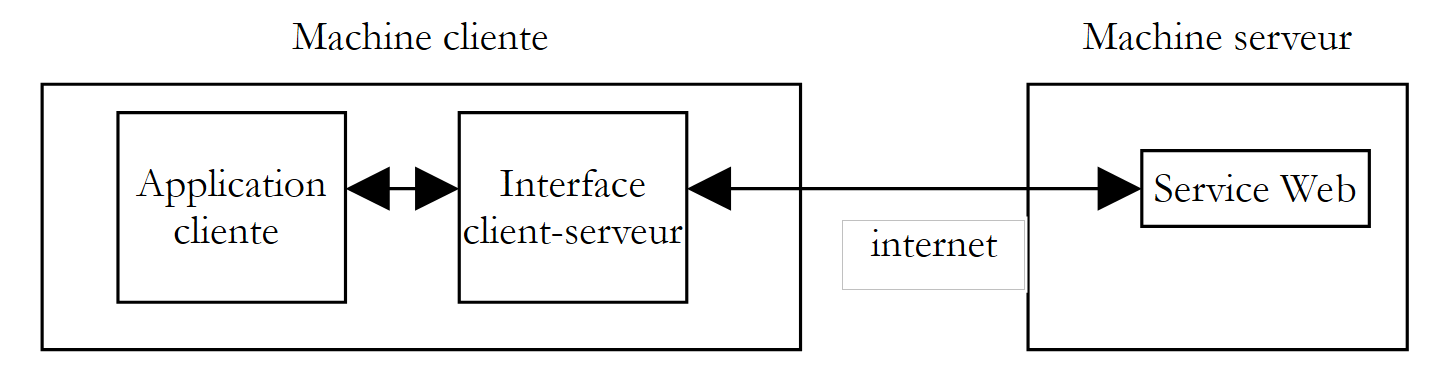 |
客户端应用程序将通过客户端-服务器接口向 Web 服务发起请求。该接口将处理与服务器之间所有必要的网络通信,并将结果返回给客户端应用程序。客户端应用程序不再需要处理与服务器的通信,这将极大简化其开发工作。
10.7.1. 封装类
基于前几节的内容,我们现在已经很好地理解了客户端与服务器之间的网络通信。我们甚至研究了三种方法。我们选择将 SOAP 方法进行封装。该类如下所示:
' namespaces
Imports System
Imports System.Net.Sockets
Imports System.IO
Imports System.Text.RegularExpressions
Imports System.Collections
Imports System.Web
Imports Microsoft.VisualBasic

' clientSOAP of the Web operations service
Public Class clientSOAP

    ' instance variables
    Private uri As uri = Nothing    ' the URI of the web service
    Private client As TcpClient = Nothing    ' the client's tcp link with the server
    Private [IN] As StreamReader = Nothing    ' the customer's reading flow
    Private OUT As StreamWriter = Nothing    ' the customer's writing flow
    ' function dictionary
    Private dicoFonctions As New Hashtable
    ' function list
    Private fonctions As String() = {"ajouter", "soustraire", "multiplier", "diviser"}
    ' verbose
    Private verbose As Boolean = False    ' to true, displays client-server exchanges on screen

    ' manufacturer
    Public Sub New(ByVal uriString As String, ByVal verbose As Boolean)

        ' we note verbose
        Me.verbose = verbose

        ' server connection
        uri = New Uri(uriString)
        client = New TcpClient(uri.Host, uri.Port)

        ' create customer input/output flows TCP
        [IN] = New StreamReader(client.GetStream())
        OUT = New StreamWriter(client.GetStream())
        OUT.AutoFlush = True

        ' create a dictionary of web service functions
        Dim i As Integer
        For i = 0 To fonctions.Length - 1
            dicoFonctions.Add(fonctions(i), True)
        Next i
    End Sub

    ' close server connection
    Public Sub Close()
        ' end of client-server link
        [IN].Close()
        OUT.Close()
        client.Close()
    End Sub

    ' executeFonction
    Public Function executeFonction(ByVal fonction As String, ByVal a As String, ByVal b As String) As String
        ' executes function(a,b) on the URI uri web service
        ' client-server exchanges take place via IN and OUT flows
        ' the result of the function is in the line
        ' <double xmlns="st.istia.univ-angers.fr">double</double>
        ' sent by the server

        ' valid function?
        fonction = fonction.Trim().ToLower()
        If Not dicoFonctions.ContainsKey(fonction) Then
            Return "[fonction [" + fonction + "] indisponible : (ajouter, soustraire,multiplier,diviser)]"
        End If

        ' valid arguments a and b?
        Dim doubleA As Double = 0
        Try
            doubleA = Double.Parse(a)
        Catch
            Return "[argument [" + a + "] incorrect (double)]"
        End Try
        Dim doubleB As Double = 0
        Try
            doubleB = Double.Parse(b)
        Catch
            Return "[argument [" + b + "] incorrect (double)]"
        End Try

        ' division by zero?
        If fonction = "diviser" And doubleB = 0 Then
            Return "[division par zéro]"
        End If

        ' construction of query string SOAP
        Dim requêteSOAP As String = "<?xml version=" + """1.0"" encoding=""utf-8""?>" + ControlChars.Lf
        requêteSOAP += "<soap:Envelope xmlns:xsi=""http://www.w3.org/2001/XMLSchema-instance"" xmlns:xsd=""http://www.w3.org/2001/XMLSchema"" xmlns:soap=""http://schemas.xmlsoap.org/soap/envelope/"">" + ControlChars.Lf
        requêteSOAP += "<soap:Body>" + ControlChars.Lf
        requêteSOAP += "<" + fonction + " xmlns=""st.istia.univ-angers.fr"">" + ControlChars.Lf
        requêteSOAP += "<a>" + a + "</a>" + ControlChars.Lf
        requêteSOAP += "<b>" + b + "</b>" + ControlChars.Lf
        requêteSOAP += "</" + fonction + ">" + ControlChars.Lf
        requêteSOAP += "</soap:Body>" + ControlChars.Lf
        requêteSOAP += "</soap:Envelope>"
        Dim nbCharsSOAP As Integer = requêteSOAP.Length

        ' construction of header table HTTP to be sent
        Dim entetes(6) As String
        entetes(0) = "POST " + uri.AbsolutePath + " HTTP/1.1"
        entetes(1) = "Host: " + uri.Host + ":" + uri.Port.ToString
        entetes(2) = "Content-Type: text/xml; charset=utf-8"
        entetes(3) = "Content-Length: " + nbCharsSOAP.ToString
        entetes(4) = "Connection: Keep-Alive"
        entetes(5) = "SOAPAction: ""st.istia.univ-angers.fr/" + fonction + """"
        entetes(6) = ""

        ' send HTTP headers to the server
        Dim i As Integer
        For i = 0 To entetes.Length - 1
            ' send to server
            OUT.WriteLine(entetes(i))
            ' screen echo
            If verbose Then
                Console.Out.WriteLine(("--> " + entetes(i)))
            End If
        Next i

        ' we read the 1st web server response HTTP/1.1 100
        Dim ligne As String = Nothing
        ' a line in the read stream
        ligne = [IN].ReadLine()
        While ligne <> ""
            'echo
            If verbose Then
                Console.Out.WriteLine(("<-- " + ligne))
            End If
            ' next line
            ligne = [IN].ReadLine()
        End While
        'last line echo
        If verbose Then
            Console.Out.WriteLine(("<-- " + ligne))
        End If
        ' send request parameters
        OUT.Write(requêteSOAP)
        ' echo
        If verbose Then
            Console.Out.WriteLine(("--> " + requêteSOAP))
        End If

        ' construction of the regular expression to find the response size XML
        ' in the web server response stream
        Dim modèleLength As String = "^Content-Length: (.+?)\s*$"
        Dim RegexLength As New Regex(modèleLength)        '
        Dim MatchLength As Match = Nothing
        Dim longueur As Integer = 0

        ' read the second response from the web server after sending the request
        ' the value of the Content-Length line is stored
        ligne = [IN].ReadLine()
        While ligne <> ""
            ' screen echo
            If verbose Then
                Console.Out.WriteLine(("<-- " + ligne))
            End If
            ' Content-Length ?
            MatchLength = RegexLength.Match(ligne)
            If MatchLength.Success Then
                longueur = Integer.Parse(MatchLength.Groups(1).Value)
            End If
            ' next line
            ligne = [IN].ReadLine()
        End While

        ' last line echo
        If verbose Then
            Console.Out.WriteLine("<--")
        End If

        ' build the regular expression to retrieve the result
        ' in the web server response stream
        Dim modèle As String = "<" + fonction + "Result>(.+?)</" + fonction + "Result>"
        Dim ModèleRésultat As New Regex(modèle)
        Dim MatchRésultat As Match = Nothing

        ' we read the rest of the web server response
        Dim chrRéponse(longueur) As Char
        [IN].Read(chrRéponse, 0, longueur)
        Dim strRéponse As String = New [String](chrRéponse)

        ' the answer is broken down into lines of text
        Dim lignes As String() = Regex.Split(strRéponse, ControlChars.Lf)

        ' scroll through the lines of text looking for the result
        Dim strRésultat As String = "?"        ' function result
        For i = 0 To lignes.Length - 1
            ' follow-up
            If verbose Then
                Console.Out.WriteLine(("<-- " + lignes(i)))
            End If            ' compare current line to model
            MatchRésultat = ModèleRésultat.Match(lignes(i))
            ' have we found?
            If MatchRésultat.Success Then
                ' we note the result
                strRésultat = MatchRésultat.Groups(1).Value
            End If
        Next i

        ' return the result
        Return strRésultat
    End Function
End Class
与我们之前所见的内容相比,这里并没有什么新内容。我们只是从之前研究的 SOAP 客户端中提取了代码,并稍作调整,将其转换为一个类。该类有一个构造函数和两个方法:
    ' manufacturer
    Public Sub New(ByVal uriString As String, ByVal verbose As Boolean)
    ' executeFonction
    Public Function executeFonction(ByVal fonction As String, ByVal a As String, ByVal b As String) As String
    ' close server connection
    Public Sub Close()
并具有以下属性:
    ' variables d'instance
    Private uri As Uri = Nothing    ' l'URI du service web
    Private client As TcpClient = Nothing    ' la liaison tcp du client avec le serveur
    Private [IN] As StreamReader = Nothing    ' le flux de lecture du client
    Private OUT As StreamWriter = Nothing    ' le flux d'écriture du client
    ' dictionnaire des fonctions
    Private dicoFonctions As New Hashtable
    ' liste des fonctions
    Private fonctions As String() = {"ajouter", "soustraire", "multiplier", "diviser"}
    ' verbose
    Private verbose As Boolean = False    ' à vrai, affiche à l'écran les échanges client-serveur
我们向构造函数传递两个参数:
- 它需要连接的 Web 服务的 URI
- 一个布尔类型的verbose参数,当其值为true时,要求在屏幕上显示网络交互;否则,将不显示。
在构造过程中,会创建用于网络读取的 IN 流、用于网络写入的 OUT 流,以及由该服务管理的函数字典。一旦对象构造完成,客户端与服务器的连接即建立,其 IN 和 OUT 流也已准备就绪。
Close 方法用于关闭与服务器的连接。
ExecuteFonction 方法是我们为之前研究的 SOAP 客户端编写的方法,只是有几处细微的差异:
- 参数 `uri`、`IN` 和 `OUT` 此前作为方法参数传递,现在已无需再传递,因为它们已成为实例属性,该实例的所有方法均可访问
- ExecuteFonction 方法此前返回 void 类型并在屏幕上显示函数结果,现在则直接返回该结果——因此返回类型为字符串。
通常,客户端会按以下方式使用 clientSOAP 类:
- 创建一个 clientSOAP 对象,该对象将建立与 Web 服务的连接
- 反复调用 executeFonction 方法
- 使用 Close 方法关闭与 Web 服务的连接。
让我们来看看第一个客户端。
10.7.2. 一个控制台客户端
在此,我们将重新审视在 clientSOAP 类尚未存在时所研究的 SOAP 客户端,并对其进行重构,使其现在使用该类:
' namespaces
Imports System
Imports System.IO
Imports System.Text.RegularExpressions
Imports Microsoft.VisualBasic

Public Module testClientSoap

    ' requests the URI of the operations web service
    ' interactively executes keyboard commands
    Public Sub Main(ByVal args() As String)
        ' syntax
        Const syntaxe As String = "pg URI [verbose]"

        ' number of arguments
        If args.Length <> 1 And args.Length <> 2 Then
            erreur(syntaxe, 1)
        End If
        ' verbose?
        Dim verbose As Boolean = False
        If args.Length = 2 Then
            verbose = args(1).ToLower() = "verbose"
        End If
        ' connect to the web service
        Dim client As clientSOAP = Nothing
        Try
            client = New clientSOAP(args(0), verbose)
        Catch ex As Exception
            ' connection error
            erreur("L'erreur suivante s'est produite lors de la connexion au service web : " + ex.Message, 2)
        End Try

        ' user requests are typed on the keyboard
        ' in the form function a b - they end with the command fin
        Dim commande As String = Nothing        ' keyboard command
        Dim champs As String() = Nothing        ' command line fields

        ' invites the user
        Console.Out.WriteLine("Tapez vos commandes au format : [ajouter|soustraire|multiplier|diviser] a b" + ControlChars.Lf)

        ' error management
        Dim erreurCommande As Boolean
        Try
            ' keyboard command input loop
            While True
                ' initially no error
                erreurCommande = False
                ' read command
                commande = Console.In.ReadLine().Trim().ToLower()
                ' finished?
                If commande Is Nothing Or commande = "fin" Then
                    Exit While
                End If
                ' breaking down the order into fields
                champs = Regex.Split(commande, "\s+")
                ' three fields are required
                If champs.Length <> 3 Then
                    Console.Out.WriteLine("syntaxe : [ajouter|soustraire|multiplier|diviser] a b")
                    ' we note the error
                    erreurCommande = True
                End If
                ' make a request to the web service
                If Not erreurCommande Then Console.Out.WriteLine(("résultat=" + client.executeFonction(champs(0).Trim().ToLower(), champs(1).Trim(), champs(2).Trim())))
                ' following request
            End While
        Catch e As Exception
            Console.Out.WriteLine(("L'erreur suivante s'est produite : " + e.Message))
        End Try
        ' end of client-server link
        Try
            client.Close()
        Catch
        End Try
    End Sub

    ' error display
    Public Sub erreur(ByVal msg As String, ByVal exitCode As Integer)
        ' error display
        System.Console.Error.WriteLine(msg)
        ' stop with error
        Environment.Exit(exitCode)
    End Sub
End Module
客户端现在变得简单得多,且不包含任何网络通信。客户端接受两个参数:
- Web 服务操作的 URI
- 可选的 verbose 关键字。若存在该参数,网络通信内容将显示在屏幕上。
这两个参数用于构建一个 clientSOAP 对象,该对象将负责处理与 Web 服务的通信。
        ' connect to the web service
        Dim client As clientSOAP = Nothing
        Try
            client = New clientSOAP(args(0), verbose)
        Catch ex As Exception
            ' connection error
            erreur("L'erreur suivante s'est produite lors de la connexion au service web : " + ex.Message, 2)
        End Try
一旦与 Web 服务建立连接,客户端即可发送请求。这些请求通过键盘输入,经过解析后,通过调用 clientSOAP 对象的 executeFonction 方法发送至服务器。
                ' on fait la demande au service web
                If Not erreurCommande Then Console.Out.WriteLine(("résultat=" + client.executeFonction(champs(0).Trim().ToLower(), champs(1).Trim(), champs(2).Trim())))
clientSOAP 类被编译成一个“程序集”:
dos>vbc /r:clientSOAP.dll testClientSOAP.vb
dos>dir
04/03/2004  08:46                6 913 clientSOAP.vb
04/03/2004  09:07                7 168 clientSOAP.dll
随后使用以下命令编译 testClientSoap 客户端应用程序:
dos>vbc /r:clientSOAP.dll /r:system.dll testClientSOAP.vb
dos>dir
04/03/2004  09:08                2 711 testClientSOAP.vb
04/03/2004  09:08                4 608 testClientSOAP.exe
以下是一个非详细模式执行的示例:
dos>testclientsoap http://localhost/st/operations/operations.asmx
Tapez vos commandes au format : [ajouter|soustraire|multiplier|diviser] a b

ajouter 1 3
résultat=4
soustraire 6 7
résultat=-1
multiplier 4 5
résultat=20
diviser 1 2
résultat=0.5
x
syntaxe : [ajouter|soustraire|multiplier|diviser] a b
x 1 2
résultat=[fonction [x] indisponible : (ajouter, soustraire,multiplier,diviser)]
ajouter a b
résultat=[argument [a] incorrect (double)]
ajouter 1 b
résultat=[argument [b] incorrect (double)]
diviser 1 0
résultat=[division par zéro]
fin
您可以通过请求“详细”执行来监控网络流量:
dos>testClientSOAP http://localhost/operations/operations.asmx verbose
Tapez vos commandes au format : [ajouter|soustraire|multiplier|diviser] a b

ajouter 4 8
--> POST /operations/operations.asmx HTTP/1.1
--> Host: localhost:80
--> Content-Type: text/xml; charset=utf-8
--> Content-Length: 321
--> Connection: Keep-Alive
--> SOAPAction: "st.istia.univ-angers.fr/ajouter"
-->
<-- HTTP/1.1 100 Continue
<-- Server: Microsoft-IIS/5.0
<-- Date: Thu, 04 Mar 2004 08:15:25 GMT
<-- X-Powered-By: ASP.NET
<--
--> <?xml version="1.0" encoding="utf-8"?>
<soap:Envelope xmlns:xsi="http://www.w3.org/2001/XMLSchema-instance" xmlns:xsd="http://www.w3.org/2001/XMLSchema" xmlns:soap="http://schemas.xmlsoap.org/soap/envelope/">
<soap:Body>
<ajouter xmlns="st.istia.univ-angers.fr">
<a>4</a>
<b>8</b>
</ajouter>
</soap:Body>
</soap:Envelope>
<-- HTTP/1.1 200 OK
<-- Server: Microsoft-IIS/5.0
<-- Date: Thu, 04 Mar 2004 08:15:25 GMT
<-- X-Powered-By: ASP.NET
<-- X-AspNet-Version: 1.1.4322
<-- Cache-Control: private, max-age=0
<-- Content-Type: text/xml; charset=utf-8
<-- Content-Length: 346
<--
<-- <?xml version="1.0" encoding="utf-8"?><soap:Envelope xmlns:soap="http://schemas.xmlsoap.org/soap/envelope/" xmlns:xsi="http://www.w3.org/2001/XMLSchema-inst
ance" xmlns:xsd="http://www.w3.org/2001/XMLSchema"><soap:Body><ajouterResponse xmlns="st.istia.univ-angers.fr"><ajouterResult>12</ajouterResult></ajouterResponse></soap:Body></soap:Envelope>
résultat=12
fin
现在,让我们构建一个图形化客户端。
10.7.3. Windows图形化客户端
接下来,我们将使用一个图形化客户端来查询我们的 Web 服务,该客户端也将使用 clientSOAP 类。图形化界面如下所示:
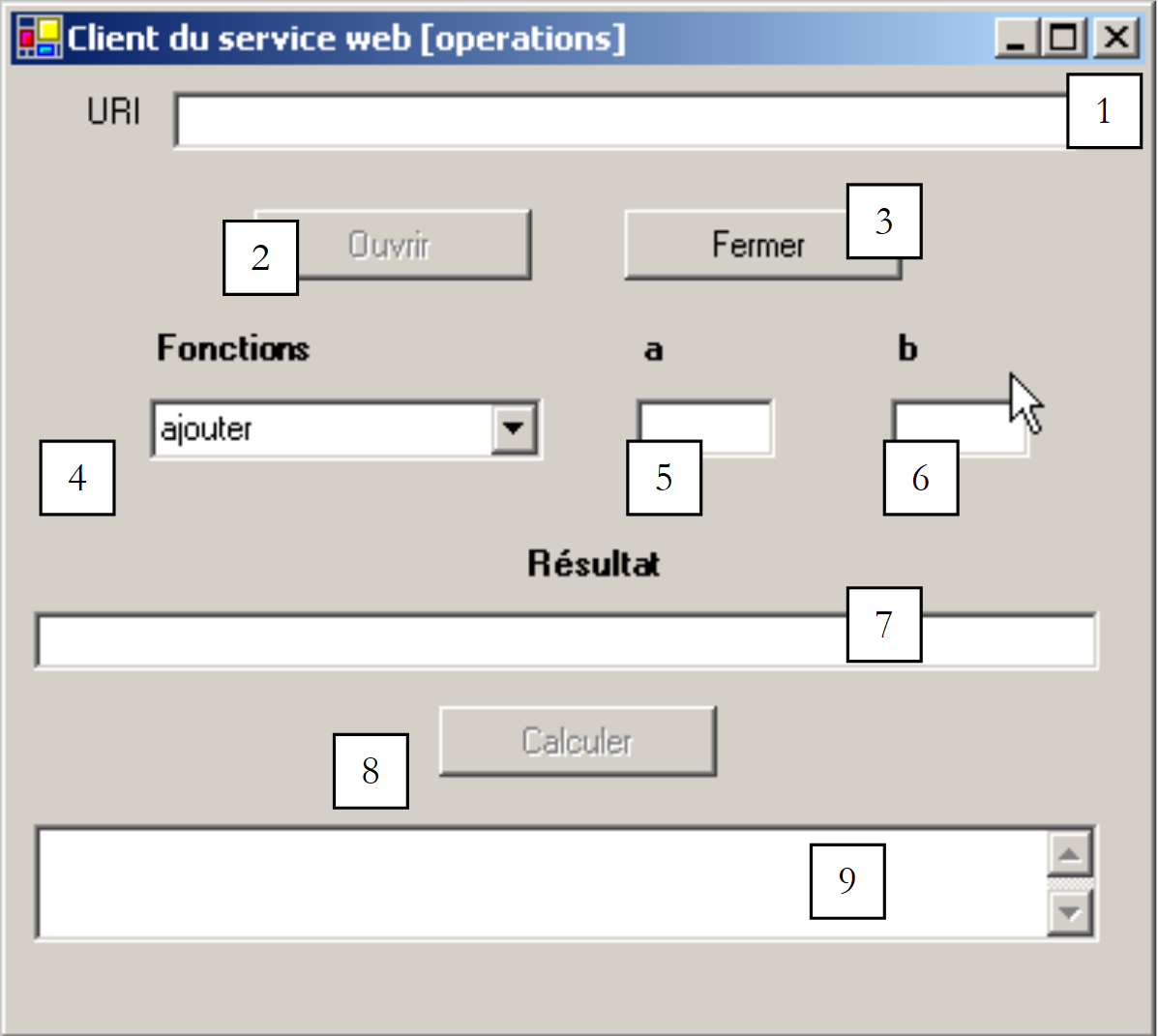 |
控件如下所示:
编号 | 类型 | 名称 | 角色 |
文本框 | txtURI | Web 服务操作的 URI | |
按钮 | btnOpen | 打开与 Web 服务的连接 | |
按钮 | btnClose | 关闭与 Web 服务的连接 | |
下拉列表 | cmbFunctions | 函数列表(加、减、乘、除) | |
文本框 | txtA | 函数的参数 | |
文本框 | txtB | 函数的参数 b | |
文本框 | txtResult | 函数(a,b)的结果 | |
按钮 | btnCalculate | 开始计算函数(a,b) | |
文本框 | txtError | 显示有关连接状态的消息 |
存在一些操作限制:
- 只有当 txtURI 字段不为空且尚未建立连接时,btnOpen 按钮才处于活动状态
- 只有在已建立与 Web 服务的连接时,btnClose 按钮才处于活动状态
- 只有在连接已建立且 txtA 和 txtB 字段不为空时,btnCalculate 按钮才处于活动状态
- txtResult 和 txtError 字段的 ReadOnly 属性已设置为 true
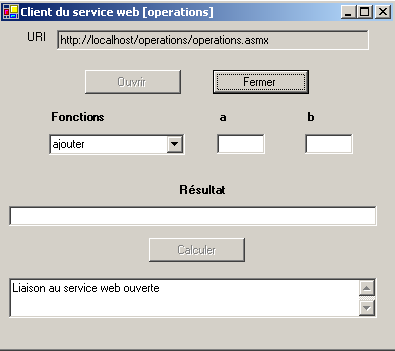
客户端首先通过 [Open] 按钮打开与 Web 服务的连接:
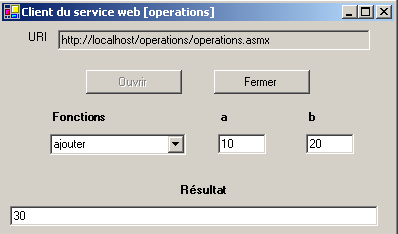
接下来,用户可以选择一个函数以及 a 和 b 的数值:
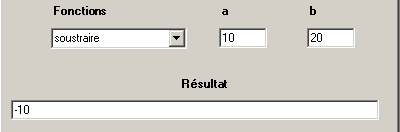
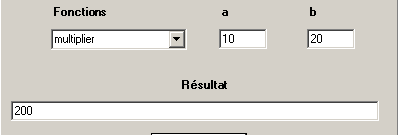
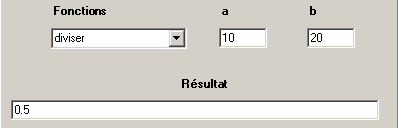
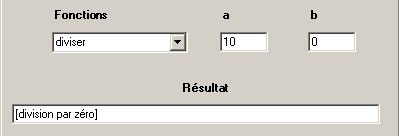
应用程序代码如下。我们省略了表单代码,因为它与本文无关。
'namespaces
Imports System
Imports System.Windows.Forms

' the form class
Public Class FormClientSOAP
    Inherits System.Windows.Forms.Form

    ' instance attributes
    Dim client As clientSOAP    ' client SOAP of the web operations service

#Region " Code généré par le Concepteur Windows Form "

    Public Sub New()
        MyBase.New()
        'This call is required by the Windows Form Designer.
        InitializeComponent()
        ' other initializations
        myInit()
    End Sub

    'The substituted method Disposes of the form to clean up the list of components.
    Protected Overloads Overrides Sub Dispose(ByVal disposing As Boolean)
....
    End Sub

...

    Private Sub InitializeComponent()
....
    End Sub

#End Region


    Private Sub myInit()
        ' init form
        cmbFonctions.SelectedIndex = 0
        btnOuvrir.Enabled = False
        btnFermer.Enabled = True
        btnCalculer.Enabled = False
    End Sub

    Private Sub txtURI_TextChanged(ByVal sender As Object, ByVal e As System.EventArgs) Handles txtURI.TextChanged
        ' the content of the input field has changed - set the state of the open button
        btnOuvrir.Enabled = txtURI.Text.Trim <> ""
    End Sub

    Private Sub btnOuvrir_Click(ByVal sender As Object, ByVal e As System.EventArgs) Handles btnOuvrir.Click
        ' request to open a connection with the web service
        Try
            ' creation of an object of type [clientSOAP]
            client = New clientSOAP(txtURI.Text.Trim, False)
            ' button status
            btnOuvrir.Enabled = False
            btnFermer.Enabled = True
            ' the URI can no longer be modified
            txtURI.ReadOnly = True
            ' customer status
            txtErreur.Text = "Liaison au service web ouverte"
        Catch ex As Exception
            ' there has been an error - it is displayed
            txtErreur.Text = ex.Message
        End Try
    End Sub

    Private Sub btnFermer_Click(ByVal sender As Object, ByVal e As System.EventArgs) Handles btnFermer.Click
        ' closing the web service connection
        client.Close()
        ' button states
        btnOuvrir.Enabled = True
        btnFermer.Enabled = False
        ' URI
        txtURI.ReadOnly = False
        ' customer status
        txtErreur.Text = "Liaison au service web fermée"
    End Sub

    Private Sub btnCalculer_Click(ByVal sender As Object, ByVal e As System.EventArgs) Handles btnCalculer.Click
        ' calculating a function f(a,b)
        ' delete the previous result
        txtRésultat.Text = ""
        Try
            txtRésultat.Text = client.executeFonction(cmbFonctions.Text, txtA.Text.Trim, txtB.Text.Trim)
        Catch ex As Exception
            ' there has been a network error
            txtErreur.Text = ex.Message
            ' we close the link
            btnFermer_Click(Nothing, Nothing)
        End Try
    End Sub

    Private Sub txtA_TextChanged(ByVal sender As Object, ByVal e As System.EventArgs) Handles txtA.TextChanged
        ' change in the value of A
        btnCalculer.Enabled = txtA.Text.Trim <> "" And txtB.Text.Trim <> ""
    End Sub

    Private Sub txtB_TextChanged(ByVal sender As Object, ByVal e As System.EventArgs) Handles txtB.TextChanged
        ' change in the value of B
        txtA_TextChanged(Nothing, Nothing)
    End Sub

    ' main method
    Public Shared Sub main()
        Application.Run(New FormClientSOAP)
    End Sub
End Class
同样,clientSOAP 类隐藏了应用程序中所有与网络相关的方面。该应用程序的构建方式如下:
- 包含 clientSOAP 类的 clientSOAP.dll 程序集被放置在项目文件夹中
- 使用 VS.NET 构建了 clientsoapgui.vb 图形用户界面,随后在 DOS 窗口中进行了编译:
dos>vbc /r:system.dll /r:system.windows.forms.dll /r:system.drawing.dll /r:clientSOAP.dll clientsoapgui.vb

dos>dir
04/03/2004  09:13                7 168 clientSOAP.dll
04/03/2004  16:44                9 866 clientsoapgui.vb
04/03/2004  16:44               11 264 clientsoapgui.exe
随后通过以下方式启动了图形界面:
10.8. 代理客户端
让我们回顾一下刚才的操作。我们创建了一个中间类,该类根据下图所示,封装了客户端与 Web 服务之间的网络交互:
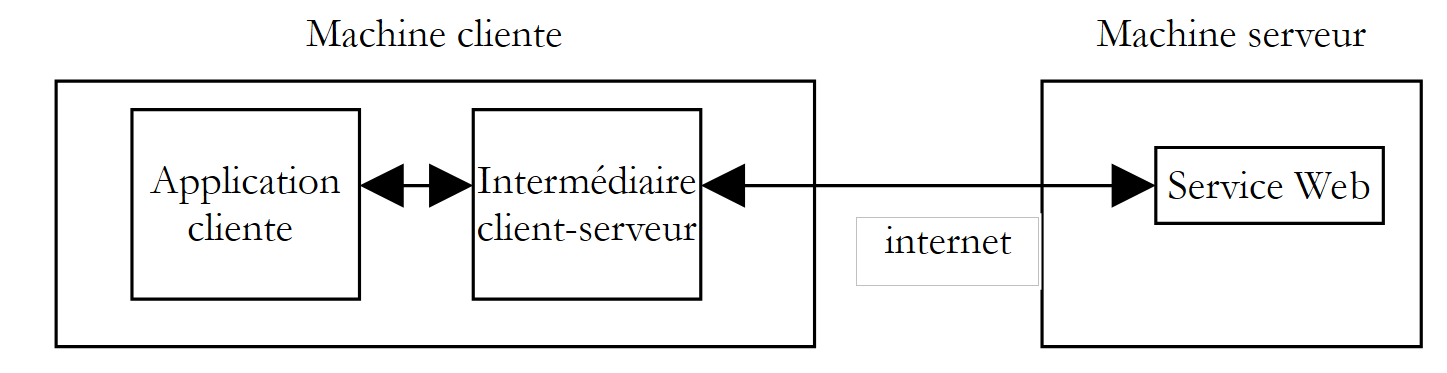 |
.NET 平台将这一逻辑进一步深化。一旦确定要访问的 Web 服务,我们就能自动生成一个类,该类将作为中间层来调用 Web 服务的函数,并隐藏整个网络层。这个类被称为其所生成 Web 服务的代理。
如何生成 Web 服务代理类?Web 服务总是附带一个 XML 格式的描述文件。如果我们的 Web 服务操作的 URI 是 http://localhost/operations/operations.asmx,则其描述文件可通过 URL http://localhost/operations/operations.asmx?wsdl 获取,如下图所示:

这是一个 XML 文件,它精确地描述了 Web 服务的所有功能,包括每个功能的参数类型和数量,以及返回结果的类型。由于该文件使用了 WSDL(Web 服务描述语言),因此被称为该服务的 WSDL 文件。可以通过 wsdl 工具基于此文件生成代理类:
dos>wsdl http://localhost/operations/operations.asmx?wsdl /language=vb
Microsoft (R) Web Services Description Language Utility
[Microsoft (R) .NET Framework, Version 1.1.4322.573]
Copyright (C) Microsoft Corporation 1998-2002. All rights reserved.

Écriture du fichier 'D:\data\devel\vbnet\poly\chap9\clientproxy\operations.vb'.

dos>dir
04/03/2004  17:17                6 663 operations.vb
wsdl 工具会生成一个 VB.NET 源文件(选项 /language=vb),其名称取自实现 Web 服务的类,在本例中即为 operations。让我们查看生成的代码片段:
'------------------------------------------------------------------------------
' <autogenerated>
'     This code was generated by a tool.
'     Runtime Version: 1.1.4322.573
'
'     Changes to this file may cause incorrect behavior and will be lost if
'     the code is regenerated.
' </autogenerated>
'------------------------------------------------------------------------------

Option Strict Off
Option Explicit On

Imports System
Imports System.ComponentModel
Imports System.Diagnostics
Imports System.Web.Services
Imports System.Web.Services.Protocols
Imports System.Xml.Serialization

'
'This source code has been té automatically généré by wsdl, Version=1.1.4322.573.
'

'<remarks/>
<System.Diagnostics.DebuggerStepThroughAttribute(),  _
 System.ComponentModel.DesignerCategoryAttribute("code"),  _
 System.Web.Services.WebServiceBindingAttribute(Name:="operationsSoap", [Namespace]:="st.istia.univ-angers.fr")>  _
Public Class operations
    Inherits System.Web.Services.Protocols.SoapHttpClientProtocol

    '<remarks/>
    Public Sub New()
        MyBase.New
        Me.Url = "http://localhost/operations/operations.asmx"
    End Sub

    '<remarks/>
    <System.Web.Services.Protocols.SoapDocumentMethodAttribute("st.istia.univ-angers.fr/ajouter", RequestNamespace:="st.istia.univ-angers.fr", ResponseNamespace:="st.istia.univ-angers.fr", Use:=System.Web.Services.Description.SoapBindingUse.Literal, ParameterStyle:=System.Web.Services.Protocols.SoapParameterStyle.Wrapped)>  _

    Public Function ajouter(ByVal a As Double, ByVal b As Double) As Double
        Dim results() As Object = Me.Invoke("ajouter", New Object() {a, b})
        Return CType(results(0),Double)
    End Function

    '<remarks/>
    Public Function Beginajouter(ByVal a As Double, ByVal b As Double, ByVal callback As System.AsyncCallback, ByVal asyncState As Object) As System.IAsyncResult
        Return Me.BeginInvoke("ajouter", New Object() {a, b}, callback, asyncState)
    End Function

    '<remarks/>
    Public Function Endajouter(ByVal asyncResult As System.IAsyncResult) As Double
        Dim results() As Object = Me.EndInvoke(asyncResult)
        Return CType(results(0),Double)
    End Function
....
乍看之下,这段代码似乎有些复杂。但我们无需理解其中的细节也能使用它。让我们先来看看类声明:
该类的名称即为其所构建的 Web 服务的操作名称。它继承自 SoapHttpClientProtocol 类:
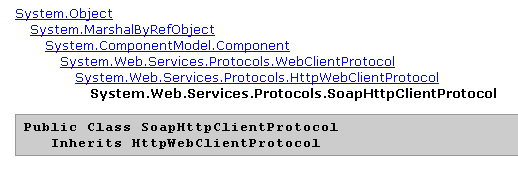
我们的代理类有一个构造函数:
构造函数将与代理关联的 Web 服务的 URL 赋值给 url 属性。上面的操作类本身并未定义 url 属性,而是从代理派生的类(System.Web.Services.Protocols.SoapHttpClientProtocol)中继承而来。现在让我们来分析与 add 方法相关的内容:
    Public Function ajouter(ByVal a As Double, ByVal b As Double) As Double
        Dim results() As Object = Me.Invoke("ajouter", New Object() {a, b})
        Return CType(results(0),Double)
    End Function
我们可以看到,它的签名与操作 Web 服务中的签名相同,该服务中定义如下:
此处未展示该类与 Web 服务通信的方式。该通信完全由父类 System.Web.Services.Protocols.SoapHttpClientProtocol 处理。代理类仅包含使其区别于其他代理类的内容:
- 关联 Web 服务的 URL
- 关联服务的方法定义。
要使用操作 Web 服务的方法,客户端只需使用之前生成的操作代理类即可。现在我们将该类编译成一个程序集文件:
现在,让我们编写一个控制台客户端。该程序不带参数调用,并执行用户在键盘上输入的请求:
dos>testclientproxy
Tapez vos commandes au format : [ajouter|soustraire|multiplier|diviser|toutfaire] a b
ajouter 4 5
résultat=9
soustraire 9 8
résultat=1
multiplier 10 4
résultat=40
diviser 6 7
résultat=0,857142857142857
toutfaire 10 20
résultats=[30,-10,200,0,5]
diviser 5 0
résultat=+Infini
fin
客户的代码如下:
' namespaces
Imports System
Imports System.IO
Imports System.Text.RegularExpressions
Imports System.Collections
Imports Microsoft.VisualBasic
Public Module testClientProxy
' interactively executes keyboard commands
' and sends them to the web operations service
Public Sub Main()
' there are no more arguments - the web service's URL is hard-coded in the proxy
' creation of a dictionary of web service functions
Dim fonctions As String() = {"ajouter", "soustraire", "multiplier", "diviser", "toutfaire"}
Dim dicoFonctions As New Hashtable
Dim i As Integer
For i = 0 To fonctions.Length - 1
dicoFonctions.Add(fonctions(i), True)
Next i
' create a proxy operations object
Dim myOperations As operations = Nothing
Try
myOperations = New operations
Catch ex As Exception
' connection error
erreur("L'erreur suivante s'est produite lors de la connexion au proxy dy service web : " + ex.Message, 2)
End Try
' user requests are typed on the keyboard
' in the form function a b - they end with the command fin
Dim commande As String = Nothing ' keyboard command
Dim champs As String() = Nothing ' command line fields
' invites the user
Console.Out.WriteLine("Tapez vos commandes au format : [ajouter|soustraire|multiplier|diviser|toutfaire] a b" + ControlChars.Lf)
' some local data
Dim erreurCommande As Boolean
Dim fonction As String
Dim a, b As Double
' keyboard command input loop
While True
' initially no error
erreurCommande = False
' read command
commande = Console.In.ReadLine().Trim().ToLower()
' finished?
If commande Is Nothing Or commande = "fin" Then
Exit While
End If
' breaking down the order into fields
champs = Regex.Split(commande, "\s+")
Try
' three fields are required
If champs.Length <> 3 Then
Throw New Exception
End If
' field 0 must be a recognized function
fonction = champs(0)
If Not dicoFonctions.ContainsKey(fonction) Then
Throw New Exception
End If
' field 1 must be a valid number
a = Double.Parse(champs(1))
' field 2 must be a valid number
b = Double.Parse(champs(2))
Catch
' invalid order
Console.Out.WriteLine("syntaxe : [ajouter|soustraire|multiplier|diviser] a b")
erreurCommande = True
End Try
' make a request to the web service
If Not erreurCommande Then
Try
Dim résultat As Double
Dim résultats() As Double
If fonction = "ajouter" Then
résultat = myOperations.ajouter(a, b)
Console.Out.WriteLine(("résultat=" + résultat.ToString))
End If
If fonction = "soustraire" Then
résultat = myOperations.soustraire(a, b)
Console.Out.WriteLine(("résultat=" + résultat.ToString))
End If
If fonction = "multiplier" Then
résultat = myOperations.multiplier(a, b)
Console.Out.WriteLine(("résultat=" + résultat.ToString))
End If
If fonction = "diviser" Then
résultat = myOperations.diviser(a, b)
Console.Out.WriteLine(("résultat=" + résultat.ToString))
End If
If fonction = "toutfaire" Then
résultats = myOperations.toutfaire(a, b)
Console.Out.WriteLine(("résultats=[" + résultats(0).ToString + "," + résultats(1).ToString + "," + _
résultats(2).ToString + "," + résultats(3).ToString + "]"))
End If
Catch e As Exception
Console.Out.WriteLine(("L'erreur suivante s'est produite : " + e.Message))
End Try
End If
End While
End Sub
' error display
Public Sub erreur(ByVal msg As String, ByVal exitCode As Integer)
' error display
System.Console.Error.WriteLine(msg)
' stop with error
Environment.Exit(exitCode)
End Sub
End Module
我们仅探讨与使用代理类相关的代码。首先,创建一个代理操作对象:
' create a proxy operations object
Dim myOperations As operations = Nothing
Try
myOperations = New operations
Catch ex As Exception
' connection error
erreur("L'erreur suivante s'est produite lors de la connexion au proxy dy service web : " + ex.Message, 2)
End Try
通过键盘输入 a 和 b。根据这些信息,调用相应的代理方法:
' make a request to the web service
If Not erreurCommande Then
Try
Dim résultat As Double
Dim résultats() As Double
If fonction = "ajouter" Then
résultat = myOperations.ajouter(a, b)
Console.Out.WriteLine(("résultat=" + résultat.ToString))
End If
If fonction = "soustraire" Then
résultat = myOperations.soustraire(a, b)
Console.Out.WriteLine(("résultat=" + résultat.ToString))
End If
If fonction = "multiplier" Then
résultat = myOperations.multiplier(a, b)
Console.Out.WriteLine(("résultat=" + résultat.ToString))
End If
If fonction = "diviser" Then
résultat = myOperations.diviser(a, b)
Console.Out.WriteLine(("résultat=" + résultat.ToString))
End If
If fonction = "toutfaire" Then
résultats = myOperations.toutfaire(a, b)
Console.Out.WriteLine(("résultats=[" + résultats(0).ToString + "," + résultats(1).ToString + "," + _
résultats(2).ToString + "," + résultats(3).ToString + "]"))
End If
Catch e As Exception
Console.Out.WriteLine(("L'erreur suivante s'est produite : " + e.Message))
End Try
在这里,我们首次接触到能够执行全部四种操作的“一站式”操作。此前一直忽略了它,因为它返回的是一组被封装在XML包装器中的数字数组,而与其他函数返回的仅包含单一结果的简单XML响应相比,这种返回格式更难处理。 在此,借助代理类,我们可以看到使用该“全能”方法并不比使用其他方法更复杂。该应用程序在DOS窗口中的编译过程如下:
dos>vbc /r:operations.dll /r:system.dll /r:system.web.services.dll testClientProxy.vb
dos>dir
04/03/2004  17:17                6 663 operations.vb
04/03/2004  17:24                7 680 operations.dll
04/03/2004 17:41 4 099 testClientProxy.vb
04/03/2004 17:41 5 632 testClientProxy.exe
10.9. 配置 Web 服务
Web 服务可能需要配置信息才能正确初始化。在 IIS 中,这些信息可以放在一个名为 web.config 的文件中,该文件位于与 Web 服务相同的文件夹内。假设我们要创建一个需要两项信息才能初始化的 Web 服务:姓名和年龄。这两项信息可以按以下格式放入 web.config 文件中:
<?xml version="1.0" encoding="UTF-8" ?>
<configuration>
  <appSettings>
    <add key="nom" value="tintin"/>
    <add key="age" value="27"/>
  </appSettings>
</configuration>
初始化设置被放置在一个 XML 容器中:
通过以下代码行将声明一个名为 P、值为 V 的初始化参数:
<add key="P" value="V"/>
Web 服务如何获取此信息?当 IIS 加载 Web 服务时,它会检查同一文件夹中是否存在 web.config 文件。如果存在,则读取该文件。参数 P 的值 V 可通过以下语句获取:
其中 ConfigurationSettings 是 System.Configuration 命名空间中的一个类。
让我们在以下 Web 服务上测试此技术:
<%@ WebService language="VB" class=personne %>

Imports System.Web.Services
imports System.Configuration

<WebService([Namespace] := "st.istia.univ-angers.fr")> _
Public Class personne
   Inherits WebService

   ' attributes
   Private nom As String
   Private age As Integer

   ' manufacturer
   Public Sub New()
      ' init attributes
      nom = ConfigurationSettings.AppSettings("nom")
      age = Integer.Parse(ConfigurationSettings.AppSettings("age"))
   End Sub

   <WebMethod>  _
   Function id() As String
      Return "[" + nom + "," + age.ToString + "]"
   End Function

End Class
Person Web 服务有两个属性:name 和 age,它们在无参构造函数中通过从 Person 服务的 web.config 配置文件中读取的值进行初始化。该文件内容如下:
<configuration>
    <appSettings>
        <add key="nom" value="tintin"/>
        <add key="age" value="27"/>
    </appSettings>
</configuration>
该 Web 服务还包含一个无参数的 <WebMethod>,该方法仅返回 name 和 age 属性。该服务在源文件 personne.asmx 中进行了注册,该文件与其配置文件一同位于 c:\inetpub\wwwroot\st\personne 文件夹中:
让我们将虚拟 IIS 文件夹 /config 与上述物理文件夹关联起来。启动 IIS,然后使用浏览器访问 URL http://localhost/config/personne.asmx 以调用 person 服务:
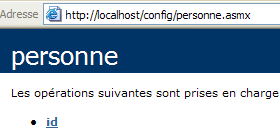
点击链接查看单ID方法:
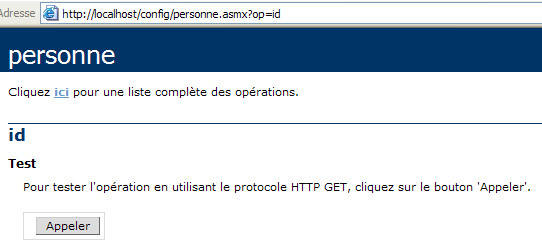
id 方法没有参数。让我们点击“调用”按钮:
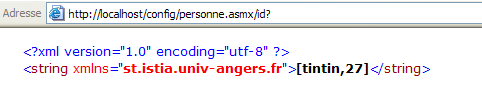
我们已成功检索到存储在服务 web.config 文件中的信息。
10.10. 税费计算 Web 服务
我们将再次回到现在已经非常熟悉的 IMPOTS 应用程序。上次我们处理它时,将其改造成了一个可以通过互联网访问的远程服务器。现在,我们将把它改造成一个 Web 服务。
10.10.1. Web 服务
我们将从数据库章节中创建的 impôt 类开始,该类基于 ODBC 数据库中的信息构建:
' options
Option Strict On
Option Explicit On

' namespaces
Imports System
Imports System.Data
Imports Microsoft.Data.Odbc
Imports System.Collections

Public Class impôt
    ' data required for tax calculation
    ' come from an external source
    Private limites(), coeffR(), coeffN() As Decimal

    ' manufacturer
    Public Sub New(ByVal LIMITES() As Decimal, ByVal COEFFR() As Decimal, ByVal COEFFN() As Decimal)
        ' we check that the 3 tablaeux are the same size
        Dim OK As Boolean = LIMITES.Length = COEFFR.Length And LIMITES.Length = COEFFN.Length
        If Not OK Then
            Throw New Exception("Les 3 tableaux fournis n'ont pas la même taille(" & LIMITES.Length & "," & COEFFR.Length & "," & COEFFN.Length & ")")
        End If
        ' it's good
        Me.limites = LIMITES
        Me.coeffR = COEFFR
        Me.coeffN = COEFFN
    End Sub

    ' builder 2
    Public Sub New(ByVal DSNimpots As String, ByVal Timpots As String, ByVal colLimites As String, ByVal colCoeffR As String, ByVal colCoeffN As String)
        ' initializes the three limit arrays, coeffR, coeffN from
        ' the contents of the Timpots table in the ODBC DSNimpots database
        ' colLimites, colCoeffR, colCoeffN are the three columns of this table
        ' can throw an exception
        Dim connectString As String = "DSN=" + DSNimpots + ";"        ' base connection chain
        Dim impotsConn As OdbcConnection = Nothing        ' the connection
        Dim sqlCommand As OdbcCommand = Nothing        ' the SQL command
        ' the SELECT query
        Dim selectCommand As String = "select " + colLimites + "," + colCoeffR + "," + colCoeffN + " from " + Timpots
        ' tables to retrieve data
        Dim tLimites As New ArrayList
        Dim tCoeffR As New ArrayList
        Dim tCoeffN As New ArrayList

        ' attempt to access the database
        impotsConn = New OdbcConnection(connectString)
        impotsConn.Open()
        ' create a command object
        sqlCommand = New OdbcCommand(selectCommand, impotsConn)
        ' execute the query
        Dim myReader As OdbcDataReader = sqlCommand.ExecuteReader()
        ' Using the recovered table
        While myReader.Read()
            ' the data of the current line are put in the tables
            tLimites.Add(myReader(colLimites))
            tCoeffR.Add(myReader(colCoeffR))
            tCoeffN.Add(myReader(colCoeffN))
        End While
        ' freeing up resources
        myReader.Close()
        impotsConn.Close()

        ' dynamic tables are placed in static tables
        Me.limites = New Decimal(tLimites.Count) {}
        Me.coeffR = New Decimal(tLimites.Count) {}
        Me.coeffN = New Decimal(tLimites.Count) {}
        Dim i As Integer
        For i = 0 To tLimites.Count - 1
            limites(i) = Decimal.Parse(tLimites(i).ToString())
            coeffR(i) = Decimal.Parse(tCoeffR(i).ToString())
            coeffN(i) = Decimal.Parse(tCoeffN(i).ToString())
        Next i
    End Sub

    ' tAX CALCULATION
    Public Function calculer(ByVal marié As Boolean, ByVal nbEnfants As Integer, ByVal salaire As Integer) As Long
        ' calculating the number of shares
        Dim nbParts As Decimal
        If marié Then
            nbParts = CDec(nbEnfants) / 2 + 2
        Else
            nbParts = CDec(nbEnfants) / 2 + 1
        End If
        If nbEnfants >= 3 Then
            nbParts += 0.5D
        End If
        ' calculation of taxable income & family quota
        Dim revenu As Decimal = 0.72D * salaire
        Dim QF As Decimal = revenu / nbParts
        ' tAX CALCULATION
        limites((limites.Length - 1)) = QF + 1
        Dim i As Integer = 0
        While QF > limites(i)
            i += 1
        End While
        ' return result
        Return CLng(revenu * coeffR(i) - nbParts * coeffN(i))
    End Function
End Class
在 Web 服务中,只能使用无参构造函数。因此,该类的构造函数将变为如下形式:
    ' manufacturer
    Public Sub New()
        ' initializes the three limit arrays, coeffR, coeffN from
        ' the contents of the Timpots table in the ODBC DSNimpots database
        ' colLimites, colCoeffR, colCoeffN are the three columns of this table
        ' can throw an exception

        ' retrieve the service configuration parameters
        Dim DSNimpots As String = ConfigurationSettings.AppSettings("DSN")
        Dim Timpots As String = ConfigurationSettings.AppSettings("TABLE")
        Dim colLimites As String = ConfigurationSettings.AppSettings("COL_LIMITES")
        Dim colCoeffR As String = ConfigurationSettings.AppSettings("COL_COEFFR")
        Dim colCoeffN As String = ConfigurationSettings.AppSettings("COL_COEFFN")

        ' database operation
        Dim connectString As String = "DSN=" + DSNimpots + ";"     ' base connection chain
前一个类中构造函数的五个参数现在从服务的 web.config 文件中读取。imports.asmx 源文件中的代码如下。它包含了之前代码的大部分内容。我们只是将 Web 服务特有的代码部分进行了封装:
<%@ WebService language="VB" class=impots %>

' creation of a tax web service
Imports System
Imports System.Data
Imports Microsoft.Data.Odbc
Imports System.Collections
Imports System.Configuration
Imports System.Web.Services

<WebService([Namespace]:="st.istia.univ-angers.fr")> _
Public Class impôt
    Inherits WebService

    ' data required for tax calculation
    ' come from an external source
    Private limites(), coeffR(), coeffN() As Decimal
    Private OK As Boolean = False
    Private errMessage As String = ""


    ' manufacturer
    Public Sub New()
        ' initializes the three limit arrays, coeffR, coeffN from
        ' the contents of the Timpots table in the ODBC DSNimpots database
        ' colLimites, colCoeffR, colCoeffN are the three columns of this table
        ' can throw an exception

        ' retrieve the service configuration parameters
        Dim DSNimpots As String = ConfigurationSettings.AppSettings("DSN")
        Dim Timpots As String = ConfigurationSettings.AppSettings("TABLE")
        Dim colLimites As String = ConfigurationSettings.AppSettings("COL_LIMITES")
        Dim colCoeffR As String = ConfigurationSettings.AppSettings("COL_COEFFR")
        Dim colCoeffN As String = ConfigurationSettings.AppSettings("COL_COEFFN")

        ' database operation
        Dim connectString As String = "DSN=" + DSNimpots + ";"     ' base connection chain
        Dim impotsConn As OdbcConnection = Nothing     ' the connection
        Dim sqlCommand As OdbcCommand = Nothing     ' the SQL command
        Dim myReader As OdbcDataReader     ' odbc data reader

        ' the SELECT query
        Dim selectCommand As String = "select " + colLimites + "," + colCoeffR + "," + colCoeffN + " from " + Timpots

        ' tables to retrieve data
        Dim tLimites As New ArrayList
        Dim tCoeffR As New ArrayList
        Dim tCoeffN As New ArrayList

        ' attempt to access the database
        Try
            impotsConn = New OdbcConnection(connectString)
            impotsConn.Open()
            ' create a command object
            sqlCommand = New OdbcCommand(selectCommand, impotsConn)
            ' execute the query
            myReader = sqlCommand.ExecuteReader()
            ' Using the recovered table
            While myReader.Read()
                ' the data of the current line are put in the tables
                tLimites.Add(myReader(colLimites))
                tCoeffR.Add(myReader(colCoeffR))
                tCoeffN.Add(myReader(colCoeffN))
            End While
            ' freeing up resources
            myReader.Close()
            impotsConn.Close()

            ' dynamic tables are placed in static tables
            Me.limites = New Decimal(tLimites.Count) {}
            Me.coeffR = New Decimal(tLimites.Count) {}
            Me.coeffN = New Decimal(tLimites.Count) {}
            Dim i As Integer
            For i = 0 To tLimites.Count - 1
                limites(i) = Decimal.Parse(tLimites(i).ToString())
                coeffR(i) = Decimal.Parse(tCoeffR(i).ToString())
                coeffN(i) = Decimal.Parse(tCoeffN(i).ToString())
            Next i
            ' it's good
            OK = True
            errMessage = ""
        Catch ex As Exception
            ' error
            OK = False
            errMessage += "[" + ex.Message + "]"
        End Try
    End Sub

    ' tAX CALCULATION
    <WebMethod()> _
    Function calculer(ByVal marié As Boolean, ByVal nbEnfants As Integer, ByVal salaire As Integer) As Long
        ' calculating the number of shares
        Dim nbParts As Decimal
        If marié Then
            nbParts = CDec(nbEnfants) / 2 + 2
        Else
            nbParts = CDec(nbEnfants) / 2 + 1
        End If
        If nbEnfants >= 3 Then
            nbParts += 0.5D
        End If
        ' calculation of taxable income & family quota
        Dim revenu As Decimal = 0.72D * salaire
        Dim QF As Decimal = revenu / nbParts
        ' tAX CALCULATION
        limites((limites.Length - 1)) = QF + 1
        Dim i As Integer = 0
        While QF > limites(i)
            i += 1
        End While
        ' return result
        Return CLng(revenu * coeffR(i) - nbParts * coeffN(i))
    End Function

    ' id
    <WebMethod()> _
    Function id() As String
        ' to see if everything is OK
        Return "[" + OK + "," + errMessage + "]"
    End Function
End Class
下面我们来解释一下,除了将 impots 类转换为 Web 服务所必需的修改之外,还对其进行了哪些改动:
- 在构造函数中读取数据库可能会失败。因此,我们在类中添加了两个属性以及一个方法:
- 布尔属性 OK:若能读取数据库则为 true,否则为 false
- 字符串 `errMessage` 包含在无法读取数据库时显示的错误信息。
- 无参的 `id` 方法用于获取这两个属性的值。
- 为处理潜在的数据库访问错误,构造函数中与该访问相关的代码已被封装在 try-catch 代码块中。
服务配置的 web.config 文件如下:
<configuration>
    <appSettings>
        <add key="DSN" value="mysql-impots" />
        <add key="TABLE" value="timpots" />
        <add key="COL_LIMITES" value="limites" />
        <add key="COL_COEFFR" value="coeffr" />
        <add key="COL_COEFFN" value="coeffn" />
    </appSettings>
</configuration>
首次尝试加载 impots 服务时,编译器报告称无法找到指令中使用的 Microsoft.Data.Odbc 命名空间:
查阅文档后
- 在 web.config 中添加了一条编译指令,指定应使用 Microsoft.Data.odbc 程序集
- 将 microsoft.data.odbc.dll 文件的副本放置在项目的 bin 文件夹中。当 Web 服务编译器搜索“程序集”时,会系统地搜索此文件夹。
虽然似乎还有其他解决方案,但本文未作探讨。因此,配置文件现已成为:
<configuration>
    <appSettings>
        <add key="DSN" value="mysql-impots" />
        <add key="TABLE" value="timpots" />
        <add key="COL_LIMITES" value="limites" />
        <add key="COL_COEFFR" value="coeffr" />
        <add key="COL_COEFFN" value="coeffn" />
    </appSettings>
    <system.web>
        <compilation>
            <assemblies>
                <add assembly="Microsoft.Data.Odbc" />
            </assemblies>
        </compilation>
    </system.web>
</configuration>
imports\bin 文件夹的内容:
该服务及其配置文件已放置在 impots 目录中:
Web 服务的物理文件夹已映射到 IIS 中的虚拟文件夹 /impots。服务页面如下所示:
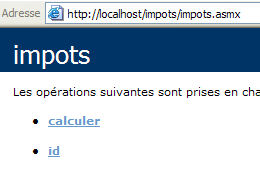
如果您点击 id 链接:
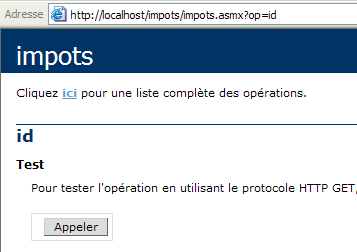
如果您使用“呼叫”按钮:
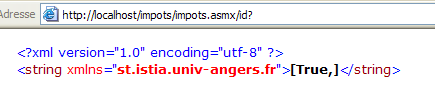
上一个结果显示了 OK(true)和 errMessage("")属性的值。在此示例中,数据库已成功加载。但并非总是如此,因此我们添加了 id 方法来获取错误消息。 错误原因在于数据库 DSN 名称被定义为用户 DSN,而本应定义为系统 DSN。在 32 位 ODBC 源管理器中,这两者有以下区别:
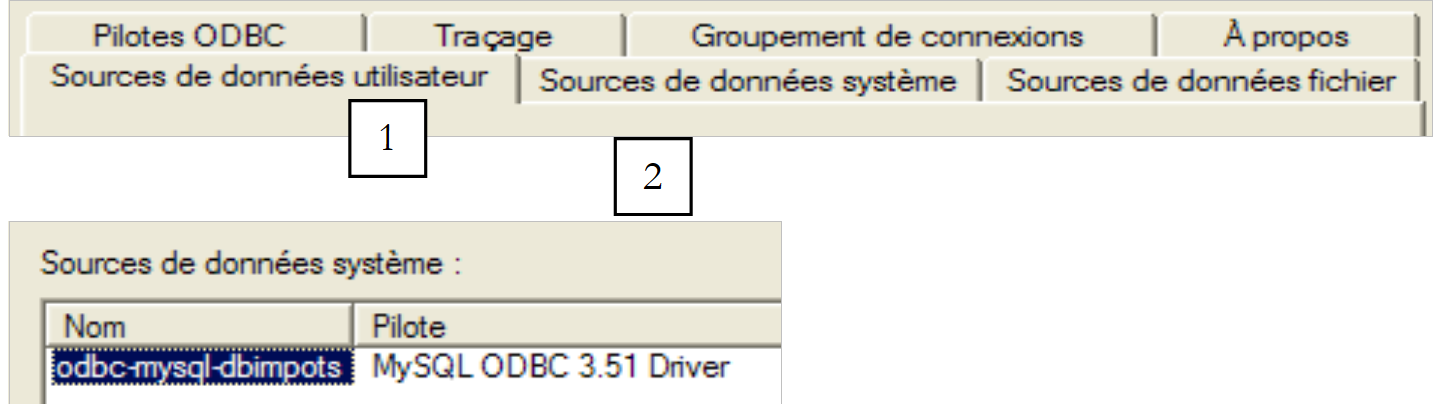 |
让我们回到服务页面:
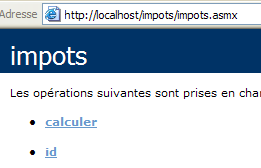
点击“计算”链接:
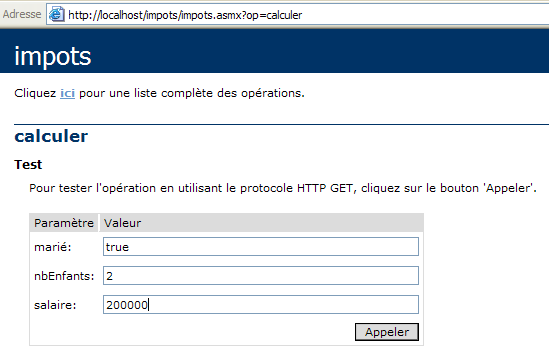
我们定义调用参数并执行调用:

结果正确。
10.10.2. 为 impots 服务生成代理
既然我们已经有了一个可运行的 impots Web 服务,就可以生成其代理类了。请记住,客户端应用程序将使用该代理类来透明地访问 impots Web 服务。首先,我们使用 wsdl 工具生成代理类的源文件,然后将其编译成 DLL。
dos>wsdl /language=vb http://localhost/impots/impots.asmx
Microsoft (R) Web Services Description Language Utility
[Microsoft (R) .NET Framework, Version 1.1.4322.573]
Copyright (C) Microsoft Corporation 1998-2002. All rights reserved.

Écriture du fichier 'D:\data\serge\devel\vbnet\poly\chap9\impots\impots.vb'.

D:\data\serge\devel\vbnet\poly\chap9\impots>dir
09/03/2004  10:20    <REP>          bin
09/03/2004  10:58             4 651 impots.asmx
09/03/2004  11:05             3 364 impots.vb
09/03/2004  10:19               431 web.config

dos>vbc /t:library /r:system.dll /r:system.web.services.dll /r:system.xml.dll impots.vb
Compilateur Microsoft (R) Visual Basic .NET version 7.10.3052.4
pour Microsoft (R) .NET Framework version 1.1.4322.573
Copyright (C) Microsoft Corporation 1987-2002. Tous droits réservés.

dos>dir
09/03/2004  10:20    <REP>          bin
09/03/2004  10:58             4 651 impots.asmx
09/03/2004  11:09             5 120 impots.dll
09/03/2004  11:05             3 364 impots.vb
09/03/2004  10:19               431 web.config
10.10.3. 在客户端使用代理
在数据库章节中,我们创建了一个用于计算税款的控制台应用程序:
dos>dir
27/02/2004  16:56             5 120 impots.dll
27/02/2004  17:12             3 586 impots.vb
27/02/2004  17:08             6 144 testimpots.exe
27/02/2004  17:18             3 328 testimpots.vb

dos>testimpots
pg DSNimpots tabImpots colLimites colCoeffR colCoeffN

dos>testimpots odbc-mysql-dbimpots impots limites coeffr coeffn
Paramètres du calcul de l'impôt au format marié nbEnfants salaire ou rien pour arrêter :o 2 200000
impôt=22504 F
随后,testimpots程序使用了impots.dll文件中包含的标准税级。testimpots.vb程序的代码如下:
Option Explicit On
Option Strict On

' namespaces
Imports System
Imports Microsoft.VisualBasic

' test pg
Module testimpots
    Sub Main(ByVal arguments() As String)
        ' interactive tax calculator
        ' the user enters three data points on the keyboard: married nbEnfants salary
        ' the program then displays the tax payable
        Const syntaxe1 As String = "pg DSNimpots tabImpots colLimites colCoeffR colCoeffN"
        Const syntaxe2 As String = "syntaxe : marié nbEnfants salaire" + ControlChars.Lf + "marié : o pour marié, n pour non marié" + ControlChars.Lf + "nbEnfants : nombre d'enfants" + ControlChars.Lf + "salaire : salaire annuel en F"

        ' checking program parameters
        If arguments.Length <> 5 Then
            ' error msg
            Console.Error.WriteLine(syntaxe1)
            ' end
            Environment.Exit(1)
        End If        'if
        ' retrieve the arguments
        Dim DSNimpots As String = arguments(0)
        Dim tabImpots As String = arguments(1)
        Dim colLimites As String = arguments(2)
        Dim colCoeffR As String = arguments(3)
        Dim colCoeffN As String = arguments(4)

        ' tax object creation
        Dim objImpôt As impôt = Nothing
        Try
            objImpôt = New impôt(DSNimpots, tabImpots, colLimites, colCoeffR, colCoeffN)
        Catch ex As Exception
            Console.Error.WriteLine(("L'erreur suivante s'est produite : " + ex.Message))
            Environment.Exit(2)
        End Try

        ' infinite loop
        While True
            ' initially no errors
            Dim erreur As Boolean = False

            ' tax calculation parameters are requested
            Console.Out.Write("Paramètres du calcul de l'impôt au format marié nbEnfants salaire ou rien pour arrêter :")
            Dim paramètres As String = Console.In.ReadLine().Trim()

            ' anything to do?
            If paramètres Is Nothing Or paramètres = "" Then
                Exit While
            End If

            ' check the number of arguments in the input line
            Dim args As String() = paramètres.Split(Nothing)
            Dim nbParamètres As Integer = args.Length
            If nbParamètres <> 3 Then
                Console.Error.WriteLine(syntaxe2)
                erreur = True
            End If
            Dim marié As String
            Dim nbEnfants As Integer
            Dim salaire As Integer
            If Not erreur Then
                ' checking the validity of parameters
                ' married
                marié = args(0).ToLower()
                If marié <> "o" And marié <> "n" Then
                    Console.Error.WriteLine((syntaxe2 + ControlChars.Lf + "Argument marié incorrect : tapez o ou n"))
                    erreur = True
                End If
                ' nbEnfants
                nbEnfants = 0
                Try
                    nbEnfants = Integer.Parse(args(1))
                    If nbEnfants < 0 Then
                        Throw New Exception
                    End If
                Catch
                    Console.Error.WriteLine(syntaxe2 + "\nArgument nbEnfants incorrect : tapez un entier positif ou nul")
                    erreur = True
                End Try
                ' salary
                salaire = 0
                Try
                    salaire = Integer.Parse(args(2))
                    If salaire < 0 Then
                        Throw New Exception
                    End If
                Catch
                    Console.Error.WriteLine(syntaxe2 + "\nArgument salaire incorrect : tapez un entier positif ou nul")
                    erreur = True
                End Try
            End If
            If Not erreur Then
                ' parameters are correct - tax is calculated
                Console.Out.WriteLine(("impôt=" & objImpôt.calculer(marié = "o", nbEnfants, salaire).ToString + " F"))
            End If
        End While
    End Sub
End Module
我们将使用相同的程序,使其通过之前创建的 impots 代理类来调用 impots Web 服务。我们需要对代码进行一些修改:
- 虽然原始的 tax 类有一个带五个参数的构造函数,但 tax 代理类的构造函数没有参数。正如我们所见,这五个参数现在已在 Web 服务配置文件中设置。
- 因此,测试程序不再需要将这五个参数作为参数传递
新代码如下:
Imports System
Imports Microsoft.VisualBasic

' test pg
Module testimpots

    Public Sub Main(ByVal arguments() As String)
        ' interactive tax calculator
        ' the user enters three data points on the keyboard: married nbEnfants salary
        ' the program then displays the tax payable
        Const syntaxe2 As String = "syntaxe : marié nbEnfants salaire" + ControlChars.Lf + "marié : o pour marié, n pour non marié" + ControlChars.Lf + "nbEnfants : nombre d'enfants" + ControlChars.Lf + "salaire : salaire annuel en F"

        ' tax object creation
        Dim objImpôt As impôt = Nothing
        Try
            objImpôt = New impôt
        Catch ex As Exception
            Console.Error.WriteLine(("L'erreur suivante s'est produite : " + ex.Message))
            Environment.Exit(2)
        End Try

        ' infinite loop
        Dim erreur As Boolean
        While True
            ' initially no error
            erreur = False
            ' tax calculation parameters are requested
            Console.Out.Write("Paramètres du calcul de l'impôt au format marié nbEnfants salaire ou rien pour arrêter :")
            Dim paramètres As String = Console.In.ReadLine().Trim()
            ' anything to do?
            If paramètres Is Nothing Or paramètres = "" Then
                Exit While
            End If
            ' check the number of arguments in the input line
            Dim args As String() = paramètres.Split(Nothing)
            Dim nbParamètres As Integer = args.Length
            If nbParamètres <> 3 Then
                Console.Error.WriteLine(syntaxe2)
                erreur = True
            End If
            If Not erreur Then
                ' checking parameter validity
                ' married
                Dim marié As String = args(0).ToLower()
                If marié <> "o" And marié <> "n" Then
                    Console.Error.WriteLine((syntaxe2 + ControlChars.Lf + "Argument marié incorrect : tapez o ou n"))
                    erreur = True
                End If
                ' nbEnfants
                Dim nbEnfants As Integer = 0
                Try
                    nbEnfants = Integer.Parse(args(1))
                    If nbEnfants < 0 Then
                        Throw New Exception
                    End If
                Catch
                    Console.Error.WriteLine((syntaxe2 + ControlChars.Lf + "Argument nbEnfants incorrect : tapez un entier positif ou nul"))
                    erreur = True
                End Try
                ' salary
                Dim salaire As Integer = 0
                Try
                    salaire = Integer.Parse(args(2))
                    If salaire < 0 Then
                        Throw New Exception
                    End If
                Catch
                    Console.Error.WriteLine((syntaxe2 + ControlChars.Lf + "Argument salaire incorrect : tapez un entier positif ou nul"))
                    erreur = True
                End Try
                ' if the parameters are correct - the tax is calculated
                If Not erreur Then Console.Out.WriteLine(("impôt=" + objImpôt.calculer(marié = "o", nbEnfants, salaire).ToString + " F"))
            End If
        End While
    End Sub
End Module
我们将 impots.dll 代理文件和 testimpots 源代码放在同一个文件夹中。
dos>dir
09/03/2004  11:28    <REP>          bin
09/03/2004  11:09             5 120 impots.dll
09/03/2004  11:34             3 396 testimpots.vb
09/03/2004  10:19               431 web.config
我们编译 testimpots.vb 源文件:
dos>vbc /r:impots.dll /r:microsoft.visualbasic.dll /r:system.web.services.dll /r:system.dll testimpots.vb
dos>dir
09/03/2004  11:28    <REP>          bin
09/03/2004  11:09             5 120 impots.dll
09/03/2004  11:05             3 364 impots.vb
09/03/2004  11:35             5 632 testimpots.exe
09/03/2004  11:34             3 396 testimpots.vb
09/03/2004  10:19               431 web.config
然后运行它:
dos>testimpots
Paramètres du calcul de l'impôt au format marié nbEnfants salaire ou rien pour arrêter :o 2 200000
impôt=22504 F
我们得到了预期的结果。