8. 执行线程
8.1. 简介
当启动一个应用程序时,它会在一个称为线程的执行流中运行。建模 thread 的类是 System.Threading.Thread,其定义如下:
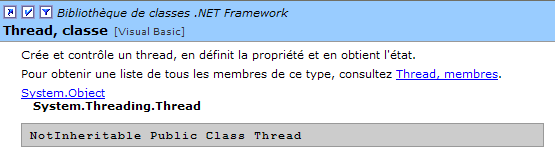
我们将仅使用该类中的部分属性和方法:
返回当前正在运行的线程 | |
线程名称 | |
指示线程是否处于活动状态(true)或非活动状态(false) | |
启动线程的执行 | |
永久停止线程的执行 | |
暂停线程的执行 n 毫秒 | |
暂时暂停线程的执行 | |
恢复已挂起线程的执行 | |
阻塞操作——等待线程结束再执行下一条指令 |
让我们来看一个简单的应用程序,它展示了主执行线程的存在,即执行某个类中 Main 函数的线程:
' 使用线程
Imports System
Imports System.Threading

Public Module thread1
    Public Sub Main()
        ' 初始化当前线程
        Dim main As Thread = Thread.CurrentThread
        ' 显示
        Console.Out.WriteLine(("Thread courant : " + main.Name))
        ' 更改名称
        main.Name = "main"
        ' 验证
        Console.Out.WriteLine(("Thread courant : " + main.Name))
        ' 无限循环
        While True
            ' 显示
            Console.Out.WriteLine((main.Name + " : " + DateTime.Now.ToString("hh:mm:ss")))
            ' 临时停止
            Thread.Sleep(1000)
        End While
    End Sub
End Module
屏幕显示结果:
dos>thread1
Thread courant :
Thread courant : main
main : 06:13:55
main : 06:13:56
main : 06:13:57
main : 06:13:58
main : 06:13:59
上例说明了以下几点:
- 函数 Main 确实在单线程中运行
- 可通过 Thread.CurrentThread 访问该线程的属性
- 方法 Sleep 的作用。在此,执行 Main 的线程会在两次显示之间定期休眠 1 秒。
8.2. 创建执行线程
某些应用程序中,代码片段可能在不同的执行线程中“同时”运行。当我们说 thread 同时运行时,通常是一种措辞上的误用。 如果机器只有一个处理器(这种情况至今仍很常见),那么 thread 进程会共享这个处理器:它们轮流使用处理器,每次仅持续很短的时间(几毫秒)。这正是产生执行并行性错觉的原因。 分配给一个 thread 的时间段取决于多种因素,其中包括其优先级——该优先级虽有默认值,但也可通过编程设定。当一个 thread 拥有处理器时,通常会将其使用至分配时间的结束。然而,它也可能提前释放处理器:
- 进入事件等待状态(wait、join、suspend)
- 进入预定时长的休眠状态(sleep)
- 线程 T 首先由其构造函数创建
ThreadStart 属于委托类型,并定义了一个无参数函数的原型:
典型的实现方式如下:
作为参数传递的函数 run 将在线程启动时执行。
- 线程 T 的执行由 T.Start() 启动: 传递给 T 构造函数的 [run] 函数随后将由线程 T 执行。执行 T.start() 指令的程序不会等待任务 T 结束:它会立即跳转到下一条指令。 此时便有两个任务并行执行。它们通常需要相互通信,以了解共同工作的进展情况。这就是线程同步的问题。
- 线程一旦启动,便会自主运行。当其执行的函数 start 完成工作后,该线程才会停止。
- 我们可以向任务 T 发送某些信号:
- T.Suspend() 命令其暂时暂停
- T.Resume() 命令其恢复工作
- T.Abort() 命令其永久停止
- 也可以通过 T.join() 等待其执行结束。这是一个阻塞指令:执行该指令的程序将被阻塞,直到任务 T 完成工作。这是一种同步方式。
让我们来看一下以下程序:
' 选项
Option Strict On
Option Explicit On

' 命名空间
Imports System
Imports System.Threading

Module thread2
    Public Sub Main()
        ' 初始化当前线程
        Dim main As Thread = Thread.CurrentThread
        ' 为线程命名
        main.Name = "main"

        ' 创建执行线程
        Dim tâches(4) As Thread
        Dim i As Integer
        For i = 0 To tâches.Length - 1
            ' 创建线程 i
            tâches(i) = New Thread(New ThreadStart(AddressOf affiche))
            ' 设置线程名称
            tâches(i).Name = "tache_" & i
            ' 启动线程 i 的执行
            tâches(i).Start()
        Next i
        ' 主程序结束
        Console.Out.WriteLine(("fin du thread " + main.Name))
    End Sub

    Public Sub affiche()
        ' 显示开始执行
        Console.Out.WriteLine(("Début d'exécution de la méthode affiche dans le Thread " + Thread.CurrentThread.Name + " : " + DateTime.Now.ToString("hh:mm:ss")))
        ' 休眠 1 秒
        Thread.Sleep(1000)
        ' 显示执行结束
        Console.Out.WriteLine(("Fin d'exécution de la méthode affiche dans le Thread " + Thread.CurrentThread.Name + " : " + DateTime.Now.ToString("hh:mm:ss")))
    End Sub
End Module
主线程(即执行函数 Main 的线程)会创建另外 5 个线程,负责执行静态方法 affiche。结果如下:
dos>thread2
fin du thread main
Début d'exécution de la méthode affiche dans le Thread tache_0 : 05:27:53
Début d'exécution de la méthode affiche dans le Thread tache_1 : 05:27:53
Début d'exécution de la méthode affiche dans le Thread tache_2 : 05:27:53
Début d'exécution de la méthode affiche dans le Thread tache_3 : 05:27:53
Début d'exécution de la méthode affiche dans le Thread tache_4 : 05:27:53
Fin d'exécution de la méthode affiche dans le Thread tache_0 : 05:27:54
Fin d'exécution de la méthode affiche dans le Thread tache_1 : 05:27:54
Fin d'exécution de la méthode affiche dans le Thread tache_2 : 05:27:54
Fin d'exécution de la méthode affiche dans le Thread tache_3 : 05:27:54
Fin d'exécution de la méthode affiche dans le Thread tache_4 : 05:27:54
这些结果非常有启发性:
- 首先可以看出,线程的启动并不阻塞。方法 Main 并行启动了 5 个线程,并在它们之前完成了自身执行。操作
会启动线程 tâches[i] 的执行,但完成此操作后,程序会立即继续执行下一条语句,而不会等待该线程执行完毕。
- 所有创建的线程都必须执行方法 affiche。执行顺序是不可预测的。即使在示例中,执行顺序似乎遵循了执行请求的顺序,也不能据此得出普遍结论。 此处的操作系统拥有 6 个线程和 1 个处理器。它将根据自身的规则将处理器分配给这 6 个线程。
- 从结果中可以看到方法 Sleep 的执行情况。在示例中,是线程 0 最先执行方法 affiche。 显示执行开始消息后,它执行方法 Sleep,该方法使其暂停 1 秒。此时它失去处理器,处理器因此可供其他线程使用。示例显示线程 1 将获得该处理器。 线程 1 将遵循与其他线程相同的流程。当线程 0 的 1 秒休眠结束时,其执行可恢复。系统将其分配给该线程,它便可完成方法 affiche 的执行。
让我们修改程序,用以下语句结束方法 Main:
运行新程序的结果如下:
由函数 Main 创建的线程未被执行。这是指令
导致了这一现象:它清除了应用程序中的所有线程,而不仅仅是 Main 线程。 解决此问题的方案是,让方法 Main 在自身结束之前,等待其创建的线程执行完毕。这可以通过 Thread 类的 Join 方法实现:
        ' 等待所有线程执行完毕
        For i = 0 To tâches.Length - 1
            ' 等待线程 i 执行结束
            tâches(i).Join()
        Next i        'for
        ' 主线程结束
        Console.Out.WriteLine(("fin du thread " + main.Name))
        Environment.Exit(0)
由此得到以下结果:
Début d'exécution de la méthode affiche dans le Thread tache_1 : 05:34:48
Début d'exécution de la méthode affiche dans le Thread tache_2 : 05:34:48
Début d'exécution de la méthode affiche dans le Thread tache_3 : 05:34:48
Début d'exécution de la méthode affiche dans le Thread tache_4 : 05:34:48
Début d'exécution de la méthode affiche dans le Thread tache_0 : 05:34:48
Fin d'exécution de la méthode affiche dans le Thread tache_2 : 05:34:50
Fin d'exécution de la méthode affiche dans le Thread tache_1 : 05:34:50
Fin d'exécution de la méthode affiche dans le Thread tache_3 : 05:34:50
Fin d'exécution de la méthode affiche dans le Thread tache_0 : 05:34:50
Fin d'exécution de la méthode affiche dans le Thread tache_4 : 05:34:50
fin du thread main
8.3. 线程的意义
既然我们已经指出了默认线程的存在——即执行方法 Main 的那个线程——并且我们知道如何创建其他线程,那么让我们来探讨一下线程对我们的意义,以及我们为何在此介绍它们。 有一种应用程序非常适合使用线程,那就是互联网上的客户端-服务器应用程序。 在此类应用程序中,位于 S1 机器上的服务器会响应来自远程机器 C1、C2、……、Cn 上的客户端请求。
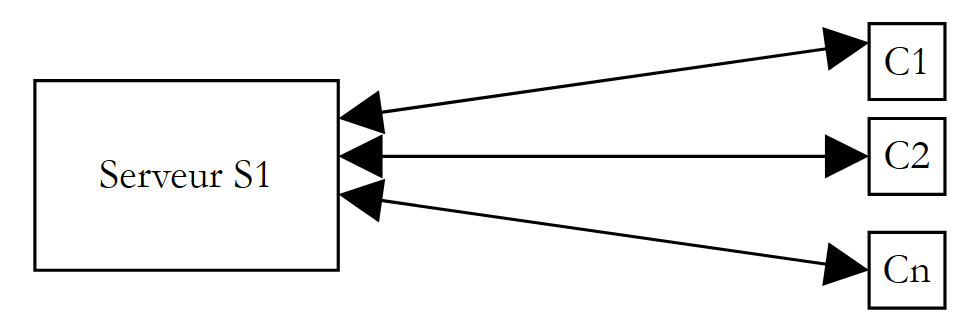 |
我们每天都在使用符合此模式的互联网应用程序:Web服务、电子邮件、论坛浏览、文件传输……在上图中,服务器 S1 必须同时为客户端 Ci 提供服务。 如果以服务器 FTP(文件传输协议)为例,它向客户端提供文件,我们知道一次文件传输有时可能需要数小时。当然,绝不能让一个客户端独自独占服务器这么长时间。 通常的做法是,服务器创建与客户端数量相等的执行线程。每个线程负责处理一个特定的客户端。由于处理器在机器上所有活动线程之间循环分配,服务器因此能与每个客户端进行短暂交互,从而确保服务的并发性。
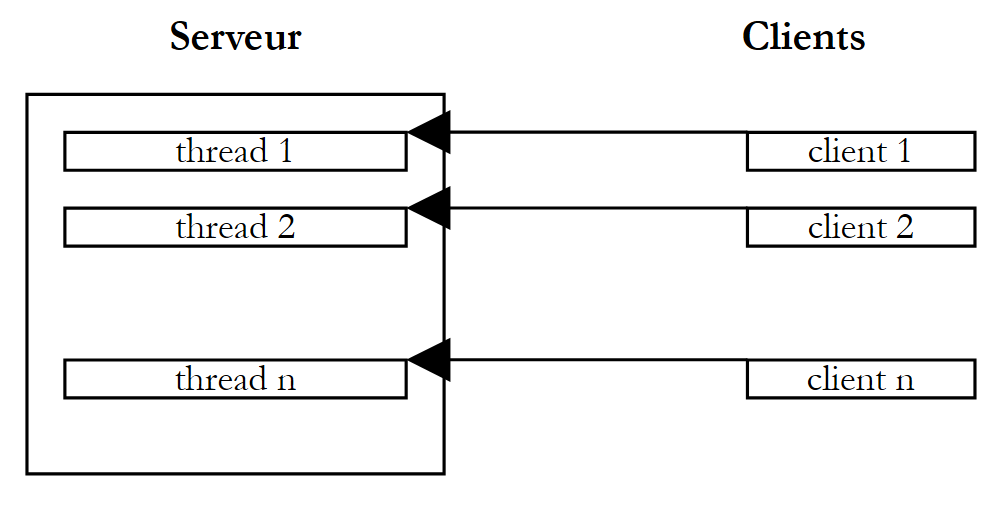 |
8.4. 访问共享资源
在上述客户端-服务器示例中,每个线程基本上独立地为一个客户端提供服务。然而,为了向客户端提供所请求的服务(特别是访问共享资源时),线程可能需要协同工作。 上图让人联想到大型行政机构的窗口,例如邮局,每个窗口都有一名工作人员为一名客户服务。假设这些工作人员有时需要复印客户带来的文件,而复印机只有一台。 两名工作人员无法同时使用复印机。如果工作人员 i 发现复印机正被工作人员 j 使用,则必须等待。这种情况被称为共享资源访问,在计算机科学中,其管理相当棘手。让我们来看以下示例:
- 一个应用程序将生成 n 个线程,其中 n 作为参数传入
- 共享资源是一个计数器,每个生成的线程都需对其进行递增
- 应用程序结束时,将显示计数器的值。因此,该值应等于 n。
程序代码如下:
' 选项
Option Explicit On
Option Strict On

' 线程使用
Imports System
Imports System.Threading

Public Class thread3
    ' 类变量
    Private Shared cptrThreads As Integer = 0

    Public Overloads Shared Sub Main(ByVal args() As [String])
        ' 使用说明
        Const syntaxe As String = "pg nbThreads"
        Const nbMaxThreads As Integer = 100

        ' 参数数量检查
        If args.Length <> 1 Then
            ' 错误
            Console.Error.WriteLine(syntaxe)
            ' 终止
            Environment.Exit(1)
        End If
        ' 参数质量检查
        Dim nbThreads As Integer = 0
        Try
            nbThreads = Integer.Parse(args(0))
            If nbThreads < 1 Or nbThreads > nbMaxThreads Then
                Throw New Exception
            End If
        Catch
            ' 错误
            Console.Error.WriteLine("Nombre de threads incorrect (entre 1 et " & nbMaxThreads & ")")
            ' 结束
            Environment.Exit(2)
        End Try
        ' 创建和生成线程
        Dim threads(nbThreads - 1) As Thread
        Dim i As Integer
        For i = 0 To nbThreads - 1
            ' 创建
            threads(i) = New Thread(New ThreadStart(AddressOf incrémente))
            ' 命名
            threads(i).Name = "tache_" & i
            ' 启动
            threads(i).Start()
        Next i
        ' 等待线程结束
        For i = 0 To nbThreads - 1
            threads(i).Join()
        Next i        ' affichage compteur
        Console.Out.WriteLine(("Nombre de threads générés : " & cptrThreads))
    End Sub

    Public Shared Sub incrémente()
        ' 增加线程计数器
        ' 读取计数器
        Dim valeur As Integer = cptrThreads
        ' 跟踪
        Console.Out.WriteLine(("A " + DateTime.Now.ToString("hh:mm:ss") & ", le thread " & Thread.CurrentThread.Name & " a lu la valeur du compteur : " & cptrThreads))
        ' 等待
        Thread.Sleep(1000)
        ' 计数器递增
        cptrThreads = valeur + 1
        ' 跟踪
        Console.Out.WriteLine(("A " & DateTime.Now.ToString("hh:mm:ss") & ", le thread " & Thread.CurrentThread.Name & " a écrit la valeur du compteur : " & cptrThreads))
    End Sub
End Class
我们不再赘述已学过的线程生成部分。让我们关注方法 incrémente,每个线程都使用该方法来递增静态计数器 cptrThreads。
- 计数器被读取
- 线程暂停 1 秒。因此它将失去处理器
- 计数器被递增
步骤 2 的存在仅是为了强制线程失去处理器控制权。该控制权将被分配给另一个线程。实际上,无法保证在读取计数器值与将其递增之间,该线程不会被中断。 在读取计数器值与写入加1后的值之间,确实存在丢失处理器的风险。因为加1操作在处理器层面涉及多个基本指令,这些指令可能会被中断。因此,第二步中的一秒休眠仅是为了系统化地规避这一风险。所得结果如下:
dos>thread3 5
A 05:44:34, le thread tache_0 a lu la valeur du compteur : 0
A 05:44:34, le thread tache_1 a lu la valeur du compteur : 0
A 05:44:34, le thread tache_2 a lu la valeur du compteur : 0
A 05:44:34, le thread tache_3 a lu la valeur du compteur : 0
A 05:44:34, le thread tache_4 a lu la valeur du compteur : 0
A 05:44:35, le thread tache_0 a écrit la valeur du compteur : 1
A 05:44:35, le thread tache_1 a écrit la valeur du compteur : 1
A 05:44:35, le thread tache_2 a écrit la valeur du compteur : 1
A 05:44:35, le thread tache_3 a écrit la valeur du compteur : 1
A 05:44:35, le thread tache_4 a écrit la valeur du compteur : 1
Nombre de threads générés : 1
从这些结果可以看出,情况如下:
- 第一个线程读取计数器。它发现计数器值为0。
- 它暂停 1 秒,因此释放了处理器
- 随后第二个线程接管处理器,同样读取计数器的值。由于前一个线程尚未将其递增,该值仍为0。该线程也暂停1秒。
- 在1秒内,5个线程都有时间依次运行并读取到0。
- 当它们依次恢复运行时,会将读取到的0值递增,并将1写入计数器,这与主程序(Main)的输出结果一致。
问题出在哪里?第二个线程读取了错误的值,因为第一个线程在完成其工作(即更新窗口中的计数器)之前就被中断了。这引出了程序中关键资源和关键区段的概念:
- 关键资源是指一次只能由一个线程持有的资源。在此,关键资源即为计数器。
- 程序中的关键段是指线程执行流中的一段指令序列,在此期间线程会访问关键资源。必须确保在此关键段内,只有该线程能够访问该资源。
8.5. 对共享资源的独占访问
在我们的示例中,关键区是位于读取计数器与写入新值之间的代码:
        ' 读表
        Dim valeur As Integer = cptrThreads
        ' 等待
        Thread.Sleep(1000)
        ' 计数器递增
        cptrThreads = valeur + 1
要执行此代码,必须确保线程处于独占状态。该线程可以被中断,但在中断期间,其他线程不得执行相同的代码。该平台提供了多种工具来确保对关键代码段的独占访问。我们将使用 Mutex 类:
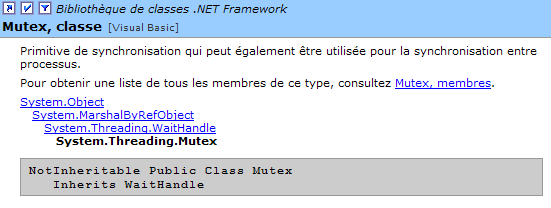
在此我们仅使用以下构造函数和方法:
创建一个 M 同步对象 | |
执行操作 M.WaitOne() 的线程 T1 请求同步对象 M 的所有权。如果互斥锁 M 尚未被任何线程持有(初始状态), 它将被“分配”给请求它的线程 T1。如果稍后另一个线程 T2 执行相同操作,它将被阻塞。 因为一个互斥锁只能属于一个线程。当线程 T1 释放其持有的互斥锁 M 时,该线程才会被解锁。因此,可能有多个线程因等待互斥锁 M 而被阻塞。 | |
执行 M.ReleaseMutex() 操作的线程 T1 放弃对互斥锁 M.Lorsque 的持有后,线程 T1 将失去处理器, 系统可将其分配给正在等待互斥锁 M 的某个线程。只有一个线程能依次获得它,其余等待 M 的线程仍处于阻塞状态 |
互斥锁 M 管理对共享资源 R 的访问。一个线程通过 M.WaitOne() 请求资源 R,并通过 M.ReleaseMutex() 释放它。一段只能由单个线程同时执行的代码(即关键代码段)即为共享资源。 关键代码段的执行同步可以这样实现:
其中 M 是一个 Mutex 对象。当然,绝不能忘记释放不再需要的 Mutex,以便其他线程能够进入临界区,否则那些等待未被释放的互斥锁的线程将永远无法访问处理器。 此外,必须避免互阻(deadlock)的情况,即两个线程相互等待。考虑以下按时间顺序发生的操作:
- 一个线程 T1 获取互斥锁 M1 的所有权,以便访问共享资源 R1
- 线程 T2 获取互斥锁 M2 的所有权,以便访问共享资源 R2
- 线程 T1 请求互斥锁 M2。它被阻塞。
- 线程 T2 请求互斥锁 M1。它被阻塞。
在此,线程 T1 和 T2 处于相互等待状态。 这种情况发生在线程需要两个共享资源时:由互斥锁 M1 控制的资源 R1,以及由互斥锁 M2 控制的资源 R2。 一种可能的解决方案是使用单个互斥锁 M 同时请求这两个资源。但如果这会导致高成本资源被长时间占用,则这种方法并不总是可行。 另一种解决方案是:持有 M1 且无法获取 M2 的线程,应释放 M1 以避免死锁。若将前文所述内容应用于前例,我们的应用程序将变为如下形式:
' 选项
Option Explicit On
Option Strict On

' 线程使用
Imports System
Imports System.Threading

Public Class thread4
    ' 类变量
    Private Shared cptrThreads As Integer = 0    ' compteur de threads
    Private Shared autorisation As Mutex

    Public Overloads Shared Sub Main(ByVal args() As [String])
        ' 使用说明
        Const syntaxe As String = "pg nbThreads"
        Const nbMaxThreads As Integer = 100

        ' 参数数量检查
        If args.Length <> 1 Then
            ' 错误
            Console.Error.WriteLine(syntaxe)
            ' 终止
            Environment.Exit(1)
        End If
        ' 参数质量检查
        Dim nbThreads As Integer = 0
        Try
            nbThreads = Integer.Parse(args(0))
            If nbThreads < 1 Or nbThreads > nbMaxThreads Then
                Throw New Exception
            End If
        Catch
        End Try

        ' 初始化关键区访问权限
        autorisation = New Mutex

        ' 线程的创建和生成
        Dim threads(nbThreads) As Thread
        Dim i As Integer
        For i = 0 To nbThreads - 1
            ' 创建
            threads(i) = New Thread(New ThreadStart(AddressOf incrémente))
            ' 命名
            threads(i).Name = "tache_" & i
            ' 启动
            threads(i).Start()
        Next i
        ' 等待线程结束
        For i = 0 To nbThreads - 1
            threads(i).Join()
        Next i
        ' 显示计数器
        Console.Out.WriteLine(("Nombre de threads générés : " & cptrThreads))
    End Sub

    Public Shared Sub incrémente()
        ' 增加线程计数器
        ' 请求进入临界区许可
        autorisation.WaitOne()
        ' 读取计数器
        Dim valeur As Integer = cptrThreads
        ' 跟踪
        Console.Out.WriteLine(("A " & DateTime.Now.ToString("hh:mm:ss") & ", le thread " & Thread.CurrentThread.Name & " a lu la valeur du compteur : " & cptrThreads))
        ' 等待
        Thread.Sleep(1000)
        ' 计数器递增
        cptrThreads = valeur + 1
        ' 跟踪
        Console.Out.WriteLine(("A " & DateTime.Now.ToString("hh:mm:ss") & ", le thread " & Thread.CurrentThread.Name & " a écrit la valeur du compteur : " & cptrThreads))
        ' 授予访问权限
        autorisation.ReleaseMutex()
    End Sub
End Class
所得结果与预期一致:
dos>thread4 5
A 05:51:10, le thread tache_0 a lu la valeur du compteur : 0
A 05:51:11, le thread tache_0 a écrit la valeur du compteur : 1
A 05:51:11, le thread tache_1 a lu la valeur du compteur : 1
A 05:51:12, le thread tache_1 a écrit la valeur du compteur : 2
A 05:51:12, le thread tache_2 a lu la valeur du compteur : 2
A 05:51:13, le thread tache_2 a écrit la valeur du compteur : 3
A 05:51:13, le thread tache_3 a lu la valeur du compteur : 3
A 05:51:14, le thread tache_3 a écrit la valeur du compteur : 4
A 05:51:14, le thread tache_4 a lu la valeur du compteur : 4
A 05:51:15, le thread tache_4 a écrit la valeur du compteur : 5
Nombre de threads générés : 5
8.6. 基于事件的同步
考虑以下情况,有时称为生产者-消费者模型。
- 有一个数组,其中一些进程会向其中写入数据(生产者),而另一些进程则会读取这些数据(消费者)。
- 生产者之间是平等的,但互斥的:同一时间只有一个生产者可以将数据放入数组中。
- 消费者之间是平等的,但互斥的:同一时间只有一个读取者可以读取数组中存储的数据。
- 只有当生产者向数组中写入数据后,消费者才能读取数组中的数据;而只有当数组中的数据已被消耗后,生产者才能向数组中写入新数据。
在此说明中,我们可以区分两种共享资源:
- 可写入的表格
- 只读数组
如前所述,对这两个共享资源的访问可通过互斥锁(Mutex)进行控制,每个资源各配一个。一旦消费者获得了只读表,它必须验证表中确实存在数据。我们将使用一个事件来通知它。同样,获得写入表的生成者必须等待消费者将其清空。这里同样会使用一个事件。
所使用的事件将属于类 AutoResetEvent:
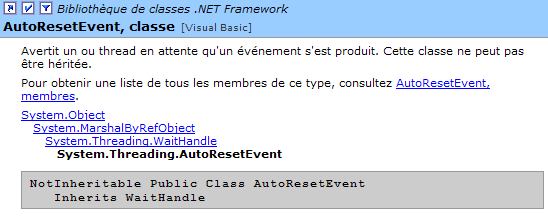
此类事件类似于布尔值,但避免了主动或半主动的等待。因此,如果写入权限由布尔值 peutEcrire 控制,生产者在写入前将执行如下代码:
或
在第一种方法中,线程无谓地占用处理器资源。在第二种方法中,它每隔 100 毫秒检查布尔变量 peutEcrire 的状态。AutoResetEvent 类可以进一步优化:当线程等待的事件发生时,它会请求被唤醒:
AutoEvent peutEcrire=new AutoResetEvent(false)        ' peutEcrire=false;
....
peutEcrire.WaitOne() ' le thread attend que l'évt peutEcrire passe à vrai
操作
将布尔值 peutEcrire 初始化为 false。该操作
由一个线程执行,如果布尔值 peutEcrire 为真,则该线程继续执行;否则,该线程将被阻塞,直到该值变为真。 另一个线程将通过操作 peutEcrire.Set() 将其设为真,或通过操作 peutEcrire.Reset() 将其设为假。
生产者-消费者程序如下:
' 读写线程的使用
' 演示共享资源与同步的并行使用

' 选项
Option Explicit On
Option Strict On

' 线程的使用
Imports System
Imports System.Threading

Public Class lececr

    ' 类变量
    Private Shared data(5) As Integer    ' ressource partagée entre threads lecteur et threads écrivain
    Private Shared lecteur As Mutex    ' variable de synchronisation pour lire le tableau
    Private Shared écrivain As Mutex    ' variable de synchronisation pour écrire dans le tableau
    Private Shared objRandom As New Random(DateTime.Now.Second)    ' un générateur de nombres aléatoires
    Private Shared peutLire As AutoResetEvent    ' signale qu'on peut lire le contenu de data
    Private Shared peutEcrire As AutoResetEvent

    Public Shared Sub Main(ByVal args() As [String])

        ' 要生成的线程数
        Const nbThreads As Integer = 3

        ' 标志初始化
        peutLire = New AutoResetEvent(False)        ' on ne peut pas encore lire
        peutEcrire = New AutoResetEvent(True)        ' on peut déjà écrire

        ' 初始化同步变量
        lecteur = New Mutex         ' synchronise les lecteurs
        écrivain = New Mutex         ' synchronise les écrivains

        ' 创建读取线程
        Dim lecteurs(nbThreads) As Thread
        Dim i As Integer
        For i = 0 To nbThreads - 1
            ' 创建
            lecteurs(i) = New Thread(New ThreadStart(AddressOf lire))
            lecteurs(i).Name = "lecteur_" & i
            ' 启动
            lecteurs(i).Start()
        Next i

        ' 创建写入线程
        Dim écrivains(nbThreads) As Thread
        For i = 0 To nbThreads - 1
            ' 创建
            écrivains(i) = New Thread(New ThreadStart(AddressOf écrire))
            écrivains(i).Name = "écrivain_" & i
            ' 启动
            écrivains(i).Start()
        Next i

        '结束
        Console.Out.WriteLine("fin de Main...")
    End Sub

    ' 读取表内容
    Public Shared Sub lire()
        ' 关键部分
        lecteur.WaitOne()        ' un seul lecteur peut passer
        peutLire.WaitOne()        ' on doit pouvoir lire

        ' 读取表格
        Dim i As Integer
        For i = 0 To data.Length - 1
            '等待 1 秒
            Thread.Sleep(1000)
            ' 显示
            Console.Out.WriteLine((DateTime.Now.ToString("hh:mm:ss") & " : Le lecteur " & Thread.CurrentThread.Name & " a lu le nombre " & data(i)))
        Next i

        ' 无法读取
        peutLire.Reset()
        ' 可以写入
        peutEcrire.Set()
        ' 关键段落结束
        lecteur.ReleaseMutex()
    End Sub

    ' 向数组写入
    Public Shared Sub écrire()
        ' 关键段落
        ' 仅限一名写手通过
        écrivain.WaitOne()
        ' 必须等待写入授权
        peutEcrire.WaitOne()

        ' 写入数组
        Dim i As Integer
        For i = 0 To data.Length - 1
            '等待 1 秒
            Thread.Sleep(1000)
            ' 显示
            data(i) = objRandom.Next(0, 1000)
            Console.Out.WriteLine((DateTime.Now.ToString("hh:mm:ss") & " : L'écrivain " & Thread.CurrentThread.Name & " a écrit le nombre " & data(i)))
        Next i

        ' 无法再写入
        peutEcrire.Reset()
        ' 可以读取
        peutLire.Set()
        '关键段落结束
        écrivain.ReleaseMutex()
    End Sub
End Class
执行结果如下:
dos>lececr
fin de Main...
05:56:56 : L'écrivain écrivain_0 a écrit le nombre 459
05:56:57 : L'écrivain écrivain_0 a écrit le nombre 955
05:56:58 : L'écrivain écrivain_0 a écrit le nombre 212
05:56:59 : L'écrivain écrivain_0 a écrit le nombre 297
05:57:00 : L'écrivain écrivain_0 a écrit le nombre 37
05:57:01 : L'écrivain écrivain_0 a écrit le nombre 623
05:57:02 : Le lecteur lecteur_0 a lu le nombre 459
05:57:03 : Le lecteur lecteur_0 a lu le nombre 955
05:57:04 : Le lecteur lecteur_0 a lu le nombre 212
05:57:05 : Le lecteur lecteur_0 a lu le nombre 297
05:57:06 : Le lecteur lecteur_0 a lu le nombre 37
05:57:07 : Le lecteur lecteur_0 a lu le nombre 623
05:57:08 : L'écrivain écrivain_1 a écrit le nombre 549
05:57:09 : L'écrivain écrivain_1 a écrit le nombre 34
05:57:10 : L'écrivain écrivain_1 a écrit le nombre 781
05:57:11 : L'écrivain écrivain_1 a écrit le nombre 555
05:57:12 : L'écrivain écrivain_1 a écrit le nombre 812
05:57:13 : L'écrivain écrivain_1 a écrit le nombre 406
05:57:14 : Le lecteur lecteur_1 a lu le nombre 549
05:57:15 : Le lecteur lecteur_1 a lu le nombre 34
05:57:16 : Le lecteur lecteur_1 a lu le nombre 781
05:57:17 : Le lecteur lecteur_1 a lu le nombre 555
05:57:18 : Le lecteur lecteur_1 a lu le nombre 812
05:57:19 : Le lecteur lecteur_1 a lu le nombre 406
05:57:20 : L'écrivain écrivain_2 a écrit le nombre 442
05:57:21 : L'écrivain écrivain_2 a écrit le nombre 83
^C
可以注意到以下几点:
- 虽然在关键段落 lire 中该读取器会失去处理器,但确实每次只有一个读取器
- 确实每次只有一个写入者,尽管该写入者在关键段 écrire 中会失去处理器
- 读取器仅在数组中有数据可读时才进行读取
- 写入器仅在数组被完全读取后才进行写入