3. 类、结构体、接口
3.1. 通过示例了解对象
3.1.1. 概述
现在,我们将通过实例来探讨面向对象编程。对象是一个包含定义其状态的数据(称为属性)和函数(称为方法)的实体。对象是根据称为类的模板创建的:
Public Class c1
    ' 属性
    Private p1 As type1
    Private p2 As type2
....

    ' 方法
    Public Sub m1(....)
...
    End Sub

    ' 方法
    Public Function m2(...)
....
    End Function
End Class
基于前面的类 C1,可以创建许多对象 O1、O2、…… 它们都将拥有属性 p1、p2……以及方法 m3、m4……但它们的属性值各不相同,因此每个对象都具有其特有的状态。类比而言,声明
则会创建两个类型(类)为 Integer 的对象(此处使用“对象”一词并不准确)。它们唯一的属性就是其值。如果 O1 是类型为 C1 的对象, 则 O1.p1 表示 O1 的属性 p1,而 O1.m1 表示 O1 的方法 m1。我们先考虑一个对象模型:类 personne。
3.1.2. person类的定义
personne 类的定义如下:
Public Class personne
    ' 属性
    Private prenom As String
    Private nom As String
    Private age As Integer

    ' 方法
    Public Sub initialise(ByVal P As String, ByVal N As String, ByVal age As Integer)
        Me.prenom = P
        Me.nom = N
        Me.age = age
    End Sub

    ' 方法
    Public Sub identifie()
        Console.Out.WriteLine((prenom & "," & nom & "," & age))
    End Sub
End Class
这里给出了一个类的定义,也就是一种数据类型。当我们创建该类型的变量时,会将其称为对象或类的实例。 因此,类是一个用于构建对象的模板。类的成员或字段可以是数据(属性)、方法(函数)或属性。属性是用于获取或设置对象属性值的一种特殊方法。这些字段可以伴随以下三个关键字之一:
私有字段(private)仅可由类的内部方法访问 | |
公共字段(public)可被类内定义或未定义的任何函数访问 | |
受保护(protected)字段仅可由类或派生对象(稍后将介绍继承概念)的内部方法访问。 |
通常,类的数据被声明为私有,而其方法和属性则被声明为公有。这意味着对象的使用者(程序员):
- 无法直接访问对象的私有数据
- 可以调用对象的公共方法,特别是那些能够访问其私有数据的方法。
类声明的语法如下:
public class classe
    private  donnée ou méthode ou propriété privée
    public  donnée ou méthode ou propriété publique
    protected  donnée ou méthode ou propriété protégée
end class
private、protected 和 public 属性的声明顺序不限。
3.1.3. 初始化方法
让我们回到声明为:
Public Class personne
    ' 属性
    Private prenom As String
    Private nom As String
    Private age As Integer

    ' 方法
    Public Sub initialise(ByVal P As String, ByVal N As String, ByVal age As Integer)
        Me.prenom = P
        Me.nom = N
        Me.age = age
    End Sub

    ' 方法
    Public Sub identifie()
        Console.Out.WriteLine((prenom & "," & nom & "," & age))
    End Sub
End Class
方法 initialise 的作用是什么? 由于 nom、prenom 和 age 是类 personne 的私有数据,因此以下语句:
是非法的。我们需要通过一个公共方法初始化一个类型为 personne 的对象。这就是方法 initialise 的作用。我们将编写:
p1.initialise 的写法是合法的,因为 initialise 是公开访问的。
3.1.4. new 运算符
指令序列
是错误的。指令
将 p1 声明为对类型为 personne 的对象的引用。该对象尚未存在,因此 p1 未被初始化。这相当于写成:
其中通过关键字 nothing 明确指出,变量 p1 尚未引用任何对象。随后编写
时,便调用了由 p1 引用的对象的 initialise 方法。然而该对象尚未存在,编译器将报错。若要使 p1 引用某个对象,需编写:
这将创建一个尚未初始化的 personne 类型对象: 属性 nom 和 prenom(它们是 String 类型对象的引用)将分别取值 nothing 而 age 的值将变为 0。因此存在默认初始化。现在 p1 引用了一个对象,该对象的初始化语句
是有效的。
3.1.5. 关键字 Me
让我们看看方法 initialise 的代码:
    Public Sub initialise(ByVal P As String, ByVal N As String, ByVal age As Integer)
        Me.prenom = P
        Me.nom = N
        Me.age = age
    End Sub
语句 Me.prenom=P 表示当前对象(Me)的属性 prenom 被赋值为 P。 关键字 Me 指代当前对象:即包含被执行方法的对象。我们如何得知这一点?让我们看看在调用程序中,p1 所引用的对象是如何初始化的:
被调用的其实是对象 p1 的方法 initialise。当在这个方法中引用对象 Me 时,实际上引用的是对象 p1。 方法 initialise 也可以写成如下形式:
    Public Sub initialise(ByVal P As String, ByVal N As String, ByVal age As Integer)
        prenom = P
        nom = N
        Me.age = age
    End Sub
当对象的一个方法引用该对象的属性 A 时,默认会写入 Me.A。当标识符发生冲突时,必须显式使用该属性。例如以下语句:
Me.age=age;
其中 age 表示当前对象的一个属性,同时也表示该方法接收的参数 age。 因此,必须通过将属性 age 命名为 Me.age 来消除歧义。
3.1.6. 一个测试程序
以下是一个简短的测试程序:
Public Class personne
    ' 属性
    Private prenom As String
    Private nom As String
    Private age As Integer

    ' 方法
    Public Sub initialise(ByVal P As String, ByVal N As String, ByVal age As Integer)
        Me.prenom = P
        Me.nom = N
        Me.age = age
    End Sub

    ' 方法
    Public Sub identifie()
        Console.Out.WriteLine((prenom & "," & nom & "," & age))
    End Sub
End Class
以及获得的结果:
dos>vbc personne1.vb
Compilateur Microsoft (R) Visual Basic .NET version 7.10.3052.4 pour Microsoft (R) .NET Framework version 1.1.4322.573
3.1.7. 使用编译后的类文件(程序集)
需要注意的是,在上一个示例中,我们的测试程序中有两个类:personne 和 test1。还有另一种方法:
-
将 Person 类编译到一个名为程序集(assembly)的专用文件中。该文件的扩展名为 .dll
-
编译 test1 类时,引用包含 personne 类的程序集。
两个源文件如下所示:
test.vb | |
personne2.vb | |
类 personne 由以下语句编译:
dos>vbc /t:library personne2.vb
Compilateur Microsoft (R) Visual Basic .NET version 7.10.3052.4 pour Microsoft (R) .NET Framework version 1.1.4322.573

dos>dir
24/02/2004  16:50                  509 personne2.vb
24/02/2004  16:49                  143 test.vb
24/02/2004  16:50                3 584 personne2.dll
编译生成了一个名为 personne2.dll 的文件。正是编译选项 /t:library 指定了生成“汇编”文件。现在我们来编译文件 test.vb:
dos>vbc /r:personne2.dll test.vb
Compilateur Microsoft (R) Visual Basic .NET version 7.10.3052.4 pour Microsoft (R) .NET Framework version 1.1.4322.573
dos>dir
24/02/2004  16:50                  509 personne2.vb
24/02/2004  16:49                  143 test.vb
24/02/2004  16:50                3 584 personne2.dll
24/02/2004  16:51                3 072 test.exe
编译选项 /r:personne2.dll 告知编译器,它将在文件 personne2.dll 中找到某些类。 当在源文件 test.vb 中发现对类 personne 的引用(该类在源文件 test.vb 中未声明)时, 它将通过 /r 选项引用的 .dll 文件中查找 personne 类。在此处,它将在 personne2.dll 程序集内找到 personne 类。 该程序集本可以包含其他类。若要在编译时使用多个已编译的类文件,应编写如下代码:
运行程序 test1.exe 会得到以下结果:
3.1.8. 另一种初始化方法
我们继续考虑类 personne,并为其添加以下方法:
    ' 方法
    Public Sub initialise(ByVal P As personne)
        prenom = P.prenom
        nom = P.nom
        Me.age = P.age
    End Sub
现在有两个名为 initialise 的方法:只要它们接受不同的参数,这种命名就是合法的。本例中正是如此。 该参数现在是一个指向某人的引用 P。因此,该人(P)的属性会被赋值给当前对象(Me)。 需要注意的是,尽管 P 对象的属性类型为 private,但方法 initialise 仍可直接访问其属性。 这一点始终成立:C 类的对象 O1 始终可以访问同一类 C 的对象的属性。 以下是对新类 personne 的测试,该类已如前所述编译为 personne.dll:
' 选项
Option Explicit On
Option Strict On

' 命名空间
Imports System

Module test1
    Sub Main()
        Dim p1 As New personne
        p1.initialise("Jean", "Dupont", 30)
        Console.Out.Write("p1=")
        p1.identifie()
        Dim p2 As New personne
        p2.initialise(p1)
        Console.Out.Write("p2=")
        p2.identifie()
    End Sub
End Module
及其结果:
3.1.9. Person 类的构造函数
构造函数是一个名为 New 的过程,在创建对象时被调用。它通常用于初始化对象。如果一个类有一个接受 n 个参数的构造函数 argi,则该类的对象声明和初始化可以采用以下形式:
dim objet as classe =new classe(arg1,arg2, ... argn)
或
dim objet as classe
…
objet=new classe(arg1,arg2, ... argn)
当一个类有一个或多个构造函数时,必须使用其中一个构造函数来创建该类的对象。 如果类 C 没有构造函数,则它有一个默认构造函数,即无参构造函数:public New()。此时,对象的属性将使用默认值进行初始化。这就是前面程序中发生的情况,其中我们写道:
现在为我们的 personne 类创建两个构造函数:
' 选项
Option Explicit On
Option Strict On
' 命名空间
Imports System
' Person 类
Public Class personne
' 属性
Private prenom As String
Private nom As String
Private age As Integer
' 构造函数
Public Sub New(ByVal P As [String], ByVal N As [String], ByVal age As Integer)
initialise(P, N, age)
End Sub
Public Sub New(ByVal P As personne)
initialise(P)
End Sub
' 对象初始化方法
Public Sub initialise(ByVal P As String, ByVal N As String, ByVal age As Integer)
Me.prenom = P
Me.nom = N
Me.age = age
End Sub
Public Sub initialise(ByVal P As personne)
prenom = P.prenom
nom = P.nom
Me.age = P.age
End Sub
' 方法
Public Sub identifie()
Console.Out.WriteLine((prenom & "," & nom & "," & age))
End Sub
End Class
这两个构造函数仅调用相应的 initialise 方法。需要提醒的是,当在构造函数中出现例如 initialise(P) 这样的表示法时,编译器会将其转换为 Me.initialise(P)。 因此,在构造函数中,会调用方法 initialise 来处理由 Me 引用的对象,即当前对象,也就是正在构建的对象。以下是一个简短的测试程序:
' 选项
Option Explicit On
Option Strict On
' 命名空间
Imports System
' 测试页面
Module test
Sub Main()
Dim p1 As New personne("Jean", "Dupont", 30)
Console.Out.Write("p1=")
p1.identifie()
Dim p2 As New personne(p1)
Console.Out.Write("p2=")
p2.identifie()
End Sub
End Module
以及获得的结果:
3.1.10. 对象引用
我们始终使用同一个类 personne。测试程序如下:
' 选项
Option Explicit On
Option Strict On
' 命名空间
Imports System
' 测试页面
Module test
Sub Main()
' p1
Dim p1 As New personne("Jean", "Dupont", 30)
Console.Out.Write("p1=")
p1.identifie()
' p2 引用与 p1 相同的对象
Dim p2 As personne = p1
Console.Out.Write("p2=")
p2.identifie()
' p3 引用一个对象,该对象将是 p1 所引对象的副本
Dim p3 As New personne(p1)
Console.Out.Write("p3=")
p3.identifie()
' 更改 p1 所引用的对象的状态
p1.initialise("Micheline", "Benoît", 67)
Console.Out.Write("p1=")
p1.identifie()
' 由于 p2=p1,p2 引用的对象的状态也必须发生了变化
Console.Out.Write("p2=")
p2.identifie()
' 由于 p3 引用的对象与 p1 不同,因此 p3 引用的对象的状态应该没有改变
Console.Out.Write("p3=")
p3.identifie()
End Sub
End Module
所得结果如下:
p1=Jean,Dupont,30
p2=Jean,Dupont,30
p3=Jean,Dupont,30
p1=Micheline,Benoît,67
p2=Micheline,Benoît,67
p3=Jean,Dupont,30
当通过以下方式声明变量 p1 时
p1 引用了对象 personne("Jean","Dupont",30),但并非该对象本身。在 C 语言中,这相当于一个指针 c.a.d,即所创建对象的地址。如果随后编写:
被修改的并非对象 personne("Jean","Dupont",30),而是引用 p1 的值发生了变化。如果对象 personne("Jean","Dupont",30) 没有被其他变量引用,它将被“丢失”。
当编写:
则初始化了指针 p2:它“指向”与指针 p1 相同的对象(即指向同一个对象)。 因此,如果修改了由 p1 “指向”(或引用的)对象,则会修改由 p2 引用的对象。
当我们编写:
将创建一个新对象,该对象是 p1 所引用的对象的副本。这个新对象将由 p3 引用。 如果修改由 p1 “指向”(或引用的)对象,则由 p3 引用的对象不会受到任何影响。测试结果正是如此。
3.1.11. 临时对象
在表达式中,我们可以显式调用对象的构造函数:该对象会被构建,但我们无法访问它(例如进行修改)。这个临时对象是为了评估表达式而构建的,随后会被释放。 它所占用的内存空间随后将由一个名为“垃圾回收器”的程序自动回收,该程序的作用是回收那些不再被程序数据引用的对象所占用的内存空间。让我们考虑以下新的测试程序:
' 选项
Option Strict On
Option Explicit On

' 命名空间
Imports System

' 测试页面
Module test
    Sub Main()
        Dim p As New personne(New personne("Jean", "Dupont", 30))
        p.identifie()
    End Sub
End Module
并修改类 personne 的构造函数,使其显示一条消息:
    ' 构造函数
    Public Sub New(ByVal P As [String], ByVal N As [String], ByVal age As Integer)
        Console.Out.WriteLine("Constructeur personne(String, String, integer)")
        initialise(P, N, age)
    End Sub

    Public Sub New(ByVal P As personne)
        Console.Out.WriteLine("Constructeur personne(personne)")
        initialise(P)
    End Sub
我们得到以下结果:
dos>test
Constructeur personne(String, String, integer)
Constructeur personne(personne)
Jean,Dupont,30
显示了这两个临时对象的连续构建过程。
3.1.12. 读取和写入私有属性的方法
我们在类 personne 中添加了用于读取或修改对象属性状态的必要方法:
Imports System

Public Class personne

    ' 属性
    Private prenom As [String]
    Private nom As [String]
    Private age As Integer

    ' 构造函数
    Public Sub New(ByVal P As [String], ByVal N As [String], ByVal age As Integer)
        Me.prenom = P
        Me.nom = N
        Me.age = age
    End Sub

    Public Sub New(ByVal P As personne)
        Me.prenom = P.prenom
        Me.nom = P.nom
        Me.age = P.age
    End Sub

    ' 标识符
    Public Sub identifie()
        Console.Out.WriteLine((prenom + "," + nom + "," + age))
    End Sub

    ' 访问器
    Public Function getPrenom() As [String]
        Return prenom
    End Function

    Public Function getNom() As [String]
        Return nom
    End Function

    Public Function getAge() As Integer
        Return age
    End Function

    '修饰符
    Public Sub setPrenom(ByVal P As [String])
        Me.prenom = P
    End Sub

    Public Sub setNom(ByVal N As [String])
        Me.nom = N
    End Sub

    Public Sub setAge(ByVal age As Integer)
        Me.age = age
    End Sub
End Class
我们使用以下程序测试新类:
' 选项
Option Strict On
Option Explicit On

' 命名空间
Imports System

' 测试页面
Public Module test
    Sub Main()
        Dim P As New personne("Jean", "Michelin", 34)
        Console.Out.WriteLine(("P=(" & P.getPrenom() & "," & P.getNom() & "," & P.getAge() & ")"))
        P.setAge(56)
        Console.Out.WriteLine(("P=(" & P.getPrenom() & "," & P.getNom() & "," & P.getAge() & ")"))
    End Sub
End Module
并得到以下结果:
3.1.13. 属性
访问类属性的另一种方法是创建属性。这些属性允许我们像操作公共属性一样操作私有属性。考虑以下类 personne,其中之前的访问器和修改器已被读写属性所取代:
' 选项
Option Explicit On
Option Strict On

' 命名空间
Imports System

' 人员类
Public Class personne

    ' 属性
    Private _prenom As [String]
    Private _nom As [String]
    Private _age As Integer


    ' 构造函数
    Public Sub New(ByVal P As [String], ByVal N As [String], ByVal age As Integer)
        Me._prenom = P
        Me._nom = N
        Me._age = age
    End Sub


    Public Sub New(ByVal P As personne)
        Me._prenom = P._prenom
        Me._nom = P._nom
        Me._age = P._age
    End Sub

    ' 标识符
    Public Sub identifie()
        Console.Out.WriteLine((_prenom & "," & _nom & "," & _age))
    End Sub

    ' 属性
    Public Property prenom() As String
        Get
            Return _prenom
        End Get
        Set(ByVal Value As String)
            _prenom = Value
        End Set
    End Property

    Public Property nom() As String
        Get
            Return _nom
        End Get
        Set(ByVal Value As String)
            _nom = Value
        End Set
    End Property

    Public Property age() As Integer
        Get
            Return _age
        End Get
        Set(ByVal Value As Integer)
            ' 年龄有效?
            If Value >= 0 Then
                _age = Value
            Else
                Throw New Exception("âge (" & Value & ") invalide")
            End If
        End Set
    End Property
End Class
一个属性(Property)可用于读取(get)或设置(set)属性的值。在本例中,我们在属性名称前添加了下划线(_)前缀,以便属性名称与原始属性保持一致。实际上,属性不能与它所管理的属性使用相同的名称,否则会在类中引发命名冲突。 因此,我们将属性命名为 _prenom、_nom、_age,并相应地修改了构造函数和方法。 随后,我们创建了三个属性:nom、prenom 和 age。属性的声明如下:
    Public Property nom() As Type
        Get
...
        End Get
        Set(ByVal Value As Type)
...
        End Set
    End Property
其中 Type 应为该属性所管理的属性类型。它可能包含两个方法,分别称为 get 和 set。get 方法通常负责返回其所管理的属性的值(当然,它也可以返回其他内容,没有任何限制)。 set 方法接收一个名为 value 的参数,通常将其赋值给所管理的属性。它可借此机会验证接收到的值是否有效,若值无效则可能抛出异常。此处针对年龄的处理正是如此。
get 和 set 方法是如何被调用的?请看以下测试程序:
' 选项
Option Explicit On
Option Strict On

' 命名空间
Imports System

' 测试页面
Module test
    Sub Main()
        Dim P As New personne("Jean", "Michelin", 34)
        Console.Out.WriteLine(("P=(" & P.prenom & "," & P.nom & "," & P.age & ")"))
        P.age = 56
        Console.Out.WriteLine(("P=(" & P.prenom & "," & P.nom & "," & P.age & ")"))
        Try
            P.age = -4
        Catch ex As Exception
            Console.Error.WriteLine(ex.Message)
        End Try
    End Sub
End Module
在以下语句中
中,我们试图获取人员 P 的属性 prenom、nom 和 age 的值。此时调用了这些属性的 get 方法,并返回了它们所管理的属性的值。
在以下语句中
中,我们希望设置属性 age 的值。此时将调用该属性的 set 方法,其 value 参数将接收 56。
类 C 的属性 P 若仅定义了 get 方法,则称为只读属性。若 c 是类 C 的对象,则编译器将拒绝操作 c.P=value。
执行上述测试程序将得到以下结果:
因此,属性使我们能够像操作公共属性一样操作私有属性。
3.1.14. 类的方法和属性
假设我们想统计应用程序中创建的 [personne] 对象的数量。 虽然可以自行管理一个计数器,但可能会遗漏那些零散创建的临时对象。更稳妥的做法是在 [personne] 类的构造函数中加入一条递增计数器的语句。 问题在于需要传递该计数器的引用以便构造函数能对其进行递增:必须为其添加一个新参数。也可以将计数器包含在类定义中。由于它是类本身的属性,而非该类中某个特定对象的属性,因此需使用关键字 Shared 进行不同声明:
要引用它时,需写为 personne._nbPersonnes,以表明它是 personne 类本身的属性。在此,我们创建了一个私有属性,在类外部无法直接访问它。 因此,我们创建了一个公共属性,以便访问类属性 nbPersonnes。 为了将 nbPersonnes 的值赋给该属性的 get 方法,该方法并不需要特定的 personne 对象: 因为 _nbPersonnes 并非某个特定对象的属性,而是整个类的属性。因此,我们需要声明一个名为 Shared 的属性:
从外部调用时,其语法为 personne.nbPersonnes。该属性被声明为只读(ReadOnly),因为它不提供 set 方法。以下是一个示例。personne 类变为如下形式:
Option Explicit On
Option Strict On
' 命名空间
Imports System
' 类
Public Class personne
' 类属性
Private Shared _nbPersonnes As Long = 0
' 实例属性
Private _prenom As [String]
Private _nom As [String]
Private _age As Integer
' 构造函数
Public Sub New(ByVal P As [String], ByVal N As [String], ByVal age As Integer)
' 又一个人
_nbPersonnes += 1
Me._prenom = P
Me._nom = N
Me._age = age
End Sub
Public Sub New(ByVal P As personne)
' 又一个人
_nbPersonnes += 1
Me._prenom = P._prenom
Me._nom = P._nom
Me._age = P._age
End Sub
' 标识
Public Sub identifie()
Console.Out.WriteLine((_prenom & "," & _nom & "," & _age))
End Sub
' 类属性
    Public Shared ReadOnly Property nbPersonnes() As Long
        Get
            Return _nbPersonnes
        End Get
    End Property
' 实例属性
Public Property prenom() As String
Get
Return _prenom
End Get
Set(ByVal Value As String)
_prenom = Value
End Set
End Property
Public Property nom() As String
Get
Return _nom
End Get
Set(ByVal Value As String)
_nom = Value
End Set
End Property
Public Property age() As Integer
Get
Return _age
End Get
Set(ByVal Value As Integer)
' 年龄有效吗?
If Value >= 0 Then
_age = Value
Else
Throw New Exception("âge (" & Value & ") invalide")
End If
End Set
End Property
End Class
程序如下:
' 选项
Option Explicit On
Option Strict On

' 命名空间
Imports System

' 测试数据库
Module test
    Sub Main()
        Dim p1 As New personne("Jean", "Dupont", 30)
        Dim p2 As New personne(p1)
        Console.Out.WriteLine(("Nombre de personnes créées : " & personne.nbPersonnes))
    End Sub
End Module
将得到以下结果:
3.1.15. 将对象传递给函数
我们之前已经提到,默认情况下 VB.NET 会按值传递函数的实际参数:实际参数的值会被复制到形式参数中。对于对象而言,不要被系统性出现的语言误用所迷惑——人们总是习惯于直接说“对象”,而不是“对象引用”。 对象只能通过指向它的引用(指针)进行操作。因此传递给函数的并非对象本身,而是对该对象的引用。因此,在形式参数中复制的是引用的值,而非对象本身的值:不会构建新的对象。 如果将对象引用 R1 传递给一个函数,它将被复制到相应的形式参数 R2 中。 因此,引用 R2 和 R1 指向同一个对象。 如果该函数修改了由 R2 指向的对象,那么它显然也会修改由 R1 引用的对象,因为它们是同一个对象。
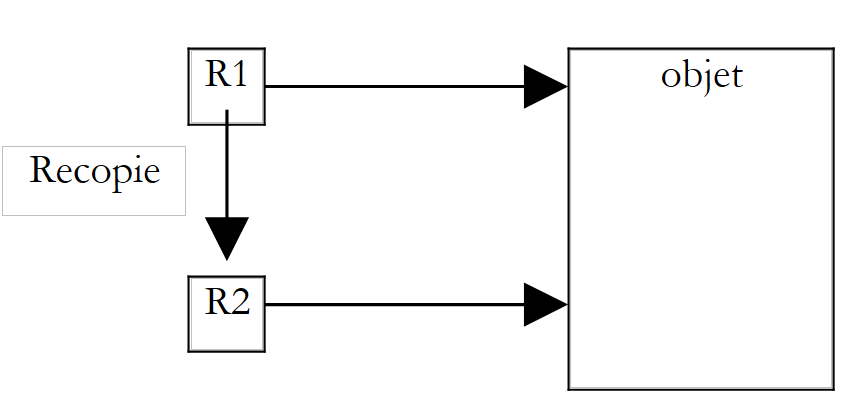 |
下例说明了这一点:
' 选项
Option Explicit On
Option Strict On

' 命名空间
Imports System

' 测试页面
Module test
    Sub Main()
        ' 一个人 p1
        Dim p1 As New personne("Jean", "Dupont", 30)

        ' 显示 p1
        Console.Out.Write("Paramètre effectif avant modification : ")
        p1.identifie()

        ' p1 修改
        modifie(p1)

        ' 显示 p1
        Console.Out.Write("Paramètre effectif après modification : ")
        p1.identifie()
    End Sub

    Sub modifie(ByVal P As personne)
        ' 人员 P 显示
        Console.Out.Write("Paramètre formel avant modification : ")
        P.identifie()
        ' 修改 P
        P.prenom = "Sylvie"
        P.nom = "Vartan"
        P.age = 52
        ' 显示 P
        Console.Out.Write("Paramètre formel après modification : ")
        P.identifie()
    End Sub
End Module
所得结果如下:
Paramètre effectif avant modification : Jean,Dupont,30
Paramètre formel avant modification : Jean,Dupont,30
Paramètre formel après modification : Sylvie,Vartan,52
Paramètre effectif après modification : Sylvie,Vartan,52
可以看出,仅构建了一个对象:即来自过程 Main 的对象 p1,且该对象确实已被函数 modifie 修改。
3.1.16. 人员数组
对象与其他数据一样,因此可以将多个对象集合到一个数组中:
' 选项
Option Explicit On
Option Strict On

' 命名空间
Imports System

' 测试页面
Module test
    Sub Main()
        ' 人员列表
        Dim amis(2) As personne
        amis(0) = New personne("Jean", "Dupont", 30)
        amis(1) = New personne("Sylvie", "Vartan", 52)
        amis(2) = New personne("Neil", "Armstrong", 66)
        ' 显示
        Console.Out.WriteLine("----------------")
        Dim i As Integer
        For i = 0 To amis.Length - 1
            amis(i).identifie()
        Next i
    End Sub
End Module
语句 Dim amis(2) As personne 创建了一个包含 3 个 personne 类型元素的数组。这 3 个元素在此处初始化为 nothing、c.a.d,它们并未引用任何对象。 同样,这是一种语言上的误用,我们称之为“对象数组”,而实际上它只是一个对象引用数组。对象数组的创建(它本身也是一个对象)并不会创建其元素类型对应的任何对象:这需要在后续操作中完成。结果如下:
3.2. 通过示例理解继承
3.2.1. 概述
这里我们将探讨继承的概念。继承的目的是“定制”一个现有的类,使其满足我们的需求。假设我们要创建一个名为 enseignant 的类:教师是一个特殊的人。 他拥有其他人所没有的属性:例如他所教授的学科。但他同时也具备所有人的通用属性:名字、姓氏和年龄。因此,教师完全属于类 personne,但拥有额外的属性。 与其从零开始创建一个名为 enseignant 的类,我们更倾向于沿用 personne 类的现有特性,并根据教师的特殊性进行调整。正是继承这一概念使我们能够做到这一点。 为了表示类 enseignant 继承了类 personne 的属性,我们将写为:
Public Class enseignant
    Inherits personne
请注意这种跨两行的特殊语法。类 personne 被称为父类(或母类),而类 enseignant 则被称为派生类(或子类)。 一个 enseignant 对象具备 personne 对象的所有特性:它拥有相同的属性和方法。父类的这些属性和方法在子类的定义中不会重复:我们只需列出子类新增的属性和方法即可。 假设类 personne 定义如下:
' 选项
Option Strict On
Option Explicit On

' 命名空间
Imports System

' Person 类
Public Class personne

    ' 类属性
    Private Shared _nbPersonnes As Long = 0

    ' 实例属性
    Private _prenom As [String]
    Private _nom As [String]
    Private _age As Integer


    ' 构造函数
    Public Sub New(ByVal P As [String], ByVal N As [String], ByVal age As Integer)
        ' 又一个人
        _nbPersonnes += 1
        ' 构造
        Me._prenom = P
        Me._nom = N
        Me._age = age
        ' 跟踪
        Console.Out.WriteLine("Construction personne(string, string, int)")
    End Sub


    Public Sub New(ByVal P As personne)
        ' 多一个人
        _nbPersonnes += 1
        ' 施工
        Me._prenom = P._prenom
        Me._nom = P._nom
        Me._age = P._age
        ' 跟进
        Console.Out.WriteLine("Construction personne(string, string, int)")
    End Sub

    ' 类属性
    Public Shared ReadOnly Property nbPersonnes() As Long
        Get
            Return _nbPersonnes
        End Get
    End Property

    ' 实例属性
    Public Property prenom() As String
        Get
            Return _prenom
        End Get
        Set(ByVal Value As String)
            _prenom = Value
        End Set
    End Property

    Public Property nom() As String
        Get
            Return _nom
        End Get
        Set(ByVal Value As String)
            _nom = Value
        End Set
    End Property

    Public Property age() As Integer
        Get
            Return _age
        End Get
        Set(ByVal Value As Integer)
            ' 年龄有效吗?
            If Value >= 0 Then
                _age = Value
            Else
                Throw New Exception("âge (" & Value & ") invalide")
            End If
        End Set
    End Property

    Public ReadOnly Property identite() As String
        Get
            Return "personne(" & _prenom & "," & _nom & "," & age & ")"
        End Get
    End Property
End Class
方法 identifie 已被只读属性 identité 取代,该属性用于标识个人。我们创建一个继承自类 personne 的类 enseignant:
' 选项
Option Strict On
Option Explicit On

' 命名空间
Imports System

Public Class enseignant
    Inherits personne
    ' 属性
    Private _section As Integer

    ' 构造函数
    Public Sub New(ByVal P As String, ByVal N As String, ByVal age As Integer, ByVal section As Integer)
        MyBase.New(P, N, age)
        Me._section = section
        ' 追踪
        Console.Out.WriteLine("Construction enseignant(string,string,int,int)")
    End Sub

    ' 部分属性
    Public Property section() As Integer
        Get
            Return _section
        End Get
        Set(ByVal Value As Integer)
            _section = Value
        End Set
    End Property
End Class
类 enseignant 在类 personne 的方法和属性基础上新增:
- 一个 section 属性,表示教师在教师团队中所隶属的分组编号(大致上每门学科一个分组)
- 一个新的构造函数,用于初始化教师的所有属性
声明
Public Class enseignant
    Inherits personne
表明类 enseignant 继承自类 personne。
3.2.2. 创建教师对象
类 enseignant 的构造函数如下:
    ' 构造函数
    Public Sub New(ByVal P As String, ByVal N As String, ByVal age As Integer, ByVal section As Integer)
        MyBase.New(P, N, age)
        Me._section = section
        ' 跟踪
        Console.Out.WriteLine("Construction enseignant(string,string,int,int)")
    End Sub
声明
Public Sub New(ByVal P As String, ByVal N As String, ByVal age As Integer, ByVal section As Integer)
声明构造函数接收四个参数:P、N、age、section。 它必须将其中三个参数 (P,N,age) 传递给其基类,即 personne 类。 已知该类有一个名为 person(string, string, int) 的构造函数,该构造函数将利用传递的参数 (P,N,age) 来构建一个人物。类 [enseignant] 通过以下方式将其参数 (P, N, age) 传递给其基类:
MyBase.New(P, N, age)
基类的构造完成后,enseignant对象的构造将通过执行构造函数的主体部分继续进行:
Me._section = section
简而言之,派生类的构造函数:
- 将基类构建所需的参数传递给基类
- 使用其余参数初始化其特有的属性
也可以选择这样写:
    Public Sub New(ByVal P As String, ByVal N As String, ByVal age As Integer, ByVal section As Integer)
        Me._prenom = P
        Me._nom = N
        Me._age = age
        Me._section = section
        ' 跟踪
        Console.Out.WriteLine("Construction enseignant(string,string,int,int)")
    End Sub
这不可能。类 personne 将其三个字段 _prenom、_nom 和 _age 声明为私有(private)。 只有同一类的对象才能直接访问这些字段。 所有其他对象,包括此处的子对象,都必须通过公共方法才能访问这些字段。如果类 personne 将这三个字段声明为受保护的(protected),情况就会不同:它将允许派生类直接访问这三个字段。 因此,在本例中,使用父类的构造函数是正确的解决方案,这也是常规做法:在构建子对象时,首先调用父对象的构造函数,然后完成子对象(本例中为 section)特有的初始化操作。
将类 personne 和 enseignant 编译到程序集之中:
dos>vbc /t:library personne.vb
Compilateur Microsoft (R) Visual Basic .NET version 7.10.3052.4 pour Microsoft (R) .NET Framework version 1.1.4322.573

dos>vbc /r:personne.dll /t:library enseignant.vb
Compilateur Microsoft (R) Visual Basic .NET version 7.10.3052.4 pour Microsoft (R) .NET Framework version 1.1.4322.573

dos>dir
25/02/2004  10:08                1 828 personne.vb
25/02/2004  10:11                  675 enseignant.vb
25/02/2004  10:12                  223 test.vb
25/02/2004  10:16                4 096 personne.dll
25/02/2004  10:16                3 584 enseignant.dll
需要注意的是,为了编译子类 enseignant,必须引用包含类 personne 的文件 personne.dll。让我们尝试编写一个简单的测试程序:
' 选项
Option Strict On
Option Explicit On

' 命名空间
Imports System

Module test
    Sub Main()
        Console.Out.WriteLine(New enseignant("Jean", "Dupont", 30, 27).identite)
    End Sub
End Module
该程序仅创建了一个 enseignant 对象(new)并对其进行标识。 类 enseignant 本身没有方法 identité,但其父类拥有该方法,且该方法是公共的:因此,通过继承,它成为类 enseignant 的公共方法。所得结果如下:
dos>vbc /r:personne.dll /r:enseignant.dll test.vb
Compilateur Microsoft (R) Visual Basic .NET version 7.10.3052.4 pour Microsoft (R) .NET Framework version 1.1.4322.573

dos>test
Construction personne(string, string, int)
Construction enseignant(string,string,int,int)
personne(Jean,Dupont,30)
可以看出:
- 对象 personne 在对象 enseignant 之前被创建
- 得到的标识符是对象 personne 的标识符
3.2.3. 方法或属性的重载
在上例中,我们已获取了教师对象 personne 的标识,但缺少 enseignant 类(即班级)特有的某些信息。因此,我们需要编写一个属性来标识该教师:
' 选项
Option Strict On
Option Explicit On

' 命名空间
Imports System

Public Class enseignant
    Inherits personne
    ' 属性
    Private _section As Integer

    ' 构造函数
    Public Sub New(ByVal P As String, ByVal N As String, ByVal age As Integer, ByVal section As Integer)
        MyBase.New(P, N, age)
        Me._section = section
        ' 跟踪
        Console.Out.WriteLine("Construction enseignant(string,string,int,int)")
    End Sub

    ' 部分属性
    Public Property section() As Integer
        Get
            Return _section
        End Get
        Set(ByVal Value As Integer)
            _section = Value
        End Set
    End Property

    ' 重载身份属性
    Public Shadows ReadOnly Property identite() As String
        Get
            Return "enseignant(" & MyBase.identite & "," & _section & ")"
        End Get
    End Property
End Class
类 enseignant 中的方法 identite 基于其父类(MyBase.identite)中的方法 identite 来显示其“personne”部分,然后通过 _section 字段进行补充,该字段是 enseignant 类特有的。请注意 identite 属性的声明:
Public Shadows ReadOnly Property identite() As String
这表明该属性“隐藏”了父类中可能存在的同名方法。假设有一个名为 E 的 enseignant 对象。该对象内部包含一个 personne 对象:
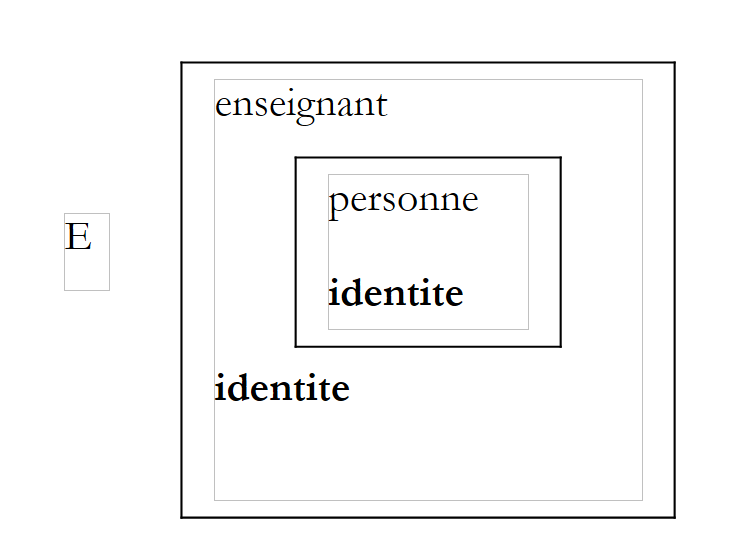 |
identity 属性同时定义在 enseignant 类及其父类 personne 中。 在子类 enseignant 中,属性 identite 必须在前面加上关键字 shadows,以表明正在为类 enseignant. 重新定义一个新属性 identite
Public Shadows ReadOnly Property identite() As String
类 enseignant 现在拥有两个属性 identite:
- 一个是从父类 personne 继承的
- 其自身的属性
若 E 是 enseignant 对象,则 E.identite 指代类 enseignant 的方法 identite。 我们说父类的属性 identite 被子类的属性 identite “重写”了。 一般而言,如果 O 是一个对象,M 是一个方法,那么为了执行方法 O.M,系统将按以下顺序查找方法 M:
- 在对象 O 的类中
- 如果存在,则在其父类中
- 在其父类的父类中(如果存在)
- 等等……
因此,继承允许在子类中重定义父类中同名的方法/属性。这使得子类能够根据自身需求进行适配。结合稍后将要介绍的多态性,方法/属性的重载是继承的主要优势。让我们考虑与之前相同的示例:
' 选项
Option Strict On
Option Explicit On

' 命名空间
Imports System

Module test
    Sub Main()
        Console.Out.WriteLine(New enseignant("Jean", "Dupont", 30, 27).identite)
    End Sub
End Module
此次得到的结果如下:
Construction personne(string, string, int)
Construction enseignant(string,string,int,int)
enseignant(personne(Jean,Dupont,30),27)
3.2.4. 多态性
考虑以下类继承序列:C0 C1 C2 … Cn,其中 Ci Cj 表示类 Cj 继承自类 Ci。 这意味着类 Cj 不仅具有类 Ci 的所有特征,还具有其他特征。设 Oi 是类型 Ci 的对象。以下写法是合法的:
事实上,通过继承,类 Cj 不仅拥有类 Ci 的所有特征,还包含其他特征。因此,类型为 Cj 的对象 Oj 内部包含一个类型为 Ci 的对象。操作
使得 Oi 成为对象 Oj 中所包含的 Ci 类型对象的引用。
Oi 类型的变量不仅可以引用 Ci 类型的对象,实际上还可以引用所有从 Ci 类派生的对象,这种特性被称为多态性: 即变量能够引用不同类型对象的能力。让我们通过一个示例来考察以下与任何类都无关的函数:
Sub affiche(ByVal p As personne)
我们也可以这样写
比
在后一种情况下,函数 affiche 的形式参数(类型为 personne)将接收类型为 enseignant 的值。 由于类型 enseignant 派生自类型 personne,因此这是合法的。
3.2.5. 重定义与多态性
让我们完善我们的 affiche 过程:
    Sub affiche(ByVal p As personne)
        ' 显示 p 的标识
        Console.Out.WriteLine(p.identite)
    End Sub
方法 p.identite 返回一个字符串,该字符串标识对象 personne。在我们的前一个示例中,如果对象是 enseignant,会发生什么情况:
        Dim e As New enseignant("Lucile", "Dumas", 56, 61)
        affiche(e)
让我们来看以下示例:
' 选项
Option Strict On
Option Explicit On

' 命名空间
Imports System

Module test
    Sub Main()
        ' 一位教师
        Dim e As New enseignant("Lucile", "Dumas", 56, 61)
        affiche(e)
        ' 一个人
        Dim p As New personne("Jean", "Dupont", 30)
        affiche(p)
    End Sub

    ' 显示
    Sub affiche(ByVal p As personne)
        ' 显示 p 的身份
        Console.Out.WriteLine(p.identite)
    End Sub
End Module
得到的结果如下:
Construction personne(string, string, int)
Construction enseignant(string,string,int,int)
personne(Lucile,Dumas,56)
Construction personne(string, string, int)
personne(Jean,Dupont,30)
执行结果表明,p.identite 指令每次都会执行 personne 的属性 identite, 即 enseignant 中包含的 e,然后是 personne 本身的 p。它并未适应实际传递给 affiche 的参数对象。 我们更希望获得 enseignant 的完整标识。 为此,p.identite 应引用由 p 实际指向的对象的 identite 属性,而非由 p 实际指向的对象的 “personne”对象的属性。 可以通过在基类 personne 中将 identite 声明为可重写属性来实现此结果:
    Public Overridable ReadOnly Property identite() As String
        Get
            Return "personne(" & _prenom & "," & _nom & "," & age & ")"
        End Get
    End Property
overridable 关键字使 identite 成为可重写或虚拟属性。该关键字同样适用于方法。 重写虚拟属性或方法的子类必须使用 overrides 关键字(而非 shadows)来修饰其重写的属性/方法。因此,在类 enseignant 中,属性 identite 定义如下:
    ' 身份属性重载
    Public Overrides ReadOnly Property identite() As String
        Get
            Return "enseignant(" & MyBase.identite & "," & _section & ")"
        End Get
    End Property
测试程序:
' 选项
Option Strict On
Option Explicit On

' 命名空间
Imports System

Module test
    Sub Main()
        ' 一位教师
        Dim e As New enseignant("Lucile", "Dumas", 56, 61)
        affiche(e)
        ' 一个人
        Dim p As New personne("Jean", "Dupont", 30)
        affiche(p)
    End Sub

    ' 显示
    Sub affiche(ByVal p As personne)
        ' 显示 p 的身份
        Console.Out.WriteLine(p.identite)
    End Sub
End Module
随后生成以下结果:
Construction personne(string, string, int)
Construction enseignant(string,string,int,int)
enseignant(personne(Lucile,Dumas,56),61)
Construction personne(string, string, int)
personne(Jean,Dupont,30)
这次,我们确实获得了该教师的完整身份信息。现在,让我们重新定义一个方法,而不是一个属性。类 object 是所有 VB.NET 类的“父类”。因此,当我们编写:
就隐含地写成了:
类 object 定义了一个虚拟方法 ToString:
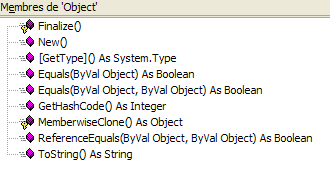
方法 ToString 返回对象所属类的名称,如下例所示:
' 选项
Option Strict On
Option Explicit On

' 命名空间
Imports System

Module test2
    Sub Main()
        ' 一位教师
        Console.Out.WriteLine(New enseignant("Lucile", "Dumas", 56, 61).ToString())
        ' 一个人
        Console.Out.WriteLine(New personne("Jean", "Dupont", 30).ToString())
    End Sub
End Module
生成的结果如下:
Construction personne(string, string, int)
Construction enseignant(string,string,int,int)
enseignant
Construction personne(string, string, int)
personne
值得注意的是,尽管我们在类 personne 和 enseignant 中未重定义方法 ToString, 但可以发现,object 类中的 ToString 方法仍然能够显示对象的实际类名。 让我们在类 personne 和 enseignant 中重写方法 ToString:
    ' ToString
    Public Overrides Function ToString() As String
        ' 赋予身份属性
        Return identite
    End Function
这两个类中的定义是相同的。考虑以下测试程序:
' 选项
Option Strict On
Option Explicit On

' 命名空间
Imports System

Module test
    Sub Main()
        ' 一位教师
        Dim e As New enseignant("Lucile", "Dumas", 56, 61)
        affiche(e)
        ' 一个人
        Dim p As New personne("Jean", "Dupont", 30)
        affiche(p)
    End Sub

    ' 显示
    Sub affiche(ByVal p As personne)
        ' 显示 p 的身份
        Console.Out.WriteLine(p.identite)
    End Sub
End Module
执行结果如下:
Construction personne(string, string, int)
Construction enseignant(string,string,int,int)
enseignant(personne(Lucile,Dumas,56),61)
Construction personne(string, string, int)
personne(Jean,Dupont,30)
3.3. 为类定义索引器
考虑在 .NET 平台中预定义的 [ArrayList] 类。该类用于将对象存储在列表中。它属于 [System.Collections] 命名空间。 在下面的示例中,我们使用该类来存储一个人员列表(广义上的):
' 选项
Option Strict On
Option Explicit On

' 命名空间
Imports System
Imports System.Collections

' 类listeDePersonnes
Public Class listeDePersonnes
    Inherits ArrayList

    ' 将人员添加到列表中
    Public Overloads Sub Add(ByVal p As personne)
        MyBase.Add(p)
    End Sub

    ' 一个索引器
    Default Public Shadows Property Item(ByVal i As Integer) As personne
        Get
            Return CType(MyBase.Item(i), personne)
        End Get
        Set(ByVal Value As personne)
            MyBase.Item(i) = Value
        End Set
    End Property

    ' 另一个索引器
    Default Public Shadows ReadOnly Property Item(ByVal N As String) As Integer
        Get
            ' 搜索名为 N 的人
            Dim i As Integer
            For i = 0 To Count - 1
                If CType(Me(i), personne).nom = N Then
                    Return i
                End If
            Next i
            Return -1
        End Get
    End Property

    ' toString
    Public Overrides Function ToString() As String
        ' 返回 (元素1, 元素2, ..., 元素n)
        Dim liste As String = "("
        Dim i As Integer
        ' 遍历动态数组
        For i = 0 To (Count - 2)
            liste += "[" + Me(i).ToString + "]" + ","
        Next i        'for
        ' 最后一个元素
        If Count <> 0 Then
            liste += "[" + Me(i).ToString + "]"
        End If
        liste += ")"
        Return liste
    End Function
End Class
下面介绍 [ArrayList] 类的一些属性和方法:
表示列表中元素数量的属性 | |
用于向列表中添加对象的方法 | |
返回列表中第 i 个元素的方法 |
我们注意到,为了获取列表中的第 i 个元素,我们没有写 [liste.Item(i)],而是直接写了 [liste(i)],这乍看之下似乎有误。 但这确实可行,因为类 [ArrayList] 定义了一个默认属性 [Item],其语法类似于以下形式:
    Default Public Property Item(ByVal i As Integer) As Object
        Get
...
        End Get
        Set(ByVal Value As personne)
...
        End Set
    End Property
当编译器遇到 [liste(i)] 这种写法时,它会检查类 [ArrayList] 是否定义了具有以下签名的属性:
Default Public Property Proc(ByVal var As Integer) As Type
在此,它将找到过程 [Item]。随后,它将把 [liste(i)] 转换为 [liste.Item(i)]。 我们将属性 [Item] 称为类 [ArrayList] 的默认索引属性。执行上述程序将得到以下结果:
dos>vbc /r:personne.dll /r:enseignant.dll lstpersonnes1.vb
Compilateur Microsoft (R) Visual Basic .NET version 7.10.3052.4 pour Microsoft (R) .NET Framework version 1.1.4322.573
dos>dir
11/03/2004  18:26             3 584 enseignant.dll
12/03/2004  15:34             3 584 lstpersonnes1.exe
12/03/2004  13:39               661 lstpersonnes1.vb
11/03/2004  18:26             4 096 personne.dll
dos>lstpersonnes1
Construction personne(string, string, int)
Construction personne(string, string, int)
Construction personne(string, string, int)
Construction enseignant(string,string,int,int)
personne(paul,chenou,31)
personne(nicole,chenou,11)
enseignant(personne(jacques,sileau,33),61)
我们创建一个名为 [listeDePersonnes] 的类,该类将表示人员列表,因此这是一个特殊列表,自然应从类 [ArrayList] 派生而来:
' 选项
Option Strict On
Option Explicit On

' 命名空间
Imports System
Imports System.Collections

' 类 listeDePersonnes
Public Class listeDePersonnes
    Inherits ArrayList

    ' 用于将人员添加到列表中
    Public Shadows Sub Add(ByVal p As Object)
        ' p 必须是一个人
        If Not TypeOf (p) Is personne Then
            Throw New Exception("L'objet ajouté (" + p.ToString + ") n'est pas une personne")
        Else
            MyBase.Add(p)
        End If
    End Sub

    ' 索引器
    Default Public Shadows Property Index(ByVal i As Integer) As personne
        Get
            Return CType(MyBase.Item(i), personne)
        End Get
        Set(ByVal Value As personne)
            MyBase.Item(i) = Value
        End Set
    End Property

    ' toString
    Public Overrides Function ToString() As String
        ' 返回 (元素1, 元素2, ..., 元素n)
        Dim liste As String = "("
        Dim i As Integer
        ' 遍历动态数组
        For i = 0 To (Count - 2)
            liste += "[" + Me(i).ToString + "]" + ","
        Next i        'for
        ' 最后一个元素
        If Count <> 0 Then
            liste += "[" + Me(i).ToString + "]"
        End If
        liste += ")"
        Return liste
    End Function
End Class
该类具有以下方法和属性:
返回一个字符串,该字符串“表示”列表的内容 | |
用于将人员添加到列表中的方法 | |
默认索引属性,返回列表中的第 i 个人员 |
让我们来看看新增的内容:
创建了一个新方法 [Add]。
    ' 向列表中添加一个人
    Public Shadows Sub Add(ByVal p As Object)
        ' p 必须是一个人
        If Not TypeOf (p) Is personne Then
            Throw New Exception("L'objet ajouté (" + p.ToString + ") n'est pas une personne")
        Else
            MyBase.Add(p)
        End If
    End Sub
父类 [ArrayList] 中已存在一个具有相同签名的过程,因此使用关键字 [Shadows] 来表示新过程将替换父类中的过程。 子类的 [Add] 方法会验证所添加的对象是否确实是 [personne] 类型,或是通过 [TypeOf] 函数派生而来的类型。 若非如此,则通过 [Throw] 语句抛出异常。若添加的对象确实属于 [personne] 类型,则使用基类的 [Add] 方法进行添加。
创建一个索引属性:
    ' 一个索引器
    Default Public Shadows Property Index(ByVal i As Integer) As personne
        Get
            Return CType(MyBase.Item(i), personne)
        End Get
        Set(ByVal Value As personne)
            MyBase.Item(i) = Value
        End Set
    End Property
基类中已经存在一个名为 [Item] 的默认属性,且具有相同的签名。 因此,必须使用关键字 [Shadows] 来指示新的索引属性 [Index] 将“隐藏”基类中的 [Item]。 需要注意的是,即使这两个属性名称不同,此规则依然适用。 属性 [Index] 用于引用列表中的第 i 号人员。它基于基类的属性 [Item],从而访问底层对象 [ArrayList] 的第 i 号元素。 进行了类型变更,以适应以下情况:属性 [Item] 处理 [Object] 类型的元素,而属性 [Index] 处理 [personne] 类型的元素。
最后,我们重写(Overrides)类 [ArrayList] 中的方法 [ToString]:
    ' toString
    Public Overrides Function ToString() As String
        ' 返回 (元素1, 元素2, ..., 元素n)
        Dim liste As String = "("
        Dim i As Integer
        ' 遍历动态数组
        For i = 0 To (Count - 2)
            liste += "[" + Me(i).ToString + "]" + ","
        Next i        'for
        ' 最后一个项目
        If Count <> 0 Then
            liste += "[" + Me(i).ToString + "]"
        End If
        liste += ")"
        Return liste
    End Function
该方法返回一个字符串,格式为“(e1,e2,...,en)”,其中 ei 是列表中的元素。请注意 [Me(i)] 这种表示法,它表示当前对象 [Me] 的第 i 个元素。 此处使用的是默认索引属性。因此,[Me(i)] 与 [Me.Index(i)] 等价。
类代码放置在文件 [lstpersonnes2.vb] 中并进行编译:
dos>dir
11/03/2004  18:26             3 584 enseignant.dll
12/03/2004  15:45               970 lstpersonnes2.vb
11/03/2004  18:26             4 096 personne.dll
dos>vbc /r:personne.dll /r:enseignant.dll /t:library lstpersonnes2.vb
Compilateur Microsoft (R) Visual Basic .NET version 7.10.3052.4 pour Microsoft (R) .NET Framework version 1.1.4322.573
dos>dir
11/03/2004  18:26             3 584 enseignant.dll
12/03/2004  15:50             3 584 lstpersonnes2.dll
12/03/2004  15:45               970 lstpersonnes2.vb
11/03/2004  18:26             4 096 personne.dll
构建了一个测试程序:
' 选项
Option Explicit On
Option Strict On

' 命名空间
Imports System
Imports System.Collections

Module test
    Sub Main()
        ' 创建空人员列表
        Dim liste As listeDePersonnes = New listeDePersonnes
        ' 创建人员
        Dim p1 As personne = New personne("paul", "chenou", 31)
        Dim p2 As personne = New personne("nicole", "chenou", 11)
        Dim e1 As enseignant = New enseignant("jacques", "sileau", 33, 61)
        ' 填充列表
        liste.Add(p1)
        liste.Add(p2)
        liste.Add(e1)
        ' 显示列表
        Console.Out.WriteLine(liste.ToString)
        ' 添加非人员对象
        Try
            liste.Add(4)
        Catch e As Exception
            Console.Error.WriteLine(e.Message)
        End Try
    End Sub
End Module
并进行了编译:
dos>vbc /r:personne.dll /r:enseignant.dll /r:lstpersonnes2.dll test.vb
Compilateur Microsoft (R) Visual Basic .NET version 7.10.3052.4 pour Microsoft (R) .NET Framework version 1.1.4322.573
dos>dir
11/03/2004  18:26             3 584 enseignant.dll
12/03/2004  15:50             3 584 lstpersonnes2.dll
12/03/2004  15:45               970 lstpersonnes2.vb
11/03/2004  18:26             4 096 personne.dll
12/03/2004  15:50             3 584 test.exe
12/03/2004  15:49               623 test.vb
然后执行:
dos>test
Construction personne(string, string, int)
Construction personne(string, string, int)
Construction personne(string, string, int)
Construction enseignant(string,string,int,int)
([personne(paul,chenou,31)],[personne(nicole,chenou,11)],[enseignant(personne(jacques,sileau,33),61)])
L'objet ajouté (4) n'est pas une personne
可能希望写成
其中 l 的类型为 [listeDePersonnes]。在此,我们希望不再通过元素编号,而是通过人名来索引列表 l。为此,我们定义了一个新的默认索引属性:
    ' 另一个索引器
    Default Public Shadows ReadOnly Property Item(ByVal N As String) As Integer
        Get
            ' 搜索名为 N 的人员
            Dim i As Integer
            For i = 0 To Count - 1
                If CType(Me(i), personne).nom = N Then
                    Return i
                End If
            Next i
            Return -1
        End Get
    End Property
第一行
Default Public Shadows ReadOnly Property Index(ByVal N As String) As Integer
表示再次创建一个默认索引属性。所有默认属性必须具有相同的名称,此处为 [Index]。 新属性 [Index] 通过字符串 N 对类 listeDePersonnes 进行索引。listeDePersonnes(N) 的结果是一个整数。 该整数即为列表中名为 N 的人员在列表中的位置,若该人员不在列表中,则返回 -1。 我们仅定义属性 get,从而禁止写入 listeDePersonnes("nom")=valeur 则需要定义属性 set)。 因此需要关键字 [ReadOnly]。关键字 [Shadows] 用于隐藏基类的默认属性(尽管其签名不同)。
在 get 的主体中,遍历人员列表以查找作为参数传入的名称 N。如果在第 i 个位置找到它,则返回 i,否则返回 -1。
一个新的测试程序可以如下所示:
' 选项
Option Strict On
Option Explicit On

' 命名空间
Imports System

' 测试页面
Module test
    Sub Main()
        ' 人员列表
        Dim l As New listeDePersonnes
        ' 添加人员
        l.Add(New personne("jean", "dumornet", 10))
        l.Add(New personne("pauline", "duchemin", 12))
        ' 显示
        Console.Out.WriteLine(("l=" + l.ToString))
        l.Add(New personne("jacques", "tartifume", 27))
        Console.Out.WriteLine(("l=" + l.ToString))
        ' 修改项目 1
        l(1) = New personne("sylvie", "cachan", 5)
        ' 显示项目 1
        Console.Out.WriteLine(("l[1]=" + l(1).ToString))
        ' 显示列表 l
        Console.Out.WriteLine(("l=" + l.ToString))
        ' 人员搜索
        Dim noms() As String = New [String]() {"cachan", "inconnu"}
        Dim i As Integer
        For i = 0 To noms.Length - 1
            Dim inom As Integer = l(noms(i))
            If inom <> -1 Then
                Console.Out.WriteLine(("personne(" & noms(i) & ")=" & l(inom).ToString))
            Else
                Console.Out.WriteLine(("personne(" + noms(i) + ") n'existe pas"))
            End If
        Next i
    End Sub
End Module
运行结果如下:
personne(string, string, int)
Construction personne(string, string, int)
l=([personne(jean,dumornet,10)],[personne(pauline,duchemin,12)])
Construction personne(string, string, int)
l=([personne(jean,dumornet,10)],[personne(pauline,duchemin,12)],[personne(jacques,tartifume,27)])
Construction personne(string, string, int)
l[1]=personne(sylvie,cachan,5)
l=([personne(jean,dumornet,10)],[personne(sylvie,cachan,5)],[personne(jacques,tartifume,27)])
personne(cachan)=personne(sylvie,cachan,5)
personne(inconnu) n'existe pas
3.4. 结构体
结构体 VB.NET 直接源自 C 语言的结构体,与类非常相似。结构体的定义如下:
Structure spersonne
' 属性
    ...
' 属性
...
' 构造函数
...
' 方法
End Structure
尽管声明形式相似,类和结构体之间存在显著差异。例如,结构体中并不存在继承的概念。如果我们要编写一个不允许派生的类,结构体和类之间的哪些差异能帮助我们做出选择?让我们通过以下示例来了解:
' 选项
Option Strict On
Option Explicit On

' 命名空间
Imports System

' spersonne 结构
Structure spersonne
    Public nom As String
    Public age As Integer
End Structure

' cpersonne 类
Class cpersonne
    Public nom As String
    Public age As Integer
End Class

' 一个测试模块
Public Module test
    Sub Main()
        ' 一个 p1 实体
        Dim sp1 As spersonne
        sp1.nom = "paul"
        sp1.age = 10
        Console.Out.WriteLine(("sp1=spersonne(" & sp1.nom & "," & sp1.age & ")"))
        ' 一个实体 p2
        Dim sp2 As spersonne = sp1
        Console.Out.WriteLine(("sp2=spersonne(" & sp2.nom & "," & sp2.age & ")"))
        ' sp2 已修改
        sp2.nom = "nicole"
        sp2.age = 30
        ' 验证 sp1 和 sp2
        Console.Out.WriteLine(("sp1=cpersonne(" & sp1.nom & "," & sp1.age & ")"))
        Console.Out.WriteLine(("sp2=cpersonne(" & sp2.nom & "," & sp2.age & ")"))

        ' cp1
        Dim cp1 As New cpersonne
        cp1.nom = "paul"
        cp1.age = 10
        Console.Out.WriteLine(("cP1=cpersonne(" & cp1.nom & "," & cp1.age & ")"))
        ' 一个 cpersonne P2
        Dim cp2 As cpersonne = cp1
        Console.Out.WriteLine(("cP2=cpersonne(" & cp2.nom & "," & cp2.age & ")"))
        ' P2 已修改
        cp2.nom = "nicole"
        cp2.age = 30
        ' 验证 P1 和 P2
        Console.Out.WriteLine(("cP1=cpersonne(" & cp1.nom & "," & cp1.age & ")"))
        Console.Out.WriteLine(("cP2=cpersonne(" & cp2.nom & "," & cp2.age & ")"))
    End Sub
End Module
若运行此程序,将得到以下结果:
sp1=spersonne(paul,10)
sp2=spersonne(paul,10)
sp1=cpersonne(paul,10)
sp2=cpersonne(nicole,30)
cP1=cpersonne(paul,10)
cP2=cpersonne(paul,10)
cP1=cpersonne(nicole,30)
cP2=cpersonne(nicole,30)
在本章前面的页面中,我们使用了类 personne,现在我们使用结构 spersonne:
' 人员结构
Structure spersonne
    Public nom As String
    Public age As Integer
End Structure
声明
Dim sp1 As spersonne
创建了一个结构(姓名、年龄),而 sp1 的值就是该结构本身。
声明
Dim cp1 As New cpersonne
创建了一个对象 [cpersonne](大致相当于我们的结构),而 cp1 则是该对象的地址(引用)。
总结
- 对于结构体,sp1的值就是该结构体本身
- 对于类而言,p1的值是所创建对象的地址
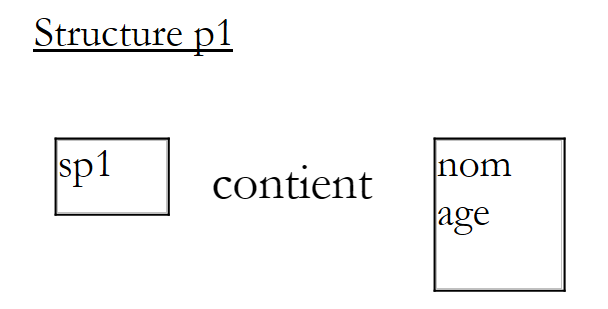 |
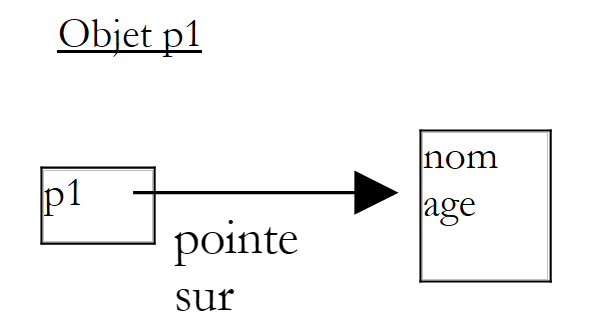 |
当在程序中写入
Dim sp2 As spersonne = sp1
会创建一个新的结构(姓名、年龄),并用 p1 的值(即该结构本身)进行初始化。
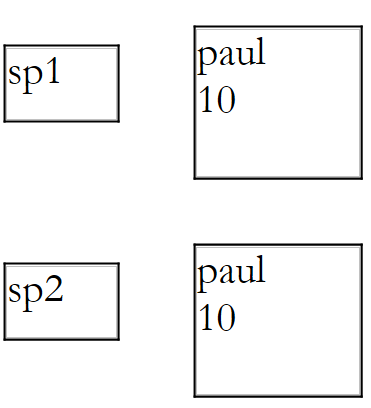 |
因此,sp1中的结构被复制到了sp2中。这属于值复制。
语句
Dim cp2 As cpersonne = cp1
行为不同。cp1的值被复制到cp2中,但由于该值实际上是对象的地址,因此对象本身并未被复制。它只是拥有了两条引用:
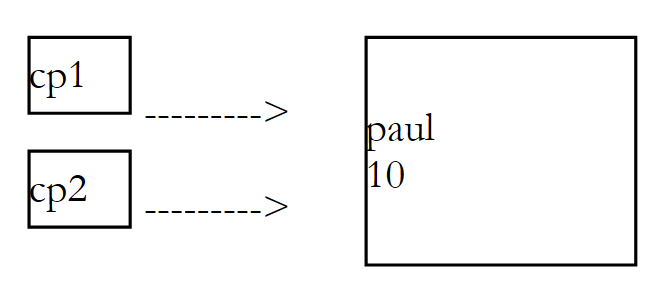 |
对于结构体而言,如果修改 sp2 的值,则不会修改 sp1 的值,程序也验证了这一点。 对于对象而言,如果修改了由 cp2 指向的对象,那么由 cp1 指向的对象也会被修改,因为它们是同一个对象。程序结果也同样说明了这一点。
因此,从上述解释中我们可以得出:
- 结构类型变量的值即为该结构本身
- 对象类型变量的值是所指向对象的地址
一旦理解了这一根本区别,结构体就与类非常相似,如下面的新示例所示:
' 选项
Option Strict On
Option Explicit On

' 命名空间
Imports System

' 人员结构
Structure personne
    ' 属性
    Private _nom As String
    Private _age As Integer

    ' 属性
    Public Property nom() As String
        Get
            Return _nom
        End Get
        Set(ByVal Value As String)
            _nom = value
        End Set
    End Property

    Public Property age() As Integer
        Get
            Return _age
        End Get
        Set(ByVal Value As Integer)
            _age = value
        End Set
    End Property

    ' 构造函数
    Public Sub New(ByVal NOM As String, ByVal AGE As Integer)
        _nom = NOM
        _age = AGE
    End Sub    'New

    ' TOSTRING
    Public Overrides Function ToString() As String
        Return "personne(" & nom & "," & age & ")"
    End Function
End Structure

' 一个测试模块
Module test
    Sub Main()
        ' 一个人 p1
        Dim p1 As New personne("paul", 10)
        Console.Out.WriteLine(("p1=" & p1.ToString))
        ' 一个人 p2
        Dim p2 As personne = p1
        Console.Out.WriteLine(("p2=" & p2.ToString))
        ' p2 已修改
        p2.nom = "nicole"
        p2.age = 30
        ' 验证 p1 和 p2
        Console.Out.WriteLine(("p1=" & p1.ToString))
        Console.Out.WriteLine(("p2=" & p2.ToString))
    End Sub
End Module
执行结果如下:
这里结构与类之间的唯一显著区别在于:如果使用类,程序结束时对象 p1 和 p2 将具有相同的值,即 p2 的值。
3.5. 接口
接口是一组方法或属性的原型,共同构成了一份契约。决定实现某个接口的类,必须承诺为该接口中定义的所有方法提供实现。由编译器负责验证该实现。以下是接口 Istats 的定义示例:
任何实现该接口的类都将被声明为
public class C
 Implements Istats
...
function moyenne() as Double Implements Istats.moyenne
...
end function
function écartType () as Double Implements Istats. écartType
...
end function
end class
方法 [moyenne] 和 [écartType] 必须在类 C 中定义。请看以下代码:
' 选项
Option Strict On
Option Explicit On

' 命名空间
Imports System

' 结构
Public Structure élève
    Public _nom As String
    Public _note As Double

    ' 构造函数
    Public Sub New(ByVal NOM As String, ByVal NOTE As Double)
        Me._nom = NOM
        Me._note = NOTE
    End Sub
End Structure

' 类注释
Public Class notes
    ' 属性
    Protected _matière As String
    Protected _élèves() As élève

    ' 构造函数
    Public Sub New(ByVal MATIERE As String, ByVal ELEVES() As élève)
        ' 学生与科目存储
        Me._matière = MATIERE
        Me._élèves = ELEVES
    End Sub

    ' ToString
    Public Overrides Function ToString() As String
        Dim valeur As String = "matière=" + _matière + ", notes=("
        Dim i As Integer
        ' 将所有成绩拼接
        For i = 0 To (_élèves.Length - 1) - 1
            valeur &= "[" & _élèves(i)._nom & "," & _élèves(i)._note & "],"
        Next i
        '最后一个成绩
        If _élèves.Length <> 0 Then
            valeur &= "[" & _élèves(i)._nom & "," & _élèves(i)._note & "]"
        End If
        valeur += ")"
        ' 结束
        Return valeur
    End Function
End Class
类 notes 汇总了某门课程中一个班级的成绩:
Public Class notes
    ' 属性
    Protected _matière As String
    Protected _élèves() As élève
属性声明为 protected,以便从派生类中访问。类型 élève 是一种结构,用于存储学生的姓名及其在该学科中的成绩:
Public Structure élève
    Public _nom As String
    Public _note As Double

    ' 构造函数
    Public Sub New(ByVal NOM As String, ByVal NOTE As Double)
        Me._nom = NOM
        Me._note = NOTE
    End Sub
End Structure
我们决定将该类 notes 派生为 notesStats 类,该类将增加两个属性:成绩的平均值和标准差:
Public Class notesStats
    Inherits notes
    Implements Istats

    ' 属性
    Private _moyenne As Double
    Private _écartType As Double
类 notesStats 实现了以下接口 Istats:
这意味着类 notesStats 必须包含两个方法,分别命名为 moyenne 和 écartType,且其签名应与接口 Istats 中指定的签名一致。 类 notesStats 如下所示:
' 选项
Option Strict On
Option Explicit On

' 命名空间
Imports System

Public Class notesStats
    Inherits notes
    Implements Istats

    ' 属性
    Private _moyenne As Double
    Private _écartType As Double

    ' 构造函数
    Public Sub New(ByVal MATIERE As String, ByVal ELEVES() As élève)
        MyBase.New(MATIERE, ELEVES)
        ' 计算平均分
        Dim somme As Double = 0
        Dim i As Integer
        For i = 0 To ELEVES.Length - 1
            somme += ELEVES(i)._note
        Next i
        If ELEVES.Length <> 0 Then
            _moyenne = somme / ELEVES.Length
        Else
            _moyenne = -1
        End If
        ' 标准差
        Dim carrés As Double = 0
        For i = 0 To ELEVES.Length - 1
            carrés += Math.Pow(ELEVES(i)._note - _moyenne, 2)
        Next i
        If ELEVES.Length <> 0 Then
            _écartType = Math.Sqrt((carrés / ELEVES.Length))
        Else
            _écartType = -1
        End If
    End Sub

    ' ToString
    Public Overrides Function ToString() As String
        Return MyBase.ToString() & ",moyenne=" & _moyenne & ",écart-type=" & _écartType
    End Function    'ToString

    ' Istats 接口的方法
    Public Function moyenne() As Double Implements Istats.moyenne
        ' 返回分数平均值
        Return _moyenne
    End Function

    Public Function écartType() As Double Implements Istats.écartType
        ' 返回标准差
        Return _écartType
    End Function
End Class
均值 _moyenne 和标准差 _ecartType 在对象构建时即被计算出来。 因此,方法 moyenne 和 écartType 只需返回属性 _moyenne 和 _ecartType 的值。如果学生数组为空,这两个方法将返回 -1。
以下是测试类:
' 选项
Option Strict On
Option Explicit On

' 命名空间
Imports System

Module test
    Sub Main()
        ' 若干学生及成绩
        Dim ELEVES() As élève = {New élève("paul", 14), New élève("nicole", 16), New élève("jacques", 18)}
        ' 将其保存到一个名为“notes”的对象中
        Dim anglais As New notes("anglais", ELEVES)
        ' 并显示
        Console.Out.WriteLine((anglais.ToString))
        ' 同上,包含平均值和标准差
        anglais = New notesStats("anglais", ELEVES)
        Console.Out.WriteLine((anglais.ToString))
    End Sub
End Module
返回的结果为:
matière=anglais, notes=([paul,14],[nicole,16],[jacques,18])
matière=anglais, notes=([paul,14],[nicole,16],[jacques,18]),moyenne=16,écart-type=1,63299316185545
类 notesStats 本可以自行实现方法 moyenne 和 écartType,而无需声明它实现了接口 Istats。 接口的意义何在?其意义在于:一个函数可以接受类型为接口 I 的数据作为形式参数。因此,任何实现接口 I 的类 C 的对象都可以作为该函数的实际参数。请看以下示例:
' 选项
Option Strict On
Option Explicit On

' 命名空间
Imports System

' 一个 Iexample 接口
Public Interface Iexemple
    Function ajouter(ByVal i As Integer, ByVal j As Integer) As Integer
    Function soustraire(ByVal i As Integer, ByVal j As Integer) As Integer
End Interface

' 第一个类
Public Class classe1
    Implements Iexemple

    Public Function ajouter(ByVal a As Integer, ByVal b As Integer) As Integer Implements Iexemple.ajouter
        Return a + b + 10
    End Function

    Public Function soustraire(ByVal a As Integer, ByVal b As Integer) As Integer Implements Iexemple.soustraire
        Return a - b + 20
    End Function
End Class

'第二个类
Public Class classe2
    Implements Iexemple

    Public Function ajouter(ByVal a As Integer, ByVal b As Integer) As Integer Implements Iexemple.ajouter
        Return a + b + 100
    End Function

    Public Function soustraire(ByVal a As Integer, ByVal b As Integer) As Integer Implements Iexemple.soustraire
        Return a - b + 200
    End Function
End Class
接口 Iexemple 定义了两个方法 ajouter 和 soustraire。 类 classe1 和 classe2 实现了该接口。需要注意的是,为了简化示例,这些类没有执行其他操作。现在考虑以下示例:
' 选项
Option Strict On
Option Explicit On

' 命名空间
Imports System

' 测试类
Module test

    '计算
    Sub calculer(ByVal i As Integer, ByVal j As Integer, ByVal inter As Iexemple)
        Console.Out.WriteLine(inter.ajouter(i, j))
        Console.Out.WriteLine(inter.soustraire(i, j))
    End Sub

    ' Main函数
    Sub Main()
        ' 创建两个对象类1和类2
        Dim c1 As New classe1
        Dim c2 As New classe2
        ' 调用静态函数计算
        calculer(4, 3, c1)
        calculer(14, 13, c2)
    End Sub
End Module
函数 calculer 接受类型为 Iexemple 的参数。因此,该参数既可以是类型为 classe1 的对象,也可以是类型为 classe2 的对象。 在 Main 过程中的实现即为如此,结果如下:
由此可见,这里存在一种与类中多态性相似的特性。如果一组 Ci 类之间没有继承关系(因此无法使用继承的多态性),且具有一组签名相同的方法,那么将这些方法归入一个接口 I 中,并让所有相关类都继承该接口,可能会很有用。 此时,这些类 Ci 的实例即可作为接受类型为 I 的参数的函数的参数使用,c.a.d。这些函数仅使用接口 I 中定义的 Ci 对象的方法,而不使用各个类 Ci 特有的属性与方法。 最后需要注意的是,接口可以多重继承,c.a.d。我们可以这样写
Public Class classe
    Implements I1,I2,...
其中 Ij 均为接口。
3.6. 命名空间
要在屏幕上输出一行,我们使用指令
如果我们查看类 Console 的定义
Namespace: System
Assembly: Mscorlib (in Mscorlib.dll)
会发现它们属于命名空间 System。这意味着类 Console 应被命名为 System.Console,因此实际应写为:
通过使用 imports 子句可以避免这种情况:
据说我们通过 imports 子句导入了 System 命名空间。 当编译器遇到一个类名(此处为 Console)时,它会尝试在由 imports 子句导入的各个命名空间中查找该类。 在此,它将在命名空间 System 中找到类 Console。现在请注意类 Console 附带的第二条信息:
Assembly: Mscorlib (in Mscorlib.dll)
该行指明了类 Console 的定义位于哪个“程序集”中。 当在 Visual Studio.NET 外部进行编译,且需要提供包含所需类别的各个 QZXXW2HTMLP000707ZQX 的引用时,此信息可能会派上用场。 需要提醒的是,若要引用编译某个类所需的dll,应编写如下代码:
创建类时,可以将其置于命名空间内。 这些命名空间的目的是避免类在销售等情况下发生命名冲突。假设两家企业 E1 和 E2 分别分发打包在 dll、 E1.dll 和 E2.dll 中分发打包类。假设客户 C 购买了这两组类,其中两家公司都定义了一个名为 personne 的类。客户 C 按以下方式编译程序:
如果源代码 prog.vb 使用了类 personne, 编译器将无法确定应从 E1.dll 中获取 personne 类,还是从 E2.dll 中获取。此时将报错。 如果 E1 公司将类创建在名为 E1 的命名空间中,而 E2 公司将类创建在名为 E2 的命名空间中, 那么两个名为 personne 的类将分别命名为 E1.personne 和 E2.personne。 客户在其类中应使用 E1.personne 或 E2.personne,但不能使用 personne。命名空间有助于消除歧义。要在命名空间中创建类,应编写:
Namespace istia.st
    Public Class personne
        ' 类定义
...
  end Class
end Namespace
作为示例,让我们在一个命名空间中创建之前研究的类 personne。我们将选择 istia.st 作为命名空间。类 personne 变为:
' 选项
Option Strict On
Option Explicit On

' 命名空间
Imports System

' 创建命名空间 istia.st
Namespace istia.st
    Public Class personne
        ' 属性
        Private prenom As String
        Private nom As String
        Private age As Integer

        ' 方法
        Public Sub initialise(ByVal P As String, ByVal N As String, ByVal age As Integer)
            Me.prenom = P
            Me.nom = N
            Me.age = age
        End Sub

        ' 方法
        Public Sub identifie()
            Console.Out.WriteLine((prenom & "," & nom & "," & age))
        End Sub
    End Class
End Namespace
该类编译后生成 personne.dll:
dos>vbc /t:library personne.vb
Compilateur Microsoft (R) Visual Basic .NET version 7.10.3052.4 pour Microsoft (R) .NET Framework version 1.1.4322.573
现在,让我们在测试类中使用类 personne:
' 选项
Option Strict On
Option Explicit On
' 命名空间
Imports System
Imports istia.st
' 测试页面
Public Module test
Sub Main()
Dim p1 As New personne
p1.initialise("Jean", "Dupont", 30)
p1.identifie()
End Sub
End Module
为了避免编写
Dim p1 As New istia.st.personne
,我们通过 imports 子句导入了 istia.st 命名空间:
Imports istia.st
现在编译测试程序:
dos>dir
12/03/2004  18:06             3 584 personne.dll
11/03/2004  18:27               610 personne.vb
12/03/2004 18:05 254 test.vb
dos>vbc /r:personne.dll test.vb
Compilateur Microsoft (R) Visual Basic .NET version 7.10.3052.4 pour Microsoft (R) .NET Framework version 1.1.4322.573
dos>dir
12/03/2004  18:06             3 584 personne.dll
11/03/2004  18:27               610 personne.vb
12/03/2004  18:08             3 072 test.exe
12/03/2004  18:05               254 test.vb
这将生成一个名为 test.exe 的文件,运行后会得到以下结果:
3.7. 示例 IMPOTS
我们重新计算上一章已探讨过的税款,并使用类来处理。回顾一下问题:
我们考虑一个简化的情况,即纳税人仅需申报工资收入:
- 计算该雇员的税额份额:nbParts=nbEnfants/2 +1(若未婚), 已婚则为 nbEnfants/2+2,其中 nbEnfants 代表其子女数。
- 若其子女数≥3,则额外增加半份
- 计算其应税收入 R=0.72*S,其中 S 为其年薪
- 计算其家庭系数 QF=R/nbParts
- 计算其应缴税额 I。请看下表:
12620.0 | 0 | 0 |
13190 | 0.05 | 631 |
15640 | 0.1 | 1290.5 |
24740 | 0.15 | 2072.5 |
31810 | 0.2 | 3309.5 |
39970 | 0.25 | 4900 |
48360 | 0.3 | 6898.5 |
55790 | 0.35 | 9316.5 |
92970 | 0.4 | 12106 |
127860 | 0.45 | 16754.5 |
151250 | 0.50 | 23147.5 |
172040 | 0.55 | 30710 |
195000 | 0.60 | 39312 |
0 | 0.65 | 49062 |
每行有 3 个字段。要计算税款 I,需查找满足 QF<=字段1 的第一行。例如,若 QF=23000,则会找到该行
此时税额 I 等于 0.15*R - 2072.5*nbParts。 如果 QF 使得关系 QF<=field1 从未成立,则使用最后一行中的系数。此处为:
由此得出税额 I=0.65*R - 49062*nbParts。
impot 类将定义如下:
' 选项
Option Strict On
Option Explicit On

' 命名空间
Imports System

Public Class impot
    ' 计算税款所需的数据
    ' 来自外部来源
    Private limites(), coeffR(), coeffN() As Decimal

    ' 生成器
    Public Sub New(ByVal LIMITES() As Decimal, ByVal COEFFR() As Decimal, ByVal COEFFN() As Decimal)
        ' 验证三个数组是否大小相同
        Dim OK As Boolean = LIMITES.Length = COEFFR.Length And LIMITES.Length = COEFFN.Length
        If Not OK Then
            Throw New Exception("Les 3 tableaux fournis n'ont pas la même taille(" & LIMITES.Length & "," & COEFFR.Length & "," & COEFFN.Length & ")")
        End If
        ' 没问题
        Me.limites = LIMITES
        Me.coeffR = COEFFR
        Me.coeffN = COEFFN
    End Sub

    ' 计算税额
    Public Function calculer(ByVal marié As Boolean, ByVal nbEnfants As Integer, ByVal salaire As Long) As Long
        ' 计算份额数
        Dim nbParts As Decimal
        If marié Then
            nbParts = CDec(nbEnfants) / 2 + 2
        Else
            nbParts = CDec(nbEnfants) / 2 + 1
        End If
        If nbEnfants >= 3 Then
            nbParts += 0.5D
        End If
        ' 计算应税收入及家庭商
        Dim revenu As Decimal = 0.72D * salaire
        Dim QF As Decimal = revenu / nbParts
        ' 税额计算
        limites((limites.Length - 1)) = QF + 1
        Dim i As Integer = 0
        While QF > limites(i)
            i += 1
        End While
        Return CLng(revenu * coeffR(i) - nbParts * coeffN(i))
    End Function
End Class
创建一个税款对象,其中包含用于计算纳税人税款的数据。这是该对象的固定部分。创建该对象后,可以反复调用其calculer方法,该方法根据纳税人的婚姻状况(已婚或未婚)、子女数量和年薪来计算其税款。一个测试程序可能如下所示:
' 选项
Option Strict On
Option Explicit On

' 命名空间
Imports System
Imports Microsoft.VisualBasic

Module test
    Sub Main()
        ' 交互式税额计算程序
        ' 用户通过键盘输入三项数据:已婚 nbEnfants 工资
        ' 程序随后显示应缴税额
        Const syntaxe As String = "syntaxe : marié nbEnfants salaire" + ControlChars.Lf + "marié : o pour marié, n pour non marié" + ControlChars.Lf + "nbEnfants : nombre d'enfants" + ControlChars.Lf + "salaire : salaire annuel en F"

        ' 计算税款所需的数据表
        Dim limites() As Decimal = {12620D, 13190D, 15640D, 24740D, 31810D, 39970D, 48360D, 55790D, 92970D, 127860D, 151250D, 172040D, 195000D, 0D}
        Dim coeffR() As Decimal = {0D, 0.05D, 0.1D, 0.15D, 0.2D, 0.25D, 0.3D, 0.35D, 0.4D, 0.45D, 0.5D, 0.55D, 0.6D, 0.65D}
        Dim coeffN() As Decimal = {0D, 631D, 1290.5D, 2072.5D, 3309.5D, 4900D, 6898.5D, 9316.5D, 12106D, 16754.5D, 23147.5D, 30710D, 39312D, 49062D}

        ' 创建一个税款对象
        Dim objImpôt As impot = Nothing
        Try
            objImpôt = New impot(limites, coeffR, coeffN)
        Catch ex As Exception
            Console.Error.WriteLine(("L'erreur suivante s'est produite : " + ex.Message))
            Environment.Exit(1)
        End Try
        ' 无限循环
        Dim marié As String
        Dim nbEnfants As Integer
        Dim salaire As Long
        While True
            ' 请求税款计算参数
            Console.Out.Write("Paramètres du calcul de l'impôt au format marié nbEnfants salaire ou rien pour arrêter :")
            Dim paramètres As String = Console.In.ReadLine().Trim()
            ' 需要做什么?
            If paramètres Is Nothing OrElse paramètres = "" Then
                Exit While
            End If
            ' 验证输入行中的参数数量
            Dim erreur As Boolean = False
            Dim args As String() = paramètres.Split(Nothing)
            Dim nbParamètres As Integer = args.Length
            If nbParamètres <> 3 Then
                Console.Error.WriteLine(syntaxe)
                erreur = True
            End If
            ' 验证参数的有效性
            If Not erreur Then
                ' 已婚
                marié = args(0).ToLower()
                If marié <> "o" And marié <> "n" Then
                    erreur = True
                End If
                ' nbEnfants
                Try
                    nbEnfants = Integer.Parse(args(1))
                    If nbEnfants < 0 Then
                        Throw New Exception
                    End If
                Catch
                    erreur = True
                End Try
                ' 工资
                Try
                    salaire = Integer.Parse(args(2))
                    If salaire < 0 Then
                        Throw New Exception
                    End If
                Catch
                    erreur = True
                End Try
            End If
            ' 如果参数正确,则计算税款
            If Not erreur Then
                Console.Out.WriteLine(("impôt=" & objImpôt.calculer(marié = "o", nbEnfants, salaire) & " F"))
            Else
                Console.Error.WriteLine(syntaxe)
            End If
        End While
    End Sub
End Module
以下是上述程序的运行示例:
dos>vbc /t:library impots.vb
Compilateur Microsoft (R) Visual Basic .NET version 7.10.3052.4 pour Microsoft (R) .NET Framework version 1.1.4322.573
dir>dir
12/03/2004  18:24             4 096 impots.dll
12/03/2004  18:20             1 483 impots.vb
12/03/2004  18:21             2 805 test.vb
dos>vbc /r:impots.dll test.vb
Compilateur Microsoft (R) Visual Basic .NET version 7.10.3052.4 pour Microsoft (R) .NET Framework version 1.1.4322.573
dos>dir
12/03/2004  18:24             4 096 impots.dll
12/03/2004  18:20             1 483 impots.vb
12/03/2004  18:26             6 144 test.exe
12/03/2004  18:21             2 805 test.vb
dos>test
Paramètres du calcul de l'impôt au format marié nbEnfants salaire ou rien pour arrêter :x x x
syntaxe : marié nbEnfants salaire
marié : o pour marié, n pour non marié
nbEnfants : nombre d'enfants
salaire : salaire annuel en F
Paramètres du calcul de l'impôt au format marié nbEnfants salaire ou rien pour arrêter :o 2 200000
impôt=22504 F
Paramètres du calcul de l'impôt au format marié nbEnfants salaire ou rien pour arrêter :