2. VB.NET 语言基础
2.1. 引言
我们将首先将VB.NET视为一种传统的编程语言。关于对象的内容将在后面介绍。
在程序中,有两样东西
- 数据
- 操作数据的指令
我们通常力求将数据与指令分离:
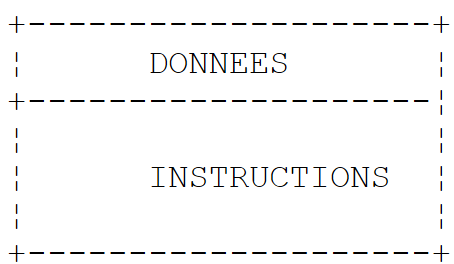 |
2.2. VB.NET 数据
VB.NET 使用以下数据类型:
- 整数、实数和十进制数
- 字符和字符串
- 布尔值
- 日期
- 对象
2.2.1. 预定义数据类型
VB 类型 | 等效的 .NET 类型 | 大小 | 值范围 |
Boolean | System.Boolean | 2 字节 | True 或 False。 |
字节 | System.Byte | 1 字节 | 0 到 255(无符号)。 |
Char | System.Char | 2 字节 | 0 到 65,535(无符号)。 |
日期 | System.DateTime | 8 位 | 0001 年 1 月 1 日 0:00:00 至 9999 年 12 月 31 日 23:59:59。 |
十进制 | System.Decimal | 16 字节 | 0 到 +/-79,228,162,514,264,337,593,543,950,335(无小数);0 到 +/-7.9228162514264337593543950335(28 位小数); 最小的非零数为 +/-0.0000000000000000000000000001 (+/-1E-28)。 |
Double | System.Double | 8字节 | -1.79769313486231E+308 至 -4.94065645841247E-324(负值);4.94065645841247E-324 至 1.79769313486231E+308(正值)。 |
Integer | System.Int32 | 4 字节 | -2,147,483,648 至 2,147,483,647。 |
长整型 | System.Int64 | 8 字节 | -9,223,372,036,854,775,808 至 9,223,372,036,854,775,807。 |
Object | System.Object | 4 字节 | 任何类型都可以存储在 Object 类型的变量中。 |
Short | System.Int16 | 2 字节 | -32,768 到 32,767。 |
Single | System.Single | 4 字节 | 负值范围为 -3.402823E+38 到 -1.401298E-45;正值范围为 1.401298E-45 到 3.402823E+38。 |
String | System.String(类) | 0 到大约 20 亿个 Unicode 字符。 |
在上表中,我们可以看到 32 位整数有两种可能的类型:Integer 和 System.Int32。这两种类型可以互换使用。其他 VB 类型及其在 .NET 平台中的等效类型也是如此。以下是一个示例程序:
Module types
    Sub Main()
        ' whole numbers
        Dim var1 As Integer = 100
        Dim var2 As Long = 10000000000L
        Dim var3 As Byte = 100
        Dim var4 As Short = 4
        ' real numbers
        Dim var5 As Decimal = 4.56789D
        Dim var6 As Double = 3.4
        Dim var7 As Single = -0.000103F
        ' date
        Dim var8 As Date = New Date(2003, 1, 1, 12, 8, 4)
        ' boolean
        Dim var9 As Boolean = True
        ' character
        Dim var10 As Char = "A"c
        ' character string
        Dim var11 As String = "abcde"
        ' object
        Dim var12 As Object = New Object
        ' displays
        Console.Out.WriteLine("var1=" + var1.ToString)
        Console.Out.WriteLine("var2=" + var2.ToString)
        Console.Out.WriteLine("var3=" + var3.ToString)
        Console.Out.WriteLine("var4=" + var4.ToString)
        Console.Out.WriteLine("var5=" + var5.ToString)
        Console.Out.WriteLine("var6=" + var6.ToString)
        Console.Out.WriteLine("var7=" + var7.ToString)
        Console.Out.WriteLine("var8=" + var8.ToString)
        Console.Out.WriteLine("var9=" + var9.ToString)
        Console.Out.WriteLine("var10=" + var10)
        Console.Out.WriteLine("var11=" + var11)
        Console.Out.WriteLine("var12=" + var12.ToString)
    End Sub
End Module
执行后产生以下结果:
var1=100
var2=10000000000
var3=100
var4=4
var5=4,56789
var6=3,4
var7=-0,000103
var8=01/01/2003 12:08:04
var9=True
var10=A
var11=abcde
var12=System.Object
2.2.2. 字面量数据表示法
145、-7、&FF(十六进制) | |
100000L | |
134.789, -45E-18 (-45 × 10⁻¹⁸) | |
134.789F, -45E-18F (-45 × 10⁻¹⁸) | |
100000D | |
"A"c | |
"today" | |
true, false | |
New Date(2003, 1, 1) 表示 2003年1月1日 |
请注意以下几点:
- 100000L,其中 L 表示该数值被视为长整型
- 134.789F,其中 F 表示该数值被视为单精度浮点数
- 100000D,其中 D 表示该数值被视为十进制实数
- "A"c,将字符串 "A" 转换为字符 'A'
- 字符串用双引号 " " 括起。如果字符串中必须包含字符 " ",则需将其成对使用,例如 "abcd""e" 表示字符串 [abcd"e]。
2.2.3. 数据声明
2.2.3.1. 声明的作用
程序操作的数据由名称和类型来定义。这些数据存储在内存中。当程序编译时,编译器会根据程序员所做的声明,为每段数据分配一个由地址和大小定义的内存位置。此外,这些声明还允许编译器检测编程错误。因此,例如,如果 x 是一个字符串,那么操作 x = x \* 2 将被判定为错误。
2.2.3.2. 常量的声明
常量的声明语法如下:
const 标识符 as 类型 = 值
例如,[const PI as double=3.141592]。为什么要声明常量?
- 如果为常量赋予一个有意义的名称,程序将更易于阅读:[const VAT_rate as single=0.186F]
- 如果需要更改“常量”,修改程序会更方便。因此,在前面的例子中,如果增值税税率变为 33%,唯一需要修改的就是更改定义其值的语句:[const vatrate as single=0.336F]。如果程序中显式使用了 0.186,则需要修改大量语句。
2.2.3.3. 变量声明
变量通过名称来标识,并指代一种数据类型。VB.NET 不区分大小写。因此,变量 FIN 和 fin 是相同的。变量可以在声明时进行初始化。声明一个或多个变量的语法如下:
dim variable1,variable2,...,variablen as type_identifier
其中 type_identifier 是一个预定义类型或由程序员定义的类型。
2.2.4. 数字与字符串之间的转换
number.ToString 或 "" & number 或 CType(number, String) | |
object.ToString | |
Integer.Parse(字符串) 或 Int32.Parse | |
Long.Parse(string) 或 Int64.Parse | |
Double.Parse(string) | |
Single.Parse(string) |
如果字符串不表示一个有效的数字,将其转换为数字可能会失败。 这会导致一个致命错误,在 VB.NET 中称为异常。可以使用以下 try/catch 代码块来处理此错误:
try
        appel de la fonction susceptible de générer l'exception
 catch e as Exception
        traiter l'exception e
end try
instruction suivante
如果函数未引发异常,则继续执行下一条语句;否则,进入 catch 子句的主体,然后继续执行下一条语句。我们稍后将回到异常处理这一主题。以下是一个演示数字与字符串之间转换主要技巧的程序。在此示例中,函数 display 将其参数的值打印到屏幕上。因此,display(S) 会将 S 的值打印到屏幕上。
' guidelines
Option Strict On

' imported namespaces
Imports System

' the test module
Module Module1

    Sub Main()
        ' main proceedings
        ' local data
        Dim S As String
        Const i As Integer = 10
        Const l As Long = 100000
        Const f As Single = 45.78F
        Dim d As Double = -14.98

        ' number --> string
        affiche(CType(i, String))
        affiche(CType(l, String))
        affiche(CType(f, String))
        affiche(CType(d, String))

        'boolean --> string
        Const b As Boolean = False
        affiche(b.ToString)

        ' string --> int
        Dim i1 As Integer = Integer.Parse("10")
        affiche(i1.ToString)
        Try
            i1 = Integer.Parse("10.67")
            affiche(i1.ToString)
        Catch e As Exception
            affiche("Erreur [10.67] : " + e.Message)
        End Try

        ' chain --> long
        Dim l1 As Long = Long.Parse("100")
        affiche("" + l1.ToString)
        Try
            l1 = Long.Parse("10.675")
            affiche("" & l1)
        Catch e As Exception
            affiche("Erreur [10.675] : " + e.Message)
        End Try

        ' chain --> double
        Dim d1 As Double = Double.Parse("100,87")
        affiche(d1.ToString)
        Try
            d1 = Double.Parse("abcd")
            affiche("" & d1)
        Catch e As Exception
            affiche("Erreur [abcd] : " + e.Message)
        End Try

        ' chain --> single
        Dim f1 As Single = Single.Parse("100,87")
        affiche(f1.ToString)
        Try
            d1 = Single.Parse("abcd")
            affiche(f1.ToString)
        Catch e As Exception
            affiche("Erreur [abcd] : " + e.Message)
        End Try
    End Sub

    ' poster
    Public Sub affiche(ByVal S As String)
        Console.Out.WriteLine("S=" + S)
    End Sub
End Module
结果如下:
S=10
S=100000
S=45,78
S=-14,98
S=False
S=10
S=Erreur [10.67] : Le format de la chaîne d'entrée est incorrect.
S=100
S=Erreur [10.675] : Le format de la chaîne d'entrée est incorrect.
S=100,87
S=Erreur [abcd] : Le format de la chaîne d'entrée est incorrect.
S=100,87
S=Erreur [abcd] : Le format de la chaîne d'entrée est incorrect.
请注意,字符串形式的实数必须使用逗号,而不是小数点。因此,我们写 Dim d As Double = -14.98,但 Dim d1 As Double = Double.Parse("100.87")
2.2.5. 数据数组
VB.NET 数组是一种允许将同类型数据归类到单一标识符下的对象。其声明方式如下:
Dim Array(n) As Type 或 Dim Array() As Type = New Type(n) {}
其中 n 是数组最后一个元素的索引。语法 Array(i) 表示索引为 i 的数据,其中 i 属于 [0,n] 范围。任何对 Array(i) 的引用,如果 i 不属于 [0,n] 范围,都会引发异常。数组可以在声明时同时初始化。在这种情况下,无需指定最后一个元素的索引。
Dim entiers() As Integer = {0, 10, 20, 30}
数组有一个 Length 属性,它表示数组中的元素个数。以下是一个示例程序:
Module tab0
    Sub Main()
        ' a first picture
        Dim tab0(5) As Integer
        For i As Integer = 0 To UBound(tab0)
            tab0(i) = i
        Next
        For i As Integer = 0 To UBound(tab0)
            Console.Out.WriteLine("tab0(" + i.ToString + ")=" + tab0(i).tostring)
        Next

        ' a second panel
        Dim tab1() As Integer = New Integer(5) {}
        For i As Integer = 0 To tab1.Length - 1
            tab1(i) = i * 10
        Next
        For i As Integer = 0 To tab1.Length - 1
            Console.Out.WriteLine("tab1(" + i.ToString + ")=" + tab1(i).tostring)
        Next
    End Sub
End Module
及其执行:
tab0(0)=0
tab0(1)=1
tab0(2)=2
tab0(3)=3
tab0(4)=4
tab0(5)=5
tab1(0)=0
tab1(1)=10
tab1(2)=20
tab1(3)=30
tab1(4)=40
tab1(5)=50
二维数组可以按以下方式声明:
Dim Array(n, m) As Type 或 Dim Array(,) As Type = New Type(n, m) {}
其中 n+1 是行数,m+1 是列数。语法 Array(i,j) 表示数组中第 i 行第 j 个元素。二维数组也可以在声明时同时初始化:
Dim réels(,) As Double = {{0.5, 1.7}, {8.4, -6}}
每个维度的元素个数可通过 GetLength(i) 方法获取,其中 i=0 表示与第一个索引对应的维度,i=1 表示与第二个索引对应的维度,……以下是一个示例程序:
Module Module2
    Sub Main()
        ' a first picture
        Dim tab0(2, 1) As Integer
        For i As Integer = 0 To UBound(tab0)
            For j As Integer = 0 To tab0.GetLength(1) - 1
                tab0(i, j) = i * 10 + j
            Next
        Next
        For i As Integer = 0 To UBound(tab0)
            For j As Integer = 0 To tab0.GetLength(1) - 1
                Console.Out.WriteLine("tab0(" + i.ToString + "," + j.ToString + ")=" + tab0(i, j).tostring)
            Next
        Next

        ' a second panel
        Dim tab1(,) As Integer = New Integer(2, 1) {}
        For i As Integer = 0 To tab1.GetLength(0) - 1
            For j As Integer = 0 To tab1.GetLength(1) - 1
                tab1(i, j) = i * 100 + j
            Next
        Next
        For i As Integer = 0 To tab1.GetLength(0) - 1
            For j As Integer = 0 To tab1.GetLength(1) - 1
                Console.Out.WriteLine("tab1(" + i.ToString + "," + j.ToString + ")=" + tab1(i, j).tostring)
            Next
        Next
    End Sub
End Module
及其执行结果:
tab0(0)=0
tab0(1)=1
tab0(2)=2
tab0(3)=3
tab0(4)=4
tab0(5)=5
tab1(0)=0
tab1(1)=10
tab1(2)=20
tab1(3)=30
tab1(4)=40
tab1(5)=50
数组的数组声明如下:
Dim Array(n)() As Type 或 Dim Array()() As Type = New Type(n)()
上述声明创建了一个包含 n+1 行元素的数组。每个元素 Array(i) 都是一个一维数组的引用。在上述声明过程中,这些数组并未被创建。下面的示例演示了如何创建数组的数组:
        ' a table of tables
        Dim noms()() As String = New String(3)() {}
        ' initialization
        For i = 0 To noms.Length - 1
            noms(i) = New String(i) {}
            For j = 0 To noms(i).Length - 1
                noms(i)(j) = "nom" & i & j
            Next
        Next
在此,names(i) 是一个包含 i+1 个元素的数组。由于 names(i) 是一个数组,因此 names(i).Length 表示它包含的元素个数。以下是一个结合了我们刚刚讨论的三种数组类型的示例:
' guidelines
Option Strict On
Option Explicit On

' imports
Imports System

' test class
Module test
    Sub main()
        ' an initialized 1-dimensional array
        Dim entiers() As Integer = {0, 10, 20, 30}
        Dim i As Integer
        For i = 0 To entiers.Length - 1
            Console.Out.WriteLine("entiers[" & i & "]=" & entiers(i))
        Next

        ' an initialized 2-dimensional array
        Dim réels(,) As Double = {{0.5, 1.7}, {8.4, -6}}
        Dim j As Integer
        For i = 0 To réels.GetLength(0) - 1
            For j = 0 To réels.GetLength(1) - 1
                Console.Out.WriteLine("réels[" & i & "," & j & "]=" & réels(i, j))
            Next
        Next

        ' an array°of arrays
        Dim noms()() As String = New String(3)() {}

        ' initialization
        For i = 0 To noms.Length°- 1
            noms(i) =°New String(i) {}
            For j = 0 To noms(i).Length - 1
                noms(i)(j) = "nom" & i & j
            Next
        Next

        ' display
        For i = 0 To noms.Length°- 1
            For j = 0 To noms(i).Length - 1
                Console.Out.WriteLine("noms[" & i & "][" & j & "]=" & noms(i)(j))
            Next
        Next
    End Sub
End Module
执行后,我们得到以下结果:
entiers[0]=0
entiers[1]=10
entiers[2]=20
entiers[3]=30
réels[0,0]=0,5
réels[0,1]=1,7
réels[1,0]=8,4
réels[1,1]=-6
noms[0][0]=nom00
noms[1][0]=nom10
noms[1][1]=nom11
noms[2][0]=nom20
noms[2][1]=nom21
noms[2][2]=nom22
noms[3][0]=nom30
noms[3][1]=nom31
noms[3][2]=nom32
noms[3][3]=nom33
2.3. VB.NET 基本语句
我们区分
1 由计算机执行的基本指令。
2 控制程序流程的指令。
在考察微计算机及其外围设备的结构时,基本指令的含义便会变得清晰。
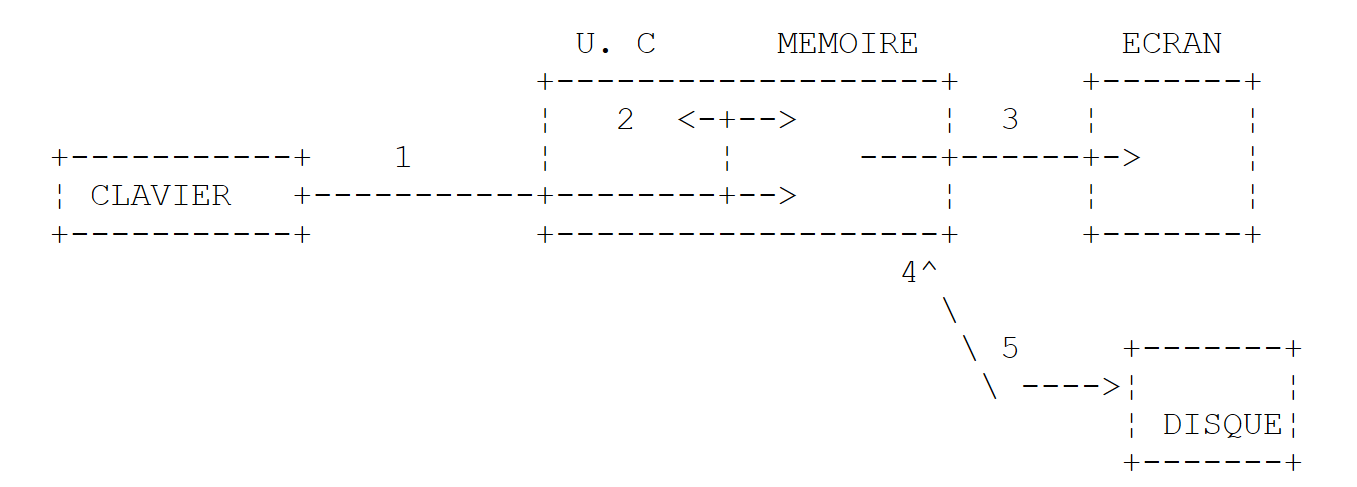 |
-
从键盘读取信息
-
信息处理
-
将信息写入屏幕
-
从磁盘文件中读取信息
-
将信息写入磁盘文件
2.3.1. 向屏幕写入
有多种用于向屏幕写入信息的指令:
Console.Out.WriteLine(expression)
Console.WriteLine(expression)
Console.Error.WriteLine (expression)
其中表达式可以是任何能够转换为字符串并在屏幕上显示的数据类型。在迄今为止看到的示例中,我们仅使用了 Console.Out.WriteLine(表达式) 语句。
System.Console 类提供了访问屏幕写入操作(Write、WriteLine)的功能。Console 类有两个属性:Out 和 Error,它们是 StreamWriter 类型的写入流:
- Console.WriteLine() 与 Console.Out.WriteLine() 效果相同,它将数据写入 Out 流,该流通常与屏幕相关联。
- Console.Error.WriteLine() 写入 Error 流,该流通常也与屏幕相关联。
默认情况下,Out 和 Error 流与屏幕相关联。不过,正如我们稍后将看到的,它们可以在运行时重定向到文本文件。
2.3.2. 读取键盘输入的数据
来自键盘的数据流由类型为 StreamReader 的 Console.In 对象表示。此类对象允许您使用 ReadLine 方法读取一行文本:
Dim ligne As String = Console.In.ReadLine()
键盘输入的行被存储在变量 line* 中,随后程序即可使用该数据。与 Out 和 Error 流一样,In* 流也可以重定向到文件。
2.3.3. 输入/输出示例
以下是一个简短的程序,演示了键盘/屏幕输入/输出操作:
' options
Option Explicit On
Option Strict On

' namespaces
Imports System

' module
Module io1
    Sub Main()
        ' write to Out feed
        Dim obj As New Object
        Console.Out.WriteLine(("" & obj.ToString))

        ' write to the Error stream
        Dim i As Integer = 10
        Console.Error.WriteLine(("i=" & i))

        ' reading a line entered on the keyboard
        Console.Out.Write("Tapez une ligne : ")
        Dim ligne As String = Console.In.ReadLine()
        Console.Out.WriteLine(("ligne=" + ligne))
    End Sub
End Module
以及执行结果:
说明
        Dim obj As New Object
        Console.Out.WriteLine(obj.ToString)
仅用于展示任何对象均可被显示。此处我们不会尝试解释所显示内容的含义。
2.3.4. I/O 重定向
在 DOS/Windows 中,有三个标准输入设备,分别称为:
- 标准输入设备——默认指键盘,编号为 0
- 标准输出设备——默认指向屏幕,编号为 1
- 标准错误设备——默认指向屏幕,编号为 2
在 VB.NET 中,Console.Out 输出流写入设备 1,Console.Error 输出流写入设备 2,而 Console.In 输入流从设备 0 读取数据。当您在 Windows 下的 DOS 窗口中运行程序时,可以指定运行程序中设备 0、1 和 2 对应的具体设备。请考虑以下命令行:
在 pg 程序的参数 argi 之后,您可以将标准 I/O 设备重定向到文件:
标准输入流 #0 被重定向到文件 in.txt。因此,在程序中,Console.In 流将从文件 in.txt 中读取数据。 | ||||
将输出流 #1 重定向到文件 out.txt。这意味着在程序中,Console.Out 流将把数据写入文件 out.txt | ||||
与上述操作相同,但写入的数据将追加到 out.txt 文件的当前内容之后。 | ||||
将第 2 号输出重定向到 error.txt 文件。这意味着在程序中,Console.Error 流将把数据写入 error.txt 文件 | ||||
与上述操作相同,但写入的数据将追加到 error.txt 文件的现有内容之后。 | ||||
设备 1 和 2 均被重定向到文件 | ||||
请注意,要将 pg 程序的 I/O 流重定向到文件,无需修改 pg 程序本身。设备 0、1 和 2 的性质由操作系统决定。请看以下程序:
' options
Option Explicit On
Option Strict On

' namespaces
Imports System

' redirections
Module console2
    Sub Main()
        ' lecture flux In
        Dim data As String = Console.In.ReadLine()
        ' write Out feed
        Console.Out.WriteLine(("écriture dans flux Out : " + data))
        ' écriture flux Error
        Console.Error.WriteLine(("écriture dans flux Error : " + data))
    End Sub
End Module
让我们编译这个程序:
dos>vbc es2.vb
Compilateur Microsoft (R) Visual Basic .NET version 7.10.3052.4 pour Microsoft (R) .NET Framework version 1.1.4322.573
Copyright (C) Microsoft Corporation 1987-2002. Tous droits réservés.

dos>dir
24/02/2004  15:39                  416 es2.vb
11/03/2004  08:20                3 584 es2.exe
让我们第一次运行它:
dos>es2.exe
un premier test
écriture dans flux Out : un premier test
écriture dans flux Error : un premier test
前一次执行并未重定向任何标准 I/O 流 In、Out 或 Error。现在我们将重定向这三个流。In 流将重定向到名为 in.txt 的文件,Out 流将重定向到名为 out.txt 的文件,Error 流将重定向到名为 error.txt 的文件。该重定向操作在命令行中执行如下:
执行后得到以下结果:
dos>more in.txt
un second test

dos>es2.exe 0<in.txt 1>out.txt 2>error.txt

dos>more out.txt
écriture dans flux Out : un second test

dos>more error.txt
écriture dans flux Error : un second test
显然,Out 和 Error 流不会写入相同的设备。
2.3.5. 将表达式的值赋给变量
这里我们关注的是“变量=表达式”这一操作。表达式可以是以下类型:算术、关系、布尔或字符串。
2.3.5.1. 运算符列表
操作 | 语言元素 |
^, –, *, /, \, Mod, +, = | |
=, ^=, *=, /=, \=, +=, -=, &= | |
=, <>, <, >, <=, >=, Like, Is | |
&, + | |
非、与、或、异或、逻辑与、逻辑或 | |
AddressOf、GetType |
2.3.5.2. 算术表达式
算术表达式的运算符如下:
^, –, *, /, \, Mod, +, = |
+:加法,-:减法,*:乘法,/:浮点除法,\:整数除法商,Mod:整数除法余数,^:幂运算。因此,以下程序:
' arithmetic operators
Module operateursarithmetiques
    Sub Main()
        Dim i, j As Integer
        i = 4 : j = 3
        Console.Out.WriteLine(i & "/" & j & "=" & (i / j))
        Console.Out.WriteLine(i & "\" & j & "=" & (i \ j))
        Console.Out.WriteLine(i & " mod " & j & "=" & (i Mod j))

        Dim r1, r2 As Double
        r1 = 4.1 : r2 = 3.6
        Console.Out.WriteLine(r1 & "/" & r2 & "=" & (r1 / r2))
        Console.Out.WriteLine(r1 & "^2=" & (r1 ^ 2))
        Console.Out.WriteLine(Math.Cos(3))
    End Sub
End Module
产生以下结果:
数学函数种类繁多。以下列举几种:
| 平方根 |
| 余弦 |
| 正弦 |
| 正切 |
| x 的 y 次方(x > 0) |
| 指数 |
| 自然对数 |
| 绝对值 |
所有这些函数都定义在一个名为 Math 的 .NET 类中。使用它们时,必须在函数名前加上其所属类的名称。因此,应写为:
Math 类的完整定义如下:
表示由常数 e 指定的自然对数的底。 | ||||
表示圆周长与直径之比,由常数π表示。 | ||||
重载。返回指定数字的绝对值。 | ||||
返回其余弦值为指定数的角。 | ||||
返回正弦值为指定数值的角。 | ||||
返回正切值为指定数值的角。 | ||||
返回正切值为两个指定数字之商的角度。 | ||||
计算两个 32 位数的整数乘积。 | ||||
返回大于或等于指定数的最小整数。 | ||||
返回指定角度的余弦值。 | ||||
返回指定角度的双曲余弦值。 | ||||
重载。返回两个数的商,并将余数作为输出参数返回。 | ||||
返回 e 的指定幂。 | ||||
返回小于或等于指定数的最大整数。 | ||||
返回一个数除以另一个数的余数。 | ||||
重载。返回指定数的对数。 | ||||
返回指定数字的十进制对数。 | ||||
重载函数。返回两个指定数字中较大的那个。 | ||||
重载。返回两个数中的较小者。 | ||||
返回指定数字的指定次方。 | ||||
重载。返回最接近指定值的数值。 | ||||
重载。返回一个表示该数符号的值。 | ||||
返回指定角度的正弦值。 | ||||
返回指定角度的双曲正弦值。 | ||||
返回指定数字的平方根。 | ||||
返回指定角度的正切值。 | ||||
返回指定角度的双曲正切值。 | ||||
当一个函数被声明为“重载”时,意味着它针对不同类型的参数而存在。例如,函数 Abs(x) 针对类型为 Integer、Long、Decimal、Single 和 Float 的 x 均存在。对于每种类型,都有一个独立的 Abs 函数定义。因此,该函数被称为重载。
2.3.5.3. 算术表达式求值中的运算符
求算术表达式时的运算符优先级如下(从高到低):
类别 | 运算符 |
所有不含运算符的表达式:函数、括号 | |
^ | |
+, - | |
*, / | |
\ | |
模 | |
+, - |
2.3.5.4. 关系运算
运算符如下:
=, <>, <, >, <=, >=, Like, Is |
=:等于,<>:不等于,<:小于(严格),>:大于(严格),<=:小于或等于,>=:大于或等于,Like:匹配模式,Is:对象相等。所有这些运算符具有相同的优先级。它们从左到右进行求值。关系表达式的结果是一个布尔值。
字符串比较:考虑以下程序:
' namespaces
Imports System

Module string1
    Sub main()
        Dim ch1 As Char = "A"c
        Dim ch2 As Char = "B"c
        Dim ch3 As Char = "a"c
        Console.Out.WriteLine("A<B=" & (ch1 < ch2))
        Console.Out.WriteLine("A<a=" & (ch1 < ch3))
        Dim chat As String = "chat"
        Dim chien As String = "chien"
        Dim chaton As String = "chaton"
        Dim chat2 As String = "CHAT"
        Console.Out.WriteLine("chat<chien=" & (chat < chien))
        Console.Out.WriteLine("chat<chaton=" & (chat < chaton))
        Console.Out.WriteLine("chat<CHAT=" & (chat < chat2))
        Console.Out.WriteLine("chaton like chat*=" & ("chaton" Like "chat*"))
    End Sub
End Module
及其执行结果:
假设有两个字符 C1 和 C2。可以使用以下运算符对它们进行比较:<、<=、=、<>、>、>=。比较的是它们的 Unicode 值——即数字。根据 Unicode 排序规则,以下关系成立:
空格 < .. < '0' < '1' < .. < '9' < .. < 'A' < 'B' < .. < 'Z' < .. < 'a' < 'b' < .. < 'z'
字符串是按字符逐个比较的。两个字符之间遇到的第一个不等关系,即意味着这两个字符串具有相同符号的不等关系。基于这些解释,请读者检查前一个程序的运行结果。
2.3.5.5. 布尔表达式
运算符如下:
非、与、或、异或、全与、全或 |
非:逻辑与,或:逻辑或,非:否定,异或:异或。
op1 AndAlso op2:如果 op1 为假,则不评估 op2,结果为假。
op1 OrElse op2:如果 op1 为真,则不评估 op2,结果为真。
这些运算符之间的优先级顺序如下:
逻辑非 | |
与、且 | |
OR,OrElse | |
异或 |
布尔表达式的结果是一个布尔值。
2.3.5.6. 位运算
一方面,我们可以看到与布尔运算符相同的运算符,且优先级相同。此外,还有两个移位运算符:<< 和 >>。设 i 和 j 是两个整数。
将 i 向左移 n 位。移入的位均为零。 | |
将 i 向右移 n 位。如果 i 是带符号整数(signed char、int、long),则保留符号位。 | |
对 i 和 j 执行位逻辑与运算。 | |
对 i 和 j 执行位运算“或”。 | |
将 i 补为 1 | |
对 i 和 j 进行异或运算 |
考虑以下程序:
Module operationsbit
    Sub main()
        ' bit manipulation
        Dim i As Short = &H123F
        Dim k As Short = &H7123
        Console.Out.WriteLine("i<<4=" & (i << 4).ToString("X"))
        Console.Out.WriteLine("i>>4=" & (i >> 4).ToString("X"))
        Console.Out.WriteLine("k>>4=" & (k >> 4).ToString("X"))
        Console.Out.WriteLine("i and 4=" & (i And 4).ToString("X"))
        Console.Out.WriteLine("i or 4 =" & (i Or 4).ToString("X"))
        Console.Out.WriteLine("not i=" & (Not i).ToString("X"))
    End Sub
End Module
其执行结果如下:
2.3.5.7. 与赋值相关的运算符
可以写成 a+=b,这意味着 a=a+b。可与赋值运算结合使用的运算符列表如下:
^=, *=, /=, \=, +=, -=, &= |
2.3.5.8. 运算符的一般优先级
类别 | 运算符 |
所有不含运算符的表达式 | |
^ | |
+, - | |
*, / | |
\ | |
模 | |
+, - | |
& | |
<<, >> | |
=, <>, <, >, <=, >=, Like, Is, TypeOf...Is | |
非 | |
且,且且 | |
OR,OrElse | |
异或 |
当一个操作数位于两个具有相同优先级的运算符之间时,运算符的结合性决定了运算的执行顺序。所有运算符均为左结合,这意味着运算从左向右进行。优先级和结合性可以通过括号中的表达式来控制。
2.3.5.9. 类型转换
有若干预定义函数可用于将一种数据类型转换为另一种数据类型。列表如下:
这些函数接受数值表达式或字符串作为参数。结果类型如下表所示:
函数 | 结果 | 函数参数的取值范围 |
布尔值 | 任何有效的字符串或数字表达式。 | |
字节 | 0 到 255;小数部分将被四舍五入。 | |
字符 | 任何有效的字符串表达式;值范围为 0 到 65,535。 | |
日期 | 任何有效的日期和时间表示形式。 | |
双精度 | -1.79769313486231E+308 至 -4.94065645841247E-324(负值);4.94065645841247E-324 至 1.79769313486231E+308(正值)。 | |
十进制 | 非十进制数的范围为 +/-79,228,162,514,264,337,593,543,950,335。28进制数的取值范围为 +/-7.9228162514264337593543950335。最小的非零数是 0.0000000000000000000000000001。 | |
整数 | -2,147,483,648 至 2,147,483,647;小数部分会被舍入。 | |
长整型 | -9,223,372,036,854,775,808 至 9,223,372,036,854,775,807;小数部分四舍五入。 | |
对象 | 任何有效的表达式。 | |
Short | -32,768 至 32,767;小数部分四舍五入。 | |
单精度 | 负值范围为 -3.402823E+38 至 -1.401298E-45;正值范围为 1.401298E-45 至 3.402823E+38。 | |
字符串 | Cstr 函数返回的值取决于表达式参数。 |
以下是一个示例程序:
Module conversion
    Sub main()
        Dim var1 As Boolean = CBool("true")
        Dim var2 As Byte = CByte("100")
        Dim var3 As Char = CChar("A")
        Dim var4 As Date = CDate("30 janvier 2004")
        Dim var5 As Double = CDbl("100,45")
        Dim var6 As Decimal = CDec("1000,67")
        Dim var7 As Integer = CInt("-30")
        Dim var8 As Long = CLng("456")
        Dim var9 As Short = CShort("-14")
        Dim var10 As Single = CSng("56,78")
        Console.Out.WriteLine("var1=" & var1)
        Console.Out.WriteLine("var2=" & var2)
        Console.Out.WriteLine("var3=" & var3)
        Console.Out.WriteLine("var4=" & var4)
        Console.Out.WriteLine("var5=" & var5)
        Console.Out.WriteLine("var6=" & var6)
        Console.Out.WriteLine("var7=" & var7)
        Console.Out.WriteLine("var8=" & var8)
        Console.Out.WriteLine("var9=" & var9)
        Console.Out.WriteLine("var10=" & var10)
    End Sub
End Module
及其执行结果:
var1=True
var2=100
var3=A
var4=30/01/2004
var5=100,45
var6=1000,67
var7=-30
var8=456
var9=-14
var10=56,78
您还可以使用 CType(表达式, 类型) 函数,如下面的程序所示:
Module ctype1
    Sub main()
        Dim var1 As Boolean = CType("true", Boolean)
        Dim var2 As Byte = CType("100", Byte)
        Dim var3 As Char = CType("A", Char)
        Dim var4 As Date = CType("30 janvier 2004", Date)
        Dim var5 As Double = CType("100,45", Double)
        Dim var6 As Decimal = CType("1000,67", Decimal)
        Dim var7 As Integer = CType("-30", Integer)
        Dim var8 As Long = CType("456", Long)
        Dim var9 As Short = CType("-14", Short)
        Dim var10 As Single = CType("56,78", Single)
        Dim var11 As String = CType("47,89", String)
        Dim var12 As String = 47.89.ToString
        Dim var13 As String = "" & 47.89
        Console.Out.WriteLine("var1=" & var1)
        Console.Out.WriteLine("var2=" & var2)
        Console.Out.WriteLine("var3=" & var3)
        Console.Out.WriteLine("var4=" & var4)
        Console.Out.WriteLine("var5=" & var5)
        Console.Out.WriteLine("var6=" & var6)
        Console.Out.WriteLine("var7=" & var7)
        Console.Out.WriteLine("var8=" & var8)
        Console.Out.WriteLine("var9=" & var9)
        Console.Out.WriteLine("var10=" & var10)
        Console.Out.WriteLine("var11=" & var11)
        Console.Out.WriteLine("var12=" & var12)
        Console.Out.WriteLine("var13=" & var13)
    End Sub
End Module
这将产生以下结果:
var1=True
var2=100
var3=A
var4=30/01/2004
var5=100,45
var6=1000,67
var7=-30
var8=456
var9=-14
var10=56,78
var11=47,89
var12=47,89
var13=47,89
2.4. 控制程序执行的说明
2.4.1. 停止
Environment 类中定义的 Exit 方法允许您停止程序的执行:
[Visual Basic]
Public Shared Sub Exit(ByVal exitCode As Integer )
终止当前进程,并将 exitCode 的值返回给父进程。父进程可以使用 exitCode 的值。在 DOS 环境下,该状态变量将通过系统变量 ERRORLEVEL 返回给 DOS,其值可在批处理文件中进行检查。在 Unix 环境下,变量 $? 可获取 exitCode 的值。
将以退出状态 0 终止程序。
2.4.2. 简单的决策结构
- 每个操作都应单独成行
- else 子句可以省略。
您可以像以下示例所示那样嵌套决策结构:
' options
Option Explicit On
Option Strict On

' namespaces
Imports System

Module if1
    Sub main()
        Dim i As Integer = 10
        If i > 4 Then
            Console.Out.WriteLine(i & " est > " & 4)
        Else
            If i = 4 Then
                Console.Out.WriteLine(i & " est = " & 4)
            Else
                Console.Out.WriteLine(i & " est < " & 4)
            End If
        End If
    End Sub
End Module
得到的结果:
2.4.3. 案例结构
语法如下:
select case expression
    case liste_valeurs1
        actions1
case liste_valeurs2
        actions2
...
case else
        actions_sinon
end select
- [表达式] 的类型必须是以下类型之一:
- [case else] 子句可以省略。
- [值列表] 是表达式的可能取值。[条件列表] 表示一组条件 condition1、condition2、...、conditionx。如果 [表达式] 满足其中一个条件,则执行 [值列表] 子句后面的操作。条件可以采用以下形式:
- val1 到 val2:如果 [表达式] 属于 [val1,val2] 范围,则为真
- val1:若 [表达式] 等于 val1,则为真
- is > val1:若 [表达式] > val1,则为真。关键字 [is] 可省略
- 运算符 =、<、<=、>、>=、<> 也适用相同规则
- 仅执行与第一个验证通过的条件相关联的操作。
请看以下程序:
' options
Option Explicit On
Option Strict On

' namespaces
Imports System

Module selectcase1
    Sub main()
        Dim i As Integer = 10
        Select Case i
            Case 1 To 4, 7 To 8
                Console.Out.WriteLine("i est dans l'intervalle [1,4] ou [7,8]")
            Case Is > 12
                Console.Out.WriteLine("i est > 12")
            Case Is < 15
                Console.Out.WriteLine("i est < 15")
            Case Is < 20
                Console.Out.WriteLine("i est < 20")
        End Select
    End Sub
End Module
它产生了以下结果:
2.4.4. 循环结构
2.4.4.1. 已知的迭代次数
For counter [ As datatype ] = start To end [ Step step ]
   actions
Next [ counter ]
对于变量 [counter] 取的每个值,都会执行相应的操作。请看以下程序:
' options
Option Explicit On
Option Strict On

' namespaces
Imports System

Module for1
    Sub main()
        Dim somme As Integer = 0
        Dim résultat As String = "somme("
        For i As Integer = 0 To 10 Step 2
            somme += i
            résultat += " " + i.ToString
        Next
        résultat += ")=" + somme.ToString
        Console.Out.WriteLine(résultat)
    End Sub
End Module
结果:
另一种迭代次数已知的迭代结构如下:
For Each element [ As datatype ] In groupe
   [ actions ]
Next [ element ]
- 组是一组对象。我们已经熟悉的对象集合就是数组
- 数据类型是集合中对象的类型。对于数组而言,这即为数组元素的类型
- 元素是循环内的局部变量,将依次取集合中的各个值。
因此,以下代码:
' options
Option Explicit On
Option Strict On

' namespaces
Imports System

Module foreach1
    Sub main()
        Dim amis() As String = {"paul", "hélène", "jacques", "sylvie"}
        For Each nom As String In amis
            Console.Out.WriteLine(nom)
        Next
    End Sub
End Module
将显示:
2.4.4.2. 重复次数未知
VB.NET 中有许多适用于这种情况的结构。
Do { While | Until } condition
   [ statements ]
Loop
只要条件为真(while),循环就继续执行;或者直到条件为真(until)。该循环可能永远不会被执行。
Do
   [ statements ]
Loop { While | Until } condition
只要条件为真(while),循环就继续执行;或者直到条件为真(until)。循环至少会执行一次。
While condition
   [ statements ]
End While
只要条件为真,循环就会继续。该循环可能永远不会被执行。以下循环均计算前10个整数的和。
' options
Option Explicit On
Option Strict On

' namespaces
Imports System

Module boucles1
    Sub main()
        Dim i, somme As Integer
        i = 0 : somme = 0
        Do While i < 11
            somme += i
            i += 1
        Loop
        Console.Out.WriteLine("somme=" + somme.ToString)
        i = 0 : somme = 0
        Do Until i = 11
            somme += i
            i += 1
        Loop
        Console.Out.WriteLine("somme=" + somme.ToString)
        i = 0 : somme = 0
        Do
            somme += i
            i += 1
        Loop Until i = 11
        Console.Out.WriteLine("somme=" + somme.ToString)
        i = 0 : somme = 0
        Do
            somme += i
            i += 1
        Loop While i < 11
        Console.Out.WriteLine("somme=" + somme.ToString)
    End Sub
End Module
2.4.4.3. 循环控制语句
退出 do...loop 循环 | |
退出 for 循环 |
2.5. VB.NET 程序的结构
一个不使用用户定义类,且除主函数 Main 之外不包含其他函数的 VB.NET 程序,其结构可能如下所示:
' options
Option Explicit On
Option Strict On

' namespaces
Imports espace1
Imports ....

Module nomDuModule
    Sub main()
....
    End Sub
End Module
- [Option Explicit on] 指令强制要求声明变量。在 VB.NET 中,这并非强制要求。未声明的变量将被视为 Object 类型。
- [Option Strict on] 指令禁止任何可能导致数据丢失的数据类型转换,以及数值类型与字符串之间的任何转换。因此必须显式使用转换函数。
- 该程序导入了所需的所有命名空间。我们尚未介绍这一概念。在之前的程序中,我们经常遇到如下语句:
实际上,我们应该这样写:
其中 System 是包含 [Console] 类的命名空间。通过 Imports 语句导入 [System] 命名空间后,每当 VB.NET 遇到不认识的类时,它都会系统地搜索该命名空间。它会遍历所有已声明的命名空间进行搜索,直到找到目标类为止。因此,我们应写为:
' namespaces
Imports System
....

        Console.Out.WriteLine(unechaine)
一个示例程序可能如下所示:
' options
Option Explicit On
Option Strict On

'namespaces
Imports System

' main module
Module main1
    Sub main()
        Console.Out.WriteLine("main1")
    End Sub
End Module
该程序也可以如下编写:
' options
Option Explicit On
Option Strict On

'namespaces
Imports System

' test class
Public Class main2
    Public Shared Sub main()
        Console.Out.WriteLine("main2")
    End Sub
End Class
这里我们使用了类(class)的概念,该概念将在下一章中介绍。当此类包含一个名为 main 的静态(共享)过程时,该过程就会被执行。我们在此加入这段代码,是因为 VB.NET 的姊妹语言 C# 只支持类概念——也就是说,所有执行的代码都必须属于某个类。 类是面向对象编程的一部分。将其强加于每个程序的设计中多少有些不妥。我们在前一个程序的第 2 版中看到了这一点,在那里我们被迫在不需要的地方引入类和静态方法的概念。因此,从现在开始,我们只会在必要时引入类的概念。在其他情况下,我们将使用模块的概念,如上文的第 1 版所示。
2.6. 编译和运行 VB.NET 程序
编译 VB.NET 程序仅需 .NET SDK。请看以下程序:
' options
Option Explicit On
Option Strict On

' namespaces
Imports System

Module boucles1
    Sub main()
        Dim i, somme As Integer
        i = 0 : somme = 0
        Do While i < 11
            somme += i
            i += 1
        Loop
        Console.Out.WriteLine("somme=" + somme.ToString)
        i = 0 : somme = 0
        Do Until i = 11
            somme += i
            i += 1
        Loop
        Console.Out.WriteLine("somme=" + somme.ToString)
        i = 0 : somme = 0
        Do
            somme += i
            i += 1
        Loop Until i = 11
        Console.Out.WriteLine("somme=" + somme.ToString)
        i = 0 : somme = 0
        Do
            somme += i
            i += 1
        Loop While i < 11
        Console.Out.WriteLine("somme=" + somme.ToString)
    End Sub
End Module
假设它位于一个名为 [loops1.vb] 的文件中。要编译它,我们按以下步骤操作:
dos>dir boucles1.vb
11/03/2004  15:55                  583 boucles1.vb

dos>vbc boucles1.vb
Compilateur Microsoft (R) Visual Basic .NET version 7.10.3052.4
pour Microsoft (R) .NET Framework version 1.1.4322.573
Copyright (C) Microsoft Corporation 1987-2002. Tous droits réservés.

dos>dir boucles1.*
11/03/2004  16:04                  601 boucles1.vb
11/03/2004  16:04                3 584 boucles1.exe
vbc.exe 程序是 VB.NET 编译器。在此,它位于 DOS 路径中:
dos>path
PATH=E:\Program Files\Microsoft Visual Studio .NET 2003\Common7\IDE;E:\Program Files\Microsoft Visual Studio .NET 2003\VC7\BIN;E:\Program Files\Microsoft Visual Studio .NET 2003\Common7\Tools;E:\Program Files\Microsoft Visual Studio .NET 2003\Common7\Tools\bin\prerelease;E:\Program Files\Microsoft Visual Studio .NET 2003\Common7\Tools\bin;E:\Program Files\Microsoft Visual Studio .NET 2003\SDK\v1.1\bin;E:\WINNT\Microsoft.NET\Framework\v1.1.4322;e:\winnt\system32;e:\winnt;
dos>dir E:\WINNT\Microsoft.NET\Framework\v1.1.4322\vbc.exe
21/02/2003  10:20              737 280 vbc.exe
[vbc] 编译器生成的 .exe 文件可由 .NET 虚拟机执行:
2.7. 税款计算示例
我们建议编写一个程序来计算纳税人的税款。我们考虑一种简化情况,即纳税人仅需申报工资收入:
- 对于该员工,若其未婚,则税级数 nbParts = nbEnfants / 2 + 1;若已婚,则 nbParts = nbEnfants / 2 + 2,其中 nbEnfants 表示子女数量。
- 若其子女数至少为三名,则可额外获得半个税级
- 我们计算其应税收入 R = 0.72 * S,其中 S 为其年薪
- 我们计算其家庭系数 QF = R / nbParts
- 我们计算其应纳税额 I。请看下表:
12620.0 | 0 | 0 |
13,190 | 0.05 | 631 |
15,640 | 0.1 | 1,290.5 |
24,740 | 0.15 | 2,072.5 |
31,810 | 0.2 | 3,309.5 |
39,970 | 0.25 | 4900 |
48,360 | 0.3 | 6,898.5 |
55,790 | 0.35 | 9,316.5 |
92,970 | 0.4 | 12,106 |
127,860 | 0.45 | 16,754.5 |
151,250 | 0.50 | 23,147.5 |
172,040 | 0.55 | 30,710 |
195,000 | 0.60 | 39,312 |
0 | 0.65 | 49062 |
每行有 3 个字段。要计算税款 I,请查找满足 QF <= 字段1 的第一行。例如,如果 QF = 23,000,则找到的行将是
此时,Tax I 等于 0.15*R - 2072.5*nbParts。如果 QF 使得条件 QF<=field1 永远不成立,则使用最后一行中的系数。这里:
由此可得税额 I = 0.65*R - 49062*nbParts。相应的 VB.NET 程序如下:
' options
Option Explicit On
Option Strict On

' namespaces
Imports System

Module impots
    ' ------------ hand
    Sub Main()

        ' data tables required for tax calculation
        Dim Limites() As Decimal = {12620D, 13190D, 15640D, 24740D, 31810D, 39970D, 48360D, 55790D, 92970D, 127860D, 151250D, 172040D, 195000D, 0D}
        Dim CoeffN() As Decimal = {0D, 631D, 1290.5D, 2072.5D, 3309.5D, 4900D, 6898.5D, 9316.5D, 12106D, 16754.5D, 23147.5D, 30710D, 39312D, 49062D}

        ' we recover marital status
        Dim OK As Boolean = False
        Dim reponse As String = Nothing
        While Not OK
            Console.Out.Write("Etes-vous marié(e) (O/N) ? ")
            reponse = Console.In.ReadLine().Trim().ToLower()
            If reponse <> "o" And reponse <> "n" Then
                Console.Error.WriteLine("Réponse incorrecte. Recommencez")
            Else
                OK = True
            End If
        End While
        Dim Marie As Boolean = reponse = "o"

        ' number of children
        OK = False
        Dim NbEnfants As Integer = 0
        While Not OK
            Console.Out.Write("Nombre d'enfants : ")
            reponse = Console.In.ReadLine()
            Try
                NbEnfants = Integer.Parse(reponse)
                If NbEnfants >= 0 Then
                    OK = True
                Else
                    Console.Error.WriteLine("Réponse incorrecte. Recommencez")
                End If
            Catch
                Console.Error.WriteLine("Réponse incorrecte. Recommencez")
            End Try
        End While
        ' salary
        OK = False
        Dim Salaire As Integer = 0
        While Not OK
            Console.Out.Write("Salaire annuel : ")
            reponse = Console.In.ReadLine()
            Try
                Salaire = Integer.Parse(reponse)
                If Salaire >= 0 Then
                    OK = True
                Else
                    Console.Error.WriteLine("Réponse incorrecte. Recommencez")
                End If
            Catch
                Console.Error.WriteLine("Réponse incorrecte. Recommencez")
            End Try
        End While
        ' calculating the number of shares
        Dim NbParts As Decimal
        If Marie Then
            NbParts = CDec(NbEnfants) / 2 + 2
        Else
            NbParts = CDec(NbEnfants) / 2 + 1
        End If
        If NbEnfants >= 3 Then
            NbParts += 0.5D
        End If
        ' taxable income
        Dim Revenu As Decimal
        Revenu = 0.72D * Salaire

        ' family quotient
        Dim QF As Decimal
        QF = Revenu / NbParts

        ' search for tax bracket corresponding to QF
        Dim i As Integer
        Dim NbTranches As Integer = Limites.Length
        Limites((NbTranches - 1)) = QF
        i = 0
        While QF > Limites(i)
            i += 1
        End While
        ' tax
        Dim impots As Integer = CInt(i * 0.05D * Revenu - CoeffN(i) * NbParts)

        ' the result is displayed
        Console.Out.WriteLine(("Impôt à payer : " & impots))
    End Sub
End Module
该程序在 DOS 窗口中使用以下命令进行编译:
dos>vbc impots1.vb
Compilateur Microsoft (R) Visual Basic .NET version 7.10.3052.4 pour Microsoft (R) .NET Framework version 1.1.4322.573

dos>dir impots1.exe
24/02/2004  15:42                5 632 impots1.exe
编译后生成一个名为 impots.exe 的可执行文件。请注意,impots.exe 无法被处理器直接执行。它实际上包含的中间代码仅能在 .NET 平台上运行。所得结果如下:
dos>impots1
Etes-vous marié(e) (O/N) ? o
Nombre d'enfants : 3
Salaire annuel : 200000
Impôt à payer : 16400
dos>impots1
Etes-vous marié(e) (O/N) ? n
Nombre d'enfants : 2
Salaire annuel : 200000
Impôt à payer : 33388
dos>impots1
Etes-vous marié(e) (O/N) ? w
Réponse incorrecte. Recommencez
Etes-vous marié(e) (O/N) ? q
Réponse incorrecte. Recommencez
Etes-vous marié(e) (O/N) ? o
Nombre d'enfants : q
Réponse incorrecte. Recommencez
Nombre d'enfants : 2
Salaire annuel : q
Réponse incorrecte. Recommencez
Salaire annuel : 1
Impôt à payer : 0
2.8. 主程序参数
主函数 Main 可以接受一个字符串数组作为参数:
Sub main(ByVal args() As String)
args 参数是一个字符串数组,用于接收程序调用时通过命令行传递的参数。
- args.Length 是 args 数组中的元素个数
- args(i) 是数组的第 i 个元素
如果我们使用以下命令运行程序 P: P arg0 arg1 … argn且程序 P 的 Main 过程声明如下:
Sub main(ByVal args() As String)
那么 arg(0)="arg0", arg(1)="arg1" … 以下是一个示例:
' guidelines
Option Strict On
Option Explicit On

' namespaces
Imports System

Module arg
    Sub main(ByVal args() As String)
        ' number of arguments
        console.out.writeline("Il y a " & args.length & " arguments")
        Dim i As Integer
        For i = 0 To args.Length - 1
            Console.Out.WriteLine("argument n° " & i & "=" & args(i))
        Next
    End Sub
End Module
执行后得到以下结果:
2.9. 枚举
枚举是一种其值域为整数常量集合的数据类型。假设有一个需要处理考试成绩的程序。成绩共有五种:及格、尚可、良好、很好、优秀。那么,我们可以为这五个常量定义一个枚举:
    Enum mention
        Passable
        AssezBien
        Bien
        TrésBien
        Excellent
    End Enum
在内部,这五个常量由连续的整数表示,第一个常量为 0,第二个为 1,依此类推。可以声明一个变量来取枚举中的这些值:
        ' a variable that takes its values from the enumeration mentioned
        Dim maMention As mention = mention.Passable
可以将变量与枚举的各种可能值进行比较:
        ' test avec valeur de l'énumération
        If (maMention = mention.Passable) Then
            Console.Out.WriteLine("Peut mieux faire")
        End If
您可以获取枚举的所有值:
        For Each m In mention.GetValues(maMention.GetType)
            Console.Out.WriteLine(m)
        Next
正如简单的 Integer 类型等同于 Int32 结构,简单的 Enum 类型也等同于 Enum 结构。该类提供了一个静态的 GetValues 方法,允许您检索作为参数传递的枚举类型的所有值。该参数必须是 Type 类型的对象,Type 是一个提供数据类型信息的类。 变量 v 的类型可通过 v.GetType() 获取。因此,在此处,maMention.GetType() 返回 mentions 枚举的 Type 对象,而 Enum.GetValues(maMention.GetType()) 则返回 mentions 枚举的值列表。
以下程序演示了这一点:
' guidelines
Option Strict On
Option Explicit On

' namespaces
Imports System

Public Module enum2

    ' an enumeration
    Enum mention
        Passable
        AssezBien
        Bien
        TrèsBien
        Excellent
    End Enum

    ' test pg
    Sub Main()

        ' a variable that takes its values from the enumeration mentioned
        Dim maMention As mention = mention.Passable

        ' variable value display
        Console.Out.WriteLine("mention=" & maMention)

        ' test with enumeration value
        If (maMention = mention.Passable) Then
            Console.Out.WriteLine("Peut mieux faire")
        End If

        ' list of literal mentions
        For Each m As mention In [Enum].GetValues(maMention.GetType)
            Console.Out.WriteLine(m.ToString)
        Next

        ' list of full mentions
        For Each m As Integer In [Enum].GetValues(maMention.GetType)
            Console.Out.WriteLine(m)
        Next
    End Sub
End Module
执行结果如下:
2.10. 异常处理
许多 VB.NET 函数都可能引发异常,即错误。当函数可能引发异常时,程序员应进行异常处理,以构建更具容错能力的程序:应始终避免应用程序意外“崩溃”。
异常处理遵循以下模式:
try
    appel de la fonction susceptible de générer l'exception
catch  e as Exception e)
    traiter l'exception e
end try
instruction suivante
如果函数未抛出异常,程序将执行下一条语句;否则,程序将进入 catch 子句的代码块,然后执行下一条语句。请注意以下几点:
- e 是继承自 Exception 类型的对象。我们可以使用 IOException、SystemException 等具体类型来进一步限定:异常有多种类型。将 catch e 写为 Exception,表示我们要处理所有类型的异常。如果 try 代码块中的代码可能引发多种类型的异常,我们可能需要通过使用多个 catch 代码块来更具体地处理异常:
try
    appel de la fonction susceptible de générer l'exception
catch e as IOException
    traiter l'exception e
catch  e as SystemException
    traiter l'exception e
end try
instruction suivante
- 可以在 try/catch 代码块中添加 finally 子句:
try
    appel de la fonction susceptible de générer l'exception
catch  e as Exception
    traiter l'exception e
finally
    code exécuté après try ou catch
end try
instruction suivante
无论是否发生异常,finally 子句中的代码都会被执行。
- 在 catch 子句中,您可能不想使用现有的 Exception 对象。因此,不要写成 catch e as Exception,而应写成 catch。
- Exception 类有一个 Message 属性,其中包含详细描述所发生错误的消息。因此,如果你想显示这条消息,应编写如下代码:
catch e as Exception
    Console.Error.WriteLine("L'erreur suivante s'est produite : "+e.Message);
    ...
end try
- Exception 类有一个 ToString 方法,该方法返回一个字符串,其中包含异常类型和 Message 属性的值。因此,我们可以这样写:
catch  ex as Exception
    Console.Error.WriteLine("L'erreur suivante s'est produite : "+ex.ToString)
    ...
end try
以下示例展示了因使用不存在的数组元素而引发的异常:
' options
Option Explicit On
Option Strict On

' namespaces
Imports System

Module tab1
    Sub Main()
        ' declaring & initializing an array
        Dim tab() As Integer = {0, 1, 2, 3}
        Dim i As Integer

        ' table display with for
        For i = 0 To tab.Length - 1
            Console.Out.WriteLine(("tab[" & i & "]=" & tab(i)))
        Next i

        ' table display with a for each
        Dim élmt As Integer
        For Each élmt In tab
            Console.Out.WriteLine(élmt)
        Next élmt

        ' generating an exception
        Try
            tab(100) = 6
        Catch e As Exception
            Console.Error.WriteLine(("L'erreur suivante s'est produite : " & e.Message))
        End Try
    End Sub
End Module
运行该程序将产生以下结果:
dos>exception1
tab[0]=0
tab[1]=1
tab[2]=2
tab[3]=3
0
1
2
3
L'erreur suivante s'est produite : L'index se trouve en dehors des limites du tableau.
以下是另一个示例,其中我们处理了将字符串赋值给数字时(当该字符串不表示数字)引发的异常:
' options
Option Strict On
Option Explicit On

'imports
Imports System

Public Module console1
  Public Sub Main()
    ' We ask for the name
    System.Console.Write("Nom : ")

        ' reading response
    Dim nom As String = System.Console.ReadLine()

        ' age requested
    Dim age As Integer
    Dim ageOK As Boolean = False
    Do While Not ageOK
      ' question
      Console.Out.Write("âge : ")
      ' reading-checking response
      Try
        age = Int32.Parse(System.Console.ReadLine())
        If age < 0 Then Throw New Exception
        ageOK = True
      Catch
        Console.Error.WriteLine("Age incorrect, recommencez...")
      End Try
    Loop

        ' final display
    Console.Out.WriteLine("Vous vous appelez [" & nom & "] et vous avez [" & age & "] ans")
  End Sub
End Module
部分执行结果:
dos>console1
Nom : dupont
âge : xx
Age incorrect, recommencez...
âge : 12
Vous vous appelez dupont et vous avez 12 ans
2.11. 向函数传递参数
这里我们关注参数是如何传递给函数的。考虑以下函数:
    Sub changeInt(ByVal a As Integer)
        a = 30
        Console.Out.WriteLine(("Paramètre formel a=" & a))
    End Sub
在函数定义中,a 被称为形式参数。它的存在仅是为了定义 changeInt 函数。它同样可以命名为 b。现在,让我们来看一个使用该函数的示例:
    Sub Main()
        Dim age As Integer = 20
        changeInt(age)
        Console.Out.WriteLine(("Paramètre effectif age=" & age))
    End Sub
在此,在 changeInt(age) 语句中,age 是将把其值传递给形式参数 a 的实际参数。我们关注的是形式参数如何获取对应实际参数的值。
2.11.1. 按值传递
以下示例说明函数/过程的参数默认采用值传递:即实际参数的值会被复制到对应的形式参数中。它们是两个独立的实体。如果函数修改了形式参数,实际参数将保持不变。
' options
Option Explicit On
Option Strict On

' passing parameters by value to a function
Imports System

Module param1
    Sub Main()
        Dim age As Integer = 20
        changeInt(age)
        Console.Out.WriteLine(("Paramètre effectif age=" & age))
    End Sub

    Sub changeInt(ByVal a As Integer)
        a = 30
        Console.Out.WriteLine(("Paramètre formel a=" & a))
    End Sub
End Module
结果如下:
实际参数的值 20 被复制到形式参数 a 中。随后对形式参数进行了修改。实际参数保持不变。这种传递方式适用于函数的输入参数。
2.11.2. 按引用传递
在按引用传递中,实际参数和形式参数是同一个实体。如果函数修改了形式参数,实际参数也会随之改变。在 VB.NET 中,形式参数前必须加上 ByRef 关键字。以下是一个示例:
' options
Option Explicit On
Option Strict On

' passing parameters by value to a function
Imports System

Module param2
    Sub Main()
        Dim age As Integer = 20
        changeInt(age)
        Console.Out.WriteLine(("Paramètre effectif age=" & age))
    End Sub

    Sub changeInt(ByRef a As Integer)
        a = 30
        Console.Out.WriteLine(("Paramètre formel a=" & a))
    End Sub
End Module
以及执行结果:
实际参数跟随形式参数的变化。这种传递方式适用于函数的输出参数。