9. TCP/IP 编程
9.1. 一般信息
9.1.1. 互联网协议
本文将介绍互联网通信协议,即通常所说的 TCP/IP 协议套件(传输控制协议/互联网协议),其名称源自其中的两个主要协议。建议读者在着手开发分布式应用程序之前,先对网络的工作原理,特别是 TCP/IP 协议,有一个大致的了解。
下文是NOVELL公司于20世纪90年代初发布的文档《LAN Workplace for DOS - 管理员指南》中部分内容的译文。
构建异构计算机网络这一基本概念源于美国国防高级研究计划局(DARPA)的研究。DARPA开发了一套名为TCP/IP的协议套件,该套件使异构机器能够相互通信。这些协议曾在名为ARPAnet的网络上进行测试,该网络后来演变为互联网。 TCP/IP协议定义了传输和接收的格式及规则,这些规则与网络架构和所使用的硬件无关。
由DARPA设计并由TCP/IP协议管理的网络是一种分组交换网络。此类网络通过称为“数据包”的小块信息在网络中传输数据。因此,如果一台计算机传输一个大文件,该文件将被分解成小块,通过网络发送,并在目的地重新组装。TCP/IP定义了这些数据包的格式,即:
- 数据包源
- 目的地
- 长度
- 类型
9.1.2. OSI模型
TCP/IP 协议通常遵循由 ISO(国际标准化组织)定义的开放网络模型,即 OSI(开放系统互连参考模型)。该模型描述了一个理想的网络,其中机器之间的通信可以通过七层模型来表示:
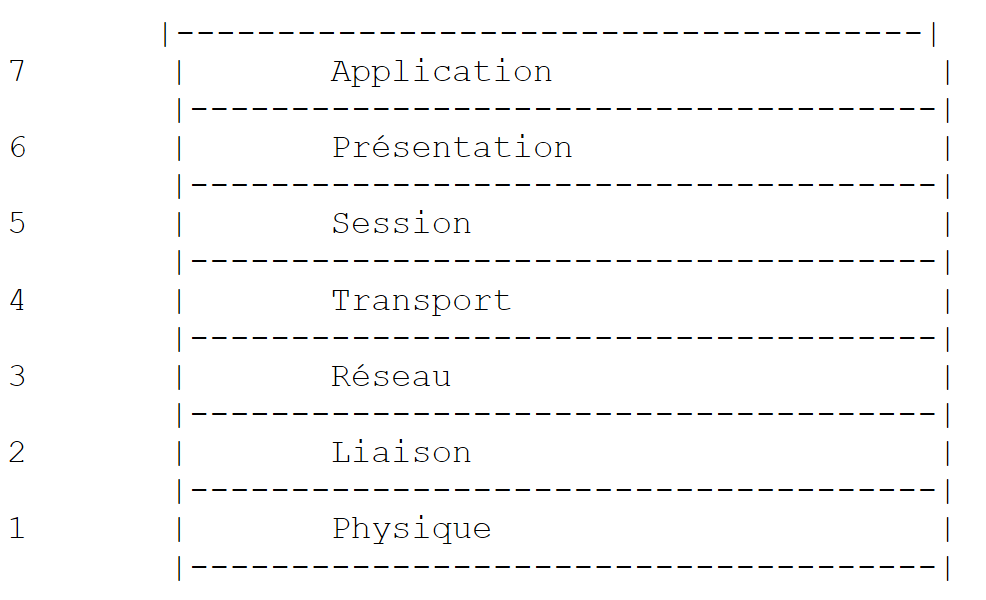 |
每一层从下层接收服务,并向上层提供自身的服务。假设位于不同机器 A 和 B 上的两个应用程序想要通信:它们在应用层进行通信。它们无需了解网络运作的所有细节:每个应用程序将希望传输的信息传递给下层——即表示层。因此,应用程序只需了解与表示层交互的规则。
信息进入表示层后,将根据其他规则传递至会话层,依此类推,直至信息到达物理介质并被物理传输至目标机器。在目标机器上,信息将经历与发送机器上相反的处理过程。
在每一层,负责发送信息的发送方进程都会将其发送给另一台机器上与其处于同一层的接收方进程。这一过程遵循被称为“层协议”的特定规则。因此,我们得到如下最终通信示意图:
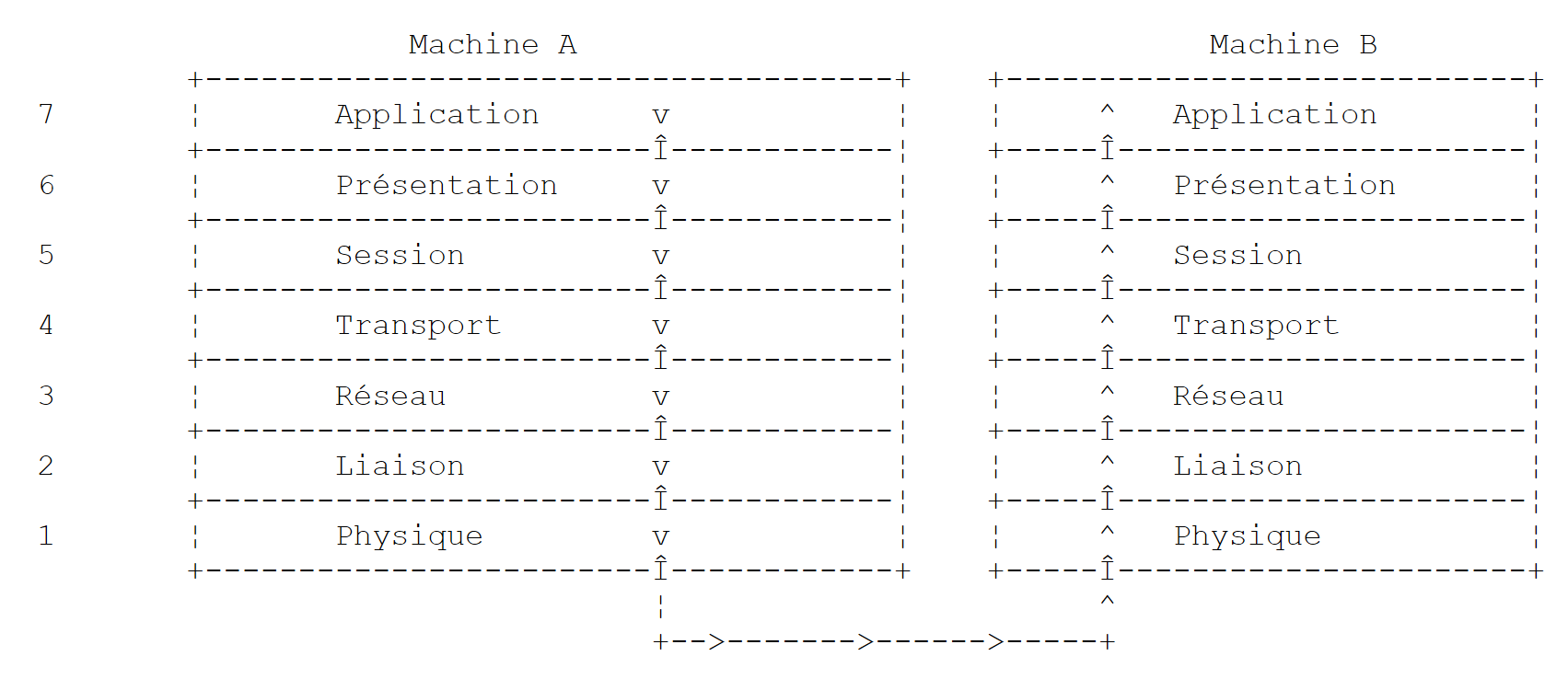 |
各层的作用如下:
确保通过物理介质传输比特。该层包括数据处理终端设备(DPTE),如终端或计算机,以及数据电路终端设备(DCTE),如调制解调器、复用器和集中器。该层的关键点包括: . 信息编码方式的选择(模拟或数字) . 传输模式的选择(同步或异步)。 | |
隐藏物理层的物理特性。检测并纠正传输错误。 | |
管理信息在网络中传输时必须遵循的路径。这被称为路由:确定信息到达目的地必须经过的路线。 | |
使两个应用程序之间能够进行通信,而前几层仅允许机器之间的通信。该层提供的一项服务是多路复用:传输层可以利用单一网络连接(机器到机器)来传输属于多个应用程序的数据。 | |
该层提供的服务允许应用程序在远程机器上建立并维持一个工作会话。 | |
其目的是标准化不同机器间数据的表示形式。因此,源自机器 A 的数据在通过网络发送前,将由机器 A 的表示层根据标准格式进行“格式化”。当数据到达目标机器 B 的表示层时,该层将凭借其标准格式识别这些数据,并对其进行重新格式化,以便机器 B 上的应用程序能够识别它们。 | |
在此层级,我们看到的是通常与用户密切相关的应用程序,例如电子邮件或文件传输。 |
9.1.3. TCP/IP模型
OSI模型是一个理想模型,至今尚未完全实现。TCP/IP协议套件通过以下方式对其进行了近似实现:
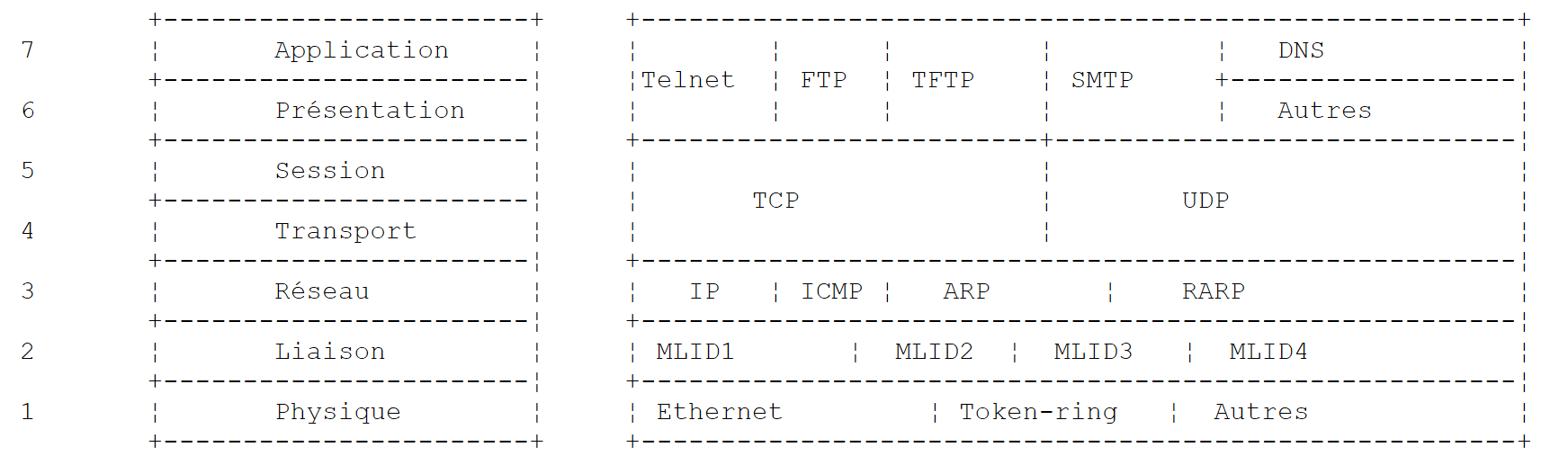 |
物理层
在局域网中,通常采用以太网或令牌环技术。本文将仅聚焦于以太网技术。
以太网
这是对一种分组交换局域网技术的称谓,该技术于20世纪70年代初在施乐帕克研究中心(Xerox PARC)发明,并于1978年由施乐、英特尔和数字设备公司共同制定了标准。 该网络在物理层由直径约1.27厘米、长度最长可达500米的同轴电缆构成。可通过中继器延长网络,但任意两台设备之间最多只能使用两个中继器。该电缆属于无源设备:所有有源组件均位于连接到电缆的设备上。每台设备通过网络接口卡连接到电缆,该卡包含:
- 一个收发器,用于检测电缆上的信号,并将模拟信号转换为数字信号,反之亦然。
- 一个耦合器,用于接收来自收发器的数字信号并将其传输至计算机进行处理,或反之。
以太网技术的主要特点如下:
- 传输速率为每秒10兆比特。
- 总线拓扑:所有设备均连接至同一根电缆
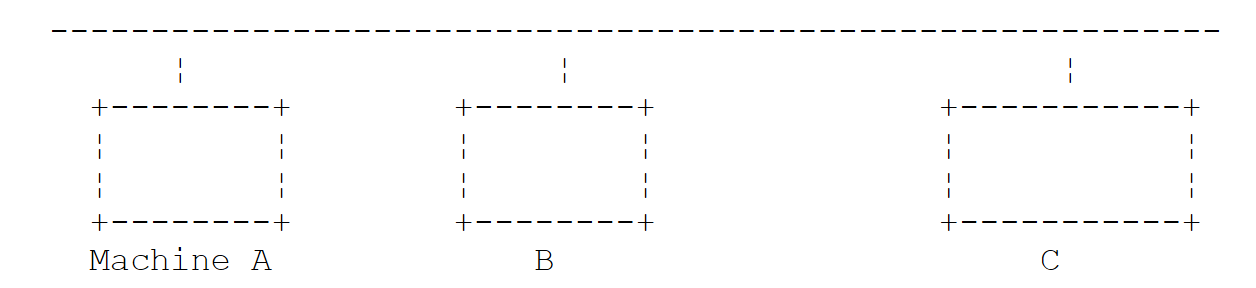 |
- 广播网络——发送设备在通过电缆发送信息时会附上接收设备的地址。所有连接的设备都会收到该信息,但只有预定的接收方才会保留该信息。
- 访问方式如下:希望发送信息的发送器会监听电缆——它会检测是否存在载波,若存在则表明正在进行传输。这就是 CSMA(载波侦听多路访问)技术。若未检测到载波,发送器可决定依次进行传输。 可能有多个发送器做出此决定。这些传输信号会相互混杂,这被称为“碰撞”。发送器会检测这种情况:在电缆上传输的同时,它也会监听实际通过电缆的数据。如果检测到电缆上传输的信息并非自己发送的,它便会判定发生了碰撞并停止传输。其他正在传输的发送器也会采取同样的措施。 每个发射器将在经过随机延迟后恢复传输,延迟时间取决于各发射器自身。该技术称为 CD(碰撞检测)。因此,这种访问方式被称为 CSMA/CD。
- 48 位地址。每台设备都有一个地址(此处称为物理地址),该地址印在连接设备与网线的网卡上。该地址被称为设备的以太网地址。
网络层
在此层,我们发现IP、ICMP、ARP和RARP协议。
在两个网络节点之间传输数据包 | |
ICMP 促进了不同机器上 IP 协议程序之间的通信。因此,它属于 IP 协议内部的消息交换协议。 | |
将一台机器的互联网地址映射到其物理地址 | |
将计算机的物理地址映射到其互联网地址 |
传输层/会话层
该层包括以下协议:
确保两个客户端之间信息可靠地传输 | |
确保两个客户端之间信息传输不可靠 |
应用层/表示层/会话层
此处包含各种协议:
一种终端仿真器,允许机器 A 以终端身份连接到机器 B | |
支持文件传输 | |
支持文件传输 | |
支持网络用户之间交换邮件 | |
将主机名转换为该主机的互联网地址 | |
由 Sun Microsystems 创建,它规定了一种标准的、与机器无关的数据表示法 | |
同样由 Sun 定义,这是一种远程应用程序之间的通信协议,与传输层无关。该协议非常重要:它使程序员无需了解传输层的细节,并使应用程序具有可移植性。该协议基于 XDR 协议 | |
同样由 Sun 定义,该协议允许一台机器“看到”另一台机器的文件系统。它基于上述的 RPC 协议 |
9.1.4. 互联网协议的工作原理
在 TCP/IP 环境中开发的应用程序通常会使用该环境中的多种协议。 应用程序与协议的最高层进行通信。该层将信息传递给其下层,依此类推,直至到达物理介质。在那里,信息被物理传输到目标机器,随后在目标机器上再次经过相同的协议层,这次方向相反,直至到达预定接收该信息的应用程序。下图展示了信息的传输路径:
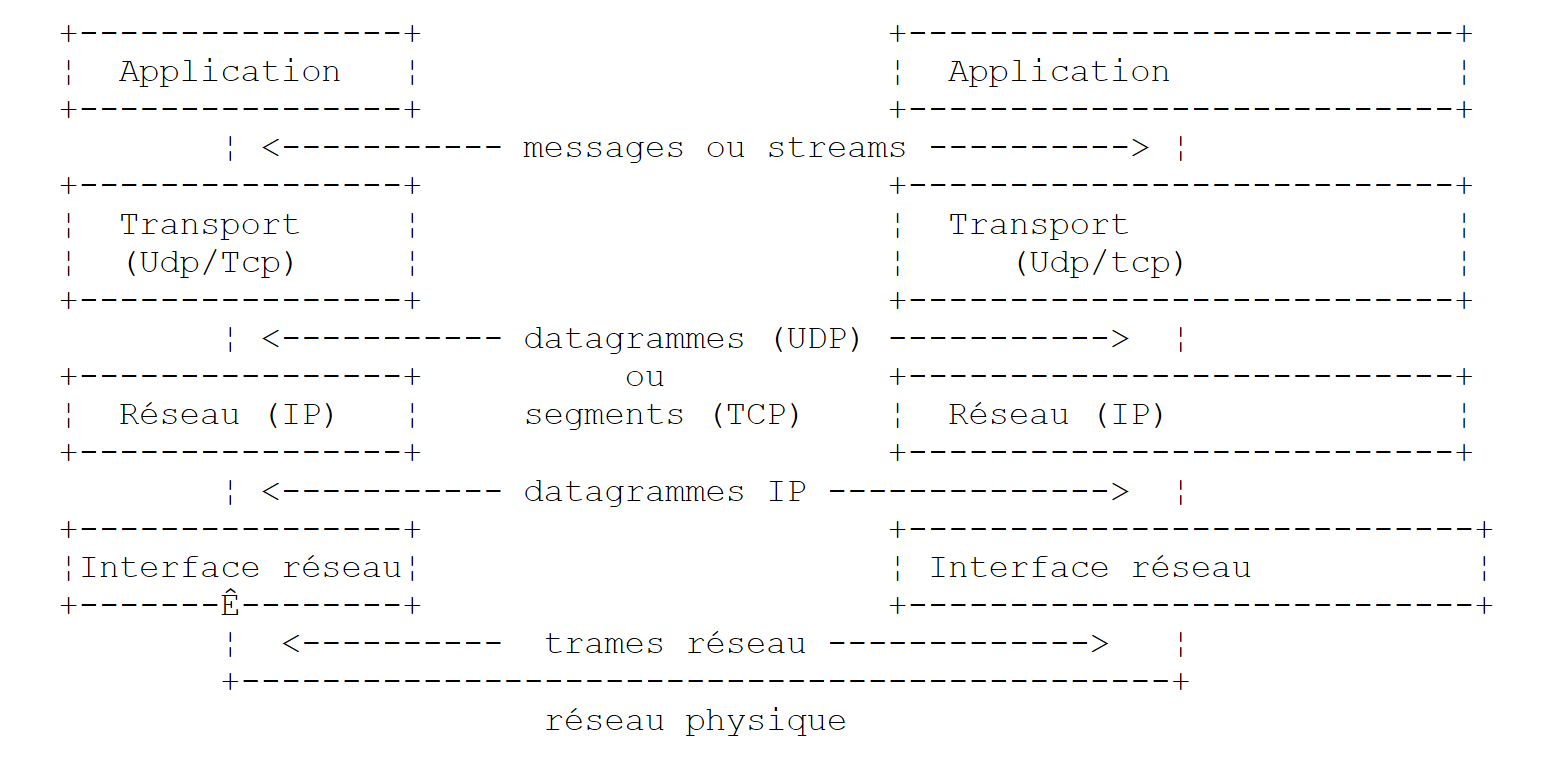 |
让我们举个例子:定义在应用层的FTP应用程序,它支持机器之间的文件传输。
- 应用程序将待传输的一系列字节传递给传输层。
- 传输层将这串字节划分为TCP分段,并在每个分段的开头添加分段号。这些分段被传递给网络层,该层由IP协议管理。
- IP 层会创建一个数据包,将接收到的 TCP 分段封装其中。在该数据包的头部,它会放置源机和目标机的互联网地址。它还会确定目标机的物理地址。整个数据包被传递到数据链路层和物理层,即连接计算机与物理网络的网卡。
- 在那里,IP数据包会被进一步封装到物理帧中,并通过电缆发送至目的地。
- 在接收端机器上,数据链路层与物理层执行相反的操作:它将 IP 数据包从物理帧中解封装,并将其传递给 IP 层。
- IP 层会验证数据包是否有效:它根据接收到的位计算校验和,该校验和必须与数据包头中的校验和相匹配。如果不匹配,数据包将被丢弃。
- 如果数据包被认为是有效的,IP 层会将其中的 TCP 分段解封装,并将其传递给传输层。
- 传输层(在本例中为 TCP 层)检查分段号以确保分段顺序正确。
- 它还会为 TCP 分段计算校验和。如果校验和正确,TCP 层会向源机发送确认;否则,TCP 分段将被拒绝。
- TCP 层剩下的工作就是将分段的数据部分传输给上层中预定的接收应用程序。
9.1.5. 互联网上的寻址
网络节点可以是计算机、智能打印机、文件服务器——实际上,任何能够使用 TCP/IP 协议进行通信的设备都可以。每个节点都有一个物理地址,其格式取决于网络类型。在以太网中,物理地址由 6 个字节编码。X.25 网络地址是一个 14 位数字。
节点的互联网地址是一个逻辑地址:它与所使用的硬件和网络无关。这是一个4字节的地址,既标识本地网络,也标识该网络上的节点。互联网地址通常表示为四个数字(即四个字节的值),用点分隔。 因此,昂热大学理学院的Lagaffe机器的地址是193.49.144.1,而Liny机器的地址是193.49.144.9。由此可推断,该局域网的互联网地址是193.49.144.0。该网络上最多可容纳254个节点。
由于互联网地址(IP地址)与网络无关,网络A上的计算机可以与网络B上的计算机进行通信,而无需关心自身所在的网络类型:它只需知道对方的IP地址即可。每个网络的IP协议负责在IP地址与物理地址之间进行双向转换。
所有IP地址必须是唯一的。在法国,INRIA负责分配IP地址。实际上,该组织会为您的本地网络分配一个地址,例如为昂热大学理学院的网络分配193.49.144.0。 该网络的管理员随后可以根据需要分配 193.49.144.1 到 193.49.144.254 之间的 IP 地址。该地址通常存储在连接到该网络的每台机器上的特定文件中。
9.1.5.1. IP地址类
IP 地址是由 4 个字节组成的序列,通常写为 I1.I2.I3.I4,实际上包含两个地址:
- 网络地址
- 该网络上某个节点的地址
根据这两个字段的大小,IP地址分为三类:A类、B类和C类。
A类
IP地址:I1.I2.I3.I4 采用 R1.N1.N2.N3 的形式,其中
R1 | 是网络地址 |
N1.N2.N3 | 是该网络上某台机器的地址 |
更准确地说,A类IP地址的格式如下:
 |
网络地址长7位,主机地址长24位。因此,可以有127个A类网络,每个网络最多可包含2²⁴个主机。
B类
在此,IP地址:I1.I2.I3.I4 具有 R1.R2.N1.N2 的形式,其中
R1.R2 | 是网络地址 |
N1.N2 | 是该网络上某台机器的地址 |
更准确地说,B类IP地址的格式如下:
 |
网络地址为 2 字节(确切地说,是 14 位),节点地址也是 2 字节。因此,可以有 2¹⁴ 个 B 类网络,每个网络最多包含 2¹⁶ 个节点。
C类
在此类中,IP地址:I1.I2.I3.I4 具有形式 R1.R2.R3.N1,其中
R1.R2.R3 | 是网络地址 |
N1 | 是该网络上某台机器的地址 |
更准确地说,C类IP地址的格式如下:
 |
网络地址占用 3 个字节(减去 3 位),主机地址占用 1 个字节。因此,C 类网络的数量可达 2²¹ 个,每个网络最多可包含 256 个主机。
由于昂热大学理学院的Lagaffe机器的地址为193.49.144.1,我们可以看到最高字节为193,二进制表示为11000001。由此可推断该网络属于C类网络。
保留地址
- 某些 IP 地址是网络地址,而非网络内的节点地址。这些地址的节点地址被设置为 0。因此,地址 193.49.144.0 是昂热科学学院网络的 IP 地址。因此,网络中没有任何节点可以使用地址 0。
- 当 IP 地址中的节点地址全部由 1 组成时,即为广播地址:该地址指向网络上的所有节点。
- 在理论上允许 2⁸ = 256 个节点的 C 类网络中,若剔除两个被禁止的地址,则仅剩 254 个有效地址。
9.1.5.2. 互联网地址 <--> 物理地址转换协议
我们已经看到,当数据从一台机器传输到另一台机器时,在经过IP层时会被封装成数据包。这些数据包具有以下形式:
 |
因此,IP数据包中包含源主机和目标主机的互联网地址。当该数据包被传递到负责将其发送至物理网络的层时,会添加额外信息以形成最终将通过网络发送的物理帧。例如,以太网网络中帧的格式如下:
 |
在最终的帧中,包含源机和目标机的物理地址。这些地址是如何获得的?
发送方机器知道其想要通信的机器的 IP 地址后,会使用一种名为 ARP(地址解析协议)的特定协议来获取该机器的物理地址。
- 它会发送一种名为 ARP 数据包的特殊数据包,其中包含需要查询物理地址的机器的 IP 地址。该数据包中还包含发送机器自身的 IP 地址和物理地址。
- 该数据包会被发送到网络上的所有节点。
- 这些节点能够识别该数据包的特殊性质。在数据包中识别出自身 IP 地址的节点会通过向数据包发送方发送其物理地址来响应。它是如何做到的?因为它在数据包中找到了发送方的 IP 地址和物理地址。
- 发送方因此获得了它正在寻找的物理地址。它将该地址存储在内存中,以便日后需要向同一接收方发送其他数据包时能够使用。
一台机器的IP地址通常存储在其配置文件中,它可以通过查询该文件来获取该地址。该地址可以更改:只需编辑该文件即可。然而,物理地址存储在网卡的内存中,无法更改。
当管理员需要重组网络时,可能需要更改所有节点的 IP 地址,从而需要编辑每个节点的配置文件。如果机器数量众多,这将非常繁琐且容易出错。一种方法是不要为机器分配 IP 地址:而是将一个特殊代码写入机器通常用于查找其 IP 地址的文件中。 当设备发现自己没有 IP 地址时,会通过一种名为 RARP(反向地址解析协议)的协议请求分配。随后,它会向网络发送一个名为 RARP 数据包的特殊数据包——与前文提到的 ARP 数据包类似——其中包含其物理地址。该数据包将发送给所有能够识别 RARP 数据包的节点。 其中一个节点,即 RARP 服务器,维护着一个包含所有节点物理地址与 IP 地址映射关系的文件。随后,它会向 RARP 数据包的发送方响应,将其 IP 地址发回。因此,希望重新配置网络的管理员只需编辑 RARP 服务器的映射文件即可。RARP 服务器通常必须拥有一个固定的 IP 地址,且必须能够在不使用 RARP 协议的情况下自行识别该地址。
9.1.6. 网络层,即互联网协议(IP)层
IP(互联网协议)定义了数据包必须采用的格式,以及在传输或接收过程中应如何处理这些数据包。这种特定类型的数据包被称为IP数据报。我们之前已经讨论过它:
 |
关键点在于,除了待传输的数据外,IP数据报还包含源机和目的机的互联网地址。因此,接收机能够识别消息的发送方。
与网络帧不同,网络帧的长度由其传输所经网络的物理特性决定,而IP数据报的长度则由软件固定,因此在不同的物理网络中长度保持一致。我们已经看到,随着从网络层向物理层的下行,IP数据报会被封装在物理帧中。我们以以太网的物理帧为例:
 |
物理帧在节点间传输,最终抵达目的地,而该目的地可能并不位于与发送主机相同的物理网络上。因此,在连接不同类型网络的节点处,IP数据报可能会被依次封装在不同的物理帧中。此外,IP数据报也可能因体积过大而无法封装在单个物理帧中。 此时,发生此问题的节点上的IP软件会根据特定规则将IP数据包拆分为多个片段,每个片段随后通过物理网络发送。这些片段仅会在最终目的地被重新组装。
9.1.6.1. 路由
路由是指将 IP 数据包引导至其目的地的方法。主要有两种方式:直接路由和间接路由。
直接路由
直接路由是指在同一网络内,IP数据包从发送方直接传输至接收方:
- 发送IP数据报的机器拥有接收方的IP地址。
- 它通过ARP协议获取收件人的物理地址,或者如果该地址已获取,则从其表中获取。
- 它将数据包通过网络发送到该物理地址。
间接路由
间接路由是指将 IP 数据包传输到位于发送方所属网络以外的网络上的目的地。在这种情况下,源机和目标机的 IP 地址中的网络地址部分是不同的。 源计算机识别到这一点。然后,它将数据包发送到一个称为路由器的特殊节点,该节点将本地网络连接到其他网络,其 IP 地址可在表中找到——该地址最初是从文件、永久内存或网络上流通的信息中获得的。
路由器连接到两个网络,并在这两个网络中都拥有一个IP地址。
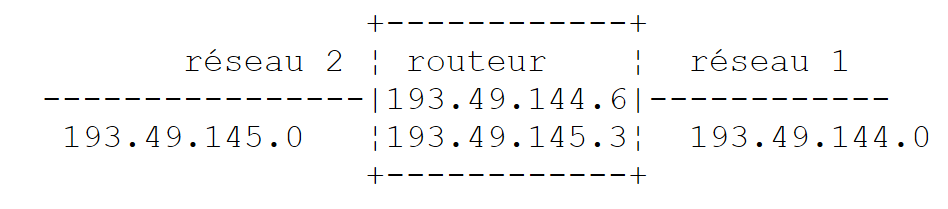 |
在上述示例中:
- 网络 1 的互联网地址为 193.49.144.0,网络 2 的地址为 193.49.145.0。
- 在网络 1 中,路由器的地址为 193.49.144.6;在网络 2 中,路由器的地址为 193.49.145.3。
路由器的作用是:将接收到的 IP 数据包(该数据包封装在网络 1 典型的物理帧中)放入一个能够在网络 2 上传输的物理帧中。如果数据包目的地的 IP 地址位于网络 2 内,路由器将直接将其发送至该地址;否则,它会将其发送给另一台路由器,该路由器连接网络 2 与网络 3,以此类推。
9.1.6.2. 错误与控制消息
同样位于网络层(与IP协议处于同一层级)的还有ICMP(互联网控制消息协议)。它用于发送有关网络内部运行状况的消息:节点故障、路由器拥塞等。ICMP消息被封装在IP数据包中并通过网络发送。各节点的IP层会根据收到的ICMP消息采取相应措施。因此,应用程序本身永远不会察觉到这些网络特有的问题。 节点将利用 ICMP 信息来更新其路由表。
9.1.7. 传输层:UDP 和 TCP 协议
9.1.7.1. UDP 协议:用户数据报协议
UDP 协议允许两个点之间进行不可靠的数据交换,这意味着无法保证数据包能成功送达目的地。应用程序若愿意,可以自行处理这一问题,例如在发送消息后等待确认,然后再发送下一条消息。
到目前为止,在网络层面上,我们讨论的是机器的 IP 地址。然而,在一台机器上,不同的进程可以同时共存,并且它们都能进行通信。 因此,在发送消息时,不仅需要指定目标机器的 IP 地址,还需指定目标进程的“名称”。这个名称实际上是一个数字,称为端口号。某些数字被保留给标准应用程序使用:例如,端口 69 用于 TFTP(简单文件传输协议)应用程序。由 UDP 协议处理的数据包也被称为数据报。它们具有以下形式:
 |
这些数据报将被封装在 IP 数据包中,然后封装在物理帧中。
9.1.7.2. TCP 协议:传输控制协议
对于安全通信而言,UDP 协议是不够的:应用程序开发人员必须自己创建一个协议,以确保数据包被正确路由。
TCP(传输控制协议)避免了这些问题。其特点如下:
- 希望发送数据的进程首先与将接收数据的进程建立连接。该连接是在发送机器上的一个端口与接收机器上的一个端口之间建立的。因此,在两个端口之间创建了一条虚拟路径,该路径专供已建立连接的两个进程使用。
- 源进程发送的所有数据包都遵循这条虚拟路径,并按发送顺序到达,而UDP协议无法保证这一点,因为数据包可能遵循不同的路径。
- 传输的数据呈现连续状态。发送进程按自身节奏发送数据。这些数据未必会立即发送:TCP协议会等待直至积累足够的数据量。数据被存储在一个称为TCP分段的结构中。一旦该分段填满,便会被传输至IP层,并在那里封装为IP数据包。
- TCP协议发送的每个分段都有序号。接收端的TCP协议会验证分段是否按顺序接收。对于每个正确接收的分段,它都会向发送方发送确认。
- 当发送方收到该确认时,会通知发送进程。因此,发送进程可以确认分段已安全到达,而这在 UDP 协议中是无法实现的。
- 如果发送分段的 TCP 协议在经过一定时间后仍未收到确认,它将重传该分段,从而确保信息传输服务的质量。
- 两个通信进程之间建立的虚拟电路是全双工的:这意味着信息可以双向流动。因此,即使源进程仍在发送信息,目标进程也可以发送确认。例如,这使得源TCP协议能够发送多个数据段,而无需等待确认。 如果经过一段时间后,它发现尚未收到针对特定分段编号 n 的确认,它将从该点开始重新发送分段。
9.1.8. 应用层
在 UDP 和 TCP 协议之上,还有各种标准协议:
TELNET
该协议允许网络中机器 A 上的用户连接到机器 B(通常称为主机)。TELNET 在机器 A 上模拟一个所谓的通用终端。因此,用户操作起来就好像有一台终端连接到机器 B 一样。Telnet 依赖于 TCP 协议。
FTP:(文件传输协议)
该协议支持两台远程计算机之间的文件交换,以及创建目录等文件操作。它基于TCP协议。
TFTP:(简易文件传输协议)
该协议是FTP的一种变体。它基于UDP协议,功能比FTP更为简单。
DNS:(域名系统)
当用户想要与远程机器交换文件时(例如通过FTP),必须知道该机器的互联网地址。例如,若要在昂热大学的Lagaffe机器上使用FTP,你需要按以下方式运行FTP:FTP 193.49.144.1
这需要一个将计算机与IP地址进行映射的目录。在这个目录中,计算机通常会使用符号名称来标识,例如:
昂热大学的DPX2/320机器
位于昂热ISERPA的Sun机器
显然,使用名称而非IP地址来指代一台机器会更加方便。这引出了名称唯一性的问题:有数百万台相互连接的机器。人们可能会设想由一个中央机构来分配名称。这无疑会非常繁琐。实际上,对名称的控制权已被分散到各个域名中。 每个域名通常由一个精简的组织管理,该组织在选择机器名称方面拥有完全的自由。因此,法国境内的机器属于 fr 域名,该域名由巴黎的 Inria 管理。为了进一步简化管理,权限被进一步下放:在 fr 域名内创建子域名。因此,昂热大学属于 univ-Angers 域名。管理该域名的部门在为昂热大学网络上的机器命名方面拥有完全的自由。 目前,该域尚未进行细分。但在拥有大量联网机器的大型大学中,可能会进行细分。
昂热大学的DPX2/320计算机被命名为Lagaffe,而一台486DX50个人电脑则被命名为liny。如何从外部引用这些计算机?方法是指定它们所属的域名层级。因此,Lagaffe计算机的全称将是:
Lagaffe.univ-Angers.fr
在域内,可以使用相对名称。因此,在 fr 域内且位于 univ-Angers 域之外时,可以这样引用 Lagaffe 机器:
Lagaffe.univ-Angers
最后,在 univ-Angers 域内,只需简单地引用为
Lagaffe
因此,应用程序可以通过其名称来引用一台机器。但归根结底,你仍然需要获取该机器的 IP 地址。该如何操作呢?假设我们希望从机器 A 与机器 B 进行通信。
- 如果机器 B 与机器 A 属于同一个域,那么机器 A 上的某个文件中很可能就包含机器 B 的 IP 地址。
- 否则,机器 A 将在另一个文件或与之前相同的文件中,找到一份包含多个域名服务器及其 IP 地址的列表。域名服务器负责将机器名称映射到其 IP 地址。机器 A 将向列表中的第一个域名服务器发送一个特殊请求,即所谓的 DNS 查询,其中包含要查找的机器名称。 如果被查询的服务器在其记录中拥有该名称,它将向计算机A发送相应的IP地址。否则,该服务器也会在其文件中查找可查询的域名服务器列表,并进行查询。因此,将查询多个域名服务器,但并非随机进行,而是以尽量减少请求次数的方式进行。如果最终找到了该计算机,响应将被发回给计算机A。
XDR:(外部数据表示法)
该协议由 Sun Microsystems 创建,规定了一种标准的、与机器无关的数据表示法。
RPC:(远程过程调用)
该协议同样由Sun定义,是一种独立于传输层的远程应用程序间通信协议。该协议具有重要意义:它使程序员无需了解传输层的细节,并确保了应用程序的可移植性。该协议基于XDR协议
NFS:网络文件系统
该协议同样由 Sun 定义,它允许一台机器“看到”另一台机器的文件系统。它基于上述的 RPC 协议。
9.1.9. 结论
在本节的介绍中,我们阐述了互联网协议的一些主要特征。若想进一步探索这一领域,读者可参考道格拉斯·科默(Douglas Comer)的这部优秀著作:
书名 | 《TCP/IP:架构、协议与应用》。 |
作者 | 道格拉斯·科默 |
出版社 | InterEditions |
9.2. 网络地址管理
互联网上的每台机器都通过一个 IP(互联网协议)地址进行唯一标识,其格式为 I1.I2.I3.I4,其中 I1 是 1 到 254 之间的一个数字。它也可以通过一个唯一名称来识别。这个名称并非必需,因为应用程序最终总是使用机器的 IP 地址。这些名称的存在是为了方便用户。 因此,使用浏览器请求 URL http://www.ibm.com 比请求 URL http://129.42.17.99 更为便捷,尽管这两种方法均可行。IP 地址与计算机名称之间的映射由一种名为 DNS(域名系统)的分布式互联网服务负责处理。.NET 平台提供了 Dns 类来管理互联网地址:
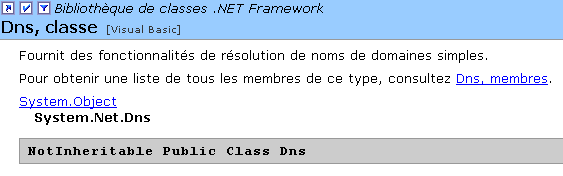
该类的大多数方法都是静态的。让我们来看看我们感兴趣的那些方法:
根据“I1.I2.I3.I4”格式的 IP 地址返回一个 IPHostEntry。如果找不到该机器的地址,则抛出异常。 | |
根据计算机名称返回一个 IPHostEntry。如果找不到该计算机名称,则抛出异常。 | |
返回正在执行此指令的程序所运行的计算机的名称 |
IPHostEntry 网络地址的格式如下:
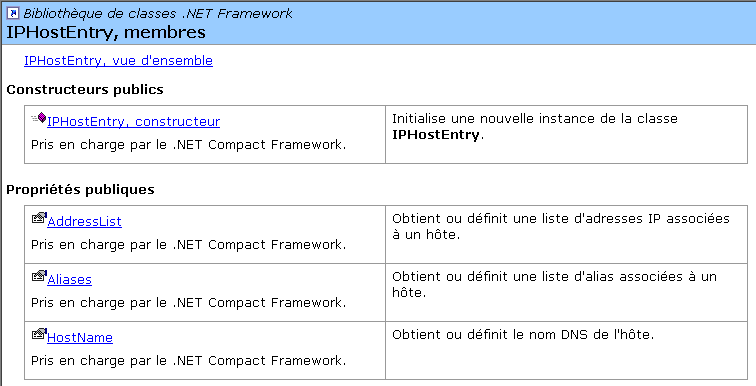 |
我们关注的属性:
一台机器的 IP 地址列表。虽然一个 IP 地址唯一标识一台物理机器,但一台物理机器可能拥有多个 IP 地址。如果该机器拥有多张网卡连接到不同的网络,就会出现这种情况。 | |
某台机器的别名列表,该机器可通过主名称和别名进行识别 | |
如果该计算机有名称,则为该名称 |
我们将使用 IPAddress 类中的以下构造函数、属性及方法:
可以通过 ToString() 方法将 [IPAddress] 对象转换为字符串 I1.I2.I3.I4。反之,也可以通过静态方法 IPAddress.Parse("I1.I2.I3.I4") 从字符串 I1.I2.I3.I4 获取 IPAddress 对象。 请看以下程序,它会显示当前运行的机器名称,然后以交互方式提供 IP 地址与机器名称的映射关系:
dos>address1
Machine Locale=tahe

Machine recherchée (fin pour arrêter) : istia.univ-angers.fr
Machine : istia.univ-angers.fr
Adresses IP : 193.49.146.171

Machine recherchée (fin pour arrêter) : 193.49.146.171
Machine : istia.istia.univ-angers.fr
Adresses IP : 193.49.146.171
Alias : 171.146.49.193.in-addr.arpa

Machine recherchée (fin pour arrêter) : www.ibm.com
Machine : www.ibm.com
Adresses IP : 129.42.17.99,129.42.18.99,129.42.19.99,129.42.16.99

Machine recherchée (fin pour arrêter) : 129.42.17.99
Machine : www.ibm.com
Adresses IP : 129.42.17.99

Machine recherchée (fin pour arrêter) : x.y.z
Impossible de trouver la machine [x.y.z]

Machine recherchée (fin pour arrêter) : localhost
Machine : tahe
Adresses IP : 127.0.0.1

Machine recherchée (fin pour arrêter) : 127.0.0.1
Machine : tahe
Adresses IP : 127.0.0.1

Machine recherchée (fin pour arrêter) : tahe
Machine : tahe
Adresses IP : 127.0.0.1

Machine recherchée (fin pour arrêter) : fin
程序如下:
' options
Option Explicit On
Option Strict On

' namespaces
Imports System
Imports System.Net
Imports System.Text.RegularExpressions

' test module
Public Module adresses

    Sub Main()
        ' displays the name of the local machine
        ' then interactively provides information on network machines
        ' identified by name or address IP
        ' local machine
        Dim localHost As String = Dns.GetHostName()
        Console.Out.WriteLine(("Machine Locale=" + localHost))

        ' interactive Q&A
        Dim machine As String
        Dim adresseMachine As IPHostEntry
        While True
            ' enter the name of the machine you are looking for
            Console.Out.Write("Machine recherchée (fin pour arrêter) : ")
            machine = Console.In.ReadLine().Trim().ToLower()
            ' finished?
            If machine = "fin" Then
                Exit While
            End If

            ' address I1.I2.I3.I4 or machine name?
            Dim isIPV4 As Boolean = Regex.IsMatch(machine, "^\s*\d{1,3}\.\d{1,3}\.\d{1,3}\.\d{1,3}\s*$")
            ' management exception
            Try
                If isIPV4 Then
                    adresseMachine = Dns.GetHostByAddress(machine)
                Else
                    adresseMachine = Dns.GetHostByName(machine)
                End If
                ' the name
                Console.Out.WriteLine(("Machine : " + adresseMachine.HostName))
                ' IP addresses
                Console.Out.Write(("Adresses IP : " + adresseMachine.AddressList(0).ToString))
                Dim i As Integer
                For i = 1 To adresseMachine.AddressList.Length - 1
                    Console.Out.Write(("," + adresseMachine.AddressList(i).ToString))
                Next i
                Console.Out.WriteLine()
                ' aliases
                If adresseMachine.Aliases.Length <> 0 Then
                    Console.Out.Write(("Alias : " + adresseMachine.Aliases(0)))
                    For i = 1 To adresseMachine.Aliases.Length - 1
                        Console.Out.Write(("," + adresseMachine.Aliases(i)))
                    Next i
                    Console.Out.WriteLine()
                End If
            Catch
                ' the machine doesn't exist
                Console.Out.WriteLine("Impossible de trouver la machine [" + machine + "]")
            End Try
        End While
    End Sub
End Module
9.3. TCP/IP 编程
9.3.1. 一般信息
考虑两台远程计算机 A 和 B 之间的通信:
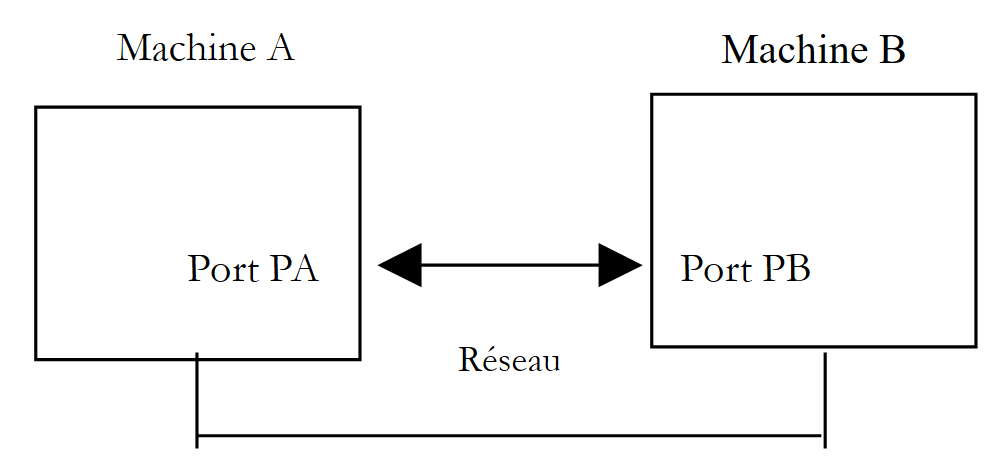 |
当机器 A 上的应用程序 AppA 想要通过互联网与机器 B 上的应用程序 AppB 进行通信时,它必须了解以下几点:
- 机器 B 的 IP 地址或主机名
- 应用程序 AppB 使用的端口号。事实上,机器 B 可能托管着许多在互联网上运行的应用程序。当它从网络接收信息时,必须知道该信息是发给哪个应用程序的。机器 B 上的应用程序通过接口(也称为通信端口)访问网络。这些信息包含在机器 B 接收的数据包中,以便将其传递给正确的应用程序。
- 机器B所支持的通信协议。在本研究中,我们将仅使用TCP/IP协议。
- 应用程序 AppB 所接受的通信协议。实际上,机器 A 和 B 将相互“对话”。它们传递的内容将被封装在 TCP/IP 协议中。然而,当链路末端的 AppB 应用程序接收到 AppA 应用程序发送的信息时,它必须能够对其进行解码。这类似于两个人 A 和 B 通过电话交流的情况:他们的对话由电话传输。 电话A将语音编码为信号,通过电话线传输,到达电话B后被解码。随后,B才能听到这些话语。这就是通信协议概念发挥作用的地方:如果A说法语而B不懂该语言,A和B就无法有效沟通。
因此,两个通信应用程序必须就将使用的通信协议类型达成一致。例如,与FTP服务通信与与POP服务通信并不相同:这两项服务不接受相同的命令。它们采用不同的通信协议。
9.3.2. TCP协议的特性
在此,我们将仅探讨使用TCP传输协议进行的网络通信。让我们回顾一下其特性:
- 希望传输数据的进程首先会与即将接收该信息的进程建立连接。该连接是在发送机器上的一个端口与接收机器上的一个端口之间建立的。由此,两个端口之间形成了一条虚拟路径,该路径将专用于已建立连接的这两个进程。
- 源进程发送的所有数据包均沿此虚拟路径传输,并按发送顺序到达
- 传输的数据呈现连续状态。发送进程按自身节奏发送数据。这些数据未必会立即发送:TCP 协议会等待直至积累足够的数据量。数据被存储在一个称为 TCP 分段的结构中。一旦该分段填满,便会被传输至 IP 层,并在那里封装为 IP 数据包。
- TCP协议发送的每个分段都有序号。接收端的TCP协议会验证分段是否按顺序接收。对于每个正确接收的分段,它都会向发送方发送一个确认。
- 当发送方收到该确认时,会通知发送进程。发送进程从而可以确认该分段已安全到达。
- 如果发送分段的 TCP 协议在经过一定时间后仍未收到确认,它将重传该分段,从而确保信息传输服务的质量。
- 两个通信进程之间建立的虚拟电路是全双工的:这意味着信息可以双向流动。因此,即使源进程仍在发送信息,目标进程也可以发送确认。这使得源TCP协议能够发送多个数据段,而无需等待确认。 如果经过一段时间后,它发现尚未收到针对特定分段编号 n 的确认,它将从该点开始重新发送分段。
9.3.3. 客户端-服务器关系
互联网上的通信通常是非对称的:机器 A 发起连接以向机器 B 请求服务,并指定希望与机器 B 上的服务 SB1 建立连接。机器 B 接受或拒绝该请求。 如果接受,机器 A 就可以将其请求发送给服务 SB1。这些请求必须符合服务 SB1 所理解的通信协议。因此,在机器 A(称为客户端机器)和机器 B(称为服务器机器)之间建立了一个请求-响应对话。两个伙伴中的一个将关闭连接。
9.3.4. 客户端架构
请求服务器应用程序服务的网络程序架构如下:
ouvrir la connexion avec le service SB1 de la machine B
si réussite alors
    tant que ce n'est pas fini
        préparer une demande
        l'émettre vers la machine B
        attendre et récupérer la réponse
        la traiter
    fin tant que
finsi
9.3.5. 服务器架构
提供服务的程序架构如下:
ouvrir le service sur la machine locale
tant que le service est ouvert
        se mettre à l'écoute des demandes de connexion sur un port dit port d'écoute
lorsqu'il y a une demande, la faire traiter par une autre tâche sur un autre port dit port de service
fin tant que
服务器程序处理客户端的初始连接请求与后续的服务请求方式不同。该程序本身并不提供服务。 如果由它直接提供服务,那么在服务进行期间,它将无法继续监听连接请求,从而导致无法为客户端提供服务。因此,它采取了不同的处理方式:一旦在监听端口上收到连接请求并予以接受,服务器就会创建一个任务,负责提供客户端请求的服务。该服务在服务器机器的另一个端口(称为服务端口)上提供。这使得服务器能够同时为多个客户端提供服务。一个服务任务将具有以下结构:
tant que le service n'a pas été rendu totalement
        attendre une demande sur le port de service
        lorsqu'il y en a une, élaborer la réponse
        transmettre la réponse via le port de service
fin tant que
     libérer le port de service
9.3.6. TcpClient 类
TcpClient 类是表示 TCP 服务客户端的合适类。其定义如下:
我们关注的构造函数、方法和属性如下:
用于与指定机器(hostname)上指定端口(port)运行的服务器建立 TCP 连接。例如,new TcpClient("istia.univ-angers.fr", 80) 可连接到 istia.univ-angers.fr 机器的 80 端口 | |
关闭与 TCP 服务器的连接 | |
获取一个用于从服务器读取和向服务器写入数据的 NetworkStream。该流支持客户端与服务器之间的通信。 |
9.3.7. NetworkStream 类
NetworkStream 类表示客户端与服务器之间的网络流。该类的定义如下:
NetworkStream 类继承自 Stream 类。许多客户端-服务器应用程序交换的文本行以换行符“\r\n”结尾。因此,使用 StreamReader 和 StreamWriter 对象在网络流中读取和写入这些行非常有用。当两台机器进行通信时,连接的两端各有一个 TcpClient 对象。 该对象的 GetStream 方法提供了对连接两台机器的网络流(NetworkStream)的访问权限。因此,如果一台机器 M1 使用 TcpClient 对象 client1 与机器 M2 建立了连接,并且它们正在交换文本行,则可以按以下方式创建其读写流:
Dim in1 as StreamReader=new StreamReader(client1.GetStream())
Dim out1 as StreamWriter=new StreamWriter(client1.GetStream())
out1.AutoFlush=true
该语句
表示来自 client1 的写入流不会经过中间缓冲区,而是直接发送到网络。这一点非常重要。通常,当 client1 向其伙伴发送一行文本时,它会期待收到响应。如果该行文本实际上被缓冲在机器 M1 上且从未发送,那么该响应将永远不会到达。要向机器 M2 发送一行文本,我们写:
要读取来自 M2 的响应,我们编写:
9.3.8. 互联网客户端的基本架构
现在我们已经具备了编写互联网客户端基本架构所需的要素:
    Dim client As TcpClient = Nothing     ' the customer
    Dim [IN] As StreamReader = Nothing ' the customer's reading flow
    Dim OUT As StreamWriter = Nothing     ' the customer's writing flow
    Dim demande As String = Nothing         ' customer request
    Dim réponse As String = Nothing         ' server response

    Try
      ' connect to the service running on port P of machine M
      client = New TcpClient(nomServeur, port)

      ' create customer input/output flows TCP
      [IN] = New StreamReader(client.GetStream())
      OUT = New StreamWriter(client.GetStream())
      OUT.AutoFlush = True

      ' request-response loop
      While True
        ' preparing the application
        demande = ...
        ' we send it to the server
        OUT.WriteLine(demande)
        ' we read the server response
        réponse = [IN].ReadLine()
        ' the answer is processed
        ...
            End While
            ' it's over
            client.Close()
        Catch ex As Exception
      ' we handle the exception
...
        End Try
9.3.9. TcpListener 类
TcpListener 类是表示 TCP 服务的合适类。其定义如下:
我们关注的构造函数、方法和属性如下:
创建一个 TCP 服务,该服务将在作为参数传递的端口(port)上监听客户端请求,该端口即 IP 地址为 localaddr 的本地计算机的监听端口。 | |
接受客户端请求。返回一个与另一个端口(称为服务端口)关联的 TcpClient 对象。 | |
开始监听客户端请求 | |
停止监听客户端请求 |
9.3.10. 互联网服务器的基本架构
根据我们之前所见,我们可以推导出服务器的基本结构:
    ' we create the listening service
    Dim ecoute As TcpListener = Nothing
    Dim port As Integer = ...
    Try
      ' create the service
      ecoute = New TcpListener(IPAddress.Parse("127.0.0.1"), port)
      ' launch it
      ecoute.Start()
      ' service loop
      Dim liaisonClient As TcpClient = Nothing
            While not fini
                ' waiting for a customer
                liaisonClient = ecoute.AcceptTcpClient()
                ' the service is provided by another task
                Dim tache As Thread = New Thread(New ThreadStart(AddressOf [méthode]))
                tache.Start()
            End While
        Catch ex As Exception
            ' we report the error
....
        End Try
        ' end of service
        ecoute.Stop()
Service 类是一个线程,其代码可能如下所示:
Public Class Service

    Private liaisonClient As TcpClient    ' customer liaison
    Private [IN] As StreamReader    ' iNPUTS
    Private OUT As StreamWriter    ' output flow

    ' manufacturer
    Public Sub New(ByVal liaisonClient As TcpClient, ...)
        Me.liaisonClient = liaisonClient
        ...
    End Sub

    ' run method
    Public Sub Run()
        ' renders service to the customer
        Try
            ' iNPUTS
            [IN] = New StreamReader(liaisonClient.GetStream())
            ' output flow
            OUT = New StreamWriter(liaisonClient.GetStream())
            OUT.AutoFlush = True
            ' loop read request/write response
            Dim demande As String = Nothing
            Dim reponse As String = Nothing
            demande = [IN].ReadLine
            While Not (demande Is Nothing)
                ' we process demand
                ...
                ' we send the answer
                reponse = "[" + demande + "]"
                OUT.WriteLine(reponse)
                ' following request
                demande = [IN].ReadLine
            End While
            ' end link
            liaisonClient.Close()
        Catch e As Exception
            ...
        End Try
        ' end of service
    End Sub
9.4. 示例
9.4.1. 回显服务器
我们将编写一个回显服务器,该服务器将通过以下命令从 DOS 窗口启动:
该服务器将在作为参数传递的端口上运行。它只是将客户端发送给它的请求原样发回给客户端。程序代码如下:
' options
Option Explicit On
Option Strict On

' namespaces
Imports System.Net.Sockets
Imports System.Net
Imports System
Imports System.IO
Imports System.Threading
Imports Microsoft.VisualBasic

' call: serveurEcho port
' echo server
' returns the line sent to the customer

Public Class serveurEcho
  Private Shared syntaxe As String = "Syntaxe : serveurEcho port"

  ' main program
  Public Shared Sub Main(ByVal args() As String)

    ' is there an argument
    If args.Length <> 1 Then
      erreur(syntaxe, 1)
    End If
    ' this argument must be integer >0
    Dim port As Integer = 0
    Dim erreurPort As Boolean = False
    Dim E As Exception = Nothing
    Try
      port = Integer.Parse(args(0))
    Catch ex As Exception
      E = ex
      erreurPort = True
    End Try
    erreurPort = erreurPort Or port <= 0
    If erreurPort Then
      erreur(syntaxe + ControlChars.Lf + "Port incorrect (" + E.ToString + ")", 2)
    End If
    ' we create the listening service
    Dim ecoute As TcpListener = Nothing
    Dim nbClients As Integer = 0 ' of customers handled
    Try
      ' create the service
      ecoute = New TcpListener(IPAddress.Parse("127.0.0.1"), port)
      ' launch it
      ecoute.Start()
      ' follow-up
      Console.Out.WriteLine(("Serveur d'écho lancé sur le port " & port))
      Console.Out.WriteLine(ecoute.LocalEndpoint)

      ' service loop
      Dim liaisonClient As TcpClient = Nothing
            While True
                ' infinite loop - will be stopped by Ctrl-C
                ' waiting for a customer
                liaisonClient = ecoute.AcceptTcpClient()

                ' the service is provided by another task
                nbClients += 1
                Dim tache As Thread = New Thread(New ThreadStart(AddressOf New traiteClientEcho(liaisonClient, nbClients).Run))
                tache.Start()
            End While
            ' back to listening to requests
        Catch ex As Exception
            ' we report the error
            erreur("L'erreur suivante s'est produite : " + ex.Message, 3)
        End Try
        ' end of service
        ecoute.Stop()
    End Sub

    ' error display
    Public Shared Sub erreur(ByVal msg As String, ByVal exitCode As Integer)
        ' error display
        System.Console.Error.WriteLine(msg)
        ' stop with error
        Environment.Exit(exitCode)
    End Sub
End Class

' -------------------------------------------------------
' provides service to an echo server client
Public Class traiteClientEcho

    Private liaisonClient As TcpClient    ' customer liaison
    Private numClient As Integer    ' customer no
    Private [IN] As StreamReader    ' iNPUTS
    Private OUT As StreamWriter    ' output flow

    ' manufacturer
    Public Sub New(ByVal liaisonClient As TcpClient, ByVal numClient As Integer)
        Me.liaisonClient = liaisonClient
        Me.numClient = numClient
    End Sub

    ' run method
    Public Sub Run()
        ' renders service to the customer
        Console.Out.WriteLine(("Début de service au client " & numClient))
        Try
            ' iNPUTS
            [IN] = New StreamReader(liaisonClient.GetStream())
            ' output flow
            OUT = New StreamWriter(liaisonClient.GetStream())
            OUT.AutoFlush = True
            ' loop read request/write response
            Dim demande As String = Nothing
            Dim reponse As String = Nothing
            demande = [IN].ReadLine
            While Not (demande Is Nothing)
                ' follow-up
                Console.Out.WriteLine(("Client " & numClient & " : " & demande))
                ' the service stops when the client sends an end-of-file marker
                reponse = "[" + demande + "]"
                OUT.WriteLine(reponse)
                ' service stops when client sends "end
                If demande.Trim().ToLower() = "fin" Then
                    Exit While
                End If
                ' following request
                demande = [IN].ReadLine
            End While
            ' end link
            liaisonClient.Close()
        Catch e As Exception
            erreur("Erreur lors de la fermeture de la liaison client (" + e.ToString + ")", 2)
        End Try
        ' end of service
        Console.Out.WriteLine(("Fin de service au client " & numClient))
    End Sub

    ' error display
    Public Shared Sub erreur(ByVal msg As String, ByVal exitCode As Integer)
        ' error display
        System.Console.Error.WriteLine(msg)
        ' stop with error
        Environment.Exit(exitCode)
    End Sub
End Class
该服务器结构符合 TCP 服务器的通用架构。
9.4.2. 回显服务器的客户端
现在我们将为前面的服务器编写一个客户端。它的调用方式如下:
它会连接到名为 servername 的机器的 port 端口,然后向服务器发送多行文本,服务器会将这些文本原样回显。
' options
Option Explicit On
Option Strict On

' namespaces
Imports System.Net.Sockets
Imports System.Net
Imports System
Imports System.IO
Imports System.Threading
Imports Microsoft.VisualBasic

Public Class clientEcho

  ' connects to an echo server
  ' any line typed on the keyboard is then received as an echo
  Public Shared Sub Main(ByVal args() As String)
    ' syntax
    Const syntaxe As String = "pg machine port"

    ' number of arguments
    If args.Length <> 2 Then
      erreur(syntaxe, 1)
    End If
    ' note the server name
    Dim nomServeur As String = args(0)

    ' port must be integer >0
    Dim port As Integer = 0
    Dim erreurPort As Boolean = False
    Dim E As Exception = Nothing
    Try
      port = Integer.Parse(args(1))
    Catch ex As Exception
      E = ex
      erreurPort = True
    End Try
    erreurPort = erreurPort Or port <= 0
    If erreurPort Then
      erreur(syntaxe + ControlChars.Lf + "Port incorrect (" + E.ToString + ")", 2)
    End If

        ' we can work
    Dim client As TcpClient = Nothing ' the customer
    Dim [IN] As StreamReader = Nothing ' the customer's reading flow
    Dim OUT As StreamWriter = Nothing ' the customer's writing flow
    Dim demande As String = Nothing ' customer request
    Dim réponse As String = Nothing ' server response
    Try
      ' connect to the service running on port P of machine M
      client = New TcpClient(nomServeur, port)

      ' create customer input/output flows TCP
      [IN] = New StreamReader(client.GetStream())
      OUT = New StreamWriter(client.GetStream())
      OUT.AutoFlush = True

      ' request-response loop
      While True
        ' demand comes from the keyboard
        Console.Out.Write("demande (fin pour arrêter) : ")
        demande = Console.In.ReadLine()
        ' we send it to the server
        OUT.WriteLine(demande)
        ' we read the server response
        réponse = [IN].ReadLine()
        ' the answer is processed
        Console.Out.WriteLine(("Réponse : " + réponse))
        ' finished?
        If demande.Trim().ToLower() = "fin" Then
          Exit While
                End If
            End While
            ' it's over
            client.Close()
        Catch ex As Exception
      ' we handle the exception
      erreur(ex.Message, 3)
        End Try
    End Sub

    ' error display
    Public Shared Sub erreur(ByVal msg As String, ByVal exitCode As Integer)
        ' error display
        System.Console.Error.WriteLine(msg)
        ' stop with error
        Environment.Exit(exitCode)
    End Sub
End Class
该客户端的结构符合 TCP 客户端的一般架构。以下是在以下配置下获得的结果:
- 服务器在 DOS 窗口中运行于 100 端口
- 在同一台机器上,另两个DOS窗口中分别启动了两个客户端
在客户端 1 的窗口中,我们得到以下结果:
dos>clientEcho localhost 100
demande (fin pour arrêter) : ligne1
Réponse : [ligne1]
demande (fin pour arrêter) : ligne1B
Réponse : [ligne1B]
demande (fin pour arrêter) : ligne1C
Réponse : [ligne1C]
demande (fin pour arrêter) : fin
Réponse : [fin]
在客户端 2 中:
dos>clientEcho localhost 100
demande (fin pour arrêter) : ligne2A
Réponse : [ligne2A]
demande (fin pour arrêter) : ligne2B
Réponse : [ligne2B]
demande (fin pour arrêter) : fin
Réponse : [fin]
在服务器端:
dos>serveurEcho 100
Serveur d'écho lancé sur le port 100
0.0.0.0:100
Début de service au client 1
Client 1 : ligne1
Début de service au client 2
Client 2 : ligne2A
Client 2 : ligne2B
Client 1 : ligne1B
Client 1 : ligne1C
Client 2 : fin
Fin de service au client 2
Client 1 : fin
Fin de service au client 1
^C
请注意,服务器确实能够同时为两个客户端提供服务。
9.4.3. 一个通用的 TCP 客户端
互联网早期创建的许多服务都遵循前面讨论过的回显服务器模型:客户端与服务器的交互仅限于交换文本行。我们将编写一个通用的 TCP 客户端,其启动方式如下:cltgen server port
该 TCP 客户端将连接到服务器 server 的 port 端口。连接成功后,它将创建两个线程:
- 一个线程负责读取键盘输入的命令并将其发送至服务器
- 一个线程负责读取服务器的响应并将其显示在屏幕上
既然在之前的应用程序中并不需要,为什么这里要用两个线程呢?在那个应用程序中,通信协议是固定的:客户端发送一行,服务器回复一行。每个服务都有其特定的协议,我们还会遇到以下情况:
- 客户端必须发送多行文本才能收到响应
- 服务器的响应可能包含多行文本
因此,那种向服务器发送一行并接收一行响应的循环并不总是适用。因此,我们将创建两个独立的循环:
- 一个用于读取键盘输入的命令并发送至服务器的循环。用户将通过关键字“fin”来标记命令的结束。
- 一个用于接收并显示服务器响应的循环。这是一个无限循环,仅会在服务器关闭网络连接或用户在键盘上输入“end”命令时中断。
要实现这两个独立的循环,我们需要两个独立的线程。让我们通过一个示例来了解执行过程:我们的通用 TCP 客户端连接到一个 SMTP(简单邮件传输协议)服务。该服务负责将电子邮件路由到收件人,它运行在 25 号端口上,并使用基于文本的交换协议。
dos>cltgen istia.univ-angers.fr 25
Commandes :
<-- 220 istia.univ-angers.fr ESMTP Sendmail 8.11.6/8.9.3; Mon, 13 May 2002 08:37:26 +0200
help
<-- 502 5.3.0 Sendmail 8.11.6 -- HELP not implemented
mail from: machin@univ-angers.fr
<-- 250 2.1.0 machin@univ-angers.fr... Sender ok
rcpt to: serge.tahe@istia.univ-angers.fr
<-- 250 2.1.5 serge.tahe@istia.univ-angers.fr... Recipient ok
data
<-- 354 Enter mail, end with "." on a line by itself
Subject: test

ligne1
ligne2
ligne3
.
<-- 250 2.0.0 g4D6bks25951 Message accepted for delivery
quit
<-- 221 2.0.0 istia.univ-angers.fr closing connection
[fin du thread de lecture des réponses du serveur]
fin
[fin du thread d'envoi des commandes au serveur]
让我们来分析一下这些客户端与服务器之间的交互:
- 当客户端连接到 SMTP 服务时,该服务会发送一条欢迎消息:
- 某些服务提供“help”命令,用于显示该服务支持的命令列表。但本例并非如此。示例中使用的 SMTP 命令如下:
- mail from: 发件人,用于指定发件人的电子邮件地址
- rcpt to: 收件人,用于指定邮件收件人的电子邮件地址。如果有多个收件人,则需针对每位收件人重复执行 rcpt to: 命令。
- data 用于通知 SMTP 服务器即将发送邮件。如服务器响应所示,该数据由多行组成,最后一行仅包含一个句点。邮件可能包含标题,标题与邮件正文之间以空行分隔。在本示例中,我们使用 Subject: 关键字添加了主题:
- 消息发送完成后,您可以使用 quit 命令告知服务器操作已完成。随后服务器将关闭网络连接。读取线程可检测到此事件并停止运行。
- 随后用户在键盘上输入“end”,以停止读取键盘输入命令的线程。
若检查收到的邮件,我们会看到以下内容(Outlook):
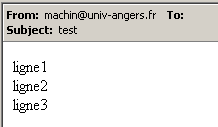
请注意,SMTP 服务无法检测发件人是否有效。因此,您绝不能信任邮件中的“发件人”字段。在此示例中,发件人 machin@univ-angers.fr 并不存在。这个通用的 TCP 客户端使我们能够发现互联网服务的通信协议,并据此为这些服务的客户端构建专门的类。 让我们来探索 POP(邮局协议)服务的通信协议,该协议允许用户检索存储在服务器上的电子邮件。它运行在 110 端口上。
dos>cltgen istia.univ-angers.fr 110
Commandes :
<-- +OK Qpopper (version 4.0.3) at istia.univ-angers.fr starting.
help
<-- -ERR Unknown command: "help".
user st
<-- +OK Password required for st.
pass monpassword
<-- +OK st has 157 visible messages (0 hidden) in 11755927 octets.
list
<-- +OK 157 visible messages (11755927 octets)
<-- 1 892847
<-- 2 171661
...
<-- 156 2843
<-- 157 2796
<-- .
retr 157
<-- +OK 2796 octets
<-- Received: from lagaffe.univ-angers.fr (lagaffe.univ-angers.fr [193.49.144.1])
<--     by istia.univ-angers.fr (8.11.6/8.9.3) with ESMTP id g4D6wZs26600;
<--     Mon, 13 May 2002 08:58:35 +0200
<-- Received: from jaume ([193.49.146.242])
<--     by lagaffe.univ-angers.fr (8.11.1/8.11.2/GeO20000215) with SMTP id g4D6wSd37691;
<--     Mon, 13 May 2002 08:58:28 +0200 (CEST)
...
<-- ------------------------------------------------------------------------
<-- NOC-RENATER2                  Tl.  : 0800 77 47 95
<-- Fax : (+33) 01 40 78 64 00 ,  Email : noc-r2@cssi.renater.fr
<-- ------------------------------------------------------------------------
<--
<-- .
quit
<-- +OK Pop server at istia.univ-angers.fr signing off.
[fin du thread de lecture des réponses du serveur]
fin
[fin du thread d'envoi des commandes au serveur]
主要命令如下:
- user login,在此处输入您在邮件服务器上的登录名
- pass password,在此输入与前一个登录名关联的密码
- list,用于获取邮件列表,格式为编号、字节大小
- retr i,用于阅读编号为 i 的邮件
- quit,用于结束本次会话。
现在,让我们来探讨客户端与 Web 服务器之间的通信协议,该服务器通常运行在 80 端口上:
dos>cltgen istia.univ-angers.fr 80
Commandes :
GET /index.html HTTP/1.0

<-- HTTP/1.1 200 OK
<-- Date: Mon, 13 May 2002 07:30:58 GMT
<-- Server: Apache/1.3.12 (Unix)  (Red Hat/Linux) PHP/3.0.15 mod_perl/1.21
<-- Last-Modified: Wed, 06 Feb 2002 09:00:58 GMT
<-- ETag: "23432-2bf3-3c60f0ca"
<-- Accept-Ranges: bytes
<-- Content-Length: 11251
<-- Connection: close
<-- Content-Type: text/html
<--
<-- <html>
<--
<-- <head>
<-- <meta http-equiv="Content-Type"
<-- content="text/html; charset=iso-8859-1">
<-- <meta name="GENERATOR" content="Microsoft FrontPage Express 2.0">
<-- <title>Bienvenue a l'ISTIA - Universite d'Angers</title>
<-- </head>
....
<-- face="Verdana"> - Dernire mise  jour le <b>10 janvier 2002</b></font></p>
<-- </body>
<-- </html>
<--
[fin du thread de lecture des réponses du serveur]
fin
[fin du thread d'envoi des commandes au serveur]
Web客户端按照以下模式向服务器发送命令:
Web 服务器仅在收到空行后才会响应。在此示例中,我们仅使用了一个命令:
该命令向服务器请求 URL /index.html,并表明使用的是 HTTP 1.0 版本。该协议的最新版本为 1.1。示例显示,服务器通过发送 index.html 文件的内容并随后关闭连接来响应,正如我们所见,响应显示为“线程终止”。在发送 index.html 文件的内容之前,Web 服务器先发送了一系列标头,随后是一个空行:
<-- HTTP/1.1 200 OK
<-- Date: Mon, 13 May 2002 07:30:58 GMT
<-- Server: Apache/1.3.12 (Unix)  (Red Hat/Linux) PHP/3.0.15 mod_perl/1.21
<-- Last-Modified: Wed, 06 Feb 2002 09:00:58 GMT
<-- ETag: "23432-2bf3-3c60f0ca"
<-- Accept-Ranges: bytes
<-- Content-Length: 11251
<-- Connection: close
<-- Content-Type: text/html
<--
<-- <html>
<html> 这一行是 /index.html 文件的第一行。其前面的文本被称为 HTTP(超文本传输协议)头部。我们在此不详细讨论这些头部,但请记住,我们的通用客户端提供了访问这些头部的功能,这有助于理解它们。例如,第一行:
表明所连接的 Web 服务器支持 HTTP/1.1 协议,并且已成功找到请求的文件(200 OK),其中 200 是一个 HTTP 响应代码。这些行
告知客户端,它将接收 11,251 字节的 HTML(超文本标记语言)文本,且数据发送完毕后连接将被关闭。因此,我们这里有一个非常实用的 TCP 客户端。实际上,这种客户端在计算机上已经存在,通常被称为 telnet,但亲自编写它也颇有意思。通用的 TCP 客户端程序如下:
' namespaces
Imports System
Imports System.Net.Sockets
Imports System.IO
Imports System.Threading
Imports Microsoft.VisualBasic
' the class
Public Class clientTcpGénérique
' receives the characteristics of a service as a parameter in the form
' server port
' connects to the service
' creates a thread to read keyboard commands
' these will be sent to the
' creates a thread to read server responses
' these will be displayed on the screen
' the whole thing ends with the command end typed on the keyboard
Public Shared Sub Main(ByVal args() As String)
' syntax
Const syntaxe As String = "pg serveur port"
' number of arguments
If args.Length <> 2 Then
erreur(syntaxe, 1)
End If
' note the server name
Dim serveur As String = args(0)
' port must be integer >0
Dim port As Integer = 0
Dim erreurPort As Boolean = False
Dim E As Exception = Nothing
Try
port = Integer.Parse(args(1))
Catch ex As Exception
E = ex
erreurPort = True
End Try
erreurPort = erreurPort Or port <= 0
If erreurPort Then
erreur(syntaxe + ControlChars.Lf + "Port incorrect (" + E.ToString + ")", 2)
End If
Dim client As TcpClient = Nothing
' there may be problems
Try
' connect to the service
client = New TcpClient(serveur, port)
Catch ex As Exception
' error
Console.Error.WriteLine(("Impossible de se connecter au service (" & serveur & "," & port & "), erreur : " & ex.Message))
' end
Return
End Try
' create read/write threads
Dim thReceive As New Thread(New ThreadStart(AddressOf New clientReceive(client).Run))
Dim thSend As New Thread(New ThreadStart(AddressOf New clientSend(client).Run))
' start execution of both threads
thSend.Start()
thReceive.Start()
' end of main thread
Return
End Sub
' error display
Public Shared Sub erreur(ByVal msg As String, ByVal exitCode As Integer)
' error display
System.Console.Error.WriteLine(msg)
' stop with error
Environment.Exit(exitCode)
End Sub
End Class
Public Class clientSend
' class for reading keyboard commands
' and send them to a server via a tcp client passed to the
Private client As TcpClient ' tcp client
' manufacturer
Public Sub New(ByVal client As TcpClient)
' we note the tcp client
Me.client = client
End Sub
' thread Run method
Public Sub Run()
' local data
Dim OUT As StreamWriter = Nothing ' network write streams
Dim commande As String = Nothing ' command read from keyboard
' error management
Try
' create network write stream
OUT = New StreamWriter(client.GetStream())
OUT.AutoFlush = True
' order entry-send loop
Console.Out.WriteLine("Commandes : ")
While True
' read command typed on keyboard
commande = Console.In.ReadLine().Trim()
' finished?
If commande.ToLower() = "fin" Then
Exit While
End If
' send order to server
OUT.WriteLine(commande)
End While
Catch ex As Exception
' error
Console.Error.WriteLine(("L'erreur suivante s'est produite : " + ex.Message))
End Try
' end - we close the feeds
Try
OUT.Close()
client.Close()
Catch
End Try
' signals the end of the thread
Console.Out.WriteLine("[fin du thread d'envoi des commandes au serveur]")
End Sub
End Class
Public Class clientReceive
' class responsible for reading lines of text intended for a
' tcp client passed to builder
Private client As TcpClient ' tcp client
' manufacturer
Public Sub New(ByVal client As TcpClient)
' we note the tcp client
Me.client = client
End Sub
'manufacturer
' thread Run method
Public Sub Run()
' local data
Dim [IN] As StreamReader = Nothing ' network read stream
Dim réponse As String = Nothing ' server response
' error management
Try
' create network read stream
[IN] = New StreamReader(client.GetStream())
' loop read text lines from IN stream
While True
' network streaming
réponse = [IN].ReadLine()
' closed flow?
If réponse Is Nothing Then
Exit While
End If
' display
Console.Out.WriteLine(("<-- " + réponse))
End While
Catch ex As Exception
' error
Console.Error.WriteLine(("L'erreur suivante s'est produite : " + ex.Message))
End Try
' end - close flows
Try
[IN].Close()
client.Close()
Catch
End Try
' signals the end of the thread
Console.Out.WriteLine("[fin du thread de lecture des réponses du serveur]")
End Sub
End Class
9.4.4. 一个通用的 TCP 服务器
现在我们来看一个服务器
- ,它会在屏幕上显示客户端发送的命令
- 并将用户通过键盘输入的文本发送给客户端。因此,用户在此充当了服务器的角色。
该程序通过以下命令启动:srvgen listeningPort,其中 listeningPort 是客户端必须连接的端口。客户端服务将由两个线程处理:
- 一个线程专门用于读取客户端发送的文本行
- 另一个线程专门用于读取用户输入的响应。该线程将使用 fin 命令发出信号,表示其正在关闭与客户端的连接。
服务器为每个客户端创建两个线程。如果有 n 个客户端,则同时会有 2n 个活动线程。除非用户按下键盘上的 Ctrl-C,否则服务器本身不会停止运行。让我们来看几个示例。
服务器运行在 100 端口,我们使用通用客户端与其通信。客户端窗口如下所示:
dos>cltgen localhost 100
Commandes :
commande 1 du client 1
<-- réponse 1 au client 1
commande 2 du client 1
<-- réponse 2 au client 1
fin
L'erreur suivante s'est produite : Impossible de lire les données de la connexion de transport.
[fin du thread de lecture des réponses du serveur]
[fin du thread d'envoi des commandes au serveur]
以 <-- 开头的行是服务器发送给客户端的;其余行是客户端发送给服务器的。服务器窗口如下:
dos>srvgen 100
Serveur générique lancé sur le port 100
Thread de lecture des réponses du serveur au client 1 lancé
1 : Thread de lecture des demandes du client 1 lancé
<-- commande 1 du client 1
réponse 1 au client 1
1 : <-- commande 2 du client 1
réponse 2 au client 1
1 : [fin du Thread de lecture des demandes du client 1]
fin
[fin du Thread de lecture des réponses du serveur au client 1]
以 <-- 开头的行是客户端发送给服务器的。以 N: 开头的行是服务器发送给客户端 N 的。尽管客户端 1 已结束,但上面的服务器仍然处于活动状态。我们为同一服务器启动第二个客户端:
dos>cltgen localhost 100
Commandes :
commande 3 du client 2
<-- réponse 3 au client 2
fin
L'erreur suivante s'est produite : Impossible de lire les données de la connexion de transport.
[fin du thread de lecture des réponses du serveur]
[fin du thread d'envoi des commandes au serveur]
服务器窗口现在如下所示:
dos>srvgen 100
Serveur générique lancé sur le port 100
Thread de lecture des réponses du serveur au client 1 lancé
1 : Thread de lecture des demandes du client 1 lancé
<-- commande 1 du client 1
réponse 1 au client 1
1 : <-- commande 2 du client 1
réponse 2 au client 1
1 : [fin du Thread de lecture des demandes du client 1]
fin
[fin du Thread de lecture des réponses du serveur au client 1]
Thread de lecture des réponses du serveur au client 2 lancé
2 : Thread de lecture des demandes du client 2 lancé
<-- commande 3 du client 2
réponse 3 au client 2
2 : [fin du Thread de lecture des demandes du client 2]
fin
[fin du Thread de lecture des réponses du serveur au client 2]
^C
现在,让我们通过在 88 端口上运行我们的通用服务器来模拟一个 Web 服务器:
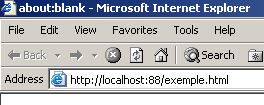
现在,让我们打开浏览器并访问 URL http://localhost:88/exemple.html。浏览器将连接到本地主机的 88 端口,并请求 /example.html 页面:
现在让我们看看我们的服务器窗口:
dos>srvgen 88
Serveur générique lancé sur le port 88
Thread de lecture des réponses du serveur au client 2 lancé
2 : Thread de lecture des demandes du client 2 lancé
<-- GET /exemple.html HTTP/1.1
<-- Accept: image/gif, image/x-xbitmap, image/jpeg, image/pjpeg, application/msword, */*
<-- Accept-Language: fr
<-- Accept-Encoding: gzip, deflate
<-- User-Agent: Mozilla/4.0 (compatible; MSIE 6.0; Windows NT 5.0; .NET CLR 1.0.3705; .NET CLR 1.0.2
914)
<-- Host: localhost:88
<-- Connection: Keep-Alive
<--
这就是我们看到浏览器发送的 HTTP 头部。这让我们能够逐步了解 HTTP 协议。在之前的示例中,我们创建了一个仅发送单个 GET 请求的 Web 客户端。那已经足够了。在这里,我们看到浏览器向服务器发送了其他信息。这些信息旨在告诉服务器它正在处理的是哪种客户端。我们还看到,HTTP 头部以空行结尾。 现在,让我们为客户端编写一个响应。此时,坐在键盘前的用户就是实际的服务器,可以手动编写响应。让我们回顾一下前一个示例中 Web 服务器发送的响应:
<-- HTTP/1.1 200 OK
<-- Date: Mon, 13 May 2002 07:30:58 GMT
<-- Server: Apache/1.3.12 (Unix) (Red Hat/Linux) PHP/3.0.15 mod_perl/1.21
<-- Last-Modified: Wed, 06 Feb 2002 09:00:58 GMT
<-- ETag: "23432-2bf3-3c60f0ca"
<-- Accept-Ranges: bytes
<-- Content-Length: 11251
<-- Connection: close
<-- Content-Type: text/html
<--
<-- <html>
让我们尝试提供一个类似的响应:
...
<-- Host: localhost:88
<-- Connection: Keep-Alive
<--
2 : HTTP/1.1 200 OK
2 : Server: serveur tcp generique
2 : Connection: close
2 : Content-Type: text/html
2 :
2 : <html>
2 :   <head><title>Serveur generique</title></head>
2 :   <body>
2 :     <center>
2 :       <h2>Reponse du serveur generique</h2>
2 :     </center>
2 :    </body>
2 : </html>
2 : fin
L'erreur suivante s'est produite : Impossible de lire les données de la connexion de transport.
[fin du Thread de lecture des demandes du client 2]
[fin du Thread de lecture des réponses du serveur au client 2]
以 2: 开头的行是从服务器发送到客户端 #2 的。end 命令关闭了从服务器到客户端的连接。在我们的响应中,我们仅使用了以下 HTTP 头部:
HTTP/1.1 200 OK
2 : Server: serveur tcp generique
2 : Connection: close
2 : Content-Type: text/html
2 :
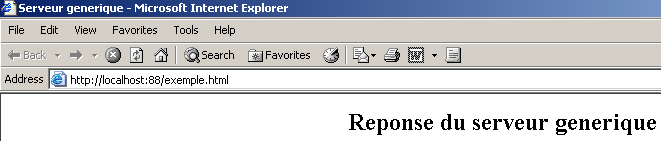
我们并未指定要发送的文件大小(Content-Length),而是仅表示发送完成后将关闭连接(Connection: close)。这对浏览器而言已足够。当浏览器检测到连接已关闭时,便会知道服务器的响应已完成,并显示收到的 HTML 页面。该页面如下所示:
2 : <html>
2 :   <head><title>Serveur generique</title></head>
2 :   <body>
2 :     <center>
2 :       <h2>Reponse du serveur generique</h2>
2 :     </center>
2 :    </body>
2 : </html>
随后,用户通过输入“fin”命令关闭与客户端的连接。浏览器随即得知服务器的响应已完成,并可将其显示出来:
如果在上面的示例中,您选择“查看/源代码”来查看浏览器接收的内容,您将看到:
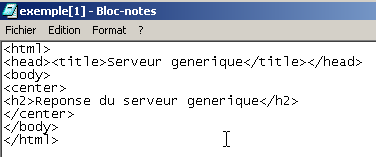
也就是说,这正是通用服务器发送的内容。通用 TCP 服务器的代码如下:
' namespaces
Imports System
Imports System.Net
Imports System.Net.Sockets
Imports System.IO
Imports System.Threading
Imports Microsoft.VisualBasic

Public Class serveurTcpGénérique

    ' main program
    Public Shared Sub Main(ByVal args() As String)

        ' receives the port of listening to customer requests
        ' creates a thread to read client requests
        ' these will be displayed on the screen
        ' creates a thread to read keyboard commands
        ' these will be sent as a reply to the customer
        ' the whole thing ends with the command end typed on the keyboard

        Const syntaxe As String = "Syntaxe : pg port"

        ' is there an argument
        If args.Length <> 1 Then
            erreur(syntaxe, 1)
        End If
        ' this argument must be integer >0
        Dim port As Integer = 0
        Dim erreurPort As Boolean = False
        Dim E As Exception = Nothing
        Try
            port = Integer.Parse(args(0))
        Catch ex As Exception
            E = ex
            erreurPort = True
        End Try
        erreurPort = erreurPort Or port <= 0
        If erreurPort Then
            erreur(syntaxe + ControlChars.Lf + "Port incorrect (" + E.ToString + ")", 2)
        End If
        ' we create the listening service
        Dim ecoute As TcpListener = Nothing
        Dim nbClients As Integer = 0     ' of customers handled
        Try
            ' create the service
            ecoute = New TcpListener(IPAddress.Parse("127.0.0.1"), port)
            ' launch it
            ecoute.Start()
            ' follow-up
            Console.Out.WriteLine(("Serveur générique lancé sur le port " & port))

            ' customer service loop
            Dim client As TcpClient = Nothing
            While True        ' infinite loop - will be stopped by Ctrl-C
                ' waiting for a customer
                client = ecoute.AcceptTcpClient()

                ' the service is provided by separate threads
                nbClients += 1
                ' thread for reading customer requests
                Dim thReceive As New Thread(New ThreadStart(AddressOf New serveurReceive(client, nbClients).Run))
                ' thread for reading responses typed on the keyboard by the user
                Dim thSend As New Thread(New ThreadStart(AddressOf New serveurSend(client, nbClients).Run))

                ' start execution of both threads
                thSend.Start()
                thReceive.Start()
            End While
            ' back to listening to requests
        Catch ex As Exception
            ' we report the error
            erreur("L'erreur suivante s'est produite : " + ex.Message, 3)
        End Try
    End Sub

    ' error display
    Public Shared Sub erreur(ByVal msg As String, ByVal exitCode As Integer)
        ' error display
        System.Console.Error.WriteLine(msg)
        ' stop with error
        Environment.Exit(exitCode)
    End Sub
End Class


Public Class serveurSend
    ' class responsible for reading typed responses
    ' and send them to a client via a tcp client passed to the
    Private client As TcpClient    ' tcp client
    Private numClient As Integer    ' customer no

    ' manufacturer
    Public Sub New(ByVal client As TcpClient, ByVal numClient As Integer)
        ' we note the tcp client
        Me.client = client
        ' and its
        Me.numClient = numClient
    End Sub

    ' thread Run method
    Public Sub Run()

        ' local data
        Dim OUT As StreamWriter = Nothing        ' network write streams
        Dim réponse As String = Nothing        ' answer read from keyboard
        ' follow-up
        Console.Out.WriteLine(("Thread de lecture des réponses du serveur au client " & numClient & " lancé"))
        ' error management
        Try
            ' network write stream creation
            OUT = New StreamWriter(client.GetStream())
            OUT.AutoFlush = True
            ' order entry-send loop
            While True
                ' customer identification
                Console.Out.Write((numClient & " : "))
                ' read response typed on keyboard
                réponse = Console.In.ReadLine().Trim()
                ' finished?
                If réponse.ToLower() = "fin" Then
                    Exit While
                End If
                ' send response to server
                OUT.WriteLine(réponse)
            End While
            ' following response
        Catch ex As Exception
            ' error
            Console.Error.WriteLine(("L'erreur suivante s'est produite : " + ex.Message))
        End Try
        ' end - close flows
        Try
            OUT.Close()
            client.Close()
        Catch
        End Try
        ' signals the end of the thread
        Console.Out.WriteLine(("[fin du Thread de lecture des réponses du serveur au client " & numClient & "]"))
    End Sub
End Class

Public Class serveurReceive
    ' class responsible for reading text lines sent to the server
    ' via a tcp client passed to the builder
    Private client As TcpClient     ' tcp client
    Private numClient As Integer    ' customer no

    ' manufacturer
    Public Sub New(ByVal client As TcpClient, ByVal numClient As Integer)
        ' we note the tcp client
        Me.client = client
        ' and its
        Me.numClient = numClient
    End Sub

    ' thread Run method
    Public Sub Run()
        ' local data
        Dim [IN] As StreamReader = Nothing        ' network read stream
        Dim réponse As String = Nothing        ' server response
        ' follow-up
        Console.Out.WriteLine(("Thread de lecture des demandes du client " & numClient & " lancé"))
        ' error management
        Try
            ' create network read stream
            [IN] = New StreamReader(client.GetStream())
            ' loop read text lines from IN stream
            While True
                ' network streaming
                réponse = [IN].ReadLine()
                ' closed flow?
                If réponse Is Nothing Then
                    Exit While
                End If
                ' display
                Console.Out.WriteLine(("<-- " + réponse))
            End While
        Catch ex As Exception
            ' error
            Console.Error.WriteLine(("L'erreur suivante s'est produite : " + ex.Message))
        End Try
        ' end - close flows
        Try
            [IN].Close()
            client.Close()
        Catch
        End Try
        ' signals the end of the thread
        Console.Out.WriteLine(("[fin du Thread de lecture des demandes du client " & numClient & "]"))
    End Sub
End Class
9.4.5. Web 客户端
在上一个示例中,我们看到了一些由浏览器发送的 HTTP 头部:
<-- GET /exemple.html HTTP/1.1
<-- Accept: image/gif, image/x-xbitmap, image/jpeg, image/pjpeg, application/msword, */*
<-- Accept-Language: fr
<-- Accept-Encoding: gzip, deflate
<-- User-Agent: Mozilla/4.0 (compatible; MSIE 6.0; Windows NT 5.0; .NET CLR 1.0.3705; .NET CLR 1.0.2
914)
<-- Host: localhost:88
<-- Connection: Keep-Alive
<--
我们将编写一个Web客户端,该客户端以URL作为参数,并在屏幕上显示服务器发送的文本。我们将假设服务器支持HTTP 1.1协议。在上述列出的头部字段中,我们将仅使用以下内容:
- 第一个标头指示我们要哪一页
- 第二个指定了我们要查询的服务器
- 第三个标明我们希望服务器在向我们响应后关闭连接。
如果我们将上例中的 GET 替换为 HEAD,服务器将只向我们发送 HTTP 头部信息,而不发送 HTML 页面。
我们的 Web 客户端调用格式如下:webclient URL cmd,其中 URL 是目标 URL,cmd 是两个关键字 GET 或 HEAD 之一,用于指示我们是否仅需请求头(HEAD)或同时需要页面内容(GET)。让我们来看一个简单的示例。我们在同一台机器上启动 IIS 服务器,然后启动 Web 客户端:
dos>clientweb http://localhost HEAD
HTTP/1.1 302 Object moved
Server: Microsoft-IIS/5.0
Date: Mon, 13 May 2002 09:23:37 GMT
Connection: close
Location: /IISSamples/Default/welcome.htm
Content-Length: 189
Content-Type: text/html
Set-Cookie: ASPSESSIONIDGQQQGUUY=HMFNCCMDECBJJBPPBHAOAJNP; path=/
Cache-control: private
响应
表示所请求的页面已移动(因此拥有新的 URL)。新的 URL 由 Location: 标头提供
如果我们在调用 Web 客户端时使用 GET 而不是 HEAD:
dos>clientweb http://localhost GET
HTTP/1.1 302 Object moved
Server: Microsoft-IIS/5.0
Date: Mon, 13 May 2002 09:33:36 GMT
Connection: close
Location: /IISSamples/Default/welcome.htm
Content-Length: 189
Content-Type: text/html
Set-Cookie: ASPSESSIONIDGQQQGUUY=IMFNCCMDAKPNNGMGMFIHENFE; path=/
Cache-control: private

<head><title>L'objet a changé d'emplacement</title></head>
<body><h1>L'objet a changé d'emplacement</h1>Cet objet peut être trouvé <a HREF="/IISSamples/Default/we
lcome.htm">ici</a>.</body>
我们得到了与 HEAD 请求相同的结果,外加 HTML 页面的正文内容。程序如下:
' namespaces
Imports System
Imports System.Net.Sockets
Imports System.IO


Public Class clientWeb1

    ' requests a URL
    ' displays its contents on the screen
    Public Shared Sub Main(ByVal args() As String)
        ' syntax
        Const syntaxe As String = "pg URI GET/HEAD"

        ' number of arguments
        If args.Length <> 2 Then
            erreur(syntaxe, 1)
        End If
        ' note the URI required
        Dim URIstring As String = args(0)
        Dim commande As String = args(1).ToUpper()

        ' URI validity check
        Dim uri As Uri = Nothing
        Try
            uri = New Uri(URIstring)
        Catch ex As Exception
            ' URI incorrect
            erreur("L'erreur suivante s'est produite : " + ex.Message, 2)
        End Try
        ' order verification
        If commande <> "GET" And commande <> "HEAD" Then
            ' incorrect order
            erreur("Le second paramètre doit être GET ou HEAD", 3)
        End If

        ' we can work
        Dim client As TcpClient = Nothing        ' the customer
        Dim [IN] As StreamReader = Nothing        ' the customer's reading flow
        Dim OUT As StreamWriter = Nothing        ' the customer's writing flow
        Dim réponse As String = Nothing        ' server response
        Try
            ' connect to the server
            client = New TcpClient(uri.Host, uri.Port)

            ' create customer input/output flows TCP
            [IN] = New StreamReader(client.GetStream())
            OUT = New StreamWriter(client.GetStream())
            OUT.AutoFlush = True

            ' request URL - send HTTP headers
            OUT.WriteLine((commande + " " + uri.PathAndQuery + " HTTP/1.1"))
            OUT.WriteLine(("Host: " + uri.Host + ":" & uri.Port))
            OUT.WriteLine("Connection: close")
            OUT.WriteLine()
            ' we read the answer
            réponse = [IN].ReadLine()
            While Not (réponse Is Nothing)
                ' the answer is processed
                Console.Out.WriteLine(réponse)
                ' we read the answer
                réponse = [IN].ReadLine()
            End While
            ' it's over
            client.Close()
        Catch e As Exception
            ' we handle the exception
            erreur(e.Message, 4)
        End Try
    End Sub

    ' error display
    Public Shared Sub erreur(ByVal msg As String, ByVal exitCode As Integer)
        ' error display
        System.Console.Error.WriteLine(msg)
        ' stop with error
        Environment.Exit(exitCode)
    End Sub
End Class
本程序的唯一新特性是使用了 Uri 类。该程序接收以 http://serveur:port/cheminPageHTML?param1=val1;param2=val2;.... 形式呈现的 URL(统一资源定位符)或 URI(统一资源标识符)。 Uri 类允许我们将 URL 字符串分解为各个组成部分。Uri 对象是通过作为参数接收的 URI 字符串构建而成的:
        ' URI validity check
        Dim uri As Uri = Nothing
        Try
            uri = New Uri(URIstring)
        Catch ex As Exception
            ' URI incorrect
            erreur("L'erreur suivante s'est produite : " + ex.Message, 2)
        End Try
如果作为参数接收的 URI 字符串不是有效的 URI(缺少协议、服务器等),则会抛出异常。这使我们能够验证接收到的参数是否有效。一旦 URI 对象构建完成,我们就可以访问其各个元素。 因此,如果前文代码中的 URI 对象是由字符串 http://serveur:port/cheminPageHTML?param1=val1;param2=val2;... 构建的,我们将得到:
uri.Host=server, uri.Port=port, uri.Path=HTMLPagePath, uri.Query=param1=val1;param2=val2;..., uri.pathAndQuery=HTMLPagePath?param1=val1;param2=val2;..., uri.Scheme=http.
9.4.6. Web 客户端处理重定向
前面的 Web 客户端不处理其请求的 URL 可能发生的任何重定向。下面的客户端则会处理。
- 它读取服务器发送的 HTTP 头部的第一行,以检查其中是否包含字符串“302 Object moved”,这表示发生了重定向
- 它读取以下头部信息。如果存在重定向,它会查找“Location: url”这一行,该行提供了所请求页面的新URL,并记录下该URL。
- 它显示服务器响应的其余部分。如果存在重定向,则使用新 URL 重复步骤 1 至 3。该程序不接受超过一次的重定向。此限制由一个可修改的常量定义。
以下是一个示例:
dos>clientweb2 http://localhost GET
HTTP/1.1 302 Object moved
Server: Microsoft-IIS/5.0
Date: Mon, 13 May 2002 11:38:55 GMT
Connection: close
Location: /IISSamples/Default/welcome.htm
Content-Length: 189
Content-Type: text/html
Set-Cookie: ASPSESSIONIDGQQQGUUY=PDGNCCMDNCAOFDMPHCJNPBAI; path=/
Cache-control: private

<head><title>L'objet a chang d'emplacement</title></head>
<body><h1>L'objet a chang d'emplacement</h1>Cet objet peut tre trouv <a HREF="/IISSamples/Default/we
lcome.htm">ici</a>.</body>

<--Redirection vers l'URL http://localhost:80/IISSamples/Default/welcome.htm-->

HTTP/1.1 200 OK
Server: Microsoft-IIS/5.0
Connection: close
Date: Mon, 13 May 2002 11:38:55 GMT
Content-Type: text/html
Accept-Ranges: bytes
Last-Modified: Mon, 16 Feb 1998 21:16:22 GMT
ETag: "0174e21203bbd1:978"
Content-Length: 4781

<html>

<head>
<title>Bienvenue dans le Serveur Web personnel</title>
</head>
....
</body>
</html>
活动安排如下:
' namespaces
Imports System
Imports System.Net.Sockets
Imports System.IO
Imports System.Text.RegularExpressions
Imports Microsoft.VisualBasic

' web client class
Public Class clientWeb

  ' requests a URL and displays its contents on the screen
  Public Shared Sub Main(ByVal args() As String)
    ' syntax
    Const syntaxe As String = "pg URI GET/HEAD"

    ' number of arguments
    If args.Length <> 2 Then
      erreur(syntaxe, 1)
    End If
    ' note the URI required
    Dim URIstring As String = args(0)
    Dim commande As String = args(1).ToUpper()

    ' URI validity check
    Dim uri As Uri = Nothing
    Try
      uri = New Uri(URIstring)
    Catch ex As Exception
      ' URI incorrect
      erreur("L'erreur suivante s'est produite : " + ex.Message, 2)
    End Try 'catch
    ' order verification
    If commande <> "GET" And commande <> "HEAD" Then
      ' incorrect order
      erreur("Le second paramètre doit être GET ou HEAD", 3)
    End If

    ' we can work
    Dim client As TcpClient = Nothing ' the customer
    Dim [IN] As StreamReader = Nothing ' the customer's reading flow
    Dim OUT As StreamWriter = Nothing ' the customer's writing flow
    Dim réponse As String = Nothing ' server response
    Const nbRedirsMax As Integer = 1 ' no more than one redirection accepted
    Dim nbRedirs As Integer = 0 ' number of redirects in progress
    Dim premièreLigne As String ' 1st line of the answer
    Dim redir As Boolean = False ' indicates redirection or not
    Dim locationString As String = "" ' the URI string of a possible redirection
    ' regular expression to find a URL redirect
    Dim location As New Regex("^Location: (.+?)$") '

        ' error management
    Try
      ' you may have several URL to request if there are redirections
      While nbRedirs <= nbRedirsMax
        ' connect to the server
        client = New TcpClient(uri.Host, uri.Port)

        ' create customer input/output flows TCP
        [IN] = New StreamReader(client.GetStream())
        OUT = New StreamWriter(client.GetStream())
        OUT.AutoFlush = True

        ' we send HTTP headers to request URL
        OUT.WriteLine((commande + " " + uri.PathAndQuery + " HTTP/1.1"))
        OUT.WriteLine(("Host: " + uri.Host + ":" & uri.Port))
        OUT.WriteLine("Connection: close")
        OUT.WriteLine()

        ' read the first line of the answer
        premièreLigne = [IN].ReadLine()
        ' screen echo
        Console.Out.WriteLine(premièreLigne)

        ' redirection?
        If Regex.IsMatch(premièreLigne, "302 Object moved$") Then
          ' there is a redirection
          redir = True
          nbRedirs += 1
                End If

                ' next HTTP headers until you find the empty line signalling the end of the headers
                Dim locationFound As Boolean = False
                réponse = [IN].ReadLine()
                While réponse <> ""
                    ' the answer is displayed
                    Console.Out.WriteLine(réponse)
                    ' if there is a redirection, we search for the Location header
                    If redir And Not locationFound Then
                        ' compare the line with the relational expression location
                        Dim résultat As Match = location.Match(réponse)
                        If résultat.Success Then
                            ' if found, note the URL of redirection
                            locationString = résultat.Groups(1).Value
                            ' we note that we found
                            locationFound = True
                        End If
                    End If
                    ' next line
                    réponse = [IN].ReadLine()
                End While

                ' following lines of the answer
                Console.Out.WriteLine(réponse)
                réponse = [IN].ReadLine()
                While Not (réponse Is Nothing)
                    ' the answer is displayed
                    Console.Out.WriteLine(réponse)
                    ' next line
                    réponse = [IN].ReadLine()
                End While

                ' close the connection
                client.Close()
                ' are we done?
                If Not locationFound Or nbRedirs > nbRedirsMax Then
                    Exit While
                End If

                ' there is a redirection to be made - we build the new Uri
                URIstring = uri.Scheme + "://" & uri.Host & ":" & uri.Port & locationString
                uri = New Uri(URIstring)
                ' follow-up
                Console.Out.WriteLine((ControlChars.Lf + "<--Redirection vers l'URL " + URIstring + "-->" + ControlChars.Lf))
            End While
        Catch e As Exception
      ' we handle the exception
      erreur(e.Message, 4)
        End Try
    End Sub

    ' error display
    Public Shared Sub erreur(ByVal msg As String, ByVal exitCode As Integer)
        ' error display
        System.Console.Error.WriteLine(msg)
        ' stop with error
        Environment.Exit(exitCode)
    End Sub
End Class
9.4.7. 税费计算服务器
我们将重新审视“TAXES”练习,该练习此前已以多种形式进行过讲解。让我们回顾一下最新版本。已创建了一个税类。其属性是三个数字数组:
Public Class impôt
    ' les données nécessaires au calcul de l'impôt
    ' proviennent d'une source extérieure
    Private limites(), coeffR(), coeffN() as double
该类有两个构造函数:
- 一个构造函数,用于接收计算税款所需的三个数据数组
    // constructeur 1
    Public Sub New(ByVal LIMITES() As Decimal, ByVal COEFFR() As Decimal, ByVal COEFFN() As Decimal)
        ' initializes the three limit arrays, coeffR, coeffN from
        ' parameters passed to the constructor
- 该构造函数接收的参数是 ODBC 数据库的 DSN 名称
    ' builder 2
    Public Sub New(ByVal DSNimpots As String, ByVal Timpots As String, ByVal colLimites As String, ByVal colCoeffR As String, ByVal colCoeffN As String)
        ' initializes the three limit arrays, coeffR, coeffN from
        ' the contents of the Timpots table in the ODBC DSNimpots database
        ' colLimites, colCoeffR, colCoeffN are the three columns of this table
        ' can throw an exception
编写了一个测试程序:
dos>vbc /r:impots.dll testimpots.vb

dos>test mysql-impots timpots limites coeffr coeffn
Paramètres du calcul de l'impôt au format marié nbEnfants salaire ou rien pour arrêter :o 2 200000
impôt=22506 F
Paramètres du calcul de l'impôt au format marié nbEnfants salaire ou rien pour arrêter :n 2 200000
impôt=33388 F
Paramètres du calcul de l'impôt au format marié nbEnfants salaire ou rien pour arrêter :o 3 200000
impôt=16400 F
Paramètres du calcul de l'impôt au format marié nbEnfants salaire ou rien pour arrêter :n 3 300000
impôt=50082 F
Paramètres du calcul de l'impôt au format marié nbEnfants salaire ou rien pour arrêter :n 3 200000
impôt=22506 F
在此,测试程序和税务对象位于同一台机器上。我们建议将测试程序和税务对象放置在不同的机器上。我们将构建一个客户端-服务器应用程序,其中远程税务对象将作为服务器。新类名为 TaxServer,并继承自 tax 类:
Public Class ServeurImpots
    Inherits impôt

    ' attributes
    Private portEcoute As Integer    ' the ability to listen to customer requests
    Private actif As Boolean    ' server status

    ' manufacturer
    Public Sub New(ByVal portEcoute As Integer, ByVal DSNimpots As String, ByVal Timpots As String, ByVal colLimites As String, ByVal colCoeffR As String, ByVal colCoeffN As String)
        MyBase.New(DSNimpots, Timpots, colLimites, colCoeffR, colCoeffN)
        ' we note the listening port
        Me.portEcoute = portEcoute
        ' currently inactive
        actif = False
        ' creates and launches a thread for reading keyboard commands
        ' the server will be managed using these commands
        Dim threadLecture As Thread = New Thread(New ThreadStart(AddressOf admin))
        threadLecture.Start()
    End Sub
构造函数中唯一的新参数是用于监听客户端请求的端口。其余参数将直接传递给基础 tax 类。tax 服务器通过键盘命令进行控制。因此,我们创建了一个线程来读取这些命令。可能的命令有两个:start 用于启动服务,stop 用于永久关闭服务。处理这些命令的 admin 方法如下:
    Public Sub admin()
        ' reads server administration commands typed from the keyboard
        ' in an endless loop
        Dim commande As String = Nothing
        While True
            ' invite
            Console.Out.Write("Serveur d'impôts>")
            ' read command
            commande = Console.In.ReadLine().Trim().ToLower()
            ' order execution
            If commande = "start" Then
                ' active?
                If actif Then
                    'error
                    Console.Out.WriteLine("Le serveur est déjà actif")
                Else
                    ' we launch the listening service
                    Dim threadEcoute As Thread = New Thread(New ThreadStart(AddressOf ecoute))
                    threadEcoute.Start()
                End If
            Else
                If commande = "stop" Then
                    ' end of all execution threads
                    Environment.Exit(0)
                Else
                    ' error
                    Console.Out.WriteLine("Commande incorrecte. Utilisez (start,stop)")
                End If
            End If
        End While
    End Sub
如果通过键盘输入的命令是“start”,则会启动一个监听客户端请求的线程。如果输入的命令是“stop”,则所有线程都会停止。监听线程会执行“ecoute”方法:
    Public Sub ecoute()
        ' thread for listening to customer requests
        ' we create the listening service
        Dim ecoute As TcpListener = Nothing
        Try
            ' create the service
            ecoute = New TcpListener(IPAddress.Parse("127.0.0.1"), portEcoute)
            ' launch it
            ecoute.Start()
            ' follow-up
            Console.Out.WriteLine(("Serveur d'écho lancé sur le port " & portEcoute))

            ' service loop
            Dim liaisonClient As TcpClient = Nothing
            While True            ' infinite loop
                ' waiting for a customer
                liaisonClient = ecoute.AcceptTcpClient()
                ' the service is provided by another task
                Dim threadClient As Thread = New Thread(New ThreadStart(AddressOf New traiteClientImpots(liaisonClient, Me).Run))
                threadClient.Start()
            End While
            ' back to listening to requests
        Catch ex As Exception
            ' we report the error
            erreur("L'erreur suivante s'est produite : " + ex.Message, 3)
        End Try
    End Sub

    ' error display
    Public Shared Sub erreur(ByVal msg As String, ByVal exitCode As Integer)
        ' error display
        System.Console.Error.WriteLine(msg)
        ' stop with error
        Environment.Exit(exitCode)
    End Sub
这里是一个经典的 TCP 服务器,监听在 portEcoute 端口上。客户端请求由一个对象的 Run 方法处理,该方法接收两个参数:
- TcpClient 对象,用于访问客户端
- tax 对象 this,用于调用其 tax 计算方法 this.calculate。
' -------------------------------------------------------
' provides service to a tax server client
Public Class traiteClientImpots

    Private liaisonClient As TcpClient    ' customer liaison
    Private [IN] As StreamReader    ' iNPUTS
    Private OUT As StreamWriter    ' output flow
    Private objImpôt As impôt     ' object Tax

    ' manufacturer
    Public Sub New(ByVal liaisonClient As TcpClient, ByVal objImpôt As impôt)
        Me.liaisonClient = liaisonClient
        Me.objImpôt = objImpôt
    End Sub
Run 方法处理客户请求。这些请求有两种形式:
- calculateMarried(y/n) numChildren annualSalary
- endCalculations
形式 1 用于计算税款,而形式 2 用于关闭客户端与服务器的连接。
    ' run method
    Public Sub Run()
        ' renders service to the customer
        Try
            ' iNPUTS
            [IN] = New StreamReader(liaisonClient.GetStream())
            ' output flow
            OUT = New StreamWriter(liaisonClient.GetStream())
            OUT.AutoFlush = True
            ' send a welcome message to the customer
            OUT.WriteLine("Bienvenue sur le serveur d'impôts")

            ' loop read request/write response
            Dim demande As String = Nothing
            Dim champs As String() = Nothing            ' elements of the request
            Dim commande As String = Nothing            ' customer order: calculation or fincalculs
            demande = [IN].ReadLine()
            While Not (demande Is Nothing)
                ' demand is broken down into fields
                champs = Regex.Split(demande.Trim().ToLower(), "\s+")
                ' two successful applications: calcul and fincalculs
                commande = champs(0)
                Dim erreur As Boolean = False
                If commande <> "calcul" And commande <> "fincalculs" Then
                    ' customer error
                    OUT.WriteLine("Commande incorrecte. Utilisez (calcul,fincalculs).")
                End If
                If commande = "calcul" Then
                    calculerImpôt(champs)
                End If
                If commande = "fincalculs" Then
                    ' good-bye message to customer
                    OUT.WriteLine("Au revoir...")
                    ' freeing up resources
                    Try
                        OUT.Close()
                        [IN].Close()
                        liaisonClient.Close()
                    Catch
                    End Try
                    ' end
                    Return
                End If
                ' new request
                demande = [IN].ReadLine()
            End While
        Catch e As Exception
            erreur("L'erreur suivante s'est produite (" + e.ToString + ")", 2)
        End Try
    End Sub
税费计算由 CalculateTax 方法执行,该方法将客户请求中的字段数组作为参数。系统会验证请求的有效性,如果有效,则计算税费并返回给客户。
    ' tax calculation
    Public Sub calculerImpôt(ByVal champs() As String)
        ' processing the application: calculation married nbEnfants salaireAnnuel
        ' broken down into fields in the fields table
        Dim marié As String = Nothing
        Dim nbEnfants As Integer = 0
        Dim salaireAnnuel As Integer = 0

        ' validity of arguments
        Try
            ' at least 4 fields are required
            If champs.Length <> 4 Then
                Throw New Exception
            End If
            ' married
            marié = champs(1)
            If marié <> "o" And marié <> "n" Then
                Throw New Exception
            End If
            ' children
            nbEnfants = Integer.Parse(champs(2))
            ' salary
            salaireAnnuel = Integer.Parse(champs(3))
        Catch
            OUT.WriteLine(" syntaxe : calcul marié(O/N) nbEnfants salaireAnnuel")
            ' finish
            Exit Sub
        End Try
        ' tax can be calculated
        Dim impot As Long = objImpôt.calculer(marié = "o", nbEnfants, salaireAnnuel)
        ' we send the response to the client
        OUT.WriteLine(impot.ToString)
    End Sub

    ' error display
    Public Shared Sub erreur(ByVal msg As String, ByVal exitCode As Integer)
        ' error display
        System.Console.Error.WriteLine(msg)
        ' stop with error
        Environment.Exit(exitCode)
    End Sub
此类由
其中 impots.dll 包含 impôt 类的代码。一个测试程序可能如下所示:
' namespaces
Imports System
Imports System.IO
Imports Microsoft.VisualBasic

Public Class testServeurImpots
    Public Shared syntaxe As String = "Syntaxe : pg port dsnImpots Timpots colLimites colCoeffR colCoeffN"

    ' main program
    Public Shared Sub Main(ByVal args() As String)

        ' you need6 arguments
        If args.Length <> 6 Then
            erreur(syntaxe, 1)
        End If
        ' port must be integer >0
        Dim port As Integer = 0
        Dim erreurPort As Boolean = False
        Dim E As Exception = Nothing
        Try
            port = Integer.Parse(args(0))
        Catch ex As Exception
            E = ex
            erreurPort = True
        End Try
        erreurPort = erreurPort Or port <= 0
        If erreurPort Then
            erreur(syntaxe + ControlChars.Lf + "Port incorrect (" + E.ToString + ")", 2)
        End If
        ' we create the tax server
        Try
            Dim srvimots As ServeurImpots = New ServeurImpots(port, args(1), args(2), args(3), args(4), args(5))
        Catch ex As Exception
            'error
            Console.Error.WriteLine(("L'erreur suivante s'est produite : " + ex.Message))
        End Try
    End Sub

    ' error display
    Public Shared Sub erreur(ByVal msg As String, ByVal exitCode As Integer)
        ' error display
        System.Console.Error.WriteLine(msg)
        ' stop with error
        Environment.Exit(exitCode)
    End Sub
End Class
我们将构建 ServeurImpots 对象所需的数据传递给测试程序,该程序随后创建该对象。此测试程序由以下代码编译:
以下是一个初步测试:
dos>testimpots 124 odbc-mysql-dbimpots impots limites coeffr coeffn
Serveur d'impôts>Serveur d'impôts>start
Serveur d'impôts>Serveur d'écho lancé sur le port 124
stop
该行
会创建一个尚未监听客户端请求的 TaxServer 对象。只有在键盘上输入 start 命令后,才会启动此监听进程。stop 命令则会停止服务器。现在让我们使用一个客户端。我们将使用之前创建的通用客户端。服务器已启动:
dos>testimpots 124 odbc-mysql-dbimpots impots limites coeffr coeffn
Serveur d'impôts>Serveur d'impôts>start
Serveur d'impôts>Serveur d'écho lancé sur le port 124
通用客户端在另一个 DOS 窗口中启动:
我们可以看到客户端已成功收到服务器的欢迎信息。我们发送其他命令:
x
<-- Commande incorrecte. Utilisez (calcul,fincalculs).
calcul
<--  syntaxe : calcul marié(O/N) nbEnfants salaireAnnuel
calcul o 2 200000
<-- 22506
calcul n 2 200000
<-- 33388
fincalculs
<-- Au revoir...
[fin du thread de lecture des réponses du serveur]
fin
[fin du thread d'envoi des commandes au serveur]
我们回到服务器窗口来停止它: