4. 常用的 .NET 类
在此,我们将介绍.NET平台中一些值得关注的类,即使对于初学者也是如此。首先,我们将展示如何获取关于数百个可用类的相关信息。
4.1. 寻求 SDK.NET 方面的帮助
4.1.1. wincv
如果您仅安装了 SDK 而未安装 Visual Studio.NET,可以使用 wincv.exe 程序,该程序通常位于 SDK 目录中,例如 C:\Program Files\Microsoft Visual Studio .NET 2003\SDK\v1.1。启动此实用程序后,您将看到以下界面:
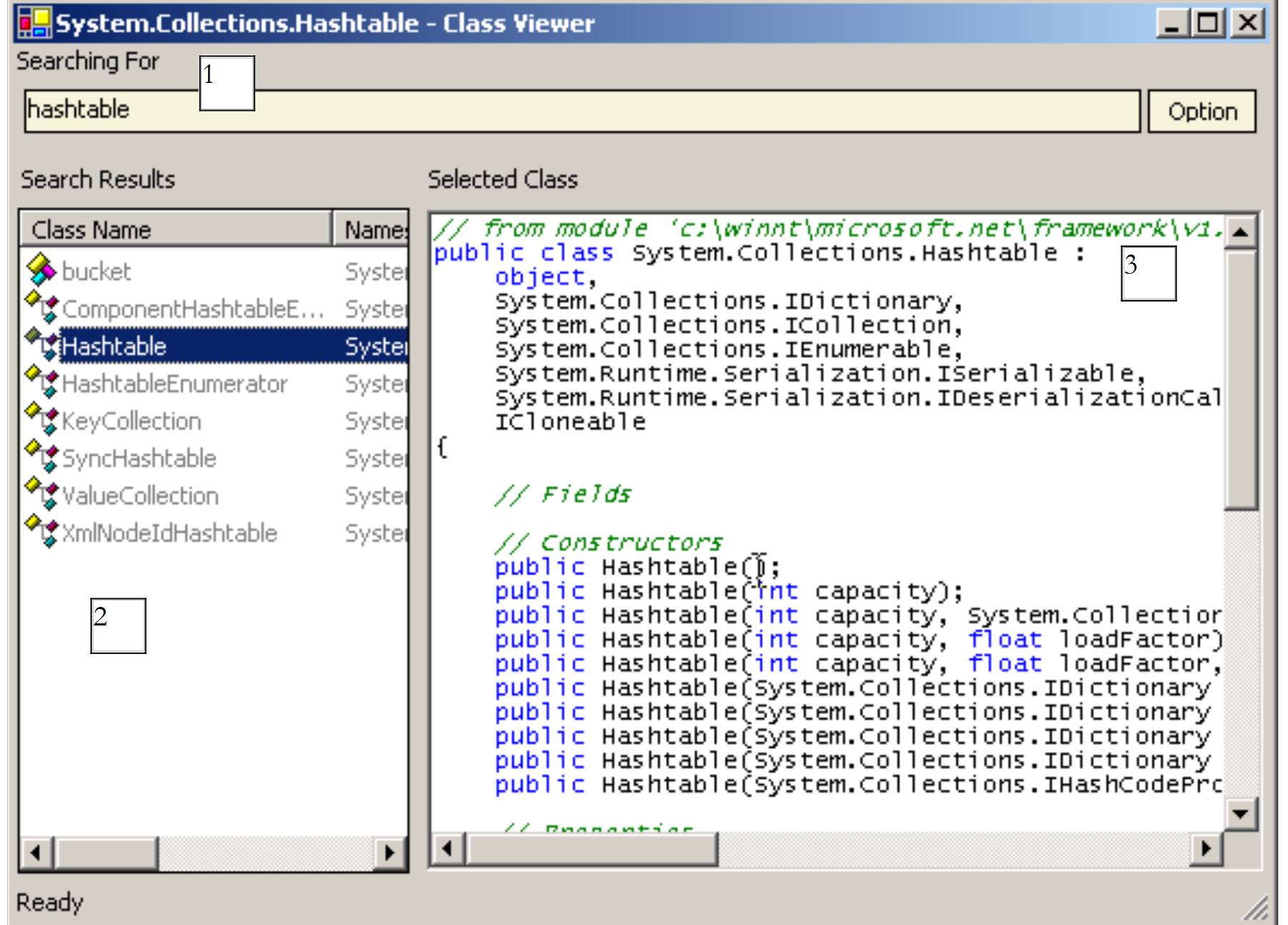 |
在 (1) 中输入所需类的名称。这将在 (2) 中返回各种可能的选项。选择合适的选项,结果将显示在 (3) 中——在此示例中,是 HashTable 类。如果您知道要查找的类名,此方法非常适用。 若要浏览 .NET 平台提供的选项列表,可使用位于 SSK.Net 安装文件夹(例如 C:\Program Files\Microsoft Visual Studio .NET 2003\SDK\v1)中的 HTML 文件 StartHere.htm。
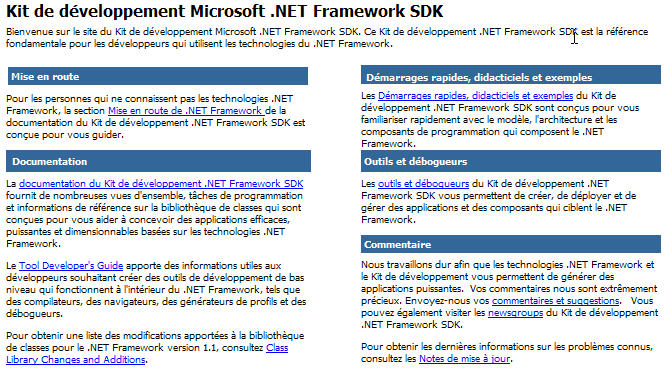
若要了解 .NET 类的概览,请点击“ .NET Framework SDK 文档”链接:
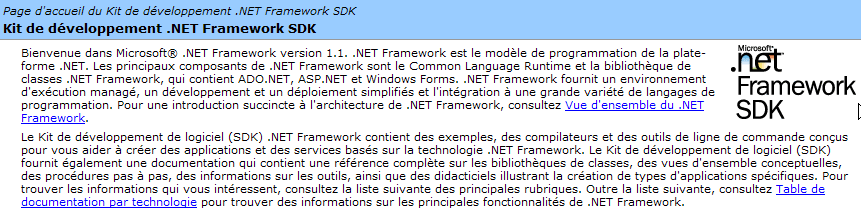
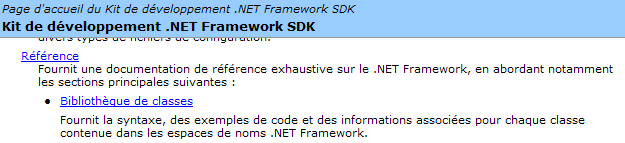
在该页面中,点击 [类库] 链接。其中列出了所有 .NET 类:
例如,让我们点击 System.Collections 链接。该命名空间包含各种实现集合功能的类,其中包括 HashTable 类:

让我们点击下方的 HashTable 链接:
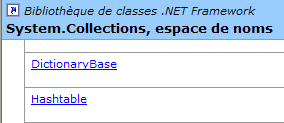
我们来到了以下页面:
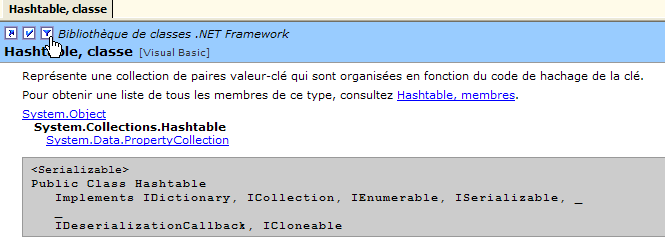
请注意下方光标的位置。它正指向一个允许您指定所需语言的链接,此处为 Visual Basic。
在此处,您将看到该类的原型以及使用示例。请点击下方的 [Hashtable, Members] 链接:

我们得到了该类的完整描述:
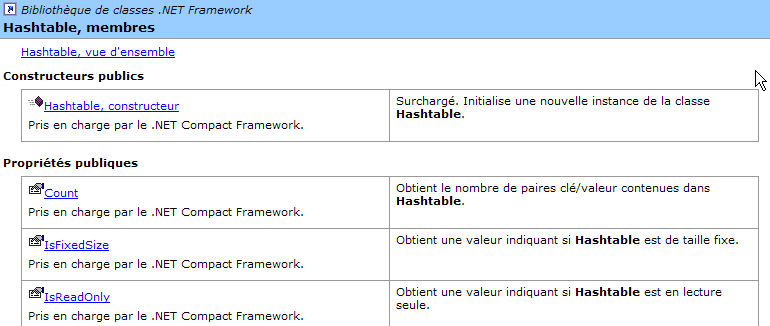
此方法是探索 SDK 及其类的最佳途径。当您对某个类已有初步了解,但忘记了其中某些成员时,WinCV 工具便派上用场。此时,WinCV 可帮助您快速查找该类及其成员。
4.2. 使用 VS.NET 搜索类相关帮助
以下是使用 Visual Studio.NET 查找帮助的一些技巧
4.2.1. “帮助”选项
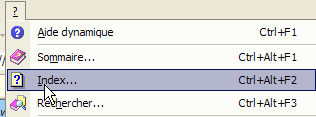
从菜单中选择 [?] 选项。
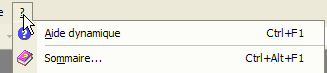
将显示以下窗口:
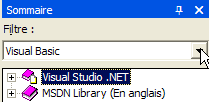
在下拉列表中,您可以选择一个帮助筛选器。这里,我们将选择 [Visual Basic] 筛选器。
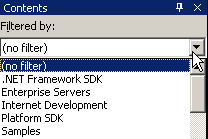
有两种类型的帮助非常有用:
- 关于 VB.NET 语言本身的帮助(语法)
- 关于 VB.NET 语言可使用的 .NET 类的帮助
可通过 [Visual Studio.NET/Visual Basic 和 Visual C#/参考/Visual Basic] 访问 VB.NET 语言帮助:
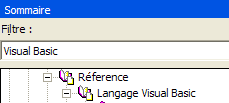
这将打开以下帮助页面:
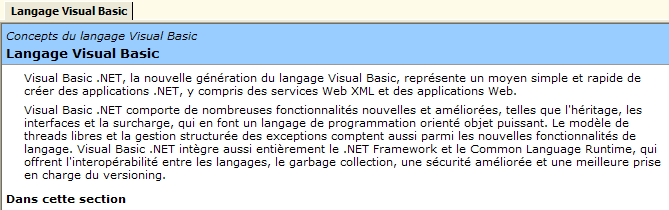
在此页面中,各个子标题提供了关于不同 VB.NET 主题的帮助。请特别关注 VB.NET 教程:
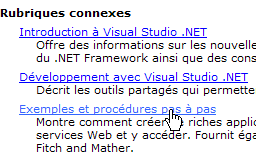
若要访问 .NET 平台的各类类,请选择 [Visual Studio.NET/.NET Framework] 帮助。
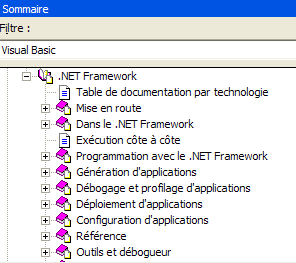
我们将特别关注 [参考/类库] 部分:
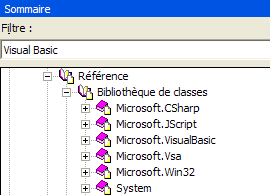
假设我们对 [ArrayList] 类感兴趣。它位于 [System.Collections] 命名空间中。了解这一点非常重要;否则,我们可能会更倾向于使用下面描述的搜索方法。我们会得到以下帮助信息:
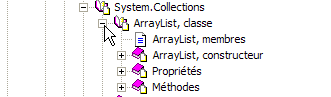
[ArrayList, Class] 链接提供了该类的概述:
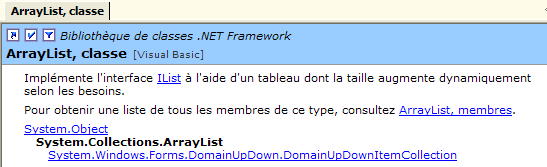
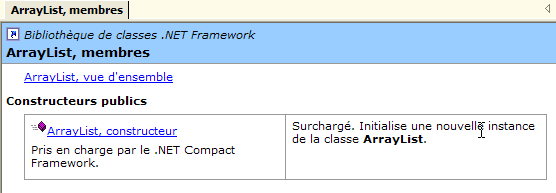
所有类都拥有此类页面。该页面提供了该类的概述及示例。如需了解类成员的说明,请点击 [ArrayList, members] 链接:
4.2.2. 帮助/索引
[帮助/索引]选项可让您进行比前一种方法更精准的帮助搜索。只需输入您要查找的关键词:
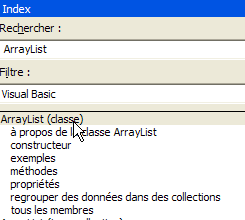
与前一种方法相比,此方法的优势在于您无需事先了解帮助系统中相关内容的具体位置。对于有针对性的搜索,这通常是首选方法;而另一种方法则更适合全面浏览帮助系统提供的所有内容。
4.3. String 类
String 类拥有许多属性和方法。以下列举其中部分:
字符串中的字符数 | |
默认索引属性。[String].Chars(i) 表示字符串中的第 i 个字符 | |
如果字符串以 value 结尾,则返回 true | |
如果字符串以 value 开头,则返回 true | |
如果字符串等于 value,则返回 true | |
返回字符串中首次出现该字符串值的位置——搜索从第 0 个字符开始 | |
返回字符串中该字符串值首次出现的位置——搜索从字符索引 startIndex 开始 | |
类方法 - 返回将 value 数组中的值与分隔符 separator 连接后生成的字符串 | |
返回当前字符串的副本,其中字符 oldChar 已被字符 newChar 替换 | |
该字符串被视为由分隔符数组中的字符分隔的字段序列。结果是一个包含这些字段的数组 | |
当前字符串从位置 startIndex 开始、包含 length 个字符的子字符串 | |
将当前字符串转换为小写 | |
将当前字符串转换为大写 | |
从当前字符串中删除首尾空格 |
C 字符串可以视为一个字符数组。因此
- C.Chars(i) 表示 C 字符串中的第 i 个字符
- C.Length 表示 C 字符串中的字符个数
请看以下示例:
' options
Option Strict On
Option Explicit On

' namespaces
Imports System

Module test
    Sub Main()
        Dim uneChaine As String = "l'oiseau vole au-dessus des nuages"
        affiche("uneChaine=" + uneChaine)
        affiche("uneChaine.Length=" & uneChaine.Length)
        affiche("chaine[10]=" + uneChaine.Chars(10))
        affiche("uneChaine.IndexOf(""vole"")=" & uneChaine.IndexOf("vole"))
        affiche("uneChaine.IndexOf(""x"")=" & uneChaine.IndexOf("x"))
        affiche("uneChaine.LastIndexOf('a')=" & uneChaine.LastIndexOf("a"c))
        affiche("uneChaine.LastIndexOf('x')=" & uneChaine.LastIndexOf("x"c))
        affiche("uneChaine.Substring(4,7)=" + uneChaine.Substring(4, 7))
        affiche("uneChaine.ToUpper()=" + uneChaine.ToUpper())
        affiche("uneChaine.ToLower()=" + uneChaine.ToLower())
        affiche("uneChaine.Replace('a','A')=" + uneChaine.Replace("a"c, "A"c))
        Dim champs As String() = uneChaine.Split(Nothing)
        Dim i As Integer
        For i = 0 To champs.Length - 1
            affiche("champs[" & i & "]=[" & champs(i) & "]")
        Next i
        affiche("Join("":"",champs)=" + System.String.Join(":", champs))
        affiche("(""  abc  "").Trim()=[" + "  abc  ".Trim() + "]")
    End Sub

    ' poster
    Sub affiche(ByVal msg As [String])
        ' poster msg
        Console.Out.WriteLine(msg)
    End Sub
End Module
执行后得到以下结果:
dos>vbc string1.vb

dos>string1
uneChaine=l'bird flies above the clouds
uneChaine.Length=34
chaine[10]=o
uneChaine.IndexOf("vole")=9
uneChaine.IndexOf("x")=-1
uneChaine.LastIndexOf('a')=30
uneChaine.LastIndexOf('x')=-1
uneChaine.Substring(4,7)=seau vo
uneChaine.ToUpper()=L'OISEAU VOLE ABOVE DES NUAGES
uneChaine.ToLower()=l'bird flies above the clouds
uneChaine.Replace('a','A')=l'oiseAu flies Over the nuAges
champs[0]=[l'bird]
champs[1]=[vole]
champs[2]=[au-dessus]
champs[3]=[des]
champs[4]=[nuages]
Join(":",champs)=l'bird:flies:above:clouds
("  abc  ").Trim()=[abc]
让我们来看一个新例子:
' options
Option Strict On
Option Explicit On

' namespaces
Imports System

Module string2
    Sub Main()
        ' the line to be analyzed
        Dim ligne As String = "un:deux::trois:"
        ' field separators
        Dim séparateurs() As Char = {":"c}
        ' split
        Dim champs As String() = ligne.Split(séparateurs)
        Dim i As Integer
        For i = 0 To champs.Length - 1
            Console.Out.WriteLine(("Champs[" & i & "]=" & champs(i)))
        Next i
        ' join
        Console.Out.WriteLine(("join=[" + System.String.Join(":", champs) + "]"))
    End Sub
End Module
以及执行结果:
String 类的 Split 方法允许您将字符串的各个字段放入数组中。此处使用的方法定义如下:
字符数组。这些字符代表用于分隔字符串中各字段的字符。因此,如果字符串为 [field1, field2, field3],我们可以使用 separator=new char() {","c}。如果分隔符是一系列空格,则使用 separator=nothing。 | |
字符串数组,其中每个元素都是字符串的一个字段。 |
Join 方法是 String 类的静态方法:
字符串数组 | |
用作字段分隔符的字符串 | |
通过将值数组中的元素用分隔符字符串分隔并拼接而成的字符串。 |
4.4. Array 类
Array 类实现了数组。在本示例中,我们将使用以下属性和方法:
属性 - 数组中的元素个数 | |
类方法 - 返回值在已排序数组中的位置 - 从索引位置开始搜索,搜索范围为长度个元素 | |
类方法 - 将 sourceArray 的前 length 个元素复制到 destinationArray 中 - destinationArray 是专门为此目的创建的 | |
类方法 - 对数组进行排序 - 数组必须包含具有默认排序函数的数据类型(字符串、数字)。 |
以下程序演示了 Array 类的用法:
' options
Option Strict On
Option Explicit On

' namespaces
Imports System

Module test
    Sub Main()
        ' read table elements typed on keyboard
        Dim terminé As [Boolean] = False
        Dim i As Integer = 0
        Dim éléments1 As Double() = Nothing
        Dim éléments2 As Double() = Nothing
        Dim élément As Double = 0
        Dim réponse As String = Nothing
        Dim erreur As [Boolean] = False

        While Not terminé
            ' question
            Console.Out.Write(("Elément (réel) " & i & " du tableau (rien pour terminer) : "))
            ' reading the answer
            réponse = Console.ReadLine().Trim()
            ' end of input if string empty
            If réponse.Equals("") Then
                Exit While
            End If
            ' input verification
            Try
                élément = [Double].Parse(réponse)
                erreur = False
            Catch
                Console.Error.WriteLine("Saisie incorrecte, recommencez")
                erreur = True
            End Try
            ' if no error
            If Not erreur Then
                ' new table to accommodate the new element
                éléments2 = New Double(i) {}
                ' copy old panel to new panel
                If i <> 0 Then
                    Array.Copy(éléments1, éléments2, i)
                End If
                ' new table becomes old table
                éléments1 = éléments2
                ' no need for the new panel
                éléments2 = Nothing
                ' insert new element
                éléments1(i) = élément
                ' one more element in the picture
                i += 1
            End If
        End While
        ' unsorted table display
        System.Console.Out.WriteLine("Tableau non trié")
        For i = 0 To éléments1.Length - 1
            Console.Out.WriteLine(("éléments[" & i & "]=" & éléments1(i)))
        Next i
        ' table sorting
        System.Array.Sort(éléments1)
        ' sorted table display
        System.Console.Out.WriteLine("Tableau trié")
        For i = 0 To éléments1.Length - 1
            Console.Out.WriteLine(("éléments[" & i & "]=" & éléments1(i)))
        Next i
        ' Search
        While Not terminé
            ' question
            Console.Out.Write("Elément cherché (rien pour arrêter) : ")
            ' reading-checking response
            réponse = Console.ReadLine().Trim()
            ' finished?
            If réponse.Equals("") Then
                Exit While
            End If
            ' check
            Try
                élément = [Double].Parse(réponse)
                erreur = False
            Catch
                Console.Error.WriteLine("Saisie incorrecte, recommencez")
                erreur = True
            End Try
            ' if no error
            If Not erreur Then
                ' search for the element in the sorted array
                i = System.Array.BinarySearch(éléments1, 0, éléments1.Length, élément)
                ' Display response
                If i >= 0 Then
                    Console.Out.WriteLine(("Trouvé en position " & i))
                Else
                    Console.Out.WriteLine("Pas dans le tableau")
                End If
            End If
        End While
    End Sub
End Module
屏幕输出如下:
Elément (réel) 0 du tableau (rien pour terminer) : 10,4
Elément (réel) 1 du tableau (rien pour terminer) : 5,2
Elément (réel) 2 du tableau (rien pour terminer) : 8,7
Elément (réel) 3 du tableau (rien pour terminer) : 3,6
Elément (réel) 4 du tableau (rien pour terminer) :
Tableau non trié
éléments[0]=10,4
éléments[1]=5,2
éléments[2]=8,7
éléments[3]=3,6
Tableau trié
éléments[0]=3,6
éléments[1]=5,2
éléments[2]=8,7
éléments[3]=10,4
Elément cherché (rien pour arrêter) : 8,7
Trouvé en position 2
Elément cherché (rien pour arrêter) : 11
Pas dans le tableau
Elément cherché (rien pour arrêter) : a
Saisie incorrecte, recommencez
Elément cherché (rien pour arrêter) :
程序的第一部分根据用户通过键盘输入的数值构建一个数组。由于无法预先确定用户将输入多少个元素,因此无法预先定义该数组。因此,我们使用两个数组:elements1 和 elements2。
                ' nouveau tableau pour accueillir le nouvel élément
                éléments2 = New Double(i) {}
                ' copie ancien tableau vers nouveau tableau
                If i <> 0 Then
                    Array.Copy(éléments1, éléments2, i)
                End If
                ' nouveau tableau devient ancien tableau
                éléments1 = éléments2
                ' plus besoin du nouveau tableau
                éléments2 = Nothing
                ' insertion nouvel élément
                éléments1(i) = élément
                ' un élémt de plus dans le tableau
                i += 1
elements1 数组包含当前已输入的值。当用户添加新值时,我们会创建一个比 elements1 多一个元素的 elements2 数组,将 elements1 的内容复制到 elements2 中(使用 Array.Copy 方法),将 elements1 设置为指向 elements2,最后将新元素添加到 elements1 中。这是一个复杂的过程,可以通过使用可变长度数组(ArrayList)代替固定长度数组(Array)来简化。
数组使用 Array.Sort 方法进行排序。调用该方法时,可通过各种参数指定排序规则。如果不传入参数,则默认按升序排序。最后,Array.BinarySearch 方法可用于在已排序的数组中搜索元素。
4.5. ArrayList 类
ArrayList 类允许您在程序运行期间实现可变大小的数组,而之前的 Array 类不支持这一点。以下是一些常见的属性和方法:
创建一个空列表 | |
集合中的元素个数 | |
将值对象添加到集合的末尾 | |
清空列表 | |
该值对象在列表中的索引,若不存在则返回 -1 | |
与上文相同,但从元素 startIndex 开始 | |
与上文相同,但返回 value 在列表中最后一次出现的索引 | |
与上文相同,但从 startIndex 处的元素开始 | |
如果对象 obj 存在于列表中,则将其移除 | |
从列表中移除索引位置处的元素 | |
返回值对象在列表中的位置,若未找到则返回 -1。列表必须已排序 | |
对列表进行排序。列表中必须包含具有预定义排序关系的对象(字符串、数字) | |
根据比较器函数建立的排序规则对列表进行排序 |
让我们重新审视使用 Array 对象的示例,并将其应用到 ArrayList 对象上:
' options
Option Strict On
Option Explicit On

' namespaces
Imports System
Imports System.Collections

Module test
    Sub Main()
        ' read table elements typed on keyboard
        Dim terminé As [Boolean] = False
        Dim i As Integer = 0
        Dim éléments As New ArrayList
        Dim élément As Double = 0
        Dim réponse As String = Nothing
        Dim erreur As [Boolean] = False

        While Not terminé
            ' question
            Console.Out.Write(("Elément (réel) " & i & " du tableau (rien pour terminer) : "))
            ' reading the answer
            réponse = Console.ReadLine().Trim()
            ' end of input if string empty
            If réponse.Equals("") Then
                Exit While
            End If
            ' input verification
            Try
                élément = Double.Parse(réponse)
                erreur = False
            Catch
                Console.Error.WriteLine("Saisie incorrecte, recommencez")
                erreur = True
            End Try
            ' if no error
            If Not erreur Then
                ' one more element in the picture
                éléments.Add(élément)
            End If
        End While
        ' unsorted table display
        System.Console.Out.WriteLine("Tableau non trié")
        For i = 0 To éléments.Count - 1
            Console.Out.WriteLine(("éléments[" & i & "]=" & éléments(i).ToString))
        Next i        ' table sorting
        éléments.Sort()
        ' sorted table display
        System.Console.Out.WriteLine("Tableau trié")
        For i = 0 To éléments.Count - 1
            Console.Out.WriteLine(("éléments[" & i & "]=" & éléments(i).ToString))
        Next i
        ' Search
        While Not terminé
            ' question
            Console.Out.Write("Elément cherché (rien pour arrêter) : ")
            ' reading-checking response
            réponse = Console.ReadLine().Trim()
            ' finished?
            If réponse.Equals("") Then
                Exit While
            End If
            ' check
            Try
                élément = [Double].Parse(réponse)
                erreur = False
            Catch
                Console.Error.WriteLine("Saisie incorrecte, recommencez")
                erreur = True
            End Try
            ' if no error
            If Not erreur Then
                ' search for the element in the sorted array
                i = éléments.BinarySearch(élément)
                ' Display response
                If i >= 0 Then
                    Console.Out.WriteLine(("Trouvé en position " & i))
                Else
                    Console.Out.WriteLine("Pas dans le tableau")
                End If
            End If
        End While
    End Sub
End Module
执行结果如下:
Elément (réel) 0 du tableau (rien pour terminer) : 10,4
Elément (réel) 0 du tableau (rien pour terminer) : 5,2
Elément (réel) 0 du tableau (rien pour terminer) : a
Saisie incorrecte, recommencez
Elément (réel) 0 du tableau (rien pour terminer) : 3,7
Elément (réel) 0 du tableau (rien pour terminer) : 15
Elément (réel) 0 du tableau (rien pour terminer) :
Tableau non trié
éléments[0]=10,4
éléments[1]=5,2
éléments[2]=3,7
éléments[3]=15
Tableau trié
éléments[0]=3,7
éléments[1]=5,2
éléments[2]=10,4
éléments[3]=15
Elément cherché (rien pour arrêter) : a
Saisie incorrecte, recommencez
Elément cherché (rien pour arrêter) : 15
Trouvé en position 3
Elément cherché (rien pour arrêter) : 1
Pas dans le tableau
Elément cherché (rien pour arrêter) :
4.6. Hashtable 类
Hashtable 类允许您实现一个字典。字典可以视为一个两列数组:
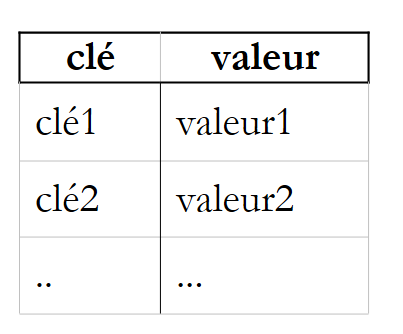 |
键是唯一的,也就是说,没有两个键可以相同。Hashtable 类的主要方法和属性如下:
创建一个空字典 | |
向字典中添加一个 (key, value) 条目,其中 key 和 value 均为对象引用。 | |
从字典中移除键为 key 的条目 | |
清空字典 | |
如果键 key 存在于字典中,则返回 true。 | |
| 如果值 value 存在于字典中,则返回 true。 |
属性:字典中元素的数量(键,值) | |
属性:字典键的集合 | |
属性:字典值的集合 | |
索引属性:允许您检索或设置与某个键关联的值 |
请看以下示例程序:
' options
Option Strict On
Option Explicit On

' namespaces
Imports System
Imports System.Collections

Module test
    Sub Main()
        Dim liste() As [String] = {"jean:20", "paul:18", "mélanie:10", "violette:15"}
        Dim i As Integer
        Dim champs As [String]() = Nothing
        Dim séparateurs() As Char = {":"c}
        ' filling the dictionary
        Dim dico As New Hashtable
        For i = 0 To liste.Length - 1
            champs = liste(i).Split(séparateurs)
            dico.Add(champs(0), champs(1))
        Next i
        ' number of elements in the dictionary
        Console.Out.WriteLine(("Le dictionnaire a " & dico.Count & " éléments"))
        ' kEY LIST
        Console.Out.WriteLine("[Liste des clés]")
        Dim clés As IEnumerator = dico.Keys.GetEnumerator()
        While clés.MoveNext()
            Console.Out.WriteLine(clés.Current)
        End While
        ' list of values
        Console.Out.WriteLine("[Liste des valeurs]")
        Dim valeurs As IEnumerator = dico.Values.GetEnumerator()
        While valeurs.MoveNext()
            Console.Out.WriteLine(valeurs.Current)
        End While
        ' list of keys & values
        Console.Out.WriteLine("[Liste des clés & valeurs]")
        clés.Reset()
        While clés.MoveNext()
            Console.Out.WriteLine(("clé=" & clés.Current.ToString & " valeur=" & dico(clés.Current).ToString))
        End While
        ' delete the "paul" key
        Console.Out.WriteLine("[Suppression d'une clé]")
        dico.Remove("paul")
        ' list of keys & values
        Console.Out.WriteLine("[Liste des clés & valeurs]")
        clés = dico.Keys.GetEnumerator()
        While clés.MoveNext()
            Console.Out.WriteLine(("clé=" & clés.Current.ToString & " valeur=" & dico(clés.Current).ToString))
        End While

        ' dictionary search
        Dim nomCherché As [String] = Nothing
        Console.Out.Write("Nom recherché (rien pour arrêter) : ")
        nomCherché = Console.ReadLine().Trim()
        Dim value As [Object] = Nothing
        While Not nomCherché.Equals("")
            If dico.ContainsKey(nomCherché) Then
                value = dico(nomCherché)
                Console.Out.WriteLine((nomCherché + "," + CType(value, [String])))
            Else
                Console.Out.WriteLine(("Nom " + nomCherché + " inconnu"))
            End If
            ' next search
            Console.Out.Write("Nom recherché (rien pour arrêter) : ")
            nomCherché = Console.ReadLine().Trim()
        End While
    End Sub
End Module
执行结果如下:
Le dictionnaire a 4 éléments
[Liste des clés]
mélanie
paul
violette
jean
[Liste des valeurs]
10
18
15
20
[Liste des clés & valeurs]
clé=mélanie valeur=10
clé=paul valeur=18
clé=violette valeur=15
clé=jean valeur=20
[Suppression d'une clé]
[Liste des clés & valeurs]
clé=mélanie valeur=10
clé=violette valeur=15
clé=jean valeur=20
Nom recherché (rien pour arrêter) : paul
Nom paul inconnu
Nom recherché (rien pour arrêter) : mélanie
mélanie,10
Nom recherché (rien pour arrêter) :
该程序还使用 IEnumerator 对象来遍历类型为 ICollection 的字典中的键和值集合(参见上文的 Keys 和 Values 属性)。集合是一组可以进行遍历的对象。ICollection 接口定义如下:
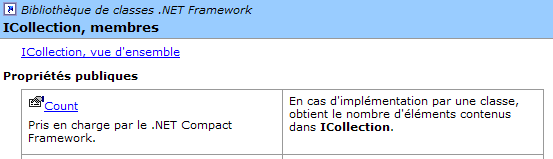
Count 属性允许我们确定集合中的元素数量。ICollection 接口继承自 IEnumerable 接口:
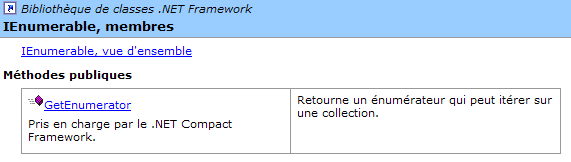
该接口仅有一个方法 GetEnumerator,它允许我们获取一个 IEnumerator 类型的对象:
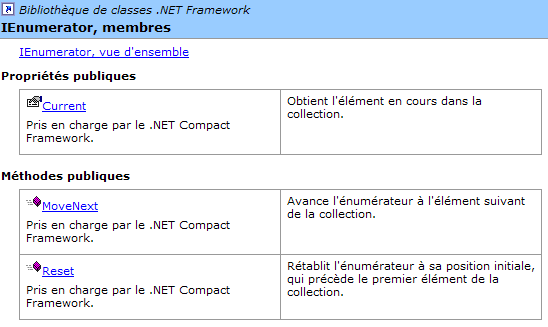
ICollection 的 GetEnumerator() 方法允许我们使用以下方法遍历集合:
移动到集合中的下一个元素。如果该元素存在,则返回 true,否则返回 false。第一次调用 MoveNext 会移动到第一个元素。此后,集合的“当前”元素可通过枚举器的 Current 属性获取 | |
属性:集合的当前元素 | |
将迭代器重置到集合的开头,即第一个元素之前。 |
因此,遍历 C 集合(ICollection)中元素的结构如下:
' define collection
dim C as ICollection C=...
' get an enumerator of this collection
dim itérateur as IEnumerator=C.GetEnumerator();
' browse the collection with this enumerator
while(itérateur.MoveNext())
    ' we have a current element
    ' operate itérateur.Current
end while
4.7. StreamReader 类
StreamReader 类允许您读取文件的内容。以下是该类的一些属性和方法:
从指定文件路径打开流。如果文件不存在,将抛出异常 | |
关闭流 | |
从已打开的流中读取一行 | |
从当前位置读取流中的剩余内容 |
以下是一个示例:
' options
Option Strict On
Option Explicit On

' namespaces
Imports System
Imports System.Collections
Imports System.IO

Module test
    Sub Main()
        Dim ligne As String = Nothing
        Dim fluxInfos As StreamReader = Nothing
        ' read file content
        Try
            fluxInfos = New StreamReader("infos.txt")
            ligne = fluxInfos.ReadLine()
            While Not (ligne Is Nothing)
                System.Console.Out.WriteLine(ligne)
                ligne = fluxInfos.ReadLine()
            End While
        Catch e As Exception
            System.Console.Error.WriteLine("L'erreur suivante s'est produite : " & e.ToString)
        Finally
            Try
                fluxInfos.Close()
            Catch
            End Try
        End Try
    End Sub
End Module
及其执行结果:
dos>more infos.txt
12620:0:0
13190:0,05:631
15640:0,1:1290,5
24740:0,15:2072,5
31810:0,2:3309,5
39970:0,25:4900
48360:0,3:6898,5
55790:0,35:9316,5
92970:0,4:12106
127860:0,45:16754,5
151250:0,5:23147,5
172040:0,55:30710
195000:0,6:39312
0:0,65:49062

dos>file1
12620:0:0
13190:0,05:631
15640:0,1:1290,5
24740:0,15:2072,5
31810:0,2:3309,5
39970:0,25:4900
48360:0,3:6898,5
55790:0,35:9316,5
92970:0,4:12106
127860:0,45:16754,5
151250:0,5:23147,5
172040:0,55:30710
195000:0,6:39312
0:0,65:49062
4.8. StreamWriter 类
StreamWriter 类允许您向文件写入数据。以下是该类的一些属性和方法:
从指定文件路径打开一个写入流。如果无法创建流,则抛出异常 | |
若设置为 true,写入流时将绕过缓冲区;否则,写入流不会立即生效:数据首先写入缓冲区,待缓冲区已满时再写入流。默认使用缓冲模式。该模式非常适合文件流,但通常不适用于网络流。 | |
用于设置或获取 WriteLine 方法使用的行结束字符 | |
关闭流 | |
向写入流写入一行 | |
将缓冲区中的数据写入流 |
请看以下示例:
' options
Option Strict On
Option Explicit On

' namespaces
Imports System
Imports System.Collections
Imports System.IO

Module test
    Sub Main()
        Dim ligne As String = Nothing        ' one line of text
        Dim fluxInfos As StreamWriter = Nothing        ' the text file
        Try
            ' text file creation
            fluxInfos = New StreamWriter("infos.txt")
            ' read line typed on keyboard
            Console.Out.Write("ligne (rien pour arrêter) : ")
            ligne = Console.In.ReadLine().Trim()
            ' loop as long as the line entered is not empty
            While ligne <> ""
                ' write line to text file
                fluxInfos.WriteLine(ligne)
                ' read new line on keyboard
                Console.Out.Write("ligne (rien pour arrêter) : ")
                ligne = Console.In.ReadLine().Trim()
            End While
        Catch e As Exception
            System.Console.Error.WriteLine("L'erreur suivante s'est produite : " & e.ToString)
        Finally
            ' close file
            Try
                fluxInfos.Close()
            Catch
            End Try
        End Try
    End Sub
End Module
以及执行结果:
dos>file2
ligne (rien pour arrêter) : ligne1
ligne (rien pour arrêter) : ligne2
ligne (rien pour arrêter) : ligne3
ligne (rien pour arrêter) :

dos>more infos.txt
ligne1
ligne2
ligne3
4.9. Regex 类
Regex 类支持正则表达式。正则表达式用于验证字符串的格式。例如,您可以验证表示日期的字符串是否符合 dd/mm/yy 格式。为此,您需要使用一个模式并将字符串与该模式进行比较。在此示例中,d、m 和 y 必须是数字。 因此,有效日期格式的模式为 "\d\d/\d\d/\d\d",其中符号 \d 代表一个数字。模式中可使用的符号如下(微软文档):
描述 | |
将后续字符指定为特殊字符或字面量。例如,"n" 对应字符 "n"。"\n" 对应换行符。字符序列 "\\" 对应 "\",而 "\(" 对应 "("。 | |
匹配输入的开头。 | |
匹配输入的结尾。 | |
匹配前一个字符零次或多次。因此,“zo*”匹配“z”或“zoo”。 | |
匹配前一个字符一次或多次。因此,“zo+”匹配“zoo”,但不匹配“z”。 | |
匹配前一个字符零次或一次。例如,"a?ve?" 匹配 "lever" 中的 "ve"。 | |
匹配除换行符以外的任意单个字符。 | |
| 搜索该模式并存储匹配结果。可以通过 Item [0]...[n] 从生成的 Matches 集合中检索匹配的子字符串。要匹配括号 ( ) 中的字符,请使用 "\(" 或 "\)"。 |
匹配 x 或 y 中的任意一个。例如,“z|foot” 匹配 “z” 或 “foot”。“(z|f)oo” 匹配 “zoo” 或 “foo”。 | |
| n 是非负整数。匹配该字符出现 n 次。例如,"o{2}" 不匹配 "Bob" 中的 "o",但匹配 "fooooot" 中的前两个 "o"。 |
| n 是非负整数。匹配该字符至少 n 次。例如,"o{2,}" 不匹配 "Bob" 中的 "o",但匹配 "fooooot" 中的所有 "o"。"o{1,}" 等同于 "o+",而 "o{0,}" 等同于 "o*"。 |
| m 和 n 是非负整数。匹配该字符至少 n 次且至多 m 次。例如,“o{1,3}”匹配“foooooot”中的前三个“o”,而“o{0,1}”等同于“o?”。 |
| 字符集。匹配指定字符中的任意一个。例如,"[abc]" 匹配 "plat" 中的 "a"。 |
| 否定字符集。匹配未列出的任何字符。例如,"[^abc]" 匹配 "plat" 中的 "p"。 |
| 字符范围。匹配指定范围内的任何字符。例如,[a-z] 匹配 "a" 到 "z" 之间的任何小写字母。 |
| 负字符范围。匹配指定范围之外的任何字符。例如,"[^m-z]" 匹配不在 "m" 和 "z" 之间的任何字符。 |
匹配单词边界,即单词与空格之间的位置。例如,"er\b" 匹配 "lever" 中的 "er",但不匹配 "verb" 中的 "er"。 | |
匹配不代表单词的边界。例如,“en*t\B”匹配“bien entendu”中的“ent”。 | |
匹配代表数字的字符。等同于 [0-9]。 | |
匹配非数字字符。等同于 [^0-9]。 | |
匹配换行符。 | |
匹配换行符。 | |
等同于回车字符。 | |
匹配任何空白字符,包括空格、制表符、分页符等。等同于 "[ \f\n\r\t\v]"。 | |
匹配任何非空白字符。等同于 "[^ \f\n\r\t\v]"。 | |
匹配一个制表符。 | |
匹配垂直制表符。 | |
匹配任何代表单词的字符,包括下划线。等同于 "[A-Za-z0-9_]"。 | |
匹配不代表单词的任何字符。等同于 "[^A-Za-z0-9_]"。 | |
| 匹配 num,其中 num 是正整数。指代已存储的匹配结果。例如,"(.)\1" 匹配两个连续的相同字符。 |
| 匹配 n,其中 n 是八进制转义值。八进制转义值必须由 1、2 或 3 位数字组成。 例如,"\11" 和 "\011" 都匹配一个制表符。"\0011" 等同于 "\001" & "1"。八进制转义值不得超过 256。如果超过,表达式中仅考虑前两位数字。允许在正则表达式中使用 ASCII 码。 |
| 对应于 n,其中 n 是十六进制转义值。十六进制转义值必须由两位数字组成。例如,“\x41”对应于“A”。“\x041”等同于“\x04”和“1”。允许在正则表达式中使用 ASCII 码。 |
模式中的元素可以出现一次或多次。让我们来看几个涉及 \d 符号的示例,该符号代表一个数字:
模式 | 含义 |
数字 | |
0 或 1 个数字 | |
0 个或多个数字 | |
1个或多个数字 | |
2个数字 | |
至少 3 位数字 | |
5 到 7 位数字 |
现在,让我们设想一个能够描述字符串预期格式的模型:
目标字符串 | 模式 |
\d{2}/\d{2}/\d{2} | |
\d{2}:\d{2}:\d{2} | |
\d+ | |
\s* | |
\s*\d+\s* | |
\s*[+|-]?\s*\d+\s* | |
\s*\d+(.\d*)?\s* | |
\s*[+|]?\s*\d+(.\d*)?\s* | |
\bjuste\b | |
您可以指定在字符串中的哪个位置搜索该模式:
pattern | 含义 |
该模式以字符串开头 | |
该模式结束字符串 | |
该模式同时作为字符串的起始和结尾 | |
在字符串中从开头开始搜索该模式。 |
搜索字符串 | 模式 |
!$ | |
\.$ | |
^// | |
^\s*\w+\s*$ | |
^\s*\w+\s*\w+\s*$ | |
\bsecret\b |
模式的子模式可以被“提取”。因此,我们不仅可以验证一个字符串是否匹配特定模式,还可以从该字符串中提取出与模式中用圆括号括起的子模式相对应的元素。 例如,如果我们要解析一个包含 dd/mm/yy 格式日期的字符串,并且还想从该日期中提取 dd、mm 和 yy 这三个元素,我们会使用模式 (\d\d)/(\d\d)/(\d\d)。
4.9.1. 检查字符串是否匹配给定模式
Regex 对象的构造方式如下:
该构造函数会根据作为参数传递的模式(pattern)创建一个“正则表达式”对象。正则表达式模式构建完成后,可以使用 IsMatch 方法将其与字符串进行比对:
如果输入字符串与正则表达式模式匹配,IsMatch 将返回 true。以下是一个示例:
' options
Option Strict On
Option Explicit On

' namespaces
Imports System
Imports System.Collections
Imports System.Text.RegularExpressions

Module regex1

    Sub Main()
        ' a regular expression template
        Dim modèle1 As String = "^\s*\d+\s*$"
        Dim regex1 As New Regex(modèle1)
        ' compare a copy with the model
        Dim exemplaire1 As String = "  123  "
        If regex1.IsMatch(exemplaire1) Then
            affiche(("[" + exemplaire1 + "] correspond au modèle [" + modèle1 + "]"))
        Else
            affiche(("[" + exemplaire1 + "] ne correspond pas au modèle [" + modèle1 + "]"))
        End If
        Dim exemplaire2 As String = "  123a  "
        If regex1.IsMatch(exemplaire2) Then
            affiche(("[" + exemplaire2 + "] correspond au modèle [" + modèle1 + "]"))
        Else
            affiche(("[" + exemplaire2 + "] ne correspond pas au modèle [" + modèle1 + "]"))
        End If
    End Sub

    ' poster
    Sub affiche(ByVal msg As String)
        Console.Out.WriteLine(msg)
    End Sub
End Module
以及执行结果:
dos>vbc /r:system.dll regex1.vb
Compilateur Microsoft (R) Visual Basic .NET version 7.10.3052.4 pour Microsoft (R) .NET Framework version 1.1.4322.573

dos>regex1
[  123  ] correspond au modèle [^\s*\d+\s*$]
[  123a  ] ne correspond pas au modèle [^\s*\d+\s*$]
4.9.2. 查找字符串中所有匹配模式的元素
Matches 方法
返回输入字符串中与模式匹配的元素集合,如下例所示:
' options
Option Strict On
Option Explicit On

' namespaces
Imports System
Imports System.Collections
Imports System.Text.RegularExpressions

Module regex2
    Sub Main()
        ' several occurrences of the model in the copy
        Dim modèle2 As String = "\d+"
        Dim regex2 As New Regex(modèle2)        '
        Dim exemplaire3 As String = "  123  456  789 "
        Dim résultats As MatchCollection = regex2.Matches(exemplaire3)
        affiche(("Modèle=[" + modèle2 + "],exemplaire=[" + exemplaire3 + "]"))
        affiche(("Il y a " & résultats.Count & " occurrences du modèle dans l'exemplaire "))
        Dim i As Integer
        For i = 0 To résultats.Count - 1
            affiche((résultats(i).Value & " en position " & résultats(i).Index))
        Next i
    End Sub

    'poster
    Sub affiche(ByVal msg As String)
        Console.Out.WriteLine(msg)
    End Sub
End Module
MatchCollection 类有一个 Count 属性,表示集合中的元素个数。如果 results 是 MatchCollection 对象,则 results(i) 是该集合的第 i 个元素,其类型为 Match。在我们的示例中,results 是字符串 example3 中与模式 pattern2 匹配的元素集合,而 results(i) 是这些元素之一。Match 类有两个与此相关的属性:
- Value:Match 对象的值,即与模式匹配的元素
- Index:该元素在被搜索字符串中被找到的位置
运行前一个程序的结果:
dos>vbc /r:system.dll regex2.vb
Compilateur Microsoft (R) Visual Basic .NET version 7.10.3052.4p our Microsoft (R) .NET Framework version 1.1.4322.573

dos>regex2
Modèle=[\d+],exemplaire=[  123  456  789 ]
Il y a 3 occurrences du modèle dans l'exemplaire
123 en position 2
456 en position 7
789 en position 12
4.9.3. 提取模式的子集
可以“提取”模式的子集。因此,我们不仅可以验证字符串是否匹配特定模式,还可以从该字符串中提取对应于模式中用括号括起的子集的元素。 因此,如果我们要解析一个包含 dd/mm/yy 格式日期的字符串,并希望从该日期中提取 dd、mm 和 yy 这三个元素,我们将使用模式 (\d\d)/(\d\d)/(\d\d)。让我们来看以下示例:
' options
Option Strict On
Option Explicit On

' namespaces
Imports System
Imports System.Collections
Imports System.Text.RegularExpressions

Module regex2
    Sub Main()
        ' capture elements in the model
        Dim modèle3 As String = "(\d\d):(\d\d):(\d\d)"
        Dim regex3 As New Regex(modèle3)
        Dim exemplaire4 As String = "Il est 18:05:49"
        ' model checking
        Dim résultat As Match = regex3.Match(exemplaire4)
        If résultat.Success Then
            ' the copy corresponds to the model
            affiche(("L'exemplaire [" + exemplaire4 + "] correspond au modèle [" + modèle3 + "]"))
            ' display groups
            Dim i As Integer
            For i = 0 To résultat.Groups.Count - 1
                affiche(("groupes[" & i & "]=[" & résultat.Groups(i).Value & "] en position " & résultat.Groups(i).Index))
            Next i
        Else
            ' the copy does not correspond to the model
            affiche(("L'exemplaire[" + exemplaire4 + " ne correspond pas au modèle [" + modèle3 + "]"))
        End If
    End Sub

    'poster
    Sub affiche(ByVal msg As String)
        Console.Out.WriteLine(msg)
    End Sub
End Module
运行此程序将产生以下结果:
dos>vbc /r:system.dll regex3.vb
Compilateur Microsoft (R) Visual Basic .NET version 7.10.3052.4

dos>regex3
L'exemplaire [Il est 18:05:49] correspond au modèle [(\d\d):(\d\d):(\d\d)]
groupes[0]=[18:05:49] en position 7
groupes[1]=[18] en position 7
groupes[2]=[05] en position 10
groupes[3]=[49] en position 13
新功能可在以下代码片段中找到:
        ' model checking
        Dim résultat As Match = regex3.Match(exemplaire4)
        If résultat.Success Then
            ' the copy corresponds to the model
            affiche(("L'exemplaire [" + exemplaire4 + "] correspond au modèle [" + modèle3 + "]"))
            ' display groups
            Dim i As Integer
            For i = 0 To résultat.Groups.Count - 1
                affiche(("groupes[" & i & "]=[" & résultat.Groups(i).Value & "] en position " & résultat.Groups(i).Index))
            Next i
        Else
使用 Match 方法将字符串 example4 与正则表达式3模式进行比较。这将返回一个 Match 对象,如前所述。在此,我们使用了该类的两个新属性:
- Success:指示是否匹配
- Groups:一个集合,其中
- Groups[0] 对应于字符串中与模式匹配的部分
- Groups[i] (i>=1) 对应于第 i 个括号组
如果结果类型为 Match,则 results.Groups 的类型为 GroupCollection,而 results.Groups[i] 的类型为 Group。Group 类有两个属性,我们在此使用:
- Value:包含对应括号内容的元素的 Group 对象的值
- Index:该元素在已解析字符串中被找到的位置
4.9.4. 一个练习程序
寻找能够验证字符串是否符合特定模式的正则表达式,有时确实是一项挑战。以下程序可供您进行练习。它会要求输入一个模式和一个字符串,然后指出该字符串是否符合该模式。
' options
Option Strict On
Option Explicit On

' namespaces
Imports System
Imports System.Collections
Imports System.Text.RegularExpressions
Imports Microsoft.visualbasic

Module regex4
    Sub Main()
        ' a regular expression template
        Dim modèle, chaine As String
        Dim regex As Regex = Nothing
        Dim résultats As MatchCollection
        ' the user is asked for models and samples to compare with this one
        Dim terminé1 As Boolean = False
        Do While Not terminé1
            Dim erreur As Boolean = True
            Do While Not terminé1 And erreur
                ' the model is requested
                Console.Out.Write("Tapez le modèle à tester ou fin pour arrêter :")
                modèle = Console.In.ReadLine()
                ' finished?
                If modèle.Trim().ToLower() = "fin" Then
                    terminé1 = True
                Else
                    ' we create the regular expression
                    Try
                        regex = New Regex(modèle)
                        erreur = False
                    Catch ex As Exception
                        Console.Error.WriteLine(("Erreur : " + ex.Message))
                    End Try
                End If
            Loop
            ' finished?
            If terminé1 Then Exit Sub
            ' the user is asked for the specimens to be compared with the model
            Dim terminé2 As Boolean = False
            Do While Not terminé2
                Console.Out.Write(("Tapez la chaîne à comparer au modèle [" + modèle + "] ou fin pour arrêter :"))
                chaine = Console.In.ReadLine()
                ' finished?
                If chaine.Trim().ToLower() = "fin" Then
                    terminé2 = True
                Else
                    ' we make the comparison
                    résultats = regex.Matches(chaine)
                    ' success?
                    If résultats.Count = 0 Then
                        Console.Out.WriteLine("Je n'ai pas trouvé de correspondances")
                    Else
                        ' the elements corresponding to the model are displayed
                        Dim i As Integer
                        For i = 0 To résultats.Count - 1
                            Console.Out.WriteLine(("J'ai trouvé la correspondance [" & résultats(i).Value & "] en position " & résultats(i).Index))
                            ' sub-elements
                            If résultats(i).Groups.Count <> 1 Then
                                Dim j As Integer
                                For j = 1 To (résultats(i).Groups.Count) - 1
                                    Console.Out.WriteLine((ControlChars.Tab & "sous-élément [" & résultats(i).Groups(j).Value & "] en position " & résultats(i).Groups(j).Index))
                                Next j
                            End If
                        Next i
                    End If
                End If
            Loop
        Loop
    End Sub

    'poster
    Sub affiche(ByVal msg As String)
        Console.Out.WriteLine(msg)
    End Sub
End Module
以下是一个执行示例:
Tapez le modèle à tester ou fin pour arrêter :\d+
Tapez la chaîne à comparer au modèle [\d+] ou fin pour arrêter :123 456 789
J'ai trouvé la correspondance [123] en position 0
J'ai trouvé la correspondance [456] en position 4
J'ai trouvé la correspondance [789] en position 8
Tapez la chaîne à comparer au modèle [\d+] ou fin pour arrêter :fin

Tapez le modèle à tester ou fin pour arrêter :(\d\d):(\d\d)
Tapez la chaîne à comparer au modèle [(\d\d):(\d\d)] ou fin pour arrêter :14:15 abcd 17:18 xyzt
J'ai trouvé la correspondance [14:15] en position 0
        sous-élément [14] en position 0
        sous-élément [15] en position 3
J'ai trouvé la correspondance [17:18] en position 11
        sous-élément [17] en position 11
        sous-élément [18] en position 14
Tapez la chaîne à comparer au modèle [(\d\d):(\d\d)] ou fin pour arrêter :fin

Tapez le modèle à tester ou fin pour arrêter :^\s*\d+\s*$
Tapez la chaîne à comparer au modèle [^\s*\d+\s*$] ou fin pour arrêter :  1456
J'ai trouvé la correspondance [  1456] en position 0
Tapez la chaîne à comparer au modèle [^\s*\d+\s*$] ou fin pour arrêter :fin

Tapez le modèle à tester ou fin pour arrêter :^\s*(\d+)\s*$
Tapez la chaîne à comparer au modèle [^\s*(\d+)\s*$] ou fin pour arrêter :1456
J'ai trouvé la correspondance [1456] en position 0
        sous-élément [1456] en position 0
Tapez la chaîne à comparer au modèle [^\s*(\d+)\s*$] ou fin pour arrêter :abcd 1
456
Je n'ai pas trouvé de correspondances
Tapez la chaîne à comparer au modèle [^\s*(\d+)\s*$] ou fin pour arrêter :fin

Tapez le modèle à tester ou fin pour arrêter :fin
4.9.5. Split 方法
我们在 String 类中已经遇到过此方法:
字符串会被视为由 [separator] 数组中的字符分隔的一系列字段。结果是一个包含这些字段的数组。
字符串中的字段分隔符是 separator 数组中的某个字符。Regex 类的 Split 方法允许我们根据正则表达式模式指定分隔符:
字符串 [input] 将被拆分为字段,这些字段由与当前 Regex 对象模式匹配的分隔符分隔。例如,假设文本文件中的行采用 field1, field2, ..., fieldn 的形式。这些字段由逗号分隔,但逗号前后可能有空格。因此,String 类的 Split 方法并不适用。 RegEx 方法提供了解决方案。如果 line 是已读取的行,则可以通过以下方式获取字段:
如下例所示:
' options
Option Strict On
Option Explicit On

' namespaces
Imports System
Imports System.Text.RegularExpressions

Module regex5
    Sub Main()
        ' a line
        Dim ligne As String = "abc  , def  , ghi"
        ' a model
        Dim modèle As New Regex("\s*,\s*")
        ' decomposition of line into fields
        Dim champs As String() = modèle.Split(ligne)
        ' display
        Dim i As Integer
        For i = 0 To champs.Length - 1
            Console.Out.WriteLine(("champs[" & i & "]=[" & champs(i) & "]"))
        Next i
    End Sub
End Module
执行结果:
dos>vbc /r:system.dll regex5.vb
Compilateur Microsoft (R) Visual Basic .NET version 7.10.3052.4

dos>regex5
champs[0]=[abc]
champs[1]=[def]
champs[2]=[ghi]
4.10. BinaryReader 和 BinaryWriter 类
BinaryReader 和 BinaryWriter 类用于读写二进制文件。请考虑以下应用场景。我们希望编写一个程序,其调用方式如下:
// syntaxe pg texte bin
// on lit un fichier texte (texte) et on range son contenu dans un
// fichier binaire
// le fichier texte a des lignes de la forme nom : age
// qu'on rangera dans une structure string, int
该文本文件包含以下内容:
活动安排如下:
' options
Option Strict On
Option Explicit On

' namespaces
Imports System
Imports System.Text.RegularExpressions
Imports System.IO

' BinaryWriter()

Module bw1
    ' syntax pg text bin
    ' read a text file (text) and store its contents in a
    ' binary file
    ' the text file has lines of the form name: age
    ' which will be stored in a string structure, int

    Sub Main(ByVal arguments() As String)
        ' you need 2 arguments
        Dim nbArgs As Integer = arguments.Length
        If nbArgs <> 2 Then
            Console.Error.WriteLine("syntaxe : pg texte binaire")
            Environment.Exit(1)
        End If
        ' open text file in read mode
        Dim input As StreamReader = Nothing
        Try
            input = New StreamReader(arguments(0))
        Catch ex As Exception
            Console.Error.WriteLine("Erreur d'ouverture du fichier " & arguments(0) & "(" & ex.Message & ")")
            Environment.Exit(2)
        End Try
        ' open binary file for writing
        Dim output As BinaryWriter = Nothing
        Try
            output = New BinaryWriter(New FileStream(arguments(1), FileMode.Create, FileAccess.Write))
        Catch ex As Exception
            Console.Error.WriteLine("Erreur d'ouverture du fichier " & arguments(1) & "(" & ex.Message & ")")
            Environment.Exit(3)
        End Try
        ' read text file - write binary file
        ' text file line
        Dim ligne As String
        ' line field separator
        Dim séparateur As New Regex("\s*:\s*")
        ' the age model
        Dim modAge As New Regex("\s*\d+\s*")
        Dim numLigne As Integer = 0
        Dim traitementFini As Boolean
        Dim champs As String()
        ligne = input.ReadLine()
        While Not (ligne Is Nothing)
            traitementFini = False
            ' empty line?
            If ligne.Trim() = "" Then
                traitementFini = True
            End If
            ' one more line
            If Not traitementFini Then
                numLigne += 1
                ' one line name: age
                champs = séparateur.Split(ligne)
                ' we need 2 fields
                If champs.Length <> 2 Then
                    Console.Error.WriteLine(("La ligne n° " & numLigne & " du fichier " & arguments(0) & " a un nombre de champs incorrect"))
                    ' next line
                    traitementFini = True
                End If
            End If
            If Not traitementFini Then
                ' the second field must be an integer >=0
                If Not modAge.IsMatch(champs(1)) Then
                    Console.Error.WriteLine(("La ligne n° " & numLigne & " du fichier " & arguments(0) & " a un âge incorrect"))
                    ' next line
                    traitementFini = True
                End If
                ' write data to the binary file
                output.Write(champs(0))
                output.Write(Integer.Parse(champs(1)))
            End If
            'next line
            ligne = input.ReadLine()
        End While
        ' closing files
        input.Close()
        output.Close()
    End Sub
End Module
让我们来仔细看看与 BinaryWriter 类相关的操作:
- 通过以下操作打开 BinaryWriter 对象
output = New BinaryWriter(New FileStream(arguments(1), FileMode.Create, FileAccess.Write))
构造函数的参数必须是一个流(Stream)。此处,它是一个由文件(FileStream)创建的流,我们为其指定:
- (待续)
- 文件名
- 要执行的操作,此处为 `FileMode.Create` 以创建文件
- 访问类型,此处为 FileAccess.Write,表示对文件进行写入操作
- 写入操作
                ' on écrit les données dans le fichier binaire
                output.Write(champs(0))
                output.Write(Integer.Parse(champs(1)))
BinaryWriter 类提供了多种重载的 Write 方法,用于写入不同类型的简单数据
- 流关闭操作
下述程序将提供前一次执行的结果。该程序还接受两个参数:
    ' syntaxe pg bin texte
    ' on lit un fichier binaire bin et on range son contenu dans un fichier texte (texte)
    ' le fichier binaire a une structure string, int
    ' le fichier texte a des lignes de la forme nom : age
因此,我们正在执行反向操作。我们读取二进制文件以生成文本文件。如果生成的文本文件与原始文件完全一致,则说明文本 → 二进制 → 文本的转换成功。代码如下:
' options
Option Strict On
Option Explicit On

' namespaces
Imports System
Imports System.Text.RegularExpressions
Imports System.IO

Module br1
    ' syntax pg bin text
    ' read a binary bin file and store its contents in a text file (text)
    ' the binary file has a structure string, int
    ' the text file has lines of the form name: age

    Sub Main(ByVal arguments() As String)
        ' you need 2 arguments
        Dim nbArgs As Integer = arguments.Length
        If nbArgs <> 2 Then
            Console.Error.WriteLine("syntaxe : pg binaire texte")
            Environment.Exit(1)
        End If
        ' open binary file for reading
        Dim dataIn As BinaryReader = Nothing
        Try
            dataIn = New BinaryReader(New FileStream(arguments(0), FileMode.Open, FileAccess.Read))
        Catch ex As Exception
            Console.Error.WriteLine("Erreur d'ouverture du fichier " & arguments(0) & "(" & ex.Message & ")")
            Environment.Exit(2)
        End Try
        ' open text file for writing
        Dim dataOut As StreamWriter = Nothing
        Try
            dataOut = New StreamWriter(arguments(1))
            dataOut.AutoFlush = True
        Catch ex As Exception
            Console.Error.WriteLine("Erreur d'ouverture du fichier " & arguments(1) & "(" & ex.Message & ")")
            Environment.Exit(3)
        End Try
        ' read binary file - write text file
        Dim nom As String        ' name of a person
        Dim age As Integer        ' his age
        ' binary file evaluation loop
        While True
            ' read name
            Try
                nom = dataIn.ReadString()
            Catch
                ' end of file
                Exit Sub
            End Try
            ' age reading
            Try
                age = dataIn.ReadInt32()
            Catch
                Console.Error.WriteLine("Le fichier " & arguments(0) + " ne semble pas avoir un format correct")
                Exit Sub
            End Try
            ' writing to text file
            dataOut.WriteLine(nom & ":" & age)
            System.Console.WriteLine(nom & ":" & age)
        End While
        ' we close everything
        dataIn.Close()
        dataOut.Close()
    End Sub
End Module
让我们来仔细看看与 BinaryReader 类相关的操作:
- 通过以下操作打开 BinaryReader 对象
dataIn = New BinaryReader(New FileStream(arguments(0), FileMode.Open, FileAccess.Read))
构造函数的参数必须是一个流(Stream)。此处,它是一个由文件(FileStream)创建的流,我们为其指定:
- (待续)
- 文件名
- 要执行的操作,此处为 `FileMode.Open` 以打开现有文件
- 访问类型,此处为 FileAccess.Read,用于读取文件
- 读取操作
BinaryReader 类提供了多种 ReadXX 方法,用于读取不同类型的简单数据
- 关闭流的操作
如果我们依次运行这两个程序,先将 personnes.txt 转换为 personnes.bin,然后将 personnes.bin 转换为 personnes.txt2,结果如下: