7. 请求的生命周期
从请求到达到操作执行之间,[NestJS] 会涉及几种类型的对象,每种都有特定的角色。我们已经遇到过其中一些:中间件([res.locals]、[cookie-parser])和管道([ParseIntPipe]、[ValidationPipe])。案例研究用到了全部五种:
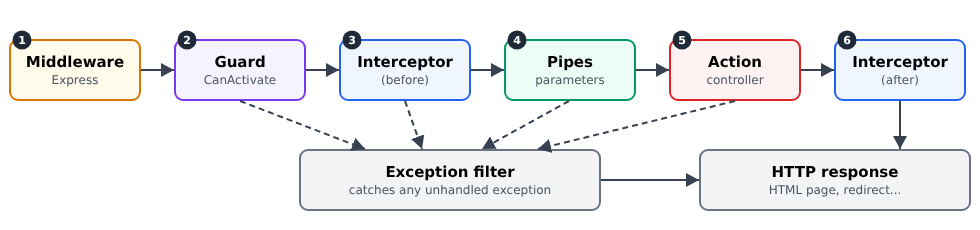
对象 | 角色 | 在案例研究中 |
中间件 | 准备请求;此时还不知道操作 | 读取 Cookie、语言、闪现消息 |
守卫 | 授权或拒绝对操作的访问 | 身份验证(JWT)、角色 |
拦截器 | 在操作之前和之后执行的代码 | 已登录的用户,暴露给视图 |
管道 | 转换并验证参数 | [ParseIntPipe] |
异常过滤器 | 把异常转换为响应 | HTML 错误页面,重定向到 /login |
7.1. 示例 24:五个步骤
示例 24 有一个计算数字平方的操作,以及每种类型的一个对象。每个对象都会向控制台写一行,这样我们就能看到它们发生的顺序。
文件 [src/logger.middleware.ts]:
| import { Injectable, NestMiddleware } from '@nestjs/common';
import { NextFunction, Request, Response } from 'express';
// 1. 中间件:最先看到请求。它还不知道
// 哪个动作将处理该请求
@Injectable()
export class LoggerMiddleware implements NestMiddleware {
use(req: Request, res: Response, next: NextFunction): void {
console.log(`\n--- ${req.method} ${req.originalUrl}`);
console.log('1. middleware');
next(); // 交给链中的后续环节
}
}
|
- 第 7 行:[NestJS] 中间件是实现 [NestMiddleware] 的类。像前面的示例那样使用简单的函数也可以;
- 第 11 行:中间件 必须 调用 [next()] ,把控制权传给下一步(或者自己发送响应)。否则,请求会一直被阻塞。
文件 [src/app.module.ts]:
| import { MiddlewareConsumer, Module, NestModule } from '@nestjs/common';
import { CalcController } from './calc.controller';
import { LoggerMiddleware } from './logger.middleware';
@Module({
controllers: [CalcController],
})
export class AppModule implements NestModule {
// 类中间件在模块中注册
configure(consumer: MiddlewareConsumer): void {
consumer.apply(LoggerMiddleware).forRoutes('*');
}
}
|
第 10–12 行:基于类的中间件在实现了 [NestModule] 的模块中注册自己。[forRoutes('*')] 把它应用于所有路由。
文件 [src/block.guard.ts]:
| import { CanActivate, ExecutionContext, Injectable } from '@nestjs/common';
import { Request } from 'express';
// 2. 守卫:决定请求是否可以到达动作。
// false -> NestJS 抛出 ForbiddenException (403)
@Injectable()
export class BlockGuard implements CanActivate {
canActivate(context: ExecutionContext): boolean {
const req = context.switchToHttp().getRequest<Request>();
// 守卫知道目标动作(中间件则不知道)
console.log(`2. guard (targeted action: ${context.getHandler().name})`);
return req.query.block !== '1';
}
}
|
- 第 7 行:守卫实现 [CanActivate];
- 第 8 行:它的 [canActivate] 方法接收 执行上下文 并返回 [true] (请求继续)或 [false]([NestJS] 会抛出 [ForbiddenException],状态码 403);
- 第 11 行:与中间件不同,守卫 知道 目标 操作 ([getHandler()])及其控制器([getClass()])。这使得守卫能够读取应用于操作的装饰器(参见下一章的 [@Roles])。
文件 [src/timing.interceptor.ts]:
| import { CallHandler, ExecutionContext, Injectable, NestInterceptor } from '@nestjs/common';
import { Observable, tap } from 'rxjs';
// 3. 拦截器:在动作之前和之后执行的代码
@Injectable()
export class TimingInterceptor implements NestInterceptor {
intercept(context: ExecutionContext, next: CallHandler): Observable<unknown> {
console.log('3. interceptor (before)');
const start = Date.now();
// next.handle() 运行后续环节:先是管道,然后是动作。动作的结果
// 在返回的流(Observable)中到达
return next.handle().pipe(tap(() => console.log(`6. interceptor (after, ${Date.now() - start} ms)`)));
}
}
|
- 第 6 行:拦截器实现 [NestInterceptor];
- 第 8 行:放在 [next.handle()] 之前的代码在操作 之前执行;
- 第 12 行:[next.handle()] 执行其余部分(管道,然后是操作),并返回一个 [RxJS] 流([Observable]),它将产生操作的结果。[tap] 运算符在操作 之后执行代码,而不修改其结果([map] 运算符则可以修改结果)。
文件 [src/integer.pipe.ts]:
| import { BadRequestException, Injectable, PipeTransform } from '@nestjs/common';
// 4. 管道:转换并验证动作的参数
@Injectable()
export class IntegerPipe implements PipeTransform<string, number> {
transform(value: string): number {
console.log(`4. pipe (received value: "${value}")`);
const n = Number(value);
if (!Number.isInteger(n)) {
throw new BadRequestException(`"${value}" is not an integer`);
}
return n;
}
}
|
一个类似 [ParseIntPipe] 的管道(参见示例 12)。
文件 [src/error-page.filter.ts]:
| import { ArgumentsHost, Catch, ExceptionFilter, HttpException, HttpStatus } from '@nestjs/common';
import { Response } from 'express';
// x. 异常过滤器:接收任何未处理的异常,无论
// 来自何处(守卫、管道、动作……),并构建响应。
// 不带参数的 @Catch():捕获所有异常
@Catch()
export class ErrorPageFilter implements ExceptionFilter {
catch(exception: unknown, host: ArgumentsHost): void {
const res = host.switchToHttp().getResponse<Response>();
const status = exception instanceof HttpException ? exception.getStatus() : HttpStatus.INTERNAL_SERVER_ERROR;
const message = exception instanceof HttpException ? exception.message : 'Internal error';
console.log(`x. exception filter (${status}: ${message})`);
// 返回 HTML 页面,而不是 NestJS 默认的 JSON 响应
res.status(status).render('error', { status, message });
}
}
|
- 第 7 行:[@Catch()] 不带参数:过滤器接收 所有 异常。[@Catch(HttpException)] 则会把范围限制为 HTTP 异常;
- 第 9 行:[catch] 方法接收异常以及一个 [host] 对象,通过它可以访问请求和响应;
- 第 11 行:[HttpException] 包含它的状态码。任何其他异常(编程错误、无法访问的数据库)都会导致 500 错误;
- 第 15 行:过滤器不返回默认的 JSON,而是显示带有正确状态码的 HTML 页面。
文件 [src/main.ts]:
| import { NestFactory } from '@nestjs/core';
import { NestExpressApplication } from '@nestjs/platform-express';
import { dirname, join } from 'path';
import { AppModule } from './app.module';
import { TimingInterceptor } from './timing.interceptor';
import { ErrorPageFilter } from './error-page.filter';
async function bootstrap() {
const app = await NestFactory.create<NestExpressApplication>(AppModule, { logger: ['error', 'warn'] });
app.useStaticAssets(join(dirname(require.resolve('bootstrap/package.json')), 'dist'), { prefix: '/bootstrap/' });
app.setBaseViewsDir(join(__dirname, '..', 'views'));
app.setViewEngine('hbs');
// 全局拦截器和过滤器:它们应用于所有路由
app.useGlobalInterceptors(new TimingInterceptor());
app.useGlobalFilters(new ErrorPageFilter());
await app.listen(3000);
console.log('Server started on http://localhost:3000');
}
bootstrap();
|
- 第 9 行:我们把来自 [NestJS] 的消息过滤为只剩错误和警告,这样可以更清楚地看到我们自己的输出;
- 第 14–15 行:拦截器和过滤器是 全局的;它们应用于所有操作。
文件 [src/calc.controller.ts]:
| import { Controller, Get, Param, Render, UseGuards } from '@nestjs/common';
import { BlockGuard } from './block.guard';
import { IntegerPipe } from './integer.pipe';
@Controller('square')
@UseGuards(BlockGuard) // 守卫应用于控制器的所有动作
export class CalcController {
@Get(':n')
@Render('square')
square(@Param('n', IntegerPipe) n: number): object {
console.log(`5. action square(${n})`);
if (n === 13) {
throw new Error('13 brings bad luck'); // 一个“意外”错误
}
return { n, square: n * n };
}
}
|
- 第 6 行:[@UseGuards] 把守卫应用于控制器的所有操作(也可以只应用于单个操作);
- 第 10 行:管道转换参数;
- 第 12–14 行:一个“意外”错误,用来观察过滤器的作用。
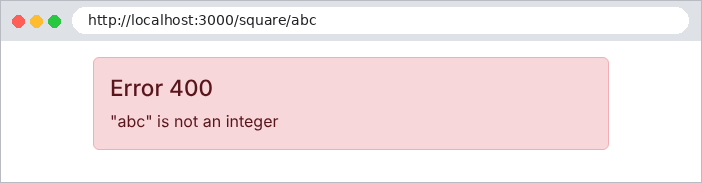
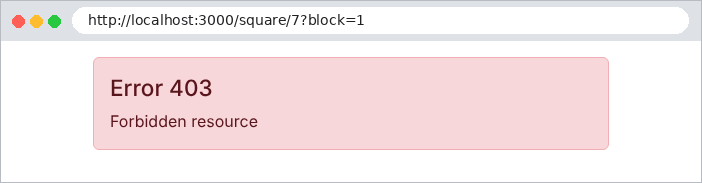
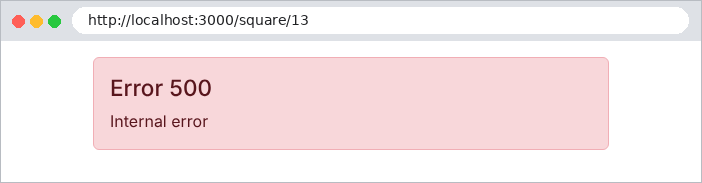
四个请求:一次正常的计算、一个无效的参数、一个被守卫阻止的请求,以及意外错误。服务器控制台:
| --- GET /square/7
1. middleware
2. guard (targeted action: square)
3. interceptor (before)
4. pipe (received value: "7")
5. action square(7)
6. interceptor (after, 2 ms)
--- GET /square/abc
1. middleware
2. guard (targeted action: square)
3. interceptor (before)
4. pipe (received value: "abc")
x. exception filter (400: "abc" is not an integer)
--- GET /square/7?block=1
1. middleware
2. guard (targeted action: square)
x. exception filter (403: Forbidden resource)
--- GET /square/13
1. middleware
2. guard (targeted action: square)
3. interceptor (before)
4. pipe (received value: "13")
5. action square(13)
x. exception filter (500: Internal error)
|
这份日志显示:
- 各步骤的顺序:中间件、守卫、拦截器(之前)、管道、操作、拦截器(之后);
- 异常会 中断 调用链,无论它发生在哪里,然后由过滤器生成响应:守卫拒绝访问(403),管道拒绝访问(400),操作失败(500)。
生成的页面:

案例研究中的异常过滤器([web/html-exception.filter.ts])遵循这一模式,只有一个例外:401 错误(用户未登录)不显示错误页面,而是重定向到登录页面。