3. 操作模型
操作需要浏览器发送的信息:URL 参数([?name=martin&age=42])、表单字段和路由参数。原课程把所有这些信息 称为操作的模型。本章展示 [NestJS] 如何把它提供给操作、转换为正确的类型,并 验证它。
3.1. 示例 07:URL 参数
[src/parameters.controller.ts] 文件:
| import { Controller, DefaultValuePipe, Get, ParseIntPipe, Query } from '@nestjs/common';
@Controller('parameters')
export class ParametersController {
// /parameters/action01?name=martin
@Get('action01')
action01(@Query('name') name: string): string {
return `name = [${name}], of type ${typeof name}`;
}
// /parameters/action02?age=42:参数始终是字符串
@Get('action02')
action02(@Query('age') age: number): string {
return `age = [${age}], of type ${typeof age}`;
}
// /parameters/action03?age=42:ParseIntPipe 负责转换(或拒绝)
@Get('action03')
action03(@Query('age', ParseIntPipe) age: number): string {
return `age = [${age}], of type ${typeof age}`;
}
// /parameters/action04?page=2:参数缺失时使用默认值
@Get('action04')
action04(@Query('page', new DefaultValuePipe(1), ParseIntPipe) page: number): string {
return `page = [${page}], of type ${typeof page}`;
}
// /parameters/action05?name=martin&age=42:一次获取所有参数
@Get('action05')
action05(@Query() parameters: Record<string, string>): object {
return parameters;
}
}
|
我们来逐行剖析这段代码:
- 第 6–9 行:[@Query('name')] 注入 URL 中 [name] 参数的值(位于 [?] 之后的部分,称为 查询字符串 或 [query string]);
- 第 12–15 行:参数 [age] 被声明为 [number] 类型……但这个类型只是一个 [TypeScript] 声明,在编译时会被移除。我们收到的 始终是字符串,执行结果也证明了这一点;
- 第 18–21 行:[ParseIntPipe] 是一个 管道:在参数值到达操作之前对其 进行转换 (并验证)的对象。这里,字符串 ['42'] 变成数字 42;非数字的字符串会导致 400(Bad Request)错误,而且操作不会被执行;
- 第 24–27 行:管道可以串联起来:[DefaultValuePipe(1)] 用 1 替换缺失的参数,然后 [ParseIntPipe] 再进行转换;
- 第 30–33 行:[@Query()]不带任何参数时,注入一个包含 URL 中 所有 参数的对象。
结果:
| curl -i "http://localhost:3000/parameters/action01?name=martin"
|
| HTTP/1.1 200 OK
Content-Type: text/html; charset=utf-8
Content-Length: 31
name = [martin], of type string
|
| curl -i "http://localhost:3000/parameters/action01"
|
| HTTP/1.1 200 OK
Content-Type: text/html; charset=utf-8
Content-Length: 37
name = [undefined], of type undefined
|
| curl -i "http://localhost:3000/parameters/action02?age=42"
|
| HTTP/1.1 200 OK
Content-Type: text/html; charset=utf-8
Content-Length: 26
age = [42], of type string
|
| curl -i "http://localhost:3000/parameters/action03?age=42"
|
| HTTP/1.1 200 OK
Content-Type: text/html; charset=utf-8
Content-Length: 26
age = [42], of type number
|
| curl -i "http://localhost:3000/parameters/action03?age=abc"
|
| HTTP/1.1 400 Bad Request
Content-Type: application/json; charset=utf-8
Content-Length: 99
{"message":"Validation failed (numeric string is expected)","error":"Bad Request","statusCode":400}
|
| curl -i "http://localhost:3000/parameters/action04"
|
| HTTP/1.1 200 OK
Content-Type: text/html; charset=utf-8
Content-Length: 26
page = [1], of type number
|
| curl -i "http://localhost:3000/parameters/action04?page=2"
|
| HTTP/1.1 200 OK
Content-Type: text/html; charset=utf-8
Content-Length: 26
page = [2], of type number
|
| curl -i "http://localhost:3000/parameters/action05?name=martin&age=42"
|
| HTTP/1.1 200 OK
Content-Type: application/json; charset=utf-8
Content-Length: 28
{"name":"martin","age":"42"}
|
当 URL 包含字符 [&] 时,必须给它加上引号,因为这个字符对控制台有特殊含义。请注意:
- 缺失的参数被视为 [undefined];
- 存在的参数是字符串,与声明的类型无关;
- 管道用于转换和验证参数,如果值无效则返回 400 状态码。

3.2. 示例 08:由类描述的操作模型
当操作有多个参数时,它们由一个 类描述,通常称为 [DTO] ([Data Transfer Object])。该类的每个字段都带有由 验证装饰器 提供的 [class-validator] 库。它们相当于 [[Required]]、[[Range]]等 [ASP.NET MVC] 的特性。
[src/person.dto.ts] 文件:
| import { Type } from 'class-transformer';
import { IsEmail, IsIn, IsInt, IsNotEmpty, IsOptional, Length, Max, Min } from 'class-validator';
export class PersonDto {
@IsNotEmpty({ message: 'the name is required' })
@Length(2, 20, { message: 'the name must have 2 to 20 characters' })
name: string;
@Type(() => Number)
@IsInt({ message: 'the age must be an integer' })
@Min(0, { message: 'the age must be positive' })
@Max(150, { message: 'the age cannot exceed 150' })
age: number;
@IsIn(['Mr', 'Mme', 'Melle'], { message: 'unknown title' })
title: string;
@IsOptional()
@IsEmail({}, { message: 'invalid email address' })
email?: string;
}
|
我们来逐行剖析这段代码:
- 第 1 行:[@Type] 来自 [class-transformer] 库,该库用于 转换接收到的数据;
- 第 2 行:来自 [class-validator] 的验证装饰器;
- 第 5–7 行:姓名是必填的([@IsNotEmpty]),长度必须在 2 到 20 个字符之间([@Length])。每个装饰器都接受自定义的错误消息;
- 第 9–13 行:[@Type(() => Number)] 要求在验证之前把接收到的字符串转换为数字:一个介于 0 和 150 之间的整数([@IsInt])([@Min]、[@Max]);
- 第 15–16 行:称谓必须是列表中的某个值;
- 第 18–20 行:电子邮件地址是可选的([@IsOptional]);如果存在,则必须有效([@IsEmail])。
文件 [src/persons.controller.ts]:
| import { Controller, Get, Query } from '@nestjs/common';
import { PersonDto } from './person.dto';
@Controller('persons')
export class PersonsController {
// /persons/action01?name=martin&age=42&title=Mr
@Get('action01')
action01(@Query() person: PersonDto): object {
return {
person,
ageType: typeof person.age,
isAPersonDto: person instanceof PersonDto,
};
}
}
|
第 8 行:操作接收一个 [PersonDto]。操作返回收到的人员、其年龄的类型,并验证它确实是 [PersonDto] 类的实例。
为确保应用类的装饰器,必须在 [main.ts] 中一劳永逸地启用验证:
文件 [src/main.ts]:
| import { NestFactory } from '@nestjs/core';
import { ValidationPipe } from '@nestjs/common';
import { AppModule } from './app.module';
async function bootstrap() {
const app = await NestFactory.create(AppModule);
// 由类描述的所有动作模型的自动验证
app.useGlobalPipes(
new ValidationPipe({
transform: true, // 将收到的字符串转换为声明的类型
whitelist: true, // 移除类中未声明的字段
}),
);
await app.listen(3000);
console.log('Server started on http://localhost:3000');
}
bootstrap();
|
- 第 8–13 行:一个 全局管道,即 [ValidationPipe],应用于所有操作的所有参数。对于类型为类的参数,它会检查其装饰器的约束;
- 第 10 行:[transform: true]:操作接收到的是 [PersonDto] 的 真正实例,其字段已经过转换([@Type]);
- 第 11 行:[whitelist: true]:与类中任何字段都不对应的参数会被移除。
一个有效的请求,带有一个未在类中声明的参数([pirate]):
| curl -i "http://localhost:3000/persons/action01?name=martin&age=42&title=Mr&pirate=1"
|
| HTTP/1.1 200 OK
Content-Type: application/json; charset=utf-8
Content-Length: 89
{"person":{"name":"martin","age":42,"title":"Mr"},"ageType":"number","isAPersonDto":true}
|
年龄确实变成了数字,而参数 [pirate] 已经消失。一个无效的查询:
| curl -i "http://localhost:3000/persons/action01?name=m&age=abc&title=Dr&email=xx"
|
| HTTP/1.1 400 Bad Request
Content-Type: application/json; charset=utf-8
Content-Length: 216
{"message":["the name must have 2 to 20 characters","the age cannot exceed 150","the age must be positive","the age must be an integer","unknown title","invalid email address"],"error":"Bad Request","statusCode":400}
|
[ValidationPipe] 以 400 错误拒绝了该请求,其响应体(JSON)列出了错误消息。操作没有被执行。没有任何参数时结果相同:
| curl -i http://localhost:3000/persons/action01
|
| HTTP/1.1 400 Bad Request
Content-Type: application/json; charset=utf-8
Content-Length: 215
{"message":["the name must have 2 to 20 characters","the name is required","the age cannot exceed 150","the age must be positive","the age must be an integer","unknown title"],"error":"Bad Request","statusCode":400}
|
对于由 [JavaScript] 客户端查询、并以自己的方式显示错误的 JSON 服务器来说,这种行为是符合预期的。对于 HTML 应用,错误 JSON 毫无意义:我们希望 重新显示表单 及其错误。下一个示例展示如何掌控这一过程。
3.3. 示例 09:由操作自己执行验证
示例 09 没有全局的 [ValidationPipe]。由操作自己转换并验证模型,使用相同的装饰器([person.dto.ts] 文件是相同的):
[src/persons.controller.ts] 文件:
| import { Controller, Get, Query } from '@nestjs/common';
import { plainToInstance } from 'class-transformer';
import { validate } from 'class-validator';
import { PersonDto } from './person.dto';
@Controller('persons')
export class PersonsController {
// 这里没有 ValidationPipe:动作接收的是原始参数,并
// 自行决定如何处理错误
@Get('action01')
async action01(@Query() raw: Record<string, string>): Promise<string> {
// 1. 原始对象 -> PersonDto 实例(包含 @Type 转换)
const person = plainToInstance(PersonDto, raw);
// 2. 检查约束(@IsNotEmpty、@Min……)
const errors = await validate(person);
// 3. 两种情况下都返回 HTML 页面:没有 400 错误
if (errors.length === 0) {
return `<p>Welcome ${person.title} ${person.name} (${person.age} years old)</p>`;
}
const items = errors
.map((e) => `<li>${e.property}: ${Object.values(e.constraints ?? {}).join(', ')}</li>`)
.join('');
return `<p>The form contains errors:</p><ul>${items}</ul>`;
}
}
|
我们来逐行说明这段代码:
- 第 11 行:操作接收 原始参数:一个所有字段都是字符串的对象;
- 第 13 行:[plainToInstance] ([class-transformer])根据原始对象创建一个 [PersonDto] 实例,并应用转换([@Type]);
- 第 15 行:[validate] ([class-validator])检查所有约束。它返回一个错误数组,如果一切正常则为空。每个错误都指明有问题的字段([property])以及被违反约束的消息([constraints]);
- 第 17–18 行:没有错误——一个欢迎页面;
- 第 20–23 行:否则,一个列出错误的页面。两种情况下,响应都是 HTML 页面,状态码为 200。

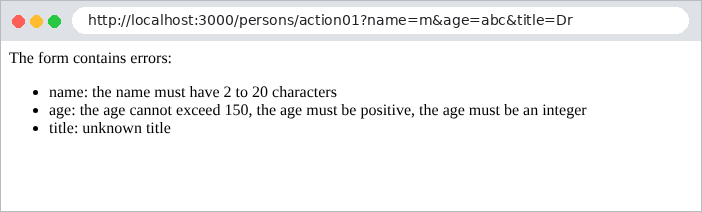
这就是案例研究中所有表单都将采用的技术(参见示例 19)。
3.4. 示例 10:多值参数
同一个参数可以在请求中多次出现:表单上的复选框或多选列表就属于这种情况([?color=red&color=green])。
文件 [src/arrays.controller.ts]:
| import { Controller, Get, Query } from '@nestjs/common';
import { ChoiceDto } from './choice.dto';
@Controller('arrays')
export class ArraysController {
// /arrays/action01?color=red&color=green:Express 收到的内容
@Get('action01')
action01(@Query('color') color: string | string[]): object {
return { color, isAnArray: Array.isArray(color) };
}
// /arrays/action02?color=red:借助 ChoiceDto 始终得到数组
@Get('action02')
action02(@Query() choice: ChoiceDto): object {
return { colors: choice.color, count: choice.color.length };
}
}
|
[action01] 操作(第 7–10 行)展示了操作收到的内容:
| curl -i "http://localhost:3000/arrays/action01?color=red"
|
| HTTP/1.1 200 OK
Content-Type: application/json; charset=utf-8
Content-Length: 33
{"color":"red","isAnArray":false}
|
| curl -i "http://localhost:3000/arrays/action01?color=red&color=green"
|
| HTTP/1.1 200 OK
Content-Type: application/json; charset=utf-8
Content-Length: 42
{"color":["red","green"],"isAnArray":true}
|
类型取决于值的个数:单个值时是字符串,多个值时是数组。这是一个常见的陷阱。[ChoiceDto] 类把这两种情况都当作数组来处理:
文件 [src/choice.dto.ts]:
| import { Transform } from 'class-transformer';
import { ArrayMinSize, IsArray, IsIn } from 'class-validator';
export class ChoiceDto {
// ?color=red -> "red";?color=red&color=green -> ["red","green"]
// @Transform 将两种情况都转换为数组
@Transform(({ value }) => (Array.isArray(value) ? value : [value]))
@IsArray()
@ArrayMinSize(1, { message: 'choose at least one color' })
@IsIn(['red', 'green', 'blue'], { each: true, message: 'unknown color' })
color: string[];
}
|
- 第 7 行:[@Transform] ([class-transformer])对字段应用一个转换函数:单个值会被放入一个数组;
- 第 8 行:该字段必须是数组……
- 第 9 行:……至少包含一个元素……
- 第 10 行:……并且每个元素([each: true])都必须在列表中。
| curl -i "http://localhost:3000/arrays/action02?color=red"
|
| HTTP/1.1 200 OK
Content-Type: application/json; charset=utf-8
Content-Length: 28
{"colors":["red"],"count":1}
|
| curl -i "http://localhost:3000/arrays/action02?color=red&color=green"
|
| HTTP/1.1 200 OK
Content-Type: application/json; charset=utf-8
Content-Length: 36
{"colors":["red","green"],"count":2}
|
| curl -i "http://localhost:3000/arrays/action02?color=red&color=black"
|
| HTTP/1.1 400 Bad Request
Content-Type: application/json; charset=utf-8
Content-Length: 68
{"message":["unknown color"],"error":"Bad Request","statusCode":400}
|
3.5. 示例 11:POST 请求的参数
使用 POST 方法发送的 HTML 表单会把字段放在请求的 正文中,而不是 URL 中。此时由 [@Body] 装饰器取代 [@Query]:
文件 [src/post.controller.ts]:
| import { Body, Controller, Headers, Post } from '@nestjs/common';
import { PersonDto } from './person.dto';
@Controller('post')
export class PostController {
// 请求体,原样获取
@Post('action01')
action01(@Body() body: Record<string, unknown>, @Headers('content-type') type: string): object {
return { receivedType: type, body };
}
// 请求体中的单个字段
@Post('action02')
action02(@Body('name') name: string): string {
return `name = [${name}]`;
}
// 请求体,由 PersonDto 类转换并验证
@Post('action03')
action03(@Body() person: PersonDto): object {
return { person, ageType: typeof person.age };
}
}
|
- 第 7–10 行:[@Body()] 注入请求正文,它已由 [NestJS] 解码。[@Headers('content-type')] 注入一个请求头:正文的类型;
- 第 13–16 行:[@Body('name')] 注入正文中的单个字段;
- 第 19–22 行:与 [@Query] 一样,正文也可以由类来描述,并由全局 [ValidationPipe] 进行验证。
[-d] 选项属于 [curl] ,用于发送带有 HTML 表单格式正文的 POST 请求([application/x-www-form-urlencoded]):
| curl -i -d "name=martin&age=42" http://localhost:3000/post/action01
|
| HTTP/1.1 201 Created
Content-Type: application/json; charset=utf-8
Content-Length: 88
{"receivedType":"application/x-www-form-urlencoded","body":{"name":"martin","age":"42"}}
|
同样的正文,采用 JSON 格式(这是 [JavaScript] 客户端发送的格式):
| curl -i -H "Content-Type: application/json" -d '{"name":"martin","age":42}' http://localhost:3000/post/action01
|
| HTTP/1.1 201 Created
Content-Type: application/json; charset=utf-8
Content-Length: 69
{"receivedType":"application/json","body":{"name":"martin","age":42}}
|
[NestJS] 能解码这两种格式。请注意,“age”在第一种情况下是字符串(HTML 表单只携带文本),在第二种情况下是数字。另外两个操作:
| curl -i -d "name=martin&age=42" http://localhost:3000/post/action02
|
| HTTP/1.1 201 Created
Content-Type: text/html; charset=utf-8
Content-Length: 15
name = [martin]
|
| curl -i -d "name=martin&age=42&title=Mme" http://localhost:3000/post/action03
|
| HTTP/1.1 201 Created
Content-Type: application/json; charset=utf-8
Content-Length: 70
{"person":{"name":"martin","age":42,"title":"Mme"},"ageType":"number"}
|
| curl -i -d "name=martin&age=200" http://localhost:3000/post/action03
|
| HTTP/1.1 400 Bad Request
Content-Type: application/json; charset=utf-8
Content-Length: 96
{"message":["the age cannot exceed 150","unknown title"],"error":"Bad Request","statusCode":400}
|
状态码 201(Created)是 [NestJS] 对 POST 的默认状态码。对于 HTML 应用,POST 操作要么以页面响应(此时要加上 [@HttpCode(200)]),要么以重定向响应(参见示例 20)。
3.6. 示例 12:自定义管道和装饰器
你可以编写自己的管道和参数装饰器。案例研究只是适度地使用它们,但理解它们有助于理解 [NestJS] 自带的那些。
3.6.1. 一个管道:DateFrPipe
文件 [src/date-fr.pipe.ts]:
| import { BadRequestException, Injectable, PipeTransform } from '@nestjs/common';
// 将法式日期 "23/09/2026" 转换为 ISO 日期 "2026-09-23"
@Injectable()
export class DateFrPipe implements PipeTransform<string, string> {
transform(value: string): string {
const m = /^(\d{2})\/(\d{2})\/(\d{4})$/.exec(value ?? '');
if (!m) {
throw new BadRequestException(`[${value}] is not a date in the dd/mm/yyyy format`);
}
const [, day, month, year] = m;
const iso = `${year}-${month}-${day}`;
// "31/02/2026" 格式正确,但并不存在
if (new Date(`${iso}T00:00:00Z`).toISOString().slice(0, 10) !== iso) {
throw new BadRequestException(`the date [${value}] does not exist`);
}
return iso;
}
}
|
- 第 4–5 行:管道是一个实现了 [@Injectable()] 接口 [PipeTransform<input, output>] 的类;
- 第 6 行:它的 [transform] 方法接收参数值并返回转换后的值,该值将由操作接收;
- 第 7–9 行:不符合 [dd/mm/yyyy] 格式的值会触发 [BadRequestException] (400);
- 第 13–15 行:格式正确但并不存在的日期(31/02/2026)同样会被拒绝:[new Date] 会把它“纠正”为 03/03/2026,从而被检测出来。
3.6.2. 一个参数装饰器:@Language()
文件 [src/language.decorator.ts]:
| import { createParamDecorator, ExecutionContext } from '@nestjs/common';
import { Request } from 'express';
// @Language():浏览器的首选语言,从标头中读取
// "Accept-Language: fr-FR,fr;q=0.9,en;q=0.8" -> "fr"
export const Language = createParamDecorator((fallback: string | undefined, ctx: ExecutionContext): string => {
const req = ctx.switchToHttp().getRequest<Request>();
const header = req.get('accept-language') ?? '';
const first = header.split(',')[0].trim().slice(0, 2).toLowerCase();
return first || fallback || 'fr';
});
|
- 第 6 行:[createParamDecorator] 创建一个参数装饰器,类似于 [@Query] 或 [@Body]。该函数接收装饰器的参数([@Language('fr')])以及请求的 执行上下文;
- 第 7 行:上下文提供对 [Express] 请求的访问;
- 第 8–10 行:返回 [Accept-Language] 头的前两个字母,该头指明用户的首选语言。
3.6.3. 控制器
文件 [src/examples.controller.ts]:
| import { Controller, Get, Query } from '@nestjs/common';
import { DateFrPipe } from './date-fr.pipe';
import { Language } from './language.decorator';
import { SearchDto } from './search.dto';
@Controller('examples')
export class ExamplesController {
// /examples/schedule?day=23/09/2026:自定义管道
@Get('schedule')
schedule(@Query('day', DateFrPipe) day: string): string {
return `schedule for the day [${day}]`;
}
// /examples/hello:自定义参数装饰器
@Get('hello')
hello(@Language('fr') language: string): string {
return language === 'en' ? 'Hello!' : 'Bonjour !';
}
// /examples/search?keyword=nest&admin=true:[admin] 未声明
@Get('search')
search(@Query() search: SearchDto): object {
return search;
}
}
|
- 第 10 行:管道的用法是 [ParseIntPipe];
- 第 16 行:装饰器的用法是 [@Query];
- 第 22 行:由类描述的模型,这次使用 [forbidNonWhitelisted] 选项,它来自 [ValidationPipe] (见下面的 [main.ts] 文件)。
[src/main.ts] 文件:
| import { NestFactory } from '@nestjs/core';
import { ValidationPipe } from '@nestjs/common';
import { AppModule } from './app.module';
async function bootstrap() {
const app = await NestFactory.create(AppModule);
app.useGlobalPipes(
new ValidationPipe({
transform: true,
whitelist: true, // 未声明的字段被移除……
forbidNonWhitelisted: true, // ……或者使用此选项时被拒绝 (400)
}),
);
await app.listen(3000);
console.log('Server started on http://localhost:3000');
}
bootstrap();
|
第 11 行:使用 [forbidNonWhitelisted: true] 时,类中未声明的参数不再被默默移除,而是会引发 400 错误。
结果:
| curl -i "http://localhost:3000/examples/schedule?day=23/09/2026"
|
| HTTP/1.1 200 OK
Content-Type: text/html; charset=utf-8
Content-Length: 33
schedule for the day [2026-09-23]
|
| curl -i "http://localhost:3000/examples/schedule?day=2026-09-23"
|
| HTTP/1.1 400 Bad Request
Content-Type: application/json; charset=utf-8
Content-Length: 104
{"message":"[2026-09-23] is not a date in the dd/mm/yyyy format","error":"Bad Request","statusCode":400}
|
| curl -i "http://localhost:3000/examples/schedule?day=31/02/2026"
|
| HTTP/1.1 400 Bad Request
Content-Type: application/json; charset=utf-8
Content-Length: 89
{"message":"the date [31/02/2026] does not exist","error":"Bad Request","statusCode":400}
|
| curl -i -H "Accept-Language: fr-FR,fr;q=0.9" http://localhost:3000/examples/hello
|
| HTTP/1.1 200 OK
Content-Type: text/html; charset=utf-8
Content-Length: 9
Bonjour !
|
| curl -i -H "Accept-Language: en-US,en;q=0.9" http://localhost:3000/examples/hello
|
| HTTP/1.1 200 OK
Content-Type: text/html; charset=utf-8
Content-Length: 6
Hello!
|
| curl -i "http://localhost:3000/examples/search?keyword=nest"
|
| HTTP/1.1 200 OK
Content-Type: application/json; charset=utf-8
Content-Length: 18
{"keyword":"nest"}
|
| curl -i "http://localhost:3000/examples/search?keyword=nest&admin=true"
|
| HTTP/1.1 400 Bad Request
Content-Type: application/json; charset=utf-8
Content-Length: 86
{"message":["property admin should not exist"],"error":"Bad Request","statusCode":400}
|
([-H] 选项属于 [curl] ,用于给请求添加一个头)
3.6.4. 结论
操作模型由 [NestJS] 根据请求生成:路由参数([@Param])、URL([@Query])、正文([@Body])和头([@Headers])。管道负责转换和验证这些值。对于 HTML 应用,通常最好自己验证模型(示例 09),以便重新显示表单。这是下一章的主题。