Skip to content

11. 案例研究:RdvMedecins 应用

11.1. 问题描述

The RdvMedecins application manages appointments for a medical practice. Each doctor has time slots (from 8:00 AM to 12:00 PM in 20-minute increments, for example); an appointment consists of a day, a time slot, and a client (a patient). It uses the database and business layers from the [NestJS] server in the courses “An Example of a Flutter Client/Server / NestJS” and “An Example of an Angular Client/Server / NestJS, and displays the same pages as the [Angular] client; but instead of serving JSON to a client [JavaScript] or [Flutter], it generates its own HTML pages.

三种用户 角色 共用该应用:

角色
谁
可以做什么
ADMIN
管理员([admin])
查看日程,为任何患者预约和取消预约;管理(列出、添加、编辑、删除)医生和客户
DOCTOR
医生
查看日程,为任何患者预约和取消预约
USER
客户(患者)
查看日程,但看不到其他患者的姓名;为自己预约;取消自己的预约;管理自己的账户;创建账户

主要管理规则:

  • 不能在过去的时间预约;
  • 同一时段每天只能被预约一次;
  • 一个患者同一时间只能有 一个 即将到来的预约;
  • 两位医生(或两位客户)不能有相同的名和姓,一个登录名只属于一个账户;
  • 有预约的医生不能被删除;删除客户时会连同其预约一起删除;
  • 登录页面受到防机器人保护(验证码、限制尝试次数),创建客户账户需要先在该页面上通过验证码。

11.2. 使用应用

11.2.1. 登录页面
Image

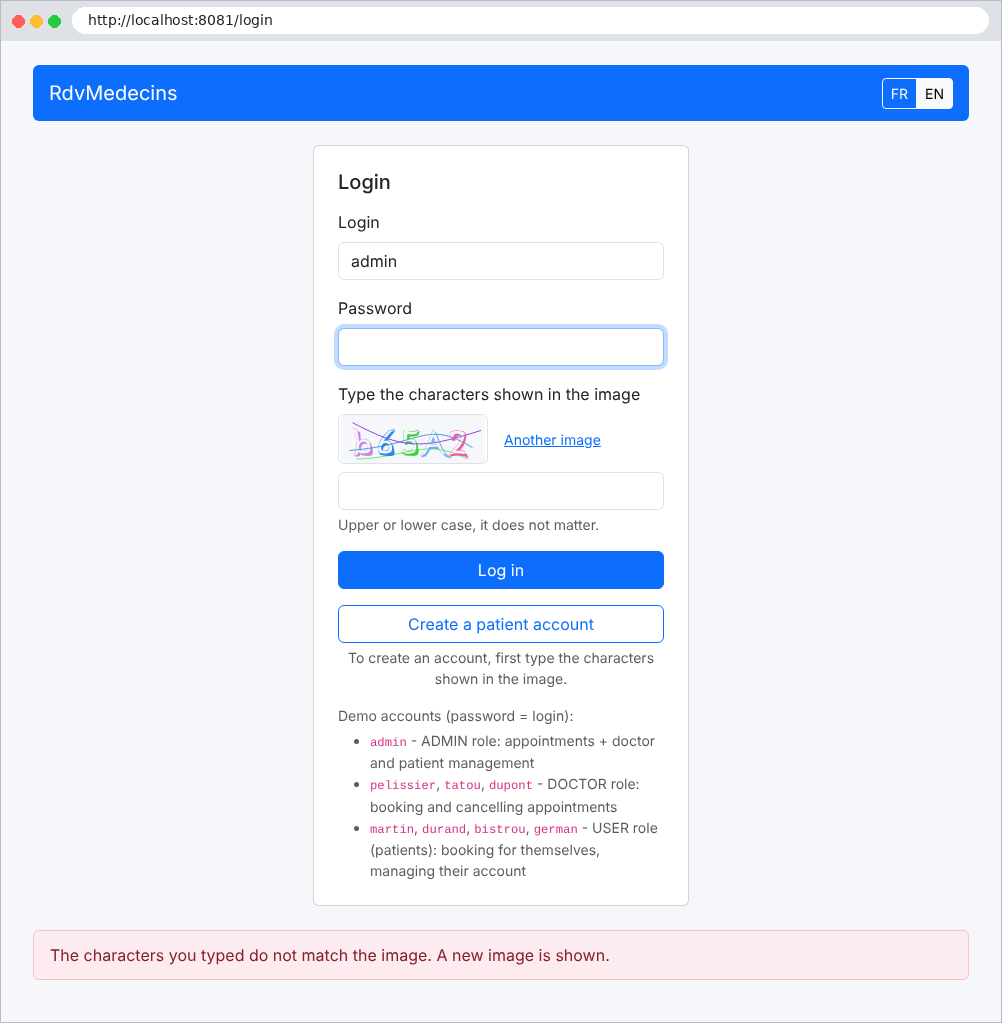
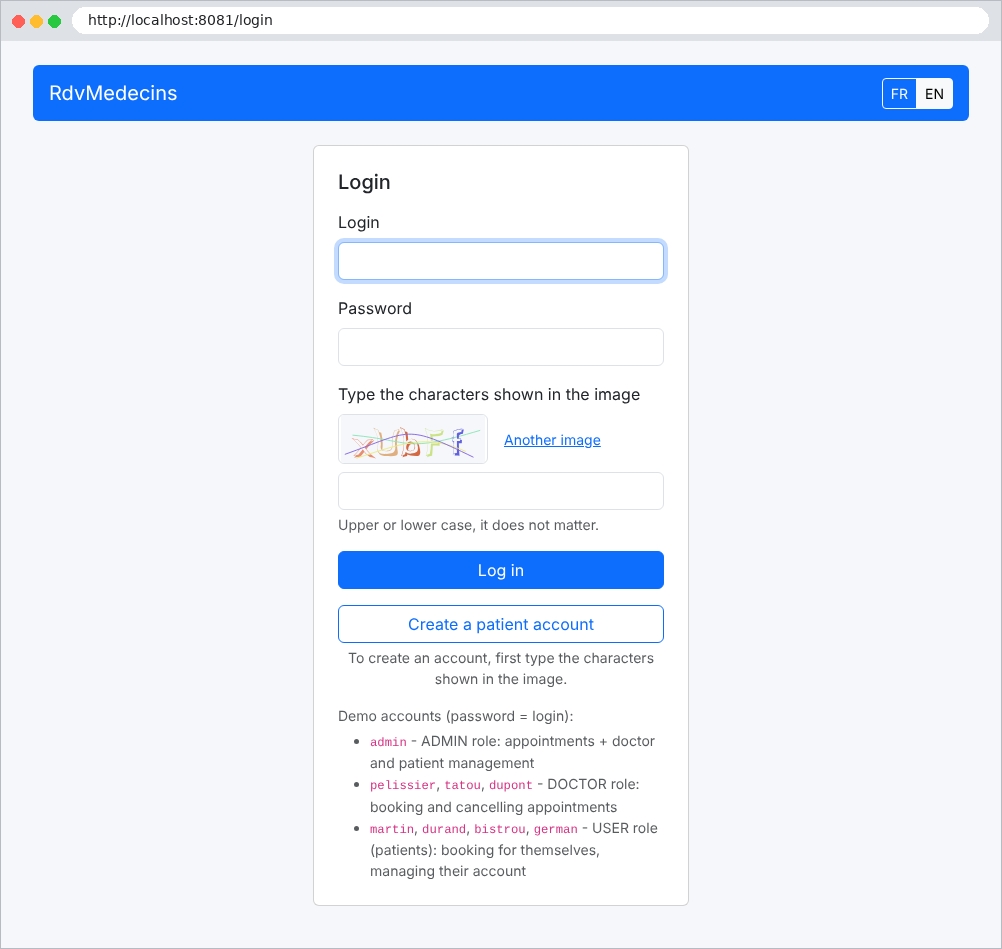
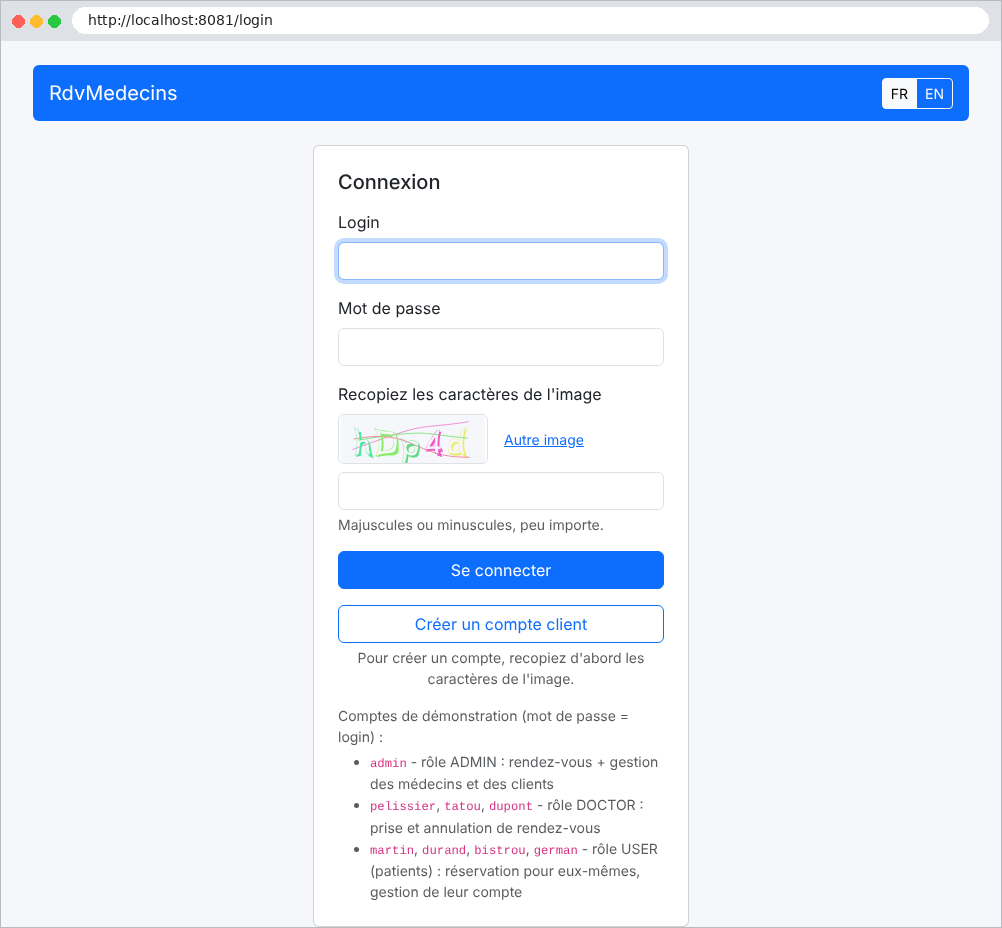
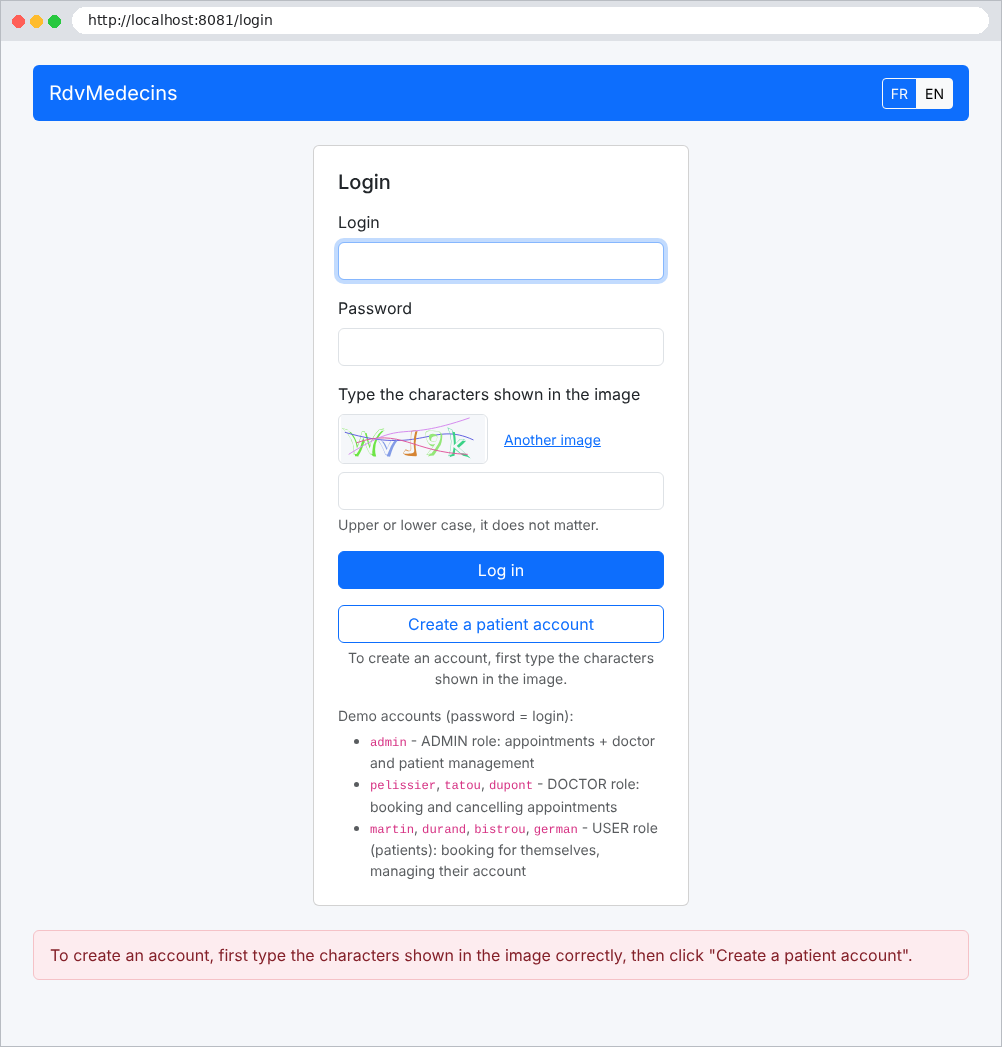
页面有两个按钮:登录和创建患者账户。两者都要求输入图像中显示的字符。按钮 FR / EN 用于切换语言:
Image

错误(这里是验证码拼写错误)显示在页面底部,背景为浅粉色:

Image

11.2.2. 日程,管理员和医生看到的样子

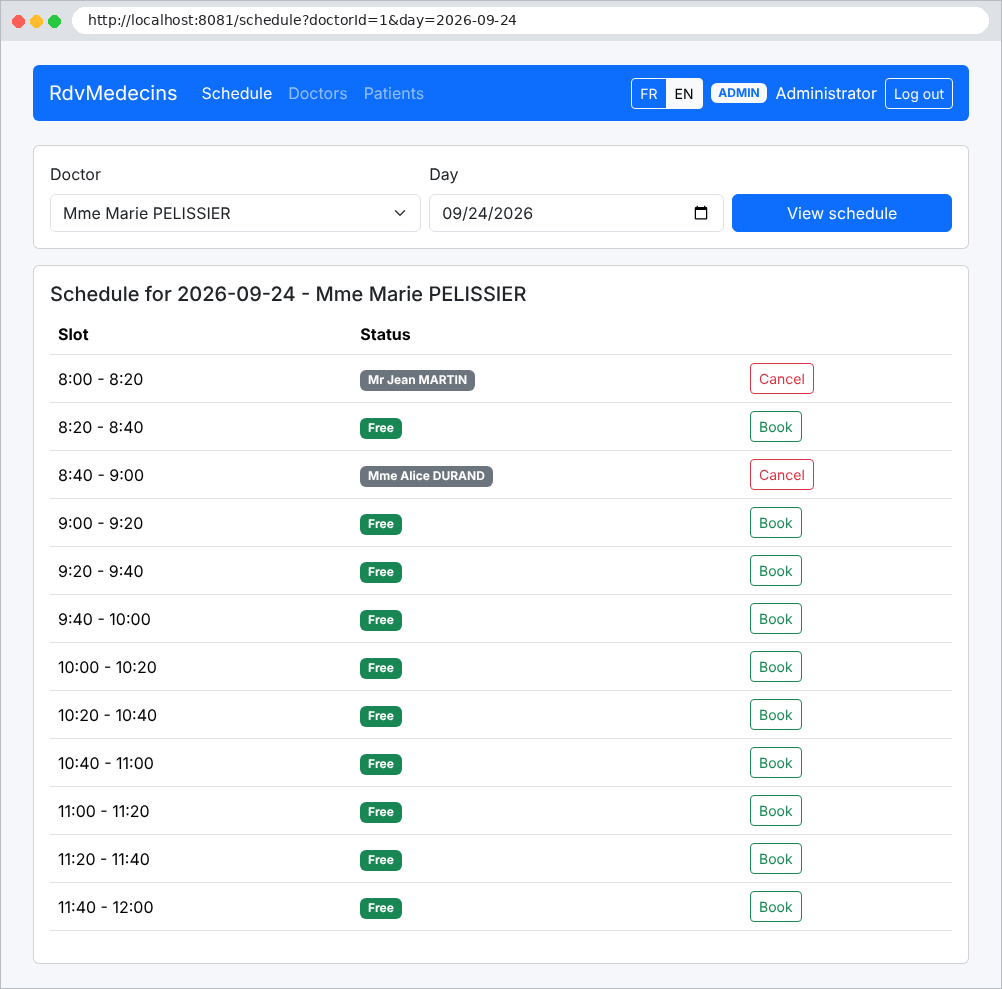
登录后,管理员会进入日程页面。他们选择一位医生和一个日期:
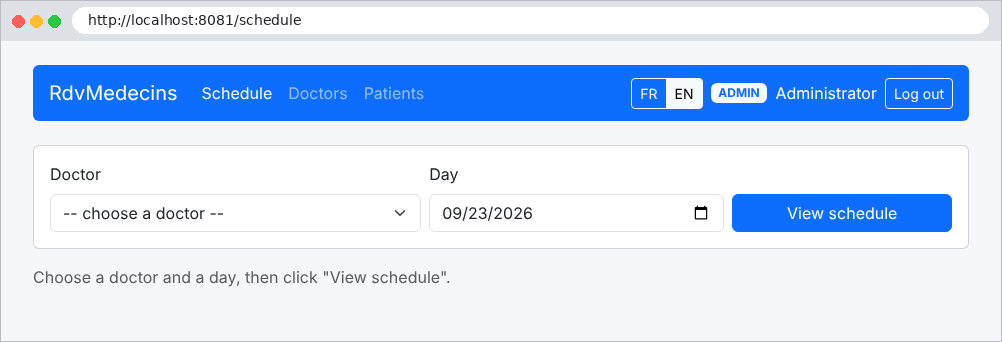
Image

Image

每个时段要么可预约(预约 按钮),要么已被占用(患者姓名,取消 按钮)。点击 预约 会打开一个窗口,要求填写患者的信息:
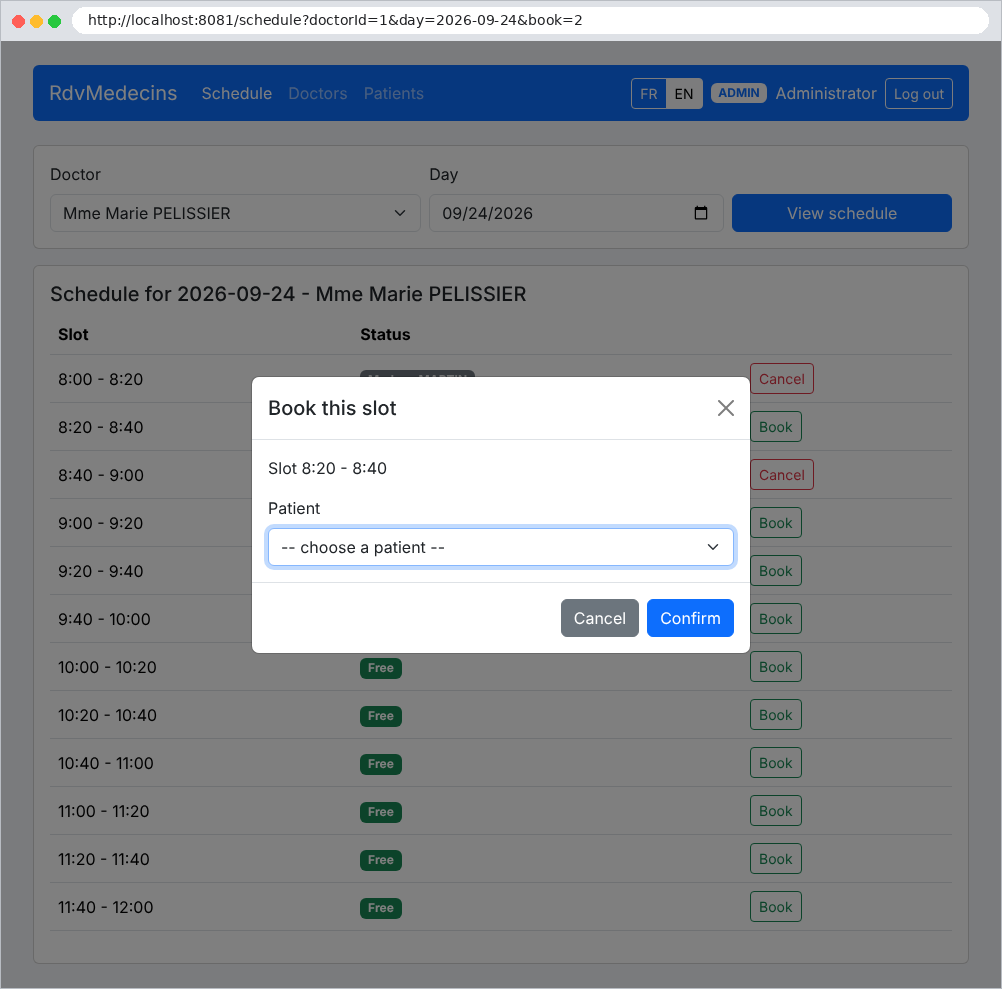
Image

点击 “取消” 会弹出确认提示(这里是以 Pélissier 医生的身份,其导航栏不包含管理菜单):
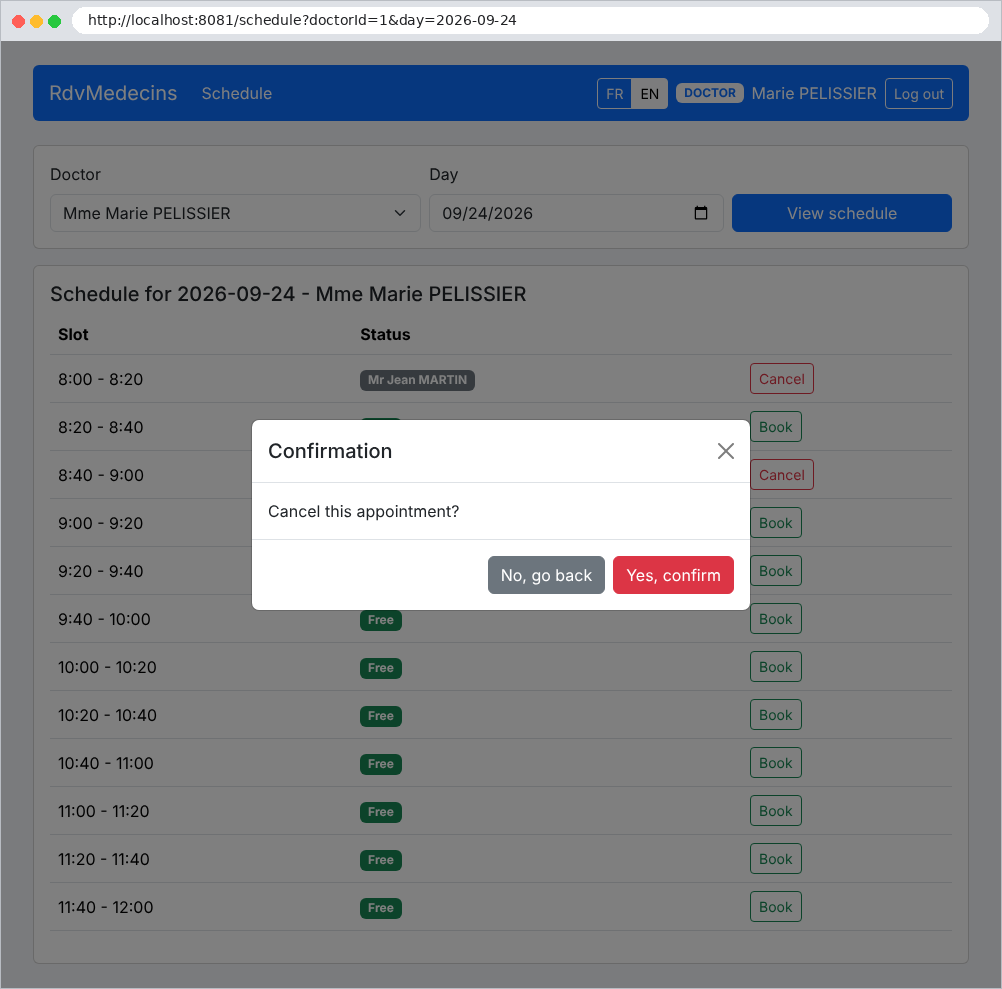
Image

11.2.3. 患者的主页

患者(USER 角色)进入“我的空间”:显示他们即将到来的预约(可以取消),以及指向其账户管理和日程的链接:
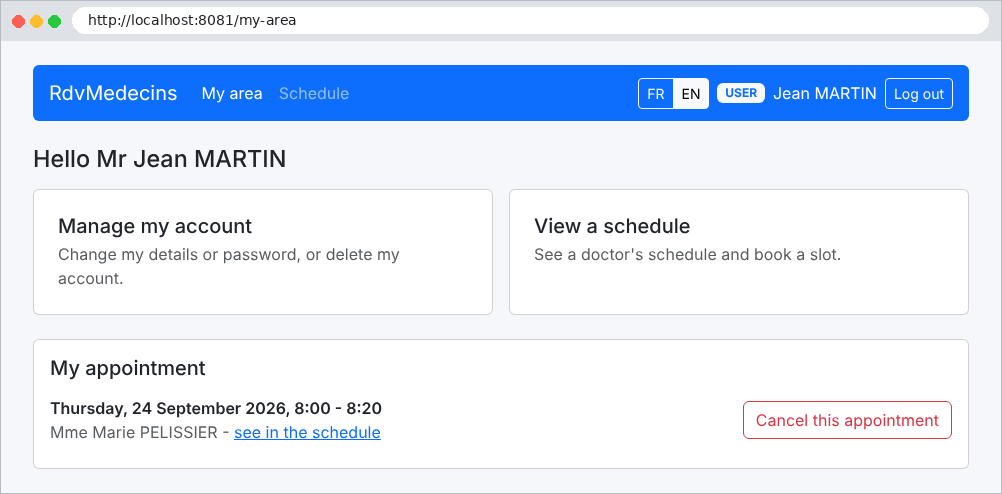
Image

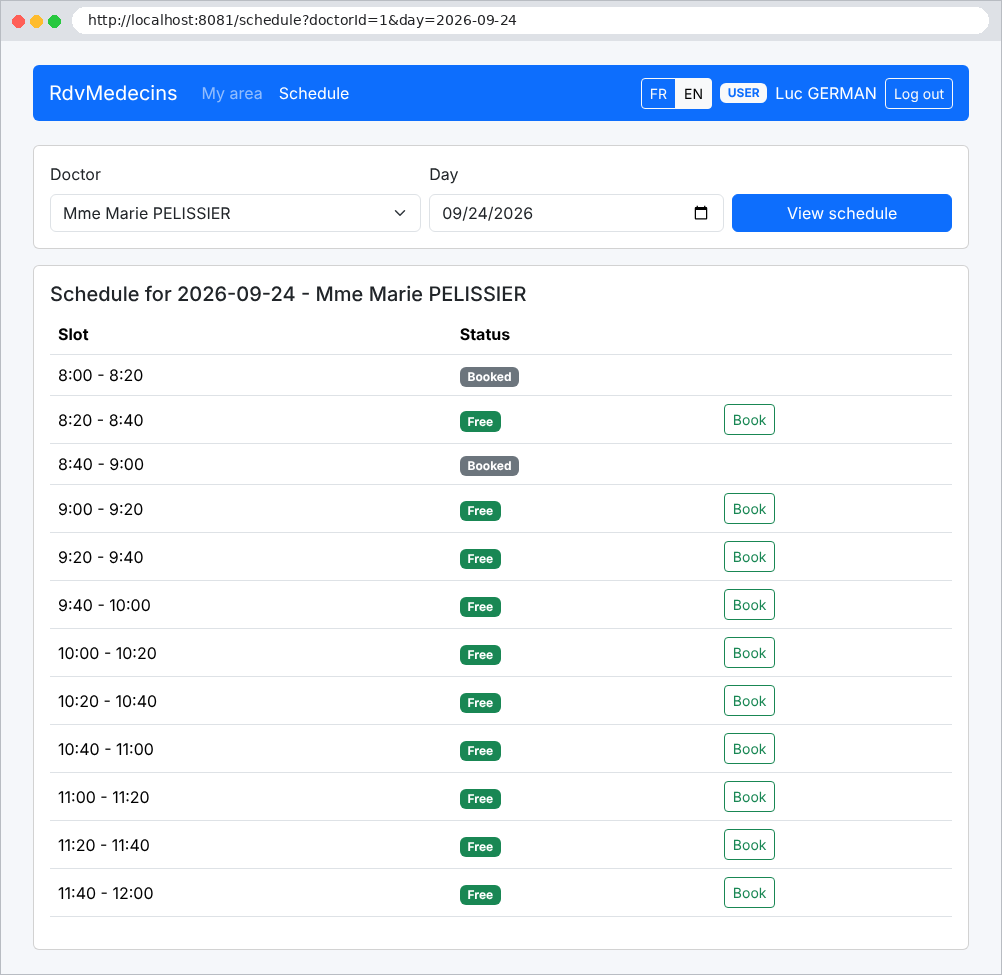
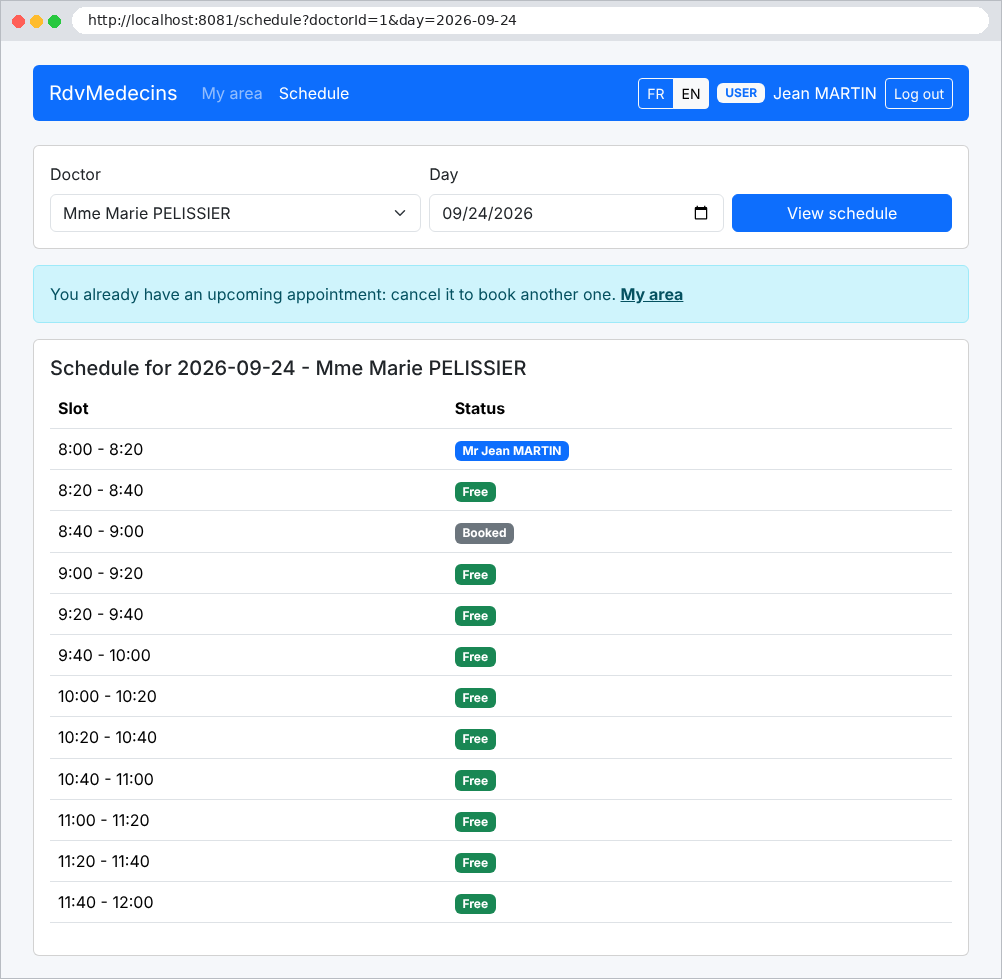
在日程中,他们能看到自己的预约,但看不到其他患者的姓名(显示“已预约”)。由于他们已经有一个即将到来的预约,所以不能再安排另一个:
Image

没有预约的患者可以为自己预约一个可用的时段:

Image

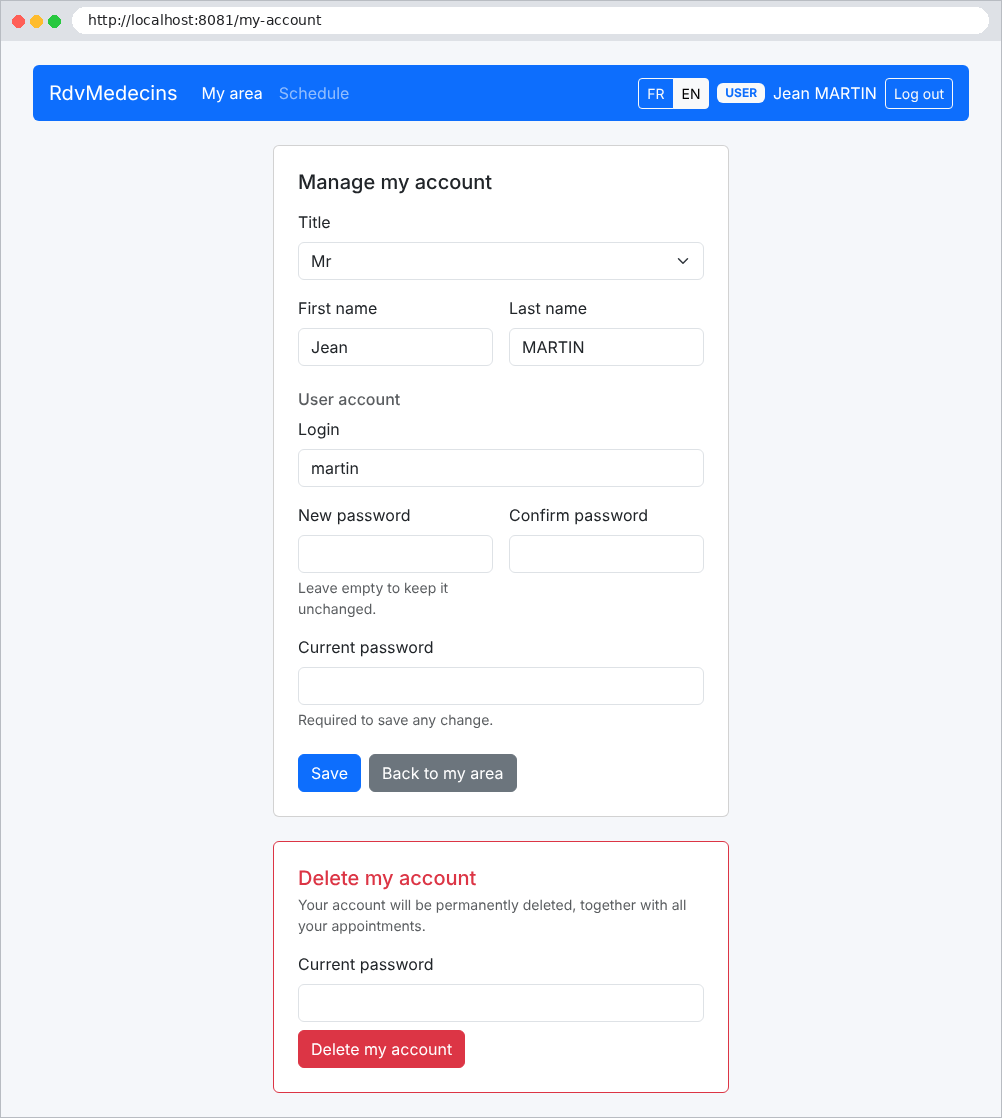
账户管理:编辑他们的信息、更改密码,或删除账户(以及预约)。任何更改都需要当前密码:
Image

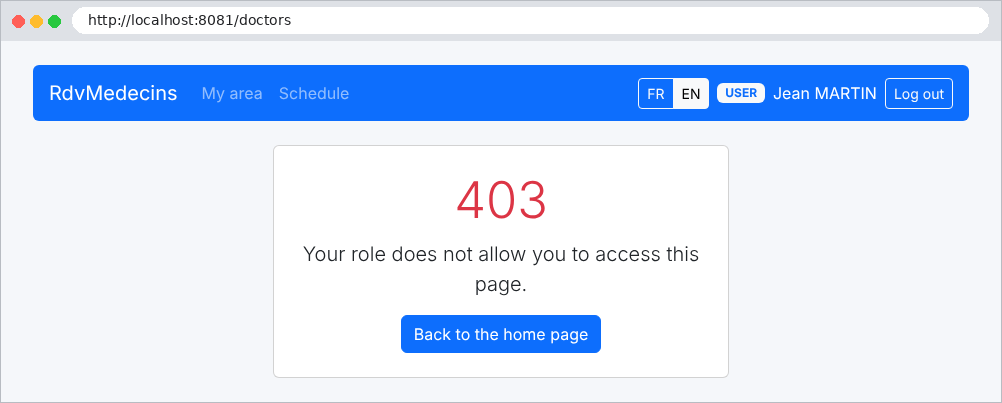
试图打开管理员专用页面的患者会收到一个错误页面:

Image

11.2.4. 管理医生和客户

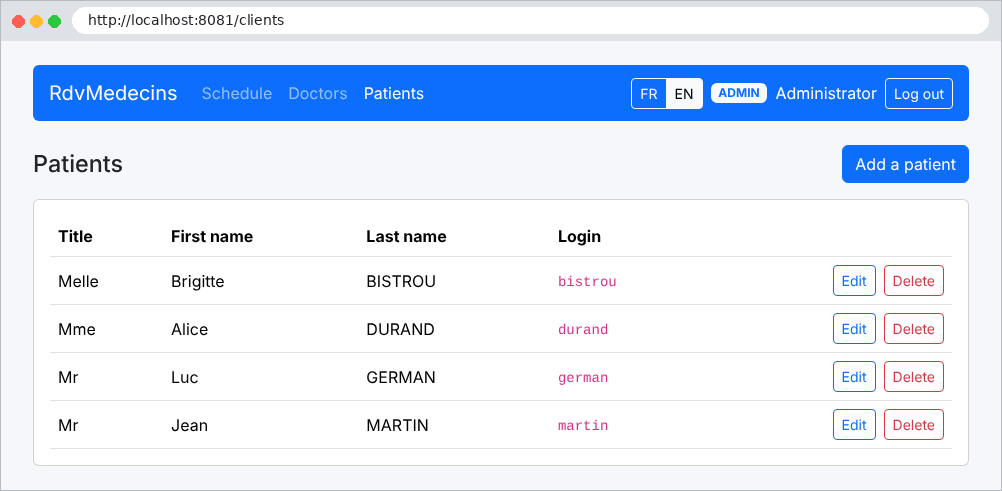
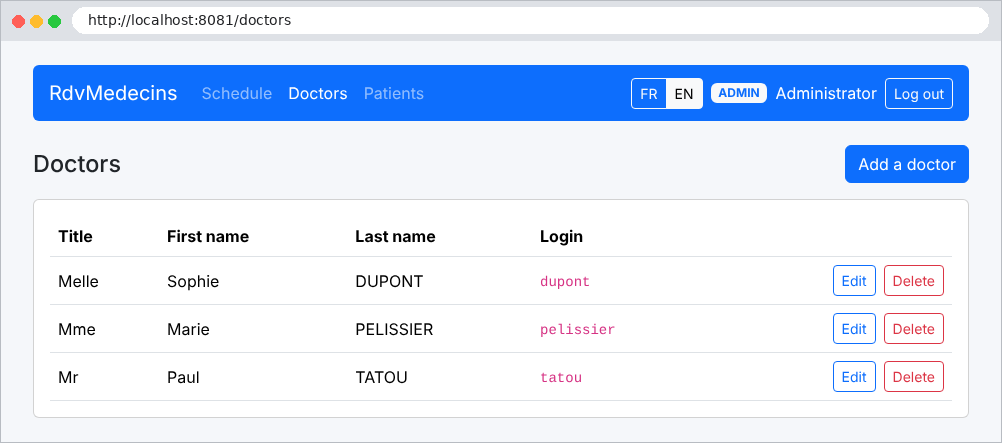
管理员有两个额外的菜单,“医生”和“患者”:
Image

Image

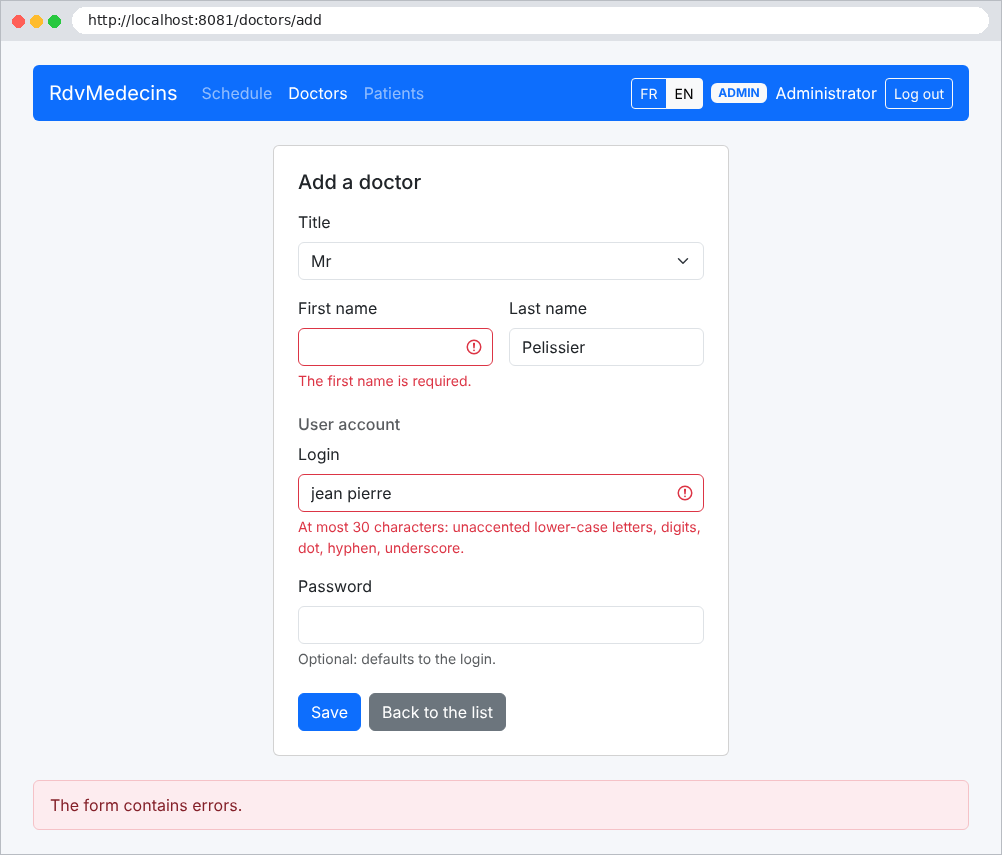
添加医生的表单,提交时带有错误:

Image

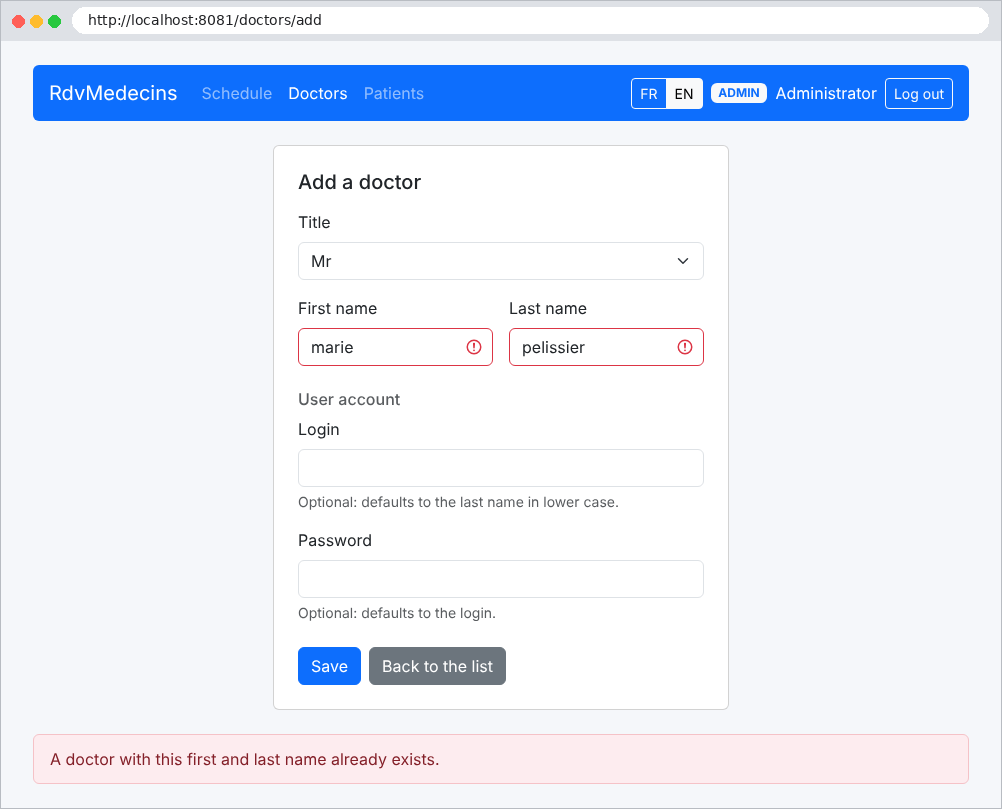
与现有医生同名的姓名会被拒绝:

Image

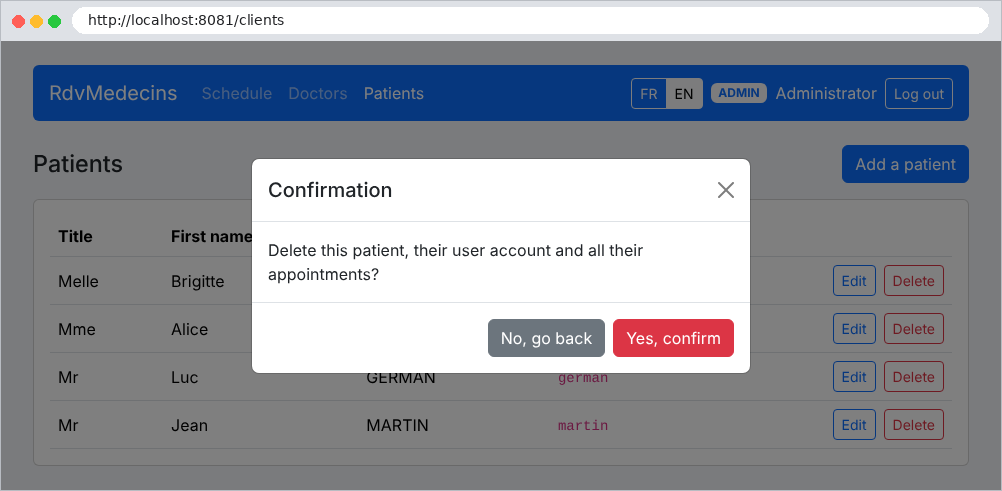
删除客户需要确认:

Image

11.2.5. 创建患者账户

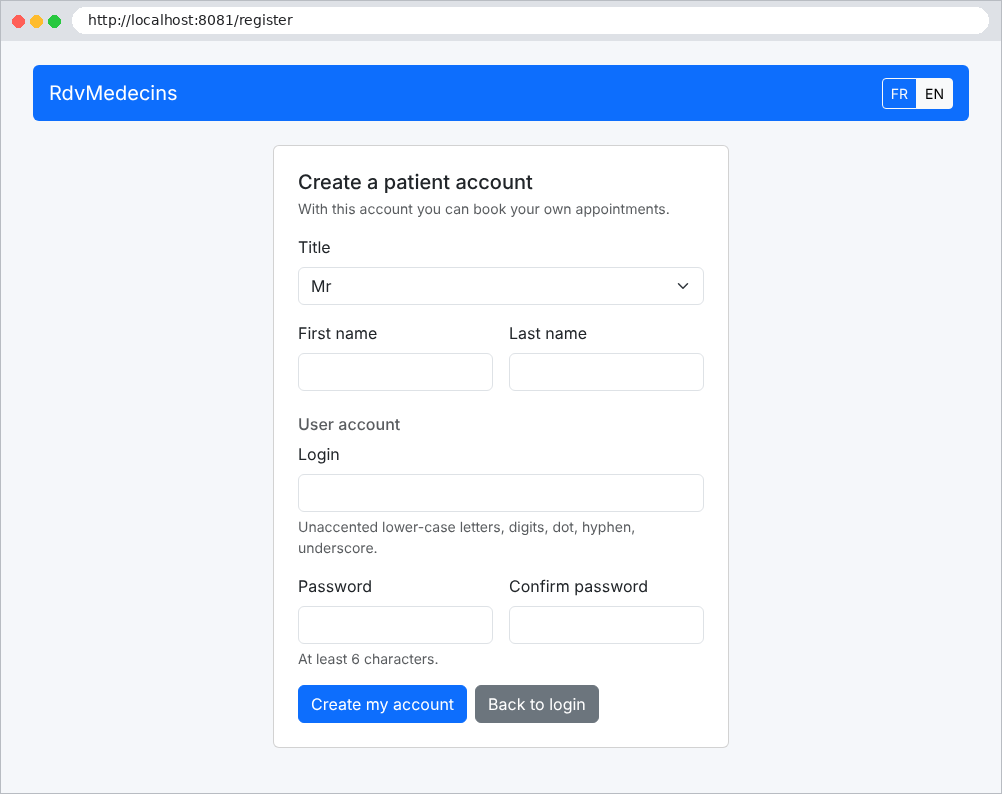
在登录页面上,“创建患者账户” 按钮只有在验证码输入正确时才会打开表单:
Image

Image

11.3. 安装与运行

应用文件夹:

rdvmedecins-nestjs-html/
├── database/
│   ├── README.md
│   └── dbrdvmedecins2.sql
├── i18n/
│   ├── en.json
│   └── fr.json
├── public/
│   ├── css/
│   │   └── styles.css
│   └── js/
│       └── app.js
├── src/
│   ├── auth/
│   │   ├── README.md
│   │   ├── attempt-limiter.service.ts
│   │   ├── auth.constants.ts
│   │   ├── auth.controller.ts
│   │   ├── auth.module.ts
│   │   ├── auth.service.ts
│   │   ├── captcha.service.ts
│   │   ├── jwt-auth.guard.ts
│   │   ├── jwt.strategy.ts
│   │   ├── registration-pass.service.ts
│   │   ├── roles.decorator.ts
│   │   └── roles.guard.ts
│   ├── business/
│   │   ├── README.md
│   │   ├── business.exception.ts
│   │   ├── business.interface.ts
│   │   ├── business.service.ts
│   │   └── dates.ts
│   ├── config/
│   │   ├── README.md
│   │   ├── database.config.ts
│   │   └── paths.ts
│   ├── domain/
│   │   ├── README.md
│   │   ├── doctor-day-schedule.ts
│   │   └── doctor-day-slot.ts
│   ├── entities/
│   │   ├── README.md
│   │   ├── abstract.entity.ts
│   │   ├── appointment.entity.ts
│   │   ├── client.entity.ts
│   │   ├── doctor.entity.ts
│   │   ├── person.entity.ts
│   │   ├── slot.entity.ts
│   │   └── user.entity.ts
│   ├── repositories/
│   │   ├── README.md
│   │   ├── appointment.repository.ts
│   │   ├── client.repository.ts
│   │   ├── doctor.repository.ts
│   │   ├── slot.repository.ts
│   │   └── user.repository.ts
│   ├── web/
│   │   ├── controllers/
│   │   │   ├── clients.controller.ts
│   │   │   ├── doctors.controller.ts
│   │   │   ├── language.controller.ts
│   │   │   ├── patient-area.controller.ts
│   │   │   ├── persons.controller.ts
│   │   │   ├── registration.controller.ts
│   │   │   └── schedule.controller.ts
│   │   ├── helpers/
│   │   │   ├── dates.helper.ts
│   │   │   ├── form.helper.ts
│   │   │   └── patient.helper.ts
│   │   ├── models/
│   │   │   └── person-form.dto.ts
│   │   ├── views/
│   │   │   └── handlebars-helpers.ts
│   │   ├── README.md
│   │   ├── application-model.service.ts
│   │   ├── html-exception.filter.ts
│   │   ├── i18n.ts
│   │   ├── view-context.ts
│   │   └── view-user.interceptor.ts
│   ├── README.md
│   ├── app.module.ts
│   └── main.ts
├── views/
│   ├── account/
│   │   └── registration.hbs
│   ├── partials/
│   │   ├── booking.hbs
│   │   ├── captcha.hbs
│   │   ├── confirmation.hbs
│   │   ├── errors.hbs
│   │   ├── flash.hbs
│   │   ├── navbar.hbs
│   │   └── personFields.hbs
│   ├── patient/
│   │   ├── account.hbs
│   │   └── area.hbs
│   ├── persons/
│   │   ├── form.hbs
│   │   └── list.hbs
│   ├── README.md
│   ├── error.hbs
│   ├── layout.hbs
│   ├── login.hbs
│   └── schedule.hbs
├── .env.example
├── README.md
├── nest-cli.json
├── package-lock.json
├── package.json
└── tsconfig.json

[README.md] 文件说明了每个文件夹的用途;这里不再复述。安装并运行应用的步骤:

  • 通过运行 [dbrdvmedecins2] 脚本 [database/dbrdvmedecins2.sql] 创建数据库(参见附录);
  • 在打开到应用文件夹的控制台窗口中,安装依赖:[npm install];
  • 把文件 [.env.example] 重命名为 [.env],并在其中更新连接设置,使之与 [MySQL] 中的设置一致;
  • 运行应用:[npm run start:dev],然后打开 [http://localhost:8081]。

演示账户的密码就是它们的登录名:[admin] (ADMIN)、[pelissier]、[tatou]、[dupont] (DOCTOR)、[martin]、[durand]、[bistrou]、[german] (USER)。启动时:

[Nest] 14248  - 09/23/2026, 4:23:55 PM     LOG [NestFactory] Starting Nest application...
[Nest] 14248  - 09/23/2026, 4:23:55 PM     LOG [InstanceLoader] TypeOrmModule dependencies initialized +84ms
[Nest] 14248  - 09/23/2026, 4:23:55 PM     LOG [InstanceLoader] PassportModule dependencies initialized +0ms
[Nest] 14248  - 09/23/2026, 4:23:55 PM     LOG [InstanceLoader] JwtModule dependencies initialized +1ms
[Nest] 14248  - 09/23/2026, 4:23:55 PM     LOG [InstanceLoader] TypeOrmCoreModule dependencies initialized +58ms
[Nest] 14248  - 09/23/2026, 4:23:55 PM     LOG [InstanceLoader] TypeOrmModule dependencies initialized +1ms
[Nest] 14248  - 09/23/2026, 4:23:55 PM     LOG [InstanceLoader] TypeOrmModule dependencies initialized +0ms
[Nest] 14248  - 09/23/2026, 4:23:55 PM     LOG [InstanceLoader] AuthModule dependencies initialized +1ms
[Nest] 14248  - 09/23/2026, 4:23:55 PM     LOG [InstanceLoader] AppModule dependencies initialized +3ms
[Nest] 14248  - 09/23/2026, 4:23:55 PM     LOG [RoutesResolver] ScheduleController {/schedule}: +15ms
[Nest] 14248  - 09/23/2026, 4:23:55 PM     LOG [RouterExplorer] Mapped {/schedule, GET} route +3ms
[Nest] 14248  - 09/23/2026, 4:23:55 PM     LOG [RouterExplorer] Mapped {/schedule/book, POST} route +0ms
[Nest] 14248  - 09/23/2026, 4:23:55 PM     LOG [RouterExplorer] Mapped {/schedule/cancel, POST} route +0ms
[Nest] 14248  - 09/23/2026, 4:23:55 PM     LOG [RoutesResolver] DoctorsController {/doctors}: +1ms
[Nest] 14248  - 09/23/2026, 4:23:55 PM     LOG [RouterExplorer] Mapped {/doctors, GET} route +0ms
[Nest] 14248  - 09/23/2026, 4:23:55 PM     LOG [RouterExplorer] Mapped {/doctors/add, GET} route +0ms
[Nest] 14248  - 09/23/2026, 4:23:55 PM     LOG [RouterExplorer] Mapped {/doctors/add, POST} route +0ms
[Nest] 14248  - 09/23/2026, 4:23:55 PM     LOG [RouterExplorer] Mapped {/doctors/:id/edit, GET} route +1ms
[Nest] 14248  - 09/23/2026, 4:23:55 PM     LOG [RouterExplorer] Mapped {/doctors/:id/edit, POST} route +0ms
[Nest] 14248  - 09/23/2026, 4:23:55 PM     LOG [RouterExplorer] Mapped {/doctors/:id/delete, POST} route +0ms
[Nest] 14248  - 09/23/2026, 4:23:55 PM     LOG [RoutesResolver] ClientsController {/clients}: +0ms
[Nest] 14248  - 09/23/2026, 4:23:55 PM     LOG [RouterExplorer] Mapped {/clients, GET} route +1ms
[Nest] 14248  - 09/23/2026, 4:23:55 PM     LOG [RouterExplorer] Mapped {/clients/add, GET} route +0ms
[Nest] 14248  - 09/23/2026, 4:23:55 PM     LOG [RouterExplorer] Mapped {/clients/add, POST} route +0ms
[Nest] 14248  - 09/23/2026, 4:23:55 PM     LOG [RouterExplorer] Mapped {/clients/:id/edit, GET} route +0ms
[Nest] 14248  - 09/23/2026, 4:23:55 PM     LOG [RouterExplorer] Mapped {/clients/:id/edit, POST} route +0ms
[Nest] 14248  - 09/23/2026, 4:23:55 PM     LOG [RouterExplorer] Mapped {/clients/:id/delete, POST} route +0ms
[Nest] 14248  - 09/23/2026, 4:23:55 PM     LOG [RoutesResolver] LanguageController {/language}: +0ms
[Nest] 14248  - 09/23/2026, 4:23:55 PM     LO

([TypeORM] 显示的 SQL 请求已被删除)

11.4. 应用架构

Image

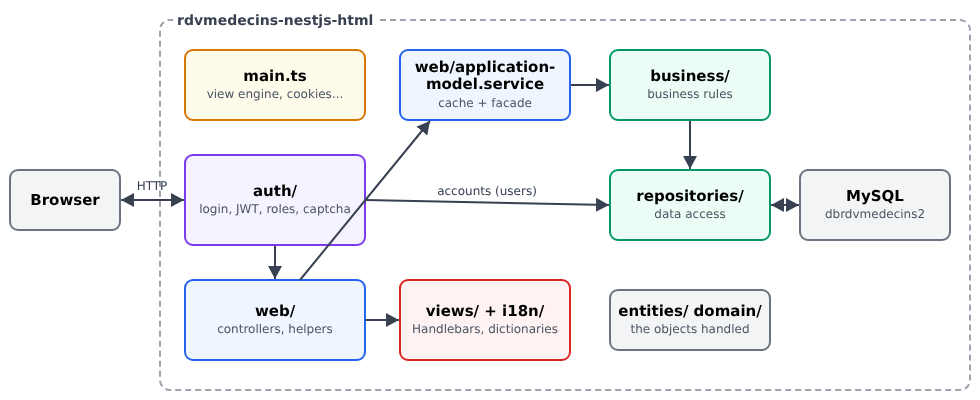
  • [src/main.ts] 配置应用:视图引擎、静态文件、Cookie、异常过滤器;
  • [src/auth]:身份验证、令牌(JWT)、角色、CAPTCHA 和尝试次数限制;
  • [src/web]:Web 层。它的控制器([src/web/controllers])都通过同一个服务 [ApplicationModelService],该服务把医生和客户的列表保存在内存中,并把其他请求转发给业务层;
  • [src/business]:业务规则;
  • [src/repositories]:DAO 层,每张表一个类;
  • [src/entities]:[TypeORM] 实体;[src/domain]:日程对象,由业务层计算;
  • [views]:[Handlebars] 视图;[i18n]:词典;[public]:样式表和页面脚本。

接下来的内容会评述 所有 文件,从下层(数据库)到上层(视图)。

11.5. 数据库

文件 [database/dbrdvmedecins2.sql]:

-- =========================================================================
-- Database [dbrdvmedecins2] - MySQL 8
--
-- Evolution of [dbrdvmedecins]:
--   1. the [doctors] and [clients] tables get a [user] column,
--      foreign key to users(id): every doctor and every client is
--      now also a user able to log in;
--   2. a third role appears: DOCTOR (in addition to ADMIN and USER);
--   3. the script creates a [users] row for each doctor (role DOCTOR)
--      and for each client (role USER):
--        - login        = last name in lower case
--        - password     = last name in lower case, hashed with bcrypt (10 rounds)
--        - display name = first name + last name
--
--   4. uniqueness constraints, all NAMED (the NestJS application recognizes
--      the name of the violated constraint in the MySQL error message):
--        - unq_users_login                   : a login belongs to one account only;
--        - unq_doctors_first_name_last_name  : two doctors cannot have the
--                                              same first and last names;
--        - unq_clients_first_name_last_name  : same for the clients.
--      Beware: the utf8mb4_unicode_ci collation compares regardless of
--      case and accents - "Hélène DUPONT" and "helene dupont"
--      are therefore considered identical.
--
-- The [users] table must now be created BEFORE [doctors] and [clients]
-- (they reference it), and dropped AFTER them.
-- =========================================================================

-- we start again from an empty database on each run of the script (handy in development)
CREATE DATABASE IF NOT EXISTS dbrdvmedecins2 CHARACTER SET utf8mb4 COLLATE utf8mb4_unicode_ci;
USE dbrdvmedecins2;

-- drop order: from the "child" tables to the "parent" tables
DROP TABLE IF EXISTS appointments;
DROP TABLE IF EXISTS slots;
DROP TABLE IF EXISTS clients;
DROP TABLE IF EXISTS doctors;
DROP TABLE IF EXISTS users;

-- -------------------------------------------------------------------------
-- table [users]: the users allowed to log in to the application
-- -------------------------------------------------------------------------
CREATE TABLE users (
  id       INT AUTO_INCREMENT PRIMARY KEY,
  version  INT NOT NULL DEFAULT 0,
  login    VARCHAR(30) NOT NULL,                 -- login identifier
  password VARCHAR(100) NOT NULL,                -- HASHED password (bcrypt) - never in clear
  name     VARCHAR(40) NOT NULL,                 -- name displayed once logged in
  role     VARCHAR(10) NOT NULL,                 -- 'ADMIN', 'DOCTOR' or 'USER'
  -- a login can belong to one account only
  CONSTRAINT unq_users_login UNIQUE (login)
);

-- -------------------------------------------------------------------------
-- table [doctors]: the doctors of the practice
-- -------------------------------------------------------------------------
CREATE TABLE doctors (
  id         INT AUTO_INCREMENT PRIMARY KEY,   -- primary key (technical identifier)
  version    INT NOT NULL DEFAULT 0,            -- row version number (optimistic lock)
  title      VARCHAR(5)  NOT NULL,              -- Melle, Mme, Mr
  last_name  VARCHAR(20) NOT NULL,
  first_name VARCHAR(20) NOT NULL,
  `user`     INT NOT NULL,                      -- foreign key -> users(id)
  CONSTRAINT fk_doctors_user FOREIGN KEY (`user`) REFERENCES users(id),
  -- one account per doctor, and one doctor per account
  CONSTRAINT unq_doctors_user UNIQUE (`user`),
  -- two doctors cannot have the same first and last names
  CONSTRAINT unq_doctors_first_name_last_name UNIQUE (first_name, last_name)
);

-- -------------------------------------------------------------------------
-- table [clients]: the doctors' patients
-- -------------------------------------------------------------------------
CREATE TABLE clients (
  id         INT AUTO_INCREMENT PRIMARY KEY,
  version    INT NOT NULL DEFAULT 0,
  title      VARCHAR(5)  NOT NULL,
  last_name  VARCHAR(20) NOT NULL,
  first_name VARCHAR(20) NOT NULL,
  `user`     INT NOT NULL,                      -- foreign key -> users(id)
  CONSTRAINT fk_clients_user FOREIGN KEY (`user`) REFERENCES users(id),
  -- one account per client, and one client per account
  CONSTRAINT unq_clients_user UNIQUE (`user`),
  -- two clients cannot have the same first and last names
  CONSTRAINT unq_clients_first_name_last_name UNIQUE (first_name, last_name)
);

-- -------------------------------------------------------------------------
-- table [slots]: the time slots of each doctor
-- -------------------------------------------------------------------------
CREATE TABLE slots (
  id           INT AUTO_INCREMENT PRIMARY KEY,
  version      INT NOT NULL DEFAULT 0,
  doctor_id    INT NOT NULL,                     -- foreign key -> doctors(id)
  start_hour   INT NOT NULL,                     -- start hour of the slot
  start_minute INT NOT NULL,                     -- start minute of the slot
  end_hour     INT NOT NULL,                     -- end hour of the slot
  end_minute   INT NOT NULL,                     -- end minute of the slot
  CONSTRAINT fk_slots_doctor FOREIGN KEY (doctor_id) REFERENCES doctors(id)
);

-- -------------------------------------------------------------------------
-- table [appointments]: the appointments booked by the clients
-- -------------------------------------------------------------------------
CREATE TABLE appointments (
  id         INT AUTO_INCREMENT PRIMARY KEY,
  version    INT NOT NULL DEFAULT 0,
  day        DATE NOT NULL,                      -- day of the appointment
  slot_id    INT NOT NULL,                       -- foreign key -> slots(id)
  client_id  INT NOT NULL,                       -- foreign key -> clients(id)
  CONSTRAINT fk_appointments_slot   FOREIGN KEY (slot_id)   REFERENCES slots(id),
  CONSTRAINT fk_appointments_client FOREIGN KEY (client_id) REFERENCES clients(id),
  -- the same slot, on the same day, can be booked only once
  CONSTRAINT unq1_appointments UNIQUE (day, slot_id)
);

-- =========================================================================
-- Demo data
-- =========================================================================

-- the users: passwords hashed with bcrypt (10 salt rounds)
--   admin/admin (ADMIN)
--   one DOCTOR account per doctor, one USER account per client
--   (the user/user demo account is gone: a USER account is
--   now ALWAYS a client's account, who can book and manage the account)
--   (login = password = last name in lower case)
INSERT INTO users (login, password, name, role) VALUES
  ('admin',     '$2b$10$YSNBJXXHX9mp13nPZb6YGu8M1jR6uvPwO1s2X73z0QAqBR7TOQjoq', 'Administrator',    'ADMIN'),
  -- doctors
  ('pelissier', '$2b$10$DnSDOK5ONrdMxTTr1NKCHOphR3WSp5QAyG9S9ueruw9HwlxI.16ba', 'Marie PELISSIER',  'DOCTOR'),
  ('tatou',     '$2b$10$PeovBO.gmJUKP4PglI/fwu4xtWOYSxoM5VTWjTj7uQ4wcd9P9.htS', 'Paul TATOU',       'DOCTOR'),
  ('dupont',    '$2b$10$az7wvPKC1h0EiAxXwu/PU.vYjzmB04rd5B7QnK0mvxp4niYIHVoc.', 'Sophie DUPONT',    'DOCTOR'),
  -- clients
  ('martin',    '$2b$10$GT6S5pp.WdGapFw/UmocXesbC6LEjJfZzgatCUyG9Sf4o1iBNlqZW', 'Jean MARTIN',      'USER'),
  ('durand',    '$2b$10$l2gl/zCder8E7Nh4VxGRX.0.SsO3FDiXt6YwqYq3v9nFzgC/jQCy6', 'Alice DURAND',     'USER'),
  ('bistrou',   '$2b$10$naeRp2YUU6c.QDl5itJMAum3Y5aHdUV6jwIcsbp0D.64jPG4F6E9m', 'Brigitte BISTROU', 'USER'),
  ('german',    '$2b$10$tTWxh3ROWF7NjhZOMnWDMOsZcnSWUiwwfy5C3G0.xhccTXALKyLeW', 'Luc GERMAN',       'USER');

-- the doctors: the [user] column is looked up from the login,
-- rather than assuming the values of the primary keys of [users]
INSERT INTO doctors (title, last_name, first_name, `user`) VALUES
  ('Mme',  'PELISSIER', 'Marie',  (SELECT id FROM users WHERE login = 'pelissier')),
  ('Mr',   'TATOU',     'Paul',   (SELECT id FROM users WHERE login = 'tatou')),
  ('Melle','DUPONT',    'Sophie', (SELECT id FROM users WHERE login = 'dupont'));

INSERT INTO clients (title, last_name, first_name, `user`) VALUES
  ('Mr',   'MARTIN',  'Jean',     (SELECT id FROM users WHERE login = 'martin')),
  ('Mme',  'DURAND',  'Alice',    (SELECT id FROM users WHERE login = 'durand')),
  ('Melle','BISTROU', 'Brigitte', (SELECT id FROM users WHERE login = 'bistrou')),
  ('Mr',   'GERMAN',  'Luc',      (SELECT id FROM users WHERE login = 'german'));

-- slots of doctor PELISSIER (doctor_id = 1): from 8:00 to 12:00 in 20-minute steps
INSERT INTO slots (doctor_id, start_hour, start_minute, end_hour, end_minute) VALUES
  (1, 8, 0, 8, 20), (1, 8, 20, 8, 40), (1, 8, 40, 9, 0),
  (1, 9, 0, 9, 20), (1, 9, 20, 9, 40), (1, 9, 40, 10, 0),
  (1, 10, 0, 10, 20), (1, 10, 20, 10, 40), (1, 10, 40, 11, 0),
  (1, 11, 0, 11, 20), (1, 11, 20, 11, 40), (1, 11, 40, 12, 0);

-- slots of doctor TATOU (doctor_id = 2): from 14:00 to 18:00 in 20-minute steps
INSERT INTO slots (doctor_id, start_hour, start_minute, end_hour, end_minute) VALUES
  (2, 14, 0, 14, 20), (2, 14, 20, 14, 40), (2, 14, 40, 15, 0),
  (2, 15, 0, 15, 20), (2, 15, 20, 15, 40), (2, 15, 40, 16, 0),
  (2, 16, 0, 16, 20), (2, 16, 20, 16, 40), (2, 16, 40, 17, 0),
  (2, 17, 0, 17, 20), (2, 17, 20, 17, 40), (2, 17, 40, 18, 0);

-- an appointment already booked, to see an occupied slot right away in the schedule
INSERT INTO appointments (day, slot_id, client_id) VALUES
  (CURDATE(), 2, 3);

我们来逐行说明这个脚本:

  • 第 30 行:与示例 28 一样,排序规则 [utf8mb4_unicode_ci] 在比较时忽略大小写和重音;
  • 第 34–38 行:删除表时从“子”表到“父”表依次进行:被外键引用的表,不能在引用它的表之前被删除;
  • 第 43–52 行:用户 账户。[password] 包含密码的 bcrypt 哈希(参见示例 25)。第 51 行:登录名是唯一的;
  • 第 57–69 行:医生。每位医生都有一个账户(列 [user],指向 [users] 的外键,第 64 行)。名称 [user] 是 [MySQL] 的保留字:因此用反引号括起来。第 66 行:一个账户只属于一位医生;第 68 行:不能有两位医生具有相同的名和姓;
  • 第 74–86 行:客户,格式相同;
  • 第 91–100 行:每位医生的时段(以小时和分钟表示的开始和结束时间);
  • 第 105–115 行:预约:一个日期、一个时段、一位客户。第 114 行:一个时段每天只能被预约一次;
  • 第 127–137 行:演示账户;每个账户的密码就是它的登录名;
  • 第 141–144 行:每位医生的 [user] 列通过基于登录名的子查询获得,而不是假定生成的凭据;
  • 第 167–168 行:一个当天的预约([CURDATE()]),以便立即展示一个已被预约的时段。

11.6. 项目配置

[package.json] 文件:

{
  "name": "rdvmedecins-nestjs-html",
  "version": "1.0.0",
  "description": "NestJS web application (HTML pages generated server-side) for booking medical appointments [RdvMedecins] - database [dbrdvmedecins2], roles ADMIN / DOCTOR / USER",
  "private": true,
  "license": "UNLICENSED",
  "scripts": {
    "build": "nest build",
    "start": "nest start",
    "start:dev": "nest start --watch --watchAssets",
    "start:debug": "nest start --debug --watch --watchAssets",
    "start:prod": "node dist/main"
  },
  "dependencies": {
    "@nestjs/common": "^10.4.0",
    "@nestjs/core": "^10.4.0",
    "@nestjs/jwt": "^10.2.0",
    "@nestjs/passport": "^10.0.3",
    "@nestjs/platform-express": "^10.4.0",
    "@nestjs/typeorm": "^10.0.2",
    "bcryptjs": "^3.0.3",
    "bootstrap": "^5.3.3",
    "class-transformer": "^0.5.1",
    "class-validator": "^0.14.1",
    "cookie-parser": "^1.4.7",
    "dotenv": "^17.4.2",
    "hbs": "^4.2.0",
    "mysql2": "^3.11.0",
    "passport-jwt": "^4.0.1",
    "reflect-metadata": "^0.2.2",
    "rxjs": "^7.8.1",
    "svg-captcha": "^1.4.0",
    "typeorm": "^0.3.20"
  },
  "devDependencies": {
    "@nestjs/cli": "^10.4.5",
    "@types/bcryptjs": "^2.4.6",
    "@types/cookie-parser": "^1.4.7",
    "@types/express": "^4.17.21",
    "@types/node": "^20.14.0",
    "@types/passport-jwt": "^4.0.1",
    "typescript": "^5.5.0"
  }
}
  • 第 7–13 行:[npm run ...] 命令。[start:dev] 以“监视”模式启动应用:每次更改后,代码都会重新编译,服务器也会重启;[--watchAssets] 选项还会监视非代码文件;
  • 第 14–34 行:应用的库,示例中都已涉及。[dotenv] 读取文件 [.env];[mysql2] 是 [MySQL] 驱动程序,由 [TypeORM] 使用;[reflect-metadata] 和 [rxjs] 是 [NestJS] 所必需的;
  • Lines 35–43: development tools: the [nest] tool, the [TypeScript] compiler, and the type declarations ([@types/...]) for libraries written in [JavaScript].

[tsconfig.json] 文件:

{
  "compilerOptions": {
    "module": "commonjs",
    "declaration": false,
    "removeComments": true,
    "emitDecoratorMetadata": true,
    "experimentalDecorators": true,
    "allowSyntheticDefaultImports": true,
    "target": "ES2022",
    "lib": ["ES2022"],
    "sourceMap": true,
    "outDir": "./dist",
    "baseUrl": "./",
    "incremental": true,
    "skipLibCheck": true,
    "strictNullChecks": true,
    "noImplicitAny": false,
    "strictBindCallApply": false,
    "forceConsistentCasingInFileNames": true,
    "noFallthroughCasesInSwitch": false
  }
}

这个文件由 [nest] 工具为新项目生成。与示例相比:第 5 行,注释不会复制到编译后的代码中;第 14 行,只重新编译被修改的文件;第 17 行:接受没有显式类型或无法推断类型的变量(此时它的类型是 [any])——这使得没有类型声明的 [hbs] 包能够被导入。

文件 [nest-cli.json]:

1
2
3
4
5
6
7
8
{
  "$schema": "https://json.schemastore.org/nest-cli",
  "collection": "@nestjs/schematics",
  "sourceRoot": "src",
  "compilerOptions": {
    "deleteOutDir": true
  }
}

与示例中的相同。

[.env.example] 文件:

# -----------------------------------------------------------------------
# 示例配置文件。
# 将此文件复制为 [.env],然后根据你的机器调整其中的值。
# [.env] 文件绝不能共享或提交(含有密码)。
# -----------------------------------------------------------------------

# NestJS 服务器的监听端口。JSON 服务器已经在监听 8080:
# 我们选择另一个端口,以便两者可以同时运行。
PORT=8081

# MySQL 数据库 [dbrdvmedecins2] 的连接参数
# (脚本:database/dbrdvmedecins2.sql)
DB_HOST=localhost
DB_PORT=3306
DB_USERNAME=root
DB_PASSWORD=
DB_DATABASE=dbrdvmedecins2

# -----------------------------------------------------------------------
# 身份验证(参见 src/auth/)
# -----------------------------------------------------------------------
# 用于签名/验证 JWT 令牌的密钥:必须修改
# 在生产环境中(一个较长的随机字符串,绝不提交)。
JWT_SECRET=change-me-to-a-long-random-string
# JWT 令牌的有效期,单位为秒(7200 秒 = 2 小时)。携带令牌的
# Cookie 具有相同的有效期。
JWT_EXPIRES_IN_SECONDS=7200
# 在生产环境中设为 true(站点通过 HTTPS 提供):此时身份验证
# Cookie 绝不会通过未加密的连接发送。
COOKIE_SECURE=false

# -----------------------------------------------------------------------
# 防范机器人(参见 src/auth/attempt-limiter.service.ts)
# -----------------------------------------------------------------------
# 登录:同一 IP 地址对同一登录名允许的失败次数
# (验证码或密码错误),超过后该组合将被封锁……
LOGIN_MAX_FAILURES=5
# ……持续这段时间(如果一个 IP 地址累计的失败次数
# 达到 5 倍,所有登录名合计,该 IP 地址也会被封锁)
LOGIN_BLOCK_MINUTES=15
# 客户账户创建:每小时最多创建的账户数量,
# 来自同一 IP 地址。在教室里,所有计算机通常通过
# 同一个地址出网:如有需要请调高。
REGISTRATION_MAX_PER_HOUR=10
  • 名为 [.env] 的文件包含特定于机器的配置设置:它绝不共享(其中含有密码)。文件 [.env.example] 则作为供复制的模板;
  • 第 9 行:应用的端口;
  • 第 13–17 行:数据库连接;
  • 第 24–30 行:令牌密钥、其有效期(两小时),以及 [secure] Cookie 选项(在生产环境中,站点通过 HTTPS 提供服务,Cookie 绝不能通过未加密的连接传输);
  • 第 37–44 行:防机器人保护的阈值。

[src/config/database.config.ts] 文件:

// =========================================================================
// config/database.config.ts
// -------------------------------------------------------------------------
// MySQL 数据库连接的配置,供
// TypeORM 使用。它相当于原 Spring 项目中的 [DomainAndPersitenceConfig]
// 类,该类定义了一个 [DataSource](@Bean 块)。
//
// 这里没有类:NestJS/TypeORM 更倾向于使用一个简单的函数
// 返回配置对象,配置从环境变量中读取
// (项目根目录的 .env 文件,若安装了 @nestjs/config 模块,
// NestJS 会自动加载它,这里为了保持简单并便于教学,我们直接读取
// process.env)
// =========================================================================

import { TypeOrmModuleOptions } from '@nestjs/typeorm';
import { Doctor } from '../entities/doctor.entity';
import { Client } from '../entities/client.entity';
import { Slot } from '../entities/slot.entity';
import { Appointment } from '../entities/appointment.entity';
import { User } from '../entities/user.entity';

export function getDatabaseConfig(): TypeOrmModuleOptions {
  return {
    // 'mysql':我们使用 MySQL 驱动,与原项目相同(这里由 MySQL5 -> MySQL8)。
    type: 'mysql',
    host: process.env.DB_HOST ?? 'localhost',
    port: process.env.DB_PORT ? parseInt(process.env.DB_PORT, 10) : 3306,
    username: process.env.DB_USERNAME ?? 'root',
    password: process.env.DB_PASSWORD ?? '',
    database: process.env.DB_DATABASE ?? 'dbrdvmedecins2',

    // TypeORM 必须管理的实体列表(@Entity 类)。
    // 它相当于 Spring Boot 对 @Entity 类所做的自动“扫描”。
    entities: [Doctor, Client, Slot, Appointment, User],

    // 重要:本课程中始终设置 synchronize=false。
    // 如果 synchronize 为 true,TypeORM 会根据实体自行修改数据库结构:
    // 对一次性原型来说很方便,一旦有了真实数据就很危险
    // (有数据丢失的风险)。就像真实团队那样,我们更愿意
    // 通过 database/dbrdvmedecins2.sql 脚本掌控数据库结构。
    synchronize: false,

    // 在控制台中显示 TypeORM 生成的 SQL 查询:对于
    // 理解 ORM 究竟为你做了什么非常有用,就像原 Spring 项目中的
    // Hibernate 日志一样。
    logging: process.env.NODE_ENV !== 'production',
  };
}

数据库连接(参见示例 28)。第 46 行:除生产环境外,都会显示 SQL 请求。

[src/config/paths.ts] 文件:

// =========================================================================
// config/paths.ts
// -------------------------------------------------------------------------
// 项目中未编译的文件夹(Handlebars 视图、静态文件、
// 翻译字典)位于项目根目录,与
// src/ 和 dist/ 并列。编译后,这个文件位于
// dist/config/ 中:因此项目根目录在其上两级。
// =========================================================================

import { join, resolve } from 'path';

export const PROJECT_ROOT = resolve(__dirname, '..', '..');

export const VIEWS_DIR = join(PROJECT_ROOT, 'views'); // 页面模板 (.hbs)
export const PARTIALS_DIR = join(VIEWS_DIR, 'partials'); // 可复用的页面片段
export const PUBLIC_DIR = join(PROJECT_ROOT, 'public'); // CSS、JS、图片
export const I18N_DIR = join(PROJECT_ROOT, 'i18n'); // fr.json、en.json
export const BOOTSTRAP_DIR = join(PROJECT_ROOT, 'node_modules', 'bootstrap', 'dist');
  • 第 12 行:编译后,此文件位于 [dist/config]:项目根目录在它上面两级;
  • 第 14–18 行:未经编译的文件夹(视图、静态文件、词典),以及 [Bootstrap] 的文件夹。

11.7. 启动应用

文件 [src/main.ts]:

// =========================================================================
// main.ts
// -------------------------------------------------------------------------
// 应用程序的入口点。与 JSON 服务器相比,启动时
// 还要配置在服务器端构建 HTML 页面所需的一切:
// 以下内容:
//   - 视图引擎(Handlebars,文件为 views/*.hbs);
//   - 静态文件(Bootstrap、CSS、少量 JavaScript);
//   - Cookie 解析(JWT 令牌、语言、flash 消息);
//   - 将错误转换为 HTML 页面的过滤器。
// 不再需要允许 CORS:页面和数据现在来自
// 同一个服务器。
// =========================================================================

import 'dotenv/config'; // 必须始终是第一个导入(参见 JSON 服务器)
import 'reflect-metadata';
import { NestFactory } from '@nestjs/core';
import { NestExpressApplication } from '@nestjs/platform-express';
import * as cookieParser from 'cookie-parser';
import * as hbs from 'hbs';
import { AppModule } from './app.module';
import { BOOTSTRAP_DIR, PARTIALS_DIR, PUBLIC_DIR, VIEWS_DIR } from './config/paths';
import { registerHelpers } from './web/views/handlebars-helpers';
import { viewContextMiddleware } from './web/view-context';
import { HtmlExceptionFilter } from './web/html-exception.filter';
import { ViewUserInterceptor } from './web/view-user.interceptor';

async function bootstrap() {
  // NestExpressApplication:我们声明底层平台是
  // Express,以便使用其自有的方法(setViewEngine、
  // useStaticAssets……):Fastify 平台上不存在这些方法。
  const app = await NestFactory.create<NestExpressApplication>(AppModule);

  // 1. 静态文件:/css/...、/js/...(public/ 文件夹)以及
  //    /bootstrap/css/bootstrap.min.css(直接来自 node_modules:
  //    无需将 Bootstrap 复制到项目中)
  app.useStaticAssets(PUBLIC_DIR);
  app.useStaticAssets(BOOTSTRAP_DIR, { prefix: '/bootstrap/' });

  // 2. 视图引擎。views/layout.hbs 文件会被 hbs
  //    自动用作所有页面的公共模板:
  //    每个视图都插入到该模板的 {{{body}}} 位置。
  app.setBaseViewsDir(VIEWS_DIR);
  app.setViewEngine('hbs');
  registerHelpers(hbs);
  // "局部模板"(views/partials/*.hbs):可复用的页面片段,
  // 通过 {{> name}} 插入。registerPartials 以异步方式
  // 读取该文件夹:我们等它完成后再接受请求。
  await new Promise<void>((done) => hbs.registerPartials(PARTIALS_DIR, () => done()));

  // 3. cookie-parser 填充 req.cookies;然后由我们的中间件准备
  //    每个页面的语言和 flash 消息(参见 web/view-context.ts)
  app.use(cookieParser());
  app.use(viewContextMiddleware);

  // 4. 已登录的用户,对所有视图可见;以及
  //    转换为 HTML 页面(或重定向到 /login)的错误
  app.useGlobalInterceptors(new ViewUserInterceptor());
  app.useGlobalFilters(new HtmlExceptionFilter());

  const port = process.env.PORT ? parseInt(process.env.PORT, 10) : 8081;
  await app.listen(port);
  // eslint-disable-next-line no-console
  console.log(`[RdvMedecins] web application started on http://localhost:${port}`);
}

bootstrap();

我们来逐行剖析这段代码:

  • 第 15 行:[dotenv/config] 读取文件 [.env] 并把其中的值放入 [process.env]。这个导入必须是 第一个:其他模块一加载就会读取 [process.env] (例如 [JWT_SECRET]);
  • 第 37–38 行:静态文件(参见示例 15);
  • 第 43–49 行:视图引擎、辅助函数和局部视图(参见示例 15 和 16);
  • 第 53–54 行:读取 Cookie,然后是为每个页面准备语言和闪现消息的中间件(参见 [web/view-context.ts]);
  • 第 58–59 行:一个全局拦截器把已登录的用户暴露给视图,一个全局过滤器把异常转换为 HTML 页面(参见第 7 章);
  • 第 61 行:端口,从 [.env] 读取(默认为 8081)。

[src/app.module.ts] 文件:

// =========================================================================
// app.module.ts
// -------------------------------------------------------------------------
// 根模块。与 JSON 服务器的层次相同(DAO、业务、
// 缓存/外观);只有控制器不同:它们现在构建
// HTML 页面,而不是 JSON 响应。
// =========================================================================

import { Module } from '@nestjs/common';
import { TypeOrmModule } from '@nestjs/typeorm';
import { getDatabaseConfig } from './config/database.config';

import { Doctor } from './entities/doctor.entity';
import { Client } from './entities/client.entity';
import { Slot } from './entities/slot.entity';
import { Appointment } from './entities/appointment.entity';

import { DoctorRepository } from './repositories/doctor.repository';
import { ClientRepository } from './repositories/client.repository';
import { SlotRepository } from './repositories/slot.repository';
import { AppointmentRepository } from './repositories/appointment.repository';

import { BUSINESS_TOKEN } from './business/business.interface';
import { BusinessService } from './business/business.service';

import { ApplicationModelService } from './web/application-model.service';
import { ScheduleController } from './web/controllers/schedule.controller';
import { DoctorsController } from './web/controllers/doctors.controller';
import { ClientsController } from './web/controllers/clients.controller';
import { LanguageController } from './web/controllers/language.controller';
import { RegistrationController } from './web/controllers/registration.controller';
import { PatientAreaController } from './web/controllers/patient-area.controller';

import { AuthModule } from './auth/auth.module';

@Module({
  imports: [
    TypeOrmModule.forRoot(getDatabaseConfig()),
    TypeOrmModule.forFeature([Doctor, Client, Slot, Appointment]),
    // AuthModule 提供 /login 和 /logout;它导出 UserRepository
    // (注入到 BusinessService 中)、AuthService、CaptchaService 和
    // AttemptLimiterService(注入到 src/web/ 的控制器中)
    AuthModule,
  ],
  controllers: [
    ScheduleController,
    DoctorsController,
    ClientsController,
    LanguageController,
    RegistrationController, // "Create a patient account"(公开)
    PatientAreaController, // "My area"、"Manage my account"(USER)
  ],
  providers: [
    DoctorRepository,
    ClientRepository,
    SlotRepository,
    AppointmentRepository,
    { provide: BUSINESS_TOKEN, useClass: BusinessService },
    ApplicationModelService,
  ],
})
export class AppModule {}
  • 第 38 行:数据库连接;
  • 第 39 行:此模块管理的四个实体的仓库([User] 的仓库由 [AuthModule] 声明);
  • 第 43 行:身份验证模块,带有自己的控制器和服务;
  • 第 45–52 行:Web 层控制器;
  • 第 53–60 行:服务:DAO 层(四个仓库)、业务层和 Web 层缓存。第 58 行:业务层以 令牌 ([BUSINESS_TOKEN])而不是其类名注册:使用它的对象依赖的是 [IBusiness] 接口,而不是 [BusinessService] 类。只需修改这一行,就可以替换实现(例如换成测试版本)。

11.8. 实体

[TypeORM] 实体映射到数据库表和 [TypeScript] 类(参见示例 28)。它们的注释经常提到 [Java] / [Spring] 项目(本应用是它的远亲后代),以及“JSON 服务器”:即客户端/服务器课程中的 [NestJS] 服务器,其案例研究整合了 DAO 层和业务层。

11.8.1. src/entities/abstract.entity.ts

// =========================================================================
// entities/abstract.entity.ts
// -------------------------------------------------------------------------
// 相当于原 Spring 项目中的 [AbstractEntity] 类,
// 该类带有 @MappedSuperclass 注解。它汇集了所有持久化实体
// 共有的两个字段:标识符 [id] 和用于管理
// 并发访问的版本号 [version]。
//
// 在 JPA 中,@MappedSuperclass 表示“这个类不是一张表,
// 但它的字段必须添加到子类的表中”。
// TypeORM 提供完全相同的机制:只需让一个抽象
// 类(不带 @Entity 装饰)被一个本身带有 @Entity 注解的类继承。
// TypeORM 随后会自动把继承来的列
// 添加到子类的表中。
// =========================================================================

import { PrimaryGeneratedColumn, VersionColumn } from 'typeorm';

export abstract class AbstractEntity {
  // 等价于:
  //   @Id
  //   @GeneratedValue(strategy = GenerationType.AUTO)
  //   protected Long id;
  //
  // @PrimaryGeneratedColumn() 声明由 DBMS 自增的主键,
  // 正如 GenerationType.AUTO 将其委托给 DBMS 一样。
  @PrimaryGeneratedColumn()
  id: number;

  // 等价于:
  //   @Version
  //   protected Long version;
  //
  // @VersionColumn() 是 TypeORM 中实现乐观锁的原生机制:
  // TypeORM 在每次 UPDATE 时自动递增该列,并在
  // 尝试保存版本号与数据库中的版本号不再一致的实体时
  // 抛出错误(说明其间有他人修改了它)。它直接对应
  // JPA/Hibernate 中 @Version 的作用。
  @VersionColumn()
  version: number;
}
  • 第 19 行:一个没有 抽象类装饰器 [@Entity] 的类:它不对应任何表,但它的列会被添加到子类的列中;
  • 第 27–28 行:主键,由数据库生成;
  • 第 39–40 行:行版本,每次修改时由 [TypeORM] 递增(乐观锁;参见示例 28)。

11.8.2. src/entities/person.entity.ts

// =========================================================================
// entities/person.entity.ts
// -------------------------------------------------------------------------
// [Doctor] 和 [Client] 实体的父类(自身不持久化):
// 头衔、姓、名,以及在 [dbrdvmedecins2] 数据库中新增的
// 关联用户账户([user] 列)。
//
// 在抽象类中声明的关系会被子类继承,
// 就像列一样:因此 TypeORM 会把 [user] 关系
// 同时添加到 [doctors] 表和 [clients] 表中。
// =========================================================================

import { Column, JoinColumn, OneToOne, RelationId } from 'typeorm';
import { AbstractEntity } from './abstract.entity';
import { User } from './user.entity';

export abstract class Person extends AbstractEntity {
  @Column({ length: 5 })
  title: string; // Melle, Mme, Mr

  @Column({ name: 'last_name', length: 20 })
  lastName: string;

  @Column({ name: 'first_name', length: 20 })
  firstName: string;

  // @OneToOne:一名医生(或一名客户)只有一个用户账户,
  // 而一个用户账户至多属于一个人([user] 列
  // 在 SQL 脚本中声明为 UNIQUE)。
  // @JoinColumn({ name: 'user' }):携带外键的是这张表
  // (doctors / clients),外键所在的列名为 [user]。
  // 与其他关系一样,[user] 只在请求时才加载
  // (`relations` 选项):参见 doctor.repository.ts。
  @OneToOne(() => User)
  @JoinColumn({ name: 'user' })
  user: User;

  // 外键的原始值,无需加载完整的 User
  // (与 Slot.doctorId 的技巧相同,参见 slot.entity.ts)
  @RelationId((person: Person) => person.user)
  userId: number;
}
  • 第 17 行:[Doctor] 和 [Client] 的父类,它本身是 [AbstractEntity] 的子类;
  • 第 18–25 行:称谓、姓、名;
  • 第 34–36 行:与用户账户的 一对一关系。[@JoinColumn] 表示此表包含外键,位于列 [user] 中。该关系只在被请求时才加载(查询中的选项 [relations] );
  • 第 40–41 行:[@RelationId] 暴露外键的值(账户 ID),而无需加载账户本身。

11.8.3. src/entities/doctor.entity.ts

// =========================================================================
// entities/doctor.entity.ts
// -------------------------------------------------------------------------
// 相当于 JPA 实体 [Medecin](医生):
//
//   @Entity
//   @Table(name = "medecins")
//   public class Medecin extends Personne { ... }
// =========================================================================

import { Entity, OneToMany, Unique } from 'typeorm';
import { Person } from './person.entity';
import { Slot } from './slot.entity';

// @Entity({ name: 'doctors' }):将该类声明为 TypeORM 实体,
// 持久化到 [doctors] 表中。它与 JPA 中的
// @Entity + @Table(name = "doctors") 完全等价。
@Entity({ name: 'doctors' })
// 提醒 database/dbrdvmedecins2.sql 脚本中的 SQL 约束:两名
// 医生不能有相同的姓和名。与 unq1_appointments
// (参见 appointment.entity.ts)一样,这只是文档说明:synchronize=false,
// 真正创建该约束的是 SQL 脚本,并且使用这个名称,
// 业务层会在 MySQL 错误消息中识别它(参见 business.service.ts)。
@Unique('unq_doctors_first_name_last_name', ['firstName', 'lastName'])
export class Doctor extends Person {
  // 反向关系(可选,便于从医生导航到其时间段)。
  // 原项目没有在 [Medecin] 一侧定义它(只在 [Creneau] 一侧定义),
  // 但 TypeORM 让添加它几乎毫无成本,而且在教学上很有用:
  // 它展示了“1 个医生 -> 多个时间段”这一关系的双向视图。
  @OneToMany(() => Slot, (slot) => slot.doctor)
  slots: Slot[];
}
  • 第 18 行:该类对应于表 [doctors];
  • 第 24 行:唯一性约束,写在这里只是为了文档说明;它实际上由 SQL 脚本创建([synchronize: false]);
  • 第 30–31 行:与医生时段的 一对多关系,是 [@ManyToOne] 关系(来自 [Slot])的反向关系。

11.8.4. src/entities/client.entity.ts

// =========================================================================
// entities/client.entity.ts
// -------------------------------------------------------------------------
// 相当于 JPA 实体 [Client]:
//
//   @Entity
//   @Table(name = "clients")
//   public class Client extends Personne { ... }
//
// 注意:这里的 [Client] 指的是诊所的患者,而不是
// HTTP 客户端!这是原业务领域的词汇,原样保留,
// 以忠实于源文档。
// =========================================================================

import { Entity, Unique } from 'typeorm';
import { Person } from './person.entity';

@Entity({ name: 'clients' })
// 两名客户不能有相同的姓和名
// (参见 Doctor 上的同一约束,doctor.entity.ts)
@Unique('unq_clients_first_name_last_name', ['firstName', 'lastName'])
export class Client extends Person {}

一位客户(患者):来自 [Person] 表 [clients] 的实体,没有额外的字段。

11.8.5. src/entities/slot.entity.ts

// =========================================================================
// entities/slot.entity.ts
// -------------------------------------------------------------------------
// 相当于 JPA 实体 [Creneau](时间段):
//
//   @Entity
//   @Table(name = "creneaux")
//   public class Creneau extends AbstractEntity {
//       private int hdebut, mdebut, hfin, mfin;
//       @ManyToOne(fetch = FetchType.LAZY)
//       @JoinColumn(name = "id_medecin")
//       private Medecin medecin;
//       @Column(name = "id_medecin", insertable = false, updatable = false)
//       private long idMedecin;
//   }
// =========================================================================

import { Column, Entity, JoinColumn, ManyToOne, RelationId } from 'typeorm';
import { AbstractEntity } from './abstract.entity';
import { Doctor } from './doctor.entity';

@Entity({ name: 'slots' })
export class Slot extends AbstractEntity {
  @Column({ name: 'start_hour' }) startHour: number; // 时间段的起始小时
  @Column({ name: 'start_minute' }) startMinute: number; // 时间段的起始分钟
  @Column({ name: 'end_hour' }) endHour: number; // 时间段的结束小时
  @Column({ name: 'end_minute' }) endMinute: number; // 时间段的结束分钟

  // 等价于:
  //   @ManyToOne(fetch = FetchType.LAZY)
  //   @JoinColumn(name = "id_medecin")
  //   private Medecin medecin;
  //
  // @ManyToOne:同一名医生有多个时间段。
  // 默认情况下,TypeORM 读取时间段时不会加载 [doctor] 关系
  // (默认就是“懒”行为):必须通过查询的
  // `relations: ['doctor']` 选项显式请求,就像在 JPA 中 FetchType.LAZY
  // 需要在 JPQL 查询中显式使用 `left join fetch` 才能取回医生一样。
  @ManyToOne(() => Doctor, (doctor) => doctor.slots)
  @JoinColumn({ name: 'doctor_id' })
  doctor: Doctor;

  // 等价于:
  //   @Column(name = "id_medecin", insertable = false, updatable = false)
  //   private long idMedecin;
  //
  // @RelationId:它是原项目只读字段 "idMedecin" 在 TypeORM 中
  // 准确且地道的等价物。它直接暴露外键的值,
  // 而无需加载完整的 [Doctor] 实体。
  // 在不加载关联实体的情况下比较标识符时非常有用。
  @RelationId((slot: Slot) => slot.doctor)
  doctorId: number;
}
  • 第 24–27 行:开始和结束的小时与分钟;
  • 第 39–41 行:与医生的 多对一关系:一位医生有多个时段。外键是 [doctor_id] 列;
  • 第 51–52 行:医生的 ID,无需加载医生。

11.8.6. src/entities/appointment.entity.ts

// =========================================================================
// entities/appointment.entity.ts
// -------------------------------------------------------------------------
// 相当于 JPA 实体 [Rv](预约):
//
//   @Entity
//   @Table(name = "rv")
//   public class Rv extends AbstractEntity {
//       @Temporal(TemporalType.DATE) private Date jour;
//       @ManyToOne(fetch = FetchType.LAZY) @JoinColumn(name = "id_client") private Client client;
//       @ManyToOne(fetch = FetchType.LAZY) @JoinColumn(name = "id_creneau") private Creneau creneau;
//       @Column(name = "id_client", insertable = false, updatable = false) private long idClient;
//       @Column(name = "id_creneau", insertable = false, updatable = false) private long idCreneau;
//   }
//
// 针对 (day, slot_id) 的 SQL 唯一性约束,用于防止同一天同一时间段
// 出现两个预约,它直接定义在
// database/dbrdvmedecins2.sql 脚本中(CONSTRAINT unq1_appointments UNIQUE)。
// =========================================================================

import { Column, Entity, JoinColumn, ManyToOne, RelationId, Unique } from 'typeorm';
import { AbstractEntity } from './abstract.entity';
import { Client } from './client.entity';
import { Slot } from './slot.entity';

@Entity({ name: 'appointments' })
// 在 TypeORM 一侧重申数据库脚本中的 SQL 约束。注意:这里引用的是
// 关系的名称('slot'),而不是 @RelationId 字段('slotId'):后者是
// “虚拟”(computed)列,TypeORM 不接受它出现在 @Unique 约束中。
// TypeORM 自己会把 'slot' 翻译成其真正的外键列(slot_id)。
@Unique('unq1_appointments', ['day', 'slot'])
export class Appointment extends AbstractEntity {
  // 等价于:@Temporal(TemporalType.DATE) private Date jour;
  // 类型为 'date'(而不是 'datetime'):只保留日期,不保留时间,
  // 正如 JPA 一侧的 TemporalType.DATE 所指定的那样。
  @Column({ type: 'date' })
  day: string; // 格式 "yyyy-MM-dd",例如 "2026-09-13"

  @ManyToOne(() => Client)
  @JoinColumn({ name: 'client_id' })
  client: Client;

  @ManyToOne(() => Slot)
  @JoinColumn({ name: 'slot_id' })
  slot: Slot;

  // 相当于原项目中只读的 idClient / idCreneau 字段
  // (关于 @RelationId 的详细说明,参见 slot.entity.ts)
  @RelationId((appointment: Appointment) => appointment.client)
  clientId: number;

  @RelationId((appointment: Appointment) => appointment.slot)
  slotId: number;
}
  • 第 31 行:一个预约时段每天只能被预约一次;
  • 第 36–37 行:一个 [DATE] 类型的列,被当作字符串 [yyyy-mm-dd] 处理:没有时区问题,并且两个日期按字符串比较;
  • 第 39–45 行:客户和预约时段;
  • 第 49–53 行:它们的 ID。

11.8.7. src/entities/user.entity.ts

// =========================================================================
// entities/user.entity.ts
// -------------------------------------------------------------------------
// 允许登录应用程序的用户([users] 表)。
//
// [dbrdvmedecins2] 数据库中的新特性:每名医生和每名客户
// 现在都有自己的用户账户([doctors] 和 [clients] 表的
// [user] 列,参见 person.entity.ts)。因此新增了第三个角色:
//   - ADMIN:管理员,管理预约以及医生和客户;
//   - DOCTOR:医生,预订和取消预约;
//   - USER:客户(患者),为自己预订,管理自己的账户。
//
// 角色之间仍然互斥:一个简单的 [role] 列
// 就足够了(不像原 Spring 项目那样需要 [roles] / [users_roles]
// 表)。
// =========================================================================

import { Column, Entity, Unique } from 'typeorm';
import { AbstractEntity } from './abstract.entity';

export type Role = 'ADMIN' | 'DOCTOR' | 'USER';

@Entity({ name: 'users' })
// 一个登录名只属于一个账户(SQL 约束 unq_users_login)
@Unique('unq_users_login', ['login'])
export class User extends AbstractEntity {
  @Column({ length: 30 })
  login: string;

  // 经过哈希处理的密码(bcrypt),绝不存明文
  @Column({ length: 100 })
  password: string;

  // 登录后显示的名称:对医生或客户来说是
  // "firstName LASTNAME"(例如 "Marie PELISSIER")
  @Column({ length: 40 })
  name: string;

  @Column({ type: 'varchar', length: 10 })
  role: Role;
}
  • 第 21 行:字符串的 联合类型:类型为 [Role] 的变量只能是这三个字符串之一;
  • 第 31–32 行:密码 哈希;
  • 第 36–37 行:显示在导航栏中的名称(“Marie PELISSIER”);
  • 第 39–40 行:角色。这里指定了列类型:[TypeORM] 无法从联合类型推断出 SQL 类型。

11.9. 领域:日程

[domain] 文件夹包含两个类,它们不对应任何表:它们描述由业务层计算出的 一位 医生一天的 日程 。

11.9.1. src/domain/doctor-day-slot.ts

// =========================================================================
// domain/doctor-day-slot.ts
// -------------------------------------------------------------------------
// 相当于原 Spring 项目中的 [CreneauMedecinJour] 类:
// 一个“业务”实体(不持久化到数据库),将一个时间
// 段与该时间段上可能已预订的预约关联起来。
//
//   public class CreneauMedecinJour implements Serializable {
//       private Creneau creneau;
//       private Rv rv; // null if the slot is free
//   }
//
// 这类类在数据库中没有对应的表:它只在计算医生日程期间存在,
// 之后由 Web 层将其转换
// 为 HTML 日程表的行(参见 schedule.controller.ts)。
// =========================================================================

import { Slot } from '../entities/slot.entity';
import { Appointment } from '../entities/appointment.entity';

export class DoctorDaySlot {
  constructor(
    public slot: Slot,
    public appointment: Appointment | null, // 如果该时间段当天空闲则为 null
  ) {}
}

第 22–25 行:一个时段,以及该时段在当天所安排的预约(如果时段可用,则为 [null] )。构造函数参数中的 [public slot: Slot] 语法一步完成字段的声明和初始化。

11.9.2. src/domain/doctor-day-schedule.ts

// =========================================================================
// domain/doctor-day-schedule.ts
// -------------------------------------------------------------------------
// 相当于原 Spring 项目中的 [AgendaMedecinJour] 类:
// 医生某一天的完整日程,即该医生的
// 时间段列表,每个时间段要么空闲,要么已被某个预约占用。
//
//   public class AgendaMedecinJour implements Serializable {
//       private Medecin medecin;
//       private Date jour;
//       private CreneauMedecinJour[] creneauxMedecinJour;
//   }
// =========================================================================

import { Doctor } from '../entities/doctor.entity';
import { DoctorDaySlot } from './doctor-day-slot';

export class DoctorDaySchedule {
  constructor(
    public doctor: Doctor,
    public day: string, // 格式 "yyyy-MM-dd"
    public doctorDaySlots: DoctorDaySlot[],
  ) {}
}

日程:一位医生、一天,以及他们的时段列表,无论是可用的还是已被预约的。

11.10. DAO 层

每张表一个类。它们都遵循示例 28 中的模型:一个注入的 [Repository] [TypeORM]、一个为当前事务选择仓库的 [repo(manager)] 方法,以及不含业务逻辑的简短方法。

11.10.1. src/repositories/doctor.repository.ts

// =========================================================================
// repositories/doctor.repository.ts
// -------------------------------------------------------------------------
// [Doctor] 实体的 DAO 层。与 JSON 服务器相比,有三项
// 新特性,都与 ADMIN 对医生的管理有关:
//   - 读取时还会带回关联的用户账户(关系
//     [user]),以便在医生列表中显示登录名;
//   - save() / deleteById():创建、更新、删除;
//   - 每个写入方法都接受一个可选的 EntityManager:当
//     业务层提供它时,操作在该层的事务内部运行
//     (参见 business.service.ts,dataSource.transaction(...))。
// =========================================================================

import { Injectable } from '@nestjs/common';
import { InjectRepository } from '@nestjs/typeorm';
import { EntityManager, Repository } from 'typeorm';
import { Doctor } from '../entities/doctor.entity';

@Injectable()
export class DoctorRepository {
  constructor(
    @InjectRepository(Doctor)
    private readonly repository: Repository<Doctor>,
  ) {}

  // 要使用的 Repository:如果存在当前事务,则使用该事务的 Repository,
  // 否则使用“普通”的 Repository。
  private repo(manager?: EntityManager): Repository<Doctor> {
    return manager ? manager.getRepository(Doctor) : this.repository;
  }

  // 按姓再按名排序的列表,包含用户账户
  findAll(): Promise<Doctor[]> {
    return this.repository.find({ relations: { user: true }, order: { lastName: 'ASC', firstName: 'ASC' } });
  }

  findById(id: number, manager?: EntityManager): Promise<Doctor | null> {
    return this.repo(manager).findOne({ where: { id }, relations: { user: true } });
  }

  // 具有该姓和名的人(如果存在)。比较
  // 由 MySQL 完成,因此使用数据库的排序规则(utf8mb4_unicode_ci:
  // 不区分大小写和重音),与 SQL 唯一性约束
  // 的规则完全相同。
  findByFirstNameLastName(firstName: string, lastName: string, manager?: EntityManager): Promise<Doctor | null> {
    return this.repo(manager).findOneBy({ firstName, lastName });
  }

  save(doctor: Doctor, manager?: EntityManager): Promise<Doctor> {
    return this.repo(manager).save(doctor);
  }

  async deleteById(id: number, manager?: EntityManager): Promise<void> {
    await this.repo(manager).delete(id);
  }
}
  • 第 28–30 行:在事务中,当前事务的仓库([manager]);
  • 第 33–35 行:所有医生,连同他们的账户([relations: { user: true }]),按姓再按名排序。账户用于在医生列表中显示登录名;
  • 第 45–47 行:任何可能的同名者。比较由 [MySQL] 按数据库的排序规则执行;
  • 第 49–51 行和第 53–55 行:写入和删除操作。

11.10.2. src/repositories/client.repository.ts

// =========================================================================
// repositories/client.repository.ts
// -------------------------------------------------------------------------
// [Client] 实体(诊所的患者)的 DAO 层。与
// doctor.repository.ts 的原理完全相同(参见其注释)。
// =========================================================================

import { Injectable } from '@nestjs/common';
import { InjectRepository } from '@nestjs/typeorm';
import { EntityManager, Repository } from 'typeorm';
import { Client } from '../entities/client.entity';

@Injectable()
export class ClientRepository {
  constructor(
    @InjectRepository(Client)
    private readonly repository: Repository<Client>,
  ) {}

  private repo(manager?: EntityManager): Repository<Client> {
    return manager ? manager.getRepository(Client) : this.repository;
  }

  findAll(): Promise<Client[]> {
    return this.repository.find({ relations: { user: true }, order: { lastName: 'ASC', firstName: 'ASC' } });
  }

  findById(id: number, manager?: EntityManager): Promise<Client | null> {
    return this.repo(manager).findOne({ where: { id }, relations: { user: true } });
  }

  // 用户账户为 [userId] 的客户(患者),否则为 null。
  // where: { user: { id } }:TypeORM 将这个针对关系的过滤条件翻译成
  // 简单的 "WHERE clients.user = ?"(无需连接)
  findByUserId(userId: number): Promise<Client | null> {
    return this.repository.findOne({ where: { user: { id: userId } }, relations: { user: true } });
  }

  // 读取客户,并在其行上加锁,直到当前事务结束
  // (SELECT ... FOR UPDATE)。请求同一把锁的第二个事务
  // 会等待,直到第一个事务结束。
  // 用于预订预约时(参见 BusinessService.addAppointment):同一患者
  // 同时发出的两次预订因此会依次
  // 处理,第二次能看到第一次创建的预约。
  lock(id: number, manager: EntityManager): Promise<Client | null> {
    return manager.getRepository(Client).findOne({ where: { id }, lock: { mode: 'pessimistic_write' } });
  }

  // 具有该姓和名的人(如果存在)。比较
  // 由 MySQL 完成,因此使用数据库的排序规则(utf8mb4_unicode_ci:
  // 不区分大小写和重音),与 SQL 唯一性约束
  // 的规则完全相同。
  findByFirstNameLastName(firstName: string, lastName: string, manager?: EntityManager): Promise<Client | null> {
    return this.repo(manager).findOneBy({ firstName, lastName });
  }

  save(client: Client, manager?: EntityManager): Promise<Client> {
    return this.repo(manager).save(client);
  }

  async deleteById(id: number, manager?: EntityManager): Promise<void> {
    await this.repo(manager).delete(id);
  }
}

与医生相同的方法,另加两个:

  • 第 35–37 行:指定账户所对应的客户——已登录的患者(其令牌包含其 账户 ID)就是这样取得自己的客户记录的。[TypeORM] 把过滤条件 [where: { user: { id: userId } }] 转换为 [WHERE clients.user = ?];
  • 第 45–47 行:带 锁 的读取([lock: { mode: 'pessimistic_write' }],即 SQL 中的 [SELECT ... FOR UPDATE] )。在事务结束之前,任何请求同一把锁的其他事务都会 等待。预约调度模块利用这一点,把针对同一位患者的两个同时发生的预约依次处理。

11.10.3. src/repositories/slot.repository.ts

// =========================================================================
// repositories/slot.repository.ts
// -------------------------------------------------------------------------
// [Slot] 实体的 DAO 层。新增:deleteByDoctor(),用于
// 删除医生时(医生的时间段随医生一起
// 消失,参见 BusinessService.deleteDoctor)。
// =========================================================================

import { Injectable } from '@nestjs/common';
import { InjectRepository } from '@nestjs/typeorm';
import { EntityManager, Repository } from 'typeorm';
import { Slot } from '../entities/slot.entity';

@Injectable()
export class SlotRepository {
  constructor(
    @InjectRepository(Slot)
    private readonly repository: Repository<Slot>,
  ) {}

  findById(id: number): Promise<Slot | null> {
    return this.repository.findOne({ where: { id }, relations: { doctor: true } });
  }

  // 某医生的时间段,按时间顺序排列
  // (与 JSON 服务器中的查询相同,参见其注释)
  getAllSlots(doctorId: number): Promise<Slot[]> {
    return this.repository
      .createQueryBuilder('s')
      .where('s.doctor = :doctorId', { doctorId })
      .orderBy('s.startHour', 'ASC')
      .addOrderBy('s.startMinute', 'ASC')
      .getMany();
  }

  // 删除某医生的所有时间段。delete({ doctor: { id } })
  // 生成:DELETE FROM slots WHERE doctor_id = ?
  async deleteByDoctor(doctorId: number, manager?: EntityManager): Promise<void> {
    const repo = manager ? manager.getRepository(Slot) : this.repository;
    await repo.delete({ doctor: { id: doctorId } });
  }
}
  • 第 27–34 行:医生的预约时段,按时间顺序排列。该查询使用 QueryBuilder (来自 [TypeORM])编写,它逐个方法地构造一条 SQL 查询:[createQueryBuilder('s')](表,别名为 [s])、[where] (带有名为 [:doctorId] 的参数——绝不是字符串拼接,那样会为 SQL 注入敞开大门)、[orderBy],然后是 [getMany],由它执行查询;
  • 第 38–41 行:删除医生的预约时段,在删除该医生时使用。

11.10.4. src/repositories/appointment.repository.ts

// =========================================================================
// repositories/appointment.repository.ts
// -------------------------------------------------------------------------
// [Appointment] 实体的 DAO 层。新特性:
//   - 某医生的预约数量,用于拒绝删除
//     仍有预约的医生(参见 BusinessService);
//   - 某客户即将到来的预约(患者的 "My area" 页面,以及
//     规则“每位患者只能有一个即将到来的预约”);
//   - 删除某客户的所有预约(客户连同其预约
//     一起被删除,由 ADMIN 或客户本人操作)。
// =========================================================================

import { Injectable } from '@nestjs/common';
import { InjectRepository } from '@nestjs/typeorm';
import { EntityManager, Repository } from 'typeorm';
import { Appointment } from '../entities/appointment.entity';

@Injectable()
export class AppointmentRepository {
  constructor(
    @InjectRepository(Appointment)
    private readonly repository: Repository<Appointment>,
  ) {}

  private repo(manager?: EntityManager): Repository<Appointment> {
    return manager ? manager.getRepository(Appointment) : this.repository;
  }

  findById(id: number): Promise<Appointment | null> {
    return this.repository.findOne({ where: { id }, relations: { client: true, slot: true } });
  }

  save(appointment: Appointment, manager?: EntityManager): Promise<Appointment> {
    return this.repo(manager).save(appointment);
  }

  async deleteById(id: number): Promise<void> {
    await this.repository.delete(id);
  }

  // 某医生在某一天的预约,包含客户和时间段
  // (与 JSON 服务器中的查询相同,参见其注释)
  getDoctorDayAppointments(doctorId: number, day: string): Promise<Appointment[]> {
    return this.repository
      .createQueryBuilder('appointment')
      .leftJoinAndSelect('appointment.client', 'client')
      .leftJoinAndSelect('appointment.slot', 'slot')
      .where('slot.doctor = :doctorId', { doctorId })
      .andWhere('appointment.day = :day', { day })
      .getMany();
  }

  // 某客户从 [from] 日起(含当天)的预约,按
  // 时间顺序排列,包含时间段及该时间段所属的医生
  // (级联的 innerJoinAndSelect:预约 -> 时间段 -> 医生)
  findUpcomingByClient(clientId: number, from: string): Promise<Appointment[]> {
    return this.repository
      .createQueryBuilder('appointment')
      .innerJoinAndSelect('appointment.slot', 'slot')
      .innerJoinAndSelect('slot.doctor', 'doctor')
      .where('appointment.client = :clientId', { clientId })
      .andWhere('appointment.day >= :from', { from })
      .orderBy('appointment.day', 'ASC')
      .addOrderBy('slot.startHour', 'ASC')
      .addOrderBy('slot.startMinute', 'ASC')
      .getMany();
  }

  // 某客户从 [from] 日起(含当天)的预约数量
  countUpcomingByClient(clientId: number, from: string, manager?: EntityManager): Promise<number> {
    return this.repo(manager)
      .createQueryBuilder('appointment')
      .where('appointment.client = :clientId', { clientId })
      .andWhere('appointment.day >= :from', { from })
      .getCount();
  }

  // 删除某客户的所有预约(过去和未来的):
  //   DELETE FROM appointments WHERE client_id = ?
  async deleteByClient(clientId: number, manager?: EntityManager): Promise<void> {
    await this.repo(manager).delete({ client: { id: clientId } });
  }

  // 某医生的预约数量(过去或未来):必须通过
  // 医生的时间段,因为 [appointments] 不直接引用 [doctors]:
  //   SELECT COUNT(*) FROM appointments INNER JOIN slots s ON ... WHERE s.doctor_id = ?
  countByDoctor(doctorId: number, manager?: EntityManager): Promise<number> {
    return this.repo(manager)
      .createQueryBuilder('appointment')
      .innerJoin('appointment.slot', 'slot')
      .where('slot.doctor = :doctorId', { doctorId })
      .getCount();
  }
}
  • 第 43–51 行:医生在某一天的预约。[leftJoinAndSelect] 执行连接 并 加载被连接的实体:每个预约都连同其患者和时段一起取回;
  • 第 56–67 行:客户从某一天开始的预约,连同其时段 以及 分配给该时段的医生(两次级联连接):这就是“我的空间”中显示的内容;
  • 第 70–76 行:它们的数量,用于“只能有一个即将到来的预约”这条规则;
  • 第 80–82 行:删除某位客户的所有预约;
  • 第 87–93 行:医生的预约数量。表 [appointments] 并不直接引用医生:必须通过时段([innerJoin],不加载的连接)。

11.10.5. src/repositories/user.repository.ts

// =========================================================================
// repositories/user.repository.ts
// -------------------------------------------------------------------------
// [User] 实体的 DAO 层。新增:save() / deleteById(),因为
// 创建(或删除)医生或客户时,也会创建(或删除)
// 用户账户,参见 BusinessService。
// =========================================================================

import { Injectable } from '@nestjs/common';
import { InjectRepository } from '@nestjs/typeorm';
import { EntityManager, Repository } from 'typeorm';
import { User } from '../entities/user.entity';

@Injectable()
export class UserRepository {
  constructor(
    @InjectRepository(User)
    private readonly repository: Repository<User>,
  ) {}

  private repo(manager?: EntityManager): Repository<User> {
    return manager ? manager.getRepository(User) : this.repository;
  }

  // 如果没有用户具有该登录名,则返回 null
  findByLogin(login: string, manager?: EntityManager): Promise<User | null> {
    return this.repo(manager).findOneBy({ login });
  }

  save(user: User, manager?: EntityManager): Promise<User> {
    return this.repo(manager).save(user);
  }

  async deleteById(id: number, manager?: EntityManager): Promise<void> {
    await this.repo(manager).delete(id);
  }
}

第 26–28 行:某个登录名对应的账户,用于登录以及检查登录名是否可用。

11.11. 业务层

11.11.1. src/business/dates.ts

// =========================================================================
// business/dates.ts
// -------------------------------------------------------------------------
// "yyyy-MM-dd" 格式的当天日期(即 appointments.day 列的格式)。
// 它被业务规则使用(不允许预订过去的时间,每位患者只能有一个
// 即将到来的预约):因此它位于业务
// 层。Web 层会复用它(参见 web/helpers/dates.helper.ts)。
//
// 两个 "yyyy-MM-dd" 日期可以直接作为字符串比较:
// "2026-09-23" < "2026-10-01",字母顺序就是时间顺序。
// =========================================================================

// 当天日期,按服务器的时区
export function today(): string {
  const d = new Date();
  const twoDigits = (n: number) => n.toString().padStart(2, '0');
  return `${d.getFullYear()}-${twoDigits(d.getMonth() + 1)}-${twoDigits(d.getDate())}`;
}

第 14–18 行:今天的日期,格式为 [yyyy-mm-dd];即列 [appointments.day] 中的日期。[padStart(2, '0')] 用于给数字补足两位(9 变成 [09])。在这种格式下,字母顺序就是时间顺序:两个日期用 [<] 比较。

11.11.2. src/business/business.exception.ts

// =========================================================================
// business/business.exception.ts
// -------------------------------------------------------------------------
// 业务层在违反业务规则时抛出的异常
// (登录名已被占用、医生仍有预约、时间段
// 已被预订……)。它不携带文本,而是携带一个翻译
// 键(例如 'ERRORS.LOGIN_TAKEN'):由 Web 层在显示页面时
// 将其翻译成法语或英语
// (参见 i18n/fr.json、i18n/en.json)。
//
// 业务层因此保持与界面语言无关,
// 正如它原本就与输出格式(JSON 或 HTML)无关一样。
// =========================================================================

export class BusinessException extends Error {
  constructor(
    public readonly key: string, // 消息的翻译键
    public readonly params: Record<string, string> = {}, // 消息的可选参数
  ) {
    super(key);
    this.name = 'BusinessException';
  }
}
  • 第 17 行:[BusinessException] 携带的不是消息,而是一个 翻译键 ([ERRORS.LOGIN_TAKEN])。因此业务层不关心界面语言:由视图翻译该键(参见第 5 章);
  • 第 18 行:任何消息参数;
  • 第 21 行:异常名称,显示在错误日志中。

11.11.3. src/business/business.interface.ts

// =========================================================================
// business/business.interface.ts
// -------------------------------------------------------------------------
// 业务层的契约。在 JSON 服务器的 11 个方法(读取列表、日程、添加/删除预约)之外,
// 又增加了 2 个
// 用于患者专区的方法,以及 6 个用于管理医生
// 和客户的方法。
// =========================================================================

import { Client } from '../entities/client.entity';
import { Slot } from '../entities/slot.entity';
import { Doctor } from '../entities/doctor.entity';
import { Appointment } from '../entities/appointment.entity';
import { DoctorDaySchedule } from '../domain/doctor-day-schedule';

// 在 "doctor" 或 "client" 表单中输入的数据
export interface PersonData {
  title: string; // Mr, Mme, Melle
  lastName: string;
  firstName: string;
  // 创建时:可选,默认为小写的姓
  // 更新时:可选,缺省则登录名不变
  login?: string;
  // 创建时:可选,默认为登录名
  // 更新时:可选,缺省则密码不变
  password?: string;
  // 更新时:表单显示时该记录的版本
  // (乐观锁,参见 AbstractEntity.version)
  version?: number;
}

export interface IBusiness {
  // ════════════════ 读取(不变)
  getAllClients(): Promise<Client[]>;
  getAllDoctors(): Promise<Doctor[]>;
  getAllSlots(doctorId: number): Promise<Slot[]>;
  getDoctorDayAppointments(doctorId: number, day: string): Promise<Appointment[]>;
  getClientById(id: number): Promise<Client | null>;
  getDoctorById(id: number): Promise<Doctor | null>;
  getAppointmentById(id: number): Promise<Appointment | null>;
  getSlotById(id: number): Promise<Slot | null>;
  getDoctorDaySchedule(doctorId: number, day: string): Promise<DoctorDaySchedule | null>;
  /** 用户账户为 [userId] 的客户(患者),否则为 null */
  getClientByUserId(userId: number): Promise<Client | null>;
  /** 某客户今天或未来的预约,包含时间段和医生 */
  getClientUpcomingAppointments(clientId: number): Promise<Appointment[]>;

  // ════════════════ 预约(ADMIN、DOCTOR、USER)
  /**
   * throws a BusinessException if:
   *  - the day is in the past ('ERRORS.PAST_DATE');
   *  - the patient already has an upcoming appointment ('ERRORS.PATIENT_HAS_UPCOMING_APPOINTMENT');
   *  - the slot is already taken that day ('ERRORS.SLOT_ALREADY_BOOKED').
   */
  addAppointment(day: string, slot: Slot, client: Client): Promise<Appointment>;
  deleteAppointment(appointment: Appointment): Promise<void>;

  // ════════════════ 医生(ADMIN)
  /** 创建医生及其用户账户(角色 DOCTOR) */
  addDoctor(data: PersonData): Promise<Doctor>;
  /** 更新医生及其用户账户 */
  editDoctor(id: number, data: PersonData): Promise<Doctor>;
  /** 删除医生、时间段和账户:如有预约则拒绝 */
  deleteDoctor(id: number): Promise<void>;

  // ════════════════ 客户
  // (ADMIN;addClient 也用于患者注册,
  // editClient 和 deleteClient 由患者对自己的账户使用)
  /** 创建客户及其用户账户(角色 USER) */
  addClient(data: PersonData): Promise<Client>;
  editClient(id: number, data: PersonData): Promise<Client>;
  /**
   * deletes the client, the account AND all the appointments (past and future).
   * Used by the ADMIN ("Clients" page) and by the patient themselves
   * ("Manage my account").
   */
  deleteClient(id: number): Promise<void>;
}

export const BUSINESS_TOKEN = 'IBusiness';
  • 第 17–30 行:要创建或修改的医生或客户的数据。用户名和密码是可选的:创建时,默认为小写的姓名;修改时,只有在输入了新值时才会改变;
  • 第 32–78 行:业务层 契约——其他层可以向它请求什么。注释 [/** ... */] 是文档注释,当你把鼠标悬停在方法上时,由 [VS Code] 显示;
  • 第 80 行:实现在 [app.module.ts] 中注册时使用的令牌。[TypeScript] 接口在编译时会消失:它不能用于依赖注入。因此,注入是通过这个令牌完成的:[@Inject(BUSINESS_TOKEN)]。

11.11.4. src/business/business.service.ts

  1
  2
  3
  4
  5
  6
  7
  8
  9
 10
 11
 12
 13
 14
 15
 16
 17
 18
 19
 20
 21
 22
 23
 24
 25
 26
 27
 28
 29
 30
 31
 32
 33
 34
 35
 36
 37
 38
 39
 40
 41
 42
 43
 44
 45
 46
 47
 48
 49
 50
 51
 52
 53
 54
 55
 56
 57
 58
 59
 60
 61
 62
 63
 64
 65
 66
 67
 68
 69
 70
 71
 72
 73
 74
 75
 76
 77
 78
 79
 80
 81
 82
 83
 84
 85
 86
 87
 88
 89
 90
 91
 92
 93
 94
 95
 96
 97
 98
 99
100
101
102
103
104
105
106
107
108
109
110
111
112
113
114
115
116
117
118
119
120
121
122
123
124
125
126
127
128
129
130
131
132
133
134
135
136
137
138
139
140
141
142
143
144
145
146
147
148
149
150
151
152
153
154
155
156
157
158
159
160
161
162
163
164
165
166
167
168
169
170
171
172
173
174
175
176
177
178
179
180
181
182
183
184
185
186
187
188
189
190
191
192
193
194
195
196
197
198
199
200
201
202
203
204
205
206
207
208
209
210
211
212
213
214
215
216
217
218
219
220
221
222
223
224
225
226
227
228
229
230
231
232
233
234
235
236
237
238
239
240
241
242
243
244
245
246
247
248
249
250
251
252
253
254
255
256
257
258
259
260
261
262
263
264
265
266
267
268
269
270
271
272
273
274
275
276
277
278
279
280
281
282
283
284
285
286
287
288
289
290
291
292
293
294
295
296
297
298
299
300
301
302
303
304
305
306
307
308
309
310
311
312
313
314
315
316
317
318
319
320
321
322
323
324
325
326
327
328
329
330
331
332
333
334
335
336
337
338
339
340
341
342
343
344
345
346
347
348
349
350
351
352
353
354
355
356
357
358
359
360
361
362
363
364
365
366
367
368
369
370
371
372
373
374
375
376
377
378
379
380
381
382
383
384
385
386
387
388
389
390
391
392
393
394
395
396
397
398
399
400
401
402
403
404
405
406
407
408
409
410
411
412
413
414
415
416
417
418
419
420
421
422
423
424
425
426
427
428
429
430
431
432
// =========================================================================
// business/business.service.ts
// -------------------------------------------------------------------------
// 业务层的实现。
//
// 读取和日程原样取自 JSON 服务器。新增的
// 是医生和客户的管理,它遵循三条
// 业务规则:
//
//   1. 一个人(医生或客户)与其用户账户始终
//      一起处理:它们在同一个事务中一起创建、更新和
//      删除,要么全部成功,要么什么都不写入;
//   2. 登录名在整个应用程序中唯一,并且两名医生(或
//      两名客户)不能有相同的姓和名;
//   3. 删除:
//      - 仍有预约的医生不能被删除(该医生的
//        患者会在不知情的情况下失去预约):必须
//        先取消这些预约。医生的时间段也会一并消失;
//      - 而客户则会连同其所有预约(过去和
//        未来的)一起消失,无论删除来自 ADMIN 还是
//        患者本人。
//
// 此外还有两条预订预约的规则,无论预订者的角色是什么
// (ADMIN、DOCTOR 或患者本人):
//   4. 不允许在过去的时间预约;
//   5. 一名患者同一时间只能有一个即将到来的预约。
//
// 医生和客户遵循完全相同的规则:公共代码
// 只写一次(私有的 xxxPerson 方法),并通过一个
// 小小的“描述符”参数化,由它指明处理的是哪种类型的人。
// =========================================================================

import { Injectable } from '@nestjs/common';
import { DataSource, EntityManager, QueryFailedError } from 'typeorm';
import * as bcrypt from 'bcryptjs';
import { PersonData, IBusiness } from './business.interface';
import { BusinessException } from './business.exception';
import { DoctorRepository } from '../repositories/doctor.repository';
import { ClientRepository } from '../repositories/client.repository';
import { SlotRepository } from '../repositories/slot.repository';
import { AppointmentRepository } from '../repositories/appointment.repository';
import { UserRepository } from '../repositories/user.repository';
import { Client } from '../entities/client.entity';
import { Slot } from '../entities/slot.entity';
import { Doctor } from '../entities/doctor.entity';
import { Person } from '../entities/person.entity';
import { Appointment } from '../entities/appointment.entity';
import { Role, User } from '../entities/user.entity';
import { DoctorDaySchedule } from '../domain/doctor-day-schedule';
import { DoctorDaySlot } from '../domain/doctor-day-slot';
import { today } from './dates';

// bcrypt 盐轮数:与 SQL 脚本中的相同 ($2b$10$...)
const BCRYPT_ROUNDS = 10;

// DoctorRepository 和 ClientRepository 这两个 DAO 的共同点
// (TypeScript 按对象的形状检查兼容性:这两个
// 类无需声明就满足该接口)
interface PersonDao<T extends Person> {
  findById(id: number, manager?: EntityManager): Promise<T | null>;
  findByFirstNameLastName(firstName: string, lastName: string, manager?: EntityManager): Promise<T | null>;
  save(person: T, manager?: EntityManager): Promise<T>;
  deleteById(id: number, manager?: EntityManager): Promise<void>;
}

// 业务规则中区分医生与客户的所有内容
interface PersonDescriptor<T extends Person> {
  dao: PersonDao<T>;
  create: () => T; // new Doctor() 或 new Client()
  role: Role; // DOCTOR 或 USER
  notFoundKey: string; // 该人不存在时的消息
  alreadyExistsKey: string; // 已存在相同姓和名时的消息
  // 可选:如果存在,只要该人还有预约,删除就会被拒绝
  // (countAppointments > 0),并返回消息 hasAppointmentsKey
  countAppointments?: (id: number, manager: EntityManager) => Promise<number>;
  hasAppointmentsKey?: string;
  // 可选:必须在删除该人之前删除的内容(通过外键
  // 引用该人的行)
  beforeDelete?: (id: number, manager: EntityManager) => Promise<void>;
}

@Injectable()
export class BusinessService implements IBusiness {
  private readonly doctorDescriptor: PersonDescriptor<Doctor>;
  private readonly clientDescriptor: PersonDescriptor<Client>;

  constructor(
    // DataSource:TypeORM 连接本身,由
    // TypeOrmModule.forRoot(...) 提供。我们只用它来
    // 开启事务(dataSource.transaction(...)):而查询
    // 仍然留在 DAO 层。
    private readonly dataSource: DataSource,
    private readonly doctorRepository: DoctorRepository,
    private readonly clientRepository: ClientRepository,
    private readonly slotRepository: SlotRepository,
    private readonly appointmentRepository: AppointmentRepository,
    private readonly userRepository: UserRepository,
  ) {
    this.doctorDescriptor = {
      dao: doctorRepository,
      create: () => new Doctor(),
      role: 'DOCTOR',
      notFoundKey: 'ERRORS.DOCTOR_NOT_FOUND',
      alreadyExistsKey: 'ERRORS.DOCTOR_ALREADY_EXISTS',
      countAppointments: (id, manager) => appointmentRepository.countByDoctor(id, manager),
      hasAppointmentsKey: 'ERRORS.DOCTOR_HAS_APPOINTMENTS',
      // 没有预约的医生仍可能有时间段:
      // 没有医生它们就毫无意义,因此也一并删除(否则
      // 外键 slots.doctor_id 会禁止删除)。
      beforeDelete: (id, manager) => slotRepository.deleteByDoctor(id, manager),
    };
    this.clientDescriptor = {
      dao: clientRepository,
      create: () => new Client(),
      role: 'USER',
      notFoundKey: 'ERRORS.PATIENT_NOT_FOUND',
      alreadyExistsKey: 'ERRORS.PATIENT_ALREADY_EXISTS',
      // 没有 countAppointments:删除客户永远不会被拒绝;
      // 其预约(过去和未来的)随之一并删除(否则
      // 外键 appointments.client_id 会禁止删除)
      beforeDelete: (id, manager) => appointmentRepository.deleteByClient(id, manager),
    };
  }

  // =======================================================================
  // 读取:与 JSON 服务器相比没有变化
  // =======================================================================

  getAllClients(): Promise<Client[]> {
    return this.clientRepository.findAll();
  }

  getAllDoctors(): Promise<Doctor[]> {
    return this.doctorRepository.findAll();
  }

  getAllSlots(doctorId: number): Promise<Slot[]> {
    return this.slotRepository.getAllSlots(doctorId);
  }

  getDoctorDayAppointments(doctorId: number, day: string): Promise<Appointment[]> {
    return this.appointmentRepository.getDoctorDayAppointments(doctorId, day);
  }

  getClientById(id: number): Promise<Client | null> {
    return this.clientRepository.findById(id);
  }

  getDoctorById(id: number): Promise<Doctor | null> {
    return this.doctorRepository.findById(id);
  }

  getAppointmentById(id: number): Promise<Appointment | null> {
    return this.appointmentRepository.findById(id);
  }

  getSlotById(id: number): Promise<Slot | null> {
    return this.slotRepository.findById(id);
  }

  getClientByUserId(userId: number): Promise<Client | null> {
    return this.clientRepository.findByUserId(userId);
  }

  getClientUpcomingAppointments(clientId: number): Promise<Appointment[]> {
    return this.appointmentRepository.findUpcomingByClient(clientId, today());
  }

  // 算法与 JSON 服务器(以及原 Spring 项目)相同
  async getDoctorDaySchedule(doctorId: number, day: string): Promise<DoctorDaySchedule | null> {
    const doctor = await this.getDoctorById(doctorId);
    if (doctor === null) {
      return null;
    }
    const timeSlots = await this.getAllSlots(doctorId);
    const bookings = await this.getDoctorDayAppointments(doctorId, day);
    const bookingsBySlot = new Map<number, Appointment>();
    for (const booking of bookings) {
      bookingsBySlot.set(booking.slotId, booking);
    }
    const doctorDaySlots = timeSlots.map(
      (slot) => new DoctorDaySlot(slot, bookingsBySlot.get(slot.id) ?? null),
    );
    return new DoctorDaySchedule(doctor, day, doctorDaySlots);
  }

  // =======================================================================
  // 预约
  // =======================================================================

  // -----------------------------------------------------------------------
  // 在事务中预订预约:
  //   1. 不允许在过去的时间预约;
  //   2. 锁定患者所在的行 (SELECT ... FOR UPDATE):如果
  //      同一患者同时预订两个时间段(两个标签页、
  //      双击……),第二个事务会等待
  //      第一个事务结束,然后看到它刚刚创建的预约;
  //   3. 每位患者只有一个即将到来的预约;
  //   4. 最后是插入。如果该时间段刚刚被另一名
  //      患者占用,则由 SQL 约束 unq1_appointments (day, slot_id)
  //      拒绝插入,并由 transaction() 翻译成 BusinessException。
  // -----------------------------------------------------------------------
  addAppointment(day: string, slot: Slot, client: Client): Promise<Appointment> {
    return this.transaction(async (manager) => {
      const todayDate = today();
      if (day < todayDate) {
        throw new BusinessException('ERRORS.PAST_DATE');
      }
      if ((await this.clientRepository.lock(client.id, manager)) === null) {
        throw new BusinessException('ERRORS.PATIENT_NOT_FOUND');
      }
      if ((await this.appointmentRepository.countUpcomingByClient(client.id, todayDate, manager)) > 0) {
        throw new BusinessException('ERRORS.PATIENT_HAS_UPCOMING_APPOINTMENT');
      }
      const appointment = new Appointment();
      appointment.day = day;
      appointment.slot = slot;
      appointment.client = client;
      return this.appointmentRepository.save(appointment, manager);
    });
  }

  async deleteAppointment(appointment: Appointment): Promise<void> {
    await this.appointmentRepository.deleteById(appointment.id);
  }

  // =======================================================================
  // 医生和客户:公共方法委托给公共的私有方法,
  // 并传入合适的描述符
  // =======================================================================

  addDoctor(data: PersonData): Promise<Doctor> {
    return this.addPerson(this.doctorDescriptor, data);
  }

  editDoctor(id: number, data: PersonData): Promise<Doctor> {
    return this.editPerson(this.doctorDescriptor, id, data);
  }

  deleteDoctor(id: number): Promise<void> {
    return this.deletePerson(this.doctorDescriptor, id);
  }

  addClient(data: PersonData): Promise<Client> {
    return this.addPerson(this.clientDescriptor, data);
  }

  editClient(id: number, data: PersonData): Promise<Client> {
    return this.editPerson(this.clientDescriptor, id, data);
  }

  // 客户、账户以及所有预约(ADMIN,或患者本人
  // 在 "Manage my account" 中操作:同一个方法,同一条规则)
  deleteClient(id: number): Promise<void> {
    return this.deletePerson(this.clientDescriptor, id);
  }

  // -----------------------------------------------------------------------
  // 创建:先创建用户账户(人员引用它),
  // 再创建人员,全部在同一个事务中。
  // -----------------------------------------------------------------------
  private addPerson<T extends Person>(d: PersonDescriptor<T>, data: PersonData): Promise<T> {
    const lastName = data.lastName.trim().toUpperCase();
    const firstName = data.firstName.trim();
    // dbrdvmedecins2 数据库的规则:登录名 = 小写的姓,
    // 密码 = 登录名,除非 ADMIN 输入了其他值
    const login = (data.login || lastName).toLowerCase();
    const password = data.password || login;

    return this.transaction(async (manager) => {
      await this.checkPersonUnique(d, firstName, lastName, null, manager);
      await this.checkLoginFree(login, manager);

      const user = new User();
      user.login = login;
      user.password = await bcrypt.hash(password, BCRYPT_ROUNDS);
      user.name = `${firstName} ${lastName}`;
      user.role = d.role;
      await this.userRepository.save(user, manager);

      const person = d.create();
      person.title = data.title;
      person.lastName = lastName;
      person.firstName = firstName;
      person.user = user;
      return d.dao.save(person, manager);
    });
  }

  // -----------------------------------------------------------------------
  // 更新:人员和账户一起更新(显示名称 "firstName LASTNAME"
  // 必须随之变化;登录名和密码只有在已输入时
  // 才会更改)。
  // -----------------------------------------------------------------------
  private editPerson<T extends Person>(
    d: PersonDescriptor<T>,
    id: number,
    data: PersonData,
  ): Promise<T> {
    return this.transaction(async (manager) => {
      const person = await d.dao.findById(id, manager);
      if (person === null) {
        throw new BusinessException(d.notFoundKey);
      }
      // 乐观锁:如果数据库中的版本不再是表单中的版本,
      // 说明其间有人修改了此记录,我们会拒绝,
      // 而不是悄悄覆盖他们的修改。
      if (data.version !== undefined && data.version !== person.version) {
        throw new BusinessException('ERRORS.CONCURRENT_UPDATE');
      }

      person.title = data.title;
      person.lastName = data.lastName.trim().toUpperCase();
      person.firstName = data.firstName.trim();
      await this.checkPersonUnique(d, person.firstName, person.lastName, id, manager);

      const user = person.user;
      user.name = `${person.firstName} ${person.lastName}`;
      if (data.login && data.login.toLowerCase() !== user.login) {
        const login = data.login.toLowerCase();
        await this.checkLoginFree(login, manager);
        user.login = login;
      }
      if (data.password) {
        user.password = await bcrypt.hash(data.password, BCRYPT_ROUNDS);
      }
      await this.userRepository.save(user, manager);
      return d.dao.save(person, manager);
    });
  }

  // -----------------------------------------------------------------------
  // 删除,在同一个事务中,按外键所要求的
  // 顺序进行:
  //   1. 如果仍有预约则可能拒绝(医生);
  //   2. 引用该人员的内容(医生的时间段、客户的
  //      预约);
  //   3. 人员本身(它引用账户);
  //   4. 账户。
  // -----------------------------------------------------------------------
  private deletePerson<T extends Person>(d: PersonDescriptor<T>, id: number): Promise<void> {
    return this.transaction(async (manager) => {
      const person = await d.dao.findById(id, manager);
      if (person === null) {
        throw new BusinessException(d.notFoundKey);
      }
      if (d.countAppointments && (await d.countAppointments(id, manager)) > 0) {
        throw new BusinessException(d.hasAppointmentsKey ?? 'ERRORS.INVALID_FORM');
      }
      if (d.beforeDelete) {
        await d.beforeDelete(id, manager);
      }
      await d.dao.deleteById(id, manager);
      await this.userRepository.deleteById(person.userId, manager);
    });
  }

  // 拒绝同类型的另一个人已使用的姓和名
  // (currentId:正在更新的人员,他当然有
  // 权保留自己的姓和名;创建时为 null)
  private async checkPersonUnique<T extends Person>(
    d: PersonDescriptor<T>,
    firstName: string,
    lastName: string,
    currentId: number | null,
    manager: EntityManager,
  ): Promise<void> {
    const namesake = await d.dao.findByFirstNameLastName(firstName, lastName, manager);
    if (namesake !== null && namesake.id !== currentId) {
      throw new BusinessException(d.alreadyExistsKey);
    }
  }

  private async checkLoginFree(login: string, manager: EntityManager): Promise<void> {
    if ((await this.userRepository.findByLogin(login, manager)) !== null) {
      throw new BusinessException('ERRORS.LOGIN_TAKEN');
    }
  }

  // -----------------------------------------------------------------------
  // 在事务中运行 [work]:dataSource.transaction() 会
  // START TRANSACTION,用绑定到该事务的 EntityManager 调用 [work],
  // 一切顺利则 COMMIT,抛出异常(包括
  // BusinessException)则 ROLLBACK。
  //
  // “登录名可用”和“姓名唯一”的检查在写入之前进行,
  // 以便给出清晰的消息。但两名 ADMIN 可能
  // 同时保存相同的登录名(或同一名医生):在这种
  // 罕见情况下,由 SQL 唯一性约束拒绝第二次
  // 写入,我们再把这个 SQL 错误翻译成同样的 BusinessException。
  // -----------------------------------------------------------------------
  private async transaction<R>(work: (manager: EntityManager) => Promise<R>): Promise<R> {
    try {
      return await this.dataSource.transaction(work);
    } catch (e) {
      throw translateDuplicate(e);
    }
  }
}

// -------------------------------------------------------------------------
// 唯一性约束违规 -> BusinessException
//
// 当 UNIQUE 约束拒绝写入时,MySQL 返回错误
// ER_DUP_ENTRY(编号 1062),其消息中引用了约束的名称:
//   Duplicate entry 'marie-pelissier' for key 'doctors.unq_doctors_first_name_last_name'
// (MySQL 8 会在名称前加上表名,MariaDB 不会)。这
// 就是 SQL 脚本为所有约束命名的原因:这样每个约束都可以
// 翻译成各自的消息。
// -------------------------------------------------------------------------
const CONSTRAINT_MESSAGES: Record<string, string> = {
  unq_users_login: 'ERRORS.LOGIN_TAKEN',
  unq_doctors_first_name_last_name: 'ERRORS.DOCTOR_ALREADY_EXISTS',
  unq_clients_first_name_last_name: 'ERRORS.PATIENT_ALREADY_EXISTS',
  unq1_appointments: 'ERRORS.SLOT_ALREADY_BOOKED',
};

// 返回与被违反的约束对应的 BusinessException,如果不是已知的违规,
// 则原样返回原始错误
function translateDuplicate(e: unknown): unknown {
  if (!(e instanceof QueryFailedError)) {
    return e;
  }
  const sqlError = e.driverError as { code?: string; sqlMessage?: string };
  if (sqlError?.code !== 'ER_DUP_ENTRY') {
    return e;
  }
  // "... for key 'doctors.unq_doctors_first_name_last_name'" -> "unq_doctors_first_name_last_name"
  const constraint = /for key '(?:[^'.]*\.)?([^']+)'/.exec(sqlError.sqlMessage ?? e.message)?.[1];
  const key = constraint ? CONSTRAINT_MESSAGES[constraint] : undefined;
  return key ? new BusinessException(key) : e;
}

这是应用中最全面的文件。我们逐节来剖析它。

11.11.4.1. 描述符

  • 第 54 行:bcrypt 的成本,与 SQL 脚本中的相同;
  • 第 59–64 行:医生和客户的 DAO 文件的共同之处。[TypeScript] 按类型的 形状来比较类型:[DoctorRepository] 和 [ClientRepository] 无需声明([implements])就满足这个接口;
  • 第 67–80 行:在业务逻辑方面,区分医生和客户的一切:它的 DAO、如何创建实例、其账户的角色、其错误消息,以及删除时会发生什么。由于医生和客户遵循相同的规则,这些规则的代码只写一次,放在由描述符参数化的泛型方法中;
  • 第 87–98 行:构造函数接收 [DataSource] (用于开启事务)和五个 DAO。它构造两个描述符。医生的描述符(第 99–111 行)禁止删除有预约的医生([countAppointments]),并在删除医生之前先删除其时段([beforeDelete])。客户的描述符(第 112–122 行)没有 [countAppointments]:删除客户时会连同其预约一起删除。

11.11.4.2. 读取操作与日程

  • 第 129–167 行:查询委托给 DAO 层;
  • 第 170–185 行:日程计算。读取医生的时段和当天的预约;预约被存入以时段 ID 为索引的 [Map] 中;然后每个时段与它的预约关联起来,或者与 [null] 关联。[Map] 避免了为每个时段扫描预约列表。

11.11.4.3. 安排预约

  • 第 203–221 行:一切都在同一个事务中进行;
  • 第 206–208 行:不能在过去的时间预约;
  • 第 209–211 行:患者的记录被 锁定。没有这把锁,同时提交的针对同一位患者的两个预约(两个标签页、双击)可能都通过下面的检查,而此时两者都还没有把预约写入数据库。有了这把锁,第二个事务会等待第一个事务完成,然后看到它所创建的预约;
  • 第 212–214 行:每位患者只能有一个即将到来的预约;
  • 第 215–219 行:插入。如果 另一位患者刚刚预约了同一个时段,约束 [unq1_appointments] 会拒绝这次插入,而 [transaction] 方法会处理该错误(见下文);
  • 第 223–225 行:删除预约。

11.11.4.4. 医生和客户的管理

  • 第 232–256 行:六个公共方法委托给三个泛型方法,并使用正确的描述符;
  • 第 262–288 行:创建。姓名首字母大写;默认情况下,用户名是小写的姓名,密码就是用户名(第 267–268 行)。在事务中:验证唯一性规则,创建 账户(密码被哈希),然后创建 人员,并将其与账户关联。如果第二次写入失败,第一次写入会被回滚:绝不会出现没有对应人员的账户;
  • 第 295–299 行:更新。乐观锁(第 308–310 行)会拒绝在此期间已被修改的记录。账户的显示名称跟随名和姓变化;用户名和密码只有在输入了新值时才会改变;
  • 第 341–356 行:删除,按外键所要求的顺序进行:可能的拒绝(有预约的医生)、删除对该人员的引用(医生的时段、客户的预约)、删除该人员,然后删除其账户;
  • 第 361–367 行:同名的人员会被拒绝,除非就是本人(修改时);
  • 第 374–378 行:已被占用的用户名会被拒绝。

11.11.4.5. 事务与唯一性约束

  • 第 392–398 行:所有写操作都经过这个方法:[dataSource.transaction] 提交或回滚事务(参见示例 28),而错误由 [translateDuplicate] 转换;
  • 第 411–416 行:SQL 脚本中的每个 命名的唯一性约束都有自己的错误消息;
  • 第 420–432 行:带有代码 [QueryFailedError] 的 SQL 错误 [ER_DUP_ENTRY] 表示违反了唯一性约束。它的消息包含约束名称(在 [MySQL] 8 中带有表名前缀,在 [MariaDB] 中没有前缀):第 429 行的正则表达式会提取它。已知的约束会变成 [BusinessException];任何其他错误则原样报告:这是一个真正的异常情况。

11.12. 身份验证

[auth] 文件夹以更完整的形式包含了示例 25 至 27:Cookie 中的 JWT 令牌、角色、CAPTCHA 和尝试次数限制。它还包含一个用于创建账户的“通行证”。

11.12.1. src/auth/auth.constants.ts

// =========================================================================
// auth/auth.constants.ts
// -------------------------------------------------------------------------
// JWT 令牌通过哪里传递?
//
// 使用 Angular 客户端时,由客户端的 JavaScript 代码保存
// 令牌(localStorage),并自行将其添加到每个请求中(标头
// "Authorization: Bearer ...")。显示普通 HTML 页面的浏览器
// 做不到这一点:要让它在每次请求时自行出示令牌,
// 令牌必须存放在 Cookie 中。
//
// 此 Cookie 的选项对安全很重要:
//   - httpOnly:页面的 JavaScript 无法读取该 Cookie(因此
//     注入的脚本无法窃取令牌);
//   - sameSite 'lax':对于来自其他站点的 POST,浏览器不会
//     发送该 Cookie。由于所有修改数据的动作都是 POST,
//     其他站点上的恶意页面就无法冒充用户来
//     预订或删除任何内容
//     (即所谓的 CSRF 攻击);
//   - secure:在生产环境(HTTPS)中,Cookie 绝不会以明文传输;
//   - maxAge:Cookie 与令牌同时失效。
// =========================================================================

import { CookieOptions } from 'express';

export const COOKIE_JWT = 'rdvmedecins_jwt';

export const JWT_SECRET = process.env.JWT_SECRET ?? 'dev-secret-change-in-production';

export const JWT_EXPIRES_IN_SECONDS = process.env.JWT_EXPIRES_IN_SECONDS
  ? parseInt(process.env.JWT_EXPIRES_IN_SECONDS, 10)
  : 7200;

export function jwtCookieOptions(): CookieOptions {
  return {
    httpOnly: true,
    sameSite: 'lax',
    secure: process.env.COOKIE_SECURE === 'true',
    maxAge: JWT_EXPIRES_IN_SECONDS * 1000, // 对 Express 而言单位为毫秒
    path: '/',
  };
}
  • 第 4–21 行:注释解释了为什么令牌存放在 Cookie 中,以及它的每个选项的用途(参见示例 25);
  • 第 28 行:密钥,从 [.env] 读取。默认值只应在开发期间使用;
  • 第 30–32 行:令牌的有效期:默认为两小时;
  • 第 34–42 行:Cookie 选项,集中在一处(用于登录和修改患者账户)。[secure] 只在生产环境中启用,因为那里的站点通过 HTTPS 提供服务;[maxAge] 的单位是毫秒。

11.12.2. src/auth/auth.service.ts

// =========================================================================
// auth/auth.service.ts
// -------------------------------------------------------------------------
// 身份验证逻辑:
//   - validateUser():检查登录名 / 密码对;
//   - createToken():为已验证的用户构建 JWT 令牌;
//   - readToken():检查令牌(登录页面:如果
//                      用户已经登录,就无需再次要求
//                      输入密码)。
// =========================================================================

import { Injectable } from '@nestjs/common';
import { JwtService } from '@nestjs/jwt';
import * as bcrypt from 'bcryptjs';
import { UserRepository } from '../repositories/user.repository';
import { User } from '../entities/user.entity';
import { JwtPayload } from './jwt.strategy';

@Injectable()
export class AuthService {
  constructor(
    private readonly userRepository: UserRepository,
    private readonly jwtService: JwtService,
  ) {}

  async validateUser(login: string, password: string): Promise<User | null> {
    const user = await this.userRepository.findByLogin(login);
    if (user === null) {
      return null;
    }
    return (await bcrypt.compare(password, user.password)) ? user : null;
  }

  createToken(user: User): string {
    const payload: JwtPayload = { sub: user.id, login: user.login, name: user.name, role: user.role };
    return this.jwtService.sign(payload);
  }

  // 如果令牌有效(签名正确,未过期),
  // 则返回令牌的内容,否则返回 null
  readToken(token: string | undefined): JwtPayload | null {
    if (!token) {
      return null;
    }
    try {
      return this.jwtService.verify<JwtPayload>(token);
    } catch {
      return null;
    }
  }
}
  • 第 26–32 行:如果用户名和密码正确,则为该账户([bcrypt.compare]),否则为 [null] ;
  • 第 34–37 行:令牌,其中包含 ID、用户名、显示名称和角色;
  • 第 41–50 行:[jwtService.verify] 验证令牌的签名和过期日期,如果无效则抛出异常。这个方法由 不受保护的页面(登录页面)使用,这些页面想要确定用户是否已经登录。

11.12.3. src/auth/jwt.strategy.ts

// =========================================================================
// auth/jwt.strategy.ts
// -------------------------------------------------------------------------
// 根据 JWT 令牌对每个受保护请求进行身份验证的 Passport 策略。
// 与 JSON 服务器的唯一区别:令牌从 [rdvmedecins_jwt] Cookie 中读取
// (参见 auth.constants.ts),而不是
// "Authorization: Bearer ..." 标头。
// =========================================================================

import { Injectable } from '@nestjs/common';
import { PassportStrategy } from '@nestjs/passport';
import { Request } from 'express';
import { ExtractJwt, Strategy } from 'passport-jwt';
import { Role } from '../entities/user.entity';
import { COOKIE_JWT, JWT_SECRET } from './auth.constants';

// 构建令牌时存入令牌中的内容(参见 AuthService)。
// 显示名称也在其中,这样导航栏
// 无需在每个页面都查询数据库即可显示它。
export interface JwtPayload {
  sub: number; // 用户的 id(JWT 约定)
  login: string;
  name: string;
  role: Role;
}

// 令牌验证后 request.user 将包含的内容
export interface ConnectedUser {
  userId: number;
  login: string;
  name: string;
  role: Role;
}

@Injectable()
export class JwtStrategy extends PassportStrategy(Strategy, 'jwt') {
  constructor() {
    super({
      // fromExtractors([...]):我们提供自己的令牌提取
      // 函数,这里是读取 Cookie(req.cookies 由
      // cookie-parser 中间件填充,参见 main.ts)。
      jwtFromRequest: ExtractJwt.fromExtractors([(req: Request) => req?.cookies?.[COOKIE_JWT] ?? null]),
      ignoreExpiration: false,
      secretOrKey: JWT_SECRET,
    });
  }

  validate(payload: JwtPayload): ConnectedUser {
    return { userId: payload.sub, login: payload.login, name: payload.name, role: payload.role };
  }
}
  • 第 20–25 行:令牌的内容;
  • 第 28–33 行:[req.user] 将包含的内容;
  • 第 38–45 行:从 Cookie 中读取令牌;如果它已过期或签名不正确,就会被拒绝;
  • 第 48–50 行:令牌的内容成为 [req.user]。

11.12.4. src/auth/jwt-auth.guard.ts

// =========================================================================
// auth/jwt-auth.guard.ts
// -------------------------------------------------------------------------
// 保护应用程序所有页面(/login 除外)的守卫:它
// 要求有效的 JWT 令牌(参见 jwt.strategy.ts,注册名称为
// 'jwt')。没有令牌,或令牌无效/已过期时,它会抛出
// UnauthorizedException,HtmlExceptionFilter 会将其转换为
// 到登录页面的重定向(参见 web/html-exception.filter.ts)。
// =========================================================================

import { Injectable } from '@nestjs/common';
import { AuthGuard } from '@nestjs/passport';

@Injectable()
export class JwtAuthGuard extends AuthGuard('jwt') {}

要求提供有效令牌的守卫(参见示例 25)。没有令牌时,它会抛出 [UnauthorizedException],异常过滤器会把它转换为重定向到 [/login]。

11.12.5. src/auth/roles.decorator.ts

// =========================================================================
// auth/roles.decorator.ts
// -------------------------------------------------------------------------
// @Roles('ADMIN') 是一个自制的装饰器(由我们自己编写,
// 不同于 NestJS 提供的 @Get/@Post/@Injectable):它只是
// 给所装饰的方法附加一条元数据(“该方法需要某个角色”),
// 自身不检查任何内容,由 RolesGuard
// (参见 roles.guard.ts)读取这条元数据并执行检查。
//
// SetMetadata(key, value) 是 NestJS 的底层函数,可用于
// 编写这类“自定义”装饰器:我们在这里使用它,以免
// 在代码各处重复书写 'roles' 字符串。
// =========================================================================

import { SetMetadata } from '@nestjs/common';
import { Role } from '../entities/user.entity';

export const ROLES_KEY = 'roles';
export const Roles = (...roles: Role[]) => SetMetadata(ROLES_KEY, roles);

第 19 行:[@Roles(...)] 装饰器(参见示例 26)。它的参数类型为 [Role]:[@Roles('ADMIM')] (拼写错误)会被编译器拒绝。

11.12.6. src/auth/roles.guard.ts

// =========================================================================
// auth/roles.guard.ts
// -------------------------------------------------------------------------
// 第二级控制,位于 JwtAuthGuard 之后:前者只检查
// 我们确实已通过身份验证(有效的 JWT 令牌);RolesGuard
// 还要检查已登录用户的角色(request.user.role,
// 由 JwtStrategy 设置)是否在目标方法上
// @Roles(...) 所要求的角色之中。
//
// 与 JSON 服务器相比没有变化,只是错误的去向不同:
// 这里抛出的 ForbiddenException 会被 HtmlExceptionFilter
// 转换为“403 访问被禁止”页面(参见 web/html-exception.filter.ts)。
//
// 从思路上说,它相当于 Spring Security 的规则:
//   http.authorizeRequests().antMatchers(...).hasRole("ADMIN")
// 但这里是逐个方法应用,而不是逐个 URL 应用,借助的是
// 装饰器 (@Roles) + Reflector 这一对组合(Reflector 可以读回
// 装饰器设置的元数据)。
// =========================================================================

import { CanActivate, ExecutionContext, ForbiddenException, Injectable } from '@nestjs/common';
import { Reflector } from '@nestjs/core';
import { ROLES_KEY } from './roles.decorator';
import { Role } from '../entities/user.entity';
import { ConnectedUser } from './jwt.strategy';

@Injectable()
export class RolesGuard implements CanActivate {
  constructor(private readonly reflector: Reflector) {}

  canActivate(context: ExecutionContext): boolean {
    // 我们读回目标方法上由 @Roles(...) 设置的元数据:
    // getAllAndOverride 先查找方法,再查找类。
    const requiredRoles = this.reflector.getAllAndOverride<Role[]>(ROLES_KEY, [context.getHandler(), context.getClass()]);

    // 此方法上没有 @Roles(...) 元数据:没有额外的角色
    // 限制(无论角色是什么,JwtAuthGuard 都已经
    // 要求了有效的身份验证)。
    if (!requiredRoles || requiredRoles.length === 0) {
      return true;
    }

    // request.user 由 JwtStrategy.validate() 设置(参见 jwt.strategy.ts):
    // 因此 RolesGuard 始终在 JwtAuthGuard 之后运行(参见它们在
    // @UseGuards(JwtAuthGuard, RolesGuard) 中的顺序,参见 src/web/controllers/)。
    const request = context.switchToHttp().getRequest<{ user: ConnectedUser }>();
    const user = request.user;

    if (!requiredRoles.includes(user.role)) {
      throw new ForbiddenException(
        `role [${user.role}] does not allow this action (required role: ${requiredRoles.join(', ')})`,
      );
    }
    return true;
  }
}

角色映射与示例 26 中的相同。

11.12.7. src/auth/captcha.service.ts

// =========================================================================
// auth/captcha.service.ts
// -------------------------------------------------------------------------
// 由服务器自己构建的验证码(CAPTCHA)(“区分人类与机器人的测试”),
// 不依赖任何外部服务:svg-captcha 库在 SVG 图像中
// 绘制若干扭曲并被线条模糊的字符。人类很容易
// 读出它们;而只会循环发送表单的
// 机器人则做不到。
//
// 工作原理:
//   1. generate() 绘制随机文本,将其转为图像,并把正确答案
//      以随机标识符为键存放在服务器的内存中;
//   2. 页面显示图像,并把标识符放入表单的隐藏字段
//      (答案本身绝不离开服务器);
//   3. verify(id, input) 将输入与预期答案比较,然后
//      忘掉这个验证码:每张图片只使用一次,机器人无法
//      重放已经找到的答案。
//
// 可接受的局限:只是单个 Node 进程的内存。若有多台
// 位于负载均衡器之后的服务器,就需要共享
// 存储(Redis、数据库……)。
// =========================================================================

import { Injectable } from '@nestjs/common';
import { randomUUID } from 'crypto';
import * as svgCaptcha from 'svg-captcha';

// 图片的有效期:你有 10 分钟时间填写表单
const LIFETIME_MS = 10 * 60 * 1000;
// 内存保护:超过该数量后,最旧的验证码会被丢弃
const MAX_CAPTCHAS = 10_000;

export interface Captcha {
  id: string; // 放入表单隐藏的 "captchaId" 字段
  svg: string; // 图片,原样插入页面
}

@Injectable()
export class CaptchaService {
  // id -> { 预期答案, 过期时间 }。Map 保持插入
  // 顺序:它最前面的条目是最旧的。
  private readonly pending = new Map<string, { text: string; expires: number }>();

  generate(): Captcha {
    this.purge();
    const { text, data } = svgCaptcha.create({
      size: 5, // 5 个字符
      noise: 3, // 3 条模糊线
      color: true,
      background: '#f5f7fa',
      // 容易相互混淆的字符:予以排除
      ignoreChars: '0oO1iIlL',
    });
    const id = randomUUID();
    this.pending.set(id, { text: text.toLowerCase(), expires: Date.now() + LIFETIME_MS });
    return { id, svg: data };
  }

  // 如果 [input] 是验证码 [id] 的正确答案(不区分
  // 大小写),则为 true。无论如何验证码都会被消耗。
  verify(id: unknown, input: unknown): boolean {
    if (typeof id !== 'string' || typeof input !== 'string') {
      return false;
    }
    const expected = this.pending.get(id);
    this.pending.delete(id);
    return expected !== undefined && expected.expires > Date.now() && expected.text === input.trim().toLowerCase();
  }

  private purge(): void {
    const now = Date.now();
    for (const [id, { expires }] of this.pending) {
      if (expires <= now || this.pending.size >= MAX_CAPTCHAS) {
        this.pending.delete(id);
      }
    }
  }
}
  • 第 29–31 行:与示例 27 相比,验证码有生存期(十分钟),并且内存中的验证码数量有上限:一个机器人即使请求登录页面数百万次,也无法耗尽服务器的内存;
  • 第 42 行:[Map] 保留插入顺序:它最前面的条目是最旧的;
  • 第 44–57 行:图像、其预期答案(小写)及其过期日期;
  • 第 61–68 行:比较答案时不区分大小写;无论哪种情况,验证码都会被消耗;
  • 第 70–77 行:已过期的验证码会被丢弃,达到上限时最旧的验证码也会被丢弃。

11.12.8. src/auth/attempt-limiter.service.ts

// =========================================================================
// auth/attempt-limiter.service.ts
// -------------------------------------------------------------------------
// 防范机器人的第二道防线(第一道是验证码):我们统计
// 尝试次数,超过阈值就封锁一段时间。
//
//   - 登录:对于来自同一 IP 地址的同一登录名,在出现 LOGIN_MAX_FAILURES 次失败(验证码错误或
//     密码错误)后,该组合
//     将被封锁 LOGIN_BLOCK_MINUTES 分钟。如果同一 IP 地址累计的失败次数
//     达到 5 倍(所有登录名合计,即
//     尝试数千个不同登录名的机器人),该 IP 地址也会被封锁;
//   - 创建账户:来自同一 IP 地址时,每小时最多
//     创建 REGISTRATION_MAX_PER_HOUR 个账户。
//
// 教室里要注意:所有计算机通常通过同一个 IP 地址
// 访问互联网。因此登录封锁首先针对
// (IP, 登录名) 组合,输错密码的学生
// 不会封锁邻座同学,这也是为什么阈值可以
// 在 .env 文件中设置。
//
// 与验证码一样,计数器存放在进程的内存中。
// =========================================================================

import { Injectable } from '@nestjs/common';

interface Counter {
  count: number; // 当前时间窗口内已统计的尝试次数
  start: number; // 统计时间窗口的起点(毫秒)
  blockedUntil: number; // 未被封锁则为 0
}

const MINUTE = 60 * 1000;

function envInteger(name: string, fallback: number): number {
  const value = parseInt(process.env[name] ?? '', 10);
  return Number.isInteger(value) && value > 0 ? value : fallback;
}

@Injectable()
export class AttemptLimiterService {
  private readonly counters = new Map<string, Counter>();

  private readonly maxLoginFailures = envInteger('LOGIN_MAX_FAILURES', 5);
  private readonly loginBlockDuration = envInteger('LOGIN_BLOCK_MINUTES', 15) * MINUTE;
  private readonly maxRegistrations = envInteger('REGISTRATION_MAX_PER_HOUR', 10);

  // ════════════════════════ 登录

  // 剩余封锁分钟数(0 = 允许尝试)
  loginBlockMinutes(ip: string, login: string): number {
    return Math.max(this.remainingMinutes(loginKey(ip, login)), this.remainingMinutes(ipKey(ip)));
  }

  loginFailure(ip: string, login: string): void {
    this.count(loginKey(ip, login), this.maxLoginFailures, this.loginBlockDuration, this.loginBlockDuration);
    this.count(ipKey(ip), this.maxLoginFailures * 5, this.loginBlockDuration, this.loginBlockDuration);
  }

  // 登录成功会重置此登录名的计数器
  loginSuccess(ip: string, login: string): void {
    this.counters.delete(loginKey(ip, login));
  }

  // ════════════════════════ 注册

  registrationBlockMinutes(ip: string): number {
    return this.remainingMinutes(`registration|${ip}`);
  }

  registrationSuccess(ip: string): void {
    // 一小时的窗口;一旦达到配额,就封锁到该小时结束
    this.count(`registration|${ip}`, this.maxRegistrations, 60 * MINUTE, 60 * MINUTE);
  }

  // ════════════════════════ 通用机制

  private remainingMinutes(key: string): number {
    const c = this.counters.get(key);
    const remaining = c ? c.blockedUntil - Date.now() : 0;
    return remaining > 0 ? Math.ceil(remaining / MINUTE) : 0;
  }

  // 统计一次尝试;如果在窗口内达到阈值,则封锁
  private count(key: string, max: number, window: number, block: number): void {
    const now = Date.now();
    this.purge(now);
    let c = this.counters.get(key);
    if (!c || now - c.start > window) {
      c = { count: 0, start: now, blockedUntil: 0 };
      this.counters.set(key, c);
    }
    c.count++;
    if (c.count >= max) {
      c.blockedUntil = now + block;
      c.count = 0; // 封锁结束后,从零重新开始
      c.start = c.blockedUntil;
    }
  }

  // 清除不再有用的计数器(既未被封锁,也不是最近的)
  private purge(now: number): void {
    if (this.counters.size < 1000) {
      return;
    }
    for (const [key, c] of this.counters) {
      if (c.blockedUntil < now && now - c.start > 60 * MINUTE) {
        this.counters.delete(key);
      }
    }
  }
}

function loginKey(ip: string, login: string): string {
  return `login|${ip}|${login.trim().toLowerCase()}`;
}

function ipKey(ip: string): string {
  return `ip|${ip}`;
}
  • 第 26–30 行:一个尝试次数计数器,带有其计数窗口的起点和锁定结束日期;
  • 第 34–37 行:从 [.env] 读取的阈值,带有默认值;
  • 第 50–52 行:锁定作用于(IP 地址,登录名)这一对,当某个 IP 地址在所有登录名上累积了大量失败尝试时,则单独作用于该 IP 地址。在教室里,所有工作站往往通过同一个 IP 地址连接:一个输错密码的学生不应该把邻座的同学也锁在外面;
  • 第 54–57 行:一次失败的尝试会同时计入两个键;
  • 第 66–68 行和第 70–73 行:限制同一 IP 地址每小时创建的账户数量;
  • 第 84–98 行:计数。过期的窗口会重置为零;达到阈值时,该键被封锁;
  • 第 101–110 行:清除旧的计数器,以防止键在内存中无限累积;
  • 第 113–118 行:为 [Map] 生成键。

11.12.9. src/auth/registration-pass.service.ts

// =========================================================================
// auth/registration-pass.service.ts
// -------------------------------------------------------------------------
// 创建账户的“通行证”。
//
// 要打开 "Create a patient account" 页面,必须先
// 输入身份验证页面的验证码(参见
// RegistrationController,POST /register/access)。然后服务器
// 颁发一张通行证:
//   - 一个随机标识符,存放在 httpOnly Cookie 中;
//   - 有效期 15 分钟(足够填写表单,即使
//     输入错误后多次尝试);
//   - 一旦创建账户即被消耗:一个已解出的验证码最多
//     对应一个账户。机器人无法批量创建账户。
//
// 没有有效通行证时,GET 和 POST /register 会把用户送回
// 身份验证页面:直接输入 /register URL
// 并不能绕过验证码。
//
// 与验证码一样,通行证存放在进程的内存中。
// =========================================================================

import { Injectable } from '@nestjs/common';
import { randomUUID } from 'crypto';
import { CookieOptions } from 'express';

export const COOKIE_REGISTRATION_PASS = 'rdvmedecins_registration';

const LIFETIME_MS = 15 * 60 * 1000;
const MAX_PASSES = 10_000;

@Injectable()
export class RegistrationPassService {
  // id -> 过期时间
  private readonly passes = new Map<string, number>();

  // 颁发新的通行证;返回其标识符
  issue(): string {
    this.purge();
    const id = randomUUID();
    this.passes.set(id, Date.now() + LIFETIME_MS);
    return id;
  }

  // 如果 [id] 是存在且未过期的通行证,则为 true
  isValid(id: unknown): boolean {
    if (typeof id !== 'string') {
      return false;
    }
    const expires = this.passes.get(id);
    return expires !== undefined && expires > Date.now();
  }

  // 通行证已被使用:我们将其忘掉
  consume(id: unknown): void {
    if (typeof id === 'string') {
      this.passes.delete(id);
    }
  }

  cookieOptions(): CookieOptions {
    return { httpOnly: true, sameSite: 'lax', maxAge: LIFETIME_MS, path: '/register' };
  }

  private purge(): void {
    const now = Date.now();
    for (const [id, expires] of this.passes) {
      if (expires <= now || this.passes.size >= MAX_PASSES) {
        this.passes.delete(id);
      }
    }
  }
}

创建患者账户可以从登录页面进行,前提是已经通过验证码。因此,一个请求(注册表单)必须知道 之前的请求已经通过了验证码。这就是通行证的作用:

  • 第 38–43 行:一个随机标识符,有效期 15 分钟,存放在内存中;它会被保存在 Cookie 里;
  • 第 46–52 行:只有持有有效通行证时,注册表单才会被显示和接受;
  • 第 55–59 行:创建账户会消耗通行证:通过一次验证码,只能创建一个账户,不能更多;
  • 第 61–63 行:选项 [path: '/register'] 把 Cookie 的发送限制在以 [/register] 开头的 URL。

11.12.10. src/auth/auth.controller.ts

// =========================================================================
// auth/auth.controller.ts
// -------------------------------------------------------------------------
// 未受保护的登录路由:
//   GET  /        重定向到该角色的主页(或 /login)
//   GET  /login   显示登录表单(带验证码)
//   POST /login   检查尝试次数限制、验证码、登录名 / 密码
//   POST /logout  清除令牌 Cookie
//
// JSON 服务器对 POST /login 使用了 Passport 的 "local" 守卫:
// 失败时它直接返回 401,这适合
// JavaScript 客户端。而 HTML 页面则必须带着
// 错误消息再次显示表单:所以我们自己调用 AuthService。
//
// 防范机器人,按以下顺序(参见 captcha.service.ts 和
// attempt-limiter.service.ts):
//   1. 该 IP 地址对此登录名最近的失败次数过多?
//      -> 立即拒绝,甚至不查看密码;
//   2. 验证码答错?-> 拒绝(计为一次失败);
//   3. 此后才检查密码。
// 在第 1 或第 2 步被拒绝的尝试,其密码绝不会被检查:
// 因此机器人即使不断尝试也学不到任何东西。
// =========================================================================

import { Body, Controller, Get, HttpCode, Post, Query, Req, Res } from '@nestjs/common';
import { Request, Response } from 'express';
import { AuthService } from './auth.service';
import { CaptchaService } from './captcha.service';
import { AttemptLimiterService } from './attempt-limiter.service';
import { COOKIE_JWT, jwtCookieOptions } from './auth.constants';
import { Role } from '../entities/user.entity';

// 每个角色登录后的主页
export function homePage(role: Role): string {
  return role === 'USER' ? '/my-area' : '/schedule';
}

@Controller()
export class AuthController {
  constructor(
    private readonly authService: AuthService,
    private readonly captchaService: CaptchaService,
    private readonly limiter: AttemptLimiterService,
  ) {}

  @Get()
  home(@Req() req: Request, @Res() res: Response): void {
    const token = this.authService.readToken(req.cookies?.[COOKIE_JWT]);
    res.redirect(token ? homePage(token.role) : '/login');
  }

  // GET /login[?login=xxx]:可选参数用于预填登录名
  // 字段(在创建账户后立即使用,参见 RegistrationController)
  @Get('login')
  showLogin(@Req() req: Request, @Res() res: Response, @Query('login') login?: string): void {
    // 已登录(令牌仍然有效):直接前往主页
    const token = this.authService.readToken(req.cookies?.[COOKIE_JWT]);
    if (token !== null) {
      return res.redirect(homePage(token.role));
    }
    this.showForm(res, typeof login === 'string' ? login.slice(0, 30) : '');
  }

  // @HttpCode(200):默认情况下,NestJS 对 POST 返回 201 (Created),
  // 而当表单被再次显示时这毫无意义(至于重定向,
  // 它本来就会强制使用自己的状态码 302)。
  @Post('login')
  @HttpCode(200)
  async logIn(
    @Body() body: { login?: string; password?: string; captchaId?: string; captcha?: string },
    @Req() req: Request,
    @Res() res: Response,
  ): Promise<void> {
    const login = (body.login ?? '').trim();
    const password = body.password ?? '';
    const ip = req.ip ?? 'unknown';

    // 1. 最近失败次数过多?
    const minutes = this.limiter.loginBlockMinutes(ip, login);
    if (minutes > 0) {
      return this.showForm(res, login, 'ERRORS.TOO_MANY_ATTEMPTS', { minutes: String(minutes) });
    }

    // 2. 验证码
    if (!this.captchaService.verify(body.captchaId, body.captcha)) {
      this.limiter.loginFailure(ip, login);
      return this.showForm(res, login, 'ERRORS.WRONG_CAPTCHA');
    }

    // 3. 密码
    const user = login && password ? await this.authService.validateUser(login, password) : null;
    if (user === null) {
      this.limiter.loginFailure(ip, login);
      return this.showForm(res, login, 'LOGIN.ERROR');
    }

    this.limiter.loginSuccess(ip, login);
    res.cookie(COOKIE_JWT, this.authService.createToken(user), jwtCookieOptions());
    res.redirect(homePage(user.role));
  }

  // 使用 POST 退出登录(而不是简单的 GET 链接):第三方站点
  // 无法在用户不知情的情况下让用户退出登录(参见 sameSite,auth.constants.ts)
  @Post('logout')
  logOut(@Res() res: Response): void {
    res.clearCookie(COOKIE_JWT, { path: '/' });
    res.redirect('/login');
  }

  // 表单,始终带有新的验证码(每张图片只使用一次)
  private showForm(
    res: Response,
    login: string,
    error?: string,
    errorParams?: Record<string, string>,
  ): void {
    res.render('login', {
      pageTitle: 'LOGIN.TITLE',
      login, // 重新显示输入的登录名,绝不显示密码
      captcha: this.captchaService.generate(),
      error,
      errorParams,
    });
  }
}

我们来逐行说明这段代码:

  • 第 34–36 行:主页取决于用户的角色:患者是“我的空间”,其他所有人是日程;
  • 第 46–50 行:站点根路径根据用户是否已登录进行重定向。由于该路由不受守卫保护,令牌由 [readToken] 验证;
  • 第 54–62 行:已经登录的用户会被送到他们的主页。参数 [login] 预先填充该字段(在创建账户之后)。[slice(0, 30)] 限制其长度:来自请求的数据绝不能不加防范地使用;
  • 第 69–73 行:登录流程,按顺序为:可能的锁定、验证码,然后是密码(参见示例 27)。[req.ip] 是客户端的 IP 地址。成功时:计数器清零,设置 Cookie,重定向到该角色的主页;
  • 第 104–108 行:注销;
  • 第 111–116 行:登录页面,始终带有新的验证码。错误是一个翻译键,连同它的参数(锁定的分钟数)。

11.12.11. src/auth/auth.module.ts

// =========================================================================
// auth/auth.module.ts
// -------------------------------------------------------------------------
// 身份验证模块。它导出:
//   - UserRepository,业务层需要它(创建、更新、
//     删除医生或客户的账户,参见 business.service.ts);
//   - AuthService、CaptchaService、AttemptLimiterService 和
//     RegistrationPassService,也供 "Create an account" 页面
//     和 "Manage my account" 页面使用(src/web/)。
// =========================================================================

import { Module } from '@nestjs/common';
import { JwtModule } from '@nestjs/jwt';
import { PassportModule } from '@nestjs/passport';
import { TypeOrmModule } from '@nestjs/typeorm';
import { User } from '../entities/user.entity';
import { UserRepository } from '../repositories/user.repository';
import { AuthService } from './auth.service';
import { AuthController } from './auth.controller';
import { JwtStrategy } from './jwt.strategy';
import { CaptchaService } from './captcha.service';
import { AttemptLimiterService } from './attempt-limiter.service';
import { RegistrationPassService } from './registration-pass.service';
import { JWT_EXPIRES_IN_SECONDS, JWT_SECRET } from './auth.constants';

@Module({
  imports: [
    TypeOrmModule.forFeature([User]),
    PassportModule,
    JwtModule.register({
      secret: JWT_SECRET,
      signOptions: { expiresIn: JWT_EXPIRES_IN_SECONDS },
    }),
  ],
  controllers: [AuthController],
  providers: [
    AuthService,
    UserRepository,
    JwtStrategy,
    CaptchaService,
    AttemptLimiterService,
    RegistrationPassService,
  ],
  exports: [UserRepository, AuthService, CaptchaService, AttemptLimiterService, RegistrationPassService],
})
export class AuthModule {}
  • 第 28 行:[User] 实体的仓库;
  • 第 30–33 行:[JwtService] 的配置;
  • 第 44 行:向根模块 导出 的服务(参见示例 06):[UserRepository] 供业务层使用(创建医生或客户的账户),其余的供 Web 层控制器使用(创建账户、患者管理账户)。

11.13. Web 层:公共服务

在查看控制器之前,先看它们的共同之处:翻译、每个页面的上下文、拦截器、异常过滤器、列表缓存和辅助函数。

11.13.1. src/web/i18n.ts

// =========================================================================
// web/i18n.ts
// -------------------------------------------------------------------------
// 界面的法语 / 英语翻译。
//
// Angular 客户端在浏览器中用 @ngx-translate 加载其字典
// (public/i18n/fr.json 和 en.json)。这里页面
// 是在服务器上构建的:因此使用相同的字典(键
// 相同,并有补充),但由服务器在启动时只读取一次。
// Handlebars 视图用辅助函数 {{t 'KEY'}} 翻译键
// (参见 views/handlebars-helpers.ts),它相当于 `| translate` 管道。
// =========================================================================

import { readFileSync } from 'fs';
import { join } from 'path';
import { I18N_DIR } from '../config/paths';

export type Language = 'fr' | 'en';
export const LANGUAGES: Language[] = ['fr', 'en'];
export const DEFAULT_LANGUAGE: Language = 'en';

// 字典是嵌套的 JSON 对象:{ "LOGIN": { "TITLE": "Login" } }
type Dictionary = { [key: string]: string | Dictionary };

const dictionaries: Record<Language, Dictionary> = {
  fr: JSON.parse(readFileSync(join(I18N_DIR, 'fr.json'), 'utf-8')),
  en: JSON.parse(readFileSync(join(I18N_DIR, 'en.json'), 'utf-8')),
};

export function isLanguage(value: unknown): value is Language {
  return typeof value === 'string' && (LANGUAGES as string[]).includes(value);
}

// -------------------------------------------------------------------------
// translate('en', 'DOCTORS.ADDED', { name: 'Marie PELISSIER' })
//   -> 在英语字典中先查找 DOCTORS 再查找 ADDED,并将
//      {name} 替换为其值。所请求语言中缺失的键会
//      在默认语言中查找;如果处处都没有,则显示键本身
//      (这样字典中的遗漏会被立即发现)。
// -------------------------------------------------------------------------
export function translate(language: Language, key: string, params: Record<string, unknown> = {}): string {
  const text = lookup(dictionaries[language], key) ?? lookup(dictionaries[DEFAULT_LANGUAGE], key) ?? key;
  return text.replace(/\{(\w+)\}/g, (whole, name: string) => (name in params ? String(params[name]) : whole));
}

function lookup(dictionary: Dictionary, key: string): string | null {
  let node: string | Dictionary | undefined = dictionary;
  for (const part of key.split('.')) {
    if (typeof node !== 'object' || node === null) {
      return null;
    }
    node = node[part];
  }
  return typeof node === 'string' ? node : null;
}

示例 22 中的翻译模块,只有一处补充说明(第 42 行):如果某个键在法语词典中缺失,就到英语词典(默认语言)中查找;如果两者都缺失,则显示键本身。

11.13.2. src/web/view-context.ts

// =========================================================================
// web/view-context.ts
// -------------------------------------------------------------------------
// 所有页面都需要知道的信息,无论显示它们的是哪个路由:
// 界面语言、可能要显示的 "flash" 消息,
// 以及已登录的用户(用于导航栏)。
//
// Express 为此提供了 [res.locals]:附加到响应上的对象,其
// 内容会在 res.render(...) 时
// 自动合并到每个视图的模型中。因此控制器无需在各自的模型中
// 重复这些信息。
//
// 提醒:Angular 客户端把这些信息保存在浏览器中
// (signal + localStorage)。而 HTML 服务器必须在每次请求时
// 重新找到它们,这里是从 Cookie 中找。
// =========================================================================

import { NextFunction, Request, Response } from 'express';
import { Language, DEFAULT_LANGUAGE, isLanguage } from './i18n';
import { ConnectedUser } from '../auth/jwt.strategy';

export const COOKIE_LANGUAGE = 'rdvmedecins_language';
export const COOKIE_FLASH = 'rdvmedecins_flash';

// 只显示一次的消息,在下一个页面显示
export interface FlashMessage {
  type: 'success' | 'danger'; // Bootstrap 类 alert-success / alert-danger
  key: string; // 翻译键
  params?: Record<string, string>;
}

// 已登录的用户,即视图所见的样子
export interface ViewUser {
  login: string;
  name: string;
  role: string;
  isAdmin: boolean; // ADMIN:Doctors / Clients 菜单
  isPatient: boolean; // USER:My area 菜单
}

// -------------------------------------------------------------------------
// Express 中间件,在任何路由之前运行(参见 main.ts):
//   - res.locals.lang:所选语言(Cookie),默认为英语;
//   - res.locals.flash:可能存在的 flash 消息,它会立即被
//                        清除(只能显示一次);
//   - res.locals.currentPath:请求的 URL(导航栏的活动菜单项)。
// -------------------------------------------------------------------------
export function viewContextMiddleware(req: Request, res: Response, next: NextFunction): void {
  res.locals.lang = languageOf(req);
  res.locals.currentPath = req.path;
  res.locals.flash = null;
  res.locals.currentUser = null;

  const raw = req.cookies?.[COOKIE_FLASH];
  if (raw) {
    try {
      res.locals.flash = JSON.parse(raw) as FlashMessage;
    } catch {
      // 无法读取的 Cookie:忽略
    }
    res.clearCookie(COOKIE_FLASH);
  }
  next();
}

export function languageOf(req: Request): Language {
  const value = req.cookies?.[COOKIE_LANGUAGE];
  return isLanguage(value) ? value : DEFAULT_LANGUAGE;
}

// -------------------------------------------------------------------------
// 设置一条 flash 消息,由下一个页面显示。它是应用程序所有表单所用的
// "Post / Redirect / Get" 模式的自然补充:成功的 POST 不构建页面,
// 而是重定向 (302) 到一个 GET 页面,如果用户随后重新加载
// 该页面 (F5),浏览器不会再次发送表单。
// 但消息必须在重定向之后保留下来:
// 一个短期的 Cookie
// 就能做到。
// -------------------------------------------------------------------------
export function flash(res: Response, message: FlashMessage): void {
  res.cookie(COOKIE_FLASH, JSON.stringify(message), { httpOnly: true, sameSite: 'lax', maxAge: 60_000 });
}

// -------------------------------------------------------------------------
// 向视图公开已登录的用户(request.user,由 JwtStrategy 设置)。
// 由 ViewUserInterceptor(普通路由)和
// HtmlExceptionFilter(错误页面)调用。
// -------------------------------------------------------------------------
export function exposeUser(req: Request, res: Response): void {
  const user = (req as Request & { user?: ConnectedUser }).user;
  if (!user) {
    return;
  }
  const currentUser: ViewUser = {
    login: user.login,
    name: user.name,
    role: user.role,
    isAdmin: user.role === 'ADMIN',
    isPatient: user.role === 'USER',
  };
  res.locals.currentUser = currentUser;
}

我们来逐行说明这段代码:

  • 第 22–23 行:语言和闪现消息 Cookie 的名称;
  • 第 26–30 行:闪现消息:一个类型(成功或错误)、一个翻译键及其参数。它以 JSON 形式存放在 Cookie 中;
  • 第 33–39 行:已登录的用户,即视图所看到的样子。布尔值 [isAdmin] and [isPatient] 使视图不必比较字符串;
  • 第 48–64 行:在任何路由之前执行的中间件(参见示例 20 和 22):语言、路径(用于高亮当前菜单)和闪现消息,后者先读取然后清除。[JSON.parse] 由 [try] 保护:手动修改过的 Cookie 不应导致页面出错;
  • 第 66–69 行:语言,基于其 Cookie;
  • 第 80–82 行:显示闪现消息(参见示例 20);
  • 第 89–102 行:把已登录的用户([req.user])复制到 [res.locals] 中,供导航栏使用。这个函数不是由中间件调用的:中间件在守卫 之前运行,因此在 [req.user] 存在之前运行(参见第 7 章)。它由下面的拦截器和异常过滤器调用。

11.13.3. src/web/view-user.interceptor.ts

// =========================================================================
// web/view-user.interceptor.ts
// -------------------------------------------------------------------------
// 为什么用拦截器,而不是直接使用 view-context.ts 中的中间件?
// 因为执行顺序很重要:
//
//     中间件 -> 守卫(JwtAuthGuard……)-> 拦截器 -> 控制器
//
// 设置 request.user 的是 JwtAuthGuard 守卫:中间件运行得
// 太早,看不到它。而拦截器在守卫之后、
// 控制器之前运行,正是把已登录用户复制
// 到 res.locals 的恰当时机,所有视图都会在那里找到它。
// =========================================================================

import { CallHandler, ExecutionContext, Injectable, NestInterceptor } from '@nestjs/common';
import { Request, Response } from 'express';
import { Observable } from 'rxjs';
import { exposeUser } from './view-context';

@Injectable()
export class ViewUserInterceptor implements NestInterceptor {
  intercept(context: ExecutionContext, next: CallHandler): Observable<unknown> {
    const http = context.switchToHttp();
    exposeUser(http.getRequest<Request>(), http.getResponse<Response>());
    return next.handle();
  }
}

第 22–26 行:拦截器在守卫之后、操作之前运行:这是暴露 [JwtAuthGuard] 所传递的用户的恰当时机。它在操作之后无事可做:直接返回 [next.handle()]。

11.13.4. src/web/html-exception.filter.ts

// =========================================================================
// web/html-exception.filter.ts
// -------------------------------------------------------------------------
// NestJS 的“异常过滤器”接收所有未被控制器代码
// 处理的异常。默认情况下,NestJS 以 JSON 响应
// ({"statusCode":403,"message":...}):这对 JSON 服务器很完美,但在浏览器中
// 难以阅读。这个过滤器则构建适合
// HTML 应用程序的响应:
//
//   401(未登录,或令牌已过期)-> 重定向到 /login
//   403(角色不足)-> 错误页面 "access forbidden"
//   404(未知页面)-> 错误页面 "page not found"
//   400(参数无效)-> 错误页面 "invalid request"
//   其余所有情况 -> 错误页面 500
//
// 不带参数的 @Catch():该过滤器捕获所有异常。它
// 在 main.ts 中为整个应用程序注册一次。
// =========================================================================

import { ArgumentsHost, Catch, ExceptionFilter, HttpException, HttpStatus, Logger } from '@nestjs/common';
import { Request, Response } from 'express';
import { COOKIE_JWT } from '../auth/auth.constants';
import { exposeUser, flash } from './view-context';

const MESSAGES: Record<number, string> = {
  [HttpStatus.BAD_REQUEST]: 'ERRORS.BAD_REQUEST',
  [HttpStatus.FORBIDDEN]: 'ERRORS.FORBIDDEN',
  [HttpStatus.NOT_FOUND]: 'ERRORS.NOT_FOUND',
};

@Catch()
export class HtmlExceptionFilter implements ExceptionFilter {
  private readonly logger = new Logger(HtmlExceptionFilter.name);

  catch(exception: unknown, host: ArgumentsHost): void {
    const http = host.switchToHttp();
    const req = http.getRequest<Request>();
    const res = http.getResponse<Response>();

    const status = exception instanceof HttpException ? exception.getStatus() : HttpStatus.INTERNAL_SERVER_ERROR;

    if (status === HttpStatus.UNAUTHORIZED) {
      // Cookie 存在但已失效:会话已过期
      if (req.cookies?.[COOKIE_JWT]) {
        res.clearCookie(COOKIE_JWT, { path: '/' });
        flash(res, { type: 'danger', key: 'ERRORS.SESSION_EXPIRED' });
      }
      res.redirect('/login');
      return;
    }

    if (status >= 500) {
      // 真正的异常情况:我们在服务器控制台中保留完整的堆栈跟踪,
      // 绝不向用户显示
      this.logger.error(exception instanceof Error ? exception.stack : String(exception));
    }

    // 错误页面保留已登录用户的导航栏
    // (如果有的话,403 发生在身份验证之后)
    exposeUser(req, res);
    res.status(status).render('error', {
      pageTitle: 'ERROR_PAGE.TITLE',
      code: status,
      message: MESSAGES[status] ?? 'ERRORS.SERVER_ERROR',
    });
  }
}
  • 第 25–29 行:每个错误码对应的消息键;
  • 第 42–50 行:401 会重定向到登录页面。如果存在令牌 Cookie,说明它已经过期(或者账户已被删除):该 Cookie 会被删除,并通过闪现消息通知用户;
  • 第 52–56 行:真正的错误会记录在服务器控制台中,连同其调用栈,但绝不会透露给用户:这些细节会帮助攻击者;
  • 第 60–65 行:错误页面,带有已登录用户的导航栏。

11.13.5. src/web/application-model.service.ts

// =========================================================================
// web/application-model.service.ts
// -------------------------------------------------------------------------
// JSON 服务器中已有的缓存 / 外观(相当于 Spring 项目中的
// [ApplicationModel] 类):医生列表和
// 客户列表在启动时读取一次,然后从内存中提供。
//
// 新特性:这些列表现在可能会变化(ADMIN 添加、
// 编辑、删除医生和客户)。永不更新的缓存
// 会显示过时的数据:因此每次写入
// 都要经过这个服务,由它在写入后立即重新加载相关列表。
// 这正是业务层只有单一入口的意义所在:“写入 => 重新加载缓存”这条规则
// 只在这里编写。
// =========================================================================

import { Inject, Injectable, OnModuleInit } from '@nestjs/common';
import { PersonData, IBusiness, BUSINESS_TOKEN } from '../business/business.interface';
import { Client } from '../entities/client.entity';
import { Doctor } from '../entities/doctor.entity';
import { Slot } from '../entities/slot.entity';
import { Appointment } from '../entities/appointment.entity';
import { DoctorDaySchedule } from '../domain/doctor-day-schedule';

@Injectable()
export class ApplicationModelService implements IBusiness, OnModuleInit {
  private doctors: Doctor[] = [];
  private clients: Client[] = [];

  constructor(@Inject(BUSINESS_TOKEN) private readonly business: IBusiness) {}

  // 如果启动时无法连接数据库,异常会停止服务器
  // 并给出明确的消息:对于 HTML 应用程序来说,这比
  // “空着”启动并显示空列表更清楚。
  async onModuleInit(): Promise<void> {
    await this.reloadDoctors();
    await this.reloadClients();
  }

  private async reloadDoctors(): Promise<void> {
    this.doctors = await this.business.getAllDoctors();
  }

  private async reloadClients(): Promise<void> {
    this.clients = await this.business.getAllClients();
  }

  // ════════════════ 从缓存读取

  async getAllDoctors(): Promise<Doctor[]> {
    return this.doctors;
  }

  async getAllClients(): Promise<Client[]> {
    return this.clients;
  }

  // 用户账户为 [userId] 的医生:用于为已登录的医生
  // 预选其本人的日程
  getDoctorByUserId(userId: number): Doctor | null {
    return this.doctors.find((d) => d.userId === userId) ?? null;
  }

  // ════════════════ 简单委托

  getAllSlots(doctorId: number): Promise<Slot[]> {
    return this.business.getAllSlots(doctorId);
  }

  getDoctorDayAppointments(doctorId: number, day: string): Promise<Appointment[]> {
    return this.business.getDoctorDayAppointments(doctorId, day);
  }

  getClientById(id: number): Promise<Client | null> {
    return this.business.getClientById(id);
  }

  getDoctorById(id: number): Promise<Doctor | null> {
    return this.business.getDoctorById(id);
  }

  getAppointmentById(id: number): Promise<Appointment | null> {
    return this.business.getAppointmentById(id);
  }

  getSlotById(id: number): Promise<Slot | null> {
    return this.business.getSlotById(id);
  }

  getDoctorDaySchedule(doctorId: number, day: string): Promise<DoctorDaySchedule | null> {
    return this.business.getDoctorDaySchedule(doctorId, day);
  }

  // 这里不使用缓存:最新的数据才是关键(例如刚刚更新
  // 或删除了账户的患者)
  getClientByUserId(userId: number): Promise<Client | null> {
    return this.business.getClientByUserId(userId);
  }

  getClientUpcomingAppointments(clientId: number): Promise<Appointment[]> {
    return this.business.getClientUpcomingAppointments(clientId);
  }

  addAppointment(day: string, slot: Slot, client: Client): Promise<Appointment> {
    return this.business.addAppointment(day, slot, client);
  }

  deleteAppointment(appointment: Appointment): Promise<void> {
    return this.business.deleteAppointment(appointment);
  }

  // ════════════════ 写入 => 重新加载

  async addDoctor(data: PersonData): Promise<Doctor> {
    const doctor = await this.business.addDoctor(data);
    await this.reloadDoctors();
    return doctor;
  }

  async editDoctor(id: number, data: PersonData): Promise<Doctor> {
    const doctor = await this.business.editDoctor(id, data);
    await this.reloadDoctors();
    return doctor;
  }

  async deleteDoctor(id: number): Promise<void> {
    await this.business.deleteDoctor(id);
    await this.reloadDoctors();
  }

  async addClient(data: PersonData): Promise<Client> {
    const client = await this.business.addClient(data);
    await this.reloadClients();
    return client;
  }

  async editClient(id: number, data: PersonData): Promise<Client> {
    const client = await this.business.editClient(id, data);
    await this.reloadClients();
    return client;
  }

  async deleteClient(id: number): Promise<void> {
    await this.business.deleteClient(id);
    await this.reloadClients();
  }
}

我们来逐行说明这段代码:

  • 第 25 行:该服务与业务层具有相同的接口:对控制器来说,它 就是业务层。它位于两者之间,把医生和客户的列表保存在内存中(应用作用域,参见第 6 章),这些列表几乎在每个页面上都要显示;
  • 第 29 行:业务层通过其令牌注入;
  • 第 34–37 行:[onModuleInit] 在模块构建完成之后、服务器启动之前由 [NestJS] 调用:列表在启动时读取。如果数据库无法访问,应用会以一条清晰的消息终止;
  • 第 49–55 行:列表从内存中提供;
  • 第 59–61 行:医生的账户:已登录的医生能立即看到自己的日程;
  • 第 65–109 行:其他请求原样转发;
  • 第 113–145 行:任何涉及医生或客户的写操作都会 刷新 相关的列表。由于这个服务是进入业务层的唯一入口,“写入 = 刷新缓存”这条规则只在这里实现,缓存就不会过时。

11.13.6. src/web/views/handlebars-helpers.ts

// =========================================================================
// web/views/handlebars-helpers.ts
// -------------------------------------------------------------------------
// Handlebars 有意设计为无逻辑的模板语言:视图中没有
// JavaScript 表达式,只有 {{variables}}、
// {{#if}} / {{#each}} 块……当视图需要更多功能时,我们
// 给它提供一个“辅助函数”:可在视图中调用的 TypeScript 函数。
//
// 应用程序只需要四个辅助函数:
//   {{t 'KEY'}}                      翻译(相当于 `| translate` 管道)
//   {{t 'KEY' name=person.lastName}} 带参数的翻译
//   {{#if (eq a b)}}                 相等比较
//   {{#if (or a b)}}                 至少有一个参数为真时为真
//   {{active currentPath '/doctors'}} 当前页面位于此路径之下时为 "active"
// =========================================================================

import { HelperOptions } from 'handlebars';
import { Language, DEFAULT_LANGUAGE, isLanguage, translate } from '../i18n';

// 'hbs' 模块没有类型声明:我们在此描述所用到的
// 少量部分
interface Hbs {
  registerHelper(name: string, fn: (...args: any[]) => unknown): void;
}

export function registerHelpers(hbs: Hbs): void {
  // 辅助函数收到的最后一个参数始终是 Handlebars 的 [options]
  // 对象:options.hash 包含具名参数(name=...),
  // options.data.root 是页面的完整模型,因此也包含 res.locals.lang,
  // 即所选语言(参见 view-context.ts),即使在 {{#each}} 内部也是如此。
  hbs.registerHelper('t', (key: unknown, options: HelperOptions) => {
    const lang = options.data?.root?.lang;
    const language: Language = isLanguage(lang) ? lang : DEFAULT_LANGUAGE;
    // 返回的文本随后会被 Handlebars 转义(使用 {{ }} 而不是 {{{ }}}):
    // 因此用户输入的名称无法注入 HTML
    return typeof key === 'string' ? translate(language, key, options.hash) : '';
  });

  hbs.registerHelper('eq', (a: unknown, b: unknown) => a === b);

  // ...args:所有参数;最后一个是 Handlebars 的 [options]
  // 对象(见上文),在测试其他参数之前先把它单独取出
  hbs.registerHelper('or', (...args: unknown[]) => args.slice(0, -1).some(Boolean));

  hbs.registerHelper('active', (path: unknown, prefix: unknown) =>
    typeof path === 'string' && typeof prefix === 'string' && path.startsWith(prefix) ? 'active' : '',
  );
}
  • 第 31–37 行:翻译辅助函数(参见示例 22);
  • 第 39 行:相等性检查(参见示例 16);
  • 第 43 行:如果任一参数为真,则为真。[...args] 接收所有参数;最后一个是 [options] 对象,来自 [Handlebars],它会被丢弃;
  • 第 45–47 行:当前菜单的 [active] 类(参见示例 16)。

11.13.7. src/web/models/person-form.dto.ts

// =========================================================================
// web/models/person-form.dto.ts
// -------------------------------------------------------------------------
// “人员”表单的字段及其约束。三个
// 表单共用相同的身份字段(头衔、名、姓):
//
//   PersonFieldsDto                 title, firstName, lastName
//    ├─ PersonFormDto               + 可选的 login / password、version
//    │                                (ADMIN 添加或编辑医生 / 客户)
//    ├─ RegistrationFormDto         + 必填的 login / password / confirmation
//    │                                (患者创建自己的账户)
//    └─ MyAccountFormDto            + login、可选的新密码、
//                                     必填的当前密码、version
//                                     (患者编辑自己的账户)
//
// 类继承同样适用于 class-validator 装饰器:
// 子类继承其父类字段的约束。
//
// 错误消息是翻译键(参见 i18n/*.json)。
// @Transform(...)(class-transformer)在验证之前清理输入:
// 移除多余的空格,留空的可选字段
// 转为 `undefined`,登录名转为小写,version 转为数字
// (来自 HTML 表单的一切都是字符串)。
//
// “密码 = 确认密码”的检查涉及两个字段:它
// 由控制器在每个字段验证之后完成。
// =========================================================================

import { Transform } from 'class-transformer';
import { IsIn, IsInt, IsNotEmpty, IsOptional, Matches, MaxLength, MinLength } from 'class-validator';

export const TITLES = ['Mr', 'Mme', 'Melle'];

const clean = ({ value }: { value: unknown }) => (typeof value === 'string' ? value.trim() : value);
const emptyToUndefined = ({ value }: { value: unknown }) =>
  typeof value === 'string' && value.trim() !== '' ? value.trim() : undefined;
const cleanLogin = ({ value }: { value: unknown }) => emptyToUndefined({ value })?.toLowerCase();
// 密码不做“清理”(空格可能是密码的一部分)
const passwordOrUndefined = ({ value }: { value: unknown }) =>
  typeof value === 'string' && value !== '' ? value : undefined;
const numberOrUndefined = ({ value }: { value: unknown }) =>
  value === undefined || value === '' ? undefined : Number(value);

// 登录名:小写字母、数字、点、连字符、下划线,最多 30 个字符
const LOGIN_FORMAT = /^[a-z0-9._-]{1,30}$/;
// 患者所选密码的最小长度
export const PASSWORD_MIN = 6;

// ════════════════════════ 公共基类
export class PersonFieldsDto {
  @IsIn(TITLES, { message: 'ERRORS.INVALID_TITLE' })
  title: string;

  // 最大长度 = SQL 列的长度(VARCHAR(20))
  @Transform(clean)
  @IsNotEmpty({ message: 'ERRORS.FIRSTNAME_REQUIRED' })
  @MaxLength(20, { message: 'ERRORS.FIRSTNAME_TOO_LONG' })
  firstName: string;

  @Transform(clean)
  @IsNotEmpty({ message: 'ERRORS.LASTNAME_REQUIRED' })
  @MaxLength(20, { message: 'ERRORS.LASTNAME_TOO_LONG' })
  lastName: string;
}

// ════════════════════════ ADMIN
export class PersonFormDto extends PersonFieldsDto {
  // 可选(参见 PersonData,business.interface.ts)
  @Transform(cleanLogin)
  @IsOptional()
  @Matches(LOGIN_FORMAT, { message: 'ERRORS.INVALID_LOGIN' })
  login?: string;

  // 可选;最多 72 个字符(超过后 bcrypt 会忽略其余部分)
  @Transform(passwordOrUndefined)
  @IsOptional()
  @MaxLength(72, { message: 'ERRORS.PASSWORD_TOO_LONG' })
  password?: string;

  // 编辑表单的隐藏字段(乐观锁)
  @Transform(numberOrUndefined)
  @IsOptional()
  @IsInt({ message: 'ERRORS.INVALID_FORM' })
  version?: number;
}

// ════════════════════════ 患者注册
export class RegistrationFormDto extends PersonFieldsDto {
  @Transform(cleanLogin)
  @IsNotEmpty({ message: 'ERRORS.LOGIN_REQUIRED' })
  @Matches(LOGIN_FORMAT, { message: 'ERRORS.INVALID_LOGIN' })
  login: string;

  @Transform(passwordOrUndefined)
  @IsNotEmpty({ message: 'ERRORS.PASSWORD_REQUIRED' })
  @MinLength(PASSWORD_MIN, { message: 'ERRORS.PASSWORD_TOO_SHORT' })
  @MaxLength(72, { message: 'ERRORS.PASSWORD_TOO_LONG' })
  password: string;

  @Transform(passwordOrUndefined)
  @IsNotEmpty({ message: 'ERRORS.CONFIRMATION_REQUIRED' })
  confirmation: string;
}

// ════════════════════════ "Manage my account"
export class MyAccountFormDto extends PersonFieldsDto {
  @Transform(cleanLogin)
  @IsNotEmpty({ message: 'ERRORS.LOGIN_REQUIRED' })
  @Matches(LOGIN_FORMAT, { message: 'ERRORS.INVALID_LOGIN' })
  login: string;

  // 可选:为空 = 密码不变
  @Transform(passwordOrUndefined)
  @IsOptional()
  @MinLength(PASSWORD_MIN, { message: 'ERRORS.PASSWORD_TOO_SHORT' })
  @MaxLength(72, { message: 'ERRORS.PASSWORD_TOO_LONG' })
  password?: string;

  @Transform(passwordOrUndefined)
  @IsOptional()
  confirmation?: string;

  // 当前密码,对账户的任何更改都需要它
  @Transform(passwordOrUndefined)
  @IsNotEmpty({ message: 'ERRORS.CURRENT_PASSWORD_REQUIRED' })
  currentPassword: string;

  @Transform(numberOrUndefined)
  @IsOptional()
  @IsInt({ message: 'ERRORS.INVALID_FORM' })
  version?: number;
}

我们来逐行说明这段代码:

  • 第 32 行:可能的称谓;
  • 第 34–42 行:在验证之前由 [@Transform] 应用的清理函数:去除空格,空字段简化为 [undefined] (这样 [@IsOptional] 才会接受它们),登录名转为小写,版本转换为数字。密码不做清理:它的空格也是密码的一部分;
  • 第 45 行:用户名的格式,由正则表达式描述;
  • 第 50–64 行:身份字段,三个表单共用。最大长度与 SQL 列的相同。消息是翻译 键;
  • 第 67–85 行:ADMIN 表单(医生或客户):可选的用户名和密码,以及用于乐观锁的版本。[extends]:该类从其父类继承 字段 和装饰器 。密码必须不超过 72 个字符;bcrypt 会忽略超出该限制的任何字符;
  • 第 88–103 行:患者创建账户:用户名和密码必填,至少六个字符,并需确认;
  • 第 106–132 行:患者修改自己的账户:新密码可选,当前密码必填。

11.13.8. src/web/helpers/form.helper.ts

// =========================================================================
// web/helpers/form.helper.ts
// -------------------------------------------------------------------------
// 使用 class-validator 验证 HTML 表单。
//
// JSON 服务器把验证交给全局 ValidationPipe:出错时,它
// 自己返回 400 Bad Request,这适合
// JavaScript 客户端,由客户端用自己的方式显示错误。而对于 HTML
// 页面,我们恰恰希望再次显示表单,带上
// 已输入的值以及每个无效字段下方的消息。所以我们自己调用
// class-validator,以便掌控后续处理。
// =========================================================================

import { ClassConstructor, plainToInstance } from 'class-transformer';
import { validate } from 'class-validator';
import { TITLES } from '../models/person-form.dto';

// 按字段列出的错误:{ lastName: 'ERRORS.LASTNAME_REQUIRED', ... },每条
// 消息都是翻译键(参见 DTO 的装饰器)
export type FormErrors = Record<string, string>;

export interface ValidationResult<T> {
  dto: T; // 转换并清理后的数据(参见 DTO 的 @Transform)
  errors: FormErrors | null; // null = 表单有效
}

export async function validateForm<T extends object>(
  cls: ClassConstructor<T>,
  body: Record<string, unknown>,
): Promise<ValidationResult<T>> {
  // plainToInstance:把收到的普通对象({ lastName: ' dupont ' })
  // 转成 DTO 类的实例,并应用其 @Transform(...)
  const dto = plainToInstance(cls, body);
  // validate:检查所有约束(@IsNotEmpty、@MaxLength……);
  // forbidUnknownValues:false,因为我们验证的是自己构建的对象
  const violations = await validate(dto, { forbidUnknownValues: false });
  if (violations.length === 0) {
    return { dto, errors: null };
  }
  const errors: FormErrors = {};
  for (const violation of violations) {
    // 每个字段只保留第一条消息
    errors[violation.property] = Object.values(violation.constraints ?? {})[0] ?? 'ERRORS.INVALID_FORM';
  }
  return { dto, errors };
}

// -------------------------------------------------------------------------
// 每个 "input" 业务错误(重复)所涉及的表单字段:
// 它们会被红框标出,消息显示在页面底部
// -------------------------------------------------------------------------
export const BUSINESS_ERROR_FIELDS: Record<string, string[]> = {
  'ERRORS.LOGIN_TAKEN': ['login'],
  'ERRORS.DOCTOR_ALREADY_EXISTS': ['firstName', 'lastName'],
  'ERRORS.PATIENT_ALREADY_EXISTS': ['firstName', 'lastName'],
};

// { firstName: true, lastName: true }:要用红框标出的字段 (is-invalid),
// 即有验证消息的字段,加上可能的其他字段
export function invalidFields(errors: FormErrors, others: string[] = []): Record<string, boolean> {
  const fields: Record<string, boolean> = {};
  for (const field of [...Object.keys(errors), ...others]) {
    fields[field] = true;
  }
  return fields;
}

// "Title" 下拉列表的选项,其中 [value] 被选中
export function titleOptions(value: string): { value: string; selected: boolean }[] {
  return TITLES.map((t) => ({ value: t, selected: t === value }));
}
  • 第 27–30 行:表单验证,与示例 19 中一样。选项 [forbidUnknownValues: false] 是必需的,因为我们验证的是由 [plainToInstance] 生成的对象,而不是从 [ValidationPipe] 接收的对象;
  • 第 52–56 行:某些业务错误与特定字段相关(例如已被占用的用户名):这些字段会用红色高亮显示,消息则显示在页面底部;
  • 第 60–66 行:要用红色高亮显示的字段;
  • 第 69–71 行:称谓列表中的选项,所选的一项高亮显示(参见示例 18)。

11.13.9. src/web/helpers/dates.helper.ts

// =========================================================================
// web/helpers/dates.helper.ts
// -------------------------------------------------------------------------
// 针对 "yyyy-MM-dd" 格式日期的小函数(即
// appointments.day 列以及表单中 <input type="date"> 字段的格式)。
// =========================================================================

// 当天日期:定义在业务层,因为业务层的业务规则需要它,
// 我们在这里只是重新导出
export { today } from '../../business/dates';

// 如果 [day] 是存在的 yyyy-MM-dd 格式日期,则为 true
// (与 JSON 服务器的检查相同:"2026-02-30" 会被拒绝)
export function isValidDate(day: unknown): day is string {
  if (typeof day !== 'string' || !/^\d{4}-\d{2}-\d{2}$/.test(day)) {
    return false;
  }
  const date = new Date(`${day}T00:00:00Z`);
  return !isNaN(date.getTime()) && date.toISOString().slice(0, 10) === day;
}

// "8:05" 而不是 "8:5"
export function formatTime(h: number, m: number): string {
  return `${h}:${twoDigits(m)}`;
}

// "mercredi 23 septembre 2026" / "Wednesday 23 September 2026",取决于语言
// (Intl.DateTimeFormat:JavaScript 内置的日期格式化 API)
export function formatDay(day: string, language: string): string {
  return new Intl.DateTimeFormat(language === 'en' ? 'en-GB' : 'fr-FR', {
    dateStyle: 'full',
    timeZone: 'UTC', // "2026-09-23T00:00:00Z" 必须仍然是 23 日,无论服务器的时区是什么
  }).format(new Date(`${day}T00:00:00Z`));
}

function twoDigits(n: number): string {
  return n.toString().padStart(2, '0');
}
  • 第 10 行:当前日期在业务层中定义;这个模块 重新导出它:控制器从同一个位置导入所有日期函数;
  • 第 14–20 行:一个真实存在的 [yyyy-mm-dd] 日期(参见示例 12);
  • 第 29–34 行:根据语言完整拼写出的日期。[timeZone: 'UTC'] 选项可以避免服务器未设置为格林尼治标准时间时出现一天的偏差。

11.13.10. src/web/helpers/patient.helper.ts

// =========================================================================
// web/helpers/patient.helper.ts
// -------------------------------------------------------------------------
// 与已登录用户对应的患者(Client 实体)。
//
// JWT 令牌只包含账户的 id (users.id)。对于 USER 角色,
// 通过 clients.user 列找到对应的客户。
//
// 如果找不到,说明该账户在登录之后已被删除
// (患者本人在另一个标签页中删除,或由 ADMIN 删除),而
// 令牌仍然有效:我们将其视为会话已过期
// (UnauthorizedException -> 返回登录页面,参见
// HtmlExceptionFilter)。
// =========================================================================

import { UnauthorizedException } from '@nestjs/common';
import { ApplicationModelService } from '../application-model.service';
import { ConnectedUser } from '../../auth/jwt.strategy';
import { Client } from '../../entities/client.entity';
import { Person } from '../../entities/person.entity';

// "Mme Alice DURAND"
export function label(p: Person): string {
  return `${p.title} ${p.firstName} ${p.lastName}`;
}

export async function connectedPatient(
  application: ApplicationModelService,
  user: ConnectedUser,
): Promise<Client> {
  const client = await application.getClientByUserId(user.userId);
  if (client === null) {
    throw new UnauthorizedException();
  }
  return client;
}
  • 第 23–25 行:“Mme Alice DURAND”;
  • 第 27–30 行:已登录患者的记录,根据其账户获取。如果它已不存在(账户在另一个标签页中被删除,或被 ADMIN 删除,即使令牌仍然有效),则返回 401 错误:重定向到登录页面。

11.14. Web 层:控制器

11.14.1. src/web/controllers/language.controller.ts

// =========================================================================
// web/controllers/language.controller.ts
// -------------------------------------------------------------------------
// GET /language/fr、GET /language/en:导航栏中的 FR / EN 两个按钮。
// 选择存放在 Cookie 中(Angular 客户端把它
// 保存在 localStorage 中),然后返回我们来自的页面。
// 未受保护的路由:必须能在登录前更改语言。
// =========================================================================

import { Controller, Get, NotFoundException, Param, Req, Res } from '@nestjs/common';
import { Request, Response } from 'express';
import { isLanguage } from '../i18n';
import { COOKIE_LANGUAGE } from '../view-context';

const ONE_YEAR = 365 * 24 * 3600 * 1000;

@Controller('language')
export class LanguageController {
  @Get(':language')
  change(@Param('language') language: string, @Req() req: Request, @Res() res: Response): void {
    if (!isLanguage(language)) {
      throw new NotFoundException();
    }
    res.cookie(COOKIE_LANGUAGE, language, { maxAge: ONE_YEAR, sameSite: 'lax', httpOnly: true });
    res.redirect(originPage(req));
  }
}

// 上一个页面,依据浏览器发送的 HTTP "Referer" 标头。
// 只保留其路径 (/schedule?...):重定向到
// 请求提供的完整地址,会导致将用户
// 发送到另一个站点(即所谓的 "open redirect" 漏洞)。
function originPage(req: Request): string {
  const referer = req.get('referer');
  if (!referer) {
    return '/';
  }
  try {
    const url = new URL(referer);
    return url.pathname.startsWith('/language/') ? '/' : url.pathname + url.search;
  } catch {
    return '/';
  }
}

示例 22 中的控制器。注意:如果原始页面本身就是 [/language/...] 页面(第 40 行),请求会被重定向到站点根路径,以防止无限循环。

11.14.2. src/web/controllers/schedule.controller.ts

// =========================================================================
// web/controllers/schedule.controller.ts
// -------------------------------------------------------------------------
// 日程页面:选择医生和日期,显示该医生当天的日程,
// 预订和取消预约。
// 它是 Angular 组件
// <app-doctor-day-picker>、<app-agenda> 和 <app-booking-dialog> 的服务器端等价物。
//
//   GET  /schedule?doctorId=1&day=2026-09-23                页面
//   GET  /schedule?doctorId=1&day=2026-09-23&book=7         同一页面,并
//                                                           打开
//                                                           7 号时间段的预订对话框
//   POST /schedule/book                                     创建预约
//   POST /schedule/cancel                                   取消预约
//
// 整个页面由其 URL 描述:可以重新加载,可以加书签,
// 可以使用浏览器的“后退”按钮,而无需一行
// JavaScript。
//
// 每个用户看到什么、能做什么:
//
//   | 角色          | 显示的已占用时间段              | 预订               | 取消    |
//   |───────────────|───────────────────────────────|────────────────────|─────────|
//   | ADMIN, DOCTOR | 患者姓名                       | 为某位患者         | 是      |
//   |               |                                | 在列表中选择       |         |
//   | USER (患者)   | "Booked",或本人姓名(如果是   | 为自己预订,如果   | 否 (*)  |
//   |               | 其本人的预约)                 | 没有即将到来的     |         |
//   |               |                                | 预约               |         |
//
//   (*) 患者在其 "My area" 页面中取消自己的预约。
//
// 保密性:对患者而言,其他患者的姓名并不是
// 简单地由视图隐藏,而是根本不放入传给视图的模型中。
// 因此发送给浏览器的 HTML 中不含这些姓名,
// 连隐藏的也没有(否则只需“查看网页源代码”就能看到)。
//
// 不允许预订过去的时间:"Book" 按钮只出现在
// 今天及以后的日期
// (即使没有它,业务层也会拒绝)。
// =========================================================================

import { BadRequestException, Body, Controller, Get, Post, Query, Render, Req, Res, UseGuards } from '@nestjs/common';
import { Request, Response } from 'express';
import { ApplicationModelService } from '../application-model.service';
import { JwtAuthGuard } from '../../auth/jwt-auth.guard';
import { RolesGuard } from '../../auth/roles.guard';
import { Roles } from '../../auth/roles.decorator';
import { ConnectedUser } from '../../auth/jwt.strategy';
import { BusinessException } from '../../business/business.exception';
import { flash } from '../view-context';
import { today, isValidDate, formatTime } from '../helpers/dates.helper';
import { label, connectedPatient } from '../helpers/patient.helper';
import { Client } from '../../entities/client.entity';
import { Person } from '../../entities/person.entity';

type AuthenticatedRequest = Request & { user: ConnectedUser };

// ════════════════════════ 视图模型
// (views/schedule.hbs 显示的内容:只有已经格式化
// 且已按角色过滤的数据,视图不做任何决定)

interface OptionView {
  id: number;
  label: string; // "Mme Marie PELISSIER"
  selected: boolean;
}

interface ScheduleRowView {
  slotId: number;
  time: string; // "8:00 - 8:20"
  free: boolean;
  patient: string | null; // 已占用时间段显示的姓名;null = "Booked"
  mine: boolean; // 已登录患者的预约
  bookable: boolean; // 是否显示 "Book" 按钮?
  bookUrl: string;
  appointmentId: number | null; // 仅当显示 "Cancel" 按钮时才设置
}

interface ScheduleView {
  doctor: string;
  day: string;
  rows: ScheduleRowView[];
}

interface BookingView {
  slotId: number;
  time: string;
  // ADMIN / DOCTOR:可供选择的患者列表
  clients: OptionView[];
  // USER:患者就是用户本人
  patient: string | null;
}

export interface ScheduleModel {
  pageTitle: string;
  doctors: OptionView[];
  doctorId: number | null;
  day: string;
  schedule: ScheduleView | null;
  booking: BookingView | null;
  backUrl: string; // 显示的日程,不含预订对话框
  // 已有即将到来预约的患者:说明为什么
  // 没有 "Book" 按钮的消息
  info: string | null;
  error: string | null;
}

// 控制器对用户的了解,用于决定显示什么
interface Rights {
  manager: boolean; // ADMIN 或 DOCTOR
  patient: Client | null; // 已登录的客户(USER 角色),否则为 null
  patientCanBook: boolean; // 没有即将到来预约的 USER
}

@UseGuards(JwtAuthGuard, RolesGuard)
@Controller('schedule')
export class ScheduleController {
  constructor(private readonly application: ApplicationModelService) {}

  // -----------------------------------------------------------------------
  // GET /schedule
  // @Render('schedule'):该方法返回的对象成为视图 views/schedule.hbs 的
  // 模型(再加上 res.locals 的内容,参见 view-context.ts)。
  // -----------------------------------------------------------------------
  @Get()
  @Render('schedule')
  async show(
    @Req() req: AuthenticatedRequest,
    @Query('doctorId') rawDoctorId?: string,
    @Query('day') rawDay?: string,
    @Query('book') rawBook?: string,
  ): Promise<ScheduleModel> {
    let error: string | null = null;
    const rights = await this.rights(req.user);

    // 日期:URL 中的日期(若有效),否则为今天
    let day = today();
    if (rawDay !== undefined) {
      if (isValidDate(rawDay)) {
        day = rawDay;
      } else {
        error = 'ERRORS.INVALID_DATE';
      }
    }
    const dayBookable = day >= today();

    // 医生:URL 中的医生;没有则取已登录的医生本人
    let doctorId = positiveInteger(rawDoctorId);
    if (rawDoctorId === undefined && req.user.role === 'DOCTOR') {
      doctorId = this.application.getDoctorByUserId(req.user.userId)?.id ?? null;
    }

    const doctors = (await this.application.getAllDoctors()).map((d) => option(d, d.id === doctorId));

    // 日程,如果已选择医生(且日期有效)
    let schedule: ScheduleView | null = null;
    if (doctorId !== null && error === null) {
      const doctorSchedule = await this.application.getDoctorDaySchedule(doctorId, day);
      if (doctorSchedule === null) {
        error = 'ERRORS.DOCTOR_NOT_FOUND';
      } else {
        schedule = {
          doctor: label(doctorSchedule.doctor),
          day,
          rows: doctorSchedule.doctorDaySlots.map(({ slot, appointment }) => {
            const free = appointment === null;
            // 已登录患者的预约?
            const mine = !free && rights.patient !== null && appointment.clientId === rights.patient.id;
            return {
              slotId: slot.id,
              time: `${formatTime(slot.startHour, slot.startMinute)} - ${formatTime(slot.endHour, slot.endMinute)}`,
              free,
              // 保密的关键点:患者只会收到自己预约的姓名;
              // 其他预约则为 null(视图显示 "Booked")
              patient: free ? null : rights.manager || mine ? label(appointment.client) : null,
              mine,
              bookable: free && dayBookable && (rights.manager || rights.patientCanBook),
              bookUrl: scheduleUrl(doctorId as number, day, slot.id),
              appointmentId: !free && rights.manager ? appointment.id : null,
            };
          }),
        };
      }
    }

    // 预订对话框:仅当请求的时间段
    // 可被该用户预订时才显示
    let booking: BookingView | null = null;
    const slotId = positiveInteger(rawBook);
    const row = schedule?.rows.find((r) => r.slotId === slotId && r.bookable);
    if (row) {
      booking = {
        slotId: row.slotId,
        time: row.time,
        clients: rights.manager ? (await this.application.getAllClients()).map((c) => option(c, false)) : [],
        patient: rights.patient ? label(rights.patient) : null,
      };
    }

    return {
      pageTitle: 'SCHEDULE.PAGE_TITLE',
      doctors,
      doctorId,
      day,
      schedule,
      booking,
      backUrl: doctorId !== null ? scheduleUrl(doctorId, day) : '/schedule',
      info: rights.patient !== null && !rights.patientCanBook ? 'SCHEDULE.ALREADY_BOOKED_INFO' : null,
      error,
    };
  }

  // -----------------------------------------------------------------------
  // POST /schedule/book   字段:doctorId、day、slotId、clientId
  //
  // 对于患者 (USER),clientId 字段会被忽略:他们总是
  // 为自己预订。信任浏览器发送的字段
  // 会让精明的患者能以他人的名义预订。
  //
  // "Post / Redirect / Get" 模式:无论结果如何,我们都不
  // 在这里构建页面,而是设置一条 flash 消息并重定向
  // 到日程页面(参见 flash(),view-context.ts)。
  // -----------------------------------------------------------------------
  @Post('book')
  @Roles('ADMIN', 'DOCTOR', 'USER')
  async book(
    @Body() body: Record<string, string>,
    @Req() req: AuthenticatedRequest,
    @Res() res: Response,
  ): Promise<void> {
    const { doctorId, day } = readScheduleRequest(body);
    const slotId = positiveInteger(body.slotId);
    if (slotId === null) {
      throw new BadRequestException();
    }

    let client: Client | null;
    if (req.user.role === 'USER') {
      client = await connectedPatient(this.application, req.user);
    } else {
      const clientId = positiveInteger(body.clientId);
      if (clientId === null) {
        // 没有选择患者:再次打开预订对话框
        flash(res, { type: 'danger', key: 'ERRORS.CHOOSE_PATIENT' });
        return res.redirect(scheduleUrl(doctorId, day, slotId));
      }
      client = await this.application.getClientById(clientId);
    }

    const slot = await this.application.getSlotById(slotId);
    if (client === null) {
      flash(res, { type: 'danger', key: 'ERRORS.PATIENT_NOT_FOUND' });
    } else if (slot === null || slot.doctorId !== doctorId) {
      flash(res, { type: 'danger', key: 'ERRORS.SLOT_NOT_FOUND' });
    } else {
      try {
        // 规则(不能在过去、每位患者只有一个即将到来的预约、
        // 时间段空闲)由业务层检查
        await this.application.addAppointment(day, slot, client);
        flash(res, { type: 'success', key: 'SCHEDULE.BOOKED' });
      } catch (e) {
        // 相同的规则,但当预订者是患者本人时使用第二人称的消息
        // ("You already have..." 而不是 "This patient...")
        if (
          req.user.role === 'USER' &&
          e instanceof BusinessException &&
          e.key === 'ERRORS.PATIENT_HAS_UPCOMING_APPOINTMENT'
        ) {
          flash(res, { type: 'danger', key: 'SCHEDULE.ALREADY_BOOKED_INFO' });
        } else {
          flashBusinessError(res, e);
        }
      }
    }
    res.redirect(scheduleUrl(doctorId, day));
  }

  // -----------------------------------------------------------------------
  // POST /schedule/cancel   字段:appointmentId、doctorId、day
  // (患者在 "My area" 中取消自己的预约,而不是在这里)
  // -----------------------------------------------------------------------
  @Post('cancel')
  @Roles('ADMIN', 'DOCTOR')
  async cancel(@Body() body: Record<string, string>, @Res() res: Response): Promise<void> {
    const { doctorId, day } = readScheduleRequest(body);
    const appointmentId = positiveInteger(body.appointmentId);
    if (appointmentId === null) {
      throw new BadRequestException();
    }
    const appointment = await this.application.getAppointmentById(appointmentId);
    if (appointment === null) {
      // 已经被取消(被他人取消,或双击导致)
      flash(res, { type: 'danger', key: 'ERRORS.APPOINTMENT_NOT_FOUND' });
    } else {
      await this.application.deleteAppointment(appointment);
      flash(res, { type: 'success', key: 'SCHEDULE.CANCELLED' });
    }
    res.redirect(scheduleUrl(doctorId, day));
  }

  // -----------------------------------------------------------------------
  // 谁已登录,他们在此页面上被允许做什么?
  // -----------------------------------------------------------------------
  private async rights(user: ConnectedUser): Promise<Rights> {
    if (user.role !== 'USER') {
      return { manager: true, patient: null, patientCanBook: false };
    }
    const patient = await connectedPatient(this.application, user);
    const upcoming = await this.application.getClientUpcomingAppointments(patient.id);
    return { manager: false, patient, patientCanBook: upcoming.length === 0 };
  }
}

// ════════════════════════ 工具函数

// "3" -> 3 ;"", "abc", "-2", undefined -> null
function positiveInteger(value: unknown): number | null {
  const n = Number(value);
  return typeof value === 'string' && value !== '' && Number.isInteger(n) && n > 0 ? n : null;
}

// 隐藏的 doctorId / day 字段,两个 POST 表单共用
function readScheduleRequest(body: Record<string, string>): { doctorId: number; day: string } {
  const doctorId = positiveInteger(body.doctorId);
  if (doctorId === null || !isValidDate(body.day)) {
    throw new BadRequestException(); // -> "invalid request" 页面(参见 HtmlExceptionFilter)
  }
  return { doctorId, day: body.day };
}

function scheduleUrl(doctorId: number, day: string, book?: number): string {
  const params = new URLSearchParams({ doctorId: String(doctorId), day });
  if (book !== undefined) {
    params.set('book', String(book));
  }
  return `/schedule?${params.toString()}`;
}

function option(p: Person, selected: boolean): OptionView {
  return { id: p.id, label: label(p), selected };
}

// BusinessException 会变成 flash 消息;任何其他错误都是
// 真正的异常情况,我们让它向上冒泡到 HtmlExceptionFilter
function flashBusinessError(res: Response, e: unknown): void {
  if (e instanceof BusinessException) {
    flash(res, { type: 'danger', key: e.key, params: e.params });
    return;
  }
  throw e;
}

应用的主页面。我们逐节来梳理这段代码。

11.14.2.1. 页面的 URL 部分

第 9–14 行的注释描述了这些路由。请注意,预约窗口不是由 [JavaScript] 打开的:而是 URL 的一个参数([book=7])指示服务器显示窗口已打开的页面。因此 “预约” 按钮只是一个链接。整个页面由其 URL 描述:你可以重新加载它、把它加入书签,或使用浏览器的“后退”按钮。

11.14.2.2. 视图模型

  • 第 56 行:受保护路由的请求类型:一个 [Express] 请求,其 [user] 字段由 [JwtAuthGuard] 设置;
  • 第 62–106 行:视图模型是 有类型的。视图只接收已经格式化([time: "8:00 - 8:20"])并根据用户角色过滤过的数据;它不做任何决定。在 [ScheduleRowView] (第 68–77 行)中,当用户无权查看患者姓名时,[patient] 等于 [null] ;[bookable] and [appointmentId] 决定是否显示 “预约” 和 “取消” 按钮;
  • 第 109–113 行:控制器对已登录用户所了解的信息。

11.14.2.3. GET /schedule

  • 第 115–116 行:所有路由都需要已登录的用户。类上没有 [@Roles] 时,所有角色都可以访问该页面;
  • 第 127–132 行:URL 的三个参数,都是可选的,以字符串形式接收,稍后再转换;
  • 第 137–145 行:所请求的日期,如果有效;否则为今天。只能从今天开始预约;
  • 第 148–151 行:所请求的医生;否则,已登录的医生看到自己的日程;
  • 第 153 行:医生的下拉列表,从缓存中获取;
  • 第 157–184 行:由业务层计算出的日程被转换为表格行。第 175 行是 应用的 隐私检查点:患者只会收到 自己 预约的姓名。对于其他预约,模型中包含 [null],视图显示“已预约”。姓名并不是简单地被视图隐藏:它从未发送到浏览器;
  • 第 188–198 行:只有当所请求的时段 对该用户可预约时,预约窗口才会打开。管理员从列表中选择患者;患者为自己预约;
  • 第 200–210 行:模型 [info] 向已有预约的患者解释,为什么他们看不到 “预约” 按钮。

11.14.2.4. POST /schedule/book

  • 第 225 行:三种角色都可以预约;
  • 第 231 行:[doctorId] 和 [day] 字段(在表单中是隐藏的)使用户能够返回所显示的日程;
  • 第 238–239 行:对于患者,字段 [clientId] 会被 忽略:患者总是为自己预约。如果依赖浏览器发送的这个字段,狡猾的患者就可以替别人预约;
  • 第 242–246 行:没有选择患者的管理员会被送回预约窗口,并附带一条消息;
  • 第 251–254 行:时段必须存在,并且属于日程中的那位医生;
  • 第 256–261 行:业务规则由业务层验证。对于患者,消息“该患者已有一个即将到来的预约”会被替换为直接对患者说的消息;
  • 第 275 行:PRG 模式:无论结果如何,都显示闪现消息并重定向到日程。

11.14.2.5. POST /schedule/cancel

第 282–299 行:仅限管理员;患者在“我的空间”中取消自己的预约。已经被取消的预约(因双击或被另一位管理员取消)会返回错误消息,而不是错误页面。

11.14.2.6. 权限与工具函数

  • 第 304–311 行:管理员拥有全部权限;患者在没有即将到来的预约时可以预约;
  • 第 317–320 行:把参数安全地转换为标识符;
  • 第 323–329 行:无效的隐藏字段只可能来自手工构造的请求:400 错误;
  • 第 331–337 行:[URLSearchParams] 构造正确编码的查询字符串;
  • 第 345–351 行:[BusinessException] 变成闪现消息;任何其他异常都会向上传播到异常过滤器。

11.14.3. src/web/controllers/persons.controller.ts

// =========================================================================
// web/controllers/persons.controller.ts
// -------------------------------------------------------------------------
// 医生的管理和客户的管理(仅限 ADMIN)是
// 相同的:同样的列表、同样的表单、同样的规则。与其
// 把相同的路由写两遍,不如在这个
// 抽象类中只写一次,由 DoctorsController (@Controller('doctors'))
// 和 ClientsController (@Controller('clients')) 继承。每个子类
// 只需提供自己的“配置”:要调用哪些方法、要显示哪些
// 标签。
//
// 这里设置的路由装饰器(@Get、@Post……)会被继承:NestJS
// 会遍历控制器类的整个原型链。因此
// 两个子类各自都得到:
//
//   GET  /doctors                    列表
//   GET  /doctors/add                空表单
//   POST /doctors/add                创建
//   GET  /doctors/:id/edit           预填的表单
//   POST /doctors/:id/edit           更新
//   POST /doctors/:id/delete         删除
//
// (/clients 下的 URL 也相同)。视图也是共享的:
// views/persons/list.hbs 和 views/persons/form.hbs。
// =========================================================================

import { Body, Get, HttpCode, NotFoundException, Param, ParseIntPipe, Post, Render, Res } from '@nestjs/common';
import { Response } from 'express';
import { ApplicationModelService } from '../application-model.service';
import { PersonData } from '../../business/business.interface';
import { BusinessException } from '../../business/business.exception';
import { Person } from '../../entities/person.entity';
import { flash } from '../view-context';
import {
  BUSINESS_ERROR_FIELDS,
  FormErrors,
  invalidFields,
  titleOptions,
  validateForm,
} from '../helpers/form.helper';
import { PersonFormDto } from '../models/person-form.dto';

// 每种人员类型特有的翻译键
export interface PersonKeys {
  title: string; // "Doctors"
  add: string; // "Add a doctor"
  edit: string; // "Edit a doctor"
  empty: string; // "No doctors."
  confirmDelete: string; // "Delete this doctor and their account?"
  added: string; // "Doctor {name} has been added (login: {login})."
  edited: string;
  deleted: string;
}

export interface PersonsConfig<T extends Person> {
  url: string; // '/doctors' 或 '/clients'
  keys: PersonKeys;
  list(): Promise<T[]>;
  find(id: number): Promise<T | null>;
  add(data: PersonData): Promise<T>;
  edit(id: number, data: PersonData): Promise<T>;
  delete(id: number): Promise<void>;
}

// 表单字段中显示的值
interface FormValues {
  title: string;
  firstName: string;
  lastName: string;
  login: string;
  version: number | null;
}

export abstract class PersonsController<T extends Person> {
  protected abstract readonly config: PersonsConfig<T>;

  constructor(protected readonly application: ApplicationModelService) {}

  // -----------------------------------------------------------------------
  // GET /doctors(或 /clients)
  // -----------------------------------------------------------------------
  @Get()
  @Render('persons/list')
  async list() {
    const persons = await this.config.list();
    return {
      pageTitle: this.config.keys.title,
      keys: this.config.keys,
      addUrl: `${this.config.url}/add`,
      persons: persons.map((p) => ({
        title: p.title,
        firstName: p.firstName,
        lastName: p.lastName,
        login: p.user?.login ?? '',
        editUrl: `${this.config.url}/${p.id}/edit`,
        deleteUrl: `${this.config.url}/${p.id}/delete`,
      })),
    };
  }

  // -----------------------------------------------------------------------
  // GET /doctors/add
  // -----------------------------------------------------------------------
  @Get('add')
  addForm(@Res() res: Response): void {
    this.showForm(res, null, { title: 'Mr', firstName: '', lastName: '', login: '', version: null });
  }

  // -----------------------------------------------------------------------
  // POST /doctors/add
  // -----------------------------------------------------------------------
  @Post('add')
  @HttpCode(200) // 如果表单被再次显示(参见 auth.controller.ts)
  async add(@Body() body: Record<string, unknown>, @Res() res: Response): Promise<void> {
    const { dto, errors } = await validateForm(PersonFormDto, body);
    if (errors !== null) {
      return this.showForm(res, null, enteredValues(dto), errors);
    }
    try {
      const person = await this.config.add(dto);
      flash(res, { type: 'success', key: this.config.keys.added, params: messageParams(person) });
      res.redirect(this.config.url);
    } catch (e) {
      this.showBusinessError(res, null, enteredValues(dto), e);
    }
  }

  // -----------------------------------------------------------------------
  // GET /doctors/:id/edit
  // ParseIntPipe:如果 :id 不是整数,NestJS 会抛出
  // BadRequestException("invalid request" 页面,参见 HtmlExceptionFilter)
  // -----------------------------------------------------------------------
  @Get(':id/edit')
  async editForm(@Param('id', ParseIntPipe) id: number, @Res() res: Response): Promise<void> {
    const person = await this.config.find(id);
    if (person === null) {
      throw new NotFoundException();
    }
    this.showForm(res, id, {
      title: person.title,
      firstName: person.firstName,
      lastName: person.lastName,
      login: person.user?.login ?? '',
      version: person.version,
    });
  }

  // -----------------------------------------------------------------------
  // POST /doctors/:id/edit
  // -----------------------------------------------------------------------
  @Post(':id/edit')
  @HttpCode(200)
  async edit(
    @Param('id', ParseIntPipe) id: number,
    @Body() body: Record<string, unknown>,
    @Res() res: Response,
  ): Promise<void> {
    const { dto, errors } = await validateForm(PersonFormDto, body);
    if (errors !== null) {
      return this.showForm(res, id, enteredValues(dto), errors);
    }
    try {
      const person = await this.config.edit(id, dto);
      flash(res, { type: 'success', key: this.config.keys.edited, params: messageParams(person) });
      res.redirect(this.config.url);
    } catch (e) {
      this.showBusinessError(res, id, enteredValues(dto), e);
    }
  }

  // -----------------------------------------------------------------------
  // POST /doctors/:id/delete
  // ("Are you sure?" 确认由浏览器在表单发送之前
  // 请求,参见 public/js/app.js)
  // -----------------------------------------------------------------------
  @Post(':id/delete')
  async delete(@Param('id', ParseIntPipe) id: number, @Res() res: Response): Promise<void> {
    const person = await this.config.find(id);
    try {
      await this.config.delete(id);
      flash(res, { type: 'success', key: this.config.keys.deleted, params: messageParams(person) });
    } catch (e) {
      if (!(e instanceof BusinessException)) {
        throw e;
      }
      flash(res, { type: 'danger', key: e.key, params: e.params });
    }
    res.redirect(this.config.url);
  }

  // ════════════════════════ 私有方法

  // id === null:创建表单;否则:编辑表单
  //   errors          :验证拒绝的每个字段下方的消息
  //   error           :页面的唯一错误消息,显示在页面底部
  //                     (参见 views/partials/errors.hbs)
  //   otherFields     :不带自身消息而用红框标出的字段(例如:
  //                     重名者的姓和名,消息在页面底部)
  private showForm(
    res: Response,
    id: number | null,
    values: FormValues,
    errors: FormErrors = {},
    error: string | null = null,
    otherFields: string[] = [],
  ): void {
    const creating = id === null;
    res.render('persons/form', {
      pageTitle: creating ? this.config.keys.add : this.config.keys.edit,
      creating,
      action: creating ? `${this.config.url}/add` : `${this.config.url}/${id}/edit`,
      listUrl: this.config.url,
      values,
      titles: titleOptions(values.title),
      errors,
      invalidFields: invalidFields(errors, otherFields),
      error: error ?? (Object.keys(errors).length > 0 ? 'ERRORS.INVALID_FORM' : null),
    });
  }

  // 业务规则拒绝了写入:再次显示表单,
  // 带上用户的输入和业务层的消息
  private showBusinessError(res: Response, id: number | null, values: FormValues, e: unknown): void {
    if (!(e instanceof BusinessException)) {
      throw e; // 真正的异常情况 -> HtmlExceptionFilter(500 页面)
    }
    if (e.key === 'ERRORS.DOCTOR_NOT_FOUND' || e.key === 'ERRORS.PATIENT_NOT_FOUND') {
      // 在此期间被另一名 ADMIN 删除:返回列表
      flash(res, { type: 'danger', key: e.key });
      return res.redirect(this.config.url);
    }
    // 消息显示在页面底部;相关字段(如果有)会被
    // 红框标出,让用户立即看到需要更正什么
    this.showForm(res, id, values, {}, e.key, BUSINESS_ERROR_FIELDS[e.key] ?? []);
  }
}

// 用户输入的内容(密码除外:它绝不会发回浏览器)
function enteredValues(dto: PersonFormDto): FormValues {
  return {
    title: dto.title ?? '',
    firstName: typeof dto.firstName === 'string' ? dto.firstName : '',
    lastName: typeof dto.lastName === 'string' ? dto.lastName : '',
    login: dto.login ?? '',
    version: dto.version ?? null,
  };
}

// "added / updated / deleted" 消息中的 {name} 和 {login}
function messageParams(person: Person | null): Record<string, string> {
  if (person === null) {
    return { name: '', login: '' };
  }
  return { name: `${person.firstName} ${person.lastName}`, login: person.user?.login ?? '' };
}

医生和客户的处理是相同的。我们不写两个相似的控制器,而是创建一个 抽象类,两个控制器都继承它。

  • 第 44–53 行:每种人员特有的文本(翻译键);
  • 第 55–63 行:每个子类提供的配置:基础 URL、文本,以及用于列出、搜索、添加、修改和删除的待调用函数;
  • 第 75 行:一个 抽象字段:每个子类都必须定义它;
  • 第 82–99 行:列表。应用于父类的路由装饰器会被继承:[NestJS] 通过遍历原型链找到它们。模型为每个人员包含其按钮所用的 URL;
  • 第 104–107 行和第 112–126 行:添加,分三步,与示例 28 中一样:验证、业务层、PRG;
  • 第 133–146 行和第 151–157 行:修改。[ParseIntPipe] 会拒绝非数字的标识符(400 错误);
  • 第 176–189 行:删除。事先取回该人员,以便在确认消息中显示其姓名;
  • 第 199–206 行:表单,既用于创建([id === null]),也用于修改;
  • 第 223–235 行:在此期间已被删除的人员会被送回列表;其他业务错误会重新显示表单,并用红色高亮显示相关字段;
  • 第 239–247 行:要重新显示的值(绝不包括密码)。

11.14.4. src/web/controllers/doctors.controller.ts

// =========================================================================
// web/controllers/doctors.controller.ts
// -------------------------------------------------------------------------
// 医生的管理(仅限 ADMIN 角色)。所有路由都
// 继承自 PersonsController(参见 persons.controller.ts):这里
// 只需说明要调用什么,以及要显示哪些标签。
//
// 设置在类上的 @Roles('ADMIN') 适用于其所有路由,
// 包括继承的路由(RolesGuard 先在方法上查找元数据,
// 再在类上查找,参见 auth/roles.guard.ts)。
// =========================================================================

import { Controller, UseGuards } from '@nestjs/common';
import { JwtAuthGuard } from '../../auth/jwt-auth.guard';
import { RolesGuard } from '../../auth/roles.guard';
import { Roles } from '../../auth/roles.decorator';
import { ApplicationModelService } from '../application-model.service';
import { Doctor } from '../../entities/doctor.entity';
import { PersonsConfig, PersonsController } from './persons.controller';

@UseGuards(JwtAuthGuard, RolesGuard)
@Roles('ADMIN')
@Controller('doctors')
export class DoctorsController extends PersonsController<Doctor> {
  protected readonly config: PersonsConfig<Doctor> = {
    url: '/doctors',
    keys: {
      title: 'DOCTORS.TITLE',
      add: 'DOCTORS.ADD',
      edit: 'DOCTORS.EDIT',
      empty: 'DOCTORS.EMPTY',
      confirmDelete: 'DOCTORS.DELETE_CONFIRM',
      added: 'DOCTORS.ADDED',
      edited: 'DOCTORS.UPDATED',
      deleted: 'DOCTORS.DELETED',
    },
    list: () => this.application.getAllDoctors(),
    find: (id) => this.application.getDoctorById(id),
    add: (data) => this.application.addDoctor(data),
    edit: (id, data) => this.application.editDoctor(id, data),
    delete: (id) => this.application.deleteDoctor(id),
  };

  // 显式的构造函数,使 TypeScript 在这个类上
  // 输出参数的类型元数据,NestJS 需要它来
  // 知道要注入什么(父类是抽象的且没有装饰器,
  // 所以没有这些元数据)
  constructor(application: ApplicationModelService) {
    super(application);
  }
}
  • 第 21–22 行:仅限 ADMIN。应用于类的 [@Roles] 适用于它的所有路由,包括继承来的路由;
  • 第 25–42 行:配置:医生的翻译键,以及要调用的缓存方法;
  • 第 48–50 行:一个显式的构造函数,尽管它只是调用父类的构造函数;这使编译器能够为 这个 类生成 [NestJS] 所需的类型元数据,以便知道该注入什么。

11.14.5. src/web/controllers/clients.controller.ts

// =========================================================================
// web/controllers/clients.controller.ts
// -------------------------------------------------------------------------
// 客户(诊所的患者)的管理,仅限 ADMIN 角色。
// 原理与 DoctorsController 相同(参见其注释)。
// =========================================================================

import { Controller, UseGuards } from '@nestjs/common';
import { JwtAuthGuard } from '../../auth/jwt-auth.guard';
import { RolesGuard } from '../../auth/roles.guard';
import { Roles } from '../../auth/roles.decorator';
import { ApplicationModelService } from '../application-model.service';
import { Client } from '../../entities/client.entity';
import { PersonsConfig, PersonsController } from './persons.controller';

@UseGuards(JwtAuthGuard, RolesGuard)
@Roles('ADMIN')
@Controller('clients')
export class ClientsController extends PersonsController<Client> {
  protected readonly config: PersonsConfig<Client> = {
    url: '/clients',
    keys: {
      title: 'CLIENTS.TITLE',
      add: 'CLIENTS.ADD',
      edit: 'CLIENTS.EDIT',
      empty: 'CLIENTS.EMPTY',
      confirmDelete: 'CLIENTS.DELETE_CONFIRM',
      added: 'CLIENTS.ADDED',
      edited: 'CLIENTS.UPDATED',
      deleted: 'CLIENTS.DELETED',
    },
    list: () => this.application.getAllClients(),
    find: (id) => this.application.getClientById(id),
    add: (data) => this.application.addClient(data),
    edit: (id, data) => this.application.editClient(id, data),
    delete: (id) => this.application.deleteClient(id),
  };

  constructor(application: ApplicationModelService) {
    super(application);
  }
}

同样的控制器,用于客户。

11.14.6. src/web/controllers/registration.controller.ts

// =========================================================================
// web/controllers/registration.controller.ts
// -------------------------------------------------------------------------
// "Create a patient account":还没有账户的患者
// 自己创建账户。未受保护的路由(按定义,
// 此时还没有账户):
//
//   POST /register/access     身份验证页面的 "Create a patient account" 按钮:
//                             检查该页面的验证码,
//                             然后打开表单
//   GET  /register            表单
//   POST /register            创建,然后返回登录页面
//
// 该流程由一个验证码保护以防范机器人,即
// 身份验证页面上的那个:
//   1. "Create a patient account" 按钮把登录表单发送到
//      /register/access;如果验证码输入正确,服务器
//      会颁发一张通行证(参见 auth/registration-pass.service.ts);
//   2. 没有有效通行证时,/register 会把用户送回
//      身份验证页面,直接输入 URL 没有用;
//   3. 通行证在创建时被消耗:一个已解出的验证码
//      只允许创建一个账户;
//   4. 此外,每小时每个 IP 地址创建的账户数量
//      也受到限制(参见 auth/attempt-limiter.service.ts)。
//
// 所创建的账户与 ADMIN 在 "Clients" 页面中创建的账户完全相同
// (同一个业务层方法:addClient),区别在于
// 患者自己选择登录名和密码(必填,并需
// 确认)。
// =========================================================================

import { Body, Controller, Get, HttpCode, Post, Req, Res } from '@nestjs/common';
import { Request, Response } from 'express';
import { ApplicationModelService } from '../application-model.service';
import { CaptchaService } from '../../auth/captcha.service';
import { AttemptLimiterService } from '../../auth/attempt-limiter.service';
import { COOKIE_REGISTRATION_PASS, RegistrationPassService } from '../../auth/registration-pass.service';
import { BusinessException } from '../../business/business.exception';
import { flash } from '../view-context';
import {
  BUSINESS_ERROR_FIELDS,
  FormErrors,
  invalidFields,
  titleOptions,
  validateForm,
} from '../helpers/form.helper';
import { RegistrationFormDto, PASSWORD_MIN } from '../models/person-form.dto';

interface RegistrationValues {
  title: string;
  firstName: string;
  lastName: string;
  login: string;
}

@Controller('register')
export class RegistrationController {
  constructor(
    private readonly application: ApplicationModelService,
    private readonly captchaService: CaptchaService,
    private readonly limiter: AttemptLimiterService,
    private readonly passes: RegistrationPassService,
  ) {}

  // -----------------------------------------------------------------------
  // POST /register/access   字段:captchaId、captcha(身份验证
  // 页面的字段;同时发送的 login 和 password 会被忽略)
  // -----------------------------------------------------------------------
  @Post('access')
  access(@Body() body: Record<string, unknown>, @Req() req: Request, @Res() res: Response): void {
    const ip = req.ip ?? 'unknown';

    // 最近从该地址创建的账户过多:无需继续
    const minutes = this.limiter.registrationBlockMinutes(ip);
    if (minutes > 0) {
      flash(res, { type: 'danger', key: 'ERRORS.TOO_MANY_ACCOUNTS', params: { minutes: String(minutes) } });
      return res.redirect('/login');
    }

    // 验证码缺失或错误:返回身份验证页面,并显示
    // 新的图片(失败计为一次登录失败)
    if (!this.captchaService.verify(body.captchaId, body.captcha)) {
      this.limiter.loginFailure(ip, '');
      flash(res, { type: 'danger', key: 'ERRORS.CAPTCHA_BEFORE_ACCOUNT' });
      return res.redirect('/login');
    }

    // 验证码正确:颁发通行证并打开表单
    res.cookie(COOKIE_REGISTRATION_PASS, this.passes.issue(), this.passes.cookieOptions());
    res.redirect('/register');
  }

  // -----------------------------------------------------------------------
  // GET /register
  // -----------------------------------------------------------------------
  @Get()
  form(@Req() req: Request, @Res() res: Response): void {
    if (!this.hasPass(req, res)) {
      return;
    }
    this.show(res, { title: 'Mr', firstName: '', lastName: '', login: '' });
  }

  // -----------------------------------------------------------------------
  // POST /register
  // -----------------------------------------------------------------------
  @Post()
  @HttpCode(200) // 如果表单被再次显示(参见 auth.controller.ts)
  async create(@Body() body: Record<string, unknown>, @Req() req: Request, @Res() res: Response): Promise<void> {
    if (!this.hasPass(req, res)) {
      return;
    }
    const ip = req.ip ?? 'unknown';
    const { dto, errors } = await validateForm(RegistrationFormDto, body);
    const values: RegistrationValues = {
      title: dto.title ?? 'Mr',
      firstName: typeof dto.firstName === 'string' ? dto.firstName : '',
      lastName: typeof dto.lastName === 'string' ? dto.lastName : '',
      login: dto.login ?? '',
    };

    // 1. 最近从该地址创建的账户过多?
    const minutes = this.limiter.registrationBlockMinutes(ip);
    if (minutes > 0) {
      return this.show(res, values, {}, 'ERRORS.TOO_MANY_ACCOUNTS', [], { minutes: String(minutes) });
    }

    // 2. 一次性列出所有输入错误(字段 + 确认):
    //    用户可以一次改正全部
    const allErrors: FormErrors = { ...(errors ?? {}) };
    if (!allErrors.password && !allErrors.confirmation && dto.password !== dto.confirmation) {
      allErrors.confirmation = 'ERRORS.PASSWORDS_DIFFER';
    }
    if (Object.keys(allErrors).length > 0) {
      return this.show(res, values, allErrors);
    }

    // 3. 创建(客户 + USER 账户,在一个事务中)
    try {
      await this.application.addClient({
        title: dto.title,
        lastName: dto.lastName,
        firstName: dto.firstName,
        login: dto.login,
        password: dto.password,
      });
    } catch (e) {
      if (!(e instanceof BusinessException)) {
        throw e;
      }
      // 登录名或姓和名已被占用:通行证仍然有效
      return this.show(res, values, {}, e.key, BUSINESS_ERROR_FIELDS[e.key] ?? []);
    }

    // 4. 通行证已被使用:它不能再用来创建第二个账户
    this.passes.consume(req.cookies?.[COOKIE_REGISTRATION_PASS]);
    res.clearCookie(COOKIE_REGISTRATION_PASS, { path: '/register' });
    this.limiter.registrationSuccess(ip);

    // 5. 返回登录页面,登录名已预填
    flash(res, { type: 'success', key: 'REGISTRATION.DONE', params: { login: dto.login } });
    res.redirect(`/login?${new URLSearchParams({ login: dto.login }).toString()}`);
  }

  // ════════════════════════ 私有方法

  // 没有有效通行证:返回身份验证页面
  private hasPass(req: Request, res: Response): boolean {
    if (this.passes.isValid(req.cookies?.[COOKIE_REGISTRATION_PASS])) {
      return true;
    }
    flash(res, { type: 'danger', key: 'ERRORS.CAPTCHA_BEFORE_ACCOUNT' });
    res.redirect('/login');
    return false;
  }

  // 表单;绝不向浏览器回传任何密码
  private show(
    res: Response,
    values: RegistrationValues,
    errors: FormErrors = {},
    error: string | null = null,
    otherFields: string[] = [],
    errorParams?: Record<string, string>,
  ): void {
    res.render('account/registration', {
      pageTitle: 'REGISTRATION.TITLE',
      values,
      titles: titleOptions(values.title),
      errors,
      invalidFields: invalidFields(errors, otherFields),
      error: error ?? (Object.keys(errors).length > 0 ? 'ERRORS.INVALID_FORM' : null),
      errorParams,
      passwordMin: PASSWORD_MIN,
    });
  }
}

我们来逐行说明这段代码:

  • 第 69–91 行:登录页面上的 “创建患者账户” 按钮把登录表单发送到这个地址(属性 [formaction];参见示例 20)。页面的验证码会被验证;如果正确,通行证会存入 Cookie,浏览器被重定向到表单;
  • 第 96–102 行:表单,但只在持有有效通行证时;
  • 第 109–163 行:创建账户:通行证、时间限制、验证(包括验证密码与其确认一致)、由业务层创建。然后通行证被消耗,患者被重定向到登录页面,其用户名已预先填好;
  • 第 168–175 行:没有通行证时,带着一条消息返回登录页面;
  • 第 178–185 行:表单。[passwordMin] 用于帮助文本(“至少 6 个字符”)。

11.14.7. src/web/controllers/patient-area.controller.ts

// =========================================================================
// web/controllers/patient-area.controller.ts
// -------------------------------------------------------------------------
// 患者(USER 角色)的个人页面,也就是登录后
// 立即看到的页面:
//
//   GET  /my-area                  主页:[Manage my account]、
//                                  [View a schedule],以及即将到来的预约
//   POST /my-area/cancel           取消其本人的预约
//   GET  /my-account               编辑其账户的表单
//   POST /my-account               更新
//   POST /my-account/delete        删除账户(及其预约)
//
// 该控制器的黄金法则:相关患者始终是令牌中的那一位
// (connectedPatient),绝不是浏览器发送的标识符。
// 因此患者既不能查看、也不能编辑、更不能取消属于
// 另一位患者的内容,即使自己构造请求也不行。
//
// 对账户的任何更新或删除都需要当前密码:
// 捡到未关闭会话的人既不能更改密码,也不能
// 删除账户。当前密码
// 错误会被计为登录失败(适用同样的限制)。
// =========================================================================

import { Body, Controller, Get, HttpCode, Post, Render, Req, Res, UseGuards } from '@nestjs/common';
import { Request, Response } from 'express';
import { ApplicationModelService } from '../application-model.service';
import { AuthService } from '../../auth/auth.service';
import { AttemptLimiterService } from '../../auth/attempt-limiter.service';
import { JwtAuthGuard } from '../../auth/jwt-auth.guard';
import { RolesGuard } from '../../auth/roles.guard';
import { Roles } from '../../auth/roles.decorator';
import { ConnectedUser } from '../../auth/jwt.strategy';
import { COOKIE_JWT, jwtCookieOptions } from '../../auth/auth.constants';
import { BusinessException } from '../../business/business.exception';
import { Client } from '../../entities/client.entity';
import { flash } from '../view-context';
import { formatTime, formatDay } from '../helpers/dates.helper';
import { label, connectedPatient } from '../helpers/patient.helper';
import {
  BUSINESS_ERROR_FIELDS,
  FormErrors,
  invalidFields,
  titleOptions,
  validateForm,
} from '../helpers/form.helper';
import { MyAccountFormDto, PASSWORD_MIN } from '../models/person-form.dto';

type AuthenticatedRequest = Request & { user: ConnectedUser };

interface MyAccountValues {
  title: string;
  firstName: string;
  lastName: string;
  login: string;
  version: number | null;
}

@UseGuards(JwtAuthGuard, RolesGuard)
@Roles('USER')
@Controller()
export class PatientAreaController {
  constructor(
    private readonly application: ApplicationModelService,
    private readonly authService: AuthService,
    private readonly limiter: AttemptLimiterService,
  ) {}

  // -----------------------------------------------------------------------
  // GET /my-area
  // @Res({ passthrough: true }):我们访问响应(为了读取 res.locals 中的
  // 语言),而不放弃 @Render 的正常运作。
  // -----------------------------------------------------------------------
  @Get('my-area')
  @Render('patient/area')
  async area(@Req() req: AuthenticatedRequest, @Res({ passthrough: true }) res: Response) {
    const patient = await connectedPatient(this.application, req.user);
    const appointments = await this.application.getClientUpcomingAppointments(patient.id);
    return {
      pageTitle: 'AREA.TITLE',
      patient: label(patient),
      appointments: appointments.map((appointment) => ({
        id: appointment.id,
        day: formatDay(appointment.day, res.locals.lang),
        time: `${formatTime(appointment.slot.startHour, appointment.slot.startMinute)} - ${formatTime(appointment.slot.endHour, appointment.slot.endMinute)}`,
        doctor: label(appointment.slot.doctor),
        // 指向医生当天日程的链接:患者会在那里看到自己的姓名
        scheduleUrl: `/schedule?${new URLSearchParams({ doctorId: String(appointment.slot.doctor.id), day: appointment.day })}`,
      })),
    };
  }

  // -----------------------------------------------------------------------
  // POST /my-area/cancel   字段:appointmentId
  // -----------------------------------------------------------------------
  @Post('my-area/cancel')
  async cancelAppointment(
    @Body() body: Record<string, string>,
    @Req() req: AuthenticatedRequest,
    @Res() res: Response,
  ): Promise<void> {
    const patient = await connectedPatient(this.application, req.user);
    const appointment = await this.application.getAppointmentById(Number(body.appointmentId) || 0);
    // 不存在的预约和另一位患者的预约得到
    // 相同的响应:不会泄露任何关于他人预约的信息
    if (appointment === null || appointment.clientId !== patient.id) {
      flash(res, { type: 'danger', key: 'ERRORS.APPOINTMENT_NOT_FOUND' });
    } else {
      await this.application.deleteAppointment(appointment);
      flash(res, { type: 'success', key: 'SCHEDULE.CANCELLED' });
    }
    res.redirect('/my-area');
  }

  // -----------------------------------------------------------------------
  // GET /my-account
  // -----------------------------------------------------------------------
  @Get('my-account')
  async accountForm(@Req() req: AuthenticatedRequest, @Res() res: Response): Promise<void> {
    const patient = await connectedPatient(this.application, req.user);
    this.show(res, {
      title: patient.title,
      firstName: patient.firstName,
      lastName: patient.lastName,
      login: patient.user.login,
      version: patient.version,
    });
  }

  // -----------------------------------------------------------------------
  // POST /my-account
  // -----------------------------------------------------------------------
  @Post('my-account')
  @HttpCode(200) // 如果表单被再次显示(参见 auth.controller.ts)
  async editAccount(
    @Body() body: Record<string, unknown>,
    @Req() req: AuthenticatedRequest,
    @Res() res: Response,
  ): Promise<void> {
    const patient = await connectedPatient(this.application, req.user);
    const { dto, errors } = await validateForm(MyAccountFormDto, body);
    const values: MyAccountValues = {
      title: dto.title ?? patient.title,
      firstName: typeof dto.firstName === 'string' ? dto.firstName : '',
      lastName: typeof dto.lastName === 'string' ? dto.lastName : '',
      login: dto.login ?? '',
      version: dto.version ?? null,
    };

    const allErrors: FormErrors = { ...(errors ?? {}) };
    if (!allErrors.password && dto.password !== undefined && dto.password !== dto.confirmation) {
      allErrors.confirmation = 'ERRORS.PASSWORDS_DIFFER';
    }
    if (Object.keys(allErrors).length > 0) {
      return this.show(res, values, allErrors);
    }

    // 当前密码
    const passwordError = await this.checkCurrentPassword(req, patient, dto.currentPassword);
    if (passwordError !== null) {
      return this.show(
        res,
        values,
        passwordError.key === 'ERRORS.WRONG_CURRENT_PASSWORD' ? { currentPassword: passwordError.key } : {},
        passwordError.key,
        [],
        passwordError.params,
      );
    }

    try {
      const client = await this.application.editClient(patient.id, {
        title: dto.title,
        lastName: dto.lastName,
        firstName: dto.firstName,
        login: dto.login,
        password: dto.password, // undefined = 不变
        version: dto.version,
      });
      // 登录名和显示名称在令牌中:我们颁发
      // 新的令牌,否则导航栏会保留旧名称
      res.cookie(COOKIE_JWT, this.authService.createToken(client.user), jwtCookieOptions());
      flash(res, { type: 'success', key: 'MY_ACCOUNT.UPDATED' });
      res.redirect('/my-area');
    } catch (e) {
      if (!(e instanceof BusinessException)) {
        throw e;
      }
      this.show(res, values, {}, e.key, BUSINESS_ERROR_FIELDS[e.key] ?? []);
    }
  }

  // -----------------------------------------------------------------------
  // POST /my-account/delete   字段:deletePassword
  // 账户、客户及其所有预约一起消失,
  // 然后患者被退出登录。
  // -----------------------------------------------------------------------
  @Post('my-account/delete')
  async deleteAccount(
    @Body() body: Record<string, string>,
    @Req() req: AuthenticatedRequest,
    @Res() res: Response,
  ): Promise<void> {
    const patient = await connectedPatient(this.application, req.user);
    const passwordError = await this.checkCurrentPassword(req, patient, body.deletePassword);
    if (passwordError !== null) {
      flash(res, { type: 'danger', key: passwordError.key, params: passwordError.params });
      return res.redirect('/my-account');
    }
    await this.application.deleteClient(patient.id);
    res.clearCookie(COOKIE_JWT, { path: '/' });
    flash(res, { type: 'success', key: 'MY_ACCOUNT.DELETED' });
    res.redirect('/login');
  }

  // ════════════════════════ 私有方法

  // 如果当前密码正确则为 null;否则为消息的键
  private async checkCurrentPassword(
    req: Request,
    patient: Client,
    password: unknown,
  ): Promise<{ key: string; params?: Record<string, string> } | null> {
    const ip = req.ip ?? 'unknown';
    const login = patient.user.login;
    const minutes = this.limiter.loginBlockMinutes(ip, login);
    if (minutes > 0) {
      return { key: 'ERRORS.TOO_MANY_ATTEMPTS', params: { minutes: String(minutes) } };
    }
    const ok =
      typeof password === 'string' &&
      password !== '' &&
      (await this.authService.validateUser(login, password)) !== null;
    if (!ok) {
      this.limiter.loginFailure(ip, login);
      return { key: 'ERRORS.WRONG_CURRENT_PASSWORD' };
    }
    return null;
  }

  private show(
    res: Response,
    values: MyAccountValues,
    errors: FormErrors = {},
    error: string | null = null,
    otherFields: string[] = [],
    errorParams?: Record<string, string>,
  ): void {
    res.render('patient/account', {
      pageTitle: 'MY_ACCOUNT.TITLE',
      values,
      titles: titleOptions(values.title),
      errors,
      invalidFields: invalidFields(errors, otherFields),
      error: error ?? (Object.keys(errors).length > 0 ? 'ERRORS.INVALID_FORM' : null),
      errorParams,
      passwordMin: PASSWORD_MIN,
    });
  }
}

我们来逐行说明这段代码:

  • 第 59–60 行:仅限患者;
  • 第 14–17 行:这个控制器的黄金法则:所涉及的患者 始终是与令牌关联的那一位,绝不是浏览器发送的标识符;
  • 第 74–91 行:“我的空间”页面。[@Res({ passthrough: true })] 提供对响应的访问(以便读取 [res.locals] 中的语言并格式化日期),同时不放弃 [@Render] (参见示例 05);
  • 第 96–101 行:取消预约。对不存在的预约和其他患者的预约,会给出 相同的 响应:不会泄露任何关于其他患者预约的信息;
  • 第 118–128 行:账户表单,已预先填充;
  • 第 133–139 行:更新:验证、检查当前密码,然后是业务逻辑层。令牌包含登录名和显示名称:更新之后会签发一个 新的 令牌(第 182 行);否则,导航栏会保留旧的姓名;
  • 第 198–203 行:删除账户、记录和所有预约(使用与 ADMIN 相同的业务层方法),然后注销;
  • 第 219–223 行:任何更改都需要当前密码:发现一个没有关闭的会话的人,将无法更改密码或删除账户。错误计为登录失败;
  • 第 241–248 行:表单。

11.15. 视图

视图几乎不需要做任何决定:它们的模型已由控制器准备好。每个视图都以一条 [Handlebars] [{{!-- ... --}}] 注释开头,说明它的角色;这些注释不会出现在发送给浏览器的页面中。

11.15.1. 模板和局部模板文件

11.15.1.1. views/layout.hbs

{{!--
  ==========================================================================
  views/layout.hbs
  ~~~~~~~~~~~~~~~~~~~~~~~~~~~~~~~~~~~~~~~~~~~~~~~~~~~~~~~~~~~~~~~~~~~~~~~~~~~~
  所有页面的公共模板。hbs 会自动使用它
  (文件名为“layout.hbs”,位于 views 文件夹根目录):控制器
  所请求的页面(schedule.hbs、login.hbs...)插入到
  {{{body}}} 的位置。

  三重花括号 {{{ }}}:内容被原样插入,不做
  转义——这里必须如此,因为 [body] 已经是构建好的 HTML。
  其他所有地方我们都使用 {{ }},它会转义字符 < > & " '
  (例如,防止通过输入的姓名进行 HTML 注入)。

  消息:成功消息显示在页面顶部({{> flash}}),错误
  消息显示在底部,背景为浅粉色({{> errors}})。

  相当于 Angular 客户端的 src/index.html + app.html。
  ==========================================================================
--}}
<!doctype html>
<html lang="{{lang}}">
<head>
  <meta charset="utf-8">
  <meta name="viewport" content="width=device-width, initial-scale=1">
  <title>{{t pageTitle}} - {{t 'APP.TITLE'}}</title>
  <link rel="stylesheet" href="/bootstrap/css/bootstrap.min.css">
  <link rel="stylesheet" href="/css/styles.css">
</head>
<body>
  <div class="container py-4">
    {{> navbar}}
    {{> flash}}
    {{{body}}}
    {{> errors}}
  </div>
  {{!-- “您确定吗?”对话框,在不需要时保持隐藏 --}}
  {{> confirmation}}
  <script src="/js/app.js"></script>
</body>
</html>
  • 第 22 行:页面的语言(参见示例 22);
  • 第 26 行:标题,已翻译:键 [pageTitle] 由每个操作提供;
  • 第 32–35 行:导航栏、成功消息、页面和错误区域;
  • 第 38–39 行:确认窗口及其脚本(参见示例 21)。

11.15.1.2. views/partials/navbar.hbs

{{!--
  views/partials/navbar.hbs - 导航栏(由 {{> navbar}} 插入)。

  内容与 Angular 客户端相同(标题、FR/EN、角色、姓名、
  注销),另加一个菜单,其条目取决于角色:
  “医生”和“客户”仅对 ADMIN 显示。这只是显示上的
  便利:真正的保护是控制器的守卫
  (手动输入 /doctors 的 USER 会得到 403 页面)。
  患者(USER)还有他们的“我的空间”菜单。
--}}
<nav class="navbar navbar-expand-sm navbar-dark bg-primary rounded mb-4 px-3">
  <span class="navbar-brand mb-0">{{t 'APP.TITLE'}}</span>

  {{#if currentUser}}
    <ul class="navbar-nav me-auto">
      {{#if currentUser.isPatient}}
        <li class="nav-item"><a class="nav-link {{active currentPath '/my-'}}" href="/my-area">{{t 'APP.MENU_MY_AREA'}}</a></li>
      {{/if}}
      <li class="nav-item"><a class="nav-link {{active currentPath '/schedule'}}" href="/schedule">{{t 'APP.MENU_SCHEDULE'}}</a></li>
      {{#if currentUser.isAdmin}}
        <li class="nav-item"><a class="nav-link {{active currentPath '/doctors'}}" href="/doctors">{{t 'APP.MENU_DOCTORS'}}</a></li>
        <li class="nav-item"><a class="nav-link {{active currentPath '/clients'}}" href="/clients">{{t 'APP.MENU_PATIENTS'}}</a></li>
      {{/if}}
    </ul>
  {{else}}
    <div class="me-auto"></div>
  {{/if}}

  <div class="d-flex align-items-center gap-2">
    {{!-- FR / EN:简单链接(GET /language/fr),当前语言高亮显示 --}}
    <div class="btn-group btn-group-sm" role="group" aria-label="FR / EN">
      <a class="btn {{#if (eq lang 'fr')}}btn-light{{else}}btn-outline-light{{/if}}" href="/language/fr">FR</a>
      <a class="btn {{#if (eq lang 'en')}}btn-light{{else}}btn-outline-light{{/if}}" href="/language/en">EN</a>
    </div>

    {{#if currentUser}}
      <span class="badge text-bg-light text-primary">{{currentUser.role}}</span>
      <span class="text-white">{{currentUser.name}}</span>
      {{!-- logout 是 POST:一个只包含按钮的表单 --}}
      <form method="post" action="/logout" class="m-0">
        <button type="submit" class="btn btn-sm btn-outline-light">{{t 'APP.LOGOUT'}}</button>
      </form>
    {{/if}}
  </div>
</nav>
  • 第 14–25 行:菜单取决于角色:患者是“我的空间”,ADMIN 是“医生”和“患者”。这只是为了方便;安全性由控制器的守卫来保证;
  • 第 31–34 行:FR / EN 链接;
  • 第 36–43 行:角色、姓名,以及位于 POST 表单中的注销按钮。

11.15.1.3. views/partials/flash.hbs

{{!--
  views/partials/flash.hbs - 由上一个操作设置的成功消息
  (预约已完成、医生已添加...),只显示一次,
  位于页面顶部(参见 src/web/view-context.ts)。
  而错误闪现消息则显示在页面底部,由
  views/partials/errors.hbs 负责。
--}}
{{#if (eq flash.type 'success')}}
  <div class="alert alert-success" role="status">
    {{t flash.key name=flash.params.name login=flash.params.login minutes=flash.params.minutes}}
  </div>
{{/if}}

第 10 行:消息是一个键;它可能带有的参数([name]、[login]、[minutes])会传给辅助函数 [t]。

11.15.1.4. views/partials/errors.hbs

{{!--
  ==========================================================================
  views/partials/errors.hbs - 错误区域,位于每个页面的底部,背景为
  浅粉色(.error-zone 类,参见 public/css/styles.css)。

  它汇集了两种可能的错误来源:
    - [error]:所显示页面的错误(表单被拒绝、登录名或
      姓名已被使用、日期无效、密码错误...);
    - 错误闪现消息,由上一个操作在重定向之前设置
      (时段已被预约、删除被拒绝...)。

  role="alert":页面一显示,屏幕阅读器就会朗读该消息,
  即使它位于底部。
  ==========================================================================
--}}
{{#if (or error (eq flash.type 'danger'))}}
  <div class="error-zone" role="alert">
    {{#if error}}
      <div>{{t error minutes=errorParams.minutes}}</div>
    {{/if}}
    {{#if (eq flash.type 'danger')}}
      <div>{{t flash.key name=flash.params.name login=flash.params.login minutes=flash.params.minutes}}</div>
    {{/if}}
  </div>
{{/if}}

第 16 行:如果存在页面错误 或 闪现错误消息,则显示该区域:辅助函数 [or] 把两个条件结合起来,其中 [eq] 用作子表达式。

11.15.1.5. views/partials/confirmation.hbs

{{!--
  ==========================================================================
  views/partials/confirmation.hbs - “您确定吗?”模态对话框。

  它取代了浏览器的 window.confirm() 框,后者既不能
  设置样式,也不能翻译(其按钮保持浏览器的语言,
  而不是页面的语言)。

  整个页面只有一个对话框,起初是隐藏的(d-none)。它的
  标签在这里由服务器翻译,与页面的其余部分一样;
  小脚本 public/js/app.js 只负责显示它,在其中放入
  该表单特有的消息(data-confirmation 属性),并在用户
  确认后提交表单。

  与预约对话框(partials/booking.hbs)使用相同的 Bootstrap 类。
  ==========================================================================
--}}
<div id="confirmation-modal" class="d-none">
  <div class="modal-backdrop fade show"></div>
  <div class="modal fade show d-block" tabindex="-1" role="alertdialog" aria-modal="true"
       aria-labelledby="confirmation-modal-title" aria-describedby="confirmation-modal-message">
    <div class="modal-dialog modal-dialog-centered">
      <div class="modal-content">
        <div class="modal-header">
          <h5 class="modal-title" id="confirmation-modal-title">{{t 'CONFIRMATION.TITLE'}}</h5>
          <button type="button" class="btn-close" data-action="no" aria-label="{{t 'BOOKING_DIALOG.CLOSE_ARIA'}}"></button>
        </div>
        <div class="modal-body">
          <p class="mb-0" id="confirmation-modal-message"></p>
        </div>
        <div class="modal-footer">
          {{!-- 用“不,返回”而不是“取消”:问题有时是
               “取消此预约吗?”,而“取消”按钮会产生歧义 --}}
          <button type="button" class="btn btn-secondary" data-action="no">{{t 'CONFIRMATION.NO'}}</button>
          <button type="button" class="btn btn-danger" data-action="yes">{{t 'CONFIRMATION.YES'}}</button>
        </div>
      </div>
    </div>
  </div>
</div>

示例 21 中的窗口,带有翻译后的标签和无障碍属性:[role="alertdialog"],以及 [aria-labelledby] / [aria-describedby],它们指定屏幕阅读器朗读的标题和消息。

11.15.1.6. views/partials/captcha.hbs

{{!--
  ==========================================================================
  views/partials/captcha.hbs - 身份验证页面的验证码
  (参见 src/auth/captcha.service.ts)。它既保护登录,也保护
  账户创建的入口(“创建患者账户”按钮)。

  {{{captcha.svg}}}:三重花括号,SVG 图像被原样插入
  页面。这里是安全的,因为该 SVG 由服务器自己
  (svg-captcha 库)生成,不包含任何来自用户的内容——
  对于用户输入,我们绝不会这样做。

  隐藏字段 captchaId 告诉服务器要检查哪一个验证码;正确
  答案则从不发送到浏览器。
  “换一张图片”只是重新加载页面(路径 = 当前 URL)。
  ==========================================================================
--}}
<div class="mb-3">
  <label class="form-label" for="captcha">{{t 'CAPTCHA.LABEL'}}</label>
  <div class="d-flex align-items-center gap-3 mb-2">
    <div class="captcha-image" role="img" aria-label="{{t 'CAPTCHA.IMAGE_ALT'}}">{{{captcha.svg}}}</div>
    <a class="small" href="{{currentPath}}">{{t 'CAPTCHA.NEW_IMAGE'}}</a>
  </div>
  <input type="hidden" name="captchaId" value="{{captcha.id}}">
  <input id="captcha" name="captcha" type="text" maxlength="10" autocomplete="off" autocapitalize="off" spellcheck="false" required
         class="form-control {{#if invalidFields.captcha}}is-invalid{{/if}}">
  {{#if errors.captcha}}
    <div class="invalid-feedback">{{t errors.captcha}}</div>
  {{else}}
    <div class="form-text">{{t 'CAPTCHA.HELP'}}</div>
  {{/if}}
</div>
  • 第 20 行:SVG 图像,原样插入(三重花括号):它由服务器生成,不含用户输入;
  • 第 21 行:“换一张图片”只是重新加载页面;
  • 第 23 行:验证码标识符,位于隐藏字段中。

11.15.1.7. views/partials/personFields.hbs

{{!--
  views/partials/personFields.hbs - 身份字段(称谓、名、
  姓),三个表单共用:ADMIN 的医生/客户表单、
  “创建患者账户”和“管理我的账户”。
  该局部模板使用插入它的页面的模型:values、titles、
  errors(字段下方的消息)和 invalidFields(红色边框)。
--}}
<div class="mb-3">
  <label class="form-label" for="title">{{t 'PERSONS.TITLE_LABEL'}}</label>
  <select id="title" name="title" class="form-select {{#if invalidFields.title}}is-invalid{{/if}}">
    {{#each titles}}
      <option value="{{value}}" {{#if selected}}selected{{/if}}>{{value}}</option>
    {{/each}}
  </select>
  {{#if errors.title}}<div class="invalid-feedback">{{t errors.title}}</div>{{/if}}
</div>

<div class="row g-3 mb-3">
  <div class="col-sm-6">
    <label class="form-label" for="firstName">{{t 'PERSONS.FIRSTNAME_LABEL'}}</label>
    <input id="firstName" name="firstName" type="text" maxlength="20" required
           class="form-control {{#if invalidFields.firstName}}is-invalid{{/if}}" value="{{values.firstName}}">
    {{#if errors.firstName}}<div class="invalid-feedback">{{t errors.firstName}}</div>{{/if}}
  </div>
  <div class="col-sm-6">
    <label class="form-label" for="lastName">{{t 'PERSONS.LASTNAME_LABEL'}}</label>
    <input id="lastName" name="lastName" type="text" maxlength="20" required
           class="form-control {{#if invalidFields.lastName}}is-invalid{{/if}}" value="{{values.lastName}}">
    {{#if errors.lastName}}<div class="invalid-feedback">{{t errors.lastName}}</div>{{/if}}
  </div>
</div>

身份字段,三个表单共用(参见示例 19)。不带参数插入的局部模板使用插入它的页面的模型:[values], [titles], [errors], [invalidFields]。

11.15.1.8. views/partials/booking.hbs

{{!--
  ==========================================================================
  views/partials/booking.hbs - 预约对话框。

  与 Angular 客户端(booking-dialog)技术相同:使用模态对话框的真实 Bootstrap
  类(.modal、.modal-backdrop...),通过“硬编码”(show d-block)
  使其可见,而不是依靠 Bootstrap 的
  JavaScript。区别在于:
  是服务器决定显示它(URL 的 &book=... 参数),而关闭它就等于
  访问指向同一页面、但不带此参数的链接。
  ==========================================================================
--}}
<div class="modal-backdrop fade show"></div>
<div class="modal fade show d-block" tabindex="-1" role="dialog" aria-modal="true" aria-labelledby="booking-title">
  <div class="modal-dialog modal-dialog-centered">
    <form method="post" action="/schedule/book" class="modal-content">
      <div class="modal-header">
        <h5 class="modal-title" id="booking-title">{{t 'BOOKING_DIALOG.TITLE'}}</h5>
        <a class="btn-close" href="{{backUrl}}" aria-label="{{t 'BOOKING_DIALOG.CLOSE_ARIA'}}"></a>
      </div>

      <div class="modal-body">
        <p>{{t 'BOOKING_DIALOG.SLOT' time=booking.time}}</p>

        {{!-- 除所选患者外,服务器还需要知道的内容 --}}
        <input type="hidden" name="doctorId" value="{{doctorId}}">
        <input type="hidden" name="day" value="{{day}}">
        <input type="hidden" name="slotId" value="{{booking.slotId}}">

        {{#if booking.patient}}
          {{!-- 患者为自己预约:没有可供选择的列表
               (而且服务器无论如何都会忽略任何 clientId) --}}
          <p class="mb-0">{{t 'BOOKING_DIALOG.PATIENT_LABEL'}}: <strong>{{booking.patient}}</strong></p>
        {{else}}
          <label class="form-label" for="clientId">{{t 'BOOKING_DIALOG.PATIENT_LABEL'}}</label>
          <select id="clientId" name="clientId" class="form-select" required autofocus>
            <option value="">{{t 'BOOKING_DIALOG.CHOOSE_PATIENT'}}</option>
            {{#each booking.clients}}
              <option value="{{id}}">{{label}}</option>
            {{/each}}
          </select>
        {{/if}}
      </div>

      <div class="modal-footer">
        <a class="btn btn-secondary" href="{{backUrl}}">{{t 'BOOKING_DIALOG.CANCEL'}}</a>
        <button type="submit" class="btn btn-primary">{{t 'BOOKING_DIALOG.CONFIRM'}}</button>
      </div>
    </form>
  </div>
</div>
  • 第 13–14 行:模态窗口的 [Bootstrap] 类,以“硬编码”方式使其可见:由服务器决定是否显示它;
  • 第 19 行:关闭窗口就是访问指向同一页面、但不带 [book] 参数的链接;
  • 第 26–28 行:表单的隐藏字段;
  • 第 30–34 行:患者看到自己的姓名;管理员从列表中选择患者。

11.15.2. 页面

11.15.2.1. views/login.hbs

{{!--
  ==========================================================================
  views/login.hbs - 登录表单。
  相当于 Angular 客户端的 features/login/。一个普通的 HTML <form>:
  浏览器自己通过 POST /login 发送登录名、密码和验证码答案,
  不需要 JavaScript。失败时,服务器会重新发送此
  页面,其中带有已输入的登录名、一个新的验证码和 [error],由布局显示
  在页面底部。
  ==========================================================================
--}}
<div class="row justify-content-center">
  <div class="col-sm-8 col-md-6 col-lg-5">
    <div class="card p-4">
      <h5 class="card-title mb-3">{{t 'LOGIN.TITLE'}}</h5>

      <form method="post" action="/login">
        <div class="mb-3">
          <label class="form-label" for="login">{{t 'LOGIN.LOGIN_LABEL'}}</label>
          <input id="login" name="login" type="text" class="form-control" autocomplete="username"
                 value="{{login}}" required {{#unless login}}autofocus{{/unless}}>
        </div>
        <div class="mb-3">
          <label class="form-label" for="password">{{t 'LOGIN.PASSWORD_LABEL'}}</label>
          <input id="password" name="password" type="password" class="form-control"
                 autocomplete="current-password" required {{#if login}}autofocus{{/if}}>
        </div>

        {{> captcha}}

        <button type="submit" class="btn btn-primary w-100">{{t 'LOGIN.SUBMIT'}}</button>

        {{!-- 还没有账户:患者可以自己创建。
             这不是一个简单的链接:它是此表单的第二个提交按钮,
             指向另一个地址(formaction)。服务器在那里先检查上面的验证码,
             再打开账户创建页面(参见 RegistrationController)。
             formnovalidate:浏览器不要求填写登录名和密码
             (创建账户时用不到);由服务器检查
             验证码。回车键
             在字段中总是触发表单的第一个按钮,
             即“登录”。 --}}
        <button type="submit" class="btn btn-outline-primary w-100 mt-3"
                formaction="/register/access" formnovalidate>{{t 'LOGIN.CREATE_ACCOUNT'}}</button>
        <div class="form-text text-center">{{t 'LOGIN.CREATE_ACCOUNT_HELP'}}</div>
      </form>

      <div class="text-muted small mt-3">
        {{t 'LOGIN.DEMO_ACCOUNTS'}}
        <ul class="mb-0 mt-1">
          <li><code>admin</code> - {{t 'LOGIN.DEMO_ADMIN'}}</li>
          <li><code>pelissier</code>, <code>tatou</code>, <code>dupont</code> - {{t 'LOGIN.DEMO_DOCTOR'}}</li>
          <li><code>martin</code>, <code>durand</code>, <code>bistrou</code>, <code>german</code> - {{t 'LOGIN.DEMO_USER'}}</li>
        </ul>
      </div>
    </div>
  </div>
</div>
  • 第 20 行:光标放在登录名字段中;如果已知登录名,则放在密码字段中;
  • 第 28 行:验证码;
  • 第 41–42 行:第二个按钮把同一个表单提交到 [/register/access] ([formaction])。[formnovalidate]:浏览器不要求填写用户名和密码,因为创建账户并不需要它们。

11.15.2.2. views/schedule.hbs

{{!--
  ==========================================================================
  views/schedule.hbs - 主页面(参见 ScheduleController)。
  三个区块,对应 Angular 客户端的三个组件:
    1. 选择医生和日期   (<app-doctor-day-picker>)
    2. 日程                           (<app-agenda>)
    3. 预约对话框                     (<app-booking-dialog>)
  ==========================================================================
--}}

{{!-- 可能出现的错误(日期无效、医生未知)由布局显示在
     页面底部(参见 views/partials/errors.hbs) --}}

{{!-- 1. 选择医生和日期:一个 GET 表单,它只是重新加载此页面,
     URL 中带有 ?doctorId=...&day=... --}}
<form method="get" action="/schedule" class="card p-3 mb-3">
  <div class="row g-2 align-items-end">
    <div class="col-sm-5">
      <label class="form-label" for="doctorId">{{t 'DOCTOR_DAY_PICKER.DOCTOR_LABEL'}}</label>
      <select id="doctorId" name="doctorId" class="form-select" required>
        <option value="">{{t 'DOCTOR_DAY_PICKER.CHOOSE_DOCTOR'}}</option>
        {{#each doctors}}
          <option value="{{id}}" {{#if selected}}selected{{/if}}>{{label}}</option>
        {{/each}}
      </select>
    </div>
    <div class="col-sm-4">
      <label class="form-label" for="day">{{t 'DOCTOR_DAY_PICKER.DAY_LABEL'}}</label>
      <input id="day" name="day" type="date" class="form-control" value="{{day}}" required>
    </div>
    <div class="col-sm-3">
      <button type="submit" class="btn btn-primary w-100">{{t 'DOCTOR_DAY_PICKER.VIEW_SCHEDULE'}}</button>
    </div>
  </div>
</form>

{{!-- 已经有一个即将到来的预约的患者:这就是没有“预约”按钮的原因 --}}
{{#if info}}
  <div class="alert alert-info">
    {{t info}} <a href="/my-area" class="alert-link">{{t 'APP.MENU_MY_AREA'}}</a>
  </div>
{{/if}}

{{!-- 2. 日程 --}}
{{#if schedule}}
  <div class="card p-3">
    <h5>{{t 'SCHEDULE.TITLE_PREFIX'}} {{schedule.day}} - {{schedule.doctor}}</h5>

    {{#if schedule.rows.length}}
      <table class="table table-hover align-middle">
        <thead>
          <tr>
            <th>{{t 'SCHEDULE.COLUMN_SLOT'}}</th>
            <th>{{t 'SCHEDULE.COLUMN_STATUS'}}</th>
            <th></th>
          </tr>
        </thead>
        <tbody>
          {{#each schedule.rows}}
            <tr {{#if bookable}}class="free-slot"{{/if}}>
              <td>{{time}}</td>
              <td>
                {{!-- 只有当用户有权查看此姓名时才会设置 [patient]
                     (ADMIN、DOCTOR,或患者本人查看自己的
                     预约)——否则只显示“已预约” --}}
                {{#if free}}
                  <span class="badge text-bg-success">{{t 'SCHEDULE.FREE'}}</span>
                {{else if patient}}
                  <span class="badge {{#if mine}}text-bg-primary{{else}}text-bg-secondary{{/if}}">{{patient}}</span>
                {{else}}
                  <span class="badge text-bg-secondary">{{t 'SCHEDULE.BOOKED_BY_OTHER'}}</span>
                {{/if}}
              </td>
              <td>
                {{!-- 所显示的按钮由控制器根据用户的角色
                     (bookable、appointmentId)决定 --}}
                {{#if bookable}}
                  {{!-- “预约”是一个简单链接:它重新打开此页面,
                       并带有该时段的预约对话框 --}}
                  <a class="btn btn-sm btn-outline-success" href="{{bookUrl}}">{{t 'SCHEDULE.BOOK'}}</a>
                {{/if}}
                {{#if appointmentId}}
                  {{!-- “取消”会更改数据:所以它是 POST。
                       @root:页面的模型(在 {{#each}} 内部,
                       普通名称指的是当前行的字段) --}}
                  <form method="post" action="/schedule/cancel" class="m-0"
                        data-confirmation="{{t 'SCHEDULE.CANCEL_CONFIRM'}}">
                    <input type="hidden" name="appointmentId" value="{{appointmentId}}">
                    <input type="hidden" name="doctorId" value="{{@root.doctorId}}">
                    <input type="hidden" name="day" value="{{@root.day}}">
                    <button type="submit" class="btn btn-sm btn-outline-danger">{{t 'SCHEDULE.CANCEL_APPOINTMENT'}}</button>
                  </form>
                {{/if}}
              </td>
            </tr>
          {{/each}}
        </tbody>
      </table>
    {{else}}
      <p class="text-muted mb-0">{{t 'SCHEDULE.NO_SLOTS'}}</p>
    {{/if}}
  </div>
{{else}}
  <p class="text-muted">{{t 'SCHEDULE.EMPTY_STATE'}}</p>
{{/if}}

{{!-- 3. 预约对话框,仅当 URL 包含 &book=... 时显示 --}}
{{#if booking}}
  {{> booking}}
{{/if}}
  • 第 16–35 行:选择医生和日期:一个 GET 表单(参见示例 17)。字段 [type="date"] 以 [yyyy-mm-dd] 格式发送日期;
  • 第 38–42 行:已有预约的患者看到的消息;
  • 第 59–96 行:每个时段一行。[{{else if patient}}] 依次列出各种状态:可预约、已预约且姓名可见、已预约但不显示姓名(“已预约”);
  • 第 80 行:“预约” 是一个链接;
  • 第 86–92 行:“取消” 是一个带确认的 POST 表单。在循环中,[@root.doctorId] 指的是页面模型中的字段,而不是行中的字段;
  • 第 108–110 行:预约窗口,如果控制器已经准备好它。

11.15.2.3. views/persons/list.hbs

{{!--
  ==========================================================================
  views/persons/list.hbs - 医生或客户的列表(ADMIN)。
  两者共用一个视图:各自特有的标签通过
  [keys] 传入(参见 DoctorsController / ClientsController)。
  ==========================================================================
--}}
<div class="d-flex justify-content-between align-items-center mb-3">
  <h4 class="mb-0">{{t keys.title}}</h4>
  <a class="btn btn-primary" href="{{addUrl}}">{{t keys.add}}</a>
</div>

<div class="card p-3">
  {{#if persons.length}}
    <table class="table table-hover align-middle mb-0">
      <thead>
        <tr>
          <th>{{t 'PERSONS.COLUMN_TITLE'}}</th>
          <th>{{t 'PERSONS.COLUMN_FIRSTNAME'}}</th>
          <th>{{t 'PERSONS.COLUMN_LASTNAME'}}</th>
          <th>{{t 'PERSONS.COLUMN_LOGIN'}}</th>
          <th></th>
        </tr>
      </thead>
      <tbody>
        {{#each persons}}
          <tr>
            <td>{{title}}</td>
            <td>{{firstName}}</td>
            <td>{{lastName}}</td>
            <td><code>{{login}}</code></td>
            <td class="text-end">
              <div class="d-inline-flex gap-2">
                <a class="btn btn-sm btn-outline-primary" href="{{editUrl}}">{{t 'PERSONS.EDIT'}}</a>
                {{!-- data-confirmation:在表单发送之前
                     会打开一个确认对话框(参见 public/js/app.js) --}}
                <form method="post" action="{{deleteUrl}}" class="m-0"
                      data-confirmation="{{t @root.keys.confirmDelete}}">
                  <button type="submit" class="btn btn-sm btn-outline-danger">{{t 'PERSONS.DELETE'}}</button>
                </form>
              </div>
            </td>
          </tr>
        {{/each}}
      </tbody>
    </table>
  {{else}}
    <p class="text-muted mb-0">{{t keys.empty}}</p>
  {{/if}}
</div>

一个供医生和客户共用的视图:文本以键的形式提供([keys.title], [keys.add]……)。第 38 行:在循环中必须使用 [@root.keys] 。

11.15.2.4. views/persons/form.hbs

{{!--
  ==========================================================================
  views/persons/form.hbs - 创建或更新医生
  或客户(ADMIN)。[creating] 用于区分这两种情况。

  当输入被拒绝时(字段为空、登录名已被占用...),控制器
  会重新发送此视图,其中包括:
    - 已输入的值(values.xxx);
    - 用红框标出的有问题的字段(invalidFields.xxx,Bootstrap
      类“is-invalid”);
    - 在被验证拒绝的字段下方,显示其消息(errors.xxx);
    - 页面的错误消息(error),由布局显示在页面底部
      (参见 views/partials/errors.hbs)。
  ==========================================================================
--}}
<div class="row justify-content-center">
  <div class="col-md-8 col-lg-6">
    <div class="card p-4">
      <h5 class="card-title mb-3">{{t pageTitle}}</h5>

      {{!-- novalidate:我们让服务器来验证(它拥有最终
           决定权);浏览器的检查(required...)只是一种
           便利,用户总是可以绕过 --}}
      <form method="post" action="{{action}}" novalidate>
        {{#unless creating}}
          <input type="hidden" name="version" value="{{values.version}}">
        {{/unless}}

        {{!-- 称谓、名、姓:三个表单共用的局部模板 --}}
        {{> personFields}}

        <h6 class="mt-4 text-muted">{{t 'PERSONS.ACCOUNT_SECTION'}}</h6>

        <div class="mb-3">
          <label class="form-label" for="login">{{t 'PERSONS.LOGIN_LABEL'}}</label>
          <input id="login" name="login" type="text" maxlength="30" autocomplete="off"
                 class="form-control {{#if invalidFields.login}}is-invalid{{/if}}" value="{{values.login}}">
          {{#if errors.login}}
            <div class="invalid-feedback">{{t errors.login}}</div>
          {{else}}
            <div class="form-text">{{#if creating}}{{t 'PERSONS.LOGIN_HELP_CREATE'}}{{else}}{{t 'PERSONS.LOGIN_HELP_EDIT'}}{{/if}}</div>
          {{/if}}
        </div>

        <div class="mb-4">
          <label class="form-label" for="password">{{t 'PERSONS.PASSWORD_LABEL'}}</label>
          {{!-- 永不预填:密码绝不会回传到浏览器 --}}
          <input id="password" name="password" type="password" maxlength="72" autocomplete="new-password"
                 class="form-control {{#if invalidFields.password}}is-invalid{{/if}}">
          {{#if errors.password}}
            <div class="invalid-feedback">{{t errors.password}}</div>
          {{else}}
            <div class="form-text">{{#if creating}}{{t 'PERSONS.PASSWORD_HELP_CREATE'}}{{else}}{{t 'PERSONS.PASSWORD_HELP_EDIT'}}{{/if}}</div>
          {{/if}}
        </div>

        <div class="d-flex gap-2">
          <button type="submit" class="btn btn-primary">{{t 'PERSONS.SAVE'}}</button>
          <a class="btn btn-secondary" href="{{listUrl}}">{{t 'PERSONS.BACK'}}</a>
        </div>
      </form>
    </div>
  </div>
</div>
  • 第 24 行:提交地址([action])由控制器提供。 [novalidate]:由服务器进行验证;
  • 第 25–27 行:版本号,用于修改;
  • 第 30 行:身份字段;
  • 第 35–42 行:登录名,带有帮助文本或错误消息;
  • 第 46–54 行:密码,从不预填。

11.15.2.5. views/account/registration.hbs

{{!--
  ==========================================================================
  views/account/registration.hbs - “创建患者账户”(公开页面,
  参见 RegistrationController)。身份字段与 ADMIN 的表单相同
  (personFields 局部模板),但登录名和密码是
  必填的,并需确认。
  这里没有验证码:只有在输入了身份验证页面的验证码
  (“创建患者账户”按钮)之后,才能到达此页面。
  “返回登录”会回到身份验证页面。
  ==========================================================================
--}}
<div class="row justify-content-center">
  <div class="col-md-8 col-lg-6">
    <div class="card p-4">
      <h5 class="card-title mb-1">{{t 'REGISTRATION.TITLE'}}</h5>
      <p class="text-muted small mb-3">{{t 'REGISTRATION.INTRO'}}</p>

      <form method="post" action="/register" novalidate>
        {{> personFields}}

        <h6 class="mt-4 text-muted">{{t 'PERSONS.ACCOUNT_SECTION'}}</h6>

        <div class="mb-3">
          <label class="form-label" for="login">{{t 'PERSONS.LOGIN_LABEL'}}</label>
          <input id="login" name="login" type="text" maxlength="30" autocomplete="username" required
                 class="form-control {{#if invalidFields.login}}is-invalid{{/if}}" value="{{values.login}}">
          {{#if errors.login}}
            <div class="invalid-feedback">{{t errors.login}}</div>
          {{else}}
            <div class="form-text">{{t 'REGISTRATION.LOGIN_HELP'}}</div>
          {{/if}}
        </div>

        <div class="row g-3 mb-3">
          <div class="col-sm-6">
            <label class="form-label" for="password">{{t 'PERSONS.PASSWORD_LABEL'}}</label>
            <input id="password" name="password" type="password" maxlength="72" autocomplete="new-password" required
                   class="form-control {{#if invalidFields.password}}is-invalid{{/if}}">
            {{#if errors.password}}
              <div class="invalid-feedback">{{t errors.password min=passwordMin}}</div>
            {{else}}
              <div class="form-text">{{t 'REGISTRATION.PASSWORD_HELP' min=passwordMin}}</div>
            {{/if}}
          </div>
          <div class="col-sm-6">
            <label class="form-label" for="confirmation">{{t 'ACCOUNT.CONFIRMATION_LABEL'}}</label>
            <input id="confirmation" name="confirmation" type="password" maxlength="72" autocomplete="new-password" required
                   class="form-control {{#if invalidFields.confirmation}}is-invalid{{/if}}">
            {{#if errors.confirmation}}<div class="invalid-feedback">{{t errors.confirmation}}</div>{{/if}}
          </div>
        </div>

        <div class="d-flex gap-2">
          <button type="submit" class="btn btn-primary">{{t 'REGISTRATION.SUBMIT'}}</button>
          <a class="btn btn-secondary" href="/login">{{t 'REGISTRATION.BACK_TO_LOGIN'}}</a>
        </div>
      </form>
    </div>
  </div>
</div>

创建账户。第 42 行:帮助文本带有一个参数——密码的最小长度——由控制器提供。

11.15.2.6. views/patient/area.hbs

{{!--
  ==========================================================================
  views/patient/area.hbs - “我的空间”:患者(USER 角色)
  的主页,登录后立即显示(参见 PatientAreaController)。
    - 两个选项:[Manage my account] 和 [View a schedule];
    - 他们即将到来的预约(如果有),并提供取消的方式。
  ==========================================================================
--}}
<h4 class="mb-3">{{t 'AREA.HELLO' name=patient}}</h4>

<div class="row g-3 mb-4">
  <div class="col-sm-6">
    <a class="card p-4 h-100 text-decoration-none option-card" href="/my-account">
      <h5 class="mb-1">{{t 'AREA.MANAGE_ACCOUNT'}}</h5>
      <span class="text-muted">{{t 'AREA.MANAGE_ACCOUNT_HELP'}}</span>
    </a>
  </div>
  <div class="col-sm-6">
    <a class="card p-4 h-100 text-decoration-none option-card" href="/schedule">
      <h5 class="mb-1">{{t 'AREA.VIEW_SCHEDULE'}}</h5>
      <span class="text-muted">{{t 'AREA.VIEW_SCHEDULE_HELP'}}</span>
    </a>
  </div>
</div>

<div class="card p-3">
  <h5>{{t 'AREA.MY_APPOINTMENT'}}</h5>
  {{#if appointments.length}}
    {{!-- 通常只有一个(规则“同一时间只能有一个即将到来的预约”),
         但页面可以显示多个 --}}
    {{#each appointments}}
      <div class="d-flex flex-wrap justify-content-between align-items-center gap-2 py-2 {{#unless @last}}border-bottom{{/unless}}">
        <div>
          <div class="fw-semibold">{{day}}, {{time}}</div>
          <div class="text-muted">{{doctor}} - <a href="{{scheduleUrl}}">{{t 'AREA.SEE_IN_SCHEDULE'}}</a></div>
        </div>
        <form method="post" action="/my-area/cancel" class="m-0"
              data-confirmation="{{t 'SCHEDULE.CANCEL_CONFIRM'}}">
          <input type="hidden" name="appointmentId" value="{{id}}">
          <button type="submit" class="btn btn-outline-danger">{{t 'AREA.CANCEL_APPOINTMENT'}}</button>
        </form>
      </div>
    {{/each}}
  {{else}}
    <p class="text-muted mb-0">{{t 'AREA.NO_APPOINTMENT'}}</p>
  {{/if}}
</div>
  • 第 9 行:“您好,Jean MARTIN 先生”;
  • 第 13–19 行:两个选项,都是链接;
  • 第 31–43 行:即将到来的预约。[{{#unless @last}}]:用边框分隔各个预约,最后一个之后除外。

11.15.2.7. views/patient/account.hbs

{{!--
  ==========================================================================
  views/patient/account.hbs - “管理我的账户”(USER 角色)。
  同一页面上有两个相互独立的表单:
    1. 更新(身份、登录名、可选的新密码);
    2. 删除账户——同时会取消其预约。
  两者都需要当前密码。
  ==========================================================================
--}}
<div class="row justify-content-center">
  <div class="col-md-8 col-lg-6">

    {{!-- 1. 更新 --}}
    <div class="card p-4 mb-4">
      <h5 class="card-title mb-3">{{t 'MY_ACCOUNT.TITLE'}}</h5>

      <form method="post" action="/my-account" novalidate>
        <input type="hidden" name="version" value="{{values.version}}">

        {{> personFields}}

        <h6 class="mt-4 text-muted">{{t 'PERSONS.ACCOUNT_SECTION'}}</h6>

        <div class="mb-3">
          <label class="form-label" for="login">{{t 'PERSONS.LOGIN_LABEL'}}</label>
          <input id="login" name="login" type="text" maxlength="30" autocomplete="username" required
                 class="form-control {{#if invalidFields.login}}is-invalid{{/if}}" value="{{values.login}}">
          {{#if errors.login}}<div class="invalid-feedback">{{t errors.login}}</div>{{/if}}
        </div>

        <div class="row g-3 mb-3">
          <div class="col-sm-6">
            <label class="form-label" for="password">{{t 'MY_ACCOUNT.NEW_PASSWORD_LABEL'}}</label>
            <input id="password" name="password" type="password" maxlength="72" autocomplete="new-password"
                   class="form-control {{#if invalidFields.password}}is-invalid{{/if}}">
            {{#if errors.password}}
              <div class="invalid-feedback">{{t errors.password min=passwordMin}}</div>
            {{else}}
              <div class="form-text">{{t 'PERSONS.PASSWORD_HELP_EDIT'}}</div>
            {{/if}}
          </div>
          <div class="col-sm-6">
            <label class="form-label" for="confirmation">{{t 'ACCOUNT.CONFIRMATION_LABEL'}}</label>
            <input id="confirmation" name="confirmation" type="password" maxlength="72" autocomplete="new-password"
                   class="form-control {{#if invalidFields.confirmation}}is-invalid{{/if}}">
            {{#if errors.confirmation}}<div class="invalid-feedback">{{t errors.confirmation}}</div>{{/if}}
          </div>
        </div>

        <div class="mb-4">
          <label class="form-label" for="currentPassword">{{t 'MY_ACCOUNT.CURRENT_PASSWORD_LABEL'}}</label>
          <input id="currentPassword" name="currentPassword" type="password" maxlength="72" autocomplete="current-password" required
                 class="form-control {{#if invalidFields.currentPassword}}is-invalid{{/if}}">
          {{#if errors.currentPassword}}
            <div class="invalid-feedback">{{t errors.currentPassword}}</div>
          {{else}}
            <div class="form-text">{{t 'MY_ACCOUNT.CURRENT_PASSWORD_HELP'}}</div>
          {{/if}}
        </div>

        <div class="d-flex gap-2">
          <button type="submit" class="btn btn-primary">{{t 'PERSONS.SAVE'}}</button>
          <a class="btn btn-secondary" href="/my-area">{{t 'MY_ACCOUNT.BACK'}}</a>
        </div>
      </form>
    </div>

    {{!-- 2. 删除 --}}
    <div class="card p-4 border-danger">
      <h5 class="card-title text-danger mb-1">{{t 'MY_ACCOUNT.DELETE_TITLE'}}</h5>
      <p class="text-muted small">{{t 'MY_ACCOUNT.DELETE_HELP'}}</p>
      <form method="post" action="/my-account/delete" class="d-flex flex-wrap gap-2 align-items-end"
            data-confirmation="{{t 'MY_ACCOUNT.DELETE_CONFIRM'}}">
        <div class="flex-grow-1">
          <label class="form-label" for="deletePassword">{{t 'MY_ACCOUNT.CURRENT_PASSWORD_LABEL'}}</label>
          <input id="deletePassword" name="deletePassword" type="password" maxlength="72"
                 autocomplete="current-password" required class="form-control">
        </div>
        <button type="submit" class="btn btn-danger">{{t 'MY_ACCOUNT.DELETE_SUBMIT'}}</button>
      </form>
    </div>

  </div>
</div>
  • 第 17–65 行:账户修改;
  • 第 72–80 行:删除,带确认。同一页面上有两个相互独立的表单:每个表单只发送自己的字段。

11.15.2.8. views/error.hbs

{{!--
  views/error.hbs - 错误页面(403、404、400、500),由
  HtmlExceptionFilter(src/web/html-exception.filter.ts)构建。
--}}
<div class="row justify-content-center">
  <div class="col-md-8 col-lg-6">
    <div class="card p-4 text-center">
      <h1 class="display-4 text-danger">{{code}}</h1>
      <p class="lead">{{t message}}</p>
      <div><a class="btn btn-primary" href="/">{{t 'ERROR_PAGE.BACK'}}</a></div>
    </div>
  </div>
</div>

异常过滤器的错误页面:HTTP 状态码和翻译后的消息。

11.16. 词典

11.16.1. i18n/fr.json

{
  "APP": {
    "TITLE": "RdvMedecins",
    "LOGOUT": "Se déconnecter",
    "MENU_SCHEDULE": "Agenda",
    "MENU_DOCTORS": "Médecins",
    "MENU_PATIENTS": "Clients",
    "MENU_MY_AREA": "Mon espace"
  },
  "LOGIN": {
    "TITLE": "Connexion",
    "LOGIN_LABEL": "Login",
    "PASSWORD_LABEL": "Mot de passe",
    "SUBMIT": "Se connecter",
    "ERROR": "Login ou mot de passe incorrect.",
    "DEMO_ACCOUNTS": "Comptes de démonstration (mot de passe = login) :",
    "DEMO_ADMIN": "rôle ADMIN : rendez-vous + gestion des médecins et des clients",
    "DEMO_DOCTOR": "rôle DOCTOR : prise et annulation de rendez-vous",
    "DEMO_USER": "rôle USER (patients) : réservation pour eux-mêmes, gestion de leur compte",
    "CREATE_ACCOUNT": "Créer un compte client",
    "CREATE_ACCOUNT_HELP": "Pour créer un compte, recopiez d'abord les caractères de l'image."
  },
  "DOCTOR_DAY_PICKER": {
    "DOCTOR_LABEL": "Médecin",
    "CHOOSE_DOCTOR": "-- choisir un médecin --",
    "DAY_LABEL": "Jour",
    "VIEW_SCHEDULE": "Voir l'agenda"
  },
  "SCHEDULE": {
    "PAGE_TITLE": "Agenda",
    "TITLE_PREFIX": "Agenda du",
    "COLUMN_SLOT": "Créneau",
    "COLUMN_STATUS": "Statut",
    "FREE": "Libre",
    "BOOK": "Réserver",
    "CANCEL_APPOINTMENT": "Annuler",
    "CANCEL_CONFIRM": "Annuler ce rendez-vous ?",
    "EMPTY_STATE": "Choisissez un médecin et un jour, puis cliquez sur « Voir l'agenda ».",
    "NO_SLOTS": "Ce médecin n'a aucun créneau horaire.",
    "BOOKED": "Rendez-vous enregistré.",
    "CANCELLED": "Rendez-vous annulé.",
    "BOOKED_BY_OTHER": "Réservé",
    "ALREADY_BOOKED_INFO": "Vous avez déjà un rendez-vous à venir : annulez-le pour en prendre un autre."
  },
  "BOOKING_DIALOG": {
    "TITLE": "Réserver ce créneau",
    "CLOSE_ARIA": "Fermer",
    "SLOT": "Créneau de {time}",
    "PATIENT_LABEL": "Patient",
    "CHOOSE_PATIENT": "-- choisir un patient --",
    "CANCEL": "Annuler",
    "CONFIRM": "Confirmer"
  },
  "PERSONS": {
    "COLUMN_TITLE": "Titre",
    "COLUMN_FIRSTNAME": "Prénom",
    "COLUMN_LASTNAME": "Nom",
    "COLUMN_LOGIN": "Login",
    "EDIT": "Modifier",
    "DELETE": "Supprimer",
    "SAVE": "Enregistrer",
    "BACK": "Retour à la liste",
    "TITLE_LABEL": "Titre",
    "FIRSTNAME_LABEL": "Prénom",
    "LASTNAME_LABEL": "Nom",
    "LOGIN_LABEL": "Login",
    "PASSWORD_LABEL": "Mot de passe",
    "LOGIN_HELP_CREATE": "Facultatif : par défaut, le nom en minuscules.",
    "LOGIN_HELP_EDIT": "Laisser vide pour ne pas le changer.",
    "PASSWORD_HELP_CREATE": "Facultatif : par défaut, identique au login.",
    "PASSWORD_HELP_EDIT": "Laisser vide pour ne pas le changer.",
    "ACCOUNT_SECTION": "Compte utilisateur"
  },
  "DOCTORS": {
    "TITLE": "Médecins",
    "ADD": "Ajouter un médecin",
    "EDIT": "Modifier un médecin",
    "EMPTY": "Aucun médecin.",
    "DELETE_CONFIRM": "Supprimer ce médecin, ses créneaux horaires et son compte utilisateur ?",
    "ADDED": "Le médecin {name} a été ajouté (login : {login}).",
    "UPDATED": "Le médecin {name} a été modifié.",
    "DELETED": "Le médecin {name} a été supprimé."
  },
  "CLIENTS": {
    "TITLE": "Clients",
    "ADD": "Ajouter un client",
    "EDIT": "Modifier un client",
    "EMPTY": "Aucun client.",
    "DELETE_CONFIRM": "Supprimer ce client, son compte utilisateur et tous ses rendez-vous ?",
    "ADDED": "Le client {name} a été ajouté (login : {login}).",
    "UPDATED": "Le client {name} a été modifié.",
    "DELETED": "Le client {name} a été supprimé."
  },
  "ERROR_PAGE": {
    "TITLE": "Erreur",
    "BACK": "Retour à l'accueil"
  },
  "ERRORS": {
    "LOGIN_TAKEN": "Ce login est déjà utilisé par un autre compte.",
    "DOCTOR_ALREADY_EXISTS": "Un médecin portant ce prénom et ce nom existe déjà.",
    "PATIENT_ALREADY_EXISTS": "Un client portant ce prénom et ce nom existe déjà.",
    "DOCTOR_HAS_APPOINTMENTS": "Ce médecin a des rendez-vous : annulez-les avant de le supprimer.",
    "SLOT_ALREADY_BOOKED": "Ce créneau vient d'être réservé par quelqu'un d'autre.",
    "CONCURRENT_UPDATE": "Cette fiche a été modifiée entre-temps par un autre utilisateur. Revenez à la liste et rouvrez-la avant de recommencer.",
    "DOCTOR_NOT_FOUND": "Ce médecin n'existe pas (ou plus).",
    "PATIENT_NOT_FOUND": "Ce client n'existe pas (ou plus).",
    "SLOT_NOT_FOUND": "Ce créneau n'existe pas (ou plus).",
    "APPOINTMENT_NOT_FOUND": "Ce rendez-vous n'existe pas (ou plus).",
    "INVALID_DATE": "La date demandée n'est pas valide.",
    "CHOOSE_PATIENT": "Choisissez un patient.",
    "INVALID_FORM": "Le formulaire contient des erreurs.",
    "INVALID_TITLE": "Choisissez un titre dans la liste.",
    "FIRSTNAME_REQUIRED": "Le prénom est obligatoire.",
    "FIRSTNAME_TOO_LONG": "Le prénom ne doit pas dépasser 20 caractères.",
    "LASTNAME_REQUIRED": "Le nom est obligatoire.",
    "LASTNAME_TOO_LONG": "Le nom ne doit pas dépasser 20 caractères.",
    "INVALID_LOGIN": "30 caractères au plus : lettres minuscules non accentuées, chiffres, point, tiret, souligné.",
    "PASSWORD_TOO_LONG": "Le mot de passe ne doit pas dépasser 72 caractères.",
    "SESSION_EXPIRED": "Votre session a expiré : reconnectez-vous.",
    "BAD_REQUEST": "La requête est invalide.",
    "FORBIDDEN": "Votre rôle ne vous permet pas d'accéder à cette page.",
    "NOT_FOUND": "Cette page n'existe pas.",
    "SERVER_ERROR": "Une erreur inattendue s'est produite. Réessayez plus tard.",
    "TOO_MANY_ATTEMPTS": "Trop de tentatives infructueuses. Réessayez dans {minutes} minute(s).",
    "WRONG_CAPTCHA": "Les caractères recopiés ne correspondent pas à l'image. Une nouvelle image vous est proposée.",
    "TOO_MANY_ACCOUNTS": "Trop de comptes ont été créés depuis votre connexion. Réessayez dans {minutes} minute(s).",
    "LOGIN_REQUIRED": "Le login est obligatoire.",
    "PASSWORD_REQUIRED": "Le mot de passe est obligatoire.",
    "PASSWORD_TOO_SHORT": "Le mot de passe doit comporter au moins {min} caractères.",
    "CONFIRMATION_REQUIRED": "Confirmez le mot de passe.",
    "PASSWORDS_DIFFER": "La confirmation ne correspond pas au mot de passe.",
    "CURRENT_PASSWORD_REQUIRED": "Saisissez votre mot de passe actuel.",
    "WRONG_CURRENT_PASSWORD": "Mot de passe actuel incorrect.",
    "PAST_DATE": "On ne peut pas prendre de rendez-vous à une date passée.",
    "PATIENT_HAS_UPCOMING_APPOINTMENT": "Ce patient a déjà un rendez-vous à venir : il faut l'annuler avant d'en prendre un autre.",
    "CAPTCHA_BEFORE_ACCOUNT": "Pour créer un compte, recopiez d'abord correctement les caractères de l'image, puis cliquez sur « Créer un compte client »."
  },
  "CAPTCHA": {
    "LABEL": "Recopiez les caractères de l'image",
    "IMAGE_ALT": "Image de vérification anti-robots",
    "NEW_IMAGE": "Autre image",
    "HELP": "Majuscules ou minuscules, peu importe."
  },
  "REGISTRATION": {
    "TITLE": "Créer un compte client",
    "INTRO": "Ce compte vous permettra de prendre vous-même vos rendez-vous.",
    "LOGIN_HELP": "Lettres minuscules non accentuées, chiffres, point, tiret, souligné.",
    "PASSWORD_HELP": "Au moins {min} caractères.",
    "SUBMIT": "Créer mon compte",
    "BACK_TO_LOGIN": "Retour à la connexion",
    "DONE": "Votre compte a été créé. Vous pouvez vous connecter avec le login {login}."
  },
  "ACCOUNT": {
    "CONFIRMATION_LABEL": "Confirmation du mot de passe"
  },
  "AREA": {
    "TITLE": "Mon espace",
    "HELLO": "Bonjour {name}",
    "MANAGE_ACCOUNT": "Gérer mon compte",
    "MANAGE_ACCOUNT_HELP": "Modifier mes informations, mon mot de passe, ou supprimer mon compte.",
    "VIEW_SCHEDULE": "Voir un agenda",
    "VIEW_SCHEDULE_HELP": "Consulter l'agenda d'un médecin et réserver un créneau.",
    "MY_APPOINTMENT": "Mon rendez-vous",
    "SEE_IN_SCHEDULE": "voir dans l'agenda",
    "CANCEL_APPOINTMENT": "Annuler ce rendez-vous",
    "NO_APPOINTMENT": "Vous n'avez aucun rendez-vous à venir."
  },
  "MY_ACCOUNT": {
    "TITLE": "Gérer mon compte",
    "NEW_PASSWORD_LABEL": "Nouveau mot de passe",
    "CURRENT_PASSWORD_LABEL": "Mot de passe actuel",
    "CURRENT_PASSWORD_HELP": "Obligatoire pour enregistrer une modification.",
    "BACK": "Retour à mon espace",
    "DELETE_TITLE": "Supprimer mon compte",
    "DELETE_HELP": "Votre compte sera définitivement supprimé, ainsi que tous vos rendez-vous.",
    "DELETE_CONFIRM": "Supprimer définitivement votre compte ? Votre rendez-vous éventuel sera annulé.",
    "DELETE_SUBMIT": "Supprimer mon compte",
    "UPDATED": "Votre compte a été modifié.",
    "DELETED": "Votre compte a été supprimé."
  },
  "CONFIRMATION": {
    "TITLE": "Confirmation",
    "NO": "Non, revenir",
    "YES": "Oui, confirmer"
  }
}
  • 各部分按页面([LOGIN]、[SCHEDULE], [AREA]……)或按主题([ERRORS]、[CONFIRMATION])对文本分组;
  • 第 80 行:带有两个参数的文本,[{name}] 和 [{login}];
  • 第 98–137 行:错误消息。这些是业务层中的 [BusinessException] 、表单验证装饰器和异常过滤器所使用的键。

11.16.2. i18n/en.json

{
  "APP": {
    "TITLE": "RdvMedecins",
    "LOGOUT": "Log out",
    "MENU_SCHEDULE": "Schedule",
    "MENU_DOCTORS": "Doctors",
    "MENU_PATIENTS": "Patients",
    "MENU_MY_AREA": "My area"
  },
  "LOGIN": {
    "TITLE": "Login",
    "LOGIN_LABEL": "Login",
    "PASSWORD_LABEL": "Password",
    "SUBMIT": "Log in",
    "ERROR": "Incorrect login or password.",
    "DEMO_ACCOUNTS": "Demo accounts (password = login):",
    "DEMO_ADMIN": "ADMIN role: appointments + doctor and patient management",
    "DEMO_DOCTOR": "DOCTOR role: booking and cancelling appointments",
    "DEMO_USER": "USER role (patients): booking for themselves, managing their account",
    "CREATE_ACCOUNT": "Create a patient account",
    "CREATE_ACCOUNT_HELP": "To create an account, first type the characters shown in the image."
  },
  "DOCTOR_DAY_PICKER": {
    "DOCTOR_LABEL": "Doctor",
    "CHOOSE_DOCTOR": "-- choose a doctor --",
    "DAY_LABEL": "Day",
    "VIEW_SCHEDULE": "View schedule"
  },
  "SCHEDULE": {
    "PAGE_TITLE": "Schedule",
    "TITLE_PREFIX": "Schedule for",
    "COLUMN_SLOT": "Slot",
    "COLUMN_STATUS": "Status",
    "FREE": "Free",
    "BOOK": "Book",
    "CANCEL_APPOINTMENT": "Cancel",
    "CANCEL_CONFIRM": "Cancel this appointment?",
    "EMPTY_STATE": "Choose a doctor and a day, then click \"View schedule\".",
    "NO_SLOTS": "This doctor has no time slots.",
    "BOOKED": "Appointment booked.",
    "CANCELLED": "Appointment cancelled.",
    "BOOKED_BY_OTHER": "Booked",
    "ALREADY_BOOKED_INFO": "You already have an upcoming appointment: cancel it to book another one."
  },
  "BOOKING_DIALOG": {
    "TITLE": "Book this slot",
    "CLOSE_ARIA": "Close",
    "SLOT": "Slot {time}",
    "PATIENT_LABEL": "Patient",
    "CHOOSE_PATIENT": "-- choose a patient --",
    "CANCEL": "Cancel",
    "CONFIRM": "Confirm"
  },
  "PERSONS": {
    "COLUMN_TITLE": "Title",
    "COLUMN_FIRSTNAME": "First name",
    "COLUMN_LASTNAME": "Last name",
    "COLUMN_LOGIN": "Login",
    "EDIT": "Edit",
    "DELETE": "Delete",
    "SAVE": "Save",
    "BACK": "Back to the list",
    "TITLE_LABEL": "Title",
    "FIRSTNAME_LABEL": "First name",
    "LASTNAME_LABEL": "Last name",
    "LOGIN_LABEL": "Login",
    "PASSWORD_LABEL": "Password",
    "LOGIN_HELP_CREATE": "Optional: defaults to the last name in lower case.",
    "LOGIN_HELP_EDIT": "Leave empty to keep it unchanged.",
    "PASSWORD_HELP_CREATE": "Optional: defaults to the login.",
    "PASSWORD_HELP_EDIT": "Leave empty to keep it unchanged.",
    "ACCOUNT_SECTION": "User account"
  },
  "DOCTORS": {
    "TITLE": "Doctors",
    "ADD": "Add a doctor",
    "EDIT": "Edit a doctor",
    "EMPTY": "No doctors.",
    "DELETE_CONFIRM": "Delete this doctor, their time slots and their user account?",
    "ADDED": "Doctor {name} has been added (login: {login}).",
    "UPDATED": "Doctor {name} has been updated.",
    "DELETED": "Doctor {name} has been deleted."
  },
  "CLIENTS": {
    "TITLE": "Patients",
    "ADD": "Add a patient",
    "EDIT": "Edit a patient",
    "EMPTY": "No patients.",
    "DELETE_CONFIRM": "Delete this patient, their user account and all their appointments?",
    "ADDED": "Patient {name} has been added (login: {login}).",
    "UPDATED": "Patient {name} has been updated.",
    "DELETED": "Patient {name} has been deleted."
  },
  "ERROR_PAGE": {
    "TITLE": "Error",
    "BACK": "Back to the home page"
  },
  "ERRORS": {
    "LOGIN_TAKEN": "This login is already used by another account.",
    "DOCTOR_ALREADY_EXISTS": "A doctor with this first and last name already exists.",
    "PATIENT_ALREADY_EXISTS": "A patient with this first and last name already exists.",
    "DOCTOR_HAS_APPOINTMENTS": "This doctor has appointments: cancel them before deleting the doctor.",
    "SLOT_ALREADY_BOOKED": "This slot has just been booked by someone else.",
    "CONCURRENT_UPDATE": "This record was changed by another user in the meantime. Go back to the list and reopen it before trying again.",
    "DOCTOR_NOT_FOUND": "This doctor does not exist (any more).",
    "PATIENT_NOT_FOUND": "This patient does not exist (any more).",
    "SLOT_NOT_FOUND": "This slot does not exist (any more).",
    "APPOINTMENT_NOT_FOUND": "This appointment does not exist (any more).",
    "INVALID_DATE": "The requested date is not valid.",
    "CHOOSE_PATIENT": "Choose a patient.",
    "INVALID_FORM": "The form contains errors.",
    "INVALID_TITLE": "Choose a title from the list.",
    "FIRSTNAME_REQUIRED": "The first name is required.",
    "FIRSTNAME_TOO_LONG": "The first name must not exceed 20 characters.",
    "LASTNAME_REQUIRED": "The last name is required.",
    "LASTNAME_TOO_LONG": "The last name must not exceed 20 characters.",
    "INVALID_LOGIN": "At most 30 characters: unaccented lower-case letters, digits, dot, hyphen, underscore.",
    "PASSWORD_TOO_LONG": "The password must not exceed 72 characters.",
    "SESSION_EXPIRED": "Your session has expired: please log in again.",
    "BAD_REQUEST": "The request is invalid.",
    "FORBIDDEN": "Your role does not allow you to access this page.",
    "NOT_FOUND": "This page does not exist.",
    "SERVER_ERROR": "An unexpected error occurred. Please try again later.",
    "TOO_MANY_ATTEMPTS": "Too many failed attempts. Try again in {minutes} minute(s).",
    "WRONG_CAPTCHA": "The characters you typed do not match the image. A new image is shown.",
    "TOO_MANY_ACCOUNTS": "Too many accounts have been created from your connection. Try again in {minutes} minute(s).",
    "LOGIN_REQUIRED": "The login is required.",
    "PASSWORD_REQUIRED": "The password is required.",
    "PASSWORD_TOO_SHORT": "The password must be at least {min} characters long.",
    "CONFIRMATION_REQUIRED": "Please confirm the password.",
    "PASSWORDS_DIFFER": "The confirmation does not match the password.",
    "CURRENT_PASSWORD_REQUIRED": "Enter your current password.",
    "WRONG_CURRENT_PASSWORD": "Incorrect current password.",
    "PAST_DATE": "Appointments cannot be booked for a past date.",
    "PATIENT_HAS_UPCOMING_APPOINTMENT": "This patient already has an upcoming appointment: it must be cancelled before booking another one.",
    "CAPTCHA_BEFORE_ACCOUNT": "To create an account, first type the characters shown in the image correctly, then click \"Create a patient account\"."
  },
  "CAPTCHA": {
    "LABEL": "Type the characters shown in the image",
    "IMAGE_ALT": "Anti-robot verification image",
    "NEW_IMAGE": "Another image",
    "HELP": "Upper or lower case, it does not matter."
  },
  "REGISTRATION": {
    "TITLE": "Create a patient account",
    "INTRO": "With this account you can book your own appointments.",
    "LOGIN_HELP": "Unaccented lower-case letters, digits, dot, hyphen, underscore.",
    "PASSWORD_HELP": "At least {min} characters.",
    "SUBMIT": "Create my account",
    "BACK_TO_LOGIN": "Back to login",
    "DONE": "Your account has been created. You can now log in with the login {login}."
  },
  "ACCOUNT": {
    "CONFIRMATION_LABEL": "Confirm password"
  },
  "AREA": {
    "TITLE": "My area",
    "HELLO": "Hello {name}",
    "MANAGE_ACCOUNT": "Manage my account",
    "MANAGE_ACCOUNT_HELP": "Change my details or password, or delete my account.",
    "VIEW_SCHEDULE": "View a schedule",
    "VIEW_SCHEDULE_HELP": "See a doctor's schedule and book a slot.",
    "MY_APPOINTMENT": "My appointment",
    "SEE_IN_SCHEDULE": "see in the schedule",
    "CANCEL_APPOINTMENT": "Cancel this appointment",
    "NO_APPOINTMENT": "You have no upcoming appointment."
  },
  "MY_ACCOUNT": {
    "TITLE": "Manage my account",
    "NEW_PASSWORD_LABEL": "New password",
    "CURRENT_PASSWORD_LABEL": "Current password",
    "CURRENT_PASSWORD_HELP": "Required to save any change.",
    "BACK": "Back to my area",
    "DELETE_TITLE": "Delete my account",
    "DELETE_HELP": "Your account will be permanently deleted, together with all your appointments.",
    "DELETE_CONFIRM": "Permanently delete your account? Any appointment you have will be cancelled.",
    "DELETE_SUBMIT": "Delete my account",
    "UPDATED": "Your account has been updated.",
    "DELETED": "Your account has been deleted."
  },
  "CONFIRMATION": {
    "TITLE": "Confirmation",
    "NO": "No, go back",
    "YES": "Yes, confirm"
  }
}

英语词典的键与法语词典完全相同。

11.17. 静态文件

11.17.1. public/css/styles.css

/* =========================================================================
   public/css/styles.css - a few settings on top of Bootstrap
   (taken from src/styles.css of the Angular client).
   ========================================================================= */

body {
  background-color: #f5f7fa;
}

.free-slot:hover {
  background-color: #e9f7ef;
}

/* -------------------------------------------------------------------------
   .error-zone: the error messages, at the bottom of the page, on a light pink background
   (see views/partials/errors.hbs).
   position: sticky + bottom: if the page is taller than the window (a
   schedule of 12 slots, for example), the zone stays stuck to the bottom of the
   window instead of disappearing below the fold - without ever
   covering the content when the page is short.
   z-index: above the grey background of the booking dialog (.modal-backdrop).
   ------------------------------------------------------------------------- */
.error-zone {
  position: sticky;
  bottom: 1rem;
  z-index: 1060;
  margin-top: 1.5rem;
  padding: 0.75rem 1rem;
  background-color: #fdecef; /* 浅粉色 */
  border: 1px solid #f5c2c7;
  border-radius: 0.375rem;
  color: #842029;
}

/* 患者 "My area" 页面的两个大选项 */
.option-card {
  transition: border-color 0.15s, box-shadow 0.15s;
}

.option-card:hover {
  border-color: #0d6efd;
  box-shadow: 0 0.25rem 0.75rem rgba(13, 110, 253, 0.15);
}

/* 验证码图片(150 x 50 像素的 SVG) */
.captcha-image svg {
  display: block;
  border: 1px solid #dee2e6;
  border-radius: 0.375rem;
}
  • 第 10–12 行:可预约的时段在鼠标悬停时改变颜色;
  • 第 23–33 行:错误区域,背景为浅粉色。[position: sticky] 和 [bottom: 1rem]:如果页面比窗口高,该区域会停留在窗口底部,而不是消失在屏幕之外;[z-index] 把它置于模态窗口的灰色背景之上;
  • 第 36–43 行:“我的空间”的两个选项会响应鼠标悬停;
  • 第 46–50 行:验证码图像的边框。

11.17.2. public/js/app.js

// =========================================================================
// public/js/app.js:应用程序唯一的 JavaScript。
// -------------------------------------------------------------------------
// 整个应用程序无需 JavaScript 也能工作。这个脚本增加了一项
// 便利:在发送带有 data-confirmation="..." 属性的表单之前,
// 模态对话框会询问 "Are you sure?"(对话框本身在页面中:
// views/partials/confirmation.hbs)。
// 如果禁用了 JavaScript,表单会直接发送,不经确认,
// 不会有任何损坏(“渐进增强”原则)。
//
// 为什么不用 window.confirm()?它的对话框无法设置样式,
// 按钮保持浏览器的语言,而不是页面的语言。
// =========================================================================

(() => {
  const modal = document.getElementById('confirmation-modal');
  if (!modal) {
    return;
  }
  const message = document.getElementById('confirmation-modal-message');
  const noButton = modal.querySelector('.modal-footer [data-action="no"]');

  let pendingForm = null; // 用户确认后要发送的表单
  let previousFocus = null; // 关闭时要把焦点还给的元素

  function open(form) {
    pendingForm = form;
    previousFocus = document.activeElement;
    // 使用 textContent(而不是 innerHTML):消息作为文本显示,
    // 绝不会被解释为 HTML
    message.textContent = form.dataset.confirmation;
    modal.classList.remove('d-none');
    // 焦点落在 "No" 上:心不在焉地按下回车不会删除任何内容
    noButton.focus();
  }

  function close() {
    modal.classList.add('d-none');
    pendingForm = null;
    if (previousFocus) {
      previousFocus.focus();
    }
  }

  // 1. 我们拦截需要确认的表单的发送
  document.querySelectorAll('form[data-confirmation]').forEach((form) => {
    form.addEventListener('submit', (event) => {
      event.preventDefault();
      open(form);
    });
  });

  // 2. 对话框的按钮(Yes / No / 关闭叉号)
  modal.addEventListener('click', (event) => {
    const action = event.target.closest('[data-action]')?.dataset.action;
    if (action === 'yes') {
      const form = pendingForm;
      close();
      // form.submit() 发送表单时不会再次触发
      // 'submit' 事件:不会再有新的确认请求
      form.submit();
    } else if (action === 'no') {
      close();
    } else if (event.target.classList.contains('modal')) {
      close(); // 点击灰色背景,即对话框之外
    }
  });

  // 3. 键盘:Escape 关闭对话框;Tab 停留在对话框内部
  //    (否则焦点会跑到后面变灰的页面上)
  modal.addEventListener('keydown', (event) => {
    if (event.key === 'Escape') {
      close();
    } else if (event.key === 'Tab') {
      const buttons = [...modal.querySelectorAll('button')];
      const first = buttons[0];
      const last = buttons[buttons.length - 1];
      if (event.shiftKey && document.activeElement === first) {
        event.preventDefault();
        last.focus();
      } else if (!event.shiftKey && document.activeElement === last) {
        event.preventDefault();
        first.focus();
      }
    }
  });
})();

示例 21 中确认窗口脚本的完整版本:

  • 第 17–19 行:没有确认窗口的页面无事可做;
  • 第 24 行:窗口打开之前拥有键盘 焦点 的元素,窗口关闭时焦点会回到它身上;
  • 第 26–35 行:焦点放在“不,返回”上;意外按下回车键不会删除任何内容;
  • 第 37–43 行:窗口被隐藏,焦点被恢复;
  • 第 54–67 行:“是”、“否”、关闭按钮,以及点击窗口外部。[closest('[data-action]')] 会找到带有该属性的元素,即使你点击的是它内部的某个元素;
  • 第 71–86 行:Esc 键关闭窗口;Tab 键让焦点在窗口 内部循环,而不是让它移到后面变灰的页面上。