6. 数据作用域
一个 Web 应用同时为许多用户服务,而每个用户会发出大量请求。因此,数据可以在三个层级上共享,称为其 作用域:
- 应用作用域:数据在服务器的整个生命周期内由所有用户共享(例如医生列表);
- 请求作用域:数据只在一次请求期间存在(视图的模型);
- 客户端作用域:数据专属于某个用户,并且必须在一次请求到下一次请求之间保持(所选语言、已登录的用户)。
原课程对最后这种作用域使用了 [ASP.NET] 会话:一个对每个浏览器唯一的服务器端存储空间。本文档与案例研究一样,不使用它:客户端作用域的数据由 浏览器 存储在 Cookie 中。服务器在同一用户的两次请求之间不存储任何内容:这称为 无状态 ([stateless])。例如,这使得在负载均衡器后面运行多个相同的服务器成为可能。代价是:Cookie 在用户的控制之下,用户可以读取和修改它。第 8 章将展示 签名令牌如何使我们在这种情况下仍能信任 Cookie。
6.1. 示例 23:三种作用域
文件 [src/counter.service.ts]:
| import { Injectable } from '@nestjs/common';
// 应用程序作用域(默认):单个实例,在启动时创建,并
// 由所有用户的所有请求共享
@Injectable()
export class CounterService {
private total = 0;
increment(): number {
return ++this.total;
}
}
|
第 5–6 行:默认情况下,[NestJS] 服务是一个 单例:在启动时创建的唯一实例,由所有请求共享。因此它的 [total] 字段具有应用作用域。
[src/request.service.ts] 文件:
| import { Injectable, Scope } from '@nestjs/common';
let createdInstances = 0;
// 请求作用域:每个 HTTP 请求一个新实例
@Injectable({ scope: Scope.REQUEST })
export class RequestService {
readonly number = ++createdInstances;
}
|
第 6 行:[scope: Scope.REQUEST] 选项要求为 每个请求创建一个新实例。实例编号体现了这一点。这个选项很少使用:它有开销(为每个请求创建对象),而且会传播——依赖请求作用域服务的控制器本身也会变成请求作用域。[res.locals] 通常就足够了。
文件 [src/scopes.controller.ts]:
| import { Controller, Get, Req, Res } from '@nestjs/common';
import { Request, Response } from 'express';
import { CounterService } from './counter.service';
import { RequestService } from './request.service';
@Controller()
export class ScopesController {
constructor(
private readonly counter: CounterService,
private readonly request: RequestService,
) {}
@Get()
scopes(@Req() req: Request, @Res() res: Response): void {
// 客户端作用域:由浏览器保存的数据(Cookie),
// 每次请求都会发回服务器
const myVisits = Number(req.cookies?.myVisits ?? 0) + 1;
res.cookie('myVisits', String(myVisits), { httpOnly: true, sameSite: 'lax' });
res.render('scopes', {
total: this.counter.increment(),
instance: this.request.number,
myVisits,
});
}
}
|
- 第 8–11 行:两个服务都被注入;
- 第 17–18 行:客户端作用域:保存在 Cookie 中的计数器。浏览器在每个请求中把它发回;操作将其递增后再存回;
- 第 19–23 行:三个值被传给视图。
文件 [src/main.ts]:
| import { NestFactory } from '@nestjs/core';
import { NestExpressApplication } from '@nestjs/platform-express';
import * as cookieParser from 'cookie-parser';
import { NextFunction, Request, Response } from 'express';
import { dirname, join } from 'path';
import { AppModule } from './app.module';
async function bootstrap() {
const app = await NestFactory.create<NestExpressApplication>(AppModule);
app.useStaticAssets(join(dirname(require.resolve('bootstrap/package.json')), 'dist'), { prefix: '/bootstrap/' });
app.setBaseViewsDir(join(__dirname, '..', 'views'));
app.setViewEngine('hbs');
app.use(cookieParser());
// 请求作用域:res.locals 随请求而生,随请求而灭
app.use((req: Request, res: Response, next: NextFunction) => {
res.locals.start = new Date().toISOString().slice(11, 23);
next();
});
await app.listen(3000);
console.log('Server started on http://localhost:3000');
}
bootstrap();
|
第 15–18 行:使用 [res.locals] 的请求作用域:收到请求的时间。
文件 [views/scopes.hbs]:
| <h1 class="h3">The scopes of data</h1>
<ul>
<li>application: {{total}} visit(s) of the site, all browsers combined</li>
<li>request: instance no. {{instance}} of RequestService, request received at {{start}}</li>
<li>client: {{myVisits}} visit(s) from this browser</li>
</ul>
|
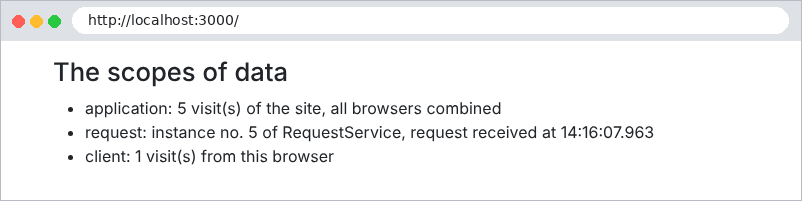
我们用 [curl] 和两个 Cookie 文件 [a.txt] 和 [b.txt] 来模拟两个浏览器。浏览器 A 发出两个请求,然后浏览器 B 发出一个,最后 A 再发出一个:
| curl -c a.txt -b a.txt http://localhost:3000/
curl -c a.txt -b a.txt http://localhost:3000/
curl -c b.txt -b b.txt http://localhost:3000/
curl -c a.txt -b a.txt http://localhost:3000/
|
| browser A:
application: 1 visit(s) of the site, all browsers combined
request: instance no. 1 of RequestService, request received at 14:16:07.195
client: 1 visit(s) from this browser
browser A:
application: 2 visit(s) of the site, all browsers combined
request: instance no. 2 of RequestService, request received at 14:16:07.237
client: 2 visit(s) from this browser
browser B:
application: 3 visit(s) of the site, all browsers combined
request: instance no. 3 of RequestService, request received at 14:16:07.251
client: 1 visit(s) from this browser
browser A:
application: 4 visit(s) of the site, all browsers combined
request: instance no. 4 of RequestService, request received at 14:16:07.263
client: 3 visit(s) from this browser
|
- 应用计数器统计所有访问:1、2、3、4;
- 每个请求都有自己的 独立 [RequestService] 实例:1、2、3、4;
- 客户端计数器专属于每个浏览器:A 有 3 次访问,B 有 1 次。
在案例研究中:
作用域 | 数据 | 位置 |
应用 | 医生和客户列表、词典、待验证的 CAPTCHA | 单例服务([ApplicationModelService]、[CaptchaService]……) |
请求 | 语言、路径、闪现消息、已登录的用户 | [res.locals] |
客户端 | 身份验证令牌、语言、闪现消息 | Cookie |