4. 视图及其模型
到目前为止,动作都是自己生成响应:文本、JSON,以及写成字符串的少量 HTML 标签。在 MVC 应用中,这是 视图的职责:视图是描述 HTML 页面的文件,其中有为动作传给它的数据预留的占位符——即 视图的模型。
[Laravel] 自带视图引擎 [Blade]。[Blade] 视图是名称以 [.blade.php] 结尾的文件,存放在应用的 [resources/views] 文件夹中。它是一个文本文件——这里是 HTML——其中有三类标记会在服务器上被解释:
- [{{ expression }}]:[PHP] 表达式的值,插入页面中;
- [@instruction]:指令:条件([@if])、循环([@foreach])、模板继承([@extends]、[@section])、包含([@include])等。指令以 [@] 开头,后面跟着它的名称;
- [{{-- commentaire --}}]:注释,不会出现在生成的页面中。
其他内容都按原样复制。表达式用 [PHP] 编写:无需学习第二种语言。[Blade] 因此类似于 [Razor],即 [ASP.NET Core MVC] 的视图引擎,后者同样混合 HTML 和代码,也使用字符 [@];它不同于 [Thymeleaf] ([Spring MVC]),后者的视图是用 [th:] 属性加以丰富的有效 HTML 文件。[Blade] 视图不会按原样执行:首次使用时,[Blade] 会把它 编译成标准的 [PHP] 文件,存放在 [storage/framework/views] 中,只要视图不变,就会一直复用该文件。我们将看到这个文件是什么样子。
4.1. 示例 13:第一个视图
| 13-first-view/
├── app/
│ ├── Http/
│ │ └── Controllers/
│ │ └── ViewsController.php
│ └── Models/
│ └── PageModel.php
├── resources/
│ └── views/
│ └── views/
│ ├── unknown.blade.php
│ └── index.blade.php
├── routes/
│ └── web.php
└── ...
|
4.1.1. 视图模型:app/Models/PageModel.php
| <?php
// app/Models/PageModel.php:视图的模型,即操作传递给视图的数据
namespace App\Models;
readonly class PageModel
{
public function __construct(
public string $title,
public string $message,
public string $time,
) {
}
}
|
视图模型是一个简单的不可变类(见示例 03):视图将要显示的三项信息。并不要求把视图的模型定义为类:你也可以向视图传递三个单独的变量。不过,类可以记录视图所期望的内容,并让编辑器检查动作的代码。案例研究将采用这种做法,其中每个视图都有自己的模型类。
4.1.2. 控制器:app/Http/Controllers/ViewsController.php
| <?php
// app/Http/Controllers/ViewsController.php:返回视图的操作
namespace App\Http\Controllers;
use App\Models\PageModel;
use Illuminate\Http\Response;
use Illuminate\View\View;
class ViewsController
{
// view:Blade 引擎根据视图
// resources/views/views/index.blade.php 以及数组中传递的变量
// (这里只有一个,[model])构建页面;生成的页面就是操作的响应
public function index(): View
{
$model = new PageModel(
'My first view',
'This page was built by Blade, on the server.',
date('H:i:s'));
return view('views.index', ['model' => $model]);
}
// 同一个视图使用另一个模型;或者另一个视图,并带有 404 状态码
public function hello(string $name): View|Response
{
if ($name === 'unknown') {
// 页面,以 404 状态码发送
return response()->view('views.unknown', ['name' => $name], 404);
}
$model = new PageModel(
"Hello $name",
'This time, the title of the page comes from the URL.',
date('H:i:s'));
return view('views.index', ['model' => $model]);
}
}
|
- 第 17–20 行:动作构建视图模型。
***[date] 函数,来自 *[PHP] ,用于格式化当前时间:[H] 表示小时,[i] 表示分钟,[s]** 表示秒;
- 第 21 行:函数 [view] 使 [Blade] 生成页面。第一个参数是视图 名称:即相对于 [resources/views] 文件夹的文件路径,其中 [/] 被替换为点号,并且不含 [.blade.php] 扩展名:[views.index] 指的是文件 [resources/views/views/index.blade.php]。第二个参数是关联数组,其中每个键都会成为视图中的一个 变量 ——这里只有一个:[$model]。[view] 返回一个 [View] 对象,[Laravel] 通过生成页面把它转换为响应(类型为 [text/html]);
- 第 29 行:另一个视图,使用不同的变量([$name])。[response()->view(...)] 根据视图生成响应,使用指定的状态码——这里是 404——来显示自定义的错误页面。动作类型 [View|Response] 表示:要么是 [View] ,要么是 [Response];
- 第 31–35 行:与 [index] 动作相同的视图,但使用不同的模型。这就是把动作与视图分离的好处:同一个视图可以被多个动作使用。
4.1.3. 视图:resources/views/views/index.blade.php
| <!doctype html>
<html lang="en">
<head>
<meta charset="utf-8">
{{-- {{ ... }}: the value of an expression, inserted into the page --}}
<title>{{ $model->title }}</title>
</head>
<body>
<h1>{{ $model->title }}</h1>
<p>{{ $model->message }}</p>
<p>Page built at {{ $model->time }}.</p>
</body>
</html>
|
- 第 5 行:[Blade] 注释;
- 第 6 行:[{{ $model->title }}] 插入变量 [$model] 的 [title] 属性的值。在花括号之间,可以写任何 [PHP] 表达式。
由 [{{ }}] 插入的所有内容都会被 转义:字符 [<]、[>]、[&]、["] 和 ['] 会被替换为它们的 HTML 实体。这就是示例 09 中 [e] 函数的作用,只不过这一次是自动的:因此视图不可能无意中把用户提供的 HTML 插入页面。
4.1.4. 视图:resources/views/views/unknown.blade.php
| <!doctype html>
<html lang="en">
<head>
<meta charset="utf-8">
<title>Unknown</title>
</head>
<body>
<h1>Nobody is called [{{ $name }}] here.</h1>
</body>
</html>
|
视图并不要求接收对象:变量 [$name] 是一个字符串。
4.1.5. 执行
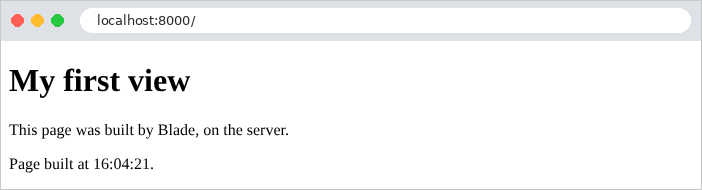
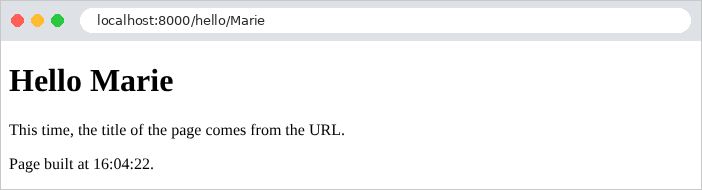
显示的时间是协调世界时(UTC),因为 [Laravel] 的默认时区就是这样设置的;案例研究将说明如何更改。原始输出显示了 [Blade] 所做的处理:[{{ }}] 标记已被替换为它们的值,注释已被删除(在原位置留下一个空行)。
| curl -i http://localhost:8000/
|
| HTTP/1.1 200 OK
Content-Type: text/html; charset=utf-8
<!doctype html>
<html lang="en">
<head>
<meta charset="utf-8">
<title>My first view</title>
</head>
<body>
<h1>My first view</h1>
<p>This page was built by Blade, on the server.</p>
<p>Page built at 16:04:07.</p>
</body>
</html>
|
“主页”错误页面,随后是包含 HTML 的名称([<b>martin],在 URL 中编码):
| curl -i http://localhost:8000/hello/unknown
curl http://localhost:8000/hello/%3Cb%3Emartin
|
| HTTP/1.1 404 Not Found
Content-Type: text/html; charset=utf-8
<!doctype html>
<html lang="en">
<head>
<meta charset="utf-8">
<title>Unknown</title>
</head>
<body>
<h1>Nobody is called [unknown] here.</h1>
</body>
</html>
...
<title>Hello <b>martin</title>
...
<h1>Hello <b>martin</h1>
...
|
[<b>] 标签被转义了,尽管动作和视图都没有对此做任何处理。最后是由 [Blade] 编译出的视图,位于 [storage/framework/views] 文件夹中(文件名是计算得出的,例如 [bfadc851307fb914e48325630a6c9191.php]):
| <!doctype html>
<html lang="en">
<head>
<meta charset="utf-8">
<title><?php echo e($model->title); ?></title>
</head>
<body>
<h1><?php echo e($model->title); ?></h1>
<p><?php echo e($model->message); ?></p>
<p>Page built at <?php echo e($model->time); ?>.</p>
</body>
</html>
<?php /**PATH .../13-first-view/resources/views/views/index.blade.php ENDPATH**/ ?>
|
每个 [{{ expression }}] 都变成了 [<?php echo e(expression); ?>]:转换由示例 09 中的 [e] 函数完成。因此 [Blade] 视图只是编写生成 HTML 的 [PHP] 文件的一种更优雅的方式。[PHP] 最初就被设计为一种页面语言,代码插入在 HTML 文件中的 [<?php] 和 [?>] 之间;[Blade] 保留了它的高效,并纠正了它的缺陷(尤其是缺少转义)。
4.2. 示例 14:Blade 语言
本示例在一个视图中汇集了 [Blade] 的主要结构。
4.2.1. 模型与动作
视图的模型由三个不可变类描述,每个类各在一个文件中([PHP] 并不要求每个文件一个类,但 [Composer] 的类加载器确实会在文件 [app/Models/Product.php] 中查找类 [App\Models\Product]):
| <?php
// app/Models/Product.php:一个产品
namespace App\Models;
readonly class Product
{
public function __construct(
public string $name,
public float $price,
public bool $inStock,
) {
}
}
|
| <?php
// app/Models/Address.php:一个地址
namespace App\Models;
readonly class Address
{
public function __construct(
public string $street,
public string $city,
) {
}
}
|
| <?php
// app/Models/BasicsModel.php:示例 14 的视图模型
namespace App\Models;
readonly class BasicsModel
{
/**
* @param list<Product> $products
* @param list<Product> $cart
*/
public function __construct(
public string $title,
public string $name,
public ?string $nickname,
public string $html,
public bool $loggedIn,
public string $currency,
public array $products,
public array $cart,
public Address $address,
) {
}
}
|
模型包含各种类型的值:字符串、[null]、布尔值、对象数组、空数组,以及包含其他对象的对象。这里的价格是 [float] 类型,以简化视图中的计算(示例 06 说明了为什么更推荐使用精确的十进制数)。
| <?php
// app/Http/Controllers/BasicsController.php:使用 Blade 主要结构的视图
namespace App\Http\Controllers;
use App\Models\Address;
use App\Models\BasicsModel;
use App\Models\Product;
use Illuminate\View\View;
class BasicsController
{
public function index(): View
{
$model = new BasicsModel(
title: 'Blade basics',
name: 'Martin',
nickname: null,
html: '<b>this is HTML</b>',
loggedIn: true,
currency: '€',
products: [
new Product('Keyboard', 25, true),
new Product('Mouse', 12.5, false),
new Product('Screen', 149, true),
],
cart: [],
address: new Address('12 rue des Lilas', 'Angers'));
return view('basics.index', ['model' => $model]);
}
}
|
动作使用 命名参数 (见示例 01)来构造模型:每个值前面都带有它所对应的参数名称,这使得调用在参数很多的情况下仍然易读。
4.2.2. 视图:resources/views/basics/index.blade.php
| <!doctype html>
<html lang="en">
<head>
<meta charset="utf-8">
<title>{{ $model->title }}</title>
</head>
<body>
{{-- PHP code in the view, between the two instructions that follow; here, two variables --}}
@php
$total = collect($model->products)->sum('price');
$count = count($model->products);
@endphp
<h1>{{ $model->title }}</h1>
{{-- 1. display a value of the model; null is displayed as an empty string;
the ?? operator replaces a null value. This Blade comment does not appear
in the produced page --}}
<p>1. Name: {{ $model->name }} - nickname: [{{ $model->nickname }}] [{{ $model->nickname ?? 'none' }}]</p>
{{-- 2. {{ }} escapes HTML; {!! !!} inserts it as is --}}
<p>2a. {{ $model->html }}</p>
<p>2b. {!! $model->html !!}</p>
{{-- 3. a condition --}}
@if ($model->loggedIn)
<p>3. You are logged in.</p>
@else
<p>3. You are not logged in.</p>
@endif
{{-- 4. a loop: $loop describes the state of the loop --}}
<p>4. Our products:</p>
<ul>
@foreach ($model->products as $product)
<li>no. {{ $loop->index }}: {{ $product->name }}, {{ $product->price }} {{ $model->currency }}
{{ $product->inStock ? '(in stock)' : '(sold out)' }}
@if ($loop->first) - the first one @endif
@if ($loop->last) - the last one, seen by {{ $model->name }} @endif
</li>
@endforeach
</ul>
{{-- 5. the empty list: @forelse ... @empty --}}
<p>5. Your cart:
@forelse ($model->cart as $p)<span>{{ $p->name }}</span>@empty it is empty. @endforelse
</p>
{{-- 6. computed expressions, the @php variables, and number_format --}}
<p>6. {{ $count }} products, for a total of {{ $total }} {{ $model->currency }};
average price: {{ number_format($total / $count, 2, '.', ',') }} {{ $model->currency }}</p>
{{-- 7. an object inside an object, and a PHP function (mb_strtoupper) --}}
<p>7. Address: {{ $model->address->street }}, {{ mb_strtoupper($model->address->city) }}</p>
{{-- 8. @ is a Blade instruction only at the start of a word; @@ writes an @ --}}
<p>8. An email address: contact@example.com; a displayed instruction: @@if</p>
</body>
</html>
|
- 第 9–12 行:指令 [@php] 和 [@endphp] 界定一段 [PHP] 代码,它在页面中的这个位置执行。这里创建了两个视图变量:总价,由集合的 [sum] 方法(示例 03)计算,它对每个元素的某个属性求和;以及商品数量。[@php] 块应该只用于这类准备工作:计算通常属于动作;
- 第 17 行:[null] 值显示为空字符串。[??] 运算符在 [PHP] (示例 08)中用默认值替换 [null] 值;
- 第 19–20 行:[{{ }}] 会转义 HTML(2a);[{!! !!}],则相反,按原样插入值而不转义(2b)。[{!! !!}] 只用于应用自己生成的 HTML,绝不能 用于用户输入;
- 第 22–26 行:条件:[@if]、[@elseif]、[@else]、[@endif],括号中是 [PHP] 条件。每个块都以 [@end...] 指令关闭;
- 第 30–36 行:循环 [@foreach] ... [@endforeach],写法与 [PHP] 的 [foreach] 循环一样。在循环内部,特殊变量 [$loop] 描述循环的状态:[$loop->index] (迭代序号,从 0 开始)、[$loop->iteration] (从 1 开始)、[$loop->first]、[$loop->last] (在第一次和最后一次迭代时为真)、[$loop->count] (元素个数)。循环之外的变量([$model->name])仍然可以访问;
- 第 32 行:[PHP] 的三元运算符 [condition ? a : b] (示例 11);
- 第 40 行:指令 [@forelse] ... [@empty] ... [@endforelse] 是一种循环,如果列表为空,则执行其中的 [@empty] 块。这比用 [@if] 测试列表长度更简单;
- 第 43–44 行:计算表达式([$total / $count])以及来自 [@php] 块的变量。[number_format] 函数,来自 [PHP] ,用于格式化数字:两位小数、句点作小数分隔符、逗号作千位分隔符。在示例 16 中,我们将看到格式化数字和金额的更好办法;
- 第 46 行:[->] 运算符沿着对象逐级访问([$model->address->city]),并且可以调用任何 [PHP] 函数:[mb_strtoupper] 把字符串转为大写([mb_...] 函数,*multi-byte* 的缩写,能正确处理以 UTF-8 编码的带重音字符);
- 第 48 行:字符 [@] 只有出现在单词开头时才会被 [Blade] 解释;在电子邮件地址中,它会按原样复制。要写出后面跟着指令名称的 [@] ,需要把它写两遍:[@@if] 会生成 [@if]。同样,[@{{ ... }}] 会生成 [{{ ... }}],当页面包含用于 [JavaScript] 框架的花括号时,这很有用。
关于注释的说明:[Blade] 会在处理注释之前先处理 [@php] 块。因此,包含单词 [@php] 的注释会被解释为代码块的开始,从而产生意外的结果:这就是第 8 行的注释没有包含它的原因。
4.2.3. 执行
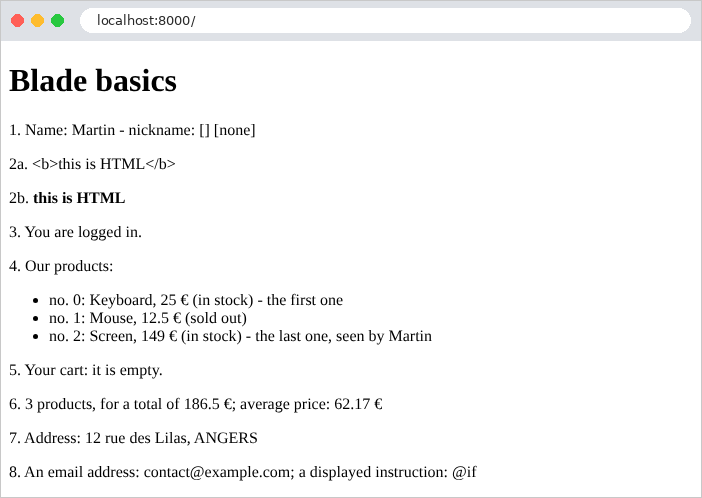
生成的页面:
| <!doctype html>
<html lang="en">
<head>
<meta charset="utf-8">
<title>Blade basics</title>
</head>
<body>
<h1>Blade basics</h1>
<p>1. Name: Martin - nickname: [] [none]</p>
<p>2a. <b>this is HTML</b></p>
<p>2b. <b>this is HTML</b></p>
<p>3. You are logged in.</p>
<p>4. Our products:</p>
<ul>
<li>no. 0: Keyboard, 25 €
(in stock)
- the first one </li>
<li>no. 1: Mouse, 12.5 €
(sold out)
</li>
<li>no. 2: Screen, 149 €
(in stock)
- the last one, seen by Martin </li>
</ul>
<p>5. Your cart:
it is empty. </p>
<p>6. 3 products, for a total of 186.5 €;
average price: 62.17 €</p>
<p>7. Address: 12 rue des Lilas, ANGERS</p>
<p>8. An email address: contact@example.com; a displayed instruction: @if</p>
</body>
</html>
|
注释和指令消失了,但它们留下了空格和换行:[Blade] 并不试图生成排版整齐的 HTML。这不会有任何影响:浏览器会忽略这些空白字符。像 [float] 这样的数字插入字符串时,会写成带小数点的形式([12.5]);[number_format] 使用传给它的分隔符。
4.3. 示例 15:模板、片段、静态文件
网站的各个页面通常共享相同的结构:页眉、导航栏、页脚以及相同的样式表。与其在每个视图中重复这一结构,不如把它只写一次,放在 模板 (*layout*)中,由各个页面 继承它。本示例还使用最广泛的 CSS 框架 [Bootstrap] 来进行布局。
| 15-layout/
├── app/
│ ├── Http/
│ │ └── Controllers/
│ │ └── PagesController.php
│ └── Models/
│ └── Member.php
├── bootstrap/
│ └── app.php
├── public/
│ └── css/
│ └── styles.css
├── resources/
│ └── views/
│ ├── components/
│ │ └── card.blade.php
│ ├── fragments/
│ │ └── navbar.blade.php
│ ├── layout.blade.php
│ └── pages/
│ ├── home.blade.php
│ ├── raw.blade.php
│ └── team.blade.php
├── routes/
│ └── web.php
└── ...
|
4.3.1. 静态文件
HTML 页面会引用其他文件:样式表、[JavaScript] 脚本和图片。这些由服务器原样发送的文件称为 静态文件。使用 [Laravel] 时,它们存放在 [public] 文件夹中,Web 服务器会原样提供该文件夹中的内容(示例 01):文件 [public/css/styles.css] 可通过 URL [/css/styles.css] 访问,无需 [Laravel] 参与。
| /* 除 Bootstrap 之外的一些设置 */
body {
background-color: #f5f7fa;
}
/* 布局的页脚 */
.footer {
margin-top: 2rem;
font-size: 0.85rem;
color: #6c757d;
}
/* 错误消息,位于页面底部,背景为浅粉色 */
.error-area {
margin-top: 1.5rem;
padding: 0.75rem 1rem;
background-color: #fdecef;
border: 1px solid #f5c2c7;
border-radius: 0.375rem;
color: #842029;
}
|
在 [Bootstrap] 之外再增加几条 CSS 规则:浅灰色背景、页脚样式,以及后续示例中将使用的错误区域样式。
[Bootstrap] 用于示例 15 至 28。这些示例不是在每个示例的 [public] 文件夹中各放一份副本,而是共享它:它位于 [examples/common/bootstrap] 文件夹中。该文件夹不由 Web 服务器直接提供:由所有这些示例共有的一条路由来提供其中的文件。这条路由由文件 [examples/common/bootstrap.php] 描述:
| <?php
// common/bootstrap.php:提供 Bootstrap 文件的路由,由示例 15 到 28 共享
// (examples/common/bootstrap 文件夹),位于 /bootstrap/... URL 下
use Illuminate\Support\Facades\Route;
Route::get('bootstrap/{file}', function (string $file) {
$folder = realpath(__DIR__.'/bootstrap');
// realpath:所请求文件的绝对路径,不含 . 和 .. ;如果文件不存在则为
// false
$path = realpath($folder.'/'.$file);
// 文件存在,并且确实位于该文件夹内(没有用 ../ 跳出该文件夹)
abort_unless($path && str_starts_with($path, $folder.DIRECTORY_SEPARATOR)
&& is_file($path), 404);
// 文件的类型,根据其扩展名确定
$types = ['css' => 'text/css', 'js' => 'text/javascript', 'map' => 'application/json'];
$type = $types[pathinfo($path, PATHINFO_EXTENSION)] ?? 'application/octet-stream';
return response()->file($path, ['Content-Type' => $type]);
})->where('file', '.*')->name('bootstrap');
|
- 第 7 行:一条路由,其动作是匿名函数(示例 01)。路由参数 [{file}] 接受任何路径结尾,包括斜杠(约束 [.*],第 19 行,见示例 02):URL [/bootstrap/css/bootstrap.min.css] 指向该文件夹中的文件 [css/bootstrap.min.css] 。该路由的名称是 [bootstrap];
- 第 8–14 行:提供由 URL 指定的文件需要采取预防措施:像 [/bootstrap/../../15-layout/.env] 这样的 URL 不能授予对文件夹之外的文件的访问。[realpath] 函数,属于 [PHP] ,用于计算文件的绝对路径,其中去除了 [.] 和 [..] 部分,如果文件不存在则返回 [false] 。我们验证得到的路径确实以该文件夹的路径开头([str_starts_with]),并且它指向一个文件([is_file]);否则,[abort_unless] 以 404 错误终止请求。[abort_unless(condition, code)] 等价于 [if (! condition) abort(code)];同样,也有 [abort_if]。[DIRECTORY_SEPARATOR] 是系统的路径分隔符:在 [\] 下是 [Windows],其他系统上是 [/] ;
- 第 16–18 行:[response()->file] 生成一个发送文件内容的响应。内容类型根据文件扩展名选择(由 [pathinfo] 提供),这样样式表就会被正确地声明为 [text/css]:浏览器会拒绝被声明为其他类型的样式表。
该路由由每个示例中的 [bootstrap/app.php] 文件声明:
| <?php
// bootstrap/app.php:示例 15 的应用程序
use Illuminate\Foundation\Application;
use Illuminate\Support\Facades\View;
(require __DIR__.'/../../vendor/autoload.php')->addPsr4('App\\', __DIR__.'/../app/');
return Application::configure(basePath: dirname(__DIR__))
->withRouting(
web: __DIR__.'/../routes/web.php',
// then:在 web 组之外声明的路由(没有会话或 Cookie):
// 提供 Bootstrap 的路由,由示例 15 到 28 共享
then: fn () => require __DIR__.'/../../common/bootstrap.php')
->withMiddleware()
->withExceptions()
// booted:应用程序启动后执行的代码
->booted(function () {
// 一个「视图合成器」:在构建每个视图(*)之前执行,
// 它将其变量添加到所有视图中
View::composer('*', function ($view) {
$view->with(['path' => request()->path(), 'year' => date('Y')]);
});
})
->create();
|
- 第 11–14 行:[then] 参数属于 [withRouting] ,它是一个函数,在 [routes/web.php] 中的路由声明完毕之后被调用,用来声明额外的路由。这些路由不属于 [web] 组:它们既没有会话也没有 Cookie,这适合静态文件。箭头函数执行文件 [common/bootstrap.php];
- 第 18–24 行:[booted] 方法注册一个在应用启动后执行的函数;
- 第 21–23 行:[View] 门面注册一个 视图合成器:一个函数,[Laravel] 会在渲染每个名称与给定模式匹配的视图之前执行它,这里的模式是 [*](匹配所有视图)。它接收视图,并可以向其中添加变量([with])。在这里,[$path] (所请求 URL 的路径,由当前请求 [request()] 提供)和 [$year] (当前年份)因此在所有视图中都可用,而无需动作来提供它们。模板用它们来生成页脚。方法 [View::share('name', value)] 同样可以向所有视图共享一个固定值。
4.3.2. 模板:resources/views/layout.blade.php
| <!doctype html>
{{-- the layout of the pages: the pages EXTEND it, and fill its sections --}}
<html lang="en">
<head>
<meta charset="utf-8">
<meta name="viewport" content="width=device-width, initial-scale=1">
{{-- @yield: a slot that the page can fill; here with a default content --}}
<title>@yield('title', 'Home') - My site</title>
{{-- route(): the URL of the [bootstrap] named route; asset(): the URL of a file of public/ --}}
<link rel="stylesheet" href="{{ route('bootstrap', 'css/bootstrap.min.css') }}">
<link rel="stylesheet" href="{{ asset('css/styles.css') }}">
</head>
<body>
<div class="container py-3">
{{-- insertion of the fragments/navbar.blade.php file --}}
@include('fragments.navbar')
<main>
{{-- the content of the page requested by the action is inserted here --}}
@yield('content')
</main>
{{-- $path, $year: added to all the views (see bootstrap/app.php) --}}
<footer class="footer">Page [{{ $path }}] - © {{ $year }}</footer>
</div>
</body>
</html>
|
- 第 6 行:[viewport] 标签指示移动浏览器按屏幕宽度显示页面,这正是 [Bootstrap] 所期望的;
- 第 8 行:指令 [@yield] 标记一个具名的插槽——继承该模板的页面可以用同名的 节 来填充它。第二个参数是插槽的 默认内容,由没有提供该节的页面使用;
- 第 10–11 行:[route('bootstrap', 'css/bootstrap.min.css')] 使用路由参数 [bootstrap] 的值 [{file}],生成具名路由(示例 04)的 URL。函数 [asset] 根据 [public] 文件夹中的文件创建 URL。手工写出文件的 URL([/css/styles.css])同样可行,但如果应用安装在某个 URL 前缀之下,则 [asset] 仍然有效;
- 第 16 行:[@include] 插入另一个视图的内容,这里是导航栏。被包含的视图可以访问包含它的视图的变量;
- 第 19 行:每个页面用自己的内容填充的区域;
- 第 22 行:页脚使用来自视图合成器的两个变量。
[Bootstrap] 的 [container] 类使内容居中并限制其宽度;[py-3] 增加垂直内边距:[Bootstrap] 提供数百个这样的类,它们在 [class] 属性中组合使用。
4.3.3. 导航栏:resources/views/fragments/navbar.blade.php
| {{-- a fragment: a piece of page, inserted by @include --}}
<nav class="navbar navbar-expand bg-light rounded mb-3 px-3">
<span class="navbar-brand">My site</span>
<div class="navbar-nav">
<a class="nav-link" href="/">Home</a>
<a class="nav-link" href="/team">Team</a>
<a class="nav-link" href="/raw">Page without layout</a>
</div>
</nav>
|
片段:页面中本身没有意义的一部分。类 [navbar]、[navbar-brand] 和 [nav-link] 是 [Bootstrap] 导航栏的类。
4.3.4. 组件:resources/views/components/card.blade.php
| {{-- a COMPONENT: a piece of page that has parameters, like a function --}}
@props(['name', 'role'])
<div class="card">
<div class="card-body">
<h5 class="card-title">{{ $name }}</h5>
<p class="card-text">{{ $role }}</p>
</div>
</div>
|
- 第 2 行:组件 是页面中带有参数的一部分;这是 [Blade] 的功能。匿名组件是 [resources/views/components] 文件夹中的一个简单视图;[@props] 指令声明它的参数,这些参数会成为视图的变量。它像 HTML 标签一样使用,标签名称以 [x-] 开头:[<x-card name="..." role="..." />] 会插入用这些值生成的页面片段。参数可以有默认值:[@props(['name', 'role' => ''])]。卡片([card])是 [Bootstrap] 的一个组件。
4.3.5. 页面
| {{-- this page EXTENDS the layout: it only provides the content of its sections --}}
@extends('layout')
@section('content')
<h1>Welcome</h1>
<p>This page only contains its own content: the header, the navigation
bar and the footer come from the <code>layout.blade.php</code> layout.</p>
{{-- the [card] component, with two parameters written on the spot --}}
<x-card name="A component" role="called with parameters written on the spot" />
@endsection
|
- 第 2 行:页面 继承 模板:[Blade] 生成模板页面,并用页面定义的节替换其中的 [@yield] 占位符。在继承模板的视图中,写在各个节之外的文本不会出现在生成的页面中;
- 第 4–10 行:节 [content],它填充同名的占位符。该页面没有定义节 [title]:占位符保留其默认内容“Home”;
- 第 9 行:使用 [card] 组件。参数写成 HTML 属性;它们的值是字符串。
| @extends('layout')
@section('title', 'Our team')
@section('content')
<h1>Our team</h1>
<div class="row g-3">
@foreach ($members as $member)
<div class="col-md-4">
{{-- :name="...": the value of the parameter is a PHP EXPRESSION --}}
<x-card :name="$member->name" :role="$member->role" />
</div>
@endforeach
</div>
@endsection
|
- 第 3 行:一个简短的节,其内容作为第二个参数提供;
- 第 8–13 行:每位团队成员一张卡片,放在 [Bootstrap] 的栅格中([row]、[col-md-4]:在中等或大屏幕上是三列,在窄屏幕上是一列);
- 第 11 行:名称前面带有 [:] 的参数会被赋予 [PHP] 表达式的值,而不是字符串:[:name="$member->name"]。
控制器没有引入任何新内容:
| <?php
// app/Http/Controllers/PagesController.php:三个页面
namespace App\Http\Controllers;
use App\Models\Member;
use Illuminate\View\View;
class PagesController
{
public function home(): View
{
return view('pages.home');
}
public function team(): View
{
$members = [
new Member('Marie Pélissier', 'Director'),
new Member('Jacques Bromard', 'Developer'),
new Member('Philippe Jandot', 'Graphic designer'),
];
return view('pages.team', ['members' => $members]);
}
public function raw(): View
{
return view('pages.raw');
}
}
|
最后,第三个页面不使用模板:
| <!doctype html>
{{-- this view does not use the layout: it is a complete page --}}
<html lang="en">
<head>
<meta charset="utf-8">
<title>Raw page</title>
</head>
<body>
<p>This page does not use the layout: no Bootstrap, no navigation bar.</p>
<p><a href="/">Back to home</a></p>
</body>
</html>
|
4.3.6. 执行
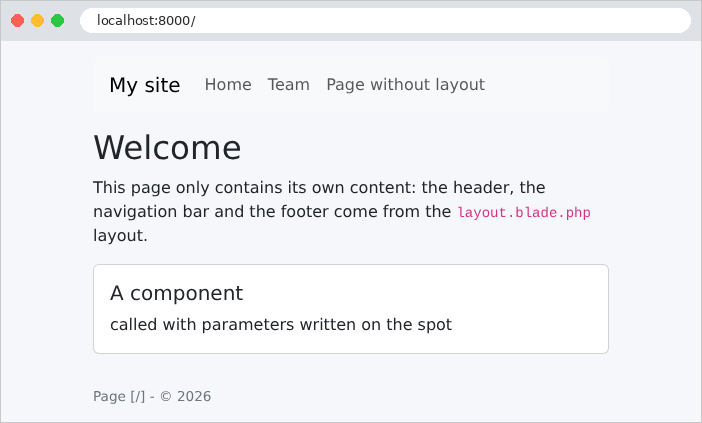
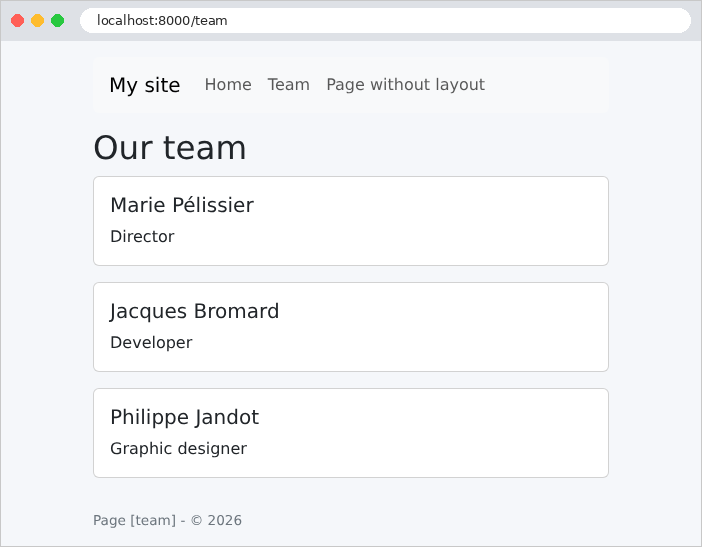

浏览器收到的团队页面(注释和指令留下的空行已被删除):
| curl http://localhost:8000/team
|
| <!doctype html>
<html lang="en">
<head>
<meta charset="utf-8">
<meta name="viewport" content="width=device-width, initial-scale=1">
<title>Our team - My site</title>
<link rel="stylesheet" href="http://localhost:8000/bootstrap/css/bootstrap.min.css">
<link rel="stylesheet" href="http://localhost:8000/css/styles.css">
</head>
<body>
<div class="container py-3">
<nav class="navbar navbar-expand bg-light rounded mb-3 px-3">
<span class="navbar-brand">My site</span>
<div class="navbar-nav">
<a class="nav-link" href="/">Home</a>
<a class="nav-link" href="/team">Team</a>
<a class="nav-link" href="/raw">Page without layout</a>
</div>
</nav>
<main>
<h1>Our team</h1>
<div class="row g-3">
<div class="col-md-4">
<div class="card">
<div class="card-body">
<h5 class="card-title">Marie Pélissier</h5>
<p class="card-text">Director</p>
</div>
</div>
</div>
...
</div>
</main>
<footer class="footer">Page [team] - © 2026</footer>
</div>
</body>
</html>
|
浏览器收到的是一个完整的页面:模板、片段、页面和组件都是在服务器上组装的。样式表中的 URL 值由 [route] 和 [asset] 计算得出:它们是绝对 URL。主页的路径是 [/];其他页面的路径不带前导斜杠([team]):这是 [request()->path()] 的约定。你可以验证样式表是否被正确应用([-I] 选项属于 [curl] ,它只显示响应头):
| curl -I http://localhost:8000/bootstrap/css/bootstrap.min.css
curl -I http://localhost:8000/css/styles.css
|
| HTTP/1.1 200 OK
Content-Type: text/css; charset=utf-8
Last-Modified: Sat, 26 Sep 2026 16:04:06 GMT
Content-Length: 232111
Accept-Ranges: bytes
...
HTTP/1.1 200 OK
Content-Type: text/css; charset=UTF-8
Content-Length: 435
|
第一个文件是通过我们的路由发送的;第二个文件是由开发服务器直接发送的,没有经过 [Laravel]。
4.4. 示例 16:辅助函数
视图常常需要格式化各种值:带货币符号的金额、完整写出的日期,或者大写文本。这类代码不属于动作(动作不处理展示),在视图中编写又很繁琐。因此,要用 [PHP] 把它写成供视图调用的函数:这就是视图的 辅助函数。[Blade] 提供了几种使它们可用的方式:调用函数或静态方法、编写自己的 指令 ([@money($price)]),以及使用我们已经遇到过的 组件。
| 16-helpers/
├── app/
│ ├── Helpers/
│ │ └── Formats.php
│ ├── Http/
│ │ ├── Controllers/
│ │ │ └── PagesController.php
│ │ └── Middleware/
│ │ └── SetLanguage.php
│ └── Models/
│ └── Product.php
├── resources/
│ └── views/
│ ├── components/
│ │ ├── badge.blade.php
│ │ └── link.blade.php
│ ├── fragments/
│ │ └── navbar.blade.php
│ ├── layout.blade.php
│ └── pages/
│ ├── home.blade.php
│ └── products.blade.php
└── ...
|
| <?php
// app/Helpers/Formats.php:由视图调用的函数
namespace App\Helpers;
use Brick\Math\BigDecimal;
use Carbon\CarbonInterface;
use Illuminate\Support\Facades\App;
use Illuminate\Support\Number;
class Formats
{
// "keyboard" -> "KEYBOARD"
public static function uppercase(?string $text): string
{
return $text === null ? '' : mb_strtoupper($text);
}
// 以请求语言的格式表示的某种货币金额(见
// SetLanguage 中间件):1149.9 -> 英文为 "€1,149.90",法文为
// "1 149,90 €"。PHP 的 intl 扩展了解每个国家的惯例
public static function money(BigDecimal $amount, string $currency = 'EUR'): string
{
return Number::currency($amount->toFloat(), in: $currency, locale: App::getLocale());
}
// 以完整文字表示、使用请求语言的日期:"Saturday 26 September 2026"
public static function longDate(CarbonInterface $day): string
{
return $day->locale(App::getLocale())->isoFormat('dddd D MMMM YYYY');
}
}
|
- 第 14–17 行:一个 静态 方法([static]):它在类上调用,不需要对象([Formats::uppercase('keyboard')])。它接受 [null];
- 第 22–24 行:格式化金额。这取决于语言:法语中是 [1 149,90 €] (用空格分隔千位、小数逗号、符号在金额之后);英语中是 [€1,149.90]。[Laravel] 的 [Number] 类基于 [PHP] 的 [intl] 扩展,该扩展支持各国的惯例(它使用 Unicode 项目 *CLDR* 的数据):[Number::currency] 格式化金额,货币由其国际代码指定([EUR]、[USD])。[intl] 只能格式化 [float] 数字:因此要转换十进制数([toFloat()]),这里是安全的,因为该数字不再用于计算。语言 ([fr]、[en])是应用针对当前请求的语言,由 [App::getLocale()] 返回;我们稍后会看到是谁设置它的;
- 第 28–30 行:格式化 [Carbon] 日期(示例 12)。[locale(...)] 返回针对特定语言设置的日期副本;[isoFormat] 按如下方式格式化:[dddd] 完整写出星期几,[D] 表示月中的日,[MMMM] 完整写出月份,[YYYY] 表示年份。[Carbon] 附带这些名称的两百多种语言的翻译。[CarbonInterface] 类型接受所有 [Carbon] 日期。
4.4.2. 每个请求的语言:app/Http/Middleware/SetLanguage.php
| <?php
// app/Http/Middleware/SetLanguage.php:每个请求的格式化语言
namespace App\Http\Middleware;
use Closure;
use Illuminate\Http\Request;
use Illuminate\Support\Facades\App;
use Symfony\Component\HttpFoundation\Response;
class SetLanguage
{
// URL 的 ?lang=fr 参数,否则为英语
public function handle(Request $request, Closure $next): Response
{
App::setLocale($request->query('lang') === 'fr' ? 'fr' : 'en');
return $next($request);
}
}
|
格式化所用的语言取决于请求:URL 的 [?lang=fr] 参数选择法语;默认语言是英语。中间件组件(示例 03)在每个动作之前通过 [App::setLocale] 设置它:门面 [App] 指的是应用本身。以这种方式设置的语言只适用于当前请求:下一个请求会恢复为 [.env] 中的语言([APP_LOCALE],默认为英语)。国际化一章将使用这同一种语言来翻译文本。
4.4.3. 配置:bootstrap/app.php
| <?php
// bootstrap/app.php:示例 16 的应用程序
use App\Http\Middleware\SetLanguage;
use Illuminate\Foundation\Application;
use Illuminate\Foundation\Configuration\Middleware;
use Illuminate\Support\Facades\Blade;
(require __DIR__.'/../../vendor/autoload.php')->addPsr4('App\\', __DIR__.'/../app/');
return Application::configure(basePath: dirname(__DIR__))
->withRouting(
web: __DIR__.'/../routes/web.php',
// then:在 web 组之外声明的路由(没有会话或 Cookie):
// 提供 Bootstrap 的路由,由示例 15 到 28 共享
then: fn () => require __DIR__.'/../../common/bootstrap.php')
->withMiddleware(function (Middleware $middleware): void {
// 每个请求的语言(见 app/Http/Middleware/SetLanguage.php)
$middleware->web(append: SetLanguage::class);
})
->withExceptions()
->booted(function () {
// 「自制」指令:@money($price)、@longDate($day)。指令
// 接收其参数的文本,并返回将取而代之的 PHP 代码
Blade::directive('money', fn (string $expression) =>
"<?php echo e(\\App\\Helpers\\Formats::money($expression)); ?>");
Blade::directive('longDate', fn (string $expression) =>
"<?php echo e(\\App\\Helpers\\Formats::longDate($expression)); ?>");
})
->create();
|
- 第 19 行:中间件被添加到 [web] 组的末尾:它对 [routes/web.php] 中的所有路由运行,并且在该组的中间件(会话、Cookie 等)之后。示例 03 使用的是 [append],它添加一个 全局 中间件,对所有请求运行,包括来自 [web] 组之外路由的请求;
- 第 25–28 行:[Blade] 门面注册两个“自定义”指令:[@money(...)] 和 [@longDate(...)]。指令在视图 编译时 (示例 13)处理:它的函数接收写在括号之间的 文本 (例如 [$product->price, 'USD']),并返回 [PHP] 代码,该代码将在编译后的视图中替换这个指令。这里是调用
***[Formats]*** 的相应方法,其结果被转义([e]***)并输出([echo]***)。在用引号括起的字符串中,[\\] 表示单个 [\];
- 这些指令存放在应用启动之后执行的 [booted] 函数中(示例 15):因为只有在那时,[Blade] 门面才可用。
由于指令生成的是编译后的代码,因此需要采取一项预防措施:修改指令之后,必须清除已编译的视图(命令 [php artisan view:clear]),这样视图才会用新版本重新编译。
4.4.4. 控制器:app/Http/Controllers/PagesController.php
| <?php
// app/Http/Controllers/PagesController.php:两个页面
namespace App\Http\Controllers;
use App\Models\Product;
use Brick\Math\BigDecimal;
use Carbon\CarbonImmutable;
use Illuminate\View\View;
class PagesController
{
public function home(): View
{
return view('pages.home', ['today' => CarbonImmutable::today()]);
}
public function products(): View
{
return view('pages.products', ['products' => [
new Product('keyboard', BigDecimal::of('25'), 12),
new Product('mouse', BigDecimal::of('12.5'), 0),
new Product('screen', BigDecimal::of('1149.9'), 3),
]]);
}
}
|
动作把原始值传给视图:一个日期([CarbonImmutable::today()],即今天零点的日期)和十进制数。格式化由视图负责。[Product] 类 组合了名称、价格(一个 [BigDecimal],见示例 06)和库存量。路由的名称是 [home] 和 [products]。
4.4.5. 视图
| {{-- a component: a link of the navigation bar, which receives the [active]
class if the current page is under the [path] path. request(): the
current request, available in all the views; $slot: the content placed
between the tags of the component --}}
@props(['href', 'path'])
<a @class(['nav-link', 'active' => request()->is($path)]) href="{{ $href }}">{{ $slot }}</a>
|
- 第 5 行:一个在导航栏中创建链接的组件。当前页面的链接会被赋予 [Bootstrap] 的 [active] 类,使其高亮显示;
- 第 6 行:指令 [@class] 根据数组为标签生成属性 [class] :单独写出的类(['nav-link'])始终存在;写成键的类(['active' => condition])只有在条件为真时才存在。函数 [request()] 返回当前请求;它的方法 [is] 把 URL 的路径与模式比较,其中 [*] 匹配任意字符序列。变量 [$slot] 包含组件的开始标签和结束标签之间的内容([<x-link ...>Products</x-link>])。
| <nav class="navbar navbar-expand bg-light rounded mb-3 px-3">
<span class="navbar-brand">Helpers</span>
<div class="navbar-nav">
{{-- 1. a condition written in the view --}}
<a class="nav-link{{ request()->is('/') ? ' active' : '' }}" href="/">Home</a>
{{-- 2. the [link] component --}}
<x-link href="/products" path="products*">Products</x-link>
{{-- 3. route() builds the URL of a named route; a parameter that is not a
parameter of the route is added at the end of the URL: /products?lang=fr --}}
<a class="nav-link" href="{{ route('products', ['lang' => 'fr']) }}">Produits (fr)</a>
</div>
</nav>
|
- 第 5 行:同样的功能,不使用组件,而是用三元运算符直接写在视图中。[request()->is('/')] 只能识别主页。组件避免了为每个链接重复这个条件;
- 第 7 行:使用该组件;
- 第 10 行:[route] 中不是路由参数的参数会作为参数添加到 URL 中:[/products?lang=fr]。
| {{-- a Bootstrap badge: green if the product is in stock, red otherwise --}}
@props(['stock'])
<span @class(['badge', 'text-bg-success' => $stock > 0, 'text-bg-danger' => $stock <= 0])>{{ $stock > 0 ? "$stock in stock" : 'sold out' }}</span>
|
- 第 3 行:来自 [Bootstrap] 的徽章,根据库存情况显示为绿色([text-bg-success])或红色([text-bg-danger]),使用 [@class]。徽章上的文字由三元运算符选择;["$stock in stock"] 是一个插值字符串。
| @extends('layout')
@section('title', 'Home')
@section('content')
<h1>Home</h1>
{{-- the "home-made" @longDate directive --}}
<p>Today is @longDate($today).</p>
{{-- app()->getLocale(): the language of the request, set by the SetLanguage middleware --}}
<p>Formatting language: {{ app()->getLocale() }}
(<a href="/?lang=fr">in French</a>, <a href="/">in English</a>)</p>
@endsection
|
- 第 7 行:调用“home”指令;
- 第 9 行:函数 [app()] 返回应用,而 [getLocale()] 返回 它针对当前请求所设置的语言。
| @extends('layout')
{{-- @use: the equivalent, in a view, of PHP's use instruction --}}
@use('App\Helpers\Formats')
@section('title', 'Products')
@section('content')
<h1>Products</h1>
<table class="table table-sm w-auto">
<thead><tr><th>Product</th><th>Price</th><th>Price in dollars</th><th>Stock</th></tr></thead>
<tbody>
@foreach ($products as $product)
<tr>
{{-- a static method, then a directive, without then with a parameter --}}
<td>{{ Formats::uppercase($product->name) }}</td>
<td>@money($product->price)</td>
<td>@money($product->price, 'USD')</td>
{{-- the [badge] component builds the HTML of the badge --}}
<td><x-badge :stock="$product->stock" /></td>
</tr>
@endforeach
</tbody>
</table>
@endsection
|
- 第 3 行:[@use] 指令把一个类导入视图,就像 [PHP] 文件中的 [use] 语句一样;
- 第 14 行:调用静态方法,其作用相当于函数;
- 第 15–16 行:[@money] 指令,先使用默认货币,然后带一个参数;
- 第 18 行:使用 [badge] 组件。
模板 [layout.blade.php] 是示例 15 中那个模板的简化版本。
4.4.6. 执行
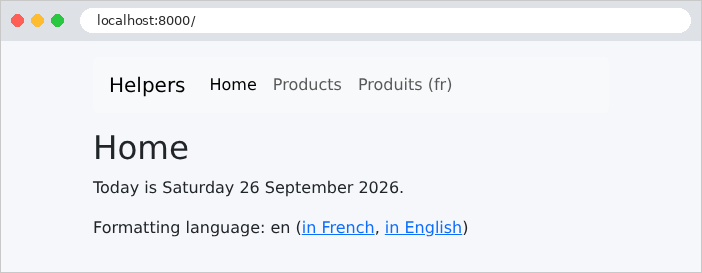
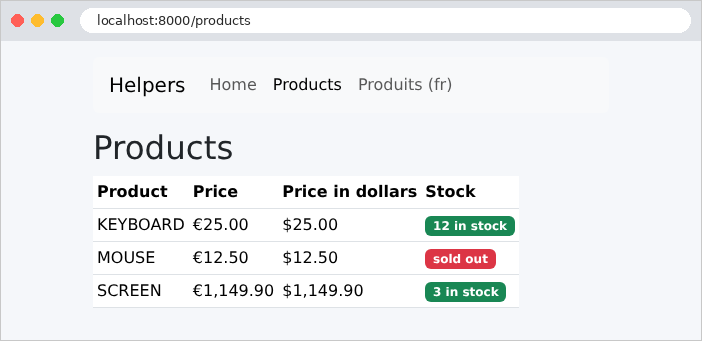
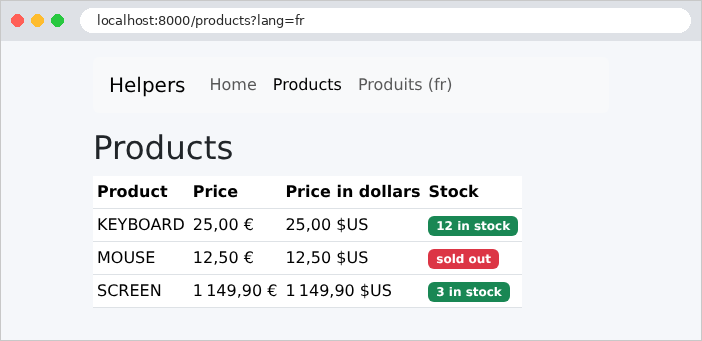
同一个页面,带有参数 [?lang=fr]。只有数字的格式化发生变化;文本本身是硬编码在视图中的。国际化一章还会翻译文本。
HTML 的一段摘录如下:
| curl "http://localhost:8000/products?lang=en"
|
| ...
<tr>
<td>KEYBOARD</td>
<td>€25.00</td>
<td>$25.00</td>
<td><span class="badge text-bg-success">12 in stock</span>
</td>
</tr>
...
|
4.5. 示例 17:GET 表单
HTML 表单根据其 [method] 属性,以两种方式之一把字段发送给服务器:
- [method="get"]:字段作为参数添加到 URL 中([/search?keyword=le&genre=novel])。这是 执行查询的表单所使用的方法:搜索或过滤。包含结果的 URL 可以放心地加入书签、分享或重新加载;
- [method="post"]:字段包含在请求正文中(见示例 11)。这是 修改数据的表单所使用的方法:注册、添加或删除。
第一个表单是图书搜索。
4.5.1. 模型:app/Models/Book.php 和 SearchModel.php
| <?php
// app/Models/Book.php:一本书
namespace App\Models;
readonly class Book
{
public function __construct(
public string $title,
public string $author,
public string $genre,
) {
}
}
|
| <?php
// app/Models/SearchModel.php:视图的模型:输入(用于再次
// 显示)、类型、结果
namespace App\Models;
readonly class SearchModel
{
/**
* @param list<string> $genres
* @param list<Book> $results
*/
public function __construct(
public string $keyword,
public string $genre,
public array $genres,
public array $results,
) {
}
}
|
- 第 14–17 行:视图模型包含用户的输入(表单将显示它)、建议的体裁列表以及结果。
4.5.2. 控制器:app/Http/Controllers/BooksController.php
| <?php
// app/Http/Controllers/BooksController.php:通过 GET 发送的搜索表单
namespace App\Http\Controllers;
use App\Models\Book;
use App\Models\SearchModel;
use Illuminate\Http\Request;
use Illuminate\View\View;
class BooksController
{
// 类常量:数据,为示例直接写在代码中
private const GENRES = ['novel', 'poetry', 'drama'];
/** @return list<Book> */
private static function books(): array
{
return [
new Book('Le Rouge et le Noir', 'Stendhal', 'novel'),
new Book('Les Fleurs du mal', 'Baudelaire', 'poetry'),
new Book('Madame Bovary', 'Flaubert', 'novel'),
new Book('Alcools', 'Apollinaire', 'poetry'),
new Book('Le Cid', 'Corneille', 'drama'),
];
}
// GET / 和 GET /search?keyword=...&genre=...:表单及其结果
public function search(Request $request): View
{
// string:以字符串形式提供的参数(缺失时为 '')
$keyword = $request->string('keyword')->value();
$genre = $request->string('genre')->value();
$word = mb_strtolower($keyword);
$results = array_values(array_filter(self::books(), fn (Book $book) =>
($word === '' || str_contains(mb_strtolower($book->title), $word)
|| str_contains(mb_strtolower($book->author), $word))
&& ($genre === '' || $book->genre === $genre)));
return view('books.search', [
'model' => new SearchModel($keyword, $genre, self::GENRES, $results),
]);
}
}
|
- 第 14 行:一个名为 [self::GENRES] 的私有 类常量 ([self] 指当前类)。常量不能包含对象:因此,图书由一个静态方法提供(第 17–25 行)。在真实的应用中,它们会来自数据库;
- 第 32–33 行:表单字段被当作 URL 的参数来读取(示例 07)。[string] 方法把参数作为 [Stringable] 对象返回,该类型属于 [Laravel] (一个带有额外方法的字符串),如果参数缺失,它就是空的;[value()] 从中提取 [PHP] 字符串;
- 第 35–38 行:过滤。函数 [array_filter] 保留数组中使给定函数返回 [true] 的元素:如果关键词为空,或者出现在书名或作者中(两边都转为小写),并且 体裁为空或与图书自己的体裁一致,则保留该图书。[array_filter] 会保留被选中元素的键(0、2 等):[array_values] 从 0 开始重新为它们编号;
- 第 39–41 行:视图模型。
路由表把两个 URL 入口与同一个动作关联起来:第一次访问([/])时,没有参数,会显示所有图书。
| <?php
// routes/web.php:示例 17 的路由
use App\Http\Controllers\BooksController;
use Illuminate\Support\Facades\Route;
// 同一个操作对应两个路由
Route::get('/', [BooksController::class, 'search']);
Route::get('search', [BooksController::class, 'search']);
|
4.5.3. 视图:resources/views/books/search.blade.php
| @extends('layout')
@section('content')
<h1 class="h3">Book search</h1>
{{-- method="get": the fields are sent in the URL (?keyword=...&genre=...) --}}
<form method="get" action="/search" class="row g-2 align-items-end mb-3">
<div class="col-auto">
<label class="form-label" for="keyword">Title or author</label>
{{-- value: the field displays again what was typed (escaped by {{ }}) --}}
<input class="form-control" id="keyword" name="keyword" value="{{ $model->keyword }}">
</div>
<div class="col-auto">
<label class="form-label" for="genre">Genre</label>
<select class="form-select" id="genre" name="genre">
<option value="">(all)</option>
@foreach ($model->genres as $genre)
{{-- @selected: the boolean selected attribute, written if the condition is true, omitted otherwise --}}
<option value="{{ $genre }}" @selected($genre === $model->genre)>{{ $genre }}</option>
@endforeach
</select>
</div>
<div class="col-auto">
<button class="btn btn-primary" type="submit">Search</button>
</div>
</form>
<p>{{ count($model->results) }} book(s) found.</p>
<ul>
@foreach ($model->results as $book)
<li><i>{{ $book->title }}</i>, {{ $book->author }} ({{ $book->genre }})</li>
@endforeach
</ul>
@endsection
|
- 第 6 行:[<form>] 标签。[action] 属性是表单提交到的 URL;[method="get"] 把字段放在 URL 中。[Bootstrap] 的类把这些字段排在同一行;
- 第 8 行:标签。它的 [for] 属性指定它所描述字段的标识符([id]):点击标签会把光标放到该字段中,屏幕阅读器会连同字段一起朗读标签;
- 第 10 行:输入字段。它的属性 [name] 是发送给服务器的 参数名称 :这是表单与动作之间的联系([$request->string('keyword')])。属性 [value] 是显示的值:重新显示的上一次输入(并由 [{{ }}] 转义,这在属性中至关重要:否则,包含引号 ["] 的输入会提前关闭该属性);
- 第 14–20 行:下拉列表。每个 [<option>] 都有一个发送给服务器的值([value])和一段显示的文本。第一个选项的值为空,表示“所有体裁”;
- 第 18 行:上一次请求中选中的选项被赋予属性 [selected]。这是一个 布尔属性:只要存在就足够了,它没有值。如果条件为真,指令 [@selected(condition)] 会设置它,否则什么也不设置。类似地,还有 [@checked]、[@disabled]、[@readonly]、和 [@required];
- 第 23 行:提交按钮;
- 第 26 行:结果数量。
4.5.4. 执行
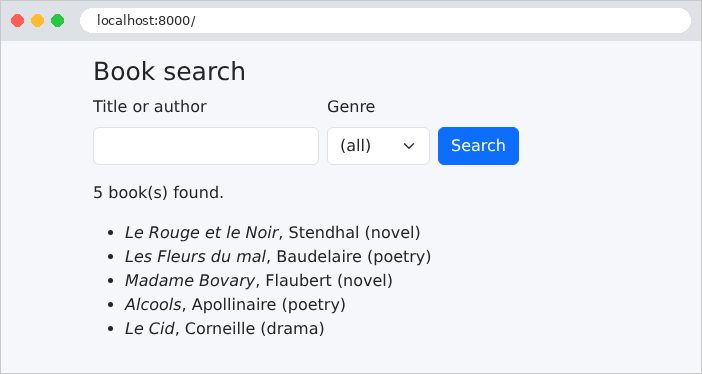
输入 [le] 并选择体裁 [novel]:
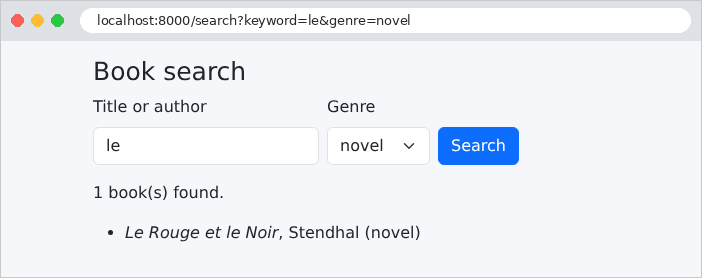
结果页面上的 URL 包含表单字段:[/search?keyword=le&genre=novel]。表单的响应:
| curl "http://localhost:8000/search?keyword=le&genre=novel"
|
| ...
<form method="get" action="/search" class="row g-2 align-items-end mb-3">
<div class="col-auto">
<label class="form-label" for="keyword">Title or author</label>
<input class="form-control" id="keyword" name="keyword" value="le">
</div>
<div class="col-auto">
<label class="form-label" for="genre">Genre</label>
<select class="form-select" id="genre" name="genre">
<option value="">(all)</option>
<option value="novel" selected>novel</option>
<option value="poetry" >poetry</option>
<option value="drama" >drama</option>
</select>
</div>
...
</form>
<p>1 book(s) found.</p>
<ul>
<li><i>Le Rouge et le Noir</i>, Stendhal (novel)</li>
</ul>
...
|
“Madame Bovary”没有被选中:“le”既没有出现在书名中,也没有出现在作者姓名中。
4.6. 示例 18:表单字段
本示例展示了 HTML 表单中所有的字段类型,这个表单在此通过 POST 发送。它演示了如何连同当前值一起重新显示每种类型的字段、浏览器如何为每个字段发送值,以及服务器如何验证收到的值确实是可用选项之一。[Laravel] 没有用类来定义表单的库(就像 [WTForms] 和 [Python] 中那样):字段以 HTML 的形式写在视图中,[Blade] 的指令([@checked]、[@selected] 等)有助于渲染它们。
4.6.1. 列表服务:app/Services/ListsService.php
| <?php
// app/Services/ListsService.php:表单提供的列表。在
// 真实的应用程序中,它们会来自数据库。
namespace App\Services;
class ListsService
{
// 每个列表:以 值 => 显示文本 发送的关联数组
public function titles(): array
{
return ['Mr' => 'Mr', 'Mme' => 'Mme', 'Melle' => 'Melle'];
}
public function countries(): array
{
return ['fr' => 'France', 'be' => 'Belgium', 'ch' => 'Switzerland', 'ca' => 'Canada'];
}
public function hobbies(): array
{
return ['reading' => 'reading', 'music' => 'music', 'sport' => 'sport',
'cinema' => 'cinema'];
}
public function languages(): array
{
return ['French' => 'French', 'English' => 'English', 'Spanish' => 'Spanish',
'German' => 'German'];
}
}
|
表单的下拉列表(称谓、国家、爱好、语言)由一个服务提供,沿用示例 06 中的模式:在真实的应用中,它们会来自数据库。每个列表都是一个关联数组:键是发送给服务器的值,值是显示的文本。该服务是一个具体类:[Laravel] 的容器无需声明就知道如何创建它(示例 06)。
| <?php
// app/Http/Controllers/FormController.php:使用所有类型字段的表单
namespace App\Http\Controllers;
use App\Services\ListsService;
use Illuminate\Http\Request;
use Illuminate\Support\Facades\Validator;
use Illuminate\Validation\Rule;
use Illuminate\View\View;
class FormController
{
// 列表服务由容器注入(见示例 06)
public function __construct(private ListsService $lists)
{
}
// GET:表单,带有初始值(每个字段一个)
public function display(): View
{
$input = ['title' => 'Mme', 'country' => 'fr', 'languages' => ['French'], 'token' => 'A7X2'];
return view('form.form', ['lists' => $this->lists, 'input' => $input]);
}
// POST:验证所发送的字段,然后由表单再次显示
public function process(Request $request): View
{
$l = $this->lists;
// array_keys:每个列表允许的值(数组的键)
$validator = Validator::make($request->post(), [
'title' => ['required', Rule::in(array_keys($l->titles()))],
'birth_date' => 'nullable|date_format:Y-m-d',
'hobbies' => 'array',
'hobbies.*' => Rule::in(array_keys($l->hobbies())),
'country' => ['required', Rule::in(array_keys($l->countries()))],
'languages' => 'array',
'languages.*' => Rule::in(array_keys($l->languages())),
]);
// 浏览器实际发送的内容,逐个参数
$received = [];
foreach ($request->post() as $name => $value) {
$received[] = "$name = [".implode(', ', (array) $value).']';
}
return view('form.form', [
'lists' => $l,
'input' => $request->post(),
'received' => implode("\n", $received),
'valid' => $validator->passes(),
'errors' => $validator->errors(),
]);
}
}
|
- 第 15 行:服务由构造器注入;
- 第 20–23 行:表单的 初始值,一个关联数组:每个字段一个值(多值字段则为数组)。视图在变量 [$input] 中接收这些值,同时接收列表服务;
- 第 31–39 行:对收到的字段进行验证。下拉字段必须包含建议的值之一:恶意用户可能发送任何内容,而不仅仅是页面建议的内容。[Rule::in(...)] 根据一个值数组生成规则 [in] (示例 08)——这里是列表的键([array_keys])。多值字段逐个元素检查([hobbies.*],示例 10)。[date_format:Y-m-d]:[<input type="date">] 字段与服务器以 [yyyy-mm-dd] 格式交换其值,而不论浏览器以何种格式显示它;
- 第 41–44 行:为了演示,列出浏览器实际发送的内容。[(array) $value] 把单个值转换为只有一个元素的数组(数组仍然是数组);[implode] 把数组的元素连接成字符串,以第一个参数作为分隔符;
- 第 45–51 行:表单带着收到的值(重新显示,[$input])、服务器收到的内容、验证结果([passes()],与 [fails()] 相反)以及任何错误一起显示。
路由表把 URL [/form] 对于方法 GET 关联到动作 [display] ,对于方法 POST 则关联到动作 [process] 。
| @extends('layout')
@section('content')
<h1 class="h3">A complete form</h1>
<form method="post" action="/form" style="max-width: 40rem">
{{-- the hidden fields: Laravel's anti-CSRF token, and our [token] field --}}
@csrf
<input type="hidden" name="token" value="{{ $input['token'] ?? '' }}">
<div class="mb-2">
<span class="form-label me-3">Title</span>
{{-- radio buttons: same [name], a single value sent --}}
@foreach ($lists->titles() as $value => $text)
<div class="form-check form-check-inline">
<input class="form-check-input" type="radio" id="title-{{ $loop->index }}" name="title"
value="{{ $value }}" @checked(($input['title'] ?? '') === $value)>
<label class="form-check-label" for="title-{{ $loop->index }}">{{ $text }}</label>
</div>
@endforeach
</div>
<div class="row g-2 mb-2">
<div class="col">
<label class="form-label" for="name">Name</label>
<input class="form-control" type="text" id="name" name="name" value="{{ $input['name'] ?? '' }}">
</div>
<div class="col">
{{-- a password is NEVER sent back in the page: no value attribute --}}
<label class="form-label" for="password">Password</label>
<input class="form-control" type="password" id="password" name="password">
</div>
<div class="col">
<label class="form-label" for="birth_date">Date of birth</label>
<input class="form-control" type="date" id="birth_date" name="birth_date" value="{{ $input['birth_date'] ?? '' }}">
</div>
</div>
<div class="mb-2">
<span class="form-label me-3">Hobbies</span>
{{-- checkboxes: the hobbies[] name makes the received value an ARRAY (see example 10) --}}
@foreach ($lists->hobbies() as $value => $text)
<div class="form-check form-check-inline">
<input class="form-check-input" type="checkbox" id="hobbies-{{ $loop->index }}" name="hobbies[]"
value="{{ $value }}" @checked(in_array($value, $input['hobbies'] ?? []))>
<label class="form-check-label" for="hobbies-{{ $loop->index }}">{{ $text }}</label>
</div>
@endforeach
</div>
<div class="row g-2 mb-2">
<div class="col">
<label class="form-label" for="country">Country</label>
<select class="form-select" id="country" name="country">
@foreach ($lists->countries() as $value => $text)
<option value="{{ $value }}" @selected(($input['country'] ?? '') === $value)>{{ $text }}</option>
@endforeach
</select>
</div>
<div class="col">
<label class="form-label" for="languages">Spoken languages</label>
{{-- multiple-selection list: several possible values, hence languages[] --}}
<select class="form-select" id="languages" name="languages[]" multiple size="4">
@foreach ($lists->languages() as $value => $text)
<option value="{{ $value }}" @selected(in_array($value, $input['languages'] ?? []))>{{ $text }}</option>
@endforeach
</select>
</div>
</div>
<div class="mb-2">
<label class="form-label" for="comment">Comment</label>
{{-- a text area: the value is BETWEEN the tags --}}
<textarea class="form-control" id="comment" name="comment" rows="2">{{ $input['comment'] ?? '' }}</textarea>
</div>
<button class="btn btn-primary" type="submit">Send</button>
</form>
{{-- isset: true if the $received variable was passed to the view (by the POST action) --}}
@isset($received)
<h2 class="h5 mt-3">What the server received</h2>
<pre class="bg-light p-2 border">{{ $received }}</pre>
<p>Valid form: {{ $valid ? 'yes' : 'no' }}</p>
{{-- $errors->messages(): field -> list of its error messages --}}
<ul>
@foreach ($errors->messages() as $field => $messages)
<li>{{ $field }}: {{ implode(', ', $messages) }}</li>
@endforeach
</ul>
@endisset
@endsection
|
- 第 5 行:一个名为 POST 的表单;
- 第 7 行:[@csrf] 指令写出一个名为 [_token] 的隐藏字段,其中包含 CSRF 防护令牌。CSRF 攻击(*Cross-Site Request Forgery*,跨站请求伪造)是指恶意站点诱使受害者的浏览器向我们的应用提交表单。浏览器会在请求中带上我们应用的 Cookie——从而带上已登录用户的会话——使请求看起来是合法的。防御办法是:我们应用中的每个表单都包含一个与用户会话关联的随机令牌,恶意站点无法得知它。[PreventRequestForgery] 中间件位于 [web] 组中(示例 01),它会在调用动作之前就拒绝令牌缺失或无效的任何 POST 请求(以及 PUT、PATCH 和 DELETE 请求):任何动作都无法绕过它。示例 02 和 11 就是为它们的 [curl] 请求排除了这个中间件;
- 第 8 行:我们自己的隐藏字段;
- 第 13–19 行:一组单选按钮,每个称谓一个。它们都有相同的属性 [name]:同一时间只能选中一个,也只发送一个值。每个按钮都有自己的标识符([title-0]、[title-1] 等),使用 [$loop->index] 生成,其标签会引用它。[@checked] 指令会选中值与当前称谓一致的按钮;
- 第 25 行:姓名输入字段;[?? ''] 处理姓名不在数组中的情形;
- 第 30 行:密码绝不应该在 HTML 页面中来回发送:该字段没有属性 [value];显示时它始终为空;
- 第 41–47 行:复选框,样式与单选按钮类似。它们也共用同一个名称;不过,可以选中多个复选框,此时浏览器会发送多个值:名称 [hobbies[]] 指示 [PHP] 把它们组织成数组(示例 10)。函数 [in_array] 检查某个值是否存在于数组中;
- 第 53–57 行:下拉列表,其当前选项由 [@selected] 标记;
- 第 62 行:多选列表(属性 [multiple]),显示为四行([size]),其名称同样以 [[]] 结尾;
- 第 73 行:占两行的文本字段。它的值写在标签 之间,而不是写在属性中;
- 第 80–90 行:指令 [@isset] 检查变量是否存在:[$received] 只由 POST 动作传给视图。[$errors->messages()] 对每个无效字段返回其错误消息的列表(示例 09)。
4.6.4. 执行
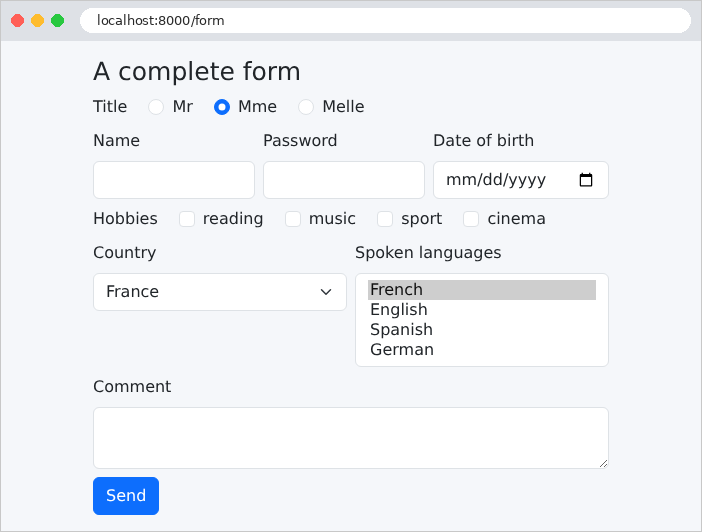
默认值清晰可见:“Mme”单选按钮、国家“France”和语言“French”。HTML 生成如下(摘录):
| <input type="hidden" name="_token" value="mjFN6z3WBF79ZEA8EWgmoX3Hio8DjjmG7hGQlGax" autocomplete="off">
<input type="hidden" name="token" value="A7X2">
...
<input class="form-check-input" type="radio" id="title-1" name="title"
value="Mme" checked>
<label class="form-check-label" for="title-1">Mme</label>
...
<input class="form-control" type="date" id="birth_date" name="birth_date" value="">
...
<input class="form-check-input" type="checkbox" id="hobbies-0" name="hobbies[]"
value="reading" >
<label class="form-check-label" for="hobbies-0">reading</label>
...
<select class="form-select" id="country" name="country">
<option value="fr" selected>France</option>
<option value="be" >Belgium</option>
...
<select class="form-select" id="languages" name="languages[]" multiple size="4">
<option value="French" selected>French</option>
...
<textarea class="form-control" id="comment" name="comment" rows="2"></textarea>
|
CSRF 防护令牌是一个随机的 40 字符字符串,存放在用户的会话中(示例 20)。我们来填写表单并提交:
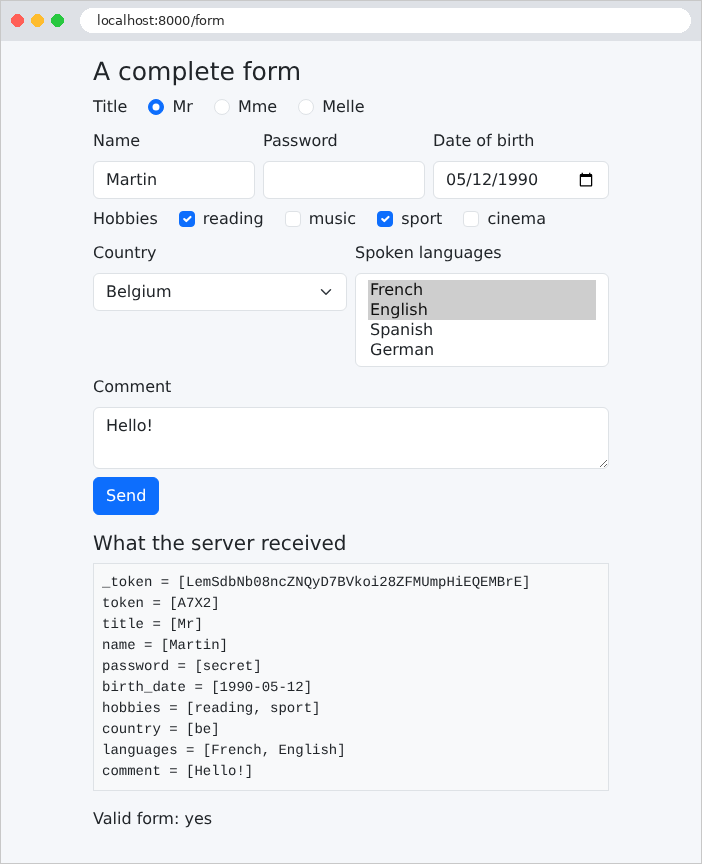
页面显示了服务器收到的内容:每个字段一个参数,复选框和下拉列表有多个值;密码已发送,但不会在它的字段中再次显示。隐藏字段 [token] 被原样返回:这就是发送和接收用户看不到的信息的方式(案例研究用它来传递记录的版本号)。不过,隐藏字段并不是受保护的字段:用户可以用浏览器的开发者工具修改它,服务器必须像对待任何其他字段一样验证它。我们还注意到,CSRF 防护令牌([_token])也在收到的字段之中。
现在用 [curl] 提交一个没有令牌的表单:
| curl -i -d "name=Martin&country=xx" http://localhost:8000/form
|
| HTTP/1.1 419 unknown status
Content-Type: text/html; charset=utf-8
<!DOCTYPE html>
<html lang="en">
...
<title>Page Expired</title>
...
|
请求被 [PreventRequestForgery] 中间件以状态码 419 拒绝,该状态码是 [Laravel] 特有的(*Page Expired*:当用户的会话在表单显示到提交之间过期时,他看到的就是这条消息)。要解决这个问题,[curl] 必须表现得像浏览器:先请求表单,同时保留会话 Cookie(选项 [-c],它把收到的 Cookie 保存到文件中),然后重新发送 Cookie(选项 [-b])以及从页面中读取的令牌:
| curl -c cookies.txt http://localhost:8000/form
curl -b cookies.txt -d "_token=WkdoQuahsZxMScUg5UJ5UOwWN4nDF8l3Niyce9WK&name=Martin&country=xx" http://localhost:8000/form
|
| ...
<h2 class="h5 mt-3">What the server received</h2>
<pre class="bg-light p-2 border">_token = [WkdoQuahsZxMScUg5UJ5UOwWN4nDF8l3Niyce9WK]
name = [Martin]
country = [xx]</pre>
<p>Valid form: no</p>
<ul>
<li>title: The title field is required.</li>
<li>country: The selected country is invalid.</li>
</ul>
...
|
(令牌是第一条命令收到的页面中的那个)。有两个错误:国家 [xx] 不在选项之中;没有发送称谓。消息是 Laravel 的默认消息:下一个示例将对它们进行自定义。
4.7. 示例 19:表单验证
一个注册表单,其中每个字段都有自己的验证规则。如果出现错误,表单会带着用户的输入重新显示,并在每个无效字段下方给出消息。本示例使用 [Laravel] 的标准做法:由表单请求(示例 08)在动作之前验证字段;如果出现错误,[Laravel] 会重定向到表单页面,并为下一个请求保留用户的输入和错误。
4.7.1. 表单:app/Http/Requests/RegistrationRequest.php
| <?php
// app/Http/Requests/RegistrationRequest.php:表单的字段及其约束
namespace App\Http\Requests;
use Illuminate\Foundation\Http\FormRequest;
class RegistrationRequest extends FormRequest
{
// 每个字段的规则。输入两端的空格已由 TrimStrings 中间件
// 去除,空输入已被替换为 null
public function rules(): array
{
return [
'name' => 'required|max:20',
// email:filter:PHP 的 filter_var 函数的检查,
// 要求完整的域名(example.com,而不是 example)
'email' => 'required|email:filter',
'age' => 'required|integer|between:18,120',
'password' => 'required|min:6',
// 关于两个字段的规则:same 将此字段与另一个字段比较
'confirmation' => 'required|same:password',
];
}
// 错误消息,field.rule => message
public function messages(): array
{
return [
'name.required' => 'The name is required.',
'name.max' => 'The name must not exceed 20 characters.',
'email.required' => 'The email address is required.',
'email.email' => 'Invalid email address.',
'age.required' => 'The age is required.',
'age.between' => 'The age must be between 18 and 120 years.',
'password.required' => 'The password is required.',
'password.min' => 'The password must have at least 6 characters.',
'confirmation.required' => 'The confirmation is required.',
'confirmation.same' => 'The confirmation does not match the password.',
];
}
}
|
- 第 12–23 行:每个字段的验证规则(示例 08)。输入两侧的空格已经被 [TrimStrings] 中间件去除(示例 08):由空格组成的姓名会变成空字符串,然后变成 [null],并被 [required] 拒绝;
- 第 18 行:[email] 规则接受多种变体,它们决定应用哪种验证。默认情况下,它遵循电子邮件地址标准,该标准接受 [martin@example] (没有域的主机名)。[email:filter] 使用 [filter_var] 函数,该函数来自 [PHP] (示例 07),它要求完全限定的域名([example.com]);
- 第 19 行:[integer] 后面跟着 [between:18,120];
- 第 22 行:一条作用于 两个 字段的规则:[same:password] 把一个字段的值与另一个字段的值进行比较。[Laravel] 还提供规则 [confirmed],把它应用于字段 [password] 时,会要求存在名为 [password_confirmation] 的字段;
- 第 27–40 行:方法 [messages] 提供该表单专用的消息。每个键指定一个字段和一条规则([name.required]);像 [required] 这样的单个键会适用于所有字段。这些消息优先于语言文件中的消息(示例 09)。
类中没有提供的消息来自文件 [lang/en/validation.php] (文件 [.env] 把语言设置为 [en];见示例 09):
| <?php
// lang/en/validation.php:RegistrationRequest 类自身
// 未提供的消息
return [
'integer' => 'An integer is expected.',
];
|
规则 [integer] 的消息就属于这种情况,只有在年龄字段中输入了数字以外的内容时才会显示——而浏览器不会这样做(我们将用 [curl] 来演示)。
4.7.2. 控制器:app/Http/Controllers/RegistrationController.php
| <?php
// app/Http/Controllers/RegistrationController.php:由服务器验证的表单
namespace App\Http\Controllers;
use App\Http\Requests\RegistrationRequest;
use Illuminate\Http\Request;
use Illuminate\View\View;
class RegistrationController
{
// GET /register:表单;?html5=true:我们让浏览器
// 在发送之前进行验证
public function display(Request $request): View
{
return view('registration.registration', ['html5' => $request->query('html5') === 'true']);
}
// POST /register:只有表单有效时才会调用该操作。
// 否则,Laravel 会重定向到表单所在页面,并为下一个请求保留输入和
// 错误(见视图中的 old 和 @error)
public function register(RegistrationRequest $request): View
{
return view('registration.welcome', ['registration' => $request->validated()]);
}
}
|
- 第 14–17 行:表单的显示。参数 [?html5=true] 启用浏览器验证(见下文);
- 第 22–25 行:该动作只接受 有效的表单:表单请求 [RegistrationRequest] 在被调用之前就已验证(示例 08)。它显示带有已验证数据的欢迎页面。(下一个示例将说明,POST 成功之后最好进行重定向。)
无效的表单会怎样?它永远不会到达动作。表单请求会触发 [ValidationException] (示例 08),对于来自浏览器的请求,[Laravel] 会这样处理:把错误和输入的值(密码除外)存放在用户的 会话中,然后以 重定向 响应,返回上一页——即表单页面。浏览器立即再次请求该页面(通过 GET),表单视图取回会话提供的错误和用户输入,会话 只提供一次 (我们将在下一个示例中看到这种“闪现”数据机制)。因此表单是通过它的 GET 动作而不是 POST 动作重新显示的:这已经是下一个示例中的 Post/Redirect/Get 模式,只不过应用于错误。
4.7.3. 可复用的字段:resources/views/components/field.blade.php
每个字段的显示方式都相同:一个标签、输入字段,以及在出现错误时用红色勾勒的区域和下方的消息。使用组件可以避免把这些写五遍:
| {{-- an input field, with its label and its FIRST error message.
old($name): the previous input, kept by Laravel after an invalid
form; $attributes: the other attributes given to the component (required,
min, max...), copied onto the input tag --}}
@props(['name', 'label', 'type' => 'text'])
<div class="mb-2">
<label class="form-label" for="{{ $name }}">{{ $label }}</label>
<input {{ $attributes->class(['form-control', 'is-invalid' => $errors->has($name)]) }}
type="{{ $type }}" id="{{ $name }}" name="{{ $name }}"
@if ($type !== 'password') value="{{ old($name) }}" @endif>
{{-- @error: the block is displayed only if the field has an error, whose
first message is in the $message variable --}}
@error($name)
<div class="invalid-feedback">{{ $message }}</div>
@enderror
</div>
|
- 第 5 行:组件的参数:字段名称、标签和类型,类型默认为 [text] ;
- 第 8 行:变量 [$attributes] 包含赋予组件的、不属于 [@props] 所声明参数的属性(这里是 [required]、[min]、[max] 等):写在标签中时,它会把这些属性复制过去。它的方法 [class] 会向其中添加属性 [class],类似于指令 [@class] (示例 16):如果字段包含错误,[is-invalid] 类(属于 [Bootstrap] )会用红色勾勒该字段。变量 [$errors] 在 所有 视图中都可用:它是一个消息“包”(示例 09)——包含存放在会话中的上一个表单的错误——或者是一个空包;[has] 检查某个字段是否有错误;
- 第 10 行:函数 [old] 返回上一个表单中输入的值(存放在会话中),或 [null]。类型为 [password] 的字段没有 [value] 属性(示例 18);
- 第 13–15 行:块 [@error] ... [@enderror] 只有在字段包含错误时才会显示;此时,它的第一条消息存放在变量 [$message] 中。元素 [invalid-feedback] 由 [Bootstrap] 显示为红色,位于标记为 [is-invalid] 的区域下方。
4.7.4. 视图
| @extends('layout')
@section('content')
<h1 class="h3">Registration</h1>
@if ($html5)
<p>Browser validation <b>enabled</b> - <a href="/register">disable it</a></p>
@else
<p>Browser validation <b>disabled</b> - <a href="/register?html5=true">enable it</a></p>
@endif
{{-- novalidate: the browser ignores the required, min... attributes and
sends the form as is; only the server validates --}}
<form method="post" action="/register" @if (! $html5) novalidate @endif>
@csrf
<x-field name="name" label="Name" required maxlength="20" />
<x-field name="email" label="Email address" type="email" required />
<x-field name="age" label="Age" type="number" required min="18" max="120" />
<x-field name="password" label="Password" type="password" required minlength="6" />
<x-field name="confirmation" label="Confirmation" type="password" required />
<button class="btn btn-primary" type="submit">Register</button>
</form>
@endsection
|
- 第 12 行:[novalidate] 属性禁用浏览器验证:表单按原样提交,只有服务器对其进行验证。这正是我们首先想观察的;
- 第 14–18 行:每个字段一个组件。HTML5 属性([required]、[maxlength]、[min]、[max]、[minlength]、[type="email"])使浏览器在提交之前就能验证输入(稍后会讲到)。[Laravel] 不会从验证规则中推导出这些属性:它们写在视图中,必须与规则保持一致。
| <!doctype html>
<html lang="en">
<head>
<meta charset="utf-8">
<title>Registration</title>
<link rel="stylesheet" href="{{ route('bootstrap', 'css/bootstrap.min.css') }}">
<link rel="stylesheet" href="{{ asset('css/styles.css') }}">
</head>
<body>
<div class="container py-3" style="max-width: 36rem">
<main>
@yield('content')
</main>
{{-- the global error, at the bottom of the page, on a light pink background. $errors: the errors
of the previous form, available in all the views --}}
@if ($errors->any())
<div class="error-area" role="alert">The form contains errors.</div>
@endif
</div>
</body>
</html>
|
- 第 16–18 行:如果上一个表单包含错误,则在页面底部显示一条总体消息([any()] 检查消息包中是否至少有一条消息),它位于一个区域中,其样式由 [public/css/styles.css] 定义(示例 15)。[role="alert"] 属性为屏幕阅读器标明这一点。
| @extends('layout')
@section('content')
{{-- $registration: the validated data --}}
<h1 class="h3">Welcome {{ $registration['name'] }}</h1>
<p>Your registration is saved: address <b>{{ $registration['email'] }}</b>,
age <b>{{ $registration['age'] }}</b> years.</p>
@endsection
|
[$registration] 包含已验证的数据:去除了空格的姓名、年龄(字符串;见示例 08)。
4.7.5. 执行
我们来提交一个错误百出的表单:由空格组成的姓名、没有完整域名的电子邮件地址、12 岁的年龄、过短的密码,以及不一致的确认密码:
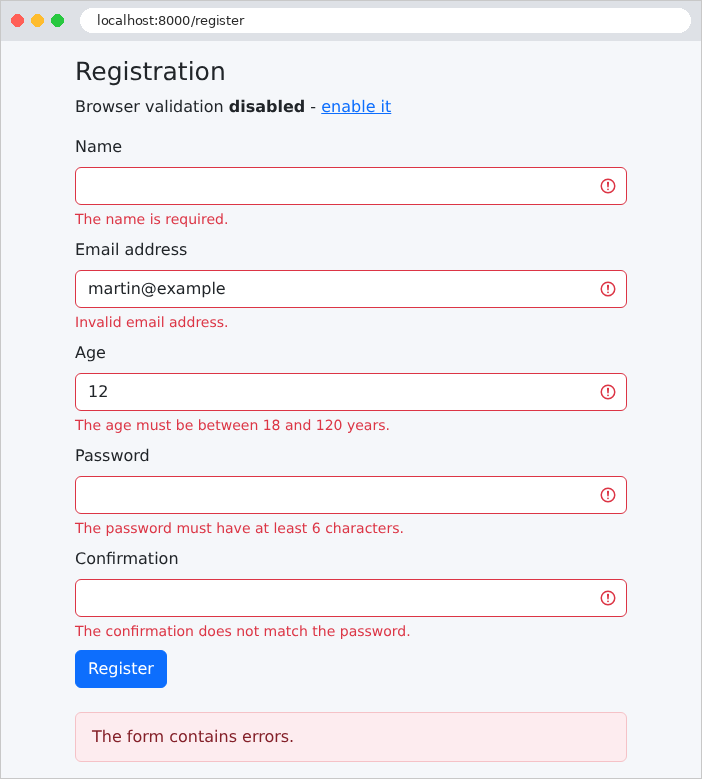
输入被保留了下来(密码除外),每个错误都标注在相应字段的下方。URL 是表单的令牌,而 [/register] 表明该页面是在重定向之后由 GET 动作显示的。使用 [curl],并像示例 18 那样提供 CSRF 防护令牌,我们就能看到这个重定向:
| curl -i -b cookies.txt -c cookies.txt -d "_token=...&name=Martin&email=martin@example.com&age=abc&password=abcdef&confirmation=abcdef" http://localhost:8000/register
|
| HTTP/1.1 302 Found
Location: http://localhost:8000/register
Content-Type: text/html; charset=utf-8
...
|
你还可以发送浏览器不会发送的内容,例如非数字的年龄。接下来的页面([curl -b cookies.txt http://localhost:8000/register])显示了年龄字段,以及它的输入和规则 [integer] 的消息,该消息取自语言文件:
| <input class="form-control is-invalid" required="required" min="18" max="120"
type="number" id="age" name="age"
value="abc" >
<div class="invalid-feedback">An integer is expected.</div>
|
我们还看到了由 [$attributes] 复制的 HTML5 属性:[required] (写作 [required="required"],一种等价形式)、[min]、[max]。
4.7.6. 浏览器验证
我们通过点击“Enable”链接([novalidate] 属性被移除,对应 [?html5=true] 设置)来去掉它。此时,浏览器会在提交表单之前检查 [required]、[type="email"]、[min]、[maxlength] 等属性,并在第一个无效字段下方的提示框中显示它自己的消息(“Please fill in this field”“The value must be greater than or equal to 18”等):只要还有错误,表单就不会提交。
这种验证对用户很方便:它是即时的,无需与服务器往返。但它 不能取代 服务器端验证:用户可以禁用它,而像 [curl] 这样的程序则完全忽略它。规则是绝对的:服务器始终要验证;浏览器端验证只是额外的便利。
终于有了一次正确的输入。两侧带有空格的姓名被 [TrimStrings] 中间件清理干净了:
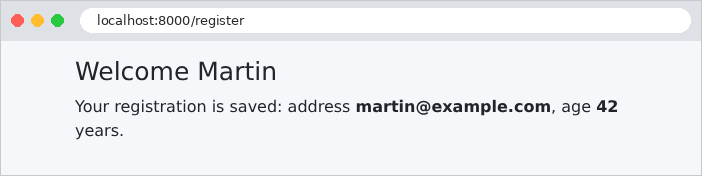
4.8. 示例 20:Post/Redirect/Get 模式
当 POST 动作返回页面时,该页面是 POST 的结果。如果用户刷新页面(按 [F5]),浏览器会重新发送 POST 请求,同时给出一条很少有人阅读的警告:命令被发送了两次,消息也被发布了两次。Post/Redirect/Get 模式(PRG)避免了这个问题:成功的 POST 动作不返回页面;它以 重定向 (示例 04)响应,指向一个 GET 页面,浏览器随即请求该页面。重新加载这个页面只是重新执行 GET 动作。
还剩一个问题:GET 页面想显示一条消息(“任务已添加”),但知道这条消息的是 POST 动作,而它无法向尚未发生的请求传递变量。解决办法是:闪现消息,由 POST 动作存放在会话中,保留到下一个请求,显示之后即被丢弃。示例 19 中 [Laravel] 对表单错误已经在使用这一机制。
4.8.1. 服务:app/Services/TasksService.php
| <?php
// app/Services/TasksService.php:任务列表,由所有
// 用户共享。在 PHP 中,对象不会在请求之后保留:列表
// 存储在 Laravel 的缓存中(这里是 storage/framework/cache 文件夹中的一个文件)
namespace App\Services;
use Illuminate\Support\Facades\Cache;
class TasksService
{
private const KEY = 'tasks';
/** @return list<string> */
public function list(): array
{
// 存储在 [tasks] 键下的值,或初始列表
return Cache::get(self::KEY, ['Read chapter 3']);
}
public function add(string $label): void
{
// 多个请求可能同时运行(服务器用多个进程
// 处理它们):锁保证同一时间只有一个请求
// 读取、修改并重写列表。block(5, ...) 最多等待锁 5
// 秒,运行函数,然后释放锁
Cache::lock('tasks-lock', 10)->block(5, function () use ($label) {
$tasks = $this->list();
$tasks[] = $label;
// forever:该值永久保存,没有时间限制
Cache::forever(self::KEY, $tasks);
});
}
}
|
任务列表由所有用户共享,并且必须在一个请求到下一个请求之间持久保存。在 [Java]、[C#] 或 [Python] 中,它会保存在单个服务的内存里。在 [PHP] 中,这是不可能的:正如我们在示例 01 和 06 中所见,没有任何东西能在请求结束后继续存在。因此,列表必须存放在 [PHP] 之外:数据库、文件……或者 [Laravel] 的 缓存中,我们在这里使用的就是缓存。
- 第 18 行:[Cache] 接口提供对应用缓存的访问:一个键→值对的存储。示例中的 [.env] 文件把这些数据存放在 [storage/framework/cache] 文件夹内的文件中([CACHE_STORE=file],示例 01);在生产环境中,更推荐使用 [Redis] 之类的专用服务器。[get] 返回存放在某个键下的值,或者作为第二个参数提供的默认值。可以存储任何值(这里是字符串数组):[Laravel] 会使用 [PHP] 的 [serialize] 函数对其进行 序列化——也就是把它转换为文本;
- 第 27–32 行:开发服务器与生产服务器一样,可以在多个进程中同时处理多个请求(环境变量 [PHP_CLI_SERVER_WORKERS] 设置 [php artisan serve] 的进程数)。两个同时进行的插入可能读取到同一个列表,各自向其中添加自己的任务,然后再写回:第二次写入会覆盖第一个任务。锁 确保同一时间只有一个请求执行它所保护的代码:[Cache::lock('tasks-lock', 10)] 创建一个具名的锁——它同样存放在缓存中——最多 10 秒后过期(如果持有它的请求突然终止);[block(5, function)] 最多等待 5 秒,直到锁可用,然后获取它、执行函数,再释放它。匿名函数中的关键字 [use] 使它可以访问外层函数中的变量(这里是 [$label]);而箭头函数则会自动看到这些变量;
- 第 31 行:[forever] 无限期地存储一个值;[put(key, value, seconds)] 则会把它存储指定的时长。
4.8.2. 控制器:app/Http/Controllers/TasksController.php
| <?php
// app/Http/Controllers/TasksController.php:Post / Redirect / Get 模式
namespace App\Http\Controllers;
use App\Services\TasksService;
use Illuminate\Http\RedirectResponse;
use Illuminate\Http\Request;
use Illuminate\View\View;
class TasksController
{
public function __construct(private TasksService $tasks)
{
}
// GET /tasks:列表和添加表单
public function display(): View
{
return view('tasks.tasks', ['tasks' => $this->tasks->list()]);
}
// POST /tasks:Post / Redirect / Get 模式
public function add(Request $request): View|RedirectResponse
{
$label = $request->string('label')->value();
if ($label === '' || mb_strlen($label) > 40) {
// 输入无效:我们重新显示页面,不进行重定向
return view('tasks.tasks', ['tasks' => $this->tasks->list(),
'label' => $label,
'error' => 'The label must have 1 to 40 characters.']);
}
$this->tasks->add($label);
// 不显示页面:重定向到 GET 页面;with 在会话中留下一条「闪现」消息
// :它会保留到重定向之后,供下一个请求使用
return redirect()->route('tasks')->with('message', "The task [$label] has been added.");
}
// POST /tasks/without-prg:反例(对 POST 请求以页面作为响应)
public function addWithoutPrg(Request $request): View
{
$this->tasks->add($request->string('label')->value() ?: '(untitled)');
return view('tasks.tasks', ['tasks' => $this->tasks->list(), 'withoutPrg' => true]);
}
}
|
- 第 26–31 行:为了让示例保持简单,输入是手工验证的。无效的输入会 再次显示,不做重定向:没有什么需要防止重复提交,因为什么都没有被修改。[mb_strlen] 统计 UTF-8 字符串中的字符数;
- 第 36 行:重定向到名为 [tasks] 的 GET 页面。重定向的 [with] 方法在会话中放入一条 闪现消息:该数据只保留到 下一个请求;
- 第 40–43 行:反例:响应 POST 的页面。运算符 [?:] 在左操作数为“真”(这里是非空字符串)时返回左操作数,否则返回右操作数。
路由表:
| <?php
// routes/web.php:示例 20 的路由
use App\Http\Controllers\TasksController;
use Illuminate\Support\Facades\Route;
Route::controller(TasksController::class)->group(function () {
Route::get('tasks', 'display')->name('tasks');
Route::post('tasks', 'add');
Route::post('tasks/without-prg', 'addWithoutPrg');
});
|
4.8.3. 视图
| <!doctype html>
<html lang="en">
<head>
<meta charset="utf-8">
<title>Tasks</title>
<link rel="stylesheet" href="{{ route('bootstrap', 'css/bootstrap.min.css') }}">
<link rel="stylesheet" href="{{ asset('css/styles.css') }}">
</head>
<body>
<div class="container py-3" style="max-width: 36rem">
{{-- the flash message, at the top of the page: left BEFORE the redirect; the session
returns it during the next request, then forgets it --}}
@session('message')
<div class="alert alert-success" role="status">{{ $value }}</div>
@endsession
<main>
@yield('content')
</main>
@isset($error)
<div class="error-area" role="alert">{{ $error }}</div>
@endisset
</div>
</body>
</html>
|
- 第 13–15 行:块 [@session('message')] ... [@endsession] 只有在会话包含 [message] 条目时才会显示,此时它的值存放在变量 [$value] 中。[Bootstrap] 的类 [alert alert-success] 会把消息显示在绿色边框中。
| @extends('layout')
@section('content')
<h1 class="h3">My tasks</h1>
<ol>
@foreach ($tasks as $task)
<li>{{ $task }}</li>
@endforeach
</ol>
<form method="post" action="/tasks" class="d-flex gap-2">
@csrf
<input class="form-control" name="label" value="{{ $label ?? '' }}" placeholder="New task">
<button class="btn btn-primary text-nowrap" type="submit">Add</button>
{{-- formaction: this button sends the SAME form to another address --}}
<button class="btn btn-outline-secondary text-nowrap" type="submit" formaction="/tasks/without-prg">Add without PRG</button>
</form>
@isset($withoutPrg)
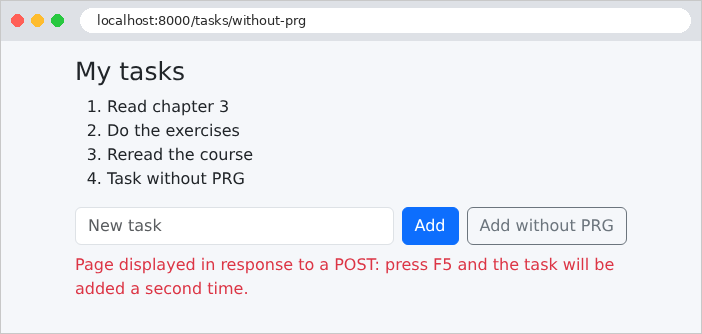
<p class="text-danger mt-2">Page displayed in response to a POST: press F5 and the task will be added a second time.</p>
@endisset
@endsection
|
- 第 15 行:按钮的 [formaction] 属性会把表单提交到与其 [action] 属性所指定的不同的地址:因此同一个表单可以触发两个不同的动作。
4.8.4. 闪现消息存放在哪里?
在 POST 请求与随后的 GET 请求之间,消息必须存放在某个地方:用户的 会话中。[Laravel] 会话存储 在服务器上:示例中的 [.env] 文件把它存放在 [storage/framework/sessions] 文件夹内的文件中([SESSION_DRIVER=file]),每个用户一个文件。而浏览器只在 [example20_session] Cookie(名称由 [APP_NAME] 派生)中收到会话 ID ,并在每个请求中把它发回。我们用 [curl] 来检验这一点,同时把 Cookie 存放在文件中(选项 [-c] 和 [-b],示例 18),并提供 CSRF 防护令牌:
| curl -i -b cookies.txt -c cookies.txt -d "_token=...&label=Do%20the%20exercises" http://localhost:8000/tasks
|
| HTTP/1.1 302 Found
Location: http://localhost:8000/tasks
Content-Type: text/html; charset=utf-8
Set-Cookie: XSRF-TOKEN=eyJpdiI6IjFJLzhDVy9CWndjODZNb2s3N2VMUnc9PSIsInZhbHVlIjoiT3JXZy96MmJROHUrYmZaNUFNbUFoM3d4...; expires=...; Max-Age=7200; path=/; samesite=lax
Set-Cookie: example20_session=eyJpdiI6IlMwK3R3ZkQ2TEhKUVZ4SW9saDVMNUE9PSIsInZhbHVlIjoiMVVnUTNvTHFL...; expires=...; Max-Age=7200; path=/; httponly; samesite=lax
...
|
对 POST 的响应是一个重定向(状态码 302,头 [Location]),并附带会话 Cookie。它的值使用密钥 加密 [APP_KEY] (这是 [EncryptCookies] 中间件的作用,它位于 [web] 组中):用户无法读取或修改它。解密之后,它只包含会话 ID——40 个随机字符——它同时也是服务器上会话文件的名称:[storage/framework/sessions/HNuWctWJ0HcPvmsAhFN5v3iCiw1SFFDMXv46F6og]。下面是该文件在 POST 请求之后的内容(分多行显示):
| a:4:{s:6:"_token";s:40:"X0omnUmKl13zVLUrzTdZy5mWN7R6fBaiOmfEUPpr";
s:9:"_previous";a:2:{s:3:"url";s:27:"http://localhost:8000/tasks";s:5:"route";s:5:"tasks";}
s:6:"_flash";a:2:{s:3:"old";a:1:{i:0;s:7:"message";}s:3:"new";a:0:{}}
s:7:"message";s:43:"The task [Do the exercises] has been added.";}
|
这是一个序列化的 [PHP] 数组:[a:4] 表示一个包含 4 个元素的数组,[s:6:"_token"] 表示一个 6 字节的字符串……它包含会话的 CSRF 防护令牌、上一页的 URL([_previous],示例 19 中重定向到上一页时会用到它)、我们的消息,以及闪现数据的 [_flash] 列表。在每个请求结束时,请求期间设置的闪现数据(列表 [new])会被移入列表 [old],而原先已在 [old] 中的数据会被删除:因此,一条闪现数据恰好存活一个请求。我们把 Cookie 发回去,跟随重定向:
| curl -i -b cookies.txt -c cookies.txt http://localhost:8000/tasks
|
| HTTP/1.1 200 OK
...
<div class="alert alert-success" role="status">The task [Do the exercises] has been added.</div>
...
<li>Read chapter 3</li>
<li>Do the exercises</li>
...
|
消息被显示出来,而在这个请求之后,会话文件中就不再包含它了:
| a:3:{s:6:"_token";s:40:"X0omnUmKl13zVLUrzTdZy5mWN7R6fBaiOmfEUPpr";
s:9:"_previous";a:2:{s:3:"url";s:27:"http://localhost:8000/tasks";s:5:"route";s:5:"tasks";}
s:6:"_flash";a:2:{s:3:"old";a:0:{}s:3:"new";a:0:{}}}
|
新的 GET 请求将不再显示这条消息。而任务列表则存放在一个缓存文件中,其名称根据键计算得出([storage/framework/cache/data/55/d8/55d8727a05eb80b0788af57a5317f3e0a1f4aa55]):
| 9999999999a:2:{i:0;s:14:"Read chapter 3";i:1;s:16:"Do the exercises";}
|
前十位数字表示该值的过期时间(这里是永不过期);其余部分是序列化后的列表。
4.8.5. 执行
添加任务:浏览器跟随了重定向;URL 对应 GET 页面,可以放心地重新加载。
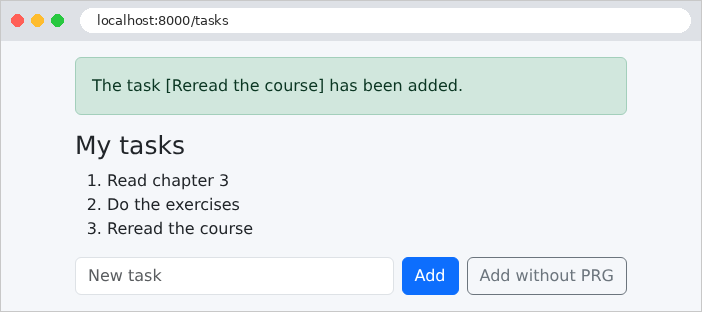
无效的输入,连同其错误消息一起重新显示:
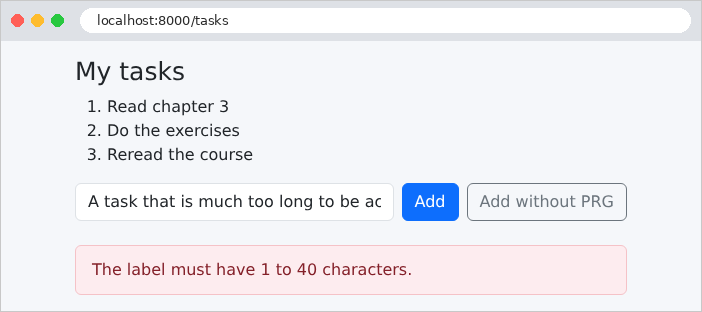
反例:页面是对 POST 的响应,其 URL 为 [/tasks/without-prg]。如果点击 [F5],浏览器会询问是否要重新提交表单;如果同意,任务就会被第二次添加。
4.9. 示例 21:链接、按钮和确认
HTTP 协议的一条原则:GET 请求 不会改变任何东西。浏览器、搜索引擎以及预加载页面的工具会随意跟随链接,而无需征求用户的许可。因此,“删除”链接([<a href="/contacts/2/delete">])会很危险:爬取网站的机器人会把一切都删除。在 Web 应用中:
- 查看 通过 链接 ([<a href>])完成,它发送 GET 请求;
- 编辑 (保存、复制、删除)通过放在表单中的 按钮 完成,该表单受 CSRF 防护令牌保护。
本示例管理一个联系人列表,并在每次删除之前显示确认窗口。
| <?php
// app/Services/ContactsService.php:联系人,由所有人共享,存储在
// Laravel 的缓存中(见示例 20)
namespace App\Services;
use App\Models\Contact;
use Illuminate\Support\Facades\Cache;
class ContactsService
{
private const KEY = 'contacts';
/** @return array{contacts: list<Contact>, lastId: int} */
private function data(): array
{
return Cache::get(self::KEY, [
'contacts' => [
new Contact(1, 'Marie Durand', '01 23 45 67 89'),
new Contact(2, 'Paul Martin', '06 12 34 56 78'),
new Contact(3, 'Philippe Jandot', '02 98 76 54 32'),
],
'lastId' => 3,
]);
}
// 在锁保护下修改数据:函数接收数据,
// 对其进行修改(&),并返回操作的结果
private function editData(callable $operation): mixed
{
return Cache::lock('contacts-lock', 10)->block(5, function () use ($operation) {
$data = $this->data();
$result = $operation($data);
Cache::forever(self::KEY, $data);
return $result;
});
}
/** @return list<Contact> */
public function list(): array
{
return $this->data()['contacts'];
}
// 联系人,如果不存在则为 null
public function read(int $id): ?Contact
{
return array_find($this->list(), fn (Contact $c) => $c->id === $id);
}
public function edit(int $id, string $name, string $phone): ?Contact
{
return $this->editData(function (array &$data) use ($id, $name, $phone) {
foreach ($data['contacts'] as $i => $contact) {
if ($contact->id === $id) {
// 联系人是不可变的(readonly):我们构建一个新的,
// 在数组中替换旧的
return $data['contacts'][$i] = new Contact($id, $name, $phone);
}
}
return null;
});
}
public function add(string $name, string $phone): Contact
{
return $this->editData(function (array &$data) use ($name, $phone) {
$contact = new Contact(++$data['lastId'], $name, $phone);
$data['contacts'][] = $contact;
return $contact;
});
}
public function delete(int $id): ?Contact
{
return $this->editData(function (array &$data) use ($id) {
foreach ($data['contacts'] as $i => $contact) {
if ($contact->id === $id) {
// array_splice 从数组中移除第 i 项,并对后面的项重新编号
array_splice($data['contacts'], $i, 1);
return $contact;
}
}
return null;
});
}
}
|
联系人和示例 20 中的任务一样存放在缓存中。每个联系人是一个不可变的 [Contact] 对象(ID、姓名、电话号码),存放在数组中,同时存放最近分配的 ID。关于 [PHP] 的几点说明:
- 第 29–37 行:所有修改都遵循同一个模式:获取锁、读取数据、修改数据、写回数据、释放锁。这个方法只向数组写入一次;每次修改都向它传递一个函数(类型为 [callable],即“可调用的”),该函数接收数据并修改它。这个函数必须修改数组本身,而不是副本:它的参数被声明为 [array &$data],其中 [&] 表示 按引用传递 (没有 [&] 时,数组会被复制;见示例 06);
- 第 51–63 行:联系人是不可变的:会创建一个新的联系人,替换数组中旧的那个。赋值是一个表达式,其值就是被赋的值:[return $data['contacts'][$i] = new Contact(...)] 替换联系人并返回它;
- 第 68 行:放在变量前面的 [++] 使它加 1 并返回新的值;
- 第 80 行:[array_splice] 从数组中删除一个元素,并为后面的元素重新编号;
- 对于不存在的联系人,这些方法返回 [null] :由控制器决定如何响应。
| <?php
// app/Http/Controllers/ContactsController.php:链接(GET)和按钮(POST、DELETE)
namespace App\Http\Controllers;
use App\Models\Contact;
use App\Services\ContactsService;
use Illuminate\Http\RedirectResponse;
use Illuminate\Http\Request;
use Illuminate\View\View;
class ContactsController
{
public function __construct(private ContactsService $contacts)
{
}
// 联系人,如果不存在则返回 404 响应
private static function contactOr404(?Contact $contact): Contact
{
abort_if($contact === null, 404, 'unknown contact');
return $contact;
}
// 一个链接(<a href>):GET 请求,不修改任何内容
public function list(): View
{
return view('contacts.list', ['contacts' => $this->contacts->list()]);
}
public function details(int $id): View
{
return view('contacts.details', ['contact' => self::contactOr404($this->contacts->read($id))]);
}
// POST 表单中的一个按钮:修改数据的请求
public function save(Request $request, int $id): RedirectResponse
{
$contact = self::contactOr404($this->contacts->edit($id,
$request->string('name')->value(), $request->string('phone')->value()));
return redirect()->route('contacts')->with('message', "The contact [$contact->name] has been edited.");
}
// 同一个表单,另一个按钮(formaction 属性):另一个操作
public function duplicate(Request $request, int $id): RedirectResponse
{
$copy = $this->contacts->add($request->string('name')->value().' (copy)',
$request->string('phone')->value());
return redirect()->route('contacts')->with('message', "The contact [$copy->name] has been created.");
}
// DELETE 请求,由 POST 表单模拟(见视图中的 @method)
public function delete(int $id): RedirectResponse
{
$contact = self::contactOr404($this->contacts->delete($id));
return redirect()->route('contacts')->with('message', "The contact [$contact->name] has been deleted.");
}
}
|
- 第 19–23 行:一个工具函数:不存在的联系人会以 404 响应终止动作([abort_if],见示例 15);
- 第 26–34 行:两个 GET 动作,它们不修改任何内容:列表和联系人的记录;
- 第 37–42 行:保存记录:一个 POST 动作,遵循 PRG 模式。同一个 URL [/contacts/2] 根据方法的不同由两个不同的动作处理:GET 显示,POST 保存;
- 第 45–50 行:复制——另一个 POST 动作,由同一表单上的第二个按钮触发;
- 第 53–57 行:删除,由 DELETE 请求处理。
路由表:
| <?php
// routes/web.php:示例 21 的路由
use App\Http\Controllers\ContactsController;
use Illuminate\Support\Facades\Route;
Route::prefix('contacts')->controller(ContactsController::class)->group(function () {
Route::get('/', 'list')->name('contacts');
Route::get('{id}', 'details')->whereNumber('id')->name('contacts.details');
Route::post('{id}', 'save')->whereNumber('id')->name('contacts.save');
Route::post('{id}/duplicate', 'duplicate')->whereNumber('id')->name('contacts.duplicate');
Route::delete('{id}', 'delete')->whereNumber('id')->name('contacts.delete');
});
|
- 第 12 行:删除是针对 HTTP 方法 DELETE 声明的,HTTP 协议规定用它来删除资源。然而,HTML 表单只能发送 GET 和 POST 请求。[Laravel] 绕过了这一限制:包含隐藏字段 [_method]、其值为 [DELETE](或 [PUT]、[PATCH])的 POST 表单,会被当作该方法的请求处理。这就是 方法 伪装,由视图中的 [@method] 指令实现。
4.9.3. 视图
| @extends('layout')
@section('content')
<h1 class="h3">Contacts</h1>
<table class="table align-middle">
<tbody>
@foreach ($contacts as $contact)
<tr>
<td>{{ $contact->name }}</td>
<td>{{ $contact->phone }}</td>
<td class="text-end">
{{-- view: a simple link; route() places the id in the path: /contacts/2 --}}
<a class="btn btn-sm btn-outline-primary" href="{{ route('contacts.details', $contact->id) }}">View</a>
{{-- delete: a form, whose submission will be confirmed --}}
<form method="post" class="d-inline" action="{{ route('contacts.delete', $contact->id) }}"
data-confirmation="Delete the contact {{ $contact->name }}?">
{{-- the anti-CSRF token, required for any request that is not a GET --}}
@csrf
{{-- the DELETE method, which an HTML form cannot send --}}
@method('DELETE')
<button class="btn btn-sm btn-outline-danger" type="submit">Delete</button>
</form>
</td>
</tr>
@endforeach
</tbody>
</table>
@endsection
|
- 第 13 行:一个 链接,通过 [Bootstrap] 的类([btn] 等)呈现为按钮:外观与 HTTP 方法无关。[route('contacts.details', $contact->id)] 把 ID 放入路径:[/contacts/2] (单个参数可以不用数组提供);
- 第 15–22 行:每个“删除”按钮一个 表单 ,除了令牌和方法之外没有其他字段。[d-inline] 类使它与链接显示在同一行。[data-confirmation] 属性 包含确认消息;[data-...] 属性没有预先规定,是留给页面的 [JavaScript] 使用的;
- 第 18 行:CSRF 防护令牌(示例 18),任何非 GET 请求都需要它;
- 第 20 行:[@method] 指令写出隐藏字段 [_method]:[<input type="hidden" name="_method" value="DELETE">]。
| @extends('layout')
@section('content')
<h1 class="h3">Contact no. {{ $contact->id }}</h1>
<form method="post" action="{{ route('contacts.save', $contact->id) }}">
@csrf
<div class="mb-2">
<label class="form-label" for="name">Name</label>
<input class="form-control" id="name" name="name" value="{{ $contact->name }}">
</div>
<div class="mb-3">
<label class="form-label" for="phone">Phone</label>
<input class="form-control" id="phone" name="phone" value="{{ $contact->phone }}">
</div>
{{-- two submit buttons for the same form --}}
<button class="btn btn-primary" type="submit">Save</button>
<button class="btn btn-outline-primary" type="submit"
formaction="{{ route('contacts.duplicate', $contact->id) }}">Duplicate</button>
<a class="btn btn-link" href="{{ route('contacts') }}">Back to the list</a>
</form>
@endsection
|
- 第 16–18 行:同一个表单的两个提交按钮:“保存”把表单发送到其 [action] 属性指定的地址,“复制”则把它发送到其 [formaction] 属性指定的地址(示例 20)。这个表单不使用 [@method]:因为字段 [_method] 会被两个按钮同时提交,复制也会变成 PUT 或 DELETE 请求;
- 第 19 行:返回列表:一个链接。
4.9.4. 确认窗口
浏览器可以显示确认框([JavaScript] [confirm] 函数),但它不太美观,而且其外观取决于浏览器。这里我们使用 模态窗口 ,来自 [Bootstrap],由几行 [JavaScript] 显示。该窗口是包含在模板中的一个片段,因此在所有页面上都存在——虽然是隐藏的:
| {{-- a single window for the whole page, hidden (d-none) at first --}}
<div id="confirmation-modal" class="d-none">
<div class="modal-backdrop fade show"></div>
<div class="modal fade show d-block" tabindex="-1" role="alertdialog" aria-modal="true">
<div class="modal-dialog modal-dialog-centered">
<div class="modal-content">
<div class="modal-header">
<h5 class="modal-title">Confirmation</h5>
</div>
<div class="modal-body">
<p class="mb-0" id="confirmation-modal-message"></p>
</div>
<div class="modal-footer">
<button type="button" class="btn btn-secondary" data-action="no">No, go back</button>
<button type="button" class="btn btn-danger" data-action="yes">Yes, confirm</button>
</div>
</div>
</div>
</div>
</div>
|
- 第 2 行:[d-none] 类(来自 [Bootstrap] )会隐藏该元素;
- 第 3–4 行:灰色背景以及随后的窗口,由 [Bootstrap] 的类渲染;
- 第 11 行:消息的位置;
- 第 14–15 行:两个按钮,类型为 [button] (而不是 [submit]:它们不会提交任何表单),通过各自的 [data-action] 属性加以区分。
| <!doctype html>
<html lang="en">
<head>
<meta charset="utf-8">
<title>Contacts</title>
<link rel="stylesheet" href="{{ route('bootstrap', 'css/bootstrap.min.css') }}">
<link rel="stylesheet" href="{{ asset('css/styles.css') }}">
</head>
<body>
<div class="container py-3" style="max-width: 40rem">
@session('message')
<div class="alert alert-success" role="status">{{ $value }}</div>
@endsession
<main>
@yield('content')
</main>
</div>
{{-- the confirmation window, present in all the pages --}}
@include('fragments.confirmation')
{{-- the script, at the end of the page: the elements it looks for already exist --}}
<script src="{{ asset('js/app.js') }}"></script>
</body>
</html>
|
- 第 19 行:窗口,包含在所有页面中;
- 第 21 行:脚本,放在页面末尾:它运行时,所要查找的元素已经存在。它存放在 [public/js] 文件夹中。
脚本 [public/js/app.js]:
| // 对带有 data-confirmation="..." 属性的表单进行确认
// 没有 JavaScript 时,这些表单会直接发送,不经确认。
(() => {
const modal = document.getElementById('confirmation-modal');
const message = document.getElementById('confirmation-modal-message');
let pending = null; // 用户确认后要发送的表单
// 1. 我们拦截需要确认的表单的提交
document.querySelectorAll('form[data-confirmation]').forEach((form) => {
form.addEventListener('submit', (event) => {
event.preventDefault(); // 提交被挂起
pending = form;
message.textContent = form.dataset.confirmation;
modal.classList.remove('d-none'); // 窗口出现
});
});
// 2. 窗口的两个按钮
modal.addEventListener('click', (event) => {
const action = event.target.dataset.action;
if (action === 'yes') {
pending.submit(); // 提交,不再次触发 'submit' 事件
} else if (action === 'no') {
modal.classList.add('d-none');
pending = null;
}
});
})();
|
- 第 3 行:代码被包含在一个匿名函数中,该函数立即执行;它的变量不会干扰页面上其他脚本的变量;
- 第 4–6 行:窗口、消息位置,以及等待确认的表单;
- 第 9–14 行:对每个带有 [data-confirmation] 属性的表单,拦截其 [submit] 事件——它在表单提交时触发。[preventDefault()] 暂停 提交;表单被搁置,它的消息([dataset.confirmation],即 [data-confirmation] 属性的值)显示在窗口中,窗口随之出现;
- 第 19–25 行:窗口中点击事件的唯一处理器:[event.target] 是被点击的元素;它的属性 [data-action] 指明这是哪个按钮。“是”使用 [submit()] 方法提交待处理的表单,与点击按钮不同,该方法不会触发 [submit] 事件(否则窗口会再次出现);“否”则隐藏窗口。
没有 [JavaScript] 时,表单会直接提交而不经确认:页面仍然可用。这就是 渐进增强:[JavaScript] 增添便利,但应用并不依赖它。
4.9.5. 执行
联系人列表:
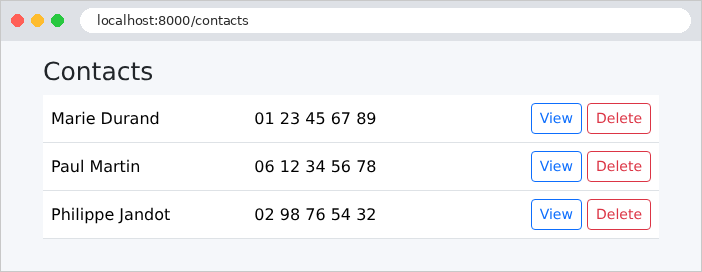
点击“Delete”会显示确认窗口:
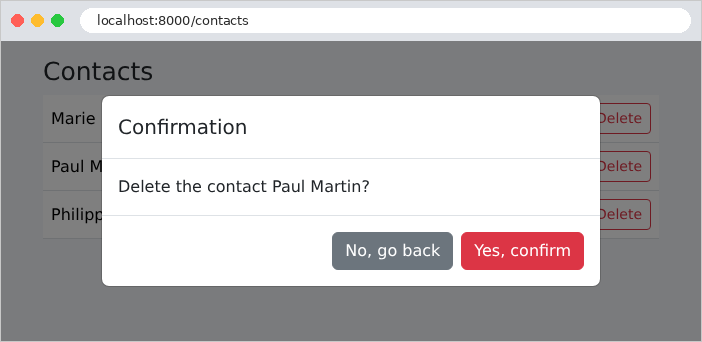
确认之后,出现(模拟的)DELETE 请求、重定向和弹出消息:
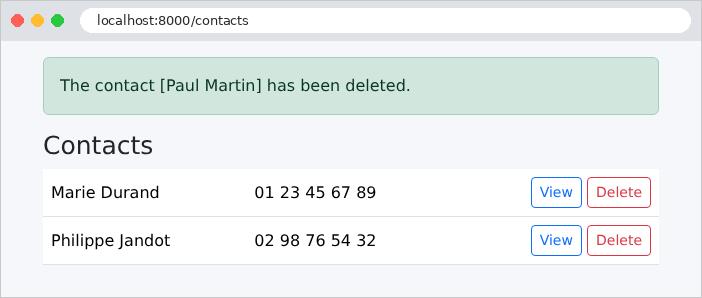
联系人的资料页,带有两个发送按钮:
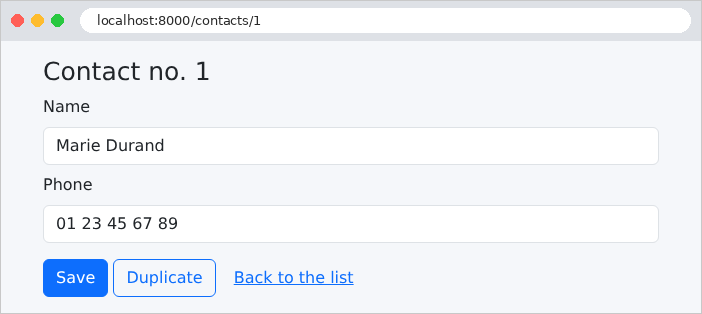
没有 CSRF 防护令牌的请求会被拒绝,而不存在的联系人会返回 404 错误:
| curl -i -X POST -d "_method=DELETE" http://localhost:8000/contacts/2
curl -i http://localhost:8000/contacts/9
|
| HTTP/1.1 419 unknown status
Content-Type: text/html; charset=utf-8
...
<title>Page Expired</title>
...
HTTP/1.1 404 Not Found
Content-Type: text/html; charset=utf-8
...
<title>Not Found</title>
...
|
错误页面仍然是 [Laravel] 的英文页面。请求生命周期一章将说明如何用自定义页面替换它们。