6. 数据作用域
Web 应用程序同时为许多用户提供服务,每个用户都会发出大量请求。因此,数据可以在多个层级上共享,这些层级称为数据的作用域:
- 应用程序作用域:数据在应用程序的整个生命周期内由所有用户共享(例如医生列表);
- 请求作用域:数据仅在一次请求的持续期间存在(例如视图的模型、为该请求识别出的已登录用户);
- 会话作用域:数据特定于某个用户,并且必须在一次请求到下一次请求之间保持(例如所选语言、购物车);
- 客户端作用域:数据存储在浏览器本身,即存储在 Cookie 中。
在 [PHP]中,这些作用域的行为比较特殊,因为应用程序在每次请求时都会重新构建(示例 01):内存中的任何内容都不会从一次请求保留到下一次请求。因此,任何需要比单次请求存活更久的数据,都要存放在 [PHP]之外:存放在缓存、数据库、文件中,或存放在客户端一侧。这就是所谓的“无共享”(shared-nothing)架构:每个请求都由一个独立的进程单独处理,该进程不与处理其他请求的进程共享任何内容。这种方式有显著的优点:错误只会影响单个请求,数据不会从一个用户泄露给另一个用户,并且可以在负载均衡器之后运行多个相同的服务器,前提是它们共享同一个缓存和数据库。
在 [Laravel]中,每个作用域都有自己的容器:
作用域 | 容器 | 生命周期 |
应用程序 | 缓存 ([Cache]门面,示例 20),或数据库 | 所选的持续时间,或无限期 |
请求 | 容器中的对象(单例只在一次请求中存在)、请求的属性(示例 12) | 处理一次请求期间 |
会话 | 会话 ([$request->session()]、[session()]),由服务器存储,并通过 Cookie 取回 | 默认为 2 小时无活动期([SESSION_LIFETIME]) |
客户端 | Cookie ([withCookie],示例 22),默认加密 | Cookie 指定的持续时间 |
[Laravel] 的会话是一种由服务器维护的会话,与 [Java] 的会话([JSESSIONID])或经典的 [PHP] 会话([PHPSESSID])类似:其数据存储在服务器上(按示例中的配置,每个会话一个文件),而浏览器只在加密的 Cookie 中保存标识符(示例 20)。这与 [Flask] 不同,后者的整个会话都存储在客户端一侧的签名 Cookie 中。
6.1. 示例 23:作用域
| 23-scopes/
├── app/
│ ├── Http/
│ │ └── Controllers/
│ │ └── ScopesController.php
│ └── Services/
│ ├── CounterService.php
│ └── RequestInfo.php
├── resources/
│ └── views/
│ └── scopes/
│ └── scopes.blade.php
└── ...
|
6.1.1. 对象:app/Services/CounterService.php 和 RequestInfo.php
| <?php
// app/Services/CounterService.php:应用程序作用域,一个由所有用户的
// 所有请求共享的计数器,存储在缓存中(见示例 20)
namespace App\Services;
use Illuminate\Support\Facades\Cache;
class CounterService
{
// 在 [$key] 键下加一;"file" 缓存不能原子地增加
// 数字:由锁保护读取和写入
public static function next(string $key): int
{
return Cache::lock("$key-lock", 10)->block(5, function () use ($key) {
$value = Cache::get($key, 0) + 1;
Cache::forever($key, $value);
return $value;
});
}
public function increment(): int
{
return self::next('visits');
}
}
|
- 第 13–20 行:应用程序作用域的计数器:一个以某个键存放在缓存中的数字,每次调用时加 1。缓存提供了方法 [Cache::increment],但在我们的示例所使用的“file”存储下,它不是原子的:它先读取值,再递增,然后写入,两个并发请求可能读到相同的值,从而丢失一次访问。因此,用一个锁(示例 20)同时保护读操作和写操作。(若使用 [Redis] 或数据库等存储,[Cache::increment] 是原子的,也就不需要锁。)该函数返回锁的返回值,它与被保护函数所返回的值相同;
- 第 22–25 行:访问计数器。
| <?php
// app/Services/RequestInfo.php:请求作用域,一个请求的信息
namespace App\Services;
class RequestInfo
{
public readonly int $number;
public readonly string $start;
public function __construct()
{
// 每创建一个对象就得到一个编号,取自由所有请求共享的计数器
$this->number = CounterService::next('instances');
// 时间,精确到毫秒(v)
$this->start = now()->format('H:i:s.v');
}
}
|
- 第 8–10 行:逐个声明为 [readonly] 的属性(而不是整个类):它们只能由构造函数赋值一次;
- 第 12–18 行:请求作用域的信息:一个数字(来自所有请求共享的计数器,即前一个类的计数器,只是使用不同的键),以及请求的时间。函数 [now()] 返回当前时间,类型为 [Carbon] 日期;格式 [v] 表示毫秒。
6.1.2. 配置:bootstrap/app.php
| <?php
// bootstrap/app.php:示例 23 的应用程序
use App\Services\CounterService;
use App\Services\RequestInfo;
use Illuminate\Foundation\Application;
use Illuminate\Foundation\Configuration\Middleware;
(require __DIR__.'/../../vendor/autoload.php')->addPsr4('App\\', __DIR__.'/../app/');
return Application::configure(basePath: dirname(__DIR__))
->withRouting(
web: __DIR__.'/../routes/web.php',
// 提供 Bootstrap 的路由(见示例 15)
then: fn () => require __DIR__.'/../../common/bootstrap.php')
->withMiddleware(function (Middleware $middleware): void {
// [myVisits] Cookie 不加密(其他的会加密)
$middleware->encryptCookies(except: ['myVisits']);
})
->withExceptions()
// 处理一个请求期间,每个类只有一个对象
->withSingletons([CounterService::class])
->withScopedSingletons([RequestInfo::class])
->create();
|
- 第 18 行:Cookie [myVisits] 不加密;其他所有 Cookie 都加密(示例 22);
- 第 22–23 行:两个服务都注册到容器中。[withSingletons] (示例 06):单个对象,在第一次请求时创建。[withScopedSingletons]:每个请求一个对象。在标准的 [PHP] 中,两者是等价的,因为每个请求都会重新构建应用程序及其容器。区别在 [Laravel Octane] 下才会显现,它是一种应用服务器,为提升性能而让应用程序在内存中从一次请求保留到下一次请求:单例由所有请求共享,而“作用域”单例则为每个请求重新创建。声明所需的作用域,可以确保代码在两种情况下都是正确的。
| <?php
// app/Http/Controllers/ScopesController.php:数据的四种作用域
namespace App\Http\Controllers;
use App\Services\CounterService;
use App\Services\RequestInfo;
use Illuminate\Http\Request;
use Illuminate\Http\Response;
class ScopesController
{
// 这两个对象由容器提供(见 bootstrap/app.php)
public function display(Request $request, CounterService $counter, RequestInfo $info): Response
{
// 应用程序:共享计数器
$total = $counter->increment();
// 会话:特定于此浏览器的数据,由服务器保存
// (storage/framework/sessions 中的一个文件),通过会话 Cookie 找回
$sessionVisits = $request->session()->increment('visits');
// 客户端:由浏览器保存在 Cookie 中的数据,
// 每次请求都会回传给服务器;一个是明文,另一个是加密的
$myVisits = (int) $request->cookie('myVisits') + 1;
$myEncryptedVisits = (int) $request->cookie('myEncryptedVisits') + 1;
return response()->view('scopes.scopes', [
'total' => $total, 'instance' => $info->number,
'sessionVisits' => $sessionVisits, 'myVisits' => $myVisits,
'myEncryptedVisits' => $myEncryptedVisits,
])->withCookie(cookie('myVisits', $myVisits))
->withCookie(cookie('myEncryptedVisits', $myEncryptedVisits));
}
}
|
- 第 14 行:该动作接收请求以及由容器提供的两个服务;
- 第 17 行:应用程序作用域;
- 第 20 行:会话作用域。[$request->session()] 返回用户的会话;它的方法 [increment] 将某个键的值加 1(若不存在则设为 0),并返回新值。读取值使用 [get('visits')] ,写入值使用 [put('visits', 3)];函数 [session('visits')] 是读取的快捷方式。[Laravel] 在请求结束时保存会话(由 [web] 组中的 [StartSession] 中间件完成);
- 第 23–24 行:客户端作用域,使用两个 Cookie。它们的值是由浏览器提供的字符串,因此可能缺失或无效:[(int)] 转换对于 [null] 或不是数字的文本会返回 0;
- 第 25–30 行:要设置 Cookie,需要响应对象:[response()->view(...)] 根据视图构造它(示例 13),然后 [withCookie] 向其添加这些 Cookie。如果没有过期时间,Cookie 会持续到浏览器关闭为止(这就是浏览器所定义的“会话”Cookie)。
6.1.4. 视图:resources/views/scopes/scopes.blade.php
| <!doctype html>
<html lang="en">
<head>
<meta charset="utf-8">
<title>Scopes</title>
<link rel="stylesheet" href="{{ route('bootstrap', 'css/bootstrap.min.css') }}">
</head>
<body>
<div class="container py-3">
<h1 class="h3">The scopes of data</h1>
{{-- @inject: an object requested from the container, from the view; during the SAME
request, it is the same object as the one of the action --}}
@inject('info', 'App\Services\RequestInfo')
<ul>
<li>application: {{ $total }} visit(s) to the site, all browsers combined</li>
<li>request: object no. {{ $instance }} (no. {{ $info->number }} in the view),
request received at {{ $info->start }}</li>
<li>session: {{ $sessionVisits }} visit(s) from this browser ({{ session('visits') }} in the view)</li>
<li>client: {{ $myVisits }} visit(s) from this browser (clear-text cookie),
{{ $myEncryptedVisits }} (encrypted cookie)</li>
</ul>
</div>
</body>
</html>
|
- 第 13 行:[@inject] 指令在视图内部向容器请求一个对象,并将其存储在变量中(此处为 [$info])。在同一次请求期间,它与动作中的 [RequestInfo] 是同一个对象:视图显示它的编号,该编号必须与从动作收到的编号一致;
- 第 18 行:在视图中同样可以访问会话。
6.1.5. 执行
在浏览器中访问几次之后:
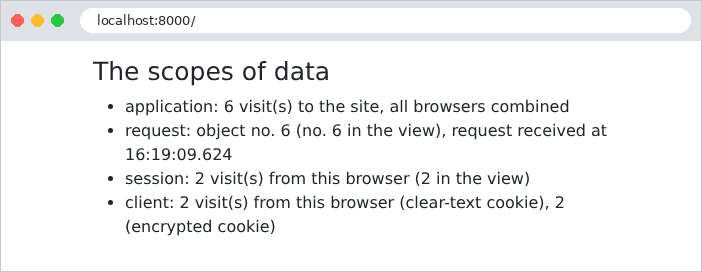
我们用 [curl] 来跟踪这些请求,它充当第一个浏览器,把 Cookie 存储在文件 [a.txt] 中:
| curl -i -c a.txt -b a.txt http://localhost:8000/
|
| HTTP/1.1 200 OK
Set-Cookie: myVisits=1; path=/; httponly; samesite=lax
Set-Cookie: myEncryptedVisits=eyJpdiI6InFOdXY5QmhoSlNCTWx4Q0VmN1lDSUE9PSIsInZhbHVlIjoiNm1GckpjQ3JK...; path=/; httponly; samesite=lax
Set-Cookie: XSRF-TOKEN=eyJpdiI6Im5IcHgvN2RRWiswNEZkMFRrUHBkOEE9PSIsInZhbHVlIjoiMTk1eElxemZz...; expires=...; Max-Age=7200; path=/; samesite=lax
Set-Cookie: example23_session=eyJpdiI6IjVEbjh1V2toeTdCdUFhSDdWWkV3ZHc9PSIsInZhbHVlIjoiK1J5SVNi...; expires=...; Max-Age=7200; path=/; httponly; samesite=lax
...
<li>application: 1 visit(s) to the site, all browsers combined</li>
<li>request: object no. 1 (no. 1 in the view),
request received at 16:19:05.722</li>
<li>session: 1 visit(s) from this browser (1 in the view)</li>
<li>client: 1 visit(s) from this browser (clear-text cookie),
1 (encrypted cookie)</li>
...
|
响应设置了四个 Cookie。第一个 [myVisits] 以明文包含该值。第二个 [myEncryptedVisits] 包含同一个值,但已加密:可见部分是一个 Base64 编码的字符串(JSON),其中包含加密初始化向量([iv])、加密后的值([value])以及认证码([mac]),后者用于确保该值未被篡改。最后两个用于会话和防 CSRF 保护(示例 20)。使用相同 Cookie 进行第二次访问:
| curl -i -c a.txt -b a.txt http://localhost:8000/
|
| ...
Set-Cookie: myVisits=2; path=/; httponly; samesite=lax
...
<li>application: 2 visit(s) to the site, all browsers combined</li>
<li>request: object no. 2 (no. 2 in the view),
request received at 16:19:05.922</li>
<li>session: 2 visit(s) from this browser (2 in the view)</li>
<li>client: 2 visit(s) from this browser (clear-text cookie),
2 (encrypted cookie)</li>
...
|
第二个“浏览器”,使用自己的 Cookie 文件,该文件最初为空:
| curl -c b.txt -b b.txt http://localhost:8000/
|
| <li>application: 3 visit(s) to the site, all browsers combined</li>
<li>request: object no. 3 (no. 3 in the view),
request received at 16:19:06.027</li>
<li>session: 1 visit(s) from this browser (1 in the view)</li>
<li>client: 1 visit(s) from this browser (clear-text cookie),
1 (encrypted cookie)</li>
|
应用程序计数器继续累加;第二个浏览器的会话和 Cookie 则从 1 重新开始。每个请求都有自己的 [RequestInfo] 对象,而在每个请求中,动作和视图是相同的。最后,一个恶意用户伪造自己的 Cookie:[myVisits] 中为 1000 次访问,[myEncryptedVisits] 中为 999 次,并使用自己编造的会话 ID:
| curl -b "myVisits=1000;myEncryptedVisits=999;example23_session=abc" http://localhost:8000/
|
| <li>application: 4 visit(s) to the site, all browsers combined</li>
...
<li>session: 1 visit(s) from this browser (1 in the view)</li>
<li>client: 1001 visit(s) from this browser (clear-text cookie),
1 (encrypted cookie)</li>
|
未加密的 Cookie 被原样接受:1001 次访问。然而,Cookie [myEncryptedVisits] 无法被解密:[Laravel] 将其忽略,就像它不存在一样。会话 Cookie 也是如此:用户无法选择其他用户的会话,而是会被分配一个新的会话。这就是普通 Cookie 与加密 Cookie 之间的关键区别。让我们记住这条规则:来自客户端的数据,只有在由服务器保护时才是可信的(像这里这样加密,或像认证一章中的令牌那样签名);没有需要隐藏的内容、且其值由服务器验证的数据(例如示例 22 中的语言),可以保持明文。