11. 案例研究:RdvMedecins 应用程序
11.1. 问题描述
RdvMedecins 应用程序管理一家医疗诊所的预约。每位医生都有时间段(例如从上午 8:00 到中午 12:00,以 20 分钟为间隔);一次预约由日期、时间段和一位客户(患者)组成。这是上一课中 [Flask] 应用程序在 [Laravel] 中的精确移植(该应用程序本身又是从 [Spring MVC] 和 [ASP.NET Core MVC] 版本移植而来):相同的数据库、相同的业务规则、相同的页面、相同的 URL、相同的文本。HTML 页面由服务器使用 [Blade] 视图生成;数据库访问由 [Eloquent] 处理。
应用程序有三种用户角色:
ADMIN | 管理员([admin]) | 查看日程,为任何患者预约和取消预约;管理(列出、添加、编辑、删除)医生和客户 |
DOCTOR | 医生 | 查看日程,为任何患者预约和取消预约 |
USER | 客户(患者) | 查看日程,但看不到其他患者的姓名;为自己预约;取消自己的预约;管理自己的账户;创建账户 |
主要管理规则:
- 不得预约过去的时间;
- 同一时间段每天只能被预约一次;
- 一位患者同一时间只能有一个即将到来的预约;
- 两位医生(或两位客户)不能有相同的姓和名,并且一个登录名只属于一个账户;
- 有预约的医生不能被删除;删除客户时,其预约一并删除;
- 登录页面受到防机器人保护(验证码、限制尝试次数),创建患者账户需要先解答该页面上的验证码。
11.2. 使用应用程序
11.2.1. 登录页面
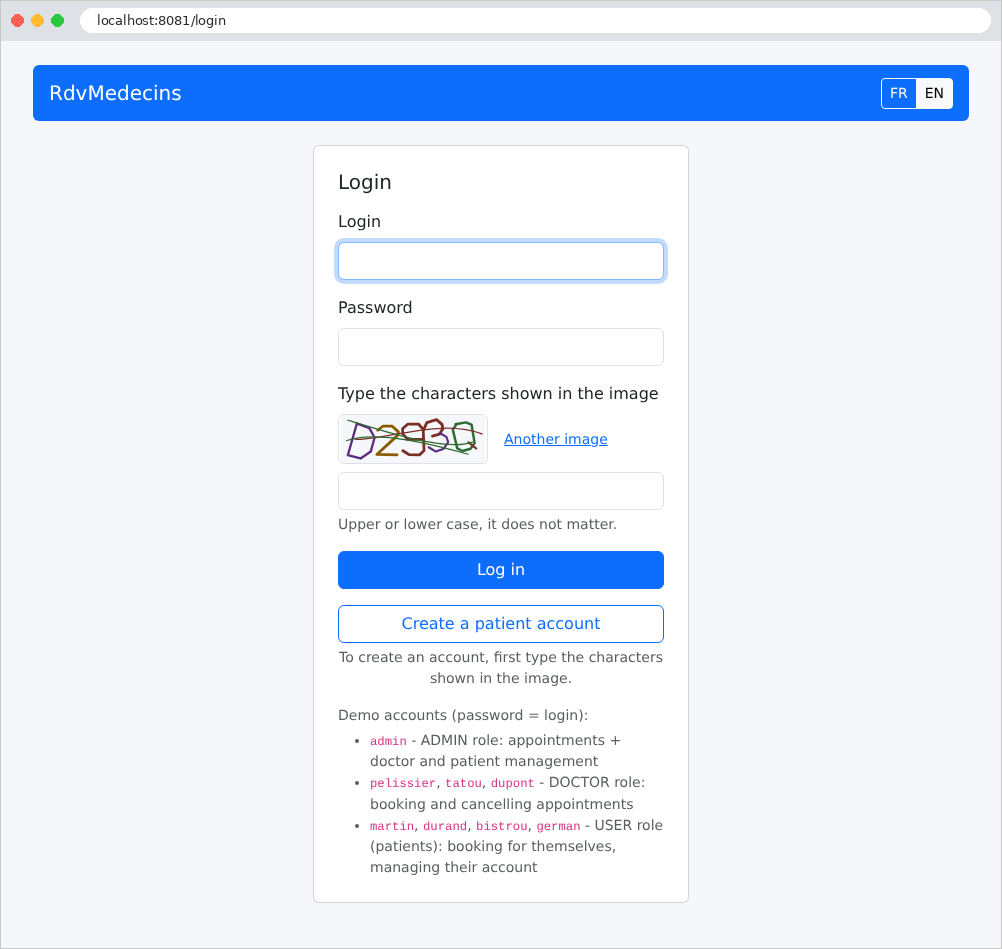
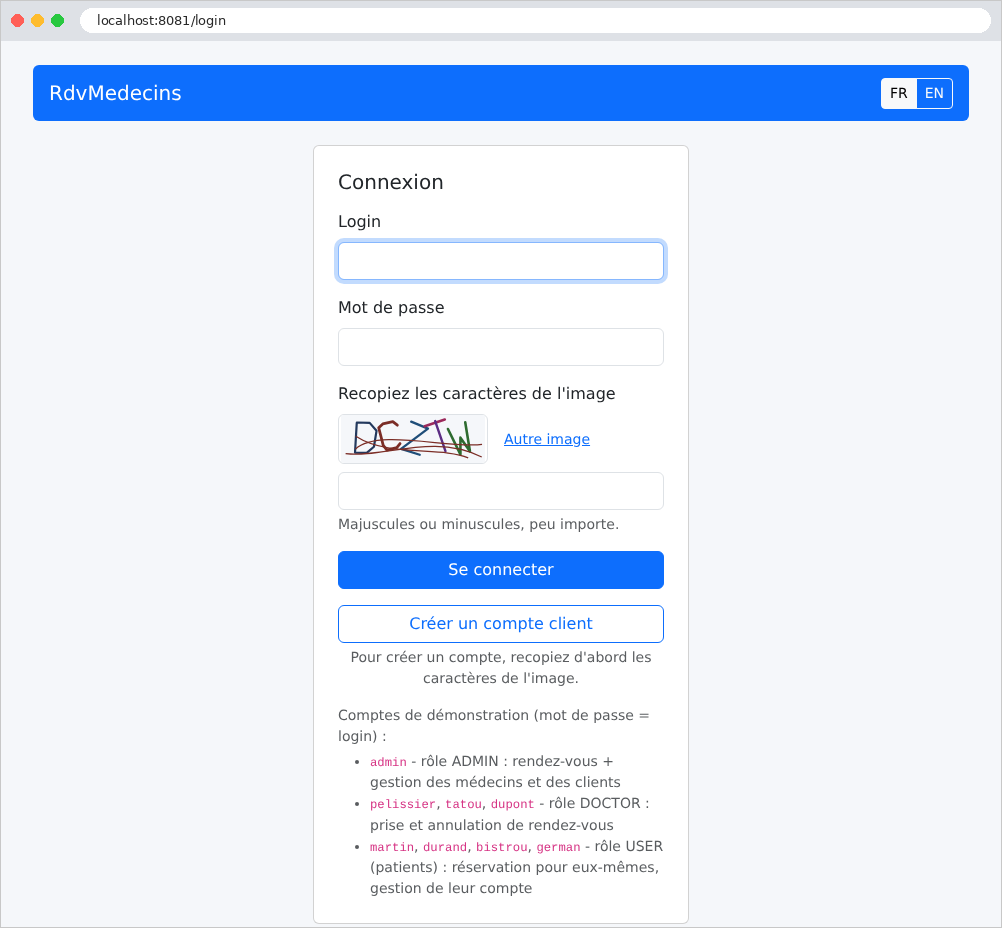
页面上有两个按钮:登录和创建患者账户。两者都要求你输入图像中显示的字符。FR / EN 按钮用于切换语言:
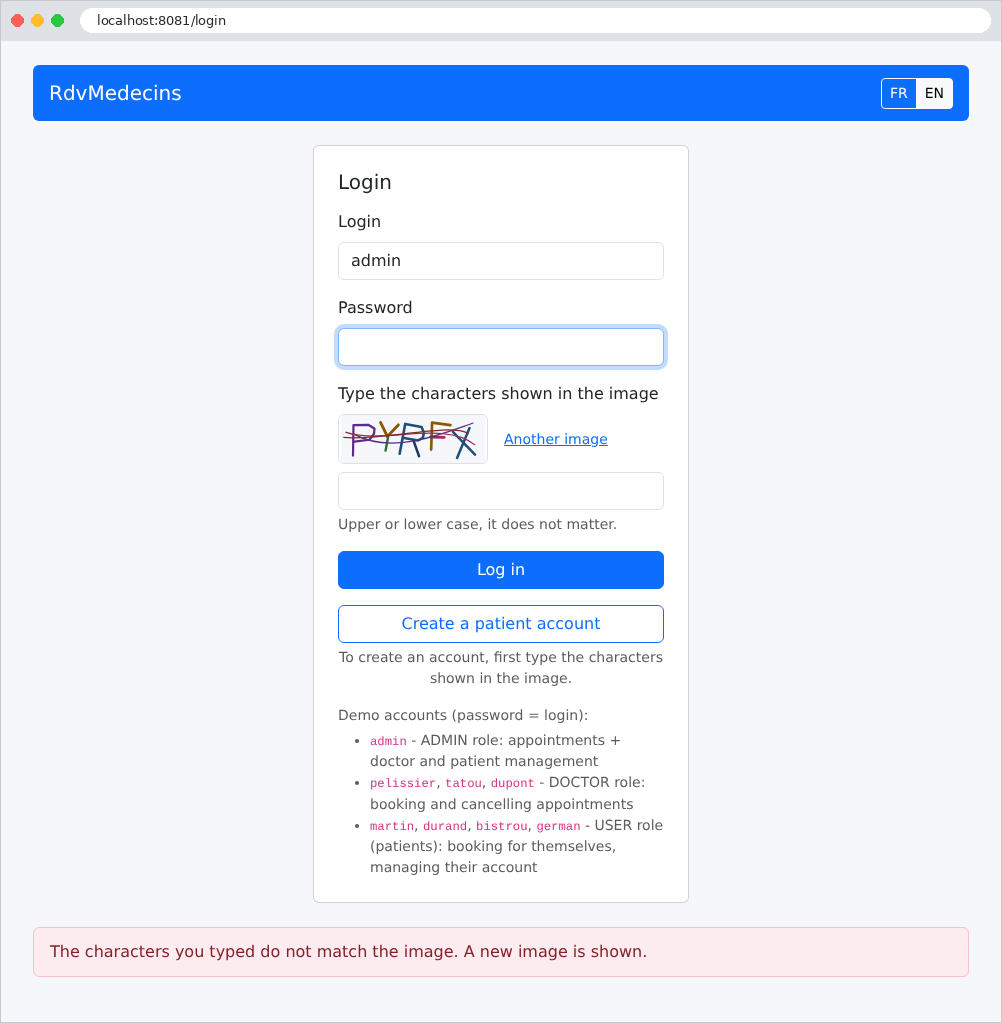
错误(此处是验证码输入错误)显示在页面底部,背景为浅粉色:
11.2.2. 管理员和医生所见的日历
登录之后,管理员会进入日历页面。他们选择一位医生和一天:
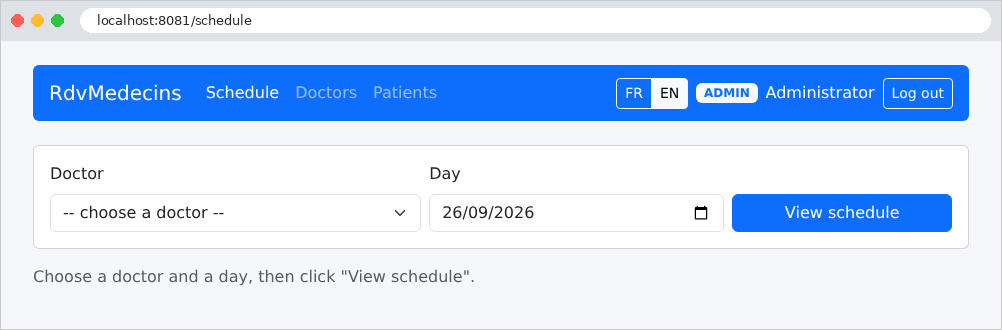
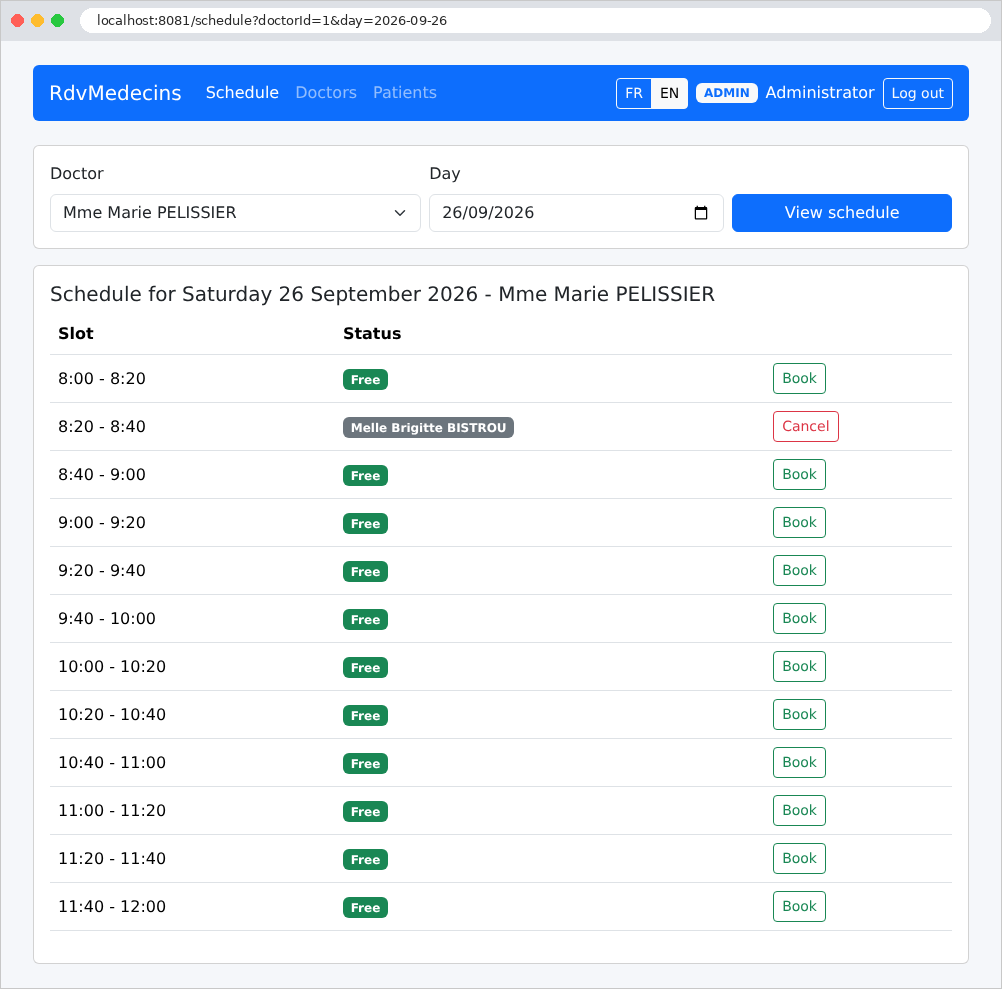
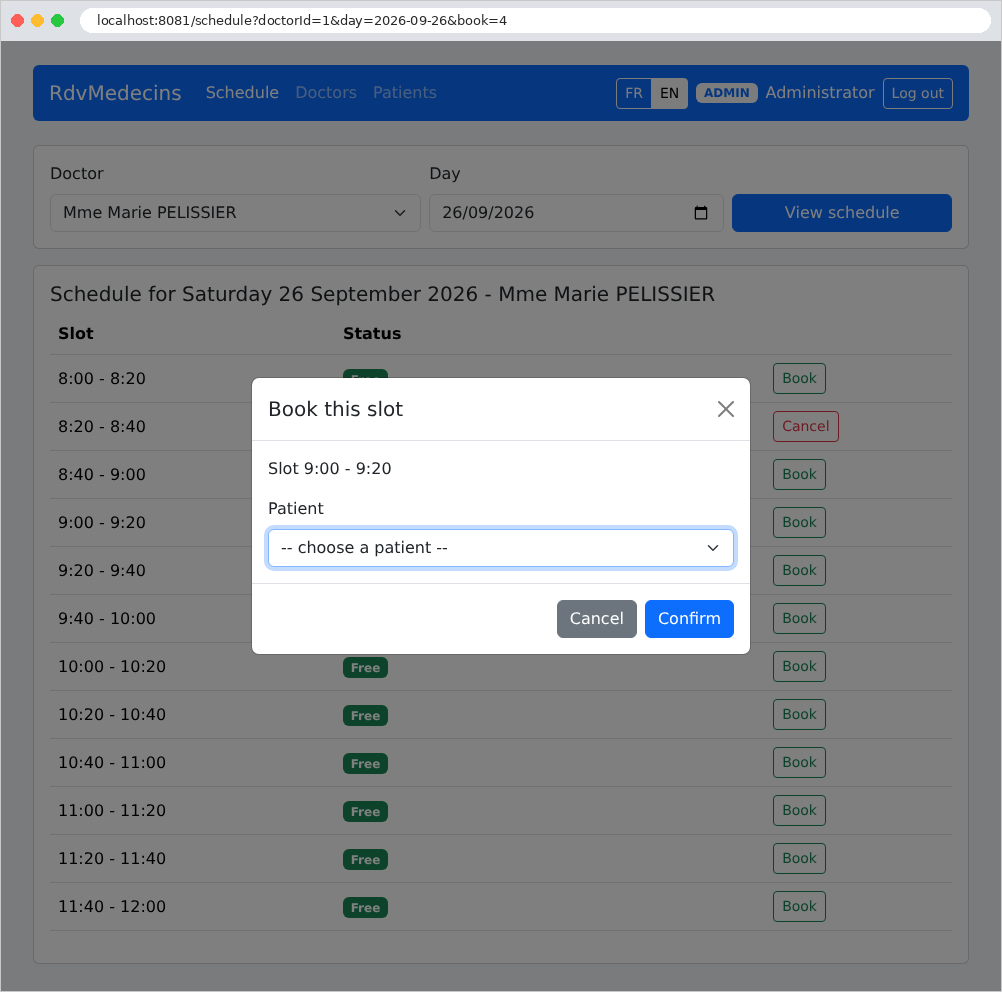
每个时间段要么是可预约的(“预约”按钮),要么是已被占用的(患者姓名、“取消”按钮)。点击“预约”会打开一个窗口,询问患者的信息。该窗口与页面的其余部分一样由服务器生成:此时 URL 中包含参数 [book=4],即所选时间段的编号:
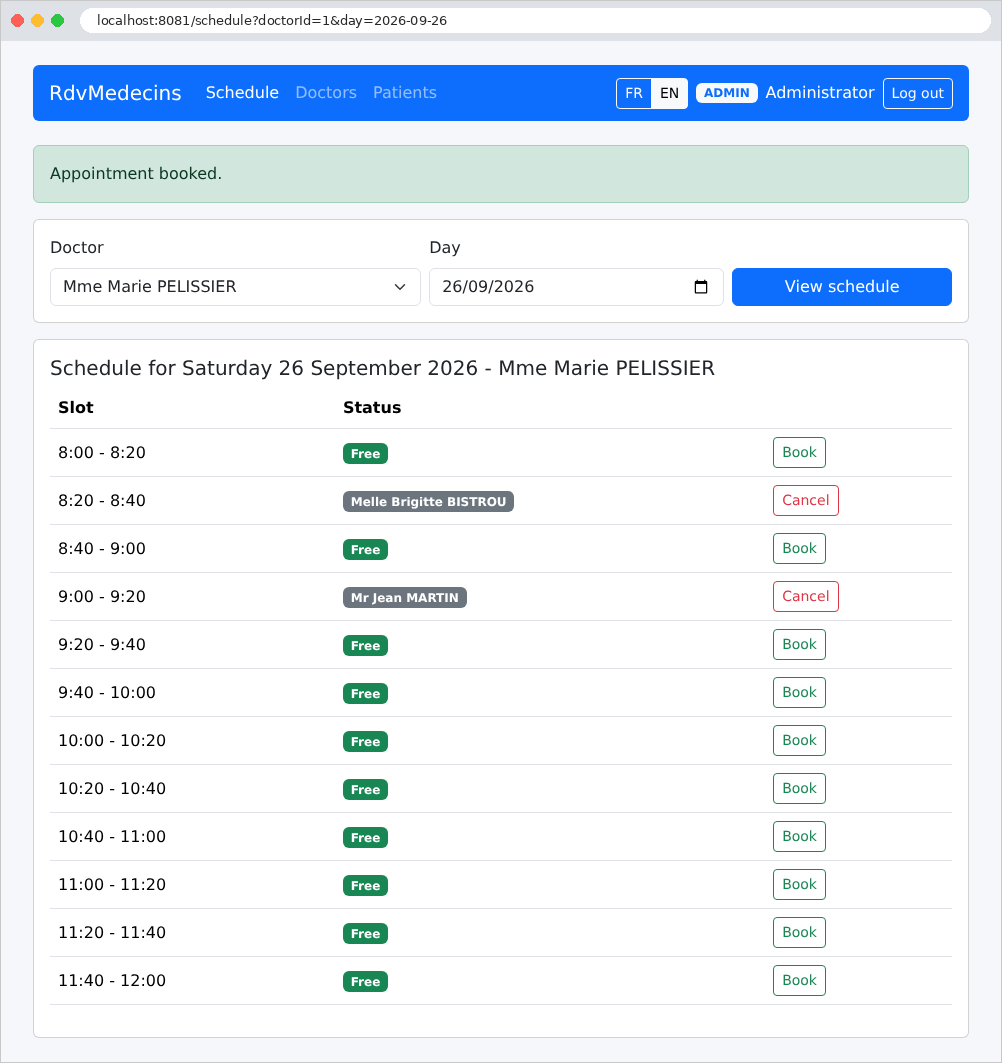
预约之后,会有一条消息确认该预约:
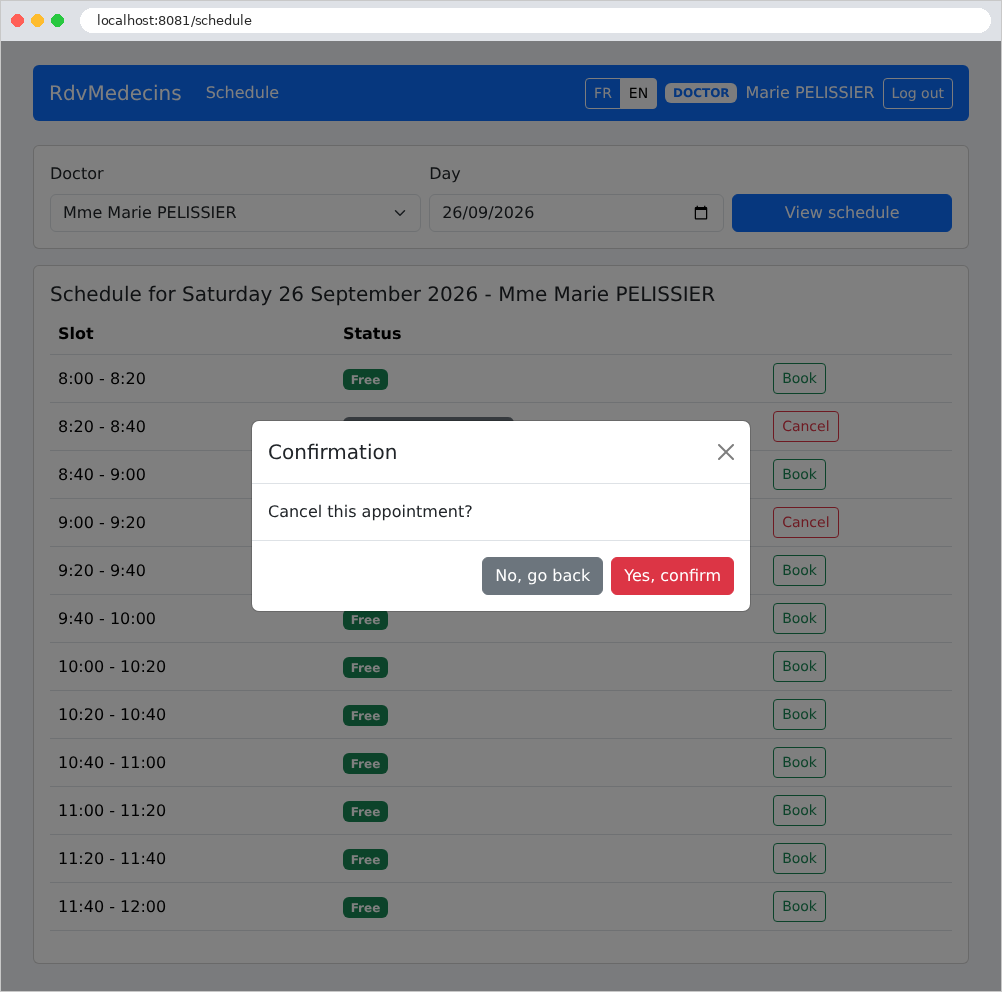
点击“取消”会提示确认(这里是由 Pélissier 医生操作,他的导航栏中没有管理菜单):
11.2.3. 患者门户
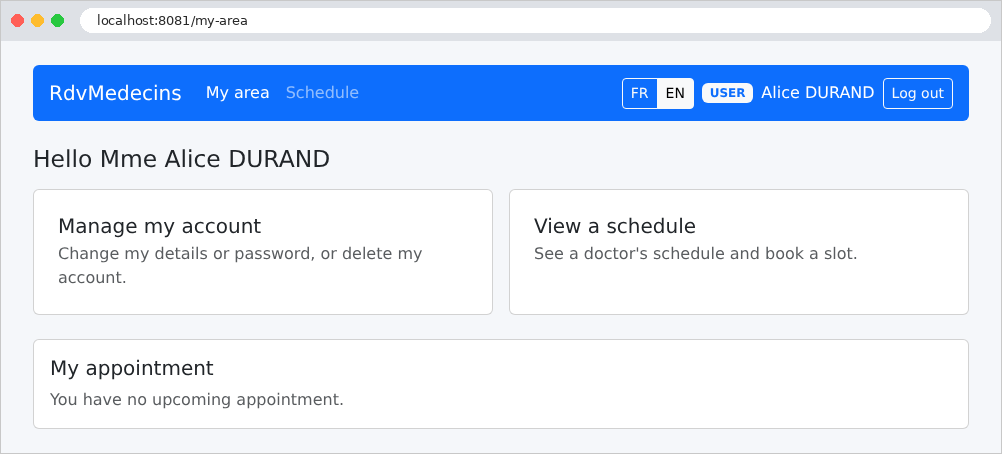
患者(角色 USER)进入“我的空间”:其即将到来的预约(可以取消),以及用于管理账户和查看日历的链接。这里,他们还没有预约:
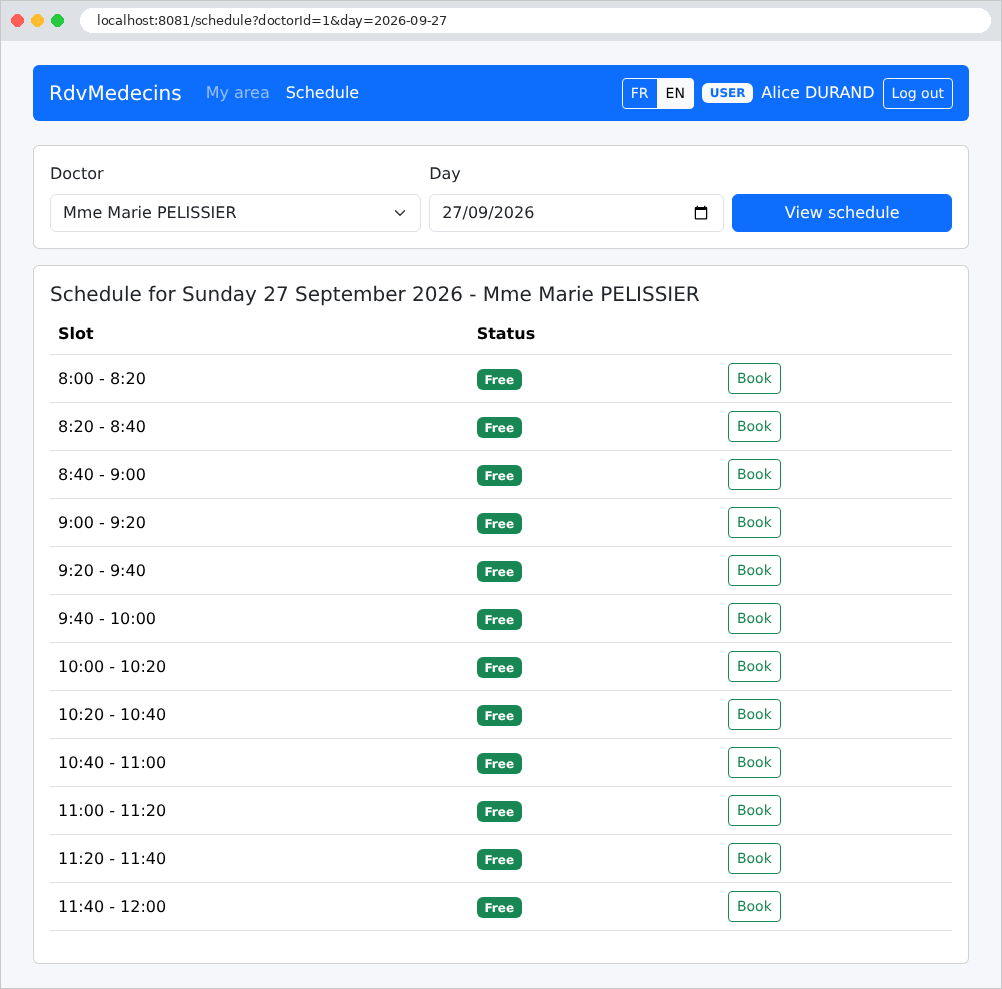
在日历中,他们看不到其他患者的姓名;这些姓名被替换为“已预约”:这个姓名甚至不会出现在页面的源代码中。他们可以预约一个可用的时间段:
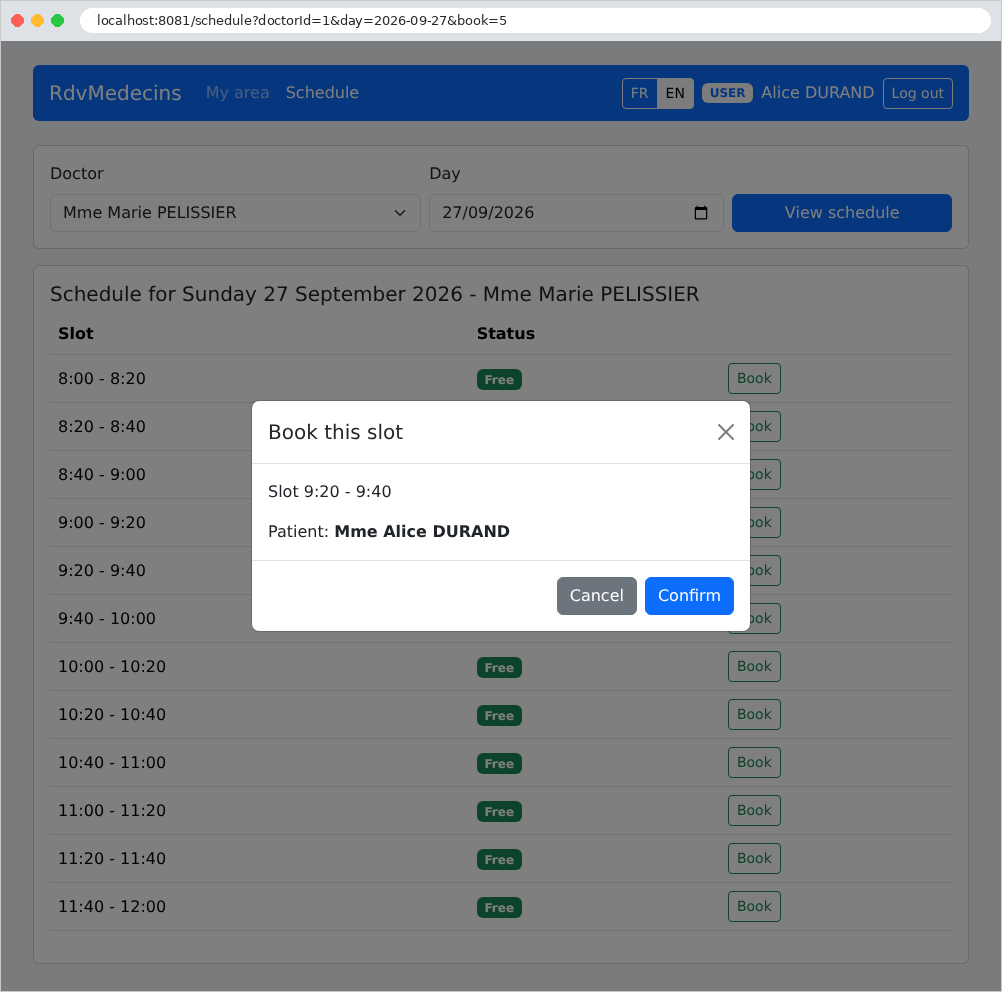
预约窗口不会提示他选择患者:他为自己预约。
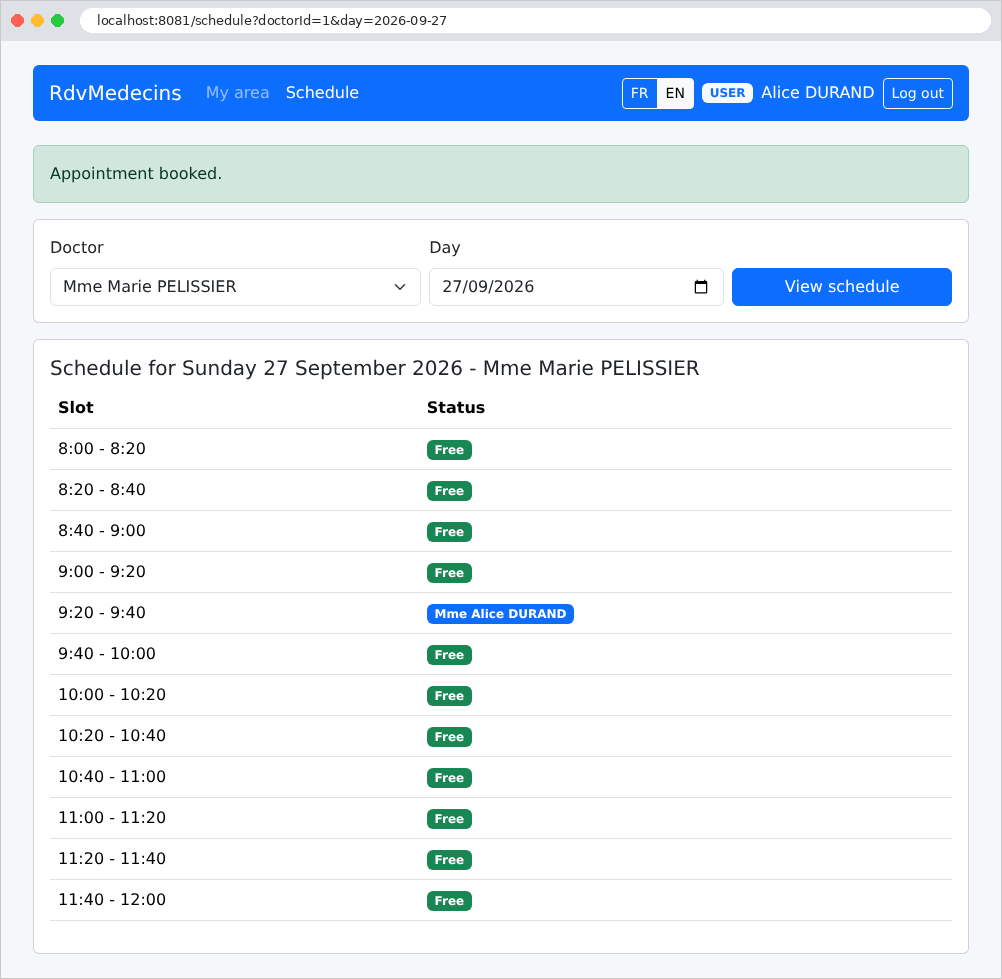
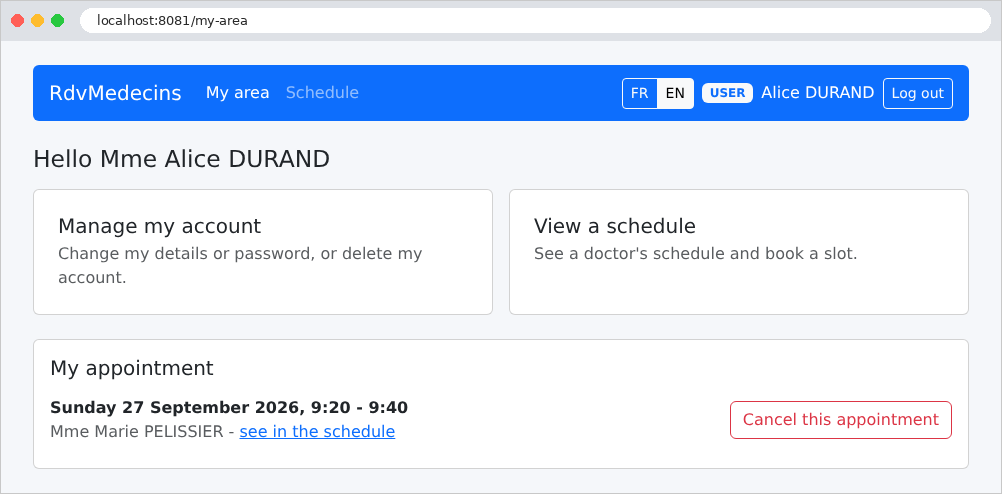
他的仪表板现在显示了他即将到来的预约,他可以取消它:
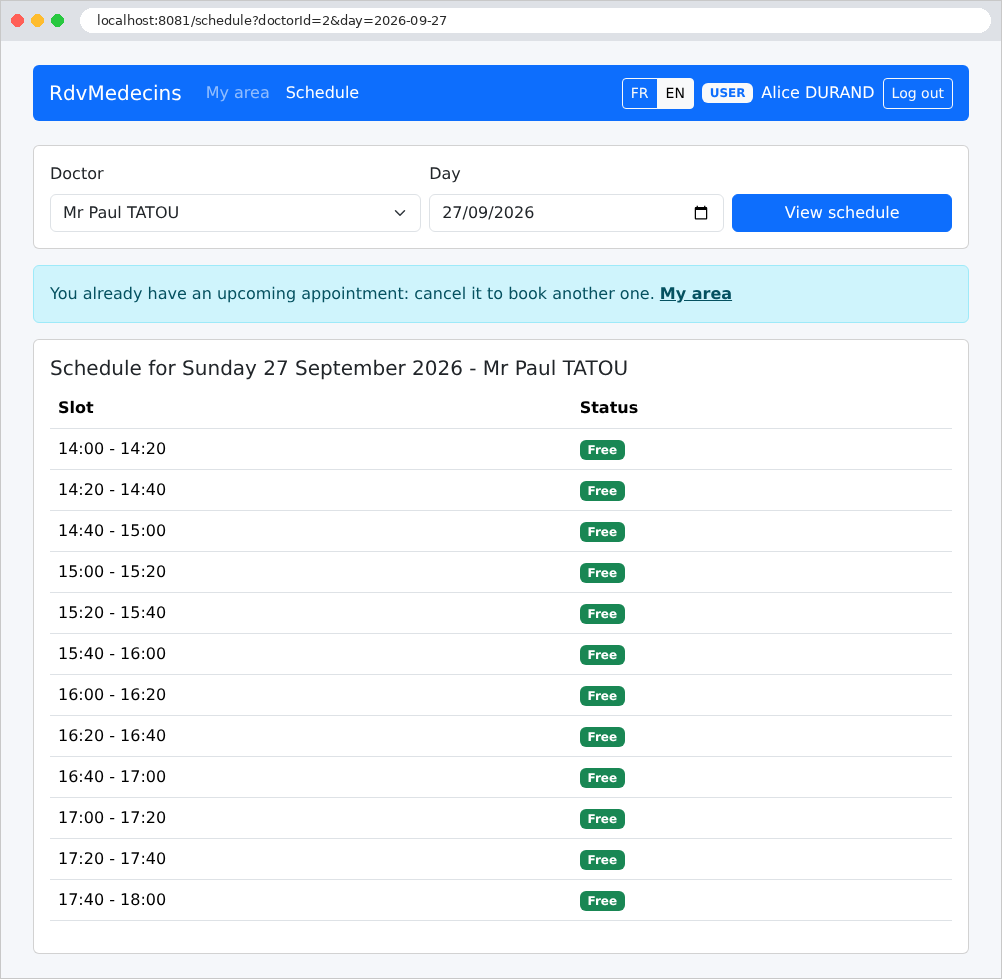
由于他已有一个即将到来的预约,因此不能再安排另一个:不会显示“预约”按钮,而在另一天或另一位医生的日历上,会有一条消息解释原因:
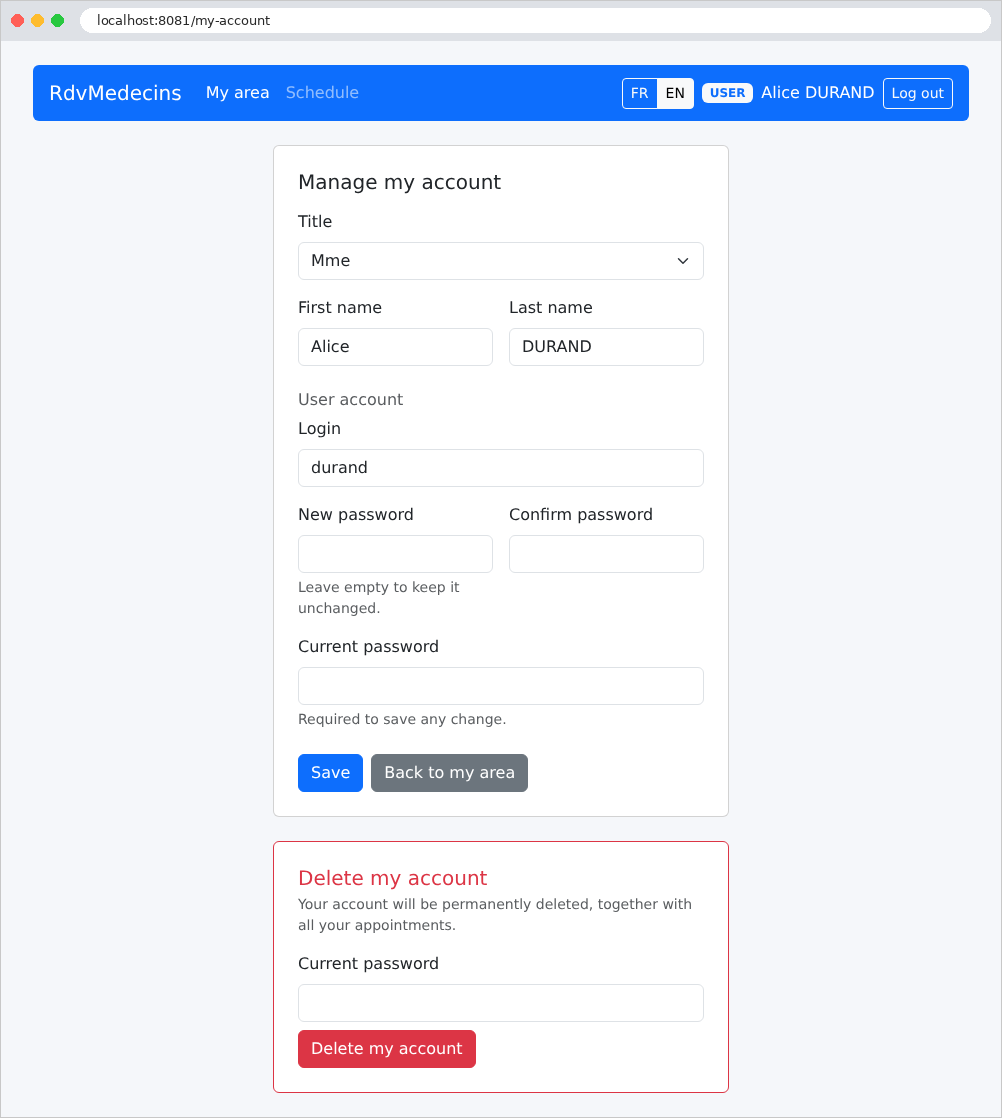
账户管理:编辑个人信息、修改密码,或删除账户(及其预约)。任何更改都需要输入当前密码:
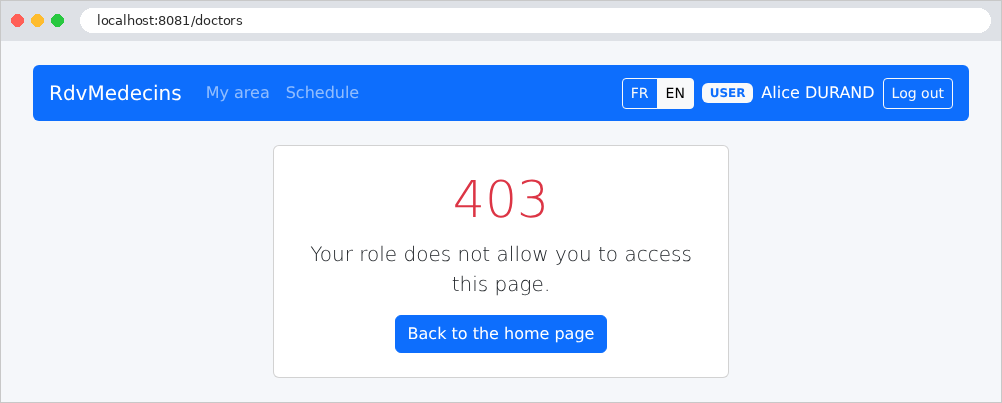
试图打开为管理员保留的页面的患者(这里是手动输入的 [/doctors])会收到一个错误页面:
11.2.4. 管理医生和患者
管理员多出两个菜单:医生和患者:
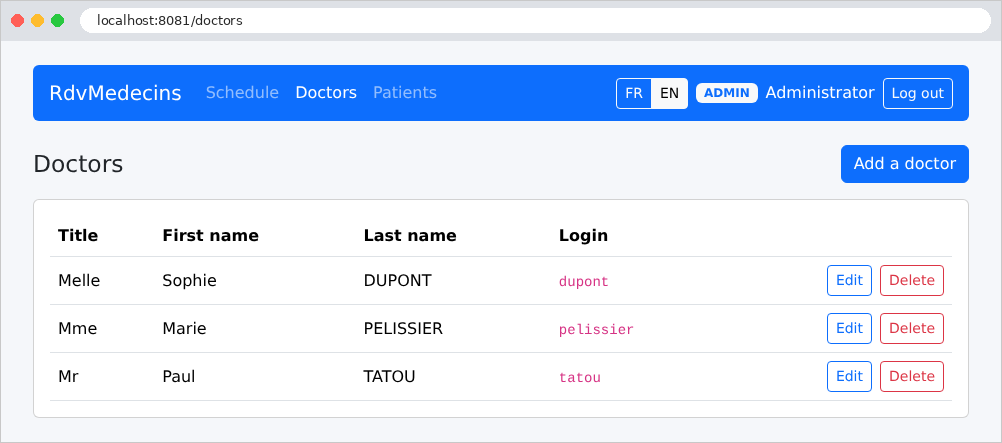
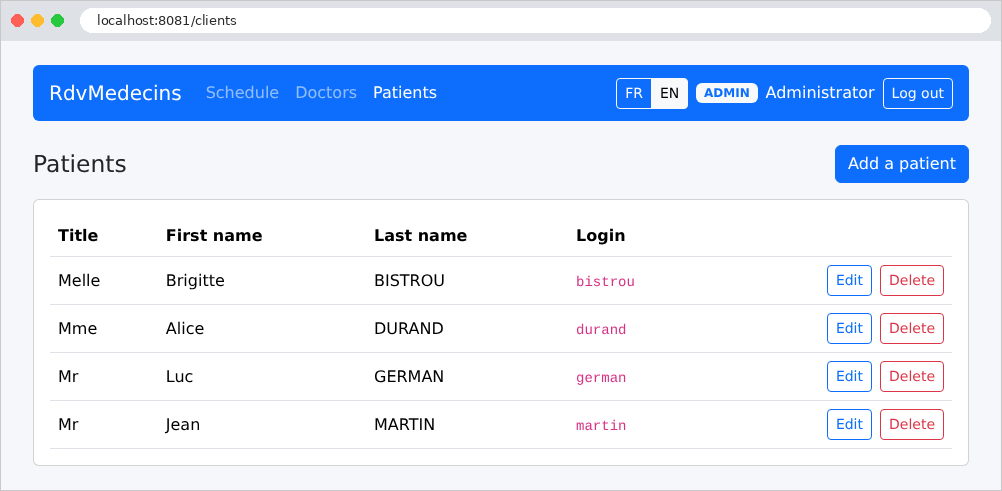
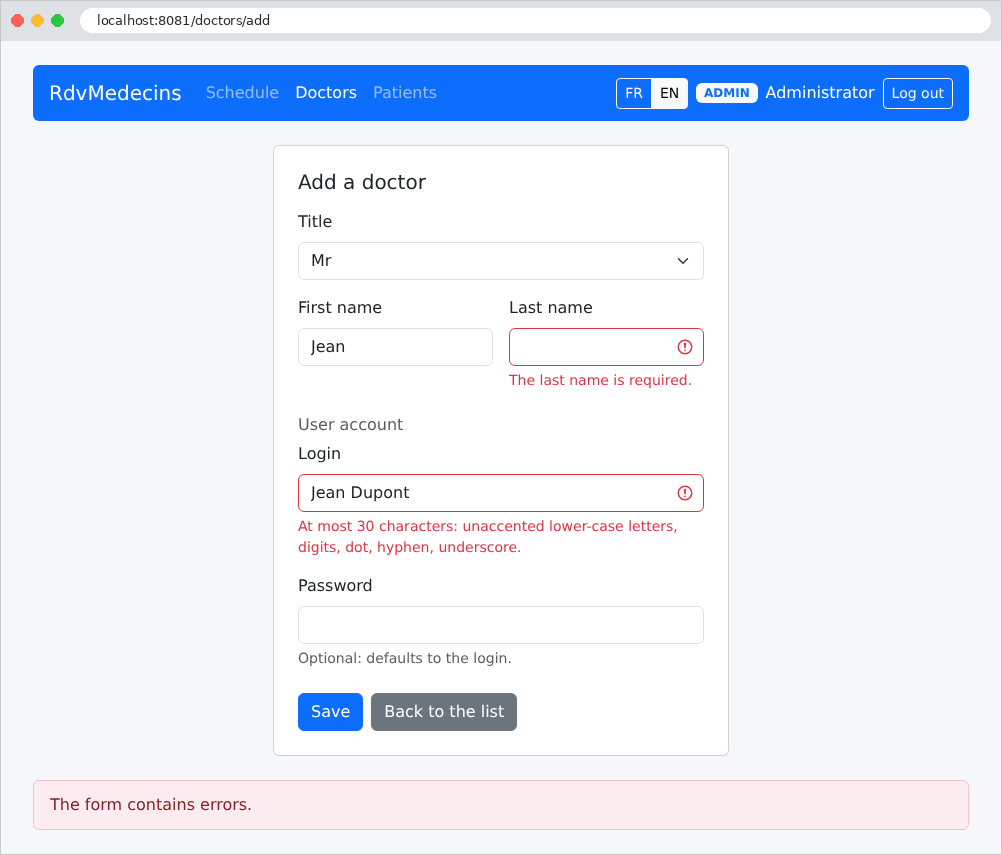
添加医生的表单,带着错误提交:
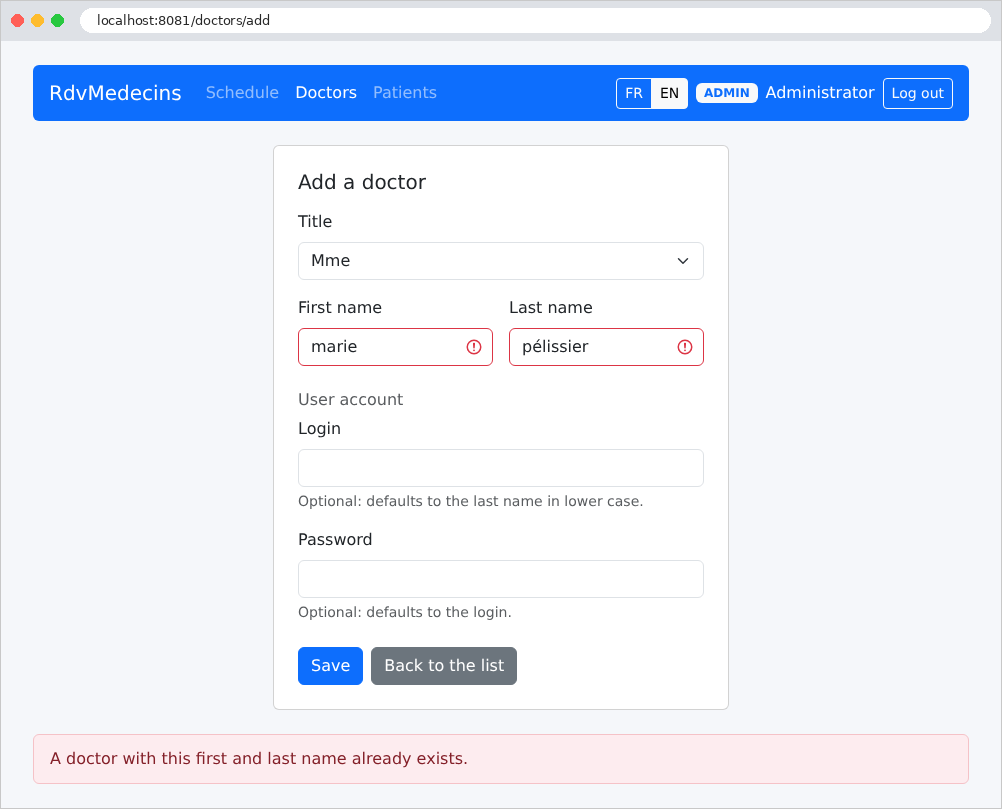
与已有医生同名的姓名会被拒绝,即使写成小写并带重音也一样(数据库本身在比较姓名时不区分大小写和重音;见示例 28):
删除患者需要确认:
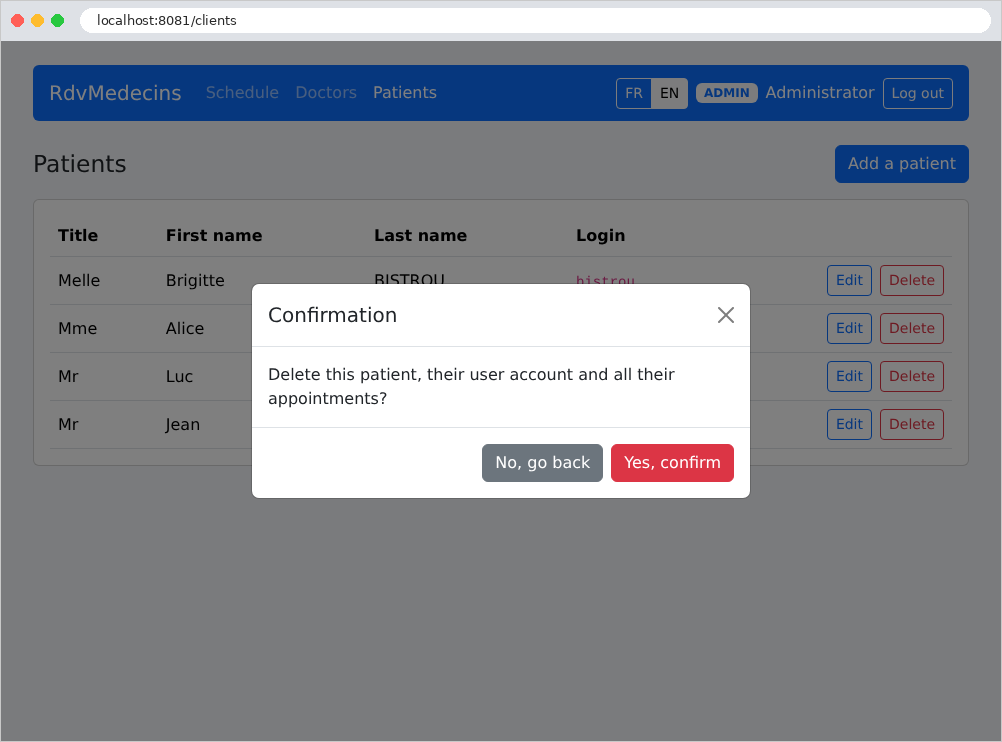
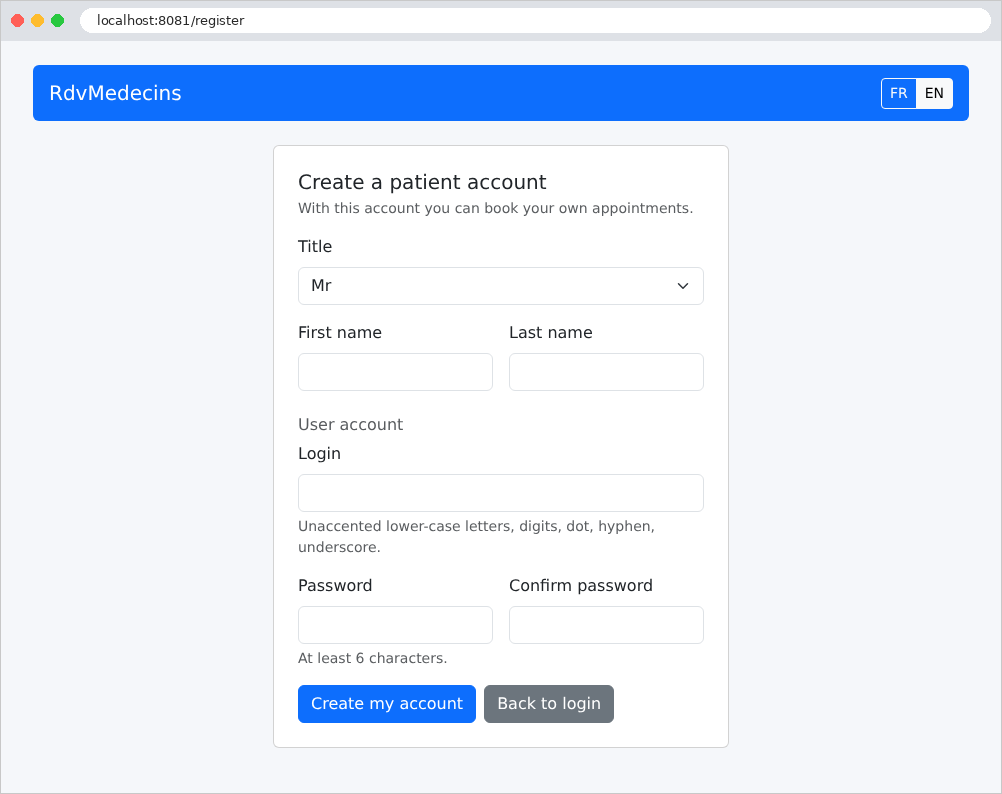
11.2.5. 创建患者账户
在登录页面上,“创建患者账户”按钮只有在验证码输入正确时才会打开表单:
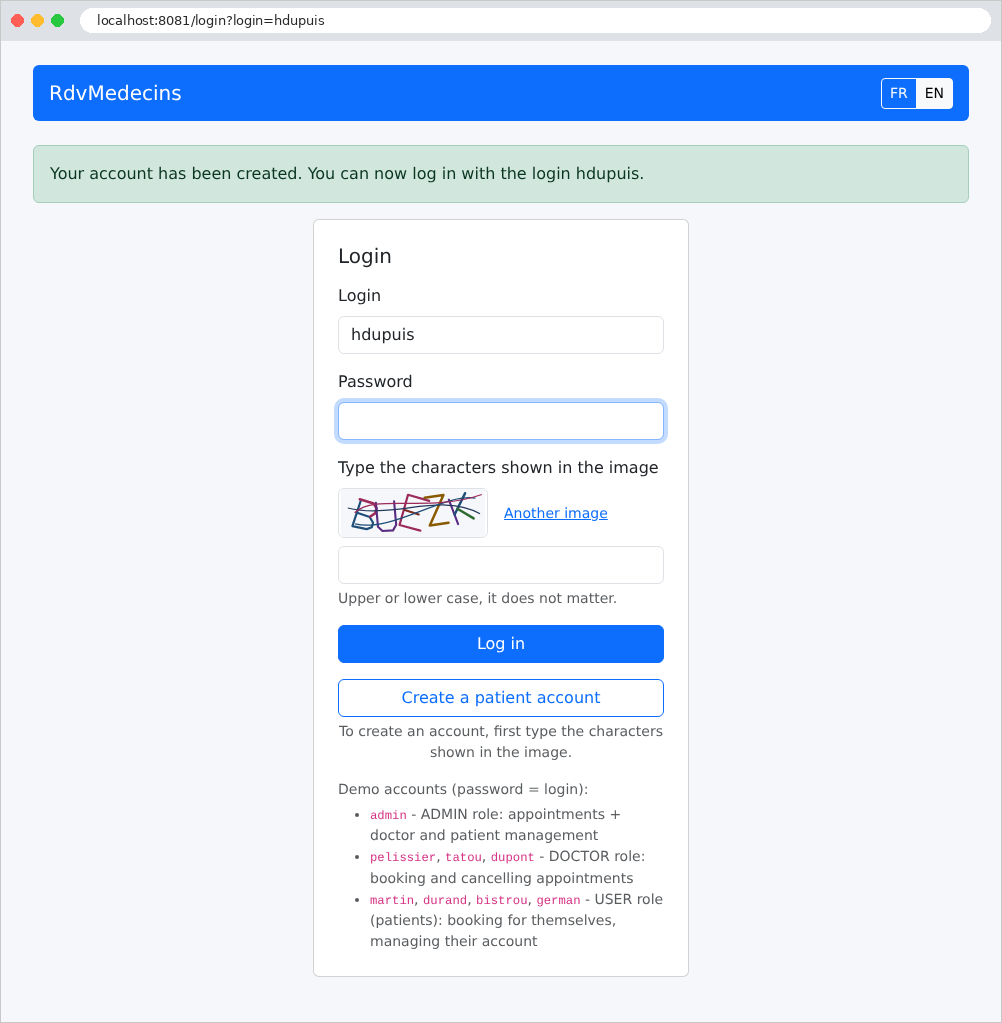
账户创建之后,用户会被重定向到登录页面,并且用户名已经填好:
11.2.6. 注销
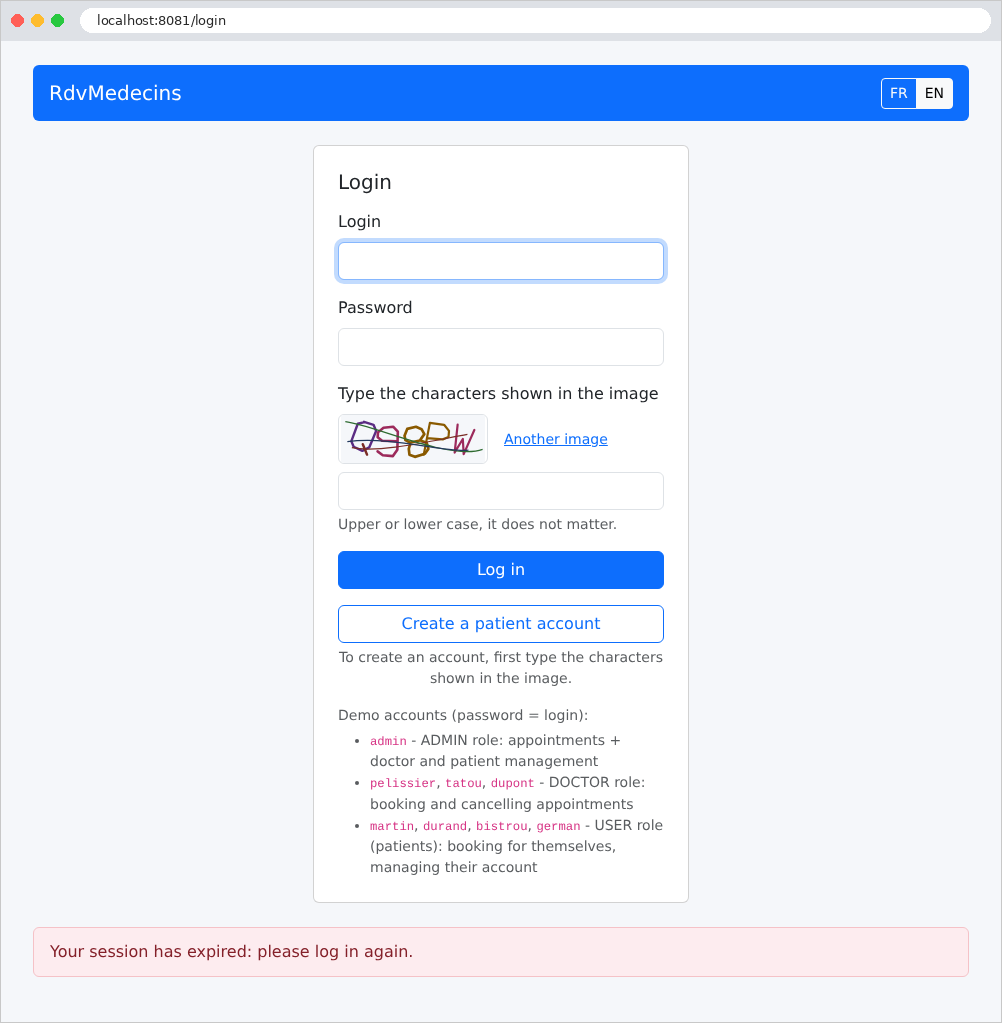
登录令牌的有效期为两小时。超过该时间之后(或令牌被篡改时),所请求的页面会重定向到登录页面,并显示如下消息:
11.3. 安装与运行
应用程序位于 [rdvmedecins2-laravel] 文件夹中,与 [examples] 文件夹相邻。它是一个独立的项目,拥有自己的 [composer.json] 和 [.env] 文件,以及自己的 [vendor] 文件夹。该文件夹中的 [README.md] 文件包含以下全部内容。本文档的引言已经介绍了 [PHP] 和 [Composer] 的安装;这里我们将进一步展开。
11.3.1. 所需软件
只需要三个软件:
- [PHP] 8.4 或更高版本,并带有 [pdo_mysql] 扩展(应用程序使用了 8.4 版本引入的功能,例如 [array_find])。在终端中验证安装:
第二条命令列出扩展:[pdo_mysql] 应该出现在列表中;
- [Composer],即 [PHP] 的库管理器(见附录);
- 一个 [MySQL] 8 服务器,例如 [Laragon] 在 [Windows] 下提供的那个(见附录)。[MariaDB] 同样适用:应用程序已经用它测试过。
推荐的编辑器是 [Visual Studio Code],并安装扩展 [PHP Intelephense] 和 [Laravel] (见附录);不过,所有操作都可以通过命令行完成。
11.3.2. 安装库
未提供 [vendor] 文件夹:请在 [rdvmedecins2-laravel] 文件夹中打开的终端窗口里一次性创建它(必须连接到互联网):
[Composer] 读取文件 [composer.json] (稍后讨论),下载 [Laravel]、[firebase/php-jwt] 以及它们所依赖的库,并生成类加载器 [vendor/autoload.php]。
11.3.3. 创建数据库
[dbrdvmedecins2] 数据库由 [database/dbrdvmedecins2.sql] 脚本创建。使用 [Laragon] 时,打开 [HeidiSQL] 工具(“数据库”按钮),然后通过“文件 / 运行 SQL 文件”菜单运行该脚本。在命令行中,在应用程序文件夹下:
| mysql -u root -p < database/dbrdvmedecins2.sql
|
[-p] 选项会提示输入 [root] 的密码;如果该账户没有密码([Laragon] 就是这种情况),请省略它。这与应用程序其他版本使用的是同一个数据库:如果它已经存在,这一步是可选的。该脚本可以随时运行,以恢复到原始数据。
11.3.4. 配置数据库访问
所有安装配置都包含在文件 [.env] 中(下文会进一步讨论)。默认情况下,应用程序连接到 [MySQL] ,地址为 [127.0.0.1],端口 3306,使用用户 [root] ,无密码:这些是 [Laragon] 的默认设置。如果你的 [root] 账户有密码,请把它填入该文件的 [DB_PASSWORD=] 一行。系统环境变量优先于该文件(示例 25):这样你就可以指定密码,而无需把它写入项目文件。
11.3.5. 运行应用程序
在打开到 [rdvmedecins2-laravel] 文件夹的终端窗口中:
| php artisan serve --port=8081
|
| INFO Server running on [http://127.0.0.1:8081].
Press Ctrl+C to stop the server
|
接着,在浏览器中打开 URL [http://localhost:8081] ,并使用 [Ctrl-C] 停止应用程序。使用端口 8081,可以同时运行一个课程示例(端口 8000)。
11.3.6. 演示账户
每个账户的密码就是其用户名;你还必须输入图像中的字符,大小写均可:
[admin] | ADMIN(管理员) |
[pelissier]、[tatou]、[dupont] | DOCTOR(医生) |
[martin]、[durand]、[bistrou]、[german] | USER(患者) |
探索应用程序的指南:
- [admin]:日程,Marie PELISSIER 女士;今天:有一个时间段已被 Brigitte BISTROU 女士预约。为 Jean MARTIN 先生预约一个时间段,然后尝试为他预约第二个 (会被拒绝)。医生和患者菜单:添加、编辑、删除(有预约的 PELISSIER 医生不能被删除);
- [pelissier]:直接显示他当天的日程;手动输入地址 [/doctors] 会返回 403 错误页面;
- [martin]:我的空间、他们的预约、其他患者显示为“已预约”的日历;管理我的账户;
- 登录页面:创建患者账户,然后用新账户登录;
- FR / EN 按钮:整个界面会切换语言,包括日期。
11.3.7. 开发模式
提供的 [.env] 文件把应用程序配置为开发模式:
- [DB_LOG=true]:服务器控制台会显示发送给数据库的每条 SQL 命令,以及事务的每个步骤(示例 28)。例如,显示一个日历时:
| select * from `doctors` order by `last_name` asc, `first_name` asc []
select * from `users` where `users`.`id` in (2, 3, 4) []
select * from `doctors` where `doctors`.`id` = ? limit 1 [1]
select * from `users` where `users`.`id` in (2) []
select * from `appointments` where `day` = ? and exists (select * from `slots` where `appointments`.`slot_id` = `slots`.`id` and `doctor_id` = ?) ["2026-09-26",1]
select * from `clients` where `clients`.`id` in (3) []
select * from `slots` where `doctor_id` = ? order by `start_hour` asc, `start_minute` asc [1]
2026-09-26 18:50:14 /schedule .................................... ~ 0.10ms
|
- [APP_DEBUG=true]:发生意外异常时,会显示 [Laravel] 调试页面 (示例 03),其中有异常消息和调用栈。在生产环境中,应用程序会改为显示它自己的 500 错误页面;
- 修改之后无需重启任何东西:每个请求都会重新读取 [PHP] 文件(示例 01),被修改的视图会在下一个请求时重新编译。
[Xdebug] 调试器 还允许你从 [Visual Studio Code] ([PHP Debug] 扩展)中单步执行应用程序:这是 [PHP] 的一个扩展,必须单独安装(参见 xdebug.org)。
11.3.8. 生产服务器
[php artisan serve] 服务器不适用于生产环境。在生产环境中,应用程序由 Web 服务器([nginx]、[Apache])提供服务,它把请求转发给 [PHP-FPM],即进程管理器([PHP])。站点根目录是 [public] 文件夹:只有其中的文件可以从浏览器访问;[storage] 和 [bootstrap/cache] 文件夹必须可由服务器写入。我们用几条命令来设置应用程序:
| composer install --no-dev --optimize-autoloader
php artisan key:generate
php artisan config:cache
php artisan route:cache
php artisan view:cache
|
[key:generate] 将新的加密密钥写入文件 [.env];接下来的三条命令把配置、路由和已编译的视图合并为少数几个文件,它们的加载速度比原始文件更快(每次修改之后都必须重复这一过程)。在 [.env] 文件中,还必须指定生产模式、更换令牌的密钥,并声明站点通过 HTTPS 提供服务:
| APP_ENV=production
APP_DEBUG=false
JWT_SECRET=<a long random string>
COOKIE_SECURE=true
|
合适的随机字符串可以用 [PHP] 本身来获得:[php -r "echo bin2hex(random_bytes(32));"]。
11.3.9. 常见问题
[PHP] 应用程序不存在“启动”失败这回事:每个请求都会重新构建应用程序(示例 01)。因此,数据库无法访问并不会阻止服务器启动:错误会出现在第一个查询数据库的页面上(登录页面不查询数据库;登录过程本身才会查询)。使用 [APP_DEBUG=true] 时,错误显示在 [Laravel] 调试页面上;无论如何,它都会记录在 [storage/logs/laravel.log] 日志中。例如,数据库不存在时:
| [2026-09-26 18:55:12] local.ERROR: SQLSTATE[HY000] [1049] Unknown database 'dbunknown' (Connection: mysql, Host: 127.0.0.1, Port: 3306, Database: dbunknown, SQL: select * from `users` where `login` = admin limit 1) {"exception":"[object] (Illuminate\\Database\\QueryException(code: 1049): ...
|
最常见的消息:
[Failed opening required '.../vendor/autoload.php'] | 没有执行命令 [composer install] |
[Your Composer dependencies require a PHP version ">= 8.4.0"] | [PHP] 的版本低于 8.4 |
[could not find driver] | [pdo_mysql] 扩展(属于 [PHP] )未启用(文件 [php.ini],或 [Laragon] 的“PHP / 扩展”菜单) |
[SQLSTATE[HY000] [2002] Connection refused] | [MySQL] 没有启动,或没有在 [127.0.0.1:3306] 上监听 |
[SQLSTATE[HY000] [1045] Access denied for user 'root'@'localhost'] | 必须在 [MySQL] 的密码输入到 [.env] 中(参见“配置数据库访问”) |
[SQLSTATE[HY000] [1049] Unknown database 'dbrdvmedecins2'] | 没有执行脚本 [database/dbrdvmedecins2.sql] |
[No application encryption key has been specified.] | 文件 [APP_KEY] 中的变量 [.env] 为空:[php artisan key:generate] |
[JWT_SECRET must be at least 32 characters long (see .env).] | [.env] 中令牌的密钥太短 |
[Failed to listen on 127.0.0.1:8081 (reason: Address already in use)] | 端口 8081 已被占用(是否有应用程序的另一个版本正在运行?):停止它,或选择另一个端口 |
11.4. 应用程序架构
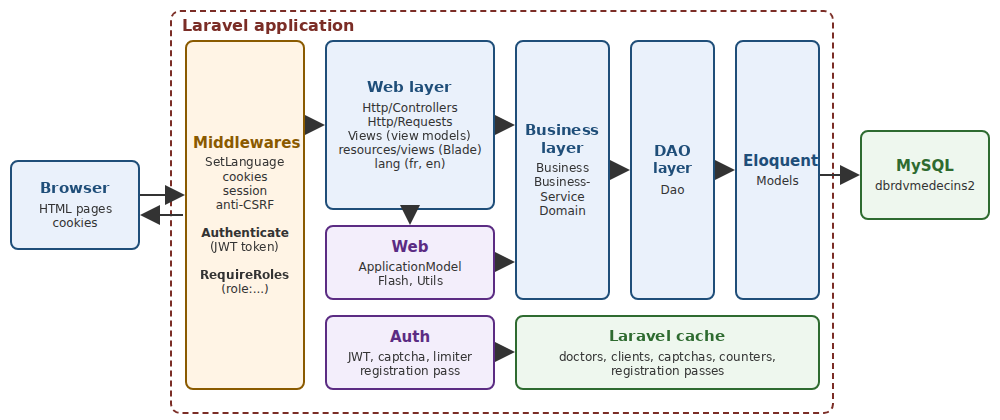
- 浏览器把请求发送到服务器([php artisan serve],或 [nginx] + [PHP-FPM]),服务器再通过文件 [Laravel] 转发给 [public/index.php]。每个请求首先要经过中间件层 (见关于生命周期的一章):请求语言([SetLanguage])、Cookie、会话、防 CSRF 保护,然后是身份验证:根据 Cookie 中的 JWT 令牌识别用户,并拒绝无权访问的访问者访问受保护的页面([Authenticate]、[RequireRoles]);
- [Http/Controllers]:Web 层控制器。它们都经过同一个对象 [ApplicationModel] (文件夹 [Web]),该对象缓存医生和客户列表,并把其他请求转发给业务层;[Http/Requests]:表单验证;
- [Auth]:令牌、JWT、验证码、尝试次数限制,以及账户创建许可;
- [Web]:控制器的共同部分:缓存和 [ApplicationModel] 门面、闪现消息以及一些实用工具;[Views]:视图模板;
- [Business]:业务规则和事务;
- [Dao]:DAO 层,每个表一个类;
- [Models]:[Eloquent] 模型,DAO 层通过它们从数据库读取和向数据库写入;[Domain]:日历对象,由业务层计算;
- [resources/views]:[Blade] 视图,用于生成 HTML 页面;[lang]:字典;[public]:样式表、页面脚本以及 [Bootstrap];
- [bootstrap/app.php] 和 [app/Providers/AppServiceProvider.php] 负责把一切组装起来;[.env] 和 [config] 文件夹:配置。
应用程序文件夹(不包括 [vendor] 以及 [storage] 的内容):
| rdvmedecins2-laravel/
├── app/
│ ├── Auth/
│ │ ├── AttemptLimiter.php
│ │ ├── AuthService.php
│ │ ├── Captcha.php
│ │ ├── CaptchaDrawing.php
│ │ ├── CaptchaService.php
│ │ ├── ConnectedUser.php
│ │ ├── InvalidSession.php
│ │ ├── README.md
│ │ └── RegistrationPass.php
│ ├── Business/
│ │ ├── Business.php
│ │ ├── BusinessException.php
│ │ ├── BusinessService.php
│ │ ├── Dates.php
│ │ ├── Descriptor.php
│ │ ├── PersonData.php
│ │ └── README.md
│ ├── Dao/
│ │ ├── AppointmentDao.php
│ │ ├── ClientDao.php
│ │ ├── DoctorDao.php
│ │ ├── PersonDao.php
│ │ ├── README.md
│ │ ├── SlotDao.php
│ │ └── UserDao.php
│ ├── Domain/
│ │ ├── DoctorDaySchedule.php
│ │ ├── DoctorDaySlot.php
│ │ └── README.md
│ ├── Http/
│ │ ├── Controllers/
│ │ │ ├── AuthController.php
│ │ │ ├── ClientsController.php
│ │ │ ├── DoctorsController.php
│ │ │ ├── LanguageController.php
│ │ │ ├── PatientAreaController.php
│ │ │ ├── PersonsController.php
│ │ │ ├── RegistrationController.php
│ │ │ └── ScheduleController.php
│ │ ├── Middleware/
│ │ │ ├── CheckRegistrationPass.php
│ │ │ ├── RequireRoles.php
│ │ │ └── SetLanguage.php
│ │ ├── README.md
│ │ └── Requests/
│ │ ├── MyAccountRequest.php
│ │ ├── PersonFieldsRequest.php
│ │ ├── PersonRequest.php
│ │ └── RegistrationRequest.php
│ ├── Models/
│ │ ├── Appointment.php
│ │ ├── Client.php
│ │ ├── Doctor.php
│ │ ├── Person.php
│ │ ├── README.md
│ │ ├── Role.php
│ │ ├── Slot.php
│ │ └── User.php
│ ├── Providers/
│ │ └── AppServiceProvider.php
│ ├── Views/
│ │ ├── AppointmentView.php
│ │ ├── BookingView.php
│ │ ├── OptionView.php
│ │ ├── PersonKeys.php
│ │ ├── README.md
│ │ ├── ScheduleRow.php
│ │ └── ScheduleView.php
│ └── Web/
│ ├── ApplicationModel.php
│ ├── Flash.php
│ ├── Message.php
│ ├── README.md
│ └── Utils.php
├── artisan
├── bootstrap/
│ ├── app.php
│ ├── cache/
│ └── providers.php
├── composer.json
├── config/
│ ├── app.php
│ ├── auth.php
│ ├── hashing.php
│ ├── rdvmedecins.php
│ └── session.php
├── database/
│ ├── dbrdvmedecins2.sql
│ └── README.md
├── .env
├── .env.example
├── lang/
│ ├── en.json
│ └── fr.json
├── public/
│ ├── css/
│ │ └── styles.css
│ ├── index.php
│ ├── js/
│ │ └── app.js
│ └── lib/
│ └── bootstrap/
├── README.md
├── resources/
│ └── views/
│ ├── account.blade.php
│ ├── area.blade.php
│ ├── components/
│ │ ├── captcha.blade.php
│ │ ├── field.blade.php
│ │ └── person-fields.blade.php
│ ├── error.blade.php
│ ├── fragments/
│ │ ├── booking.blade.php
│ │ ├── confirmation.blade.php
│ │ ├── errors.blade.php
│ │ ├── navbar.blade.php
│ │ └── success.blade.php
│ ├── layout.blade.php
│ ├── login.blade.php
│ ├── persons/
│ │ ├── form.blade.php
│ │ └── list.blade.php
│ ├── README.md
│ ├── registration.blade.php
│ └── schedule.blade.php
├── routes/
│ └── web.php
└── storage/
|
这是标准 [Laravel] 应用程序的结构——由 [composer create-project laravel/laravel] 命令生成(示例 01)——去掉了这里用不到的内容(测试、迁移、[JavaScript] 构建工具等)。与示例有两点不同:应用程序拥有自己的 [vendor] 文件夹(示例共用 [examples] 文件夹中的那一个),以及一个服务提供者 ([app/Providers/AppServiceProvider.php]),下文会进一步讨论。应用程序的类按 PSR-4 规则(示例 01)组织在 [app] 文件夹中:[App\Business\BusinessService] 类位于 [app/Business/BusinessService.php] 文件中。[Laravel] 并不强制要求这些文件夹中的任何一个(示例 06):[Http]、[Models]、和 [Providers] 是正在使用的;其他的([Auth]、[Dao]、[Business]……)属于示例 28 中的分层架构。[Bootstrap] 这次是应用程序的一部分(文件夹 [public/lib/bootstrap]):案例研究是自包含的。
11.5. 数据库
[dbrdvmedecins2] 数据库有五个表:
- [users]:被授权登录的用户;
- [doctors] 和 [clients]:医生和患者,各自关联到其用户账户;
- [slots]:每位医生的可用时间段;
- [appointments]:预约,在某一天每个时间段对应一位客户。
11.5.1. database/dbrdvmedecins2.sql
| -- =========================================================================
-- Database [dbrdvmedecins2] - MySQL 8
--
-- Evolution of [dbrdvmedecins]:
-- 1. the [doctors] and [clients] tables get a [user] column,
-- foreign key to users(id): every doctor and every client is
-- now also a user able to log in;
-- 2. a third role appears: DOCTOR (in addition to ADMIN and USER);
-- 3. the script creates a [users] row for each doctor (role DOCTOR)
-- and for each client (role USER):
-- - login = last name in lower case
-- - password = last name in lower case, hashed with bcrypt (10 rounds)
-- - display name = first name + last name
--
-- 4. uniqueness constraints, all NAMED (the application recognizes
-- the name of the violated constraint in the MySQL error message):
-- - unq_users_login : a login belongs to one account only;
-- - unq_doctors_first_name_last_name : two doctors cannot have the
-- same first and last names;
-- - unq_clients_first_name_last_name : same for the clients.
-- Beware: the utf8mb4_unicode_ci collation compares regardless of
-- case and accents - "Hélène DUPONT" and "helene dupont"
-- are therefore considered identical.
--
-- The [users] table must now be created BEFORE [doctors] and [clients]
-- (they reference it), and dropped AFTER them.
-- =========================================================================
-- the script is written in UTF-8
SET NAMES utf8mb4;
-- we start again from an empty database on each run of the script (handy in development)
CREATE DATABASE IF NOT EXISTS dbrdvmedecins2 CHARACTER SET utf8mb4 COLLATE utf8mb4_unicode_ci;
USE dbrdvmedecins2;
-- drop order: from the "child" tables to the "parent" tables
DROP TABLE IF EXISTS appointments;
DROP TABLE IF EXISTS slots;
DROP TABLE IF EXISTS clients;
DROP TABLE IF EXISTS doctors;
DROP TABLE IF EXISTS users;
-- -------------------------------------------------------------------------
-- table [users]: the users allowed to log in to the application
-- -------------------------------------------------------------------------
CREATE TABLE users (
id INT AUTO_INCREMENT PRIMARY KEY,
version INT NOT NULL DEFAULT 0,
login VARCHAR(30) NOT NULL, -- login identifier
password VARCHAR(100) NOT NULL, -- HASHED password (bcrypt) - never in clear
name VARCHAR(40) NOT NULL, -- name displayed once logged in
role VARCHAR(10) NOT NULL, -- 'ADMIN', 'DOCTOR' or 'USER'
-- a login can belong to one account only
CONSTRAINT unq_users_login UNIQUE (login)
);
-- -------------------------------------------------------------------------
-- table [doctors]: the doctors of the practice
-- -------------------------------------------------------------------------
CREATE TABLE doctors (
id INT AUTO_INCREMENT PRIMARY KEY, -- primary key (technical identifier)
version INT NOT NULL DEFAULT 0, -- row version number (optimistic lock)
title VARCHAR(5) NOT NULL, -- Melle, Mme, Mr
last_name VARCHAR(20) NOT NULL,
first_name VARCHAR(20) NOT NULL,
`user` INT NOT NULL, -- foreign key -> users(id)
CONSTRAINT fk_doctors_user FOREIGN KEY (`user`) REFERENCES users(id),
-- one account per doctor, and one doctor per account
CONSTRAINT unq_doctors_user UNIQUE (`user`),
-- two doctors cannot have the same first and last names
CONSTRAINT unq_doctors_first_name_last_name UNIQUE (first_name, last_name)
);
-- -------------------------------------------------------------------------
-- table [clients]: the doctors' patients
-- -------------------------------------------------------------------------
CREATE TABLE clients (
id INT AUTO_INCREMENT PRIMARY KEY,
version INT NOT NULL DEFAULT 0,
title VARCHAR(5) NOT NULL,
last_name VARCHAR(20) NOT NULL,
first_name VARCHAR(20) NOT NULL,
`user` INT NOT NULL, -- foreign key -> users(id)
CONSTRAINT fk_clients_user FOREIGN KEY (`user`) REFERENCES users(id),
-- one account per client, and one client per account
CONSTRAINT unq_clients_user UNIQUE (`user`),
-- two clients cannot have the same first and last names
CONSTRAINT unq_clients_first_name_last_name UNIQUE (first_name, last_name)
);
-- -------------------------------------------------------------------------
-- table [slots]: the time slots of each doctor
-- -------------------------------------------------------------------------
CREATE TABLE slots (
id INT AUTO_INCREMENT PRIMARY KEY,
version INT NOT NULL DEFAULT 0,
doctor_id INT NOT NULL, -- foreign key -> doctors(id)
start_hour INT NOT NULL, -- start hour of the slot
start_minute INT NOT NULL, -- start minute of the slot
end_hour INT NOT NULL, -- end hour of the slot
end_minute INT NOT NULL, -- end minute of the slot
CONSTRAINT fk_slots_doctor FOREIGN KEY (doctor_id) REFERENCES doctors(id)
);
-- -------------------------------------------------------------------------
-- table [appointments]: the appointments booked by the clients
-- -------------------------------------------------------------------------
CREATE TABLE appointments (
id INT AUTO_INCREMENT PRIMARY KEY,
version INT NOT NULL DEFAULT 0,
day DATE NOT NULL, -- day of the appointment
slot_id INT NOT NULL, -- foreign key -> slots(id)
client_id INT NOT NULL, -- foreign key -> clients(id)
CONSTRAINT fk_appointments_slot FOREIGN KEY (slot_id) REFERENCES slots(id),
CONSTRAINT fk_appointments_client FOREIGN KEY (client_id) REFERENCES clients(id),
-- the same slot, on the same day, can be booked only once
CONSTRAINT unq1_appointments UNIQUE (day, slot_id)
);
-- =========================================================================
-- Demo data
-- =========================================================================
-- the users: passwords hashed with bcrypt (10 salt rounds)
-- admin/admin (ADMIN)
-- one DOCTOR account per doctor, one USER account per client
-- (the user/user demo account is gone: a USER account is
-- now ALWAYS a client's account, who can book and manage the account)
-- (login = password = last name in lower case)
INSERT INTO users (login, password, name, role) VALUES
('admin', '$2b$10$YSNBJXXHX9mp13nPZb6YGu8M1jR6uvPwO1s2X73z0QAqBR7TOQjoq', 'Administrator', 'ADMIN'),
-- doctors
('pelissier', '$2b$10$DnSDOK5ONrdMxTTr1NKCHOphR3WSp5QAyG9S9ueruw9HwlxI.16ba', 'Marie PELISSIER', 'DOCTOR'),
('tatou', '$2b$10$PeovBO.gmJUKP4PglI/fwu4xtWOYSxoM5VTWjTj7uQ4wcd9P9.htS', 'Paul TATOU', 'DOCTOR'),
('dupont', '$2b$10$az7wvPKC1h0EiAxXwu/PU.vYjzmB04rd5B7QnK0mvxp4niYIHVoc.', 'Sophie DUPONT', 'DOCTOR'),
-- clients
('martin', '$2b$10$GT6S5pp.WdGapFw/UmocXesbC6LEjJfZzgatCUyG9Sf4o1iBNlqZW', 'Jean MARTIN', 'USER'),
('durand', '$2b$10$l2gl/zCder8E7Nh4VxGRX.0.SsO3FDiXt6YwqYq3v9nFzgC/jQCy6', 'Alice DURAND', 'USER'),
('bistrou', '$2b$10$naeRp2YUU6c.QDl5itJMAum3Y5aHdUV6jwIcsbp0D.64jPG4F6E9m', 'Brigitte BISTROU', 'USER'),
('german', '$2b$10$tTWxh3ROWF7NjhZOMnWDMOsZcnSWUiwwfy5C3G0.xhccTXALKyLeW', 'Luc GERMAN', 'USER');
-- the doctors: the [user] column is looked up from the login,
-- rather than assuming the values of the primary keys of [users]
INSERT INTO doctors (title, last_name, first_name, `user`) VALUES
('Mme', 'PELISSIER', 'Marie', (SELECT id FROM users WHERE login = 'pelissier')),
('Mr', 'TATOU', 'Paul', (SELECT id FROM users WHERE login = 'tatou')),
('Melle','DUPONT', 'Sophie', (SELECT id FROM users WHERE login = 'dupont'));
INSERT INTO clients (title, last_name, first_name, `user`) VALUES
('Mr', 'MARTIN', 'Jean', (SELECT id FROM users WHERE login = 'martin')),
('Mme', 'DURAND', 'Alice', (SELECT id FROM users WHERE login = 'durand')),
('Melle','BISTROU', 'Brigitte', (SELECT id FROM users WHERE login = 'bistrou')),
('Mr', 'GERMAN', 'Luc', (SELECT id FROM users WHERE login = 'german'));
-- slots of doctor PELISSIER (doctor_id = 1): from 8:00 to 12:00 in 20-minute steps
INSERT INTO slots (doctor_id, start_hour, start_minute, end_hour, end_minute) VALUES
(1, 8, 0, 8, 20), (1, 8, 20, 8, 40), (1, 8, 40, 9, 0),
(1, 9, 0, 9, 20), (1, 9, 20, 9, 40), (1, 9, 40, 10, 0),
(1, 10, 0, 10, 20), (1, 10, 20, 10, 40), (1, 10, 40, 11, 0),
(1, 11, 0, 11, 20), (1, 11, 20, 11, 40), (1, 11, 40, 12, 0);
-- slots of doctor TATOU (doctor_id = 2): from 14:00 to 18:00 in 20-minute steps
INSERT INTO slots (doctor_id, start_hour, start_minute, end_hour, end_minute) VALUES
(2, 14, 0, 14, 20), (2, 14, 20, 14, 40), (2, 14, 40, 15, 0),
(2, 15, 0, 15, 20), (2, 15, 20, 15, 40), (2, 15, 40, 16, 0),
(2, 16, 0, 16, 20), (2, 16, 20, 16, 40), (2, 16, 40, 17, 0),
(2, 17, 0, 17, 20), (2, 17, 20, 17, 40), (2, 17, 40, 18, 0);
-- an appointment already booked, to see an occupied slot right away in the schedule
INSERT INTO appointments (day, slot_id, client_id) VALUES
(CURDATE(), 2, 3);
|
- 第 33 行:如果数据库不存在就创建它,字符集为 [utf8mb4] ,排序规则为 [utf8mb4_unicode_ci],它在比较字符串时不区分大小写和重音(示例 28);
- 第 37–41 行:先删除表再重新创建;该脚本会把数据库恢复到初始状态。顺序很重要:只要另一个表通过外键引用某个表,这个表就不能被删除;
- 第 46–55 行:users:登录名、由 [bcrypt] 进行哈希 的密码(示例 25)、登录后的显示名称,以及角色([ADMIN]、[DOCTOR]、或 [USER])。约束 [unq_users_login] 确保一个用户名只属于一个账户;
- 第 60–72 行:每个表都有主键 [id],由数据库生成,以及一个列 [version],即乐观锁(示例 28)。列 [user] 是一个外键 ,引用 [users(id)]:数据库会拒绝任何不是现有用户 ID 的值。由于 [user] 是 SQL 中的保留字,所以用反引号括起来。三个约束:[fk_doctors_user] (外键)、[unq_doctors_user] (每位医生一个账户,每个账户一位医生)以及 [unq_doctors_first_name_last_name] (不允许同名)。所有约束都有名称:应用程序通过名称识别被违反的约束;
- 第 77–89 行:[clients] 表的列与之完全相同;
- 第 94–103 行:一个时间段属于一位医生;其开始和结束时间以小时和分钟存储;
- 第 108–118 行:一个预约由一天(类型 [DATE],不含时间)、一个时间段和一位客户组成。约束 [unq1_appointments] 防止同一个时间段在同一天被预约两次:数据库强制执行这条规则,即使两个用户试图同时预约它;
- 第 130–140 行:演示用户,其密码就是登录名。哈希以 [$2b$10$] 开头:算法([bcrypt],变体 [2b])和代价(10)。接下来是盐和哈希。这些哈希由应用程序的 [Flask] 版本计算;[PHP] 自己写入的哈希带前缀 [$2y$],但对两者的检查是一视同仁的(见下文的 [config/hashing.php]);
- 第 144–147 行:每位医生的 [user] 列通过基于登录名的子查询获得,而不是假定主键的值;
- 第 170–171 行:在 PELISSIER 医生的第二个时间段中,为 BISTROU 女士安排了一个今天 ([CURDATE()])的预约:因此日历上立刻就能看到一个已被预约的时间段。
与 [Laravel] 的惯例不同,这里的数据库不是通过迁移 ([PHP] 类,用于描述表的创建和演变,由 [php artisan migrate] 执行)创建的:它与应用程序的其他版本共用,SQL 脚本对所有版本都是通用的。
11.6. 项目配置
11.6.1. composer.json
| {
"name": "rdvmedecins/rdvmedecins2-laravel",
"description": "RdvMedecins: medical appointment booking, HTML pages built by the server (Laravel + Blade)",
"type": "project",
"license": "MIT",
"require": {
"php": "^8.4",
"ext-pdo_mysql": "*",
"laravel/framework": "^13.33",
"firebase/php-jwt": "^7.0"
},
"autoload": {
"psr-4": {
"App\\": "app/"
}
},
"scripts": {
"post-autoload-dump": [
"Illuminate\\Foundation\\ComposerScripts::postAutoloadDump",
"@php artisan package:discover --ansi"
]
},
"config": {
"optimize-autoloader": true,
"sort-packages": true
},
"minimum-stability": "stable",
"prefer-stable": true
}
|
- 第 6–11 行:应用程序所需的库,以及它们必须满足的约束。[^13.33] 的意思是“13.33 版,或同一主版本 13 中更新的版本”:[Composer] 接受修复错误或增加功能的版本,但不接受可能破坏应用程序的版本(14 版)。[php] 和 [ext-pdo_mysql] 两行指的不是库,而是环境要求:如果 [PHP] 的版本或扩展不兼容,[Composer] 会阻止安装,而不是让应用程序在之后才失败;
- 第 12–16 行:应用程序的 PSR-4 规则:[App] 命名空间中的类位于 [app] 文件夹中(示例 01:在示例中,[bootstrap/app.php] 本身通过 [addPsr4] 向类加载器声明了这条规则);
- 第 18–21 行:[Composer] 在创建类加载器之后执行的命令:[Laravel] 列出已安装库的服务提供者([package:discover],位于 [bootstrap/cache])。
[composer install] 安装满足这些约束的版本,并把实际安装的确切版本记录在名为 [composer.lock] 的文件中。之后的安装(例如在另一台机器上)使用该文件:它们会安装完全相同的版本。[composer update] 则会查找 [composer.json] 所允许的最新版本,并更新 [composer.lock]。命令 [composer show] 列出 [vendor] 文件夹中已安装的内容。
11.6.2. .env
| # =========================================================================
# .env:特定于此次安装的设置(由 config 文件夹中的文件通过
# env('NAME') 读取)。此文件绝不发布:它包含
# 机密。系统环境变量优先于它。
# =========================================================================
APP_NAME=RdvMedecins
# local:开发;production:生产
APP_ENV=local
# Laravel 的加密密钥(Cookie、会话)。在生产环境中:
# php artisan key:generate(在此文件中写入新密钥)
APP_KEY=base64:+UmYSB3+TOKSr/f/fiqPCyo5IXFgXOLrvO1II52r+q4=
# true:意外的异常会显示 Laravel 的调试页面,连同其
# 调用栈(切勿用于生产环境);false:应用程序的 500 错误页面
APP_DEBUG=true
APP_URL=http://localhost:8081
# - MySQL 数据库 [dbrdvmedecins2](脚本:database/dbrdvmedecins2.sql):
# 服务器、其端口、数据库、用户及其密码(即
# Laragon 的:root,无密码)
DB_CONNECTION=mysql
DB_HOST=127.0.0.1
DB_PORT=3306
DB_DATABASE=dbrdvmedecins2
DB_USERNAME=root
DB_PASSWORD=
# true:发送给数据库的 SQL 语句会显示在控制台中
DB_LOG=true
# - Laravel 的会话(闪现消息、防 CSRF 令牌、要
# 重新显示的输入):存储在加密的 Cookie 中,服务器不保存任何内容
SESSION_DRIVER=cookie
SESSION_LIFETIME=120
# - 缓存(医生和客户列表、验证码、尝试
# 次数计数器、通行证):文件,位于 storage/framework/cache
CACHE_STORE=file
# 日志:storage/logs/laravel.log
LOG_CHANNEL=single
# - 身份验证(见 config/rdvmedecins.php)
# JWT 令牌的密钥:至少 32 个字符(HMAC-SHA256)
JWT_SECRET=ef1cfc9709f10b5b5d183b4deb6d5dbbe69518629c3b12a8
# 令牌的有效期,以分钟计(120 分钟 = 2 小时)
JWT_DURATION_MINUTES=120
# 生产环境中为 true(站点通过 HTTPS 提供):Cookie 绝不以未加密形式传输
COOKIE_SECURE=false
# - 防机器人保护(见 app/Auth/AttemptLimiter.php)
LOGIN_MAX_FAILURES=5
LOGIN_BLOCK_MINUTES=15
REGISTRATION_MAX_PER_HOUR=10
|
该文件包含特定于本次安装 的设置(示例 25):这些设置因机器而异(数据库、其凭据),或者是机密的(密钥)。它从不公开发布;文件 [.env.example] 不含任何机密,作为它的模板。
- 第 11 行:[Laravel] 的加密密钥:它用于加密 Cookie(示例 20),包括会话 Cookie。命令 [php artisan key:generate] 会写入一个新的密钥;
- 第 14 行:在开发期间,意外异常会显示 [Laravel] 调试页面;在生产环境([false])中,则显示应用程序自己的 500 错误页面;
- 第 20–25 行:数据库连接(示例 28);
- 第 31 行:[Laravel] 会话 (示例 23)存储在加密的 Cookie 中,而不是服务器上的文件中。应用程序在其中存放的信息很少(闪现消息、防 CSRF 令牌、需要重新显示的表单数据):一个 Cookie 就足够了,服务器也不再需要在请求之间存储任何内容。[Laravel] 使用两个 Cookie:[rdvmedecins_session] 包含会话 ID,第二个 Cookie(以该 ID 命名)包含会话数据;
- 第 35 行:缓存 (示例 20)存储在 [storage/framework/cache] 文件夹内的文件中。应用程序在其中存放医生和客户列表、验证码、尝试次数计数器和访问令牌——这些信息必须在所有请求之间共享。如果有多台服务器,则会使用共享缓存,例如 [Redis];
- 第 41–48 行:应用程序特有的设置:JWT 令牌(示例 25)和机器人防护(示例 27)。
11.6.3. config/app.php、config/session.php、config/hashing.php、config/auth.php
[config] 文件夹中的文件补充 [Laravel] 的默认配置(示例 25):只有它们写出的键才会被更改。
| <?php
// config/app.php:此文件补充 Laravel 的默认配置
// (vendor/laravel/framework/config/app.php):只有此处写出的键会改变
return [
// 界面的默认语言(见 lang/fr.json、lang/en.json),以及
// 回退语言(它只被 lang 文件夹的 PHP 文件使用:JSON 字典中
// 缺失的键会原样显示)
'locale' => 'en',
'fallback_locale' => 'en',
// 时区:医疗诊所所在的时区。它决定当前日期
// (不能预约过去的时间,见 app/Business/Dates.php)
'timezone' => 'Europe/Paris',
];
|
- 第 8–9 行:默认的界面语言(示例 22)和回退语言(仅用于 [PHP] 文件,位于 [lang] 文件夹中;见示例 22);
- 第 13 行:时区。默认情况下,[Laravel] 使用协调世界时(UTC)运行;然而,当前日期 会用于一条业务规则:不得预约过去的时间。在巴黎,夏季的午夜到凌晨 2:00 之间,UTC 日期仍是前一天:因此以诊所所在的时区为准。
| <?php
// config/session.php:Laravel 的会话(补充默认配置)。
// [cookie] 驱动(见 .env,SESSION_DRIVER):会话数据(闪现
// 消息、防 CSRF 令牌、要重新显示的输入)通过加密的 Cookie 传输
return [
'cookie' => 'rdvmedecins_session',
// 在生产环境中,应用程序的 Cookie 只通过 HTTPS 传输
'secure' => (bool) env('COOKIE_SECURE', false),
];
|
会话 Cookie 的名称,以及会话 Cookie 的 [secure] 选项,从 [.env] 文件读取([(bool)] 将值转换为布尔值;[env] 本身已能处理 [false] 和 [true])。
| <?php
// config/hashing.php:密码哈希(补充默认配置)
return [
'driver' => 'bcrypt',
'bcrypt' => [
// 10 轮,与 SQL 脚本中的哈希一致
'rounds' => 10,
// 默认情况下,Laravel 会检查已存储的哈希确实是 PHP 所写的
// bcrypt 哈希($2y$)。但 dbrdvmedecins2 数据库
// 与该应用程序的 Python($2b$)和 Java($2a$)版本共享,
// PHP 能很好地验证它们的哈希,却不会将其识别为
// 「bcrypt」。因此禁用此检查
'verify' => false,
],
];
|
密码哈希:[bcrypt],10 轮,与 SQL 脚本中的哈希相同。第 13 行禁用了 [Laravel] 默认执行的一项检查:在将密码与哈希比较之前,它会验证该哈希确实是由已配置的算法生成的,即由 [PHP] 写入的那种([$2y$])。数据库中由 [Python] ([$2b$])或由 [Java]([$2a$])生成的哈希会通不过这项检查,尽管 [PHP] 完全有能力验证它们。这就是与其他应用程序共用数据库所要付出的代价。
| <?php
// config/auth.php:身份验证(补充默认配置)
return [
// 默认使用的「守卫」:从 Cookie 中读取 JWT 令牌的那个
'defaults' => [
'guard' => 'jwt',
],
'guards' => [
// 使用 [jwt] 驱动的守卫,由 AppServiceProvider 定义(Auth::viaRequest)
'jwt' => [
'driver' => 'jwt',
],
],
];
|
守卫 [jwt],驱动 [jwt] 的默认守卫:与示例 25 完全相同。
11.6.4. config/rdvmedecins.php
| <?php
// config/rdvmedecins.php:特定于应用程序的设置,由
// config('rdvmedecins.xxx') 读取。值来自 .env 文件;env() 的第二个
// 参数是默认值
return [
'jwt' => [
// JWT 令牌的密钥:至少 32 个字符(HMAC-SHA256)
'secret' => env('JWT_SECRET', ''),
// 令牌的有效期,以分钟计;承载它的 Cookie
// 具有相同的生命周期
'duration' => (int) env('JWT_DURATION_MINUTES', 120),
],
// true:发送给数据库的 SQL 语句会显示在控制台中
'db_log' => (bool) env('DB_LOG', false),
// 生产环境(HTTPS)中为 true:Cookie 绝不以未加密形式发送
'cookie_secure' => (bool) env('COOKIE_SECURE', false),
// 防机器人保护(见 app/Auth/AttemptLimiter.php):
// 登录:同一 IP 地址对同一登录名允许的失败次数,
// 之后封锁该时长(如果该 IP 地址累计失败次数达到其 5 倍,
// 所有登录合计,则整个 IP 地址也会被封锁)
'login_max_failures' => (int) env('LOGIN_MAX_FAILURES', 5),
'login_block_minutes' => (int) env('LOGIN_BLOCK_MINUTES', 15),
// 创建客户账户:每个 IP 地址每小时最多创建的账户数。
// 在教室里,所有计算机通常通过同一个地址出网:
// 如有需要请调高
'registration_max_per_hour' => (int) env('REGISTRATION_MAX_PER_HOUR', 10),
];
|
应用程序特有的设置,由 [config('rdvmedecins.jwt.secret')]、[config('rdvmedecins.login_max_failures')]……读取。每个值都来自文件 [.env],并带有默认值。回想一下那条规则(示例 25):[env] 只在 [config] 文件夹内的文件中调用;其余代码读取 [config(...)]。一旦配置被缓存([php artisan config:cache]),文件 [.env] 就完全不再被读取。
11.7. 当应用程序
11.7.1. public/index.php 和 bootstrap/providers.php
文件 [public/index.php] 就是示例中的那个(示例 01),其中带有指向应用程序自己的 [vendor] 文件夹的路径:
| <?php
// public/index.php:所有 HTTP 请求的入口点。[public] 文件夹
// 是站点的根:只有其中的文件可从浏览器访问
// (Bootstrap、样式表、脚本),绝不包括应用程序的代码
use Illuminate\Foundation\Application;
use Illuminate\Http\Request;
// Composer 的类加载器
require __DIR__.'/../vendor/autoload.php';
// 由 bootstrap/app.php 构建的应用程序处理当前请求
/** @var Application $app */
$app = require_once __DIR__.'/../bootstrap/app.php';
$app->handleRequest(Request::capture());
|
文件 [bootstrap/providers.php] 是新增的:
| <?php
// bootstrap/providers.php:应用程序的服务提供者,
// 在每个请求开始时加载(见 app/Providers)
use App\Providers\AppServiceProvider;
return [
AppServiceProvider::class,
];
|
它返回应用程序的服务提供者 列表。服务提供者是这样一种类:[Laravel] 在每个请求开始时调用它的两个方法:[register],用于向容器注册服务(示例 06);然后,在所有提供者都注册之后,调用 [boot],它可以使用任何服务。[Laravel] 本身就是由服务提供者组成的(一个用于会话,一个用于视图,一个用于数据库,等等),为它编写的大多数库也是如此。在示例中,我们把这些声明写在 [bootstrap/app.php] ([withSingletons]、[booted])中:对于寥寥几行来说,这样很方便;而完整规模的应用程序会把它们归入一个服务提供者,按惯例命名为 [AppServiceProvider] 。
11.7.2. app/Providers/AppServiceProvider.php
| <?php
// =========================================================================
// app/Providers/AppServiceProvider.php:应用程序的服务提供者
// (在 bootstrap/providers.php 中声明)。它是正常的位置,在 Laravel
// 应用程序中,示例里写在 bootstrap/app.php 的内容就放在这里:
// - $singletons:共享的服务(见示例 06);
// - boot():在所有服务注册完毕后,每个请求开始时必须完成的工作:
// JWT 身份验证驱动、所有视图共有的变量
// 以及 SQL 语句的显示。
// =========================================================================
namespace App\Providers;
use App\Auth\AuthService;
use App\Auth\CaptchaService;
use App\Auth\AttemptLimiter;
use App\Auth\RegistrationPass;
use App\Dao\ClientDao;
use App\Dao\SlotDao;
use App\Dao\DoctorDao;
use App\Dao\AppointmentDao;
use App\Dao\UserDao;
use App\Business\BusinessService;
use App\Web\ApplicationModel;
use Illuminate\Database\Events\QueryExecuted;
use Illuminate\Database\Events\TransactionBeginning;
use Illuminate\Database\Events\TransactionCommitted;
use Illuminate\Database\Events\TransactionRolledBack;
use Illuminate\Http\Request;
use Illuminate\Support\Facades\App;
use Illuminate\Support\Facades\Auth;
use Illuminate\Support\Facades\Cookie;
use Illuminate\Support\Facades\DB;
use Illuminate\Support\Facades\Event;
use Illuminate\Support\Facades\View;
use Illuminate\Support\ServiceProvider;
use Illuminate\View\View as TheView;
class AppServiceProvider extends ServiceProvider
{
// -----------------------------------------------------------------------
// 共享的服务:对于其中每个类,Laravel 的容器
// 只创建一个对象(每个请求),并提供给所有请求它的对象,即
// 控制器,通过其构造函数。容器自己构建每个对象的
// 依赖(BusinessService 因此会收到它的五个 DAO):这就是
// 依赖注入。
// -----------------------------------------------------------------------
public array $singletons = [
DoctorDao::class => DoctorDao::class,
ClientDao::class => ClientDao::class,
SlotDao::class => SlotDao::class,
AppointmentDao::class => AppointmentDao::class,
UserDao::class => UserDao::class,
BusinessService::class => BusinessService::class,
ApplicationModel::class => ApplicationModel::class,
AuthService::class => AuthService::class,
CaptchaService::class => CaptchaService::class,
AttemptLimiter::class => AttemptLimiter::class,
RegistrationPass::class => RegistrationPass::class,
];
public function boot(): void
{
// - [jwt] 守卫驱动(见 config/auth.php,示例 25):一个
// 接收请求的函数,返回已通过身份验证的用户,匿名访客则返回 null。
// Laravel 在请求中第一次调用 Auth::user() 时调用它;
// 如果找到了用户,就在请求的其余部分保留它
// (否则,每次 Auth::user() 都会再次调用该函数)
Auth::viaRequest('jwt', function (Request $request) {
$token = $request->cookie(AuthService::COOKIE);
if (! is_string($token) || $token === '') {
return null;
}
$user = app(AuthService::class)->currentUser($token);
if ($user === null) {
// Cookie 存在但无效(过期、令牌被伪造):我们将其清除
Cookie::queue(AuthService::clearingCookie());
}
return $user;
});
// - 所有视图共有的变量(见示例 15):「视图合成器」
// 在构建每个视图之前运行('*')
// - user :已登录的用户(或 null),用于导航栏;
// - language :"fr" 或 "en"。
View::composer('*', function (TheView $view) {
$view->with(['user' => Auth::user(), 'language' => App::getLocale()]);
});
// - DB_LOG=true(.env 文件):每条 SQL 语句以及事务的每个步骤
// 都会显示在服务器控制台中(见示例 28)
if (config('rdvmedecins.db_log')) {
DB::listen(fn (QueryExecuted $q) => error_log($q->sql.' '.json_encode($q->bindings, JSON_UNESCAPED_UNICODE)));
Event::listen(TransactionBeginning::class, fn () => error_log('BEGIN'));
Event::listen(TransactionCommitted::class, fn () => error_log('COMMIT'));
Event::listen(TransactionRolledBack::class, fn () => error_log('ROLLBACK'));
}
}
}
|
- 第 48–60 行:共享服务。服务提供者的 [$singletons] 属性由 [Laravel] 读取,它把其中的每一个 [interface => class] 键值对声明为单例(示例 06):这等价于 [withSingletons]。这里,每个类都单独声明。请记住,单例只在单个请求期间存在(示例 06):这里的好处是,同一个请求中的所有控制器、中间件和服务共享同一个 [ApplicationModel]、同一个 [BusinessService]……DAO 实例甚至可以不声明:容器知道如何创建一个没有声明过的类(示例 06),但它会为每个请求创建一个新对象;
- 第 69–80 行:守卫驱动 [jwt] (示例 25)。令牌从 [rdvmedecins_jwt] Cookie 中读取(该名称是 [AuthService] 中的常量),并由 [AuthService::currentUser] 验证。存在但其中令牌已失效的 Cookie 会被删除。[Laravel] 会在整个请求期间保留找到的用户;只要尚未找到用户(匿名访问者),它就会在每个请求中调用该函数,这不会有影响:读取一个 Cookie,并在必要时验证签名,是非常快的;
- 第 86–88 行:所有视图共有的变量(示例 15):已登录的用户(或 [null]),用于导航栏,以及请求语言。模式 ['*'] 匹配所有视图:视图合成器会为每个视图调用,包括片段和组件;
- 第 92–99 行:如果 [DB_LOG=true],则在控制台中显示 SQL 命令和事务(示例 28)。[error_log] 写入 [PHP] 的错误日志——也就是说,与 [php artisan serve] 一起,写入服务器控制台。
11.7.3. bootstrap/app.php
| <?php
// =========================================================================
// bootstrap/app.php:应用程序的构建(见示例 01):
// 1. 路由(routes/web.php);
// 2. 中间件:语言、Cookie、身份验证、角色;
// 3. 异常:错误如何变成 HTML 页面。
// 共享的服务由 app/Providers/AppServiceProvider.php 声明。
// =========================================================================
use App\Auth\AuthService;
use App\Auth\InvalidSession;
use App\Http\Middleware\RequireRoles;
use App\Http\Middleware\SetLanguage;
use App\Http\Middleware\CheckRegistrationPass;
use App\Web\Flash;
use Illuminate\Auth\AuthenticationException;
use Illuminate\Auth\Middleware\Authenticate;
use Illuminate\Foundation\Application;
use Illuminate\Foundation\Configuration\Exceptions;
use Illuminate\Foundation\Configuration\Middleware;
use Illuminate\Http\Exceptions\HttpResponseException;
use Illuminate\Http\Request;
use Illuminate\Support\ViewErrorBag;
use Illuminate\Validation\ValidationException;
use Symfony\Component\HttpKernel\Exception\HttpExceptionInterface;
return Application::configure(basePath: dirname(__DIR__))
->withRouting(web: __DIR__.'/../routes/web.php')
->withMiddleware(function (Middleware $middleware): void {
// 请求的语言:全局中间件,对所有请求运行,
// 并在 [web] 组的中间件之前(见 app/Http/Middleware/SetLanguage.php)
$middleware->append(SetLanguage::class);
// Laravel 会加密它设置的所有 Cookie。有两个例外:JWT
// 令牌(已经签名),以及语言(在 Cookie 解密之前读取)
$middleware->encryptCookies(except: [AuthService::COOKIE, SetLanguage::COOKIE]);
// -------------------------------------------------------------------
// 访问规则:[web] 组的所有路由都要求用户
// 已通过身份验证(Authenticate 中间件,别名 [auth]),除了
// 那些明确移除它的路由(withoutMiddleware,见
// routes/web.php:登录、创建账户、选择语言)。
// 这就是「除了允许的一切都禁止」的规则:之后添加的路由,
// 即使忘了保护,也同样受到保护。
// -------------------------------------------------------------------
$middleware->web(append: [Authenticate::class]);
// 请求受保护页面的未认证访客:转到
// 登录页面。如果他们有令牌 Cookie,则其令牌已不再
// 有效(过期、伪造):他们的会话已过期,我们会告知他们
$middleware->redirectGuestsTo(function (Request $request) {
if ($request->cookie(AuthService::COOKIE)) {
Flash::error('ERRORS.SESSION_EXPIRED');
}
return route('login');
});
// routes/web.php 中使用的中间件的简短名称(别名)
$middleware->alias([
'role' => RequireRoles::class,
'registration.pass' => CheckRegistrationPass::class,
]);
})
// -----------------------------------------------------------------------
// 错误如何变成 HTML 页面(见示例 24)。三种情况:
// 1. InvalidSession(账户在登录后被删除)-> 返回
// 登录页面,与会话过期时相同;
// 2. HTTP 错误:abort(400)、abort(403)(角色不足)、未知
// 页面(404)、不支持的方法(405)、缺失或错误的防 CSRF
// 令牌(419)... -> 错误页面,保留原始状态码;
// 3. 任何其他异常(真正的异常情况):Laravel 将其写入
// 日志(storage/logs/laravel.log),连同调用栈;在
// 生产环境(APP_DEBUG=false)中,用户看到 500 错误页面,
// 绝不会看到调用栈;在开发环境中,则是 Laravel 的调试页面。
// 返回 null 的 render 函数让 Laravel 按
// 自己的方式处理该异常。
// -----------------------------------------------------------------------
->withExceptions(function (Exceptions $exceptions): void {
// 错误页面。$errors:输入错误变量,所有
// 视图都可读取,如果错误发生在创建它的中间件之前
// (例如 405 页面),它还不存在
$errorPage = function (int $code) {
$message = match ($code) {
400 => 'ERRORS.BAD_REQUEST',
403 => 'ERRORS.FORBIDDEN',
404 => 'ERRORS.NOT_FOUND',
419 => 'ERRORS.PAGE_EXPIRED',
default => 'ERRORS.SERVER_ERROR',
};
return response()->view('error', ['pageTitle' => 'ERROR_PAGE.TITLE', 'code' => $code,
'message' => $message, 'errors' => new ViewErrorBag], $code);
};
$exceptions->render(function (InvalidSession $e) {
Flash::error('ERRORS.SESSION_EXPIRED');
return redirect()->route('login')->withCookie(AuthService::clearingCookie());
});
$exceptions->render(fn (HttpExceptionInterface $e) => $errorPage($e->getStatusCode()));
$exceptions->render(function (Throwable $e) use ($errorPage) {
// 这些异常有各自的处理:重定向到
// 登录页面(AuthenticationException),带着
// 输入错误返回表单(ValidationException)...
if (config('app.debug') || $e instanceof AuthenticationException
|| $e instanceof ValidationException || $e instanceof HttpResponseException) {
return null;
}
return $errorPage(500);
});
})
->create();
|
构建应用程序的文件(示例 01)。它包含与请求处理相关的一切:路由、中间件和异常。
- 第 28 行:路由([routes/web.php],稍后讨论);
- 第 33 行:请求语言由一个全局中间件设置(示例 24),它对所有请求执行,甚至早于路由;
- 第 37 行:[Laravel] 加密所有 Cookie(示例 20),被排除的除外:JWT 令牌(它已经签名,示例 25)和语言。语言 Cookie 由一个全局中间件读取,该中间件运行在 之前 [EncryptCookies] 中间件(位于 [web] 组中):因此它必须无需解密即可读取。为什么使用全局中间件,而不是 [web] 组中的中间件?这样,即使是不会匹配到路由的请求(405 页面),也能以正确的语言显示其错误页面;
- 第 47 行:应用程序的访问规则。[Authenticate] 中间件(即示例 25 中的 [auth] 别名)被添加到 [web] 组,也就是添加到所有路由。公开路由(登录页面、账户创建、语言选择)必须使用 [withoutMiddleware] (在 [routes/web.php] 中)显式地把它移除。这遵循“除非明确允许,否则一律禁止”的规则:之后添加的路由,即使忘了保护它,也会自动受到保护。相反的错误(忘了开放的公开路由)会立即显现;而忘了保护页面的错误则远没有那么明显;
- 第 52–57 行:请求受保护页面的未通过身份验证的访问者会被重定向到登录页面。如果访问者的浏览器发送了令牌 Cookie,就意味着该令牌已不再有效(已过期或被篡改):访问者会通过弹出消息得到通知([Flash::error],稍后讨论)。[redirectGuestsTo] 接受一个 URL,或接受一个接收请求并返回 URL 的函数;
- 第 60–63 行:路由中间件的别名 (简短名称):[role] 和 [registration.pass],用于 [routes/web.php]。
第 80–113 行把错误转换为 HTML 页面(示例 24):
- 第 84–91 行:为 HTTP 代码生成错误页面的函数:视图 [error]、代码、消息键和 HTTP 响应码。有一个微妙之处:应用程序的视图读取变量 [$errors] (输入错误,示例 19),它由 [ShareErrorsFromSession] 中间件(位于 [web] 组中)与所有视图共享。在该中间件之前发生的错误(不受支持的 HTTP 方法,405,由路由器检测到)到达视图时将没有 [$errors]:因此会为它提供一个空的([new ViewErrorBag]);
- 第 96–99 行:[InvalidSession] 异常(令牌对应的账户已不存在;见下文):返回登录页面,清除令牌 Cookie,并显示消息“会话已过期”;
- 第 101 行:所有 HTTP 错误——[abort(403)]、[abort(404)]、未知的路由、不受支持的方法、缺失或无效的防 CSRF 令牌(419,示例 18)……都变成错误页面,并附带它们的代码;
- 第 103–112 行:任何其他异常都是真正的异常情况(数据库无法访问、编程错误……)。[Laravel] 总是把它连同调用栈记录在 [storage/logs/laravel.log] 日志中。在生产环境([APP_DEBUG=false])中,用户看到的是 500 错误页面——绝不会看到调用栈,否则会向黑客暴露应用程序的代码;在开发环境中,该函数返回 [null]:[Laravel] 显示它的调试页面。注意:[Throwable] 会处理所有异常,包括那些由 [Laravel] 自己处理的异常,而这些应当留给它处理:[AuthenticationException] (未通过身份验证的访问者,被重定向到 [/login])、[ValidationException] (无效的输入,返回表单,示例 19)、[HttpResponseException](自带响应的异常)。渲染函数按照声明的顺序依次尝试:HTTP 错误已经由前一个函数处理。
11.8. 模型
[Eloquent] 模型(示例 28):每个表一个类。
11.8.1. app/Models/Role.php
| <?php
// app/Models/Role.php:用户的三种角色(列 users.role):
// - ADMIN :管理员,管理预约以及医生和客户;
// - DOCTOR :医生,预订和取消预约;
// - USER :客户(患者),为自己预订,管理自己的账户。
// 「带值」枚举(backed enum):每个 case 都有一个值,即原样存储在
// 数据库中的字符串;Role::from('ADMIN') 则是反向转换
namespace App\Models;
enum Role: string
{
case ADMIN = 'ADMIN';
case DOCTOR = 'DOCTOR';
case USER = 'USER';
}
|
这三个角色,以枚举 ([enum],[PHP] 8.1)的形式表示:这是一种类型,其仅有的可能取值就是它的各个 case:[Role::ADMIN]、[Role::DOCTOR]、和 [Role::USER]。类型为 [Role] 的变量不能包含 ['ADMINN']:拼写错误会被检测出来。[enum Role: string] 声明了一个带值的(backed)枚举:每个 case 都有一个值,这里是存储在数据库中的字符串。[Role::ADMIN->value] 等于 ['ADMIN'];[Role::from('ADMIN')] 返回对应的 case(对未知的值则抛出异常);[Role::tryFrom(...)] 在这种情况下返回 [null] 。
11.8.2. app/Models/User.php
| <?php
// app/Models/User.php:允许登录的用户(表 [users])。
// 每个医生和每个客户都拥有各自的账户(表 [doctors] 和 [clients]
// 的 [user] 列,见 Person.php)。
//
// SQL 唯一性约束:unq_users_login(一个登录名只属于一个
// 账户)。它由脚本 database/dbrdvmedecins2.sql 创建;业务
// 层通过其名称识别它(见 app/Business/BusinessService.php)。
namespace App\Models;
use Illuminate\Database\Eloquent\Model;
class User extends Model
{
protected $table = 'users';
// 该表没有 Eloquent 默认管理的 created_at / updated_at 列
public $timestamps = false;
// 可以批量赋值的列(User::create([...])、new User([...]))
protected $fillable = ['login', 'password', 'name', 'role'];
// 经过哈希的密码(bcrypt)在对象被转换为数组或 JSON 时
// 绝不会输出
protected $hidden = ['password'];
// 类型转换:[role] 列(文本)变成 Role,反之亦然
protected function casts(): array
{
return ['role' => Role::class, 'version' => 'integer'];
}
}
|
- 第 16 行:表。[Eloquent] 本来可以猜出它(类名,小写,取英语复数:[users]);为了清晰起见,我们到处都明确写出来;
- 第 19 行:数据库中没有任何一个表具有列 [created_at] 和 [updated_at],而 [Eloquent] 默认会填充它们(示例 28);
- 第 22 行:可以使用 [User::create([...])] 批量填充的列(示例 28);
- 第 26 行:当对象被转换为数组或 JSON([$user->toArray()])时,密码哈希不会出现:这是一种预防措施;
- 第 29–32 行:转换 (示例 28):列 [role] (文本)在读取时变为 [Role] ,写入时则反之:[$user->role] 是 [Role],绝不会是字符串。列 [version] 按整数读取:[PDO] 的 [MySQL] 驱动可能把数字作为字符串返回,这样业务层对 [$version !== $person->version] 的严格比较就会失败。
11.8.3. app/Models/Person.php
| <?php
// app/Models/Person.php:医生(表 [doctors])和
// 客户(表 [clients])的共同点:称谓、姓、名,以及
// 关联的用户账户(列 [user])。
//
// 这两个表的列完全相同:它们只在这个抽象类中描述一次
// (我们从不创建「Person」),Doctor
// 和 Client 继承自它;每个类只需指定其表的名称。
//
// 注意:这里的 [Client] 指的是医疗诊所的患者,而不是 HTTP
// 客户端!这是原始业务领域的词汇,予以保留。
namespace App\Models;
use Illuminate\Database\Eloquent\Model;
use Illuminate\Database\Eloquent\Relations\BelongsTo;
abstract class Person extends Model
{
public $timestamps = false;
// [user] 是外键列的名称 -> users(id):一个简单的
// 数字,即账户的 id($doctor->user)
protected $fillable = ['title', 'last_name', 'first_name', 'user'];
protected function casts(): array
{
return ['user' => 'integer', 'version' => 'integer'];
}
// -----------------------------------------------------------------------
// 与用户账户的关系:一个人有一个账户,由
// 外键 [user] 指定。belongsTo:「属于」,外键
// 在当前这个表中。$doctor->account 是一个 User 对象,在首次访问时
// 从数据库读取,或者通过 with('account') 随查询一并加载(见 app/Dao)。
// 该关系不能命名为 [user]:这个名称已经是
// 列名,$doctor->user 指的是该列。
// -----------------------------------------------------------------------
public function account(): BelongsTo
{
return $this->belongsTo(User::class, 'user');
}
// "Mme Alice DURAND"
public function label(): string
{
return "{$this->title} {$this->first_name} {$this->last_name}";
}
}
|
表 [doctors] 和 [clients] 具有相同的列。它们共同的描述只写一次,放在一个抽象类([abstract class])中:这种类永远不会创建对象,只作为继承的基类。类 [Doctor] 和 [Client] 继承它,只需指定各自的表名。
- 第 24 行:[user] 是外键列;[$doctor->user] 是一个简单的数字,即账户 ID;
- 第 39–42 行:到账户的关联 。[Eloquent] 关联是描述两个表之间联系的方法;[belongsTo] (“属于”)描述位于本表中的外键:[belongsTo(User::class, 'user')] 指明列 [user] 包含某个 [User] 的 ID。它被当作属性使用:[$doctor->account] 就是对象 [User]。[Eloquent] 在第一次访问时从数据库读取它(这称为*懒加载*),或者在检索医生的查询一旦提出要求时就读取(如果有必要;即*预加载*,参见 DAO 层中的 [with('account')] )。该关联不能命名为 [user]:[$doctor->user] 已经指向该列,而 [Eloquent] 优先使用列;
- 第 45–48 行:一个人的姓名,“Alice DURAND 女士”,供所有页面使用。在用引号括起来的字符串中,[{$this->title}] 插入某个属性的值。
11.8.4. app/Models/Doctor.php 和 Client.php
| <?php
// app/Models/Doctor.php:一名医生(表 [doctors])。
// SQL 唯一性约束:unq_doctors_first_name_last_name(两名医生不能
// 有相同的姓和名)。
namespace App\Models;
class Doctor extends Person
{
protected $table = 'doctors';
}
|
| <?php
// app/Models/Client.php:一个客户,也就是一名患者(表 [clients])。
// SQL 唯一性约束:unq_clients_first_name_last_name。
namespace App\Models;
class Client extends Person
{
protected $table = 'clients';
}
|
[Client] 是诊所的患者 ,而不是 HTTP 客户端:这是原始业务领域的词汇,在应用程序的所有版本中都予以保留。
11.8.5. app/Models/Slot.php
| <?php
// app/Models/Slot.php:医生的一个时间段(表 [slots]):
// 8:00 - 8:20,等等。
namespace App\Models;
use Illuminate\Database\Eloquent\Model;
use Illuminate\Database\Eloquent\Relations\BelongsTo;
class Slot extends Model
{
protected $table = 'slots';
public $timestamps = false;
protected function casts(): array
{
return ['doctor_id' => 'integer', 'start_hour' => 'integer', 'start_minute' => 'integer',
'end_hour' => 'integer', 'end_minute' => 'integer', 'version' => 'integer'];
}
// 同一名医生有多个时间段:外键 [doctor_id]
public function doctor(): BelongsTo
{
return $this->belongsTo(Doctor::class, 'doctor_id');
}
// "8:00 - 8:20";sprintf('%02d'):"8:05" 而不是 "8:5"
public function time(): string
{
return sprintf('%d:%02d - %d:%02d', $this->start_hour, $this->start_minute, $this->end_hour, $this->end_minute);
}
}
|
- 第 23–26 行:预约时间段到医生的关联(外键 [doctor_id]);
- 第 29–32 行:时间段,“8:00 – 8:20”。[sprintf] 的格式 [%02d] 至少写出两位整数,用零填充:[8:05] 而不是 [8:5]。
11.8.6. app/Models/Appointment.php
| <?php
// app/Models/Appointment.php:一个预约(表 [appointments]):某个客户,在某个时间段,在
// 给定的某一天。
// SQL 唯一性约束:unq1_appointments(day、slot_id):一个时间段
// 每天只能被预订一次。由 SQL 脚本创建,在
// 业务层中通过其名称识别。
namespace App\Models;
use Illuminate\Database\Eloquent\Model;
use Illuminate\Database\Eloquent\Relations\BelongsTo;
class Appointment extends Model
{
protected $table = 'appointments';
public $timestamps = false;
protected $fillable = ['day', 'slot_id', 'client_id'];
// immutable_date:[day] 列(SQL 类型 DATE)变成
// CarbonImmutable 日期,为午夜零点;以 yyyy-mm-dd 格式写入数据库
protected function casts(): array
{
return ['day' => 'immutable_date', 'slot_id' => 'integer', 'client_id' => 'integer',
'version' => 'integer'];
}
public function client(): BelongsTo
{
return $this->belongsTo(Client::class, 'client_id');
}
public function slot(): BelongsTo
{
return $this->belongsTo(Slot::class, 'slot_id');
}
}
|
- 第 23–27 行:列 [day] (SQL 类型 [DATE])被转换为 [CarbonImmutable],即 [Laravel] 的日期类(示例 12),时间为午夜。不可变:它的方法从不修改对象,而是返回一个新对象([$day->addDay()] 返回第二天,[$day] 保持不变)。整个应用程序处理的都是不可变日期:在多个对象之间共享的日期,不可能被其中一个对象在其他对象不知情的情况下修改;
- 第 29–34 行:两个关联,一个指向客户,一个指向预约时间段。
11.9. 领域:日历
11.9.1. app/Domain/DoctorDaySlot.php 和 DoctorDaySchedule.php
| <?php
// app/Domain/DoctorDaySlot.php:一个时间段,以及在给定某天
// 可能预订在该时间段上的预约(如果时间段空闲则为 null)。
// 一个计算得出的「业务」对象,不对应任何表。
//
// readonly:属性由构造函数一次性设定,
// 这正是计算得出的对象所需要的,之后没有人会修改它。
namespace App\Domain;
use App\Models\Slot;
use App\Models\Appointment;
readonly class DoctorDaySlot
{
public function __construct(
public Slot $slot,
public ?Appointment $appointment,
) {
}
}
|
| <?php
// app/Domain/DoctorDaySchedule.php:某名医生在给定某天的完整日程,
// 即其时间段列表,每个时间段或空闲或已被占用。由
// BusinessService::getDoctorDaySchedule 计算得出,由
// ScheduleController 转换为 HTML 表格。
namespace App\Domain;
use App\Models\Doctor;
use Carbon\CarbonImmutable;
readonly class DoctorDaySchedule
{
/** @param list<DoctorDaySlot> $doctorDaySlots */
public function __construct(
public Doctor $doctor,
public CarbonImmutable $day,
public array $doctorDaySlots,
) {
}
}
|
两个不对应任何表的计算得出的对象:一个时间段及其在某一天可能的预约;一位医生某一天的日历,列出其可用的时间段。它们是 [readonly] 类型的类(示例 03),其属性在构造函数中声明。注释 [/** @param list<DoctorDaySlot> ... */] 指明数组的内容:[PHP] 无法确定数组内容的类型,但编辑器([PHP Intelephense])和分析工具会读取这些注释,它们被称为 [PHPDoc]。
11.10. DAO 层
DAO 层(示例 28)把查询归集在一起:每个表一个类,不含业务逻辑。它的方法不启动事务;业务层在自己的事务中调用它们。它们使用来自 查询构建器 的 [Eloquent]:[where]、[orderBy]、[first]、[get]……;这些查询中的值会成为 SQL 查询的参数:不可能发生 SQL 注入。
11.10.1. app/Dao/PersonDao.php
| <?php
// app/Dao/PersonDao.php:医生和客户共用的 DAO 层。
//
// 医生的 DAO 和客户的 DAO 本来会完全相同:这个抽象类
// 只写一次。$this->model 是相关的 Eloquent 类
// (Doctor::class 或 Client::class):$this->model::query() 在
// 它的表上开始一个查询。
//
// 查询使用 Eloquent 的查询构建器编写(where、
// orderBy...);Eloquent 将其翻译为 SQL。值(名、姓...)
// 成为查询的参数:没有字符串拼接,因此
// 没有 SQL 注入。这些方法不开启事务:由业务层
// 在它自己的事务内调用它们。
namespace App\Dao;
use App\Models\Person;
use Illuminate\Database\Eloquent\Builder;
use Illuminate\Database\Eloquent\Collection;
use Illuminate\Support\Facades\DB;
abstract class PersonDao
{
/** @param class-string<Person> $model */
public function __construct(protected string $model)
{
}
// 对该类的表的查询,包含用户账户
protected function query(): Builder
{
// with('account'):用第二个查询同时加载账户
// (SELECT * FROM users WHERE id IN (...))。没有它,每次访问
// $person->account 都会触发各自的查询
return $this->model::query()->with('account');
}
// 按姓再按名排序的列表
public function list(): Collection
{
return $this->query()->orderBy('last_name')->orderBy('first_name')->get();
}
// 一个人及其账户;如果不存在则为 null
public function read(int $id): ?Person
{
return $this->query()->find($id);
}
// 用户账户为 [$userId] 的那个人
public function readByUser(int $userId): ?Person
{
return $this->query()->where('user', $userId)->first();
}
// 具有这个姓和名的人,如果有的话。比较
// 由 MySQL 完成,因此使用数据库的排序规则(utf8mb4_unicode_ci:忽略
// 大小写和重音),与
// SQL 唯一性约束的规则完全相同
public function namesake(string $firstName, string $lastName): ?Person
{
return $this->model::query()->where('first_name', $firstName)->where('last_name', $lastName)->first();
}
// INSERT:数据库生成 id,Eloquent 将其存入对象
public function add(array $columns): Person
{
return $this->model::query()->create($columns);
}
// -----------------------------------------------------------------------
// 乐观锁(见示例 28):
// UPDATE ... SET ..., version = version + 1 WHERE id = ? AND version = ?
// 返回被修改的行数:如果该行自读取以来被修改(或
// 删除),则为 0
// -----------------------------------------------------------------------
public function edit(int $id, int $version, array $columns): int
{
return $this->model::query()->whereKey($id)->where('version', $version)
->update([...$columns, 'version' => DB::raw('version + 1')]);
}
// 直接发送给数据库的 DELETE,不先读取该人
public function remove(int $id): void
{
$this->model::query()->whereKey($id)->delete();
}
}
|
医生和客户共用的 DAO 层,在一个抽象类中只定义一次。
- 第 25 行:相应的 [Eloquent] 类,[Doctor::class]、或 [Client::class] (一个字符串,即类的完整名称)。注释 [@param class-string<Person>] 为开发者澄清了这一点。[$this->model::query()] 调用该类的静态方法 [query] :[PHP] 接受用变量代替类名。[query()] 针对模型的表发起查询;[Doctor::where(...)] 是它的快捷写法;
- 第 30–36 行:一个同时加载所检索人员的账户的查询:[with('account')] 请求预先加载关联 [account]。[Eloquent] 随后执行两个查询:一个查询这些人员,接着一个一次性查询他们所有的账户([select * from users where id in (2, 3, 4)];见上面的控制台输出)。否则,管理员显示的医生列表会在第一次访问 [$doctor->account->login] 时为每位医生触发一个查询:这就是所谓的“N + 1 查询”问题。另一个原因是:医生和客户列表存储在缓存中([ApplicationModel],稍后讨论);从缓存中取出的对象必须是完整的;
- 第 39–42 行:列表,先按姓再按名排序;[get()] 返回一个 [Collection] 和一个 [Eloquent] (示例 28);
- 第 45–48 行:[find] 按主键读取一行;如果不存在则返回 [null] ;
- 第 51–54 行:账户为 [$userId] 的那个人:[first()] 返回第一行,或 [null];
- 第 60–63 行:姓和名相同的那个人。比较由 [MySQL] 使用数据库的排序规则执行:忽略大小写和重音,与唯一性约束完全一样(示例 28);
- 第 66–69 行:[create] 插入一行(列来自 [$fillable]),并返回对象,其中带有数据库生成的 ID;
- 第 77–81 行:示例 28 中的乐观锁 :[UPDATE ... SET ..., version = version + 1 WHERE id = ? AND version = ?]。该方法返回被修改的行数:如果该行自读取以来已被修改或删除,则为 0。[[...$columns, 'version' => ...]] 创建一个包含 [$columns] 的元素的数组,外加版本([...] 运算符展开数组)。[whereKey($id)]:针对主键的条件;
- 第 84–87 行:直接发送给数据库的 [DELETE] ,不先读取该行。
11.10.2. app/Dao/DoctorDao.php 和 ClientDao.php
| <?php
// app/Dao/DoctorDao.php:医生的 DAO,一切都继承自 PersonDao。
namespace App\Dao;
use App\Models\Doctor;
class DoctorDao extends PersonDao
{
public function __construct()
{
parent::__construct(Doctor::class);
}
}
|
一切都是继承来的:构造函数只需向 [PersonDao] 指定 [Eloquent] 类([parent::__construct] 调用父类的构造函数)。
| <?php
// app/Dao/ClientDao.php:客户的 DAO,即 Person 的 DAO,外加一个
// 加锁方法。
namespace App\Dao;
use App\Models\Client;
class ClientDao extends PersonDao
{
public function __construct()
{
parent::__construct(Client::class);
}
// -----------------------------------------------------------------------
// 在客户的行上加锁,直到当前事务
// 结束(SELECT ... FOR UPDATE),并返回其 id(如果客户
// 不存在则为 null)。请求同一把锁的第二个事务会等待
// 第一个事务结束。
// 用于预订(见 BusinessService::addAppointment):同一名患者
// 同时发起的两次预订因此会一个接一个地处理,
// 第二个会看到第一个创建的预约。
// -----------------------------------------------------------------------
public function lock(int $id): ?int
{
return Client::query()->whereKey($id)->lockForUpdate()->value('id');
}
}
|
- 第 25–28 行:悲观锁,即另一种类型的锁。[lockForUpdate()] 向查询添加 [FOR UPDATE] :[SELECT id FROM clients WHERE id = ? FOR UPDATE]。正在读取的行会被锁定 ,直到当前事务结束:请求同一把锁的另一个事务会等待 第一个事务完成。[value('id')] 返回第一行中某一列的值(如果没有该行,则返回 [null] )。我们将在业务层看到这把锁的用途。
11.10.3. app/Dao/SlotDao.php
| <?php
// app/Dao/SlotDao.php:时间段的 DAO 层。
namespace App\Dao;
use App\Models\Slot;
use Illuminate\Database\Eloquent\Collection;
class SlotDao
{
// 一个时间段及其医生
public function read(int $id): ?Slot
{
return Slot::with('doctor')->find($id);
}
// 某名医生的时间段,按时间顺序排列
public function listByDoctor(int $doctorId): Collection
{
return Slot::where('doctor_id', $doctorId)->orderBy('start_hour')->orderBy('start_minute')->get();
}
// 删除某名医生的所有时间段(删除医生时):
// DELETE FROM slots WHERE doctor_id = ?
public function deleteByDoctor(int $doctorId): void
{
Slot::where('doctor_id', $doctorId)->delete();
}
}
|
[Slot::with('doctor')->find($id)]:一个时间段及其医生(预先加载);[Slot::where(...)->delete()]:一条 [DELETE] ,作用于满足条件的所有行。
11.10.4. app/Dao/AppointmentDao.php
| <?php
// app/Dao/AppointmentDao.php:预约的 DAO 层。
//
// [appointments] 表不直接引用医生:我们通过时间段。
// whereHas('slot', ...):其时间段满足某个条件的预约
// (Eloquent 用 EXISTS 子查询将其写成 SQL)。
namespace App\Dao;
use App\Models\Appointment;
use Carbon\CarbonImmutable;
use Illuminate\Database\Eloquent\Builder;
use Illuminate\Database\Eloquent\Collection;
class AppointmentDao
{
// 一个预约、其客户及其时间段
public function read(int $id): ?Appointment
{
return Appointment::with(['client', 'slot'])->find($id);
}
// 某名医生在给定某天的预约,连同其客户
public function doctorDayAppointments(int $doctorId, CarbonImmutable $day): Collection
{
return Appointment::with('client')
->where('day', $day->toDateString())
->whereHas('slot', fn (Builder $q) => $q->where('doctor_id', $doctorId))
->get();
}
// -----------------------------------------------------------------------
// 某个客户从 [$since] 日起(含)的预约,按时间顺序排列,
// 并带有时间段以及该时间段的医生('slot.doctor':
// 关系的关系)。排序使用 [slots] 表的列:需要
// SQL JOIN;select('appointments.*'):我们只保留 [appointments] 的
// 列,以填充 Appointment 对象
// -----------------------------------------------------------------------
public function clientUpcomingAppointments(int $clientId, CarbonImmutable $since): Collection
{
return Appointment::with('slot.doctor')
->select('appointments.*')
->join('slots', 'slots.id', '=', 'appointments.slot_id')
->where('appointments.client_id', $clientId)
->where('appointments.day', '>=', $since->toDateString())
->orderBy('appointments.day')->orderBy('slots.start_hour')->orderBy('slots.start_minute')
->get();
}
// 某个客户从 [$since] 日起(含)的预约数量
public function countClientUpcoming(int $clientId, CarbonImmutable $since): int
{
return Appointment::where('client_id', $clientId)->where('day', '>=', $since->toDateString())->count();
}
// 某名医生的预约数量(过去或未来)
public function countByDoctor(int $doctorId): int
{
return Appointment::whereHas('slot', fn (Builder $q) => $q->where('doctor_id', $doctorId))->count();
}
public function add(CarbonImmutable $day, int $slotId, int $clientId): Appointment
{
return Appointment::create(['day' => $day, 'slot_id' => $slotId, 'client_id' => $clientId]);
}
// DELETE FROM appointments WHERE id = ?
public function remove(int $id): void
{
Appointment::whereKey($id)->delete();
}
// 删除某个客户的所有预约(过去和未来)
public function deleteByClient(int $clientId): void
{
Appointment::where('client_id', $clientId)->delete();
}
}
|
[appointments] 表并不直接引用医生:它通过时间段来关联。
- 第 24–30 行:某位医生在某一天的预约。[whereHas('slot', function)] 保留那些其 [slot] 关联满足该函数所定义条件的预约:[Eloquent] 将其转换为子查询 [EXISTS] (见上面的控制台输出)。[fn (Builder $q) => ...] 是一个箭头函数 (示例 03);它接收针对 [slots] 表的查询。日期以其 [yyyy-mm-dd] 格式([toDateString()])进行比较,这与 [DATE] 列的格式相同;
- 第 39–48 行:某位客户即将到来的预约,连同其时间段和分配到该时间段的医生:[with('slot.doctor')] 从关联中加载一个关联。排序依据的是时间段的时间,它是 [slots] 表中的一列:因此需要一次连接([join])。[select('appointments.*')] 只保留 [appointments] 表中的列,用来填充 [Appointment] 对象(否则,时间段的 ID 会覆盖预约的 ID:这两列都名为 [id]);
- 第 51–54 行:[count()] 执行一条 [SELECT COUNT(*)];
- 第 62–65 行:对象 [CarbonImmutable] 使用模型声明的转换,以列的格式写入数据库。
11.10.5. app/Dao/UserDao.php
| <?php
// app/Dao/UserDao.php:用户账户的 DAO 层。创建(或删除)
// 医生或客户时,也会创建(或删除)其账户,见 app/Business。
namespace App\Dao;
use App\Models\Role;
use App\Models\User;
use Illuminate\Support\Facades\DB;
class UserDao
{
// 如果没有用户使用该登录名则为 null
public function readByLogin(string $login): ?User
{
return User::where('login', $login)->first();
}
public function add(string $login, string $hashed, string $name, Role $role): User
{
return User::create(['login' => $login, 'password' => $hashed, 'name' => $name, 'role' => $role]);
}
// 乐观锁,与 PersonDao::edit 相同
public function edit(int $id, int $version, array $columns): int
{
return User::whereKey($id)->where('version', $version)
->update([...$columns, 'version' => DB::raw('version + 1')]);
}
public function remove(int $id): void
{
User::whereKey($id)->delete();
}
}
|
账户:按登录名查看、添加、使用乐观锁修改、删除。
11.11. 业务层
业务层汇集了业务规则和事务(示例 28)。它由一个接口描述,并由两个类实现:[BusinessService](业务层本身)和 [ApplicationModel](Web 层缓存,稍后讨论)。
11.11.1. app/Business/Dates.php
| <?php
// app/Business/Dates.php:当前日期。它被业务规则使用(不能
// 预订过去的时间,每名患者只能有一个即将到来的预约):因此
// 它属于业务层。Web 层复用它。
namespace App\Business;
use Carbon\CarbonImmutable;
class Dates
{
// 今天的午夜零点,使用应用程序的时区(config/app.php)
public static function today(): CarbonImmutable
{
return CarbonImmutable::today();
}
}
|
应用程序时区([config/app.php])下当天午夜的当前日期。它用于业务规则(不得预约过去的时间、只能有一个即将到来的预约):因此它位于业务层。静态方法([static])无需创建对象就可以调用:[Dates::today()]。
11.11.2. app/Business/BusinessException.php
| <?php
// app/Business/BusinessException.php:违反
// 业务规则(登录名已被占用、医生仍有
// 预约、时间段已被预订...)时由业务层抛出的异常。它不携带文本,而是携带
// 翻译键(例如 "ERRORS.LOGIN_TAKEN"):由 Web 层在显示页面时
// 将其翻译为法语或英语(见 lang/*.json)。
//
// BusinessException 不是异常情况:它是正常的回答(「该登录名
// 已被占用」),会显示给用户。任何其他异常都是真正的
// 异常情况,最终会进入 500 错误页面。
namespace App\Business;
use RuntimeException;
use Throwable;
class BusinessException extends RuntimeException
{
public function __construct(
// 消息的翻译键
public readonly string $key,
// 消息的可能参数(:minutes...)
public readonly array $params = [],
?Throwable $previous = null,
) {
parent::__construct($key, 0, $previous);
}
}
|
违反业务规则时抛出的异常。它不携带文本,而是携带一个翻译键 ([ERRORS.LOGIN_TAKEN])及其参数:Web 层会把它翻译成页面的语言(示例 22)。业务层对界面语言一无所知。[RuntimeException] 是 [PHP] 的一个子类。构造函数的属性 [public readonly] 通过构造函数属性提升声明并初始化(示例 03);[parent::__construct($key, 0, $previous)] 调用 [RuntimeException] 的构造函数,传入消息、代码和前一个异常(引发当前异常的那个异常,例如数据库错误:它会与新异常一起出现在日志中)。
11.11.3. app/Business/PersonData.php
| <?php
// app/Business/PersonData.php:在「医生」或「客户」表单中输入的数据,
// 即 Web 层传递给业务层的形式。
namespace App\Business;
readonly class PersonData
{
public function __construct(
public string $title, // Mr、Mme、Melle
public string $lastName,
public string $firstName,
// 创建:可选(null),默认为小写的姓
// 修改:可选,如果缺失则登录名不变
public ?string $login = null,
// 创建:可选,默认为登录名
// 修改:可选,如果缺失则密码不变
public ?string $password = null,
// 修改:显示表单时记录的版本
// (乐观锁)
public ?int $version = null,
) {
}
}
|
“人员”表单的数据,由 Web 层传递给业务层:一个名为 [readonly] 的类。登录名、密码和版本是可选的([?string]、[?int],默认值 [null]);注释说明了它们缺失时的含义。
11.11.4. app/Business/Business.php
| <?php
// app/Business/Business.php:业务层的契约:读取、日程、
// 预约、医生和客户的管理。
//
// 接口描述类必须具有的方法,而不说明
// 它们如何编写。BusinessService(业务层)和 ApplicationModel(Web 层的
// 缓存)都实现了它;PHP 在加载类时检查
// 是否缺少方法。
//
// ?Type:可能缺失的结果(null:不存在的医生...)。
namespace App\Business;
use App\Domain\DoctorDaySchedule;
use App\Models\Client;
use App\Models\Slot;
use App\Models\Doctor;
use App\Models\Appointment;
use Carbon\CarbonImmutable;
use Illuminate\Database\Eloquent\Collection;
interface Business
{
// - 读取
public function getAllClients(): Collection;
public function getAllDoctors(): Collection;
public function getAllSlots(int $doctorId): Collection;
public function getDoctorDayAppointments(int $doctorId, CarbonImmutable $day): Collection;
public function getClientById(int $id): ?Client;
public function getDoctorById(int $id): ?Doctor;
public function getAppointmentById(int $id): ?Appointment;
public function getSlotById(int $id): ?Slot;
public function getDoctorDaySchedule(int $doctorId, CarbonImmutable $day): ?DoctorDaySchedule;
// 用户账户为 [$userId] 的客户(患者)
public function getClientByUserId(int $userId): ?Client;
// 某个客户的预约,今天的或未来的,带有时间段和医生
public function getClientUpcomingAppointments(int $clientId): Collection;
// - 预约(ADMIN、DOCTOR、USER)
// 在以下情况抛出 BusinessException:
// - 日期是过去("ERRORS.PAST_DATE");
// - 患者已有即将到来的预约("ERRORS.PATIENT_HAS_UPCOMING_APPOINTMENT");
// - 时间段在该日已被占用("ERRORS.SLOT_ALREADY_BOOKED")。
public function addAppointment(CarbonImmutable $day, Slot $slot, Client $client): Appointment;
public function deleteAppointment(Appointment $appointment): void;
// - 医生(ADMIN)
// 创建医生及其用户账户(角色 DOCTOR)
public function addDoctor(PersonData $data): Doctor;
// 修改医生及其用户账户
public function editDoctor(int $id, PersonData $data): Doctor;
// 删除医生、其时间段及其账户,如果有预约则拒绝
public function deleteDoctor(int $id): void;
// - 客户
// (ADMIN;addClient 也用于患者注册,
// editClient 和 deleteClient 由患者用于自己的账户)
// 创建客户及其用户账户(角色 USER)
public function addClient(PersonData $data): Client;
public function editClient(int $id, PersonData $data): Client;
// 删除客户、其账户及其所有预约(过去和未来)
public function deleteClient(int $id): void;
}
|
业务层的契约:一个接口 (示例 06),即方法列表,不含其代码。读取操作返回 [Eloquent] 或 [Collection] 对象;[?Client]:一个客户,或在不存在时为 [null] 。注释说明了每个写操作的规则,以及它可能创建的 [BusinessException] 对象的键。
11.11.5. app/Business/Descriptor.php
| <?php
// app/Business/Descriptor.php:业务规则中区分医生与客户的
// 所有内容(见 BusinessService)。医生和客户遵循
// 相同的规则:公共代码只写一次,并由描述符参数化。
namespace App\Business;
use App\Dao\PersonDao;
use App\Models\Role;
use Closure;
readonly class Descriptor
{
public function __construct(
public PersonDao $dao,
public Role $role, // DOCTOR 或 USER
public string $notFoundKey, // 如果该人不存在时的消息
public string $alreadyExistsKey, // 如果相同的姓和名已存在时的消息
// 可选(null):如果存在,则只要该人还有预约就拒绝删除
// (countAppointments(id) > 0),并给出消息 hasAppointmentsKey
public ?Closure $countAppointments,
public ?string $hasAppointmentsKey,
// 可选:必须在删除该人之前删除的内容(通过外键
// 引用他们的行);接收其 id
public ?Closure $beforeDelete,
) {
}
}
|
医生和客户遵循相同的管理规则,只有少数细微差别:DAO、账户角色、错误消息和删除规则。这个描述符 把这些细节汇集在一起;通用代码读取它们。其中两个属性是函数 ([?Closure]:一个函数,或 [null]):阻止删除的预约计数(仅限医生),以及对引用该人员的内容的删除。
11.11.6. app/Business/BusinessService.php
| <?php
// =========================================================================
// app/Business/BusinessService.php:业务层的实现。
//
// 医生和客户的管理遵循三条业务规则:
//
// 1. 一个人(医生或客户)与其用户账户始终
// 在一起:它们在同一个事务中一起创建、修改和删除,
// 要么全部成功,要么什么都不写入;
// 2. 登录名在整个应用程序中唯一,并且两名医生(或两个
// 客户)不能有相同的姓和名;
// 3. 删除:
// - 有预约的医生不能被删除(其患者
// 会在不知情的情况下失去预约):必须先
// 取消这些预约。其时间段随之消失;
// - 另一方面,客户会连同其所有预约(过去和未来)一起消失
// 无论删除来自 ADMIN 还是患者本人。
//
// 还有两条预订规则,无论预订者的角色如何
// (ADMIN、DOCTOR 或患者本人):
// 4. 不能预约过去的时间;
// 5. 一名患者同一时间只有一个即将到来的预约。
//
// 医生和客户遵循完全相同的规则:公共代码
// 只写一次(私有方法 xxxPerson),并由一个描述符参数化,
// 说明我们处理的是哪种类型的人。
//
// 事务由 transaction 方法开启(位于文件末尾),
// 该方法还会把数据库报告的错误转换为 BusinessException。
// =========================================================================
namespace App\Business;
use App\Dao\ClientDao;
use App\Dao\SlotDao;
use App\Dao\DoctorDao;
use App\Dao\AppointmentDao;
use App\Dao\UserDao;
use App\Domain\DoctorDaySchedule;
use App\Domain\DoctorDaySlot;
use App\Models\Client;
use App\Models\Slot;
use App\Models\Doctor;
use App\Models\Person;
use App\Models\Role;
use App\Models\Appointment;
use Carbon\CarbonImmutable;
use Closure;
use Illuminate\Database\Eloquent\Collection;
use Illuminate\Database\QueryException;
use Illuminate\Support\Facades\DB;
use Illuminate\Support\Facades\Hash;
use Illuminate\Support\Str;
class BusinessService implements Business
{
// -----------------------------------------------------------------------
// 数据库错误 -> BusinessException
//
// 当 UNIQUE 约束拒绝写入时,Laravel 会抛出
// QueryException,其消息就是 MySQL 的消息。它引用了约束的
// 名称:
// Duplicate entry 'Marie-PELISSIER' for key 'doctors.unq_doctors_first_name_last_name'
// (MySQL 8 在名称前加上表名,MariaDB 则不加)。这就是
// SQL 脚本为其所有约束命名的原因。
// -----------------------------------------------------------------------
private const CONSTRAINT_MESSAGES = [
'unq_users_login' => 'ERRORS.LOGIN_TAKEN',
'unq_doctors_first_name_last_name' => 'ERRORS.DOCTOR_ALREADY_EXISTS',
'unq_clients_first_name_last_name' => 'ERRORS.PATIENT_ALREADY_EXISTS',
'unq1_appointments' => 'ERRORS.SLOT_ALREADY_BOOKED',
];
private const CONSTRAINT = "/for key '(?:[^'.]*\\.)?([^']+)'/";
private Descriptor $doctor;
private Descriptor $client;
// 所有依赖都由 Laravel 的服务容器提供
// (依赖注入,见示例 06)
public function __construct(
private DoctorDao $doctors,
private ClientDao $clients,
private SlotDao $slots,
private AppointmentDao $appointments,
private UserDao $users,
) {
$this->doctor = new Descriptor(
dao: $doctors,
role: Role::DOCTOR,
notFoundKey: 'ERRORS.DOCTOR_NOT_FOUND',
alreadyExistsKey: 'ERRORS.DOCTOR_ALREADY_EXISTS',
// $appointments->countByDoctor(...):方法本身,作为 Closure
// (所谓的「一等可调用」语法)
countAppointments: $appointments->countByDoctor(...),
hasAppointmentsKey: 'ERRORS.DOCTOR_HAS_APPOINTMENTS',
// 没有预约的医生可能仍有时间段:
// 它们离开医生就没有意义,会随之一起删除(否则
// 外键 slots.doctor_id 会禁止删除)
beforeDelete: $slots->deleteByDoctor(...));
$this->client = new Descriptor(
dao: $clients,
role: Role::USER,
notFoundKey: 'ERRORS.PATIENT_NOT_FOUND',
alreadyExistsKey: 'ERRORS.PATIENT_ALREADY_EXISTS',
// 没有 countAppointments:客户的删除从不被拒绝;
// 其预约(过去和未来)随之一起删除(否则
// 外键 appointments.client_id 会禁止删除)
countAppointments: null,
hasAppointmentsKey: null,
beforeDelete: $appointments->deleteByClient(...));
}
// =======================================================================
// 读取
// =======================================================================
public function getAllClients(): Collection
{
return $this->clients->list();
}
public function getAllDoctors(): Collection
{
return $this->doctors->list();
}
public function getAllSlots(int $doctorId): Collection
{
return $this->slots->listByDoctor($doctorId);
}
public function getDoctorDayAppointments(int $doctorId, CarbonImmutable $day): Collection
{
return $this->appointments->doctorDayAppointments($doctorId, $day);
}
public function getClientById(int $id): ?Client
{
return $this->clients->read($id);
}
public function getDoctorById(int $id): ?Doctor
{
return $this->doctors->read($id);
}
public function getAppointmentById(int $id): ?Appointment
{
return $this->appointments->read($id);
}
public function getSlotById(int $id): ?Slot
{
return $this->slots->read($id);
}
public function getClientByUserId(int $userId): ?Client
{
return $this->clients->readByUser($userId);
}
public function getClientUpcomingAppointments(int $clientId): Collection
{
return $this->appointments->clientUpcomingAppointments($clientId, Dates::today());
}
// 某名医生在给定某天的日程:其时间段,以及每个时间段在该日
// 预订的预约(如果空闲则为 null)
public function getDoctorDaySchedule(int $doctorId, CarbonImmutable $day): ?DoctorDaySchedule
{
$doctor = $this->getDoctorById($doctorId);
if ($doctor === null) {
return null;
}
// 时间段编号 -> 预订在该时间段上的预约(keyBy:按某列的值
// 建立索引的集合)
$bookings = $this->getDoctorDayAppointments($doctorId, $day)->keyBy('slot_id');
$doctorDaySlots = $this->getAllSlots($doctorId)
->map(fn (Slot $slot) => new DoctorDaySlot($slot, $bookings->get($slot->id)))
->all();
return new DoctorDaySchedule($doctor, $day, $doctorDaySlots);
}
// =======================================================================
// 预约
// =======================================================================
// -----------------------------------------------------------------------
// 在事务中预订预约:
// 1. 不能预约过去的时间;
// 2. 锁定患者的行(SELECT ... FOR UPDATE):如果同一名
// 患者在同一时刻预订两个时间段(两个标签页、双击
// ...),第二个事务会等待第一个结束,然后看到
// 它刚创建的预约;
// 3. 每名患者只有一个即将到来的预约;
// 4. 最后才插入。如果该时间段刚被另一名患者占用,
// 就是 SQL 约束 unq1_appointments(day、slot_id)拒绝
// 插入,由 transaction() 将其转换为 BusinessException。
// -----------------------------------------------------------------------
public function addAppointment(CarbonImmutable $day, Slot $slot, Client $client): Appointment
{
return $this->transaction(function () use ($day, $slot, $client) {
$today = Dates::today();
if ($day->lt($today)) {
throw new BusinessException('ERRORS.PAST_DATE');
}
$patientId = $this->clients->lock($client->id)
?? throw new BusinessException('ERRORS.PATIENT_NOT_FOUND');
if ($this->appointments->countClientUpcoming($patientId, $today) > 0) {
throw new BusinessException('ERRORS.PATIENT_HAS_UPCOMING_APPOINTMENT');
}
return $this->appointments->add($day, $slot->id, $patientId);
});
}
public function deleteAppointment(Appointment $appointment): void
{
$this->transaction(fn () => $this->appointments->remove($appointment->id));
}
// =======================================================================
// 医生和客户:公共方法委托给共用的私有
// 方法,并传入合适的描述符
// =======================================================================
public function addDoctor(PersonData $data): Doctor
{
return $this->addPerson($this->doctor, $data);
}
public function editDoctor(int $id, PersonData $data): Doctor
{
return $this->editPerson($this->doctor, $id, $data);
}
public function deleteDoctor(int $id): void
{
$this->deletePerson($this->doctor, $id);
}
public function addClient(PersonData $data): Client
{
return $this->addPerson($this->client, $data);
}
public function editClient(int $id, PersonData $data): Client
{
return $this->editPerson($this->client, $id, $data);
}
// 客户、其账户及其所有预约(ADMIN,或患者本人
// 通过「管理我的账户」:同一方法,同一规则)
public function deleteClient(int $id): void
{
$this->deletePerson($this->client, $id);
}
// -----------------------------------------------------------------------
// 创建:先创建用户账户,再创建人(引用该账户),在
// 同一个事务中。
// -----------------------------------------------------------------------
private function addPerson(Descriptor $d, PersonData $data): Person
{
$lastName = Str::upper(trim($data->lastName));
$firstName = trim($data->firstName);
// dbrdvmedecins2 数据库的规则:登录名 = 小写的姓,
// 密码 = 登录名,除非 ADMIN(或患者)输入了其他值
$login = Str::lower($data->login ?: $lastName);
$password = $data->password ?: $login;
return $this->transaction(function () use ($d, $data, $lastName, $firstName, $login, $password) {
$this->checkPersonUnique($d, $firstName, $lastName, null);
$this->checkLoginFree($login);
// Hash::make:密码的 bcrypt 哈希(见 config/hashing.php)
$user = $this->users->add($login, Hash::make($password), "$firstName $lastName", $d->role);
$person = $d->dao->add(['title' => $data->title, 'last_name' => $lastName,
'first_name' => $firstName, 'user' => $user->id]);
// setRelation:已在内存中的账户被存入该人的
// [account] 关系(无需再次从数据库读取)
return $person->setRelation('account', $user);
});
}
// -----------------------------------------------------------------------
// 修改:该人及其账户(显示的名称「名 姓」必须
// 随之更新;登录名和密码只有在输入了才会改变)。
// -----------------------------------------------------------------------
private function editPerson(Descriptor $d, int $id, PersonData $data): Person
{
return $this->transaction(function () use ($d, $id, $data) {
$person = $d->dao->read($id) ?? throw new BusinessException($d->notFoundKey);
// 乐观锁:如果数据库中的版本不再是表单中的版本,
// 说明在此期间有人修改了该记录,我们拒绝,
// 而不是悄悄覆盖他们的修改
$version = $data->version ?? $person->version;
if ($version !== $person->version) {
throw new BusinessException('ERRORS.CONCURRENT_UPDATE');
}
$lastName = Str::upper(trim($data->lastName));
$firstName = trim($data->firstName);
$this->checkPersonUnique($d, $firstName, $lastName, $id);
// 该人:UPDATE ... WHERE id = ? AND version = ?(如果记录在上面的读取之后
// 被修改,则没有行被修改)
if ($d->dao->edit($id, $version, ['title' => $data->title, 'last_name' => $lastName,
'first_name' => $firstName]) === 0) {
throw new BusinessException('ERRORS.CONCURRENT_UPDATE');
}
// 其账户:显示的名称,以及如果输入了则包括登录名和
// 密码
$account = $person->account;
$columns = ['name' => "$firstName $lastName"];
$login = $data->login ? Str::lower($data->login) : null;
if ($login !== null && $login !== $account->login) {
$this->checkLoginFree($login);
$columns['login'] = $login;
}
if ($data->password) {
$columns['password'] = Hash::make($data->password);
}
if ($this->users->edit($account->id, $account->version, $columns) === 0) {
throw new BusinessException('ERRORS.CONCURRENT_UPDATE');
}
// 重新读取的该人:其新值、其新版本
return $d->dao->read($id);
});
}
// -----------------------------------------------------------------------
// 删除,在同一个事务中,按外键
// 所要求的顺序:
// 1. 如果仍有预约则可能拒绝(医生);
// 2. 引用该人的内容(医生的时间段、客户的
// 预约);
// 3. 该人(引用其账户);
// 4. 其账户。
// -----------------------------------------------------------------------
private function deletePerson(Descriptor $d, int $id): void
{
$this->transaction(function () use ($d, $id) {
$person = $d->dao->read($id) ?? throw new BusinessException($d->notFoundKey);
if ($d->countAppointments !== null && ($d->countAppointments)($id) > 0) {
throw new BusinessException($d->hasAppointmentsKey);
}
if ($d->beforeDelete !== null) {
($d->beforeDelete)($id);
}
$d->dao->remove($id);
$this->users->remove($person->user);
});
}
// 拒绝已被同类型的另一个人使用的姓和名
// ($currentId:正在被修改的人,他显然有权
// 保留自己的姓和名;创建时为 null)
private function checkPersonUnique(Descriptor $d, string $firstName, string $lastName, ?int $currentId): void
{
$namesake = $d->dao->namesake($firstName, $lastName);
if ($namesake !== null && $namesake->id !== $currentId) {
throw new BusinessException($d->alreadyExistsKey);
}
}
private function checkLoginFree(string $login): void
{
if ($this->users->readByLogin($login) !== null) {
throw new BusinessException('ERRORS.LOGIN_TAKEN');
}
}
// -----------------------------------------------------------------------
// 在事务中运行 [$work](DB::transaction,见示例 28):
// 如果函数正常结束则 COMMIT;如果抛出异常
// (包括 BusinessException),则 ROLLBACK:不写入任何内容。
//
// 「登录名空闲」和「姓名组合唯一」的检查在写入之前进行,
// 以给出清晰的消息。但两个 ADMIN 可能在同一时刻
// 保存相同的登录名(或相同的医生):在这种
// 罕见情况下,是 SQL 唯一性约束拒绝第二次写入。因此
// 我们在事务外围拦截数据库错误,
// 将其转换为同样的 BusinessException。任何其他错误都是真正的
// 异常情况:我们让它继续向上传播。
// -----------------------------------------------------------------------
private function transaction(Closure $work): mixed
{
try {
return DB::transaction($work);
} catch (QueryException $e) {
if (preg_match(self::CONSTRAINT, $e->getMessage(), $m)
&& isset(self::CONSTRAINT_MESSAGES[$m[1]])) {
throw new BusinessException(self::CONSTRAINT_MESSAGES[$m[1]], previous: $e);
}
throw $e;
}
}
}
|
应用程序中最重要的文件。我们将按主题逐一介绍。
11.11.6.1. 描述符
第 89–113 行:两个描述符,由构造函数一次性创建。具名参数 ([dao: $doctors],示例 01)使调用更易读。[$appointments->countByDoctor(...)] (括号里有三个点)并不进行任何计数:这是 [PHP] 8.1 的语法,它根据一个方法生成一个 [Closure]——一个稍后才会被调用的函数([($d->countAppointments)($id)],第 349 行)。删除医生时,会连同其时间段一起删除([deleteByDoctor]),但如果他有预约则不会删除;删除客户时,会连同他的所有预约一起删除([deleteByClient])。
11.11.6.2. 读取与日历
读取操作(第 120–165 行)委托给 DAO 层。医生的日程(第 172–185 行)是计算出来的:医生、他的时间段,以及当天的预约。[keyBy('slot_id')] 把预约集合转换为按时间段编号建立索引的集合:[$bookings->get($slot->id)] 返回给定时间段的预约,或 [null]。[map] 把每个时间段转换为 [DoctorDaySlot];[all()] 返回集合中包含的 [PHP] 数组。
11.11.6.3. 安排预约
第 203–217 行:四个步骤,在单个事务中完成。
- 不得预约过去的时间:[$day->lt($today)] (*less than*)比较两个日期;
- 患者的记录被锁定 ([lock],[SELECT ... FOR UPDATE])。为什么?“每位患者只能有一个即将到来的预约”这条规则是通过计数来验证的(第三步),然后才进行插入(第四步)。如果同一位患者同时预约两个时间段(两个标签页、双击),两个事务都可能数出零个预约,然后各自插入自己的预约:规则就会被违反。有了这把锁,第二个事务会等待第一个事务完成,然后数出……一个预约。[?? throw new BusinessException(...)]:如果客户已不存在,[lock] 会返回 [null],而运算符 [??] 会计算它的第二个操作数,从而引发异常(因为自 [PHP] 8 起,[throw] 是一个表达式);
- 统计即将到来的预约;
- 插入。如果该时间段刚刚被另一位患者占用,数据库约束 [unq1_appointments] 会拒绝这次插入:方法 [transaction] 会把这个错误转换为 [BusinessException]。
11.11.6.4. 管理医生和患者
公共方法(第 229–256 行)使用相应的描述符调用共享的私有方法。
- 第 265–285 行:创建。姓氏转换为大写([Str::upper]),名和姓都去掉不必要的空格([trim])。默认情况下,登录名是小写的姓,密码就是登录名(按照演示账户的规则):[$a ?: $b] 在 [$a] “有效”(既不是 [null] 也不是空字符串)时等同于它,否则等同于 [$b]。在事务中:先进行验证(名和姓可以是任意值,登录名也可以是任意值),然后是账户,其密码按 [Hash::make] (示例 25)哈希,然后是引用该账户的人员。[setRelation('account', $user)] 把已在内存中的账户存入该人员的记录:[$person->account] 不会触发查询。[use (...)]:普通的匿名函数([function () use ($d, ...)])看不到包含它的方法的变量;[use] 把它们传给它(箭头函数 [fn () =>] 自己就能看到它们,但只能包含一个表达式);
- 第 291–334 行:修改,带有两把乐观锁。第一把是比较:表单的版本(隐藏字段,示例 28)必须与数据库中记录的版本一致;否则,说明有人在表单显示之后、提交之前修改了该记录。第二把是 [WHERE version = ?] 子句,属于 [UPDATE] ([PersonDao::edit]),它能检测到在读取与写入之间发生的更改。账户的处理方式如下:其显示名称(“名 姓”)总是会更新;其登录名和密码只有在输入了新值时才会更新;它自己的乐观锁同样保护 [users] 表中的该行。最后重新读取该人员:调用者会收到他的新值和新版本;
- 第 345–358 行:删除,按外键决定的顺序进行:先删除引用该人员的内容(时间段或预约),再删除该人员,最后删除其账户。相反的顺序会被数据库拒绝:仍被外键引用的行不能被删除;
- 第 363–369 行:被修改的人员允许保留自己的名和姓;[$currentId] 对于新记录等同于 [null] 。
11.11.6.5. 事务与唯一性约束
第 391–402 行:所有写入都经过这个方法。[DB::transaction] 在事务中执行该函数(示例 28):如果正常完成,则 [COMMIT] ;如果发生异常,则 [ROLLBACK] ,包括 [BusinessException]:在操作中途违反规则不会留下任何痕迹。“登录名可用”和“名和姓可用”这两项检查在写入数据库之前进行,以便给出清晰的消息。然而,两位管理员可能同时尝试注册同一个登录名:每个人都发现它可用,而第二个 [INSERT] 会被约束 [unq_users_login] 拒绝。[Laravel] 随后引发一个 [QueryException],其消息就是 [MySQL] 的消息;其中包含被违反约束的名称:
| SQLSTATE[23000]: Integrity constraint violation: 1062 Duplicate entry 'dupont' for key 'unq_users_login'
|
第 74 行的正则表达式提取这个名称([MySQL] 8 会在它前面加上表名,即 [users.unq_users_login],但 [MariaDB] 不会:"[(?:[^'.]*\.)?]" 部分两种形式都接受),而第 67–72 行的数组提供消息键。任何其他数据库错误都是真正的异常情况:它会被重新抛出([throw $e]),并导致 500 错误页面。
11.12. 身份验证
[app/Auth] 文件包含示例 25 至 27,涉及数据库用户和一些额外的安全措施。
11.12.1. app/Auth/ConnectedUser.php
| <?php
// =========================================================================
// app/Auth/ConnectedUser.php:已登录的用户,由其
// JWT 令牌描述(见示例 25)。Authenticatable:Laravel 期望
// 已通过身份验证的用户所具有的接口(Auth::user()、auth()->user()、视图中的 @auth...)。
//
// 我们令牌的声明(见 AuthService::tokenCookie):
// sub :用户账户的 id(JWT 约定:"subject"),为文本
// login :登录名
// name :显示的名称("Marie PELISSIER"),用于导航栏
// role :ADMIN、DOCTOR 或 USER
// iat, exp:令牌的创建日期和过期日期
//
// 此对象并非来自数据库:每个请求都会根据令牌重新构建它,
// 其内容由令牌的签名保证。
// =========================================================================
namespace App\Auth;
use App\Models\Role;
use Illuminate\Contracts\Auth\Authenticatable;
readonly class ConnectedUser implements Authenticatable
{
public function __construct(
public int $userId,
public string $login,
public string $name,
public Role $role,
) {
}
// 由已验证令牌的声明描述的用户;如果缺少某个声明
// 或其形式不符合预期,则为 null。Role::tryFrom:未知角色则为 null
public static function of(array $claims): ?self
{
$role = Role::tryFrom((string) ($claims['role'] ?? ''));
if (! isset($claims['sub'], $claims['login'], $claims['name']) || $role === null
|| ! ctype_digit((string) $claims['sub'])) {
return null;
}
return new self((int) $claims['sub'], (string) $claims['login'], (string) $claims['name'], $role);
}
public function isAdmin(): bool
{
return $this->role === Role::ADMIN;
}
public function isPatient(): bool
{
return $this->role === Role::USER;
}
// - Authenticatable 接口:用户的标识符是其账户的 id;
// 密码和 Laravel 会话的「记住我」令牌
// 在这里无关紧要
public function getAuthIdentifierName(): string
{
return 'userId';
}
public function getAuthIdentifier(): int
{
return $this->userId;
}
public function getAuthPasswordName(): string
{
return '';
}
public function getAuthPassword(): string
{
return '';
}
public function getRememberToken(): ?string
{
return null;
}
public function setRememberToken($value): void
{
}
public function getRememberTokenName(): string
{
return '';
}
}
|
已登录的用户,由其令牌描述:其账户 ID、用户名、姓名和角色。与示例 25 中的 [User] 一样,它实现了 [Authenticatable] 接口,这是 [Laravel] 对已通过身份验证用户的要求。这个对象并非来自数据库:它是针对每个请求根据令牌重建的,令牌的签名保证了其内容。因此,应用程序不会在每个请求中从数据库读取账户。
- 第 35–43 行:用户由一个已验证 令牌中的声明来描述,如果某个声明缺失或格式不符合预期,则为 [null] 。正确签名的令牌不应该格式错误;然而,密钥可能与另一个应用程序共享,而那个应用程序可能生成不同的令牌:谨慎一点不花任何代价。[Role::tryFrom] 返回角色,对于未知的值则返回 [null] ;[ctype_digit] 验证字符串是否只由数字组成;
- 第 45–50 行:视图和控制器经常提出的两个问题;
- 第 58–61 行及之后:[Authenticatable] 接口。用户的标识符是其账户 ID;密码和“记住我”令牌在这里无关紧要。
11.12.2. app/Auth/AuthService.php
| <?php
// =========================================================================
// app/Auth/AuthService.php:身份验证逻辑:
// - validate() :检查登录名 / 密码对;
// - tokenCookie() :为已验证的用户构建 JWT 令牌,以及
// 承载它的 Cookie;
// - currentUser() :由令牌描述的用户。
//
// JWT 令牌通过什么传输?通过 Cookie(见示例 25):显示普通 HTML 页面的
// 浏览器因此会在每个请求中自行
// 出示它。此 Cookie 的选项对安全很重要:
// - HttpOnly:页面的 JavaScript 无法读取该 Cookie(因此注入的
// 脚本无法窃取令牌);
// - SameSite=Lax:对于来自其他站点的 POST,浏览器不会发送该 Cookie
// (这是对所谓 CSRF 攻击的第一重保护;第二重是
// 表单的防 CSRF 令牌,见 @csrf);
// - Secure:在生产环境(HTTPS)中,Cookie 绝不以未加密形式传输;
// - 有效期:Cookie 与令牌同时过期消失。
// =========================================================================
namespace App\Auth;
use App\Dao\UserDao;
use App\Models\User;
use Firebase\JWT\JWT;
use Firebase\JWT\Key;
use Illuminate\Support\Facades\Hash;
use RuntimeException;
use Symfony\Component\HttpFoundation\Cookie;
use Throwable;
class AuthService
{
// 承载令牌的 Cookie 的名称
public const COOKIE = 'rdvmedecins_jwt';
private string $secret;
private int $duration;
public function __construct(private UserDao $users)
{
$this->secret = config('rdvmedecins.jwt.secret');
$this->duration = config('rdvmedecins.jwt.duration');
// HMAC-SHA256 要求密钥至少 256 位:我们明确地说明这一点,
// 而不是让库在后面才失败
if (strlen($this->secret) < 32) {
throw new RuntimeException('JWT_SECRET must be at least 32 characters long (see .env).');
}
}
// 如果登录名不存在或密码错误则为 null。Hash::check
// 用已存储哈希中包含的「盐值」对输入的密码做哈希,
// 然后比较两个结果
public function validate(string $login, string $password): ?User
{
$user = $this->users->readByLogin($login);
if ($user === null || ! Hash::check($password, $user->password)) {
return null;
}
return $user;
}
// -----------------------------------------------------------------------
// [$user] 的 JWT 令牌,放在承载它的 Cookie 中。令牌经过签名
// (HMAC-SHA256),使用密钥:浏览器可以读取它(它没有
// 加密),但不能修改它,任何修改都会使签名
// 失效。
// -----------------------------------------------------------------------
public function tokenCookie(User $user): Cookie
{
$now = time();
$claims = [
'sub' => (string) $user->id,
'login' => $user->login,
'name' => $user->name,
'role' => $user->role->value,
'iat' => $now,
'exp' => $now + $this->duration * 60,
];
$token = JWT::encode($claims, $this->secret, 'HS256');
// cookie(名称, 值, 以分钟计的时长, 路径, 域, secure, httpOnly,
// raw, sameSite):Laravel 中构建 Cookie 的函数
return cookie(self::COOKIE, $token, $this->duration, '/', null,
config('rdvmedecins.cookie_secure'), true, false, 'lax');
}
// 清除令牌的 Cookie:同样的名称,值为空,已经过期
public static function clearingCookie(): Cookie
{
return cookie()->forget(self::COOKIE);
}
// -----------------------------------------------------------------------
// 由令牌描述的用户;如果令牌过期、被伪造或
// 格式错误则为 null。JWT::decode 会检查签名和过期日期(exp 声明)。
// -----------------------------------------------------------------------
public function currentUser(string $token): ?ConnectedUser
{
try {
// decode 返回一个对象;(array) 将其转换为关联数组
$claims = (array) JWT::decode($token, new Key($this->secret, 'HS256'));
} catch (Throwable) {
return null;
}
return ConnectedUser::of($claims);
}
}
|
- 第 35 行:令牌 Cookie 的名称,一个类常量,由 [AuthService::COOKIE] 读取。为什么不像密钥那样在 [config/rdvmedecins.php] 中配置呢?因为 [bootstrap/app.php] 需要在配置尚未加载的时候,就用它把该 Cookie 排除在加密之外:[withMiddleware] 的代码运行于 [Laravel] 读取 [config] 文件夹中的文件之前;
- 第 41–50 行:令牌的密钥和生存期,从配置中读取。如果密钥太短,在服务创建时就会立即提示,并给出清晰的消息(见“常见问题”);
- 第 55–62 行:验证用户名和密码(示例 25),账户由 DAO 层从数据库检索。请注意,这个服务直接使用 DAO 层,而不经过业务层:密码验证不是业务规则;
- 第 70–86 行:用户的令牌以及承载它的 Cookie。声明与示例 25 中相同,包括账户 ID([sub],字符串,这是标准的要求)和用户名。[Laravel] 的 [cookie] 函数生成一个 Cookie:名称、值、以分钟计的生存期(即令牌的生存期)、路径、域([null]:即站点的域)、[secure] (在生产环境中,用于 HTTPS)、[httpOnly]、[raw]([false]:值会针对 URL 进行编码)以及 [sameSite];
- 第 89–92 行:清除令牌的 Cookie:[cookie()->forget(name)] 创建一个同名且已经过期的空 Cookie;
- 第 98–107 行:令牌验证(示例 25)。
11.12.3. app/Auth/InvalidSession.php
| <?php
// app/Auth/InvalidSession.php:令牌有效,但它所指向的账户
// 已不存在:它在登录之后被删除了(由患者本人
// 在另一个标签页中,或由 ADMIN 删除)。我们像处理过期
// 会话一样处理这种情况:bootstrap/app.php 清除 Cookie 并转回登录页面。
namespace App\Auth;
use RuntimeException;
class InvalidSession extends RuntimeException
{
}
|
示例 25 中没有涉及的一种情形:令牌有效,但它所指的账户已不存在。患者在一个标签页中删除了自己的账户,但令牌仍保留在另一个标签页中;或者管理员删除了一位已登录患者的账户。令牌的签名并不提供账户是否存在的任何信息;只有当应用程序查找与该账户关联的患者([Utils::connectedPatient],稍后讨论)时,才会发现该账户已不存在。然后它会抛出这个异常,[bootstrap/app.php] 把它视为会话已过期。该类是空的:只有它的类型 才重要,这使得它可以与专属的渲染函数关联起来。
11.12.4. app/Auth/CaptchaService.php、Captcha.php 和 CaptchaDrawing.php
[CaptchaDrawing.php] 和 [Captcha.php] 来自示例 27。服务几乎相同:
| <?php
// =========================================================================
// app/Auth/CaptchaService.php:由服务器自己构建的验证码(CAPTCHA,「区分人类与
// 机器人的测试」),不使用外部服务(见示例 27)。
//
// 工作原理:
// 1. generate() 绘制一段随机文本,生成其图像,并将正确
// 答案存放在服务器的缓存中,键为一个随机标识符;
// 2. 页面显示图像,并把标识符放入表单的一个隐藏字段
// (答案本身从不离开服务器);
// 3. verify(id, typed) 将输入与预期答案比较,然后丢弃
// 该验证码:每张图像只使用一次,机器人无法重放
// 已经找到的答案。
//
// 为什么用缓存?PHP 应用程序在两次请求之间不在内存中保留任何东西:
// 每个请求都从零开始。因此需要在请求之后继续保留的内容
// 都放入缓存(这里是文件,见 .env 中的 CACHE_STORE),由
// 所有请求共享,使用 Redis 之类的缓存时甚至可由多台服务器共享。
// =========================================================================
namespace App\Auth;
use Illuminate\Support\Facades\Cache;
use Illuminate\Support\Str;
class CaptchaService
{
// 图像的有效期,以秒计:10 分钟用于填写表单
private const LIFETIME = 600;
public function generate(): Captcha
{
$text = CaptchaDrawing::randomText(5); // 5 个字符
$id = Str::random(24); // 无法猜出的标识符
// 缓存会在 10 分钟后自行忘记该答案
Cache::put("captcha:$id", $text, self::LIFETIME);
return new Captcha($id, CaptchaDrawing::svg($text));
}
// 如果 [$typed] 是验证码 [$id] 的正确答案则为 true(忽略
// 大小写)。无论何种情况,验证码都会被消耗。
public function verify(?string $id, ?string $typed): bool
{
if (! $id || $typed === null) {
return false;
}
$expected = Cache::get("captcha:$id");
// forget 只对真正移除了该条目的请求返回 true:
// 如果两个请求在同一时刻出示同一个验证码,只有一个
// 能移除它,另一个失败
if ($expected === null || ! Cache::forget("captcha:$id")) {
return false;
}
return strcasecmp($expected, trim($typed)) === 0;
}
}
|
- 第 31–38 行:随机生成的 5 个字符的字符串、一个随机标识符([Str::random],它使用密码学级别的生成器),以及正确答案,存放在缓存 中 10 分钟(示例 27);
- 第 42–55 行:与示例 27 的一个区别,示例 27 使用的是 [Cache::pull] (先读取,再移除)。在读取与移除之间,显示同一验证码的第二个请求也可能读到它:一张已解答的图像被用了两次尝试。这里,先读取答案,然后由 [Cache::forget] 移除,它只有在确实移除了该条目时才返回 [true] :对于文件缓存,这涉及删除一个文件,而操作系统只允许两个进程中的一个完成这件事。竞争失败的请求会失败。这相当于 [Flask] 版本中的锁,那里的验证码保存在内存中。
11.12.5. app/Auth/AttemptLimiter.php
| <?php
// =========================================================================
// app/Auth/AttemptLimiter.php:防机器人的第二道防线(第一道是
// 验证码):我们统计尝试次数,超过阈值就封锁
// 一段时间(见示例 27)。
//
// - 登录:同一 IP 地址对同一登录名失败 LOGIN_MAX_FAILURES 次
// (验证码错误或密码错误)后,该组合会被
// 封锁,直到 LOGIN_BLOCK_MINUTES 分钟的窗口结束,窗口从
// 第一次失败开始计算。如果同一 IP 地址累计失败次数
// 达到其 5 倍(所有登录合计),该 IP 地址也会被封锁(即机器人尝试成千上万个
// 不同的登录名);
// - 创建账户:同一 IP 地址每小时最多创建 REGISTRATION_MAX_PER_HOUR 个
// 账户。
//
// 注意,在教室里,所有计算机通常通过同一个 IP 地址
// 访问互联网。因此登录封锁首先作用于
// (IP,登录名)组合,某个学生输错密码不会封锁
// 邻座同学,阈值也因此是可调的(.env 文件)。
//
// 计数器是 Laravel 的限制器(RateLimiter)的计数器,存储在缓存中。
// =========================================================================
namespace App\Auth;
use Illuminate\Support\Facades\RateLimiter;
use Illuminate\Support\Str;
class AttemptLimiter
{
private int $maxFailures;
private int $block; // 以秒计
private int $maxRegistrations;
public function __construct()
{
$this->maxFailures = config('rdvmedecins.login_max_failures');
$this->block = config('rdvmedecins.login_block_minutes') * 60;
$this->maxRegistrations = config('rdvmedecins.registration_max_per_hour');
}
// - 登录
// 剩余的封锁分钟数(0 = 允许尝试)
public function loginBlockMinutes(string $ip, string $login): int
{
return max($this->remainingMinutes(self::loginKey($ip, $login), $this->maxFailures),
$this->remainingMinutes(self::ipKey($ip), $this->maxFailures * 5));
}
// RateLimiter::hit:计数器加 1;第一次命中会开启一个 [$this->block] 秒的窗口,
// 窗口结束时计数器从零重新开始
public function loginFailure(string $ip, string $login): void
{
RateLimiter::hit(self::loginKey($ip, $login), $this->block);
RateLimiter::hit(self::ipKey($ip), $this->block);
}
// 登录成功会重置该登录名的计数器
public function loginSuccess(string $ip, string $login): void
{
RateLimiter::clear(self::loginKey($ip, $login));
}
// - 注册
public function registrationBlockMinutes(string $ip): int
{
return $this->remainingMinutes("registration|$ip", $this->maxRegistrations);
}
// 一小时的窗口
public function registrationSuccess(string $ip): void
{
RateLimiter::hit("registration|$ip", 3600);
}
// - 公共机制
// tooManyAttempts:计数器在当前窗口内是否已达到 [$maximum]?
// availableIn:距该窗口结束还剩的秒数,
// 向上取整到分钟:剩余 30 秒 -> "1 minute"
private function remainingMinutes(string $key, int $maximum): int
{
if (! RateLimiter::tooManyAttempts($key, $maximum)) {
return 0;
}
return max(1, (int) ceil(RateLimiter::availableIn($key) / 60));
}
private static function loginKey(string $ip, string $login): string
{
return "login|$ip|".Str::lower(trim($login));
}
private static function ipKey(string $ip): string
{
return "ip|$ip";
}
}
|
针对机器人的第二道防线,在验证码之后:我们对尝试次数进行计数,一旦超过阈值,就阻止访问。示例 27 介绍了 [Laravel] 的限制器,即 [RateLimiter] 门面。这个类把它用于两条规则:
- 登录 (第 47–62 行):每次失败的尝试(验证码或密码错误)会被计数两次——一次针对(IP 地址、登录名)这一对,一次只针对 IP 地址。这一对在 5 次失败尝试之后被阻止(设置 [LOGIN_MAX_FAILURES]),而 IP 地址在所有登录名合计 25 次之后被阻止:这就是尝试成千上万个不同登录名的机器人。为什么不先阻止 IP 地址?在教室里(或在公司里),所有机器往往通过同一个 IP地址访问互联网:输入错误密码的某个学生不应该把他的邻座也一起封锁。[RateLimiter::hit(key, duration)] 使计数器加 1;第一次 [hit] 会打开一个 15 分钟的窗口(设置 [LOGIN_BLOCK_MINUTES]),窗口结束时计数器重置为零。登录成功会重置该用户的计数器([RateLimiter::clear]);
- 账户创建 (第 69–75 行):每个 IP 地址每小时最多创建 10 个账户(设置 [REGISTRATION_MAX_PER_HOUR]);
- 第 85–91 行:[tooManyAttempts(key, maximum)] 表明计数器在当前窗口中是否已达到最大值;[availableIn(key)] 返回该窗口中剩余的秒数,向上取整到分钟([ceil]):还剩 30 秒,但会提示“1 分钟”。显示的消息取决于此:“失败的尝试次数过多。请在 15 分钟后重试。”;
- 第 93–96 行:计数器的键。登录名被转换为小写:[Admin] 和 [admin] 被视为相同(与数据库一致;参见其排序规则)。
[RateLimiter] 的计数器存储在缓存中:它们由所有请求共享,并且在服务器重启后依然保留。命令 [php artisan cache:clear] 会清除缓存,从而把所有计数器重置为零(在开发期间把自己卡住时很有用)。
11.12.6. app/Auth/RegistrationPass.php
| <?php
// =========================================================================
// app/Auth/RegistrationPass.php:创建账户的「通行证」。
//
// 要打开「创建客户账户」页面,必须先抄下登录页面的
// 验证码(见 RegistrationController,POST
// /register/access)。服务器随后发出一个通行证:
// - 一个随机标识符,存储在 HttpOnly Cookie 中;
// - 有效期 15 分钟(填写表单的时间,即使因输入错误
// 多次尝试也够用);
// - 一旦创建了账户就被消耗:一个已解出的验证码最多对应一个账户。
// 机器人无法批量创建账户。
//
// 没有有效通行证时,GET 和 POST /register 会转回登录
// 页面(CheckRegistrationPass 中间件):直接输入 URL /register
// 不能绕过验证码。
//
// 与验证码一样,通行证存放在缓存中。
// =========================================================================
namespace App\Auth;
use Illuminate\Support\Facades\Cache;
use Illuminate\Support\Str;
use Symfony\Component\HttpFoundation\Cookie;
class RegistrationPass
{
public const COOKIE = 'rdvmedecins_registration';
// 通行证的有效期,以分钟计
private const LIFETIME = 15;
// 发出新的通行证;返回其标识符
public function issue(): string
{
$id = Str::random(24);
Cache::put("pass:$id", true, self::LIFETIME * 60);
return $id;
}
// 如果 [$id] 是存在且未过期的通行证则为 true
public function isValid(?string $id): bool
{
return $id !== null && $id !== '' && Cache::has("pass:$id");
}
// 通行证已被使用:我们将其忘记
public function consume(?string $id): void
{
if ($id) {
Cache::forget("pass:$id");
}
}
// 浏览器只会向 /register 地址发送该 Cookie...
public static function cookie(string $id): Cookie
{
return cookie(self::COOKIE, $id, self::LIFETIME, '/register', null,
config('rdvmedecins.cookie_secure'), true, false, 'lax');
}
// ...并通过同名同路径、已过期的 Cookie 将其清除
public static function clearingCookie(): Cookie
{
return cookie()->forget(self::COOKIE, '/register');
}
}
|
创建患者账户受登录页面上的验证码保护。但账户创建表单位于另一个页面([/register]):当请求该表单时,我们如何得知验证码是刚刚解答过的?通过一个令牌:当验证码被解答时,服务器生成一个随机标识符,把它在缓存中存放 15 分钟,并通过 Cookie 发送给浏览器。只有持有效令牌,才会显示表单并创建账户;令牌在创建账户时被消耗。因此,解答一次验证码只允许创建一个账户,而直接输入地址 [/register] 是行不通的。
- 第 57–61 行:该 Cookie 的路径为 [/register];浏览器只会把它发送给以该路径开头的地址。它由 [Laravel] 加密,与应用程序中除两个之外的所有 Cookie 一样(见 [bootstrap/app.php]):没有应用程序的密钥,任何人都无法创建有效的 Cookie,甚至无法读取其中的标识符;
- 第 64–67 行:要删除一个 Cookie,必须指定相同的名称和相同的路径:对浏览器来说,名称相同但路径不同的两个 Cookie 会被视为两个独立的 Cookie。
11.12.7. 中间件:app/Http/Middleware
三个中间件组件,按惯例位于 [app/Http/Middleware] 文件夹中。
| <?php
// app/Http/Middleware/SetLanguage.php:请求的语言(见示例 22):
// 如果 [rdvmedecins_language] Cookie 是受支持的语言则取它,否则为英语。
//
// 全局中间件(见 bootstrap/app.php):它对所有请求运行,
// 即使是那些没有对应路由的请求(405 页面...)。因此它在 [web] 组的
// EncryptCookies 中间件(负责解密 Cookie)之前运行:
// 这就是语言 Cookie 被排除在加密之外的原因。
namespace App\Http\Middleware;
use Closure;
use Illuminate\Http\Request;
use Illuminate\Support\Facades\App;
use Symfony\Component\HttpFoundation\Response;
class SetLanguage
{
// 记住所选语言的 Cookie(见 LanguageController)
public const COOKIE = 'rdvmedecins_language';
// 受支持的语言(lang/fr.json、lang/en.json);默认为英语
// (config/app.php,locale 键)
public const LANGUAGES = ['fr', 'en'];
public function handle(Request $request, Closure $next): Response
{
$language = $request->cookie(self::COOKIE);
if (in_array($language, self::LANGUAGES, true)) {
App::setLocale($language);
}
return $next($request);
}
}
|
请求语言(示例 22):Cookie 中指定的语言(如果它是受支持的语言);否则为配置中的默认语言(英语)。语言和 Cookie 名称是常量,原因与令牌 Cookie 的名称相同。这个中间件是全局的 (见 [bootstrap/app.php])。
| <?php
// app/Http/Middleware/RequireRoles.php:用户的角色必须是路由所列出的
// 角色之一;否则返回 403 响应(错误页面,见
// bootstrap/app.php)。一个带参数的中间件:在 routes/web.php 中,
// ->middleware('role:ADMIN,DOCTOR')
// 会调用 handle($request, $next, 'ADMIN', 'DOCTOR');...$roles 接收所有这些参数。
//
// 它在身份验证中间件之后运行(见 bootstrap/app.php):
// 因此用户是已知的。
namespace App\Http\Middleware;
use App\Web\Utils;
use Closure;
use Illuminate\Http\Request;
use Symfony\Component\HttpFoundation\Response;
class RequireRoles
{
public function handle(Request $request, Closure $next, string ...$roles): Response
{
if (! in_array(Utils::user()->role->value, $roles, true)) {
abort(403);
}
return $next($request);
}
}
|
一个带参数的中间件。在 [routes/web.php] 中,[->middleware('role:ADMIN,DOCTOR')] 指的是别名为 [role] 的中间件(见 [bootstrap/app.php]),带有两个参数:[Laravel] 调用 [handle($request, $next, 'ADMIN', 'DOCTOR')]。可变参数形参 [string ...$roles] 以数组形式接收所有剩余参数(第 20 行)。如果列表中缺少某个角色:返回 403 响应([abort(403)],示例 24)。这等价于示例 26 中的 [can:admin] 中间件,只是无需定义 [Gate]:应用程序只有基于角色的规则。这个中间件总是放在受 [Authenticate] 保护的路由上,后者先于它执行:[Authenticate] 属于 [web] 组,该组的中间件先于路由的中间件运行。因此用户是已知的。
| <?php
// app/Http/Middleware/CheckRegistrationPass.php:GET 和 POST /register
// 需要有效的通行证(见 app/Auth/RegistrationPass.php);否则
// 带着消息转回登录页面。因此直接输入 URL
// /register 不能绕过验证码。
namespace App\Http\Middleware;
use App\Auth\RegistrationPass;
use App\Web\Flash;
use Closure;
use Illuminate\Http\Request;
use Symfony\Component\HttpFoundation\Response;
class CheckRegistrationPass
{
public function __construct(private RegistrationPass $passes)
{
}
public function handle(Request $request, Closure $next): Response
{
if (! $this->passes->isValid($request->cookie(RegistrationPass::COOKIE))) {
Flash::error('ERRORS.CAPTCHA_BEFORE_ACCOUNT');
return redirect()->route('login');
}
return $next($request);
}
}
|
没有有效的令牌:带着一条消息重定向到登录页面。中间件通过其构造函数接收令牌服务:[Laravel] 使用容器创建中间件,容器会为它们提供依赖项,就像对控制器所做的那样。
11.12.8. app/Http/Controllers/AuthController.php
| <?php
// =========================================================================
// app/Http/Controllers/AuthController.php:登录的公共路由:
// GET / 重定向到角色的主页(或 /login)
// GET /login 显示登录表单(带验证码)
// POST /login 检查尝试次数限制、验证码、登录名 / 密码
// POST /logout 注销
//
// 防机器人保护,按以下顺序:
// 1. 该 IP 地址对该登录名最近失败次数过多?
// -> 立即拒绝,甚至不看密码;
// 2. 验证码答案错误?-> 拒绝(计为一次失败);
// 3. 此时才验证密码。
// 在第 1 步或第 2 步被拒绝的尝试,我们绝不检查其密码:
// 因此机器人坚持尝试也学不到任何东西。
// =========================================================================
namespace App\Http\Controllers;
use App\Auth\AuthService;
use App\Auth\CaptchaService;
use App\Auth\AttemptLimiter;
use App\Models\Role;
use App\Web\Message;
use Illuminate\Http\RedirectResponse;
use Illuminate\Http\Request;
use Illuminate\Support\Facades\Auth;
use Illuminate\Support\Str;
use Illuminate\View\View;
class AuthController
{
public function __construct(
private AuthService $auth,
private CaptchaService $captchas,
private AttemptLimiter $limiter,
) {
}
// 每个角色在登录后立即进入的主页
public static function homePage(Role $role): string
{
return $role === Role::USER ? route('area') : route('schedule');
}
// -----------------------------------------------------------------------
// GET /
// 该路由是公开的:如果有用户,则其是已知的(Auth::user()),
// 但不要求有用户。
// -----------------------------------------------------------------------
public function home(): RedirectResponse
{
$user = Auth::user();
return redirect($user ? self::homePage($user->role) : route('login'));
}
// -----------------------------------------------------------------------
// GET /login[?login=xxx]:可选参数预填登录字段
// (在创建账户之后立即使用,见 RegistrationController)
// -----------------------------------------------------------------------
public function showLogin(Request $request): View|RedirectResponse
{
// 已登录(令牌仍然有效):直接进入主页
if ($user = Auth::user()) {
return redirect(self::homePage($user->role));
}
return $this->page(Str::limit((string) $request->query('login', ''), 30, ''), null);
}
// -----------------------------------------------------------------------
// POST /login
// -----------------------------------------------------------------------
public function logIn(Request $request): View|RedirectResponse
{
$login = (string) $request->input('login', '');
$password = (string) $request->input('password', '');
$ip = (string) $request->ip();
// 1. 最近失败次数过多?
$minutes = $this->limiter->loginBlockMinutes($ip, $login);
if ($minutes > 0) {
return $this->page($login, new Message('ERRORS.TOO_MANY_ATTEMPTS', ['minutes' => $minutes]));
}
// 2. 验证码
if (! $this->captchas->verify($request->input('captchaId'), $request->input('captcha'))) {
$this->limiter->loginFailure($ip, $login);
return $this->page($login, new Message('ERRORS.WRONG_CAPTCHA'));
}
// 3. 密码
$user = $login !== '' && $password !== '' ? $this->auth->validate($login, $password) : null;
if ($user === null) {
$this->limiter->loginFailure($ip, $login);
return $this->page($login, new Message('LOGIN.ERROR'));
}
$this->limiter->loginSuccess($ip, $login);
return redirect(self::homePage($user->role))->withCookie($this->auth->tokenCookie($user));
}
// -----------------------------------------------------------------------
// POST /logout:清除令牌 Cookie,然后转到登录页面。
// 仅限 POST:放在其他站点上的简单链接(GET),
// 不能在用户不知情时使其注销。
// -----------------------------------------------------------------------
public function logOut(): RedirectResponse
{
return redirect()->route('login')->withCookie(AuthService::clearingCookie());
}
// 表单,总是带有新的验证码(每张图像只使用
// 一次);我们重新显示输入的登录名,绝不显示密码
private function page(string $login, ?Message $error): View
{
return view('login', ['pageTitle' => 'LOGIN.TITLE', 'error' => $error, 'login' => $login,
'captcha' => $this->captchas->generate()]);
}
}
|
登录控制器,以示例 27 为基础。
- 第 41–44 行:每个角色的主页:患者是“我的空间”,其他人是日历。[route('area')] 为名为 [area] 的路由生成 URL (示例 04);
- 第 51–55 行:地址 [/] 重定向到该角色的主页或登录页面。该路由是公开的:[Auth::user()] 返回用户(如果有的话),不要求任何输入;
- 第 61–68 行:已经登录的用户直接进入自己的主页。URL 的可选参数 [login] 会预先填入该字段(在创建账户之后);[Str::limit] 把它截断为 30 个字符,且不添加任何内容(第三个参数 [''] 替换了通常的省略号);
- 第 73–100 行:登录过程,按示例 27 所示的顺序:可能的封锁、验证码、密码。对于被限制器或验证码拒绝的尝试,绝不会验证密码:机器人坚持尝试也学不到任何东西。失败时,页面被直接渲染(不重定向):重新显示的表单总是带有新的验证码和所输入的登录名。错误是一个 [Message] 对象(见下文),即一个键及其参数,显示在页面底部。如果成功,登录计数器会重置为零,浏览器会被重定向到该角色的主页,并带上令牌 Cookie([withCookie]);
- 第 107–110 行:注销会删除令牌 Cookie(示例 25)。
登录页面接收变量 [pageTitle],即页面标题的翻译键:所有动作都把它传给自己的视图,供模板使用(见下文)。
11.13. Web 层:共享服务
[app/Web] 文件夹包含控制器共用的元素。
11.13.1. app/Web/ApplicationModel.php
| <?php
// =========================================================================
// app/Web/ApplicationModel.php:业务层的缓存 / 外观(相当于应用程序其他版本中的
// [ApplicationModel] 类):
// 医生和客户列表从数据库读取一次,然后从
// 缓存提供。
//
// 为什么用 Laravel 的缓存,而不是简单地用此对象的一个属性?因为
// PHP 应用程序在两次请求之间不在内存中保留任何东西:此
// 对象是单例(见 AppServiceProvider),但单例只在
// 一个请求期间存在。而缓存由所有请求共享(见
// 示例 20 和 23)。
//
// 这些列表可能会变化(ADMIN 添加、修改、删除医生和
// 客户):因此每次写入都经过此外观,它在写入之后立即丢弃
// 相关的列表;下一个需要它的请求会重新从数据库读取。这
// 正是业务层只有单一入口的意义所在:
// 「写入 => 更新缓存」的规则只写在这里。
// =========================================================================
namespace App\Web;
use App\Domain\DoctorDaySchedule;
use App\Business\PersonData;
use App\Business\Business;
use App\Business\BusinessService;
use App\Models\Client;
use App\Models\Slot;
use App\Models\Doctor;
use App\Models\Appointment;
use Carbon\CarbonImmutable;
use Illuminate\Database\Eloquent\Collection;
use Illuminate\Support\Facades\Cache;
// 与业务层相同的契约
class ApplicationModel implements Business
{
private const DOCTORS = 'rdvmedecins.doctors';
private const CLIENTS = 'rdvmedecins.clients';
public function __construct(private BusinessService $business)
{
}
// - 从缓存读取
// rememberForever:如果缓存中存在该值则取之;否则调用函数,
// 并将其结果存入缓存(没有时间限制),然后
// 再返回
public function getAllDoctors(): Collection
{
return Cache::rememberForever(self::DOCTORS, fn () => $this->business->getAllDoctors());
}
public function getAllClients(): Collection
{
return Cache::rememberForever(self::CLIENTS, fn () => $this->business->getAllClients());
}
// 用户账户为 [$userId] 的医生,用于为已登录的医生预先选中
// 其自己的日程。firstWhere:集合中 [user] 属性等于 $userId 的
// 第一个元素
public function getDoctorByUserId(int $userId): ?Doctor
{
return $this->getAllDoctors()->firstWhere('user', $userId);
}
// - 简单的委托
public function getAllSlots(int $doctorId): Collection
{
return $this->business->getAllSlots($doctorId);
}
public function getDoctorDayAppointments(int $doctorId, CarbonImmutable $day): Collection
{
return $this->business->getDoctorDayAppointments($doctorId, $day);
}
public function getClientById(int $id): ?Client
{
return $this->business->getClientById($id);
}
public function getDoctorById(int $id): ?Doctor
{
return $this->business->getDoctorById($id);
}
public function getAppointmentById(int $id): ?Appointment
{
return $this->business->getAppointmentById($id);
}
public function getSlotById(int $id): ?Slot
{
return $this->business->getSlotById($id);
}
public function getDoctorDaySchedule(int $doctorId, CarbonImmutable $day): ?DoctorDaySchedule
{
return $this->business->getDoctorDaySchedule($doctorId, $day);
}
// 这里没有缓存:重要的是最新的数据(刚刚修改或删除了
// 账户的患者)
public function getClientByUserId(int $userId): ?Client
{
return $this->business->getClientByUserId($userId);
}
public function getClientUpcomingAppointments(int $clientId): Collection
{
return $this->business->getClientUpcomingAppointments($clientId);
}
public function addAppointment(CarbonImmutable $day, Slot $slot, Client $client): Appointment
{
return $this->business->addAppointment($day, $slot, $client);
}
public function deleteAppointment(Appointment $appointment): void
{
$this->business->deleteAppointment($appointment);
}
// - 写入 => 丢弃缓存
public function addDoctor(PersonData $data): Doctor
{
return tap($this->business->addDoctor($data), fn () => Cache::forget(self::DOCTORS));
}
public function editDoctor(int $id, PersonData $data): Doctor
{
return tap($this->business->editDoctor($id, $data), fn () => Cache::forget(self::DOCTORS));
}
public function deleteDoctor(int $id): void
{
$this->business->deleteDoctor($id);
Cache::forget(self::DOCTORS);
}
public function addClient(PersonData $data): Client
{
return tap($this->business->addClient($data), fn () => Cache::forget(self::CLIENTS));
}
public function editClient(int $id, PersonData $data): Client
{
return tap($this->business->editClient($id, $data), fn () => Cache::forget(self::CLIENTS));
}
public function deleteClient(int $id): void
{
$this->business->deleteClient($id);
Cache::forget(self::CLIENTS);
}
}
|
应用程序的所有版本都有一个名为 [ApplicationModel] 的类:它是从 Web 层到业务层的唯一入口,并在内存中保存医生和客户列表。几乎所有页面都会访问这些列表(日历中的医生下拉列表、预约窗口中的患者列表,以及管理页面),而且它们很少变化。
在 [PHP] 中变化的是“在内存中”的含义。像 [Java]、[C#] 或 [Python] 这样的应用程序在请求之间一直留在内存中;[Flask] 版本把这些列表存放在启动时创建的单个对象的属性中。[PHP] 应用程序在每个请求时都会重新创建(示例 01):对象 [ApplicationModel] 确实是单例,但它只在单个请求期间存在。因此,这些列表存储在 [Laravel] 的缓存 (示例 20)中,它由所有请求共享。
- 第 51–54 行:[Cache::rememberForever(key, function)] 返回存放在该键下的值;如果它不存在,就调用该函数(它从数据库读取列表),将其结果永久存入缓存,并返回它。第一个需要该列表的请求从数据库读取它;后续请求则在缓存中找到它。缓存以序列化形式存储 [Eloquent] 对象的集合(示例 20),并在读取时重建它,包括已加载的关联(每个人员的账户);
- 第 64–67 行:与某个账户关联的医生,从缓存列表中取得:[firstWhere('user', $userId)] 返回集合中属性 [user] 等于 [$userId] 的第一个元素;
- 第 71–123 行:[Business] 契约的其他方法只是简单地委托给业务层。账户对应的客户([getClientByUserId])总是从数据库而不是缓存中取得:重要的是最新的数据(例如刚刚修改或删除了账户的患者);
- 第 130–133 行及之后:更新操作。医生或客户的每个写操作都会清除相应的列表([Cache::forget]):下一个需要它的请求会再次从数据库读取。[tap(value, function)] 调用该函数,然后返回该值:此处就是清除缓存之后新创建的医生。这正是单一入口的意义所在:“写操作要更新缓存”这条规则只在这里定义。如果某个应用程序通过其他途径(另一个程序、使用同一数据库的应用程序的另一个版本)写入数据库,缓存就会过时:[php artisan cache:clear] 可以清除它。
11.13.2. app/Web/Message.php 和 Flash.php
| <?php
// app/Web/Message.php:要翻译的消息:其键及其参数。
// 视图用 {{ __($message->key, $message->params) }} 显示它。
namespace App\Web;
readonly class Message
{
public function __construct(
public string $key,
public array $params = [],
) {
}
}
|
一条待翻译的消息:一个键及其参数。业务层中的错误([BusinessException])和控制器中的错误都会变成 [Message],由视图翻译成页面的语言。
| <?php
// =========================================================================
// app/Web/Flash.php:「闪现」消息:只在下一页显示一次的
// 消息(见示例 20)。它是应用程序所有表单使用的
// 「Post / Redirect / Get」模式的天然补充:
// 成功的 POST 不构建页面,而是重定向(302)到 GET 页面;
// 而消息必须在重定向之后保留下来。
//
// Laravel 将它们存储在会话中,这里是加密的 Cookie([cookie] 驱动,
// 见 .env):服务器在两次请求之间不保存任何内容。
//
// 消息不包含文本,而是包含翻译键及其参数:
// 它在显示时按页面的语言翻译(见
// resources/views/fragments)。两个列表:成功消息(显示在
// 页面顶部)和错误消息(显示在底部)。
// =========================================================================
namespace App\Web;
class Flash
{
public static function success(string $key, array $params = []): void
{
self::add('flash_success', $key, $params);
}
public static function error(string $key, array $params = []): void
{
self::add('flash_errors', $key, $params);
}
// session()->flash(key, value):仅在下一个请求期间
// 可读的值;如果当前请求已放入了一个,我们就补充它
private static function add(string $list, string $key, array $params): void
{
$messages = session($list, []);
$messages[] = new Message($key, $params);
session()->flash($list, $messages);
}
}
|
闪现消息(示例 20):由某个动作存入会话的消息,在下一个页面显示,然后被丢弃。这是对 Post/Redirect/Get 模式的补充,应用程序中的所有表单都遵循该模式。两个列表,存放在会话中,键分别为 [flash_success] 和 [flash_errors]:成功消息显示在页面顶部,错误消息显示在页面底部。
- 第 34–39 行:一个动作可以存储多条消息:我们把消息追加到当前请求已经存储的列表中([session($list, [])] 读取它,默认为空列表),然后再次存储。[session()->flash(key, value)] 存储一个仅保留到下一个请求结束的值(示例 20)。
[Message] 对象原样存储在会话中:[Laravel] 会对会话数据进行序列化(示例 20),并在下一个请求时重建它。使用 [cookie] 驱动(文件 [.env])时,它们通过加密的 Cookie 传输。
11.13.3. app/Web/Utils.php
| <?php
// =========================================================================
// app/Web/Utils.php:Web 层的小型工具函数:
// - 日期:"yyyy-mm-dd",日期 "Wednesday 23 September 2026";
// - 输入:读取浏览器发送的正整数、日期;
// - 用户:已登录的用户及其患者(Client 实体)。
// 静态方法:无需创建对象即可调用(Utils::iso($day))。
// =========================================================================
namespace App\Web;
use App\Auth\InvalidSession;
use App\Auth\ConnectedUser;
use App\Models\Client;
use Carbon\CarbonImmutable;
use Illuminate\Support\Facades\App;
use Illuminate\Support\Facades\Auth;
class Utils
{
// - 日期
// 如果 [$text] 是 yyyy-mm-dd 格式的存在的日期,则为该日期;否则为 null。
// createFromFormat 接受 "2026-02-30"(它会变成 3 月 2 日):因此我们检查
// 重新读回的日期写出来与收到的文本完全一致
public static function validDate(?string $text): ?CarbonImmutable
{
if ($text === null || ! preg_match('/^\d{4}-\d{2}-\d{2}$/', $text)) {
return null;
}
// "!Y-m-d":感叹号将时间设为午夜零点
$date = CarbonImmutable::createFromFormat('!Y-m-d', $text);
return $date !== null && $date->format('Y-m-d') === $text ? $date : null;
}
public static function iso(CarbonImmutable $day): string
{
return $day->format('Y-m-d');
}
// "mercredi 23 septembre 2026" / "Wednesday 23 September 2026",取决于请求的语言。
// isoFormat:dddd 为完整的星期几,D 为
// 日,MMMM 为完整的月份,YYYY 为年份(见示例 16)
public static function formatDay(CarbonImmutable $day): string
{
return $day->locale(App::getLocale())->isoFormat('dddd D MMMM YYYY');
}
// - 输入
// "3" -> 3;""、"abc"、"-2"、"+2"、null -> null
public static function positiveInteger(mixed $value): ?int
{
if (! is_string($value) || ! preg_match('/^\d{1,9}$/', $value)) {
return null;
}
$n = (int) $value;
return $n > 0 ? $n : null;
}
// - 用户
// 已登录的用户。受保护的操作只有在用户存在时才会被调用;
// 作为预防措施,其不存在会被当作会话过期处理
public static function user(): ConnectedUser
{
return Auth::user() ?? throw new InvalidSession();
}
// -----------------------------------------------------------------------
// 与已登录用户对应的患者(Client 实体)。
//
// JWT 令牌只包含账户的 id(users.id)。对于 USER 角色,我们
// 借助 clients.user 列找到对应的客户。
//
// 如果没有,说明账户在登录之后被删除,
// 而其令牌仍然有效:我们将其当作过期
// 会话处理(见 InvalidSession)。
// -----------------------------------------------------------------------
public static function connectedPatient(ApplicationModel $application): Client
{
return $application->getClientByUserId(self::user()->userId)
?? throw new InvalidSession();
}
}
|
一些实用函数,以静态方法的形式提供。
- 第 26–34 行:参数 [yyyy-mm-dd] 或 [null] 对应的日期。两项检查:格式(正则表达式),然后是日期是否存在。[createFromFormat] 很宽松:2 月 30 日会变成 3 月 2 日。因此我们重新读取得到的日期,并验证它与收到的文本写法完全一致。格式中的 [!] 把时间设为午夜(没有它,时间就会是当前时间);
- 第 44–47 行:“samedi 26 septembre 2026”或“Saturday 26 September 2026”,取决于请求的语言。[isoFormat] (示例 16)使用来自 [JavaScript] [Moment.js] 库的格式代码:[dddd],完整拼写的星期几;[D],日;[MMMM],完整拼写的月份;[YYYY],年。[locale(...)] 返回针对特定语言设置的日期副本;
- 第 52–59 行:查询参数是一个字符串,或 [null],甚至是一个数组([?doctorId[]=1],示例 10)。只接受数字(最多九位:不会溢出),并且该数必须严格为正。[mixed]:任意类型;
- 第 65–68 行:已登录的用户。[Auth::user()] 对匿名访问者返回 [null] ;受保护的动作只会为已通过身份验证的用户调用,但用户缺失的情况仍然按会话过期处理;
- 第 80–84 行:已登录用户的患者 ([Client])。令牌只包含账户 ID;客户由 [clients.user] 列识别。如果它不存在,说明账户在用户登录之后已被删除:[InvalidSession]。
11.14. 字典
界面文本与应用程序其他版本中的相同,其他版本把它们存放在嵌套的 JSON 文件中:
| {
"LOGIN": {
"TITLE": "Login",
...
}
}
|
[Flask] 版本在启动时将它们“展平”:[LOGIN.TITLE] 指的是 [Login] 中的文本。[Laravel] 读取扁平的 JSON 字典(示例 22),其中键是待翻译的文本或一个标识符:我们一次性把字典展平,并把其他版本中的 [{name}] 参数替换为 [Laravel] 中使用的写法 [:name]:
| {
"APP.TITLE": "RdvMedecins",
"APP.LOGOUT": "Log out",
...
"DOCTORS.ADDED": "Doctor :name has been added (login: :login).",
...
}
|
文件 [lang/fr.json] 和 [lang/en.json] 各包含 153 条文本;这里不再重复列出。键用 [__('APP.LOGOUT')] 表示,带参数的文本用 [__('DOCTORS.ADDED', ['name' => ..., 'login' => ...])] 表示。[Laravel] 首先在该语言的 JSON 字典中查找完整的键;如果找不到,就在 [PHP] 文件中查找,这些文件位于 [lang/en] 文件夹(示例 09);如果仍然失败,它就显示键本身,这样遗漏会立刻显现出来。我们新增了一条文本:[ERRORS.PAGE_EXPIRED],即 419 页面的消息,其他版本中没有它。
11.15. 表单
“人员”表单由表单请求 ([FormRequest],示例 19)验证:这些类描述了请求的验证规则。让我们回顾一下原理:以 [FormRequest] 作为参数的动作,只有在输入有效时才会被调用;否则,[Laravel] 会把浏览器重定向回表单页面,并附带错误消息(视图中的 [$errors] )和需要重新显示的输入([old('field')]),密码除外。
11.15.1. app/Http/Requests/PersonFieldsRequest.php
| <?php
// =========================================================================
// app/Http/Requests/PersonFieldsRequest.php:「人员」表单的字段
// 及其验证规则(见示例 19)。三个表单
// 共享相同的身份字段(称谓、名、姓):
//
// PersonFieldsRequest 称谓、名、姓
// ├─ PersonRequest + 可选的登录名 / 密码、版本
// │ (ADMIN 添加或修改医生 / 客户)
// ├─ RegistrationRequest + 必填的登录名 / 密码 / 确认密码
// │ (患者创建其账户)
// └─ MyAccountRequest + 登录名、可选的新密码、必填的
// 当前密码、版本
// (患者修改其账户)
//
// 抽象类:它从不单独使用;其子类补充
// 其规则(array_merge)和消息。
//
// 提醒(示例 19):接收 FormRequest 作为参数的操作
// 只有在输入有效时才会被调用;否则,Laravel 会把浏览器送回
// 表单页面(重定向),带着错误消息(视图中的 $errors)和
// 要重新显示的输入(old('field')),绝不包括密码。
// 消息是 lang/*.json 字典中的文本:__('ERRORS...')。
// =========================================================================
namespace App\Http\Requests;
use Illuminate\Foundation\Http\FormRequest;
use Illuminate\Support\Str;
use Illuminate\Validation\Rule;
abstract class PersonFieldsRequest extends FormRequest
{
public const TITLES = ['Mr', 'Mme', 'Melle'];
// 登录名:小写字母、数字、点、连字符、下划线,最多 30 个字符
public const LOGIN_FORMAT = '/^[a-z0-9._-]{1,30}$/';
// 患者所选密码的最小长度
public const PASSWORD_MIN = 6;
// 验证之前:登录名始终为小写。多余的
// 空格已由 Laravel 的 TrimStrings 中间件从所有字段中去除,
// 但密码除外(password、password_confirmation、
// current_password),空格可能是密码的一部分;
// 空字段已变成 null(ConvertEmptyStringsToNull 中间件)
protected function prepareForValidation(): void
{
if (is_string($this->input('login'))) {
$this->merge(['login' => Str::lower($this->input('login'))]);
}
}
// bail:字段的验证在其第一条被违反的规则处停止,
// 每个字段只有一条消息。最大长度与 SQL 列的长度一致
public function rules(): array
{
return [
'title' => ['bail', 'required', Rule::in(self::TITLES)],
'first_name' => ['bail', 'required', 'string', 'max:20'],
'last_name' => ['bail', 'required', 'string', 'max:20'],
];
}
// field.rule -> message
public function messages(): array
{
return [
'title' => __('ERRORS.INVALID_TITLE'),
'first_name.required' => __('ERRORS.FIRSTNAME_REQUIRED'),
'first_name' => __('ERRORS.FIRSTNAME_TOO_LONG'),
'last_name.required' => __('ERRORS.LASTNAME_REQUIRED'),
'last_name' => __('ERRORS.LASTNAME_TOO_LONG'),
'login.required' => __('ERRORS.LOGIN_REQUIRED'),
'login' => __('ERRORS.INVALID_LOGIN'),
'password.required' => __('ERRORS.PASSWORD_REQUIRED'),
'password.min' => __('ERRORS.PASSWORD_TOO_SHORT', ['min' => self::PASSWORD_MIN]),
'password' => __('ERRORS.PASSWORD_TOO_LONG'),
'password_confirmation.required' => __('ERRORS.CONFIRMATION_REQUIRED'),
'password_confirmation' => __('ERRORS.PASSWORDS_DIFFER'),
'current_password' => __('ERRORS.CURRENT_PASSWORD_REQUIRED'),
'version' => __('ERRORS.INVALID_FORM'),
];
}
// 版本(乐观锁),如果表单带有的话
public function version(): ?int
{
return $this->filled('version') ? (int) $this->input('version') : null;
}
}
|
三个表单共用相同的身份字段(称谓、名、姓):管理员表单(用于医生或客户)、患者账户创建表单,以及“管理我的账户”。它们共同的父类是抽象的;它的每个子类都扩展它的规则。
- 第 34–40 行:输入规则,以常量的形式给出,视图也会读取它们(称谓列表);
- 第 47–52 行:[prepareForValidation] 在验证之前调用:可以在其中对输入进行转换。登录名总是小写:[merge] 替换请求中的字段值。其他的处理已经由 [Laravel] 的两个全局中间件组件完成(见关于生命周期的一章):[TrimStrings] 去掉所有值开头和结尾的空格,但字段 [password]、[password_confirmation] 和 [current_password] 中的值除外(空格可以是密码的一部分);[ConvertEmptyStringsToNull] 把空字符串替换为 [null]。这就是应用程序中的密码字段使用这些名称的原因,它们符合 [Laravel] 的用法;
- 第 56–63 行:三个字段的规则。[bail] 在字段违反第一条规则时就停止对该字段的验证:每个字段只有一条消息。[Rule::in(...)]:值必须是列表中的某一个。[max:20]:最多 20 个字符;列的长度由 SQL 定义;
- 第 66–84 行:错误消息,取自字典。键 ['first_name.required'] 指的是字段 [first_name] 中规则 [required] 的消息;单独的键 ['first_name'] 指的是该字段中所有其他规则的消息。某条规则的消息先在键 [field.rule] 下查找,然后在键 [rule] (该规则对所有字段的消息)下查找,最后在键 [field] 下查找。子类的规则(登录名、密码)的消息就放在这里:未使用的消息不会造成任何问题。方法 [messages] 在验证期间调用,使用请求的语言;
- 第 87–90 行:版本(乐观锁的隐藏字段),为整数;如果该字段为空或不存在,则为 [null] 。[filled]:字段存在且不为空。
11.15.2. app/Http/Requests/PersonRequest.php、RegistrationRequest.php、MyAccountRequest.php
| <?php
// app/Http/Requests/PersonRequest.php:医生或客户的表单
// (ADMIN):登录名和密码可选(见 app/Business/PersonData.php)。
namespace App\Http\Requests;
use App\Business\PersonData;
class PersonRequest extends PersonFieldsRequest
{
// nullable:接受空字段(null),不检查其他规则
public function rules(): array
{
return array_merge(parent::rules(), [
'login' => ['bail', 'nullable', 'string', 'regex:'.self::LOGIN_FORMAT],
// 最多 72 个字符:超过之后,bcrypt 会忽略其余部分
'password' => ['bail', 'nullable', 'string', 'max:72'],
// 修改表单的隐藏字段(乐观锁)
'version' => ['nullable', 'integer'],
]);
}
// 经过验证的输入 -> 业务层所期望的数据
public function personData(): PersonData
{
return new PersonData($this->input('title'), $this->input('last_name'), $this->input('first_name'),
$this->input('login'), $this->input('password'), $this->version());
}
}
|
管理员表单。[array_merge] 在父类的规则之上添加三条规则:用户名和密码是可选的([nullable]:值 [null] 被接受,此时不再检查其他规则);[regex:...] 验证用户名的格式;[max:72] 限制密码的长度:[bcrypt] 只考虑前 72 个字节(示例 25)。[personData] 方法(第 24–28 行)把已验证的输入转换为供业务层使用的 [PersonData] :业务层不认识 HTTP 请求。
| <?php
// app/Http/Requests/RegistrationRequest.php:「创建客户账户」:登录名、密码
// 和确认密码为必填。
namespace App\Http\Requests;
use App\Business\PersonData;
class RegistrationRequest extends PersonFieldsRequest
{
public function rules(): array
{
return array_merge(parent::rules(), [
'login' => ['bail', 'required', 'string', 'regex:'.self::LOGIN_FORMAT],
'password' => ['bail', 'required', 'string', 'min:'.self::PASSWORD_MIN, 'max:72'],
// same:password:确认密码必须与密码一致
'password_confirmation' => ['bail', 'required', 'same:password'],
]);
}
public function personData(): PersonData
{
return new PersonData($this->input('title'), $this->input('last_name'), $this->input('first_name'),
$this->input('login'), $this->input('password'));
}
}
|
创建患者账户:登录名和密码是必填的,并且密码必须确认。规则 [same:password] 要求字段 [password_confirmation] 与字段 [password] 具有相同的值;它的消息(“确认密码与密码不一致。”)出现在确认字段下方。[Laravel] 还有一条规则 [confirmed],它检查同样的内容,但基于 [password] 字段;它的消息会出现在密码字段下方。
| <?php
// app/Http/Requests/MyAccountRequest.php:「管理我的账户」(患者):登录名
// 必填,新密码可选,当前密码必填。
namespace App\Http\Requests;
use App\Business\PersonData;
class MyAccountRequest extends PersonFieldsRequest
{
public function rules(): array
{
return array_merge(parent::rules(), [
'login' => ['bail', 'required', 'string', 'regex:'.self::LOGIN_FORMAT],
// 可选:为空 = 密码不变
'password' => ['bail', 'nullable', 'string', 'min:'.self::PASSWORD_MIN, 'max:72'],
'password_confirmation' => ['same:password'],
// 当前密码,对账户的任何修改都必须提供
'current_password' => ['required'],
'version' => ['nullable', 'integer'],
]);
}
public function personData(): PersonData
{
return new PersonData($this->input('title'), $this->input('last_name'), $this->input('first_name'),
$this->input('login'), $this->input('password'), $this->version());
}
}
|
“管理我的账户”:新密码是可选的(留空则保留当前密码),而当前密码是必填的。规则 [same:password] 甚至适用于空的确认字段:如果输入了新密码,也必须输入确认。当前密码不在这里验证,而是由动作验证:错误的密码必须被尝试次数限制器计为一次登录失败。[Laravel] 有一条规则 [current_password],用于将输入的密码与已登录用户的密码比较;这条规则在这里不适用:我们的已登录用户([ConnectedUser])并不包含其密码的哈希。
11.16. 视图模型
[app/Views] 文件夹包含视图模型:由动作创建、视图只负责读取的对象。所有页面遵循的规则是:视图中没有逻辑。动作准备好已经格式化的数据(“Marie PELISSIER 女士”、“8:00 – 8:20”),并已根据用户的角色过滤;视图只是把它们放进 HTML 中。所有这些类都是 [readonly] 的,并且只有属性,这些属性由其构造函数提升。
| <?php
// app/Views/OptionView.php:下拉列表的一个选项(医生、患者)。
//
// app/Views 文件夹包含「视图模型」:由操作一次性
// 构建、视图只负责读取的对象。所有页面遵循的
// 规则:视图中没有逻辑。操作
// 准备好已经格式化的数据("Mme Marie PELISSIER"、
// "8:00 - 8:20"、selected = true...),并且已经按用户的角色
// 过滤;视图只是把它们放进 HTML 中。
namespace App\Views;
readonly class OptionView
{
public function __construct(
public int $id,
public string $label,
public bool $selected,
) {
}
}
|
下拉列表中的一个选项:ID、标签,以及该选项是否被选中。
| <?php
// app/Views/ScheduleRow.php:所显示日程的一行(一个时间段)。
namespace App\Views;
readonly class ScheduleRow
{
public function __construct(
public int $slotId,
public string $time, // "8:00 - 8:20"
public bool $free,
// 已占用时间段所显示的名称;null = "Booked"
public ?string $patient,
public bool $mine, // 已登录患者的预约
public bool $bookable, // 是否显示「预订」按钮?
public string $bookUrl,
// 仅当显示「取消」按钮时才设置
public ?int $appointmentId,
) {
}
}
|
日历中的一个条目:一个时间段,以及已登录用户被授权查看和对其执行的操作。[patient] 仅在用户有权查看患者姓名时才会填充;[bookable] 表示是否显示“预约”按钮;[appointmentId] 表示是否显示“取消”按钮。
| <?php
// app/Views/ScheduleView.php:所显示的日程:医生、日期、各行。
namespace App\Views;
readonly class ScheduleView
{
/** @param list<ScheduleRow> $rows */
public function __construct(
public string $doctor, // "Mme Marie PELISSIER"
public string $day, // "Wednesday 23 September 2026"
public array $rows,
) {
}
}
|
| <?php
// app/Views/BookingView.php:时间段的预订窗口。
namespace App\Views;
readonly class BookingView
{
/** @param list<OptionView> $clients */
public function __construct(
public int $slotId,
public string $time,
// ADMIN / DOCTOR:可供选择的患者
public array $clients,
// USER:患者就是其本人
public ?string $patient,
) {
}
}
|
所显示的日历和预约窗口:对管理员和医生,是可供选择的患者列表;对患者,则是他们自己的姓名。
| <?php
// app/Views/PersonKeys.php:每种类型的人员(医生或客户)特有的
// 翻译键,供公共视图 persons/list 和
// persons/form 使用。
namespace App\Views;
readonly class PersonKeys
{
public function __construct(
public string $title, // "Doctors"
public string $add, // "Add a doctor"
public string $edit, // "Edit a doctor"
public string $empty, // "No doctors."
public string $confirmDelete, // "Delete this doctor... ?"
public string $added, // "Doctor :name has been added (login: :login)."
public string $edited,
public string $deleted,
) {
}
// 字典中一个分区("DOCTORS"、"CLIENTS")的八个键
public static function of(string $section): self
{
return new self("$section.TITLE", "$section.ADD", "$section.EDIT", "$section.EMPTY",
"$section.DELETE_CONFIRM", "$section.ADDED", "$section.UPDATED", "$section.DELETED");
}
}
|
医生或客户特有的翻译键,供它们共用的两个视图使用。静态方法 [of] (第 23–27 行)为字典的一个部分生成八个键:[PersonKeys::of('DOCTORS')] 得到 [DOCTORS.TITLE]、[DOCTORS.ADD]……[new self(...)] 创建该类自身的一个对象。
| <?php
// app/Views/AppointmentView.php:患者专区中即将到来的预约。
namespace App\Views;
readonly class AppointmentView
{
public function __construct(
public int $id,
public string $day, // "Wednesday 23 September 2026"
public string $time, // "8:00 - 8:20"
public string $doctor, // "Mme Marie PELISSIER"
public string $scheduleUrl, // 医生在该日的日程
) {
}
}
|
患者区域中一个即将到来的预约。
11.17. Web 层:路由和控制器
11.17.1. routes/web.php
| <?php
// =========================================================================
// routes/web.php:应用程序的所有 URL。
//
// 提醒(见 bootstrap/app.php):所有这些路由都要求用户
// 已通过身份验证,第一组的路由除外,它们移除了身份验证
// 中间件(withoutMiddleware)。[role:...] 中间件还要求
// 具有所列角色之一;它作用于一个路由,或一个
// 组的所有路由。
//
// ->name(...):路由的名称,代码借助它构建 URL
// (route('schedule', [...])、redirect()->route('login')...):因此更改 URL
// 只需修改此文件。
// =========================================================================
use App\Http\Controllers\ScheduleController;
use App\Http\Controllers\AuthController;
use App\Http\Controllers\ClientsController;
use App\Http\Controllers\PatientAreaController;
use App\Http\Controllers\RegistrationController;
use App\Http\Controllers\LanguageController;
use App\Http\Controllers\DoctorsController;
use App\Http\Middleware\SetLanguage;
use Illuminate\Auth\Middleware\Authenticate;
use Illuminate\Support\Facades\Route;
// - 公共路由
Route::withoutMiddleware(Authenticate::class)->group(function () {
// 登录(见 AuthController)
Route::controller(AuthController::class)->group(function () {
Route::get('/', 'home')->name('home');
Route::get('login', 'showLogin')->name('login');
Route::post('login', 'logIn');
Route::post('logout', 'logOut')->name('logout');
});
// 语言选择:/language/fr、/language/en;其他任何值:404
Route::get('language/{code}', [LanguageController::class, 'change'])
->whereIn('code', SetLanguage::LANGUAGES)->name('language');
// 创建客户账户(见 RegistrationController);该表单
// 需要通行证(registration.pass 中间件)
Route::controller(RegistrationController::class)->prefix('register')->group(function () {
Route::post('access', 'access')->name('registration.access');
Route::middleware('registration.pass')->group(function () {
Route::get('', 'form')->name('registration');
Route::post('', 'create');
});
});
// 没有其他路由匹配所请求的 URL:404 页面。使用「兜底」
// 路由而不是 Laravel 自动的 404:这样请求会
// 经过 [web] 组的中间件(会话、用户...),并且
// 错误页面具有完整的导航栏
Route::fallback(fn () => abort(404));
});
// - 日程(所有角色)
Route::controller(ScheduleController::class)->prefix('schedule')->group(function () {
Route::get('', 'show')->name('schedule');
Route::post('book', 'book')->middleware('role:ADMIN,DOCTOR,USER')->name('schedule.book');
// 患者从「我的专区」取消其预约,而不是在这里
Route::post('cancel', 'cancel')->middleware('role:ADMIN,DOCTOR')->name('schedule.cancel');
});
// - 医生和客户(ADMIN)
// 两个分区具有相同的路由(见 PersonsController):用循环
// 为每个分区声明它们。路由名称以分区名为前缀:
// doctors.list、clients.list...
foreach (['doctors' => DoctorsController::class, 'clients' => ClientsController::class] as $section => $controller) {
Route::controller($controller)->prefix($section)->name("$section.")->middleware('role:ADMIN')
->group(function () {
Route::get('', 'list')->name('list');
Route::get('add', 'addForm')->name('addForm');
Route::post('add', 'add')->name('add');
// whereNumber:{id} 必须由数字组成
Route::get('{id}/edit', 'editForm')->whereNumber('id')->name('editForm');
Route::post('{id}/edit', 'edit')->whereNumber('id')->name('edit');
Route::post('{id}/delete', 'delete')->whereNumber('id')->name('delete');
});
}
// - 患者专区(USER)
Route::controller(PatientAreaController::class)->middleware('role:USER')->group(function () {
Route::get('my-area', 'patientArea')->name('area');
Route::post('my-area/cancel', 'cancelAppointment')->name('area.cancel');
Route::get('my-account', 'accountForm')->name('account');
Route::post('my-account', 'editAccount')->name('account.edit');
Route::post('my-account/delete', 'deleteAccount')->name('account.delete');
});
|
应用程序的所有 URL 路由。请注意,所有这些路由都要求已通过身份验证的用户([Authenticate] 中间件,由 [bootstrap/app.php] 添加到 [web] 组),去掉了这一要求的路由除外。
- 第 28–56 行:公开路由。[withoutMiddleware] 从该组的路由中移除一个中间件组件:这里是身份验证。其中包括登录([AuthController])、语言选择和患者账户创建;
- 第 30–35 行:[Route::controller] (示例 02)为该组的路由指定控制器:每个路由现在只需写明它的方法。[->name('login')] 为路由指定一个名称 (示例 04):代码使用这个名称来生成它的 URL([route('login')]、[redirect()->route('login')]),而更改 URL 只需修改这一个文件。名称 [login] 对 [Laravel] 也有特殊意义:在没有指定其他页面时,[Authenticate] 中间件会把匿名访问者重定向到这个页面;
- 第 38–39 行:[whereIn('code', [...])] 对于 [{code}] 参数只接受列表中的值:[/language/de] 不对应任何路由(404 页面);
- 第 43–49 行:账户创建。[prefix('register')] 在该组的 URL 条目之前添加 [/register] :[Route::get('', ...)] 就是 [/register] 路由本身。该表单(GET 和 POST)还需要一张通行证:别名中间件 [registration.pass];
- 第 55 行:回退路由,当没有其他路由匹配某个 GET 请求时被选中。如果没有它,[Laravel] 本身会在 [web] 组中的中间件被执行之前生成 404 错误:没有会话,没有解密的 Cookie……错误页面的导航栏中既没有用户姓名,注销按钮也没有防 CSRF 令牌。有了回退路由,请求会先经过 [web] 组,然后由动作引发 404 错误。该路由是公开的:未知的地址会返回 404 页面,即使对匿名访问者也是如此。副作用:对仅以 POST 形式存在的 URL([/logout])发出的 GET 请求也会返回 404 页面,而不是 405;
- 第 59–64 行:日历。其页面对所有已通过身份验证的用户开放;三种角色都可以预约(即任何已通过身份验证的用户;角色列表记录了这条规则);取消预约则对管理员和医生开放:[->middleware('role:ADMIN,DOCTOR')];
- 第 70–81 行:医生和客户的路由是相同的:用一个循环 为这两个部分分别声明它们。路由文件是标准的 [PHP] 文件:你可以在其中编写循环、条件和函数。对于每个部分,有一个组:控制器、URL 前缀([/doctors])、名称前缀([->name("$section.")]:名为 [list] 的路由称为 [doctors.list]),以及中间件 [role:ADMIN],它保护该组中的所有路由,包括之后添加的路由。[whereNumber('id')] 对于 [{id}] 参数只接受数字(例如 02);
- 第 84–90 行:患者区域,仅限 USER 角色。
URL 代码与应用程序的其他版本一致:修改和删除医生是 POST 请求([/doctors/{id}/edit], [/doctors/{id}/delete]),而不是示例 28 中的 PUT 和 DELETE。[php artisan route:list] 命令显示路由列表,以及它们的名称和动作。
11.17.2. app/Http/Controllers/LanguageController.php
| <?php
// =========================================================================
// app/Http/Controllers/LanguageController.php:GET /language/fr、GET /language/en:导航栏的
// 两个 FR / EN 按钮。公共路由:必须能够
// 在登录之前切换语言。
//
// 选择被记在 Cookie 中:在之后的每个请求中,中间件
// SetLanguage 会重新读取它并设置请求的语言。然后我们回到
// 来源页面(见示例 22)。
// =========================================================================
namespace App\Http\Controllers;
use App\Http\Middleware\SetLanguage;
use Illuminate\Http\RedirectResponse;
use Illuminate\Http\Request;
class LanguageController
{
// 路由通过 whereIn 将 {code} 限制为受支持的语言:/language/de 会得到 404 页面
public function change(Request $request, string $code): RedirectResponse
{
// 一年:60 * 24 * 365 分钟
return redirect($this->originPage($request))->withCookie(cookie(
SetLanguage::COOKIE, $code, 60 * 24 * 365, '/', null,
config('rdvmedecins.cookie_secure'), true, false, 'lax'));
}
// -----------------------------------------------------------------------
// 上一页,依据浏览器发送的 HTTP "Referer" 头部。
// 我们只保留其路径(/schedule?...):重定向到请求提供的
// 完整地址会使用户被送往
// 另一个站点(所谓的「开放重定向」漏洞)。
// -----------------------------------------------------------------------
private function originPage(Request $request): string
{
$referer = $request->headers->get('Referer');
$url = $referer ? parse_url($referer) : false;
$path = $url['path'] ?? '';
// "//site.com/..." 会被浏览器理解为指向另一个站点的
// 地址:同样拒绝
if (! isset($url['scheme']) || ! str_starts_with($path, '/') || str_starts_with($path, '//')
|| str_starts_with($path, '/language/')) {
return '/';
}
return isset($url['query']) ? "$path?{$url['query']}" : $path;
}
}
|
导航栏上的 FR / EN 按钮:所选的语言存储在一个 Cookie 中,保存一年(示例 22),之后浏览器返回到它来自的页面。该 Cookie 不加密(见 [bootstrap/app.php]);它是 [httpOnly] 的:页面上的 [JavaScript] 不需要读取它。
- 第 35–47 行:上一页由浏览器随请求发送的 HTTP 头 [Referer] 指定。这是由客户端提供的数据,因此值得怀疑:如果直接重定向到请求中的完整 URL,攻击者就可以通过一个指向 [/language/fr] 并带有伪造 [Referer] 的链接,把用户送到他们自己的站点(即所谓的*开放重定向*漏洞)。因此,我们只保留路径 和参数([/schedule?doctorId=1&...]),由 [parse_url] 函数(来自 [PHP])提取,它把 URL 拆分为各个部分([scheme]、[host]、[path]、[query]……)。以 [//] 开头的路径同样会被拒绝:浏览器会把 [//site.com/page] 解释为位于另一个站点上的地址。最后,我们不能返回到 [/language/...]:那会形成循环。
| <?php
// =========================================================================
// app/Http/Controllers/ScheduleController.php:日程页面:选择
// 医生和日期,该医生在该日的日程,预约的预订和
// 取消。
//
// GET /schedule?doctorId=1&day=2026-09-23 页面
// GET /schedule?doctorId=1&day=2026-09-23&book=7 同一页面,并打开
// 时间段 7 的
// 预订窗口
// POST /schedule/book 创建预约
// POST /schedule/cancel 取消预约
//
// 整个页面由其 URL 描述:可以重新加载、加书签,
// 可以使用浏览器的「后退」按钮,而无需一行
// JavaScript。
//
// 每种角色能看到什么、能做什么:
//
// | 角色 | 显示的已占用时间段 | 预订 | 取消 |
// |───────────────|─────────────────────────────────────|────────────────────|─────────|
// | ADMIN, DOCTOR | 患者的姓名 | 为在列表中 | 是 |
// | | | 选定的患者预订 | |
// | USER (患者) | "Booked",如果是其本人的预约则为其 | 为自己预订,如果 | 否 (*) |
// | | 自己的姓名 | 没有即将到来的 | |
// | | | 预约 | |
//
// (*) 患者从其「我的专区」页面取消预约。
//
// 保密性:对于患者,其他患者的姓名不是简单地
// 被视图隐藏,而是根本不会传给视图。因此发送给浏览器的 HTML
// 不包含它们,即使是隐藏的也没有(否则简单的「查看页面
// 源代码」就会暴露它们)。
//
// 不能预订过去的时间:「预订」按钮只出现在
// 今天及之后的日子(并且业务层无论如何都会拒绝
// 过去的预订)。
//
// 安全:所有 /schedule URL 都要求用户已通过身份验证(通用
// 规则,见 bootstrap/app.php);POST 路由的 [role] 中间件还
// 要求具有所列角色之一(见 routes/web.php)。
// =========================================================================
namespace App\Http\Controllers;
use App\Domain\DoctorDaySchedule;
use App\Business\Dates;
use App\Business\BusinessException;
use App\Models\Client;
use App\Models\Person;
use App\Models\Role;
use App\Views\ScheduleView;
use App\Views\ScheduleRow;
use App\Views\OptionView;
use App\Views\BookingView;
use App\Web\ApplicationModel;
use App\Web\Flash;
use App\Web\Message;
use App\Web\Utils;
use Carbon\CarbonImmutable;
use Illuminate\Http\RedirectResponse;
use Illuminate\Http\Request;
use Illuminate\View\View;
class ScheduleController
{
public function __construct(private ApplicationModel $application)
{
}
// -----------------------------------------------------------------------
// GET /schedule
// URL 参数按原样读取($request->query),以区分
// 缺失的参数(null)和空参数(?doctorId=)。
// -----------------------------------------------------------------------
public function show(Request $request): View
{
$error = null;
$user = Utils::user();
$rights = $this->rights();
// 日期:如果 URL 中的有效则取之,否则取今天
$day = Dates::today();
$rawDay = $request->query('day');
if ($rawDay !== null) {
$requestedDay = Utils::validDate(is_string($rawDay) ? $rawDay : null);
if ($requestedDay !== null) {
$day = $requestedDay;
} else {
$error = 'ERRORS.INVALID_DATE';
}
}
$dayBookable = $day->gte(Dates::today());
// 医生:取 URL 中的;否则,对于已登录的医生,取其本人
$rawDoctorId = $request->query('doctorId');
$doctorId = Utils::positiveInteger($rawDoctorId);
if ($rawDoctorId === null && $user->role === Role::DOCTOR) {
$doctorId = $this->application->getDoctorByUserId($user->userId)?->id;
}
// 医生的下拉列表
$doctors = $this->application->getAllDoctors()
->map(fn (Person $m) => self::option($m, $m->id === $doctorId))->all();
// 日程,如果选定了医生(并且日期有效)
$schedule = null;
if ($doctorId !== null && $error === null) {
$doctorSchedule = $this->application->getDoctorDaySchedule($doctorId, $day);
if ($doctorSchedule === null) {
$error = 'ERRORS.DOCTOR_NOT_FOUND';
} else {
$schedule = $this->scheduleView($doctorSchedule, $rights, $dayBookable);
}
}
// 预订窗口:仅当所请求的时间段可由
// 该用户预订时。array_find:满足条件的第一个元素
// (如果没有则为 null)
$booking = null;
$slotId = Utils::positiveInteger($request->query('book'));
if ($schedule !== null && $slotId !== null) {
$row = array_find($schedule->rows,
fn (ScheduleRow $r) => $r->slotId === $slotId && $r->bookable);
if ($row !== null) {
$booking = new BookingView(
$row->slotId,
$row->time,
$rights['manager']
? $this->application->getAllClients()->map(fn (Client $c) => self::option($c, false))->all()
: [],
$rights['patient']?->label());
}
}
return view('schedule', [
'pageTitle' => 'SCHEDULE.PAGE_TITLE',
'error' => $error ? new Message($error) : null,
'doctors' => $doctors,
'doctorId' => $doctorId,
'day' => Utils::iso($day),
'schedule' => $schedule,
'booking' => $booking,
// 所显示的日程,不带预订窗口
'backUrl' => $doctorId !== null ? self::scheduleUrl($doctorId, $day) : route('schedule'),
'info' => $this->patientInfo($rights, $schedule),
]);
}
// -----------------------------------------------------------------------
// POST /schedule/book 字段:doctorId、day、slotId、clientId
//
// 对于患者(USER),clientId 字段会被忽略:他们总是为自己
// 预订。信任浏览器发送的字段
// 会让狡猾的患者能够以另一个患者的名义预订。
//
// 「Post / Redirect / Get」模式:无论结果如何,这里都不构建页面,
// 而是放入一条闪现消息并重定向到日程
// (见示例 20)。
// -----------------------------------------------------------------------
public function book(Request $request): RedirectResponse
{
[$doctorId, $day] = $this->readScheduleRequest($request);
$slotId = Utils::positiveInteger($request->input('slotId'));
if ($doctorId === null || $slotId === null) {
abort(400); // -> 「错误请求」页面(见 bootstrap/app.php)
}
$user = Utils::user();
if ($user->isPatient()) {
$client = Utils::connectedPatient($this->application);
} else {
$clientId = Utils::positiveInteger($request->input('clientId'));
if ($clientId === null) {
// 没有选择患者:我们重新打开预订窗口
Flash::error('ERRORS.CHOOSE_PATIENT');
return redirect(self::scheduleUrl($doctorId, $day, $slotId));
}
$client = $this->application->getClientById($clientId);
}
$slot = $this->application->getSlotById($slotId);
if ($client === null) {
Flash::error('ERRORS.PATIENT_NOT_FOUND');
} elseif ($slot === null || $slot->doctor_id !== $doctorId) {
Flash::error('ERRORS.SLOT_NOT_FOUND');
} else {
try {
// 规则(不在过去、每名患者只有一个即将到来的预约、
// 时间段空闲)由业务层检查
$this->application->addAppointment($day, $slot, $client);
Flash::success('SCHEDULE.BOOKED');
} catch (BusinessException $e) {
// 同一规则,但当预订者是患者本人时,消息使用第二人称
// ("You already have..." 而不是
// "This patient...")。其他异常(真正的异常情况)
// 不会被捕获:500 页面。
if ($e->key === 'ERRORS.PATIENT_HAS_UPCOMING_APPOINTMENT' && $user->isPatient()) {
Flash::error('SCHEDULE.ALREADY_BOOKED_INFO');
} else {
Flash::error($e->key, $e->params);
}
}
}
return redirect(self::scheduleUrl($doctorId, $day));
}
// -----------------------------------------------------------------------
// POST /schedule/cancel 字段:appointmentId、doctorId、day
// (患者从「我的专区」取消其预约,而不是在这里)
// -----------------------------------------------------------------------
public function cancel(Request $request): RedirectResponse
{
[$doctorId, $day] = $this->readScheduleRequest($request);
$appointmentId = Utils::positiveInteger($request->input('appointmentId'));
if ($doctorId === null || $appointmentId === null) {
abort(400);
}
$appointment = $this->application->getAppointmentById($appointmentId);
if ($appointment === null) {
// 已被取消(被其他人取消,或双击导致)
Flash::error('ERRORS.APPOINTMENT_NOT_FOUND');
} else {
$this->application->deleteAppointment($appointment);
Flash::success('SCHEDULE.CANCELLED');
}
return redirect(self::scheduleUrl($doctorId, $day));
}
// -----------------------------------------------------------------------
// 谁已登录,他们在此页面上被允许做什么?
// manager:ADMIN 或 DOCTOR;
// patient:已登录的客户(USER 角色),否则为 null;
// patientCanBook:没有即将到来预约的 USER。
// -----------------------------------------------------------------------
private function rights(): array
{
if (! Utils::user()->isPatient()) {
return ['manager' => true, 'patient' => null, 'patientCanBook' => false];
}
$patient = Utils::connectedPatient($this->application);
$upcoming = $this->application->getClientUpcomingAppointments($patient->id);
return ['manager' => false, 'patient' => $patient, 'patientCanBook' => $upcoming->isEmpty()];
}
// -----------------------------------------------------------------------
// 医生的日程,为视图格式化,并按权限过滤
// -----------------------------------------------------------------------
private function scheduleView(DoctorDaySchedule $doctorSchedule, array $rights, bool $dayBookable): ScheduleView
{
$doctorId = $doctorSchedule->doctor->id;
$day = $doctorSchedule->day;
$rows = [];
foreach ($doctorSchedule->doctorDaySlots as $dds) {
$slot = $dds->slot;
$appointment = $dds->appointment;
$free = $appointment === null;
// 是已登录患者的预约吗?
$mine = $appointment !== null && $rights['patient'] !== null && $appointment->client_id === $rights['patient']->id;
$rows[] = new ScheduleRow(
slotId: $slot->id,
time: $slot->time(),
free: $free,
// 保密性的关键点:患者只会收到其本人预约的姓名;
// 对于其他预约则为 null(视图显示 "Booked")
patient: $appointment !== null && ($rights['manager'] || $mine) ? $appointment->client->label() : null,
mine: $mine,
bookable: $free && $dayBookable && ($rights['manager'] || $rights['patientCanBook']),
bookUrl: self::scheduleUrl($doctorId, $day, $slot->id),
appointmentId: $appointment !== null && $rights['manager'] ? $appointment->id : null);
}
return new ScheduleView($doctorSchedule->doctor->label(), Utils::formatDay($day), $rows);
}
// - 工具函数
// POST 表单的隐藏字段 doctorId / day;如果它们
// 无效则为 [null, null]
private function readScheduleRequest(Request $request): array
{
$doctorId = Utils::positiveInteger($request->input('doctorId'));
$day = Utils::validDate(is_string($request->input('day')) ? $request->input('day') : null);
return $doctorId === null || $day === null ? [null, null] : [$doctorId, $day];
}
// /schedule?doctorId=1&day=2026-09-23[&book=7]:route() 会把不是路径参数的参数
// 附加到 URL 末尾
private static function scheduleUrl(int $doctorId, CarbonImmutable $day, ?int $book = null): string
{
$params = ['doctorId' => $doctorId, 'day' => Utils::iso($day)];
if ($book !== null) {
$params['book'] = $book;
}
return route('schedule', $params);
}
private static function option(Person $p, bool $selected): OptionView
{
return new OptionView($p->id, $p->label(), $selected);
}
// -----------------------------------------------------------------------
// 已有即将到来预约的患者的提示消息
// (说明为什么没有「预订」按钮),或 null。如果其本人的
// 预约出现在所显示的日程中(蓝色),则无用:这种情况发生在
// 刚刚预订之后,此时该消息显得不合时宜。
// -----------------------------------------------------------------------
private function patientInfo(array $rights, ?ScheduleView $schedule): ?string
{
if ($rights['patient'] === null || $rights['patientCanBook']) {
return null;
}
$appointmentShown = $schedule !== null && array_any($schedule->rows, fn (ScheduleRow $r) => $r->mine);
return $appointmentShown ? null : 'SCHEDULE.ALREADY_BOOKED_INFO';
}
}
|
应用程序的主页面。头部注释概括了每位用户能看到什么、能做什么。
11.17.3.1. 页面上的 URL 元素
整个页面由它的 URL 描述:[/schedule?doctorId=1&day=2026-09-26] 显示 1 号医生当天的日程;[&book=4] 还会打开预约 4 号时间段的窗口。你可以刷新页面、为它添加书签,或使用浏览器的“后退”按钮,而无需一行 [JavaScript]。页面顶部的表单(用于选择医生和日期)是 GET 表单(示例 17):它用新的参数重新加载页面。预约窗口通过一个简单的链接打开,并通过指向同一页面(不带 [book] 参数)的链接关闭。
11.17.3.2. GET /schedule
第 76–148 行:
- URL 的参数按原样读取([$request->query('day')]),不经过 [Laravel] 的验证:缺失的参数([null])不是错误(默认为“今天”或“没有医生”);无效的日期是一个错误,显示在页面底部,同时不妨碍其余内容的显示;不是正整数的医生或时间段编号会被直接忽略;
- 已登录的患者如果没有选择医生,可以查看他们的日程:系统通过他们的账户查找其医生([getDoctorByUserId])。[?->id]:空安全运算符在对象为 [null] 时返回 [null],而不是引发错误;
- 医生的下拉列表:每位医生变成一个 [OptionView];[map(...)->all()] 返回一个数组;
- 日历,按用户的权限进行格式化和过滤([scheduleView],见下文);
- 预约窗口,仅当所请求的时间段对该用户是可预约的 时才显示:试图为已被预约的时间段生成 URL [&book=2] 的患者什么也得不到。[array_find] ([PHP] 8.4)返回数组中第一个满足条件的元素,或 [null]。患者列表只提供给管理员和医生;患者只会收到自己的姓名;
- 视图接收它的变量([view('schedule', [...])],示例 13),包括 [pageTitle] 和 [error],它们由模板读取。
11.17.3.3. POST /schedule/book
第 161–206 行:
- 会检查预约表单中的隐藏字段(医生、日期、时间段);如果无效,那一定是手工构造的请求:[abort(400)],即“无效请求”页面;
- 对于患者,字段 [clientId] 会被忽略:患者始终为自己预约([Utils::connectedPatient])。如果信任浏览器发送的字段,恶意患者就可以以别人的名义预约。对于管理员和医生,必须已选择一位患者;否则,预约窗口会重新打开并显示一条消息;
- 时间段必须属于页面上所列出的医生;
- 业务规则(不在过去、只有一个即将到来的预约、时间段可用)由业务逻辑层验证。[BusinessException] 会变成一条闪现错误消息。同样的拒绝理由,“只有一个即将到来的预约”,会以患者本人的口吻显示给第二个人(“您已经有……”)。任何其他异常都不会被拦截:这是真正的错误(500 页面);
- 在所有情况下,都适用 Post/Redirect/Get 模式(示例 20):一条弹出消息和一次到日历的重定向。
11.17.3.4. POST /schedule/cancel
第 212–228 行:由管理员或医生取消预约(路由中的 [role:ADMIN,DOCTOR] 中间件)。已不存在的预约(已被他人取消,或因双击所致)不是异常:只是一条消息。
11.17.3.5. 权限、格式化后的日历和实用函数
- 第 236–244 行:用户在页面上被授权执行的操作,以关联数组表示:用户是否为管理员(ADMIN 或 DOCTOR)?是否为患者(以及是哪一位)?该患者能否预约(没有即将到来的预约)?
- 第 249–273 行:医生的日程,转换为供视图使用的行。关于保密性的关键点在第 266 行:患者只能看到与自己的预约相关联的姓名。对于其他预约,属性 [patient] 被设为 [null],视图显示“已预约”。姓名并不是由视图隐藏的:它根本不会传给视图,因此也不会出现在页面的源代码中,否则很容易读到它。对于可用的时间段,在尚未过去的日期,会向管理员或可以预约的患者显示“预约”按钮;“取消”按钮只向管理员显示。具名参数 ([slotId: $slot->id])使构造一个有八个属性的对象变得易读;
- 第 288–295 行:某位医生在某一天的日程的 URL。[route('schedule', [...])] 会把不是路径参数的值作为查询参数添加到 URL 末尾:[/schedule?doctorId=1&day=2026-09-26];
- 第 308–315 行:向患者解释为什么没有“预约”按钮的消息(他们已经有一个即将到来的预约),除非该预约就在所显示的日历中(预约之后,该消息会立即被移走)。[array_any] ([PHP] 8.4):是否至少有一个元素满足条件?
11.17.4. app/Http/Controllers/PersonsController.php
| <?php
// =========================================================================
// app/Http/Controllers/PersonsController.php:医生的管理和
// 客户的管理(仅限 ADMIN)是相同的:同样的列表、同样的表单、
// 同样的规则。我们不把同样的操作写两遍,而是在这个抽象类中
// 只写一次;DoctorsController 和 ClientsController
// 继承自它,只指定它们的区别:分区的名称
// (doctors 或 clients)、翻译键,以及要调用的
// ApplicationModel 的方法。这样我们为每个分区得到(见 routes/web.php):
//
// GET /doctors 列表
// GET /doctors/add 空表单
// POST /doctors/add 创建
// GET /doctors/{id}/edit 预填的表单
// POST /doctors/{id}/edit 修改
// POST /doctors/{id}/delete 删除
//
// (/clients 下的 URL 也一样)。视图也是共用的:
// resources/views/persons/list.blade.php 和 persons/form.blade.php。
//
// 安全:[role:ADMIN] 中间件放在每个分区的路由组上
// (见 routes/web.php):它保护该组的所有操作,包括之后
// 添加到该组的操作。
// =========================================================================
namespace App\Http\Controllers;
use App\Http\Requests\PersonRequest;
use App\Business\PersonData;
use App\Business\BusinessException;
use App\Models\Person;
use App\Views\PersonKeys;
use App\Web\ApplicationModel;
use App\Web\Flash;
use Illuminate\Database\Eloquent\Collection;
use Illuminate\Http\RedirectResponse;
use Illuminate\View\View;
abstract class PersonsController
{
// 每种业务「输入」错误(重复)所涉及的表单字段:
// 它们会用红色框出,消息显示在页面底部
public const BUSINESS_ERROR_FIELDS = [
'ERRORS.LOGIN_TAKEN' => ['login'],
'ERRORS.DOCTOR_ALREADY_EXISTS' => ['first_name', 'last_name'],
'ERRORS.PATIENT_ALREADY_EXISTS' => ['first_name', 'last_name'],
];
public function __construct(protected ApplicationModel $application)
{
}
// - 每种类型的人员必须提供的内容
// "doctors" 或 "clients":URL 和路由名称的开头部分
abstract protected function section(): string;
abstract protected function keys(): PersonKeys;
abstract protected function listAll(): Collection;
abstract protected function find(int $id): ?Person;
abstract protected function create(PersonData $data): Person;
abstract protected function update(int $id, PersonData $data): Person;
abstract protected function remove(int $id): void;
// -------------------------------------------------------------------
// GET /doctors(或 /clients)
// -------------------------------------------------------------------
public function list(): View
{
return view('persons.list', ['pageTitle' => $this->keys()->title, 'keys' => $this->keys(),
'section' => $this->section(), 'persons' => $this->listAll()]);
}
// -------------------------------------------------------------------
// GET /doctors/add
// -------------------------------------------------------------------
public function addForm(): View
{
return $this->form(null);
}
// -------------------------------------------------------------------
// POST /doctors/add
// PersonRequest 已经验证了输入:无效的输入不会走到
// 这一步(Laravel 已带着错误将其送回表单)
// -------------------------------------------------------------------
public function add(PersonRequest $request): RedirectResponse
{
try {
$person = $this->create($request->personData());
} catch (BusinessException $e) {
return $this->businessError($e);
}
Flash::success($this->keys()->added, self::params($person));
return redirect()->route($this->section().'.list');
}
// -------------------------------------------------------------------
// GET /doctors/{id}/edit
// {id} 必须由数字组成(whereNumber,见 routes/web.php):
// /doctors/abc/edit 不匹配任何路由(404 页面)
// -------------------------------------------------------------------
public function editForm(int $id): View
{
$person = $this->find($id) ?? abort(404);
return $this->form($person);
}
// -------------------------------------------------------------------
// POST /doctors/{id}/edit
// -------------------------------------------------------------------
public function edit(PersonRequest $request, int $id): RedirectResponse
{
try {
$person = $this->update($id, $request->personData());
} catch (BusinessException $e) {
return $this->businessError($e);
}
Flash::success($this->keys()->edited, self::params($person));
return redirect()->route($this->section().'.list');
}
// -------------------------------------------------------------------
// POST /doctors/{id}/delete
// (在发送表单之前会请求确认「Are you sure?」,
// 见 public/js/app.js)
// -------------------------------------------------------------------
public function delete(int $id): RedirectResponse
{
$person = $this->find($id);
try {
$this->remove($id);
Flash::success($this->keys()->deleted, self::params($person));
} catch (BusinessException $e) {
Flash::error($e->key, $e->params);
}
return redirect()->route($this->section().'.list');
}
// - 内部函数
// $person 为 null:创建表单;否则:修改表单,
// 以其值预填(除非视图有要重新显示的输入:old())
private function form(?Person $person): View
{
$creating = $person === null;
$keys = $this->keys();
return view('persons.form', [
'pageTitle' => $creating ? $keys->add : $keys->edit,
'creating' => $creating,
'person' => $person,
'action' => $creating ? route($this->section().'.add')
: route($this->section().'.edit', ['id' => $person->id]),
'listUrl' => route($this->section().'.list'),
]);
}
// 业务规则拒绝了写入:返回表单(back),带着
// 用户的输入(withInput,不含密码)、
// 业务层的消息(位于页面底部),以及相关字段(如果有),
// 用红色框出,让用户立即看到要更正什么
private function businessError(BusinessException $e): RedirectResponse
{
Flash::error($e->key, $e->params);
if (in_array($e->key, ['ERRORS.DOCTOR_NOT_FOUND', 'ERRORS.PATIENT_NOT_FOUND'], true)) {
// 在此期间被另一个 ADMIN 删除:返回列表
return redirect()->route($this->section().'.list');
}
return back()->withInput(request()->except('password'))
->with('invalidFields', self::BUSINESS_ERROR_FIELDS[$e->key] ?? []);
}
// "added / edited / deleted" 消息中的 :name 和 :login
private static function params(?Person $person): array
{
return $person === null ? ['name' => '', 'login' => '']
: ['name' => "{$person->first_name} {$person->last_name}", 'login' => $person->account?->login ?? ''];
}
}
|
医生和客户的管理是相同的:相同的列表、相同的表单、相同的规则。这些动作只在一个抽象类中编写一次;[DoctorsController] 和 [ClientsController] 继承它。每个子类都必须提供使自己与众不同的部分:这就是第 56–68 行中抽象方法的作用,它们只声明而不带代码;不实现它们的子类会被 [PHP] 拒绝。这就是被称为“模板方法”的设计模式:父类定义算法,子类提供细节。
- 第 43–47 行:每种业务逻辑输入错误所影响的字段:重复的用户名影响“登录名”字段;姓名冲突影响“名”和“姓”字段。这些字段将以红色突出显示;
- 第 73–77 行:列表。视图对两个部分是通用的:它接收该部分的翻译键([keys])及其名称([section]),它们用于生成 URL([route("$section.addForm")]);
- 第 92–101 行:添加。输入已经由 [PersonRequest] 验证:无效的输入不会到达这里([Laravel] 已把浏览器连同错误重定向回表单)。剩下的是业务逻辑层,它可能拒绝保存(因为存在同名者或登录名已被使用);否则,会出现一条成功消息,并把用户送回列表(PRG 模式);
- 第 108–112 行:已有用户的更新表单:[?? abort(404)] ([abort] 抛出一个异常:它是一个表达式,可以用在 [??] 的右侧);
- 第 117–126 行:更新;ID 来自 URL 的路径([{id}]),数据来自表单;
- 第 133–143 行:删除。表单在浏览器中请求了确认(示例 21)。为了生成成功消息(“医生 Paul TATOU 已被删除。”),在删除之前先检索该人员;
- 第 149–161 行:表单,用于创建([$person] 等于 [null])或修改。视图接收该人员并显示其值——被拒绝之后除外,此时它会重新显示输入的数据([old],示例 19);
- 第 167–176 行:业务层拒绝了写操作。如果该人员在此期间已被(另一位管理员)删除:返回列表。否则,返回表单([back()],即上一页,示例 19),与输入错误的情况一样:需要重新显示的输入([withInput],不含密码)、来自业务层的消息(一条弹出式错误消息,显示在页面底部),以及要以红色突出显示的字段([with('invalidFields', ...)],由视图读取的弹出式数据值)。[request()]:当前请求,在任何地方都可以访问;
- 第 179–183 行:成功消息中的参数 [:name] 和 [:login] 。
11.17.5. app/Http/Controllers/DoctorsController.php 和 ClientsController.php
| <?php
// app/Http/Controllers/DoctorsController.php:医生的管理(仅限 ADMIN 角色)。
// 所有操作都由 PersonsController 编写:这里
// 只需说明调用什么以及显示哪些标签。
namespace App\Http\Controllers;
use App\Business\PersonData;
use App\Models\Person;
use App\Views\PersonKeys;
use Illuminate\Database\Eloquent\Collection;
class DoctorsController extends PersonsController
{
protected function section(): string
{
return 'doctors';
}
// DOCTORS.TITLE、DOCTORS.ADD...(见 lang/*.json)
protected function keys(): PersonKeys
{
return PersonKeys::of('DOCTORS');
}
protected function listAll(): Collection
{
return $this->application->getAllDoctors();
}
protected function find(int $id): ?Person
{
return $this->application->getDoctorById($id);
}
protected function create(PersonData $data): Person
{
return $this->application->addDoctor($data);
}
protected function update(int $id, PersonData $data): Person
{
return $this->application->editDoctor($id, $data);
}
protected function remove(int $id): void
{
$this->application->deleteDoctor($id);
}
}
|
这里剩下的只是指定调用什么([ApplicationModel] 的方法)以及显示什么标签(字典中的 [DOCTORS.xxx] 键)。构造函数继承自 [PersonsController]:[ApplicationModel] 包含在 [$this->application] 属性中,该属性声明为 [protected] (对子类可见)。[ClientsController] 与之相同,只是使用客户方法以及来自 [CLIENTS.xxx] 的键。
11.17.6. app/Http/Controllers/RegistrationController.php
| <?php
// =========================================================================
// app/Http/Controllers/RegistrationController.php:「创建客户账户」:
// 还没有账户的患者自己创建账户。公共路由(按定义,
// 此时还没有账户):
//
// POST /register/access 登录页面的「创建客户账户」按钮:
// 检查本页面的验证码,
// 然后打开表单
// GET /register 表单
// POST /register 创建,然后返回登录页面
//
// 该路径由唯一的验证码(登录页面的验证码)防机器人:
// 页面:
// 1. 「创建客户账户」按钮将登录表单发送到
// /register/access;如果验证码抄写正确,服务器会发出
// 通行证(见 app/Auth/RegistrationPass.php);
// 2. 没有有效通行证时,/register 会转回登录
// 页面(CheckRegistrationPass 中间件);
// 3. 通行证在创建时被消耗:一个已解出的验证码只允许
// 创建一个账户;
// 4. 此外,每个 IP 地址每小时创建的账户数量有限制
// (见 app/Auth/AttemptLimiter.php)。
//
// 所创建的账户与 ADMIN 在「客户」页面创建的完全一样
// (使用业务层的同一方法:addClient),只是患者
// 自己选择登录名和密码(必填,并需确认)。
// =========================================================================
namespace App\Http\Controllers;
use App\Auth\CaptchaService;
use App\Auth\AttemptLimiter;
use App\Auth\RegistrationPass;
use App\Http\Requests\RegistrationRequest;
use App\Business\BusinessException;
use App\Web\ApplicationModel;
use App\Web\Flash;
use Illuminate\Http\RedirectResponse;
use Illuminate\Http\Request;
use Illuminate\View\View;
class RegistrationController
{
// 绝不会发回浏览器的字段
private const PASSWORDS = ['password', 'password_confirmation'];
public function __construct(
private ApplicationModel $application,
private CaptchaService $captchas,
private AttemptLimiter $limiter,
private RegistrationPass $passes,
) {
}
// -----------------------------------------------------------------------
// POST /register/access 字段:captchaId、captcha(来自登录
// 页面;同时发送的登录名和密码会被忽略)
// -----------------------------------------------------------------------
public function access(Request $request): RedirectResponse
{
$ip = (string) $request->ip();
// 最近从该地址创建的账户过多:无需继续
$minutes = $this->limiter->registrationBlockMinutes($ip);
if ($minutes > 0) {
Flash::error('ERRORS.TOO_MANY_ACCOUNTS', ['minutes' => $minutes]);
return redirect()->route('login');
}
// 验证码缺失或错误:返回登录页面,带有
// 新图像(失败计为一次登录失败)
if (! $this->captchas->verify($request->input('captchaId'), $request->input('captcha'))) {
$this->limiter->loginFailure($ip, '');
Flash::error('ERRORS.CAPTCHA_BEFORE_ACCOUNT');
return redirect()->route('login');
}
// 验证码正确:我们发出通行证并打开表单
return redirect()->route('registration')
->withCookie(RegistrationPass::cookie($this->passes->issue()));
}
// -----------------------------------------------------------------------
// GET /register(通行证已由中间件检查)
// -----------------------------------------------------------------------
public function form(): View
{
return view('registration', ['pageTitle' => 'REGISTRATION.TITLE']);
}
// -----------------------------------------------------------------------
// POST /register。RegistrationRequest 已经验证了所有输入(字段
// 和确认密码):用户
// 一次性更正所有错误
// -----------------------------------------------------------------------
public function create(RegistrationRequest $request): RedirectResponse
{
$ip = (string) $request->ip();
// 1. 最近从该地址创建的账户过多?
$minutes = $this->limiter->registrationBlockMinutes($ip);
if ($minutes > 0) {
Flash::error('ERRORS.TOO_MANY_ACCOUNTS', ['minutes' => $minutes]);
return back()->withInput($request->except(self::PASSWORDS));
}
// 2. 创建(客户 + USER 账户,在事务中)
try {
$this->application->addClient($request->personData());
} catch (BusinessException $e) {
// 登录名或姓名组合已被占用:通行证仍然有效
Flash::error($e->key, $e->params);
return back()->withInput($request->except(self::PASSWORDS))
->with('invalidFields', PersonsController::BUSINESS_ERROR_FIELDS[$e->key] ?? []);
}
// 3. 通行证已被使用:它不再允许创建第二个账户
$this->passes->consume($request->cookie(RegistrationPass::COOKIE));
$this->limiter->registrationSuccess($ip);
// 4. 返回登录页面,并预填登录名
$login = $request->input('login');
Flash::success('REGISTRATION.DONE', ['login' => $login]);
return redirect()->route('login', ['login' => $login])
->withCookie(RegistrationPass::clearingCookie());
}
}
|
患者自己创建患者账户。该流程由一个 验证码保护,与登录页面上使用的是同一个。
- 第 60–82 行:登录页面上的“创建患者账户”按钮会把登录表单提交到这个地址(稍后,视图 [login])。如果最近从这个地址(IP)创建了过多的账户,就无需再继续。如果验证码缺失或不正确:带着新的图像和一条消息返回登录页面;这次失败计为一次登录失败的尝试(用户名为空)。如果验证码正确:令牌存入一个 Cookie,并将用户重定向到表单;
- 第 87–90 行:表单。令牌已由路由的 [registration.pass] 中间件验证;
- 第 97–127 行:创建。[RegistrationRequest] 已经验证了输入的所有数据,包括密码确认:用户一次就能看到他们所有的错误。客户及其账户使用与管理员相同的业务层方法创建([addClient]);只有用户名和密码由患者自己选择。如果用户名或同名者已被占用:返回表单,不会用掉令牌。创建账户会消耗令牌(一次解答的验证码对应一个账户),计入每小时的限制,并重定向到登录页面,同时预先填入用户名([route('login', ['login' => $login])] 添加参数 [?login=...]),并附带一条成功消息。通行证 Cookie 被清除。
常量 [PASSWORDS] (第 46 行)列出了绝不应发送回浏览器的字段:不带参数的 [back()->withInput()] 会为下一个表单保留所有输入,包括密码;[$request->except([...])] 提交不含这些字段的表单。当 [Laravel] 返回到表单时(由于验证错误),它会自动排除字段 [password]、[password_confirmation]、以及 [current_password]。
11.17.7. app/Http/Controllers/PatientAreaController.php
| <?php
// =========================================================================
// app/Http/Controllers/PatientAreaController.php:患者(USER
// 角色)的个人页面,即登录后立即看到的页面:
//
// GET /my-area 主页:[Manage my account]、[View a
// schedule],以及其即将到来的预约
// POST /my-area/cancel 取消其预约
// GET /my-account 其账户的修改表单
// POST /my-account 修改
// POST /my-account/delete 删除账户(及其预约)
//
// 此控制器的黄金法则:相关的患者始终是令牌中的那一位
// (Utils::connectedPatient),绝不是浏览器发送的标识符。因此
// 患者既不能查看、也不能修改、更不能取消属于另一个
// 患者的内容,即使自己构造请求也不行。
//
// 对账户的任何修改或删除都需要当前密码:
// 发现会话未关闭的人既不能更改
// 密码,也不能删除账户。当前密码的错误会
// 计为登录失败(同一限制)。
// =========================================================================
namespace App\Http\Controllers;
use App\Auth\AuthService;
use App\Auth\AttemptLimiter;
use App\Http\Requests\MyAccountRequest;
use App\Business\BusinessException;
use App\Models\Client;
use App\Models\Appointment;
use App\Views\AppointmentView;
use App\Web\ApplicationModel;
use App\Web\Flash;
use App\Web\Message;
use App\Web\Utils;
use Illuminate\Http\RedirectResponse;
use Illuminate\Http\Request;
use Illuminate\View\View;
class PatientAreaController
{
public function __construct(
private ApplicationModel $application,
private AuthService $auth,
private AttemptLimiter $limiter,
) {
}
// -----------------------------------------------------------------------
// GET /my-area
// -----------------------------------------------------------------------
public function patientArea(): View
{
$patient = Utils::connectedPatient($this->application);
$appointments = $this->application->getClientUpcomingAppointments($patient->id)->map(fn (Appointment $a) => new AppointmentView(
$a->id,
Utils::formatDay($a->day),
$a->slot->time(),
$a->slot->doctor->label(),
// 指向医生在该日日程的链接:患者在那里看到自己的姓名
route('schedule', ['doctorId' => $a->slot->doctor_id, 'day' => Utils::iso($a->day)])))
->all();
return view('area', ['pageTitle' => 'AREA.TITLE', 'patient' => $patient->label(),
'appointments' => $appointments]);
}
// -----------------------------------------------------------------------
// POST /my-area/cancel 字段:appointmentId
// -----------------------------------------------------------------------
public function cancelAppointment(Request $request): RedirectResponse
{
$patient = Utils::connectedPatient($this->application);
$appointmentId = Utils::positiveInteger($request->input('appointmentId'));
$appointment = $appointmentId !== null ? $this->application->getAppointmentById($appointmentId) : null;
// 不存在的预约和另一名患者的预约会得到
// 同样的回答:我们不透露任何关于他人预约的信息
if ($appointment === null || $appointment->client_id !== $patient->id) {
Flash::error('ERRORS.APPOINTMENT_NOT_FOUND');
} else {
$this->application->deleteAppointment($appointment);
Flash::success('SCHEDULE.CANCELLED');
}
return redirect()->route('area');
}
// -----------------------------------------------------------------------
// GET /my-account:表单,以患者的值预填
// -----------------------------------------------------------------------
public function accountForm(): View
{
$patient = Utils::connectedPatient($this->application);
return view('account', ['pageTitle' => 'MY_ACCOUNT.TITLE', 'patient' => $patient]);
}
// -----------------------------------------------------------------------
// POST /my-account(MyAccountRequest 已验证输入)
// -----------------------------------------------------------------------
public function editAccount(MyAccountRequest $request): RedirectResponse
{
$patient = Utils::connectedPatient($this->application);
// 当前密码;错误时:消息显示在字段下方以及页面底部
$error = $this->checkCurrentPassword($request, $patient, $request->input('current_password'));
if ($error !== null) {
Flash::error($error->key, $error->params);
return back()->withInput($request->except(['password', 'password_confirmation', 'current_password']))
->withErrors(['current_password' => __($error->key, $error->params)]);
}
try {
$client = $this->application->editClient($patient->id, $request->personData());
} catch (BusinessException $e) {
Flash::error($e->key, $e->params);
return back()->withInput($request->except(['password', 'password_confirmation', 'current_password']))
->with('invalidFields', PersonsController::BUSINESS_ERROR_FIELDS[$e->key] ?? []);
}
// 登录名和显示的名称都在令牌中:我们发出一个新令牌,
// 否则导航栏会保留旧名称
Flash::success('MY_ACCOUNT.UPDATED');
return redirect()->route('area')->withCookie($this->auth->tokenCookie($client->account));
}
// -----------------------------------------------------------------------
// POST /my-account/delete 字段:current_password
// 账户、客户及其所有预约一起消失,然后
// 患者被注销。
// -----------------------------------------------------------------------
public function deleteAccount(Request $request): RedirectResponse
{
$patient = Utils::connectedPatient($this->application);
$error = $this->checkCurrentPassword($request, $patient, $request->input('current_password'));
if ($error !== null) {
Flash::error($error->key, $error->params);
return redirect()->route('account');
}
$this->application->deleteClient($patient->id);
Flash::success('MY_ACCOUNT.DELETED');
return redirect()->route('login')->withCookie(AuthService::clearingCookie());
}
// - 内部函数
// 如果当前密码正确则为 null;否则为错误消息
private function checkCurrentPassword(Request $request, Client $patient, ?string $password): ?Message
{
$ip = (string) $request->ip();
$login = $patient->account->login;
$minutes = $this->limiter->loginBlockMinutes($ip, $login);
if ($minutes > 0) {
return new Message('ERRORS.TOO_MANY_ATTEMPTS', ['minutes' => $minutes]);
}
if (! $password || $this->auth->validate($login, $password) === null) {
$this->limiter->loginFailure($ip, $login);
return new Message('ERRORS.WRONG_CURRENT_PASSWORD');
}
return null;
}
}
|
患者的个人页面。这个控制器的黄金法则:所涉及的患者始终是与令牌关联的那一位([Utils::connectedPatient]),绝不是浏览器发送的标识符。因此,患者无法查看、修改或取消属于另一位患者的信息,即使他们自己构造请求也不行。
- 第 53–66 行:我的空间:患者的姓名及其即将到来的预约,已格式化([AppointmentView]),每个预约都带有一个指向医生当天日程的链接;
- 第 71–85 行:取消患者的预约。不存在的预约和另一位患者的预约都会得到相同的响应:不会泄露有关其他患者预约的任何信息(甚至包括其存在与否);
- 第 90–94 行:“管理我的账户”表单,预先填入患者的信息;
- 第 99–122 行:修改。任何修改都需要当前密码:发现会话未关闭的人既无法更改密码,也无法做其他任何事情。当前密码不正确:返回表单,并在字段下方显示一条消息([withErrors] 添加一个输入错误,就像验证检测到了它一样),并在页面底部显示(闪现消息)。编辑之后,会生成新的令牌 :登录名和显示名称包含在令牌中;否则,导航栏会一直保留旧名称,直到下一次登录;
- 第 129–140 行:删除账户、客户及其所有预约,使用与管理员相同的业务逻辑方法。需要当前密码;然后患者被注销(令牌 Cookie 被清除);
- 第 145–158 行:验证当前密码。这受尝试次数限制器的约束,就像登录一样:否则,持有未关闭会话的人可以通过“管理我的账户”表单尝试成千上万个密码,并发现正确的那个。
11.18. 视图
文件夹 [resources/views] 中的 [Blade] 视图:一个模板、片段、组件和页面。
11.18.1. 模板和片段
11.18.1.1. resources/views/layout.blade.php
| <!doctype html>
{{-- =========================================================================
resources/views/layout.blade.php
-------------------------------------------------------------------------
The layout COMMON to all the pages (see example 15): each page
(schedule.blade.php, login.blade.php...) EXTENDS it (@extends) and fills its
[content] section.
Blade ESCAPES everything it displays with {{ ... }} (the characters < > & " '
become < >...): protection against HTML injection through a typed
name, for example. To insert HTML as is, it must be requested
explicitly ({!! ... !!}, see components/captcha.blade.php).
Messages: a success is displayed at the TOP of the page, an error at the BOTTOM, on a
light pink background (errors fragment).
The layout shares the variables of the page: [pageTitle] (the key of the title of
the page, passed by the action); [language] and [user], added to all
the views by AppServiceProvider.
========================================================================= --}}
<html lang="{{ $language }}">
<head>
<meta charset="utf-8">
<meta name="viewport" content="width=device-width, initial-scale=1">
{{-- __($key): the translation of a key; here, the key is a VARIABLE --}}
<title>{{ __($pageTitle) }} - {{ __('APP.TITLE') }}</title>
{{-- asset(): the URL of a file of the public folder --}}
<link rel="stylesheet" href="{{ asset('lib/bootstrap/css/bootstrap.min.css') }}">
<link rel="stylesheet" href="{{ asset('css/styles.css') }}">
</head>
<body>
<div class="container py-4">
@include('fragments.navbar')
@include('fragments.success')
<main>
@yield('content')
</main>
@include('fragments.errors')
</div>
{{-- the "Are you sure?" dialog, hidden as long as it is not needed --}}
@include('fragments.confirmation')
<script src="{{ asset('js/app.js') }}"></script>
</body>
</html>
|
所有页面共用的模板(示例 15):每个页面都扩展它([@extends('layout')]),并填充其 [content] 部分(第 36 行)。
- 第 21 行:页面的语言,[fr] 或 [en],由视图合成器 [AppServiceProvider] 提供给所有视图;
- 第 26 行:页面标题,已翻译:[__($pageTitle)] 翻译变量 [$pageTitle] 中包含的键,每个动作都会把它传给自己的视图;
- 第 28–29 行:函数 [asset] 根据 [public] 文件夹中的文件生成 URL(示例 15);
- 第 33–38 行:导航栏、位于页面顶部的成功消息、页面内容,以及位于页面底部的错误区域。这些片段通过 [@include] 插入(示例 15):它们可以访问页面的变量;
- 第 41 行:“您确定吗?”窗口,在需要之前一直隐藏,以及显示它的脚本。
[Blade] 会对它用 [{{ ... }}] 显示的所有内容进行转义(示例 14):输入的包含 HTML 的姓名([<script>])会按原样显示,而不会被解释。这可以防止 HTML(XSS)毫不费力地被注入到所有页面中。
11.18.1.2. resources/views/fragments/navbar.blade.php
| {{-- =========================================================================
resources/views/fragments/navbar.blade.php - the navigation bar.
Title, FR/EN, role, name, logout - and a menu whose entries depend
on the role: "Doctors" and "Clients" only appear for the ADMIN. It is
only a display convenience: the real protection is the middlewares of the
routes (a USER who types /doctors by hand gets a 403 page). A patient
(USER) also has their "My area" menu.
The menu of the current page is highlighted ("active" class):
request()->is('schedule*') is true if the path of the URL starts with "schedule".
The menu entries: an array [URL, label key, pattern of the paths for
which the entry is active], traversed by @foreach.
========================================================================= --}}
@php
$menu = [];
if ($user) {
if ($user->isPatient()) {
// 对 /my-area 和 /my-account 都处于激活状态
$menu[] = [route('area'), 'APP.MENU_MY_AREA', 'my-*'];
}
$menu[] = [route('schedule'), 'APP.MENU_SCHEDULE', 'schedule*'];
if ($user->isAdmin()) {
$menu[] = [route('doctors.list'), 'APP.MENU_DOCTORS', 'doctors*'];
$menu[] = [route('clients.list'), 'APP.MENU_PATIENTS', 'clients*'];
}
}
@endphp
<nav class="navbar navbar-expand-sm navbar-dark bg-primary rounded mb-4 px-3">
<span class="navbar-brand mb-0">{{ __('APP.TITLE') }}</span>
<ul class="navbar-nav me-auto">
@foreach ($menu as [$href, $key, $pattern])
<li class="nav-item">
{{-- @class: the classes whose condition is true --}}
<a @class(['nav-link', 'active' => request()->is($pattern)]) href="{{ $href }}">{{ __($key) }}</a>
</li>
@endforeach
</ul>
<div class="d-flex align-items-center gap-2">
{{-- FR / EN: simple links (GET /language/fr), the active language highlighted --}}
<div class="btn-group btn-group-sm" role="group" aria-label="FR / EN">
@foreach (['fr', 'en'] as $code)
<a class="btn {{ $language === $code ? 'btn-light' : 'btn-outline-light' }}"
href="{{ route('language', ['code' => $code]) }}">{{ strtoupper($code) }}</a>
@endforeach
</div>
@if ($user)
<span class="badge text-bg-light text-primary">{{ $user->role->value }}</span>
<span class="text-white">{{ $user->name }}</span>
{{-- the logout is a POST: a form reduced to its button (and to the anti-CSRF token) --}}
<form method="post" action="{{ route('logout') }}" class="m-0">
@csrf
<button type="submit" class="btn btn-sm btn-outline-light">{{ __('APP.LOGOUT') }}</button>
</form>
@endif
</div>
</nav>
|
导航栏。菜单项取决于角色:患者是“我的空间”,管理员是“医生”和“患者”。这只是一项便利功能:真正的保护来自路由中间件(手动输入 [/doctors] 的患者会收到一个 403 页面)。
- 第 15–28 行:菜单定义在一个 [@php] 块中(示例 14),是一个条目数组:URL(标签键)以及该条目处于活动状态的路径模式 。[request()->is('schedule*')] 在所请求 URL 的路径匹配该模式时为真([*]:任意字符序列)。“我的空间”条目在 [/my-area] 和 [/my-account](模式 [my-*])时处于活动状态。这已接近“视图中没有逻辑”规则的边缘:不过,这段逻辑只作用于显示,而且只在这里使用;
- 第 33–38 行:[@foreach] 把数组中的每个条目分解为三个变量(示例 25)。[@class([...])] (示例 16)写出 [class] 属性,其中包含条件为真的那些类;
- 第 44–47 行:FR / EN 按钮,是简单的链接([/language/fr]),当前语言会突出显示;
- 第 50–58 行:对于已登录的用户,显示其角色([$user->role->value]:枚举 case 的字符串表示)、姓名和注销按钮。注销是一个 POST 请求:一个只剩按钮的表单,带有它的防 CSRF 令牌([@csrf],示例 18)。
11.18.1.3. resources/views/fragments/success.blade.php
| {{-- =========================================================================
resources/views/fragments/success.blade.php - the SUCCESS messages put
by the previous action (appointment booked, doctor added...), displayed
only once, at the top of the page (see app/Web/Flash.php). An ERROR flash
message, for its part, is displayed at the bottom of the page, by the errors fragment.
Each message is a Message object: __($message->key, $message->params)
is the text of the key, where :name, :login... are replaced by their values.
========================================================================= --}}
@foreach (session('flash_success', []) as $message)
<div class="alert alert-success" role="status">{{ __($message->key, $message->params) }}</div>
@endforeach
|
由上一个动作设置的成功闪现消息([Flash::success])由 [session('flash_success', [])] 从会话中读取(默认为空列表)。每一条都是一个 [Message] 对象,在这里被翻译成页面的语言:[__($message->key, $message->params)]。[role="status"]:屏幕阅读器会播报这条消息。
11.18.1.4. resources/views/fragments/errors.blade.php
| {{-- =========================================================================
resources/views/fragments/errors.blade.php - the error zone, at the BOTTOM of
each page, on a light pink background (class .error-zone, see public/css/styles.css).
It gathers the three possible sources of errors:
- $error: the error of the displayed page (invalid date, captcha wrongly
copied...), passed by the action;
- the error flash messages, put by the previous action before a
redirection (slot already booked, login already taken, deletion refused...);
- the input errors ($errors, see example 19): their messages are
displayed UNDER the fields; here, if there is no other message, a
simple sentence "The form contains errors.".
$error ?? null: the variable does not exist in all the pages.
role="alert": a screen reader announces the message as soon as the
page is displayed, even if it is at the bottom.
========================================================================= --}}
@php
$messages = session('flash_errors', []);
if ($error ?? null) {
array_unshift($messages, $error);
}
if (! $messages && $errors->any()) {
$messages[] = new App\Web\Message('ERRORS.INVALID_FORM');
}
@endphp
@if ($messages)
<div class="error-zone" role="alert">
@foreach ($messages as $message)
<div>{{ __($message->key, $message->params) }}</div>
@endforeach
</div>
@endif
|
错误区域,位于每个页面的底部,背景为浅粉色。它列出三种可能的错误来源:
- 所显示页面上的错误([$error]),由动作触发:无效的日期、拼错的验证码等。[$error ?? null]:并非所有页面上都有这个变量;[??] 运算符不会对不存在的变量报错——而是用 [null] 替换它;
- 闪现错误消息,由上一个动作触发(时间段已被预约、用户名已被使用等);
- 输入错误([$errors],示例 19):它们的消息显示在字段下方;在这里,如果没有其他消息,就会出现一句简单的话:“表单包含错误。”在较长的表单上,这能让用户知道需要回到上面去查看。
[array_unshift] 把一个元素添加到数组的开头。[role="alert"]:屏幕阅读器在页面一显示时就会播报这条消息,即使它位于底部。当页面很长时,该区域会固定在窗口底部(见下文的样式表)。
11.18.1.5. resources/views/fragments/confirmation.blade.php
| {{-- =========================================================================
resources/views/fragments/confirmation.blade.php - the modal dialog
"Are you sure?" (see example 21).
It replaces the browser's window.confirm() box, which can neither be styled
nor translated (its buttons stay in the language of the browser, not
in that of the page).
ONE SINGLE dialog for the whole page, hidden (d-none) at first. Its labels
are translated here, by the server, like the rest of the page; the small script
public/js/app.js merely displays it, puts in it the message specific to the
form (data-confirmation attribute), and sends the form if
the user confirms.
========================================================================= --}}
<div id="confirmation-modal" class="d-none">
<div class="modal-backdrop fade show"></div>
<div class="modal fade show d-block" tabindex="-1" role="alertdialog" aria-modal="true"
aria-labelledby="confirmation-modal-title" aria-describedby="confirmation-modal-message">
<div class="modal-dialog modal-dialog-centered">
<div class="modal-content">
<div class="modal-header">
<h5 class="modal-title" id="confirmation-modal-title">{{ __('CONFIRMATION.TITLE') }}</h5>
<button type="button" class="btn-close" data-action="no" aria-label="{{ __('BOOKING_DIALOG.CLOSE_ARIA') }}"></button>
</div>
<div class="modal-body">
<p class="mb-0" id="confirmation-modal-message"></p>
</div>
<div class="modal-footer">
{{-- "No, go back" rather than "Cancel": the question is sometimes
"Cancel this appointment?", and a "Cancel" button would be ambiguous there --}}
<button type="button" class="btn btn-secondary" data-action="no">{{ __('CONFIRMATION.NO') }}</button>
<button type="button" class="btn btn-danger" data-action="yes">{{ __('CONFIRMATION.YES') }}</button>
</div>
</div>
</div>
</div>
</div>
|
示例 21 中的“您确定吗?”模态窗口,它取代了浏览器的 [window.confirm()] 对话框:这个对话框的格式无法正确设置,而且它的按钮使用的是浏览器的语言,而不是页面的语言。整个页面只有一个窗口,初始时是隐藏的(来自 [d-none] 的类,源自 [Bootstrap]);它的标签由服务器翻译,与页面的其余部分一样。脚本 [public/js/app.js] 显示它,把待确认表单中的消息放入其中(该表单的属性 [data-confirmation]),并在用户确认时提交该表单。“取消”按钮的标签是“不,返回”而不是“取消”:问题有时是“取消这个预约吗?”,在这种语境下,“取消”按钮会有歧义。
11.18.1.6. resources/views/fragments/booking.blade.php
| {{-- =========================================================================
resources/views/fragments/booking.blade.php - the booking window
of the schedule.
The REAL Bootstrap classes of a modal dialog (.modal, .modal-backdrop...),
made visible "hard-coded" (show d-block) rather than by Bootstrap's
JavaScript. It is the SERVER that decides to display it (&book=...
parameter of the URL), and closing it amounts to following a link to the same page without this
parameter.
The fragment directly reads the variables of the page that includes it
($booking, $doctorId, $day, $backUrl).
========================================================================= --}}
<div class="modal-backdrop fade show"></div>
<div class="modal fade show d-block" tabindex="-1" role="dialog" aria-modal="true" aria-labelledby="booking-title">
<div class="modal-dialog modal-dialog-centered">
<form method="post" action="{{ route('schedule.book') }}" class="modal-content">
<div class="modal-header">
<h5 class="modal-title" id="booking-title">{{ __('BOOKING_DIALOG.TITLE') }}</h5>
<a class="btn-close" href="{{ $backUrl }}" aria-label="{{ __('BOOKING_DIALOG.CLOSE_ARIA') }}"></a>
</div>
<div class="modal-body">
<p>{{ __('BOOKING_DIALOG.SLOT', ['time' => $booking->time]) }}</p>
{{-- what the server must know in addition to the chosen patient --}}
@csrf
<input type="hidden" name="doctorId" value="{{ $doctorId }}">
<input type="hidden" name="day" value="{{ $day }}">
<input type="hidden" name="slotId" value="{{ $booking->slotId }}">
{{-- a patient books for themselves: no list to choose from (and the
server ignores a possible clientId anyway) --}}
@if ($booking->patient)
<p class="mb-0">
<span>{{ __('BOOKING_DIALOG.PATIENT_LABEL') }}</span>:
<strong>{{ $booking->patient }}</strong>
</p>
@else
<label class="form-label" for="clientId">{{ __('BOOKING_DIALOG.PATIENT_LABEL') }}</label>
<select id="clientId" name="clientId" class="form-select" required autofocus>
<option value="">{{ __('BOOKING_DIALOG.CHOOSE_PATIENT') }}</option>
@foreach ($booking->clients as $client)
<option value="{{ $client->id }}">{{ $client->label }}</option>
@endforeach
</select>
@endif
</div>
<div class="modal-footer">
<a class="btn btn-secondary" href="{{ $backUrl }}">{{ __('BOOKING_DIALOG.CANCEL') }}</a>
<button type="submit" class="btn btn-primary">{{ __('BOOKING_DIALOG.CONFIRM') }}</button>
</div>
</form>
</div>
</div>
|
日历的预约窗口。它使用 [Bootstrap] 模态窗口的实际类([modal]、[modal-backdrop]……),但通过“硬编码”使其可见([show d-block]),而不是通过 [JavaScript] (来自 [Bootstrap]):服务器 在 URL 包含 [&book=...] 时决定显示它。关闭它(使用 X 或“取消”按钮)等同于跟随一个指向同一页面(不带该参数)的链接([$backUrl])。
- 第 27–30 行:防 CSRF 令牌,以及服务器需要知道的内容:医生、日期和时间段;
- 第 34–47 行:患者为自己预约:显示他们的姓名,没有可供选择的列表(而且服务器无论如何都会忽略任何 [clientId] 字段)。管理员和医生从列表中选择患者;[required] 和 [autofocus]:浏览器要求必须做出选择,并把光标放在列表中。
11.18.2. 组件
三个匿名组件(示例 15),位于 [resources/views/components] 文件夹中,页面以 [<x-name>] 标签的形式使用它们。
11.18.2.1. resources/views/components/field.blade.php
| {{-- =========================================================================
resources/views/components/field.blade.php - an input field, its label,
its error message or its help (see example 19): <x-field name="login" ... />
@props: the attributes expected by the component, with their default value.
The displayed value: old($name, $value), the input to redisplay after a refusal,
otherwise the given value. A password is NEVER redisplayed.
The field is outlined in red (Bootstrap class is-invalid) if it has an input
error ($errors), or if a business error designates it (invalidFields, see
PersonsController::businessError); the error message then replaces the help.
========================================================================= --}}
@props(['name', 'label', 'type' => 'text', 'value' => null, 'help' => null, 'max' => null,
'autocomplete' => null, 'required' => false])
@php
$invalid = $errors->has($name) || in_array($name, session('invalidFields', []), true);
@endphp
<label class="form-label" for="{{ $name }}">{{ $label }}</label>
<input id="{{ $name }}" name="{{ $name }}" type="{{ $type }}" @class(['form-control', 'is-invalid' => $invalid])
@if ($type !== 'password') value="{{ old($name, $value) }}" @endif
@if ($max) maxlength="{{ $max }}" @endif
@if ($autocomplete) autocomplete="{{ $autocomplete }}" @endif
@required($required)>
@error($name)
<div class="invalid-feedback">{{ $message }}</div>
@else
@if ($help)
<div class="form-text">{{ $help }}</div>
@endif
@enderror
|
一个输入字段,带有它的标签、错误消息或提示:示例 19 中的 [x-field] 组件,已完整配置。
- 第 12 行:组件的属性及其默认值。在页面上,[<x-field name="login" :label="__('PERSONS.LOGIN_LABEL')" max="30" required />]:以 [:] 开头的属性被赋予 [PHP] 表达式的值,而其他属性被赋予一个字符串;没有值的属性([required])会被设为 [true];
- 第 14–16 行:如果字段包含输入错误(无效 ,即 [$errors->has($name)]),或者业务层的错误将其标记为无效,则该字段无效:列表 [invalidFields],由动作存入会话([PersonsController::businessError])。已被占用的用户名不是输入错误(它的格式是正确的),但用户必须看到应当更正哪个字段;
- 第 18–22 行:显示的值是 [old($name, $value)]:被拒绝之后需要重新显示的输入;否则就是页面传来的值(即被修改记录的值)。密码绝不会重新显示:[password] 字段没有 [value] 属性。[@required($required)] 在条件为真时设置布尔属性 [required] ;
- 第 23–29 行:字段的错误消息([$message],示例 19),否则是可用的帮助。类 [invalid-feedback] (来自 [Bootstrap] )仅在其前面的字段具有类 [is-invalid] 时才可见。
11.18.2.2. resources/views/components/person-fields.blade.php
| {{-- =========================================================================
resources/views/components/person-fields.blade.php - the identity fields
(title, first name, last name), common to three forms: doctor/client of the ADMIN,
"Create a client account" and "Manage my account": <x-person-fields :person="..." />
:person: the person whose values are displayed (null for an empty
form). $person?->title: null if $person is null ("nullsafe" operator).
The list of titles comes from the class that validates them (PersonFieldsRequest).
========================================================================= --}}
@props(['person' => null])
@php
$chosenTitle = old('title', $person?->title ?? 'Mr');
@endphp
<div class="mb-3">
<label class="form-label" for="title">{{ __('PERSONS.TITLE_LABEL') }}</label>
<select id="title" name="title" @class(['form-select', 'is-invalid' => $errors->has('title')])>
@foreach (App\Http\Requests\PersonFieldsRequest::TITLES as $title)
<option value="{{ $title }}" @selected($title === $chosenTitle)>{{ $title }}</option>
@endforeach
</select>
@error('title')
<div class="invalid-feedback">{{ $message }}</div>
@enderror
</div>
<div class="row g-3 mb-3">
<div class="col-sm-6">
<x-field name="first_name" :label="__('PERSONS.FIRSTNAME_LABEL')" :value="$person?->first_name" max="20" required />
</div>
<div class="col-sm-6">
<x-field name="last_name" :label="__('PERSONS.LASTNAME_LABEL')" :value="$person?->last_name" max="20" required />
</div>
</div>
|
三个表单共有的身份字段:称谓(一个列表)、名和姓(两个 [x-field] 字段:一个组件可以使用另一个组件)。属性 [person]是显示其值的那个人员,对于空表单则是 [null] 。[$person?->title]:当 [$person] 为空时,空安全运算符返回 [null] ,而不会报错。称谓列表来自验证它们的类([PersonFieldsRequest::TITLES]):规则只写一次。[@selected(...)] 写出被选中选项的 [selected] 属性。
11.18.2.3. resources/views/components/captcha.blade.php
| {{-- =========================================================================
resources/views/components/captcha.blade.php - the captcha of the login
page (see app/Auth/CaptchaService.php). It protects both the
login and the access to the account creation ("Create a client account" button).
{!! ... !!}: the SVG image is inserted AS IS in the page, without
escaping. It is harmless here because this SVG is built by the
server itself and contains nothing that comes from the user - one would
NEVER do this with an input.
The hidden field captchaId tells the server WHICH captcha to verify; the right
answer, for its part, is never sent to the browser. "Another image" simply
reloads the page (url()->current(): the URL of the page, without its parameters).
========================================================================= --}}
@props(['captcha'])
<div class="mb-3">
<label class="form-label" for="captcha">{{ __('CAPTCHA.LABEL') }}</label>
<div class="d-flex align-items-center gap-3 mb-2">
<div class="captcha-image" role="img" aria-label="{{ __('CAPTCHA.IMAGE_ALT') }}">{!! $captcha->svg !!}</div>
<a class="small" href="{{ url()->current() }}">{{ __('CAPTCHA.NEW_IMAGE') }}</a>
</div>
<input type="hidden" name="captchaId" value="{{ $captcha->id }}">
<input id="captcha" name="captcha" type="text" maxlength="10" autocomplete="off" autocapitalize="off"
spellcheck="false" required class="form-control">
<div class="form-text">{{ __('CAPTCHA.HELP') }}</div>
</div>
|
验证码(示例 27)。[{!! $captcha->svg !!}] 原样插入 SVG 图像,不进行转义;否则,浏览器会显示它的 XML 代码。这里是安全的,因为这个 SVG 由服务器生成,不含任何用户提供的内容:对于用户输入,我们绝不这样做。隐藏字段 [captchaId] 告诉服务器要验证哪个验证码;答案本身从不发送给浏览器。“换一张图像”链接会重新加载页面([url()->current()]:页面的 URL,不带其参数),从而更换验证码。
11.18.3. 页面
11.18.3.1. resources/views/login.blade.php
| {{-- =========================================================================
resources/views/login.blade.php - the login form (see
AuthController). An ordinary HTML <form>: the browser itself sends
login, password and captcha answer in POST /login, without JavaScript. In
case of failure, the server sends back THIS page, with the login already typed, a
NEW captcha and the error, displayed at the bottom of the page by the layout.
========================================================================= --}}
@extends('layout')
@section('content')
<div class="row justify-content-center">
<div class="col-sm-8 col-md-6 col-lg-5">
<div class="card p-4">
<h5 class="card-title mb-3">{{ __('LOGIN.TITLE') }}</h5>
<form method="post" action="{{ route('login') }}">
@csrf
<div class="mb-3">
<label class="form-label" for="login">{{ __('LOGIN.LOGIN_LABEL') }}</label>
{{-- autofocus: a boolean attribute, written if the condition is true, omitted
otherwise. The cursor goes to the first field to fill in --}}
<input id="login" name="login" type="text" class="form-control" autocomplete="username"
value="{{ $login }}" required @if ($login === '') autofocus @endif>
</div>
<div class="mb-3">
<label class="form-label" for="password">{{ __('LOGIN.PASSWORD_LABEL') }}</label>
<input id="password" name="password" type="password" class="form-control"
autocomplete="current-password" required @if ($login !== '') autofocus @endif>
</div>
<x-captcha :captcha="$captcha" />
<button type="submit" class="btn btn-primary w-100">{{ __('LOGIN.SUBMIT') }}</button>
{{-- no account yet: a patient can create one themselves. It is NOT
a simple link: it is a second submit button of THIS form,
which goes to another address (formaction). There the server checks the
captcha above before opening the account creation page (see
RegistrationController). formnovalidate: the browser does not require
login and password (useless to create an account). Enter in a
field always triggers the FIRST button of the form, "Log in". --}}
<button type="submit" class="btn btn-outline-primary w-100 mt-3"
formaction="{{ route('registration.access') }}" formnovalidate>{{ __('LOGIN.CREATE_ACCOUNT') }}</button>
<div class="form-text text-center">{{ __('LOGIN.CREATE_ACCOUNT_HELP') }}</div>
</form>
<div class="text-muted small mt-3">
<span>{{ __('LOGIN.DEMO_ACCOUNTS') }}</span>
<ul class="mb-0 mt-1">
<li><code>admin</code> - <span>{{ __('LOGIN.DEMO_ADMIN') }}</span></li>
<li><code>pelissier</code>, <code>tatou</code>, <code>dupont</code> - <span>{{ __('LOGIN.DEMO_DOCTOR') }}</span></li>
<li><code>martin</code>, <code>durand</code>, <code>bistrou</code>, <code>german</code> - <span>{{ __('LOGIN.DEMO_USER') }}</span></li>
</ul>
</div>
</div>
</div>
</div>
@endsection
|
登录表单是一个标准的 [<form>],以 POST 方式发送到 [/login]。
- 第 22–23 行:登录尝试失败之后,重新显示输入的用户名([$login])。[autofocus] 属性把光标放在第一个需要填写的字段中:如果用户名为空,就是用户名;否则是密码(在尝试失败之后或创建账户之后);
- 第 31 行:验证码;
- 第 42–43 行:“创建患者账户”按钮不是链接;它是第二个按钮,把同一个表单提交到另一个地址(按钮属性 [formaction])。服务器在那里先验证验证码,再打开账户创建页面([RegistrationController::access])。[formnovalidate]:浏览器不要求输入用户名和密码(属性 [required]),因为创建账户并不需要它们。在字段中按回车键总是触发第一个表单提交按钮:登录。
11.18.3.2. resources/views/schedule.blade.php
| {{-- =========================================================================
resources/views/schedule.blade.php - the main page (see ScheduleController).
Three blocks:
1. the choice of the doctor and of the day;
2. the schedule;
3. the booking window (booking fragment).
A possible error (invalid date, unknown doctor) is displayed at the bottom of
the page by the layout (errors fragment).
========================================================================= --}}
@extends('layout')
@section('content')
{{-- 1. choice of the doctor and of the day: a GET form, which simply reloads
this page with ?doctorId=...&day=... in the URL --}}
<form method="get" action="{{ route('schedule') }}" class="card p-3 mb-3">
<div class="row g-2 align-items-end">
<div class="col-sm-5">
<label class="form-label" for="doctorId">{{ __('DOCTOR_DAY_PICKER.DOCTOR_LABEL') }}</label>
<select id="doctorId" name="doctorId" class="form-select" required>
<option value="">{{ __('DOCTOR_DAY_PICKER.CHOOSE_DOCTOR') }}</option>
@foreach ($doctors as $doctor)
<option value="{{ $doctor->id }}" @selected($doctor->selected)>{{ $doctor->label }}</option>
@endforeach
</select>
</div>
<div class="col-sm-4">
<label class="form-label" for="day">{{ __('DOCTOR_DAY_PICKER.DAY_LABEL') }}</label>
<input id="day" name="day" type="date" class="form-control" value="{{ $day }}" required>
</div>
<div class="col-sm-3">
<button type="submit" class="btn btn-primary w-100">{{ __('DOCTOR_DAY_PICKER.VIEW_SCHEDULE') }}</button>
</div>
</div>
</form>
{{-- patient who already has an upcoming appointment: why there is no "Book" button --}}
@if ($info)
<div class="alert alert-info">
<span>{{ __($info) }}</span>
<a href="{{ route('area') }}" class="alert-link">{{ __('APP.MENU_MY_AREA') }}</a>
</div>
@endif
{{-- 2. the schedule --}}
@if ($schedule)
<div class="card p-3">
<h5>{{ __('SCHEDULE.TITLE_PREFIX') }} {{ $schedule->day }} - {{ $schedule->doctor }}</h5>
@if ($schedule->rows)
<table class="table table-hover align-middle">
<thead>
<tr>
<th>{{ __('SCHEDULE.COLUMN_SLOT') }}</th>
<th>{{ __('SCHEDULE.COLUMN_STATUS') }}</th>
<th></th>
</tr>
</thead>
<tbody>
@foreach ($schedule->rows as $row)
<tr @class(['free-slot' => $row->bookable])>
<td>{{ $row->time }}</td>
<td>
{{-- [patient] is only set if the user has the right to see this
name (ADMIN, DOCTOR, or the patient for THEIR appointment) - otherwise,
simply "Booked" --}}
@if ($row->free)
<span class="badge text-bg-success">{{ __('SCHEDULE.FREE') }}</span>
@elseif ($row->patient)
<span class="badge {{ $row->mine ? 'text-bg-primary' : 'text-bg-secondary' }}">{{ $row->patient }}</span>
@else
<span class="badge text-bg-secondary">{{ __('SCHEDULE.BOOKED_BY_OTHER') }}</span>
@endif
</td>
<td>
{{-- the displayed buttons have been decided by the controller (bookable,
appointmentId) according to the user's role. "Book" is a simple
link: it reopens this page with the booking window of this slot --}}
@if ($row->bookable)
<a class="btn btn-sm btn-outline-success" href="{{ $row->bookUrl }}">{{ __('SCHEDULE.BOOK') }}</a>
@endif
{{-- "Cancel" MODIFIES data: it is therefore a POST --}}
@if ($row->appointmentId)
<form method="post" action="{{ route('schedule.cancel') }}" class="m-0"
data-confirmation="{{ __('SCHEDULE.CANCEL_CONFIRM') }}">
@csrf
<input type="hidden" name="appointmentId" value="{{ $row->appointmentId }}">
<input type="hidden" name="doctorId" value="{{ $doctorId }}">
<input type="hidden" name="day" value="{{ $day }}">
<button type="submit" class="btn btn-sm btn-outline-danger">{{ __('SCHEDULE.CANCEL_APPOINTMENT') }}</button>
</form>
@endif
</td>
</tr>
@endforeach
</tbody>
</table>
@else
<p class="text-muted mb-0">{{ __('SCHEDULE.NO_SLOTS') }}</p>
@endif
</div>
@else
<p class="text-muted">{{ __('SCHEDULE.EMPTY_STATE') }}</p>
@endif
{{-- 3. the booking window, only if the URL contains &book=... --}}
@if ($booking)
@include('fragments.booking')
@endif
@endsection
|
主页面。三个部分:选择医生和日期、日历,以及预约窗口。
- 第 15–34 行:选择医生和日期:一个 GET 表单(示例 17),它在 URL 中带着 [?doctorId=...&day=...] 重新加载页面。日期是一个 [type="date"] 字段:浏览器显示日历,并以 [yyyy-mm-dd] 格式发送日期,无论它如何显示(法语中是 [26/09/2026] );
- 第 37–42 行:对于已有即将到来的预约的患者,说明为什么没有“预约”按钮;
- 第 66–72 行:时间段状态:“空闲”(绿色)、患者姓名(已登录患者本人的预约为蓝色,其他为灰色),或“已预约”。视图不做任何决定:[$row->patient] 只有在用户有权查看该姓名时才会被填充;
- 第 78–80 行:“预约”是一个简单的链接:它重新打开页面,并显示该时间段的预约窗口([$row->bookUrl])。它不修改任何内容:GET 就足够了;
- 第 82–91 行:“取消”会修改数据:它是一个 POST 表单(示例 21),带有防 CSRF 令牌、要取消的预约,以及返回同一页面所需的信息(医生、日期)。[data-confirmation] 属性使页面的脚本请求确认。
- 第 106–108 行:预约窗口,如果 URL 请求了它(并且该时间段可供预约)。
11.18.3.3. resources/views/persons/list.blade.php
| {{-- =========================================================================
resources/views/persons/list.blade.php - the list of the doctors OR of the
clients (ADMIN). A single view for both: the keys of the labels specific to
each one arrive in $keys, and $section ("doctors" or "clients") gives the
start of the route names (see PersonsController).
========================================================================= --}}
@extends('layout')
@section('content')
<div class="d-flex justify-content-between align-items-center mb-3">
<h4 class="mb-0">{{ __($keys->title) }}</h4>
<a class="btn btn-primary" href="{{ route("$section.addForm") }}">{{ __($keys->add) }}</a>
</div>
<div class="card p-3">
@if ($persons->isNotEmpty())
<table class="table table-hover align-middle mb-0">
<thead>
<tr>
<th>{{ __('PERSONS.COLUMN_TITLE') }}</th>
<th>{{ __('PERSONS.COLUMN_FIRSTNAME') }}</th>
<th>{{ __('PERSONS.COLUMN_LASTNAME') }}</th>
<th>{{ __('PERSONS.COLUMN_LOGIN') }}</th>
<th></th>
</tr>
</thead>
<tbody>
@foreach ($persons as $person)
<tr>
<td>{{ $person->title }}</td>
<td>{{ $person->first_name }}</td>
<td>{{ $person->last_name }}</td>
<td><code>{{ $person->account?->login }}</code></td>
<td class="text-end">
<div class="d-inline-flex gap-2">
<a class="btn btn-sm btn-outline-primary"
href="{{ route("$section.editForm", ['id' => $person->id]) }}">{{ __('PERSONS.EDIT') }}</a>
{{-- data-confirmation: a confirmation dialog will open before
the form is sent (see public/js/app.js) --}}
<form method="post" action="{{ route("$section.delete", ['id' => $person->id]) }}" class="m-0"
data-confirmation="{{ __($keys->confirmDelete) }}">
@csrf
<button type="submit" class="btn btn-sm btn-outline-danger">{{ __('PERSONS.DELETE') }}</button>
</form>
</div>
</td>
</tr>
@endforeach
</tbody>
</table>
@else
<p class="text-muted mb-0">{{ __($keys->empty) }}</p>
@endif
</div>
@endsection
|
医生或客户的列表:各自特有的标签是翻译键([$keys]),而 URL 的值根据部分名称生成([route("$section.editForm", ['id' => ...])]:在用引号括起来的字符串中,[$section] 会被它的值替换,即 [doctors] 或 [clients])。[$person->account?->login]:账户的登录名,随列表一起加载([with('account')],DAO 层)。[isNotEmpty()]:集合不为空。“删除”按钮是一个 POST 表单,带有确认。
| {{-- =========================================================================
resources/views/persons/form.blade.php - creation OR modification of a
doctor or of a client (ADMIN). $creating distinguishes the two cases; $person
is the modified person (null for a creation).
When the input is refused (empty field, login already taken...), the action sends
the browser back to THIS page (redirection), and the view displays:
- the values already typed (old(), in the x-field components);
- the faulty fields outlined in red (Bootstrap class "is-invalid");
- under a field refused by the validation, its message;
- the error message of the page, AT THE BOTTOM of the page (errors fragment).
========================================================================= --}}
@extends('layout')
@section('content')
<div class="row justify-content-center">
<div class="col-md-8 col-lg-6">
<div class="card p-4">
<h5 class="card-title mb-3">{{ __($pageTitle) }}</h5>
{{-- novalidate: we let the SERVER validate (it is the one that is authoritative); the
browser's checks (required...) are only a convenience, that a
user can always bypass --}}
<form method="post" action="{{ $action }}" novalidate>
@csrf
@unless ($creating)
{{-- the version of the displayed record: the optimistic lock --}}
<input type="hidden" name="version" value="{{ old('version', $person->version) }}">
@endunless
{{-- title, first name, last name: component common to three forms --}}
<x-person-fields :person="$person" />
<h6 class="mt-4 text-muted">{{ __('PERSONS.ACCOUNT_SECTION') }}</h6>
<div class="mb-3">
<x-field name="login" :label="__('PERSONS.LOGIN_LABEL')" :value="$person?->account?->login"
max="30" autocomplete="off"
:help="__($creating ? 'PERSONS.LOGIN_HELP_CREATE' : 'PERSONS.LOGIN_HELP_EDIT')" />
</div>
<div class="mb-4">
{{-- never pre-filled: the password never goes back to the browser --}}
<x-field name="password" type="password" :label="__('PERSONS.PASSWORD_LABEL')" max="72"
autocomplete="new-password"
:help="__($creating ? 'PERSONS.PASSWORD_HELP_CREATE' : 'PERSONS.PASSWORD_HELP_EDIT')" />
</div>
<div class="d-flex gap-2">
<button type="submit" class="btn btn-primary">{{ __('PERSONS.SAVE') }}</button>
<a class="btn btn-secondary" href="{{ $listUrl }}">{{ __('PERSONS.BACK') }}</a>
</div>
</form>
</div>
</div>
</div>
@endsection
|
创建或编辑医生或客户。
- 第 24 行:[novalidate] 属性在提交表单时禁用浏览器的检查([required]、[maxlength]……):由服务器验证表单,且以它的验证为准。浏览器的验证器只是一种便利,任何人都可以绕过;在这里禁用它们,可以让你看到服务器的消息;
- 第 26–29 行:[@unless] (“除非”)与 [@if] 相反。在修改期间,记录的版本(乐观锁)存放在一个隐藏字段中;
- 第 32 行:称谓、名和姓,预先填入该人员的值;
- 第 37–44 行:用户名,预先填入账户的用户名([$person?->account?->login]:两个链式的空安全运算符),以及密码,它从不预先填入。它们的提示在创建时(“默认为小写的姓”)和编辑时(“留空则保持不变”)有所不同。
11.18.3.5. resources/views/registration.blade.php
| {{-- =========================================================================
resources/views/registration.blade.php - "Create a client account" (public
page, see RegistrationController). Same identity fields as the
ADMIN's form (x-person-fields component), but the login and the
password are required, with confirmation. No captcha HERE: one only gets
to this page after having copied that of the login page
("Create a client account" button).
========================================================================= --}}
@extends('layout')
@section('content')
@php($min = App\Http\Requests\PersonFieldsRequest::PASSWORD_MIN)
<div class="row justify-content-center">
<div class="col-md-8 col-lg-6">
<div class="card p-4">
<h5 class="card-title mb-1">{{ __('REGISTRATION.TITLE') }}</h5>
<p class="text-muted small mb-3">{{ __('REGISTRATION.INTRO') }}</p>
<form method="post" action="{{ route('registration') }}" novalidate>
@csrf
<x-person-fields />
<h6 class="mt-4 text-muted">{{ __('PERSONS.ACCOUNT_SECTION') }}</h6>
<div class="mb-3">
<x-field name="login" :label="__('PERSONS.LOGIN_LABEL')" max="30" autocomplete="username" required
:help="__('REGISTRATION.LOGIN_HELP')" />
</div>
<div class="row g-3 mb-3">
<div class="col-sm-6">
<x-field name="password" type="password" :label="__('PERSONS.PASSWORD_LABEL')" max="72"
autocomplete="new-password" required :help="__('REGISTRATION.PASSWORD_HELP', ['min' => $min])" />
</div>
<div class="col-sm-6">
<x-field name="password_confirmation" type="password" :label="__('ACCOUNT.CONFIRMATION_LABEL')"
max="72" autocomplete="new-password" required />
</div>
</div>
<div class="d-flex gap-2">
<button type="submit" class="btn btn-primary">{{ __('REGISTRATION.SUBMIT') }}</button>
<a class="btn btn-secondary" href="{{ route('login') }}">{{ __('REGISTRATION.BACK_TO_LOGIN') }}</a>
</div>
</form>
</div>
</div>
</div>
@endsection
|
创建患者账户:身份字段(空表单),随后是必填的用户名、密码和密码确认。[@php($min = ...)]:[@php] 的简写形式,用于单条指令。密码的帮助文本指明了最小长度:[__('REGISTRATION.PASSWORD_HELP', ['min' => $min])],“至少 6 个字符。”这里没有验证码:只有在登录页面输入验证码之后,才能到达这个页面。
11.18.3.6. resources/views/area.blade.php
| {{-- =========================================================================
resources/views/area.blade.php - "My area": the home page of the patient
(USER role), displayed right after their login.
- two options: [Manage my account] and [View a schedule];
- their upcoming appointment, if they have one, with the means to cancel it.
========================================================================= --}}
@extends('layout')
@section('content')
<h4 class="mb-3">{{ __('AREA.HELLO', ['name' => $patient]) }}</h4>
<div class="row g-3 mb-4">
<div class="col-sm-6">
<a class="card p-4 h-100 text-decoration-none option-card" href="{{ route('account') }}">
<h5 class="mb-1">{{ __('AREA.MANAGE_ACCOUNT') }}</h5>
<span class="text-muted">{{ __('AREA.MANAGE_ACCOUNT_HELP') }}</span>
</a>
</div>
<div class="col-sm-6">
<a class="card p-4 h-100 text-decoration-none option-card" href="{{ route('schedule') }}">
<h5 class="mb-1">{{ __('AREA.VIEW_SCHEDULE') }}</h5>
<span class="text-muted">{{ __('AREA.VIEW_SCHEDULE_HELP') }}</span>
</a>
</div>
</div>
<div class="card p-3">
<h5>{{ __('AREA.MY_APPOINTMENT') }}</h5>
{{-- normally only one (rule "one upcoming appointment at a time"), but the
page can display several. @forelse ... @empty: a loop, and what
is displayed if the list is empty; $loop->last: last element? --}}
@forelse ($appointments as $appointment)
<div @class(['d-flex flex-wrap justify-content-between align-items-center gap-2 py-2',
'border-bottom' => ! $loop->last])>
<div>
<div class="fw-semibold">{{ $appointment->day }}, {{ $appointment->time }}</div>
<div class="text-muted">
<span>{{ $appointment->doctor }}</span> -
<a href="{{ $appointment->scheduleUrl }}">{{ __('AREA.SEE_IN_SCHEDULE') }}</a>
</div>
</div>
<form method="post" action="{{ route('area.cancel') }}" class="m-0"
data-confirmation="{{ __('SCHEDULE.CANCEL_CONFIRM') }}">
@csrf
<input type="hidden" name="appointmentId" value="{{ $appointment->id }}">
<button type="submit" class="btn btn-outline-danger">{{ __('AREA.CANCEL_APPOINTMENT') }}</button>
</form>
</div>
@empty
<p class="text-muted mb-0">{{ __('AREA.NO_APPOINTMENT') }}</p>
@endforelse
</div>
@endsection
|
“我的空间”,患者的主页:两张大卡片(“管理我的账户”、“查看日程”),以及他们即将到来的预约。
- 第 32–51 行:[@forelse] (示例 14)是一个循环,其后([@empty])是列表为空时要显示的内容。通常,患者最多只有一个即将到来的预约;不过,页面设计为可以显示多个预约。[$loop->last] (示例 14):最后一项没有分隔符;
- 每个预约都有一个取消表单(POST,带确认),它只发送预约的 ID:服务器会验证它是否属于已登录的患者。
11.18.3.7. resources/views/account.blade.php
| {{-- =========================================================================
resources/views/account.blade.php - "Manage my account" (USER role).
Two independent forms on the same page:
1. the modification (identity, login, optional new password);
2. the deletion of the account - which also cancels its appointments.
Both require the CURRENT password (current_password field).
========================================================================= --}}
@extends('layout')
@section('content')
@php($min = App\Http\Requests\PersonFieldsRequest::PASSWORD_MIN)
<div class="row justify-content-center">
<div class="col-md-8 col-lg-6">
{{-- 1. modification --}}
<div class="card p-4 mb-4">
<h5 class="card-title mb-3">{{ __('MY_ACCOUNT.TITLE') }}</h5>
<form method="post" action="{{ route('account.edit') }}" novalidate>
@csrf
<input type="hidden" name="version" value="{{ old('version', $patient->version) }}">
<x-person-fields :person="$patient" />
<h6 class="mt-4 text-muted">{{ __('PERSONS.ACCOUNT_SECTION') }}</h6>
<div class="mb-3">
<x-field name="login" :label="__('PERSONS.LOGIN_LABEL')" :value="$patient->account->login"
max="30" autocomplete="username" required />
</div>
<div class="row g-3 mb-3">
<div class="col-sm-6">
<x-field name="password" type="password" :label="__('MY_ACCOUNT.NEW_PASSWORD_LABEL')" max="72"
autocomplete="new-password" :help="__('PERSONS.PASSWORD_HELP_EDIT')" />
</div>
<div class="col-sm-6">
<x-field name="password_confirmation" type="password" :label="__('ACCOUNT.CONFIRMATION_LABEL')"
max="72" autocomplete="new-password" />
</div>
</div>
<div class="mb-4">
<x-field name="current_password" type="password" :label="__('MY_ACCOUNT.CURRENT_PASSWORD_LABEL')"
max="72" autocomplete="current-password" required
:help="__('MY_ACCOUNT.CURRENT_PASSWORD_HELP')" />
</div>
<div class="d-flex gap-2">
<button type="submit" class="btn btn-primary">{{ __('PERSONS.SAVE') }}</button>
<a class="btn btn-secondary" href="{{ route('area') }}">{{ __('MY_ACCOUNT.BACK') }}</a>
</div>
</form>
</div>
{{-- 2. deletion. The password field has the same NAME as that of the first
form (current_password), but another id: two elements of the same
page cannot have the same id --}}
<div class="card p-4 border-danger">
<h5 class="card-title text-danger mb-1">{{ __('MY_ACCOUNT.DELETE_TITLE') }}</h5>
<p class="text-muted small">{{ __('MY_ACCOUNT.DELETE_HELP') }}</p>
<form method="post" action="{{ route('account.delete') }}" class="d-flex flex-wrap gap-2 align-items-end"
data-confirmation="{{ __('MY_ACCOUNT.DELETE_CONFIRM') }}">
@csrf
<div class="flex-grow-1">
<label class="form-label" for="delete_password">{{ __('MY_ACCOUNT.CURRENT_PASSWORD_LABEL') }}</label>
<input id="delete_password" name="current_password" type="password" maxlength="72"
autocomplete="current-password" required class="form-control">
</div>
<button type="submit" class="btn btn-danger">{{ __('MY_ACCOUNT.DELETE_SUBMIT') }}</button>
</form>
</div>
</div>
</div>
@endsection
|
“管理我的账户”:同一页面上的两个独立表单。
- 第 19–53 行:编辑:版本(乐观锁)、身份字段、用户名、新密码及其确认(可选),以及当前密码(必填);
- 第 62–71 行:删除账户,带有自己的当前密码字段和确认。该字段与第一个表单中的字段有相同的名称 ([current_password]:每次只提交一个表单),但没有相同的ID:一个页面上的两个元素不能有相同的 ID,正如标签的 [for] 属性所表明的那样。
11.18.3.8. resources/views/error.blade.php
| {{-- =========================================================================
resources/views/error.blade.php - the error page (400, 403, 404, 419,
500...), built by bootstrap/app.php (withExceptions).
========================================================================= --}}
@extends('layout')
@section('content')
<div class="row justify-content-center">
<div class="col-md-8 col-lg-6">
<div class="card p-4 text-center">
<h1 class="display-4 text-danger">{{ $code }}</h1>
<p class="lead">{{ __($message) }}</p>
<div><a class="btn btn-primary" href="{{ route('home') }}">{{ __('ERROR_PAGE.BACK') }}</a></div>
</div>
</div>
</div>
@endsection
|
错误页面,由 [bootstrap/app.php] 生成:HTTP 代码、消息,以及指向主页的链接([/],它会重定向到该角色的主页或登录页面)。
11.19. 静态文件
[public] 文件夹是站点根目录:服务器会原样发送位于其中的文件(示例 15)。除了 [index.php],它还包含 [Bootstrap] ([lib/bootstrap])、一个样式表和一个脚本。
11.19.1. public/css/styles.css
| /* =========================================================================
public/css/styles.css - a few settings on top of Bootstrap
(the same as in the other versions of this application).
========================================================================= */
body {
background-color: #f5f7fa;
}
.free-slot:hover {
background-color: #e9f7ef;
}
/* -------------------------------------------------------------------------
.error-zone: the error messages, at the bottom of the page, on a light pink background
(see resources/views/fragments/errors.blade.php).
position: sticky + bottom: if the page is taller than the window (a
schedule of 12 slots, for example), the zone stays stuck to the bottom of the
window instead of disappearing below the fold - without ever
covering the content when the page is short.
z-index: above the grey background of the booking dialog (.modal-backdrop).
------------------------------------------------------------------------- */
.error-zone {
position: sticky;
bottom: 1rem;
z-index: 1060;
margin-top: 1.5rem;
padding: 0.75rem 1rem;
background-color: #fdecef; /* 浅粉色 */
border: 1px solid #f5c2c7;
border-radius: 0.375rem;
color: #842029;
}
/* 患者「我的专区」页面的两个大选项 */
.option-card {
transition: border-color 0.15s, box-shadow 0.15s;
}
.option-card:hover {
border-color: #0d6efd;
box-shadow: 0 0.25rem 0.75rem rgba(13, 110, 253, 0.15);
}
/* 验证码图像(150 x 50 像素的 SVG) */
.captcha-image svg {
display: block;
border: 1px solid #dee2e6;
border-radius: 0.375rem;
}
|
针对 [Bootstrap] 的一些额外设置,与应用程序其他版本中的相同。
- 第 10–12 行:当鼠标悬停时,日历中可预约的行会变成绿色;
- 第 23–33 行:页面底部的错误区域有浅粉色背景。[position: sticky] 配合 [bottom: 1rem]:如果页面比窗口高(带有 12 个时间段的日历),该区域会固定在窗口底部,而不是消失在滚动条下方;如果页面较短,它就留在原位,不会遮挡任何内容。[z-index]:它显示在预约窗口的灰色背景之上;
- 第 36–43 行:“我的空间”的两张大卡片,鼠标悬停时会亮起;
- 第 46–50 行:验证码图像,带边框。
11.19.2. public/js/app.js
| // =========================================================================
// public/js/app.js:应用程序唯一的 JavaScript。
// -------------------------------------------------------------------------
// 整个应用程序无需 JavaScript 即可运行。此脚本增加了一项
// 便利:在发送带有 data-confirmation="..." 属性的表单之前,
// 模态对话框会询问「Are you sure?」
// (对话框本身位于页面中:resources/views/fragments/confirmation.blade.php)。
// 如果禁用了 JavaScript,表单会直接发送,不经
// 确认,不会有任何问题(「渐进增强」原则)。
//
// 为什么不用 window.confirm()?它的对话框无法设置样式,其
// 按钮保持浏览器的语言,而不是页面的语言。
// =========================================================================
(() => {
const modal = document.getElementById('confirmation-modal');
if (!modal) {
return;
}
const message = document.getElementById('confirmation-modal-message');
const noButton = modal.querySelector('.modal-footer [data-action="no"]');
let pendingForm = null; // 用户确认后要发送的表单
let previousFocus = null; // 关闭时要把焦点交还给的元素
function open(form) {
pendingForm = form;
previousFocus = document.activeElement;
// textContent(而不是 innerHTML):消息作为文本显示,
// 绝不会被解释为 HTML
message.textContent = form.dataset.confirmation;
modal.classList.remove('d-none');
// 焦点放在「No」上:心不在焉地按下 Enter 不会删除任何内容
noButton.focus();
}
function close() {
modal.classList.add('d-none');
pendingForm = null;
if (previousFocus) {
previousFocus.focus();
}
}
// 1. 我们拦截需要确认的表单的发送
document.querySelectorAll('form[data-confirmation]').forEach((form) => {
form.addEventListener('submit', (event) => {
event.preventDefault();
open(form);
});
});
// 2. 对话框的按钮(Yes / No / 关闭叉号)
modal.addEventListener('click', (event) => {
const action = event.target.closest('[data-action]')?.dataset.action;
if (action === 'yes') {
const form = pendingForm;
close();
// form.submit() 发送表单,不会再次触发
// 'submit' 事件:不会再次请求确认
form.submit();
} else if (action === 'no') {
close();
} else if (event.target.classList.contains('modal')) {
close(); // 点击灰色背景,即对话框之外
}
});
// 3. 键盘:Escape 关闭对话框;Tab 停留在对话框内部
// (否则焦点会跑到后面变灰的页面上)
modal.addEventListener('keydown', (event) => {
if (event.key === 'Escape') {
close();
} else if (event.key === 'Tab') {
const buttons = [...modal.querySelectorAll('button')];
const first = buttons[0];
const last = buttons[buttons.length - 1];
if (event.shiftKey && document.activeElement === first) {
event.preventDefault();
last.focus();
} else if (!event.shiftKey && document.activeElement === last) {
event.preventDefault();
first.focus();
}
}
});
})();
|
应用程序中唯一的 [JavaScript] ——来自示例 21 的那个——并做了少量补充。整个应用程序在没有 [JavaScript] 的情况下也能运行:这个脚本只是增加便利,在提交带有 [data-confirmation] 属性的表单之前提供确认。如果 [JavaScript] 被禁用,表单会不经确认直接提交:不会有任何问题(这是渐进增强的原则)。
- 第 15–21 行:该脚本是一个定义之后立即调用的函数([(() => { ... })()]);它的变量对页面的其余部分不可见。如果页面上没有确认窗口,它什么也不做;
- 第 26–35 行:打开窗口:存储确认后要提交的表单,并在窗口中显示该表单的消息。使用 [textContent],而不是 [innerHTML]:消息是作为文本 显示的,绝不会被解释为 HTML。焦点 移到“否”按钮上:意外按下回车键不会删除任何东西;
- 第 37–43 行:关闭窗口;焦点回到先前拥有它的元素上;
- 第 46–50 行:每个需要确认的表单的提交都会被拦截([preventDefault] 阻止它),然后打开窗口;
- 第 54–67 行:窗口的按钮。整个窗口只有一个处理程序:[closest('[data-action]')] 识别被点击的按钮,或包含它的元素。“是”通过 [form.submit()] 提交表单,它不会触发 [submit] 事件:因此不会再次发出确认请求。点击窗口外变灰的背景会关闭窗口;
- 第 71–86 行:键盘。Esc 关闭窗口;Tab 键在按钮之间移动焦点,并且不会离开窗口(否则,焦点会移到后面变灰的页面上):这正是使用键盘和屏幕阅读器导航的用户所期望的。