9. 分层架构与数据访问
前面的示例把数据存放在内存或缓存中。真正的应用程序会把数据存放在数据库中,并按层 来组织(见引言中的图):
- Web 层(控制器、视图):读取请求,调用业务层,选择视图;
- 业务层:业务规则;
- DAO 层(*Data Access Object*):数据库查询。
每一层只了解它下面的那一层,并且了解的细节尽可能少:Web 层不知道 SQL 层,业务层不知道 HTML 层。这种分离使每一层都更容易理解、测试和演进。示例 28 将其应用于人员列表的管理:这是案例研究中医生和客户管理的缩小版。
在 [PHP] 中,数据库访问分为几个层次:
- PDO 扩展(*PHP Data Objects*,来自 [PHP] )为所有 SGBD 模块定义了一个通用接口:打开连接、执行 SQL 命令、读取行。每个 SGBD 都有自己的驱动:[pdo_mysql] 对应 [MySQL] (以及 [MariaDB]),随 [PHP] 一同提供;
- 查询构建器 (*query builder*),来自 [Laravel] ([DB] 门面),根据方法调用([where]、[orderBy]……)构造 SQL 命令,与具体的 SGBD 无关,并管理连接和事务;
- Eloquent,即 [Laravel] 的 ORM(*Object-Relational Mapper*),将类(模型,按 [Eloquent] 的定义)映射到数据库表,并把检索到的行转换为对象。它遵循所谓的 *Active Record* 模型:每个对象都知道如何读取和保存自己([Person::find(1)]、[$person->save()])。
这相当于 [JDBC]、[JPA]、和 [Hibernate] 之于 [Java],[Entity Framework Core] 之于 [C#],或 [SQLAlchemy] 之于 [Python]。请注意 [PHP] 工作方式带来的一个后果:由于请求结束后什么都不会保留,每个请求都会(在第一次 SQL 请求时)打开自己的数据库连接,并在结束时关闭它。这里没有像 连接池 那样的机制,不同于 [Java] 或 [Python];在同一台机器上打开到 [MySQL] 的连接只需不到一毫秒。
此示例需要有一个正在运行的 [MySQL] (或 [MariaDB])服务器:附录说明了如何使用 [Laragon] 安装一个。
9.1. 示例 28:三层人员管理系统
| 28-layers/
├── app/
│ ├── Dao/
│ │ └── PersonsDao.php
│ ├── Http/
│ │ ├── Controllers/
│ │ │ └── PersonsController.php
│ │ └── Requests/
│ │ └── PersonRequest.php
│ ├── Business/
│ │ ├── PersonData.php
│ │ ├── BusinessException.php
│ │ └── PersonsBusiness.php
│ └── Models/
│ └── Person.php
├── bootstrap/
│ └── app.php
├── database/
│ └── dbpersons.sql
├── public/
│ ├── css/
│ │ └── styles.css
│ └── js/
│ └── app.js
├── resources/
│ └── views/
│ ├── components/
│ │ └── field.blade.php
│ ├── fragments/
│ │ └── confirmation.blade.php
│ ├── layout.blade.php
│ └── persons/
│ ├── form.blade.php
│ └── list.blade.php
├── routes/
│ └── web.php
└── ...
|
9.1.1. 数据库
[dbpersons] 数据库由 SQL 脚本创建。使用 [Laragon] 时,你可以在例如 [HeidiSQL] 工具中运行它(“文件”菜单 / 运行 SQL 文件),或者在示例文件夹中通过命令行运行:
| mysql -u root < database/dbpersons.sql
|
[database/dbpersons.sql] 文件:
| -- database of example 28: a single table, [persons]
-- the script is written in UTF-8
SET NAMES utf8mb4;
DROP DATABASE IF EXISTS dbpersons;
CREATE DATABASE dbpersons CHARACTER SET utf8mb4 COLLATE utf8mb4_unicode_ci;
USE dbpersons;
CREATE TABLE persons (
id INT NOT NULL AUTO_INCREMENT,
-- the version of the row, increased at each modification (see DAO layer)
version INT NOT NULL DEFAULT 0,
first_name VARCHAR(30) NOT NULL,
last_name VARCHAR(30) NOT NULL,
age INT NOT NULL,
PRIMARY KEY (id),
-- two persons cannot have the same first and last names
CONSTRAINT unq_persons_first_name_last_name UNIQUE (first_name, last_name)
) ENGINE = InnoDB;
INSERT INTO persons (first_name, last_name, age) VALUES
('Marie', 'Pélissier', 42),
('Jacques', 'Bromard', 35),
('Philippe', 'Jandot', 58);
|
- 第 3 行:脚本使用 [UTF-8] 编写;这一点要告知服务器,以便数据中的重音符号([Pélissier])保持完好;
- 第 5 行:字符集 [utf8mb4] 接受所有字符(重音符号、表情符号等)。排序规则 [utf8mb4_unicode_ci] 在比较字符串时不区分大小写和重音:对于 [MySQL],[pelissier]、与 [Pélissier] 是相等的;
- 第 11 行:版本号,每次修改该行时递增(见下文的“乐观锁”);
- 第 17 行:一个具名的唯一性约束:数据库不允许有两个姓和名都相同的人。该约束的名称将用于识别错误。
[Laravel] 也可以使用迁移自己创建表:[PHP] 类逐步描述每个表的创建和修改(命令 [php artisan migrate])。我们维护一个 SQL 脚本,它对案例研究的所有版本都通用,并能准确展示数据库包含的内容。
9.1.2. 配置
数据库连接定义在文件 [.env] 中:
| # 数据库连接:MySQL DBMS,位于本机(127.0.0.1),端口 3306,
# 数据库 dbpersons,用户 root,无密码(Laragon 的设置)
DB_CONNECTION=mysql
DB_HOST=127.0.0.1
DB_PORT=3306
DB_DATABASE=dbpersons
DB_USERNAME=root
DB_PASSWORD=
# true:发送给数据库的 SQL 语句会显示在控制台中
DB_LOG=false
|
[DB_CONNECTION] 指向 [Laravel] 配置中描述的某一个连接([mysql]、[mariadb]、[pgsql]、[sqlite]、[sqlsrv]);后面的几行对它进行配置。如果你的服务器设有密码,请在 [DB_PASSWORD] 中填入。[mysql] 连接使用 [utf8mb4](数据库的字符集)与服务器通信。[DB_LOG] 是我们自己定义的变量,由 [bootstrap/app.php] 读取:
| <?php
// bootstrap/app.php:示例 28 的应用程序
use Illuminate\Database\Events\QueryExecuted;
use Illuminate\Database\Events\TransactionBeginning;
use Illuminate\Database\Events\TransactionCommitted;
use Illuminate\Database\Events\TransactionRolledBack;
use Illuminate\Foundation\Application;
use Illuminate\Support\Facades\DB;
use Illuminate\Support\Facades\Event;
(require __DIR__.'/../../vendor/autoload.php')->addPsr4('App\\', __DIR__.'/../app/');
return Application::configure(basePath: dirname(__DIR__))
->withRouting(
web: __DIR__.'/../routes/web.php',
// 提供 Bootstrap 的路由(见示例 15)
then: fn () => require __DIR__.'/../../common/bootstrap.php')
->withMiddleware()
->withExceptions()
->booted(function () {
// DB_LOG=true(.env 文件):每条 SQL 语句以及事务的每个步骤
// 都会显示在服务器的控制台中
if (env('DB_LOG')) {
DB::listen(fn (QueryExecuted $q) =>
error_log($q->sql.' '.json_encode($q->bindings, JSON_UNESCAPED_UNICODE)));
Event::listen(TransactionBeginning::class, fn () => error_log('BEGIN'));
Event::listen(TransactionCommitted::class, fn () => error_log('COMMIT'));
Event::listen(TransactionRolledBack::class, fn () => error_log('ROLLBACK'));
}
})
->create();
|
- 第 24–30 行:如果 [DB_LOG] 等于 [true],每条 SQL 命令都会显示在控制台中。[DB::listen] 注册一个在每条 SQL 命令之后被调用的函数,其参数是一个 [QueryExecuted] 对象(命令文本、参数及其耗时)。[Event::listen] 注册一个函数,针对给定类型的每个事件 调用:[Laravel] 因此会发出信号,通知(除其他事项外)事务的开始、确认和取消。事件是除中间件之外,另一种介入框架运行过程的方式。(为简洁起见,我们直接读取 [env] ;典型的应用程序会使用配置文件;见示例 25。)
无需再配置其他内容:三个层的类由 [Laravel] 容器创建,容器会把下一层注入到每个类中(控制器接收业务层,业务层接收 DAO 层)。
9.1.3. Person 模型
| <?php
// app/Models/Person.php:[persons] 表的一行,一个 Eloquent「模型」
namespace App\Models;
use Illuminate\Database\Eloquent\Model;
// Model:Eloquent(Laravel 的 ORM)实体的父类。表的列
// 无需任何声明就成为对象的属性($p->last_name)
class Person extends Model
{
// 表的名称(Eloquent 会从类名推断出:people)
protected $table = 'persons';
// 该表没有 Eloquent 默认维护的 created_at 和 updated_at 列
public $timestamps = false;
// 可以批量赋值的列:new Person([...])、update([...])
protected $fillable = ['first_name', 'last_name', 'age'];
// 类型转换,逐列定义
protected function casts(): array
{
return ['age' => 'integer', 'version' => 'integer'];
}
}
|
- 第 10 行:名为 [Eloquent] 的模型继承自类 [Model]。表的列没有声明:[Eloquent] 读取行,每一列都成为对象的一个属性([$p->last_name]、[$p->version])。主键默认是列 [id],由数据库生成([AUTO_INCREMENT]);
- 第 13 行:与该类关联的表。[Eloquent] 本来会根据类名自行推导它,即取其复数形式(按英语规则);
- 第 16 行:默认情况下,[Eloquent] 会维护两个列,[created_at] 和 [updated_at],并假定每个表中都有它们。我们的表没有这两列;
- 第 19 行:可以通过数组“批量”填充的列([Person::create([...])])。这是一种预防措施:来自表单的数组可能包含其他列([version]、[id]……),而我们不希望它们以这种方式被填充;
- 第 22–25 行:类型转换:驱动程序会把某些数值列转换为字符串;[casts] 确保它们是整数。还有针对布尔值、日期([Carbon] 对象)、小数、数组(JSON 列)等的转换……
9.1.4. DAO 层
| <?php
// app/Dao/PersonsDao.php:DAO 层,只有查询,没有业务规则
namespace App\Dao;
use App\Business\PersonData;
use App\Models\Person;
use Illuminate\Database\Eloquent\Collection;
use Illuminate\Support\Facades\DB;
class PersonsDao
{
// SELECT * FROM persons ORDER BY last_name, first_name
public function list(): Collection
{
return Person::orderBy('last_name')->orderBy('first_name')->get();
}
// SELECT * FROM persons WHERE id = ? LIMIT 1;如果该人不存在则为 null
public function read(int $id): ?Person
{
return Person::find($id);
}
// 姓名相同的另一个人,不包括 [$exceptId]:
// SELECT * FROM persons WHERE first_name = ? AND last_name = ? AND id <> ? LIMIT 1
public function namesake(string $firstName, string $lastName, int $exceptId = 0): ?Person
{
return Person::where('first_name', $firstName)->where('last_name', $lastName)
->where('id', '<>', $exceptId)->first();
}
// INSERT INTO persons (first_name, last_name, age) VALUES (?, ?, ?);数据库生成
// id,Eloquent 将其存入对象
public function add(PersonData $data): Person
{
return Person::create(['first_name' => $data->firstName, 'last_name' => $data->lastName,
'age' => $data->age]);
}
// 乐观锁:UPDATE ... SET ..., version = version + 1
// WHERE id = ? AND version = ?;返回被修改的行数(0:该
// 行自读取以来已被修改或删除)
public function edit(int $id, int $version, PersonData $data): int
{
return Person::where('id', $id)->where('version', $version)->update([
'first_name' => $data->firstName, 'last_name' => $data->lastName, 'age' => $data->age,
// DB::raw:一个 SQL 表达式,原样写入 SQL 语句
'version' => DB::raw('version + 1'),
]);
}
// DELETE FROM persons WHERE id = ?
public function delete(int $id): void
{
Person::whereKey($id)->delete();
}
}
|
DAO 层只包含查询,不包含业务逻辑。每个方法都使用当前查询的连接,并参与由业务层发起的已打开事务(如果有的话)。
- 第 14–17 行:[Person::orderBy(...)] 针对 people 表发起一个查询;各方法可以链式调用([orderBy] 添加排序),而 [get()] 执行该查询。结果是由 [Person] 对象组成的 集合 [Eloquent] (示例 03);
- 第 20–23 行:[find]:按主键检索,或返回 [null];
- 第 27–31 行:[where(column, value)] 添加等值条件;[where(column, operator, value)] 添加任意条件。这些值作为 SQL 命令的参数 (即 [?] 占位符)传给数据库,绝不会复制到命令的文本中,这使得 SQL 注入 不可能发生。[first()] 返回第一行([LIMIT 1])或 [null];
- 第 35–39 行:[Person::create] 根据数组创建对象(限于 [$fillable] 的范围内)并将其插入数据库;[Eloquent] 把数据库生成的 ID 存入该对象;
- 第 44–51 行:带有乐观锁的更新。[UPDATE] 命令有两个条件:该人员的 ID,以及显示表单时读取的版本。它把版本加 1:[DB::raw] 把 SQL 表达式原样插入([version + 1]),而不是插入一个值。如果另一个请求在此期间修改了该行,它的版本就变了,于是 [UPDATE] 不会修改任何行:[update] 返回被修改的行数,此时为 0。这就是乐观锁的原理:不锁定任何东西,但能检测到并发修改。([Eloquent] 自己并不管理版本号,这与 [Hibernate] 或 [SQLAlchemy] 不同:条件需要手工编写。);
- 第 54–57 行:一个 [DELETE],以同样的方式构造([whereKey]:针对主键的条件)。
9.1.5. 业务层
| <?php
// app/Business/PersonData.php:一个人的数据,即 Web 层传递过来的形式
namespace App\Business;
readonly class PersonData
{
public function __construct(
public string $firstName,
public string $lastName,
public int $age,
) {
}
}
|
一个人员的数据,由 Web 层传递给业务层:一个简单对象,与 [Laravel] 无关。
| <?php
// app/Business/BusinessException.php:业务规则拒绝该操作;其
// 消息是给用户看的
namespace App\Business;
use RuntimeException;
class BusinessException extends RuntimeException
{
}
|
业务层专用的异常类:某条业务规则拒绝了该操作,异常消息是写给用户看的。它继承自 [RuntimeException] ,没有添加任何内容——只有它的名称才重要。
| <?php
// app/Business/PersonsBusiness.php:业务层,只有业务规则,
// 别无其他。每个写操作都是一个事务:如果函数正常结束则提交(COMMIT),
// 如果抛出异常则回滚(ROLLBACK)
namespace App\Business;
use App\Dao\PersonsDao;
use App\Models\Person;
use Exception;
use Illuminate\Database\Eloquent\Collection;
use Illuminate\Database\QueryException;
use Illuminate\Support\Facades\DB;
class PersonsBusiness
{
private const NAMESAKE = 'A person already has these first and last names.';
private const MODIFIED = 'This record has been modified meanwhile: reload it.';
private const UNKNOWN = 'This person does not exist (anymore).';
public function __construct(private PersonsDao $dao)
{
}
public function list(): Collection
{
return $this->dao->list();
}
public function read(int $id): Person
{
return $this->dao->read($id) ?? throw new BusinessException(self::UNKNOWN);
}
public function add(PersonData $data): Person
{
try {
// DB::transaction:函数在事务中执行
return DB::transaction(function () use ($data) {
// 规则 1:不允许两个人姓名相同
if ($this->dao->namesake($data->firstName, $data->lastName)) {
throw new BusinessException(self::NAMESAKE);
}
return $this->dao->add($data);
});
} catch (QueryException $e) {
throw self::translate($e);
}
}
public function edit(int $id, int $version, PersonData $data): Person
{
try {
return DB::transaction(function () use ($id, $version, $data) {
$person = $this->read($id);
// 规则 2:我们不修改在此期间被其他人修改过的记录
if ($person->version !== $version) {
throw new BusinessException(self::MODIFIED);
}
if ($this->dao->namesake($data->firstName, $data->lastName, $id)) {
throw new BusinessException(self::NAMESAKE);
}
// UPDATE "WHERE id = ... AND version = ..." 没有修改任何行:
// 自读取以来,另一个请求修改了该记录
if ($this->dao->edit($id, $version, $data) === 0) {
throw new BusinessException(self::MODIFIED);
}
// 重新读取的记录:其新值和新版本
return $this->read($id);
});
} catch (QueryException $e) {
throw self::translate($e);
}
}
public function delete(int $id): Person
{
return DB::transaction(function () use ($id) {
$person = $this->read($id);
$this->dao->delete($id);
return $person;
});
}
// 两个同时发生的添加:数据库的唯一性约束拒绝了
// 第二个;getMessage() 包含 MySQL 的消息,其中有约束的名称
private static function translate(QueryException $e): Exception
{
if (str_contains($e->getMessage(), 'unq_persons_first_name_last_name')) {
return new BusinessException(self::NAMESAKE, previous: $e);
}
return $e;
}
}
|
- 第 17–21 行:业务规则消息;
- 第 32–35 行:不存在的人员属于业务错误。运算符 [??] 的右侧接受一个 [throw] 表达式:如果该人员为 [null],就抛出异常;
- 第 37–51 行:规则 1:任何两个人的姓和名不得完全相同。[DB::transaction] 在一个事务中执行该函数:如果函数正常结束,事务就被提交 ([COMMIT]),并且 [DB::transaction] 返回该函数的值;如果抛出异常,事务就被回滚 ([ROLLBACK]):在函数内所做的任何更改都不会保留,异常继续向外传播。这样,业务层就确定了事务的范围:一个业务操作,一个事务。该规则在写入之前 检查,如果不满足,就抛出 [BusinessException] 。但这个检查并不充分:两个同时发生的请求可能都验证了不存在重复项,然后都插入数据。此时数据库的唯一性约束会拒绝第二个 [INSERT],而 [Laravel] 会触发一个 [QueryException],由 [translate] 方法把它转换成同样的 [BusinessException]。数据库是最后一道防线;
- 第 53–76 行:规则 2:不得修改在此期间已被他人修改过的记录。更新表单带有所读取记录的版本(在隐藏字段中);如果它与当前版本不同,说明该记录自显示以来已经发生变化。在这里,数据库(通过 DAO 层中的乐观锁)同样会检测到并发修改发生在读取操作与[UPDATE] 事务之间:此时 [UPDATE] 事务不会修改任何行。然后重新读取该记录,得到它的新值;
- 第 78–85 行:删除操作会把该人员标记为已删除,以便生成确认消息;
- 第 89–95 行:[getMessage()] 包含来自 [MySQL] 的消息,其中有被违反约束的名称。其他错误则原样返回:这不是业务错误,而是编程错误。名为 [previous] 的参数把原始异常附加到新异常上,以便记入日志。
9.1.6. Web 层
| <?php
// app/Http/Requests/PersonRequest.php:表单的字段及其约束(见示例 19)
namespace App\Http\Requests;
use App\Business\PersonData;
use Illuminate\Foundation\Http\FormRequest;
class PersonRequest extends FormRequest
{
public function rules(): array
{
return [
'first_name' => 'required|max:30',
'last_name' => 'required|max:30',
'age' => 'required|integer|between:0,150',
// 记录的版本,由一个隐藏字段携带(仅用于编辑)
'version' => 'nullable|integer',
];
}
public function messages(): array
{
return [
'first_name.required' => 'The first name is required.',
'first_name.max' => '30 characters at most.',
'last_name.required' => 'The last name is required.',
'last_name.max' => '30 characters at most.',
'age.required' => 'The age is required.',
'age.integer' => 'The age must be an integer.',
'age.between' => 'The age must be between 0 and 150.',
];
}
// 经过验证的数据,供业务层使用
public function personData(): PersonData
{
return new PersonData($this->validated('first_name'), $this->validated('last_name'),
(int) $this->validated('age'));
}
}
|
表单请求(示例 19)。隐藏字段 [version] 是可选的(添加表单中没有)。方法 [personData] 以业务层所期望的格式返回已验证的数据。
| <?php
// app/Http/Controllers/PersonsController.php:Web 层;它只知道业务层
namespace App\Http\Controllers;
use App\Http\Requests\PersonRequest;
use App\Business\BusinessException;
use App\Business\PersonsBusiness;
use Illuminate\Http\RedirectResponse;
use Illuminate\View\View;
class PersonsController
{
public function __construct(private PersonsBusiness $business)
{
}
public function home(): RedirectResponse
{
return redirect()->route('persons.list');
}
public function list(): View
{
return view('persons.list', ['persons' => $this->business->list()]);
}
public function addForm(): View
{
return view('persons.form', ['title' => 'Add a person',
'action' => route('persons.add'), 'person' => null]);
}
// PersonRequest:无效的表单不会走到这一步(见示例 19)
public function add(PersonRequest $request): RedirectResponse
{
try {
$p = $this->business->add($request->personData());
} catch (BusinessException $e) {
// 业务规则拒绝:返回表单,带着输入和
// 消息,显示在页面底部
return back()->withInput()->with('error', $e->getMessage());
}
return redirect()->route('persons.list')->with('success', "$p->first_name $p->last_name has been added.");
}
public function editForm(int $id): View|RedirectResponse
{
try {
$p = $this->business->read($id);
} catch (BusinessException $e) {
return redirect()->route('persons.list')->with('error', $e->getMessage());
}
return view('persons.form', ['title' => 'Edit a person',
'action' => route('persons.edit', $id), 'person' => $p]);
}
public function edit(PersonRequest $request, int $id): RedirectResponse
{
try {
$p = $this->business->edit($id, (int) $request->validated('version'), $request->personData());
} catch (BusinessException $e) {
return back()->withInput()->with('error', $e->getMessage());
}
return redirect()->route('persons.list')->with('success', "$p->first_name $p->last_name has been edited.");
}
public function delete(int $id): RedirectResponse
{
try {
$p = $this->business->delete($id);
} catch (BusinessException $e) {
// 没有要重新显示的表单:错误也作为闪现消息传递
return redirect()->route('persons.list')->with('error', $e->getMessage());
}
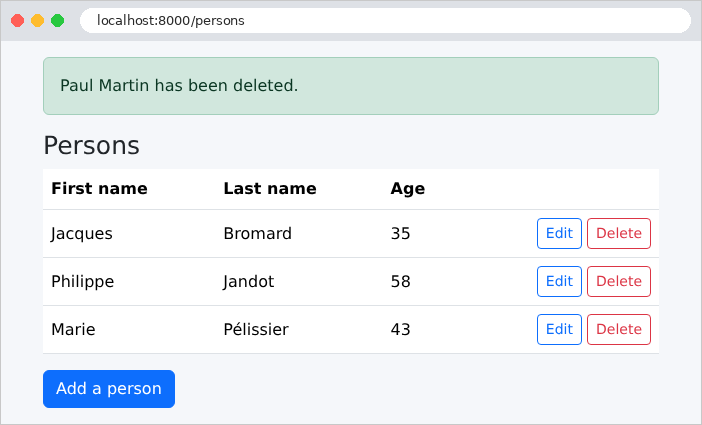
return redirect()->route('persons.list')->with('success', "$p->first_name $p->last_name has been deleted.");
}
}
|
- 第 14 行:业务层,控制器唯一知道的层;
- 第 35–45 行:添加流程,分三步:表单验证(输入错误),在调用动作之前由表单请求完成;调用业务层(业务规则);然后是 PRG 模式,附带成功的闪现消息。[BusinessException] 会返回表单:[back()] 重定向到上一页(表单页面),[withInput()] 为 [old] 保留输入(示例 19),而 [with('error', ...)] 传回错误消息,模板会将其显示在页面底部。这正是 [Laravel] 对无效表单所做的处理:输入错误和业务逻辑错误以相同的方式处理;
- 第 47–56 行:编辑表单,预先填入检索到的人员信息。如果该人员不存在,用户会被重定向到列表,并显示一条弹出式错误消息;
- 第 58–66 行:更新,与添加操作的模式相同;
- 第 68–77 行:删除。没有需要重新显示的表单:任何错误同样通过弹出消息传达,[error]。
Web 层既不包含 SQL,也不包含任何业务规则:它把请求转换为对业务层的调用,并把结果转换为页面。路由表:
| <?php
// routes/web.php:示例 28 的路由
use App\Http\Controllers\PersonsController;
use Illuminate\Support\Facades\Route;
Route::controller(PersonsController::class)->name('persons.')->group(function () {
Route::get('/', 'home');
Route::get('persons', 'list')->name('list');
Route::get('persons/add', 'addForm')->name('addForm');
Route::post('persons/add', 'add')->name('add');
Route::get('persons/{id}/edit', 'editForm')->whereNumber('id')->name('editForm');
Route::put('persons/{id}', 'edit')->whereNumber('id')->name('edit');
Route::delete('persons/{id}', 'delete')->whereNumber('id')->name('delete');
});
|
- 第 7 行:在一个组内,[name] 为路由名称提供前缀 :名为 [list] 的路由实际上称为 [persons.list];
- 第 13–14 行:修改是一个 PUT 请求,删除是一个 DELETE 请求,由 POST 表单模拟(示例 21)。
视图:
| <!doctype html>
<html lang="en">
<head>
<meta charset="utf-8">
<title>Persons</title>
<link rel="stylesheet" href="{{ route('bootstrap', 'css/bootstrap.min.css') }}">
<link rel="stylesheet" href="{{ asset('css/styles.css') }}">
</head>
<body>
<div class="container py-3" style="max-width: 40rem">
{{-- the success message ([success] flash message): at the top --}}
@session('success')
<div class="alert alert-success" role="status">{{ $value }}</div>
@endsession
<main>
@yield('content')
</main>
{{-- the error ([error] flash message): at the bottom --}}
@session('error')
<div class="error-area" role="alert">{{ $value }}</div>
@endsession
</div>
@include('fragments.confirmation')
<script src="{{ asset('js/app.js') }}"></script>
</body>
</html>
|
- 第 12–14 行:成功消息,位于页面顶部(示例 20);
- 第 19–21 行:错误消息,位于页面底部。
| @extends('layout')
@section('content')
<h1 class="h3">Persons</h1>
<table class="table align-middle">
<thead><tr><th>First name</th><th>Last name</th><th>Age</th><th></th></tr></thead>
<tbody>
@foreach ($persons as $p)
<tr>
<td>{{ $p->first_name }}</td>
<td>{{ $p->last_name }}</td>
<td>{{ $p->age }}</td>
<td class="text-end">
<a class="btn btn-sm btn-outline-primary" href="{{ route('persons.editForm', $p->id) }}">Edit</a>
<form method="post" class="d-inline" action="{{ route('persons.delete', $p->id) }}"
data-confirmation="Delete {{ $p->first_name }} {{ $p->last_name }}?">
@csrf
@method('DELETE')
<button class="btn btn-sm btn-outline-danger" type="submit">Delete</button>
</form>
</td>
</tr>
@endforeach
</tbody>
</table>
<a class="btn btn-primary" href="{{ route('persons.addForm') }}">Add a person</a>
@endsection
|
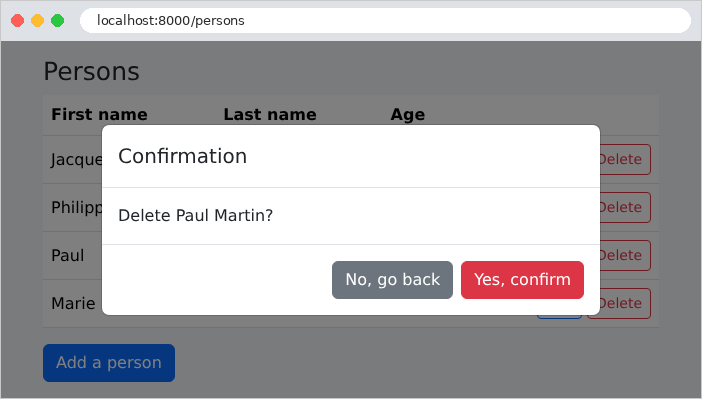
列表包含示例 21 中的链接和按钮,以及它的确认窗口(文件 [fragments/confirmation.blade.php] 和 [public/js/app.js] 与示例 21 中的相同)。
| @extends('layout')
@section('content')
<h1 class="h3">{{ $title }}</h1>
<form method="post" action="{{ $action }}" novalidate>
@csrf
{{-- an edit: the PUT method, and the version of the record read --}}
@if ($person)
@method('PUT')
<input type="hidden" name="version" value="{{ old('version', $person->version) }}">
@endif
<x-field name="first_name" label="First name" :value="$person?->first_name" required maxlength="30" />
<x-field name="last_name" label="Last name" :value="$person?->last_name" required maxlength="30" />
<x-field name="age" label="Age" type="number" :value="$person?->age" required min="0" max="150" />
<button class="btn btn-primary" type="submit">Save</button>
<a class="btn btn-link" href="{{ route('persons.list') }}">Cancel</a>
</form>
@endsection
|
- 第 8–11 行:同时用于添加和修改记录的视图:对于修改([$person] 不是 [null]),使用 PUT 方法,以及携带所读取记录版本的隐藏字段。[old('version', $person->version)]:先前输入的版本(返回表单之后),或记录中的版本;
- 第 12–14 行:示例 19 中的组件,它同时接收字段的初始值([$person?->first_name]:添加时为 [null] )。
| {{-- an input field, with its label and its FIRST error message (see
example 19); [value]: the initial value of the field, displayed if the form
has not been sent yet --}}
@props(['name', 'label', 'type' => 'text', 'value' => null])
<div class="mb-2">
<label class="form-label" for="{{ $name }}">{{ $label }}</label>
<input {{ $attributes->class(['form-control', 'is-invalid' => $errors->has($name)]) }}
type="{{ $type }}" id="{{ $name }}" name="{{ $name }}"
@if ($type !== 'password') value="{{ old($name, $value) }}" @endif>
{{-- @error: the block is displayed only if the field has an error, whose
first message is in the $message variable --}}
@error($name)
<div class="invalid-feedback">{{ $message }}</div>
@enderror
</div>
|
- 第 4 行:该组件有一个额外的参数 [value];
- 第 9 行:[old] 接受一个默认值,在表单尚未提交时使用:即字段的初始值。
9.1.7. 执行
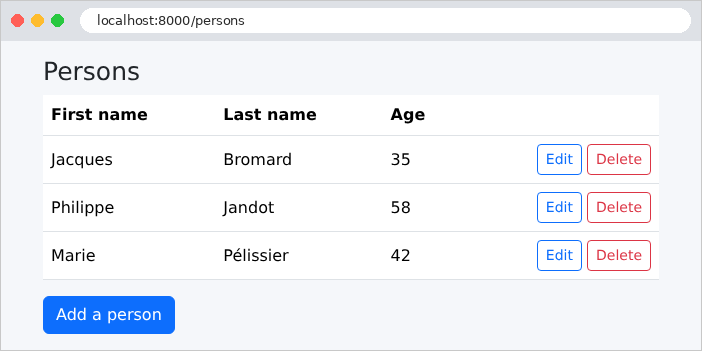
人员列表:
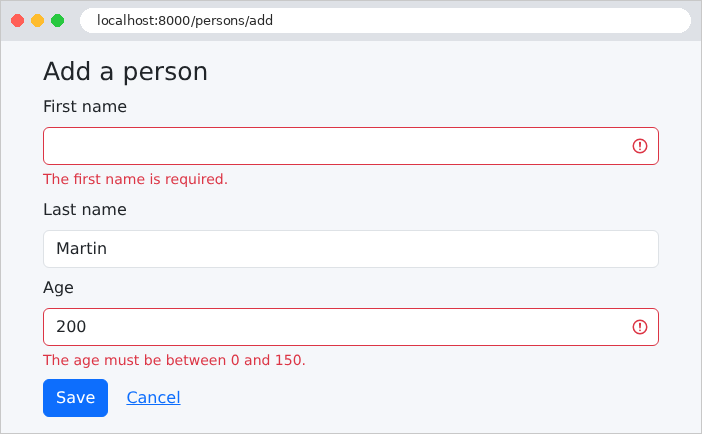
填写不正确的添加表单:输入错误由 Web 层检测到。
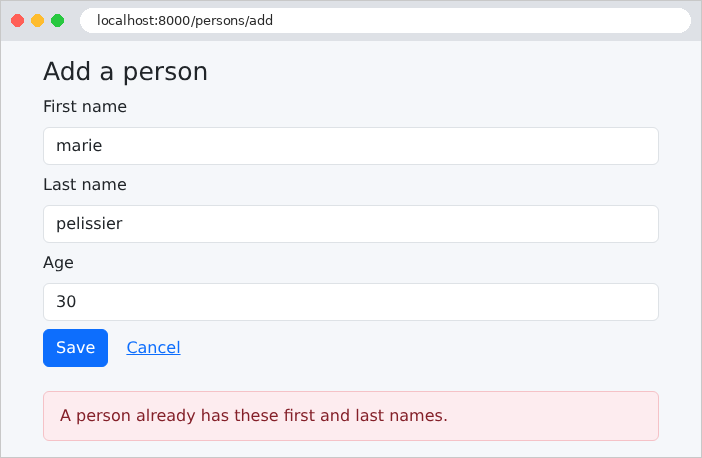
同名者:输入本身是正确的,但业务层拒绝了这次添加。由于比较是由数据库执行的,它既忽略大小写,也忽略重音:[marie pelissier] 与 [Marie Pélissier] 同名。
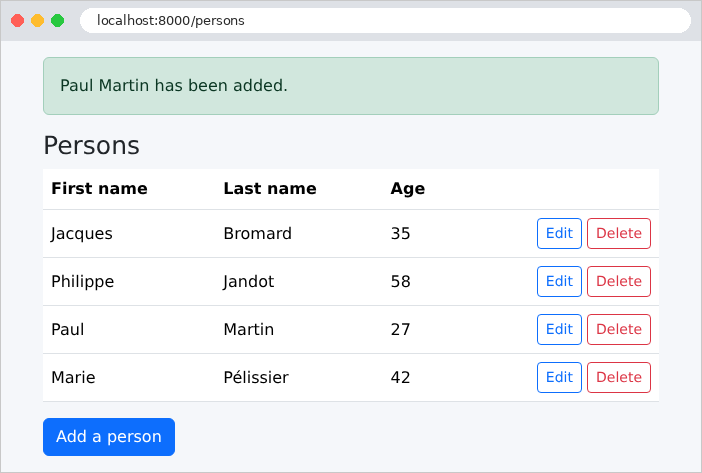
添加成功:
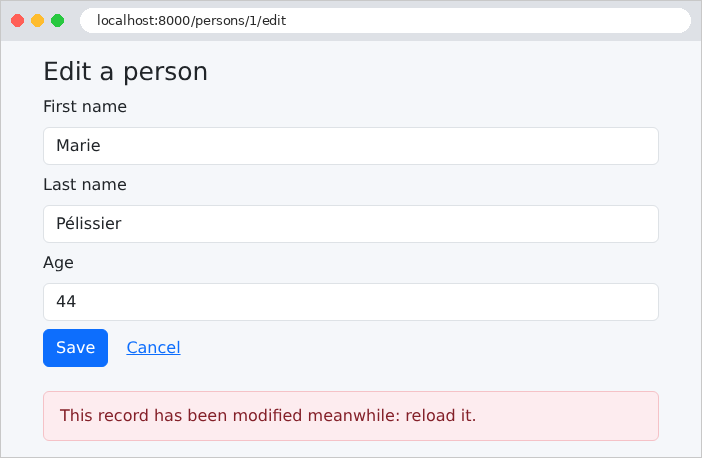
为了测试规则 2,我们在两个标签页中打开同一条记录。在第一个标签页中,修改年龄并保存。在仍然显示旧版本的第二个标签页中,也修改该记录:
删除及其确认:
9.1.8. SQL 命令
让我们使用环境变量 [DB_LOG=true] 重新启动应用程序(在 [Linux] 和 [macOS] 下:[DB_LOG=true php artisan serve];对于 [Windows]:在 [$env:DB_LOG="true"] 之前加上 [php artisan serve];或者修改文件 [.env]),然后在控制台中观察一次修改所对应的 SQL 命令。显示 1 号人员的修改表单:
| select * from `persons` where `persons`.`id` = ? limit 1 [1]
|
使用主键进行读取,其值作为参数传递([?]),不使用事务:单独的一次读取不需要事务。以新的年龄保存记录:
| BEGIN
select * from `persons` where `persons`.`id` = ? limit 1 [1]
select * from `persons` where `first_name` = ? and `last_name` = ? and `id` <> ? limit 1 ["Marie","Pélissier",1]
update `persons` set `first_name` = ?, `last_name` = ?, `age` = ?, `version` = version + 1 where `id` = ? and `version` = ? ["Marie","Pélissier",44,1,1]
select * from `persons` where `persons`.`id` = ? limit 1 [1]
COMMIT
|
在单个事务中,我们可以看到:对主记录的读取、对同名者的查找、[UPDATE],以及重新读取。[UPDATE] 使版本递增([version + 1],借助 [DB::raw] 原样写入),并设定乐观锁条件([and version = ?],使用所读取的版本,这里是 1)。[Laravel] 用重音符(反引号)把表名和列名括起来([persons]),这是这些名称在 [MySQL] 中的写法。现在让我们第二次提交同一个表单,仍然使用版本 1:
| BEGIN
select * from `persons` where `persons`.`id` = ? limit 1 [1]
ROLLBACK
|
所读取的版本(2)与表单中的版本(1)不同:业务层抛出了 [BusinessException],它回滚了事务([ROLLBACK]),页面显示“This record has been modified meanwhile: reload it.”同样,添加同名者的过程在查找同名者之后就停止了,没有执行 [INSERT]。