3. 动作模型
动作需要浏览器发送的信息:URL 的参数([?name=martin&age=42])、表单字段、JSON 请求正文,有时还有 HTTP 请求头。原版课程把所有这些信息统称为 动作模型。本章说明 [Laravel] 动作如何获取这些信息、将其转换为正确的类型并加以验证。这个过程称为数据绑定。
[Laravel] 通过 [Request] 对象(示例 05)以 字符串的形式提供对请求信息的访问,并附带少量转换方法。为了检查数据,它有一套完整的 验证 系统:用 规则 (“必填”“0 到 150 之间的整数”等)描述预期的数据,由 [Laravel] 检查数据是否符合这些规则。我们先手工读取参数(示例 07),然后用这些规则来验证它们(示例 08 至 12)。在下一章中,同一套系统将用来验证 HTML 表单。
关于术语的说明:在下一章中,“模型”一词主要指动作传递给其 视图的数据。本章中所说的动作模型,则是它 接收的内容。[Laravel] 还用 *model* 一词指代表示数据库表的类(第 9 章):这是第三种含义。
示例 07 至 12 的运行方式与上一章的示例相同:在示例目录中打开终端,执行 [php artisan serve];[Ctrl-C] 停止服务器。它们的 [bootstrap/app.php] 文件都很相似:它们添加了示例 03 中的 [ReadableJson] 中间件,从而得到可读的 JSON。只有在它们引入新内容时,我们才会加以说明。
3.1. 示例 07:URL 的参数
URL 的 参数 是 [?] 之后的部分:[?name=martin&age=42]。这一部分称为查询字符串(*query string*)。每个参数是一个 [name=value] 对;各对之间用 [&] 分隔。控制器 [ParametersController]:
| <?php
// app/Http/Controllers/ParametersController.php:URL 的参数(「查询字符串」)
namespace App\Http\Controllers;
use Illuminate\Http\Request;
class ParametersController
{
// /parameters/action01?name=martin:query 返回参数的值,
// 如果缺失则返回 null
public function action01(Request $request): string
{
$name = $request->query('name');
return "name = [$name], of type ".get_debug_type($name);
}
// /parameters/action02?age=42:integer 将值(字符串)转换为
// 整数;参数缺失或不是整数时,结果为 0
public function action02(Request $request): string
{
$age = $request->integer('age');
return "age = [$age], of type ".get_debug_type($age);
}
// /parameters/action03?age=42:必需的参数;缺失,
// 或值不是整数时,操作会以 400 响应(Bad Request)中止
public function action03(Request $request): string
{
$text = $request->query('age');
if ($text === null) {
// abort 会抛出一个异常,Laravel 将其转换为错误响应
abort(400, 'the [age] parameter is required');
}
// 转换由我们自己负责:filter_var 返回整数,或 false
$age = filter_var($text, FILTER_VALIDATE_INT);
if ($age === false) {
abort(400, "[$text] is not an integer");
}
return "age = [$age], of type ".get_debug_type($age);
}
// /parameters/action04?page=2:参数缺失时使用默认值
public function action04(Request $request): string
{
$page = $request->integer('page', 1);
return "page = [$page]";
}
// /parameters/action05?q=laravel:URL 参数的名称不一定
// 与 PHP 变量的名称相同
public function action05(Request $request): string
{
$search = $request->query('q');
return "search = [$search]";
}
// /parameters/action06?name=martin&age=42:以数组形式一次获取所有参数
public function action06(Request $request): array
{
return $request->query();
}
}
|
- 第 14 行:请求的 [query] 方法返回 URL 中某个参数的值(已经解码),如果缺失则返回 [null] ;它从不引发错误;
- 第 15 行:动作显示该值及其类型:[get_debug_type] 函数返回值的类型名称。从 URL 获取的值 始终 是字符串([string])。运算符 [.] 把插值后的字符串与类型连接起来;
- 第 22 行:方法 [integer] 读取参数并 把它转换 为整数。如果转换失败([abc])或参数缺失,它返回 0:动作无法把这些情形与真正输入的年龄 0 区分开来,输入错误就这样被忽略了。类似地,还有 [float]、[boolean] ([1]、[true]、[on]、[yes] 都是有效值)、[string]、[date] (示例 12)、[enum];
- 第 30–40 行:一个 必填参数,以及能区分两种可能错误的手工转换。[abort(400, message)] 以 400 响应(*Bad Request*,请求无效)终止动作,并附带消息(见示例 03)。[filter_var] 函数,属于 [PHP],配合过滤器 [FILTER_VALIDATE_INT],返回字符串中包含的整数,如果字符串不是整数则返回 [false] ;
- 第 46 行:[integer] 的第二个参数是 默认值,在参数缺失时使用。列表中的页码通常就是这种情况;
- 第 54 行:没有必要让 [PHP] 变量与 URL 的参数同名。搜索引擎通常使用简短的参数,例如 [q] (*query*);
- 第 61 行:不带参数时,[query] 以关联数组的形式返回 URL 的 所有 参数,动作返回该数组:[Laravel] 把它转换为 JSON(见示例 03)。
路由表使用循环声明这六条路由:
| <?php
// routes/web.php:示例 07 的路由
use App\Http\Controllers\ParametersController;
use Illuminate\Support\Facades\Route;
Route::prefix('parameters')->controller(ParametersController::class)->group(function () {
foreach (['action01', 'action02', 'action03', 'action04', 'action05', 'action06'] as $action) {
Route::get($action, $action);
}
});
|
- 第 8 行:循环 [foreach] 遍历一个数组:每次迭代时,变量 [$action] 取下一个元素的值。每条路由以其动作命名:[Route::get('action01', 'action01')]……路由表只是又一个 [PHP] 文件:你可以在其中编写任何代码。
我们用 [curl] 测试每个动作。先是参数存在,然后是参数缺失:
| curl -i "http://localhost:8000/parameters/action01?name=martin"
curl http://localhost:8000/parameters/action01
|
| HTTP/1.1 200 OK
Content-Type: text/html; charset=utf-8
name = [martin], of type string
name = [], of type null
|
在终端中,"URL" 两侧的引号是必需的:没有它们,shell 会解释 [&] (在 [Linux] 下它会在后台运行命令)和 [?]。值 [null] 插入字符串时会变成空字符串。包含空格或特殊字符的值必须在 URL 中 编码 :空格变成 [%20],而 [&] 变成 [%26] (否则它会把两个参数分隔开)。浏览器会自动处理这些;使用 [curl] 时,则必须自己写出来。[PHP] 会在动作读取之前对该值解码:
| curl "http://localhost:8000/parameters/action01?name=jean%20dupont%20%26%20sons"
|
| name = [jean dupont & sons], of type string
|
使用 [integer] 进行转换——成功、失败,然后是没有参数的情形:
| curl "http://localhost:8000/parameters/action02?age=42"
curl "http://localhost:8000/parameters/action02?age=abc"
curl http://localhost:8000/parameters/action02
|
| age = [42], of type int
age = [0], of type int
age = [0], of type int
|
动作 03 的必填参数先是缺失,然后是无效。我们请求 JSON 响应(头 [Accept],见示例 03),其中包含来自 [abort] 的消息:
| curl -i -H "Accept: application/json" http://localhost:8000/parameters/action03
curl -H "Accept: application/json" "http://localhost:8000/parameters/action03?age=abc"
|
| HTTP/1.1 400 Bad Request
Content-Type: application/json
{
"message": "the [age] parameter is required",
"exception": "Symfony\\Component\\HttpKernel\\Exception\\HttpException",
...
}
{
"message": "[abc] is not an integer",
"exception": "Symfony\\Component\\HttpKernel\\Exception\\HttpException",
...
}
|
在浏览器的调试模式下,400 响应会显示 [Laravel] 的错误页面,并带有消息:
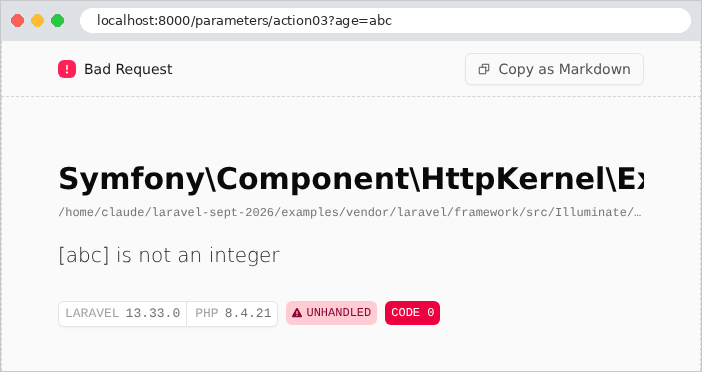
默认值和重命名的参数:
| curl http://localhost:8000/parameters/action04
curl "http://localhost:8000/parameters/action04?page=3"
curl "http://localhost:8000/parameters/action05?q=laravel"
|
| page = [1]
page = [3]
search = [laravel]
|
最后是一次性传入所有参数。参数 [name] 出现了两次:
| curl "http://localhost:8000/parameters/action06?name=martin&age=42&name=durand"
|
| {
"name": "durand",
"age": "42"
}
|
参数 [name] 只保留其 最后 一个值:这是 [PHP] 的规则,我们将在示例 10 中再次看到。年龄仍然是字符串(["42"],在 JSON 中用引号括起):因为没有请求转换。在浏览器中(这里是 [Chromium]),JSON 完全按照服务器的格式显示;如果它尚未缩进,“Pretty-print”复选框会对其进行缩进。地址栏还显示了 URL 中带重音字符的编码([é] 变成 [%C3%A9],其两个字节采用 [UTF-8]):
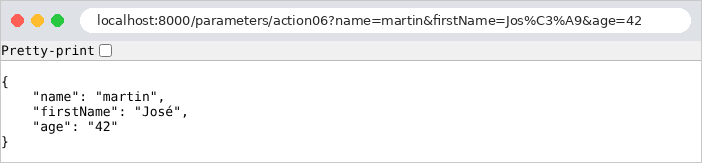
第一个示例说明了手工方式的局限:对每个参数,都必须编写读取、转换以及处理缺失值和错误的代码。如果有十个参数,动作的代码就会被这些检查淹没。更好的做法是 描述 期望的内容,让框架去验证。这正是下一个示例的目的。
3.2. 示例 08:由类描述的动作模型
[Laravel] 使用 验证规则来验证请求数据。规则有名称([required]、[integer]、[email] 等),有时还有参数([min:2]、[between:0,150]);一个字段的规则写成用 [|] 分隔的字符串,或者写成数组。[Laravel] 提供了大约一百条规则。描述动作模型 的自然位置是 表单请求 (*form request*):它是继承自 [FormRequest] 的类,其 [rules] 方法返回每个参数的规则。
3.2.1. 模型:app/Http/Requests/PersonRequest.php
| <?php
// app/Http/Requests/PersonRequest.php:操作的模型,一个
// 描述预期参数及其约束的类
namespace App\Http\Requests;
use App\Models\Person;
use Illuminate\Foundation\Http\FormRequest;
class PersonRequest extends FormRequest
{
// 验证规则,逐个参数定义
public function rules(): array
{
return [
// 必填,长度为 2 到 20 个字符的字符串
'name' => 'required|string|min:2|max:20',
// 必填,0 到 150 之间的整数
'age' => 'required|integer|between:0,150',
// 只能是这三个值之一
'title' => 'required|in:Mr,Mme,Melle',
// 可选(nullable);如果存在,则必须是有效的电子邮件地址
'email' => 'nullable|email',
];
}
// 经过验证的参数,以带类型的对象形式提供
public function person(): Person
{
$values = $this->validated();
return new Person($values['name'], (int) $values['age'], $values['title'],
$values['email'] ?? null);
}
}
|
- 第 10 行:该类([extends])继承自 [FormRequest],而后者本身继承自 [Request]:[PersonRequest] 对象 就是 一个请求,具有示例 07 中的所有方法,外加验证规则;
- 第 13–24 行:规则,以关联数组的形式给出:每个参数对应一个包含其规则的字符串;
- 第 17 行:[required]:该参数是 必填的 (缺失或为空时被拒绝);[string]:字符串;[min:2] 和 [max:20]:对于字符串,其长度必须在 2 到 20 个字符之间;
- 第 19 行:[integer]:值必须是整数(["42"] 有效,["abc"] 无效);[between:0,150]:对于数字,其 值 必须在 0 到 150 之间。规则 [min]、[max] 和 [between] 会因此适应值的类型:对字符串是长度,对数字是数值,对数组是元素个数(例如 10);
- 第 21 行:[in:Mr,Mme,Melle]:所列三个值之一,且只能是这些值;
- 第 23 行:[nullable]:该参数是 可选的 (缺失或为空时被接受);[email]:如果存在,必须是有效的电子邮件地址;
- 第 28–33 行:添加到类中的一个方法:它以 [Person] 对象(见下文)的形式返回验证后的数据。[$this->validated()] 只返回已经验证过的数据:没有规则的参数不包含在内。[Laravel] 所做的验证会检查 数据,但不会 转换 它:验证后的年龄仍然是字符串 ["42"]。是转换运算符 [(int)] 把它转换为整数。运算符 [??] 在左操作数存在且不是 [null] 时返回它;否则返回右操作数:[$values['email'] ?? null] 在数组中没有该地址时,结果为 [null] 。
这个模型 描述 预期的数据;其中不包含任何验证指令。这被称为 声明式风格。类 [Person] 是一个不可变类,仿照示例 03 中的那个:
| <?php
// app/Models/Person.php:一个人
namespace App\Models;
readonly class Person
{
public function __construct(
public string $name,
public int $age,
public string $title,
public ?string $email,
) {
}
}
|
- 第 12 行:[?string]:字符串,或 [null]。
3.2.2. 动作:app/Http/Controllers/PersonsController.php
| <?php
// app/Http/Controllers/PersonsController.php:模型为 FormRequest 类的操作
namespace App\Http\Controllers;
use App\Http\Requests\PersonRequest;
class PersonsController
{
// /persons/action01?name=martin&age=42&title=Mr
// PersonRequest 类型的参数在调用操作之前由 Laravel 验证:
// 无效的模型会抛出 ValidationException,由 bootstrap/app.php 转换为
// 400 响应,并且操作永远不会被调用
public function action01(PersonRequest $request): array
{
$person = $request->person();
return [
'received' => $request->validated(),
'person' => $person,
'ageType' => get_debug_type($person->age),
];
}
}
|
- 第 14 行:该动作要求一个类型为 [PersonRequest] 的参数,而示例 07 要求的是 [Request]。[Laravel] 随后根据当前请求创建一个 [PersonRequest] 对象,并在调用动作之前对其 验证:它逐个参数检查每条规则。如果所有规则都满足,就调用动作。否则,[Laravel] 抛出一个 [ValidationException] 异常,其中包含 所有 错误的列表(而不只是第一个),并且动作永远不会被调用:因此它不必处理无效数据;
- 第 16–20 行:动作先按原样返回验证后的数据,然后以 [Person] 对象的形式返回,并附上年龄的类型,以说明两者的区别。
谁来处理 [ValidationException] 异常?默认情况下是 [Laravel] 自己,其响应取决于客户端。对于期望 JSON 的请求(头 [Accept: application/json]),响应是 422(*Unprocessable Content*),以 JSON 描述错误。对于源自 HTML 表单的普通请求,响应是 重定向 到上一页,并为将重新显示的表单保留这些错误(我们将在下一章讲解)。在这里,我们希望在所有情况下都返回 JSON 格式、状态码为 400 的错误响应。这就是 [bootstrap/app.php] 的作用。
3.2.3. 错误处理:bootstrap/app.php
| <?php
// bootstrap/app.php:示例 08 的应用程序
use App\Http\Middleware\ReadableJson;
use Illuminate\Foundation\Application;
use Illuminate\Foundation\Configuration\Exceptions;
use Illuminate\Foundation\Configuration\Middleware;
use Illuminate\Validation\ValidationException;
(require __DIR__.'/../../vendor/autoload.php')->addPsr4('App\\', __DIR__.'/../app/');
return Application::configure(basePath: dirname(__DIR__))
->withRouting(web: __DIR__.'/../routes/web.php')
->withMiddleware(function (Middleware $middleware): void {
$middleware->append(ReadableJson::class);
})
->withExceptions(function (Exceptions $exceptions): void {
// 无效的模型:ValidationException 异常会在整个应用程序范围内
// 变成一个详细列出错误的 400 响应
$exceptions->render(function (ValidationException $e) {
$errors = [];
// errors():字段 -> 其错误消息列表
foreach ($e->errors() as $field => $messages) {
foreach ($messages as $message) {
$errors[] = ['field' => $field, 'message' => $message];
}
}
return response()->json(['status' => 400, 'errors' => $errors], 400);
});
})
->create();
|
- 第 17–30 行:现在向 [withExceptions] 方法传入一个函数,它接收描述应用异常处理的 [$exceptions] 对象;
- 第 20–29 行:[render] 方法注册一个 异常处理器:当动作抛出与其参数类型相同的异常(此处是 [Laravel] 或其派生类)时,由 [ValidationException] 调用的函数,其返回值就是发送的响应。[Laravel] 根据函数的 参数类型 来识别正在处理的异常的类型。在 [bootstrap/app.php] 中声明的处理器适用于应用中的 所有 动作:每个验证模型的动作都能从中受益,而无需编写任何错误处理代码;
- 第 23–27 行:[$e->errors()] 以关联数组返回错误:对每个有错误的字段,返回其错误消息列表。[foreach ($array as $key => $value)] 循环同时遍历键和值。[$errors[] = ...] 在 [$errors] 数组末尾添加一个元素;
- 第 28 行:状态码为 400 的 JSON 响应。
3.2.4. 执行
一个有效的模型:
| curl -i "http://localhost:8000/persons/action01?name=martin&age=42&title=Mr"
|
| HTTP/1.1 200 OK
Content-Type: application/json
{
"received": {
"name": "martin",
"age": "42",
"title": "Mr"
},
"person": {
"name": "martin",
"age": 42,
"title": "Mr",
"email": null
},
"ageType": "int"
}
|
验证后的数据只包含收到的参数;年龄是字符串格式;[Person] 对象则以整数形式包含年龄(在 JSON 中没有引号),缺失的地址为 [null]。名称两侧带有空格([%20])且地址存在的情形:
| curl "http://localhost:8000/persons/action01?name=%20%20martin%20&age=42&title=Mme&email=martin@example.com"
|
| {
"received": {
"name": "martin",
"age": "42",
"title": "Mme",
"email": "martin@example.com"
},
"person": {
"name": "martin",
"age": 42,
"title": "Mme",
"email": "martin@example.com"
},
"ageType": "int"
}
|
名称两侧的空格在我们没有要求的情况下消失了:[Laravel] 对所有请求执行的两个中间件组件,会在动作读取收到的参数之前对其进行转换。[TrimStrings] 去除每个字符串两侧的空格;[ConvertEmptyStringsToNull] 把每个空字符串替换为 [null]。现在没有任何参数:三个必填字段都缺失了。
| curl -i http://localhost:8000/persons/action01
|
| HTTP/1.1 400 Bad Request
Content-Type: application/json
{
"status": 400,
"errors": [
{
"field": "name",
"message": "The name field is required."
},
{
"field": "age",
"message": "The age field is required."
},
{
"field": "title",
"message": "The title field is required."
}
]
}
|
同时有四个无效字段:
| curl "http://localhost:8000/persons/action01?name=m&age=abc&title=Mlle&email=xx"
|
| {
"status": 400,
"errors": [
{
"field": "name",
"message": "The name field must be at least 2 characters."
},
{
"field": "age",
"message": "The age field must be an integer."
},
{
"field": "title",
"message": "The selected title is invalid."
},
{
"field": "email",
"message": "The email field must be a valid email address."
}
]
}
|
所有错误一次性报告,使用户可以一次改正全部问题。对于年龄字段 [abc],只有规则 [integer] 被标记:规则 [between] 不适用于不是数字的值。消息是英文的,这是 [Laravel] 的默认语言。下一个示例将用自定义消息替换它们。
3.3. 示例 09:由动作执行的验证
在示例 08 中,无效的模型会终止动作,并由应用的处理器做出响应。这对 API 很方便,因为它的客户端是期望标准化错误响应的程序。然而,网页往往更希望 重新显示 带有错误消息的表单:在这种情况下,必须由动作决定如何处理无效的模型。类 [PersonRequest] 和 [Person] 就是示例 08 中的那些。
| 09-action-validation/
├── app/
│ ├── Http/
│ │ ├── Controllers/
│ │ │ └── PersonsController.php
│ │ └── Requests/
│ │ └── PersonRequest.php
│ └── Models/
│ └── Person.php
├── lang/
│ └── en/
│ └── validation.php
└── ...
|
3.3.1. 自定义消息:lang/en/validation.php
[Laravel] 的错误消息不是硬编码的:每条消息由一个 键标识,由语言文件把文本与每个键关联起来。英文文件随框架一同提供;应用可以在 [lang] 文件夹中提供自己的文件(每种语言一个子文件夹),以替换这些消息或添加其他语言。 应用的语言由 [.env] 文件设置:
验证消息文件名为 [validation.php]:
| <?php
// lang/en/validation.php:验证错误的消息,英文。
// 每条消息由其规则的名称(required、min...)指定。标记
// :attribute、:min、:max... 会被字段名称和
// 规则的参数替换
return [
'required' => 'the field is required',
'string' => 'a string is expected',
'integer' => 'an integer is expected',
'email' => 'invalid email address',
'in' => 'unknown value',
// 有些规则针对每种值类型有一条消息:对字符串,min
// 作用于其长度;对数字,作用于其值;对数组,作用于
// 其元素个数
'min' => [
'string' => ':min character(s) at least',
'numeric' => 'the value must be greater than or equal to :min',
'array' => ':min item(s) at least',
],
'max' => [
'string' => ':max character(s) at most',
'numeric' => 'the value must be less than or equal to :max',
],
'between' => [
'numeric' => 'the value must be between :min and :max',
],
'array' => 'a list is expected',
];
|
- 第 6 行:语言文件是一个返回关联数组的 [PHP] 文件:对每个键,给出相应的文本;
- 第 7–11 行:验证消息的键是失败规则的 名称。这种技术(根据错误名称而不是其英文文本进行翻译)正是案例研究中使用的方法:那里的文本由 键标识,再翻译成用户的语言;
- 第 15–19 行:适应值类型的规则(例如 08)为每种类型都有一条消息:[string]、[numeric]、[array]。标识符 [:min] 和 [:max] 会被替换为规则的参数([min:2] 表示“至少 2 个字符”)。标记 [:attribute](我们没有使用)会被替换为字段名称。
该文件中缺失的键会保留框架的英文消息:[Laravel] 会把应用的文件与它自己的文件合并。对于其他语言,缺失的键会回退到回退语言, [APP_FALLBACK_LOCALE],默认为英语。社区发布了 [Laravel] 消息的多语言完整翻译([laravel-lang] 包)。
3.3.2. 动作:app/Http/Controllers/PersonsController.php
| <?php
// app/Http/Controllers/PersonsController.php:由操作决定如何处理无效的模型
namespace App\Http\Controllers;
use App\Http\Requests\PersonRequest;
use Illuminate\Http\Request;
use Illuminate\Support\Facades\Validator;
class PersonsController
{
public function action01(Request $request): string
{
// 一个验证器:待验证的数据,以及规则(即示例 08 的
// PersonRequest 类的规则)
$validator = Validator::make($request->query(), (new PersonRequest())->rules());
if ($validator->fails()) {
// 错误,逐个字段:errors()->messages() 给出错误列表
$items = '';
foreach ($validator->errors()->messages() as $field => $messages) {
$items .= "<li>$field: $messages[0]</li>";
}
return "<p>The form contains errors:</p><ul>$items</ul>";
}
// 经过验证的数据
$person = $validator->validated();
// e():输入的名称会被插入到 HTML 中;其中的字符 < > & " '
// 会被替换为 < >……(否则,输入可能会注入 HTML)
return "<p>Welcome {$person['title']} ".e($person['name'])
." ({$person['age']} years old)</p>";
}
}
|
- 第 16 行:[Validator] 门面创建一个 验证器——对数据应用规则的对象。数据由 URL 的参数组成;规则是示例 08 中 [PersonRequest] 类的规则。表单请求与其他类一样是普通的类:你可以通过 [new] 创建它的实例来读取其规则;
- 第 17 行:[fails()] 执行验证,如果至少有一条规则失败,则返回 [true] 。接下来怎么做由动作自己决定:不会抛出异常;
- 第 19–23 行:逐字段列出错误。[errors()] 返回一个 [MessageBag] 对象(消息的“包”),其 [messages()] 方法返回“字段 → 消息列表”的关联数组。对每个字段,第一条消息 [$messages[0]] 被放入 [<li>] 标签中。[.=] 运算符把一个字符串追加到另一个字符串的末尾;
- 第 26 行:验证后的数据,以关联数组的形式;
- 第 29–30 行:如果成功,则输出一条欢迎消息。在用引号括起的字符串中,[{$person['title']}] 插入一个数组元素(花括号界定表达式)。名称要经过 [e] 函数处理,该函数属于 [Laravel] (*escape* 的缩写),它把在 HTML 中有特殊含义的字符([<]、[>]、[&]、["]、['])替换为相应的 实体([<]、[>] 等):这样它们会按原样显示,而不会被解释。如果没有这项预防措施,用户可能输入包含 HTML 甚至 [JavaScript] 的“名称”,它会在任何查看该页面的人的浏览器中执行。这是 Web 上最常见的安全漏洞:脚本注入 (*XSS*,即 *cross-site scripting*)。称谓和年龄不需要这种保护:它们的值已经由规则验证过(三个允许值之一、整数)。在下一章中,[Blade] 视图引擎会对插入页面的任何值 自动 进行这种转义。
一个有效的输入,随后是一个包含四个错误的输入:

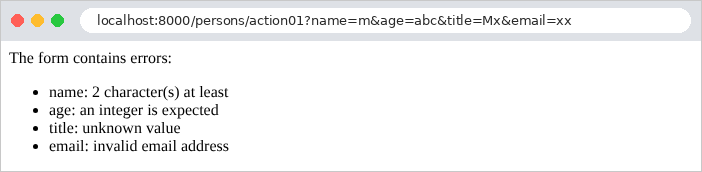
第二个请求的原始响应,以及名称包含 HTML 时的响应:
| curl "http://localhost:8000/persons/action01?name=m&age=abc&title=Mx&email=xx"
curl "http://localhost:8000/persons/action01?name=%3Cb%3Emartin%3C/b%3E&age=42&title=Mr"
|
| <p>The form contains errors:</p><ul><li>name: 2 character(s) at least</li><li>age: an integer is expected</li><li>title: unknown value</li><li>email: invalid email address</li></ul>
<p>Welcome Mr <b>martin</b> (42 years old)</p>
|
名称 [<b>martin</b>] (在 URL 中编码为 [%3Cb%3E...] )按原样显示,没有被加粗:它的标签已被中和。请注意,这次响应的状态码是 200:是动作选择返回包含错误的正常页面。
3.4. 示例 10:多值参数
同一个参数可以在 URL 中出现多次:[?color=red&color=green]。这就是浏览器为一组同名复选框或多选列表发送的内容(见下一章)。[PHP] 以自己的方式处理这种情况。控制器 [ArraysController]:
| <?php
// app/Http/Controllers/ArraysController.php:在 URL 中多次出现的参数
namespace App\Http\Controllers;
use Illuminate\Http\Request;
use Illuminate\Support\Facades\Validator;
class ArraysController
{
// /arrays/action01?color=red&color=green:对 PHP 来说,第二个参数
// 会替换第一个:只保留最后一个值
public function action01(Request $request): array
{
return ['color' => $request->query('color'), 'raw' => $request->server('QUERY_STRING')];
}
// /arrays/action02?color[]=red&color[]=green:方括号要求
// PHP 将所有值存储在一个数组中
public function action02(Request $request): array
{
// array:以数组形式提供的参数(缺失时为空)
$colors = $request->array('color');
return ['color' => $colors, 'count' => count($colors)];
}
// /arrays/action03?color[]=red:一个数组,逐项验证
public function action03(Request $request): array
{
$colors = $request->array('color');
$validator = Validator::make(['color' => $colors], [
// 至少包含一项的列表
'color' => 'array|min:1',
// 每一项(*):"red"、"green" 或 "blue"
'color.*' => 'in:red,green,blue',
]);
$errors = [];
foreach ($validator->errors()->messages() as $field => $messages) {
$errors[] = "$field: $messages[0]";
}
return ['colors' => $colors, 'valid' => ! $errors, 'errors' => $errors];
}
}
|
- 第 15 行:对 [PHP] 来说,URL 的参数构成一个关联数组,其中每个键只有一个值:重复的参数会 替换 前一个,只保留最后一个值。为了对比,动作还返回浏览器发送的原始参数字符串:[$request->server(...)] 读取 Web 服务器传给 [PHP] 的变量,包括 [QUERY_STRING];
- 第 20–24 行:要获取所有值,参数 名称 必须以方括号结尾:[?color[]=red&color[]=green]。[PHP] 随后把这些值存储在数组中,作为参数 [color] 的值。请求的 [array] 方法以数组形式返回参数:不存在时为空数组;如果只有一个不带方括号的值,则数组只有一个元素;
- 第 31–36 行:对数组按规则进行验证。[array|min:1]:至少有一个元素的数组(规则 [min] 适用于数组的元素个数;见示例 08)。键 [color.*] 标识数组的 每个元素:每个元素必须是三种颜色之一;
- 第 41 行:运算符 [!] (非)对空数组求值为 [true] ,因为空数组在条件中被视为“假”。
文件 [lang/en/validation.php] 就是示例 09 中的那个。结果如下:
| curl "http://localhost:8000/arrays/action01?color=red&color=green"
curl -g "http://localhost:8000/arrays/action02?color[]=red&color[]=green"
curl http://localhost:8000/arrays/action02
|
| {
"color": "green",
"raw": "color=red&color=green"
}
{
"color": [
"red",
"green"
],
"count": 2
}
{
"color": [],
"count": 0
}
|
[-g] 选项(属于 [curl] )可防止它自行解释 URL 中的方括号。而浏览器会对它们编码([color%5B%5D=red]),[PHP] 同样能理解。至于 HTML,只需把一组复选框命名为 [color[]]:示例 18 就会这样做。这条规则是 [PHP] 特有的:其他语言的框架([Flask]、[Spring MVC]、[ASP.NET Core])会保留重复参数的所有值,无需方括号。
验证:成功,然后因未知颜色而失败,然后因空列表而失败:
| curl -g "http://localhost:8000/arrays/action03?color[]=red&color[]=blue"
curl -g "http://localhost:8000/arrays/action03?color[]=red&color[]=yellow"
curl http://localhost:8000/arrays/action03
|
| {
"colors": [
"red",
"blue"
],
"valid": true,
"errors": []
}
{
"colors": [
"red",
"yellow"
],
"valid": false,
"errors": [
"color.1: unknown value"
]
}
{
"colors": [],
"valid": false,
"errors": [
"color: 1 item(s) at least"
]
}
|
关于未知颜色的错误指向 [color.1]:即有问题的元素在数组中的字段和 索引(第二个元素,索引从 0 开始)。
3.5. 示例 11:POST 请求的参数
前面的示例使用的是 GET 请求,其参数包含在 URL 中。POST 请求则把数据放在其 正文中,主要有两种形式:
- HTML 表单的字段:正文的语法与查询字符串相同([name=martin&age=42]),其类型(头 [Content-Type])为 [application/x-www-form-urlencoded];
- 由程序发送的 JSON 文档(页面上的 [JavaScript] 、API 的客户端等):类型为 [application/json]。
控制器 [PostController]:
| <?php
// app/Http/Controllers/PostController.php:POST 请求的参数
namespace App\Http\Controllers;
use App\Http\Requests\PersonRequest;
use Illuminate\Http\Request;
use Illuminate\Support\Facades\Validator;
use JsonException;
class PostController
{
// HTML 表单的字段(application/x-www-form-urlencoded 正文):
// post() 以数组形式返回请求正文的参数
public function action01(Request $request): array
{
return [
'receivedType' => $request->header('Content-Type'),
'fields' => $request->post(),
];
}
// JSON 正文:json() 对其反序列化;isJson() 测试所声明的类型
public function action02(Request $request): array
{
if (! $request->isJson()) {
abort(415, 'the body of the request must be JSON');
}
// json_decode,配合 JSON_THROW_ON_ERROR:格式错误的 JSON 会抛出异常
try {
$body = json_decode($request->getContent(), true, flags: JSON_THROW_ON_ERROR);
} catch (JsonException $e) {
abort(400, 'Malformed JSON: '.$e->getMessage());
}
return ['receivedType' => $request->header('Content-Type'), 'body' => $body,
'name' => $request->input('name')];
}
// 表单中的单个字段
public function action03(Request $request): string
{
$name = $request->input('name');
return "name = [$name]";
}
// 表单的字段,按 PersonRequest 类的规则验证
public function action04(Request $request): array
{
$validator = Validator::make($request->post(), (new PersonRequest())->rules());
$errors = [];
foreach ($validator->errors()->messages() as $field => $messages) {
$errors[] = "$field: $messages[0]";
}
sort($errors);
return ['person' => $errors ? null : $validator->validated(),
'valid' => ! $errors, 'errors' => $errors];
}
}
|
- 第 18 行:请求的 [Content-Type] 头;
- 第 19 行:方法 [post] 以关联数组返回请求 正文 中的参数;[post('name')] 则返回单个参数。表单字段遵循示例 10 中的规则:重复的字段,其名称必须以 [[]] 结尾;
- 第 26–27 行:[isJson()] 检查 [Content-Type] 头声明的类型。未声明为 JSON 的正文会被 415 错误(*Unsupported Media Type*)拒绝;
- 第 30–34 行:[getContent()] 返回请求的原始正文,即一个字符串;[json_decode] 函数(来自 [PHP])将其 反序列化:JSON 文本变成 [PHP] 值(第二个参数 [true] 要求把 JSON 对象转换为关联数组)。使用 [JSON_THROW_ON_ERROR] 选项(一个命名参数)时,格式错误的文本会引发 [JsonException] 异常,由 [try] / [catch] 拦截并返回 400 错误。请求的 [json()] 方法也会做同样的事,但对于格式错误的 JSON,它只会返回空结果;
- 第 36 行:[input] 方法在所有位置查找参数:先在请求正文中(无论是表单还是 JSON),然后在 URL 中。这是最常用的方法,因为它不依赖于请求的格式;
- 第 42 行:表单字段,由 [input] 读取;
- 第 49–56 行:示例 08 中 [PersonRequest] 类的规则,这次应用于表单字段。代码与 URL 参数的情形相同:只有数据源不同。[sort] 对消息排序,以确保响应一致。三元运算符 [condition ? a : b] 在条件为真时返回 [a] ,否则返回 [b] 。
路由表声明了 POST 路由,而 [bootstrap/app.php] 为这些 URL 禁用了 CSRF 防护,如示例 02 所示:
| <?php
// routes/web.php:示例 11 的路由
use App\Http\Controllers\PostController;
use Illuminate\Support\Facades\Route;
Route::prefix('post')->controller(PostController::class)->group(function () {
Route::post('action01', 'action01');
Route::post('action02', 'action02');
Route::post('action03', 'action03');
Route::post('action04', 'action04');
});
|
| <?php
// bootstrap/app.php:示例 11 的应用程序
use App\Http\Middleware\ReadableJson;
use Illuminate\Foundation\Application;
use Illuminate\Foundation\Configuration\Middleware;
(require __DIR__.'/../../vendor/autoload.php')->addPsr4('App\\', __DIR__.'/../app/');
return Application::configure(basePath: dirname(__DIR__))
->withRouting(web: __DIR__.'/../routes/web.php')
->withMiddleware(function (Middleware $middleware): void {
$middleware->append(ReadableJson::class);
// curl 发送的 POST 请求无法通过防 CSRF
// 保护(示例 21)
$middleware->preventRequestForgery(except: ['post/*']);
})
->withExceptions()
->create();
|
使用 [curl] 时,[-d] (*data*)选项发送正文;此时请求变成 POST 请求,类型为 [application/x-www-form-urlencoded],除非选项 [-H] (*header*)指定了其他类型。选项 [-X POST] 显式设置方法(在这里是可选的)。表单的各个字段,包括一个重复的字段:
| curl -i -g -X POST -d "name=martin&age=42&hobby[]=tennis&hobby[]=piano" http://localhost:8000/post/action01
|
| HTTP/1.1 200 OK
Content-Type: application/json
{
"receivedType": "application/x-www-form-urlencoded",
"fields": {
"name": "martin",
"age": "42",
"hobby": [
"tennis",
"piano"
]
}
}
|
一个 JSON 正文,包含一个整数和一个数组:
| curl -i -H "Content-Type: application/json" -d "{\"name\": \"martin\", \"age\": 42, \"children\": [\"léa\", \"tom\"]}" http://localhost:8000/post/action02
|
| HTTP/1.1 200 OK
Content-Type: application/json
{
"receivedType": "application/json",
"body": {
"name": "martin",
"age": 42,
"children": [
"léa",
"tom"
]
},
"name": "martin"
}
|
JSON 中的引号前面加有 [\] ,以防止命令字符串提前结束;在 [Linux] 和 [macOS] 中,也可以用单引号括起 JSON:[-d '{"name": "martin"}']。与表单字段不同,JSON 携带数据类型:年龄已经是整数。先是一个不是 JSON 的正文,然后是格式错误的 JSON(请求 JSON 响应以便查看消息):
| curl -i -H "Accept: application/json" -d "name=martin" http://localhost:8000/post/action02
curl -i -H "Accept: application/json" -H "Content-Type: application/json" -d "{\"name\": " http://localhost:8000/post/action02
|
| HTTP/1.1 415 Unsupported Media Type
Content-Type: application/json
{
"message": "the body of the request must be JSON",
...
}
HTTP/1.1 400 Bad Request
Content-Type: application/json
{
"message": "Malformed JSON: Syntax error",
...
}
|
单个字段,然后用 GET 请求同一个 URL:
| curl -d "name=jean%20dupont" http://localhost:8000/post/action03
curl -i "http://localhost:8000/post/action03?name=martin"
|
| name = [jean dupont]
HTTP/1.1 405 Method Not Allowed
allow: POST
Content-Type: text/html; charset=utf-8
...
|
URL 存在,但不支持 GET 方法:[Laravel] 返回 405(*Method Not Allowed*),其头 [allow] 列出了可接受的方法。最后是应用于表单字段的规则,先是满足,然后是不满足:
| curl -d "name=martin&age=42&title=Mr" http://localhost:8000/post/action04
curl -d "name=m&age=200" http://localhost:8000/post/action04
|
| {
"person": {
"name": "martin",
"age": "42",
"title": "Mr"
},
"valid": true,
"errors": []
}
{
"person": null,
"valid": false,
"errors": [
"age: the value must be between 0 and 150",
"name: 2 character(s) at least",
"title: the field is required"
]
}
|
3.6. 示例 12:自定义绑定与验证
标准类型和规则并不总是够用。本示例展示了三种扩展绑定与验证的方式:
- 一个 绑定到路由参数的类型:URL 路径中的法语格式日期 [23-09-2026];
- 为动作提供参数的中间件 ,该参数不是来自 URL,而是来自 HTTP 头;
- 一条 自定义验证规则 (不含空格),以及日期 转换 [dd/mm/yyyy]。
| 12-custom-binding/
├── app/
│ ├── Http/
│ │ ├── Controllers/
│ │ │ └── ExamplesController.php
│ │ └── Requests/
│ │ └── SearchRequest.php
│ └── Binding/
│ ├── DetectLanguage.php
│ ├── DayFr.php
│ └── NoSpace.php
├── lang/
│ └── en/
│ └── validation.php
└── ...
|
3.6.1. 绑定到路由参数的类型:app/Binding/DayFr.php
我们在示例 02 中看到,路由参数会作为字符串传给动作;如果动作的参数类型为 [int],则作为整数传入。[Laravel] 还可以在动作需要某个参数、且其类实现了 [UrlRoutable] 接口时,把路由参数转换为 对象 。这就是 路由绑定 (*route model binding*),[Laravel] 主要把它用于数据库实体(URL 中的标识符变成对应的对象;见第 9 章)。我们在这里把它用于日期。
| <?php
// app/Binding/DayFr.php:URL 路径中的法式日期 "23-09-2026"
namespace App\Binding;
use Carbon\CarbonImmutable;
use Illuminate\Contracts\Routing\UrlRoutable;
// 一个知道如何绑定到路由参数(resolveRouteBinding),并且
// 能再变回 URL 片段(getRouteKey)的类型:UrlRoutable 接口
class DayFr implements UrlRoutable
{
public function __construct(public ?CarbonImmutable $date = null)
{
}
// 路径文本 -> DayFr 对象;null:该值不合适(404 错误)
public function resolveRouteBinding($value, $field = null): ?static
{
// "!d-m-Y" 中的 ! 将时间重置为零(否则会是当前时间)
$date = CarbonImmutable::createFromFormat('!d-m-Y', $value);
// createFromFormat 接受 "31-02-2026"(并将其变成 3 月 3 日):我们检查
// 重新格式化后的日期是否与收到的文本一致
if ($date === null || $date->format('d-m-Y') !== $value) {
return null;
}
return new static($date);
}
// DayFr 对象 -> 路径文本(由 route 函数使用)
public function getRouteKey(): string
{
return $this->date->format('d-m-Y');
}
public function getRouteKeyName(): string
{
return 'day';
}
public function resolveChildRouteBinding($childType, $value, $field): ?static
{
return null;
}
}
|
- 第 11 行:该类实现 [UrlRoutable] 接口,该接口的四个方法如下;
- 第 13 行:日期,一个 [CarbonImmutable] 对象。[Carbon] 是 [Laravel] 的日期库;它用数百个方法扩展了 [DateTime] 类,该类来自 [PHP] 。[Immutable] 版本在每次修改时都会创建一个新对象([$date->addDay()] 返回一个新日期),而不是修改现有对象。构造器有默认值 [null]:[Laravel] 必须能够创建一个空的 [DayFr] 对象,然后再调用它的 [resolveRouteBinding] 方法;
- 第 18–27 行:[resolveRouteBinding] 把路径文本转换为对象:它返回关联的对象,如果值无效则返回 [null] 。[CarbonImmutable::createFromFormat] 按格式解析字符串:[d] 表示日,[m] 表示月,[Y] 表示四位数的年;开头的 [!] 把时间设为零点。[createFromFormat] 比较宽容:它接受 [31-02-2026] 并将其解释为 3 月 3 日。第 24 行的验证会拒绝这种情况:重新格式化之后的日期必须与收到的文本完全一致。[new static(...)] 创建当前类的对象。当方法返回 [null] 时,[Laravel] 会以 404 错误响应:URL 不指向任何东西;
- 第 31–34 行:反向操作,由 [route] 函数用来根据 [DayFr] 对象构造 URL。[format] 用于格式化日期;
- 第 36–41 行:接口的最后两个方法用于数据库实体,在这里不起作用。
3.6.2. 由中间件提供的参数:app/Binding/DetectLanguage.php
[Laravel] 动作接收的参数是路由参数和容器能够提供的对象(请求、服务)。要为它提供根据请求计算出的额外信息,可以让 中间件 (示例 03)来计算,并在动作之前把它放入请求中:
| <?php
// app/Binding/DetectLanguage.php:为操作计算一项信息的中间件
namespace App\Binding;
use Closure;
use Illuminate\Http\Request;
use Symfony\Component\HttpFoundation\Response;
class DetectLanguage
{
public function handle(Request $request, Closure $next): Response
{
// 头部 "Accept-Language: fr-FR,fr;q=0.9,en;q=0.8" -> "fr":浏览器在所提供的语言中
// 偏好的语言(默认为第一个)
$language = $request->getPreferredLanguage(['fr', 'en']);
// 请求的属性:应用程序存放在其中的信息,
// 供之后处理该请求的函数使用
$request->attributes->set('language', $language);
return $next($request);
}
}
|
- 第 16 行:请求头 [Accept-Language] 按偏好顺序指定用户的语言:[fr-FR,fr;q=0.9,en;q=0.8] (系数 [q] 以 0 到 1 的刻度衡量偏好程度)。[getPreferredLanguage] 从应用提供的语言中选出用户偏好的那一种;如果没有提供头,则选择列表中的第一种;
- 第 19 行:请求具有 属性——应用在其中存放信息的数组,供之后处理该请求的函数使用。语言以名称 [language] 存放在其中;
- 第 20 行:请求继续传递给动作。
动作将通过放在其参数前面的 [PHP] 属性 来接收这一信息(见控制器)。
3.6.3. “自定义”规则与转换:NoSpace.php 和 SearchRequest.php
| <?php
// app/Binding/NoSpace.php:一个「自制」的验证规则
namespace App\Binding;
use Closure;
use Illuminate\Contracts\Validation\ValidationRule;
class NoSpace implements ValidationRule
{
// 该值不合适:我们以错误消息调用 $fail
public function validate(string $attribute, mixed $value, Closure $fail): void
{
if (str_contains((string) $value, ' ')) {
$fail('the field must not contain a space');
}
}
}
|
- 第 9 行:“自定义”验证规则是一个实现 [ValidationRule] 接口的类;
- 第 12–17 行:它的 [validate] 方法接收字段名称、字段值和一个函数 [$fail],如果值无效,就用错误消息调用该函数。[str_contains] 检查字符串中是否存在某段文本;[(string)] 把值转换为字符串。类型 [mixed] 表示任意类型。
该规则由搜索表单请求使用:
| <?php
// app/Http/Requests/SearchRequest.php:搜索的模型
namespace App\Http\Requests;
use App\Binding\NoSpace;
use Carbon\CarbonImmutable;
use Illuminate\Contracts\Validation\Validator;
use Illuminate\Foundation\Http\FormRequest;
use Illuminate\Http\Exceptions\HttpResponseException;
class SearchRequest extends FormRequest
{
public function rules(): array
{
return [
// 一个「自制」规则:规则列表中的一个对象
'keyword' => ['nullable', new NoSpace()],
// date_format:dd/mm/yyyy 格式的日期
'since' => 'nullable|date_format:d/m/Y',
];
}
// 转换为日期对象的日期(缺失时为 null)
public function since(): ?CarbonImmutable
{
return $this->date('since', 'd/m/Y')?->toImmutable();
}
// 验证失败时的响应,仅针对此类:
// 第一个错误的消息,以纯文本形式,状态码为 400
protected function failedValidation(Validator $validator): never
{
throw new HttpResponseException(response($validator->errors()->first(), 400,
['Content-Type' => 'text/plain; charset=utf-8']));
}
}
|
- 第 18 行:字段的规则可以用 数组 而不是字符串来指定;对于“自定义”规则(它是一个对象)来说,这是必须的;
- 第 20 行:规则 [date_format:d/m/Y] 验证值是否为指定格式的日期,并且该日期是否存在;
- 第 25–28 行:日期 转换:请求的 [date] 方法读取参数,并按指定格式把它转换为日期([Carbon]);如果参数缺失,则返回 [null] 。运算符 [?->] 在对象不是 [null] 时调用方法,否则返回 [null] ;[toImmutable] 把日期转换为 [CarbonImmutable];
- 第 32–36 行:方法 [failedValidation] 继承自 [FormRequest],在验证失败时调用;[FormRequest] 中的该方法会抛出异常 [ValidationException](示例 08)。我们仅为这个类 重新定义 它:它抛出 [HttpResponseException],这是一个携带预定义响应的异常,[Laravel] 会原样发送该响应。响应以纯文本形式包含第一条错误消息([first()]),状态码为 400。这是让某个动作处理验证错误的方式与应用其余部分不同的一种办法。
规则 [date_format] 的消息由文件 [lang/en/validation.php] 自定义:
| <?php
// lang/en/validation.php:验证错误的消息,英文
return [
// :input:接收到的值
'date_format' => '[:input] is not a valid dd/mm/yyyy date',
];
|
- 第 5 行:标记 [:input] 会被替换为收到的值。
3.6.4. 控制器:app/Http/Controllers/ExamplesController.php
| <?php
// app/Http/Controllers/ExamplesController.php:自定义绑定与验证
namespace App\Http\Controllers;
use App\Http\Requests\SearchRequest;
use App\Binding\DayFr;
use Illuminate\Container\Attributes\RequestAttribute;
class ExamplesController
{
// /examples/schedule/23-09-2026:路由参数 {day} 被绑定到一个 DayFr
// 对象,因为操作要求该类型的参数
public function schedule(DayFr $day): string
{
// route() 使用 DayFr 的 getRouteKey 方法:对象 -> "23-09-2026"
return "schedule for the day [{$day->date->toDateString()}], of type "
.get_debug_type($day->date).', URL: '.route('schedule', $day, false);
}
// /examples/hello:一个不来自 URL 而来自头部的参数,
// 由 DetectLanguage 中间件计算并存放在请求的属性中
public function hello(#[RequestAttribute('language')] string $language): string
{
return $language === 'en' ? 'Hello!' : 'Bonjour !';
}
// /examples/search?keyword=laravel&since=01/09/2026
public function search(SearchRequest $request): string
{
$keyword = $request->validated('keyword');
$since = $request->since()?->toDateString();
return "search for [$keyword] since [$since]";
}
}
|
- 第 14–18 行:参数 [$day] 的类型是 [DayFr]:[Laravel] 使用 [{day}] 对象的方法 [DayFr] 把路由参数绑定到 [resolveRouteBinding]。[toDateString()] 以国际格式([2026-09-23])写出日期。函数 [route] 根据该对象,使用其方法 构造指向同一个动作的 URL [getRouteKey];它的第三个参数 [false] 请求 相对 URL(不含协议和主机);
- 第 23–25 行:参数 [$language] 前面有一个 属性 [PHP],写作 [#[...]]:附加在代码上的信息,[PHP] 会忽略它,但各个库会读取它(相当于 [Java] 中的注解)。[RequestAttribute('language')] 属性指示容器为该参数提供请求的 [language] 属性,该属性由 [DetectLanguage] 中间件计算;
- 第 29–33 行:动作接收已经过验证的表单请求(示例 08)。[validated('keyword')] 返回单个已验证的字段;[since()] 返回转换后的日期。
路由表:
| <?php
// routes/web.php:示例 12 的路由
use App\Http\Controllers\ExamplesController;
use App\Binding\DetectLanguage;
use Illuminate\Support\Facades\Route;
Route::prefix('examples')->controller(ExamplesController::class)->group(function () {
// where:只有 dd-mm-yyyy 形式的路径片段才会提交给 DayFr
Route::get('schedule/{day}', 'schedule')->name('schedule')
->where('day', '[0-9]{2}-[0-9]{2}-[0-9]{4}');
// middleware:DetectLanguage 在操作之前运行
Route::get('hello', 'hello')->middleware(DetectLanguage::class);
Route::get('search', 'search');
});
|
- 第 10–11 行:日历路由有名称(用于函数 [route]),其参数受正则表达式约束:[[0-9]] 表示单个数字,[{2}] 表示 前面模式的重复:两位数字、连字符、两位数字、连字符、四位数字。格式不同的路径段与该路由不匹配(404),甚至不会去咨询 [DayFr];
- 第 13 行:[middleware] 方法把中间件与路由关联起来:它只对该路由运行,并且在动作之前运行。我们将在整个课程中看到这一做法:要求用户已登录的中间件(见身份验证一章)就是以同样的方式与路由关联的。
3.6.5. 执行
与路由参数关联的类型:
| curl "http://localhost:8000/examples/schedule/23-09-2026"
curl -i "http://localhost:8000/examples/schedule/31-02-2026"
|
| schedule for the day [2026-09-23], of type Carbon\CarbonImmutable, URL: /examples/schedule/23-09-2026
HTTP/1.1 404 Not Found
Content-Type: text/html; charset=utf-8
...
|
日期以国际格式显示,但由 [route] 构造的 URL 已恢复为法语格式。2 月 31 日不存在:404。国际格式的日期 [2026-09-23] 与正则表达式描述的模式不匹配:同样是 404。
中间件。[-H] 选项(属于 [curl] )设置头 [Accept-Language]:
| curl -H "Accept-Language: en-US,en;q=0.9,fr;q=0.8" http://localhost:8000/examples/hello
curl -H "Accept-Language: fr-FR,fr;q=0.9" http://localhost:8000/examples/hello
curl http://localhost:8000/examples/hello
|
| Hello!
Bonjour !
Bonjour !
|
没有 [Accept-Language] 头时([curl] 不会发送这个头),使用的是列表中的第一种语言。国际化一章将回到这个问题,由用户来选择语言。
“自定义”规则与日期转换:
| curl "http://localhost:8000/examples/search?keyword=laravel&since=01/09/2026"
curl "http://localhost:8000/examples/search"
curl -i "http://localhost:8000/examples/search?keyword=laravel%20mvc"
curl "http://localhost:8000/examples/search?since=2026-09-01"
curl "http://localhost:8000/examples/search?since=31/02/2026"
|
| search for [laravel] since [2026-09-01]
search for [] since []
HTTP/1.1 400 Bad Request
Content-Type: text/plain; charset=utf-8
the field must not contain a space
[2026-09-01] is not a valid dd/mm/yyyy date
[31/02/2026] is not a valid dd/mm/yyyy date
|
3.6.6. 结论
我们来总结一下动作获取其模型可用的方法:
路由参数 | 动作的同名参数;通过其类型转换([int $id]),由 [whereNumber]、[where] 等约束;通过 [UrlRoutable] 绑定到对象 |
URL 的参数 | [$request->query(...)]、[integer]、[array]、[date] 等;重复的参数写作 [name[]] |
POST 表单中的字段 | [$request->post(...)],或者 [$request->input(...)],后者在所有位置查找 |
JSON 正文 | [$request->input(...)]、[$request->json()],或者 [json_decode($request->getContent())] |
头 | [$request->header(...)],以及解析头的方法,例如 [getPreferredLanguage] |
验证 | 规则的验证:[FormRequest] (动作之前验证)或 [Validator::make] (由动作验证);“自定义”规则([ValidationRule]) |
消息 | 文件 [lang/xx/validation.php] 和语言设置 [APP_LOCALE] |
通用错误 | [$exceptions->render(...)] 位于 [bootstrap/app.php] (整个应用),[failedValidation] (某个表单请求) |
计算得出的参数 | 一个把信息存放在 请求属性中的中间件组件,[#[RequestAttribute]] |
而 HTML 表单则需要的不只是验证:它们必须 被显示,带着用户的输入和任何错误重新显示,并且要防范伪造的请求。这是下一章的主题,届时视图已经介绍过了。