14. [TD]:[业务]层的Web暴露
关键词:多层架构、Spring、依赖注入、Web服务/JSON、客户端/服务器。
让我们回到 TD 应用程序的当前架构:
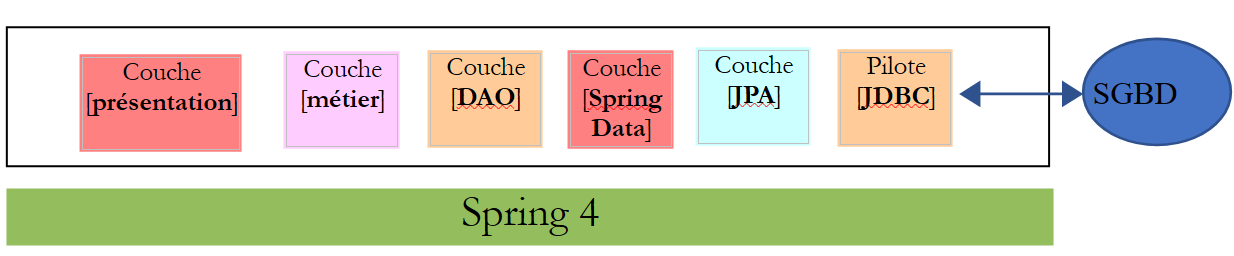 |
我们将把这一架构演进为以下形式:
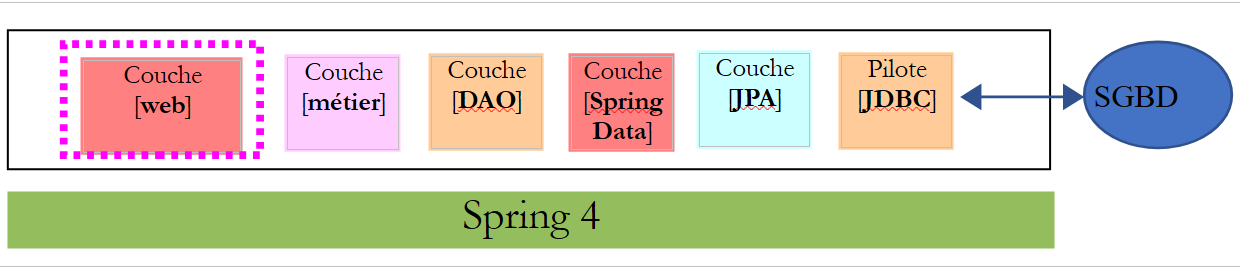 |
以便在 Web 上暴露业务层的 [IMetier] 接口。为此,我们将遵循第 13.5 节中描述的方法论。
14.1. 支持
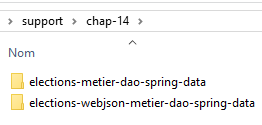 |
本章的项目位于 [support / chap-14] 文件夹中。
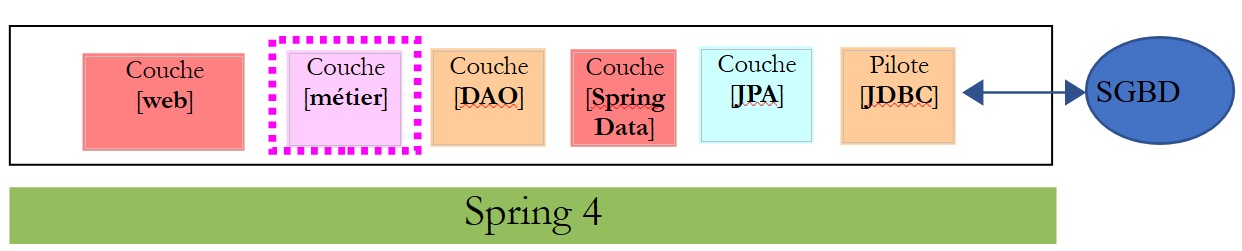
14.2. [业务]层的Eclipse项目
 |
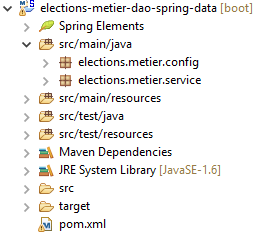 |
14.2.1. Maven 配置
[业务]层项目是一个由以下 [pom.xml] 文件配置的 Maven 项目:
<?xml version="1.0" encoding="UTF-8"?>
<project xmlns="http://maven.apache.org/POM/4.0.0"
    xsi:schemaLocation="http://maven.apache.org/POM/4.0.0 http://maven.apache.org/maven-v4_0_0.xsd"
    xmlns:xsi="http://www.w3.org/2001/XMLSchema-instance">
    <modelVersion>4.0.0</modelVersion>
    <groupId>istia.st.elections</groupId>
    <artifactId>elections-metier-dao-spring-data</artifactId>
    <version>0.1.0</version>

    <!-- dependencies -->
    <parent>
        <groupId>org.springframework.boot</groupId>
        <artifactId>spring-boot-starter-parent</artifactId>
        <version>1.2.7.RELEASE</version>
    </parent>
    <dependencies>
        <!-- layer [DAO] -->
        <dependency>
            <groupId>istia.st.elections</groupId>
            <artifactId>elections-dao-spring-data-01</artifactId>
            <version>0.0.1-SNAPSHOT</version>
        </dependency>
        <!-- Spring Boot -->
        <dependency>
            <groupId>org.springframework.boot</groupId>
            <artifactId>spring-boot</artifactId>
            <scope>test</scope>
        </dependency>
        <!-- Spring Boot Test -->
        <dependency>
            <groupId>org.springframework.boot</groupId>
            <artifactId>spring-boot-starter-test</artifactId>
            <scope>test</scope>
        </dependency>
    </dependencies>

    <properties>
        <!-- use UTF-8 for everything -->
        <project.build.sourceEncoding>UTF-8</project.build.sourceEncoding>
        <java.version>1.8</java.version>
    </properties>

    <build>
        <plugins>
            <plugin>
                <groupId>org.apache.maven.plugins</groupId>
                <artifactId>maven-surefire-plugin</artifactId>
                <version>2.18.1</version>
            </plugin>
        </plugins>
    </build>
</project>
- 第 18–22 行:对第 12 段中构建的 [DAO] 层的依赖;
- 第 23–34 行:测试所需的依赖项;
14.2.2. Spring 配置
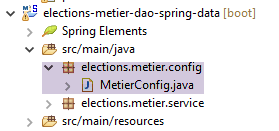 |
该[业务]层项目是一个Spring项目,由以下[MetierConfig]文件进行配置:
package elections.metier.config;

import org.springframework.context.annotation.ComponentScan;
import org.springframework.context.annotation.Import;

import elections.dao.config.DaoConfig;

@Import({ DaoConfig.class })
@ComponentScan({ "elections.metier.service" })
public class MetierConfig {
}
- 这里我们没有使用 [@Configuration] 注解,否则该类将成为 Spring 配置类。由于存在 [@Import] 和 [@ComponentScan] 注解,该类自动成为配置类;
- 第 8 行:我们从 [DAO] 层导入配置文件。这样,我们就能访问该文件中定义的所有 Bean;
- 第 9 行:其他 Spring Bean 位于 [elections.metier.service] 文件夹中;
14.2.3. [business] 层的实现
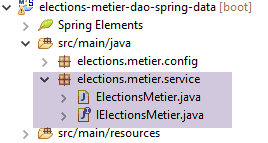 |
[业务]层的实现即第8.5节中定义的实现。
14.2.4. 测试[业务]层
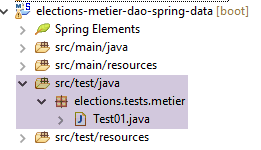 |
该测试类即第8.6节中所述的那个。
任务:实现 [business] 层项目并通过其单元测试。在本地 Maven 仓库中生成该层的归档文件(运行方式 / Maven / 安装)。
14.3. [Web] 层的 Eclipse 项目
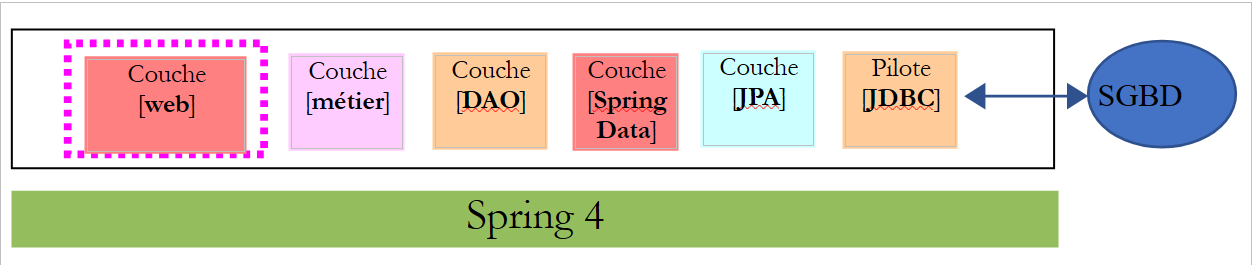 |
Web 层是一个 Spring MVC 层:
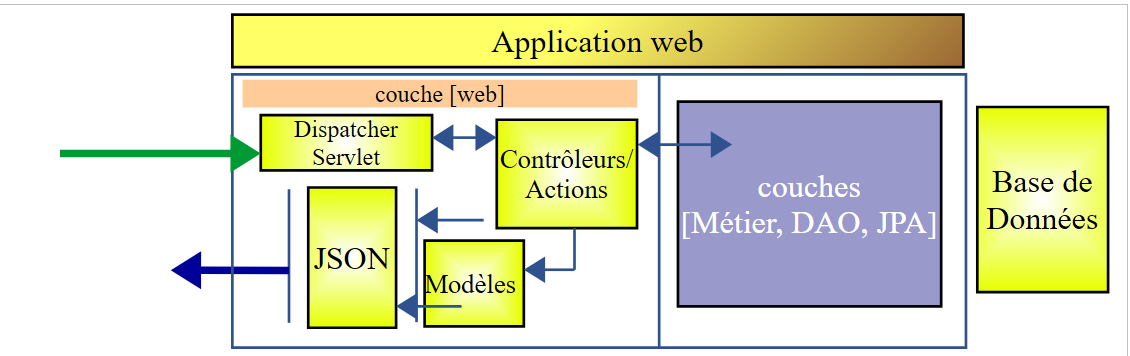 |
Eclipse 项目的结构如下:
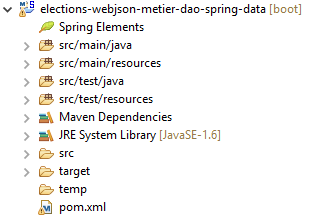 | 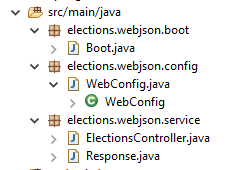 |
- [Boot.java] 是启动 Web 服务的类;
- [WebConfig.java] 是 Web 服务的配置类;
- [Response.java] 是 Web 服务各 URL 生成的响应;
- [ElectionsController] 是 Web 服务的实现类;
14.4. Maven 配置
该项目是一个由以下 [pom.xml] 文件配置的 Maven 项目:
<project xmlns="http://maven.apache.org/POM/4.0.0" xmlns:xsi="http://www.w3.org/2001/XMLSchema-instance"
    xsi:schemaLocation="http://maven.apache.org/POM/4.0.0 http://maven.apache.org/xsd/maven-4.0.0.xsd">
    <modelVersion>4.0.0</modelVersion>
    <groupId>istia.st.elections</groupId>
    <artifactId>elections-webjson-metier-dao-spring-data</artifactId>
    <version>0.0.1-SNAPSHOT</version>

    <name>elections-webjson-metier-dao-spring-data</name>
    <description>couche métier exposée comme un service web / jSON</description>

    <parent>
        <groupId>org.springframework.boot</groupId>
        <artifactId>spring-boot-starter-parent</artifactId>
        <version>1.2.7.RELEASE</version>
    </parent>

    <dependencies>
        <!-- business layer -->
        <dependency>
            <groupId>istia.st.elections</groupId>
            <artifactId>elections-metier-dao-spring-data</artifactId>
            <version>0.1.0</version>
        </dependency>
        <!-- layer MVC -->
        <dependency>
            <groupId>org.springframework.boot</groupId>
            <artifactId>spring-boot-starter-web</artifactId>
        </dependency>
    </dependencies>

    <properties>
        <project.build.sourceEncoding>UTF-8</project.build.sourceEncoding>
        <java.version>1.8</java.version>
    </properties>

    <build>
        <plugins>
            <plugin>
                <groupId>org.apache.maven.plugins</groupId>
                <artifactId>maven-surefire-plugin</artifactId>
                <version>2.18.1</version>
            </plugin>
        </plugins>
    </build>

</project>
- 第 19–23 行:对 [business] 层归档文件的依赖。这就是我们在第 14 段中创建的那个;
- 第 25–28 行:Spring MVC 应用程序的依赖项;
14.5. Spring 配置
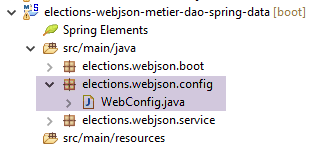 |
[WebConfig] 类用于配置 Web 服务:
package elections.webjson.config;

import org.springframework.beans.factory.annotation.Autowired;
import org.springframework.beans.factory.config.ConfigurableBeanFactory;
import org.springframework.boot.context.embedded.EmbeddedServletContainerFactory;
import org.springframework.boot.context.embedded.ServletRegistrationBean;
import org.springframework.boot.context.embedded.tomcat.TomcatEmbeddedServletContainerFactory;
import org.springframework.context.ApplicationContext;
import org.springframework.context.annotation.Bean;
import org.springframework.context.annotation.ComponentScan;
import org.springframework.context.annotation.Import;
import org.springframework.context.annotation.Scope;
import org.springframework.web.context.WebApplicationContext;
import org.springframework.web.servlet.DispatcherServlet;
import org.springframework.web.servlet.config.annotation.EnableWebMvc;

import com.fasterxml.jackson.databind.ObjectMapper;

import elections.metier.config.MetierConfig;

@EnableWebMvc
@Import({ MetierConfig.class })
@ComponentScan({ "elections.webjson.service" })
public class WebConfig {
    // -------------------------------- layer configuration [web]
    @Autowired
    private ApplicationContext context;

    @Bean
    public DispatcherServlet dispatcherServlet() {
        DispatcherServlet servlet = new DispatcherServlet((WebApplicationContext) context);
        return servlet;
    }

    @Bean
    public ServletRegistrationBean servletRegistrationBean(DispatcherServlet dispatcherServlet) {
        return new ServletRegistrationBean(dispatcherServlet, "/*");
    }

    @Bean
    public EmbeddedServletContainerFactory embeddedServletContainerFactory() {
        return new TomcatEmbeddedServletContainerFactory("", 8080);
    }
    // mapper jSON
    @Bean
    @Scope(value = ConfigurableBeanFactory.SCOPE_PROTOTYPE)
    public ObjectMapper jsonMapper() {
        return new ObjectMapper();
    }

}
- 该配置的含义已在第13.5.3.1节中进行过说明。这里仅说明新功能:
- 第 22 行:我们从 [business] 层导入配置文件,以便使用其中的所有 Bean;
- 第 23 行:我们指定其他 Bean 将位于 [elections.webjson.server.service] 文件夹中;
14.6. Web 服务启动类
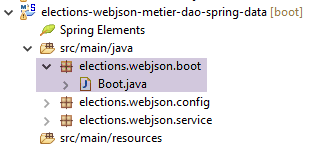 |
[Boot] 类通过以下方式启动 Web 服务:
package elections.webjson.boot;

import org.springframework.boot.SpringApplication;

import elections.webjson.config.WebConfig;

public class Boot {

    public static void main(String[] args) {
        SpringApplication.run(WebConfig.class, args);
    }
}
- 第 10 行:静态方法 [SpringApplication.run] 将使用配置文件 [WebConfig]。由于 [@EnableAutoConfiguration] 注解的存在,Spring Boot 将启动 Tomcat 服务器并在其上部署 Web 服务;
14.7. Web 服务 URL 的响应
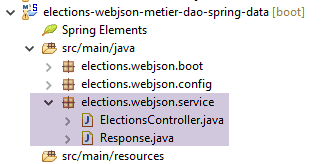 |
Web 服务 / JSON 的所有 URL 都会返回相同类型的响应:
package elections.webjson.service;

import java.util.List;

public class Response<T> {

    // ----------------- properties
    // operation status
    private int status;
    // any error messages
    private List<String> messages;
    // the body of the reply
    private T body;

    // manufacturers
    public Response() {

    }

    public Response(int status, List<String> messages, T body) {
        this.status = status;
        this.messages = messages;
        this.body = body;
    }

    // getters and setters
...
}
该类已在第13.5.5.3节中进行了介绍和讨论。
14.8. Web 服务 / JSON 的实现
|
/jSON Web 服务由以下 [ElectionsController] 类实现:
package elections.webjson.service;

import java.util.ArrayList;
import java.util.List;

import javax.servlet.http.HttpServletRequest;

import org.springframework.beans.factory.annotation.Autowired;
import org.springframework.stereotype.Controller;
import org.springframework.web.bind.annotation.RequestMapping;
import org.springframework.web.bind.annotation.RequestMethod;
import org.springframework.web.bind.annotation.ResponseBody;

import com.fasterxml.jackson.core.JsonProcessingException;
import com.fasterxml.jackson.databind.ObjectMapper;

import elections.dao.entities.ElectionsConfig;
import elections.dao.entities.ElectionsException;
import elections.metier.service.IElectionsMetier;

@Controller
public class ElectionsController {

    // spring dependencies
    @Autowired
    private ObjectMapper jsonMapper;

    @Autowired
    private IElectionsMetier metier;

    @RequestMapping(value = "/getElectionsConfig", method = RequestMethod.GET, produces = "application/json; charset=UTF-8")
    @ResponseBody
    public String getElectionsConfig() throws JsonProcessingException {
        // answer
        Response<ElectionsConfig> response;
        try {
            response = new Response<>(0, null,
                    new ElectionsConfig(metier.getNbSiegesAPourvoir(), metier.getSeuilElectoral()));
        } catch (ElectionsException e1) {
            response = new Response<>(e1.getCode(), e1.getErreurs(), null);
        } catch (RuntimeException e2) {
            response = new Response<>(1000, getErreursForException(e2), null);
        }
        // answer
        return jsonMapper.writeValueAsString(response);
    }

    @RequestMapping(value = "/getListesElectorales", method = RequestMethod.GET, produces = "application/json; charset=UTF-8")
    @ResponseBody
    public String getListesElectorales() throws JsonProcessingException {
        throw new UnsupportedOperationException("Not supported yet");
    }

    @RequestMapping(value = "/setListesElectorales", method = RequestMethod.POST, consumes = "application/json; charset=UTF-8", produces = "application/json; charset=UTF-8")
    @ResponseBody
    public String setListesElectorales(HttpServletRequest request) throws JsonProcessingException {
        throw new UnsupportedOperationException("Not supported yet");
    }

    @RequestMapping(value = "/calculerSieges", method = RequestMethod.POST, consumes = "application/json; charset=UTF-8", produces = "application/json; charset=UTF-8")
    @ResponseBody
    public String calculerSieges(HttpServletRequest request) throws JsonProcessingException {
        throw new UnsupportedOperationException("Not supported yet");
    }

    // private methods -----------------------------
    // list of RuntimeException error messages
    private List<String> getErreursForException(Exception e) {
        // retrieve the list of exception error messages
        Throwable cause = e;
        List<String> erreurs = new ArrayList<>();
        while (cause != null) {
            // the message is retrieved only if it is !=null and not blank
            String message = cause.getMessage();
            if (message != null) {
                message = message.trim();
                if (message.length() != 0) {
                    erreurs.add(message);
                }
            }
            // next cause
            cause = cause.getCause();
        }
        return erreurs;
    }

}
任务:按照第13.5.5节中的步骤,完成[ElectionsController]类的代码。
注:
- 此处没有 JSON 过滤器,因为 [CONF] 和 [LISTES] 表之间没有外键关系,这大大简化了 Web 服务代码;
- 请勿遗漏各种必要的 Spring 注解;
- URL 的命名将参照对应的方法;
- [setListeElectorales] 方法通过 [POST] 操作调用。提交的值是包含候选名单(类型为 ListeElectorale[])及其属性 [席位, 票数, 被淘汰] 的数组,这些数据必须保存到数据库中。如果未发生错误,该方法返回一个包含 [status=0] 字段的 [Response<Void>] 对象;否则返回其他值;
- 通过 [POST] 操作调用 [calculateSeats] 方法。提交的值是竞争名单数组(类型为 ElectoralList[]),包含其 [name, votes] 属性。该方法返回一个 [Response<ElectoralList[]>],其主体为已初始化 [seats, eliminated] 字段的选举名单;
14.9. 测试
启动 Web 服务后,请使用 [Advanced Rest Client] 工具执行以下测试,以确保 Web 服务运行正常:
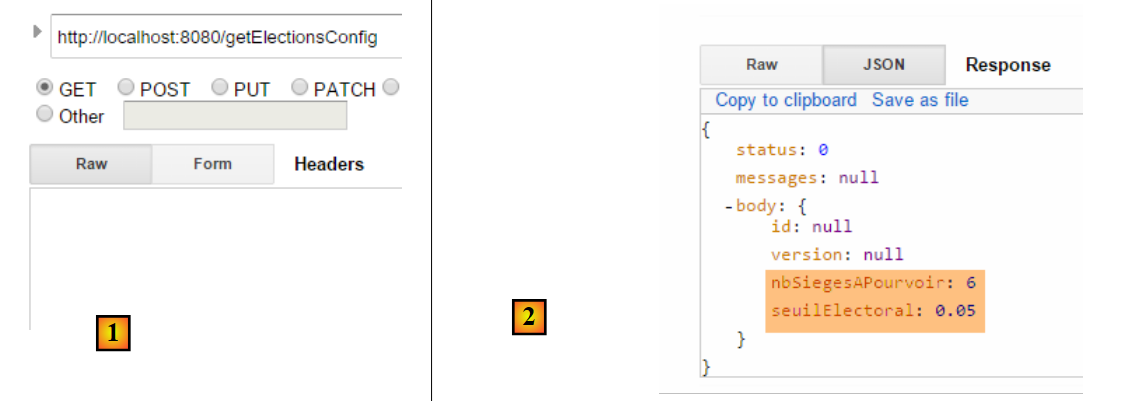 |
对上一次请求的 JSON 响应如下 [1]:
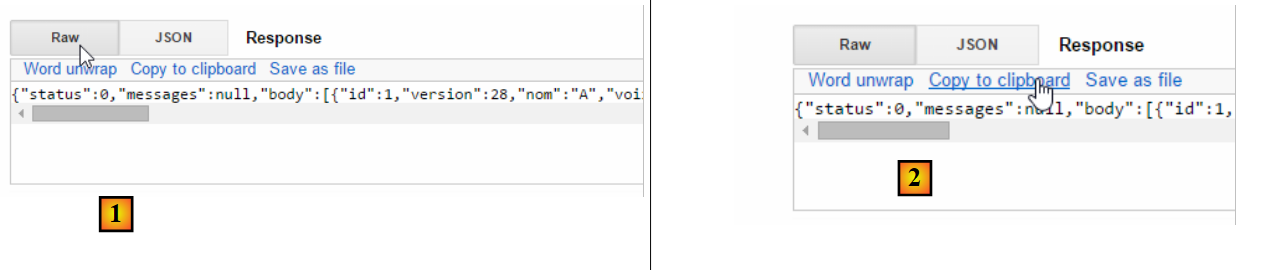 |
1  | 2  |
在 [2] 中,将响应内容复制到剪贴板,然后将其粘贴到任何文本编辑器 [3] 中:
 |
提取 [body] 字段的值,并修改列表的票数等数据。在下文 [4] 中,我们将所有列表的票数均设为 100:
 |
请确认您的 JSON 字符串以 [ 开头,以 ] 结尾。这些字符用于界定 JSON 数组。在 [5] 中,粘贴上述 JSON 字符串。这将作为要发送到下一个 URL 的值。为此,请选择 HTTP 方法 [POST] [7]。
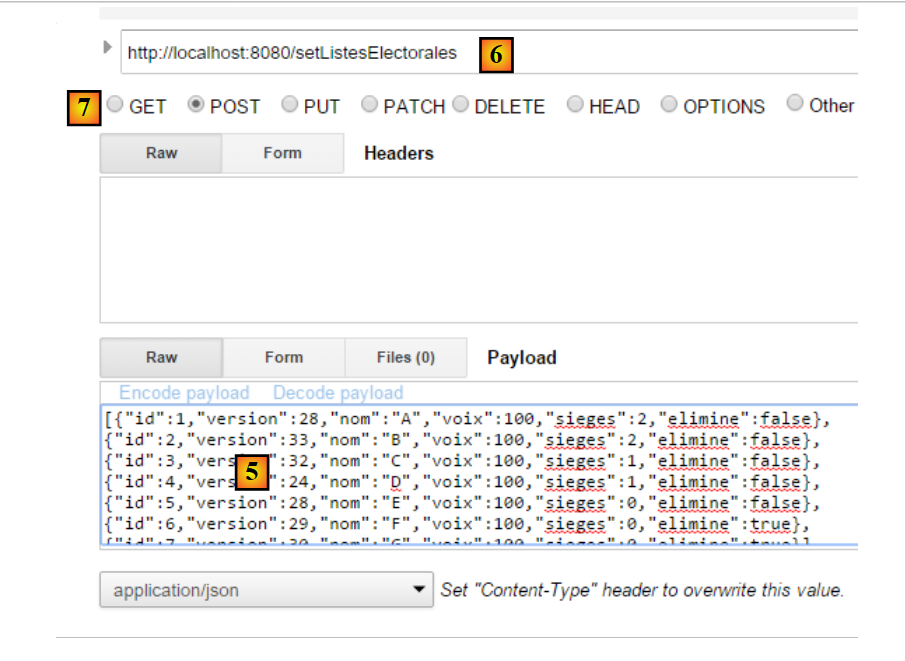 |
- 在[6]中,请求URL [setListesElectorales]。该URL通过POST请求进行访问。提交的值是候选名单的JSON数组,其结果必须保存到数据库中;
得到以下结果:
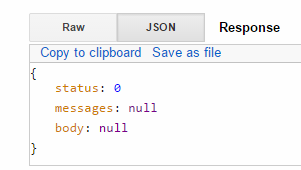 |
[status=0] 字段表明没有错误。要验证这一点,请再次请求竞争列表,并检查您对列表所做的更改是否已应用:
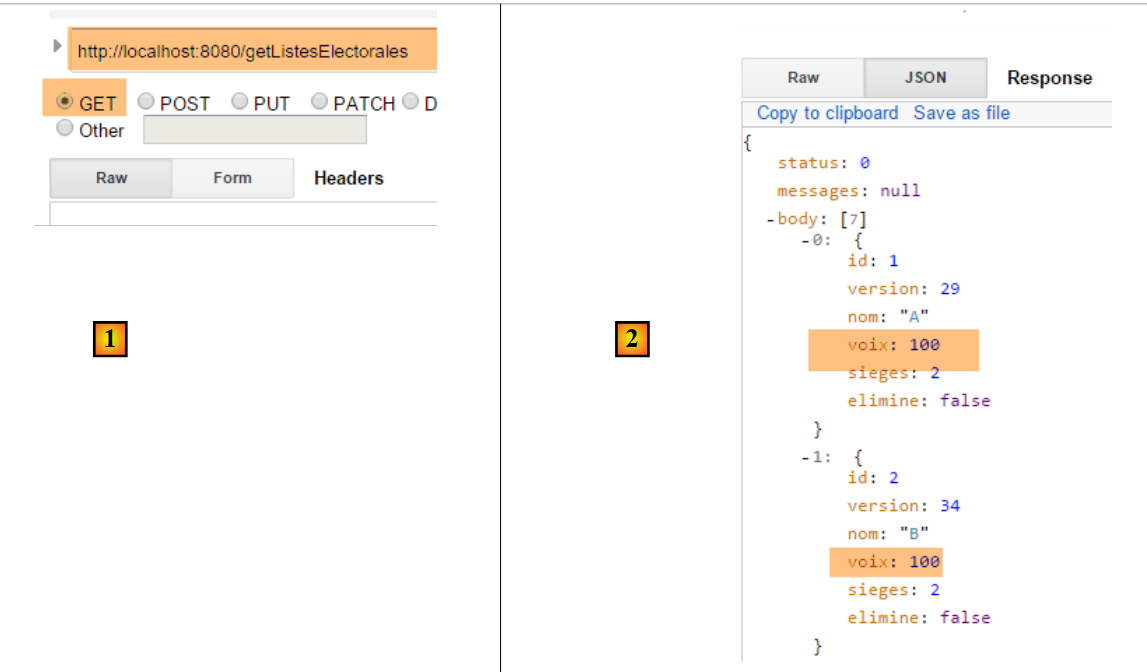 |
我们再次发出一个 [POST] 请求,以计算各名单获得的席位:
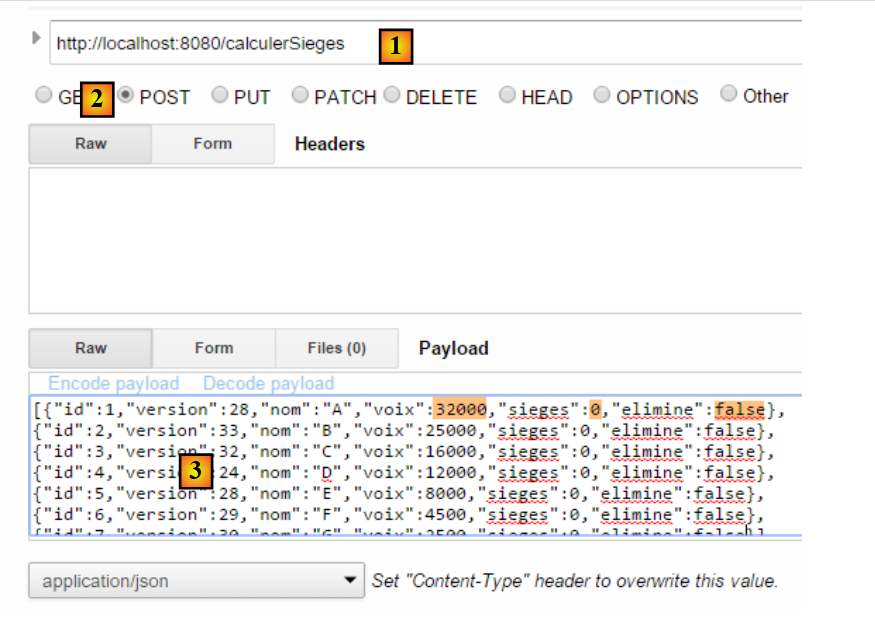 |
- 在 [1] 中:用于计算席位的 URL;
- 在 [2] 中:我们发送一个 [POST] 请求;
- 在 [3] 中:竞争名单。我们将 [votes] 字段设置为教程中的数值,所有 [seats] 均设为 0,所有 [eliminate] 字段均设为 false;
所得结果如下:
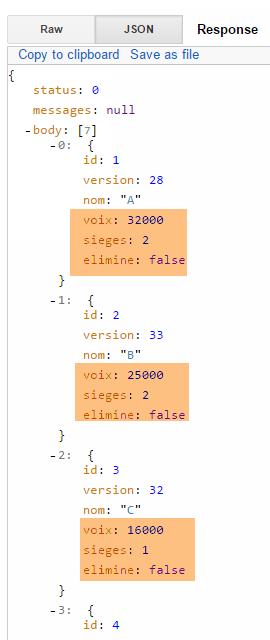 |