13. [课程]:使用 Spring MVC 在 Web 上公开数据库
关键词:多层架构、Spring、依赖注入、Web服务/JSON、客户端/服务器
13.1. 支持
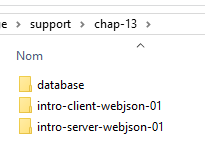 | 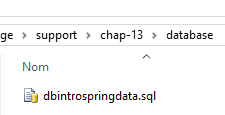 |
本章的项目位于 [support / chap-13] 文件夹中。SQL 脚本 [dbintrospringdata.sql] 用于创建测试所需的 MySQL 数据库。
13.2. Spring MVC 在 Web 应用程序中的作用
让我们将 Spring MVC 置于 Web 应用程序的开发背景中。通常,Web 应用程序会基于如下所示的多层架构构建:
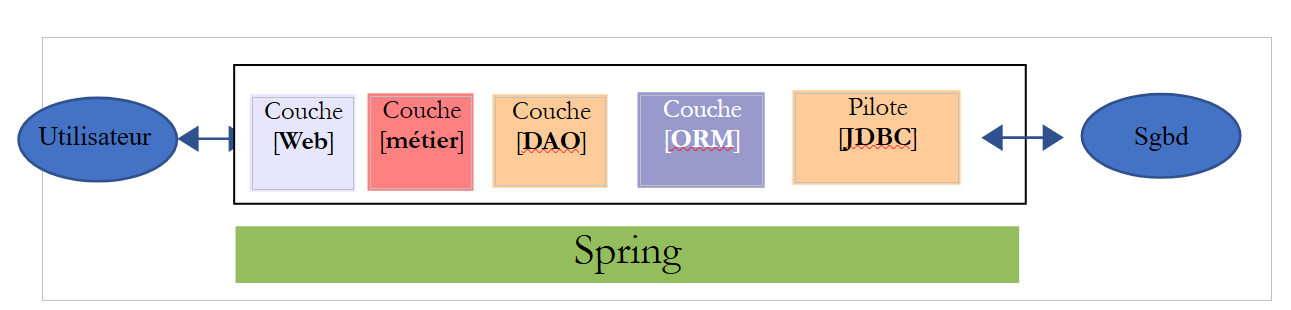 |
- [Web] 层是与 Web 应用程序用户直接交互的层。用户通过浏览器中显示的网页与 Web 应用程序进行交互。Spring MVC 位于该层,且仅位于该层;
- [业务]层实现应用程序的业务逻辑,例如计算工资或生成发票。该层通过[Web]层获取用户数据,并通过[DAO]层获取来自DBMS的数据;
- [DAO](数据访问对象)层、[ORM](对象关系映射器)层以及 JDBC 驱动程序负责管理对 DBMS 中数据的访问。[ORM] 层充当 [DAO] 层处理的对象与关系型数据库中表的行和列之间的桥梁。 JPA(Java Persistence API)规范允许对所使用的 ORM 进行抽象,前提是该 ORM 实现了这些规范。本例中即符合此情况,因此我们将 ORM 层统称为 JPA 层;
- 各层的集成由 Spring 框架负责;
13.3. Spring MVC 开发模型
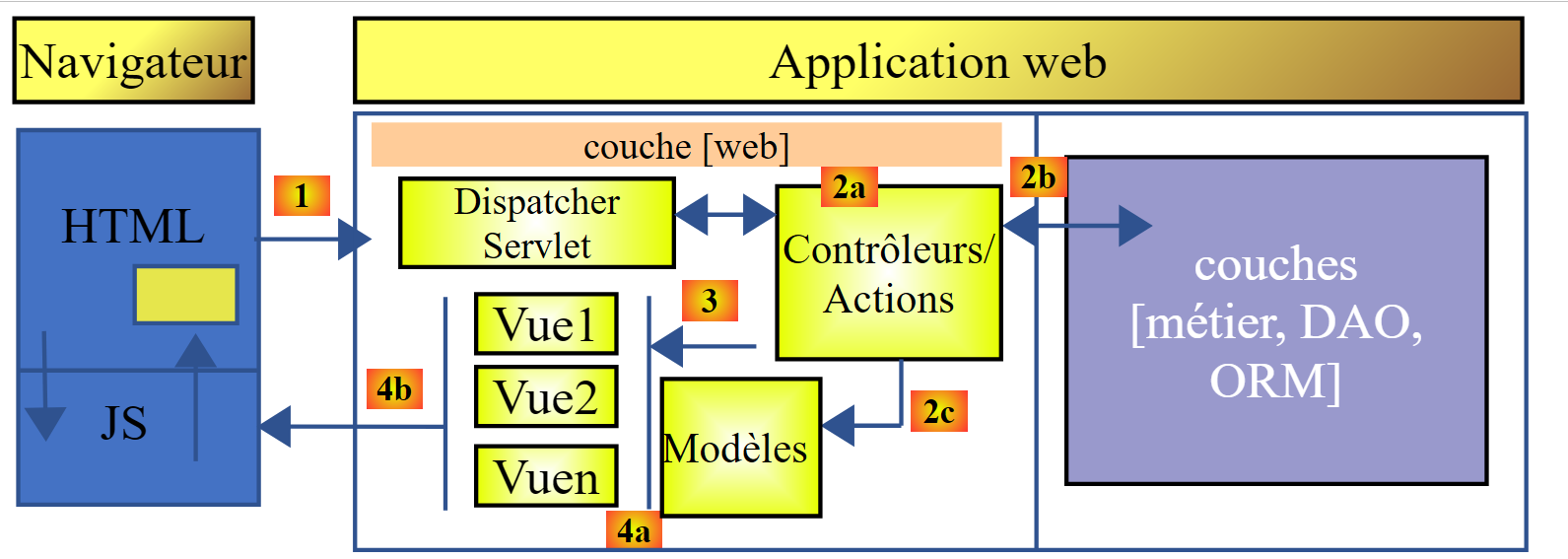
Spring MVC 通过以下方式实现 MVC(模型-视图-控制器)架构模式:
 |
客户端请求的处理流程如下:
- 请求——请求的 URL 格式为 http://machine:port/contexte/Action/param1/param2/....?p1=v1&p2=v2&... [前端控制器] 通过配置文件或 Java 注解将请求“路由”到正确的控制器及其内部的正确操作。为此,它会使用 URL 中的 [Action] 字段。 URL 的其余部分 [/param1/param2/...] 由可选参数组成,这些参数将传递给操作。此处的 MVC 中的 C 指的是 [前端控制器、控制器、操作] 这一链条。如果没有控制器能处理所请求的操作,Web 服务器将响应称未找到所请求的 URL。
- 处理
- 选定的操作可以使用 [前置控制器] 传递给它的参数。这些参数可能来自以下几个来源:
- URL 的路径 [/param1/param2/...],
- URL 的 [p1=v1&p2=v2] 参数,
- 浏览器随请求提交的参数;
- 在处理用户请求时,操作可能需要调用 [业务] 层 [2b]。一旦客户端的请求被处理完毕,可能会触发各种响应。一个典型的例子是:
- 若请求无法正确处理,则返回错误页面
- 否则则显示确认页面
- 操作会指示显示特定的视图 [3]。该视图将显示被称为视图模型的数据。这就是 MVC 中的 M。操作将创建这个 M 模型 [2c] 并指示显示 V 视图 [3];
- 响应——选定的视图 V 使用操作生成的模型 M 来初始化其必须发送给客户端的 HTML 响应中的动态部分,然后发送该响应。
对于 Web 服务 / JSON,上述架构稍作修改:
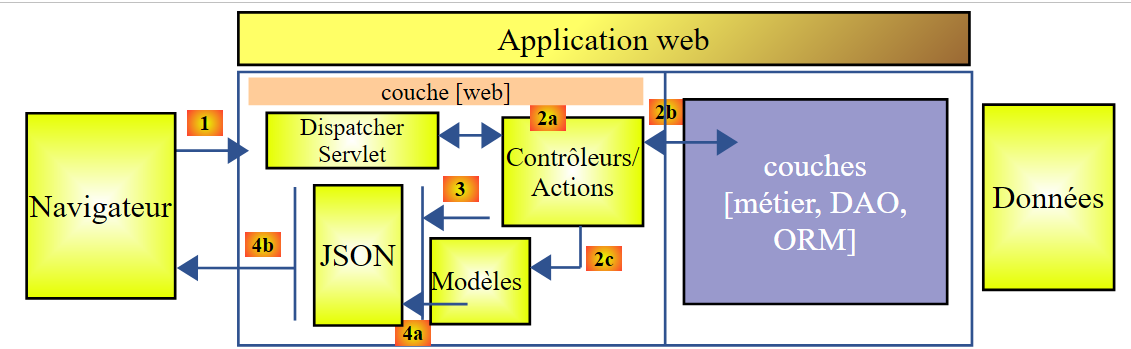 |
- 在 [4a] 中,模型(即一个 Java 类)通过 JSON 库转换为 JSON 字符串;
- 在 [4b] 中,该 JSON 字符串被发送至浏览器;
现在,让我们澄清 MVC Web 架构与分层架构之间的关系。根据模型的定义方式不同,这两个概念可能相关,也可能无关。考虑一个单层的 Spring MVC Web 应用程序:
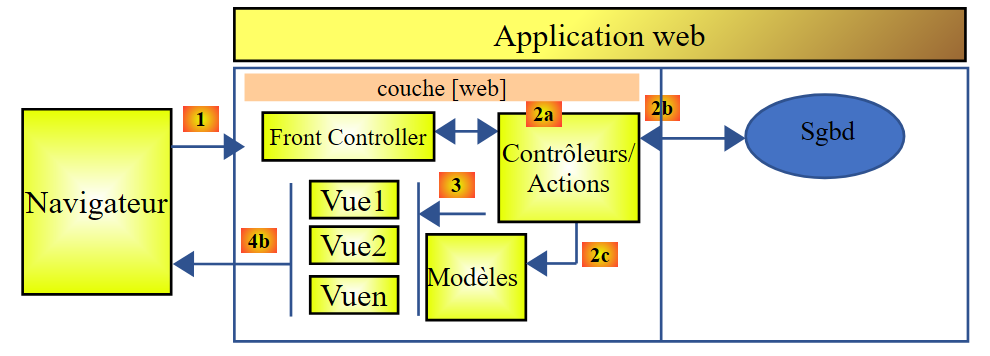 |
如果我们使用 Spring MVC 来实现 [Web] 层,那么我们确实拥有了 MVC Web 架构,但并非多层架构。在此情况下,[Web] 层将处理所有事务:呈现、业务逻辑和数据访问。具体而言,这些工作将由 Action 类来完成。
现在,让我们考虑一种多层Web架构:
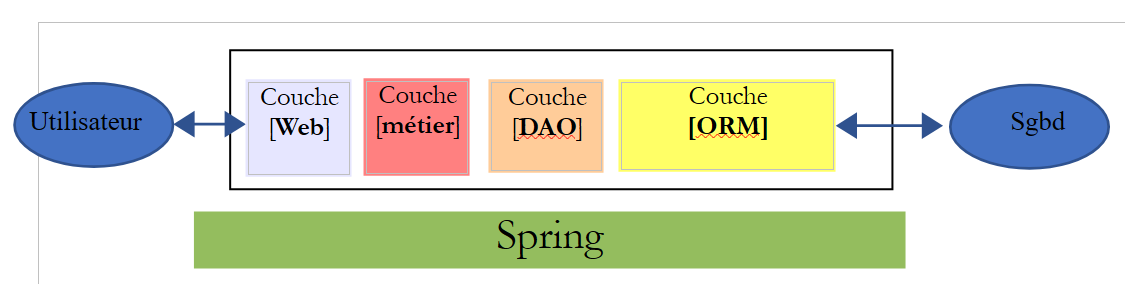 |
Web 层可以在不使用框架且不遵循 MVC 模式的情况下实现。在这种情况下,我们仍然拥有多层架构,但 Web 层并未实现 MVC 模式。
例如,在 .NET 环境中,上述 [Web] 层可通过 ASP.NET MVC 实现,从而形成一个具有 MVC 风格 [Web] 层的分层架构。不过,该 ASP.NET MVC 层可以替换为经典的 ASP.NET 层(WebForms),同时保持其余部分(业务逻辑、DAO、ORM)不变。 这样,我们就得到了一种分层架构,其 [Web] 层不再基于 MVC。
在 MVC 中,我们曾提到 M 模型即 V 视图所呈现的数据集。这里给出 MVC 中 M 模型的另一种定义:
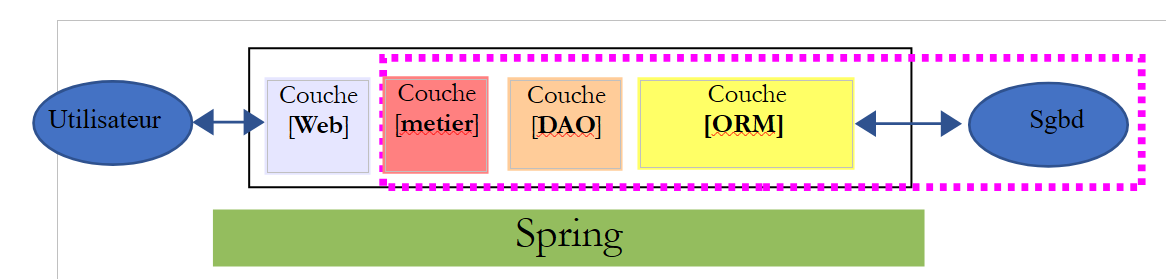 |
许多作者认为,位于 [Web] 层右侧的部分构成了 MVC 中的 M 模型。为避免歧义,我们可以将:
- 在提及[Web]层右侧的所有内容时,称之为领域模型
- 当指代视图 V 所显示的数据时,称之为视图模型
下文中,“M模型”一词将专指视图V的模型。
13.4. 基于 Spring MVC 的 Web/JSON 项目
网站 [http://spring.io/guides] 提供了入门教程,用于探索 Spring 生态系统。我们将参考其中一个教程,了解 Spring MVC 项目所需的 Maven 配置。
13.4.1. 演示项目
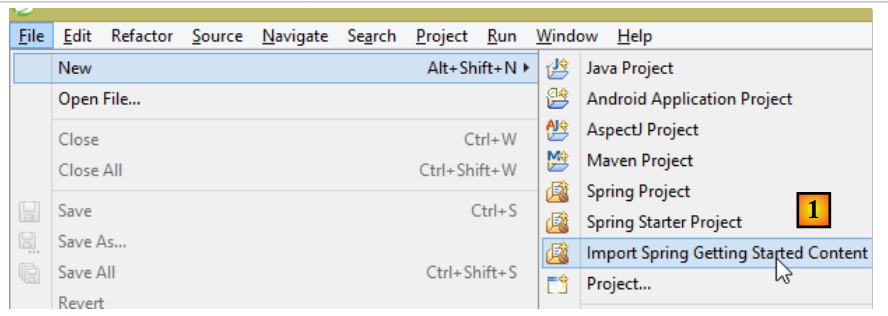 |
- 在[1]中,我们引入了Spring指南之一;
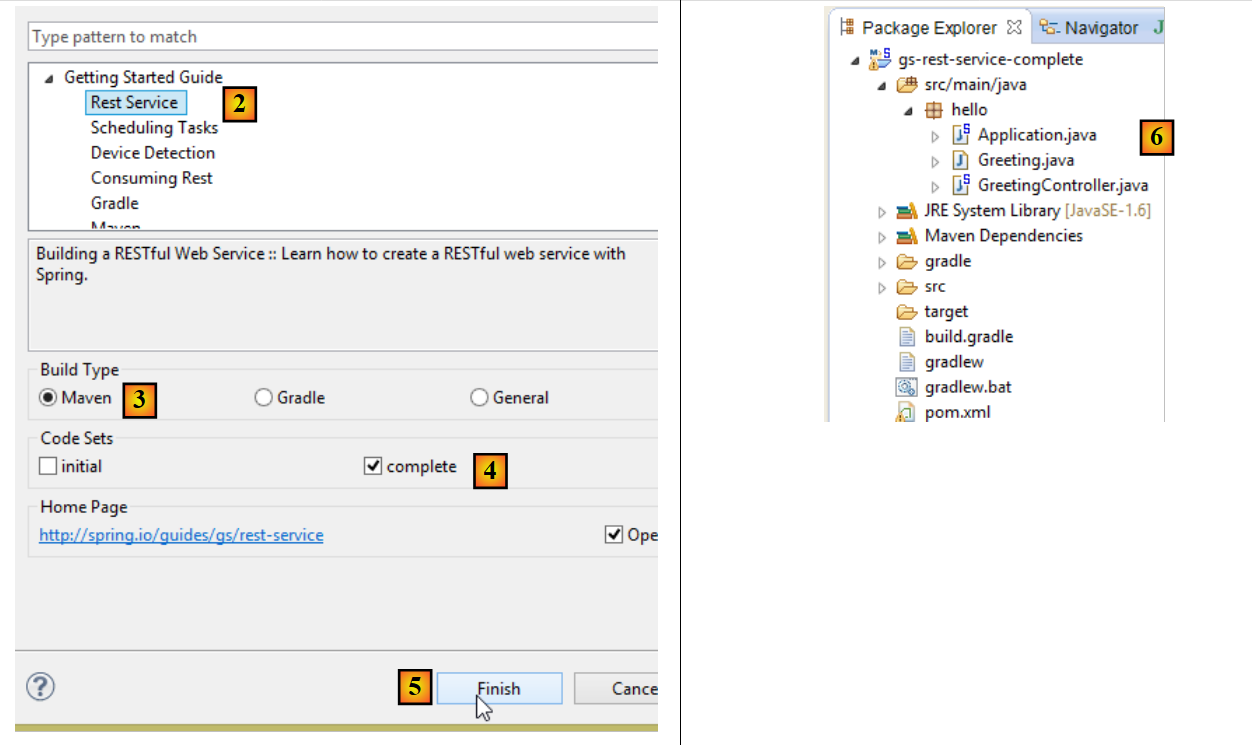 |
- 在 [2] 中,我们选择 [Rest Service] 示例;
- 在 [3] 中,我们选择了 Maven 项目;
- 在 [4] 中,我们选择指南的最终版本;
- 在 [5] 中,我们确认;
- 在 [6] 中,导入项目;
可通过标准 URL 访问并返回 JSON 数据的 Web 服务通常被称为 REST(表征状态转移)服务。如果一个服务遵循某些规则,则被称为 RESTful 服务。
现在让我们来检查这个导入的项目,首先从它的 Maven 配置开始。
13.4.2. Maven 配置
<?xml version="1.0" encoding="UTF-8"?>
<project xmlns="http://maven.apache.org/POM/4.0.0" xmlns:xsi="http://www.w3.org/2001/XMLSchema-instance"
    xsi:schemaLocation="http://maven.apache.org/POM/4.0.0 http://maven.apache.org/xsd/maven-4.0.0.xsd">
    <modelVersion>4.0.0</modelVersion>

    <groupId>org.springframework</groupId>
    <artifactId>gs-rest-service</artifactId>
    <version>0.1.0</version>

    <parent>
        <groupId>org.springframework.boot</groupId>
        <artifactId>spring-boot-starter-parent</artifactId>
        <version>1.2.2.RELEASE</version>
    </parent>

    <dependencies>
        <dependency>
            <groupId>org.springframework.boot</groupId>
            <artifactId>spring-boot-starter-web</artifactId>
        </dependency>
    </dependencies>

    <properties>
        <start-class>hello.Application</start-class>
    </properties>

    <build>
        <plugins>
            <plugin>
                <groupId>org.springframework.boot</groupId>
                <artifactId>spring-boot-maven-plugin</artifactId>
            </plugin>
        </plugins>
    </build>

    <repositories>
        <repository>
            <id>spring-releases</id>
            <url>https://repo.spring.io/libs-release</url>
        </repository>
    </repositories>
    <pluginRepositories>
        <pluginRepository>
            <id>spring-releases</id>
            <url>https://repo.spring.io/libs-release</url>
        </pluginRepository>
    </pluginRepositories>
</project>
- 第 6–8 行:Maven 项目属性。缺少一个指定 Maven 构建所生成文件类型的 [<packaging>] 标签。在缺少该标签的情况下,默认使用 [jar] 类型。因此,该应用程序是一个基于控制台的可执行应用程序,而非 Web 应用程序(如果是 Web 应用程序,则应使用 [war] 类型);
- 第 10–14 行:该 Maven 项目有一个父项目 [spring-boot-starter-parent]。它定义了该项目的大部分依赖项。这些依赖项可能已足够(此时不会添加额外依赖),也可能不足(此时会添加缺失的依赖);
- 第 17–20 行:[spring-boot-starter-web] 构建产物包含 Spring MVC Web 服务项目所需的库,该项目不生成视图。该构建产物包含大量库,其中包括用于嵌入式 Tomcat 服务器的库。应用程序将在该服务器上运行;
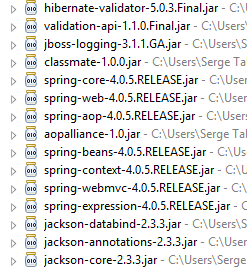
此配置中包含的库数量非常多:
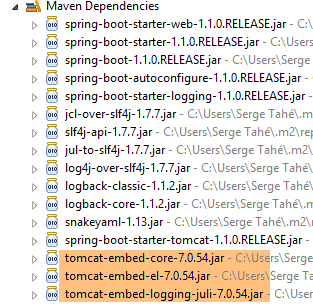 |  |
上图中,我们可以看到三个 Tomcat 服务器压缩包。
13.4.3. Spring [Web/JSON] 服务的架构
对于 Web/JSON 服务,Spring MVC 通过以下方式实现 MVC 模型:
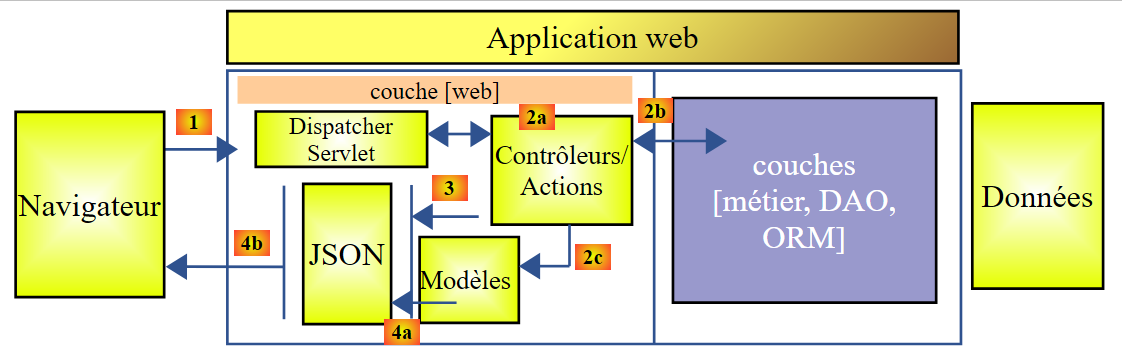 |
- 在 [4a] 中,模型(即一个 Java 类)通过 JSON 库被转换为 JSON 字符串;
- 在[4b]中,该JSON字符串被发送至浏览器;
13.4.4. C 控制器
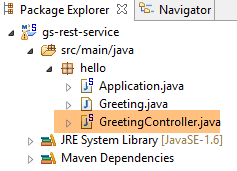 |
导入的应用程序包含以下控制器:
package hello;

import java.util.concurrent.atomic.AtomicLong;
import org.springframework.web.bind.annotation.RequestMapping;
import org.springframework.web.bind.annotation.RequestParam;
import org.springframework.web.bind.annotation.RestController;

@RestController
public class GreetingController {

    private static final String template = "Hello, %s!";
    private final AtomicLong counter = new AtomicLong();

    @RequestMapping("/greeting")
    public Greeting greeting(@RequestParam(value = "name", defaultValue = "World") String name) {
        return new Greeting(counter.incrementAndGet(), String.format(template, name));
    }
}
- 第 9 行:[@RestController] 注解将 [GreetingController] 类定义为 Spring 控制器,这意味着其方法已被注册以处理 URL。我们之前见过类似的 [@Controller] 注解。该控制器方法的返回类型是 [String],即要显示的视图名称。而这里则有所不同。 [@RestController] 的方法返回的对象会被序列化后发送至浏览器。具体的序列化类型取决于 Spring MVC 的配置。在此处,它们将被序列化为 JSON。正是项目依赖中包含的 JSON 库,促使 Spring Boot 自动以这种方式配置项目;
- 第 14 行:[@RequestMapping] 注解指定了该方法处理的 URL,本例中为 [/greeting];
- 第 15 行:我们已经解释过 [@RequestParam] 注解。该方法返回的结果是一个 [Greeting] 类型的对象。
- 第 12 行:一个原子类型的长整型。这意味着它支持并发访问。多个线程可能希望同时递增 [counter] 变量。系统将妥善处理这种情况。只有当当前正在修改计数器的线程完成修改后,其他线程才能读取计数器的值。
13.4.5. M 模型
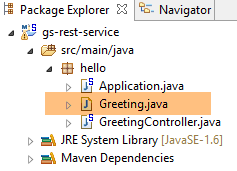
前一种方法生成的 M 模型是以下 [Greeting] 对象:
 |
package hello;

public class Greeting {

    private final long id;
    private final String content;

    public Greeting(long id, String content) {
        this.id = id;
        this.content = content;
    }

    public long getId() {
        return id;
    }

    public String getContent() {
        return content;
    }
}
对该对象进行 JSON 转换后,将生成字符串 {"id":n,"content":"text"}。最终,控制器方法生成的 JSON 字符串将呈现为以下形式:
或
13.4.6. 执行
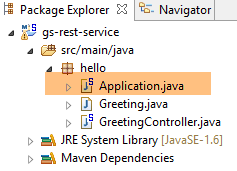 |
[Application.java] 类是该项目的可执行类。其代码如下:
package hello;

import org.springframework.boot.autoconfigure.EnableAutoConfiguration;
import org.springframework.boot.SpringApplication;
import org.springframework.context.annotation.ComponentScan;

@ComponentScan
@EnableAutoConfiguration
public class Application {

    public static void main(String[] args) {
        SpringApplication.run(Application.class, args);
    }

}
我们在前面的示例中已经遇到并解释过这段代码。
13.4.7. 运行项目
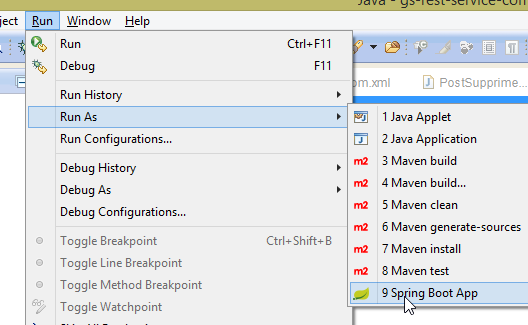 |
我们得到以下控制台日志:
- 第 13 行:Tomcat 服务器在端口 8080 上启动(第 12 行);
- 第 17 行:存在 [DispatcherServlet] Servlet;
- 第 20 行:已发现方法 [GreetingController.greeting];
要测试该 Web 应用程序,请访问 URL [http://localhost:8080/greeting]:
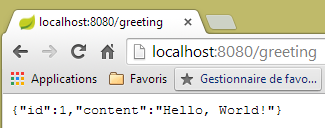 | 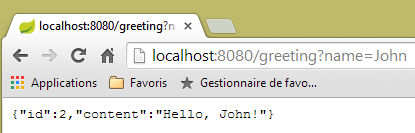 |
我们收到了预期的 JSON 字符串。查看服务器发送的 HTTP 头部信息可能会很有趣。为此,我们将使用一个名为 [Advanced Rest Client] 的 Chrome 扩展程序(Chrome / Ctrl-T / [应用程序] 菜单 / [Advanced Rest Client]——参见附录第 22.5 段):
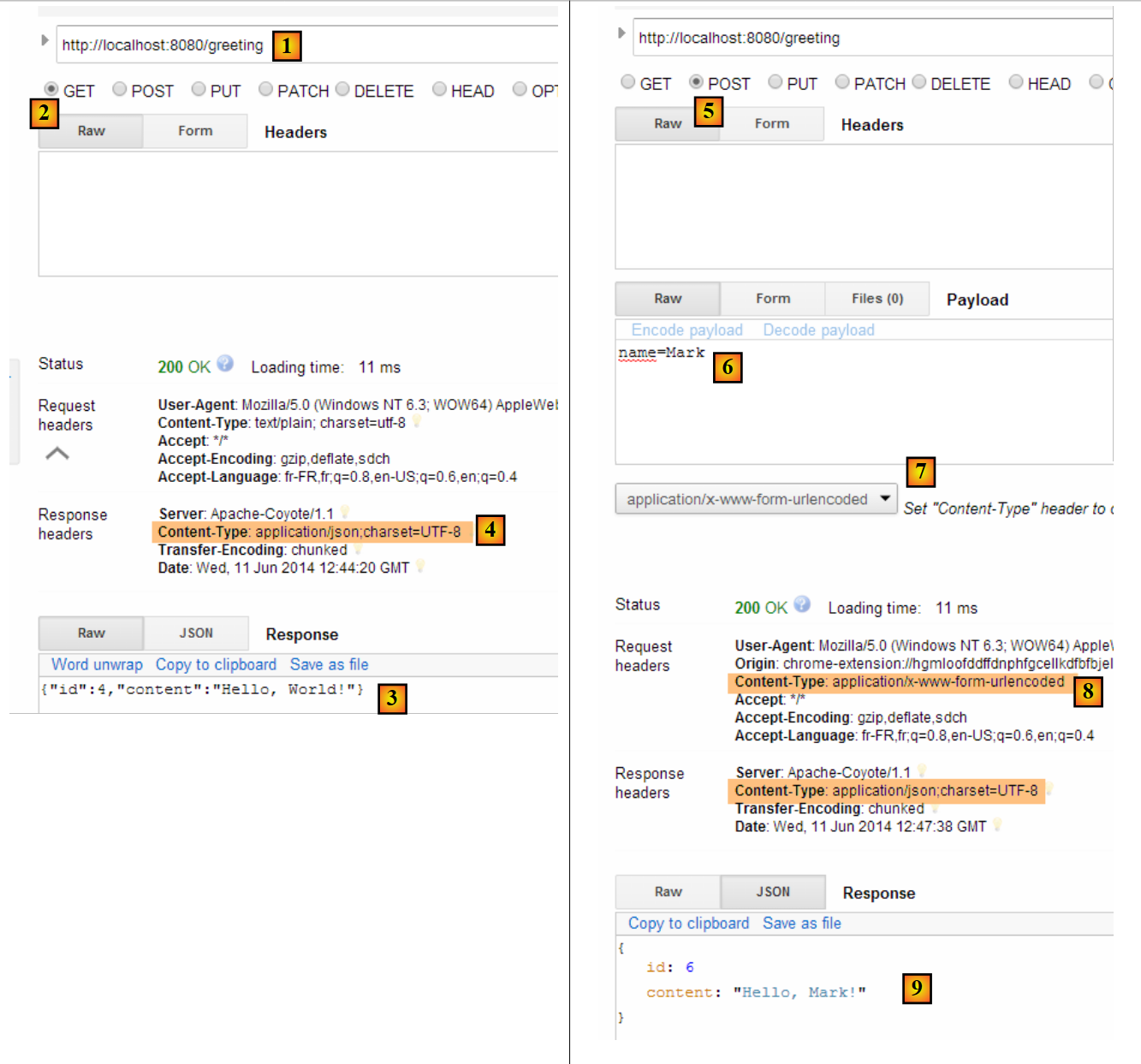 |
- 在 [1] 中,请求的 URL;
- 在 [2] 中,使用了 GET 方法;
- 在 [3] 中,JSON 响应;
- 在 [4] 中,服务器表明其将发送 JSON 格式的响应;
- 在 [5] 中,我们请求相同的 URL,但这次使用 POST 请求;
- 在 [7] 中,信息以 [urlencoded] 格式发送至服务器;
- 在 [6] 中,"name" 参数及其值;
- 在 [8] 中,浏览器告知服务器将发送 [urlencoded] 格式的数据;
- 在 [9] 中,服务器的 JSON 响应;
13.4.8. 创建可执行归档文件
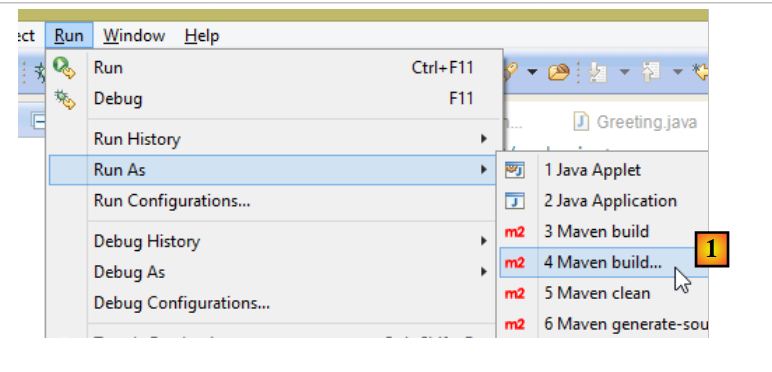 |
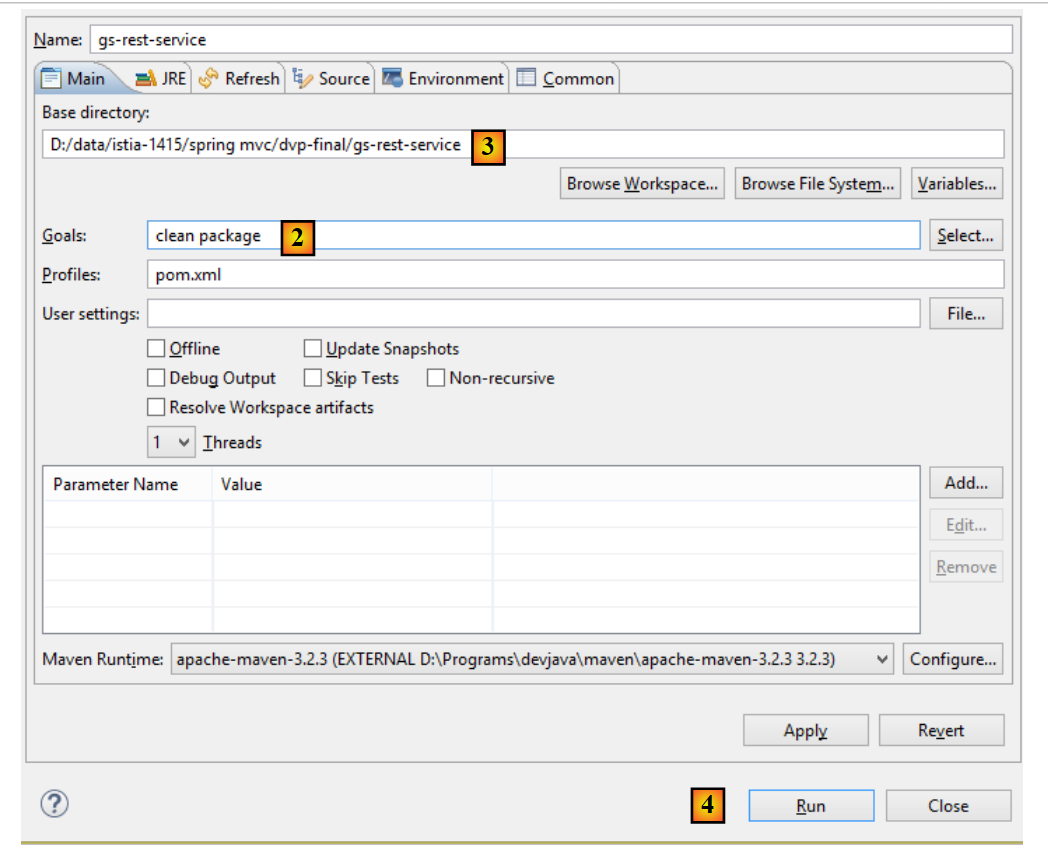 |
- 在 [1] 中:我们运行一个 Maven 目标;
- 在 [2] 中:有两个目标:[clean] 用于从 Maven 项目中删除 [target] 文件夹,[package] 用于重新生成该文件夹;
- 在 [3] 中:生成的 [target] 文件夹将位于此文件夹中;
- 在 [4] 中:我们生成 target;
在控制台显示的日志中,请务必留意 [spring-boot-maven-plugin] 插件。该插件负责生成可执行归档文件。
使用控制台,导航至生成的文件夹:
D:\Temp\wksSTS\gs-rest-service\target>dir
 ...
11/06/2014  15:30    <DIR>          classes
11/06/2014  15:30    <DIR>          generated-sources
11/06/2014  15:30        11 073 572 gs-rest-service-0.1.0.jar
11/06/2014  15:30             3 690 gs-rest-service-0.1.0.jar.original
11/06/2014  15:30    <DIR>          maven-archiver
11/06/2014  15:30    <DIR>          maven-status
...
- 第 5 行:生成的归档文件;
该归档文件的执行方式如下:
D:\Temp\wksSTS\gs-rest-service-complete\target>java -jar gs-rest-service-0.1.0.jar

  .   ____          _            __ _ _
 /\\ / ___'_ __ _ _(_)_ __  __ _ \ \ \ \
( ( )\___ | '_ | '_| | '_ \/ _` | \ \ \ \
 \\/  ___)| |_)| | | | | || (_| |  ) ) ) )
  '  |____| .__|_| |_|_| |_\__, | / / / /
 =========|_|==============|___/=/_/_/_/
 :: Spring Boot ::        (v1.1.0.RELEASE)

2014-06-11 15:32:47.088  INFO 4972 --- [           main] hello.Application
                  : Starting Application on Gportpers3 with PID 4972 (D:\Temp\wk
sSTS\gs-rest-service-complete\target\gs-rest-service-0.1.0.jar started by ST in
D:\Temp\wksSTS\gs-rest-service-complete\target)
...
现在 Web 应用程序已运行,您可以通过浏览器访问它:
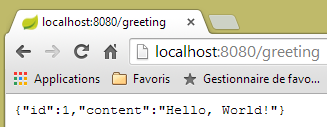 |
13.4.9. 在 Tomcat 服务器上部署应用程序
与上一个项目一样,我们将 [pom.xml] 文件修改如下:
<?xml version="1.0" encoding="UTF-8"?>
<project xmlns="http://maven.apache.org/POM/4.0.0" xmlns:xsi="http://www.w3.org/2001/XMLSchema-instance"
    xsi:schemaLocation="http://maven.apache.org/POM/4.0.0 http://maven.apache.org/xsd/maven-4.0.0.xsd">
    <modelVersion>4.0.0</modelVersion>

    <groupId>org.springframework</groupId>
    <artifactId>gs-rest-service</artifactId>
    <version>0.1.0</version>
    <packaging>war</packaging>

    ...
</project>
- 第 9 行:您必须指定将生成一个 WAR(Web Archive)文件;
还必须配置 Web 应用程序。如果没有 [web.xml] 文件,则通过继承 [SpringBootServletInitializer] 的类来完成此配置:
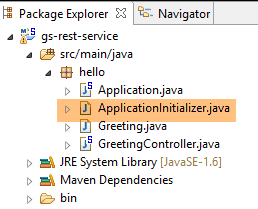 |
[ApplicationInitializer] 类的定义如下:
package hello;

import org.springframework.boot.builder.SpringApplicationBuilder;
import org.springframework.boot.context.web.SpringBootServletInitializer;

public class ApplicationInitializer extends SpringBootServletInitializer {

    @Override
    protected SpringApplicationBuilder configure(SpringApplicationBuilder application) {
        return application.sources(Application.class);
    }

}
- 第 6 行:[ApplicationInitializer] 类继承自 [SpringBootServletInitializer] 类;
- 第 9 行:重写了 [configure] 方法(第 8 行);
- 第 10 行:提供了用于配置该项目的类;
要运行该项目,请按以下步骤操作:
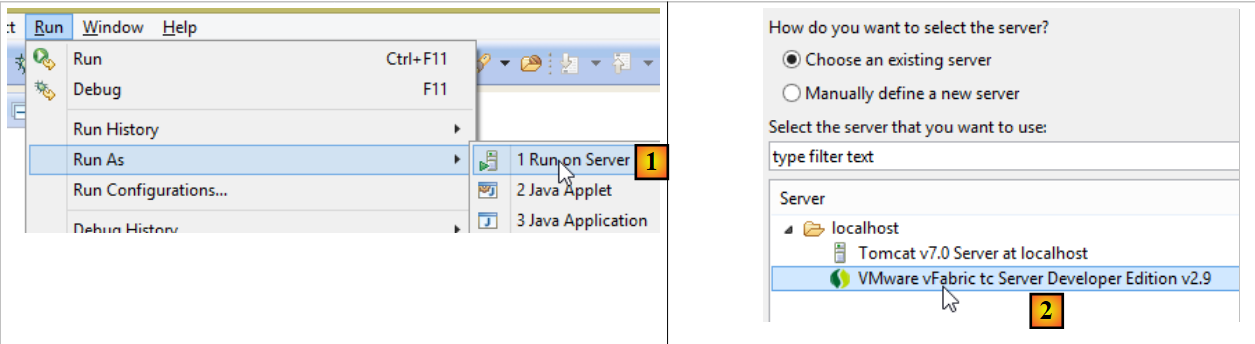 |
- 在 [1-2] 中,在 Eclipse IDE 中注册的某台服务器上运行该项目;
完成上述操作后,您可以在浏览器中访问 URL [http://localhost:8080/gs-rest-service/greeting/?name=Mitchell]:
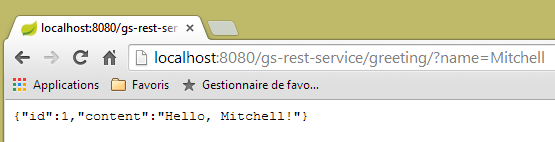 |
13.4.10. 结论
我们已经介绍了一种 Spring MVC 项目,其中 Web 应用程序会向浏览器发送 JSON 数据流。接下来,我们将开发一个 Web/JSON 应用程序,以便在 Web 上公开 [Spring Data 入门] 教程中研究的 [dbintrospringdata] 数据库。
13.5. 在 Web 上公开 [dbintrospringdata] 数据库
13.5.1. Web/JSON 服务架构
我们将实现以下架构:
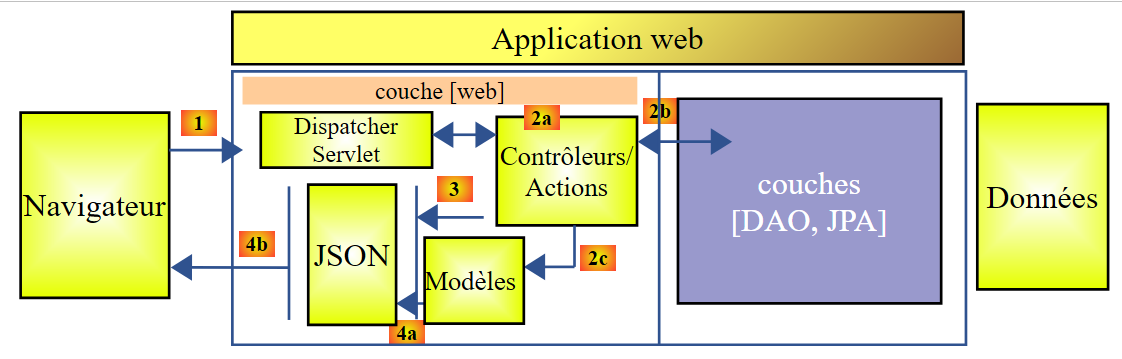 |
[DAO] 和 [JPA] 层由 [Spring Data 入门] 教程中编写的应用程序实现。
13.5.2. 安装数据库
 |
SQL 脚本 [dbintrospringdata.sql] 将创建测试所需的 MySQL 数据库。
13.5.3. Web 服务 / JSON 的 Eclipse 项目
Web 服务/JSON 的 Eclipse 项目如下:
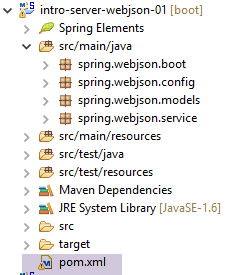 |
这是一个 Maven 项目,其 [pom.xml] 文件如下:
<project xmlns="http://maven.apache.org/POM/4.0.0" xmlns:xsi="http://www.w3.org/2001/XMLSchema-instance"
    xsi:schemaLocation="http://maven.apache.org/POM/4.0.0 http://maven.apache.org/xsd/maven-4.0.0.xsd">
    <modelVersion>4.0.0</modelVersion>
    <groupId>istia.st.webjson</groupId>
    <artifactId>intro-server-webjson01</artifactId>
    <version>0.0.1-SNAPSHOT</version>

    <name>intro-server-webjson01</name>
    <description>démo spring mvc</description>

    <parent>
        <groupId>org.springframework.boot</groupId>
        <artifactId>spring-boot-starter-parent</artifactId>
        <version>1.2.7.RELEASE</version>
    </parent>

    <dependencies>
        <dependency>
            <groupId>istia.st.springdata</groupId>
            <artifactId>intro-spring-data-01</artifactId>
            <version>0.0.1-SNAPSHOT</version>
        </dependency>
        <dependency>
            <groupId>org.springframework.boot</groupId>
            <artifactId>spring-boot-starter-web</artifactId>
        </dependency>
        <dependency>
            <groupId>org.springframework.boot</groupId>
            <artifactId>spring-boot-starter</artifactId>
        </dependency>
    </dependencies>

    <build>
        <plugins>
            <plugin>
                <groupId>org.springframework.boot</groupId>
                <artifactId>spring-boot-maven-plugin</artifactId>
            </plugin>
            <plugin>
                <groupId>org.apache.maven.plugins</groupId>
                <artifactId>maven-surefire-plugin</artifactId>
                <version>2.18.1</version>
            </plugin>
        </plugins>
    </build>

</project>
- 第 11–15 行:已用于 [DAO] 层的父 Maven 项目;
- 第 18–22 行:对 [DAO] 层的依赖;
- 第 23–26 行:对 [spring-boot-starter-web] 工件的依赖。该工件包含创建 Web/JSON 服务所需的所有依赖项,但也包含了一些不必要的库。因此,需要进行更精确的配置。不过,此配置对于入门非常有用;
- 第 28–30 行:对 [spring-boot-starter] 工件的依赖,可让您管理 Spring Boot 注解;
此配置引入的依赖项如下:
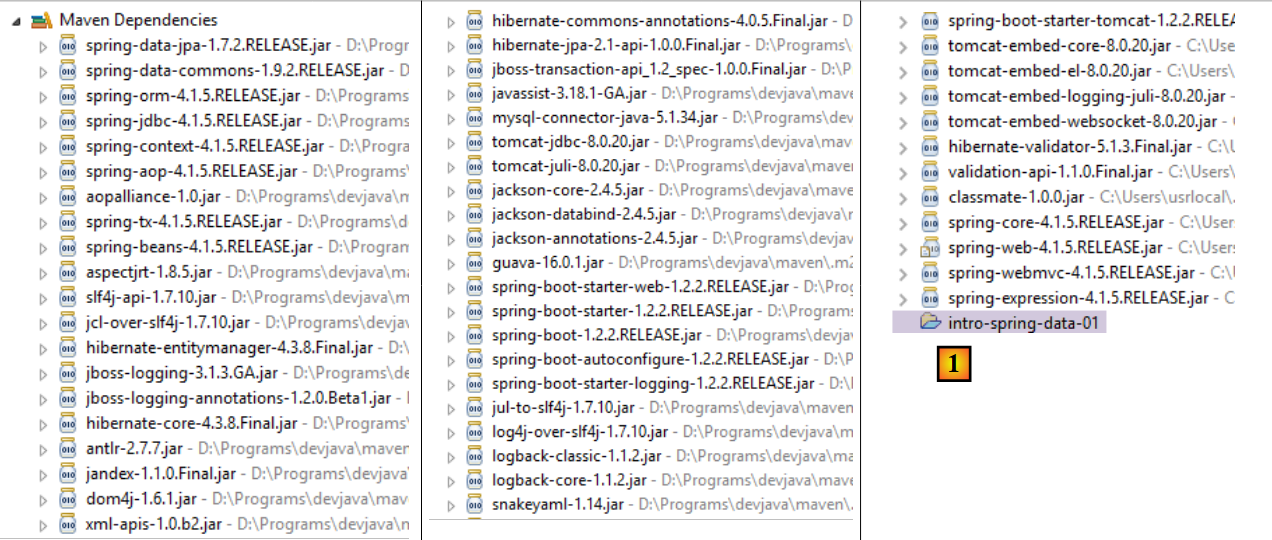 |
- 在 [1] 中,我们可以看到 Eclipse 已检测到对项目归档 [intro-spring-data-01] 的依赖;
上述依赖关系同时属于 [DAO] 层和 [web] 层。
13.5.3.1. [web]层的配置
[web] 层的配置通过 [AppConfig] 文件进行:
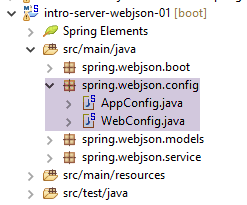 |
[WebConfig] 类用于配置 [web] 层:
package spring.webjson.config;

import org.springframework.beans.factory.annotation.Autowired;
import org.springframework.boot.context.embedded.EmbeddedServletContainerFactory;
import org.springframework.boot.context.embedded.ServletRegistrationBean;
import org.springframework.boot.context.embedded.tomcat.TomcatEmbeddedServletContainerFactory;
import org.springframework.context.ApplicationContext;
import org.springframework.context.annotation.Bean;
import org.springframework.web.context.WebApplicationContext;
import org.springframework.web.servlet.DispatcherServlet;
import org.springframework.web.servlet.config.annotation.EnableWebMvc;
import org.springframework.web.servlet.config.annotation.WebMvcConfigurerAdapter;

import com.fasterxml.jackson.databind.ObjectMapper;
import com.fasterxml.jackson.databind.ser.impl.SimpleBeanPropertyFilter;
import com.fasterxml.jackson.databind.ser.impl.SimpleFilterProvider;

@EnableWebMvc
public class WebConfig extends WebMvcConfigurerAdapter {

    // -------------------------------- layer configuration [web]
    @Autowired
    private ApplicationContext context;

    @Bean
    public DispatcherServlet dispatcherServlet() {
        DispatcherServlet servlet = new DispatcherServlet((WebApplicationContext) context);
        return servlet;
    }

    @Bean
    public ServletRegistrationBean servletRegistrationBean(DispatcherServlet dispatcherServlet) {
        return new ServletRegistrationBean(dispatcherServlet, "/*");
    }

    @Bean
    public EmbeddedServletContainerFactory embeddedServletContainerFactory() {
        return new TomcatEmbeddedServletContainerFactory("", 8080);
    }

    // filters jSON
    @Bean(name = "jsonMapper")
    public ObjectMapper jsonMapper() {
        return new ObjectMapper();
    }

    @Bean(name = "jsonMapperCategorieWithProduits")
    public ObjectMapper jsonMapperCategorieWithProduits() {
        // mapper jSON
        ObjectMapper mapper = new ObjectMapper();
        // filters
        mapper.setFilters(
                new SimpleFilterProvider().addFilter("jsonFilterCategorie", SimpleBeanPropertyFilter.serializeAllExcept())
                        .addFilter("jsonFilterProduit", SimpleBeanPropertyFilter.serializeAllExcept("categorie")));
        // result
        return mapper;
    }

    @Bean(name = "jsonMapperProduitWithCategorie")
    public ObjectMapper jsonMapperProduitWithCategorie() {
        // mapper jSON
        ObjectMapper mapper = new ObjectMapper();
        // filters
        mapper.setFilters(
                new SimpleFilterProvider().addFilter("jsonFilterProduit", SimpleBeanPropertyFilter.serializeAllExcept())
                        .addFilter("jsonFilterCategorie", SimpleBeanPropertyFilter.serializeAllExcept("produits")));
        // result
        return mapper;
    }

    @Bean(name = "jsonMapperCategorieWithoutProduits")
    public ObjectMapper jsonMapperCategorieWithoutProduits() {
        // mapper jSON
        ObjectMapper mapper = new ObjectMapper();
        // filters
        mapper.setFilters(new SimpleFilterProvider().addFilter("jsonFilterCategorie",
                SimpleBeanPropertyFilter.serializeAllExcept("produits")));
        // result
        return mapper;
    }

    @Bean(name = "jsonMapperProduitWithoutCategorie")
    public ObjectMapper jsonMapperProduitWithoutCategorie() {
        // mapper jSON
        ObjectMapper mapper = new ObjectMapper();
        // filters
        mapper.setFilters(new SimpleFilterProvider().addFilter("jsonFilterProduit",
                SimpleBeanPropertyFilter.serializeAllExcept("categorie")));
        // result
        return mapper;
    }
}
- 第 18 行:[@EnableWebMvc] 注解会触发 Spring MVC 框架的自动配置;
- 第 19 行:[WebConfig] 类继承了 Spring 的 [WebMvcConfigurerAdapter] 类,以重新定义某些 Bean(第 26–40 行);
- 第 22–23 行:注入 Spring 上下文;
- 第 25–29 行:定义 Spring MVC 框架的 Servlet,用于将 HTTP 请求路由到正确的控制器和方法。[DispatcherServlet] 是 Spring 类;
- 第 31–34 行:我们指定该 Servlet 处理所有 URL;
- 第 36–39 行:该 Bean 的存在将激活项目归档中包含的 Tomcat 服务器。它将在 8080 端口监听请求;
- 第 42–91 行:用于管理 JSON 过滤器的 Bean;
- 第 42–45 行:一个不带过滤器的 JSON 映射器;
- 第 47–57 行:允许同时检索类别及其产品的 JSON 映射器。请注意,当请求包含产品的类别时,必须同时配置 [Category] 类和 [Product] 类的 JSON 过滤器。这种情况始终存在。在将类序列化/反序列化为 JSON 时,必须配置该类的 JSON 过滤器以及所有将包含在其中的依赖项的过滤器;
- 第 59–69 行:允许显示包含所属类别的产品的 JSON 映射器;
- 第 71–80 行:允许获取不包含产品的分类的 JSON 映射器;
- 第 82–91 行:允许检索不带所属类别的产品的 JSON 映射器;
[AppConfig] 类用于配置整个应用程序,即 [web] 和 [DAO] 层:
package spring.webjson.config;

import org.springframework.context.annotation.ComponentScan;
import org.springframework.context.annotation.Import;

import spring.data.config.DaoConfig;

@ComponentScan(basePackages = { "spring.webjson" })
@Import({ DaoConfig.class, WebConfig.class})
public class AppConfig {

}
- 第 9 行:导入来自 [DAO] 层和 [web] 层的 Bean;
- 第 8 行:指定了其他 Spring Bean 的所在包;
请注意,我们并未在任何地方使用 [@EnableAutoConfiguration] 注解。我们更倾向于自行控制配置。
13.5.4. 应用程序模型
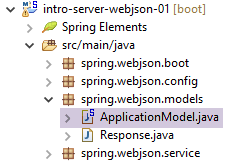 |
[ApplicationModel] 类如下所示:
package spring.webjson.models;

import java.util.List;

import org.springframework.beans.factory.annotation.Autowired;
import org.springframework.stereotype.Component;

import spring.data.dao.IDao;
import spring.data.entities.Categorie;
import spring.data.entities.Produit;

@Component
public class ApplicationModel implements IDao {

    // the [DAO] layer
    @Autowired
    private IDao dao;

    @Override
    public void addProduits(List<Produit> produits) {
        dao.addProduits(produits);
    }

    @Override
    public void deleteAllProduits() {
        dao.deleteAllProduits();
    }

    @Override
    public void updateProduits(List<Produit> produits) {
        dao.updateProduits(produits);
    }

    @Override
    public List<Produit> getAllProduits() {
        return dao.getAllProduits();
    }

    @Override
    public void addCategories(List<Categorie> categories) {
        dao.addCategories(categories);
    }

    @Override
    public void deleteAllCategories() {
        dao.deleteAllCategories();
    }

    @Override
    public void updateCategories(List<Categorie> categories) {
        dao.updateCategories(categories);
    }

    @Override
    public List<Categorie> getAllCategories() {
        return dao.getAllCategories();
    }

    @Override
    public Produit getProduitByIdWithCategorie(Long idProduit) {
        return dao.getProduitByIdWithCategorie(idProduit);
    }

    @Override
    public Produit getProduitByNameWithCategorie(String nom) {
        return dao.getProduitByNameWithCategorie(nom);
    }

    @Override
    public Categorie getCategorieByIdWithProduits(Long idCategorie) {
        return dao.getCategorieByIdWithProduits(idCategorie);
    }

    @Override
    public Categorie getCategorieByNameWithProduits(String nom) {
        return dao.getCategorieByNameWithProduits(nom);
    }

    @Override
    public Produit getProduitByIdWithoutCategorie(Long idProduit) {
        return dao.getProduitByIdWithoutCategorie(idProduit);
    }

    @Override
    public Categorie getCategorieByIdWithoutProduits(Long idCategorie) {
        return dao.getCategorieByIdWithoutProduits(idCategorie);
    }

    @Override
    public Produit getProduitByNameWithoutCategorie(String nom) {
        return dao.getProduitByNameWithoutCategorie(nom);
    }

    @Override
    public Categorie getCategorieByNameWithoutProduits(String nom) {
        return dao.getCategorieByNameWithoutProduits(nom);
    }

}
- 第 12 行:该类是 Spring 的单例;
- 第 13 行:该类实现了 [DAO] 层的 [IDao] 接口;
- 第16–17行:将引用注入到[DAO]层;
- 第19–99行:实现 [IDao] 接口;
Web层的架构演变如下:
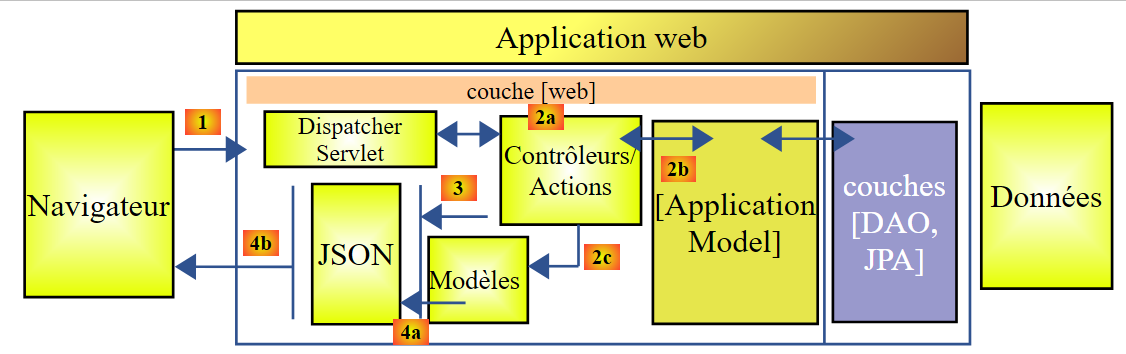 |
- 在 [2b] 中,控制器(们)的方法与 [ApplicationModel] 单例进行通信;
该策略为潜在缓存的管理提供了灵活性。[ApplicationModel] 类可用于存储从 [DAO] 层获取的信息或配置数据。当您无法控制 [DAO] 层时,这会非常有用。该缓存策略可能会随着时间的推移而演变。更改不会对控制器(们)的代码产生影响。
13.5.5. 控制器
 |
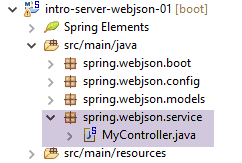 |
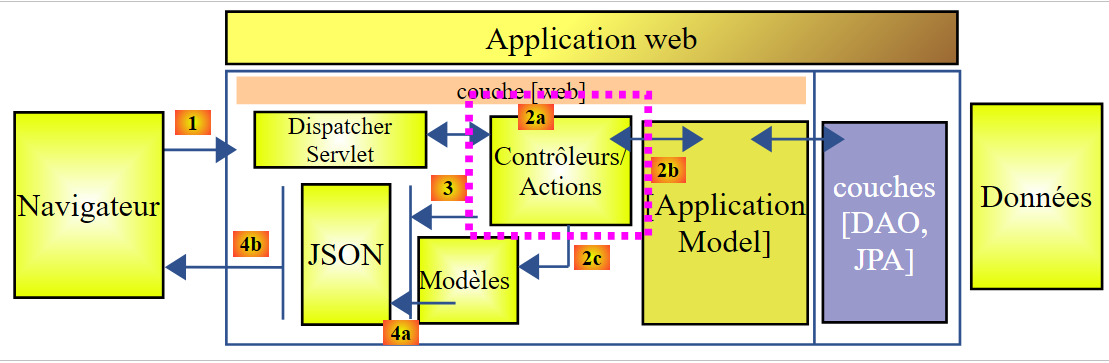
这里只有一个控制器,即 [MyController] 类。
13.5.5.1. 公开的 URL
该控制器公开的 URL 如下:
| 将产品添加到数据库中。这些请求采用POST方式提交。响应是一个JSON字符串,其中包含已添加产品的列表及其主键。 |
| 从数据库中删除所有产品。 |
| 更新数据库中的产品。这些请求采用POST方式提交。响应是一个包含已更新产品列表的JSON字符串。 |
| 获取所有产品的 JSON 字符串。 |
| 将分类添加到数据库中。此操作采用 POST 请求。响应是一个 JSON 字符串,其中包含已添加分类的列表及其主键。如果分类包含产品,这些产品也会被添加到数据库中。 |
| 从数据库中删除所有分类及其下的所有产品。操作完成后,数据库将为空。 |
| 更新数据库中的分类。这些请求采用POST方式提交。响应内容为已更新分类的列表。如果分类包含商品,这些商品也会在数据库中相应更新。返回已修改分类的JSON字符串; |
| 获取所有分类的 JSON 字符串。 |
| 根据产品 ID 检索该产品的 JSON 字符串及其所属类别。 |
| 根据产品 ID 检索该产品的 JSON 字符串,不包含其类别。 |
| 根据产品名称检索该产品的 JSON 字符串及其所属类别。 |
| 根据产品名称(不包含其类别)检索该产品的 JSON 字符串。 |
| 根据类别 ID 检索该类别的 JSON 字符串及其关联的产品。 |
| 根据名称检索指定类别的 JSON 字符串及其关联的产品。 |
| 根据名称检索指定类别的 JSON 字符串,不包含其产品。 |
| 根据 ID 检索某类别的 JSON 字符串,不包含其产品。 |
公开的 URL 对应于 [DAO] 层中 [IDao] 接口的方法。Web 服务 / JSON 的方法均基于同一模型构建。我们将探讨其中几个。
13.5.5.2. 控制器骨架
控制器骨架如下:
package spring.webjson.service;

import java.util.ArrayList;
import java.util.List;
import java.util.Set;

import javax.servlet.http.HttpServletRequest;

import org.springframework.beans.factory.annotation.Autowired;
import org.springframework.beans.factory.annotation.Qualifier;
import org.springframework.stereotype.Controller;
import org.springframework.web.bind.annotation.PathVariable;
import org.springframework.web.bind.annotation.RequestMapping;
import org.springframework.web.bind.annotation.RequestMethod;
import org.springframework.web.bind.annotation.ResponseBody;

import com.fasterxml.jackson.core.JsonProcessingException;
import com.fasterxml.jackson.core.type.TypeReference;
import com.fasterxml.jackson.databind.ObjectMapper;
import com.google.common.io.CharStreams;

import spring.data.dao.DaoException;
import spring.data.entities.Categorie;
import spring.data.entities.Produit;
import spring.webjson.models.ApplicationModel;
import spring.webjson.models.Response;

@Controller
public class MyController {

    // spring dependencies
    @Autowired
    private ApplicationModel application;

    // filters jSON
    @Autowired
    @Qualifier("jsonMapper")
    private ObjectMapper jsonMapper;
    @Autowired
    @Qualifier("jsonMapperCategorieWithProduits")
    private ObjectMapper jsonMapperCategorieWithProduits;
    @Autowired
    @Qualifier("jsonMapperProduitWithCategorie")
    private ObjectMapper jsonMapperProduitWithCategorie;
    @Autowired
    @Qualifier("jsonMapperCategorieWithoutProduits")
    private ObjectMapper jsonMapperCategorieWithoutProduits;
    @Autowired
    @Qualifier("jsonMapperProduitWithoutCategorie")
    private ObjectMapper jsonMapperProduitWithoutCategorie;

    // class [MyController] is a singleton and is instantiated only once the bean

    public MyController() {
        // System.out.println("MyController");
    }

    @RequestMapping(value = "/addProduits", method = RequestMethod.POST, consumes = "application/json; charset=UTF-8", produces = "application/json; charset=UTF-8")
    @ResponseBody
    public String addProduits(HttpServletRequest request) throws JsonProcessingException {
        ...
    }
- 第 28 行:[@Controller] 注解将该类标记为 Spring 组件;
- 第 32–33 行:注入对 [ApplicationModel] 类的引用;
- 第 36–50 行:注入 JSON 映射器的引用;
- 第 58 行:公开的 URL 为 [/addProducts]。客户端必须使用 [POST] 方法发起请求(method = RequestMethod.POST)。它必须将提交的值作为 JSON 字符串发送(content-type = "application/json; charset=UTF-8")。 该方法本身会向客户端返回响应(第 59 行)。这将是一个字符串(第 60 行)。将向客户端发送 HTTP 头 [Content-type: application/json; charset=UTF-8],以表明客户端将收到一个 JSON 字符串(第 58 行);
- 第 60 行:[addProduits] 方法返回包含已添加到数据库的产品列表的 JSON 字符串;
13.5.5.3. 控制器方法的响应
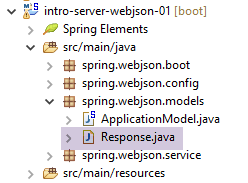
所有控制器方法均返回以下 [Response] 类型:
 |
package spring.webjson.service;

import java.util.List;

public class Response<T> {

    // ----------------- properties
    // operation status
    private int status;
    // any error messages
    private List<String> messages;
    // the body of the reply
    private T body;

    // manufacturers
    public Response() {

    }

    public Response(int status, List<String> messages, T body) {
        this.status = status;
        this.messages = messages;
        this.body = body;
    }

    // getters and setters
    ...
}
- 第 5 行:响应封装了一个类型 T;
- 第 13 行:类型为 T 的响应;
- 第 9–11 行:方法可能会遇到异常。在这种情况下,它将返回一个包含以下内容的响应:
- 第 9 行:status!=0;
- 第 11 行:遇到的错误列表;
13.5.5.4. URL [/addProducts]
URL [/addProducts] 由以下方法处理:
@RequestMapping(value = "/addProduits", method = RequestMethod.POST, consumes = "application/json; charset=UTF-8", produces = "application/json; charset=UTF-8")
    @ResponseBody
    public String addProduits(HttpServletRequest request) throws JsonProcessingException {
        // answer
        Response<List<Produit>> response;
        try {
            // retrieve the posted value
            String body = CharStreams.toString(request.getReader());
            List<Produit> produits = jsonMapperProduitWithoutCategorie.readValue(body, new TypeReference<List<Produit>>() {
            });
            // we re-establish the link between products and categories
            for (Produit produit : produits) {
                produit.setCategorie(application.getCategorieByIdWithoutProduits(produit.getIdCategorie()));
            }
            // we persist products
            application.addProduits(produits);
            response = new Respon    se<List<Produit>>(0, null, produits);
        } catch (DaoException e1) {
            response = new Response<List<Produit>>(1000, e1.getErreurs(), null);
        } catch (Exception e2) {
            response = new Response<List<Produit>>(1000, getErreursForException(e2), null);
        }
        // answer jSON
        return jsonMapperProduitWithoutCategorie.writeValueAsString(response);
    }
- 第 3 行:该方法将 [HttpServletRequest request] 作为参数,该参数封装了客户端请求的所有信息;
- 第 5 行:将发送给客户端的响应:一个产品列表;
- 第 8 行:我们获取提交的值。[CharStreams] 类属于 [Google Guava] 库,我们已在 [pom.xml] 文件中添加了该库的引用。我们获取客户端提交的 JSON 字符串。我们需要对其进行反序列化才能进行后续处理;
- 第 8–10 行:执行反序列化操作。我们得到一个产品列表,其中每个产品的 [category] 字段初始值为 null;
- 第 12–14 行:我们将列表中所有产品的 [category] 字段重置。为此,我们使用产品的 [categoryId] 字段,该字段已初始化;
- 第 16 行:将产品插入数据库;
- 第 17 行:使用产品列表初始化 [response] 对象;
- 第 18–19 行:处理方法在 [DAO] 层遇到异常的情况。我们将响应初始化为 [status=1000](错误代码)[messages=e1.getMessages()],即向客户端发送服务器端遇到的错误列表;
- 第 20–21 行:方法遇到其他类型异常的情况。我们使用 [status=1000](错误代码)[messages=getErrorsForException(e)] 初始化响应,其中 [getErrorsForException] 是该类的私有方法,用于返回与 e 的异常堆栈中异常相关的错误列表,并且 [body=null];
- 第 24 行:返回响应的 JSON 字符串;
13.5.5.5. URL [/getAllProducts]
URL [/getAllProducts] 由以下方法处理:
    @RequestMapping(value = "/getAllProduits", method = RequestMethod.GET, produces = "application/json; charset=UTF-8")
    @ResponseBody
    public String getAllProduits() throws JsonProcessingException {
        // answer
        Response<List<Produit>> response;
        try {
            response = new Response<List<Produit>>(0, null, application.getAllProduits());
        } catch (DaoException e1) {
            response = new Response<List<Produit>>(1003, e1.getErreurs(), null);
        } catch (Exception e2) {
            response = new Response<List<Produit>>(1003, getErreursForException(e2), null);
        }
        // answer jSON
        return jsonMapperProduitWithoutCategorie.writeValueAsString(response);
}
- 第 1 行:使用 [GET] 操作请求 URL [/getAllProduits]。它返回 JSON;
- 第 2 行:该方法将 JSON 响应发送给客户端;
- 第 5 行:该方法返回类型为 [Response<List<Product>>] 的 JSON 字符串;
- 第 7 行:请求的产品不包含其所属类别;
- 第 8–12 行:若发生错误,则使用错误代码和错误消息初始化响应;
- 第 14 行:将 JSON 响应发送给客户端;
13.5.5.6. 结论
本文将不再介绍该控制器中的其他方法。它们与我们刚刚介绍的两个方法中的一个相似。
13.5.6. Web 服务 / JSON 执行类
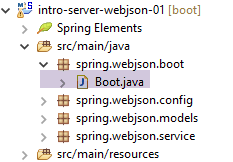 |
[Boot] 类是该项目的可执行类:
package spring.webjson.boot;

import org.springframework.boot.SpringApplication;

import spring.webjson.server.config.AppConfig;

public class Boot {

    public static void main(String[] args) {
        SpringApplication.run(AppConfig.class, args);
    }
}
- 第 10 行:执行静态方法 [SpringApplication.run]。[SpringApplication] 类是 [Spring Boot] 项目中的一个类(第 3 行)。向其传递了两个参数:
- [AppConfig.class]:用于配置整个应用程序的类;
- [args]:传递给第 9 行 [main] 方法的任何参数。此参数在此处未被使用;
执行该类时,会生成以下日志:
- 第 17-19 行:启动 Tomcat 服务器以运行 Web/JSON 服务;
- 第 25-33 行:构建 [DAO] 层;
- 第 32-51 行:发现已暴露的 URL;
13.5.7. Web 服务 / JSON 测试
为了执行测试,我们通过 SQL 脚本 [dbintrospringdata.sql] 生成 MySQL 数据库 [dbintrospringdata]:
 |
完成上述操作后,我们使用 [Advanced Rest Client](参见第 22.5 节)来查询 Web 服务 / JSON 公开的 URL(Web 服务 / JSON 必须正在运行)。
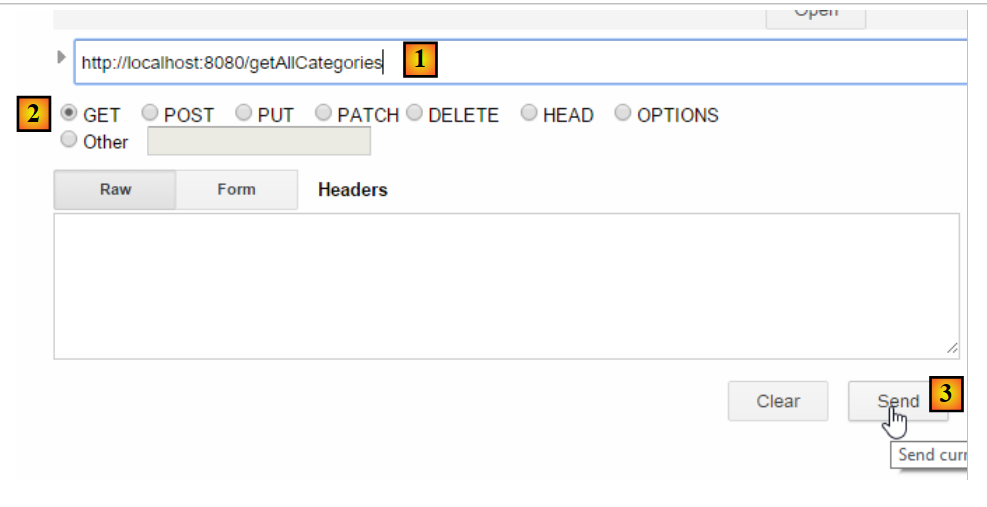 |
- 在[1-3]中,我们通过HTTP GET请求获取URL [/getAllCategories];
我们收到以下响应:
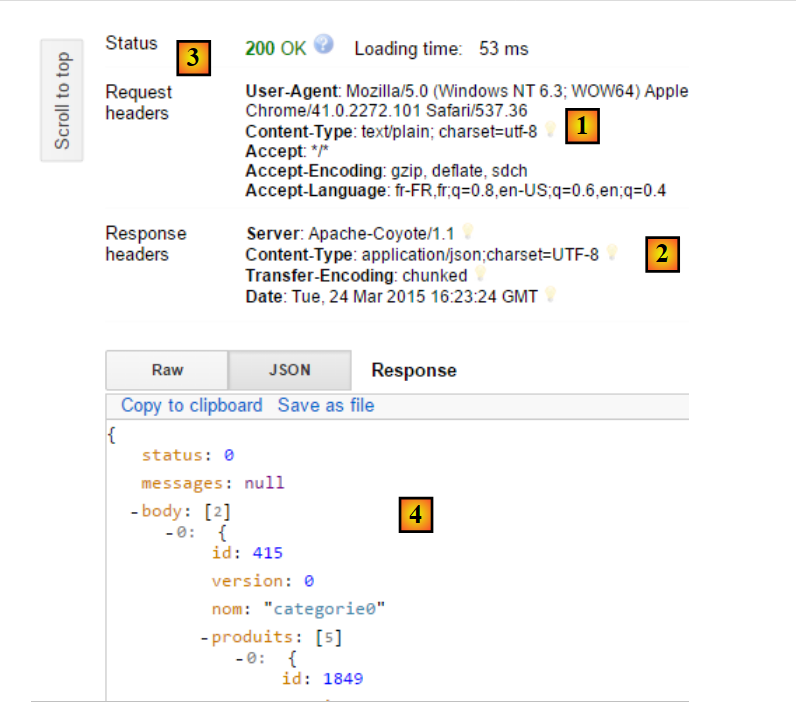 |
- 在 [1] 中,客户端的 HTTP 请求;
- 在 [2] 中,服务器的 HTTP 响应;
- 在 [3] 中,状态码 [200 OK] 表示服务器已成功处理该请求;
- 在 [4] 中,服务器的 JSON 响应;
完整的 JSON 响应如下:
{"status":0,"messages":null,"body":[{"id":415,"version":0,"nom":"categorie0","produits":[{"id":1849,"version":0,"nom":"produit00","idCategorie":415,"prix":100.0,"description":"desc00"},{"id":1850,"version":0,"nom":"produit01","idCategorie":415,"prix":101.0,"description":"desc01"},{"id":1851,"version":0,"nom":"produit02","idCategorie":415,"prix":102.0,"description":"desc02"},{"id":1852,"version":0,"nom":"produit03","idCategorie":415,"prix":103.0,"description":"desc03"},{"id":1853,"version":0,"nom":"produit04","idCategorie":415,"prix":104.0,"description":"desc04"}]},{"id":416,"version":0,"nom":"categorie1","produits":[{"id":1856,"version":0,"nom":"produit12","idCategorie":416,"prix":112.0,"description":"desc12"},{"id":1857,"version":0,"nom":"produit13","idCategorie":416,"prix":113.0,"description":"desc13"},{"id":1858,"version":0,"nom":"produit14","idCategorie":416,"prix":114.0,"description":"desc14"},{"id":1854,"version":0,"nom":"produit10","idCategorie":416,"prix":110.0,"description":"desc10"},{"id":1855,"version":0,"nom":"produit11","idCategorie":416,"prix":111.0,"description":"desc11"}]}]}
- status:0 表示没有服务器端错误;
- messages: null 表示没有错误信息;
- body:是响应正文,在此示例中为包含产品的分类列表。共有两个分类,每个分类下有 5 件产品;
我们将把商品 [product15] 添加到类别 [category1] 中。为此,我们将使用 URL [/addCategories],其代码如下:
@RequestMapping(value = "/addCategories", method = RequestMethod.POST, consumes = "application/json; charset=UTF-8", produces = "application/json; charset=UTF-8")
    @ResponseBody
    public String addCategories(HttpServletRequest request) throws JsonProcessingException {
        Response<List<Categorie>> response;
        ObjectMapper mapper = context.getBean(ObjectMapper.class);
        // we persist categories
        try {
            // retrieve the posted value
            String body = CharStreams.toString(request.getReader());
            mapper.setFilters(jsonFilterCategorieWithProduits);
            List<Categorie> categories = mapper.readValue(body, new TypeReference<List<Categorie>>() {
            });
            // we re-establish the link between products and categories
            for (Categorie categorie : categories) {
                Set<Produit> produits = categorie.getProduits();
                if (produits != null) {
                    for (Produit produit : categorie.getProduits()) {
                        produit.setCategorie(categorie);
                    }
                }
            }
            // we persist categories
            application.addCategories(categories);
            response = new Response<List<Categorie>>(0, null, categories);
        } catch (Exception e) {
            response = new Response<List<Categorie>>(1004, getErreursForException(e), null);
        }
        // answer jSON
        return mapper.writeValueAsString(response);
    }
- 第 1 行:客户端必须发送 POST 请求,且提交的值必须是 JSON 字符串;
- 第 9–12 行:提交的值必须是包含各类别及其关联产品的列表;
我们将创建一个包含商品 [product21] 的分类 [category2]。此时需发送的 JSON 字符串如下:
[{"id":null,"version":0,"nom":"categorie2","produits":[{"id":null,"version":0,"nom":"produit21","idCategorie":null,"prix":111.0,"description":"desc21"}]}]
向 Web 服务 / JSON 发送请求的方式如下:
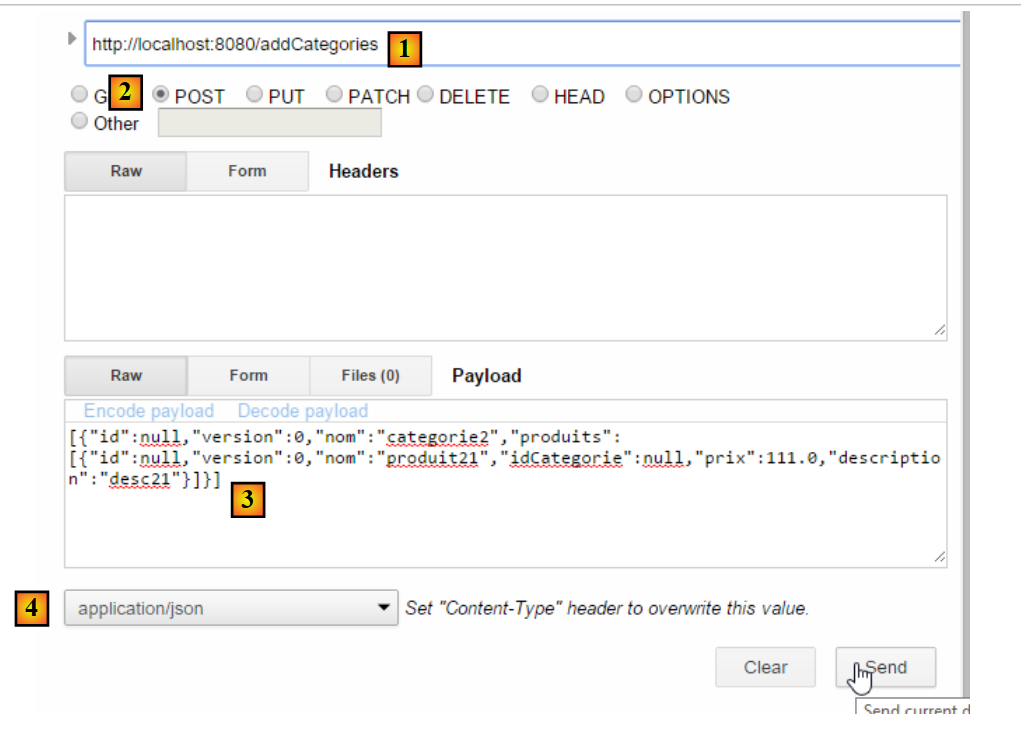 |
- 在 [1] 中,请求的 URL;
- 在 [2] 中,通过 POST 操作进行请求;
- 在 [3] 中,是提交的 JSON 字符串;
- 在 [4] 中,告知服务器将发送 JSON 数据;
服务器的响应如下:
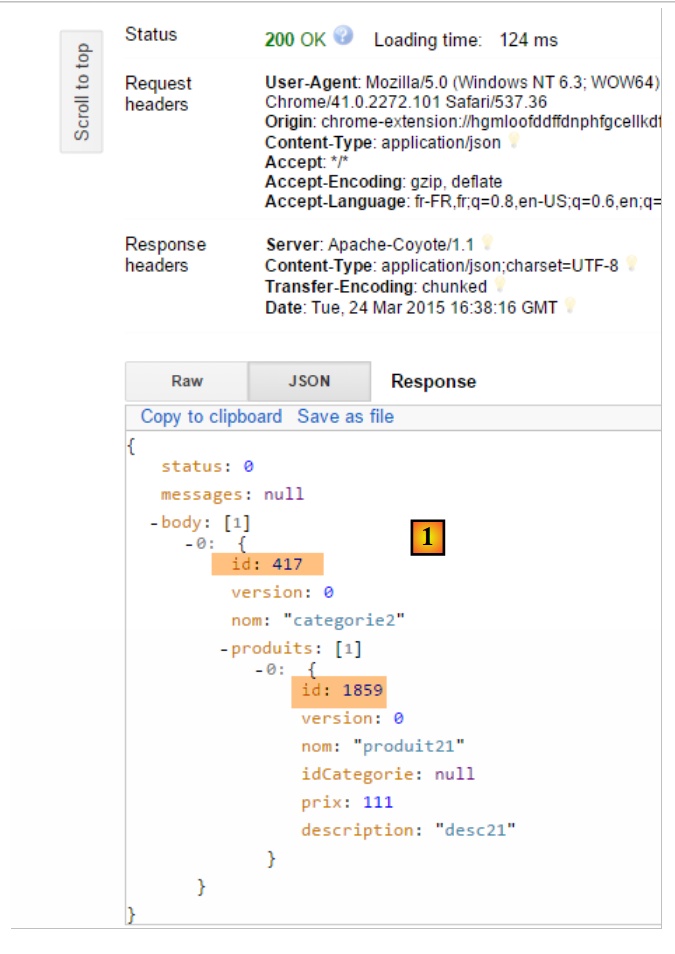 |
- 在 [1] 中,我们可以看到“类别”及其“产品”现在都拥有主键,这表明它们很可能已被插入数据库。我们将通过访问 URL [/getCategorieByNameWithProduits/categorie2] 来验证这一点:
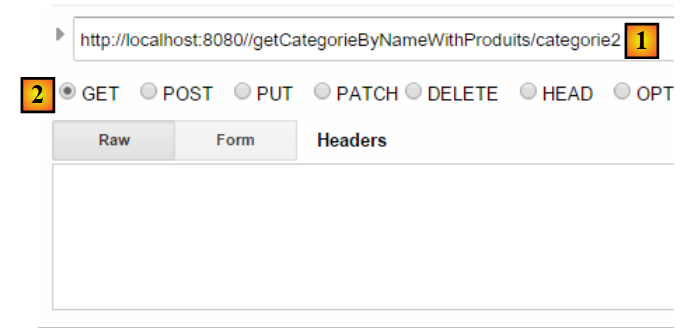 |
我们得到以下结果:
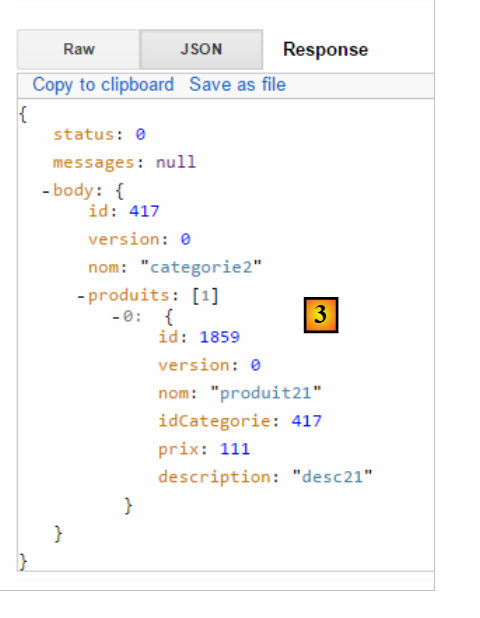 |
我们确实检索到了类别 [categorie2] 及其唯一的产品 [produit21]。我们也可以仅请求该产品。为此,请使用 URL [/getProduitByIdWithoutCategorie/1859]:
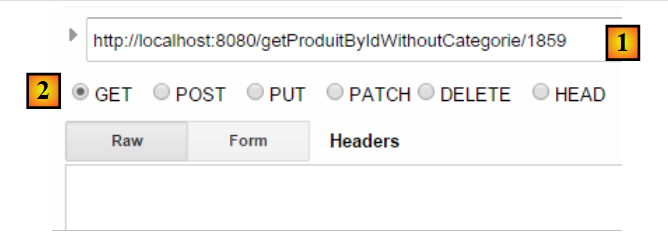 |
我们得到以下结果:
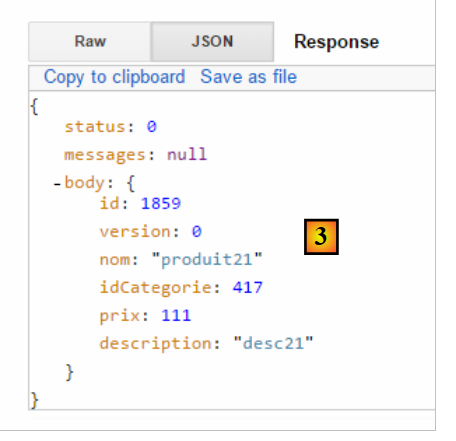 |
所有 [GET] 操作均可在标准网页浏览器中执行:
 |
欢迎读者测试该 Web 服务 / json 的其他 URL。
13.6. 为 /json Web 服务编写的客户端
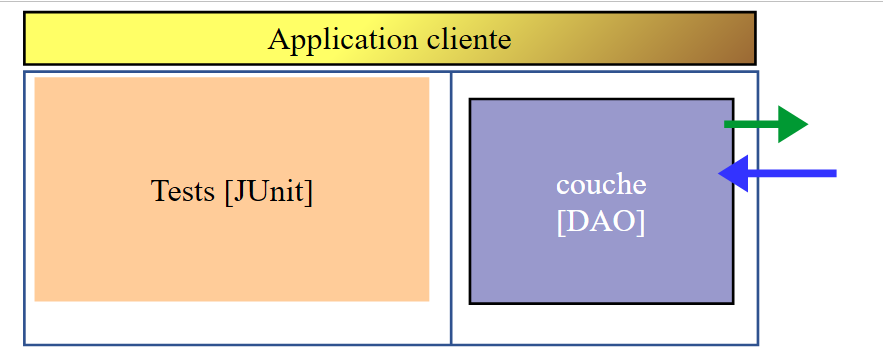
既然 [dbintrospringdata] 数据库已在 Web 上提供,我们将编写一个使用该数据库的应用程序。届时我们将拥有以下客户端/服务器架构:
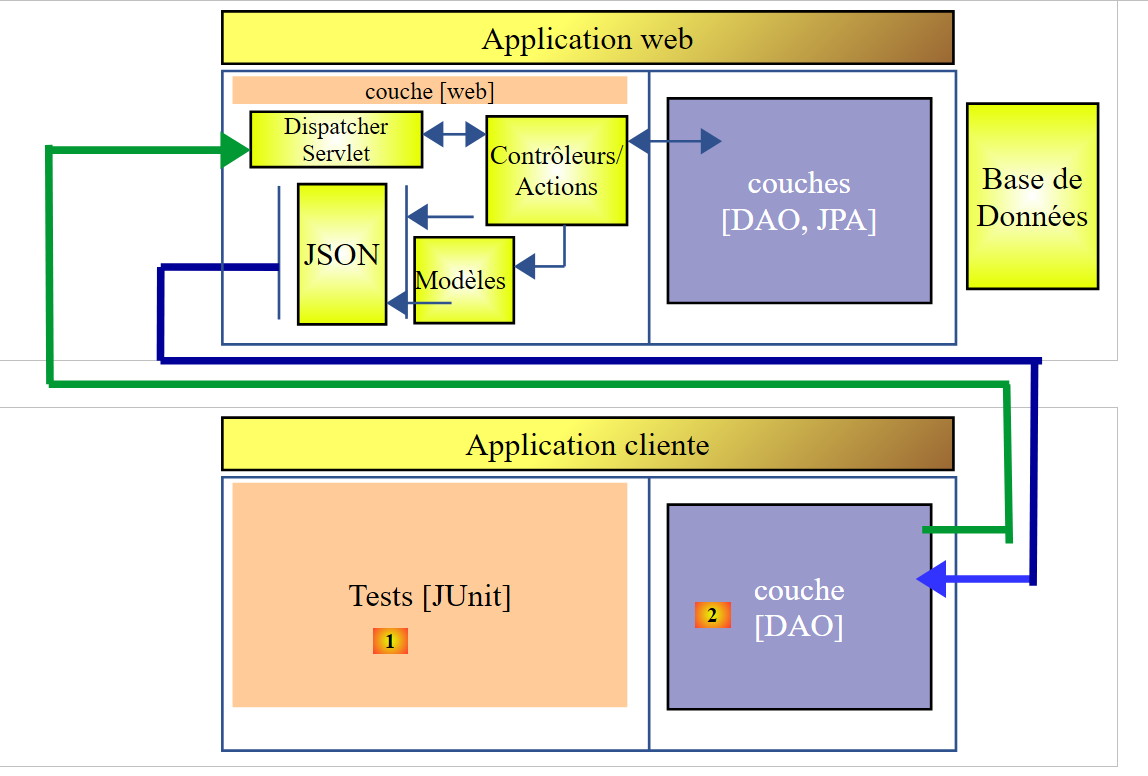 |
客户端应用程序将包含两层:
- 一个 [DAO] [2] 层,用于与暴露数据库的 /json Web 应用程序进行通信;
- 一个 JUnit [1] 测试层,用于验证客户端和服务器是否运行正常;
13.6.1. Eclipse 项目
客户端的 Eclipse 项目如下:
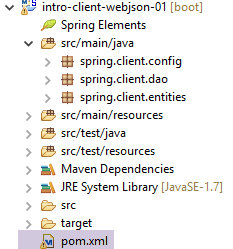 |
- [src/main/java] 文件夹实现了 [DAO] 层;
- [src/test/java] 文件夹实现 JUnit 测试;
13.6.2. Maven 项目配置
该项目是一个由以下 [pom.xml] 文件配置的 Maven 项目:
<project xmlns="http://maven.apache.org/POM/4.0.0" xmlns:xsi="http://www.w3.org/2001/XMLSchema-instance"
    xsi:schemaLocation="http://maven.apache.org/POM/4.0.0 http://maven.apache.org/xsd/maven-4.0.0.xsd">
    <modelVersion>4.0.0</modelVersion>
    <groupId>istia.st.webjson</groupId>
    <artifactId>intro-client-webjson-01</artifactId>
    <version>0.0.1-SNAPSHOT</version>
    <description>Client console du serveur web / jSON</description>

    <properties>
        <project.build.sourceEncoding>UTF-8</project.build.sourceEncoding>
        <java.version>1.8</java.version>
    </properties>

    <parent>
        <groupId>org.springframework.boot</groupId>
        <artifactId>spring-boot-starter-parent</artifactId>
        <version>1.2.7.RELEASE</version>
    </parent>

    <dependencies>
        <!-- Spring -->
        <dependency>
            <groupId>org.springframework</groupId>
            <artifactId>spring-web</artifactId>
        </dependency>
        <!-- jSON library used by Spring -->
        <dependency>
            <groupId>com.fasterxml.jackson.core</groupId>
            <artifactId>jackson-core</artifactId>
        </dependency>
        <dependency>
            <groupId>com.fasterxml.jackson.core</groupId>
            <artifactId>jackson-databind</artifactId>
        </dependency>
        <!-- component used by Spring RestTemplate -->
        <dependency>
            <groupId>org.apache.httpcomponents</groupId>
            <artifactId>httpclient</artifactId>
        </dependency>
        <!-- Google Guava -->
        <dependency>
            <groupId>com.google.guava</groupId>
            <artifactId>guava</artifactId>
            <version>16.0.1</version>
            <scope>test</scope>
        </dependency>
        <!-- log library -->
        <dependency>
            <groupId>org.springframework.boot</groupId>
            <artifactId>spring-boot-starter-logging</artifactId>
        </dependency>
        <!-- Spring Boot Test -->
        <dependency>
            <groupId>org.springframework.boot</groupId>
            <artifactId>spring-boot-starter-test</artifactId>
            <scope>test</scope>
        </dependency>
        <!-- Spring Boot -->
        <dependency>
            <groupId>org.springframework.boot</groupId>
            <artifactId>spring-boot</artifactId>
            <scope>test</scope>
        </dependency>
    </dependencies>
    <!-- plugins -->
    <build>
        <plugins>
            <plugin>
                <artifactId>maven-assembly-plugin</artifactId>
                <configuration>
                    <descriptorRefs>
                        <descriptorRef>jar-with-dependencies</descriptorRef>
                    </descriptorRefs>
                </configuration>
            </plugin>
            <plugin>
                <groupId>org.apache.maven.plugins</groupId>
                <artifactId>maven-surefire-plugin</artifactId>
                <version>2.18.1</version>
            </plugin>
        </plugins>
    </build>

    <name>intro-client-webjson-01</name>
</project>
- 第 14–18 行:父级 Maven 项目 [spring-boot-starter-parent],它允许我们定义多个依赖项而无需指定其版本,因为这些版本已在父项目中定义;
- 第 22–25 行:尽管我们并非在编写 Web 应用程序,但仍需 [spring-web] 依赖项,其中包含 [RestTemplate] 类,该类可简化与 Web/JSON 应用程序的交互;
- 第 27–34 行:一个 JSON 库;
- 第 36–39 行:一个允许我们为客户端的 HTTP 请求设置超时的依赖项。超时是指等待服务器响应的最长时限。超过此时间后,客户端将通过抛出异常来触发超时错误;
- 第 41–46 行:JUnit 测试中使用的 Google Guava 库。因此,我们将其作用域设置为 [test](第 45 行)。这意味着仅在执行 [src/test/java] 分支中的代码时,才会引入此依赖项;
- 第 48–51 行:日志记录库;
- 第 52–63 行:JUnit 测试的依赖项。具体来说,它包含了测试所需的 JUnit 4 库。这些依赖项带有 [<scope>test</scope>] 属性,表明它们仅在测试阶段需要。它们不会包含在最终的项目归档中;
13.6.3. [DAO] 层的实现
 |
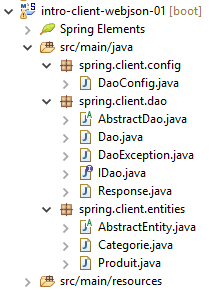 |
- [spring.client.config] 包包含 [DAO] 层的 Spring 配置;
- [spring.client.dao] 包包含 [DAO] 层的实现;
- [spring.client.entities] 包包含与 Web 服务/JSON 交换的对象;
13.6.3.1. 配置
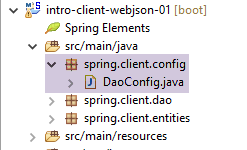 |
[DaoConfig] 类负责 [DAO] 层的 Spring 配置。其代码如下:
package spring.client.config;

import org.springframework.context.annotation.Bean;
import org.springframework.context.annotation.ComponentScan;
import org.springframework.context.annotation.Configuration;
import org.springframework.http.client.HttpComponentsClientHttpRequestFactory;
import org.springframework.web.client.RestTemplate;

import com.fasterxml.jackson.databind.ObjectMapper;
import com.fasterxml.jackson.databind.ser.impl.SimpleBeanPropertyFilter;
import com.fasterxml.jackson.databind.ser.impl.SimpleFilterProvider;

@ComponentScan({ "spring.client.dao" })
public class DaoConfig {

    // constants
    static private final int TIMEOUT = 1000;
    static private final String URL_WEBJSON = "http://localhost:8080";

    @Bean
    public RestTemplate restTemplate(int timeout) {
        // creation of the RestTemplate component
        HttpComponentsClientHttpRequestFactory factory = new HttpComponentsClientHttpRequestFactory();
        RestTemplate restTemplate = new RestTemplate(factory);
        // exchange timeout
        factory.setConnectTimeout(timeout);
        factory.setReadTimeout(timeout);
        // result
        return restTemplate;
    }

    @Bean
    public int timeout() {
        return TIMEOUT;
    }

    @Bean
    public String urlWebJson() {
        return URL_WEBJSON;
    }

    // filters jSON
    @Bean(name = "jsonMapper")
    public ObjectMapper jsonMapper() {
        return new ObjectMapper();
    }

    @Bean(name = "jsonMapperCategorieWithProduits")
    public ObjectMapper jsonMapperCategorieWithProduits() {
        // mapper jSON
        ObjectMapper mapper = new ObjectMapper();
        // filters
        mapper.setFilters(
                new SimpleFilterProvider().addFilter("jsonFilterCategorie", SimpleBeanPropertyFilter.serializeAllExcept())
                        .addFilter("jsonFilterProduit", SimpleBeanPropertyFilter.serializeAllExcept("categorie")));
        // result
        return mapper;
    }

    @Bean(name = "jsonMapperProduitWithCategorie")
    public ObjectMapper jsonMapperProduitWithCategorie() {
        // mapper jSON
        ObjectMapper mapper = new ObjectMapper();
        // filters
        mapper.setFilters(
                new SimpleFilterProvider().addFilter("jsonFilterProduit", SimpleBeanPropertyFilter.serializeAllExcept())
                        .addFilter("jsonFilterCategorie", SimpleBeanPropertyFilter.serializeAllExcept("produits")));
        // result
        return mapper;
    }

    @Bean(name = "jsonMapperCategorieWithoutProduits")
    public ObjectMapper jsonMapperCategorieWithoutProduits() {
        // mapper jSON
        ObjectMapper mapper = new ObjectMapper();
        // filters
        mapper.setFilters(new SimpleFilterProvider().addFilter("jsonFilterCategorie",
                SimpleBeanPropertyFilter.serializeAllExcept("produits")));
        // result
        return mapper;
    }

    @Bean(name = "jsonMapperProduitWithoutCategorie")
    public ObjectMapper jsonMapperProduitWithoutCategorie() {
        // mapper jSON
        ObjectMapper mapper = new ObjectMapper();
        // filters
        mapper.setFilters(new SimpleFilterProvider().addFilter("jsonFilterProduit",
                SimpleBeanPropertyFilter.serializeAllExcept("categorie")));
        // result
        return mapper;
    }
}
- 第 13 行:该类是一个 Spring 配置类——Spring 组件位于 [spring.client.dao] 包中;
- 第 17 行:设置 1 秒(1000 毫秒)的超时;
- 第 32–35 行:返回此值的 Bean;
- 第 18 行:Web 服务 / JSON 的 URL;
- 第 37–40 行:返回此值的 Bean;
- 第 20–30 行:处理与 Web 服务 / JSON 通信的 [RestTemplate] 类的配置。当不需要配置时,可以在代码中通过简单的 [new RestTemplate()] 进行实例化。在此,我们希望设置与 Web 服务 / JSON 通信的超时时间。 第 36 行的 [timeout] Bean 作为参数传递给了第 24 行的 [RestTemplate] 方法;
- 第 23 行:[HttpComponentsClientHttpRequestFactory] 组件正是用于设置通信超时(第 29–30 行)的组件;
- 第 24 行:[RestTemplate] 类是使用该组件构建的。由于它依赖该组件与 Web 服务 / JSON 进行通信,因此通信确实会受超时限制;
- 客户端和服务器将交换文本行。 转换器负责将对象序列化为文本,反之亦将文本反序列化为对象。[RestTemplate] 类可能关联多个转换器,具体选用哪个取决于服务器发送的 HTTP 头部。在此示例中,我们将不使用转换器。因此,[RestTemplate] 组件不会以任何方式尝试转换以下两个元素:
- 提交的文本;
- 响应中接收到的文本;
这些文本将是 JSON 字符串,因此 [RestTemplate] 组件将保持其原样。我们将作为开发者,自行执行必要的 JSON 序列化和反序列化。这是因为应用于提交值和接收响应的过滤器可能不同,而且经验表明,自己处理比尝试配置 [RestTemplate] 组件以使用正确的 JSON 转换器要容易得多;
- 第 42–92 行:定义 JSON 过滤器。这些与第 13.5.3.1 节中介绍和解释的服务器端过滤器相同;
- 第 43–46 行:一个不带过滤器的 JSON 映射器;
- 第 64–68 行:一个用于检索类别(不包含其产品)的 JSON 映射器;
- 第 48–58 行:一个用于检索包含其产品的类别的 JSON 映射器;
- 第 83–92 行:一个用于检索不包含其所属类别的产品的 JSON 映射器;
- 第 60–70 行:一个用于检索包含其所属类别的产品的 JSON 映射器;
所有这些 Bean 都将可供 [DAO] 层代码以及 JUnit 测试使用。
13.6.3.2. 实体
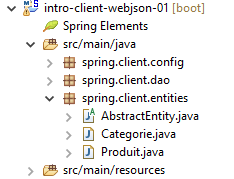 |
[DAO] 层处理的实体是其与 Web 服务/JSON 进行交互的对象。这些包括商品和产品。在服务器端,这些实体带有 JPA 持久化注解。在此,这些注解已被移除。我们再次列出实体代码以供参考:
[AbstractEntity]
package spring.client.entities;

import com.fasterxml.jackson.core.JsonProcessingException;
import com.fasterxml.jackson.databind.ObjectMapper;

public abstract class AbstractEntity {
    // properties
    protected Long id;
    protected Long version;

    // manufacturers
    public AbstractEntity() {

    }

    public AbstractEntity(Long id, Long version) {
        this.id = id;
        this.version = version;
    }

    // redefine [equals] and [hashcode]
    @Override
    public int hashCode() {
        return (id != null ? id.hashCode() : 0);
    }

    @Override
    public boolean equals(Object entity) {
        if (!(entity instanceof AbstractEntity)) {
            return false;
        }
        String class1 = this.getClass().getName();
        String class2 = entity.getClass().getName();
        if (!class2.equals(class1)) {
            return false;
        }
        AbstractEntity other = (AbstractEntity) entity;
        return id != null && this.id == other.id.longValue();
    }

    // signature jSON
    public String toString() {
        ObjectMapper mapper = new ObjectMapper();
        try {
            return mapper.writeValueAsString(this);
        } catch (JsonProcessingException e) {
            e.printStackTrace();
            return null;
        }
    }

    // getters and setters
...
}
[分类]
package spring.client.entities;

import java.util.HashSet;
import java.util.Set;

import com.fasterxml.jackson.annotation.JsonFilter;

@JsonFilter("jsonFilterCategorie")
public class Categorie extends AbstractEntity {

    // properties
    private String nom;

    // related products
    public Set<Produit> produits = new HashSet<Produit>();

    // manufacturers
    public Categorie() {

    }

    public Categorie(String nom) {
        this.nom = nom;
    }

    // methods
    public void addProduit(Produit produit) {
        // we add the product
        produits.add(produit);
        // set your category
        produit.setCategorie(this);
    }

    // getters and setters
    ...
}
[Product]
package spring.webjson.client.entities;

import com.fasterxml.jackson.annotation.JsonFilter;

@JsonFilter("jsonFilterProduit")
public class Produit extends AbstractEntity {

    // the name
    private String nom;
   // category number
    private Long idCategorie;
   // the price
    private double prix;
   // the description
    private String description;

    // the category
    private Categorie categorie;

    // manufacturers
    public Produit() {

    }

    public Produit(String nom, double prix, String description) {
        this.nom = nom;
        this.prix = prix;
        this.description = description;
    }

    // getters and setters
...
}
13.6.3.3. [DaoException] 类
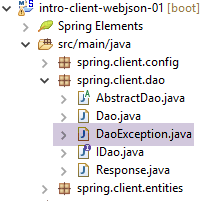 |
当 [DAO] 层遇到错误时,会抛出 [DaoException]。该类用于服务器端,具体说明见第 11.3.7 节。
13.6.3.4. [DAO] 层接口
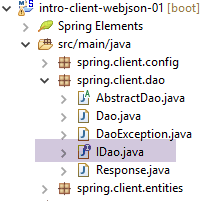 |
[DAO] 层实现了第 11.3.7 节中描述的 [IDao] 接口。
package spring.client.dao;

import java.util.List;

import spring.client.entities.Categorie;
import spring.client.entities.Produit;

public interface IDao {

    // insert product list
    public List<Produit> addProduits(List<Produit> produits);

    // removal of all products
    public void deleteAllProduits();

    // product list update
    public List<Produit> updateProduits(List<Produit> produits);

    // all products obtained
    public List<Produit> getAllProduits();

    // inserting a list of categories
    public List<Categorie> addCategories(List<Categorie> categories);

    // delete all categories
    public void deleteAllCategories();

    // updating a list of categories
    public List<Categorie> updateCategories(List<Categorie> categories);

    // obtaining all categories
    public List<Categorie> getAllCategories();

    // a special product
    public Produit getProduitByIdWithCategorie(Long idProduit);

    public Produit getProduitByIdWithoutCategorie(Long idProduit);

    public Produit getProduitByNameWithCategorie(String nom);

    public Produit getProduitByNameWithoutCategorie(String nom);

    // a special category
    public Categorie getCategorieByIdWithProduits(Long idCategorie);

    public Categorie getCategorieByIdWithoutProduits(Long idCategorie);

    public Categorie getCategorieByNameWithProduits(String nom);

    public Categorie getCategorieByNameWithoutProduits(String nom);

}
13.6.3.5. Web 服务 / JSON 响应
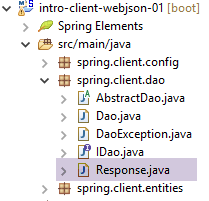 |
我们已经看到,Web 服务 / JSON 的所有 URL 都会返回第 13.5.5.3 节中定义的 [Response] 类型。我们在此重现该类:
package spring.client.dao;

import java.util.List;

public class Response<T> {

    // ----------------- properties
    // operation status
    private int status;
    // any error messages
    private List<String> messages;
    // the body of the reply
    private T body;

    // manufacturers
    public Response() {

    }

    public Response(int status, List<String> messages, T body) {
        this.status = status;
        this.messages = messages;
        this.body = body;
    }

    // getters and setters
    ...
}
13.6.3.6. 实现与 Web 服务的通信 / JSON
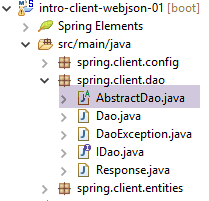 |
[ AbstractDao] 类实现了与 Web 服务 / JSON 的通信:
package spring.client.dao;

import java.net.URI;
import java.net.URISyntaxException;

import org.springframework.beans.factory.annotation.Autowired;
import org.springframework.core.ParameterizedTypeReference;
import org.springframework.http.MediaType;
import org.springframework.http.RequestEntity;
import org.springframework.web.client.RestTemplate;

public abstract class AbstractDao {

    // data
    @Autowired
    protected RestTemplate restTemplate;
    @Autowired
    protected String urlServiceWebJson;

    // generic request
    protected String getResponse(String url, String jsonPost) {

        // url : URL to contact
        // jsonPost: the jSON value to be posted
        try {
            // request execution
            RequestEntity<?> request;
            if (jsonPost != null) {
                // query POST
                request = RequestEntity.post(new URI(String.format("%s%s", urlServiceWebJson, url)))
                        .header("Content-Type", "application/json").accept(MediaType.APPLICATION_JSON).body(jsonPost);
            } else {
                // query GET
                request = RequestEntity.get(new URI(String.format("%s%s", urlServiceWebJson, url)))
                        .accept(MediaType.APPLICATION_JSON).build();
            }
            // execute the query
            return restTemplate.exchange(request, new ParameterizedTypeReference<String>() {
            }).getBody();
        } catch (URISyntaxException e1) {
            throw new DaoException(20, e1);
        } catch (RuntimeException e2) {
            throw new DaoException(21, e2);
        }
    }

}
- 第 15-16 行:注入 [RestTemplate] 组件,该组件负责与服务器的通信;
- 第17-18行:注入Web服务URL / JSON;
与服务器通信的方法实现被封装到了 [getResponse] 方法中:
- 第 21 行:该方法接收 2 个参数:
- [url]:请求的 URL;
- [jsonPost]:要提交的 JSON 字符串,否则为 null。如果 [jsonPost == null],则使用 GET 方法发送 URL 请求;否则,使用 POST 方法;
- 第 38 行:该语句用于向服务器发送请求并接收响应。[RestTemplate] 组件提供了多种与服务器交互的方法。此处我们选择了 [exchange] 方法,但还有其他方法可用;
- 第 27–36 行:我们需要构建 [RequestEntity] 请求。其构建方式取决于使用 GET 还是 POST 请求;
- 第 30–31 行:GET 请求的构建。[RequestEntity] 类提供了静态方法来创建 GET、POST、HEAD 及其他请求。[RequestEntity.get] 方法允许您通过链式调用各种构建方法来创建 GET 请求:
- [RequestEntity.get] 方法将目标 URL 作为 URI 实例形式的参数传入,
- [accept] 方法允许您定义 [Accept] HTTP 头中的元素。在此,我们指定接受服务器将发送的 [application/json] 类型;
- [build] 方法利用这些信息构建请求的 [RequestEntity] 类型;
- 第 34–35 行:POST 请求。[RequestEntity.post] 方法通过串联构建请求的各种方法来创建 POST 请求:
- [RequestEntity.post] 方法将目标 URL 作为 URI 实例形式的参数接收,
- [header] 方法用于定义一个 HTTP 头部。在此,我们向服务器发送 [Content-Type: application/json] 头部,以表明提交的数据将以 JSON 字符串的形式到达;
- [accept] 方法允许我们表明接受服务器将发送的 [application/json] 类型;
- [body] 方法设置提交的值。这是泛型 [getResponse] 方法(第 1 行)的第四个参数;
- 第 38 行:[RestTemplate].exchange 方法返回 [ResponseEntity<String>] 类型,该类型封装了整个服务器响应:包括 HTTP 头部和文档正文。[ResponseEntity].getBody() 方法获取该正文,它代表服务器的响应——在本例中,是一个字符串;
13.6.3.7. [IDao] 接口的实现
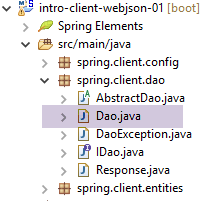 |
[Dao] 类实现了 [IDao] 接口:
package spring.client.dao;

import java.io.IOException;
import java.util.List;

import org.springframework.beans.factory.annotation.Autowired;
import org.springframework.beans.factory.annotation.Qualifier;
import org.springframework.context.ApplicationContext;
import org.springframework.stereotype.Component;

import com.fasterxml.jackson.core.type.TypeReference;
import com.fasterxml.jackson.databind.ObjectMapper;

import spring.client.entities.Categorie;
import spring.client.entities.Produit;

@Component
public class Dao extends AbstractDao implements IDao {

    @Autowired
    private ApplicationContext context;

    // filters jSON
    @Autowired
    @Qualifier("jsonMapper")
    private ObjectMapper jsonMapper;
    @Autowired
    @Qualifier("jsonMapperCategorieWithProduits")
    private ObjectMapper jsonMapperCategorieWithProduits;
    @Autowired
    @Qualifier("jsonMapperProduitWithCategorie")
    private ObjectMapper jsonMapperProduitWithCategorie;
    @Autowired
    @Qualifier("jsonMapperCategorieWithoutProduits")
    private ObjectMapper jsonMapperCategorieWithoutProduits;
    @Autowired
    @Qualifier("jsonMapperProduitWithoutCategorie")
    private ObjectMapper jsonMapperProduitWithoutCategorie;

    @Override
    public List<Produit> addProduits(List<Produit> produits) {
        // ----------- add products (without category)
        ...
}
- 第 17 行:[Dao] 类是一个 Spring 组件,其他 Spring 组件可以注入其中;
- 第 18 行:[Dao] 类继承了我们刚才看到的 [AbstractDao] 类,并实现了 [IDao] 接口;
- 第 20–21 行:我们注入 Spring 上下文以访问其中的 Bean;
- 第 24–38 行:注入第 13.6.2 节中介绍的 [AppConfig] 类中定义的 JSON 映射器;
[IDao] 接口中各种方法的实现都遵循相同的模式。我们将介绍两个方法,一个基于 [POST] 操作,另一个基于 [GET] 操作。
[GET] 示例:[getCategorieByNameWithProduits]
@Override
    public Categorie getCategorieByNameWithProduits(String nom) {
        // ----------- obtain a category designated by its name, with its products
        try {
            // request
            Response<Categorie> response = jsonMapperCategorieWithProduits.readValue(
                    getResponse(String.format("/getCategorieByNameWithProduits/%s", nom), null),
                    new TypeReference<Response<Categorie>>() {
                    });
            // mistake?
            if (response.getStatus() != 0) {
                // 1 exception is thrown
                throw new DaoException(response.getStatus(), response.getMessages());
            } else {
                // render the core of the server response
                return response.getBody();
            }
        } catch (DaoException e1) {
            throw e1;
        } catch (RuntimeException | IOException e2) {
            throw new DaoException(113, e2);
        }
    }
- 第 7 行:调用父类的 [getResponse] 方法。该方法负责处理与 Web 服务/JSON 的通信。其参数如下:
getResponse(String.format("/getCategorieByNameWithProduits/%s", nom), null)
- (续)
- 被查询服务的 URL [/getCategoryByNameWithProducts/name];
- 提交的值。此处无值;
[getResponse] 方法返回一个字符串,表示服务器发送的 JSON 响应。我们按以下方式对该 JSON 响应进行反序列化:
jsonMapperCategorieWithProduits.readValue(
                    jsonResponse,
                    new TypeReference<Response<Categorie>>() {
});
因为该 JSON 字符串是 [Response<Category>] 类型的序列化结果;
- 第 11–17 行:我们检查响应状态。如果状态不为 0,则表示发生了服务器端错误。随后我们抛出一个异常(第 13 行),并利用响应中包含的信息(状态码和错误消息列表);
- 第 16 行:如果没有发生服务器端错误,则返回类型为 [Response<Category>] 的响应主体,即请求的类别;
- 第 18–19 行:处理第 16 行抛出的异常;
- 第 20–22 行:处理所有其他异常;
[POST] 示例:[addCategories]
@Override
    public List<Categorie> addCategories(List<Categorie> categories) {
        // ----------- add categories (with their products)
        try {
            // request
            Response<List<Categorie>> response = jsonMapperCategorieWithProduits.readValue(
                    getResponse("/addCategories", jsonMapperCategorieWithProduits.writeValueAsString(categories)),
                    new TypeReference<Response<List<Categorie>>>() {
                    });
            // mistake?
            if (response.getStatus() != 0) {
                // 1 exception is thrown
                throw new DaoException(response.getStatus(), response.getMessages());
            } else {
                // render the core of the server response
                return response.getBody();
            }
        } catch (DaoException e1) {
            throw e1;
        } catch (RuntimeException | IOException e2) {
            throw new DaoException(104, e2);
        }
    }
- 第 2 行:使用 [addCategories] 方法将作为参数传递的类别持久化到数据库中。该方法返回这些类别,并为其添加主键。如果类别与产品一起传递,产品也会被持久化;
- 第 7 行:调用父类的 [getResponse] 方法来处理与 Web 服务 / JSON 的通信;
- 第一个参数是 URL [/addCategories];
- 第二个参数是提交的值,在本例中即待保存的类别列表;
getResponse("/addCategories", jsonMapperCategorieWithProduits.writeValueAsString(categories))
随后将生成的 JSON 字符串反序列化,以获取预期的 [Response<List<Category>] 类型:
Response<List<Categorie>> response = jsonMapperCategorieWithProduits.readValue(
                    jsonResponse,
                    new TypeReference<Response<List<Categorie>>>() {
                    });
- 第 11–17 行:处理服务器响应(无论是否出错);
- 第 20–22 行:异常处理;
所有其他方法均遵循上述两个方法的模式。
13.6.4. JUnit 测试
让我们回到当前正在开发的客户端/服务器架构:
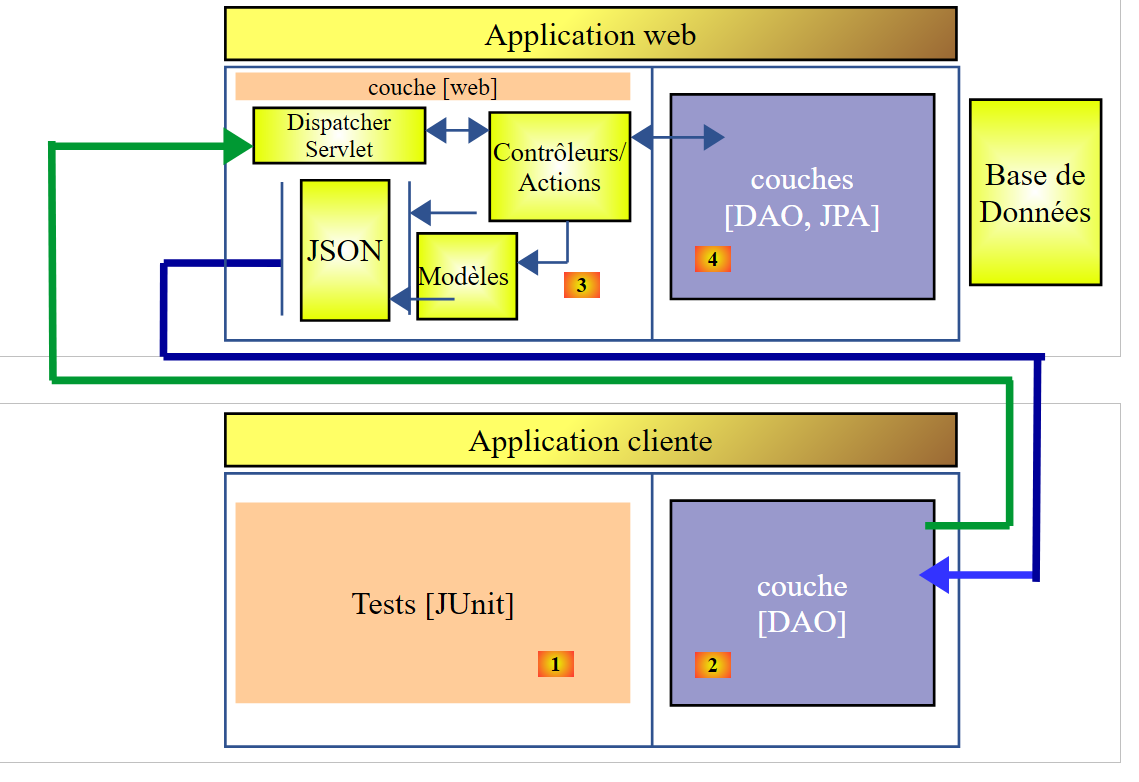 |
我们构建了一个与 [DAO] 层 [4] 具有相同接口的 [DAO] 层 [2]。因此,为了测试 [DAO] 层 [2],我们可以使用之前用于测试 [DAO] 层 [4] 的 JUnit 测试。作为提醒,该测试如下所示:
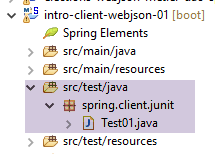 |
package spring.client.junit;

import java.util.ArrayList;
import java.util.List;
import java.util.Set;

import org.junit.Assert;
import org.junit.Before;
import org.junit.Test;
import org.junit.runner.RunWith;
import org.springframework.beans.BeansException;
import org.springframework.beans.factory.annotation.Autowired;
import org.springframework.beans.factory.annotation.Qualifier;
import org.springframework.boot.test.SpringApplicationConfiguration;
import org.springframework.test.context.junit4.SpringJUnit4ClassRunner;

import com.fasterxml.jackson.core.JsonProcessingException;
import com.fasterxml.jackson.databind.ObjectMapper;
import com.google.common.collect.Lists;

import spring.client.config.DaoConfig;
import spring.client.dao.DaoException;
import spring.client.dao.IDao;
import spring.client.entities.Categorie;
import spring.client.entities.Produit;

@SpringApplicationConfiguration(classes = DaoConfig.class)
@RunWith(SpringJUnit4ClassRunner.class)
public class Test01 {

    // layer [DAO]
    @Autowired
    private IDao dao;

    // filters jSON
    @Autowired
    @Qualifier("jsonMapper")
    private ObjectMapper jsonMapper;
    @Autowired
    @Qualifier("jsonMapperCategorieWithProduits")
    private ObjectMapper jsonMapperCategorieWithProduits;
    @Autowired
    @Qualifier("jsonMapperProduitWithCategorie")
    private ObjectMapper jsonMapperProduitWithCategorie;
    @Autowired
    @Qualifier("jsonMapperCategorieWithoutProduits")
    private ObjectMapper jsonMapperCategorieWithoutProduits;
    @Autowired
    @Qualifier("jsonMapperProduitWithoutCategorie")
    private ObjectMapper jsonMapperProduitWithoutCategorie;

    @Before
    public void cleanAndFill() {
        // the base is cleaned before each test
        log("Vidage de la base de données", 1);
        // table [CATEGORIES] is emptied - by cascade, table [PRODUITS] will be emptied
        dao.deleteAllCategories();
        // --------------------------------------------------------------------------------------
        log("Remplissage de la base", 1);
        // fill the tables
        List<Categorie> categories = new ArrayList<Categorie>();
        for (int i = 0; i < 2; i++) {
            Categorie categorie = new Categorie(String.format("categorie%d", i));
            for (int j = 0; j < 5; j++) {
                categorie.addProduit(new Produit(String.format("produit%d%d", i, j), 100 * (1 + (double) (i * 10 + j) / 100),
                        String.format("desc%d%d", i, j)));
            }
            categories.add(categorie);
        }
        // add the category - the products will be cascaded in as well
        categories = dao.addCategories(categories);
    }

    @Test
    public void showDataBase() throws BeansException, JsonProcessingException {
        // list of categories
        log("Liste des catégories", 2);
        List<Categorie> categories = dao.getAllCategories();
        affiche(categories, jsonMapperCategorieWithoutProduits);
        // product list
        log("Liste des produits", 2);
        List<Produit> produits = dao.getAllProduits();
        affiche(produits, jsonMapperProduitWithoutCategorie);
        // a few checks
        Assert.assertEquals(2, categories.size());
        Assert.assertEquals(10, produits.size());
        Categorie categorie = findCategorieByName("categorie0", categories);
        Assert.assertNotNull(categorie);
        Produit produit = findProduitByName("produit03", produits);
        Assert.assertNotNull(produit);
        Long idCategorie = produit.getIdCategorie();
        Assert.assertEquals(categorie.getId(), idCategorie);
    }

    @Test
    public void getCategorieByNameWithProduits() {
        log("getCategorieByNameWithProduits", 1);
        Categorie categorie1 = dao.getCategorieByNameWithProduits("categorie1");
        Assert.assertNotNull(categorie1);
        Assert.assertEquals(5, categorie1.getProduits().size());
    }

    @Test
    public void getCategorieByNameWithoutProduits() {
        log("getCategorieByNameWithoutProduits", 1);
        Categorie categorie1 = dao.getCategorieByNameWithoutProduits("categorie1");
        Assert.assertNotNull(categorie1);
        Assert.assertEquals("categorie1", categorie1.getNom());
    }

    @Test
    public void getCategorieByIdWithProduits() {
        log("getCategorieByIdWithProduits", 1);
        Categorie categorie1 = dao.getCategorieByNameWithProduits("categorie1");
        Categorie categorie2 = dao.getCategorieByIdWithProduits(categorie1.getId());
        Assert.assertNotNull(categorie2);
        Assert.assertEquals(categorie1.getId(), categorie2.getId());
        Assert.assertEquals(categorie1.getNom(), categorie2.getNom());
    }

    @Test
    public void getCategorieByIdWithoutProduits() {
        log("getCategorieByIdWithoutProduits", 1);
        Categorie categorie1 = dao.getCategorieByNameWithProduits("categorie1");
        Categorie categorie2 = dao.getCategorieByIdWithoutProduits(categorie1.getId());
        Assert.assertNotNull(categorie2);
        Assert.assertEquals(categorie1.getNom(), categorie2.getNom());
    }

    @Test
    public void getProduitByNameWithCategorie() {
        log("getProduitByNameWithCategorie", 1);
        Produit produit = dao.getProduitByNameWithCategorie("produit03");
        Assert.assertNotNull(produit);
        Assert.assertNotNull(produit.getCategorie());
    }

    @Test
    public void getProduitByNameWithoutCategorie() {
        log("getProduitByNameWithoutCategorie", 1);
        Produit produit = dao.getProduitByNameWithoutCategorie("produit03");
        Assert.assertNotNull(produit);
        Assert.assertEquals("produit03", produit.getNom());
    }

    @Test
    public void getProduitByIdWithCategorie() {
        log("getProduitByNameWithCategorie", 1);
        Produit produit = dao.getProduitByNameWithCategorie("produit03");
        Produit produit2 = dao.getProduitByIdWithCategorie(produit.getId());
        Assert.assertNotNull(produit2);
        Assert.assertEquals(produit2.getNom(), produit.getNom());
        Assert.assertEquals(produit2.getId(), produit.getId());
        Assert.assertEquals(produit.getCategorie().getId(), produit2.getCategorie().getId());
    }

    @Test
    public void getProduitByIdWithoutCategorie() {
        log("getProduitByIdWithoutCategorie", 1);
        Produit produit = dao.getProduitByNameWithCategorie("produit03");
        Produit produit2 = dao.getProduitByIdWithoutCategorie(produit.getId());
        Assert.assertNotNull(produit2);
        Assert.assertEquals(produit2.getNom(), produit.getNom());
        Assert.assertEquals(produit2.getId(), produit.getId());
    }

    @Test
    public void doInsertsInTransaction() {
        log("Ajout d'une catégorie [cat1] avec deux produits de même nom", 1);
        // we insert
        Categorie categorie = new Categorie("cat1");
        categorie.addProduit(new Produit("x", 1.0, ""));
        categorie.addProduit(new Produit("x", 1.0, ""));
        // add the category - the products will be cascaded in as well
        try {
            categorie = dao.addCategories(Lists.newArrayList(categorie)).get(0);
        } catch (DaoException e) {
            show("Les erreurs suivantes se sont produites :", e.getErreurs());
        }
        // checks
        List<Categorie> categories = dao.getAllCategories();
        Assert.assertEquals(2, categories.size());
        List<Produit> produits = dao.getAllProduits();
        Assert.assertEquals(10, produits.size());
    }

    @Test
    public void updateDataBase() {
        log("Mise à jour du prix des produits de [categorie1]", 1);
        Categorie categorie1 = dao.getCategorieByNameWithProduits("categorie1");
        Categorie categorie1Saved = dao.getCategorieByNameWithProduits("categorie1");
        Set<Produit> produits = categorie1.getProduits();
        for (Produit produit : produits) {
            produit.setPrix(1.1 * produit.getPrix());
        }
        List<Produit> produits2 = Lists.newArrayList(produits);
        produits2 = dao.updateProduits(produits2);
        // checks
        List<Produit> produitsSaved = Lists.newArrayList(categorie1Saved.getProduits());
        for (Produit produit2 : produits2) {
            Produit produit = findProduitByName(produit2.getNom(), produitsSaved);
            Assert.assertEquals(produit2.getPrix(), produit.getPrix() * 1.1, 1e-6);
        }
    }

    @Test
    public void addProduits() throws BeansException, JsonProcessingException {
        log("Ajout de deux produits de catégorie [categorie0]", 1);
        Categorie categorie0 = dao.getCategorieByNameWithoutProduits("categorie0");
        Long idCategorie = categorie0.getId();
        Produit p1 = new Produit("x", 1, "");
        p1.setIdCategorie(idCategorie);
        p1.setCategorie(categorie0);
        Produit p2 = new Produit("y", 1, "");
        p2.setIdCategorie(idCategorie);
        p2.setCategorie(categorie0);
        List<Produit> produits = new ArrayList<Produit>();
        produits.add(p1);
        produits.add(p2);
        produits = dao.addProduits(produits);
        // check
        affiche(produits, jsonMapperProduitWithoutCategorie);
    }

    // -------------- private methods
    private Produit findProduitByName(String nom, List<Produit> produits) {
        for (Produit produit : produits) {
            if (produit.getNom().equals(nom)) {
                return produit;
            }
        }
        return null;
    }

    private Categorie findCategorieByName(String nom, List<Categorie> categories) {
        for (Categorie categorie : categories) {
            if (categorie.getNom().equals(nom)) {
                return categorie;
            }
        }
        return null;
    }

    // display of a T-type element
    static private <T> void affiche(T element, ObjectMapper jsonMapper) throws JsonProcessingException {
        System.out.println(jsonMapper.writeValueAsString(element));
    }

    // display a list of elements of type T
    static private <T> void affiche(List<T> elements, ObjectMapper jsonMapper) throws JsonProcessingException {
        for (T element : elements) {
            affiche(element, jsonMapper);
        }
    }

    private static void log(String message, int mode) {
        // poster message
        String toPrint = null;
        switch (mode) {
        case 1:
            toPrint = String.format("%s --------------------------------", message);
            break;
        case 2:
            toPrint = String.format("-- %s", message);
            break;
        }
        System.out.println(toPrint);
    }

    private static void show(String title, List<String> messages) {
        // title
        System.out.println(String.format("%s : ", title));
        // messages
        for (String message : messages) {
            System.out.println(String.format("- %s", message));
        }
    }

}
它执行成功,并在控制台上输出以下结果:
Vidage de la base de données --------------------------------
Remplissage de la base --------------------------------
Ajout de deux produits de catégorie [categorie0] --------------------------------
{"id":6285,"version":0,"nom":"x","idCategorie":1319,"prix":1.0,"description":""}
{"id":6286,"version":0,"nom":"y","idCategorie":1319,"prix":1.0,"description":""}
Vidage de la base de données --------------------------------
Remplissage de la base --------------------------------
Mise à jour du prix des produits de [categorie1] --------------------------------
Vidage de la base de données --------------------------------
Remplissage de la base --------------------------------
getCategorieByIdWithoutProduits --------------------------------
Vidage de la base de données --------------------------------
Remplissage de la base --------------------------------
getProduitByNameWithoutCategorie --------------------------------
Vidage de la base de données --------------------------------
Remplissage de la base --------------------------------
getCategorieByNameWithProduits --------------------------------
Vidage de la base de données --------------------------------
Remplissage de la base --------------------------------
getCategorieByNameWithoutProduits --------------------------------
Vidage de la base de données --------------------------------
Remplissage de la base --------------------------------
getProduitByNameWithCategorie --------------------------------
Vidage de la base de données --------------------------------
Remplissage de la base --------------------------------
getProduitByNameWithCategorie --------------------------------
Vidage de la base de données --------------------------------
Remplissage de la base --------------------------------
getProduitByIdWithoutCategorie --------------------------------
Vidage de la base de données --------------------------------
Remplissage de la base --------------------------------
-- Liste des catégories
{"id":1337,"version":0,"nom":"categorie0"}
{"id":1338,"version":0,"nom":"categorie1"}
-- Liste des produits
{"id":6367,"version":0,"nom":"produit00","idCategorie":1337,"prix":100.0,"description":"desc00"}
{"id":6368,"version":0,"nom":"produit01","idCategorie":1337,"prix":101.0,"description":"desc01"}
{"id":6369,"version":0,"nom":"produit02","idCategorie":1337,"prix":102.0,"description":"desc02"}
{"id":6370,"version":0,"nom":"produit03","idCategorie":1337,"prix":103.0,"description":"desc03"}
{"id":6371,"version":0,"nom":"produit04","idCategorie":1337,"prix":104.0,"description":"desc04"}
{"id":6372,"version":0,"nom":"produit10","idCategorie":1338,"prix":110.0,"description":"desc10"}
{"id":6373,"version":0,"nom":"produit11","idCategorie":1338,"prix":111.0,"description":"desc11"}
{"id":6374,"version":0,"nom":"produit12","idCategorie":1338,"prix":112.0,"description":"desc12"}
{"id":6375,"version":0,"nom":"produit13","idCategorie":1338,"prix":113.0,"description":"desc13"}
{"id":6376,"version":0,"nom":"produit14","idCategorie":1338,"prix":114.0,"description":"desc14"}
Vidage de la base de données --------------------------------
Remplissage de la base --------------------------------
getCategorieByIdWithProduits --------------------------------
Vidage de la base de données --------------------------------
Remplissage de la base --------------------------------
Ajout d'une catégorie [cat1] avec deux produits de même nom --------------------------------
Les erreurs suivantes se sont produites :
- org.hibernate.exception.ConstraintViolationException: could not execute statement
- could not execute statement
- Duplicate entry 'x' for key 'NOM'
11:24:37.650 [Thread-1] INFO  o.s.c.a.AnnotationConfigApplicationContext - Closing org.springframework.context.annotation.AnnotationConfigApplicationContext@f8c1ddd: startup date [Fri Nov 20 11:24:34 CET 2015]; root of context hierarchy