5. Shared State
5.1. Example 15: Shared State with Pinia
In an application, certain data is relevant to many components: the logged-in user, the shopping cart, etc. Example 11 shared this data with [provide] / [inject], while Example 14 used a [ref] module. [Pinia], the official library for [Vue.js] for shared state, organizes this into stores and makes them visible in the [Vue.js devtools] extension.
It is installed in [main.ts]:
| // =========================================================================
// 15-pinia/src/main.ts
// -------------------------------------------------------------------------
// app.use(createPinia()): Pinia is installed, the official Vue.js library
// for SHARED state management. The "stores" defined
// next are accessible from any component.
// =========================================================================
import { createApp } from 'vue';
import { createPinia } from 'pinia';
import 'bootstrap/dist/css/bootstrap.min.css';
import App from './App.vue';
createApp(App).use(createPinia()).mount('#app');
|
The first store, the shopping cart:
| // =========================================================================
// 15-pinia/src/stores/cart.ts - a Pinia STORE
// -------------------------------------------------------------------------
// defineStore('cart', () => { ... }): a store written like a composable
// ("setup" style):
// - the refs are the STATE of the store;
// - the computed values, its GETTERS (computed values);
// - the functions, its ACTIONS (what modifies the state).
// Difference with a composable (example 11): the store only exists in ONE
// copy for the whole application. All the components that call
// useCartStore() receive the SAME cart. It lives as long as the application
// lives: it survives the removal of a component... but not the reloading of
// the page (F5), which restarts the application.
// =========================================================================
import { computed, ref } from 'vue';
import { defineStore } from 'pinia';
export interface Item {
label: string;
price: number;
}
export const useCartStore = defineStore('cart', () => {
const items = ref<Item[]>([]);
const count = computed(() => items.value.length);
const total = computed(() => items.value.reduce((s, a) => s + a.price, 0));
function add(item: Item): void {
items.value.push(item);
}
function clear(): void {
items.value = [];
}
// everything that is returned is part of the store
return { items, count, total, add, clear };
});
|
- lines 24–39: [defineStore(name, function)] defines a store in the “setup” style, like a composable: the [ref] are its state, the [computed] are its getters, and the functions are its actions; it exposes what the function returns;
- The difference from a composable: there is only one instance of the store for the entire application. All components that call [useCartStore()] receive the SAME shopping cart. It lives as long as the application lives: it survives the removal of a component... but not a page reload (F5), which restarts the application.
A second store, however, survives the page reload:
| // =========================================================================
// 15-pinia/src/stores/preferences.ts - a store that survives F5
// -------------------------------------------------------------------------
// For a piece of data to survive the reloading of the page, or the closing
// of the browser, it must be stored IN the browser: localStorage (a
// small key -> string dictionary, specific to each site).
// - at startup, the store reads localStorage again;
// - watch(..., { deep: true }) rewrites localStorage on each change.
// NEVER store sensitive data there (password, token): any script
// of the page can read localStorage.
// =========================================================================
import { ref, watch } from 'vue';
import { defineStore } from 'pinia';
const KEY = 'example15.preferences';
interface Preferences {
dark: boolean;
size: number; // text size, in px
}
function read(): Preferences {
try {
return { dark: false, size: 16, ...JSON.parse(localStorage.getItem(KEY) ?? '{}') };
} catch {
return { dark: false, size: 16 }; // unreadable content: default values
}
}
export const usePreferencesStore = defineStore('preferences', () => {
const preferences = ref<Preferences>(read());
watch(preferences, (p) => localStorage.setItem(KEY, JSON.stringify(p)), { deep: true });
return { preferences };
});
|
- Lines 23–29: Upon startup, the browser re-reads [localStorage], a small key/value dictionary that the browser stores for each site, even after the browser is closed. If the content is unreadable, the default values are used;
- Line 34: [{ deep: true }]: [watch] also reacts to changes in the object’s properties. Each change is rewritten to [localStorage].
NEVER store sensitive data (passwords, tokens) in [localStorage]: any script executed on the page can read [localStorage].
The components:
| <!-- 15-pinia/src/components/Shop.vue - ADDS to the shared cart -->
<script setup lang="ts">
import { useCartStore, type Item } from '../stores/cart';
const cart = useCartStore();
const products: Item[] = [
{ label: 'Consultation', price: 30 },
{ label: 'Vaccine', price: 12.5 },
];
</script>
<template>
<div class="card p-3 h-100">
<h2 class="h6">Shop</h2>
<button v-for="p in products" :key="p.label" class="btn btn-sm btn-outline-primary mb-2" @click="cart.add(p)">
+ {{ p.label }} (€{{ p.price }})
</button>
</div>
</template>
|
- Line 5: The store is used as a reactive object: [cart.add(p)];
| <!--
15-pinia/src/components/CartSummary.vue - READS the same cart
storeToRefs: to DESTRUCTURE a store without losing reactivity
(const { count } = cart would give a simple, frozen copy).
-->
<script setup lang="ts">
import { storeToRefs } from 'pinia';
import { useCartStore } from '../stores/cart';
const cart = useCartStore();
const { count, total } = storeToRefs(cart);
</script>
<template>
<div class="card p-3 h-100">
<h2 class="h6">Cart</h2>
<p class="mb-2">{{ count }} item(s), €{{ total }}</p>
<!-- the actions, for their part, can be destructured or called directly -->
<button class="btn btn-sm btn-outline-danger align-self-start" :disabled="count === 0" @click="cart.clear()">Clear</button>
</div>
</template>
|
- line 11: to destructure a store without losing reactivity. [const { count } = cart] would return a simple copy, frozen at the current value; [storeToRefs] returns [ref] instances linked to the store. Actions, on the other hand, can be destructured or called directly.
| <!-- 15-pinia/src/components/LocalCounter.vue - a LOCAL state, which disappears with the component -->
<script setup lang="ts">
import { ref } from 'vue';
const clicks = ref(0);
</script>
<template>
<div class="card p-3 h-100">
<h2 class="h6">Local state</h2>
<button class="btn btn-sm btn-outline-secondary align-self-start" @click="clicks++">{{ clicks }} click(s)</button>
</div>
</template>
|
| <!--
=========================================================================
15-pinia/src/App.vue - three "scopes" of data on the client side
-------------------------------------------------------------------------
Same question as example 23 of the NestJS course (application,
request, client scope), transposed to the browser:
- the LOCAL state of a component (LocalCounter) disappears with it;
- the state of a STORE (the cart) is shared by all the components and
survives their removal - but not F5;
- the state stored in localStorage (the preferences) survives F5 and the
closing of the browser.
Uncheck then check the box again, then reload the page: compare.
=========================================================================
-->
<script setup lang="ts">
import { ref } from 'vue';
import { usePreferencesStore } from './stores/preferences';
import Shop from './components/Shop.vue';
import CartSummary from './components/CartSummary.vue';
import LocalCounter from './components/LocalCounter.vue';
const prefs = usePreferencesStore();
const areaVisible = ref(true);
</script>
<template>
<div :class="{ 'bg-dark text-light': prefs.preferences.dark }" :style="{ fontSize: prefs.preferences.size + 'px' }" class="min-vh-100">
<div class="container py-4">
<h1 class="h3 mb-3">Example 15 - a shared state with Pinia</h1>
<div class="d-flex flex-wrap gap-4 mb-3">
<label class="form-check-label"><input v-model="prefs.preferences.dark" type="checkbox" class="form-check-input"> dark theme</label>
<label>text size <input v-model.number="prefs.preferences.size" type="range" min="12" max="22"> {{ prefs.preferences.size }} px</label>
<label class="form-check-label"><input v-model="areaVisible" type="checkbox" class="form-check-input"> show the area</label>
</div>
<div v-if="areaVisible" class="row g-3 text-body">
<div class="col-md-4"><Shop /></div>
<div class="col-md-4"><CartSummary /></div>
<div class="col-md-4"><LocalCounter /></div>
</div>
<p class="mt-3 mb-2">Outside the area, a second summary of the SAME cart (it stays there when the area disappears):</p>
<div class="text-body"><CartSummary /></div>
</div>
</div>
</template>
|
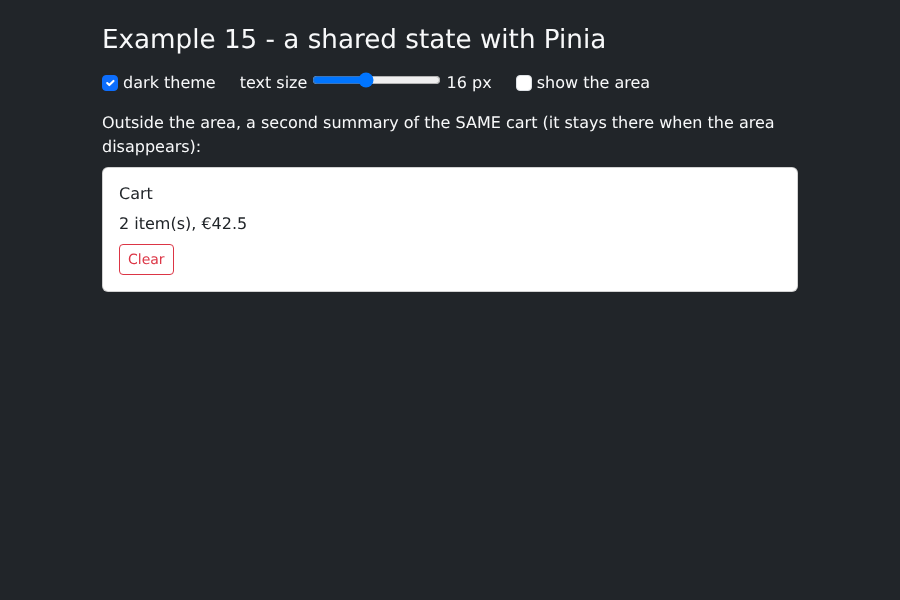
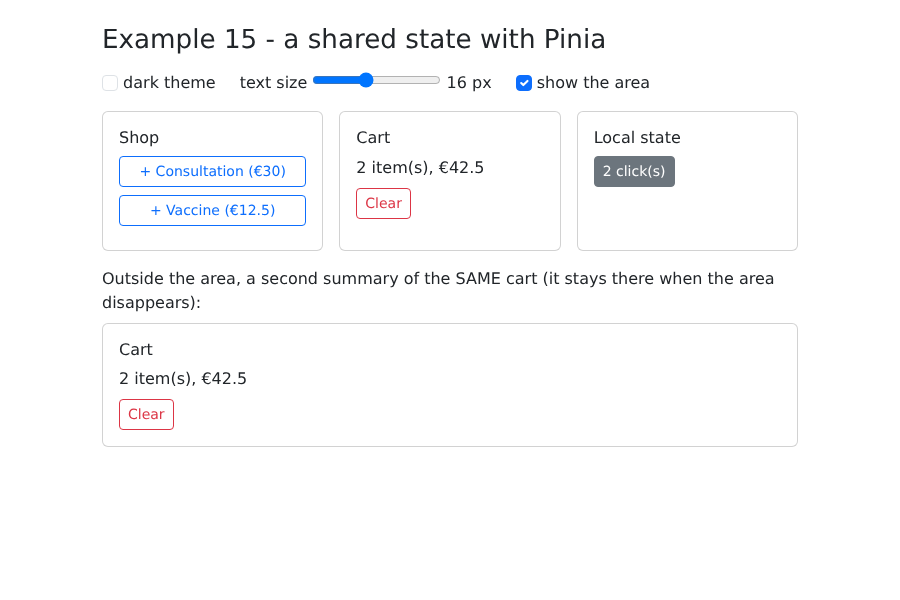
- Line 35: Unchecking “show the area” removes the three components from the page;
- line 41: a second summary of the same shopping cart, outside the area.
Same question as Example 23 from course [NestJS] (application, query, and client scopes), adapted for the browser:
Data | Where? | Lifetime |
The counter for LocalCounter | the component's local state | disappears along with the component |
the shopping cart | a Pinia store | the entire application, up to F5 |
preferences | a Pinia store + localStorage | survives F5 and browser closure |
Two items added and two clicks:
The section was removed and the dark theme was selected: the shopping cart is still there; if the section is displayed again, the local counter resets to zero: