4. Routing
A [Vue.js] application loads only one page, HTML. However, the [RdvMedecins] application has a login page, a calendar page, a “My area” page... Each has its own URL ([/login], [/schedule], [/my-area]), which can be bookmarked, and the browser’s Back and Forward buttons work. This is the work of the router, the [vue-router] library.
4.1. Example 13: The Router
The router is added to the application in [main.ts]:
| // =========================================================================
// 13-router/src/main.ts
// -------------------------------------------------------------------------
// app.use(router): the router is added to the application. The components
// <RouterLink> and <RouterView> then become usable everywhere.
// =========================================================================
import { createApp } from 'vue';
import 'bootstrap/dist/css/bootstrap.min.css';
import App from './App.vue';
import { router } from './router';
createApp(App).use(router).mount('#app');
|
- Line 13: [app.use(...)] installs an extension ([plugin]): The components [<RouterLink>] and [<RouterView>], and the functions [useRoute()] and [useRouter()], become available everywhere.
The example data, "hard-coded":
| // "hard-coded" data, so as not to depend on a server in this example
export interface Doctor {
id: number;
title: string;
firstName: string;
lastName: string;
specialty: string;
}
export const DOCTORS: Doctor[] = [
{ id: 1, title: 'Mme', firstName: 'Marie', lastName: 'PELISSIER', specialty: 'general practitioner' },
{ id: 2, title: 'Mr', firstName: 'Paul', lastName: 'TATOU', specialty: 'pediatrician' },
{ id: 3, title: 'Melle', firstName: 'Sophie', lastName: 'DUPONT', specialty: 'general practitioner' },
];
|
The routes:
| // =========================================================================
// 13-router/src/router.ts - the ROUTES of the application
// -------------------------------------------------------------------------
// A Vue.js application is a single-page application (SPA: Single
// Page Application): the browser loads only ONE HTML page. When an
// internal link is clicked, no request is sent to the server:
// the router changes the address displayed by the browser, and replaces the
// component displayed in <RouterView>.
//
// A route associates a PATH with a COMPONENT (called a "view", in the
// sense of a screen of the application):
// '/doctors/:id' :id is a parameter (/doctors/2 -> id = "2");
// '/:pathMatch(.*)*' any path: the "not found" page
// (the most precise route always wins).
//
// createWebHashHistory: the addresses look like /13-router/#/doctors/2.
// Everything after the # stays in the browser: reloading the page (F5)
// always requests /13-router/ again, which exists. It is the simplest mode
// when the server knows nothing about the router - here, the Vite server, which
// serves twenty examples at once. The case study will use "clean"
// addresses (createWebHistory: /schedule, /doctors...).
// =========================================================================
import { createRouter, createWebHashHistory } from 'vue-router';
import Home from './views/Home.vue';
import DoctorList from './views/DoctorList.vue';
import DoctorDetail from './views/DoctorDetail.vue';
import Search from './views/Search.vue';
import NotFoundPage from './views/NotFoundPage.vue';
export const router = createRouter({
history: createWebHashHistory(),
routes: [
{ path: '/', name: 'home', component: Home },
{ path: '/doctors', name: 'doctors', component: DoctorList },
// props: true -> the :id parameter is passed to the component as a PROP
// (the component then no longer depends on the router: easier to reuse)
{ path: '/doctors/:id', name: 'doctor', component: DoctorDetail, props: true },
{ path: '/search', name: 'search', component: Search },
// a redirection: the old address leads to the new one
{ path: '/physicians', redirect: '/doctors' },
{ path: '/:pathMatch(.*)*', name: 'not-found', component: NotFoundPage },
],
});
|
- Lines 33–43: A route associates a path with a component, which is called a “view” (in the sense of an application screen; this has nothing to do with the [Handlebars] views from the [NestJS] course, except for their role);
- line 34: a route can have a name, which is more stable than its path for creating links;
- Line 38: [:id] is a parameter: [/doctors/2] displays [DoctorDetail] along with [id = "2"]. The option [props: true] passes it to the component as a prop: the component is then no longer dependent on the router;
- line 41: a redirect: the address [/physicians] leads to [/doctors];
- line 42: an arbitrary path: the “page not found” page. It only receives addresses that no other route recognizes: [vue-router] sorts routes by the precision of their path; the most precise one takes precedence (it is still placed last for readability);
- line 32: history mode. With [createWebHashHistory], the addresses take the form [/13-router/#/doctors/2]: anything following [#] is never sent to the server, and reloading the page (F5) always requests [/13-router/], which exists. This is the simplest approach when the server does not know the client’s routes, which is the case for the server at [Vite], which serves twenty examples at a time. The case study will use [createWebHistory] and “clean” addresses ([/schedule]), which requires a little extra effort on the server’s part.
The application’s “shell”:
| <!--
=========================================================================
13-router/src/App.vue - the "shell" of the application
-------------------------------------------------------------------------
- <RouterLink to="...">: an internal link. It produces an <a> tag,
but a click does not reload the page: it is the router that acts.
The link of the displayed page receives the class "router-link-active"
(here replaced by "active", the Bootstrap one);
- <RouterView />: the place where the component of the current route
is displayed.
=========================================================================
-->
<script setup lang="ts">
import { RouterLink, RouterView, useRoute } from 'vue-router';
// useRoute(): the current route (path, parameters, query...), reactive
const route = useRoute();
</script>
<template>
<div class="container py-4">
<h1 class="h3 mb-3">Example 13 - the router</h1>
<nav class="nav nav-pills mb-3">
<RouterLink class="nav-link" active-class="active" to="/">Home</RouterLink>
<!-- to can be an object: the NAME of the route rather than its path -->
<RouterLink class="nav-link" active-class="active" :to="{ name: 'doctors' }">Doctors</RouterLink>
<RouterLink class="nav-link" active-class="active" :to="{ name: 'search', query: { q: 'general practitioner' } }">Search</RouterLink>
<RouterLink class="nav-link" to="/physicians">/physicians (redirection)</RouterLink>
<RouterLink class="nav-link" to="/unknown-page">Broken link</RouterLink>
</nav>
<p class="small text-muted">current route: <code>{{ route.fullPath }}</code> (name: {{ String(route.name) }})</p>
<div class="card p-3">
<RouterView />
</div>
</div>
</template>
|
- line 17: the current route (path, parameters, [query]...), which is dynamic: the template updates when it changes;
- line 24: [<RouterLink>] generates a [<a>] tag, but clicking does not reload the page: the router changes the address and the displayed component. The link on the current page is assigned the class specified by [active-class] (here, [active], which is the class of [Bootstrap]);
- line 26: the destination can be an object: the route name rather than its path;
- line 27: a link with query parameters: [/search?q=general practitioner];
- line 33: the location where the current route component is displayed.
The pages. The list of doctors generates links with parameters:
| <!-- 13-router/src/views/DoctorList.vue - links with a parameter -->
<script setup lang="ts">
import { RouterLink } from 'vue-router';
import { DOCTORS } from '../data';
</script>
<template>
<ul class="mb-0">
<li v-for="m in DOCTORS" :key="m.id">
<!-- { name, params }: the router builds the address /doctors/2 itself -->
<RouterLink :to="{ name: 'doctor', params: { id: m.id } }">{{ m.title }} {{ m.firstName }} {{ m.lastName }}</RouterLink>
</li>
</ul>
</template>
|
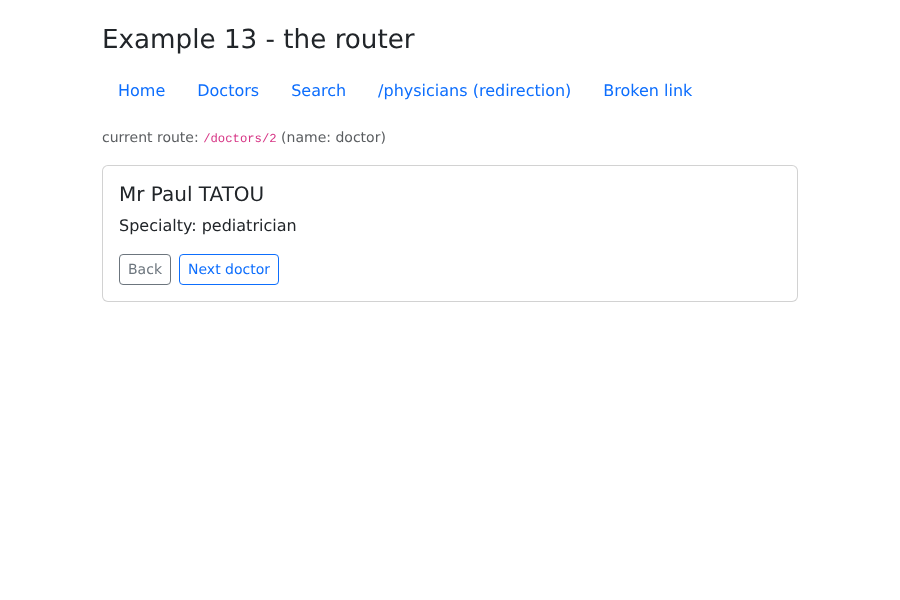
- line 11: the router itself constructs the address [/doctors/2] from the route name and its parameters.
A doctor’s page:
| <!--
13-router/src/views/DoctorDetail.vue - a page with a parameter
The id arrives as a PROP (props: true in router.ts), as a string.
useRouter() gives the router itself, to navigate BY CODE.
-->
<script setup lang="ts">
import { computed } from 'vue';
import { useRouter } from 'vue-router';
import { DOCTORS } from '../data';
const props = defineProps<{ id: string }>();
const router = useRouter();
// computed: when going from /doctors/1 to /doctors/2, Vue REUSES the
// same component and only changes the prop - the computed follows
const doctor = computed(() => DOCTORS.find((m) => m.id === Number(props.id)) ?? null);
const next = computed(() => (Number(props.id) % DOCTORS.length) + 1);
</script>
<template>
<div v-if="doctor">
<h2 class="h5">{{ doctor.title }} {{ doctor.firstName }} {{ doctor.lastName }}</h2>
<p>Specialty: {{ doctor.specialty }}</p>
<div class="d-flex gap-2">
<!-- navigation by code: router.push(...) or router.back() -->
<button class="btn btn-sm btn-outline-secondary" @click="router.back()">Back</button>
<button class="btn btn-sm btn-outline-primary" @click="router.push({ name: 'doctor', params: { id: next } })">Next doctor</button>
</div>
</div>
<p v-else class="text-danger mb-0">Doctor no. {{ id }} does not exist.</p>
</template>
|
- Line 11: The parameter [:id] is passed as a prop, in string form;
- line 12: the router itself, to navigate through the code;
- line 16: switching from [/doctors/1] to [/doctors/2] does not recreate the component: [Vue.js] reuses the one that is displayed and only changes its prop. A [computed] follows this change; code placed in [onMounted] would, however, be executed only once;
- lines 26 and 27: return to the previous page, go to another page.
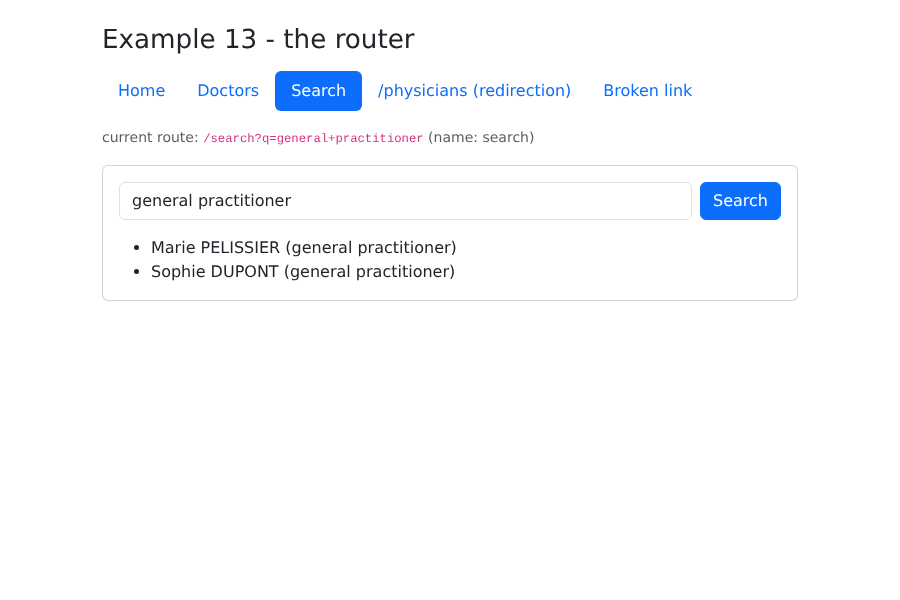
The search is a page entirely described by its URL, just like the GET form from the [NestJS] course:
| <!--
13-router/src/views/Search.vue - a page driven by the QUERY of the URL
(/search?q=pediatrician). As with the GET form of the NestJS course, the
page is entirely described by its address: it can be
bookmarked, reloaded, navigated back to.
-->
<script setup lang="ts">
import { computed, ref, watch } from 'vue';
import { useRoute, useRouter } from 'vue-router';
import { DOCTORS } from '../data';
const route = useRoute();
const router = useRouter();
// the input field starts with the value of the URL...
const input = ref(String(route.query.q ?? ''));
// ... and follows the URL if it changes (Back button for example)
watch(() => route.query.q, (q) => (input.value = String(q ?? '')));
const results = computed(() => {
const q = String(route.query.q ?? '').toLowerCase();
return DOCTORS.filter((m) => `${m.firstName} ${m.lastName} ${m.specialty}`.toLowerCase().includes(q));
});
function search(): void {
// we change the URL; the display follows the URL (computed above)
router.push({ name: 'search', query: { q: input.value } });
}
</script>
<template>
<form class="d-flex gap-2 mb-3" @submit.prevent="search">
<input v-model="input" class="form-control" placeholder="name or specialty">
<button class="btn btn-primary">Search</button>
</form>
<ul class="mb-0">
<li v-for="m in results" :key="m.id">{{ m.firstName }} {{ m.lastName }} ({{ m.specialty }})</li>
</ul>
</template>
|
- line 16: [route.query] contains the parameters of URL ([?q=...]);
- line 18: if URL changes (Previous button), the field follows;
- line 20: the results depend on URL, not on the field;
- line 27: searching changes the URL; the display updates accordingly. You can bookmark the search, reload it, or go back.
4.2. Example 14: Navigation Restrictions
Some pages require you to be logged in, while others require a specific role. This example simulates a login without a server:
| // =========================================================================
// 14-guards/src/session.ts - a SIMULATED session (without a server)
// -------------------------------------------------------------------------
// The logged-in user, in a ref declared at MODULE level: all
// the files that import this module share the same one. (Example 15 will do
// the same thing, better, with Pinia; example 18 with a real server.)
// =========================================================================
import { ref } from 'vue';
export type Role = 'ADMIN' | 'DOCTOR' | 'USER';
export interface User {
login: string;
role: Role;
}
export const user = ref<User | null>(null);
// three "hard-coded" accounts (password = login)
const ACCOUNTS: Record<string, Role> = { admin: 'ADMIN', pelissier: 'DOCTOR', martin: 'USER' };
export function logIn(login: string, password: string): boolean {
const role = ACCOUNTS[login];
if (role === undefined || password !== login) {
return false;
}
user.value = { login, role };
return true;
}
export function logOut(): void {
user.value = null;
}
|
- Line 18: a [ref] declared at the module level: all files that import [session.ts] share the same one.
The routes and their guards:
| // =========================================================================
// 14-guards/src/router.ts - PROTECTED routes
// -------------------------------------------------------------------------
// meta: free information attached to a route. Here:
// - meta.requiresLogin: the page requires being logged in;
// - meta.roles : the authorized roles (absent = all).
//
// router.beforeEach(...): a NAVIGATION GUARD, executed before EACH
// page change. It returns:
// - true : the navigation continues;
// - another address : redirection;
// It is the client-side equivalent of the NestJS guards (JwtAuthGuard,
// RolesGuard) - with a FUNDAMENTAL difference: a client guard is
// only a comfort. The client code is in the hands of the user, who
// can modify it at will. The real protection of the data remains that
// of the SERVER (see the chapter on the black box).
// =========================================================================
import { createRouter, createWebHashHistory } from 'vue-router';
import { user, type Role } from './session';
import Home from './views/Home.vue';
import Login from './views/Login.vue';
import Schedule from './views/Schedule.vue';
// we declare to TypeScript the meta properties we use
declare module 'vue-router' {
interface RouteMeta {
requiresLogin?: boolean;
roles?: Role[];
}
}
export const router = createRouter({
history: createWebHashHistory(),
routes: [
{ path: '/', component: Home },
{ path: '/login', component: Login },
{ path: '/schedule', component: Schedule, meta: { requiresLogin: true } },
{
path: '/administration',
// LAZY loading: the code of this component is only downloaded
// on the first visit of the page (Vite makes a separate file of it)
component: () => import('./views/Administration.vue'),
meta: { requiresLogin: true, roles: ['ADMIN'] },
},
],
});
router.beforeEach((to) => {
if (to.meta.requiresLogin && user.value === null) {
// not logged in: to the login page, remembering where we wanted to go
return { path: '/login', query: { redirect: to.fullPath } };
}
if (to.meta.roles && user.value && !to.meta.roles.includes(user.value.role)) {
// logged in, but not with the right role: back to the home page, with a reason
return { path: '/', query: { denied: to.fullPath } };
}
return true;
});
|
- Lines 26–31: We declare in [TypeScript] the properties that we will store in the [meta] field of the routes. [meta] accepts arbitrary data; declaring these properties allows them to be used without type casting;
- line 38: the page requires the user to be logged in;
- line 43: deferred loading: the code for this component is downloaded only on the first visit to the page. [Vite] stores it in a separate file. This way, an application loads only what it needs at startup;
- Lines 49–59: a navigation guard, executed before EACH page change. It returns [true] to allow access, or another address to redirect to:
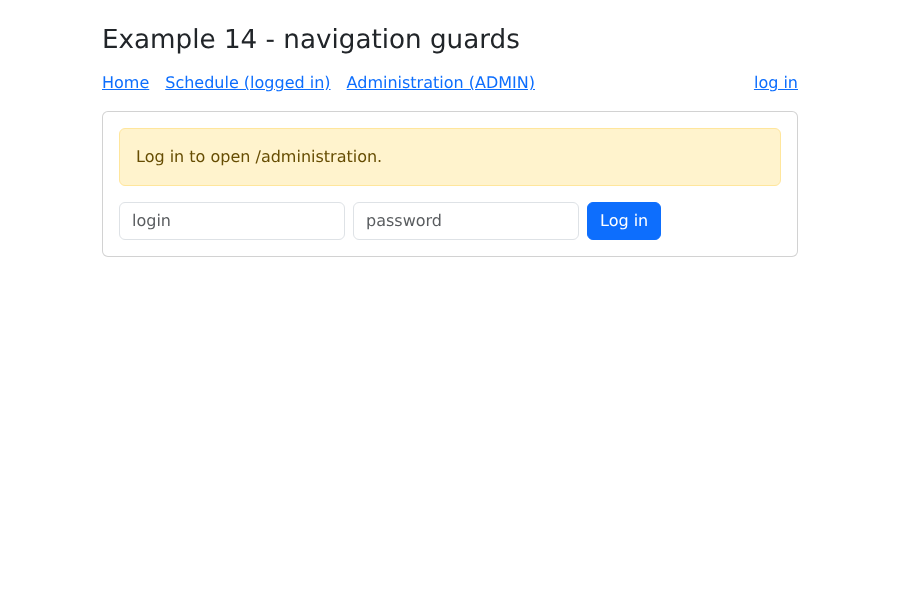
- not logged in: redirects to [/login], retaining the requested page in the [redirect] parameter;
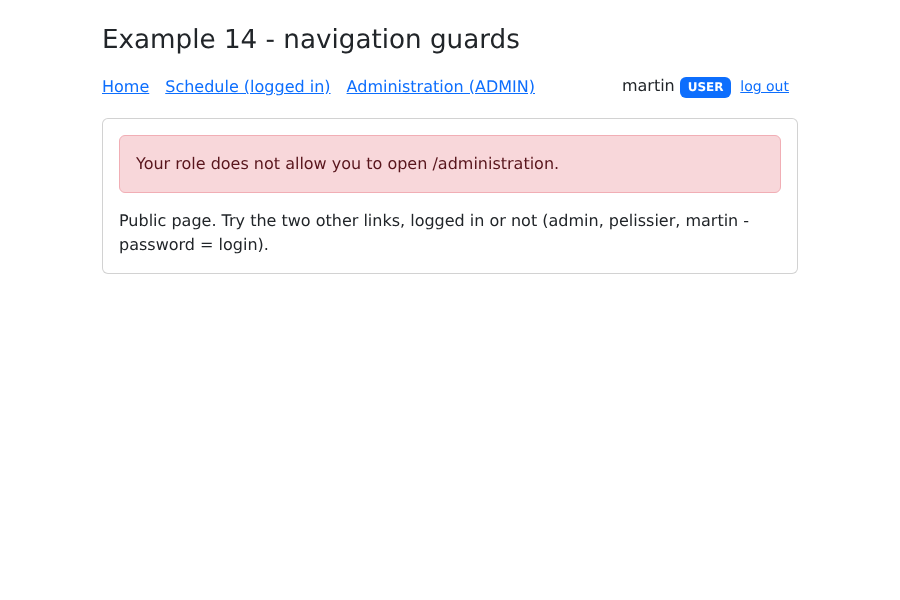
- logged in without the correct role: returns to the home page, with the reason for denial.
The login page redirects the user to where they wanted to go:
| <!--
14-guards/src/views/Login.vue
After logging in, the user is sent back to the page they wanted to
open (parameter ?redirect=... set by the guard), or to the home page.
-->
<script setup lang="ts">
import { ref } from 'vue';
import { useRoute, useRouter } from 'vue-router';
import { logIn } from '../session';
const route = useRoute();
const router = useRouter();
const login = ref('');
const password = ref('');
const error = ref(false);
function submit(): void {
error.value = !logIn(login.value.trim(), password.value);
if (!error.value) {
const redirect = route.query.redirect;
// only an INTERNAL path is accepted: it starts with /, but not with //
// (//site.com/... designates ANOTHER site) - no redirection to another site
const internal = typeof redirect === 'string' && redirect.startsWith('/') && !redirect.startsWith('//');
router.push(internal ? redirect : '/');
}
}
</script>
<template>
<p v-if="route.query.redirect" class="alert alert-warning">Log in to open {{ route.query.redirect }}.</p>
<form class="d-flex flex-wrap gap-2" @submit.prevent="submit">
<input v-model="login" class="form-control w-auto" placeholder="login" autocomplete="username">
<input v-model="password" type="password" class="form-control w-auto" placeholder="password" autocomplete="current-password">
<button class="btn btn-primary">Log in</button>
</form>
<p v-if="error" class="text-danger mt-2 mb-0">Incorrect login or password.</p>
</template>
|
- Line 23: Only an INTERNAL path is accepted: it starts with [/], but not with [//] ([//site.com/...] refers to ANOTHER site). Redirecting to a full URL received in the URL would allow a malicious link to send the user, immediately after logging in, to another site imitating ours (a vulnerability known as [open redirect]).
The other files are very short:
| <script setup lang="ts">
import { RouterLink, RouterView, useRouter } from 'vue-router';
import { logOut, user } from './session';
const router = useRouter();
function onLogOut(): void {
logOut();
router.push('/');
}
</script>
<template>
<div class="container py-4" style="max-width: 720px">
<h1 class="h3 mb-3">Example 14 - navigation guards</h1>
<nav class="d-flex gap-3 align-items-center mb-3">
<RouterLink to="/">Home</RouterLink>
<RouterLink to="/schedule">Schedule (logged in)</RouterLink>
<RouterLink to="/administration">Administration (ADMIN)</RouterLink>
<span class="ms-auto">
<template v-if="user">
{{ user.login }} <span class="badge text-bg-primary">{{ user.role }}</span>
<button class="btn btn-sm btn-link" @click="onLogOut">log out</button>
</template>
<RouterLink v-else to="/login">log in</RouterLink>
</span>
</nav>
<div class="card p-3"><RouterView /></div>
</div>
</template>
|
| <script setup lang="ts">
import { useRoute } from 'vue-router';
const route = useRoute();
</script>
<template>
<!-- ?denied=...: set by the guard when the role does not fit -->
<p v-if="route.query.denied" class="alert alert-danger">Your role does not allow you to open {{ route.query.denied }}.</p>
<p class="mb-0">Public page. Try the two other links, logged in or not (admin, pelissier, martin - password = login).</p>
</template>
|
Clicking on “Administration (ADMIN)” while not logged in takes you to the login page:
When logged in with the account [martin] (role [USER]), the guard denies access to the administration page:
A FUNDAMENTAL note: a navigation guard is merely a convenience (to avoid displaying an unnecessary page). The client-side code is in the user’s hands; they can read and modify it in their browser. True data protection comes from the server, which verifies the user’s identity and role with every request. We’ll see this with the [RdvMedecins] server.